Final trueSpace 7.61 Beta 8 Unofficial Update
-
trueBlue
- Captain
- Posts: 5548
- Joined: 06 Jul 2009, 22:50
- Type the number ten into the box: 10
Re: Final trueSpace 7.61 Beta 8 Unofficial Update
New Update for trueSpace7.61 Beta 8 Unofficial Update
viewtopic.php?t=3732
Final Update November 15, 2020
Recommend that you completely Uninstall and Install trueSpace7.61 Beta 8 to a clean directory before installing this update. This update precedes all previous updates and recommend that you delete any and all previous updates
Recommend that you install Vray version 1.54 first before applying this update.
After applying this update, open trueSpace, Install/Load Vray from the Package Manager and Reset to Default Context
You can download Vray for tS7.61 version 1.54 here:
https://united3dartists.com/index.html
Point Edit widget(s)
Add
Period + LMB select the widget - Hides UnSelected elements
Coma + LMB select the widget - UnHides All elements
Workspace Layers 3
Initialize Layers button
Add
Initialize Layers Question script
Warning!
This will Reset all of your Layer Names and Colors!
Are you sure you want to continue?"
3D Text primitive Add
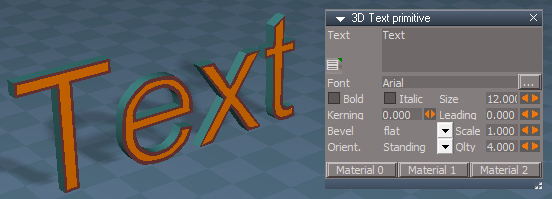
Material 0, Material 1, and Material 2 button scripts
Shows their materials in the Stack/Panels
CustomCommands
gridArray2Script
Fixed a couple of errors per Clinton Reese
toolbarScripts
Improvements
Fixed a few errors and issues
Add
New selecting method - Double click the toolbar's Handle
Note: After double clicking the toolbar's handle, it pops back to the original state
Select - Toolbar script
Add
Custom Toolbar floating panel for renaming the selected toolbar's Toolbar Frame
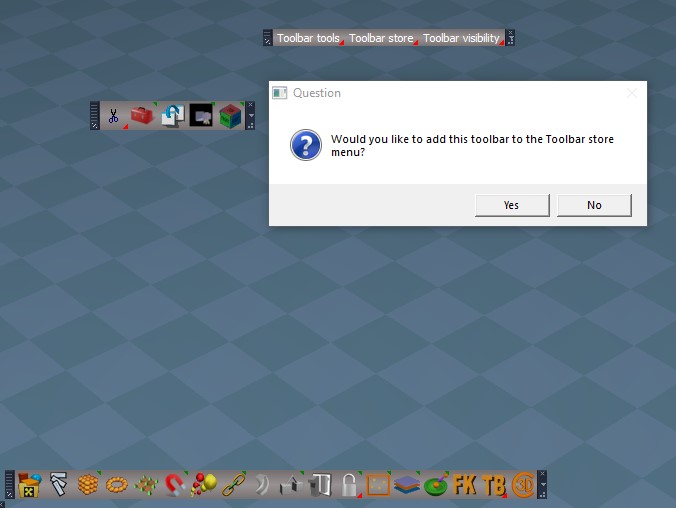
Includes a Question script for optionally adding the toolbar to the Toolbar store menu
ClintonToolbar/TB button's LMB command removes the ClintonsToolbarManagerToolbar's Prototype attribute in Windows Manager Space so that it can not be Reset
Note: This is for preserving any custom toolbars that have been added to the ClintonsToolbarManagerToolbar. This is useful for saving the toolbar with any layout
Toolbar Manager Help
Updated with new information
General usage
Position your toolbar and set it to 1D, 2D, Vertical, or Horizontal
Toolbars are selected by Double clicking on the toolbar's Handle or use your keyboard Esc key to Cancel
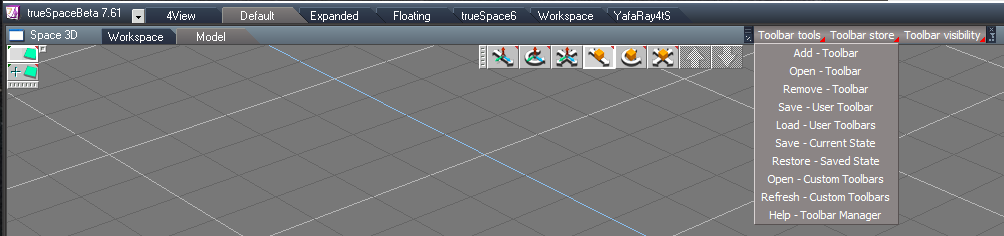
1. Press Add - Toolbar and Double click your toolbar’s Handle 2. Enter your new name, press Rename from the Custom Toolbar panel 3. Select Yes to add your toolbar to the Toolbar store menu and Double click the toolbar’s Handle
viewtopic.php?t=3732
Final Update November 15, 2020
Recommend that you completely Uninstall and Install trueSpace7.61 Beta 8 to a clean directory before installing this update. This update precedes all previous updates and recommend that you delete any and all previous updates
Recommend that you install Vray version 1.54 first before applying this update.
After applying this update, open trueSpace, Install/Load Vray from the Package Manager and Reset to Default Context
You can download Vray for tS7.61 version 1.54 here:
https://united3dartists.com/index.html
Point Edit widget(s)
Add
Period + LMB select the widget - Hides UnSelected elements
Coma + LMB select the widget - UnHides All elements
Workspace Layers 3
Initialize Layers button
Add
Initialize Layers Question script
Warning!
This will Reset all of your Layer Names and Colors!
Are you sure you want to continue?"
3D Text primitive Add
Material 0, Material 1, and Material 2 button scripts
Shows their materials in the Stack/Panels
CustomCommands
gridArray2Script
Fixed a couple of errors per Clinton Reese
toolbarScripts
Improvements
Fixed a few errors and issues
Add
New selecting method - Double click the toolbar's Handle
Note: After double clicking the toolbar's handle, it pops back to the original state
Select - Toolbar script
Add
Custom Toolbar floating panel for renaming the selected toolbar's Toolbar Frame
Includes a Question script for optionally adding the toolbar to the Toolbar store menu
ClintonToolbar/TB button's LMB command removes the ClintonsToolbarManagerToolbar's Prototype attribute in Windows Manager Space so that it can not be Reset
Note: This is for preserving any custom toolbars that have been added to the ClintonsToolbarManagerToolbar. This is useful for saving the toolbar with any layout
Toolbar Manager Help
Updated with new information
General usage
Position your toolbar and set it to 1D, 2D, Vertical, or Horizontal
Toolbars are selected by Double clicking on the toolbar's Handle or use your keyboard Esc key to Cancel
1. Press Add - Toolbar and Double click your toolbar’s Handle 2. Enter your new name, press Rename from the Custom Toolbar panel 3. Select Yes to add your toolbar to the Toolbar store menu and Double click the toolbar’s Handle
-
trueBlue
- Captain
- Posts: 5548
- Joined: 06 Jul 2009, 22:50
- Type the number ten into the box: 10
Re: Final trueSpace 7.61 Beta 8 Unofficial Update
New Update for trueSpace7.61 Beta 8 Unofficial Update
viewtopic.php?t=3732
Final Update November 17, 2020
Recommend that you completely Uninstall and Install trueSpace7.61 Beta 8 to a clean directory before installing this update. This update precedes all previous updates and recommend that you delete any and all previous updates
Recommend that you install Vray version 1.54 first before applying this update.
After applying this update, open trueSpace, Install/Load Vray from the Package Manager and Reset to Default Context
You can download Vray for tS7.61 version 1.54 here:
https://united3dartists.com/index.html
Found and fixed an error in the toolbarScripts and...
Toolbars.RsObj
ClintonToolbar
Toolbar Manager (TB) button
Update
LMB command Opens the toolbar if it is not open and removes the ClintonsToolbarManagerToolbar's Prototype attribute in Windows Manager Space so that it can not be Reset
Note: This is for preserving any custom toolbars that have been added to the ClintonsToolbarManagerToolbar. This is useful for saving the toolbar with any layout
PESnappingToolbar & Q_PESnappingToolbar
Add
Open Snapping toolbar
ClintonsToolbarManagerToolbar
Renamed buttons & removed Add toolbar to Menu CustomCommands
toolbarScripts
Fixed an error
HTMLhelp folder
Updated
General usage
Position your toolbar and set it to 1D, 2D, Vertical, or Horizontal
Toolbars are selected by Double clicking on the toolbar's Handle or use your keyboard Esc key to Cancel
1. Press Add - Toolbar and Double click your toolbar’s Handle
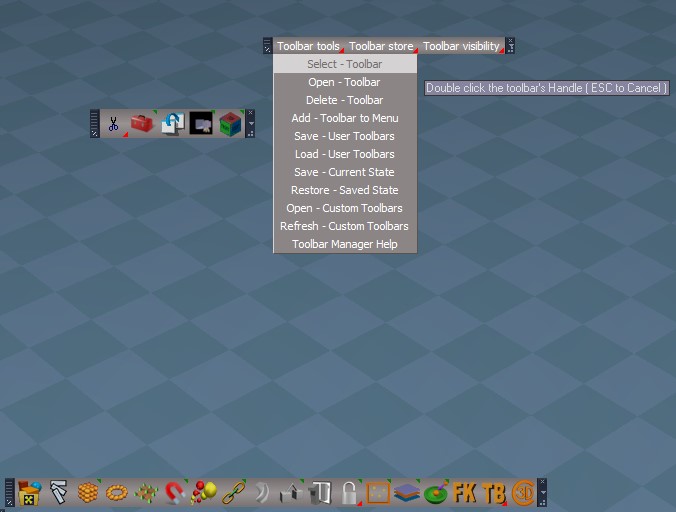
2. Enter your new name, press Rename from the Custom Toolbar panel
3. Select Yes to add your toolbar to the Toolbar store menu and Double click the toolbar’s Handle
viewtopic.php?t=3732
Final Update November 17, 2020
Recommend that you completely Uninstall and Install trueSpace7.61 Beta 8 to a clean directory before installing this update. This update precedes all previous updates and recommend that you delete any and all previous updates
Recommend that you install Vray version 1.54 first before applying this update.
After applying this update, open trueSpace, Install/Load Vray from the Package Manager and Reset to Default Context
You can download Vray for tS7.61 version 1.54 here:
https://united3dartists.com/index.html
Found and fixed an error in the toolbarScripts and...
Toolbars.RsObj
ClintonToolbar
Toolbar Manager (TB) button
Update
LMB command Opens the toolbar if it is not open and removes the ClintonsToolbarManagerToolbar's Prototype attribute in Windows Manager Space so that it can not be Reset
Note: This is for preserving any custom toolbars that have been added to the ClintonsToolbarManagerToolbar. This is useful for saving the toolbar with any layout
PESnappingToolbar & Q_PESnappingToolbar
Add
Open Snapping toolbar
ClintonsToolbarManagerToolbar
Renamed buttons & removed Add toolbar to Menu CustomCommands
toolbarScripts
Fixed an error
HTMLhelp folder
Updated
General usage
Position your toolbar and set it to 1D, 2D, Vertical, or Horizontal
Toolbars are selected by Double clicking on the toolbar's Handle or use your keyboard Esc key to Cancel
1. Press Add - Toolbar and Double click your toolbar’s Handle
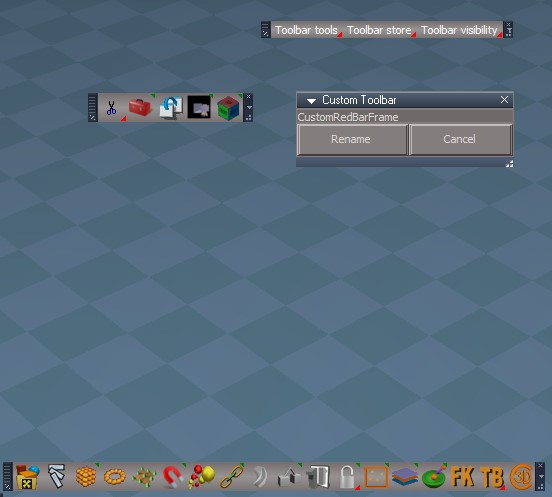
2. Enter your new name, press Rename from the Custom Toolbar panel
3. Select Yes to add your toolbar to the Toolbar store menu and Double click the toolbar’s Handle
-
trueBlue
- Captain
- Posts: 5548
- Joined: 06 Jul 2009, 22:50
- Type the number ten into the box: 10
Re: Final trueSpace 7.61 Beta 8 Unofficial Update
New Update for trueSpace7.61 Beta 8 Unofficial Update
viewtopic.php?t=3732
Final Update November 22, 2020
Recommend that you completely Uninstall and Install trueSpace7.61 Beta 8 to a clean directory before installing this update. This update precedes all previous updates and recommend that you delete any and all previous updates
Recommend that you install Vray version 1.54 first before applying this update.
After applying this update, open trueSpace, Install/Load Vray from the Package Manager and Reset to Default Context
You can download Vray for tS7.61 version 1.54 here:
https://united3dartists.com/index.html
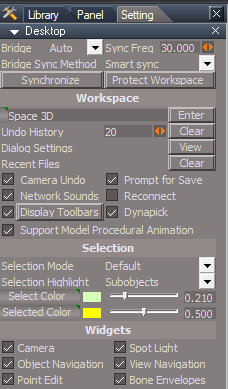
Workspace Desktop Display Toolbars
Add
Display Toolbars button
WindowsManager.DisplayAllToolbars = true
WindowsManager.Activate()
WindowsManager.UpdateWindowsStructure()
Node.Value('%THIS_NAME%', 'AllToolbars') = true
Model/Help Add
Toolbars button
Closes all opened Workspace toolbars and floating panels
Cameras.RsObj
Camera
Add
Flatten script
Note: To restore the Camera to it's original state, run the included Flatten script inside the Camera node
CustomCommands
Add
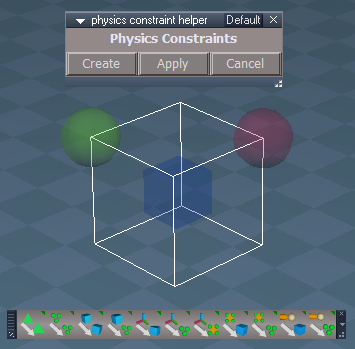
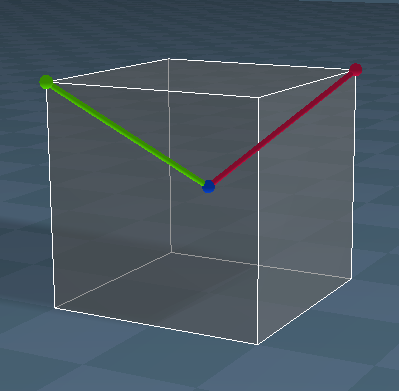
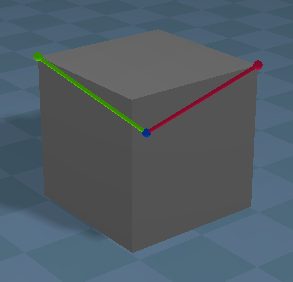
physics constraint helper Author - Clinton Reese
Before After Fixed a few errors
Modified the helpers so that they can be used with the Snapping tools
Add
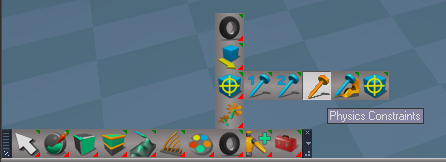
Physics Constraints icon: WorkspaceNav
WorkspaceMain2
Physics.RsObj
Objects
Update all of the panels and buttons to Remove Fixation1 & Fixation2 / Preferences to the PhysObject's & PhysGroupObject's Constraints aspect
Widgets
Enabled "In Front" to all widgets
viewtopic.php?t=3732
Final Update November 22, 2020
Recommend that you completely Uninstall and Install trueSpace7.61 Beta 8 to a clean directory before installing this update. This update precedes all previous updates and recommend that you delete any and all previous updates
Recommend that you install Vray version 1.54 first before applying this update.
After applying this update, open trueSpace, Install/Load Vray from the Package Manager and Reset to Default Context
You can download Vray for tS7.61 version 1.54 here:
https://united3dartists.com/index.html
Workspace Desktop Display Toolbars
Add
Display Toolbars button
WindowsManager.DisplayAllToolbars = true
WindowsManager.Activate()
WindowsManager.UpdateWindowsStructure()
Node.Value('%THIS_NAME%', 'AllToolbars') = true
Model/Help Add
Toolbars button
Closes all opened Workspace toolbars and floating panels
Cameras.RsObj
Camera
Add
Flatten script
Note: To restore the Camera to it's original state, run the included Flatten script inside the Camera node
CustomCommands
Add
physics constraint helper Author - Clinton Reese
Before After Fixed a few errors
Modified the helpers so that they can be used with the Snapping tools
Add
Physics Constraints icon: WorkspaceNav
WorkspaceMain2
Physics.RsObj
Objects
Update all of the panels and buttons to Remove Fixation1 & Fixation2 / Preferences to the PhysObject's & PhysGroupObject's Constraints aspect
Widgets
Enabled "In Front" to all widgets
-
trueBlue
- Captain
- Posts: 5548
- Joined: 06 Jul 2009, 22:50
- Type the number ten into the box: 10
Re: Final trueSpace 7.61 Beta 8 Unofficial Update
New Update for trueSpace7.61 Beta 8 Unofficial Update
viewtopic.php?t=3732
Final Update November 23, 2020
Recommend that you completely Uninstall and Install trueSpace7.61 Beta 8 to a clean directory before installing this update. This update precedes all previous updates and recommend that you delete any and all previous updates
Recommend that you install Vray version 1.54 first before applying this update.
After applying this update, open trueSpace, Install/Load Vray from the Package Manager and Reset to Default Context
You can download Vray for tS7.61 version 1.54 here:
https://united3dartists.com/index.html
Toolbars.RsObj
CustomToolbar
Add
Copy & Paste icon Tip: Copy & Paste multiple items to another node?
In the Link Editor, navigate inside the node you want the selected items to be placed and the press the Copy & Paste button
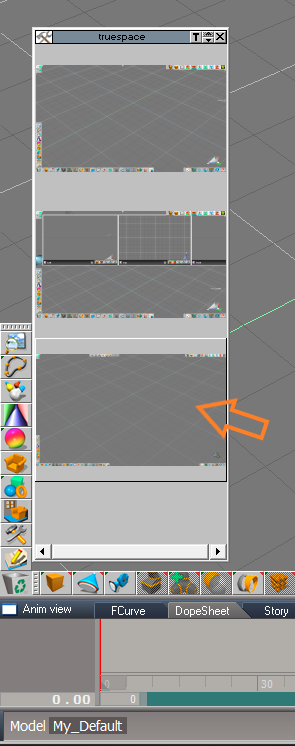
Cut and then Paste works the same way
CustomCommands
physics constraint helper Author - Clinton Reese
Fixed another error
viewtopic.php?t=3732
Final Update November 23, 2020
Recommend that you completely Uninstall and Install trueSpace7.61 Beta 8 to a clean directory before installing this update. This update precedes all previous updates and recommend that you delete any and all previous updates
Recommend that you install Vray version 1.54 first before applying this update.
After applying this update, open trueSpace, Install/Load Vray from the Package Manager and Reset to Default Context
You can download Vray for tS7.61 version 1.54 here:
https://united3dartists.com/index.html
Toolbars.RsObj
CustomToolbar
Add
Copy & Paste icon Tip: Copy & Paste multiple items to another node?
In the Link Editor, navigate inside the node you want the selected items to be placed and the press the Copy & Paste button
Cut and then Paste works the same way
CustomCommands
physics constraint helper Author - Clinton Reese
Fixed another error
-
trueBlue
- Captain
- Posts: 5548
- Joined: 06 Jul 2009, 22:50
- Type the number ten into the box: 10
Re: Final trueSpace 7.61 Beta 8 Unofficial Update
New Update for trueSpace7.61 Beta 8 Unofficial Update
viewtopic.php?t=3732
Final Update December 18, 2020
Recommend that you completely Uninstall and Install trueSpace7.61 Beta 8 to a clean directory before installing this update. This update precedes all previous updates and recommend that you delete any and all previous updates
Recommend that you install Vray version 1.54 first before applying this update.
After applying this update, open trueSpace, Install/Load Vray from the Package Manager and Reset to Default Context
You can download Vray for tS7.61 version 1.54 here:
https://united3dartists.com/index.html
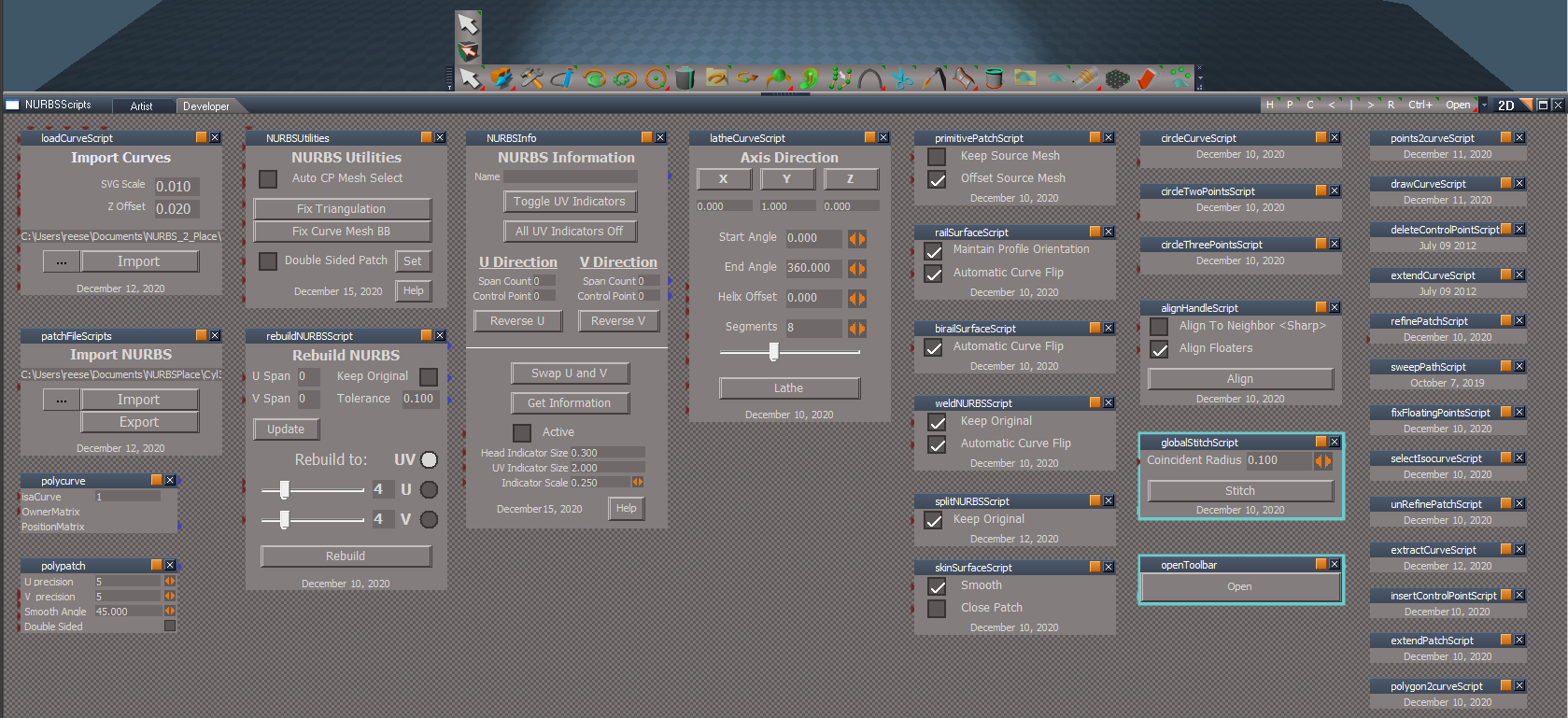
Workspace NURBS Patches & Curves version December 16, 2020 Author - Clinton Reese
Update
All panel's title & buttons
NURBStoCPMeshSelection script
Add Try & Catch Error 'Undefined error when using with Rectangle Select'
WARNING! When using Workspace NURBS and point editing with the Control Points, DO NOT use the Delete icon or your keyboard's Delete key!
Toolbars
NURBS toolbar Author - Clinton Reese
Update
Reduced the length of the toolbar by moving icons inside other icons
Add
Edit selected NURBS icon 'For entering into point edit mode when selecting NURBS Patches or Curves'
Add
NURBS Utility icon
Changed
Select CP Mesh icon
RMB opens the NURBS Information panel
CustomCommands
Update
Mirror Matrix Author - Clinton Reese
Select Author - Clinton Reese
Update NURBS & Curves scripts 'For selecting NURBS & Curves'
RectSelect Author - Clinton Reese
Add
Select CP Mesh script 'For selecting NURBS & Curves in 3D Space'
Clintons3dPlugin.rsx v.1638425 Author - Clinton Reese
Show/ShowAll Hide/HideAll xml files
Updated to include NURBS Author - Clinton Reese
Snapping Scripts
Updated to include NURBS Author - Clinton Reese
Widgets
Default Context
Add
NURBS Locking script 'For selecting NURBS to Lock'
NURBS Unlocking script 'For selecting NURBS to Unlock'
Object Navigation Widget(s) & Selector cage/Enter edit mode
Add
No Lights or NURBS script 'For stopping Lights & NURBS's Control Points mesh from entering into point editing mode'
Components - Compositing
Update
Color Picker Author - Clinton Reese
Added a Luminosity and Saturation UI
Updated the Save Swatch script to include saving a color image
Objects - Script objects library
Update
GearObj
Includes Mesh Normals node Author - Clinton Reese
Primitives
Text
Text attribute
Enable
Update on change
Add
Gear primitive
Use Flatten after creating the Gear primitive
Copy icon(s)
LMB command
Activity.Run('/Scripts/Commands/Copy') Author - Clinton Reese
Copies multiple selected objects and relocates the copied objects in the Link Editor
RMB command
Node.Copy('', '')
Original command copies the first selected object
Window.Shortcuts.xml
Workspace 3D Window & Link Editor Window
Ctrl + C
Activity.Run('/Scripts/Commands/Copy') Author - Clinton Reese
Material Editor
D3D Material Converter
Add
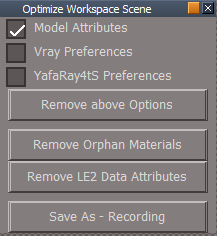
Fix/Remove Orphan Materials script Author - Clinton Reese
Note: If you use Seperate Selection on any object that has multple materials, the object can have materials that are no longer being used. This script removes those materials from the scene
Optimize Workspace Scene
Moved to Preferences
Init.js & Reset.js
Updated to load Optimize Workspace Scene.RsObj to Preferences
viewtopic.php?t=3732
Final Update December 18, 2020
Recommend that you completely Uninstall and Install trueSpace7.61 Beta 8 to a clean directory before installing this update. This update precedes all previous updates and recommend that you delete any and all previous updates
Recommend that you install Vray version 1.54 first before applying this update.
After applying this update, open trueSpace, Install/Load Vray from the Package Manager and Reset to Default Context
You can download Vray for tS7.61 version 1.54 here:
https://united3dartists.com/index.html
Workspace NURBS Patches & Curves version December 16, 2020 Author - Clinton Reese
All panel's title & buttons
NURBStoCPMeshSelection script
Add Try & Catch Error 'Undefined error when using with Rectangle Select'
WARNING! When using Workspace NURBS and point editing with the Control Points, DO NOT use the Delete icon or your keyboard's Delete key!
Toolbars
NURBS toolbar Author - Clinton Reese
Update
Reduced the length of the toolbar by moving icons inside other icons
Add
Edit selected NURBS icon 'For entering into point edit mode when selecting NURBS Patches or Curves'
Add
NURBS Utility icon
Changed
Select CP Mesh icon
RMB opens the NURBS Information panel
CustomCommands
Update
Mirror Matrix Author - Clinton Reese
Select Author - Clinton Reese
Update NURBS & Curves scripts 'For selecting NURBS & Curves'
RectSelect Author - Clinton Reese
Add
Select CP Mesh script 'For selecting NURBS & Curves in 3D Space'
Clintons3dPlugin.rsx v.1638425 Author - Clinton Reese
Show/ShowAll Hide/HideAll xml files
Updated to include NURBS Author - Clinton Reese
Snapping Scripts
Updated to include NURBS Author - Clinton Reese
Widgets
Default Context
Add
NURBS Locking script 'For selecting NURBS to Lock'
NURBS Unlocking script 'For selecting NURBS to Unlock'
Object Navigation Widget(s) & Selector cage/Enter edit mode
Add
No Lights or NURBS script 'For stopping Lights & NURBS's Control Points mesh from entering into point editing mode'
Components - Compositing
Update
Color Picker Author - Clinton Reese
Added a Luminosity and Saturation UI
Updated the Save Swatch script to include saving a color image
Objects - Script objects library
Update
GearObj
Includes Mesh Normals node Author - Clinton Reese
Primitives
Text
Text attribute
Enable
Update on change
Add
Gear primitive
Use Flatten after creating the Gear primitive
Copy icon(s)
LMB command
Activity.Run('/Scripts/Commands/Copy') Author - Clinton Reese
Copies multiple selected objects and relocates the copied objects in the Link Editor
RMB command
Node.Copy('', '')
Original command copies the first selected object
Window.Shortcuts.xml
Workspace 3D Window & Link Editor Window
Ctrl + C
Activity.Run('/Scripts/Commands/Copy') Author - Clinton Reese
Material Editor
D3D Material Converter
Add
Fix/Remove Orphan Materials script Author - Clinton Reese
Note: If you use Seperate Selection on any object that has multple materials, the object can have materials that are no longer being used. This script removes those materials from the scene
Optimize Workspace Scene
Moved to Preferences
Init.js & Reset.js
Updated to load Optimize Workspace Scene.RsObj to Preferences
-
trueBlue
- Captain
- Posts: 5548
- Joined: 06 Jul 2009, 22:50
- Type the number ten into the box: 10
Re: Final trueSpace 7.61 Beta 8 Unofficial Update
New Update for trueSpace7.61 Beta 8 Unofficial Update
viewtopic.php?t=3732
Final Update December 20, 2020
Recommend that you completely Uninstall and Install trueSpace7.61 Beta 8 to a clean directory before installing this update. This update precedes all previous updates and recommend that you delete any and all previous updates
Recommend that you install Vray version 1.54 first before applying this update.
After applying this update, open trueSpace, Install/Load Vray from the Package Manager and Reset to Default Context
You can download Vray for tS7.61 version 1.54 here:
https://united3dartists.com/index.html
Widgets
Default Context
Add optional
Select CP Mesh script 'For selecting NURBS Patches & Curves in 3D Space for transformation' Default 'Not Active'
N + LMB click or drag in 3D Space = Toggles Active On/Off and opens it's panel
NURBS Information panel/A button = LMB click opens it's panel
Tip: Use your keyboard Up key to Exit CP Mesh selection
Object Navigation Widget(s) & Selector cage/Enter edit mode
No Lights or NURBS script 'For stopping Lights & NURBS's Control Points mesh from entering into point editing mode'
Update 'Include LODMesh if selected'
NURBS scripts
Sweep Path
Update
Captue and Restore Point Edit Selection mode
Restore changes to the Mesh Editor Settings
Disable Default Context/Select CP Mesh
Disable NURBSUtilities/Auto CP Mesh Select
Tip: A Cube with Cubic Projection & 2 layers of SDS makes a nice object to Sweep with a NURBS Curve
polycurve's & polypatch's controlPointMesh
Add
Exit & Edit buttons
viewtopic.php?t=3732
Final Update December 20, 2020
Recommend that you completely Uninstall and Install trueSpace7.61 Beta 8 to a clean directory before installing this update. This update precedes all previous updates and recommend that you delete any and all previous updates
Recommend that you install Vray version 1.54 first before applying this update.
After applying this update, open trueSpace, Install/Load Vray from the Package Manager and Reset to Default Context
You can download Vray for tS7.61 version 1.54 here:
https://united3dartists.com/index.html
Widgets
Default Context
Add optional
Select CP Mesh script 'For selecting NURBS Patches & Curves in 3D Space for transformation' Default 'Not Active'
N + LMB click or drag in 3D Space = Toggles Active On/Off and opens it's panel
NURBS Information panel/A button = LMB click opens it's panel
Tip: Use your keyboard Up key to Exit CP Mesh selection
Object Navigation Widget(s) & Selector cage/Enter edit mode
No Lights or NURBS script 'For stopping Lights & NURBS's Control Points mesh from entering into point editing mode'
Update 'Include LODMesh if selected'
Code: Select all
if(Node.IsLight('') || Node.Exists(Node.FirstSelected() + "/LODMesh") || Node.Exists(Node.FirstSelected() + "/nurbsNameDisplay"))
params.SetTerminationFlag()
return
Sweep Path
Update
Captue and Restore Point Edit Selection mode
Restore changes to the Mesh Editor Settings
Disable Default Context/Select CP Mesh
Disable NURBSUtilities/Auto CP Mesh Select
Tip: A Cube with Cubic Projection & 2 layers of SDS makes a nice object to Sweep with a NURBS Curve
polycurve's & polypatch's controlPointMesh
Add
Exit & Edit buttons
-
trueBlue
- Captain
- Posts: 5548
- Joined: 06 Jul 2009, 22:50
- Type the number ten into the box: 10
Re: Final trueSpace 7.61 Beta 8 Unofficial Update
New Update for trueSpace7.61 Beta 8 Unofficial Update
viewtopic.php?t=3732
Final Update December 28, 2020
Recommend that you completely Uninstall and Install trueSpace7.61 Beta 8 to a clean directory before installing this update. This update precedes all previous updates and recommend that you delete any and all previous updates
Recommend that you install Vray version 1.54 first before applying this update.
After applying this update, open trueSpace, Install/Load Vray from the Package Manager and Reset to Default Context
You can download Vray for tS7.61 version 1.54 here:
https://united3dartists.com/index.html
NURBS toolbar
Add
Point Edit selection icons NURBS scripts
Update
NURBSUtilities/Misc - Freeze NURBS or Curve
freezeCurve, 2
Add
Freeze Curve as Polygon Author - Clinton Reese 12/24/2020
Node.ConRemove(newmesh, "UV selection")
Fixed error
NURBS Utilities/Prep - Set Solid Patch
NURBSUtilities/Prep - Set Transparent Patch
primitivePatchScript
Rename polypatch to sourceObjectType
Sweep Path
Add
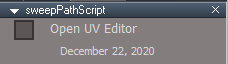
Open UV Editor settings Update
Capture and Restore Point Edit Selection mode
Capture and Restore Mesh Editor Settings
Disable Default Context/Select CP Mesh
Disable NURBSUtilities/Auto CP Mesh Select
Tip: A Cube with Cubic Projection & 2 layers of SDS makes a nice object to Sweep with a NURBS Curve
polycurve's & polypatch's controlPointMesh
Update UI
Add
Exit & Edit buttons
NURBSUtilities, rebuildNURBSScript, NURBSInfo, and latheCurveScript
Update
OpenPanelFrame Author - Clinton Reese
All NURBS tools
Add if needed
Capture and Restore Point Edit Selection mode
Fix Bad Geometry
Update
OpenPanelFrame Author - Clinton Reese
Widgets
Default Context
Add optional
Select CP Mesh script 'For selecting NURBS Patches & Curves in 3D Space for transformation'
Default 'Not Active'
N + LMB click or drag in 3D Space = Toggles Active On/Off and opens it's panel
NURBS Information panel/A button = LMB click opens it's panel
Tip: Use your keyboard Up key to Exit CP Mesh selection
Object Navigation Widget(s) & Selector cage/Enter edit mode
Update 'Include LODMesh if selected'
No Lights or NURBS script 'For stopping Lights & NURBS's from entering into point editing mode
viewtopic.php?t=3732
Final Update December 28, 2020
Recommend that you completely Uninstall and Install trueSpace7.61 Beta 8 to a clean directory before installing this update. This update precedes all previous updates and recommend that you delete any and all previous updates
Recommend that you install Vray version 1.54 first before applying this update.
After applying this update, open trueSpace, Install/Load Vray from the Package Manager and Reset to Default Context
You can download Vray for tS7.61 version 1.54 here:
https://united3dartists.com/index.html
NURBS toolbar
Add
Point Edit selection icons NURBS scripts
Update
NURBSUtilities/Misc - Freeze NURBS or Curve
freezeCurve, 2
Add
Freeze Curve as Polygon Author - Clinton Reese 12/24/2020
Node.ConRemove(newmesh, "UV selection")
Fixed error
NURBS Utilities/Prep - Set Solid Patch
NURBSUtilities/Prep - Set Transparent Patch
primitivePatchScript
Rename polypatch to sourceObjectType
Sweep Path
Add
Open UV Editor settings Update
Capture and Restore Point Edit Selection mode
Capture and Restore Mesh Editor Settings
Disable Default Context/Select CP Mesh
Disable NURBSUtilities/Auto CP Mesh Select
Tip: A Cube with Cubic Projection & 2 layers of SDS makes a nice object to Sweep with a NURBS Curve
polycurve's & polypatch's controlPointMesh
Update UI
Add
Exit & Edit buttons
NURBSUtilities, rebuildNURBSScript, NURBSInfo, and latheCurveScript
Update
OpenPanelFrame Author - Clinton Reese
All NURBS tools
Add if needed
Capture and Restore Point Edit Selection mode
Fix Bad Geometry
Update
OpenPanelFrame Author - Clinton Reese
Widgets
Default Context
Add optional
Select CP Mesh script 'For selecting NURBS Patches & Curves in 3D Space for transformation'
Default 'Not Active'
N + LMB click or drag in 3D Space = Toggles Active On/Off and opens it's panel
NURBS Information panel/A button = LMB click opens it's panel
Tip: Use your keyboard Up key to Exit CP Mesh selection
Object Navigation Widget(s) & Selector cage/Enter edit mode
Update 'Include LODMesh if selected'
No Lights or NURBS script 'For stopping Lights & NURBS's from entering into point editing mode
-
trueBlue
- Captain
- Posts: 5548
- Joined: 06 Jul 2009, 22:50
- Type the number ten into the box: 10
Re: Final trueSpace 7.61 Beta 8 Unofficial Update
New Update for trueSpace7.61 Beta 8 Unofficial Update
viewtopic.php?t=3732
Final Update December 28, 2020
Recommend that you completely Uninstall and Install trueSpace7.61 Beta 8 to a clean directory before installing this update. This update precedes all previous updates and recommend that you delete any and all previous updates
Recommend that you install Vray version 1.54 first before applying this update.
After applying this update, open trueSpace, Install/Load Vray from the Package Manager and Reset to Default Context
You can download Vray for tS7.61 version 1.54 here:
https://united3dartists.com/index.html
NURBS toolbar
Create NURBS circle
Fix wrong icon
NURBS scripts
circleTwoPointsScript
circleThreePointsScript
Fixed the restore PE selection mode
viewtopic.php?t=3732
Final Update December 28, 2020
Recommend that you completely Uninstall and Install trueSpace7.61 Beta 8 to a clean directory before installing this update. This update precedes all previous updates and recommend that you delete any and all previous updates
Recommend that you install Vray version 1.54 first before applying this update.
After applying this update, open trueSpace, Install/Load Vray from the Package Manager and Reset to Default Context
You can download Vray for tS7.61 version 1.54 here:
https://united3dartists.com/index.html
NURBS toolbar
Create NURBS circle
Fix wrong icon
NURBS scripts
circleTwoPointsScript
circleThreePointsScript
Fixed the restore PE selection mode
-
trueBlue
- Captain
- Posts: 5548
- Joined: 06 Jul 2009, 22:50
- Type the number ten into the box: 10
Re: Final trueSpace 7.61 Beta 8 Unofficial Update
New Update for trueSpace7.61 Beta 8 Unofficial Update
viewtopic.php?t=3732
Final Update December 30, 2020
Recommend that you completely Uninstall and Install trueSpace7.61 Beta 8 to a clean directory before installing this update. This update precedes all previous updates and recommend that you delete any and all previous updates
Recommend that you install Vray version 1.54 first before applying this update.
After applying this update, open trueSpace, Install/Load Vray from the Package Manager and Reset to Default Context
You can download Vray for tS7.61 version 1.54 here:
https://united3dartists.com/index.html
WorkspaceMain, WorkspaceMain2, BottomBar, and BottomBar2 toolbars
Delete icon - Activity.Run('/Scripts/Commands/Delete');
Delete script includes deleting NURBS Patches & Curves even if in Control Points mode
Window.Shortcuts.xml
Update
<RS_ACC KEY="DELETE" DESC="Delete selected object" GROUP="VIEW3D" COMMAND="Activity.Run('/Scripts/Commands/Delete');" />
<RS_ACC KEY="CTRL K" DESC="Delete selected object" GROUP="VIEW3D" COMMAND="Activity.Run('/Scripts/Commands/Delete');" />
<RS_ACC KEY="DELETE" DESC="Delete selected object" GROUP="LINKEDITOR" COMMAND="Activity.Run('/Scripts/Commands/Delete');" />
NURBS scripts
primitivePatchScript
Update
Rename converted primitive to NURBS + primitive type's safe name
IE: NURBS Cube, NURBS Cone, NURBS Cyliner, NURBS Sphere, NURBS Plane, and NURBS Torus
circleCurveScript(s)
Rename to Curve Circle
align and distribute
alignment script
Add
Try & Catch error with Alert
System.Alert("NURBS not selected correctly\n\nUse the Select CP Mesh icon");
Update
OpenPanelFrame Author - Clinton Reese
viewtopic.php?t=3732
Final Update December 30, 2020
Recommend that you completely Uninstall and Install trueSpace7.61 Beta 8 to a clean directory before installing this update. This update precedes all previous updates and recommend that you delete any and all previous updates
Recommend that you install Vray version 1.54 first before applying this update.
After applying this update, open trueSpace, Install/Load Vray from the Package Manager and Reset to Default Context
You can download Vray for tS7.61 version 1.54 here:
https://united3dartists.com/index.html
WorkspaceMain, WorkspaceMain2, BottomBar, and BottomBar2 toolbars
Delete icon - Activity.Run('/Scripts/Commands/Delete');
Delete script includes deleting NURBS Patches & Curves even if in Control Points mode
Window.Shortcuts.xml
Update
<RS_ACC KEY="DELETE" DESC="Delete selected object" GROUP="VIEW3D" COMMAND="Activity.Run('/Scripts/Commands/Delete');" />
<RS_ACC KEY="CTRL K" DESC="Delete selected object" GROUP="VIEW3D" COMMAND="Activity.Run('/Scripts/Commands/Delete');" />
<RS_ACC KEY="DELETE" DESC="Delete selected object" GROUP="LINKEDITOR" COMMAND="Activity.Run('/Scripts/Commands/Delete');" />
NURBS scripts
primitivePatchScript
Update
Rename converted primitive to NURBS + primitive type's safe name
IE: NURBS Cube, NURBS Cone, NURBS Cyliner, NURBS Sphere, NURBS Plane, and NURBS Torus
circleCurveScript(s)
Rename to Curve Circle
align and distribute
alignment script
Add
Try & Catch error with Alert
System.Alert("NURBS not selected correctly\n\nUse the Select CP Mesh icon");
Update
OpenPanelFrame Author - Clinton Reese
-
trueBlue
- Captain
- Posts: 5548
- Joined: 06 Jul 2009, 22:50
- Type the number ten into the box: 10
Re: Final trueSpace 7.61 Beta 8 Unofficial Update
New Update for trueSpace7.61 Beta 8 Unofficial Update
viewtopic.php?t=3732
Final Update January 1, 2021
Recommend that you completely Uninstall and Install trueSpace7.61 Beta 8 to a clean directory before installing this update. This update precedes all previous updates and recommend that you delete any and all previous updates
Recommend that you install Vray version 1.54 first before applying this update.
After applying this update, open trueSpace, Install/Load Vray from the Package Manager and Reset to Default Context
You can download Vray for tS7.61 version 1.54 here:
https://united3dartists.com/index.html
Primitives
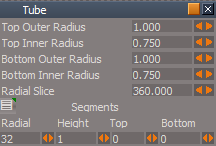
Tube primitive
Add
Tube3
Includes Radial slice and Bottom segments
NURBSUtilities
fixTriangulation, fixCurveTriangulation, and fixPatchTriangulation scripts
Update Author - Clinton Reese
rebuildNURBSScript & latheCurveScript
Start script
Add
NURBSUtilities
primitivePatchScript/ConvertMesh script
fixTriangulation script
freezeNURBS script
cleanCone script
Add
viewtopic.php?t=3732
Final Update January 1, 2021
Recommend that you completely Uninstall and Install trueSpace7.61 Beta 8 to a clean directory before installing this update. This update precedes all previous updates and recommend that you delete any and all previous updates
Recommend that you install Vray version 1.54 first before applying this update.
After applying this update, open trueSpace, Install/Load Vray from the Package Manager and Reset to Default Context
You can download Vray for tS7.61 version 1.54 here:
https://united3dartists.com/index.html
Primitives
Tube primitive
Add
Tube3
Includes Radial slice and Bottom segments
NURBSUtilities
fixTriangulation, fixCurveTriangulation, and fixPatchTriangulation scripts
Update Author - Clinton Reese
rebuildNURBSScript & latheCurveScript
Start script
Add
Code: Select all
if(Node.SelectedCount() >= 2) {
System.Alert("Mutiple selection not supported!\n\nSelect one object at a time");
params.SetTerminationFlag();
return;
}primitivePatchScript/ConvertMesh script
fixTriangulation script
freezeNURBS script
cleanCone script
Add
Code: Select all
if(Node.SelectedCount() >= 2) {
System.Alert("Mutiple selection not supported!\n\nSelect one object at a time");
params.SetTerminationFlag();
return;
}-
trueBlue
- Captain
- Posts: 5548
- Joined: 06 Jul 2009, 22:50
- Type the number ten into the box: 10
Re: Final trueSpace 7.61 Beta 8 Unofficial Update
New Update for trueSpace7.61 Beta 8 Unofficial Update
viewtopic.php?t=3732
Final Update January 2, 2021
Recommend that you completely Uninstall and Install trueSpace7.61 Beta 8 to a clean directory before installing this update. This update precedes all previous updates and recommend that you delete any and all previous updates
Recommend that you install Vray version 1.54 first before applying this update.
After applying this update, open trueSpace, Install/Load Vray from the Package Manager and Reset to Default Context
You can download Vray for tS7.61 version 1.54 here:
https://united3dartists.com/index.html
WorkspaceMain, WorkspaceMain2, BottomBar, and BottomBar2 toolbars
3D Encapsulate icon - Activity.Run('/Scripts/Commands/3DEncapsulate');
3DEncapsulate script includes encapsulating NURBS Patches & Curves even if in Control Points mode
Custom Commands
Select
Update
3D Objects
Includes NURBS
NURBSScripts
Update
NURBS Utilities/Misc
Add
3D Encapsulate
3D Unencapsulate
viewtopic.php?t=3732
Final Update January 2, 2021
Recommend that you completely Uninstall and Install trueSpace7.61 Beta 8 to a clean directory before installing this update. This update precedes all previous updates and recommend that you delete any and all previous updates
Recommend that you install Vray version 1.54 first before applying this update.
After applying this update, open trueSpace, Install/Load Vray from the Package Manager and Reset to Default Context
You can download Vray for tS7.61 version 1.54 here:
https://united3dartists.com/index.html
WorkspaceMain, WorkspaceMain2, BottomBar, and BottomBar2 toolbars
3D Encapsulate icon - Activity.Run('/Scripts/Commands/3DEncapsulate');
3DEncapsulate script includes encapsulating NURBS Patches & Curves even if in Control Points mode
Custom Commands
Select
Update
3D Objects
Includes NURBS
NURBSScripts
Update
NURBS Utilities/Misc
Add
3D Encapsulate
3D Unencapsulate
-
trueBlue
- Captain
- Posts: 5548
- Joined: 06 Jul 2009, 22:50
- Type the number ten into the box: 10
Re: Final trueSpace 7.61 Beta 8 Unofficial Update
New Update for trueSpace7.61 Beta 8 Unofficial Update
viewtopic.php?t=3732
Final Update January 2, 2021
Recommend that you completely Uninstall and Install trueSpace7.61 Beta 8 to a clean directory before installing this update. This update precedes all previous updates and recommend that you delete any and all previous updates
Recommend that you install Vray version 1.54 first before applying this update.
After applying this update, open trueSpace, Install/Load Vray from the Package Manager and Reset to Default Context
You can download Vray for tS7.61 version 1.54 here:
https://united3dartists.com/index.html
To the two people who downloaded this update yesterday on January 2, 2021:
There is a new update posted this morning that fixes a problem with that update!
Sorry about that!
viewtopic.php?t=3732
Final Update January 2, 2021
Recommend that you completely Uninstall and Install trueSpace7.61 Beta 8 to a clean directory before installing this update. This update precedes all previous updates and recommend that you delete any and all previous updates
Recommend that you install Vray version 1.54 first before applying this update.
After applying this update, open trueSpace, Install/Load Vray from the Package Manager and Reset to Default Context
You can download Vray for tS7.61 version 1.54 here:
https://united3dartists.com/index.html
To the two people who downloaded this update yesterday on January 2, 2021:
There is a new update posted this morning that fixes a problem with that update!
Sorry about that!
-
the_ant
- Chief Petty Officer
- Posts: 155
- Joined: 02 Jun 2009, 09:26
- Type the number ten into the box: 0
- Location: Perugia - Italy
Re: Final trueSpace 7.61 Beta 8 Unofficial Update
Thanks a lot trueBlue i am one of the downloaders...
i have a question about your frequently .zip updates without start a setup from first step to last each time...tell me if it's a good idea:
I would to install tsp761 on a clean directory (ie:trueSpace761) before your Unofficial.zip file setup step and then rename that folder as "trueSpace761.cln"?
So if one wants install your latest Unoff zip file he can simply uninstalls the "tsp old-UnoffUpdated dir" and then copy the "trueSpace761.cln" removing the .cln extension.
Don't know if my english is quite understandable...all i wont is only to be quickly updated with your latest zip files without all the steps jumping directly to the last
i have a question about your frequently .zip updates without start a setup from first step to last each time...tell me if it's a good idea:
I would to install tsp761 on a clean directory (ie:trueSpace761) before your Unofficial.zip file setup step and then rename that folder as "trueSpace761.cln"?
So if one wants install your latest Unoff zip file he can simply uninstalls the "tsp old-UnoffUpdated dir" and then copy the "trueSpace761.cln" removing the .cln extension.
Don't know if my english is quite understandable...all i wont is only to be quickly updated with your latest zip files without all the steps jumping directly to the last
-
trueBlue
- Captain
- Posts: 5548
- Joined: 06 Jul 2009, 22:50
- Type the number ten into the box: 10
Re: Final trueSpace 7.61 Beta 8 Unofficial Update
I can not recommend installing the original trueSpace program (any version) to some other directory other then what the Caligari Developers recommend. Which is the C:\ drive
The biggest reason is, trueSpace (any version) reads and writes to your Registry and installs a Caligari.ini file
So my thought is if you install it somewhere and then rename things, trueSpace's Registry would not know where trueSpace is
The Unofficial Update(s) does not have an installer. It adds new files and overwrites existing files. More importantly it does not remove files.
In the past, I have removed files from the Unofficial Update(s) which is why I recommend that you Uninstall/Reinstall trueSpace to a clean directory before running the Unofficial Update(s) Also there is several files that are dependent on the default install directory that the Unofficial Update(s) uses.
My current goal is, unless there is any reported issues with the current Unofficial Update(s), there will be no more updates for tS7.61 and tS7.61Std
The biggest reason is, trueSpace (any version) reads and writes to your Registry and installs a Caligari.ini file
So my thought is if you install it somewhere and then rename things, trueSpace's Registry would not know where trueSpace is
The Unofficial Update(s) does not have an installer. It adds new files and overwrites existing files. More importantly it does not remove files.
In the past, I have removed files from the Unofficial Update(s) which is why I recommend that you Uninstall/Reinstall trueSpace to a clean directory before running the Unofficial Update(s) Also there is several files that are dependent on the default install directory that the Unofficial Update(s) uses.
My current goal is, unless there is any reported issues with the current Unofficial Update(s), there will be no more updates for tS7.61 and tS7.61Std
-
Cellulo
- Lieutenant
- Posts: 927
- Joined: 27 Sep 2012, 07:48
- Type the number ten into the box: 9
- Location: France
Re: Final trueSpace 7.61 Beta 8 Unofficial Update
The only problem with "Caligari.ini" file, its that this file is always installed in "c:\Windows", because the original script installation setup of trueSpace use always "c:\Windows" location for "caligari.ini" file and it can't detect other drive for Windows installation, but what happen if the users use another drive for Windows installation location, maybe trueSpace don't work. It's a good question.
-
clintonman
- Captain
- Posts: 5659
- Joined: 21 May 2009, 21:08
- Type the number ten into the box: 0
- Location: California
Re: Final trueSpace 7.61 Beta 8 Unofficial Update
I think I was one of those 2. What was wrong with it?
-
trueBlue
- Captain
- Posts: 5548
- Joined: 06 Jul 2009, 22:50
- Type the number ten into the box: 10
Re: Final trueSpace 7.61 Beta 8 Unofficial Update
Actually it is installed toCellulo wrote: 03 Jan 2021, 16:08 The only problem with "Caligari.ini" file, its that this file is always installed in "c:\Windows", because the original script installation setup of trueSpace use always "c:\Windows" location for "caligari.ini" file and it can't detect other drive for Windows installation, but what happen if the users use another drive for Windows installation location, maybe trueSpace don't work. It's a good question.
C:\Users\UserName\AppData\Local\VirtualStore\Windows
-
Cellulo
- Lieutenant
- Posts: 927
- Joined: 27 Sep 2012, 07:48
- Type the number ten into the box: 9
- Location: France
Re: Final trueSpace 7.61 Beta 8 Unofficial Update
For infomation, i made a test of the "Caligari.ini" file with a fresh installation of trueSpace Modelside with the default installation path on drive C:, but before the installation i deleted everything about trueSpace files, in registry, in Windows folder and "username\appdata etc.." folder.
The result is that the "Caligari.ini" file is created in Username folder when trueSpace is closed for the the first time, it make a copy of the "Caligari.ini" file from Windows folder to Username folder, this will be a windows processus for this type of file.
-
clintonman
- Captain
- Posts: 5659
- Joined: 21 May 2009, 21:08
- Type the number ten into the box: 0
- Location: California
Re: Final trueSpace 7.61 Beta 8 Unofficial Update
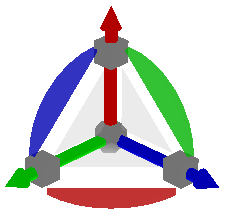
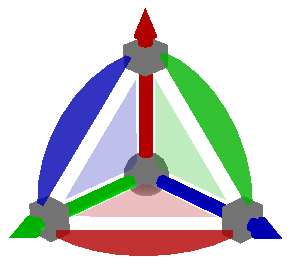
I found an inconsistent use of color in the object nav widgets.
Default object navigation widgetONW2 is the default widget with colored triangles
Default object navigation widgetONW5 is the same widget plus the cage, but the triangles are white.
Default object navigation widgetONW2 is the default widget with colored triangles
Default object navigation widgetONW5 is the same widget plus the cage, but the triangles are white.
-
trueBlue
- Captain
- Posts: 5548
- Joined: 06 Jul 2009, 22:50
- Type the number ten into the box: 10
Re: Final trueSpace 7.61 Beta 8 Unofficial Update
Thank you, fixed!
-
clintonman
- Captain
- Posts: 5659
- Joined: 21 May 2009, 21:08
- Type the number ten into the box: 0
- Location: California
Re: Final trueSpace 7.61 Beta 8 Unofficial Update
I'm planning to focus on documentation updates.
This is a proof of concept modification of one of the quickstart guide pages.
I'm using LibreOffice Draw to edit the original pdf file.
Wow, surprised I can't attach a pdf file.
This is a proof of concept modification of one of the quickstart guide pages.
I'm using LibreOffice Draw to edit the original pdf file.
Wow, surprised I can't attach a pdf file.
- Attachments
-
- QuickGuide_Test.zip
- (300.54 KiB) Downloaded 238 times
-
trueBlue
- Captain
- Posts: 5548
- Joined: 06 Jul 2009, 22:50
- Type the number ten into the box: 10
Re: Final trueSpace 7.61 Beta 8 Unofficial Update
Nice!
Great job on the View widget image!
Are you going to do the Default Context widget!
Background Widget?
A header (image?) would nice too!
Great job on the View widget image!
Are you going to do the Default Context widget!
Background Widget?
A header (image?) would nice too!
-
clintonman
- Captain
- Posts: 5659
- Joined: 21 May 2009, 21:08
- Type the number ten into the box: 0
- Location: California
Re: Final trueSpace 7.61 Beta 8 Unofficial Update
This is what I have so far. An extra page for some custom widgets and the million shortcuts.
Plan to clean it up then
For the quickguide the only other things I have planned are all on the 3rd page:
to add the missing transfer skinning weights button and cover up the rotation lock label
add the red toolbar button
redo the uv mapping image to match your changes
maybe the le toolbar
After that is looking at the manual chapters to see what can be fixed/changed
Plan to clean it up then
For the quickguide the only other things I have planned are all on the 3rd page:
to add the missing transfer skinning weights button and cover up the rotation lock label
add the red toolbar button
redo the uv mapping image to match your changes
maybe the le toolbar
After that is looking at the manual chapters to see what can be fixed/changed
-
trueBlue
- Captain
- Posts: 5548
- Joined: 06 Jul 2009, 22:50
- Type the number ten into the box: 10
Re: Final trueSpace 7.61 Beta 8 Unofficial Update
EDIT
Might want to mention i + drag = Opens the widget's Additional Shortcuts Help floating panel for all of the OBJ, PE, ME Inspect, Camera, and View widgets
Background is b + i + drag
I'll see if I can add a d + drag Help for the Default Context widget
Info about OBJ widgets Auto Keyframing
Camera help panel
Might want to mention i + drag = Opens the widget's Additional Shortcuts Help floating panel for all of the OBJ, PE, ME Inspect, Camera, and View widgets
Background is b + i + drag
I'll see if I can add a d + drag Help for the Default Context widget
Info about OBJ widgets Auto Keyframing
Camera help panel
-
trueBlue
- Captain
- Posts: 5548
- Joined: 06 Jul 2009, 22:50
- Type the number ten into the box: 10
Re: Final trueSpace 7.61 Beta 8 Unofficial Update
Edit
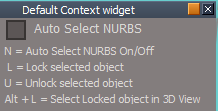
Unreleased panel in the Default Context widget for the Auto Select NURBS
n + drag in 3D Space Opens the panel in the Stack/Panel and activates Auto Select NURBS toggles ( Active/Deactive ) Also
Ctrl + x = Cut
Ctrl + v = Paste the last cut object
Unreleased panel in the Default Context widget for the Auto Select NURBS
n + drag in 3D Space Opens the panel in the Stack/Panel and activates Auto Select NURBS toggles ( Active/Deactive ) Also
Ctrl + x = Cut
Ctrl + v = Paste the last cut object
-
trueBlue
- Captain
- Posts: 5548
- Joined: 06 Jul 2009, 22:50
- Type the number ten into the box: 10
Re: Final trueSpace 7.61 Beta 8 Unofficial Update
Edited the last two post
In the UU(s) there is a tS761 Workspace Shortcut List.rtf file in Scripts directory for the UU shortcuts
Here is the unreleased shortcuts xml & rtf files
Includes the unreleased Shift + L = Loads/Shows Workspace Layers
You will need to reboot tS7 after updating the xml file, Resetting the Default Context does not work
Been wondering if this is up to date and or can undo the current UU updates?
http://clintons3d.com/plugins/truespace ... dgets.html
In the UU(s) there is a tS761 Workspace Shortcut List.rtf file in Scripts directory for the UU shortcuts
Here is the unreleased shortcuts xml & rtf files
Includes the unreleased Shift + L = Loads/Shows Workspace Layers
You will need to reboot tS7 after updating the xml file, Resetting the Default Context does not work
Been wondering if this is up to date and or can undo the current UU updates?
http://clintons3d.com/plugins/truespace ... dgets.html
- Attachments
-
- tS761 Workspace Shortcut List.zip
- (17.2 KiB) Downloaded 219 times
-
clintonman
- Captain
- Posts: 5659
- Joined: 21 May 2009, 21:08
- Type the number ten into the box: 0
- Location: California
Re: Final trueSpace 7.61 Beta 8 Unofficial Update
Point Edit Widget questions/comments.
"," is spelled comma no coma
I can't open the Point Edit Widget's Preferences
"Bars, Triangles, Cubes, & Arcs
Ctrl + LMB select opens their Mouse settings
RMB + Drag - Opens the Point Edit Widget's Preferences"
Contradicts "RMB + Drag on Arcs to rotate from the Axis"
RMB drag on cubes is uniform scale
RMB drag on triangles is move perpendicular
I tried RMB drag on everything but no preferences shows
Also tried Ctrl RMB click
I looked inside and it looks like the shortcut is set to open object nav preferences instead of point edit preferences
"," is spelled comma no coma
I can't open the Point Edit Widget's Preferences
"Bars, Triangles, Cubes, & Arcs
Ctrl + LMB select opens their Mouse settings
RMB + Drag - Opens the Point Edit Widget's Preferences"
Contradicts "RMB + Drag on Arcs to rotate from the Axis"
RMB drag on cubes is uniform scale
RMB drag on triangles is move perpendicular
I tried RMB drag on everything but no preferences shows
Also tried Ctrl RMB click
I looked inside and it looks like the shortcut is set to open object nav preferences instead of point edit preferences
-
trueBlue
- Captain
- Posts: 5548
- Joined: 06 Jul 2009, 22:50
- Type the number ten into the box: 10
Re: Final trueSpace 7.61 Beta 8 Unofficial Update
Whaaaat? It is not spelled comatose?
Both the Obj & PE help was wrong, it should have been Ctrl + RMB select the Sphere
Sphere
LMB + Drag - Moves selected Face, Edge, or Vertex in X and Y
MMB + Drag - Moves the widget
Alt + LMB select - Opens the Quad Menu
Ctrl + LMB select - Closes the Quad Menu
Ctrl + RMB select - Opens the Point Edit Widget's Preferences
The commands were wrong to, so I change them to:
UserInterface.OpenToolPanelViewEx2("" , "" ,"Widgets/Edit/Point Edit Widgets", 3,0,0)
Thanks!
Both the Obj & PE help was wrong, it should have been Ctrl + RMB select the Sphere
Sphere
LMB + Drag - Moves selected Face, Edge, or Vertex in X and Y
MMB + Drag - Moves the widget
Alt + LMB select - Opens the Quad Menu
Ctrl + LMB select - Closes the Quad Menu
Ctrl + RMB select - Opens the Point Edit Widget's Preferences
The commands were wrong to, so I change them to:
UserInterface.OpenToolPanelViewEx2("" , "" ,"Widgets/Edit/Point Edit Widgets", 3,0,0)
Thanks!
-
clintonman
- Captain
- Posts: 5659
- Joined: 21 May 2009, 21:08
- Type the number ten into the box: 0
- Location: California
Re: Final trueSpace 7.61 Beta 8 Unofficial Update
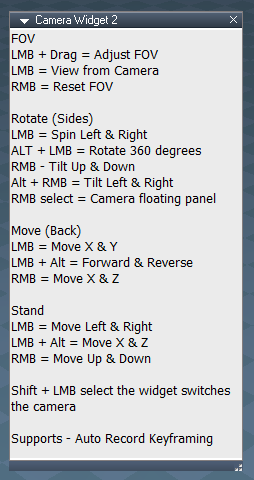
Camera Widget
(Side)
"ALT + LMB = Rotate 360 degrees" doesn't work for me and rotating 360 degrees is like not rotating at all. Is it rotate 180 degrees?
Edit: never mind I see 360 degrees means tilt up down and spin left right
(Side)
"ALT + LMB = Rotate 360 degrees" doesn't work for me and rotating 360 degrees is like not rotating at all. Is it rotate 180 degrees?
Edit: never mind I see 360 degrees means tilt up down and spin left right
-
trueBlue
- Captain
- Posts: 5548
- Joined: 06 Jul 2009, 22:50
- Type the number ten into the box: 10
Re: Final trueSpace 7.61 Beta 8 Unofficial Update
It works just like the View widget's Green Encircle without anything selected
So really rotating in 360 % is not correct either
So what should it be called?
omnidirectionally
Look around
So really rotating in 360 % is not correct either
So what should it be called?
omnidirectionally
Look around
-
clintonman
- Captain
- Posts: 5659
- Joined: 21 May 2009, 21:08
- Type the number ten into the box: 0
- Location: California
Re: Final trueSpace 7.61 Beta 8 Unofficial Update
Here is a first draft of the modified QuickGuide.
The images really ballooned up the file size. Will worry about that later.
- Attachments
-
- QuickGuide.zip
- (1.42 MiB) Downloaded 191 times
-
clintonman
- Captain
- Posts: 5659
- Joined: 21 May 2009, 21:08
- Type the number ten into the box: 0
- Location: California
Re: Final trueSpace 7.61 Beta 8 Unofficial Update
First draft of the shortcuts.
- Attachments
-
- Shortcuts3a7b.zip
- (61.13 KiB) Downloaded 197 times
-
clintonman
- Captain
- Posts: 5659
- Joined: 21 May 2009, 21:08
- Type the number ten into the box: 0
- Location: California
Re: Final trueSpace 7.61 Beta 8 Unofficial Update
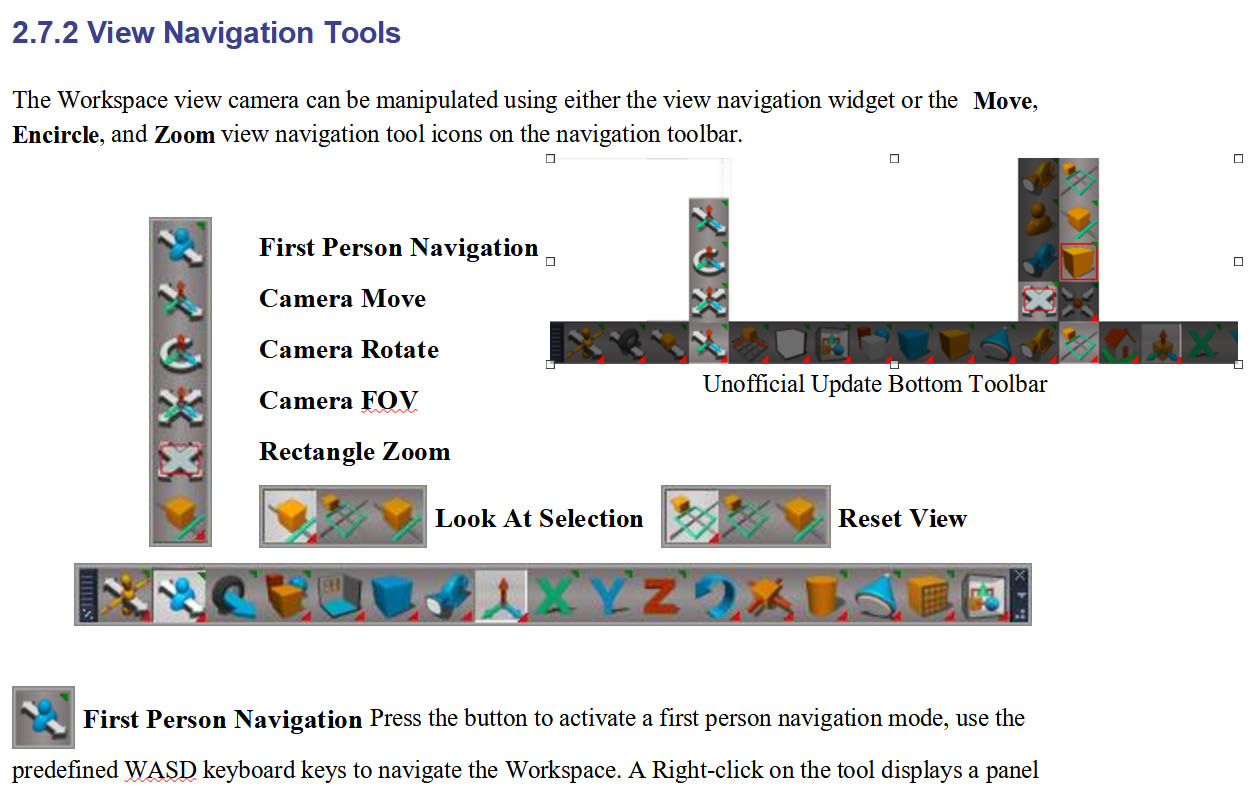
Working on Chapter 2 and I can't find the first person navigation button in the unofficial updates.
-
trueBlue
- Captain
- Posts: 5548
- Joined: 06 Jul 2009, 22:50
- Type the number ten into the box: 10
Re: Final trueSpace 7.61 Beta 8 Unofficial Update
If it is of any help, in the Red Toolbox, you will find trueSpace Toolbars
I made the Background white with No Grid
-
clintonman
- Captain
- Posts: 5659
- Joined: 21 May 2009, 21:08
- Type the number ten into the box: 0
- Location: California
Re: Final trueSpace 7.61 Beta 8 Unofficial Update
First draft of chapter 2
pg 54 hyperlink to unofficial update shortcuts list - works in test environment, need to adjust for final release
pg 63-65 toolbar locations, unlook at, zoom to selection buttons
pg 72 desktop aspect, added new page, TODO FILL IN MISSING INFO
pg 76 toolbar image
pg 81 TODO FILE MENU
pg 88 TODO add page for LE toolbar
pg 104 toolbar, 3D unencaps
pg 106 unencaps 2d
pg 158 quad window, uu toolbar
pg 164 rmb command nodes
pg 176 on is modelspace - nothing to do
TODO add the tiny top toolbar
pg 54 hyperlink to unofficial update shortcuts list - works in test environment, need to adjust for final release
pg 63-65 toolbar locations, unlook at, zoom to selection buttons
pg 72 desktop aspect, added new page, TODO FILL IN MISSING INFO
pg 76 toolbar image
pg 81 TODO FILE MENU
pg 88 TODO add page for LE toolbar
pg 104 toolbar, 3D unencaps
pg 106 unencaps 2d
pg 158 quad window, uu toolbar
pg 164 rmb command nodes
pg 176 on is modelspace - nothing to do
TODO add the tiny top toolbar
- Attachments
-
- ch2_UserInterface62fc.zip
- (6.77 MiB) Downloaded 216 times
-
trueBlue
- Captain
- Posts: 5548
- Joined: 06 Jul 2009, 22:50
- Type the number ten into the box: 10
Re: Final trueSpace 7.61 Beta 8 Unofficial Update
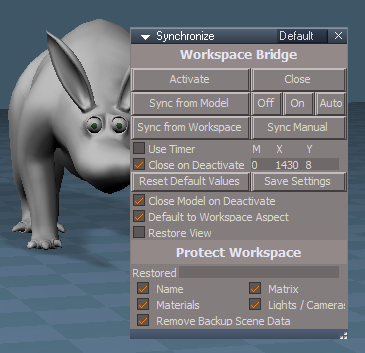
Edit the button script and removeclintonman wrote: 19 Jan 2021, 03:25 Working on the docs and looking at the synchronize panel. I don't see an option to turn off the sound effects. Specifically for the save settings button.
Activity.Run("/Status Message/Notify")
Press the Save Settings button
Stepsclintonman wrote: 19 Jan 2021, 03:25 OK I think I got that figured out. Now what does the Display Toolbars button do? I press it and the toolbars all seem to just flash and the checkbox next to it does not seem to do anything.
Check Display Toolbars
LB click in the 3D View
LB click in the Link Editor
Repeat
Repeat
Uncheck Display Toolbars
LB click in the 3D View
LB click in the Link Editor
Repeat
Repeat
The unchecked Display Toobars checkbox is not working
Press the Display Toobars
LB click in the 3D View
LB click in the Link Editor
Repeat
Repeat
-
trueBlue
- Captain
- Posts: 5548
- Joined: 06 Jul 2009, 22:50
- Type the number ten into the box: 10
Re: Final trueSpace 7.61 Beta 8 Unofficial Update
@ Clinton
Thinking about changing the shortcut in your Centered Obj NAV widget(s)
Currently it is using:
Sphere
P + LB click opens Mesh Origin panel
I would like to change it to:
O + LB click opens Mesh Origin panel
The reason for this change is all of the other OBJ NAV widgets use:
P + LB click opens the Axis widget 'Toggles On/Off'
More importantly, I want to add:
O + LB click opens Mesh Origin panel
to all of the other OBJ NAV widgets
Thinking about changing the shortcut in your Centered Obj NAV widget(s)
Currently it is using:
Sphere
P + LB click opens Mesh Origin panel
I would like to change it to:
O + LB click opens Mesh Origin panel
The reason for this change is all of the other OBJ NAV widgets use:
P + LB click opens the Axis widget 'Toggles On/Off'
More importantly, I want to add:
O + LB click opens Mesh Origin panel
to all of the other OBJ NAV widgets
-
clintonman
- Captain
- Posts: 5659
- Joined: 21 May 2009, 21:08
- Type the number ten into the box: 0
- Location: California
Re: Final trueSpace 7.61 Beta 8 Unofficial Update
The FK button highlights when using the move object tool
-
trueBlue
- Captain
- Posts: 5548
- Joined: 06 Jul 2009, 22:50
- Type the number ten into the box: 10
Re: Final trueSpace 7.61 Beta 8 Unofficial Update
Test Update 7 for trueSpace7.61 Beta 8 Unofficial Update
Test Update 7 January 29, 2021
Recommend that you completely Uninstall and Install trueSpace7.61 Beta 8 to a clean directory before installing this update.
This is a Beta Pre Release for TESTING the below updates and the updates in the Final trueSpace7.61 Beta 8 Std Unofficial Update thread
viewtopic.php?t=5418
Unless there is any issues, planning on releasing the UUv7 in a week or so
Updates
Toolbars
Update
All toolbar button commands that run MeshModifiers commands runs DeSelectNURBS first
Status Message - "NURBS are not supported ... Select a 3D Object"
Including:
Primitives
Static Sweep
Edge Bevel
Target Weld
Normal Move
Quad Toolbar
Quad Menu
Material Editor/Paint Face
Vray Material Editor/Paint Face
All toolbars with the Object tool
Restored to the original command
Save As Object.RsObj
MaterialEditor.RsObj
init.js
reset.js
NURBSScripts.RsObj
Add
Protect NURBS button Default = Enabled
Select it to Disable running the Deselect NURBS script
Test Update 7 January 29, 2021
Recommend that you completely Uninstall and Install trueSpace7.61 Beta 8 to a clean directory before installing this update.
This is a Beta Pre Release for TESTING the below updates and the updates in the Final trueSpace7.61 Beta 8 Std Unofficial Update thread
viewtopic.php?t=5418
Unless there is any issues, planning on releasing the UUv7 in a week or so
Updates
Toolbars
Update
All toolbar button commands that run MeshModifiers commands runs DeSelectNURBS first
Status Message - "NURBS are not supported ... Select a 3D Object"
Including:
Primitives
Static Sweep
Edge Bevel
Target Weld
Normal Move
Quad Toolbar
Quad Menu
Material Editor/Paint Face
Vray Material Editor/Paint Face
All toolbars with the Object tool
Restored to the original command
Save As Object.RsObj
MaterialEditor.RsObj
init.js
reset.js
NURBSScripts.RsObj
Add
Protect NURBS button Default = Enabled
Select it to Disable running the Deselect NURBS script
-
trueBlue
- Captain
- Posts: 5548
- Joined: 06 Jul 2009, 22:50
- Type the number ten into the box: 10
Re: Final trueSpace 7.61 Beta 8 Unofficial Update
Test Update 7 for trueSpace7.61 Beta 8 Unofficial Update
Test Update 7 February 1, 2021
Recommend that you completely Uninstall and Install trueSpace7.61 Beta 8 to a clean directory before installing this update.
This is a Beta Pre Release for TESTING the below updates and the updates in the Final trueSpace7.61 Beta 8 Std Unofficial Update thread
viewtopic.php?t=5418
Unless there is any issues, planning on releasing the UUv7 in one week
Updates
MeshObjectCoordinateSystem.RsObj
physics constraint helper.RsObj
Toolbars
Update
Quad Menu toolbars
Quad toolbars
Blue toolbar Add
FPN icon
First Person Navigator icon
LB = Open - First Person Navigator
Optimize Workspace Scene.RsObj Author - Clinton Reese Modified
Remove Attributes script
Add
Remove Orphan Materials
Remove LE2 Data Atrributes
Save As Object.RsObj
DeSelectNURBS.xml
Changed
Status Message = "NURBS Unselected ... Select a 3D Object
CustomCommands
Copy.xml
Update: Fix for removing duplicate LE2Data attributes with the same name
Delete.xml
Add
RsTool.Arrow();
var PVT_LOCKED = 2;
RsStackView.RemovePanelsFromCurrSelection(PVT_LOCKED, 0);
Space.Unselect();
Lights library
Update: Removed duplicate LE2Data attributes and tSObj attribute
WS - Default.RsSLgts
preobjects
Update: Removed duplicate LE2Data attributes and tSObj attribute
light01.RsObj
light02.RsObj
light03.RsObj
light04.RsObj
Camera1.RsObj
Lights.RsObj
Update: Removed duplicate LE2Data attributes and tSObj attribute
Cameras.RsObj
Update: Removed duplicate LE2Data attributes and tSObj attribute
Test Update 7 February 1, 2021
Recommend that you completely Uninstall and Install trueSpace7.61 Beta 8 to a clean directory before installing this update.
This is a Beta Pre Release for TESTING the below updates and the updates in the Final trueSpace7.61 Beta 8 Std Unofficial Update thread
viewtopic.php?t=5418
Unless there is any issues, planning on releasing the UUv7 in one week
Updates
MeshObjectCoordinateSystem.RsObj
physics constraint helper.RsObj
Toolbars
Update
Quad Menu toolbars
Quad toolbars
Blue toolbar Add
FPN icon
First Person Navigator icon
LB = Open - First Person Navigator
Optimize Workspace Scene.RsObj Author - Clinton Reese Modified
Remove Attributes script
Add
Remove Orphan Materials
Remove LE2 Data Atrributes
Save As Object.RsObj
DeSelectNURBS.xml
Changed
Status Message = "NURBS Unselected ... Select a 3D Object
CustomCommands
Copy.xml
Update: Fix for removing duplicate LE2Data attributes with the same name
Delete.xml
Add
RsTool.Arrow();
var PVT_LOCKED = 2;
RsStackView.RemovePanelsFromCurrSelection(PVT_LOCKED, 0);
Space.Unselect();
Lights library
Update: Removed duplicate LE2Data attributes and tSObj attribute
WS - Default.RsSLgts
preobjects
Update: Removed duplicate LE2Data attributes and tSObj attribute
light01.RsObj
light02.RsObj
light03.RsObj
light04.RsObj
Camera1.RsObj
Lights.RsObj
Update: Removed duplicate LE2Data attributes and tSObj attribute
Cameras.RsObj
Update: Removed duplicate LE2Data attributes and tSObj attribute
-
trueBlue
- Captain
- Posts: 5548
- Joined: 06 Jul 2009, 22:50
- Type the number ten into the box: 10
Re: Final trueSpace 7.61 Beta 8 Unofficial Update
Test Update 8 for trueSpace7.61 Beta 8 Unofficial Update
Test Update 8 February 3, 2021
Recommend that you completely Uninstall and Install trueSpace7.61 Beta 8 to a clean directory before installing this update. If you applied the previous Test Update to a clean directory, you do not need to Uninstall trueSpace7.61 Beta 8 before applying this new update.
This is a Beta Pre Release for TESTING the below updates and the updates in the Final trueSpace7.61 Beta 8 Std Unofficial Update thread
viewtopic.php?t=5418
Unless there is any issues, planning on releasing the UUv7 in a few days
Updates
MeshObjectCoordinateSystem
Updated to Point Edit trueObject Coordinate System
Restricts changing unsupported Coordinate systems when in use
Restores users original Coordinate system when not in use
Widgets
PE Widget(s)
Updated to support new MeshObjectCoordinateSystem script
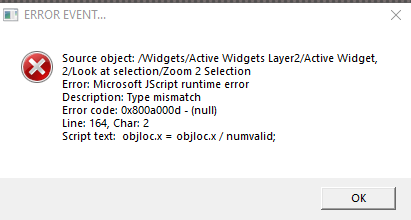
Background/Look at selection
Update
Stop running script if nothing selected
Test Update 8 February 3, 2021
Recommend that you completely Uninstall and Install trueSpace7.61 Beta 8 to a clean directory before installing this update. If you applied the previous Test Update to a clean directory, you do not need to Uninstall trueSpace7.61 Beta 8 before applying this new update.
This is a Beta Pre Release for TESTING the below updates and the updates in the Final trueSpace7.61 Beta 8 Std Unofficial Update thread
viewtopic.php?t=5418
Unless there is any issues, planning on releasing the UUv7 in a few days
Updates
MeshObjectCoordinateSystem
Updated to Point Edit trueObject Coordinate System
Restricts changing unsupported Coordinate systems when in use
Restores users original Coordinate system when not in use
Widgets
PE Widget(s)
Updated to support new MeshObjectCoordinateSystem script
Background/Look at selection
Update
Stop running script if nothing selected
-
trueBlue
- Captain
- Posts: 5548
- Joined: 06 Jul 2009, 22:50
- Type the number ten into the box: 10
Re: Final trueSpace 7.61 Beta 8 Unofficial Update
Test Update 8 for trueSpace7.61 Beta 8 Unofficial Update
February 4, 2021
Recommend that you completely Uninstall and Install trueSpace7.61 Beta 8 to a clean directory before installing this update. If you applied the previous Test Update to a clean directory, you do not need to Uninstall trueSpace7.61 Beta 8 before applying this new update.
This is a Beta Pre Release for TESTING the below updates and the updates in the Final trueSpace7.61 Beta 8 Std Unofficial Update thread
viewtopic.php?t=5418
Unless there is any issues, planning on releasing the UUv7 in a few days
Updates
Fixed an issue with the MeshObjectCoordinateSystem script that did not allow PE transformation UnDo
MeshObjectCoordinateSystem
Updated to Point Edit trueObject Coordinate System
Restricts changing World or Tangent Coordinate systems when in use
Restores users original Coordinate system when not in use
PE Widget(s)
Updated to support new MeshObjectCoordinateSystem script
February 4, 2021
Recommend that you completely Uninstall and Install trueSpace7.61 Beta 8 to a clean directory before installing this update. If you applied the previous Test Update to a clean directory, you do not need to Uninstall trueSpace7.61 Beta 8 before applying this new update.
This is a Beta Pre Release for TESTING the below updates and the updates in the Final trueSpace7.61 Beta 8 Std Unofficial Update thread
viewtopic.php?t=5418
Unless there is any issues, planning on releasing the UUv7 in a few days
Updates
Fixed an issue with the MeshObjectCoordinateSystem script that did not allow PE transformation UnDo
MeshObjectCoordinateSystem
Updated to Point Edit trueObject Coordinate System
Restricts changing World or Tangent Coordinate systems when in use
Restores users original Coordinate system when not in use
PE Widget(s)
Updated to support new MeshObjectCoordinateSystem script
-
trueBlue
- Captain
- Posts: 5548
- Joined: 06 Jul 2009, 22:50
- Type the number ten into the box: 10
Re: Final trueSpace 7.61 Beta 8 Unofficial Update
Test Update 9 for trueSpace7.61 Beta 8 Unofficial Update
February 5, 2021
Recommend that you completely Uninstall and Install trueSpace7.61 Beta 8 to a clean directory before installing this update. If you applied the previous Test Update to a clean directory, you do not need to Uninstall trueSpace7.61 Beta 8 before applying this new update.
This is a Beta Pre Release for TESTING the below updates and the updates in the Final trueSpace7.61 Beta 8 Std Unofficial Update thread
viewtopic.php?t=5418
Unless there is any issues, planning on releasing the UUv7 in a few days
Updates
UnLookAt.xml - Add RsApp.ClearHistory()
CycleViews.xml - Add Isometric view
RotatePOV.xml - Add RsApp.ClearHistory()
Eye2Cam.xml - Remove LE2Data cons & Add RsApp.ClearHistory()
Position2Eye.xml - Add Alert
Cam2Eye.xml - Add RsApp.ClearHistory()
Copy.xml - Remove LE2Data cons & Add RsApp.ClearHistory()
Widgets
View Widget
Create Camera & EntryPoint
Remove LE2Data cons & Add RsApp.ClearHistory()
Cube Widget
C - RB click
Camera from View
Remove LE2Data cons & Add RsApp.ClearHistory()
unSelectable.RsObj - Add RsApp.ClearHistory()
SnappingScripts/openSnappingToolbarRsObj - Add RsApp.ClearHistory()
LEtools/Open LE toolbar.RsObj - Add RsApp.ClearHistory()
MeshOrigin/Open LE toolbar.RsObj - Add RsApp.ClearHistory()
Toolbars
Red, Blue, Gold, Record toolbar ect...
LB - Command - Add RsApp.ClearHistory()
Status Message.RsObj - Add RsApp.ClearHistory()
Close trueSpace 7.61
Follow the Instructions at the bottom of the trueSpace Beta 7.61 Unofficial Update.txt
Run the tS7.61B8.7.exe
Open trueSpace 7.61 Unofficial Update 7
Reset to Default Context
Additional setup instructions for Model
Switch to Model
Open Configurations library
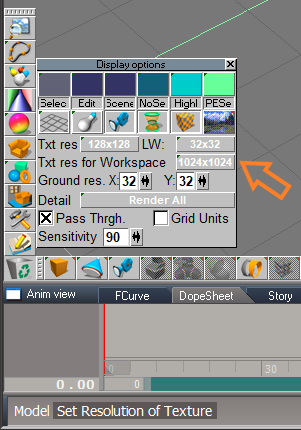
Load My_Default
Open Display options
Note: Txt res for Workspace should be set @ 1024x1024
Switch to the Default layout
Load any additional Workspace Plugins
Close trueSpace 7.61 Unofficial Update 7
This completes the setup
Notes:
After resetting the Default Context, the current layout is set to the default_layout.rsl
This is a backup layout and not shown in the Layouts library
Model's Status system does not work at this point, so it is necessary to close trueSpace
The My_Default configuration is setup to be simular to Workspace and with a higher texture resolution for the Workspace's D3D realtime renderer
February 5, 2021
Recommend that you completely Uninstall and Install trueSpace7.61 Beta 8 to a clean directory before installing this update. If you applied the previous Test Update to a clean directory, you do not need to Uninstall trueSpace7.61 Beta 8 before applying this new update.
This is a Beta Pre Release for TESTING the below updates and the updates in the Final trueSpace7.61 Beta 8 Std Unofficial Update thread
viewtopic.php?t=5418
Unless there is any issues, planning on releasing the UUv7 in a few days
Updates
UnLookAt.xml - Add RsApp.ClearHistory()
CycleViews.xml - Add Isometric view
RotatePOV.xml - Add RsApp.ClearHistory()
Eye2Cam.xml - Remove LE2Data cons & Add RsApp.ClearHistory()
Position2Eye.xml - Add Alert
Cam2Eye.xml - Add RsApp.ClearHistory()
Copy.xml - Remove LE2Data cons & Add RsApp.ClearHistory()
Widgets
View Widget
Create Camera & EntryPoint
Remove LE2Data cons & Add RsApp.ClearHistory()
Cube Widget
C - RB click
Camera from View
Remove LE2Data cons & Add RsApp.ClearHistory()
unSelectable.RsObj - Add RsApp.ClearHistory()
SnappingScripts/openSnappingToolbarRsObj - Add RsApp.ClearHistory()
LEtools/Open LE toolbar.RsObj - Add RsApp.ClearHistory()
MeshOrigin/Open LE toolbar.RsObj - Add RsApp.ClearHistory()
Toolbars
Red, Blue, Gold, Record toolbar ect...
LB - Command - Add RsApp.ClearHistory()
Status Message.RsObj - Add RsApp.ClearHistory()
Close trueSpace 7.61
Follow the Instructions at the bottom of the trueSpace Beta 7.61 Unofficial Update.txt
Run the tS7.61B8.7.exe
Open trueSpace 7.61 Unofficial Update 7
Reset to Default Context
Additional setup instructions for Model
Switch to Model
Open Configurations library
Load My_Default
Open Display options
Note: Txt res for Workspace should be set @ 1024x1024
Switch to the Default layout
Load any additional Workspace Plugins
Close trueSpace 7.61 Unofficial Update 7
This completes the setup
Notes:
After resetting the Default Context, the current layout is set to the default_layout.rsl
This is a backup layout and not shown in the Layouts library
Model's Status system does not work at this point, so it is necessary to close trueSpace
The My_Default configuration is setup to be simular to Workspace and with a higher texture resolution for the Workspace's D3D realtime renderer
-
trueBlue
- Captain
- Posts: 5548
- Joined: 06 Jul 2009, 22:50
- Type the number ten into the box: 10
Re: Final trueSpace 7.61 Beta 8 Unofficial Update
Test Update 10 for trueSpace7.61 Beta 8 Unofficial Update
February 6, 2021
Recommend that you completely Uninstall and Install trueSpace7.61 Beta 8 to a clean directory before installing this update. If you applied the previous Test Update to a clean directory, you do not need to Uninstall trueSpace7.61 Beta 8 before applying this new update.
This is a Beta Pre Release for TESTING the below updates and the updates in the Final trueSpace7.61 Beta 8 Std Unofficial Update thread
viewtopic.php?t=5418
Unless there is any issues, planning on releasing the UUv7 in a few days
Updates
Widgets
Update - Author - Clinton Reese
Background
Transform Objects.RsObj - Add RsApp.ClearHistory()
Replace Objects.RsObj - Add RsApp.ClearHistory()
Shear.RsObj - Add RsApp.ClearHistory()
CustomCommands
Updates
align and distribute/toggleAxis, 1.RsObj - Add RsApp.ClearHistory()
radialArray2Script.RsObj - Add RsApp.ClearHistory()
gridArray2Script.RsObj - Add RsApp.ClearHistory()
pointCloneScript.RsObj - Add RsApp.ClearHistory()
Constraint Scripts/OpenPanel.RsObj - Add RsApp.ClearHistory()
freezeTransforms.RsObj - Add RsApp.ClearHistory()
SnappingScripts(s) - Add RsApp.ClearHistory() 'Minus Transforms'
Libraries
Animation Panel.RsObj - Add RsApp.ClearHistory()
tS761 First Person Navigator.RsObj - Add RsApp.ClearHistory()
Scene Animator FX.RsObj - Add RsApp.ClearHistory()
February 6, 2021
Recommend that you completely Uninstall and Install trueSpace7.61 Beta 8 to a clean directory before installing this update. If you applied the previous Test Update to a clean directory, you do not need to Uninstall trueSpace7.61 Beta 8 before applying this new update.
This is a Beta Pre Release for TESTING the below updates and the updates in the Final trueSpace7.61 Beta 8 Std Unofficial Update thread
viewtopic.php?t=5418
Unless there is any issues, planning on releasing the UUv7 in a few days
Updates
Widgets
Update - Author - Clinton Reese
Background
Transform Objects.RsObj - Add RsApp.ClearHistory()
Replace Objects.RsObj - Add RsApp.ClearHistory()
Shear.RsObj - Add RsApp.ClearHistory()
CustomCommands
Updates
align and distribute/toggleAxis, 1.RsObj - Add RsApp.ClearHistory()
radialArray2Script.RsObj - Add RsApp.ClearHistory()
gridArray2Script.RsObj - Add RsApp.ClearHistory()
pointCloneScript.RsObj - Add RsApp.ClearHistory()
Constraint Scripts/OpenPanel.RsObj - Add RsApp.ClearHistory()
freezeTransforms.RsObj - Add RsApp.ClearHistory()
SnappingScripts(s) - Add RsApp.ClearHistory() 'Minus Transforms'
Libraries
Animation Panel.RsObj - Add RsApp.ClearHistory()
tS761 First Person Navigator.RsObj - Add RsApp.ClearHistory()
Scene Animator FX.RsObj - Add RsApp.ClearHistory()
-
trueBlue
- Captain
- Posts: 5548
- Joined: 06 Jul 2009, 22:50
- Type the number ten into the box: 10
Re: Final trueSpace 7.61 Beta 8 Unofficial Update
Test Update 11 for trueSpace7.61 Beta 8 Unofficial Update
February 7, 2021
Recommend that you completely Uninstall and Install trueSpace7.61 Beta 8 to a clean directory before installing this update. If you applied the previous Test Update to a clean directory, you do not need to Uninstall trueSpace7.61 Beta 8 before applying this new update.
This is a Beta Pre Release for TESTING the below updates and the updates in the Final trueSpace7.61 Beta 8 Std Unofficial Update thread
viewtopic.php?t=5418
Unless there is any issues, planning on releasing the UUv7 in a few days
Updates
Widgets
Update
Default object navigation widgetONW4
Toolbars
Update RMB commands
Blue toolbox
Scene Animator FX / Preferences
Animation Panel
Animation Panel / Preferences
Status Message
Update Author - Clinton Reese
Yafaray Folder/YafaRay4tS/ClearStatus Immediate
Add
RsApp.ClearHistory()
Clintons3dPlugin.rsx
Update VERSION= v.1638427
Plugins.xml
February 7, 2021
Recommend that you completely Uninstall and Install trueSpace7.61 Beta 8 to a clean directory before installing this update. If you applied the previous Test Update to a clean directory, you do not need to Uninstall trueSpace7.61 Beta 8 before applying this new update.
This is a Beta Pre Release for TESTING the below updates and the updates in the Final trueSpace7.61 Beta 8 Std Unofficial Update thread
viewtopic.php?t=5418
Unless there is any issues, planning on releasing the UUv7 in a few days
Updates
Widgets
Update
Default object navigation widgetONW4
Toolbars
Update RMB commands
Blue toolbox
Scene Animator FX / Preferences
Animation Panel
Animation Panel / Preferences
Status Message
Update Author - Clinton Reese
Yafaray Folder/YafaRay4tS/ClearStatus Immediate
Add
RsApp.ClearHistory()
Clintons3dPlugin.rsx
Update VERSION= v.1638427
Plugins.xml
-
trueBlue
- Captain
- Posts: 5548
- Joined: 06 Jul 2009, 22:50
- Type the number ten into the box: 10
Re: Final trueSpace 7.61 Beta 8 Unofficial Update
Test Update 12 for trueSpace7.61 Beta 8 Unofficial Update
February 8, 2021
Recommend that you completely Uninstall and Install trueSpace7.61 Beta 8 to a clean directory before installing this update. If you applied the previous Test Update to a clean directory, you do not need to Uninstall trueSpace7.61 Beta 8 before applying this new update.
This is a Beta Pre Release for TESTING the below updates and the updates in the Final trueSpace7.61 Beta 8 Std Unofficial Update thread
viewtopic.php?t=5418
Unless there is any issues, planning on releasing the UUv7 today
Updates
Widgets
Object Centered Widget
Update
Sphere - Active Color 255,184,149
TriangleXY - Matrix - tz -0.090
Update
Cube widget
Left Perspective/Ortho - Constant Color 0,55,0
Before After
February 8, 2021
Recommend that you completely Uninstall and Install trueSpace7.61 Beta 8 to a clean directory before installing this update. If you applied the previous Test Update to a clean directory, you do not need to Uninstall trueSpace7.61 Beta 8 before applying this new update.
This is a Beta Pre Release for TESTING the below updates and the updates in the Final trueSpace7.61 Beta 8 Std Unofficial Update thread
viewtopic.php?t=5418
Unless there is any issues, planning on releasing the UUv7 today
Updates
Widgets
Object Centered Widget
Update
Sphere - Active Color 255,184,149
TriangleXY - Matrix - tz -0.090
Update
Cube widget
Left Perspective/Ortho - Constant Color 0,55,0
Before After
-
trueBlue
- Captain
- Posts: 5548
- Joined: 06 Jul 2009, 22:50
- Type the number ten into the box: 10
Re: Final trueSpace 7.61 Beta 8 Unofficial Update
Test Update 14 for trueSpace7.61 Beta 8 Unofficial Update
February 10, 2021
Recommend that you completely Uninstall and Install trueSpace7.61 Beta 8 to a clean directory before installing this update. If you applied the previous Test Update to a clean directory, you do not need to Uninstall trueSpace7.61 Beta 8 before applying this new update.
This is a Beta Pre Release for TESTING the below updates and the updates in the Final trueSpace7.61 Beta 8 Std Unofficial Update thread
viewtopic.php?t=5418
Updates
Add
tS7_DG.pdf
Previously only included Chapter 1 & 2
Background Image Camera Widgets
Update
Cube widget
Rectangle Zoom - Edge Color 255,55,55
Rectangle Select - Edge Color 255,128,0
Background/Look at selection/getSelType
Error Add
February 10, 2021
Recommend that you completely Uninstall and Install trueSpace7.61 Beta 8 to a clean directory before installing this update. If you applied the previous Test Update to a clean directory, you do not need to Uninstall trueSpace7.61 Beta 8 before applying this new update.
This is a Beta Pre Release for TESTING the below updates and the updates in the Final trueSpace7.61 Beta 8 Std Unofficial Update thread
viewtopic.php?t=5418
Updates
Add
tS7_DG.pdf
Previously only included Chapter 1 & 2
Background Image Camera Widgets
Update
Cube widget
Rectangle Zoom - Edge Color 255,55,55
Rectangle Select - Edge Color 255,128,0
Background/Look at selection/getSelType
Error Add
Code: Select all
var sel = Node.Selection()
if(!sel) {
params.SetTerminationFlag()
return;
}
if(!Node.ConExists(sel,"WldMatrix")) {
params.SetTerminationFlag()
return;
}-
trueBlue
- Captain
- Posts: 5548
- Joined: 06 Jul 2009, 22:50
- Type the number ten into the box: 10
Re: Final trueSpace 7.61 Beta 8 Unofficial Update
Test Update 15 for trueSpace7.61 Beta 8 Unofficial Update
February 14, 2021
Recommend that you completely Uninstall and Install trueSpace7.61 Beta 8 to a clean directory before installing this update. If you applied the previous Test Update to a clean directory, you do not need to Uninstall trueSpace7.61 Beta 8 before applying this new update.
This is a Beta Pre Release for TESTING the below updates and the updates in the Final trueSpace7.61 Beta 8 Std Unofficial Update thread
viewtopic.php?t=5418
Updates
Libraries
Background Image Camera
First Person Navigator
Toolbars
WorkspaceMainMenu/File/Save As/Recording
Red toolbox/Background Image Camera
Bluetoolbox/Eye Camera
Eye2Cam.xml
Widgets
Fix Bad Geometry
Scripts
trueBevel
SnappingScripts
Optimize Workspace Scene/Run
February 14, 2021
Recommend that you completely Uninstall and Install trueSpace7.61 Beta 8 to a clean directory before installing this update. If you applied the previous Test Update to a clean directory, you do not need to Uninstall trueSpace7.61 Beta 8 before applying this new update.
This is a Beta Pre Release for TESTING the below updates and the updates in the Final trueSpace7.61 Beta 8 Std Unofficial Update thread
viewtopic.php?t=5418
Updates
Libraries
Background Image Camera
First Person Navigator
Toolbars
WorkspaceMainMenu/File/Save As/Recording
Red toolbox/Background Image Camera
Bluetoolbox/Eye Camera
Eye2Cam.xml
Widgets
Fix Bad Geometry
Scripts
trueBevel
SnappingScripts
Optimize Workspace Scene/Run
-
trueBlue
- Captain
- Posts: 5548
- Joined: 06 Jul 2009, 22:50
- Type the number ten into the box: 10
Re: Final trueSpace 7.61 Beta 8 Unofficial Update
Test Update 16 for trueSpace7.61 Beta 8 Unofficial Update
February 16, 2021
Recommend that you completely Uninstall and Install trueSpace7.61 Beta 8 to a clean directory before installing this update. If you applied the previous Test Update to a clean directory, you do not need to Uninstall trueSpace7.61 Beta 8 before applying this new update.
This is a Beta Pre Release for TESTING the below updates and the updates in the Final trueSpace7.61 Beta 8 Std Unofficial Update thread
viewtopic.php?t=5418
Updates
Several scripts that open a floating panel use Clinton's 3D Plugin Preferences
Add
Record Undo.RsObj Author - Clinton Reese Use
Open the Record Undo panel
1) Press the Start button
2) Do something in 3D Space that you might want to Undo
3) Press the Stop button after you are finished with step 2 to stop the recording!
Undo button will restore the scene back to the point you started the recording
Cancel button Stops and Clears the recording
Toolbars
Main2/Record Toolbar
Add
Record Undo icon
February 16, 2021
Recommend that you completely Uninstall and Install trueSpace7.61 Beta 8 to a clean directory before installing this update. If you applied the previous Test Update to a clean directory, you do not need to Uninstall trueSpace7.61 Beta 8 before applying this new update.
This is a Beta Pre Release for TESTING the below updates and the updates in the Final trueSpace7.61 Beta 8 Std Unofficial Update thread
viewtopic.php?t=5418
Updates
Several scripts that open a floating panel use Clinton's 3D Plugin Preferences
Add
Record Undo.RsObj Author - Clinton Reese Use
Open the Record Undo panel
1) Press the Start button
2) Do something in 3D Space that you might want to Undo
3) Press the Stop button after you are finished with step 2 to stop the recording!
Undo button will restore the scene back to the point you started the recording
Cancel button Stops and Clears the recording
Toolbars
Main2/Record Toolbar
Add
Record Undo icon
-
trueBlue
- Captain
- Posts: 5548
- Joined: 06 Jul 2009, 22:50
- Type the number ten into the box: 10
Re: Final trueSpace 7.61 Beta 8 Unofficial Update
Test Update 17 for trueSpace7.61 Beta 8 Unofficial Update
February 20, 2021
Recommend that you completely Uninstall and Install trueSpace7.61 Beta 8 to a clean directory before installing this update. If you applied the previous Test Update to a clean directory, you do not need to Uninstall trueSpace7.61 Beta 8 before applying this new update.
This is a Beta Pre Release for TESTING the below updates and the updates in the Final trueSpace7.61 Beta 8 Std Unofficial Update thread
viewtopic.php?t=5418
Updates
Workspace Layers 3
Update
Run automatically -> refreshlayers
Changed - Empty Color = 131,125,125
Add
HTML help floating panel
refreshlayers
Add
line 74
Exported the Control In to enable "Run automatically"
reconnectwatchdog
Add
RsApp.ClearHistory()
replaceIt/.../open panel script
Update
Workspace Layers icon
Update
RMB command
February 20, 2021
Recommend that you completely Uninstall and Install trueSpace7.61 Beta 8 to a clean directory before installing this update. If you applied the previous Test Update to a clean directory, you do not need to Uninstall trueSpace7.61 Beta 8 before applying this new update.
This is a Beta Pre Release for TESTING the below updates and the updates in the Final trueSpace7.61 Beta 8 Std Unofficial Update thread
viewtopic.php?t=5418
Updates
Workspace Layers 3
Update
Run automatically -> refreshlayers
Changed - Empty Color = 131,125,125
Add
HTML help floating panel
refreshlayers
Add
line 74
Code: Select all
//catch invalid values from mouse scroll wheel
myenum.SetStringAt(0,"menu");
myenum.SetSelectedString("menu");reconnectwatchdog
Add
RsApp.ClearHistory()
replaceIt/.../open panel script
Update
Code: Select all
//System.Alert("Press the Refresh button to finish the replacement")
Activity.Run(scene + "/workspacelayers3/refreshlayers")Update
RMB command
Code: Select all
if(Node.Exists(Space.CurrentScene() + "/workspacelayers3")
&& !Node.Exists(Space.CurrentScene() + "/workspacelayers3/Pause Activity")
|| Node.ConExists(Space.CurrentScene() + "/workspacelayers3", "DeepVisibility")) {
System.Alert("A newer version of Workspace Layers is available!");
UserInterface.OpenToolPanelViewEx2("" , "" , "Scripts/CustomCommands/wsLayersGroup", 3, 0, 0);
}else{
UserInterface.OpenToolPanelViewEx2("" , "" ,Space.CurrentScene() + "/workspacelayers3", 3,0,0);
}-
trueBlue
- Captain
- Posts: 5548
- Joined: 06 Jul 2009, 22:50
- Type the number ten into the box: 10
Re: Final trueSpace 7.61 Beta 8 Unofficial Update
Test Update 19 for trueSpace7.61 Beta 8 Unofficial Update
February 23, 2021
Recommend that you completely Uninstall and Install trueSpace7.61 Beta 8 to a clean directory before installing this update. If you applied the previous Test Update to a clean directory, you do not need to Uninstall trueSpace7.61 Beta 8 before applying this new update.
This is a Beta Pre Release for TESTING the below updates and the updates in the Final trueSpace7.61 Beta 8 Std Unofficial Update thread
viewtopic.php?t=5418
Updates
ProtectWorkspace & Synchronize
Add
RsApp.ClearHistory()
Materials - DX9 & Shaders - Alpha Shaders libraries
Update
All UU materials that have an Alpha shader
InputBitmap - Input usage attribute = ALPHAMAP
Disabled Compression
Add
2D Checker Author - Clinton Reese
2D Dots Author - Clinton Reese
Toolbars
Update
trueBevel icon(s)
planeLoopSelect
Update
Fixed Restore PE selection mode in cases where the tool was exited prematurely
Add Status help Message if selection is not correct "Select a single Edge or 2 neighboring Vertices"
trueBevel
Update
Fixed Restore PE selection mode in cases where the tool was used with nothing selected
Add Status help Message "Nothing selected..."
NormalMove
Changed from a Model Status Message to Clinton's plugin SetStatusMessage
var util = System.CreateDO("Clintons3D Package/Utility functions");
util.SetStatusMessage("LB drag left or right to move points along Normals... Right click to end tool", 10000);
staticSweepPlusScript
Add Status help Message at the end of the script
Changed from a Model Status Message to Clinton's plugin SetStatusMessage
var util = System.CreateDO("Clintons3D Package/Utility functions");
util.SetStatusMessage("Use the Point Edit widget to move the new swept geometry", 8000);
Mesh Editor Settings/Reset SDS
Add
Remove SDS button
February 23, 2021
Recommend that you completely Uninstall and Install trueSpace7.61 Beta 8 to a clean directory before installing this update. If you applied the previous Test Update to a clean directory, you do not need to Uninstall trueSpace7.61 Beta 8 before applying this new update.
This is a Beta Pre Release for TESTING the below updates and the updates in the Final trueSpace7.61 Beta 8 Std Unofficial Update thread
viewtopic.php?t=5418
Updates
ProtectWorkspace & Synchronize
Add
RsApp.ClearHistory()
Materials - DX9 & Shaders - Alpha Shaders libraries
Update
All UU materials that have an Alpha shader
InputBitmap - Input usage attribute = ALPHAMAP
Disabled Compression
Add
2D Checker Author - Clinton Reese
2D Dots Author - Clinton Reese
Toolbars
Update
trueBevel icon(s)
Code: Select all
LMB command = ScriptObject.Execute("Scripts/Commands/DeSelectNURBS");UserInterface.OpenToolPanelViewEx2("" , "" ,"Scripts/CustomCommands/trueBevel", 4,1,0)Update
Fixed Restore PE selection mode in cases where the tool was exited prematurely
Add Status help Message if selection is not correct "Select a single Edge or 2 neighboring Vertices"
trueBevel
Update
Fixed Restore PE selection mode in cases where the tool was used with nothing selected
Add Status help Message "Nothing selected..."
NormalMove
Changed from a Model Status Message to Clinton's plugin SetStatusMessage
var util = System.CreateDO("Clintons3D Package/Utility functions");
util.SetStatusMessage("LB drag left or right to move points along Normals... Right click to end tool", 10000);
staticSweepPlusScript
Add Status help Message at the end of the script
Changed from a Model Status Message to Clinton's plugin SetStatusMessage
var util = System.CreateDO("Clintons3D Package/Utility functions");
util.SetStatusMessage("Use the Point Edit widget to move the new swept geometry", 8000);
Mesh Editor Settings/Reset SDS
Add
Remove SDS button
-
trueBlue
- Captain
- Posts: 5548
- Joined: 06 Jul 2009, 22:50
- Type the number ten into the box: 10
Re: Final trueSpace 7.61 Beta 8 Unofficial Update
Test Update 20 for trueSpace7.61 Beta 8 Unofficial Update
February 25, 2021
Recommend that you completely Uninstall and Install trueSpace7.61 Beta 8 to a clean directory before installing this update. If you applied the previous Test Update to a clean directory, you do not need to Uninstall trueSpace7.61 Beta 8 before applying this new update.
This is a Beta Pre Release for TESTING the below updates and the updates in the Final trueSpace7.61 Beta 8 Std Unofficial Update thread
viewtopic.php?t=5418
Updates
Widgets
View Widget
Perspective
Top right Triangle
LB click - Cycle Views
Note: Same gesture. Added all Views
Changed the cycle order so the it cycles clockwise then Top & Bottom
Ortho
Encircle 'Green'
Add
I + Move cursor - Open Help
Top right Triangle
LB click - Cycle Views
Note: Same gesture. Added all Views
Changed the cycle order so the it cycles clockwise then Top & Bottom
Toolbars
UVEditor/FlattenVertices
WorkspaceMain & WorkspaceMain2/Flatten History
RMB = Flatten History + UV Projections & UV Selection
CycleViews.xml
FlattenVertices.xml Author - Clinton Reese
C3DReset.RsObj & reset.js
Load MaterialEditor.RsObj and Reset Active Editor
Note: This fixes a bug in the Material Editor that does not include the Vray Material Editor in the Active Editor combo control when you Reset to Default Context
Also removes it if the Vray plugin is not Loaded when you Reset to Default Context
February 25, 2021
Recommend that you completely Uninstall and Install trueSpace7.61 Beta 8 to a clean directory before installing this update. If you applied the previous Test Update to a clean directory, you do not need to Uninstall trueSpace7.61 Beta 8 before applying this new update.
This is a Beta Pre Release for TESTING the below updates and the updates in the Final trueSpace7.61 Beta 8 Std Unofficial Update thread
viewtopic.php?t=5418
Updates
Widgets
View Widget
Perspective
Top right Triangle
LB click - Cycle Views
Note: Same gesture. Added all Views
Changed the cycle order so the it cycles clockwise then Top & Bottom
Ortho
Encircle 'Green'
Add
I + Move cursor - Open Help
Top right Triangle
LB click - Cycle Views
Note: Same gesture. Added all Views
Changed the cycle order so the it cycles clockwise then Top & Bottom
Toolbars
UVEditor/FlattenVertices
WorkspaceMain & WorkspaceMain2/Flatten History
RMB = Flatten History + UV Projections & UV Selection
CycleViews.xml
FlattenVertices.xml Author - Clinton Reese
C3DReset.RsObj & reset.js
Load MaterialEditor.RsObj and Reset Active Editor
Note: This fixes a bug in the Material Editor that does not include the Vray Material Editor in the Active Editor combo control when you Reset to Default Context
Also removes it if the Vray plugin is not Loaded when you Reset to Default Context
-
trueBlue
- Captain
- Posts: 5548
- Joined: 06 Jul 2009, 22:50
- Type the number ten into the box: 10
Re: Final trueSpace 7.61 Beta 8 Unofficial Update
Test Update 21 for trueSpace7.61 Beta 8 Unofficial Update
February 27, 2021
Recommend that you completely Uninstall and Install trueSpace7.61 Beta 8 to a clean directory before installing this update. If you applied the previous Test Update to a clean directory, you do not need to Uninstall trueSpace7.61 Beta 8 before applying this new update.
This is a Beta Pre Release for TESTING the below updates and the updates in the Final trueSpace7.61 Beta 8 Std Unofficial Update thread
viewtopic.php?t=5418
Updates
Widgets
Object Navigation Widget(s)
Enter edit mode
Add
Uneditable script
Note: If a selected object has an Uneditable connector it will not enter into Point Edit mode There is a Create Uneditable Object script in the Objects - tS7.61 Update objects library that will Create/Remove the Uneditable connector for selected objects
Workspace NURBS/Curves, Lights, Cameras, and None Renderable objects are filtered out of the selection
Camera & Camera1
Updated
FOV
LB - View from Camera
Note: Now works with any 3D View that has focus
Toolbars
CustomToolbarBlue/Eye Camera icon's LB - Eye Camera 'If viewing from a scene camera, this switches to the last used Eye Camera view'
RB - Preferences ' Shows the current Eye Camera panel in the Stack/Panel'
Add EyeCam.xml & EyeCamPref.xml
Note: Now works with any 3D View that has focus
Primitives
Update
Tube UI Windows.Shortcuts.xml
Update
Ctrl + F1 = Open 3D Window
Ctrl + F2 = Open Link Editor
Note: Now works with any scene
The original only worked with a scene named Space 3D
YafaRay4tS
Update
SaveSettings script
Add
February 27, 2021
Recommend that you completely Uninstall and Install trueSpace7.61 Beta 8 to a clean directory before installing this update. If you applied the previous Test Update to a clean directory, you do not need to Uninstall trueSpace7.61 Beta 8 before applying this new update.
This is a Beta Pre Release for TESTING the below updates and the updates in the Final trueSpace7.61 Beta 8 Std Unofficial Update thread
viewtopic.php?t=5418
Updates
Widgets
Object Navigation Widget(s)
Enter edit mode
Add
Uneditable script
Note: If a selected object has an Uneditable connector it will not enter into Point Edit mode There is a Create Uneditable Object script in the Objects - tS7.61 Update objects library that will Create/Remove the Uneditable connector for selected objects
Workspace NURBS/Curves, Lights, Cameras, and None Renderable objects are filtered out of the selection
Camera & Camera1
Updated
FOV
LB - View from Camera
Note: Now works with any 3D View that has focus
Toolbars
CustomToolbarBlue/Eye Camera icon's LB - Eye Camera 'If viewing from a scene camera, this switches to the last used Eye Camera view'
RB - Preferences ' Shows the current Eye Camera panel in the Stack/Panel'
Add EyeCam.xml & EyeCamPref.xml
Note: Now works with any 3D View that has focus
Primitives
Update
Tube UI Windows.Shortcuts.xml
Update
Ctrl + F1 = Open 3D Window
Ctrl + F2 = Open Link Editor
Note: Now works with any scene
The original only worked with a scene named Space 3D
YafaRay4tS
Update
SaveSettings script
Add
Code: Select all
if(typeof(Clintons3dPlugin) == "undefined") {
System.Alert("Clintons3dPlugin is not Installed or Loaded");
return;
}-
trueBlue
- Captain
- Posts: 5548
- Joined: 06 Jul 2009, 22:50
- Type the number ten into the box: 10
Re: Final trueSpace 7.61 Beta 8 Unofficial Update
Test Update 22 for trueSpace7.61 Beta 8 Unofficial Update
March 02, 2021
Recommend that you completely Uninstall and Install trueSpace7.61 Beta 8 to a clean directory before installing this update. If you applied the previous Test Update to a clean directory, you do not need to Uninstall trueSpace7.61 Beta 8 before applying this new update.
This is a Beta Pre Release for TESTING the below updates and the updates in the Final trueSpace7.61 Beta 8 Std Unofficial Update thread
viewtopic.php?t=5418
Updates
CustomCommands
NormalsScripts Author - Clinton Reese
Update
Separated the Normals Selection & Quadrify UI
Each have their own Angle Tolerance
Normals Selection Update
Status Message(s)
utilityFunctions.SetStatusMessage("Normals selection complete", 2000);
utilityFunctions.SetStatusMessage("Normals select connected complete", 2000)
Quadrify Update
Status Message(s)
utilityFunctions.SetStatusMessage("Quadrify process complete", 2000);
utilityFunctions.SetStatusMessage("Quadrify by Normals processing " + percent.toFixed(2) + " %", 0);
March 02, 2021
Recommend that you completely Uninstall and Install trueSpace7.61 Beta 8 to a clean directory before installing this update. If you applied the previous Test Update to a clean directory, you do not need to Uninstall trueSpace7.61 Beta 8 before applying this new update.
This is a Beta Pre Release for TESTING the below updates and the updates in the Final trueSpace7.61 Beta 8 Std Unofficial Update thread
viewtopic.php?t=5418
Updates
CustomCommands
NormalsScripts Author - Clinton Reese
Update
Separated the Normals Selection & Quadrify UI
Each have their own Angle Tolerance
Normals Selection Update
Status Message(s)
utilityFunctions.SetStatusMessage("Normals selection complete", 2000);
utilityFunctions.SetStatusMessage("Normals select connected complete", 2000)
Quadrify Update
Status Message(s)
utilityFunctions.SetStatusMessage("Quadrify process complete", 2000);
utilityFunctions.SetStatusMessage("Quadrify by Normals processing " + percent.toFixed(2) + " %", 0);
-
trueBlue
- Captain
- Posts: 5548
- Joined: 06 Jul 2009, 22:50
- Type the number ten into the box: 10
Re: Final trueSpace 7.61 Beta 8 Unofficial Update
Test Update 23 for trueSpace7.61 Beta 8 Unofficial Update
March 04, 2021
Recommend that you completely Uninstall and Install trueSpace7.61 Beta 8 to a clean directory before installing this update. If you applied the previous Test Update to a clean directory, you do not need to Uninstall trueSpace7.61 Beta 8 before applying this new update.
This is a Beta Pre Release for TESTING the below updates and the updates in the Final trueSpace7.61 Beta 8 Std Unofficial Update thread
viewtopic.php?t=5418
Updates
Widgets
Point Edit widget(s)
Update
On Operating Visibility On|Off
Add On/Off scripts to each widget
Ctrl + RB click the Sphere to open the preferences panel
Select the On or Off button
Default is On
Default Object Navigation widget(s)
Update On Operating Visibility On|Off
Add On/Off scripts to each widget
Ctrl + RB click the Sphere to open the preferences panel
Select the On or Off button
Default is On
Update Highlight color = Yellow
PickSelect
Update to newest version Author - Clinton Reese
NURBSScripts
Update Create NURBS circle(s) status messages Author - Clinton Reese
circleCurveScript
startCircle = Select one or more elements to define the Center point of the circle
getCenterLocation = Select one or more elements to define a Second point on the circle's circumference
getStartLocation = Select a Face to define the circle's orientation
circleTwoPointsScript
startCircle = Select one or more elements to define the First point on the circle
getPoint1Location = Select one or more elements to define a Second point on the circle's circumference
getPoint2Location = Select a Face to define the circle's orientation
circleThreePointsScript
startCircle = Select one or more elements to define the First point on the circle
getPoint1Location = Select one or more elements to define a Second point on the circle's circumference
getPoint2Location = Select one or more elements to define a Third point on the circle's circumference
March 04, 2021
Recommend that you completely Uninstall and Install trueSpace7.61 Beta 8 to a clean directory before installing this update. If you applied the previous Test Update to a clean directory, you do not need to Uninstall trueSpace7.61 Beta 8 before applying this new update.
This is a Beta Pre Release for TESTING the below updates and the updates in the Final trueSpace7.61 Beta 8 Std Unofficial Update thread
viewtopic.php?t=5418
Updates
Widgets
Point Edit widget(s)
Update
On Operating Visibility On|Off
Add On/Off scripts to each widget
Ctrl + RB click the Sphere to open the preferences panel
Select the On or Off button
Default is On
Default Object Navigation widget(s)
Update On Operating Visibility On|Off
Add On/Off scripts to each widget
Ctrl + RB click the Sphere to open the preferences panel
Select the On or Off button
Default is On
Update Highlight color = Yellow
PickSelect
Update to newest version Author - Clinton Reese
NURBSScripts
Update Create NURBS circle(s) status messages Author - Clinton Reese
circleCurveScript
startCircle = Select one or more elements to define the Center point of the circle
getCenterLocation = Select one or more elements to define a Second point on the circle's circumference
getStartLocation = Select a Face to define the circle's orientation
circleTwoPointsScript
startCircle = Select one or more elements to define the First point on the circle
getPoint1Location = Select one or more elements to define a Second point on the circle's circumference
getPoint2Location = Select a Face to define the circle's orientation
circleThreePointsScript
startCircle = Select one or more elements to define the First point on the circle
getPoint1Location = Select one or more elements to define a Second point on the circle's circumference
getPoint2Location = Select one or more elements to define a Third point on the circle's circumference
-
trueBlue
- Captain
- Posts: 5548
- Joined: 06 Jul 2009, 22:50
- Type the number ten into the box: 10
Re: Final trueSpace 7.61 Beta 8 Unofficial Update
Test Update 24 for trueSpace7.61 Beta 8 Unofficial Update
March 08, 2021
Recommend that you completely Uninstall and Install trueSpace7.61 Beta 8 to a clean directory before installing this update. If you applied the previous Test Update to a clean directory, you do not need to Uninstall trueSpace7.61 Beta 8 before applying this new update.
This is a Beta Pre Release for TESTING the below updates and the updates in the Final trueSpace7.61 Beta 8 Std Unofficial Update thread
viewtopic.php?t=5418
Updates
Toolbars
NewViewBar
Update
Move, Rotate, Scale, Move Camera, Rotate Camera, and Camera FOV icons
RMB = Close
New View
Update
Frame Window New View.RsObj
Docks to the top/left main window
New WinID
Preferences
Cameras Update
Camera Window script
Add
NewViewBar aspect toolbar to the Camera Window frame
Note: Script opens a 3D Window using the Width & Height values and closes the WorkspaceNav toolbar
Synchronize
Set Camera
Add
RsApp.ClearHistory()
Workspace aspect
Deactivate button script
Removed
Activity.Run('%THIS_NAME%' + "/ResetToDefaults"
Synchronize Scene & Synchronize Scene2 scripts
Updated
Fixed a multiple selection bug
March 08, 2021
Recommend that you completely Uninstall and Install trueSpace7.61 Beta 8 to a clean directory before installing this update. If you applied the previous Test Update to a clean directory, you do not need to Uninstall trueSpace7.61 Beta 8 before applying this new update.
This is a Beta Pre Release for TESTING the below updates and the updates in the Final trueSpace7.61 Beta 8 Std Unofficial Update thread
viewtopic.php?t=5418
Updates
Toolbars
NewViewBar
Update
Move, Rotate, Scale, Move Camera, Rotate Camera, and Camera FOV icons
RMB = Close
New View
Update
Frame Window New View.RsObj
Docks to the top/left main window
New WinID
Preferences
Cameras Update
Camera Window script
Add
NewViewBar aspect toolbar to the Camera Window frame
Note: Script opens a 3D Window using the Width & Height values and closes the WorkspaceNav toolbar
Synchronize
Set Camera
Add
RsApp.ClearHistory()
Workspace aspect
Deactivate button script
Removed
Activity.Run('%THIS_NAME%' + "/ResetToDefaults"
Synchronize Scene & Synchronize Scene2 scripts
Updated
Fixed a multiple selection bug
-
clintonman
- Captain
- Posts: 5659
- Joined: 21 May 2009, 21:08
- Type the number ten into the box: 0
- Location: California
Re: Final trueSpace 7.61 Beta 8 Unofficial Update
I see a synchronize button as before, but I don't see any Synchronize Scene & Synchronize Scene2. What's the difference between them and where are they found?
-
trueBlue
- Captain
- Posts: 5548
- Joined: 06 Jul 2009, 22:50
- Type the number ten into the box: 10
Re: Final trueSpace 7.61 Beta 8 Unofficial Update
Synchronize Scene & Synchronize Scene2 are scripts inside the Synchronize node
-
clintonman
- Captain
- Posts: 5659
- Joined: 21 May 2009, 21:08
- Type the number ten into the box: 0
- Location: California
Re: Final trueSpace 7.61 Beta 8 Unofficial Update
Does the link editor have to be open for the Synchronize to work?
If I change the LE to an animation view, the model view stops following things that I move around. Scrubbing the timeline does show motion in modelspace. If I have both LE and Anim views then I can move things around and scrub the timeline and model follows along.
Confirmed that the crazy name bug is fixed.
If I change the LE to an animation view, the model view stops following things that I move around. Scrubbing the timeline does show motion in modelspace. If I have both LE and Anim views then I can move things around and scrub the timeline and model follows along.
Confirmed that the crazy name bug is fixed.
-
trueBlue
- Captain
- Posts: 5548
- Joined: 06 Jul 2009, 22:50
- Type the number ten into the box: 10
Re: Final trueSpace 7.61 Beta 8 Unofficial Update
Confirmed
There is loss of movement until you use the View widget
I'll test adding a Synchronize script to the Object Navigation Widget(s) and Point Edit Widget(s)
There is loss of movement until you use the View widget
I'll test adding a Synchronize script to the Object Navigation Widget(s) and Point Edit Widget(s)
-
trueBlue
- Captain
- Posts: 5548
- Joined: 06 Jul 2009, 22:50
- Type the number ten into the box: 10
Re: Final trueSpace 7.61 Beta 8 Unofficial Update
Found another issue
Selecting the Sync from Workspace button before selecting the Activate button starts the process without Protection!
Edit: I think that having a Link Edit view in the layout is going to have to be a requirement.
I have ran out of solutions
tSBridge.SynchronizeObject(Node.FirstSelected())
tSBridge.SynchronizeObject(Node.Selection())
tSBridge.SynchronizeObject(Space.CurrentScene())
All of the above causes problems with multiple selected objects
Unless you have any other ideas
Selecting the Sync from Workspace button before selecting the Activate button starts the process without Protection!
Edit: I think that having a Link Edit view in the layout is going to have to be a requirement.
I have ran out of solutions
tSBridge.SynchronizeObject(Node.FirstSelected())
tSBridge.SynchronizeObject(Node.Selection())
tSBridge.SynchronizeObject(Space.CurrentScene())
All of the above causes problems with multiple selected objects
Unless you have any other ideas
-
clintonman
- Captain
- Posts: 5659
- Joined: 21 May 2009, 21:08
- Type the number ten into the box: 0
- Location: California
Re: Final trueSpace 7.61 Beta 8 Unofficial Update
I don't see, "Selecting the Sync from Workspace button before selecting the Activate button starts the process without Protection!"trueBlue wrote: 09 Mar 2021, 17:15 Found another issue
Selecting the Sync from Workspace button before selecting the Activate button starts the process without Protection!
Edit: I think that having a Link Edit view in the layout is going to have to be a requirement.
I have ran out of solutions
tSBridge.SynchronizeObject(Node.FirstSelected())
tSBridge.SynchronizeObject(Node.Selection())
tSBridge.SynchronizeObject(Space.CurrentScene())
All of the above causes problems with multiple selected objects
Unless you have any other ideas
Can you give steps and what to look for?
Are you planning to open a LE view to the scene as part of the process?
-
trueBlue
- Captain
- Posts: 5548
- Joined: 06 Jul 2009, 22:50
- Type the number ten into the box: 10
Re: Final trueSpace 7.61 Beta 8 Unofficial Update
Select the Sync from Workspace button I was thinking about a Synchronize layoutclintonman wrote: 09 Mar 2021, 18:46 I don't see, "Selecting the Sync from Workspace button before selecting the Activate button starts the process without Protection!"
Can you give steps and what to look for?
Are you planning to open a LE view to the scene as part of the process?
-
trueBlue
- Captain
- Posts: 5548
- Joined: 06 Jul 2009, 22:50
- Type the number ten into the box: 10
Re: Final trueSpace 7.61 Beta 8 Unofficial Update
@Clinton
This is a very rough different version of Synchronize on how I think it should work
I have only tested the Workspace aspect Activate/Deactivate portion
Three new scripts, Dock, Open LE, and Close
Close is called from the Workspace aspect Activate/Deactivate button script
After selecting the Activate button
This is a very rough different version of Synchronize on how I think it should work
I have only tested the Workspace aspect Activate/Deactivate portion
Three new scripts, Dock, Open LE, and Close
Close is called from the Workspace aspect Activate/Deactivate button script
After selecting the Activate button
-
clintonman
- Captain
- Posts: 5659
- Joined: 21 May 2009, 21:08
- Type the number ten into the box: 0
- Location: California
Re: Final trueSpace 7.61 Beta 8 Unofficial Update
What does the Synchronize Camera button do?trueBlue wrote: 13 Mar 2021, 22:15 @Clinton
This is a very rough different version of Synchronize on how I think it should work
I have only tested the Workspace aspect Activate/Deactivate portion
Three new scripts, Dock, Open LE, and Close
Close is called from the Workspace aspect Activate/Deactivate button script
After selecting the Activate button
Screenshot (14).png
-
trueBlue
- Captain
- Posts: 5548
- Joined: 06 Jul 2009, 22:50
- Type the number ten into the box: 10
Re: Final trueSpace 7.61 Beta 8 Unofficial Update
Node.Select(System.ThisOwner())
D3DView.SetActiveCamera('', '')
tSBridge.SuggestTSStateByAlias("SV_VIEW_VIEW_CAMERA")
Been noticing that the Camera can lose focus at times
Also when you switch to Perspective, and or any other views, the camera loses focus and is no longer synching Workspace with Model
D3DView.SetActiveCamera('', '')
tSBridge.SuggestTSStateByAlias("SV_VIEW_VIEW_CAMERA")
Been noticing that the Camera can lose focus at times
Also when you switch to Perspective, and or any other views, the camera loses focus and is no longer synching Workspace with Model
-
clintonman
- Captain
- Posts: 5659
- Joined: 21 May 2009, 21:08
- Type the number ten into the box: 0
- Location: California
Re: Final trueSpace 7.61 Beta 8 Unofficial Update
Doesn't work well with multiple runs on the Default aspect. Ended up with several 3D views
Side by side also removes the possibility of using multiple monitors, so I think the old way still needs to be an option.
Is there any advantage to the side by side window runs?
Side by side also removes the possibility of using multiple monitors, so I think the old way still needs to be an option.
Is there any advantage to the side by side window runs?
-
trueBlue
- Captain
- Posts: 5548
- Joined: 06 Jul 2009, 22:50
- Type the number ten into the box: 10
Re: Final trueSpace 7.61 Beta 8 Unofficial Update
As said I only tested this using the Workspace aspect
As we have discussed the recommended why to use Synchronize is to have a Model view in the main view
This side by side should be the same except that they are docked
I have run out of ideas
The layout idea is not working out
As we have discussed the recommended why to use Synchronize is to have a Model view in the main view
This side by side should be the same except that they are docked
I have run out of ideas
The layout idea is not working out
-
clintonman
- Captain
- Posts: 5659
- Joined: 21 May 2009, 21:08
- Type the number ten into the box: 0
- Location: California
Re: Final trueSpace 7.61 Beta 8 Unofficial Update
I also tested in Workspace aspect, didn't see any problems there.trueBlue wrote: 14 Mar 2021, 00:28 As said I only tested this using the Workspace aspect
As we have discussed the recommended why to use Synchronize is to have a Model view in the main view
This side by side should be the same except that they are docked
I have run out of ideas
The layout idea is not working out
So from what you said above I assume that the code is changing the main view to Model and then opening a new Workspace 3D view docked next to it.
If side by side is an option that can be turned off and on, I have no objection to it.
-
trueBlue
- Captain
- Posts: 5548
- Joined: 06 Jul 2009, 22:50
- Type the number ten into the box: 10
Re: Final trueSpace 7.61 Beta 8 Unofficial Update
Nope, it opens the floating Model view and docks with the Main view
If Model is already open, Activate does nothing, so that is an issue
-
clintonman
- Captain
- Posts: 5659
- Joined: 21 May 2009, 21:08
- Type the number ten into the box: 0
- Location: California
Re: Final trueSpace 7.61 Beta 8 Unofficial Update
One question would be is a floating model view that's been docked as reliable as or the same thing as the main 3D window switched to Model view. That will take some testing to see if it's true.trueBlue wrote: 14 Mar 2021, 00:42 Nope, it opens the floating Model view and docks with the Main view
If Model is already open, Activate does nothing, so that is an issue
I guess you could close any open model views first. I don't know off the top of my head if we can do that or not though.
-
trueBlue
- Captain
- Posts: 5548
- Joined: 06 Jul 2009, 22:50
- Type the number ten into the box: 10
Re: Final trueSpace 7.61 Beta 8 Unofficial Update
Yep, need to test to see if it is the same
Makes sense that it is
More importantly, the Workspace view is open before Protection runs and then Model opens
Your code checks for a Model view, but I did not add anything to it, and I would not know how to use it
Makes sense that it is
More importantly, the Workspace view is open before Protection runs and then Model opens
Your code checks for a Model view, but I did not add anything to it, and I would not know how to use it
-
trueBlue
- Captain
- Posts: 5548
- Joined: 06 Jul 2009, 22:50
- Type the number ten into the box: 10
Re: Final trueSpace 7.61 Beta 8 Unofficial Update
Did some testing rendering a Workspace animation from Modelclintonman wrote: 14 Mar 2021, 00:50 One question would be is a floating model view that's been docked as reliable as or the same thing as the main 3D window switched to Model view. That will take some testing to see if it's true.
I guess you could close any open model views first. I don't know off the top of my head if we can do that or not though.
Docking the floating Model view into the main 3D view is NOT going to work! UGH
-
clintonman
- Captain
- Posts: 5659
- Joined: 21 May 2009, 21:08
- Type the number ten into the box: 0
- Location: California
Re: Final trueSpace 7.61 Beta 8 Unofficial Update
What happened? Did it crash?trueBlue wrote: 14 Mar 2021, 14:43Did some testing rendering a Workspace animation from Modelclintonman wrote: 14 Mar 2021, 00:50 One question would be is a floating model view that's been docked as reliable as or the same thing as the main 3D window switched to Model view. That will take some testing to see if it's true.
I guess you could close any open model views first. I don't know off the top of my head if we can do that or not though.
Docking the floating Model view into the main 3D view is NOT going to work! UGH![]()
-
trueBlue
- Captain
- Posts: 5548
- Joined: 06 Jul 2009, 22:50
- Type the number ten into the box: 10
Re: Final trueSpace 7.61 Beta 8 Unofficial Update
No crash, syncing was not working sometimes and trueSpace became unstable
Noticed the Mouse Listener not working too
Hard to pinpoint any one thing because it is not apparent when trueSpace becomes unstable
Are you able to play avi files in Win10?
Noticed the Mouse Listener not working too
Hard to pinpoint any one thing because it is not apparent when trueSpace becomes unstable
Are you able to play avi files in Win10?
-
clintonman
- Captain
- Posts: 5659
- Joined: 21 May 2009, 21:08
- Type the number ten into the box: 0
- Location: California
Re: Final trueSpace 7.61 Beta 8 Unofficial Update
Yes, I can play avi files in Win10.trueBlue wrote: 14 Mar 2021, 16:10 No crash, syncing was not working sometimes and trueSpace became unstable
Noticed the Mouse Listener not working too
Hard to pinpoint any one thing because it is not apparent when trueSpace becomes unstable
Are you able to play avi files in Win10?
-
trueBlue
- Captain
- Posts: 5548
- Joined: 06 Jul 2009, 22:50
- Type the number ten into the box: 10
Re: Final trueSpace 7.61 Beta 8 Unofficial Update
Maybe I should have asked, can you play avi files created from trueSpace?
If so, are you using a 3rd party software or codecs?
-
clintonman
- Captain
- Posts: 5659
- Joined: 21 May 2009, 21:08
- Type the number ten into the box: 0
- Location: California
Re: Final trueSpace 7.61 Beta 8 Unofficial Update
I'll have to get back to you on that. I never render to video formats only image sequences.trueBlue wrote: 14 Mar 2021, 16:34 Maybe I should have asked, can you play avi files created from trueSpace?
If so, are you using a 3rd party software or codecs?
I use videolan vlc to play videos.
-
trueBlue
- Captain
- Posts: 5548
- Joined: 06 Jul 2009, 22:50
- Type the number ten into the box: 10
Re: Final trueSpace 7.61 Beta 8 Unofficial Update
Test Update 25 for trueSpace7.61 Beta 8 Unofficial Update
March 14, 2021
Recommend that you completely Uninstall and Install trueSpace7.61 Beta 8 to a clean directory before installing this update. If you applied the previous Test Update to a clean directory, you do not need to Uninstall trueSpace7.61 Beta 8 before applying this new update.
This is a Beta Pre Release for TESTING the below updates and the updates in the Final trueSpace7.61 Beta 8 Std Unofficial Update thread
viewtopic.php?t=5418
Updates
Cameras
View / Previous View
Note: Now works with any 3D View that has focus
Lights
Update
All lights that have a Preferences button updated with an OpenPrefs script
All lights that have a Camera updated by button script
Material Editor/D3D Material Converter/TextureAlpha/InputBitmap
Add
ALPHAMAP to the Input usage attribute
Toolbars
3D Window - Opens a 3D window
LMB - original command
RMB - original command plus adds Scene & Postprocess nodes
Note:Clears History
Link Editor - Opens a Link Editor window
LMB - original command
RMB - original command plus adds Link Editor toolbar that is set as the default
Note:Clears Undo History
Clintons Point Edit toolbar
Quadrify icon
Changed TagAlias = polyh#
NormalsScripts
Update Author - Clinton Reese
ReloadCustomScripts
Add
RsApp.ClearHistory()
Fix Bad Geometry
Update panel Author - Clinton Reese
First Person Navigator
Removed FPN button
Add X = Close button
Update Author - Clinton Reese
Synchronize
Moved floating panel to titlebar
Add
Synchronize Camera button
Note: For unknown reason you must select it twice
Use: When switching Workspace views the Synchronize Camera loses sync with Model
Select it twice to view from the Synchronize Camera
Add
Open LE script
Sync from Workspace button script
Remove
Activity.Run("%THIS_NAME%/Activate")
Desktop
Synchronize button script
Update
Check if exist, open floating panel
Protect Workspace button script
Update
Check if Synchronize exist, do not load with Alert "Synchronize has Protect Workspace"
March 14, 2021
Recommend that you completely Uninstall and Install trueSpace7.61 Beta 8 to a clean directory before installing this update. If you applied the previous Test Update to a clean directory, you do not need to Uninstall trueSpace7.61 Beta 8 before applying this new update.
This is a Beta Pre Release for TESTING the below updates and the updates in the Final trueSpace7.61 Beta 8 Std Unofficial Update thread
viewtopic.php?t=5418
Updates
Cameras
View / Previous View
Note: Now works with any 3D View that has focus
Lights
Update
All lights that have a Preferences button updated with an OpenPrefs script
All lights that have a Camera updated by button script
Material Editor/D3D Material Converter/TextureAlpha/InputBitmap
Add
ALPHAMAP to the Input usage attribute
Toolbars
3D Window - Opens a 3D window
LMB - original command
RMB - original command plus adds Scene & Postprocess nodes
Note:Clears History
Link Editor - Opens a Link Editor window
LMB - original command
RMB - original command plus adds Link Editor toolbar that is set as the default
Note:Clears Undo History
Clintons Point Edit toolbar
Quadrify icon
Changed TagAlias = polyh#
NormalsScripts
Update Author - Clinton Reese
ReloadCustomScripts
Add
RsApp.ClearHistory()
Fix Bad Geometry
Update panel Author - Clinton Reese
First Person Navigator
Removed FPN button
Add X = Close button
Background Image CameraUse
Select a window so that has focus
LB click the View button
Use the First person naviation tool
RB click in the window that you want to use
Model window use the View From Object
Update Author - Clinton Reese
Synchronize
Moved floating panel to titlebar
Add
Synchronize Camera button
Note: For unknown reason you must select it twice
Use: When switching Workspace views the Synchronize Camera loses sync with Model
Select it twice to view from the Synchronize Camera
Add
Open LE script
Sync from Workspace button script
Remove
Activity.Run("%THIS_NAME%/Activate")
Desktop
Synchronize button script
Update
Check if exist, open floating panel
Protect Workspace button script
Update
Check if Synchronize exist, do not load with Alert "Synchronize has Protect Workspace"
-
clintonman
- Captain
- Posts: 5659
- Joined: 21 May 2009, 21:08
- Type the number ten into the box: 0
- Location: California
Re: Final trueSpace 7.61 Beta 8 Unofficial Update
I made an avi from truespace.trueBlue wrote: 14 Mar 2021, 16:34 Maybe I should have asked, can you play avi files created from trueSpace?
If so, are you using a 3rd party software or codecs?
It did not play in the Windows 10 default player, got coded error.
It did play using videolan vlc media player.