Final trueSpace 7.61 Beta 8 Unofficial Update

User avatar
trueBlue
Captain
Posts: 5548
Joined: 06 Jul 2009, 22:50
Type the number ten into the box: 10

Re: Final trueSpace 7.61 Beta 8 Unofficial Update

Post by trueBlue »

Woot! Woot!
Clinton comes to the rescue AGAIN!
What a tough nut to crack. :worship:
I like the unselecting too!
User avatar
clintonman
Captain
Posts: 5659
Joined: 21 May 2009, 21:08
Type the number ten into the box: 0
Location: California

Re: Final trueSpace 7.61 Beta 8 Unofficial Update

Post by clintonman »

Here are the latest xml files for Hide, Show, HideAll, ShowAll and CloseORASettings nodes.
Attachment removed.
Last edited by clintonman on 26 Jun 2020, 02:18, edited 1 time in total.
Clinton Reese

http://clintons3d.com
User avatar
trueBlue
Captain
Posts: 5548
Joined: 06 Jul 2009, 22:50
Type the number ten into the box: 10

Re: Final trueSpace 7.61 Beta 8 Unofficial Update

Post by trueBlue »

clintonman wrote: 25 Jun 2020, 15:53 Here are the latest xml files for Hide, Show, HideAll, ShowAll and CloseORASettings nodes.
The Show and ShowAll scripts are an old version and they do not work.

I am close to finishing the updates, so if you want to share the files for the About and Splash, I will put them in.
Please remove the RC 4 text. Final version will be 6
User avatar
clintonman
Captain
Posts: 5659
Joined: 21 May 2009, 21:08
Type the number ten into the box: 0
Location: California

Re: Final trueSpace 7.61 Beta 8 Unofficial Update

Post by clintonman »

I think these are the latest Show and ShowAll. They were on a different computer than the others.

Image files coming soon.
Attachments
TheShowsAttempt2.zip
(1.99 KiB) Downloaded 168 times
Clinton Reese

http://clintons3d.com
User avatar
clintonman
Captain
Posts: 5659
Joined: 21 May 2009, 21:08
Type the number ten into the box: 0
Location: California

Re: Final trueSpace 7.61 Beta 8 Unofficial Update

Post by clintonman »

Rosetta with V6
Attachments
Rosetta.zip
(223.38 KiB) Downloaded 172 times
Clinton Reese

http://clintons3d.com
User avatar
clintonman
Captain
Posts: 5659
Joined: 21 May 2009, 21:08
Type the number ten into the box: 0
Location: California

Re: Final trueSpace 7.61 Beta 8 Unofficial Update

Post by clintonman »

Full version TsCommon and tSBehavior files V6.
Attachments
tsBehavior_TsCommon.zip
(2.82 MiB) Downloaded 175 times
Clinton Reese

http://clintons3d.com
User avatar
trueBlue
Captain
Posts: 5548
Joined: 06 Jul 2009, 22:50
Type the number ten into the box: 10

Re: Final trueSpace 7.61 Beta 8 Unofficial Update

Post by trueBlue »

clintonman wrote: 25 Jun 2020, 22:22 Rosetta with V6
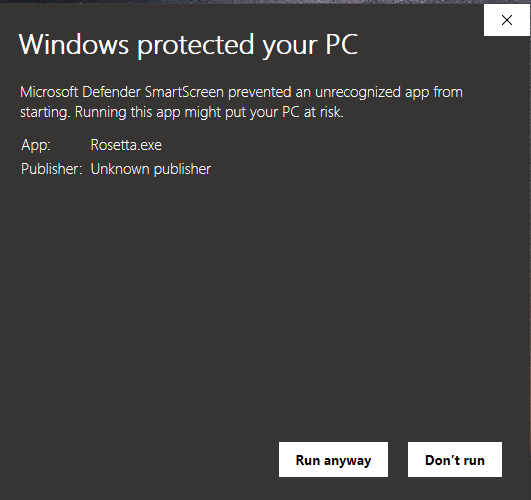
Think we should pass on this.
WIN 10
Rosetta.png
User avatar
clintonman
Captain
Posts: 5659
Joined: 21 May 2009, 21:08
Type the number ten into the box: 0
Location: California

Re: Final trueSpace 7.61 Beta 8 Unofficial Update

Post by clintonman »

trueBlue wrote: 26 Jun 2020, 00:16
clintonman wrote: 25 Jun 2020, 22:22 Rosetta with V6
Think we should pass on this.
WIN 10
Rosetta.png
Fine by me, but I pretty much get the same thing when I run the updates. I have to disable my anti-virus or it doesn't go well. I don't think there's any problem with the full version dll files though.
Clinton Reese

http://clintons3d.com
User avatar
trueBlue
Captain
Posts: 5548
Joined: 06 Jul 2009, 22:50
Type the number ten into the box: 10

Re: Final trueSpace 7.61 Beta 8 Unofficial Update

Post by trueBlue »

clintonman wrote: 25 Jun 2020, 15:53 Here are the latest xml files for Hide, Show, HideAll, ShowAll and CloseORASettings nodes.
Found another problem with these files :shock:
The CloseORASettings was not named from with in the tS Script Editor, so tS imported it as NewCommand
Which meant the other scripts could not call it.
Probably should delete these files!
User avatar
clintonman
Captain
Posts: 5659
Joined: 21 May 2009, 21:08
Type the number ten into the box: 0
Location: California

Re: Final trueSpace 7.61 Beta 8 Unofficial Update

Post by clintonman »

Here's one more attempt to get all good xml files.
Attachments
AllGoodIHope.zip
(6.19 KiB) Downloaded 167 times
Clinton Reese

http://clintons3d.com
User avatar
trueBlue
Captain
Posts: 5548
Joined: 06 Jul 2009, 22:50
Type the number ten into the box: 10

Re: Final trueSpace 7.61 Beta 8 Unofficial Update

Post by trueBlue »

clintonman wrote: 26 Jun 2020, 00:37
trueBlue wrote: 26 Jun 2020, 00:16
clintonman wrote: 25 Jun 2020, 22:22 Rosetta with V6
Think we should pass on this.
WIN 10
Rosetta.png
Fine by me, but I pretty much get the same thing when I run the updates. I have to disable my anti-virus or it doesn't go well. I don't think there's any problem with the full version dll files though.
Thinking it would be better to supply the original files along with the modified files, and create a script to install them.
Like I did with your postprocess files.
Look in the Postprocess library
User avatar
trueBlue
Captain
Posts: 5548
Joined: 06 Jul 2009, 22:50
Type the number ten into the box: 10

Re: Final trueSpace 7.61 Beta 8 Unofficial Update

Post by trueBlue »

New Update for trueSpace7.61 Beta 8 Unofficial Update
viewtopic.php?t=3732
RC5 June 25, 2020

Recommend that you completely Uninstall and Install trueSpace7.61 Beta 8 to a clean directory before installing this update. This update precedes all previous updates and recommend that you delete any and all previous updates.

Protect Workspace - Author Clinton Reese
Synchronize - Author Clinton Reese
Updated

Background widget
Look at selection - Author Clinton Reese
Zoom2All
Removed
RsTool.ResetView('');

ClintonsToolbar
Add
Workspace Layers 3 - Author Clinton Reese

Object and Vertex Snap - Author Clinton Reese
Update - Widget and Help panels updated

FK Controls - Author Clinton Reese
Update- Panel redesigned with bigger buttons

All toolbars buttons with a RMB Help command
Add
Modal Question function
Yes = Open Web Browser?
No = Cancel

Commands
Update
Hide, Show, HideAll, and ShowAll scripts - Author Clinton Reese


MeshObjectCoordinateSystem - Author Clinton Reese
ToggleCoordSystem
Removed
Node.Value('/Preferences/Modeling preferences','Coordinate system') = 'Local'
Node.Value('/Preferences/Modeling preferences','Coordinate system') = 'World'
Replaced with original script - March 23, 2020

Thank you ever so much Clinton! :worship:
User avatar
clintonman
Captain
Posts: 5659
Joined: 21 May 2009, 21:08
Type the number ten into the box: 0
Location: California

Re: Final trueSpace 7.61 Beta 8 Unofficial Update

Post by clintonman »

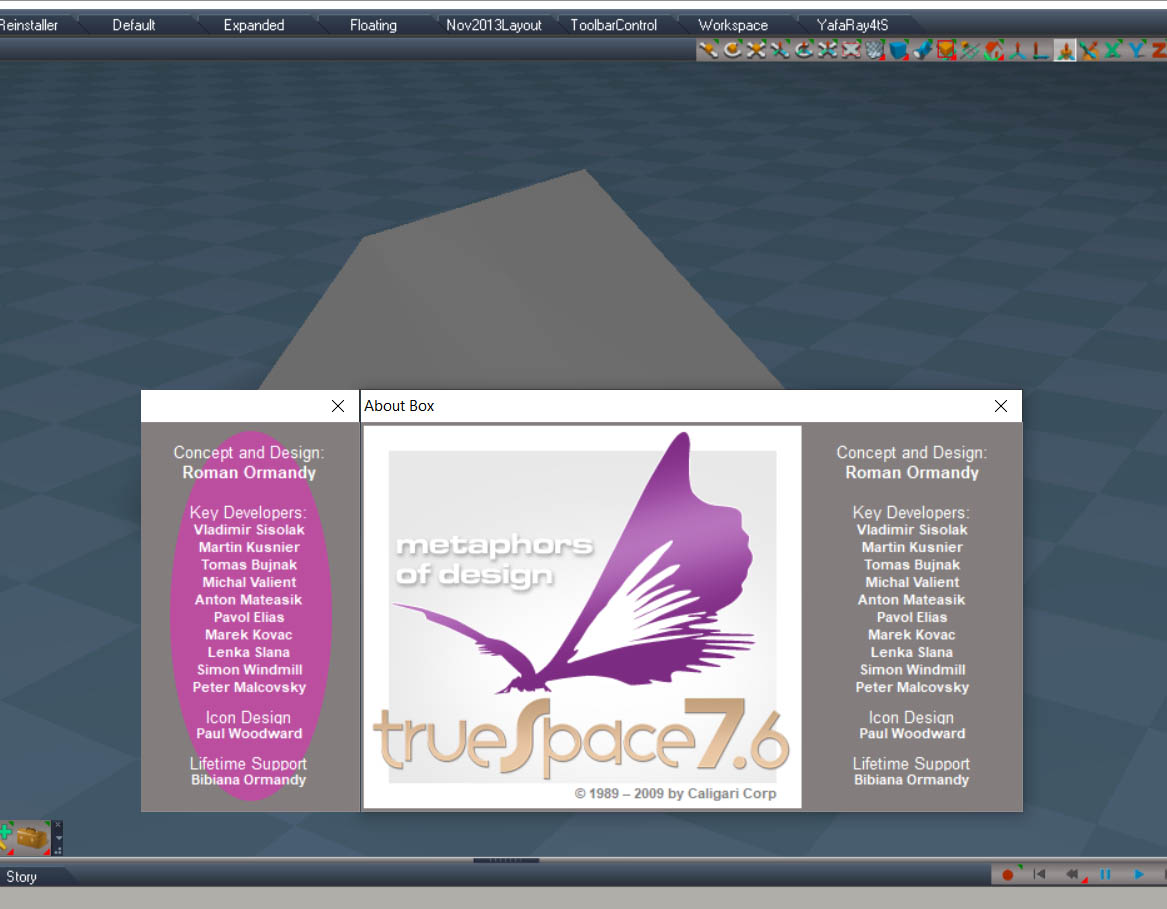
AboutProposal.jpg

I have another idea for the about box. This doesn't alter any of the external files and is only shown in the about not during the splash screen. when the about is run a second window can display next to it. The image above has it on the left. About seems to always open in the same region so i think it's possible to line them up no matter what the screen size.

The disadvantage is that the second window would have to be closed after the official about or maybe some kind of timer could be setup to close it if the x isn't pressed within some time period.
Clinton Reese

http://clintons3d.com
User avatar
trueBlue
Captain
Posts: 5548
Joined: 06 Jul 2009, 22:50
Type the number ten into the box: 10

Re: Final trueSpace 7.61 Beta 8 Unofficial Update

Post by trueBlue »

How in the heck did you do that? :shock:
Please do share!
There are a lot of possibilities for sure.
Another example, you could add a script to the Help/About command
WindowsManager.OpenAboutBox();//Insert code here :mrgreen:
Or simply:

Code: Select all

System.Alert("trueSpace 7.61 Unofficial Update Version 6");WindowsManager.OpenAboutBox();
There is one thing I would suggest we change with the Hide and HideAll scripts since there is a loss of selection.
Try it without selecting:
Hide
Line 76
//Space.Select(sel);
Note: Activity.Run(System.ThisOwner() + "/CloseORASettings");
Is not working

HideAll
Line 46
//Space.Select(sel);
Note: Activity.Run(System.ThisOwner() + "/CloseORASettings");
Is not working

Not sure really about this with the not selecting part.
It is good in one aspect but the whole concept about showing the Object Render Attributes only works on the first selected object.
Before, the original command, use to show all of them.
User avatar
clintonman
Captain
Posts: 5659
Joined: 21 May 2009, 21:08
Type the number ten into the box: 0
Location: California

Re: Final trueSpace 7.61 Beta 8 Unofficial Update

Post by clintonman »

trueBlue wrote: 26 Jun 2020, 12:35 How in the heck did you do that? :shock:
Please do share!
There are a lot of possibilities for sure.
Another example, you could add a script to the Help/About command
WindowsManager.OpenAboutBox();//Insert code here :mrgreen:
Or simply:

Code: Select all

System.Alert("trueSpace 7.61 Unofficial Update Version 6");WindowsManager.OpenAboutBox();
...
Photoshop. It's a mockup it's not real.

That is pretty much what I was thinking, with code added before the open about command.
Clinton Reese

http://clintons3d.com
User avatar
clintonman
Captain
Posts: 5659
Joined: 21 May 2009, 21:08
Type the number ten into the box: 0
Location: California

Re: Final trueSpace 7.61 Beta 8 Unofficial Update

Post by clintonman »

trueBlue wrote: 26 Jun 2020, 12:35 There is one thing I would suggest we change with the Hide and HideAll scripts since there is a loss of selection.
Try it without selecting:
Hide
Line 76
//Space.Select(sel);
Note: Activity.Run(System.ThisOwner() + "/CloseORASettings");
Is not working

HideAll
Line 46
//Space.Select(sel);
Note: Activity.Run(System.ThisOwner() + "/CloseORASettings");
Is not working
The selection is only altered if a spotlight, camera or projection light is selected. You can't hide them if they are selected.
trueBlue wrote: 26 Jun 2020, 12:35 Not sure really about this with the not selecting part.
It is good in one aspect but the whole concept about showing the Object Render Attributes only works on the first selected object.
Before, the original command, use to show all of them.
Don't know what you mean by this. Maybe you can post a picture of what's missing.
Clinton Reese

http://clintons3d.com
User avatar
clintonman
Captain
Posts: 5659
Joined: 21 May 2009, 21:08
Type the number ten into the box: 0
Location: California

Re: Final trueSpace 7.61 Beta 8 Unofficial Update

Post by clintonman »

trueBlue wrote: 26 Jun 2020, 12:35 How in the heck did you do that? :shock:
Please do share!
There are a lot of possibilities for sure.
Another example, you could add a script to the Help/About command
WindowsManager.OpenAboutBox();//Insert code here :mrgreen:
Or simply:

Code: Select all

System.Alert("trueSpace 7.61 Unofficial Update Version 6");WindowsManager.OpenAboutBox();
I finished my research and the code you have here would probably be best.
The position of the about box is independent of trueSpace size and location. the about box is centered in the whole monitor screen so there is no way to line them up.
Clinton Reese

http://clintons3d.com
User avatar
trueBlue
Captain
Posts: 5548
Joined: 06 Jul 2009, 22:50
Type the number ten into the box: 10

Re: Final trueSpace 7.61 Beta 8 Unofficial Update

Post by trueBlue »

clintonman wrote: 26 Jun 2020, 19:57
trueBlue wrote: 26 Jun 2020, 12:35 There is one thing I would suggest we change with the Hide and HideAll scripts since there is a loss of selection.
Try it without selecting:
Hide
Line 76
//Space.Select(sel);
Note: Activity.Run(System.ThisOwner() + "/CloseORASettings");
Is not working

HideAll
Line 46
//Space.Select(sel);
Note: Activity.Run(System.ThisOwner() + "/CloseORASettings");
Is not working
The selection is only altered if a spotlight, camera or projection light is selected. You can't hide them if they are selected.
trueBlue wrote: 26 Jun 2020, 12:35 Not sure really about this with the not selecting part.
It is good in one aspect but the whole concept about showing the Object Render Attributes only works on the first selected object.
Before, the original command, use to show all of them.
Don't know what you mean by this. Maybe you can post a picture of what's missing.
1.) Activity.Run(System.ThisOwner() + "/CloseORASettings"); is not working for Hide and HideAll. Where as if have Settings open, it is not switching to Panels. In Panels, only the first selected in the selection is showing.
IMO... it is fine the way it currently is. If it did show all of the selected Object Render Attribute panels in Panels, it's like okay? Which one belongs to which object? Let's call way better then it use to!
User avatar
trueBlue
Captain
Posts: 5548
Joined: 06 Jul 2009, 22:50
Type the number ten into the box: 10

Re: Final trueSpace 7.61 Beta 8 Unofficial Update

Post by trueBlue »

New Update for trueSpace7.61 Beta 8 Unofficial Update
viewtopic.php?t=3732
RC6 June 27, 2020

Recommend that you completely Uninstall and Install trueSpace7.61 Beta 8 to a clean directory before installing this update. This update precedes all previous updates and recommend that you delete any and all previous updates.

Backgound widget
Perspective & Ortho
RMB + Drag gesture/script
Add
Close Quad toolbar(s)

Window.Shortcuts.xml
Changed
Space keyboard key shortcut to: Open the Quad Toolbar in Point Edit Mode

Toolbars
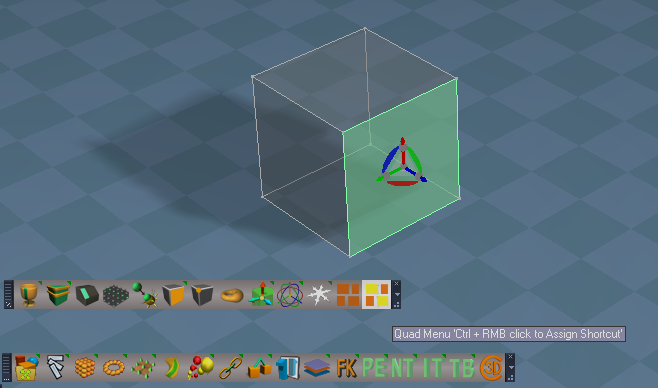
Model & Workspace - About LMB command
Add Alert = trueSpace 7.61 Unofficial Update Version 6

ClintonsToolbar
Add
Mesh Origin

ClintonsPointEditToolbar
Add
Quad Toolbar
AssignShortcut.png
User avatar
trueBlue
Captain
Posts: 5548
Joined: 06 Jul 2009, 22:50
Type the number ten into the box: 10

Re: Final trueSpace 7.61 Beta 8 Unofficial Update

Post by trueBlue »

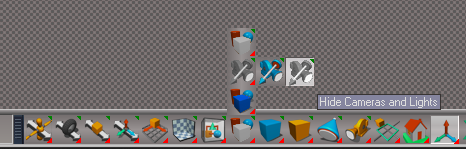
Just noticed an instance where the Show Cameras and Lights script was not working.
Sticky Check Box
So in the near future, I will upload these changes.
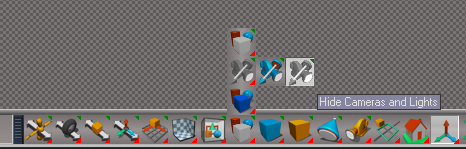
Also created new icons
HideShowLightsCameras.png
User avatar
trueBlue
Captain
Posts: 5548
Joined: 06 Jul 2009, 22:50
Type the number ten into the box: 10

Re: Final trueSpace 7.61 Beta 8 Unofficial Update

Post by trueBlue »

@Clinton
What do you think about a different approach for Unselectable objects?
Lock
var lock = LE.ExpandMatrix(selectedObj_ + "/Matrix")
Node.Rename(Space.CurrentScene() + "/ExpandInMatrix") = "Lock"

Unlock
Node.Disconnect(Space.CurrentScene() + "/Lock", "Matrix", selectedObj_, "Matrix")
Node.Delete(Space.CurrentScene() + "/Lock")
User avatar
clintonman
Captain
Posts: 5659
Joined: 21 May 2009, 21:08
Type the number ten into the box: 0
Location: California

Re: Final trueSpace 7.61 Beta 8 Unofficial Update

Post by clintonman »

trueBlue wrote: 27 Jun 2020, 19:38 @Clinton
What do you think about a different approach for Unselectable objects?
Lock
var lock = LE.ExpandMatrix(selectedObj_ + "/Matrix")
Node.Rename(Space.CurrentScene() + "/ExpandInMatrix") = "Lock"

Unlock
Node.Disconnect(Space.CurrentScene() + "/Lock", "Matrix", selectedObj_, "Matrix")
Node.Delete(Space.CurrentScene() + "/Lock")
Might be useful but it's not the same thing. You can still select the item, edit it, change it's materials etc. Also the rename will need unique names for more than one locked item at a time.
Clinton Reese

http://clintons3d.com
User avatar
trueBlue
Captain
Posts: 5548
Joined: 06 Jul 2009, 22:50
Type the number ten into the box: 10

Re: Final trueSpace 7.61 Beta 8 Unofficial Update

Post by trueBlue »

Looks like this
viewtopic.php?t=5536
is compatible with your Workspace Layers

But it uses Activity.KillAll()
User avatar
clintonman
Captain
Posts: 5659
Joined: 21 May 2009, 21:08
Type the number ten into the box: 0
Location: California

Re: Final trueSpace 7.61 Beta 8 Unofficial Update

Post by clintonman »

trueBlue wrote: 27 Jun 2020, 20:00 Looks like this
viewtopic.php?t=5536
is compatible with your Workspace Layers

But it uses Activity.KillAll()
On top of the KillAll this comment from the old version on my web site might apply as well, " ...this process can interfere with other scripts that depend on selection changes."
Clinton Reese

http://clintons3d.com
User avatar
trueBlue
Captain
Posts: 5548
Joined: 06 Jul 2009, 22:50
Type the number ten into the box: 10

Re: Final trueSpace 7.61 Beta 8 Unofficial Update

Post by trueBlue »

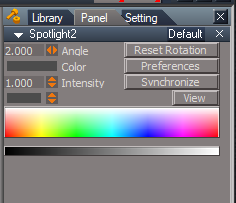
Found an issue with Workspace Layers
Selecting Locked from the menu replaces the Object Render Attributes node for Lights and Cameras, maybe other objects too!
This is an issue in the Updates because of the modified Object Render Attributes, that has the Default aspect Exported out.
It exposes the none working Invisible attribute, that is hookup to the Object Hider.
Any chance you can update your Workspace Layers to not replace the Object Render Attributes if it Exist?

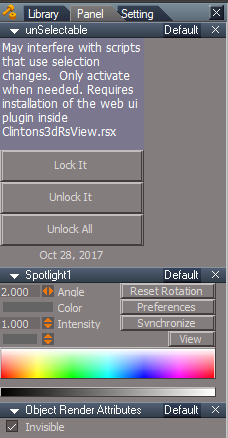
Also, If your unSelectable.RsObj is installed, selecting Locked from the menu, installs the selectionLocking.RsObj to every object in the scene.
Any chance you can update your unSelectable.RsObj - UnLock All and Unlock It code to delete the selectionLocking.RsObj in every object in the scene and or selected objects?
WorkspaceLayersandUnSelectable.png
Also if your Workspace Layers unlock code could remove the selectionLocking.RsObj in every object in the scene, would be good too!
IE: Restoring the objects back to their original state.
Ultimately, if your Workspace Layers could have the unSelectable.RsObj incorporated and coexist with your plugin, would be awesome!

And maybe a check to see if your required plugin(s) is Installed and Loaded?
As an example:

Code: Select all

	try {
		utilitydata = System.CreateDO("Clintons3D Package/Utility functions");
	} catch(err) {
System.Error("Requires the " + "("+" Clintons3dPlugin.rsx )" + " plugin to be Installed and Loaded in the Package Manager")
		return "Requires Clintons3dPlugin.rsx plugin";
	}
Above example is missing the Clintons3dRsView.rsx
How would you check for this plugin?
This would be good to have in case a user unloads and or uninstalls your plugin(s)
User avatar
clintonman
Captain
Posts: 5659
Joined: 21 May 2009, 21:08
Type the number ten into the box: 0
Location: California

Re: Final trueSpace 7.61 Beta 8 Unofficial Update

Post by clintonman »

trueBlue wrote: 28 Jun 2020, 15:29 Found an issue with Workspace Layers
Selecting Locked from the menu replaces the Object Render Attributes node for Lights and Cameras, maybe other objects too!
This is an issue in the Updates because of the modified Object Render Attributes, that has the Default aspect Exported out.
It exposes the none working Invisible attribute, that is hookup to the Object Hider.
Any chance you can update your Workspace Layers to not replace the Object Render Attributes if it Exist?
I don't see this at all. It has no effect on the Object Render Attributes and the exported aspect does not change.

trueBlue wrote: 28 Jun 2020, 15:29 Also, If your unSelectable.RsObj is installed, selecting Locked from the menu, installs the selectionLocking.RsObj to every object in the scene.
Any chance you can update your unSelectable.RsObj - UnLock All and Unlock It code to delete the selectionLocking.RsObj in every object in the scene and or selected objects?
WorkspaceLayersandUnSelectable.png
Also if your Workspace Layers unlock code could remove the selectionLocking.RsObj in every object in the scene, would be good too!
IE: Restoring the objects back to their original state.
The lock is added to all items in a layer, not every object in the scene unless all items are in one layer. It works on layer items not all items.
I do think it would be better to remove the nodes when unlocking.

trueBlue wrote: 28 Jun 2020, 15:29 Ultimately, if your Workspace Layers could have the unSelectable.RsObj incorporated and coexist with your plugin, would be awesome!
No, the unSelectable does not require the layers and can be used without the layers, so I'm not going to duplicate it inside the layers scripts. If unSelectable is available layers will use it, otherwise it ignores it.


trueBlue wrote: 28 Jun 2020, 15:29 And maybe a check to see if your required plugin(s) is Installed and Loaded?
As an example:

Code: Select all

	try {
		utilitydata = System.CreateDO("Clintons3D Package/Utility functions");
	} catch(err) {
System.Error("Requires the " + "("+" Clintons3dPlugin.rsx )" + " plugin to be Installed and Loaded in the Package Manager")
		return "Requires Clintons3dPlugin.rsx plugin";
	}
Above example is missing the Clintons3dRsView.rsx
How would you check for this plugin?
This would be good to have in case a user unloads and or uninstalls your plugin(s)
Might be a good idea.
Clinton Reese

http://clintons3d.com
User avatar
trueBlue
Captain
Posts: 5548
Joined: 06 Jul 2009, 22:50
Type the number ten into the box: 10

Re: Final trueSpace 7.61 Beta 8 Unofficial Update

Post by trueBlue »

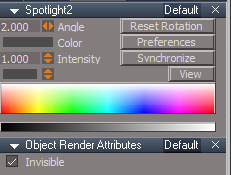
Steps
Current tS 761 Unofficial Update
New Scene
Open Panels
Select Spot light
Notice that the Object Render Attributes does Not show in Panels
Before.png
Before.png (13.02 KiB) Viewed 2700 times
Load Workspace Layers
Select Visible or Locked
Notice that the Object Render Attributes Does show in Panels
After.png
After.png (10.47 KiB) Viewed 2700 times
Results: All Lights and Camera has their Object Render Attributes replaced
User avatar
clintonman
Captain
Posts: 5659
Joined: 21 May 2009, 21:08
Type the number ten into the box: 0
Location: California

Re: Final trueSpace 7.61 Beta 8 Unofficial Update

Post by clintonman »

trueBlue wrote: 28 Jun 2020, 18:50 Steps
Current tS 761 Unofficial Update
New Scene
Open Panels
Select Spot light
Notice that the Object Render Attributes does Not show in Panels
Before.png
Load Workspace Layers
Select Visible or Locked
Notice that the Object Render Attributes Does show in Panels
After.png

Results: All Lights and Camera has their Object Render Attributes replaced
Thanks for the steps, I'll give it a go.
Clinton Reese

http://clintons3d.com
User avatar
trueBlue
Captain
Posts: 5548
Joined: 06 Jul 2009, 22:50
Type the number ten into the box: 10

Re: Final trueSpace 7.61 Beta 8 Unofficial Update

Post by trueBlue »

Check the menuprocessor script

Code: Select all

function emptylayerrecursive(thenode,layer)
{
	//System.Trace(thenode);
	if( (Node.IsRenderable(thenode) || isActor(thenode) || isGroup(thenode) ) && !(Node.IsCamera(thenode) || Node.IsLight(thenode)) )
		if(Node.Exists(thenode + "/Object Render Attributes"))
			if(Node.Value(thenode + "/Object Render Attributes","Layer index") == layer)
			{
				if(Node.ConExists(thenode,"RenderAttributes"))
				{
					Node.ConRemove(thenode, "RenderAttributes")
				}
				Node.Delete(thenode + "/Object Render Attributes")
				if(isActor(thenode)) return;
			}
User avatar
clintonman
Captain
Posts: 5659
Joined: 21 May 2009, 21:08
Type the number ten into the box: 0
Location: California

Re: Final trueSpace 7.61 Beta 8 Unofficial Update

Post by clintonman »

trueBlue wrote: 28 Jun 2020, 19:24 Check the menuprocessor script

Code: Select all

function emptylayerrecursive(thenode,layer)
{
	//System.Trace(thenode);
	if( (Node.IsRenderable(thenode) || isActor(thenode) || isGroup(thenode) ) && !(Node.IsCamera(thenode) || Node.IsLight(thenode)) )
		if(Node.Exists(thenode + "/Object Render Attributes"))
			if(Node.Value(thenode + "/Object Render Attributes","Layer index") == layer)
			{
				if(Node.ConExists(thenode,"RenderAttributes"))
				{
					Node.ConRemove(thenode, "RenderAttributes")
				}
				Node.Delete(thenode + "/Object Render Attributes")
				if(isActor(thenode)) return;
			}
That explains why I couldn't find it. That has nothing to do with the locking.
Must be an error in the if logic since it looks like it's not supposed to do it to lights and cameras.

In process of updating to your latest. Test on older version does not show the effect until I deselect and then select the light again. Then I can see it. will continue testing after the update.
Clinton Reese

http://clintons3d.com
User avatar
clintonman
Captain
Posts: 5659
Joined: 21 May 2009, 21:08
Type the number ten into the box: 0
Location: California

Re: Final trueSpace 7.61 Beta 8 Unofficial Update

Post by clintonman »

As I thought, the problem has nothing to do with the workspace layers.

Steps:
new scene in latest unofficial update
select the spotlight
press the hide button
reselect the spotlight
the object render attributes shows up
Clinton Reese

http://clintons3d.com
User avatar
clintonman
Captain
Posts: 5659
Joined: 21 May 2009, 21:08
Type the number ten into the box: 0
Location: California

Re: Final trueSpace 7.61 Beta 8 Unofficial Update

Post by clintonman »

Fix for Hide and HideAll so the export from object render attributes node does not occur.
Not yet tested with the workspace layers. It needs to be reinstalled because of all the testing.

Edit:
Testing shows that the Show script also had the same problem.
Also shows layers seem to be behaving.
Attachments
FixHideCamLights.zip
(4.54 KiB) Downloaded 153 times
Clinton Reese

http://clintons3d.com
User avatar
trueBlue
Captain
Posts: 5548
Joined: 06 Jul 2009, 22:50
Type the number ten into the box: 10

Re: Final trueSpace 7.61 Beta 8 Unofficial Update

Post by trueBlue »

Edit: I found the culprit! :mrgreen:
RsStackView.SetPanelExportInfo(Sel + '/Object Render Attributes','Default',1,1);

Code: Select all

var Sel = Node.FirstSelected()
D3DView.ShowRenderAttribsForObject('', Sel)
RsStackView.SetPanelExportInfo(Sel + '/Object Render Attributes','Default',1,1);
Thanks Clinton.
Updated with the new scripts and so far whatever you changed works for the Object Hider but not all other Lights
Maybe adding Node.IsLight() to the above would solve this?
Also with the Object Hider do a Check/Uncheck for the sticky Check Box?

Hide, HideAll, Show, and ShowAll
Does NOT replace the ORA on obects that have an Object Hider
DOES replace the ORA on all other Lights.
Note: If this can not be fixed, it is not a show stopper.

Hide and Show
DOES replace the ORA on other Lights.
Note: If this can not be fixed, it is not a show stopper.

Workspace Layers
Set Visible to Hide
And Or Set Locked to Locked
Note: I have the unSelectable.RsObj installed.
DOES replace the ORA for ALL Lights and Cameras
Note: As I understand, your Workspace Layers has it's own Hide and Show code incorporated and does not use any of the Scripts/Commands scripts
I also notice that you have included and are using the CloseORASettings script in the wsLayersGroup
Seems to me that if you included the Hide, Show, HideAll, and ShowAll scripts in the wsLayersGroup, would be the easiest fix?

Also, on a side note, If you check and uncheck Lights and Cameas in the Link Editor properties for the HideAll and ShowAll scripts could be a possibility for Lights and Cameras with the Object Hider.
Node.Value("/Preferences/Link Editor", "Lights") = 0
Node.Value("/Preferences/Link Editor", "Cameras") = 0
User avatar
clintonman
Captain
Posts: 5659
Joined: 21 May 2009, 21:08
Type the number ten into the box: 0
Location: California

Re: Final trueSpace 7.61 Beta 8 Unofficial Update

Post by clintonman »

Why do you want to not show the ORA for lights that don't have a hider?

From the manual:
SetPanelExportInfo, Set Panel export Info for specific panel and aspect

Don't know how you're getting "DOES replace the ORA" from that.

"DOES replace the ORA for ALL Lights and Cameras"
Not seeing it. What steps does it take to "replace the ORA for ALL Lights and Cameras"?


"Also, on a side note,..."
Hmm, interesting...
Clinton Reese

http://clintons3d.com
User avatar
trueBlue
Captain
Posts: 5548
Joined: 06 Jul 2009, 22:50
Type the number ten into the box: 10

Re: Final trueSpace 7.61 Beta 8 Unofficial Update

Post by trueBlue »

Cross post
See previous edited post
The ORA was not being replaced.
You are setting the Export aspect

The default/original trueSpace behavior for the ORA aspect(s) is not Exported
User avatar
trueBlue
Captain
Posts: 5548
Joined: 06 Jul 2009, 22:50
Type the number ten into the box: 10

Re: Final trueSpace 7.61 Beta 8 Unofficial Update

Post by trueBlue »

Here is all of the xml files
They are dated at the top of the script
All modifications are at the left of the script (No Tabs)
Attachments
ScriptCommandsFolder.zip
(7.95 KiB) Downloaded 161 times
User avatar
clintonman
Captain
Posts: 5659
Joined: 21 May 2009, 21:08
Type the number ten into the box: 0
Location: California

Re: Final trueSpace 7.61 Beta 8 Unofficial Update

Post by clintonman »

Found new bug in the Hide command script

create 2 cubes
3d encapsulate them
hide the group
show one of the cubes
hide the group - fail, shown cube still visible

fix change to

Code: Select all

		// need to run ever time for case of a child is explicitly shown
		//if(!Node.Exists(Sel + "/Object Render Attributes")) {
		if(!Node.IsCamera(Sel) && !Node.IsLight(Sel)) {
			D3DView.ShowRenderAttribsForObject('', Sel);
			ORA_was_created = true;
			FindOrphanORA(Sel);
		}

HideAll/ShowAll - hiding lights and cameras in the LE does not look like a good thing
Clinton Reese

http://clintons3d.com
User avatar
clintonman
Captain
Posts: 5659
Joined: 21 May 2009, 21:08
Type the number ten into the box: 0
Location: California

Re: Final trueSpace 7.61 Beta 8 Unofficial Update

Post by clintonman »

SetPanelExportInfo is needed for using workspace layers in unmodified version of trueSpace. I'll add a check for the Unofficial Update and skip the command if it is.
Clinton Reese

http://clintons3d.com
User avatar
trueBlue
Captain
Posts: 5548
Joined: 06 Jul 2009, 22:50
Type the number ten into the box: 10

Re: Final trueSpace 7.61 Beta 8 Unofficial Update

Post by trueBlue »

clintonman wrote: 29 Jun 2020, 16:46 Found new bug in the Hide command script

create 2 cubes
3d encapsulate them
hide the group
show one of the cubes
hide the group - fail, shown cube still visible

fix change to

Code: Select all

		// need to run ever time for case of a child is explicitly shown
		//if(!Node.Exists(Sel + "/Object Render Attributes")) {
		if(!Node.IsCamera(Sel) && !Node.IsLight(Sel)) {
			D3DView.ShowRenderAttribsForObject('', Sel);
			ORA_was_created = true;
			FindOrphanORA(Sel);
		}

HideAll/ShowAll - hiding lights and cameras in the LE does not look like a good thing
Got it, Thanks
I'll remove the LE properties commands.
I am okay with:
RsStackView.SetPanelExportInfo(Sel + '/Object Render Attributes','Default',1,1);


Just through me for a loop thinking the panel was being replaced.
So In or Out?
Your call!
User avatar
clintonman
Captain
Posts: 5659
Joined: 21 May 2009, 21:08
Type the number ten into the box: 0
Location: California

Re: Final trueSpace 7.61 Beta 8 Unofficial Update

Post by clintonman »

trueBlue wrote: 29 Jun 2020, 17:03
clintonman wrote: 29 Jun 2020, 16:46 Found new bug in the Hide command script

create 2 cubes
3d encapsulate them
hide the group
show one of the cubes
hide the group - fail, shown cube still visible

fix change to

Code: Select all

		// need to run ever time for case of a child is explicitly shown
		//if(!Node.Exists(Sel + "/Object Render Attributes")) {
		if(!Node.IsCamera(Sel) && !Node.IsLight(Sel)) {
			D3DView.ShowRenderAttribsForObject('', Sel);
			ORA_was_created = true;
			FindOrphanORA(Sel);
		}

HideAll/ShowAll - hiding lights and cameras in the LE does not look like a good thing
Got it, Thanks
I'll remove the LE properties commands.
I am okay with:
RsStackView.SetPanelExportInfo(Sel + '/Object Render Attributes','Default',1,1);


Just through me for a loop thinking the panel was being replaced.
So In or Out?
Your call!
Put it back in. In most cases it's not needed, but if you load an object from "not updated tS" that has ORA then it never shows and you lose access to that feature.
Clinton Reese

http://clintons3d.com
User avatar
trueBlue
Captain
Posts: 5548
Joined: 06 Jul 2009, 22:50
Type the number ten into the box: 10

Re: Final trueSpace 7.61 Beta 8 Unofficial Update

Post by trueBlue »

Okay it's back in.
User avatar
trueBlue
Captain
Posts: 5548
Joined: 06 Jul 2009, 22:50
Type the number ten into the box: 10

Re: Final trueSpace 7.61 Beta 8 Unofficial Update

Post by trueBlue »

Just noticed that the ShowAll does not have the:

Code: Select all

RsStackView.SetPanelExportInfo(CurrentNode + '/Object Render Attributes','Default',1,1);
command and HideAll does.
Should it be included and if so where at in the script?
User avatar
clintonman
Captain
Posts: 5659
Joined: 21 May 2009, 21:08
Type the number ten into the box: 0
Location: California

Re: Final trueSpace 7.61 Beta 8 Unofficial Update

Post by clintonman »

trueBlue wrote: 29 Jun 2020, 17:49 Just noticed that the ShowAll does not have the:

Code: Select all

RsStackView.SetPanelExportInfo(CurrentNode + '/Object Render Attributes','Default',1,1);
command and HideAll does.
Should it be included and if so where at in the script?
No. ShowAll/HideAll don't work the same as Hide/Show. The Show/Hide in the workspace layers is also different, similar, but different.
Clinton Reese

http://clintons3d.com
User avatar
trueBlue
Captain
Posts: 5548
Joined: 06 Jul 2009, 22:50
Type the number ten into the box: 10

Re: Final trueSpace 7.61 Beta 8 Unofficial Update

Post by trueBlue »

Okay thanks!
User avatar
trueBlue
Captain
Posts: 5548
Joined: 06 Jul 2009, 22:50
Type the number ten into the box: 10

Re: Final trueSpace 7.61 Beta 8 Unofficial Update

Post by trueBlue »

Can you post a script that checks for the plugin(s) needed to be Installed and Loaded for the Workspace Layers?
It looks like it needs to go in the
menuprocessor script functions
LockIt and UnLockIt


Edit: Actually it most likely should be:
Check if it Exist
Instead of an System.Error and return
System.Alert that the Locking/Unlocking will not work
User avatar
trueBlue
Captain
Posts: 5548
Joined: 06 Jul 2009, 22:50
Type the number ten into the box: 10

Re: Final trueSpace 7.61 Beta 8 Unofficial Update

Post by trueBlue »

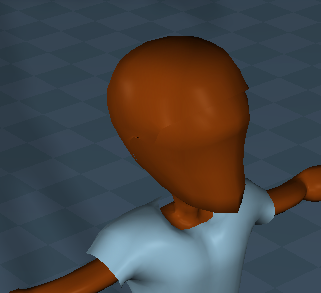
Ugh! Reading about your Workspace Layers at your website, I found another issue with the Hiding/Showing scripts.
Poor Bobby has invisible Hair :lol:
NoHair.png
NoHair.png (65.29 KiB) Viewed 3111 times
Looks like you are avoiding Skeletons

Code: Select all

if(Node.ConExists(childnode, "Skeleton") && thenode != Space.CurrentScene()) {
return true;
}
User avatar
clintonman
Captain
Posts: 5659
Joined: 21 May 2009, 21:08
Type the number ten into the box: 0
Location: California

Re: Final trueSpace 7.61 Beta 8 Unofficial Update

Post by clintonman »

trueBlue wrote: 29 Jun 2020, 20:55 Ugh! Reading about your Workspace Layers at your website, I found another issue with the Hiding/Showing scripts.
Poor Bobby has invisible Hair :lol:
NoHair.png

Looks like you are avoiding Skeletons

Code: Select all

if(Node.ConExists(childnode, "Skeleton") && thenode != Space.CurrentScene()) {
return true;
}
Yep, forgot about that one. The note for it is from 2015, a few years ago.
Clinton Reese

http://clintons3d.com
User avatar
trueBlue
Captain
Posts: 5548
Joined: 06 Jul 2009, 22:50
Type the number ten into the box: 10

Re: Final trueSpace 7.61 Beta 8 Unofficial Update

Post by trueBlue »

Working with the Hide script, I tried:
if(Node.ConExists(Sel, "Skeleton")) {
return;
}
if(Node.ConExists(Sel, "Preview mode")) {
return;
}
FAILED! :(
User avatar
clintonman
Captain
Posts: 5659
Joined: 21 May 2009, 21:08
Type the number ten into the box: 0
Location: California

Re: Final trueSpace 7.61 Beta 8 Unofficial Update

Post by clintonman »

Some updates coming:

UnSelectable script will remove the unselectable node when unlocking

Workspace Layers there is no known way to check for the installation of the Clintons3dRsView.rsx plugin. Will delete the unselectable script when unlocked. Fix Hide script to work like new Unofficial Update Hide/HideAll. Fix Show script to work like new UU Show/ShowAll.

New scripts/scene for creating button images from inside trueSpace.

TODO: refix hair problem in layers and port fix over to the hide/show scripts

EDIT: got the hair problem squared away. :)
Last edited by clintonman on 30 Jun 2020, 01:50, edited 1 time in total.
Clinton Reese

http://clintons3d.com
User avatar
trueBlue
Captain
Posts: 5548
Joined: 06 Jul 2009, 22:50
Type the number ten into the box: 10

Re: Final trueSpace 7.61 Beta 8 Unofficial Update

Post by trueBlue »

:bananathumb:
Workspace Layers there is no known way to check for the installation of the Clintons3dRsView.rsx plugin
What? From somebody that can read and write to xml files? :)
IE: Plugins.xml
User avatar
trueBlue
Captain
Posts: 5548
Joined: 06 Jul 2009, 22:50
Type the number ten into the box: 10

Re: Final trueSpace 7.61 Beta 8 Unofficial Update

Post by trueBlue »

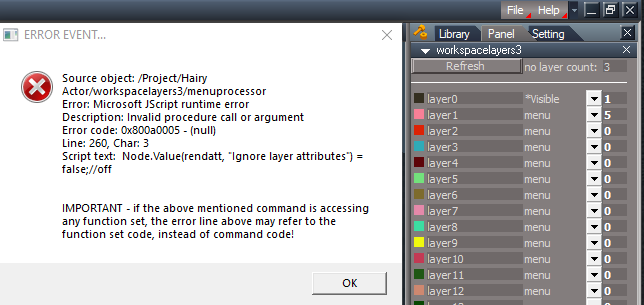
Test Layers' Visible with Head that has Hair error
Error.png
On another note:
Bobby
Visible test = Observation of the ORA panels when using Layers' Visible On/Off

Add Bobby and Refresh
no layer count = 1
Not added to layer1

Scalp Mesh does not have an ORA and is being ignored
IE: Is not getting a ORA node installed

Scalp Hair does have an ORA and is being ignored
IE: Hair is not set to invisible
Uncheck/Check "Enable object mode" looks promising with Hair for visibility

if(Node.ConExists(thenode, "Hair data")) {
Node.Value(thenode + "/Object Render Attributes", "Enable object mode") = 0
}
Or from the macro recorder
Node.Value(Space.CurrentScene() + "/Bobby/Bobby SDS Mesh/Hair/Scalp Hair/Object Render Attributes", "Enable object mode") = 0
Attachments
Hairy Actor.RsScn
(1.3 MiB) Downloaded 150 times
User avatar
clintonman
Captain
Posts: 5659
Joined: 21 May 2009, 21:08
Type the number ten into the box: 0
Location: California

Re: Final trueSpace 7.61 Beta 8 Unofficial Update

Post by clintonman »

trueBlue wrote: 30 Jun 2020, 01:48 :bananathumb:
Workspace Layers there is no known way to check for the installation of the Clintons3dRsView.rsx plugin
What? From somebody that can read and write to xml files? :)
IE: Plugins.xml
Very nice. :bananathumb: This solves a big problem for the case where the web scripts are installed without the plugin which creates a window that won't close.
Clinton Reese

http://clintons3d.com
User avatar
clintonman
Captain
Posts: 5659
Joined: 21 May 2009, 21:08
Type the number ten into the box: 0
Location: California

Re: Final trueSpace 7.61 Beta 8 Unofficial Update

Post by clintonman »

Thanks for the sample. I see the error message. Never tested the no actor hair option. If I open the scene and load it into a different layer it works without any error.
Clinton Reese

http://clintons3d.com
User avatar
trueBlue
Captain
Posts: 5548
Joined: 06 Jul 2009, 22:50
Type the number ten into the box: 10

Re: Final trueSpace 7.61 Beta 8 Unofficial Update

Post by trueBlue »

trueSpace's use of the ORA in Skeletons and Hair seems a though nut to crack with Hiding and Showing.
Question...what is the advantage of using your WebUI plugin for unselecting?
I have a working Workspace Layers (previous version) that includes the Selection Change Event hooked up to a Unselect script that uses Activity.KillAll() that is inside the scene's workspacelayer3.RsObj
The way I understand this concept is your implementation has the same side effect that conflicts with scenes that have Activities and Timers.
The Selection Change Event is an Activity.
So if there is a Timer and or Activity running in the scene, using Activity.KillAll() stops them from running.
The Activity.KillAll() does not seem to affect the continue use of the Unselecting. However with Timers, I can Activate them again and they will start working again. But at some point repeating the stopping / restarting, the Timers will become inoperable.
User avatar
clintonman
Captain
Posts: 5659
Joined: 21 May 2009, 21:08
Type the number ten into the box: 0
Location: California

Re: Final trueSpace 7.61 Beta 8 Unofficial Update

Post by clintonman »

More questions than answers.
I never properly documented the lock/unlock using the plugin, so it may solve some problems compared to the previous version. Don't know why I would get rid of the old way if this new way wasn't better in some way. The plugin is not a truespace activity or timer so there is no one to one comparison for their effects.
I've never used a KillAll in any of my scripts. Must have been something you added to your version.
From 2017 web ui release notes
uses WM_TIMER to control polling instead of a command node loop
does not destory the undo stack - no command node loop

So it looks like the old way messes up the undo stack, maybe fills it up or something, i don't know
The big question is what effect does it have on scripts where the user makes selections interactively. The old way had a bad effect, the new way, again I don't know.
Clinton Reese

http://clintons3d.com
User avatar
trueBlue
Captain
Posts: 5548
Joined: 06 Jul 2009, 22:50
Type the number ten into the box: 10

Re: Final trueSpace 7.61 Beta 8 Unofficial Update

Post by trueBlue »

Okay thanks for the explanation.
You gave me an idea.

Code: Select all

function Execute(params)
{
if (Node.ConExists('', "UnSelectable")) 
{
RsApp.Undo()
Node.Value(System.ThisOwner(), "Active") = -1
}
}
So simple!
Still will be a conflict with any existing Selection Change Events in the scene.
User avatar
clintonman
Captain
Posts: 5659
Joined: 21 May 2009, 21:08
Type the number ten into the box: 0
Location: California

Re: Final trueSpace 7.61 Beta 8 Unofficial Update

Post by clintonman »

I have some good news and some bad news on the hair front.

Hairy objects and actors do work with the workspace layers after the basic ORA hair fix, but old actors like Bobby don't work. I think it was probably created in tS 7.5 or earlier and that's the real problem. There must have been some internal change and I see no way to detect the difference.
I plan to add some kind of warning message that shows the first time the layers script is loaded to a scene. Same time frame for the warning that the plugin isn't installed.
Clinton Reese

http://clintons3d.com
User avatar
trueBlue
Captain
Posts: 5548
Joined: 06 Jul 2009, 22:50
Type the number ten into the box: 10

Re: Final trueSpace 7.61 Beta 8 Unofficial Update

Post by trueBlue »

You can not be expected to support all Hierarchies
I think Bobby's Scalp and Hair were added on to the Bobby Character
Even running the native tS command
D3DView.ShowRenderAttribsForObject('', '')
on Bobby has issues
User avatar
clintonman
Captain
Posts: 5659
Joined: 21 May 2009, 21:08
Type the number ten into the box: 0
Location: California

Re: Final trueSpace 7.61 Beta 8 Unofficial Update

Post by clintonman »

No, can't support all hierarchies but I don't believe that's the reason for Bobby's problems.

If I add unmodified Bobby to a layer his hair disappears.
If I load Bobby and use the hair length tool to make some of his hair long then add him to the layer, all the hair disappears except where it was edited.

...

While writing this just made another discovery. If you change the hair Strand Profile to Circle or Star it becomes visible. The problem is only with the Line type hair.
Clinton Reese

http://clintons3d.com
User avatar
trueBlue
Captain
Posts: 5548
Joined: 06 Jul 2009, 22:50
Type the number ten into the box: 10

Re: Final trueSpace 7.61 Beta 8 Unofficial Update

Post by trueBlue »

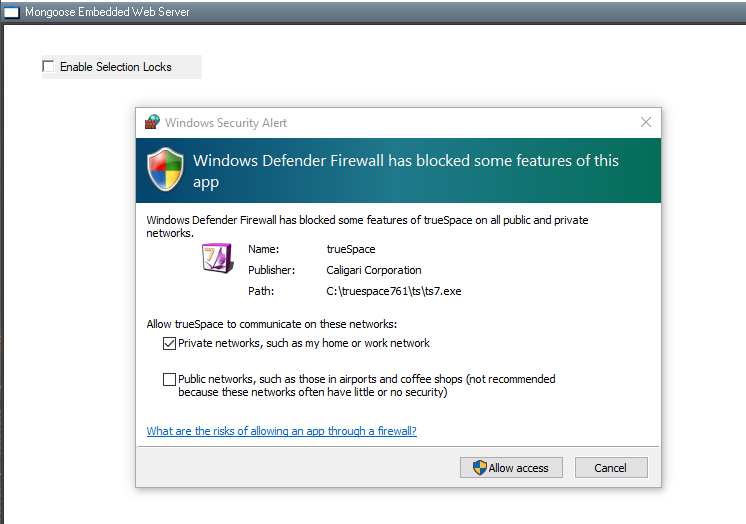
Took your Clintons3dRsView.rsx for spin for the first time.
Got a Windows Security Alert
Firewall.png
I choose Cancel
Locking and Unlocking works great! Nice and smooth!
I renamed the unSelectable.RsObj to test the below

WebServer
This is not working:

Code: Select all

	if(datafromweb.command == "LockNode")
	{
		//copy selection locking node if does not exist
		if(!Node.ConExists(datafromweb.path,"UnSelectable"))
		{
			newnode = Node.Copy(owner + "/selectionLocking",datafromweb.path);
			Node.ExportConnector(newnode, "UnSelectable", "", 1, 1);			
		}

		Node.Value(datafromweb.path,"UnSelectable") = true;

		return;
	}
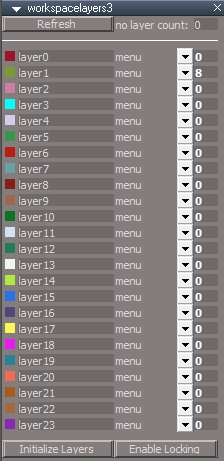
The unSelectable.RsObj is required
This could be because I Canceled the blocking of some features
Still investigating how i can Un block those features

Feedback
The Locking and Unlocking UI seems unconnected
At first use, I did not realize that you needed to start the Server and Check "Enable Selection Locks"
IMO... having a button on the Workspace Layers and or call the server from code would help.
Enable Locking button.png
Enable Locking button.png (9.83 KiB) Viewed 2812 times
User avatar
trueBlue
Captain
Posts: 5548
Joined: 06 Jul 2009, 22:50
Type the number ten into the box: 10

Re: Final trueSpace 7.61 Beta 8 Unofficial Update

Post by trueBlue »

Also it looks like you need to update your Visibility Function Set

IE: The disconnecting of the Object Hider

Code: Select all

Node.Disconnect(Sel + "/Object hider", "Invisible", Sel + "/Object Render Attributes", "Invisible");
Node.ConnectTo(Sel + "/Object hider", "Invisible", Sel + "/Object Render Attributes", "Invisible");
User avatar
clintonman
Captain
Posts: 5659
Joined: 21 May 2009, 21:08
Type the number ten into the box: 0
Location: California

Re: Final trueSpace 7.61 Beta 8 Unofficial Update

Post by clintonman »

trueBlue wrote: 01 Jul 2020, 17:19 Also it looks like you need to update your Visibility Function Set

IE: The disconnecting of the Object Hider

Code: Select all

Node.Disconnect(Sel + "/Object hider", "Invisible", Sel + "/Object Render Attributes", "Invisible");
Node.ConnectTo(Sel + "/Object hider", "Invisible", Sel + "/Object Render Attributes", "Invisible");
I don't see this. Check out the new version I just released.
Clinton Reese

http://clintons3d.com
User avatar
clintonman
Captain
Posts: 5659
Joined: 21 May 2009, 21:08
Type the number ten into the box: 0
Location: California

Re: Final trueSpace 7.61 Beta 8 Unofficial Update

Post by clintonman »

trueBlue wrote: 01 Jul 2020, 17:10
Feedback
The Locking and Unlocking UI seems unconnected
At first use, I did not realize that you needed to start the Server and Check "Enable Selection Locks"
IMO... having a button on the Workspace Layers and or call the server from code would help.
Enable Locking button.png
Good idea.
Clinton Reese

http://clintons3d.com
User avatar
trueBlue
Captain
Posts: 5548
Joined: 06 Jul 2009, 22:50
Type the number ten into the box: 10

Re: Final trueSpace 7.61 Beta 8 Unofficial Update

Post by trueBlue »

clintonman wrote: 01 Jul 2020, 17:25
trueBlue wrote: 01 Jul 2020, 17:19 Also it looks like you need to update your Visibility Function Set

IE: The disconnecting of the Object Hider

Code: Select all

Node.Disconnect(Sel + "/Object hider", "Invisible", Sel + "/Object Render Attributes", "Invisible");
Node.ConnectTo(Sel + "/Object hider", "Invisible", Sel + "/Object Render Attributes", "Invisible");
I don't see this. Check out the new version I just released.
Sorry to report but the new version also has the above.
User avatar
trueBlue
Captain
Posts: 5548
Joined: 06 Jul 2009, 22:50
Type the number ten into the box: 10

Re: Final trueSpace 7.61 Beta 8 Unofficial Update

Post by trueBlue »

With your newest Workspace Layers, Locking/Unlocking does not install the selectionLocking.RsObj to an object that has Hair applied from code.
The unSelectable.RsObj does.
Also selecting *Visible, hides the Hair but not the object it is attached to.
User avatar
clintonman
Captain
Posts: 5659
Joined: 21 May 2009, 21:08
Type the number ten into the box: 0
Location: California

Re: Final trueSpace 7.61 Beta 8 Unofficial Update

Post by clintonman »

trueBlue wrote: 01 Jul 2020, 19:19
clintonman wrote: 01 Jul 2020, 17:25
trueBlue wrote: 01 Jul 2020, 17:19 Also it looks like you need to update your Visibility Function Set

IE: The disconnecting of the Object Hider

Code: Select all

Node.Disconnect(Sel + "/Object hider", "Invisible", Sel + "/Object Render Attributes", "Invisible");
Node.ConnectTo(Sel + "/Object hider", "Invisible", Sel + "/Object Render Attributes", "Invisible");
I don't see this. Check out the new version I just released.
Sorry to report but the new version also has the above.
Downloaded from the website, verified july 1 date
installed

Still don't see it. Do you have a line number for that code?
Clinton Reese

http://clintons3d.com
User avatar
clintonman
Captain
Posts: 5659
Joined: 21 May 2009, 21:08
Type the number ten into the box: 0
Location: California

Re: Final trueSpace 7.61 Beta 8 Unofficial Update

Post by clintonman »

trueBlue wrote: 01 Jul 2020, 19:29 With your newest Workspace Layers, Locking/Unlocking does not install the selectionLocking.RsObj to an object that has Hair applied from code.
The unSelectable.RsObj does.
Also selecting *Visible, hides the Hair but not the object it is attached to.
How do you apply hair from code?

If you add a mesh to the scene and then apply hair to it you get hair on layer 0 and the mesh on layer 1. Is this what you are seeing?
If that's the case, the only way to unify them is to select the main object and assign it to a layer.
Clinton Reese

http://clintons3d.com
User avatar
trueBlue
Captain
Posts: 5548
Joined: 06 Jul 2009, 22:50
Type the number ten into the box: 10

Re: Final trueSpace 7.61 Beta 8 Unofficial Update

Post by trueBlue »

clintonman wrote: 01 Jul 2020, 19:49
trueBlue wrote: 01 Jul 2020, 19:19
clintonman wrote: 01 Jul 2020, 17:25

I don't see this. Check out the new version I just released.
Sorry to report but the new version also has the above.
Downloaded from the website, verified july 1 date
installed

Still don't see it. Do you have a line number for that code?
Looking at my previous post, I was not clear I was referring to your Web Server/Visibility Function Set
Starting with Line 41, there is other lines
User avatar
trueBlue
Captain
Posts: 5548
Joined: 06 Jul 2009, 22:50
Type the number ten into the box: 10

Re: Final trueSpace 7.61 Beta 8 Unofficial Update

Post by trueBlue »

clintonman wrote: 01 Jul 2020, 20:00
trueBlue wrote: 01 Jul 2020, 19:29 With your newest Workspace Layers, Locking/Unlocking does not install the selectionLocking.RsObj to an object that has Hair applied from code.
The unSelectable.RsObj does.
Also selecting *Visible, hides the Hair but not the object it is attached to.
How do you apply hair from code?

If you add a mesh to the scene and then apply hair to it you get hair on layer 0 and the mesh on layer 1. Is this what you are seeing?
If that's the case, the only way to unify them is to select the main object and assign it to a layer.
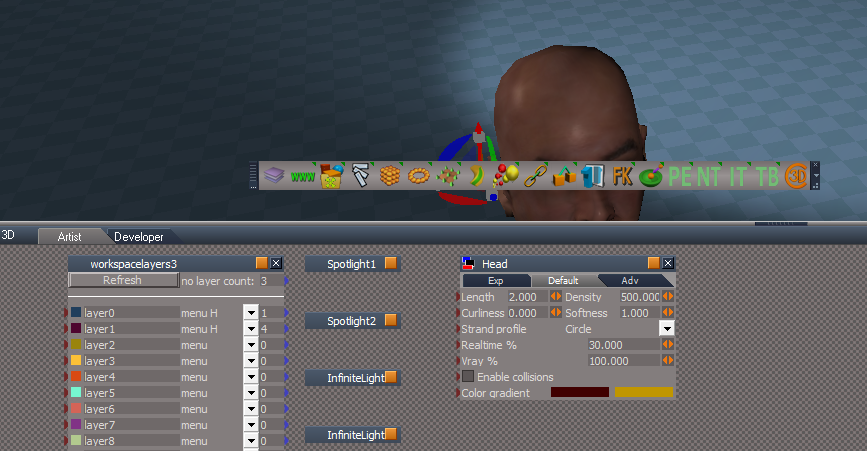
What I meant "from code" is the scripts from the Workspace Layers
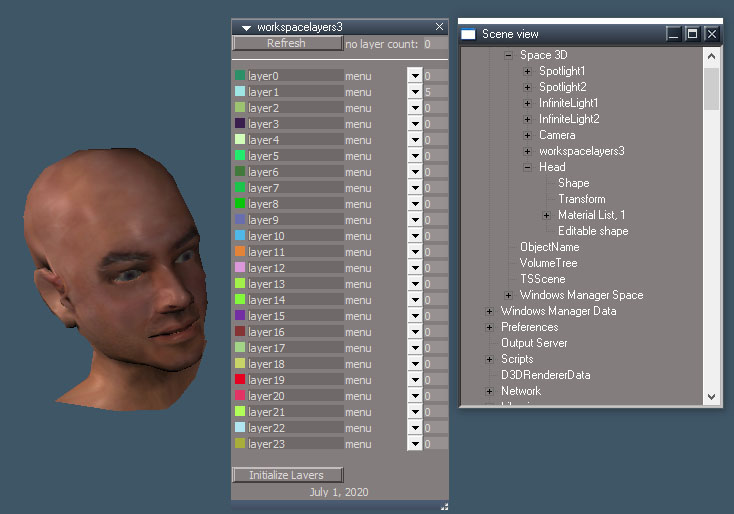
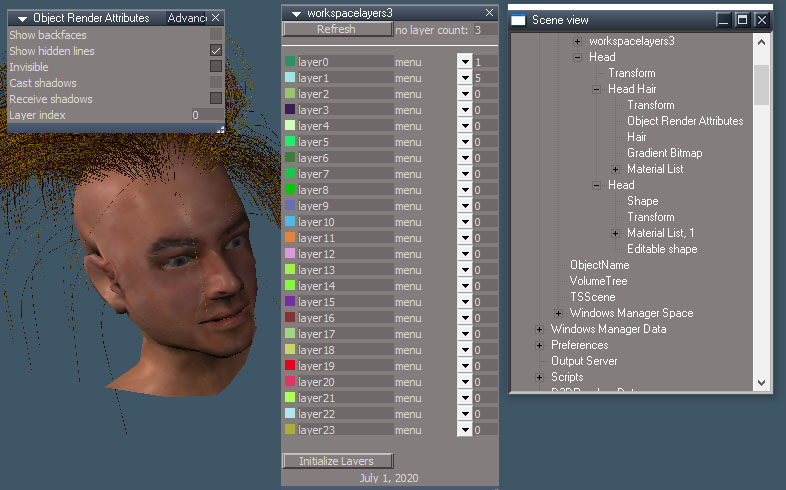
Here is a screen shot of a new scene with the Head object that has Hair applied, then I load the Workspace Layers
Note:
no layer count = 3
layer0 = menu 1
layer1 = menuL 5
Note also that it is set to menuL which is unexpected. Normally it is set to menu
Also do not understand why no layer count is 3
Add ObjectwithHairLoad Layers.png
User avatar
trueBlue
Captain
Posts: 5548
Joined: 06 Jul 2009, 22:50
Type the number ten into the box: 10

Re: Final trueSpace 7.61 Beta 8 Unofficial Update

Post by trueBlue »

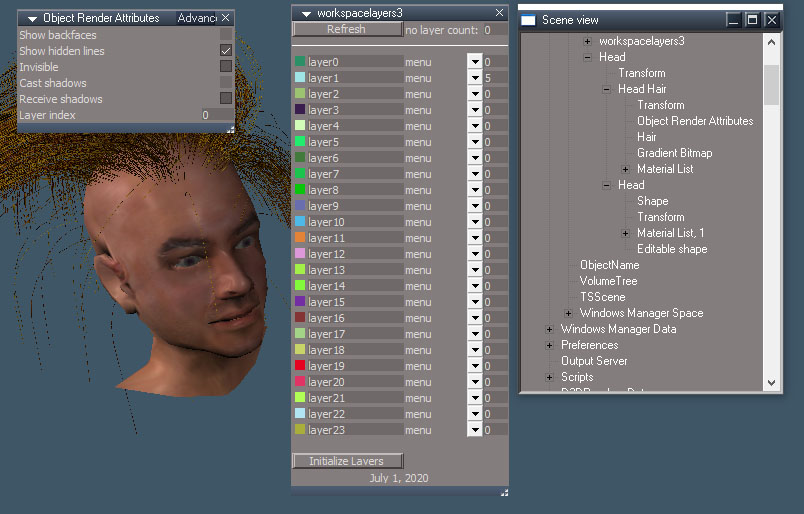
Here is a screen shot showing that the Head is not hidden
Headdoesnothide.png
User avatar
clintonman
Captain
Posts: 5659
Joined: 21 May 2009, 21:08
Type the number ten into the box: 0
Location: California

Re: Final trueSpace 7.61 Beta 8 Unofficial Update

Post by clintonman »

trueBlue wrote: 01 Jul 2020, 20:17
clintonman wrote: 01 Jul 2020, 20:00
trueBlue wrote: 01 Jul 2020, 19:29 With your newest Workspace Layers, Locking/Unlocking does not install the selectionLocking.RsObj to an object that has Hair applied from code.
The unSelectable.RsObj does.
Also selecting *Visible, hides the Hair but not the object it is attached to.
How do you apply hair from code?

If you add a mesh to the scene and then apply hair to it you get hair on layer 0 and the mesh on layer 1. Is this what you are seeing?
If that's the case, the only way to unify them is to select the main object and assign it to a layer.
What I meant "from code" is the scripts from the Workspace Layers
Here is a screen shot of a new scene with the Head object that has Hair applied, then I load the Workspace Layers
Note:
no layer count = 3
layer0 = menu 1
layer1 = menuL 5
Note also that it is set to menuL which is unexpected. Normally it is set to menu
Also do not understand why no layer count is 3
Add ObjectwithHairLoad Layers.png
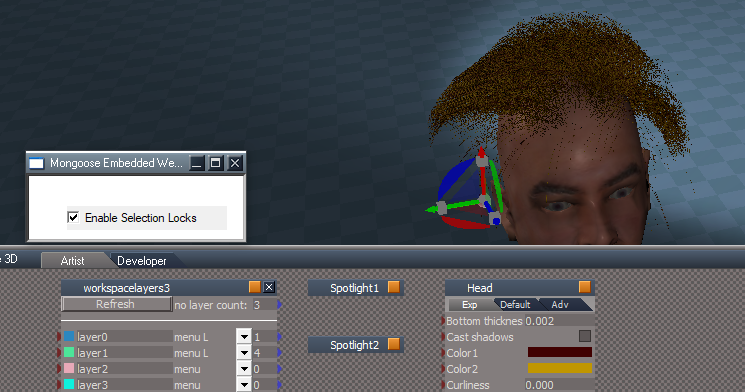
I can't reproduce it.
Load head from the library - it has no render attributes.
Apply hair from the library - hair has render attributes indicating layer 0.
open layers
there is no locking
choose lock on layer 0 and selectionlocking node appears inside the hair node, displays "menu L" as expected to indicate locked layer

picture doesn't help with steps to reproduce

no layer count does not take everything into account.
Clinton Reese

http://clintons3d.com
User avatar
trueBlue
Captain
Posts: 5548
Joined: 06 Jul 2009, 22:50
Type the number ten into the box: 10

Re: Final trueSpace 7.61 Beta 8 Unofficial Update

Post by trueBlue »

clintonman wrote: 01 Jul 2020, 20:41
trueBlue wrote: 01 Jul 2020, 20:17
clintonman wrote: 01 Jul 2020, 20:00
How do you apply hair from code?

If you add a mesh to the scene and then apply hair to it you get hair on layer 0 and the mesh on layer 1. Is this what you are seeing?
If that's the case, the only way to unify them is to select the main object and assign it to a layer.
What I meant "from code" is the scripts from the Workspace Layers
Here is a screen shot of a new scene with the Head object that has Hair applied, then I load the Workspace Layers
Note:
no layer count = 3
layer0 = menu 1
layer1 = menuL 5
Note also that it is set to menuL which is unexpected. Normally it is set to menu
Also do not understand why no layer count is 3
Add ObjectwithHairLoad Layers.png
I can't reproduce it.
Load head from the library - it has no render attributes.
Apply hair from the library - hair has render attributes indicating layer 0.
open layers
there is no locking
choose lock on layer 0 and selectionlocking node appears inside the hair node, displays "menu L" as expected to indicate locked layer

picture doesn't help with steps to reproduce

no layer count does not take everything into account.
Following your steps, screen shot shows that the Head is not locked.
Again if I use the unSelectable script on the Head, it works. Workspace Layers does not.
Headdoesnotlock.png
Previous screen shot shows that the Head is not invisible
Again, if I use the Hide or Show scripts on the Head, it works. Workspace Layers does not work for some odd reason.
These are the two things that I am experiencing and trying to explain to you.
User avatar
trueBlue
Captain
Posts: 5548
Joined: 06 Jul 2009, 22:50
Type the number ten into the box: 10

Re: Final trueSpace 7.61 Beta 8 Unofficial Update

Post by trueBlue »

I think I found the problem and I have mentioned this before.
It may be your use of IsRenderable
I have run across this on a normal trueSpace 3D Encaps too.

Try this script on an object and an object that has Hair Applied

Code: Select all

var Sel = Node.FirstSelected()
if(Node.IsRenderable(Sel)) {
System.Alert("Test")
return;
}
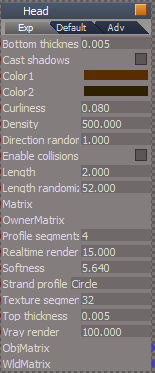
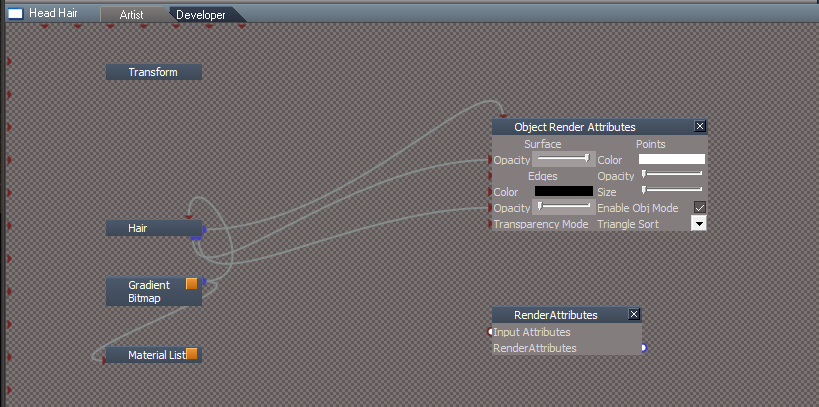
Look at Line 68, maybe others, in the Visibility Function Set in the workspacelayers3.RsObj

You may also note that running the Hide and or Show script on an object that has Hair applied works by installing the ORA to both the object and Hair. Which might not be a very good idea! Not sure. But it does treat the objects as a whole with regards to Hiding & Showing
Maybe you could use a different attribute for Hairy Objects?
HairObjectsAttributes.png
HairObjectsAttributes.png (15.51 KiB) Viewed 2841 times
Try running the tS command
D3DView.ShowRenderAttribsForObject('', '');
on an object that has Hair Applied.
The ORA in the Hair object is not removed
tS ORA command on Obj with Hair.png
User avatar
clintonman
Captain
Posts: 5659
Joined: 21 May 2009, 21:08
Type the number ten into the box: 0
Location: California

Re: Final trueSpace 7.61 Beta 8 Unofficial Update

Post by clintonman »

Step1HeadLoaded.jpg
Head loaded into the scene. It has no object render attributes(ORA)
Step2Hair.jpg
Apply hair from the library.
Head has no ORA
Hair has ORA for layer 0
Step2a_refresh to show.jpg
refresh layers to show it sees hair is in layer 0
Step3_locked.jpg
lock applied to layer 0
hair is the only thing in layer 0 so it gets a lock item
head has no ORA so has no layer so the layer system is unaware of it.

The layer system cannot work with items that do not belong to any layer.
If you assign the head to a layer then when that layer is locked the head will get a lock.

You can't lock an item that doesn't belong to any layer.
An item has to have a layer before the layer system can operate on it.

Items get into the layer system by having an ORA which holds the layer info. Objects without ORA are not used because they have no layer info.
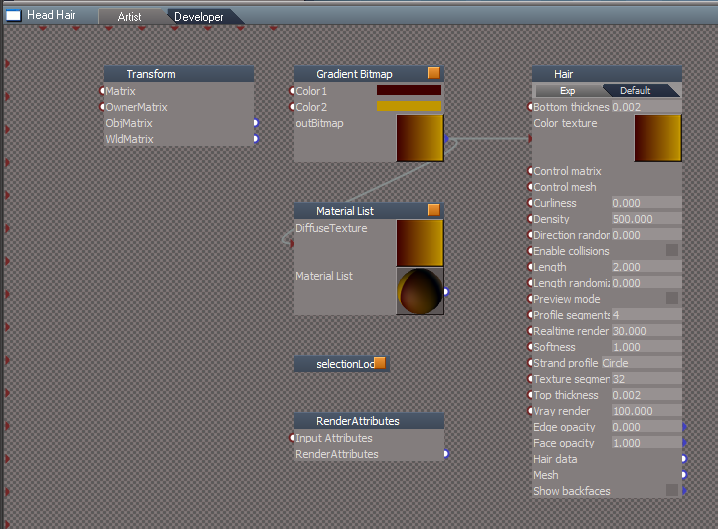
Clinton Reese

http://clintons3d.com
User avatar
trueBlue
Captain
Posts: 5548
Joined: 06 Jul 2009, 22:50
Type the number ten into the box: 10

Re: Final trueSpace 7.61 Beta 8 Unofficial Update

Post by trueBlue »

Items get into the layer system by having an ORA which holds the layer info. Objects without ORA are not used because they have no layer info.
Now I understand and I was able to get it to work.
I guess I was stumped by thinking the Refresh button or On Load added any objects in the scene to layer1
I was not understanding about hair objects being automatically added the layer0

There still is problem though.
This is the results using Layers with the Hair object
Note the missing ORA panel?
LayersHairORAProblem.png
This is the results using tS ORA command
tS ORA command on Obj with Hair.png
tS ORA command on Obj with Hair.png (86.07 KiB) Viewed 2836 times
Here is an updated ShowAll
I commented what I added
With several Head objects with Hair Applied in the scene, try this script

Code: Select all

function Execute(params)
{
	SceneRoot = Space.CurrentScene();
	var i=0;
	while (i<Node.SubObjectCount(SceneRoot)) {

		if (Search(SceneRoot + '/' + Node.SubObject(SceneRoot, i))) {
			return;
		}
		i = i + 1;
	}
}

function Search(CurrentNode)
{
	if (Node.SubObjectCount(CurrentNode) == 0)
		return false;

	if(Node.Exists(CurrentNode + "/Object hider")) {
		Node.Value(CurrentNode + "/Object hider", "Invisible") = true;
		Node.Value(CurrentNode + "/Object hider", "Invisible") = false;
		Node.Value(CurrentNode +  "/Object Render Attributes", "Invisible") = -1
		Node.Value(CurrentNode +  "/Object Render Attributes", "Invisible") = 0
		return false
	}

	if (Node.IsRenderable(CurrentNode) && Node.Exists(CurrentNode +  "/Object Render Attributes")) {
		try {
			Node.Value(CurrentNode +  "/Object Render Attributes", "Invisible") = 0
		} catch (e) {}

		return false;
	}
//Add tB
	if (!Node.Exists(CurrentNode +  "/Object Render Attributes")) {
		try {
			D3DView.ShowRenderAttribsForObject('', CurrentNode);
		} catch (e) {}
Activity.Run(System.ThisOwner() + "/CloseORASettings");
		return false;
	}
//End tB		
	var j=0;
	while (j < Node.SubObjectCount(CurrentNode)) {
		if(Node.Exists(CurrentNode +  "/Object Render Attributes")) {
			try {
				Node.Value(CurrentNode +  "/Object Render Attributes", "Invisible") = 0
			} catch (e) {}
		}

		if(Search(CurrentNode + '/' + Node.SubObject(CurrentNode, j))) { 
			return true;
		}
		j = j + 1;
	}

	return false;
}
User avatar
clintonman
Captain
Posts: 5659
Joined: 21 May 2009, 21:08
Type the number ten into the box: 0
Location: California

Re: Final trueSpace 7.61 Beta 8 Unofficial Update

Post by clintonman »

trueBlue wrote: 02 Jul 2020, 00:57
Items get into the layer system by having an ORA which holds the layer info. Objects without ORA are not used because they have no layer info.
Now I understand and I was able to get it to work.
I guess I was stumped by thinking the Refresh button or On Load added any objects in the scene to layer1
I was not understanding about hair objects being automatically added the layer0

There still is problem though.
This is the results using Layers with the Hair object
Note the missing ORA panel?
LayersHairORAProblem.png
This is the results using tS ORA command
tS ORA command on Obj with Hair.png
Right, trueSpace creates the ORA when the hair is added and layer 0 is what it assigns to the layer attribute.

I've seen the change from ORA to RA.
Is it a problem? I couldn't find anything that didn't work because of it. If you can show it is a problem then I'll add the option of ignoring all hair related items in the scene.
Clinton Reese

http://clintons3d.com
User avatar
trueBlue
Captain
Posts: 5548
Joined: 06 Jul 2009, 22:50
Type the number ten into the box: 10

Re: Final trueSpace 7.61 Beta 8 Unofficial Update

Post by trueBlue »

Cross post
Please read about the updated ShowAll
The only thing it is missing is deleting the orphaned ORA

My thought is, if this works as expected it could be a complete solution for the ShowAlL and maybe a possible use for your Layers.
Meaning you could include this script to run before the Refresh
User avatar
clintonman
Captain
Posts: 5659
Joined: 21 May 2009, 21:08
Type the number ten into the box: 0
Location: California

Re: Final trueSpace 7.61 Beta 8 Unofficial Update

Post by clintonman »

trueBlue wrote: 02 Jul 2020, 01:58 Cross post
Please read about the updated ShowAll
The only thing it is missing is deleting the orphaned ORA

My thought is, if this works as expected it could be a complete solution for the ShowAlL and maybe a possible use for your Layers.
Meaning you could include this script to run before the Refresh
You're going to have to refresh my memory. We've been talking about hair for so long I have no idea what the ShowAll changes are for.
Clinton Reese

http://clintons3d.com
User avatar
trueBlue
Captain
Posts: 5548
Joined: 06 Jul 2009, 22:50
Type the number ten into the box: 10

Re: Final trueSpace 7.61 Beta 8 Unofficial Update

Post by trueBlue »

Let's start over.
I have made some discoveries.
First, Node.IsRenderable(curNode) works on objects that have a Mesh output only!
Lights, Cameras, and Objects have a Mesh output, maybe more.
Objects with Hair applied, Characters, and 3D Encapsulated Objects do not have Mesh outputs, maybe more.
So you may or may not want to reconsider it's use.

Second, If you run D3DView.ShowRenderAttribsForObject('', '') on Objects with Hair applied, it does not remove the ORA panel. (The tS way)
The only thing that I can see that goes wrong with this is the Show Shadows does not work on the Hair panel, but does on the newly installed ORA panel. No big deal, I suppose.

Third, it is possible to run D3DView.ShowRenderAttribsForObject('', curNode) to all of the objects in a scene without selecting anything.

I am testing a new ShowAll and HideAll script that works great except there is flashing in the Stack because of the switching from Settings to Panel on every object.
I have created a DeleteORA script that deletes the orphaned ORA panels for all objects in the scene
Here is the ShowAll

Code: Select all

function Execute(params)
{
	var scene = Space.CurrentScene();
	var numTopLevel = Node.SubObjectCount(scene);

	for(var i=0; i< numTopLevel; i++) {
		var item = scene + "/" + Node.SubObject(scene, i);
		Search(item)
	}

}

function Search(curNode)
{

	if(Node.ConExists(curNode, "WldMatrix")) {
		D3DView.ShowRenderAttribsForObject('', curNode)
		Node.Value(curNode +  "/Object Render Attributes", "Invisible") = 0
		RsStackView.SetPanelExportInfo(curNode + '/Object Render Attributes','Default',1,1);
		Activity.Run(System.ThisOwner() + "/DeleteORA");
		Activity.Run(System.ThisOwner() + "/ShowCameraAndLights");
		Activity.Run(System.ThisOwner() + "/CloseORASettings");
		return;
	}

	if(Node.IsRenderable(curNode) || Node.IsCamera(curNode) || Node.IsLight(curNode)) return;

	var numChildren = Node.SubObjectCount(curNode);
	for(var i=0; i< numChildren ; i++) {
		var child = curNode+ "/" + Node.SubObject(curNode, i);
		Search(child);
	}
}
Here is the DeleteORA

Code: Select all

function Execute(params)
{
	var scene = Space.CurrentScene();
	var numTopLevel = Node.SubObjectCount(scene);

	for(var i=0; i< numTopLevel; i++) {
		var item = scene + "/" + Node.SubObject(scene, i);
		Search(item)
	}

}

function Search(curNode)
{

	if(Node.Exists(curNode + "/RenderAttributes")) {
		Node.Delete(curNode + "/Object Render Attributes")
		return;
	}


	if(Node.IsRenderable(curNode) || Node.IsCamera(curNode) || Node.IsLight(curNode)) return;

	var numChildren = Node.SubObjectCount(curNode);
	for(var i=0; i< numChildren ; i++) {
		var child = curNode+ "/" + Node.SubObject(curNode, i);
		Search(child);
	}
}
This works on all of the above objects that I have mentioned and is a complete soulution.
Again the only downside is the flashing in the Stack
User avatar
trueBlue
Captain
Posts: 5548
Joined: 06 Jul 2009, 22:50
Type the number ten into the box: 10

Re: Final trueSpace 7.61 Beta 8 Unofficial Update

Post by trueBlue »

New Update for trueSpace7.61 Beta 8 Unofficial Update
viewtopic.php?t=3732
RC7 July 02, 2020

Recommend that you completely Uninstall and Install trueSpace7.61 Beta 8 to a clean directory before installing this update. This update precedes all previous updates and recommend that you delete any and all previous updates.

Toolbars
Add
Hide Cameras and Lights icon
Show Cameras and Lights icon
HideShowLightsCameras.png
Updated Hide, Show, HideAll, and ShowAll scripts

ClintonsToolbar
Toolbar(s) icons changed to flat text

Cameras, Lights, default scene lights and camera, and WS - Default.RsSLgts - Object Render Attributes' Cast shadows and Receive shadows, Unchecked.

Return to “General Discussion”