Final trueSpace 7.61 Beta 8 Unofficial Update

User avatar
trueBlue
Captain
Posts: 5548
Joined: 06 Jul 2009, 22:50
Type the number ten into the box: 10

Re: Final trueSpace 7.61 Beta 8 Unofficial Update

Post by trueBlue »

Did several test with Synchronize and it did not go well
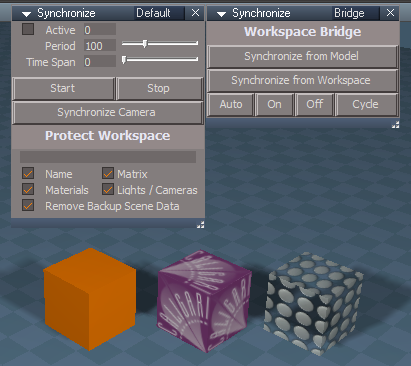
So here is a new Synchronize
Synchronize panels.png
All the code used is from various scripts developed by Clinton Reese :bananathumb:
Updates
Add
Bridge aspect
Get3dWindow script

Synchronize Scene script
Add
Time Span

Put the Synchronize.RsObj in Scripts/CustomCommands and
C:\trueSpace761\tS\Scripts\clintonobjects\CustomScriptsStore

Open with this code

Code: Select all

WindowsManager.CloseWindow("Project/Windows Manager Space/SyncPanelFrame")
Node.Copy("/Scripts/CustomCommands/Synchronize/SyncPanelFrame", "Project/Windows Manager Space")
WindowsManager.Activate()
WindowsManager.UpdateWindowsStructure()
Preferred steps to Start Synchronize
Close Model
Open Synchronize
Press the Start button

Preferred steps to Stop Synchronize
Close Model
Press the Stop button

Edit2: Updated 3/23/2021 3:00PM
This version works in Workspace & Model Perspective views, only!
The Synchronize Camera button script switches Workspace & Model to their Perspective views
Also copies the incorporated Synchronize Camera to the current scene, if it does not exist
The current Workspace Perspective view setting's are transferred to the Synchronize Camera
Sometimes you may have to select the button twice
This version allows you to animate the Synchronize Camera in your scene since it is independent of the Synchronize node
User avatar
trueBlue
Captain
Posts: 5548
Joined: 06 Jul 2009, 22:50
Type the number ten into the box: 10

Re: Final trueSpace 7.61 Beta 8 Unofficial Update

Post by trueBlue »

clintonman wrote: 22 Mar 2021, 21:57
trueBlue wrote: 22 Mar 2021, 17:10
clintonman wrote: 22 Mar 2021, 16:59
I'll see what I can find.


How about the toggle uv indicators in the NURBS info panel?
I tried that first and it did not work as wanted
I can delete the nodes with first selected which is the controlPointMesh but have not been able to get the correct path to the nodes
I have tried Node.Owner and other ways but with no success
More importantly, make it run only when the nodes exist
This will work with the widget. Widgets/Select/Default object navigation widget/Enter edit mode/Uneditable
Same will need to be done for your Edit buttons on the NURBS objects.
What should I do with the Edit button script(s)?

Code: Select all

Node.Select('%THIS_NAME%')
MeshModifiers.ActivatePointEditWidget('', '', '')
User avatar
clintonman
Captain
Posts: 5659
Joined: 21 May 2009, 21:08
Type the number ten into the box: 0
Location: California

Re: Final trueSpace 7.61 Beta 8 Unofficial Update

Post by clintonman »

trueBlue wrote: 24 Mar 2021, 15:21
clintonman wrote: 22 Mar 2021, 21:57
trueBlue wrote: 22 Mar 2021, 17:10
I tried that first and it did not work as wanted
I can delete the nodes with first selected which is the controlPointMesh but have not been able to get the correct path to the nodes
I have tried Node.Owner and other ways but with no success
More importantly, make it run only when the nodes exist
This will work with the widget. Widgets/Select/Default object navigation widget/Enter edit mode/Uneditable
Same will need to be done for your Edit buttons on the NURBS objects.
What should I do with the Edit button script(s)?

Code: Select all

Node.Select('%THIS_NAME%')
MeshModifiers.ActivatePointEditWidget('', '', '')

Code: Select all

if(Node.Exists('%THIS_NAME%'+ "/V") || Node.Exists('%THIS_NAME%'+ "/U") || Node.Exists('%THIS_NAME%'+ "/curveHeadIndicator")) {
	Node.Delete('%THIS_NAME%'+ "/U");
	Node.Delete('%THIS_NAME%'+ "/V");
	Node.Delete('%THIS_NAME%'+ "/curveHeadIndicator");
}
Node.Select('%THIS_NAME%')
MeshModifiers.ActivatePointEditWidget('', '', '')
Maybe something like this will work.
Clinton Reese

http://clintons3d.com
User avatar
trueBlue
Captain
Posts: 5548
Joined: 06 Jul 2009, 22:50
Type the number ten into the box: 10

Re: Final trueSpace 7.61 Beta 8 Unofficial Update

Post by trueBlue »

clintonman wrote: 24 Mar 2021, 15:38
trueBlue wrote: 24 Mar 2021, 15:21
clintonman wrote: 22 Mar 2021, 21:57

This will work with the widget. Widgets/Select/Default object navigation widget/Enter edit mode/Uneditable
Same will need to be done for your Edit buttons on the NURBS objects.
What should I do with the Edit button script(s)?

Code: Select all

Node.Select('%THIS_NAME%')
MeshModifiers.ActivatePointEditWidget('', '', '')

Code: Select all

if(Node.Exists('%THIS_NAME%'+ "/V") || Node.Exists('%THIS_NAME%'+ "/U") || Node.Exists('%THIS_NAME%'+ "/curveHeadIndicator")) {
	Node.Delete('%THIS_NAME%'+ "/U");
	Node.Delete('%THIS_NAME%'+ "/V");
	Node.Delete('%THIS_NAME%'+ "/curveHeadIndicator");
}
Node.Select('%THIS_NAME%')
MeshModifiers.ActivatePointEditWidget('', '', '')
Maybe something like this will work.
Nope, this works but I have to run it twice :roll:

Code: Select all

Node.Select('%THIS_NAME%')
MeshModifiers.ActivatePointEditWidget('', '', '')
Node.Delete("%THIS_OWNER_NAME%/U");
Node.Delete("%THIS_OWNER_NAME%/V");
Node.Delete("%THIS_OWNER_NAME%/curveHeadIndicator");
User avatar
clintonman
Captain
Posts: 5659
Joined: 21 May 2009, 21:08
Type the number ten into the box: 0
Location: California

Re: Final trueSpace 7.61 Beta 8 Unofficial Update

Post by clintonman »

trueBlue wrote: 24 Mar 2021, 15:49
clintonman wrote: 24 Mar 2021, 15:38
trueBlue wrote: 24 Mar 2021, 15:21
What should I do with the Edit button script(s)?

Code: Select all

Node.Select('%THIS_NAME%')
MeshModifiers.ActivatePointEditWidget('', '', '')

Code: Select all

if(Node.Exists('%THIS_NAME%'+ "/V") || Node.Exists('%THIS_NAME%'+ "/U") || Node.Exists('%THIS_NAME%'+ "/curveHeadIndicator")) {
	Node.Delete('%THIS_NAME%'+ "/U");
	Node.Delete('%THIS_NAME%'+ "/V");
	Node.Delete('%THIS_NAME%'+ "/curveHeadIndicator");
}
Node.Select('%THIS_NAME%')
MeshModifiers.ActivatePointEditWidget('', '', '')
Maybe something like this will work.
Nope, this works but I have to run it twice :roll:

Code: Select all

Node.Select('%THIS_NAME%')
MeshModifiers.ActivatePointEditWidget('', '', '')
Node.Delete("%THIS_OWNER_NAME%/U");
Node.Delete("%THIS_OWNER_NAME%/V");
Node.Delete("%THIS_OWNER_NAME%/curveHeadIndicator");
Maybe it will work better if you put the deletes first.
Clinton Reese

http://clintons3d.com
User avatar
trueBlue
Captain
Posts: 5548
Joined: 06 Jul 2009, 22:50
Type the number ten into the box: 10

Re: Final trueSpace 7.61 Beta 8 Unofficial Update

Post by trueBlue »

Nope, tried that and many other ways too
Always have to run it twice
The uneditable script in the Obj NAV widgets, is not going to work either
That script is supposed to stop the NURBS from entering into PE mode
User avatar
clintonman
Captain
Posts: 5659
Joined: 21 May 2009, 21:08
Type the number ten into the box: 0
Location: California

Re: Final trueSpace 7.61 Beta 8 Unofficial Update

Post by clintonman »

trueBlue wrote: 24 Mar 2021, 16:06 Nope, tried that and many other ways too
Always have to run it twice
The uneditable script in the Obj NAV widgets, is not going to work either
That script is supposed to stop the NURBS from entering into PE mode
Too bad, uneditable script worked for me.
Clinton Reese

http://clintons3d.com
User avatar
trueBlue
Captain
Posts: 5548
Joined: 06 Jul 2009, 22:50
Type the number ten into the box: 10

Re: Final trueSpace 7.61 Beta 8 Unofficial Update

Post by trueBlue »

clintonman wrote: 24 Mar 2021, 16:11
trueBlue wrote: 24 Mar 2021, 16:06 Nope, tried that and many other ways too
Always have to run it twice
The uneditable script in the Obj NAV widgets, is not going to work either
That script is supposed to stop the NURBS from entering into PE mode
Too bad, uneditable script worked for me.
It does not run because it has

Code: Select all

|| Node.Exists(Node.FirstSelected() + "/nurbsNameDisplay"

Code: Select all

	if(Node.IsLight('') || Node.ConExists(Node.FirstSelected() , "Uneditable") || Node.Exists(Node.FirstSelected() + "/LODMesh") || Node.Exists(Node.FirstSelected() + "/nurbsNameDisplay")) {
		params.SetTerminationFlag()
		return
	}
I am using the Toggle UV Indicators
Is that why I have to run it twice?

Even adding this to the Edit button requires you to run it twice
ScriptObject.Execute("Scripts/CustomCommands/NURBSScripts/NURBSInfo/uvIndicatorsOff");

Weird!
If I navigate to the controlPointMesh in the LE, the Edit button works with one press
Using the Edit button from the Stack/Panels, the Edit button works with two presses
User avatar
trueBlue
Captain
Posts: 5548
Joined: 06 Jul 2009, 22:50
Type the number ten into the box: 10

Re: Final trueSpace 7.61 Beta 8 Unofficial Update

Post by trueBlue »

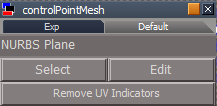
Got this to work by adding a button to the controlPointMesh
ScriptObject.Execute("Scripts/CustomCommands/NURBSScripts/NURBSInfo/uvIndicatorsOff");
CPM Remove UV Indicators button.png
CPM Remove UV Indicators button.png (5.45 KiB) Viewed 2424 times
Recommend adding RsApp.ClearHistory() to the Toggle UV Indicators script
Yes or No?
User avatar
clintonman
Captain
Posts: 5659
Joined: 21 May 2009, 21:08
Type the number ten into the box: 0
Location: California

Re: Final trueSpace 7.61 Beta 8 Unofficial Update

Post by clintonman »

trueBlue wrote: 24 Mar 2021, 18:03 Got this to work by adding a button to the controlPointMesh
ScriptObject.Execute("Scripts/CustomCommands/NURBSScripts/NURBSInfo/uvIndicatorsOff");
CPM Remove UV Indicators button.png

Recommend adding RsApp.ClearHistory() to the Toggle UV Indicators script
Yes or No?
No. If you undo nothing is damaged. If you undo half way, toggle still works to clean it up. Only clear if it leaves in bad state, that's to say broken in some way. My definition of broken is that it stops something from working and there's no good way to recover. I don't see any bad state here. If you do see something broken let me know.
Clinton Reese

http://clintons3d.com
User avatar
trueBlue
Captain
Posts: 5548
Joined: 06 Jul 2009, 22:50
Type the number ten into the box: 10

Re: Final trueSpace 7.61 Beta 8 Unofficial Update

Post by trueBlue »

clintonman wrote: 24 Mar 2021, 18:37
trueBlue wrote: 24 Mar 2021, 18:03 Got this to work by adding a button to the controlPointMesh
ScriptObject.Execute("Scripts/CustomCommands/NURBSScripts/NURBSInfo/uvIndicatorsOff");
CPM Remove UV Indicators button.png

Recommend adding RsApp.ClearHistory() to the Toggle UV Indicators script
Yes or No?
No. If you undo nothing is damaged. If you undo half way, toggle still works to clean it up. Only clear if it leaves in bad state, that's to say broken in some way. My definition of broken is that it stops something from working and there's no good way to recover. I don't see any bad state here. If you do see something broken let me know.
That's why I asked
This is what I see after adding the U V, & curveHeadIndicator nodes
If you use Undo 3 times the U V, & curveHeadIndicator nodes are disconnected
Results = The U V, & curveHeadIndicator does not work, depending how many times you used Undo
You have to press the Toggle UV Indicators button twice to get it to work again

So is the Remove UV Indicators button In or Out?
User avatar
clintonman
Captain
Posts: 5659
Joined: 21 May 2009, 21:08
Type the number ten into the box: 0
Location: California

Re: Final trueSpace 7.61 Beta 8 Unofficial Update

Post by clintonman »

trueBlue wrote: 24 Mar 2021, 19:28
clintonman wrote: 24 Mar 2021, 18:37
trueBlue wrote: 24 Mar 2021, 18:03 Got this to work by adding a button to the controlPointMesh
ScriptObject.Execute("Scripts/CustomCommands/NURBSScripts/NURBSInfo/uvIndicatorsOff");
CPM Remove UV Indicators button.png

Recommend adding RsApp.ClearHistory() to the Toggle UV Indicators script
Yes or No?
No. If you undo nothing is damaged. If you undo half way, toggle still works to clean it up. Only clear if it leaves in bad state, that's to say broken in some way. My definition of broken is that it stops something from working and there's no good way to recover. I don't see any bad state here. If you do see something broken let me know.
That's why I asked
This is what I see after adding the U V, & curveHeadIndicator nodes
If you use Undo 3 times the U V, & curveHeadIndicator nodes are disconnected
Results = The U V, & curveHeadIndicator does not work, depending how many times you used Undo
You have to press the Toggle UV Indicators button twice to get it to work again
...
So... Are you saying pressing the button twice is unacceptable?
Clinton Reese

http://clintons3d.com
User avatar
trueBlue
Captain
Posts: 5548
Joined: 06 Jul 2009, 22:50
Type the number ten into the box: 10

Re: Final trueSpace 7.61 Beta 8 Unofficial Update

Post by trueBlue »

ScriptObject.Execute("Scripts/CustomCommands/NURBSScripts/NURBSInfo/uvIndicatorsOff");
You only have to press the Remove UV Indicators button once

Edit: Just reread your response

Code: Select all

So... Are you saying pressing the button twice is unacceptable?
Sorry, I was responding to the Remove UV Indicators button

It is you call on adding RsApp.ClearHistory() or not
I was just pointing out that it does gets broken per your request:
If you do see something broken let me know.
User avatar
trueBlue
Captain
Posts: 5548
Joined: 06 Jul 2009, 22:50
Type the number ten into the box: 10

Re: Final trueSpace 7.61 Beta 8 Unofficial Update

Post by trueBlue »

clintonman wrote: 24 Mar 2021, 18:37
trueBlue wrote: 24 Mar 2021, 18:03 Got this to work by adding a button to the controlPointMesh
ScriptObject.Execute("Scripts/CustomCommands/NURBSScripts/NURBSInfo/uvIndicatorsOff");
CPM Remove UV Indicators button.png

Recommend adding RsApp.ClearHistory() to the Toggle UV Indicators script
Yes or No?
No. If you undo nothing is damaged. If you undo half way, toggle still works to clean it up. Only clear if it leaves in bad state, that's to say broken in some way. My definition of broken is that it stops something from working and there's no good way to recover. I don't see any bad state here. If you do see something broken let me know.
I have thought about this some more and your above response.
Already mentioned that gets broken and good be left in a bad state, number one!
But here is another reason why I think this should be cleared
This script creates 16 Undo entries
I do not see any value of undoing 16 undoes to Undo something before running this script, number two!
That and a user does not even know, that they would need press Undo 16 times to Undo something before running this script, number three!
Sorry, trying to understand when it would be wise to use RsApp.ClearHistory() in scripts
Can you give me another example why not to add RsApp.ClearHistory() in this script?
User avatar
clintonman
Captain
Posts: 5659
Joined: 21 May 2009, 21:08
Type the number ten into the box: 0
Location: California

Re: Final trueSpace 7.61 Beta 8 Unofficial Update

Post by clintonman »

trueBlue wrote: 25 Mar 2021, 02:37
clintonman wrote: 24 Mar 2021, 18:37
trueBlue wrote: 24 Mar 2021, 18:03 Got this to work by adding a button to the controlPointMesh
ScriptObject.Execute("Scripts/CustomCommands/NURBSScripts/NURBSInfo/uvIndicatorsOff");
CPM Remove UV Indicators button.png

Recommend adding RsApp.ClearHistory() to the Toggle UV Indicators script
Yes or No?
No. If you undo nothing is damaged. If you undo half way, toggle still works to clean it up. Only clear if it leaves in bad state, that's to say broken in some way. My definition of broken is that it stops something from working and there's no good way to recover. I don't see any bad state here. If you do see something broken let me know.
I have thought about this some more and your above response.
Already mentioned that gets broken and good be left in a bad state, number one!
But here is another reason why I think this should be cleared
This script creates 16 Undo entries
I do not see any value of undoing 16 undoes to Undo something before running this script, number two!
That and a user does not even know, that they would need press Undo 16 times to Undo something before running this script, number three!
Sorry, trying to understand when it would be wise to use RsApp.ClearHistory() in scripts
Can you give me another example why not to add RsApp.ClearHistory() in this script?
I doubt it. I see it this way, if you can get by without clearing undos then you do. If you can't then you're forced to erase the undos. The only reason to erase undos is if you have no other choice. A process that eats up undos isn't a good way to measure whether it's needed or not. If you have the choice of not doing it then you don't. One solution to a script that creates many undos is to have another button that undos many times with one press. Clearing undos closes that possibility and any other possibilities that may come up. If not clearing undos gives a horrible unacceptable result then you have no choice. If the result is a little sloppy then you do have a choice. It's better to have some sloppiness than to be clean with fewer options.
Did trueSpace become unusable at any point during the 16 undos? If so then you found a case where you have no choice but to clear undos. Were any nodes left behind or connected or disconnected or renamed in a way that would stop other things from working in tS, if so there's another case where you have no choice.

Think of undos as a valuable resource that you don't want to take away from someone unless doing so is going to save them from something worse.
Clinton Reese

http://clintons3d.com
User avatar
trueBlue
Captain
Posts: 5548
Joined: 06 Jul 2009, 22:50
Type the number ten into the box: 10

Re: Final trueSpace 7.61 Beta 8 Unofficial Update

Post by trueBlue »

@Clinton
The Automatic Keyframing - Activate button script calls the ProcessWidgets script

Code: Select all

akw = "Scripts/CustomCommands/AutokeyWidgets/ProcessWidgets";
if(Node.Exists(akw)) Activity.Run(akw);
Activity.Run('%THIS_NAME%')
if(Node.Exists("/Status Line")) {
if(!Node.ConExists("Status Line", "Workspace"))
Node.ConCreate("Status Line", "Workspace", "string", 4);
Node.Value("/Status Line","Workspace") = " Automatic Keyframing - Active";
}
In the UU7, the widgets are already processed
Is it okay to remove these lines?

Code: Select all

akw = "Scripts/CustomCommands/AutokeyWidgets/ProcessWidgets";
if(Node.Exists(akw)) Activity.Run(akw);
New - Activate button script

Code: Select all

if(Node.ConExists("Scripts/CustomCommands/AutoKey","auto"))
Node.Value("Scripts/CustomCommands/AutoKey","auto") = true;
Activity.Run('%THIS_NAME%')
utilityFunctions = System.CreateDO("Clintons3D Package/Utility functions");
utilityFunctions.SetStatusMessage(" Automatic Keyframing is Active", 0);
Deactivate

Code: Select all

if(Node.ConExists("Scripts/CustomCommands/AutoKey","auto"))
Node.Value("Scripts/CustomCommands/AutoKey","auto") = false;
utilityFunctions = System.CreateDO("Clintons3D Package/Utility functions");
utilityFunctions.ClearStatusMessage(true);
utilityFunctions.SetStatusMessage(" Automatic Keyframing is being Deactivating ...", 4000);
Node.ConReset('%THIS_NAME%', 'OnOff')
User avatar
clintonman
Captain
Posts: 5659
Joined: 21 May 2009, 21:08
Type the number ten into the box: 0
Location: California

Re: Final trueSpace 7.61 Beta 8 Unofficial Update

Post by clintonman »

Looks ok to me. Don't forget to remove the ProcessWidgets node and the Deactivate doesn't need the ClearStatusMessage line.
Clinton Reese

http://clintons3d.com
User avatar
trueBlue
Captain
Posts: 5548
Joined: 06 Jul 2009, 22:50
Type the number ten into the box: 10

Re: Final trueSpace 7.61 Beta 8 Unofficial Update

Post by trueBlue »

Test Update 26 for trueSpace7.61 Beta 8 Unofficial Update

March 26, 2021

Recommend that you completely Uninstall and Install trueSpace7.61 Beta 8 to a clean directory before installing this update. If you applied the previous Test Update to a clean directory, you do not need to Uninstall trueSpace7.61 Beta 8 before applying this new update.

This is a Beta Pre Release for TESTING the below updates and the updates in the Final trueSpace7.61 Beta 8 Std Unofficial Update thread
viewtopic.php?t=5418

Update

Objects - tS7.61 Update objects library
Animation Panel
Changed the Model R "Record Keyframe" command
tSBridge.SuggestTSStateByAlias("RecordKeyFrameButton")

Model Workspace Animation
Changed the Model/Workspace R "Record Keyframe" commands
RsAnim.SetKeyFrame('', RsTime.CurrentTime())
tSBridge.SuggestTSStateByAlias("RecordKeyFrameButton")

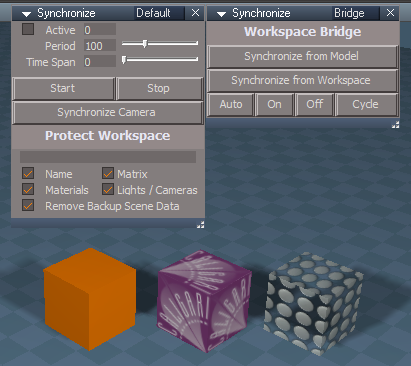
Synchronize
All the code used is from various scripts developed by Clinton Reese :bananathumb:
Synchronize panels.png
This version works in Workspace & Model Perspective views, only!
The Synchronize Camera button script switches Workspace & Model to their Perspective views
Also copies the incorporated Synchronize Camera to the current scene, if it does not exist
The current Workspace Perspective view setting's are transferred to the Synchronize Camera
Sometimes you may have to select the button twice
This version allows you to animate the Synchronize Camera in your scene since it is independent of the Synchronize node

Preferred steps to Start Synchronize
Close Model
Open Synchronize
Press the Start button

Preferred steps to Stop Synchronize
Close Model
Press the Stop button

AutokeyWidgets/Automatic Keyframing/Activate button script
Removed processing widgets script

freezeTransforms script
Removed Disconnect commands 'Not needed & adds 4 unnecessary undo entries'
Add RsApp.ClearHistory() 'Needed or you will get duplicated Pivot nodes'

Mesh Origin
Removed RsApp.ClearHistory() from open panel script

MeshObjectCoordinateSystem
Add RsApp.ClearHistory()

NURBSScripts
polycurve/controlPointMesh - Edit button script
polypatch/controlPointMesh - Edit button script
Update
Note: Press the Edit button once or twice until you see the Status message:
"UV Indicators were removed in Point Edit mode"

Character FK Controls
Removed RsApp.ClearHistory() from open panel script
Add RsApp.ClearHistory() to Copy Control script
Add RsApp.ClearHistory() to Expose Contol script

Widgets
Background/Look at selection/Zoom 2 Selection script
Fixed error when a Joint or Bone is selected

Custom Toolbar Preferences
Updates
Add checks before saving Toolbars with Alert

Toolbars

Red, Blue, and Gold
LMB command - Removed RsApp.ClearHistory()

All toolbars with the Copy Window icon
LMB - Run new CopyWindow.xml script
RMB - Original command

All toolbars with the +Morph icon
Add support for Workspace Curves & NURBS

Update
All toolbars with Set the Default Pose icon
LMB - Run ResetPose.xml script

ResetPose.xml
Modal Yes|No Question "Set the Default Pose?"

DeSelectNURBS.xml
Changed message
The " + nrb + " is not supported with this tool and will be unselected
nrb = name of selected Curve or NURBS

CopyWindow.xml
Add to Scripts/Commands

Cameras
Update
View from camera does not work in the Stack/Panel nor the Link Editor
Tip
LMB Ctrl + Drag the selected Camera's panel out from the Stack/Panel, LMB select the View icon
LMB select the selected Camera's widget FOV
RMB select the selected Camera's widget sides to open the Camera's floating panel, LMB select the View icon
All of the above work in the active window

View icon LMB script enables Syncing with Model with a Status message warning:
"Synchronize is Activated, Right click to Deactivate before Rendering to File"
The View icon RMB script disables Syncing with Model with a Status message"
"Synchronize is Deactivated"

Camera Render to File icon LMB script disables syncing with Model

Light(s)
Synchronize button script
Add Status message
"Synchronize is Activated, Select - Deactivate before Rendering to File"

Animation Preferences
Shrink Play Range button script
New script that will Shrink the Play Range & set the Timeline to the first keyframe in the Animation Editor

Postprocess library
Set Postprocess Color Key
Updated
Use
Check - Use Selected Postprocess
Select a 3D Window
Press - Select Active Window Postprocess
User avatar
trueBlue
Captain
Posts: 5548
Joined: 06 Jul 2009, 22:50
Type the number ten into the box: 10

Re: Final trueSpace 7.61 Beta 8 Unofficial Update

Post by trueBlue »

Test Update 27 for trueSpace7.61 Beta 8 Unofficial Update

March 27, 2021

Recommend that you completely Uninstall and Install trueSpace7.61 Beta 8 to a clean directory before installing this update. If you applied the previous Test Update to a clean directory, you do not need to Uninstall trueSpace7.61 Beta 8 before applying this new update.

This is a Beta Pre Release for TESTING the below updates and the updates in the Final trueSpace7.61 Beta 8 Std Unofficial Update thread
viewtopic.php?t=5418

Update

Cameras
Update
Fixed the Height scrubber 'Expand the size'

NURBSScripts
Update
polycurve & polypatch LODMesh Edit button script

Postprocess library
Set Postprocess Color Key.RsObj
Fixed crash! when active window is not 3D

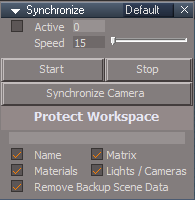
Synchronize
Synchronize panel.png
Synchronize panel.png (8.24 KiB) Viewed 2367 times
Add
Speed script for the Timer Author - Clinton Reese
User avatar
clintonman
Captain
Posts: 5659
Joined: 21 May 2009, 21:08
Type the number ten into the box: 0
Location: California

Re: Final trueSpace 7.61 Beta 8 Unofficial Update

Post by clintonman »

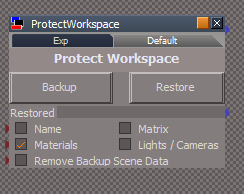
Attached is a version of ProtectWorkspace
It only clears history when restoring materials. The CloseModelView node was disconnected because it does not do anything. The ClearHistory node was disconnected from all other nodes.
Attachments
ProtectWorkspace9edf.RsObj
(136.53 KiB) Downloaded 139 times
Clinton Reese

http://clintons3d.com
User avatar
trueBlue
Captain
Posts: 5548
Joined: 06 Jul 2009, 22:50
Type the number ten into the box: 10

Re: Final trueSpace 7.61 Beta 8 Unofficial Update

Post by trueBlue »

clintonman wrote: 28 Mar 2021, 03:43 Attached is a version of ProtectWorkspace
It only clears history when restoring materials. The CloseModelView node was disconnected because it does not do anything. The ClearHistory node was disconnected from all other nodes.
Got it, Thanks!
Can I remove the CloseModelView & ClearHistory scripts?

Off subject, I am improving the RotatePOV.xml script
First off, I agree that clearing the history may not be needed
I am trying to get this script NOT to run if the active window is not a 3D Window
Added several lines to the beginning of the script but it still runs the first line in the cycle on a non 3D Window
Here is what I have so far:

Code: Select all

var cycle = 0;
function Execute(params)
{
if(Node.SubObjectCount("/D3DView")==0) return;
var View = WindowsManager.GetWorkWindow()
if(!Node.ConExists(View,"WinID")) {
params.SetTerminationFlag()
return;
}
if(Node.ConExists(View,"Def3D "))
if(Node.Value(View,"Def3D ") == "")
return;
else return;
if(Node.ConExists(View,"View Index "))
if(Node.Value(View,"View Index ") != 0) return;
else return;
var WindowID = Node.Value(View, "WinID")
var Eye = "/D3DView/EyeCamera_" + WindowID;
D3DView.SwitchEyeCameraType(Eye, '0')
if(cycle==0) {
try
{
Node.Value(Eye, "pitch") = -36.363
Node.Value(Eye, "roll") = -123.579
Node.Value(Eye, "tx") = -18.833
Node.Value(Eye, "ty") = 21.31
Node.Value(Eye, "tz") = 14.147
Node.Value(Eye, "yaw") = 21.485
}
catch(error)
{
}
}
if(cycle==1) {
try
{
Node.Value(Eye, "pitch") = 36.363
Node.Value(Eye, "roll") = -123.579
Node.Value(Eye, "tx") = 18.833
Node.Value(Eye, "ty") = 21.31
Node.Value(Eye, "tz") = 14.147
Node.Value(Eye, "yaw") = -21.485
}
catch(error)
{
}
}
if(cycle==2) {
try
{
Node.Value(Eye, "pitch") = 36.363
Node.Value(Eye, "roll") = 123.579
Node.Value(Eye, "tx") = 18.833
Node.Value(Eye, "ty") = -21.31
Node.Value(Eye, "tz") = 14.147
Node.Value(Eye, "yaw") = -158.95
}
catch(error)
{
}
}
if(cycle==3) {
try
{
Node.Value(Eye, "pitch") = -36.363
Node.Value(Eye, "roll") = 123.579
Node.Value(Eye, "tx") = -18.833
Node.Value(Eye, "ty") = -21.31
Node.Value(Eye, "tz") = 14.147
Node.Value(Eye, "yaw") = 158.95
}
catch(error)
{
}
}
cycle++;
cycle = cycle % 4;
}

You can test this with the Command Console open and selected as the active window
When you run this script, it adds the following command to the Command Console
Node.Value("/D3DView/EyeCamera_{5B113174-49E2-40B9-95BB-CFE7C8E7E8AA}", "pitch") = 36.363
Note that the GUID is the Command Console :roll:
User avatar
clintonman
Captain
Posts: 5659
Joined: 21 May 2009, 21:08
Type the number ten into the box: 0
Location: California

Re: Final trueSpace 7.61 Beta 8 Unofficial Update

Post by clintonman »

trueBlue wrote: 28 Mar 2021, 16:45
clintonman wrote: 28 Mar 2021, 03:43 Attached is a version of ProtectWorkspace
It only clears history when restoring materials. The CloseModelView node was disconnected because it does not do anything. The ClearHistory node was disconnected from all other nodes.
Got it, Thanks!
Can I remove the CloseModelView & ClearHistory scripts?
Sure, I left them in case you were doing something with them that I didn't know about.
Clinton Reese

http://clintons3d.com
User avatar
clintonman
Captain
Posts: 5659
Joined: 21 May 2009, 21:08
Type the number ten into the box: 0
Location: California

Re: Final trueSpace 7.61 Beta 8 Unofficial Update

Post by clintonman »

trueBlue wrote: 28 Mar 2021, 16:45 Off subject, I am improving the RotatePOV.xml script
First off, I agree that clearing the history may not be needed
I am trying to get this script NOT to run if the active window is not a 3D Window
Added several lines to the beginning of the script but it still runs the first line in the cycle on a non 3D Window
Here is what I have so far:

if(Node.ConExists(View,"Def3D "))
if(Node.Value(View,"Def3D ") == "")
return;
else return;
I think it's this "Def3D ", for the command console it looks like it may be "Def3D" without the trailing space.
Clinton Reese

http://clintons3d.com
User avatar
trueBlue
Captain
Posts: 5548
Joined: 06 Jul 2009, 22:50
Type the number ten into the box: 10

Re: Final trueSpace 7.61 Beta 8 Unofficial Update

Post by trueBlue »

Thanks, got them to work properly now
Now works with active 3D Windows too
Note to Self: How in the heck did the space get in there?

page 37
Copy
"uu4clinton ­ not worth losing undo just for neat le arrangement"
I looked at the Copy script again and tested without clearing the history
Depending on how many selected objects you have, this script can add a LOT of undo entries.
So I am wondering which is worse?
Clear the history or not clear the history?
User avatar
clintonman
Captain
Posts: 5659
Joined: 21 May 2009, 21:08
Type the number ten into the box: 0
Location: California

Re: Final trueSpace 7.61 Beta 8 Unofficial Update

Post by clintonman »

trueBlue wrote: 28 Mar 2021, 19:47 Thanks, got them to work properly now
Now works with active 3D Windows too
Note to Self: How in the heck did the space get in there?

page 37
Copy
"uu4clinton ­ not worth losing undo just for neat le arrangement"
I looked at the Copy script again and tested without clearing the history
Depending on how many selected objects you have, this script can add a LOT of undo entries.
So I am wondering which is worse?
Clear the history or not clear the history?
It's possible some windows do have "Def3D space" instead "Def3D". So you'll have to double check before just changing it everywhere.

Comes down to the question. Undos are a valuable resource. Do I have no choice but to remove them? What in trueSpace is broken, not working etc by not clearing the undos? Don't base the decision on "It will look sloppy if the user doesn't undo it enough".

"Can the user be totally screwed if I don't remove undos?" That's the only question that matters. If they are only partially screwed then it's up for debate.
Clinton Reese

http://clintons3d.com
User avatar
clintonman
Captain
Posts: 5659
Joined: 21 May 2009, 21:08
Type the number ten into the box: 0
Location: California

Re: Final trueSpace 7.61 Beta 8 Unofficial Update

Post by clintonman »

Version of ProtectWorkspace without any lose of undo history.
Also fixes a minor bug in the restore Workspace node where it wasn't treating lights properly.

This version uses a plugin function to set the material editor from the saved materials and painting commands to restore the material.
One minor bug is that if an object has more than 1 material then modelspace renames the material list node. Doesn't seem to effect how it works though. And might be able to compensate for it and rename it back.
Attachments
ProtectWorkspace05.RsObj
(128.42 KiB) Downloaded 141 times
Clinton Reese

http://clintons3d.com
User avatar
trueBlue
Captain
Posts: 5548
Joined: 06 Jul 2009, 22:50
Type the number ten into the box: 10

Re: Final trueSpace 7.61 Beta 8 Unofficial Update

Post by trueBlue »

clintonman wrote: 28 Mar 2021, 20:08
trueBlue wrote: 28 Mar 2021, 19:47 Thanks, got them to work properly now
Now works with active 3D Windows too
Note to Self: How in the heck did the space get in there?

page 37
Copy
"uu4clinton ­ not worth losing undo just for neat le arrangement"
I looked at the Copy script again and tested without clearing the history
Depending on how many selected objects you have, this script can add a LOT of undo entries.
So I am wondering which is worse?
Clear the history or not clear the history?
It's possible some windows do have "Def3D space" instead "Def3D". So you'll have to double check before just changing it everywhere.

Comes down to the question. Undos are a valuable resource. Do I have no choice but to remove them? What in trueSpace is broken, not working etc by not clearing the undos? Don't base the decision on "It will look sloppy if the user doesn't undo it enough".

"Can the user be totally screwed if I don't remove undos?" That's the only question that matters. If they are only partially screwed then it's up for debate.
I do not see any repercussions by the user using Undo with the Copy script, so I will remove the clear history command.
Deleting/Undoing these hidden cons seems harmless.
One aspect of clearing the history, when there is several entries, by doing so, gives a fresh slate
User avatar
trueBlue
Captain
Posts: 5548
Joined: 06 Jul 2009, 22:50
Type the number ten into the box: 10

Re: Final trueSpace 7.61 Beta 8 Unofficial Update

Post by trueBlue »

clintonman wrote: 28 Mar 2021, 20:15 Version of ProtectWorkspace without any lose of undo history.
Also fixes a minor bug in the restore Workspace node where it wasn't treating lights properly.

This version uses a plugin function to set the material editor from the saved materials and painting commands to restore the material.
One minor bug is that if an object has more than 1 material then modelspace renames the material list node. Doesn't seem to effect how it works though. And might be able to compensate for it and rename it back.
Noticed you only have Materials checked
Is this the way you want it saved?
DefaultPW saved state.png
DefaultPW saved state.png (10.28 KiB) Viewed 2496 times
User avatar
clintonman
Captain
Posts: 5659
Joined: 21 May 2009, 21:08
Type the number ten into the box: 0
Location: California

Re: Final trueSpace 7.61 Beta 8 Unofficial Update

Post by clintonman »

trueBlue wrote: 28 Mar 2021, 21:19
clintonman wrote: 28 Mar 2021, 20:15 Version of ProtectWorkspace without any lose of undo history.
Also fixes a minor bug in the restore Workspace node where it wasn't treating lights properly.

This version uses a plugin function to set the material editor from the saved materials and painting commands to restore the material.
One minor bug is that if an object has more than 1 material then modelspace renames the material list node. Doesn't seem to effect how it works though. And might be able to compensate for it and rename it back.
Noticed you only have Materials checked
Is this the way you want it saved?
DefaultPW saved state.png
That was just for testing. You can set it up the way you like. I usually run without name or matrix protection, because I name my scene items so the rename from "Name, 1" to "Name,1" sort of thing doesn't effect me and I prefer to protect matrix by adding a keyframe.
Clinton Reese

http://clintons3d.com
User avatar
clintonman
Captain
Posts: 5659
Joined: 21 May 2009, 21:08
Type the number ten into the box: 0
Location: California

Re: Final trueSpace 7.61 Beta 8 Unofficial Update

Post by clintonman »

This version of Copy, if it works, will use less undos than the current version. This also has a formal check for a valid selection.
The current version removes the "LE2Data" connector 17 times and then removes "LE2Data 1 through 15 twice. It also has a section labelled as not working that may also add an undo. So it may uses up to 47 undos for each item copied. I say up to because it may ignore the commands that dont actually remove a connector. Just did a test and yep it uses over 50 undos per object copied.

I don't know how to test it for multiple connectors with the same name and I also don't have any samples that have LE2Data all the way up to 15.
Attachments
Copy03.RsObj
(5.12 KiB) Downloaded 134 times
Clinton Reese

http://clintons3d.com
User avatar
trueBlue
Captain
Posts: 5548
Joined: 06 Jul 2009, 22:50
Type the number ten into the box: 10

Re: Final trueSpace 7.61 Beta 8 Unofficial Update

Post by trueBlue »

clintonman wrote: 28 Mar 2021, 21:36 This version of Copy, if it works, will use less undos than the current version. This also has a formal check for a valid selection.
The current version removes the "LE2Data" connector 17 times and then removes "LE2Data 1 through 15 twice. It also has a section labelled as not working that may also add an undo. So it may uses up to 47 undos for each item copied. I say up to because it may ignore the commands that dont actually remove a connector. Just did a test and yep it uses over 50 undos per object copied.

I don't know how to test it for multiple connectors with the same name and I also don't have any samples that have LE2Data all the way up to 15.
Seems to work
Shouldn't you be adding code for NURBS, in cases where a controlPointMesh is selected in the selection?
Try running this new version with the new scene lights selected
In the Command console, I see that it removed LE2Data, 16 on the copied Infinite lights
I'll have to load the plugin to see the hidden cons and to test it further, but the copied objects are moved in the LE
User avatar
trueBlue
Captain
Posts: 5548
Joined: 06 Jul 2009, 22:50
Type the number ten into the box: 10

Re: Final trueSpace 7.61 Beta 8 Unofficial Update

Post by trueBlue »

Looks like I made a mistake with the NURBS Edit button(S)
Need to move two commands outside of the if statement
User avatar
trueBlue
Captain
Posts: 5548
Joined: 06 Jul 2009, 22:50
Type the number ten into the box: 10

Re: Final trueSpace 7.61 Beta 8 Unofficial Update

Post by trueBlue »

Test Update 28 for trueSpace7.61 Beta 8 Unofficial Update

March 28, 2021

Recommend that you completely Uninstall and Install trueSpace7.61 Beta 8 to a clean directory before installing this update. If you applied the previous Test Update to a clean directory, you do not need to Uninstall trueSpace7.61 Beta 8 before applying this new update.

This is a Beta Pre Release for TESTING the below updates and the updates in the Final trueSpace7.61 Beta 8 Std Unofficial Update thread
viewtopic.php?t=5418

Update

NURBSScripts
Fixed Edit button(s) script

Protect Workspace
Update Author - Clinton Reese

tS761 Workspace Shortcut List.rtf
Fixed ESC shortcut descriptions

UnLookAt.xml
Update - Will not run if selected object does not have Look At applied
if(!Node.ConExists(Node.FirstSelected(), "Target Matrix")) {
params.SetTerminationFlag()
return
}
Add - Status message
var obj = Node.ShortName(Node.FirstSelected())
utilityFunctions = System.CreateDO("Clintons3D Package/Utility functions");
utilityFunctions.ClearStatusMessage(true);
utilityFunctions.SetStatusMessage(" Look At has been removed from the " + obj, 4000);

RotateISO.xml
Update - Now works in active window if in Isometric view and is 3D View
RotatePOV.xml
Update - Now works in active window if in Perspective view and is 3D View

Copy.xml
Update Author - Clinton Reese
User avatar
trueBlue
Captain
Posts: 5548
Joined: 06 Jul 2009, 22:50
Type the number ten into the box: 10

Re: Final trueSpace 7.61 Beta 8 Unofficial Update

Post by trueBlue »

Test Update 29 for trueSpace7.61 Beta 8 Unofficial Update

March 29, 2021

Recommend that you completely Uninstall and Install trueSpace7.61 Beta 8 to a clean directory before installing this update. If you applied the previous Test Update to a clean directory, you do not need to Uninstall trueSpace7.61 Beta 8 before applying this new update.

This is a Beta Pre Release for TESTING the below updates and the updates in the Final trueSpace7.61 Beta 8 Std Unofficial Update thread
viewtopic.php?t=5418

Update

Toolbars

ClintonsToolbar
Removed clear history from all of the LMB commands that open toolbars

WinGUID_Bar 'Top titlebar toolbar in main view'
Reset View / Perspective RMB command
Removed clear history

staticSweepPlusScript
Removed clear history

SnappingScripts
Removed clear history from the open toolbar script

Cameras
Camera panel
Removed Syncing commands from the View / Previous View icon
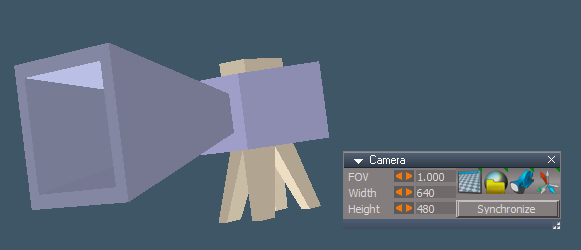
Add Synchronize | Deactivate toggle button script
New Camera.png
User avatar
clintonman
Captain
Posts: 5659
Joined: 21 May 2009, 21:08
Type the number ten into the box: 0
Location: California

Re: Final trueSpace 7.61 Beta 8 Unofficial Update

Post by clintonman »

This changes to the D3D material Converter scripts.
when run on a large scene there was no indication of anything happening or it would use the old status message technique that eats undos.

instancing conversion - refactored for readability, added status messages
compiled to shader - added status messages
shader to yafaray - status messages updated to use the plugin status messages
fix orphan materials removed the "No Orphan Materials found in this scene" which was repeated for every scene object - now only displays once at end of the process and only if nothing was found.
Attachments
D3D Material Converter03.RsObj
(2.06 MiB) Downloaded 156 times
Clinton Reese

http://clintons3d.com
User avatar
trueBlue
Captain
Posts: 5548
Joined: 06 Jul 2009, 22:50
Type the number ten into the box: 10

Re: Final trueSpace 7.61 Beta 8 Unofficial Update

Post by trueBlue »

Getting an error
ERR Source object: /Material Editor/Material Editor/D3D Material Converter/convert compiled to d3d Error: Microsoft JScript runtime error Description: 'clearModelStatus' is undefined Error code: 0x800a1391 - (null) Line: 50, Char: 1 Script text: util.ClearStatusMessage(clearModelStatus);
User avatar
clintonman
Captain
Posts: 5659
Joined: 21 May 2009, 21:08
Type the number ten into the box: 0
Location: California

Re: Final trueSpace 7.61 Beta 8 Unofficial Update

Post by clintonman »

trueBlue wrote: 29 Mar 2021, 22:05 Getting an error
ERR Source object: /Material Editor/Material Editor/D3D Material Converter/convert compiled to d3d Error: Microsoft JScript runtime error Description: 'clearModelStatus' is undefined Error code: 0x800a1391 - (null) Line: 50, Char: 1 Script text: util.ClearStatusMessage(clearModelStatus);
Oops, forgot to test that one. :oops:
fixed here.
Attachments
D3D Material Converter04.RsObj
(2.06 MiB) Downloaded 141 times
Clinton Reese

http://clintons3d.com
User avatar
trueBlue
Captain
Posts: 5548
Joined: 06 Jul 2009, 22:50
Type the number ten into the box: 10

Re: Final trueSpace 7.61 Beta 8 Unofficial Update

Post by trueBlue »

The orphaned material status is not being cleared
Remove Orphand Materials status message.png
Remove Orphand Materials status message.png (5.3 KiB) Viewed 2653 times
Is it possible to make the report optional?
And not open the report if there is no Orphand Materials?
User avatar
clintonman
Captain
Posts: 5659
Joined: 21 May 2009, 21:08
Type the number ten into the box: 0
Location: California

Re: Final trueSpace 7.61 Beta 8 Unofficial Update

Post by clintonman »

trueBlue wrote: 29 Mar 2021, 22:25 The orphaned material status is not being cleared
Remove Orphand Materials status message.png
Is it possible to make the report optional?
And not open the report if there is no Orphand Materials?
Orphan doesn't use the status message. Must be from somewhere else.
I'll see if I can find where the status is coming from, and yes it should be possible to make the report not open if nothing found.
Clinton Reese

http://clintons3d.com
User avatar
trueBlue
Captain
Posts: 5548
Joined: 06 Jul 2009, 22:50
Type the number ten into the box: 10

Re: Final trueSpace 7.61 Beta 8 Unofficial Update

Post by trueBlue »

Yep... it was stuck from the error
User avatar
clintonman
Captain
Posts: 5659
Joined: 21 May 2009, 21:08
Type the number ten into the box: 0
Location: California

Re: Final trueSpace 7.61 Beta 8 Unofficial Update

Post by clintonman »

Only opens the report if an orphan material was found.
Cleaned up the report to only show useful information.
It uses the status line but it happens too quickly in my small test to see it.
Attachments
D3D Material Converter07.RsObj
(2.06 MiB) Downloaded 165 times
Clinton Reese

http://clintons3d.com
User avatar
trueBlue
Captain
Posts: 5548
Joined: 06 Jul 2009, 22:50
Type the number ten into the box: 10

Re: Final trueSpace 7.61 Beta 8 Unofficial Update

Post by trueBlue »

Thanks!
I think you forgot = 0:

Code: Select all

//	ChunkCount;
ChunkCount = 0
//	MaterialIndexCount;
MaterialIndexCount = 0
Is that correct?
User avatar
clintonman
Captain
Posts: 5659
Joined: 21 May 2009, 21:08
Type the number ten into the box: 0
Location: California

Re: Final trueSpace 7.61 Beta 8 Unofficial Update

Post by clintonman »

trueBlue wrote: 30 Mar 2021, 00:00 Thanks!
I think you forgot = 0:

Code: Select all

//	ChunkCount;
ChunkCount = 0
//	MaterialIndexCount;
MaterialIndexCount = 0
Is that correct?
Those 2 lines aren't strictly needed but I think it's better to have it the way you show above with the 0 values.
Clinton Reese

http://clintons3d.com
User avatar
trueBlue
Captain
Posts: 5548
Joined: 06 Jul 2009, 22:50
Type the number ten into the box: 10

Re: Final trueSpace 7.61 Beta 8 Unofficial Update

Post by trueBlue »

Without it it was throwing errors
User avatar
clintonman
Captain
Posts: 5659
Joined: 21 May 2009, 21:08
Type the number ten into the box: 0
Location: California

Re: Final trueSpace 7.61 Beta 8 Unofficial Update

Post by clintonman »

trueBlue wrote: 30 Mar 2021, 00:11 Without it it was throwing errors
Not here, if I remove the lines I don't get any error.
I'll rewrite it to make it use those values properly.
Clinton Reese

http://clintons3d.com
User avatar
trueBlue
Captain
Posts: 5548
Joined: 06 Jul 2009, 22:50
Type the number ten into the box: 10

Re: Final trueSpace 7.61 Beta 8 Unofficial Update

Post by trueBlue »

I was just getting ready to reply
Without the 0, I get an error
With the 0, I get an Alert that no orphaned materials exist
So either way it is not working

Also it looks like all of these scripts should have RsApp.ClearHistory()
User avatar
clintonman
Captain
Posts: 5659
Joined: 21 May 2009, 21:08
Type the number ten into the box: 0
Location: California

Re: Final trueSpace 7.61 Beta 8 Unofficial Update

Post by clintonman »

trueBlue wrote: 30 Mar 2021, 00:52 I was just getting ready to reply
Without the 0, I get an error
With the 0, I get an Alert that no orphaned materials exist
So either way it is not working

Also it looks like all of these scripts should have RsApp.ClearHistory()
Good call, added the clear history if any changes were made by the scripts.
For the orphans I made those 2 global variables into local variables so they don't exist everywhere and they're now defined around line 176 and the values are passed into the FixMaterial function.

"With the 0, I get an Alert that no orphaned materials exist" - be sure your scene has orphan materials. If there are none you get the alert.
Attachments
D3D Material Converter1031b8.RsObj
(2.07 MiB) Downloaded 155 times
Clinton Reese

http://clintons3d.com
User avatar
trueBlue
Captain
Posts: 5548
Joined: 06 Jul 2009, 22:50
Type the number ten into the box: 10

Re: Final trueSpace 7.61 Beta 8 Unofficial Update

Post by trueBlue »

Some observations:
D3D 2 YafaRay4tS
Multiple selected objects
1) Status always says:
Material Conversion 0

2) Needs clear history?

If Yafaray material combo control blank(Default), Alert no materials found
3) Needs a yafarayType default?
And or add material in it's saved state (This works)

MaterialInstanceConverterScript/SetMaterialEditorMode
//System.Alert("Clintons3dView plugin must be Installed and Loaded.");Wrong plugin
4) System.Alert("Clintons3dPlugin must be Installed and Loaded");

D3D 2 Instancing
5) Needs clear history?

Note: Changed all Conversion alert text identifing the converted material type
Example:
System.Alert("Converted " + numMaterialsConverted + " D3D Compiled materials"
User avatar
trueBlue
Captain
Posts: 5548
Joined: 06 Jul 2009, 22:50
Type the number ten into the box: 10

Re: Final trueSpace 7.61 Beta 8 Unofficial Update

Post by trueBlue »

Test Update 30 for trueSpace7.61 Beta 8 Unofficial Update

March 30, 2021

Recommend that you completely Uninstall and Install trueSpace7.61 Beta 8 to a clean directory before installing this update. If you applied the previous Test Update to a clean directory, you do not need to Uninstall trueSpace7.61 Beta 8 before applying this new update.

This is a Beta Pre Release for TESTING the below updates and the updates in the Final trueSpace7.61 Beta 8 Std Unofficial Update thread
viewtopic.php?t=5418

There seems to be a requirement for Synchronize to work without turning the Workspace 3D object's material black in Model
After you apply the UU7 update and Reset to Default Context, you must Close trueSpace before using Synchronize
Still investigating if other steps are necessary like opening Model's Preferences, and or setting Model's Configuration

Update

Material Editor

Convert D3D Materials
Update Author - Clinton Reese
Modifications

MaterialInstanceConverterScript/SetMaterialEditorMode
Changed alert message
//System.Alert("Clintons3dView plugin must be Installed and Loaded.");Wrong plugin
System.Alert("Clintons3dPlugin must be Installed and Loaded");

MaterialInstanceConverterScript/ConvertMaterialType
Add
RsApp.ClearHistory()

Changed all Conversion alert text identifying the converted material type
Example:
System.Alert("Converted " + numMaterialsConverted + " D3D Compiled materials"
User avatar
clintonman
Captain
Posts: 5659
Joined: 21 May 2009, 21:08
Type the number ten into the box: 0
Location: California

Re: Final trueSpace 7.61 Beta 8 Unofficial Update

Post by clintonman »

trueBlue wrote: 30 Mar 2021, 18:41
MaterialInstanceConverterScript/ConvertMaterialType
Add
RsApp.ClearHistory()
It's not needed in that case. The only real change is coming from the command MeshModifiers.RepaintMaterial
There's no changing connections or anything like that and undo at any point doesn't leave tS in a bad state.
Clinton Reese

http://clintons3d.com
User avatar
clintonman
Captain
Posts: 5659
Joined: 21 May 2009, 21:08
Type the number ten into the box: 0
Location: California

Re: Final trueSpace 7.61 Beta 8 Unofficial Update

Post by clintonman »

trueBlue wrote: 30 Mar 2021, 15:41 Some observations:
D3D 2 YafaRay4tS
Multiple selected objects
1) Status always says:
Material Conversion 0

2) Needs clear history?

If Yafaray material combo control blank(Default), Alert no materials found
3) Needs a yafarayType default?
And or add material in it's saved state (This works)

MaterialInstanceConverterScript/SetMaterialEditorMode
//System.Alert("Clintons3dView plugin must be Installed and Loaded.");Wrong plugin
4) System.Alert("Clintons3dPlugin must be Installed and Loaded");

D3D 2 Instancing
5) Needs clear history?

Note: Changed all Conversion alert text identifing the converted material type
Example:
System.Alert("Converted " + numMaterialsConverted + " D3D Compiled materials"
1) is a count down - if you have 75 conversions it will start at "Material Conversion 75" then 74... down to 0.
2) see line 22 yafarayloop node
3) default might be a good idea
4)right
5) not needed see previous post
Clinton Reese

http://clintons3d.com
User avatar
trueBlue
Captain
Posts: 5548
Joined: 06 Jul 2009, 22:50
Type the number ten into the box: 10

Re: Final trueSpace 7.61 Beta 8 Unofficial Update

Post by trueBlue »

Can we leave it in for the simple fact, depending how many materials are getting converted, there can be several entries?
And to be consistent with all of the other conversion scripts that do clear the history?
I am still investigating but there my be a problem with the main view turning gray (runs out of memory?) when using the conversion scripts
Also noticed that Synchronize had problems with the 3D object's material turning black in Model
Not sure if it is all related to one or the other but something is different since the previous updates

With the Material Conversion 0 counter, I recall you using a % count down in one of your other projects for the status
That would be a great addition if possible
User avatar
clintonman
Captain
Posts: 5659
Joined: 21 May 2009, 21:08
Type the number ten into the box: 0
Location: California

Re: Final trueSpace 7.61 Beta 8 Unofficial Update

Post by clintonman »

trueBlue wrote: 30 Mar 2021, 19:44 Can we leave it in for the simple fact, depending how many materials are getting converted, there can be several entries?
And to be consistent with all of the other conversion scripts that do clear the history?
I am still investigating but there my be a problem with the main view turning gray (runs out of memory?) when using the conversion scripts
Also noticed that Synchronize had problems with the 3D object's material turning black in Model
Not sure if it is all related to one or the other but something is different since the previous updates
No. Simplicity and neatness is not the goal. Reducing the destruction of undos at every opportunity is. Undo's are a valuable resource not to be removed except when there is no choice. On top of that Remove Orphan Materials has nothing to do with converting materials, so there is already inconsistency in the tool set.

Hopefully, the gray may just be some kind of redraw issue. The Yafaray conversion does have a negative effect. If there is a problem may need to limit other conversions as well. Yaf conversion is limited to 200 conversions in 1 run and gives a warning that it can only do those 200 conversions 4 times before tS may crash.
Clinton Reese

http://clintons3d.com
User avatar
clintonman
Captain
Posts: 5659
Joined: 21 May 2009, 21:08
Type the number ten into the box: 0
Location: California

Re: Final trueSpace 7.61 Beta 8 Unofficial Update

Post by clintonman »

trueBlue wrote: 30 Mar 2021, 19:44 With the Material Conversion 0 counter, I recall you using a % count down in one of your other projects for the status
That would be a great addition if possible
Counts up as a percentage and removed the clear history from instancing run.
Attachments
D3D Material Converter102.RsObj
(2.08 MiB) Downloaded 154 times
Clinton Reese

http://clintons3d.com
User avatar
clintonman
Captain
Posts: 5659
Joined: 21 May 2009, 21:08
Type the number ten into the box: 0
Location: California

Re: Final trueSpace 7.61 Beta 8 Unofficial Update

Post by clintonman »

Attached is an alternative to the current Eye2Cam script.
The current version eats up about 27 undo steps and clears the undo history
This version uses 15 undos and does not clear undo history.
If it did not remove the LE2Data connectors it would eat about 8 undos.

The LE2Data connector removal technique is based on the Copy03.RsObj submitted earlier in this thread.
Attachments
Eye2Cam04.RsObj
(6.65 KiB) Downloaded 154 times
Clinton Reese

http://clintons3d.com
User avatar
trueBlue
Captain
Posts: 5548
Joined: 06 Jul 2009, 22:50
Type the number ten into the box: 10

Re: Final trueSpace 7.61 Beta 8 Unofficial Update

Post by trueBlue »

Great improvement with % counter Clinton! :worship:
Thank you!
I will upload the changes shortly
User avatar
trueBlue
Captain
Posts: 5548
Joined: 06 Jul 2009, 22:50
Type the number ten into the box: 10

Re: Final trueSpace 7.61 Beta 8 Unofficial Update

Post by trueBlue »

clintonman wrote: 30 Mar 2021, 21:40 Attached is an alternative to the current Eye2Cam script.
The current version eats up about 27 undo steps and clears the undo history
This version uses 15 undos and does not clear undo history.
If it did not remove the LE2Data connectors it would eat about 8 undos.

The LE2Data connector removal technique is based on the Copy03.RsObj submitted earlier in this thread.
Since this script requires a Perspective view, I wonder if you could NOT use the commands that are committed out?

Code: Select all

	Node.Value(Cam, "Matrix") = Node.Value(Eye, "WldMatrix");
//	Node.Value(Cam + "/Camera", "ClippingFar") = Node.Value(Eye, "ClippingFar");
//	Node.Value(Cam + "/Camera", "ClippingNear") = Node.Value(Eye, "ClippingNear");
//	Node.Value(Cam + "/Camera", "Focus") = Node.Value(Eye, "Focus");
	Node.Value(Cam, "FOV") = Node.Value(Eye, "FOV");
//	Node.Value(Cam + "/Camera", "Perspective") = Node.Value(Eye, "Perspective");
	D3DView.SetActiveCamera(Cam, winid);
User avatar
trueBlue
Captain
Posts: 5548
Joined: 06 Jul 2009, 22:50
Type the number ten into the box: 10

Re: Final trueSpace 7.61 Beta 8 Unofficial Update

Post by trueBlue »

clintonman wrote: 30 Mar 2021, 21:40 Attached is an alternative to the current Eye2Cam script.
The current version eats up about 27 undo steps and clears the undo history
This version uses 15 undos and does not clear undo history.
If it did not remove the LE2Data connectors it would eat about 8 undos.

The LE2Data connector removal technique is based on the Copy03.RsObj submitted earlier in this thread.
I took a peak at the Camera in Preferences/Cameras and confirmed that it only has one hidden LE2Data connector
So it is only necessary to remove one

Code: Select all

	var workwindow = WindowsManager.GetWorkWindow();
	var winid = Node.Value(workwindow, "WinID");
	var Eye = "/D3DView/EyeCamera_" + winid;
	if (Node.SubObjectCount("/D3DView") == 0) return;
	if (!Node.ConExists(workwindow, "WinID")) return;
	if (!Node.Exists("/D3DView/EyeCamera_" + winid)) return;
	if (Node.Value(Eye, "CameraType") != 0) {
		System.Alert("Switch to Perspetive view first")
		return
	}
	var Cam = Node.Copy("/Preferences/Cameras/Camera", Space.CurrentScene());
	Node.Value(Cam, "Matrix") = Node.Value(Eye, "WldMatrix");
//	Node.Value(Cam + "/Camera", "ClippingFar") = Node.Value(Eye, "ClippingFar");
//	Node.Value(Cam + "/Camera", "ClippingNear") = Node.Value(Eye, "ClippingNear");
//	Node.Value(Cam + "/Camera", "Focus") = Node.Value(Eye, "Focus");
	Node.Value(Cam, "FOV") = Node.Value(Eye, "FOV");
//	Node.Value(Cam + "/Camera", "Perspective") = Node.Value(Eye, "Perspective");
	D3DView.SetActiveCamera(Cam, winid);
	Node.ConRemove(Cam, "LE2Data");
	RsApp.Undo()
Also putting the ConRemove at the end of the script and adding Undo, eliminates one entry
Total = 4 entries
User avatar
clintonman
Captain
Posts: 5659
Joined: 21 May 2009, 21:08
Type the number ten into the box: 0
Location: California

Re: Final trueSpace 7.61 Beta 8 Unofficial Update

Post by clintonman »

trueBlue wrote: 30 Mar 2021, 23:23
Also putting the ConRemove at the end of the script and adding Undo, eliminates one entry
Total = 4 entries
That's interesting. I wonder if that trick will work when there are more than one LE2Data connectors.
Clinton Reese

http://clintons3d.com
User avatar
trueBlue
Captain
Posts: 5548
Joined: 06 Jul 2009, 22:50
Type the number ten into the box: 10

Re: Final trueSpace 7.61 Beta 8 Unofficial Update

Post by trueBlue »

Well that was short lived trick
Now it is not working
User avatar
clintonman
Captain
Posts: 5659
Joined: 21 May 2009, 21:08
Type the number ten into the box: 0
Location: California

Re: Final trueSpace 7.61 Beta 8 Unofficial Update

Post by clintonman »

Point Clone script - no history erase version, still can use up a lot of undos though.

The clean process is simpler. It uses the LE.CreateEncapsulationNode instead of multiple deletes and disconnections and save and load of objects to disc.
The scrubbers that updated other scrubbers were creating a bunch of undos because all the values were being updated. Changing 1 value was changing all 18 values.
Moved all the code out of the template so nothing is run from the inside of the node in the scene. It all runs from the script folder.
Changed the status messages to use the new undo friendly version.

Found a weird thing. If LE.CreateEncapsulationNode was run after a ConnectTo command the undos would stop at that point and not go back any further. So the combination was partially clearing history.
Attachments
pointCloneScript28e.RsObj
(181.29 KiB) Downloaded 154 times
Clinton Reese

http://clintons3d.com
User avatar
trueBlue
Captain
Posts: 5548
Joined: 06 Jul 2009, 22:50
Type the number ten into the box: 10

Re: Final trueSpace 7.61 Beta 8 Unofficial Update

Post by trueBlue »

PointCloneTemplate panel
Press the Reset Default Values button

With nothing selected
Press the Start Clone button
Select a 3D Cube
ERR Source object: /Scripts/CustomCommands/pointCloneScript/pCloneItExternal Error: Microsoft JScript runtime error Description: Invalid procedure call or argument Error code: 0x800a0005 - (null) Line: 191, Char: 3 Script text: sourcemat = Node.Value(source,"WldMatrix");

Select a 3D Cube -> Note: BB Size 2.000, 2.000, 2.000
Press the Start Clone button
Select a different 3D Cube
PointCloneGroup, 1 -> Note: BB Size 4.000, 4.000, 4.000

In another test, I tried this with a Cube as Source and a Sphere as the Target
This process took along time and during the process I started selecting objects
After a couple of minutes the process completed
I think you need to implement a couple other processes
1) System.SetBusyCursor(true)
2) // To create the object faster, disable synchronization between
// Rosetta and trueSpace.
bEventsBlocked = tSBridge.RsTSEventsStatus();
tSBridge.BlockRsTSEvents(true);
3) Start Clone script
After the cloning process...
4) System.SetBusyCursor(false)
5) // Restore original bridge state and synchronize the tree object
tSBridge.BlockRsTSEvents(bEventsBlocked);
tSBridge.SynchronizeObject(objNode);
tSBridge.BlockRsTSEvents(false);

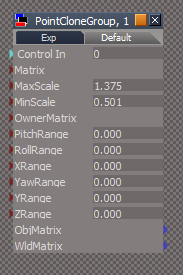
What are all of the Scripts for in the PointCloneGroup, 1?
And why are their Control In attribute exported out to the parent?
User avatar
clintonman
Captain
Posts: 5659
Joined: 21 May 2009, 21:08
Type the number ten into the box: 0
Location: California

Re: Final trueSpace 7.61 Beta 8 Unofficial Update

Post by clintonman »

Thanks, will add check for proper selection.

1) why, what does it do?
2) good idea
4) again why, I've never seen this do anything
5) yep

I'll have to get back to you on the exported Control In, that sounds like some kind of mistake. I did change all the controls so they each don't update all the values, maybe something went wrong there. Or maybe it's related to the invalid selection bug you found.

I also need to make one more change. There are a couple of nodes used to calculate some values. They need to be replaced with plain math so the calculation doesn't eat up 2 more undos for each cloned object.
Clinton Reese

http://clintons3d.com
User avatar
trueBlue
Captain
Posts: 5548
Joined: 06 Jul 2009, 22:50
Type the number ten into the box: 10

Re: Final trueSpace 7.61 Beta 8 Unofficial Update

Post by trueBlue »

clintonman wrote: 31 Mar 2021, 14:42 Thanks, will add check for proper selection.

1) why, what does it do?
2) good idea
4) again why, I've never seen this do anything
5) yep

I'll have to get back to you on the exported Control In, that sounds like some kind of mistake. I did change all the controls so they each don't update all the values, maybe something went wrong there. Or maybe it's related to the invalid selection bug you found.

I also need to make one more change. There are a couple of nodes used to calculate some values. They need to be replaced with plain math so the calculation doesn't eat up 2 more undos for each cloned object.
1) Look at the Mandelbrot script in the Objects - Script objects library
2) Look at the Magic Scuplturer script in the Objects - Script objects library
User avatar
trueBlue
Captain
Posts: 5548
Joined: 06 Jul 2009, 22:50
Type the number ten into the box: 10

Re: Final trueSpace 7.61 Beta 8 Unofficial Update

Post by trueBlue »

2) Look at the Magic Scuplturer script in the Objects - Script objects library
This throws an error in tS761 Standalone
User avatar
clintonman
Captain
Posts: 5659
Joined: 21 May 2009, 21:08
Type the number ten into the box: 0
Location: California

Re: Final trueSpace 7.61 Beta 8 Unofficial Update

Post by clintonman »

trueBlue wrote: 31 Mar 2021, 14:56 1) Look at the Mandelbrot script in the Objects - Script objects library
OK thanks for the lesson. I didn't think it worked at all. It does work, but only for jscript objects, not for jscript commands.
Samples of each attached.
Attachments
TestBusyCursorObject.RsObj
(33.48 KiB) Downloaded 150 times
TestBusyCursorCommand.RsObj
(4.89 KiB) Downloaded 151 times
Clinton Reese

http://clintons3d.com
User avatar
clintonman
Captain
Posts: 5659
Joined: 21 May 2009, 21:08
Type the number ten into the box: 0
Location: California

Re: Final trueSpace 7.61 Beta 8 Unofficial Update

Post by clintonman »

trueBlue wrote: 31 Mar 2021, 15:12 2) Look at the Magic Scuplturer script in the Objects - Script objects library
This throws an error in tS761 Standalone
OK will add test for bridge to avoid error.
Clinton Reese

http://clintons3d.com
User avatar
trueBlue
Captain
Posts: 5548
Joined: 06 Jul 2009, 22:50
Type the number ten into the box: 10

Re: Final trueSpace 7.61 Beta 8 Unofficial Update

Post by trueBlue »

clintonman wrote: 31 Mar 2021, 16:40
trueBlue wrote: 31 Mar 2021, 14:56 1) Look at the Mandelbrot script in the Objects - Script objects library
OK thanks for the lesson. I didn't think it worked at all. It does work, but only for jscript objects, not for jscript commands.
Samples of each attached.
Thanks for the working example!
I had thought it's use would prevent selecting while it is busy.
After it is not busy it selects the last object selected while it was busy
So I guess you could use this in scripts as a means to show the script is working
User avatar
trueBlue
Captain
Posts: 5548
Joined: 06 Jul 2009, 22:50
Type the number ten into the box: 10

Re: Final trueSpace 7.61 Beta 8 Unofficial Update

Post by trueBlue »

I was curious by your use of the CreateEncapsulationNode command

LE.CreateEncapsulationNode("","",0,0,true)

ScriptObject.RunCmd("linkeditor2 package/encapsulate command", "NodeName", "", "EncName", "", "x", 0, "y", 0, "Encapsulate3D", -1)

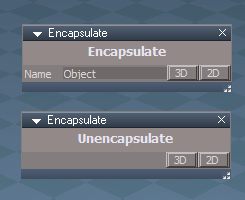
I created an Encapsulate object that resides in CustomCommands
Encaps panels.png
Encaps panels.png (11.86 KiB) Viewed 3306 times
The 3D & 2D buttons call the incorporated scripts
These scripts are the same as the xml files except they use the above command and have status messages when complete

I was thinking about adding a RMB command to the toolbar Encap/Unencap icons that opens this panel in the Stack/Panels
Encapsulate
UserInterface.OpenToolPanelViewEx2("" , "" ,"Scripts/CustomCommands/Encapsulate", 3,0,0)
Unencapsulate
UserInterface.OpenToolPanelViewEx2("" , "" ,"Scripts/CustomCommands/Encapsulate", 4,0,0)

This will be in addition to how it is currently
Benefit
User is able to enter the Name before for the 3D/2D encapsulation without having the LE opened
Gives a status message
User avatar
clintonman
Captain
Posts: 5659
Joined: 21 May 2009, 21:08
Type the number ten into the box: 0
Location: California

Re: Final trueSpace 7.61 Beta 8 Unofficial Update

Post by clintonman »

Also FYI

LE.CreateEncapsulationNode("","name 3d encaps here",0,0,true);
LE.CreateEncapsulationNode("","name 2d encaps here",0,0,false);

also assigns a name to the encapsulation node

I don't know if there is any difference between the long command and the short command, my guess is this short command never opens a dialog for naming, but that's just a guess.
Clinton Reese

http://clintons3d.com
User avatar
clintonman
Captain
Posts: 5659
Joined: 21 May 2009, 21:08
Type the number ten into the box: 0
Location: California

Re: Final trueSpace 7.61 Beta 8 Unofficial Update

Post by clintonman »

Point Clone script
tS bridge tools recommended by tB
changed the way the tool works because the Selection Change Event was causing the number of undos to double in number.
I think I added a status update during the cloning process, maybe it was already there, not sure.
Use pure math for point normal calculations which removes 2 extra undos for each object.

New tool usage - select the items to clone then add the target to the selection and press Start

"And why are their Control In attribute exported out to the parent?"
I don't see that at all

The process still generates a large number of undos. Which is an improvement since before it was a crazy number of undos.
Attachments
pointCloneScript40.RsObj
(157.18 KiB) Downloaded 156 times
Clinton Reese

http://clintons3d.com
User avatar
trueBlue
Captain
Posts: 5548
Joined: 06 Jul 2009, 22:50
Type the number ten into the box: 10

Re: Final trueSpace 7.61 Beta 8 Unofficial Update

Post by trueBlue »

clintonman wrote: 01 Apr 2021, 00:55 Also FYI

LE.CreateEncapsulationNode("","name 3d encaps here",0,0,true);
LE.CreateEncapsulationNode("","name 2d encaps here",0,0,false);

also assigns a name to the encapsulation node

I don't know if there is any difference between the long command and the short command, my guess is this short command never opens a dialog for naming, but that's just a guess.
true = 3D
false = 2D
If you are referring to the command I posted as "Long", that is what is displayed in the Command console when you run the "Short" command
They both do the same thing

For 3D Encapsulate I am using:
var Name = params.ConValue('Name')
LE.CreateEncapsulationNode("",Name,0,0,true)
OnDefaultValue
params.Param('vtData') = "Object";
User avatar
trueBlue
Captain
Posts: 5548
Joined: 06 Jul 2009, 22:50
Type the number ten into the box: 10

Re: Final trueSpace 7.61 Beta 8 Unofficial Update

Post by trueBlue »

@Clinton
Unencapsulate.xml
Notice this is running when nothing is selected
I added:
var selCount = Node.SelectedCount();
if(selCount == 0) return;
Also added:
if(!IsValidSelection(selectionString)) return;
Also added:
utilityFunctions = System.CreateDO("Clintons3D Package/Utility functions");
utilityFunctions.SetStatusMessage("2D Unencapsulation complete", 4000);
Is this correct?
Should there be something added for NURBS?

Code: Select all

function Execute(params)
{
	var selectionString = Node.Selection();

	var selectionArray = selectionString.split(";");
	var re = /^\s/; // whitespace in first character position
	var selCount = Node.SelectedCount();
	if(!IsValidSelection(selectionString)) return;
	if(selCount == 0) return;
	if(selectionArray.length < 1) return;

	for(var i=0;i<selectionArray.length;i++) {
		//remove whitespace from the node path
		selectionArray[i] = selectionArray[i].replace(re,"");

		if(Node.SubObjectCount(selectionArray[i]) > 0) {
			LE.Unencapsulate(selectionArray[i]);
		}
	}
	utilityFunctions = System.CreateDO("Clintons3D Package/Utility functions");
	utilityFunctions.SetStatusMessage("2D Unencapsulation complete", 4000);
}

function IsValidSelection(selection)
{
	if(!selection) return false;

	var reWhiteSpace = /^\s/; // whitespace in first character position for cleaning selection text

	var selectionArray = selection.split(";");

	for(var i = 0; i < selectionArray.length; i++) {
		var selClean = selectionArray[i].replace(reWhiteSpace, "");

		if(!Node.Exists(selClean)) {
			return false;
		}
	}

	return true;
}
User avatar
trueBlue
Captain
Posts: 5548
Joined: 06 Jul 2009, 22:50
Type the number ten into the box: 10

Re: Final trueSpace 7.61 Beta 8 Unofficial Update

Post by trueBlue »

clintonman wrote: 01 Apr 2021, 01:27 Point Clone script
tS bridge tools recommended by tB
changed the way the tool works because the Selection Change Event was causing the number of undos to double in number.
I think I added a status update during the cloning process, maybe it was already there, not sure.
Use pure math for point normal calculations which removes 2 extra undos for each object.

New tool usage - select the items to clone then add the target to the selection and press Start

"And why are their Control In attribute exported out to the parent?"
I don't see that at all

The process still generates a large number of undos. Which is an improvement since before it was a crazy number of undos.
Seems faster!
Still have the scripts with the Control In exported out along with all of the attributes
PCG Control In.png
PCG Control In.png (12.21 KiB) Viewed 3360 times
User avatar
trueBlue
Captain
Posts: 5548
Joined: 06 Jul 2009, 22:50
Type the number ten into the box: 10

Re: Final trueSpace 7.61 Beta 8 Unofficial Update

Post by trueBlue »

I fixed the Point Clone by 2D Encapsulating the scripts, Watch Dogs, and named it Scripts
I changed all of the paths in the code to include Scripts
In the CleanIt function I added:
var dontSelectArray = []
dontSelectArray.push("Scripts");
dontSelectArray.push("Transform")
and committed out the others
PCG Flattened node.png
PCG Flattened node.png (5.74 KiB) Viewed 3354 times
User avatar
clintonman
Captain
Posts: 5659
Joined: 21 May 2009, 21:08
Type the number ten into the box: 0
Location: California

Re: Final trueSpace 7.61 Beta 8 Unofficial Update

Post by clintonman »

trueBlue wrote: 01 Apr 2021, 16:18 @Clinton
Unencapsulate.xml
Notice this is running when nothing is selected
I added:
var selCount = Node.SelectedCount();
if(selCount == 0) return;
Also added:
if(!IsValidSelection(selectionString)) return;
Also added:
utilityFunctions = System.CreateDO("Clintons3D Package/Utility functions");
utilityFunctions.SetStatusMessage("2D Unencapsulation complete", 4000);
Is this correct?
Should there be something added for NURBS?
Looks like it should work. You can simplify a bit like below.

Nothing needed for NURBS or anything else, plain 2D unencapsulate shouldn't have any restrictions.

Code: Select all

function Execute(params)
{
	var selectionString = Node.Selection();
	if(!IsValidSelection(selectionString)) return;
	
	var selectionArray = selectionString.split(";");
	var re = /^\s/; // whitespace in first character position

	for(var i=0;i<selectionArray.length;i++) {
		//remove whitespace from the node path
		selectionArray[i] = selectionArray[i].replace(re,"");

		if(Node.SubObjectCount(selectionArray[i]) > 0) {
			LE.Unencapsulate(selectionArray[i]);
		}
	}
	utilityFunctions = System.CreateDO("Clintons3D Package/Utility functions");
	utilityFunctions.SetStatusMessage("2D Unencapsulation complete", 4000);
}

function IsValidSelection(selection)
{
	if(!selection) return false;

	var reWhiteSpace = /^\s/; // whitespace in first character position for cleaning selection text

	var selectionArray = selection.split(";");

	for(var i = 0; i < selectionArray.length; i++) {
		var selClean = selectionArray[i].replace(reWhiteSpace, "");

		if(!Node.Exists(selClean)) {
			return false;
		}
	}

	return true;
}
Clinton Reese

http://clintons3d.com
User avatar
clintonman
Captain
Posts: 5659
Joined: 21 May 2009, 21:08
Type the number ten into the box: 0
Location: California

Re: Final trueSpace 7.61 Beta 8 Unofficial Update

Post by clintonman »

trueBlue wrote: 01 Apr 2021, 22:11 I fixed the Point Clone by 2D Encapsulating the scripts, Watch Dogs, and named it Scripts
I changed all of the paths in the code to include Scripts
In the CleanIt function I added:
var dontSelectArray = []
dontSelectArray.push("Scripts");
dontSelectArray.push("Transform")
and committed out the others
PCG Flattened node.png
The encapsulation stopped the scrubbers from updating the other values. When you drag Min the values for MinX, MinY and MinZ will update. Same for Max and the other unlabeled scrubbers.

The attached includes the missing deletions to give a final clean node in the scene.

Code: Select all

	//dontSelectArray.push("uniformValues");
	dontSelectArray.push("uniformYaw");
	dontSelectArray.push("uniformY");
	dontSelectArray.push("uniformZ");
	dontSelectArray.push("uniformPitch");
	dontSelectArray.push("uniformRoll");
	dontSelectArray.push("uniformX");
	dontSelectArray.push("uniformScaleMax");
	dontSelectArray.push("uniformScaleMin");
Attachments
pointCloneScript42.RsObj
(157.79 KiB) Downloaded 154 times
Clinton Reese

http://clintons3d.com
User avatar
trueBlue
Captain
Posts: 5548
Joined: 06 Jul 2009, 22:50
Type the number ten into the box: 10

Re: Final trueSpace 7.61 Beta 8 Unofficial Update

Post by trueBlue »

Clean Up works good now
Simple scene, two Cubes as Source, Plan with 20x10 segments as Target, works good
Change the Plan with 50x20 segments as Target, causes trueSpace to run out of memory and crashes
Wonder if you could add an Esc process?
User avatar
clintonman
Captain
Posts: 5659
Joined: 21 May 2009, 21:08
Type the number ten into the box: 0
Location: California

Re: Final trueSpace 7.61 Beta 8 Unofficial Update

Post by clintonman »

trueBlue wrote: 02 Apr 2021, 01:15 Clean Up works good now
Simple scene, two Cubes as Source, Plan with 20x10 segments as Target, works good
Change the Plan with 50x20 segments as Target, causes trueSpace to run out of memory and crashes
Wonder if you could add an Esc process?
I'll see what i can do. For sure it looks like some kind of limit needs to be in place. tS can only handle so many nodes at once.
Clinton Reese

http://clintons3d.com
User avatar
trueBlue
Captain
Posts: 5548
Joined: 06 Jul 2009, 22:50
Type the number ten into the box: 10

Re: Final trueSpace 7.61 Beta 8 Unofficial Update

Post by trueBlue »

If I commit out
// CleanIt(owner);
and disconnect the Pause Activity
I can run Point Clone on a Target Plane with many Segments with no crash and it is super fast :D

Of course this only copies the objects to the Target without 3D Encapsulating
If I select all of these copies and 3D Encapsulate them, trueSpace crashes!
Crash.png
Partial PlayerD3D.log
[RsD3DDeviceManager.cpp(340)]
000000931500 LOG Renderer: Send restore device [RsD3DRenderer.cpp(266)]
000000931500 LOG WRT D3DWindowedRT_657 : OnLost [RsD3DWindowedRenderTarget.cpp(100)]
000001230828 LOG Renderer: Setting the lost state [RsD3DRenderer.cpp(284)]
000001232359 LOG Renderer: Send device lost [RsD3DRenderer.cpp(250)]
000001232359 LOG WRT D3DWindowedRT_657 : OnLost [RsD3DWindowedRenderTarget.cpp(100)]
000001232594 WARN Direct3D Device could not be restored (hRes = 8007000e), please save your work and restart the application [RsD3DDeviceManager.cpp(1253)]

I used your

Code: Select all

	if(typeof(tSBridge) != "undefined") {

		bEventsBlocked = tSBridge.RsTSEventsStatus();
 
		tSBridge.BlockRsTSEvents(true);
	}
for the Magic Scuplturer in tS761 Standalone
No errors! :D
I notice Peter is using:
var a = System.CreateDO("Common Data Package/Boolean Array Data");
verses 3D Encapsulating?
It created 9473 objects without a crash, but a bit slow
MScupltruer.png

Return to “General Discussion”