
Final trueSpace 7.61 Beta 8 Unofficial Update
-
trueBlue

- Captain
- Posts: 5548
- Joined: 06 Jul 2009, 22:50
- Type the number ten into the box: 10
Re: Final trueSpace 7.61 Beta 8 Unofficial Update
Thank you for the confirmation
-
trueBlue
- Captain
- Posts: 5548
- Joined: 06 Jul 2009, 22:50
- Type the number ten into the box: 10
Re: Final trueSpace 7.61 Beta 8 Unofficial Update
@ Clinton
The Copy Window command is garbage!
First thing I noticed is, if the Window has an aspect toolbar, you will get an empty toolbar frame
Adding these two commands fixes that
Next thing I noticed is duplicated nodes and the Scene node is wired to one of the duplicated nodes
Also there is a Player - Scene Ground node wired to one of the duplicated nodes
This Player - Scene Ground node is the same as the Ground node
This copied window's Grid & Scene does not show nor work from the Stack
Adding these commands fixes that
Note if the Stack/Settings is not open, you may need to select the panels in Stack/Settings & the Copied window to get the change to commit
Here is the new Copy Window script that includes opening the Stack/Settings
If you have an original trueSpace761 installed, can you test Copy Window?
EDIT: Seems there is a problem with View widget, need to investigate this some more
The Copy Window command is garbage!
Code: Select all
WindowsManager.CopyWindow('');Adding these two commands fixes that
Code: Select all
WindowsManager.Activate();
WindowsManager.UpdateWindowsStructure();Also there is a Player - Scene Ground node wired to one of the duplicated nodes
This Player - Scene Ground node is the same as the Ground node
This copied window's Grid & Scene does not show nor work from the Stack
Adding these commands fixes that
Code: Select all
var WIN = WindowsManager.GetWorkWindow()
Node.ReconnectTo(WIN + "/Scene", "RenderAttributes", WIN + "/D3DSceneLayer, 3", "RenderAttributesLayer", WIN + "/D3DSceneLayer", "RenderAttributesLayer")
Node.Delete(WIN+ "/Player - Scene Ground")
Node.Delete(WIN+ "/D3DSceneLayer, 3")
Node.Delete(WIN+ "/D3DSceneLayer, 4")
Node.Delete(WIN+ "/D3DSceneLayer, 5")Here is the new Copy Window script that includes opening the Stack/Settings
Code: Select all
WindowsManager.CopyWindow('');
HT_PREFERENCES	= 5
RsStackView.SwitchStackViewAspect(HT_PREFERENCES);
WindowsManager.Activate();
WindowsManager.UpdateWindowsStructure();
var WIN = WindowsManager.GetWorkWindow()
Node.ReconnectTo(WIN + "/Scene", "RenderAttributes", WIN + "/D3DSceneLayer, 3", "RenderAttributesLayer", WIN + "/D3DSceneLayer", "RenderAttributesLayer")
Node.Delete(WIN+ "/Player - Scene Ground")
Node.Delete(WIN+ "/D3DSceneLayer, 3")
Node.Delete(WIN+ "/D3DSceneLayer, 4")
Node.Delete(WIN+ "/D3DSceneLayer, 5")EDIT: Seems there is a problem with View widget, need to investigate this some more
-
clintonman

- Captain
- Posts: 5659
- Joined: 21 May 2009, 21:08
- Type the number ten into the box: 0
- Location: California
Re: Final trueSpace 7.61 Beta 8 Unofficial Update
I'm doing synchronization tests now with original tS.
"First thing I noticed is, if the Window has an aspect toolbar, you will get an empty toolbar frame"
What is an aspect toolbar?
"First thing I noticed is, if the Window has an aspect toolbar, you will get an empty toolbar frame"
What is an aspect toolbar?
-
trueBlue
- Captain
- Posts: 5548
- Joined: 06 Jul 2009, 22:50
- Type the number ten into the box: 10
Re: Final trueSpace 7.61 Beta 8 Unofficial Update
Me too!
An Aspect toolbar is a toolbar imbedded into the window's title bar
Like the Animation toolbar, File Help toolbar, and the Link Editor toolbar
Found that last issue with this new Copy Window script
I need to set the Model and then Workspace tabs/aspects
An Aspect toolbar is a toolbar imbedded into the window's title bar
Like the Animation toolbar, File Help toolbar, and the Link Editor toolbar
Found that last issue with this new Copy Window script
I need to set the Model and then Workspace tabs/aspects
-
trueBlue
- Captain
- Posts: 5548
- Joined: 06 Jul 2009, 22:50
- Type the number ten into the box: 10
Re: Final trueSpace 7.61 Beta 8 Unofficial Update
Got IT 
Not pretty but it works
Not pretty but it works
Code: Select all
WindowsManager.CopyWindow('');
HT_PREFERENCES	= 5
RsStackView.SwitchStackViewAspect(HT_PREFERENCES);
var WIN = WindowsManager.GetWorkWindow()
Node.ReconnectTo(WIN + "/Scene", "RenderAttributes", WIN + "/D3DSceneLayer, 3", "RenderAttributesLayer", WIN + "/D3DSceneLayer", "RenderAttributesLayer")
Node.Delete(WIN+ "/Player - Scene Ground")
Node.Delete(WIN+ "/D3DSceneLayer, 3")
Node.Delete(WIN+ "/D3DSceneLayer, 4")
Node.Delete(WIN+ "/D3DSceneLayer, 5")
WindowsManager.ChangeFrameWindowViewer(WIN, "{D2AB7FC9-E561-4232-8E8A-35D73D1B020E}");
WindowsManager.ChangeFrameWindowViewer(WIN, "{17D544A3-3F58-436B-83E7-F8B4D7D4E7C5}");
WindowsManager.Activate();
WindowsManager.UpdateWindowsStructure();
-
clintonman
- Captain
- Posts: 5659
- Joined: 21 May 2009, 21:08
- Type the number ten into the box: 0
- Location: California
Re: Final trueSpace 7.61 Beta 8 Unofficial Update
Here's a rough outline of my tests with original tS
anim view has aspect toolbar, run copy window don't see any empty toolbar frame
3d view copy, toolbar does not copy with the window, ground invisible
delete 3 extra nodes ground appears
also see extra "Player - Scene Ground" and "Layer Render Attributes" nodes
new window does not respond to mouse input after removing all the nodes
copy view with main 3D view - clones the view, mouse action same in both windows, change to model and back breaks link between the 2 windows and adds the toolbar back
if dock floating window then same as main 3D window when copy
if copy 2d le window then switch to 3d it has toolbar and normal behavior, ground controls not working
if copy floating 3d then switch to 2d and back to 3d the link between the windows is broken and get toolbar back - ground controls still not show in the stack view
So, yeah, it looks a little bit messed up alright.
anim view has aspect toolbar, run copy window don't see any empty toolbar frame
3d view copy, toolbar does not copy with the window, ground invisible
delete 3 extra nodes ground appears
also see extra "Player - Scene Ground" and "Layer Render Attributes" nodes
new window does not respond to mouse input after removing all the nodes
copy view with main 3D view - clones the view, mouse action same in both windows, change to model and back breaks link between the 2 windows and adds the toolbar back
if dock floating window then same as main 3D window when copy
if copy 2d le window then switch to 3d it has toolbar and normal behavior, ground controls not working
if copy floating 3d then switch to 2d and back to 3d the link between the windows is broken and get toolbar back - ground controls still not show in the stack view
So, yeah, it looks a little bit messed up alright.
-
trueBlue
- Captain
- Posts: 5548
- Joined: 06 Jul 2009, 22:50
- Type the number ten into the box: 10
Re: Final trueSpace 7.61 Beta 8 Unofficial Update
Thank you for confirming this!
I have it sorted now
See previous cross(?) post
I have it sorted now
See previous cross(?) post
-
clintonman
- Captain
- Posts: 5659
- Joined: 21 May 2009, 21:08
- Type the number ten into the box: 0
- Location: California
Re: Final trueSpace 7.61 Beta 8 Unofficial Update
Don't forget to test it with other window types - LE, Anim, floating and docked windowstrueBlue wrote: 15 Mar 2021, 20:10 Got IT
Not pretty but it works
Code: Select all
WindowsManager.CopyWindow('');
HT_PREFERENCES	= 5
RsStackView.SwitchStackViewAspect(HT_PREFERENCES);
var WIN = WindowsManager.GetWorkWindow()
Node.ReconnectTo(WIN + "/Scene", "RenderAttributes", WIN + "/D3DSceneLayer, 3", "RenderAttributesLayer", WIN + "/D3DSceneLayer", "RenderAttributesLayer")
Node.Delete(WIN+ "/Player - Scene Ground")
Node.Delete(WIN+ "/D3DSceneLayer, 3")
Node.Delete(WIN+ "/D3DSceneLayer, 4")
Node.Delete(WIN+ "/D3DSceneLayer, 5")
WindowsManager.ChangeFrameWindowViewer(WIN, "{D2AB7FC9-E561-4232-8E8A-35D73D1B020E}");
WindowsManager.ChangeFrameWindowViewer(WIN, "{17D544A3-3F58-436B-83E7-F8B4D7D4E7C5}");
WindowsManager.Activate();
WindowsManager.UpdateWindowsStructure();
-
trueBlue
- Captain
- Posts: 5548
- Joined: 06 Jul 2009, 22:50
- Type the number ten into the box: 10
Re: Final trueSpace 7.61 Beta 8 Unofficial Update
UGH!
Need to check for Animation and or Link Editor windows & switch to their Aspect and NOT just the Workspace Aspect
Complicated!!!
Need to check for Animation and or Link Editor windows & switch to their Aspect and NOT just the Workspace Aspect
Complicated!!!
-
trueBlue
- Captain
- Posts: 5548
- Joined: 06 Jul 2009, 22:50
- Type the number ten into the box: 10
Re: Final trueSpace 7.61 Beta 8 Unofficial Update
Got IT!
Went a different approach
In my testing, the only place it did not work as expected was in the Floating layout's Link Editor window
So there may be layouts were it will not work as expected
At least this is better then the none working Copy Window command
There is one draw back in using this script that existed in the original command as well, in with which trueSpace remembers the last window's size & position. Work around is, select you layout where window's sizes & position are saved with the layout
Went a different approach
In my testing, the only place it did not work as expected was in the Floating layout's Link Editor window
So there may be layouts were it will not work as expected
At least this is better then the none working Copy Window command
Code: Select all
WindowsManager.CopyWindow('');
HT_PREFERENCES	= 5
RsStackView.SwitchStackViewAspect(HT_PREFERENCES);
var WIN = WindowsManager.GetWorkWindow()
if(Node.Value(WIN, "Def3D") == "{17D544A3-3F58-436B-83E7-F8B4D7D4E7C5}") {
Node.ReconnectTo(WIN + "/Scene", "RenderAttributes", WIN + "/D3DSceneLayer, 3", "RenderAttributesLayer", WIN + "/D3DSceneLayer", "RenderAttributesLayer")
Node.Delete(WIN+ "/Player - Scene Ground")
Node.Delete(WIN+ "/D3DSceneLayer, 3")
Node.Delete(WIN+ "/D3DSceneLayer, 4")
Node.Delete(WIN+ "/D3DSceneLayer, 5")
WindowsManager.ChangeFrameWindowViewer(WIN, "{D2AB7FC9-E561-4232-8E8A-35D73D1B020E}");
WindowsManager.ChangeFrameWindowViewer(WIN, "{17D544A3-3F58-436B-83E7-F8B4D7D4E7C5}");
WindowsManager.Activate();
WindowsManager.UpdateWindowsStructure();
return;
}
if(Node.Value(WIN, "Def2D") == "{5809AAE7-E342-47A7-86ED-442D44E26674}") {
Node.Delete(WIN+ "/D3DSceneLayer, 3")
Node.Delete(WIN+ "/D3DSceneLayer, 4")
Node.Delete(WIN+ "/D3DSceneLayer, 5")
WindowsManager.Activate();
WindowsManager.UpdateWindowsStructure();
return
}
if(Node.Value(WIN, "Def2D") == "") {
return
}
-
clintonman
- Captain
- Posts: 5659
- Joined: 21 May 2009, 21:08
- Type the number ten into the box: 0
- Location: California
Re: Final trueSpace 7.61 Beta 8 Unofficial Update
What does "it did not work as expected" mean?trueBlue wrote: 15 Mar 2021, 21:54 Got IT!
Went a different approach
In my testing, the only place it did not work as expected was in the Floating layout's Link Editor window
So there may be layouts were it will not work as expected
...
If it only works sometimes you need to keep the old command around instead of replacing it.
-
clintonman
- Captain
- Posts: 5659
- Joined: 21 May 2009, 21:08
- Type the number ten into the box: 0
- Location: California
Re: Final trueSpace 7.61 Beta 8 Unofficial Update

The period from the Use Timer option is missing from the current Synchronize script.
The second is a proposal to reduce the impact of the Synchronize tool while it's running.
It works by limiting how often the synchronize is run on the scene. The process is called "debouncing". The log view shows it running.
Every time something tries to run it, the "Synchronize Scene" is printed.
It only actually runs when the number is printed. So it synchronizes at a rate of about 20% of what it did before without any visible difference.
Setting the Debounce Timespan to 0 means no debouncing will occur.
- Attachments
-
- Synchronize7498.RsObj
- (236.73 KiB) Downloaded 196 times
-
trueBlue
- Captain
- Posts: 5548
- Joined: 06 Jul 2009, 22:50
- Type the number ten into the box: 10
Re: Final trueSpace 7.61 Beta 8 Unofficial Update
Questions?clintonman wrote: 15 Mar 2021, 23:50 The period from the Use Timer option is missing from the current Synchronize script.
What do you mean by the Period is missing?
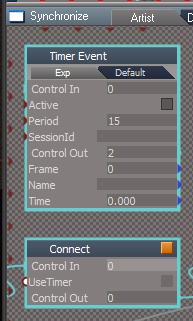
- Period missing.png (18.54 KiB) Viewed 2562 times
The Connect script simply Disconnects/Connects the Synchronize Scene script with the Timer Event if Use Timer is checked
Additionally...
Synchronize/Deactivate
What is NodeSelection?
Note: Currently it is blank because I removed it. It use to have the path to the Synchronize/Time script
How does anything get selected from Deactivate script and enter that value into the NodeSelection attribute?
Why does the Restore script use NodeSelection and need to select something?
-
clintonman
- Captain
- Posts: 5659
- Joined: 21 May 2009, 21:08
- Type the number ten into the box: 0
- Location: California
Re: Final trueSpace 7.61 Beta 8 Unofficial Update
If you want to change the period of the timer you have to open the Synchronize node inside the link editor to change the value. So it's missing from the panel.trueBlue wrote: 16 Mar 2021, 00:09Questions?clintonman wrote: 15 Mar 2021, 23:50 The period from the Use Timer option is missing from the current Synchronize script.
What do you mean by the Period is missing?
...
-
clintonman
- Captain
- Posts: 5659
- Joined: 21 May 2009, 21:08
- Type the number ten into the box: 0
- Location: California
Re: Final trueSpace 7.61 Beta 8 Unofficial Update
NodeSelection is a list of the selected nodes.trueBlue wrote: 16 Mar 2021, 00:09 ...
Additionally...
Synchronize/Deactivate
What is NodeSelection?
Note: Currently it is blank because I removed it. It use to have the path to the Synchronize/Time script
How does anything get selected from Deactivate script and enter that value into the NodeSelection attribute?
Why does the Restore script use NodeSelection and need to select something?
Deactivate script deselects everything before moving forward.
The NodeSelection in the restore script is the list of selected nodes that was unselected inside the Deactivate node.
The list is used to restore the selection lost when the Deactivate was run.
You don't miss it because you're ok with losing your selections. I don't like losing my selections, that's why it's there.
-
clintonman
- Captain
- Posts: 5659
- Joined: 21 May 2009, 21:08
- Type the number ten into the box: 0
- Location: California
Re: Final trueSpace 7.61 Beta 8 Unofficial Update
New problem with the Synchronize script.
If you have the Anim view open it turns it into a link editor view. It doesn't matter if a LE view is already open, it still changes the Anim view to a LE view.
Just did another test. Doesn't matter what kind of view it is. It turns into a LE view when Synchronize is run.
If you have the Anim view open it turns it into a link editor view. It doesn't matter if a LE view is already open, it still changes the Anim view to a LE view.
Just did another test. Doesn't matter what kind of view it is. It turns into a LE view when Synchronize is run.
-
trueBlue
- Captain
- Posts: 5548
- Joined: 06 Jul 2009, 22:50
- Type the number ten into the box: 10
Re: Final trueSpace 7.61 Beta 8 Unofficial Update
I'll try to explainclintonman wrote: 15 Mar 2021, 23:40What does "it did not work as expected" mean?trueBlue wrote: 15 Mar 2021, 21:54 Got IT!
Went a different approach
In my testing, the only place it did not work as expected was in the Floating layout's Link Editor window
So there may be layouts were it will not work as expected
...
If it only works sometimes you need to keep the old command around instead of replacing it.
The script looks for values in the Def1D, Def2D, Def3D, and no values
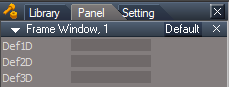
- Frame Window Def4D.png (5.03 KiB) Viewed 2559 times
Def1D = Script Editor
Def2D = Link Editor
Def3D = 3D Window
Example
Open a new Animation Editor
There will be no values entered
Switch this Animation Editor aspect to 3D
There is now a value entered into the Def3D
Switch it to 2D
There is now a value entered into the Def2D
Switch to 1D
There is now a value entered into the Def1D
The worse that could happen with this script is, if it is ran on a window like the example above, currently in 1D, will copy the window and set it as a 3D Window
Not a big deal IMHO
-
clintonman
- Captain
- Posts: 5659
- Joined: 21 May 2009, 21:08
- Type the number ten into the box: 0
- Location: California
Re: Final trueSpace 7.61 Beta 8 Unofficial Update
Another problem with the synchronize script. It doesn't work for rendering workspace animations from Model anymore. Looks like it's limited to only interactive updates using the selected item(s).
Workaround is to select all animated objects first. I'll add that to the manual.
Workaround is to select all animated objects first. I'll add that to the manual.
-
trueBlue
- Captain
- Posts: 5548
- Joined: 06 Jul 2009, 22:50
- Type the number ten into the box: 10
Re: Final trueSpace 7.61 Beta 8 Unofficial Update
I asked because I was not seeing how that value was being implemented. Now I do, thanks! Nice touch!clintonman wrote: 16 Mar 2021, 00:29 You don't miss it because you're ok with losing your selections. I don't like losing my selections, that's why it's there.
Also was not sure how to save Synchronize, with a value or no value. Now I do
Personally I do not see that as a problemclintonman wrote: 16 Mar 2021, 00:29 New problem with the Synchronize script.
If you have the Anim view open it turns it into a link editor view. It doesn't matter if a LE view is already open, it still changes the Anim view to a LE view.
Even worse though...
Open a new Link Editor
Shrink it down

- Link Editor remembered state.png (7.09 KiB) Viewed 2562 times
I suggest you include your own custom named SynchronizeFrameWindow inside Synchronize or from the preobjects folder and open it from script
Kind of funny we are working on two different things, but they are closely similar

In fact it was these issues that started me on the Copy Window, while testing Synchronize
-
clintonman
- Captain
- Posts: 5659
- Joined: 21 May 2009, 21:08
- Type the number ten into the box: 0
- Location: California
Re: Final trueSpace 7.61 Beta 8 Unofficial Update
Personally I do see that as a problem. I was testing using sync with the timeline and it disappeared unexpectedly. Forcing me to open it again. It sucks when software takes over - changing your windows, removing your selections ... just doing things it wants to do, not what you told it to or even want it to do. They do make horror movies about this kind of stuff.trueBlue wrote: 16 Mar 2021, 01:32 ...Personally I do not see that as a problemclintonman wrote: 16 Mar 2021, 00:29 New problem with the Synchronize script.
If you have the Anim view open it turns it into a link editor view. It doesn't matter if a LE view is already open, it still changes the Anim view to a LE view.
Even worse though...
Open a new Link Editor
Shrink it down
Link Editor remembered state.png
Run Synchronize
I suggest you include your own custom named SynchronizeFrameWindow inside Synchronize and open it from script
Kind of funny we are working on two different things, but they are closely similar
In fact it was these issues that started me on the Copy Window, while testing Synchronize
 (as close as I can get to a fear emoji)
So what is even worse, what am I looking at?
Don't understand, include my own custom named SynchronizeFrameWindow ...
What does that do? Is it to replace a non custom frame somewhere?
-
clintonman
- Captain
- Posts: 5659
- Joined: 21 May 2009, 21:08
- Type the number ten into the box: 0
- Location: California
Re: Final trueSpace 7.61 Beta 8 Unofficial Update
I see you added a SynchronizeFrameWindow object to your post.
Still what's it for, what do I do with it?
Still what's it for, what do I do with it?
-
clintonman
- Captain
- Posts: 5659
- Joined: 21 May 2009, 21:08
- Type the number ten into the box: 0
- Location: California
Re: Final trueSpace 7.61 Beta 8 Unofficial Update
I forgot to make a change to the Synchronize script. I was planning to change the buttons On, Auto and Sync Manual so they don't do the rename problem when more than 1 object is selected.
-
trueBlue
- Captain
- Posts: 5548
- Joined: 06 Jul 2009, 22:50
- Type the number ten into the box: 10
Re: Final trueSpace 7.61 Beta 8 Unofficial Update
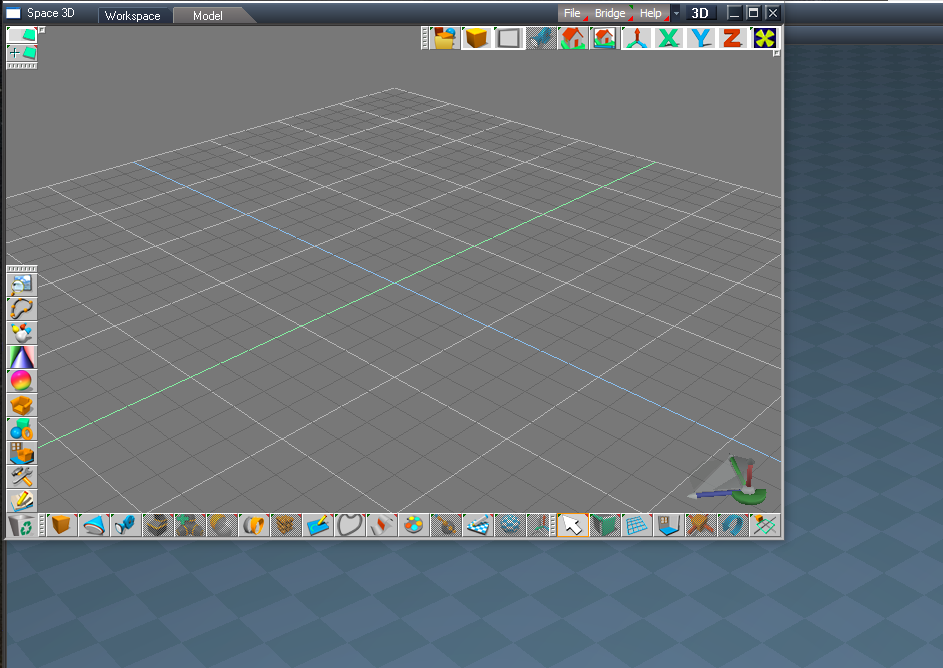
As an example, put the SynchronizeFrameWindow.RsObj in your scene and run:
You could adapt the script to where ever the SynchronizeFrameWindow.RsObj exist
preobjects folder or inside the Synchronize node
This way you have more control of the window and your not replacing other already opened windows as you have discovered
This size window works best for Model's bottom toolbars
Code: Select all
WindowsManager.CloseWindow("/Project/Windows Manager Space/SynchronizeFrameWindow")
Node.Copy(Space.CurrentScene() + "/SynchronizeFrameWindow", "/Project/Windows Manager Space")
WindowsManager.Activate()
WindowsManager.UpdateWindowsStructure() preobjects folder or inside the Synchronize node
This way you have more control of the window and your not replacing other already opened windows as you have discovered
This size window works best for Model's bottom toolbars
-
clintonman
- Captain
- Posts: 5659
- Joined: 21 May 2009, 21:08
- Type the number ten into the box: 0
- Location: California
Re: Final trueSpace 7.61 Beta 8 Unofficial Update
Did what you said and this is what happens.
If main window is model then open a new 3d window
If floating 3d window open new model window
if floating model window open new 3d window
Does this have something to do with the shrunk down LE window being bad somehow? I think I came in at the middle of a conversation and don't know what is what.
If main window is model then open a new 3d window
If floating 3d window open new model window
if floating model window open new 3d window
Does this have something to do with the shrunk down LE window being bad somehow? I think I came in at the middle of a conversation and don't know what is what.
-
trueBlue
- Captain
- Posts: 5548
- Joined: 06 Jul 2009, 22:50
- Type the number ten into the box: 10
Re: Final trueSpace 7.61 Beta 8 Unofficial Update
How about adding a script that selects all animated objects?clintonman wrote: 16 Mar 2021, 01:01 Another problem with the synchronize script. It doesn't work for rendering workspace animations from Model anymore. Looks like it's limited to only interactive updates using the selected item(s).
Workaround is to select all animated objects first. I'll add that to the manual.
Code: Select all
	var scene = Space.CurrentScene();

	var newSelection = "";

	for(var i=0;i<Node.SubObjectCount(scene);i++) {
		var subobj = scene + "/" + Node.SubObject(scene, i);
		if(Node.ConExists(subobj, "AnimTrack"))
			newSelection += subobj + ";";
	}

	if(newSelection == "") return;

	newSelection = newSelection.substring(0, newSelection.length-1); // remove trailing semicolon

	Space.Select(newSelection);
-
clintonman
- Captain
- Posts: 5659
- Joined: 21 May 2009, 21:08
- Type the number ten into the box: 0
- Location: California
Re: Final trueSpace 7.61 Beta 8 Unofficial Update
Looks like it would work.trueBlue wrote: 16 Mar 2021, 02:25How about adding a script that selects all animated objects?clintonman wrote: 16 Mar 2021, 01:01 Another problem with the synchronize script. It doesn't work for rendering workspace animations from Model anymore. Looks like it's limited to only interactive updates using the selected item(s).
Workaround is to select all animated objects first. I'll add that to the manual.
Code: Select all
	var scene = Space.CurrentScene();

	var newSelection = "";

	for(var i=0;i<Node.SubObjectCount(scene);i++) {
		var subobj = scene + "/" + Node.SubObject(scene, i);
		if(Node.ConExists(subobj, "AnimTrack"))
			newSelection += subobj + ";";
	}

	if(newSelection == "") return;

	newSelection = newSelection.substring(0, newSelection.length-1); // remove trailing semicolon

	Space.Select(newSelection);
-
trueBlue
- Captain
- Posts: 5548
- Joined: 06 Jul 2009, 22:50
- Type the number ten into the box: 10
Re: Final trueSpace 7.61 Beta 8 Unofficial Update
Yes and this way you have more control of the window and your not replacing other already opened windows as you have discoveredclintonman wrote: 16 Mar 2021, 02:23 Did what you said and this is what happens.
If main window is model then open a new 3d window
If floating 3d window open new model window
if floating model window open new 3d window
Does this have something to do with the shrunk down LE window being bad somehow?
The issue with a opened Model window before running Synchronize is problematic because of Workspace not being protected first
Either state that in the docs or it is possible to close Model first
Code: Select all
	if(modelFrameNode != "") return;

	if(Node.ConExists(thePath, "Def3D")) {
		var def3d = Node.Value(thePath, "Def3D");
		if(def3d == MODELSPACE_Def3D) {
			modelFrameNode = thePath;
			return;
		}
	}

	//declare local variables for recusrsive calls
	var curIndex;
	var curnumObj;
	var childPath, MyObj;

	//get first child
	curIndex = 0;
	curnumObj = Node.SubObjectCount(thePath);
	if(curnumObj > 0)
	{
		MyObj = Node.SubObject(thePath,0);
		childPath = thePath + "/" + MyObj;
	}

	//recursion runs here - get the next child
	while(curnumObj > 0)
	{
		FindModelFrame(childPath);
		curIndex = curIndex + 1;
		if(curIndex < curnumObj)
		{
			MyObj = Node.SubObject(thePath, curIndex);
			childPath = thePath + "/" + MyObj;
		}
		else
			curnumObj = 0;
	}
- Chained scripts.png (7.62 KiB) Viewed 2552 times
-
clintonman
- Captain
- Posts: 5659
- Joined: 21 May 2009, 21:08
- Type the number ten into the box: 0
- Location: California
Re: Final trueSpace 7.61 Beta 8 Unofficial Update
Ok, I think I see where you're coming from. The Protect Workspace and Synchronize can work together.trueBlue wrote: 16 Mar 2021, 02:40Yes and this way you have more control of the window and your not replacing other already opened windows as you have discoveredclintonman wrote: 16 Mar 2021, 02:23 Did what you said and this is what happens.
If main window is model then open a new 3d window
If floating 3d window open new model window
if floating model window open new 3d window
Does this have something to do with the shrunk down LE window being bad somehow?
The issue with a opened Model window before running Synchronize is problematic because of Workspace not being protected first
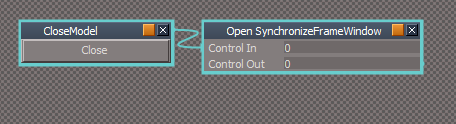
Either state that in the docs or it is possible to close Model firstYou can try and chain the two scriptsCode: Select all
	if(modelFrameNode != "") return;

	if(Node.ConExists(thePath, "Def3D")) {
		var def3d = Node.Value(thePath, "Def3D");
		if(def3d == MODELSPACE_Def3D) {
			modelFrameNode = thePath;
			return;
		}
	}

	//declare local variables for recusrsive calls
	var curIndex;
	var curnumObj;
	var childPath, MyObj;

	//get first child
	curIndex = 0;
	curnumObj = Node.SubObjectCount(thePath);
	if(curnumObj > 0)
	{
		MyObj = Node.SubObject(thePath,0);
		childPath = thePath + "/" + MyObj;
	}

	//recursion runs here - get the next child
	while(curnumObj > 0)
	{
		FindModelFrame(childPath);
		curIndex = curIndex + 1;
		if(curIndex < curnumObj)
		{
			MyObj = Node.SubObject(thePath, curIndex);
			childPath = thePath + "/" + MyObj;
		}
		else
			curnumObj = 0;
	}
Chained scripts.png
You have a scene, it's time to go into model and add to it, so you use protect workspace, without the Remove Backup Scene Data checked.
Go do some Model stuff and can restore at any point in workspace without losing the original backup.
Now ready to do some synchronize stuff. So start it up, use it and when done the workspace will be restored automatically.
In this use case there is no lose of protection. You do lose protection if you don't use the tools together.
That's the way I work and the reason I didn't understand why you kept talking about lose of protection. Now I also understand why you wanted to stop the Protect Workspace from running when Synchronize was already open. You are trying to stop them from being used at the same time.
I need to know your workflow so I can add it to the manual and specifically how it leads to lose of protection. I thought the first step of sync was to protect, but I must be mistaken if you're losing protection.
-
trueBlue
- Captain
- Posts: 5548
- Joined: 06 Jul 2009, 22:50
- Type the number ten into the box: 10
Re: Final trueSpace 7.61 Beta 8 Unofficial Update
Thank you for the great explanation and your workflow using Synchronize in it's Default aspectclintonman wrote: 16 Mar 2021, 03:13 Ok, I think I see where you're coming from. The Protect Workspace and Synchronize can work together.
You have a scene, it's time to go into model and add to it, so you use protect workspace, without the Remove Backup Scene Data checked.
Go do some Model stuff and can restore at any point in workspace without losing the original backup.
Now ready to do some synchronize stuff. So start it up, use it and when done the workspace will be restored automatically.
In this use case there is no lose of protection. You do lose protection if you don't use the tools together.
That's the way I work and the reason I didn't understand why you kept talking about lose of protection. Now I also understand why you wanted to stop the Protect Workspace from running when Synchronize was already open. You are trying to stop them from being used at the same time.
I need to know your workflow so I can add it to the manual and specifically how it leads to lose of protection. I thought the first step of sync was to protect, but I must be mistaken if you're losing protection.
One thing I am not sure of in your workflow is your use of Protect Workspace
Are you using the standalone version of Protect Workspace or Synchronizer's Protect Workspace?
I use Synchronize in it's Workspace aspect
One thing I do not like is the floating Model view is in front of the main view. This makes it harder to use and see the whole Workspace scene in the main view. Was hoping that the Synchronize layout I shared would have worked out with the side by side views of Model & Workspace, but being docked did not work out.
Note to self: Make a Floating Synchronize layout similar to the above but not docked
Now if you could explain how to use Synchronize in the recommended way that has workspace protection before opening Model
From your manual:
Rendering with synchronization in a floating model view may destabilize trueSpace. It is recommended to
render with the main docked 3D view as the model view.
-
clintonman
- Captain
- Posts: 5659
- Joined: 21 May 2009, 21:08
- Type the number ten into the box: 0
- Location: California
Re: Final trueSpace 7.61 Beta 8 Unofficial Update
Synchronize does not have it's own Protect Workspace. It copies it's values to the Protect Workspace node and then uses it.trueBlue wrote: 16 Mar 2021, 11:59 ...
Thank you for the great explanation and your workflow using Synchronize in it's Default aspect
One thing I am not sure of in your workflow is your use of Protect Workspace
Are you using the standalone version of Protect Workspace or Synchronizer's Protect Workspace?
...
-
clintonman
- Captain
- Posts: 5659
- Joined: 21 May 2009, 21:08
- Type the number ten into the box: 0
- Location: California
Re: Final trueSpace 7.61 Beta 8 Unofficial Update
That quote is what I spent all day on yesterday. Trying to find a simple and reproducible crash condition. I didn't find anything, so my next guess is multiple calls to synchronize maybe the reason behind crashes, so I made the debounce version of the Synchronize to reduce the number of syncs. That uses fewer tS resources but there's no indication it helps with stability. I think I'll have better luck with YafaRay tests. I think that was the original source of crashes, maybe it was the only source and it is perfectly safe to use a floating model view everywhere else. It's hard to say since the protection, d3d render and yafaray were all kind of happening at the same time.trueBlue wrote: 16 Mar 2021, 11:59 ...
Now if you could explain how to use Synchronize in the recommended way that has workspace protection before opening Model
From your manual:Rendering with synchronization in a floating model view may destabilize trueSpace. It is recommended to
render with the main docked 3D view as the model view.
Edit: just checked the manual and I should be able to use D3D Render to test the stability of floating model view.
-
trueBlue
- Captain
- Posts: 5548
- Joined: 06 Jul 2009, 22:50
- Type the number ten into the box: 10
Re: Final trueSpace 7.61 Beta 8 Unofficial Update
Yes, I know that both use the CustomCommads/Protect Workspace scriptsclintonman wrote: 16 Mar 2021, 15:00Synchronize does not have it's own Protect Workspace. It copies it's values to the Protect Workspace node and then uses it.trueBlue wrote: 16 Mar 2021, 11:59 ...
Thank you for the great explanation and your workflow using Synchronize in it's Default aspect
One thing I am not sure of in your workflow is your use of Protect Workspace
Are you using the standalone version of Protect Workspace or Synchronizer's Protect Workspace?
...
I was just wondering if you were using the standalone version and then Synchronize
standalone = Protect Workspace's floating panel
-
clintonman
- Captain
- Posts: 5659
- Joined: 21 May 2009, 21:08
- Type the number ten into the box: 0
- Location: California
Re: Final trueSpace 7.61 Beta 8 Unofficial Update
Basically, yes. I don't really start synchronize until some setup has happened in model, so I use standalone during that phase.trueBlue wrote: 16 Mar 2021, 15:48Yes, I know that both use the CustomCommads/Protect Workspace scriptsclintonman wrote: 16 Mar 2021, 15:00Synchronize does not have it's own Protect Workspace. It copies it's values to the Protect Workspace node and then uses it.trueBlue wrote: 16 Mar 2021, 11:59 ...
Thank you for the great explanation and your workflow using Synchronize in it's Default aspect
One thing I am not sure of in your workflow is your use of Protect Workspace
Are you using the standalone version of Protect Workspace or Synchronizer's Protect Workspace?
...
I was just wondering if you were using the standalone version and then Synchronize
standalone = Protect Workspace's floating panel
That's why I requested your workflow that causes lose of protection. So I can see a straight to synchronize workflow and maybe fix the lose of protection.
-
trueBlue
- Captain
- Posts: 5548
- Joined: 06 Jul 2009, 22:50
- Type the number ten into the box: 10
Re: Final trueSpace 7.61 Beta 8 Unofficial Update
Thanks for the confirmation!clintonman wrote: 16 Mar 2021, 15:00 That's why I requested your workflow that causes lose of protection. So I can see a straight to synchronize workflow and maybe fix the lose of protection.
Your misunderstanding what I am trying to say about this certain issue
All other issues aside, I have been trying to find a way to use the main view in Model and a floating Workspace 3D window using Synchronize that is supposedly more stable
Synchronize is not setup to do that currently, it only opens a floating Model view
Here is your recent updated Synchronize.RsObj with the following changes and additions
Synchronize

- Synchronize panel.png (18.38 KiB) Viewed 2405 times
Activate button
Remove ResetToDefaults
Add command and script that closes Model in the main view
Cancel button
Remove ResetToDefaults
Add - Animated Objects "Selects all animated objects in the scene"
Default aspect
Active button
Add command and script that closes Model in the main view
Add - Animated Objects "Selects all animated objects in the scene"
Add - Stop button "Stops the Timer"
Add - Timer Period attribute
Add - Debounce Timespan attribute
Synchronize/Set Camera script
Remove RsApp.ClearHistory()
Synchronize/Protect script
Remove RsApp.ClearHistory()
Synchronize/Popup Panel/OpenPanelFrame script
Remove RsApp.ClearHistory()
Synchronize/Activate script
Add Default settings
Experiment adding Synchronize's own SynchronizeFrameWindow
Note if this part does not work out it can be easily removed
I am not sure how the rest of the code works with these simple additions in regards to opening a Model window
Updates
Add
SynchronizeFrameWindow
Update
OpenModelView script
Replace
Code: Select all
//			modelFrameNode = WindowsManager.CreateWindowFromCLSIDEx('default', 'default', 'default', '[Scene]', 1, '2D');
WindowsManager.CloseWindow("/Project/Windows Manager Space/SynchronizeFrameWindow")
Node.Copy(System.ThisOwner + "/SynchronizeFrameWindow", "/Project/Windows Manager Space")
WindowsManager.Activate()
WindowsManager.UpdateWindowsStructure()Add
Code: Select all
if(AutoCloseModelView) {
WindowsManager.CloseWindow("/Project/Windows Manager Space/SynchronizeFrameWindow")
return
}Default aspect/Close is not working
There is still a preexisting issue that does not open a Model window if the main view is Model
-
trueBlue
- Captain
- Posts: 5548
- Joined: 06 Jul 2009, 22:50
- Type the number ten into the box: 10
Re: Final trueSpace 7.61 Beta 8 Unofficial Update
Not a good day
Several test rendering a Workspace animation from Model (main view & floating window) using Synchronize, renders the objects Black
Made a floating layout if you want to try it
I do not have dual monitors, so I would appreciate you trying out to see if it works okay
Several test rendering a Workspace animation from Model (main view & floating window) using Synchronize, renders the objects Black
Made a floating layout if you want to try it
I do not have dual monitors, so I would appreciate you trying out to see if it works okay
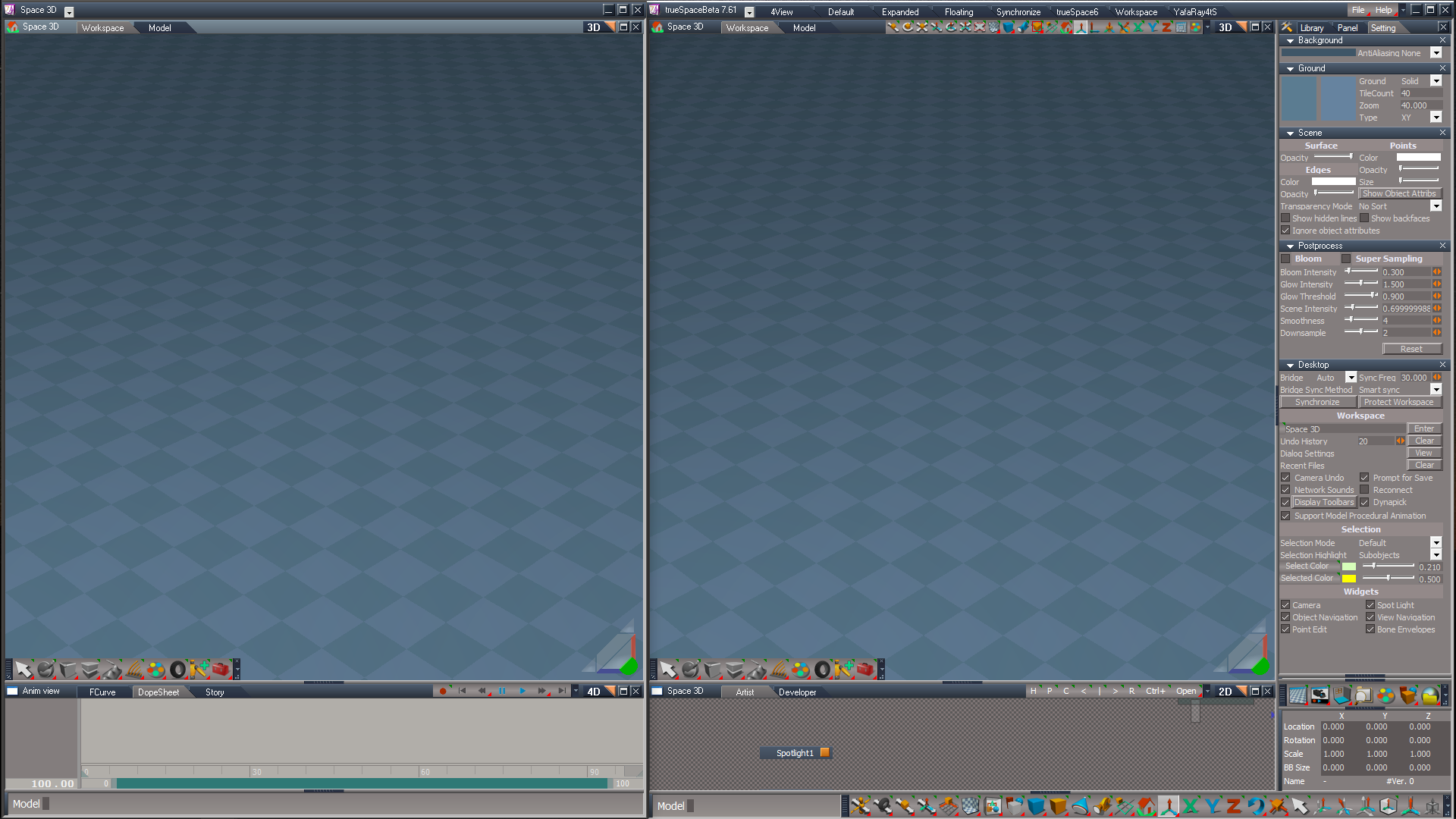
- Attachments
-
- Synchronize.zip
- (59.75 KiB) Downloaded 139 times
-
clintonman
- Captain
- Posts: 5659
- Joined: 21 May 2009, 21:08
- Type the number ten into the box: 0
- Location: California
Re: Final trueSpace 7.61 Beta 8 Unofficial Update
"Add - Stop button "Stops the Timer"
What would this be used for? I mean why would you want to stop synchronization while in the middle of using it and how do you start it up again after stopping it?
What would this be used for? I mean why would you want to stop synchronization while in the middle of using it and how do you start it up again after stopping it?
-
trueBlue
- Captain
- Posts: 5548
- Joined: 06 Jul 2009, 22:50
- Type the number ten into the box: 10
Re: Final trueSpace 7.61 Beta 8 Unofficial Update
I added the Stop button because of the need to stop the timer in the middle of a Synchronize session
I guess you could consider it an Emergency Stop button
The Stop button does not stop syncing, it just stops the Timer
Before I added the Stop button, how would you stop the Timer in the middle of a Synchronize session?
It could be improved by adding a Start button or make the Stop button an On|Off button
I guess you could consider it an Emergency Stop button
The Stop button does not stop syncing, it just stops the Timer
Before I added the Stop button, how would you stop the Timer in the middle of a Synchronize session?
It could be improved by adding a Start button or make the Stop button an On|Off button
-
clintonman
- Captain
- Posts: 5659
- Joined: 21 May 2009, 21:08
- Type the number ten into the box: 0
- Location: California
Re: Final trueSpace 7.61 Beta 8 Unofficial Update
If I wanted it to stop I would just deactivate it.trueBlue wrote: 17 Mar 2021, 01:37 I added the Stop button because of the need to stop the timer in the middle of a Synchronize session
I guess you could consider it an Emergency Stop button
The Stop button does not stop syncing, it just stops the Timer
Before I added the Stop button, how would you stop the Timer in the middle of a Synchronize session?
It could be improved by adding a Start button or make the Stop button an On|Off button
-
clintonman
- Captain
- Posts: 5659
- Joined: 21 May 2009, 21:08
- Type the number ten into the box: 0
- Location: California
Re: Final trueSpace 7.61 Beta 8 Unofficial Update
Synchronize is confusing. Just found a problem with the Synchronize node just being in the scene.
Select 2 items
Go to stack and turn off the bridge
Set bridge to Auto or On
Sync from Model
Almost everything in the scene disappears.
If Full Merge is chosen then things don't disappear, but this is still a bad thing.
Ive tried a few things.
One thing that worked was removing the internal camera and connecting a stock tS camera to the Synchronize in the scene, but whats confusing is if the new UU camera is connected the same way problem returned. I think this might be some random behavior in this case.
My theory of the moment is that the Synchronize camera will synchronize whether the whole thing is active of not.
Press synchronize button in the stack
Select the Synchronize node
Move it around and the modelspace camera follows along. No need to press Activate button.
Select 2 items
Go to stack and turn off the bridge
Set bridge to Auto or On
Sync from Model
Almost everything in the scene disappears.
If Full Merge is chosen then things don't disappear, but this is still a bad thing.
Ive tried a few things.
One thing that worked was removing the internal camera and connecting a stock tS camera to the Synchronize in the scene, but whats confusing is if the new UU camera is connected the same way problem returned. I think this might be some random behavior in this case.
My theory of the moment is that the Synchronize camera will synchronize whether the whole thing is active of not.
Press synchronize button in the stack
Select the Synchronize node
Move it around and the modelspace camera follows along. No need to press Activate button.
-
trueBlue
- Captain
- Posts: 5548
- Joined: 06 Jul 2009, 22:50
- Type the number ten into the box: 10
Re: Final trueSpace 7.61 Beta 8 Unofficial Update
I tired you steps and nothing disappeared using the Default layoutSelect 2 items
Go to stack and turn off the bridge
Set bridge to Auto or On
Sync from Model
Almost everything in the scene disappears.
I opened a floating Model window and tried your steps
All I got was corruption, nothing disappeared
Which version of tS are you using in this test and which version of Synchronize?
-
clintonman
- Captain
- Posts: 5659
- Joined: 21 May 2009, 21:08
- Type the number ten into the box: 0
- Location: California
Re: Final trueSpace 7.61 Beta 8 Unofficial Update
Well that's kind of good news. I'm using your last UU update version.trueBlue wrote: 17 Mar 2021, 03:01I tired you steps and nothing disappeared using the Default layoutSelect 2 items
Go to stack and turn off the bridge
Set bridge to Auto or On
Sync from Model
Almost everything in the scene disappears.
I opened a floating Model window and tried your steps
All I got was corruption, nothing disappeared
Which version of tS are you using in this test and which version of Synchronize?
I'll try reset default context and restart the computer.
What do you mean by corruption?
-
trueBlue
- Captain
- Posts: 5548
- Joined: 06 Jul 2009, 22:50
- Type the number ten into the box: 10
Re: Final trueSpace 7.61 Beta 8 Unofficial Update
I tried this too, with no problemsPress synchronize button in the stack
Select the Synchronize node
Move it around and the modelspace camera follows along. No need to press Activate button.
I may have made a mistake with the most recent change to the UU7 cameras
Look inside, the Watch Dog should have been disconnected and after reading your Bridge Synchronization Investigation post, I should change the Synchronize Object script too
-
trueBlue
- Captain
- Posts: 5548
- Joined: 06 Jul 2009, 22:50
- Type the number ten into the box: 10
Re: Final trueSpace 7.61 Beta 8 Unofficial Update
The names changed and the Spot lights Angle(?) changedclintonman wrote: 17 Mar 2021, 03:06Well that's kind of good news. I'm using your last UU update version.trueBlue wrote: 17 Mar 2021, 03:01I tired you steps and nothing disappeared using the Default layoutSelect 2 items
Go to stack and turn off the bridge
Set bridge to Auto or On
Sync from Model
Almost everything in the scene disappears.
I opened a floating Model window and tried your steps
All I got was corruption, nothing disappeared
Which version of tS are you using in this test and which version of Synchronize?
I'll try reset default context and restart the computer.
What do you mean by corruption?
-
clintonman
- Captain
- Posts: 5659
- Joined: 21 May 2009, 21:08
- Type the number ten into the box: 0
- Location: California
Re: Final trueSpace 7.61 Beta 8 Unofficial Update
Still happening
reset default
restarted the computer
reset default again
open floating model
press synchronize to load into scene
select 2 spotlights
bridge off
bridge auto
sync from modeler
and result is an empty scene except for invisible Layers info and photorender nodes
reset default
restarted the computer
reset default again
open floating model
press synchronize to load into scene
select 2 spotlights
bridge off
bridge auto
sync from modeler
and result is an empty scene except for invisible Layers info and photorender nodes
-
clintonman
- Captain
- Posts: 5659
- Joined: 21 May 2009, 21:08
- Type the number ten into the box: 0
- Location: California
Re: Final trueSpace 7.61 Beta 8 Unofficial Update
Just tried it with an older installation of tS and it does not happen. Must be something new.
I'll try the latest on a different computer to see if it happens again.
Just noticed that in the old install the camera isn't constantly syncing when the sync camera is moved.
I'll try the latest on a different computer to see if it happens again.
Just noticed that in the old install the camera isn't constantly syncing when the sync camera is moved.
-
trueBlue
- Captain
- Posts: 5548
- Joined: 06 Jul 2009, 22:50
- Type the number ten into the box: 10
Re: Final trueSpace 7.61 Beta 8 Unofficial Update
Check and see if the Synchronize/Synchronize Scene script is hooked up to the Watch Dog after you first Load it without Activating it
It, should not be hooked up
Also check the scene Camera for the same thing
I always go to Model and Load My_Default.tsc from the Configs folder, select the Workspace Default layout, and Close trueSpace after a Context Reset
It, should not be hooked up
Also check the scene Camera for the same thing
I always go to Model and Load My_Default.tsc from the Configs folder, select the Workspace Default layout, and Close trueSpace after a Context Reset
-
clintonman
- Captain
- Posts: 5659
- Joined: 21 May 2009, 21:08
- Type the number ten into the box: 0
- Location: California
Re: Final trueSpace 7.61 Beta 8 Unofficial Update
Good news. My copy of the Synchronize must have gotten messed up. On the inside the Synchronize script was connected to the watchdog.
Man what a pain in the butt that was. I was getting all sorts of crazy and almost unpredictable things happening. Big waste of time. Glad it's over.
Man what a pain in the butt that was. I was getting all sorts of crazy and almost unpredictable things happening. Big waste of time. Glad it's over.
-
clintonman
- Captain
- Posts: 5659
- Joined: 21 May 2009, 21:08
- Type the number ten into the box: 0
- Location: California
Re: Final trueSpace 7.61 Beta 8 Unofficial Update
Ha ha cross posttrueBlue wrote: 17 Mar 2021, 03:38 Check and see if the Synchronize/Synchronize Scene script is hooked up to the Watch Dog after you first Load it without Activating it
It, should not be hooked up
Also check the scene Camera for the same thing
I always go to Model and Load My_Default.tsc from the Configs folder, select the Workspace Default layout, and Close trueSpace after a Context Reset
-
clintonman
- Captain
- Posts: 5659
- Joined: 21 May 2009, 21:08
- Type the number ten into the box: 0
- Location: California
Re: Final trueSpace 7.61 Beta 8 Unofficial Update
Now I see what happened. It was the new stop button. If you press it it disconnects from the timer and connects to the watch dog. That's how my version got screwed up.
-
trueBlue
- Captain
- Posts: 5548
- Joined: 06 Jul 2009, 22:50
- Type the number ten into the box: 10
Re: Final trueSpace 7.61 Beta 8 Unofficial Update
Did you save Synchronize to disk after using the Stop button?clintonman wrote: 17 Mar 2021, 03:44 Now I see what happened. It was the new stop button. If you press it it disconnects from the timer and connects to the watch dog. That's how my version got screwed up.
-
clintonman
- Captain
- Posts: 5659
- Joined: 21 May 2009, 21:08
- Type the number ten into the box: 0
- Location: California
Re: Final trueSpace 7.61 Beta 8 Unofficial Update
Maybe, don't know. I pressed the stop button before doing anything else and that set the bad state for all future runs.trueBlue wrote: 17 Mar 2021, 04:08Did you save Synchronize to disk after using the Stop button?clintonman wrote: 17 Mar 2021, 03:44 Now I see what happened. It was the new stop button. If you press it it disconnects from the timer and connects to the watch dog. That's how my version got screwed up.
-
clintonman
- Captain
- Posts: 5659
- Joined: 21 May 2009, 21:08
- Type the number ten into the box: 0
- Location: California
Re: Final trueSpace 7.61 Beta 8 Unofficial Update
Only changed the default aspect.
This version needs to have the Stop button code repopulated. I replaced it with an alert.
If no workspace 3d window exists it will open one.
Removed 3d window check from the activate button so above change would work.
"Sync from Workspace" button will deselect for the sync to avoid the renaming bug and then reselect.
If more than 1 object is selected the Auto and On buttons will first deselect to avoid the naming bug.
Just noticed, Forgot to adjust the "Sync Manual" button to do the deselect/reselect to avoid renaming bug.
This version needs to have the Stop button code repopulated. I replaced it with an alert.
If no workspace 3d window exists it will open one.
Removed 3d window check from the activate button so above change would work.
"Sync from Workspace" button will deselect for the sync to avoid the renaming bug and then reselect.
If more than 1 object is selected the Auto and On buttons will first deselect to avoid the naming bug.
Just noticed, Forgot to adjust the "Sync Manual" button to do the deselect/reselect to avoid renaming bug.
- Attachments
-
- Synchronize07.RsObj
- (294.61 KiB) Downloaded 139 times
-
trueBlue
- Captain
- Posts: 5548
- Joined: 06 Jul 2009, 22:50
- Type the number ten into the box: 10
Re: Final trueSpace 7.61 Beta 8 Unofficial Update
Rearranged the Default aspect a little bit and removed the  Stop button
Sync Manual button script
Add
Changed the CloseModel script
If the main view is in Model
Alert "Your Workspace scene was not protected!\nClose Model First\n\nSynchronize will now close"
Check the state of the Synchronize/Protect script
Looks like the check boxes are in an undefined state or something else that looks odd
Synchronize Default aspect/Activate
There is a problem when the main view is Model when you run Activate
You will have Synchronization but the scene is already corrupted so running protection is unless
Questions?
1) How does the Synchronize Scene2 script work?
2) Is it possible that both of the Synchronize Scene & Synchronize Scene2 scripts could be running at the same time?
The Synchronize Scene script uses:
3) Should this be changed to:
4) I purpose that the Timer Event have it's own Synchronize Scene script that is hooked up to the Timer Event permanently
Remove all of the disconnect/connect commands for this Timer Event
Export the Timer Event's Active attribute
Whatever else is needed to get this new approach to work with the rest of the scripts
Make it so the user can run the Timer Event independently of the other Synchronize Scene scripts with an Active button that turns the Timer Event On|Off
Why?
A) The same thing that happened to you with the Stop button could happen with the current way Synchronize is setup! Not a good thing!
B) The disconnect/connect commands adds several Undo commands to the Undo History and more importantly can be undone by the user causing problems!!!
C) This would give the user the ability to turn the Timer Event On or Off while using Synchronize
Stop buttonSync Manual button script
Add
Code: Select all
if(Node.SelectedCount() > 1) Space.Unselect();If the main view is in Model
Alert "Your Workspace scene was not protected!\nClose Model First\n\nSynchronize will now close"
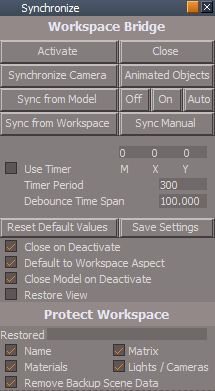
- Synchronize panel.png (18.38 KiB) Viewed 2463 times
Looks like the check boxes are in an undefined state or something else that looks odd
Synchronize Default aspect/Activate
There is a problem when the main view is Model when you run Activate
You will have Synchronization but the scene is already corrupted so running protection is unless
Questions?
1) How does the Synchronize Scene2 script work?
2) Is it possible that both of the Synchronize Scene & Synchronize Scene2 scripts could be running at the same time?
The Synchronize Scene script uses:
Code: Select all
tSBridge.SynchronizeObject(System.ThisOwner())Code: Select all
var ThisCam = System.ThisOwner()
tSBridge.SynchronizeObject(ThisCam)Remove all of the disconnect/connect commands for this Timer Event
Export the Timer Event's Active attribute
Whatever else is needed to get this new approach to work with the rest of the scripts
Make it so the user can run the Timer Event independently of the other Synchronize Scene scripts with an Active button that turns the Timer Event On|Off
Why?
A) The same thing that happened to you with the Stop button could happen with the current way Synchronize is setup! Not a good thing!
B) The disconnect/connect commands adds several Undo commands to the Undo History and more importantly can be undone by the user causing problems!!!
C) This would give the user the ability to turn the Timer Event On or Off while using Synchronize
-
clintonman
- Captain
- Posts: 5659
- Joined: 21 May 2009, 21:08
- Type the number ten into the box: 0
- Location: California
Re: Final trueSpace 7.61 Beta 8 Unofficial Update
1) runs when the frame changes, animation play or scrubbingtrueBlue wrote: 17 Mar 2021, 13:02 ...
Questions?
1) How does the Synchronize Scene2 script work?
2) Is it possible that both of the Synchronize Scene & Synchronize Scene2 scripts could be running at the same time?
The Synchronize Scene script uses:3) Should this be changed to:Code: Select all
tSBridge.SynchronizeObject(System.ThisOwner())4) I purpose that the Timer Event have it's own Synchronize Scene script that is hooked up to the Timer Event permanentlyCode: Select all
var ThisCam = System.ThisOwner()
tSBridge.SynchronizeObject(ThisCam)
Remove all of the disconnect/connect commands for this Timer Event
Export the Timer Event's Active attribute
Whatever else is needed to get this new approach to work with the rest of the scripts
Make it so the user can run the Timer Event independently of the other Synchronize Scene scripts with an Active button that turns the Timer Event On|Off
Why?
A) The same thing that happened to you with the Stop button could happen with the current way Synchronize is setup! Not a good thing!
B) The disconnect/connect commands adds several Undo commands to the Undo History and more importantly can be undone by the user causing problems!!!
C) This would give the user the ability to turn the Timer Event On or Off while using Synchronize
2)Yes, it's likely they could be running at the same time - mouse moving the animation scrubber fires both, timer plus animation playback also fires both
3)It doesn't matter both of those are functionally identical
4A) I don't see that as likely
4B) Totally agree
4C) Still have no idea why you would want want to turn the timer off and on like that but I'll be extra careful when testing it
I'll make some changes and give it back to you for the timer On/Off action. Doesn't make sense for me to add something I don't fully understand.
Last edited by clintonman on 17 Mar 2021, 16:53, edited 1 time in total.
-
trueBlue
- Captain
- Posts: 5548
- Joined: 06 Jul 2009, 22:50
- Type the number ten into the box: 10
Re: Final trueSpace 7.61 Beta 8 Unofficial Update
Yeah!
Found the problem when rendering a Workspace animation from Model
It is what I suspected
Synchronize is running two Synchronize Scene scripts at one time when rendering
Disconnect the Synchronize Scene script before rendering
Found the problem when rendering a Workspace animation from Model
It is what I suspected
Synchronize is running two Synchronize Scene scripts at one time when rendering
Disconnect the Synchronize Scene script before rendering
-
trueBlue
- Captain
- Posts: 5548
- Joined: 06 Jul 2009, 22:50
- Type the number ten into the box: 10
Re: Final trueSpace 7.61 Beta 8 Unofficial Update
I changed the scripts to Connect | Disconnect the Watch Dog Event to the Synchronize Scene2 script
The Synchronize Scene2 has the DebounceTimespan code
This works for Animation and Synching
I also hooked up the Timer Event to the Synchronize Scene2
I removed Connect | Disconnect commands for the Timer Event
Edit: Sharing one Synchronize Scene script is not going to work
Maybe there needs to be one Watch Dog Event
Testing...
Edit2: Yep, this seems to work
Selected scripts were renamed for clarity
I found another existing issue with the animation sync script, it included syncing the Synchronize node
That is not good with animation!
Also animated objects need to be selected to render and sync the Workspace animation in Model
Another issue! When the Synchronize node is selected with the animated objects
The select animated objects script needs to isolate the Synchronize node
Also change Synchronize default location before saving
This helps when using the Close button
The Synchronize Scene2 has the DebounceTimespan code
This works for Animation and Synching
I also hooked up the Timer Event to the Synchronize Scene2
I removed Connect | Disconnect commands for the Timer Event
Edit: Sharing one Synchronize Scene script is not going to work
Maybe there needs to be one Watch Dog Event
Testing...
Edit2: Yep, this seems to work
Selected scripts were renamed for clarity

That is not good with animation!
Also animated objects need to be selected to render and sync the Workspace animation in Model
Another issue! When the Synchronize node is selected with the animated objects
The select animated objects script needs to isolate the Synchronize node
Also change Synchronize default location before saving
This helps when using the Close button
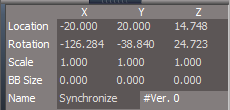
- Synchronize location.png (5.8 KiB) Viewed 2417 times
-
trueBlue
- Captain
- Posts: 5548
- Joined: 06 Jul 2009, 22:50
- Type the number ten into the box: 10
Re: Final trueSpace 7.61 Beta 8 Unofficial Update
Well hell! 
Synchronize
Fix one thing and a new thing pops up
Rendering a Workspace animation from Model
Latest fix
Turns out it only works for one object
Rendering more then one object, renders the objects Black
Changing the animation script and only run that script, works for multiple selections, but the names are changed even though they were protected
Both makes trueSpace unstable!
All this work changing and testing was a waste of time!
The sad part is, it is not even worth fixing!!!
Workspace works great rendering a sequence of images and is faster!
Can not even think of one reason why anybody would want to render a Workspace animation from Model
Synchronize
Fix one thing and a new thing pops up
Rendering a Workspace animation from Model
Latest fix
Turns out it only works for one object
Rendering more then one object, renders the objects Black
Changing the animation script and only run that script, works for multiple selections, but the names are changed even though they were protected
Both makes trueSpace unstable!
All this work changing and testing was a waste of time!
The sad part is, it is not even worth fixing!!!
Workspace works great rendering a sequence of images and is faster!
Can not even think of one reason why anybody would want to render a Workspace animation from Model
-
clintonman
- Captain
- Posts: 5659
- Joined: 21 May 2009, 21:08
- Type the number ten into the box: 0
- Location: California
Re: Final trueSpace 7.61 Beta 8 Unofficial Update
Sounds grim.
Any ideas for moving forward?
Any ideas for moving forward?
-
trueBlue
- Captain
- Posts: 5548
- Joined: 06 Jul 2009, 22:50
- Type the number ten into the box: 10
Re: Final trueSpace 7.61 Beta 8 Unofficial Update
Synchronize?
Not for rendering a multiple selection Workspace animation from Model where Lightworks renders their material Black
One thing I noticed after the render, Workspace's Info window is stuck with the Name [muti-sel]
Another thing I noticed with materials that has textures/images in Model
I discovered that I did not have the RS Tmp Textures folder
So in order for tS761B8 to create that folder, you must inspect a material that has a texture/image from Model's Material Editor
I then had to add the Rs Tmp Textures folder in the Texture Path in Model's Preferences
Only after doing this, I was able to render objects correctly with Lightworks
Edit: After resetting the default context I noticed that Model's Material Editor's material was transparent/Black
So given that Model's Auto Record is the default and the above, maybe this is a clue of what is going on with syncing
Here is a new version of Synchronize
Rearranged the Default aspect a little bit and added the Frame attribute from the Timer Event
Combined the animation and camera, Watch Dog & Synchronize Scene script
Timer Event includes it's own Synchronize Scene Timer script
Synchronize Camera button script
Fixed issue with having to select the button twice
Animated Objects button script "Selects all animated objects in the scene"
Isolated Synchronize from selection
Not for rendering a multiple selection Workspace animation from Model where Lightworks renders their material Black
One thing I noticed after the render, Workspace's Info window is stuck with the Name [muti-sel]
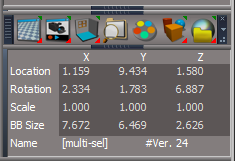
- Info Window multi-sel.png (18.41 KiB) Viewed 2396 times
I discovered that I did not have the RS Tmp Textures folder
So in order for tS761B8 to create that folder, you must inspect a material that has a texture/image from Model's Material Editor
I then had to add the Rs Tmp Textures folder in the Texture Path in Model's Preferences
Only after doing this, I was able to render objects correctly with Lightworks
Edit: After resetting the default context I noticed that Model's Material Editor's material was transparent/Black
So given that Model's Auto Record is the default and the above, maybe this is a clue of what is going on with syncing
Here is a new version of Synchronize
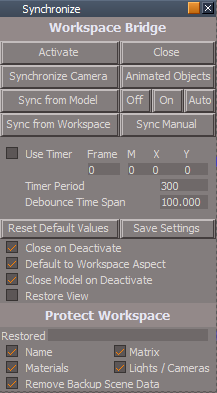
- Synchronize panel.png (18.55 KiB) Viewed 2395 times
Combined the animation and camera, Watch Dog & Synchronize Scene script
Timer Event includes it's own Synchronize Scene Timer script
Synchronize Camera button script
Fixed issue with having to select the button twice
Animated Objects button script "Selects all animated objects in the scene"
Isolated Synchronize from selection
-
clintonman
- Captain
- Posts: 5659
- Joined: 21 May 2009, 21:08
- Type the number ten into the box: 0
- Location: California
Re: Final trueSpace 7.61 Beta 8 Unofficial Update
trueBlue wrote: 19 Mar 2021, 13:47 ...
Edit: After resetting the default context I noticed that Model's Material Editor's material was transparent/Black
...

Maybe if you hold the ctrl key while starting tS it will fix the material editor
-
trueBlue
- Captain
- Posts: 5548
- Joined: 06 Jul 2009, 22:50
- Type the number ten into the box: 10
Re: Final trueSpace 7.61 Beta 8 Unofficial Update
No, I think it was Model's Preference's Save State and that I had rendered using Synchronize
tS761 is back to normal now
tS761 is back to normal now
-
trueBlue
- Captain
- Posts: 5548
- Joined: 06 Jul 2009, 22:50
- Type the number ten into the box: 10
Re: Final trueSpace 7.61 Beta 8 Unofficial Update
Unless you can come up with a better solution, I am suggesting that Synchronize be removed from the UU7
Only because of several problems relating to animation in Model and the Synchronize's camera
I just discovered the material changing AGAIN and the Synchronize's camera being keyframed along with other objects
Including several other crazy things!!!
Only because of several problems relating to animation in Model and the Synchronize's camera
I just discovered the material changing AGAIN and the Synchronize's camera being keyframed along with other objects
Including several other crazy things!!!
-
clintonman
- Captain
- Posts: 5659
- Joined: 21 May 2009, 21:08
- Type the number ten into the box: 0
- Location: California
Re: Final trueSpace 7.61 Beta 8 Unofficial Update
Ok, I'll take it and put it back on my website.trueBlue wrote: 19 Mar 2021, 22:27 Unless you can come up with a better solution, I am suggesting that Synchronize be removed from the UU7
Only because of several problems relating to animation in Model and the Synchronize's camera
I just discovered the material changing AGAIN and the Synchronize's camera being keyframed along with other objects
Including several other crazy things!!!
Are there any steps you can tell me to reproduce the problems?
-
trueBlue
- Captain
- Posts: 5548
- Joined: 06 Jul 2009, 22:50
- Type the number ten into the box: 10
Re: Final trueSpace 7.61 Beta 8 Unofficial Update
Just try to do an animation with Synchronize with Model and Workspaceclintonman wrote: 20 Mar 2021, 06:00Ok, I'll take it and put it back on my website.trueBlue wrote: 19 Mar 2021, 22:27 Unless you can come up with a better solution, I am suggesting that Synchronize be removed from the UU7
Only because of several problems relating to animation in Model and the Synchronize's camera
I just discovered the material changing AGAIN and the Synchronize's camera being keyframed along with other objects
Including several other crazy things!!!
Are there any steps you can tell me to reproduce the problems?
Some how, and I thought I was being careful not to select Synchronize, Synchronize was getting key framed.
Could have been Model's Auto Record
Bottom line was, trueSpace was unstable!
I took your Bridge Synchronize Script (June 23, 2012) for a spin and it worked great!
No multiple selected objects problem and I was able to render a Workspace animation from Model
Workspace syncing with Model worked okay too using the Timer, all though a little lagging due to the Timer's Period settings
So it looks like the difference between Synchronize and Bridge Synchronize Script is, Synchronize uses selection to sync and Bridge Synchronize Script does not
Also, and I think this is key, the Bridge Synchronize Script is not an object/camera, so there is no interference with animating other objects

I was able to render successfully, running Bridge Synchronize Script from Scripts/CustomCommands using the Timer set at 15
Some of the images had a black background and the others seem to be transparent or white, not sure
Using the Timer set at 15, syncing Workspace with Model works great too!
My thought is, instead of using a Timer, you could set it up like your D3D Render for rendering and use an Activity with a Pause for syncing
Keep an eye on the PlayerD3D.log when testing, there is some valuable info about syncing, and releasing the memory manager when you close trueSpace
-
clintonman
- Captain
- Posts: 5659
- Joined: 21 May 2009, 21:08
- Type the number ten into the box: 0
- Location: California
Re: Final trueSpace 7.61 Beta 8 Unofficial Update
I was hoping for some steps.trueBlue wrote: 20 Mar 2021, 15:45Just try to do an animation with Synchronize with Model and Workspaceclintonman wrote: 20 Mar 2021, 06:00Ok, I'll take it and put it back on my website.trueBlue wrote: 19 Mar 2021, 22:27 Unless you can come up with a better solution, I am suggesting that Synchronize be removed from the UU7
Only because of several problems relating to animation in Model and the Synchronize's camera
I just discovered the material changing AGAIN and the Synchronize's camera being keyframed along with other objects
Including several other crazy things!!!
Are there any steps you can tell me to reproduce the problems?
...
Was model already open?
Are you running the Workspace aspect?
Did you create the animation before starting the sync?
Did you use protect materials even though model uses lightworks materials?
That's just some of the questions, I can be trying all sorts of stuff all day long.
-
trueBlue
- Captain
- Posts: 5548
- Joined: 06 Jul 2009, 22:50
- Type the number ten into the box: 10
Re: Final trueSpace 7.61 Beta 8 Unofficial Update
Yes to all of your questions and many other testing scenarios
After using your Bridge Synchronize Script this morning, I am giving up even trying to get the current Synchronize version to work, to many problems!
Your Bridge Synchronize Script is working much better!
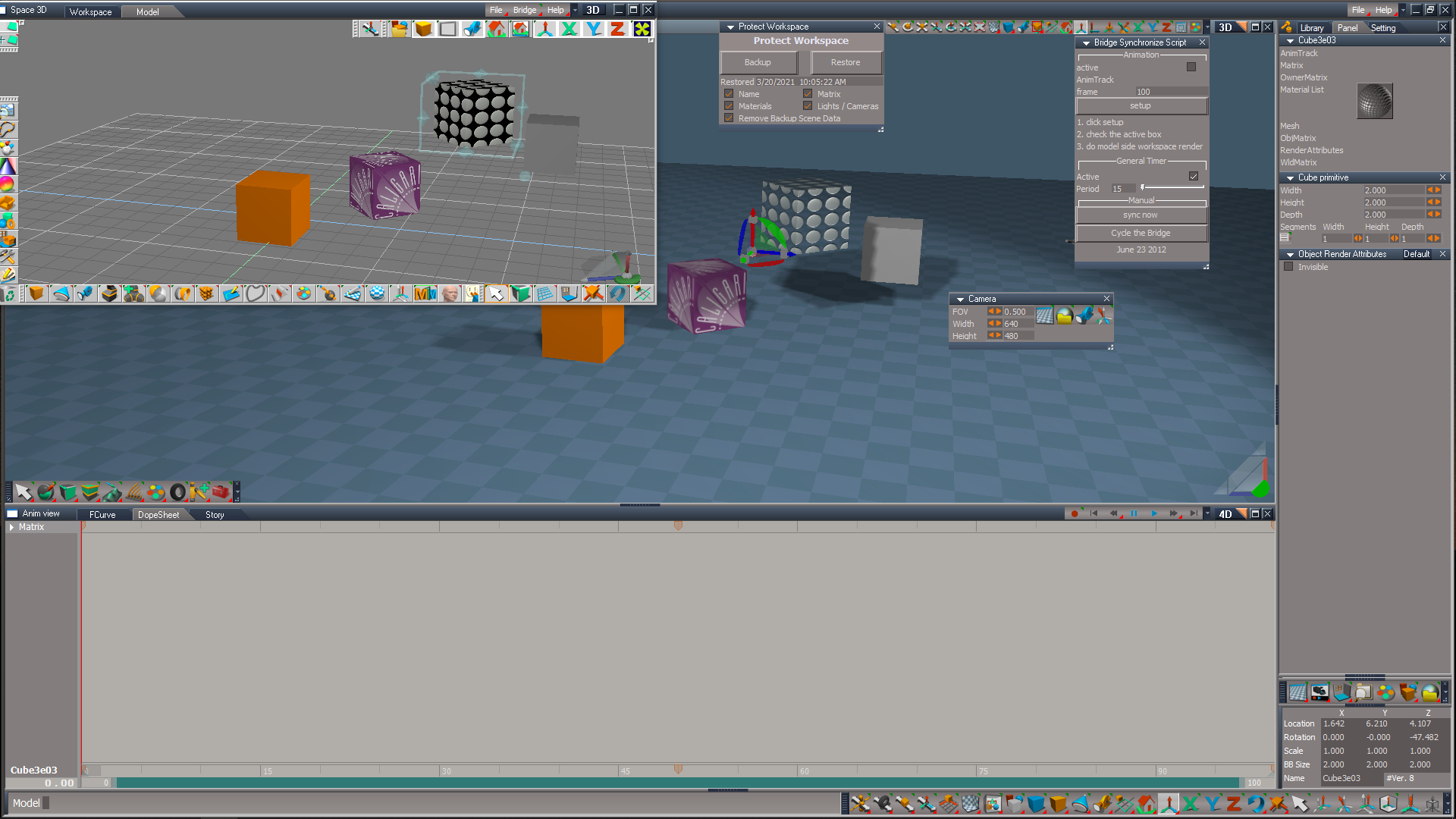
If you want to sync Workspace's view with Model, just add a UU7 camera
Another added benefit, Link Editor does not have to be opened and the Bridge Synchronize Script does not have to be in the scene
After using your Bridge Synchronize Script this morning, I am giving up even trying to get the current Synchronize version to work, to many problems!
Your Bridge Synchronize Script is working much better!
If you want to sync Workspace's view with Model, just add a UU7 camera
Another added benefit, Link Editor does not have to be opened and the Bridge Synchronize Script does not have to be in the scene
-
trueBlue
- Captain
- Posts: 5548
- Joined: 06 Jul 2009, 22:50
- Type the number ten into the box: 10
Re: Final trueSpace 7.61 Beta 8 Unofficial Update
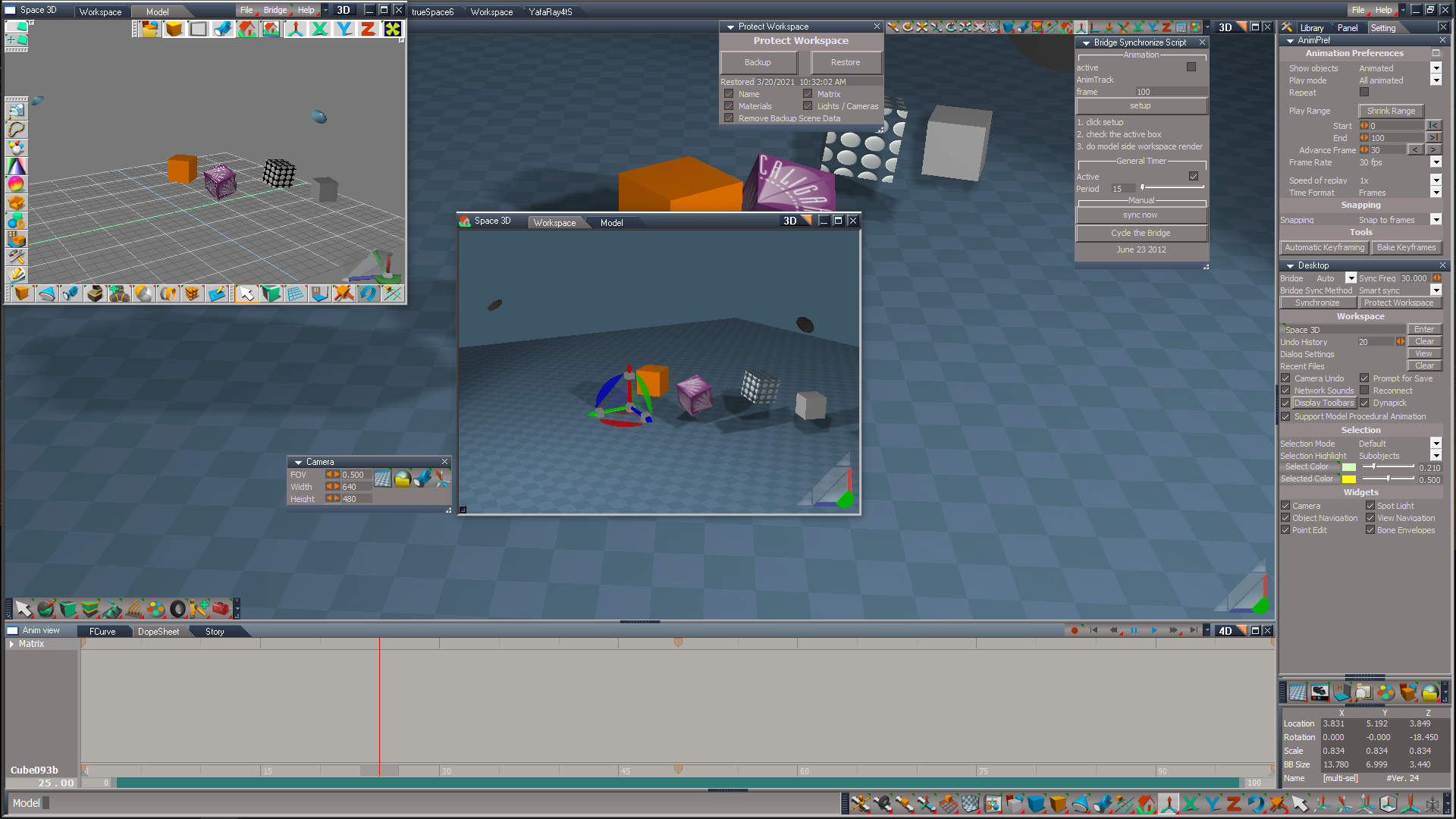
I have been playing with this all morning without shutting down truespace and truespace is stable!
You can have multiple floating 3D Views syncing with Model or use the main View, all working great!
It looks like the Timer's Period setting should match your render's frame rate
You can have multiple floating 3D Views syncing with Model or use the main View, all working great!
It looks like the Timer's Period setting should match your render's frame rate
-
trueBlue
- Captain
- Posts: 5548
- Joined: 06 Jul 2009, 22:50
- Type the number ten into the box: 10
Re: Final trueSpace 7.61 Beta 8 Unofficial Update
Animation Preference panel
Shrink Range button script
@ Clinton, The current script does not work
What about this as a replacement?
New -> Shrink Play Range script
Shrink Range button script
@ Clinton, The current script does not work
What about this as a replacement?
New -> Shrink Play Range script
Code: Select all
	var scene = Space.CurrentScene();

	var newSelection = "";

	for(var i=0;i<Node.SubObjectCount(scene);i++) {
		var subobj = scene + "/" + Node.SubObject(scene, i);
		if(Node.ConExists(subobj, "AnimTrack") && Node.SubObject(scene, i) != "Synchronize")
			newSelection += subobj + ";";
	}

	if(newSelection == "") return;

	newSelection = newSelection.substring(0, newSelection.length-1); // remove trailing semicolon

	Space.Select(newSelection);

	RsAnim.SelectAll('')

	Node.Value("/Preferences/AnimPref", "PlayRangeStart") = Node.Value("/AnimMng", "SelAnimStart")
	Node.Value("/Preferences/AnimPref", "PlayRangeEnd") = Node.Value("/AnimMng", "SelAnimEnd")
	Node.Value("/AnimMng", "AnimStart") = Node.Value("/Preferences/AnimPref", "PlayRangeStart")
	Node.Value("/AnimMng", "AnimEnd") = Node.Value("/Preferences/AnimPref", "PlayRangeEnd")
	Node.Value("/AnimMng", "AnimTime") = Node.Value("/Preferences/AnimPref", "PlayRangeStart")
	RsAnim.ClearSelection('')
	Space.Unselect()
-
clintonman
- Captain
- Posts: 5659
- Joined: 21 May 2009, 21:08
- Type the number ten into the box: 0
- Location: California
Re: Final trueSpace 7.61 Beta 8 Unofficial Update
So what's new?trueBlue wrote: 21 Mar 2021, 01:04 Animation Preference panel
Shrink Range button script
@ Clinton, The current script does not work
What about this as a replacement?
New -> Shrink Play Range script
...
Text in the manual says, "Shrink Range : set the timeline start and end to match the current preview play range"
Is this not happening, Is that not supposed to happen?
-
trueBlue
- Captain
- Posts: 5548
- Joined: 06 Jul 2009, 22:50
- Type the number ten into the box: 10
Re: Final trueSpace 7.61 Beta 8 Unofficial Update
Currently it does not actually Shrink the Play Range automatically
It uses the values entered by the user to shrink the Play Range
This new way is automatic
It uses the values entered by the user to shrink the Play Range
This new way is automatic
-
trueBlue
- Captain
- Posts: 5548
- Joined: 06 Jul 2009, 22:50
- Type the number ten into the box: 10
Re: Final trueSpace 7.61 Beta 8 Unofficial Update
Here is a Synchronize Workspace.RsObj
Place it in Scripts/CustomCommands
Run
Select a 3D Window to make it active
Press the Start button
This version runs by way of a Timer Event only
If you close the floating Synchronize Workspace panel, the Timer Event will stop
If model is open before you Start Synchronize Workspace, you will get an Alert to Close Model First
Close Model and try again
After starting Synchronize Workspace and if Model is open, selecting Stop will give you a option to switch Model to Workspace before running Restore
This is for stopping/protecting Workspace Protection

- Synchronize Workspace panel.png (7.49 KiB) Viewed 2520 times
Run
Code: Select all
WindowsManager.CloseWindow("Project/Windows Manager Space/SyncPanelFrame")
Node.Copy("/Scripts/CustomCommands/Synchronize Workspace/SyncPanelFrame", "Project/Windows Manager Space")
WindowsManager.Activate()
WindowsManager.UpdateWindowsStructure()
Press the Start button
This version runs by way of a Timer Event only
If you close the floating Synchronize Workspace panel, the Timer Event will stop
If model is open before you Start Synchronize Workspace, you will get an Alert to Close Model First
Close Model and try again
After starting Synchronize Workspace and if Model is open, selecting Stop will give you a option to switch Model to Workspace before running Restore
This is for stopping/protecting Workspace Protection
-
clintonman
- Captain
- Posts: 5659
- Joined: 21 May 2009, 21:08
- Type the number ten into the box: 0
- Location: California
Re: Final trueSpace 7.61 Beta 8 Unofficial Update
Press Stop button, choose No and the timer is still active
line 25 Protect Scene
Node.Value(protectWorkspace + "/ReturnFromBackup", "ReturnTo") = owner + "/Activate";
there is no Activate
line 25 Protect Scene
Node.Value(protectWorkspace + "/ReturnFromBackup", "ReturnTo") = owner + "/Activate";
there is no Activate
-
trueBlue
- Captain
- Posts: 5548
- Joined: 06 Jul 2009, 22:50
- Type the number ten into the box: 10
Re: Final trueSpace 7.61 Beta 8 Unofficial Update
That's because Model is still openclintonman wrote: 22 Mar 2021, 01:14 Press Stop button, choose No and the timer is still active
line 25 Protect Scene
Node.Value(protectWorkspace + "/ReturnFromBackup", "ReturnTo") = owner + "/Activate";
there is no Activate
You can uncheck Active
I am sure there is several possible scenarios where protection will be lost
I think you had on first run code too but I am not sure how that works
Fixed line 25 Protect Scene
Updated Synchronize Scene
-
clintonman
- Captain
- Posts: 5659
- Joined: 21 May 2009, 21:08
- Type the number ten into the box: 0
- Location: California
Re: Final trueSpace 7.61 Beta 8 Unofficial Update
I'll add it to the docs after your next release.
-
trueBlue
- Captain
- Posts: 5548
- Joined: 06 Jul 2009, 22:50
- Type the number ten into the box: 10
Re: Final trueSpace 7.61 Beta 8 Unofficial Update
Can anything be done with Protect Workspace to stop the renaming of NURBS controlPointMesh and LODMesh nodes?
Using Synchronize Workspace with Names checked or unchecked does not work for NURBS
Also I have a working PE widget version that runs the uvIndicatorsOff script when you enter into NURBS edit mode
The problem is that it runs every time when you enter into NURBS edit mode
Is there a way to make the uvIndicatorsOff script only run if the U, V nodes exist?
Or make a new script that deletes the U, V nodes on the selected node which would be the controlPointMesh?
Using Synchronize Workspace with Names checked or unchecked does not work for NURBS
Also I have a working PE widget version that runs the uvIndicatorsOff script when you enter into NURBS edit mode
The problem is that it runs every time when you enter into NURBS edit mode
Is there a way to make the uvIndicatorsOff script only run if the U, V nodes exist?
Or make a new script that deletes the U, V nodes on the selected node which would be the controlPointMesh?
-
clintonman
- Captain
- Posts: 5659
- Joined: 21 May 2009, 21:08
- Type the number ten into the box: 0
- Location: California
Re: Final trueSpace 7.61 Beta 8 Unofficial Update
I'll see what I can find.trueBlue wrote: 22 Mar 2021, 08:07 Can anything be done with Protect Workspace to stop the renaming of NURBS controlPointMesh and LODMesh nodes?
Using Synchronize Workspace with Names checked or unchecked does not work for NURBS
How about the toggle uv indicators in the NURBS info panel?trueBlue wrote: 22 Mar 2021, 08:07 Also I have a working PE widget version that runs the uvIndicatorsOff script when you enter into NURBS edit mode
The problem is that it runs every time when you enter into NURBS edit mode
Is there a way to make the uvIndicatorsOff script only run if the U, V nodes exist?
Or make a new script that deletes the U, V nodes on the selected node which would be the controlPointMesh?
-
trueBlue
- Captain
- Posts: 5548
- Joined: 06 Jul 2009, 22:50
- Type the number ten into the box: 10
Re: Final trueSpace 7.61 Beta 8 Unofficial Update
I tried that first and it did not work as wantedclintonman wrote: 22 Mar 2021, 16:59I'll see what I can find.trueBlue wrote: 22 Mar 2021, 08:07 Can anything be done with Protect Workspace to stop the renaming of NURBS controlPointMesh and LODMesh nodes?
Using Synchronize Workspace with Names checked or unchecked does not work for NURBS
How about the toggle uv indicators in the NURBS info panel?trueBlue wrote: 22 Mar 2021, 08:07 Also I have a working PE widget version that runs the uvIndicatorsOff script when you enter into NURBS edit mode
The problem is that it runs every time when you enter into NURBS edit mode
Is there a way to make the uvIndicatorsOff script only run if the U, V nodes exist?
Or make a new script that deletes the U, V nodes on the selected node which would be the controlPointMesh?
I can delete the nodes with first selected which is the controlPointMesh but have not been able to get the correct path to the nodes
I have tried Node.Owner and other ways but with no success
More importantly, make it run only when the nodes exist
-
clintonman
- Captain
- Posts: 5659
- Joined: 21 May 2009, 21:08
- Type the number ten into the box: 0
- Location: California
Re: Final trueSpace 7.61 Beta 8 Unofficial Update
This version of synchronize ignores NURBS objects.
- Attachments
-
- Synchronize Workspace.RsObj
- (155.92 KiB) Downloaded 144 times
-
clintonman
- Captain
- Posts: 5659
- Joined: 21 May 2009, 21:08
- Type the number ten into the box: 0
- Location: California
Re: Final trueSpace 7.61 Beta 8 Unofficial Update
This will work with the widget. Widgets/Select/Default object navigation widget/Enter edit mode/UneditabletrueBlue wrote: 22 Mar 2021, 17:10I tried that first and it did not work as wantedclintonman wrote: 22 Mar 2021, 16:59I'll see what I can find.trueBlue wrote: 22 Mar 2021, 08:07 Can anything be done with Protect Workspace to stop the renaming of NURBS controlPointMesh and LODMesh nodes?
Using Synchronize Workspace with Names checked or unchecked does not work for NURBS
How about the toggle uv indicators in the NURBS info panel?trueBlue wrote: 22 Mar 2021, 08:07 Also I have a working PE widget version that runs the uvIndicatorsOff script when you enter into NURBS edit mode
The problem is that it runs every time when you enter into NURBS edit mode
Is there a way to make the uvIndicatorsOff script only run if the U, V nodes exist?
Or make a new script that deletes the U, V nodes on the selected node which would be the controlPointMesh?
I can delete the nodes with first selected which is the controlPointMesh but have not been able to get the correct path to the nodes
I have tried Node.Owner and other ways but with no success
More importantly, make it run only when the nodes exist
Same will need to be done for your Edit buttons on the NURBS objects.
- Attachments
-
- Uneditable.RsObj
- (5.58 KiB) Downloaded 143 times
-
trueBlue
- Captain
- Posts: 5548
- Joined: 06 Jul 2009, 22:50
- Type the number ten into the box: 10
Re: Final trueSpace 7.61 Beta 8 Unofficial Update
Thanks!clintonman wrote: 22 Mar 2021, 20:53 This version of synchronize ignores NURBS objects.
Out of curiosity, the first thing I did is try your new Synchronize Scene script in the last Synchronize.RsObj version
Add
Cam = System.ThisOwner()
tSBridge.SynchronizeObject(Cam);
Render Workspace animation from Model = Perfect!
Sync Multiple selected objects = Perfect!
Stability = Needs more testing
May have found an issue after rendering and or just plain use where I had an object selected before Restoring protection
Makes sense, since the object selected was an object renamed and no longer exist after Restoring protection which made the Info window freeze
May want to add Space.Unselect() to the restoring part in Protect Workspace
I notice Protect Workspace has some code related to Synchronize
I will test this some more and let you know how it goes