Final trueSpace 7.61 Beta 8 Unofficial Update
-
trueBlue
- Captain
- Posts: 5548
- Joined: 06 Jul 2009, 22:50
- Type the number ten into the box: 10
Re: Final trueSpace 7.61 Beta 8 Unofficial Update
trueSpace7.61 Beta 8 Unofficial Update Version 10
Release 9/15//2024
viewtopic.php?t=3732
It is recommended that you completely Uninstall and Install trueSpace7.61 Beta 8 to a clean directory
Open the Task Manager
If you find any Standalone Runner (32 bit) or trueSpace (32 bit) programs open, Select each one and RClick - End task
Close the Task Manager
Updates:
Widgets 'Removed: PickOriginWidget'
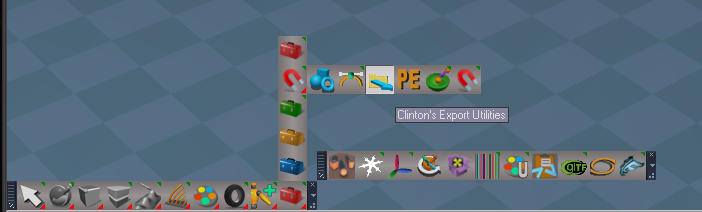
Toolbars 'Updated: MeshOriginToolbar, Booleans, and WorkspaceNav'
BooleansTemplate 'Add Flatten History button'
UUCommands 'Fixed typo, add Flatten Axis command to the Remove Pivot function, and update Flatten History function' - Author Clinton Reese
Scripts Manager - Author Clinton Reese 'Update Open Panel script'
FBX Import/Export - Author Clinton Reese 8/20/2024 'Update glTF Conversion panel'
MeshOrigin - Author Clinton Reese 9/7/2024
Guard - Author Clinton Reese 'Add additional support for Deformers and Booleans 9/9/2024'
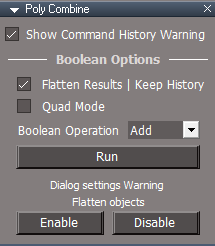
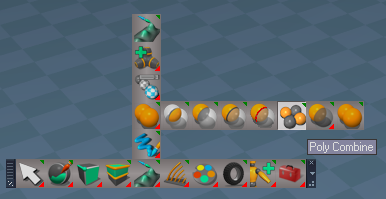
Add: Poly Combine - Author Clinton Reese 9/12/2024
Release 9/15//2024
viewtopic.php?t=3732
It is recommended that you completely Uninstall and Install trueSpace7.61 Beta 8 to a clean directory
Open the Task Manager
If you find any Standalone Runner (32 bit) or trueSpace (32 bit) programs open, Select each one and RClick - End task
Close the Task Manager
Updates:
Widgets 'Removed: PickOriginWidget'
Toolbars 'Updated: MeshOriginToolbar, Booleans, and WorkspaceNav'
BooleansTemplate 'Add Flatten History button'
UUCommands 'Fixed typo, add Flatten Axis command to the Remove Pivot function, and update Flatten History function' - Author Clinton Reese
Scripts Manager - Author Clinton Reese 'Update Open Panel script'
FBX Import/Export - Author Clinton Reese 8/20/2024 'Update glTF Conversion panel'
MeshOrigin - Author Clinton Reese 9/7/2024
Guard - Author Clinton Reese 'Add additional support for Deformers and Booleans 9/9/2024'
Add: Poly Combine - Author Clinton Reese 9/12/2024
-
trueBlue
- Captain
- Posts: 5548
- Joined: 06 Jul 2009, 22:50
- Type the number ten into the box: 10
Re: Final trueSpace 7.61 Beta 8 Unofficial Update
trueSpace7.61 Beta 8 Unofficial Update Version 10
Release 9/27//2024
viewtopic.php?t=3732
It is recommended that you completely Uninstall and Install trueSpace7.61 Beta 8 to a clean directory
Open the Task Manager
If you find any Standalone Runner (32 bit) or trueSpace (32 bit) programs open, Select each one and RClick - End task
Close the Task Manager
Updates:
preobjects
UUCommands.RsObj
Update LookAtSelection function
Update Shear
Update Copy Attributes and toolbar LMB command
Rs Main Libraries\Objects - tS7.6 Update objects library
tS76 Animation Panel.RsObj 'Add util commands'
Release 9/27//2024
viewtopic.php?t=3732
It is recommended that you completely Uninstall and Install trueSpace7.61 Beta 8 to a clean directory
Open the Task Manager
If you find any Standalone Runner (32 bit) or trueSpace (32 bit) programs open, Select each one and RClick - End task
Close the Task Manager
Updates:
preobjects
UUCommands.RsObj
Update LookAtSelection function
Update Shear
Update Copy Attributes and toolbar LMB command
Rs Main Libraries\Objects - tS7.6 Update objects library
tS76 Animation Panel.RsObj 'Add util commands'
-
trueBlue
- Captain
- Posts: 5548
- Joined: 06 Jul 2009, 22:50
- Type the number ten into the box: 10
Re: Final trueSpace 7.61 Beta 8 Unofficial Update
trueSpace7.61 Beta 8 Unofficial Update Version 10
Release 10/2//2024
viewtopic.php?t=3732
It is recommended that you completely Uninstall and Install trueSpace7.61 Beta 8 to a clean directory
Open the Task Manager
If you find any Standalone Runner (32 bit) or trueSpace (32 bit) programs open, Select each one and RClick - End task
Close the Task Manager
Updates:
FBX Import / Export 'Author - Clinton Reese'
Clintons3DFBX2019.rsx Version 1638427
Release 10/2//2024
viewtopic.php?t=3732
It is recommended that you completely Uninstall and Install trueSpace7.61 Beta 8 to a clean directory
Open the Task Manager
If you find any Standalone Runner (32 bit) or trueSpace (32 bit) programs open, Select each one and RClick - End task
Close the Task Manager
Updates:
FBX Import / Export 'Author - Clinton Reese'
Clintons3DFBX2019.rsx Version 1638427
-
trueBlue
- Captain
- Posts: 5548
- Joined: 06 Jul 2009, 22:50
- Type the number ten into the box: 10
Re: Final trueSpace 7.61 Beta 8 Unofficial Update
b]trueSpace7.61 Beta 8 Unofficial Update Version 10[/b]
Release 10/3//2024
viewtopic.php?t=3732
It is recommended that you completely Uninstall and Install trueSpace7.61 Beta 8 to a clean directory
Open the Task Manager
If you find any Standalone Runner (32 bit) or trueSpace (32 bit) programs open, Select each one and RClick - End task
Close the Task Manager
Updates:
PaintVertexColor 'Author - Clinton Reese'
CCFunctionSet 'Author - Clinton Reese'
Release 10/3//2024
viewtopic.php?t=3732
It is recommended that you completely Uninstall and Install trueSpace7.61 Beta 8 to a clean directory
Open the Task Manager
If you find any Standalone Runner (32 bit) or trueSpace (32 bit) programs open, Select each one and RClick - End task
Close the Task Manager
Updates:
PaintVertexColor 'Author - Clinton Reese'
CCFunctionSet 'Author - Clinton Reese'
-
trueBlue
- Captain
- Posts: 5548
- Joined: 06 Jul 2009, 22:50
- Type the number ten into the box: 10
Re: Final trueSpace 7.61 Beta 8 Unofficial Update
trueSpace7.61 Beta 8 Unofficial Update Version 10
Release 10/7//2024
viewtopic.php?t=3732
It is recommended that you completely Uninstall and Install trueSpace7.61 Beta 8 to a clean directory
Open the Task Manager
If you find any Standalone Runner (32 bit) or trueSpace (32 bit) programs open, Select each one and RClick - End task
Close the Task Manager
Updates:
Clintons3dPlugin.dll v1638459 'Author - Clinton Reese'
PaintVertexColor 'Author - Clinton Reese'
CCFunctionSet 'Author - Clinton Reese'
ScriptManager 'Author - Clinton Reese' Add: Close SceneView2 & Close WebServer View scripts
Object Statistics 'Author - Clinton Reese' - Convert to Utility Commands
Toolbars
Camera2 'Encapsulate RenderToFile & OpenWindow scripts'
Cameras
Release 10/7//2024
viewtopic.php?t=3732
It is recommended that you completely Uninstall and Install trueSpace7.61 Beta 8 to a clean directory
Open the Task Manager
If you find any Standalone Runner (32 bit) or trueSpace (32 bit) programs open, Select each one and RClick - End task
Close the Task Manager
Updates:
Clintons3dPlugin.dll v1638459 'Author - Clinton Reese'
PaintVertexColor 'Author - Clinton Reese'
CCFunctionSet 'Author - Clinton Reese'
ScriptManager 'Author - Clinton Reese' Add: Close SceneView2 & Close WebServer View scripts
Object Statistics 'Author - Clinton Reese' - Convert to Utility Commands
Toolbars
Camera2 'Encapsulate RenderToFile & OpenWindow scripts'
Cameras
-
trueBlue
- Captain
- Posts: 5548
- Joined: 06 Jul 2009, 22:50
- Type the number ten into the box: 10
Re: Final trueSpace 7.61 Beta 8 Unofficial Update
trueSpace7.61 Beta 8 Unofficial Update Version 10
Release 10/10//2024
viewtopic.php?t=3732
It is recommended that you completely Uninstall and Install trueSpace7.61 Beta 8 to a clean directory
Open the Task Manager
If you find any Standalone Runner (32 bit) or trueSpace (32 bit) programs open, Select each one and RClick - End task
Close the Task Manager
Updates:
Toolbars
UUCommands Update: Reset Toolbars 'syncPrototype list'
ScriptManager 'Author - Clinton Reese' Update: Unload All
CCFunctionSet 'Author - Clinton Reese'
OD_CopyPaste 'Author - Clinton Reese'
Object Statistics 'Author - Clinton Reese' Opens Scene View 2 via CCFunctionSet
SceneView 'Author - Clinton Reese' Add: Update SceneView2
Clintons3dView Function Set
Ungroup 'Avoid Lights & Cameras'
Copy & Cut 'Add Status Message'
Several functions 'Add: Update Scene View 2'
Release 10/10//2024
viewtopic.php?t=3732
It is recommended that you completely Uninstall and Install trueSpace7.61 Beta 8 to a clean directory
Open the Task Manager
If you find any Standalone Runner (32 bit) or trueSpace (32 bit) programs open, Select each one and RClick - End task
Close the Task Manager
Updates:
Toolbars
UUCommands Update: Reset Toolbars 'syncPrototype list'
ScriptManager 'Author - Clinton Reese' Update: Unload All
CCFunctionSet 'Author - Clinton Reese'
OD_CopyPaste 'Author - Clinton Reese'
Object Statistics 'Author - Clinton Reese' Opens Scene View 2 via CCFunctionSet
SceneView 'Author - Clinton Reese' Add: Update SceneView2
Clintons3dView Function Set
Ungroup 'Avoid Lights & Cameras'
Copy & Cut 'Add Status Message'
Several functions 'Add: Update Scene View 2'
-
trueBlue
- Captain
- Posts: 5548
- Joined: 06 Jul 2009, 22:50
- Type the number ten into the box: 10
Re: Final trueSpace 7.61 Beta 8 Unofficial Update
trueSpace7.61 Beta 8 Unofficial Update Version 10
Release 10/12//2024
viewtopic.php?t=3732
It is recommended that you completely Uninstall and Install trueSpace7.61 Beta 8 to a clean directory
Open the Task Manager
If you find any Standalone Runner (32 bit) or trueSpace (32 bit) programs open, Select each one and RClick - End task
Close the Task Manager
Updates:
wsLayersGroup4 'Author - Clinton Reese' Update: preferences panel
workspacelayers4 'Update: Popup Panel script (Load Workspace Layers and Web Server)'
ScriptManager 'Author - Clinton Reese'
Add: Close Scene Graph Utilities script
Update: Unload All
Option to remove Workspace Layers from current scene
Release 10/12//2024
viewtopic.php?t=3732
It is recommended that you completely Uninstall and Install trueSpace7.61 Beta 8 to a clean directory
Open the Task Manager
If you find any Standalone Runner (32 bit) or trueSpace (32 bit) programs open, Select each one and RClick - End task
Close the Task Manager
Updates:
wsLayersGroup4 'Author - Clinton Reese' Update: preferences panel
workspacelayers4 'Update: Popup Panel script (Load Workspace Layers and Web Server)'
ScriptManager 'Author - Clinton Reese'
Add: Close Scene Graph Utilities script
Update: Unload All
Option to remove Workspace Layers from current scene
-
trueBlue
- Captain
- Posts: 5548
- Joined: 06 Jul 2009, 22:50
- Type the number ten into the box: 10
Re: Final trueSpace 7.61 Beta 8 Unofficial Update
trueSpace7.61 Beta 8 Unofficial Update Version 10
Release 10/18//2024
viewtopic.php?t=3732
It is recommended that you completely Uninstall and Install trueSpace7.61 Beta 8 to a clean directory
Open the Task Manager
If you find any Standalone Runner (32 bit) or trueSpace (32 bit) programs open, Select each one and RClick - End task
Close the Task Manager
Updates:
clintonobjects
ScriptManager
CustomScriptsStore
CCFunctionSet
SceneView
CustomScriptsStore2
Align and Distribute
Constraint Scripts
ParticleScripts
OD_CopyPaste
Materials List
Vertex Animation Texture Tool
preobjects
Toolbars
ToolbarsBACKUP
Release 10/18//2024
viewtopic.php?t=3732
It is recommended that you completely Uninstall and Install trueSpace7.61 Beta 8 to a clean directory
Open the Task Manager
If you find any Standalone Runner (32 bit) or trueSpace (32 bit) programs open, Select each one and RClick - End task
Close the Task Manager
Updates:
clintonobjects
ScriptManager
CustomScriptsStore
CCFunctionSet
SceneView
CustomScriptsStore2
Align and Distribute
Constraint Scripts
ParticleScripts
OD_CopyPaste
Materials List
Vertex Animation Texture Tool
preobjects
Toolbars
ToolbarsBACKUP
-
tamaran
- Seaman Recruit
- Posts: 4
- Joined: 25 Jun 2012, 19:04
- Type the number ten into the box: 9
Re: Final trueSpace 7.61 Beta 8 Unofficial Update
Amazing work!
I'm very delighted to see this.
That said there are a few general problems with TrueSpace I've seen that are critical for longterm use.
I haven't tested the Beta 8.10 enough so these are just general problems not specifically the recent Beta 8.10.
1. Precision: I'm not sure when this occurred but I'm guessing something around Microsoft's NetCore introduction. (obviously this is not restricted to Truespace) It appears since then there's a problem with model data precision after any action in fact. Just moving or displacing an object around is enough to cause 0.001 precision offset on some faces sometimes includes object origin. Boolean operation could also create this. I consider this the most important problem of all.
Edit: if possible extend precision to 5 or 6 digits after comma.
2. Please add Blender format export support for old and new TrueSpace scene and object files. I consider this critical for its survival longterm. If Intel and AMD ditch certain ISA sections in the near future for x86 this would be the only means to save projects.
3. TrueSpace 7.61 and file incompatibility: There must be a way to move old format to new ones.
This is all the important ones I have from the top of my head.
I'm very delighted to see this.
That said there are a few general problems with TrueSpace I've seen that are critical for longterm use.
I haven't tested the Beta 8.10 enough so these are just general problems not specifically the recent Beta 8.10.
1. Precision: I'm not sure when this occurred but I'm guessing something around Microsoft's NetCore introduction. (obviously this is not restricted to Truespace) It appears since then there's a problem with model data precision after any action in fact. Just moving or displacing an object around is enough to cause 0.001 precision offset on some faces sometimes includes object origin. Boolean operation could also create this. I consider this the most important problem of all.
Edit: if possible extend precision to 5 or 6 digits after comma.
2. Please add Blender format export support for old and new TrueSpace scene and object files. I consider this critical for its survival longterm. If Intel and AMD ditch certain ISA sections in the near future for x86 this would be the only means to save projects.
3. TrueSpace 7.61 and file incompatibility: There must be a way to move old format to new ones.
This is all the important ones I have from the top of my head.
-
trueBlue
- Captain
- Posts: 5548
- Joined: 06 Jul 2009, 22:50
- Type the number ten into the box: 10
Re: Final trueSpace 7.61 Beta 8 Unofficial Update
This Unofficial Update does not access or alter the core files of trueSpace 7.61 Beta 8
Using Workspace, you can try Clinton's Import Export scripts .
Supposedly, Workspace Booleans tools are superior to Model Booleans tools
Using Workspace, you can try Clinton's Import Export scripts .
Supposedly, Workspace Booleans tools are superior to Model Booleans tools
-
trueBlue
- Captain
- Posts: 5548
- Joined: 06 Jul 2009, 22:50
- Type the number ten into the box: 10
Re: Final trueSpace 7.61 Beta 8 Unofficial Update
trueSpace7.61 Beta 8 Unofficial Update Version 10
Release 11/3//2024
viewtopic.php?t=3732
It is recommended that you completely Uninstall and Install trueSpace7.61 Beta 8 to a clean directory
Open the Task Manager
If you find any Standalone Runner (32 bit) or trueSpace (32 bit) programs open, Select each one and RClick - End task
Close the Task Manager
Updates:
clintonobjects
ScriptManager
CustomScriptsStore
CCFunctionSet
CustomScriptsStore2
Cloth Conversion scripts
Constraint Scripts
preobjects
Toolbars
ToolbarsBACKUP
Release 11/3//2024
viewtopic.php?t=3732
It is recommended that you completely Uninstall and Install trueSpace7.61 Beta 8 to a clean directory
Open the Task Manager
If you find any Standalone Runner (32 bit) or trueSpace (32 bit) programs open, Select each one and RClick - End task
Close the Task Manager
Updates:
clintonobjects
ScriptManager
CustomScriptsStore
CCFunctionSet
CustomScriptsStore2
Cloth Conversion scripts
Constraint Scripts
preobjects
Toolbars
ToolbarsBACKUP
-
tamaran
- Seaman Recruit
- Posts: 4
- Joined: 25 Jun 2012, 19:04
- Type the number ten into the box: 9
Re: Final trueSpace 7.61 Beta 8 Unofficial Update
I did went through several uninstall and install cycles to get everything working. Mostly because of trying things out rather than having problem with it per se.
The downside was losing my settings especially those less used - don't remember where it is - ones. Not really a problem. This is definitely one of the inconvenient points of TS. For example when unknowingly Windows update consumed all diskspace and you close the program... it deletes config files before writing new ones and fails... and as result the program won't start. And you are forced to clean up etc. Having secure config files or even better able to chose from a list of different one would be a great improvement. This way you could chose like a backup or so.
Anyhow, problems and crashes I had that are more common with TS in general than specific to the Beta. I'm posting just in case for prosperity. So if you don't mind.
Most if not all have led to crashes but the good news is that the program did caught them and threw a message before closing. These refer to the TS 6 compatibility modeller.
1. For some reason rick clicking on the general view Zoom icon (top of the window) no longer shows up the settings for it. I dunno if it's just my Window 10 system messing things up or not.
2. Using the small inspection view window I accidentally clicked on "Draw objects as radiosity"; so I closed the window but it wouldn't stop; so I used ESC and that caused the crash.
3. In a scene with over 65k faces and 7k vertices after a while replacing objects and using "glue as sibling" to put new versions back caused a crash (presumably) after the program finished updating in the background. This might be caused by running out of diskspace, hence, undo saving failed and or maybe RAM issues? Just guessing. (see attachment for report file)
4. TS still does remove objects when Boolean operations fail for example when vertices are matching etc.
Now some QL suggestions:
1. When using the glue function often the object manipulation frame gets in the way and you might accidentally change the object. A quick on/off toggle button for the object manipulation frame would be nice to have. I don't want to have to go back and forth through the settings menus. It's also easy to forget about the finer settings if you don't do it too often.
2. A way to set the zoom value. This is important when I want to render at the same scale/distance or simply replicate them.
There's more I just don't recall now.
The downside was losing my settings especially those less used - don't remember where it is - ones. Not really a problem. This is definitely one of the inconvenient points of TS. For example when unknowingly Windows update consumed all diskspace and you close the program... it deletes config files before writing new ones and fails... and as result the program won't start. And you are forced to clean up etc. Having secure config files or even better able to chose from a list of different one would be a great improvement. This way you could chose like a backup or so.
Anyhow, problems and crashes I had that are more common with TS in general than specific to the Beta. I'm posting just in case for prosperity. So if you don't mind.
Most if not all have led to crashes but the good news is that the program did caught them and threw a message before closing. These refer to the TS 6 compatibility modeller.
1. For some reason rick clicking on the general view Zoom icon (top of the window) no longer shows up the settings for it. I dunno if it's just my Window 10 system messing things up or not.
2. Using the small inspection view window I accidentally clicked on "Draw objects as radiosity"; so I closed the window but it wouldn't stop; so I used ESC and that caused the crash.
3. In a scene with over 65k faces and 7k vertices after a while replacing objects and using "glue as sibling" to put new versions back caused a crash (presumably) after the program finished updating in the background. This might be caused by running out of diskspace, hence, undo saving failed and or maybe RAM issues? Just guessing. (see attachment for report file)
4. TS still does remove objects when Boolean operations fail for example when vertices are matching etc.
Now some QL suggestions:
1. When using the glue function often the object manipulation frame gets in the way and you might accidentally change the object. A quick on/off toggle button for the object manipulation frame would be nice to have. I don't want to have to go back and forth through the settings menus. It's also easy to forget about the finer settings if you don't do it too often.
2. A way to set the zoom value. This is important when I want to render at the same scale/distance or simply replicate them.
There's more I just don't recall now.
- Attachments
-
- trueSpace crash report.zip
- #3 crash dump report file
- (31.18 KiB) Downloaded 56 times
-
trueBlue
- Captain
- Posts: 5548
- Joined: 06 Jul 2009, 22:50
- Type the number ten into the box: 10
Re: Final trueSpace 7.61 Beta 8 Unofficial Update
tamaran
Your observations are appreciated; however, this thread is dedicated to announcing the new trueSpace 7.61 Beta 8 Unofficial Update and reporting issues related to it.
Reading your last post, it looks like you are referring to Model issues
The trueSpace 7.61 Beta 8 Unofficial Update does not address any issues on the Model side.
It is unlikely that you will receive help or feedback in this thread. For assistance with the problems you're encountering, please start a new thread in a Topic that is more appropriate. It may be more effective to post one issue at a time for simplicity.
Your observations are appreciated; however, this thread is dedicated to announcing the new trueSpace 7.61 Beta 8 Unofficial Update and reporting issues related to it.
Reading your last post, it looks like you are referring to Model issues
The trueSpace 7.61 Beta 8 Unofficial Update does not address any issues on the Model side.
It is unlikely that you will receive help or feedback in this thread. For assistance with the problems you're encountering, please start a new thread in a Topic that is more appropriate. It may be more effective to post one issue at a time for simplicity.
-
trueBlue
- Captain
- Posts: 5548
- Joined: 06 Jul 2009, 22:50
- Type the number ten into the box: 10
Re: Final trueSpace 7.61 Beta 8 Unofficial Update
trueSpace7.61 Beta 8 Unofficial Update Version 10
Release 11/13//2024
viewtopic.php?t=3732
It is recommended that you completely Uninstall and Install trueSpace7.61 Beta 8 to a clean directory
Open the Task Manager
If you find any Standalone Runner (32 bit) or trueSpace (32 bit) programs open, Select each one and RClick - End task
Close the Task Manager
Updates:
preobjects:
Toolbars
ToolbarsBACKUP
ObjectAttributes
ObjectAttributes2
CustomScriptsStore:
CCFunctionSet
CustomScriptsStore2:
Material Utilities
clothConversionScript
Modelspace Files
Release 11/13//2024
viewtopic.php?t=3732
It is recommended that you completely Uninstall and Install trueSpace7.61 Beta 8 to a clean directory
Open the Task Manager
If you find any Standalone Runner (32 bit) or trueSpace (32 bit) programs open, Select each one and RClick - End task
Close the Task Manager
Updates:
preobjects:
Toolbars
ToolbarsBACKUP
ObjectAttributes
ObjectAttributes2
CustomScriptsStore:
CCFunctionSet
CustomScriptsStore2:
Material Utilities
clothConversionScript
Modelspace Files
-
trueBlue
- Captain
- Posts: 5548
- Joined: 06 Jul 2009, 22:50
- Type the number ten into the box: 10
Re: Final trueSpace 7.61 Beta 8 Unofficial Update
pace7.61 Beta 8 Unofficial Update Version 10[/b]
Second Release 11/13//2024
viewtopic.php?t=3732
It is recommended that you completely Uninstall and Install trueSpace7.61 Beta 8 to a clean directory
Open the Task Manager
If you find any Standalone Runner (32 bit) or trueSpace (32 bit) programs open, Select each one and RClick - End task
Close the Task Manager
Updates:
CustomScriptsStore2:
Vertex Animation Texture Tool
Second Release 11/13//2024
viewtopic.php?t=3732
It is recommended that you completely Uninstall and Install trueSpace7.61 Beta 8 to a clean directory
Open the Task Manager
If you find any Standalone Runner (32 bit) or trueSpace (32 bit) programs open, Select each one and RClick - End task
Close the Task Manager
Updates:
CustomScriptsStore2:
Vertex Animation Texture Tool
-
trueBlue
- Captain
- Posts: 5548
- Joined: 06 Jul 2009, 22:50
- Type the number ten into the box: 10
Re: Final trueSpace 7.61 Beta 8 Unofficial Update
trueSpace7.61 Beta 8 Unofficial Update Version 10
Release 11/17//2024
viewtopic.php?t=3732
It is recommended that you completely Uninstall and Install trueSpace7.61 Beta 8 to a clean directory
Open the Task Manager
If you find any Standalone Runner (32 bit) or trueSpace (32 bit) programs open, Select each one and RClick - End task
Close the Task Manager
Updates:
CustomScriptsStore:
CCFunctionSet
CustomScriptsStore2:
Materials List
Release 11/17//2024
viewtopic.php?t=3732
It is recommended that you completely Uninstall and Install trueSpace7.61 Beta 8 to a clean directory
Open the Task Manager
If you find any Standalone Runner (32 bit) or trueSpace (32 bit) programs open, Select each one and RClick - End task
Close the Task Manager
Updates:
CustomScriptsStore:
CCFunctionSet
CustomScriptsStore2:
Materials List
-
trueBlue
- Captain
- Posts: 5548
- Joined: 06 Jul 2009, 22:50
- Type the number ten into the box: 10
Re: Final trueSpace 7.61 Beta 8 Unofficial Update
trueSpace7.61 Beta 8 Unofficial Update Version 10
Release 11/19//2024
viewtopic.php?t=3732
It is recommended that you completely Uninstall and Install trueSpace7.61 Beta 8 to a clean directory
Open the Task Manager
If you find any Standalone Runner (32 bit) or trueSpace (32 bit) programs open, Select each one and RClick - End task
Close the Task Manager
Updates:
CustomScriptsStore2:
GLTFgroup
fbxgroup2
Release 11/19//2024
viewtopic.php?t=3732
It is recommended that you completely Uninstall and Install trueSpace7.61 Beta 8 to a clean directory
Open the Task Manager
If you find any Standalone Runner (32 bit) or trueSpace (32 bit) programs open, Select each one and RClick - End task
Close the Task Manager
Updates:
CustomScriptsStore2:
GLTFgroup
fbxgroup2
-
trueBlue
- Captain
- Posts: 5548
- Joined: 06 Jul 2009, 22:50
- Type the number ten into the box: 10
Re: Final trueSpace 7.61 Beta 8 Unofficial Update
trueSpace7.61 Beta 8 Unofficial Update Version 10
Release 11/30//2024
viewtopic.php?t=3732
It is recommended that you completely Uninstall and Install trueSpace7.61 Beta 8 to a clean directory
Open the Task Manager
If you find any Standalone Runner (32 bit) or trueSpace (32 bit) programs open, Select each one and RClick - End task
Close the Task Manager
Updates:
CustomScriptsStore2:
OD_CopyPaste
Release 11/30//2024
viewtopic.php?t=3732
It is recommended that you completely Uninstall and Install trueSpace7.61 Beta 8 to a clean directory
Open the Task Manager
If you find any Standalone Runner (32 bit) or trueSpace (32 bit) programs open, Select each one and RClick - End task
Close the Task Manager
Updates:
CustomScriptsStore2:
OD_CopyPaste
-
trueBlue
- Captain
- Posts: 5548
- Joined: 06 Jul 2009, 22:50
- Type the number ten into the box: 10
Re: Final trueSpace 7.61 Beta 8 Unofficial Update
trueSpace7.61 Beta 8 Unofficial Update Version 10
Release 12/6//2024
viewtopic.php?t=3732
It is recommended that you completely Uninstall and Install trueSpace7.61 Beta 8 to a clean directory
Open the Task Manager
If you find any Standalone Runner (32 bit) or trueSpace (32 bit) programs open, Select each one and RClick - End task
Close the Task Manager
Updates:
clintonobjects:
ScriptManager
CustomScriptsStore:
KeyInterp
Release 12/6//2024
viewtopic.php?t=3732
It is recommended that you completely Uninstall and Install trueSpace7.61 Beta 8 to a clean directory
Open the Task Manager
If you find any Standalone Runner (32 bit) or trueSpace (32 bit) programs open, Select each one and RClick - End task
Close the Task Manager
Updates:
clintonobjects:
ScriptManager
CustomScriptsStore:
KeyInterp
-
trueBlue
- Captain
- Posts: 5548
- Joined: 06 Jul 2009, 22:50
- Type the number ten into the box: 10
Re: Final trueSpace 7.61 Beta 8 Unofficial Update
trueSpace7.61 Beta 8 Unofficial Update Version 10
Release 12/20//2024
viewtopic.php?t=3732
It is recommended that you completely Uninstall and Install trueSpace7.61 Beta 8 to a clean directory
Open the Task Manager
If you find any Standalone Runner (32 bit) or trueSpace (32 bit) programs open, Select each one and RClick - End task
Close the Task Manager
Updates:
CustomScriptsStore:
CCFunctionSet
CustomScriptsStore2:
Vertex Animation Texture Tool
Release 12/20//2024
viewtopic.php?t=3732
It is recommended that you completely Uninstall and Install trueSpace7.61 Beta 8 to a clean directory
Open the Task Manager
If you find any Standalone Runner (32 bit) or trueSpace (32 bit) programs open, Select each one and RClick - End task
Close the Task Manager
Updates:
CustomScriptsStore:
CCFunctionSet
CustomScriptsStore2:
Vertex Animation Texture Tool
-
clintonman
- Captain
- Posts: 5659
- Joined: 21 May 2009, 21:08
- Type the number ten into the box: 0
- Location: California
Re: Final trueSpace 7.61 Beta 8 Unofficial Update
The Unofficial Updates toolbar buttons for triangle selection do not work. Attached is a script to fix the toolbar buttons. This is a pretty low priority fix. I personally can't even think of a use for selecting triangles instead of faces.
Install Steps:
1. Reset default context
2. Load the script into the link editor
3. Press the Patch button
4. After the "all's done" dialog load a layout or reset the default context again
The Std version has the same bug.
Install Steps:
1. Reset default context
2. Load the script into the link editor
3. Press the Patch button
4. After the "all's done" dialog load a layout or reset the default context again
The Std version has the same bug.
- Attachments
-
- Triangle Selection Patch 01.RsObj
- (8.83 KiB) Downloaded 71 times
-
trueBlue
- Captain
- Posts: 5548
- Joined: 06 Jul 2009, 22:50
- Type the number ten into the box: 10
Re: Final trueSpace 7.61 Beta 8 Unofficial Update
Thanks, I will update the toolbars including the (not included in your script) PEElementToolbar and the Normal Move Tool soon 
-
clintonman
- Captain
- Posts: 5659
- Joined: 21 May 2009, 21:08
- Type the number ten into the box: 0
- Location: California
Re: Final trueSpace 7.61 Beta 8 Unofficial Update
Here are updated Global Function Set and CCFunctionSet nodes.
CCFunctionSet - reorganized code, works the same as before, just easier to understand and add to it
Global Function Set - added new toolbar open function
CCFunctionSet - reorganized code, works the same as before, just easier to understand and add to it
Global Function Set - added new toolbar open function
- Attachments
-
- Global Function Set.RsObj
- (56.01 KiB) Downloaded 68 times
-
- CCFunctionSet.RsObj
- (61.66 KiB) Downloaded 65 times
-
trueBlue
- Captain
- Posts: 5548
- Joined: 06 Jul 2009, 22:50
- Type the number ten into the box: 10
Re: Final trueSpace 7.61 Beta 8 Unofficial Update
Can you give me an example how to use the new toolbar open function?
-
clintonman
- Captain
- Posts: 5659
- Joined: 21 May 2009, 21:08
- Type the number ten into the box: 0
- Location: California
Re: Final trueSpace 7.61 Beta 8 Unofficial Update
Pass in the name of the toolbar node from inside the Toolbar Prototypes Encapsulator and optionally tell it how far from the left of the 3d window to open it.trueBlue wrote: 17 Feb 2025, 21:09 Can you give me an example how to use the new toolbar open function?
If you only pass the node it will default to open the toolbar 310 from the left side. This matches the position used by the Toolbar Manager script.
Code: Select all
GlobalFS = Node.AccessFnSet("Scripts/CustomCommands/Global Function Set");
GlobalFS.OpenToolbar("ClintonToolbar");
//GlobalFS.OpenToolbar("ClintonToolbar", 411);//override default and use 411 instead-
trueBlue
- Captain
- Posts: 5548
- Joined: 06 Jul 2009, 22:50
- Type the number ten into the box: 10
Re: Final trueSpace 7.61 Beta 8 Unofficial Update
trueSpace7.61 Beta 8 Unofficial Update Version 10
Release 2/19//2025
viewtopic.php?t=3732
It is recommended that you completely Uninstall and Install trueSpace7.61 Beta 8 to a clean directory
Open the Task Manager
If you find any Standalone Runner (32 bit) or trueSpace (32 bit) programs open, Select each one and RClick - End task
Close the Task Manager
Updates:
preobjects:
Toolbars
ToolbarsBACKUP
Widgets
CustomScriptsStore:
Global Function Set
CCFunctionSet
CustomScriptsStore2:
PE Shear
Shear Tool
NormalMove
PE NormalMove
Release 2/19//2025
viewtopic.php?t=3732
It is recommended that you completely Uninstall and Install trueSpace7.61 Beta 8 to a clean directory
Open the Task Manager
If you find any Standalone Runner (32 bit) or trueSpace (32 bit) programs open, Select each one and RClick - End task
Close the Task Manager
Updates:
preobjects:
Toolbars
ToolbarsBACKUP
Widgets
CustomScriptsStore:
Global Function Set
CCFunctionSet
CustomScriptsStore2:
PE Shear
Shear Tool
NormalMove
PE NormalMove
-
trueBlue
- Captain
- Posts: 5548
- Joined: 06 Jul 2009, 22:50
- Type the number ten into the box: 10
Re: Final trueSpace 7.61 Beta 8 Unofficial Update
trueSpace7.61 Beta 8 Unofficial Update Version 10
Release 2/26//2025
viewtopic.php?t=3732
It is recommended that you completely Uninstall and Install trueSpace7.61 Beta 8 to a clean directory
Open the Task Manager
If you find any Standalone Runner (32 bit) or trueSpace (32 bit) programs open, Select each one and RClick - End task
Close the Task Manager
Updates:
Clintons3DFBX2019.rsx
v1638429
RsGLTFPlugin.rsx
v1638411
CustomScriptsStore2:
GLTFgroup
fbxgroup2
Release 2/26//2025
viewtopic.php?t=3732
It is recommended that you completely Uninstall and Install trueSpace7.61 Beta 8 to a clean directory
Open the Task Manager
If you find any Standalone Runner (32 bit) or trueSpace (32 bit) programs open, Select each one and RClick - End task
Close the Task Manager
Updates:
Clintons3DFBX2019.rsx
v1638429
RsGLTFPlugin.rsx
v1638411
CustomScriptsStore2:
GLTFgroup
fbxgroup2
-
trueBlue
- Captain
- Posts: 5548
- Joined: 06 Jul 2009, 22:50
- Type the number ten into the box: 10
Re: Final trueSpace 7.61 Beta 8 Unofficial Update
trueSpace7.61 Beta 8 Unofficial Update Version 10
Release 3/8//2025
viewtopic.php?t=3732
It is recommended that you completely Uninstall and Install trueSpace7.61 Beta 8 to a clean directory
Open the Task Manager
If you find any Standalone Runner (32 bit) or trueSpace (32 bit) programs open, Select each one and RClick - End task
Close the Task Manager
Updates:
preobjects:
animpref
Primitives
Toolbars
ToolbarsBACKUP
CustomScriptsStore:
CCFunctionSet
General Function Set
CustomScriptsStore2:
Animation Utilities
Release 3/8//2025
viewtopic.php?t=3732
It is recommended that you completely Uninstall and Install trueSpace7.61 Beta 8 to a clean directory
Open the Task Manager
If you find any Standalone Runner (32 bit) or trueSpace (32 bit) programs open, Select each one and RClick - End task
Close the Task Manager
Updates:
preobjects:
animpref
Primitives
Toolbars
ToolbarsBACKUP
CustomScriptsStore:
CCFunctionSet
General Function Set
CustomScriptsStore2:
Animation Utilities
-
trueBlue
- Captain
- Posts: 5548
- Joined: 06 Jul 2009, 22:50
- Type the number ten into the box: 10
Re: Final trueSpace 7.61 Beta 8 Unofficial Update
trueSpace7.61 Beta 8 Unofficial Update Version 10
Release 3/12//2025
viewtopic.php?t=3732
It is recommended that you completely Uninstall and Install trueSpace7.61 Beta 8 to a clean directory
Open the Task Manager
If you find any Standalone Runner (32 bit) or trueSpace (32 bit) programs open, Select each one and RClick - End task
Close the Task Manager
Updates:
preobjects:
Widgets 'Removed Esc keyboard key "Unselect" shortcut from the Default context widget'
CustomScriptsStore2:
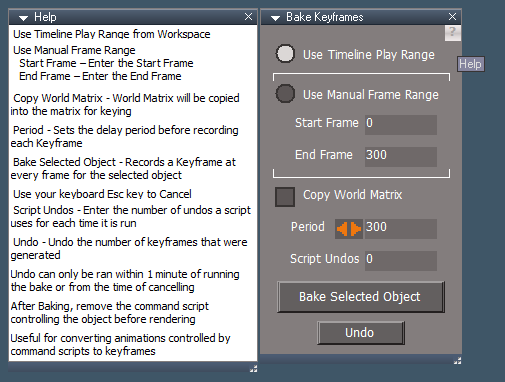
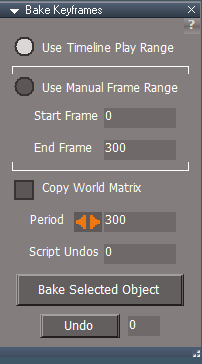
Animation Utilities 'Bake Keyframes update'
Release 3/12//2025
viewtopic.php?t=3732
It is recommended that you completely Uninstall and Install trueSpace7.61 Beta 8 to a clean directory
Open the Task Manager
If you find any Standalone Runner (32 bit) or trueSpace (32 bit) programs open, Select each one and RClick - End task
Close the Task Manager
Updates:
preobjects:
Widgets 'Removed Esc keyboard key "Unselect" shortcut from the Default context widget'
CustomScriptsStore2:
Animation Utilities 'Bake Keyframes update'
-
trueBlue
- Captain
- Posts: 5548
- Joined: 06 Jul 2009, 22:50
- Type the number ten into the box: 10
Re: Final trueSpace 7.61 Beta 8 Unofficial Update
trueSpace7.61 Beta 8 Unofficial Update Version 10
Release 3/14//2025
viewtopic.php?t=3732
It is recommended that you completely Uninstall and Install trueSpace7.61 Beta 8 to a clean directory
Open the Task Manager
If you find any Standalone Runner (32 bit) or trueSpace (32 bit) programs open, Select each one and RClick - End task
Close the Task Manager
Updates:
CustomScriptsStore2:
Animation Utilities 'Bake Keyframes update' .
Export: Undo time limit current value "Zero = No Undo" (60 seconds Undo time limit)
Update Undo script 'Resets the Undo time limit value to Zero and Restores the Desktop Undo History value'
Update Alerts and Status Messages
Release 3/14//2025
viewtopic.php?t=3732
It is recommended that you completely Uninstall and Install trueSpace7.61 Beta 8 to a clean directory
Open the Task Manager
If you find any Standalone Runner (32 bit) or trueSpace (32 bit) programs open, Select each one and RClick - End task
Close the Task Manager
Updates:
CustomScriptsStore2:
Animation Utilities 'Bake Keyframes update' .
Export: Undo time limit current value "Zero = No Undo" (60 seconds Undo time limit)
Update Undo script 'Resets the Undo time limit value to Zero and Restores the Desktop Undo History value'
Update Alerts and Status Messages
-
trueBlue
- Captain
- Posts: 5548
- Joined: 06 Jul 2009, 22:50
- Type the number ten into the box: 10
Re: Final trueSpace 7.61 Beta 8 Unofficial Update
b]trueSpace7.61 Beta 8 Unofficial Update Version 10[/b]
Release 3/15//2025
viewtopic.php?t=3732
It is recommended that you completely Uninstall and Install trueSpace7.61 Beta 8 to a clean directory
Open the Task Manager
If you find any Standalone Runner (32 bit) or trueSpace (32 bit) programs open, Select each one and RClick - End task
Close the Task Manager
Updates:
Toolbars
Add the missing File/Help/ Manual button
Animation Utilities 'Bake Keyframes update clintonman » Fri Mar 14, 2025 8:53 pm'
Release 3/15//2025
viewtopic.php?t=3732
It is recommended that you completely Uninstall and Install trueSpace7.61 Beta 8 to a clean directory
Open the Task Manager
If you find any Standalone Runner (32 bit) or trueSpace (32 bit) programs open, Select each one and RClick - End task
Close the Task Manager
Updates:
Toolbars
Add the missing File/Help/ Manual button
Animation Utilities 'Bake Keyframes update clintonman » Fri Mar 14, 2025 8:53 pm'
-
trueBlue
- Captain
- Posts: 5548
- Joined: 06 Jul 2009, 22:50
- Type the number ten into the box: 10
Re: Final trueSpace 7.61 Beta 8 Unofficial Update
trueSpace7.61 Beta 8 Unofficial Update Version 10
Release 3/17//2025
viewtopic.php?t=3732
It is recommended that you completely Uninstall and Install trueSpace7.61 Beta 8 to a clean directory
Open the Task Manager
If you find any Standalone Runner (32 bit) or trueSpace (32 bit) programs open, Select each one and RClick - End task
Close the Task Manager
Updates:
Toolbars
Add the missing File/Help/ Manual button
PopupButtonsToolbar 'Add: RClick open Preferences'
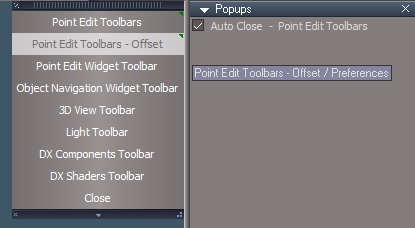
Ctrl + Spacebar .
CustomScriptsStore2:
Animation Utilities 'Bake Keyframes update clintonman » Fri Mar 14, 2025 8:53 pm'
NURBS 'Update Thickness Cylinder'
Release 3/17//2025
viewtopic.php?t=3732
It is recommended that you completely Uninstall and Install trueSpace7.61 Beta 8 to a clean directory
Open the Task Manager
If you find any Standalone Runner (32 bit) or trueSpace (32 bit) programs open, Select each one and RClick - End task
Close the Task Manager
Updates:
Toolbars
Add the missing File/Help/ Manual button
PopupButtonsToolbar 'Add: RClick open Preferences'
Ctrl + Spacebar .
CustomScriptsStore2:
Animation Utilities 'Bake Keyframes update clintonman » Fri Mar 14, 2025 8:53 pm'
NURBS 'Update Thickness Cylinder'
-
trueBlue
- Captain
- Posts: 5548
- Joined: 06 Jul 2009, 22:50
- Type the number ten into the box: 10
Re: Final trueSpace 7.61 Beta 8 Unofficial Update
trueSpace7.61 Beta 8 Unofficial Update Version 10
Release 3/21//2025
viewtopic.php?t=3732
It is recommended that you completely Uninstall and Install trueSpace7.61 Beta 8 to a clean directory
Open the Task Manager
If you find any Standalone Runner (32 bit) or trueSpace (32 bit) programs open, Select each one and RClick - End task
Close the Task Manager
Updates:
init.js
reset.js
Release 3/21//2025
viewtopic.php?t=3732
It is recommended that you completely Uninstall and Install trueSpace7.61 Beta 8 to a clean directory
Open the Task Manager
If you find any Standalone Runner (32 bit) or trueSpace (32 bit) programs open, Select each one and RClick - End task
Close the Task Manager
Updates:
init.js
reset.js
-
trueBlue
- Captain
- Posts: 5548
- Joined: 06 Jul 2009, 22:50
- Type the number ten into the box: 10
Re: Final trueSpace 7.61 Beta 8 Unofficial Update
trueSpace7.61 Beta 8 Unofficial Update Version 10
Release 3/24//2025
viewtopic.php?t=3732
It is recommended that you completely Uninstall and Install trueSpace7.61 Beta 8 to a clean directory
Open the Task Manager
If you find any Standalone Runner (32 bit) or trueSpace (32 bit) programs open, Select each one and RClick - End task
Close the Task Manager
Updates:
Widgets 'New method (using a jScript) to save Widgets.RsObj to the preobjects folder. Eliminates including an Active Widget (Default context) when saving Widgets.RsObj manually using the trueSpace's UI'
Widget.Shortcuts.xml
UU Shortcut List.txt
Release 3/24//2025
viewtopic.php?t=3732
It is recommended that you completely Uninstall and Install trueSpace7.61 Beta 8 to a clean directory
Open the Task Manager
If you find any Standalone Runner (32 bit) or trueSpace (32 bit) programs open, Select each one and RClick - End task
Close the Task Manager
Updates:
Widgets 'New method (using a jScript) to save Widgets.RsObj to the preobjects folder. Eliminates including an Active Widget (Default context) when saving Widgets.RsObj manually using the trueSpace's UI'
Widget.Shortcuts.xml
UU Shortcut List.txt
-
trueBlue
- Captain
- Posts: 5548
- Joined: 06 Jul 2009, 22:50
- Type the number ten into the box: 10
Re: Final trueSpace 7.61 Beta 8 Unofficial Update
trueSpace7.61 Beta 8 Unofficial Update Version 10
Release 3/25//2025
viewtopic.php?t=3732
It is recommended that you completely Uninstall and Install trueSpace7.61 Beta 8 to a clean directory
Open the Task Manager
If you find any Standalone Runner (32 bit) or trueSpace (32 bit) programs open, Select each one and RClick - End task
Close the Task Manager
Updates:
Toolbars 'Fixed non-working Mesh Origin toolbar commands'
Release 3/25//2025
viewtopic.php?t=3732
It is recommended that you completely Uninstall and Install trueSpace7.61 Beta 8 to a clean directory
Open the Task Manager
If you find any Standalone Runner (32 bit) or trueSpace (32 bit) programs open, Select each one and RClick - End task
Close the Task Manager
Updates:
Toolbars 'Fixed non-working Mesh Origin toolbar commands'
-
trueBlue
- Captain
- Posts: 5548
- Joined: 06 Jul 2009, 22:50
- Type the number ten into the box: 10
Re: Final trueSpace 7.61 Beta 8 Unofficial Update
trueSpace7.61 Beta 8 Unofficial Update Version 10
Release 4/1/2025
viewtopic.php?t=3732
It is recommended that you completely Uninstall and Install trueSpace7.61 Beta 8 to a clean directory
Open the Task Manager
If you find any Standalone Runner (32 bit) or trueSpace (32 bit) programs open, Select each one and RClick - End task
Close the Task Manager
Updates:
Toolbars
UUCommands 'Update: Synchronize'
DesktopPreferences
Material Converter
Protect Workspace
D3D Render
Release 4/1/2025
viewtopic.php?t=3732
It is recommended that you completely Uninstall and Install trueSpace7.61 Beta 8 to a clean directory
Open the Task Manager
If you find any Standalone Runner (32 bit) or trueSpace (32 bit) programs open, Select each one and RClick - End task
Close the Task Manager
Updates:
Toolbars
UUCommands 'Update: Synchronize'
DesktopPreferences
Material Converter
Protect Workspace
D3D Render
-
trueBlue
- Captain
- Posts: 5548
- Joined: 06 Jul 2009, 22:50
- Type the number ten into the box: 10
Re: Final trueSpace 7.61 Beta 8 Unofficial Update
trueSpace7.61 Beta 8 Unofficial Update Version 10
Release 4/15/2025
viewtopic.php?t=3732
It is recommended that you completely Uninstall and Install trueSpace7.61 Beta 8 to a clean directory
Open the Task Manager
If you find any Standalone Runner (32 bit) or trueSpace (32 bit) programs open, Select each one and RClick - End task
Close the Task Manager
Updates:
Scripts:
Window.Shortcuts
Add: Ctrl Left 'Select and Show Floating Panel Next (Not previous) - jScipt or Activity Event'
Add: Ctrl Right 'Select and Show Floating Panel Next - jScipt or Activity Event'
Window.Shortcuts_BACKUP
preobjects:
Toolbars
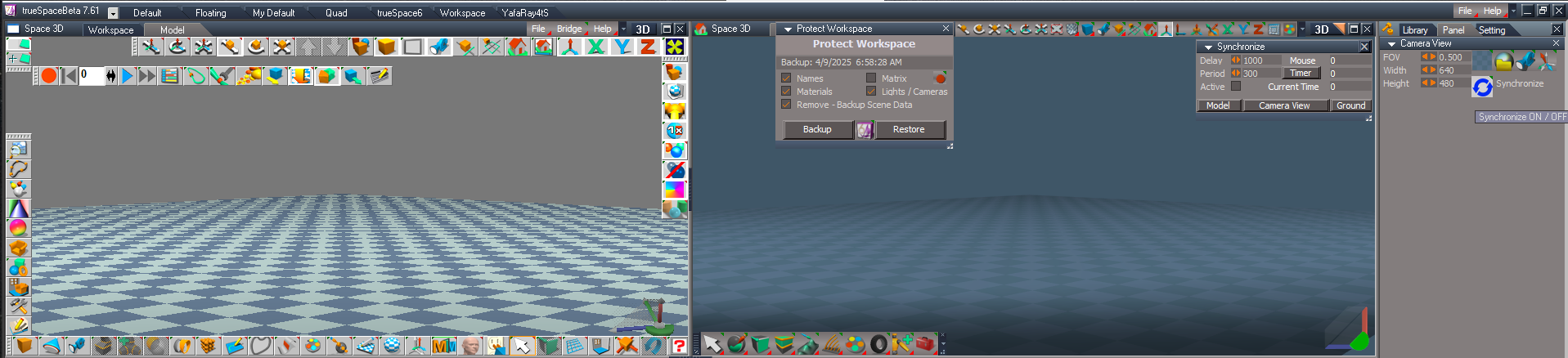
UUCommands/Synchronize
Opens with the [Protect Workspace] button in the Stack/Setting - Desktop Mouse 'Mouse Listner - Mouse Buttons'
Note: Requires pressing a Mouse Button and or brush over in a 3D View or Link Editor View
3D View = 0
Link Editor View = 1
Delay - Default 1 second 'Pause Activity hooked up to Synchronize Scene script
Note: This seems to stop the Synchronize Scene script from running twice
Period - Timer ms speed
Timer button toggles Timer ON | Off
Frame = Timer Frame
Note: Runs Synchronize constantly depending on the Period value
Active - Syncs Model and Workspace animation Current Time
Active also disables Model AutoRecord - Required!
Current Time = Frame
Note: Using Workspace Animation Editor's animation time scrubber, sets Model's Current Time
Use: Workspace's and or Model's Record button to record keyframe
WARNING! 'Do not use Model's AutoRecord'
Model button opens a Docked Model View
Requires a preobject/Model Frame Window.RsObj included in the UU10
Camera View button adds and sets a scene Camera View camera
Use: Open Model first, press the Camera View button, and press the Camera's Synchronize button in the Stack
Ground button adds a scene Scene Ground and sets Workspace Ground to closely match Model's Grid
Requires a Scene Ground.RsObj in the Objects - tS7.61 Update objects library, included in the UU10
Note: Pressing the Synchronize panel's X close button, Stops the Timer, Removes the Camera View and Scene Ground objects from the scene
Warning! The Timer and Current Time Active modes should NOT be used with the D3D Render, it has its own Sync method
. .
CustomScriptsStore2:
Dimensions 'Add: Create Dimension connector'
CustomScriptsStore:
ProtectWorkspace 'Update Open & Dock Model'
AutokeyWidgets
Select/Cycle 'Add: Select - Search term Selected Level' and 'Cycle select jScipt or Activity Event'
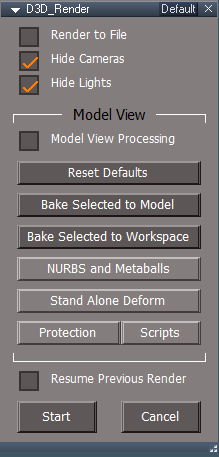
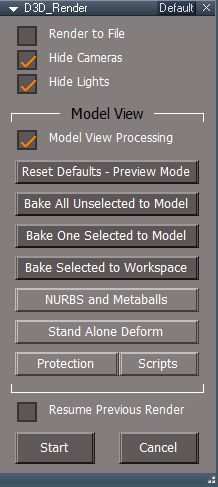
D3D_Render_Grp 'Major update Author - Clinton Reese' Updated panel to 216 width
Note: Load SyncSpecial.tsx in Model from the tsx Folder
Release 4/15/2025
viewtopic.php?t=3732
It is recommended that you completely Uninstall and Install trueSpace7.61 Beta 8 to a clean directory
Open the Task Manager
If you find any Standalone Runner (32 bit) or trueSpace (32 bit) programs open, Select each one and RClick - End task
Close the Task Manager
Updates:
Scripts:
Window.Shortcuts
Add: Ctrl Left 'Select and Show Floating Panel Next (Not previous) - jScipt or Activity Event'
Add: Ctrl Right 'Select and Show Floating Panel Next - jScipt or Activity Event'
Window.Shortcuts_BACKUP
preobjects:
Toolbars
UUCommands/Synchronize
Opens with the [Protect Workspace] button in the Stack/Setting - Desktop Mouse 'Mouse Listner - Mouse Buttons'
Note: Requires pressing a Mouse Button and or brush over in a 3D View or Link Editor View
3D View = 0
Link Editor View = 1
Delay - Default 1 second 'Pause Activity hooked up to Synchronize Scene script
Note: This seems to stop the Synchronize Scene script from running twice
Period - Timer ms speed
Timer button toggles Timer ON | Off
Frame = Timer Frame
Note: Runs Synchronize constantly depending on the Period value
Active - Syncs Model and Workspace animation Current Time
Active also disables Model AutoRecord - Required!
Current Time = Frame
Note: Using Workspace Animation Editor's animation time scrubber, sets Model's Current Time
Use: Workspace's and or Model's Record button to record keyframe
WARNING! 'Do not use Model's AutoRecord'
Model button opens a Docked Model View
Requires a preobject/Model Frame Window.RsObj included in the UU10
Camera View button adds and sets a scene Camera View camera
Use: Open Model first, press the Camera View button, and press the Camera's Synchronize button in the Stack
Ground button adds a scene Scene Ground and sets Workspace Ground to closely match Model's Grid
Requires a Scene Ground.RsObj in the Objects - tS7.61 Update objects library, included in the UU10
Note: Pressing the Synchronize panel's X close button, Stops the Timer, Removes the Camera View and Scene Ground objects from the scene
Warning! The Timer and Current Time Active modes should NOT be used with the D3D Render, it has its own Sync method
. .
CustomScriptsStore2:
Dimensions 'Add: Create Dimension connector'
CustomScriptsStore:
ProtectWorkspace 'Update Open & Dock Model'
AutokeyWidgets
Select/Cycle 'Add: Select - Search term Selected Level' and 'Cycle select jScipt or Activity Event'
D3D_Render_Grp 'Major update Author - Clinton Reese' Updated panel to 216 width
Note: Load SyncSpecial.tsx in Model from the tsx Folder
-
trueBlue
- Captain
- Posts: 5548
- Joined: 06 Jul 2009, 22:50
- Type the number ten into the box: 10
Re: Final trueSpace 7.61 Beta 8 Unofficial Update
trueSpace7.61 Beta 8 Unofficial Update Version 10
Release 4/16/2025
viewtopic.php?t=3732
It is recommended that you completely Uninstall and Install trueSpace7.61 Beta 8 to a clean directory
Open the Task Manager
If you find any Standalone Runner (32 bit) or trueSpace (32 bit) programs open, Select each one and RClick - End task
Close the Task Manager
Updates:
CustomScriptsStore:
ProtectWorkspace 'Update: Restore button code'
D3D_Render_Grp/CopyAndOpen script 'Add: Reset Defaults'
D3D_Render/D3D Function Set
Add: Status Message - "D3D Render - Reset Defaults (Preview Mode)" to ResetAllInputs function
Fix: Error in MarkAsSpecial function when nothing selected and add Check for Mesh connector
D3D_Render - Misc
Add: Memory Use button (Gets trueSpace current memory use)
Add: Status Progress option (If Model has any animations, it will show status progress too)
Add: Check Selected 3D Object button (Checks for unlinked Animation Clips with option to remove orphaned connector and clips by Flattening History)
D3D_Render - Default
Four modes of operations
1) Reset Defaults - Preview Mode 'Set Default settings for Preview Mode' (No Keyframes are recorded)
2) Bake All Unselected to Model 'Bake Keyframes - All Workspace animated objects to Model' (Everything is unselected)
3) Bake One Selected to Model 'Bake Keyframes - One selected object to Model'
4) Bake Selected to Workspace ' Bake Keyframes - One selected object to Workspace'
Release 4/16/2025
viewtopic.php?t=3732
It is recommended that you completely Uninstall and Install trueSpace7.61 Beta 8 to a clean directory
Open the Task Manager
If you find any Standalone Runner (32 bit) or trueSpace (32 bit) programs open, Select each one and RClick - End task
Close the Task Manager
Updates:
CustomScriptsStore:
ProtectWorkspace 'Update: Restore button code'
D3D_Render_Grp/CopyAndOpen script 'Add: Reset Defaults'
D3D_Render/D3D Function Set
Add: Status Message - "D3D Render - Reset Defaults (Preview Mode)" to ResetAllInputs function
Fix: Error in MarkAsSpecial function when nothing selected and add Check for Mesh connector
D3D_Render - Misc
Add: Memory Use button (Gets trueSpace current memory use)
Add: Status Progress option (If Model has any animations, it will show status progress too)
Add: Check Selected 3D Object button (Checks for unlinked Animation Clips with option to remove orphaned connector and clips by Flattening History)
D3D_Render - Default
Four modes of operations
1) Reset Defaults - Preview Mode 'Set Default settings for Preview Mode' (No Keyframes are recorded)
2) Bake All Unselected to Model 'Bake Keyframes - All Workspace animated objects to Model' (Everything is unselected)
3) Bake One Selected to Model 'Bake Keyframes - One selected object to Model'
4) Bake Selected to Workspace ' Bake Keyframes - One selected object to Workspace'
-
trueBlue
- Captain
- Posts: 5548
- Joined: 06 Jul 2009, 22:50
- Type the number ten into the box: 10
Re: Final trueSpace 7.61 Beta 8 Unofficial Update
trueSpace7.61 Beta 8 Unofficial Update Version 10
Release 4/17/2025
viewtopic.php?t=3732
It is recommended that you completely Uninstall and Install trueSpace7.61 Beta 8 to a clean directory
Open the Task Manager
If you find any Standalone Runner (32 bit) or trueSpace (32 bit) programs open, Select each one and RClick - End task
Close the Task Manager
Updates:
preobjects:
UUCommands/Synchronize 'Changed from Sync scene to sync first selected 3D object'
CustomScriptsStore2:
Dimensions 10/20/2022 Author Clinton Resse
Objects - tS7.61 Update objects Library
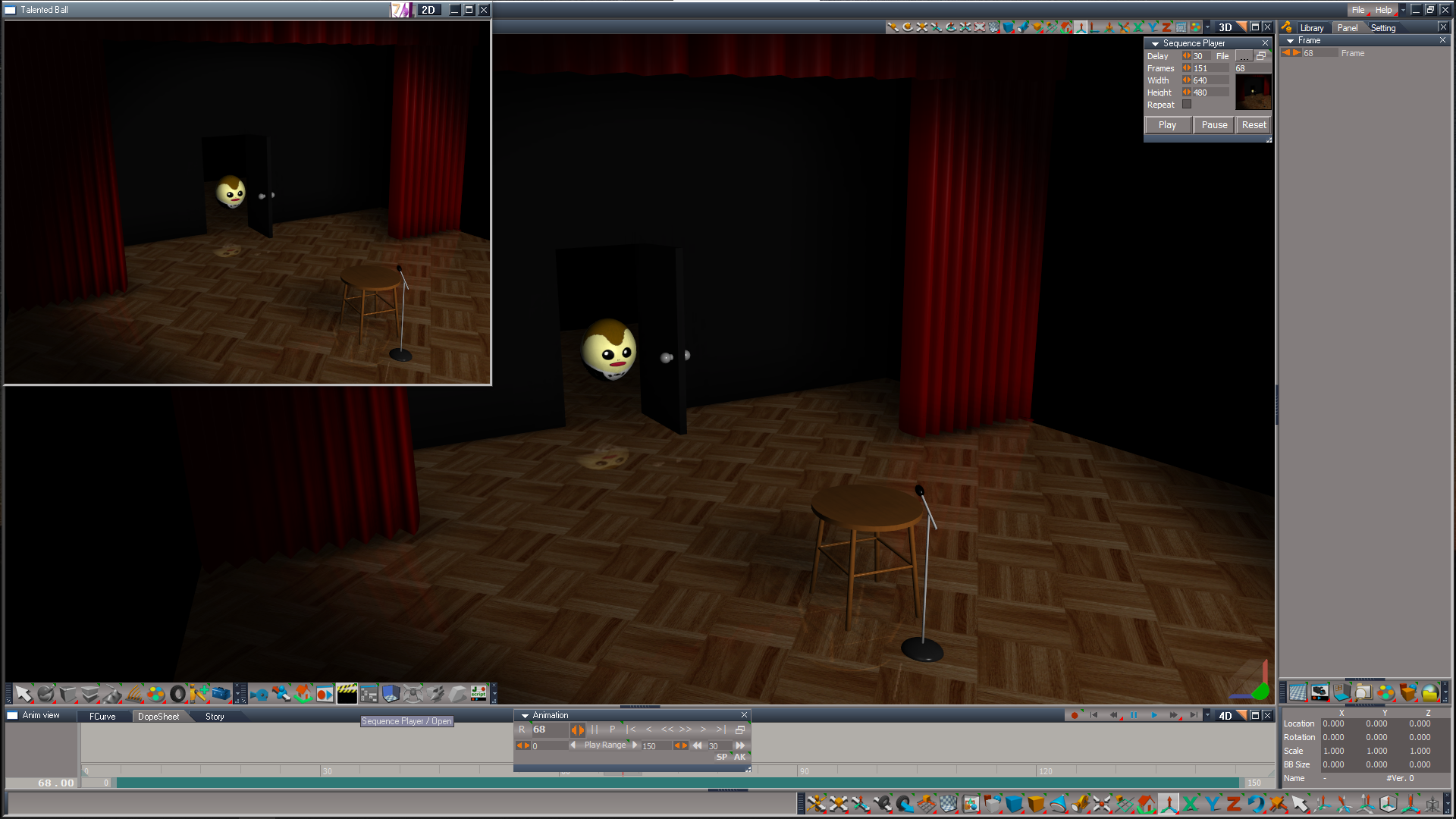
Sequence Player update:
File - Load the first image (untitled_00000.png) in the sequence of images
Delay - Amount of delay time (milliseconds) playing the frames
Frames - Enter the number of images in the sequence, minus one for zero
Width - Width of the floating BMP Player
Height - Height of the floating BMP Player
Repeat - Checked Plays the sequece in a Loop / Unchecked stops at the end frame
Frame - Scrubber to manually play the sequence of images
Release 4/17/2025
viewtopic.php?t=3732
It is recommended that you completely Uninstall and Install trueSpace7.61 Beta 8 to a clean directory
Open the Task Manager
If you find any Standalone Runner (32 bit) or trueSpace (32 bit) programs open, Select each one and RClick - End task
Close the Task Manager
Updates:
preobjects:
UUCommands/Synchronize 'Changed from Sync scene to sync first selected 3D object'
CustomScriptsStore2:
Dimensions 10/20/2022 Author Clinton Resse
Objects - tS7.61 Update objects Library
Sequence Player update:
File - Load the first image (untitled_00000.png) in the sequence of images
Delay - Amount of delay time (milliseconds) playing the frames
Frames - Enter the number of images in the sequence, minus one for zero
Width - Width of the floating BMP Player
Height - Height of the floating BMP Player
Repeat - Checked Plays the sequece in a Loop / Unchecked stops at the end frame
Frame - Scrubber to manually play the sequence of images
-
trueBlue
- Captain
- Posts: 5548
- Joined: 06 Jul 2009, 22:50
- Type the number ten into the box: 10
Re: Final trueSpace 7.61 Beta 8 Unofficial Update
trueSpace7.61 Beta 8 Unofficial Update Version 10
Release 4/20/2025
viewtopic.php?t=3732
It is recommended that you completely Uninstall and Install trueSpace7.61 Beta 8 to a clean directory
Open the Task Manager
If you find any Standalone Runner (32 bit) or trueSpace (32 bit) programs open, Select each one and RClick - End task
Close the Task Manager
Updates:
preobjects:
Widgets
CustomScriptsStore:
D3D_Render
Add: Remove Model Status button in Mic aspect
Add: Check for SyncSpecial.tsx
Configs:
Add: SpecialSync.tsc 'Model configuration with the SyncSpecial.tsx Loaded'
Objects - tS7.61 Update objects - Library
Sequence Player update:
File - Load the first image (untitled_00000.png) in the sequence of images
Delay - Amount of delay time (milliseconds) playing the frames
Frames - Enter the number of images in the sequence, minus one for zero
Width - Width of the floating BMP Player
Height - Height of the floating BMP Player
Repeat - Checked Plays the sequece in a Loop / Unchecked stops at the end frame
Set - Checked sets the Frames from Workspace Animation Editor / Unchecked sets to the default setting
Frame - Scrubber to manually play the sequence of images
Release 4/20/2025
viewtopic.php?t=3732
It is recommended that you completely Uninstall and Install trueSpace7.61 Beta 8 to a clean directory
Open the Task Manager
If you find any Standalone Runner (32 bit) or trueSpace (32 bit) programs open, Select each one and RClick - End task
Close the Task Manager
Updates:
preobjects:
Widgets
CustomScriptsStore:
D3D_Render
Add: Remove Model Status button in Mic aspect
Add: Check for SyncSpecial.tsx
Configs:
Add: SpecialSync.tsc 'Model configuration with the SyncSpecial.tsx Loaded'
Objects - tS7.61 Update objects - Library
Sequence Player update:
File - Load the first image (untitled_00000.png) in the sequence of images
Delay - Amount of delay time (milliseconds) playing the frames
Frames - Enter the number of images in the sequence, minus one for zero
Width - Width of the floating BMP Player
Height - Height of the floating BMP Player
Repeat - Checked Plays the sequece in a Loop / Unchecked stops at the end frame
Set - Checked sets the Frames from Workspace Animation Editor / Unchecked sets to the default setting
Frame - Scrubber to manually play the sequence of images
-
trueBlue
- Captain
- Posts: 5548
- Joined: 06 Jul 2009, 22:50
- Type the number ten into the box: 10
Re: Final trueSpace 7.61 Beta 8 Unofficial Update
trueSpace7.61 Beta 8 Unofficial Update Version 10
Release 4/21/2025
viewtopic.php?t=3732
It is recommended that you completely Uninstall and Install trueSpace7.61 Beta 8 to a clean directory
Open the Task Manager
If you find any Standalone Runner (32 bit) or trueSpace (32 bit) programs open, Select each one and RClick - End task
Close the Task Manager
Updates:
CustomScriptsStore:
D3D Render
Plugin Status script 'Update panel status messages'
SyncSpecial.tsx does not exist in the required Folder = "SyncSpecial.tsx NOT found"
SyncSpecial.tsx does exist in the required Folder = "Load - SyncSpecial Plugin is Required"
trueSpace Standalone = "Not supported in trueSpace Standalone"
Previous Sequence Player version was not working as expected
Objects - tS7.61 Update objects - Library
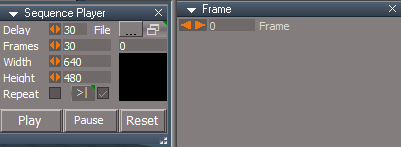
Sequence Player update:
File
Press the [...] button and browse to where you have a sequence of images
Select the first image that ends in Zero and Open
Delay - Amount of delay time in milliseconds playing each image
Frames - Enter the number of images in the sequence, minus one for zero
Width - Width of the BMP Player
Height - Height of the BMP Player
Repeat - Repeat playing sequence
>|
Checked - Sets Frames to the current Play Range - End Frame
Unchecked - Reset sets to the Default = 10
Note: Frames are set when loading the Sequence Player or press the >| button
Frame - Scrubber for manually playing the sequence of images
Release 4/21/2025
viewtopic.php?t=3732
It is recommended that you completely Uninstall and Install trueSpace7.61 Beta 8 to a clean directory
Open the Task Manager
If you find any Standalone Runner (32 bit) or trueSpace (32 bit) programs open, Select each one and RClick - End task
Close the Task Manager
Updates:
CustomScriptsStore:
D3D Render
Plugin Status script 'Update panel status messages'
SyncSpecial.tsx does not exist in the required Folder = "SyncSpecial.tsx NOT found"
SyncSpecial.tsx does exist in the required Folder = "Load - SyncSpecial Plugin is Required"
trueSpace Standalone = "Not supported in trueSpace Standalone"
Previous Sequence Player version was not working as expected
Objects - tS7.61 Update objects - Library
Sequence Player update:
File
Press the [...] button and browse to where you have a sequence of images
Select the first image that ends in Zero and Open
Delay - Amount of delay time in milliseconds playing each image
Frames - Enter the number of images in the sequence, minus one for zero
Width - Width of the BMP Player
Height - Height of the BMP Player
Repeat - Repeat playing sequence
>|
Checked - Sets Frames to the current Play Range - End Frame
Unchecked - Reset sets to the Default = 10
Note: Frames are set when loading the Sequence Player or press the >| button
Frame - Scrubber for manually playing the sequence of images
-
trueBlue
- Captain
- Posts: 5548
- Joined: 06 Jul 2009, 22:50
- Type the number ten into the box: 10
Re: Final trueSpace 7.61 Beta 8 Unofficial Update
trueSpace7.61 Beta 8 Unofficial Update Version 10
Release 4/22/2025
viewtopic.php?t=3732
It is recommended that you completely Uninstall and Install trueSpace7.61 Beta 8 to a clean directory
C:\trueSpace761
Open the Task Manager
If you find any Standalone Runner (32 bit) or trueSpace (32 bit) programs open, Select each one and RClick - End task
Close the Task Manager
Updates:
CustomScriptsStore2:
OD Copy & Paste
April 21, 2025, Author - Clinton Reese
Fixed paste uv values - which also fixed the crash limit
Fixed paste no uvs option
Modified: OpenPanel script "Do you have an External program like Blender setup with the required OD_CopyPasteExternal?"
Yes = Load and Open floating panel
No = Do not Load into CustomCommands
Requires OD_CopyPasteExternal: https://heimlich1024.github.io/OD_CopyPasteExternal/
Release 4/22/2025
viewtopic.php?t=3732
It is recommended that you completely Uninstall and Install trueSpace7.61 Beta 8 to a clean directory
C:\trueSpace761
Open the Task Manager
If you find any Standalone Runner (32 bit) or trueSpace (32 bit) programs open, Select each one and RClick - End task
Close the Task Manager
Updates:
CustomScriptsStore2:
OD Copy & Paste
April 21, 2025, Author - Clinton Reese
Fixed paste uv values - which also fixed the crash limit
Fixed paste no uvs option
Modified: OpenPanel script "Do you have an External program like Blender setup with the required OD_CopyPasteExternal?"
Yes = Load and Open floating panel
No = Do not Load into CustomCommands
Requires OD_CopyPasteExternal: https://heimlich1024.github.io/OD_CopyPasteExternal/
-
trueBlue
- Captain
- Posts: 5548
- Joined: 06 Jul 2009, 22:50
- Type the number ten into the box: 10
Re: Final trueSpace 7.61 Beta 8 Unofficial Update
trueSpace7.61 Beta 8 Unofficial Update Version 10
Release 4/23/2025
viewtopic.php?t=3732
It is recommended that you completely Uninstall and Install trueSpace7.61 Beta 8 to a clean directory
C:\trueSpace761
Open the Task Manager
If you find any Standalone Runner (32 bit) or trueSpace (32 bit) programs open, Select each one and RClick - End task
Close the Task Manager
Updates:
preobjects:
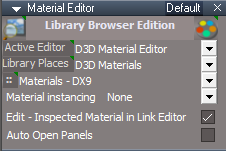
MaterialEditor .
Add: Auto Open Panels
Active = Auto open Library selection in a Floating Panel including the Image Browser
If not Active, Use the Left hand side button to open the Library selection in a Floating Panel including the Image Browser
Note: RClicking the Material Editor (Close) button, Disables - Auto Open Panels
Tip: Disable - Auto Open Panels before opening a Project from the Library
Release 4/23/2025
viewtopic.php?t=3732
It is recommended that you completely Uninstall and Install trueSpace7.61 Beta 8 to a clean directory
C:\trueSpace761
Open the Task Manager
If you find any Standalone Runner (32 bit) or trueSpace (32 bit) programs open, Select each one and RClick - End task
Close the Task Manager
Updates:
preobjects:
MaterialEditor .
Add: Auto Open Panels
Active = Auto open Library selection in a Floating Panel including the Image Browser
If not Active, Use the Left hand side button to open the Library selection in a Floating Panel including the Image Browser
Note: RClicking the Material Editor (Close) button, Disables - Auto Open Panels
Tip: Disable - Auto Open Panels before opening a Project from the Library
-
trueBlue
- Captain
- Posts: 5548
- Joined: 06 Jul 2009, 22:50
- Type the number ten into the box: 10
Re: Final trueSpace 7.61 Beta 8 Unofficial Update
trueSpace7.61 Beta 8 Unofficial Update Version 10
Release 4/26/2025
viewtopic.php?t=3732
It is recommended that you completely Uninstall and Install trueSpace7.61 Beta 8 to a clean directory
C:\trueSpace761
Open the Task Manager
If you find any Standalone Runner (32 bit) or trueSpace (32 bit) programs open, Select each one and RClick - End task
Close the Task Manager
Updates:
init.js
preobjects:
Toolbars
ToolbarsBACKUP
C3DReset
Desktop 'Update Scene Name buttons'
UUCommands 'Add: Scene Name activity'
clintonobjects:
ScriptManager 'Add: Loaded Count'
CustomScriptsStore:
General Function Set
Mesh Origin 'Axis aspect - Add: Freeze Axis button (Opens the Freeze Axis panel)'
Release 4/26/2025
viewtopic.php?t=3732
It is recommended that you completely Uninstall and Install trueSpace7.61 Beta 8 to a clean directory
C:\trueSpace761
Open the Task Manager
If you find any Standalone Runner (32 bit) or trueSpace (32 bit) programs open, Select each one and RClick - End task
Close the Task Manager
Updates:
init.js
preobjects:
Toolbars
ToolbarsBACKUP
C3DReset
Desktop 'Update Scene Name buttons'
UUCommands 'Add: Scene Name activity'
clintonobjects:
ScriptManager 'Add: Loaded Count'
CustomScriptsStore:
General Function Set
Mesh Origin 'Axis aspect - Add: Freeze Axis button (Opens the Freeze Axis panel)'
-
trueBlue
- Captain
- Posts: 5548
- Joined: 06 Jul 2009, 22:50
- Type the number ten into the box: 10
Re: Final trueSpace 7.61 Beta 8 Unofficial Update
trueSpace7.61 Beta 8 Unofficial Update Version 10
Release 4/28/2025
viewtopic.php?t=3732
It is recommended that you completely Uninstall and Install trueSpace7.61 Beta 8 to a clean directory
C:\trueSpace761
Open the Task Manager
If you find any Standalone Runner (32 bit) or trueSpace (32 bit) programs open, Select each one and RClick - End task
Close the Task Manager
Updates:
Objects - tS7.61 Update objects:
Animation Panel
Activities - My Activities:
Custom Watch Dog Author - Clinton Reese
Use:
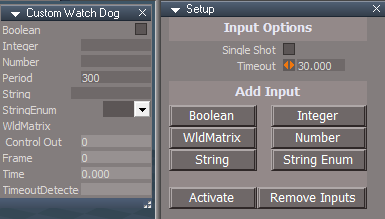
Add one or more Inputs
Press the Activate button .
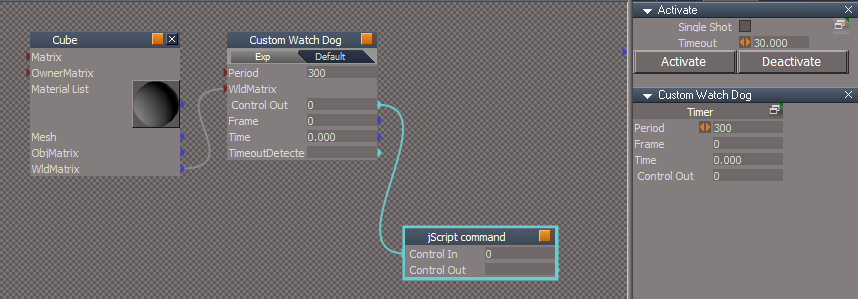
Press the Activate button Example shows the Cube's WldMatrix hooked up to the Custom Watch Dog's WldMatrix
When the Cube is transformed, the Jscript will run while the Timer is running
When Time reaches 30.000 (Timeout value), the Timer and the Custom Watch Dog will be Deactivated
Single Shot - Custom Watch Dog will only run once
Press the Activate button for each run
Single Shot trumps Timeout
Timeout - Amount of Time that will go by before stopping the Custom Watch Dog ( -1 = Never Timeout )
Release 4/28/2025
viewtopic.php?t=3732
It is recommended that you completely Uninstall and Install trueSpace7.61 Beta 8 to a clean directory
C:\trueSpace761
Open the Task Manager
If you find any Standalone Runner (32 bit) or trueSpace (32 bit) programs open, Select each one and RClick - End task
Close the Task Manager
Updates:
Objects - tS7.61 Update objects:
Animation Panel
Activities - My Activities:
Custom Watch Dog Author - Clinton Reese
Use:
Add one or more Inputs
Press the Activate button .
Press the Activate button Example shows the Cube's WldMatrix hooked up to the Custom Watch Dog's WldMatrix
When the Cube is transformed, the Jscript will run while the Timer is running
When Time reaches 30.000 (Timeout value), the Timer and the Custom Watch Dog will be Deactivated
Single Shot - Custom Watch Dog will only run once
Press the Activate button for each run
Single Shot trumps Timeout
Timeout - Amount of Time that will go by before stopping the Custom Watch Dog ( -1 = Never Timeout )
-
trueBlue
- Captain
- Posts: 5548
- Joined: 06 Jul 2009, 22:50
- Type the number ten into the box: 10
Re: Final trueSpace 7.61 Beta 8 Unofficial Update
trueSpace7.61 Beta 8 Unofficial Update Version 10
Release 5/1/2025
viewtopic.php?t=3732
It is recommended that you completely Uninstall and Install trueSpace7.61 Beta 8 to a clean directory
C:\trueSpace761
Open the Task Manager
If you find any Standalone Runner (32 bit) or trueSpace (32 bit) programs open, Select each one and RClick - End task
Close the Task Manager
Updates:
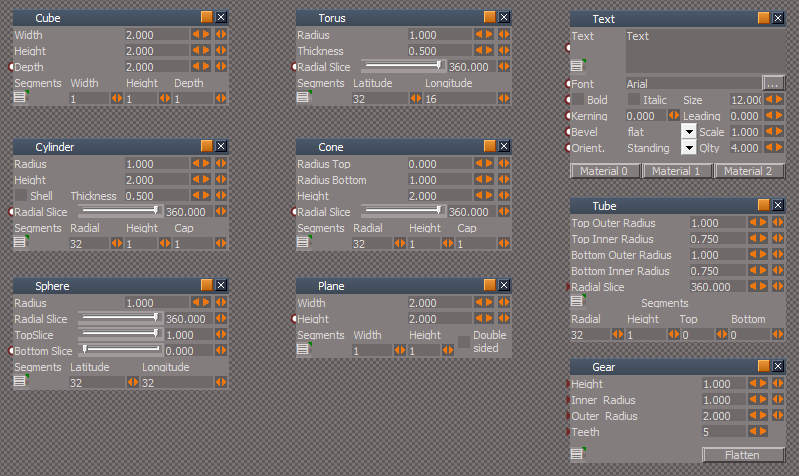
Toolbars 'Gear and Tube primitive 'RClick - Preferences'
ToolbarsBACKUP
Primitives
Gear 'Add: Mesh Normals'
Normals button 'Connect to Mesh Normals and Do not run from Preferences'
Flatten button 'Do not run from Preferences'
Release 5/1/2025
viewtopic.php?t=3732
It is recommended that you completely Uninstall and Install trueSpace7.61 Beta 8 to a clean directory
C:\trueSpace761
Open the Task Manager
If you find any Standalone Runner (32 bit) or trueSpace (32 bit) programs open, Select each one and RClick - End task
Close the Task Manager
Updates:
Toolbars 'Gear and Tube primitive 'RClick - Preferences'
ToolbarsBACKUP
Primitives
Gear 'Add: Mesh Normals'
Normals button 'Connect to Mesh Normals and Do not run from Preferences'
Flatten button 'Do not run from Preferences'