Final trueSpace 7.61 Beta 8 Unofficial Update

User avatar
trueBlue
Captain
Posts: 5548
Joined: 06 Jul 2009, 22:50
Type the number ten into the box: 10

Re: Final trueSpace 7.61 Beta 8 Unofficial Update

Post by trueBlue »

Test Update 31 for trueSpace7.61 Beta 8 Unofficial Update

April 2, 2021

Recommend that you completely Uninstall and Install trueSpace7.61 Beta 8 to a clean directory before installing this update. If you applied the previous Test Update to a clean directory, you do not need to Uninstall trueSpace7.61 Beta 8 before applying this new update.

This is a Beta Pre Release for TESTING the below updates and the updates in the Final trueSpace7.61 Beta 8 Std Unofficial Update thread
viewtopic.php?t=5418

Update

Material Editor
Convert D3D Materials
Update Author - Clinton Reese

Toolbars
Lock & Unlock icons
Fix for opening the Unselectable panel in Panel
RMB - Unselectable panel

All Encapsulate/Unencapsulate icons
Add
RMB - Panel
Opens - Encapsulate/Unencapsulate panel in Panel
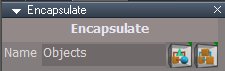
Encaps panel.png
Encaps panel.png (5.46 KiB) Viewed 4385 times
Widgets
View Widget
Fix for the create Camera/EntryPoint scripts
Corrected the 'Ortho' Widget Help

ScriptCommands
Eye2Cam.xml
Cam2Eye.xml
3DEncapsulate.xml
2DEncapsulate.xml
Unglue.xml '3D Unencapsulate'
Unencapsulate.xml '2D Unencapsulate'

CustomScriptsStore
NURBSScripts
MirrorMatrix
unSelectable

Synchronize
Add option for Start | Stop
Remove Synchronize Camera
User avatar
trueBlue
Captain
Posts: 5548
Joined: 06 Jul 2009, 22:50
Type the number ten into the box: 10

Re: Final trueSpace 7.61 Beta 8 Unofficial Update

Post by trueBlue »

Test Update 32 for trueSpace7.61 Beta 8 Unofficial Update

April 3, 2021

Recommend that you completely Uninstall and Install trueSpace7.61 Beta 8 to a clean directory before installing this update. If you applied the previous Test Update to a clean directory, you do not need to Uninstall trueSpace7.61 Beta 8 before applying this new update.

This is a Beta Pre Release for TESTING the below updates and the updates in the Final trueSpace7.61 Beta 8 Std Unofficial Update thread
viewtopic.php?t=5418

Update

Lights
All workspace lights
Removed clear history from the Widget open floating panel

Cameras
Camera & EntryPoint
Removed clear history from the Widget open floating panel

Yafaray Camera
Removed clear history from the Widget open floating panel
Update
Set Camera button scripts
Set DOF Distance button scripts
View button scripts
Removed Synchronization
Changed status messages & uses utilityFunctions = System.CreateDO("Clintons3D Package/Utility functions");

Updated YafaRay4tS Setup library Camera(s) & YafaRay4tS.RsScn

Camera Widget(s)
Removed clear history from the Widget open floating panel
User avatar
trueBlue
Captain
Posts: 5548
Joined: 06 Jul 2009, 22:50
Type the number ten into the box: 10

Re: Final trueSpace 7.61 Beta 8 Unofficial Update

Post by trueBlue »

Test Update 33 for trueSpace7.61 Beta 8 Unofficial Update

April 4, 2021

Recommend that you completely Uninstall and Install trueSpace7.61 Beta 8 to a clean directory before installing this update. If you applied the previous Test Update to a clean directory, you do not need to Uninstall trueSpace7.61 Beta 8 before applying this new update.

This is a Beta Pre Release for TESTING the below updates and the updates in the Final trueSpace7.61 Beta 8 Std Unofficial Update thread
viewtopic.php?t=5418

Update

Lights
All Spot lights
Fixed a conflict with the View Widget
Spot lights.png
Spot lights.png (24.23 KiB) Viewed 4360 times
With an active Window View, press the View button

Camera Widget(s)
Fixed a conflict with the View Widget
Cameras.png
With an active Window View, LMB select the View icon
User avatar
trueBlue
Captain
Posts: 5548
Joined: 06 Jul 2009, 22:50
Type the number ten into the box: 10

Re: Final trueSpace 7.61 Beta 8 Unofficial Update

Post by trueBlue »

Test Update 34 for trueSpace7.61 Beta 8 Unofficial Update

April 5, 2021

Recommend that you completely Uninstall and Install trueSpace7.61 Beta 8 to a clean directory before installing this update. If you applied the previous Test Update to a clean directory, you do not need to Uninstall trueSpace7.61 Beta 8 before applying this new update.

This is a Beta Pre Release for TESTING the below updates and the updates in the Final trueSpace7.61 Beta 8 Std Unofficial Update thread
viewtopic.php?t=5418

Update

freezeTransforms
Updated Author - Clinton Reese
Add Status messages

Widgets/Shear/Freeze script
Updated script with new above code
Also flattens the Axis

Copy.xml
Updated Author - Clinton Reese

Toolbars/CustomToolbarBlue/Eye Camera/Camera thru Camera View, 6 icons
LMB - Camera View
Switches the active window to their Camera View
Update RMB commands
RMB - Camera Panel
Opens their floating camera panel
User avatar
trueBlue
Captain
Posts: 5548
Joined: 06 Jul 2009, 22:50
Type the number ten into the box: 10

Re: Final trueSpace 7.61 Beta 8 Unofficial Update

Post by trueBlue »

Test Update 35 for trueSpace7.61 Beta 8 Unofficial Update

April 7, 2021

Recommend that you completely Uninstall and Install trueSpace7.61 Beta 8 to a clean directory before installing this update. If you applied the previous Test Update to a clean directory, you do not need to Uninstall trueSpace7.61 Beta 8 before applying this new update.

This is a Beta Pre Release for TESTING the below updates and the updates in the Final trueSpace7.61 Beta 8 Std Unofficial Update thread
viewtopic.php?t=5418

Update

Desktop
Synchronize & Protect Workspace button script
Add
if(Node.SubObjectCount('/D3DView')==0) return;

Lights
All Spot & Projector lights View button script
Add
D3DView.SetActiveCamera('%THIS_NAME%', '{2C152F81-45A2-4035-8896-9E49D60C8A7A}')

Cameras
All Cameras
Update
View button script
Fix if the active window is not a 3D Window
Remove Camera panel from the Stack/Panel
Open floating Camera panel
Status message "Select a 3D Window"
Workarounds
Use the floating Camera panel and select a 3D Window first
With a Camera and 3D Window selected use trueSpace's Set Camera
Left click the Camera's widget FOV

Synchronize button script
Fix if the active window is not a 3D Window
Remove Camera panel from the Stack/Panel
Open floating Camera panel
Alert "Synchronize is Deactivated Select a 3D Window and then press the Synchronize button"
Workaround
Use the floating Camera panel and select a 3D Window first
Unresolved issues:
On | Off button control does not reset
Workaround
Press Deactivate and then Synchronize
tSbridge command "View from Object" is unreliable at first attempts
Workaround
With the Camera selected, press the View from Object in Model, or LMB click the View icon in the Camera panel

preobjects
PostProcess.RsObj
Update
Edit controls
Removed Update on change

Layouts
All layouts
Update
Postprocess.RsObj
Removed Update on change

Postprocess library
Update
R2TexturePostProcessing.RsObj

Set Postprocess Color Key.RsObj
Updated the Set - Active Window Postprocess button script
Set PostprocessColor panel.png
Set PostprocessColor panel.png (6.28 KiB) Viewed 4330 times
Objects - tS7.61 Update objects library
Background Image Camera.RsObj
Updated
View button script
Removed synchronization
Updated the toolbar button LMB & RMB commands
Cayenne
Chief Petty Officer
Posts: 119
Joined: 03 Jun 2009, 20:05
Type the number ten into the box: 0
Location: U.K.

Re: Final trueSpace 7.61 Beta 8 Unofficial Update

Post by Cayenne »

wotcha blue , good to see you keeping it all alive , I use this post to tag in and say hello from the depths of my dismal mind , I am trying to get myself up and running and enthusiastic in life and its joys again , its a hard struggle but am trying .

hope to pop in again soon.

best to all of you guys here keeping it alive :-) :bananalove:
User avatar
trueBlue
Captain
Posts: 5548
Joined: 06 Jul 2009, 22:50
Type the number ten into the box: 10

Re: Final trueSpace 7.61 Beta 8 Unofficial Update

Post by trueBlue »

Cayenne wrote: 10 Apr 2021, 06:54 wotcha blue , good to see you keeping it all alive , I use this post to tag in and say hello from the depths of my dismal mind , I am trying to get myself up and running and enthusiastic in life and its joys again , its a hard struggle but am trying .

hope to pop in again soon.

best to all of you guys here keeping it alive :-) :bananalove:
I was just thinking about you the other day :mrgreen:
Glad to see you! :D
User avatar
trueBlue
Captain
Posts: 5548
Joined: 06 Jul 2009, 22:50
Type the number ten into the box: 10

Re: Final trueSpace 7.61 Beta 8 Unofficial Update

Post by trueBlue »

Test Update 36 for trueSpace7.61 Beta 8 Unofficial Update

April 21, 2021

Recommend that you completely Uninstall and Install trueSpace7.61 Beta 8 to a clean directory before installing this update. If you applied the previous Test Update to a clean directory, you do not need to Uninstall trueSpace7.61 Beta 8 before applying this new update.

This is a Beta Pre Release for TESTING the below updates and the updates in the Final trueSpace7.61 Beta 8 Std Unofficial Update thread
viewtopic.php?t=5418

Update

Toolbars
File/Save
If nothing selected, Unselect and put scene name into dialog
If multiple objects selected, select first selected with status message "Saving Cube..."
Cube being the first selected object in this case

File/Save As Scene
Unselect and put scene name into dialog

File/Save As Object
If nothing selected, status message "Select an Object" and do not open Save As Object panel
If multiple objects selected, select first selected with status message "Saving Cube..."
Cube being the first selected object in this case

NURBSScripts
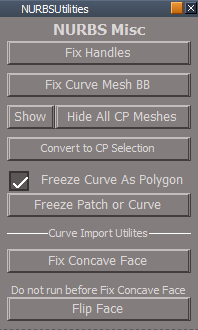
NURBSUtilities/Misc
Add
Show All CP Meshes
NURBS Misc Show all CP Meshes.png
NURBS Misc Show all CP Meshes.png (11.04 KiB) Viewed 4169 times
Constraint Scripts
All Constraint Scripts/unDoIt script(s)
Add
RsApp.ClearHistory()
User avatar
trueBlue
Captain
Posts: 5548
Joined: 06 Jul 2009, 22:50
Type the number ten into the box: 10

Re: Final trueSpace 7.61 Beta 8 Unofficial Update

Post by trueBlue »

Test Update 37 for trueSpace7.61 Beta 8 Unofficial Update

April 21, 2021

Recommend that you completely Uninstall and Install trueSpace7.61 Beta 8 to a clean directory before installing this update. If you applied the previous Test Update to a clean directory, you do not need to Uninstall trueSpace7.61 Beta 8 before applying this new update.

This is a Beta Pre Release for TESTING the below updates and the updates in the Final trueSpace7.61 Beta 8 Std Unofficial Update thread
viewtopic.php?t=5418

Update

Toolbars

File/Save As Scene
Unselect and put scene name into dialog

File/Save As Object
If nothing selected, status message "Select an Object" and do not open Save As Object panel
If multiple objects selected, select first selected with status message "Saving Cube..."
Cube being the first selected object in this case

NURBSScripts
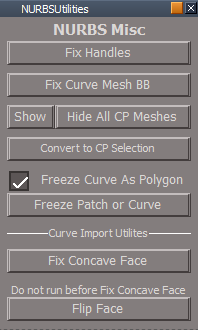
NURBSUtilities/Misc
Add
Show All CP Meshes
NURBS Misc Show all CP Meshes.png
NURBS Misc Show all CP Meshes.png (11.04 KiB) Viewed 4155 times
Constraint Scripts
All Constraint Scripts/unDoIt script(s)
Add
RsApp.ClearHistory()
User avatar
trueBlue
Captain
Posts: 5548
Joined: 06 Jul 2009, 22:50
Type the number ten into the box: 10

Re: Final trueSpace 7.61 Beta 8 Unofficial Update

Post by trueBlue »

Test Update 38 for trueSpace7.61 Beta 8 Unofficial Update

April 23, 2021

Recommend that you completely Uninstall and Install trueSpace7.61 Beta 8 to a clean directory before installing this update. If you applied the previous Test Update to a clean directory, you do not need to Uninstall trueSpace7.61 Beta 8 before applying this new update.

This is a Beta Pre Release for TESTING the below updates and the updates in the Final trueSpace7.61 Beta 8 Std Unofficial Update thread
viewtopic.php?t=5418

Update

Toolbars

Map Displacement
Optimize Triangulation
Soft paint brush
Updated to work with NURBS

NURBSScripts
Freeze Curve

Commands
Hide Camera & Lights
Show Camera & Lights
User avatar
trueBlue
Captain
Posts: 5548
Joined: 06 Jul 2009, 22:50
Type the number ten into the box: 10

Re: Final trueSpace 7.61 Beta 8 Unofficial Update

Post by trueBlue »

Test Update 39 for trueSpace7.61 Beta 8 Unofficial Update

April 26, 2021

Recommend that you completely Uninstall and Install trueSpace7.61 Beta 8 to a clean directory before installing this update.

This is a Beta Pre Release for TESTING the below updates and the updates in the Final trueSpace7.61 Beta 8 Std Unofficial Update thread
viewtopic.php?t=5418

Update
Removed duplicate files from the preobjects folder

Commands
Show
Hide Camera & Lights
Show Camera & Lights
User avatar
trueBlue
Captain
Posts: 5548
Joined: 06 Jul 2009, 22:50
Type the number ten into the box: 10

Re: Final trueSpace 7.61 Beta 8 Unofficial Update

Post by trueBlue »

Test Update 40 for trueSpace7.61 Beta 8 Unofficial Update

May 5, 2021

Recommend that you completely Uninstall and Install trueSpace7.61 Beta 8 to a clean directory before installing this update. If you applied the previous Test Update to a clean directory, you do not need to Uninstall trueSpace7.61 Beta 8 before applying this new update.

This is a Beta Pre Release for TESTING the below updates and the updates in the Final trueSpace7.61 Beta 8 Std Unofficial Update thread
viewtopic.php?t=5418

Update

SnappingScripts
jointToObject
jointToPoints

Commands
Hide Camera & Lights
Show Camera & Lights
User avatar
trueBlue
Captain
Posts: 5548
Joined: 06 Jul 2009, 22:50
Type the number ten into the box: 10

Re: Final trueSpace 7.61 Beta 8 Unofficial Update

Post by trueBlue »

Test Update 41 for trueSpace7.61 Beta 8 Unofficial Update

May 8, 2021

Recommend that you completely Uninstall and Install trueSpace7.61 Beta 8 to a clean directory before installing this update. If you applied the previous Test Update to a clean directory, you do not need to Uninstall trueSpace7.61 Beta 8 before applying this new update.

This is a Beta Pre Release for TESTING the below updates and the updates in the Final trueSpace7.61 Beta 8 Std Unofficial Update thread
viewtopic.php?t=5418

Update

Material Editor
Changed tooltips to "Edit DX material in Link Editor / Current Scene"

NormalsScripts
Removed RsApp.ClearHistory()
User avatar
trueBlue
Captain
Posts: 5548
Joined: 06 Jul 2009, 22:50
Type the number ten into the box: 10

Re: Final trueSpace 7.61 Beta 8 Unofficial Update

Post by trueBlue »

Test Update 42 for trueSpace7.61 Beta 8 Unofficial Update

May 8, 2021

Recommend that you completely Uninstall and Install trueSpace7.61 Beta 8 to a clean directory before installing this update. If you applied the previous Test Update to a clean directory, you do not need to Uninstall trueSpace7.61 Beta 8 before applying this new update.

This is a Beta Pre Release for TESTING the below updates and the updates in the Final trueSpace7.61 Beta 8 Std Unofficial Update thread
viewtopic.php?t=5418

Update

Widgets/Object Navigation Widget(s)

NURBS Scripts

tS761 Scene Animator
Add an Update script to the Watch Dog Event(s)
User avatar
trueBlue
Captain
Posts: 5548
Joined: 06 Jul 2009, 22:50
Type the number ten into the box: 10

Re: Final trueSpace 7.61 Beta 8 Unofficial Update

Post by trueBlue »

Test Update 43 for trueSpace7.61 Beta 8 Unofficial Update

May 9, 2021

Recommend that you completely Uninstall and Install trueSpace7.61 Beta 8 to a clean directory before installing this update. If you applied the previous Test Update to a clean directory, you do not need to Uninstall trueSpace7.61 Beta 8 before applying this new update.

This is a Beta Pre Release for TESTING the below updates and the updates in the Final trueSpace7.61 Beta 8 Std Unofficial Update thread
viewtopic.php?t=5418

Update

preobjects
Camera1
User avatar
trueBlue
Captain
Posts: 5548
Joined: 06 Jul 2009, 22:50
Type the number ten into the box: 10

Re: Final trueSpace 7.61 Beta 8 Unofficial Update

Post by trueBlue »

Test Update 43 for trueSpace7.61 Beta 8 Unofficial Update

May 10, 2021

Recommend that you completely Uninstall and Install trueSpace7.61 Beta 8 to a clean directory before installing this update. If you applied the previous Test Update to a clean directory, you do not need to Uninstall trueSpace7.61 Beta 8 before applying this new update.

This is a Beta Pre Release for TESTING the below updates and the updates in the Final trueSpace7.61 Beta 8 Std Unofficial Update thread
viewtopic.php?t=5418

Update
ParticleScripts
Update
Flipbook 2 Alpha - Author Clinton Reese

pointCloneScript
Update 4/1/2021 - Author Clinton Reese
Modifications
Add
owner_out
Alert "Point Clone complete"
Updated Notes aspect
1 - 4 steps

unSelectable
Help aspect
Removed option to use previous Script Based unSelectable version

Snapping
Updated panel text
Select - Face, Edge, or Vertex
User avatar
trueBlue
Captain
Posts: 5548
Joined: 06 Jul 2009, 22:50
Type the number ten into the box: 10

Re: Final trueSpace 7.61 Beta 8 Unofficial Update

Post by trueBlue »

Test Update 44 for trueSpace7.61 Beta 8 Unofficial Update

May 15, 2021

Recommend that you completely Uninstall and Install trueSpace7.61 Beta 8 to a clean directory before installing this update. If you applied the previous Test Update to a clean directory, you do not need to Uninstall trueSpace7.61 Beta 8 before applying this new update.

This is a Beta Pre Release for TESTING the below updates and the updates in the Final trueSpace7.61 Beta 8 Std Unofficial Update thread
viewtopic.php?t=5418

Update
unSelectable
Update
Unlock All
User avatar
trueBlue
Captain
Posts: 5548
Joined: 06 Jul 2009, 22:50
Type the number ten into the box: 10

Re: Final trueSpace 7.61 Beta 8 Unofficial Update

Post by trueBlue »

Test Update 45 for trueSpace7.61 Beta 8 Unofficial Update

May 17, 2021

Recommend that you completely Uninstall and Install trueSpace7.61 Beta 8 to a clean directory before installing this update. If you applied the previous Test Update to a clean directory, you do not need to Uninstall trueSpace7.61 Beta 8 before applying this new update.

This is a Beta Pre Release for TESTING the below updates and the updates in the Final trueSpace7.61 Beta 8 Std Unofficial Update thread
viewtopic.php?t=5418

Update

Toolbars
WinGUID_Bar
Reset/Perspective 'RMB command uses a RsApp.RunScriptBuffer script'

Scripts/Commands Author Clinton Reese
Update using a RsApp.RunScriptBuffer script
Copy
UnLookAt
RotatePOV
RotateISO
Cam2Eye
Eye2Cam
User avatar
trueBlue
Captain
Posts: 5548
Joined: 06 Jul 2009, 22:50
Type the number ten into the box: 10

Re: Final trueSpace 7.61 Beta 8 Unofficial Update

Post by trueBlue »

Test Update 46 for trueSpace7.61 Beta 8 Unofficial Update

May 19, 2021

Recommend that you completely Uninstall and Install trueSpace7.61 Beta 8 to a clean directory before installing this update. If you applied the previous Test Update to a clean directory, you do not need to Uninstall trueSpace7.61 Beta 8 before applying this new update.

This is a Beta Pre Release for TESTING the below updates and the updates in the Final trueSpace7.61 Beta 8 Std Unofficial Update thread
viewtopic.php?t=5418

Update

Plugins.xml
Clintons3dPlugin v.1638428
Clintons3dRsView v.1638406

Commands
Copy Window

preobjects
Quad Frame Window

CustomCommands Author Clinton Reese
Mesh Object Coordinate System
Static Sweep Plus
Vertex Target Weld
Web Server
Workspace Layers 4

Toolbars
File/New Scene
User avatar
trueBlue
Captain
Posts: 5548
Joined: 06 Jul 2009, 22:50
Type the number ten into the box: 10

Re: Final trueSpace 7.61 Beta 8 Unofficial Update

Post by trueBlue »

Test Update 47 for trueSpace7.61 Beta 8 Unofficial Update

May 21, 2021

Recommend that you completely Uninstall and Install trueSpace7.61 Beta 8 to a clean directory before installing this update. If you applied the previous Test Update to a clean directory, you do not need to Uninstall trueSpace7.61 Beta 8 before applying this new update.

This is a Beta Pre Release for TESTING the below updates and the updates in the Final trueSpace7.61 Beta 8 Std Unofficial Update thread
viewtopic.php?t=5418

Update

Lights
Update Color Picker - Author Clinton Reese
Including all Workspace & YafaRay Lights, Libraries, and New scene

CustomCommands - Author Clinton Reese
pointCloneScript
radialArray2Script
gridArray2Script
Constraint Scripts
DeformScripts1
User avatar
trueBlue
Captain
Posts: 5548
Joined: 06 Jul 2009, 22:50
Type the number ten into the box: 10

Re: Final trueSpace 7.61 Beta 8 Unofficial Update

Post by trueBlue »

Test Update 49 for trueSpace7.61 Beta 8 Unofficial Update

May 23, 2021

Recommend that you completely Uninstall and Install trueSpace7.61 Beta 8 to a clean directory before installing this update. If you applied the previous Test Update to a clean directory, you do not need to Uninstall trueSpace7.61 Beta 8 before applying this new update.

This is a Beta Pre Release for TESTING the below updates and the updates in the Final trueSpace7.61 Beta 8 Std Unofficial Update thread
viewtopic.php?t=5418

Update

Commands
Delete.xml

CustomCommands
LEtools

Constraint Scripts/OpenPanel
Update
Line 44 & 124
var maxStandardPanelWidth = 192

Toolbars
All of the below icons no longer clear the history
Record Toolbar
jScript Macro Record Toolbar
VB Macro Record Toolbar
3D Window/RMB Command
User avatar
trueBlue
Captain
Posts: 5548
Joined: 06 Jul 2009, 22:50
Type the number ten into the box: 10

Re: Final trueSpace 7.61 Beta 8 Unofficial Update

Post by trueBlue »

Test Update 50 for trueSpace7.61 Beta 8 Unofficial Update

May 24, 2021

Recommend that you completely Uninstall and Install trueSpace7.61 Beta 8 to a clean directory before installing this update. If you applied the previous Test Update to a clean directory, you do not need to Uninstall trueSpace7.61 Beta 8 before applying this new update.

This is a Beta Pre Release for TESTING the below updates and the updates in the Final trueSpace7.61 Beta 8 Std Unofficial Update thread
viewtopic.php?t=5418

Update

Rs Main Libraries/Objects - tS7.61 Update objects
tS761 Toolbars 'Does not clear the history & use util.Commands'
Animation Panel 'Does not clear the history & use util.Commands'
Scene Animator 'Does not clear the history & use util.Commands'


Toolbars
Red toolbar icon LMB command
Blue toolbar icon LMB command
Clintons toolbar icon LMB command
Updated 'Use util.Rename'

Widgets/Tools
Shear 'Does not clear the history & use util.Commands'

CustomCommands
NormalsScripts - Author Clinton Reese
User avatar
trueBlue
Captain
Posts: 5548
Joined: 06 Jul 2009, 22:50
Type the number ten into the box: 10

Re: Final trueSpace 7.61 Beta 8 Unofficial Update

Post by trueBlue »

Update 52 for trueSpace7.61 Beta 8 Unofficial Update

May 28, 2021

viewtopic.php?t=3732

Update

Window.Shortcuts.xml
Shift + L opens Workspace Layers 4
Note: A 3D Window must be active

Commands
C3DRestore
Add
RsApp.ClearHistory()

CustomCommands
WebServer
StartWebServer
Changed Node.Rename() to Clintons3D Package/Utility functions command
Add
Set WebServerFrame
Uses Clintons3D Package/Utility functions commands

wsLayersGroup4
loadIt
Changed Node.Copy() to Clintons3D Package/Utility functions command

workspacelayers4
Modified all script(s) commands to Clintons3D Package/Utility functions commands

Common Function Set
Modified commands to Clintons3D Package/Utility functions commands
User avatar
trueBlue
Captain
Posts: 5548
Joined: 06 Jul 2009, 22:50
Type the number ten into the box: 10

Re: Final trueSpace 7.61 Beta 8 Unofficial Update

Post by trueBlue »

Update 53 for trueSpace7.61 Beta 8 Unofficial Update

May 29, 2021

viewtopic.php?t=3732

Update

Workspace Layers 4 and Web Server updates from Author Clinton Reese 5/28/2021
Updated to use Clintons3D Package/Utility functions commands

CustomCommands
WebServer
StartWebServer
Add

Code: Select all

//File/New Scene command closes the WebServerFrame and Workspace Layers 4 panel
util = System.CreateDO("Clintons3D Package/Utility functions")
util.Rename(windowFrame, "WebServerFrame")
wsLayersGroup4
OpenLayersPanel
Add

Code: Select all

//	if(!Node.Exists("/Scripts/CustomCommands/wsLayersGroup4/LayersPanel")) return;
if(!Node.Exists("/Scripts/CustomCommands/wsLayersGroup4/LayersPanelFrame")) {
	System.Alert("Workspace Layers 4 is not Installed");
	params.SetTerminationFlag()
	return;
}
//Stop if already open
if(Node.Exists("Project/Windows Manager Space/LayersPanelFrame")) {
	params.SetTerminationFlag()
	return;
}
//Stop if already open
if(!Node.Exists("/Project/Windows Manager Space/WebServerFrame")) {
	params.SetTerminationFlag()
	return;
}
loadIt
Add

Code: Select all

//	Activity.Run("Scripts/CustomCommands/WebServer/StartWebServer");
ScriptObject.Execute("Scripts/CustomCommands/WebServer/StartWebServer");
//Must run both because the above will not run the linked Set WebServerFrame script
ScriptObject.Execute("Scripts/CustomCommands/WebServer/Set WebServerFrame");
//Stop loading Workspace Layers 4 if the Mongoose Web Server is already opened
if(!Node.Exists("Project/Windows Manager Space/WebServerFrame")) {
	params.SetTerminationFlag();
	return;
}
This fixes the following error if you run Workspace Layers 4 and it is already opened
SecurityError.png
SecurityError.png (3.99 KiB) Viewed 4131 times
This only seems to effect Workspace Layers 4 and not the Color Picker or Scene View

The included Plugins.xml file has the Clintons3dPlugin, Clintons3dPluginExt and Clintons3dRsView, Installed and Loaded to the default path:
C:\trueSpace761
WARNING: These 3 plugins are required to be Installed and Loaded when using trueSpace!
User avatar
trueBlue
Captain
Posts: 5548
Joined: 06 Jul 2009, 22:50
Type the number ten into the box: 10

Re: Final trueSpace 7.61 Beta 8 Unofficial Update

Post by trueBlue »

Update 54 for trueSpace7.61 Beta 8 Unofficial Update

May 31, 2021

viewtopic.php?t=3732

Update

Commands
Clintons3dPlugin.xml & init.js 'Add check for plugin'
The Clintons3dPlugin script runs every time trueSpace starts up if the Clintons3dPlugin is not Loaded or Installed
You will get an Alert to Install the Clintons3dPlugin.rsx plugin and the Package Manager will open

Toolbars
ClintonToolbar
PEButton LMB command 'Add util.Rename() & check for plugin'
NTBButton LMB command 'Add util.Rename() & check for plugin'
ITButton LMB command 'Add util.Rename() & check for plugin'
TBButton LMB command 'Add util.Rename() & check for plugin'

CustomCommands
NormalMove script & PE NormalMove widget 'Add util. Status & Commands and check for plugin'

staticSweepPlusScript 'Add check for plugin'

ctrlSelectionGroup 'Add util Status, Commands and check for plugin' Note: Needs old Status clean up!

Character FK Controls/openPanelFrame script 'Add utilitydata.Copy() & check for plugin'

SnappingScripts 'Update by Author - Clinton Reese

SnappingScripts/openSnappingToolbar script 'Add util.Rename() & check for plugin'

The included Plugins.xml file has the Clintons3dPlugin, Clintons3dPluginExt and Clintons3dRsView, Installed and Loaded to the default path: C:\trueSpace761Std
WARNING: These 3 plugins are requried to be Installed and Loaded when using trueSpace!
User avatar
trueBlue
Captain
Posts: 5548
Joined: 06 Jul 2009, 22:50
Type the number ten into the box: 10

Re: Final trueSpace 7.61 Beta 8 Unofficial Update

Post by trueBlue »

Update 55 for trueSpace7.61 Beta 8 Unofficial Update

June 4, 2021

viewtopic.php?t=3732

Update

Yafaray Folder/YafaRay4tS 'Fix for the External Viewer( + TGA_Viewer) & check for tif plugin' 'Author Clinton Reese'

YafaRay4tS Setup library
YafaRay4tS toolbar 'Add util.Commands and check for plugin'
YafaRay4tS.RsScn
Tiff Loader 'Add check for tif plugin'

CustomCommands
NURBSScripts/sweepPathScript 'Author Clinton Reese'
NormalMove 'Author Clinton Reese'
align and distribute 'Add util.Commands and check for plugin'
planeLoopSelect 'Add util.Commands and check for plugin'

Widgets
PE NormalMove 'Add X Sensitivity preferences panel'
Normal Move preferences.png
Normal Move preferences.png (2.32 KiB) Viewed 4076 times
Point Edit Widget(s)/End edit 'Add util.ClearStatusMessage(0);'

Components - Compositing library/Tiff Loader 'Add check for tif plugin'

web
Update Title(s)
colorpicker.html 'trueSpace Color Picker'
scenetree.html 'trueSpace Scene View'
layers.html 'trueSpace Layers'

layers.js Update 'Author Clinton Reese'


The included Plugins.xml file has the Clintons3dPlugin, Clintons3dPluginExt and Clintons3dRsView, Installed and Loaded to the default path: C:\trueSpace761
WARNING: These 3 plugins are requried to be Installed and Loaded when using trueSpace!
User avatar
trueBlue
Captain
Posts: 5548
Joined: 06 Jul 2009, 22:50
Type the number ten into the box: 10

Re: Final trueSpace 7.61 Beta 8 Unofficial Update

Post by trueBlue »

Update 56 for trueSpace7.61 Beta 8 Unofficial Update

June 5, 2021

viewtopic.php?t=3732

Update

CustomCommands

wsLayersGroup/loadIt
'Check scene for Workspace Layers 4 optional load version 3'

wsLayersGroup4/OpenLayersPanel
'Check scene for Workspace Layers 3 optional removal'

Web Server panel
Update
Open buttons 'Starts the Web Server'

web
Update 'Author Clinton Reese'
layers.js


The included Plugins.xml file has the Clintons3dPlugin, Clintons3dPluginExt and Clintons3dRsView, Installed and Loaded to the default path: C:\trueSpace761
WARNING: These 3 plugins are required to be Installed and Loaded when using trueSpace!
User avatar
trueBlue
Captain
Posts: 5548
Joined: 06 Jul 2009, 22:50
Type the number ten into the box: 10

Re: Final trueSpace 7.61 Beta 8 Unofficial Update

Post by trueBlue »

Update 57 for trueSpace7.61 Beta 8 Unofficial Update

June 5, 2021

viewtopic.php?t=3732

Update

CustomCommands

Select/Reorder
Fixed an issue with multiple selected items


The included Plugins.xml file has the Clintons3dPlugin, Clintons3dPluginExt and Clintons3dRsView, Installed and Loaded to the default path: C:\trueSpace761
WARNING: These 3 plugins are required to be Installed and Loaded when using trueSpace!
User avatar
trueBlue
Captain
Posts: 5548
Joined: 06 Jul 2009, 22:50
Type the number ten into the box: 10

Re: Final trueSpace 7.61 Beta 8 Unofficial Update

Post by trueBlue »

Update 58 for trueSpace7.61 Beta 8 Unofficial Update

June 7, 2021

viewtopic.php?t=3732

Update

CustomCommands
NURBSScripts/Lath Curve/openPanelFrame
Select


The included Plugins.xml file has the Clintons3dPlugin, Clintons3dPluginExt and Clintons3dRsView, Installed and Loaded to the default path: C:\trueSpace761
WARNING: These 3 plugins are required to be Installed and Loaded when using trueSpace!
User avatar
trueBlue
Captain
Posts: 5548
Joined: 06 Jul 2009, 22:50
Type the number ten into the box: 10

Re: Final trueSpace 7.61 Beta 8 Unofficial Update

Post by trueBlue »

Update 59 for trueSpace7.61 Beta 8 Unofficial Update

June 9, 2021

viewtopic.php?t=3732

Update

CustomCommands
freezeTransforms 'Add util.commands & removed Clear History'
latheScript 'Add Clear History'


The included Plugins.xml file has the Clintons3dPlugin, Clintons3dPluginExt and Clintons3dRsView, Installed and Loaded to the default path: C:\trueSpace761
WARNING: These 3 plugins are required to be Installed and Loaded when using trueSpace!
User avatar
trueBlue
Captain
Posts: 5548
Joined: 06 Jul 2009, 22:50
Type the number ten into the box: 10

Re: Final trueSpace 7.61 Beta 8 Unofficial Update

Post by trueBlue »

Update 60 for trueSpace7.61 Beta 8 Unofficial Update

June 11, 2021

viewtopic.php?t=3732

Update

CustomCommands
Lath Sweep
Add - ClearStatus script
doit
Add - Check for original object
Add - util.SetStatusMessage("Creating Lathe...", 0)

latheArrayTemplate
Enable - Run automatically
Add - OpenToolPanelView script
update copies
Add - ScriptObject.Execute(owner + "/Array Watch Dog Event");
Export - Control In

Toolbars
WorkspaceMainMenu/File/New Scene
Add - Remove Markers


The included Plugins.xml file has the Clintons3dPlugin, Clintons3dPluginExt and Clintons3dRsView, Installed and Loaded to the default path: C:\trueSpace761
WARNING: These 3 plugins are required to be Installed and Loaded when using trueSpace!
User avatar
trueBlue
Captain
Posts: 5548
Joined: 06 Jul 2009, 22:50
Type the number ten into the box: 10

Re: Final trueSpace 7.61 Beta 8 Unofficial Update

Post by trueBlue »

Update 61 for trueSpace7.61 Beta 8 Unofficial Update

June 13, 2021

viewtopic.php?t=3732

After reading the tS761_UU_Artists_Guide, I have decided to make the following changes
Hopefully there will be less confusion

Update

Cameras
Camera 'Changed FOV = 0.785'
EntryPoint 'Changed FOV = 0.500'
Yafaray Camera 'Changed FOV = 0.785'


Toolbars
WorkspaceMain2
WorkspaceMain2.png
Moved Set Camera & Rectangle Zoom icons to the Camera - Move/Rotate/FOV column, also added the First person navigation icon
Also added a Set Camera icon to the Perspective/Top/Front/etc.. column


The included Plugins.xml file has the Clintons3dPlugin, Clintons3dPluginExt and Clintons3dRsView, Installed and Loaded to the default path: C:\trueSpace761
WARNING: These 3 plugins are required to be Installed and Loaded when using trueSpace!
User avatar
trueBlue
Captain
Posts: 5548
Joined: 06 Jul 2009, 22:50
Type the number ten into the box: 10

Re: Final trueSpace 7.61 Beta 8 Unofficial Update

Post by trueBlue »

Update 62 for trueSpace7.61 Beta 8 Unofficial Update

June 14, 2021

viewtopic.php?t=3732

Update

Camera Widget 1
Updated the Help file

CustomCommands
MirrorMatrix
Removed NURBS restriction


The included Plugins.xml file has the Clintons3dPlugin, Clintons3dPluginExt and Clintons3dRsView, Installed and Loaded to the default path: C:\trueSpace761
WARNING: These 3 plugins are required to be Installed and Loaded when using trueSpace!
User avatar
trueBlue
Captain
Posts: 5548
Joined: 06 Jul 2009, 22:50
Type the number ten into the box: 10

Re: Final trueSpace 7.61 Beta 8 Unofficial Update

Post by trueBlue »

Update 63 for trueSpace7.61 Beta 8 Unofficial Update

June 15, 2021

viewtopic.php?t=3732

Update

Updated the ts76_manual.html file

Removed the ts76_manual_files folder from the PDFMan folder
You should remove this folder before applying this update!
Also: Install the PDF Manual for Caligari trueSpace (Optional but required before installing the Update)


The included Plugins.xml file has the Clintons3dPlugin, Clintons3dPluginExt and Clintons3dRsView, Installed and Loaded to the default path: C:\trueSpace761
WARNING: These 3 plugins are required to be Installed and Loaded when using trueSpace!
User avatar
trueBlue
Captain
Posts: 5548
Joined: 06 Jul 2009, 22:50
Type the number ten into the box: 10

Re: Final trueSpace 7.61 Beta 8 Unofficial Update

Post by trueBlue »

Update 64 for trueSpace7.61 Beta 8 Unofficial Update

June 16, 2021

viewtopic.php?t=3732

Update

Updated the ts76_manual.html file

Removed the ts76_manual_files folder from the PDFMan folder
You should remove this folder before applying this update
Also: Install the PDF Manual for Caligari trueSpace (Optional but required before installing the Update)

CustomCommands
Lath Sweep Author - Clinton Reese Update June 15, 2021
Add - ClearStatus script

latheArrayTemplate
Enable - Run automatically
Add - OpenToolPanelView script
update copies
Export - Control In


The included Plugins.xml file has the Clintons3dPlugin, Clintons3dPluginExt and Clintons3dRsView, Installed and Loaded to the default path: C:\trueSpace761
WARNING: These 3 plugins are required to be Installed and Loaded when using trueSpace!
User avatar
trueBlue
Captain
Posts: 5548
Joined: 06 Jul 2009, 22:50
Type the number ten into the box: 10

Re: Final trueSpace 7.61 Beta 8 Unofficial Update

Post by trueBlue »

Update 65 for trueSpace7.61 Beta 8 Unofficial Update

June 18, 2021

viewtopic.php?t=3732

Update

tS761 Workspace Shortcut List.rtf
Window.Shortcuts.xml
Add
<RS_ACC KEY="F9" DESC="Show Object Render Attributes" GROUP="GLOBAL" COMMAND="D3DView.ShowRenderAttribsForObject('','');" />

ClintonsToolbar
Parenting
Original icon

PE/TB icon
RMB = Path

CustomCommands
toolbarScripts Author - Clinton Reese

Select
Add
Arrange Objects option
Note: Unchecked you will not see any Alphabetized changes

freezeTransforms
Location = true

MirrorMatrix Author - Clinton Reese 6/17/2021

Widgets
Background
RB + Drag - Look At Selection 'All Windows'

Camera Widget 1
Updated the Help

Point Edit Widgets 1, 2. & 3
Triangles
Add
MB click - Select All Geometry | Select Visible Geometry


The included Plugins.xml file has the Clintons3dPlugin, Clintons3dPluginExt and Clintons3dRsView, Installed and Loaded to the default path: C:\trueSpace761
WARNING: These 3 plugins are required to be Installed and Loaded when using trueSpace!
User avatar
trueBlue
Captain
Posts: 5548
Joined: 06 Jul 2009, 22:50
Type the number ten into the box: 10

Re: Final trueSpace 7.61 Beta 8 Unofficial Update

Post by trueBlue »

Update 66 for trueSpace7.61 Beta 8 Unofficial Update

June 19, 2021

viewtopic.php?t=3732

Update

default_layout.rsl

preobjects
LayerProperties.RsObj
LayerProperties2.RsObj
Frame Window New View.RsObj

Layouts - Configurations
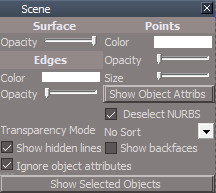
Modify all layout rsl files with a new Scene.RsObj & Screen thumbnail
Scene panel.png
Scene panel.png (8.91 KiB) Viewed 3645 times

The included Plugins.xml file has the Clintons3dPlugin, Clintons3dPluginExt and Clintons3dRsView, Installed and Loaded to the default path: C:\trueSpace761
WARNING: These 3 plugins are required to be Installed and Loaded when using trueSpace!
User avatar
trueBlue
Captain
Posts: 5548
Joined: 06 Jul 2009, 22:50
Type the number ten into the box: 10

Re: Final trueSpace 7.61 Beta 8 Unofficial Update

Post by trueBlue »

Update 67 for trueSpace7.61 Beta 8 Unofficial Update

June 21, 2021

viewtopic.php?t=3732

Update

Window.Shortcuts.xml
tS761 Workspace Shortcut List.rtf
Removed
<RS_ACC KEY="F9" DESC="Show Object Render Attributes" GROUP="GLOBAL" COMMAND="D3DView.ShowRenderAttribsForObject('','');" /


Toolbars
ClintonsToolbar
Lock icon
Removed TagAlias

Unlock icon
RMB command Unlock All
Removed TagAlias

CustomCommands
unSelectable 'Author Clinton Reese June 21, 2021'
Removed floating popup
Removed script based locking
No longer adds node to the scene
Modifications
Change tS commands to Utility function commands
Fixed error in Unlock All script


The included Plugins.xml file has the Clintons3dPlugin, Clintons3dPluginExt and Clintons3dRsView, Installed and Loaded to the default path: C:\trueSpace761
WARNING: These 3 plugins are required to be Installed and Loaded when using trueSpace!
User avatar
trueBlue
Captain
Posts: 5548
Joined: 06 Jul 2009, 22:50
Type the number ten into the box: 10

Re: Final trueSpace 7.61 Beta 8 Unofficial Update

Post by trueBlue »

Update 68 for trueSpace7.61 Beta 8 Unofficial Update

June 22, 2021

viewtopic.php?t=3732

Update

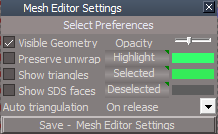
Mesh Editor Settings
Mesh Editor Settings panel.png
Mesh Editor Settings panel.png (9.83 KiB) Viewed 3624 times
Add Select Preferences title

Changed Front faces to Visible Geometry
Set Link to PE selection style
Checked = Select Visible geometry
Unchecked = Select All geometry 'Select through'

Add Save - Mesh Editor Settings button
Yes | No Question
Are you sure you want to overwrite the backup
Mesh Editor Settings?

The included Plugins.xml file has the Clintons3dPlugin, Clintons3dPluginExt and Clintons3dRsView, Installed and Loaded to the default path: C:\trueSpace761
WARNING: These 3 plugins are required to be Installed and Loaded when using trueSpace!
User avatar
trueBlue
Captain
Posts: 5548
Joined: 06 Jul 2009, 22:50
Type the number ten into the box: 10

Re: Final trueSpace 7.61 Beta 8 Unofficial Update

Post by trueBlue »

Update 69 for trueSpace7.61 Beta 8 Unofficial Update

June 26, 2021

viewtopic.php?t=3732

Update


Copy.xml

Mesh Origin Author - Clinton Reese 6/25/2021

Toolbars
ClintonsToolbar/Lock & Unlock icons
Changed AgentID


The included Plugins.xml file has the Clintons3dPlugin, Clintons3dPluginExt and Clintons3dRsView, Installed and Loaded to the default path: C:\trueSpace761
WARNING: These 3 plugins are required to be Installed and Loaded when using trueSpace!
User avatar
trueBlue
Captain
Posts: 5548
Joined: 06 Jul 2009, 22:50
Type the number ten into the box: 10

Re: Final trueSpace 7.61 Beta 8 Unofficial Update

Post by trueBlue »

Update 70 for trueSpace7.61 Beta 8 Unofficial Update

June 30, 2021

viewtopic.php?t=3732

Update

Widgets
Object Navigation Widget(s)
CycleNavWidget - Add Clintons3D Package/Utility functions commands

Point Edit Widget(s)
CyclePEWidget - Add Clintons3D Package/Utility functions commands

Camera Widget(s)
CycleCamWidget - Add Clintons3D Package/Utility functions commands

Mesh Origin Author - Clinton Reese 6/26/2021
Modifications

Add status message to all scripts

Add the FreezeScale function in the ApplyRotation script

OpenPanel script
Add
utilitydata = System.CreateDO("Clintons3D Package/Utility functions");
utilitydata.SetFrameRect(openedFrame, newLeft, top, maxStandardPanelWidth, newHeight);

StartWidgetSelect script
Add
if(!Node.ConExists(sel,"WldMatrix")) return;


The included Plugins.xml file has the Clintons3dPlugin, Clintons3dPluginExt and Clintons3dRsView, Installed and Loaded to the default path: C:\trueSpace761
WARNING: These 3 plugins are required to be Installed and Loaded when using trueSpace!
User avatar
trueBlue
Captain
Posts: 5548
Joined: 06 Jul 2009, 22:50
Type the number ten into the box: 10

Re: Final trueSpace 7.61 Beta 8 Unofficial Update

Post by trueBlue »

Update 71 for trueSpace7.61 Beta 8 Unofficial Update

July 2, 2021

viewtopic.php?t=3732

Hopefully this is the final Update

Widgets
All widget help file scripts
Add
utilitydata = System.CreateDO("Clintons3D Package/Utility functions");
utilitydata.SetFrameRect(openedFrame, newLeft, top, maxStandardPanelWidth, newHeight);
CamAndViewHelp.png
Note: All open from Right to Left
New: Camera, View, and Background widget help files can be opened at the same time
Add Default Context widget's shortcuts to the Background widget help file

tS761 Workspace Shortcut List.rtf

Window.Shortcuts.xml
Removed
Workspace 3D Window
<RS_ACC KEY="ESC" DESC="Object tool/Unselect" GROUP="VIEW3D" COMMAND="RsTool.Arrow();var PVT_LOCKED = 2;RsStackView.RemovePanelsFromCurrSelection(PVT_LOCKED, 0);Space.Unselect();" />

Clintons3dPlugin.xml
Add
Version Check
Clintons3dPlugin v.1638428 or higher is Required
User avatar
trueBlue
Captain
Posts: 5548
Joined: 06 Jul 2009, 22:50
Type the number ten into the box: 10

Re: Final trueSpace 7.61 Beta 8 Unofficial Update

Post by trueBlue »

Update 72 for trueSpace7.61 Beta 8 Unofficial Update

July 9, 2021

viewtopic.php?t=3732

Hopefully this is the final Update

Lights
Including: Lights.RsObj, light01.RsObj, light02.RsObj, light03.RsObj, light04.RsObj, WS - Default.RsSLgts, WS - Black.RsSLgts, WS - Modeling.RsSLgts, My Scene.RsScn, My Backup.RsScn. and My Recording.RsScn
Fixed error in Color Picker Author - Clinton Reese
Ctrl + RMB select the unselected light's shape, opens its floating panel

Widgets
All Widget Help files
Fixed an issue with duplicate Widget Help files showing


The included Plugins.xml file has the Clintons3dPlugin, Clintons3dPluginExt and Clintons3dRsView, Installed and Loaded to the default path: C:\trueSpace761
WARNING: These 3 plugins are required to be Installed and Loaded when using trueSpace!
User avatar
trueBlue
Captain
Posts: 5548
Joined: 06 Jul 2009, 22:50
Type the number ten into the box: 10

Re: Final trueSpace 7.61 Beta 8 Unofficial Update

Post by trueBlue »

Update 73 for trueSpace7.61 Beta 8 Unofficial Update

July 10, 2021

viewtopic.php?t=3732

Hopefully this is the final Update

Toolbars
Including: WorkspaceMain, WorkspaceMain2, BottomBar, and BottomBar2
Add
Look At Selection (All Windows) / Reset (All Windows)
LookAtSelectionAllWindowsButton.png
The included Plugins.xml file has the Clintons3dPlugin, Clintons3dPluginExt and Clintons3dRsView, Installed and Loaded to the default path: C:\trueSpace761
WARNING: These 3 plugins are required to be Installed and Loaded when using trueSpace!
User avatar
trueBlue
Captain
Posts: 5548
Joined: 06 Jul 2009, 22:50
Type the number ten into the box: 10

Re: Final trueSpace 7.61 Beta 8 Unofficial Update

Post by trueBlue »

Update 74 for trueSpace7.61 Beta 8 Unofficial Update

July 13, 2021

viewtopic.php?t=3732

Hopefully this is the final Update

Workspace Layers 4
Add
Popup Panel script
Automatically opens the floating panel when saved to a scene
WL4 panel.png
WL4 panel.png (8.82 KiB) Viewed 3421 times
Preference panel
Add
Status messages to Reconnect All Object Hider Nodes & Re-Hide Camera and Light ORA button scripts
Add
Save - Workspace Layers 4 button script
Saves the Workspace Layers 4 panel to CustomScriptsStore

Edge Bevel
Update - Clinton Reese 7/12/2021
Add
util.SetNodeValueInt commands to the startBevel script


The included Plugins.xml file has the Clintons3dPlugin, Clintons3dPluginExt and Clintons3dRsView, Installed and Loaded to the default path: C:\trueSpace761
WARNING: These 3 plugins are required to be Installed and Loaded when using trueSpace!
User avatar
trueBlue
Captain
Posts: 5548
Joined: 06 Jul 2009, 22:50
Type the number ten into the box: 10

Re: Final trueSpace 7.61 Beta 8 Unofficial Update

Post by trueBlue »

Update 75 for trueSpace7.61 Beta 8 Unofficial Update

July 16, 2021

viewtopic.php?t=3732

Hopefully this is the final Update

Workspace Layers 4 preference panel
WL4 panel.png
WL4 panel.png (10.84 KiB) Viewed 3378 times
Add
Auto show floating panel
Automatically opens the floating panel when saved to a scene
Show | Hide Aspects


The included Plugins.xml file has the Clintons3dPlugin, Clintons3dPluginExt and Clintons3dRsView, Installed and Loaded to the default path: C:\trueSpace761
WARNING: These 3 plugins are required to be Installed and Loaded when using trueSpace!
User avatar
trueBlue
Captain
Posts: 5548
Joined: 06 Jul 2009, 22:50
Type the number ten into the box: 10

Re: Final trueSpace 7.61 Beta 8 Unofficial Update

Post by trueBlue »

Update 85 for trueSpace7.61 Beta 8 Unofficial Update Version 8

September 13, 2021

Please test this pre release

Instructions:

It is recommend that you completely Uninstall and Install trueSpace7.61 Beta 8 to a clean directory.
Install the PDF Manual for trueSpace. (Optional but required before installing the Update)

1.) Run the tS7.61B8.8.exe
2.) Browse [...] to where you installed C:\trueSpace761, select its folder and then the Extract button
3.) Select the Yes to All button
4.) Open trueSpace and select the Reset to Default Context icon
5.) In Workspace select the Default layout tab

The included Plugins.xml file has the Clintons3dPlugin, Clintons3dPluginExt and Clintons3dRsView, Installed and Loaded to the default path: C:\trueSpace761
WARNING: These 3 plugins are required to be Installed and Loaded when using trueSpace!

Removed attachment due to update
User avatar
trueBlue
Captain
Posts: 5548
Joined: 06 Jul 2009, 22:50
Type the number ten into the box: 10

Re: Final trueSpace 7.61 Beta 8 Unofficial Update

Post by trueBlue »

Update 86 for trueSpace7.61 Beta 8 Unofficial Update Version 8

September 15, 2021

Please test this pre release

Update
Desktop/Display Toolbars button
Display All Toolbars - Off | On / Reset

UUFunctionSet
Add
function DisplayToolbarsFalse()

Note: When using Display Toolbars in the Off state:
This only works for the current opened toolbars
If you open any of these toolbars after running Display Toolbars in the Off state, you will have to run it again
All Toolbars.png
Removed attachment due to update
User avatar
trueBlue
Captain
Posts: 5548
Joined: 06 Jul 2009, 22:50
Type the number ten into the box: 10

Re: Final trueSpace 7.61 Beta 8 Unofficial Update

Post by trueBlue »

Update 87 for trueSpace7.61 Beta 8 Unofficial Update Version 8

September 17, 2021

Please test this pre release

Update
Fixed a typo in the Scene panel's Show Object Attribs button tool tip
LayerProperties.RsObj
LayerProperties2.RsObj
Layouts - Configurations library

Removed attachment due to update
User avatar
trueBlue
Captain
Posts: 5548
Joined: 06 Jul 2009, 22:50
Type the number ten into the box: 10

Re: Final trueSpace 7.61 Beta 8 Unofficial Update

Post by trueBlue »

Update 88 for trueSpace7.61 Beta 8 Unofficial Update Version 8

September 22, 2021

Please test this pre release

Update
Widgets
Fix Bad Geometry
Each button except Remove SDS runs the Guard script

Removed attachment due to update
User avatar
trueBlue
Captain
Posts: 5548
Joined: 06 Jul 2009, 22:50
Type the number ten into the box: 10

Re: Final trueSpace 7.61 Beta 8 Unofficial Update

Post by trueBlue »

Update 89 for trueSpace7.61 Beta 8 Unofficial Update Version 8
Updated NURBS scripts
* Fix bad triangle geometry when freezing patches
* Removes floating vertices when freezing patches
* New option to weld vertices for 2 sided NURBS when freezing patches
* Fix to show Curve Shaper panel
Add
Select LOD Mesh button
NURBStoCPMeshSelection script
Show NURBS Panel With CP Mesh script

September 24, 2021

viewt ... =55&t=3732

Instructions:

Recommend that you completely Uninstall and Install trueSpace7.61 Beta 8 to a clean directory.
Install the PDF Manual for trueSpace. (Optional but required before installing the Update)

1.) Run the tS7.61B8.8.exe
2.) Browse [...] to where you installed C:\trueSpace761, select its folder and then the Extract button
3.) Select the Yes to All button
4.) Open trueSpace and select the Reset to Default Context icon
5.) In Workspace select the Default layout tab

The included Plugins.xml file has the Clintons3dPlugin, Clintons3dPluginExt and Clintons3dRsView, Installed and Loaded to the default path: C:\trueSpace761
WARNING: These 3 plugins are required to be Installed and Loaded when using trueSpace!
User avatar
trueBlue
Captain
Posts: 5548
Joined: 06 Jul 2009, 22:50
Type the number ten into the box: 10

Re: Final trueSpace 7.61 Beta 8 Unofficial Update

Post by trueBlue »

Update 90 for trueSpace7.61 Beta 8 Unofficial Update Version 8
Updated

CustomCommands/Popups/
ObjectNavWidget
PointEdit
PointEdit2
PointEditWidget
Add support for 3D Encapsulated Objects

Background widget
MB DblClick - Move 3D View to current or Point Edit selection
Changed from MB Click

October 13, 2021

viewt ... =55&t=3732

Instructions:

Recommend that you completely Uninstall and Install trueSpace7.61 Beta 8 to a clean directory.
Install the PDF Manual for trueSpace. (Optional but required before installing the Update)

1.) Run the tS7.61B8.8.exe
2.) Browse [...] to where you installed C:\trueSpace761, select its folder and then the Extract button
3.) Select the Yes to All button
4.) Open trueSpace and select the Reset to Default Context icon
5.) In Workspace select the Default layout tab

The included Plugins.xml file has the Clintons3dPlugin, Clintons3dPluginExt and Clintons3dRsView, Installed and Loaded to the default path: C:\trueSpace761
WARNING: These 3 plugins are required to be Installed and Loaded when using trueSpace!
User avatar
trueBlue
Captain
Posts: 5548
Joined: 06 Jul 2009, 22:50
Type the number ten into the box: 10

Re: Final trueSpace 7.61 Beta 8 Unofficial Update

Post by trueBlue »

Update 91 for trueSpace7.61 Beta 8 Unofficial Update Version 8
Updated

CustomCommands/Popups/
OpenToolbars script [Author - Clinton Reese]

CustomToolbar 'Red'
Add
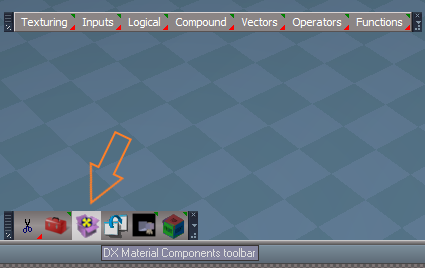
DX Materials Components toolbar [Author - Clinton Reese]
DX Material Components toolbar.png
Top Row
LB - Open toolbar components
RB - Open Components library floating panel
Use:
Toolbar
Navigate to your DX Shader in the Link Editor,
with the Link Editor active, select a component from the toolbar
Floating panel
Drag & Drop components


October 15, 2021

viewt ... =55&t=3732

Instructions:

Recommend that you completely Uninstall and Install trueSpace7.61 Beta 8 to a clean directory.
Install the PDF Manual for trueSpace. (Optional but required before installing the Update)

1.) Run the tS7.61B8.8.exe
2.) Browse [...] to where you installed C:\trueSpace761, select its folder and then the Extract button
3.) Select the Yes to All button
4.) Open trueSpace and select the Reset to Default Context icon
5.) In Workspace select the Default layout tab

The included Plugins.xml file has the Clintons3dPlugin, Clintons3dPluginExt and Clintons3dRsView, Installed and Loaded to the default path: C:\trueSpace761
WARNING: These 3 plugins are required to be Installed and Loaded when using trueSpace!
User avatar
trueBlue
Captain
Posts: 5548
Joined: 06 Jul 2009, 22:50
Type the number ten into the box: 10

Re: Final trueSpace 7.61 Beta 8 Unofficial Update

Post by trueBlue »

Update 92 for trueSpace7.61 Beta 8 Unofficial Update Version 8
Updated

Material Editor/D3D Material Converter
MaterialInstanceConverterScript [Author - Clinton Reese]


October 15, 2021

viewt ... =55&t=3732

Instructions:

Recommend that you completely Uninstall and Install trueSpace7.61 Beta 8 to a clean directory.
Install the PDF Manual for trueSpace. (Optional but required before installing the Update)

1.) Run the tS7.61B8.8.exe
2.) Browse [...] to where you installed C:\trueSpace761, select its folder and then the Extract button
3.) Select the Yes to All button
4.) Open trueSpace and select the Reset to Default Context icon
5.) In Workspace select the Default layout tab

The included Plugins.xml file has the Clintons3dPlugin, Clintons3dPluginExt and Clintons3dRsView, Installed and Loaded to the default path: C:\trueSpace761
WARNING: These 3 plugins are required to be Installed and Loaded when using trueSpace!
User avatar
trueBlue
Captain
Posts: 5548
Joined: 06 Jul 2009, 22:50
Type the number ten into the box: 10

Re: Final trueSpace 7.61 Beta 8 Unofficial Update

Post by trueBlue »

Update 93 for trueSpace7.61 Beta 8 Unofficial Update Version 8
Updated

Workspace Layers 4 [Author - Clinton Reese]
Updated with a Quick Processing mode

Material Editor
Convert D3D materials icon
Add - RMB command to open the DX Material Components toolbar

ScriptCommands/
HideCameraAndLights.xml - Fix for the Object hider with multiple/duplicate connections
ShowCameraAndLights.xml - Fix for the Object hider with multiple/duplicate connections
HideAll.xml - Updated to not run if objects have Object Render Attributes
ShowAll.xml - Updated to not run if objects have Object Render Attributes
UnBlockRsTSEvents.xml - Used with the HideAll & ShowAll scripts

CustomCommands/Quick ORA Scripts [Author - Clinton Reese]
Toolbars/ViewToolbar
Ctrl + Shift + V
Popup View toolbar.png
Popup View toolbar.png (25.8 KiB) Viewed 2864 times
Add
Show All - Objects
Hide All - Objects
Hide - Unselected
Hide - Selection
Show - Selection
These buttons use the Quick ORA Scripts which only work for objects that do not have Object Render Attributes and are much faster then the Workspace toolbar's Hide & Show scripts which will create the Object Render Attributes

Objects - tS7.61 Update objects/
Switch Workspace Main toolbar
tS76 tS Keyframe 2 AE Keyframe

November 6, 2021

viewt ... =55&t=3732

Instructions:

Recommend that you completely Uninstall and Install trueSpace7.61 Beta 8 to a clean directory.
Install the PDF Manual for trueSpace. (Optional but required before installing the Update)

1.) Run the tS7.61B8.8.exe
2.) Browse [...] to where you installed C:\trueSpace761, select its folder and then the Extract button
3.) Select the Yes to All button
4.) Open trueSpace and select the Reset to Default Context icon
5.) In Workspace select the Default layout tab

The included Plugins.xml file has the Clintons3dPlugin, Clintons3dPluginExt and Clintons3dRsView, Installed and Loaded to the default path: C:\trueSpace761
WARNING: These 3 plugins are required to be Installed and Loaded when using trueSpace!
User avatar
trueBlue
Captain
Posts: 5548
Joined: 06 Jul 2009, 22:50
Type the number ten into the box: 10

Re: Final trueSpace 7.61 Beta 8 Unofficial Update

Post by trueBlue »

Update 94 for trueSpace7.61 Beta 8 Unofficial Update Version 8
Updated

Workspace Layers 4 [Author - Clinton Reese]
Updated with a Quick Processing

preobjects/
ObjectAttributes

Commands/ [Author - Clinton Reese]
ShowAll
HideAll
Hide
Show

November 8, 2021

viewt ... =55&t=3732

Instructions:

Recommend that you completely Uninstall and Install trueSpace7.61 Beta 8 to a clean directory.
Install the PDF Manual for trueSpace. (Optional but required before installing the Update)

1.) Run the tS7.61B8.8.exe
2.) Browse [...] to where you installed C:\trueSpace761, select its folder and then the Extract button
3.) Select the Yes to All button
4.) Open trueSpace and select the Reset to Default Context icon
5.) In Workspace select the Default layout tab

The included Plugins.xml file has the Clintons3dPlugin, Clintons3dPluginExt and Clintons3dRsView, Installed and Loaded to the default path: C:\trueSpace761
WARNING: These 3 plugins are required to be Installed and Loaded when using trueSpace!
User avatar
trueBlue
Captain
Posts: 5548
Joined: 06 Jul 2009, 22:50
Type the number ten into the box: 10

Re: Final trueSpace 7.61 Beta 8 Unofficial Update

Post by trueBlue »

Update 95 for trueSpace7.61 Beta 8 Unofficial Update Version 8
Updated

preobjects/
ObjectAttributes

Commands/ [Author - Clinton Reese]
HideAll
Show Object Attribs
Fix NURBS ORA - Add RsApp.ClearHistory()

CustomCommands/NURBSScripts/NURBSUtilities/
fixRenderAttributes - Add RsApp.ClearHistory()
Show NURBS Panel With CP Mesh - Add RsApp.ClearHistory()

November 11, 2021

viewt ... =55&t=3732

Instructions:

Recommend that you completely Uninstall and Install trueSpace7.61 Beta 8 to a clean directory.
Install the PDF Manual for trueSpace. (Optional but required before installing the Update)

1.) Run the tS7.61B8.8.exe
2.) Browse [...] to where you installed C:\trueSpace761, select its folder and then the Extract button
3.) Select the Yes to All button
4.) Open trueSpace and select the Reset to Default Context icon
5.) In Workspace select the Default layout tab

The included Plugins.xml file has the Clintons3dPlugin, Clintons3dPluginExt and Clintons3dRsView, Installed and Loaded to the default path: C:\trueSpace761
WARNING: These 3 plugins are required to be Installed and Loaded when using trueSpace!
User avatar
trueBlue
Captain
Posts: 5548
Joined: 06 Jul 2009, 22:50
Type the number ten into the box: 10

Re: Final trueSpace 7.61 Beta 8 Unofficial Update

Post by trueBlue »

Update 96 for trueSpace7.61 Beta 8 Unofficial Update Version 8
Updated

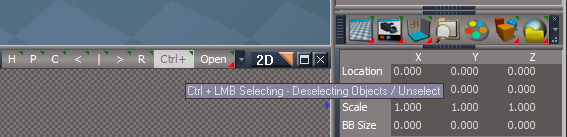
Toolbars/
Link Editor Navigator
Link Editor Navigator.png
Ctrl+ icon
Fixed the RMB = Unselect command

November 17, 2021

viewt ... =55&t=3732

Instructions:

Recommend that you completely Uninstall and Install trueSpace7.61 Beta 8 to a clean directory.
Install the PDF Manual for trueSpace. (Optional but required before installing the Update)

1.) Run the tS7.61B8.8.exe
2.) Browse [...] to where you installed C:\trueSpace761, select its folder and then the Extract button
3.) Select the Yes to All button
4.) Open trueSpace and select the Reset to Default Context icon
5.) In Workspace select the Default layout tab

The included Plugins.xml file has the Clintons3dPlugin, Clintons3dPluginExt and Clintons3dRsView, Installed and Loaded to the default path: C:\trueSpace761
WARNING: These 3 plugins are required to be Installed and Loaded when using trueSpace!
User avatar
trueBlue
Captain
Posts: 5548
Joined: 06 Jul 2009, 22:50
Type the number ten into the box: 10

Re: Final trueSpace 7.61 Beta 8 Unofficial Update

Post by trueBlue »

Update 97 for trueSpace7.61 Beta 8 Unofficial Update Version 8
Updated

Show.xml
Hide.xml
Show Object Attribs.xml
ShowCameraAndLights.xml
HideCameraAndLights.xml
Add fix for Model lights for all of the above

UnLookAt.xml
Add Disconnects before Connecting

LoolAt icon(s)

LMB = if(Node.ConExists(Node.FirstSelected(), "Target Matrix")){System.Alert("Object is being used to Look At another object\n\nUse the Unlook At tool first");return;}else{ToolMng.ActivateTool('{17D544A3-3F58-436B-83E7-F8B4D7D4E7C5}','{4E203C6C-A20D-4e32-82B4-FC482F5A0D06}');}
RMB = RsTool.Arrow()

Link Editor Navigator
Ctrl+ icon - RMB = RsTool.Arrow()
Removed - H icon "Hide unselected"
Add
U icon
LMB = Unselect
RMB = Unselect and Close Panels

WinGUID_Bar
Updated LMB & RMB commands to use UUFunctionSet


Infinite lights
Add
Enable Shadow On & Off buttons for VRay only
Rename DirlightShader
Add the modifications to New Scene, Lights, and WS - Default.RsSLgts

Desktop
Display Toolbars button
Updated LMB command to use UUFunctionSet

Widgets
Add
UUFunctionSet
Commands for all floating toolbars, Scene ORA modes, Grid modes, Switch Views, Reset View, Look at Selection, and Set Camera
All toolbar buttons updated to use the UUFunctionSet
These new commands will run without the Main 3D Window needing focus unless there is a floating 3D Window that has focus
Add a Hide unselected icon to Workspace toolbars

November 28, 2021

viewt ... =55&t=3732

Instructions:

Recommend that you completely Uninstall and Install trueSpace7.61 Beta 8 to a clean directory.
Install the PDF Manual for trueSpace. (Optional but required before installing the Update)

1.) Run the tS7.61B8.8.exe
2.) Browse [...] to where you installed C:\trueSpace761, select its folder and then the Extract button
3.) Select the Yes to All button
4.) Open trueSpace and select the Reset to Default Context icon
5.) In Workspace select the Default layout tab

The included Plugins.xml file has the Clintons3dPlugin, Clintons3dPluginExt and Clintons3dRsView, Installed and Loaded to the default path: C:\trueSpace761
WARNING: These 3 plugins are required to be Installed and Loaded when using trueSpace!
User avatar
trueBlue
Captain
Posts: 5548
Joined: 06 Jul 2009, 22:50
Type the number ten into the box: 10

Re: Final trueSpace 7.61 Beta 8 Unofficial Update

Post by trueBlue »

Update 98 for trueSpace7.61 Beta 8 Unofficial Update Version 8

Widgets
Update
UUFunctionSet

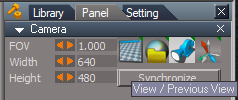
Camera Toolbar

Camera(s)
Camera View button.png
Camera View button.png (13.15 KiB) Viewed 2612 times
.
Improved the View from camera script
Will run without the Main 3D Window needing focus unless there is a floating 3D Window that has focus

November 29, 2021

viewt ... =55&t=3732

Instructions:

Recommend that you completely Uninstall and Install trueSpace7.61 Beta 8 to a clean directory.
Install the PDF Manual for trueSpace. (Optional but required before installing the Update)

1.) Run the tS7.61B8.8.exe
2.) Browse [...] to where you installed C:\trueSpace761, select its folder and then the Extract button
3.) Select the Yes to All button
4.) Open trueSpace and select the Reset to Default Context icon
5.) In Workspace select the Default layout tab

The included Plugins.xml file has the Clintons3dPlugin, Clintons3dPluginExt and Clintons3dRsView, Installed and Loaded to the default path: C:\trueSpace761
WARNING: These 3 plugins are required to be Installed and Loaded when using trueSpace!
User avatar
trueBlue
Captain
Posts: 5548
Joined: 06 Jul 2009, 22:50
Type the number ten into the box: 10

Re: Final trueSpace 7.61 Beta 8 Unofficial Update

Post by trueBlue »

Update 99 for trueSpace7.61 Beta 8 Unofficial Update Version 8
Updated

Objects - tS7.61 Update objects library


FPN PIP
tS76 FPN Camera Keyframer
tS761 First Person Navigator
FPN paneel.png
FPN paneel.png (7.58 KiB) Viewed 2383 times
.
View
1.) LMB to view from the FPN camera
Must be viewing from the FPN camera before activating FPN
2.) RMB to Activate FPN
3.) RMB to Deactivate FPN

December 1, 2021

viewt ... =55&t=3732

Instructions:

Recommend that you completely Uninstall and Install trueSpace7.61 Beta 8 to a clean directory.
Install the PDF Manual for trueSpace. (Optional but required before installing the Update)

1.) Run the tS7.61B8.8.exe
2.) Browse [...] to where you installed C:\trueSpace761, select its folder and then the Extract button
3.) Select the Yes to All button
4.) Open trueSpace and select the Reset to Default Context icon
5.) In Workspace select the Default layout tab

The included Plugins.xml file has the Clintons3dPlugin, Clintons3dPluginExt and Clintons3dRsView, Installed and Loaded to the default path: C:\trueSpace761
WARNING: These 3 plugins are required to be Installed and Loaded when using trueSpace!
User avatar
trueBlue
Captain
Posts: 5548
Joined: 06 Jul 2009, 22:50
Type the number ten into the box: 10

Re: Final trueSpace 7.61 Beta 8 Unofficial Update

Post by trueBlue »

Update 100 for trueSpace7.61 Beta 8 Unofficial Update Version 8
Final Updated

Widgets/UUFunctionSet
Set Camera
Reset View
Look At Selection
Reduced the undo(s) to one undo


December 3, 2021

viewt ... =55&t=3732

Instructions:

Recommend that you completely Uninstall and Install trueSpace7.61 Beta 8 to a clean directory.
Install the PDF Manual for trueSpace. (Optional but required before installing the Update)

1.) Run the tS7.61B8.8.exe
2.) Browse [...] to where you installed C:\trueSpace761, select its folder and then the Extract button
3.) Select the Yes to All button
4.) Open trueSpace and select the Reset to Default Context icon
5.) In Workspace select the Default layout tab

The included Plugins.xml file has the Clintons3dPlugin, Clintons3dPluginExt and Clintons3dRsView, Installed and Loaded to the default path: C:\trueSpace761
WARNING: These 3 plugins are required to be Installed and Loaded when using trueSpace!
User avatar
trueBlue
Captain
Posts: 5548
Joined: 06 Jul 2009, 22:50
Type the number ten into the box: 10

Re: Final trueSpace 7.61 Beta 8 Unofficial Update

Post by trueBlue »

Update 101 for trueSpace7.61 Beta 8 Unofficial Update Version 8
Final Updated

Toolbars 'All - Reset View & Look at Selection, RMB command, add original command'
Removed the unused BottomBar

Red toolbar/Cut 'Add - Guard command'

Scripts/Commands
UnLookAt
RotateISO
RotatePOV
CopyWindow
Delete
Copy
Eye2Cam
Cam2Eye
EyeCam
Position2Eye


December 5, 2021

viewt ... =55&t=3732

Instructions:

Recommend that you completely Uninstall and Install trueSpace7.61 Beta 8 to a clean directory.
Install the PDF Manual for trueSpace. (Optional but required before installing the Update)

1.) Run the tS7.61B8.8.exe
2.) Browse [...] to where you installed C:\trueSpace761, select its folder and then the Extract button
3.) Select the Yes to All button
4.) Open trueSpace and select the Reset to Default Context icon
5.) In Workspace select the Default layout tab

The included Plugins.xml file has the Clintons3dPlugin, Clintons3dPluginExt and Clintons3dRsView, Installed and Loaded to the default path: C:\trueSpace761
WARNING: These 3 plugins are required to be Installed and Loaded when using trueSpace!
User avatar
trueBlue
Captain
Posts: 5548
Joined: 06 Jul 2009, 22:50
Type the number ten into the box: 10

Re: Final trueSpace 7.61 Beta 8 Unofficial Update

Post by trueBlue »

Update 102 for trueSpace7.61 Beta 8 Unofficial Update Version 8
Final Update

Toolbars
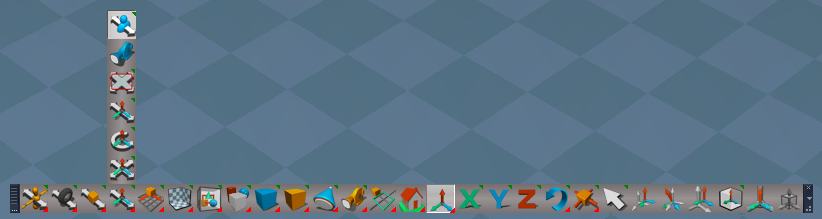
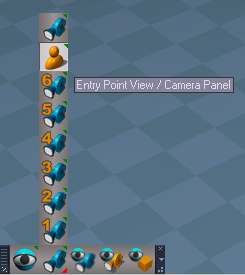
Camera toolbar
Camera toolbar.png
Camera toolbar.png (29.82 KiB) Viewed 2326 times
.
Fixed typo in Alert
Add - Entry Point View

December 6, 2021

viewt ... =55&t=3732

Instructions:

Recommend that you completely Uninstall and Install trueSpace7.61 Beta 8 to a clean directory.
Install the PDF Manual for trueSpace. (Optional but required before installing the Update)

1.) Run the tS7.61B8.8.exe
2.) Browse [...] to where you installed C:\trueSpace761, select its folder and then the Extract button
3.) Select the Yes to All button
4.) Open trueSpace and select the Reset to Default Context icon
5.) In Workspace select the Default layout tab

The included Plugins.xml file has the Clintons3dPlugin, Clintons3dPluginExt and Clintons3dRsView, Installed and Loaded to the default path: C:\trueSpace761
WARNING: These 3 plugins are required to be Installed and Loaded when using trueSpace!
User avatar
trueBlue
Captain
Posts: 5548
Joined: 06 Jul 2009, 22:50
Type the number ten into the box: 10

Re: Final trueSpace 7.61 Beta 8 Unofficial Update

Post by trueBlue »

Update 103 for trueSpace7.61 Beta 8 Unofficial Update Version 8
Final Update

Toolbars
Removed the PhysMain toolbar that had non-working commands
After using Clinton's awesome trueSpace Button Dump script, I found several inconsistencies and fixed them

December 7, 2021

viewt ... =55&t=3732

Instructions:

Recommend that you completely Uninstall and Install trueSpace7.61 Beta 8 to a clean directory.
Install the PDF Manual for trueSpace. (Optional but required before installing the Update)

1.) Run the tS7.61B8.8.exe
2.) Browse [...] to where you installed C:\trueSpace761, select its folder and then the Extract button
3.) Select the Yes to All button
4.) Open trueSpace and select the Reset to Default Context icon
5.) In Workspace select the Default layout tab

The included Plugins.xml file has the Clintons3dPlugin, Clintons3dPluginExt and Clintons3dRsView, Installed and Loaded to the default path: C:\trueSpace761
WARNING: These 3 plugins are required to be Installed and Loaded when using trueSpace!
User avatar
trueBlue
Captain
Posts: 5548
Joined: 06 Jul 2009, 22:50
Type the number ten into the box: 10

Re: Final trueSpace 7.61 Beta 8 Unofficial Update

Post by trueBlue »

Update 104 for trueSpace7.61 Beta 8 Unofficial Update Version 8
Final Update

Material Editor
D3D Material Editor/Inspect icon
Vray Material Editor/Inspect icon

WorkspaceNav/Inspect icon
All of the above, add fix when viewing from a selected Camera

Rs Main Libraries
Vray Materials
Sequence Alpha Mask
Sequence Image

Vray - Animation scripts
VRay Background
VRay DOF
VRay Environment

Scripts/Commands
Show Object Attribs
Show Object Attribs RMB
Add check before running the Fix NURBS ORA script

Preferences/Cameras
preobjects/Camera1
Improved all Camera panel button scripts

December 10, 2021

viewt ... =55&t=3732

Instructions:

Recommend that you completely Uninstall and Install trueSpace7.61 Beta 8 to a clean directory.
Install the PDF Manual for trueSpace. (Optional but required before installing the Update)

1.) Run the tS7.61B8.8.exe
2.) Browse [...] to where you installed C:\trueSpace761, select its folder and then the Extract button
3.) Select the Yes to All button
4.) Open trueSpace and select the Reset to Default Context icon
5.) In Workspace select the Default layout tab

The included Plugins.xml file has the Clintons3dPlugin, Clintons3dPluginExt and Clintons3dRsView, Installed and Loaded to the default path: C:\trueSpace761
WARNING: These 3 plugins are required to be Installed and Loaded when using trueSpace!
User avatar
trueBlue
Captain
Posts: 5548
Joined: 06 Jul 2009, 22:50
Type the number ten into the box: 10

Re: Final trueSpace 7.61 Beta 8 Unofficial Update

Post by trueBlue »

Update 105 for trueSpace7.61 Beta 8 Unofficial Update Version 8
Final Update

Clintons3D Package VERSION=v.1638431

Rs Main Libraries/Components - Compositing
Add
Scene Color Picker

December 12, 2021

viewt ... =55&t=3732

Instructions:

Recommend that you completely Uninstall and Install trueSpace7.61 Beta 8 to a clean directory.
Install the PDF Manual for trueSpace. (Optional but required before installing the Update)

1.) Run the tS7.61B8.8.exe
2.) Browse [...] to where you installed C:\trueSpace761, select its folder and then the Extract button
3.) Select the Yes to All button
4.) Open trueSpace and select the Reset to Default Context icon
5.) In Workspace select the Default layout tab

The included Plugins.xml file has the Clintons3dPlugin, Clintons3dPluginExt and Clintons3dRsView, Installed and Loaded to the default path: C:\trueSpace761
WARNING: These 3 plugins are required to be Installed and Loaded when using trueSpace!
User avatar
trueBlue
Captain
Posts: 5548
Joined: 06 Jul 2009, 22:50
Type the number ten into the box: 10

Re: Final trueSpace 7.61 Beta 8 Unofficial Update

Post by trueBlue »

Update 106 for trueSpace7.61 Beta 8 Unofficial Update Version 8
Final Update

NURBSScripts Update: Author - Clinton Reese December 14, 2021
freezeNURBS - Add: RsApp.ClearHistory()

Unglue.xml - Add Utility Function commands
Cut.xml - Add Utility Function command
Show Object Attribs.xml - Fix for NURBS Group

View Widget Transparency
Encircle 'Green' i + Move cursor opens the View Widget Help and View Widget Transparency panel
Before
Before.png
Before.png (11.53 KiB) Viewed 2142 times
After
After.png
After.png (11.11 KiB) Viewed 2142 times
.
December 16, 2021

viewt ... =55&t=3732

Instructions:

Recommend that you completely Uninstall and Install trueSpace7.61 Beta 8 to a clean directory.
Install the PDF Manual for trueSpace. (Optional but required before installing the Update)

1.) Run the tS7.61B8.8.exe
2.) Browse [...] to where you installed C:\trueSpace761, select its folder and then the Extract button
3.) Select the Yes to All button
4.) Open trueSpace and select the Reset to Default Context icon
5.) In Workspace select the Default layout tab

The included Plugins.xml file has the Clintons3dPlugin, Clintons3dPluginExt and Clintons3dRsView, Installed and Loaded to the default path: C:\trueSpace761
WARNING: These 3 plugins are required to be Installed and Loaded when using trueSpace!
User avatar
trueBlue
Captain
Posts: 5548
Joined: 06 Jul 2009, 22:50
Type the number ten into the box: 10

Re: Final trueSpace 7.61 Beta 8 Unofficial Update

Post by trueBlue »

@ Clinton
Synchronize has an issue
Start Synchronize
Open Model's Information panel
Screenshot 2021-12-17 185159.png
If I change the Synchronize script to Synchronize the scene, it works better
I also found that closing Model by way of script is what causes trueSpace to crash
Here is a modified Synchronize.RsObj to try

Is there a way to use your Utility Function with something like this?
Node.Value("/Preferences/AnimPref", "PlayRangeStart") = Node.Value("/AnimMng", "SelAnimStart")
Attachments
Synchronize3e91.RsObj
(256.47 KiB) Downloaded 115 times
User avatar
trueBlue
Captain
Posts: 5548
Joined: 06 Jul 2009, 22:50
Type the number ten into the box: 10

Re: Final trueSpace 7.61 Beta 8 Unofficial Update

Post by trueBlue »

Update 107 for trueSpace7.61 Beta 8 Unofficial Update Version 8
Final Update

Desktop - Fix Synchronize & Protect Workspace button scripts
Protect Workspace - Add RsApp.ClearHistory()
Synchronize - Updated scripts
New optional Dock Model as shown in the attached picture
Synchronize.png
.
Synchronize fixes Synchronize from Workspace to Model
When Synchronize is Active, ONLY use Workspace tools!
Uncheck - Active to use Model tools

My_Default.tsc - Updated
Top two toolbars combined
Bottom two toolbars combined

December 18, 2021

viewt ... =55&t=3732

Instructions:

Recommend that you completely Uninstall and Install trueSpace7.61 Beta 8 to a clean directory.
Install the PDF Manual for trueSpace. (Optional but required before installing the Update)

1.) Run the tS7.61B8.8.exe
2.) Browse [...] to where you installed C:\trueSpace761, select its folder and then the Extract button
3.) Select the Yes to All button
4.) Open trueSpace and select the Reset to Default Context icon
5.) In Workspace select the Default layout tab

The included Plugins.xml file has the Clintons3dPlugin, Clintons3dPluginExt and Clintons3dRsView, Installed and Loaded to the default path: C:\trueSpace761
WARNING: These 3 plugins are required to be Installed and Loaded when using trueSpace!
User avatar
trueBlue
Captain
Posts: 5548
Joined: 06 Jul 2009, 22:50
Type the number ten into the box: 10

Re: Final trueSpace 7.61 Beta 8 Unofficial Update

Post by trueBlue »

@ Clinton
D3D Render's Protect Workspace does not seem to be working!
It is not restoring the Backup
I also notice that for some odd reason, the Material Editor opens when rendering
Edit: I see now it is your plugin that opens the Material Editor from Protect Workspace
utilitydata.SetActiveMaterial(curMaterial);
Is it necessary to open the Material Editor in order to set the Material?
Edit2: I suspect this is not compatible with Vray

I also believe there is not checks for the Bridge being set to On or Auto
User avatar
clintonman
Captain
Posts: 5659
Joined: 21 May 2009, 21:08
Type the number ten into the box: 0
Location: California

Re: Final trueSpace 7.61 Beta 8 Unofficial Update

Post by clintonman »

trueBlue wrote: 20 Dec 2021, 15:58 @ Clinton
D3D Render's Protect Workspace does not seem to be working!
It is not restoring the Backup
I also notice that for some odd reason, the Material Editor opens when rendering
Edit: I see now it is your plugin that opens the Material Editor from Protect Workspace
utilitydata.SetActiveMaterial(curMaterial);
Is it necessary to open the Material Editor in order to set the Material?
Edit2: I suspect this is not compatible with Vray

I also believe there is not checks for the Bridge being set to On or Auto
Is protect needed for vray materials? The problem is modelspace would change the d3d materials to lightworks, but vray is also a part of modelspace so maybe it's not needed.
Clinton Reese

http://clintons3d.com
User avatar
trueBlue
Captain
Posts: 5548
Joined: 06 Jul 2009, 22:50
Type the number ten into the box: 10

Re: Final trueSpace 7.61 Beta 8 Unofficial Update

Post by trueBlue »

I think what needs to be done, is, the Active Editor needs to be changed to the D3D Material Editor before Restoring the materials
How do you write the script to do that so I can test it?
Btw... currently I have Model set to Lightworks and Workspace has Vray Loaded

Edit: Never mind, I think what I saw was just a fluke and or Model's Material Editor using Lightworks material, which does not transfer over the Bridge into Vray material correctly
Backed up Vray materials are being Restored :bananathumb:

So back to my original post, D3D Render's Protect Workspace does not seem to be working!
It is not restoring the Backup and or there is no way to Restore manually
User avatar
trueBlue
Captain
Posts: 5548
Joined: 06 Jul 2009, 22:50
Type the number ten into the box: 10

Re: Final trueSpace 7.61 Beta 8 Unofficial Update

Post by trueBlue »

D3D Render
You need to have Model open before you start the rendering process
Problem:
1) The Workspace scene will not be protected beforehand

You need to close Model before running Restore
2) Currently there is a MiscBackupData and MaterialsBackup node after the rendering process is complete
3) Now way to Restore after manually closing the Model View and or it does not work
4) Spot lights, Projector lights, and Camera's meshes get changed

A docked Model view seems to stop trueSpace from crashing including switching layouts
Untested using the ms_flags_object
User avatar
trueBlue
Captain
Posts: 5548
Joined: 06 Jul 2009, 22:50
Type the number ten into the box: 10

Re: Final trueSpace 7.61 Beta 8 Unofficial Update

Post by trueBlue »

Think I have better solution and it is much faster!
D3D Render panel.png
D3D Render panel.png (9.49 KiB) Viewed 1930 times
.
Setup
Shrinks the Play Range
Opens Protect Workspace and runs Backup
Opens a Docked Model View

Removed due to update
User avatar
clintonman
Captain
Posts: 5659
Joined: 21 May 2009, 21:08
Type the number ten into the box: 0
Location: California

Re: Final trueSpace 7.61 Beta 8 Unofficial Update

Post by clintonman »

trueBlue wrote: 21 Dec 2021, 01:08 Think I have better solution and it is much faster!
D3D Render panel.png
.
Setup
Shrinks the Play Range
Opens Protect Workspace and runs Backup
Opens a Docked Model View
I don't see any motion in model view and shrinking the play range isn't helpful if you already had a desired play range already setup. I have a 60 frame animation and I only want to render frames 10 to 20, it enlarges the range to 0 to 60. Now I have to set the frame range I wanted twice.
Clinton Reese

http://clintons3d.com
User avatar
trueBlue
Captain
Posts: 5548
Joined: 06 Jul 2009, 22:50
Type the number ten into the box: 10

Re: Final trueSpace 7.61 Beta 8 Unofficial Update

Post by trueBlue »

clintonman wrote: 21 Dec 2021, 03:32
trueBlue wrote: 21 Dec 2021, 01:08 Think I have better solution and it is much faster!
D3D Render panel.png
.
Setup
Shrinks the Play Range
Opens Protect Workspace and runs Backup
Opens a Docked Model View
I don't see any motion in model view and shrinking the play range isn't helpful if you already had a desired play range already setup. I have a 60 frame animation and I only want to render frames 10 to 20, it enlarges the range to 0 to 60. Now I have to set the frame range I wanted twice.
The Shrink Play Range can be made optional
What do you mean, you do not see any motion?
Can you give me an example scene where your animated Model objects is not working?
Can you also give me an example where the Matrix option will interfere with workspace transform animations?
Here is an updated 3D_Render_Grp Removed due to update
Added option for the new Shrink Play Range
User avatar
clintonman
Captain
Posts: 5659
Joined: 21 May 2009, 21:08
Type the number ten into the box: 0
Location: California

Re: Final trueSpace 7.61 Beta 8 Unofficial Update

Post by clintonman »

tsUU about popup says v8 -
replace the D3D Render node
add torus and animate 10 frames
D3d Render
press Setup
press Render
torus moves in workspace but not in modelspace
Attachments
MoveItScene.RsScn
(1.12 MiB) Downloaded 107 times
Clinton Reese

http://clintons3d.com
User avatar
trueBlue
Captain
Posts: 5548
Joined: 06 Jul 2009, 22:50
Type the number ten into the box: 10

Re: Final trueSpace 7.61 Beta 8 Unofficial Update

Post by trueBlue »

Unless I am missing something, I do not believe your D3D Render has Synchronization from Workspace to Model
The only Synchronization I see is the Special Mesh Processing

Code: Select all

	if(specialMeshes) {
		var msdone = Space.CurrentScene() + "/ms_flags_object";
		var matrix = System.CreateDO("Math Package/Matrix Float Data")
		Node.Value(msdone, "Matrix") = matrix;
		tSBridge.SynchronizeObject(msdone);
	}
User avatar
clintonman
Captain
Posts: 5659
Joined: 21 May 2009, 21:08
Type the number ten into the box: 0
Location: California

Re: Final trueSpace 7.61 Beta 8 Unofficial Update

Post by clintonman »

trueBlue wrote: 21 Dec 2021, 16:53 ...
Can you also give me an example where the Matrix option will interfere with workspace transform animations?
Here is an updated 3D_Render_Grp
Added option for the new Shrink Play Range
I got it backward. Matrix option interferes with modelspace transform animations, not workspace.
attached scene has a modelspace animated sphere. It always renders at one location because of the matrix protection.
Attachments
MoveItScene2.RsScn
(1.16 MiB) Downloaded 108 times
Clinton Reese

http://clintons3d.com

Return to “General Discussion”