Final trueSpace 7.61 Beta 8 Unofficial Update

User avatar
clintonman
Captain
Posts: 5659
Joined: 21 May 2009, 21:08
Type the number ten into the box: 0
Location: California

Re: Final trueSpace 7.61 Beta 8 Unofficial Update

Post by clintonman »

trueBlue wrote: 21 Dec 2021, 19:48 Unless I am missing something, I do not believe your D3D Render has Synchronization from Workspace to Model
The only Synchronization I see is the Special Mesh Processing

Code: Select all

	if(specialMeshes) {
		var msdone = Space.CurrentScene() + "/ms_flags_object";
		var matrix = System.CreateDO("Math Package/Matrix Float Data")
		Node.Value(msdone, "Matrix") = matrix;
		tSBridge.SynchronizeObject(msdone);
	}
"Combines modelspace and workspace animations into one D3D workspace render sequence. Can also
be used to bake workspace animations to modelspace animation via the autokey setting in modelspace
and for rendering command script based animations."
If modelspace doesn't update from workspace then the second half of this is not true. You would not be able bake workspace animations to modelspace.
Clinton Reese

http://clintons3d.com
User avatar
trueBlue
Captain
Posts: 5548
Joined: 06 Jul 2009, 22:50
Type the number ten into the box: 10

Re: Final trueSpace 7.61 Beta 8 Unofficial Update

Post by trueBlue »

Like I said there is no Synchronization from Workspace to Model in your D3D Render
However, when Rendering to File or Preview, Model's animated objects do update in Model and Workspace animated objects update in Workspace
Render to File renders both
I confirmed this with your current version as well
If you want Model to update Workspace animated objects, then you would need to add
tSBridge.SynchronizeObject(Space.CurrentScene());

Even then, it would not work with Special Mesh Processing because that process selects the ms_flags_object.RsObj
User avatar
trueBlue
Captain
Posts: 5548
Joined: 06 Jul 2009, 22:50
Type the number ten into the box: 10

Re: Final trueSpace 7.61 Beta 8 Unofficial Update

Post by trueBlue »

So far, what I am finding, is, the python script process is what makes trueSpace unstable for me
I have to close Model and exit trueSpace
I have been testing a simple 60 frame Metaball Model & Workspace animation

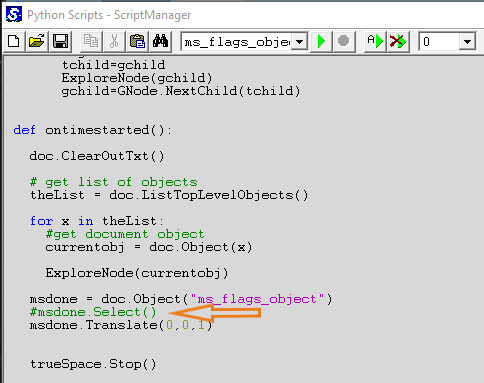
I have changed the assigned python script with the ms_flags_object to not select
Do not select the ms_flags_object.png
.
This still works with my Metaball and so far, makes trueSpace a little more stable
Is it necessary to select the ms_flags_object?
User avatar
clintonman
Captain
Posts: 5659
Joined: 21 May 2009, 21:08
Type the number ten into the box: 0
Location: California

Re: Final trueSpace 7.61 Beta 8 Unofficial Update

Post by clintonman »

trueBlue wrote: 22 Dec 2021, 17:16 So far, what I am finding, is, the python script process is what makes trueSpace unstable for me
I have to close Model and exit trueSpace
I have been testing a simple 60 frame Metaball Model & Workspace animation

I have changed the assigned python script with the ms_flags_object to not select
Do not select the ms_flags_object.png
.
This still works with my Metaball and so far, makes trueSpace a little more stable
Is it necessary to select the ms_flags_object?
I don't think it's needed. I thought that the object had to be selected to run it's script, but did some tests and play seems to run all the scripts in the scene no matter what is selected.
Clinton Reese

http://clintons3d.com
User avatar
trueBlue
Captain
Posts: 5548
Joined: 06 Jul 2009, 22:50
Type the number ten into the box: 10

Re: Final trueSpace 7.61 Beta 8 Unofficial Update

Post by trueBlue »

Cool, that will stop the object widget from flashing and the Model's Info panel from constantly updating.
What does trueSpace.Stop() do?

For me, simply opening Model's Script Editor and Closing it, causes Workspace to become unstable
Unstable meaning, using Workspace's toolbars are sluggish!
I have to restart trueSpace
User avatar
clintonman
Captain
Posts: 5659
Joined: 21 May 2009, 21:08
Type the number ten into the box: 0
Location: California

Re: Final trueSpace 7.61 Beta 8 Unofficial Update

Post by clintonman »

trueBlue wrote: 23 Dec 2021, 04:47 Cool, that will stop the object widget from flashing and the Model's Info panel from constantly updating.
What does trueSpace.Stop() do?

For me, simply opening Model's Script Editor and Closing it, causes Workspace to become unstable
Unstable meaning, using Workspace's toolbars are sluggish!
I have to restart trueSpace
The manual says, "Stop script execution and time flowing"
Clinton Reese

http://clintons3d.com
User avatar
trueBlue
Captain
Posts: 5548
Joined: 06 Jul 2009, 22:50
Type the number ten into the box: 10

Re: Final trueSpace 7.61 Beta 8 Unofficial Update

Post by trueBlue »

Update 108 for trueSpace7.61 Beta 8 Unofficial Update Version 8
Final Update

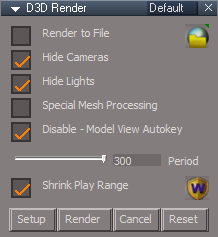
D3D Render
D3D Render panel.png
D3D Render panel.png (11.12 KiB) Viewed 2014 times
Setup
Shrinks the Play Range, if checked
Opens Protect Workspace and runs Backup
Opens a Docked Model View
.
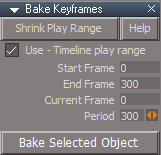
Bake Keyframes
Bake Keyframes panel.png
Bake Keyframes panel.png (5.51 KiB) Viewed 2007 times
Add - Shrink Play Range button script

Animation Preferences/Shrink Play Range button script

December 23, 2021

viewt ... =55&t=3732

Instructions:

Recommend that you completely Uninstall and Install trueSpace7.61 Beta 8 to a clean directory.
Install the PDF Manual for trueSpace. (Optional but required before installing the Update)

1.) Run the tS7.61B8.8.exe
2.) Browse [...] to where you installed C:\trueSpace761, select its folder and then the Extract button
3.) Select the Yes to All button
4.) Open trueSpace and select the Reset to Default Context icon
5.) In Workspace select the Default layout tab

The included Plugins.xml file has the Clintons3dPlugin, Clintons3dPluginExt and Clintons3dRsView, Installed and Loaded to the default path: C:\trueSpace761
WARNING: These 3 plugins are required to be Installed and Loaded when using trueSpace!
User avatar
trueBlue
Captain
Posts: 5548
Joined: 06 Jul 2009, 22:50
Type the number ten into the box: 10

Re: Final trueSpace 7.61 Beta 8 Unofficial Update

Post by trueBlue »

Some observations with the Protect Workspace's protect Matrix
Actually, this happens when you switch to Model and then back to Workspace
Spotlights, Projector lights, and Camera's Meshes get messed up
If you check protect Matrix before switching to Model, close Model, and Restore Protect Workspace, it fixes the meshes
Or you can set a Matrix Keyframe at the Start Frame for the above items before switching to Model
After closing Model, setting the Start Frame, fixes the meshes

Setting the protect Matrix causes trueSpace to crash after closing Model when using the D3D Render, especially when using Special Mesh Processing
Here is a scene with a script that will set a matrix Keyframe for all selected objects
Lights are animated in Workspace and the Cube in Model
Attachments
D3D Render.RsRcd
(770.15 KiB) Downloaded 118 times
User avatar
clintonman
Captain
Posts: 5659
Joined: 21 May 2009, 21:08
Type the number ten into the box: 0
Location: California

Re: Final trueSpace 7.61 Beta 8 Unofficial Update

Post by clintonman »

I mention that on the web page for protect workspace,
"A keyframe can also be used to protect workspace matrix values from modelspace changes
A keyframe can also be used to protect workspace light angle and camera fov values from modelspace changes"
I almost always have the name and matrix options disabled when I use it.
Clinton Reese

http://clintons3d.com
User avatar
trueBlue
Captain
Posts: 5548
Joined: 06 Jul 2009, 22:50
Type the number ten into the box: 10

Re: Final trueSpace 7.61 Beta 8 Unofficial Update

Post by trueBlue »

I have yet to see any Matrix changes to Workspace objects from Model besides ​the Spotlights, Projector lights, and Cameras
I suspect it may have to do with the Widgets
Why do you not protect Names?
User avatar
clintonman
Captain
Posts: 5659
Joined: 21 May 2009, 21:08
Type the number ten into the box: 0
Location: California

Re: Final trueSpace 7.61 Beta 8 Unofficial Update

Post by clintonman »

I name my scene items so there is no automatic and incompatible names between workspace and model. So there is no ",#" or ", #" at the end of the names that needs to be protected.
Clinton Reese

http://clintons3d.com
User avatar
trueBlue
Captain
Posts: 5548
Joined: 06 Jul 2009, 22:50
Type the number ten into the box: 10

Re: Final trueSpace 7.61 Beta 8 Unofficial Update

Post by trueBlue »

Update 109 for trueSpace7.61 Beta 8 Unofficial Update Version 8
Final Update

Bake Keyframes - Fixed typo in the Help panel

Protect Workspace - Add check if D3D Render is open with an Alert

Synchronize - Add check if a 3D View is open with an Alert in the Dock Model script and modified the panel

D3D Render - Add check in the Render button script (if Model is not open do nothing), check if a 3D Window is open with an Alert, and modified the panel

Alternate manual process:
Do not press Setup
Open Protect Workspace and press the Backup button
Switch the main view to Model
Open a Workspace 3D Window
Set the Workspace Play Range
Note: The Play Range should be equal or greater than the Model's animation
Press the Render button

December 25, 2021

viewt ... =55&t=3732

Instructions:

Recommend that you completely Uninstall and Install trueSpace7.61 Beta 8 to a clean directory.
Install the PDF Manual for trueSpace. (Optional but required before installing the Update)

1.) Run the tS7.61B8.8.exe
2.) Browse [...] to where you installed C:\trueSpace761, select its folder and then the Extract button
3.) Select the Yes to All button
4.) Open trueSpace and select the Reset to Default Context icon
5.) In Workspace select the Default layout tab

The included Plugins.xml file has the Clintons3dPlugin, Clintons3dPluginExt and Clintons3dRsView, Installed and Loaded to the default path: C:\trueSpace761
WARNING: These 3 plugins are required to be Installed and Loaded when using trueSpace!
User avatar
trueBlue
Captain
Posts: 5548
Joined: 06 Jul 2009, 22:50
Type the number ten into the box: 10

Re: Final trueSpace 7.61 Beta 8 Unofficial Update

Post by trueBlue »

Update 110 for trueSpace7.61 Beta 8 Unofficial Update Version 8
Final Update

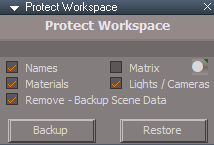
Protect Workspace
Protect Workspace panel.png
Protect Workspace panel.png (5.73 KiB) Viewed 2387 times
Add check if 3D Window is open with an Alert
Add Set Keyframes script
This will set a Keyframe for every object in your scene
that does not have any keyframes

Synchronize
Synchronize panel.png
Synchronize panel.png (9.08 KiB) Viewed 2387 times
Start - Add check if 3D Window is open with an Alert
Restore - Closes Model before Restoring - Protect Workspace
Add Set Keyframes script
This will set a Keyframe for every object in your scene
that does not have any keyframes

D3D Render
Changed the Status Message to use Utility Functions

Code: Select all

	if(render) {
	util.SetStatusMessage("D3D Rendering to File: Frame " + (startFrame + iter - 1), 0)
	}

	if(!render) {
	util.SetStatusMessage("D3D Render - Preview: Frame " + (startFrame + iter - 1), 0)
	}
December 27, 2021

viewt ... =55&t=3732

Instructions:

Recommend that you completely Uninstall and Install trueSpace7.61 Beta 8 to a clean directory.
Install the PDF Manual for trueSpace. (Optional but required before installing the Update)

1.) Run the tS7.61B8.8.exe
2.) Browse [...] to where you installed C:\trueSpace761, select its folder and then the Extract button
3.) Select the Yes to All button
4.) Open trueSpace and select the Reset to Default Context icon
5.) In Workspace select the Default layout tab

The included Plugins.xml file has the Clintons3dPlugin, Clintons3dPluginExt and Clintons3dRsView, Installed and Loaded to the default path: C:\trueSpace761
WARNING: These 3 plugins are required to be Installed and Loaded when using trueSpace!
User avatar
trueBlue
Captain
Posts: 5548
Joined: 06 Jul 2009, 22:50
Type the number ten into the box: 10

Re: Final trueSpace 7.61 Beta 8 Unofficial Update

Post by trueBlue »

Update 111 for trueSpace7.61 Beta 8 Unofficial Update Version 8
Final Update

D3D Render
Special Mesh Processing
Disabled - Synchronize Object 'Not needed'
Add - Modal Question with option to Close trueSpace
Note: Do not close Model and do not Restore - Protect Workspace until you restart trueSpace

December 28, 2021

viewt ... =55&t=3732

Instructions:

Recommend that you completely Uninstall and Install trueSpace7.61 Beta 8 to a clean directory.
Install the PDF Manual for trueSpace. (Optional but required before installing the Update)

1.) Run the tS7.61B8.8.exe
2.) Browse [...] to where you installed C:\trueSpace761, select its folder and then the Extract button
3.) Select the Yes to All button
4.) Open trueSpace and select the Reset to Default Context icon
5.) In Workspace select the Default layout tab

The included Plugins.xml file has the Clintons3dPlugin, Clintons3dPluginExt and Clintons3dRsView, Installed and Loaded to the default path: C:\trueSpace761
WARNING: These 3 plugins are required to be Installed and Loaded when using trueSpace!
User avatar
trueBlue
Captain
Posts: 5548
Joined: 06 Jul 2009, 22:50
Type the number ten into the box: 10

Re: Final trueSpace 7.61 Beta 8 Unofficial Update

Post by trueBlue »

Update 112 for trueSpace7.61 Beta 8 Unofficial Update Version 8
Final Update

Desktop
Removed - Synchronize

Bake Keyframes
Add checks for the selected object

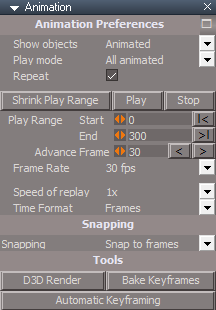
Animation Preferences
Add - Play - Plays the Play Range
Add - Stop - Stops and sets the time to the Start of the Play Range
Add - D3D Render - Opens D3D Render floating panel
Animation panel.png
Animation panel.png (13.49 KiB) Viewed 2155 times
January 16, 2022

viewt ... =55&t=3732

Instructions:

Recommend that you completely Uninstall and Install trueSpace7.61 Beta 8 to a clean directory.
Install the PDF Manual for trueSpace. (Optional but required before installing the Update)

1.) Run the tS7.61B8.8.exe
2.) Browse [...] to where you installed C:\trueSpace761, select its folder and then the Extract button
3.) Select the Yes to All button
4.) Open trueSpace and select the Reset to Default Context icon
5.) In Workspace select the Default layout tab

The included Plugins.xml file has the Clintons3dPlugin, Clintons3dPluginExt and Clintons3dRsView, Installed and Loaded to the default path: C:\trueSpace761
WARNING: These 3 plugins are required to be Installed and Loaded when using trueSpace!
User avatar
trueBlue
Captain
Posts: 5548
Joined: 06 Jul 2009, 22:50
Type the number ten into the box: 10

Re: Final trueSpace 7.61 Beta 8 Unofficial Update

Post by trueBlue »

Update 113 for trueSpace7.61 Beta 8 Unofficial Update Version 8
Final Update

Objects - tS7.61 Update objects
Animation Panel
Workspace Animation controls
Model Animation controls

Model Workspace Animation Panel
Model and Workspace combined Animation controls

Update: Both of the above Synchronize with Model


January 18, 2022

viewt ... =55&t=3732

Instructions:

Recommend that you completely Uninstall and Install trueSpace7.61 Beta 8 to a clean directory.
Install the PDF Manual for trueSpace. (Optional but required before installing the Update)

1.) Run the tS7.61B8.8.exe
2.) Browse [...] to where you installed C:\trueSpace761, select its folder and then the Extract button
3.) Select the Yes to All button
4.) Open trueSpace and select the Reset to Default Context icon
5.) In Workspace select the Default layout tab

The included Plugins.xml file has the Clintons3dPlugin, Clintons3dPluginExt and Clintons3dRsView, Installed and Loaded to the default path: C:\trueSpace761
WARNING: These 3 plugins are required to be Installed and Loaded when using trueSpace!
User avatar
trueBlue
Captain
Posts: 5548
Joined: 06 Jul 2009, 22:50
Type the number ten into the box: 10

Re: Final trueSpace 7.61 Beta 8 Unofficial Update

Post by trueBlue »

@Clinton
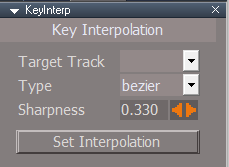
There is an issue with your Key Interpolation panel's Target Track
Key Interpoltion panel Target Track Reset.png
Key Interpoltion panel Target Track Reset.png (5.99 KiB) Viewed 2058 times
1) When you Reset the Target Track attribute, the combo control is blank and does not restore the missing Default value Track00
2) The Target Track attribute's combo control does not get populated with the Clip's TrackID
3) Record key issues
If the Clip is not on the Start Frame, it sets a keyframe at 0.000
The below image was captured in FCurve, after using Record on several selected keys
Record Interpolation type Flat.png
Record Interpolation type Flat.png (2.47 KiB) Viewed 2057 times
Although, when the Target Track is blank, setting Interpolation still works

Seems to me, that is relies on the selected Clip and does not matter if it is on Track00 or whatever Track

I found the tS Commands for setting Interpolation types

Code: Select all

//	tS Interpolation Commands
RsAnimKeying.Interpolation('ConstantMax')
RsAnimKeying.Interpolation('ConstantMin')
RsAnimKeying.Interpolation('Flat')
RsAnimKeying.Interpolation('Custom')
RsAnimKeying.Interpolation('Linear')
RsAnimKeying.Interpolation('Bezier')
RsAnimKeying.Interpolation('CustomBezier')

//RsAnimKeying.BezierTangentAngle(-17.96)
//RsAnimKeying.BezierSharpness(0.33)
User avatar
clintonman
Captain
Posts: 5659
Joined: 21 May 2009, 21:08
Type the number ten into the box: 0
Location: California

Re: Final trueSpace 7.61 Beta 8 Unofficial Update

Post by clintonman »

Looks like it's incomplete. There's even a "selectTargetTrack" command node that has no code in it. I'll check it out and get back to you.
Clinton Reese

http://clintons3d.com
User avatar
clintonman
Captain
Posts: 5659
Joined: 21 May 2009, 21:08
Type the number ten into the box: 0
Location: California

Re: Final trueSpace 7.61 Beta 8 Unofficial Update

Post by clintonman »

"if object has multiple animation tracks the script will default to the last one added and the record button on first press will open the panel to give the option of changing the target track. Afterwards the record button will record keyframes until the object selection changes or the tracks change name or number of tracks changes. All this is needed because there is no way to read which track is active."
from the webpage
http://clintons3d.com/plugins/truespace ... ation.html

So it's not exactly broken, but super awkward and not intuitive to use. Needs some work...
Clinton Reese

http://clintons3d.com
User avatar
trueBlue
Captain
Posts: 5548
Joined: 06 Jul 2009, 22:50
Type the number ten into the box: 10

Re: Final trueSpace 7.61 Beta 8 Unofficial Update

Post by trueBlue »

clintonman wrote: 27 Jan 2022, 05:30 "if object has multiple animation tracks the script will default to the last one added and the record button on first press will open the panel to give the option of changing the target track. Afterwards the record button will record keyframes until the object selection changes or the tracks change name or number of tracks changes. All this is needed because there is no way to read which track is active."
from the webpage
http://clintons3d.com/plugins/truespace ... ation.html

So it's not exactly broken, but super awkward and not intuitive to use. Needs some work...
I'll assume you are referring to Record
I find it easier to not use Record at all

In FCurve, setting the Type using the IT toolbar on selected keys is much easier!
Really sucks that there is no way to select Tracks and Clips in the FCurve aspect, so I made a script that switches from Story to FCurve then back to Story
Key Interpolation panel.png
Key Interpolation panel.png (5.9 KiB) Viewed 2034 times
.
Been testing Record using the Flat type...
What I notice is the first key always set to tS Bezier type, so you have to Record twice to get it to set to Flat
From there on it works as expected
This is true when adding a new Track too, to get the Track Type to populate
What I notice is you have to make sure which Track is selected in the Anim Editor and the Target Track
Also, when adding a new Track, it looks like the Time should be at the last frame in the previous Track before using Record

Steps to remove Tracks in the Key Interpolation panel
Delete the track in the Anim Editor and select Track00
Set Time to the last key in Track00, press Record
User avatar
clintonman
Captain
Posts: 5659
Joined: 21 May 2009, 21:08
Type the number ten into the box: 0
Location: California

Re: Final trueSpace 7.61 Beta 8 Unofficial Update

Post by clintonman »

You could just have 2 anim views open. One with fcurve and one with story. The manual says clips are for mixing separate actions, so it sounds like they should overlap in most cases.
Clinton Reese

http://clintons3d.com
User avatar
trueBlue
Captain
Posts: 5548
Joined: 06 Jul 2009, 22:50
Type the number ten into the box: 10

Re: Final trueSpace 7.61 Beta 8 Unofficial Update

Post by trueBlue »

I copied your populateTrackList script and renamed it ResetTrackList
It is not hooked up to any other scripts
Works very well on removing missing Tracks
User avatar
trueBlue
Captain
Posts: 5548
Joined: 06 Jul 2009, 22:50
Type the number ten into the box: 10

Re: Final trueSpace 7.61 Beta 8 Unofficial Update

Post by trueBlue »

if object has multiple animation tracks the script will default to the last one added and the record button on first press will open the panel to give the option of changing the target track
How do I test that the panel opens?
User avatar
clintonman
Captain
Posts: 5659
Joined: 21 May 2009, 21:08
Type the number ten into the box: 0
Location: California

Re: Final trueSpace 7.61 Beta 8 Unofficial Update

Post by clintonman »

trueBlue wrote: 27 Jan 2022, 19:04
if object has multiple animation tracks the script will default to the last one added and the record button on first press will open the panel to give the option of changing the target track
How do I test that the panel opens?
"the record button on first press will open the panel"
Clinton Reese

http://clintons3d.com
User avatar
trueBlue
Captain
Posts: 5548
Joined: 06 Jul 2009, 22:50
Type the number ten into the box: 10

Re: Final trueSpace 7.61 Beta 8 Unofficial Update

Post by trueBlue »

I have the Type set to Flat
Closed the panel
I added a Cube
Pressed Record
The panel does not open
Checked the Key that was created in FCurve and confirmed that is Flat

With nothing selected, press Record
Source object: /Scripts/CustomCommands/KeyInterp/selectAllKeys Error: Unspecified script error Line: 5, Char: 1 Script text: RsAnim.SelectAll('');

I added:
if(!Node.FirstSelected()) return
Tried again
This time the panel opened
User avatar
trueBlue
Captain
Posts: 5548
Joined: 06 Jul 2009, 22:50
Type the number ten into the box: 10

Re: Final trueSpace 7.61 Beta 8 Unofficial Update

Post by trueBlue »

Key Interpolation panel.png
Key Interpolation panel.png (7.82 KiB) Viewed 1822 times
.
Changed the previous Switch button script to individual scripts for FCurve, DopeSheet, and Story
These cycle scripts Zoom to All and switch tabs to refresh the Anim view
Works likes a toggle (true | false) for the Zoom to All
I am sure you could do much better!
Issues:
1) Only works if the Frame Window exists. Default layout or similar and no floating windows
2) If the 1D, 2D, or 3D view is open, it will switch to 4D view
3) The Anim view's FCurve, DopeSheet, and Story tabs do not highlight when switched
Attachments
KeyInterp.RsObj
(80.81 KiB) Downloaded 115 times
User avatar
clintonman
Captain
Posts: 5659
Joined: 21 May 2009, 21:08
Type the number ten into the box: 0
Location: California

Re: Final trueSpace 7.61 Beta 8 Unofficial Update

Post by clintonman »

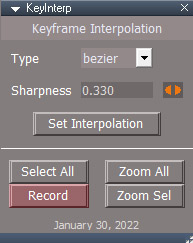
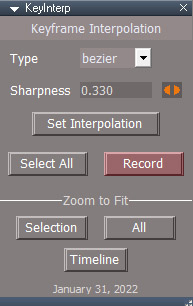
NewKeyFrameInterpPanel.jpg
NewKeyFrameInterpPanel.jpg (40.53 KiB) Viewed 1803 times
This is the new keyframe interpolation tool. It uses a simpler technique so it doesn't rely on track selection anymore.
The panel opens floating now, because the zoom buttons require it.
Before positioning an object all the keys need to be selected first before setting a new keyframe.
It works by
0. all keys are selected using the button or the anim view context menu
1. position the object
2. press record button
3. a key will be set
4. the selection is inverted to select the new key
5. the interpolation is set on the key
6. automatic select all keys in preparation to create the next key

This weird sequence is needed because if you move an object then run any select command the object will move to it's animated position. Clear selection, select all, invert selection all have the same effect of moving it out of place.

The zoom buttons work with the active animation view. There is no clear selection button because it's easy to just click to deselect in the anim view.
The attached installer does not run automatically. Press "Install" after loading in the link editor.
Attachments
KeyInterpolationAutoload.RsObj
(137.11 KiB) Downloaded 108 times
Clinton Reese

http://clintons3d.com
User avatar
trueBlue
Captain
Posts: 5548
Joined: 06 Jul 2009, 22:50
Type the number ten into the box: 10

Re: Final trueSpace 7.61 Beta 8 Unofficial Update

Post by trueBlue »

Looks good, I'll check it out in the morning
Thank you!

I noticed with your previous version, you could set one channel, like tz, and not the other channels
If you use tS's Select All, it sets all channels
Is that still possible?
When you Record a key using your new version, where is the key being recorded?
Current Frame?

Not sure if you checked out the one, I uploaded
The Zoom to all scripts does something trueSpace cannot do
When you use trueSpace's Zoom, you are not able to get back where you were before, unless you manually do it
User avatar
clintonman
Captain
Posts: 5659
Joined: 21 May 2009, 21:08
Type the number ten into the box: 0
Location: California

Re: Final trueSpace 7.61 Beta 8 Unofficial Update

Post by clintonman »

trueBlue wrote: 31 Jan 2022, 02:54 Looks good, I'll check it out in the morning
Thank you!

I noticed with your previous version, you could set one channel, like tz, and not the other channels
If you use tS's Select All, it sets all channels
Is that still possible?
When you Record a key using your new version, where is the key being recorded?
Current Frame?

Not sure if you checked out the one, I uploaded
The Zoom to all scripts does something trueSpace cannot do
When you use trueSpace's Zoom, you are not able to get back where you were before, unless you manually do it
The set interpolation hasn't changed so you can still set it per channel in the FCurve view, or all channels at once if selected in the DopeSheet view.

The new key is recorded at the current time on the active track.

Your zoom to all script doesn't take you back to where you were before. It switches between zoom to all keys and zoom to the entire timeline. I think it would work better as simple zoom to whole timeline instead of the toggle action.
I think I can add a "GetViewAspect" to the plugin code. If so you can reduce those 3 buttons down to just 1 button.
Clinton Reese

http://clintons3d.com
User avatar
trueBlue
Captain
Posts: 5548
Joined: 06 Jul 2009, 22:50
Type the number ten into the box: 10

Re: Final trueSpace 7.61 Beta 8 Unofficial Update

Post by trueBlue »

Cool!
Steps to replicate what I think the Zoom to All scripts do using trueSpace Anim view's context Zoom To Fit All

Go to a channel in the FCurve, and select Zoom To Fit All
Switch to Story and back to FCurve
User avatar
trueBlue
Captain
Posts: 5548
Joined: 06 Jul 2009, 22:50
Type the number ten into the box: 10

Re: Final trueSpace 7.61 Beta 8 Unofficial Update

Post by trueBlue »

Awesome!
You simplified your code big time :)
Your zoom to all script doesn't take you back to where you were before. It switches between zoom to all keys and zoom to the entire timeline
tS Anim view's, Zoom To Fit All actually zooms to the selected Clip's Start to End, horizontally
I think I can add a "GetViewAspect" to the plugin code. If so you can reduce those 3 buttons down to just 1 button
I do not think this will be necessary with your new version, but Zoom to Timeline sounds good
There is no clear selection button because it's easy to just click to deselect in the anim view
Does not work in the Dope Sheet
I am adding Ctrl + U = Clear Selection to the shortcuts

tS Anim view is missing a Vertical - Zoom To Center
Vertical Zoom To Center.png
Vertical Zoom To Center.png (1.33 KiB) Viewed 2135 times
User avatar
clintonman
Captain
Posts: 5659
Joined: 21 May 2009, 21:08
Type the number ten into the box: 0
Location: California

Re: Final trueSpace 7.61 Beta 8 Unofficial Update

Post by clintonman »

trueBlue wrote: 31 Jan 2022, 17:14 Awesome!
You simplified your code big time :)
...
I think I can add a "GetViewAspect" to the plugin code. If so you can reduce those 3 buttons down to just 1 button
I do not think this will be necessary with your new version, but Zoom to Timeline sounds good
There is no clear selection button because it's easy to just click to deselect in the anim view
Does not work in the Dope Sheet
I am adding Ctrl + U = Clear Selection to the shortcuts

tS Anim view is missing a Vertical - Zoom To Center
Vertical Zoom To Center.png
To late, already made the GetViewAspect. It didn't take long, but computer trouble stopped me from doing anything with it.

Dope sheet click in the lower part to clear selection
Clinton Reese

http://clintons3d.com
User avatar
clintonman
Captain
Posts: 5659
Joined: 21 May 2009, 21:08
Type the number ten into the box: 0
Location: California

Re: Final trueSpace 7.61 Beta 8 Unofficial Update

Post by clintonman »

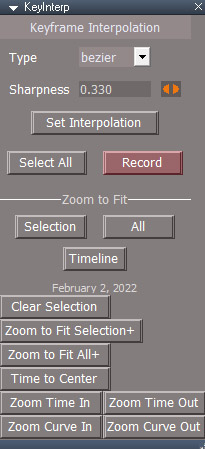
NewKeyFrameInterpPanel2.jpg
NewKeyFrameInterpPanel2.jpg (38.94 KiB) Viewed 2117 times
Added a zoom to timeline button. Requires updated rsx plugin.

Link to updated rsx plugin:
http://clintons3d.com/plugins/downloads ... Plugin.rsx
Attachments
KeyInterp676e.RsObj
(40.5 KiB) Downloaded 119 times
Clinton Reese

http://clintons3d.com
User avatar
trueBlue
Captain
Posts: 5548
Joined: 06 Jul 2009, 22:50
Type the number ten into the box: 10

Re: Final trueSpace 7.61 Beta 8 Unofficial Update

Post by trueBlue »

Works great! :bananathumb:
Getting several errors with the button scripts when using them when nothing is selected and not the correct object, like scripts
Will this work?
if(!Node.ConExists(Node.FirstSelected(), "AnimTrack")) return
User avatar
clintonman
Captain
Posts: 5659
Joined: 21 May 2009, 21:08
Type the number ten into the box: 0
Location: California

Re: Final trueSpace 7.61 Beta 8 Unofficial Update

Post by clintonman »

trueBlue wrote: 01 Feb 2022, 01:38 Works great! :bananathumb:
Getting several errors with the button scripts when using them when nothing is selected and not the correct object, like scripts
Will this work?
if(!Node.ConExists(Node.FirstSelected(), "AnimTrack")) return
Maybe. If the check is too early in the process it will stop creation of keyframes on objects that haven't been animated yet.

I might be adding some more to the rsx plugin. The SDK seems to show more to the AnimMng node than we can see. Might be able to get rid of the requirement for all keys selected before setting a new key in the script.
Clinton Reese

http://clintons3d.com
User avatar
trueBlue
Captain
Posts: 5548
Joined: 06 Jul 2009, 22:50
Type the number ten into the box: 10

Re: Final trueSpace 7.61 Beta 8 Unofficial Update

Post by trueBlue »

How about this for the record script?

Code: Select all

	if(!Node.ConExists(Node.FirstSelected(), "AnimTrack")) {
		Node.Value(System.ThisOwner() + "/setInterpolation", "newKey") = false
		System.Alert("Set a Keyframe first")
		params.SetTerminationFlag()
		return
	}
Seems better than an error. ;)

I looked for hours in the SDK for AnimMng and could not find anything

I notice that there is no interactive way to adjust the Left and Right angles on Custom Beziers
User avatar
clintonman
Captain
Posts: 5659
Joined: 21 May 2009, 21:08
Type the number ten into the box: 0
Location: California

Re: Final trueSpace 7.61 Beta 8 Unofficial Update

Post by clintonman »

I set the record to do a normal key if nothing exists yet. Probably good idea to add alert if interpolation isn't set to trueSpace default and to bypass all the code if interpolation is default.

Code: Select all

	if(!Node.ConExists(Node.FirstSelected(), "AnimTrack")) {
		RsAnim.SetKeyFrame('', RsTime.CurrentTime());
		params.SetTerminationFlag();
		return;
	}
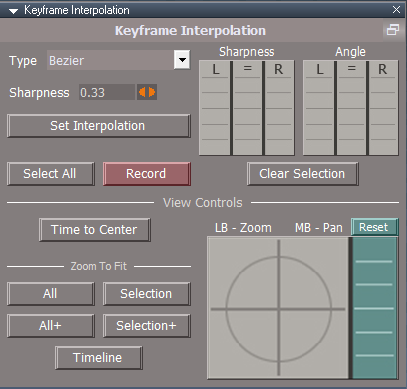
Custom Bezier handles - ctrl drag on the handles changes them individually

NewKeyFrameInterpPanel3.jpg

This is what I have in the panel after adding more functions to the plugin code. I think I'll rename it from KeyInterp to "Animation Utilities" or move all those buttons into a separate thing, I don't know.
Clear Selection is because you were right about deselect not always being available. If you have keys selected and the view is zoomed in then you can't just click to deselect.
Zoom to Fit Selection+ will zoom so that there is space top, bottom, left and right for easier selection and so the curve handles are not cut off at the ends.
Time to Center sets the time to the center of the view.
Zoom Time zooms horizontally in time and Zoom Curve zooms vertically in the curve view. These would work much better via mouse actions but that's a no go.
Zoom to Fit All+ doesn't do anything yet. It will zoom to the active clip start and end range with space around like the Zoom to Selection+.
Clinton Reese

http://clintons3d.com
User avatar
trueBlue
Captain
Posts: 5548
Joined: 06 Jul 2009, 22:50
Type the number ten into the box: 10

Re: Final trueSpace 7.61 Beta 8 Unofficial Update

Post by trueBlue »

Sweet, cannot wait to try it! :bananathumb:
I was thinking yesterday, how nice it would be to have a little bit of padding around the Zoom to Selection
Ctrl + Drag on the Custom Bezier handles works much better for Angles, thanks
Is there a shortcut for the Sharpness Left & Right?
Looks like the only way to set those is by clicking the = and manually setting them
Sharpness Left and Right.png
Sharpness Left and Right.png (2.2 KiB) Viewed 2058 times
You can name the floating panel whatever you want in the panel frame's Title attribute
Panel Frame Title.png
Panel Frame Title.png (1.42 KiB) Viewed 2058 times
KI panel.png
KI panel.png (6.42 KiB) Viewed 2058 times
User avatar
clintonman
Captain
Posts: 5659
Joined: 21 May 2009, 21:08
Type the number ten into the box: 0
Location: California

Re: Final trueSpace 7.61 Beta 8 Unofficial Update

Post by clintonman »

While working on the animation plugin I discovered that truePause makes the Status Message work better. You can spam the status without skipping values.

This is what I did
replaced the Clear Status pause node with a truePause node from the Activities Base library
renamed the "truePause" to "Clear Status"
renamed the "pauseTime" connector to "Period"

You can test with the TestStatusMessage before and after to see the change. Press the button a bunch of times before the 2 second clear delay.
Attachments
TestStatusMessage.RsObj
(4.79 KiB) Downloaded 116 times
Status Message.RsObj
(161.47 KiB) Downloaded 123 times
Clinton Reese

http://clintons3d.com
User avatar
trueBlue
Captain
Posts: 5548
Joined: 06 Jul 2009, 22:50
Type the number ten into the box: 10

Re: Final trueSpace 7.61 Beta 8 Unofficial Update

Post by trueBlue »

Awesome, thank you!
Been wanting to Spam the status Messages for a long time :mrgreen:
Works great! :bananathumb:
User avatar
clintonman
Captain
Posts: 5659
Joined: 21 May 2009, 21:08
Type the number ten into the box: 0
Location: California

Re: Final trueSpace 7.61 Beta 8 Unofficial Update

Post by clintonman »

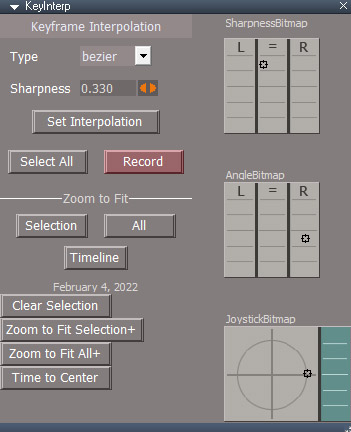
NewKeyFrameInterpPanel4.jpg

Almost done with all the functions.
Added bitmap controls for zooming and panning the anim view and for setting the sharpness and angle values.
Zoom to Fit All+ still doesn't do anything
Clinton Reese

http://clintons3d.com
User avatar
trueBlue
Captain
Posts: 5548
Joined: 06 Jul 2009, 22:50
Type the number ten into the box: 10

Re: Final trueSpace 7.61 Beta 8 Unofficial Update

Post by trueBlue »

Your new version is great, Clinton! :bananathumb:

I am getting an error with the Select All button
ERR Source object: Error: Unspecified script error Line: 1, Char: 23 Script text: RsAnim.SelectAll('')

Pan and Zoom
Is there a way to set the Anim View, -100 100 | -50 50?
The above is trueSpace's Default settings
User avatar
clintonman
Captain
Posts: 5659
Joined: 21 May 2009, 21:08
Type the number ten into the box: 0
Location: California

Re: Final trueSpace 7.61 Beta 8 Unofficial Update

Post by clintonman »

trueBlue wrote: 07 Feb 2022, 16:07 Your new version is great, Clinton! :bananathumb:

I am getting an error with the Select All button
ERR Source object: Error: Unspecified script error Line: 1, Char: 23 Script text: RsAnim.SelectAll('')

Pan and Zoom
Is there a way to set the Anim View, -100 100 | -50 50?
The above is trueSpace's Default settings
Thanks, those changes sound doable. I noticed that the RsAnim functions sometimes fail when the Anim view isn't active, so I'll add a check for it.
Clinton Reese

http://clintons3d.com
User avatar
trueBlue
Captain
Posts: 5548
Joined: 06 Jul 2009, 22:50
Type the number ten into the box: 10

Re: Final trueSpace 7.61 Beta 8 Unofficial Update

Post by trueBlue »

Just noticed that the Clear Selection button requires that an Anim View be active whereas the Select All does not

You might want to change the Alert message
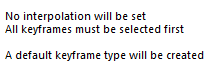
Alert.png
Alert.png (2.37 KiB) Viewed 1918 times
The first sentence is misleading because your script actually creates a keyframe with Interpolation (trueSpace's Bezier)

Is the Default Type necessary? It seems to be the same as Bezier
User avatar
clintonman
Captain
Posts: 5659
Joined: 21 May 2009, 21:08
Type the number ten into the box: 0
Location: California

Re: Final trueSpace 7.61 Beta 8 Unofficial Update

Post by clintonman »

trueBlue wrote: 07 Feb 2022, 17:01 Just noticed that the Clear Selection button requires that an Anim View be active whereas the Select All does not

You might want to change the Alert message
Alert.png
The first sentence is misleading because your script actually creates a keyframe with Interpolation (trueSpace's Bezier)

Is the Default Type necessary? It seems to be the same as Bezier
The trueSpace default varies depending on how the previous or next keyframe interpolation is set. I forget the details, but default is not just bezier. It could be linear or stepped or whatever. I guess I can change the first sentence to say something like, "Interpolation type will be automatically set by trueSpace" or "Interpolation type will be determined by trueSpace".
So if you only create one type of interpolation while animating you don't need these scripts at all, unless the flat interpolation option is needed.
Clinton Reese

http://clintons3d.com
User avatar
trueBlue
Captain
Posts: 5548
Joined: 06 Jul 2009, 22:50
Type the number ten into the box: 10

Re: Final trueSpace 7.61 Beta 8 Unofficial Update

Post by trueBlue »

Sounds better
I am just confused by the new Default Interpolation that does not exist in trueSpace
The best I can tell, trueSpace always creates a Bezier with the Sharpness set @ 0.33 and 0.33
If you want a different Interpolation Type, you have to select the Keyframes and change it via trueSpace's context menu
On the other hand, setting a Custom Bezier can have mixed results with the Angles

Your scripts however allow a user to Record/Set whatever Interpolation Type chosen in your UI
Something trueSpace cannot do
User avatar
clintonman
Captain
Posts: 5659
Joined: 21 May 2009, 21:08
Type the number ten into the box: 0
Location: California

Re: Final trueSpace 7.61 Beta 8 Unofficial Update

Post by clintonman »

trueBlue wrote: 07 Feb 2022, 18:13 Sounds better
I am just confused by the new Default Interpolation that does not exist in trueSpace
The best I can tell, trueSpace always creates a Bezier with the Sharpness set @ 0.33 and 0.33
If you want a different Interpolation Type, you have to select the Keyframes and change it via trueSpace's context menu
On the other hand, setting a Custom Bezier can have mixed results with the Angles

Your scripts however allow a user to Record/Set whatever Interpolation Type chosen in your UI
Something trueSpace cannot do
You can see it if you create a few keyframes by normal truespace record then make them all linear. Now when you create new keys by normal truespace record they will be linear, not bezier.
Clinton Reese

http://clintons3d.com
User avatar
trueBlue
Captain
Posts: 5548
Joined: 06 Jul 2009, 22:50
Type the number ten into the box: 10

Re: Final trueSpace 7.61 Beta 8 Unofficial Update

Post by trueBlue »

Not for me!
Following your steps, select the last frame created in FCurve to see what type it is
For me the previous keyframe has no Sharpness and the last frame created does
User avatar
clintonman
Captain
Posts: 5659
Joined: 21 May 2009, 21:08
Type the number ten into the box: 0
Location: California

Re: Final trueSpace 7.61 Beta 8 Unofficial Update

Post by clintonman »

trueBlue wrote: 07 Feb 2022, 19:11 Not for me!
Following your steps, select the last frame created in FCurve to see what type it is
For me the previous keyframe has no Sharpness and the last frame created does
Roger that, I'll change it for 2 different messages based on whether the key is added after the last key. If after the last keyframe then say default trueSpace Bezier will be created. If anywhere else it will say what I mentioned before.
Clinton Reese

http://clintons3d.com
User avatar
clintonman
Captain
Posts: 5659
Joined: 21 May 2009, 21:08
Type the number ten into the box: 0
Location: California

Re: Final trueSpace 7.61 Beta 8 Unofficial Update

Post by clintonman »

Fix "Select All" button error when Anim view isn't active
Fix "Select All" and "Clear Selection" button error when selected object has no animation.
Tried to add "Bezier" specific interpolation message but it was too difficult and only shows if some keys are selected.
Message says
"All keyframes must be selected to use the chosen interpolation type. Interpolation type will be determined by trueSpace."

If some but no all keys are selected it will say bezier message if current time is after the last keyframe time.
"All keyframes must be selected to use the chosen interpolation type. The trueSpace default Bezier interpolation will be used."

Added a rest button for the curve view value ranges.

Discovered that RsAnim.SelectAll command will create an empty animation clip if the object is not already animated. Added a check to prevent that from happening and to prevent errors if the selected object cannot be animated.
Attachments
KeyInterp45ad.RsObj
(115.95 KiB) Downloaded 106 times
Clinton Reese

http://clintons3d.com
User avatar
trueBlue
Captain
Posts: 5548
Joined: 06 Jul 2009, 22:50
Type the number ten into the box: 10

Re: Final trueSpace 7.61 Beta 8 Unofficial Update

Post by trueBlue »

Seems to be working great, thanks!
Looks like you can remove the default type

Code: Select all

//	if(Node.Value(owner, "interpType") == "default" || !AllKeysAreSelected()) {
	if(!AllKeysAreSelected()) {
		RsAnim.SetKeyFrame('', RsTime.CurrentTime());
		params.SetTerminationFlag();
		return;
	}
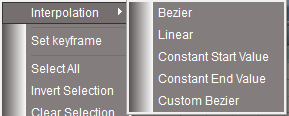
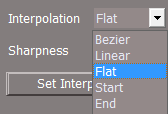
Also, I have capitalized the Interpolation Types to match trueSpace
Capitalized Interpolation Types.png
Capitalized Interpolation Types.png (5.49 KiB) Viewed 2470 times
Types.png
Types.png (3.67 KiB) Viewed 2469 times
User avatar
clintonman
Captain
Posts: 5659
Joined: 21 May 2009, 21:08
Type the number ten into the box: 0
Location: California

Re: Final trueSpace 7.61 Beta 8 Unofficial Update

Post by clintonman »

trueBlue wrote: 08 Feb 2022, 02:53 Seems to be working great, thanks!
Looks like you can remove the default type
...
Why?
Clinton Reese

http://clintons3d.com
User avatar
trueBlue
Captain
Posts: 5548
Joined: 06 Jul 2009, 22:50
Type the number ten into the box: 10

Re: Final trueSpace 7.61 Beta 8 Unofficial Update

Post by trueBlue »

Like I said, I am not understanding why you are introducing another Default Interpolation which is the same as a Bezier
I see now after reading your website:
If all keys are not selected, the record buttons will behave the same as the default tS record button, but will give a warning message if the interpolation type is not set to "default".
Here is another example why adding the Default type is not a very good idea:
From your UI, set the Type to Default and Sharpness to 0.40
Press the Set Interpolation button or (Record button (without any keyframes selected so you do not get the Alert))
You should see that the Sharpness is not being set to 0.40
In your setInterpolation script, you are only setting the defined Sharpness with Bezier and there is nothing for Default
Sorry, just not understanding...
User avatar
clintonman
Captain
Posts: 5659
Joined: 21 May 2009, 21:08
Type the number ten into the box: 0
Location: California

Re: Final trueSpace 7.61 Beta 8 Unofficial Update

Post by clintonman »

trueBlue wrote: 08 Feb 2022, 14:37 Like I said, I am not understanding why you are introducing another Default Interpolation which is the same as a Bezier
I see now after reading your website:
If all keys are not selected, the record buttons will behave the same as the default tS record button, but will give a warning message if the interpolation type is not set to "default".
Here is another example why adding the Default type is not a very good idea:
From your UI, set the Type to Default and Sharpness to 0.40
Press the Set Interpolation button or (Record button (without any keyframes selected so you do not get the Alert))
You should see that the Sharpness is not being set to 0.40
In your setInterpolation script, you are only setting the defined Sharpness with Bezier and there is nothing for Default
Sorry, just not understanding...
No problem, I think I see what you're saying.

The script/plugin does not do anything that tS can't do on it's own. So ignore/pretend the script doesn't exist.

The Sharpness 0.33 = 0.33 does not show in the anim view ui unless you have a keyframe selected. You can't set it's value and then use that value later on other keyframes. It always sets to 0.33 on new keys.
If you set keyframes at 10 then 20 then 30 you will always get bezier with sharpness 0.33
if you set those keys to linear and add a keyframe at 40 it will be bezier. If you add a key at 0 or between 10 and 30 it will be linear. Between 30 and 40 will create a bezier keyframe. So tS by default does not always make bezier keyframes.

Back to the scripts.
When using the Set Interpolation button, it only works on selected keys. It does not set the ui value.
When you create a new key with the script record button it will create the keyframe, select it and then change it's interpolation to the set values in the script. It can't set the values without first selecting the keyframe and it can't set the anim view ui sharpness to be used later.
Clinton Reese

http://clintons3d.com
User avatar
trueBlue
Captain
Posts: 5548
Joined: 06 Jul 2009, 22:50
Type the number ten into the box: 10

Re: Final trueSpace 7.61 Beta 8 Unofficial Update

Post by trueBlue »

Ah now I see, thank you for showing me!
tS by default does not always make Bezier keyframes

I think it would be clearer if Default was renamed to Current
Default, to me anyway, suggest trueSpace's default keyframe which is Bezier
User avatar
clintonman
Captain
Posts: 5659
Joined: 21 May 2009, 21:08
Type the number ten into the box: 0
Location: California

Re: Final trueSpace 7.61 Beta 8 Unofficial Update

Post by clintonman »

trueBlue wrote: 08 Feb 2022, 17:42 Ah now I see, thank you for showing me!
tS by default does not always make Bezier keyframes

I think it would be clearer if Default was renamed to Current
Default, to me anyway, suggest trueSpace's default keyframe which is Bezier
I see what you mean. Default is variable, not a single set value as expected by the word. Current has no meaning for me so I'm leaning toward the word "Automatic" or 2 words "trueSpace Controlled".
Clinton Reese

http://clintons3d.com
User avatar
trueBlue
Captain
Posts: 5548
Joined: 06 Jul 2009, 22:50
Type the number ten into the box: 10

Re: Final trueSpace 7.61 Beta 8 Unofficial Update

Post by trueBlue »

How about no word? An empty string
Empty String.png
Empty String.png (974 Bytes) Viewed 2456 times
I just tried it and it works just like trueSpace
Set Interpolation does nothing
Record without a selection works just like trueSpace, although I did not see an Alert
User avatar
trueBlue
Captain
Posts: 5548
Joined: 06 Jul 2009, 22:50
Type the number ten into the box: 10

Re: Final trueSpace 7.61 Beta 8 Unofficial Update

Post by trueBlue »

Update 114 for trueSpace7.61 Beta 8 Unofficial Update Version 8
Final Update

Widgets
Point Edit widget
Object Navigation widget
Add
XYZ Locks to Scale and Rotate
Alt + LMB On|Off

View widget
Rotate X 'Blue'
Add
Ctrl + LMB - Open Select Cycle
Rotate YZ 'Red'
Ctrl + LMB - Open Animation toolbar

Cube View widget
Changed Active Highlight color from Yellow to White on all meshes
Applied a darker color for Left, Back and Bottom
Add Right click gesture command RsTool.Arrow() where no Right click gesture existed 'Stops Point Edit mode when an object is selected'

Toolbars
Camera toolbar
Add
Cycle Camera Views
Cam Toolbar.png
Cam Toolbar.png (14.52 KiB) Viewed 2431 times
CustomAnimToolbar

KI toolbar.png
KI toolbar.png (7.55 KiB) Viewed 2431 times
CustomCommands
Update
Keyframe Interpolation Author - Clinton Reese 2/9/2022
Clintons3dPlugin.rsx v.1638433
KI panel.png
Select
Add
Cycle aspect
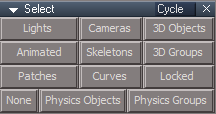
Select Cycle panel.png
Select Cycle panel.png (5.15 KiB) Viewed 2431 times
Commands
Add
CycleCameras.xml Author - Clinton Reese

Animation panel
Gets and Sets the Current Time, Play Range Start, and Play Range End when loaded
Add
Bidirectional option on the Exp aspect
Play and Stop
If checked on the Exp aspect, activates a Timer Event that sets the Current Time on the Animation panel and Synchronizes Workspace with Model
Warning! This does not work when any Anim View is open!
Use with the Link Editor view, only!
Synchronize works when One object is selected, only!

Protect Workspace
Add
Open and Dock Model tS6.7 button

Animation scripts library
Random Color
Random Number
Random Integer
Counter
Active
Vibrator

My Anim Clips library
100 Vibrations.RsClip

Status Message
Update Author - Clinton Reese

Animation Preferences
Add
Interpolation button

Shortcuts
Anim View
Add
Ctrl + U = Clear Selection


February 10, 2022

viewt ... =55&t=3732

Instructions:

Recommend that you completely Uninstall and Install trueSpace7.61 Beta 8 to a clean directory.
Install the PDF Manual for trueSpace. (Optional but required before installing the Update)

1.) Run the tS7.61B8.8.exe
2.) Browse [...] to where you installed C:\trueSpace761, select its folder and then the Extract button
3.) Select the Yes to All button
4.) Open trueSpace and select the Reset to Default Context icon
5.) In Workspace select the Default layout tab

The included Plugins.xml file has the Clintons3dPlugin, Clintons3dPluginExt and Clintons3dRsView, Installed and Loaded to the default path: C:\trueSpace761
WARNING: These 3 plugins are required to be Installed and Loaded when using trueSpace!
User avatar
trueBlue
Captain
Posts: 5548
Joined: 06 Jul 2009, 22:50
Type the number ten into the box: 10

Re: Final trueSpace 7.61 Beta 8 Unofficial Update

Post by trueBlue »

Update 115 for trueSpace7.61 Beta 8 Unofficial Update Version 8
Final Update

Toolbars
AnimationBar/Flat
CustomAnimToolbar
Update LMB & RMB commands use:
util.SetNodeValueString

CustomCommands
Keyframe Interpolation Author - Clinton Reese 2/9/2022
Update
recordKey & modifyKeys scripts use:
util.SetNodeValueInt

Switch aspect buttons
RMB = Open - Interpolation Toolbar
Add
if(!Node.Exist... Open toolbar

February 11, 2022

viewt ... =55&t=3732

Instructions:

Recommend that you completely Uninstall and Install trueSpace7.61 Beta 8 to a clean directory.
Install the PDF Manual for trueSpace. (Optional but required before installing the Update)

1.) Run the tS7.61B8.8.exe
2.) Browse [...] to where you installed C:\trueSpace761, select its folder and then the Extract button
3.) Select the Yes to All button
4.) Open trueSpace and select the Reset to Default Context icon
5.) In Workspace select the Default layout tab

The included Plugins.xml file has the Clintons3dPlugin, Clintons3dPluginExt and Clintons3dRsView, Installed and Loaded to the default path: C:\trueSpace761
WARNING: These 3 plugins are required to be Installed and Loaded when using trueSpace!
User avatar
trueBlue
Captain
Posts: 5548
Joined: 06 Jul 2009, 22:50
Type the number ten into the box: 10

Re: Final trueSpace 7.61 Beta 8 Unofficial Update

Post by trueBlue »

Update 116 for trueSpace7.61 Beta 8 Unofficial Update Version 8
Final Update

Widgets/Object Rotate
Ctrl + LB - Rotate selected object +45 degrees
Alt + LB - Rotate selected object -45 degrees
Fixed error with Mutiple selected objects
Use First selected only
Edit
Removed support for Cameras, Spot, & Projector lights

February 13, 2022

viewt ... =55&t=3732

Instructions:

Recommend that you completely Uninstall and Install trueSpace7.61 Beta 8 to a clean directory.
Install the PDF Manual for trueSpace. (Optional but required before installing the Update)

1.) Run the tS7.61B8.8.exe
2.) Browse [...] to where you installed C:\trueSpace761, select its folder and then the Extract button
3.) Select the Yes to All button
4.) Open trueSpace and select the Reset to Default Context icon
5.) In Workspace select the Default layout tab

The included Plugins.xml file has the Clintons3dPlugin, Clintons3dPluginExt and Clintons3dRsView, Installed and Loaded to the default path: C:\trueSpace761
WARNING: These 3 plugins are required to be Installed and Loaded when using trueSpace!
User avatar
trueBlue
Captain
Posts: 5548
Joined: 06 Jul 2009, 22:50
Type the number ten into the box: 10

Re: Final trueSpace 7.61 Beta 8 Unofficial Update

Post by trueBlue »

Update 117 for trueSpace7.61 Beta 8 Unofficial Update Version 8
Final Update

February 22, 2022

viewt ... =55&t=3732

CustomCommands/Select
Cycle Select aspect
Cycle Select panel.png
Cycle Select panel.png (5.78 KiB) Viewed 2243 times
Add
Hair button and script
Update
3D Groups script 'Exclude Skeletons and Hair from selection'
Skeletons script 'More robust Skeleton selection'

Widgets/Tools
Add
Bevel and Extrude tool
Bevel and Extrude tool.png
Offset - Negative numbers = Inset | Postive numbers = Height

ZoomToAll script
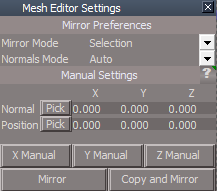
Add fix to restore PE Selection

Mirror Modeler
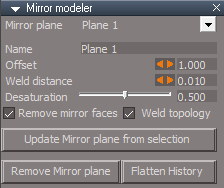
MirrorModeler panel.png
MirrorModeler panel.png (7.53 KiB) Viewed 2243 times
Updated panel settings
Exported Default aspect
Add
Flatten History button
Note: All Toolbars - Mirror Modeler icon's LMB command shows the panel in the Stack

Mesh Editor Settings/Mirror tool aspect
Mirror tool aspect.png
Mirror tool aspect.png (8.58 KiB) Viewed 2243 times
Update panel UI
Manual button scripts use util commands
Note: All Toolbars - Mirror tool icon's LMB command shows the panel in the Stack

Animation Panel
Add
Play Range button script
Play | Stop Range / Shrink Play Range

Scripts folder
tS761 Workspace Shortcut List.rtf
Window.Shortcuts.xml
Animation Editor
Add
Object Move & Rotate command(s)

Objects - tS7.61 Update objects library
Add
Timer Stop Event


Instructions:

Recommend that you completely Uninstall and Install trueSpace7.61 Beta 8 to a clean directory.
Install the PDF Manual for trueSpace. (Optional but required before installing the Update)

1.) Run the tS7.61B8.8.exe
2.) Browse [...] to where you installed C:\trueSpace761, select its folder and then the Extract button
3.) Select the Yes to All button
4.) Open trueSpace and select the Reset to Default Context icon
5.) In Workspace select the Default layout tab

The included Plugins.xml file has the Clintons3dPlugin, Clintons3dPluginExt and Clintons3dRsView, Installed and Loaded to the default path: C:\trueSpace761
WARNING: These 3 plugins are required to be Installed and Loaded when using trueSpace!
User avatar
trueBlue
Captain
Posts: 5548
Joined: 06 Jul 2009, 22:50
Type the number ten into the box: 10

Re: Final trueSpace 7.61 Beta 8 Unofficial Update

Post by trueBlue »

Looks like I missed updating the Mirror tool & Mirror Modeler icon's commands for the Pont Edit 1 & 2 toolbars
@Clinton:
The above icons do not have the Guard commands
Also, the Frame(S) are not closing in Windows Manager Space unless you click a Blank icon

Why are they not closing when you select a tool?
What is ButtonHighlight?
User avatar
clintonman
Captain
Posts: 5659
Joined: 21 May 2009, 21:08
Type the number ten into the box: 0
Location: California

Re: Final trueSpace 7.61 Beta 8 Unofficial Update

Post by clintonman »

trueBlue wrote: 23 Feb 2022, 17:14 Looks like I missed updating the Mirror tool & Mirror Modeler icon's commands for the Pont Edit 1 & 2 toolbars
@Clinton:
The above icons do not have the Guard commands
Also, the Frame(S) are not closing in Windows Manager Space unless you click a Blank icon

Why are they not closing when you select a tool?
What is ButtonHighlight?
They don't close when rmb is used. LMB acts the same as all the other buttons. So I'm not seeing what you describe.
Clinton Reese

http://clintons3d.com
User avatar
trueBlue
Captain
Posts: 5548
Joined: 06 Jul 2009, 22:50
Type the number ten into the box: 10

Re: Final trueSpace 7.61 Beta 8 Unofficial Update

Post by trueBlue »

I figured it out
Your last update made them faster to open, by not closing them when you LMB select a tool
Only the Blank icons closes the Frame(s)
User avatar
clintonman
Captain
Posts: 5659
Joined: 21 May 2009, 21:08
Type the number ten into the box: 0
Location: California

Re: Final trueSpace 7.61 Beta 8 Unofficial Update

Post by clintonman »

Ah, so it's the difference between closing and hiding them.
Clinton Reese

http://clintons3d.com
User avatar
trueBlue
Captain
Posts: 5548
Joined: 06 Jul 2009, 22:50
Type the number ten into the box: 10

Re: Final trueSpace 7.61 Beta 8 Unofficial Update

Post by trueBlue »

Update 118 for trueSpace7.61 Beta 8 Unofficial Update Version 8
Final Update

February 23, 2022

viewt ... =55&t=3732

Widgets/Tools
Bevel and Extrude tool
Update to exclude NURBS

Toolbars/PointEdit & PointEdit2
Update LMB commands
Mirror Modeler
Mirror tool

Scripts/CustomCommands
MirrorMatrix
Add
Select Connected script
Update
MirrorStart script
line 123, add:
Node.ConRemove(Node.Owner(sel), "LE2Data"); 'For NURBS'


Instructions:

Recommend that you completely Uninstall and Install trueSpace7.61 Beta 8 to a clean directory.
Install the PDF Manual for trueSpace. (Optional but required before installing the Update)

1.) Run the tS7.61B8.8.exe
2.) Browse [...] to where you installed C:\trueSpace761, select its folder and then the Extract button
3.) Select the Yes to All button
4.) Open trueSpace and select the Reset to Default Context icon
5.) In Workspace select the Default layout tab

The included Plugins.xml file has the Clintons3dPlugin, Clintons3dPluginExt and Clintons3dRsView, Installed and Loaded to the default path: C:\trueSpace761
WARNING: These 3 plugins are required to be Installed and Loaded when using trueSpace!
User avatar
trueBlue
Captain
Posts: 5548
Joined: 06 Jul 2009, 22:50
Type the number ten into the box: 10

Re: Final trueSpace 7.61 Beta 8 Unofficial Update

Post by trueBlue »

Update 119 for trueSpace7.61 Beta 8 Unofficial Update Version 8
Final Update

March 3, 2022

viewt ... =55&t=3732

Widgets/Tools
Update
UUFunctionSet scripts

Bevel and Extrude tool
Update 'Add support for more than one object in Point Edit mode'
Add
Boolean - 1 = true | 0 = false

Scripts/CustomCommands
Guard
Update
Replaced util status messgages with old style

Toolbars/Red, Blue, and Gold
Update
LMB command use UUFunctionSet
No longer uses util commands
Gold has a check, if CustomCommands Exist


Instructions:

Recommend that you completely Uninstall and Install trueSpace7.61 Beta 8 to a clean directory
Install the PDF Manual for trueSpace. (Optional but required before installing the Update)

1.) Run the tS7.61B8.8.exe
2.) Browse [...] to where you installed C:\trueSpace761, select its folder and then the Extract button
3.) Select the Yes to All button
4.) Open trueSpace and select the Reset to Default Context icon
5.) In Workspace select the Default layout tab

The included Plugins.xml file has the Clintons3dPlugin, Clintons3dPluginExt and Clintons3dRsView, Installed and Loaded to the default path: C:\trueSpace761
WARNING: These 3 plugins are required to be Installed and Loaded when using trueSpace!
User avatar
trueBlue
Captain
Posts: 5548
Joined: 06 Jul 2009, 22:50
Type the number ten into the box: 10

Re: Final trueSpace 7.61 Beta 8 Unofficial Update

Post by trueBlue »

Update 120 for trueSpace7.61 Beta 8 Unofficial Update Version 8
Final Update

March 4, 2022

viewt ... =55&t=3732

Scripts/CustomCommands
Add
Mirror Matrix
Note: It was missing in the previous updates

Instructions:

Recommend that you completely Uninstall and Install trueSpace7.61 Beta 8 to a clean directory
Install the PDF Manual for trueSpace. (Optional but required before installing the Update)

1.) Run the tS7.61B8.8.exe
2.) Browse [...] to where you installed C:\trueSpace761, select its folder and then the Extract button
3.) Select the Yes to All button
4.) Open trueSpace and select the Reset to Default Context icon
5.) In Workspace select the Default layout tab

The included Plugins.xml file has the Clintons3dPlugin, Clintons3dPluginExt and Clintons3dRsView, Installed and Loaded to the default path: C:\trueSpace761
WARNING: These 3 plugins are required to be Installed and Loaded when using trueSpace!
User avatar
trueBlue
Captain
Posts: 5548
Joined: 06 Jul 2009, 22:50
Type the number ten into the box: 10

Re: Final trueSpace 7.61 Beta 8 Unofficial Update

Post by trueBlue »

Update 121 for trueSpace7.61 Beta 8 Unofficial Update Version 8
Final Update

March 5, 2022

viewt ... =55&t=3732

4View layout
Update
All three Ortho top toolbars

Instructions:

Recommend that you completely Uninstall and Install trueSpace7.61 Beta 8 to a clean directory
Install the PDF Manual for trueSpace. (Optional but required before installing the Update)

1.) Run the tS7.61B8.8.exe
2.) Browse [...] to where you installed C:\trueSpace761, select its folder and then the Extract button
3.) Select the Yes to All button
4.) Open trueSpace and select the Reset to Default Context icon
5.) In Workspace select the Default layout tab

The included Plugins.xml file has the Clintons3dPlugin, Clintons3dPluginExt and Clintons3dRsView, Installed and Loaded to the default path: C:\trueSpace761
WARNING: These 3 plugins are required to be Installed and Loaded when using trueSpace!
User avatar
trueBlue
Captain
Posts: 5548
Joined: 06 Jul 2009, 22:50
Type the number ten into the box: 10

Re: Final trueSpace 7.61 Beta 8 Unofficial Update

Post by trueBlue »

Update 122 for trueSpace7.61 Beta 8 Unofficial Update Version 8
Final Update

March 7, 2022

viewt ... =55&t=3732

AnimationBar
Add RMB commands
Previous Frame / Reverse Frame -30
Next Frame / Advance Frame +30

Link Editor Navigator toolbar
U = Unselect / Close Panels
Update RMB command
Will not run in Point Edit mode

Removed the three OptDetectors libraries

Instructions:

Recommend that you completely Uninstall and Install trueSpace7.61 Beta 8 to a clean directory
Install the PDF Manual for trueSpace. (Optional but required before installing the Update)

1.) Run the tS7.61B8.8.exe
2.) Browse [...] to where you installed C:\trueSpace761, select its folder and then the Extract button
3.) Select the Yes to All button
4.) Open trueSpace and select the Reset to Default Context icon
5.) In Workspace select the Default layout tab

The included Plugins.xml file has the Clintons3dPlugin, Clintons3dPluginExt and Clintons3dRsView, Installed and Loaded to the default path: C:\trueSpace761
WARNING: These 3 plugins are required to be Installed and Loaded when using trueSpace!
User avatar
trueBlue
Captain
Posts: 5548
Joined: 06 Jul 2009, 22:50
Type the number ten into the box: 10

Re: Final trueSpace 7.61 Beta 8 Unofficial Update

Post by trueBlue »

Update 123 for trueSpace7.61 Beta 8 Unofficial Update Version 8
Final Update

March 7, 2022

viewt ... =55&t=3732

Widgets
Booleans
Add
Add Object Render Attributes script

Instructions:

Recommend that you completely Uninstall and Install trueSpace7.61 Beta 8 to a clean directory
Install the PDF Manual for trueSpace. (Optional but required before installing the Update)

1.) Run the tS7.61B8.8.exe
2.) Browse [...] to where you installed C:\trueSpace761, select its folder and then the Extract button
3.) Select the Yes to All button
4.) Open trueSpace and select the Reset to Default Context icon
5.) In Workspace select the Default layout tab

The included Plugins.xml file has the Clintons3dPlugin, Clintons3dPluginExt and Clintons3dRsView, Installed and Loaded to the default path: C:\trueSpace761
WARNING: These 3 plugins are required to be Installed and Loaded when using trueSpace!
User avatar
trueBlue
Captain
Posts: 5548
Joined: 06 Jul 2009, 22:50
Type the number ten into the box: 10

Re: Final trueSpace 7.61 Beta 8 Unofficial Update

Post by trueBlue »

Update 124 for trueSpace7.61 Beta 8 Unofficial Update Version 8
Final Update

March 9, 2022

viewt ... =55&t=3732

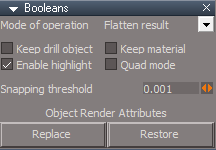
Widgets
Booleans
Booleans panel.png
Booleans panel.png (6.28 KiB) Viewed 2298 times
Add
Object Render Attributes

Replace - Add/Replaces the default Object Render Attributes
Note: If you are using Workspace Layers 4, the object will be removed from it's Layer
Recommend you use the Restore option!

Restore - Loads the last saved Object Render Attributes
Note: If your first selected object has Object Render Attributes, it will be saved automatically
Warning! If you object does not have Object Render Attributes, Restore will Load the last saved Object Render Attributes

Widgets/WidgetScripts
ZoomToAll
Fixed error

Special thanks to Clinton Reese for sharing how to run Initialize in Workspace Layers 4 :superbanana:


Instructions:

Recommend that you completely Uninstall and Install trueSpace7.61 Beta 8 to a clean directory
Install the PDF Manual for trueSpace. (Optional but required before installing the Update)

1.) Run the tS7.61B8.8.exe
2.) Browse [...] to where you installed C:\trueSpace761, select its folder and then the Extract button
3.) Select the Yes to All button
4.) Open trueSpace and select the Reset to Default Context icon
5.) In Workspace select the Default layout tab

The included Plugins.xml file has the Clintons3dPlugin, Clintons3dPluginExt and Clintons3dRsView, Installed and Loaded to the default path: C:\trueSpace761
WARNING: These 3 plugins are required to be Installed and Loaded when using trueSpace!
User avatar
trueBlue
Captain
Posts: 5548
Joined: 06 Jul 2009, 22:50
Type the number ten into the box: 10

Re: Final trueSpace 7.61 Beta 8 Unofficial Update

Post by trueBlue »

Update 125 for trueSpace7.61 Beta 8 Unofficial Update Version 8
Final Update

March 10, 2022

viewt ... =55&t=3732

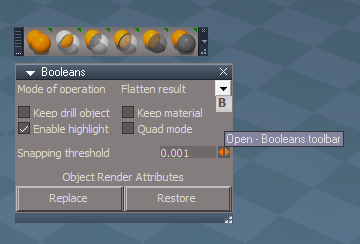
Toolbars
Add
Booleans toolbar
Booleans panel and toolbar.png
Booleans panel and toolbar.png (27.1 KiB) Viewed 2277 times
Instructions:

Recommend that you completely Uninstall and Install trueSpace7.61 Beta 8 to a clean directory
Install the PDF Manual for trueSpace. (Optional but required before installing the Update)

1.) Run the tS7.61B8.8.exe
2.) Browse [...] to where you installed C:\trueSpace761, select its folder and then the Extract button
3.) Select the Yes to All button
4.) Open trueSpace and select the Reset to Default Context icon
5.) In Workspace select the Default layout tab

The included Plugins.xml file has the Clintons3dPlugin, Clintons3dPluginExt and Clintons3dRsView, Installed and Loaded to the default path: C:\trueSpace761
WARNING: These 3 plugins are required to be Installed and Loaded when using trueSpace!
User avatar
trueBlue
Captain
Posts: 5548
Joined: 06 Jul 2009, 22:50
Type the number ten into the box: 10

Re: Final trueSpace 7.61 Beta 8 Unofficial Update

Post by trueBlue »

Update 126 for trueSpace7.61 Beta 8 Unofficial Update Version 8
Final Update

March 13, 2022

viewt ... =55&t=3732

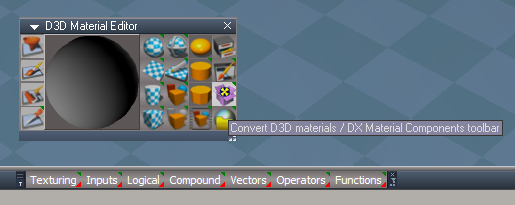
Toolbars
Update
DX Material Components toolbar
Fixed all of the LMB commands that were loading the Components from C:\trueSpace761Std to System.GetMainDir()
Changed to different type buttons


Instructions:

Recommend that you completely Uninstall and Install trueSpace7.61 Beta 8 to a clean directory
Install the PDF Manual for trueSpace. (Optional but required before installing the Update)

1.) Run the tS7.61B8.8.exe
2.) Browse [...] to where you installed C:\trueSpace761, select its folder and then the Extract button
3.) Select the Yes to All button
4.) Open trueSpace and select the Reset to Default Context icon
5.) In Workspace select the Default layout tab

The included Plugins.xml file has the Clintons3dPlugin, Clintons3dPluginExt and Clintons3dRsView, Installed and Loaded to the default path: C:\trueSpace761
WARNING: These 3 plugins are required to be Installed and Loaded when using trueSpace!
User avatar
trueBlue
Captain
Posts: 5548
Joined: 06 Jul 2009, 22:50
Type the number ten into the box: 10

Re: Final trueSpace 7.61 Beta 8 Unofficial Update

Post by trueBlue »

Update 127 for trueSpace7.61 Beta 8 Unofficial Update Version 8
Final Update

March 14, 2022

viewt ... =55&t=3732

Material Editor
Update all internal scripts:
Modified with Clintons3D Package/Utility functions

Recommend that you use the DX Material Components toolbar, pinned/docked to a window
Material Editor panel.png

Instructions:

Recommend that you completely Uninstall and Install trueSpace7.61 Beta 8 to a clean directory
Install the PDF Manual for trueSpace. (Optional but required before installing the Update)

1.) Run the tS7.61B8.8.exe
2.) Browse [...] to where you installed C:\trueSpace761, select its folder and then the Extract button
3.) Select the Yes to All button
4.) Open trueSpace and select the Reset to Default Context icon
5.) In Workspace select the Default layout tab

The included Plugins.xml file has the Clintons3dPlugin, Clintons3dPluginExt and Clintons3dRsView, Installed and Loaded to the default path: C:\trueSpace761
WARNING: These 3 plugins are required to be Installed and Loaded when using trueSpace!
User avatar
trueBlue
Captain
Posts: 5548
Joined: 06 Jul 2009, 22:50
Type the number ten into the box: 10

Re: Final trueSpace 7.61 Beta 8 Unofficial Update

Post by trueBlue »

Update 128 for trueSpace7.61 Beta 8 Unofficial Update Version 8
Final Update

March 17, 2022

viewt ... =55&t=3732

Widgets
Booleans tool
Update
Restore - Object Render Attributes
Unchecked - Adds the default Object Render Attributes panel
Checked - Loads the last saved Object Render Attributes panel
Note: If the object has an existing Object Render Attributes panel, it will be saved
If the object does not have an existing Object Render Attributes panel, and Restore - Object Render Attributes is Checked, the last saved Object Render Attributes panel will be used
Booleans panel.png
Booleans panel.png (6.26 KiB) Viewed 2174 times
Instructions:

Recommend that you completely Uninstall and Install trueSpace7.61 Beta 8 to a clean directory
Install the PDF Manual for trueSpace. (Optional but required before installing the Update)

1.) Run the tS7.61B8.8.exe
2.) Browse [...] to where you installed C:\trueSpace761, select its folder and then the Extract button
3.) Select the Yes to All button
4.) Open trueSpace and select the Reset to Default Context icon
5.) In Workspace select the Default layout tab

The included Plugins.xml file has the Clintons3dPlugin, Clintons3dPluginExt and Clintons3dRsView, Installed and Loaded to the default path: C:\trueSpace761
WARNING: These 3 plugins are required to be Installed and Loaded when using trueSpace!
User avatar
trueBlue
Captain
Posts: 5548
Joined: 06 Jul 2009, 22:50
Type the number ten into the box: 10

Re: Final trueSpace 7.61 Beta 8 Unofficial Update

Post by trueBlue »

Update 129 for trueSpace7.61 Beta 8 Unofficial Update Version 8
Final Update

March 22, 2022

viewt ... =55&t=3732

Rs Main Libraries
Projects - Projects
Add
Default Project Original
Default Project
Remove Material Editor
Note: Due to the use of Watch Dog Events in the Material Editor when loading a Project, the Library floating windows open. Run the Remove Material Editor script before loading a Project to avoid this. The Material Editor will be recreated when you select the Material Editor icon

CustomCommands
D3D_Render
Update - Author Clinton Reese

Preobjects
Update
Model Frame Window


Instructions:

Recommend that you completely Uninstall and Install trueSpace7.61 Beta 8 to a clean directory
Install the PDF Manual for trueSpace. (Optional but required before installing the Update)

1.) Run the tS7.61B8.8.exe
2.) Browse [...] to where you installed C:\trueSpace761, select its folder and then the Extract button
3.) Select the Yes to All button
4.) Open trueSpace and select the Reset to Default Context icon
5.) In Workspace select the Default layout tab

The included Plugins.xml file has the Clintons3dPlugin, Clintons3dPluginExt and Clintons3dRsView, Installed and Loaded to the default path: C:\trueSpace761
WARNING: These 3 plugins are required to be Installed and Loaded when using trueSpace!
User avatar
trueBlue
Captain
Posts: 5548
Joined: 06 Jul 2009, 22:50
Type the number ten into the box: 10

Re: Final trueSpace 7.61 Beta 8 Unofficial Update

Post by trueBlue »

Update 130 for trueSpace7.61 Beta 8 Unofficial Update Version 8
Final Update

March 24, 2022

viewt ... =55&t=3732

CustomCommands
Guard
Combined two OnDefaultValue functions

Instructions:

Recommend that you completely Uninstall and Install trueSpace7.61 Beta 8 to a clean directory
Install the PDF Manual for trueSpace. (Optional but required before installing the Update)

1.) Run the tS7.61B8.8.exe
2.) Browse [...] to where you installed C:\trueSpace761, select its folder and then the Extract button
3.) Select the Yes to All button
4.) Open trueSpace and select the Reset to Default Context icon
5.) In Workspace select the Default layout tab

The included Plugins.xml file has the Clintons3dPlugin, Clintons3dPluginExt and Clintons3dRsView, Installed and Loaded to the default path: C:\trueSpace761
WARNING: These 3 plugins are required to be Installed and Loaded when using trueSpace!
User avatar
trueBlue
Captain
Posts: 5548
Joined: 06 Jul 2009, 22:50
Type the number ten into the box: 10

Re: Final trueSpace 7.61 Beta 8 Unofficial Update

Post by trueBlue »

Update 131 for trueSpace7.61 Beta 8 Unofficial Update Version 8
Final Update

March 28, 2022

viewt ... =55&t=3732

preobjects
Cameras
Camera1
light01
light02
light03
light04
Lights
Yafaray Folder
Material Editor
UV Editor Preferences

Rs Main Libraries
Lights
WS - Default
WS - Black

Widgets
Object Navigation Widgets
Point Edit Widgets

Instructions:

Recommend that you completely Uninstall and Install trueSpace7.61 Beta 8 to a clean directory
Install the PDF Manual for trueSpace. (Optional but required before installing the Update)

1.) Run the tS7.61B8.8.exe
2.) Browse [...] to where you installed C:\trueSpace761, select its folder and then the Extract button
3.) Select the Yes to All button
4.) Open trueSpace and select the Reset to Default Context icon
5.) In Workspace select the Default layout tab

The included Plugins.xml file has the Clintons3dPlugin, Clintons3dPluginExt and Clintons3dRsView, Installed and Loaded to the default path: C:\trueSpace761
WARNING: These 3 plugins are required to be Installed and Loaded when using trueSpace!
User avatar
trueBlue
Captain
Posts: 5548
Joined: 06 Jul 2009, 22:50
Type the number ten into the box: 10

Re: Final trueSpace 7.61 Beta 8 Unofficial Update

Post by trueBlue »

Update 132 for trueSpace7.61 Beta 8 Unofficial Update Version 8
Final Update

April 3, 2022

viewt ... =55&t=3732

CustomCommands
Update
YafarayScripts/EnumPropertiesPanels 'Fix Show - Lighting Method aspect'

preobjects
Update
Cameras
Camera1

Instructions:

Recommend that you completely Uninstall and Install trueSpace7.61 Beta 8 to a clean directory
Install the PDF Manual for trueSpace. (Optional but required before installing the Update)

1.) Run the tS7.61B8.8.exe
2.) Browse [...] to where you installed C:\trueSpace761, select its folder and then the Extract button
3.) Select the Yes to All button
4.) Open trueSpace and select the Reset to Default Context icon
5.) In Workspace select the Default layout tab

The included Plugins.xml file has the Clintons3dPlugin, Clintons3dPluginExt and Clintons3dRsView, Installed and Loaded to the default path: C:\trueSpace761
WARNING: These 3 plugins are required to be Installed and Loaded when using trueSpace!

Return to “General Discussion”