Final trueSpace 7.61 Beta 8 Unofficial Update

User avatar
trueBlue
Captain
Posts: 5548
Joined: 06 Jul 2009, 22:50
Type the number ten into the box: 10

Re: Final trueSpace 7.61 Beta 8 Unofficial Update

Post by trueBlue »

@ Clinton
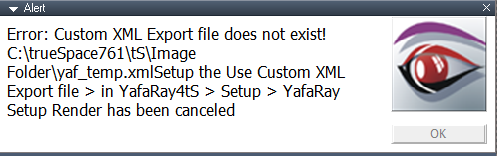
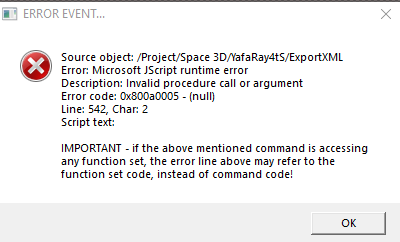
I am getting a couple of errors in YafaRay4tS using the current UU8 for trueSpaceBeta 7.61 - April 3, 2022
I confirmed that the yaf_temp.xml file does exist
C:\trueSpace761\tS\Image Folder\yaf_temp.xml
YafaRay4tS error.png
YafaRay4tS error.png (13.16 KiB) Viewed 1993 times
YafaRay4tS Alert error .png
User avatar
clintonman
Captain
Posts: 5659
Joined: 21 May 2009, 21:08
Type the number ten into the box: 0
Location: California

Re: Final trueSpace 7.61 Beta 8 Unofficial Update

Post by clintonman »

trueBlue wrote: 08 Apr 2022, 17:32 @ Clinton
I am getting a couple of errors in YafaRay4tS using the current UU8 for trueSpaceBeta 7.61 - April 3, 2022
I confirmed that the yaf_temp.xml file does exist
C:\trueSpace761\tS\Image Folder\yaf_temp.xml
YafaRay4tS error.png
YafaRay4tS Alert error .png
I just finished installing the latest UU. I press the render button and don't see any errors. Do you have any steps beyond that?
Clinton Reese

http://clintons3d.com
User avatar
trueBlue
Captain
Posts: 5548
Joined: 06 Jul 2009, 22:50
Type the number ten into the box: 10

Re: Final trueSpace 7.61 Beta 8 Unofficial Update

Post by trueBlue »

Nope, just started happening this morning for some unknown reason
Here is the scene...
Attachments
YafaRay4tS0dff.RsScn
(2.22 MiB) Downloaded 107 times
User avatar
trueBlue
Captain
Posts: 5548
Joined: 06 Jul 2009, 22:50
Type the number ten into the box: 10

Re: Final trueSpace 7.61 Beta 8 Unofficial Update

Post by trueBlue »

YafaRay4tS is working for the UU8 Standalone
The Yafaray Folder and Yafaray Scripts are both the same in the UU8
Except the Protect Workspace was removed from the Standalone version
User avatar
clintonman
Captain
Posts: 5659
Joined: 21 May 2009, 21:08
Type the number ten into the box: 0
Location: California

Re: Final trueSpace 7.61 Beta 8 Unofficial Update

Post by clintonman »

It fails in both for me with different errors.
The problem looks like the material on the cube.
Clinton Reese

http://clintons3d.com
User avatar
clintonman
Captain
Posts: 5659
Joined: 21 May 2009, 21:08
Type the number ten into the box: 0
Location: California

Re: Final trueSpace 7.61 Beta 8 Unofficial Update

Post by clintonman »

The UU DefaultModelShader node has been altered. The old connector "SpecularColor" has been renamed to "Specular_Color" so yafaray can't see it properly.

error is in MaterialsFnSet
Clinton Reese

http://clintons3d.com
User avatar
trueBlue
Captain
Posts: 5548
Joined: 06 Jul 2009, 22:50
Type the number ten into the box: 10

Re: Final trueSpace 7.61 Beta 8 Unofficial Update

Post by trueBlue »

clintonman wrote: 08 Apr 2022, 19:20 The UU DefaultModelShader node has been altered. The old connector "SpecularColor" has been renamed to "Specular_Color" so yafaray can't see it properly.

error is in MaterialsFnSet
The UU DefaultModelShader has the correct "SpecularColor" attribute
The current 2D Checker & 2D Spots material's DefaultModelShader does not
I'll fix those

I Reset the Default Context, Loaded YafaRay4tS into a new scene with no objects and I am still getting the same YafaRay4tS Alert
User avatar
trueBlue
Captain
Posts: 5548
Joined: 06 Jul 2009, 22:50
Type the number ten into the box: 10

Re: Final trueSpace 7.61 Beta 8 Unofficial Update

Post by trueBlue »

I deleted the Yaf_render.cmd and the yaf_temp.xml files from:
C:\trueSpace761\tS\Image Folder\
At first, when I tried to delete the yaf_temp.xml file, Win10 said the file was in use, so I had to shut down tS first
It looked like the yaf_temp.xml file was incomplete

All is good with YafaRay4tS now!

Looks like YafaRay4tS needs a script to delete the above two files, as that was the only way to get YafaRay4tS to work again
User avatar
clintonman
Captain
Posts: 5659
Joined: 21 May 2009, 21:08
Type the number ten into the box: 0
Location: California

Re: Final trueSpace 7.61 Beta 8 Unofficial Update

Post by clintonman »

trueBlue wrote: 08 Apr 2022, 20:07 The UU DefaultModelShader has the correct "SpecularColor" attribute
...
Ah, good. I was worried a bunch of stuff might be broken from name changes.
Clinton Reese

http://clintons3d.com
User avatar
trueBlue
Captain
Posts: 5548
Joined: 06 Jul 2009, 22:50
Type the number ten into the box: 10

Re: Final trueSpace 7.61 Beta 8 Unofficial Update

Post by trueBlue »

Update 133 for trueSpace7.61 Beta 8 Unofficial Update Version 8
Final Update

April 8, 2022

viewt ... =55&t=3732

Materials - DX9
Update
2D Spots.RsMat Author - Clinton Reese
2D Checker.RsMat Author - Clinton Reese
Add
Water.RsMat Author - David Bokon (noko)
Normal Maps
Timer In X and Y = A, 1 & A, 2 attributes
300 Frame Anim Clip - Water Ripples
viewt ... 8598#p8598


Instructions:

Recommend that you completely Uninstall and Install trueSpace7.61 Beta 8 to a clean directory
Install the PDF Manual for trueSpace. (Optional but required before installing the Update)

1.) Run the tS7.61B8.8.exe
2.) Browse [...] to where you installed C:\trueSpace761, select its folder and then the Extract button
3.) Select the Yes to All button
4.) Open trueSpace and select the Reset to Default Context icon
5.) In Workspace select the Default layout tab

The included Plugins.xml file has the Clintons3dPlugin, Clintons3dPluginExt and Clintons3dRsView, Installed and Loaded to the default path: C:\trueSpace761
WARNING: These 3 plugins are required to be Installed and Loaded when using trueSpace!
User avatar
trueBlue
Captain
Posts: 5548
Joined: 06 Jul 2009, 22:50
Type the number ten into the box: 10

Re: Final trueSpace 7.61 Beta 8 Unofficial Update

Post by trueBlue »

Update 134 for trueSpace7.61 Beta 8 Unofficial Update Version 8
Final Update

April 18, 2022

viewt ... =55&t=3732

tS folder
Add
dialog.py
dlgtest.py
docview.py
object.py
string.py
thread.py
win32con.py
window.py

tS/Library/Scenes.scl folder
Add
Eyeblink.scn

Note: This is a fix for the trueSpace7.61 Beta8 installation of Model's python scripts and Script Editor

tS/Scripts/preobjects folder
Update
Camera1
Cameras


Instructions:

Recommend that you completely Uninstall and Install trueSpace7.61 Beta 8 to a clean directory
Install the PDF Manual for trueSpace. (Optional but required before installing the Update)

1.) Run the tS7.61B8.8.exe
2.) Browse [...] to where you installed C:\trueSpace761, select its folder and then the Extract button
3.) Select the Yes to All button
4.) Open trueSpace and select the Reset to Default Context icon
5.) In Workspace select the Default layout tab

The included Plugins.xml file has the Clintons3dPlugin, Clintons3dPluginExt and Clintons3dRsView, Installed and Loaded to the default path: C:\trueSpace761
WARNING: These 3 plugins are required to be Installed and Loaded when using trueSpace!
User avatar
trueBlue
Captain
Posts: 5548
Joined: 06 Jul 2009, 22:50
Type the number ten into the box: 10

Re: Final trueSpace 7.61 Beta 8 Unofficial Update

Post by trueBlue »

Update 135 for trueSpace7.61 Beta 8 Unofficial Update Version 8
Final Update

April 20, 2022

viewt ... =55&t=3732

tS folder
Update
Material Editor 'Removed the Vray Material Editor'
Vray Material Editor 'Removed the Static aspect'
Note: When you Install/Load Vray from the Package Manager (After the Update), the Vray Material Editor is loaded into the Material Editor

Sequence Player
Update
'Add a Large button that opens the Display at 640x480'


Instructions:

It is recommend that you completely Uninstall and Install trueSpace7.61 Beta 8 to a clean directory
Install the PDF Manual for trueSpace (Optional but required before installing the Update)
Install the tS76_Vray1_54B8.exe (Optional but required before installing the Update)

1.) Run the tS7.61B8.8.exe
2.) Browse [...] to where you installed C:\trueSpace761, select its folder and then the Extract button
3.) Select the Yes to All button
4.) Open trueSpace and select the Reset to Default Context icon
5.) In Workspace select the Default layout tab
6.) Open trueSpace Install/Load Vray & iOptDetector from the Package Manager and Close trueSpace

The included Plugins.xml file has the Clintons3dPlugin, Clintons3dPluginExt and Clintons3dRsView, Installed and Loaded to the default path: C:\trueSpace761
WARNING: These 3 plugins are required to be Installed and Loaded when using trueSpace!
User avatar
trueBlue
Captain
Posts: 5548
Joined: 06 Jul 2009, 22:50
Type the number ten into the box: 10

Re: Final trueSpace 7.61 Beta 8 Unofficial Update

Post by trueBlue »

Update 136 for trueSpace7.61 Beta 8 Unofficial Update Version 8
Final Update

April 21, 2022

viewt ... =55&t=3732

tS folder
Update
Material Editor/Advanced
Add
Save - Material Editor
Note: This will overwrite the backup Material Editor that is used when you Reset to Default Context

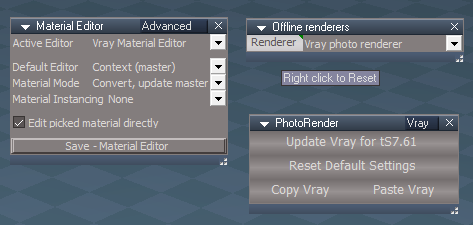
Offline Renderers
Renderers attribute 'Changed Link to None'
Note: This is a fix to remove the RMB - Reset command that removed offline rneders from the Control Box control
Add
Renderers RMB button script that removes duplicate Vray photo renderer, 1 nodes

PhotoRender
Update
All button scripts
.
Offline Renderers.png
.
.
Instructions:

It is recommend that you completely Uninstall and Install trueSpace7.61 Beta 8 to a clean directory
Install the PDF Manual for trueSpace (Optional but required before installing the Update)
Install the tS76_Vray1_54B8.exe (Optional but required before installing the Update)

1.) Run the tS7.61B8.8.exe
2.) Browse [...] to where you installed C:\trueSpace761, select its folder and then the Extract button
3.) Select the Yes to All button
4.) Open trueSpace and select the Reset to Default Context icon
5.) In Workspace. select the Default layout tab
6.) In Workspace, Install/Load Vray & iOptDetector from the Package Manager and Exit trueSpace

The included Plugins.xml file has the Clintons3dPlugin, Clintons3dPluginExt and Clintons3dRsView, Installed and Loaded to the default path: C:\trueSpace761
WARNING: These 3 plugins are required to be Installed and Loaded when using trueSpace!
User avatar
trueBlue
Captain
Posts: 5548
Joined: 06 Jul 2009, 22:50
Type the number ten into the box: 10

Re: Final trueSpace 7.61 Beta 8 Unofficial Update

Post by trueBlue »

Update 137 for trueSpace7.61 Beta 8 Unofficial Update Version 8
Final Update

April 27, 2022

viewt ... =55&t=3732

Material Editor
Image Browser/Save
Fixed error when no libray is opened

Offline Renderers
Add
Vray and Yafaray buttons
These scripts will switch the active Renderer with an option to update the scene Lights & Camera
* When switching from Vray to Yafaray, the Vray & PhotoRender panels are removed from the scene
* When switching from Yafaray to Vray, the YafaRay4tS panel is removed from the scene & closes the YafaRay4tS toolbar

Mesh Origin 'Update - Clinton Reese 4/26/2022'
Add
Global Function Set


Instructions:

It is recommend that you completely Uninstall and Install trueSpace7.61 Beta 8 to a clean directory
Install the PDF Manual for trueSpace (Optional but required before installing the Update)
Install the tS76_Vray1_54B8.exe (Optional but required before installing the Update)

1.) Run the tS7.61B8.8.exe
2.) Browse [...] to where you installed C:\trueSpace761, select its folder and then the Extract button
3.) Select the Yes to All button
4.) Open trueSpace and select the Reset to Default Context icon
5.) In Workspace select the Default layout tab
6.) Open trueSpace Install/Load Vray & iOptDetector from the Package Manager and close trueSpace

The included Plugins.xml file has the Clintons3dPlugin, Clintons3dPluginExt and Clintons3dRsView, Installed and Loaded to the default path: C:\trueSpace761
WARNING: These 3 plugins are required to be Installed and Loaded when using trueSpace!
User avatar
trueBlue
Captain
Posts: 5548
Joined: 06 Jul 2009, 22:50
Type the number ten into the box: 10

Re: Final trueSpace 7.61 Beta 8 Unofficial Update

Post by trueBlue »

Update 138 for trueSpace7.61 Beta 8 Unofficial Update Version 8
Final Update

May 2, 2022

viewt ... =55&t=3732

Offline Renderers
Add
Vray aspect
Includes button scripts to Restore, Reset, Copy and Paste the Vray panel to another scene
* Update scripts to check for Vray Package plugin status
Updated the Vray and Photo Render panels 'Removed the Update aspects'


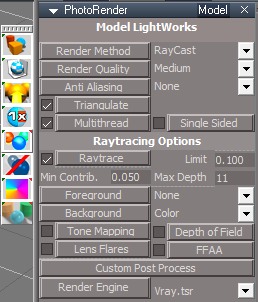
Photo Render
Model aspect 'Add buttons that update Model's Render Settings toolbar'
PhotoRender Model.png
PhotoRender Model.png (25.18 KiB) Viewed 2073 times
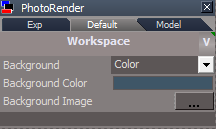
Add V button that opens the Vray panel
Note: This is for Model
PhotoRender Default.png
PhotoRender Default.png (6.32 KiB) Viewed 2081 times
.
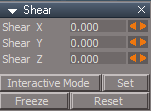
Shear
Add Interactive Mode and Set buttons
Shear.png
Shear.png (3.44 KiB) Viewed 2090 times
Instructions:

It is recommend that you completely Uninstall and Install trueSpace7.61 Beta 8 to a clean directory
Install the PDF Manual for trueSpace (Optional but required before installing the Update)
Install the tS76_Vray1_54B8.exe (Optional but required before installing the Update)
Install iOptDetector (Optional)

1.) Run the tS7.61B8.8.exe
2.) Browse [...] to where you installed C:\trueSpace761, select its folder and then the Extract button
3.) Select the Yes to All button
4.) Open trueSpace and select the Reset to Default Context icon
5.) In Workspace select the Default layout tab
6.) Open trueSpace Install/Load Vray & iOptDetector plugins from the Package Manager and Exit trueSpace

The included Plugins.xml file has the Clintons3dPlugin, Clintons3dPluginExt and Clintons3dRsView, Installed and Loaded to the default path: C:\trueSpace761
WARNING: These 3 plugins are required to be Installed and Loaded when using trueSpace!
User avatar
trueBlue
Captain
Posts: 5548
Joined: 06 Jul 2009, 22:50
Type the number ten into the box: 10

Re: Final trueSpace 7.61 Beta 8 Unofficial Update

Post by trueBlue »

Update 139 for trueSpace7.61 Beta 8 Unofficial Update Version 8
Final Update

May 4, 2022

viewt ... =55&t=3732

Photo Renderer
Add
Vray aspect
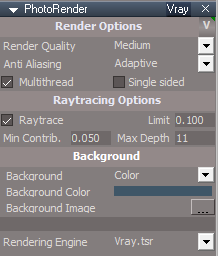
PhotoRender for tS761.png
PhotoRender for tS761.png (11.77 KiB) Viewed 2041 times
.
* Render Options for Vray
Note: These options work for Vray regardless of the Bridge status, On. Off, or Auto in Workspace

Default aspect
Photo Render Default.png
Photo Render Default.png (13.59 KiB) Viewed 2006 times
.
* Render Options for Model's LightWorks
Note:In order to use the Render Options buttons in the Default aspect, Model has to be open, or the Bridge must be set to On
* V button
LMB = Opens the Vray panel
RMB = Reset - Vray Photo Render settings
The check boxes do not work and are only indicators of the attributes state
Press the button to enable/disable the attribute
The items with a combo control are enabled by pressing the button to the left of the attribute

Offline Renderers
Update scripts to check for Vray Package plugin status
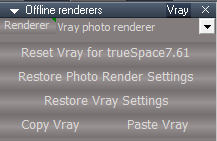
Offline Renderers Vray.png
Offline Renderers Vray.png (7.07 KiB) Viewed 2037 times
.
Unofficial Update Instructions:

Recommend that you completely Uninstall and Install trueSpace7.61 Beta 8 to a clean directory
Install the PDF Manual for trueSpace (Optional but required before installing the Update)
Install the tS76_Vray1_54B8.exe (Optional but required before installing the Update)
Install iOptDetector (Optional)

1.) Run the tS7.61B8.8.exe
2.) Browse [...] to where you installed C:\trueSpace761, select its folder and then the Extract button
3.) Select the Yes to All button
4.) Open trueSpace and select the Reset to Default Context icon
5.) In Workspace, select the Default layout tab
6.) In Workspace, Install/Load Vray & iOptDetector plugins from the Package Manager and Exit trueSpace

The included Plugins.xml file has the Clintons3dPlugin, Clintons3dPluginExt and Clintons3dRsView, Installed and Loaded to the default path: C:\trueSpace761
WARNING: These 3 plugins are required to be Installed and Loaded when using trueSpace!
User avatar
trueBlue
Captain
Posts: 5548
Joined: 06 Jul 2009, 22:50
Type the number ten into the box: 10

Re: Final trueSpace 7.61 Beta 8 Unofficial Update

Post by trueBlue »

Update 140 for trueSpace7.61 Beta 8 Unofficial Update Version 8
Final Update

May 18, 2022

viewt ... =55&t=3732

Toolbars
Render Scene, Render Object, Render Animation, Render Area, and Render to File icons
Add
if(Node.SubObjectCount('/D3DView')==0) return;
Removed Run.Activity(...) 'Script added to the Vray panel'

D3D Material Editor
Render Scene, Render Object, and Render Animation icons
Add
if(Node.SubObjectCount('/D3DView')==0) return;
Removed Run.Activity(...) 'Script added to the Vray panel'

Vray
Add
Update VRay Render View
'Resize the VRay Render View using the Vray panel's - Width and Height values'
Vray panel.png
Vray panel.png (16.75 KiB) Viewed 1861 times
.
Offline Renderers
Update - Replace Photo Render Settings script
'Transfers existing params to new Photo Render'

Animation scripts libray
Add
Vray Render to File


Unofficial Update Instructions:

Recommend that you completely Uninstall and Install trueSpace7.61 Beta 8 to a clean directory
Install the PDF Manual for trueSpace (Optional but required before installing the Update)
Install the tS76_Vray1_54B8.exe (Optional but required before installing the Update)
Install iOptDetector (Optional)

1.) Run the tS7.61B8.8.exe
2.) Browse [...] to where you installed C:\trueSpace761, select its folder and then the Extract button
3.) Select the Yes to All button
4.) Open trueSpace and select the Reset to Default Context icon
5.) In Workspace, select the Default layout tab
6.) In Workspace, Install/Load Vray & iOptDetector plugins from the Package Manager and Exit trueSpace

The included Plugins.xml file has the Clintons3dPlugin, Clintons3dPluginExt and Clintons3dRsView, Installed and Loaded to the default path: C:\trueSpace761
WARNING: These 3 plugins are required to be Installed and Loaded when using trueSpace!
User avatar
trueBlue
Captain
Posts: 5548
Joined: 06 Jul 2009, 22:50
Type the number ten into the box: 10

Re: Final trueSpace 7.61 Beta 8 Unofficial Update

Post by trueBlue »

Moving and changing Encapsulation
Currently in the UU, the toolbar LMB buttons are using the Scripts/Commands
The toolbar RMB are opening the CustomCommands/Encapsulate

The plan is to remove CustomCommands/Encapsulate and all of the Script/Commands/ 'encaps scripts'
Add Encapsulate to Scripts/UUCommands

I noticed a difference in the code with the Scripts/Commands/UnGlue script and the 3D Unencapsulate script
3D Unencapsulate was using Node.Value(currentChild + "/controlPointMesh", "Matrix") = childMatrix;
UnGlue is using a SetNodeMatrix function
I changed the 3D Unencapsulate script to use the SetNodeMatrix function (see below)


3D Unencapsulate
Line 204

Code: Select all

		if(isaNURBS(currentChild)) {
//			Node.Value(currentChild + "/controlPointMesh", "Matrix") = childMatrix;
SetNodeMatrix(currentChild + "/controlPointMesh", "Matrix",	childMatrix);
		} else {
//			Node.Value(currentChild, "Matrix") = childMatrix;
SetNodeMatrix(currentChild, "Matrix",	childMatrix);
		}

SetNodeMatrix(currentChild, "OwnerMatrix",	identityMatrix);


function SetNodeMatrix(node, conn, matrix)
{
	util = System.CreateDO("Clintons3D Package/Utility functions");
	util.SetNodeValueMatrix(node, conn,	matrix.GetAt(0,0), matrix.GetAt(1,0), matrix.GetAt(2,0), matrix.GetAt(3,0), 
																matrix.GetAt(0,1), matrix.GetAt(1,1), matrix.GetAt(2,1), matrix.GetAt(3,1), 
																matrix.GetAt(0,2), matrix.GetAt(1,2), matrix.GetAt(2,2), matrix.GetAt(3,2),
																matrix.GetAt(0,3), matrix.GetAt(1,3), matrix.GetAt(2,3), matrix.GetAt(3,3));
}
From my limited testing, everything seems to be working including the Undoes
You will not be able to use the UU toolbar icons, but you can use the Encapsulate panel in the UUCommands
The plan is to change the toolbars LMB to run the scripts in Encapsulate and RMB the open the panel

Can you verify that all of the scripts are correct and working as you would expect?

UUCommands should go in System/Scripts/
Attachments
UUCommands.RsObj
(216.06 KiB) Downloaded 90 times
User avatar
clintonman
Captain
Posts: 5659
Joined: 21 May 2009, 21:08
Type the number ten into the box: 0
Location: California

Re: Final trueSpace 7.61 Beta 8 Unofficial Update

Post by clintonman »

Seems ok to me.
Clinton Reese

http://clintons3d.com
User avatar
clintonman
Captain
Posts: 5659
Joined: 21 May 2009, 21:08
Type the number ten into the box: 0
Location: California

Re: Final trueSpace 7.61 Beta 8 Unofficial Update

Post by clintonman »

Updated WebServer to use "/Scripts/UUCommands/Encapsulate/3D Unencapsulate" instead of "/Scripts/Commands/Unglue"
Attachments
WebServer.RsObj
(352.15 KiB) Downloaded 98 times
Clinton Reese

http://clintons3d.com
User avatar
trueBlue
Captain
Posts: 5548
Joined: 06 Jul 2009, 22:50
Type the number ten into the box: 10

Re: Final trueSpace 7.61 Beta 8 Unofficial Update

Post by trueBlue »

Great!
Thank you for your help! :bananathumb:

Do you remember what and where the Scripts/Commands/FlattenVertices is used for?
Edit: I found this:
viewtopic.php?p=59946#p59946

FlattenVertices.xml
Toolbars/UVEditor/Flatten vertices
LMB = Activity.Run('/Scripts/Commands/FlattenVertices');

I'll assume this is the only place it is used, unless you know of something else
User avatar
clintonman
Captain
Posts: 5659
Joined: 21 May 2009, 21:08
Type the number ten into the box: 0
Location: California

Re: Final trueSpace 7.61 Beta 8 Unofficial Update

Post by clintonman »

trueBlue wrote: 13 Aug 2022, 22:23 Great!
Thank you for your help! :bananathumb:

Do you remember what and where the Scripts/Commands/FlattenVertices is used for?
Edit: I found this:
viewtopic.php?p=59946#p59946

FlattenVertices.xml
Toolbars/UVEditor/Flatten vertices
LMB = Activity.Run('/Scripts/Commands/FlattenVertices');

I'll assume this is the only place it is used, unless you know of something else
Only used in the UV editor. Have no idea why it's called "flatten vertices" instead of "flatten uvs" or something like that.
It exists to stop tS from crashing when run on triangulated meshes.
Clinton Reese

http://clintons3d.com
User avatar
trueBlue
Captain
Posts: 5548
Joined: 06 Jul 2009, 22:50
Type the number ten into the box: 10

Re: Final trueSpace 7.61 Beta 8 Unofficial Update

Post by trueBlue »

Thanks, I change it to Flatten UVs
User avatar
clintonman
Captain
Posts: 5659
Joined: 21 May 2009, 21:08
Type the number ten into the box: 0
Location: California

Re: Final trueSpace 7.61 Beta 8 Unofficial Update

Post by clintonman »

I missed an unglue in the WebServer. Fixed for new UUCommands location.
Attachments
WebServer8535.RsObj
(352.45 KiB) Downloaded 78 times
Clinton Reese

http://clintons3d.com
User avatar
trueBlue
Captain
Posts: 5548
Joined: 06 Jul 2009, 22:50
Type the number ten into the box: 10

Re: Final trueSpace 7.61 Beta 8 Unofficial Update

Post by trueBlue »

clintonman wrote: 13 Aug 2022, 23:17
trueBlue wrote: 13 Aug 2022, 22:23 Great!
Thank you for your help! :bananathumb:

Do you remember what and where the Scripts/Commands/FlattenVertices is used for?
Edit: I found this:
viewtopic.php?p=59946#p59946

FlattenVertices.xml
Toolbars/UVEditor/Flatten vertices
LMB = Activity.Run('/Scripts/Commands/FlattenVertices');

I'll assume this is the only place it is used, unless you know of something else
Only used in the UV editor. Have no idea why it's called "flatten vertices" instead of "flatten uvs" or something like that.
It exists to stop tS from crashing when run on triangulated meshes.
Can you give me an example on how to use this?
Trying to test if it is working from a function
You have:

Code: Select all

	var firstSel = Node.FirstSelected();

	if(!firstSel) return;
	if(!Node.ConExists(firstSel,"Mesh")) return;
I am using Binky from the Characters library
It is a group with 3 objects
So, if I PE all 3 objects selecting all Elements and run Flatten UVs, it will only work on the first select object?
Does this work when selecting elements in UV Editor?
The way I read your code; it looks like you do not need to be in PE mode, just select an object that has a Mesh
User avatar
clintonman
Captain
Posts: 5659
Joined: 21 May 2009, 21:08
Type the number ten into the box: 0
Location: California

Re: Final trueSpace 7.61 Beta 8 Unofficial Update

Post by clintonman »

trueBlue wrote: 14 Aug 2022, 18:37
clintonman wrote: 13 Aug 2022, 23:17
trueBlue wrote: 13 Aug 2022, 22:23 Great!
Thank you for your help! :bananathumb:

Do you remember what and where the Scripts/Commands/FlattenVertices is used for?
Edit: I found this:
viewtopic.php?p=59946#p59946

FlattenVertices.xml
Toolbars/UVEditor/Flatten vertices
LMB = Activity.Run('/Scripts/Commands/FlattenVertices');

I'll assume this is the only place it is used, unless you know of something else
Only used in the UV editor. Have no idea why it's called "flatten vertices" instead of "flatten uvs" or something like that.
It exists to stop tS from crashing when run on triangulated meshes.
Can you give me an example on how to use this?
Trying to test if it is working from a function
You have:

Code: Select all

	var firstSel = Node.FirstSelected();

	if(!firstSel) return;
	if(!Node.ConExists(firstSel,"Mesh")) return;
I am using Binky from the Characters library
It is a group with 3 objects
So, if I PE all 3 objects selecting all Elements and run Flatten UVs, it will only work on the first select object?
Does this work when selecting elements in UV Editor?
The way I read your code; it looks like you do not need to be in PE mode, just select an object that has a Mesh
I never thought about having more than 1 mesh in the UV Editor. The script will need to be updated. If any of the meshes is a triangulated mesh tS will crash when flattening the uvs.

I'm surprised binky didn't crash tS... just tried it and crash on virgin tS. Binky is triangles so the tool should ignore it to prevent the crash. I'll add a message box saying do.

None of the UV tools requires PE mode, but can be used with PE mode.
Clinton Reese

http://clintons3d.com
User avatar
trueBlue
Captain
Posts: 5548
Joined: 06 Jul 2009, 22:50
Type the number ten into the box: 10

Re: Final trueSpace 7.61 Beta 8 Unofficial Update

Post by trueBlue »

I never thought about having more than 1 mesh in the UV Editor. The script will need to be updated.
I am not suggesting that it should work with more than one object
If you think it should be limited to the first selected object, it would be good to give an Alert, if more than one object is selected before the script runs
Edit:

Code: Select all

	var selCount = Node.SelectedCount()
	if(selCount > 1) {
		System.Alert("Select one object at a time")
		return
	}
User avatar
clintonman
Captain
Posts: 5659
Joined: 21 May 2009, 21:08
Type the number ten into the box: 0
Location: California

Re: Final trueSpace 7.61 Beta 8 Unofficial Update

Post by clintonman »

trueBlue wrote: 14 Aug 2022, 19:51
I never thought about having more than 1 mesh in the UV Editor. The script will need to be updated.
I am not suggesting that it should work with more than one object
If you think it should be limited to the first selected object, it would be good to give an Alert, if more than one object is selected before the script runs
Edit:

Code: Select all

	var selCount = Node.SelectedCount()
	if(selCount > 1) {
		System.Alert("Select one object at a time")
		return
	}
The original isn't restricted to a single object, so I don't want to make it less capable.

I just found a problem with the way I've been using Node.SelectionGetAt
I thought it didn't need a clean selection with the spaces removed, but it does, so I need to find the scripts where I used it and fix it if needed.

Edit: Scared myself for a minute. Node.SelectionGetAt does not need to have the selection cleaned of extra spaces. I just made a stupid mistake while working on the flatten. :roll:
Clinton Reese

http://clintons3d.com
User avatar
clintonman
Captain
Posts: 5659
Joined: 21 May 2009, 21:08
Type the number ten into the box: 0
Location: California

Re: Final trueSpace 7.61 Beta 8 Unofficial Update

Post by clintonman »

Fixed flatten to work with multiple selections. If any of the meshes are triangulated it will give an error. Also works with group objects, like the original does.
Attachments
FlattenVertices.RsObj
(5.19 KiB) Downloaded 81 times
Clinton Reese

http://clintons3d.com
User avatar
trueBlue
Captain
Posts: 5548
Joined: 06 Jul 2009, 22:50
Type the number ten into the box: 10

Re: Final trueSpace 7.61 Beta 8 Unofficial Update

Post by trueBlue »

Thanks!
It's final resting place:
UUFS = Node.AccessFnSet("Scripts/UUCommands/UUFunctionSet");UUFS.UVFlatten();

I tried it on several Characters from the library
Can tell if it is working and not seeing the modal error
User avatar
clintonman
Captain
Posts: 5659
Joined: 21 May 2009, 21:08
Type the number ten into the box: 0
Location: California

Re: Final trueSpace 7.61 Beta 8 Unofficial Update

Post by clintonman »

trueBlue wrote: 14 Aug 2022, 23:41 Thanks!
It's final resting place:
UUFS = Node.AccessFnSet("Scripts/UUCommands/UUFunctionSet");UUFS.UVFlatten();

I tried it on several Characters from the library
Can tell if it is working and not seeing the modal error
I see. It's looking at the skeleton and seeing that it's made of triangles.
Fixed to skip skeletons and added error for cameras and lights.
I also made the function name more explicit since you're adding it to a function set. "CheckDescendants" was too generic to be in the same script as other functions.
Attachments
FlattenVertices44b0.RsObj
(5.6 KiB) Downloaded 84 times
Clinton Reese

http://clintons3d.com
User avatar
trueBlue
Captain
Posts: 5548
Joined: 06 Jul 2009, 22:50
Type the number ten into the box: 10

Re: Final trueSpace 7.61 Beta 8 Unofficial Update

Post by trueBlue »

In my previous post, I said: "Can tell if it is working and not seeing the modal error"
I meant to say, "I can NOT tell if it is working and not seeing the modal error

Still not sure if this is working
I do not see any activity when I run Flatten UVs in the Command History
I do see activity when I run the other UV Editor tools
.
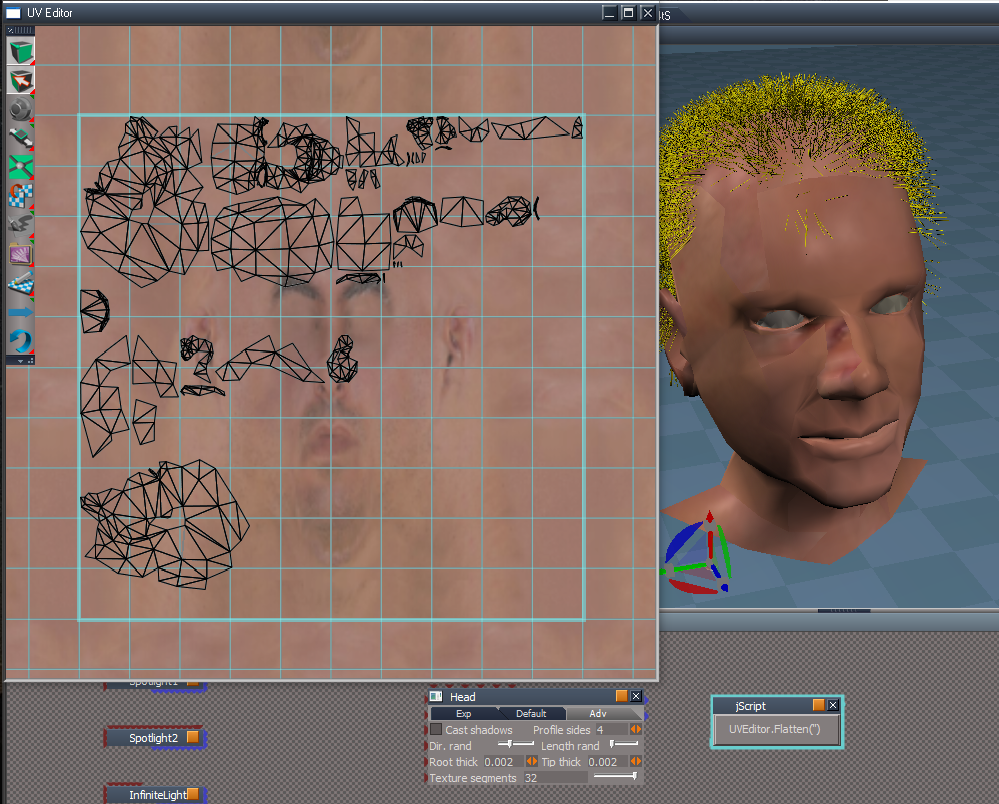
Flatten UVs.png
.
Additionally, if you run the toolbar LMB command from a jScript, it gives an error:
ERR Source object: /Project/Space 3D/jScript command Error: Microsoft JScript runtime error Description: 'null' is null or not an object Error code: 0x800a138f - (null) Line: 326, Char: 3 Script text: IMPORTANT - if the above mentioned command is accessing any function set, the error line above may refer to the function set code, instead of command code!
Edit: When I run this from the UV Editor, I see this in the Rosetta.log:

Code: Select all

WARN  Error: Microsoft JScript runtime error Description: Invalid procedure call or argument Error code: 0x800a0005 - (null) Line: 318, Char: 2 Script text:    0x80020101 
Line 318 in the UUFunctionSet:
themesh = Node.Value(thenode, "Mesh");

Here is the toolbar button:
Attachments
UVFlatten.RsObj
(35.26 KiB) Downloaded 91 times
User avatar
clintonman
Captain
Posts: 5659
Joined: 21 May 2009, 21:08
Type the number ten into the box: 0
Location: California

Re: Final trueSpace 7.61 Beta 8 Unofficial Update

Post by clintonman »

trueBlue wrote: 15 Aug 2022, 13:16 In my previous post, I said: "Can tell if it is working and not seeing the modal error"
I meant to say, "I can NOT tell if it is working and not seeing the modal error

Still not sure if this is working
I do not see any activity when I run Flatten UVs in the Command History
I do see activity when I run the other UV Editor tools
.
Flatten UVs.png
.
Additionally, if you run the toolbar LMB command from a jScript, it gives an error:
ERR Source object: /Project/Space 3D/jScript command Error: Microsoft JScript runtime error Description: 'null' is null or not an object Error code: 0x800a138f - (null) Line: 326, Char: 3 Script text: IMPORTANT - if the above mentioned command is accessing any function set, the error line above may refer to the function set code, instead of command code!
Edit: When I run this from the UV Editor, I see this in the Rosetta.log:

Code: Select all

WARN  Error: Microsoft JScript runtime error Description: Invalid procedure call or argument Error code: 0x800a0005 - (null) Line: 318, Char: 2 Script text:    0x80020101 
Line 318 in the UUFunctionSet:
themesh = Node.Value(thenode, "Mesh");

Here is the toolbar button:
I can't test without your UUFunctionSet.

Edit: was able to create error when load head from library and apply hair from library. Everything else is working.

Edit:
You can add this to the top of CheckUVMeshDescendants, to stop hair errors.

Code: Select all

function CheckUVMeshDescendants(thenode)
{
	if(Node.ConExists(thenode, "Hair data")) return;
Clinton Reese

http://clintons3d.com
User avatar
trueBlue
Captain
Posts: 5548
Joined: 06 Jul 2009, 22:50
Type the number ten into the box: 10

Re: Final trueSpace 7.61 Beta 8 Unofficial Update

Post by trueBlue »

Here is the current UUCommands
UVFlatten is at the bottom

Can you look at the function ResetContext()
I was wanting to use the:
var globalFS = Node.AccessFnSet("Scripts/UUCommands/Global Function Set");
for the Question
Not sure how to write the new Question
Maybe add "Default Context" for the title and NOT urgent
Attachments
UUCommands0958.RsObj
(221.06 KiB) Downloaded 85 times
User avatar
trueBlue
Captain
Posts: 5548
Joined: 06 Jul 2009, 22:50
Type the number ten into the box: 10

Re: Final trueSpace 7.61 Beta 8 Unofficial Update

Post by trueBlue »

I tried the original UV Flatten command and it worked but you would have to rearrange the UVs
Original UV Flatten command.png
Compare the previous pic with this one
User avatar
clintonman
Captain
Posts: 5659
Joined: 21 May 2009, 21:08
Type the number ten into the box: 0
Location: California

Re: Final trueSpace 7.61 Beta 8 Unofficial Update

Post by clintonman »

Changes to use the global function set, changed question title and fixed hair for flatten uv.

button commands, RunScriptBuffer is needed to use one function set inside another when called from a toolbar button:

Code: Select all

//flatten button
cmd='GFS=Node.AccessFnSet("Scripts/UUCommands/Global Function Set");UUFS=Node.AccessFnSet("Scripts/UUCommands/UUFunctionSet");UUFS.GlobalFS=GFS;UUFS.UVFlatten();';RsApp.RunScriptBuffer(cmd);
//reset context button
cmd='GFS=Node.AccessFnSet("Scripts/UUCommands/Global Function Set");UUFS=Node.AccessFnSet("Scripts/UUCommands/UUFunctionSet");UUFS.GlobalFS=GFS;UUFS.ResetContext();';RsApp.RunScriptBuffer(cmd);
reference human readable version of uvflatten

Code: Select all

//readable
GFS=Node.AccessFnSet("Scripts/UUCommands/Global Function Set");
UUFS=Node.AccessFnSet("Scripts/UUCommands/UUFunctionSet");
UUFS.GlobalFS=GFS;
UUFS.UVFlatten();
Attachments
UUFunctionSet.RsObj
(35.74 KiB) Downloaded 92 times
Clinton Reese

http://clintons3d.com
User avatar
trueBlue
Captain
Posts: 5548
Joined: 06 Jul 2009, 22:50
Type the number ten into the box: 10

Re: Final trueSpace 7.61 Beta 8 Unofficial Update

Post by trueBlue »

Thanks, seems to be working now! :bananathumb:
User avatar
trueBlue
Captain
Posts: 5548
Joined: 06 Jul 2009, 22:50
Type the number ten into the box: 10

Re: Final trueSpace 7.61 Beta 8 Unofficial Update

Post by trueBlue »

BTW... this was my first test to incorporate additional toolbar commands from the Scripts/Commands into the UUFunctionSet
Now that you have seen the UUFunctionSet, what are your thoughts?
Should I continue with the rest of the Scripts/Commands scripts?
User avatar
clintonman
Captain
Posts: 5659
Joined: 21 May 2009, 21:08
Type the number ten into the box: 0
Location: California

Re: Final trueSpace 7.61 Beta 8 Unofficial Update

Post by clintonman »

trueBlue wrote: 15 Aug 2022, 16:42 BTW... this was my first test to incorporate additional toolbar commands from the Scripts/Commands into the UUFunctionSet
Now that you have seen the UUFunctionSet, what are your thoughts?
Should I continue with the rest of the Scripts/Commands scripts?
If you've done close to half of all of them then it should be split into 2 function sets, if you've already done most then maybe they'll all fit well into 1 function set. If it gets too long I'll help break it up.
Clinton Reese

http://clintons3d.com
User avatar
trueBlue
Captain
Posts: 5548
Joined: 06 Jul 2009, 22:50
Type the number ten into the box: 10

Re: Final trueSpace 7.61 Beta 8 Unofficial Update

Post by trueBlue »

The scripts below the Camera toolbar will go into a new Function Set
All of the scripts to the left (13) are the remaining scripts needing attention
Most are pretty lengthy (100 lines or more)
Some use: RsApp.RunScriptBuffer(cmd); (1 Undo)
Not even sure if you can use these in a Function Set
Remaining scripts.png
User avatar
clintonman
Captain
Posts: 5659
Joined: 21 May 2009, 21:08
Type the number ten into the box: 0
Location: California

Re: Final trueSpace 7.61 Beta 8 Unofficial Update

Post by clintonman »

trueBlue wrote: 15 Aug 2022, 17:32 ...
Some use: RsApp.RunScriptBuffer(cmd); (1 Undo)
Not even sure if you can use these in a Function Set
...
It does need testing. I did run into trouble with RunScriptBuffer Fix NURBS ORA inside of the VisUtility Function Set. I converted it to normal code using "util" for no undo instead of 1 undo. Need to find out if RunScriptBuffer actually does work inside a function set or not.
Clinton Reese

http://clintons3d.com
User avatar
trueBlue
Captain
Posts: 5548
Joined: 06 Jul 2009, 22:50
Type the number ten into the box: 10

Re: Final trueSpace 7.61 Beta 8 Unofficial Update

Post by trueBlue »

clintonman wrote: 16 Aug 2022, 04:34
trueBlue wrote: 15 Aug 2022, 17:32 ...
Some use: RsApp.RunScriptBuffer(cmd); (1 Undo)
Not even sure if you can use these in a Function Set
...
It does need testing. I did run into trouble with RunScriptBuffer Fix NURBS ORA inside of the VisUtility Function Set. I converted it to normal code using "util" for no undo instead of 1 undo. Need to find out if RunScriptBuffer actually does work inside a function set or not.
Have not had a chance to test if RunScriptBuffer can work in a Function Set yet

In the newest UUFunctionSet, you have:
var GlobalFS;
How in the heck does this work without adding the path?
IE: "Scripts/UUCommands/Global Function Set"

Code: Select all

// Use: Reset Default LMB command
//	 Modal Question for Resetting to Default Context
function ResetContext() 
{
	if (GlobalFS.Question("Reset to Default Context?","Default Context")) {
		RsApp.Reset()
		return;
	}
}
User avatar
clintonman
Captain
Posts: 5659
Joined: 21 May 2009, 21:08
Type the number ten into the box: 0
Location: California

Re: Final trueSpace 7.61 Beta 8 Unofficial Update

Post by clintonman »

trueBlue wrote: 16 Aug 2022, 14:17
clintonman wrote: 16 Aug 2022, 04:34
trueBlue wrote: 15 Aug 2022, 17:32 ...
Some use: RsApp.RunScriptBuffer(cmd); (1 Undo)
Not even sure if you can use these in a Function Set
...
It does need testing. I did run into trouble with RunScriptBuffer Fix NURBS ORA inside of the VisUtility Function Set. I converted it to normal code using "util" for no undo instead of 1 undo. Need to find out if RunScriptBuffer actually does work inside a function set or not.
Have not had a chance to test if RunScriptBuffer can work in a Function Set yet

In the newest UUFunctionSet, you have:
var GlobalFS;
How in the heck does this work without adding the path?
IE: "Scripts/UUCommands/Global Function Set"

Code: Select all

// Use: Reset Default LMB command
//	 Modal Question for Resetting to Default Context
function ResetContext() 
{
	if (GlobalFS.Question("Reset to Default Context?","Default Context")) {
		RsApp.Reset()
		return;
	}
}
The value is set before it's called. This is necessary because when you use a toolbar button to call a function set that uses another function set it doesn't know what Node.AccessFnSet is. Below the first line defines it and the third line assigns it inside the function set.

Code: Select all

//readable
GFS=Node.AccessFnSet("Scripts/UUCommands/Global Function Set");
UUFS=Node.AccessFnSet("Scripts/UUCommands/UUFunctionSet");
UUFS.GlobalFS=GFS;
UUFS.UVFlatten();
now that I look at it again it can be shortened slightly to

Code: Select all

//readable
UUFS=Node.AccessFnSet("Scripts/UUCommands/UUFunctionSet");
UUFS.GlobalFS=Node.AccessFnSet("Scripts/UUCommands/Global Function Set");
UUFS.UVFlatten();
Clinton Reese

http://clintons3d.com
User avatar
trueBlue
Captain
Posts: 5548
Joined: 06 Jul 2009, 22:50
Type the number ten into the box: 10

Re: Final trueSpace 7.61 Beta 8 Unofficial Update

Post by trueBlue »

I think I see how the path is recognized now, as you are using it in the toolbar command
cmd='GFS=Node.AccessFnSet("Scripts/UUCommands/Global Function Set");UUFS=Node.AccessFnSet("Scripts/UUCommands/UUFunctionSet");UUFS.GlobalFS=GFS;UUFS.UVFlatten();';RsApp.RunScriptBuffer(cmd);

Looking at the code in the Scripts/UUCommands/Global Function Set, I notice that there are functions for Mesh Origin, Scene View, and Parenting
I am a little confused about the possibility of having two Global Function Set(S)
One is in CustomCommands and now in UUCommands
User avatar
clintonman
Captain
Posts: 5659
Joined: 21 May 2009, 21:08
Type the number ten into the box: 0
Location: California

Re: Final trueSpace 7.61 Beta 8 Unofficial Update

Post by clintonman »

trueBlue wrote: 16 Aug 2022, 15:13 I think I see how the path is recognized now, as you are using it in the toolbar command
cmd='GFS=Node.AccessFnSet("Scripts/UUCommands/Global Function Set");UUFS=Node.AccessFnSet("Scripts/UUCommands/UUFunctionSet");UUFS.GlobalFS=GFS;UUFS.UVFlatten();';RsApp.RunScriptBuffer(cmd);

Looking at the code in the Scripts/UUCommands/Global Function Set, I notice that there are functions for Mesh Origin, Scene View, and Parenting
I am a little confused about the possibility of having two Global Function Set(S)
One is in CustomCommands and now in UUCommands
From another post
clintonman wrote: 12 Aug 2022, 21:33 No buttons need to be changed.
No widgets to change
2 scripts attached so can now move Global Function Set into UUCommands.

Share your Delete when you're done and I'll convert it to 1 undo format.
The 2 commands were for Mesh Origin and Scene View
The parenting inside the global function set refers to the new heirarchy (parenting/grouping) scripts:
http://clintons3d.com/plugins/truespace ... archy.html
The older parenting script does not use the function set.

So there is no reason for 2 Global Function Sets, only the UUCommands one is needed.
Clinton Reese

http://clintons3d.com
User avatar
trueBlue
Captain
Posts: 5548
Joined: 06 Jul 2009, 22:50
Type the number ten into the box: 10

Re: Final trueSpace 7.61 Beta 8 Unofficial Update

Post by trueBlue »

So there is no reason for 2 Global Function Sets, only the UUCommands one is needed.
Looks like 2 Global Function Sets to me
GlobalFunctionsAutoload

Code: Select all

	Node.Copy(owner + "/" + theScript,"/Scripts/CustomCommands");

	RsFileIO.SaveObject(mainDir + "\\Scripts\\clintonobjects\\CustomScriptsStore\\" + theScript + ".RsObj", "/Scripts/CustomCommands/" + theScript);
The Global Function Set included in the GlobalFunctionsAutoload does not have the updated Question function
User avatar
clintonman
Captain
Posts: 5659
Joined: 21 May 2009, 21:08
Type the number ten into the box: 0
Location: California

Re: Final trueSpace 7.61 Beta 8 Unofficial Update

Post by clintonman »

trueBlue wrote: 16 Aug 2022, 15:53
So there is no reason for 2 Global Function Sets, only the UUCommands one is needed.
Looks like 2 Global Function Sets to me
GlobalFunctionsAutoload

Code: Select all

	Node.Copy(owner + "/" + theScript,"/Scripts/CustomCommands");

	RsFileIO.SaveObject(mainDir + "\\Scripts\\clintonobjects\\CustomScriptsStore\\" + theScript + ".RsObj", "/Scripts/CustomCommands/" + theScript);
The Global Function Set included in the GlobalFunctionsAutoload does not have the updated Question function
GlobalFunctionsAutoload has nothing to do with the UU. The new UU that uses the UUCommands isn't even released yet. It's a case of putting the cart before the horse. I'm not changing any of my installers until after the release and even if I never did anything having 2 global fs would not break anything.
Clinton Reese

http://clintons3d.com
User avatar
trueBlue
Captain
Posts: 5548
Joined: 06 Jul 2009, 22:50
Type the number ten into the box: 10

Re: Final trueSpace 7.61 Beta 8 Unofficial Update

Post by trueBlue »

clintonman wrote: 16 Aug 2022, 16:11
trueBlue wrote: 16 Aug 2022, 15:53
So there is no reason for 2 Global Function Sets, only the UUCommands one is needed.
Looks like 2 Global Function Sets to me
GlobalFunctionsAutoload

Code: Select all

	Node.Copy(owner + "/" + theScript,"/Scripts/CustomCommands");

	RsFileIO.SaveObject(mainDir + "\\Scripts\\clintonobjects\\CustomScriptsStore\\" + theScript + ".RsObj", "/Scripts/CustomCommands/" + theScript);
The Global Function Set included in the GlobalFunctionsAutoload does not have the updated Question function
GlobalFunctionsAutoload has nothing to do with the UU. The new UU that uses the UUCommands isn't even released yet. It's a case of putting the cart before the horse. I'm not changing any of my installers until after the release and even if I never did anything having 2 global fs would not break anything.
This is why I am asking so that when the new UU9 is released, there will not be any issues or conflictions
I remember you saying that it is better to maintain one file in one place which is why I am confused about adding another Global Function Set to UUCommands
I am okay with using one Global Function Set in CustomCommands in the UU9
I am not asking for you to change your installers either, I am more concerned that your installers are compatible with the UU(S)
There is already a difference with the Question function in the two Global Function Set(s)
User avatar
clintonman
Captain
Posts: 5659
Joined: 21 May 2009, 21:08
Type the number ten into the box: 0
Location: California

Re: Final trueSpace 7.61 Beta 8 Unofficial Update

Post by clintonman »

trueBlue wrote: 16 Aug 2022, 16:34
clintonman wrote: 16 Aug 2022, 16:11
trueBlue wrote: 16 Aug 2022, 15:53
Looks like 2 Global Function Sets to me
GlobalFunctionsAutoload

Code: Select all

	Node.Copy(owner + "/" + theScript,"/Scripts/CustomCommands");

	RsFileIO.SaveObject(mainDir + "\\Scripts\\clintonobjects\\CustomScriptsStore\\" + theScript + ".RsObj", "/Scripts/CustomCommands/" + theScript);
The Global Function Set included in the GlobalFunctionsAutoload does not have the updated Question function
GlobalFunctionsAutoload has nothing to do with the UU. The new UU that uses the UUCommands isn't even released yet. It's a case of putting the cart before the horse. I'm not changing any of my installers until after the release and even if I never did anything having 2 global fs would not break anything.
This is why I am asking so that when the new UU9 is released, there will not be any issues or conflictions
I remember you saying that it is better to maintain one file in one place which is why I am confused about adding another Global Function Set to UUCommands
I am okay with using one Global Function Set in CustomCommands in the UU9
I am not asking for you to change your installers either, I am more concerned that your installers are compatible with the UU(S)
There is already a difference with the Question function in the two Global Function Set(s)
If anything in the installers breaks UU then maybe you should worry. None of them break the UU. If you place the Global Function Set back into the CustomCommands then yes, the installers would break the UU.
Clinton Reese

http://clintons3d.com
User avatar
clintonman
Captain
Posts: 5659
Joined: 21 May 2009, 21:08
Type the number ten into the box: 0
Location: California

Re: Final trueSpace 7.61 Beta 8 Unofficial Update

Post by clintonman »

I did some tests and the RsApp.RunScriptBuffer will work inside a function set. I tested a simple System.Alert and then the UnLookAt script.
Clinton Reese

http://clintons3d.com
User avatar
trueBlue
Captain
Posts: 5548
Joined: 06 Jul 2009, 22:50
Type the number ten into the box: 10

Re: Final trueSpace 7.61 Beta 8 Unofficial Update

Post by trueBlue »

Thanks for testing RsApp.RunScriptBuffer in Functions
Working on removing Cut & Paste from Scripts/Commands
The Red toolbar and Default Context widget both use these scripts
Currently the commands that run Cut is using Guard

Do you remember why Guard does not allow Lights & Cameras?
Not able to Cut & Paste Lights & Cameras
User avatar
clintonman
Captain
Posts: 5659
Joined: 21 May 2009, 21:08
Type the number ten into the box: 0
Location: California

Re: Final trueSpace 7.61 Beta 8 Unofficial Update

Post by clintonman »

trueBlue wrote: 18 Aug 2022, 16:11 Thanks for testing RsApp.RunScriptBuffer in Functions
Working on removing Cut & Paste from Scripts/Commands
The Red toolbar and Default Context widget both use these scripts
Currently the commands that run Cut is using Guard

Do you remember why Guard does not allow Lights & Cameras?
Not able to Cut & Paste Lights & Cameras
Guard was originally setup to stop certain commands from running on NURBS objects. I think lights and cameras were added to stop point edit commands from running on cameras and lights. I don't know why Cut is using Guard but Guard is setup to stop camera, lights and nurbs. Should Cut work with NURBS as well as cameras and lights? If so remove the Guard stuff from the Cut button. If only NURBS should be stopped then Guard needs updating to make an exception.
Clinton Reese

http://clintons3d.com
User avatar
trueBlue
Captain
Posts: 5548
Joined: 06 Jul 2009, 22:50
Type the number ten into the box: 10

Re: Final trueSpace 7.61 Beta 8 Unofficial Update

Post by trueBlue »

Maybe the Cut script could be modified for NURBS?

Code: Select all

	var util = System.CreateDO("Clintons3D Package/Utility functions");

	if (Node.FirstSelected() == "") {
		System.Alert("Nothing selected to Cut");
	return;
	}
	else
	{
	RsFileIO.SaveObject(System.GetMainDir() + '\\RS Data\\Cut.RsObj', '')
	util.Delete(Node.FirstSelected())
	}
User avatar
trueBlue
Captain
Posts: 5548
Joined: 06 Jul 2009, 22:50
Type the number ten into the box: 10

Re: Final trueSpace 7.61 Beta 8 Unofficial Update

Post by trueBlue »

This is what I am purposing for the Cut script

Code: Select all

	var util = System.CreateDO("Clintons3D Package/Utility functions");
	var selCount = Node.SelectedCount()

	if(selCount > 1) {
		System.Alert("Select one object at a time")
		params.SetTerminationFlag();
		return
	}

	if(Node.ConExists(Node.FirstSelected(), "PatchName")) {
		RsTool.SelectParentObj()
	}

	if (Node.FirstSelected() == "") {
		System.Alert("Nothing selected to Cut");
		params.SetTerminationFlag();
	return;
	}
	else
	{
	RsFileIO.SaveObject(System.GetMainDir() + '\\RS Data\\Cut.RsObj', '')
	util.Delete(Node.FirstSelected())
	}
Thoughts or concerns?
User avatar
clintonman
Captain
Posts: 5659
Joined: 21 May 2009, 21:08
Type the number ten into the box: 0
Location: California

Re: Final trueSpace 7.61 Beta 8 Unofficial Update

Post by clintonman »

trueBlue wrote: 18 Aug 2022, 18:52 This is what I am purposing for the Cut script

Code: Select all

	var util = System.CreateDO("Clintons3D Package/Utility functions");
	var selCount = Node.SelectedCount()

	if(selCount > 1) {
		System.Alert("Select one object at a time")
		params.SetTerminationFlag();
		return
	}

	if(Node.ConExists(Node.FirstSelected(), "PatchName")) {
		RsTool.SelectParentObj()
	}

	if (Node.FirstSelected() == "") {
		System.Alert("Nothing selected to Cut");
		params.SetTerminationFlag();
	return;
	}
	else
	{
	RsFileIO.SaveObject(System.GetMainDir() + '\\RS Data\\Cut.RsObj', '')
	util.Delete(Node.FirstSelected())
	}
Thoughts or concerns?
Don't need return after the last setterminationflag since there is nothing after the else. Or keep the return and remove the else.
I assume this means you're removing the Guard from the cut button so cameras and lights work too.
Clinton Reese

http://clintons3d.com
User avatar
trueBlue
Captain
Posts: 5548
Joined: 06 Jul 2009, 22:50
Type the number ten into the box: 10

Re: Final trueSpace 7.61 Beta 8 Unofficial Update

Post by trueBlue »

I assume this means you're removing the Guard from the cut button so cameras and lights work too
Yes, and I am putting the Cut & Paste scripts in Widgets/Edit/Default context/Select/
Edit: UPDATE: Ended up putting the Cut & Paste scripts in Widgets/WidgetScripts/
User avatar
trueBlue
Captain
Posts: 5548
Joined: 06 Jul 2009, 22:50
Type the number ten into the box: 10

Re: Final trueSpace 7.61 Beta 8 Unofficial Update

Post by trueBlue »

@Clinton
How can I check if the Cut.RsObj exist and if it does not exist, stop execution?

Code: Select all

	var util = System.CreateDO("Clintons3D Package/Utility functions");
	var sel = Node.Selection()
	LE.InsertNodeAt(WindowsManager.GetWorkWindow() + '/LE2Node', System.GetMainDir() + '\\RS Data\\Cut.rsobj', 400, 570)
	util.ConRemove(sel, 'LE2Data')
	util.ConRemove(sel, 'LE2Data')
	util.ConRemove(sel, 'LE2Data')
	util.ConRemove(sel, 'LE2Data')
	util.ConRemove(sel, 'LE2Data, 1')
	util.ConRemove(sel, 'LE2Data, 2')
	util.ConRemove(sel, 'LE2Data, 3')
	obj = Node.ShortName(Node.FirstSelected())
	util.SetStatusMessage(obj + " Inserted to active window", 6000)	
User avatar
clintonman
Captain
Posts: 5659
Joined: 21 May 2009, 21:08
Type the number ten into the box: 0
Location: California

Re: Final trueSpace 7.61 Beta 8 Unofficial Update

Post by clintonman »

Using file system object

Code: Select all

	var fso = new ActiveXObject("Scripting.FileSystemObject");
	if(!fso.FileExists(System.GetMainDir() + '\\RS Data\\Cut.rsobj')) {
		System.Alert("cut does not exists")
		return;
	}
	var util = System.CreateDO("Clintons3D Package/Utility functions");
	var sel = Node.Selection()
	LE.InsertNodeAt(WindowsManager.GetWorkWindow() + '/LE2Node', System.GetMainDir() + '\\RS Data\\Cut.rsobj', 400, 570)
	util.ConRemove(sel, 'LE2Data')
	util.ConRemove(sel, 'LE2Data')
	util.ConRemove(sel, 'LE2Data')
	util.ConRemove(sel, 'LE2Data')
	util.ConRemove(sel, 'LE2Data, 1')
	util.ConRemove(sel, 'LE2Data, 2')
	util.ConRemove(sel, 'LE2Data, 3')
	obj = Node.ShortName(Node.FirstSelected())
	util.SetStatusMessage(obj + " Inserted to active window", 6000)	
Clinton Reese

http://clintons3d.com
User avatar
trueBlue
Captain
Posts: 5548
Joined: 06 Jul 2009, 22:50
Type the number ten into the box: 10

Re: Final trueSpace 7.61 Beta 8 Unofficial Update

Post by trueBlue »

Awesome, thank you! :superbanana:
User avatar
trueBlue
Captain
Posts: 5548
Joined: 06 Jul 2009, 22:50
Type the number ten into the box: 10

Re: Final trueSpace 7.61 Beta 8 Unofficial Update

Post by trueBlue »

@Clinton
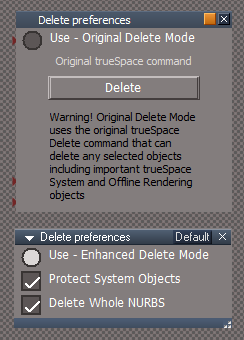
Wanting to add an Advance aspect to the Delete preferences
Delete Preferences.png
Delete Preferences.png (16.59 KiB) Viewed 1211 times
.
Warning message:
Warning! Original Delete Mode uses the original trueSpace Delete command that can delete any selected objects including important trueSpace System and Offline Rendering objects
Is this warning message sufficient?
Should I include a Delete button and if so, use the original trueSpace command or Original Delete Mode?
User avatar
clintonman
Captain
Posts: 5659
Joined: 21 May 2009, 21:08
Type the number ten into the box: 0
Location: California

Re: Final trueSpace 7.61 Beta 8 Unofficial Update

Post by clintonman »

trueBlue wrote: 20 Aug 2022, 16:33 @Clinton
Wanting to add an Advance aspect to the Delete preferences
Delete Preferences.png
.
Warning message:
Warning! Original Delete Mode uses the original trueSpace Delete command that can delete any selected objects including important trueSpace System and Offline Rendering objects
Is this warning message sufficient?
Should I include a Delete button and if so, use the original trueSpace command or Original Delete Mode?
I don't see the need for a delete button in the preferences. Warning is fine as long as it isn't in the form of a dialog box.
Clinton Reese

http://clintons3d.com
User avatar
trueBlue
Captain
Posts: 5548
Joined: 06 Jul 2009, 22:50
Type the number ten into the box: 10

Re: Final trueSpace 7.61 Beta 8 Unofficial Update

Post by trueBlue »

Okay, thanks!
Getting ready to move the Delete & Copy scripts into the UUFunctionSet
I notice that the Copy object (toolbar buttons) have the original trueSpace's (Node.Copy('', '') command in the RClickCommand
What are your thoughts with the RClickCommand?
Possibilities:
Remove the RClickCommand?
Keep the RClickCommand?
Add a Copy Preferences like the Delete Preferences?
User avatar
clintonman
Captain
Posts: 5659
Joined: 21 May 2009, 21:08
Type the number ten into the box: 0
Location: California

Re: Final trueSpace 7.61 Beta 8 Unofficial Update

Post by clintonman »

trueBlue wrote: 20 Aug 2022, 17:11 Okay, thanks!
Getting ready to move the Delete & Copy scripts into the UUFunctionSet
I notice that the Copy object (toolbar buttons) have the original trueSpace's (Node.Copy('', '') command in the RClickCommand
What are your thoughts with the RClickCommand?
Possibilities:
Remove the RClickCommand?
Keep the RClickCommand?
Add a Copy Preferences like the Delete Preferences?
Preferences like Delete. Original/Enhanced choice plus Copy Whole NURBS option for enhanced and maybe Connect Owner option.
Clinton Reese

http://clintons3d.com
User avatar
trueBlue
Captain
Posts: 5548
Joined: 06 Jul 2009, 22:50
Type the number ten into the box: 10

Re: Final trueSpace 7.61 Beta 8 Unofficial Update

Post by trueBlue »

clintonman wrote: 20 Aug 2022, 17:29
trueBlue wrote: 20 Aug 2022, 17:11 Okay, thanks!
Getting ready to move the Delete & Copy scripts into the UUFunctionSet
I notice that the Copy object (toolbar buttons) have the original trueSpace's (Node.Copy('', '') command in the RClickCommand
What are your thoughts with the RClickCommand?
Possibilities:
Remove the RClickCommand?
Keep the RClickCommand?
Add a Copy Preferences like the Delete Preferences?
Preferences like Delete. Original/Enhanced choice plus Copy Whole NURBS option for enhanced and maybe Connect Owner option.
Can you help create this?
User avatar
clintonman
Captain
Posts: 5659
Joined: 21 May 2009, 21:08
Type the number ten into the box: 0
Location: California

Re: Final trueSpace 7.61 Beta 8 Unofficial Update

Post by clintonman »

trueBlue wrote: 20 Aug 2022, 17:54
clintonman wrote: 20 Aug 2022, 17:29
trueBlue wrote: 20 Aug 2022, 17:11 Okay, thanks!
Getting ready to move the Delete & Copy scripts into the UUFunctionSet
I notice that the Copy object (toolbar buttons) have the original trueSpace's (Node.Copy('', '') command in the RClickCommand
What are your thoughts with the RClickCommand?
Possibilities:
Remove the RClickCommand?
Keep the RClickCommand?
Add a Copy Preferences like the Delete Preferences?
Preferences like Delete. Original/Enhanced choice plus Copy Whole NURBS option for enhanced and maybe Connect Owner option.
Can you help create this?
That's the plan. starting soon.
Clinton Reese

http://clintons3d.com
User avatar
clintonman
Captain
Posts: 5659
Joined: 21 May 2009, 21:08
Type the number ten into the box: 0
Location: California

Re: Final trueSpace 7.61 Beta 8 Unofficial Update

Post by clintonman »

Not as bad as I thought it would be. All went smoothly.
Copy Whole NURBS - if LODMesh or CPMesh are selected will copy the entire nurbs object.
Connect Owner - if the original object OwnerMatrix is connected to something then also connect the copy's OwnerMatrix.
Attachments
Copy.RsObj
(11.08 KiB) Downloaded 90 times
Copy preferences.RsObj
(37.25 KiB) Downloaded 96 times
Clinton Reese

http://clintons3d.com
User avatar
trueBlue
Captain
Posts: 5548
Joined: 06 Jul 2009, 22:50
Type the number ten into the box: 10

Re: Final trueSpace 7.61 Beta 8 Unofficial Update

Post by trueBlue »

clintonman wrote: 20 Aug 2022, 18:48 Not as bad as I thought it would be. All went smoothly.
Copy Whole NURBS - if LODMesh or CPMesh are selected will copy the entire nurbs object.
Connect Owner - if the original object OwnerMatrix is connected to something then also connect the copy's OwnerMatrix.
Great! :bananathumb:
One thing I noticed is when nothing is selected the script runs
I added one line at the top to the Delete, Copy, and UnLookAt Functions
Note: It does not work inside the cmd code

Code: Select all

	sel=Node.Selection();if(!sel){return;};
	var cmd = "";
Any suggestions on a Warning message for the Original Copy Mode?
Attachments
Custom Preferences.png
User avatar
clintonman
Captain
Posts: 5659
Joined: 21 May 2009, 21:08
Type the number ten into the box: 0
Location: California

Re: Final trueSpace 7.61 Beta 8 Unofficial Update

Post by clintonman »

trueBlue wrote: 20 Aug 2022, 21:26
clintonman wrote: 20 Aug 2022, 18:48 Not as bad as I thought it would be. All went smoothly.
Copy Whole NURBS - if LODMesh or CPMesh are selected will copy the entire nurbs object.
Connect Owner - if the original object OwnerMatrix is connected to something then also connect the copy's OwnerMatrix.
Great! :bananathumb:
One thing I noticed is when nothing is selected the script runs
I added one line at the top to the Delete, Copy, and UnLookAt Functions
Note: It does not work inside the cmd code

Code: Select all

	sel=Node.Selection();if(!sel){return;};
	var cmd = "";
Any suggestions on a Warning message for the Original Copy Mode?
Nope, I don't see how copy would need a warning.
Clinton Reese

http://clintons3d.com
User avatar
trueBlue
Captain
Posts: 5548
Joined: 06 Jul 2009, 22:50
Type the number ten into the box: 10

Re: Final trueSpace 7.61 Beta 8 Unofficial Update

Post by trueBlue »

Hummm...
Only works for the first selected object could be mentioned

How would I write a Cycle Camera function?
In jScript:
var cycle = -1;
is before the function Execute(params)

There is going to be several Cycle scripts in one Function Set
Most use:
var cycle = 0
User avatar
clintonman
Captain
Posts: 5659
Joined: 21 May 2009, 21:08
Type the number ten into the box: 0
Location: California

Re: Final trueSpace 7.61 Beta 8 Unofficial Update

Post by clintonman »

trueBlue wrote: 20 Aug 2022, 23:01 Hummm...
Only works for the first selected object could be mentioned

How would I write a Cycle Camera function?
In jScript:
var cycle = -1;
is before the function Execute(params)

There is going to be several Cycle scripts in one Function Set
Most use:
var cycle = 0
You'll have to change the names
"cycleXXX"
"cycleYYY"
Replace with names XXX/YYY with something that actually make sense.
Clinton Reese

http://clintons3d.com
User avatar
trueBlue
Captain
Posts: 5548
Joined: 06 Jul 2009, 22:50
Type the number ten into the box: 10

Re: Final trueSpace 7.61 Beta 8 Unofficial Update

Post by trueBlue »

clintonman wrote: 20 Aug 2022, 23:07
trueBlue wrote: 20 Aug 2022, 23:01 Hummm...
Only works for the first selected object could be mentioned

How would I write a Cycle Camera function?
In jScript:
var cycle = -1;
is before the function Execute(params)

There is going to be several Cycle scripts in one Function Set
Most use:
var cycle = 0
You'll have to change the names
"cycleXXX"
"cycleYYY"
Replace with names XXX/YYY with something that actually make sense.
Do you put:
var cyclecams = -1;
inside the Function or at the top?
User avatar
clintonman
Captain
Posts: 5659
Joined: 21 May 2009, 21:08
Type the number ten into the box: 0
Location: California

Re: Final trueSpace 7.61 Beta 8 Unofficial Update

Post by clintonman »

trueBlue wrote: 20 Aug 2022, 23:13
clintonman wrote: 20 Aug 2022, 23:07
trueBlue wrote: 20 Aug 2022, 23:01 Hummm...
Only works for the first selected object could be mentioned

How would I write a Cycle Camera function?
In jScript:
var cycle = -1;
is before the function Execute(params)

There is going to be several Cycle scripts in one Function Set
Most use:
var cycle = 0
You'll have to change the names
"cycleXXX"
"cycleYYY"
Replace with names XXX/YYY with something that actually make sense.
Do you put:
var cyclecams = -1;
inside the Function or at the top?
Something like this. Has to be outside the function or the value never changes

Code: Select all

var cycletwo = -1;
var cyclecams = -1;
function Cycle1(params) 
...
	cyclecams++;
	cyclecams = cyclecams % sceneCameras.length;
...
function Cycle2(params) 
...
	cycletwo++;
	cycletwo = cycletwo % sceneXXX.length;
Clinton Reese

http://clintons3d.com
User avatar
trueBlue
Captain
Posts: 5548
Joined: 06 Jul 2009, 22:50
Type the number ten into the box: 10

Re: Final trueSpace 7.61 Beta 8 Unofficial Update

Post by trueBlue »

Looks complicated, maybe I should forgo cycle functions and just add jScript Cycle scripts to UUCommands?
Edit: I got Cycle Cameras working for the CameraToolbar in a new UUCameraFuctionSet
The 3 other cycle scripts, if needed, will be added to UUCommands as jScripts
The UUCameraFuctionSet will have every CameraToolbar's LMB & RMB Commands
Note to Self: Many scripts, toolbar commands, Camera(S) button scripts, C3D toolbars and scripts plus C3D installers use these ScriptCommands/xml scripts
Edit2: Node.AccessFnSet does NOT work in Shortcuts!!!
Lots of digging... :bananasad:
User avatar
trueBlue
Captain
Posts: 5548
Joined: 06 Jul 2009, 22:50
Type the number ten into the box: 10

Re: Final trueSpace 7.61 Beta 8 Unofficial Update

Post by trueBlue »

@Clinton
Setting a toolbar shortcut (Ctrl + RMB) that uses a Node.AccessFnSet does NOT work

Code: Select all

    <RS_WINDOW WINGUID="{F39966D8-6ADA-4EFA-83C2-F4343D3B02A7}">
        <RS_ACC KEY="DELETE" GROUP="WORKSPACEMAIN2" CONTEXT="" DESC="Delete - Delete selected objects / Preferences" COMMAND="UUFS = Node.AccessFnSet(&quot;Scripts/UUCommands/UUFunctionSet&quot;);UUFS.Delete()" />
        <RS_BLOCKASSOCIATIONS>
        </RS_BLOCKASSOCIATIONS>
    </RS_WINDOW>
Edit: I changed the toolbar command
var UUFS = Node.AccessFnSet('Scripts/UUCommands/UUFunctionSet');UUFS.Delete();
Not sure if adding the var or changing the double quotes in the path to single quotes is the key
Next test setting a shortcut (Ctrl + RMB)
Seems to be working now
User avatar
clintonman
Captain
Posts: 5659
Joined: 21 May 2009, 21:08
Type the number ten into the box: 0
Location: California

Re: Final trueSpace 7.61 Beta 8 Unofficial Update

Post by clintonman »

trueBlue wrote: 21 Aug 2022, 17:41 @Clinton
Setting a toolbar shortcut (Ctrl + RMB) that uses a Node.AccessFnSet does NOT work

Code: Select all

    <RS_WINDOW WINGUID="{F39966D8-6ADA-4EFA-83C2-F4343D3B02A7}">
        <RS_ACC KEY="DELETE" GROUP="WORKSPACEMAIN2" CONTEXT="" DESC="Delete - Delete selected objects / Preferences" COMMAND="UUFS = Node.AccessFnSet(&quot;Scripts/UUCommands/UUFunctionSet&quot;);UUFS.Delete()" />
        <RS_BLOCKASSOCIATIONS>
        </RS_BLOCKASSOCIATIONS>
    </RS_WINDOW>
Edit: I changed the toolbar command
var UUFS = Node.AccessFnSet('Scripts/UUCommands/UUFunctionSet');UUFS.Delete();
Not sure if adding the var or changing the double quotes in the path to single quotes is the key
Next test setting a shortcut (Ctrl + RMB)
Seems to be working now
I think single quotes is what fixed it. According to internet "&quot;" means double quotes so maybe that was messing it up. Did you get error message or just nothing?
Clinton Reese

http://clintons3d.com
User avatar
trueBlue
Captain
Posts: 5548
Joined: 06 Jul 2009, 22:50
Type the number ten into the box: 10

Re: Final trueSpace 7.61 Beta 8 Unofficial Update

Post by trueBlue »

When I first (Ctrl + RMB) set the toolbar Delete shortcut, it did not work and no error
But more importantly, the Shortcut file got hosed big time, wiped out a whole bunch of the shortcuts
User avatar
clintonman
Captain
Posts: 5659
Joined: 21 May 2009, 21:08
Type the number ten into the box: 0
Location: California

Re: Final trueSpace 7.61 Beta 8 Unofficial Update

Post by clintonman »

trueBlue wrote: 21 Aug 2022, 19:48 When I first (Ctrl + RMB) set the toolbar Delete shortcut, it did not work and no error
But more importantly, the Shortcut file got hosed big time, wiped out a whole bunch of the shortcuts
"wiped out" - Did it erase the shortcuts or just break them?
Clinton Reese

http://clintons3d.com
User avatar
trueBlue
Captain
Posts: 5548
Joined: 06 Jul 2009, 22:50
Type the number ten into the box: 10

Re: Final trueSpace 7.61 Beta 8 Unofficial Update

Post by trueBlue »

clintonman wrote: 21 Aug 2022, 19:55
trueBlue wrote: 21 Aug 2022, 19:48 When I first (Ctrl + RMB) set the toolbar Delete shortcut, it did not work and no error
But more importantly, the Shortcut file got hosed big time, wiped out a whole bunch of the shortcuts
"wiped out" - Did it erase the shortcuts or just break them?
Erased!
Morale of the Story, No double quotes in toolbar commands!
I also think it is important in scripts too!
User avatar
clintonman
Captain
Posts: 5659
Joined: 21 May 2009, 21:08
Type the number ten into the box: 0
Location: California

Re: Final trueSpace 7.61 Beta 8 Unofficial Update

Post by clintonman »

trueBlue wrote: 21 Aug 2022, 20:15
clintonman wrote: 21 Aug 2022, 19:55
trueBlue wrote: 21 Aug 2022, 19:48 When I first (Ctrl + RMB) set the toolbar Delete shortcut, it did not work and no error
But more importantly, the Shortcut file got hosed big time, wiped out a whole bunch of the shortcuts
"wiped out" - Did it erase the shortcuts or just break them?
Erased!
Morale of the Story, No double quotes in toolbar commands!
I also think it is important in scripts too!
Wow. In any case keep an eye out, because it may also be something else. I say that cause I tried to reproduce the non-working shortcut with double quotes and it worked. It was too hard to tell if any shortcuts where erased from the file.
Clinton Reese

http://clintons3d.com
User avatar
trueBlue
Captain
Posts: 5548
Joined: 06 Jul 2009, 22:50
Type the number ten into the box: 10

Re: Final trueSpace 7.61 Beta 8 Unofficial Update

Post by trueBlue »

Which toolbar and button Command did you try?
Edit: I tried setting the WorkspaceMain2/Perspective button's shortcut:

Code: Select all

UUFS = Node.AccessFnSet("Scripts/UUCommands/UUFunctionSet");UUFS.Perspective()
It worked even though the command has double quotes and do not see any issues with existing shortcuts
Guessing my prior experience was a fluke
Or maybe it was because it was the Delete button that had an existing (different) shortcut already assigned

Return to “General Discussion”