Here is a semi final version of the Final Update.
Steps to install:
Download the tS761B8 Final Update.zip file and unzip the tS761B8 Final Update.exe
1.) Run the tS761B8 Final Update.exe
2.) Browse ... to where you installed C:\trueSpace761, select it's folder and then the Extract button.
3.) Select the Yes to All button.
4.) Open trueSpace and select the Reset to Default Context icon and then the Default layout.
Forum will not allow me to upload the file as it is to large. It's only 27 MG
Removed due to update.
Final trueSpace 7.61 Beta 8 Unofficial Update
-
trueBlue

- Captain
- Posts: 5548
- Joined: 06 Jul 2009, 22:50
- Type the number ten into the box: 10
Re: Final trueSpace 7.61 Beta 8 Unofficial Update
-
clintonman

- Captain
- Posts: 5659
- Joined: 21 May 2009, 21:08
- Type the number ten into the box: 0
- Location: California
Re: Final trueSpace 7.61 Beta 8 Unofficial Update
I'll take a look later. How big was the old installer?trueBlue wrote: 24 Feb 2018, 23:50 ...
Forum will not allow me to upload the file as it is to large. It's only 27 MG
-
clintonman
- Captain
- Posts: 5659
- Joined: 21 May 2009, 21:08
- Type the number ten into the box: 0
- Location: California
Re: Final trueSpace 7.61 Beta 8 Unofficial Update
It looks like the upload limit was set to 5Mb. I changed it to 35Mb for the forums. Haven't checked the website limits, so try it and see if it works.
-
trueBlue
- Captain
- Posts: 5548
- Joined: 06 Jul 2009, 22:50
- Type the number ten into the box: 10
Re: Final trueSpace 7.61 Beta 8 Unofficial Update
Thanks Clinton!
I downloaded 7-Zip and that brought the file size down 9 MB.
Updated the previous post and file attached.
I downloaded 7-Zip and that brought the file size down 9 MB.
Updated the previous post and file attached.
-
trueBlue
- Captain
- Posts: 5548
- Joined: 06 Jul 2009, 22:50
- Type the number ten into the box: 10
Re: Final trueSpace 7.61 Beta 8 Unofficial Update
The last posted semi final update has been removed. It had a few issues that I have corrected.
You can find the new version in the first post:
viewtopic.php?t=5411&start=30#p51638
Note: The Material Editor has been updated to a newer version.
Updated the post to reflect the new and additional changes.
You can find the new version in the first post:
viewtopic.php?t=5411&start=30#p51638
Note: The Material Editor has been updated to a newer version.
Updated the post to reflect the new and additional changes.
-
clintonman
- Captain
- Posts: 5659
- Joined: 21 May 2009, 21:08
- Type the number ten into the box: 0
- Location: California
Re: Final trueSpace 7.61 Beta 8 Unofficial Update
I don't see any downloads in your posts.
-
trueBlue
- Captain
- Posts: 5548
- Joined: 06 Jul 2009, 22:50
- Type the number ten into the box: 10
Re: Final trueSpace 7.61 Beta 8 Unofficial Update
You can find the new version in the first post:
viewtopic.php?t=5411&start=30#p51638
viewtopic.php?t=5411&start=30#p51638
-
clintonman
- Captain
- Posts: 5659
- Joined: 21 May 2009, 21:08
- Type the number ten into the box: 0
- Location: California
Re: Final trueSpace 7.61 Beta 8 Unofficial Update
I think the link should betrueBlue wrote: 27 Feb 2018, 01:55 You can find the new version in the first post:
viewtopic.php?t=5411&start=30#p51638
viewtopic.php?t=5411&start=p51638
or
v ... art=p51638
without the 30#
-
trueBlue
- Captain
- Posts: 5548
- Joined: 06 Jul 2009, 22:50
- Type the number ten into the box: 10
Re: Final trueSpace 7.61 Beta 8 Unofficial Update
Interesting, it works for me and not others?
If it was your understanding that this is the final release then I understand, but it is not.
This is a semi final version of the Final Update and was hoping to get some feed back and or some users to test it before it gets released officially. I found another issue and corrected it. Uploaded the new file in the first post in this thread.
Very curious how the layouts are showing on other users monitors.
When I made the last update, I had a smaller monitor.
I did not change any of the window sizes in either layout libraries.
My monitor resolution is 1080p, 1920 x 1080.
The stack's width should be set at 224 to accommodate the new Main2 toolbar, which I did not set.
Not sure what would be best for different users.
Note: Both the Old and New layouts exist in the Library.
Presently the Layouts - Configurations is being used which is the new layouts.
Testing switching layouts, I discovered tS761 only works with one name, as in Layouts - Configurations
To load the OLD layouts you have to rename them in the Library Browser.
1.) Rename Layouts - Configurations to Layouts - ConfigurationsNEW
2.) Rename Layouts - ConfigurationsOLD to Layouts - Configurations
3.) Select the Default layout tab.
Note: You can tell the differences of the layouts by their icons.
If it was your understanding that this is the final release then I understand, but it is not.
This is a semi final version of the Final Update and was hoping to get some feed back and or some users to test it before it gets released officially. I found another issue and corrected it. Uploaded the new file in the first post in this thread.
Very curious how the layouts are showing on other users monitors.
When I made the last update, I had a smaller monitor.
I did not change any of the window sizes in either layout libraries.
My monitor resolution is 1080p, 1920 x 1080.
The stack's width should be set at 224 to accommodate the new Main2 toolbar, which I did not set.
Not sure what would be best for different users.
Note: Both the Old and New layouts exist in the Library.
Presently the Layouts - Configurations is being used which is the new layouts.
Testing switching layouts, I discovered tS761 only works with one name, as in Layouts - Configurations
To load the OLD layouts you have to rename them in the Library Browser.
1.) Rename Layouts - Configurations to Layouts - ConfigurationsNEW
2.) Rename Layouts - ConfigurationsOLD to Layouts - Configurations
3.) Select the Default layout tab.
Note: You can tell the differences of the layouts by their icons.
- Attachments
-

- Layouts.PNG (4.8 KiB) Viewed 15128 times
-
Emmanuel

- Chief Warrant Officer
- Posts: 670
- Joined: 14 Jun 2009, 06:47
Re: Final trueSpace 7.61 Beta 8 Unofficial Update
The update works for me on a fresh install. Nice layout. I like that.trueBlue wrote: 27 Feb 2018, 18:07 it works for me and not others?
It didn't worked at first on an old one loaded with Clintons scripts and other stuff, so I had to re-install tS7.61.
-
clintonman
- Captain
- Posts: 5659
- Joined: 21 May 2009, 21:08
- Type the number ten into the box: 0
- Location: California
Re: Final trueSpace 7.61 Beta 8 Unofficial Update
That's a good point. I think the previous unofficial updates recommended doing a fresh install. Is this new one designed to install over previous updates?Emmanuel wrote: 27 Feb 2018, 20:24The update works for me on a fresh install. Nice layout. I like that.trueBlue wrote: 27 Feb 2018, 18:07 it works for me and not others?
It didn't worked at first on an old one loaded with Clintons scripts and other stuff, so I had to re-install tS7.61.
-
clintonman
- Captain
- Posts: 5659
- Joined: 21 May 2009, 21:08
- Type the number ten into the box: 0
- Location: California
Re: Final trueSpace 7.61 Beta 8 Unofficial Update
Ran test on tS7.61 + previous unofficial update + persistent installed scripts.
Loaded and works without any problems. Lost my custom toolbars. Got them back quickly via the batch installer.
"Show All objects" button looks the same as the "Render Scene with offline renderer" button. They need to look different to avoid confusion.
Library Places inside the Material Editor was "sticky". It would always show all libraries until I clicked it a few times then switching to D3dMaterials only showed material libraries. Looks like a one time thing though, all other subsequent use works as expected..
Loaded and works without any problems. Lost my custom toolbars. Got them back quickly via the batch installer.
"Show All objects" button looks the same as the "Render Scene with offline renderer" button. They need to look different to avoid confusion.
Library Places inside the Material Editor was "sticky". It would always show all libraries until I clicked it a few times then switching to D3dMaterials only showed material libraries. Looks like a one time thing though, all other subsequent use works as expected..
-
trueBlue
- Captain
- Posts: 5548
- Joined: 06 Jul 2009, 22:50
- Type the number ten into the box: 10
Re: Final trueSpace 7.61 Beta 8 Unofficial Update
New version uploaded.
Additional updates:
Widgets
* Select/Camera - Changed the coloring of the widget. Note: Still a WIP as I am trying to change the MMB gestures...
* Tools /Move, Rotate, Scale, Camera Move, Camera Rotate, Camera Scale, and Zoom - Changed all of the Cancel(s) from MMB to Shift + Mouse Left Click. Now it does not conflict with the Background widget.
* View Widget/Encircle (Green shape) - Changed the Reset View to Shift + Mouse Left Click
Added: Vray Materials.mtl to the Library folder
All toolbars with the Hide/Show buttons have been changed to a different color format to look less like the Render icons.
I tried to remove the Main Library Place from the Library Places' Combo Control but I was not able to. I did change it to D3D Materials and DX9 so hopefully that works better. Selecting the Update Library Places icon usually fixes it
Additional updates:
Widgets
* Select/Camera - Changed the coloring of the widget. Note: Still a WIP as I am trying to change the MMB gestures...

- Camera2.PNG (9.15 KiB) Viewed 14693 times
* View Widget/Encircle (Green shape) - Changed the Reset View to Shift + Mouse Left Click
Added: Vray Materials.mtl to the Library folder
All toolbars with the Hide/Show buttons have been changed to a different color format to look less like the Render icons.
I tried to remove the Main Library Place from the Library Places' Combo Control but I was not able to. I did change it to D3D Materials and DX9 so hopefully that works better. Selecting the Update Library Places icon usually fixes it
-
clintonman
- Captain
- Posts: 5659
- Joined: 21 May 2009, 21:08
- Type the number ten into the box: 0
- Location: California
Re: Final trueSpace 7.61 Beta 8 Unofficial Update
Render and Show/Hide is better.
Material Editor still sticky on first run. Now it starts stuck in the D3D Materials list instead of the Main Library Place list, so that's better.
Where is "Update Library Places icon"?
No issues to report.
Material Editor still sticky on first run. Now it starts stuck in the D3D Materials list instead of the Main Library Place list, so that's better.
Where is "Update Library Places icon"?
No issues to report.
-
trueBlue
- Captain
- Posts: 5548
- Joined: 06 Jul 2009, 22:50
- Type the number ten into the box: 10
Re: Final trueSpace 7.61 Beta 8 Unofficial Update
They look like file drawers
Top right and bottom right in the Material
Editors.
Top right and bottom right in the Material
Editors.
- Attachments
-

- New Material Editor.PNG (58.21 KiB) Viewed 14694 times
-
trueBlue
- Captain
- Posts: 5548
- Joined: 06 Jul 2009, 22:50
- Type the number ten into the box: 10
Re: Final trueSpace 7.61 Beta 8 Unofficial Update
Clinton,
Can you take a look at the Move node in Widgets/Select/Camera/Move?
Trying to exchange the RMB Drag with Alt + LMB state.
Like I did in Stand and Rotate.
It should move Forward and Reverse.
For the life of me I can not get it to work.
Can you take a look at the Move node in Widgets/Select/Camera/Move?


Like I did in Stand and Rotate.

For the life of me I can not get it to work.
-
clintonman
- Captain
- Posts: 5659
- Joined: 21 May 2009, 21:08
- Type the number ten into the box: 0
- Location: California
Re: Final trueSpace 7.61 Beta 8 Unofficial Update

-
Saul
- Senior Chief Petty Officer
- Posts: 308
- Joined: 22 May 2009, 16:50
Re: Final trueSpace 7.61 Beta 8 Unofficial Update
This is good work!
I am having trouble getting the attached RsObj to work after this update. Something to do with too many camera nodes??!!
I am having trouble getting the attached RsObj to work after this update. Something to do with too many camera nodes??!!
- Attachments
-
- Camera Deluxe installer.RsObj
- (253.91 KiB) Downloaded 326 times
-
stan
- Master Chief Petty Officer
- Posts: 584
- Joined: 21 May 2009, 17:20
Re: Final trueSpace 7.61 Beta 8 Unofficial Update
Saul, that is something I made that was added to the library, it could be the widget those guys made uses the same widget weight. in the activation node. It uses 2.00 you might need to change that to a higher number to over power their on the Automatic activation Node in the widget.. It only had to compete with the original when it was created. Sorry I can't help beyond that as I don't use the update as it breaks my own tools.
-
trueBlue
- Captain
- Posts: 5548
- Joined: 06 Jul 2009, 22:50
- Type the number ten into the box: 10
Re: Final trueSpace 7.61 Beta 8 Unofficial Update
No I had it hooked up correctly to all 3 connections.clintonman wrote: 01 Mar 2018, 06:14 ReplaceMDragWithAltLDrag.jpg
The original MDrag has 3 connections, looks like you only have 1.
I had the Alt hooked up to A, and the mouse button hooked up to B. Just like the others.
When I swapped those connections (like you have it), it works.
tS7 can be so strange sometimes.
Thank you so much for your help!
-
trueBlue
- Captain
- Posts: 5548
- Joined: 06 Jul 2009, 22:50
- Type the number ten into the box: 10
Re: Final trueSpace 7.61 Beta 8 Unofficial Update
If you upload a modified version that works, I will include it in the update.stan wrote: 01 Mar 2018, 14:30 Saul, that is something I made that was added to the library, it could be the widget those guys made uses the same widget weight. in the activation node. It uses 2.00 you might need to change that to a higher number to over power their on the Automatic activation Node in the widget.. It only had to compete with the original when it was created. Sorry I can't help beyond that as I don't use the update as it breaks my own tools.
Presently there is the original Camera1 widget - Weight = 1, and another Camera widget - Weight = 2
-
stan
- Master Chief Petty Officer
- Posts: 584
- Joined: 21 May 2009, 17:20
Re: Final trueSpace 7.61 Beta 8 Unofficial Update
David, you can just change the weight from 2.0 to 3.0 and put it back in the library as it's been there since ts7.6 or reduce your to 1.5.
-
trueBlue
- Captain
- Posts: 5548
- Joined: 06 Jul 2009, 22:50
- Type the number ten into the box: 10
Re: Final trueSpace 7.61 Beta 8 Unofficial Update
Okay I changed the weight to 3 and included it with this update.stan wrote: 01 Mar 2018, 22:52 David, you can just change the weight from 2.0 to 3.0 and put it back in the library as it's been there since ts7.6 or reduce your to 1.5.
-
trueBlue
- Captain
- Posts: 5548
- Joined: 06 Jul 2009, 22:50
- Type the number ten into the box: 10
Re: Final trueSpace 7.61 Beta 8 Unofficial Update
Okay I think this is the final update unless somebody discovers something wrong or disapproves.
New to this update:
All Layouts
Included a Objects: My Objects library and My Scenes library
Changed the width of the Stack to 224 and the bottom toolbar's height
This was set at my resoluton 1920 x 1080. Hope it works for everybody.
Material Editor
I was able to remove the Main Library Places from the combo control.
Camera2
FOV
LMB = View from Camera
LMB + Drag = Adjust Field of View
Shift + LMB = Exit Camera View
Rotate
LMB = Spin Left & Right
LMB + Alt = Orbit 360 degrees
LMB + Ctrl = Open Camera preferences
LMB + Shift = Change to Camera1 'Original'
RMB - Tilt Up & Down
RMB + Alt = Tilt Left & Right
Move
LMB = Move X & Y
LMB + Alt = Forward & Reverse
LMB + Ctrl = Open Camera preferences
LMB + Shift = Change to Camera1 'Original'
RMB = Move X & Z
Stand
LMB = Move Left & Right
LMB + Alt = Move X & Z
LMB + Ctrl = Open Camera preferences
LMB + Shift = Change to Camera1 'Original'
RMB = Move Up & Down
View Widget
Green Encircle
Shift + LMB select = Resets the View
Shift + RMB select = Opens the 3D View Widget
Ctrl + LMB select = Opens the Eye Camera panel
New - trueSpace Beta 7.61 Unofficial Update.txt has been updated with all of the changes.
New to this update:
All Layouts
Included a Objects: My Objects library and My Scenes library
Changed the width of the Stack to 224 and the bottom toolbar's height
This was set at my resoluton 1920 x 1080. Hope it works for everybody.
Material Editor
I was able to remove the Main Library Places from the combo control.
Camera2
FOV
LMB = View from Camera
LMB + Drag = Adjust Field of View
Shift + LMB = Exit Camera View
Rotate
LMB = Spin Left & Right
LMB + Alt = Orbit 360 degrees
LMB + Ctrl = Open Camera preferences
LMB + Shift = Change to Camera1 'Original'
RMB - Tilt Up & Down
RMB + Alt = Tilt Left & Right
Move
LMB = Move X & Y
LMB + Alt = Forward & Reverse
LMB + Ctrl = Open Camera preferences
LMB + Shift = Change to Camera1 'Original'
RMB = Move X & Z
Stand
LMB = Move Left & Right
LMB + Alt = Move X & Z
LMB + Ctrl = Open Camera preferences
LMB + Shift = Change to Camera1 'Original'
RMB = Move Up & Down
View Widget
Green Encircle
Shift + LMB select = Resets the View
Shift + RMB select = Opens the 3D View Widget
Ctrl + LMB select = Opens the Eye Camera panel
New - trueSpace Beta 7.61 Unofficial Update.txt has been updated with all of the changes.
-
the_ant

- Chief Petty Officer
- Posts: 155
- Joined: 02 Jun 2009, 09:26
- Type the number ten into the box: 0
- Location: Perugia - Italy
Re: Final trueSpace 7.61 Beta 8 Unofficial Update
Great Job trueBlue!!! 
From about six months i used Cellulo's tSp 7.6 v2.1 (vRay renders are decents with G.I.)
After your news...i would install tSp7.61B8 from scratch once again...what is the new list of steps to do before launch your Final Update?
From about six months i used Cellulo's tSp 7.6 v2.1 (vRay renders are decents with G.I.)
After your news...i would install tSp7.61B8 from scratch once again...what is the new list of steps to do before launch your Final Update?
-
trueBlue
- Captain
- Posts: 5548
- Joined: 06 Jul 2009, 22:50
- Type the number ten into the box: 10
Re: Final trueSpace 7.61 Beta 8 Unofficial Update
Thanks, the instructions are in the first post where the file is.
Show me a screen capture after you install it, and let me know your monitor's resolution.
Download the tS761B8 Final Update.zip file and unzip the tS761B8 Final Update.exe
Steps for applying the tS7.61B8 Final Update:
Uninstall VRAY and close trueSpace before applying the Final Update!
1.) Run the tS761B8 Final Update.exe
2.) Browse [...] to where you installed trueSpace eg: C:\trueSpace761, select the trueSpace761 folder, and then the Extract button.
3.) Select the Yes to All button.
4.) Open trueSpace and select the Reset to Default Context icon and the Default layout tab.
Show me a screen capture after you install it, and let me know your monitor's resolution.
Download the tS761B8 Final Update.zip file and unzip the tS761B8 Final Update.exe
Steps for applying the tS7.61B8 Final Update:
Uninstall VRAY and close trueSpace before applying the Final Update!
1.) Run the tS761B8 Final Update.exe
2.) Browse [...] to where you installed trueSpace eg: C:\trueSpace761, select the trueSpace761 folder, and then the Extract button.
3.) Select the Yes to All button.
4.) Open trueSpace and select the Reset to Default Context icon and the Default layout tab.
-
clintonman
- Captain
- Posts: 5659
- Joined: 21 May 2009, 21:08
- Type the number ten into the box: 0
- Location: California
Re: Final trueSpace 7.61 Beta 8 Unofficial Update
tested installation, no errors to report
material editor library place is reliable with only 1 choice "D3DMaterials", will this have other options? like if vray is installed. If not it should be removed since you don't really have a choice to make.
material editor library place is reliable with only 1 choice "D3DMaterials", will this have other options? like if vray is installed. If not it should be removed since you don't really have a choice to make.
-
trueBlue
- Captain
- Posts: 5548
- Joined: 06 Jul 2009, 22:50
- Type the number ten into the box: 10
Re: Final trueSpace 7.61 Beta 8 Unofficial Update
LOL Clinton, do you remember you help me create this?clintonman wrote: 03 Mar 2018, 20:42 tested installation, no errors to report
material editor library place is reliable with only 1 choice "D3DMaterials", will this have other options? like if vray is installed. If not it should be removed since you don't really have a choice to make.
So it was not sticking this time?
This is the way it was setup in the UnOfficial Update v.3 and also with NO update.
You do not need to use the Library Browser Edition at all including with VRay.
To enable the Library Browser, select the Update Library Places icon in the Material Editor.
In the Library Places -> Combo Control, select the Main Library Place.
In the next Combo Control, select which libary you would like to open.
Note: At anytime your libraries are not showing, select the Update Library Places icon again to update the Libray Places.
To use the D3DMaterials, select the D3DMaterials in the Library Places -> Combo Control.
In the next Combo Control, select the Materials - DX9
It is not necessary to use the the Library Browser Edition with VRay to find Vray materials in the main library, because the Vray Material Editor's material spheres open their materials.
Also there is a tS761 issue that develops when Installing/Loading and Unloading/Reinstalling from the Package Manager and also with Reinstalling Vray. Selecting the Update Library Places icon fixes it.
Can you show me a full screen capture after you install this update, and let me know your monitor's resolution?
Did you notice the Rosetta version?
viewtopic.php?t=5418
-
clintonman
- Captain
- Posts: 5659
- Joined: 21 May 2009, 21:08
- Type the number ten into the box: 0
- Location: California
Re: Final trueSpace 7.61 Beta 8 Unofficial Update
Can't say I recall helping at all on that.trueBlue wrote: 03 Mar 2018, 21:55LOL Clinton, do you remember you help me create this?clintonman wrote: 03 Mar 2018, 20:42 tested installation, no errors to report
material editor library place is reliable with only 1 choice "D3DMaterials", will this have other options? like if vray is installed. If not it should be removed since you don't really have a choice to make.
So it was not sticking this time?
...
Can you show me a full screen capture after you install this update, and let me know your monitor's resolution?
Did you notice the Rosetta version?
viewtopic.php?t=5418
Nope, didn't see the rosetta version, downloading now.
No sticking, even after using the button to activate the main library.


1920 x 1080 resolution
-
trueBlue
- Captain
- Posts: 5548
- Joined: 06 Jul 2009, 22:50
- Type the number ten into the box: 10
Re: Final trueSpace 7.61 Beta 8 Unofficial Update
Did you install the newest update for tS761, uploaded yesterday?
The stack’s width should have been set at 224.
The stack’s width should have been set at 224.
-
clintonman
- Captain
- Posts: 5659
- Joined: 21 May 2009, 21:08
- Type the number ten into the box: 0
- Location: California
Re: Final trueSpace 7.61 Beta 8 Unofficial Update
test rosetta truespace std version, unpatched but had previous stuff
before update
after update
found one issue, the Clintons3Dplugin.rsx file is hard coded for both STD and full versions to the "trueSpace761" folder
so in my experimental ..."trueSpace761StdXX" folder it says the rsx plugin is in trueSpace761 folder.


so in my experimental ..."trueSpace761StdXX" folder it says the rsx plugin is in trueSpace761 folder.
-
Cellulo

- Lieutenant
- Posts: 927
- Joined: 27 Sep 2012, 07:48
- Type the number ten into the box: 9
- Location: France
Re: Final trueSpace 7.61 Beta 8 Unofficial Update
Nice work on this final update trueblue, i can share my installation script of inno setup to make a proper installation setup file, if you need it.
-
trueBlue
- Captain
- Posts: 5548
- Joined: 06 Jul 2009, 22:50
- Type the number ten into the box: 10
Re: Final trueSpace 7.61 Beta 8 Unofficial Update
Thanks! I am not familar with the inno setup so I will just stick with the same way.Cellulo wrote: 04 Mar 2018, 08:49 Nice work on this final update trueblue, i can share my installation script of inno setup to make a proper installation setup file, if you need it.
-
trueBlue
- Captain
- Posts: 5548
- Joined: 06 Jul 2009, 22:50
- Type the number ten into the box: 10
Re: Final trueSpace 7.61 Beta 8 Unofficial Update
Ah good catch!clintonman wrote: 04 Mar 2018, 01:29 found one issue, the Clintons3Dplugin.rsx file is hard coded for both STD and full versions to the "trueSpace761" folder
so in my experimental ..."trueSpace761StdXX" folder it says the rsx plugin is in trueSpace761 folder.
I did not even include your plugin. oooops!
I fix that issue but only for a standard default installation.
-
trueBlue
- Captain
- Posts: 5548
- Joined: 06 Jul 2009, 22:50
- Type the number ten into the box: 10
Re: Final trueSpace 7.61 Beta 8 Unofficial Update
Okay hopefully this is the official last version.
New in this version:
New file name: tS7.61B8.4.exe
Added a Reset Rotation button to the Camera1.RsObj, Preferences/Cameras and Entry Point camera.
Added a tS761 ToolBars icon to the Custom Toolbars that opens the tS761 Toolbars.RsObj.
Update: 3/31/2018 - Added the option to open two toolbars
Updated the trueSpace Beta 7.61 Unofficial Update.txt
The Rosetta version was updated to:
viewtopic.php?t=5418
New in this version:
New file name: tS7.61B8.4.exe
Added a Reset Rotation button to the Camera1.RsObj, Preferences/Cameras and Entry Point camera.

- CameraResetRotation.PNG (3.67 KiB) Viewed 6421 times
Update: 3/31/2018 - Added the option to open two toolbars

The Rosetta version was updated to:
viewtopic.php?t=5418
-
seppgirty

- Master Chief Petty Officer
- Posts: 354
- Joined: 22 May 2009, 03:34
- Type the number ten into the box: 0
- Location: pittsburgh Pa.
Re: Final trueSpace 7.61 Beta 8 Unofficial Update
I am a little lost here. Where do i download the latest update for 7.6.1 beta 8 full version?
truespace 3.2, 5.2, 6.6, ani-pack, flash plugin,........ you can check out my films athttp://www.chaosbrosfilms.com
-
trueBlue
- Captain
- Posts: 5548
- Joined: 06 Jul 2009, 22:50
- Type the number ten into the box: 10
Re: Final trueSpace 7.61 Beta 8 Unofficial Update
Uploaded the newest version in the first post. Please read the included trueSpace Beta 7.61 Unofficial Update.txt for all the updates.seppgirty wrote: 24 Mar 2018, 15:59 I am a little lost here. Where do i download the latest update for 7.6.1 beta 8 full version?
Would appreciate it if you would test all of the new updates in the above file noted as New.
Thank in advance!
-
seppgirty
- Master Chief Petty Officer
- Posts: 354
- Joined: 22 May 2009, 03:34
- Type the number ten into the box: 0
- Location: pittsburgh Pa.
Re: Final trueSpace 7.61 Beta 8 Unofficial Update
Sorry, Didn't see that there. Will update and try tonight. Thanks a bunch.
truespace 3.2, 5.2, 6.6, ani-pack, flash plugin,........ you can check out my films athttp://www.chaosbrosfilms.com
-
trueBlue
- Captain
- Posts: 5548
- Joined: 06 Jul 2009, 22:50
- Type the number ten into the box: 10
Re: Final trueSpace 7.61 Beta 8 Unofficial Update
Added some shortcuts
Code: Select all
3DView - "Window in focus with object selected'
Object Move
4		-X Move Left
6		+X Move Right
8		-Y Move Forward 'Object Space'
2		+Y Move Reverse 'Object Space'
Page Up		+Z Move UP
Page Down	-Z Move Down
5		   Normalize Location

Object Rotate
7		+Z Rotate Left
9		-Z Rotate Right
0		-X Rotate Forward
.		+X Rotate Reverse
CTRL 7		+Z Rotate Left +90 degrees
CTRL 9		-Z Rotate Right -90 degrees
CTRL 0		-X Rotate Left -90 degrees
CTRL .		+X Rotate Right +90 degrees
CTRL 5 Normalize Rotation-
trueBlue
- Captain
- Posts: 5548
- Joined: 06 Jul 2009, 22:50
- Type the number ten into the box: 10
Re: Final trueSpace 7.61 Beta 8 Unofficial Update
New updates:
D3D Material Editor - Added 'Convert D3D materials' - Author Clinton Reese.
Awesome script making it very easy to convert workspace materials to different instancing types
(None, Object and Scene), convert Compiled materials to D3D materials, convert D3D materials to YafaRay4tS and Indigo materials.
Modiifications:
Added D3D Material Converter.RsObj inside the MaterialEditor.
Changed the panel making it more compact.
Added a Popup.
Added OnDefault properties to 'SetMaterialEditorMode' script.
Added resets to 'ConvertMaterialType' script
Node.ConReset("/Material Editor/Material Editor","Material instancing")
Node.ConReset("/Material Editor/Material Editor/D3D Material Converter", "MatEditInstancing")
Note: The above resets were added to put the Material Editor back into the default setting after each use.
Added Get shader from library to 'convert compiled to d3d' and 'convert d3d to indigo' scripts
Example:
shader = RsFileIO.LoadObject(System.GetMainDir() + "\\RS Main Libraries\\Shaders - Color Shaders\\TextureShader.RsMat", d3dmat);
Removed Shaders from D3D Material Converter.RsObj
Warning: There is no D3D material equivalent for DiffuseStrength, SpecularStrength, Transparency, and VertexColorStrength. So when converting the compiled materials that have these attributes to D3D, it will change the appearance. Metal and Transparent materials for sure.
Instructions say that you have to select the Material node inside your object, but I have found it works by simply selecting your object.
Notes from Clinton Reese:
Script for converting workspace materials to different instancing types (None, Object and Scene), convert compiled to open D3D materials, convert D3D materials to Yafaray and Indigo materials.
Selected Only is to convert a selected object only, otherwise all objects in the scene are converted.
Instancing - Converts to the 3 styles of workspace material instancing: None, Object and Scene. This can be used to convert to scene instancing as a first step in converting to Indigo materials.
Compiled -> D3D - converts materials from a closed compiled format to an open "BlankDXMaterial" style. This is useful as a first step in converting compiled or lightworks materials from modelside to Yafaray or Indigo materials. The FBX exporter also uses this style of material.
D3D -> Yafaray - converts a BlankDX style material to a Yafaray material. Choose the type of Yafaray material from the drop down list. "library" is the name of the folder that contains the Yafaray materials within the Main Library Place, Rs Main Libraries.
D3D -> Indigo - converts a BlankDX style material to a Indigo material. Choose the type of Indigo material from the drop down list. "library" is the name of the folder that contains the Indigo materials within the Main Library Place, Rs Main Libraries. Indigo materials use scene instancing and this script will not convert object or none type instanced materials.
To convert a scene instanced material to D3D, Yafaray or Indigo for a selected object(selected only):
Set the material editor to edit picked materials
Pick the material on the object and edit it in the link editor
Select the material node
Run the conversion
Notes:
Use at your own risk. - There are several different material node connections and encapsulations. There may be some cases that have not been accounted for which could make the conversion unpredictable. Save your scene first and you will be safe.
Most scenes don't use instancing and most scripts are written with that in mind.
An object with scene instancing will lose it's materials when the object is saved by itself.
Lightworks materials may be lost when instancing is applied or the material type is converted.
Most materials in the Materials-DX9 and Materials-Textures libraries are compiled materials.
Most of the exporters on this website only work with BlankDX style materials.
BlankDX == D3D as far as this script/plugin is concerned
Compiled == material node that has no orange box to open and edit the internal node connections.
Primitives - Added a Tube primitive. Does not include a widget nor Radial Slice.
My Recordings library
Underwater - Original Author - Matthew J. Collins (Délé)
Modified Underwater scene that has Fog Material. Author - Matthew J. Collins (Délé)
Modified Shark object that follows another object, "Shark Bait". Author - Glen Gordon
Modifications:
Converted the Shark's original LW material to D3D Material with Fog.
Move the Shark Bait object around to see the Shark follow it.
trueSpace - FullEarthObject2 - Original Author Clinton Reese
3 Spheres with Earth 'Day & Night', Clouds, and Atmosphere materials.
Auto Start script automatically sets the Scene up for display and starts the Timer Event.
Moon Phase - Author - Matthew J. Collins (Délé)
Added a Time script.
vertColorBrain - Author - Norm
Script that randomly shows Points at different places and sizes from a sphere mesh. Used for stars.
Happy Fourth of July - xtal generator - Original Author -Johny Tho
Modifications: Added Red and White to the Blue stars.
Helicopter
Demo using 3D sound, motion control scripting, and controller using Keyboard keys.
Earth Wind and Fire - Original Author - Noko
Object that has an animated material used for fire and a skeleton attached that responds to Physics Wind.
D3D Material Editor - Added 'Convert D3D materials' - Author Clinton Reese.
Awesome script making it very easy to convert workspace materials to different instancing types
(None, Object and Scene), convert Compiled materials to D3D materials, convert D3D materials to YafaRay4tS and Indigo materials.

- Material Editor.PNG (32.69 KiB) Viewed 6271 times
Added D3D Material Converter.RsObj inside the MaterialEditor.
Changed the panel making it more compact.
Added a Popup.
Added OnDefault properties to 'SetMaterialEditorMode' script.
Added resets to 'ConvertMaterialType' script
Node.ConReset("/Material Editor/Material Editor","Material instancing")
Node.ConReset("/Material Editor/Material Editor/D3D Material Converter", "MatEditInstancing")
Note: The above resets were added to put the Material Editor back into the default setting after each use.
Added Get shader from library to 'convert compiled to d3d' and 'convert d3d to indigo' scripts
Example:
shader = RsFileIO.LoadObject(System.GetMainDir() + "\\RS Main Libraries\\Shaders - Color Shaders\\TextureShader.RsMat", d3dmat);
Removed Shaders from D3D Material Converter.RsObj
Warning: There is no D3D material equivalent for DiffuseStrength, SpecularStrength, Transparency, and VertexColorStrength. So when converting the compiled materials that have these attributes to D3D, it will change the appearance. Metal and Transparent materials for sure.
Instructions say that you have to select the Material node inside your object, but I have found it works by simply selecting your object.
Notes from Clinton Reese:
Script for converting workspace materials to different instancing types (None, Object and Scene), convert compiled to open D3D materials, convert D3D materials to Yafaray and Indigo materials.
Selected Only is to convert a selected object only, otherwise all objects in the scene are converted.
Instancing - Converts to the 3 styles of workspace material instancing: None, Object and Scene. This can be used to convert to scene instancing as a first step in converting to Indigo materials.
Compiled -> D3D - converts materials from a closed compiled format to an open "BlankDXMaterial" style. This is useful as a first step in converting compiled or lightworks materials from modelside to Yafaray or Indigo materials. The FBX exporter also uses this style of material.
D3D -> Yafaray - converts a BlankDX style material to a Yafaray material. Choose the type of Yafaray material from the drop down list. "library" is the name of the folder that contains the Yafaray materials within the Main Library Place, Rs Main Libraries.
D3D -> Indigo - converts a BlankDX style material to a Indigo material. Choose the type of Indigo material from the drop down list. "library" is the name of the folder that contains the Indigo materials within the Main Library Place, Rs Main Libraries. Indigo materials use scene instancing and this script will not convert object or none type instanced materials.
To convert a scene instanced material to D3D, Yafaray or Indigo for a selected object(selected only):
Set the material editor to edit picked materials
Pick the material on the object and edit it in the link editor
Select the material node
Run the conversion
Notes:
Use at your own risk. - There are several different material node connections and encapsulations. There may be some cases that have not been accounted for which could make the conversion unpredictable. Save your scene first and you will be safe.
Most scenes don't use instancing and most scripts are written with that in mind.
An object with scene instancing will lose it's materials when the object is saved by itself.
Lightworks materials may be lost when instancing is applied or the material type is converted.
Most materials in the Materials-DX9 and Materials-Textures libraries are compiled materials.
Most of the exporters on this website only work with BlankDX style materials.
BlankDX == D3D as far as this script/plugin is concerned
Compiled == material node that has no orange box to open and edit the internal node connections.
Primitives - Added a Tube primitive. Does not include a widget nor Radial Slice.

- Tube primitive.PNG (4.23 KiB) Viewed 6271 times
My Recordings library
Underwater - Original Author - Matthew J. Collins (Délé)
Modified Underwater scene that has Fog Material. Author - Matthew J. Collins (Délé)
Modified Shark object that follows another object, "Shark Bait". Author - Glen Gordon
Modifications:
Converted the Shark's original LW material to D3D Material with Fog.
Move the Shark Bait object around to see the Shark follow it.
trueSpace - FullEarthObject2 - Original Author Clinton Reese
3 Spheres with Earth 'Day & Night', Clouds, and Atmosphere materials.
Auto Start script automatically sets the Scene up for display and starts the Timer Event.
Moon Phase - Author - Matthew J. Collins (Délé)
Added a Time script.
vertColorBrain - Author - Norm
Script that randomly shows Points at different places and sizes from a sphere mesh. Used for stars.
Happy Fourth of July - xtal generator - Original Author -Johny Tho
Modifications: Added Red and White to the Blue stars.
Helicopter
Demo using 3D sound, motion control scripting, and controller using Keyboard keys.
Earth Wind and Fire - Original Author - Noko
Object that has an animated material used for fire and a skeleton attached that responds to Physics Wind.
-
trueBlue
- Captain
- Posts: 5548
- Joined: 06 Jul 2009, 22:50
- Type the number ten into the box: 10
Re: Final trueSpace 7.61 Beta 8 Unofficial Update
@ Clinton
Do you see any reason why we could not change the Shapes of the Workspace Lights?
Do you see any reason why we could not change the Shapes of the Workspace Lights?
- Attachments
-

- Light shapes.PNG (7.04 KiB) Viewed 6089 times
-
clintonman
- Captain
- Posts: 5659
- Joined: 21 May 2009, 21:08
- Type the number ten into the box: 0
- Location: California
Re: Final trueSpace 7.61 Beta 8 Unofficial Update
Nope, don't see any reason why not, they are just mesh nodes. I think it's only tricky with things like spotlights with it's many pieces.trueBlue wrote: 21 Apr 2018, 14:53 @ Clinton
Do you see any reason why we could not change the Shapes of the Workspace Lights?
-
trueBlue
- Captain
- Posts: 5548
- Joined: 06 Jul 2009, 22:50
- Type the number ten into the box: 10
Re: Final trueSpace 7.61 Beta 8 Unofficial Update
Thanks Clinton!
New update in the first post.
* New - New shapes for Directional, Sky, and Omni.
Projector - Added a Square spot light bitmap and a Sequence aspect enabling a user to load and animate a sequence of images.
Load the first image in a sequence of images from the File dialog.
Select the ON/Off button.
Frame 0 has it's keyframe set.
In the Animation Editor change the time line to equal the last image in the sequence and the Frame number too, set a keyframe.
To loop the animation, select the Shrink Play Range button.
New update in the first post.
* New - New shapes for Directional, Sky, and Omni.

- Light shapes.PNG (7.04 KiB) Viewed 6073 times
Projector - Added a Square spot light bitmap and a Sequence aspect enabling a user to load and animate a sequence of images.


Select the ON/Off button.
Frame 0 has it's keyframe set.
In the Animation Editor change the time line to equal the last image in the sequence and the Frame number too, set a keyframe.
To loop the animation, select the Shrink Play Range button.
-
seppgirty
- Master Chief Petty Officer
- Posts: 354
- Joined: 22 May 2009, 03:34
- Type the number ten into the box: 0
- Location: pittsburgh Pa.
Re: Final trueSpace 7.61 Beta 8 Unofficial Update
not to be a bother but... I thought you were going to add clintons import/export plug-ins as a pre-installed type thing. Update is looking good though. thanks for working on this still.
truespace 3.2, 5.2, 6.6, ani-pack, flash plugin,........ you can check out my films athttp://www.chaosbrosfilms.com
-
trueBlue
- Captain
- Posts: 5548
- Joined: 06 Jul 2009, 22:50
- Type the number ten into the box: 10
Re: Final trueSpace 7.61 Beta 8 Unofficial Update
I do not think that would be a very good idea as there is requirements needed to install them.
This update does not have an installer.
Clinton has a persistent installer for all of his tools.
http://clintons3d.com/plugins/truespace ... stent.html
Edit: The Clinton toolbar is part of the update.
So if you have any of his tools installed, you select that icon to reload them, and of course make sure the plugins are Installed/Loaded.
This update does not have an installer.
Clinton has a persistent installer for all of his tools.
http://clintons3d.com/plugins/truespace ... stent.html
Edit: The Clinton toolbar is part of the update.

-
trueBlue
- Captain
- Posts: 5548
- Joined: 06 Jul 2009, 22:50
- Type the number ten into the box: 10
Re: Final trueSpace 7.61 Beta 8 Unofficial Update
New update in the first post:
WinGUID_Bar
Uses the main 3D window's WinGUID in the commands for the Views, Ground, Scene render attributes, Reset view, and Look at Selection icons.
Which means the window does not have to have focus in order to work. Also included the Material Editor icon
Included in all layouts except the 3 Ortho views in the 4View layout.
Also included a camera view for the Spot and Projector lights using the above WinGUID.
WinGUID_Bar

- WinGUID_Bar.PNG (9.57 KiB) Viewed 5998 times
Which means the window does not have to have focus in order to work. Also included the Material Editor icon
Included in all layouts except the 3 Ortho views in the 4View layout.
Also included a camera view for the Spot and Projector lights using the above WinGUID.

- Projector.PNG (8.22 KiB) Viewed 5982 times
-
clintonman
- Captain
- Posts: 5659
- Joined: 21 May 2009, 21:08
- Type the number ten into the box: 0
- Location: California
Re: Final trueSpace 7.61 Beta 8 Unofficial Update
Nice! Looking forward to trying it out later today.
Edit:
Installed on fresh truespace folder, no issues to report.
Edit:
Installed persistent installer and ran batch installer - nothing to report, seems to be working.
Edit:
Installed on fresh truespace folder, no issues to report.
Edit:
Installed persistent installer and ran batch installer - nothing to report, seems to be working.
-
trueBlue
- Captain
- Posts: 5548
- Joined: 06 Jul 2009, 22:50
- Type the number ten into the box: 10
Re: Final trueSpace 7.61 Beta 8 Unofficial Update
What are the steps to restore your tools after applying the update?clintonman wrote: 29 Apr 2018, 14:51 Nice! Looking forward to trying it out later today.
Installed persistent installer and ran batch installer - nothing to report, seems to be working.
Copy and replace your clintonobjects folder and library.
Then run the C3D restore, Load/Install your plugins and Reset the Default Context?
-
clintonman
- Captain
- Posts: 5659
- Joined: 21 May 2009, 21:08
- Type the number ten into the box: 0
- Location: California
Re: Final trueSpace 7.61 Beta 8 Unofficial Update
I copied a non-patched truespace installation so there was no restore of tools etc.trueBlue wrote: 30 Apr 2018, 02:10What are the steps to restore your tools after applying the update?clintonman wrote: 29 Apr 2018, 14:51 Nice! Looking forward to trying it out later today.
Installed persistent installer and ran batch installer - nothing to report, seems to be working.
Copy and replace your clintonobjects folder and library.
Then run the C3D restore, Load/Install your plugins and Reset the Default Context?
Basically, I did the steps here: http://clintons3d.com/plugins/truespace ... aller.html
-
trueBlue
- Captain
- Posts: 5548
- Joined: 06 Jul 2009, 22:50
- Type the number ten into the box: 10
Re: Final trueSpace 7.61 Beta 8 Unofficial Update
Ah okay!
So if you RE applied the Update after that, all a user would need to do is run the C3D Restore and Install/Load your plugins?
So if you RE applied the Update after that, all a user would need to do is run the C3D Restore and Install/Load your plugins?
-
clintonman
- Captain
- Posts: 5659
- Joined: 21 May 2009, 21:08
- Type the number ten into the box: 0
- Location: California
Re: Final trueSpace 7.61 Beta 8 Unofficial Update
Yep, C3D installer etc.trueBlue wrote: 30 Apr 2018, 15:44 Ah okay!
So if you RE applied the Update after that, all a user would need to do is run the C3D Restore and Install/Load your plugins?
-
trueBlue
- Captain
- Posts: 5548
- Joined: 06 Jul 2009, 22:50
- Type the number ten into the box: 10
Re: Final trueSpace 7.61 Beta 8 Unofficial Update
New update in the first post:
Animation Preferences panel with Automatic Keyframing - Author - Clinton Reese
Mesh Editor Settings panel with Mirror button scripts - Author - Clinton Reese
Bake Keyframes panel - Author - Clinton Reese
Clinton's toolbars and Scripts:
Align and Distribute
Grid Array
Modifications:
Changed the placement of the panel in the scene.
Changed the Tab order in the panel.
Enables you to set the attributes from the top down by entering the value and use your Tab key to enter the next value.
Radial Array
Modifications:
Changed the placement of the panel in the scene.
Changed the Tab order in the panel.
Enables you to set the attributes from the top down by entering the value and use your Tab key to enter the next value.
Point Clone
Modifications:
Changed the placement of the panel in the scene.
Plane Loop
Static Sweep
Normal Move
Freeze Transforms
Parent - Unparent
CTRL Selection
Interpolation Animation toolbar
NURBS toolbar
Toolbar Manager toolbar
Edit: All of the above is incorporated into trueSpace and can withstand a 'Default Context Reset'.
The Rosetta version was updated to:
viewtopic.php?t=5418
Animation Preferences panel with Automatic Keyframing - Author - Clinton Reese
Mesh Editor Settings panel with Mirror button scripts - Author - Clinton Reese
Bake Keyframes panel - Author - Clinton Reese
Clinton's toolbars and Scripts:
Align and Distribute
Grid Array
Modifications:
Changed the placement of the panel in the scene.
Changed the Tab order in the panel.
Enables you to set the attributes from the top down by entering the value and use your Tab key to enter the next value.
Radial Array
Modifications:
Changed the placement of the panel in the scene.
Changed the Tab order in the panel.
Enables you to set the attributes from the top down by entering the value and use your Tab key to enter the next value.
Point Clone
Modifications:
Changed the placement of the panel in the scene.
Plane Loop
Static Sweep
Normal Move
Freeze Transforms
Parent - Unparent
CTRL Selection
Interpolation Animation toolbar
NURBS toolbar
Toolbar Manager toolbar
Edit: All of the above is incorporated into trueSpace and can withstand a 'Default Context Reset'.
The Rosetta version was updated to:
viewtopic.php?t=5418
-
trueBlue
- Captain
- Posts: 5548
- Joined: 06 Jul 2009, 22:50
- Type the number ten into the box: 10
Re: Final trueSpace 7.61 Beta 8 Unofficial Update
New update in the first post:
Material Inspect
New - LMB + Drag - Opens the material in the Link Editor.
Left click your object and then LMB + Drag to open. Selecting Undo will take you back to the current scene.
Added Reset Rotations to the Spot and Projector lights panels.
Added a View On/Off to the Camera and Entry Camera
Modified the Cube Array in the Activities - My Activities library
Modifications:
Removed the Torus and Sphere object scripting and added Cubes
Normalized Location to be on top of the grid
Changed the Object Render Attributes to Wire and a button for Solid
Removed the Bridge Syncing scripting for the tS761B8Std version.
The Rosetta version was updated to:
viewtopic.php?t=5418
Material Inspect
New - LMB + Drag - Opens the material in the Link Editor.
Left click your object and then LMB + Drag to open. Selecting Undo will take you back to the current scene.
Added Reset Rotations to the Spot and Projector lights panels.
Added a View On/Off to the Camera and Entry Camera
Modified the Cube Array in the Activities - My Activities library
Modifications:
Removed the Torus and Sphere object scripting and added Cubes
Normalized Location to be on top of the grid
Changed the Object Render Attributes to Wire and a button for Solid
Removed the Bridge Syncing scripting for the tS761B8Std version.
The Rosetta version was updated to:
viewtopic.php?t=5418
-
trueBlue
- Captain
- Posts: 5548
- Joined: 06 Jul 2009, 22:50
- Type the number ten into the box: 10
Re: Final trueSpace 7.61 Beta 8 Unofficial Update
New update in the first post.
Fixed a wrong status message in the Animation Preferences panel's Auto Keyframing button.
New - Changed the shape for my version of the Point Edit Widget. Made the Scale Boxes and Rotation Arcs smaller.
New - Added a 'Reset Default Point Editing selection settings' button to the Point Edit Preferences panel.
New - Also included the same script to the PE 'Select by Painting' icon's RMB = Reset Default Point Editing selection settings.
Included in all new layout's toolbars.
WinGUID_Bar
New -Exposed the Set Camera icon to the top level. LMB = Set Camera / RMB = Eye Camera.
New -Look at Selection. LMB= Look at selection / RMB = Look at next object. (Cycles through all scene Obects)
New - Included a button to call the 'Animation Panel' to the 'tS761 Toolbars' found in the 'Objects - tS7.61 Update objects' library.
New - Added a 'Automatic Keyframing' button to the 'Animation Panel' in the 'Objects - tS7.61 Update objects' library.
'A' button - LMB = On / RMB = Off
Fixed a wrong status message in the Animation Preferences panel's Auto Keyframing button.
New - Changed the shape for my version of the Point Edit Widget. Made the Scale Boxes and Rotation Arcs smaller.
New - Added a 'Reset Default Point Editing selection settings' button to the Point Edit Preferences panel.

- PE Widgets Preferences panel.PNG (4.99 KiB) Viewed 5176 times
Included in all new layout's toolbars.
WinGUID_Bar

- WinGUID_Bar.PNG (10.16 KiB) Viewed 5176 times
New -Look at Selection. LMB= Look at selection / RMB = Look at next object. (Cycles through all scene Obects)
New - Included a button to call the 'Animation Panel' to the 'tS761 Toolbars' found in the 'Objects - tS7.61 Update objects' library.

- Animation panel.PNG (13.38 KiB) Viewed 5176 times
'A' button - LMB = On / RMB = Off
-
trueBlue
- Captain
- Posts: 5548
- Joined: 06 Jul 2009, 22:50
- Type the number ten into the box: 10
Re: Final trueSpace 7.61 Beta 8 Unofficial Update
Update and new location:
viewtopic.php?t=3732
Library Update:
* My Scene - On Load opens the Save RsScn Incrementally.RsObj
* My Backup - On Load opens the Save RsScn.RsObj
They are no longer saved to the scene.
* Objects - tS7.61 Update objects - Added the above two objects,
from which the two scenes load the objects from.
viewtopic.php?t=3732
Library Update:
* My Scene - On Load opens the Save RsScn Incrementally.RsObj
* My Backup - On Load opens the Save RsScn.RsObj
They are no longer saved to the scene.
* Objects - tS7.61 Update objects - Added the above two objects,
from which the two scenes load the objects from.
-
trueBlue
- Captain
- Posts: 5548
- Joined: 06 Jul 2009, 22:50
- Type the number ten into the box: 10
Re: Final trueSpace 7.61 Beta 8 Unofficial Update
New update uploaded to:
viewtopic.php?t=3732
Additions:
New - Added a set window focus command to the Reset to Default Context icon
New - Updated Clintons3dPlugin.rsx v.1638411
New -Shaders - Composting - Author Clinto Reese
Added the missing textures for the Vray Model scenes Room and Bath
viewtopic.php?t=3732
Additions:
New - Added a set window focus command to the Reset to Default Context icon
New - Updated Clintons3dPlugin.rsx v.1638411
New -Shaders - Composting - Author Clinto Reese

- Shaders Composting.PNG (17.64 KiB) Viewed 5086 times
Added the missing textures for the Vray Model scenes Room and Bath
-
trueBlue
- Captain
- Posts: 5548
- Joined: 06 Jul 2009, 22:50
- Type the number ten into the box: 10
Re: Final trueSpace 7.61 Beta 8 Unofficial Update
@ Clinton
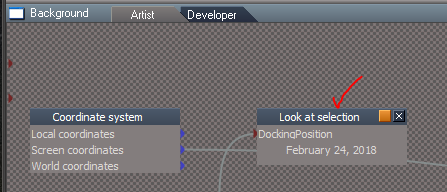
Is the Background's LookAt Selection in Update 4 working for you?
Or is it my Wireless mouse's MMB?
Also I like how Modeler's Material Editor/Inspect tool selects the object and keeps active to inspect other objects again selecting the object.
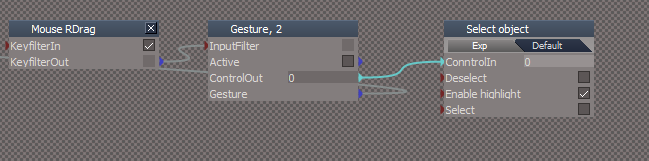
Trying to replicate this with Workspace's Inspect tool. Best I can come up with so far (As shown) deactivates the Inspect tool.
Is the Background's LookAt Selection in Update 4 working for you?
Or is it my Wireless mouse's MMB?
Also I like how Modeler's Material Editor/Inspect tool selects the object and keeps active to inspect other objects again selecting the object.
Trying to replicate this with Workspace's Inspect tool. Best I can come up with so far (As shown) deactivates the Inspect tool.
- Attachments
-
- Inspect.PNG (10.51 KiB) Viewed 5070 times
-
clintonman
- Captain
- Posts: 5659
- Joined: 21 May 2009, 21:08
- Type the number ten into the box: 0
- Location: California
Re: Final trueSpace 7.61 Beta 8 Unofficial Update
LookAt is working from the toolbar buttons. Is there some MMB shortcut for lookat?trueBlue wrote: 24 May 2018, 14:38 @ Clinton
Is the Background's LookAt Selection in Update 4 working for you?
Or is it my Wireless mouse's MMB?
Also I like how Modeler's Material Editor/Inspect tool selects the object and keeps active to inspect other objects again selecting the object.
Trying to replicate this with Workspace's Inspect tool. Best I can come up with so far (As shown) deactivates the Inspect tool.
Tried using a sequence node for inspect + select and it crashed tS. No other ideas.
-
trueBlue
- Captain
- Posts: 5548
- Joined: 06 Jul 2009, 22:50
- Type the number ten into the box: 10
Re: Final trueSpace 7.61 Beta 8 Unofficial Update
In the Background Widget
- Attachments
-
- LookAt.PNG (10.06 KiB) Viewed 5061 times
-
clintonman
- Captain
- Posts: 5659
- Joined: 21 May 2009, 21:08
- Type the number ten into the box: 0
- Location: California
Re: Final trueSpace 7.61 Beta 8 Unofficial Update
MMB double click look at works for me.
-
trueBlue
- Captain
- Posts: 5548
- Joined: 06 Jul 2009, 22:50
- Type the number ten into the box: 10
Re: Final trueSpace 7.61 Beta 8 Unofficial Update
Can you check out this Material editor Widget?
Material Inspect
LMB = Inspect material
LMB + Drag = Edit material in LE
RMB + Drag = Inspect material + Select Object
Edit:
If it works I was thinking about switching the gestures.
LMB + Drag = Inspect material + Select Object
RMB + Drag = Edit material in LE
Or if you have a better idea?
Material Inspect
LMB = Inspect material
LMB + Drag = Edit material in LE
RMB + Drag = Inspect material + Select Object
Edit:
If it works I was thinking about switching the gestures.
LMB + Drag = Inspect material + Select Object
RMB + Drag = Edit material in LE
Or if you have a better idea?
-
clintonman
- Captain
- Posts: 5659
- Joined: 21 May 2009, 21:08
- Type the number ten into the box: 0
- Location: California
Re: Final trueSpace 7.61 Beta 8 Unofficial Update
Nicely done, works here no problems.
-
the_ant
- Chief Petty Officer
- Posts: 155
- Joined: 02 Jun 2009, 09:26
- Type the number ten into the box: 0
- Location: Perugia - Italy
Re: Final trueSpace 7.61 Beta 8 Unofficial Update
Hi all tSp geniuses...i'm trying follow all steps for install your beautiful UnoffUpgrade and i've some questions about:
1. What kind of files i need to install PDF manual?
2. I got vRay 1.53 and a patch for tSp761 but never heard or seen "tS76_Vray1_54B8.exe" you referred on install instruction in related post.
Hi from Italy...and many many thanks for your unbelievable job!!!

1. What kind of files i need to install PDF manual?
2. I got vRay 1.53 and a patch for tSp761 but never heard or seen "tS76_Vray1_54B8.exe" you referred on install instruction in related post.
Hi from Italy...and many many thanks for your unbelievable job!!!
-
trueBlue
- Captain
- Posts: 5548
- Joined: 06 Jul 2009, 22:50
- Type the number ten into the box: 10
Re: Final trueSpace 7.61 Beta 8 Unofficial Update
You could try Adobe for a PDF Reader?
https://www.adobe.com/
I do not know what the differences is between the two versions of Vray except maybe one is newer?
https://www.adobe.com/
I do not know what the differences is between the two versions of Vray except maybe one is newer?
-
Steinie

- Captain
- Posts: 2958
- Joined: 21 May 2009, 17:38
- Type the number ten into the box: 10
Re: Final trueSpace 7.61 Beta 8 Unofficial Update
the_ant, first off HI from Steinie!
Here is a History Lesson that most people do not know about.
trueSpace 7.6 was the last version that VRay would work with.
trueSpace 7.61 was released on 5/22 2009 and VRay did not work with this version. (It would not load the scenes)
A secret version of VRay was used by developers with 7.61 (version tS76_Vray1_54B8.exe) that fixed the problem.
Caligari then released a "Patch" for VRay to work with trueSpace 7.61
So if your VRay works with trueSpace 7.61 you already have the Patch installed.
Names and Places have changed, killed, tied to a rock and dropped in the middle of a large lake not to be named.
Here is a History Lesson that most people do not know about.
trueSpace 7.6 was the last version that VRay would work with.
trueSpace 7.61 was released on 5/22 2009 and VRay did not work with this version. (It would not load the scenes)
A secret version of VRay was used by developers with 7.61 (version tS76_Vray1_54B8.exe) that fixed the problem.
Caligari then released a "Patch" for VRay to work with trueSpace 7.61
So if your VRay works with trueSpace 7.61 you already have the Patch installed.
Names and Places have changed, killed, tied to a rock and dropped in the middle of a large lake not to be named.
-
the_ant
- Chief Petty Officer
- Posts: 155
- Joined: 02 Jun 2009, 09:26
- Type the number ten into the box: 0
- Location: Perugia - Italy
Re: Final trueSpace 7.61 Beta 8 Unofficial Update
Hi....
Thanks Steinie for your support about vRay/tSp story...i just suspected the coincidence for "patch vRay1.53=tS76_Vray1_54B8"
@trueBlue: my question is about installation (not visualization) of PDF Manual (in Cellulo unoff-update version 2.1 of tSp7.6 is customized by Cellulo) thanks again...
Thanks Steinie for your support about vRay/tSp story...i just suspected the coincidence for "patch vRay1.53=tS76_Vray1_54B8"
@trueBlue: my question is about installation (not visualization) of PDF Manual (in Cellulo unoff-update version 2.1 of tSp7.6 is customized by Cellulo) thanks again...
-
trueBlue
- Captain
- Posts: 5548
- Joined: 06 Jul 2009, 22:50
- Type the number ten into the box: 10
Re: Final trueSpace 7.61 Beta 8 Unofficial Update
The original PDF Manual is a 50 MB file -> tS76PDF.exe
You run it and install it to where your trueSpace installation is.
The Update includes missing tS76PDF files and additional Model help files and overwrites the ts76_manual.html file, so it is important, as the instructions say, to install the tS76PDF first before the update.
HTH
You run it and install it to where your trueSpace installation is.
The Update includes missing tS76PDF files and additional Model help files and overwrites the ts76_manual.html file, so it is important, as the instructions say, to install the tS76PDF first before the update.
HTH
-
the_ant
- Chief Petty Officer
- Posts: 155
- Joined: 02 Jun 2009, 09:26
- Type the number ten into the box: 0
- Location: Perugia - Italy
Re: Final trueSpace 7.61 Beta 8 Unofficial Update
-
trueBlue
- Captain
- Posts: 5548
- Joined: 06 Jul 2009, 22:50
- Type the number ten into the box: 10
Re: Final trueSpace 7.61 Beta 8 Unofficial Update
Thanks Clinton!
New update uploaded to:
viewtopic.php?t=3732
Additions:
Library
New - Components - Compositing library - Author Clinton Reese
Note: Included in the Material Editor's library browser. You will have to right click the Library Places button to update the combo ctrl.
viewtopic.php?t=1676#p52300
Material Editor
New - Active Editor button - Right click to Reset.
New - Material Inspect widget
New - LMB + Drag - Selects object
Left click to Inspect object and then LMB + Drag to select it.
New - RMB + Drag - Opens the material in the Link Editor.
Left click to Inspect object and then RMB + Drag to open in the Link Editor.
Note: Use LMB/RMB + Drag ever so slightly. It is not perfect but does work.
Offline Render buttons have been changed to work better. Instead of rendering first and then resize they resize first then render.
Included the missing textures for the Vray - Room and Bath scenes in the Texture folder.
New update uploaded to:
viewtopic.php?t=3732
Additions:
Library
New - Components - Compositing library - Author Clinton Reese
Note: Included in the Material Editor's library browser. You will have to right click the Library Places button to update the combo ctrl.
viewtopic.php?t=1676#p52300
Material Editor
New - Active Editor button - Right click to Reset.
New - Material Inspect widget
New - LMB + Drag - Selects object
Left click to Inspect object and then LMB + Drag to select it.
New - RMB + Drag - Opens the material in the Link Editor.
Left click to Inspect object and then RMB + Drag to open in the Link Editor.
Note: Use LMB/RMB + Drag ever so slightly. It is not perfect but does work.
Offline Render buttons have been changed to work better. Instead of rendering first and then resize they resize first then render.
Included the missing textures for the Vray - Room and Bath scenes in the Texture folder.
-
trueBlue
- Captain
- Posts: 5548
- Joined: 06 Jul 2009, 22:50
- Type the number ten into the box: 10
Re: Final trueSpace 7.61 Beta 8 Unofficial Update
New update uploaded to:
viewtopic.php?t=3732
Background widget
Additional controls:
* CTRL + MMB - Double click Zooms to the current selected object or Point Edit selection.
* CTRL+ Shift + MMB Double click - Zooms to all objects in the scene.
New - Updated the Zoom to Selection version 1/14/2018 - Author Clinton Reese
Updated 5/30/2018
Shift + LMB Drag - Zooms to the current selected object or Point Edit selection.
Note: This gesture is in addition to the CTRL + MMB - Double click.
New - RMB Drag - Resets the View.
Note: I set the Prority = 2 on the Offline render/Area scene render widget and the View tools/Rect zoom widget
so that they all worked as expected.
Please test that the CTRL + MMB - Double click gestures still works because they do not work for me on my setup.
Note: They both share the same script.
@ Clinton: I experimented with your Zoom 2 Selection widget extensively. It may be my setup (Win10) but I confirmed that the One from three select nodes have issues.
Photo Render
New - Changed the Background aspect to the Default
New - Includes the Offline Render icons - Render Scene, Render Area, Render Object and Render Animation buttons, enabling them to resize the Vray render window using the Vray - Width and Height values.
New - Renamed the Default aspect to Model
New - Added an Update aspect that includes some scripts for Vray
Look here for details: viewtopic.php?t=5483
My Scenes library
* My Scene.RsScn includes Save RsScn Incrementally that opens on Load.
* My Backup.RsScn includes Save RsScn that opens on Load.
Update 5/30/2018
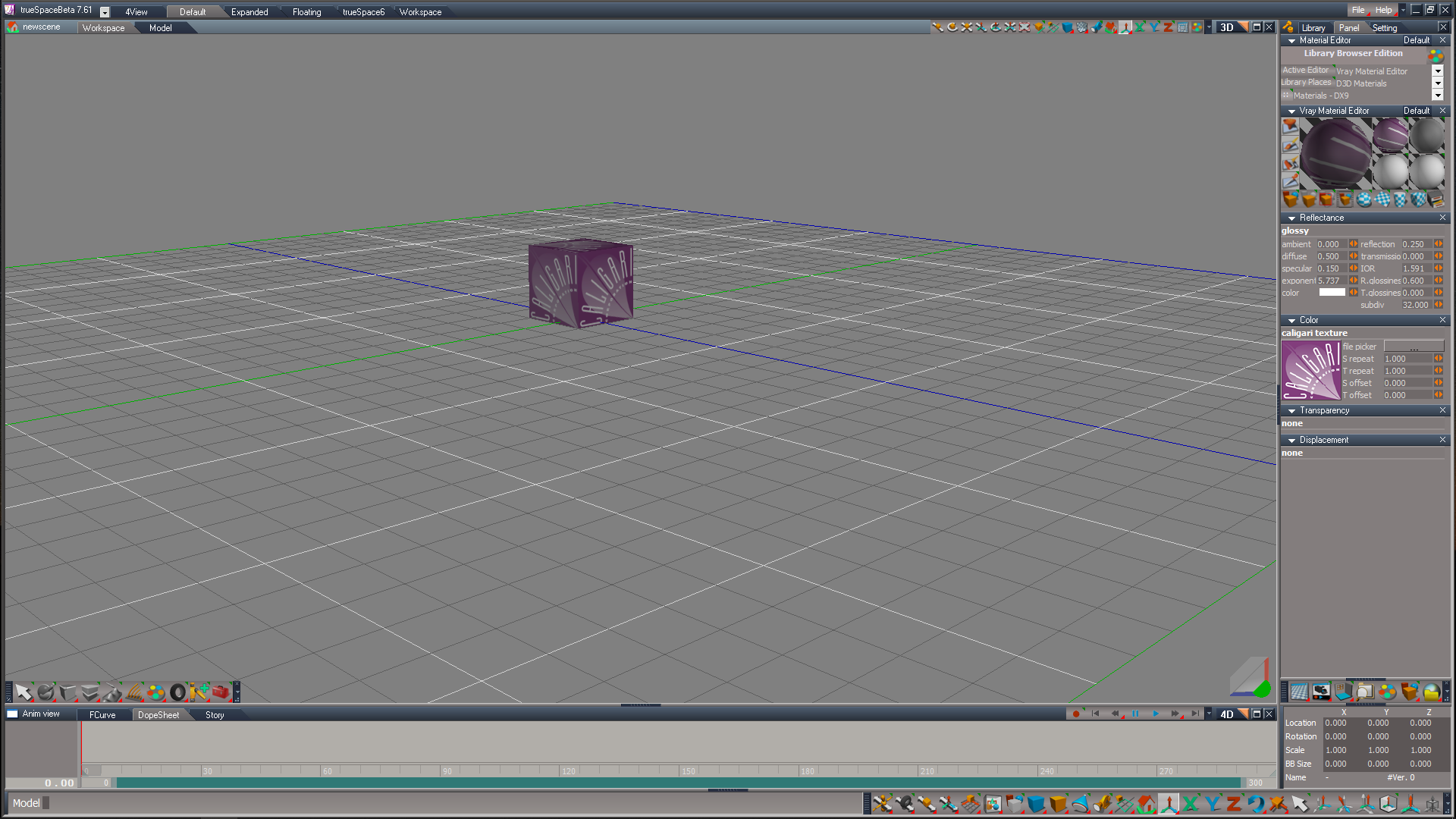
* newscene.RsScn is a Model - Workspace scene that has been setup to be simular as close as possible.
Note: You have to Select the View from EntryPoint camera in Model.
Script Commands
New - UnLookAt.xml Updated to include Lights - Author Clinton Reese
New - onenewscene.xml Updated to fix missing Status Line string and renamed Camera1 to Camera.
Update 5/30/2018
New - ActivateWindow.xml Acitvates the main 3D window in all layouts.
New - Cam2Eye.xml that transfers all of the settings from a selected camera to the Eye Camera.
* Added Cam2Eye icon to the camera tools in the Red Custom Toolbar.
Reset to Default Context icon in the Main2 toolbar only.
New - RMB command = RsApp.Reset() Does not ask Yes or No Question.
viewtopic.php?t=3732
Background widget
Additional controls:
* CTRL + MMB - Double click Zooms to the current selected object or Point Edit selection.
* CTRL+ Shift + MMB Double click - Zooms to all objects in the scene.
New - Updated the Zoom to Selection version 1/14/2018 - Author Clinton Reese
Updated 5/30/2018
Shift + LMB Drag - Zooms to the current selected object or Point Edit selection.
Note: This gesture is in addition to the CTRL + MMB - Double click.
New - RMB Drag - Resets the View.
Note: I set the Prority = 2 on the Offline render/Area scene render widget and the View tools/Rect zoom widget
so that they all worked as expected.
Please test that the CTRL + MMB - Double click gestures still works because they do not work for me on my setup.
Note: They both share the same script.
@ Clinton: I experimented with your Zoom 2 Selection widget extensively. It may be my setup (Win10) but I confirmed that the One from three select nodes have issues.
Photo Render
New - Changed the Background aspect to the Default
New - Includes the Offline Render icons - Render Scene, Render Area, Render Object and Render Animation buttons, enabling them to resize the Vray render window using the Vray - Width and Height values.
New - Renamed the Default aspect to Model
New - Added an Update aspect that includes some scripts for Vray
Look here for details: viewtopic.php?t=5483
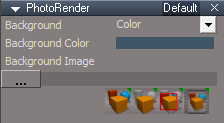
- New Photo Render.PNG (7.35 KiB) Viewed 5804 times
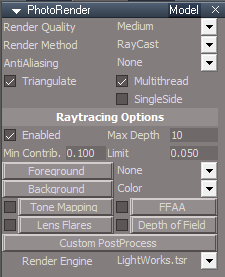
- New Photo Render Model aspect.PNG (9.5 KiB) Viewed 5804 times

- New Photo Render Update aspect.PNG (9.08 KiB) Viewed 5804 times
* My Scene.RsScn includes Save RsScn Incrementally that opens on Load.
* My Backup.RsScn includes Save RsScn that opens on Load.
Update 5/30/2018
* newscene.RsScn is a Model - Workspace scene that has been setup to be simular as close as possible.
Note: You have to Select the View from EntryPoint camera in Model.

New - UnLookAt.xml Updated to include Lights - Author Clinton Reese
New - onenewscene.xml Updated to fix missing Status Line string and renamed Camera1 to Camera.
Update 5/30/2018
New - ActivateWindow.xml Acitvates the main 3D window in all layouts.
New - Cam2Eye.xml that transfers all of the settings from a selected camera to the Eye Camera.
* Added Cam2Eye icon to the camera tools in the Red Custom Toolbar.
Reset to Default Context icon in the Main2 toolbar only.
New - RMB command = RsApp.Reset() Does not ask Yes or No Question.
-
clintonman
- Captain
- Posts: 5659
- Joined: 21 May 2009, 21:08
- Type the number ten into the box: 0
- Location: California
Re: Final trueSpace 7.61 Beta 8 Unofficial Update
Can you be more specific (not working/sometimes works) or is it a case of inconsistent/unpredictable behavior? I'm also on win10.trueBlue wrote: 30 May 2018, 18:35 ...
@ Clinton: I experimented with your Zoom 2 Selection widget extensively. It may be my setup (Win10) but I confirmed that the One from three select nodes have issues.
...
I just had an idea...
1. try using the 1 of 4 select instead of the 1 of 3
2. try running this command to get a freshly created 1 of 3, maybe the library version is old
Code: Select all
Node.Create("Widgets Package/One from three select",Space.CurrentScene());-
trueBlue
- Captain
- Posts: 5548
- Joined: 06 Jul 2009, 22:50
- Type the number ten into the box: 10
Re: Final trueSpace 7.61 Beta 8 Unofficial Update
My Widgets Package is the original that ships with tS761B8.execlintonman wrote: 30 May 2018, 19:27Can you be more specific (not working/sometimes works) or is it a case of inconsistent/unpredictable behavior? I'm also on win10.trueBlue wrote: 30 May 2018, 18:35 ...
@ Clinton: I experimented with your Zoom 2 Selection widget extensively. It may be my setup (Win10) but I confirmed that the One from three select nodes have issues.
...
I just had an idea...
1. try using the 1 of 4 select instead of the 1 of 3
2. try running this command to get a freshly created 1 of 3, maybe the library version is old
Code: Select all
Node.Create("Widgets Package/One from three select",Space.CurrentScene());
First of all your Zoom 2 Selection unmodified, does not work at all for me with MMB Double click.
I tried replacing just the MMB Double click with LMB Drag.
Zoom 2 PE selection worked prefectly everytime but Zoom 2 Object only worked once maybe twice out of several tries.
Strange, right?
I know that the Zoom to Object was working because I would call it from a script without the widget.
Which confirmed to me that has to be the One From Three Select nodes or the way it is setup chaining all 3 keys to 2 One From Three Select nodes.
Zoom 2 All also worked but seemed unpredictable in that I would see it Zoom to all of the objects in the scene and then in the same scene it would Zoom way (WAY) out. Like it was the complete opposite of Zooming In.
Also noticed that the script lagged and it did not fire until I released my Ctrl and Shift keys. Which to me means the first key should be the last key. IE: A = Ctrl and B = MMB Double click.
HTH
I hope that you will try this version as it seems to flow better to me with LMB Drag.
It's still the same as you had it but with two additional gestures.
I was kinda of surprised that you can feed one script with two gestures.
Works great with the Rectangle Zoom too. LMB Drag to Zoom In and RMB Drag to Zoom Out. (Reset View)
Same with your Zoom 2 Object. LMB Drag to Zoom In and RMB Drag to Zoom Out.
Again Note: I set the Prority = 2 on the Offline render/Area scene render widget and the View tools/Rect zoom widget
so that they all worked as expected.
Maybe the Mouse's MMB is not a good choice as it has multiple functions. MMB click, MMB Double click, MMB click Left, MMB click Right, and MMB wheel. Then there are some users that do not have a MMB.
-
trueBlue
- Captain
- Posts: 5548
- Joined: 06 Jul 2009, 22:50
- Type the number ten into the box: 10
Re: Final trueSpace 7.61 Beta 8 Unofficial Update
Edit 5/31/2018
@ Clinton - My apologies to you!
Went out and bought a Mouse today and your Zoom 2 Selection works as you have intended.
Another try...
Must had been the chaining mentioned earlier.
If you notice the keys, are swapped to as mentioned earlier.
LMB Drag = Look at Selection
LMB Drag + Ctrl = Look at Object/PE selection
LMB Drag + Shift = Look at All
RMB Drag = Reset View
Personally I like the Look at Object/PE selection without a combination key set.
Unlike the above.
LMB Drag + Ctrl = RsTool.LookAtSelection('');
LMB Drag = Look at Object/PE selection objects.
LMB Drag + Shift = Look at All
RMB Drag = Reset View
@ Clinton - My apologies to you!
Went out and bought a Mouse today and your Zoom 2 Selection works as you have intended.
Another try...
Must had been the chaining mentioned earlier.
If you notice the keys, are swapped to as mentioned earlier.
LMB Drag = Look at Selection
LMB Drag + Ctrl = Look at Object/PE selection
LMB Drag + Shift = Look at All
RMB Drag = Reset View
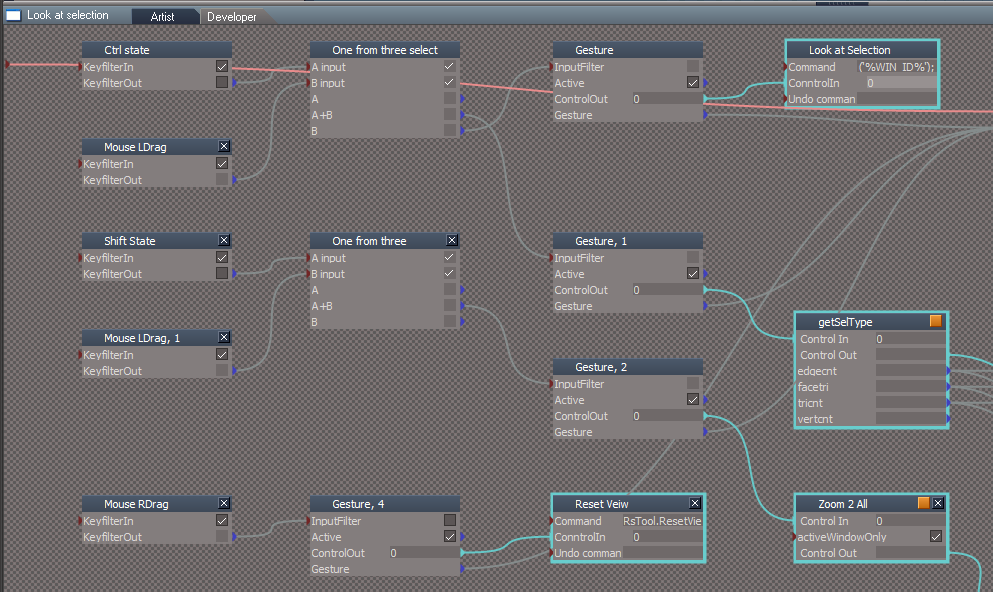
Unlike the above.
LMB Drag + Ctrl = RsTool.LookAtSelection('');
LMB Drag = Look at Object/PE selection objects.
LMB Drag + Shift = Look at All
RMB Drag = Reset View
-
trueBlue
- Captain
- Posts: 5548
- Joined: 06 Jul 2009, 22:50
- Type the number ten into the box: 10
Re: Final trueSpace 7.61 Beta 8 Unofficial Update
New update uploaded to:
viewtopic.php?t=3732
There was a conflict with the previous Background - Zoom 2 Selection widget with the PE Paint tool so I changed the gesture to:
Shift + LMB Drag - Zooms to the current selected object or Point Edit selection.
It's actually using LMB State but it is used the same way. Hold your Shift key down and LMB click and drag down a little bit.
viewtopic.php?t=3732
There was a conflict with the previous Background - Zoom 2 Selection widget with the PE Paint tool so I changed the gesture to:
Shift + LMB Drag - Zooms to the current selected object or Point Edit selection.
It's actually using LMB State but it is used the same way. Hold your Shift key down and LMB click and drag down a little bit.
-
the_ant
- Chief Petty Officer
- Posts: 155
- Joined: 02 Jun 2009, 09:26
- Type the number ten into the box: 0
- Location: Perugia - Italy
Re: Final trueSpace 7.61 Beta 8 Unofficial Update
HI trueBlue
a silly question about your UnoffUpdate and others...where is fisically the "Reset to Default Context" icon?

a silly question about your UnoffUpdate and others...where is fisically the "Reset to Default Context" icon?
-
trueBlue
- Captain
- Posts: 5548
- Joined: 06 Jul 2009, 22:50
- Type the number ten into the box: 10
Re: Final trueSpace 7.61 Beta 8 Unofficial Update
You can find here:
- Attachments
-

- Reset to Default Context.PNG (80.1 KiB) Viewed 5560 times
-
trueBlue
- Captain
- Posts: 5548
- Joined: 06 Jul 2009, 22:50
- Type the number ten into the box: 10
Re: Final trueSpace 7.61 Beta 8 Unofficial Update
New update uploaded to:
viewtopic.php?t=3732
@ Clinton - My sincere apologies to you!
Went out and bought a Mouse today and your Zoom 2 Selection works as you have intended.
viewtopic.php?t=3732
@ Clinton - My sincere apologies to you!
Went out and bought a Mouse today and your Zoom 2 Selection works as you have intended.
-
clintonman
- Captain
- Posts: 5659
- Joined: 21 May 2009, 21:08
- Type the number ten into the box: 0
- Location: California
Re: Final trueSpace 7.61 Beta 8 Unofficial Update
Cool.trueBlue wrote: 01 Jun 2018, 14:13 New update uploaded to:
viewtopic.php?t=3732
@ Clinton - My sincere apologies to you!
Went out and bought a Mouse today and your Zoom 2 Selection works as you have intended.
 and apology accepted.
  I had the same kind of problem with my old wacom tablet, it made truespace scripting super slow for some reason.
-
trueBlue
- Captain
- Posts: 5548
- Joined: 06 Jul 2009, 22:50
- Type the number ten into the box: 10
Re: Final trueSpace 7.61 Beta 8 Unofficial Update
New update uploaded to:
viewtopic.php?t=3732
:: Widgets
Object Move, Rotate, and Scale widgets
Shift + MMB select in empty space deactivates each tool.
New - Shift + LMB select in empty space deactivates each tool.
Note: This is in addition to the Shift + MMB gesture.
Camera Move, Rotate, FOV, and Rectangle Zoom widgets.
Shift + MMB select in empty space deactivates each tool.
New - Shift + LMB select in empty space deactivates each tool.
Note: This is in addition to the Shift + MMB gesture.
Addition 6/7/2018 - Restored the Shift + MMB select in empty space deactivates each tool to the above widgets.
Background widget
New - Updated the Zoom to Selection version 1/14/2018 - Author Clinton Reese
Additional controls:
* Ctrl + MMB - Double click Zooms to the current selected object or Point Edit selection.
* Ctrl + Shift + MMB Double click - Zooms to all objects in the scene.
New - Shift + LMB Drag - Zooms to the current selected object or Point Edit selection.
Note: This gesture is in addition to the CTRL + MMB - Double click.
New - RMB Drag - Resets the View.
Addition 6/7/2018
New - , + LMB Drag - Hides All except Selected object.
New - . + LMB Drag - Shows All.
FYI: When using the Zoom to Selection the default Point Editing Selection mode gets changed.
To restore the default Point Editing Selection mode, use the ~ key shortcut to restore it.
Addition 6/8/2018
New - YafaRay4tS - Added code to the reset.js file (Reset to Default Context) that reloads the Yafaray Folder, if it is installed.
viewtopic.php?t=3732
:: Widgets
Object Move, Rotate, and Scale widgets
Shift + MMB select in empty space deactivates each tool.
New - Shift + LMB select in empty space deactivates each tool.
Note: This is in addition to the Shift + MMB gesture.
Camera Move, Rotate, FOV, and Rectangle Zoom widgets.
Shift + MMB select in empty space deactivates each tool.
New - Shift + LMB select in empty space deactivates each tool.
Note: This is in addition to the Shift + MMB gesture.
Addition 6/7/2018 - Restored the Shift + MMB select in empty space deactivates each tool to the above widgets.
Background widget
New - Updated the Zoom to Selection version 1/14/2018 - Author Clinton Reese
Additional controls:
* Ctrl + MMB - Double click Zooms to the current selected object or Point Edit selection.
* Ctrl + Shift + MMB Double click - Zooms to all objects in the scene.
New - Shift + LMB Drag - Zooms to the current selected object or Point Edit selection.
Note: This gesture is in addition to the CTRL + MMB - Double click.
New - RMB Drag - Resets the View.
Addition 6/7/2018
New - , + LMB Drag - Hides All except Selected object.
New - . + LMB Drag - Shows All.
FYI: When using the Zoom to Selection the default Point Editing Selection mode gets changed.
To restore the default Point Editing Selection mode, use the ~ key shortcut to restore it.
Addition 6/8/2018
New - YafaRay4tS - Added code to the reset.js file (Reset to Default Context) that reloads the Yafaray Folder, if it is installed.
-
trueBlue
- Captain
- Posts: 5548
- Joined: 06 Jul 2009, 22:50
- Type the number ten into the box: 10
Re: Final trueSpace 7.61 Beta 8 Unofficial Update
Anybody willing to test some new additions to the final update?
Background widget
New - Shift + RMB Drag - Resets the View.
New - , + LMB Drag - Hides All except selection, and Zooms to the current selection or Point Edit selection.
New - , + RMB Drag - Zooms to the next object and HidesAll except that object.
New - . + LMB Drag - Hides All except selection.
New - . + RMB Drag - Shows All.
Workspace Main toolbar
New updated scripts and commands
* Unencapsulate - Disconnects and deletes the Transform node. Up to 5 selections at a time is supported.
* Show icon - LMB Shows all the selected objects and RMB Shows the new Object Render Attributes panel for the selected object.
* Hide icon - LMB Hides all the selected objects and RMB Shows the new Object Render Attributes panel for the selected object.
* Show All icon - LMB Shows any objects that have an Object Render Attributes panel.
* Hide All icon - LMB Hides any objects that have an Object Render Attributes panel.
Note: Encapsulated objects are not supported with ShowAll and HideAll unless you use Hide or Show first.
Example Ducati motorcycle from the Model side
With the object selected,
Apply the Show command first as it does not have any Objects Render Attributes.
Select your Down Arrow keyboard key to enter into the sub objects.
Select and hold your Comma keyboard key, then with your right mouse button drag in 3D Space to cycle through all of the Ducati's parts. Each part will Zoom 2 Selected and Hide All other objects, lights, and cameras.
Select and hold your Period keyboard key, then with your right mouse button drag in 3D Space.
All objects, lights, and cameras will Show.
Select and hold your Shift keyboard key, then with your right mouse button drag in 3D Space.
Your 3D View will reset.
In the Objects - tS7.61 Update objects library
Open the New - Send Status Messages script,
that demonstrates a new Status Message object installed in System.
Status Message is a modified ClearStatus Immediate script. - Original Author Clinton Reese
Enables a user to send a Status Message for a determined amount of seconds with a Notify sound and or have the text read out loud.
Object Navigation Widget 1, 2, 3, 4, 5, and 6
New - 4, 5, and 6 include the Cage widget. Author Clinton Reese
Note: 5 is slightly different with the docking of the Object Navigation Widget.
Try,
Shift + LMB select the widget switches the Object Navigation Widgets
Material Inspect
New - LMB + Drag - Selects object
Left click to Inspect object and then LMB + Drag to select it.
New - RMB + Drag - Opens the material in the Link Editor.
Left click to Inspect object and then RMB + Drag to open in the Link Editor.
New - Cancel - Right click in 3D Space cancels the Inspect widget and Unselects last selected object.
Try all of the new workspace lights with the color picker and new shapes
New - Added Color picker for the light's color and Color aspect for advance color settings. - Author Clinton Reese.
New - Spot and Projector's Preferences have button scripts that change their Attenuation to No Falloff, Linear Falloff with distance, and Inverse Square Falloff with distance. RMB command resets to trueSpace's Default.
New - Added Reset Rotations and a View On/Off to the Spot and Projector lights panels.
New - Projector - Added a Square spot light bitmap, camera, and a Sequence aspect enabling a user to load and animate a sequence of images.
Workspace File Menu
New - Save As - Object, Recording, and Scene
New - YafaRay4tSv0.90 is fully integrated into trueSpace. - Author Clinton Reese
Download and install the YafaRay v3.3.0 render engine before using YafaRay4tS !
See YafaRay4tS users instructions below.
Instructions:
It is recommend that you completely Uninstall and Install trueSpace7.61 Beta 8 to a clean directory.
Install the PDF Manual for trueSpace.
1.) Run the tS7.61B8.4.exe
2.) Browse [...] to where you installed C:\trueSpace761, select its folder and then the Extract button
3.) Select the Yes to All button.
4.) Open trueSpace and select the Reset to Default Context icon.
5.) In Workspace select the Default layout tab.
YafaRay4tS users:
1.) Download the YafaRay v3.3.0 render engine from one of these sites:
YafaRay Standalone https://github.com/YafaRay/Core/releases
YafaRay for Blender https://github.com/YafaRay/Blender-Exporter/releases
Unzip the file and copy the ‘yafaray_v3’ folder to:
Examples:
Standalone
C:\Program Files\yafaray_v3
C:\trueSpace761\tS\yafaray_v3
C:\trueSpace761Std\yafaray_v3
Note: If you install the YafaRay v3.3.0 render engine after installing this update:
From Workspace in the Stack/Panel - YafaRay4tS/Setup aspect
Set the 'YafaRay Installation Path' to the yafaray-xml.exe file where you have installed YafaRay v3.3.0
Select the 'Save Settings' button.
In Workspace, open the YafaRay4tS layout.
Open a new YafaRay4tS scene from the YafaRay Settings toolbar icon.
Optionally, but recommend you install the iOptDetector plugin http://rs.siprogs.sk/p/iOptDetectorsPage
Recommend that you install it to your C:/ drive so that it can be shared with different versions of trueSpace.
The OptDetector.dll must be Installed and Loaded from the Workspace's Package Manager.
Vray users:
Install the tS76_Vray1_54B8.exe
In Workspace, Install/Load Vray from the Package Manager and reboot trueSpace.
Vray Material Editor
In the Material Editor's Active Editor button - Right click to Reset.
To enable the Library Browser, right click the Library Places or select the Update Library Places icon in the Material Editor.
In the Library Places -> Combo Control, select the Main Library Place and your keyboard Enter key.
In the next Combo Control, select which library you would like to open and your keyboard Enter key.
Note: At any time your libraries are not showing or after adding Libraries, select the Update Library Places icon again to update the Library Places.
Special thanks to Clinton Reese for all his help and contributions in this update.
http://www.clintons3d.com
Background widget
New - Shift + RMB Drag - Resets the View.
New - , + LMB Drag - Hides All except selection, and Zooms to the current selection or Point Edit selection.
New - , + RMB Drag - Zooms to the next object and HidesAll except that object.
New - . + LMB Drag - Hides All except selection.
New - . + RMB Drag - Shows All.
Workspace Main toolbar
New updated scripts and commands
* Unencapsulate - Disconnects and deletes the Transform node. Up to 5 selections at a time is supported.
* Show icon - LMB Shows all the selected objects and RMB Shows the new Object Render Attributes panel for the selected object.
* Hide icon - LMB Hides all the selected objects and RMB Shows the new Object Render Attributes panel for the selected object.
* Show All icon - LMB Shows any objects that have an Object Render Attributes panel.
* Hide All icon - LMB Hides any objects that have an Object Render Attributes panel.
Note: Encapsulated objects are not supported with ShowAll and HideAll unless you use Hide or Show first.
Example Ducati motorcycle from the Model side
- Object Selected.PNG (44.92 KiB) Viewed 5327 times

Apply the Show command first as it does not have any Objects Render Attributes.
Select your Down Arrow keyboard key to enter into the sub objects.
Select and hold your Comma keyboard key, then with your right mouse button drag in 3D Space to cycle through all of the Ducati's parts. Each part will Zoom 2 Selected and Hide All other objects, lights, and cameras.
Select and hold your Period keyboard key, then with your right mouse button drag in 3D Space.
All objects, lights, and cameras will Show.
Select and hold your Shift keyboard key, then with your right mouse button drag in 3D Space.
Your 3D View will reset.
In the Objects - tS7.61 Update objects library
Open the New - Send Status Messages script,
that demonstrates a new Status Message object installed in System.
Status Message is a modified ClearStatus Immediate script. - Original Author Clinton Reese
Enables a user to send a Status Message for a determined amount of seconds with a Notify sound and or have the text read out loud.
Object Navigation Widget 1, 2, 3, 4, 5, and 6
New - 4, 5, and 6 include the Cage widget. Author Clinton Reese
Note: 5 is slightly different with the docking of the Object Navigation Widget.
Try,
Shift + LMB select the widget switches the Object Navigation Widgets
Material Inspect
New - LMB + Drag - Selects object
Left click to Inspect object and then LMB + Drag to select it.
New - RMB + Drag - Opens the material in the Link Editor.
Left click to Inspect object and then RMB + Drag to open in the Link Editor.
New - Cancel - Right click in 3D Space cancels the Inspect widget and Unselects last selected object.
Try all of the new workspace lights with the color picker and new shapes
New - Added Color picker for the light's color and Color aspect for advance color settings. - Author Clinton Reese.
New - Spot and Projector's Preferences have button scripts that change their Attenuation to No Falloff, Linear Falloff with distance, and Inverse Square Falloff with distance. RMB command resets to trueSpace's Default.
New - Added Reset Rotations and a View On/Off to the Spot and Projector lights panels.
New - Projector - Added a Square spot light bitmap, camera, and a Sequence aspect enabling a user to load and animate a sequence of images.
Workspace File Menu
New - Save As - Object, Recording, and Scene
New - YafaRay4tSv0.90 is fully integrated into trueSpace. - Author Clinton Reese
Download and install the YafaRay v3.3.0 render engine before using YafaRay4tS !
See YafaRay4tS users instructions below.
Instructions:
It is recommend that you completely Uninstall and Install trueSpace7.61 Beta 8 to a clean directory.
Install the PDF Manual for trueSpace.
1.) Run the tS7.61B8.4.exe
2.) Browse [...] to where you installed C:\trueSpace761, select its folder and then the Extract button
3.) Select the Yes to All button.
4.) Open trueSpace and select the Reset to Default Context icon.
5.) In Workspace select the Default layout tab.
YafaRay4tS users:
1.) Download the YafaRay v3.3.0 render engine from one of these sites:
YafaRay Standalone https://github.com/YafaRay/Core/releases
YafaRay for Blender https://github.com/YafaRay/Blender-Exporter/releases
Unzip the file and copy the ‘yafaray_v3’ folder to:
Examples:
Standalone
C:\Program Files\yafaray_v3
C:\trueSpace761\tS\yafaray_v3
C:\trueSpace761Std\yafaray_v3
Note: If you install the YafaRay v3.3.0 render engine after installing this update:
From Workspace in the Stack/Panel - YafaRay4tS/Setup aspect
Set the 'YafaRay Installation Path' to the yafaray-xml.exe file where you have installed YafaRay v3.3.0
Select the 'Save Settings' button.
In Workspace, open the YafaRay4tS layout.
Open a new YafaRay4tS scene from the YafaRay Settings toolbar icon.
Optionally, but recommend you install the iOptDetector plugin http://rs.siprogs.sk/p/iOptDetectorsPage
Recommend that you install it to your C:/ drive so that it can be shared with different versions of trueSpace.
The OptDetector.dll must be Installed and Loaded from the Workspace's Package Manager.
Vray users:
Install the tS76_Vray1_54B8.exe
In Workspace, Install/Load Vray from the Package Manager and reboot trueSpace.
Vray Material Editor
In the Material Editor's Active Editor button - Right click to Reset.
To enable the Library Browser, right click the Library Places or select the Update Library Places icon in the Material Editor.
In the Library Places -> Combo Control, select the Main Library Place and your keyboard Enter key.
In the next Combo Control, select which library you would like to open and your keyboard Enter key.
Note: At any time your libraries are not showing or after adding Libraries, select the Update Library Places icon again to update the Library Places.
Special thanks to Clinton Reese for all his help and contributions in this update.
http://www.clintons3d.com