Yep, C3D installer etc.trueBlue wrote: 30 Apr 2018, 15:44 Ah okay!
So if you RE applied the Update after that, all a user would need to do is run the C3D Restore and Install/Load your plugins?
Final trueSpace 7.61 Beta 8 Unofficial Update
-
clintonman

- Captain
- Posts: 5659
- Joined: 21 May 2009, 21:08
- Type the number ten into the box: 0
- Location: California
Re: Final trueSpace 7.61 Beta 8 Unofficial Update
-
trueBlue

- Captain
- Posts: 5548
- Joined: 06 Jul 2009, 22:50
- Type the number ten into the box: 10
Re: Final trueSpace 7.61 Beta 8 Unofficial Update
New update in the first post:
Animation Preferences panel with Automatic Keyframing - Author - Clinton Reese
Mesh Editor Settings panel with Mirror button scripts - Author - Clinton Reese
Bake Keyframes panel - Author - Clinton Reese
Clinton's toolbars and Scripts:
Align and Distribute
Grid Array
Modifications:
Changed the placement of the panel in the scene.
Changed the Tab order in the panel.
Enables you to set the attributes from the top down by entering the value and use your Tab key to enter the next value.
Radial Array
Modifications:
Changed the placement of the panel in the scene.
Changed the Tab order in the panel.
Enables you to set the attributes from the top down by entering the value and use your Tab key to enter the next value.
Point Clone
Modifications:
Changed the placement of the panel in the scene.
Plane Loop
Static Sweep
Normal Move
Freeze Transforms
Parent - Unparent
CTRL Selection
Interpolation Animation toolbar
NURBS toolbar
Toolbar Manager toolbar
Edit: All of the above is incorporated into trueSpace and can withstand a 'Default Context Reset'.
The Rosetta version was updated to:
viewtopic.php?t=5418
Animation Preferences panel with Automatic Keyframing - Author - Clinton Reese
Mesh Editor Settings panel with Mirror button scripts - Author - Clinton Reese
Bake Keyframes panel - Author - Clinton Reese
Clinton's toolbars and Scripts:
Align and Distribute
Grid Array
Modifications:
Changed the placement of the panel in the scene.
Changed the Tab order in the panel.
Enables you to set the attributes from the top down by entering the value and use your Tab key to enter the next value.
Radial Array
Modifications:
Changed the placement of the panel in the scene.
Changed the Tab order in the panel.
Enables you to set the attributes from the top down by entering the value and use your Tab key to enter the next value.
Point Clone
Modifications:
Changed the placement of the panel in the scene.
Plane Loop
Static Sweep
Normal Move
Freeze Transforms
Parent - Unparent
CTRL Selection
Interpolation Animation toolbar
NURBS toolbar
Toolbar Manager toolbar
Edit: All of the above is incorporated into trueSpace and can withstand a 'Default Context Reset'.
The Rosetta version was updated to:
viewtopic.php?t=5418
-
trueBlue
- Captain
- Posts: 5548
- Joined: 06 Jul 2009, 22:50
- Type the number ten into the box: 10
Re: Final trueSpace 7.61 Beta 8 Unofficial Update
New update in the first post:
Material Inspect
New - LMB + Drag - Opens the material in the Link Editor.
Left click your object and then LMB + Drag to open. Selecting Undo will take you back to the current scene.
Added Reset Rotations to the Spot and Projector lights panels.
Added a View On/Off to the Camera and Entry Camera
Modified the Cube Array in the Activities - My Activities library
Modifications:
Removed the Torus and Sphere object scripting and added Cubes
Normalized Location to be on top of the grid
Changed the Object Render Attributes to Wire and a button for Solid
Removed the Bridge Syncing scripting for the tS761B8Std version.
The Rosetta version was updated to:
viewtopic.php?t=5418
Material Inspect
New - LMB + Drag - Opens the material in the Link Editor.
Left click your object and then LMB + Drag to open. Selecting Undo will take you back to the current scene.
Added Reset Rotations to the Spot and Projector lights panels.
Added a View On/Off to the Camera and Entry Camera
Modified the Cube Array in the Activities - My Activities library
Modifications:
Removed the Torus and Sphere object scripting and added Cubes
Normalized Location to be on top of the grid
Changed the Object Render Attributes to Wire and a button for Solid
Removed the Bridge Syncing scripting for the tS761B8Std version.
The Rosetta version was updated to:
viewtopic.php?t=5418
-
trueBlue
- Captain
- Posts: 5548
- Joined: 06 Jul 2009, 22:50
- Type the number ten into the box: 10
Re: Final trueSpace 7.61 Beta 8 Unofficial Update
New update in the first post.
Fixed a wrong status message in the Animation Preferences panel's Auto Keyframing button.
New - Changed the shape for my version of the Point Edit Widget. Made the Scale Boxes and Rotation Arcs smaller.
New - Added a 'Reset Default Point Editing selection settings' button to the Point Edit Preferences panel.
New - Also included the same script to the PE 'Select by Painting' icon's RMB = Reset Default Point Editing selection settings.
Included in all new layout's toolbars.
WinGUID_Bar
New -Exposed the Set Camera icon to the top level. LMB = Set Camera / RMB = Eye Camera.
New -Look at Selection. LMB= Look at selection / RMB = Look at next object. (Cycles through all scene Obects)
New - Included a button to call the 'Animation Panel' to the 'tS761 Toolbars' found in the 'Objects - tS7.61 Update objects' library.
New - Added a 'Automatic Keyframing' button to the 'Animation Panel' in the 'Objects - tS7.61 Update objects' library.
'A' button - LMB = On / RMB = Off
Fixed a wrong status message in the Animation Preferences panel's Auto Keyframing button.
New - Changed the shape for my version of the Point Edit Widget. Made the Scale Boxes and Rotation Arcs smaller.
New - Added a 'Reset Default Point Editing selection settings' button to the Point Edit Preferences panel.

- PE Widgets Preferences panel.PNG (4.99 KiB) Viewed 5175 times
Included in all new layout's toolbars.
WinGUID_Bar

- WinGUID_Bar.PNG (10.16 KiB) Viewed 5175 times
New -Look at Selection. LMB= Look at selection / RMB = Look at next object. (Cycles through all scene Obects)
New - Included a button to call the 'Animation Panel' to the 'tS761 Toolbars' found in the 'Objects - tS7.61 Update objects' library.

- Animation panel.PNG (13.38 KiB) Viewed 5175 times
'A' button - LMB = On / RMB = Off
-
trueBlue
- Captain
- Posts: 5548
- Joined: 06 Jul 2009, 22:50
- Type the number ten into the box: 10
Re: Final trueSpace 7.61 Beta 8 Unofficial Update
Update and new location:
viewtopic.php?t=3732
Library Update:
* My Scene - On Load opens the Save RsScn Incrementally.RsObj
* My Backup - On Load opens the Save RsScn.RsObj
They are no longer saved to the scene.
* Objects - tS7.61 Update objects - Added the above two objects,
from which the two scenes load the objects from.
viewtopic.php?t=3732
Library Update:
* My Scene - On Load opens the Save RsScn Incrementally.RsObj
* My Backup - On Load opens the Save RsScn.RsObj
They are no longer saved to the scene.
* Objects - tS7.61 Update objects - Added the above two objects,
from which the two scenes load the objects from.
-
trueBlue
- Captain
- Posts: 5548
- Joined: 06 Jul 2009, 22:50
- Type the number ten into the box: 10
Re: Final trueSpace 7.61 Beta 8 Unofficial Update
New update uploaded to:
viewtopic.php?t=3732
Additions:
New - Added a set window focus command to the Reset to Default Context icon
New - Updated Clintons3dPlugin.rsx v.1638411
New -Shaders - Composting - Author Clinto Reese
Added the missing textures for the Vray Model scenes Room and Bath
viewtopic.php?t=3732
Additions:
New - Added a set window focus command to the Reset to Default Context icon
New - Updated Clintons3dPlugin.rsx v.1638411
New -Shaders - Composting - Author Clinto Reese

- Shaders Composting.PNG (17.64 KiB) Viewed 5085 times
Added the missing textures for the Vray Model scenes Room and Bath
-
trueBlue
- Captain
- Posts: 5548
- Joined: 06 Jul 2009, 22:50
- Type the number ten into the box: 10
Re: Final trueSpace 7.61 Beta 8 Unofficial Update
@ Clinton
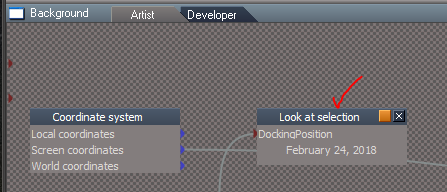
Is the Background's LookAt Selection in Update 4 working for you?
Or is it my Wireless mouse's MMB?
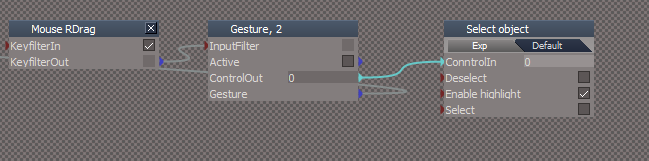
Also I like how Modeler's Material Editor/Inspect tool selects the object and keeps active to inspect other objects again selecting the object.
Trying to replicate this with Workspace's Inspect tool. Best I can come up with so far (As shown) deactivates the Inspect tool.
Is the Background's LookAt Selection in Update 4 working for you?
Or is it my Wireless mouse's MMB?
Also I like how Modeler's Material Editor/Inspect tool selects the object and keeps active to inspect other objects again selecting the object.
Trying to replicate this with Workspace's Inspect tool. Best I can come up with so far (As shown) deactivates the Inspect tool.
- Attachments
-
- Inspect.PNG (10.51 KiB) Viewed 5069 times
-
clintonman
- Captain
- Posts: 5659
- Joined: 21 May 2009, 21:08
- Type the number ten into the box: 0
- Location: California
Re: Final trueSpace 7.61 Beta 8 Unofficial Update
LookAt is working from the toolbar buttons. Is there some MMB shortcut for lookat?trueBlue wrote: 24 May 2018, 14:38 @ Clinton
Is the Background's LookAt Selection in Update 4 working for you?
Or is it my Wireless mouse's MMB?
Also I like how Modeler's Material Editor/Inspect tool selects the object and keeps active to inspect other objects again selecting the object.
Trying to replicate this with Workspace's Inspect tool. Best I can come up with so far (As shown) deactivates the Inspect tool.
Tried using a sequence node for inspect + select and it crashed tS. No other ideas.
-
trueBlue
- Captain
- Posts: 5548
- Joined: 06 Jul 2009, 22:50
- Type the number ten into the box: 10
Re: Final trueSpace 7.61 Beta 8 Unofficial Update
In the Background Widget
- Attachments
-
- LookAt.PNG (10.06 KiB) Viewed 5060 times
-
clintonman
- Captain
- Posts: 5659
- Joined: 21 May 2009, 21:08
- Type the number ten into the box: 0
- Location: California
Re: Final trueSpace 7.61 Beta 8 Unofficial Update
MMB double click look at works for me.
-
trueBlue
- Captain
- Posts: 5548
- Joined: 06 Jul 2009, 22:50
- Type the number ten into the box: 10
Re: Final trueSpace 7.61 Beta 8 Unofficial Update
Can you check out this Material editor Widget?
Material Inspect
LMB = Inspect material
LMB + Drag = Edit material in LE
RMB + Drag = Inspect material + Select Object
Edit:
If it works I was thinking about switching the gestures.
LMB + Drag = Inspect material + Select Object
RMB + Drag = Edit material in LE
Or if you have a better idea?
Material Inspect
LMB = Inspect material
LMB + Drag = Edit material in LE
RMB + Drag = Inspect material + Select Object
Edit:
If it works I was thinking about switching the gestures.
LMB + Drag = Inspect material + Select Object
RMB + Drag = Edit material in LE
Or if you have a better idea?
-
clintonman
- Captain
- Posts: 5659
- Joined: 21 May 2009, 21:08
- Type the number ten into the box: 0
- Location: California
Re: Final trueSpace 7.61 Beta 8 Unofficial Update
Nicely done, works here no problems.
-
the_ant

- Chief Petty Officer
- Posts: 155
- Joined: 02 Jun 2009, 09:26
- Type the number ten into the box: 0
- Location: Perugia - Italy
Re: Final trueSpace 7.61 Beta 8 Unofficial Update
Hi all tSp geniuses...i'm trying follow all steps for install your beautiful UnoffUpgrade and i've some questions about:
1. What kind of files i need to install PDF manual?
2. I got vRay 1.53 and a patch for tSp761 but never heard or seen "tS76_Vray1_54B8.exe" you referred on install instruction in related post.
Hi from Italy...and many many thanks for your unbelievable job!!!

1. What kind of files i need to install PDF manual?
2. I got vRay 1.53 and a patch for tSp761 but never heard or seen "tS76_Vray1_54B8.exe" you referred on install instruction in related post.
Hi from Italy...and many many thanks for your unbelievable job!!!
-
trueBlue
- Captain
- Posts: 5548
- Joined: 06 Jul 2009, 22:50
- Type the number ten into the box: 10
Re: Final trueSpace 7.61 Beta 8 Unofficial Update
You could try Adobe for a PDF Reader?
https://www.adobe.com/
I do not know what the differences is between the two versions of Vray except maybe one is newer?
https://www.adobe.com/
I do not know what the differences is between the two versions of Vray except maybe one is newer?
-
Steinie

- Captain
- Posts: 2958
- Joined: 21 May 2009, 17:38
- Type the number ten into the box: 10
Re: Final trueSpace 7.61 Beta 8 Unofficial Update
the_ant, first off HI from Steinie! 
Here is a History Lesson that most people do not know about.
trueSpace 7.6 was the last version that VRay would work with.
trueSpace 7.61 was released on 5/22 2009 and VRay did not work with this version. (It would not load the scenes)
A secret version of VRay was used by developers with 7.61 (version tS76_Vray1_54B8.exe) that fixed the problem.
Caligari then released a "Patch" for VRay to work with trueSpace 7.61
So if your VRay works with trueSpace 7.61 you already have the Patch installed.
Names and Places have changed, killed, tied to a rock and dropped in the middle of a large lake not to be named.
Here is a History Lesson that most people do not know about.
trueSpace 7.6 was the last version that VRay would work with.
trueSpace 7.61 was released on 5/22 2009 and VRay did not work with this version. (It would not load the scenes)
A secret version of VRay was used by developers with 7.61 (version tS76_Vray1_54B8.exe) that fixed the problem.
Caligari then released a "Patch" for VRay to work with trueSpace 7.61
So if your VRay works with trueSpace 7.61 you already have the Patch installed.
Names and Places have changed, killed, tied to a rock and dropped in the middle of a large lake not to be named.
-
the_ant
- Chief Petty Officer
- Posts: 155
- Joined: 02 Jun 2009, 09:26
- Type the number ten into the box: 0
- Location: Perugia - Italy
Re: Final trueSpace 7.61 Beta 8 Unofficial Update
Hi....
Thanks Steinie for your support about vRay/tSp story...i just suspected the coincidence for "patch vRay1.53=tS76_Vray1_54B8"
@trueBlue: my question is about installation (not visualization) of PDF Manual (in Cellulo unoff-update version 2.1 of tSp7.6 is customized by Cellulo) thanks again...
Thanks Steinie for your support about vRay/tSp story...i just suspected the coincidence for "patch vRay1.53=tS76_Vray1_54B8"
@trueBlue: my question is about installation (not visualization) of PDF Manual (in Cellulo unoff-update version 2.1 of tSp7.6 is customized by Cellulo) thanks again...
-
trueBlue
- Captain
- Posts: 5548
- Joined: 06 Jul 2009, 22:50
- Type the number ten into the box: 10
Re: Final trueSpace 7.61 Beta 8 Unofficial Update
The original PDF Manual is a 50 MB file -> tS76PDF.exe
You run it and install it to where your trueSpace installation is.
The Update includes missing tS76PDF files and additional Model help files and overwrites the ts76_manual.html file, so it is important, as the instructions say, to install the tS76PDF first before the update.
HTH
You run it and install it to where your trueSpace installation is.
The Update includes missing tS76PDF files and additional Model help files and overwrites the ts76_manual.html file, so it is important, as the instructions say, to install the tS76PDF first before the update.
HTH
-
the_ant
- Chief Petty Officer
- Posts: 155
- Joined: 02 Jun 2009, 09:26
- Type the number ten into the box: 0
- Location: Perugia - Italy
Re: Final trueSpace 7.61 Beta 8 Unofficial Update

-
trueBlue
- Captain
- Posts: 5548
- Joined: 06 Jul 2009, 22:50
- Type the number ten into the box: 10
Re: Final trueSpace 7.61 Beta 8 Unofficial Update
Thanks Clinton!
New update uploaded to:
viewtopic.php?t=3732
Additions:
Library
New - Components - Compositing library - Author Clinton Reese
Note: Included in the Material Editor's library browser. You will have to right click the Library Places button to update the combo ctrl.
viewtopic.php?t=1676#p52300
Material Editor
New - Active Editor button - Right click to Reset.
New - Material Inspect widget
New - LMB + Drag - Selects object
Left click to Inspect object and then LMB + Drag to select it.
New - RMB + Drag - Opens the material in the Link Editor.
Left click to Inspect object and then RMB + Drag to open in the Link Editor.
Note: Use LMB/RMB + Drag ever so slightly. It is not perfect but does work.
Offline Render buttons have been changed to work better. Instead of rendering first and then resize they resize first then render.
Included the missing textures for the Vray - Room and Bath scenes in the Texture folder.
New update uploaded to:
viewtopic.php?t=3732
Additions:
Library
New - Components - Compositing library - Author Clinton Reese
Note: Included in the Material Editor's library browser. You will have to right click the Library Places button to update the combo ctrl.
viewtopic.php?t=1676#p52300
Material Editor
New - Active Editor button - Right click to Reset.
New - Material Inspect widget
New - LMB + Drag - Selects object
Left click to Inspect object and then LMB + Drag to select it.
New - RMB + Drag - Opens the material in the Link Editor.
Left click to Inspect object and then RMB + Drag to open in the Link Editor.
Note: Use LMB/RMB + Drag ever so slightly. It is not perfect but does work.
Offline Render buttons have been changed to work better. Instead of rendering first and then resize they resize first then render.
Included the missing textures for the Vray - Room and Bath scenes in the Texture folder.
-
trueBlue
- Captain
- Posts: 5548
- Joined: 06 Jul 2009, 22:50
- Type the number ten into the box: 10
Re: Final trueSpace 7.61 Beta 8 Unofficial Update
New update uploaded to:
viewtopic.php?t=3732
Background widget
Additional controls:
* CTRL + MMB - Double click Zooms to the current selected object or Point Edit selection.
* CTRL+ Shift + MMB Double click - Zooms to all objects in the scene.
New - Updated the Zoom to Selection version 1/14/2018 - Author Clinton Reese
Updated 5/30/2018
Shift + LMB Drag - Zooms to the current selected object or Point Edit selection.
Note: This gesture is in addition to the CTRL + MMB - Double click.
New - RMB Drag - Resets the View.
Note: I set the Prority = 2 on the Offline render/Area scene render widget and the View tools/Rect zoom widget
so that they all worked as expected.
Please test that the CTRL + MMB - Double click gestures still works because they do not work for me on my setup.
Note: They both share the same script.
@ Clinton: I experimented with your Zoom 2 Selection widget extensively. It may be my setup (Win10) but I confirmed that the One from three select nodes have issues.
Photo Render
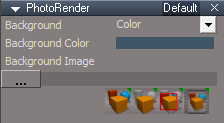
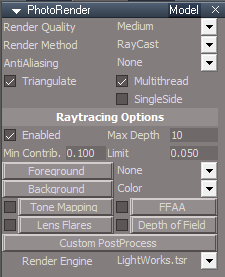
New - Changed the Background aspect to the Default
New - Includes the Offline Render icons - Render Scene, Render Area, Render Object and Render Animation buttons, enabling them to resize the Vray render window using the Vray - Width and Height values.
New - Renamed the Default aspect to Model
New - Added an Update aspect that includes some scripts for Vray
Look here for details: viewtopic.php?t=5483
My Scenes library
* My Scene.RsScn includes Save RsScn Incrementally that opens on Load.
* My Backup.RsScn includes Save RsScn that opens on Load.
Update 5/30/2018
* newscene.RsScn is a Model - Workspace scene that has been setup to be simular as close as possible.
Note: You have to Select the View from EntryPoint camera in Model.
Script Commands
New - UnLookAt.xml Updated to include Lights - Author Clinton Reese
New - onenewscene.xml Updated to fix missing Status Line string and renamed Camera1 to Camera.
Update 5/30/2018
New - ActivateWindow.xml Acitvates the main 3D window in all layouts.
New - Cam2Eye.xml that transfers all of the settings from a selected camera to the Eye Camera.
* Added Cam2Eye icon to the camera tools in the Red Custom Toolbar.
Reset to Default Context icon in the Main2 toolbar only.
New - RMB command = RsApp.Reset() Does not ask Yes or No Question.
viewtopic.php?t=3732
Background widget
Additional controls:
* CTRL + MMB - Double click Zooms to the current selected object or Point Edit selection.
* CTRL+ Shift + MMB Double click - Zooms to all objects in the scene.
New - Updated the Zoom to Selection version 1/14/2018 - Author Clinton Reese
Updated 5/30/2018
Shift + LMB Drag - Zooms to the current selected object or Point Edit selection.
Note: This gesture is in addition to the CTRL + MMB - Double click.
New - RMB Drag - Resets the View.
Note: I set the Prority = 2 on the Offline render/Area scene render widget and the View tools/Rect zoom widget
so that they all worked as expected.
Please test that the CTRL + MMB - Double click gestures still works because they do not work for me on my setup.
Note: They both share the same script.
@ Clinton: I experimented with your Zoom 2 Selection widget extensively. It may be my setup (Win10) but I confirmed that the One from three select nodes have issues.
Photo Render
New - Changed the Background aspect to the Default
New - Includes the Offline Render icons - Render Scene, Render Area, Render Object and Render Animation buttons, enabling them to resize the Vray render window using the Vray - Width and Height values.
New - Renamed the Default aspect to Model
New - Added an Update aspect that includes some scripts for Vray
Look here for details: viewtopic.php?t=5483
- New Photo Render.PNG (7.35 KiB) Viewed 5803 times
- New Photo Render Model aspect.PNG (9.5 KiB) Viewed 5803 times

- New Photo Render Update aspect.PNG (9.08 KiB) Viewed 5803 times
* My Scene.RsScn includes Save RsScn Incrementally that opens on Load.
* My Backup.RsScn includes Save RsScn that opens on Load.
Update 5/30/2018
* newscene.RsScn is a Model - Workspace scene that has been setup to be simular as close as possible.
Note: You have to Select the View from EntryPoint camera in Model.

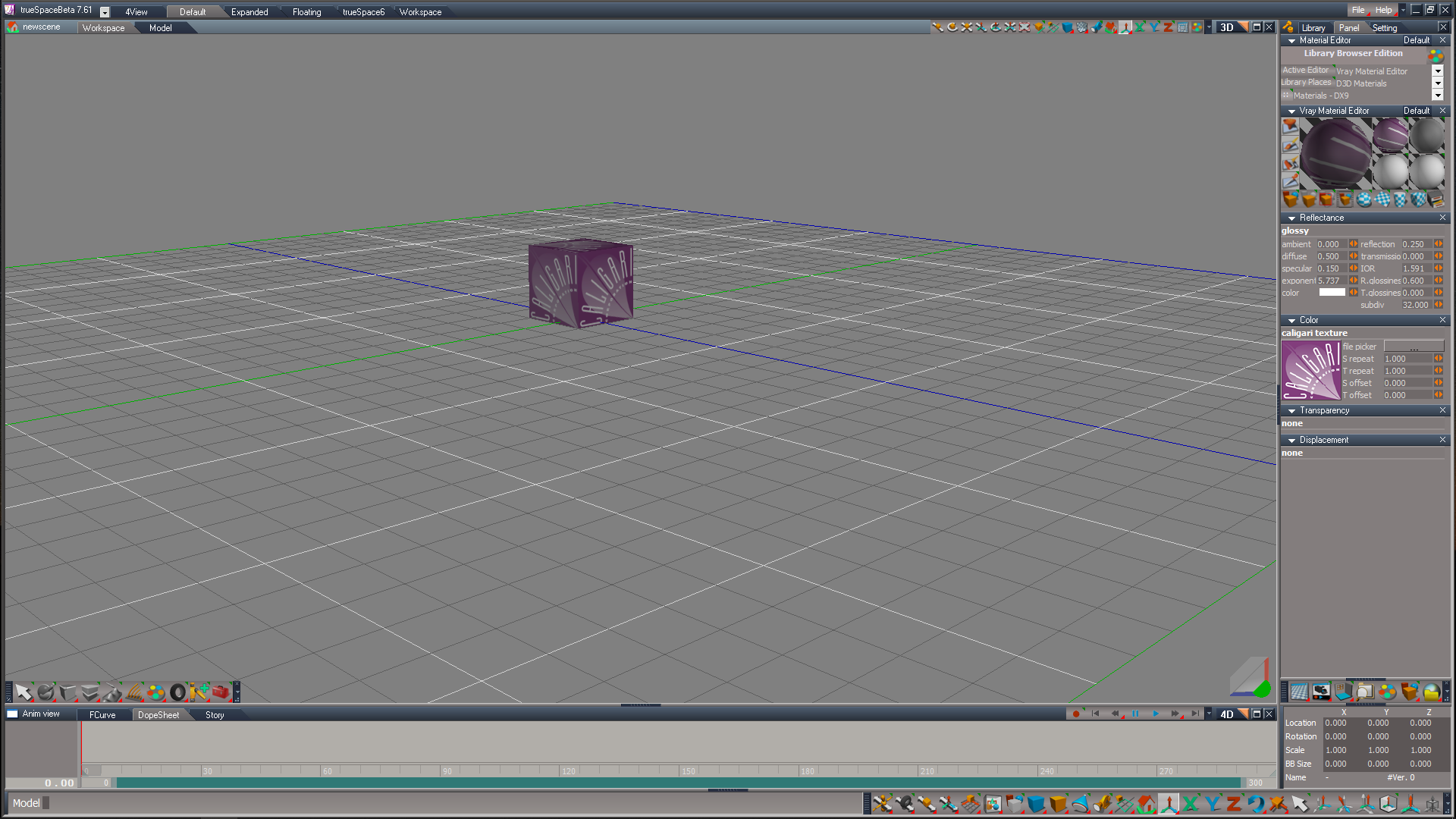
New - UnLookAt.xml Updated to include Lights - Author Clinton Reese
New - onenewscene.xml Updated to fix missing Status Line string and renamed Camera1 to Camera.
Update 5/30/2018
New - ActivateWindow.xml Acitvates the main 3D window in all layouts.
New - Cam2Eye.xml that transfers all of the settings from a selected camera to the Eye Camera.
* Added Cam2Eye icon to the camera tools in the Red Custom Toolbar.
Reset to Default Context icon in the Main2 toolbar only.
New - RMB command = RsApp.Reset() Does not ask Yes or No Question.
-
clintonman
- Captain
- Posts: 5659
- Joined: 21 May 2009, 21:08
- Type the number ten into the box: 0
- Location: California
Re: Final trueSpace 7.61 Beta 8 Unofficial Update
Can you be more specific (not working/sometimes works) or is it a case of inconsistent/unpredictable behavior? I'm also on win10.trueBlue wrote: 30 May 2018, 18:35 ...
@ Clinton: I experimented with your Zoom 2 Selection widget extensively. It may be my setup (Win10) but I confirmed that the One from three select nodes have issues.
...
I just had an idea...
1. try using the 1 of 4 select instead of the 1 of 3
2. try running this command to get a freshly created 1 of 3, maybe the library version is old
Code: Select all
Node.Create("Widgets Package/One from three select",Space.CurrentScene());-
trueBlue
- Captain
- Posts: 5548
- Joined: 06 Jul 2009, 22:50
- Type the number ten into the box: 10
Re: Final trueSpace 7.61 Beta 8 Unofficial Update
My Widgets Package is the original that ships with tS761B8.execlintonman wrote: 30 May 2018, 19:27Can you be more specific (not working/sometimes works) or is it a case of inconsistent/unpredictable behavior? I'm also on win10.trueBlue wrote: 30 May 2018, 18:35 ...
@ Clinton: I experimented with your Zoom 2 Selection widget extensively. It may be my setup (Win10) but I confirmed that the One from three select nodes have issues.
...
I just had an idea...
1. try using the 1 of 4 select instead of the 1 of 3
2. try running this command to get a freshly created 1 of 3, maybe the library version is old
Code: Select all
Node.Create("Widgets Package/One from three select",Space.CurrentScene());
First of all your Zoom 2 Selection unmodified, does not work at all for me with MMB Double click.
I tried replacing just the MMB Double click with LMB Drag.
Zoom 2 PE selection worked prefectly everytime but Zoom 2 Object only worked once maybe twice out of several tries.
Strange, right?
I know that the Zoom to Object was working because I would call it from a script without the widget.
Which confirmed to me that has to be the One From Three Select nodes or the way it is setup chaining all 3 keys to 2 One From Three Select nodes.
Zoom 2 All also worked but seemed unpredictable in that I would see it Zoom to all of the objects in the scene and then in the same scene it would Zoom way (WAY) out. Like it was the complete opposite of Zooming In.
Also noticed that the script lagged and it did not fire until I released my Ctrl and Shift keys. Which to me means the first key should be the last key. IE: A = Ctrl and B = MMB Double click.
HTH
I hope that you will try this version as it seems to flow better to me with LMB Drag.
It's still the same as you had it but with two additional gestures.
I was kinda of surprised that you can feed one script with two gestures.
Works great with the Rectangle Zoom too. LMB Drag to Zoom In and RMB Drag to Zoom Out. (Reset View)
Same with your Zoom 2 Object. LMB Drag to Zoom In and RMB Drag to Zoom Out.
Again Note: I set the Prority = 2 on the Offline render/Area scene render widget and the View tools/Rect zoom widget
so that they all worked as expected.
Maybe the Mouse's MMB is not a good choice as it has multiple functions. MMB click, MMB Double click, MMB click Left, MMB click Right, and MMB wheel. Then there are some users that do not have a MMB.
-
trueBlue
- Captain
- Posts: 5548
- Joined: 06 Jul 2009, 22:50
- Type the number ten into the box: 10
Re: Final trueSpace 7.61 Beta 8 Unofficial Update
Edit 5/31/2018
@ Clinton - My apologies to you!
Went out and bought a Mouse today and your Zoom 2 Selection works as you have intended.
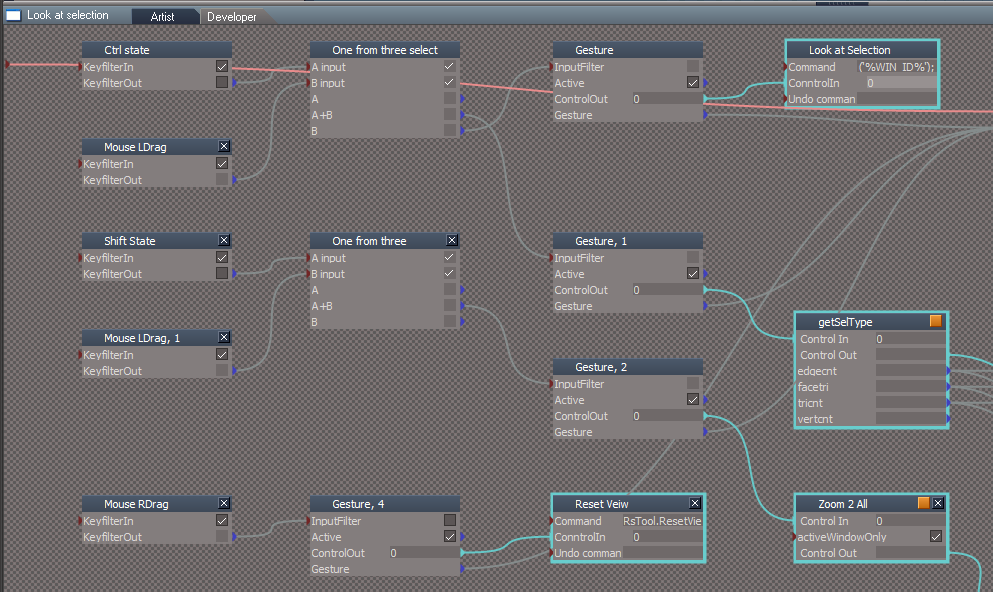
Another try...
Must had been the chaining mentioned earlier.
If you notice the keys, are swapped to as mentioned earlier.
LMB Drag = Look at Selection
LMB Drag + Ctrl = Look at Object/PE selection
LMB Drag + Shift = Look at All
RMB Drag = Reset View
Personally I like the Look at Object/PE selection without a combination key set.
Unlike the above.
LMB Drag + Ctrl = RsTool.LookAtSelection('');
LMB Drag = Look at Object/PE selection objects.
LMB Drag + Shift = Look at All
RMB Drag = Reset View
@ Clinton - My apologies to you!
Went out and bought a Mouse today and your Zoom 2 Selection works as you have intended.
Another try...
Must had been the chaining mentioned earlier.
If you notice the keys, are swapped to as mentioned earlier.
LMB Drag = Look at Selection
LMB Drag + Ctrl = Look at Object/PE selection
LMB Drag + Shift = Look at All
RMB Drag = Reset View
Unlike the above.
LMB Drag + Ctrl = RsTool.LookAtSelection('');
LMB Drag = Look at Object/PE selection objects.
LMB Drag + Shift = Look at All
RMB Drag = Reset View
-
trueBlue
- Captain
- Posts: 5548
- Joined: 06 Jul 2009, 22:50
- Type the number ten into the box: 10
Re: Final trueSpace 7.61 Beta 8 Unofficial Update
New update uploaded to:
viewtopic.php?t=3732
There was a conflict with the previous Background - Zoom 2 Selection widget with the PE Paint tool so I changed the gesture to:
Shift + LMB Drag - Zooms to the current selected object or Point Edit selection.
It's actually using LMB State but it is used the same way. Hold your Shift key down and LMB click and drag down a little bit.
viewtopic.php?t=3732
There was a conflict with the previous Background - Zoom 2 Selection widget with the PE Paint tool so I changed the gesture to:
Shift + LMB Drag - Zooms to the current selected object or Point Edit selection.
It's actually using LMB State but it is used the same way. Hold your Shift key down and LMB click and drag down a little bit.
-
the_ant
- Chief Petty Officer
- Posts: 155
- Joined: 02 Jun 2009, 09:26
- Type the number ten into the box: 0
- Location: Perugia - Italy
Re: Final trueSpace 7.61 Beta 8 Unofficial Update
HI trueBlue
a silly question about your UnoffUpdate and others...where is fisically the "Reset to Default Context" icon?

a silly question about your UnoffUpdate and others...where is fisically the "Reset to Default Context" icon?
-
trueBlue
- Captain
- Posts: 5548
- Joined: 06 Jul 2009, 22:50
- Type the number ten into the box: 10
Re: Final trueSpace 7.61 Beta 8 Unofficial Update
You can find here:
- Attachments
-

- Reset to Default Context.PNG (80.1 KiB) Viewed 5559 times
-
trueBlue
- Captain
- Posts: 5548
- Joined: 06 Jul 2009, 22:50
- Type the number ten into the box: 10
Re: Final trueSpace 7.61 Beta 8 Unofficial Update
New update uploaded to:
viewtopic.php?t=3732
@ Clinton - My sincere apologies to you!
Went out and bought a Mouse today and your Zoom 2 Selection works as you have intended.
viewtopic.php?t=3732
@ Clinton - My sincere apologies to you!
Went out and bought a Mouse today and your Zoom 2 Selection works as you have intended.
-
clintonman
- Captain
- Posts: 5659
- Joined: 21 May 2009, 21:08
- Type the number ten into the box: 0
- Location: California
Re: Final trueSpace 7.61 Beta 8 Unofficial Update
Cool.trueBlue wrote: 01 Jun 2018, 14:13 New update uploaded to:
viewtopic.php?t=3732
@ Clinton - My sincere apologies to you!
Went out and bought a Mouse today and your Zoom 2 Selection works as you have intended.
 and apology accepted.
  I had the same kind of problem with my old wacom tablet, it made truespace scripting super slow for some reason.
-
trueBlue
- Captain
- Posts: 5548
- Joined: 06 Jul 2009, 22:50
- Type the number ten into the box: 10
Re: Final trueSpace 7.61 Beta 8 Unofficial Update
New update uploaded to:
viewtopic.php?t=3732
:: Widgets
Object Move, Rotate, and Scale widgets
Shift + MMB select in empty space deactivates each tool.
New - Shift + LMB select in empty space deactivates each tool.
Note: This is in addition to the Shift + MMB gesture.
Camera Move, Rotate, FOV, and Rectangle Zoom widgets.
Shift + MMB select in empty space deactivates each tool.
New - Shift + LMB select in empty space deactivates each tool.
Note: This is in addition to the Shift + MMB gesture.
Addition 6/7/2018 - Restored the Shift + MMB select in empty space deactivates each tool to the above widgets.
Background widget
New - Updated the Zoom to Selection version 1/14/2018 - Author Clinton Reese
Additional controls:
* Ctrl + MMB - Double click Zooms to the current selected object or Point Edit selection.
* Ctrl + Shift + MMB Double click - Zooms to all objects in the scene.
New - Shift + LMB Drag - Zooms to the current selected object or Point Edit selection.
Note: This gesture is in addition to the CTRL + MMB - Double click.
New - RMB Drag - Resets the View.
Addition 6/7/2018
New - , + LMB Drag - Hides All except Selected object.
New - . + LMB Drag - Shows All.
FYI: When using the Zoom to Selection the default Point Editing Selection mode gets changed.
To restore the default Point Editing Selection mode, use the ~ key shortcut to restore it.
Addition 6/8/2018
New - YafaRay4tS - Added code to the reset.js file (Reset to Default Context) that reloads the Yafaray Folder, if it is installed.
viewtopic.php?t=3732
:: Widgets
Object Move, Rotate, and Scale widgets
Shift + MMB select in empty space deactivates each tool.
New - Shift + LMB select in empty space deactivates each tool.
Note: This is in addition to the Shift + MMB gesture.
Camera Move, Rotate, FOV, and Rectangle Zoom widgets.
Shift + MMB select in empty space deactivates each tool.
New - Shift + LMB select in empty space deactivates each tool.
Note: This is in addition to the Shift + MMB gesture.
Addition 6/7/2018 - Restored the Shift + MMB select in empty space deactivates each tool to the above widgets.
Background widget
New - Updated the Zoom to Selection version 1/14/2018 - Author Clinton Reese
Additional controls:
* Ctrl + MMB - Double click Zooms to the current selected object or Point Edit selection.
* Ctrl + Shift + MMB Double click - Zooms to all objects in the scene.
New - Shift + LMB Drag - Zooms to the current selected object or Point Edit selection.
Note: This gesture is in addition to the CTRL + MMB - Double click.
New - RMB Drag - Resets the View.
Addition 6/7/2018
New - , + LMB Drag - Hides All except Selected object.
New - . + LMB Drag - Shows All.
FYI: When using the Zoom to Selection the default Point Editing Selection mode gets changed.
To restore the default Point Editing Selection mode, use the ~ key shortcut to restore it.
Addition 6/8/2018
New - YafaRay4tS - Added code to the reset.js file (Reset to Default Context) that reloads the Yafaray Folder, if it is installed.
-
trueBlue
- Captain
- Posts: 5548
- Joined: 06 Jul 2009, 22:50
- Type the number ten into the box: 10
Re: Final trueSpace 7.61 Beta 8 Unofficial Update
Anybody willing to test some new additions to the final update?
Background widget
New - Shift + RMB Drag - Resets the View.
New - , + LMB Drag - Hides All except selection, and Zooms to the current selection or Point Edit selection.
New - , + RMB Drag - Zooms to the next object and HidesAll except that object.
New - . + LMB Drag - Hides All except selection.
New - . + RMB Drag - Shows All.
Workspace Main toolbar
New updated scripts and commands
* Unencapsulate - Disconnects and deletes the Transform node. Up to 5 selections at a time is supported.
* Show icon - LMB Shows all the selected objects and RMB Shows the new Object Render Attributes panel for the selected object.
* Hide icon - LMB Hides all the selected objects and RMB Shows the new Object Render Attributes panel for the selected object.
* Show All icon - LMB Shows any objects that have an Object Render Attributes panel.
* Hide All icon - LMB Hides any objects that have an Object Render Attributes panel.
Note: Encapsulated objects are not supported with ShowAll and HideAll unless you use Hide or Show first.
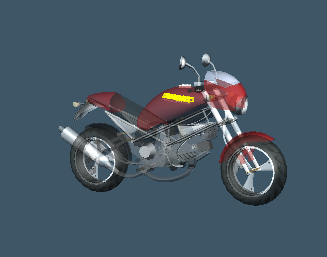
Example Ducati motorcycle from the Model side
With the object selected,
Apply the Show command first as it does not have any Objects Render Attributes.
Select your Down Arrow keyboard key to enter into the sub objects.
Select and hold your Comma keyboard key, then with your right mouse button drag in 3D Space to cycle through all of the Ducati's parts. Each part will Zoom 2 Selected and Hide All other objects, lights, and cameras.
Select and hold your Period keyboard key, then with your right mouse button drag in 3D Space.
All objects, lights, and cameras will Show.
Select and hold your Shift keyboard key, then with your right mouse button drag in 3D Space.
Your 3D View will reset.
In the Objects - tS7.61 Update objects library
Open the New - Send Status Messages script,
that demonstrates a new Status Message object installed in System.
Status Message is a modified ClearStatus Immediate script. - Original Author Clinton Reese
Enables a user to send a Status Message for a determined amount of seconds with a Notify sound and or have the text read out loud.
Object Navigation Widget 1, 2, 3, 4, 5, and 6
New - 4, 5, and 6 include the Cage widget. Author Clinton Reese
Note: 5 is slightly different with the docking of the Object Navigation Widget.
Try,
Shift + LMB select the widget switches the Object Navigation Widgets
Material Inspect
New - LMB + Drag - Selects object
Left click to Inspect object and then LMB + Drag to select it.
New - RMB + Drag - Opens the material in the Link Editor.
Left click to Inspect object and then RMB + Drag to open in the Link Editor.
New - Cancel - Right click in 3D Space cancels the Inspect widget and Unselects last selected object.
Try all of the new workspace lights with the color picker and new shapes
New - Added Color picker for the light's color and Color aspect for advance color settings. - Author Clinton Reese.
New - Spot and Projector's Preferences have button scripts that change their Attenuation to No Falloff, Linear Falloff with distance, and Inverse Square Falloff with distance. RMB command resets to trueSpace's Default.
New - Added Reset Rotations and a View On/Off to the Spot and Projector lights panels.
New - Projector - Added a Square spot light bitmap, camera, and a Sequence aspect enabling a user to load and animate a sequence of images.
Workspace File Menu
New - Save As - Object, Recording, and Scene
New - YafaRay4tSv0.90 is fully integrated into trueSpace. - Author Clinton Reese
Download and install the YafaRay v3.3.0 render engine before using YafaRay4tS !
See YafaRay4tS users instructions below.
Instructions:
It is recommend that you completely Uninstall and Install trueSpace7.61 Beta 8 to a clean directory.
Install the PDF Manual for trueSpace.
1.) Run the tS7.61B8.4.exe
2.) Browse [...] to where you installed C:\trueSpace761, select its folder and then the Extract button
3.) Select the Yes to All button.
4.) Open trueSpace and select the Reset to Default Context icon.
5.) In Workspace select the Default layout tab.
YafaRay4tS users:
1.) Download the YafaRay v3.3.0 render engine from one of these sites:
YafaRay Standalone https://github.com/YafaRay/Core/releases
YafaRay for Blender https://github.com/YafaRay/Blender-Exporter/releases
Unzip the file and copy the ‘yafaray_v3’ folder to:
Examples:
Standalone
C:\Program Files\yafaray_v3
C:\trueSpace761\tS\yafaray_v3
C:\trueSpace761Std\yafaray_v3
Note: If you install the YafaRay v3.3.0 render engine after installing this update:
From Workspace in the Stack/Panel - YafaRay4tS/Setup aspect
Set the 'YafaRay Installation Path' to the yafaray-xml.exe file where you have installed YafaRay v3.3.0
Select the 'Save Settings' button.
In Workspace, open the YafaRay4tS layout.
Open a new YafaRay4tS scene from the YafaRay Settings toolbar icon.
Optionally, but recommend you install the iOptDetector plugin http://rs.siprogs.sk/p/iOptDetectorsPage
Recommend that you install it to your C:/ drive so that it can be shared with different versions of trueSpace.
The OptDetector.dll must be Installed and Loaded from the Workspace's Package Manager.
Vray users:
Install the tS76_Vray1_54B8.exe
In Workspace, Install/Load Vray from the Package Manager and reboot trueSpace.
Vray Material Editor
In the Material Editor's Active Editor button - Right click to Reset.
To enable the Library Browser, right click the Library Places or select the Update Library Places icon in the Material Editor.
In the Library Places -> Combo Control, select the Main Library Place and your keyboard Enter key.
In the next Combo Control, select which library you would like to open and your keyboard Enter key.
Note: At any time your libraries are not showing or after adding Libraries, select the Update Library Places icon again to update the Library Places.
Special thanks to Clinton Reese for all his help and contributions in this update.
http://www.clintons3d.com
Background widget
New - Shift + RMB Drag - Resets the View.
New - , + LMB Drag - Hides All except selection, and Zooms to the current selection or Point Edit selection.
New - , + RMB Drag - Zooms to the next object and HidesAll except that object.
New - . + LMB Drag - Hides All except selection.
New - . + RMB Drag - Shows All.
Workspace Main toolbar
New updated scripts and commands
* Unencapsulate - Disconnects and deletes the Transform node. Up to 5 selections at a time is supported.
* Show icon - LMB Shows all the selected objects and RMB Shows the new Object Render Attributes panel for the selected object.
* Hide icon - LMB Hides all the selected objects and RMB Shows the new Object Render Attributes panel for the selected object.
* Show All icon - LMB Shows any objects that have an Object Render Attributes panel.
* Hide All icon - LMB Hides any objects that have an Object Render Attributes panel.
Note: Encapsulated objects are not supported with ShowAll and HideAll unless you use Hide or Show first.
Example Ducati motorcycle from the Model side
- Object Selected.PNG (44.92 KiB) Viewed 5326 times

Apply the Show command first as it does not have any Objects Render Attributes.
Select your Down Arrow keyboard key to enter into the sub objects.
Select and hold your Comma keyboard key, then with your right mouse button drag in 3D Space to cycle through all of the Ducati's parts. Each part will Zoom 2 Selected and Hide All other objects, lights, and cameras.
Select and hold your Period keyboard key, then with your right mouse button drag in 3D Space.
All objects, lights, and cameras will Show.
Select and hold your Shift keyboard key, then with your right mouse button drag in 3D Space.
Your 3D View will reset.
In the Objects - tS7.61 Update objects library
Open the New - Send Status Messages script,
that demonstrates a new Status Message object installed in System.
Status Message is a modified ClearStatus Immediate script. - Original Author Clinton Reese
Enables a user to send a Status Message for a determined amount of seconds with a Notify sound and or have the text read out loud.
Object Navigation Widget 1, 2, 3, 4, 5, and 6
New - 4, 5, and 6 include the Cage widget. Author Clinton Reese
Note: 5 is slightly different with the docking of the Object Navigation Widget.
Try,
Shift + LMB select the widget switches the Object Navigation Widgets
Material Inspect
New - LMB + Drag - Selects object
Left click to Inspect object and then LMB + Drag to select it.
New - RMB + Drag - Opens the material in the Link Editor.
Left click to Inspect object and then RMB + Drag to open in the Link Editor.
New - Cancel - Right click in 3D Space cancels the Inspect widget and Unselects last selected object.
Try all of the new workspace lights with the color picker and new shapes
New - Added Color picker for the light's color and Color aspect for advance color settings. - Author Clinton Reese.
New - Spot and Projector's Preferences have button scripts that change their Attenuation to No Falloff, Linear Falloff with distance, and Inverse Square Falloff with distance. RMB command resets to trueSpace's Default.
New - Added Reset Rotations and a View On/Off to the Spot and Projector lights panels.
New - Projector - Added a Square spot light bitmap, camera, and a Sequence aspect enabling a user to load and animate a sequence of images.
Workspace File Menu
New - Save As - Object, Recording, and Scene
New - YafaRay4tSv0.90 is fully integrated into trueSpace. - Author Clinton Reese
Download and install the YafaRay v3.3.0 render engine before using YafaRay4tS !
See YafaRay4tS users instructions below.
Instructions:
It is recommend that you completely Uninstall and Install trueSpace7.61 Beta 8 to a clean directory.
Install the PDF Manual for trueSpace.
1.) Run the tS7.61B8.4.exe
2.) Browse [...] to where you installed C:\trueSpace761, select its folder and then the Extract button
3.) Select the Yes to All button.
4.) Open trueSpace and select the Reset to Default Context icon.
5.) In Workspace select the Default layout tab.
YafaRay4tS users:
1.) Download the YafaRay v3.3.0 render engine from one of these sites:
YafaRay Standalone https://github.com/YafaRay/Core/releases
YafaRay for Blender https://github.com/YafaRay/Blender-Exporter/releases
Unzip the file and copy the ‘yafaray_v3’ folder to:
Examples:
Standalone
C:\Program Files\yafaray_v3
C:\trueSpace761\tS\yafaray_v3
C:\trueSpace761Std\yafaray_v3
Note: If you install the YafaRay v3.3.0 render engine after installing this update:
From Workspace in the Stack/Panel - YafaRay4tS/Setup aspect
Set the 'YafaRay Installation Path' to the yafaray-xml.exe file where you have installed YafaRay v3.3.0
Select the 'Save Settings' button.
In Workspace, open the YafaRay4tS layout.
Open a new YafaRay4tS scene from the YafaRay Settings toolbar icon.
Optionally, but recommend you install the iOptDetector plugin http://rs.siprogs.sk/p/iOptDetectorsPage
Recommend that you install it to your C:/ drive so that it can be shared with different versions of trueSpace.
The OptDetector.dll must be Installed and Loaded from the Workspace's Package Manager.
Vray users:
Install the tS76_Vray1_54B8.exe
In Workspace, Install/Load Vray from the Package Manager and reboot trueSpace.
Vray Material Editor
In the Material Editor's Active Editor button - Right click to Reset.
To enable the Library Browser, right click the Library Places or select the Update Library Places icon in the Material Editor.
In the Library Places -> Combo Control, select the Main Library Place and your keyboard Enter key.
In the next Combo Control, select which library you would like to open and your keyboard Enter key.
Note: At any time your libraries are not showing or after adding Libraries, select the Update Library Places icon again to update the Library Places.
Special thanks to Clinton Reese for all his help and contributions in this update.
http://www.clintons3d.com
-
Draise

- Captain
- Posts: 3200
- Joined: 21 Sep 2009, 19:33
- Type the number ten into the box: 0
- Location: Bogota, Colombia
Re: Final trueSpace 7.61 Beta 8 Unofficial Update
All these updates may require a day to go through!
-
Steinie
- Captain
- Posts: 2958
- Joined: 21 May 2009, 17:38
- Type the number ten into the box: 10
Re: Final trueSpace 7.61 Beta 8 Unofficial Update
Can I assume all the other updates from years past are included in this update?
It is not often I want to change the behavior of tS when it is working well. Shouldn't I just install another version of tS with updates in another directory or will there be conflicts?
What does the iOptDetector plugin do?
I know, dumb questions...
It is not often I want to change the behavior of tS when it is working well. Shouldn't I just install another version of tS with updates in another directory or will there be conflicts?
What does the iOptDetector plugin do?
I know, dumb questions...
-
trueBlue
- Captain
- Posts: 5548
- Joined: 06 Jul 2009, 22:50
- Type the number ten into the box: 10
Re: Final trueSpace 7.61 Beta 8 Unofficial Update
No such thing as a dumb question.
Yes this update includes all previous revisions, but it also fixes a few issues in the past updates.
Assuming we are talking about trueSpaceBeta 7.61 and installed to the default directory, what version of the update are you using?
Open the trueSpace Beta 7.61 Unofficial Update.txt located in C:\trueSpace761\tS
At the top of the text file you should see:
Revisions:
July 06, 2009
February 21, 2010
November 01, 2012
What is the last revision?
Reset your Default Context, Save a copy of it, send it to me, and I will take a look at it.
I can not recommend installing a duplicate copy of trueSpaceBeta 7.61 or any version!
For one the trueSpace installer changes the trueSpace's file(s) (RsObj. RsScn. etc...) association in the Registry Editor to the latest (any version) installation. No harm really if you are okay with that! I am not!
And secondly if you use Vray, you would have to install another copy to that directory. Not sure, if any, problems could arrise in doing so.
I personally have applied different revisions of this update a million times with zero problems. It does not do anything to your Registry. It only overwrites any provided file, with the same name, and only if you choose to do so.
Personally I install Rosetta Beta 7.61 first and then trueSpaceBeta 7.61 because of what was mentioned above.
Vray to C:\trueSpace761
Note: In the Workspace Package Manager, Install/Load the Vray_ts.rsx and reboot trueSpace.
iOptDetector to C:\
Note: In the Workspace Package Manager, Install/Load the OptDetector.dll and reboot trueSpace.
YafaRay (Standalone) to C:\Program Files
This affords me to share the iOptDetector and YafaRay (Standalone) with both versions of trueSpace, and keeping it out of the trueSpace installation directories. Easier to maintain, should you uninstall trueSpace!
The iOptDetector plugin can be found here: http://rs.siprogs.sk/p/iOptDetectorsPage
Clinton has incorporated part of that plugin into YafaRay4tS an optional viewer and is needed for Bucket Rendering.
It supports a resizable iOptDisplay window not limited by resolution or image aspect ratio.
Yes this update includes all previous revisions, but it also fixes a few issues in the past updates.
Assuming we are talking about trueSpaceBeta 7.61 and installed to the default directory, what version of the update are you using?
Open the trueSpace Beta 7.61 Unofficial Update.txt located in C:\trueSpace761\tS
At the top of the text file you should see:
Revisions:
July 06, 2009
February 21, 2010
November 01, 2012
What is the last revision?
Reset your Default Context, Save a copy of it, send it to me, and I will take a look at it.
I can not recommend installing a duplicate copy of trueSpaceBeta 7.61 or any version!
For one the trueSpace installer changes the trueSpace's file(s) (RsObj. RsScn. etc...) association in the Registry Editor to the latest (any version) installation. No harm really if you are okay with that! I am not!
And secondly if you use Vray, you would have to install another copy to that directory. Not sure, if any, problems could arrise in doing so.
I personally have applied different revisions of this update a million times with zero problems. It does not do anything to your Registry. It only overwrites any provided file, with the same name, and only if you choose to do so.
Personally I install Rosetta Beta 7.61 first and then trueSpaceBeta 7.61 because of what was mentioned above.
Vray to C:\trueSpace761
Note: In the Workspace Package Manager, Install/Load the Vray_ts.rsx and reboot trueSpace.
iOptDetector to C:\
Note: In the Workspace Package Manager, Install/Load the OptDetector.dll and reboot trueSpace.
YafaRay (Standalone) to C:\Program Files
This affords me to share the iOptDetector and YafaRay (Standalone) with both versions of trueSpace, and keeping it out of the trueSpace installation directories. Easier to maintain, should you uninstall trueSpace!
The iOptDetector plugin can be found here: http://rs.siprogs.sk/p/iOptDetectorsPage
Clinton has incorporated part of that plugin into YafaRay4tS an optional viewer and is needed for Bucket Rendering.
It supports a resizable iOptDisplay window not limited by resolution or image aspect ratio.
-
clintonman
- Captain
- Posts: 5659
- Joined: 21 May 2009, 21:08
- Type the number ten into the box: 0
- Location: California
Re: Final trueSpace 7.61 Beta 8 Unofficial Update
Should the extra items be installed before the update or does the order not really matter?
The extra items are yafaray_v3, vray and optdetectors.
The extra items are yafaray_v3, vray and optdetectors.
-
trueBlue
- Captain
- Posts: 5548
- Joined: 06 Jul 2009, 22:50
- Type the number ten into the box: 10
Re: Final trueSpace 7.61 Beta 8 Unofficial Update
Given that the update overwrites the Plugins.xml file, which only includes your Clintons3D Package VERSION= v.1638412 , you need to add the Vray and iOptDetector plugins after the update.
It is easier to install YafaRay first. If you do so, YafaRay4tS renders straight out of the box.
If you install the YafaRay v3.3.0 render engine after installing this update:
From Workspace in the Stack/Panel - YafaRay4tS/Setup aspect
Set the 'YafaRay Installation Path' to the yafaray-xml.exe file where you have installed YafaRay v3.3.0
Select the 'Save Settings' button.
Steps for the easiest installation:
1.) Install YafaRay (Optional)
2.) Install trueSpace 7.61
3.) Install iOptDetector (Optional)
4.) Install Vray (Optional)
5.) Install the PDF Manual for Caligari trueSpace (Optional but required before installing the Update 4)
6.) Install the Update 4
7.) Open trueSpace Install/Load Vray & iOptDetector from the Package Manager and Reset the Default Context (Required after Update 4)
It is easier to install YafaRay first. If you do so, YafaRay4tS renders straight out of the box.
If you install the YafaRay v3.3.0 render engine after installing this update:
From Workspace in the Stack/Panel - YafaRay4tS/Setup aspect
Set the 'YafaRay Installation Path' to the yafaray-xml.exe file where you have installed YafaRay v3.3.0
Select the 'Save Settings' button.
Steps for the easiest installation:
1.) Install YafaRay (Optional)
2.) Install trueSpace 7.61
3.) Install iOptDetector (Optional)
4.) Install Vray (Optional)
5.) Install the PDF Manual for Caligari trueSpace (Optional but required before installing the Update 4)
6.) Install the Update 4
7.) Open trueSpace Install/Load Vray & iOptDetector from the Package Manager and Reset the Default Context (Required after Update 4)
-
trueBlue
- Captain
- Posts: 5548
- Joined: 06 Jul 2009, 22:50
- Type the number ten into the box: 10
Re: Final trueSpace 7.61 Beta 8 Unofficial Update
@ Clinton
Ever notice that the Un encapsulate = LE.Unencapsulate('') crashes trueSpace if you run it on an object that does not have any sub objects? As an example, select a script and run the command. Bada Boom!
Also there is an unwanted behavior if you run it on any object, it will un encapsulate all of it's nodes.
As an example, select a Light and run the command.
Trying to come up with button command to over come all of the above.
Best I can do is as follows:
This does stop trueSpace from crashing.
Limitations with the above code
1.) Still has the unwanted behavior if you run it on any object, it will un encapsulate all of it's nodes.
2.) If your selection includes a light or camera, it will not un encapsulate.
Have any suggestions on better solution?
The goal would be to put this code into the LMB command in the Unencapsulate icon.
And LE.Unencapsulate('') in the RMB command as it does have some value, just not the crash!
It would be nice if this Un encapsulate only worked on grouped objects.
Ever notice that the Un encapsulate = LE.Unencapsulate('') crashes trueSpace if you run it on an object that does not have any sub objects? As an example, select a script and run the command. Bada Boom!
Also there is an unwanted behavior if you run it on any object, it will un encapsulate all of it's nodes.
As an example, select a Light and run the command.
Trying to come up with button command to over come all of the above.
Best I can do is as follows:
Code: Select all
if (Node.ConExists('', 'WldMatrix') && !Node.ConExists('', 'Camera') && !Node.ConExists('', 'LightAttributes')) {LE.Unencapsulate('');Node.DisconnectAll(Space.CurrentScene() + "/Transform", 'WldMatrix');Node.DisconnectAll(Space.CurrentScene() + "/Transform, 1", 'WldMatrix');Node.DisconnectAll(Space.CurrentScene() + "/Transform, 2", 'WldMatrix');Node.DisconnectAll(Space.CurrentScene() + "/Transform, 3", 'WldMatrix');Node.DisconnectAll(Space.CurrentScene() + "/Transform, 4", 'WldMatrix');Node.Delete(Space.CurrentScene() + "/Transform");Node.Delete(Space.CurrentScene() + "/Transform, 1");Node.Delete(Space.CurrentScene() + "/Transform, 2");Node.Delete(Space.CurrentScene() + "/Transform, 3");Node.Delete(Space.CurrentScene() + "/Transform, 4");}
Limitations with the above code
1.) Still has the unwanted behavior if you run it on any object, it will un encapsulate all of it's nodes.
2.) If your selection includes a light or camera, it will not un encapsulate.
Have any suggestions on better solution?
The goal would be to put this code into the LMB command in the Unencapsulate icon.
And LE.Unencapsulate('') in the RMB command as it does have some value, just not the crash!
It would be nice if this Un encapsulate only worked on grouped objects.
-
clintonman
- Captain
- Posts: 5659
- Joined: 21 May 2009, 21:08
- Type the number ten into the box: 0
- Location: California
Re: Final trueSpace 7.61 Beta 8 Unofficial Update
Yep, crash verifiedtrueBlue wrote: 31 Aug 2018, 19:03 @ Clinton
Ever notice that the Un encapsulate = LE.Unencapsulate('') crashes trueSpace if you run it on an object that does not have any sub objects? As an example, select a script and run the command. Bada Boom!
Also there is an unwanted behavior if you run it on any object, it will un encapsulate all of it's nodes.
As an example, select a Light and run the command.
Trying to come up with button command to over come all of the above.
Best I can do is as follows:This does stop trueSpace from crashing.Code: Select all
if (Node.ConExists('', 'WldMatrix') && !Node.ConExists('', 'Camera') && !Node.ConExists('', 'LightAttributes')) {LE.Unencapsulate('');Node.DisconnectAll(Space.CurrentScene() + "/Transform", 'WldMatrix');Node.DisconnectAll(Space.CurrentScene() + "/Transform, 1", 'WldMatrix');Node.DisconnectAll(Space.CurrentScene() + "/Transform, 2", 'WldMatrix');Node.DisconnectAll(Space.CurrentScene() + "/Transform, 3", 'WldMatrix');Node.DisconnectAll(Space.CurrentScene() + "/Transform, 4", 'WldMatrix');Node.Delete(Space.CurrentScene() + "/Transform");Node.Delete(Space.CurrentScene() + "/Transform, 1");Node.Delete(Space.CurrentScene() + "/Transform, 2");Node.Delete(Space.CurrentScene() + "/Transform, 3");Node.Delete(Space.CurrentScene() + "/Transform, 4");}
Limitations with the above code
1.) Still has the unwanted behavior if you run it on any object, it will un encapsulate all of it's nodes.
2.) If your selection includes a light or camera, it will not un encapsulate.
Have any suggestions on better solution?
The goal would be to put this code into the LMB command in the Unencapsulate icon.
And LE.Unencapsulate('') in the RMB command as it does have some value, just not the crash!
It would be nice if this Un encapsulate only worked on grouped objects.
Truespace has Encapsulate, 3D Encapsulate and UnEncapsulate. UnEncapsulate works the way I would expect it to except for the crashing. It sounds like you are trying to make a new 3D UnEncapsulate.
Here are some alternate tests you can run in your if statement:
Code: Select all
Node.IsCamera('')
Node.IsLight('')
Node.SubObjectCount('') > 0
This is code from the UnParent script, theChild would be the node connected to the transforms wldmatrix:
Code: Select all
		//save world position
		worldMat = Node.Value(theChild,"WldMatrix");
		//disconnect the parent from the child
		Node.DisconnectAllInputs(theChild,"OwnerMatrix");
		//reset the owner matrix - no roation, translation, scale=1
		Node.ConReset(theChild,"OwnerMatrix");
		//set back into position in world space
		Node.Value(theChild,"Matrix") = worldMat;
-
trueBlue
- Captain
- Posts: 5548
- Joined: 06 Jul 2009, 22:50
- Type the number ten into the box: 10
Re: Final trueSpace 7.61 Beta 8 Unofficial Update
Thanks!
Node.SubObjectCount('') > 0 was the missing part I could not figure out how to do previously.
Using your UnParent script, this is the best I could come up with so far.
Limitation
You have to select the Child objects.
If you select only one Child object in the group, the Parent object is deleted along with the other none selected Child objects.
Wished I could figure out how to add all the Child objects to the selection.
Never the less, at least this stops trueSpace from crashing
Node.SubObjectCount('') > 0 was the missing part I could not figure out how to do previously.
Using your UnParent script, this is the best I could come up with so far.
Code: Select all
function Execute(params)
{
//		RsTool.SelectChildObj();
//		RsTool.SelectNextObj();

	sel = Node.Selection(); //list of selected nodes
	numsel = Node.SelectionLength(sel); // number of selected nodes
	worldMat = System.CreateDO("Math Package/Matrix Float Data");
Parent = RsTool.SelectParentObj();

	for (i = 0; i < numsel; i++)
	{
		Child = Node.SelectionGetAt(sel, i);
if(!Node.SubObjectCount(Child) > 0) return;
if(Node.ConExists(Child,"Camera")) return;
if(Node.ConExists(Child,"LightAttributes")) return;
		if(!Node.ConExists(Child,"WldMatrix")) continue;
		if(!Node.ConExists(Child,"Matrix")) continue;
		if(!Node.ConExists(Child,"OwnerMatrix")) continue;

		//save world position
		worldMat = Node.Value(Child,"WldMatrix");
		//disconnect the parent from the child
		Node.DisconnectAllInputs(Child,"OwnerMatrix");
		//reset the owner matrix - no roation, translation, scale=1
		Node.ConReset(Child,"OwnerMatrix");
		//set back into position in world space
		Node.Value(Child,"Matrix") = worldMat;
RsFileIO.SaveObject(System.GetMainDir() + '\\RS Data\\Child.RsObj', Child)
Node.Delete(Child)
RsFileIO.LoadObject(System.GetMainDir() + '\\RS Data\\Child.RsObj', Space.CurrentScene())
	}
Node.Delete(Parent)
}
Limitation
You have to select the Child objects.
If you select only one Child object in the group, the Parent object is deleted along with the other none selected Child objects.
Wished I could figure out how to add all the Child objects to the selection.
The way it is now with the Transfom node hooked up to the unencapsulated objects, does not seem to be what you would expect from an UnEncapsulate feature. You are still left with what your Unparenting script fixes.Clinton quoted "UnEncapsulate works the way I would expect it to except for the crashing"
Never the less, at least this stops trueSpace from crashing
Code: Select all
if (Node.SubObjectCount('') > 0){LE.Unencapsulate('');}-
clintonman
- Captain
- Posts: 5659
- Joined: 21 May 2009, 21:08
- Type the number ten into the box: 0
- Location: California
Re: Final trueSpace 7.61 Beta 8 Unofficial Update
Just thought of one more test for the 3D UnEncapsulate.
I'll take a look at your script later.
Code: Select all
!Node.IsRenderable('')
-
trueBlue
- Captain
- Posts: 5548
- Joined: 06 Jul 2009, 22:50
- Type the number ten into the box: 10
Re: Final trueSpace 7.61 Beta 8 Unofficial Update
Thanks, that would be great!
On a side note with regards to the params.SetTerminationFlag();
I found the real Author of the Interactive Replace Tool script.
Same author of the Mines Game, Peter Malcovsky.
Check out the Evaluate Click script.
He uses the params.SetTerminationFlag(); on almost all of his if statements.
Also uses Control Flow(s) and Local in the Attributes.
On a side note with regards to the params.SetTerminationFlag();
I found the real Author of the Interactive Replace Tool script.
Same author of the Mines Game, Peter Malcovsky.
Check out the Evaluate Click script.
He uses the params.SetTerminationFlag(); on almost all of his if statements.
Also uses Control Flow(s) and Local in the Attributes.
-
clintonman
- Captain
- Posts: 5659
- Joined: 21 May 2009, 21:08
- Type the number ten into the box: 0
- Location: California
Re: Final trueSpace 7.61 Beta 8 Unofficial Update
where is Evaluate Click script?trueBlue wrote: 02 Sep 2018, 18:11 Thanks, that would be great!
On a side note with regards to the params.SetTerminationFlag();
I found the real Author of the Interactive Replace Tool script.
Same author of the Mines Game, Peter Malcovsky.
Check out the Evaluate Click script.
He uses the params.SetTerminationFlag(); on almost all of his if statements.
Also uses Control Flow(s) and Local in the Attributes.
-
clintonman
- Captain
- Posts: 5659
- Joined: 21 May 2009, 21:08
- Type the number ten into the box: 0
- Location: California
Re: Final trueSpace 7.61 Beta 8 Unofficial Update
Here's a 3D UnEncapsulate script.
The UnParent code was only good for items encapsed at the scene level so had to go with a different approach for items encapsulated more than one level deep.
Also made it so it can unencaps more than one selection at a time.
The UnParent code was only good for items encapsed at the scene level so had to go with a different approach for items encapsulated more than one level deep.
Also made it so it can unencaps more than one selection at a time.
- Attachments
-
- UnEncapsulate3D.RsObj
- (9.96 KiB) Downloaded 242 times
-
trueBlue
- Captain
- Posts: 5548
- Joined: 06 Jul 2009, 22:50
- Type the number ten into the box: 10
Re: Final trueSpace 7.61 Beta 8 Unofficial Update
In the Mines Game and inside the Game Business node
-
clintonman
- Captain
- Posts: 5659
- Joined: 21 May 2009, 21:08
- Type the number ten into the box: 0
- Location: California
Re: Final trueSpace 7.61 Beta 8 Unofficial Update
Yep, that's the way I expect it should be used, to stop downstream nodes from running.trueBlue wrote: 03 Sep 2018, 21:43 In the Mines Game and inside the Game Business node
-
trueBlue
- Captain
- Posts: 5548
- Joined: 06 Jul 2009, 22:50
- Type the number ten into the box: 10
Re: Final trueSpace 7.61 Beta 8 Unofficial Update
Whoa, that is a masterpiece! 
Is it possible to add a function the deletes Pivot(S) and Clip(S) at the selected node owner or the scene level?
Its possible that they both could have different names but do have unique attributes.
Is it possible to add a function the deletes Pivot(S) and Clip(S) at the selected node owner or the scene level?
Its possible that they both could have different names but do have unique attributes.
- Attachments
-

-
clintonman
- Captain
- Posts: 5659
- Joined: 21 May 2009, 21:08
- Type the number ten into the box: 0
- Location: California
Re: Final trueSpace 7.61 Beta 8 Unofficial Update
Good catch, I'll add that.trueBlue wrote: 03 Sep 2018, 22:43 Whoa, that is a masterpiece!
Is it possible to add a function the deletes Pivot(S) and Clip(S) at the selected node owner or the scene level?
Its possible that they both could have different names but do have unique attributes.
-
clintonman
- Captain
- Posts: 5659
- Joined: 21 May 2009, 21:08
- Type the number ten into the box: 0
- Location: California
Re: Final trueSpace 7.61 Beta 8 Unofficial Update
Updated 3D UnEncapsulate script.
Removes extraneous pivot and animclip nodes.
Removes extraneous pivot and animclip nodes.
- Attachments
-
- UnEncapsulate3D6617.RsObj
- (11.69 KiB) Downloaded 291 times
-
trueBlue
- Captain
- Posts: 5548
- Joined: 06 Jul 2009, 22:50
- Type the number ten into the box: 10
Re: Final trueSpace 7.61 Beta 8 Unofficial Update
99.999% perfect!
I added Space.Unselect() to line 19
Seems to work. Would that be an unknown problem?
I added Space.Unselect() to line 19
Seems to work. Would that be an unknown problem?
-
clintonman
- Captain
- Posts: 5659
- Joined: 21 May 2009, 21:08
- Type the number ten into the box: 0
- Location: California
Re: Final trueSpace 7.61 Beta 8 Unofficial Update
I would place it after line 19 outside the loop, since it only needs to be run once.trueBlue wrote: 04 Sep 2018, 01:14 99.999% perfect!
I added Space.Unselect() to line 19
Seems to work. Would that be an unknown problem?
-
trueBlue
- Captain
- Posts: 5548
- Joined: 06 Jul 2009, 22:50
- Type the number ten into the box: 10
Re: Final trueSpace 7.61 Beta 8 Unofficial Update
Okay thanks!
-
trueBlue
- Captain
- Posts: 5548
- Joined: 06 Jul 2009, 22:50
- Type the number ten into the box: 10
Re: Final trueSpace 7.61 Beta 8 Unofficial Update
The trueSpace 7.61 Beta 8 Unofficial Update 4 has been Officially/Unofficially updated to Revision: September 04, 2018
viewtopic.php?t=3732
Newest addition includes Clinton's 3D UnEncapsulate script that unencapsulates 3D and 2D grouped objects properly.
Above code was added to the Unglue.xml file that is called from:
WorkspaceMain, WorkspaceMain2, BottomBar, and BottomBar2 toolbars
* Unencapsulate 3D icon - Unencapsulates selected objects.
* 3D Encapsulate icon / RMB - 3D Unencapsulates selected objects.
* Encapsulate icon / RMB - Unencapsulates selected objects.
Thanks Clinton for all that you DO to make trueSpace the best that it can BE
viewtopic.php?t=3732
Newest addition includes Clinton's 3D UnEncapsulate script that unencapsulates 3D and 2D grouped objects properly.
Above code was added to the Unglue.xml file that is called from:
WorkspaceMain, WorkspaceMain2, BottomBar, and BottomBar2 toolbars
* Unencapsulate 3D icon - Unencapsulates selected objects.
* 3D Encapsulate icon / RMB - 3D Unencapsulates selected objects.
* Encapsulate icon / RMB - Unencapsulates selected objects.
Thanks Clinton for all that you DO to make trueSpace the best that it can BE
-
trueBlue
- Captain
- Posts: 5548
- Joined: 06 Jul 2009, 22:50
- Type the number ten into the box: 10
Re: Final trueSpace 7.61 Beta 8 Unofficial Update
Notice you have a UnencapsulateFix for Update 4 on your website.clintonman wrote: 04 Sep 2018, 01:00 Updated 3D UnEncapsulate script.
Removes extraneous pivot and animclip nodes.
Is there a problem with the script included in Update 4?
-
clintonman
- Captain
- Posts: 5659
- Joined: 21 May 2009, 21:08
- Type the number ten into the box: 0
- Location: California
Re: Final trueSpace 7.61 Beta 8 Unofficial Update
The update has unencapsulate and 3d unencapsulate running the same code, so the fix restores the non-3d unencapsulate so nodes are not deleted.trueBlue wrote: 22 Nov 2018, 01:48Notice you have a UnencapsulateFix for Update 4 on your website.clintonman wrote: 04 Sep 2018, 01:00 Updated 3D UnEncapsulate script.
Removes extraneous pivot and animclip nodes.
Is there a problem with the script included in Update 4?
-
trueBlue
- Captain
- Posts: 5548
- Joined: 06 Jul 2009, 22:50
- Type the number ten into the box: 10
Re: Final trueSpace 7.61 Beta 8 Unofficial Update
I have made some changes to the trueSpace 7.61 Beta 8 Unofficial Update (Full version)
Revision dated March 13, 2018
viewtopic.php?t=3732&p=37396#p37396
Point Edit widget 1, 2, and 3
PE Pivot Snap - Author Clinton Reese
* P + LMB select the widget sets the Pivot to the selected element
New - Changed the status message so that it clears after several seconds.
New - P + RMB select the widget moves and rotates the Pivot to the selected Face
New - P + MMB select the widget moves and rotates the Pivot to the object's Center
Changed the Point Edit widget 3 back to the default tS76 XYZ colors
Background, Camera 2, Object Navigation, and Point Edit widget(S)
New - I + LMB select the widget opens it's Widget Help panel
Model File menu
New added - Tools/ Spline Polygon tool
Revision dated March 13, 2018
viewtopic.php?t=3732&p=37396#p37396
Point Edit widget 1, 2, and 3
PE Pivot Snap - Author Clinton Reese
* P + LMB select the widget sets the Pivot to the selected element
New - Changed the status message so that it clears after several seconds.
New - P + RMB select the widget moves and rotates the Pivot to the selected Face
New - P + MMB select the widget moves and rotates the Pivot to the object's Center
Changed the Point Edit widget 3 back to the default tS76 XYZ colors
Background, Camera 2, Object Navigation, and Point Edit widget(S)
New - I + LMB select the widget opens it's Widget Help panel
Model File menu
New added - Tools/ Spline Polygon tool
-
clintonman
- Captain
- Posts: 5659
- Joined: 21 May 2009, 21:08
- Type the number ten into the box: 0
- Location: California
Re: Final trueSpace 7.61 Beta 8 Unofficial Update
Any other changes planned for the near future? I need to update my website and scripts to match what you have here.
-
trueBlue
- Captain
- Posts: 5548
- Joined: 06 Jul 2009, 22:50
- Type the number ten into the box: 10
Re: Final trueSpace 7.61 Beta 8 Unofficial Update
One of the reasons for these changes was to match your tools. I noticed I missed a couple scripts in your Pivot Snap.clintonman wrote: 14 Mar 2019, 02:38 Any other changes planned for the near future? I need to update my website and scripts to match what you have here.
Thinking I should restore the Unencapsulate 2D command to the original too, but I am not really sure why.
Is there a need for LE.Unencapsulate('') ???

I did notice that one of your shortcuts in your Widget Help was incorrect. The object and view Move, Rotate, Scale toggle off. Should be Shift + MMB click in empty space. There is a duplicate also, Shift + LMB
I want to keep the original trueSpace colors for the widgets in the update. I went a different route with the Widget Help, making them popup panels instead of using markers.
-
clintonman
- Captain
- Posts: 5659
- Joined: 21 May 2009, 21:08
- Type the number ten into the box: 0
- Location: California
Re: Final trueSpace 7.61 Beta 8 Unofficial Update
I'd like to see the original Unencapsulate back. It's not useful for typical user, but is useful for development when you need to keep nodes and not have them disappear.trueBlue wrote: 14 Mar 2019, 13:12One of the reasons for these changes was to match your tools. I noticed I missed a couple scripts in your Pivot Snap.clintonman wrote: 14 Mar 2019, 02:38 Any other changes planned for the near future? I need to update my website and scripts to match what you have here.
Thinking I should restore the Unencapsulate 2D command to the original too, but I am not really sure why.
Is there a need for LE.Unencapsulate('') ???
Capture.PNG
What tools need to change to be in sync? I could include the changes.
I did notice that one of your shortcuts in your Widget Help was incorrect. The object and view Move, Rotate, Scale toggle off. Should be Shift + MMB click in empty space. There is a duplicate also, Shift + LMB
I want to keep the original trueSpace colors for the widgets in the update. I went a different route with the Widget Help, making them popup panels instead of using markers.
Ok, so it looks like your new widgets have all the changes included in the last widgets I created. That was the big one that needed updating to match yours. As is the installer will destroy the update 4 widget changes. I agree that the widget colors should be tS standard and I can modify my custom script to just change the colors to industry standard. The other scripts I had in mind including the pivot snap just need to be moved from the main section to the "old/already included in unofficial update" section of my website.
Replacing the markers with popups should be a huge improvement.
Edit: Just looked through my site and the standard colors script already works with update 4. So I just need to move items into the "old" section.
-
trueBlue
- Captain
- Posts: 5548
- Joined: 06 Jul 2009, 22:50
- Type the number ten into the box: 10
Re: Final trueSpace 7.61 Beta 8 Unofficial Update
I have made some changes to the trueSpace 7.61 Beta 8 Unofficial Update (Full version)
Revision dated March 14, 2018
viewtopic.php?t=3732&p=37396#p37396
Point Edit widget 1, 2, and 3
PE Pivot Snap - Author Clinton Reese
* P + LMB select the widget sets the Pivot to the selected element
New - Changed the status message so that it clears after several seconds.
New - P + RMB select the widget moves and rotates the Pivot to the selected Face
New - P + MMB select the widget moves and rotates the Pivot to the object's Center
Changed the Point Edit widget 3 back to the default tS76 XYZ colors
Background, Camera 2, Object Navigation, and Point Edit widget(S)
New - I + LMB select the widget opens it's Widget Help panel
Model File menu
New added - Tools/ Spline Polygon tool
WorkspaceMain, WorkspaceMain2, BottomBar, and BottomBar2 toolbars
* 2D Unencapsulate
Restored the original command to the Unencapsulate button and changed the tooltip to 2D Unencapsulate
Thank you Clinton!
Updated the trueSpace Beta 7.61 Standalone toolbars too.
Not sure about your Maya style background navigation widget installation.
There is several changes to the Background widget in the update 4
Revision dated March 14, 2018
viewtopic.php?t=3732&p=37396#p37396
Point Edit widget 1, 2, and 3
PE Pivot Snap - Author Clinton Reese
* P + LMB select the widget sets the Pivot to the selected element
New - Changed the status message so that it clears after several seconds.
New - P + RMB select the widget moves and rotates the Pivot to the selected Face
New - P + MMB select the widget moves and rotates the Pivot to the object's Center
Changed the Point Edit widget 3 back to the default tS76 XYZ colors
Background, Camera 2, Object Navigation, and Point Edit widget(S)
New - I + LMB select the widget opens it's Widget Help panel
Model File menu
New added - Tools/ Spline Polygon tool
WorkspaceMain, WorkspaceMain2, BottomBar, and BottomBar2 toolbars
* 2D Unencapsulate
Restored the original command to the Unencapsulate button and changed the tooltip to 2D Unencapsulate
Thank you Clinton!
Updated the trueSpace Beta 7.61 Standalone toolbars too.
Not sure about your Maya style background navigation widget installation.
There is several changes to the Background widget in the update 4
-
clintonman
- Captain
- Posts: 5659
- Joined: 21 May 2009, 21:08
- Type the number ten into the box: 0
- Location: California
Re: Final trueSpace 7.61 Beta 8 Unofficial Update
Nice. I don't think we have to worry about the Maya navigation, I think it just adds itself in to what exists and I dont' think there are any shortcut overlaps. It uses alt + mouse buttons. The real problem was the object and scene navigation. Those installers replaced items in the existing widgets.trueBlue wrote: 14 Mar 2019, 17:56 I have made some changes to the trueSpace 7.61 Beta 8 Unofficial Update (Full version)
Revision dated March 14, 2018
viewtopic.php?t=3732&p=37396#p37396
...
Thank you Clinton!
Updated the trueSpace Beta 7.61 Standalone toolbars too.
Not sure about your Maya style background navigation widget installation.
There is several changes to the Background widget in the update 4
-
trueBlue
- Captain
- Posts: 5548
- Joined: 06 Jul 2009, 22:50
- Type the number ten into the box: 10
Re: Final trueSpace 7.61 Beta 8 Unofficial Update
@ Clinton
I would like to get in sync with you with the Animation preference panel.
Including the Bridge Synchronize, Bake Keyframes, and Automatic Keyframing scripts.
Bridge Synchronize
1.) I would like to include your Timer and Manual buttons. Need help from you on their usage in the help file.
2.) Activate On/Off button. I was trying to make it more user freindly for non LE users.
On - Loads the script into the scene, opens it's floating panel, set 'active', and runs the script.
* Need to impove this button script to check for the script in the scene and loading the panel. IE: When user selects the Activate button mutiple times.
* Check and store user's current Bridge (Auto, On, Off) setting so that it can be restored with the Off button script.
* Provide feed back in the Status Line.
Off - Uncheck 'active, deletes script in the scene, clear Status message, and restores user's Bridge setting.
Test in tS7.61B.4 - Using your version or mine, only the first frame is rendered from Model even though I can see keyframes in the Model's Scene Editor. Model's scrubber is not working either.
I does render the frames when using Model's Render to File, only when I have Animation set to Workspace and either script version is active.
With your version the Bridge setting is not being changed.
I will provide more information on the Bake Keyframes and Automatic Keyframing later.
I would like to get in sync with you with the Animation preference panel.
Including the Bridge Synchronize, Bake Keyframes, and Automatic Keyframing scripts.
Bridge Synchronize
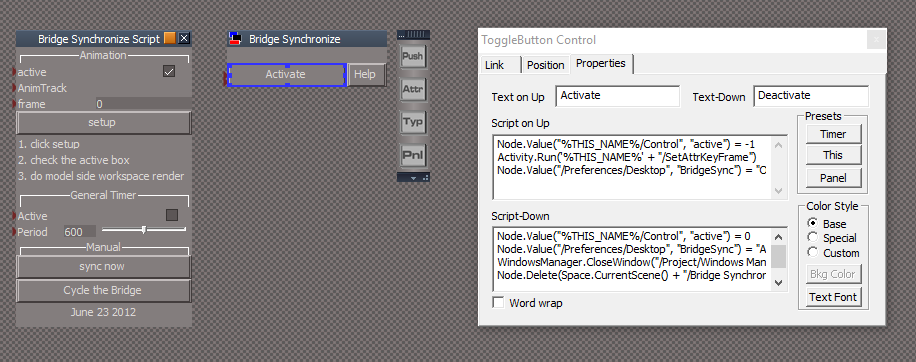
2.) Activate On/Off button. I was trying to make it more user freindly for non LE users.
On - Loads the script into the scene, opens it's floating panel, set 'active', and runs the script.
* Need to impove this button script to check for the script in the scene and loading the panel. IE: When user selects the Activate button mutiple times.
* Check and store user's current Bridge (Auto, On, Off) setting so that it can be restored with the Off button script.
* Provide feed back in the Status Line.
Off - Uncheck 'active, deletes script in the scene, clear Status message, and restores user's Bridge setting.
Test in tS7.61B.4 - Using your version or mine, only the first frame is rendered from Model even though I can see keyframes in the Model's Scene Editor. Model's scrubber is not working either.
I does render the frames when using Model's Render to File, only when I have Animation set to Workspace and either script version is active.
With your version the Bridge setting is not being changed.
I will provide more information on the Bake Keyframes and Automatic Keyframing later.
-
clintonman
- Captain
- Posts: 5659
- Joined: 21 May 2009, 21:08
- Type the number ten into the box: 0
- Location: California
Re: Final trueSpace 7.61 Beta 8 Unofficial Update
Saw your post and did a bunch of research.
The Bridge Synchronize generally only works in one direction from workspace to modelspace. It originally designed to allow the workspace option of rendering to files.
You can't scrub modelspace and have workspace follow.
The sync now button just runs the script once manually.
The cycle bridge button can't be run with animation because it requires user input. It is used to update workspace view for nurbs and metaball object changes.
I don't remember what the timer is used for.
The modelspace autorecord needs to be turned off, otherwise random keyframes may be generated. It can be toggled from script with tSBridge.SuggestTSStateByAlias("AnimationAutoRecord"); The state can't be read with script. A script command exists to read it but it doesn't work.
It might be possible to have the workspace scrubber follow the modelspace scrubber via a workaround.
1. change the Bridge Synchronize Script into an invisible mesh so it can be animated on modelside without being rendered
2. get modelside frame range
3. modelside set position of the y value to the first frame value and set a key on modelside
4. modelside set position of y to the last frame and set key
on workspace side connect a watchdog to the Bridge Synchronize Script mesh, reading the y value to set the workspace animation time
With this arrangement it wont be possible to have both scripts active at the same time.
I did a proof of concept test and got workspace scrubber to follow modelside scrubber. Did not test with the tSBridge.SynchronizeObject command yet.
The only missing piece is the command to press the record key button on modelside from workspace side. I have a list, but that one is missing for some reason.
The Bridge Synchronize generally only works in one direction from workspace to modelspace. It originally designed to allow the workspace option of rendering to files.
You can't scrub modelspace and have workspace follow.
The sync now button just runs the script once manually.
The cycle bridge button can't be run with animation because it requires user input. It is used to update workspace view for nurbs and metaball object changes.
I don't remember what the timer is used for.
The modelspace autorecord needs to be turned off, otherwise random keyframes may be generated. It can be toggled from script with tSBridge.SuggestTSStateByAlias("AnimationAutoRecord"); The state can't be read with script. A script command exists to read it but it doesn't work.
It might be possible to have the workspace scrubber follow the modelspace scrubber via a workaround.
1. change the Bridge Synchronize Script into an invisible mesh so it can be animated on modelside without being rendered
2. get modelside frame range
3. modelside set position of the y value to the first frame value and set a key on modelside
4. modelside set position of y to the last frame and set key
on workspace side connect a watchdog to the Bridge Synchronize Script mesh, reading the y value to set the workspace animation time
With this arrangement it wont be possible to have both scripts active at the same time.
I did a proof of concept test and got workspace scrubber to follow modelside scrubber. Did not test with the tSBridge.SynchronizeObject command yet.
The only missing piece is the command to press the record key button on modelside from workspace side. I have a list, but that one is missing for some reason.
-
trueBlue
- Captain
- Posts: 5548
- Joined: 06 Jul 2009, 22:50
- Type the number ten into the box: 10
Re: Final trueSpace 7.61 Beta 8 Unofficial Update
Yeah I have been searching high and low for the Model's Record Keyframe command. No such luck.
I even created a Model Animation toolbar by using tSBridge.xxxxxxxxx and looked at the menu buttons in WMS.
The Record button command is tSBridge.SuggestTSStateByAlias("AnimationAutoRecord");
Which toggles the Autorecord on and off.
Then there is tSBridge.AnimationFrame() -> VAR?
In the Scene Editor the Keyboard Shortcut for Record is Ctrl + R
Take a peak at C:\trueSpace761\tS\Rs Main Libraries\Activities - My Activities\tS KeyFrame Recorder.RsObj
For me, Auto Record is not working in the above script.
I was able to get both scrubbers working using this setup.
I guess your Bridge Synchronize Script is working as is and as expected, Rendering a Workspace animation from Model.
I even created a Model Animation toolbar by using tSBridge.xxxxxxxxx and looked at the menu buttons in WMS.
The Record button command is tSBridge.SuggestTSStateByAlias("AnimationAutoRecord");
Which toggles the Autorecord on and off.
Then there is tSBridge.AnimationFrame() -> VAR?
In the Scene Editor the Keyboard Shortcut for Record is Ctrl + R
Take a peak at C:\trueSpace761\tS\Rs Main Libraries\Activities - My Activities\tS KeyFrame Recorder.RsObj
For me, Auto Record is not working in the above script.
I was able to get both scrubbers working using this setup.

- Capture.PNG (7.12 KiB) Viewed 5371 times
-
clintonman
- Captain
- Posts: 5659
- Joined: 21 May 2009, 21:08
- Type the number ten into the box: 0
- Location: California
Re: Final trueSpace 7.61 Beta 8 Unofficial Update
Looks like some useful stuff in that "MoveAndRecordKf" script.
-
I got the keyframes to set from workspace.
I used tSBridge.AnimationFrame = endframe; to set the frame, but looks like tSBridge.PutActiveFrame(endframe); might work better.
Found the keyframe command by looking in the tsxapi.dll file, tSBridge.SuggestTSStateByAlias("RecordKeyFrameButton");
tSBridge.XorTypeTSStateByAlias("AnimationAutoRecord"); turns autokey on and like you said tSBridge.SuggestTSStateByAlias("AnimationAutoRecord") toggles the state.
The combination of tSBridge.XorTypeTSStateByAlias("AnimationAutoRecord"); and tSBridge.SuggestTSStateByAlias("AnimationAutoRecord") turns it off.
When setting keyframes, autokey had to be on and I had to change the X and Y values of the mesh to get it to keyframe reliably. If I just used X or Y it was unreliable.
Maybe I can use tSBridge.FlushSyncEvents(); instead of the pause nodes which were added for reliability reasons.
The only real problem left with this setup is that it only sets 2 keys and the interpolation between them isn't linear. It needs to set a key at every frame to get around that.
-

I used tSBridge.AnimationFrame = endframe; to set the frame, but looks like tSBridge.PutActiveFrame(endframe); might work better.
Found the keyframe command by looking in the tsxapi.dll file, tSBridge.SuggestTSStateByAlias("RecordKeyFrameButton");
tSBridge.XorTypeTSStateByAlias("AnimationAutoRecord"); turns autokey on and like you said tSBridge.SuggestTSStateByAlias("AnimationAutoRecord") toggles the state.
The combination of tSBridge.XorTypeTSStateByAlias("AnimationAutoRecord"); and tSBridge.SuggestTSStateByAlias("AnimationAutoRecord") turns it off.
When setting keyframes, autokey had to be on and I had to change the X and Y values of the mesh to get it to keyframe reliably. If I just used X or Y it was unreliable.
Maybe I can use tSBridge.FlushSyncEvents(); instead of the pause nodes which were added for reliability reasons.
The only real problem left with this setup is that it only sets 2 keys and the interpolation between them isn't linear. It needs to set a key at every frame to get around that.
-
trueBlue
- Captain
- Posts: 5548
- Joined: 06 Jul 2009, 22:50
- Type the number ten into the box: 10
Re: Final trueSpace 7.61 Beta 8 Unofficial Update
Yeah you found it!
I tested tSBridge.SuggestTSStateByAlias("RecordKeyFrameButton");
I have Model, Workspace, Link Editor, and the Stack open. Bridge set to Auto or On does not matter.
Model
AutoRecord - Off
Frame 0
Select object and run tSBridge.SuggestTSStateByAlias("RecordKeyFrameButton");
Set Frame to 30
Move selected object and run tSBridge.SuggestTSStateByAlias("RecordKeyFrameButton");
Model scrubber moves the object in Model and Workspace.
Workspace AE using Mosel's scrubber.
AE 's Record selected object's first (0) and last (30) frame.
Activate Bridge Synchronize script.
Model and Workspace scrubbers moves the object in Model and Workspace.
I tested tSBridge.SuggestTSStateByAlias("RecordKeyFrameButton");
I have Model, Workspace, Link Editor, and the Stack open. Bridge set to Auto or On does not matter.
Model
AutoRecord - Off
Frame 0
Select object and run tSBridge.SuggestTSStateByAlias("RecordKeyFrameButton");
Set Frame to 30
Move selected object and run tSBridge.SuggestTSStateByAlias("RecordKeyFrameButton");
Model scrubber moves the object in Model and Workspace.
Workspace AE using Mosel's scrubber.
AE 's Record selected object's first (0) and last (30) frame.
Activate Bridge Synchronize script.
Model and Workspace scrubbers moves the object in Model and Workspace.
-
Emmanuel

- Chief Warrant Officer
- Posts: 670
- Joined: 14 Jun 2009, 06:47
Re: Final trueSpace 7.61 Beta 8 Unofficial Update
Very interesting !
To render a VRay animation of moving objects, from Modeler, I need to keep a WS window open. Otherwise, trueSpace does not synchronizes and renders always the first frame. If the camera is moving, it works though, even if there is no WS window opened (probably because moving camera forces synch).
Will your script allow to render VRay animation from a plain Modeler interface (with no WS window opened at the same time) ?
To render a VRay animation of moving objects, from Modeler, I need to keep a WS window open. Otherwise, trueSpace does not synchronizes and renders always the first frame. If the camera is moving, it works though, even if there is no WS window opened (probably because moving camera forces synch).
Will your script allow to render VRay animation from a plain Modeler interface (with no WS window opened at the same time) ?
-
trueBlue
- Captain
- Posts: 5548
- Joined: 06 Jul 2009, 22:50
- Type the number ten into the box: 10
Re: Final trueSpace 7.61 Beta 8 Unofficial Update
tS76_Vray1_54B8
Quote from the VRay Readme.rtf
"There is one important aspect where V-Ray support differs from other trueSpace render engines - even though the user interface is fully integrated into the Modeler aspect, V-Ray support is based on the contents of the Workspace in trueSpace. The scene description (geometry, lights, and materials) is taken from the Workspace scene graph, so rendering relies on the Bridge between the Modeler and the Workspace for scene synchronization. With the addition of the Workspace Material Editor, you can now choose to work exclusively in Workspace, thereby avoiding any Bridge conversion issues."
From Clinton's web site.
Bridge Syncronize script -> http://clintons3d.com/plugins/truespace ... esync.html
When truespace 7.61B8 was released a bug was introduced that prevented workspace animations from rendering in the model side renders. The object animations did not transfer through the bridge. The bug also shows when scrubbing the workspace timeline and no motion will show in model side.
The bridge cycle button can be used to update workspace with model space changes. Press the button then choose "Sync from modeler"
Quote from the VRay Readme.rtf
"There is one important aspect where V-Ray support differs from other trueSpace render engines - even though the user interface is fully integrated into the Modeler aspect, V-Ray support is based on the contents of the Workspace in trueSpace. The scene description (geometry, lights, and materials) is taken from the Workspace scene graph, so rendering relies on the Bridge between the Modeler and the Workspace for scene synchronization. With the addition of the Workspace Material Editor, you can now choose to work exclusively in Workspace, thereby avoiding any Bridge conversion issues."
From Clinton's web site.
Bridge Syncronize script -> http://clintons3d.com/plugins/truespace ... esync.html
When truespace 7.61B8 was released a bug was introduced that prevented workspace animations from rendering in the model side renders. The object animations did not transfer through the bridge. The bug also shows when scrubbing the workspace timeline and no motion will show in model side.
The bridge cycle button can be used to update workspace with model space changes. Press the button then choose "Sync from modeler"
-
trueBlue
- Captain
- Posts: 5548
- Joined: 06 Jul 2009, 22:50
- Type the number ten into the box: 10
Re: Final trueSpace 7.61 Beta 8 Unofficial Update
@ Clinton
Here is the Bridge Synchronize script and Animation preferences panel I am proposing to use in the 7.61 unofficial update.
Here is the Bridge Synchronize script and Animation preferences panel I am proposing to use in the 7.61 unofficial update.
- Attachments
-
- Bridge Synchronize.zip
- (73.45 KiB) Downloaded 255 times
-
clintonman
- Captain
- Posts: 5659
- Joined: 21 May 2009, 21:08
- Type the number ten into the box: 0
- Location: California
Re: Final trueSpace 7.61 Beta 8 Unofficial Update
Got it, will test soon.
Did anything else change besides the Bridge Synchronize?
I made 2 changes:
1. typo Manualy to Manually in the help
2. added a means to press the Synchronize from modeler button automatically.
It creates a script file named "mysendkeys.js" in the scripts folder and runs it before setting the bridge sync to auto. The script returns immediately and runs in the background. It sleeps to give the dialog time to show itself then sends a <tab> and <enter> to trueSpace to focus the "sync from modeler" button and then presses it.
Did anything else change besides the Bridge Synchronize?
I made 2 changes:
1. typo Manualy to Manually in the help
2. added a means to press the Synchronize from modeler button automatically.
It creates a script file named "mysendkeys.js" in the scripts folder and runs it before setting the bridge sync to auto. The script returns immediately and runs in the background. It sleeps to give the dialog time to show itself then sends a <tab> and <enter> to trueSpace to focus the "sync from modeler" button and then presses it.
- Attachments
-
- Bridge SynchronizeX.RsObj
- (98 KiB) Downloaded 265 times
-
clintonman
- Captain
- Posts: 5659
- Joined: 21 May 2009, 21:08
- Type the number ten into the box: 0
- Location: California
Re: Final trueSpace 7.61 Beta 8 Unofficial Update
Tested and it seems to be working.
I also tried my idea where the workspace slider follows modelspace and it half worked. I rendered from modelspace and got motion from both workspace and modelspace, but only got about half the frames. About every other frame rendered with the other half as zero byte files.
I also tried my idea where the workspace slider follows modelspace and it half worked. I rendered from modelspace and got motion from both workspace and modelspace, but only got about half the frames. About every other frame rendered with the other half as zero byte files.
-
trueBlue
- Captain
- Posts: 5548
- Joined: 06 Jul 2009, 22:50
- Type the number ten into the box: 10
Re: Final trueSpace 7.61 Beta 8 Unofficial Update
Yeah! I have wanted and tried several times to send keys!
Been testing this in different scenarios, several times this morning.
The Sync from Modeler has been working as expected from the floating panel. The Content Synchronization shows and disappears when you use it from the Link Editor. If I disconnect the keysExternal script, it works from the Link Editor.
Also notice that when you close the Content Synchronization with the X button, it sets the Bridge to Off. This is true with or without your script.
The status message shows and disappears. Ugh!
Thinking I should remove the Delete Bridge Synchronize from the scene in the Deactivate button script.
Edit: Reread your post about the keysExternal script. So I think it is working as expected (shows and disappears ) when you run it from the Link Editor, but Not from the floating panel. IE: "sends a <tab> and <enter> to trueSpace to focus the "sync from modeler" button and then presses it." The Content Synchronization shows inactive and I have to select the "Sync from Modeler" button.
Been testing this in different scenarios, several times this morning.
The Sync from Modeler has been working as expected from the floating panel. The Content Synchronization shows and disappears when you use it from the Link Editor. If I disconnect the keysExternal script, it works from the Link Editor.
Also notice that when you close the Content Synchronization with the X button, it sets the Bridge to Off. This is true with or without your script.
The status message shows and disappears. Ugh!
Thinking I should remove the Delete Bridge Synchronize from the scene in the Deactivate button script.
Edit: Reread your post about the keysExternal script. So I think it is working as expected (shows and disappears ) when you run it from the Link Editor, but Not from the floating panel. IE: "sends a <tab> and <enter> to trueSpace to focus the "sync from modeler" button and then presses it." The Content Synchronization shows inactive and I have to select the "Sync from Modeler" button.
-
clintonman
- Captain
- Posts: 5659
- Joined: 21 May 2009, 21:08
- Type the number ten into the box: 0
- Location: California
Re: Final trueSpace 7.61 Beta 8 Unofficial Update
I was running from the link editor. Couldn't figure out how to add you AnimPref node to preferences since the original regenerates itself. I'll try testing with the combination of the old animpref node with the new BridgeSync.
-
clintonman
- Captain
- Posts: 5659
- Joined: 21 May 2009, 21:08
- Type the number ten into the box: 0
- Location: California
Re: Final trueSpace 7.61 Beta 8 Unofficial Update
It was a quick fix. I just commented out the code that gives focus to the trueSpace window which must have been taking focus away from the dialog.
I just commented out the code that gives focus to the trueSpace window which must have been taking focus away from the dialog.- Attachments
-
- Bridge SynchronizeXc9c4.RsObj
- (100.19 KiB) Downloaded 200 times
-
trueBlue
- Captain
- Posts: 5548
- Joined: 06 Jul 2009, 22:50
- Type the number ten into the box: 10
Re: Final trueSpace 7.61 Beta 8 Unofficial Update
Replace the C:\trueSpace761\tS\Scripts\preobjects\animpref.RsObj and Reset the Default Context.clintonman wrote: 28 Mar 2019, 15:16 I was running from the link editor. Couldn't figure out how to add you AnimPref node to preferences since the original regenerates itself. I'll try testing with the combination of the old animpref node with the new BridgeSync.
The Bridge Synchronize script would have to be saved with the widgets.
-
clintonman
- Captain
- Posts: 5659
- Joined: 21 May 2009, 21:08
- Type the number ten into the box: 0
- Location: California
Re: Final trueSpace 7.61 Beta 8 Unofficial Update
Ah, so that's the trick, thanks.trueBlue wrote: 28 Mar 2019, 15:47Replace the C:\trueSpace761\tS\Scripts\preobjects\animpref.RsObj and Reset the Default Context.clintonman wrote: 28 Mar 2019, 15:16 I was running from the link editor. Couldn't figure out how to add you AnimPref node to preferences since the original regenerates itself. I'll try testing with the combination of the old animpref node with the new BridgeSync.
-
trueBlue
- Captain
- Posts: 5548
- Joined: 06 Jul 2009, 22:50
- Type the number ten into the box: 10
Re: Final trueSpace 7.61 Beta 8 Unofficial Update
This works!clintonman wrote: 28 Mar 2019, 15:27 It was a quick fix.
I had to delete the old mysendkeys.js file and rerun the script though.
I removed the line that deletes the script from the scene and updated the Help.
- Attachments
-
- Bridge Synchronize.RsObj
- (95 KiB) Downloaded 209 times
-
clintonman
- Captain
- Posts: 5659
- Joined: 21 May 2009, 21:08
- Type the number ten into the box: 0
- Location: California
Re: Final trueSpace 7.61 Beta 8 Unofficial Update
It all works except the Synchronize button stopped working. Problem was node name was "Synchronize Workspac" instead of "Synchronize Workspace".
- Attachments
-
- Bridge SynchronizeY.RsObj
- (95.64 KiB) Downloaded 260 times
-
trueBlue
- Captain
- Posts: 5548
- Joined: 06 Jul 2009, 22:50
- Type the number ten into the box: 10
Re: Final trueSpace 7.61 Beta 8 Unofficial Update
Thank you Clinton!
If you can update the AnimPref panel in you Auto Keyframing installation we should be in sync.
http://clintons3d.com/plugins/truespace ... tokey.html
If you can update the AnimPref panel in you Auto Keyframing installation we should be in sync.
http://clintons3d.com/plugins/truespace ... tokey.html
-
clintonman
- Captain
- Posts: 5659
- Joined: 21 May 2009, 21:08
- Type the number ten into the box: 0
- Location: California
Re: Final trueSpace 7.61 Beta 8 Unofficial Update
Ok, what are the differences between the old AnimPref and the new one? so i can document it on the page.trueBlue wrote: 28 Mar 2019, 22:25 Thank you Clinton!
If you can update the AnimPref panel in you Auto Keyframing installation we should be in sync.
http://clintons3d.com/plugins/truespace ... tokey.html
-
trueBlue
- Captain
- Posts: 5548
- Joined: 06 Jul 2009, 22:50
- Type the number ten into the box: 10
Re: Final trueSpace 7.61 Beta 8 Unofficial Update
Only difference is the Automatic Keyframing 'Button' gives Status message:
Automatic Keyframing - Active
Different button name and longer.
Automatic Keyframing - Active
Different button name and longer.
- Attachments
-
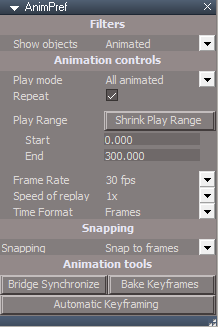
- Capture.PNG (8.69 KiB) Viewed 4362 times
-
clintonman
- Captain
- Posts: 5659
- Joined: 21 May 2009, 21:08
- Type the number ten into the box: 0
- Location: California
Re: Final trueSpace 7.61 Beta 8 Unofficial Update
Alright y.
Also FYI I have plans to update the YafaRay4tS to use modelspace animations. I found out that a combination of tSBridge.AnimationFrame = RsTime.CurrentTime - 1; followed by tSBridge.SuggestTSStateByAlias("NextFrameButton"); will update the modelside animations to follow the workspace time. It seems to work for everything except for nurbs and metaball deformations.
For those I found a trick of running a python script to make them invisible then visible again will make them update their shapes in the workspace side. The script is run using tSBridge.SuggestTSStateByAlias("PlayScriptButton"). I think to have that optional since it requires the manual step of loading a script (unless I can find a way to do it automatically) and because it's slow because of the need to pause at each frame to be sure the modelspace/workspace all updates.
Also FYI I have plans to update the YafaRay4tS to use modelspace animations. I found out that a combination of tSBridge.AnimationFrame = RsTime.CurrentTime - 1; followed by tSBridge.SuggestTSStateByAlias("NextFrameButton"); will update the modelside animations to follow the workspace time. It seems to work for everything except for nurbs and metaball deformations.
For those I found a trick of running a python script to make them invisible then visible again will make them update their shapes in the workspace side. The script is run using tSBridge.SuggestTSStateByAlias("PlayScriptButton"). I think to have that optional since it requires the manual step of loading a script (unless I can find a way to do it automatically) and because it's slow because of the need to pause at each frame to be sure the modelspace/workspace all updates.