I think I got the compositing nodes to a usable state. It consists of an object library full of nodes and an update to my rsx plugin. Also included is a bump map to normal map converter that runs faster than the script only version I posted last year. They can be downloaded here:
http://www.clintons3d.com/plugins/trues ... index.html"
you can see a list and brief description of the nodes here:
http://www.clintons3d.com/plugins/trues ... eNode.html"
I'll try to get some kind of tutorial/instructional materials out in the near future.
truespace compositing nodes released
-
clintonman

- Captain
- Posts: 5659
- Joined: 21 May 2009, 21:08
- Type the number ten into the box: 0
- Location: California
truespace compositing nodes released
-
Peter
- Senior Chief Petty Officer
- Posts: 170
- Joined: 18 Apr 2010, 15:18
- Type the number ten into the box: 0
- Location: Texas
Re: truespace compositing nodes released
Hello clintonman,
I'm very interested in these compositing tools.
Question: do these take as input a sequence of images or an avi, or do they take input from the current output of a 3D window (or windows)? The latter would be outstanding!
Also, do you have a sample scene file we could look at to help learning?
Thanks a lot for this - I'm sure it was a lot of work.
I'm very interested in these compositing tools.
Question: do these take as input a sequence of images or an avi, or do they take input from the current output of a 3D window (or windows)? The latter would be outstanding!
Also, do you have a sample scene file we could look at to help learning?
Thanks a lot for this - I'm sure it was a lot of work.
a day without orange juice is like... a day without orange juice
-
clintonman
- Captain
- Posts: 5659
- Joined: 21 May 2009, 21:08
- Type the number ten into the box: 0
- Location: California
Re: truespace compositing nodes released
It only reads image sequences. So no avi or any other movie format. They cannot read from the 3d view like perspective, right, top... but you can read images from a scene camera by using the D3D Texture render target node. You can find a sample scene in the Render to Texture library. The node has a Preview refresh input that can be turned on by changing the value from 0 to 1. It's texture output can be sent to the compositing nodes.Peter wrote:Hello clintonman,
I'm very interested in these compositing tools.
Question: do these take as input a sequence of images or an avi, or do they take input from the current output of a 3D window (or windows)? The latter would be outstanding!
Also, do you have a sample scene file we could look at to help learning?
Thanks a lot for this - I'm sure it was a lot of work.
I'll see what I can do about the learning materials. It's in the plan but I haven't gotten around to it yet.
-
v3rd3
- Lieutenant Commander
- Posts: 1191
- Joined: 21 May 2009, 20:04
Re: truespace compositing nodes released
Thanks again Clinton....
-
Peter
- Senior Chief Petty Officer
- Posts: 170
- Joined: 18 Apr 2010, 15:18
- Type the number ten into the box: 0
- Location: Texas
Re: truespace compositing nodes released
Hi Clinton,
The input from camera sounds interesting.
Thanks for the info.
The input from camera sounds interesting.
Thanks for the info.
a day without orange juice is like... a day without orange juice
-
clintonman
- Captain
- Posts: 5659
- Joined: 21 May 2009, 21:08
- Type the number ten into the box: 0
- Location: California
Re: truespace compositing nodes released
Update:
Fixed some bugs and made small aspects for the nodes so they fit better in the link editor.
http://www.clintons3d.com/plugins/trues ... index.html"
I also started working on the tut's. I'll post here when the first one is done.
Fixed some bugs and made small aspects for the nodes so they fit better in the link editor.
http://www.clintons3d.com/plugins/trues ... index.html"
-
clintonman
- Captain
- Posts: 5659
- Joined: 21 May 2009, 21:08
- Type the number ten into the box: 0
- Location: California
Re: truespace compositing nodes released
-
Peter
- Senior Chief Petty Officer
- Posts: 170
- Joined: 18 Apr 2010, 15:18
- Type the number ten into the box: 0
- Location: Texas
Re: truespace compositing nodes released
Wow!
This is absolutely great.
Easy to use, too.
The videos really help!
Thanks for this great suite of tools. I'll be needing them.
This is absolutely great.
Easy to use, too.
The videos really help!
Thanks for this great suite of tools. I'll be needing them.
a day without orange juice is like... a day without orange juice
-
clintonman
- Captain
- Posts: 5659
- Joined: 21 May 2009, 21:08
- Type the number ten into the box: 0
- Location: California
Re: truespace compositing nodes released
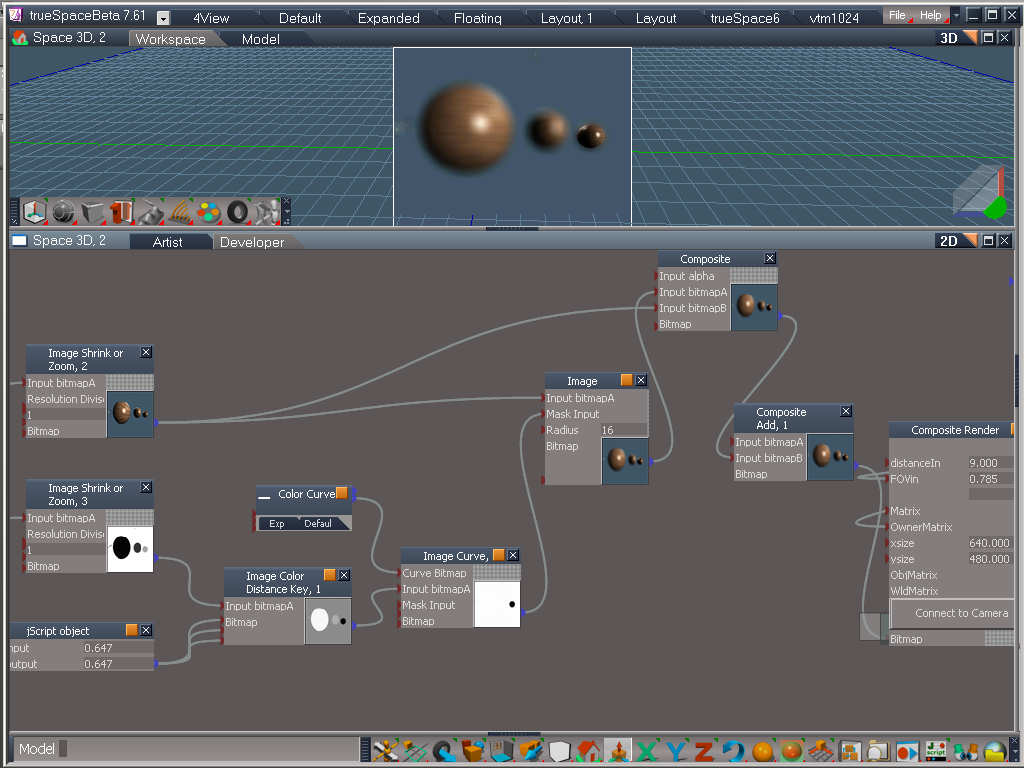
Thanks for the encouragement. I put a preview video on the page to show what's coming up for the next tutorial. Here's a still from the video:
Go to the tutorial page to see the video:
http://www.clintons3d.com/tutorials/TScompositing.htm"

http://www.clintons3d.com/tutorials/TScompositing.htm"
-
clintonman
- Captain
- Posts: 5659
- Joined: 21 May 2009, 21:08
- Type the number ten into the box: 0
- Location: California
Re: truespace compositing nodes released
The green screen video tutorial is done. Same link as last time:
http://www.clintons3d.com/tutorials/TScompositing.htm"
Total running time is about 1hour 30minutes.
http://www.clintons3d.com/tutorials/TScompositing.htm"
Total running time is about 1hour 30minutes.
-
v3rd3
- Lieutenant Commander
- Posts: 1191
- Joined: 21 May 2009, 20:04
Re: truespace compositing nodes released
Thank you Clinton...
-
Peter
- Senior Chief Petty Officer
- Posts: 170
- Joined: 18 Apr 2010, 15:18
- Type the number ten into the box: 0
- Location: Texas
Re: truespace compositing nodes released
Hi Clinton,
I've been trying out the composite nodes and am having a problem.
When I hook up an image loader to a composite render node then to a camera
the image in the window looks a bit blurry compared to the original.
I made sure that the nodes and the window had the same resolution (WxH) as the image.
(646X474)
Any suggestions?
Thanks.
I've been trying out the composite nodes and am having a problem.
When I hook up an image loader to a composite render node then to a camera
the image in the window looks a bit blurry compared to the original.
I made sure that the nodes and the window had the same resolution (WxH) as the image.
(646X474)
Any suggestions?
Thanks.
a day without orange juice is like... a day without orange juice
-
clintonman
- Captain
- Posts: 5659
- Joined: 21 May 2009, 21:08
- Type the number ten into the box: 0
- Location: California
Re: truespace compositing nodes released
I just recently found out that the textures inside the composite render node had compression turned on. I added an updated composite render with compression turned off to the downloads about 2 days ago. Do you have the latest?Peter wrote:Hi Clinton,
I've been trying out the composite nodes and am having a problem.
When I hook up an image loader to a composite render node then to a camera
the image in the window looks a bit blurry compared to the original.
I made sure that the nodes and the window had the same resolution (WxH) as the image.
(646X474)
Any suggestions?
Thanks.
Oops, I just looked back through the posts and I see I forgot to mention it. The Composite Render and Composite Render with Alpha nodes were updated on May 16. The only update is that the Enable Compression check on the texture nodes was unchecked. Compression for textures is on by default but it can cause blurriness and other artifacts in a material.
-
Peter
- Senior Chief Petty Officer
- Posts: 170
- Joined: 18 Apr 2010, 15:18
- Type the number ten into the box: 0
- Location: Texas
Re: truespace compositing nodes released
Got it, Thanks.
a day without orange juice is like... a day without orange juice
-
clintonman
- Captain
- Posts: 5659
- Joined: 21 May 2009, 21:08
- Type the number ten into the box: 0
- Location: California
Re: truespace compositing nodes released
Wow, a long time between updates.
I needed a fast blur for a project I'm working on and so I updated a few other nodes as well.
New nodes - basic perlin noise and interlace. Interlace alternates between to images every other line or so. The noise was part of an experiment that I never really finished years ago and only just discovered it sitting in the code base. The interlace was used when I needed to combine 2 image sequences, one from the truespace camera and another from a video. It was used to line up my tS animation with a real flight path for the lunar lander.
These nodes are faster by a factor of 5:
blur, convolve, channel combiner/splitter, image zoom, color difference matte and the bump2normal map
I only needed the blur and bump2normal and don't have plans to do any others. The biggest bottleneck now is the image loader node. If I can ever fix that (without much work) then it will be worth it to speed up the rest of the nodes.
http://clintons3d.com/plugins/truespace ... iting.html"
I needed a fast blur for a project I'm working on and so I updated a few other nodes as well.
New nodes - basic perlin noise and interlace. Interlace alternates between to images every other line or so. The noise was part of an experiment that I never really finished years ago and only just discovered it sitting in the code base. The interlace was used when I needed to combine 2 image sequences, one from the truespace camera and another from a video. It was used to line up my tS animation with a real flight path for the lunar lander.
These nodes are faster by a factor of 5:
blur, convolve, channel combiner/splitter, image zoom, color difference matte and the bump2normal map
I only needed the blur and bump2normal and don't have plans to do any others. The biggest bottleneck now is the image loader node. If I can ever fix that (without much work) then it will be worth it to speed up the rest of the nodes.
http://clintons3d.com/plugins/truespace ... iting.html"
-
clintonman
- Captain
- Posts: 5659
- Joined: 21 May 2009, 21:08
- Type the number ten into the box: 0
- Location: California
Re: truespace compositing nodes released
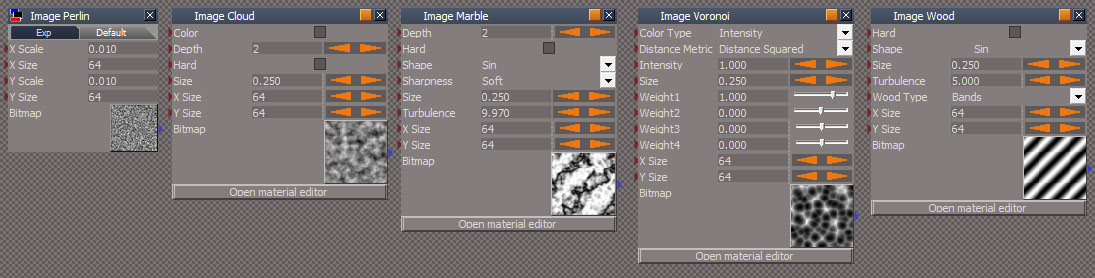
Added procedural texture nodes based on Blender 3D code: perlin, cloud, marble, voronoi and wood. Uses the latest rsx plugin. These are the same nodes used in the Yafaray update.
updated color picker that works with the web based color picker( was a separate download before)
http://clintons3d.com/plugins/truespace ... iting.html
-
Draise

- Captain
- Posts: 3200
- Joined: 21 Sep 2009, 19:33
- Type the number ten into the box: 0
- Location: Bogota, Colombia
Re: truespace compositing nodes released
That's quite nifty. It's cool to see the realyime viewport get some nodal love.
I have to admit I used your nodes mostly in materials.
I have to admit I used your nodes mostly in materials.
-
clintonman
- Captain
- Posts: 5659
- Joined: 21 May 2009, 21:08
- Type the number ten into the box: 0
- Location: California
Re: truespace compositing nodes released
April 2019 Update:
All nodes updated to higher speed versions.
New Image Resample node for changing the size of a bitmap
Includes a missing Image Crop node
Updated Color Curves script - was changed before but never documented in any way.
Uses updated rsx plugin file.
http://clintons3d.com/plugins/truespace ... iting.html
If loading into an Unofficially updated truespace, only the Color Curves, Crop and Resample needed to be copied from the zip archive, along with the new rsx plugin file.
All nodes updated to higher speed versions.
New Image Resample node for changing the size of a bitmap
Includes a missing Image Crop node
Updated Color Curves script - was changed before but never documented in any way.
Uses updated rsx plugin file.
http://clintons3d.com/plugins/truespace ... iting.html
If loading into an Unofficially updated truespace, only the Color Curves, Crop and Resample needed to be copied from the zip archive, along with the new rsx plugin file.
-
clintonman
- Captain
- Posts: 5659
- Joined: 21 May 2009, 21:08
- Type the number ten into the box: 0
- Location: California
Re: truespace compositing nodes released
April 2020 Update
Improved Bump2Normal node for conversion of grayscale images to tangential normal maps.
Has better math for the conversion and adds a strength control
The new node and updated rsx file can be downloaded from this page:
http://clintons3d.com/plugins/truespace ... iting.html
Improved Bump2Normal node for conversion of grayscale images to tangential normal maps.
Has better math for the conversion and adds a strength control
The new node and updated rsx file can be downloaded from this page:
http://clintons3d.com/plugins/truespace ... iting.html
-
trueBlue

- Captain
- Posts: 5548
- Joined: 06 Jul 2009, 22:50
- Type the number ten into the box: 10
Re: truespace compositing nodes released
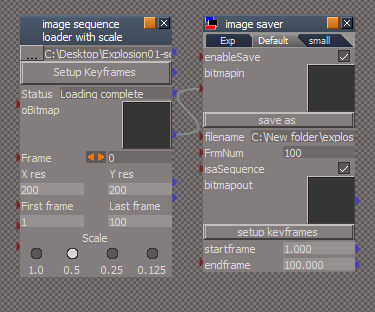
Is it possible to save a sequence of files to disk with your Image Saver?
BTW... getting undefined errors with this object.
I notice that your are saving a sequence of bitmaps into an Encapsulate node with your 'image sequence loader with scale'.
Was trying to see if I could Import and then Export a sequence of bitmaps at 0.5 Scale.
BTW... getting undefined errors with this object.
I notice that your are saving a sequence of bitmaps into an Encapsulate node with your 'image sequence loader with scale'.
Was trying to see if I could Import and then Export a sequence of bitmaps at 0.5 Scale.
- Image Saver.png (26.27 KiB) Viewed 5176 times
-
clintonman
- Captain
- Posts: 5659
- Joined: 21 May 2009, 21:08
- Type the number ten into the box: 0
- Location: California
Re: truespace compositing nodes released
I'll have to get back to you on that. I had no recollection of the 'image sequence loader with scale'.trueBlue wrote: 09 May 2020, 14:55 Is it possible to save a sequence of files to disk with your Image Saver?
BTW... getting undefined errors with this object.
I notice that your are saving a sequence of bitmaps into an Encapsulate node with your 'image sequence loader with scale'.
Was trying to see if I could Import and then Export a sequence of bitmaps at 0.5 Scale.
Image Saver.png
Went to check it on the webpage: http://clintons3d.com/plugins/truespace ... eNode.html
and it had in bold, "An experimental/unfinished node called "image sequence loader with scale" is included in the library/zip. Do not use it."
Workaround for saving a sequence from the same page:
"Use the Truespace "Render to File" to render a dummy sequence which in turn will force each frame to be evaluated."
This would save a sequence of images from the image saver
-
trueBlue
- Captain
- Posts: 5548
- Joined: 06 Jul 2009, 22:50
- Type the number ten into the box: 10
Re: truespace compositing nodes released
Hummm... I'll have to disagree, it works really well!clintonman wrote: 09 May 2020, 16:16 I'll have to get back to you on that. I had no recollection of the 'image sequence loader with scale'.
Went to check it on the webpage: http://clintons3d.com/plugins/truespace ... eNode.html
and it had in bold, "An experimental/unfinished node called "image sequence loader with scale" is included in the library/zip. Do not use it."
Very useful for sharing a sequence of images in a scene and reducing the file size.

I changed it from Create to Copy so that I could experiment with changing the InputBitmap's attributes.
Code: Select all
//newimage = Node.Create("D3D View Package/InputBitmap", encaps);
newimage = Node.Copy(System.ThisOwner() + "/InputBitmap", encaps);
Still testing your workaround, but so far, since it is a jScript, it does not work with Animation. IE: Render to Fileclintonman wrote: 09 May 2020, 16:16 Workaround for saving a sequence from the same page:
"Use the Truespace "Render to File" to render a dummy sequence which in turn will force each frame to be evaluated."
This would save a sequence of images from the image saver
Just seems that if you can save the Bitmaps to an Encaps, you would think you could also save to disk using your Save As plugin.
-
clintonman
- Captain
- Posts: 5659
- Joined: 21 May 2009, 21:08
- Type the number ten into the box: 0
- Location: California
Re: truespace compositing nodes released
I believe jscript objects work with render to file and jscript commands don't.trueBlue wrote: 09 May 2020, 17:59 ...
Still testing your workaround, but so far, since it is a jScript, it does not work with Animation. IE: Render to File
...
-
trueBlue
- Captain
- Posts: 5548
- Joined: 06 Jul 2009, 22:50
- Type the number ten into the box: 10
Re: truespace compositing nodes released

- Image Saver.png (16.03 KiB) Viewed 4669 times

PNG
TGA
EXF
HDR
JPG
TIF
Note: Missing BMP and DDS
Other Image Saver/Save As "Image on the Right" Is available on your web site: http://clintons3d.com/plugins/truespace ... eNode.html
BMP
JPG
TGA
PNG
DDS
HDR
Note: Missing TIF and EXF?
Both of these Image Savers creates a Model Status message "file dialog aborted" if you Cancel the Save As and it is not cleared.
I would like to update the image saver.RsObj in the Unofficial Updates with your newer version.
Is it possible to add the TIF options? That is of course if it supported with your Clintons3dPluginExt.rsx plugin.
Edit: Did a test and the image saver did not save an image using tif and or tga
-
clintonman
- Captain
- Posts: 5659
- Joined: 21 May 2009, 21:08
- Type the number ten into the box: 0
- Location: California
Re: truespace compositing nodes released
Did some digging and on the surface it looks like the bitmap file save command only works with some extensions:
From the Kernel.h file
I'm surprised TGA doesn't work but maybe a slightly different command is needed. It uses SaveToFile, maybe it needs to use SaveToFileEx.
From the Docs:
Nope, that's not it. Just did a test and TGA save was good without any changes to the saver.
Looks like formats not included in the list above would need a different way to save the images.
From the Kernel.h file
Code: Select all
enum RtBitmapFileFormat
    {	BFILEFMT_BMP	= 0,
	BFILEFMT_JPG	= 1,
	BFILEFMT_TGA	= 2,
	BFILEFMT_PNG	= 3,
	BFILEFMT_DDS	= 4,
	BFILEFMT_DIB	= 6,
	BFILEFMT_HDR	= 7,
	BFILEFMT_PFM	= 8,
	BFILEFMT_FORCE_DWORD	= 2147483647
} ;From the Docs:
Code: Select all
HRESULT IRdBitmap::SaveToFile ( [in] RtBitmapFileFormat  Format,	[in] BSTR  FileName	 )

This method is used to save image to a file.
Code: Select all
HRESULT IRdBitmap::SaveToFileEx ( [in] RtBitmapFileFormat  Format,[in] BSTR  FileName	 )

This method is used to save image to a file using external image library (alpha channel supported).Looks like formats not included in the list above would need a different way to save the images.
-
trueBlue
- Captain
- Posts: 5548
- Joined: 06 Jul 2009, 22:50
- Type the number ten into the box: 10
Re: truespace compositing nodes released
I was testing this the wrong way.
I was expecting it to save an image by just using the Save As button.
I see now that it is an jScript Object and that you need to run the Render to File.
I have updated the image saver.RsObj to your newest one and will upload to the Unofficial Updates.
The older one has a Save As tif option that does not work.
I was expecting it to save an image by just using the Save As button.
I see now that it is an jScript Object and that you need to run the Render to File.
I have updated the image saver.RsObj to your newest one and will upload to the Unofficial Updates.
The older one has a Save As tif option that does not work.
-
clintonman
- Captain
- Posts: 5659
- Joined: 21 May 2009, 21:08
- Type the number ten into the box: 0
- Location: California
Re: truespace compositing nodes released
When you do the "Save As" button it should save something immediately if the "enableSave" checkbox is active.trueBlue wrote: 13 May 2020, 21:44 I was testing this the wrong way.
I was expecting it to save an image by just using the Save As button.
I see now that it is an jScript Object and that you need to run the Render to File.
I have updated the image saver.RsObj to your newest one and will upload to the Unofficial Updates.
The older one has a Save As tif option that does not work.
-
trueBlue
- Captain
- Posts: 5548
- Joined: 06 Jul 2009, 22:50
- Type the number ten into the box: 10
Re: truespace compositing nodes released
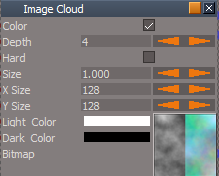
Why does checking Color create half B&W and Half color Bitmap?
- Image Cloud.png (13.02 KiB) Viewed 3207 times
-
clintonman
- Captain
- Posts: 5659
- Joined: 21 May 2009, 21:08
- Type the number ten into the box: 0
- Location: California
Re: truespace compositing nodes released
I would say it's a bug.trueBlue wrote: 10 Dec 2021, 20:59 Why does checking Color create half B&W and Half color Bitmap?
Image Cloud.png
-
trueBlue
- Captain
- Posts: 5548
- Joined: 06 Jul 2009, 22:50
- Type the number ten into the box: 10
Re: truespace compositing nodes released
I found an issue with the image sequence loader with scale
Not even sure how it was working
Problem is, the SwitchImage script is connecting an IN attribute to another IN attribute
Not even sure how it was working
Problem is, the SwitchImage script is connecting an IN attribute to another IN attribute
Code: Select all
//	Node.ConnectTo(newimage, "Bitmap", switchnode, "Bitmap")
	Node.ConnectTo(newimage, "oBitmap", switchnode, "Bitmap")
-
clintonman
- Captain
- Posts: 5659
- Joined: 21 May 2009, 21:08
- Type the number ten into the box: 0
- Location: California
Re: truespace compositing nodes released
Here's a quote from the website compositing nodes page, "An experimental/unfinished node called "image sequence loader with scale" is included in the library/zip. Do not use it."trueBlue wrote: 10 Dec 2021, 23:21 I found an issue with the image sequence loader with scale
Not even sure how it was working
Problem is, the SwitchImage script is connecting an IN attribute to another IN attributeCode: Select all
//	Node.ConnectTo(newimage, "Bitmap", switchnode, "Bitmap")
	Node.ConnectTo(newimage, "oBitmap", switchnode, "Bitmap")
So I figure there's some things wrong with it.
-
clintonman
- Captain
- Posts: 5659
- Joined: 21 May 2009, 21:08
- Type the number ten into the box: 0
- Location: California
Re: truespace compositing nodes released
Dec 11
new rsx plugin v1638431
http://clintons3d.com/plugins/truespace ... index.html
The image cloud color option only half colored bug is fixed
Also the "no undo" script commands have been altered to work more like the built in tS Node commands in that they don't error out with invalid node definitions.
The tS Node.Copy, Rename and Value all give errors with nonexistent nodes, so the "no undo" versions have not been altered.
Delete, Disconnect, DisconnectAll, ConnectTo, ConRemove along with ClearStatusMessage will no longer give errors because of invalid nodes. This should make it easier to work with them.
new rsx plugin v1638431
http://clintons3d.com/plugins/truespace ... index.html
The image cloud color option only half colored bug is fixed
Also the "no undo" script commands have been altered to work more like the built in tS Node commands in that they don't error out with invalid node definitions.
The tS Node.Copy, Rename and Value all give errors with nonexistent nodes, so the "no undo" versions have not been altered.
Delete, Disconnect, DisconnectAll, ConnectTo, ConRemove along with ClearStatusMessage will no longer give errors because of invalid nodes. This should make it easier to work with them.
-
trueBlue
- Captain
- Posts: 5548
- Joined: 06 Jul 2009, 22:50
- Type the number ten into the box: 10
Re: truespace compositing nodes released
Thank you for the updates!
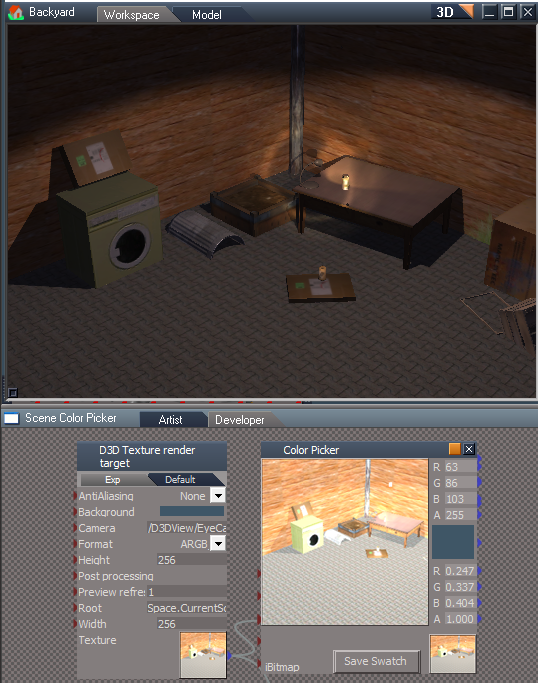
Is there a Compositing script that will control the Brightness of a Bitmap?
I tried all of them and was not able to get what I was wanting
The Texture generated with the D3D Texture render target is way too bright!
-
clintonman
- Captain
- Posts: 5659
- Joined: 21 May 2009, 21:08
- Type the number ten into the box: 0
- Location: California
Re: truespace compositing nodes released
Image Multiply is brightness and contrast.trueBlue wrote: 12 Dec 2021, 01:56
Thank you for the updates!
Is there a Compositing script that will control the Brightness of a Bitmap?
I tried all of them and was not able to get what I was wanting
The Texture generated with the D3D Texture render target is way too bright!
D3D Render to Texture.png
Maybe the render target has some default post process that's making it brighter?
-
trueBlue
- Captain
- Posts: 5548
- Joined: 06 Jul 2009, 22:50
- Type the number ten into the box: 10
Re: truespace compositing nodes released
Not sure what makes it so bright
Your Image Multiply seems to help
Question, do you control the Brightness with the RGB values?
Your Image Multiply seems to help
Question, do you control the Brightness with the RGB values?
-
clintonman
- Captain
- Posts: 5659
- Joined: 21 May 2009, 21:08
- Type the number ten into the box: 0
- Location: California
Re: truespace compositing nodes released
Yep. "Alpha Value Only check will multiply the rgb by the alpha in input. Unchecked and each rgba will be multiplied individually."trueBlue wrote: 12 Dec 2021, 03:47 Not sure what makes it so bright
Your Image Multiply seems to help
Question, do you control the Brightness with the RGB values?
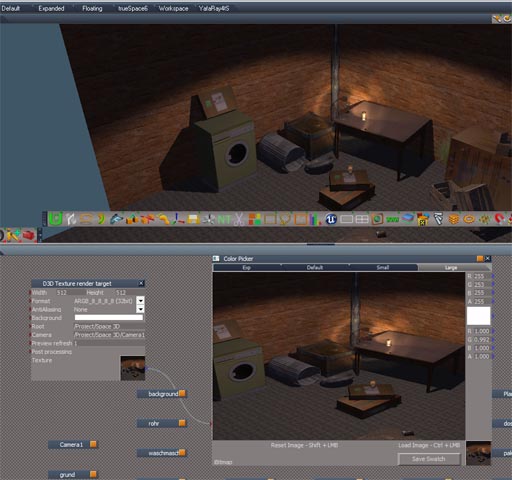
I'll do a test when I get a chance. I never notice the brightness issue before. Just had a thought, maybe the node is tuned for default tS lights and UU lights give a different result.
-
trueBlue
- Captain
- Posts: 5548
- Joined: 06 Jul 2009, 22:50
- Type the number ten into the box: 10
Re: truespace compositing nodes released
UU lights should be the same as tS lights besides the panel icon scripts and meshes
-
clintonman
- Captain
- Posts: 5659
- Joined: 21 May 2009, 21:08
- Type the number ten into the box: 0
- Location: California
Re: truespace compositing nodes released
-
trueBlue
- Captain
- Posts: 5548
- Joined: 06 Jul 2009, 22:50
- Type the number ten into the box: 10
Re: truespace compositing nodes released
Thanks!
I was experimenting with a few ideas
Root = Space.CurrentScene()
Camera = /D3DView/EyeCamera_{2C152F81-45A2-4035-8896-9E49D60C8A7A}
I think my biggest issue was I had the Color picker & Render to Texture encapsulated
As soon as I exported the above two attributes, everything started working as expected
I was experimenting with a few ideas
Root = Space.CurrentScene()
Camera = /D3DView/EyeCamera_{2C152F81-45A2-4035-8896-9E49D60C8A7A}
I think my biggest issue was I had the Color picker & Render to Texture encapsulated
As soon as I exported the above two attributes, everything started working as expected
-
clintonman
- Captain
- Posts: 5659
- Joined: 21 May 2009, 21:08
- Type the number ten into the box: 0
- Location: California
Re: truespace compositing nodes released
It looks like the Root has to have a valid value. If you encapsulate and set the Root properly it still works.trueBlue wrote: 12 Dec 2021, 16:07 Thanks!
I was experimenting with a few ideas
Root = Space.CurrentScene()
Camera = /D3DView/EyeCamera_{2C152F81-45A2-4035-8896-9E49D60C8A7A}
I think my biggest issue was I had the Color picker & Render to Texture encapsulated
As soon as I exported the above two attributes, everything started working as expected
I didn't know you could use the EyeCamera_xxx like that. I thought it had to be a camera in the scene.
-
trueBlue
- Captain
- Posts: 5548
- Joined: 06 Jul 2009, 22:50
- Type the number ten into the box: 10
Re: truespace compositing nodes released
I downloaded your new plugin this morningclintonman wrote: 12 Dec 2021, 00:35 Dec 11
new rsx plugin v1638431
http://clintons3d.com/plugins/truespace ... index.html
The image cloud color option only half colored bug is fixed
Also the "no undo" script commands have been altered to work more like the built in tS Node commands in that they don't error out with invalid node definitions.
The tS Node.Copy, Rename and Value all give errors with nonexistent nodes, so the "no undo" versions have not been altered.
Delete, Disconnect, DisconnectAll, ConnectTo, ConRemove along with ClearStatusMessage will no longer give errors because of invalid nodes. This should make it easier to work with them.
Looks like the version is 1638430
NAME="Clintons3D Package" VERSION="v.1638430"
Do I have the correct one?
Edit: Nevermind
I did not reboot after Uninstalling it