Final trueSpace 7.61 Beta 8 Unofficial Update
-
clintonman

- Captain
- Posts: 5659
- Joined: 21 May 2009, 21:08
- Type the number ten into the box: 0
- Location: California
Re: Final trueSpace 7.61 Beta 8 Unofficial Update
Minor change to the ProtectWorkspace scripts to do Alert errors only if run directly. Don't want alerts if run remotely, especially in an animation loop. When in a loop will only write to the log view.
- Attachments
-
- ProtectWorkspace1220.RsObj
- (82.54 KiB) Downloaded 199 times
-
trueBlue

- Captain
- Posts: 5548
- Joined: 06 Jul 2009, 22:50
- Type the number ten into the box: 10
Re: Final trueSpace 7.61 Beta 8 Unofficial Update
Edit: Crossed Post
I tried your newest version running ProtectWorkspace from the scene and from Scripts/CustomCommands.
The Workspace aspect Deactivate button does not remove the ProtectWorkspace and other nodes.
Still get an error with Restore names
I tried your newest version running ProtectWorkspace from the scene and from Scripts/CustomCommands.
The Workspace aspect Deactivate button does not remove the ProtectWorkspace and other nodes.
Still get an error with Restore names

- Capture.PNG (12 KiB) Viewed 3847 times
-
clintonman
- Captain
- Posts: 5659
- Joined: 21 May 2009, 21:08
- Type the number ten into the box: 0
- Location: California
Re: Final trueSpace 7.61 Beta 8 Unofficial Update
The minor change above won't affect it.trueBlue wrote: 04 Aug 2019, 20:53 Edit: Crossed Post
I tried your newest version running ProtectWorkspace from the scene and from Scripts/CustomCommands.
The Workspace aspect Deactivate button does not remove the ProtectWorkspace and other nodes.
Still get an error with Restore names
Capture.PNG
Deactivate button should not be removing the ProtectWorkspace node because it will live in /Scripts/Custom Commands, not the scene. The only thing the Workspace Deactivate button should remove is itself.
Not the same error as before, will check it out.
Edit: Did you use a fresh scene to test? Previous run of broken Synchronize could have put a bad NamesData node in the scene, which would cause that error.
Edit: Also any steps you took would be helpful.
Edit: Ah, I misread your post and I see the problem now.
-
clintonman
- Captain
- Posts: 5659
- Joined: 21 May 2009, 21:08
- Type the number ten into the box: 0
- Location: California
Re: Final trueSpace 7.61 Beta 8 Unofficial Update
Fixed workspace aspect deactivate action by moving the delete self to the last node in the chain.
- Attachments
-
- Synchronizeddc6.RsObj
- (199.69 KiB) Downloaded 173 times
-
trueBlue
- Captain
- Posts: 5548
- Joined: 06 Jul 2009, 22:50
- Type the number ten into the box: 10
Re: Final trueSpace 7.61 Beta 8 Unofficial Update
The Default aspect Activate/Deactivate works great.
I know this is not supported but it creates an error.
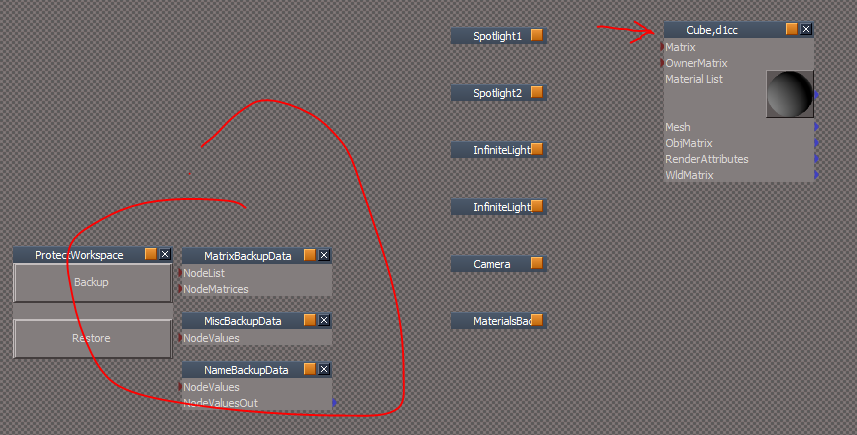
1.) New scene add a "Cube, 1" object, Before selecting the Synchronize Activate button, select Restore names creates an error (Line 34) and adds a NameBackupData node.
2.) Select the Synchronize Activate button and Restore names button = no error.
3.) Select the Workspace aspect Activate/Deactivate button.
Does not work like the Default aspect Activate/Deactivate.
It does not rename the Cube and does not remove the nodes.
The simple fix is to add the Node.Delete lines to the Deactivate button script. Unless I am missing something.
I know this is not supported but it creates an error.
1.) New scene add a "Cube, 1" object, Before selecting the Synchronize Activate button, select Restore names creates an error (Line 34) and adds a NameBackupData node.
2.) Select the Synchronize Activate button and Restore names button = no error.
3.) Select the Workspace aspect Activate/Deactivate button.
Does not work like the Default aspect Activate/Deactivate.
It does not rename the Cube and does not remove the nodes.
-
clintonman
- Captain
- Posts: 5659
- Joined: 21 May 2009, 21:08
- Type the number ten into the box: 0
- Location: California
Re: Final trueSpace 7.61 Beta 8 Unofficial Update
Fixed number 1.)trueBlue wrote: 04 Aug 2019, 22:03 The Default aspect Activate/Deactivate works great.
I know this is not supported but it creates an error.
1.) New scene add a "Cube, 1" object, Before selecting the Synchronize Activate button, select Restore names creates an error (Line 34) and adds a NameBackupData node.
2.) Select the Synchronize Activate button and Restore names button = no error.
3.) Select the Workspace aspect Activate/Deactivate button.
Does not work like the Default aspect Activate/Deactivate.
It does not rename the Cube and does not remove the nodes.
Capture.PNG
The simple fix is to add the Node.Delete lines to the Deactivate button script. Unless I am missing something.
2.) is that a problem? "= no error" means "all good" or means "I expected an error"?
Not seeing number 3.) at all, any steps to reproduce it?
- Attachments
-
- Synchronize6031.RsObj
- (200.41 KiB) Downloaded 182 times
-
trueBlue
- Captain
- Posts: 5548
- Joined: 06 Jul 2009, 22:50
- Type the number ten into the box: 10
Re: Final trueSpace 7.61 Beta 8 Unofficial Update
Still have a problem with:
1.) New scene add a "Cube, 1" object, Before selecting the Synchronize Activate button, select Restore names creates an error (Line 34) and adds a NameBackupData node.
All else that I reported seems golden.
If you can not fix the error, maybe some instructions?
Removed due to update
1.) New scene add a "Cube, 1" object, Before selecting the Synchronize Activate button, select Restore names creates an error (Line 34) and adds a NameBackupData node.
All else that I reported seems golden.
If you can not fix the error, maybe some instructions?
Removed due to update
-
clintonman
- Captain
- Posts: 5659
- Joined: 21 May 2009, 21:08
- Type the number ten into the box: 0
- Location: California
Re: Final trueSpace 7.61 Beta 8 Unofficial Update
I see it now. I fixed the error case where the the NameBackupData was already in the scene indicating that the synchronize was still active.trueBlue wrote: 05 Aug 2019, 01:40 Still have a problem with:
1.) New scene add a "Cube, 1" object, Before selecting the Synchronize Activate button, select Restore names creates an error (Line 34) and adds a NameBackupData node.
All else that I reported seems golden.
If you can not fix the error, maybe some instructions?
The actual problem you reported is cause by the NameBackupData inside Synchronize.
A copy of NameBackupData is stored inside the Synchronize node for the case where a user forgets to close modelspace before deactivation and the restoration of node names fails. When we save or copy the Synchronize node the Name data goes bad, causing the errors.
Fix is to remove NameBackupData before saving the Synchronize script.
The following fixes should add a layer of safety in case it reappears also fixed for the case where synchronize is active and the scene is closed and then reopened.
It's strange, I thought data on connectors was saved with the scene and that you could copy a node with it's data.
Just did a test: It must be a bug with the array data types, since simple inputs like numbers survive copy and values are still there when you close and open the scene.
- Attachments
-
- Synchronize3e60.RsObj
- (198.81 KiB) Downloaded 160 times
-
- ProtectWorkspace2464.RsObj
- (83.83 KiB) Downloaded 175 times
-
trueBlue
- Captain
- Posts: 5548
- Joined: 06 Jul 2009, 22:50
- Type the number ten into the box: 10
Re: Final trueSpace 7.61 Beta 8 Unofficial Update
Edit: Cross post
I am seeing a problem with the Synchronize script the way it is handling the loading of the ProtectWorkspace script.
My guess of what's missing is that it needs to Load and Activate the ProtectWorkspace script automatically upon loading into 3D Space first. Then Activate the Synchronize script from the button.
I am seeing a problem with the Synchronize script the way it is handling the loading of the ProtectWorkspace script.
My guess of what's missing is that it needs to Load and Activate the ProtectWorkspace script automatically upon loading into 3D Space first. Then Activate the Synchronize script from the button.
-
clintonman
- Captain
- Posts: 5659
- Joined: 21 May 2009, 21:08
- Type the number ten into the box: 0
- Location: California
Re: Final trueSpace 7.61 Beta 8 Unofficial Update
Can you describe the problem?trueBlue wrote: 05 Aug 2019, 03:29 Edit: Cross post
I am seeing a problem with the Synchronize script the way it is handling the loading of the ProtectWorkspace script.
My guess of what's missing is that it needs to Load and Activate the ProtectWorkspace script automatically upon loading into 3D Space first. Then Activate the Synchronize script from the button.
The ProtectWorkspace script isn't loaded into the scene - it is only run, resulting in the backup data nodes. When it finishes it returns control to the Synchronize scripts. Same thing happens on restore.
-
trueBlue
- Captain
- Posts: 5548
- Joined: 06 Jul 2009, 22:50
- Type the number ten into the box: 10
Re: Final trueSpace 7.61 Beta 8 Unofficial Update
New ProtectWorkspace works by itself as expected.
New Synchronize does not work.
With no Model open.
Activate the Synchronize script. Objects are renamed.
Open Model. Object names are changed.
There is no Synchronization with Model.
Use the View buttons (whch runs Activate again) and or manually select View from Object in Model initializes Synchronization.
Deactivate the Synchronize script.
Object's names that were saved are renamed without the space between the comma and number.
Edit: Forget to replace the ProtectWorkspace in CustomCommands. Retesting...
New Synchronize does not work.
With no Model open.
Activate the Synchronize script. Objects are renamed.
Open Model. Object names are changed.
There is no Synchronization with Model.
Use the View buttons (whch runs Activate again) and or manually select View from Object in Model initializes Synchronization.
Deactivate the Synchronize script.
Object's names that were saved are renamed without the space between the comma and number.
Edit: Forget to replace the ProtectWorkspace in CustomCommands. Retesting...
-
clintonman
- Captain
- Posts: 5659
- Joined: 21 May 2009, 21:08
- Type the number ten into the box: 0
- Location: California
Re: Final trueSpace 7.61 Beta 8 Unofficial Update
Ok, I'll wait for the retests.trueBlue wrote: 05 Aug 2019, 04:41 ...
Edit: Forget to replace the ProtectWorkspace in CustomCommands. Retesting...
In my opinion modelspace renaming is so aggressive that it's not even worth trying to maintain the names. It makes the whole synchronization process more clunky since you have to protect before modelspace is open, you have to select the view button afterward because model view wasn't open when synchronize was started and you have to be sure to close modelspace before deactivating synchronization to get the names back (even though the Restore names button provides a workaround for that). It all works, but not smoothly.
Best practice would be to name items in a scene manually instead of relying on the automatic trueSpace numbering scheme assigned to copies and duplicates.
-
trueBlue
- Captain
- Posts: 5548
- Joined: 06 Jul 2009, 22:50
- Type the number ten into the box: 10
Re: Final trueSpace 7.61 Beta 8 Unofficial Update
I agree but what you did is really awesome!
Open your Workspace scene in Model and then resave it in Workspace.
Odd that nobody has mentioned the Model renaming in all these years.
I do not know if this is possible but in the restore WS Names script,
line 66 = System.Trace("original node found at " + thePath);
if you could put something there to stop the code, return, and a status message or an Alert to "Close Model first before Restoring the names".
Not having the views in sync on Activation automatically is not good though.
As it is now with your newest version using the Synchronize.RsObj and ProtectWorkspace.RsObj in the same scene is not good either. Didn't they work together in a previous version?
Was also wondering if you could keep the data nodes inside the ProtectWorkspace and export them?
Would save all the copying and deleting. Do not if it would work that way though.
LOL, not manually! We already have an automatic trueSpace naming system.Clinton: Best practice would be to name items in a scene manually instead of relying on the automatic trueSpace numbering scheme assigned to copies and duplicates. instead of relying on the automatic trueSpace numbering scheme assigned to copies and duplicates.
Open your Workspace scene in Model and then resave it in Workspace.
Odd that nobody has mentioned the Model renaming in all these years.
I do not know if this is possible but in the restore WS Names script,
line 66 = System.Trace("original node found at " + thePath);
if you could put something there to stop the code, return, and a status message or an Alert to "Close Model first before Restoring the names".
Not having the views in sync on Activation automatically is not good though.
As it is now with your newest version using the Synchronize.RsObj and ProtectWorkspace.RsObj in the same scene is not good either. Didn't they work together in a previous version?
Was also wondering if you could keep the data nodes inside the ProtectWorkspace and export them?
Would save all the copying and deleting. Do not if it would work that way though.

- Capture.PNG (14.3 KiB) Viewed 3984 times
-
trueBlue
- Captain
- Posts: 5548
- Joined: 06 Jul 2009, 22:50
- Type the number ten into the box: 10
Re: Final trueSpace 7.61 Beta 8 Unofficial Update
Maybe if you had control of the Model window it would help.
Try this scene.
Select the buttons on the included script from the top down.
Edit: Updated the scene. 8/5/2019
Removed due to update
Try this scene.
Select the buttons on the included script from the top down.
Edit: Updated the scene. 8/5/2019
Removed due to update
-
clintonman
- Captain
- Posts: 5659
- Joined: 21 May 2009, 21:08
- Type the number ten into the box: 0
- Location: California
Re: Final trueSpace 7.61 Beta 8 Unofficial Update
It works as far as I know. Did you do the retesting yet? If so what's not working and what are the steps that show it not working?trueBlue wrote: 05 Aug 2019, 06:04 ...
As it is now with your newest version using the Synchronize.RsObj and ProtectWorkspace.RsObj in the same scene is not good either. Didn't they work together in a previous version?
...
-
trueBlue
- Captain
- Posts: 5548
- Joined: 06 Jul 2009, 22:50
- Type the number ten into the box: 10
Re: Final trueSpace 7.61 Beta 8 Unofficial Update
They work together in the scene from Synchronize, but if you select ProtectWorkspace/Backup and then Synchronize/Activate/Deactivate, it does not work.
I updated the previous scene.
I updated the previous scene.
-
clintonman
- Captain
- Posts: 5659
- Joined: 21 May 2009, 21:08
- Type the number ten into the box: 0
- Location: California
Re: Final trueSpace 7.61 Beta 8 Unofficial Update
Ok, I'll look into it.trueBlue wrote: 05 Aug 2019, 15:05 They work together in the scene from Synchronize, but if you select ProtectWorkspace/Backup and then Synchronize/Activate/Deactivate, it does not work.
I updated the previous scene.
Edit: So "it does not work" means the name preservation isn't working. If so same thing happens if you do ProtectWorkspace - Backup twice.
Last edited by clintonman on 05 Aug 2019, 18:09, edited 1 time in total.
-
clintonman
- Captain
- Posts: 5659
- Joined: 21 May 2009, 21:08
- Type the number ten into the box: 0
- Location: California
Re: Final trueSpace 7.61 Beta 8 Unofficial Update
Nobody mentioned it because nobody cares. If truespace is setting the names for you, you're not going to care if it changes them again later.trueBlue wrote: 05 Aug 2019, 06:04 ...
Odd that nobody has mentioned the Model renaming in all these years.
I do not know if this is possible but in the restore WS Names script,
line 66 = System.Trace("original node found at " + thePath);
if you could put something there to stop the code, return, and a status message or an Alert to "Close Model first before Restoring the names".
...
Was also wondering if you could keep the data nodes inside the ProtectWorkspace and export them?
Would save all the copying and deleting. Do not if it would work that way though.
Capture.PNG
I found that the window frame Def3D seems to have a specific value when the view is modelspace, so can probably use that for the alert.
The data nodes should be in the scene, so they can be saved with the scene and not be accidentally merged with another scene. When protection is run manually data needs to stay in the scene until the user decides it's time to restore. As of now the data isn't being stored properly because of a truespace bug. Copy the data node and it goes bad. Close the scene and open the scene and the data goes bad. I have a couple of ideas to fix it.
-
trueBlue
- Captain
- Posts: 5548
- Joined: 06 Jul 2009, 22:50
- Type the number ten into the box: 10
Re: Final trueSpace 7.61 Beta 8 Unofficial Update
Thanks!
Here is what I have come up with that I think works really well.
Synchronize
Changes:
Location changed to the default perspective and backed out a long way.
View buttons changed to Model:
This opens a Link Editor window and switches to Model. It will also work if a Model window is already opened too. Only one Model window can be opened at one time.
Added a Help aspect. This still needs to be finished.
Steps to use:
Activate
Model
Close -----> If you do not Close before Deactivate, you will lose the Backup!
Deactivate
ProtectWorkspace
Added
to the Backup button.
Note: All of the above objects including the Data nodes where saved from the Link Editor, so that when they load they are all together and organized.
Camera
This a New Scene camera that is compatible with the Synchronize object.
Changed it's View button script.
Removed due to update
Here is what I have come up with that I think works really well.
Synchronize
Changes:
Location changed to the default perspective and backed out a long way.
View buttons changed to Model:
This opens a Link Editor window and switches to Model. It will also work if a Model window is already opened too. Only one Model window can be opened at one time.
Added a Help aspect. This still needs to be finished.
Steps to use:
Activate
Model
Close -----> If you do not Close before Deactivate, you will lose the Backup!
Deactivate
ProtectWorkspace
Added
Code: Select all
if(Node.Exists(Space.CurrentScene() + '/Synchronize')) {
System.Alert('Protect Workspace is not compatable with Synchronize')
return;
}Note: All of the above objects including the Data nodes where saved from the Link Editor, so that when they load they are all together and organized.
Camera
This a New Scene camera that is compatible with the Synchronize object.
Changed it's View button script.
Removed due to update
-
clintonman
- Captain
- Posts: 5659
- Joined: 21 May 2009, 21:08
- Type the number ten into the box: 0
- Location: California
Re: Final trueSpace 7.61 Beta 8 Unofficial Update
It sounds good.
Can you explain this in more detail?trueBlue wrote: 05 Aug 2019, 19:42 ...
Note: All of the above objects including the Data nodes where saved from the Link Editor, so that when they load they are all together and organized.
Is this a replacement for the truespace camera or is it just for synchronize purposes?trueBlue wrote: 05 Aug 2019, 19:42 ...
Camera
This a New Scene camera that is compatible with the Synchronize object.
Changed it's View button script.
-
trueBlue
- Captain
- Posts: 5548
- Joined: 06 Jul 2009, 22:50
- Type the number ten into the box: 10
Re: Final trueSpace 7.61 Beta 8 Unofficial Update
Can you explain this in more detail?
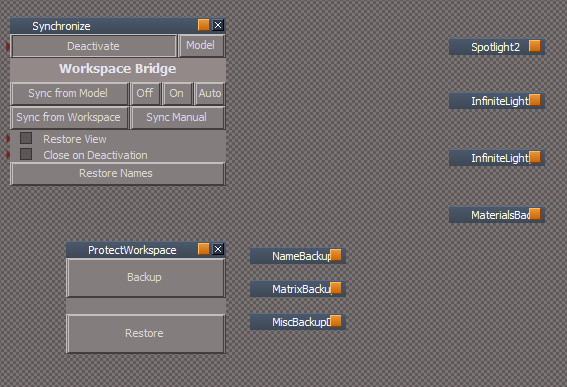
Move a node where you would like it to Load at.
Save it to a Library or use the File menu.
There is a little trick if you want to save into another object inside tS76.
Navigate to the inside of an object, Arrange it, and select one of it's nodes, then Load it from a Library.
Arrow shows where they load.

I was thinking about replacing all of the Cameras in the Update.Is this a replacement for the truespace camera or is it just for synchronize purposes?
It has a Watch Dog Event hooked to a script.
Code: Select all
tSBridge.SynchronizeObject(Space.CurrentScene() + System.ThisOwner())Code: Select all
if(Node.Exists(Space.CurrentScene() + '/Synchronize')) {
Activity.Run(Space.CurrentScene() + "/Synchronize/Set Camera")
tSBridge.SuggestTSStateByAlias("SV_VIEW_VIEW_CAMERA")
tSBridge.SuggestTSStateByAlias("SV_VIEW_VIEW_CAMERA")
Node.Disconnect('%THIS_NAME%/Transform', 'WldMatrix', '%THIS_NAME%/Watch Dog Event', 'Change detect')
Node.Disconnect('%THIS_NAME%', 'FOV', '%THIS_NAME%/Watch Dog Event', 'Change detect')
Node.ConnectTo('%THIS_NAME%', 'FOV', '%THIS_NAME%/Watch Dog Event', 'Change detect')
Node.ConnectTo('%THIS_NAME%/Transform', 'WldMatrix', '%THIS_NAME%/Watch Dog Event', 'Change detect')
}
if(!Node.Exists(Space.CurrentScene() + '/Synchronize')) {
Node.Select('%THIS_NAME%');
D3DView.SetActiveCamera('', '');
D3DView.SetActiveCamera("", '{2C152F81-45A2-4035-8896-9E49D60C8A7A}')
}-
trueBlue
- Captain
- Posts: 5548
- Joined: 06 Jul 2009, 22:50
- Type the number ten into the box: 10
Re: Final trueSpace 7.61 Beta 8 Unofficial Update
Ooops I just edited you post, thought I was replying, and deleted it.
Sorry
After you Load them, you save the parent.
Sorry
After you Load them, you save the parent.
-
clintonman
- Captain
- Posts: 5659
- Joined: 21 May 2009, 21:08
- Type the number ten into the box: 0
- Location: California
Re: Final trueSpace 7.61 Beta 8 Unofficial Update
Thanks, I'll see if I can use this knowledge to get a handle on my nodes moving around in unpredictable ways.trueBlue wrote: 05 Aug 2019, 21:26 Ooops I just edited you post, thought I was replying, and deleted it.
Sorry
After you Load them, you save the parent.
-
trueBlue
- Captain
- Posts: 5548
- Joined: 06 Jul 2009, 22:50
- Type the number ten into the box: 10
Re: Final trueSpace 7.61 Beta 8 Unofficial Update
Another little tip, if you have a large project like your YafaRay4tS.
You do not have to use the Link Editor's menu Arrange function. Might mess up the organization.
Right click inside the top left corner of the Link Editor. That is the same as Arrange but does not move the nodes.
If you do it twice it will Zoom out showing all of the nodes.
You can then move the nodes around where you want them. Snapping them together or line them up, etc...
You do not have to use the Link Editor's menu Arrange function. Might mess up the organization.
Right click inside the top left corner of the Link Editor. That is the same as Arrange but does not move the nodes.
If you do it twice it will Zoom out showing all of the nodes.
You can then move the nodes around where you want them. Snapping them together or line them up, etc...
-
clintonman
- Captain
- Posts: 5659
- Joined: 21 May 2009, 21:08
- Type the number ten into the box: 0
- Location: California
Re: Final trueSpace 7.61 Beta 8 Unofficial Update
Thanks,trueBlue wrote: 05 Aug 2019, 21:49 Another little tip, if you have a large project like your YafaRay4tS.
You do not have to use the Link Editor's menu Arrange function. Might mess up the organization.
Right click inside the top left corner of the Link Editor. That is the same as Arrange but does not move the nodes.
If you do it twice it will Zoom out showing all of the nodes.
You can then move the nodes around where you want them. Snapping them together or line them up, etc...

-
trueBlue
- Captain
- Posts: 5548
- Joined: 06 Jul 2009, 22:50
- Type the number ten into the box: 10
Re: Final trueSpace 7.61 Beta 8 Unofficial Update
I discovered that I had to add the Mouse attributes back to the Synchronize's Default aspect.
Uploaded the file in the previous post.
Uploaded the file in the previous post.
-
clintonman
- Captain
- Posts: 5659
- Joined: 21 May 2009, 21:08
- Type the number ten into the box: 0
- Location: California
Re: Final trueSpace 7.61 Beta 8 Unofficial Update
Good timing, I was just about to start making changes.trueBlue wrote: 05 Aug 2019, 22:51 I discovered that I had to add the Mouse attributes back to the Synchronize's Default aspect.
Uploaded the file in the previous post.
-
clintonman
- Captain
- Posts: 5659
- Joined: 21 May 2009, 21:08
- Type the number ten into the box: 0
- Location: California
Re: Final trueSpace 7.61 Beta 8 Unofficial Update
Modified Synchronize
RestoreNames - will repair broken name data instead of deleting the node
Moved the Model button code to nodes and deactivated the buttons. Kept the buttons just in case these changes don't pan out.
Changed so it works with any frame window, not just 'Frame Window, 1'
WindowsManager.ChangeFrameWindowViewer is used to switch between Model and Workspace view.
Runs automatically when activate and deactivate.
Whenever I edit and save the Activate button gets pressed so it's position is all messed up.
Bottom line - it should be completely automatic now, the Model buttons don't do anything and it's ugly.
I'll work on the ProtectWorkspace fixes next.
RestoreNames - will repair broken name data instead of deleting the node
Moved the Model button code to nodes and deactivated the buttons. Kept the buttons just in case these changes don't pan out.
Changed so it works with any frame window, not just 'Frame Window, 1'
WindowsManager.ChangeFrameWindowViewer is used to switch between Model and Workspace view.
Runs automatically when activate and deactivate.
Whenever I edit and save the Activate button gets pressed so it's position is all messed up.
Bottom line - it should be completely automatic now, the Model buttons don't do anything and it's ugly.
I'll work on the ProtectWorkspace fixes next.
- Attachments
-
- Synchronize8a05.RsObj
- (211.56 KiB) Downloaded 178 times
-
clintonman
- Captain
- Posts: 5659
- Joined: 21 May 2009, 21:08
- Type the number ten into the box: 0
- Location: California
Re: Final trueSpace 7.61 Beta 8 Unofficial Update
Modified ProtectWorkspace
Does not use the persistent ID to match nodes because the value is only valid while the scene is open.
The new Clintons3dPlugin rsx used to get the persistent ID is no longer required.
Removed the comma from the temporary names, modelspace was doing crazy things like renaming to "NoName, 1"
Repairs the corrupted data read in instead of deleting the data nodes
Does not use the persistent ID to match nodes because the value is only valid while the scene is open.
The new Clintons3dPlugin rsx used to get the persistent ID is no longer required.
Removed the comma from the temporary names, modelspace was doing crazy things like renaming to "NoName, 1"
Repairs the corrupted data read in instead of deleting the data nodes
- Attachments
-
- ProtectWorkspacee4ae.RsObj
- (78.4 KiB) Downloaded 171 times
-
trueBlue
- Captain
- Posts: 5548
- Joined: 06 Jul 2009, 22:50
- Type the number ten into the box: 10
Re: Final trueSpace 7.61 Beta 8 Unofficial Update
Fantastic!clintonman wrote: 06 Aug 2019, 01:40 Modified ProtectWorkspace
Does not use the persistent ID to match nodes because the value is only valid while the scene is open.
The new Clintons3dPlugin rsx used to get the persistent ID is no longer required.
Removed the comma from the temporary names, modelspace was doing crazy things like renaming to "NoName, 1"
Repairs the corrupted data read in instead of deleting the data nodes
Modified ProtectWorkspace
What do you think about adding a Status attribute that shows what state it is in with a Date and Time?
Modified Synchronize
This works super great!
What do you think about setting the Bridge to On/Full Merge @ Activate and Auto/Smart Sync @ Deactivate?
I know it is being set to Auto because I tested it. But for the life of me, I can not find where in any of the scripts it is being set. I know it use to be there.
-
clintonman
- Captain
- Posts: 5659
- Joined: 21 May 2009, 21:08
- Type the number ten into the box: 0
- Location: California
Re: Final trueSpace 7.61 Beta 8 Unofficial Update
Status attribute - meh, couldn't hurt.trueBlue wrote: 06 Aug 2019, 02:45Fantastic!clintonman wrote: 06 Aug 2019, 01:40 Modified ProtectWorkspace
Does not use the persistent ID to match nodes because the value is only valid while the scene is open.
The new Clintons3dPlugin rsx used to get the persistent ID is no longer required.
Removed the comma from the temporary names, modelspace was doing crazy things like renaming to "NoName, 1"
Repairs the corrupted data read in instead of deleting the data nodes
Modified ProtectWorkspace
What do you think about adding a Status attribute that shows what state it is in with a Date and Time?
Modified Synchronize
This works super great!
What do you think about setting the Bridge to On/Full Merge @ Activate and Auto/Smart Sync @ Deactivate?
I know it is being set to Auto because I tested it. But for the life of me, I can not find where in any of the scripts it is being set. I know it use to be there.
Think it should leave Auto/Smart Sync defaults. It's supposed to be faster and the other option seemed to exist to solve a problem of disappearing items which I have never seen.
-
clintonman
- Captain
- Posts: 5659
- Joined: 21 May 2009, 21:08
- Type the number ten into the box: 0
- Location: California
Re: Final trueSpace 7.61 Beta 8 Unofficial Update
I was checking my old notes and there's one more thing I need to do for the ProtectWorkspace. It needs the option to skip some steps so YafaRay and D3D renders will work with modelspace animations. These changes will require some minor changes to the Synchronize so it does not skip any steps in the protection.
-
trueBlue
- Captain
- Posts: 5548
- Joined: 06 Jul 2009, 22:50
- Type the number ten into the box: 10
Re: Final trueSpace 7.61 Beta 8 Unofficial Update
Is the Restore Names still need?

- Capture.PNG (7.86 KiB) Viewed 4263 times
-
clintonman
- Captain
- Posts: 5659
- Joined: 21 May 2009, 21:08
- Type the number ten into the box: 0
- Location: California
Re: Final trueSpace 7.61 Beta 8 Unofficial Update
I guess not.trueBlue wrote: 06 Aug 2019, 15:10 Is the Restore Names still need?
Capture.PNG
-
trueBlue
- Captain
- Posts: 5548
- Joined: 06 Jul 2009, 22:50
- Type the number ten into the box: 10
Re: Final trueSpace 7.61 Beta 8 Unofficial Update
Here is what I am purposing for the update.
Placement of the floating panels.
Synchronize will be in the preobjects folder called from Desktop/Synchronize button.
ProtectWorkspace will be in your CustomScriptsStore. Called from C3D toolbar?
Bridge Synchronize. Thinking about removing this and or update it. Ideas?
Synchronize update
* Iconized panel
* Fixed panel
* Time stamp
* Removed Restore Names button
* Took out 3 of 4 tSBridge.SuggestTSStateByAlias("SV_VIEW_VIEW_CAMERA") commands. One in Set Camera and two in Active.
EDIT: Just ran the Shark which uses a Timer. You have to keep moving your mouse to keep it running in Model, . Thinking it might be a good idea to include an optional timer.
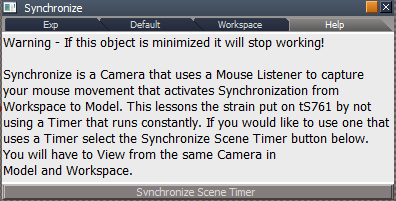
EDIT 2: Added a Synchronize Scene Timer. There is a button that loads into the scene in the Help aspect.
ProtectWorkspace
* Iconized panel with your workspaceShieldIcon.jpg
* Fixed panel
* Time stamp
* Floating panel
EDIT: POPUP panel is not a good idea in CustomCommands or CustomScriptsStore. Upon resetting the default context the popup panel ran also when rebooting tS761.
If you were to install the ProtectWorkspace in Widgets/Tools and modify your code to use it from there, it would work.
workspaceShieldIcon.jpg
* Resized to 26x26
Removed due to update
Placement of the floating panels.
Synchronize will be in the preobjects folder called from Desktop/Synchronize button.
ProtectWorkspace will be in your CustomScriptsStore. Called from C3D toolbar?
Bridge Synchronize. Thinking about removing this and or update it. Ideas?

* Iconized panel
* Fixed panel
* Time stamp
* Removed Restore Names button
* Took out 3 of 4 tSBridge.SuggestTSStateByAlias("SV_VIEW_VIEW_CAMERA") commands. One in Set Camera and two in Active.
EDIT: Just ran the Shark which uses a Timer. You have to keep moving your mouse to keep it running in Model, . Thinking it might be a good idea to include an optional timer.
EDIT 2: Added a Synchronize Scene Timer. There is a button that loads into the scene in the Help aspect.
- Help.PNG (14.23 KiB) Viewed 4231 times
* Iconized panel with your workspaceShieldIcon.jpg
* Fixed panel
* Time stamp
* Floating panel
EDIT: POPUP panel is not a good idea in CustomCommands or CustomScriptsStore. Upon resetting the default context the popup panel ran also when rebooting tS761.
If you were to install the ProtectWorkspace in Widgets/Tools and modify your code to use it from there, it would work.
workspaceShieldIcon.jpg
* Resized to 26x26
Removed due to update
- Attachments
-

- workspaceShieldIcon.jpg (14.1 KiB) Viewed 4257 times
-
clintonman
- Captain
- Posts: 5659
- Joined: 21 May 2009, 21:08
- Type the number ten into the box: 0
- Location: California
Re: Final trueSpace 7.61 Beta 8 Unofficial Update
How about this for the timer instead?
When "UseTimer" is checked it hooks up a timer instead of the watchdog. This way the protection still runs.
When "UseTimer" is checked it hooks up a timer instead of the watchdog. This way the protection still runs.
- Attachments
-
- Synchronize9f10.RsObj
- (238.86 KiB) Downloaded 186 times
-
clintonman
- Captain
- Posts: 5659
- Joined: 21 May 2009, 21:08
- Type the number ten into the box: 0
- Location: California
Re: Final trueSpace 7.61 Beta 8 Unofficial Update
I think it can be removed. I tested the new synchronize with rendering from modelspace and it worked. So it does the same thing and more.trueBlue wrote: 06 Aug 2019, 18:27 ...
Bridge Synchronize. Thinking about removing this and or update it. Ideas?
...
-
clintonman
- Captain
- Posts: 5659
- Joined: 21 May 2009, 21:08
- Type the number ten into the box: 0
- Location: California
Re: Final trueSpace 7.61 Beta 8 Unofficial Update
The ProtectWorkspace will not be loaded into a scene, so it does not need an automatic popup panel. A panel can be opened when a toolbar button is pressed.trueBlue wrote: 06 Aug 2019, 18:27 ...
ProtectWorkspace
* Iconized panel with your workspaceShieldIcon.jpg
* Fixed panel
* Time stamp
* Floating panel
EDIT: POPUP panel is not a good idea in CustomCommands or CustomScriptsStore. Upon resetting the default context the popup panel ran also when rebooting tS761.
If you were to install the ProtectWorkspace in Widgets/Tools and modify your code to use it from there, it would work.
workspaceShieldIcon.jpg
* Resized to 26x26
-
clintonman
- Captain
- Posts: 5659
- Joined: 21 May 2009, 21:08
- Type the number ten into the box: 0
- Location: California
Re: Final trueSpace 7.61 Beta 8 Unofficial Update
A submission for the Unofficial Update.
The Render Attribute buttons: Solid, Wire, SolidWire, Transparent, TransparentWire, Solid grid, Wire grid and No grid only work if the 3D view is the active window. The LoadRAPreset script will set the attribute on the active window if it is a 3D window. If the active window is not a 3D window it sets the render attributes on all 3D windows.
The RaPresetFrame is a copy of the buttons with the new script attached to the right click action.
LoadRAPreset goes inside the /Scripts/CustomCommands.
The Render Attribute buttons: Solid, Wire, SolidWire, Transparent, TransparentWire, Solid grid, Wire grid and No grid only work if the 3D view is the active window. The LoadRAPreset script will set the attribute on the active window if it is a 3D window. If the active window is not a 3D window it sets the render attributes on all 3D windows.
The RaPresetFrame is a copy of the buttons with the new script attached to the right click action.
LoadRAPreset goes inside the /Scripts/CustomCommands.
- Attachments
-
- RaPresetFrame.RsObj
- (66.8 KiB) Downloaded 180 times
-
- LoadRAPreset.RsObj
- (10.36 KiB) Downloaded 184 times
-
trueBlue
- Captain
- Posts: 5548
- Joined: 06 Jul 2009, 22:50
- Type the number ten into the box: 10
Re: Final trueSpace 7.61 Beta 8 Unofficial Update
Sounds great!
I will download it when I get back from Santa Barbara, CA
Thanks Clinton
Sounds like I will need to update all of the prototype toolbars and layouts. Do you have a script that would help modify the RMB commands in the toolbars?
I will download it when I get back from Santa Barbara, CA
Thanks Clinton
Sounds like I will need to update all of the prototype toolbars and layouts. Do you have a script that would help modify the RMB commands in the toolbars?
-
clintonman
- Captain
- Posts: 5659
- Joined: 21 May 2009, 21:08
- Type the number ten into the box: 0
- Location: California
Re: Final trueSpace 7.61 Beta 8 Unofficial Update
I think I can come up with something. I'll wait till after you have a chance to check it out.trueBlue wrote: 08 Aug 2019, 03:02 Sounds great!
I will download it when I get back from Santa Barbara, CA
Thanks Clinton
Sounds like I will need to update all of the prototype toolbars and layouts. Do you have a script that would help modify the RMB commands in the toolbars?
-
clintonman
- Captain
- Posts: 5659
- Joined: 21 May 2009, 21:08
- Type the number ten into the box: 0
- Location: California
Re: Final trueSpace 7.61 Beta 8 Unofficial Update

- protectworkspacepanel.jpg (36.43 KiB) Viewed 4286 times
Will run with Synchronize node in the scene.
Will not run if Synchronize is active
Made compatible with the new D3DRender and new YafaRay by making backup of items optional via checkbox inputs for name, materials, Matrix and Misc
Removed the automatic popup panel. Panel still in place to be called from a toolbar button.
Synchronize:
Removed code allowing it to run ProtectWorkspace from the scene
Modified to work with the new ProtectWorkspace check boxes - turns them all on
Runs via watchdog or timer event - choose with UseTimer option
- Attachments
-
- Synchronize365d.RsObj
- (241.86 KiB) Downloaded 176 times
-
- ProtectWorkspace2e77.RsObj
- (120.66 KiB) Downloaded 168 times
-
trueBlue
- Captain
- Posts: 5548
- Joined: 06 Jul 2009, 22:50
- Type the number ten into the box: 10
Re: Final trueSpace 7.61 Beta 8 Unofficial Update
Sounds great!
* Use Timer
If it doesn’t already, can you uncheck Use Timer on Deactivate?
Plan on putting Synchronize and Protect Workspace buttons on the Desktop panel.
Should I also put Synchronize on the AnimPref panel?
With the buttons, should I make them Activate/Deactivate or load the panels?
If you would not mind, add some info in the Help aspect.
What is the new D3Drender?
* Use Timer
If it doesn’t already, can you uncheck Use Timer on Deactivate?
Plan on putting Synchronize and Protect Workspace buttons on the Desktop panel.
Should I also put Synchronize on the AnimPref panel?
With the buttons, should I make them Activate/Deactivate or load the panels?
If you would not mind, add some info in the Help aspect.
What is the new D3Drender?
-
clintonman
- Captain
- Posts: 5659
- Joined: 21 May 2009, 21:08
- Type the number ten into the box: 0
- Location: California
Re: Final trueSpace 7.61 Beta 8 Unofficial Update
Why?trueBlue wrote: 08 Aug 2019, 13:35 Sounds great!
* Use Timer
If it doesn’t already, can you uncheck Use Timer on Deactivate?
...
I think it should just be on the Desktop panel. If the animation window is active then both desktop and animprefs are visible, so it would appear twice.trueBlue wrote: 08 Aug 2019, 13:35 ...
Plan on putting Synchronize and Protect Workspace buttons on the Desktop panel.
Should I also put Synchronize on the AnimPref panel?
...
I don't know how that would work as Activate/Deactivate. How would the default/workspace/help aspects work?trueBlue wrote: 08 Aug 2019, 13:35 ...
With the buttons, should I make them Activate/Deactivate or load the panels?
...
-
trueBlue
- Captain
- Posts: 5548
- Joined: 06 Jul 2009, 22:50
- Type the number ten into the box: 10
Re: Final trueSpace 7.61 Beta 8 Unofficial Update
clintonman wrote: 08 Aug 2019, 14:56Why?trueBlue wrote: 08 Aug 2019, 13:35 Sounds great!
* Use Timer
If it doesn’t already, can you uncheck Use Timer on Deactivate?
....Because that is what an Activate/Deactivate does.
Would not want a timer running after DeactivationI think it should just be on the Desktop panel. If the animation window is active then both desktop and animprefs are visible, so it would appear twice.trueBlue wrote: 08 Aug 2019, 13:35 ...
Plan on putting Synchronize and Protect Workspace buttons on the Desktop panel.
Should I also put Synchronize on the AnimPref panel?
...I don't know how that would work as Activate/Deactivate. How would the default/workspace/help aspects work?trueBlue wrote: 08 Aug 2019, 13:35 ...
With the buttons, should I make them Activate/Deactivate or load the panels?
...
Replying on my iPhone is challenging! I just wait until I get back.With the Desktop/Synchronize On/Off button, I was thinking that On would call the Popup and Off would delete it.
With the Protect Workspace, before you added Options, I was running it from CustomCommands. So I guess auto running it will not be a good idea.
I was referring to Synchronize/Help.
-
trueBlue
- Captain
- Posts: 5548
- Joined: 06 Jul 2009, 22:50
- Type the number ten into the box: 10
Re: Final trueSpace 7.61 Beta 8 Unofficial Update
The Grid/Opaque mode does not seem to be working for me.clintonman wrote: 08 Aug 2019, 01:10 A submission for the Unofficial Update.
The Render Attribute buttons: Solid, Wire, SolidWire, Transparent, TransparentWire, Solid grid, Wire grid and No grid only work if the 3D view is the active window. The LoadRAPreset script will set the attribute on the active window if it is a 3D window. If the active window is not a 3D window it sets the render attributes on all 3D windows.
The RaPresetFrame is a copy of the buttons with the new script attached to the right click action.
LoadRAPreset goes inside the /Scripts/CustomCommands.
Tried it in 4 View. Changed the lower right bottom view to 2D, right click Wire mode works on all views.
Then right click Opaque mode. It does not work.
-
clintonman
- Captain
- Posts: 5659
- Joined: 21 May 2009, 21:08
- Type the number ten into the box: 0
- Location: California
Re: Final trueSpace 7.61 Beta 8 Unofficial Update
That was weird. It was giving error in the console view. I couldn't see anything wrong. Copied the text again from my text editor into rightclickcommand and it worked again. Maybe I hit some random key when I copied it in the first time.trueBlue wrote: 11 Aug 2019, 13:40The Grid/Opaque mode does not seem to be working for me.clintonman wrote: 08 Aug 2019, 01:10 A submission for the Unofficial Update.
The Render Attribute buttons: Solid, Wire, SolidWire, Transparent, TransparentWire, Solid grid, Wire grid and No grid only work if the 3D view is the active window. The LoadRAPreset script will set the attribute on the active window if it is a 3D window. If the active window is not a 3D window it sets the render attributes on all 3D windows.
The RaPresetFrame is a copy of the buttons with the new script attached to the right click action.
LoadRAPreset goes inside the /Scripts/CustomCommands.
Tried it in 4 View. Changed the lower right bottom view to 2D, right click Wire mode works on all views.
Then right click Opaque mode. It does not work.
- Attachments
-
- RaPresetFrame7174.RsObj
- (55.24 KiB) Downloaded 171 times
-
trueBlue
- Captain
- Posts: 5548
- Joined: 06 Jul 2009, 22:50
- Type the number ten into the box: 10
Re: Final trueSpace 7.61 Beta 8 Unofficial Update
Code: Select all
ep = "Scripts/CustomCommands/LoadRAPreset";Node.Value(ep, "fFaceOpacity") = 1.0;Node.Value(ep, "fWireOpacity") = 0.0;Node.Value(ep, "bsPresetNameGrid") = "";Activity.Run(ep);
ep = "Scripts/CustomCommands/LoadRAPreset";Node.Value(ep, "fFaceOpacity") = -1.0;Node.Value(ep, "fWireOpacity") = -1.0;Node.Value(ep, "bsPresetNameGrid") = "Solid";Activity.Run(ep);Second line is from the Opaque button (parent)
I'll assume the second line is the correct one?
Edit: Loaded it into Windows Manager Space, you had the Wire Grid as the parent.
-
trueBlue
- Captain
- Posts: 5548
- Joined: 06 Jul 2009, 22:50
- Type the number ten into the box: 10
Re: Final trueSpace 7.61 Beta 8 Unofficial Update
Here is what I am proposing for the Update:
LoadRAPreset- Save to the Scripts\clintonobjects\CustomScriptsStore folder
Toolbars - Save to the Scripts\preobjects folder
Synchronize - Save to the Scripts\preobjects folder
ProtectWorkspace - Save to the Scripts\clintonobjects\CustomScriptsStore folder
DesktopPreferences - Save to the Scripts\preobjects folder
animpref - Save to the Scripts\preobjects folder
Reset the Default context and run C3D "Reload custom scripts"
Removed due to update
LoadRAPreset- Save to the Scripts\clintonobjects\CustomScriptsStore folder
Toolbars - Save to the Scripts\preobjects folder
Synchronize - Save to the Scripts\preobjects folder
ProtectWorkspace - Save to the Scripts\clintonobjects\CustomScriptsStore folder
DesktopPreferences - Save to the Scripts\preobjects folder
animpref - Save to the Scripts\preobjects folder
Reset the Default context and run C3D "Reload custom scripts"
Removed due to update
-
clintonman
- Captain
- Posts: 5659
- Joined: 21 May 2009, 21:08
- Type the number ten into the box: 0
- Location: California
Re: Final trueSpace 7.61 Beta 8 Unofficial Update
Seems to be ok, except there is no reason to load ProtectWorkspace into the scene. Synchronize code has already been changed to ignore ProtectWorkspace node placed in the scene.trueBlue wrote: 12 Aug 2019, 15:02 Here is what I am proposing for the Update:
LoadRAPreset- Save to the Scripts\clintonobjects\CustomScriptsStore folder
Toolbars - Save to the Scripts\preobjects folder
Synchronize - Save to the Scripts\preobjects folder
ProtectWorkspace - Save to the Scripts\clintonobjects\CustomScriptsStore folder
DesktopPreferences - Save to the Scripts\preobjects folder
animpref - Save to the Scripts\preobjects folder
Reset the Default context and run C3D "Reload custom scripts"
Edit: One more thing, ProtectWorkspace hasn't been fully tested with animation yet, so it might change and if so a corresponding change in Synchronize might be needed.
Last edited by clintonman on 12 Aug 2019, 17:18, edited 1 time in total.
-
clintonman
- Captain
- Posts: 5659
- Joined: 21 May 2009, 21:08
- Type the number ten into the box: 0
- Location: California
Re: Final trueSpace 7.61 Beta 8 Unofficial Update
Sounds great!
* Use Timer
If it doesn’t already, can you uncheck Use Timer on Deactivate?
...
Why?
The Connect script activates the timer and connects it if Use Timer is on.
The Deactivate script deactivates the timer and disconnects it.
* Use Timer
If it doesn’t already, can you uncheck Use Timer on Deactivate?
...
Why?
Use Timer does not activate the timer directly.Because that is what an Activate/Deactivate does.
Would not want a timer running after Deactivation
The Connect script activates the timer and connects it if Use Timer is on.
The Deactivate script deactivates the timer and disconnects it.
-
trueBlue
- Captain
- Posts: 5548
- Joined: 06 Jul 2009, 22:50
- Type the number ten into the box: 10
Re: Final trueSpace 7.61 Beta 8 Unofficial Update
My thought was to add it to the scene because one it has options and two to be able to use it without Synchronization.clintonman wrote: 12 Aug 2019, 17:07Seems to be ok, except there is no reason to load ProtectWorkspace into the scene. Synchronize code has already been changed to ignore ProtectWorkspace node placed in the scene.trueBlue wrote: 12 Aug 2019, 15:02 Here is what I am proposing for the Update:
LoadRAPreset- Save to the Scripts\clintonobjects\CustomScriptsStore folder
Toolbars - Save to the Scripts\preobjects folder
Synchronize - Save to the Scripts\preobjects folder
ProtectWorkspace - Save to the Scripts\clintonobjects\CustomScriptsStore folder
DesktopPreferences - Save to the Scripts\preobjects folder
animpref - Save to the Scripts\preobjects folder
Reset the Default context and run C3D "Reload custom scripts"
Edit: One more thing, ProtectWorkspace hasn't been fully tested with animation yet, so it might change and if so a corresponding change in Synchronize might be needed.
Its up to you, I have tested running it from CustomCommands and that works too, but with no options.
Final goal would to be insync with you on how you are going to install and run it.
-
trueBlue
- Captain
- Posts: 5548
- Joined: 06 Jul 2009, 22:50
- Type the number ten into the box: 10
Re: Final trueSpace 7.61 Beta 8 Unofficial Update
Yes I know that, now that I have had a chance to use it. Thanks!clintonman wrote: 12 Aug 2019, 17:15 Sounds great!
* Use Timer
If it doesn’t already, can you uncheck Use Timer on Deactivate?
...
Why?Use Timer does not activate the timer directly.Because that is what an Activate/Deactivate does.
Would not want a timer running after Deactivation
The Connect script activates the timer and connects it if Use Timer is on.
The Deactivate script deactivates the timer and disconnects it.
My thought was for it not to be the default though.
-
clintonman
- Captain
- Posts: 5659
- Joined: 21 May 2009, 21:08
- Type the number ten into the box: 0
- Location: California
Re: Final trueSpace 7.61 Beta 8 Unofficial Update
I agree. Small change so default is false.trueBlue wrote: 12 Aug 2019, 17:29Yes I know that, now that I have had a chance to use it. Thanks!clintonman wrote: 12 Aug 2019, 17:15 Sounds great!
* Use Timer
If it doesn’t already, can you uncheck Use Timer on Deactivate?
...
Why?Use Timer does not activate the timer directly.Because that is what an Activate/Deactivate does.
Would not want a timer running after Deactivation
The Connect script activates the timer and connects it if Use Timer is on.
The Deactivate script deactivates the timer and disconnects it.
My thought was for it not to be the default though.
- Attachments
-
- Synchronize7802.RsObj
- (233.44 KiB) Downloaded 196 times
-
clintonman
- Captain
- Posts: 5659
- Joined: 21 May 2009, 21:08
- Type the number ten into the box: 0
- Location: California
Re: Final trueSpace 7.61 Beta 8 Unofficial Update
ProtectWorkspace button should just open the panel directly. Options are available and it can be used without Synchronization and the side panel view doesn't have to be open. I guess the Restore button can be changed to Close Panel, though it would be easier to just hit the x button.trueBlue wrote: 12 Aug 2019, 17:27My thought was to add it to the scene because one it has options and two to be able to use it without Synchronization.clintonman wrote: 12 Aug 2019, 17:07Seems to be ok, except there is no reason to load ProtectWorkspace into the scene. Synchronize code has already been changed to ignore ProtectWorkspace node placed in the scene.trueBlue wrote: 12 Aug 2019, 15:02 Here is what I am proposing for the Update:
LoadRAPreset- Save to the Scripts\clintonobjects\CustomScriptsStore folder
Toolbars - Save to the Scripts\preobjects folder
Synchronize - Save to the Scripts\preobjects folder
ProtectWorkspace - Save to the Scripts\clintonobjects\CustomScriptsStore folder
DesktopPreferences - Save to the Scripts\preobjects folder
animpref - Save to the Scripts\preobjects folder
Reset the Default context and run C3D "Reload custom scripts"
Edit: One more thing, ProtectWorkspace hasn't been fully tested with animation yet, so it might change and if so a corresponding change in Synchronize might be needed.
Its up to you, I have tested running it from CustomCommands and that works too, but with no options.
Final goal would to be insync with you on how you are going to install and run it.
-
trueBlue
- Captain
- Posts: 5548
- Joined: 06 Jul 2009, 22:50
- Type the number ten into the box: 10
Re: Final trueSpace 7.61 Beta 8 Unofficial Update
Okay, like this?clintonman wrote: 12 Aug 2019, 18:00ProtectWorkspace button should just open the panel directly. Options are available and it can be used without Synchronization and the side panel view doesn't have to be open. I guess the Restore button can be changed to Close Panel, though it would be easier to just hit the x button.trueBlue wrote: 12 Aug 2019, 17:27My thought was to add it to the scene because one it has options and two to be able to use it without Synchronization.clintonman wrote: 12 Aug 2019, 17:07
Seems to be ok, except there is no reason to load ProtectWorkspace into the scene. Synchronize code has already been changed to ignore ProtectWorkspace node placed in the scene.
Edit: One more thing, ProtectWorkspace hasn't been fully tested with animation yet, so it might change and if so a corresponding change in Synchronize might be needed.
Its up to you, I have tested running it from CustomCommands and that works too, but with no options.
Final goal would to be insync with you on how you are going to install and run it.
Both have small changes to their buttons.
Removed due to update
-
clintonman
- Captain
- Posts: 5659
- Joined: 21 May 2009, 21:08
- Type the number ten into the box: 0
- Location: California
Re: Final trueSpace 7.61 Beta 8 Unofficial Update
Some small changes.trueBlue wrote: 12 Aug 2019, 18:40Okay, like this?clintonman wrote: 12 Aug 2019, 18:00ProtectWorkspace button should just open the panel directly. Options are available and it can be used without Synchronization and the side panel view doesn't have to be open. I guess the Restore button can be changed to Close Panel, though it would be easier to just hit the x button.trueBlue wrote: 12 Aug 2019, 17:27
My thought was to add it to the scene because one it has options and two to be able to use it without Synchronization.
Its up to you, I have tested running it from CustomCommands and that works too, but with no options.
Final goal would to be insync with you on how you are going to install and run it.
Both have small changes to their buttons.
Desktop:
bug: look for ProtectWorkspace inside /Scripts/CustomCommands instead of just /Scripts
move reset Time_Stamp into the OpenPanelFrame to get it out of the button
ProtectWorkspace Restore button:
removed the line clearing the ReturnFromRestore,ReturnTo connector - this already happens in the backup button code
simplified the reset Time_Stamp so it's easier to read inside the button code window
- Attachments
-
- Desktop.RsObj
- (38.12 KiB) Downloaded 178 times
-
- ProtectWorkspace4f32.RsObj
- (120.6 KiB) Downloaded 195 times
-
trueBlue
- Captain
- Posts: 5548
- Joined: 06 Jul 2009, 22:50
- Type the number ten into the box: 10
Re: Final trueSpace 7.61 Beta 8 Unofficial Update
Thanks!
Here is a new Spot light:
Added a Preferences and Synchronize button.
Attenuation
Added scrubbers for Distance
Try it with a Model view open and adjust Distance from Workspace.
No need to run the Synchronize.RsObj
Sadly none of the Shadow settings seem to work in Model except for Enable Shadow.
Removed due to update
Here is a new Spot light:
Added a Preferences and Synchronize button.
Attenuation
Added scrubbers for Distance
Try it with a Model view open and adjust Distance from Workspace.
No need to run the Synchronize.RsObj
Sadly none of the Shadow settings seem to work in Model except for Enable Shadow.
Removed due to update
-
trueBlue
- Captain
- Posts: 5548
- Joined: 06 Jul 2009, 22:50
- Type the number ten into the box: 10
Re: Final trueSpace 7.61 Beta 8 Unofficial Update
New trueSpace 7.61 Beta 8 Unofficial Update 5 'Beta'
New - All toolbars that have Object render modes and Grid modes, have a RMB command that sets their render mode for all windows if a Link Editor view has focus.
Error
File too large: tS7.61B8.5.zip
This update is 36 MB
Edit: Moved post.
New - All toolbars that have Object render modes and Grid modes, have a RMB command that sets their render mode for all windows if a Link Editor view has focus.
Error
File too large: tS7.61B8.5.zip
This update is 36 MB
Edit: Moved post.
-
clintonman
- Captain
- Posts: 5659
- Joined: 21 May 2009, 21:08
- Type the number ten into the box: 0
- Location: California
Re: Final trueSpace 7.61 Beta 8 Unofficial Update
Object render modes and Grid modes RMB does all windows if active window is not a 3d window. So it also works when non link editor windows have focus.trueBlue wrote: 13 Aug 2019, 22:53 ...
New - All toolbars that have Object render modes and Grid modes, have a RMB command that sets their render mode for all windows if a Link Editor view has focus.
...
Error
File too large: tS7.61B8.5.zip
This update is 36 MB
I changed a setting to hopefully fix the File too large problem.
-
trueBlue
- Captain
- Posts: 5548
- Joined: 06 Jul 2009, 22:50
- Type the number ten into the box: 10
Re: Final trueSpace 7.61 Beta 8 Unofficial Update
Thanks, I'll try again.
Hummm… seems to only work on a window that has focus for me. However if I have a LE in focus, all windows will change.
Tested in 4view.
Edit: I just tried again and when I had the AE in focus, all other windows changed.
Hummm… seems to only work on a window that has focus for me. However if I have a LE in focus, all windows will change.
Tested in 4view.
Edit: I just tried again and when I had the AE in focus, all other windows changed.
-
trueBlue
- Captain
- Posts: 5548
- Joined: 06 Jul 2009, 22:50
- Type the number ten into the box: 10
Re: Final trueSpace 7.61 Beta 8 Unofficial Update
New trueSpace 7.61 Beta 8 Unofficial Update 5 'Beta'
New - Camera, YafaRay Camera, and Entry Point camera, added a View button that Synchronizes with Model.
Open a Model view first. If it is not syncing with Model, select the cam and View from Object in Model.
New - Desktop panel has a Synchronize and Protect Workspace button. - Author Clinton Reese
New - All Lights - Added a Synchronize button, that synchronizes with Model and new Preferences.
Omni and Infinite has had their Enable Shadow un-exported so that Model can toggle them Off/On.
New - All toolbars that have Object render modes and Grids, have a RMB command that sets their render mode for all windows if active window is not a 3d window. - Author Clinton Reese
New - UnLookAt.xml Updated to include more Lights. - Author Clinton Reese
New- 4View has unique WinGUID toolbars for all four views.
New - My Scenes updated with new Cameras and Lights.
New - All of the WS light setups were updated to new Lights.
New - YafaRay libraries were updated with new Lights and Cameras.
New - tS761 First Person Navigator has been updated to be in sync with Model. It can be found in the Objects - tS7.61 Update objects library.
Instructions:
It is recommend that you completely Uninstall and Install trueSpace7.61 Beta 8 to a clean directory.
Install the PDF Manual for trueSpace.
1.) Run the tS7.61B8.5.exe
2.) Browse [...] to where you installed C:\trueSpace761, select its folder and then the Extract button
3.) Select the Yes to All button.
4.) Open trueSpace and select the Reset to Default Context icon.
5.) In Workspace select the Default layout tab.
YafaRay4tS users:
1.) Download the YafaRay v3.3.0 render engine from one of these sites:
YafaRay Standalone https://github.com/YafaRay/Core/releases
YafaRay for Blender https://github.com/YafaRay/Blender-Exporter/releases
Unzip the file and copy the ‘yafaray_v3’ folder to:
Examples:
Standalone
C:\Program Files\yafaray_v3
C:\trueSpace761\tS\yafaray_v3
C:\trueSpace761Std\yafaray_v3
Note: If you install the YafaRay v3.3.0 render engine after installing this update:
From Workspace in the Stack/Panel - YafaRay4tS/Setup aspect
Set the 'YafaRay Installation Path' to the yafaray-xml.exe file where you have installed YafaRay v3.3.0
Select the 'Save Settings' button.
In Workspace, open the YafaRay4tS layout.
Open a new YafaRay4tS scene from the YafaRay Settings toolbar icon.
Optionally, but recommend you install the iOptDetector plugin http://rs.siprogs.sk/p/iOptDetectorsPage
Recommend that you install it to your C:/ drive so that it can be shared with different versions of trueSpace.
The OptDetector.dll must be Installed and Loaded from the Workspace's Package Manager.
Removed due to update
New - Camera, YafaRay Camera, and Entry Point camera, added a View button that Synchronizes with Model.
Open a Model view first. If it is not syncing with Model, select the cam and View from Object in Model.
New - Desktop panel has a Synchronize and Protect Workspace button. - Author Clinton Reese
New - All Lights - Added a Synchronize button, that synchronizes with Model and new Preferences.
Omni and Infinite has had their Enable Shadow un-exported so that Model can toggle them Off/On.
New - All toolbars that have Object render modes and Grids, have a RMB command that sets their render mode for all windows if active window is not a 3d window. - Author Clinton Reese
New - UnLookAt.xml Updated to include more Lights. - Author Clinton Reese
New- 4View has unique WinGUID toolbars for all four views.
New - My Scenes updated with new Cameras and Lights.
New - All of the WS light setups were updated to new Lights.
New - YafaRay libraries were updated with new Lights and Cameras.
New - tS761 First Person Navigator has been updated to be in sync with Model. It can be found in the Objects - tS7.61 Update objects library.
Instructions:
It is recommend that you completely Uninstall and Install trueSpace7.61 Beta 8 to a clean directory.
Install the PDF Manual for trueSpace.
1.) Run the tS7.61B8.5.exe
2.) Browse [...] to where you installed C:\trueSpace761, select its folder and then the Extract button
3.) Select the Yes to All button.
4.) Open trueSpace and select the Reset to Default Context icon.
5.) In Workspace select the Default layout tab.
YafaRay4tS users:
1.) Download the YafaRay v3.3.0 render engine from one of these sites:
YafaRay Standalone https://github.com/YafaRay/Core/releases
YafaRay for Blender https://github.com/YafaRay/Blender-Exporter/releases
Unzip the file and copy the ‘yafaray_v3’ folder to:
Examples:
Standalone
C:\Program Files\yafaray_v3
C:\trueSpace761\tS\yafaray_v3
C:\trueSpace761Std\yafaray_v3
Note: If you install the YafaRay v3.3.0 render engine after installing this update:
From Workspace in the Stack/Panel - YafaRay4tS/Setup aspect
Set the 'YafaRay Installation Path' to the yafaray-xml.exe file where you have installed YafaRay v3.3.0
Select the 'Save Settings' button.
In Workspace, open the YafaRay4tS layout.
Open a new YafaRay4tS scene from the YafaRay Settings toolbar icon.
Optionally, but recommend you install the iOptDetector plugin http://rs.siprogs.sk/p/iOptDetectorsPage
Recommend that you install it to your C:/ drive so that it can be shared with different versions of trueSpace.
The OptDetector.dll must be Installed and Loaded from the Workspace's Package Manager.
Removed due to update
-
clintonman
- Captain
- Posts: 5659
- Joined: 21 May 2009, 21:08
- Type the number ten into the box: 0
- Location: California
Re: Final trueSpace 7.61 Beta 8 Unofficial Update
Yep, that's how it works. If 3d view has focus it only changes that view.trueBlue wrote: 14 Aug 2019, 02:32 Thanks, I'll try again.
Hummm… seems to only work on a window that has focus for me. However if I have a LE in focus, all windows will change.
Tested in 4view.
Edit: I just tried again and when I had the AE in focus, all other windows changed.
If any of the other window types have focus: link editor, Library/Panels/Settings on the right, any of the floating non-3D windows or the info panel on lower right should cause all 3d views to change. In English its thinking to itself,"A 3d window has focus so that's the one that's meant to be changed or No 3d views are active, I only work on 3d views and I have no idea which one to do, so I'll just change them all.
-
trueBlue
- Captain
- Posts: 5548
- Joined: 06 Jul 2009, 22:50
- Type the number ten into the box: 10
Re: Final trueSpace 7.61 Beta 8 Unofficial Update
What do you think about this?clintonman wrote: 14 Aug 2019, 04:20Yep, that's how it works. If 3d view has focus it only changes that view.trueBlue wrote: 14 Aug 2019, 02:32 Thanks, I'll try again.
Hummm… seems to only work on a window that has focus for me. However if I have a LE in focus, all windows will change.
Tested in 4view.
Edit: I just tried again and when I had the AE in focus, all other windows changed.
If any of the other window types have focus: link editor, Library/Panels/Settings on the right, any of the floating non-3D windows or the info panel on lower right should cause all 3d views to change. In English its thinking to itself,"A 3d window has focus so that's the one that's meant to be changed or No 3d views are active, I only work on 3d views and I have no idea which one to do, so I'll just change them all.
Activates the Status view before your commands.
Removed due to update
-
clintonman
- Captain
- Posts: 5659
- Joined: 21 May 2009, 21:08
- Type the number ten into the box: 0
- Location: California
Re: Final trueSpace 7.61 Beta 8 Unofficial Update
Small script change does the same thing without adding the long command to all the buttons. It just skips the step of looking for an active window. So now if I left click and nothing happens then just have to right click. The old way was slightly more convenient, but this is more consistent.trueBlue wrote: 14 Aug 2019, 14:54What do you think about this?clintonman wrote: 14 Aug 2019, 04:20Yep, that's how it works. If 3d view has focus it only changes that view.trueBlue wrote: 14 Aug 2019, 02:32 Thanks, I'll try again.
Hummm… seems to only work on a window that has focus for me. However if I have a LE in focus, all windows will change.
Tested in 4view.
Edit: I just tried again and when I had the AE in focus, all other windows changed.
If any of the other window types have focus: link editor, Library/Panels/Settings on the right, any of the floating non-3D windows or the info panel on lower right should cause all 3d views to change. In English its thinking to itself,"A 3d window has focus so that's the one that's meant to be changed or No 3d views are active, I only work on 3d views and I have no idea which one to do, so I'll just change them all.
Activates the Status view before your commands.
- Attachments
-
- LoadRAPreset6b78.RsObj
- (10.33 KiB) Downloaded 182 times
-
clintonman
- Captain
- Posts: 5659
- Joined: 21 May 2009, 21:08
- Type the number ten into the box: 0
- Location: California
Re: Final trueSpace 7.61 Beta 8 Unofficial Update
Installed, don't see any problems.trueBlue wrote: 14 Aug 2019, 02:34 New trueSpace 7.61 Beta 8 Unofficial Update 5 'Beta'
...
-
trueBlue
- Captain
- Posts: 5548
- Joined: 06 Jul 2009, 22:50
- Type the number ten into the box: 10
Re: Final trueSpace 7.61 Beta 8 Unofficial Update
Perfecto!clintonman wrote: 16 Aug 2019, 05:03Small script change does the same thing without adding the long command to all the buttons. It just skips the step of looking for an active window. So now if I left click and nothing happens then just have to right click. The old way was slightly more convenient, but this is more consistent.trueBlue wrote: 14 Aug 2019, 14:54What do you think about this?clintonman wrote: 14 Aug 2019, 04:20
Yep, that's how it works. If 3d view has focus it only changes that view.
If any of the other window types have focus: link editor, Library/Panels/Settings on the right, any of the floating non-3D windows or the info panel on lower right should cause all 3d views to change. In English its thinking to itself,"A 3d window has focus so that's the one that's meant to be changed or No 3d views are active, I only work on 3d views and I have no idea which one to do, so I'll just change them all.
Activates the Status view before your commands.
-
trueBlue
- Captain
- Posts: 5548
- Joined: 06 Jul 2009, 22:50
- Type the number ten into the box: 10
Re: Final trueSpace 7.61 Beta 8 Unofficial Update
@Clinton
Do you see anything wrong with this script for the Camera FOV widget?
Right click in 3D Space, sets the FOV for the Eye camera and selected Camera.
Do you see anything wrong with this script for the Camera FOV widget?

Code: Select all
var Eye = Node.SubObject("/D3DView", 0);
var Cam = Node.Selection();
Node.Value("/D3DView/" + Eye,"FOV") = 0.500
if (Node.IsCamera(Cam))
{
Node.Value(Cam, 'FOV') = 0.500
}-
clintonman
- Captain
- Posts: 5659
- Joined: 21 May 2009, 21:08
- Type the number ten into the box: 0
- Location: California
Re: Final trueSpace 7.61 Beta 8 Unofficial Update
Can't really tell much. Looks like it only works with the first 3d view. If it's on the camera fov, don't you have to right click fov widget instead of the 3d space?trueBlue wrote: 16 Aug 2019, 16:07 @Clinton
Do you see anything wrong with this script for the Camera FOV widget?
Capture.PNGRight click in 3D Space, sets the FOV for the Eye camera and selected Camera.Code: Select all
var Eye = Node.SubObject("/D3DView", 0);
var Cam = Node.Selection();
Node.Value("/D3DView/" + Eye,"FOV") = 0.500
if (Node.IsCamera(Cam))
{
Node.Value(Cam, 'FOV') = 0.500
}
-
trueBlue
- Captain
- Posts: 5548
- Joined: 06 Jul 2009, 22:50
- Type the number ten into the box: 10
Re: Final trueSpace 7.61 Beta 8 Unofficial Update
There is no interface to reset just the FOV for all of the views, just Reset View, which does rest the FOV, but also the location.
var Eye = Node.SubObject("/D3DView", 0);
How do you add 6 or 7 more SubObjects to the above line?
Then set their FOV to 0.500 ?
var Eye = Node.SubObject("/D3DView", 0);
How do you add 6 or 7 more SubObjects to the above line?
Then set their FOV to 0.500 ?
-
clintonman
- Captain
- Posts: 5659
- Joined: 21 May 2009, 21:08
- Type the number ten into the box: 0
- Location: California
Re: Final trueSpace 7.61 Beta 8 Unofficial Update
This gets all the nodes inside D3DView. So all the views would reset fov. The commented lines would limit to perspective style views.trueBlue wrote: 17 Aug 2019, 03:08 There is no interface to reset just the FOV for all of the views, just Reset View, which does rest the FOV, but also the location.
var Eye = Node.SubObject("/D3DView", 0);
How do you add 6 or 7 more SubObjects to the above line?
Then set their FOV to 0.500 ?
Code: Select all
	var Cam = Node.Selection();

	var numeye = Node.SubObjectCount("/D3DView");

	for(var i=0;i<numeye;i++)
	{
		var Eye = "/D3DView/" + Node.SubObject("/D3DView",i);
		//if(Node.Value(Eye, "Perspective")) {
		Node.Value(Eye,"FOV") = 0.500;
		//}

	}

	if (Node.IsCamera(Cam))
	{
		Node.Value(Cam, 'FOV') = 0.500
}-
clintonman
- Captain
- Posts: 5659
- Joined: 21 May 2009, 21:08
- Type the number ten into the box: 0
- Location: California
Re: Final trueSpace 7.61 Beta 8 Unofficial Update
Unofficial Update Submission
This alters the object navigation widgets to use right mouse rotation to rotate around the object axis instead of the middle of the geometry.
Script changes disappear with a context reset, so it's safe for testing.
Demo usage:
1. create a cube
2. point edit the cube to move the entire shape some distance.
3. exit pe mode
4. left drag on the rotation arcs gives standard rotation, right drag gives rotation around the Matrix location. like a pivot
While experimenting I found that the PE widget already does this. It was altered to right click rotate around the pivot, but when there's no pivot it rotates around the Matrix location.
This alters the object navigation widgets to use right mouse rotation to rotate around the object axis instead of the middle of the geometry.
Script changes disappear with a context reset, so it's safe for testing.
Demo usage:
1. create a cube
2. point edit the cube to move the entire shape some distance.
3. exit pe mode
4. left drag on the rotation arcs gives standard rotation, right drag gives rotation around the Matrix location. like a pivot
While experimenting I found that the PE widget already does this. It was altered to right click rotate around the pivot, but when there's no pivot it rotates around the Matrix location.
- Attachments
-
- Origin Rotation Widget.RsObj
- (20.85 KiB) Downloaded 165 times
-
trueBlue
- Captain
- Posts: 5548
- Joined: 06 Jul 2009, 22:50
- Type the number ten into the box: 10
Re: Final trueSpace 7.61 Beta 8 Unofficial Update
Awesome! Both work great!
Incorporated them into the update.
Question... Are the Auto Keyframing scripts not needed in the Camera(s) Move and FOV?
And in the Camera 2 Stand?
Incorporated them into the update.
Question... Are the Auto Keyframing scripts not needed in the Camera(s) Move and FOV?
And in the Camera 2 Stand?
-
trueBlue
- Captain
- Posts: 5548
- Joined: 06 Jul 2009, 22:50
- Type the number ten into the box: 10
Re: Final trueSpace 7.61 Beta 8 Unofficial Update
New trueSpace 7.61 Beta 8 Unofficial Update 5 'Beta'
New - Camera, YafaRay Camera, and Entry Point camera, added a View button that Synchronizes with Model.
Open a Model view first. If it is not syncing with Model, select the cam and View from Object in Model.
New - Desktop panel has a Synchronize and Protect Workspace button. - Author Clinton Reese
New - All Lights - Added a Synchronize button, that synchronizes with Model and new Preferences.
Omni and Infinite has had their Enable Shadow un-exported so that Model can toggle them Off/On.
New - All toolbars that have Object render modes and Grids, have a RMB command that sets their render mode for all windows. - Author Clinton Reese
New - UnLookAt.xml Updated to include more Lights. - Author Clinton Reese
New- 4View layout has unique WinGUID toolbars for all four views. No prototype for ortho views.
New - My Scenes updated with new Cameras and Lights.
New - All of the WS light setups were updated to new Lights.
New - YafaRay libraries were updated with new Lights and Cameras.
New - S761 First Person Navigator, tS76 FPN Camera Keyframer, and tS761 Camera Advanced has been updated to be in sync with Model. It can be found in the Objects - tS7.61 Update objects library.
New - Camera FOV widget
RMB click in 3D Space resets all view's FOV to 0.500 and scene Camera to 1.000
New - WinGUID_Bar
Camera Move, Camera Rotate, and Camera FOV icons
RMB opens the current view's Eye Camera preferences in the Stack/Panels
Rectagle Zoom
Added Status message.
Object render and Grid modes
RMB sets All Windows
New - New View
Opens an updated 3D window with a unique WinGUID (No Prototype)
Save New View icon saves the size and loaction.
New - BottomBar2
Grid mode moved from the Object render modes.
Object render and Grid modes
RMB sets All Windows
Object Navigation Widget(s)
RMB + Drag on Arcs to rotate from the Pivot - Author Clinton Reese
Background widget/Look at selection
Changes:
MMB click - Moves the view to the current selection or Point Edit selection. Zooms
Ctrl + MMB click - Looks At Selection
Shift + MMB click - Moves the view to all objects in the scene
Zoom2All script
Added RsTool.ResetView(''); to the top of the script.
Widget/Tools/Vertex Snap
Updated 8/17/2019
@Clinton
If you do not like these changes to your Look at selection, I will not include them. But please try them out first!
For me these changes make it easier to use with the Arrow keys to select other objects.
I swapped out the original Ctrl+ MMB Double click that Zooms to selected object with MMB click because it is easier to use.
Adding RsTool.ResetView('') to the Zoom2All fixes the wonkiness that sometims happens.
Removed due to update
New - Camera, YafaRay Camera, and Entry Point camera, added a View button that Synchronizes with Model.
Open a Model view first. If it is not syncing with Model, select the cam and View from Object in Model.
New - Desktop panel has a Synchronize and Protect Workspace button. - Author Clinton Reese
New - All Lights - Added a Synchronize button, that synchronizes with Model and new Preferences.
Omni and Infinite has had their Enable Shadow un-exported so that Model can toggle them Off/On.
New - All toolbars that have Object render modes and Grids, have a RMB command that sets their render mode for all windows. - Author Clinton Reese
New - UnLookAt.xml Updated to include more Lights. - Author Clinton Reese
New- 4View layout has unique WinGUID toolbars for all four views. No prototype for ortho views.
New - My Scenes updated with new Cameras and Lights.
New - All of the WS light setups were updated to new Lights.
New - YafaRay libraries were updated with new Lights and Cameras.
New - S761 First Person Navigator, tS76 FPN Camera Keyframer, and tS761 Camera Advanced has been updated to be in sync with Model. It can be found in the Objects - tS7.61 Update objects library.
New - Camera FOV widget
RMB click in 3D Space resets all view's FOV to 0.500 and scene Camera to 1.000
New - WinGUID_Bar
Camera Move, Camera Rotate, and Camera FOV icons
RMB opens the current view's Eye Camera preferences in the Stack/Panels
Rectagle Zoom
Added Status message.
Object render and Grid modes
RMB sets All Windows
New - New View
Opens an updated 3D window with a unique WinGUID (No Prototype)
Save New View icon saves the size and loaction.
New - BottomBar2
Grid mode moved from the Object render modes.
Object render and Grid modes
RMB sets All Windows
Object Navigation Widget(s)
RMB + Drag on Arcs to rotate from the Pivot - Author Clinton Reese
Background widget/Look at selection
Changes:
MMB click - Moves the view to the current selection or Point Edit selection. Zooms
Ctrl + MMB click - Looks At Selection
Shift + MMB click - Moves the view to all objects in the scene
Zoom2All script
Added RsTool.ResetView(''); to the top of the script.
Widget/Tools/Vertex Snap
Updated 8/17/2019
@Clinton
If you do not like these changes to your Look at selection, I will not include them. But please try them out first!
For me these changes make it easier to use with the Arrow keys to select other objects.
I swapped out the original Ctrl+ MMB Double click that Zooms to selected object with MMB click because it is easier to use.
Adding RsTool.ResetView('') to the Zoom2All fixes the wonkiness that sometims happens.
Removed due to update
-
clintonman
- Captain
- Posts: 5659
- Joined: 21 May 2009, 21:08
- Type the number ten into the box: 0
- Location: California
Re: Final trueSpace 7.61 Beta 8 Unofficial Update
How so? Arrow keys aren't mentioned in the description above.trueBlue wrote: 17 Aug 2019, 17:56 ...
@Clinton
...
For me these changes make it easier to use with the Arrow keys to select other objects.
...
-
clintonman
- Captain
- Posts: 5659
- Joined: 21 May 2009, 21:08
- Type the number ten into the box: 0
- Location: California
Re: Final trueSpace 7.61 Beta 8 Unofficial Update
Vertex Snap Bug Fixes:
error in getPoint2 script in the case where 2 items are not selected first. was locking out all other use cases including object mode snapping
added 3 missing nodes from original script for automatically converting the selection to points which removes limitation of only allowing vertex selections
added second page of help to account for object snapping
changed widget title "Vertex Snap" to "Object/Vertex Snap"
widget "S<" was not bold like ">T"
error in getPoint2 script in the case where 2 items are not selected first. was locking out all other use cases including object mode snapping
added 3 missing nodes from original script for automatically converting the selection to points which removes limitation of only allowing vertex selections
added second page of help to account for object snapping
changed widget title "Vertex Snap" to "Object/Vertex Snap"
widget "S<" was not bold like ">T"
- Attachments
-
- Vertex Snap9d18.RsObj
- (140.33 KiB) Downloaded 188 times
-
trueBlue
- Captain
- Posts: 5548
- Joined: 06 Jul 2009, 22:50
- Type the number ten into the box: 10
Re: Final trueSpace 7.61 Beta 8 Unofficial Update
Your keyboard Arrow keys. Not having to use the Ctrl key frees up being able to use the arrow keys.clintonman wrote: 17 Aug 2019, 18:21How so? Arrow keys aren't mentioned in the description above.trueBlue wrote: 17 Aug 2019, 17:56 ...
@Clinton
...
For me these changes make it easier to use with the Arrow keys to select other objects.
...
-
clintonman
- Captain
- Posts: 5659
- Joined: 21 May 2009, 21:08
- Type the number ten into the box: 0
- Location: California
Re: Final trueSpace 7.61 Beta 8 Unofficial Update
Still not getting it. How does ctrl keys stop the use of arrow keys?trueBlue wrote: 17 Aug 2019, 18:45Your keyboard Arrow keys. Not having to use the Ctrl key frees up being able to use the arrow keys.clintonman wrote: 17 Aug 2019, 18:21How so? Arrow keys aren't mentioned in the description above.trueBlue wrote: 17 Aug 2019, 17:56 ...
@Clinton
...
For me these changes make it easier to use with the Arrow keys to select other objects.
...
-
trueBlue
- Captain
- Posts: 5548
- Joined: 06 Jul 2009, 22:50
- Type the number ten into the box: 10
Re: Final trueSpace 7.61 Beta 8 Unofficial Update
Thanks!clintonman wrote: 17 Aug 2019, 18:29 Vertex Snap Bug Fixes:
error in getPoint2 script in the case where 2 items are not selected first. was locking out all other use cases including object mode snapping
added 3 missing nodes from original script for automatically converting the selection to points which removes limitation of only allowing vertex selections
added second page of help to account for object snapping
changed widget title "Vertex Snap" to "Object/Vertex Snap"
widget "S<" was not bold like ">T"
Updated the update in the previous post.
-
clintonman
- Captain
- Posts: 5659
- Joined: 21 May 2009, 21:08
- Type the number ten into the box: 0
- Location: California
Re: Final trueSpace 7.61 Beta 8 Unofficial Update
What does this do that not so unique winGUID doesn't do?trueBlue wrote: 17 Aug 2019, 17:56 ...
New- 4View layout has unique WinGUID toolbars for all four views. No prototype for ortho views.
...