Final trueSpace 7.61 Beta 8 Unofficial Update

User avatar
trueBlue
Captain
Posts: 5548
Joined: 06 Jul 2009, 22:50
Type the number ten into the box: 10

Re: Final trueSpace 7.61 Beta 8 Unofficial Update

Post by trueBlue »

New Update for the trueSpace7.61 Beta 8 Unofficial Update
viewtopic.php?t=3732
March 14, 2020

Object Navigation Widgets preferences panel
On/Off buttons
Add

Code: Select all

if(Node.Value("/Widgets/Select/Default object navigation widget", "ID") == "Default object navigation widgetONW7") return;
if(Node.Value("/Widgets/Select/Default object navigation widget", "ID") == "Default object navigation widgetONW8") return;
Object Navigation Widget 4 - Author Clinton Reese
Object Navigation Widget 4 with Selector Cage Widget - Author Clinton Reese
Add
Widget Help 4
Object Navigation Widget 4 - Additional mouse button shortcuts

Sphere
LMB + Drag - Moves selected object in X and Y
MMB + Drag - Moves the widget
RMB click closes the widget

Bars, Triangles, Cubes, and Arcs
Ctrl + LMB click opens their Mouse settings
LMB + Drag on Arcs rotates from the Axis
RMB + Drag on Arcs rotates from object center

MMB click the Bars, Triangles, and Sphere activates the Object Move widget
MMB click the Arcs activates the Object Rotate widget
MMB click the Cubes activates the Object Scale widget
Shift + LMB click in empty 3D Space deactivates Object widgets

Alt + LMB click the Bars activates the X. Y. and Z Axis locks. 'Toggles On/Off'

Shift + LMB click the widget switches to the other Object Navigation Widgets 'Cycles'
Ctrl + RMB click the widget switches to the Selector Cage Widget
Note from Author
Deactivated the widget's look at camera option, so no flipping
Left drag on arcs rotates around the anchor point/pivot
Right drag on arcs normal truespace style rotate around the object center
The center ball is located at the object anchor/pivot instead of the bounding box center so the center of rotation is visible.
Standard Right Hand Coordinates RGB = XYZ colors
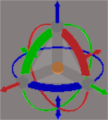
EONW.png
EONW.png (17.68 KiB) Viewed 4063 times
User avatar
trueBlue
Captain
Posts: 5548
Joined: 06 Jul 2009, 22:50
Type the number ten into the box: 10

Re: Final trueSpace 7.61 Beta 8 Unofficial Update

Post by trueBlue »

New Update for the trueSpace7.61 Beta 8 Unofficial Update
viewtopic.php?t=3732
March 16, 2020

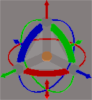
Changed the Object Navigation Widget 4 to the trueSpace default color scheme including the XYZ locks shortcuts.
Object Navigation Widget 4.png
Object Navigation Widget 4.png (16.05 KiB) Viewed 4037 times
User avatar
clintonman
Captain
Posts: 5659
Joined: 21 May 2009, 21:08
Type the number ten into the box: 0
Location: California

Re: Final trueSpace 7.61 Beta 8 Unofficial Update

Post by clintonman »

February 23, 2020

Widgets/Edit
Default context 'Widget'
* Ctrl + X + LMB click in 3D Space = Cut selected object
* Ctrl + V + LMB click in 3D Space = Paste last Cut object

I'm not seeing this. Tried in normal and pe modes.
Clinton Reese

http://clintons3d.com
User avatar
trueBlue
Captain
Posts: 5548
Joined: 06 Jul 2009, 22:50
Type the number ten into the box: 10

Re: Final trueSpace 7.61 Beta 8 Unofficial Update

Post by trueBlue »

clintonman wrote: 19 Mar 2020, 01:18 February 23, 2020

Widgets/Edit
Default context 'Widget'
* Ctrl + X + LMB click in 3D Space = Cut selected object
* Ctrl + V + LMB click in 3D Space = Paste last Cut object

I'm not seeing this. Tried in normal and pe modes.
Fixed
User avatar
trueBlue
Captain
Posts: 5548
Joined: 06 Jul 2009, 22:50
Type the number ten into the box: 10

Re: Final trueSpace 7.61 Beta 8 Unofficial Update

Post by trueBlue »

New Update for the trueSpace7.61 Beta 8 Unofficial Update
viewtopic.php?t=3732
March 19, 2020

Toolbars.RsObj
Update
PESnappingToolbar

Widgets.RsObj
Update
Default context
Default object navigation widgetONW7
Default object navigation widgetONW8
User avatar
clintonman
Captain
Posts: 5659
Joined: 21 May 2009, 21:08
Type the number ten into the box: 0
Location: California

Re: Final trueSpace 7.61 Beta 8 Unofficial Update

Post by clintonman »

trueBlueJscriptButton.jpg


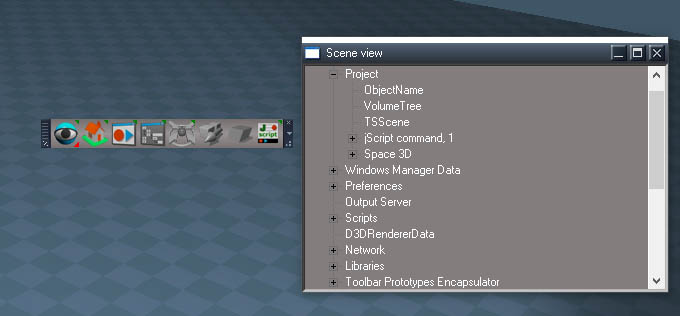
I pressed the jscript button on the trueblue toolbar and my windows manager space was renamed?
Yes it seems to rename things, it just change the scene name to "jScript command"
Clinton Reese

http://clintons3d.com
User avatar
trueBlue
Captain
Posts: 5548
Joined: 06 Jul 2009, 22:50
Type the number ten into the box: 10

Re: Final trueSpace 7.61 Beta 8 Unofficial Update

Post by trueBlue »

clintonman wrote: 20 Mar 2020, 04:31 trueBlueJscriptButton.jpg


I pressed the jscript button on the trueblue toolbar and my windows manager space was renamed?
Yes it seems to rename things, it just change the scene name to "jScript command"
I have been using this for months and I have never seen this behavior.
What are the steps need to reproduce this renaming other nodes.
User avatar
clintonman
Captain
Posts: 5659
Joined: 21 May 2009, 21:08
Type the number ten into the box: 0
Location: California

Re: Final trueSpace 7.61 Beta 8 Unofficial Update

Post by clintonman »

Looks like it happens if you have something outside of the scene selected using the Scene view.

0. reset to default context
1. open the Scene view
2. select the scene, Project/Space 3D
3. run jscript
it gets renamed to jscript command

another test
1. open Scene view
2. select any item outside of the scene
3. click to activate a 3d window
4. run jscript
jscript is created in the scene

it sometimes takes 2 consecutive runs of the jscript command
seems like it's more likely to rename if a LE view is not already open

bad behavior here:
0. reset to default context
1. run jscript
2. run jscript again
window frozen and can't reset to default context
Clinton Reese

http://clintons3d.com
User avatar
trueBlue
Captain
Posts: 5548
Joined: 06 Jul 2009, 22:50
Type the number ten into the box: 10

Re: Final trueSpace 7.61 Beta 8 Unofficial Update

Post by trueBlue »

Yikes!
Thanks for sharing this unexpected use.
I removed the renaming part and I am not really sure why I had it in the first place as you can add multiple scripts without it.

Code: Select all

Space.Unselect();
var jS = LE.InsertNodeAt(WindowsManager.GetWorkWindow() + '/LE2Node', System.GetMainDir() + '\\Rs Main Libraries\\System - Scripts\\jScript command.RsObj', 250, 650);
Node.Select(jS);
var OBJ = Node.Selection();
if (OBJ == "") {return;}LE.OpenLocation(OBJ);
Space.Unselect();
User avatar
clintonman
Captain
Posts: 5659
Joined: 21 May 2009, 21:08
Type the number ten into the box: 0
Location: California

Re: Final trueSpace 7.61 Beta 8 Unofficial Update

Post by clintonman »

Sure, here's another note.
The shear tool effects disappear if the item is animated.
Clinton Reese

http://clintons3d.com
User avatar
trueBlue
Captain
Posts: 5548
Joined: 06 Jul 2009, 22:50
Type the number ten into the box: 10

Re: Final trueSpace 7.61 Beta 8 Unofficial Update

Post by trueBlue »

clintonman wrote: 20 Mar 2020, 20:05 Sure, here's another note.
The shear tool effects disappear if the item is animated.
Your Freeze Transform script works.
Maybe I should add a button to freeze it?
User avatar
clintonman
Captain
Posts: 5659
Joined: 21 May 2009, 21:08
Type the number ten into the box: 0
Location: California

Re: Final trueSpace 7.61 Beta 8 Unofficial Update

Post by clintonman »

That should work.
Clinton Reese

http://clintons3d.com
User avatar
trueBlue
Captain
Posts: 5548
Joined: 06 Jul 2009, 22:50
Type the number ten into the box: 10

Re: Final trueSpace 7.61 Beta 8 Unofficial Update

Post by trueBlue »

New Update for the trueSpace7.61 Beta 8 Unofficial Update
viewtopic.php?t=3732
March 21, 2020

Toolbars.RsObj
Update
Toolbar Manager scripts
Align and Distribute scripts
CustomToolbarBlue

Widgets.RsObj
Update
Shear

Library
Postprocess
Update
RsD3DBloomFilter.fx
Note: You have to run the Update RsD3DBloomFilter script to update to the new RsD3DBloomFilter.fx file
Set Postprocess Color Key
Update
Add Floating panel
Select Active Window Postprocess button opens it's panel and the Postprocess panel in the Stack
Postprocess Color Key panel.png
Postprocess Color Key panel.png (16.39 KiB) Viewed 4186 times
User avatar
trueBlue
Captain
Posts: 5548
Joined: 06 Jul 2009, 22:50
Type the number ten into the box: 10

Re: Final trueSpace 7.61 Beta 8 Unofficial Update

Post by trueBlue »

New Update for trueSpace7.61 Beta 8 Unofficial Update
viewtopic.php?t=3732
March 25, 2020

Recommend that you completely Uninstall and Install trueSpace7.61 Beta 8 to a clean directory before installing this update. This update precedes all previous updates and recommed that you delete any and all previous updates.

Widgets
Removed the Pivot Coordinate System

Toolbars
Add
Mirror Matrix - Author Clinton Reese
Mesh Object Coordinate System replaces the Pivot Coordinate System - Author Clinton Reese
viewtopic.php?t=4461
O + LMB select the Point Edit Widgets toggles the Mesh Object Coordinate On/Off = Object/World coordinate system
User avatar
trueBlue
Captain
Posts: 5548
Joined: 06 Jul 2009, 22:50
Type the number ten into the box: 10

Re: Final trueSpace 7.61 Beta 8 Unofficial Update

Post by trueBlue »

New Update for trueSpace7.61 Beta 8 Unofficial Update
viewtopic.php?t=3732
March 26, 2020

Recommend that you completely Uninstall and Install trueSpace7.61 Beta 8 to a clean directory before installing this update. This update precedes all previous updates and recommend that you delete any and all previous updates.

Mesh Editor Settings
Restored the default settings
Updated
Copy and Mirror button script

Code: Select all

var sel = Node.FirstSelected()
if(!Node.ConExists(sel, "Matrix")) {
params.SetTerminationFlag();
return;
}
if(Node.IsCamera(sel) || Node.IsLight(sel)) {
params.SetTerminationFlag();
return;
}
if(Node.ConExists(sel,"Selection")) MeshModifiers.DuplicateSelection('');
if(!Node.ConExists(sel,"Selection"))
var copy = Node.Copy(sel,'');
Space.Select(copy);
MeshModifiers.MirrorSelection('');
Mirror Matrix
Update script
viewtopic.php?t=5942

Vertex Snap
Add
Ortho view
User avatar
trueBlue
Captain
Posts: 5548
Joined: 06 Jul 2009, 22:50
Type the number ten into the box: 10

Re: Final trueSpace 7.61 Beta 8 Unofficial Update

Post by trueBlue »

New Update for trueSpace7.61 Beta 8 Unofficial Update
viewtopic.php?t=3732
March 28, 2020

Recommend that you completely Uninstall and Install trueSpace7.61 Beta 8 to a clean directory before installing this update. This update precedes all previous updates and recommend that you delete any and all previous updates.

Clintons Toolbar
Add
Character FK Controls

WinGUID_Bar
WinGUID toolbar.png
Exported all of the coordinate icons in the WinGUID_Bar and the three unique ortho view toolbars in the 4View layout.

VertexMorph.RsObj
Exported the Default aspect
User avatar
trueBlue
Captain
Posts: 5548
Joined: 06 Jul 2009, 22:50
Type the number ten into the box: 10

Re: Final trueSpace 7.61 Beta 8 Unofficial Update

Post by trueBlue »

New Update for trueSpace7.61 Beta 8 Unofficial Update
viewtopic.php?t=3732
March 29, 2020

Recommend that you completely Uninstall and Install trueSpace7.61 Beta 8 to a clean directory before installing this update. This update precedes all previous updates and recommend that you delete any and all previous updates.

Widgets
Camera 1 & Camera 2
Removed
Shift + LMB Exits Camera view
Ctrl + LMB Opens Camera panel
User avatar
trueBlue
Captain
Posts: 5548
Joined: 06 Jul 2009, 22:50
Type the number ten into the box: 10

Re: Final trueSpace 7.61 Beta 8 Unofficial Update

Post by trueBlue »

New Update for trueSpace7.61 Beta 8 Unofficial Update
viewtopic.php?t=3732
April 05, 2020

Recommend that you completely Uninstall and Install trueSpace7.61 Beta 8 to a clean directory before installing this update. This update precedes all previous updates and recommend that you delete any and all previous updates.

Clintons3dPlugin.rsx
Update
version 1638415

Library
Components - Compositing
Update
Bump2Normal.RsObj


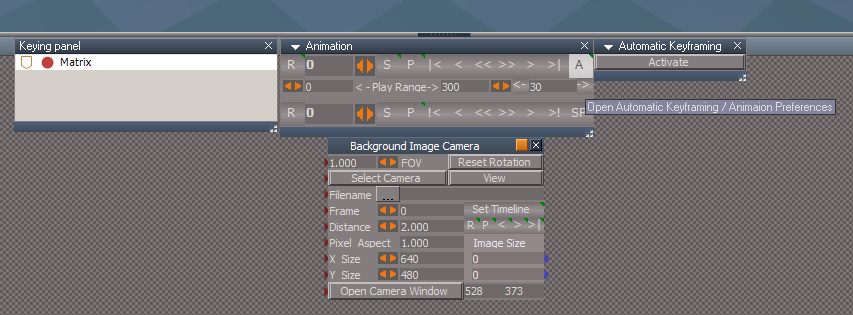
Animation Preferences panel
Changed
Automatic Keyframing and Bake Keyframes buttons


CustomScriptsStore
Add
Constraint Scripts.RsObj

Update
AutokeyWidgets.RsObj
Add
Automatic Keyframing panel
AK_PanelFrame

AutoKey.RsObj
Comment

Code: Select all

	var auto = params.ConValue('auto');
	if(auto) 
	{
		RsAnim.SetKeyFrame(Node.FirstSelected(), RsTime.CurrentTime());
//		if(Node.Exists("Scripts/CustomCommands/KeyInterp"))
//			Activity.Run("Scripts/CustomCommands/KeyInterp/copyDefaultInterp");
	}
Point Edit Widgets
Sphere
Changed
Ctrl + RMB click - Opens the Point Edit Widget's Preferences
User avatar
trueBlue
Captain
Posts: 5548
Joined: 06 Jul 2009, 22:50
Type the number ten into the box: 10

Re: Final trueSpace 7.61 Beta 8 Unofficial Update

Post by trueBlue »

New Update for trueSpace7.61 Beta 8 Unofficial Update
viewtopic.php?t=3732
April 18, 2020

Recommend that you completely Uninstall and Install trueSpace7.61 Beta 8 to a clean directory before installing this update. This update precedes all previous updates and recommend that you delete any and all previous updates.

Scripts/CustomCommands
Add
ParticleScripts - Author Clinton Reese

Scripts/preobjects
Update
animpref.RsObj
AnimPrefPanelFrame.RsObj


Scripts/ScriptCommands
Update
Unglue.xml - Author Clinton Reese

Materials - DX9 library
Add
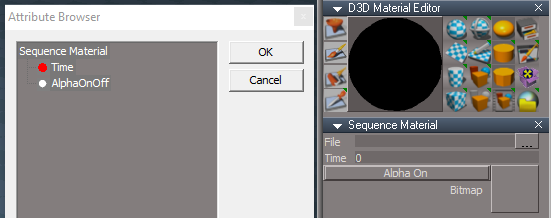
D3D Sequence Material.RsMat

File
Select the Open File control and browse to where you have a sequence of images.
Select the first image and Open it.
Time
Add the Time attribute to the Keying panel
Set Keyframes for the first and last image number in the sequence
Note: You are not limited by setting Keyframes for the first and last number in the sequence, however.
Tip: Ctrl + Drag the Sequence Material panel from the Stack when setting Keyframes.
Alpha On / Alpha Off
Enables the Alpha Texture
D3D Sequence Material.png
User avatar
trueBlue
Captain
Posts: 5548
Joined: 06 Jul 2009, 22:50
Type the number ten into the box: 10

Re: Final trueSpace 7.61 Beta 8 Unofficial Update

Post by trueBlue »

New Update for trueSpace7.61 Beta 8 Unofficial Update
viewtopic.php?t=3732
April 27, 2020

Recommend that you completely Uninstall and Install trueSpace7.61 Beta 8 to a clean directory before installing this update. This update precedes all previous updates and recommend that you delete any and all previous updates.

Scripts/CustomCommands
Update
ParticleScripts - Author Clinton Reese :worship:
Particle Script Encaps
Add
Alpha Texture
Animation button scripts
Particle Script Encaps.png
Particle Script Encaps.png (6.28 KiB) Viewed 4350 times
PlaneCrash.gif
PlaneCrash.gif (2.76 MiB) Viewed 3829 times
Explosion.gif
Explosion.gif (2.87 MiB) Viewed 3829 times
User avatar
trueBlue
Captain
Posts: 5548
Joined: 06 Jul 2009, 22:50
Type the number ten into the box: 10

Re: Final trueSpace 7.61 Beta 8 Unofficial Update

Post by trueBlue »

New Update for trueSpace7.61 Beta 8 Unofficial Update
viewtopic.php?t=3732
May 5, 2020

Recommend that you completely Uninstall and Install trueSpace7.61 Beta 8 to a clean directory before installing this update. This update precedes all previous updates and recommend that you delete any and all previous updates.

Rs Main Libraries

Components - Operators
Saturate.RsObj

Height field
Create Height field.RsObj 'script' - Author Clinton Reese :worship:
Height field object.RsObj 'example object'
Height field.RsObj
Sequence Object.RsObj
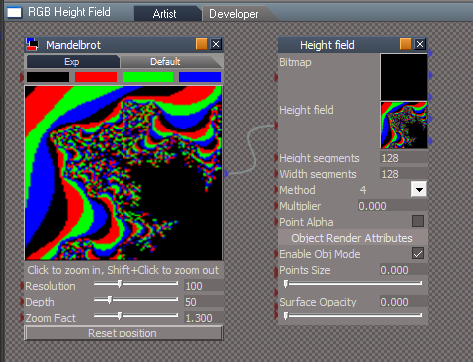
RGB Height Field.RsRcd 'example object using the Mandelbrot script'
Mandelbrot Height Field.png
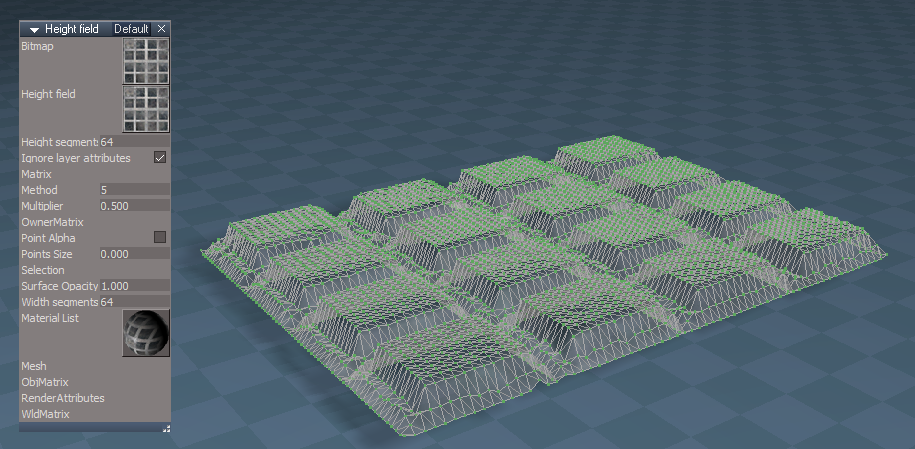
Also can be used to create meshes by simply changing the Height Field Bitmap.
Use the Flatten History
Height Field object.png
Or animate it with a sequence of images
Sequence Object.png
User avatar
trueBlue
Captain
Posts: 5548
Joined: 06 Jul 2009, 22:50
Type the number ten into the box: 10

Re: Final trueSpace 7.61 Beta 8 Unofficial Update

Post by trueBlue »

New Update for trueSpace7.61 Beta 8 Unofficial Update
viewtopic.php?t=3732
May 8, 2020

Recommend that you completely Uninstall and Install trueSpace7.61 Beta 8 to a clean directory before installing this update. This update precedes all previous updates and recommend that you delete any and all previous updates.

Library
Materials - DX9
Add
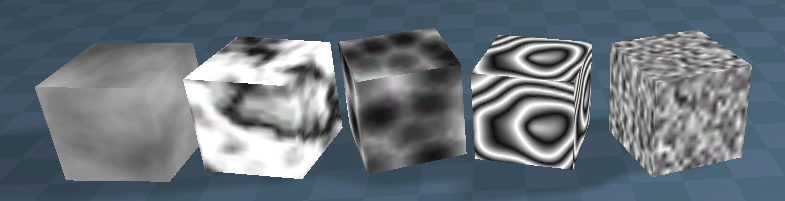
Made D3D Materials from the Components - Compositing library - Author Clinton Reese
* Image Cloud.RsMat
* Image Marble.RsMat
* Image Perlin.RsMat
* Image Voronoi.RsMat
* Image Wood.RsMat
Cubes.png
User avatar
trueBlue
Captain
Posts: 5548
Joined: 06 Jul 2009, 22:50
Type the number ten into the box: 10

Re: Final trueSpace 7.61 Beta 8 Unofficial Update

Post by trueBlue »

New Update for trueSpace7.61 Beta 8 Unofficial Update
viewtopic.php?t=3732
May 10, 2020

Recommend that you completely Uninstall and Install trueSpace7.61 Beta 8 to a clean directory before installing this update. This update precedes all previous updates and recommend that you delete any and all previous updates.

Library
Materials - DX9
Update - Thanks Clinton! :worship:
Image Cloud.RsMat
Image Marble.RsMat
Image Perlin.RsMat
Image Voronoi.RsMat
Image Wood.RsMat
Image Voronoi Material.png
Examples.png
Components - Compositing
Add
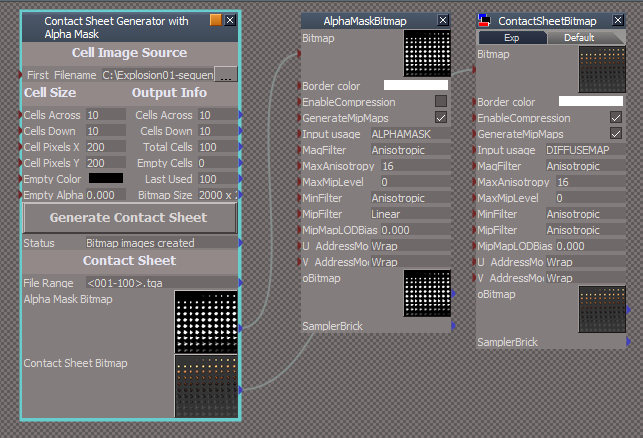
Contact Sheet Generator with Alpha Mask.RsObj Author - Glen Gordon
Contact Sheet.png
Select the first filename from the sequence of images using the File Browser control.
Enter the Cell Size attributes.
Select the Generate Contact Sheet button.
Wait until the Status reports "Bitmap images created"
Note: This can take awhile and you will not be able to use trueSpace until it has completed.
Save the Bitmaps into your Library using Insert As - Object (RsOb)
User avatar
trueBlue
Captain
Posts: 5548
Joined: 06 Jul 2009, 22:50
Type the number ten into the box: 10

Re: Final trueSpace 7.61 Beta 8 Unofficial Update

Post by trueBlue »

New Update for trueSpace7.61 Beta 8 Unofficial Update
viewtopic.php?t=3732
May 11, 2020

Recommend that you completely Uninstall and Install trueSpace7.61 Beta 8 to a clean directory before installing this update. This update precedes all previous updates and recommend that you delete any and all previous updates.


Widgets
Tools/Material/Inspect
Update the Priority to 3
LMB click to Inspect material
LMB + Drag to Select/Inspect
RMB + Drag to Edit picked material directly in the Link Editor
Note: If you are viewing from a Camera using the Inspect tool, you will be inspecting the camera's material.
Use: LMB + Drag and LMB click another object to Inspect it's material.

Select/Widget(s) 4 - Author Clinton Reese
Sphere
Add
P + LMB click opens Mesh Origin panel

CustomScriptsStore
MeshOrigin.RsObj - Author Clinton Reese

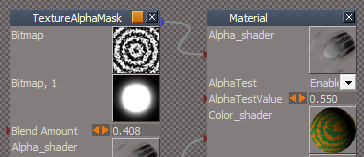
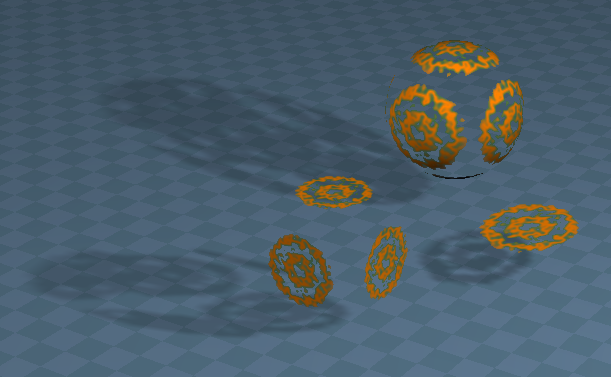
Materials - DX9
Image Wood Alpha Blend.RsMat
Example material using an experimental TextureAlphaMask shader
Blends as Alpha Bitmap and Alpha Bitmap Mask
TextureAlphaMask.png
TextureAlphaMask.png (27.52 KiB) Viewed 4110 times
Alpha Blend Mask.png
User avatar
trueBlue
Captain
Posts: 5548
Joined: 06 Jul 2009, 22:50
Type the number ten into the box: 10

Re: Final trueSpace 7.61 Beta 8 Unofficial Update

Post by trueBlue »

New Update for trueSpace7.61 Beta 8 Unofficial Update
viewtopic.php?t=3732
May 14, 2020

Recommend that you completely Uninstall and Install trueSpace7.61 Beta 8 to a clean directory before installing this update. This update precedes all previous updates and recommend that you delete any and all previous updates.

Library
Components - Compositing - Author Clinton Reese 'Updated 5/14/2019'
Update
image saver.RsObj
image sequence loader with scale.RsObj
Add
Contact Sheet Generator with Alpha Mask.RsObj - Author - Glen Gordon
Create Input Bitmaps.RsObj
Tiff Loader.RsObj - Author Clinton Reese
Sequence object.RsObj
Help.RsObj
User avatar
trueBlue
Captain
Posts: 5548
Joined: 06 Jul 2009, 22:50
Type the number ten into the box: 10

Re: Final trueSpace 7.61 Beta 8 Unofficial Update

Post by trueBlue »

New Update for trueSpace7.61 Beta 8 Unofficial Update
viewtopic.php?t=3732
May 18, 2020

Recommend that you completely Uninstall and Install trueSpace7.61 Beta 8 to a clean directory before installing this update. This update precedes all previous updates and recommend that you delete any and all previous updates.

Widgets
ViewWidget
Bottom Left Triangle
* RMB + Drag creates an Camera at current view
Add
CameraFromView script - Author - Clinton Reese

Top Right Triangle
* RMB + Drag creates an Entry Point camera at current view
Add
EntryPointFromView script - Author - Clinton Reese

Note: Removed 'Create Camera' scripts from the Orthogonal triangles

Library
Objects - tS7.61 Update objects
Update
tS7.61 Background Image Camera

Image Plane - Author - Clinton Reese

Modifications:
* Object Render Attributes for the Image Plane 'Enabled no shadows'
* Locked down the Matrix
* Incorporated a Camera
* View button "View from camera"
Right click "Previous view"
* Exported the OpenFile Control and Frame attributes to the front panel
* Set Timeline button. "Set Animation Time using the current Frame"
Right click "Select the Frame attribute in the Attribute Browser"
* Animation control buttons
* Distance - Moves the Image Plane away from the Camera 'Forwards & Backwards'
* Pixel Aspect - Set the pixel aspect ratio
* X Size - Set the Width dimension of the image
* Y Size - Set the Height dimension of the image
* Image Size " Gets the imported image's Width & Height"
* Open Camera Window button "Opens a new window using the Width & Height"
* Alpha On button "Connects the Texture Alpha shader"
* Alpha2 On button "Connects the Texture Alpha2 shader"
* Alpha Off " Disconnects the Alpha shader"
Note: Use the Camera to move the Background Image Camera.RsObj
Baclground Image Camera.png
User avatar
trueBlue
Captain
Posts: 5548
Joined: 06 Jul 2009, 22:50
Type the number ten into the box: 10

Re: Final trueSpace 7.61 Beta 8 Unofficial Update

Post by trueBlue »

New Update for trueSpace7.61 Beta 8 Unofficial Update
viewtopic.php?t=3732
May 20, 2020

Recommend that you completely Uninstall and Install trueSpace7.61 Beta 8 to a clean directory before installing this update. This update precedes all previous updates and recommend that you delete any and all previous updates.


Updates
AutokeyWidgets
Background Image Camera
Animation Panel

Model Workspace Animation
New updates.png
Library
Materials - Textures
Add
DX Color Texture
Uses Clinton's (Awesome Photo Shop) Components - Compositing/solid color image.RsObj :worship:
DX Color Texture.png
Toolbars
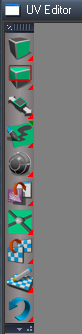
UVEditor toolbar
Add
UV Editor Preferences and Material Editor icons
Undo/Redo icons
Hide and Show geometry icons
Paint Brush(s) RMB click opens the Color aspect
UV toolbar.png
UV toolbar.png (17.35 KiB) Viewed 4006 times
User avatar
trueBlue
Captain
Posts: 5548
Joined: 06 Jul 2009, 22:50
Type the number ten into the box: 10

Re: Final trueSpace 7.61 Beta 8 Unofficial Update

Post by trueBlue »

New Update for trueSpace7.61 Beta 8 Unofficial Update
viewtopic.php?t=3732
May 20, 2020

Recommend that you completely Uninstall and Install trueSpace7.61 Beta 8 to a clean directory before installing this update. This update precedes all previous updates and recommend that you delete any and all previous updates.


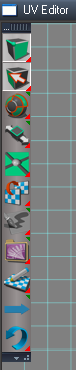
Toolbars
UVEditor toolbar
UVEditor toolbar.png
UVEditor toolbar.png (19.16 KiB) Viewed 3980 times
Add
Select by Material, Hide, and Show geometry icons
UV Editor Preferences and Material Editor icons
Move selection RMB click opens the Snapping aspect
Paint Brush(s) RMB click opens the Color aspect
Export texture RMB click opens the Export aspect
Next Material RMB click Previous Material
Undo/Redo icons

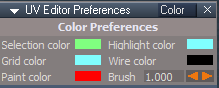
Preferences
UV Editor Preferences panel
Color aspect
UV Color.png
UV Color.png (4.64 KiB) Viewed 3959 times
Add
Brush Size attribute
User avatar
trueBlue
Captain
Posts: 5548
Joined: 06 Jul 2009, 22:50
Type the number ten into the box: 10

Re: Final trueSpace 7.61 Beta 8 Unofficial Update

Post by trueBlue »

New Update for trueSpace7.61 Beta 8 Unofficial Update
viewtopic.php?t=3732
May 30, 2020

Recommend that you completely Uninstall and Install trueSpace7.61 Beta 8 to a clean directory before installing this update. This update precedes all previous updates and recommend that you delete any and all previous updates.

preobjects
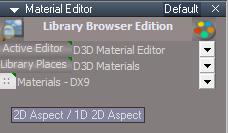
MaterialEditor
Add
Image Browser
Image Browser.png
Library Place
Library Place.png
Library Place.png (100.52 KiB) Viewed 3840 times
Add
Bitmaps - Textures
Update
2D Aspect / 1D 2D Aspect button script
LMB click - Saves the 2D Aspect frame's current Location, Height, and Thumbnail size
RMB click - Saves the 1D 2D Aspect frame's current Location, Height, and Thumbnail size
Note: Also saves the current aspect, 1D, 2D, or 1+2

Library
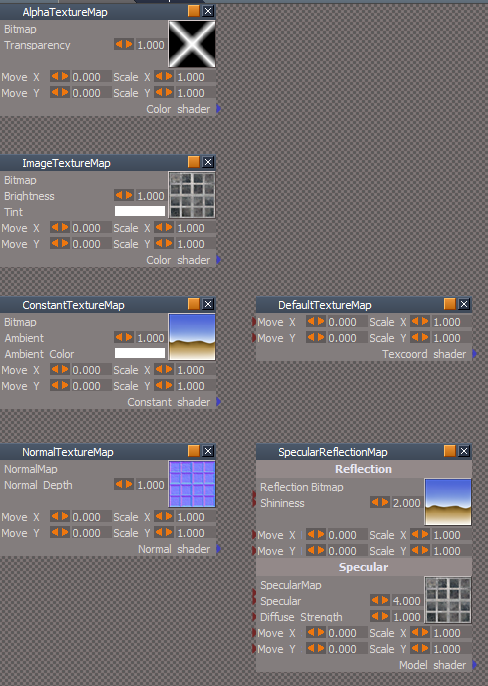
Shaders - Texture coord shader
Texture Maps.png
Add
AlphaTextureMap
ImageTextureMap
ConstantTextureMap
NormalTextureMap
SpecularReflectionMap
DefaultTextureMap


Objects - tS7.61 Update objects
Update
Background Image Camera
Add
ConstantTextureMap

OpenFile control
Tip: To load only one image, the image's name should end in a Zero
IE: Image0.png
User avatar
trueBlue
Captain
Posts: 5548
Joined: 06 Jul 2009, 22:50
Type the number ten into the box: 10

Re: Final trueSpace 7.61 Beta 8 Unofficial Update

Post by trueBlue »

New Update for trueSpace7.61 Beta 8 Unofficial Update
viewtopic.php?t=3732
RC1 June 11, 2020

Recommend that you completely Uninstall and Install trueSpace7.61 Beta 8 to a clean directory before installing this update. This update precedes all previous updates and recommend that you delete any and all previous updates.

Clintons toolbar - "Gold toolbox icon"
ParticleScripts - Author Clinton Reese
Add
Create Flipbook 2
D3D Materials that works with the Particle System's,
Alpha - Mature transparency of the particles
Fade In - Life percentage to achieve mature alpha value of the particle
Fade Out - Reverse of the above
Flip Book 2.png
Flip Book 2.png (5.07 KiB) Viewed 3131 times
Changed
Assign Flipbook scripts, that opens the Keybook aspect and Materials in the Stack/Panel
Assign Keybook.png
Add
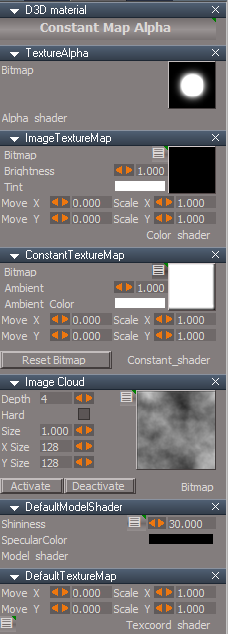
Create Particle Constant Map Alpha
Activate/Deactivate Image Cloud
Reset Bitmap ConstantTextureMap
Constant Map Alpha.png
Add
Connect aspect Connect button script
If Checked, creates a Ground Plane
Connect.png
Connect.png (18.1 KiB) Viewed 3131 times

Add
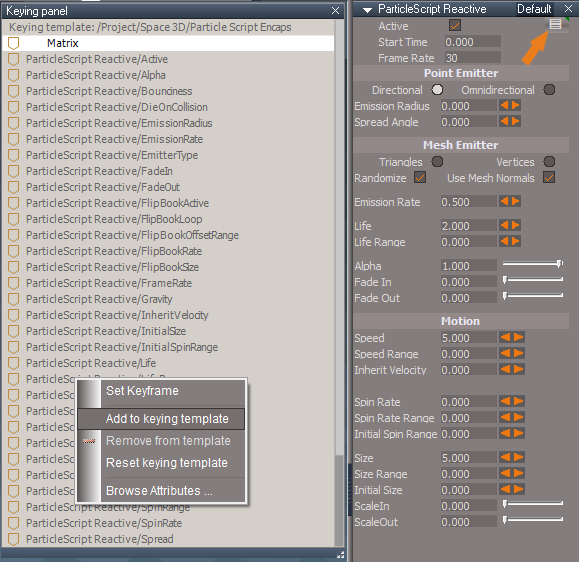
Settings icon to the ParticleScript Reactive panel and all of the shaders
Settings.png
You can Set Keyframe or Add to keying template

Red toolbox toolbar
Add
Copy Attributes - Author Clinton Reese

preobjects

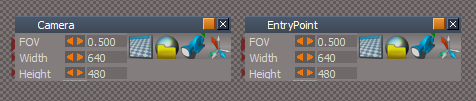
Cameras.RsObj
Camera & EntryPoint
Add
Open New Window using Width & Height
New Cameras.png
New Cameras.png (6.13 KiB) Viewed 3131 times
New View @ the top titlebar toolbar
Saved
Frame Window New View.RsObj
640x480
Anti Alaising = Level 4

light01.RsObj - Fixed the stuck check box
light02.RsObj - Fixed the stuck check box

Primitives.RsObj
Add
Settings icons
LMB click - Selects the preferences node for showing the attributes in the Keying Panel
RMB click - Selects the parent object
Primitives.png
Primitives.png (4.62 KiB) Viewed 3131 times
Library

Bitmaps - Black and White
Add
index - Black bitmaps show at the top

Materials - DX9
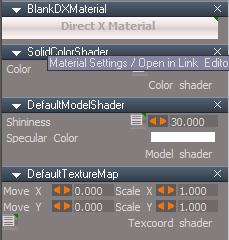
BlankDXMaterial
Exported to the parent object... "When you select your object, the D3D Material shows in the Stack/Panel
LMB click - Shows the materials in the Stack/Panel
RMB click - Opens the materials in the Link Editor
Add
Settings icon to each shader
BlankDXMaterial.png
BlankDXMaterial.png (10.53 KiB) Viewed 3131 times

Texture coord shaders
Add
Settings icon to each shader
LMB click - Selects the node for showing the attributes in the Keying Panel
RMB click - Selects the material
Texture coord shaders.png
User avatar
clintonman
Captain
Posts: 5659
Joined: 21 May 2009, 21:08
Type the number ten into the box: 0
Location: California

Re: Final trueSpace 7.61 Beta 8 Unofficial Update

Post by clintonman »

Found a bug. Autokey on widget rotation only works with the right mouse button. Left mouse button gives no keys.
Clinton Reese

http://clintons3d.com
User avatar
trueBlue
Captain
Posts: 5548
Joined: 06 Jul 2009, 22:50
Type the number ten into the box: 10

Re: Final trueSpace 7.61 Beta 8 Unofficial Update

Post by trueBlue »

clintonman wrote: 15 Jun 2020, 03:30 Found a bug. Autokey on widget rotation only works with the right mouse button. Left mouse button gives no keys.
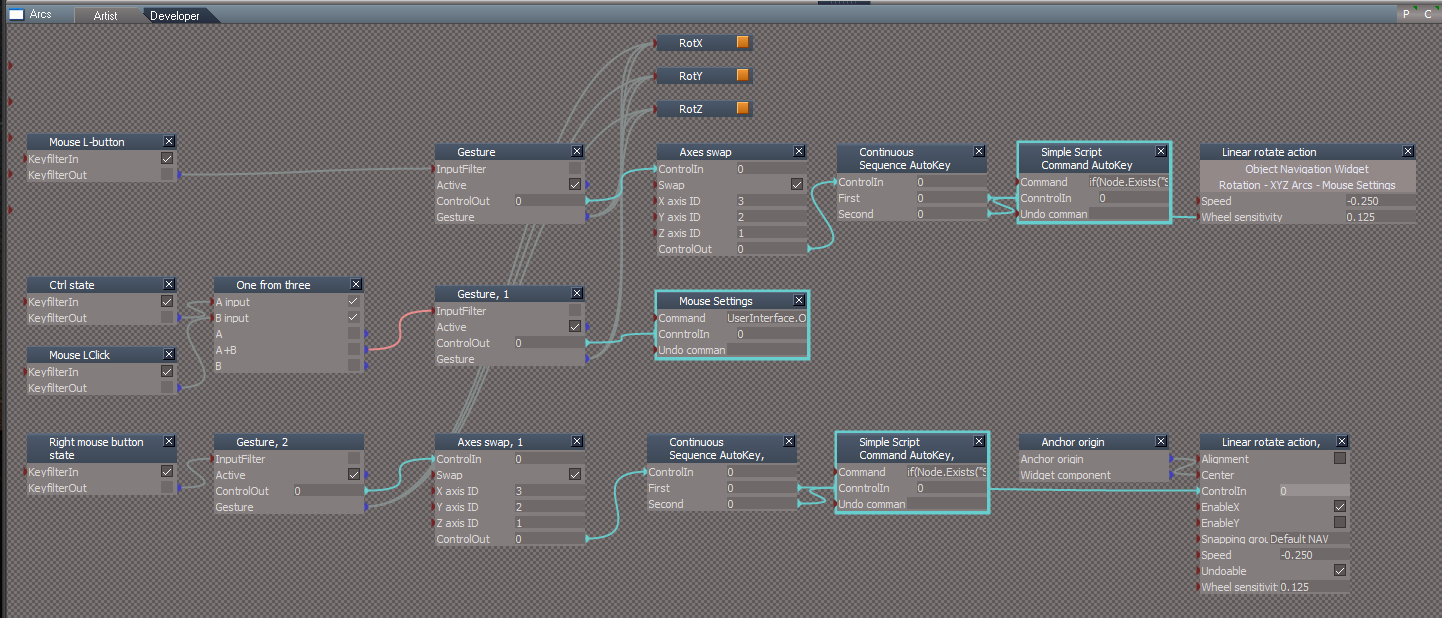
Looks like the LMB gesture was changed to a RMB gesture.
I am going to make all of the Object Navigation Widgets have the same Additional Shortcuts for the Arcs

Object Navigation Widget 1, 2, 3, 4, 5, and 6
Swapped the LMB State with the RMB State
Add Auto Key nodes to the RMB State, including 7 and 8

All Object Navigation Widget's Arcs Additional Shortcuts are the same

LMB + Drag on Arcs rotates from the Axis
RMB + Drag on Arcs rotates from object center
Arcs.png
User avatar
trueBlue
Captain
Posts: 5548
Joined: 06 Jul 2009, 22:50
Type the number ten into the box: 10

Re: Final trueSpace 7.61 Beta 8 Unofficial Update

Post by trueBlue »

New Update for trueSpace7.61 Beta 8 Unofficial Update
viewtopic.php?t=3732
RC2 June 15, 2020

Recommend that you completely Uninstall and Install trueSpace7.61 Beta 8 to a clean directory before installing this update. This update precedes all previous updates and recommend that you delete any and all previous updates.

Object Navigation Widget 1, 2, 3, 4, 5, and 6
Swapped the LMB State with the RMB State
Add Auto Key nodes to the RMB State, including 7 and 8

All Object Navigation Widget's Arcs Additional Shortcuts are the same

LMB + Drag on Arcs rotates from the Axis
RMB + Drag on Arcs rotates from object center
Note: If you Flatten the Axis, RMB + Drag on Arcs rotates from object center no longer works, unless you Reset the Axis!

ParticleScripts/Particle Script Encaps/Particle/Constant Map Alpha D3D material
Add
Color Picker to the Solid Color Image script with a Watch Dog Event

Cameras.RsObj
Cameras.png
Camera & EntryPoint
Add
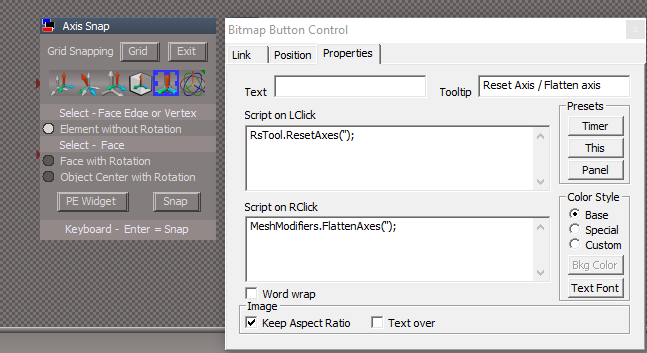
Bitmap Button Controls

Snapping.RsObj
Axis Snap.png
Reset Axis icon
Add
RMB = Flatten Axis

AutokeyWidgets.RsObj
AutoKeyframing.png
AutoKeyframing.png (1.64 KiB) Viewed 2599 times
Add
OnOff ColorData control
Red = Off
Green = On
User avatar
clintonman
Captain
Posts: 5659
Joined: 21 May 2009, 21:08
Type the number ten into the box: 0
Location: California

Re: Final trueSpace 7.61 Beta 8 Unofficial Update

Post by clintonman »

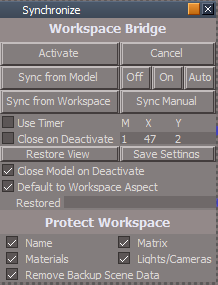
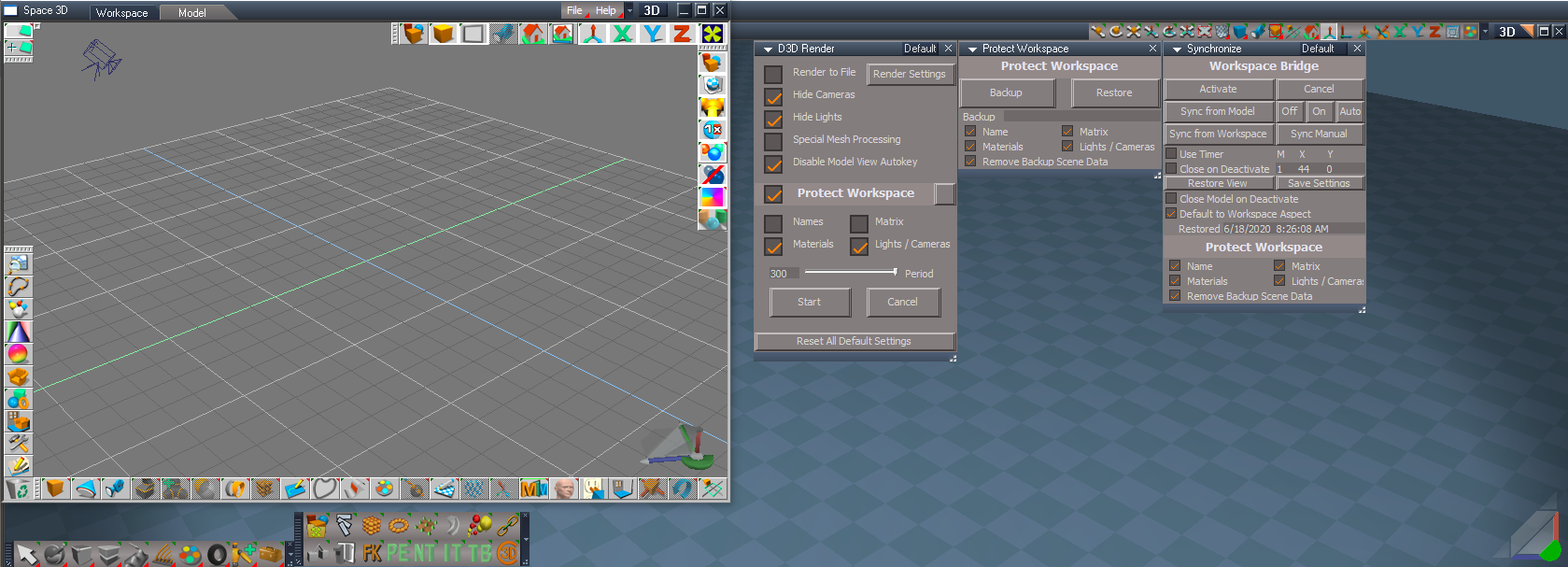
Synchronize.jpg
Synchronize.jpg (47.06 KiB) Viewed 2588 times
This is my new version of the Synchronize script.

Restores the users selection after running.
Adds Protect Workspace settings. They all default to true.
Added a Cancel button to match the Workspace aspect.
Added "Default to Workspace Aspect". Defaults to true and opens in the Workspace panel. When false will load in with the Default aspect active instead.

My main motivation was not losing my selections and having the option to start in the Default aspect.
Attachments
Synchronize9bb2.RsObj
(243.55 KiB) Downloaded 152 times
Clinton Reese

http://clintons3d.com
User avatar
trueBlue
Captain
Posts: 5548
Joined: 06 Jul 2009, 22:50
Type the number ten into the box: 10

Re: Final trueSpace 7.61 Beta 8 Unofficial Update

Post by trueBlue »

Is there anyway to delete the Backup nodes and or even better, put them inside the Synchronize object?
User avatar
clintonman
Captain
Posts: 5659
Joined: 21 May 2009, 21:08
Type the number ten into the box: 0
Location: California

Re: Final trueSpace 7.61 Beta 8 Unofficial Update

Post by clintonman »

trueBlue wrote: 16 Jun 2020, 14:09 Is there anyway to delete the Backup nodes and or even better, put them inside the Synchronize object?
I'll look into the delete backups. The protect workspace on my website has a "Remove Backup Scene Data" option not found on the Unofficial Update version. Don't want to put it inside because then it will exist in more than one place making it more difficult to maintain/update.
Clinton Reese

http://clintons3d.com
User avatar
trueBlue
Captain
Posts: 5548
Joined: 06 Jul 2009, 22:50
Type the number ten into the box: 10

Re: Final trueSpace 7.61 Beta 8 Unofficial Update

Post by trueBlue »

I found an issue with the NameBackupData
Steps
Run Activate/Deactivate twice in the same scene.
Second run does not back up the names
If you add
Node.Delete(Space.CurrentScene() + "/NameBackupData")
to the Activate button(S) it works
Edit: Deleting the NameBackupData does not play well with the Protect Workspace!!!

Also if you replace the code with
Node.Value("%THIS_NAME%", "DoDelete") = true
Activity.Run("%THIS_NAME%/Deactivate")
to the Cancel button(s) it works better.
The protect workspace on my website has a "Remove Backup Scene Data" option not found on the Unofficial Update version.
This is included in the Unofficial Update
User avatar
trueBlue
Captain
Posts: 5548
Joined: 06 Jul 2009, 22:50
Type the number ten into the box: 10

Re: Final trueSpace 7.61 Beta 8 Unofficial Update

Post by trueBlue »

This works perfect for me!
Open Protect Workspace, enable 'Remove Bacukp Scene Data', and run Backup
Open Synchronize and run Activate and then Deactivate
Run Restore on Protect Workspace

If Synchronize could run Protect Workspace without opening it and run the above, that would be the best!!!
User avatar
trueBlue
Captain
Posts: 5548
Joined: 06 Jul 2009, 22:50
Type the number ten into the box: 10

Re: Final trueSpace 7.61 Beta 8 Unofficial Update

Post by trueBlue »

Try dis... :mrgreen:
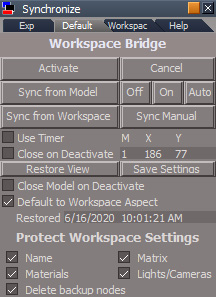
Synchronize.png
Synchronize.png (14.38 KiB) Viewed 2541 times
Attachments
Synchronize43f5.RsObj
(236.56 KiB) Downloaded 163 times
User avatar
clintonman
Captain
Posts: 5659
Joined: 21 May 2009, 21:08
Type the number ten into the box: 0
Location: California

Re: Final trueSpace 7.61 Beta 8 Unofficial Update

Post by clintonman »

Synchronize2.jpg
Synchronize2.jpg (57.26 KiB) Viewed 2503 times
You're right. the "Remove Backup Scene Data" is in there. It just wasn't in the Synchronize code.
I added it to the synchronize, default the value to true and the names protection works now.
Clinton Reese

http://clintons3d.com
User avatar
clintonman
Captain
Posts: 5659
Joined: 21 May 2009, 21:08
Type the number ten into the box: 0
Location: California

Re: Final trueSpace 7.61 Beta 8 Unofficial Update

Post by clintonman »

Cross posted.
Clinton Reese

http://clintons3d.com
User avatar
clintonman
Captain
Posts: 5659
Joined: 21 May 2009, 21:08
Type the number ten into the box: 0
Location: California

Re: Final trueSpace 7.61 Beta 8 Unofficial Update

Post by clintonman »

Don't understand why you're doing this inside the Restore. RestoreWorkspaceData and then RestoreButton. Why run it in 2 different ways?

Code: Select all

	if(Node.Exists(protectWorkspace)) {
		Node.Value(protectWorkspace + "/ReturnFromRestore", "ReturnTo") = "";
		Activity.Run(protectWorkspace + "/RestoreWorkspaceData");
Activity.Run(protectWorkspace + "/RestoreButton")
	}
There's also a "Delete Backup Data" command node that should be removed since the Protect Workspace already takes care of it.
Clinton Reese

http://clintons3d.com
User avatar
trueBlue
Captain
Posts: 5548
Joined: 06 Jul 2009, 22:50
Type the number ten into the box: 10

Re: Final trueSpace 7.61 Beta 8 Unofficial Update

Post by trueBlue »

clintonman wrote: 16 Jun 2020, 17:28 Don't understand why you're doing this inside the Restore. RestoreWorkspaceData and then RestoreButton. Why run it in 2 different ways?

Code: Select all

	if(Node.Exists(protectWorkspace)) {
		Node.Value(protectWorkspace + "/ReturnFromRestore", "ReturnTo") = "";
		Activity.Run(protectWorkspace + "/RestoreWorkspaceData");
Activity.Run(protectWorkspace + "/RestoreButton")
	}
The RestoreButton clears the Backup status in the Protect Workspace
User avatar
trueBlue
Captain
Posts: 5548
Joined: 06 Jul 2009, 22:50
Type the number ten into the box: 10

Re: Final trueSpace 7.61 Beta 8 Unofficial Update

Post by trueBlue »

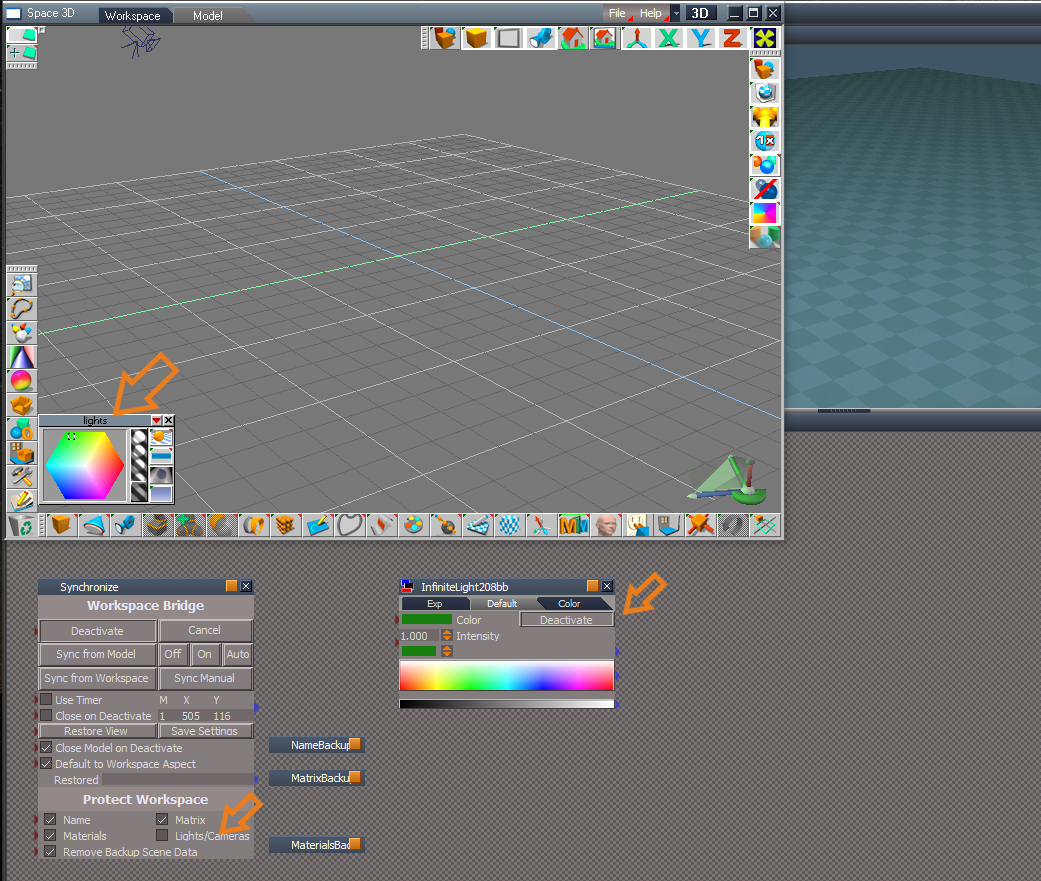
Hummm... Try this:
Activate Synchronize
Do not backup Lights/Cameras
Enable Synchronize on a Light
Make Color changes to the Light in Model
Deactivate Synchronize

The color change does not stick in Workspace even if you select all of the different Bridge Sync buttons
NoBackup for Lights not working.png
User avatar
clintonman
Captain
Posts: 5659
Joined: 21 May 2009, 21:08
Type the number ten into the box: 0
Location: California

Re: Final trueSpace 7.61 Beta 8 Unofficial Update

Post by clintonman »

I changed Protect Workspace so the time gets cleared, so there's no need to add extra commands outside to fix it.
I removed the unneeded nodes inside Synchronize used for name backup. That is handled in the Protect Workspace.

I'll look at the light color next.
Clinton Reese

http://clintons3d.com
User avatar
clintonman
Captain
Posts: 5659
Joined: 21 May 2009, 21:08
Type the number ten into the box: 0
Location: California

Re: Final trueSpace 7.61 Beta 8 Unofficial Update

Post by clintonman »

Workspace light color protection is via the Material checkbox.

Lights / Cameras protects the workspace camera FOV, the spotlight cone angle and the lights map size and enable shadows values.
It protects the light map size and shadows by exporting connectors.
Clinton Reese

http://clintons3d.com
User avatar
clintonman
Captain
Posts: 5659
Joined: 21 May 2009, 21:08
Type the number ten into the box: 0
Location: California

Re: Final trueSpace 7.61 Beta 8 Unofficial Update

Post by clintonman »

Here is the latest.

Protect Workspace will clear the time stamp when called from other scripts. Not just when pressing the Restore button.

Synchronize cleaned out the internal name backup.
Attachments
Synchronize4c2d.RsObj
(236.02 KiB) Downloaded 149 times

ProtectWorkspace0bb4.RsObj
(132.86 KiB) Downloaded 165 times
Clinton Reese

http://clintons3d.com
User avatar
trueBlue
Captain
Posts: 5548
Joined: 06 Jul 2009, 22:50
Type the number ten into the box: 10

Re: Final trueSpace 7.61 Beta 8 Unofficial Update

Post by trueBlue »

Okay I will try that.
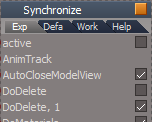
Wonder if the two DoDelete attributes could be an issue?
DoDeleteX2.png
DoDeleteX2.png (5.57 KiB) Viewed 2694 times
Edit: Cross Post
User avatar
trueBlue
Captain
Posts: 5548
Joined: 06 Jul 2009, 22:50
Type the number ten into the box: 10

Re: Final trueSpace 7.61 Beta 8 Unofficial Update

Post by trueBlue »

Well done Sir ClintonMan! :worship:
I changed the frames location and enabled SnappedTo
Reset the Camera's location
Changed the Synchronize's Protect Workspace UI to match Protect Workspace
Cleared the last saved backup status
Would it be possible to add the Light(s) color to the Lights/Camera backup data?
Protecting object materials in itself is most likely to biggest protection, so disabling that to get Light color to stick, would not be a very good idea.

Edit: This issue still exist
Steps
Run Activate/Deactivate enabling Remove Scene Backup Data
Run Activate/Deactivate disable Remove Scene Backup Data
Second run does not back up the NameBackupData
Me thinks you need to add
Node.Delete(Space.CurrentScene() + "/NameBackupData")
to the Activate button(S) script
Attachments
Synchronizeb49b.RsObj
(235.91 KiB) Downloaded 160 times
ProtectWorkspace21ef.RsObj
(132.84 KiB) Downloaded 147 times
User avatar
clintonman
Captain
Posts: 5659
Joined: 21 May 2009, 21:08
Type the number ten into the box: 0
Location: California

Re: Final trueSpace 7.61 Beta 8 Unofficial Update

Post by clintonman »

Bug in background widget,
"." + LMB drag hides everything but does not show the selected object. It gets hidden too.

Edit: I think it's because it loses the selection, so it can't make the selection visible.
Last edited by clintonman on 16 Jun 2020, 21:50, edited 1 time in total.
Clinton Reese

http://clintons3d.com
User avatar
clintonman
Captain
Posts: 5659
Joined: 21 May 2009, 21:08
Type the number ten into the box: 0
Location: California

Re: Final trueSpace 7.61 Beta 8 Unofficial Update

Post by clintonman »

Protect Workspace was assuming that if it was run from outside then it was run from an animation script. So names where not protected when called from Synchronize. Added exception for the call from Synchronize.

Moved light color protection from Materials to Cameras/Lights.
Attachments
ProtectWorkspace021f.RsObj
(134.52 KiB) Downloaded 171 times
Clinton Reese

http://clintons3d.com
User avatar
trueBlue
Captain
Posts: 5548
Joined: 06 Jul 2009, 22:50
Type the number ten into the box: 10

Re: Final trueSpace 7.61 Beta 8 Unofficial Update

Post by trueBlue »

clintonman wrote: 16 Jun 2020, 20:39 Bug in background widget,
"." + LMB drag hides everything but does not show the selected object. It gets hidden too.

Edit: I think it's because it loses the selection, so it can't make the selection visible.
I think I will remove all of the shortcuts for the Show and Hide in the Background widget.
The problem looks like the scripts for the Show, Hide, ShowAll, and HideAll are not working as I would have hoped.
The original trueSpace command for applying Render Attributes is D3DView.ShowRenderAttribsForObject('','')
Problems
1.) When applying this command to several objects, it shows the Object Render Attributes panel in the Stack. UGH!
2.) When applying this command to objects that have been 3D Encapsulated, it does not delete the Object Render Attributes node, if it existed beforehand.
I have a better idea how to solve this but I am not sure how to combine it into one script.
For non grouped objects, I was wanting to load the Object Render Attributes node from the preobjects folder and export the connector.
For grouped objects, I guess the easiest way would be to use the tS command, delete the Object Render Attributes nodes, and export the connector. But this shows the Object Render Attributes panel in the Stack.
Better solution (Unresolved) would be to load the RenderAttributes node from disk and export the connectors.
User avatar
trueBlue
Captain
Posts: 5548
Joined: 06 Jul 2009, 22:50
Type the number ten into the box: 10

Re: Final trueSpace 7.61 Beta 8 Unofficial Update

Post by trueBlue »

clintonman wrote: 16 Jun 2020, 21:35 Protect Workspace was assuming that if it was run from outside then it was run from an animation script. So names where not protected when called from Synchronize. Added exception for the call from Synchronize.

Moved light color protection from Materials to Cameras/Lights.
Awesome, works great!
I am proposing these changes to the Synchronize.RsObj
Restore
Changed DoDelete to DoClose

Protect
Changed DoDeleteBackup to DoDelete


Cancel button(s) script
Add
Node.Value("%THIS_NAME%", "DoDelete") = true
Node.Value("%THIS_NAME%", "DoClose") = true
Activity.Run("%THIS_NAME%/Deactivate")

Save Settings button script
Node.ConReset("%THIS_NAME%/Time" , "Time_Stamp")
RsFileIO.SaveObject(System.GetMainDir() + '\\Scripts\\preobjects\\Synchronize.RsObj', '%THIS_NAME%')
Node.Value("/Status Message", "Seconds") = 5000
Node.Value("/Status Message", "Message") = " Synchronize settings saved"
Activity.Run("/Status Message/Status Message")
Activity.Run("/Status Message/Notify")

Reset the Camera's location
Reset the SyncPanelFrame's location and enabled SnappedTo
User avatar
clintonman
Captain
Posts: 5659
Joined: 21 May 2009, 21:08
Type the number ten into the box: 0
Location: California

Re: Final trueSpace 7.61 Beta 8 Unofficial Update

Post by clintonman »

trueBlue wrote: 17 Jun 2020, 18:11
Cancel button(s) script
Add
Node.Value("%THIS_NAME%", "DoDelete") = true
Node.Value("%THIS_NAME%", "DoClose") = true
Activity.Run("%THIS_NAME%/Deactivate")
I disagree. Might be ok for the Workspace aspect. It shouldn't be changing options that the user sets in the Default aspect.
I would change the Cancel to Close and make it do nothing if the Synchronize is active. And add the extra DoClose to the Workspace aspect inactive portion of the Activate/Deactivate button.

So Cancel becomes Close with logic: if active do nothing and return, otherwise close it.
Workspace Deactivate button add the DoClose = true
If deactivate is on the cancel button then it can deactivate without ever running activate.

I see the Workspace aspect as fully automatic and the Default aspect with values not set by script but by the user.
Clinton Reese

http://clintons3d.com
User avatar
trueBlue
Captain
Posts: 5548
Joined: 06 Jul 2009, 22:50
Type the number ten into the box: 10

Re: Final trueSpace 7.61 Beta 8 Unofficial Update

Post by trueBlue »

I think you are missing the fact, that those temporary changes are not saved to disk unless you run the Save Settings button script.
You or any other user can save their preferred settings anyway they want by running the Save Settings button script.
My concern is, if a user Activates and then Cancels, without Deactivating first, the backup data is not restored!
Nevertheless having those changes on the Cancel button on the Workspace aspect only, works for me, if you agree.
User avatar
clintonman
Captain
Posts: 5659
Joined: 21 May 2009, 21:08
Type the number ten into the box: 0
Location: California

Re: Final trueSpace 7.61 Beta 8 Unofficial Update

Post by clintonman »

trueBlue wrote: 17 Jun 2020, 20:08 I think you are missing the fact, that those temporary changes are not saved to disk unless you run the Save Settings button script.
You or any other user can save their preferred settings anyway they want by running the Save Settings button script.
Nevertheless having those changes on the Cancel button on the Workspace aspect only, works for me, if you agree.
Works for me.
Clinton Reese

http://clintons3d.com
User avatar
trueBlue
Captain
Posts: 5548
Joined: 06 Jul 2009, 22:50
Type the number ten into the box: 10

Re: Final trueSpace 7.61 Beta 8 Unofficial Update

Post by trueBlue »

Cross post...
My concern is, if a user Activates and then Cancels, without Deactivating first, the backup data is not restored!
User avatar
clintonman
Captain
Posts: 5659
Joined: 21 May 2009, 21:08
Type the number ten into the box: 0
Location: California

Re: Final trueSpace 7.61 Beta 8 Unofficial Update

Post by clintonman »

trueBlue wrote: 17 Jun 2020, 20:35 Cross post...
My concern is, if a user Activates and then Cancels, without Deactivating first, the backup data is not restored!
"So Cancel becomes Close with logic: if active do nothing and return, otherwise close it."
Yep, that's what I meant by making the Cancel do nothing if Activation has been started.
Clinton Reese

http://clintons3d.com
User avatar
trueBlue
Captain
Posts: 5548
Joined: 06 Jul 2009, 22:50
Type the number ten into the box: 10

Re: Final trueSpace 7.61 Beta 8 Unofficial Update

Post by trueBlue »

Currently, your most recent Synchronize Default aspect Cancel button script command deletes Synchronize.
I changed it to

Code: Select all

var active = Node.Value("%THIS_NAME%", "active")
if(active) {
return
} else {
Node.Delete("%THIS_NAME%")
}
But there still is a problem, in that Model can still be open, and I can not figure out how to close it before deleting Synchronize.
I tried adding:

Code: Select all

Node.Value("%THIS_NAME%", "AutoCloseModelView") = true
Activity.Run("%THIS_NAME%/CloseModelView")
But that does not work.
User avatar
clintonman
Captain
Posts: 5659
Joined: 21 May 2009, 21:08
Type the number ten into the box: 0
Location: California

Re: Final trueSpace 7.61 Beta 8 Unofficial Update

Post by clintonman »

Is "Close Model on Deactivate" checked? Would that take care of the problem, since it closes model view?
Clinton Reese

http://clintons3d.com
User avatar
trueBlue
Captain
Posts: 5548
Joined: 06 Jul 2009, 22:50
Type the number ten into the box: 10

Re: Final trueSpace 7.61 Beta 8 Unofficial Update

Post by trueBlue »

clintonman wrote: 18 Jun 2020, 15:01 Is "Close Model on Deactivate" checked? Would that take care of the problem, since it closes model view?
"Close Model on Deactivate"
The default is unchecked.
"Close Model on Deactivate" works like it should, checked or unchecked, but only when you run Activate/Deactivate.
So No, it does not take care of the problem with the Cancel button script without running Deactivate.
User avatar
clintonman
Captain
Posts: 5659
Joined: 21 May 2009, 21:08
Type the number ten into the box: 0
Location: California

Re: Final trueSpace 7.61 Beta 8 Unofficial Update

Post by clintonman »

trueBlue wrote: 18 Jun 2020, 15:20
clintonman wrote: 18 Jun 2020, 15:01 Is "Close Model on Deactivate" checked? Would that take care of the problem, since it closes model view?
"Close Model on Deactivate"
The default is unchecked.
"Close Model on Deactivate" works like it should, checked or unchecked, but only when you run Activate/Deactivate.
So No, it does not take care of the problem with the Cancel button script without running Deactivate.
I'm not following. Sounds like you're saying if you have a model view open, then open synchronize default aspect and press cancel it should close the model view.
Clinton Reese

http://clintons3d.com
User avatar
trueBlue
Captain
Posts: 5548
Joined: 06 Jul 2009, 22:50
Type the number ten into the box: 10

Re: Final trueSpace 7.61 Beta 8 Unofficial Update

Post by trueBlue »

Found another issue as well.
Steps
Reset all attributes
Using the Default aspect, Activate / Deactivate.
Model is still open and Workspace as been Restored.
Do you see the problem with this scenario?
Workspace in an unprotected state.png
User avatar
clintonman
Captain
Posts: 5659
Joined: 21 May 2009, 21:08
Type the number ten into the box: 0
Location: California

Re: Final trueSpace 7.61 Beta 8 Unofficial Update

Post by clintonman »

trueBlue wrote: 18 Jun 2020, 15:37 Found another issue as well.
Steps
Reset all attributes
Using the Default aspect, Activate / Deactivate.
Model is still open and Workspace as been Restored.
Do you see the problem with this scenario?
Workspace in an unprotected state.png
"Close Model on Deactivate" isn't checked in your image. So model will not close.
Clinton Reese

http://clintons3d.com
User avatar
trueBlue
Captain
Posts: 5548
Joined: 06 Jul 2009, 22:50
Type the number ten into the box: 10

Re: Final trueSpace 7.61 Beta 8 Unofficial Update

Post by trueBlue »

I implore you to try the steps that I outlined for you with your current version.
Deleting Synchronize in this state with Model opened is not going to work!
Bottom line, Model has to be closed before Restoring.
There is two problems currently.
1.) The steps I provided
2.) The Cancel button(s) scripts
User avatar
clintonman
Captain
Posts: 5659
Joined: 21 May 2009, 21:08
Type the number ten into the box: 0
Location: California

Re: Final trueSpace 7.61 Beta 8 Unofficial Update

Post by clintonman »

trueBlue wrote: 18 Jun 2020, 16:07 I implore you to try the steps that I outlined for you with your current version.
Deleting Synchronize in this state with Model opened is not going to work!
Bottom line, Model has to be closed before Restoring.
There is two problems currently.
1.) The steps I provided
2.) The Cancel button(s) scripts
Did as requested, still not seeing the problem. Would help if you spell it out.
Clinton Reese

http://clintons3d.com
User avatar
trueBlue
Captain
Posts: 5548
Joined: 06 Jul 2009, 22:50
Type the number ten into the box: 10

Re: Final trueSpace 7.61 Beta 8 Unofficial Update

Post by trueBlue »

Here is another issue:
Steps
Crtl + Copy a Light
Reset all attributes
Uncheck "Remove Backup Scene Data"
Using the Default aspect, Activate / Deactivate
User avatar
clintonman
Captain
Posts: 5659
Joined: 21 May 2009, 21:08
Type the number ten into the box: 0
Location: California

Re: Final trueSpace 7.61 Beta 8 Unofficial Update

Post by clintonman »

trueBlue wrote: 18 Jun 2020, 16:26 Here is another issue:
Steps
Crtl + Copy a Light
Reset all attributes
Uncheck "Remove Backup Scene Data"
Using the Default aspect, Activate / Deactivate
Ran the steps. What am I looking for? I don't see anything. Would help if you spelled it out.
Clinton Reese

http://clintons3d.com
User avatar
clintonman
Captain
Posts: 5659
Joined: 21 May 2009, 21:08
Type the number ten into the box: 0
Location: California

Re: Final trueSpace 7.61 Beta 8 Unofficial Update

Post by clintonman »

SyncAutoCloseNurbsCage.jpg

One reason automatically closing model space is bad for me.
This happens while using the modelspace NURBS cage plugin to edit a NURBS surface using workspace point edit. Auto close model on deactivate gives a crash.
Clinton Reese

http://clintons3d.com
User avatar
trueBlue
Captain
Posts: 5548
Joined: 06 Jul 2009, 22:50
Type the number ten into the box: 10

Re: Final trueSpace 7.61 Beta 8 Unofficial Update

Post by trueBlue »

Maybe this would help?

Code: Select all

Node.Rename("/Project/Windows Manager Space/Frame Window, 1", "ModelFrameWindow") 
WindowsManager.CloseWindow("/Project/Windows Manager Space/ModelFrameWindow")
Not sure why you are getting different results with the steps provided.
I do not know how to spell it out any clearer.
From my testing stand point, this is the only thing that works for me.

Code: Select all

Node.Value("%THIS_NAME%", "DoDelete") = true
Node.Value("%THIS_NAME%", "DoClose") = true
Activity.Run("%THIS_NAME%/Deactivate")
User avatar
trueBlue
Captain
Posts: 5548
Joined: 06 Jul 2009, 22:50
Type the number ten into the box: 10

Re: Final trueSpace 7.61 Beta 8 Unofficial Update

Post by trueBlue »

If that does not work, maybe try:

Code: Select all

tSBridge.FlushSyncEvents()
tSBridge.BlockRsTSEvents(true);
Node.Rename("/Project/Windows Manager Space/Frame Window, 1", "ModelFrameWindow")
WindowsManager.CloseWindow("/Project/Windows Manager Space/ModelFrameWindow")
tSBridge.BlockRsTSEvents(false);
User avatar
clintonman
Captain
Posts: 5659
Joined: 21 May 2009, 21:08
Type the number ten into the box: 0
Location: California

Re: Final trueSpace 7.61 Beta 8 Unofficial Update

Post by clintonman »

trueBlue wrote: 18 Jun 2020, 17:06 ...

Not sure why you are getting different results with the steps provided.
I do not know how to spell it out any clearer.
...
You gave me steps and showed some pictures but never actually say what the problem is. I do the steps don't see the problem cause I don't know what I'm supposed to be looking for. It's like we're looking at a Find Waldo book and it's obvious to you were he is and I can't see him.
Give steps and then say "X should not happen", "Y should happen", "this is bad because...", "this is good because..."
Clinton Reese

http://clintons3d.com
User avatar
clintonman
Captain
Posts: 5659
Joined: 21 May 2009, 21:08
Type the number ten into the box: 0
Location: California

Re: Final trueSpace 7.61 Beta 8 Unofficial Update

Post by clintonman »

trueBlue wrote: 18 Jun 2020, 17:23 If that does not work, maybe try:

Code: Select all

tSBridge.FlushSyncEvents()
tSBridge.BlockRsTSEvents(true);
Node.Rename("/Project/Windows Manager Space/Frame Window, 1", "ModelFrameWindow")
WindowsManager.CloseWindow("/Project/Windows Manager Space/ModelFrameWindow")
tSBridge.BlockRsTSEvents(false);
Where do I place this code? Inside CloseModelView?
Clinton Reese

http://clintons3d.com
User avatar
trueBlue
Captain
Posts: 5548
Joined: 06 Jul 2009, 22:50
Type the number ten into the box: 10

Re: Final trueSpace 7.61 Beta 8 Unofficial Update

Post by trueBlue »

clintonman wrote: 18 Jun 2020, 17:33
trueBlue wrote: 18 Jun 2020, 17:23 If that does not work, maybe try:

Code: Select all

tSBridge.FlushSyncEvents()
tSBridge.BlockRsTSEvents(true);
Node.Rename("/Project/Windows Manager Space/Frame Window, 1", "ModelFrameWindow")
WindowsManager.CloseWindow("/Project/Windows Manager Space/ModelFrameWindow")
tSBridge.BlockRsTSEvents(false);
Where do I place this code? Inside CloseModelView?
I am not sure how to incorporate this into your Synchronize scripts.
It looks like you are using Win Ids to close the Window.
Try running the script from outside to see if you still get a crash?
User avatar
trueBlue
Captain
Posts: 5548
Joined: 06 Jul 2009, 22:50
Type the number ten into the box: 10

Re: Final trueSpace 7.61 Beta 8 Unofficial Update

Post by trueBlue »

clintonman wrote: 18 Jun 2020, 17:29
trueBlue wrote: 18 Jun 2020, 17:06 ...

Not sure why you are getting different results with the steps provided.
I do not know how to spell it out any clearer.
...
You gave me steps and showed some pictures but never actually say what the problem is. I do the steps don't see the problem cause I don't know what I'm supposed to be looking for. It's like we're looking at a Find Waldo book and it's obvious to you were he is and I can't see him.
Give steps and then say "X should not happen", "Y should happen", "this is bad because...", "this is good because..."
The screen shot I posted shows that Model is open and the Backup nodes have been restored and deleted.
This is running Synchronize in the Default aspect with all of the attributes in their default state.
Results: Model is open and no Backups = Unprotected Workspace scene
Example: Crtl Copying an object.
Results: Copied object's name is renamed removing the space between the comma and number.
Again, Model needs to be closed before restoring. Workspace needs to be protected before opening Model.
This has to be strictly enforced.
Do not misunderstand me, when running Synchronize with "Close Model on Deactivate" works great!
HTH
User avatar
clintonman
Captain
Posts: 5659
Joined: 21 May 2009, 21:08
Type the number ten into the box: 0
Location: California

Re: Final trueSpace 7.61 Beta 8 Unofficial Update

Post by clintonman »

Ok, I tried them.
The first one seemed to work then tS crashed a couple of clicks later.
The second one crashed immediately.
Tried first one again and it crashed immediately, must have been randomly lucky on the first attempt.

I think it's just not safe to close model view when that process is active.

Side note:
This should be added to the CloseModelView to make a default true value.

Code: Select all

function OnDefaultValue(params)
{
	conName = params.Param('conName');
	switch (conName)
	{
		case 'AutoCloseModelView':
		// set default value for particular connectors like this, if desired :
		  	params.Param('vtData') = true;
			params.Param('bHandled') = true;
			break;
	}
}
Clinton Reese

http://clintons3d.com
User avatar
clintonman
Captain
Posts: 5659
Joined: 21 May 2009, 21:08
Type the number ten into the box: 0
Location: California

Re: Final trueSpace 7.61 Beta 8 Unofficial Update

Post by clintonman »

trueBlue wrote: 18 Jun 2020, 18:06 The screen shot I posted shows that Model is open and the Backup nodes have been restored and deleted.
This is running Synchronize in the Default aspect with all of the attributes in their default state.
Results: Model is open and no Backups = Unprotected Workspace scene
Example: Crtl Copying an object.
Results: Copied object's name is renamed removing the space between the comma and number.
Again, Model needs to be closed before restoring. Workspace needs to be protected before opening Model.
This has to be strictly enforced.
Do not misunderstand me, when running Synchronize with "Close Model on Deactivate" works great!
HTH
We'll have to agree to disagree on that. "Close Model on Deactivate" should be the default value, but "This has to be strictly enforced." I say no to that, especially if it's going to automatically crash truespace if I do the wrong thing. If I uncheck "Close Model on Deactivate" I do not want it to recheck it and I don't want it to close model view even if the names get changed. That's my choice, not the codes choice.
Clinton Reese

http://clintons3d.com
User avatar
trueBlue
Captain
Posts: 5548
Joined: 06 Jul 2009, 22:50
Type the number ten into the box: 10

Re: Final trueSpace 7.61 Beta 8 Unofficial Update

Post by trueBlue »

Well that Sucks!
Another tS command you can try...
try {tSBridge.ConnectTSToSpace(Space.CurrentScene());} catch(exception) { }
User avatar
clintonman
Captain
Posts: 5659
Joined: 21 May 2009, 21:08
Type the number ten into the box: 0
Location: California

Re: Final trueSpace 7.61 Beta 8 Unofficial Update

Post by clintonman »

trueBlue wrote: 18 Jun 2020, 18:25 Well that Sucks!
Another tS command you can try...
try {tSBridge.ConnectTSToSpace(Space.CurrentScene());} catch(exception) { }
Try catch doesn't work for hard crashes.
Clinton Reese

http://clintons3d.com
User avatar
clintonman
Captain
Posts: 5659
Joined: 21 May 2009, 21:08
Type the number ten into the box: 0
Location: California

Re: Final trueSpace 7.61 Beta 8 Unofficial Update

Post by clintonman »

With regards to my disagreement on "This has to be strictly enforced."
I do agree that it should be enforced in the workspace aspect.

I'm also thinking that workspace aspect should automatically run a reset on all the default values.
Edit: with close model and close on deactivate defaulting to true or however it is you like it to run.
Last edited by clintonman on 18 Jun 2020, 18:36, edited 1 time in total.
Clinton Reese

http://clintons3d.com

Return to “General Discussion”