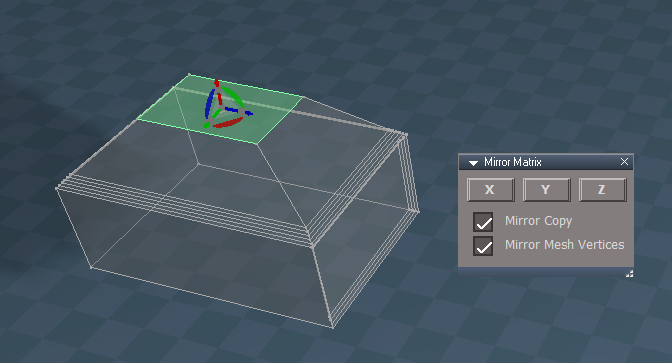
Mirror Matrix

free scripts, plugins, models, textures
User avatar
clintonman
Captain
Posts: 5659
Joined: 21 May 2009, 21:08
Type the number ten into the box: 0
Location: California

Mirror Matrix

Post by clintonman »

New mirror tool that operates on the item matrix.
The built in mirror tool is a modeling tool so only effects the vertices of an object.
This Mirror Matrix tool operates on the matrix of an object as well as the vertices. This tool can be used with cameras and lights.
Another difference is that this tool will only mirror across the major XYZ axes and not an arbitrary plane like the modeling mirror tool.


Mirror Matrix script can be found about 1/3 way down on this page:

http://clintons3d.com/plugins/truespace ... index.html


Edit: Re-uploaded with a forgotten copy option and fixed typo in the installer messaging
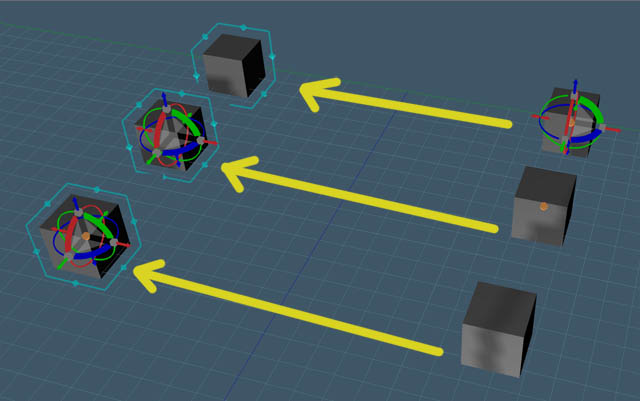
MirrorMatrixResults.jpg
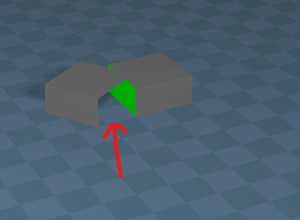
All cubes mirrored across the x axis. All cubes on the left are the mirrored result. All cubes on the right are the original cubes. The effect can be seen with the new object centered nav widget. The cage widget shows the selected cubes. Orange more or less indicates the rotation center.

Far cube has a pivot - the pivot and mesh center(orange) did not mirror, only the vertices mirrored
Middle cube has no pivot - mesh center(orange) did not mirror
Near cube was Matrix Mirrored - matrix and mesh center mirrored succesfully
Clinton Reese

http://clintons3d.com
User avatar
trueBlue
Captain
Posts: 5548
Joined: 06 Jul 2009, 22:50
Type the number ten into the box: 10

Re: Mirror Matrix

Post by trueBlue »

Can you explain how to use this Mirror Matrix script with a simple unmodified trueSpace primitive Cube?
One of the things that I do not understand is why the selected Cube is moved and not the copied object.
User avatar
clintonman
Captain
Posts: 5659
Joined: 21 May 2009, 21:08
Type the number ten into the box: 0
Location: California

Re: Mirror Matrix

Post by clintonman »

trueBlue wrote: 25 Mar 2020, 14:42 Can you explain how to use this Mirror Matrix script with a simple unmodified trueSpace primitive Cube?
One of the things that I do not understand is why the selected Cube is moved and not the copied object.
From the website:
"Select a scene item then choose an axis and press the Mirror button. "

To keep it as a cube primitive you would uncheck "Mirror Mesh Vertices"

The object is copied and the original object is mirrored. The trueSpace copy command does not select the copied item so the original is mirrored.
Clinton Reese

http://clintons3d.com
User avatar
trueBlue
Captain
Posts: 5548
Joined: 06 Jul 2009, 22:50
Type the number ten into the box: 10

Re: Mirror Matrix

Post by trueBlue »

I actually experimented with that.
It is possible to select the copied object.

Code: Select all

var sel = Node.FirstSelected()
var copy = Node.Copy(sel, Node.Owner(sel))
Space.Select(copy)
If I then change sel to copy for the rest of your code following the Copy command, it does seem to work.

If I do not use
MeshModifiers.InvertSelection('')
in your Flip Normals script, I do not get hidden faces
HiddenFaces.png
HiddenFaces.png (24.96 KiB) Viewed 4644 times
copied object rotated to show hidden faces
Attachments
MirrorMatrix.RsObj
(45.47 KiB) Downloaded 237 times
User avatar
clintonman
Captain
Posts: 5659
Joined: 21 May 2009, 21:08
Type the number ten into the box: 0
Location: California

Re: Mirror Matrix

Post by clintonman »

trueBlue wrote: 25 Mar 2020, 17:39 I actually experimented with that.
It is possible to select the copied object.

Code: Select all

var sel = Node.FirstSelected()
var copy = Node.Copy(sel, Node.Owner(sel))
Space.Select(copy)
If I then change sel to copy for the rest of your code following the Copy command, it does seem to work.

If I do not use
MeshModifiers.InvertSelection('')
in your Flip Normals script, I do not get hidden faces
HiddenFaces.png
copied object rotated to show hidden faces
If you do that then you should probably also change the general copy button and the modeling mirror copy button so they're all consistent.
Clinton Reese

http://clintons3d.com
User avatar
clintonman
Captain
Posts: 5659
Joined: 21 May 2009, 21:08
Type the number ten into the box: 0
Location: California

Re: Mirror Matrix

Post by clintonman »

Update March 25:

bug fixed in the pivot - must flattened the vertices when the object has a pivot

bug shows itself when trying to snap an object to a vertex selection of a mirrored object that has a pivot. It ends up snapping well away from the geometry.

Code: Select all

MeshModifiers.FlattenAxes('');
Clinton Reese

http://clintons3d.com
User avatar
clintonman
Captain
Posts: 5659
Joined: 21 May 2009, 21:08
Type the number ten into the box: 0
Location: California

Re: Mirror Matrix

Post by clintonman »

Update November 2020

works with multiple selections
updated the installer
works with the new not yet released nurbs objects
Clinton Reese

http://clintons3d.com
User avatar
trueBlue
Captain
Posts: 5548
Joined: 06 Jul 2009, 22:50
Type the number ten into the box: 10

Re: Mirror Matrix

Post by trueBlue »

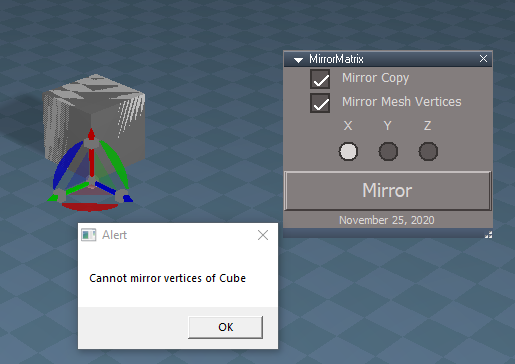
Default primitive cube that has not been point edited
Mirror Matrix with Mirror Copy & Mirror Mesh Vertices, checked
Mirror X
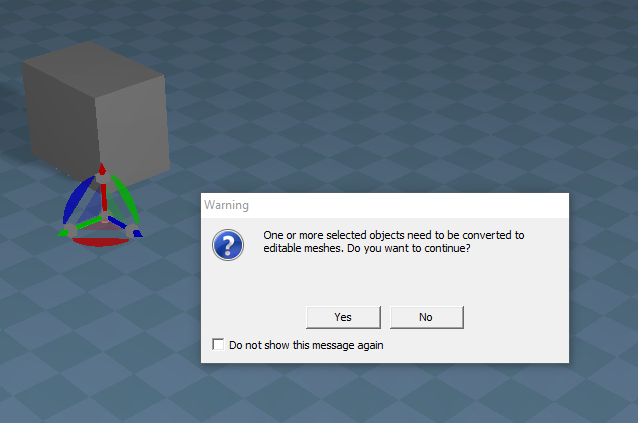
Answered Yes to edit mesh
Mirror Matrix Error.png
Mirror Matrix Error.png (33.87 KiB) Viewed 4099 times
Besides the error, is this new update PE only?
User avatar
clintonman
Captain
Posts: 5659
Joined: 21 May 2009, 21:08
Type the number ten into the box: 0
Location: California

Re: Mirror Matrix

Post by clintonman »

trueBlue wrote: 25 Nov 2020, 18:19 Default primitive cube that has not been point edited
Mirror Matrix with Mirror Copy & Mirror Mesh Vertices, checked
Mirror X
Answered Yes to edit mesh
Mirror Matrix Error.png

Besides the error, is this new update PE only?
Fixed the error. There was a missing return statement that should have stopped it from getting to the "edit mesh" question.
No, it's not for PE mode.
Clinton Reese

http://clintons3d.com
User avatar
trueBlue
Captain
Posts: 5548
Joined: 06 Jul 2009, 22:50
Type the number ten into the box: 10

Re: Mirror Matrix

Post by trueBlue »

Thanks!
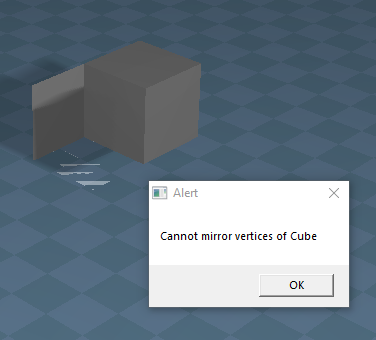
Why do you get this Alert?
Cube Mirror X.png
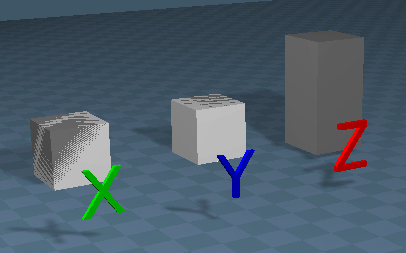
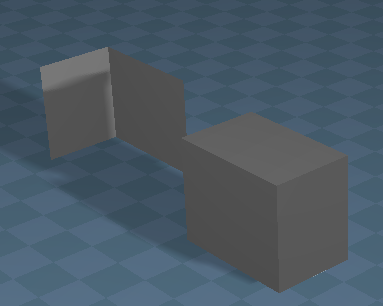
It seems that Z is the only one that works like you would expect
XYZ.png
X & Y just seems to Copy
Can you give a simple example how to use this with a simple Cube?
User avatar
clintonman
Captain
Posts: 5659
Joined: 21 May 2009, 21:08
Type the number ten into the box: 0
Location: California

Re: Mirror Matrix

Post by clintonman »

trueBlue wrote: 25 Nov 2020, 21:04 Thanks!
Why do you get this Alert?
Cube Mirror X.png
It seems that Z is the only one that works like you would expect
XYZ.png
X & Y just seems to Copy
Can you give a simple example how to use this with a simple Cube?
The alert says that the vertices are not directly mirrored. So if you had an asymmetrical shape like the letter "P" it would still be oriented the same way. If it is a mesh the the vertices will be altered so the P is backward after the mirror.

Move your cubes away from the X=0 and Y=0. It's like above it will mirror but the shape is symmetrical so you can't see it.
Clinton Reese

http://clintons3d.com
User avatar
trueBlue
Captain
Posts: 5548
Joined: 06 Jul 2009, 22:50
Type the number ten into the box: 10

Re: Mirror Matrix

Post by trueBlue »

Ah okay, thank you for the explanation!
Do you see and issue changing the Alerts to Status messages?
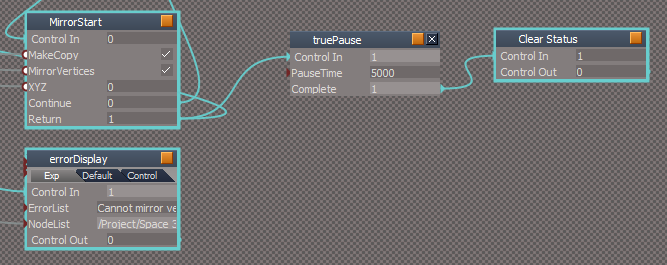
I substituted this line in your errorDisplay script,

Code: Select all

//		System.Alert(ErrorList.replace(";", "\n"));
		Node.Value("/Status Line", "Model") = ErrorList
and added a delayed script that clears the message
errorDisplay.png
Also if you delete an object's Mesh con and run Mirror, the object is still copied
User avatar
clintonman
Captain
Posts: 5659
Joined: 21 May 2009, 21:08
Type the number ten into the box: 0
Location: California

Re: Mirror Matrix

Post by clintonman »

trueBlue wrote: 25 Nov 2020, 23:32 Ah okay, thank you for the explanation!
Do you see and issue changing the Alerts to Status messages?
I substituted this line in your errorDisplay script,

Code: Select all

//		System.Alert(ErrorList.replace(";", "\n"));
		Node.Value("/Status Line", "Model") = ErrorList
and added a delayed script that clears the message
errorDisplay.png

Also if you delete an object's Mesh con and run Mirror, the object is still copied
If you have several items selected the status line will be useless, only the first error will show for sure with the rest cutoff at the end.
Now I notice a bug, only the first semicolon is being replaced. Need to change the errorDisplay script lines:

Code: Select all

	var semiColonToNewline = /;/g

	if(ErrorList) {
		//System.Alert(ErrorList.replace(";", "\n"));
		System.Alert(ErrorList.replace(semiColonToNewline, "\n"));
	}
This is how the errors should look in the alert. That would be too much for the status line.
properStackedErrors.jpg
properStackedErrors.jpg (39.28 KiB) Viewed 3421 times
Clinton Reese

http://clintons3d.com
User avatar
trueBlue
Captain
Posts: 5548
Joined: 06 Jul 2009, 22:50
Type the number ten into the box: 10

Re: Mirror Matrix

Post by trueBlue »

Okay, I see.
The change works.
Thanks!
User avatar
clintonman
Captain
Posts: 5659
Joined: 21 May 2009, 21:08
Type the number ten into the box: 0
Location: California

Re: Mirror Matrix

Post by clintonman »

Update December 2020

Fixes a bug when mirroring scaled objects. The scale was being applied twice because of the mirror process.
Adds support for the upcoming NURBS patches and curves.

I'm releasing this one early because of the scaling bug that was just discovered.

http://clintons3d.com/plugins/truespace ... rrormatrix
Clinton Reese

http://clintons3d.com
User avatar
trueBlue
Captain
Posts: 5548
Joined: 06 Jul 2009, 22:50
Type the number ten into the box: 10

Re: Mirror Matrix

Post by trueBlue »

MirrorMatrix.png
MirrorAlert.png
MirrorAlert.png (7.15 KiB) Viewed 3377 times
Results.png
Results.png (30.16 KiB) Viewed 3377 times
User avatar
clintonman
Captain
Posts: 5659
Joined: 21 May 2009, 21:08
Type the number ten into the box: 0
Location: California

Re: Mirror Matrix

Post by clintonman »

Darn, that one was fixed already. I must have updated the old version of the script.
The bug in the error display is also back.
Clinton Reese

http://clintons3d.com
User avatar
trueBlue
Captain
Posts: 5548
Joined: 06 Jul 2009, 22:50
Type the number ten into the box: 10

Re: Mirror Matrix

Post by trueBlue »

Here is a chance to use the new Copy command too :mrgreen:
Does this look correct?

Code: Select all

function CopyMesh(firstSel)
{
	if(Node.ConExists(firstSel, "Matrix"))
		nurbsNode = Node.Owner(firstSel);
	else
		nurbsNode = firstSel;

	if(Node.ConExists(nurbsNode, "isaCurve")) {
		Node.Copy(nurbsNode, Node.Owner(nurbsNode));
Node.ConRemove(nurbsNode, "LE2Data")
		return;
	}

	if(Node.Exists(nurbsNode + "/CP to patch CP")) {
		Node.Copy(nurbsNode, Node.Owner(nurbsNode));
Node.ConRemove(nurbsNode, "LE2Data")
		return;
	}

		
	Node.Copy(firstSel, Node.Owner(firstSel));
Node.ConRemove(firstSel, "LE2Data")
}
Can you share the script name, line #, and command for the missing return statement?
User avatar
clintonman
Captain
Posts: 5659
Joined: 21 May 2009, 21:08
Type the number ten into the box: 0
Location: California

Re: Mirror Matrix

Post by clintonman »

trueBlue wrote: 07 Dec 2020, 17:42 Here is a chance to use the new Copy command too :mrgreen:
Does this look correct?

Code: Select all

function CopyMesh(firstSel)
{
	if(Node.ConExists(firstSel, "Matrix"))
		nurbsNode = Node.Owner(firstSel);
	else
		nurbsNode = firstSel;

	if(Node.ConExists(nurbsNode, "isaCurve")) {
		Node.Copy(nurbsNode, Node.Owner(nurbsNode));
Node.ConRemove(nurbsNode, "LE2Data")
		return;
	}

	if(Node.Exists(nurbsNode + "/CP to patch CP")) {
		Node.Copy(nurbsNode, Node.Owner(nurbsNode));
Node.ConRemove(nurbsNode, "LE2Data")
		return;
	}

		
	Node.Copy(firstSel, Node.Owner(firstSel));
Node.ConRemove(firstSel, "LE2Data")
}
Can you share the script name, line #, and command for the missing return statement?
It's in the process of being completely rewritten, so it answer will come later.
Clinton Reese

http://clintons3d.com
User avatar
clintonman
Captain
Posts: 5659
Joined: 21 May 2009, 21:08
Type the number ten into the box: 0
Location: California

Re: Mirror Matrix

Post by clintonman »

Re Released

Put the fixes from the previous release back in place

Improved camera and light rotations
When the copy options is used, the copy gets mirrored instead of the original - trueBlue request
Works with group objects
Copied nodes will arrange themselves in the link editor - trueBlue tip
Works with individual members of groups
Clinton Reese

http://clintons3d.com
User avatar
trueBlue
Captain
Posts: 5548
Joined: 06 Jul 2009, 22:50
Type the number ten into the box: 10

Re: Mirror Matrix

Post by trueBlue »

Great improvements!
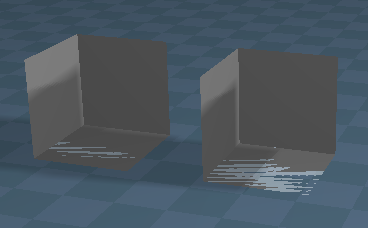
If an object is an Editable mesh and Mirror Mesh Vertices is enabled, the Normals get turned inside out.
Normals.png
Normals.png (19.3 KiB) Viewed 3219 times
If I change doFlip to false for Editable shape the Normals do not get turned inside out.

Code: Select all

//	if(MirrorVertices && Node.Exists( sel + "/Editable shape")) {
//		doFlip = true;
//	}

	if(MirrorVertices && Node.Exists( sel + "/Editable shape")) {
		doFlip = false;
	}
Maybe trueSpace bakes the Normal into Editable shapes?
User avatar
clintonman
Captain
Posts: 5659
Joined: 21 May 2009, 21:08
Type the number ten into the box: 0
Location: California

Re: Mirror Matrix

Post by clintonman »

Thanks, but that's not the problem. NoFlip will just make it so it doesn't mirror the vertices of the mesh which you can't see in a symmetrical shape like a cube. The problem is the new mirror the copy instead of mirror the original. The copy needs to become the selected item for the next steps.

around line 124 of the MirrorStart script add a space select fixes it

Code: Select all

	if(makecopy) {
		sel = CopyMesh(sel);
		//arrange new node in the LE
		Node.ConRemove(sel, "LE2Data");
		Space.Select(sel);
	} else {
Clinton Reese

http://clintons3d.com
User avatar
trueBlue
Captain
Posts: 5548
Joined: 06 Jul 2009, 22:50
Type the number ten into the box: 10

Re: Mirror Matrix

Post by trueBlue »

That did it, thanks! :D
User avatar
clintonman
Captain
Posts: 5659
Joined: 21 May 2009, 21:08
Type the number ten into the box: 0
Location: California

Re: Mirror Matrix

Post by clintonman »

Fixed inside out mirror of meshes. Hopefully, the last bug fix.
Clinton Reese

http://clintons3d.com
User avatar
trueBlue
Captain
Posts: 5548
Joined: 06 Jul 2009, 22:50
Type the number ten into the box: 10

Re: Mirror Matrix

Post by trueBlue »

Not sure of unknown consequences, but if I copy your Flip Normals script and add it (Flip NormalsAgain) into your scripts, it fixes the Face that has a Flipped Normal (pink)
Mirror Matrix Face Reversed Normal.png
User avatar
clintonman
Captain
Posts: 5659
Joined: 21 May 2009, 21:08
Type the number ten into the box: 0
Location: California

Re: Mirror Matrix

Post by clintonman »

trueBlue wrote: 22 Feb 2022, 23:41 Not sure of unknown consequences, but if I copy your Flip Normals script and add it (Flip NormalsAgain) into your scripts, it fixes the Face that has a Flipped Normal (pink)
Mirror Matrix Face Reversed Normal.png
Do you have steps and/or a sample to reproduce the flipped problem?
Clinton Reese

http://clintons3d.com
User avatar
trueBlue
Captain
Posts: 5548
Joined: 06 Jul 2009, 22:50
Type the number ten into the box: 10

Re: Mirror Matrix

Post by trueBlue »

I selected the top Face of the Cube (attached) and pressed the Y button
Matrix Mirror Y.png
Attachments
Cube5d3f.RsObj
(25.88 KiB) Downloaded 130 times
User avatar
clintonman
Captain
Posts: 5659
Joined: 21 May 2009, 21:08
Type the number ten into the box: 0
Location: California

Re: Mirror Matrix

Post by clintonman »

This tool was never meant to be used in point edit mode.

If I modify the code as shown I get:

PE mode 1 face selected then the flipped face gets fixed after pressing the Y button.
PE mode nothing selected then all the faces are flipped after pressing Y.
Object mode also turns the mesh inside out, all faces flipped.

The only case where the change works is if faces are selected. Everything gets turned inside out if points or edges are selected.
Clinton Reese

http://clintons3d.com
User avatar
trueBlue
Captain
Posts: 5548
Joined: 06 Jul 2009, 22:50
Type the number ten into the box: 10

Re: Mirror Matrix

Post by trueBlue »

Scratch the flipping normals again. I see that is not going to work
But I did find a solution
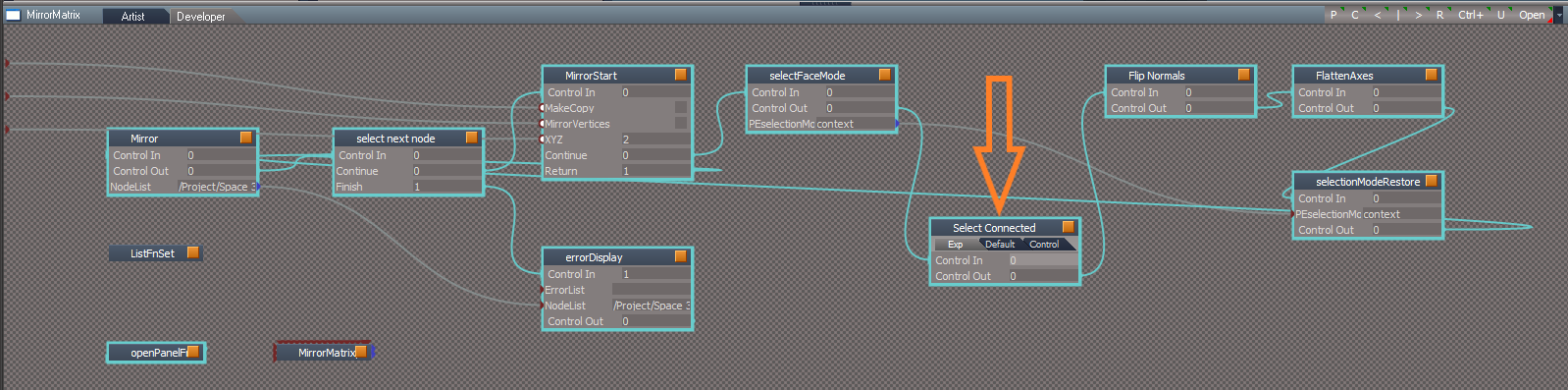
After I select the top Face, I use Select Connected, then press one of the X, Y, or Z buttons

Code: Select all

MeshModifiers.ApplySelectionTool('/Widgets/Tools/Mesh editor/PE Select tool','apply_cmd:{0502CC2A-7F8C-4d29-BBB4-9F1F2ECDC84C}');
Select Connected.png

Return to “Repositorium”