Is there a trick, cause I don't see it.trueBlue wrote: 21 Dec 2019, 17:09Rotates the view in 90 degrees incrementsclintonman wrote: 21 Dec 2019, 16:51I don't understand what this does. I thought LMB on green already rotates the view.trueBlue wrote: 20 Dec 2019, 22:11 ...
View Widget
Encircle 'Green'
Perspective
* Ctrl + LMB click Rotates the Perspective view 'Updated 12/20/2019'
Ortho
* Ctrl + LMB click Rotates the Isometric view 'Updated 12/20/2019'
...
Capture.PNG
Final trueSpace 7.61 Beta 8 Unofficial Update
-
clintonman

- Captain
- Posts: 5659
- Joined: 21 May 2009, 21:08
- Type the number ten into the box: 0
- Location: California
Re: Final trueSpace 7.61 Beta 8 Unofficial Update
-
trueBlue

- Captain
- Posts: 5548
- Joined: 06 Jul 2009, 22:50
- Type the number ten into the box: 10
Re: Final trueSpace 7.61 Beta 8 Unofficial Update
Really? It does not work for you?clintonman wrote: 21 Dec 2019, 17:14Is there a trick, cause I don't see it.trueBlue wrote: 21 Dec 2019, 17:09Rotates the view in 90 degrees incrementsclintonman wrote: 21 Dec 2019, 16:51
I don't understand what this does. I thought LMB on green already rotates the view.
Capture.PNG
The first click does not always work for some reason.
Ctrl + LMB selecting the View Widget's Encircle (Green) should rotate the view 90 degrees with each Ctrl = LMB click
The Perspective script:
Code: Select all
var cycle = 0;
function Execute(params)
{
if(Node.SubObjectCount("/D3DView")==0) return;
var View = WindowsManager.GetWorkWindow()
var WindowID = Node.Value(View, "WinID")
var Eye = "/D3DView/EyeCamera_" + WindowID;
D3DView.SwitchEyeCameraType('{2C152F81-45A2-4035-8896-9E49D60C8A7A}', '0')
D3DView.SwitchEyeCameraType('', '0')
if(cycle==0) {
Node.Value(Eye, "pitch") = -36.363
Node.Value(Eye, "roll") = -123.579
Node.Value(Eye, "tx") = -18.833
Node.Value(Eye, "ty") = 21.31
Node.Value(Eye, "tz") = 14.147
Node.Value(Eye, "yaw") = 21.485
}
if(cycle==1) {
Node.Value(Eye, "pitch") = 36.363
Node.Value(Eye, "roll") = -123.579
Node.Value(Eye, "tx") = 18.833
Node.Value(Eye, "ty") = 21.31
Node.Value(Eye, "tz") = 14.147
Node.Value(Eye, "yaw") = -21.485
}
if(cycle==2) {
Node.Value(Eye, "pitch") = 36.363
Node.Value(Eye, "roll") = 123.579
Node.Value(Eye, "tx") = 18.833
Node.Value(Eye, "ty") = -21.31
Node.Value(Eye, "tz") = 14.147
Node.Value(Eye, "yaw") = -158.95
}
if(cycle==3) {
Node.Value(Eye, "pitch") = -36.363
Node.Value(Eye, "roll") = 123.579
Node.Value(Eye, "tx") = -18.833
Node.Value(Eye, "ty") = -21.31
Node.Value(Eye, "tz") = 14.147
Node.Value(Eye, "yaw") = 158.95
}
cycle++;
cycle = cycle % 4;
}-
clintonman
- Captain
- Posts: 5659
- Joined: 21 May 2009, 21:08
- Type the number ten into the box: 0
- Location: California
Re: Final trueSpace 7.61 Beta 8 Unofficial Update
OK, now I see. I was dragging not clicking.
-
clintonman
- Captain
- Posts: 5659
- Joined: 21 May 2009, 21:08
- Type the number ten into the box: 0
- Location: California
Re: Final trueSpace 7.61 Beta 8 Unofficial Update
The YafaRay4tS node render buttons now all force the use of the yafaray render.
The yafaray toolbar works with yafaray or vray. Is that intended or should those also force the use of the yafaray renderer?
The yafaray toolbar works with yafaray or vray. Is that intended or should those also force the use of the yafaray renderer?
-
Saul
- Senior Chief Petty Officer
- Posts: 308
- Joined: 22 May 2009, 16:50
Re: Final trueSpace 7.61 Beta 8 Unofficial Update
'The yafaray toolbar works with yafaray or vray. Is that intended or should those also force the use of the yafaray renderer?'
This has been confusing me, shouldn't the yafaRay toolbar close if vRay selected as render?
This has been confusing me, shouldn't the yafaRay toolbar close if vRay selected as render?
-
trueBlue
- Captain
- Posts: 5548
- Joined: 06 Jul 2009, 22:50
- Type the number ten into the box: 10
Re: Final trueSpace 7.61 Beta 8 Unofficial Update
That was the only solution that I could come up with.clintonman wrote: 21 Dec 2019, 17:34 The YafaRay4tS node render buttons now all force the use of the yafaray render.
The yafaray toolbar works with yafaray or vray. Is that intended or should those also force the use of the yafaray renderer?
The commands for the offline renderer and the YafaRay4tS node render buttons are different.
This issue where both YafaRay and Vray render at the same time, exist if the YafaRay4tS node is in the scene and Vray is the selected Renderer.
-
clintonman
- Captain
- Posts: 5659
- Joined: 21 May 2009, 21:08
- Type the number ten into the box: 0
- Location: California
Re: Final trueSpace 7.61 Beta 8 Unofficial Update
So.... "Is that intended or should those also force the use of the yafaray renderer?" ?trueBlue wrote: 21 Dec 2019, 17:42That was the only solution that I could come up with.clintonman wrote: 21 Dec 2019, 17:34 The YafaRay4tS node render buttons now all force the use of the yafaray render.
The yafaray toolbar works with yafaray or vray. Is that intended or should those also force the use of the yafaray renderer?
The commands for the offline renderer and the YafaRay4tS node render buttons are different.
This issue where both YafaRay and Vray render at the same time, exist if the YafaRay4tS node is in the scene and Vray is the selected Renderer.
I'm only asking about the yaf toolbar buttons
-
Saul
- Senior Chief Petty Officer
- Posts: 308
- Joined: 22 May 2009, 16:50
Re: Final trueSpace 7.61 Beta 8 Unofficial Update
'This issue where both YafaRay and Vray render at the same time, exist if the YafaRay4tS node is in the scene and Vray is the selected Renderer.'
So why have multiple render buttons, couldn't one row of render icons, maybe the one's on the main toolbar, control whichever renderer is selected?
So why have multiple render buttons, couldn't one row of render icons, maybe the one's on the main toolbar, control whichever renderer is selected?
-
trueBlue
- Captain
- Posts: 5548
- Joined: 06 Jul 2009, 22:50
- Type the number ten into the box: 10
Re: Final trueSpace 7.61 Beta 8 Unofficial Update
I think it works great as it is presently.clintonman wrote: 21 Dec 2019, 18:00So.... "Is that intended or should those also force the use of the yafaray renderer?" ?trueBlue wrote: 21 Dec 2019, 17:42That was the only solution that I could come up with.clintonman wrote: 21 Dec 2019, 17:34 The YafaRay4tS node render buttons now all force the use of the yafaray render.
The yafaray toolbar works with yafaray or vray. Is that intended or should those also force the use of the yafaray renderer?
The commands for the offline renderer and the YafaRay4tS node render buttons are different.
This issue where both YafaRay and Vray render at the same time, exist if the YafaRay4tS node is in the scene and Vray is the selected Renderer.
I'm only asking about the yaf toolbar buttons
-
trueBlue
- Captain
- Posts: 5548
- Joined: 06 Jul 2009, 22:50
- Type the number ten into the box: 10
Re: Final trueSpace 7.61 Beta 8 Unofficial Update
Saul?Saul wrote: 21 Dec 2019, 18:02 'This issue where both YafaRay and Vray render at the same time, exist if the YafaRay4tS node is in the scene and Vray is the selected Renderer.'
So why have multiple render buttons, couldn't one row of render icons, maybe the one's on the main toolbar, control whichever renderer is selected?
The trueSpace offline render toolbar icons are compatible with Vray and YafaRay4tS, for which ever offline renderer is selected.
The YafaRay4tS toolbar render icons are compatible with Vray and YafaRay4tS, for which ever offline renderer is selected.
The YafaRay4tS toolbar has other options for YafaRay4tS and NOT Vray.
Why would you use the YafaRay4tS toolbar for Vray?
Suggestion: Do not use the YafaRay4tS layout when using Vray and or load the YafaRay4tS toolbar.
-
clintonman
- Captain
- Posts: 5659
- Joined: 21 May 2009, 21:08
- Type the number ten into the box: 0
- Location: California
Re: Final trueSpace 7.61 Beta 8 Unofficial Update
I think there's an error.
All the offline render buttons are the same as basic, not unofficial, truespace.
So they will not call the extra code that you made for vray.
The yafaray buttons have the commands that used to exist in the main toolbar render buttons and does call the extra code in "/Scripts/Commands/RenderScene" etc.
All the offline render buttons are the same as basic, not unofficial, truespace.
So they will not call the extra code that you made for vray.
The yafaray buttons have the commands that used to exist in the main toolbar render buttons and does call the extra code in "/Scripts/Commands/RenderScene" etc.
-
trueBlue
- Captain
- Posts: 5548
- Joined: 06 Jul 2009, 22:50
- Type the number ten into the box: 10
Re: Final trueSpace 7.61 Beta 8 Unofficial Update
Thought I tested this pretty thoroughly and I did not see any errors, all though I am testing in the unofficial update only.clintonman wrote: 21 Dec 2019, 18:34 I think there's an error.
All the offline render buttons are the same as basic, not unofficial, truespace.
So they will not call the extra code that you made for vray.
The yafaray buttons have the commands that used to exist in the main toolbar render buttons and does call the extra code in "/Scripts/Commands/RenderScene" etc.
Can you provide the steps?
Script for Vray Animation:
Code: Select all
if (Node.Exists(Space.CurrentScene() + "/Vray"))
{
Width = Node.Value(Space.CurrentScene() + "/Vray", "Image Width")
Height = Node.Value(Space.CurrentScene() + "/Vray", "Image Height")
}
if (Node.Exists("/Project/Windows Manager Space/Frame Window, 1/VrayView Node"))
{
WindowsManager.MoveWindow("/Project/Windows Manager Space/Frame Window, 1", -1, -1, Width, Height, -1, -1, -1)
}
if (Node.Exists("/Project/Windows Manager Space/Frame Window, 2/VrayView Node"))
{
WindowsManager.MoveWindow("/Project/Windows Manager Space/Frame Window, 2", -1, -1, Width, Height, -1, -1, -1)
}
if (Node.Exists("/Project/Windows Manager Space/Frame Window, 3/VrayView Node"))
{
WindowsManager.MoveWindow("/Project/Windows Manager Space/Frame Window, 3", -1, -1, Width, Height, -1, -1, -1)
}
if (Node.Exists("/Project/Windows Manager Space/Frame Window, 4/VrayView Node"))
{
WindowsManager.MoveWindow("/Project/Windows Manager Space/Frame Window, 4", -1, -1, Width, Height, -1, -1, -1)
}
OfflineRender.RenderAnimation('')-
clintonman
- Captain
- Posts: 5659
- Joined: 21 May 2009, 21:08
- Type the number ten into the box: 0
- Location: California
Re: Final trueSpace 7.61 Beta 8 Unofficial Update
I think I can answer.Saul wrote: 21 Dec 2019, 18:02 'This issue where both YafaRay and Vray render at the same time, exist if the YafaRay4tS node is in the scene and Vray is the selected Renderer.'
So why have multiple render buttons, couldn't one row of render icons, maybe the one's on the main toolbar, control whichever renderer is selected?
The right click for the main toolbar render buttons all do the exact same thing, open the render preferences. It assumes one preferences panel, but yafaray has several.
The yafaray toolbar render button right click opens the render preferences, animation right click will open the animation settings and area right click will open the camera settings.
The main toolbar render buttons do work with whatever renderer is selected. The reason the yafaray render buttons exist is because it wasn't possible to use the main toolbar render buttons in earlier versions of YafaRay4tS.
-
clintonman
- Captain
- Posts: 5659
- Joined: 21 May 2009, 21:08
- Type the number ten into the box: 0
- Location: California
Re: Final trueSpace 7.61 Beta 8 Unofficial Update
Oops, never mind, my mistake.trueBlue wrote: 21 Dec 2019, 18:40Thought I tested this pretty thoroughly and I did not see any errors, all though I am testing in the unofficial update only.clintonman wrote: 21 Dec 2019, 18:34 I think there's an error.
All the offline render buttons are the same as basic, not unofficial, truespace.
So they will not call the extra code that you made for vray.
The yafaray buttons have the commands that used to exist in the main toolbar render buttons and does call the extra code in "/Scripts/Commands/RenderScene" etc.
Can you provide the steps?
...

-
Saul
- Senior Chief Petty Officer
- Posts: 308
- Joined: 22 May 2009, 16:50
Re: Final trueSpace 7.61 Beta 8 Unofficial Update
Ok, gotcha, thanks.
'The main toolbar render buttons do work with whatever renderer is selected. The reason the yafaray render buttons exist is because it wasn't possible to use the main toolbar render buttons in earlier versions of YafaRay4tS.'
Hmmmmm.....
'The main toolbar render buttons do work with whatever renderer is selected. The reason the yafaray render buttons exist is because it wasn't possible to use the main toolbar render buttons in earlier versions of YafaRay4tS.'
Hmmmmm.....
-
clintonman
- Captain
- Posts: 5659
- Joined: 21 May 2009, 21:08
- Type the number ten into the box: 0
- Location: California
Re: Final trueSpace 7.61 Beta 8 Unofficial Update
This is where I'm confused.trueBlue wrote: 21 Dec 2019, 18:21 ...
Why would you use the YafaRay4tS toolbar for Vray?
Suggestion: Do not use the YafaRay4tS layout when using Vray and or load the YafaRay4tS toolbar.
yafaray toolbar render scene button. it is checking for the script/commands/renderscene to see if it can run it. the script/commands/renderscene is for use with vray. script/commands/renderscene does some vray stuff then calls OfflineRender.RenderScene('')
so why is the yafaray button asking to do vray stuff instead of bypassing it and just calling OfflineRender.RenderScene('') directly?
Code: Select all
OfflineRender.OpenView('',0,0);
if (Node.Exists('/Scripts/Commands/RenderScene')){
   Activity.Run('/Scripts/Commands/RenderScene');
}
if (!Node.Exists('/Scripts/Commands/RenderScene')){
   OfflineRender.RenderScene('')
};-
clintonman
- Captain
- Posts: 5659
- Joined: 21 May 2009, 21:08
- Type the number ten into the box: 0
- Location: California
Re: Final trueSpace 7.61 Beta 8 Unofficial Update
My proposal is that you do this for the yafaray toolbar buttons.
1. force yafaray toolbar button to only call yafaray render
2. don't call code intended for vray
animation button example:
1. force yafaray toolbar button to only call yafaray render
2. don't call code intended for vray
animation button example:
Code: Select all
if(Node.Exists("/Offline renderers/Yafaray")) {
  var myenum = System.CreateDO("Common Data Package/String Enum Data");
  myenum = Node.Value("/Offline renderers", "Renderer");
   var str = myenum.GetSelectedString();
  if(str!="Yafaray") {
    myenum.SetSelectedString("Yafaray");
    Node.Value("/Offline renderers", "Renderer") = myenum;
  }
}
OfflineRender.OpenView('',0,0);
OfflineRender.RenderAnimation('')-
trueBlue
- Captain
- Posts: 5548
- Joined: 06 Jul 2009, 22:50
- Type the number ten into the box: 10
Re: Final trueSpace 7.61 Beta 8 Unofficial Update
I have not changed the unofficial offline render icon commands nor the YafaRay4tS render icons at all since your last update to these items.
When you did this last update to these items, they were compatible with Vray and YafaRay4tS, and visa versa.
It was my understanding that you wanted the YafaRay4tS render icons to work with both the unofficial update and tS761/tS761Std without the unofficial update. Which is why you have the check for the Scripts/Commands/Scripts
Correct me if I am wrong, but it looks like you wanting the YafaRay4tS render icons to force/switch to the Yafaray renderer. Which would make them not compatible with Vray? If that is true, and without testing, it may result in unexpected/wanted results.
As I have always said, I just want them to work in all scenarios mentioned above.
If you want to supply the toolbar buttons with the changes, and you test them thoroughly, I am more then willing to update the unofficial updates.
Some day I would like to retire though.
On a different previously posted issue, if you cancel the batch render at Frame 0, the Yaf_render.cmd and yaf_test_0000.xml are not deleted.
When you did this last update to these items, they were compatible with Vray and YafaRay4tS, and visa versa.
It was my understanding that you wanted the YafaRay4tS render icons to work with both the unofficial update and tS761/tS761Std without the unofficial update. Which is why you have the check for the Scripts/Commands/Scripts
Correct me if I am wrong, but it looks like you wanting the YafaRay4tS render icons to force/switch to the Yafaray renderer. Which would make them not compatible with Vray? If that is true, and without testing, it may result in unexpected/wanted results.
As I have always said, I just want them to work in all scenarios mentioned above.
If you want to supply the toolbar buttons with the changes, and you test them thoroughly, I am more then willing to update the unofficial updates.
Some day I would like to retire though.
On a different previously posted issue, if you cancel the batch render at Frame 0, the Yaf_render.cmd and yaf_test_0000.xml are not deleted.
-
clintonman
- Captain
- Posts: 5659
- Joined: 21 May 2009, 21:08
- Type the number ten into the box: 0
- Location: California
Re: Final trueSpace 7.61 Beta 8 Unofficial Update
Maybe I'm not understanding, what do your Scripts/Commands/Scripts do and why are they needed for yafaray buttons? Is it so the yafaray buttons work with vray plus the extra processing from the Scripts/Commands/Scripts? Do the Scripts/Commands/Scripts do something for yafaray renders?trueBlue wrote: 21 Dec 2019, 19:59 I have not changed the unofficial offline render icon commands nor the YafaRay4tS render icons at all since your last update to these items.
When you did this last update to these items, they were compatible with Vray and YafaRay4tS, and visa versa.
It was my understanding that you wanted the YafaRay4tS render icons to work with both the unofficial update and tS761/tS761Std without the unofficial update. Which is why you have the check for the Scripts/Commands/Scripts
Correct me if I am wrong, but it looks like you wanting the YafaRay4tS render icons to force/switch to the Yafaray renderer. Which would make them not compatible with Vray? If that is true, and without testing, it may result in unexpected/wanted results.
As I have always said, I just want them to work in all scenarios mentioned above.
If you want to supply the toolbar buttons with the changes, and you test them thoroughly, I am more then willing to update the unofficial updates.
Some day I would like to retire though.
On a different previously posted issue, if you cancel the batch render at Frame 0, the Yaf_render.cmd and yaf_test_0000.xml are not deleted.
Why is this needed for yafaray animation button?trueBlue wrote: 21 Dec 2019, 18:21 ...
Why would you use the YafaRay4tS toolbar for Vray?
Suggestion: Do not use the YafaRay4tS layout when using Vray and or load the YafaRay4tS toolbar.
Code: Select all
if (Node.Exists(Space.CurrentScene() + "/Vray"))
{
Width = Node.Value(Space.CurrentScene() + "/Vray", "Image Width")
Height = Node.Value(Space.CurrentScene() + "/Vray", "Image Height")
}
if (Node.Exists("/Project/Windows Manager Space/Frame Window, 1/VrayView Node"))
{
WindowsManager.MoveWindow("/Project/Windows Manager Space/Frame Window, 1", -1, -1, Width, Height, -1, -1, -1)
}
if (Node.Exists("/Project/Windows Manager Space/Frame Window, 2/VrayView Node"))
{
WindowsManager.MoveWindow("/Project/Windows Manager Space/Frame Window, 2", -1, -1, Width, Height, -1, -1, -1)
}
if (Node.Exists("/Project/Windows Manager Space/Frame Window, 3/VrayView Node"))
{
WindowsManager.MoveWindow("/Project/Windows Manager Space/Frame Window, 3", -1, -1, Width, Height, -1, -1, -1)
}
if (Node.Exists("/Project/Windows Manager Space/Frame Window, 4/VrayView Node"))
{
WindowsManager.MoveWindow("/Project/Windows Manager Space/Frame Window, 4", -1, -1, Width, Height, -1, -1, -1)
}
OfflineRender.RenderAnimation('')-
trueBlue
- Captain
- Posts: 5548
- Joined: 06 Jul 2009, 22:50
- Type the number ten into the box: 10
Re: Final trueSpace 7.61 Beta 8 Unofficial Update
Not needed for Yafaray, but needed for Vray in the unofficial updates, if it exist.
So the Yafaray render icons are compatible with Vray in tS761, and tS761 with the unofficial updates.
Seems to me, the way it is presently, it works in all the above applications.
Unless I am missing something.
So the Yafaray render icons are compatible with Vray in tS761, and tS761 with the unofficial updates.
Seems to me, the way it is presently, it works in all the above applications.
Unless I am missing something.
-
clintonman
- Captain
- Posts: 5659
- Joined: 21 May 2009, 21:08
- Type the number ten into the box: 0
- Location: California
Re: Final trueSpace 7.61 Beta 8 Unofficial Update
Why did you tell Saul to not use the yafaray4ts toolbar if you now say it should work with vray?trueBlue wrote: 21 Dec 2019, 18:21Saul?Saul wrote: 21 Dec 2019, 18:02 'This issue where both YafaRay and Vray render at the same time, exist if the YafaRay4tS node is in the scene and Vray is the selected Renderer.'
So why have multiple render buttons, couldn't one row of render icons, maybe the one's on the main toolbar, control whichever renderer is selected?
The trueSpace offline render toolbar icons are compatible with Vray and YafaRay4tS, for which ever offline renderer is selected.
The YafaRay4tS toolbar render icons are compatible with Vray and YafaRay4tS, for which ever offline renderer is selected.
The YafaRay4tS toolbar has other options for YafaRay4tS and NOT Vray.
Why would you use the YafaRay4tS toolbar for Vray?
Suggestion: Do not use the YafaRay4tS layout when using Vray and or load the YafaRay4tS toolbar.
This is confusing. In one post "no don't use it with vray". Another post , "it's there so you can use it with vray". Does the yafaray render buttons need to work with vray, "no". Does the yafarya render buttons need to work with vary, "yes".

I'm okay either way, it would just be helpful to have a definitive answer.
When vray is the active renderer, what should happen when you press the yafaray toolbar render buttons?
It sounds like your answer is - it should run the vray render through the scripts/commands/scripts.
So the left click is squared away. What about right click? It's setup for yafaray with the modifications for animation panel and camera panel, so those right clicks won't work with vray.
So animation and render area right click is only for yafaray and left click is for yafaray and vray.
-
trueBlue
- Captain
- Posts: 5548
- Joined: 06 Jul 2009, 22:50
- Type the number ten into the box: 10
Re: Final trueSpace 7.61 Beta 8 Unofficial Update
Testing in tS761 with the present update:
If I have Vray as the selected Renderer and use all of the YafaRay4tS render icon's LMB and RMB commands, Vray works and Yafaray does not.
If I have Yafaray as the selected Renderer and use all of the YafaRay4tS render icon's LMB and RMB commands, Yafaray works and Vray does not.
Is this how it works in tS761 without the Update?
We had this conversation when you first integrated Yafaray with tS761's Offline Renderer and you said the Scripts/Commands/Vray scripts would not be a problem. Now for some reason they are.
The big picture here is trueSpace's Offline Render Icons are the same as the YafaRay4tS Render Icons. They look the same!
I have explained why , answered your questions, and you do not understand. So I try a different way and here I am explaining the same thing again.
AGAIN...
If you want to supply the toolbar buttons with the changes, and you test them thoroughly, I am more then willing to update the unofficial updates.
Some day I would like to retire though.
If I have Vray as the selected Renderer and use all of the YafaRay4tS render icon's LMB and RMB commands, Vray works and Yafaray does not.
If I have Yafaray as the selected Renderer and use all of the YafaRay4tS render icon's LMB and RMB commands, Yafaray works and Vray does not.
Is this how it works in tS761 without the Update?
We had this conversation when you first integrated Yafaray with tS761's Offline Renderer and you said the Scripts/Commands/Vray scripts would not be a problem. Now for some reason they are.
The big picture here is trueSpace's Offline Render Icons are the same as the YafaRay4tS Render Icons. They look the same!
I have explained why , answered your questions, and you do not understand. So I try a different way and here I am explaining the same thing again.
AGAIN...
If you want to supply the toolbar buttons with the changes, and you test them thoroughly, I am more then willing to update the unofficial updates.
Some day I would like to retire though.
-
clintonman
- Captain
- Posts: 5659
- Joined: 21 May 2009, 21:08
- Type the number ten into the box: 0
- Location: California
Re: Final trueSpace 7.61 Beta 8 Unofficial Update
Ok, I stand correct with regards to the yafaray toolbar right clicks.
And final answer is "The yafaray toolbar render buttons should also work with vray".
I guess I got confused when it sounded like you told Saul to not use the yafaray buttons for vray, even though it's specifically setup to run vray as well.
And final answer is "The yafaray toolbar render buttons should also work with vray".
I guess I got confused when it sounded like you told Saul to not use the yafaray buttons for vray, even though it's specifically setup to run vray as well.
-
trueBlue
- Captain
- Posts: 5548
- Joined: 06 Jul 2009, 22:50
- Type the number ten into the box: 10
Re: Final trueSpace 7.61 Beta 8 Unofficial Update
New Update for the trueSpace7.61 Beta 8 Unofficial Update
viewtopic.php?t=3732
12/21/2019
Unless somebody reports any issues with this final release, I am not planning any further updates!
Special thanks to Clinton Reese for all his help and huge contributions in this update.
http://www.clintons3d.com
YafarayScripts
OpenView 'Updated 12/21/2019'
viewtopic.php?t=3732
12/21/2019
Unless somebody reports any issues with this final release, I am not planning any further updates!
Special thanks to Clinton Reese for all his help and huge contributions in this update.
http://www.clintons3d.com
YafarayScripts
OpenView 'Updated 12/21/2019'
-
trueBlue
- Captain
- Posts: 5548
- Joined: 06 Jul 2009, 22:50
- Type the number ten into the box: 10
Re: Final trueSpace 7.61 Beta 8 Unofficial Update
New Update for the trueSpace7.61 Beta 8 Unofficial Update
viewtopic.php?t=3732
12/22/2019
A user made a suggestion that I change the behavoir of the View Widget.
Unless somebody reports any issues with this final release, I am not planning any further updates!
Special thanks to Clinton Reese for all his help and huge contributions in this update.
http://www.clintons3d.com
View Widget
Encircle 'Green'
Ortho
If any 3D Window is in Isometric view
* Ctrl + LMB click Rotates the Isometric view in 90 degrees increments 'Updated 12/22/2019'
viewtopic.php?t=3732
12/22/2019
A user made a suggestion that I change the behavoir of the View Widget.
Unless somebody reports any issues with this final release, I am not planning any further updates!
Special thanks to Clinton Reese for all his help and huge contributions in this update.
http://www.clintons3d.com
View Widget
Encircle 'Green'
Ortho
If any 3D Window is in Isometric view
* Ctrl + LMB click Rotates the Isometric view in 90 degrees increments 'Updated 12/22/2019'
-
trueBlue
- Captain
- Posts: 5548
- Joined: 06 Jul 2009, 22:50
- Type the number ten into the box: 10
Re: Final trueSpace 7.61 Beta 8 Unofficial Update
New Update for the trueSpace7.61 Beta 8 Unofficial Update
viewtopic.php?t=3732
12/24/2019
Special thanks to Clinton Reese for all his help and huge contributions in this update.
http://www.clintons3d.com
YafaRay4tS
tSDisplay
Set Display Node Values
Changed
// FileName = Node.Value(Space.CurrentScene() + "/YafaRay4tS/tSDisplay", "Yaf_RenderFilename");
FileName = Node.Value(Space.CurrentScene() + "/YafaRay4tS", "Yaf_RenderFilename");
Sequence Player
Add
Tiff Loader
YafaRay Light Material
Updated panel
viewtopic.php?t=3732
12/24/2019
Special thanks to Clinton Reese for all his help and huge contributions in this update.
http://www.clintons3d.com
YafaRay4tS
tSDisplay
Set Display Node Values
Changed
// FileName = Node.Value(Space.CurrentScene() + "/YafaRay4tS/tSDisplay", "Yaf_RenderFilename");
FileName = Node.Value(Space.CurrentScene() + "/YafaRay4tS", "Yaf_RenderFilename");
Sequence Player
Add
Tiff Loader
YafaRay Light Material
Updated panel
-
trueBlue
- Captain
- Posts: 5548
- Joined: 06 Jul 2009, 22:50
- Type the number ten into the box: 10
Re: Final trueSpace 7.61 Beta 8 Unofficial Update
New Update for the trueSpace7.61 Beta 8 Unofficial Update
viewtopic.php?t=3732
January 1, 2020
Special thanks to Clinton Reese for all his help and huge contributions in this update.
http://www.clintons3d.com
YafaRay4tS
AboutBitmap
Changed version and date to December 30, 2019
YafaRay4tS Scene Utilities
Convert Lights
Changed
LightType for Infinite and Directional
YafaRay4tS Setup library
Tiff Loader
Add floating panel and Save as Image
Materials - DX9
Add
DX9 FX Material 'Animated Explosions'
tSpecial-E 'DX procedural shader for real time special effects' Author - 'Noko'
Translucent Material
Add Settings button
BlankDXMaterial
Add label.
Preferences/Lights
YafaRay Infinite
Removed the Samples attribute.
Also changed the YafaRay Infinite lights in the YafaRay4tS.RsScn, YafaRay4tS.RsSLgts, and the YafaRay Infinite light in the YafaRay Lights library.
viewtopic.php?t=3732
January 1, 2020
Special thanks to Clinton Reese for all his help and huge contributions in this update.
http://www.clintons3d.com
YafaRay4tS
AboutBitmap
Changed version and date to December 30, 2019
YafaRay4tS Scene Utilities
Convert Lights
Changed
LightType for Infinite and Directional
YafaRay4tS Setup library
Tiff Loader
Add floating panel and Save as Image
Materials - DX9
Add
DX9 FX Material 'Animated Explosions'
tSpecial-E 'DX procedural shader for real time special effects' Author - 'Noko'
Translucent Material
Add Settings button
BlankDXMaterial
Add label.
Preferences/Lights
YafaRay Infinite
Removed the Samples attribute.
Also changed the YafaRay Infinite lights in the YafaRay4tS.RsScn, YafaRay4tS.RsSLgts, and the YafaRay Infinite light in the YafaRay Lights library.
-
trueBlue
- Captain
- Posts: 5548
- Joined: 06 Jul 2009, 22:50
- Type the number ten into the box: 10
Re: Final trueSpace 7.61 Beta 8 Unofficial Update
New Update for the trueSpace7.61 Beta 8 Unofficial Update
viewtopic.php?t=3732
January 1, 2020
Happy New Year!
Can not believe I have not done this like years ago. Object Navigation Widget 1, 2, 3, 4, 5, and 6
Sphere
Add
* Ctrl + LMB select opens the selected object in the Link Editor
* Alt + LMB select navigates to the Scene in the Link Editor
Link Editor Navigator
Add
Object
* LMB = Opens the selected object in the Link Editor
* RMB = Navigates to the Scene in the Link Editor
Blue toolbox toolbar
Add
Interactive Replace Objects tool
viewtopic.php?t=3732
January 1, 2020
Happy New Year!
Can not believe I have not done this like years ago.

Sphere
Add
* Ctrl + LMB select opens the selected object in the Link Editor
* Alt + LMB select navigates to the Scene in the Link Editor
Link Editor Navigator
Add
Object
* LMB = Opens the selected object in the Link Editor
* RMB = Navigates to the Scene in the Link Editor
Blue toolbox toolbar
Add
Interactive Replace Objects tool
-
clintonman
- Captain
- Posts: 5659
- Joined: 21 May 2009, 21:08
- Type the number ten into the box: 0
- Location: California
Re: Final trueSpace 7.61 Beta 8 Unofficial Update
The Link Editor Navigation toolbar is missing the button to go to the scene.
Edit:
Never mind, I see it's "behind" the object button via RMB click.
Edit:
Never mind, I see it's "behind" the object button via RMB click.
Last edited by clintonman on 01 Jan 2020, 23:15, edited 2 times in total.
-
trueBlue
- Captain
- Posts: 5548
- Joined: 06 Jul 2009, 22:50
- Type the number ten into the box: 10
Re: Final trueSpace 7.61 Beta 8 Unofficial Update
Openclintonman wrote: 01 Jan 2020, 22:55 The Link Editor Navigation toolbar is missing the button to go to the scene.
RMB = Navigates to the Scene in the Link Editor
Also
Object
RMB = Navigates to the Scene in the Link Editor
-
trueBlue
- Captain
- Posts: 5548
- Joined: 06 Jul 2009, 22:50
- Type the number ten into the box: 10
Re: Final trueSpace 7.61 Beta 8 Unofficial Update
New Update for the trueSpace7.61 Beta 8 Unofficial Update
viewtopic.php?t=3732
January 3, 2020
View Widget
Encircle 'Green'
Add
* I + LMB select the Encircle opens Widget Help panel
Link Editor Navigator
Updated
Object
* LMB = Opens the selected object in the Link Editor
If nothing selected Return 'Does not open System'
Ctrl +
* RMB = Unselect
Blue toolbox toolbar
Updated
Interactive Replace Objects tool
Fixed an error if the Source is the same selection as the Object
No longer renames the replacement Object
Interactive Transform Objects tool
Fixed an error if the Source is the same selection as the Object
Changed to a Workspace Status Message
viewtopic.php?t=3732
January 3, 2020
View Widget
Encircle 'Green'
Add
* I + LMB select the Encircle opens Widget Help panel
Link Editor Navigator
Updated
Object
* LMB = Opens the selected object in the Link Editor
If nothing selected Return 'Does not open System'
Ctrl +
* RMB = Unselect
Blue toolbox toolbar
Updated
Interactive Replace Objects tool
Fixed an error if the Source is the same selection as the Object
No longer renames the replacement Object
Interactive Transform Objects tool
Fixed an error if the Source is the same selection as the Object
Changed to a Workspace Status Message
-
trueBlue
- Captain
- Posts: 5548
- Joined: 06 Jul 2009, 22:50
- Type the number ten into the box: 10
Re: Final trueSpace 7.61 Beta 8 Unofficial Update
New Update for the trueSpace7.61 Beta 8 Unofficial Update
viewtopic.php?t=3732
January 05, 2020
Clintons3dPlugin.rsx v.1638414 'Updated 1/5/2020'
Model - Plugins in the tsx folder
PolyCombine.tsx - Author Clinton Reese
Add
toolbox.tsx - Authors - Casey Langen and Joe Brewer
Animator’s Toolbox
Tails, Shakadelic Pro, Real-time Array, Neo-Kern, Strobe Lights, Animation Eraser, Animation Slider, and FPS Converter
Widgets
Custom Toolbar Preferences 'Updated 1/5/2020'
Camera widgets
Additional controls:
FOV
* RMB = Reset FOV
Spot light widget
Additional controls:
Rotate & Move
* RMB = Spot panel
Outer ring
* RMB = Reset Angle
Desktop/Recent Files/Clear button script 'Updated 1/5/2020'
ClintonToolbar
Add
Clintons Point Edit toolbar
viewtopic.php?t=3732
January 05, 2020
Clintons3dPlugin.rsx v.1638414 'Updated 1/5/2020'
Model - Plugins in the tsx folder
PolyCombine.tsx - Author Clinton Reese
Add
toolbox.tsx - Authors - Casey Langen and Joe Brewer
Animator’s Toolbox
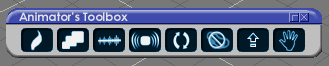
- Capture.PNG (7.47 KiB) Viewed 3946 times
Widgets
Custom Toolbar Preferences 'Updated 1/5/2020'
Camera widgets
Additional controls:
FOV
* RMB = Reset FOV
Spot light widget
Additional controls:
Rotate & Move
* RMB = Spot panel
Outer ring
* RMB = Reset Angle
Desktop/Recent Files/Clear button script 'Updated 1/5/2020'
ClintonToolbar
Add
Clintons Point Edit toolbar
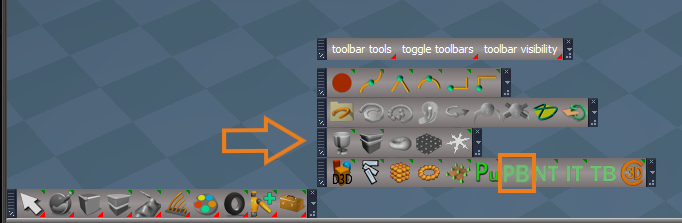
-
trueBlue
- Captain
- Posts: 5548
- Joined: 06 Jul 2009, 22:50
- Type the number ten into the box: 10
Re: Final trueSpace 7.61 Beta 8 Unofficial Update
New Update for the trueSpace7.61 Beta 8 Unofficial Update
viewtopic.php?t=3732
January 07, 2020
Custom Toolbars - Red toolbox
* Red = Cut & Paste, trueSpace ToolBars, Constraints, and Cube Widget - Author Clinton Reese
Add
Modified Constraints.RsObj to the preobjects folder
Controller = constrainor
Controlled = constrainee
viewtopic.php?t=3732
January 07, 2020
Custom Toolbars - Red toolbox
* Red = Cut & Paste, trueSpace ToolBars, Constraints, and Cube Widget - Author Clinton Reese
Add
Modified Constraints.RsObj to the preobjects folder
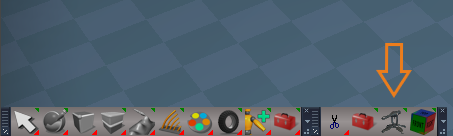
Controlled = constrainee
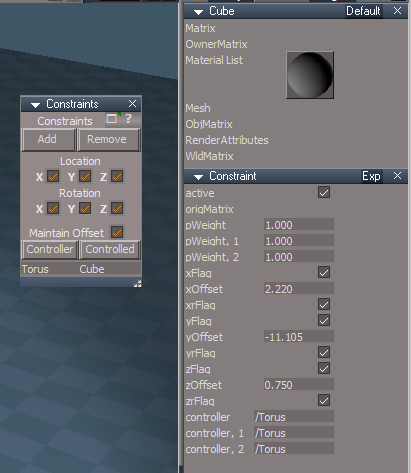
-
trueBlue
- Captain
- Posts: 5548
- Joined: 06 Jul 2009, 22:50
- Type the number ten into the box: 10
Re: Final trueSpace 7.61 Beta 8 Unofficial Update
@ Clinton
I am proposing to make a change to the
Background widget
Look at Selection / Zoom to Selection (Pont Edit Mode)
Background widget
Changed
* B + I + LMB select in empty space - Opens Widget Help panel
Note: I have noticed that the Background Help panel can open unexpectedly with the previous short cut (I + LMB select empty space)
Look at Selection / Zoom to Selection (Pont Edit Mode)
Changed
Current - Point Edit Mode reverts to Context Mode after Zoom to Selection
Note: This works the same as before with the exception that is does not switch you out of Context mode. Before if you were in say Face mode, it would stay in Face mode, not allowing you to select Points or Edges. With Context mode, you can select any elements.
Please try this change on your end and tell me if you agree.
And if not why?
Maybe I am missing something but I see no reason why this change would not be better.
Personally, I am a fan of the Context mode and the way it is now, I have to always set it back from the toolbar.
I am proposing to make a change to the
Background widget
Look at Selection / Zoom to Selection (Pont Edit Mode)
Code: Select all
function Execute(params)
{
	var edgecnt = params.ConValue('edgecnt');
	var tricnt = params.ConValue('tricnt');
	var facetri = params.ConValue('facetri');

	//convert point edit selection back to original type(or close to it) // Changed to Context 1/11/2020
	if(edgecnt > 0 || tricnt > 0 || facetri > 0)
	{

		if(edgecnt > 0)
			Node.Value('/Preferences/Mesh Editor Settings','PE selection mode') = 'context'	//'face edge';
		if(tricnt > 0)
			Node.Value('/Preferences/Mesh Editor Settings','PE selection mode') = 'context'	//'triangle';
		if(facetri > 0)
			Node.Value('/Preferences/Mesh Editor Settings','PE selection mode') = 'context'	//'face';

		MeshModifiers.ActivatePointEditWidget('','','Default');
		MeshModifiers.ConvertSelection('','');
	}

}Changed
* B + I + LMB select in empty space - Opens Widget Help panel
Note: I have noticed that the Background Help panel can open unexpectedly with the previous short cut (I + LMB select empty space)
Look at Selection / Zoom to Selection (Pont Edit Mode)
Changed
Current - Point Edit Mode reverts to Context Mode after Zoom to Selection
Note: This works the same as before with the exception that is does not switch you out of Context mode. Before if you were in say Face mode, it would stay in Face mode, not allowing you to select Points or Edges. With Context mode, you can select any elements.
Please try this change on your end and tell me if you agree.
And if not why?
Maybe I am missing something but I see no reason why this change would not be better.
Personally, I am a fan of the Context mode and the way it is now, I have to always set it back from the toolbar.
-
clintonman
- Captain
- Posts: 5659
- Joined: 21 May 2009, 21:08
- Type the number ten into the box: 0
- Location: California
Re: Final trueSpace 7.61 Beta 8 Unofficial Update
Why "B", does it stand for something? Could you make it "shift" or "ctrl" instead?trueBlue wrote: 11 Jan 2020, 19:45 @ Clinton
I am proposing to make a change to the
Background widget
Look at Selection / Zoom to Selection (Pont Edit Mode)Background widgetCode: Select all
function Execute(params)
{
	var edgecnt = params.ConValue('edgecnt');
	var tricnt = params.ConValue('tricnt');
	var facetri = params.ConValue('facetri');

	//convert point edit selection back to original type(or close to it) // Changed to Context 1/11/2020
	if(edgecnt > 0 || tricnt > 0 || facetri > 0)
	{

		if(edgecnt > 0)
			Node.Value('/Preferences/Mesh Editor Settings','PE selection mode') = 'context'	//'face edge';
		if(tricnt > 0)
			Node.Value('/Preferences/Mesh Editor Settings','PE selection mode') = 'context'	//'triangle';
		if(facetri > 0)
			Node.Value('/Preferences/Mesh Editor Settings','PE selection mode') = 'context'	//'face';

		MeshModifiers.ActivatePointEditWidget('','','Default');
		MeshModifiers.ConvertSelection('','');
	}

}
Changed
* B + I + LMB select in empty space - Opens Widget Help panel
Note: I have noticed that the Background Help panel can open unexpectedly with the previous short cut (I + LMB select empty space)
Look at Selection / Zoom to Selection (Pont Edit Mode)
Changed
Current - Point Edit Mode reverts to Context Mode after Zoom to Selection
Note: This works the same as before with the exception that is does not switch you out of Context mode. Before if you were in say Face mode, it would stay in Face mode, not allowing you to select Points or Edges. With Context mode, you can select any elements.
Please try this change on your end and tell me if you agree.
And if not why?
Maybe I am missing something but I see no reason why this change would not be better.
Personally, I am a fan of the Context mode and the way it is now, I have to always set it back from the toolbar.
I agree that if you start in context mode, you should stay in context mode.
I don't agree with forcing all modes to context. We have options of edge, face, context etc., I don't want to have to fight for whatever mode I have selected every time I zoom in PE mode.
-
trueBlue
- Captain
- Posts: 5548
- Joined: 06 Jul 2009, 22:50
- Type the number ten into the box: 10
Re: Final trueSpace 7.61 Beta 8 Unofficial Update
B stands for Background and it is closer to the I key, when using one hand.clintonman wrote: 11 Jan 2020, 20:10
Why "B", does it stand for something? Could you make it "shift" or "ctrl" instead?
I agree that if you start in context mode, you should stay in context mode.
I don't agree with forcing all modes to context. We have options of edge, face, context etc., I don't want to have to fight for whatever mode I have selected every time I zoom in PE mode.
Ctrl + I and or Shift + I is awkward, when using one hand.
Not understanding why you disagree, as you can still select any element in Context mode.
Never the less, I would not know how to write the code.
Ideas?
-
clintonman
- Captain
- Posts: 5659
- Joined: 21 May 2009, 21:08
- Type the number ten into the box: 0
- Location: California
Re: Final trueSpace 7.61 Beta 8 Unofficial Update
Because forcing your personal preferences on someone else's workflow is bad. It's a "I like context so everybody must like context" attitude. If possible you should respect the users choices.trueBlue wrote: 11 Jan 2020, 20:55 ...
Not understanding why you disagree, as you can still select any element in Context mode.
Never the less, I would not know how to write the code.
Ideas?
The attached will restore the actual selection mode chosen by the user from before the zoom action. It's a replacement for the Look at selection node in the Background widget.
- Attachments
-
- Look at selection03.RsObj
- (96.2 KiB) Downloaded 195 times
-
trueBlue
- Captain
- Posts: 5548
- Joined: 06 Jul 2009, 22:50
- Type the number ten into the box: 10
Re: Final trueSpace 7.61 Beta 8 Unofficial Update
Sweeeeeet! Thanks!
I applied the same changes to the other two nodes.
I applied the same changes to the other two nodes.
-
trueBlue
- Captain
- Posts: 5548
- Joined: 06 Jul 2009, 22:50
- Type the number ten into the box: 10
Re: Final trueSpace 7.61 Beta 8 Unofficial Update
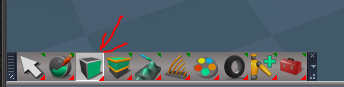
Do you notice that PE Selection Mode stays highlighted in the toolbar?
All other modes too, except context, vertex, and edge.
All other modes too, except context, vertex, and edge.
- Capture.PNG (16.85 KiB) Viewed 3937 times
-
clintonman
- Captain
- Posts: 5659
- Joined: 21 May 2009, 21:08
- Type the number ten into the box: 0
- Location: California
Re: Final trueSpace 7.61 Beta 8 Unofficial Update
Nope, didn't notice.
-
trueBlue
- Captain
- Posts: 5548
- Joined: 06 Jul 2009, 22:50
- Type the number ten into the box: 10
Re: Final trueSpace 7.61 Beta 8 Unofficial Update
Meaning, they do no stay highlighted on your installation after using Zoom to Selection?clintonman wrote: 13 Jan 2020, 04:41 Nope, didn't notice.
-
clintonman
- Captain
- Posts: 5659
- Joined: 21 May 2009, 21:08
- Type the number ten into the box: 0
- Location: California
Re: Final trueSpace 7.61 Beta 8 Unofficial Update
Don't think they're related.
Tested in unpatched virgin tS:
context highlight goes off when exit PE mode
vertex highlight goes off when exit PE mode
edge highlight goes off when exit PE mode
face highlight stays on when exit PE mode
triangle face highlight stays on when exit PE mode
edge loop highlight stays on when exit PE mode
face loop highlight stays on when exit PE mode
Tested in unpatched virgin tS:
context highlight goes off when exit PE mode
vertex highlight goes off when exit PE mode
edge highlight goes off when exit PE mode
face highlight stays on when exit PE mode
triangle face highlight stays on when exit PE mode
edge loop highlight stays on when exit PE mode
face loop highlight stays on when exit PE mode
-
trueBlue
- Captain
- Posts: 5548
- Joined: 06 Jul 2009, 22:50
- Type the number ten into the box: 10
Re: Final trueSpace 7.61 Beta 8 Unofficial Update
New Update for the trueSpace7.61 Beta 8 Unofficial Update
viewtopic.php?t=3732
January 13, 2020
I have noticed that the Background Help panel can open unexpectedly with the previous short cut (I + LMB drag in empty space)
Background widget
Changed
* B + I + LMB drag in empty space - Opens Background Widget Help panel
Look at Selection
Zoom to Selection/Point Edit mode
Returns to users Point Edit Select Element type
Updated January 11, 2020 Author Clinton Reese
Custom Toolbars - Red toolbar
Add
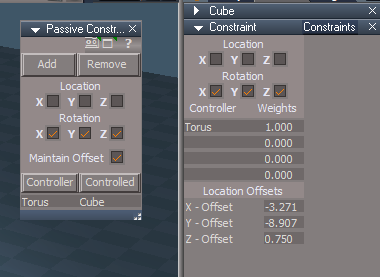
* Contraints and Passive Contraints - Author Clinton Reese
Modified the UI
Fixed some errors:
if not a valid selection -> return
Add
floating panel
help panel
viewtopic.php?t=3732
January 13, 2020
I have noticed that the Background Help panel can open unexpectedly with the previous short cut (I + LMB drag in empty space)
Background widget
Changed
* B + I + LMB drag in empty space - Opens Background Widget Help panel
Look at Selection
Zoom to Selection/Point Edit mode
Returns to users Point Edit Select Element type
Updated January 11, 2020 Author Clinton Reese
Custom Toolbars - Red toolbar
Add
* Contraints and Passive Contraints - Author Clinton Reese
Modified the UI
Fixed some errors:
if not a valid selection -> return
Add
floating panel
help panel
- Passive Constraints.PNG (18.01 KiB) Viewed 4057 times
-
trueBlue
- Captain
- Posts: 5548
- Joined: 06 Jul 2009, 22:50
- Type the number ten into the box: 10
Re: Final trueSpace 7.61 Beta 8 Unofficial Update
New Update for the trueSpace7.61 Beta 8 Unofficial Update
viewtopic.php?t=3732
January 13, 2020
Point Edit widget 1, 2, and 3
Changed
Sphere and Triangles
RMB + Drag = Opens Point Edit preference panel
Point Edit widget 2
Sphere and Triangles
Add
LMB select = Opens Point Edit toolbars, offset from the Sphere's location
Ctrl + LMB select = Closes Point Edit toolbars
Edit: Removed because this was stopping the Ctrl + LMB add to selection in Point Editing Mode
RMB select in empty space = Ends Point Editing and closes Point Edit toolbars
Background widget
Add
Ctrl + LMB select in empty space = Closes Point Edit toolbars
PE NormalMove
Fixed an error in the normalMove script
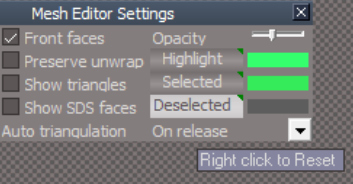
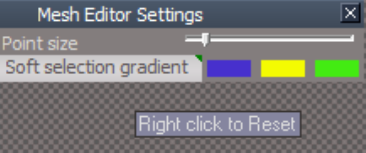
Mesh Editor Settings
Default and Soft aspects
Add
* Attribute buttons for setting default colors 'Right click Reset'
Mirror aspect
Add
* Help link and Reset Default manual settings button 'Right click Reset'
http://clintons3d.com/plugins/truespace ... rtool.html
Animation
Add
Floating panel
* Advance Frame
Advance frame forwards or backwards by amount entered
viewtopic.php?t=3732
January 13, 2020
Point Edit widget 1, 2, and 3
Changed
Sphere and Triangles
RMB + Drag = Opens Point Edit preference panel
Point Edit widget 2
Sphere and Triangles
Add
LMB select = Opens Point Edit toolbars, offset from the Sphere's location
Ctrl + LMB select = Closes Point Edit toolbars
Edit: Removed because this was stopping the Ctrl + LMB add to selection in Point Editing Mode
RMB select in empty space = Ends Point Editing and closes Point Edit toolbars
Background widget
Add
Ctrl + LMB select in empty space = Closes Point Edit toolbars
PE NormalMove
Fixed an error in the normalMove script
Mesh Editor Settings
Default and Soft aspects
Add
* Attribute buttons for setting default colors 'Right click Reset'
Mirror aspect
Add
* Help link and Reset Default manual settings button 'Right click Reset'
http://clintons3d.com/plugins/truespace ... rtool.html
- MESdefault.PNG (47.32 KiB) Viewed 4075 times
- MESsoft.PNG (38.41 KiB) Viewed 4075 times
Add
Floating panel
* Advance Frame
Advance frame forwards or backwards by amount entered
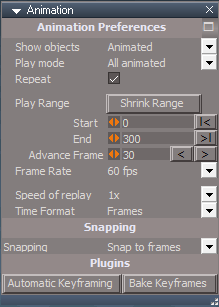
- Advance Frame.PNG (9.7 KiB) Viewed 4075 times
-
trueBlue
- Captain
- Posts: 5548
- Joined: 06 Jul 2009, 22:50
- Type the number ten into the box: 10
Re: Final trueSpace 7.61 Beta 8 Unofficial Update
New Update for the trueSpace7.61 Beta 8 Unofficial Update
viewtopic.php?t=3732
January 15, 2020
Point Edit Widget 2
Triangles
* LMB click opens Point Editing toolbars
* Ctrl + LMB click closes Point Editing toolbars
* MMB + Drag moves the widget
Background
RMB + Drag in empty 3D Space closes Point Editing toolbars
RMB click in empty 3D Space closes Point Editing toolbars and ends Point Editing
Tip: Move the widget and open toolbars in a different location
* Updated the trueSpace Beta 7.61 Unofficial Update.txt file
viewtopic.php?t=3732
January 15, 2020
Point Edit Widget 2
Triangles
* LMB click opens Point Editing toolbars
* Ctrl + LMB click closes Point Editing toolbars
* MMB + Drag moves the widget
Background
RMB + Drag in empty 3D Space closes Point Editing toolbars
RMB click in empty 3D Space closes Point Editing toolbars and ends Point Editing
Tip: Move the widget and open toolbars in a different location
* Updated the trueSpace Beta 7.61 Unofficial Update.txt file
-
trueBlue
- Captain
- Posts: 5548
- Joined: 06 Jul 2009, 22:50
- Type the number ten into the box: 10
Re: Final trueSpace 7.61 Beta 8 Unofficial Update
New Update for the trueSpace7.61 Beta 8 Unofficial Update
viewtopic.php?t=3732
January 15, 2020
Hoping that this is the Final update!
Updated 2 objects in the,
Objects - tS7.61 Update objects -> library
Model Workspace Animation panel
Add
Advance Frame forwards or backwards by amount entered
M - Opens Synchronize Workspace
Animation panel
Add
Advance Frame forwards or backwards by amount entered
Note: The Model Workspace Animation panel has combined Model and Workspace commands in the controls.
The Animation panel has seperate Model and Workspace commands.
viewtopic.php?t=3732
January 15, 2020
Hoping that this is the Final update!
Updated 2 objects in the,
Objects - tS7.61 Update objects -> library
Model Workspace Animation panel
Add
Advance Frame forwards or backwards by amount entered
M - Opens Synchronize Workspace
Animation panel
Add
Advance Frame forwards or backwards by amount entered

The Animation panel has seperate Model and Workspace commands.
-
trueBlue
- Captain
- Posts: 5548
- Joined: 06 Jul 2009, 22:50
- Type the number ten into the box: 10
Re: Final trueSpace 7.61 Beta 8 Unofficial Update
New Update for the trueSpace7.61 Beta 8 Unofficial Update
viewtopic.php?t=3732
January 21, 2020
Custom Commands
Add
Target Weld
trueBevel
Mesh Edit Pivot Axes
ScriptCommands
Add
C3DRestore - 'Modal question'
ResetContext - 'Modal question'
ResetPose - 'Modal question'
HideAll - 'Include Encapsulated objects'
Blue toolbox
Open jScript
LMB - Inserts and opens a jScript command(s) in active window
RMB - Inserts and opens a jScript object(s) in active window
Shortcuts
Removed: Spacebar - 'Unselect'
Changed: Spacebar - Opens - Quad Point Edit toolbars in Point Editing mode
Changed:
Object Rotate shortcuts
3DView - 'Window in focus with object selected'
Add:
Note: Rotates + or - 180 degrees and stops. Gimble Lock?
If at the end of the 180 degress, selecting the opposite key will continue in that direction to 360 degrees and stops
Quad Point Edit toolbars Author - Clinton Reese
Removed
Point Edit widget 2
Triangles
LMB = Closes and Opens - Quad Point Edit toolbars 'Modified version'
Background
RMB + Drag - Closes - Quad Point Edit toolbars
RMB + Click - Closes - Quad Point Edit toolbars 'End Point Editing'
Tip: MMB + Drag the Sphere to move the widget and LMB select the Triangles to open the toolbars in a different position
viewtopic.php?t=3732
January 21, 2020
Custom Commands
Add
Target Weld
trueBevel
Mesh Edit Pivot Axes
ScriptCommands
Add
C3DRestore - 'Modal question'
ResetContext - 'Modal question'
ResetPose - 'Modal question'
HideAll - 'Include Encapsulated objects'
Blue toolbox
Open jScript
LMB - Inserts and opens a jScript command(s) in active window
RMB - Inserts and opens a jScript object(s) in active window
Shortcuts
Removed: Spacebar - 'Unselect'
Changed: Spacebar - Opens - Quad Point Edit toolbars in Point Editing mode
Changed:
Object Rotate shortcuts
3DView - 'Window in focus with object selected'
Code: Select all
Home	 Normalize Location
End Normalize RotationCode: Select all
0	+Y Rotate Left 1.000 degree
.	-Y Rotate Right 1.000 degree
CTRL+0	+Y Rotate Left +45 degrees
CTRL+. -Y Rotate Right -45 degreesIf at the end of the 180 degress, selecting the opposite key will continue in that direction to 360 degrees and stops
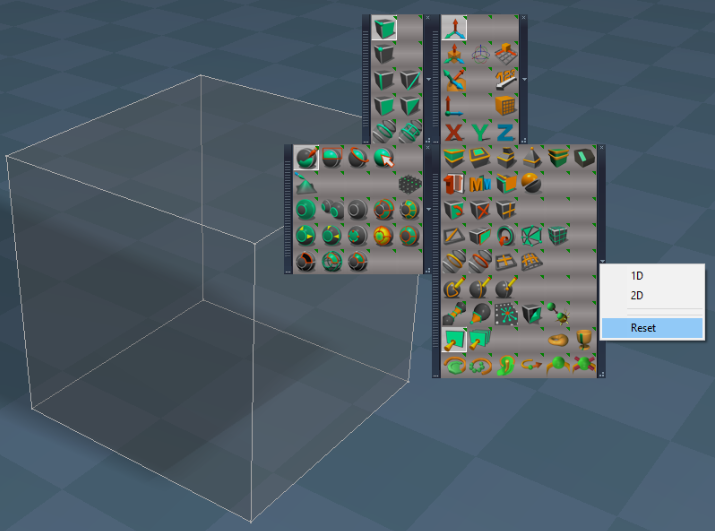
Quad Point Edit toolbars Author - Clinton Reese
Removed
Point Edit widget 2
Triangles
LMB = Closes and Opens - Quad Point Edit toolbars 'Modified version'
Background
RMB + Drag - Closes - Quad Point Edit toolbars
RMB + Click - Closes - Quad Point Edit toolbars 'End Point Editing'
Tip: MMB + Drag the Sphere to move the widget and LMB select the Triangles to open the toolbars in a different position
-
trueBlue
- Captain
- Posts: 5548
- Joined: 06 Jul 2009, 22:50
- Type the number ten into the box: 10
Re: Final trueSpace 7.61 Beta 8 Unofficial Update
New Update for the trueSpace7.61 Beta 8 Unofficial Update
viewtopic.php?t=3732
January 21, 2020
Updated
Clintons3D Package" VERSION="v.1638415"
Add
Deformers (Beta)
viewtopic.php?t=5742
See previous post for the update earlier today
viewtopic.php?t=3732
January 21, 2020
Updated
Clintons3D Package" VERSION="v.1638415"
Add
Deformers (Beta)
viewtopic.php?t=5742
See previous post for the update earlier today
-
trueBlue
- Captain
- Posts: 5548
- Joined: 06 Jul 2009, 22:50
- Type the number ten into the box: 10
Re: Final trueSpace 7.61 Beta 8 Unofficial Update
New Update for the trueSpace7.61 Beta 8 Unofficial Update
viewtopic.php?t=3732
January 23, 2020
Deformers - Author Clinton Reese
New - BendDeform
UI modifications
Min, Max, and Center Limits
Add
Shape
This enables you to animate the Limits individually as long as you do not Remove them.
Deformer script
Add
Space.Unselect()
Node.Select(sel)
This shows the (Type)Deform in Panels
RemoveHelpers script
Add
if(!Question("If you have animated any of the Helper Limits they will be removed.\n\nDo you wish to continue?"))
Add Deform icon
Opens - Add Deformer in a floating panel
trueBevel
Add
RetorePEselectionMode script
var RestorePEselectionMode = params.ConValue('RestorePEselectionMode');
MeshModifiers.AutofacetNormals('',-1)
Node.Value('/Preferences/Mesh Editor Settings','PE selection mode') = RestorePEselectionMode;
MeshModifiers.ActivatePointEditWidget('','','Default');
WorkspaceMain and WorkspaceMain2 toolbars
Flatten History icon
Add
RMB = MeshModifiers.FlattenNodes('');Node.ConRemove(Node.FirstSelected(), "UvProjection");
viewtopic.php?t=3732
January 23, 2020
Deformers - Author Clinton Reese
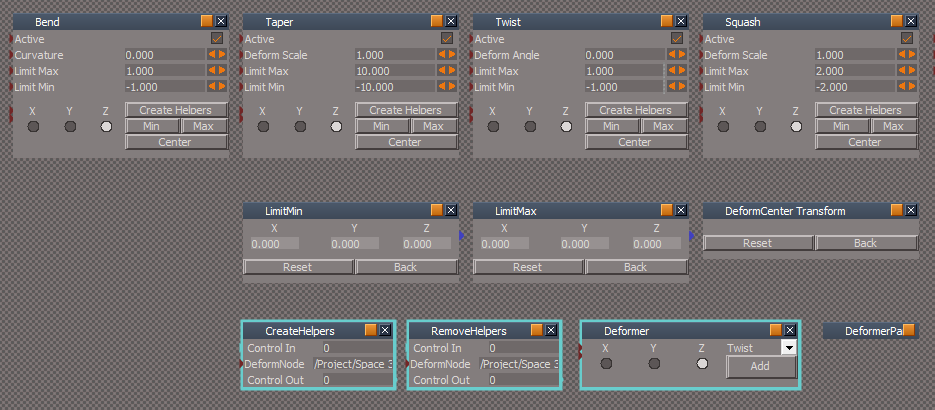
UI modifications
Min, Max, and Center Limits
Add
Shape
This enables you to animate the Limits individually as long as you do not Remove them.
Deformer script
Add
Space.Unselect()
Node.Select(sel)
This shows the (Type)Deform in Panels
RemoveHelpers script
Add
if(!Question("If you have animated any of the Helper Limits they will be removed.\n\nDo you wish to continue?"))
Add Deform icon
Opens - Add Deformer in a floating panel
trueBevel
Add
RetorePEselectionMode script
var RestorePEselectionMode = params.ConValue('RestorePEselectionMode');
MeshModifiers.AutofacetNormals('',-1)
Node.Value('/Preferences/Mesh Editor Settings','PE selection mode') = RestorePEselectionMode;
MeshModifiers.ActivatePointEditWidget('','','Default');
WorkspaceMain and WorkspaceMain2 toolbars
Flatten History icon
Add
RMB = MeshModifiers.FlattenNodes('');Node.ConRemove(Node.FirstSelected(), "UvProjection");
-
trueBlue
- Captain
- Posts: 5548
- Joined: 06 Jul 2009, 22:50
- Type the number ten into the box: 10
Re: Final trueSpace 7.61 Beta 8 Unofficial Update
New Update for the trueSpace7.61 Beta 8 Unofficial Update
viewtopic.php?t=3732
January 25, 2020
Deformers - Author Clinton Reese
Add
Modal Questions to the Remove Helpers button script and Helpers Remove button scripts
Examples:
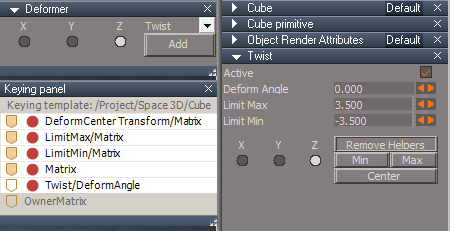
You need to add these items, highlighted in Red, to the Keying panel from the Attribute Browser.
viewtopic.php?t=3732
January 25, 2020
Deformers - Author Clinton Reese
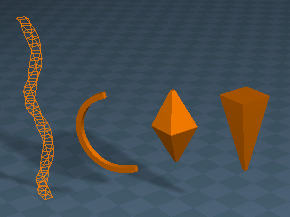
- Deformers.PNG (27.83 KiB) Viewed 4354 times
Modal Questions to the Remove Helpers button script and Helpers Remove button scripts
Examples:
If you Remove these Helpers thier animation will be lost!
Do you still want to remove all of these Helpers?
In order to animate the Helpers seperatly, you must add atleast one keyframe to each one BEFORE animating the Object. This will create a AnimClip for each one that is seperate from the Object's AnimClip. Equally important, you can not Remove these helpers or you will lose any animation.This Center helper has been animated, this part of the animation will be lost!
Do you still want to remove this Center object?
You need to add these items, highlighted in Red, to the Keying panel from the Attribute Browser.

- AB.PNG (11.7 KiB) Viewed 4364 times
-
Saul
- Senior Chief Petty Officer
- Posts: 308
- Joined: 22 May 2009, 16:50
Re: Final trueSpace 7.61 Beta 8 Unofficial Update
I been playing around with this a bit.
When i use the deformers on an object then load a new, empty, scene, the keying panel retains the previous scenes settings for an object no longer present. Is this intentional behaviour?
Edit: And the ghost settings are not editable, clicking on them, deletes them...
When i use the deformers on an object then load a new, empty, scene, the keying panel retains the previous scenes settings for an object no longer present. Is this intentional behaviour?
Edit: And the ghost settings are not editable, clicking on them, deletes them...
-
trueBlue
- Captain
- Posts: 5548
- Joined: 06 Jul 2009, 22:50
- Type the number ten into the box: 10
Re: Final trueSpace 7.61 Beta 8 Unofficial Update
Nope, this is a trueSpace behavior.Saul wrote: 27 Jan 2020, 18:02 Is this intentional behaviour?
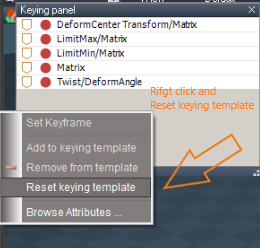
- tempsnip.png (33.66 KiB) Viewed 4707 times
-
trueBlue
- Captain
- Posts: 5548
- Joined: 06 Jul 2009, 22:50
- Type the number ten into the box: 10
Re: Final trueSpace 7.61 Beta 8 Unofficial Update
New Update for the trueSpace7.61 Beta 8 Unofficial Update
viewtopic.php?t=3732
January 27, 2020
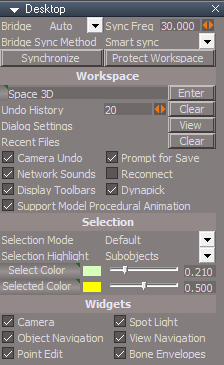
Desktop
Undo History attribute
Scrubber
Changed the settings to 1 - 100
Warning: Setting it to Zero and Reset will crash trueSpace!
Add
Select Color - Right click to Reset 'Defaults'
Selected Color - Right click to Reset 'Defaults'
viewtopic.php?t=3732
January 27, 2020
Desktop
Undo History attribute
Scrubber
Changed the settings to 1 - 100
Warning: Setting it to Zero and Reset will crash trueSpace!
Add
Select Color - Right click to Reset 'Defaults'
Selected Color - Right click to Reset 'Defaults'
- Desktop.PNG (14.29 KiB) Viewed 4709 times
-
trueBlue
- Captain
- Posts: 5548
- Joined: 06 Jul 2009, 22:50
- Type the number ten into the box: 10
Re: Final trueSpace 7.61 Beta 8 Unofficial Update
New Update for the trueSpace7.61 Beta 8 Unofficial Update
viewtopic.php?t=3732
January 30, 2020
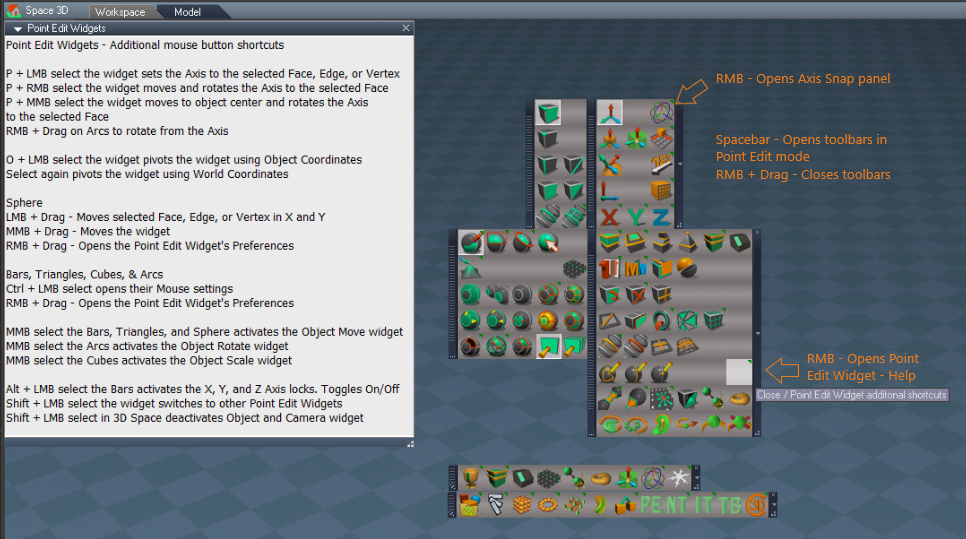
Quad Menu
Changed
Open Toolbar(s) From Prototype(s)
Removed
Toolbars from CustomCommands
New Prototype(s)
New icons
Point Edit widget 2
Triangles
LMB click - Opens the Quad toolbars
Ctrl + LMB click - Closes the Quad toolbars
Background
RMB + drag in empty space - Closes the Quad toolbars
or when you exit point editing.
Pivot Coordinate System script
Change
Switches to using Object Coordinate mode. (Active) and back (Switch) to using World Coordinate mode. (Inactive)
New Icon button
Change
Active/Inactive state
Description
LMB - Pivots the PE widget to follow the whole Object using Object Coordinate mode, instead of the selection.
Toggle
LMB - Pivots the PE widget back to follow the selection using World Coordinate mode
Icon and widget in Inactive state
Icon and widget in Active state
PivotAxis icon
LMB - Axis to Selection
Add
RMB - Open Axis Snap panel
viewtopic.php?t=3732
January 30, 2020
Quad Menu
Changed
Open Toolbar(s) From Prototype(s)
Removed
Toolbars from CustomCommands
New Prototype(s)
New icons
Triangles
LMB click - Opens the Quad toolbars
Ctrl + LMB click - Closes the Quad toolbars
Background
RMB + drag in empty space - Closes the Quad toolbars
or when you exit point editing.
Pivot Coordinate System script
Change
Switches to using Object Coordinate mode. (Active) and back (Switch) to using World Coordinate mode. (Inactive)
New Icon button
Change
Active/Inactive state
Description
LMB - Pivots the PE widget to follow the whole Object using Object Coordinate mode, instead of the selection.
Toggle
LMB - Pivots the PE widget back to follow the selection using World Coordinate mode
Icon and widget in Inactive state

- WCM Inactive state.PNG (36.11 KiB) Viewed 4663 times

- OCM Active.PNG (39.73 KiB) Viewed 4657 times
LMB - Axis to Selection
Add
RMB - Open Axis Snap panel
-
trueBlue
- Captain
- Posts: 5548
- Joined: 06 Jul 2009, 22:50
- Type the number ten into the box: 10
Re: Final trueSpace 7.61 Beta 8 Unofficial Update
New Update for the trueSpace7.61 Beta 8 Unofficial Update
viewtopic.php?t=3732
January 31, 2020
View Widget
Rotate X 'Blue'
Add
RMB click opens Link Editor
Rotate YZ 'Red'
Add
RMB click opens Animation Editor
parentingScripts
Parent
Add
if(!sel) { return; }
Node.Disconnect(theParent, "WldMatrix", theChild, "OwnerMatrix");
Status message
var name = Node.ShortName(theParent)
Node.Value("/Status Message", "Message") = " The " + name+ " is the Parent"
UnParent
Add
Status Message
Node.Value("/Status Message", "Message") = " Selected objects have been Unparented"
viewtopic.php?t=3732
January 31, 2020
View Widget

- View widget.png (3.12 KiB) Viewed 4623 times
Add
RMB click opens Link Editor
Rotate YZ 'Red'
Add
RMB click opens Animation Editor
parentingScripts
Parent
Add
if(!sel) { return; }
Node.Disconnect(theParent, "WldMatrix", theChild, "OwnerMatrix");
Status message
var name = Node.ShortName(theParent)
Node.Value("/Status Message", "Message") = " The " + name+ " is the Parent"
UnParent
Add
Status Message
Node.Value("/Status Message", "Message") = " Selected objects have been Unparented"
-
trueBlue
- Captain
- Posts: 5548
- Joined: 06 Jul 2009, 22:50
- Type the number ten into the box: 10
Re: Final trueSpace 7.61 Beta 8 Unofficial Update
New Update for the trueSpace7.61 Beta 8 Unofficial Update
viewtopic.php?t=3732
February 02, 2020
Object Navigation widget(s)
Enter edit mode
Add
NoLights script
if(Node.IsLight(''))
params.SetTerminationFlag()
return
Lights
Ambient
Add
TSCompatibleLight node
Deformer script
Add
if(Node.IsCamera(sel)) return;
if(Node.IsLight(sel)) return;
viewtopic.php?t=3732
February 02, 2020
Object Navigation widget(s)
Enter edit mode
Add
NoLights script
if(Node.IsLight(''))
params.SetTerminationFlag()
return
Lights
Ambient
Add
TSCompatibleLight node
Deformer script
Add
if(Node.IsCamera(sel)) return;
if(Node.IsLight(sel)) return;
-
trueBlue
- Captain
- Posts: 5548
- Joined: 06 Jul 2009, 22:50
- Type the number ten into the box: 10
Re: Final trueSpace 7.61 Beta 8 Unofficial Update
New Update for the trueSpace7.61 Beta 8 Unofficial Update
viewtopic.php?t=3732
February 03, 2020
New
Shear tool
Apply to selected object
viewtopic.php?t=3732
February 03, 2020
New
Shear tool
Apply to selected object
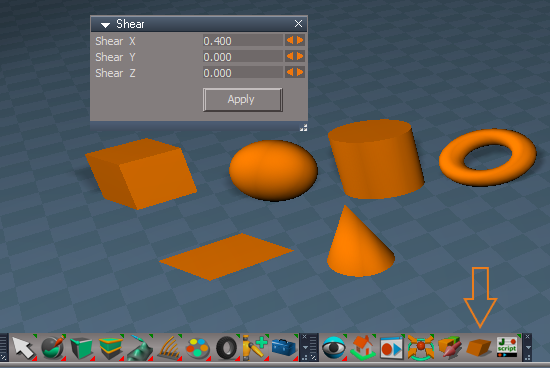
-
trueBlue
- Captain
- Posts: 5548
- Joined: 06 Jul 2009, 22:50
- Type the number ten into the box: 10
Re: Final trueSpace 7.61 Beta 8 Unofficial Update
New Update for the trueSpace7.61 Beta 8 Unofficial Update
viewtopic.php?t=3732
February 04, 2020
Object and Camera widgets
Changed
LMB state - Temp Workspace Status Message
Example:
LMB click in 3D Space deactivates Object and Camera widgets
viewtopic.php?t=3732
February 04, 2020
Object and Camera widgets

- Obj and Cam widgets.PNG (7.83 KiB) Viewed 4603 times
LMB state - Temp Workspace Status Message
Example:

- Status.PNG (3.58 KiB) Viewed 4603 times
-
trueBlue
- Captain
- Posts: 5548
- Joined: 06 Jul 2009, 22:50
- Type the number ten into the box: 10
Re: Final trueSpace 7.61 Beta 8 Unofficial Update
New Update for the trueSpace7.61 Beta 8 Unofficial Update
viewtopic.php?t=3732
February 06, 2020
Discovered that the Status Messages for the Object and Camera widgets is not a good idea. Because in order to Undo the widget's transformation, you had to Undo 4 or 5 steps. So I removed the Status Messages from ALL of the widgets. Also the previous single LMB click to deactivate the widget, inhibited the ability to select other objects and countinue with the widget's transformation. So back to Shift + LMB click in 3D Space to deactivate the widgets or you can right clik the following toolbar icons.
* Object Move, Object Rotate, and Object Scale - RMB = Exit 'Deactivate the widget'
* Camera Move, Camera Rotate, Camera FOV, and Rectangle Zoom - RMB = Exit 'Deactivate the widget'
Also fixed the WinGUID_Bar aspect toolbar's Rectangle Zoom button. It nows shows as active when in use.
Link Editor Navigator
Add
P
LMB - Select Parent (Keyboard key Shortcut - UP)
RMB - Open
C
LMB - Select Children (Keyboard key Shortcut - DOWN)
RMB - Open
<
LMB - Select previous object (Keyboard key Shortcut - Left)
RMB - Open
|
LMB - Center to Selected (Keyboard key Shortcut - CTRL SHIFT LEFT)
RMB - Next 'Center to Selected' (Keyboard key Shortcut - CTRL SHIFT RIGHT)
Tip: RMB click in Link Editor to restore
>
LMB - Select next object (Keyboard key Shortcut - RIGHT)
RMB - Open
Tip:
Ctrl+
RMB - Unselect (Keyboard key Shortcut - ESC)
Open
RMB - Open scene (Keyboard key Shortcut - HOME)
viewtopic.php?t=3732
February 06, 2020
Discovered that the Status Messages for the Object and Camera widgets is not a good idea. Because in order to Undo the widget's transformation, you had to Undo 4 or 5 steps. So I removed the Status Messages from ALL of the widgets. Also the previous single LMB click to deactivate the widget, inhibited the ability to select other objects and countinue with the widget's transformation. So back to Shift + LMB click in 3D Space to deactivate the widgets or you can right clik the following toolbar icons.
* Object Move, Object Rotate, and Object Scale - RMB = Exit 'Deactivate the widget'
* Camera Move, Camera Rotate, Camera FOV, and Rectangle Zoom - RMB = Exit 'Deactivate the widget'
Also fixed the WinGUID_Bar aspect toolbar's Rectangle Zoom button. It nows shows as active when in use.
Link Editor Navigator
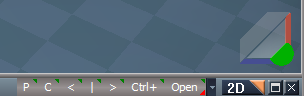
- LE Navigator.PNG (10.31 KiB) Viewed 4585 times
P
LMB - Select Parent (Keyboard key Shortcut - UP)
RMB - Open
C
LMB - Select Children (Keyboard key Shortcut - DOWN)
RMB - Open
<
LMB - Select previous object (Keyboard key Shortcut - Left)
RMB - Open
|
LMB - Center to Selected (Keyboard key Shortcut - CTRL SHIFT LEFT)
RMB - Next 'Center to Selected' (Keyboard key Shortcut - CTRL SHIFT RIGHT)
Tip: RMB click in Link Editor to restore
>
LMB - Select next object (Keyboard key Shortcut - RIGHT)
RMB - Open
Tip:
Ctrl+
RMB - Unselect (Keyboard key Shortcut - ESC)
Open
RMB - Open scene (Keyboard key Shortcut - HOME)
-
trueBlue
- Captain
- Posts: 5548
- Joined: 06 Jul 2009, 22:50
- Type the number ten into the box: 10
Re: Final trueSpace 7.61 Beta 8 Unofficial Update
Still not happy with the RMB commands I used to Deactivate the widgets!trueBlue wrote: 06 Feb 2020, 20:39 New Update for the trueSpace7.61 Beta 8 Unofficial Update
viewtopic.php?t=3732
February 06, 2020
Discovered that the Status Messages for the Object and Camera widgets is not a good idea. Because in order to Undo the widget's transformation, you had to Undo 4 or 5 steps. So I removed the Status Messages from ALL of the widgets. Also the previous single LMB click to deactivate the widget, inhibited the ability to select other objects and countinue with the widget's transformation. So back to Shift + LMB click in 3D Space to deactivate the widgets or you can right clik the following toolbar icons.
* Object Move, Object Rotate, and Object Scale - RMB = Exit 'Deactivate the widget'
* Camera Move, Camera Rotate, Camera FOV, and Rectangle Zoom - RMB = Exit 'Deactivate the widget'
Also fixed the WinGUID_Bar aspect toolbar's Rectangle Zoom button. It nows shows as active when in use.
I used the Cube primitive tool and Object tool commands.
I found another solution that works better and more importantly, with regards to the Undo history.
Studied what was happening in the Widgets Layer2 node and the Command Console while using these commands.
Do not see any problems.
Code: Select all
Widgets.ReplaceWidget('{5C9008D4-B6B3-4359-9E63-18D2FC228A6E}','/Widgets/Tools/Move selection','Default','','Dummy');Widgets.ActivateDefaultWidget()
Widgets.ReplaceWidget('{5C9008D4-B6B3-4359-9E63-18D2FC228A6E}','/Widgets/Tools/Rotate selection','Default','','Dummy');Widgets.ActivateDefaultWidget()
Widgets.ReplaceWidget('{5C9008D4-B6B3-4359-9E63-18D2FC228A6E}','/Widgets/Tools/Scale selection','Default','','Dummy');Widgets.ActivateDefaultWidget()
Widgets.ReplaceWidget('{5C9008D4-B6B3-4359-9E63-18D2FC228A6E}','/Widgets/Tools/View tools/Camera move','Default','','Dummy');Widgets.ActivateDefaultWidget()
Widgets.ReplaceWidget('{5C9008D4-B6B3-4359-9E63-18D2FC228A6E}','/Widgets/Tools/View tools/Camera rotate','Default','','Dummy');Widgets.ActivateDefaultWidget()
Widgets.ReplaceWidget('{5C9008D4-B6B3-4359-9E63-18D2FC228A6E}','/Widgets/Tools/View tools/Camera fov','Default','','Dummy');Widgets.ActivateDefaultWidget()
Widgets.ReplaceWidget('{5C9008D4-B6B3-4359-9E63-18D2FC228A6E}','/Widgets/Tools/View tools/Rect zoom','Default','','Dummy');Widgets.ActivateDefaultWidget()Code: Select all
Widgets.ActivateDefaultWidget()Edit2: Further testing, the Widgets.ActivateDefaultWidget() commands did not work when in Point Editing mode.
Instead I am using MeshModifiers.ActivateSelectionTool()
So the final RMB commands are:
Code: Select all
/*
Widgets.ReplaceWidget('{E8913C00-9A2A-43cf-8238-27B4BFB50A1F}','/Widgets/Tools/Move selection','Default','','Dummy');MeshModifiers.ActivateSelectionTool()
Widgets.ReplaceWidget('{E8913C00-9A2A-43cf-8238-27B4BFB50A1F}','/Widgets/Tools/Rotate selection','Default','','Dummy');MeshModifiers.ActivateSelectionTool()
Widgets.ReplaceWidget('{E8913C00-9A2A-43cf-8238-27B4BFB50A1F}','/Widgets/Tools/Scale selection','Default','','Dummy');MeshModifiers.ActivateSelectionTool()

Widgets.ReplaceWidget('{E8913C00-9A2A-43cf-8238-27B4BFB50A1F}','/Widgets/Tools/View tools/Camera move','Default','','Dummy');MeshModifiers.ActivateSelectionTool()
Widgets.ReplaceWidget('{E8913C00-9A2A-43cf-8238-27B4BFB50A1F}','/Widgets/Tools/View tools/Camera rotate','Default','','Dummy');MeshModifiers.ActivateSelectionTool()
Widgets.ReplaceWidget('{E8913C00-9A2A-43cf-8238-27B4BFB50A1F}','/Widgets/Tools/View tools/Camera fov','Default','','Dummy');MeshModifiers.ActivateSelectionTool()

Widgets.ReplaceWidget('{E8913C00-9A2A-43cf-8238-27B4BFB50A1F}','/Widgets/Tools/View tools/Rect zoom','Default','','Dummy');MeshModifiers.ActivateSelectionTool()
*/-
trueBlue
- Captain
- Posts: 5548
- Joined: 06 Jul 2009, 22:50
- Type the number ten into the box: 10
Re: Final trueSpace 7.61 Beta 8 Unofficial Update
New Update for the trueSpace7.61 Beta 8 Unofficial Update
viewtopic.php?t=3732
February 10, 2020
WorkspaceMain, WorkspaceMain2, BottomBar, BottomBar2, and WinGUID_Bar toolbars
Object and Camera toolbar's RMB command
Close widget or use Shift + LMB click in empty 3D Space.
Axis widget
Additional controls:
Sphere
* RMB click - Closes the Axis widget
* LMB click - Opens the Axis Snap panel
* MMB click - Hides the Arcs and Arrows
* MMB + Drag - Shows the Arcs and Arrows
* I + LMB click - Opens Widget Help panel
Object Navigation Widget(s)
Sphere
Add
P + LMB click - Opens the Axis Widget 'Toggles On/Off'
CTRL + RMB click - Opens the preferences panel
Add
Docking - Bounding Box Center On/Off
PESnappingToolbar
Add
Face and Vertex Snapping 'Author - Clinton Reese'
Really loving these Point Edit Quad toolbars!
Thanks again Clinton!
viewtopic.php?t=3732
February 10, 2020
WorkspaceMain, WorkspaceMain2, BottomBar, BottomBar2, and WinGUID_Bar toolbars
Object and Camera toolbar's RMB command
Close widget or use Shift + LMB click in empty 3D Space.
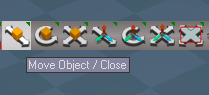
- ObjCamIcons.PNG (11 KiB) Viewed 4607 times
Additional controls:
Sphere
* RMB click - Closes the Axis widget
* LMB click - Opens the Axis Snap panel
* MMB click - Hides the Arcs and Arrows
* MMB + Drag - Shows the Arcs and Arrows
* I + LMB click - Opens Widget Help panel
Object Navigation Widget(s)
Sphere
Add
P + LMB click - Opens the Axis Widget 'Toggles On/Off'
CTRL + RMB click - Opens the preferences panel
Add
Docking - Bounding Box Center On/Off

- ONWDocking.PNG (5.08 KiB) Viewed 4607 times
Add
Face and Vertex Snapping 'Author - Clinton Reese'
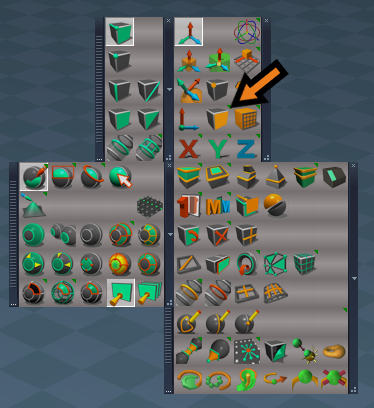
Thanks again Clinton!
-
trueBlue
- Captain
- Posts: 5548
- Joined: 06 Jul 2009, 22:50
- Type the number ten into the box: 10
Re: Final trueSpace 7.61 Beta 8 Unofficial Update
New Update for the trueSpace7.61 Beta 8 Unofficial Update
viewtopic.php?t=3732
February 15, 2020
Shear tool
Update: Apply to mutiple selected objects
Axis Snap
Axis Widget - Additional mouse button shortcuts
Sphere
P + Drag - Opens the Axis Snap panel
RMB click - Closes the Axis widget
MMB click - Hides the Arcs and Arrows
MMB + Drag - Shows the Arcs and Arrows
Materials - DX9
Add
D3D U Ramp material - Author Clinton Reese
D3D V Ramp material - Author Clinton Reese
Texture aspect
Use:
First 8 Keys can be textures
LMB click in Ramp Bitmap control to add texture
Ctrl + LMB select Bitmap to change texture
RMB select Reset - Texture @ Key # to
remove texture
viewtopic.php?t=3732
February 15, 2020
Shear tool
Update: Apply to mutiple selected objects
Axis Snap
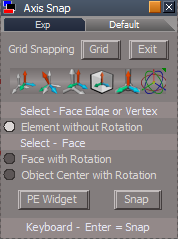
- Axis Snap panel.PNG (13.99 KiB) Viewed 4570 times
Sphere
P + Drag - Opens the Axis Snap panel
RMB click - Closes the Axis widget
MMB click - Hides the Arcs and Arrows
MMB + Drag - Shows the Arcs and Arrows
Materials - DX9
Add
D3D U Ramp material - Author Clinton Reese
D3D V Ramp material - Author Clinton Reese
Texture aspect
Use:
First 8 Keys can be textures
LMB click in Ramp Bitmap control to add texture
Ctrl + LMB select Bitmap to change texture
RMB select Reset - Texture @ Key # to
remove texture

-
Saul
- Senior Chief Petty Officer
- Posts: 308
- Joined: 22 May 2009, 16:50
Re: Final trueSpace 7.61 Beta 8 Unofficial Update
In the RS main libraries, Objects - tS7.61 Update Objects, there used to be an RsObj called something like Disable workspace toolbar, it prevented the toolbar opening whenever user opened new 3D window.
Where has it gone?
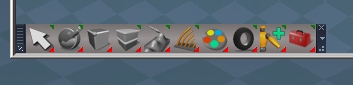
- ScreenHunter 115.jpg (19.57 KiB) Viewed 4572 times
-
trueBlue
- Captain
- Posts: 5548
- Joined: 06 Jul 2009, 22:50
- Type the number ten into the box: 10
Re: Final trueSpace 7.61 Beta 8 Unofficial Update
Getting ready to upload new updates...Saul wrote: 19 Feb 2020, 15:40 In the RS main libraries, Objects - tS7.61 Update Objects, there used to be an RsObj called something like Disable workspace toolbar, it prevented the toolbar opening whenever user opened new 3D window.
ScreenHunter 115.jpg
Where has it gone?
I will include an updated version.

- Workspace NAV toolbar.PNG (3.83 KiB) Viewed 4570 times
- Attachments
-
- Workspace NAV toolbar.RsObj
- (5.52 KiB) Downloaded 202 times
-
Saul
- Senior Chief Petty Officer
- Posts: 308
- Joined: 22 May 2009, 16:50
Re: Final trueSpace 7.61 Beta 8 Unofficial Update
Thanks trueBlue
-
trueBlue
- Captain
- Posts: 5548
- Joined: 06 Jul 2009, 22:50
- Type the number ten into the box: 10
Re: Final trueSpace 7.61 Beta 8 Unofficial Update
New Update for the trueSpace7.61 Beta 8 Unofficial Update
viewtopic.php?t=3732
February 19, 2020
Postprocess library
Update RsD3DBloomFilter.RsObj 'Script to update the RsD3DBloomFilter.fx'
Set Postprocess Color Key.RsObj 'Author Clinton Reese'
Scene Animator FX.RsObj
Set Postprocess Color Key is incorporated
Postprocess Glow.RsScn
preobjects
PostProcess.RsObj Edit: Looks like the Postprocess panel did not update. Need to update the Layouts. UGH!
Add
Reset
Scrubbers
D3D
Add
RsD3DBloomFilterORIGINAL.fx
RsD3DBloomFilterGLOW.fx
RsD3DBloomFilterORIGINAL - Copy.fx
RsD3DBloomFilterGLOW - Copy.fx
Widgets
Tools
Bake Keyframes
Add
Current Frame
Spot light widget
Add
Offset - Object Navigation Widget 'Includes Auto Keyframing'
Angle 'Includes Auto Keyframing'
Materials - DX9
Add
D3D Constant Color
D3D Constant Alpha
D3D V Ramp & D3D U Ramp
Remove Key script
Add
if(key == 0) return;
Material Editor
Updated 2/16/2020
ctrlSelectionGroup/toggleCTRL script
Add
sel = Node.Selection()
if(!sel) { return; }
viewtopic.php?t=3732
February 19, 2020
Postprocess library
- Postprocess library.PNG (11.71 KiB) Viewed 4528 times

- Update RsD3DBloomFilter.PNG (7.17 KiB) Viewed 4528 times

- Set Postprocess Color Key.PNG (2.99 KiB) Viewed 4528 times
Set Postprocess Color Key is incorporated

preobjects
PostProcess.RsObj Edit: Looks like the Postprocess panel did not update. Need to update the Layouts. UGH!
Add
Reset
Scrubbers
D3D
Add
RsD3DBloomFilterORIGINAL.fx
RsD3DBloomFilterGLOW.fx
RsD3DBloomFilterORIGINAL - Copy.fx
RsD3DBloomFilterGLOW - Copy.fx
Widgets
Tools
Bake Keyframes
Add
Current Frame
Spot light widget
Add
Offset - Object Navigation Widget 'Includes Auto Keyframing'
Angle 'Includes Auto Keyframing'
Materials - DX9
Add
D3D Constant Color
D3D Constant Alpha
D3D V Ramp & D3D U Ramp
Remove Key script
Add
if(key == 0) return;
Material Editor
Updated 2/16/2020
ctrlSelectionGroup/toggleCTRL script
Add
sel = Node.Selection()
if(!sel) { return; }
-
trueBlue
- Captain
- Posts: 5548
- Joined: 06 Jul 2009, 22:50
- Type the number ten into the box: 10
Re: Final trueSpace 7.61 Beta 8 Unofficial Update
New Update for the trueSpace7.61 Beta 8 Unofficial Update
viewtopic.php?t=3732
February 20, 2020
Updated all Layouts with updated
Postprocess panel
Add
Reset button
Scrubbers
Postprocess library
Add
PostProcessing panel 'Use with Render to Texture'
All possible by adding Clinton's Post Process modification for trueSpace7.61
http://clintons3d.com/plugins/truespace ... ocess.html
Steps to use the new RsD3DBloomFilter
Open the Postprocess library
Run the Update RsD3DBloomFilter script
Restart trueSpace
Open the sample Postprocess Glow scene
Select the Set button on the Set Postprocess Color Key panel
In Settings/Postprocess select the Bloom check box
Adjust the Bloom Intensity & Glow Intensity
viewtopic.php?t=3732
February 20, 2020
Updated all Layouts with updated
Postprocess panel
Add
Reset button
Scrubbers
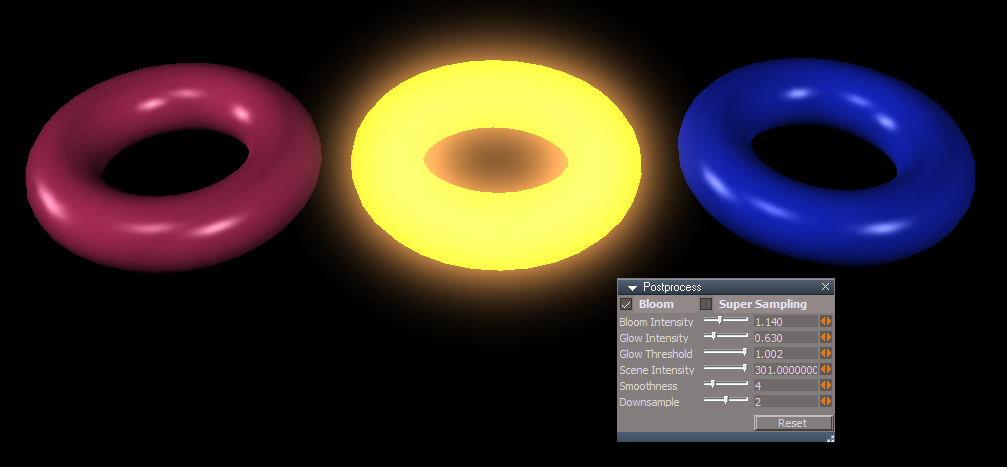
Add
PostProcessing panel 'Use with Render to Texture'
All possible by adding Clinton's Post Process modification for trueSpace7.61
http://clintons3d.com/plugins/truespace ... ocess.html
Steps to use the new RsD3DBloomFilter
Open the Postprocess library
Run the Update RsD3DBloomFilter script
Restart trueSpace
Open the sample Postprocess Glow scene
Select the Set button on the Set Postprocess Color Key panel
In Settings/Postprocess select the Bloom check box
Adjust the Bloom Intensity & Glow Intensity
-
trueBlue
- Captain
- Posts: 5548
- Joined: 06 Jul 2009, 22:50
- Type the number ten into the box: 10
Re: Final trueSpace 7.61 Beta 8 Unofficial Update
New Update for the trueSpace7.61 Beta 8 Unofficial Update
viewtopic.php?t=3732
February 23, 2020
Widgets/Edit
Default context 'Widget'
* Ctrl + X + LMB click in 3D Space = Cut selected object
* Ctrl + V + LMB click in 3D Space = Paste last Cut object
PostProcess.RsObj
Updated some of the scrubbers
Material Editor
D3D Material Converter
TempStorage
Removed the shaders
Desktop
Button control on the left of the Scene name
Add
LMB click
Get current name and add it to the SceneName attribute
RMB click
SceneName = Space 3D
Postprocess library
Updates
Scene Animator FX
R2TexturePostProcessing
Set R2TexturePostProcessing Color Key
Set Postprocess Color Key
Add
Note:
This enables you to apply the Set Postprocess Color Key to a New 3D Window. Only one.
When trueSpace opens a new 3D Window, the Postprocess panel does not exist until you select the 3D Window with the Settings tab opened. If you want to have the new 3D Window with Postprocess Color Key and not the scene, here is the steps.
1.)Do not apply the Set Postprocess Color Key to the scene!
2.) Open a new 3D Window with the Settings tab opened and make sure it has a Postprocess panel.
3.) Set the Postprocess Color Key.
If you close the 3D Window, you will have to apply the steps again.
viewtopic.php?t=3732
February 23, 2020
Widgets/Edit
Default context 'Widget'
* Ctrl + X + LMB click in 3D Space = Cut selected object
* Ctrl + V + LMB click in 3D Space = Paste last Cut object
PostProcess.RsObj
Updated some of the scrubbers
Material Editor
D3D Material Converter
TempStorage
Removed the shaders
Desktop
Button control on the left of the Scene name
Add
LMB click
Get current name and add it to the SceneName attribute
RMB click
SceneName = Space 3D
Postprocess library
Updates
Scene Animator FX
R2TexturePostProcessing
Set R2TexturePostProcessing Color Key
Set Postprocess Color Key
Add
Code: Select all
if(Node.Exists("/Project/Windows Manager Space/Frame Window, 1/Postprocess"))
return "/Project/Windows Manager Space/Frame Window, 1/Postprocess";This enables you to apply the Set Postprocess Color Key to a New 3D Window. Only one.
When trueSpace opens a new 3D Window, the Postprocess panel does not exist until you select the 3D Window with the Settings tab opened. If you want to have the new 3D Window with Postprocess Color Key and not the scene, here is the steps.
1.)Do not apply the Set Postprocess Color Key to the scene!
2.) Open a new 3D Window with the Settings tab opened and make sure it has a Postprocess panel.
3.) Set the Postprocess Color Key.
If you close the 3D Window, you will have to apply the steps again.
-
trueBlue
- Captain
- Posts: 5548
- Joined: 06 Jul 2009, 22:50
- Type the number ten into the box: 10
Re: Final trueSpace 7.61 Beta 8 Unofficial Update
New Update for the trueSpace7.61 Beta 8 Unofficial Update
viewtopic.php?t=3732
February 27, 2020
D3D_Render_Grp / D3D_Render - Author Clinton Reese
Add
Reset all Default Settings button
UnRegisterAll
Add
Node.Value("/Scripts/CustomCommands/D3D_Render_Grp/D3D_Render", "ExitCommandNode") = ""
Node.Value("/Scripts/CustomCommands/D3D_Render_Grp/D3D_Render", "EntryCommandNode") = ""
Library
Particle System - Author Clinton Reese
These scripts are amazing! A million possible uses are possible. Thanks Clinton!
System = Activity
Start - Stop - Reset
Animation
time = Animation Time 'Add time in the Animation Editor'
Animate / System = Preview Animation 'Toggle'
Render / System = D3D Render to File 'Toggle'
Particle System Up.RsObj
Particle System Down.RsObj
Particle System Face Up.RsObj
Particle System Up Billboard Encap.RsObj
Postprocess
Update
Scene Animator FX.RsObj
Objects - tS7.61 Update objects
Updates
tS761 Scene Animator.RsObj
CreateBillboard.RsObj
viewtopic.php?t=3732
February 27, 2020
D3D_Render_Grp / D3D_Render - Author Clinton Reese
Add
Reset all Default Settings button
UnRegisterAll
Add
Node.Value("/Scripts/CustomCommands/D3D_Render_Grp/D3D_Render", "ExitCommandNode") = ""
Node.Value("/Scripts/CustomCommands/D3D_Render_Grp/D3D_Render", "EntryCommandNode") = ""
Library
Particle System - Author Clinton Reese
These scripts are amazing! A million possible uses are possible. Thanks Clinton!

- ParticleUI.PNG (4.06 KiB) Viewed 4414 times
Start - Stop - Reset
Animation
time = Animation Time 'Add time in the Animation Editor'
Animate / System = Preview Animation 'Toggle'
Render / System = D3D Render to File 'Toggle'
Particle System Up.RsObj
Particle System Down.RsObj
Particle System Face Up.RsObj
Particle System Up Billboard Encap.RsObj
Postprocess
Update
Scene Animator FX.RsObj
Objects - tS7.61 Update objects
Updates
tS761 Scene Animator.RsObj
CreateBillboard.RsObj
-
trueBlue
- Captain
- Posts: 5548
- Joined: 06 Jul 2009, 22:50
- Type the number ten into the box: 10
Re: Final trueSpace 7.61 Beta 8 Unofficial Update
New Update for the trueSpace7.61 Beta 8 Unofficial Update
viewtopic.php?t=3732
February 28, 2020
Library
Postprocess
Update
Scene Animator FX.RsObj
Rosetta.RsScn
viewtopic.php?t=3732
February 28, 2020
Library
Postprocess
Update
Scene Animator FX.RsObj
Rosetta.RsScn

-
trueBlue
- Captain
- Posts: 5548
- Joined: 06 Jul 2009, 22:50
- Type the number ten into the box: 10
Re: Final trueSpace 7.61 Beta 8 Unofficial Update
New Quadrennial Update for the trueSpace7.61 Beta 8 Unofficial Update
viewtopic.php?t=3732
February 29, 2020
Main2 toolbar
Add
Quad Window icon
LMB Opens the Quad Window
RMB Saves the Quad Window's user modifications
With the Quad Window open, you can change the location, size, individual window's size, Background color, Grid, Scene, and Postprocess settings. RMB click the Quad Window icon to save your settings.
This is an uncluttered version that does not have the top TAB's Library and scene name. All 4 windows do not have scene names and or Workspace Navigation toolbars.
If you switch any of the windows to Model and back to Workspace, the Workspace Navigation toolbar will be recreated. If you open this Quad Window in the 4View layout, all but 3 of the 4View's Workspace Navigation toolbars will close.
viewtopic.php?t=3732
February 29, 2020
Main2 toolbar
Add
Quad Window icon
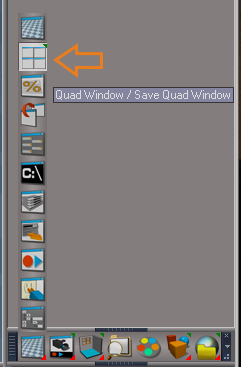
- Quad Window icon.png (30.15 KiB) Viewed 4499 times
RMB Saves the Quad Window's user modifications
With the Quad Window open, you can change the location, size, individual window's size, Background color, Grid, Scene, and Postprocess settings. RMB click the Quad Window icon to save your settings.

If you switch any of the windows to Model and back to Workspace, the Workspace Navigation toolbar will be recreated. If you open this Quad Window in the 4View layout, all but 3 of the 4View's Workspace Navigation toolbars will close.
-
trueBlue
- Captain
- Posts: 5548
- Joined: 06 Jul 2009, 22:50
- Type the number ten into the box: 10
Re: Final trueSpace 7.61 Beta 8 Unofficial Update
New Update for the trueSpace7.61 Beta 8 Unofficial Update
viewtopic.php?t=3732
March 02, 2020
Layout(s)
Add
Scene view in the Stack
reset.js
Moved create Project to the top
Workspace
Update
PointEditToolsBar2
PointEditSelectionBar2
Scripts
Update
D3DView.RenderToFile.Settings.xml
uncheck "Save animation from frame"
check "Save sequence starting with" 0
WorkspaceMain, WorkspaceMain2, BottomBar, and BottomBar2 toolbars
Add
* Hide Cameras and Lights - LMB Hides all Cameras and Lights and RMB Shows all Cameras and Lights.
Library
My Scenes
Add
Scene with Scene Animator
Objects - tS7.61 Update objects
Update
Workspace NAV toolbar.RsObj
D3D_Render
CheckRenderSettings script
Add
Modal Question
viewtopic.php?t=3732
March 02, 2020
Layout(s)
Add
Scene view in the Stack
Moved create Project to the top
PointEditToolsBar2
PointEditSelectionBar2
Scripts
Update
D3DView.RenderToFile.Settings.xml
uncheck "Save animation from frame"
check "Save sequence starting with" 0
WorkspaceMain, WorkspaceMain2, BottomBar, and BottomBar2 toolbars
Add
* Hide Cameras and Lights - LMB Hides all Cameras and Lights and RMB Shows all Cameras and Lights.
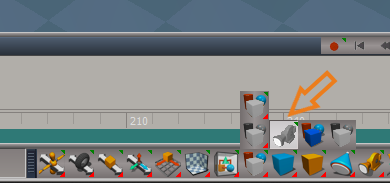
- Hide Show Cameras and Lights.png (25.73 KiB) Viewed 4472 times
My Scenes
Add
Scene with Scene Animator
Objects - tS7.61 Update objects
Update
Workspace NAV toolbar.RsObj

- Workspace NAV toolbar.png (4.95 KiB) Viewed 4456 times
CheckRenderSettings script
Add
Modal Question
-
trueBlue
- Captain
- Posts: 5548
- Joined: 06 Jul 2009, 22:50
- Type the number ten into the box: 10
Re: Final trueSpace 7.61 Beta 8 Unofficial Update
New Update for the trueSpace7.61 Beta 8 Unofficial Update
viewtopic.php?t=3732
March 04, 2020
WinGUID_Bar
Ortho View icons
Add
RMB click switches to the opposite current Ortho View
View Widget
Add
Top Right Triangle
LMB click cycles Front, Left, Back, Right, and Perspective
LMB + Drag resets the current View
Bottom Left Triangle
LMB click cycles Nearest Ortho and Perspective
LMB + Drag resets the current View
Updated the two scene spot lights to use the default Lum color picker.
viewtopic.php?t=3732
March 04, 2020
WinGUID_Bar
Ortho View icons

- New GUID Views RMB commands.png (30.86 KiB) Viewed 4449 times
RMB click switches to the opposite current Ortho View
View Widget

- New View Widget.png (1.35 KiB) Viewed 4442 times
Top Right Triangle
LMB click cycles Front, Left, Back, Right, and Perspective
LMB + Drag resets the current View
Bottom Left Triangle
LMB click cycles Nearest Ortho and Perspective
LMB + Drag resets the current View
Updated the two scene spot lights to use the default Lum color picker.
-
trueBlue
- Captain
- Posts: 5548
- Joined: 06 Jul 2009, 22:50
- Type the number ten into the box: 10
Re: Final trueSpace 7.61 Beta 8 Unofficial Update
New Update for the trueSpace7.61 Beta 8 Unofficial Update
viewtopic.php?t=3732
March 05, 2020
Library
Objects - tS7.61 Update objects
Scene Animator.RsObj
Add
Grid
Postprocess
Rosetta.RsScn
Scene Animator FX.RsObj
Add
Grid
My Scenes
Scene.RsScn
viewtopic.php?t=3732
March 05, 2020
Library
Objects - tS7.61 Update objects
Scene Animator.RsObj
Add
Grid

Rosetta.RsScn
Scene Animator FX.RsObj
Add
Grid
My Scenes
Scene.RsScn
-
Saul
- Senior Chief Petty Officer
- Posts: 308
- Joined: 22 May 2009, 16:50
Re: Final trueSpace 7.61 Beta 8 Unofficial Update
Howdy trueBlue
I can find no 'grid' setting in the attribute browser, is it not possible to animate the grid from wire to solid for example?
Also is it possible for the layout tab in the scene animator to pick up custom tabs in layout library?
I can find no 'grid' setting in the attribute browser, is it not possible to animate the grid from wire to solid for example?
Also is it possible for the layout tab in the scene animator to pick up custom tabs in layout library?
-
trueBlue
- Captain
- Posts: 5548
- Joined: 06 Jul 2009, 22:50
- Type the number ten into the box: 10
Re: Final trueSpace 7.61 Beta 8 Unofficial Update
The Grid attribute is a string and you are not able to animate that.Saul wrote: 06 Mar 2020, 16:20 Howdy trueBlue
I can find no 'grid' setting in the attribute browser, is it not possible to animate the grid from wire to solid for example?
Also is it possible for the layout tab in the scene animator to pick up custom tabs in layout library?
But you can use the 3D Record to change it in your animation.
viewtopic.php?t=5930#p57371
The layouts are hard coded. You would have to add your layout in the code.
What is it, that you are wanting to do?
With your scene loaded in your layout, Save it as a Project.
Upload it here and tell me what it is your wanting to do.
-
trueBlue
- Captain
- Posts: 5548
- Joined: 06 Jul 2009, 22:50
- Type the number ten into the box: 10
Re: Final trueSpace 7.61 Beta 8 Unofficial Update
New Update for the trueSpace7.61 Beta 8 Unofficial Update
viewtopic.php?t=3732
March 07, 2020
Fixed an issue with the Scene Animator's rendering process by updating the RemoteRegister's EntryPoint.
Render button script
Add
Node.Value("%THIS_NAME%/RemoteRegister", "EntryPoint") = "%THIS_NAME%/Scene Animator"
Also isolated the Grid script from the Scene Animator's script.
Library
Objects - tS7.61 Update objects
Update
Scene Animator.RsObj
Postprocess
Update
Rosetta.RsScn
Scene Animator FX.RsObj
My Scenes
Update
Scene.RsScn
New View
Update
Postprocess panel
viewtopic.php?t=3732
March 07, 2020
Fixed an issue with the Scene Animator's rendering process by updating the RemoteRegister's EntryPoint.
Render button script
Add
Node.Value("%THIS_NAME%/RemoteRegister", "EntryPoint") = "%THIS_NAME%/Scene Animator"
Also isolated the Grid script from the Scene Animator's script.
Library
Objects - tS7.61 Update objects
Update
Scene Animator.RsObj
Postprocess
Update
Rosetta.RsScn
Scene Animator FX.RsObj
My Scenes
Update
Scene.RsScn
New View
Update
Postprocess panel
-
trueBlue
- Captain
- Posts: 5548
- Joined: 06 Jul 2009, 22:50
- Type the number ten into the box: 10
Re: Final trueSpace 7.61 Beta 8 Unofficial Update
Hey Saul,Saul wrote: 06 Mar 2020, 16:20 Howdy trueBlue
I can find no 'grid' setting in the attribute browser, is it not possible to animate the grid from wire to solid for example?
Also is it possible for the layout tab in the scene animator to pick up custom tabs in layout library?
Try this new version.
Preferences.RsObj
It is not path dependent with layouts.
It uses the active window that has focus.
Downside is it does not work from the Stack, so you will need to open the floating panel.
Select any opened window and make changes to the Preferences panel.
The Watch Dog Events are unreliable at first, but once they are initialized they will work.
- Attachments
-
- Preferences.RsObj
- (122.06 KiB) Downloaded 206 times
-
trueBlue
- Captain
- Posts: 5548
- Joined: 06 Jul 2009, 22:50
- Type the number ten into the box: 10
Re: Final trueSpace 7.61 Beta 8 Unofficial Update
New Update for the trueSpace7.61 Beta 8 Unofficial Update
viewtopic.php?t=3732
March 10, 2020
Library
Objects - tS7.61 Update objects
Update
Scene Animator.RsObj
Add
Active Window
Postprocess
Update
Rosetta.RsScn
Scene Animator FX.RsObj
My Scenes
Update
Scene.RsScn
WinGUID_Bar
Update
Main2
3D Window icon LMB command
Add
viewtopic.php?t=3732
March 10, 2020
Library
Objects - tS7.61 Update objects
Update
Scene Animator.RsObj
Add
Active Window
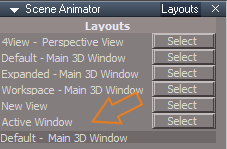
- Scene Animator Active Window.png (8.99 KiB) Viewed 4352 times
Update
Rosetta.RsScn
Scene Animator FX.RsObj
My Scenes
Update
Scene.RsScn
WinGUID_Bar
Update
Main2
3D Window icon LMB command
Add
Code: Select all
WindowsManager.CreateWindowFromCLSIDEx('default', 'default', 'default', '[Scene]', 1, '3D');D3DView.ShowPostProcessing('');D3DView.ShowRenderAttribsForLayer('');Node.Rename(WindowsManager.GetWorkWindow() + "/Layer Render Attributes", "Scene")-
trueBlue
- Captain
- Posts: 5548
- Joined: 06 Jul 2009, 22:50
- Type the number ten into the box: 10
Re: Final trueSpace 7.61 Beta 8 Unofficial Update
New Update for the trueSpace7.61 Beta 8 Unofficial Update
viewtopic.php?t=3732
March 12, 2020
Library
Objects - tS7.61 Update objects
Update
tS761 Scene Animator.RsObj
Postprocess
Update
Rosetta.RsScn
Scene Animator FX.RsObj
My Scenes
Update
Scene.RsScn
D3D_Render_Grp.RsObj
CopyAndOpen script
Add
Node.Value("/Scripts/CustomCommands/D3D_Render_Grp/D3D_Render", "AbortRender") = 0;
View Widget - Additional mouse button shortcuts
Encircle 'Green'
Updated bold items
Shift + LMB select Opens the 3D View Widget
Shift + RMB shows the current Eye camera panel
I + LMB click the Encircle opens Widget Help panel
Perspective
Ctrl + LMB click Rotates the Perspective view
Ortho
If any 3D Window is in Isometric view
Ctrl + LMB click Rotates the Isometric view
Rotate X 'Blue'
RMB click opens Link Editor
Rotate YZ 'Red'
RMB click opens Animation Editor
Top Right Triangle
LMB click cycles Front, Left, Back, Right, and Perspective
LMB + Drag resets the current View
RMB + Drag creates an Entry Point camera at current view
Bottom Left Triangle
LMB click cycles Nearest Ortho and Perspective
LMB + Drag resets the current View
RMB + Drag creates an Camera at current view
viewtopic.php?t=3732
March 12, 2020
Library
Objects - tS7.61 Update objects
Update
tS761 Scene Animator.RsObj
Postprocess
Update
Rosetta.RsScn
Scene Animator FX.RsObj
My Scenes
Update
Scene.RsScn
D3D_Render_Grp.RsObj
CopyAndOpen script
Add
Node.Value("/Scripts/CustomCommands/D3D_Render_Grp/D3D_Render", "AbortRender") = 0;
View Widget - Additional mouse button shortcuts
Encircle 'Green'
Updated bold items
Shift + LMB select Opens the 3D View Widget
Shift + RMB shows the current Eye camera panel
I + LMB click the Encircle opens Widget Help panel
Perspective
Ctrl + LMB click Rotates the Perspective view
Ortho
If any 3D Window is in Isometric view
Ctrl + LMB click Rotates the Isometric view
Rotate X 'Blue'
RMB click opens Link Editor
Rotate YZ 'Red'
RMB click opens Animation Editor
Top Right Triangle
LMB click cycles Front, Left, Back, Right, and Perspective
LMB + Drag resets the current View
RMB + Drag creates an Entry Point camera at current view
Bottom Left Triangle
LMB click cycles Nearest Ortho and Perspective
LMB + Drag resets the current View
RMB + Drag creates an Camera at current view