Deformer tests
-
clintonman

- Captain
- Posts: 5659
- Joined: 21 May 2009, 21:08
- Type the number ten into the box: 0
- Location: California
Deformer tests
My tests for developing a bend deformer for truespace based on the bend deformer in maya.
Video shows turning the deformer on
Changing the upper and lower bounds of the deform
Radius change
Center control offset and rotation
It still has some issues and at the moment only operates in the cube's local y axis. I also started a taper and a twist deformer. I found the math in a book and the original paper is here: https://www.cs.drexel.edu/~david/Classe ... 1-barr.pdf
The book math and explanation was simpler than the paper sited above.
- Attachments
-
- Bend Cube Scene3.RsScn
- (1.46 MiB) Downloaded 308 times
-
Emmanuel

- Chief Warrant Officer
- Posts: 670
- Joined: 14 Jun 2009, 06:47
Re: Deformer tests
Very promizing !
-
clintonman
- Captain
- Posts: 5659
- Joined: 21 May 2009, 21:08
- Type the number ten into the box: 0
- Location: California
Re: Deformer tests

Works in the z-axis
active and Angle are the controls, Ymax and Ymin are really min and max Z
Center only responds to offsets in the X and Y directions
K input is not used
- Attachments
-
- Twist Cube Scene.RsScn
- (1.43 MiB) Downloaded 304 times
-
clintonman
- Captain
- Posts: 5659
- Joined: 21 May 2009, 21:08
- Type the number ten into the box: 0
- Location: California
Re: Deformer tests

Works in the z-axis
active and DeformScale are the controls, Ymax and Ymin are really min and max Z
Center only responds to offsets in the X and Y directions
Could be more complex by adding a scale profile curve. Not likely to pursue it though, simple linear scaling is good enough.
- Attachments
-
- Taper Cube Scene.RsScn
- (1.44 MiB) Downloaded 274 times
-
Steinie

- Captain
- Posts: 2958
- Joined: 21 May 2009, 17:38
- Type the number ten into the box: 10
Re: Deformer tests
I need to play with these!
In the past I used the Model side bend tool and having these three are a blessing!
There used to be a tool that had all three with a UI having dials that came in handy. It also had deform and possibly a fifth deform tool.
I can't remember the name off hand but I am sure it is saved somewhere on my HD. (Model Side of course)
Thanks!!!
In the past I used the Model side bend tool and having these three are a blessing!
There used to be a tool that had all three with a UI having dials that came in handy. It also had deform and possibly a fifth deform tool.
I can't remember the name off hand but I am sure it is saved somewhere on my HD. (Model Side of course)
Thanks!!!
-
clintonman
- Captain
- Posts: 5659
- Joined: 21 May 2009, 21:08
- Type the number ten into the box: 0
- Location: California
Re: Deformer tests
Sounds interesting. Let me know if you find the tools and if the tools can be animated.
-
clintonman
- Captain
- Posts: 5659
- Joined: 21 May 2009, 21:08
- Type the number ten into the box: 0
- Location: California
Re: Deformer tests

back cube is undeformed original shape, middle is factor of 0.5 and front is factor of 2
deformer preserves the volume of the shape
Works in the z-axis
active and DeformScale are the controls, Ymax and Ymin are really min and max Z - these controls don't seem very useful to me
Center only really responds to offsets in the Z direction
That is the last of the deformers I had planned. The next step would be to develop some kind of ui for it, make them work in the other 2 axis, a way to combine deformations and rearrange their order. We'll see how far it goes, sounds like it could be a bit of work, maybe too much work.
- Attachments
-
- Squash Cube Scene.RsScn
- (1.76 MiB) Downloaded 308 times
-
Emmanuel
- Chief Warrant Officer
- Posts: 670
- Joined: 14 Jun 2009, 06:47
Re: Deformer tests
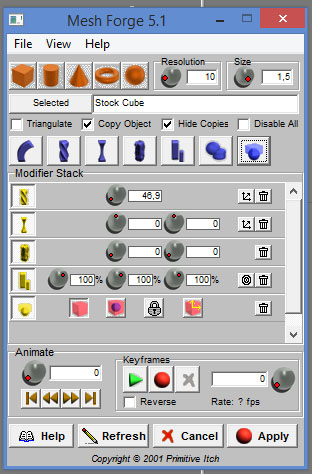
Meshforge perhaps ?clintonman wrote: 07 Oct 2019, 17:33 Sounds interesting. Let me know if you find the tools and if the tools can be animated.
-
clintonman
- Captain
- Posts: 5659
- Joined: 21 May 2009, 21:08
- Type the number ten into the box: 0
- Location: California
-
trueBlue

- Captain
- Posts: 5548
- Joined: 06 Jul 2009, 22:50
- Type the number ten into the box: 10
Re: Deformer tests
Tired this and I had to completely uninstall and install tS7.61 on Win10, because this plugin made the trueSpace Alerts, Dialogs, etc... Maximized! It was either the Meshforge plugin or the eyezoom666.tsx that caused this, not sure which one.Emmanuel wrote: 08 Oct 2019, 07:30Meshforge perhaps ?clintonman wrote: 07 Oct 2019, 17:33 Sounds interesting. Let me know if you find the tools and if the tools can be animated.
meshforge.jpg
-
Draise

- Captain
- Posts: 3200
- Joined: 21 Sep 2009, 19:33
- Type the number ten into the box: 0
- Location: Bogota, Colombia
Re: Deformer tests
Wow, just had a look at this. Years ago I dreamed of this in trueSpace on the WS, and.. here they are!
-
Emmanuel
- Chief Warrant Officer
- Posts: 670
- Joined: 14 Jun 2009, 06:47
Re: Deformer tests
I'm using both Meshforge and Eyezoom quite often with tS7.6 and Windows8.1. No problems here.trueBlue wrote: 15 Oct 2019, 16:07 Tired this and I had to completely uninstall and install tS7.61 on Win10, because this plugin made the trueSpace Alerts, Dialogs, etc... Maximized! It was either the Meshforge plugin or the eyezoom666.tsx that caused this, not sure which one.
-
MikomDude

- Captain
- Posts: 1930
- Joined: 04 Oct 2010, 11:12
- Type the number ten into the box: 0
- Location: The Hague, Netherlands
Re: Deformer tests
That looks incredible! I've been wanting something like this in trueSpace workspace for ages! 
-
clintonman
- Captain
- Posts: 5659
- Joined: 21 May 2009, 21:08
- Type the number ten into the box: 0
- Location: California
Re: Deformer tests
Early preview of deformer tools.
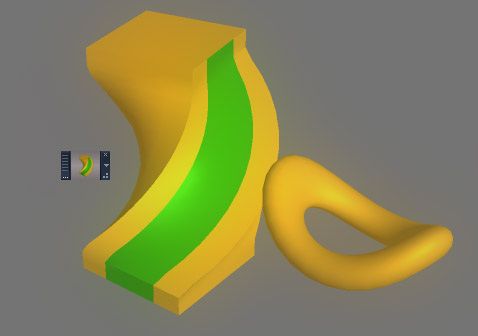
It will all disappear on context reset.
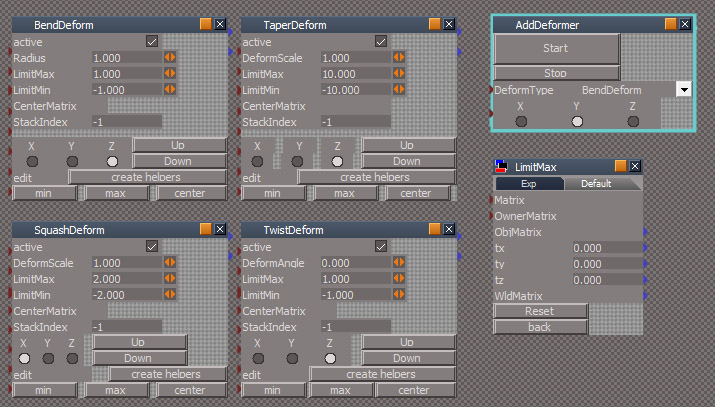
Choose a deformer and an axis and press Start.
Select the mesh again to see the deform controls panel.
Set the strength of the deform with the Radius, DeformScale or DeformAngle controls depending on the deformer.
The active region will default to the mesh size. Set the region of influence with the LimitMin and LimitMax controls.
Press the create helpers button to change the center, min and max visually.
Press the back button in the panel to go back to the main deform controls.
Press remove helpers when done.
Do not change the axis while using the helpers. It won't work.
Deformers can be chained together by just adding another deformer.
The Up and Down buttons don't work yet, so the order of the deformers can't be changed.
There is no function to remove Deformers.
There are other limitations and bugs that I can't think of at the moment.
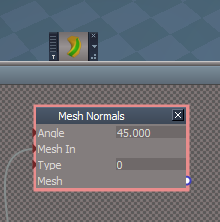
Edit: Attached the updated Clintons3dPlugin.rsx for creating the Mesh Normals node.
- Attachments
-
- Clintons3dPlugin1ff1.zip
- (1.23 MiB) Downloaded 273 times
-
- Deformers Install.RsObj
- (417.23 KiB) Downloaded 278 times
Last edited by clintonman on 22 Jan 2020, 05:19, edited 1 time in total.
-
trueBlue
- Captain
- Posts: 5548
- Joined: 06 Jul 2009, 22:50
- Type the number ten into the box: 10
Re: Deformer tests
Awesome!
Do you need a Plugin for this?
Do you need a Plugin for this?
- Deform.PNG (9.88 KiB) Viewed 5711 times
-
clintonman
- Captain
- Posts: 5659
- Joined: 21 May 2009, 21:08
- Type the number ten into the box: 0
- Location: California
Re: Deformer tests
Oops, Yes, yes you do.trueBlue wrote: 22 Jan 2020, 02:57 Awesome!
Do you need a Plugin for this?
Deform.PNG

I attached a zip file to the post
-
trueBlue
- Captain
- Posts: 5548
- Joined: 06 Jul 2009, 22:50
- Type the number ten into the box: 10
Re: Deformer tests
Having some fun, these are great!
Ideas:
Add shape to the Min, Max, and Center helpers.
Add individual Remove buttons for each.
Add modal Question, if AnimClip exist, "Animation exist! Do you still want to remove this Helper?"
This would enable you to animate these nodes individually verses as a group
Ideas:
Add shape to the Min, Max, and Center helpers.
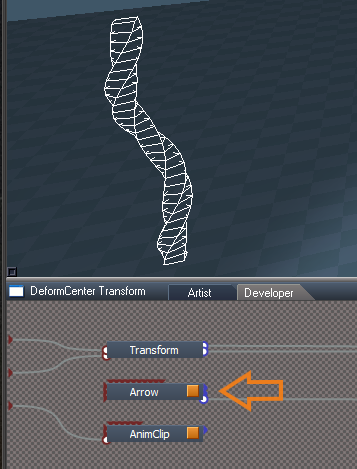
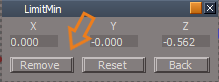
- Min.png (4.21 KiB) Viewed 5703 times
This would enable you to animate these nodes individually verses as a group
-
clintonman
- Captain
- Posts: 5659
- Joined: 21 May 2009, 21:08
- Type the number ten into the box: 0
- Location: California
Re: Deformer tests
Full test of using the Squash and Bend deformers together, from the 3dbuzz maya fundamentals talented ball project. While doing it I discovered that the the bend deformer wasn't working properly. The new node is attached. It uses a curvature value instead of radius. This makes it possible to bend backwards in a negative direction. Also changed the way the center control rotations affected the bending so it behaves the same way as the earlier version.
The new bare Bend node is attached below. Replace the corresponding node inside /Scripts/CustomCommands/DeformScripts
- Attachments
-
- BendDeform.RsObj
- (73.58 KiB) Downloaded 284 times
-
clintonman
- Captain
- Posts: 5659
- Joined: 21 May 2009, 21:08
- Type the number ten into the box: 0
- Location: California
Re: Deformer tests
Let me know if you find a way to add shapes.trueBlue wrote: 22 Jan 2020, 21:27 Having some fun, these are great!
Ideas:
Add shape to the Min, Max, and Center helpers.
center.png
Add individual Remove buttons for each.
Min.png
Add modal Question, if AnimClip exist, "Animation exist! Do you still want to remove this Helper?"
This would enable you to animate these nodes individually verses as a group
The helpers aren't meant to be animated, they are used to help set values for min, max and center on the deform node. The helpers would be widgets if I knew how to make it all work. Try setting keyframes on the deform node instead, see if that works for you.
-
trueBlue
- Captain
- Posts: 5548
- Joined: 06 Jul 2009, 22:50
- Type the number ten into the box: 10
Re: Deformer tests
I notice that you are limited one set of Helpers pre Deformer.
What if you encapsulated the Helpers with the Deformer?
Just need a script that copies/connects, (disconnects, and connects the chosen Axis).
What if you encapsulated the Helpers with the Deformer?
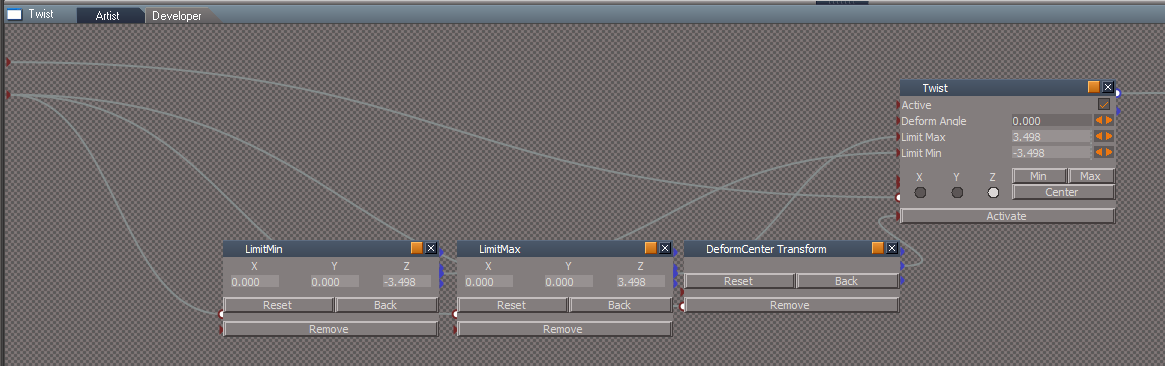
- Attachments
-
- Cube with Twist.RsObj
- (80.36 KiB) Downloaded 235 times
-
clintonman
- Captain
- Posts: 5659
- Joined: 21 May 2009, 21:08
- Type the number ten into the box: 0
- Location: California
Re: Deformer tests
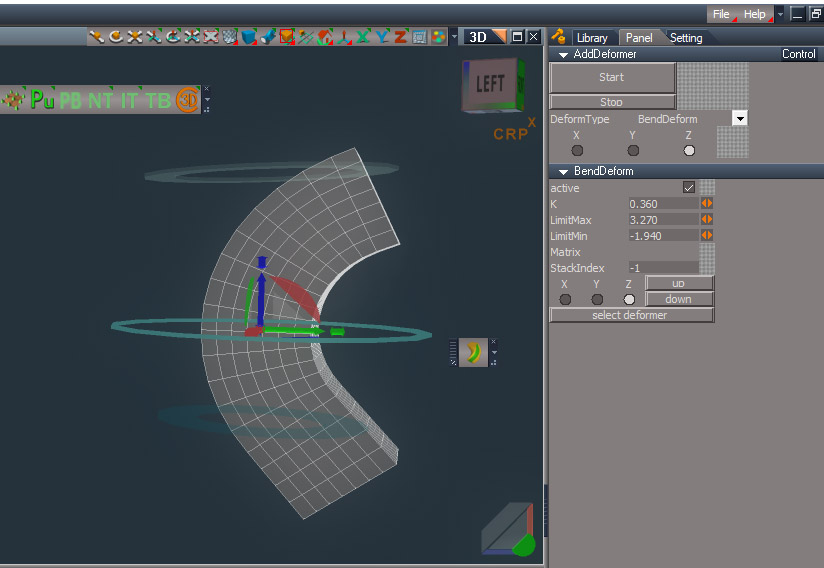
This one adds widget controls.
The center is controlled by the modified navigation widget. The short nubs on the end of each axis are for switching the axis of the deformer.
The center ring is for adjusting the deformer. The top and bottom rings are for the min and max limits.
The min and max controls don't work for the taper deform. Don't know why.
up and down buttons still don't do anything
- Attachments
-
- Deformers Installed6e.RsObj
- (2.09 MiB) Downloaded 289 times
-
Draise
- Captain
- Posts: 3200
- Joined: 21 Sep 2009, 19:33
- Type the number ten into the box: 0
- Location: Bogota, Colombia
Re: Deformer tests
Wow. This is quite the feat! One day I'll come back for nostalgia sake and make a production from within trueSpace in some kind of retro-production method. I'll be using all these new attributes and enjoying them and it will be all because of you guys.
-
clintonman
- Captain
- Posts: 5659
- Joined: 21 May 2009, 21:08
- Type the number ten into the box: 0
- Location: California
Re: Deformer tests
Update May 20 2024
update installer - new lazy load based on trueBlue's CCFunctionSet
new: works with NURBS control point mesh
min/max widgets have a new shape and improved color contrast
panel xyz radio buttons are read only - they worked poorly
can add a deform with another deform selected - it will add it to the owner
fix bend deformer
taper min/max works now
squash deform fixed default min/max limits
new: remove a single deformer
new: remove all deformers
new: buttons to change order of deforms is working
new: flatten function added, also used to cleanup after point editing
http://clintons3d.com/plugins/truespace ... rmers.html
update installer - new lazy load based on trueBlue's CCFunctionSet
new: works with NURBS control point mesh
min/max widgets have a new shape and improved color contrast
panel xyz radio buttons are read only - they worked poorly
can add a deform with another deform selected - it will add it to the owner
fix bend deformer
taper min/max works now
squash deform fixed default min/max limits
new: remove a single deformer
new: remove all deformers
new: buttons to change order of deforms is working
new: flatten function added, also used to cleanup after point editing
http://clintons3d.com/plugins/truespace ... rmers.html
-
trueBlue
- Captain
- Posts: 5548
- Joined: 06 Jul 2009, 22:50
- Type the number ten into the box: 10
Re: Deformer tests
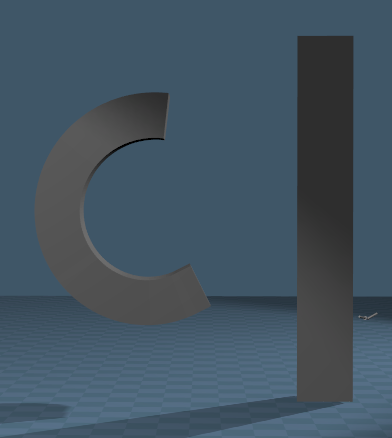
Comparing your original Deform scripts to your latest version, I am not able to get Bend to work
Same Cube object using the same Deform settings
CubeDeform1 on the left uses your original version
CubeNewDeform on the right uses your latest version
Same Cube object using the same Deform settings
CubeDeform1 on the left uses your original version
CubeNewDeform on the right uses your latest version
- Attachments
-
- Bend.RsScn
- (450.94 KiB) Downloaded 95 times
-
trueBlue
- Captain
- Posts: 5548
- Joined: 06 Jul 2009, 22:50
- Type the number ten into the box: 10
Re: Deformer tests
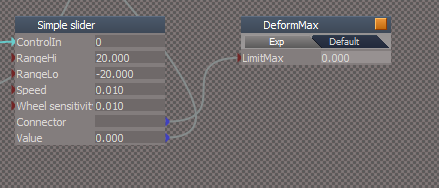
Here are the Deform Connectors I am using for the XYZ Widget's Simple Slider
Basically, just the connector attribute minus all of the code
DeformMax
Basically, just the connector attribute minus all of the code
DeformMax
- Attachments
-
- DeformMin.RsObj
- (37.63 KiB) Downloaded 110 times
-
- DeformMax.RsObj
- (37.6 KiB) Downloaded 99 times
-
- DeformAmount.RsObj
- (37.58 KiB) Downloaded 105 times
-
clintonman
- Captain
- Posts: 5659
- Joined: 21 May 2009, 21:08
- Type the number ten into the box: 0
- Location: California
Re: Deformer tests
Got em, thanks.trueBlue wrote: 21 May 2024, 22:39 Here are the Deform Connectors I am using for the XYZ Widget's Simple Slider
Basically, just the connector attribute minus all of the code
DeformMax
DeformMax.png
Looks like the new math for the Bend is also off, so I added in the old bend as another option. They're both wrong. Maybe 2 wrongs will make it right.

-
trueBlue
- Captain
- Posts: 5548
- Joined: 06 Jul 2009, 22:50
- Type the number ten into the box: 10
Re: Deformer tests
I looked and compared the code, it looks identicalclintonman wrote: 21 May 2024, 23:06Got em, thanks.trueBlue wrote: 21 May 2024, 22:39 Here are the Deform Connectors I am using for the XYZ Widget's Simple Slider
Basically, just the connector attribute minus all of the code
DeformMax
DeformMax.png
Looks like the new math for the Bend is also off, so I added in the old bend as another option. They're both wrong. Maybe 2 wrongs will make it right.
The only thing I can see that is different, is the CenterMatrix
Your new version has it hooked up to the Transfom's ObjMatrix
-
clintonman
- Captain
- Posts: 5659
- Joined: 21 May 2009, 21:08
- Type the number ten into the box: 0
- Location: California
Re: Deformer tests
Nope, not identical. Look carefully at the .x .y .z at the end of the values to see the difference.trueBlue wrote: 21 May 2024, 23:21I looked and compared the code, it looks identicalclintonman wrote: 21 May 2024, 23:06Got em, thanks.trueBlue wrote: 21 May 2024, 22:39 Here are the Deform Connectors I am using for the XYZ Widget's Simple Slider
Basically, just the connector attribute minus all of the code
DeformMax
DeformMax.png
Looks like the new math for the Bend is also off, so I added in the old bend as another option. They're both wrong. Maybe 2 wrongs will make it right.
The only thing I can see that is different, is the CenterMatrix
Your new version has it hooked up to the Transfom's ObjMatrix
-
clintonman
- Captain
- Posts: 5659
- Joined: 21 May 2009, 21:08
- Type the number ten into the box: 0
- Location: California
Re: Deformer tests
Update ready to download
fixed bug in the installer that required reset default context to get proper background and view widget behavior
fix installer so CCFunctionSet loading works with the UU
bend deformer control too sensitive - scaled it down
new BendOld deformer choice because new math of Bend deformer is also wrong
new Period value to prevent constant mesh updates
conn sensors from trueBlue
fixed bug in the installer that required reset default context to get proper background and view widget behavior
fix installer so CCFunctionSet loading works with the UU
bend deformer control too sensitive - scaled it down
new BendOld deformer choice because new math of Bend deformer is also wrong
new Period value to prevent constant mesh updates
conn sensors from trueBlue
-
clintonman
- Captain
- Posts: 5659
- Joined: 21 May 2009, 21:08
- Type the number ten into the box: 0
- Location: California
Re: Deformer tests

Here is the new not yet published deform script. A new installer will be created after the next UU is released.
DeformScripts Panel
- use "Disconnect Deformers" before point editing or adding SDS.
use "Reconnect Deformers" after to reactivate the deformers.
Deformer Panel
- "Sel. Deformer+" to select the deformer. If the deformer is already selected it will select the next deformer. If the last deformer is selected it will select the first deformer
"Bend A/B" used to modify the Bend deformer. Any bend can be based in 2 different directions. So if the bend looks bad press this button to try the other direction.
- Attachments
-
- DeformScripts.RsObj
- (138.39 KiB) Downloaded 107 times
-
trueBlue
- Captain
- Posts: 5548
- Joined: 06 Jul 2009, 22:50
- Type the number ten into the box: 10
Re: Deformer tests
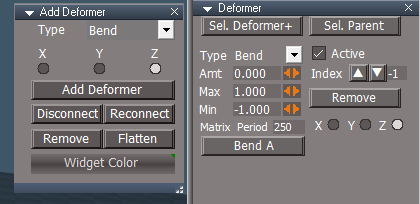
Here is a modified DeformScripts I would like to use in the UU10
.
Update:
Add Deformer panel
Add:
Widget Color button and scripts
LMB = trueSpace / RMB = Standard
openPanelFrame script
Note: updated CCFunctionSet AddDeformer()
Deformer panel
Update:
Move Type to the top "More noticeable when Cycling Deformers"
Remove button code
Edit: Removed due to update
Update:
Add Deformer panel
Add:
Widget Color button and scripts
LMB = trueSpace / RMB = Standard
openPanelFrame script
Note: updated CCFunctionSet AddDeformer()
Code: Select all
		Activity.Run("/Scripts/CustomCommands/DeformScripts/openPanelFrame")
		//UserInterface.OpenToolPanelViewEx2("" , "" ,"Scripts/CustomCommands/DeformScripts", 3,1,0)
Update:
Move Type to the top "More noticeable when Cycling Deformers"
Remove button code
Edit: Removed due to update
-
clintonman
- Captain
- Posts: 5659
- Joined: 21 May 2009, 21:08
- Type the number ten into the box: 0
- Location: California
Re: Deformer tests

- WidgetColorsBad.jpg (59.94 KiB) Viewed 2417 times

- DeformerPanelIssues.jpg (46.27 KiB) Viewed 2417 times
Up/down arrows are bad
"Matrix" and "Period" right next to each other looks like "Matrix Period"
-
trueBlue
- Captain
- Posts: 5548
- Joined: 06 Jul 2009, 22:50
- Type the number ten into the box: 10
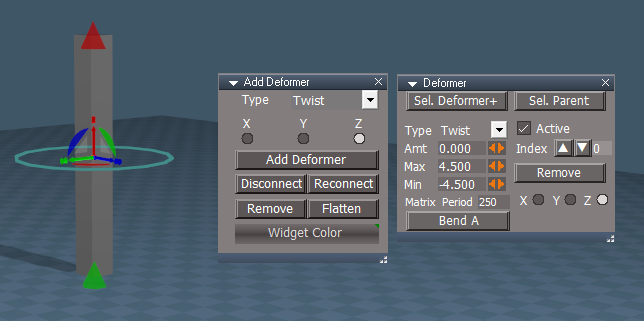
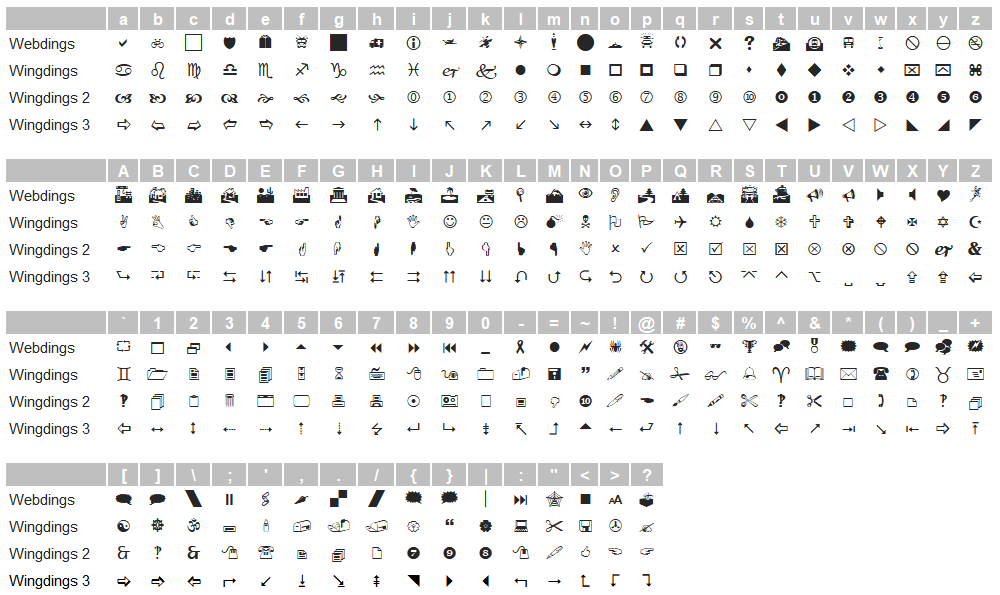
Re: Deformer tests
Wow, this is a learning experience!
Everything works perfect for me but not you
What the hell?
Default trueSpace
.
Standard
.
Wingding Chart
Everything works perfect for me but not you
What the hell?
Default trueSpace
Standard

Wingding Chart
-
clintonman
- Captain
- Posts: 5659
- Joined: 21 May 2009, 21:08
- Type the number ten into the box: 0
- Location: California
Re: Deformer tests
I loaded it onto a different computer and the buttons look ok. Maybe my fonts are corrupt on this system.trueBlue wrote: 24 May 2024, 15:35 Wow, this is a learning experience!
Everything works perfect for me but not you
What the hell?
Default trueSpace
trueSpace.png
.
Standard
Standard.png
.
Wingding Chart
Wingding Chart.png
-
trueBlue
- Captain
- Posts: 5548
- Joined: 06 Jul 2009, 22:50
- Type the number ten into the box: 10
Re: Deformer tests
What about the Widget Colors?clintonman wrote: 24 May 2024, 16:16I loaded it onto a different computer and the buttons look ok. Maybe my fonts are corrupt on this system.trueBlue wrote: 24 May 2024, 15:35 Wow, this is a learning experience!
Everything works perfect for me but not you
What the hell?
Default trueSpace
trueSpace.png
.
Standard
Standard.png
.
Wingding Chart
Wingding Chart.png
New Deformer panel

- New Deformer panel.png (16.15 KiB) Viewed 2407 times
It was causing the set widget values to change dramatically
I also changed the widgets Simple Slider's Wheel sensitivity values to 1.000
-
clintonman
- Captain
- Posts: 5659
- Joined: 21 May 2009, 21:08
- Type the number ten into the box: 0
- Location: California
Re: Deformer tests
Font is fixedtrueBlue wrote: 24 May 2024, 16:39What about the Widget Colors?clintonman wrote: 24 May 2024, 16:16I loaded it onto a different computer and the buttons look ok. Maybe my fonts are corrupt on this system.trueBlue wrote: 24 May 2024, 15:35 Wow, this is a learning experience!
Everything works perfect for me but not you
What the hell?
Default trueSpace
trueSpace.png
.
Standard
Standard.png
.
Wingding Chart
Wingding Chart.png
New Deformer panel
New Deformer panel.png
Edit: Forgot to mention, the scrubber values were changed to match the widget values
It was causing the set widget values to change dramatically
I also changed the widgets Simple Slider's Wheel sensitivity values to 1.000
Widget colors a mess. had to copy in fresh widgets into the CustomScriptsStore2 and reset default context.
-
trueBlue
- Captain
- Posts: 5548
- Joined: 06 Jul 2009, 22:50
- Type the number ten into the box: 10
Re: Deformer tests
Would you mine looking at the scripts and see what is wrong switching colors?clintonman wrote: 24 May 2024, 17:14Font is fixedtrueBlue wrote: 24 May 2024, 16:39What about the Widget Colors?clintonman wrote: 24 May 2024, 16:16
I loaded it onto a different computer and the buttons look ok. Maybe my fonts are corrupt on this system.
New Deformer panel
New Deformer panel.png
Edit: Forgot to mention, the scrubber values were changed to match the widget values
It was causing the set widget values to change dramatically
I also changed the widgets Simple Slider's Wheel sensitivity values to 1.000
Widget colors a mess. had to copy in fresh widgets into the CustomScriptsStore2 and reset default context.
Ultimately, it would be best if it was a toggle Standard | trueSpace
-
clintonman
- Captain
- Posts: 5659
- Joined: 21 May 2009, 21:08
- Type the number ten into the box: 0
- Location: California
Re: Deformer tests
One big problem seems to be no update for the "X" part of the widgets, only Y and Z have color change. So the X never changes color. If it's working for you then you must have published an older wip version of the Deform scripts.trueBlue wrote: 25 May 2024, 01:32Would you mine looking at the scripts and see what is wrong switching colors?clintonman wrote: 24 May 2024, 17:14Font is fixedtrueBlue wrote: 24 May 2024, 16:39
What about the Widget Colors?
New Deformer panel
New Deformer panel.png
Edit: Forgot to mention, the scrubber values were changed to match the widget values
It was causing the set widget values to change dramatically
I also changed the widgets Simple Slider's Wheel sensitivity values to 1.000
Widget colors a mess. had to copy in fresh widgets into the CustomScriptsStore2 and reset default context.
Ultimately, it would be best if it was a toggle Standard | trueSpace
sample from "Standard Color" script
Code: Select all
util.SetNodeValueColorRGB8('Widgets/Select/Deform widget X/Arcs/RotX... there's nothing for X here
util.SetNodeValueColorRGB8('Widgets/Select/Deform widget X/Arcs/RotY/Highliter solid', 'Far color', 255, 0, 0)
util.SetNodeValueColorRGB8('Widgets/Select/Deform widget X/Arcs/RotZ/Highliter solid', 'Far color', 0, 0, 255)

util.SetNodeValueColorRGB8('Widgets/Select/Deform widget X/Bars/BarX... there's nothing for X here either
util.SetNodeValueColorRGB8('Widgets/Select/Deform widget X/Bars/BarY/Highliter solid', 'Far color', 255, 0, 0)
util.SetNodeValueColorRGB8('Widgets/Select/Deform widget X/Bars/BarZ/Highliter solid', 'Far color', 0, 0, 255)-
trueBlue
- Captain
- Posts: 5548
- Joined: 06 Jul 2009, 22:50
- Type the number ten into the box: 10
Re: Deformer tests
I see, I added X
Standard
trueSpace
Question with the Standard XYZ Switches
Do these conform to the Standard theme?
Standard
Code: Select all
// Execute
// Called to execute the command
function Execute(params)
{
	util = System.CreateDO("Clintons3D Package/Utility functions")
	fso = new ActiveXObject("Scripting.FileSystemObject")

	if(Node.Exists('Widgets/Select/Deform widget X')) {
		util.SetNodeValueColorRGB8('Widgets/Select/Deform widget X/Arcs/RotX/Highliter solid', 'Far color', 255, 0, 0)
		util.SetNodeValueColorRGB8('Widgets/Select/Deform widget X/Arcs/RotY/Highliter solid', 'Far color', 0, 255, 0)
		util.SetNodeValueColorRGB8('Widgets/Select/Deform widget X/Arcs/RotZ/Highliter solid', 'Far color', 0, 0, 255)
		util.SetNodeValueColorRGB8('Widgets/Select/Deform widget X/Bars/BarX/Highliter solid', 'Far color', 255, 0, 0)
		util.SetNodeValueColorRGB8('Widgets/Select/Deform widget X/Bars/BarY/Highliter solid', 'Far color', 0, 255, 0)
		util.SetNodeValueColorRGB8('Widgets/Select/Deform widget X/Bars/BarZ/Highliter solid', 'Far color', 0, 0, 255)
		util.SetNodeValueColorRGB8('Widgets/Select/Deform widget X/XYZ Switch Bars/BarX/Highliter solid', 'Far color', 255, 0, 0)
		util.SetNodeValueColorRGB8('Widgets/Select/Deform widget X/XYZ Switch Bars/BarY/Highliter solid', 'Far color', 0, 255, 0)
		util.SetNodeValueColorRGB8('Widgets/Select/Deform widget X/XYZ Switch Bars/BarZ/Highliter solid', 'Far color', 0, 0, 255)
	}
		dx = System.GetMainDir() + "\\Scripts\\clintonobjects\\CustomScriptsStore2\\Deform widget X.RsObj"
		if(fso.FileExists(dx)) {
			RsFileIO.SaveObject(System.GetMainDir() + '\\Scripts\\clintonobjects\\CustomScriptsStore2\\Deform widget X.RsObj', '/Widgets/Select/Deform widget X')
		}else{
			System.Alert("Deformer scripts have not been installed\n\nDeform widget X was not saved")
		return
	}

	if(Node.Exists('Widgets/Select/Deform widget Y')) {
		util.SetNodeValueColorRGB8('Widgets/Select/Deform widget Y/Arcs/RotX/Highliter solid', 'Far color', 255, 0, 0)
		util.SetNodeValueColorRGB8('Widgets/Select/Deform widget Y/Arcs/RotY/Highliter solid', 'Far color', 0, 255, 0)
		util.SetNodeValueColorRGB8('Widgets/Select/Deform widget Y/Arcs/RotZ/Highliter solid', 'Far color', 0, 0, 255)

		util.SetNodeValueColorRGB8('Widgets/Select/Deform widget Y/Bars/BarX/Highliter solid', 'Far color', 255, 0, 0)
		util.SetNodeValueColorRGB8('Widgets/Select/Deform widget Y/Bars/BarY/Highliter solid', 'Far color', 0, 255, 0)
		util.SetNodeValueColorRGB8('Widgets/Select/Deform widget Y/Bars/BarZ/Highliter solid', 'Far color', 0, 0, 255)

		util.SetNodeValueColorRGB8('Widgets/Select/Deform widget Y/XYZ Switch Bars/BarX/Highliter solid', 'Far color', 255, 0, 0)
		util.SetNodeValueColorRGB8('Widgets/Select/Deform widget Y/XYZ Switch Bars/BarY/Highliter solid', 'Far color', 0, 255, 0)
		util.SetNodeValueColorRGB8('Widgets/Select/Deform widget Y/XYZ Switch Bars/BarZ/Highliter solid', 'Far color', 0, 0, 255)
	}
		dy = System.GetMainDir() + "\\Scripts\\clintonobjects\\CustomScriptsStore2\\Deform widget Y.RsObj"
		if(fso.FileExists(dy)) {
			RsFileIO.SaveObject(System.GetMainDir() + '\\Scripts\\clintonobjects\\CustomScriptsStore2\\Deform widget Y.RsObj', '/Widgets/Select/Deform widget Y')
		}else{
			System.Alert("Deformer scripts have not been installed\n\nDeform widget Y was not saved")
		return
	}

	if(Node.Exists('Widgets/Select/Deform widget Z')) {
		util.SetNodeValueColorRGB8('Widgets/Select/Deform widget Z/Arcs/RotX/Highliter solid', 'Far color', 255, 0, 0)
		util.SetNodeValueColorRGB8('Widgets/Select/Deform widget Z/Arcs/RotY/Highliter solid', 'Far color', 0, 255, 0)
		util.SetNodeValueColorRGB8('Widgets/Select/Deform widget Z/Arcs/RotZ/Highliter solid', 'Far color', 0, 0, 255)

		util.SetNodeValueColorRGB8('Widgets/Select/Deform widget Z/Bars/BarX/Highliter solid', 'Far color', 255, 0, 0)
		util.SetNodeValueColorRGB8('Widgets/Select/Deform widget Z/Bars/BarY/Highliter solid', 'Far color', 0, 255, 0)
		util.SetNodeValueColorRGB8('Widgets/Select/Deform widget Z/Bars/BarZ/Highliter solid', 'Far color', 0, 0, 255)

		util.SetNodeValueColorRGB8('Widgets/Select/Deform widget Z/XYZ Switch Bars/BarX/Highliter solid', 'Far color', 255, 0, 0)
		util.SetNodeValueColorRGB8('Widgets/Select/Deform widget Z/XYZ Switch Bars/BarY/Highliter solid', 'Far color', 0, 255, 0)
		util.SetNodeValueColorRGB8('Widgets/Select/Deform widget Z/XYZ Switch Bars/BarZ/Highliter solid', 'Far color', 0, 0, 255)
	}
		dz = System.GetMainDir() + "\\Scripts\\clintonobjects\\CustomScriptsStore2\\Deform widget Z.RsObj"
		if(fso.FileExists(dz)) {
			RsFileIO.SaveObject(System.GetMainDir() + '\\Scripts\\clintonobjects\\CustomScriptsStore2\\Deform widget Z.RsObj', '/Widgets/Select/Deform widget Z')
		}else{
			System.Alert("Deformer scripts have not been installed\n\nDeform widget Z was not saved")
		return
	}
}
Code: Select all
// Execute
// Called to execute the command
function Execute(params)
{
	util = System.CreateDO("Clintons3D Package/Utility functions")
	fso = new ActiveXObject("Scripting.FileSystemObject")

	if(Node.Exists('Widgets/Select/Deform widget X')) {
		util.SetNodeValueColorRGB8('Widgets/Select/Deform widget X/Arcs/RotX/Highliter solid', 'Far color', 0, 255, 0)
		util.SetNodeValueColorRGB8('Widgets/Select/Deform widget X/Arcs/RotY/Highliter solid', 'Far color', 0, 0, 255)
		util.SetNodeValueColorRGB8('Widgets/Select/Deform widget X/Arcs/RotZ/Highliter solid', 'Far color', 255, 0, 0)
		util.SetNodeValueColorRGB8('Widgets/Select/Deform widget X/Bars/BarX/Highliter solid', 'Far color', 0, 255, 0)
		util.SetNodeValueColorRGB8('Widgets/Select/Deform widget X/Bars/BarY/Highliter solid', 'Far color', 0, 0, 255)
		util.SetNodeValueColorRGB8('Widgets/Select/Deform widget X/Bars/BarZ/Highliter solid', 'Far color', 255, 0, 0)
		util.SetNodeValueColorRGB8('Widgets/Select/Deform widget X/XYZ Switch Bars/BarX/Highliter solid', 'Far color', 0, 255, 0)
		util.SetNodeValueColorRGB8('Widgets/Select/Deform widget X/XYZ Switch Bars/BarY/Highliter solid', 'Far color', 0, 0, 255)
		util.SetNodeValueColorRGB8('Widgets/Select/Deform widget X/XYZ Switch Bars/BarZ/Highliter solid', 'Far color', 255, 0, 0)
		RsFileIO.SaveObject(System.GetMainDir() + '\\Scripts\\clintonobjects\\CustomScriptsStore2\\Deform widget X.RsObj', '/Widgets/Select/Deform widget X')
	}
		dx = System.GetMainDir() + "\\Scripts\\clintonobjects\\CustomScriptsStore2\\Deform widget X.RsObj"
		if(fso.FileExists(dx)) {
			RsFileIO.SaveObject(System.GetMainDir() + '\\Scripts\\clintonobjects\\CustomScriptsStore2\\Deform widget X.RsObj', '/Widgets/Select/Deform widget X')
		}else{
			System.Alert("Deformer scripts have not been installed\n\nDeform widget X was not saved")
		return
	}

	if(Node.Exists('Widgets/Select/Deform widget Y')) {
		util.SetNodeValueColorRGB8('Widgets/Select/Deform widget Y/Arcs/RotX/Highliter solid', 'Far color', 0, 255, 0)
		util.SetNodeValueColorRGB8('Widgets/Select/Deform widget Y/Arcs/RotY/Highliter solid', 'Far color', 0, 0, 255)
		util.SetNodeValueColorRGB8('Widgets/Select/Deform widget Y/Arcs/RotZ/Highliter solid', 'Far color', 255, 0, 0)

		util.SetNodeValueColorRGB8('Widgets/Select/Deform widget Y/Bars/BarX/Highliter solid', 'Far color', 0, 255, 0)
		util.SetNodeValueColorRGB8('Widgets/Select/Deform widget Y/Bars/BarY/Highliter solid', 'Far color', 0, 0, 255)
		util.SetNodeValueColorRGB8('Widgets/Select/Deform widget Y/Bars/BarZ/Highliter solid', 'Far color', 255, 0, 0)

		util.SetNodeValueColorRGB8('Widgets/Select/Deform widget Y/XYZ Switch Bars/BarX/Highliter solid', 'Far color', 0, 255, 0)
		util.SetNodeValueColorRGB8('Widgets/Select/Deform widget Y/XYZ Switch Bars/BarY/Highliter solid', 'Far color', 0, 0, 255)
		util.SetNodeValueColorRGB8('Widgets/Select/Deform widget Y/XYZ Switch Bars/BarZ/Highliter solid', 'Far color', 255, 0, 0)
		RsFileIO.SaveObject(System.GetMainDir() + '\\Scripts\\clintonobjects\\CustomScriptsStore2\\Deform widget Y.RsObj', '/Widgets/Select/Deform widget Y')
	}
		dy = System.GetMainDir() + "\\Scripts\\clintonobjects\\CustomScriptsStore2\\Deform widget Y.RsObj"
		if(fso.FileExists(dy)) {
			RsFileIO.SaveObject(System.GetMainDir() + '\\Scripts\\clintonobjects\\CustomScriptsStore2\\Deform widget Y.RsObj', '/Widgets/Select/Deform widget Y')
		}else{
			System.Alert("Deformer scripts have not been installed\n\nDeform widget Y was not saved")
		return
	}

	if(Node.Exists('Widgets/Select/Deform widget Z')) {
		util.SetNodeValueColorRGB8('Widgets/Select/Deform widget Z/Arcs/RotX/Highliter solid', 'Far color', 0, 255, 0)
		util.SetNodeValueColorRGB8('Widgets/Select/Deform widget Z/Arcs/RotY/Highliter solid', 'Far color', 0, 0, 255)
		util.SetNodeValueColorRGB8('Widgets/Select/Deform widget Z/Arcs/RotZ/Highliter solid', 'Far color', 255, 0, 0)

		util.SetNodeValueColorRGB8('Widgets/Select/Deform widget Z/Bars/BarX/Highliter solid', 'Far color', 0, 255, 0)
		util.SetNodeValueColorRGB8('Widgets/Select/Deform widget Z/Bars/BarY/Highliter solid', 'Far color', 0, 0, 255)
		util.SetNodeValueColorRGB8('Widgets/Select/Deform widget Z/Bars/BarZ/Highliter solid', 'Far color', 255, 0, 0)

		util.SetNodeValueColorRGB8('Widgets/Select/Deform widget Z/XYZ Switch Bars/BarX/Highliter solid', 'Far color', 0, 255, 0)
		util.SetNodeValueColorRGB8('Widgets/Select/Deform widget Z/XYZ Switch Bars/BarY/Highliter solid', 'Far color',0, 0, 255)
		util.SetNodeValueColorRGB8('Widgets/Select/Deform widget Z/XYZ Switch Bars/BarZ/Highliter solid', 'Far color', 255, 0, 0)
		RsFileIO.SaveObject(System.GetMainDir() + '\\Scripts\\clintonobjects\\CustomScriptsStore2\\Deform widget Z.RsObj', '/Widgets/Select/Deform widget Z')
	}
		dz = System.GetMainDir() + "\\Scripts\\clintonobjects\\CustomScriptsStore2\\Deform widget Z.RsObj"
		if(fso.FileExists(dz)) {
			RsFileIO.SaveObject(System.GetMainDir() + '\\Scripts\\clintonobjects\\CustomScriptsStore2\\Deform widget Z.RsObj', '/Widgets/Select/Deform widget Z')
		}else{
			System.Alert("Deformer scripts have not been installed\n\nDeform widget Z was not saved")
		return
	}
}
Do these conform to the Standard theme?
-
clintonman
- Captain
- Posts: 5659
- Joined: 21 May 2009, 21:08
- Type the number ten into the box: 0
- Location: California
Re: Deformer tests
It's working now. Having to hover over the button to figure out whether I want to left or right click isn't a good experience.trueBlue wrote: 25 May 2024, 14:45 I see, I added X
StandardtrueSpaceCode: Select all
// Execute // Called to execute the command function Execute(params) { util = System.CreateDO("Clintons3D Package/Utility functions") fso = new ActiveXObject("Scripting.FileSystemObject") if(Node.Exists('Widgets/Select/Deform widget X')) { util.SetNodeValueColorRGB8('Widgets/Select/Deform widget X/Arcs/RotX/Highliter solid', 'Far color', 255, 0, 0) util.SetNodeValueColorRGB8('Widgets/Select/Deform widget X/Arcs/RotY/Highliter solid', 'Far color', 0, 255, 0) util.SetNodeValueColorRGB8('Widgets/Select/Deform widget X/Arcs/RotZ/Highliter solid', 'Far color', 0, 0, 255) util.SetNodeValueColorRGB8('Widgets/Select/Deform widget X/Bars/BarX/Highliter solid', 'Far color', 255, 0, 0) util.SetNodeValueColorRGB8('Widgets/Select/Deform widget X/Bars/BarY/Highliter solid', 'Far color', 0, 255, 0) util.SetNodeValueColorRGB8('Widgets/Select/Deform widget X/Bars/BarZ/Highliter solid', 'Far color', 0, 0, 255) util.SetNodeValueColorRGB8('Widgets/Select/Deform widget X/XYZ Switch Bars/BarX/Highliter solid', 'Far color', 255, 0, 0) util.SetNodeValueColorRGB8('Widgets/Select/Deform widget X/XYZ Switch Bars/BarY/Highliter solid', 'Far color', 0, 255, 0) util.SetNodeValueColorRGB8('Widgets/Select/Deform widget X/XYZ Switch Bars/BarZ/Highliter solid', 'Far color', 0, 0, 255) } dx = System.GetMainDir() + "\\Scripts\\clintonobjects\\CustomScriptsStore2\\Deform widget X.RsObj" if(fso.FileExists(dx)) { RsFileIO.SaveObject(System.GetMainDir() + '\\Scripts\\clintonobjects\\CustomScriptsStore2\\Deform widget X.RsObj', '/Widgets/Select/Deform widget X') }else{ System.Alert("Deformer scripts have not been installed\n\nDeform widget X was not saved") return } if(Node.Exists('Widgets/Select/Deform widget Y')) { util.SetNodeValueColorRGB8('Widgets/Select/Deform widget Y/Arcs/RotX/Highliter solid', 'Far color', 255, 0, 0) util.SetNodeValueColorRGB8('Widgets/Select/Deform widget Y/Arcs/RotY/Highliter solid', 'Far color', 0, 255, 0) util.SetNodeValueColorRGB8('Widgets/Select/Deform widget Y/Arcs/RotZ/Highliter solid', 'Far color', 0, 0, 255) util.SetNodeValueColorRGB8('Widgets/Select/Deform widget Y/Bars/BarX/Highliter solid', 'Far color', 255, 0, 0) util.SetNodeValueColorRGB8('Widgets/Select/Deform widget Y/Bars/BarY/Highliter solid', 'Far color', 0, 255, 0) util.SetNodeValueColorRGB8('Widgets/Select/Deform widget Y/Bars/BarZ/Highliter solid', 'Far color', 0, 0, 255) util.SetNodeValueColorRGB8('Widgets/Select/Deform widget Y/XYZ Switch Bars/BarX/Highliter solid', 'Far color', 255, 0, 0) util.SetNodeValueColorRGB8('Widgets/Select/Deform widget Y/XYZ Switch Bars/BarY/Highliter solid', 'Far color', 0, 255, 0) util.SetNodeValueColorRGB8('Widgets/Select/Deform widget Y/XYZ Switch Bars/BarZ/Highliter solid', 'Far color', 0, 0, 255) } dy = System.GetMainDir() + "\\Scripts\\clintonobjects\\CustomScriptsStore2\\Deform widget Y.RsObj" if(fso.FileExists(dy)) { RsFileIO.SaveObject(System.GetMainDir() + '\\Scripts\\clintonobjects\\CustomScriptsStore2\\Deform widget Y.RsObj', '/Widgets/Select/Deform widget Y') }else{ System.Alert("Deformer scripts have not been installed\n\nDeform widget Y was not saved") return } if(Node.Exists('Widgets/Select/Deform widget Z')) { util.SetNodeValueColorRGB8('Widgets/Select/Deform widget Z/Arcs/RotX/Highliter solid', 'Far color', 255, 0, 0) util.SetNodeValueColorRGB8('Widgets/Select/Deform widget Z/Arcs/RotY/Highliter solid', 'Far color', 0, 255, 0) util.SetNodeValueColorRGB8('Widgets/Select/Deform widget Z/Arcs/RotZ/Highliter solid', 'Far color', 0, 0, 255) util.SetNodeValueColorRGB8('Widgets/Select/Deform widget Z/Bars/BarX/Highliter solid', 'Far color', 255, 0, 0) util.SetNodeValueColorRGB8('Widgets/Select/Deform widget Z/Bars/BarY/Highliter solid', 'Far color', 0, 255, 0) util.SetNodeValueColorRGB8('Widgets/Select/Deform widget Z/Bars/BarZ/Highliter solid', 'Far color', 0, 0, 255) util.SetNodeValueColorRGB8('Widgets/Select/Deform widget Z/XYZ Switch Bars/BarX/Highliter solid', 'Far color', 255, 0, 0) util.SetNodeValueColorRGB8('Widgets/Select/Deform widget Z/XYZ Switch Bars/BarY/Highliter solid', 'Far color', 0, 255, 0) util.SetNodeValueColorRGB8('Widgets/Select/Deform widget Z/XYZ Switch Bars/BarZ/Highliter solid', 'Far color', 0, 0, 255) } dz = System.GetMainDir() + "\\Scripts\\clintonobjects\\CustomScriptsStore2\\Deform widget Z.RsObj" if(fso.FileExists(dz)) { RsFileIO.SaveObject(System.GetMainDir() + '\\Scripts\\clintonobjects\\CustomScriptsStore2\\Deform widget Z.RsObj', '/Widgets/Select/Deform widget Z') }else{ System.Alert("Deformer scripts have not been installed\n\nDeform widget Z was not saved") return } }Question with the Standard XYZ SwitchesCode: Select all
// Execute
// Called to execute the command
function Execute(params)
{
	util = System.CreateDO("Clintons3D Package/Utility functions")
	fso = new ActiveXObject("Scripting.FileSystemObject")

	if(Node.Exists('Widgets/Select/Deform widget X')) {
		util.SetNodeValueColorRGB8('Widgets/Select/Deform widget X/Arcs/RotX/Highliter solid', 'Far color', 0, 255, 0)
		util.SetNodeValueColorRGB8('Widgets/Select/Deform widget X/Arcs/RotY/Highliter solid', 'Far color', 0, 0, 255)
		util.SetNodeValueColorRGB8('Widgets/Select/Deform widget X/Arcs/RotZ/Highliter solid', 'Far color', 255, 0, 0)
		util.SetNodeValueColorRGB8('Widgets/Select/Deform widget X/Bars/BarX/Highliter solid', 'Far color', 0, 255, 0)
		util.SetNodeValueColorRGB8('Widgets/Select/Deform widget X/Bars/BarY/Highliter solid', 'Far color', 0, 0, 255)
		util.SetNodeValueColorRGB8('Widgets/Select/Deform widget X/Bars/BarZ/Highliter solid', 'Far color', 255, 0, 0)
		util.SetNodeValueColorRGB8('Widgets/Select/Deform widget X/XYZ Switch Bars/BarX/Highliter solid', 'Far color', 0, 255, 0)
		util.SetNodeValueColorRGB8('Widgets/Select/Deform widget X/XYZ Switch Bars/BarY/Highliter solid', 'Far color', 0, 0, 255)
		util.SetNodeValueColorRGB8('Widgets/Select/Deform widget X/XYZ Switch Bars/BarZ/Highliter solid', 'Far color', 255, 0, 0)
		RsFileIO.SaveObject(System.GetMainDir() + '\\Scripts\\clintonobjects\\CustomScriptsStore2\\Deform widget X.RsObj', '/Widgets/Select/Deform widget X')
	}
		dx = System.GetMainDir() + "\\Scripts\\clintonobjects\\CustomScriptsStore2\\Deform widget X.RsObj"
		if(fso.FileExists(dx)) {
			RsFileIO.SaveObject(System.GetMainDir() + '\\Scripts\\clintonobjects\\CustomScriptsStore2\\Deform widget X.RsObj', '/Widgets/Select/Deform widget X')
		}else{
			System.Alert("Deformer scripts have not been installed\n\nDeform widget X was not saved")
		return
	}

	if(Node.Exists('Widgets/Select/Deform widget Y')) {
		util.SetNodeValueColorRGB8('Widgets/Select/Deform widget Y/Arcs/RotX/Highliter solid', 'Far color', 0, 255, 0)
		util.SetNodeValueColorRGB8('Widgets/Select/Deform widget Y/Arcs/RotY/Highliter solid', 'Far color', 0, 0, 255)
		util.SetNodeValueColorRGB8('Widgets/Select/Deform widget Y/Arcs/RotZ/Highliter solid', 'Far color', 255, 0, 0)

		util.SetNodeValueColorRGB8('Widgets/Select/Deform widget Y/Bars/BarX/Highliter solid', 'Far color', 0, 255, 0)
		util.SetNodeValueColorRGB8('Widgets/Select/Deform widget Y/Bars/BarY/Highliter solid', 'Far color', 0, 0, 255)
		util.SetNodeValueColorRGB8('Widgets/Select/Deform widget Y/Bars/BarZ/Highliter solid', 'Far color', 255, 0, 0)

		util.SetNodeValueColorRGB8('Widgets/Select/Deform widget Y/XYZ Switch Bars/BarX/Highliter solid', 'Far color', 0, 255, 0)
		util.SetNodeValueColorRGB8('Widgets/Select/Deform widget Y/XYZ Switch Bars/BarY/Highliter solid', 'Far color', 0, 0, 255)
		util.SetNodeValueColorRGB8('Widgets/Select/Deform widget Y/XYZ Switch Bars/BarZ/Highliter solid', 'Far color', 255, 0, 0)
		RsFileIO.SaveObject(System.GetMainDir() + '\\Scripts\\clintonobjects\\CustomScriptsStore2\\Deform widget Y.RsObj', '/Widgets/Select/Deform widget Y')
	}
		dy = System.GetMainDir() + "\\Scripts\\clintonobjects\\CustomScriptsStore2\\Deform widget Y.RsObj"
		if(fso.FileExists(dy)) {
			RsFileIO.SaveObject(System.GetMainDir() + '\\Scripts\\clintonobjects\\CustomScriptsStore2\\Deform widget Y.RsObj', '/Widgets/Select/Deform widget Y')
		}else{
			System.Alert("Deformer scripts have not been installed\n\nDeform widget Y was not saved")
		return
	}

	if(Node.Exists('Widgets/Select/Deform widget Z')) {
		util.SetNodeValueColorRGB8('Widgets/Select/Deform widget Z/Arcs/RotX/Highliter solid', 'Far color', 0, 255, 0)
		util.SetNodeValueColorRGB8('Widgets/Select/Deform widget Z/Arcs/RotY/Highliter solid', 'Far color', 0, 0, 255)
		util.SetNodeValueColorRGB8('Widgets/Select/Deform widget Z/Arcs/RotZ/Highliter solid', 'Far color', 255, 0, 0)

		util.SetNodeValueColorRGB8('Widgets/Select/Deform widget Z/Bars/BarX/Highliter solid', 'Far color', 0, 255, 0)
		util.SetNodeValueColorRGB8('Widgets/Select/Deform widget Z/Bars/BarY/Highliter solid', 'Far color', 0, 0, 255)
		util.SetNodeValueColorRGB8('Widgets/Select/Deform widget Z/Bars/BarZ/Highliter solid', 'Far color', 255, 0, 0)

		util.SetNodeValueColorRGB8('Widgets/Select/Deform widget Z/XYZ Switch Bars/BarX/Highliter solid', 'Far color', 0, 255, 0)
		util.SetNodeValueColorRGB8('Widgets/Select/Deform widget Z/XYZ Switch Bars/BarY/Highliter solid', 'Far color',0, 0, 255)
		util.SetNodeValueColorRGB8('Widgets/Select/Deform widget Z/XYZ Switch Bars/BarZ/Highliter solid', 'Far color', 255, 0, 0)
		RsFileIO.SaveObject(System.GetMainDir() + '\\Scripts\\clintonobjects\\CustomScriptsStore2\\Deform widget Z.RsObj', '/Widgets/Select/Deform widget Z')
	}
		dz = System.GetMainDir() + "\\Scripts\\clintonobjects\\CustomScriptsStore2\\Deform widget Z.RsObj"
		if(fso.FileExists(dz)) {
			RsFileIO.SaveObject(System.GetMainDir() + '\\Scripts\\clintonobjects\\CustomScriptsStore2\\Deform widget Z.RsObj', '/Widgets/Select/Deform widget Z')
		}else{
			System.Alert("Deformer scripts have not been installed\n\nDeform widget Z was not saved")
		return
	}
}
Do these conform to the Standard theme?
I don't understand your question. What are standard XYZ switches and what is the standard theme?
-
clintonman
- Captain
- Posts: 5659
- Joined: 21 May 2009, 21:08
- Type the number ten into the box: 0
- Location: California
Re: Deformer tests
Just tried the scrubbers and they are way too sensitive and difficult to control. Maybe I need your version of the widgets.trueBlue wrote: 24 May 2024, 16:39 ...
Edit: Forgot to mention, the scrubber values were changed to match the widget values
It was causing the set widget values to change dramatically
I also changed the widgets Simple Slider's Wheel sensitivity values to 1.000
-
trueBlue
- Captain
- Posts: 5548
- Joined: 06 Jul 2009, 22:50
- Type the number ten into the box: 10
Re: Deformer tests
I was thinking about adding the Widgets Colors to the XYZ widgets and remove the button from the Add Deformer panel
I would rather it be a toggle script, have not figured out how to do that yet
I just added a SHIFT gesture to the Amount, Max, and Min nodes that cycles the Deformers
I would rather it be a toggle script, have not figured out how to do that yet
I just added a SHIFT gesture to the Amount, Max, and Min nodes that cycles the Deformers
X, Y, and Z switches work the same way using the trueSpace Colors and Standard ColorsI don't understand your question. What are standard XYZ switches and what is the standard theme?
-
trueBlue
- Captain
- Posts: 5548
- Joined: 06 Jul 2009, 22:50
- Type the number ten into the box: 10
Re: Deformer tests
Here is an updated DeformerObjects.zip file
XYZ Widgets
Amount, Min, and Max nodes
SHIFT = Cycle Deformers
Arc, Bars and Triangles
SHIFT = Switch Widget Colors - Standard Colors | trueSpace Colors
DeformScripts/openPanelFrame
Selects Deformer if it exist "Shows the widget"
Deformer Remove button code update
Removed due to update
XYZ Widgets
Amount, Min, and Max nodes
SHIFT = Cycle Deformers
Arc, Bars and Triangles
SHIFT = Switch Widget Colors - Standard Colors | trueSpace Colors
DeformScripts/openPanelFrame
Selects Deformer if it exist "Shows the widget"
Deformer Remove button code update
Removed due to update
-
clintonman
- Captain
- Posts: 5659
- Joined: 21 May 2009, 21:08
- Type the number ten into the box: 0
- Location: California
Re: Deformer tests
trueBlues' DeformerObjects.zip from March 25 attached
attachment received and removed
attachment received and removed
-
trueBlue
- Captain
- Posts: 5548
- Joined: 06 Jul 2009, 22:50
- Type the number ten into the box: 10
Re: Deformer tests
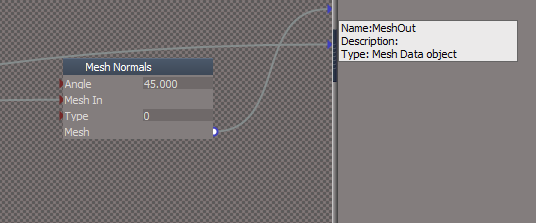
I notice that the Mesh Normals node gets removed
What about incorporating the Mesh Normals node into the Deformer node?
.
This would protect it being removed and would be one less object you would have contend with Connecting/Disconnecting
Also, Disconnect will throw an error if the Deformer is selected
if(Node.ConExists(sel, 'Amount'))
Space.Select(Node.Owner(sel))
What about incorporating the Mesh Normals node into the Deformer node?
This would protect it being removed and would be one less object you would have contend with Connecting/Disconnecting
Also, Disconnect will throw an error if the Deformer is selected
Fix:ERR Source object: /Scripts/CustomCommands/DeformScripts/Disconnect Error: Microsoft JScript runtime error Description: Invalid procedure call or argument Error code: 0x800a0005 - (null) Line: 101, Char: 1 Script text: if(Node.ShortName(normalNode) == "Mesh Normals") { IMPORTANT - if the above mentioned command is accessing any function set, the error line above may refer to the function set code, instead of command code!
if(Node.ConExists(sel, 'Amount'))
Space.Select(Node.Owner(sel))
-
trueBlue
- Captain
- Posts: 5548
- Joined: 06 Jul 2009, 22:50
- Type the number ten into the box: 10
Re: Deformer tests
Either I have not noticed this before or this version has issues
Add a Cube primitive
Add Deformer
Select Cube and Point Edit
Results:
Mesh Normals node is removed
Cube primitive node is hooked up to the Deformer node
Editable shape's Mesh is exported out
If an object has an Editable shape and Deformer
Mesh Normals node is removed
A Duplicate Editable shape, 1 is added
Add a Cube primitive
Add Deformer
Select Cube and Point Edit
Results:
Mesh Normals node is removed
Cube primitive node is hooked up to the Deformer node
Editable shape's Mesh is exported out
If an object has an Editable shape and Deformer
Mesh Normals node is removed
A Duplicate Editable shape, 1 is added
-
clintonman
- Captain
- Posts: 5659
- Joined: 21 May 2009, 21:08
- Type the number ten into the box: 0
- Location: California
Re: Deformer tests
I don't see any error from disconnect and deformer selected.trueBlue wrote: 28 May 2024, 20:33 I notice that the Mesh Normals node gets removed
What about incorporating the Mesh Normals node into the Deformer node?
Incorporate Mesh Normals.png
.
This would protect it being removed and would be one less object you would have contend with Connecting/Disconnecting
Also, Disconnect will throw an error if the Deformer is selectedFix:ERR Source object: /Scripts/CustomCommands/DeformScripts/Disconnect Error: Microsoft JScript runtime error Description: Invalid procedure call or argument Error code: 0x800a0005 - (null) Line: 101, Char: 1 Script text: if(Node.ShortName(normalNode) == "Mesh Normals") { IMPORTANT - if the above mentioned command is accessing any function set, the error line above may refer to the function set code, instead of command code!
if(Node.ConExists(sel, 'Amount'))
Space.Select(Node.Owner(sel))
-
trueBlue
- Captain
- Posts: 5548
- Joined: 06 Jul 2009, 22:50
- Type the number ten into the box: 10
Re: Deformer tests
I posted the Rosetta.log error, so it happens for meclintonman wrote: 28 May 2024, 22:45I don't see any error from disconnect and deformer selected.trueBlue wrote: 28 May 2024, 20:33 I notice that the Mesh Normals node gets removed
What about incorporating the Mesh Normals node into the Deformer node?
Incorporate Mesh Normals.png
.
This would protect it being removed and would be one less object you would have contend with Connecting/Disconnecting
Also, Disconnect will throw an error if the Deformer is selectedFix:ERR Source object: /Scripts/CustomCommands/DeformScripts/Disconnect Error: Microsoft JScript runtime error Description: Invalid procedure call or argument Error code: 0x800a0005 - (null) Line: 101, Char: 1 Script text: if(Node.ShortName(normalNode) == "Mesh Normals") { IMPORTANT - if the above mentioned command is accessing any function set, the error line above may refer to the function set code, instead of command code!
if(Node.ConExists(sel, 'Amount'))
Space.Select(Node.Owner(sel))
-
clintonman
- Captain
- Posts: 5659
- Joined: 21 May 2009, 21:08
- Type the number ten into the box: 0
- Location: California
Re: Deformer tests
You missed it.trueBlue wrote: 28 May 2024, 22:23 Either I have not noticed this before or this version has issues
Add a Cube primitive
Add Deformer
Select Cube and Point Edit
Results:
Mesh Normals node is removed
Cube primitive node is hooked up to the Deformer node
Editable shape's Mesh is exported out
If an object has an Editable shape and Deformer
Mesh Normals node is removed
A Duplicate Editable shape, 1 is added
These are some of the reasons the disconnect and connect buttons exist.
For the editable shape all you can do is flatten to clean it up, but may be a bug there. I'm getting an error instead of a flatten...
-
trueBlue
- Captain
- Posts: 5548
- Joined: 06 Jul 2009, 22:50
- Type the number ten into the box: 10
Re: Deformer tests
I am finding you will get different results depending on, if a Deformer is selected or the parent object is selectedclintonman wrote: 28 May 2024, 22:54You missed it.trueBlue wrote: 28 May 2024, 22:23 Either I have not noticed this before or this version has issues
Add a Cube primitive
Add Deformer
Select Cube and Point Edit
Results:
Mesh Normals node is removed
Cube primitive node is hooked up to the Deformer node
Editable shape's Mesh is exported out
If an object has an Editable shape and Deformer
Mesh Normals node is removed
A Duplicate Editable shape, 1 is added
These are some of the reasons the disconnect and connect buttons exist.
For the editable shape all you can do is flatten to clean it up, but may be a bug there. I'm getting an error instead of a flatten...
I have seen the Flatten button error as well
-
clintonman
- Captain
- Posts: 5659
- Joined: 21 May 2009, 21:08
- Type the number ten into the box: 0
- Location: California
Re: Deformer tests
Updated ProcessDeformers node
Flatten now works in the following cases:
1. editable shape mesh
2. add deform
3. point edit
4. Flatten
1. primitive mesh
2. add deform
3. point edit
4. Flatten
Flatten now works in the following cases:
1. editable shape mesh
2. add deform
3. point edit
4. Flatten
1. primitive mesh
2. add deform
3. point edit
4. Flatten
- Attachments
-
- ProcessDeformers.RsObj
- (32.9 KiB) Downloaded 99 times
-
trueBlue
- Captain
- Posts: 5548
- Joined: 06 Jul 2009, 22:50
- Type the number ten into the box: 10
Re: Deformer tests
How about Shape mesh?clintonman wrote: 28 May 2024, 23:45 Updated ProcessDeformers node
Flatten now works in the following cases:
1. editable shape mesh
2. add deform
3. point edit
4. Flatten
1. primitive mesh
2. add deform
3. point edit
4. Flatten
-
clintonman
- Captain
- Posts: 5659
- Joined: 21 May 2009, 21:08
- Type the number ten into the box: 0
- Location: California
Re: Deformer tests
I works.trueBlue wrote: 28 May 2024, 23:51How about Shape mesh?clintonman wrote: 28 May 2024, 23:45 Updated ProcessDeformers node
Flatten now works in the following cases:
1. editable shape mesh
2. add deform
3. point edit
4. Flatten
1. primitive mesh
2. add deform
3. point edit
4. Flatten
-
trueBlue
- Captain
- Posts: 5548
- Joined: 06 Jul 2009, 22:50
- Type the number ten into the box: 10
Re: Deformer tests
I think the Uneditable script needs to be enhanced to not ONLY include SDS & Deformer but also just Deformers
Is there a reason why you commented out the original Deformers code in the Uneditable script?
Is there a reason why you commented out the original Deformers code in the Uneditable script?
-
clintonman
- Captain
- Posts: 5659
- Joined: 21 May 2009, 21:08
- Type the number ten into the box: 0
- Location: California
Re: Deformer tests
Oops, my bad.trueBlue wrote: 29 May 2024, 00:04 I think the Uneditable script needs to be enhanced to not ONLY include SDS & Deformer but also just Deformers
Is there a reason why you commented out the original Deformers code in the Uneditable script?
I removed them because you said you were going to remove the old DeformScripts1 and those lines won't work with the new DeformScripts.
-
trueBlue
- Captain
- Posts: 5548
- Joined: 06 Jul 2009, 22:50
- Type the number ten into the box: 10
Re: Deformer tests
I left the original in incase of any existing scenesclintonman wrote: 29 May 2024, 00:12Oops, my bad.trueBlue wrote: 29 May 2024, 00:04 I think the Uneditable script needs to be enhanced to not ONLY include SDS & Deformer but also just Deformers
Is there a reason why you commented out the original Deformers code in the Uneditable script?
I removed them because you said you were going to remove the old DeformScripts1 and those lines won't work with the new DeformScripts.
I am going to add:
Code: Select all
	if(Node.Exists(Node.FirstSelected() + '/Deformer')) {
		params.SetTerminationFlag()
		System.Alert('Deformer object detected!\n\nFlatten History first')
		return
	}
-
clintonman
- Captain
- Posts: 5659
- Joined: 21 May 2009, 21:08
- Type the number ten into the box: 0
- Location: California
Re: Deformer tests
ProcessDeformers and Reconnect added some cleaning code for mesh simplification nodes.
Reconnect bug fixes now works with
Reconnect bug fixes now works with
- primitive
deform
disconnect
point edit
reconnect - now working
- primitive
point edit
deform
disconnect
point edit
reconnect - works now
- primitive
sds
deform
disconnect
add sds
reconnect - works
- primitive
mesh simplify
deform
disconnect
pe
reconnect - works
If you add that the Disconnect/Reconnect process for point edit won't work. If it was a question it wouldn't stop the process cold.trueBlue wrote: 29 May 2024, 00:22 ...
I am going to add:Code: Select all
	if(Node.Exists(Node.FirstSelected() + '/Deformer')) {
		params.SetTerminationFlag()
		System.Alert('Deformer object detected!\n\nFlatten History first')
		return
	}
- Attachments
-
- ProcessDeformers90bb.RsObj
- (33.38 KiB) Downloaded 56 times
-
- Reconnect.RsObj
- (13.26 KiB) Downloaded 95 times
-
trueBlue
- Captain
- Posts: 5548
- Joined: 06 Jul 2009, 22:50
- Type the number ten into the box: 10
Re: Deformer tests
Okay, I will make it a Questionclintonman wrote: 29 May 2024, 01:12 ProcessDeformers and Reconnect added some cleaning code for mesh simplification nodes.
Reconnect bug fixes now works with
- primitive
deform
disconnect
point edit
reconnect - now working
- primitive
point edit
deform
disconnect
point edit
reconnect - works now
- primitive
sds
deform
disconnect
add sds
reconnect - works
- primitive
mesh simplify
deform
disconnect
pe
reconnect - worksIf you add that the Disconnect/Reconnect process for point edit won't work. If it was a question it wouldn't stop the process cold.trueBlue wrote: 29 May 2024, 00:22 ...
I am going to add:Code: Select all
	if(Node.Exists(Node.FirstSelected() + '/Deformer')) {
		params.SetTerminationFlag()
		System.Alert('Deformer object detected!\n\nFlatten History first')
		return
	}
Otherwise, it is too easy to mess up
When I started seeing all these issues with PE and the nodes were duplicated, your Flatten script did not work completely
There were leftover nodes still
UU Flatten did work though
-
trueBlue
- Captain
- Posts: 5548
- Joined: 06 Jul 2009, 22:50
- Type the number ten into the box: 10
Re: Deformer tests
I found another issue with Deformers with SDS
If you Remove and or Subtract SDS(to where SDS is removed), Reconnect and or Disconnect does not work including any Alerts
If you Remove and or Subtract SDS(to where SDS is removed), Reconnect and or Disconnect does not work including any Alerts
-
clintonman
- Captain
- Posts: 5659
- Joined: 21 May 2009, 21:08
- Type the number ten into the box: 0
- Location: California
Re: Deformer tests
Confirmed, the UU version will fail to reconnect if the SDS is taken down to nothing. Probably something to do with the Mesh Normals node being inside the Deform node. Non-UU version works.trueBlue wrote: 02 Jun 2024, 15:10 I found another issue with Deformers with SDS
If you Remove and or Subtract SDS(to where SDS is removed), Reconnect and or Disconnect does not work including any Alerts
-
trueBlue
- Captain
- Posts: 5548
- Joined: 06 Jul 2009, 22:50
- Type the number ten into the box: 10
Re: Deformer tests
I removed the Mesh Normals node inside the Deform nodeclintonman wrote: 02 Jun 2024, 15:58Confirmed, the UU version will fail to reconnect if the SDS is taken down to nothing. Probably something to do with the Mesh Normals node being inside the Deform node. Non-UU version works.trueBlue wrote: 02 Jun 2024, 15:10 I found another issue with Deformers with SDS
If you Remove and or Subtract SDS(to where SDS is removed), Reconnect and or Disconnect does not work including any Alerts
Still not able to Reconnect as noted above
Looks like the Reconnect script does not Add and hookup a Mesh Normals node in this scenario
-
trueBlue
- Captain
- Posts: 5548
- Joined: 06 Jul 2009, 22:50
- Type the number ten into the box: 10
Re: Deformer tests
I came up with something that seems to work for the Reconnect script
Insert at around line #49
Most likely will not work with multiple chained Deformers
I would not know how to connect to the last chained Deformer, correctly
Insert at around line #49
Code: Select all
if(!Node.Exists(sel + "/Mesh Normals") && !Node.Exists(sel + "/SDS filter")) {
normalNode = util.Copy(System.ThisOwner() + "/Mesh Normals", sel)
util.ConnectTo(sel + "/Deformer", "MeshOut", sel + "/Mesh Normals", "Mesh In")
Activity.Run(System.ThisOwner() + '/Reconnect')
return
}
I would not know how to connect to the last chained Deformer, correctly
Code: Select all
if(!Node.Exists(sel + "/Mesh Normals") && !Node.Exists(sel + "/SDS filter")) {
normalNode = util.Copy(System.ThisOwner() + "/Mesh Normals", sel)
if(!Node.Exists(sel + "/Deformer, 1"))
util.ConnectTo(sel + "/Deformer", "MeshOut", sel + "/Mesh Normals", "Mesh In")
if(!Node.Exists(sel + "/Deformer, 2"))
util.ConnectTo(sel + "/Deformer, 1", "MeshOut", sel + "/Mesh Normals", "Mesh In")
if(!Node.Exists(sel + "/Deformer, 3"))
util.ConnectTo(sel + "/Deformer, 2", "MeshOut", sel + "/Mesh Normals", "Mesh In")
if(!Node.Exists(sel + "/Deformer, 4"))
util.ConnectTo(sel + "/Deformer, 3", "MeshOut", sel + "/Mesh Normals", "Mesh In")
if(!Node.Exists(sel + "/Deformer, 5"))
util.ConnectTo(sel + "/Deformer, 4", "MeshOut", sel + "/Mesh Normals", "Mesh In")
if(!Node.Exists(sel + "/Deformer, 6"))
util.ConnectTo(sel + "/Deformer, 5", "MeshOut", sel + "/Mesh Normals", "Mesh In")
Activity.Run(System.ThisOwner() + '/Reconnect')
return
}
-
clintonman
- Captain
- Posts: 5659
- Joined: 21 May 2009, 21:08
- Type the number ten into the box: 0
- Location: California
Re: Deformer tests
Answering myself. Retested and non-UU has the same problem. Fix pending...clintonman wrote: 02 Jun 2024, 15:58Confirmed, the UU version will fail to reconnect if the SDS is taken down to nothing. Probably something to do with the Mesh Normals node being inside the Deform node. Non-UU version works.trueBlue wrote: 02 Jun 2024, 15:10 I found another issue with Deformers with SDS
If you Remove and or Subtract SDS(to where SDS is removed), Reconnect and or Disconnect does not work including any Alerts
-
clintonman
- Captain
- Posts: 5659
- Joined: 21 May 2009, 21:08
- Type the number ten into the box: 0
- Location: California
Re: Deformer tests
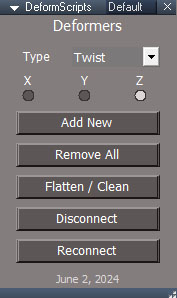
Update June 2 2024
new disconnect/reconnect button so can point edit the original mesh
new Bend switch so can change the direction of a Bend deformer when it doesn't look good
removed BendOld option
Select Deformer button will cycle through all the assigned deformer nodes
fix up/down arrow bug caused by active widget combined with Node.LinkedOutputNode command
fix remove all not work when deformer node is selected
now selects owner after remove 1 or all deformers
reorganized panel
flatten/clean deform will work with point edited primitives and other meshes
fix reconnect bugs and add some cleaning to reconnect for floating mesh simplification
toolbar button RMB open in stack, LMB open floating if floating panels installed
select object after disconnecting the deforms
widgets changed to maintain size at different distances and made the amount widget smoother
taper is reversible via min/max swap
updated the installer to select a scene item to "wake up" the 3D view after the install is complete
Also has second aspect for switching the widget color scheme between trueSpace colors and Standard Colors
new deformer panel
download:
http://clintons3d.com/plugins/truespace ... rmers.html
new disconnect/reconnect button so can point edit the original mesh
new Bend switch so can change the direction of a Bend deformer when it doesn't look good
removed BendOld option
Select Deformer button will cycle through all the assigned deformer nodes
fix up/down arrow bug caused by active widget combined with Node.LinkedOutputNode command
fix remove all not work when deformer node is selected
now selects owner after remove 1 or all deformers
reorganized panel
flatten/clean deform will work with point edited primitives and other meshes
fix reconnect bugs and add some cleaning to reconnect for floating mesh simplification
toolbar button RMB open in stack, LMB open floating if floating panels installed
select object after disconnecting the deforms
widgets changed to maintain size at different distances and made the amount widget smoother
taper is reversible via min/max swap
updated the installer to select a scene item to "wake up" the 3D view after the install is complete
- DeformScriptsPanel.jpg (38.12 KiB) Viewed 2513 times

- DeformerPanel.jpg (42.7 KiB) Viewed 2513 times
download:
http://clintons3d.com/plugins/truespace ... rmers.html
-
clintonman
- Captain
- Posts: 5659
- Joined: 21 May 2009, 21:08
- Type the number ten into the box: 0
- Location: California
Re: Deformer tests
Update June 7
requires installation of the new C3D Persistent Base scripts v3 or the latest Unofficial Updates
no other prerequisites needed
change min widget from cone to flat cylinder shape for a more "base" look
script manager deform description copied from the UU
will reuse the existing UU toolbar button if it exists
fix error some panel buttons when deform scripts not loaded, autoload script from deform buttons
requires installation of the new C3D Persistent Base scripts v3 or the latest Unofficial Updates
no other prerequisites needed
change min widget from cone to flat cylinder shape for a more "base" look
script manager deform description copied from the UU
will reuse the existing UU toolbar button if it exists
fix error some panel buttons when deform scripts not loaded, autoload script from deform buttons