Final trueSpace 7.61 Beta 8 Unofficial Update
-
trueBlue

- Captain
- Posts: 5548
- Joined: 06 Jul 2009, 22:50
- Type the number ten into the box: 10
Re: Final trueSpace 7.61 Beta 8 Unofficial Update
I have been loading a new script which deletes the other.
-
clintonman

- Captain
- Posts: 5659
- Joined: 21 May 2009, 21:08
- Type the number ten into the box: 0
- Location: California
Re: Final trueSpace 7.61 Beta 8 Unofficial Update
D3D Render does not alter the bridge settings.
-
trueBlue
- Captain
- Posts: 5548
- Joined: 06 Jul 2009, 22:50
- Type the number ten into the box: 10
Re: Final trueSpace 7.61 Beta 8 Unofficial Update
I commented out all of the
And it still worked.
Is there a way in this script to call a new blank script?
Code: Select all
#GNode.Select()Is there a way in this script to call a new blank script?
-
clintonman
- Captain
- Posts: 5659
- Joined: 21 May 2009, 21:08
- Type the number ten into the box: 0
- Location: California
Re: Final trueSpace 7.61 Beta 8 Unofficial Update
Not that I know of.trueBlue wrote: 19 Sep 2019, 21:51 I commented out all of theAnd it still worked.Code: Select all
#GNode.Select()
Is there a way in this script to call a new blank script?
"#" is a comment in python, so it doesn't do anything
Edit:
Wait a minute, what? Call a blank script? I don't even know what that means.
-
clintonman
- Captain
- Posts: 5659
- Joined: 21 May 2009, 21:08
- Type the number ten into the box: 0
- Location: California
Re: Final trueSpace 7.61 Beta 8 Unofficial Update
YafaRay4tS Node changes:
Added a dialog when special mesh processing is enabled telling the user to exit trueSpace after the render is complete
Added a convert camera button to the Camera aspect
Did not Space.Unselect() the ms_flag_object because it is only created when special mesh processing is enabled and the modelspace python script will just select it again.
Could not position ms_flag_object in the link editor because it is built from component nodes.
Note: As far as I can tell the special mesh processing is only needed for vertex animated NURBS and animated metaballs. So it shouldn't be needed in most cases.
Edit: One more note - modelspace autokey needs to be off or you can end up with a bunch of unwanted keyframes
Added a dialog when special mesh processing is enabled telling the user to exit trueSpace after the render is complete
Added a convert camera button to the Camera aspect
Did not Space.Unselect() the ms_flag_object because it is only created when special mesh processing is enabled and the modelspace python script will just select it again.
Could not position ms_flag_object in the link editor because it is built from component nodes.
Note: As far as I can tell the special mesh processing is only needed for vertex animated NURBS and animated metaballs. So it shouldn't be needed in most cases.
Edit: One more note - modelspace autokey needs to be off or you can end up with a bunch of unwanted keyframes
- Attachments
-
- YafaRay4tS3f65.RsObj
- (1.04 MiB) Downloaded 256 times
Last edited by clintonman on 19 Sep 2019, 22:16, edited 1 time in total.
-
trueBlue
- Captain
- Posts: 5548
- Joined: 06 Jul 2009, 22:50
- Type the number ten into the box: 10
Re: Final trueSpace 7.61 Beta 8 Unofficial Update
For me there is a little more to the process then just shutting down tS761, after rendering this test scene.
I have to first create a new script in the Script Manager to get rid of the python file or Load another scene.
Because if you just shut down and re open tS761 the python file is still there which crashes tS761 when you close Model.
Or even easier you just Reset the Default Context.
I have discovered that if you load the python file and save the scene in this state, the python file will be locked and loaded when load the scene.
I might add that when you are satisfied with the final render, you should save it before you do the above.
I have to first create a new script in the Script Manager to get rid of the python file or Load another scene.
Because if you just shut down and re open tS761 the python file is still there which crashes tS761 when you close Model.
Or even easier you just Reset the Default Context.
I have discovered that if you load the python file and save the scene in this state, the python file will be locked and loaded when load the scene.
I might add that when you are satisfied with the final render, you should save it before you do the above.
-
clintonman
- Captain
- Posts: 5659
- Joined: 21 May 2009, 21:08
- Type the number ten into the box: 0
- Location: California
Re: Final trueSpace 7.61 Beta 8 Unofficial Update
I'm not seeing that. I get no crashes after restarting truespace and just the existence of the python isn't enough to crash, you would have to run it.trueBlue wrote: 20 Sep 2019, 01:32 ...
Because if you just shut down and re open tS761 the python file is still there which crashes tS761 when you close Model.
...
I'll do some more tests. I recommend you restart your computer, when tS crashes a lot it seems to remain unstable like something is stuck in memory.
Also, just in case, attached is an updated file I've been using.
- Attachments
-
- YafModelspaceTest02.RsScn
- (2.56 MiB) Downloaded 244 times
-
clintonman
- Captain
- Posts: 5659
- Joined: 21 May 2009, 21:08
- Type the number ten into the box: 0
- Location: California
Re: Final trueSpace 7.61 Beta 8 Unofficial Update
OK, I think I see the difference now.
When I restart the first thing I do is close the model view. If I open the script editor then close model view it crashes.
Another test,
render animation,
closed tS,
reopen tS,
close model,
open model,
open script editor,
close script editor,
close model - crash
Same test as above, except clear the script when the editor is open - still crash
Note: need to add an alert at the end of animation render to restart truespace immediately.
When I restart the first thing I do is close the model view. If I open the script editor then close model view it crashes.
Another test,
render animation,
closed tS,
reopen tS,
close model,
open model,
open script editor,
close script editor,
close model - crash
Same test as above, except clear the script when the editor is open - still crash
Note: need to add an alert at the end of animation render to restart truespace immediately.
-
trueBlue
- Captain
- Posts: 5548
- Joined: 06 Jul 2009, 22:50
- Type the number ten into the box: 10
Re: Final trueSpace 7.61 Beta 8 Unofficial Update
I think what the difference between what's happening with me and you is, watch out for the sneaky crash when you close tS761 in your test. For me if I close Model before or after rebooting tS761, it crashes and without opening the script Manger. I was just sharing that tid bit incase it was of help
-
clintonman
- Captain
- Posts: 5659
- Joined: 21 May 2009, 21:08
- Type the number ten into the box: 0
- Location: California
Re: Final trueSpace 7.61 Beta 8 Unofficial Update
You are immediately closing model view after the restart and it crashes?
-
trueBlue
- Captain
- Posts: 5548
- Joined: 06 Jul 2009, 22:50
- Type the number ten into the box: 10
-
clintonman
- Captain
- Posts: 5659
- Joined: 21 May 2009, 21:08
- Type the number ten into the box: 0
- Location: California
Re: Final trueSpace 7.61 Beta 8 Unofficial Update
Wild, not happening to me at all in that case.
I just did a test with the main window as model view and a new floating view as workspace and it did not crash.
Verifying now...
It still ran with no errors. I'm going to try running model in a larger floating window to see if that makes any difference.
I just did a test with the main window as model view and a new floating view as workspace and it did not crash.
Verifying now...
It still ran with no errors. I'm going to try running model in a larger floating window to see if that makes any difference.
Last edited by clintonman on 20 Sep 2019, 02:46, edited 1 time in total.
-
trueBlue
- Captain
- Posts: 5548
- Joined: 06 Jul 2009, 22:50
- Type the number ten into the box: 10
Re: Final trueSpace 7.61 Beta 8 Unofficial Update
Here is your first test scene with your newest yaf panel.
I changed the animation a bit.
I changed the animation a bit.
- Attachments
-
- YafModelspaceTest.RsScn
- (2.85 MiB) Downloaded 226 times
-
clintonman
- Captain
- Posts: 5659
- Joined: 21 May 2009, 21:08
- Type the number ten into the box: 0
- Location: California
Re: Final trueSpace 7.61 Beta 8 Unofficial Update
Just ran a test with model view full screen on second monitor and no crash.
Right now I believe a small model window is causing the crash.
Update: it refuses to crash ever since I ran model from the main window. Window size does not matter.
Reset to default context
loaded the scene
opened model small view and crash
(did same thing again and no crash)
(did same thing yet again and crash)
Reset to default context
loaded the scene
opened model main view and no crash
All tests point to using the main view for model view to avoid crashing.
Right now I believe a small model window is causing the crash.
Update: it refuses to crash ever since I ran model from the main window. Window size does not matter.
Reset to default context
loaded the scene
opened model small view and crash
(did same thing again and no crash)
(did same thing yet again and crash)
Reset to default context
loaded the scene
opened model main view and no crash
All tests point to using the main view for model view to avoid crashing.
-
trueBlue
- Captain
- Posts: 5548
- Joined: 06 Jul 2009, 22:50
- Type the number ten into the box: 10
Re: Final trueSpace 7.61 Beta 8 Unofficial Update
You know that kind of makes sense because Workspace does not sync with Model.
Maybe you need to add some Synchronization code with your Send Keys?
Maybe you need to add some Synchronization code with your Send Keys?
-
clintonman
- Captain
- Posts: 5659
- Joined: 21 May 2009, 21:08
- Type the number ten into the box: 0
- Location: California
Re: Final trueSpace 7.61 Beta 8 Unofficial Update
The hierarchy is a little off. Protect Workspace is a part of Model Processing. Now it looks like a separate thing.trueBlue wrote: 20 Sep 2019, 02:45 Here is your first test scene with your newest yaf panel.
I changed the animation a bit.
-
clintonman
- Captain
- Posts: 5659
- Joined: 21 May 2009, 21:08
- Type the number ten into the box: 0
- Location: California
Re: Final trueSpace 7.61 Beta 8 Unofficial Update
One more thing, careful about sharing scenes with modelspace special mesh enabled. If python script is not loaded into model the animation just freezes. Spent a lot of time trying to figure out why your scene refused to animate and render.trueBlue wrote: 20 Sep 2019, 02:45 Here is your first test scene with your newest yaf panel.
I changed the animation a bit.
-
clintonman
- Captain
- Posts: 5659
- Joined: 21 May 2009, 21:08
- Type the number ten into the box: 0
- Location: California
Re: Final trueSpace 7.61 Beta 8 Unofficial Update
What Send Keys are you referring too?trueBlue wrote: 20 Sep 2019, 03:17 You know that kind of makes sense because Workspace does not sync with Model.
Maybe you need to add some Synchronization code with your Send Keys?
-
trueBlue
- Captain
- Posts: 5548
- Joined: 06 Jul 2009, 22:50
- Type the number ten into the box: 10
Re: Final trueSpace 7.61 Beta 8 Unofficial Update
That's great!clintonman wrote: 20 Sep 2019, 02:49 All tests point to using the main view for model view to avoid crashing.
I can confirm that this works too.
The new Yes No question about using the python script is troublesome.
As you know most of the times it is hidden behind tS61.
If you really think this is necessary, maybe you could change it to a Console Alert like you are doing with the Errors?

- ConsoleFrame.PNG (5.87 KiB) Viewed 4067 times
YafaRay4tS.RsObj
ConvertCamera
Added:
Code: Select all
	if(Node.Exists(sel + "/Yafaray Camera Data")) {
		return;
	}

Node.SafeRename(NewYafCamera, 'YafarayCamera')-
trueBlue
- Captain
- Posts: 5548
- Joined: 06 Jul 2009, 22:50
- Type the number ten into the box: 10
Re: Final trueSpace 7.61 Beta 8 Unofficial Update
trueSpace 7.61 Beta 8 Unofficial Update
Revisions:
July 06, 2009
February 21, 2010
November 01, 2012
May 23, 2019
September 22, 2019
Removed due to update
Revisions:
July 06, 2009
February 21, 2010
November 01, 2012
May 23, 2019
September 22, 2019
Removed due to update
-
clintonman
- Captain
- Posts: 5659
- Joined: 21 May 2009, 21:08
- Type the number ten into the box: 0
- Location: California
Re: Final trueSpace 7.61 Beta 8 Unofficial Update
YafaRay Updates - not thoroughly tested
D3D Material Converter
added status line for yafaray material conversion
added limits warning for the convert d3d to yafaray materials to help prevent crashes - limits to processing 200 materials at a time, 3 runs for a total of 600 is somewhat safe and 4 runs for a total of 800 may or may not crash, anything over 800 guaranteed crash
no limits were added to the convert d3d compiled to d3d shader - should be good for any number of materials
yafaRay render now works with d3d shader, so d3d compiled to d3d shader may be good enough or at least a starting point for a full conversion
YafaRay4tS
alert for the create python file is restored
will read plain D3D materials as simplified yafaray glossy material - for more control use the material converter yafaray tab
removed bold from anim tab Protect Workspace so it shows as part of the modelspace processing section - still looks a bit sloppy
removed camera renaming when converting to yafaray camera
D3D Material Converter
added status line for yafaray material conversion
added limits warning for the convert d3d to yafaray materials to help prevent crashes - limits to processing 200 materials at a time, 3 runs for a total of 600 is somewhat safe and 4 runs for a total of 800 may or may not crash, anything over 800 guaranteed crash
no limits were added to the convert d3d compiled to d3d shader - should be good for any number of materials
yafaRay render now works with d3d shader, so d3d compiled to d3d shader may be good enough or at least a starting point for a full conversion
YafaRay4tS
alert for the create python file is restored
will read plain D3D materials as simplified yafaray glossy material - for more control use the material converter yafaray tab
removed bold from anim tab Protect Workspace so it shows as part of the modelspace processing section - still looks a bit sloppy
removed camera renaming when converting to yafaray camera
- Attachments
-
- YafaRay4tS11.RsObj
- (967.58 KiB) Downloaded 214 times
-
- D3D Material Converter21.RsObj
- (753.05 KiB) Downloaded 202 times
-
Emmanuel

- Chief Warrant Officer
- Posts: 670
- Joined: 14 Jun 2009, 06:47
Re: Final trueSpace 7.61 Beta 8 Unofficial Update
Many thanks for the new updates.
It is good to know the limits of the conversion. We can take care of materials and objects optimization while building new scenes.
It is good to know the limits of the conversion. We can take care of materials and objects optimization while building new scenes.
-
clintonman
- Captain
- Posts: 5659
- Joined: 21 May 2009, 21:08
- Type the number ten into the box: 0
- Location: California
Re: Final trueSpace 7.61 Beta 8 Unofficial Update
One quick change to Protect Workspace
Made it so protect position does not affect animated items. This makes it safe to protect the Matrix without interfering with animation.
Made it so protect position does not affect animated items. This makes it safe to protect the Matrix without interfering with animation.
- Attachments
-
- ProtectWorkspace6c28.RsObj
- (122.19 KiB) Downloaded 222 times
-
trueBlue
- Captain
- Posts: 5548
- Joined: 06 Jul 2009, 22:50
- Type the number ten into the box: 10
Re: Final trueSpace 7.61 Beta 8 Unofficial Update
First of all, I want to thank you for all of your time, work, and attention to detail on this update!clintonman wrote: 21 Sep 2019, 06:19 YafaRay Updates - not thoroughly tested
D3D Material Converter
added status line for yafaray material conversion
added limits warning for the convert d3d to yafaray materials to help prevent crashes - limits to processing 200 materials at a time, 3 runs for a total of 600 is somewhat safe and 4 runs for a total of 800 may or may not crash, anything over 800 guaranteed crash
no limits were added to the convert d3d compiled to d3d shader - should be good for any number of materials
yafaRay render now works with d3d shader, so d3d compiled to d3d shader may be good enough or at least a starting point for a full conversion
YafaRay4tS
alert for the create python file is restored
will read plain D3D materials as simplified yafaray glossy material - for more control use the material converter yafaray tab
removed bold from anim tab Protect Workspace so it shows as part of the modelspace processing section - still looks a bit sloppy
removed camera renaming when converting to yafaray camera

Most notably you updating the D3D Material Converter in the Material Editor. It even loads in the exact position!
Much appreciated!

I have a few questions.
1.) Is there a new yafaray glossy material for the YafaRay Material library?
2.) Does a d3d compiled shader have to be converted to a d3d shader before you convert to a yafaray material?
3.) For optimization purposes when you convert multiple selected objects to one or the other, and if one of the objects selected is already converted/same material, do you ignore that material and without an Alert?
Dang, that was a tough question to write!

Hope you understand my question.

-
clintonman
- Captain
- Posts: 5659
- Joined: 21 May 2009, 21:08
- Type the number ten into the box: 0
- Location: California
Re: Final trueSpace 7.61 Beta 8 Unofficial Update
No new Glossy Material, new yafaray render reads plain d3d shader as glossytrueBlue wrote: 21 Sep 2019, 15:27 ...
First of all, I want to thank you for all of your time, work, and attention to detail on this update!
Most notably you updating the D3D Material Converter in the Material Editor. It even loads in the exact position!
Much appreciated!
I have a few questions.
1.) Is there a new yafaray glossy material for the YafaRay Material library?
2.) Does a d3d compiled shader have to be converted to a d3d shader before you convert to a yafaray material?
3.) For optimization purposes when you convert multiple selected objects to one or the other, and if one of the objects selected is already converted/same material, do you ignore that material and without an Alert?
Dang, that was a tough question to write!
Hope you understand my question.
Capture.PNG
Yes has to be d3d shader first before convert to yafaray
Yes otherwise when you do multiple runs with a lot of materials only the first 200 would ever be affected.
website notes:
http://clintons3d.com/plugins/truespace ... erter.html
-
trueBlue
- Captain
- Posts: 5548
- Joined: 06 Jul 2009, 22:50
- Type the number ten into the box: 10
Re: Final trueSpace 7.61 Beta 8 Unofficial Update
Awesome thanks!clintonman wrote: 21 Sep 2019, 14:51 One quick change to Protect Workspace
Made it so protect position does not affect animated items. This makes it safe to protect the Matrix without interfering with animation.
Getting ready to upload your updates.
Should the Matrix Default be changed on the YafaRay4tS/Anim aspect? One less thing to worry about.
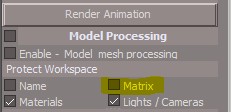
- Capture.PNG (3.97 KiB) Viewed 4187 times
-
clintonman
- Captain
- Posts: 5659
- Joined: 21 May 2009, 21:08
- Type the number ten into the box: 0
- Location: California
Re: Final trueSpace 7.61 Beta 8 Unofficial Update
Maybe the Matrix default should be changed to on.trueBlue wrote: 21 Sep 2019, 16:06 Awesome thanks!
Getting ready to upload your updates.
Should the Matrix Default be changed on the YafaRay4tS/Anim aspect? One less thing to worry about.
Capture.PNG
What I do not understand with the included Protect Workspace in YafaRay4tS, is when it is activated and Backed Up BEFORE switching to Model. What I have been noticing is the need to call Protect Workspace from the Desktop panel first else there is no protection.
YafaRay4tS protection runs during the animation, not before.
-
trueBlue
- Captain
- Posts: 5548
- Joined: 06 Jul 2009, 22:50
- Type the number ten into the box: 10
Re: Final trueSpace 7.61 Beta 8 Unofficial Update
Uploaded Clinton's changes...
Added a button to the Yafaray Camera
Perspective
Default
Helps sync Model's view with Workspace's Perspective view.
Default is the YafaRay scene default location.
ctrlSelectionGroup/selNode.RsObj
Add
Space.Unselect()
@Clinton, I would suggest that add Space.Unselect() to the selNode.RsObj in your version of the ctrlSelectionGroup
It works much better!
Added a button to the Yafaray Camera
Perspective
Code: Select all
Space.Unselect()
Node.Value('%THIS_NAME%','FOV') = 0.500;
Space.NodeMatrixElement('%THIS_NAME%','pitch') = -36.363;
Space.NodeMatrixElement('%THIS_NAME%','roll') = -123.579;
Space.NodeMatrixElement('%THIS_NAME%','tx') = -18.969;
Space.NodeMatrixElement('%THIS_NAME%','ty') = 21.473;
Space.NodeMatrixElement('%THIS_NAME%','tz') = 14.245;
Space.NodeMatrixElement('%THIS_NAME%','yaw') = 21.485;Code: Select all
Node.Value('%THIS_NAME%','FOV') = 1.000;
Space.NodeMatrixElement('%THIS_NAME%','pitch') = -33.351;
Space.NodeMatrixElement('%THIS_NAME%','roll') = 140.505;
Space.NodeMatrixElement('%THIS_NAME%','tx') = -6.022;
Space.NodeMatrixElement('%THIS_NAME%','ty') = -5.819;
Space.NodeMatrixElement('%THIS_NAME%','tz') = 7.061;
Space.NodeMatrixElement('%THIS_NAME%','yaw') = 146.776;Default is the YafaRay scene default location.
ctrlSelectionGroup/selNode.RsObj
Add
Space.Unselect()
@Clinton, I would suggest that add Space.Unselect() to the selNode.RsObj in your version of the ctrlSelectionGroup
It works much better!
-
clintonman
- Captain
- Posts: 5659
- Joined: 21 May 2009, 21:08
- Type the number ten into the box: 0
- Location: California
Re: Final trueSpace 7.61 Beta 8 Unofficial Update
I'll wait to see what you came up with. On the surface it sounds like it would be worse. Ctrl is used to add/subtract from the selection, it sounds like your mod starts by removing all selection. If that's true then if you want to add or subtract to an existing selection you have to start over from scratch.trueBlue wrote: 21 Sep 2019, 20:41 ...
ctrlSelectionGroup/selNode.RsObj
Add
Space.Unselect()
@Clinton, I would suggest that add Space.Unselect() to the selNode.RsObj in your version of the ctrlSelectionGroup
It works much better!
-
trueBlue
- Captain
- Posts: 5548
- Joined: 06 Jul 2009, 22:50
- Type the number ten into the box: 10
Re: Final trueSpace 7.61 Beta 8 Unofficial Update
Basically it starts the selection from scratch.clintonman wrote: 22 Sep 2019, 15:54I'll wait to see what you came up with. On the surface it sounds like it would be worse. Ctrl is used to add/subtract from the selection, it sounds like your mod starts by removing all selection. If that's true then if you want to add or subtract to an existing selection you have to start over from scratch.trueBlue wrote: 21 Sep 2019, 20:41 ...
ctrlSelectionGroup/selNode.RsObj
Add
Space.Unselect()
@Clinton, I would suggest that add Space.Unselect() to the selNode.RsObj in your version of the ctrlSelectionGroup
It works much better!
Where it helps is when you have multiple objects selected before activating Ctrl + Selecting.
Try it with and without adding Space.Unselect() to the top of the selNode script.
You will be able see the difference.
Was trying to change it from using the Model string to a Workspace string, but can't figure it out yet. This would be a tS761 Unofficial Update only, as I know you need to support all versions.
-
clintonman
- Captain
- Posts: 5659
- Joined: 21 May 2009, 21:08
- Type the number ten into the box: 0
- Location: California
Re: Final trueSpace 7.61 Beta 8 Unofficial Update
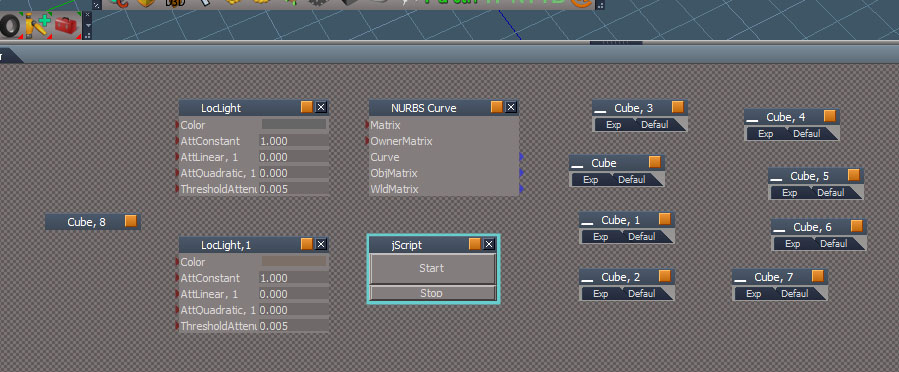
Now if I want to add the cube on the far left to the selection I have to start over and do them 1 by 1.
-
trueBlue
- Captain
- Posts: 5548
- Joined: 06 Jul 2009, 22:50
- Type the number ten into the box: 10
Re: Final trueSpace 7.61 Beta 8 Unofficial Update
Ah! Okay gotcha. Thanks for the explanation.
What I was seeing with a multiple selection, the first selection was Deselecting.
I'll leave as you have it.
What I was seeing with a multiple selection, the first selection was Deselecting.
I'll leave as you have it.
-
clintonman
- Captain
- Posts: 5659
- Joined: 21 May 2009, 21:08
- Type the number ten into the box: 0
- Location: California
Re: Final trueSpace 7.61 Beta 8 Unofficial Update
Actually, I think it's not even working properly without your mod. Looking at it now.
-
clintonman
- Captain
- Posts: 5659
- Joined: 21 May 2009, 21:08
- Type the number ten into the box: 0
- Location: California
Re: Final trueSpace 7.61 Beta 8 Unofficial Update
It suddenly started working again. I think the problem is that it was changing the selection and activating the selection change event at the same time, so a single click might act a little like a double click. This change will make it more reliable.
Your deselect everything isn't useful for me, but you could add it via right click and have it call a completely different ctrlSelectionGroup, maybe call it deselectCtrlSelectionGroup.
Your deselect everything isn't useful for me, but you could add it via right click and have it call a completely different ctrlSelectionGroup, maybe call it deselectCtrlSelectionGroup.
- Attachments
-
- ctrlSelectionGroup94e8.RsObj
- (34.53 KiB) Downloaded 196 times
-
trueBlue
- Captain
- Posts: 5548
- Joined: 06 Jul 2009, 22:50
- Type the number ten into the box: 10
Re: Final trueSpace 7.61 Beta 8 Unofficial Update
Oh man! You eliminated my most favorite feature from the previous update!!!clintonman wrote: 22 Sep 2019, 17:34 It suddenly started working again. I think the problem is that it was changing the selection and activating the selection change event at the same time, so a single click might act a little like a double click. This change will make it more reliable.
Your deselect everything isn't useful for me, but you could add it via right click and have it call a completely different ctrlSelectionGroup, maybe call it deselectCtrlSelectionGroup.
Something the Info view is lacking.

Code: Select all
Node.Value("/Status Line","Model") = "Selection: " + statustext;
- Capture.PNG (2.37 KiB) Viewed 3880 times
-
clintonman
- Captain
- Posts: 5659
- Joined: 21 May 2009, 21:08
- Type the number ten into the box: 0
- Location: California
Re: Final trueSpace 7.61 Beta 8 Unofficial Update
Oops, no problem. When I discovered the problem with the selection I loaded the version from my website and ended up modifying it. I'll add that back in for the "Workspace" status.trueBlue wrote: 22 Sep 2019, 20:49Oh man! You eliminated my most favorite feature from the previous update!!!clintonman wrote: 22 Sep 2019, 17:34 It suddenly started working again. I think the problem is that it was changing the selection and activating the selection change event at the same time, so a single click might act a little like a double click. This change will make it more reliable.
Your deselect everything isn't useful for me, but you could add it via right click and have it call a completely different ctrlSelectionGroup, maybe call it deselectCtrlSelectionGroup.
Something the Info view is lacking.Capture.PNGCode: Select all
Node.Value("/Status Line","Model") = "Selection: " + statustext;
-
clintonman
- Captain
- Posts: 5659
- Joined: 21 May 2009, 21:08
- Type the number ten into the box: 0
- Location: California
Re: Final trueSpace 7.61 Beta 8 Unofficial Update
Fixed the status message for the ctrl button simulator. Sorry 
Uses Workspace label instead of Model.
Shows selection on first run before selection process starts.
Uses Workspace label instead of Model.
Shows selection on first run before selection process starts.
- Attachments
-
- ctrlSelectionGroupba08.RsObj
- (35.36 KiB) Downloaded 180 times
-
trueBlue
- Captain
- Posts: 5548
- Joined: 06 Jul 2009, 22:50
- Type the number ten into the box: 10
Re: Final trueSpace 7.61 Beta 8 Unofficial Update
Perfecto! Even better then my last favorite! Thank YOU.clintonman wrote: 22 Sep 2019, 22:36 Fixed the status message for the ctrl button simulator. Sorry
Uses Workspace label instead of Model.
Shows selection on first run before selection process starts.
Uploaded your changes
-
clintonman
- Captain
- Posts: 5659
- Joined: 21 May 2009, 21:08
- Type the number ten into the box: 0
- Location: California
Re: Final trueSpace 7.61 Beta 8 Unofficial Update
Further testing and found that the link editor ctrl button still misbehaved. The script has a Selection Change Event node and it is more reliable when it is visible in the link editor.
I added a right click command to the button on my website version that opens a LE view into the scripts and that seems to solve it.
This exposes the script node in a new link editor window. I think this will work for bad WatchDog behavior as well.
I added a right click command to the button on my website version that opens a LE view into the scripts and that seems to solve it.
Code: Select all
WindowsManager.CreateWindowFromCLSIDEx("default", "default", "default","Scripts/CustomCommands/ctrlSelectionGroup", 1, "2D")-
trueBlue
- Captain
- Posts: 5548
- Joined: 06 Jul 2009, 22:50
- Type the number ten into the box: 10
Re: Final trueSpace 7.61 Beta 8 Unofficial Update
Hummm...what about loading into the scene?clintonman wrote: 23 Sep 2019, 04:07 Further testing and found that the link editor ctrl button still misbehaved. The script has a Selection Change Event node and it is more reliable when it is visible in the link editor.
I added a right click command to the button on my website version that opens a LE view into the scripts and that seems to solve it.This exposes the script node in a new link editor window. I think this will work for bad WatchDog behavior as well.Code: Select all
WindowsManager.CreateWindowFromCLSIDEx("default", "default", "default","Scripts/CustomCommands/ctrlSelectionGroup", 1, "2D")
Not sure about the get active window with this, but it does insert it into the left of an Organized scene.
Code: Select all
Node.Delete(Space.CurrentScene() + "/ctrlSelectionGroup")
LE.InsertNodeAt(WindowsManager.GetWorkWindow() + '/LE2Node', System.GetMainDir() + '\\Scripts\\clintonobjects\\CustomScriptsStore\\ctrlSelectionGroup.RsObj', -300, 600)After looking inside the Link Editor frame window that you are using with the right click command , I notice the LE2node.
So I copied it into the ctrlSelectionGroup.

See the InitScript script
Code: Select all
	' Force initialize
	Node.Value( System.ThisOwner + "/CheckSelection", "initialized" ) = False
	Node.Value( System.ThisOwner + "/ShowGameTimer", "initialized" ) = False
	' Activate Selection Change Event
	Node.Value( System.ThisOwner + "/Selection Change Event", "Active" ) = True
	Node.Value( Space.CurrentScene() + "/Fifteen/Timer Event", "Active" ) = True
and CheckSelection where he is using:
Code: Select all
' Refresh 3D view
D3DView.Refresh-
clintonman
- Captain
- Posts: 5659
- Joined: 21 May 2009, 21:08
- Type the number ten into the box: 0
- Location: California
Re: Final trueSpace 7.61 Beta 8 Unofficial Update
Tried your LE2Node version - no change
Tried your commands load into scene and run there - no change
Tried D3DView.Refresh in all the nodes - no change
my solution - less but still intermittent failures
Edit:
Tried other stuff with no success. Found that rectangle select always works and click select mostly sometimes works.
Tried your commands load into scene and run there - no change
Tried D3DView.Refresh in all the nodes - no change
my solution - less but still intermittent failures
Edit:
Tried other stuff with no success. Found that rectangle select always works and click select mostly sometimes works.
-
trueBlue
- Captain
- Posts: 5548
- Joined: 06 Jul 2009, 22:50
- Type the number ten into the box: 10
Re: Final trueSpace 7.61 Beta 8 Unofficial Update
Well bummer!
Been testing this a bunch and have not seen any issues. Mostly just picking.
I'll add the RMB command as suggested.
Been testing this a bunch and have not seen any issues. Mostly just picking.
I'll add the RMB command as suggested.
-
clintonman
- Captain
- Posts: 5659
- Joined: 21 May 2009, 21:08
- Type the number ten into the box: 0
- Location: California
Re: Final trueSpace 7.61 Beta 8 Unofficial Update
I wouldn't bother. The intermittent nature of the failures makes it impossible to say exposing the nodes in the LE does anything at all.trueBlue wrote: 23 Sep 2019, 18:49 Well bummer!
Been testing this a bunch and have not seen any issues. Mostly just picking.
I'll add the RMB command as suggested.
Seems tS works subtly different for different people, like the errors Emmanuel was getting with the protect workspace scripts, you and I never saw the error but he definitely saw it. The only reason it got fixed for him is because he was willing to put in the time and sample scenes to help me find the weird error source. You can't fix what you can't see.
-
trueBlue
- Captain
- Posts: 5548
- Joined: 06 Jul 2009, 22:50
- Type the number ten into the box: 10
Re: Final trueSpace 7.61 Beta 8 Unofficial Update
Houston? We have problem!
I updated your ClintonToolbar with your new Ctrl+ button
With nothing selected you will get an error.
This is your newest script but I changed from a Workspace string to Selection string
I updated your ClintonToolbar with your new Ctrl+ button

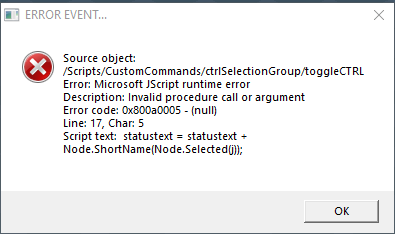
- Capture.PNG (10.88 KiB) Viewed 5232 times
- Attachments
-
- ctrlSelectionGroupca4b.RsObj
- (36.55 KiB) Downloaded 277 times
-
clintonman
- Captain
- Posts: 5659
- Joined: 21 May 2009, 21:08
- Type the number ten into the box: 0
- Location: California
Re: Final trueSpace 7.61 Beta 8 Unofficial Update
Start with selection or not start with selection, no error here.
-
trueBlue
- Captain
- Posts: 5548
- Joined: 06 Jul 2009, 22:50
- Type the number ten into the box: 10
Re: Final trueSpace 7.61 Beta 8 Unofficial Update
What? Now I am not getting an error. 
Hummm… the image does not lie though.
Hummm… the image does not lie though.
-
trueBlue
- Captain
- Posts: 5548
- Joined: 06 Jul 2009, 22:50
- Type the number ten into the box: 10
Re: Final trueSpace 7.61 Beta 8 Unofficial Update
trueSpace 7.61 Beta 8 Unofficial Update
Revisions:
July 06, 2009
February 21, 2010
November 01, 2012
May 23, 2019
September 25, 2019
Moved to: viewtopic.php?t=3732
Revisions:
July 06, 2009
February 21, 2010
November 01, 2012
May 23, 2019
September 25, 2019
Moved to: viewtopic.php?t=3732
-
trueBlue
- Captain
- Posts: 5548
- Joined: 06 Jul 2009, 22:50
- Type the number ten into the box: 10
Re: Final trueSpace 7.61 Beta 8 Unofficial Update
New updates:
Constraint script
Added it to CustomCommands, CustomScriptsStore, and the ClintonToolbar
Grid Array 2
Added it to CustomCommands, CustomScriptsStore, and the ClintonToolbar
Removed Grid Array 1
YafaRay4tS/ProtectWorkspace
Changed all the defaults to 'true'
CreatePythonSync
Fixed the Alert
@Clinton
Any way to read the:
D3DView.RenderToFile.Settings.xml
and get the FILENAME = "" ?
Make a one line RMB button command for the Render to File icon (or script), that opens that folder?
Like you did for YafaRay4tS?
Moved to: viewtopic.php?t=3732
Constraint script
Added it to CustomCommands, CustomScriptsStore, and the ClintonToolbar
Grid Array 2
Added it to CustomCommands, CustomScriptsStore, and the ClintonToolbar
Removed Grid Array 1
YafaRay4tS/ProtectWorkspace
Changed all the defaults to 'true'
CreatePythonSync
Fixed the Alert

- Capture.PNG (11.61 KiB) Viewed 5198 times
Code: Select all
	var alertText = "1. Model Python file was created and only needs to be created once.\n\n"
	alertText += "2. Check the 'Enable - Model mesh processing' in the YafaRay4tS/Anim aspect, to make the render use this python script in Model during the animation render.\n\n"
	alertText += "3. In Model open the Script Editor for the Scene object and...\n\n"
	alertText += "4. Select the Assign button and choose the file 'special_mesh_synch.py', located in 'C:\\trueSpace761\\tS\\PythonScripts'\n\n"
	alertText += "During the animation render, the script will run and update the shape animations."
System.Alert(alertText)Any way to read the:
D3DView.RenderToFile.Settings.xml
and get the FILENAME = "" ?
Make a one line RMB button command for the Render to File icon (or script), that opens that folder?
Like you did for YafaRay4tS?
Moved to: viewtopic.php?t=3732
-
clintonman
- Captain
- Posts: 5659
- Joined: 21 May 2009, 21:08
- Type the number ten into the box: 0
- Location: California
Re: Final trueSpace 7.61 Beta 8 Unofficial Update
No way to fit on one line. Attached script will open the folder.trueBlue wrote: 25 Sep 2019, 23:18 ...
@Clinton
Any way to read the:
D3DView.RenderToFile.Settings.xml
and get the FILENAME = "" ?
Make a one line RMB button command for the Render to File icon (or script), that opens that folder?
Like you did for YafaRay4tS?
...
- Attachments
-
- OpenD3DRenderPath.RsObj
- (6.44 KiB) Downloaded 310 times
-
Saul
- Senior Chief Petty Officer
- Posts: 308
- Joined: 22 May 2009, 16:50
Re: Final trueSpace 7.61 Beta 8 Unofficial Update
I've no idea what you guys are doing but i enjoy reading about it and i sure appreciate it!
Some things:
I seem to have lost the links for videos within the help file. I am installing tS76Video.exe after tS76PDF.exe, though it is not mentioned in your install guide so maybe order is wrong?
Attached is a Camera deluxe object built by Gordon Stanton that i can no longer get working, any help?
Some things:
I seem to have lost the links for videos within the help file. I am installing tS76Video.exe after tS76PDF.exe, though it is not mentioned in your install guide so maybe order is wrong?
Attached is a Camera deluxe object built by Gordon Stanton that i can no longer get working, any help?
- Attachments
-
- Camera Deluxe installer8bbf.RsObj
- (253.91 KiB) Downloaded 297 times
-
trueBlue
- Captain
- Posts: 5548
- Joined: 06 Jul 2009, 22:50
- Type the number ten into the box: 10
Re: Final trueSpace 7.61 Beta 8 Unofficial Update
Did you install the tS76PDF.exe before Extracting the Update?Saul wrote: 26 Sep 2019, 15:36 I've no idea what you guys are doing but i enjoy reading about it and i sure appreciate it!
Some things:
I seem to have lost the links for videos within the help file. I am installing tS76Video.exe after tS76PDF.exe, though it is not mentioned in your install guide so maybe order is wrong?
Attached is a Camera deluxe object built by Gordon Stanton that i can no longer get working, any help?
Note from the instructions:
Install the PDF Manual for trueSpace. (Optional but required before installing the Update)
This is necessary because the Update overwrites the ts76_manual.html that links to an included modified tS6help.chm, New in 6.5.PDF, ch30_NewInTrueSpace66.PDF, ch27_PhysicalSimulation.pdf, tS76_MS_Animation.pdf, tS7_AG_3.17.pdf, tS7_AG_Ch_4_NormalMapping.pdf, tS7_DG_chapt1_chapt2.pdf, and UsingBonesToVertex.pdf files.
The Update does not modify the Video links in the PDF.
Are you using the Camera Deluxe installer from the Objects - Script objects library?
-
Saul
- Senior Chief Petty Officer
- Posts: 308
- Joined: 22 May 2009, 16:50
Re: Final trueSpace 7.61 Beta 8 Unofficial Update
'Are you using the Camera Deluxe installer from the Objects - Script objects library?'
Ahhhh that's where it's hiding))
I am following your instructions for full install, it seems to have dissappeared from this thread! It went/goes something like:
1)tS761B8
2)yafaray
3)iopti
4)vRay
5)helpPDF
5a)(video.exe) not included in your install sequence
6)ts7.61B8.5
The links for video are highlighted, as attached but they are not clickable. New in 6.5.PDF is also not clickable.
Ahhhh that's where it's hiding))
I am following your instructions for full install, it seems to have dissappeared from this thread! It went/goes something like:
1)tS761B8
2)yafaray
3)iopti
4)vRay
5)helpPDF
5a)(video.exe) not included in your install sequence
6)ts7.61B8.5
The links for video are highlighted, as attached but they are not clickable. New in 6.5.PDF is also not clickable.
- Attachments
-

- ScreenHunter 09.jpg (3.14 KiB) Viewed 4127 times
-
trueBlue
- Captain
- Posts: 5548
- Joined: 06 Jul 2009, 22:50
- Type the number ten into the box: 10
Re: Final trueSpace 7.61 Beta 8 Unofficial Update
Not sure what is going on.
I Uninstalled the pdf and videos.
Reinstalled the pdf and videos
Did not apply the update.
Video links do not work for me either.
BTW... the trueSpace Beta 7.61 Unofficial Update.txt is located in C:\trueSpace761\tS which comes with the Update
It is also here where the Update file is:
Moved to: viewtopic.php?t=3732
I Uninstalled the pdf and videos.
Reinstalled the pdf and videos
Did not apply the update.
Video links do not work for me either.
BTW... the trueSpace Beta 7.61 Unofficial Update.txt is located in C:\trueSpace761\tS which comes with the Update
It is also here where the Update file is:
Moved to: viewtopic.php?t=3732
-
clintonman
- Captain
- Posts: 5659
- Joined: 21 May 2009, 21:08
- Type the number ten into the box: 0
- Location: California
Re: Final trueSpace 7.61 Beta 8 Unofficial Update
Videos not working maybe because they are wmv files. If you try to open in a browser it downloads instead of playing. If you open the pdf directly the video files play.
-
trueBlue
- Captain
- Posts: 5548
- Joined: 06 Jul 2009, 22:50
- Type the number ten into the box: 10
Re: Final trueSpace 7.61 Beta 8 Unofficial Update
Do you have Acrobat for Win10 installed? Or some other PDF reader?clintonman wrote: 26 Sep 2019, 18:42 Videos not working maybe because they are wmv files. If you try to open in a browser it downloads instead of playing. If you open the pdf directly the video files play.
I am using Edge and I tried Internet Exploder. I do not have Acrobat nor PDF reader.
Video Links do Not work for me at all.
I can view the wmv files directly though
-
clintonman
- Captain
- Posts: 5659
- Joined: 21 May 2009, 21:08
- Type the number ten into the box: 0
- Location: California
Re: Final trueSpace 7.61 Beta 8 Unofficial Update
I use SumatraPDF Reader. And confirmed link not work at all in Edge. Internet Explorer doesn't open the pdf, so never even get to the video link. Firefox opens pdf but links don't work. Chrome opens pdf but downloads the wmv file.
It looks like the index html needs to be changed to a pdf file since that in combination with a pdf reader seems to be the only way to make the links work.
It looks like the index html needs to be changed to a pdf file since that in combination with a pdf reader seems to be the only way to make the links work.
-
trueBlue
- Captain
- Posts: 5548
- Joined: 06 Jul 2009, 22:50
- Type the number ten into the box: 10
Re: Final trueSpace 7.61 Beta 8 Unofficial Update
I will look into that. Would be a good time to add a What's new in YafaRay4tSclintonman wrote: 27 Sep 2019, 02:25 It looks like the index html needs to be changed to a pdf file since that in combination with a pdf reader seems to be the only way to make the links work.
-
trueBlue
- Captain
- Posts: 5548
- Joined: 06 Jul 2009, 22:50
- Type the number ten into the box: 10
Re: Final trueSpace 7.61 Beta 8 Unofficial Update
New update:
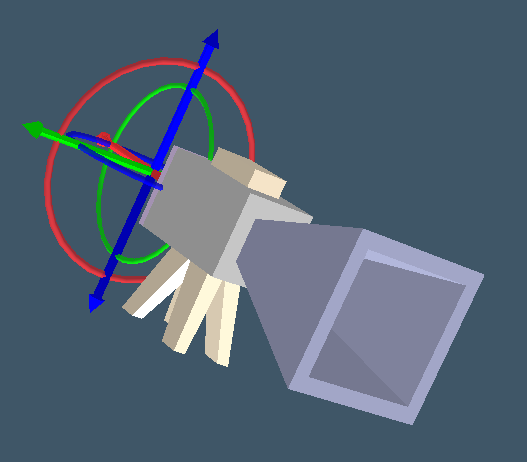
viewtopic.php?t=3732
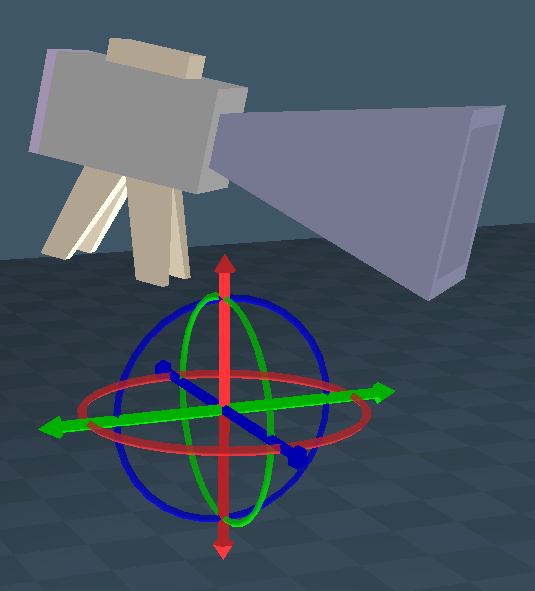
Camera1 widget
Added an Orbital widget
Additional controls: Same as Camera2
* Shift + LMB select the widget, switches to Camera2
* I + LMB select the widget opens Widget Help panel
FOV
LMB + Drag = Adjust FOV
LMB = View from Camera
When viewing from Camera
Shift + LMB = Exit Camera View
Ctrl + LMB = Camera Panel
World Coordinates
Object Coordinates
viewtopic.php?t=3732
Camera1 widget
Added an Orbital widget
Additional controls: Same as Camera2
* Shift + LMB select the widget, switches to Camera2
* I + LMB select the widget opens Widget Help panel
FOV
LMB + Drag = Adjust FOV
LMB = View from Camera
When viewing from Camera
Shift + LMB = Exit Camera View
Ctrl + LMB = Camera Panel
World Coordinates
-
Saul
- Senior Chief Petty Officer
- Posts: 308
- Joined: 22 May 2009, 16:50
Re: Final trueSpace 7.61 Beta 8 Unofficial Update
'Would be a good time to add a What's new in YafaRay4tS'
And a 'how to use' would be helpful too))
And a 'how to use' would be helpful too))
-
trueBlue
- Captain
- Posts: 5548
- Joined: 06 Jul 2009, 22:50
- Type the number ten into the box: 10
Re: Final trueSpace 7.61 Beta 8 Unofficial Update
I like the way you Open in the Link Editor with the Grid Array 2 scripts.clintonman wrote: 23 Sep 2019, 19:54I wouldn't bother. The intermittent nature of the failures makes it impossible to say exposing the nodes in the LE does anything at all.trueBlue wrote: 23 Sep 2019, 18:49 Well bummer!
Been testing this a bunch and have not seen any issues. Mostly just picking.
I'll add the RMB command as suggested.
Seems tS works subtly different for different people, like the errors Emmanuel was getting with the protect workspace scripts, you and I never saw the error but he definitely saw it. The only reason it got fixed for him is because he was willing to put in the time and sample scenes to help me find the weird error source. You can't fix what you can't see.
Wouldn't that be a better option with the RMB command in the Update/Ctrl + button on the Link Editor Navigator toolbar?
Instead of opening the ctrlSelectionGroup in a LE Window, you open it in the Link Editor?
LE.OpenLocation("/Scripts/CustomCommands/ctrlSelectionGroup");
-
clintonman
- Captain
- Posts: 5659
- Joined: 21 May 2009, 21:08
- Type the number ten into the box: 0
- Location: California
Re: Final trueSpace 7.61 Beta 8 Unofficial Update
Wouldn't that make it difficult to select nodes when the window changes to a location away from those nodes?trueBlue wrote: 27 Sep 2019, 17:20 ...
Instead of opening the ctrlSelectionGroup in a LE Window, you open it in the Link Editor?
LE.OpenLocation("/Scripts/CustomCommands/ctrlSelectionGroup");
-
trueBlue
- Captain
- Posts: 5548
- Joined: 06 Jul 2009, 22:50
- Type the number ten into the box: 10
Re: Final trueSpace 7.61 Beta 8 Unofficial Update
It would selecting nodes in the Link Editor, which I personally never do, but would not in the 3D View.
Having another LE Window opened while selecting objects in the 3D View seems less desirable.
You know best, I just like the way that works in the Grid Array scripts.
Thinking ahead if this is viable, the LMB command would need navigate back to the scene root.
Have not tested this, just wondered what your thoughts are about this?
Having another LE Window opened while selecting objects in the 3D View seems less desirable.
You know best, I just like the way that works in the Grid Array scripts.
Thinking ahead if this is viable, the LMB command would need navigate back to the scene root.
Have not tested this, just wondered what your thoughts are about this?
-
clintonman
- Captain
- Posts: 5659
- Joined: 21 May 2009, 21:08
- Type the number ten into the box: 0
- Location: California
Re: Final trueSpace 7.61 Beta 8 Unofficial Update
I guess I'm not understanding. The ctrlSelectionGroup is for selecting things in the link editor. Ctrl select already works in the 3d view, so why open a LE view if selecting in a 3d view and why use ctrlSelectionGroup in 3d view?
-
trueBlue
- Captain
- Posts: 5548
- Joined: 06 Jul 2009, 22:50
- Type the number ten into the box: 10
Re: Final trueSpace 7.61 Beta 8 Unofficial Update
Ha, I did not know that! I have always used it for selecting in the 3D View.
I might add, I am lazy, and it works very well! Using it to select multiple sub objects in an Encapsulation, etc..
I might add, I am lazy, and it works very well! Using it to select multiple sub objects in an Encapsulation, etc..
-
clintonman
- Captain
- Posts: 5659
- Joined: 21 May 2009, 21:08
- Type the number ten into the box: 0
- Location: California
Re: Final trueSpace 7.61 Beta 8 Unofficial Update
Yeah, that's why I'm always saying, "don't limit the users choices". You never know how someone will use your stuff. They always find a way to use it in some unexpected way you can't anticipate.trueBlue wrote: 27 Sep 2019, 19:07 Ha, I did not know that! I have always used it for selecting in the 3D View.
I might add, I am lazy, and it works very well! Using it to select multiple sub objects in an Encapsulation, etc..
-
trueBlue
- Captain
- Posts: 5548
- Joined: 06 Jul 2009, 22:50
- Type the number ten into the box: 10
Re: Final trueSpace 7.61 Beta 8 Unofficial Update
New update:
viewtopic.php?t=3732
Point Edit Widgets
PE Pivot Snap2
O + LMB select the widget pivots the widget if in Object Coordinates On/Off
CustomScriptsStore:
PivotCoordinateSystem.RsObj
gridArray2Script.RsObj
latheScript.RsObj
Constraint.RsObj
radialArray2Script.RsObj
New button icons:
viewtopic.php?t=3732
Point Edit Widgets
PE Pivot Snap2
O + LMB select the widget pivots the widget if in Object Coordinates On/Off

PivotCoordinateSystem.RsObj
gridArray2Script.RsObj
latheScript.RsObj
Constraint.RsObj
radialArray2Script.RsObj
New button icons:
- Attachments
-

- radialArrayButton.png (1.07 KiB) Viewed 3765 times
-

- gridArray2Button.png (1.29 KiB) Viewed 3765 times
-

- Constraint.png (1.13 KiB) Viewed 3765 times
-
trueBlue
- Captain
- Posts: 5548
- Joined: 06 Jul 2009, 22:50
- Type the number ten into the box: 10
Re: Final trueSpace 7.61 Beta 8 Unofficial Update
New update:
viewtopic.php?t=3732
All Object and Point Edit widgets changes:
Changed the Status message to be in sync with the Object and Camera widgets
My Object Navigation widget
Changed the On Operation color from yellow to different lighter colors to match the axis color on the Arcs and Boxes.
Toolbars
Reset Default Context - Changed the LMB command to open a Default Context panel giving you option to cancel. RMB command does not include the Default Context panel. 'Updated 10/02/2019'
viewtopic.php?t=3732
All Object and Point Edit widgets changes:
Changed the Status message to be in sync with the Object and Camera widgets
Code: Select all
// MMB select the Bars. Triangles. and Sphere activates the Object Move widget
// MMB select the Arcs activates the Object Rotate widget
// MMB select the Cubes activates the Object Scale widget

//	Object Move tool
Widgets.ActivateViewToolWidget('/Widgets/Tools/Move selection','Default');Node.Value("/Status Line", "Model") = "LMB  Move around /  RMB  Move Up and Down  ( Shft + LMB - Deactivate )"
//Object Rotate tool
Widgets.ActivateViewToolWidget('/Widgets/Tools/Rotate selection','Default');Node.Value("/Status Line", "Model") = "LMB drag Rotate from center /  RMB drag Rotate around ( Shft + LMB - Deactivate )"
//Object Scale tool
Widgets.ActivateViewToolWidget('/Widgets/Tools/Scale selection','Default');Node.Value("/Status Line", "Model") = "LMB drag Scale from center / RMB drag Scale Up and Down ( Shft + LMB - Deactivate )"Changed the On Operation color from yellow to different lighter colors to match the axis color on the Arcs and Boxes.

Reset Default Context - Changed the LMB command to open a Default Context panel giving you option to cancel. RMB command does not include the Default Context panel. 'Updated 10/02/2019'

- Capture.PNG (10.2 KiB) Viewed 3729 times
-
trueBlue
- Captain
- Posts: 5548
- Joined: 06 Jul 2009, 22:50
- Type the number ten into the box: 10
Re: Final trueSpace 7.61 Beta 8 Unofficial Update
I think we should add a command to the Synchronize.RsObj project that closes Frame Window, 1clintonman wrote: 12 Aug 2019, 17:42I agree. Small change so default is false.trueBlue wrote: 12 Aug 2019, 17:29Yes I know that, now that I have had a chance to use it. Thanks!clintonman wrote: 12 Aug 2019, 17:15 Sounds great!
* Use Timer
If it doesn’t already, can you uncheck Use Timer on Deactivate?
...
Why?
Use Timer does not activate the timer directly.
The Connect script activates the timer and connects it if Use Timer is on.
The Deactivate script deactivates the timer and disconnects it.
My thought was for it not to be the default though.
Code: Select all
WindowsManager.CloseWindow('/Project/Windows Manager Space/Frame Window, 1')Open a New 3D View
Open Synchronize from the Desktop
Activate and Deactivate Synchronize
Thinking it would be better if the new 3D View was closed first.
-
clintonman
- Captain
- Posts: 5659
- Joined: 21 May 2009, 21:08
- Type the number ten into the box: 0
- Location: California
Re: Final trueSpace 7.61 Beta 8 Unofficial Update
What is Frame Window, 1 and why do you want to close it?trueBlue wrote: 03 Oct 2019, 13:58I think we should add a command to the Synchronize.RsObj project that closes Frame Window, 1clintonman wrote: 12 Aug 2019, 17:42I agree. Small change so default is false.trueBlue wrote: 12 Aug 2019, 17:29
Yes I know that, now that I have had a chance to use it. Thanks!
My thought was for it not to be the default though.StepsCode: Select all
WindowsManager.CloseWindow('/Project/Windows Manager Space/Frame Window, 1')
Open a New 3D View
Open Synchronize from the Desktop
Activate and Deactivate Synchronize
Thinking it would be better if the new 3D View was closed first.
The last step in your list is to first close the 3D view, but the first step is to Open a New 3D View?
Finally, you never mentioned what the steps are for.
-
trueBlue
- Captain
- Posts: 5548
- Joined: 06 Jul 2009, 22:50
- Type the number ten into the box: 10
Re: Final trueSpace 7.61 Beta 8 Unofficial Update
Frame Window, 1 is the Frame Window in use when you open the first new 3D View.
If you open another new 3D View it will use Frame Window, 2, etc...
Only ONE opened Model view is supported by trueSpace.
Hummmm… tried the steps again and this time, I got a different result. I'll post a screenshot if it happens again.
Never the less, if you open a new 3D View and switch to Model, Synchronize just uses that view verses the LE View switched to Model.
Personally, I would like it to work with the LE View switched to Model verses the smaller 3D View and more importantly only have ONE view opened at a time when using Synchronize.
If you open another new 3D View it will use Frame Window, 2, etc...
Only ONE opened Model view is supported by trueSpace.
Hummmm… tried the steps again and this time, I got a different result. I'll post a screenshot if it happens again.
Never the less, if you open a new 3D View and switch to Model, Synchronize just uses that view verses the LE View switched to Model.
Personally, I would like it to work with the LE View switched to Model verses the smaller 3D View and more importantly only have ONE view opened at a time when using Synchronize.
-
clintonman
- Captain
- Posts: 5659
- Joined: 21 May 2009, 21:08
- Type the number ten into the box: 0
- Location: California
Re: Final trueSpace 7.61 Beta 8 Unofficial Update
Sounds like you're trying to force the use of the new 3d view to be model view and require the main view is workspace view. I usually open a small view and switch the main window to model view.
Should not force one workflow over the other.
Should not force one workflow over the other.
-
trueBlue
- Captain
- Posts: 5548
- Joined: 06 Jul 2009, 22:50
- Type the number ten into the box: 10
Re: Final trueSpace 7.61 Beta 8 Unofficial Update
Yep because I do not understand your workflow as you describe. BECAUSE... How do you use Protect Workspace, BEFORE switching to Model?clintonman wrote: 03 Oct 2019, 15:47 Sounds like you're trying to force the use of the new 3d view to be model view and require the main view is workspace view. I usually open a small view and switch the main window to model view.
Should not force one workflow over the other.
I am totally confused, because #1 Synchronize opens a Model view, and doing so #2, IF the scene is not protected, it gets corrupted.
-
clintonman
- Captain
- Posts: 5659
- Joined: 21 May 2009, 21:08
- Type the number ten into the box: 0
- Location: California
Re: Final trueSpace 7.61 Beta 8 Unofficial Update
I open the protect workspace and press the backup button before opening model space view.trueBlue wrote: 03 Oct 2019, 16:04Yep because I do not understand your workflow as you describe. BECAUSE... How do you use Protect Workspace, BEFORE switching to Model?clintonman wrote: 03 Oct 2019, 15:47 Sounds like you're trying to force the use of the new 3d view to be model view and require the main view is workspace view. I usually open a small view and switch the main window to model view.
Should not force one workflow over the other.
I am totally confused, because #1 Synchronize opens a Model view, and doing so #2, IF the scene is not protected, it gets corrupted.
If you're using Synchronize and protect workspace and yafaray all together I need to know your workflow before I can even comment on that. I didn't even know it was possible to use them all at the same time without problems.
-
trueBlue
- Captain
- Posts: 5548
- Joined: 06 Jul 2009, 22:50
- Type the number ten into the box: 10
Re: Final trueSpace 7.61 Beta 8 Unofficial Update
Okay, I tried your Workflow and get it now!
In FACT it is the only way to use Model Processing and not crash tS7.61, AND you do not have to clear the Python script.
I also experimented with having the ProtectWorkspace.RsObj included and saved with the scene.
For me this works much better!
Is there a reason why you do not want to include the ProtectWorkspace with the scene?
Just seems there is a big disadvantage not being able to save the Backup with the scene.
It is also less cumbersome then using it from CustomCommands.
It also seems that it would be less of a headache for you by not having to include it in YafaRay4tS.
It looks like Synchronize uses ProtectWorkspace from both places but I can not tell if there is full coverage. Just notice at quick glance it saves and restores Names.
In FACT it is the only way to use Model Processing and not crash tS7.61, AND you do not have to clear the Python script.
I also experimented with having the ProtectWorkspace.RsObj included and saved with the scene.
For me this works much better!
Is there a reason why you do not want to include the ProtectWorkspace with the scene?
Just seems there is a big disadvantage not being able to save the Backup with the scene.
It is also less cumbersome then using it from CustomCommands.
It also seems that it would be less of a headache for you by not having to include it in YafaRay4tS.
It looks like Synchronize uses ProtectWorkspace from both places but I can not tell if there is full coverage. Just notice at quick glance it saves and restores Names.
-
clintonman
- Captain
- Posts: 5659
- Joined: 21 May 2009, 21:08
- Type the number ten into the box: 0
- Location: California
Re: Final trueSpace 7.61 Beta 8 Unofficial Update
That sounds familiar, maybe there's a note about that in the YafaRay thread. In any case will need to be part of the instructions.trueBlue wrote: 03 Oct 2019, 20:14 Okay, I tried your Workflow and get it now!
In FACT it is the only way to use Model Processing and not crash tS7.61, AND you do not have to clear the Python script.
...
If the backups are not automatically deleted after restore they will be saved with the scene. That's the disadvantage of making things automatic, it destroys flexibility. If deletion was optional it wouldn't be a problem. Protect Workspace only needs to exist in the 1 place. It doesn't exist inside the YafaRay4tS node. It exists in CustomCommands and is called by YafaRay, D3dRender and by the user. You mention it is also used by Synchronize which I completely forgot.trueBlue wrote: 03 Oct 2019, 20:14 ...
I also experimented with having the ProtectWorkspace.RsObj included and saved with the scene.
For me this works much better!
Is there a reason why you do not want to include the ProtectWorkspace with the scene?
Just seems there is a big disadvantage not being able to save the Backup with the scene.
It is also less cumbersome then using it from CustomCommands.
It also seems that it would be less of a headache for you by not having to include it in YafaRay4tS.
It looks like Synchronize uses ProtectWorkspace from both places but I can not tell if there is full coverage. Just notice at quick glance it saves and restores Names.
...
I will add the OPTION of not deleting after the restore is run and make it the default.
-
trueBlue
- Captain
- Posts: 5548
- Joined: 06 Jul 2009, 22:50
- Type the number ten into the box: 10
Re: Final trueSpace 7.61 Beta 8 Unofficial Update
Okie Dokie!
I think I get what you are referring to and will wait and see the changes and how it works.
Disable All Viewers is not working for me.
I checked it and unchecked all other viewers.
Select the Render Animation button in the Anim aspect.
The Display still shows and when the Animation is finished, I go back to Setup, the Disable All Viewers is unchecked and Internal/Opt Detector Viewers are checked.
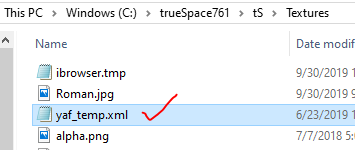
I mentioned this before but this yaf_temp.xml file keeps popping up in unexpected places.
For instance in my Texture folder.
I think I get what you are referring to and will wait and see the changes and how it works.
Disable All Viewers is not working for me.
I checked it and unchecked all other viewers.
Select the Render Animation button in the Anim aspect.
The Display still shows and when the Animation is finished, I go back to Setup, the Disable All Viewers is unchecked and Internal/Opt Detector Viewers are checked.
I mentioned this before but this yaf_temp.xml file keeps popping up in unexpected places.
For instance in my Texture folder.
- Capture.PNG (8.01 KiB) Viewed 3830 times
-
clintonman
- Captain
- Posts: 5659
- Joined: 21 May 2009, 21:08
- Type the number ten into the box: 0
- Location: California
Re: Final trueSpace 7.61 Beta 8 Unofficial Update
If you can't make it happen predictably then it can't be fixed.trueBlue wrote: 03 Oct 2019, 20:56 ...
I mentioned this before but this yaf_temp.xml file keeps popping up in unexpected places.
For instance in my Texture folder.
Capture.PNG
FYI, my todo list from the YafaRay4tS thread:
TODO:
Add protect workspace button to the anim panel
Change abort to ordinary button and use status line for feedback instead
replace truespace built in question message box with the windows system message box
line 41 create python script semi colon cleanup
"LMB should show the Default aspect and RMB should show the Setup aspect in the Stack and compatible with vray" - LMB/RMB scripts
haven't seen your latest Yafaray yet but - will make the automatic deletion of vray nodes an optional setting
ProtectWorkspace script: add the OPTION of not deleting after the restore is run and make it the default
check if Disable All Viewers works with animation - maybe not, usually the batch method used when no viewer
Pretty much everything on this list comes from you, so if anything looks wonky let me know.
-
trueBlue
- Captain
- Posts: 5548
- Joined: 06 Jul 2009, 22:50
- Type the number ten into the box: 10
Re: Final trueSpace 7.61 Beta 8 Unofficial Update
This is what I presently notice with regards to the yaf_temp.xml file
1.) I changed the image in a yaf texture material.
2.) Rendered the Animation with success.
3.) Noticed and deleted the yaf_temp.xml file in my Textures folder.
4.) I can not render the Animation now.
I have tried to reapply the image but still no go.
So something tells me that the texture path and the yaf_temp.xml file is connected in some way.
Maybe the ProtectWorkspace got out of sync with my changes.
TODO:
Not sure how the protect workspace button is going to work, I'll assume that you can Backup AND Restore
ABORT? Sorry but I hate that name! It sounds like a NASA or Planed Parenthood mission!
How about Cancel Render and Render Cancelled for the status message?
Also the Cancel Render does not work during a Model Processing animation because the ms_flags_object is being selected/unselected.
I do recall testing comment out the selecting lines in your py script and it still worked (maybe).
I'll try that again. Nope even though those lines are committed out, it still Selects/Unselects.
Deleting the Vray and PhotoRenderer nodes poses no harm in the Integrated buttons. Having it as an option adds complexity, IMHO.
I just added two lines in your YafarayScripts scripts:
1.) I changed the image in a yaf texture material.
2.) Rendered the Animation with success.
3.) Noticed and deleted the yaf_temp.xml file in my Textures folder.
4.) I can not render the Animation now.
I have tried to reapply the image but still no go.
So something tells me that the texture path and the yaf_temp.xml file is connected in some way.
Maybe the ProtectWorkspace got out of sync with my changes.
TODO:
Not sure how the protect workspace button is going to work, I'll assume that you can Backup AND Restore
ABORT? Sorry but I hate that name! It sounds like a NASA or Planed Parenthood mission!
How about Cancel Render and Render Cancelled for the status message?
Also the Cancel Render does not work during a Model Processing animation because the ms_flags_object is being selected/unselected.
I do recall testing comment out the selecting lines in your py script and it still worked (maybe).
I'll try that again. Nope even though those lines are committed out, it still Selects/Unselects.
Deleting the Vray and PhotoRenderer nodes poses no harm in the Integrated buttons. Having it as an option adds complexity, IMHO.
I just added two lines in your YafarayScripts scripts:
Code: Select all
		if(Node.Exists("/Yafaray Folder")){
			Node.Copy("/Yafaray Folder/YafaRay4tS", Space.CurrentScene());
			Node.Delete(Space.CurrentScene() + "/PhotoRender");
			Node.Delete(Space.CurrentScene() + "/Vray");
-
trueBlue
- Captain
- Posts: 5548
- Joined: 06 Jul 2009, 22:50
- Type the number ten into the box: 10
Re: Final trueSpace 7.61 Beta 8 Unofficial Update
New update:
viewtopic.php?t=3732
Radial Array2/cleanIt
Node.ConRemove(owner, 'maintainOrientation');
YafarayScripts
Previous version 6/07/2019
YafaRay4tS/tSDisplay/DisplayFrame
SnappedTo = {2C152F81-45A2-4035-8896-9E49D60C8A7A}
YafaRay4tS/RenderAnim2
Previous version 6/07/2019
YafaRay4tS/About
version = 0.9.7
Toolbars/Main2
Model View
Vray
Model aspect
Update Photo Renderer
PhotoRenderer
Vray aspect
Update scripts
default_layout
Saved the LE View location to top left
Default.rsl
Saved the LE View location to top left
viewtopic.php?t=3732
Radial Array2/cleanIt
Node.ConRemove(owner, 'maintainOrientation');
YafarayScripts
Previous version 6/07/2019
YafaRay4tS/tSDisplay/DisplayFrame
SnappedTo = {2C152F81-45A2-4035-8896-9E49D60C8A7A}
YafaRay4tS/RenderAnim2
Previous version 6/07/2019
YafaRay4tS/About
version = 0.9.7
Toolbars/Main2
Model View
Vray
Model aspect
Update Photo Renderer
PhotoRenderer
Vray aspect
Update scripts
default_layout
Saved the LE View location to top left
Default.rsl
Saved the LE View location to top left
-
clintonman
- Captain
- Posts: 5659
- Joined: 21 May 2009, 21:08
- Type the number ten into the box: 0
- Location: California
Re: Final trueSpace 7.61 Beta 8 Unofficial Update
What changed here?trueBlue wrote: 04 Oct 2019, 15:04 ...
Vray
Model aspect
Update Photo Renderer
PhotoRenderer
Vray aspect
Update scripts
...