Final trueSpace 7.61 Beta 8 Unofficial Update

User avatar
trueBlue
Captain
Posts: 5548
Joined: 06 Jul 2009, 22:50
Type the number ten into the box: 10

Re: Final trueSpace 7.61 Beta 8 Unofficial Update

Post by trueBlue »

@Clinton
The current UU8's ViewToolbar has 3 buttons that call xml.scripts from Scripts/Commands:
CameraFromViewButton

Code: Select all

Activity.Run("Scripts/Commands/Eye2Cam");Activity.Run("Scripts/CustomCommands/Popups/HideView")
Show EyeCamPanel

Code: Select all

Activity.Run("/Scripts/Commands/EyeCamPref");Activity.Run("Scripts/CustomCommands/Popups/HideView")
ObjToViewButton

Code: Select all

Activity.Run("Scripts/Commands/Position2Eye");Activity.Run("Scripts/CustomCommands/Popups/HideView")
As you know these scripts will be discontinued in UU9
So, what would you suggest being compatible with UU9 and your installer?
In UU9 there will be a UUCameraFunctionSet that includes functions for the above three

Code: Select all

var cmd = '';cmd += 'UUCFS = Node.AccessFnSet("Scripts/UUCommands/UUCameraFunctionSet");UUCFS.Eye2Cam();';RsApp.RunScriptBuffer(cmd)

var cmd = '';cmd += 'UUCFS = Node.AccessFnSet("Scripts/UUCommands/UUCameraFunctionSet");UUCFS.EyeCamPref();';RsApp.RunScriptBuffer(cmd)

var cmd = '';cmd += 'UUCFS = Node.AccessFnSet("Scripts/UUCommands/UUCameraFunctionSet");UUCFS.Position2Eye();';RsApp.RunScriptBuffer(cmd)
The current UU8's Quick ORA Scripts disconnects the Object hider:
util.DisconnectAll(Sel + "/Object hider");

Not a fan of disconnecting the Object hider
Is this necessary?
User avatar
clintonman
Captain
Posts: 5659
Joined: 21 May 2009, 21:08
Type the number ten into the box: 0
Location: California

Re: Final trueSpace 7.61 Beta 8 Unofficial Update

Post by clintonman »

trueBlue wrote: 27 Aug 2022, 17:02 ...

As you know these scripts will be discontinued in UU9
So, what would you suggest being compatible with UU9 and your installer?
...
You have that backward. The installers would need to be updated for the UU9, not change the UU9 to be backwards compatible with external installers.


trueBlue wrote: 27 Aug 2022, 17:02 ...

The current UU8's Quick ORA Scripts disconnects the Object hider:
util.DisconnectAll(Sel + "/Object hider");

Not a fan of disconnecting the Object hider
Is this necessary?

Here is a scene with the above items
Quoting myself:
clintonman wrote: 07 Aug 2022, 15:32 ...
Quick ORA Scripts in CustomCommands is used by the Popup View Toolbar. "Quick ORA Scripts" was a bad name, my bad. I think the popup buttons should use the new show and hide scripts instead.
So I say get rid of the Quick ORA Scripts and change the popup buttons to use the new show and hide scripts. Quick or not determined by the new options panel.
Clinton Reese

http://clintons3d.com
User avatar
trueBlue
Captain
Posts: 5548
Joined: 06 Jul 2009, 22:50
Type the number ten into the box: 10

Re: Final trueSpace 7.61 Beta 8 Unofficial Update

Post by trueBlue »

Okay, thanks!

Discovered the meaning and importance of using:

Code: Select all

	if(typeof(Clintons3dPlugin) == "undefined") {
		System.Alert("Clintons3dPlugin is Required!\n\nInstall and Load the Clintons3dPlugin.rsx in the Package Manager");
	return;
	}
when using scripts with your plugin!
Just unloading the Clintons3dPlugin.rsx can cause will havoc

Even opening FunctionSets will not pass the Syntax Check & Commit
This was a big eye opener for me!

I would like to add a Version check for the new Clintons3dRsView.rsx in the Clintons3dPlugins script
1638408 or higher
Can you take a look at it?
Attachments
Clintons3dPlugins.RsObj
(10.62 KiB) Downloaded 103 times
User avatar
clintonman
Captain
Posts: 5659
Joined: 21 May 2009, 21:08
Type the number ten into the box: 0
Location: California

Re: Final trueSpace 7.61 Beta 8 Unofficial Update

Post by clintonman »

trueBlue wrote: 29 Aug 2022, 15:32 Okay, thanks!

Discovered the meaning and importance of using:

Code: Select all

	if(typeof(Clintons3dPlugin) == "undefined") {
		System.Alert("Clintons3dPlugin is Required!\n\nInstall and Load the Clintons3dPlugin.rsx in the Package Manager");
	return;
	}
when using scripts with your plugin!
Just unloading the Clintons3dPlugin.rsx can cause will havoc

Even opening FunctionSets will nor pass the Syntax Check & Commit
This was a big eye opener for me!

I would like to add a Version check for the new Clintons3dRsView.rsx in the Clintons3dPlugins script
1638408 or higher
Can you take a look at it?
Looks like the only change from the earlier version was updated version number check for Clintons3dPlugin.

added version check for view plugin
rearranged code
renamed "PackageManager" function to "IsPackageManagerOpen"
gave magic value a meaningful variable name
added a comment to the code

Code: Select all

	//Note - replacing the current rsx will not update the version number found in the Plugins.xml file
	//				older versions must be removed from the package manager first
Attachments
Clintons3dPluginsb395.RsObj
(12.55 KiB) Downloaded 97 times
Clinton Reese

http://clintons3d.com
User avatar
trueBlue
Captain
Posts: 5548
Joined: 06 Jul 2009, 22:50
Type the number ten into the box: 10

Re: Final trueSpace 7.61 Beta 8 Unofficial Update

Post by trueBlue »

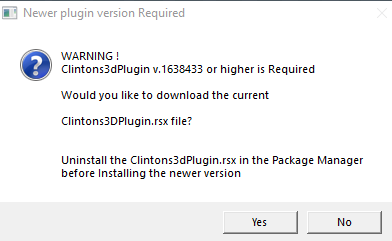
Thanks, I added an additional message
Critiques?
Newer plugin version Required.png
Newer plugin version Required.png (11.96 KiB) Viewed 1435 times
User avatar
clintonman
Captain
Posts: 5659
Joined: 21 May 2009, 21:08
Type the number ten into the box: 0
Location: California

Re: Final trueSpace 7.61 Beta 8 Unofficial Update

Post by clintonman »

trueBlue wrote: 29 Aug 2022, 17:43 Thanks, I added an additional message
Critiques?
Newer plugin version Required.png
Nope, looks good to me.
Clinton Reese

http://clintons3d.com
User avatar
trueBlue
Captain
Posts: 5548
Joined: 06 Jul 2009, 22:50
Type the number ten into the box: 10

Re: Final trueSpace 7.61 Beta 8 Unofficial Update

Post by trueBlue »

clintonman wrote: 29 Aug 2022, 16:21
trueBlue wrote: 29 Aug 2022, 15:32 Okay, thanks!

Discovered the meaning and importance of using:

Code: Select all

	if(typeof(Clintons3dPlugin) == "undefined") {
		System.Alert("Clintons3dPlugin is Required!\n\nInstall and Load the Clintons3dPlugin.rsx in the Package Manager");
	return;
	}
when using scripts with your plugin!
Just unloading the Clintons3dPlugin.rsx can cause will havoc

Even opening FunctionSets will nor pass the Syntax Check & Commit
This was a big eye opener for me!

I would like to add a Version check for the new Clintons3dRsView.rsx in the Clintons3dPlugins script
1638408 or higher
Can you take a look at it?
Looks like the only change from the earlier version was updated version number check for Clintons3dPlugin.

added version check for view plugin
rearranged code
renamed "PackageManager" function to "IsPackageManagerOpen"
gave magic value a meaningful variable name
added a comment to the code

Code: Select all

	//Note - replacing the current rsx will not update the version number found in the Plugins.xml file
	//				older versions must be removed from the package manager first
This is not working for me in Rosetta for some unknown reason
I have the init.js setup to call:
Activity.Run('Scripts/UUCommands/Clintons3dPlugin')
User avatar
clintonman
Captain
Posts: 5659
Joined: 21 May 2009, 21:08
Type the number ten into the box: 0
Location: California

Re: Final trueSpace 7.61 Beta 8 Unofficial Update

Post by clintonman »

trueBlue wrote: 30 Aug 2022, 15:01
clintonman wrote: 29 Aug 2022, 16:21
trueBlue wrote: 29 Aug 2022, 15:32 Okay, thanks!

Discovered the meaning and importance of using:

Code: Select all

	if(typeof(Clintons3dPlugin) == "undefined") {
		System.Alert("Clintons3dPlugin is Required!\n\nInstall and Load the Clintons3dPlugin.rsx in the Package Manager");
	return;
	}
when using scripts with your plugin!
Just unloading the Clintons3dPlugin.rsx can cause will havoc

Even opening FunctionSets will nor pass the Syntax Check & Commit
This was a big eye opener for me!

I would like to add a Version check for the new Clintons3dRsView.rsx in the Clintons3dPlugins script
1638408 or higher
Can you take a look at it?
Looks like the only change from the earlier version was updated version number check for Clintons3dPlugin.

added version check for view plugin
rearranged code
renamed "PackageManager" function to "IsPackageManagerOpen"
gave magic value a meaningful variable name
added a comment to the code

Code: Select all

	//Note - replacing the current rsx will not update the version number found in the Plugins.xml file
	//				older versions must be removed from the package manager first
This is not working for me in Rosetta for some unknown reason
I have the init.js setup to call:
Activity.Run('Scripts/UUCommands/Clintons3dPlugin')
Did you load UUCommands before trying to call it?
Clinton Reese

http://clintons3d.com
User avatar
trueBlue
Captain
Posts: 5548
Joined: 06 Jul 2009, 22:50
Type the number ten into the box: 10

Re: Final trueSpace 7.61 Beta 8 Unofficial Update

Post by trueBlue »

Okay found out what the problem was
Your newest script's name was changed to Clintons3dPlugins
The previous name was Clintons3dPlugin (Without the s)
Edit: Looks like I changed the name at some point :oops:
User avatar
trueBlue
Captain
Posts: 5548
Joined: 06 Jul 2009, 22:50
Type the number ten into the box: 10

Re: Final trueSpace 7.61 Beta 8 Unofficial Update

Post by trueBlue »

trueSpace7.61 Beta 8 Unofficial Update Version 9

Please test this prerelease

New Unofficial Update Instructions:
It is Required that you completely Uninstall and Install trueSpace7.61 Beta 8 to a clean directory
Install the PDF Manual for trueSpace (Optional but required before installing the Update)
Install the tS76_Vray1_54B8.exe (Optional but required before installing the Update)

If trueSpace is open, Close trueSpace

1.) Install the YafaRay v3.3.0 render engine
2.) Install the tS76PDF 'Manual for Caligari trueSpace' & tS76Video (Optional but required before installing the Update)
3.) Install tS76_Vray1_54B8.exe to C:\trueSpace761 (Optional but required before installing the Update)
4.) Install tS7.61B8.9.exe to C:\trueSpace761
Browse [...] to where you installed C:\trueSpace761, select its folder and then the [Extract] button
Select the [Yes to All] button
5.) Open trueSpace
6.) Select the [OK] button in the OptDetectors plugin Information dialog
iOpt plugin Alert.png
iOpt plugin Alert.png (7.44 KiB) Viewed 1185 times
.
7.) Press your keyboard's SHIFT CTRL R keys to Reset to Default Context
When trueSpace opens, select one of the layout tabs at the top
If Vray is installed:
8.) Press your keyboard's CTRL + F8 keys to open the Package Manager
Right click in the Package Manager and select Install New...
Open C:\trueSpace761\Vray_ts.rsx
Right click in the Package Manager's Vray Package and select Load
Close the Package Manager
9.) Close trueSpace

The included Clintons3dPlugin.dll v.1638433, Clintons3dPluginExt.dll v.1638413, Clintons3dRsView.dll v.1638409 and the OptDetectors.dll Author - Vladimir Sisolak, are in: C:\trueSpace761
WARNING: The init.js file Imports the above 4 plugins and should not be Installed from the Package Manager, including any other plugins with the same name that have the rsx extension
All scripts that check for these plugins with the rsx extension have been removed!
Package Manager.png
Package Manager.png (105.54 KiB) Viewed 1185 times
.
Plugins
Renamed from rsx to dll:
Clintons3dPlugin.dll
Clintons3dRsView.dll
Clintons3dPluginExt.dll
Add
OptDetectors.dll

Scripts
Update:
init.js
Loads the above 4 plugins

Scripts/Commands
Removed discontinued xml scripts
* Cut
* Paste
* Cam2Eye
* Eye2Cam
* Position2Eye
* CycleViews
* RotateISO
* RotatePOV
* ResetPose
* ResetContext
* Unencapsulate
* Unglue
* 3DEncapsulate
* 2DEncapsulate
* UnLookAt
* Copy
* Delete
* ShowAll
* HideAll
* Show
* Hide
* ShowCameraAndLights
* HideCameraAndLights
* DeleteORA
* CloseORASettings
* C3DRestore
* OpenD3DRenderPath
* FlattenVertices
* EyeCam
* EyeCamPref
* CopyWindow
* Fix NURBS ORA
* Show Object Attribs
* Show Object Attribs RMB
Note: All above * scripts now use UUCommands/Function Set(s)

preobjects
Update:
Yafaray Folder
MaterialEditor
UUCommands
Widgets
Toolbars
Model and Workspace lights with new ORA
Add
Custom preferences

Scripts/UUCommands
Add
Global Function Set

CustomCommands
Update:
WebServer
YafarayScripts
wsLayersGroup
wsLayersGroup4
Guard
Copy Attributes
Add:
JSON Function Set
Fix Bad Geometry
Bake Keyframes
Dimensions Author - Clinton Reese Sat Oct 22, 2022 10:44 am :worship:
Dimensions.png
Dimensions.png (96.42 KiB) Viewed 1185 times
.
Thank you, Clinton! :D

Rs Main Libraries
Add
OptDetectors
OptDetectors - Help objects
OptDetectors - Samples

Postprocess
Add
3D Icon Maker Author - Clinton Reese

Edit:
If this Unofficial Update fails to Load on Startup, Download and Install the Microsoft Visual C++ 2008 Service Pack 1 Redistributable Package
https://www.microsoft.com/en-us/downloa ... x?id=26368

Removed due to update
Saul
Senior Chief Petty Officer
Posts: 308
Joined: 22 May 2009, 16:50

Re: Final trueSpace 7.61 Beta 8 Unofficial Update

Post by Saul »

This latest freezes - for me - at splash screen, following the install instructions to Win10.
User avatar
trueBlue
Captain
Posts: 5548
Joined: 06 Jul 2009, 22:50
Type the number ten into the box: 10

Re: Final trueSpace 7.61 Beta 8 Unofficial Update

Post by trueBlue »

Saul wrote: 31 Oct 2022, 17:48 This latest freezes - for me - at splash screen, following the install instructions to Win10.
That is not good, sorry to hear!
I have Win10 too and have not had that happen to me

Do you have any pending Windows Update(s)?
If so, I have noticed it causes havoc with trueSpace, any and all versions!

Can you give me more exact details and the steps performed?
1) Uninstall trueSpace7.61 Beta 8
2) Delete the trueSpace76 folder in: C:\
3) Run tS761B8.exe and install to: C:\trueSpace76
Do not open trueSpace when the installation is complete
4) Run tS7.61B8.9.exe
Extract to: C:\trueSpace76
Overwrite all of the included files [Yes to All]
5) Open trueSpace
Reset to Default Context
When it opens, switch to Model
Switch to Workspace, and select one of the Workspace's layouts in the top tabs
6) Shutdown trueSpace
Saul
Senior Chief Petty Officer
Posts: 308
Joined: 22 May 2009, 16:50

Re: Final trueSpace 7.61 Beta 8 Unofficial Update

Post by Saul »

Morning trueBlue
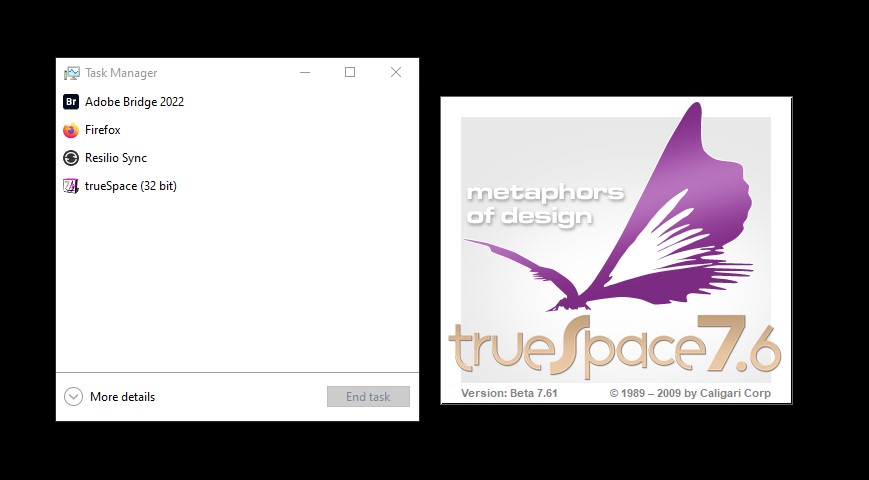
Followed your instructions for install but again splash screen only. As you can see the task manager shows trueSpace running....
Attachments
Screenshot 2022-11-01 091326.jpg
User avatar
trueBlue
Captain
Posts: 5548
Joined: 06 Jul 2009, 22:50
Type the number ten into the box: 10

Re: Final trueSpace 7.61 Beta 8 Unofficial Update

Post by trueBlue »

First check in the Task Manager for any running Rosetta Runner(s)
If so, select it and End Task
.
Default Context.png
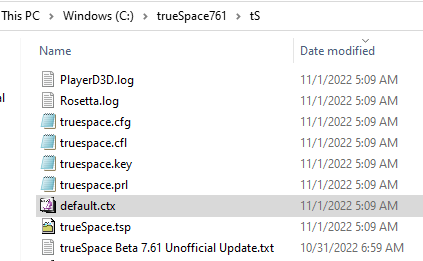
Can you upload the Rosetta.log?
If not, save a copy somewhere else, delete the default.ctx, and try to open trueSpace
Saul
Senior Chief Petty Officer
Posts: 308
Joined: 22 May 2009, 16:50

Re: Final trueSpace 7.61 Beta 8 Unofficial Update

Post by Saul »

Attached Rosetta text file, i assume this is the log? Ahhh it is , invalid for upload as attachment, i'll change the extension to .txt, that invalid too! Just gonna copy and paste.....

--[NEW_LOG_SESSION]-[11/01/22 13:22:25]-------------------------------------------------------------------------------------------------------------
13:22:25.216 INFO Registering Graph Package imported (v.1638401) 0x00000000 [RpKernel.cpp(771)]
13:22:25.216 INFO Graph Package imported 0x00000000 [RpKernel.cpp(729)]
13:22:25.234 INFO Registering FileIO Package imported (v.1638401) 0x00000000 [RpKernel.cpp(771)]
13:22:25.234 INFO FileIO Package imported 0x00000000 [RpKernel.cpp(729)]
13:22:25.253 INFO Registering Space 3D Package imported (v.1638401) 0x00000000 [RpKernel.cpp(771)]
13:22:25.254 INFO Space 3D Package imported 0x00000000 [RpKernel.cpp(729)]
13:22:25.291 INFO Registering Windows Manager Package imported (v.1638401) 0x00000000 [RpKernel.cpp(771)]
13:22:25.292 INFO Windows Manager Package imported 0x00000000 [RpKernel.cpp(729)]
13:22:25.309 INFO Registering Command Prompt Package imported (v.1638401) 0x00000000 [RpKernel.cpp(771)]
13:22:25.310 INFO Command Prompt Package imported 0x00000000 [RpKernel.cpp(729)]
13:22:25.933 INFO D3DView package version PlayerD3D_2008_01_27_c03 0x00000000 [RpView3D.cpp(176)]
13:22:25.933 INFO D3DView Build date 'May 21 2009', package timestamp 'Mon Jan 26 09:44:47 2009' 0x00000000 [RpView3D.cpp(183)]
13:22:25.933 INFO D3DView ATL Version '2048', Compiler version '1400' 0x00000000 [RpView3D.cpp(190)]
13:22:25.933 INFO Registering D3D View Package imported (v.1638401) 0x00000000 [RpKernel.cpp(771)]
13:22:25.937 INFO D3D View Package imported 0x00000000 [RpKernel.cpp(729)]
13:22:25.956 INFO Registering LinkEditor2 Package imported (v.1638401) 0x00000000 [RpKernel.cpp(771)]
13:22:25.956 INFO LinkEditor2 Package imported 0x00000000 [RpKernel.cpp(729)]
13:22:25.979 INFO Registering Math Package imported (v.1638401) 0x00000000 [RpKernel.cpp(771)]
13:22:25.980 INFO Math Package imported 0x00000000 [RpKernel.cpp(729)]
13:22:25.995 INFO Registering Import Package imported (v.1638401) 0x00000000 [RpKernel.cpp(771)]
13:22:25.995 INFO Import Package imported 0x00000000 [RpKernel.cpp(729)]
13:22:26.015 INFO Registering Script Object Package imported (v.1638401) 0x00000000 [RpKernel.cpp(771)]
13:22:26.015 INFO Script Object Package imported 0x00000000 [RpKernel.cpp(729)]
13:22:26.081 INFO Registering Common Data Package imported (v.1638401) 0x00000000 [RpKernel.cpp(771)]
13:22:26.081 INFO Common Data Package imported 0x00000000 [RpKernel.cpp(729)]
13:22:26.098 INFO Registering User Interface Package imported (v.1638401) 0x00000000 [RpKernel.cpp(771)]
13:22:26.099 INFO User Interface Package imported 0x00000000 [RpKernel.cpp(729)]
13:22:26.118 INFO Registering Tools Package imported (v.1638401) 0x00000000 [RpKernel.cpp(771)]
13:22:26.122 INFO Tools Package imported 0x00000000 [RpKernel.cpp(729)]
13:22:26.199 INFO Registering LwME Package imported (v.1638401) 0x00000000 [RpKernel.cpp(771)]
13:22:26.199 INFO LwME Package imported 0x00000000 [RpKernel.cpp(729)]
13:22:26.217 INFO Registering trueSpace Rosetta Bridge Package imported (v.1638401) 0x00000000 [RpKernel.cpp(771)]
13:22:26.217 INFO trueSpace Rosetta Bridge Package imported 0x00000000 [RpKernel.cpp(729)]
13:22:26.235 INFO Registering Network Package imported (v.1638402) 0x00000000 [RpKernel.cpp(771)]
13:22:26.236 INFO Network Package imported 0x00000000 [RpKernel.cpp(729)]
13:22:26.261 INFO Registering MediaDv Package imported (v.1638401) 0x00000000 [RpKernel.cpp(771)]
13:22:26.261 INFO MediaDv Package imported 0x00000000 [RpKernel.cpp(729)]
13:22:26.282 INFO Registering Widgets Package imported (v.1638401) 0x00000000 [RpKernel.cpp(771)]
13:22:26.284 INFO Widgets Package imported 0x00000000 [RpKernel.cpp(729)]
13:22:26.301 INFO Registering Mesh Modifiers Package imported (v.1638401) 0x00000000 [RpKernel.cpp(771)]
13:22:26.302 INFO Mesh Modifiers Package imported 0x00000000 [RpKernel.cpp(729)]
13:22:26.320 INFO Registering Physics Package imported (v.1638401) 0x00000000 [RpKernel.cpp(771)]
13:22:26.321 INFO Physics Package imported 0x00000000 [RpKernel.cpp(729)]
13:22:26.340 INFO Registering Character editor Package imported (v.1638401) 0x00000000 [RpKernel.cpp(771)]
13:22:26.340 INFO Character editor Package imported 0x00000000 [RpKernel.cpp(729)]
13:22:26.359 INFO Registering UV editor Package imported (v.1638401) 0x00000000 [RpKernel.cpp(771)]
13:22:26.360 INFO UV editor Package imported 0x00000000 [RpKernel.cpp(729)]
13:22:26.382 INFO Registering Library Package imported (v.1638401) 0x00000000 [RpKernel.cpp(771)]
13:22:26.382 INFO Library Package imported 0x00000000 [RpKernel.cpp(729)]
13:22:26.398 INFO Registering Record Package imported (v.1638401) 0x00000000 [RpKernel.cpp(771)]
13:22:26.398 INFO Record Package imported 0x00000000 [RpKernel.cpp(729)]
13:22:26.416 INFO Registering Anim Package imported (v.1638401) 0x00000000 [RpKernel.cpp(771)]
13:22:26.416 INFO Anim Package imported 0x00000000 [RpKernel.cpp(729)]
13:22:26.435 INFO Registering Library2 Package imported (v.1638401) 0x00000000 [RpKernel.cpp(771)]
13:22:26.435 INFO Library2 Package imported 0x00000000 [RpKernel.cpp(729)]
13:22:26.454 INFO Registering Avatar Package imported (v.1638401) 0x00000000 [RpKernel.cpp(771)]
13:22:26.454 INFO Avatar Package imported 0x00000000 [RpKernel.cpp(729)]
13:22:26.474 INFO Registering Clintons3D Package imported (v.1638433) 0x00000000 [RpKernel.cpp(771)]
13:22:26.475 INFO Clintons3D Package imported 0x00000000 [RpKernel.cpp(729)]
13:22:26.500 WARN Error: Microsoft JScript runtime error Description: Invalid procedure call or argument Error code: 0x800a0005 - (null) Line: 35, Char: 4 Script text: RsApp.ImportPackage('Clintons3dRsView.dll'); 0x80020101 [RsScript.cpp(188)]
13:22:26.500 INFO RsApp.RunScript('init.js') - 1313 ms 0x00000000 [RsSysCore.cpp(700)]
User avatar
trueBlue
Captain
Posts: 5548
Joined: 06 Jul 2009, 22:50
Type the number ten into the box: 10

Re: Final trueSpace 7.61 Beta 8 Unofficial Update

Post by trueBlue »

For some reason, trueSpace does not like the Clintons3dRsView.dll
RsApp.ImportPackage('Clintons3dRsView.dll');

Have tried deleting the default.ctx?
Have you tried the UU9 Standalone version?
Saul
Senior Chief Petty Officer
Posts: 308
Joined: 22 May 2009, 16:50

Re: Final trueSpace 7.61 Beta 8 Unofficial Update

Post by Saul »

Can't find a default.ctx, either in truespace761 dir or truespace761/ts. gonna try std
Same for std, i should add that the update tS7.61B8.8 works fine:


--[NEW_LOG_SESSION]-[11/01/22 14:02:26]-------------------------------------------------------------------------------------------------------------
14:02:26.584 INFO Registering Graph Package imported (v.1638401) 0x00000000 [RpKernel.cpp(771)]
14:02:26.584 INFO Graph Package imported 0x00000000 [RpKernel.cpp(729)]
14:02:26.602 INFO Registering FileIO Package imported (v.1638401) 0x00000000 [RpKernel.cpp(771)]
14:02:26.602 INFO FileIO Package imported 0x00000000 [RpKernel.cpp(729)]
14:02:26.623 INFO Registering Space 3D Package imported (v.1638401) 0x00000000 [RpKernel.cpp(771)]
14:02:26.624 INFO Space 3D Package imported 0x00000000 [RpKernel.cpp(729)]
14:02:26.663 INFO Registering Windows Manager Package imported (v.1638401) 0x00000000 [RpKernel.cpp(771)]
14:02:26.663 INFO Windows Manager Package imported 0x00000000 [RpKernel.cpp(729)]
14:02:26.682 INFO Registering Command Prompt Package imported (v.1638401) 0x00000000 [RpKernel.cpp(771)]
14:02:26.682 INFO Command Prompt Package imported 0x00000000 [RpKernel.cpp(729)]
14:02:27.393 INFO D3DView package version PlayerD3D_2008_01_27_c03 0x00000000 [RpView3D.cpp(176)]
14:02:27.394 INFO D3DView Build date 'May 21 2009', package timestamp 'Mon Jan 26 09:44:47 2009' 0x00000000 [RpView3D.cpp(183)]
14:02:27.394 INFO D3DView ATL Version '2048', Compiler version '1400' 0x00000000 [RpView3D.cpp(190)]
14:02:27.394 INFO Registering D3D View Package imported (v.1638401) 0x00000000 [RpKernel.cpp(771)]
14:02:27.398 INFO D3D View Package imported 0x00000000 [RpKernel.cpp(729)]
14:02:27.417 INFO Registering LinkEditor2 Package imported (v.1638401) 0x00000000 [RpKernel.cpp(771)]
14:02:27.417 INFO LinkEditor2 Package imported 0x00000000 [RpKernel.cpp(729)]
14:02:27.442 INFO Registering Math Package imported (v.1638401) 0x00000000 [RpKernel.cpp(771)]
14:02:27.442 INFO Math Package imported 0x00000000 [RpKernel.cpp(729)]
14:02:27.458 INFO Registering Import Package imported (v.1638401) 0x00000000 [RpKernel.cpp(771)]
14:02:27.459 INFO Import Package imported 0x00000000 [RpKernel.cpp(729)]
14:02:27.479 INFO Registering Script Object Package imported (v.1638401) 0x00000000 [RpKernel.cpp(771)]
14:02:27.479 INFO Script Object Package imported 0x00000000 [RpKernel.cpp(729)]
14:02:27.535 INFO Registering Common Data Package imported (v.1638401) 0x00000000 [RpKernel.cpp(771)]
14:02:27.535 INFO Common Data Package imported 0x00000000 [RpKernel.cpp(729)]
14:02:27.553 INFO Registering User Interface Package imported (v.1638401) 0x00000000 [RpKernel.cpp(771)]
14:02:27.553 INFO User Interface Package imported 0x00000000 [RpKernel.cpp(729)]
14:02:27.573 INFO Registering Tools Package imported (v.1638401) 0x00000000 [RpKernel.cpp(771)]
14:02:27.577 INFO Tools Package imported 0x00000000 [RpKernel.cpp(729)]
14:02:27.595 INFO Registering Network Package imported (v.1638402) 0x00000000 [RpKernel.cpp(771)]
14:02:27.596 INFO Network Package imported 0x00000000 [RpKernel.cpp(729)]
14:02:27.621 INFO Registering MediaDv Package imported (v.1638401) 0x00000000 [RpKernel.cpp(771)]
14:02:27.621 INFO MediaDv Package imported 0x00000000 [RpKernel.cpp(729)]
14:02:27.643 INFO Registering Widgets Package imported (v.1638401) 0x00000000 [RpKernel.cpp(771)]
14:02:27.644 INFO Widgets Package imported 0x00000000 [RpKernel.cpp(729)]
14:02:27.662 INFO Registering Mesh Modifiers Package imported (v.1638401) 0x00000000 [RpKernel.cpp(771)]
14:02:27.663 INFO Mesh Modifiers Package imported 0x00000000 [RpKernel.cpp(729)]
14:02:27.681 INFO Registering Physics Package imported (v.1638401) 0x00000000 [RpKernel.cpp(771)]
14:02:27.682 INFO Physics Package imported 0x00000000 [RpKernel.cpp(729)]
14:02:27.700 INFO Registering Character editor Package imported (v.1638401) 0x00000000 [RpKernel.cpp(771)]
14:02:27.701 INFO Character editor Package imported 0x00000000 [RpKernel.cpp(729)]
14:02:27.720 INFO Registering UV editor Package imported (v.1638401) 0x00000000 [RpKernel.cpp(771)]
14:02:27.720 INFO UV editor Package imported 0x00000000 [RpKernel.cpp(729)]
14:02:27.737 INFO Registering Record Package imported (v.1638401) 0x00000000 [RpKernel.cpp(771)]
14:02:27.738 INFO Record Package imported 0x00000000 [RpKernel.cpp(729)]
14:02:27.756 INFO Registering Anim Package imported (v.1638401) 0x00000000 [RpKernel.cpp(771)]
14:02:27.756 INFO Anim Package imported 0x00000000 [RpKernel.cpp(729)]
14:02:27.775 INFO Registering Library2 Package imported (v.1638401) 0x00000000 [RpKernel.cpp(771)]
14:02:27.776 INFO Library2 Package imported 0x00000000 [RpKernel.cpp(729)]
14:02:27.794 INFO Registering Avatar Package imported (v.1638401) 0x00000000 [RpKernel.cpp(771)]
14:02:27.795 INFO Avatar Package imported 0x00000000 [RpKernel.cpp(729)]
14:02:27.853 INFO Registering LwME Package imported (v.1638401) 0x00000000 [RpKernel.cpp(771)]
14:02:27.853 INFO LwME Package imported 0x00000000 [RpKernel.cpp(729)]
14:02:27.871 INFO Registering Clintons3D Package imported (v.1638433) 0x00000000 [RpKernel.cpp(771)]
14:02:27.872 INFO Clintons3D Package imported 0x00000000 [RpKernel.cpp(729)]
14:02:27.906 WARN Error: Microsoft JScript runtime error Description: Invalid procedure call or argument Error code: 0x800a0005 - (null) Line: 32, Char: 0 Script text: RsApp.ImportPackage('Clintons3dRsView.dll'); 0x80020101 [RsScript.cpp(188)]
14:02:27.906 INFO RsApp.RunScript('init.js') - 1359 ms 0x00000000 [RsSysCore.cpp(700)]
User avatar
trueBlue
Captain
Posts: 5548
Joined: 06 Jul 2009, 22:50
Type the number ten into the box: 10

Re: Final trueSpace 7.61 Beta 8 Unofficial Update

Post by trueBlue »

How many trueSpace versions do you have installed?
Do you have the tS7.61B8.8 version installed and if so to what directory?
Can you share a screenshot of your C Drive?
Saul
Senior Chief Petty Officer
Posts: 308
Joined: 22 May 2009, 16:50

Re: Final trueSpace 7.61 Beta 8 Unofficial Update

Post by Saul »

At the moment i have only the test directory trueSpaces, trueSpace761 and trueSpace761Std, how much of the c drive you want to see?
Attachments
Screenshot 2022-11-01 142446.jpg
Screenshot 2022-11-01 142446.jpg (11.3 KiB) Viewed 1137 times
User avatar
Finis
Captain
Posts: 5410
Joined: 21 May 2009, 18:26
Type the number ten into the box: 0
Location: America!

Re: Final trueSpace 7.61 Beta 8 Unofficial Update

Post by Finis »

Saul is here!
v ... 248#p63248
I prefer dangerous freedom over peaceful servitude. -- Thomas Jefferson/Jean Jacques Rousseau
User avatar
trueBlue
Captain
Posts: 5548
Joined: 06 Jul 2009, 22:50
Type the number ten into the box: 10

Re: Final trueSpace 7.61 Beta 8 Unofficial Update

Post by trueBlue »

You mentioned that you could not find any default.ctx files
Maybe, you need to open trueSpace after a clean installation before running the Unofficial Update
Saul
Senior Chief Petty Officer
Posts: 308
Joined: 22 May 2009, 16:50

Re: Final trueSpace 7.61 Beta 8 Unofficial Update

Post by Saul »

OK
Uninstalled both 761 and 761Std, deleted folders
restarted win10
installed tS761B8
opened and closed it, this created default.ctx
extracted tS7.61B8.9, allowed all overwrites
deleted default.ctx
started tS
trueSpace freezes at splashscreen
User avatar
trueBlue
Captain
Posts: 5548
Joined: 06 Jul 2009, 22:50
Type the number ten into the box: 10

Re: Final trueSpace 7.61 Beta 8 Unofficial Update

Post by trueBlue »

Saul wrote: 01 Nov 2022, 15:03 OK
Uninstalled both 761 and 761Std, deleted folders
restarted win10
installed tS761B8
opened and closed it, this created default.ctx
extracted tS7.61B8.9, allowed all overwrites
deleted default.ctx
started tS
trueSpace freezes at splashscreen
Looking at your above steps...
After you, "extracted tS7.61B8.9, allowed all overwrites", did you Reset the Default Context?
You should have not "deleted default.ctx" before starting tS

If, "trueSpace freezes at splashscreen", End Task, delete the default.ctx, and open trueSpace
Saul
Senior Chief Petty Officer
Posts: 308
Joined: 22 May 2009, 16:50

Re: Final trueSpace 7.61 Beta 8 Unofficial Update

Post by Saul »

Not sure how to reset the default context if I can't open tS and presumably after install of barebones tSB8 the context is default
User avatar
clintonman
Captain
Posts: 5659
Joined: 21 May 2009, 21:08
Type the number ten into the box: 0
Location: California

Re: Final trueSpace 7.61 Beta 8 Unofficial Update

Post by clintonman »

Saul, were you able to run the web server in UU8?
If not then this part never worked for you.

If I rename the dll file I get the same error as Saul. So it's failing to load it. In UU8 it loads as rsx so any errors wouldn't stop tS from starting.

I edited the init.js with try catch and it gets by the artificial error I created and tS starts
"try{RsApp.ImportPackage('Clintons3dRsView.dll');}catch(e){}"

It sounds like a dll hell error
From web page, http://clintons3d.com/plugins/truespace ... webui.html
"Note: may require VC++ runtime 2008 sp1 (2010) from Microsoft. Get it if the plugins do not install."

This may fix the problem:

Microsoft Visual C++ 2008 Service Pack 1 Redistributable Package
https://www.microsoft.com/en-us/downloa ... x?id=26368
Clinton Reese

http://clintons3d.com
User avatar
trueBlue
Captain
Posts: 5548
Joined: 06 Jul 2009, 22:50
Type the number ten into the box: 10

Re: Final trueSpace 7.61 Beta 8 Unofficial Update

Post by trueBlue »

Saul wrote: 01 Nov 2022, 15:30 Not sure how to reset the default context if I can't open tS and presumably after install of barebones tSB8 the context is default
Ah, right
I am at a lost Saul
The only other thing I can think of is your downloaded files are corrupted
Clinton and I have working UU9 installations using the rsx plugins as dll(s) so I am not sure why it is not working for you
I am in the process of uploading some new updates, later today
Saul
Senior Chief Petty Officer
Posts: 308
Joined: 22 May 2009, 16:50

Re: Final trueSpace 7.61 Beta 8 Unofficial Update

Post by Saul »

'
It sounds like a dll hell error
From web page, http://clintons3d.com/plugins/truespace ... webui.html
"Note: may require VC++ runtime 2008 sp1 (2010) from Microsoft. Get it if the plugins do not install."

This may fix the problem:

Microsoft Visual C++ 2008 Service Pack 1 Redistributable Package
https://www.microsoft.com/en-us/downloa ... x?id=26368'

Tried that and no joy, i'll wait for the updates coming soon.....
User avatar
trueBlue
Captain
Posts: 5548
Joined: 06 Jul 2009, 22:50
Type the number ten into the box: 10

Re: Final trueSpace 7.61 Beta 8 Unofficial Update

Post by trueBlue »

Saul wrote: 01 Nov 2022, 18:31 '
It sounds like a dll hell error
From web page, http://clintons3d.com/plugins/truespace ... webui.html
"Note: may require VC++ runtime 2008 sp1 (2010) from Microsoft. Get it if the plugins do not install."

This may fix the problem:

Microsoft Visual C++ 2008 Service Pack 1 Redistributable Package
https://www.microsoft.com/en-us/downloa ... x?id=26368'

Tried that and no joy, i'll wait for the updates coming soon.....
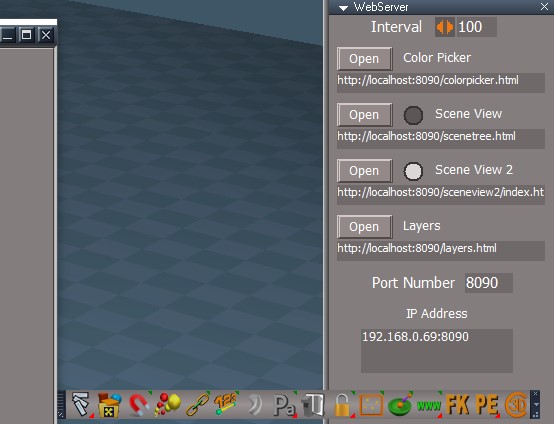
Here is an updated trueSpace 7.61 Beta 8 Unofficial Update version 9
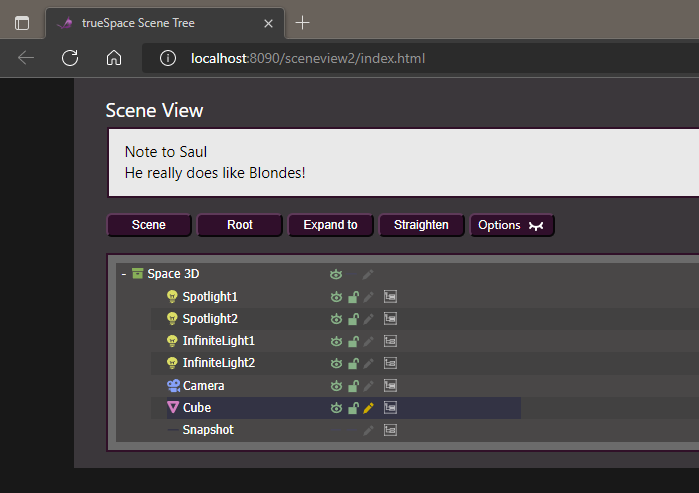
If trueSpace opens for you, please try opening Scene View 2
Open Scene View 2.png
.
If it does not, please take a peek at the Rosetta.Log
Should see something like:
Clintons3dRsView Package - Failed to Import

Removed due to update
Saul
Senior Chief Petty Officer
Posts: 308
Joined: 22 May 2009, 16:50

Re: Final trueSpace 7.61 Beta 8 Unofficial Update

Post by Saul »

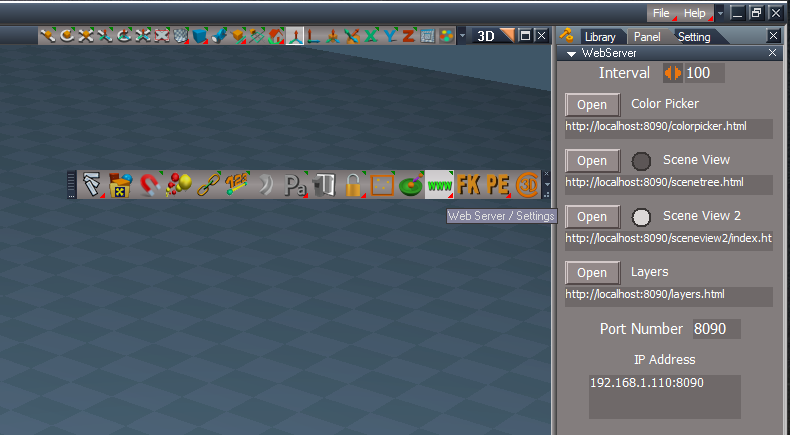
That works! Slightly different IP address:
Attachments
Screenshot 2022-11-01 201715.jpg
Saul
Senior Chief Petty Officer
Posts: 308
Joined: 22 May 2009, 16:50

Re: Final trueSpace 7.61 Beta 8 Unofficial Update

Post by Saul »

How do i get rid of the windows opened by scene view 2, restarting tS doesn't work:
EDIT Changing layout tabs does it!
Attachments
Screenshot 2022-11-01 202949.jpg
User avatar
trueBlue
Captain
Posts: 5548
Joined: 06 Jul 2009, 22:50
Type the number ten into the box: 10

Re: Final trueSpace 7.61 Beta 8 Unofficial Update

Post by trueBlue »

Saul wrote: 01 Nov 2022, 20:26 How do i get rid of the windows opened by scene view 2, restarting tS doesn't work:
EDIT Changing layout tabs does it!
Looks like the Clintons3dRsView plugin did not Import for you and or your PC does not support it
Scene View 2 should have opened your default browser
Scene View 2.png
.
Look at the Rosetta.Log
Do you see a Warning?
Clintons3dRsView Package - Failed to Import
User avatar
clintonman
Captain
Posts: 5659
Joined: 21 May 2009, 21:08
Type the number ten into the box: 0
Location: California

Re: Final trueSpace 7.61 Beta 8 Unofficial Update

Post by clintonman »

I finished my investigation. Probably won't help Saul but is useful information.

Starting with a bare winXP virtual machine
Load tS rosetta and the UU9 for rosetta
It failed just like Saul, frozen
I edited the init files with the try catch and tS loaded without any of the custom plugins
Downloaded and installed vcredist_x86 from the link
Now all the Clintons3d plugins loaded and web scene works - not scene view 2 which does not work in winxp
Optdetector did not load
tried manual load of optdetector and no good, result is no line added to the package manager
downloaded and installed optdetector and then it worked

renamed the tS folder and started over
load rosetta and UU9
start tS and frozen
copy the "Microsoft.VC80.CRT.manifest" from the old tS folder
now optdetect loaded, did some cleanup and fidlling around and optdetect loaded as system

conclusions:

So 2 things are missing for a normal working installation

vcredist_x86 from the previous link so windows knows how to handle the 32bit plugin files
add "Microsoft.VC80.CRT.manifest" to the UU9 installation to complete the optdetectors
Clinton Reese

http://clintons3d.com
User avatar
trueBlue
Captain
Posts: 5548
Joined: 06 Jul 2009, 22:50
Type the number ten into the box: 10

Re: Final trueSpace 7.61 Beta 8 Unofficial Update

Post by trueBlue »

Thanks Clinton!
I have never installed the vcredist_x86 on my PC and your plugins have always worked for me, going on several years now :o
I have had iOptDetectors installed for several years as well, so I had the Microsoft.VC80.CRT.manifest on my C drive, not in the UU9 installations
Saul
Senior Chief Petty Officer
Posts: 308
Joined: 22 May 2009, 16:50

Re: Final trueSpace 7.61 Beta 8 Unofficial Update

Post by Saul »

'Do you see a Warning? Clintons3dRsView Package - Failed to Import'
Yup:
Attachments
Screenshot 2022-11-01 214130.jpg
User avatar
clintonman
Captain
Posts: 5659
Joined: 21 May 2009, 21:08
Type the number ten into the box: 0
Location: California

Re: Final trueSpace 7.61 Beta 8 Unofficial Update

Post by clintonman »

trueBlue wrote: 01 Nov 2022, 21:32 Thanks Clinton!
I have never installed the vcredist_x86 on my PC and your plugins have always worked for me, going on several years now :o
I have had iOptDetectors installed for several years as well, so I had the Microsoft.VC80.CRT.manifest on my C drive, not in the UU9 installations
Yeah, the Microsoft.VC80.CRT.manifest is a weird one. Wasn't expecting it to matter in any way.
Various versions of vcredist_x86 gets installed by different programs, like tS installs a 2005 version, so some other program you installed over the years installed it for you. It all depends on what tool was used to make them. There's the 2005, the original 2008, the updated 2008, 2010, 2013, 2017,2019, 2022 versions and if they don't match your program your program doesn't work. Not usually an issue for them since installers almost always include them.
Clinton Reese

http://clintons3d.com
Saul
Senior Chief Petty Officer
Posts: 308
Joined: 22 May 2009, 16:50

Re: Final trueSpace 7.61 Beta 8 Unofficial Update

Post by Saul »

Probably wrong place to post this and me happy to delete and redirect.....
There used to be a tool in tS7.61 update objects that allowed user to turn off the toolbar shown here:
Screenshot 2022-11-01 220403.jpg
Where's it gone, been renamed?
Also, i don't have yafaRay installed. My saved layout has the yafaRay libraries removed, they get reloaded to my layout on restart.
User avatar
trueBlue
Captain
Posts: 5548
Joined: 06 Jul 2009, 22:50
Type the number ten into the box: 10

Re: Final trueSpace 7.61 Beta 8 Unofficial Update

Post by trueBlue »

Saul wrote: 01 Nov 2022, 22:13 Probably wrong place to post this and me happy to delete and redirect.....
There used to be a tool in tS7.61 update objects that allowed user to turn off the toolbar shown here:
Screenshot 2022-11-01 220403.jpg
Where's it gone, been renamed?
Also, i don't have yafaRay installed. My saved layout has the yafaRay libraries removed, they get reloaded to my layout on restart.
It is still there Saul
Load the Blue toolbox into the Link Editor
Blue toolbox.png
Blue toolbox.png (20.89 KiB) Viewed 1298 times
.
You can save it with your scenes if you want
You should be able to close the libraries and save your layout
User avatar
trueBlue
Captain
Posts: 5548
Joined: 06 Jul 2009, 22:50
Type the number ten into the box: 10

Re: Final trueSpace 7.61 Beta 8 Unofficial Update

Post by trueBlue »

@ Clinton
UUCommands
UUFunctionSet/function OpenFolder()
I noticed that, if the Animation Folder or whatever Folder is set in the xml file, does not exist, the OpenFolder function does not work
Is there a way to give an Alert if it does not exist?
Something like:
var dir = System.GetMainDir();
if(!fso.FolderExists
System.Alert("Create an Animation Folder in " + dir);
User avatar
clintonman
Captain
Posts: 5659
Joined: 21 May 2009, 21:08
Type the number ten into the box: 0
Location: California

Re: Final trueSpace 7.61 Beta 8 Unofficial Update

Post by clintonman »

trueBlue wrote: 01 Nov 2022, 23:03 @ Clinton
UUCommands
UUFunctionSet/function OpenFolder()
I noticed that, if the Animation Folder or whatever Folder is set in the xml file, does not exist, the OpenFolder function does not work
Is there a way to give an Alert if it does not exist?
Something like:
var dir = System.GetMainDir();
if(!fso.FolderExists
System.Alert("Create an Animation Folder in " + dir);
This should do it.

Code: Select all

// Use: FileRender RClickCommand "Opens the Render to File Folder"
function OpenFolder() 
{
	var fso = new ActiveXObject("Scripting.FileSystemObject");
	var xmldoc = new ActiveXObject("Msxml2.DOMDocument.6.0");
	xmldoc.load(System.GetMainDir() + "\\Scripts\\D3DView.RenderToFile.Settings.xml");
	var settings = findChildByName(xmldoc.documentElement, "D3DVIEW_RENDERTOFILE_CURRENT");
	var FILENAME = settings.getAttribute("FILENAME");
	var shellApp = new ActiveXObject("Shell.Application");

	var parentFolder = fso.GetParentFolderName(FILENAME);
	if(!fso.FolderExists(parentFolder)) {
		folderName = fso.GetBaseName(parentFolder)
		System.Alert("Create folder '" + folderName + "' in " + fso.GetParentFolderName(parentFolder));
	}
	shellApp.Open(fso.GetParentFolderName(FILENAME));
}
Clinton Reese

http://clintons3d.com
User avatar
trueBlue
Captain
Posts: 5548
Joined: 06 Jul 2009, 22:50
Type the number ten into the box: 10

Re: Final trueSpace 7.61 Beta 8 Unofficial Update

Post by trueBlue »

Perfecto! :worship:
:D Thank you!
User avatar
trueBlue
Captain
Posts: 5548
Joined: 06 Jul 2009, 22:50
Type the number ten into the box: 10

Re: Final trueSpace 7.61 Beta 8 Unofficial Update

Post by trueBlue »

trueSpace7.61 Beta 8 Unofficial Update Version 9

Please test this prerelease

New Unofficial Update Instructions:
It is Required that you completely Uninstall and Install trueSpace7.61 Beta 8 to a clean directory
Install the PDF Manual for trueSpace (Optional but required before installing the Update)
Install the tS76_Vray1_54B8.exe (Optional but required before installing the Update)


If trueSpace is open, Close trueSpace

1.) Install the YafaRay v3.3.0 render engine
2.) Install the tS76PDF 'Manual for Caligari trueSpace' & tS76Video (Optional but required before installing the Update)
3.) Install tS76_Vray1_54B8.exe to C:\trueSpace761 (Optional but required before installing the Update)
4.) Install tS7.61B8.9.exe to C:\trueSpace761
Browse [...] to where you installed C:\trueSpace761, select its folder and then the [Extract] button
Select the [Yes to All] button
5.) Open trueSpace
6.) Select the [OK] button in the OptDetectors plugin Information dialog

.
7.) Press your keyboard's SHIFT CTRL R keys to Reset to Default Context
When trueSpace opens, select one of the layout tabs at the top
If Vray is installed:
8.) Press your keyboard's CTRL + F8 keys to open the Package Manager
Right click in the Package Manager and select Install New...
Open C:\trueSpace761\Vray_ts.rsx
Right click in the Package Manager's Vray Package and select Load
Close the Package Manager
9.) Close trueSpace

The included Clintons3dPlugin.dll v.1638433, Clintons3dPluginExt.dll v.1638413, Clintons3dRsView.dll v.1638409 and the OptDetectors.dll Author - Vladimir Sisolak, are in: C:\trueSpace761
WARNING: The init.js file Imports the above 4 plugins and should not be Installed from the Package Manager, including any other plugins with the same name that have the rsx extension
All scripts that check for these plugins with the rsx extension have been removed!

Updates:

CustomCommands
Bake Keyframes 'Update code'

Hierarchy/MoveToScene
Add

Code: Select all

if(Node.SelectedCount() == 0) {
	//System.Alert("Selection is required")
	return;
}

if(!Node.ConExists(Node.FirstSelected(), 'WldMatrix')) {
	//System.Alert("3D Object is required")
	return;
}
SnappingScripts
Changed the Status Message(s)
Example:
Select the Destination Object - RMB before selection to Cancel, RMB to Commit, RMB on cube to Cancel
Note: You can also LMB select the Cube to Commit

UUCommands
Removed status message from FlattenObjects() function
Add: Close All Windows, Close All Toolbars, and Reset Toolbars scripts

Add
Snapshot
LMB - Set Render to File
Set - Frames to Render
Render

Uncheck - Reset Start Frame to render from the last Frame rendered
Note: Add addition Frames to Render from the last Frame rendered
Cancel- Stops the Activity and Closes the panel
Press your keyboard Esc key to Stop the Activity while rendering

Add
Vray Render to File
LMB - Set Render to File
Set - Frames to Render
Render

Uncheck - Reset Start Frame to render from the last Frame rendered
Note: Add addition Frames to Render from the last Frame rendered
Cancel- Stops the Activity and Closes the panel
Press your keyboard Esc key to Stop the Activity while rendering
Tip: Recommend that you set your render view's Ground to None

About: Snapshot & Vray Render to File
Allows you to render a sequence if images while Activities, Timers, and Scripts are running that do not interupt this rendering process, like scripts that call Alerts, Dialogs, etc...
Caution: If you do not Set Render to File first before Render, you might end up with images created in the last Saved file from trueSpace's File Menu - File/Save, which is the most Recent File
It is only necessary to Set Render to File on the first run or when you change the place to Render -> Savein: [Folder]

Removed Red(), Blue(), Gold, and Cam() functions
Note: Pressing Undo after running the above functions, opened another duplicate toolbar
For whatever reason it works as expected from script but not from a function
Add Red Toolbar, Blue Toolbar, Clintons Toolbar, and Camera Toolbar scripts

Shear/Freeze
Add: Activity.Run(System.ThisOwner + '/Get Shear')
Active = false

Rs Main Libraries/Postprocess
Scene Animator FX
Updated to use incorporated Snapshot 'Render to File'

Rs Main Libraries/Objects - tS7.61 Update objects
Sequence Player 'Update to use iOpti View'

Widgets/Tools
Removed PickFaceWidget & PickVertexWidget
ObjectPickingWidget
Changed Sphere to Blue Cube and removed all other widget objects
Object Snapping Widget.png
Object Snapping Widget.png (35.64 KiB) Viewed 1251 times
.
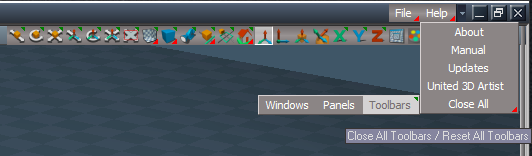
Toolbars/File Menu/Help/About
Replaced Alert with Status Message
Close All
Add Windows and Toolbars buttons
Close All.png
.
Toolbars/CustomToolbar
CustomToolbar.png
CustomToolbar.png (10.02 KiB) Viewed 1251 times
Add Snapshot, Vray Render to File, and D3D Render
Note: Vray Render to File will not open unless there is a Vray scene
It will not Render unless Vray is the Offline Renderer

preobjects
Renderers 'Update code and messaging'
C3DReset 'Updated code'
Note: Reset to Default Context will Load Vray as the Offline Renderer, if Vray exist in the scene
Select a layout from the top Tabs

Main Directory
Add
Microsoft.VC80.CRT.manifest

If the plugins do not Load, Download and Install the Microsoft Visual C++ 2008 Service Pack 1 Redistributable Package
https://www.microsoft.com/en-us/downloa ... x?id=26368

Removed due to update
User avatar
trueBlue
Captain
Posts: 5548
Joined: 06 Jul 2009, 22:50
Type the number ten into the box: 10

Re: Final trueSpace 7.61 Beta 8 Unofficial Update

Post by trueBlue »

trueSpace7.61 Beta 8 Unofficial Update Version 9

Please test this prerelease

New Unofficial Update Instructions:
It is Required that you completely Uninstall and Install trueSpace7.61 Beta 8 to a clean directory
Install the PDF Manual for trueSpace (Optional but required before installing the Update)
Install the tS76_Vray1_54B8.exe (Optional but required before installing the Update)


If trueSpace is open, Close trueSpace

1.) Install the YafaRay v3.3.0 render engine
2.) Install the tS76PDF 'Manual for Caligari trueSpace' & tS76Video (Optional but required before installing the Update)
3.) Install tS76_Vray1_54B8.exe to C:\trueSpace761 (Optional but required before installing the Update)
4.) Install tS7.61B8.9.exe to C:\trueSpace761
Browse [...] to where you installed C:\trueSpace761, select its folder and then the [Extract] button
Select the [Yes to All] button
5.) Open trueSpace
6.) Select the [OK] button in the OptDetectors plugin Information dialog
7.) Press your keyboard's SHIFT CTRL R keys to Reset to Default Context
When trueSpace opens, select one of the layout tabs at the top
If Vray is installed:
8.) Press your keyboard's CTRL + F8 keys to open the Package Manager
Right click in the Package Manager and select Install New...
Open C:\trueSpace761\Vray_ts.rsx
Right click in the Package Manager's Vray Package and select Load
Close the Package Manager
9.) Close trueSpace

The included Clintons3dPlugin.dll v.1638433, Clintons3dPluginExt.dll v.1638413, Clintons3dRsView.dll v.1638409 and the OptDetectors.dll Author - Vladimir Sisolak, are in: C:\trueSpace761
WARNING: The init.js file Imports the above 4 plugins and should not be Installed from the Package Manager, including any other plugins with the same name that have the rsx extension
All scripts that check for these plugins with the rsx extension have been removed!

Updates:

CustomCommands
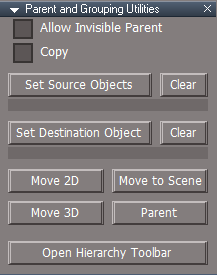
Hierarchy
Update panel, OpenPanel, & MoveToScene scripts
Add: Clear buttons to clear selection
Parenting panel.png
Parenting panel.png (9.02 KiB) Viewed 1234 times
UUCommands
Encapsulate
Add: Move 3D Objects to Scene script 'Modified MoveToScene script'

If the plugins do not Load, Download and Install the Microsoft Visual C++ 2008 Service Pack 1 Redistributable Package
https://www.microsoft.com/en-us/downloa ... x?id=26368

Removed due to update
User avatar
trueBlue
Captain
Posts: 5548
Joined: 06 Jul 2009, 22:50
Type the number ten into the box: 10

Re: Final trueSpace 7.61 Beta 8 Unofficial Update

Post by trueBlue »

trueSpace7.61 Beta 8 Unofficial Update Version 9

Please test this prerelease

New Unofficial Update Instructions:
It is Required that you completely Uninstall and Install trueSpace7.61 Beta 8 to a clean directory
Install the PDF Manual for trueSpace (Optional but required before installing the Update)
Install the tS76_Vray1_54B8.exe (Optional but required before installing the Update)


If trueSpace is open, Close trueSpace

1.) Install the YafaRay v3.3.0 render engine
2.) Install the tS76PDF 'Manual for Caligari trueSpace' & tS76Video (Optional but required before installing the Update)
3.) Install tS76_Vray1_54B8.exe to C:\trueSpace761 (Optional but required before installing the Update)
4.) Install tS7.61B8.9.exe to C:\trueSpace761
Browse [...] to where you installed C:\trueSpace761, select its folder and then the [Extract] button
Select the [Yes to All] button
5.) Open trueSpace
6.) Select the [OK] button in the OptDetectors plugin Information dialog
7.) Press your keyboard's SHIFT CTRL R keys to Reset to Default Context
When trueSpace opens, select one of the layout tabs at the top
If Vray is installed:
8.) Press your keyboard's CTRL + F8 keys to open the Package Manager
Right click in the Package Manager and select Install New...
Open C:\trueSpace761\Vray_ts.rsx
Right click in the Package Manager's Vray Package and select Load
Close the Package Manager
9.) Close trueSpace

The included Clintons3dPlugin.dll v.1638433, Clintons3dPluginExt.dll v.1638413, Clintons3dRsView.dll v.1638409 and the OptDetectors.dll Author - Vladimir Sisolak, are in: C:\trueSpace761
WARNING: The init.js file Imports the above 4 plugins and should not be Installed from the Package Manager, including any other plugins with the same name that have the rsx extension
All scripts that check for these plugins with the rsx extension have been removed!

Updates:

CustomCommands
Hierarchy/Hierarchy Function Set
Parent & Unparent functions - Fixed Status message if more than one object is selected
Convert - Node.Delete & Node.Copy to util.Delete & util.Copy

Hierarchy/MoveToScene script
Add

Code: Select all

if(!theNode.match(Space.CurrentScene())) {
util.SetStatusMessage(' Selection is not within the Scene  ', 5000)
return;
}
Toolbars/
ClintonToolbar
ParentingToolbar
Changed the Parent & Unparent icon to match the other icons
Parenting toolbar.png
Parenting toolbar.png (9.31 KiB) Viewed 1186 times
.
Widgets/Tools/View Widget
Rotate X 'Blue'
RB - Open Link Editor

Open LE script
Add
LE.OpenLocation(Space.CurrentScene())


If the plugins do not Load, Download and Install the Microsoft Visual C++ 2008 Service Pack 1 Redistributable Package
https://www.microsoft.com/en-us/downloa ... x?id=26368

Removed due to update
Saul
Senior Chief Petty Officer
Posts: 308
Joined: 22 May 2009, 16:50

Re: Final trueSpace 7.61 Beta 8 Unofficial Update

Post by Saul »

Can't get the bounding box widget to open in this 8.9
User avatar
trueBlue
Captain
Posts: 5548
Joined: 06 Jul 2009, 22:50
Type the number ten into the box: 10

Re: Final trueSpace 7.61 Beta 8 Unofficial Update

Post by trueBlue »

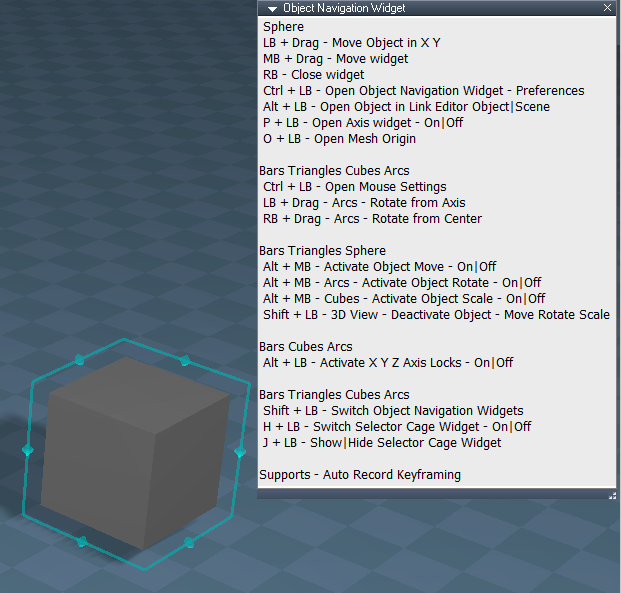
Object Navigation Widget(S)

Sphere Bars Triangles Cubes Arcs
I + LB - Help

Bars Triangles Cubes Arcs
Shift + LB - Switch Object Navigation Widgets
H + LB - Switch - Selector Cage Widget - On|Off
J + LB - Show|Hide Selector Cage Widget
ONW Help.png
User avatar
trueBlue
Captain
Posts: 5548
Joined: 06 Jul 2009, 22:50
Type the number ten into the box: 10

Re: Final trueSpace 7.61 Beta 8 Unofficial Update

Post by trueBlue »

trueSpace7.61 Beta 8 Unofficial Update Version 9

Please test this prerelease

New Unofficial Update Instructions:
It is Required that you completely Uninstall and Install trueSpace7.61 Beta 8 to a clean directory
Install the PDF Manual for trueSpace (Optional but required before installing the Update)
Install the tS76_Vray1_54B8.exe (Optional but required before installing the Update)


If trueSpace is open, Close trueSpace

1.) Install the YafaRay v3.3.0 render engine
2.) Install the tS76PDF 'Manual for Caligari trueSpace' & tS76Video (Optional but required before installing the Update)
3.) Install tS76_Vray1_54B8.exe to C:\trueSpace761 (Optional but required before installing the Update)
4.) Install tS7.61B8.9.exe to C:\trueSpace761
Browse [...] to where you installed C:\trueSpace761, select its folder and then the [Extract] button
Select the [Yes to All] button
5.) Open trueSpace
6.) Select the [OK] button in the OptDetectors plugin Information dialog
7.) Press your keyboard's SHIFT CTRL R keys to Reset to Default Context
When trueSpace opens, select one of the layout tabs at the top
If Vray is installed:
8.) Press your keyboard's CTRL + F8 keys to open the Package Manager
Right click in the Package Manager and select Install New...
Open C:\trueSpace761\Vray_ts.rsx
Right click in the Package Manager's Vray Package and select Load
Close the Package Manager
9.) Close trueSpace

The included Clintons3dPlugin.dll v.1638433, Clintons3dPluginExt.dll v.1638413, Clintons3dRsView.dll v.1638409 and the OptDetectors.dll Author - Vladimir Sisolak, are in: C:\trueSpace761
WARNING: The init.js file Imports the above 4 plugins and should not be Installed from the Package Manager, including any other plugins with the same name that have the rsx extension
All scripts that check for these plugins with the rsx extension have been removed!

Updates:

UUCommands
Add: Pause to Reset Toolbars

CustomCommands
AutoKey - Add: Status Message "Keyframe recorded for (Selected object's name)"
Hierarchy - Update: Move to Scene script
toolbarScripts - Update: Status Messages

Widgets
Updated all widgets Help panels 'If you accidently delete or change the text, close it and open it again'


If the plugins do not Load, Download and Install the Microsoft Visual C++ 2008 Service Pack 1 Redistributable Package
https://www.microsoft.com/en-us/downloa ... x?id=26368

Removed due to update
User avatar
trueBlue
Captain
Posts: 5548
Joined: 06 Jul 2009, 22:50
Type the number ten into the box: 10

Re: Final trueSpace 7.61 Beta 8 Unofficial Update

Post by trueBlue »

trueSpace7.61 Beta 8 Unofficial Update Version 9

Please test this prerelease

New Unofficial Update Instructions:
It is Required that you completely Uninstall and Install trueSpace7.61 Beta 8 to a clean directory
Install the PDF Manual for trueSpace (Optional but required before installing the Update)
Install the tS76_Vray1_54B8.exe (Optional but required before installing the Update)


If trueSpace is open, Close trueSpace

1.) Install the YafaRay v3.3.0 render engine
2.) Install the tS76PDF 'Manual for Caligari trueSpace' & tS76Video (Optional but required before installing the Update)
3.) Install tS76_Vray1_54B8.exe to C:\trueSpace761 (Optional but required before installing the Update)
4.) Install tS7.61B8.9.exe to C:\trueSpace761
Browse [...] to where you installed C:\trueSpace761, select its folder and then the [Extract] button
Select the [Yes to All] button
5.) Open trueSpace
6.) Select the [OK] button in the OptDetectors plugin Information dialog
7.) Press your keyboard's SHIFT CTRL R keys to Reset to Default Context
When trueSpace opens, select one of the layout tabs at the top
If Vray is installed:
8.) Press your keyboard's CTRL + F8 keys to open the Package Manager
Right click in the Package Manager and select Install New...
Open C:\trueSpace761\Vray_ts.rsx
Right click in the Package Manager's Vray Package and select Load
Close the Package Manager
9.) Close trueSpace

The included Clintons3dPlugin.dll v.1638433, Clintons3dPluginExt.dll v.1638413, Clintons3dRsView.dll v.1638409 and the OptDetectors.dll Author - Vladimir Sisolak, are in: C:\trueSpace761
WARNING: The init.js file Imports the above 4 plugins and should not be Installed from the Package Manager, including any other plugins with the same name that have the rsx extension
All scripts that check for these plugins with the rsx extension have been removed!

Updates:

CustomCommands
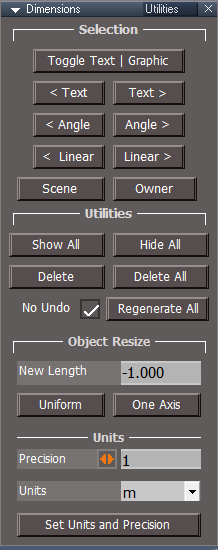
Dimensions
Updated scripts:
createAngleDims
createDimensions
RecreateDims
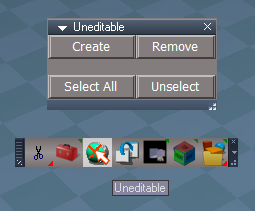
Add: No Undo script
Utililities.png
.
If the plugins do not Load, Download and Install the Microsoft Visual C++ 2008 Service Pack 1 Redistributable Package
https://www.microsoft.com/en-us/downloa ... x?id=26368

Removed due to Update
Saul
Senior Chief Petty Officer
Posts: 308
Joined: 22 May 2009, 16:50

Re: Final trueSpace 7.61 Beta 8 Unofficial Update

Post by Saul »

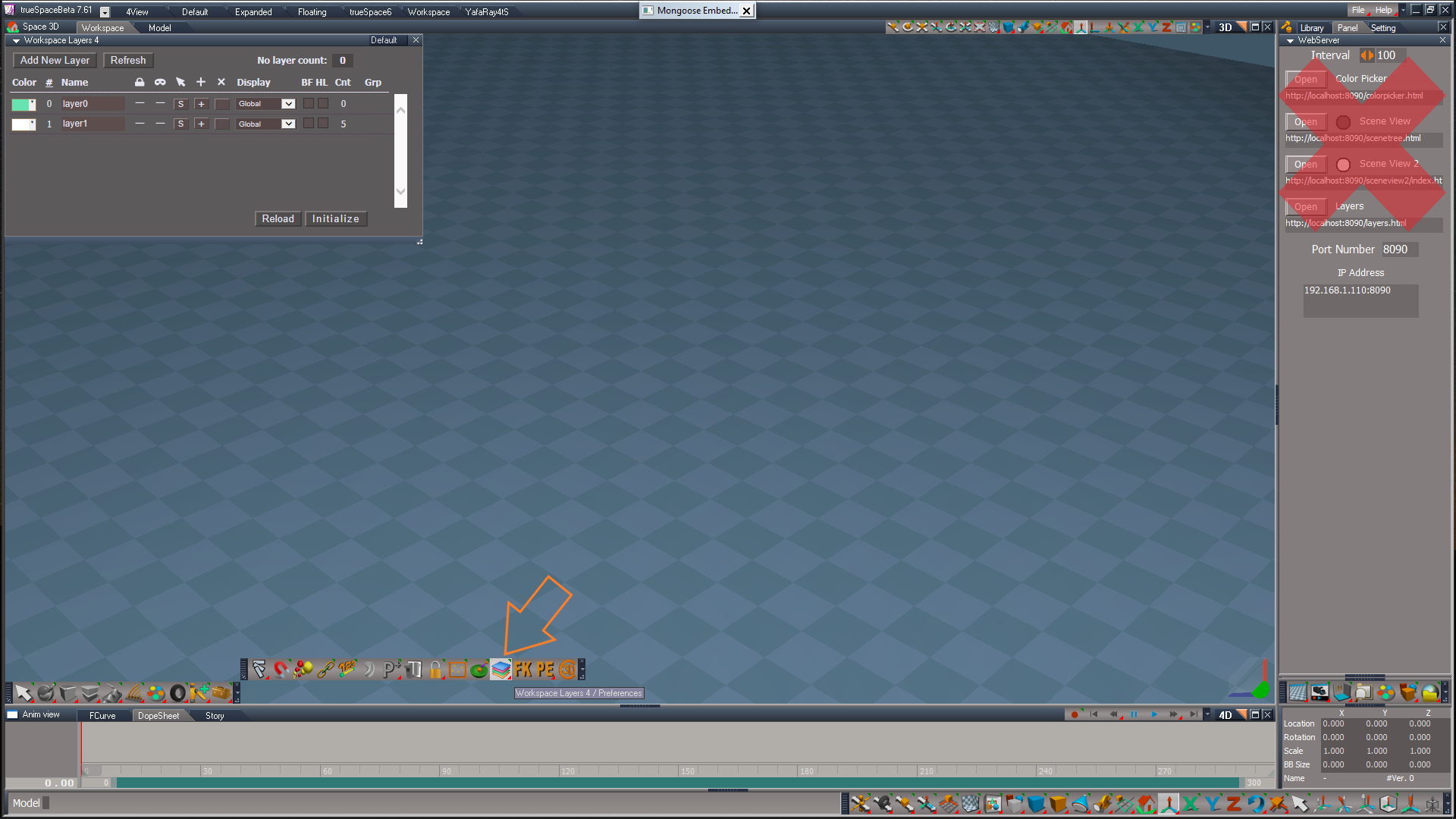
I can't get the workspace layers 4 to work.
It opens a load of system windows and the attached:
Screenshot 2022-11-12 144542.jpg
Have to reset to default to get rid of system windows.
User avatar
trueBlue
Captain
Posts: 5548
Joined: 06 Jul 2009, 22:50
Type the number ten into the box: 10

Re: Final trueSpace 7.61 Beta 8 Unofficial Update

Post by trueBlue »

Saul wrote: 12 Nov 2022, 14:50 I can't get the workspace layers 4 to work.
It opens a load of system windows and the attached:
Screenshot 2022-11-12 144542.jpg
Have to reset to default to get rid of system windows.
Are you opening Workspace Layers 4 from the toolbar button (Orange Arrow)?
Workspace Layers 4.png
Saul
Senior Chief Petty Officer
Posts: 308
Joined: 22 May 2009, 16:50

Re: Final trueSpace 7.61 Beta 8 Unofficial Update

Post by Saul »

'Are you opening Workspace Layers 4 from the toolbar button (Orange Arrow)? '

Yes, i have a feeling this may be related to something you wrote concerning the splashscreen freeze i was having:

'Looks like the Clintons3dRsView plugin did not Import for you and or your PC does not support it
Scene View 2 should have opened your default browser'
User avatar
trueBlue
Captain
Posts: 5548
Joined: 06 Jul 2009, 22:50
Type the number ten into the box: 10

Re: Final trueSpace 7.61 Beta 8 Unofficial Update

Post by trueBlue »

Saul wrote: 12 Nov 2022, 15:51 'Are you opening Workspace Layers 4 from the toolbar button (Orange Arrow)? '

Yes, i have a feeling this may be related to something you wrote concerning the splashscreen freeze i was having:

'Looks like the Clintons3dRsView plugin did not Import for you and or your PC does not support it
Scene View 2 should have opened your default browser'
Saul wrote: Yes, i have a feeling this may be related to something you wrote concerning the splashscreen freeze i was having:
Are You sure?
When I open Workspace Layers 4 from the toolbar button, my internet browser does not open

Can you share a screenshot of Package Manager?
User avatar
clintonman
Captain
Posts: 5659
Joined: 21 May 2009, 21:08
Type the number ten into the box: 0
Location: California

Re: Final trueSpace 7.61 Beta 8 Unofficial Update

Post by clintonman »

I was able to create a windows 10 64bit virtual machine for testing.
I installed tS and it ran.
I installed the UU and only the view plugin failed to load.
I purposely downloaded and installed the 64 bit version of the vc++ Redistributable to be sure it doesn't work
It didn't work
Downloaded and installed the 32 bit version
Now view plugin loads and everything works.

So for me the surprising thing is that the other plugins loaded without any vc++ Redistributables installed. So windows 10 must come with something out of the box that supports it.


Saul, can you check your installed apps to be sure the correct version is installed?
I put the bad 64 bit one in red.

vcr_installed_x86.jpg

If it's not installed try again and be sure to pick the 32 bit x86 installer.

vcr_download_x86.jpg
Clinton Reese

http://clintons3d.com
Saul
Senior Chief Petty Officer
Posts: 308
Joined: 22 May 2009, 16:50

Re: Final trueSpace 7.61 Beta 8 Unofficial Update

Post by Saul »

OK, the vcredist_86 seems to have solved it. It open the layer controls and a Mongoose embedded web server window. Attached package manager:
Screenshot 2022-11-12 192739.jpg
User avatar
trueBlue
Captain
Posts: 5548
Joined: 06 Jul 2009, 22:50
Type the number ten into the box: 10

Re: Final trueSpace 7.61 Beta 8 Unofficial Update

Post by trueBlue »

Great!
You had me worried with all of your issues, but thankful you brought them to our attention
Very thankful that Clinton was able to solve this for you
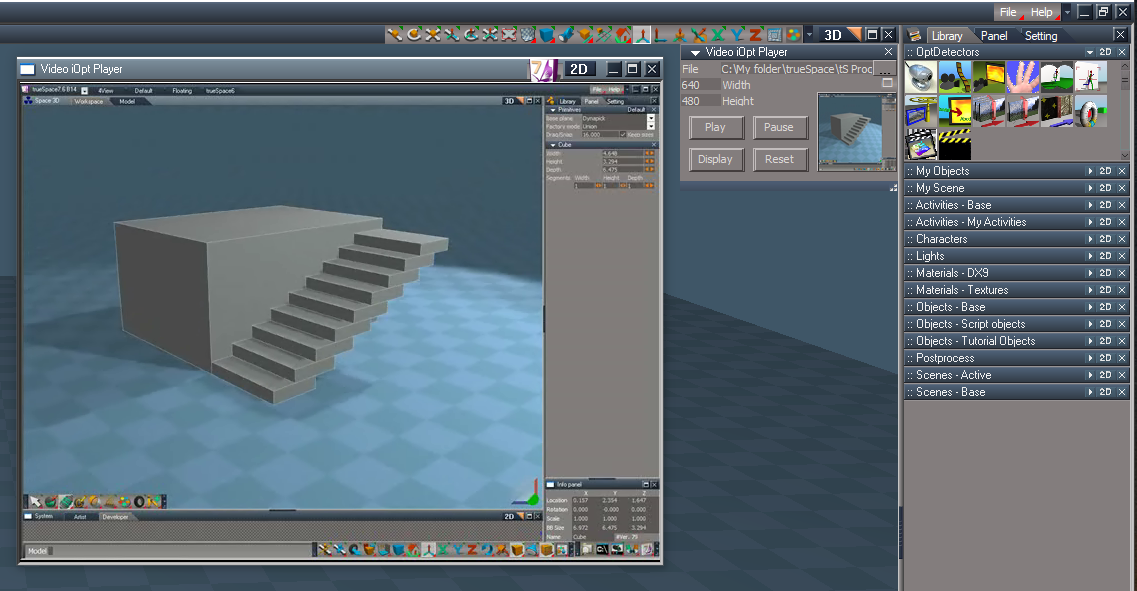
Can you try and see if OptDetectors is working for you?
Load the Video iOpt Player from the OptDetectors library
Load an avi file, press Display, and Play
OptiPlayer.png
Saul
Senior Chief Petty Officer
Posts: 308
Joined: 22 May 2009, 16:50

Re: Final trueSpace 7.61 Beta 8 Unofficial Update

Post by Saul »

The player seems to work, i am not sure i understand how to unload old avi file and load new. As you can see the first loaded file is displayed undeneath the new one....
Attachments
Screenshot 2022-11-12 231001.jpg
User avatar
trueBlue
Captain
Posts: 5548
Joined: 06 Jul 2009, 22:50
Type the number ten into the box: 10

Re: Final trueSpace 7.61 Beta 8 Unofficial Update

Post by trueBlue »

Saul wrote: 12 Nov 2022, 23:12 The player seems to work, i am not sure i understand how to unload old avi file and load new. As you can see the first loaded file is displayed undeneath the new one....
I see, never tried that or missed seeing it
I'll see if I can fix that
In the meantime, remove the player from the scene and open another one
I think OptiDetector only supports ONE Bitmap Transmitter
User avatar
trueBlue
Captain
Posts: 5548
Joined: 06 Jul 2009, 22:50
Type the number ten into the box: 10

Re: Final trueSpace 7.61 Beta 8 Unofficial Update

Post by trueBlue »

@Clinton
The Workspace's Hide All & Show All makes a really big mess with the Object & Scene Dimensions
Dimensions ORA.png
User avatar
clintonman
Captain
Posts: 5659
Joined: 21 May 2009, 21:08
Type the number ten into the box: 0
Location: California

Re: Final trueSpace 7.61 Beta 8 Unofficial Update

Post by clintonman »

trueBlue wrote: 13 Nov 2022, 17:11 @Clinton
The Workspace's Hide All & Show All makes a really big mess with the Object & Scene Dimensions
Dimensions ORA.png
Roger that, one more thing for the list.
Clinton Reese

http://clintons3d.com
User avatar
trueBlue
Captain
Posts: 5548
Joined: 06 Jul 2009, 22:50
Type the number ten into the box: 10

Re: Final trueSpace 7.61 Beta 8 Unofficial Update

Post by trueBlue »

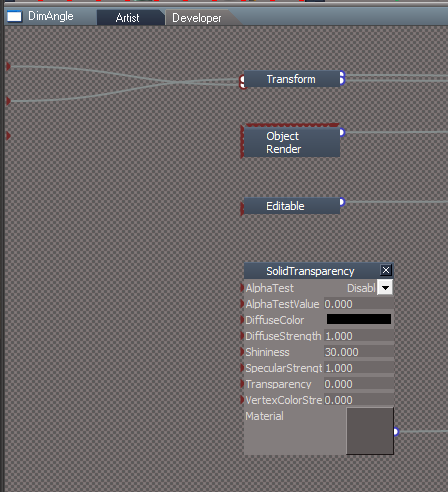
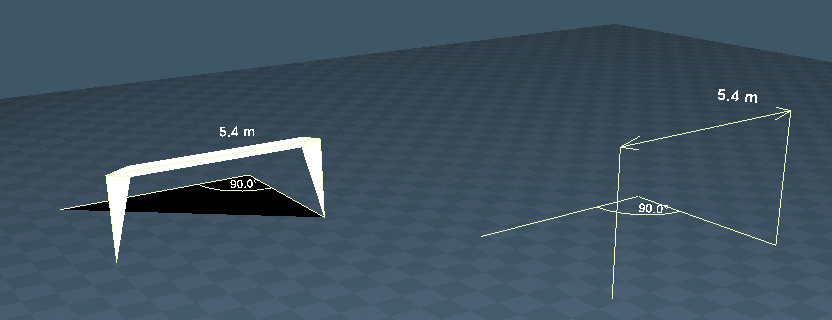
I discovered that adding a D3D SolidTransparency (Transparency = 0.000) Material (Not Material List) to the DimLinear & DimAngle objects a worthy addition to your Dimensions
To test the difference from your original objects with this setup, adjust the ORA Surface opacity to 100%
SolidTransparency.png
.
Both with Surface Opacity set to 100%.png
User avatar
clintonman
Captain
Posts: 5659
Joined: 21 May 2009, 21:08
Type the number ten into the box: 0
Location: California

Re: Final trueSpace 7.61 Beta 8 Unofficial Update

Post by clintonman »

trueBlue wrote: 13 Nov 2022, 23:38 I discovered that adding a D3D SolidTransparency (Transparency = 0.000) Material (Not Material List) to the DimLinear & DimAngle objects a worthy addition to your Dimensions
To test the difference from your original objects with this setup, adjust the ORA Surface opacity to 100%
SolidTransparency.png
.
Both with Surface Opacity set to 100%.png
ok, so what's the point?
Clinton Reese

http://clintons3d.com
User avatar
clintonman
Captain
Posts: 5659
Joined: 21 May 2009, 21:08
Type the number ten into the box: 0
Location: California

Re: Final trueSpace 7.61 Beta 8 Unofficial Update

Post by clintonman »

Here are fixes for show/hide to work with dimension objects. Replacements for function set nodes inside UUCommands.
Attachments
Visibility Function Set06.RsObj
(45.56 KiB) Downloaded 91 times
VisUtility Function Set06.RsObj
(34.92 KiB) Downloaded 91 times
Clinton Reese

http://clintons3d.com
User avatar
trueBlue
Captain
Posts: 5548
Joined: 06 Jul 2009, 22:50
Type the number ten into the box: 10

Re: Final trueSpace 7.61 Beta 8 Unofficial Update

Post by trueBlue »

trueSpace7.61 Beta 8 Unofficial Update Version 9

Please test this prerelease

New Unofficial Update Instructions:
It is Required that you completely Uninstall and Install trueSpace7.61 Beta 8 to a clean directory
Install the PDF Manual for trueSpace (Optional but required before installing the Update)
Install the tS76_Vray1_54B8.exe (Optional but required before installing the Update)


If trueSpace is open, Close trueSpace

1.) Install the YafaRay v3.3.0 render engine
2.) Install the tS76PDF 'Manual for Caligari trueSpace' & tS76Video (Optional but required before installing the Update)
3.) Install tS76_Vray1_54B8.exe to C:\trueSpace761 (Optional but required before installing the Update)
4.) Install tS7.61B8.9.exe to C:\trueSpace761
Browse [...] to where you installed C:\trueSpace761, select its folder and then the [Extract] button
Select the [Yes to All] button
5.) Open trueSpace
6.) Select the [OK] button in the OptDetectors plugin Information dialog
7.) Press your keyboard's SHIFT CTRL R keys to Reset to Default Context
When trueSpace opens, select one of the layout tabs at the top
If Vray is installed:
8.) Press your keyboard's CTRL + F8 keys to open the Package Manager
Right click in the Package Manager and select Install New...
Open C:\trueSpace761\Vray_ts.rsx
Right click in the Package Manager's Vray Package and select Load
Close the Package Manager
9.) Close trueSpace

The included Clintons3dPlugin.dll v.1638433, Clintons3dPluginExt.dll v.1638413, Clintons3dRsView.dll v.1638409 and the OptDetectors.dll Author - Vladimir Sisolak, are in: C:\trueSpace761
WARNING: The init.js file Imports the above 4 plugins and should not be Installed from the Package Manager, including any other plugins with the same name that have the rsx extension
All scripts that check for these plugins with the rsx extension have been removed!

Updates:

UUCommands
Update - Author Clinton Reese
VisUtility Function & Visibility Function
Add support for Dimensions :D
Note: Not tested for deeply encapsulated Dimensions

CustomCommands
Dimensions
Add: Remove All scripts
DimLinear & DimAngle
Add: Material 0/SolidTransparency (Transparency = 0.000) & LW material/Transparency (alpha = 0.000)
DimText
Add:
Material 0/Solid & LW material/Color & Reflection (ambient = 1.000)
Material 1/Solid & LW material/Color & Reflection (ambient = 1.000)
Material 2/Solid & LW material/Color & Reflection (ambient = 1.000)
Note: Vray shows Dimensions Text only

Utility Function Set/DeleteAll() function
Changed Alerts to Status Messages
Add: Space.Unslect() 'When deleting Scene_Measurements only'

Toolbars

.
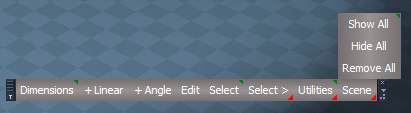
Dimensions Toolbar
Fixed tooltips
Changed Misc to Utilities
Add: Remove All 'Remove All Dimensions'
Including Scene_Measurements


If the plugins do not Load, Download and Install the Microsoft Visual C++ 2008 Service Pack 1 Redistributable Package
https://www.microsoft.com/en-us/downloa ... x?id=26368

Removed due to Update
Saul
Senior Chief Petty Officer
Posts: 308
Joined: 22 May 2009, 16:50

Re: Final trueSpace 7.61 Beta 8 Unofficial Update

Post by Saul »

This is std alone file?
User avatar
trueBlue
Captain
Posts: 5548
Joined: 06 Jul 2009, 22:50
Type the number ten into the box: 10

Re: Final trueSpace 7.61 Beta 8 Unofficial Update

Post by trueBlue »

Saul wrote: 16 Nov 2022, 11:34 This is std alone file?
Opps, had an issue with this forum when uploading yesterday
I will remove it
User avatar
trueBlue
Captain
Posts: 5548
Joined: 06 Jul 2009, 22:50
Type the number ten into the box: 10

Re: Final trueSpace 7.61 Beta 8 Unofficial Update

Post by trueBlue »

trueSpace7.61 Beta 8 Unofficial Update Version 9

Please test this prerelease

New Unofficial Update Instructions:
It is Required that you completely Uninstall and Install trueSpace7.61 Beta 8 to a clean directory
Install the PDF Manual for trueSpace (Optional but required before installing the Update)
Install the tS76_Vray1_54B8.exe (Optional but required before installing the Update)


If trueSpace is open, Close trueSpace

1.) Install the YafaRay v3.3.0 render engine
2.) Install the tS76PDF 'Manual for Caligari trueSpace' & tS76Video (Optional but required before installing the Update)
3.) Install tS76_Vray1_54B8.exe to C:\trueSpace761 (Optional but required before installing the Update)
4.) Install tS7.61B8.9.exe to C:\trueSpace761
Browse [...] to where you installed C:\trueSpace761, select its folder and then the [Extract] button
Select the [Yes to All] button
5.) Open trueSpace
6.) Select the [OK] button in the OptDetectors plugin Information dialog
7.) Press your keyboard's SHIFT CTRL R keys to Reset to Default Context
When trueSpace opens, select one of the layout tabs at the top
If Vray is installed:
8.) Press your keyboard's CTRL + F8 keys to open the Package Manager
Right click in the Package Manager and select Install New...
Open C:\trueSpace761\Vray_ts.rsx
Right click in the Package Manager's Vray Package and select Load
Close the Package Manager
9.) Close trueSpace

The included Clintons3dPlugin.dll v.1638433, Clintons3dPluginExt.dll v.1638413, Clintons3dRsView.dll v.1638409 and the OptDetectors.dll Author - Vladimir Sisolak, are in: C:\trueSpace761
WARNING: The init.js file Imports the above 4 plugins and should not be Installed from the Package Manager, including any other plugins with the same name that have the rsx extension
All scripts that check for these plugins with the rsx extension have been removed!

Updates:

CustomCommands
Dimensions
Add:
Remove All scripts
Show All script
Hide All script


Toolbars
Dimensions Toolbar
Dimensions toolbar Remove All.png
.
Add:
Scene/
Remove All 'Remove All Dimensions'
Show All
Hide All


If the plugins do not Load, Download and Install the Microsoft Visual C++ 2008 Service Pack 1 Redistributable Package
https://www.microsoft.com/en-us/downloa ... x?id=26368

Removed due to update
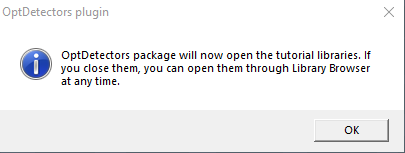
User avatar
trueBlue
Captain
Posts: 5548
Joined: 06 Jul 2009, 22:50
Type the number ten into the box: 10

Re: Final trueSpace 7.61 Beta 8 Unofficial Update

Post by trueBlue »

trueSpace7.61 Beta 8 Unofficial Update Version 9

Please test this prerelease

New Unofficial Update Instructions:
It is Required that you completely Uninstall and Install trueSpace7.61 Beta 8 to a clean directory
Install the PDF Manual for trueSpace (Optional but required before installing the Update)
Install the tS76_Vray1_54B8.exe (Optional but required before installing the Update)


If trueSpace is open, Close trueSpace

1.) Install the YafaRay v3.3.0 render engine
2.) Install the tS76PDF 'Manual for Caligari trueSpace' & tS76Video (Optional but required before installing the Update)
3.) Install tS76_Vray1_54B8.exe to C:\trueSpace761 (Optional but required before installing the Update)
4.) Install tS7.61B8.9.exe to C:\trueSpace761
Browse [...] to where you installed C:\trueSpace761, select its folder and then the [Extract] button
Select the [Yes to All] button
5.) Open trueSpace
6.) Select the [OK] button in the OptDetectors plugin Information dialog
7.) Press your keyboard's SHIFT CTRL R keys to Reset to Default Context
When trueSpace opens, select one of the layout tabs at the top
If Vray is installed:
8.) Press your keyboard's CTRL + F8 keys to open the Package Manager
Right click in the Package Manager and select Install New...
Open C:\trueSpace761\Vray_ts.rsx
Right click in the Package Manager's Vray Package and select Load
Close the Package Manager
9.) Close trueSpace

The included Clintons3dPlugin.dll v.1638433, Clintons3dPluginExt.dll v.1638413, Clintons3dRsView.dll v.1638409 and the OptDetectors.dll Author - Vladimir Sisolak, are in: C:\trueSpace761
WARNING: The init.js file Imports the above 4 plugins and should not be Installed from the Package Manager, including any other plugins with the same name that have the rsx extension
All scripts that check for these plugins with the rsx extension have been removed!

Updates:

Rs Main Libraries
OptDetectors
Update:
Video iOpt Player

Toolbars
Fixed UVEditor toolbar node's missing attribute
Removed the Name value from all toolbars

Q_PEModelingToolbar - 'Removed the Object attribute'

Custom Toolbar 'Red'
Add: Uneditable - LMB = Opens the floating panel
Uneditable panel and icon.png
Uneditable panel and icon.png (20.73 KiB) Viewed 1315 times
Uneditable.png
Uneditable.png (1.48 KiB) Viewed 1315 times
.
UUCommands
Add: Uneditable - 'Create, Remove, and Set All'

UUFunctionSet
function FlattenObjects()
Add
if(Node.ConExists(sel, 'Uneditable')) return;

CustomCommands
Dimensions
DimLinear, DimAngle, & DimText
DimLinear.png
DimLinear.png (1.72 KiB) Viewed 1309 times
Add:
Dimension attribute - [Button] LMB = Enter owner name / RMB = Select dimension owner
Object Render Attributes Setttings - [Button] LMB = Open - Object Render Attributes Setttings

DimText
Material Colors.png
Material Colors.png (1.55 KiB) Viewed 1301 times
Add:
Material Colors - [Update] LMB = Sets the D3D & Vray Color

Widgets
Object Navigation Widget(s)
Enter edit mode/ Uneditable script
Add:

Code: Select all

	if(Node.IsLight(Node.FirstSelected())) {
		params.SetTerminationFlag()
		return
	}

	if(Node.Exists(Node.FirstSelected() + '/MeasureNode')) {
		params.SetTerminationFlag()
		return
	}

	if(Node.ConExists(Node.FirstSelected(), 'Dimension')) {
		params.SetTerminationFlag()
		return
	}

	var obj = Node.ShortName(Node.FirstSelected())
	if(Question(' ' + obj + ' is Uneditable\n\nWould you like to remove the Uneditable attribute?'))
		Node.ConRemove(Node.FirstSelected(), 'Uneditable')
		if(!Node.ConExists(Node.FirstSelected(), 'Uneditable'))
		util.SetStatusMessage(' ' + obj + ' Uneditable attribute removed ', 3000)
		params.SetTerminationFlag()
		return
	}

If the plugins do not Load, Download and Install the Microsoft Visual C++ 2008 Service Pack 1 Redistributable Package
https://www.microsoft.com/en-us/downloa ... x?id=26368

Removed due to update
User avatar
trueBlue
Captain
Posts: 5548
Joined: 06 Jul 2009, 22:50
Type the number ten into the box: 10

Re: Final trueSpace 7.61 Beta 8 Unofficial Update

Post by trueBlue »

trueSpace7.61 Beta 8 Unofficial Update Version 9

Please test this RC1 11/19/2022 :bananatyping:

New Unofficial Update Instructions:
It is Required that you completely Uninstall and Install trueSpace7.61 Beta 8 to a clean directory
Install the PDF Manual for trueSpace (Optional but required before installing the Update)
Install the tS76_Vray1_54B8.exe (Optional but required before installing the Update)


If trueSpace is open, Close trueSpace

1.) Install the YafaRay v3.3.0 render engine
2.) Install the tS76PDF 'Manual for Caligari trueSpace' & tS76Video (Optional but required before installing the Update)
3.) Install tS76_Vray1_54B8.exe to C:\trueSpace761 (Optional but required before installing the Update)
4.) Install tS7.61B8.9.exe to C:\trueSpace761
Browse [...] to where you installed C:\trueSpace761, select its folder and then the [Extract] button
Select the [Yes to All] button
5.) Open trueSpace
6.) Select the [OK] button in the OptDetectors plugin Information dialog
7.) Press your keyboard's SHIFT CTRL R keys to Reset to Default Context
When trueSpace opens, select one of the layout tabs at the top
If Vray is installed:
8.) Press your keyboard's CTRL + F8 keys to open the Package Manager
Right click in the Package Manager and select Install New...
Open C:\trueSpace761\Vray_ts.rsx
Right click in the Package Manager's Vray Package and select Load
Close the Package Manager
9.) Close trueSpace

The included Clintons3dPlugin.dll v.1638433, Clintons3dPluginExt.dll v.1638413, Clintons3dRsView.dll v.1638409 and the OptDetectors.dll Author - Vladimir Sisolak, are in: C:\trueSpace761
WARNING: The init.js file Imports the above 4 plugins and should not be Installed from the Package Manager, including any other plugins with the same name that have the rsx extension
All scripts that check for these plugins with the rsx extension have been removed!

Updates:

CustomCommands
Dimensions
Update:
RecreateDims
Remove All


If the plugins do not Load, Download and Install the Microsoft Visual C++ 2008 Service Pack 1 Redistributable Package
https://www.microsoft.com/en-us/downloa ... x?id=26368

Removed due to update
User avatar
trueBlue
Captain
Posts: 5548
Joined: 06 Jul 2009, 22:50
Type the number ten into the box: 10

Re: Final trueSpace 7.61 Beta 8 Unofficial Update

Post by trueBlue »

trueSpace7.61 Beta 8 Unofficial Update Version 9

Please test this RC2 11/21/2022 :bananatyping:

New Unofficial Update Instructions:
It is Required that you completely Uninstall and Install trueSpace7.61 Beta 8 to a clean directory
Install the PDF Manual for trueSpace (Optional but required before installing the Update)
Install the tS76_Vray1_54B8.exe (Optional but required before installing the Update)


If trueSpace is open, Close trueSpace

1.) Install the YafaRay v3.3.0 render engine
2.) Install the tS76PDF 'Manual for Caligari trueSpace' & tS76Video (Optional but required before installing the Update)
3.) Install tS76_Vray1_54B8.exe to C:\trueSpace761 (Optional but required before installing the Update)
4.) Install tS7.61B8.9.exe to C:\trueSpace761
Browse [...] to where you installed C:\trueSpace761, select its folder and then the [Extract] button
Select the [Yes to All] button
5.) Open trueSpace
6.) Select the [OK] button in the OptDetectors plugin Information dialog
7.) Press your keyboard's SHIFT CTRL R keys to Reset to Default Context
When trueSpace opens, select one of the layout tabs at the top
If Vray is installed:
8.) Press your keyboard's CTRL + F8 keys to open the Package Manager
Right click in the Package Manager and select Install New...
Open C:\trueSpace761\Vray_ts.rsx
Right click in the Package Manager's Vray Package and select Load
Close the Package Manager
9.) Close trueSpace

The included Clintons3dPlugin.dll v.1638433, Clintons3dPluginExt.dll v.1638413, Clintons3dRsView.dll v.1638409 and the OptDetectors.dll Author - Vladimir Sisolak, are in: C:\trueSpace761
WARNING: The init.js file Imports the above 4 plugins and should not be Installed from the Package Manager, including any other plugins with the same name that have the rsx extension
All scripts that check for these plugins with the rsx extension have been removed!

Updates:

CustomCommands
Hierarchy
Hierarchy Function Set - Changed Status Message - "(selected object name) is the Parent"

AutoKey - Updated code in cases where Auto Keyframing is active, and the panel is closed
AutokeyWidgets/Automatic Keyframing - Updated button code and removed Clear History commands
New:
Automatic Keyframing.png
Automatic Keyframing.png (14.24 KiB) Viewed 1235 times
Activate changes the Object Navigation Widget's sphere to Green
Deactivate changes the Object Navigation Widget's sphere back to default Gray color

Dimensions
Utility Function Set/SelectNext() - Changed Alert to Status Message
Hide All script - Add support for NURBS

UUCommands
Add: ResetPerspective script

Toolbars/WinGUID_Bar/Reset View - RMB = 'Reset Perspective' - Activity.Run('Scripts/UUCommands/ResetPerspective');

Window.Shortcuts.xml
Removed - Animation Editor ESC shortcut

tS761 Workspace Shortcut List.rtf
Removed - Animation Editor ESC shortcut


If the plugins do not Load, Download and Install the Microsoft Visual C++ 2008 Service Pack 1 Redistributable Package
https://www.microsoft.com/en-us/downloa ... x?id=26368

Removed due to update
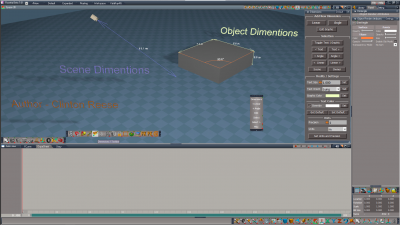
User avatar
trueBlue
Captain
Posts: 5548
Joined: 06 Jul 2009, 22:50
Type the number ten into the box: 10

Re: Final trueSpace 7.61 Beta 8 Unofficial Update

Post by trueBlue »

trueSpace7.61 Beta 8 Unofficial Update Version 9

Please test this RC3 11/25/2022 :bananatyping:

New Unofficial Update Instructions:
It is Required that you completely Uninstall and Install trueSpace7.61 Beta 8 to a clean directory
Install the PDF Manual for trueSpace (Optional but required before installing the Update)
Install the tS76_Vray1_54B8.exe (Optional but required before installing the Update)


If trueSpace is open, Close trueSpace

1.) Install the YafaRay v3.3.0 render engine
2.) Install the tS76PDF 'Manual for Caligari trueSpace' & tS76Video (Optional but required before installing the Update)
3.) Install tS76_Vray1_54B8.exe to C:\trueSpace761 (Optional but required before installing the Update)
4.) Install tS7.61B8.9.exe to C:\trueSpace761
Browse [...] to where you installed C:\trueSpace761, select its folder and then the [Extract] button
Select the [Yes to All] button
5.) Open trueSpace
6.) Select the [OK] button in the OptDetectors plugin Information dialog
7.) Press your keyboard's SHIFT CTRL R keys to Reset to Default Context
When trueSpace opens, select one of the layout tabs at the top
If Vray is installed:
8.) Press your keyboard's CTRL + F8 keys to open the Package Manager
Right click in the Package Manager and select Install New...
Open C:\trueSpace761\Vray_ts.rsx
Right click in the Package Manager's Vray Package and select Load
Close the Package Manager
9.) Close trueSpace

The included Clintons3dPlugin.dll v.1638433, Clintons3dPluginExt.dll v.1638413, Clintons3dRsView.dll v.1638409 and the OptDetectors.dll Author - Vladimir Sisolak, are in: C:\trueSpace761
WARNING: The init.js file Imports the above 4 plugins and should not be Installed from the Package Manager, including any other plugins with the same name that have the rsx extension
All scripts that check for these plugins with the rsx extension have been removed!

Updates:

UUCommands
Add: Commands
Note: Commands and Undo scripts that manage the amount of Undo commands available and the ability to Undo several Undo(s) at once
Commands panel.png
Commands panel.png (6.26 KiB) Viewed 1154 times
.
Toolbars
CustomToolbar 'Red'
Add: Commands icon - 'Opens the Commands panel'

AnimationBar
Add: Automatic Keyframing icon
LMB - Opens and Activates - Automatic Keyframing
RMB - Closes and Deactivates - Automatic Keyframing

CustomCommands
Dimensions
Hide All - Add: RsApp.ClearHistory()

Rs Main Libraries
Add: Buttons - Buttons libray
Includes a modified blank ToolbarButton

Objects - tS7.61 Update objects
Update:
Sequence Player
Animation Panel

OptDetectors
Update:
Video iOpt Player


If the plugins do not Load, Download and Install the Microsoft Visual C++ 2008 Service Pack 1 Redistributable Package
https://www.microsoft.com/en-us/downloa ... x?id=26368

Removed due to update
User avatar
trueBlue
Captain
Posts: 5548
Joined: 06 Jul 2009, 22:50
Type the number ten into the box: 10

Re: Final trueSpace 7.61 Beta 8 Unofficial Update

Post by trueBlue »

trueSpace7.61 Beta 8 Unofficial Update Version 9

Please test this RC4 11/27/2022 :bananatyping:

New Unofficial Update Instructions:
It is Required that you completely Uninstall and Install trueSpace7.61 Beta 8 to a clean directory
Install the PDF Manual for trueSpace (Optional but required before installing the Update)
Install the tS76_Vray1_54B8.exe (Optional but required before installing the Update)


If trueSpace is open, Close trueSpace

1.) Install the YafaRay v3.3.0 render engine
2.) Install the tS76PDF 'Manual for Caligari trueSpace' & tS76Video (Optional but required before installing the Update)
3.) Install tS76_Vray1_54B8.exe to C:\trueSpace761 (Optional but required before installing the Update)
4.) Install tS7.61B8.9.exe to C:\trueSpace761
Browse [...] to where you installed C:\trueSpace761, select its folder and then the [Extract] button
Select the [Yes to All] button
5.) Open trueSpace
6.) Select the [OK] button in the OptDetectors plugin Information dialog
7.) Press your keyboard's SHIFT CTRL R keys to Reset to Default Context
When trueSpace opens, select one of the layout tabs at the top
If Vray is installed:
8.) Press your keyboard's CTRL + F8 keys to open the Package Manager
Right click in the Package Manager and select Install New...
Open C:\trueSpace761\Vray_ts.rsx
Right click in the Package Manager's Vray Package and select Load
Close the Package Manager
9.) Close trueSpace

The included Clintons3dPlugin.dll v.1638433, Clintons3dPluginExt.dll v.1638413, Clintons3dRsView.dll v.1638409 and the OptDetectors.dll Author - Vladimir Sisolak, are in: C:\trueSpace761
WARNING: The init.js file Imports the above 4 plugins and should not be Installed from the Package Manager, including any other plugins with the same name that have the rsx extension
All scripts that check for these plugins with the rsx extension have been removed!

Updates:

Removed - Workspace Layers 3

Widgets
Background - Fixed: Hide Unselected (period + LB drag) & Show All (coma + LB drag)
Camera Move, Camera Rotate, Camera FOV, Move selection, Rotate selection, Scale selection, Camera, Camera1, Selector cage, Spot light, Default object navigation widget, and all of the WidgetScripts/ObjectNavigationWidgets
Add: SynchronizeScene script
try{tSBridge.SynchronizeObject(Space.CurrentScene())}catch(error){}

preobjects
Update: Lights, Cameras, light01, light02, light03, light04, Camera1
Synchronize Object script

Rs Main Libraries
Lights
Update: WS - Default & WS - Black


If the plugins do not Load, Download and Install the Microsoft Visual C++ 2008 Service Pack 1 Redistributable Package
https://www.microsoft.com/en-us/downloa ... x?id=26368

Remove due to update
User avatar
trueBlue
Captain
Posts: 5548
Joined: 06 Jul 2009, 22:50
Type the number ten into the box: 10

Re: Final trueSpace 7.61 Beta 8 Unofficial Update

Post by trueBlue »

trueSpace7.61 Beta 8 Unofficial Update Version 9

Please test this RC5 12/2/2022 :bananatyping:

New Unofficial Update Instructions:
It is Required that you completely Uninstall and Install trueSpace7.61 Beta 8 to a clean directory
Install the PDF Manual for trueSpace (Optional but required before installing the Update)
Install the tS76_Vray1_54B8.exe (Optional but required before installing the Update)


If trueSpace is open, Close trueSpace

1.) Install the YafaRay v3.3.0 render engine
2.) Install the tS76PDF 'Manual for Caligari trueSpace' & tS76Video (Optional but required before installing the Update)
3.) Install tS76_Vray1_54B8.exe to C:\trueSpace761 (Optional but required before installing the Update)
4.) Install tS7.61B8.9.exe to C:\trueSpace761
Browse [...] to where you installed C:\trueSpace761, select its folder and then the [Extract] button
Select the [Yes to All] button
5.) Open trueSpace
6.) Select the [OK] button in the OptDetectors plugin Information dialog
7.) Press your keyboard's SHIFT CTRL R keys to Reset to Default Context
When trueSpace opens, select one of the layout tabs at the top
If Vray is installed:
8.) Press your keyboard's CTRL + F8 keys to open the Package Manager
Right click in the Package Manager and select Install New...
Open C:\trueSpace761\Vray_ts.rsx
Right click in the Package Manager's Vray Package and select Load
Close the Package Manager
9.) Close trueSpace

The included Clintons3dPlugin.dll v.1638433, Clintons3dPluginExt.dll v.1638413, Clintons3dRsView.dll v.1638409 and the OptDetectors.dll Author - Vladimir Sisolak, are in: C:\trueSpace761
WARNING: The init.js file Imports the above 4 plugins and should not be Installed from the Package Manager, including any other plugins with the same name that have the rsx extension
All scripts that check for these plugins with the rsx extension have been removed!

Updates:

Widgets
View widget - Fixed: Encircle 'Green' - Shift + RB - Eye Camera panel

Toolbars
WorkspaceNav
Toolbar Manager.png
.
Add
Toolbar Manager icon
LMB = Toolbar Manager
RMB = Open All toolbars

CustomCommands
Add
Toolbar Manager - Author Clinton Reese
Removed the previous version
Toolbar Manager panels.png
.

If the plugins do not Load, Download and Install the Microsoft Visual C++ 2008 Service Pack 1 Redistributable Package
https://www.microsoft.com/en-us/downloa ... x?id=26368
Note: When downloading the Microsoft Visual C++ 2008 Service Pack 1 Redistributable Package you are given 3 choices
Choose the 32-bit version; vcredist_x86.exe
Removed due to update
User avatar
clintonman
Captain
Posts: 5659
Joined: 21 May 2009, 21:08
Type the number ten into the box: 0
Location: California

Re: Final trueSpace 7.61 Beta 8 Unofficial Update

Post by clintonman »

Here are the changes to only use Global Function Set from CustomCommands.

The Modify Buttons GlobalFS will update the buttons

UUFunction Set has 1 line changed for the Delete function

Encapsulate has changes to
2D Encapsulate
2D Unencapsulate
3D Encapsulate

This should make everything work. Only extra step would be to clean out references to the UUCommands location for the Global Function Set
Changing:

Code: Select all

	if(Node.Exists("Scripts/UUCommands/Global Function Set")) {
		GlobalFS = Node.AccessFnSet("Scripts/UUCommands/Global Function Set");
	} else {
		GlobalFS = Node.AccessFnSet("Scripts/CustomCommands/Global Function Set");
	}
to

Code: Select all

	GlobalFS = Node.AccessFnSet("Scripts/CustomCommands/Global Function Set");
Attachments
Encapsulate.RsObj
(80.39 KiB) Downloaded 79 times
UUFunctionSet71d0.RsObj
(56.28 KiB) Downloaded 77 times
Modify Buttons GlobalFS03.RsObj
(23.65 KiB) Downloaded 88 times
Clinton Reese

http://clintons3d.com
User avatar
trueBlue
Captain
Posts: 5548
Joined: 06 Jul 2009, 22:50
Type the number ten into the box: 10

Re: Final trueSpace 7.61 Beta 8 Unofficial Update

Post by trueBlue »

Did you forget to update the Global Function Set?
User avatar
clintonman
Captain
Posts: 5659
Joined: 21 May 2009, 21:08
Type the number ten into the box: 0
Location: California

Re: Final trueSpace 7.61 Beta 8 Unofficial Update

Post by clintonman »

trueBlue wrote: 13 Dec 2022, 00:33 Did you forget to update the Global Function Set?
Yes I did.

One line of code added

Code: Select all

	//prevent side effect hidding the panel when any floating window opened before it, closes
	WindowsManager.SetFrameOwnerFrame(openedFrame, MainWindowFrame);
Attachments
Global Function Set0f63.RsObj
(36.2 KiB) Downloaded 101 times
Clinton Reese

http://clintons3d.com
User avatar
trueBlue
Captain
Posts: 5548
Joined: 06 Jul 2009, 22:50
Type the number ten into the box: 10

Re: Final trueSpace 7.61 Beta 8 Unofficial Update

Post by trueBlue »

trueSpace7.61 Beta 8 Unofficial Update Version 9

Please test this RC8 12/17/2022 :bananatyping:

New Unofficial Update Instructions:
It is Required that you completely Uninstall and Install trueSpace7.61 Beta 8 to a clean directory
Install the PDF Manual for trueSpace (Optional but required before installing the Update)
Install the tS76_Vray1_54B8.exe (Optional but required before installing the Update)


If trueSpace is open, Close trueSpace

1.) Install the YafaRay v3.3.0 render engine
2.) Install the tS76PDF 'Manual for Caligari trueSpace' & tS76Video (Optional but required before installing the Update)
3.) Install tS76_Vray1_54B8.exe to C:\trueSpace761 (Optional but required before installing the Update)
4.) Install tS7.61B8.9.exe to C:\trueSpace761
Browse [...] to where you installed C:\trueSpace761, select its folder and then the [Extract] button
Select the [Yes to All] button
5.) Open trueSpace
6.) Select the [OK] button in the OptDetectors plugin Information dialog
7.) Press your keyboard's SHIFT CTRL R keys to Reset to Default Context
When trueSpace opens, select one of the layout tabs at the top
If Vray is installed:
8.) Press your keyboard's CTRL + F8 keys to open the Package Manager
Right click in the Package Manager and select Install New...
Open C:\trueSpace761\Vray_ts.rsx
Right click in the Package Manager's Vray Package and select Load
Close the Package Manager
9.) Close trueSpace

The included Clintons3dPlugin.dll v.1638433, Clintons3dPluginExt.dll v.1638413, Clintons3dRsView.dll v.1638409 and the OptDetectors.dll Author - Vladimir Sisolak, are in: C:\trueSpace761
WARNING: The init.js file Imports the above 4 plugins and should not be Installed from the Package Manager, including any other plugins with the same name that have the rsx extension
All scripts that check for these plugins with the rsx extension have been removed!

Unofficial Update Version 9
Started on Fri Sep 02, 2022

Commands
Removed all of the discontinued xml scripts

Plugins Author - Clinton Reese
Renamed from rsx to dll:
Clintons3dPlugin.dll
Clintons3dRsView.dll
Clintons3dPluginExt.dll
Add
OptDetectors.dll Author - Vladimir Sisolak

Library
Add
OptDetectors
OptDetectors - Help objects
OptDetectors - Samples

Scripts
Update
init.js 'Loads the above 4 plugins'
Window.Shortcuts.xml
tS761 Workspace Shortcut List.rtf
Widget.Shortcuts.xml

CustomCommands Author - Clinton Reese
Add
JSON Function Set
Global Function Set
Dimensions
Hierarchy
Toolbar Manager
ShortcutRunner

preobjects
Add
UUCommands
Add
Commands
Uneditable

If the plugins do not Load, Download and Install the Microsoft Visual C++ 2008 Service Pack 1 Redistributable Package
https://www.microsoft.com/en-us/downloa ... x?id=26368
Note: When downloading the Microsoft Visual C++ 2008 Service Pack 1 Redistributable Package you are given 3 choices
Choose the 32-bit version; vcredist_x86.exe
Removed due to Update
Saul
Senior Chief Petty Officer
Posts: 308
Joined: 22 May 2009, 16:50

Re: Final trueSpace 7.61 Beta 8 Unofficial Update

Post by Saul »

Can't get the reset to default context working for this release? Also there is no 'green' toolbar manager.
User avatar
trueBlue
Captain
Posts: 5548
Joined: 06 Jul 2009, 22:50
Type the number ten into the box: 10

Re: Final trueSpace 7.61 Beta 8 Unofficial Update

Post by trueBlue »

Ugh, I see the problem
Temporarily, you can Right Click the Reset to Default Context icon
RClick Reset to Default Context.png
RClick Reset to Default Context.png (16.6 KiB) Viewed 1034 times
.
@Clinton
Why is it necessary to use the Global Function Set in this command?
I do noy see anything in the Global Function Set pertaining to Scripts/UUCommands/UUFunctionSet

Edit: I see, you are using the Global Function Set in the UUFunctionSet
Can't we just put the Modal Question in the UUFunctionSet?
And just use it for the Set Pose and Reset Context?
User avatar
clintonman
Captain
Posts: 5659
Joined: 21 May 2009, 21:08
Type the number ten into the box: 0
Location: California

Re: Final trueSpace 7.61 Beta 8 Unofficial Update

Post by clintonman »

trueBlue wrote: 18 Dec 2022, 15:15 Ugh, I see the problem
Temporarily, you can Right Click the Reset to Default Context icon
RClick Reset to Default Context.png
.
@Clinton
Why is it necessary to use the Global Function Set in this command?
I do noy see anything in the Global Function Set pertaining to Scripts/UUCommands/UUFunctionSet

Edit: I see, you are using the Global Function Set in the UUFunctionSet
Can't we just put the Modal Question in the UUFunctionSet?
And just use it for the Set Pose and Reset Context?
I don't know how to reproduce this problem, so I can't say for sure but,
I'm pretty sure you would still have the same problem if you moved it into UUFunctionSet. There only way to find out is to move it in and see if the problem goes away. If that doesn't work you can try moving reset context into a Scripts/Commands node that includes model question code. Another option would be to update the button command to match the new shortcut.
Like I said I couldn't reproduce it so these are all my guesses.
Clinton Reese

http://clintons3d.com
User avatar
trueBlue
Captain
Posts: 5548
Joined: 06 Jul 2009, 22:50
Type the number ten into the box: 10

Re: Final trueSpace 7.61 Beta 8 Unofficial Update

Post by trueBlue »

clintonman wrote: 18 Dec 2022, 16:59
trueBlue wrote: 18 Dec 2022, 15:15 Ugh, I see the problem
Temporarily, you can Right Click the Reset to Default Context icon
RClick Reset to Default Context.png
.
@Clinton
Why is it necessary to use the Global Function Set in this command?
I do noy see anything in the Global Function Set pertaining to Scripts/UUCommands/UUFunctionSet

Edit: I see, you are using the Global Function Set in the UUFunctionSet
Can't we just put the Modal Question in the UUFunctionSet?
And just use it for the Set Pose and Reset Context?
I don't know how to reproduce this problem, so I can't say for sure but,
I'm pretty sure you would still have the same problem if you moved it into UUFunctionSet. There only way to find out is to move it in and see if the problem goes away. If that doesn't work you can try moving reset context into a Scripts/Commands node that includes model question code. Another option would be to update the button command to match the new shortcut.
Like I said I couldn't reproduce it so these are all my guesses.
This what happens...
The init.js file Loads UUCommands so UUCommands exist when trueSpace starts up
So, putting the Modal Question in UUCommands makes the Reset to Default Context always work
CustomCommands Loads from the reset,js file
So, if you cannot Reset to Default Context, CustomCommands does not Load
This is the biggest issue because many toolbar commands and scripts rely on the Global Function Set now that we made the switch to one Global Function Set in CustomCommands
I just added the Modal Question in UUFunctionSet, adjusted SetPose and ResetDefault to use it, changed the Windows.Shortcut.xml, toolbar commands that does not use the Global Function Set
Everything is working as expected including Shortcuts

Awhile back I tried Loading CustomCommands from the init.js file
It did not work, and I have a hunch it was not working because CustomCommands is not in the preobjects folder
I read in one of the documents that the preobjects folder was the preferred method for Loading objects
User avatar
clintonman
Captain
Posts: 5659
Joined: 21 May 2009, 21:08
Type the number ten into the box: 0
Location: California

Re: Final trueSpace 7.61 Beta 8 Unofficial Update

Post by clintonman »

trueBlue wrote: 18 Dec 2022, 17:36
clintonman wrote: 18 Dec 2022, 16:59
trueBlue wrote: 18 Dec 2022, 15:15 Ugh, I see the problem
Temporarily, you can Right Click the Reset to Default Context icon
RClick Reset to Default Context.png
.
@Clinton
Why is it necessary to use the Global Function Set in this command?
I do noy see anything in the Global Function Set pertaining to Scripts/UUCommands/UUFunctionSet

Edit: I see, you are using the Global Function Set in the UUFunctionSet
Can't we just put the Modal Question in the UUFunctionSet?
And just use it for the Set Pose and Reset Context?
I don't know how to reproduce this problem, so I can't say for sure but,
I'm pretty sure you would still have the same problem if you moved it into UUFunctionSet. There only way to find out is to move it in and see if the problem goes away. If that doesn't work you can try moving reset context into a Scripts/Commands node that includes model question code. Another option would be to update the button command to match the new shortcut.
Like I said I couldn't reproduce it so these are all my guesses.
This what happens...
The init.js file Loads UUCommands so UUCommands exist when trueSpace starts up
So, putting the Modal Question in UUCommands makes the Reset to Default Context always work
CustomCommands Loads from the reset,js file
So, if you cannot Reset to Default Context, CustomCommands does not Load
This is the biggest issue because many toolbar commands and scripts rely on the Global Function Set now that we made the switch to one Global Function Set in CustomCommands
I just added the Modal Question in UUFunctionSet, adjusted SetPose and ResetDefault to use it, changed the Windows.Shortcut.xml, toolbar commands that does not use the Global Function Set
Everything is working as expected including Shortcuts

Awhile back I tried Loading CustomCommands from the init.js file
It did not work, and I have a hunch it was not working because CustomCommands is not in the preobjects folder
I read in one of the documents that the preobjects folder was the preferred method for Loading objects
Was there a reason you didn't try moving CustomCommands into preobjects?
Clinton Reese

http://clintons3d.com

Return to “General Discussion”