What are the steps to use the axis snap widget?
1. show pivot
2. shift lmb on pivot
3. ?
Final trueSpace 7.61 Beta 8 Unofficial Update
-
clintonman

- Captain
- Posts: 5659
- Joined: 21 May 2009, 21:08
- Type the number ten into the box: 0
- Location: California
Re: Final trueSpace 7.61 Beta 8 Unofficial Update
-
trueBlue

- Captain
- Posts: 5548
- Joined: 06 Jul 2009, 22:50
- Type the number ten into the box: 10
Re: Final trueSpace 7.61 Beta 8 Unofficial Update
From the release notes;
Axis widget
* LMB click on the widget to enter into Point Editing, select an element and use the buttons on the panel to Target and Snap the Axis. Select the Snap button again to dismiss the widget.
Axis widget
* LMB click on the widget to enter into Point Editing, select an element and use the buttons on the panel to Target and Snap the Axis. Select the Snap button again to dismiss the widget.
-
clintonman
- Captain
- Posts: 5659
- Joined: 21 May 2009, 21:08
- Type the number ten into the box: 0
- Location: California
Re: Final trueSpace 7.61 Beta 8 Unofficial Update
-
clintonman
- Captain
- Posts: 5659
- Joined: 21 May 2009, 21:08
- Type the number ten into the box: 0
- Location: California
Re: Final trueSpace 7.61 Beta 8 Unofficial Update
Thanks, did a search on axis a few pages back and it did not come up. Now I see it's only for use with 1 object.trueBlue wrote: 06 Sep 2019, 04:30 From the release notes;
Axis widget
* LMB click on the widget to enter into Point Editing, select an element and use the buttons on the panel to Target and Snap the Axis. Select the Snap button again to dismiss the widget.
The object nav widget "p" seems to do the same thing.
Edit: I mean pe nav widget "p" shortcut seems to do the same thing.
-
trueBlue
- Captain
- Posts: 5548
- Joined: 06 Jul 2009, 22:50
- Type the number ten into the box: 10
Re: Final trueSpace 7.61 Beta 8 Unofficial Update
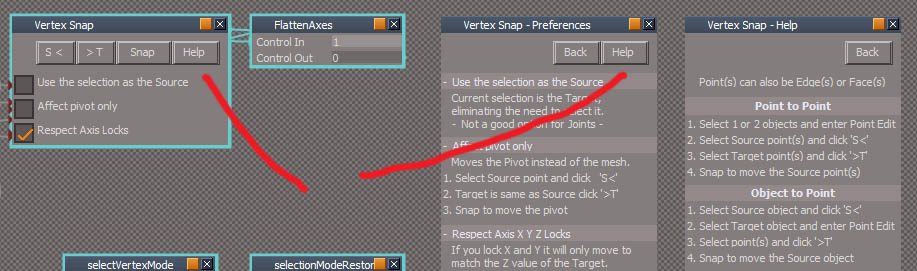
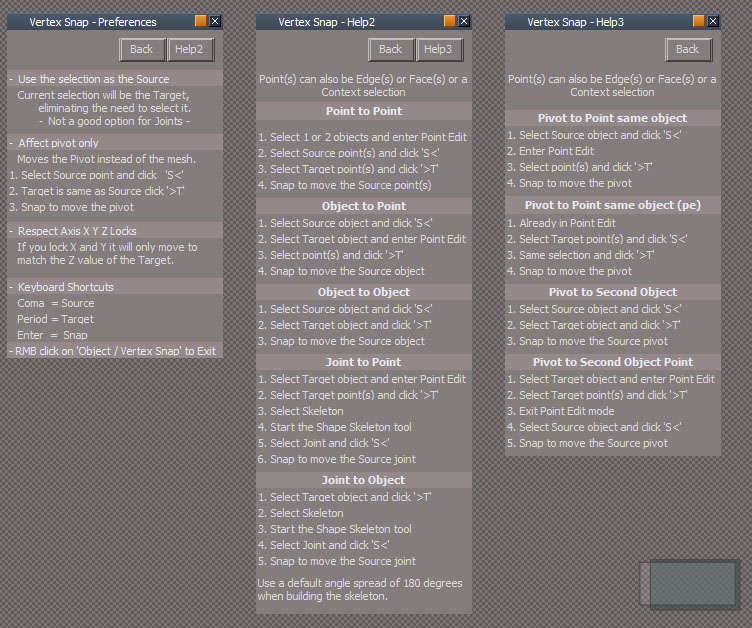
I get that the definition of the Help button does not make sense, given that it opens a Preference panel which has another Help button. I was trying to fit all of the buttons in the same row. Not enough room to rename the Help button to Preferences. When in use it cycles to Preferences as noted in the Title bar, then to the Help panel, and the Back to the Snap Vertex panel. Cycles in a loop.clintonman wrote: 06 Sep 2019, 04:32 vertexSnapNodes.jpg
Help button on first page of help doesn't clearly indicate another page of help. Looks like it would go to the same place as the first Help button.
By all means, make the changes that you want and upload it. Much easier to do it rather then try to explain it to me,
-
clintonman
- Captain
- Posts: 5659
- Joined: 21 May 2009, 21:08
- Type the number ten into the box: 0
- Location: California
Re: Final trueSpace 7.61 Beta 8 Unofficial Update
Ok, now that I see how your axis snap works I understand your instructions on the affect pivot only
what I didn't know was the assumption that the mesh is already in PE mode and only 1 object was involved. I'll write instructions for the other cases.
Code: Select all
-  Affect pivot only - single object - already in pe mode
   Moves the Pivot instead of the mesh.
   1. Select Source point and click   'S<'
   2. Target is same as Source click '>T'
3. Snap to move the pivot-
trueBlue
- Captain
- Posts: 5548
- Joined: 06 Jul 2009, 22:50
- Type the number ten into the box: 10
Re: Final trueSpace 7.61 Beta 8 Unofficial Update
The original definition:
"Moves the Pivot instead of the mesh"
Never understood how to use it because the Source is the same as the Target.
That's why I made the Axis Snap widget. Combining the getPoints scripts. Target then Snap.
"Moves the Pivot instead of the mesh"
Never understood how to use it because the Source is the same as the Target.
That's why I made the Axis Snap widget. Combining the getPoints scripts. Target then Snap.
-
clintonman
- Captain
- Posts: 5659
- Joined: 21 May 2009, 21:08
- Type the number ten into the box: 0
- Location: California
Re: Final trueSpace 7.61 Beta 8 Unofficial Update
I see. This will help, added a 3rd page of help showing all the options for pivot snapping.
Edit: also don't forget this also exists
"Point Edit Widget
P + LMB select the widget sets the Pivot to the selected element"
Edit: also don't forget this also exists
"Point Edit Widget
P + LMB select the widget sets the Pivot to the selected element"
- Attachments
-
- Vertex Snap.RsObj
- (90.3 KiB) Downloaded 186 times
-
trueBlue
- Captain
- Posts: 5548
- Joined: 06 Jul 2009, 22:50
- Type the number ten into the box: 10
Re: Final trueSpace 7.61 Beta 8 Unofficial Update
Thanks!
 ...I was just watching your PE widget snap pivot video.
Is the MMB option still in the PE widget?
I'll check
...I was just watching your PE widget snap pivot video. Is the MMB option still in the PE widget?
I'll check
-
clintonman
- Captain
- Posts: 5659
- Joined: 21 May 2009, 21:08
- Type the number ten into the box: 0
- Location: California
Re: Final trueSpace 7.61 Beta 8 Unofficial Update
It should be,
"Point Edit Widget
P + LMB select the widget sets the Pivot to the selected element
P + RMB select the widget moves and rotates the Pivot to the selected Face
P + MMB select the widget moves and rotates the Pivot to the object's Center
RMB + Drag on Arcs to rotate from the Pivot"
"Point Edit Widget
P + LMB select the widget sets the Pivot to the selected element
P + RMB select the widget moves and rotates the Pivot to the selected Face
P + MMB select the widget moves and rotates the Pivot to the object's Center
RMB + Drag on Arcs to rotate from the Pivot"
-
trueBlue
- Captain
- Posts: 5548
- Joined: 06 Jul 2009, 22:50
- Type the number ten into the box: 10
Re: Final trueSpace 7.61 Beta 8 Unofficial Update
Well shoot! Wanted to incorporate your scripts from the PE widgets.
They work but cause errors if nothing is selected.
Removed due to update
They work but cause errors if nothing is selected.
Removed due to update
-
clintonman
- Captain
- Posts: 5659
- Joined: 21 May 2009, 21:08
- Type the number ten into the box: 0
- Location: California
Re: Final trueSpace 7.61 Beta 8 Unofficial Update
You can try this.
Untested changes to control flow.
Untested changes to control flow.
- Attachments
-
- Axis Snap.RsObj
- (85 KiB) Downloaded 188 times
-
trueBlue
- Captain
- Posts: 5548
- Joined: 06 Jul 2009, 22:50
- Type the number ten into the box: 10
Re: Final trueSpace 7.61 Beta 8 Unofficial Update
Oh cool!
It is working except the pivot to Center and pivot to Selection does not work if a point and or edge is selected.
Seems that the Convert Selection is not working? I see it changing to Triangles but PE selection mode stays in Context.
This true using the PE widget's P - MMB and P - RMB
If it is important, both the above scripts do not give Status info on the pivot X, Y, and Z.
I made changes to the first script inside each script to keep the tS Axis tool working.
Removed due to update
It is working except the pivot to Center and pivot to Selection does not work if a point and or edge is selected.
Seems that the Convert Selection is not working? I see it changing to Triangles but PE selection mode stays in Context.
This true using the PE widget's P - MMB and P - RMB
If it is important, both the above scripts do not give Status info on the pivot X, Y, and Z.
I made changes to the first script inside each script to keep the tS Axis tool working.
Removed due to update
-
clintonman
- Captain
- Posts: 5659
- Joined: 21 May 2009, 21:08
- Type the number ten into the box: 0
- Location: California
Re: Final trueSpace 7.61 Beta 8 Unofficial Update
MMB and RMB require a face selection to get the normal directiontrueBlue wrote: 06 Sep 2019, 15:03 Oh cool!
It is working except the pivot to Center and pivot to Selection does not work if a point and or edge is selected.
Seems that the Convert Selection is not working? I see it changing to Triangles but PE selection mode stays in Context.
This true using the PE widget's P - MMB and P - RMB
...

-
trueBlue
- Captain
- Posts: 5548
- Joined: 06 Jul 2009, 22:50
- Type the number ten into the box: 10
Re: Final trueSpace 7.61 Beta 8 Unofficial Update
Looks I need to update the PEW Help. How does this sound?
Point Edit Widgets - Additional mouse button shortcuts
P + LMB select the widget sets the Axis to the selected Face, Edge, or Vertex
P + RMB select the widget moves and rotates the Axis to the selected Face
P + MMB select the widget moves and rotates the Axis to the selected Face
and to object's Center
RMB + Drag on Arcs to rotate from the Axis
Sphere
LMB + Drag - Moves selected Face, Edge, or Vertex in X and Y
MMB + Drag - Moves the widget
Ctrl + RMB select opens the Point Edit Widget's Preferences
Bars, Triangles, Cubes, & Arcs
Ctrl + LMB select opens their Mouse settings
MMB select the Bars, Triangles, and Sphere activates the Object Move widget
MMB select the Arcs activates the Object Rotate widget
MMB select the Cubes activates the Object Scale widget
Alt + LMB select the Bars activates the X, Y, and Z Axis locks. Toggles On/Off
Shift + LMB select the widget switches to other Point Edit Widgets
Shift + LMB select in 3D Space deactivates Object and Camera widgets
Point Edit Widgets - Additional mouse button shortcuts
P + LMB select the widget sets the Axis to the selected Face, Edge, or Vertex
P + RMB select the widget moves and rotates the Axis to the selected Face
P + MMB select the widget moves and rotates the Axis to the selected Face
and to object's Center
RMB + Drag on Arcs to rotate from the Axis
Sphere
LMB + Drag - Moves selected Face, Edge, or Vertex in X and Y
MMB + Drag - Moves the widget
Ctrl + RMB select opens the Point Edit Widget's Preferences
Bars, Triangles, Cubes, & Arcs
Ctrl + LMB select opens their Mouse settings
MMB select the Bars, Triangles, and Sphere activates the Object Move widget
MMB select the Arcs activates the Object Rotate widget
MMB select the Cubes activates the Object Scale widget
Alt + LMB select the Bars activates the X, Y, and Z Axis locks. Toggles On/Off
Shift + LMB select the widget switches to other Point Edit Widgets
Shift + LMB select in 3D Space deactivates Object and Camera widgets
-
trueBlue
- Captain
- Posts: 5548
- Joined: 06 Jul 2009, 22:50
- Type the number ten into the box: 10
Re: Final trueSpace 7.61 Beta 8 Unofficial Update
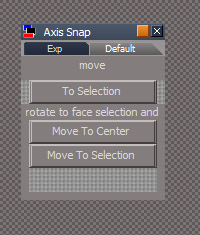
How does this look? Struggling

- Capture.PNG (3.52 KiB) Viewed 3688 times
-
clintonman
- Captain
- Posts: 5659
- Joined: 21 May 2009, 21:08
- Type the number ten into the box: 0
- Location: California
Re: Final trueSpace 7.61 Beta 8 Unofficial Update
P + MMB select the widget moves to object center and rotates the Axis to the selected Face
-
clintonman
- Captain
- Posts: 5659
- Joined: 21 May 2009, 21:08
- Type the number ten into the box: 0
- Location: California
Re: Final trueSpace 7.61 Beta 8 Unofficial Update
trueBlue wrote: 06 Sep 2019, 18:47 How does this look? Struggling
Capture.PNG
- axisSnapPanelRough.jpg (46.76 KiB) Viewed 3688 times
-
clintonman
- Captain
- Posts: 5659
- Joined: 21 May 2009, 21:08
- Type the number ten into the box: 0
- Location: California
Re: Final trueSpace 7.61 Beta 8 Unofficial Update
Why keep the axis tool active? Why snap if you plan to just move it again? Is it because you want to snap to a precise location then give it an offset?trueBlue wrote: 06 Sep 2019, 15:03 ...
I made changes to the first script inside each script to keep the tS Axis tool working.
-
trueBlue
- Captain
- Posts: 5548
- Joined: 06 Jul 2009, 22:50
- Type the number ten into the box: 10
Re: Final trueSpace 7.61 Beta 8 Unofficial Update
Originally I thought it would be nice if tS7 had an Axis tool that would have the same capabilities as your PE widget.
Normally one would not think you would have to Point Edit an object to do this.
Who would think to look in the PE tools to set and Axis?
The first incarnation was simple, open from the Axis widget, select an element, set it as the target, and snap it.
Was hoping that I could get the Axis widget to show where it snapped to, and without the PE widget showing along with it.
With this new incarnation it WAS working. But now the Snap to Face with rotation is not working. I think it has to do with the Continue / Stop, as it looks different from the Snap to Center.
Removed due to update
Normally one would not think you would have to Point Edit an object to do this.
Who would think to look in the PE tools to set and Axis?
The first incarnation was simple, open from the Axis widget, select an element, set it as the target, and snap it.
Was hoping that I could get the Axis widget to show where it snapped to, and without the PE widget showing along with it.
With this new incarnation it WAS working. But now the Snap to Face with rotation is not working. I think it has to do with the Continue / Stop, as it looks different from the Snap to Center.
Removed due to update
-
clintonman
- Captain
- Posts: 5659
- Joined: 21 May 2009, 21:08
- Type the number ten into the box: 0
- Location: California
Re: Final trueSpace 7.61 Beta 8 Unofficial Update

-
clintonman
- Captain
- Posts: 5659
- Joined: 21 May 2009, 21:08
- Type the number ten into the box: 0
- Location: California
Re: Final trueSpace 7.61 Beta 8 Unofficial Update
Auto key is always on, does not respond to the button, can't turn it off.
-
trueBlue
- Captain
- Posts: 5548
- Joined: 06 Jul 2009, 22:50
- Type the number ten into the box: 10
Re: Final trueSpace 7.61 Beta 8 Unofficial Update
Yikes! Sorry about that.
- Attachments
-
- AutoKey_Autoloadd197.RsObj
- (76 KiB) Downloaded 172 times
-
clintonman
- Captain
- Posts: 5659
- Joined: 21 May 2009, 21:08
- Type the number ten into the box: 0
- Location: California
Re: Final trueSpace 7.61 Beta 8 Unofficial Update
Just discovered that if Bridge is set to "On", the workspace status message stops working.
1. Bridge On
2. select anything
3. status line says "Advance to End" and won't update from workspace
1. Bridge On
2. select anything
3. status line says "Advance to End" and won't update from workspace
-
clintonman
- Captain
- Posts: 5659
- Joined: 21 May 2009, 21:08
- Type the number ten into the box: 0
- Location: California
Re: Final trueSpace 7.61 Beta 8 Unofficial Update
Found a problem in the YafaRay python script for modelspace. It mysteriously stopped working for NURBS deformation animation. I got a solution but it needs a little work. The old non-working solution was to set the nurbs invisible then visible again to force workspace update of the mesh. New solution is to change the color and this also works with standalone deformation, the visible/invisible trick never worked for it.
-
trueBlue
- Captain
- Posts: 5548
- Joined: 06 Jul 2009, 22:50
- Type the number ten into the box: 10
Re: Final trueSpace 7.61 Beta 8 Unofficial Update
Check out Simon’s python file.
Not at my desk so do not remember it’s name.
There is a txt file explaining its use.
Has to do with refreshing Model while using it’s Look at tool. Not sure if this would be helpful or not.
Also in Model the Scene Editor has options for Auto key framing.
Not at my desk so do not remember it’s name.
There is a txt file explaining its use.
Has to do with refreshing Model while using it’s Look at tool. Not sure if this would be helpful or not.
Also in Model the Scene Editor has options for Auto key framing.
-
clintonman
- Captain
- Posts: 5659
- Joined: 21 May 2009, 21:08
- Type the number ten into the box: 0
- Location: California
Re: Final trueSpace 7.61 Beta 8 Unofficial Update
Model refreshes just fine, the problem is that model changes don't pass through to workspace, so I have to do weird things to force it.
-
trueBlue
- Captain
- Posts: 5548
- Joined: 06 Jul 2009, 22:50
- Type the number ten into the box: 10
Re: Final trueSpace 7.61 Beta 8 Unofficial Update
Do not know if this may be of any value but I have been meaning to share these commands with you that shows in the Rosetta.log at times.clintonman wrote: 07 Sep 2019, 17:47 Model refreshes just fine, the problem is that model changes don't pass through to workspace, so I have to do weird things to force it.
try {tSBridge.ConnectTSToSpace('/Project/Space 3D');} catch(exception) { }
tSBridge.ResetTSWindows()
Quote from your Blog"
Wonder if this command could be useful:Timeline can drive scripts by adding keyframes to an object at start and end with values equal to the first and last frames. Watchdog is used to read the keyed values. Same can be done to read the modelspace timeline.
tSBridge.SynchronizeObject(Space.CurrentScene())
-
clintonman
- Captain
- Posts: 5659
- Joined: 21 May 2009, 21:08
- Type the number ten into the box: 0
- Location: California
Re: Final trueSpace 7.61 Beta 8 Unofficial Update
Fixed bug in curve scripts.
loadCurve UI: scale and offset inputs were swapped,
loadCurve, points2curve and polygon2curve - animated curve path gave an error when it reached the end of the path
http://clintons3d.com/plugins/truespace ... urves.html
loadCurve UI: scale and offset inputs were swapped,
loadCurve, points2curve and polygon2curve - animated curve path gave an error when it reached the end of the path
http://clintons3d.com/plugins/truespace ... urves.html
- Attachments
-
- loadCurveScript.RsObj
- (642.02 KiB) Downloaded 186 times
-
- points2curveScript.RsObj
- (170.26 KiB) Downloaded 184 times
-
- polygon2curveScript.RsObj
- (192.51 KiB) Downloaded 176 times
-
clintonman
- Captain
- Posts: 5659
- Joined: 21 May 2009, 21:08
- Type the number ten into the box: 0
- Location: California
Re: Final trueSpace 7.61 Beta 8 Unofficial Update
Protect Workspace Note:
Protecting materials will destroy modelspace standalone deformations.
Steps to see it:
add a mesh to workspace
add Standalone Deformation Pipe to modelspace
use workspace material editor to paint the mesh and the deformation pipe disappears
The standalone deformation is also destroyed if a new workspace mesh is added to the scene.
Protecting materials will destroy modelspace standalone deformations.
Steps to see it:
add a mesh to workspace
add Standalone Deformation Pipe to modelspace
use workspace material editor to paint the mesh and the deformation pipe disappears
The standalone deformation is also destroyed if a new workspace mesh is added to the scene.
-
trueBlue
- Captain
- Posts: 5548
- Joined: 06 Jul 2009, 22:50
- Type the number ten into the box: 10
Re: Final trueSpace 7.61 Beta 8 Unofficial Update
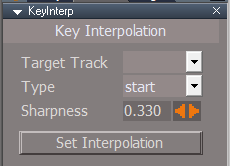
The KeyInterp / Target Track does not have a Reset default.
As shown, I Reset everything.
Are these Defaults the correct ones?
Is the Sharpness value 0.333 the Default that tS761 uses as a Default?
As shown, I Reset everything.
Are these Defaults the correct ones?
Is the Sharpness value 0.333 the Default that tS761 uses as a Default?
- Capture.PNG (4.26 KiB) Viewed 3715 times
-
clintonman
- Captain
- Posts: 5659
- Joined: 21 May 2009, 21:08
- Type the number ten into the box: 0
- Location: California
Re: Final trueSpace 7.61 Beta 8 Unofficial Update
Target Track has no default,
"Target Track - the destination track for new keyframes. Not used when both type is bezier and sharpness is 0.33 (the trueSpace defaults for new keyframes). This setting can also be ignored if the item has only one animation track."
"if object has multiple animation tracks the script will default to the last one added and the record button on first press will open the panel to give the option of changing the target track. Afterwards the record button will record keyframes until the object selection changes or the tracks change name or number of tracks changes. All this is needed because there is no way to read which track is active."
http://clintons3d.com/plugins/truespace ... ation.html
The record button + target track to open the panel and update the list seems really awkward. Maybe there's a better way.
"multiple animation tracks have not been tested - Sept 2017" - probably the reason for the awkwardness.
default Type should be bezier, that's what I get when I reset the Type
Sharpness default of 0.33 is correct
"Target Track - the destination track for new keyframes. Not used when both type is bezier and sharpness is 0.33 (the trueSpace defaults for new keyframes). This setting can also be ignored if the item has only one animation track."
"if object has multiple animation tracks the script will default to the last one added and the record button on first press will open the panel to give the option of changing the target track. Afterwards the record button will record keyframes until the object selection changes or the tracks change name or number of tracks changes. All this is needed because there is no way to read which track is active."
http://clintons3d.com/plugins/truespace ... ation.html
The record button + target track to open the panel and update the list seems really awkward. Maybe there's a better way.
"multiple animation tracks have not been tested - Sept 2017" - probably the reason for the awkwardness.
default Type should be bezier, that's what I get when I reset the Type
Sharpness default of 0.33 is correct
-
trueBlue
- Captain
- Posts: 5548
- Joined: 06 Jul 2009, 22:50
- Type the number ten into the box: 10
Re: Final trueSpace 7.61 Beta 8 Unofficial Update
Okay thanks.
I was able to populate the Target Track combo ctrl by selecting the Record button, so it is back in it's default state.
On another note, I was thinking about adding a Disabled clip for Lights and Cameras as shown, to stop Model from changing these attributes. I have been testing this and it seems to work. Thoughts?
I was able to populate the Target Track combo ctrl by selecting the Record button, so it is back in it's default state.
On another note, I was thinking about adding a Disabled clip for Lights and Cameras as shown, to stop Model from changing these attributes. I have been testing this and it seems to work. Thoughts?

- Capture.PNG (5.77 KiB) Viewed 3708 times
-
clintonman
- Captain
- Posts: 5659
- Joined: 21 May 2009, 21:08
- Type the number ten into the box: 0
- Location: California
Re: Final trueSpace 7.61 Beta 8 Unofficial Update
why disabled? when I set disabled it doesn't stop model changes, I have to re enable and scrub to see it restoredtrueBlue wrote: 09 Sep 2019, 18:18 Okay thanks.
I was able to populate the Target Track combo ctrl by selecting the Record button, so it is back in it's default state.
On another note, I was thinking about adding a Disabled clip for Lights and Cameras as shown, to stop Model from changing these attributes. I have been testing this and it seems to work. Thoughts?
Capture.PNG
-
trueBlue
- Captain
- Posts: 5548
- Joined: 06 Jul 2009, 22:50
- Type the number ten into the box: 10
Re: Final trueSpace 7.61 Beta 8 Unofficial Update
I was thinking Disabled so it would not interfere with animation.
What are the steps that you take to get to break?
I am not seeing these attributes change, except I do notice Spolight1's shape is bigger.
That seems to be a Scale issue. Geeze!
What are the steps that you take to get to break?
I am not seeing these attributes change, except I do notice Spolight1's shape is bigger.
That seems to be a Scale issue. Geeze!
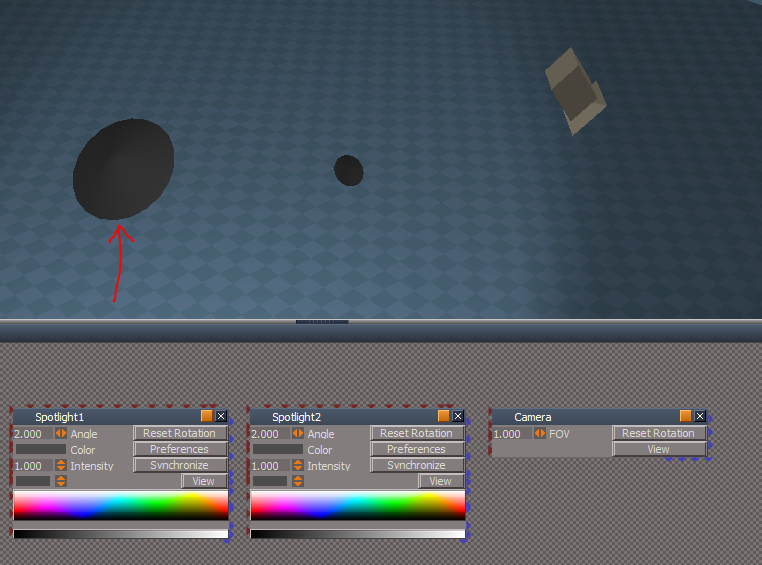
-
clintonman
- Captain
- Posts: 5659
- Joined: 21 May 2009, 21:08
- Type the number ten into the box: 0
- Location: California
Re: Final trueSpace 7.61 Beta 8 Unofficial Update
My steps are
new scene
add angle keyframe to the spotlight
disable the clip
open a model view
open the scene editor and scrub the time
result angle changes from 2 to 0.8
workspace
enable clip and scrub to recover value
scrubbing the modelspace scene editor is a good test since it does most of the damage.
Your words have been haunting me for weeks now, "Curious!
Having YafaRay4tS render Model space animations.
Doesn't that open a can of worms with Workspace Materials and Lights getting corrupted? "
Boy, did you call that one!
new scene
add angle keyframe to the spotlight
disable the clip
open a model view
open the scene editor and scrub the time
result angle changes from 2 to 0.8
workspace
enable clip and scrub to recover value
scrubbing the modelspace scene editor is a good test since it does most of the damage.
Your words have been haunting me for weeks now, "Curious!
Having YafaRay4tS render Model space animations.
Doesn't that open a can of worms with Workspace Materials and Lights getting corrupted? "
Boy, did you call that one!
-
trueBlue
- Captain
- Posts: 5548
- Joined: 06 Jul 2009, 22:50
- Type the number ten into the box: 10
Re: Final trueSpace 7.61 Beta 8 Unofficial Update
Yep it is the Scrubber.clintonman wrote: 09 Sep 2019, 22:16 Your words have been haunting me for weeks now,
"Curious!
Having YafaRay4tS render Model space animations.
Doesn't that open a can of worms with Workspace Materials and Lights getting corrupted? "
Boy, did you call that one!
Including the Scale changes.
Sorry, hope I did not jinx you.
So besides Standalone Deformation, is it okay?
-
clintonman
- Captain
- Posts: 5659
- Joined: 21 May 2009, 21:08
- Type the number ten into the box: 0
- Location: California
Re: Final trueSpace 7.61 Beta 8 Unofficial Update
I finished changes to the D3D render + modelspace and need to get similar changes into the YafaRay. The new way uses an invisible item to tell the scripts that the python file is done. Workspace sets the item z value to 0, modelspace python sets it to 1 and the looping workspace scripts look for the z=1 value in a loop. Previously, it used a timer to guess when modelspace was done processing. The other change was to split up some scripts to give the scene an opportunity to update between changes, think I was trying to do too much inside one script node and that made it less reliable.
My plan:
make a test scene with modelspace animation and workspace animation for YafaRay
test with the new D3D render to be sure it's working
make changes to YafaRay and render the same scene with YafaRay
that scene will be added to the sample scenes
My plan:
make a test scene with modelspace animation and workspace animation for YafaRay
test with the new D3D render to be sure it's working
make changes to YafaRay and render the same scene with YafaRay
that scene will be added to the sample scenes
-
trueBlue
- Captain
- Posts: 5548
- Joined: 06 Jul 2009, 22:50
- Type the number ten into the box: 10
Re: Final trueSpace 7.61 Beta 8 Unofficial Update
trueSpace 7.61 Beta 8 Unofficial Update
Revisions:
July 06, 2009
February 21, 2010
November 01, 2012
May 23, 2019
September 12, 2019
Removed due to update
Revisions:
July 06, 2009
February 21, 2010
November 01, 2012
May 23, 2019
September 12, 2019
Removed due to update
-
trueBlue
- Captain
- Posts: 5548
- Joined: 06 Jul 2009, 22:50
- Type the number ten into the box: 10
Re: Final trueSpace 7.61 Beta 8 Unofficial Update
New update to the Axis widget
Axis widget
* LMB click on the Sphere (Pivot) - Opens a panel for changing the Axis
* RMB click on the Sphere - Closes the Axis widget
Axis widget
* LMB click on the Sphere (Pivot) - Opens a panel for changing the Axis
* RMB click on the Sphere - Closes the Axis widget
-
clintonman
- Captain
- Posts: 5659
- Joined: 21 May 2009, 21:08
- Type the number ten into the box: 0
- Location: California
Re: Final trueSpace 7.61 Beta 8 Unofficial Update
Fixed shear option of the freeze transform script.
- Attachments
-
- freezeTransforms.RsObj
- (15.44 KiB) Downloaded 251 times
-
trueBlue
- Captain
- Posts: 5548
- Joined: 06 Jul 2009, 22:50
- Type the number ten into the box: 10
Re: Final trueSpace 7.61 Beta 8 Unofficial Update
I would think that the Freeze Transform would not move the user's existing pivot to the World origin by default.clintonman wrote: 13 Sep 2019, 20:40 Fixed shear option of the freeze transform script.
I would suggest that the toolbar LMB command opens the panel and not run the script, AND uncheck Transformation as the Default. Maybe a Status message giving a user an idea that something happened when using this tool?
Example with a little humor.
Steps for a New User
Adds Cube to the scene.
Moves Cube somewhere above the Grid
Selects the Freeze Transform icon
Warning message appears! New User says "What

 and chooses Yes"
New User does not know what just happened, hence no Status Message or a Nagging
 unwanted Alert!
New User does not know that the Pivot was moved to the World origin until he rotates the object.
New User is
 and presses the Undo icon but nothing happens.
New User is very


I was reading your Alignment script this morning and noticed you have an Undo function in it. Sweet!

-
clintonman
- Captain
- Posts: 5659
- Joined: 21 May 2009, 21:08
- Type the number ten into the box: 0
- Location: California
Re: Final trueSpace 7.61 Beta 8 Unofficial Update
Freeze transforms was created to keep object appearance and set its center to the origin 0,0,0 set rotations to 0,0,0 and set scale to 1,1,1trueBlue wrote: 14 Sep 2019, 19:00I would think that the Freeze Transform would not move the user's existing pivot to the World origin by default.clintonman wrote: 13 Sep 2019, 20:40 Fixed shear option of the freeze transform script.
I would suggest that the toolbar LMB command opens the panel and not run the script, AND uncheck Transformation as the Default. Maybe a Status message giving a user an idea that something happened when using this tool?
Example with a little humor.
Steps for a New User
Adds Cube to the scene.
Moves Cube somewhere above the Grid
Selects the Freeze Transform icon
Warning message appears! New User says "What
New User does not know what just happened, hence no Status Message or a Nagging
New User does not know that the Pivot was moved to the World origin until he rotates the object.
New User is
New User is very
I was reading your Alignment script this morning and noticed you have an Undo function in it. Sweet!
Moving the pivot to the origin is pretty much part of whole point of freezing the transforms.
When you freeze something you do it for a reason and you expect the values in the info panel to update based on that reason. Status message seems like overkill to me, but feel free to add it if you like.
-
trueBlue
- Captain
- Posts: 5548
- Joined: 06 Jul 2009, 22:50
- Type the number ten into the box: 10
Re: Final trueSpace 7.61 Beta 8 Unofficial Update
Okay I guess I do not understand its intend use with the Default settings. Location anyways.
I do get the normalize Rotation and Scale.
For me I would think origin would be the object's center, not the World's Origin.
Trying to figure out what the Flatten Axis tool does too! Does not seem to do anything that I can tell.
I do get the normalize Rotation and Scale.
For me I would think origin would be the object's center, not the World's Origin.
Trying to figure out what the Flatten Axis tool does too! Does not seem to do anything that I can tell.
-
clintonman
- Captain
- Posts: 5659
- Joined: 21 May 2009, 21:08
- Type the number ten into the box: 0
- Location: California
Re: Final trueSpace 7.61 Beta 8 Unofficial Update
The whole trueSpace axis/pivot system is bonkers. The flatten axis does something like altering the vertices of the mesh so the axis is more like a normal axis. If trueSpace was like all other 3d programs the transform would be the axis, period.
-
stan
- Master Chief Petty Officer
- Posts: 584
- Joined: 21 May 2009, 17:20
Re: Final trueSpace 7.61 Beta 8 Unofficial Update
I think this
"mesh modifiers package/apply pivot transform to mesh" is the Flatten axis tool in the freeze transform script.
I've tried both to get the same result. It tells you what it does.
I'm trying to figure out a good method to get rotated objects in world coords to give the bbox positions. So been playing with that command.
"mesh modifiers package/apply pivot transform to mesh" is the Flatten axis tool in the freeze transform script.
I've tried both to get the same result. It tells you what it does.
I'm trying to figure out a good method to get rotated objects in world coords to give the bbox positions. So been playing with that command.
-
trueBlue
- Captain
- Posts: 5548
- Joined: 06 Jul 2009, 22:50
- Type the number ten into the box: 10
Re: Final trueSpace 7.61 Beta 8 Unofficial Update
Trying to get a mouse tool to run a script.
Getting closer but stuck with a hiccup.
The mouse tool runs the same script as the Snap button but does not work unless you toggle the Axis button.
1.) Choose which option you want and select an element.
2.) After you toggle the Axis, LMB click in 3D Space
Repeat for a different element selection
Maybe you guys can figure it out.
Axis Snap.RsObj goes to /Preferences/Snapping/
Axes widget.RsObj replaces the same object in Widgets/Tools/
LMB select the Axes widget's Sphere to open the panel
Getting closer but stuck with a hiccup.
The mouse tool runs the same script as the Snap button but does not work unless you toggle the Axis button.
1.) Choose which option you want and select an element.
2.) After you toggle the Axis, LMB click in 3D Space
Repeat for a different element selection
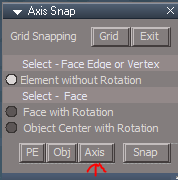
- Axis button1.PNG (5.36 KiB) Viewed 4670 times

- Axis button2.PNG (5.89 KiB) Viewed 4670 times
Axis Snap.RsObj goes to /Preferences/Snapping/
Axes widget.RsObj replaces the same object in Widgets/Tools/
LMB select the Axes widget's Sphere to open the panel
- Attachments
-
- Axis Snap5934.RsObj
- (93.87 KiB) Downloaded 245 times
-
- Axes widget.RsObj
- (164.29 KiB) Downloaded 249 times
-
stan
- Master Chief Petty Officer
- Posts: 584
- Joined: 21 May 2009, 17:20
Re: Final trueSpace 7.61 Beta 8 Unofficial Update
I put the priority on background widget controller up to 5 in mouse tool and the left click got through. this is on a stock ts std version.
-
trueBlue
- Captain
- Posts: 5548
- Joined: 06 Jul 2009, 22:50
- Type the number ten into the box: 10
Re: Final trueSpace 7.61 Beta 8 Unofficial Update
Thanks for taking a look. That is not the problem.stan wrote: 15 Sep 2019, 18:53 I put the priority on background widget controller up to 5 in mouse tool and the left click got through. this is on a stock ts std version.
I think what is wrong is not having the ability to toggle back forth from selecting elements and the Mouse tool.
Edit: Hey it works but not as wanted. I have to LMB + Drag on an new element selection and then click with the Mouse tool. Weird!
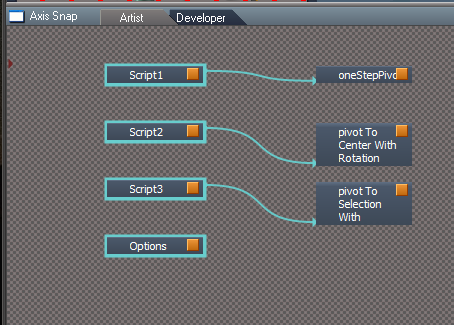
Edit2: Forgot that I commented out this command in the Script1, 2, and 3
Code: Select all
MeshModifiers.ActivatePointEditWidget('{E8913C00-9A2A-43cf-8238-27B4BFB50A1F}','/Widgets/Tools/Mesh editor/PE basic select','Default');
-
stan
- Master Chief Petty Officer
- Posts: 584
- Joined: 21 May 2009, 17:20
Re: Final trueSpace 7.61 Beta 8 Unofficial Update
the problem is they both use left click. right click closes edit and the widget.
The pe selection is dyna pick and uses left mouse button state so a drag works to select.. It's not that easy to get right each time, rather finicky to use that way. I had a system alert in your script to see if it was firing with or without a selection.
The pe selection is dyna pick and uses left mouse button state so a drag works to select.. It's not that easy to get right each time, rather finicky to use that way. I had a system alert in your script to see if it was firing with or without a selection.
-
trueBlue
- Captain
- Posts: 5548
- Joined: 06 Jul 2009, 22:50
- Type the number ten into the box: 10
Re: Final trueSpace 7.61 Beta 8 Unofficial Update
Unfortunately the RMB click to end PE editing toggles the Axis tool off. No way around that, that I can tell.stan wrote: 15 Sep 2019, 21:48 the problem is they both use left click. right click closes edit and the widget.
The pe selection is dyna pick and uses left mouse button state so a drag works to select.. It's not that easy to get right each time, rather finicky to use that way. I had a system alert in your script to see if it was firing with or without a selection.
-
trueBlue
- Captain
- Posts: 5548
- Joined: 06 Jul 2009, 22:50
- Type the number ten into the box: 10
Re: Final trueSpace 7.61 Beta 8 Unofficial Update
trueSpace 7.61 Beta 8 Unofficial Update
Revisions:
July 06, 2009
February 21, 2010
November 01, 2012
May 23, 2019
September 18, 2019
File removed due to update
Revisions:
July 06, 2009
February 21, 2010
November 01, 2012
May 23, 2019
September 18, 2019
File removed due to update
-
clintonman
- Captain
- Posts: 5659
- Joined: 21 May 2009, 21:08
- Type the number ten into the box: 0
- Location: California
Re: Final trueSpace 7.61 Beta 8 Unofficial Update
Has a button for D3D Render but no script.
Toolbar manager toolbar, text is all messed up shortened instead of full words.
My first time seeing and don't know how the axis panel works. Looks like Grid button is for convenience. Axis makes the axis appear and disappear. Can't tell what PE and Obj do. Don't really know how to use it at all.
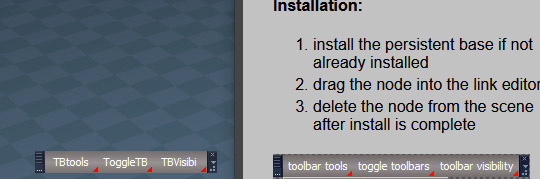
My first time seeing and don't know how the axis panel works. Looks like Grid button is for convenience. Axis makes the axis appear and disappear. Can't tell what PE and Obj do. Don't really know how to use it at all.
-
trueBlue
- Captain
- Posts: 5548
- Joined: 06 Jul 2009, 22:50
- Type the number ten into the box: 10
Re: Final trueSpace 7.61 Beta 8 Unofficial Update
New upload...
Toolbar Manager 'fixed'
D3D Render 'fixed'
Axis widget is a work in progress.
Axis, PE, and OBJ buttons toggle widget visibility on off.
Select an Option, select an element, and then the Snap button.
Toolbar Manager 'fixed'
D3D Render 'fixed'
Axis widget is a work in progress.
Axis, PE, and OBJ buttons toggle widget visibility on off.
Select an Option, select an element, and then the Snap button.
-
clintonman
- Captain
- Posts: 5659
- Joined: 21 May 2009, 21:08
- Type the number ten into the box: 0
- Location: California
Re: Final trueSpace 7.61 Beta 8 Unofficial Update
Looks good now.trueBlue wrote: 17 Sep 2019, 02:33 New upload...
Toolbar Manager 'fixed'
D3D Render 'fixed'
Axis widget is a work in progress.
Axis, PE, and OBJ buttons toggle widget visibility on off.
Select an Option, select an element, and then the Snap button.
Attached modified D3D Render:
changed create python toggle button to an ordinary button
moved code out of button into the script
changed text message to "Python file was created - " plus the current date and time
- Attachments
-
- D3D_Render.RsObj
- (149.36 KiB) Downloaded 286 times
-
trueBlue
- Captain
- Posts: 5548
- Joined: 06 Jul 2009, 22:50
- Type the number ten into the box: 10
Re: Final trueSpace 7.61 Beta 8 Unofficial Update
Nice touch on the date!
Uploaded your change.
YafaRay4tS.RsScn 'fixed'
Changed the Auto Run script to:
Uploaded your change.
YafaRay4tS.RsScn 'fixed'
Changed the Auto Run script to:
Code: Select all
Node.Copy("/Yafaray Folder/YafaRay4tS", Space.CurrentScene());
Node.Delete(Space.CurrentScene() + "/YafaRay4tS,1")
Node.Delete(Space.CurrentScene() + "/YafaRay4tS, 1")
Node.Delete(System.ThisName())-
the_ant

- Chief Petty Officer
- Posts: 155
- Joined: 02 Jun 2009, 09:26
- Type the number ten into the box: 0
- Location: Perugia - Italy
Re: Final trueSpace 7.61 Beta 8 Unofficial Update
Wow...this tread looks like an "Un-Final Un-Official Update"...following your posts day by day and thinking you're Un-beliavable!!! Can't wait the very last version to re-install tSp7.61b8 
-
trueBlue
- Captain
- Posts: 5548
- Joined: 06 Jul 2009, 22:50
- Type the number ten into the box: 10
Re: Final trueSpace 7.61 Beta 8 Unofficial Update
New update uploaded...
@Clinton - This is a test/demo to see if you like it.
YafaRay4tS
Fixed the Animation aspect
Removed Status messages from the ProtectWorkspace.RsObj
D3D Render
UpdateStatus.RsObj
Changed the Status message to:
Added a script that is hooked up to ActvLoop_frame.RsObj's Control Out attribute that runs:
The above changes stops the flashing/changing Status messages during rendering!
@Clinton - This is a test/demo to see if you like it.
YafaRay4tS
Fixed the Animation aspect
Removed Status messages from the ProtectWorkspace.RsObj
D3D Render
UpdateStatus.RsObj
Changed the Status message to:
Code: Select all
	if(Node.Exists("/Status Line")) {
			Node.ConRemove("Status Line", "Model")
		if(!Node.ConExists("Status Line", "Rendering"))
			Node.ConCreate("Status Line", "Rendering", "string", 4);
		Node.Value("/Status Line","Rendering") = "Frame " + (startFrame + iter - 1);
}Code: Select all
Node.ConRemove("Status Line", "Rendering")
//Next part is not neccessary because tS7 recreates it automatically, including if you delete the Status Line.
if(!Node.Exists("Status Line"))
return;
if(!Node.ConExists("Status Line", "Model"))
Node.ConCreate("Status Line", "Model", "string", 4);
Node.Value("Status Line", "Model") = "";
-
clintonman
- Captain
- Posts: 5659
- Joined: 21 May 2009, 21:08
- Type the number ten into the box: 0
- Location: California
Re: Final trueSpace 7.61 Beta 8 Unofficial Update
ProtectWorkspace:
removed light color logging
Added "Emanuel" fixes, doesn't affect operation but may fix the problem he has with light color errors.
Added these changes and your ui changes to my website version.
D3D Render:
Altered Status line to be "D3D" instead of "Rendering" I figure the status names can be Model, Vray, Workspace, YafaRay and D3D
Deleted the code that removes the Model status, the Vray screenshot you showed me didn't erase the Model status.
Once removed the Model connector doesn't work anymore. Can see by hovering over modelside buttons - get no Model status messages. I think restore default context fixes it, but not sure, tS crashed just before I was going to try it.
Added 1 more Protect run so if modelside window is closed any changes can be reverted
Added all these changes to my website version as well.
I have no solution to the flashing model text. It must be happening because of the odd way of updating modelside frame number. I have to set the frame to the previous frame then press the next frame button to get the frame I want and make it all to work.
Edit: I just got an idea to fix the jumpy modelspace status. Maybe the model status can be captured before it disappears. Will give it a shot tomorrow.
removed light color logging
Added "Emanuel" fixes, doesn't affect operation but may fix the problem he has with light color errors.
Added these changes and your ui changes to my website version.
D3D Render:
Altered Status line to be "D3D" instead of "Rendering" I figure the status names can be Model, Vray, Workspace, YafaRay and D3D
Deleted the code that removes the Model status, the Vray screenshot you showed me didn't erase the Model status.
Once removed the Model connector doesn't work anymore. Can see by hovering over modelside buttons - get no Model status messages. I think restore default context fixes it, but not sure, tS crashed just before I was going to try it.
Added 1 more Protect run so if modelside window is closed any changes can be reverted
Added all these changes to my website version as well.
I have no solution to the flashing model text. It must be happening because of the odd way of updating modelside frame number. I have to set the frame to the previous frame then press the next frame button to get the frame I want and make it all to work.
Edit: I just got an idea to fix the jumpy modelspace status. Maybe the model status can be captured before it disappears. Will give it a shot tomorrow.
- Attachments
-
- ProtectWorkspace2d58.RsObj
- (122.36 KiB) Downloaded 283 times
-
- D3D_Render0da7.RsObj
- (153.67 KiB) Downloaded 315 times
-
trueBlue
- Captain
- Posts: 5548
- Joined: 06 Jul 2009, 22:50
- Type the number ten into the box: 10
Re: Final trueSpace 7.61 Beta 8 Unofficial Update
New Update uploaded - September 18, 2019
ProtectWorkspace.RsObj - Updated 9/18/2019
D3D_Render_Grp.RsObj - Updated 9/18/2019
@Clinton - I notice that the Floating Panel uses the D3D_Render in CustomCommands instead of the one in the scene. Could this be a problem if for instance the D3D_Render.RsObj is saved with the scene?
I had a dream that Auto Keyframing worked with D3D Render!
Wonder if Bake Keyframes would do that? I'll try that today!
YafaRay4tS.RsObj
UpdateStatus - Changed status message to be consistent with D3D Render:
Status Message.RsObj
Changed from using Model to Workspace string
Removed the Old Layouts
Removed all of the Buttons except the Render buttons
ProtectWorkspace.RsObj - Updated 9/18/2019
D3D_Render_Grp.RsObj - Updated 9/18/2019
@Clinton - I notice that the Floating Panel uses the D3D_Render in CustomCommands instead of the one in the scene. Could this be a problem if for instance the D3D_Render.RsObj is saved with the scene?
I had a dream that Auto Keyframing worked with D3D Render!
Wonder if Bake Keyframes would do that? I'll try that today!
YafaRay4tS.RsObj
UpdateStatus - Changed status message to be consistent with D3D Render:
Code: Select all
Node.Value("/Status Line","YafaRay") = "Frame " + (startFrame + iter - 1);Changed from using Model to Workspace string
Removed the Old Layouts
Removed all of the Buttons except the Render buttons
-
clintonman
- Captain
- Posts: 5659
- Joined: 21 May 2009, 21:08
- Type the number ten into the box: 0
- Location: California
Re: Final trueSpace 7.61 Beta 8 Unofficial Update
I don't see the D3D using the panel in the CustomCommands, it only updates the scene D3D_Render node. It does seem to only be half way connected in that you can remove the node from the scene and the panel remains. I think the panel stuff needs to be moved to the inside of the D3D_Render nodetrueBlue wrote: 18 Sep 2019, 13:19 ...
@Clinton - I notice that the Floating Panel uses the D3D_Render in CustomCommands instead of the one in the scene. Could this be a problem if for instance the D3D_Render.RsObj is saved with the scene?
...
Removed the Old Layouts
Removed all of the Buttons except the Render buttons
Removed all the Buttons and Old Layouts sounds like you gutted trueSpace and left an empty shell.

-
trueBlue
- Captain
- Posts: 5548
- Joined: 06 Jul 2009, 22:50
- Type the number ten into the box: 10
Re: Final trueSpace 7.61 Beta 8 Unofficial Update
The Buttons and Old Layouts were removed to save space. The old layouts were not that easy to switch to and some of the button commands were changed. You still have all of the buttons from the default installation.Can the Bake Keyframes be changed from First Selected to Node Selection, so that it can include more then one selected object? Maybe even an option for every object in a scene?
Correct me if I am wrong but I do not think your pivot To Center With Rotation is working correctly.
Steps
Use P + MMB on a selected Face
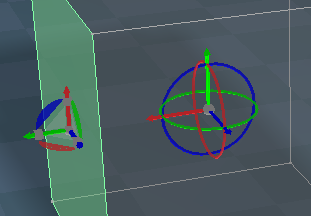
- P MMB Selected Face to Center.PNG (16.2 KiB) Viewed 3946 times
Then Reset Axis
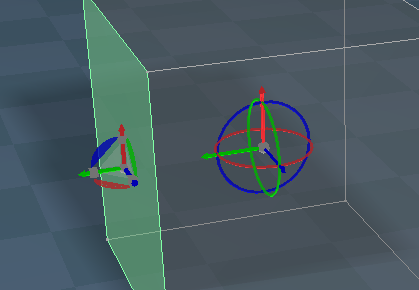
-
clintonman
- Captain
- Posts: 5659
- Joined: 21 May 2009, 21:08
- Type the number ten into the box: 0
- Location: California
Re: Final trueSpace 7.61 Beta 8 Unofficial Update
It's possible to change Bake Keyframes to do more than one object or the whole scene. I don't know what the motivation to do so would be though.trueBlue wrote: 18 Sep 2019, 16:25
Can the Bake Keyframes be changed from First Selected to Node Selection, so that it can include more then one selected object? Maybe even an option for every object in a scene?
Correct me if I am wrong but I do not think your pivot To Center With Rotation is working correctly.
Steps
Use P + MMB on a selected Face
P MMB Selected Face to Center.PNG
Notice that the Axis Widget is different from the PE widget?
Then Reset Axis
Reset Axis.PNG
Maybe you are in world coordinate mode. Try object or tangent coordinate and see if it works.
Note to myself: Add axis widget to the standard color script
-
clintonman
- Captain
- Posts: 5659
- Joined: 21 May 2009, 21:08
- Type the number ten into the box: 0
- Location: California
Re: Final trueSpace 7.61 Beta 8 Unofficial Update
I'm looking and have no idea what was removed.trueBlue wrote: 18 Sep 2019, 13:19 ...
Removed the Old Layouts
Removed all of the Buttons except the Render buttons
-
trueBlue
- Captain
- Posts: 5548
- Joined: 06 Jul 2009, 22:50
- Type the number ten into the box: 10
Re: Final trueSpace 7.61 Beta 8 Unofficial Update
Roger on the Bake Keyframes.clintonman wrote: 18 Sep 2019, 18:43It's possible to change Bake Keyframes to do more than one object or the whole scene. I don't know what the motivation to do so would be though.trueBlue wrote: 18 Sep 2019, 16:25
Can the Bake Keyframes be changed from First Selected to Node Selection, so that it can include more then one selected object? Maybe even an option for every object in a scene?
Correct me if I am wrong but I do not think your pivot To Center With Rotation is working correctly.
Steps
Use P + MMB on a selected Face
P MMB Selected Face to Center.PNG
Notice that the Axis Widget is different from the PE widget?
Then Reset Axis
Reset Axis.PNG
Maybe you are in world coordinate mode. Try object or tangent coordinate and see if it works.
Note to myself: Add axis widget to the standard color script
Using Object or Tangent coordinate does not make a difference.
Maybe your code is using Standard coordinates?
-
clintonman
- Captain
- Posts: 5659
- Joined: 21 May 2009, 21:08
- Type the number ten into the box: 0
- Location: California
Re: Final trueSpace 7.61 Beta 8 Unofficial Update
Downloaded latest test so can see truespace colors now. The mmb p pivot rotation is working as far as I can see except that it has no sense of up, so only the face normal/z axis is guaranteed to line up with the axis. You can also see the rotation if you enable object coordinate and run it on the sides of a cylinder.
-
trueBlue
- Captain
- Posts: 5548
- Joined: 06 Jul 2009, 22:50
- Type the number ten into the box: 10
Re: Final trueSpace 7.61 Beta 8 Unofficial Update
They were the modified layouts from several revisions ago.clintonman wrote: 18 Sep 2019, 18:59I'm looking and have no idea what was removed.trueBlue wrote: 18 Sep 2019, 13:19 ...
Removed the Old Layouts
Removed all of the Buttons except the Render buttons
If you want they are here temporarily.
viewtopic.php?t=3732#p37396
-
clintonman
- Captain
- Posts: 5659
- Joined: 21 May 2009, 21:08
- Type the number ten into the box: 0
- Location: California
Re: Final trueSpace 7.61 Beta 8 Unofficial Update
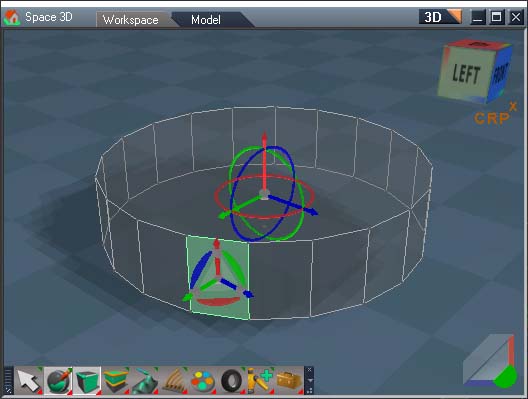
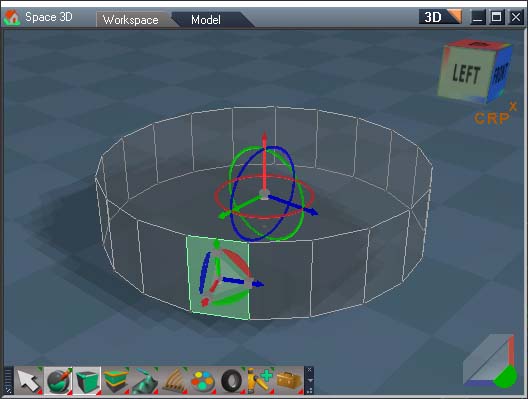
This is what I'm seeing. Only the red z axis will work 100% of the time, other times the green and blue may swap.
world coordinate default pivot
object coordinate default pivot
mmb + p result 1
mmb + p result 2
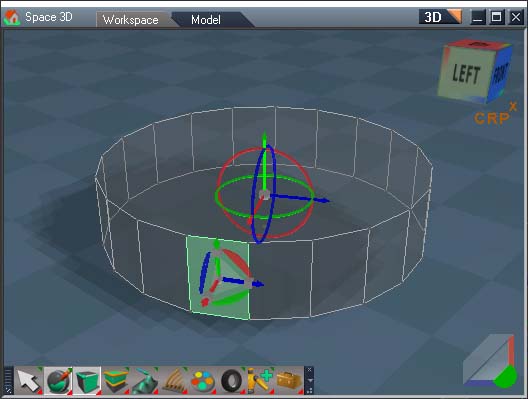
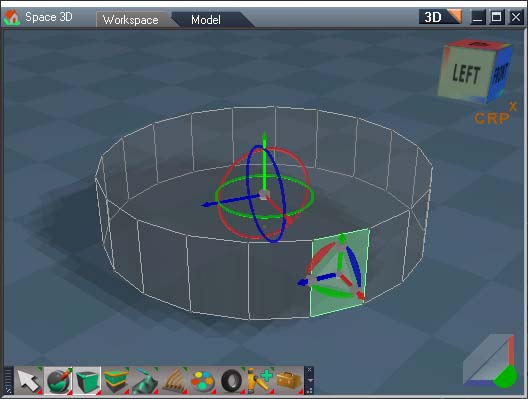
-
trueBlue
- Captain
- Posts: 5548
- Joined: 06 Jul 2009, 22:50
- Type the number ten into the box: 10
Re: Final trueSpace 7.61 Beta 8 Unofficial Update
Okay gonna go with the face normal/z axis, is the way it works. Thank you for the explanation!
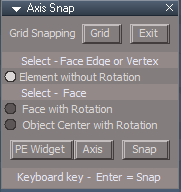
Small update to the Axes Widget
* LMB click on the Sphere (Pivot) - Opens a panel for changing the Axis
* RMB click on the Sphere - Closes the Axis widget
Grid toggles the Grid snapping On/Off
Exit closes the panel, Axis widget, restores the Grid, and the Axis, PE visibility to visible 'true'.
PE Widget toggles the PE widget On/Off
Axis toggles the Axis widget On/Off
Snap snaps the Axis widget to selected element using the chosen option.
Keyboard Key - Enter = Snap
Small update to the Axes Widget
- Capture.PNG (5.57 KiB) Viewed 3939 times
* RMB click on the Sphere - Closes the Axis widget
Grid toggles the Grid snapping On/Off
Exit closes the panel, Axis widget, restores the Grid, and the Axis, PE visibility to visible 'true'.
PE Widget toggles the PE widget On/Off
Axis toggles the Axis widget On/Off
Snap snaps the Axis widget to selected element using the chosen option.
Keyboard Key - Enter = Snap
-
trueBlue
- Captain
- Posts: 5548
- Joined: 06 Jul 2009, 22:50
- Type the number ten into the box: 10
Re: Final trueSpace 7.61 Beta 8 Unofficial Update
trueSpace 7.61 Beta 8 Unofficial Update
Revisions:
July 06, 2009
February 21, 2010
November 01, 2012
May 23, 2019
September 18, 2019
Removed due to update
Revisions:
July 06, 2009
February 21, 2010
November 01, 2012
May 23, 2019
September 18, 2019
Removed due to update
-
clintonman
- Captain
- Posts: 5659
- Joined: 21 May 2009, 21:08
- Type the number ten into the box: 0
- Location: California
Re: Final trueSpace 7.61 Beta 8 Unofficial Update
D3D Render - no longer copies to the scene and moved the display frame panel to inside the node.
Also altered the way modelspace time is set so frame 0 is not skipped and the frame is only updated 1 time per loop cycle.
No luck with removing the flashing modelside status.
Also altered the way modelspace time is set so frame 0 is not skipped and the frame is only updated 1 time per loop cycle.
No luck with removing the flashing modelside status.
- Attachments
-
- D3D_Render_Grp.RsObj
- (174.46 KiB) Downloaded 257 times
-
trueBlue
- Captain
- Posts: 5548
- Joined: 06 Jul 2009, 22:50
- Type the number ten into the box: 10
Re: Final trueSpace 7.61 Beta 8 Unofficial Update
Looking good! 
What Flashing?
If you were referring to what I was saying, I was referring to the Protect Workspace Model Status Line messages at every keyframe.
Do you think a Reset Defaults script is needed?
What Flashing?
If you were referring to what I was saying, I was referring to the Protect Workspace Model Status Line messages at every keyframe.
Do you think a Reset Defaults script is needed?
-
clintonman
- Captain
- Posts: 5659
- Joined: 21 May 2009, 21:08
- Type the number ten into the box: 0
- Location: California
Re: Final trueSpace 7.61 Beta 8 Unofficial Update
I don't think so. It's just 1 small panel.trueBlue wrote: 19 Sep 2019, 03:07 Looking good!
What Flashing?
If you were referring to what I was saying, I was referring to the Protect Workspace Model Status Line messages at every keyframe.
Do you think a Reset Defaults script is needed?
-
trueBlue
- Captain
- Posts: 5548
- Joined: 06 Jul 2009, 22:50
- Type the number ten into the box: 10
Re: Final trueSpace 7.61 Beta 8 Unofficial Update
Is all of this still relevant?
Render a sequence to files
Check the Render to File
Press the Render Settings button and
uncheck "Save animation from frame"
check "Save sequence starting with"
enter a starting frame number
set the file name
press the "Save settings" button and close the dialog
Render a sequence to files
Check the Render to File
Press the Render Settings button and
uncheck "Save animation from frame"
check "Save sequence starting with"
enter a starting frame number
set the file name
press the "Save settings" button and close the dialog
-
clintonman
- Captain
- Posts: 5659
- Joined: 21 May 2009, 21:08
- Type the number ten into the box: 0
- Location: California
Re: Final trueSpace 7.61 Beta 8 Unofficial Update
Yep.trueBlue wrote: 19 Sep 2019, 03:36 Is all of this still relevant?
Render a sequence to files
Check the Render to File
Press the Render Settings button and
uncheck "Save animation from frame"
check "Save sequence starting with"
enter a starting frame number
set the file name
press the "Save settings" button and close the dialog
-
clintonman
- Captain
- Posts: 5659
- Joined: 21 May 2009, 21:08
- Type the number ten into the box: 0
- Location: California
Re: Final trueSpace 7.61 Beta 8 Unofficial Update
YafaRay
removed Model status messages from animation render
modelspace frame set now works with frame 0 and only updates modelspace frame once per loop.
removed Model status messages from animation render
modelspace frame set now works with frame 0 and only updates modelspace frame once per loop.
- Attachments
-
- YafaRay4tS676d.RsObj
- (1.03 MiB) Downloaded 292 times
-
trueBlue
- Captain
- Posts: 5548
- Joined: 06 Jul 2009, 22:50
- Type the number ten into the box: 10
Re: Final trueSpace 7.61 Beta 8 Unofficial Update
The YafModelspaceTest.RsScn crashes trueSpace761 as soon as I close Model, after successfully rendering the 20 frame render with the included YafaRay4tS.RsObj or replacing it with the newest version.
Maybe I need to render something before I try that scene. I do remember some lag on the first render on a fresh install.
I will try that.
Edit: That did not work.
I am sure I am doing everything correctly.
Any suggestions?
Also noticed that there is still Model status messages from animation render
Also noticed that you are changing the Bridge to On.
I thought that Auto was better?
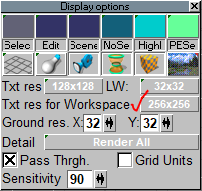
Noticed if I click on Txt res for Workspace the scene lights moved but Backup Restored them.
Maybe I need to render something before I try that scene. I do remember some lag on the first render on a fresh install.
I will try that.
Edit: That did not work.
I am sure I am doing everything correctly.
Any suggestions?
Also noticed that there is still Model status messages from animation render
Also noticed that you are changing the Bridge to On.
I thought that Auto was better?
Noticed if I click on Txt res for Workspace the scene lights moved but Backup Restored them.
- Capture.PNG (13.02 KiB) Viewed 3971 times
-
clintonman
- Captain
- Posts: 5659
- Joined: 21 May 2009, 21:08
- Type the number ten into the box: 0
- Location: California
Re: Final trueSpace 7.61 Beta 8 Unofficial Update
Lag is normal for the first YafaRay render of the day.trueBlue wrote: 19 Sep 2019, 17:38 The YafModelspaceTest.RsScn crashes trueSpace761 as soon as I close Model, after successfully rendering the 20 frame render with the included YafaRay4tS.RsObj or replacing it with the newest version.
Maybe I need to render something before I try that scene. I do remember some lag on the first render on a fresh install.
I will try that.
Edit: That did not work.
I am sure I am doing everything correctly.
Any suggestions?
Also noticed that there is still Model status messages from animation render
Also noticed that you are changing the Bridge to On.
I thought that Auto was better?
Noticed if I click on Txt res for Workspace the scene lights moved but Backup Restored them.
Capture.PNG
Don't see any model status from animation here.
Bridge setting is not touched by any of the code.
I've narrowed it down to the python special mesh processing. When off I get no crash when closing model window after render. If turn it on, render and closed model window I get the crash.
Maybe some tSBridge command will fix it.
-
trueBlue
- Captain
- Posts: 5548
- Joined: 06 Jul 2009, 22:50
- Type the number ten into the box: 10
Re: Final trueSpace 7.61 Beta 8 Unofficial Update
clintonman wrote: 19 Sep 2019, 19:50 Lag is normal for the first YafaRay render of the day.
Don't see any model status from animation here.Bridge setting is not touched by any of the code.tB That's because the scene has the previous YafaRaytS panelI've narrowed it down to the python special mesh processing. When off I get no crash when closing model window after render. If turn it on, render and closed model window I get the crash.tB Must have been the D3D Render then, I'll check later
Maybe some tSBridge command will fix it.tB Yeah!!! I can confirm that.
-
clintonman
- Captain
- Posts: 5659
- Joined: 21 May 2009, 21:08
- Type the number ten into the box: 0
- Location: California
Re: Final trueSpace 7.61 Beta 8 Unofficial Update
Only found 1 way to stop the crash when using special mesh processing. Exit truespace after the render
I tried bridge command, flush.
bridge off - no crash, but slow crashed after reopening model view and syncing from workspace
bridge off - ... same result sync from model
new model scene after render
new workspace scene after render
undo clear and set to zero - crashed before I even got to rendering
Final conclusion:
Exit trueSpace after render is complete when using special mesh processing
Plan:
1. add warning message when using the special mesh processing
2. add camera to yafaray camera converter
3. Space.Unselect() after creation of ms_flags_object and move it out of sight
4. confirm that special mesh processing only needed for vertex animated NURBS and metaball objects to better define when to use it
I tried bridge command, flush.
bridge off - no crash, but slow crashed after reopening model view and syncing from workspace
bridge off - ... same result sync from model
new model scene after render
new workspace scene after render
undo clear and set to zero - crashed before I even got to rendering
Final conclusion:
Exit trueSpace after render is complete when using special mesh processing
Plan:
1. add warning message when using the special mesh processing
2. add camera to yafaray camera converter
3. Space.Unselect() after creation of ms_flags_object and move it out of sight
4. confirm that special mesh processing only needed for vertex animated NURBS and metaball objects to better define when to use it
Last edited by clintonman on 19 Sep 2019, 20:53, edited 1 time in total.