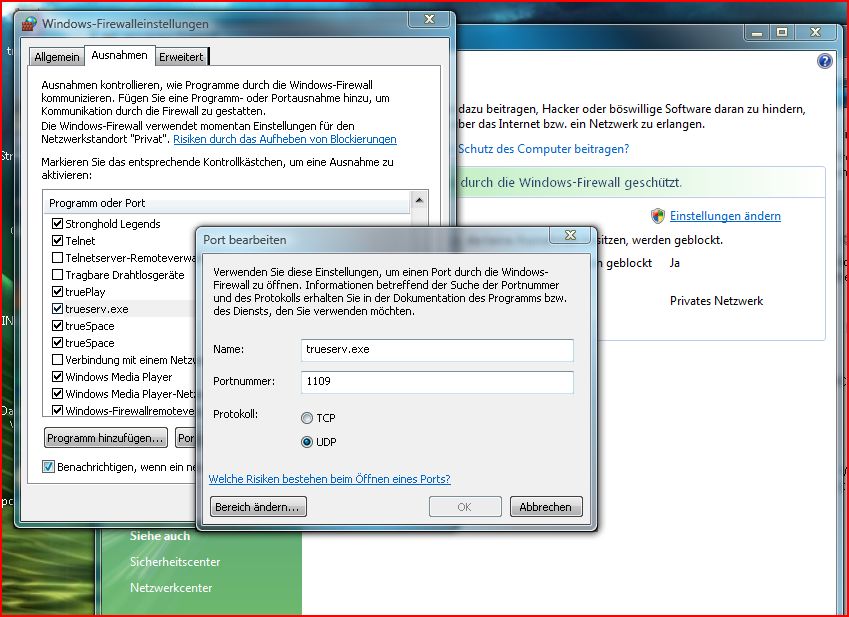
Hi i can set programm and port , but with advanced only that comes up what you see.
i am admin for my computer.
this i can do but if i ad pugspace ,port 1109. udp itdoes not allow
becaus trueserve is already set to that port and udp
Trueserve set up prop
-
pugman 1
- Captain
- Posts: 1555
- Joined: 21 May 2009, 19:26
- Type the number ten into the box: 0
- Location: Germany
Re: Trueserve set up prop
- Attachments
-
-
BooxieMalone
- Chief Petty Officer
- Posts: 127
- Joined: 14 Jul 2009, 22:34
Re: Trueserve set up prop
Hi pugman1,
really bad news - you're in the right place, but if vista doesn't allow you to assign this port to a second or third app ...
I'm really sorry, then I can't help.
The only way I see at the moment, to work around this, would be to deactivate the vista Firewall completely and to use another Firewall Application, i.e. Zone Alarm.
The prerequisites wouldn't change, but zone alarm configuration is a bit more complex I think.
Regards
-BM.
Edit: I just remember ... I think 3DVD is using Zone Alarm, maybe you could have a talk with him?
really bad news - you're in the right place, but if vista doesn't allow you to assign this port to a second or third app ...
I'm really sorry, then I can't help.
The only way I see at the moment, to work around this, would be to deactivate the vista Firewall completely and to use another Firewall Application, i.e. Zone Alarm.
The prerequisites wouldn't change, but zone alarm configuration is a bit more complex I think.
Regards
-BM.
Edit: I just remember ... I think 3DVD is using Zone Alarm, maybe you could have a talk with him?
-
pugman 1
- Captain
- Posts: 1555
- Joined: 21 May 2009, 19:26
- Type the number ten into the box: 0
- Location: Germany
Re: Trueserve set up prop
Hi BM, thanks for every thing you did realy cool man.
ill look into it ,till then ill carry on with a new scene for froo and true blue


ill look into it ,till then ill carry on with a new scene for froo and true blue
-
Cayenne
- Chief Petty Officer
- Posts: 119
- Joined: 03 Jun 2009, 20:05
- Type the number ten into the box: 0
- Location: U.K.
Re: Trueserve set up prop
Hi with windows firewall (at least on vista X64 ultimate ), as far as I can recall , nothing special or additional ports were required to be set (at least by me), only thing was to allow " unblock" both trueSpace at first launch and attempt to connect to a SSpace , and same with trueServe frirst launch was just to allow "unblock" .
One note is I dont have the ok greyed out when i do try to add ports so it might be a limitation on the vista OS version pugman is running , but I am not sure of that as it seems an odd function to remove.
Same with XP pro ,I just allow "unblock" as far as I recall .(long time since used xp now)
Main settings as far as I remember to allow were ones in a router to allow for a game or app to be allowed with the port .
I can try later on my wifes vista 32 Home version to see what the results are , but as far as I know I tested this in the past prior to release and just allow for windows firewall worked ok and allowed access from outside with nothing too special needing setting up.
One note is I dont have the ok greyed out when i do try to add ports so it might be a limitation on the vista OS version pugman is running , but I am not sure of that as it seems an odd function to remove.
Same with XP pro ,I just allow "unblock" as far as I recall .(long time since used xp now)
Main settings as far as I remember to allow were ones in a router to allow for a game or app to be allowed with the port .
I can try later on my wifes vista 32 Home version to see what the results are , but as far as I know I tested this in the past prior to release and just allow for windows firewall worked ok and allowed access from outside with nothing too special needing setting up.
-
pugman 1
- Captain
- Posts: 1555
- Joined: 21 May 2009, 19:26
- Type the number ten into the box: 0
- Location: Germany
Re: Trueserve set up prop
Thanks man for the help .
-
Cayenne
- Chief Petty Officer
- Posts: 119
- Joined: 03 Jun 2009, 20:05
- Type the number ten into the box: 0
- Location: U.K.
Re: Trueserve set up prop
NP you are welcome, however
I might be a bit longer , I just see my wife didnt install SP2 yet for her vista , so it might be a good hr before I can try it.
I might be a bit longer , I just see my wife didnt install SP2 yet for her vista , so it might be a good hr before I can try it.
-
Cayenne
- Chief Petty Officer
- Posts: 119
- Joined: 03 Jun 2009, 20:05
- Type the number ten into the box: 0
- Location: U.K.
Re: Trueserve set up prop
ok I set up a very temp server and empty space here //80.46.98.183/1109 use any name any pass.
Can someone check it to see if a connect happens.
I just allowed "unblock" to windows vista (home premium x32 version) firewall messages , havent touched my router as yet for this machine to set up ports for it so it might not be reachable from "outside" yet.
with the windows firewall i also checked if you can add ports multiple times and it seems you can only open a port eg 1109 as one instance , however it looks like once you open the port its open to any application that might want/need to use it.
I removed those settings after the test.
Can someone check it to see if a connect happens.
I just allowed "unblock" to windows vista (home premium x32 version) firewall messages , havent touched my router as yet for this machine to set up ports for it so it might not be reachable from "outside" yet.
with the windows firewall i also checked if you can add ports multiple times and it seems you can only open a port eg 1109 as one instance , however it looks like once you open the port its open to any application that might want/need to use it.
I removed those settings after the test.
-
pugman 1
- Captain
- Posts: 1555
- Joined: 21 May 2009, 19:26
- Type the number ten into the box: 0
- Location: Germany
Re: Trueserve set up prop
Hi , hangs on conecting by true play
-
Cayenne
- Chief Petty Officer
- Posts: 119
- Joined: 03 Jun 2009, 20:05
- Type the number ten into the box: 0
- Location: U.K.
Re: Trueserve set up prop
ok I added it as an application to the router , can you try again thanks.
-
pugman 1
- Captain
- Posts: 1555
- Joined: 21 May 2009, 19:26
- Type the number ten into the box: 0
- Location: Germany
Re: Trueserve set up prop
Still hangs on connecting
-
Cayenne
- Chief Petty Officer
- Posts: 119
- Joined: 03 Jun 2009, 20:05
- Type the number ten into the box: 0
- Location: U.K.
Re: Trueserve set up prop
can you try 1110 please..
-
froo
- Captain
- Posts: 2554
- Joined: 22 May 2009, 12:13
Re: Trueserve set up prop
I made it in to 1110
-
trueBlue

- Captain
- Posts: 5548
- Joined: 06 Jul 2009, 22:50
- Type the number ten into the box: 10
Re: Trueserve set up prop
Same here using Vista32 HP. No setup was needed with Vista's Fire Wall except being asked to allow tS761 and tServe.Cayenne wrote:Hi with windows firewall (at least on vista X64 ultimate ), as far as I can recall , nothing special or additional ports were required to be set (at least by me), only thing was to allow " unblock" both trueSpace at first launch and attempt to connect to a SSpace , and same with trueServe frirst launch was just to allow "unblock" .
One note is I dont have the ok greyed out when i do try to add ports so it might be a limitation on the vista OS version pugman is running , but I am not sure of that as it seems an odd function to remove.
Same with XP pro ,I just allow "unblock" as far as I recall .(long time since used xp now)
Main settings as far as I remember to allow were ones in a router to allow for a game or app to be allowed with the port .
I can try later on my wifes vista 32 Home version to see what the results are , but as far as I know I tested this in the past prior to release and just allow for windows firewall worked ok and allowed access from outside with nothing too special needing setting up.
-
BooxieMalone
- Chief Petty Officer
- Posts: 127
- Joined: 14 Jul 2009, 22:34
Re: Trueserve set up prop
Hi Cayenne and trueBlue, thanks for your reports.
Very helpful to know, that it is that easy.
Is there a way to reset the setting, if somebody accidentially hit the "do not allow" button?
Regards
-BM.
Very helpful to know, that it is that easy.
Is there a way to reset the setting, if somebody accidentially hit the "do not allow" button?
Regards
-BM.
-
BooxieMalone
- Chief Petty Officer
- Posts: 127
- Joined: 14 Jul 2009, 22:34
Re: Trueserve set up prop
Hi folks,
Because some problems with the PDF file were reported,
I made an update to my "trueServe - brief instructions ..." - converted same File with newer PDF-Version - now more convenient to use, 'cause you can scroll straight down.
(So good for everyone setting up a server)
Hope that will work for you.
See Tutorials Workspace
trueServe - brief instructions on environment configuration
Router & Server prerequisites for trueServe761b8
vi ... 8820#p8820"
Regards
-BM.
Because some problems with the PDF file were reported,
I made an update to my "trueServe - brief instructions ..." - converted same File with newer PDF-Version - now more convenient to use, 'cause you can scroll straight down.
(So good for everyone setting up a server)
Hope that will work for you.
See Tutorials Workspace
trueServe - brief instructions on environment configuration
Router & Server prerequisites for trueServe761b8
vi ... 8820#p8820"
Regards
-BM.
-
pugman 1
- Captain
- Posts: 1555
- Joined: 21 May 2009, 19:26
- Type the number ten into the box: 0
- Location: Germany
Re: Trueserve set up prop
Me again, windows firewall set port 1109 ,router set port trigerng all ts ports ,
set router virtuel ports all for ts ,1109 to 1115 + 2001.
re loaded trueserve firewall popped up allow ts ok.
STILL NO GO
set router virtuel ports all for ts ,1109 to 1115 + 2001.
re loaded trueserve firewall popped up allow ts ok.
STILL NO GO
-
Cayenne
- Chief Petty Officer
- Posts: 119
- Joined: 03 Jun 2009, 20:05
- Type the number ten into the box: 0
- Location: U.K.
Re: Trueserve set up prop
can you exit trueserve, locate the default.ctx (typically in :\trueServe761B8\ for me and put it in a zip and post it here for me to look at.
thanks
Paul
thanks
Paul
-
pugman 1
- Captain
- Posts: 1555
- Joined: 21 May 2009, 19:26
- Type the number ten into the box: 0
- Location: Germany
Re: Trueserve set up prop
here rather big sorry hope its ok
Thanks paul for try this
i notised when you try this, programm must terminate
Thanks paul for try this
i notised when you try this, programm must terminate
- Attachments
-
- Neuer ZIP-komprimierter Ordner.zip
- (1.34 MiB) Downloaded 24 times
-
pugman 1
- Captain
- Posts: 1555
- Joined: 21 May 2009, 19:26
- Type the number ten into the box: 0
- Location: Germany
Re: Trueserve set up prop
 #
#can someone try this //91.18.224.198/1109
im in at last hope it works for you

-
pugman 1
- Captain
- Posts: 1555
- Joined: 21 May 2009, 19:26
- Type the number ten into the box: 0
- Location: Germany
Re: Trueserve set up prop
Shit happens i lost connection and cant get back in 
-
froo
- Captain
- Posts: 2554
- Joined: 22 May 2009, 12:13
Re: Trueserve set up prop
wow you got in? Nice!
What did you change? Anything?
What did you change? Anything?
-
Cayenne
- Chief Petty Officer
- Posts: 119
- Joined: 03 Jun 2009, 20:05
- Type the number ten into the box: 0
- Location: U.K.
Re: Trueserve set up prop
I was in too , but briefly , then wasnt able to go back there , maybe you closed the server down. 
-
LeonRegis

- Captain
- Posts: 1946
- Joined: 18 Aug 2009, 17:36
- Type the number ten into the box: 0
- Location: Brazil/Earth/Orion Arm/Milky Way/4th Dimension/This Universe/Multiverse???/Singularity???
Re: Trueserve set up prop
Great news guys!!! I appreciate all perseverance that I've seen here. 
Cya
Cya
Be the change you want to see in the world. - Mohandas Gandhi
-
stan
- Master Chief Petty Officer
- Posts: 584
- Joined: 21 May 2009, 17:20
Re: Trueserve set up prop
I'm still there but with no scene in space
-
froo
- Captain
- Posts: 2554
- Joined: 22 May 2009, 12:13
Re: Trueserve set up prop
I think I see some issues; at least, in comparison to my configuration.
I am checking it now; I got pugman's default.ctx file.
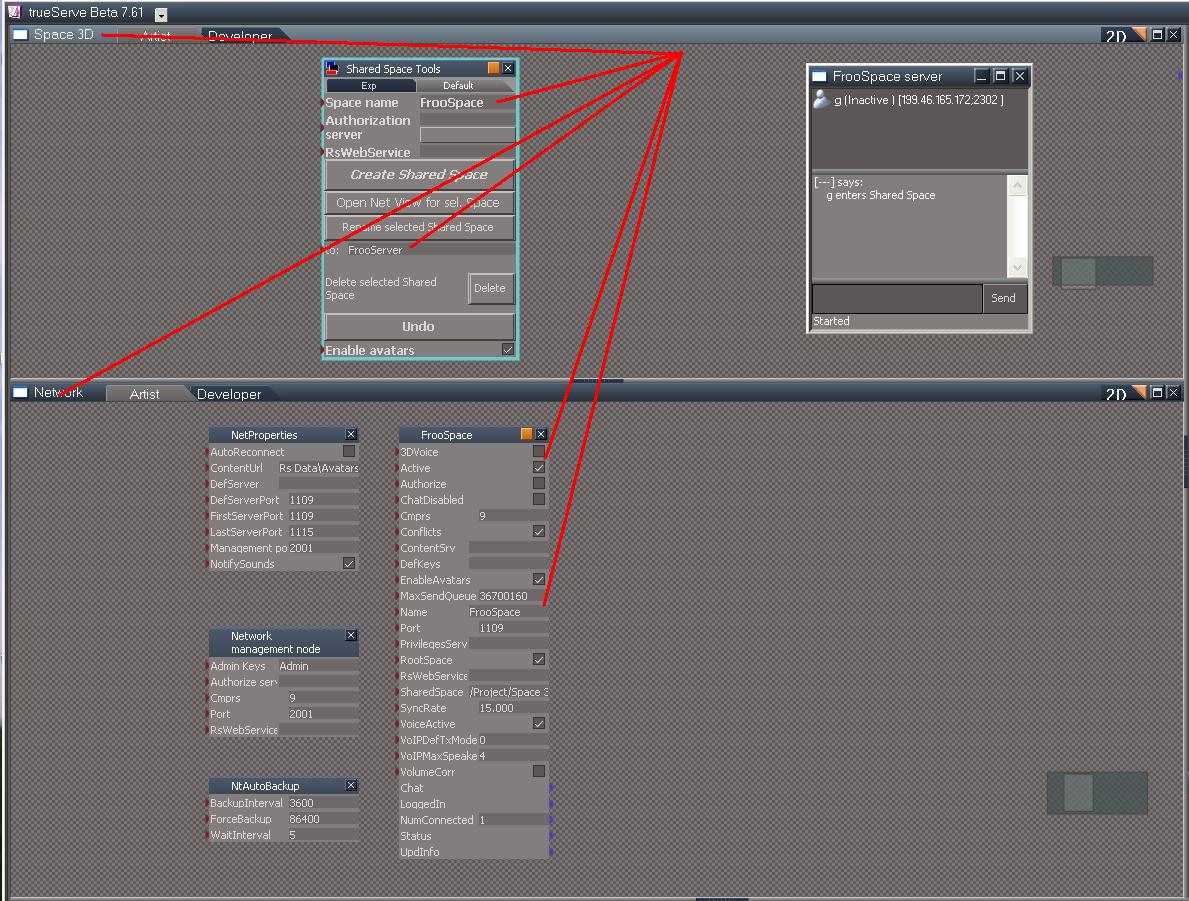
For one thing, the Shared Space Tools node is in the Network node. I will check whether it is also in the Space 3D node.
I believe that is where it belongs: the Space 3D node, not the Network node.
Another thing that may be causing confusion is this:
In the Shared Space Tools node,
You have a Space Name called: PugSpace
BUT: in the to: field, you also have the same name: PugSpace. That should probably be called something like: PugServer
NOT: PugSpace
I am checking it now; I got pugman's default.ctx file.
For one thing, the Shared Space Tools node is in the Network node. I will check whether it is also in the Space 3D node.
I believe that is where it belongs: the Space 3D node, not the Network node.
Another thing that may be causing confusion is this:
In the Shared Space Tools node,
You have a Space Name called: PugSpace
BUT: in the to: field, you also have the same name: PugSpace. That should probably be called something like: PugServer
NOT: PugSpace
-
froo
- Captain
- Posts: 2554
- Joined: 22 May 2009, 12:13
Re: Trueserve set up prop
Hi Pugman. I suggest these steps:
1. Close trueserve
2. copy default.ctx to: default_pug.ctx
3. delete default.ctx
4. restart trueserve
5. in the Space 3D view, drag and drop the Shared Space Tools node.
6. in the Space name textbox at the top of the node, type the text: PugSpace
7. Press the Enter key to commit the change
8. in the to: textbox, type: PugServer
9. Press the Enter key to commit the change.
10. Press the Create Shared Space button to create the space.
11. Login from truespace/trueplay, using your public ip address
1. Close trueserve
2. copy default.ctx to: default_pug.ctx
3. delete default.ctx
4. restart trueserve
5. in the Space 3D view, drag and drop the Shared Space Tools node.
6. in the Space name textbox at the top of the node, type the text: PugSpace
7. Press the Enter key to commit the change
8. in the to: textbox, type: PugServer
9. Press the Enter key to commit the change.
10. Press the Create Shared Space button to create the space.
11. Login from truespace/trueplay, using your public ip address
- Attachments
-
-
Cayenne
- Chief Petty Officer
- Posts: 119
- Joined: 03 Jun 2009, 20:05
- Type the number ten into the box: 0
- Location: U.K.
Re: Trueserve set up prop
froo wrote:I think I see some issues; at least, in comparison to my configuration.
I am checking it now; I got pugman's default.ctx file.
For one thing, the Shared Space Tools node is in the Network node. I will check whether it is also in the Space 3D node.
I believe that is where it belongs: the Space 3D node, not the Network node.
Another thing that may be causing confusion is this:
In the Shared Space Tools node,
You have a Space Name called: PugSpace
BUT: in the to: field, you also have the same name: PugSpace. That should probably be called something like: PugServer
NOT: PugSpace
I dint check it yet , but its ok if the shared space tools is in the network area , any part of the system that doesnt change like the space for instance is ok, I always use it in the network area , but I did see in the manual grabs it was in the project space, it should be ok like that.
Ill take a look at the ctx now
-
pugman 1
- Captain
- Posts: 1555
- Joined: 21 May 2009, 19:26
- Type the number ten into the box: 0
- Location: Germany
Re: Trueserve set up prop
Sorry men lost it again ,i try again
-
froo
- Captain
- Posts: 2554
- Joined: 22 May 2009, 12:13
Re: Trueserve set up prop
that's progress Pugman!
Do you know what is different, if anything?
Do you know what is different, if anything?
-
froo
- Captain
- Posts: 2554
- Joined: 22 May 2009, 12:13
Re: Trueserve set up prop
Hi Cayenne; but what about the SpaceName, and the 'to: ' field?
I think that 'to: ' entry is the server name. Shouldn't they be different?
If they are the same, wouldn't that confuse the trueServe app?
I think that 'to: ' entry is the server name. Shouldn't they be different?
If they are the same, wouldn't that confuse the trueServe app?
-
pugman 1
- Captain
- Posts: 1555
- Joined: 21 May 2009, 19:26
- Type the number ten into the box: 0
- Location: Germany
Re: Trueserve set up prop
Hi froo no it just connected by itself, no idea
-
Cayenne
- Chief Petty Officer
- Posts: 119
- Joined: 03 Jun 2009, 20:05
- Type the number ten into the box: 0
- Location: U.K.
Re: Trueserve set up prop
the "to" is just for renaming purposes , I didnt try it if you rename as an existing name though , or if i did I dont remember it .
If you use the server panel ( which is more versatile and upto date) ,and add a new space , you can have a space name( this is the name that will show on the node in the server Space3D) , and a display name (this is what will show in the chat panel window when a user logs in, and also in the 3d window title bar ), these dont have to be the same name , try them and see , when you create a new space the Shared Space name in the panel is filled automaticaly eg: /Project/Space 3D/TestSpace, 1) you dont need to put things in here unless you are manually building spaces and want a network node to point at a particular place as its reference space.
If you use the server panel ( which is more versatile and upto date) ,and add a new space , you can have a space name( this is the name that will show on the node in the server Space3D) , and a display name (this is what will show in the chat panel window when a user logs in, and also in the 3d window title bar ), these dont have to be the same name , try them and see , when you create a new space the Shared Space name in the panel is filled automaticaly eg: /Project/Space 3D/TestSpace, 1) you dont need to put things in here unless you are manually building spaces and want a network node to point at a particular place as its reference space.
-
BooxieMalone
- Chief Petty Officer
- Posts: 127
- Joined: 14 Jul 2009, 22:34
Re: Trueserve set up prop
froo wrote:that's progress Pugman!
Do you know what is different, if anything?
pugman 1 wrote:Hi froo no it just connected by itself, no idea

Hey Micros..., it's proved you got it ... why did you start making a new Os?
-
3dvisuals dude

- Chief Warrant Officer
- Posts: 643
- Joined: 03 Jun 2009, 02:53
- Type the number ten into the box: 0
Re: Trueserve set up prop
You're almost there now... keep the faith!pugman 1 wrote:
can someone try this //91.18.224.198/1109
im in at last hope it works for you
-
pugman 1
- Captain
- Posts: 1555
- Joined: 21 May 2009, 19:26
- Type the number ten into the box: 0
- Location: Germany
Re: Trueserve set up prop
Hi all can you try this new ip //91.18.208.250/1109
thanks
thanks
-
LeonRegis
- Captain
- Posts: 1946
- Joined: 18 Aug 2009, 17:36
- Type the number ten into the box: 0
- Location: Brazil/Earth/Orion Arm/Milky Way/4th Dimension/This Universe/Multiverse???/Singularity???
Re: Trueserve set up prop
I entered
Be the change you want to see in the world. - Mohandas Gandhi
-
3dvisuals dude
- Chief Warrant Officer
- Posts: 643
- Joined: 03 Jun 2009, 02:53
- Type the number ten into the box: 0
Re: Trueserve set up prop
I am there now talking with pugman! excellent!
-
3dvisuals dude
- Chief Warrant Officer
- Posts: 643
- Joined: 03 Jun 2009, 02:53
- Type the number ten into the box: 0
Re: Trueserve set up prop
ok we have log in and we have communications
we don't see avatars and a cube i added he could not see, so we need to sort some settings out... all help is appreciated, lol
we don't see avatars and a cube i added he could not see, so we need to sort some settings out... all help is appreciated, lol
-
3dvisuals dude
- Chief Warrant Officer
- Posts: 643
- Joined: 03 Jun 2009, 02:53
- Type the number ten into the box: 0
Re: Trueserve set up prop
Any experts still awake? 
-
3dvisuals dude
- Chief Warrant Officer
- Posts: 643
- Joined: 03 Jun 2009, 02:53
- Type the number ten into the box: 0
Re: Trueserve set up prop
Pugman is trying various setting changes periodically, it would help if many of us attempt to log in now as much as possible to test the effect of changes.
-
3dvisuals dude
- Chief Warrant Officer
- Posts: 643
- Joined: 03 Jun 2009, 02:53
- Type the number ten into the box: 0
Re: Trueserve set up prop
we have scene changing working in 1110 but not 1109, testing options on that now
-
3dvisuals dude
- Chief Warrant Officer
- Posts: 643
- Joined: 03 Jun 2009, 02:53
- Type the number ten into the box: 0
Re: Trueserve set up prop
OK, update....
Paul and Pugman and I were talking in Germany at the new OurSpace server there : )
There are some related scene path issues we need to resolve together over the next few hours when we can all meet again there, but the fact we are all able to communicate, and the fact I could see Paul's avatar are very promising signs : )
Looks like we will have Germany on the OurSpaces Map today folks!
Paul and Pugman and I were talking in Germany at the new OurSpace server there : )
There are some related scene path issues we need to resolve together over the next few hours when we can all meet again there, but the fact we are all able to communicate, and the fact I could see Paul's avatar are very promising signs : )
Looks like we will have Germany on the OurSpaces Map today folks!
-
froo
- Captain
- Posts: 2554
- Joined: 22 May 2009, 12:13
Re: Trueserve set up prop
Excellent Pugman! Way to hang in there!
Froo
Froo
-
pugman 1
- Captain
- Posts: 1555
- Joined: 21 May 2009, 19:26
- Type the number ten into the box: 0
- Location: Germany
Re: Trueserve set up prop
Still alot of problems .how to enter scn ,start camera ,and how i log into true serve
with 7.61 or trueplay , but its a good start . pual is helping me ,3dvd also .
hope we crack it soon 
with 7.61 or trueplay , but its a good start . pual is helping me ,3dvd also .
hope we crack it soon
-
Cayenne
- Chief Petty Officer
- Posts: 119
- Joined: 03 Jun 2009, 20:05
- Type the number ten into the box: 0
- Location: U.K.
Re: Trueserve set up prop
I logged in there and created on //91.18.208.250/ and made ports 1109 1110 and 1111 , I can log in to them all with tS and tP but still pugman cant log to there.
edit the server is still running there if anyone else wants to try to log there
edit the server is still running there if anyone else wants to try to log there
-
pugman 1
- Captain
- Posts: 1555
- Joined: 21 May 2009, 19:26
- Type the number ten into the box: 0
- Location: Germany
Re: Trueserve set up prop
Hi paul ,and all ,server running still no conenect opened new, no other way to see if someone
checks in.
Thanks all for the input here ,this is a great community
checks in.
Thanks all for the input here ,this is a great community
-
pugman 1
- Captain
- Posts: 1555
- Joined: 21 May 2009, 19:26
- Type the number ten into the box: 0
- Location: Germany
Re: Trueserve set up prop
please try port //91.18.208.250/1110
-
pugman 1
- Captain
- Posts: 1555
- Joined: 21 May 2009, 19:26
- Type the number ten into the box: 0
- Location: Germany
Re: Trueserve set up prop
tomorro new ip addy , i must sort this out 
-
BooxieMalone
- Chief Petty Officer
- Posts: 127
- Joined: 14 Jul 2009, 22:34
Re: Trueserve set up prop
Hi pugman are you still around? You could try to login here - Im testing several different settings 21:15 (IP changes very often sometimes)
Current IP Address: 91.12.142.198/1109
Current IP Address: 91.12.142.198/1109
-
Cayenne
- Chief Petty Officer
- Posts: 119
- Joined: 03 Jun 2009, 20:05
- Type the number ten into the box: 0
- Location: U.K.
Re: Trueserve set up prop
pugman 1 wrote:Hi paul ,and all ,server running still no conenect opened new, no other way to see if someone
checks in.
Thanks all for the input here ,this is a great community
you shouldn't open another server ,(unless its in a different dir and uses a diff ctx and has diff ports set for it).
if you want to see if anyone visits and there is no netview open , then select the network object for the space and then press the open net view for selected space , in the shared space tools. or in the server view if logged into it on your management port , select the space name from the list and double click it.
if you want to check after the fact , in the trueserve directory is a network log, this will show , connects and exits and who is visiting , adding or deleting objects.
-
BooxieMalone
- Chief Petty Officer
- Posts: 127
- Joined: 14 Jul 2009, 22:34
Re: Trueserve set up prop
Hi folks,
I made a few new tests!
Here you can find the documentation & read about a new trueServe 2-POINTS-CHECKLIST from recently tests in post:
vi ... 9171#p9171"
Regards
-BM.
I made a few new tests!
Here you can find the documentation & read about a new trueServe 2-POINTS-CHECKLIST from recently tests in post:
vi ... 9171#p9171"
Regards
-BM.
-
pugman 1
- Captain
- Posts: 1555
- Joined: 21 May 2009, 19:26
- Type the number ten into the box: 0
- Location: Germany
Re: Trueserve set up prop
Thanks Booxie for that info . I tryed it had no luck
here new ip and port //91.18.240.68/1110
can someone try it again and see if scn loads
Thanks Ralph...
here new ip and port //91.18.240.68/1110
can someone try it again and see if scn loads
Thanks Ralph...
-
pugman 1
- Captain
- Posts: 1555
- Joined: 21 May 2009, 19:26
- Type the number ten into the box: 0
- Location: Germany
Re: Trueserve set up prop
HI all it works ,booxie was there but the scn not good. deleted scn
Now empty ports but you can log in to see if ok, pots 1109. 1110
thanks ralph
Now empty ports but you can log in to see if ok, pots 1109. 1110
thanks ralph
-
pugman 1
- Captain
- Posts: 1555
- Joined: 21 May 2009, 19:26
- Type the number ten into the box: 0
- Location: Germany
Re: Trueserve set up prop
Hi , ok it works but i still have one problem ,my ip adresse changes daily
or if i look at my router ,when i give static ip in i loose my internet
maybe someone can help, hopefully the last help for this.
thanks to every one for this whole thing here
or if i look at my router ,when i give static ip in i loose my internet
maybe someone can help, hopefully the last help for this.
thanks to every one for this whole thing here
-
BooxieMalone
- Chief Petty Officer
- Posts: 127
- Joined: 14 Jul 2009, 22:34
Re: Trueserve set up prop
You're welcome pugman ...
register at http://www.dyndns.org" and get a free routing to your changing IP.
This works comparable to a steadily connected DNS-Server being informed of your new IP at once every time it changes...
-BM.
register at http://www.dyndns.org" and get a free routing to your changing IP.
This works comparable to a steadily connected DNS-Server being informed of your new IP at once every time it changes...
-BM.
-
pugman 1
- Captain
- Posts: 1555
- Joined: 21 May 2009, 19:26
- Type the number ten into the box: 0
- Location: Germany
Re: Trueserve set up prop
Hi this costs money http://www.dyndns.org...and" who tells the ts community
my new ip every day .
I contacted my internet provider ,they said no way to give me a
static ip number with my contract ,not possible , shit happens.
i must wait 1.5 years till i can change this.
my new ip every day .
I contacted my internet provider ,they said no way to give me a
static ip number with my contract ,not possible , shit happens.
i must wait 1.5 years till i can change this.
-
3dvisuals dude
- Chief Warrant Officer
- Posts: 643
- Joined: 03 Jun 2009, 02:53
- Type the number ten into the box: 0
Re: Trueserve set up prop
the service is free... here is a quote from their page:pugman 1 wrote:Hi this costs money http://www.dyndns.org...and" who tells the ts community
my new ip every day .
I contacted my internet provider ,they said no way to give me a
static ip number with my contract ,not possible , shit happens.
i must wait 1.5 years till i can change this.
With a service like this, when your ip number changes, that fact won't even be noticed by the people seeking your address from your assigned DDNS web address, if I understand this correctly.Dynamic DNS Free (DDNS) allows you to create a hostname that points to your home or office IP address, providing an easy-to-remember URL for quick access. We also provide an update mechanism which makes the hostname work with your dynamic IP address. We continue to offer this service free to the Internet community as we have done so for nearly 10 years.
Back when caligari had their trueServers online called "truePlaces," the address we would enter in to truePlay would be "//caligari.com/1109" or something like that. In this case, if I understand this right, someone trying to reach your portal would not need to know that pugman1.com numbers had changed... they would type in "//pugman1.com/1109" and the Free DDNS server would translate that request using whatever NEW numbers had been assigned by your ISP to the codename "pugman1.com"
Follow me?
-
pugman 1
- Captain
- Posts: 1555
- Joined: 21 May 2009, 19:26
- Type the number ten into the box: 0
- Location: Germany
Re: Trueserve set up prop
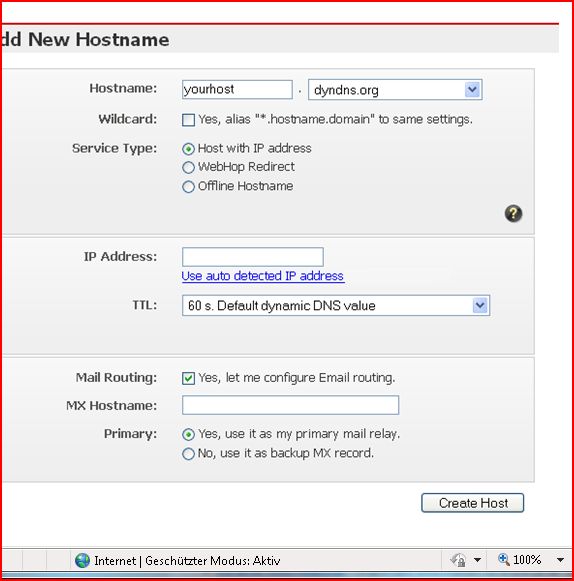
thanks for the info .now can someone tell me what i put in
the host box ,i am not good with this stuff, thanks Ralph...
you can log in at //91.18.221.168/1109 for today , tomorro new ip
the host box ,i am not good with this stuff, thanks Ralph...
you can log in at //91.18.221.168/1109 for today , tomorro new ip
- Attachments
-
-
pugman 1
- Captain
- Posts: 1555
- Joined: 21 May 2009, 19:26
- Type the number ten into the box: 0
- Location: Germany
Re: Trueserve set up prop
New ip login //91.18.193.24/1109.
I still could do with some help for loading scn , and the host name
for the post above this. Thanks Ralph
port 1109 empty
port 1110 do what you want space. Have fun.
German space. hope i can keep it runnig
I still could do with some help for loading scn , and the host name
for the post above this.
Thanks Ralphport 1109 empty
port 1110 do what you want space. Have fun.
German space. hope i can keep it runnig
-
pugman 1
- Captain
- Posts: 1555
- Joined: 21 May 2009, 19:26
- Type the number ten into the box: 0
- Location: Germany
Re: Trueserve set up prop
Hi all ,new ip 91.18.234.127, ports 1119...1110 , just to talk or play no scns yet
-
Steinie

- Captain
- Posts: 2958
- Joined: 21 May 2009, 17:38
- Type the number ten into the box: 10
Re: Trueserve set up prop
OK after 30 PAGES of amazing collaboration from the trueSpace users
Pugman1 finally has a working shared-space.
Now can someone explain to me what the problem was? Why it was so difficult
for him to setup?
Nice job hanging in there Pugman1, I'm glad you got this working!
Pugman1 finally has a working shared-space.
Now can someone explain to me what the problem was? Why it was so difficult
for him to setup?
Nice job hanging in there Pugman1, I'm glad you got this working!
-
pugman 1
- Captain
- Posts: 1555
- Joined: 21 May 2009, 19:26
- Type the number ten into the box: 0
- Location: Germany
Re: Trueserve set up prop
Thanks Steinie, i try to explain ,first firewall problems open ports ,
once i got this right it was ok from the start of this .Now i know this .
The reason every one said ,login with public ip .that is wrong only
set up server is puplic ip ,when i want to log in to the server i have
made i must use local ip in 7.61 not trueserve . hope you understand this.
Also when a port for shared space is made you can add a scn or object only in 7.61.while loged in
then logout . in trueserve is what you made ,but if you delete this in trueserve
it is gone ,so when you login to that port in 7.61 you get (waitng for cntx transfer)
every thing you do in the seperate ports must stay in true serve
hope this is ok for me it works .
THANKS TO ALL AGAIN
once i got this right it was ok from the start of this .Now i know this .
The reason every one said ,login with public ip .that is wrong only
set up server is puplic ip ,when i want to log in to the server i have
made i must use local ip in 7.61 not trueserve . hope you understand this.
Also when a port for shared space is made you can add a scn or object only in 7.61.while loged in
then logout . in trueserve is what you made ,but if you delete this in trueserve
it is gone ,so when you login to that port in 7.61 you get (waitng for cntx transfer)
every thing you do in the seperate ports must stay in true serve
hope this is ok for me it works .
THANKS TO ALL AGAIN
-
LeonRegis
- Captain
- Posts: 1946
- Joined: 18 Aug 2009, 17:36
- Type the number ten into the box: 0
- Location: Brazil/Earth/Orion Arm/Milky Way/4th Dimension/This Universe/Multiverse???/Singularity???
Re: Trueserve set up prop
Congrats Pugman!
Be the change you want to see in the world. - Mohandas Gandhi
-
pugman 1
- Captain
- Posts: 1555
- Joined: 21 May 2009, 19:26
- Type the number ten into the box: 0
- Location: Germany
Re: Trueserve set up prop
new ip //91.18.206.131/1109 sorry.
when i blink or pass wind my ip changes .
i must sort this
when i blink or pass wind my ip changes .
i must sort this
-
pugman 1
- Captain
- Posts: 1555
- Joined: 21 May 2009, 19:26
- Type the number ten into the box: 0
- Location: Germany
Re: Trueserve set up prop
hi i just turned on my computer anc got another ip number
here to login by me. //91.18217.191/1109
Trueblue can you help me with the host adress for that post earlier
it would help me one hell of alot , i am slowly getting p........off
with this . Thanks Ralph
here to login by me. //91.18217.191/1109
Trueblue can you help me with the host adress for that post earlier
it would help me one hell of alot , i am slowly getting p........off
with this . Thanks Ralph
-
pugman 1
- Captain
- Posts: 1555
- Joined: 21 May 2009, 19:26
- Type the number ten into the box: 0
- Location: Germany
Re: Trueserve set up prop
Hi all port 1109 just for chat ,
port 1110 small game , if it hangs by transfer push go again it works
tested 4 times
port 1110 small game , if it hangs by transfer push go again it works
tested 4 times
-
trueBlue
- Captain
- Posts: 5548
- Joined: 06 Jul 2009, 22:50
- Type the number ten into the box: 10
Re: Trueserve set up prop
Sorry I can not help as I am learning too. I think you have to do more then just setting up a Host as that is just giving your every changing IP address a name. I think what you need is here:
http://portforward.com/"
http://portforward.com/"
-
pugman 1
- Captain
- Posts: 1555
- Joined: 21 May 2009, 19:26
- Type the number ten into the box: 0
- Location: Germany
Re: Trueserve set up prop
Thanks Tb , ill look into this more and will get it sorted
Next tuesday i must go in the hospital for op offline for one week.
for today here new ip //91.18.217.7/1109 or 1110
thanks again Ralph
Next tuesday i must go in the hospital for op offline for one week.
for today here new ip //91.18.217.7/1109 or 1110
thanks again Ralph
-
Cayenne
- Chief Petty Officer
- Posts: 119
- Joined: 03 Jun 2009, 20:05
- Type the number ten into the box: 0
- Location: U.K.
Re: Trueserve set up prop
hope all goes well with the op, see you later when your back online.
regards
Paul
regards
Paul
-
froo
- Captain
- Posts: 2554
- Joined: 22 May 2009, 12:13
Re: Trueserve set up prop
Yes, I hope all goes well Pugman. See you when you get back!
-
BooxieMalone
- Chief Petty Officer
- Posts: 127
- Joined: 14 Jul 2009, 22:34
Re: Trueserve set up prop
Hi pugman,
hope everything goes well ... cya back soon.
Appears you didn't find an answer, while I've been out a few days?
Don't worry about port forwarding, this is no matter in this case.
DynDNS is usually a very simple thing. (see website)
* Step One: Create an Account
* Step Two: Create a Dynamic DNS Host (see details below)
* Step Three: Install an Update Client
* Step Four: Configure your Network
You only need to register a subdomain of dyndns.org with your name of choice "xxx" (the complete address will be your host/hostname).
Details:
1) Register "Free Dynamic DNS"
xxx.dyndns.org or choose any one out of the 88 available existing domains.
You can use any name, what ever you want. A few examples:
"pugman1.dyndns.org", "pugman.dyndns.tv", "ralph.dyn-o-saur.com" or any other.
2) Choose Service: Host with IP address
3) Then your actual IP is submitted. When adding the hostname it is read out automatically. (same function as http://checkip.dyndns.org" )
4) TTL should be left at standard (60s).
5) All other fields can be left empty.
6) Add your entries (submit).
How does it work - short explanation:
Everytime you loose synchronisation to your dsl line, you're router gets an new IP from DHCP-Server of your ISP when being reconnected again.
So the dynDNS service gets to know your changed public IP, you need to update this information to the servicing domain name servers (DNS). This is done via a feature in your router "use dyndns" (called hardware update client), or a software programm (called software update client). If your router doesn't offer such a feature, you can download the software update client program at link below. This has to be run in the background permanently.
Anyone trying now to connect, lets say to
//pugman.dyndns.org/1109
is directed automatically through the DNS to the right IP address. You don't need to publish your actual IP anymore. Only publish your new subdomain (host) once.
If you need more infos, everything is described exhaustingly.
Read & download page
http://www.dyndns.com/support/clients/"
Software update client:
"DynDNS® Updater for Windows 4.1.4 Download" you can find it at the site above. Or download directly
http://cdn.dyndns.com/windows/DynUpSetup.exe"
HTH - Good luck
-BM.
hope everything goes well ... cya back soon.
Appears you didn't find an answer, while I've been out a few days?
Don't worry about port forwarding, this is no matter in this case.
DynDNS is usually a very simple thing. (see website)
* Step One: Create an Account
* Step Two: Create a Dynamic DNS Host (see details below)
* Step Three: Install an Update Client
* Step Four: Configure your Network
You only need to register a subdomain of dyndns.org with your name of choice "xxx" (the complete address will be your host/hostname).
Details:
1) Register "Free Dynamic DNS"
xxx.dyndns.org or choose any one out of the 88 available existing domains.
You can use any name, what ever you want. A few examples:
"pugman1.dyndns.org", "pugman.dyndns.tv", "ralph.dyn-o-saur.com" or any other.
2) Choose Service: Host with IP address
3) Then your actual IP is submitted. When adding the hostname it is read out automatically. (same function as http://checkip.dyndns.org" )
4) TTL should be left at standard (60s).
5) All other fields can be left empty.
6) Add your entries (submit).
How does it work - short explanation:
Everytime you loose synchronisation to your dsl line, you're router gets an new IP from DHCP-Server of your ISP when being reconnected again.
So the dynDNS service gets to know your changed public IP, you need to update this information to the servicing domain name servers (DNS). This is done via a feature in your router "use dyndns" (called hardware update client), or a software programm (called software update client). If your router doesn't offer such a feature, you can download the software update client program at link below. This has to be run in the background permanently.
Anyone trying now to connect, lets say to
//pugman.dyndns.org/1109
is directed automatically through the DNS to the right IP address. You don't need to publish your actual IP anymore. Only publish your new subdomain (host) once.
If you need more infos, everything is described exhaustingly.
Read & download page
http://www.dyndns.com/support/clients/"
Software update client:
"DynDNS® Updater for Windows 4.1.4 Download" you can find it at the site above. Or download directly
http://cdn.dyndns.com/windows/DynUpSetup.exe"
HTH - Good luck
-BM.
-
pugman 1
- Captain
- Posts: 1555
- Joined: 21 May 2009, 19:26
- Type the number ten into the box: 0
- Location: Germany
Re: Trueserve set up prop
Thanks allot booxeie, i try in a week or so ,i must go in the hospital ,
for now my new ip //91.18.196.46/1109
this is the last untill i get this sorted hope no prob.
All welcome to login
Ralph
for now my new ip //91.18.196.46/1109
this is the last untill i get this sorted hope no prob.
All welcome to login
Ralph
-
pugman 1
- Captain
- Posts: 1555
- Joined: 21 May 2009, 19:26
- Type the number ten into the box: 0
- Location: Germany
Re: Trueserve set up prop
Hi all can someone please test this
pugspace. dyndns.org
if this works it is all you need to login by me
Thanks Ralph
pugspace. dyndns.org
if this works it is all you need to login by me
Thanks Ralph
-
Cayenne
- Chief Petty Officer
- Posts: 119
- Joined: 03 Jun 2009, 20:05
- Type the number ten into the box: 0
- Location: U.K.
Re: Trueserve set up prop
yes this works , but you need to take the space out of the address in this post. the space is after the dot in pugspace. pugspace. dyndns.org
the address I used in trueSpace is this //pugspace.dyndns.org/1109
the address I used in trueSpace is this //pugspace.dyndns.org/1109
-
froo
- Captain
- Posts: 2554
- Joined: 22 May 2009, 12:13
Re: Trueserve set up prop
seemed to hang on: connecting
-
froo
- Captain
- Posts: 2554
- Joined: 22 May 2009, 12:13
Re: Trueserve set up prop
thanks for the instructions Booxie!
I added my ip. It is:
frooserve.dyndns.org
so to login to FrooServe, port 1109:
//frooserve.dyndns.org/1109
I added my ip. It is:
frooserve.dyndns.org
so to login to FrooServe, port 1109:
//frooserve.dyndns.org/1109
-
pugman 1
- Captain
- Posts: 1555
- Joined: 21 May 2009, 19:26
- Type the number ten into the box: 0
- Location: Germany
Re: Trueserve set up prop
Thanks for the time Cayenne , great help.
booxie you are a master ,thanks for every thing .
pugspace is up
//pugspace.dyndns.org/1109
now we need a sticky thred for the adresses
booxie you are a master ,thanks for every thing .
pugspace is up
//pugspace.dyndns.org/1109
now we need a sticky thred for the adresses
-
Cayenne
- Chief Petty Officer
- Posts: 119
- Joined: 03 Jun 2009, 20:05
- Type the number ten into the box: 0
- Location: U.K.
Re: Trueserve set up prop
I can get into the space , one thing to check is adding a new space and then seeing if you can get to the space from the linkbar both local and from an external connection , pugman couldnt connect using his linkbars , but i could use them ok.froo wrote:thanks for the instructions Booxie!
I added my ip. It is:
frooserve.dyndns.org
so to login to FrooServe, port 1109:
//frooserve.dyndns.org/1109
-
froo
- Captain
- Posts: 2554
- Joined: 22 May 2009, 12:13
Re: Trueserve set up prop
ok. I'll check it out when I get home tonight. Thanks Cayenne!
-
pugman 1
- Captain
- Posts: 1555
- Joined: 21 May 2009, 19:26
- Type the number ten into the box: 0
- Location: Germany
Re: Trueserve set up prop
hi Froo ,got in to you earlier now hangs on connecting.
could someone please try mine again
//pugspace.dyndns.org/1109
i think it connects only once, hope im wrong
could someone please try mine again
//pugspace.dyndns.org/1109
i think it connects only once, hope im wrong