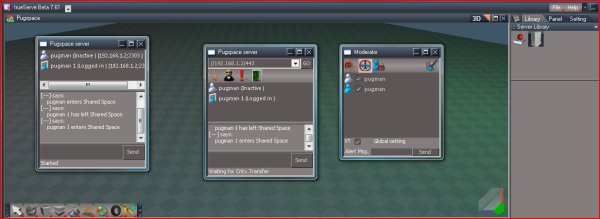
here a shot logged into //192.168.1.2/443 trueserve,and //192.168.1.2/443 ts761
Iwould like to know if someone else could login
Trueserve set up prop
-
pugman 1
- Captain
- Posts: 1555
- Joined: 21 May 2009, 19:26
- Type the number ten into the box: 0
- Location: Germany
Re: Trueserve set up prop
- Attachments
-
-
LeonRegis

- Captain
- Posts: 1946
- Joined: 18 Aug 2009, 17:36
- Type the number ten into the box: 0
- Location: Brazil/Earth/Orion Arm/Milky Way/4th Dimension/This Universe/Multiverse???/Singularity???
Re: Trueserve set up prop
Can't connect by TS and I didn't tested with trueServe. 
Be the change you want to see in the world. - Mohandas Gandhi
-
pugman 1
- Captain
- Posts: 1555
- Joined: 21 May 2009, 19:26
- Type the number ten into the box: 0
- Location: Germany
Re: Trueserve set up prop
OK THIS MUST BE LOCAL
-
LeonRegis
- Captain
- Posts: 1946
- Joined: 18 Aug 2009, 17:36
- Type the number ten into the box: 0
- Location: Brazil/Earth/Orion Arm/Milky Way/4th Dimension/This Universe/Multiverse???/Singularity???
Re: Trueserve set up prop
at least is a good sign
Be the change you want to see in the world. - Mohandas Gandhi
-
BooxieMalone
- Chief Petty Officer
- Posts: 127
- Joined: 14 Jul 2009, 22:34
Re: Trueserve set up prop
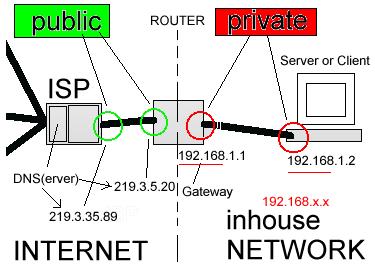
Hi pugman you noticed your address given above is a private one. I made a schematics, so you may better understand the principles. And remember from internet private addresses can not be seen..
HTH
HTH
- Attachments
-
- _public_private_network_.jpg (24.97 KiB) Viewed 180 times
-
pugman 1
- Captain
- Posts: 1555
- Joined: 21 May 2009, 19:26
- Type the number ten into the box: 0
- Location: Germany
Re: Trueserve set up prop
Thanks man , i still fight with this , ok try again 

-
pugman 1
- Captain
- Posts: 1555
- Joined: 21 May 2009, 19:26
- Type the number ten into the box: 0
- Location: Germany
Re: Trueserve set up prop
I uderstand puplic and local ip;s , with puplic no conect , i think we are going round in circles here 
-
pugman 1
- Captain
- Posts: 1555
- Joined: 21 May 2009, 19:26
- Type the number ten into the box: 0
- Location: Germany
Re: Trueserve set up prop
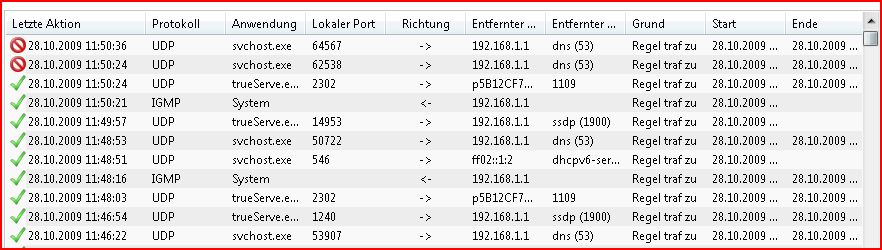
her is one problem i must sortout
- Attachments
-
-
froo
- Captain
- Posts: 2554
- Joined: 22 May 2009, 12:13
Re: Trueserve set up prop
what is your current public ip pugman?
-
pugman 1
- Captain
- Posts: 1555
- Joined: 21 May 2009, 19:26
- Type the number ten into the box: 0
- Location: Germany
Re: Trueserve set up prop
91.18.207.125
-
froo
- Captain
- Posts: 2554
- Joined: 22 May 2009, 12:13
Re: Trueserve set up prop
ok; I am still timing out.
Hangs on:
Connecting
then exits; but we're making progress!
Hangs on:
Connecting
then exits; but we're making progress!
-
pugman 1
- Captain
- Posts: 1555
- Joined: 21 May 2009, 19:26
- Type the number ten into the box: 0
- Location: Germany
Re: Trueserve set up prop
I hope so man i think this is bugging all of us 
-
pugman 1
- Captain
- Posts: 1555
- Joined: 21 May 2009, 19:26
- Type the number ten into the box: 0
- Location: Germany
Re: Trueserve set up prop
I must go out for half a hour see you later
-
BooxieMalone
- Chief Petty Officer
- Posts: 127
- Joined: 14 Jul 2009, 22:34
Re: Trueserve set up prop - !Question Froo!
Hi folks,
I set up my own server (still without a scene) and checked the connections - login from inside & outside no problem - I'm almost sure about trick.
@ froo - one question:
do you have your server running with a static IP, or do you have it assigned by dhcp? Because as far as I can see in my configuration, there is no way to configure a dyn. address for the transmitting port.
Regards
-BM.
I set up my own server (still without a scene) and checked the connections - login from inside & outside no problem - I'm almost sure about trick.
@ froo - one question:
do you have your server running with a static IP, or do you have it assigned by dhcp? Because as far as I can see in my configuration, there is no way to configure a dyn. address for the transmitting port.
Regards
-BM.
-
froo
- Captain
- Posts: 2554
- Joined: 22 May 2009, 12:13
Re: Trueserve set up prop
Hi BooxieMalone.
My router's ip address does change on occasion.
Is that what you mean?
My router's ip address does change on occasion.
Is that what you mean?
-
pugman 1
- Captain
- Posts: 1555
- Joined: 21 May 2009, 19:26
- Type the number ten into the box: 0
- Location: Germany
Re: Trueserve set up prop
Cool man  maybe you can show me the settings thanks Ralph
maybe you can show me the settings thanks Ralph -
froo
- Captain
- Posts: 2554
- Joined: 22 May 2009, 12:13
Re: Trueserve set up prop
this may make a difference; I notice my Network Connection is set to: Bridge
download/file.php?id=1923&mode=view"
I do believe I receive a new IP address for the router via DHCP, since I do get a new router
ip address sometimes.
EDIT:::
On that link page, the Lease Type indicates: Dynamic
so yes, I use DHCP to get the IP
download/file.php?id=1923&mode=view"
I do believe I receive a new IP address for the router via DHCP, since I do get a new router
ip address sometimes.
EDIT:::
On that link page, the Lease Type indicates: Dynamic
so yes, I use DHCP to get the IP
-
BooxieMalone
- Chief Petty Officer
- Posts: 127
- Joined: 14 Jul 2009, 22:34
Re: Trueserve set up prop
Froo, I think you're talking about your public address of the router. This is always assigned by a dhcp-server.
But I mean your server (with trueServ on it) - is it assigned a static IP or a dynamically asigned IP (usually the router also contains the dhcp-server for your private network)?
But I mean your server (with trueServ on it) - is it assigned a static IP or a dynamically asigned IP (usually the router also contains the dhcp-server for your private network)?
-
froo
- Captain
- Posts: 2554
- Joined: 22 May 2009, 12:13
Re: Trueserve set up prop
oh I'm sorry!
STATIC BABY! ALL THE WAY!
198.168.1.2!
I am very confident that is what I have it set to. Though I will have to confirm that at home tonight.
It has not changed in a long time, though when I was experimenting months ago, I do recall seeing it
change. Whether I changed it manually, or let the server choose, I cannot remember. Heh I was probably
swapping out ethernet cables on the back of the router to see what happened, at the time.
That does make sense, using a static IP for the trueServe, due to the mapping. Though, maybe that
can be made dynamic as well? That's a question for the near future. If we can get pugman hooked up and
online with a static ip, that's one more step in the right direction.
STATIC BABY! ALL THE WAY!
198.168.1.2!
I am very confident that is what I have it set to. Though I will have to confirm that at home tonight.
It has not changed in a long time, though when I was experimenting months ago, I do recall seeing it
change. Whether I changed it manually, or let the server choose, I cannot remember. Heh I was probably
swapping out ethernet cables on the back of the router to see what happened, at the time.
That does make sense, using a static IP for the trueServe, due to the mapping. Though, maybe that
can be made dynamic as well? That's a question for the near future. If we can get pugman hooked up and
online with a static ip, that's one more step in the right direction.
-
pugman 1
- Captain
- Posts: 1555
- Joined: 21 May 2009, 19:26
- Type the number ten into the box: 0
- Location: Germany
Re: Trueserve set up prop
now im lost ,thats local
-
froo
- Captain
- Posts: 2554
- Joined: 22 May 2009, 12:13
Re: Trueserve set up prop
Hm now that I think about it, I did see the IP change months ago, and I got tired
of that because I had trouble connecting to Shared Space on the Caligari servers (I think);
so I set it to Static and just left it alone. Worked better that way as I recall.
But many beers have passed since then, so my memory is foggy.
of that because I had trouble connecting to Shared Space on the Caligari servers (I think);
so I set it to Static and just left it alone. Worked better that way as I recall.
But many beers have passed since then, so my memory is foggy.
-
froo
- Captain
- Posts: 2554
- Joined: 22 May 2009, 12:13
Re: Trueserve set up prop
yes that is correct pugman.
We know our Router's Public IP address is assigned by DHCP.
Ralph asked me, if my Private IP addresses, on my Home Network, BEHIND
the router, are Also assigned by DHCP. The answer to that question is NO.
The Private IP addresses for each computer on my home network are assigned
Statically. Which means, they never change.
So my TrueServe computer IP Address is always: 192.168.1.2.
It never changes, no matter how many times I reboot the system.
My router will always assign that computer, on my Private LAN behind the router,
that unique IP address.
The problem with Your router may be, that your trueServe computer is being assigned
a different private IP address, often. So when Global TS users try to login to your trueServe,
the connection fails:
I try to login to your trueServe at port 1109. The IP packet indicates: it should be routed to:
192.168.1.1/1109.
But your trueServe computer's IP address has changed to something like:
192.168.34.653
so there is no one listening at: 192.168.1.1/1109
Therefore the connection fails, if private IP addresses are assigned via DHCP.
I believe that is what Ralph is saying.
So you need to check that your Private IP addresses are being assigned STATICALLY
by your router.
We know our Router's Public IP address is assigned by DHCP.
Ralph asked me, if my Private IP addresses, on my Home Network, BEHIND
the router, are Also assigned by DHCP. The answer to that question is NO.
The Private IP addresses for each computer on my home network are assigned
Statically. Which means, they never change.
So my TrueServe computer IP Address is always: 192.168.1.2.
It never changes, no matter how many times I reboot the system.
My router will always assign that computer, on my Private LAN behind the router,
that unique IP address.
The problem with Your router may be, that your trueServe computer is being assigned
a different private IP address, often. So when Global TS users try to login to your trueServe,
the connection fails:
I try to login to your trueServe at port 1109. The IP packet indicates: it should be routed to:
192.168.1.1/1109.
But your trueServe computer's IP address has changed to something like:
192.168.34.653
so there is no one listening at: 192.168.1.1/1109
Therefore the connection fails, if private IP addresses are assigned via DHCP.
I believe that is what Ralph is saying.
So you need to check that your Private IP addresses are being assigned STATICALLY
by your router.
-
BooxieMalone
- Chief Petty Officer
- Posts: 127
- Joined: 14 Jul 2009, 22:34
Re: Trueserve set up prop
That's it. Mine works the same.
So we know for sure, it works at least with a static address for the server. I don't know if a router can handle a port released for access with a dyn. IP. (I'm too lazy to change my whole sys for a test )
)
Perhaps somebody else set up a server with internal dhcp? Please answer.
So I'm going to make a few screenshots for a small tut.
Regards, be patient ...
-BM.
BTW - you guys are too fast for me with writing I almost can't keep pace
So we know for sure, it works at least with a static address for the server. I don't know if a router can handle a port released for access with a dyn. IP. (I'm too lazy to change my whole sys for a test
)Perhaps somebody else set up a server with internal dhcp? Please answer.
So I'm going to make a few screenshots for a small tut.
Regards, be patient ...
-BM.
BTW - you guys are too fast for me with writing I almost can't keep pace
-
BooxieMalone
- Chief Petty Officer
- Posts: 127
- Joined: 14 Jul 2009, 22:34
Re: Trueserve set up prop
Hey froo - I#M not ralph, I'm Booxie
-
pugman 1
- Captain
- Posts: 1555
- Joined: 21 May 2009, 19:26
- Type the number ten into the box: 0
- Location: Germany
Re: Trueserve set up prop
hey man drink a beer take it easy, look forward for the tut
-
froo
- Captain
- Posts: 2554
- Joined: 22 May 2009, 12:13
Re: Trueserve set up prop
DOH Sorry Booxie! For some reason I thought your name was Ralph; Pugman is Ralph! haha!
I can try setting my IP's at home to be dynamic tonight, then attempt a 'loop test' in which I connect to
trueServe, from trueSpace on the same machine. Except, use the public IP address of the router.
I can try setting my IP's at home to be dynamic tonight, then attempt a 'loop test' in which I connect to
trueServe, from trueSpace on the same machine. Except, use the public IP address of the router.
-
froo
- Captain
- Posts: 2554
- Joined: 22 May 2009, 12:13
Re: Trueserve set up prop
Ok.
If we look at this pic from Pugman:
download/file.php?id=2007&mode=view"
we see that the trueServe entries have something funky in the 'Entfernter ...' column:
p5B12CF7...
whereas the other entries like svchost have an ip address. What is that p5B12CF7... thing?
There are a couple other things I don't understand. What is ssdp? I see that trueServe
has a Local Port of 14953, with an ssdp of 1900. I have no idea what that is about. Booxie, do you know?
If we look at this pic from Pugman:
download/file.php?id=2007&mode=view"
we see that the trueServe entries have something funky in the 'Entfernter ...' column:
p5B12CF7...
whereas the other entries like svchost have an ip address. What is that p5B12CF7... thing?
There are a couple other things I don't understand. What is ssdp? I see that trueServe
has a Local Port of 14953, with an ssdp of 1900. I have no idea what that is about. Booxie, do you know?
-
froo
- Captain
- Posts: 2554
- Joined: 22 May 2009, 12:13
Re: Trueserve set up prop
I found this on a wikipedia page for ssdp:
http://en.wikipedia.org/wiki/Simple_Ser ... y_Protocol"
Of particular interest on that page is this link:
Link-local: [FF02::C]
Notice that on pugman's picture, trueserve has that entry: ssdp in the Entfernter... column.
So on that wiki page, I clicked that Link-local link to get to the page:
http://en.wikipedia.org/wiki/Link-local_address"
Which has some interesting info in the first paragraph. This may not correlate to our problem, but it may:
Link-local addresses are network addresses which are intended only for communications within one segment of a local network (a link) or a point-to-point connection. They allow addressing hosts without using a globally-routable address prefix. Routers will not forward packets with link-local addresses.
Since I do not understand networking technology that much, I cannot say with confidence, this is the problem pugman
is experiencing. Perhaps Booxie can confirm whether this is the problem. But it looks quite suspect.
http://en.wikipedia.org/wiki/Simple_Ser ... y_Protocol"
Of particular interest on that page is this link:
Link-local: [FF02::C]
Notice that on pugman's picture, trueserve has that entry: ssdp in the Entfernter... column.
So on that wiki page, I clicked that Link-local link to get to the page:
http://en.wikipedia.org/wiki/Link-local_address"
Which has some interesting info in the first paragraph. This may not correlate to our problem, but it may:
Link-local addresses are network addresses which are intended only for communications within one segment of a local network (a link) or a point-to-point connection. They allow addressing hosts without using a globally-routable address prefix. Routers will not forward packets with link-local addresses.
Since I do not understand networking technology that much, I cannot say with confidence, this is the problem pugman
is experiencing. Perhaps Booxie can confirm whether this is the problem. But it looks quite suspect.
-
trueBlue

- Captain
- Posts: 5548
- Joined: 06 Jul 2009, 22:50
- Type the number ten into the box: 10
Re: Trueserve set up prop
Here is some interesting tools that may help.
http://www.dyndns.com/support/tools/"
Also this might be useful too.
http://www.dyndns.com/support/clients/"
http://www.dyndns.com/support/tools/"
Also this might be useful too.
http://www.dyndns.com/support/clients/"
-
BooxieMalone
- Chief Petty Officer
- Posts: 127
- Joined: 14 Jul 2009, 22:34
Re: Trueserve set up prop
The green checked lines look like internal communication. ssdp is
Simple Service Discovery Protocol (SSDP) is a protocol searching for UPnP devices in Port 1900 UDP.
I saw ports 2302 in the server, when I was connected to it from truePlay ...
There is also the dhcpv6-service, means the internal net is controlled by the router.
The only thing I would check in the router, is the access release of port 1109 (protocol is UDP) and try to assign it to the server name, if possible. Otherwise pugman would have to change to a static system.
Simple Service Discovery Protocol (SSDP) is a protocol searching for UPnP devices in Port 1900 UDP.
I saw ports 2302 in the server, when I was connected to it from truePlay ...
There is also the dhcpv6-service, means the internal net is controlled by the router.
The only thing I would check in the router, is the access release of port 1109 (protocol is UDP) and try to assign it to the server name, if possible. Otherwise pugman would have to change to a static system.
-
froo
- Captain
- Posts: 2554
- Joined: 22 May 2009, 12:13
Re: Trueserve set up prop
ok.
So, if pugman's trueServe PC is called: PUGMAN1,
then he needs to assign (Port Forward) port 1109 to PUGMAN1?
So that all ip packets that are addressed to port 1109 will be directed to PUGMAN1 (i.e, trueserve)?
I may be mixing terminology there.
So, if pugman's trueServe PC is called: PUGMAN1,
then he needs to assign (Port Forward) port 1109 to PUGMAN1?
So that all ip packets that are addressed to port 1109 will be directed to PUGMAN1 (i.e, trueserve)?
I may be mixing terminology there.
-
froo
- Captain
- Posts: 2554
- Joined: 22 May 2009, 12:13
Re: Trueserve set up prop
thanks trueBlue.
I hope those links can help resolve the situation.
I hope those links can help resolve the situation.
-
BooxieMalone
- Chief Petty Officer
- Posts: 127
- Joined: 14 Jul 2009, 22:34
Re: trueServe_brief instruction_environment configuration_
Hi Froo,
I made a short description configuring HW & SW for trueServe -
to meet the preconditions.
Would you be so kind and read it, find mistakes & tell me your opinion on the things to correct?
Thanks in advance
-BM.
Edit: found wrong picture in page 5 - will change it immediately
Edit: ready!
Edit: 10/24/09 - updated to the final version of
trueServe - brief instructions on environment configuration
Router & Server prerequisites for trueServe761b8
vi ... 8820#p8820"
I made a short description configuring HW & SW for trueServe -
to meet the preconditions.
Would you be so kind and read it, find mistakes & tell me your opinion on the things to correct?
Thanks in advance
-BM.
Edit: found wrong picture in page 5 - will change it immediately
Edit: ready!
Edit: 10/24/09 - updated to the final version of
trueServe - brief instructions on environment configuration
Router & Server prerequisites for trueServe761b8
vi ... 8820#p8820"
Last edited by BooxieMalone on 31 Oct 2009, 01:52, edited 3 times in total.
-
froo
- Captain
- Posts: 2554
- Joined: 22 May 2009, 12:13
Re: Trueserve set up prop
Hi Booxie.
Looks pretty good.
Is it possible you can switch the language on your computer to English,
and retake the snapshots? If not I can do it at home.
Great job Booxie!
Looks pretty good.
Is it possible you can switch the language on your computer to English,
and retake the snapshots? If not I can do it at home.
Great job Booxie!
-
BooxieMalone
- Chief Petty Officer
- Posts: 127
- Joined: 14 Jul 2009, 22:34
Re: Trueserve set up prop
Thanks froo - I'm sorry, had no luck. Changed regions and language settings, even keyboard layout, loaded codepageconverters etc. and restarted the system a few times. But ...
Same same - everything in german.
Think this is a very good localized Win sold here!
Back to the instructions. No mistakes in it, ... everything understandable?
I can't believe ...
So we should post it in thread Tutorials afterwards, eventually post a second version, if you can make the screenshots in the english windows? Would be a mean action if you could give me the pics? Then I could make the PDF - otherwise you can take the words out of it also and make a PDF yourself, if that would be more convenient for you?
Regards
-BM.
Same same - everything in german.
Think this is a very good localized Win sold here!
Back to the instructions. No mistakes in it, ... everything understandable?
I can't believe ...
So we should post it in thread Tutorials afterwards, eventually post a second version, if you can make the screenshots in the english windows? Would be a mean action if you could give me the pics? Then I could make the PDF - otherwise you can take the words out of it also and make a PDF yourself, if that would be more convenient for you?
Regards
-BM.
-
BooxieMalone
- Chief Petty Officer
- Posts: 127
- Joined: 14 Jul 2009, 22:34
Re: Trueserve set up prop
Hi pugman1,
if you didn't already download the instructions above: that's specially for you at the moment.
Hope you 'll get your problem solved.
Regards.
-BM.
if you didn't already download the instructions above: that's specially for you at the moment.
Hope you 'll get your problem solved.
Regards.
-BM.
-
3dvisuals dude

- Chief Warrant Officer
- Posts: 643
- Joined: 03 Jun 2009, 02:53
- Type the number ten into the box: 0
Re: Trueserve set up prop
Thanks for doing this Booxie, I just hope Froo works out an English version on the Images, sorry to say the only German words I know are either from old movies or my favorite word of all... "gestalt."
I use ZoneAlarm though rather than the infamous Windows Firewall, but that should be easy for me whereas Windows Firewall (like all MS software) tends to be based on what MS sees as their right to control our computers versus our own right to develop our own computers capabilities. Anyhow, more people undoubtedly use the Windows Firewall worldwide than those who use ZoneAlarm, so this tutorial is definitely important to most of us and will continue to be.
Well done and thanks!
I use ZoneAlarm though rather than the infamous Windows Firewall, but that should be easy for me whereas Windows Firewall (like all MS software) tends to be based on what MS sees as their right to control our computers versus our own right to develop our own computers capabilities. Anyhow, more people undoubtedly use the Windows Firewall worldwide than those who use ZoneAlarm, so this tutorial is definitely important to most of us and will continue to be.
Well done and thanks!
-
froo
- Captain
- Posts: 2554
- Joined: 22 May 2009, 12:13
Re: Trueserve set up prop
Hi Booxie.
Well, there were some spelling and grammar errors, but I believe
it is technically correct. I will step through it tonight on my machine,
to verify.
Yes, I can take pics and email them to you or, post them here for you to download.
Do you have a Word-compatible version of the document so I could correct the spelling and grammar?
thanks!
Froo
Well, there were some spelling and grammar errors, but I believe
it is technically correct. I will step through it tonight on my machine,
to verify.
Yes, I can take pics and email them to you or, post them here for you to download.
Do you have a Word-compatible version of the document so I could correct the spelling and grammar?
thanks!
Froo
-
froo
- Captain
- Posts: 2554
- Joined: 22 May 2009, 12:13
Re: Trueserve set up prop
In my case, though,
I did not have to switch to the Advanced tab (Erweitert tab)
to add the ports 1109 and 2001.
I did not have to switch to the Advanced tab (Erweitert tab)
to add the ports 1109 and 2001.
-
BooxieMalone
- Chief Petty Officer
- Posts: 127
- Joined: 14 Jul 2009, 22:34
Re: Trueserve set up prop
Thanks 3dvd, I'm glad to help.
So besides striving for success, let's hope that these discussions can also make networking a bit more transparent for others.
Regards
-BM.
So besides striving for success, let's hope that these discussions can also make networking a bit more transparent for others.
Regards
-BM.
-
BooxieMalone
- Chief Petty Officer
- Posts: 127
- Joined: 14 Jul 2009, 22:34
Re: Trueserve set up prop
Thanks froo for your input & correction. I think it woud be sufficient if you'd copy the words to notepad and make the corrections there. I'm going to PM my mailaddress for you.
You are right with the "Advanced tab" ... that's also possible to click straight into "program..." & "port...", also "network area ..." is reachable one level down.
cya
-BM.
Edit:
Additional: On the other hand the advanced tab is useful for differenciation, if you've got more than one LAN devices. I'm separating my private net from internet with 2 LANs (means different "street" addresses & different access releases), thus staying secure - no probs with file- and printer accessrelease.
You are right with the "Advanced tab" ... that's also possible to click straight into "program..." & "port...", also "network area ..." is reachable one level down.
cya
-BM.
Edit:
Additional: On the other hand the advanced tab is useful for differenciation, if you've got more than one LAN devices. I'm separating my private net from internet with 2 LANs (means different "street" addresses & different access releases), thus staying secure - no probs with file- and printer accessrelease.
-
froo
- Captain
- Posts: 2554
- Joined: 22 May 2009, 12:13
Re: Trueserve set up prop
yes that would be easier; I will make corrections in notepad.
I am taking FrooServe down now; to get the disks back into the computer case.
Then I can take screenshots and type up the recommended changes.
I am taking FrooServe down now; to get the disks back into the computer case.
Then I can take screenshots and type up the recommended changes.
-
pugman 1
- Captain
- Posts: 1555
- Joined: 21 May 2009, 19:26
- Type the number ten into the box: 0
- Location: Germany
Re: Trueserve set up prop
Thank you BooxieMalone , Now i must see if my router lets me do this.
thanks you Froo for helping here
Now i must see if my router lets me do this.thanks you Froo for helping here
-
pugman 1
- Captain
- Posts: 1555
- Joined: 21 May 2009, 19:26
- Type the number ten into the box: 0
- Location: Germany
Re: Trueserve set up prop
HI, tryed the router thing ,hit apply and it set my router to factory settings
that was not good, very sorry.firewall every thing else allowed .still no go
that was not good, very sorry.firewall every thing else allowed .still no go
-
BooxieMalone
- Chief Petty Officer
- Posts: 127
- Joined: 14 Jul 2009, 22:34
Re: Trueserve set up prop
Hi pugman,
sorry to hear you still got problems.
What "router thing" did you try?
Opening one port usually doesn't recall the factory settings! Does your router have its own will, or does it act selfish?
-BM.
sorry to hear you still got problems.
What "router thing" did you try?
Opening one port usually doesn't recall the factory settings! Does your router have its own will, or does it act selfish?
-BM.
-
pugman 1
- Captain
- Posts: 1555
- Joined: 21 May 2009, 19:26
- Type the number ten into the box: 0
- Location: Germany
Re: Trueserve set up prop
HI man changing statick ip , and my router is has the devil inside it 
-
froo
- Captain
- Posts: 2554
- Joined: 22 May 2009, 12:13
Re: Trueserve set up prop
well it sounds like either your router is either defective, or needs resetting
(clearing it completely, starting from scratch), or it has been programmed
with heavy restrictions.
Did your ISP give that router to you?
Are you renting the router from
the ISP?
Or did you buy it yourself?
If you are going to buy another one, find out which routers your ISP supports.
(clearing it completely, starting from scratch), or it has been programmed
with heavy restrictions.
Did your ISP give that router to you?
Are you renting the router from
the ISP?
Or did you buy it yourself?
If you are going to buy another one, find out which routers your ISP supports.
-
pugman 1
- Captain
- Posts: 1555
- Joined: 21 May 2009, 19:26
- Type the number ten into the box: 0
- Location: Germany
Re: Trueserve set up prop
hi froo , my own router and all work with isp ,either i am to stupid for this or the router
realy has a devil in it . Ican normaly sort all problems out with a computer but this beats me
realy has a devil in it . Ican normaly sort all problems out with a computer but this beats me
-
BooxieMalone
- Chief Petty Officer
- Posts: 127
- Joined: 14 Jul 2009, 22:34
Re: Trueserve set up prop
Hey I think we are forced to organize an expulsion! 
... with a big bonfire ... I love it ... I'm a boy scout in disguise ...
But back to seriousness, your informations are a bit foggy ... where is the devil showing up, in your router or your computer? What does not work as it should?
For enabling me/us to help, we'd need a few more precise references.
And though I can second froo's comments, I have to state at the momentanous uncertainties, an exchange would not bring you to another level. In any of the both cases you would have to start from scratch & and do a complete new setup!
Try to find the origin of the probs first.
Regards
-BM.
... with a big bonfire ... I love it ... I'm a boy scout in disguise ...
But back to seriousness, your informations are a bit foggy ... where is the devil showing up, in your router or your computer? What does not work as it should?
For enabling me/us to help, we'd need a few more precise references.
And though I can second froo's comments, I have to state at the momentanous uncertainties, an exchange would not bring you to another level. In any of the both cases you would have to start from scratch & and do a complete new setup!
Try to find the origin of the probs first.
Regards
-BM.
-
pugman 1
- Captain
- Posts: 1555
- Joined: 21 May 2009, 19:26
- Type the number ten into the box: 0
- Location: Germany
Re: Trueserve set up prop
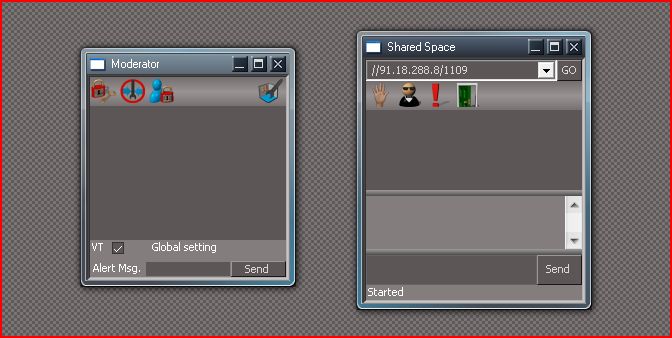
here created space but no login from 761 or trueserve,If this conects to
shared space why the other not ,i dont understand this
shared space why the other not ,i dont understand this
- Attachments
-
-
BooxieMalone
- Chief Petty Officer
- Posts: 127
- Joined: 14 Jul 2009, 22:34
Re: Trueserve set up prop
In the picture you are not logged in!
I'm wondering anyhow, why I could ping your address a few days ago?
did you write a username and a password into the login?
I'm wondering anyhow, why I could ping your address a few days ago?
did you write a username and a password into the login?
-
pugman 1
- Captain
- Posts: 1555
- Joined: 21 May 2009, 19:26
- Type the number ten into the box: 0
- Location: Germany
Re: Trueserve set up prop
which login if 761 yes
-
pugman 1
- Captain
- Posts: 1555
- Joined: 21 May 2009, 19:26
- Type the number ten into the box: 0
- Location: Germany
Re: Trueserve set up prop
try ping again 91.18.228.8
-
BooxieMalone
- Chief Petty Officer
- Posts: 127
- Joined: 14 Jul 2009, 22:34
Re: Trueserve set up prop
I don't have a screenshot of this now, 'caus its on another machine. But it is the prewindow (see the right one of your pic) with "username" line and "password" line. After login it changes to the one you shot (right one) and it shows your name usually, that also appears in admin view.
Edit: Moderator View.
additional: If you don't see the login page, might help to create a new shared space?
Edit: Moderator View.
additional: If you don't see the login page, might help to create a new shared space?
Last edited by BooxieMalone on 29 Oct 2009, 14:36, edited 1 time in total.
-
BooxieMalone
- Chief Petty Officer
- Posts: 127
- Joined: 14 Jul 2009, 22:34
Re: Trueserve set up prop
... works!pugman 1 wrote:try ping again 91.18.228.8
-
pugman 1
- Captain
- Posts: 1555
- Joined: 21 May 2009, 19:26
- Type the number ten into the box: 0
- Location: Germany
Re: Trueserve set up prop
i know it does not log in ,
hey BooxieMalone do you live in germany ,if to personal dont answer that.
hey BooxieMalone do you live in germany ,if to personal dont answer that.
-
BooxieMalone
- Chief Petty Officer
- Posts: 127
- Joined: 14 Jul 2009, 22:34
Re: Trueserve set up prop
... yes ... not too personal.
I think, as you stated everything works, it indeed does.
Open truePlay simultaneously and try to login from there (watch the server output windows, what happens when logged in).
First try your private address, then public address...
I think, as you stated everything works, it indeed does.
Open truePlay simultaneously and try to login from there (watch the server output windows, what happens when logged in).
First try your private address, then public address...
-
froo
- Captain
- Posts: 2554
- Joined: 22 May 2009, 12:13
Re: Trueserve set up prop
ok. Couple of things:
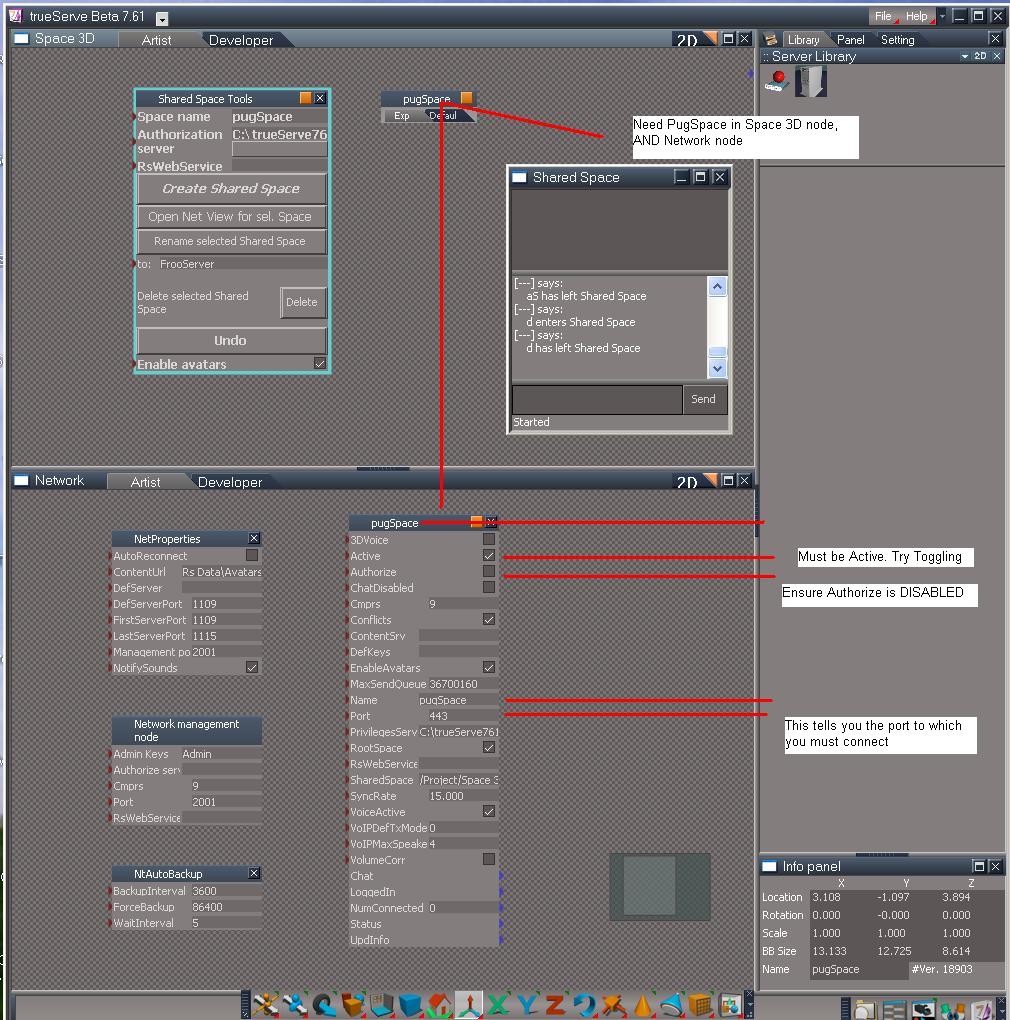
1) I see a Public IP address in your chat window. As I understand, using a public IP address to connect to your spaces has never worked thus far. Use the Local IP address first, to ensure you can connect, from within your private network.
2) you can't really connect to a space, using trueServe. trueServe is simply Hosting the space. You connect to the space
using trueSpace. So: it looks like you have the space running, hosted by trueServe. Start trueSpace, and connect to the space
using trueSpace.
3) in trueServe: check to make sure of the following:
3a) look in the Space3D node. Make note of the Space name in the Space3D window. It will probably be: pugSpace
3b) You should, by default, have another LE window open, showing the Network node. If not, open an LE, and navigate to the
Network node in the LE. You should have a node in there, with the same name as noted above; i.e., pugSpace.
Check the Port number of that node. If it is 1109, you need to connect to 1109. If it is 443, you need to connect to that. If it is 1114, you need to connect to 1114; etc.
3c) make sure the Authorize checkbox is deselected
3d) make sure the Active checkbox is selected. Try toggling it, then Connect using trueSpace
I have had trouble where I create a space, but it's called CSharedSpace, when I thought it was FrooSpace2, or ScratchSpace.
That's why we need to check this. If you have pugSpace in the Network node, but not in Space3D node, you will not connect.
If you have pugSpace in the Space3D node, but not in the Network node, you will not connect. Watch out for a situation like this; this will also prevent a connection:
Space3D: node = pugSpace, 1
Network: node = pugSpace
1) I see a Public IP address in your chat window. As I understand, using a public IP address to connect to your spaces has never worked thus far. Use the Local IP address first, to ensure you can connect, from within your private network.
2) you can't really connect to a space, using trueServe. trueServe is simply Hosting the space. You connect to the space
using trueSpace. So: it looks like you have the space running, hosted by trueServe. Start trueSpace, and connect to the space
using trueSpace.
3) in trueServe: check to make sure of the following:
3a) look in the Space3D node. Make note of the Space name in the Space3D window. It will probably be: pugSpace
3b) You should, by default, have another LE window open, showing the Network node. If not, open an LE, and navigate to the
Network node in the LE. You should have a node in there, with the same name as noted above; i.e., pugSpace.
Check the Port number of that node. If it is 1109, you need to connect to 1109. If it is 443, you need to connect to that. If it is 1114, you need to connect to 1114; etc.
3c) make sure the Authorize checkbox is deselected
3d) make sure the Active checkbox is selected. Try toggling it, then Connect using trueSpace
I have had trouble where I create a space, but it's called CSharedSpace, when I thought it was FrooSpace2, or ScratchSpace.
That's why we need to check this. If you have pugSpace in the Network node, but not in Space3D node, you will not connect.
If you have pugSpace in the Space3D node, but not in the Network node, you will not connect. Watch out for a situation like this; this will also prevent a connection:
Space3D: node = pugSpace, 1
Network: node = pugSpace
- Attachments
-
-
BooxieMalone
- Chief Petty Officer
- Posts: 127
- Joined: 14 Jul 2009, 22:34
Re: Trueserve set up prop
@ froo, your #2)
well I did it with my own trueServe! And it worked from inside & from outside ... I read it somewhere before, I think cayenne said it ...
For my understanding it is even a precondition, to be able to interconnect servers to each other. Isn't it?
well I did it with my own trueServe! And it worked from inside & from outside ... I read it somewhere before, I think cayenne said it ...
For my understanding it is even a precondition, to be able to interconnect servers to each other. Isn't it?
-
froo
- Captain
- Posts: 2554
- Joined: 22 May 2009, 12:13
Re: Trueserve set up prop
I stand corrected. Thanks Booxie.
I never did that before; I thought there was no reason to do so;
now I know better.
I never did that before; I thought there was no reason to do so;
now I know better.
-
pugman 1
- Captain
- Posts: 1555
- Joined: 21 May 2009, 19:26
- Type the number ten into the box: 0
- Location: Germany
Re: Trueserve set up prop
OK i have decided to deinstall trueserve virus programme and reset the router to default .
and the try again without virus program , hope it works...
and the try again without virus program , hope it works...
-
Cayenne
- Chief Petty Officer
- Posts: 119
- Joined: 03 Jun 2009, 20:05
- Type the number ten into the box: 0
- Location: U.K.
Re: Trueserve set up prop
problem with using server chat panel login to access a space is it isnt necessary as in effect you are already there , also apart from maybe doing some scripting and some system hacks to nodes , it can cause problems eg the ctx can fail to be transferred( as it is already there in effect), you are much better if you want to add content into a space from a server using the server gui to drag and drop items from a library , the server libraries behave in a similar way to truespace libraries .
Best/safest way of creating/manipulating content is to use trueSpace and log into the space.
Of course you can use the server GUI and tools and 3d 2d etc but you would do this the same as using tS tools and no need to login there.
Main purpose of logging in in the server is to use the server network "management "panel to add , and modify spaces.
It isnt a pre-requisite of being able to interconnect servers together .
Best/safest way of creating/manipulating content is to use trueSpace and log into the space.
Of course you can use the server GUI and tools and 3d 2d etc but you would do this the same as using tS tools and no need to login there.
Main purpose of logging in in the server is to use the server network "management "panel to add , and modify spaces.
It isnt a pre-requisite of being able to interconnect servers together .
-
pugman 1
- Captain
- Posts: 1555
- Joined: 21 May 2009, 19:26
- Type the number ten into the box: 0
- Location: Germany
Re: Trueserve set up prop
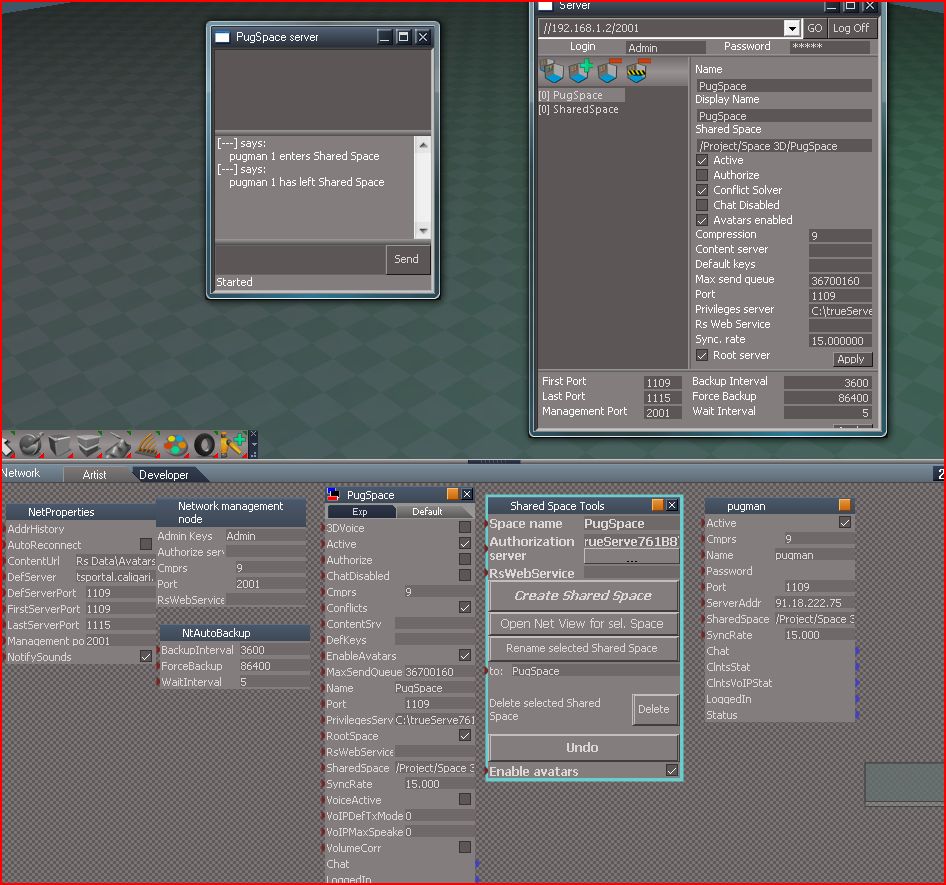
hi every thing rebooted localy logs in from trueplay. public still no go ,
virus programm not installed router default
virus programm not installed router default
- Attachments
-
-
pugman 1
- Captain
- Posts: 1555
- Joined: 21 May 2009, 19:26
- Type the number ten into the box: 0
- Location: Germany
Re: Trueserve set up prop
I am going to try this on my sons computer windows home ,not vista ,
first i must set up the wireless connection
first i must set up the wireless connection
-
BooxieMalone
- Chief Petty Officer
- Posts: 127
- Joined: 14 Jul 2009, 22:34
Re: Trueserve set up prop
Hi Cayenne,
thanks for your comprehensive answers, good to hear the facts by the specialist. I had my first experience with trueServe - it was very convenient to hack in the addresses directly to the server, only for testing the connections. Didn't intend to mess around with scenes or so, just set up the server, opened the ports - that was it.
Sometime ago I thought this wouldn't be possible and compared it to "ringing the bell from outside the flat", then I read an answer, I think it was from you, that this would generally be possible.
So for testing purposes that's a very fast way - took less than 20 minutes. If I substract the time for reading the trueServe manual
Regards
-BM.
thanks for your comprehensive answers, good to hear the facts by the specialist. I had my first experience with trueServe - it was very convenient to hack in the addresses directly to the server, only for testing the connections. Didn't intend to mess around with scenes or so, just set up the server, opened the ports - that was it.
Sometime ago I thought this wouldn't be possible and compared it to "ringing the bell from outside the flat", then I read an answer, I think it was from you, that this would generally be possible.
So for testing purposes that's a very fast way - took less than 20 minutes. If I substract the time for reading the trueServe manual
Regards
-BM.
-
pugman 1
- Captain
- Posts: 1555
- Joined: 21 May 2009, 19:26
- Type the number ten into the box: 0
- Location: Germany
Re: Trueserve set up prop
HI Cayenne, not quite sure what you mean there.
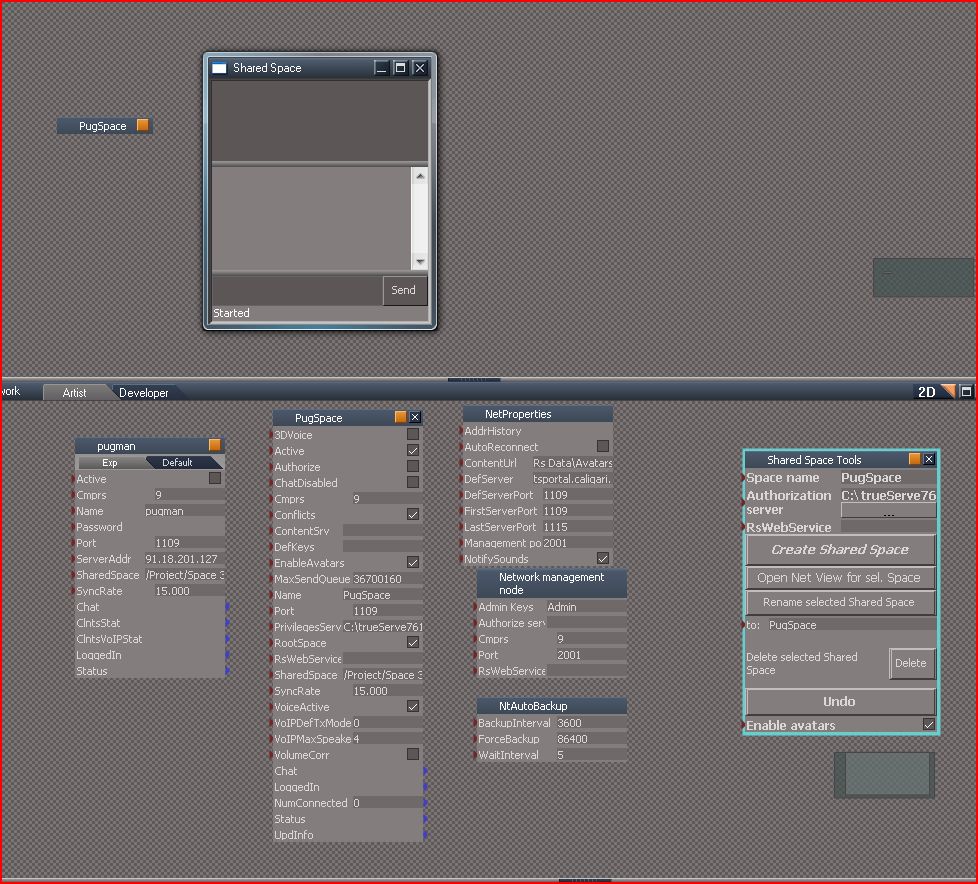
here a screen shot , can someone look at the settings and
let me know if ok, thanks
here a screen shot , can someone look at the settings and
let me know if ok, thanks
- Attachments
-
-
froo
- Captain
- Posts: 2554
- Joined: 22 May 2009, 12:13
Re: Trueserve set up prop
Look ok to me.
Not sure if this matters at all but I noticed, in the NetProperties node,
the DefServer value is set to: tsportal.caligari.com
It would be worth erasing that entry, then pressing the <Enter> key to commit the
changes, before attempting to login.
Not sure if this matters at all but I noticed, in the NetProperties node,
the DefServer value is set to: tsportal.caligari.com
It would be worth erasing that entry, then pressing the <Enter> key to commit the
changes, before attempting to login.
-
Cayenne
- Chief Petty Officer
- Posts: 119
- Joined: 03 Jun 2009, 20:05
- Type the number ten into the box: 0
- Location: U.K.
Re: Trueserve set up prop
settings look ok to me as well.
it looks like you also used trueserve and logged in via the server panel as well probably into port 2001
it looks like you also used trueserve and logged in via the server panel as well probably into port 2001
-
pugman 1
- Captain
- Posts: 1555
- Joined: 21 May 2009, 19:26
- Type the number ten into the box: 0
- Location: Germany
Re: Trueserve set up prop
it is logged in but canot conect , maybe someone else can???
-
froo
- Captain
- Posts: 2554
- Joined: 22 May 2009, 12:13
Re: Trueserve set up prop
Is it possible that the ISP is preventing this type of connection? I don't think they should
do that, but it's worth asking. It may be worth calling the ISP, and demanding to talk with
someone who knows what they're talking about. (BTW I don't like calling like that either)
do that, but it's worth asking. It may be worth calling the ISP, and demanding to talk with
someone who knows what they're talking about. (BTW I don't like calling like that either)
-
Cayenne
- Chief Petty Officer
- Posts: 119
- Joined: 03 Jun 2009, 20:05
- Type the number ten into the box: 0
- Location: U.K.
Re: Trueserve set up prop
I looked at your grabs and got this ip from one of the nodes .
I could ping you at this one , but couldnt connect to there with tS on port 1109
Pinging 91.18.222.75 with 32 bytes of data:
Reply from 91.18.222.75: bytes=32 time=96ms TTL=55
Reply from 91.18.222.75: bytes=32 time=93ms TTL=55
Reply from 91.18.222.75: bytes=32 time=94ms TTL=55
Reply from 91.18.222.75: bytes=32 time=94ms TTL=55
I could ping you at this one , but couldnt connect to there with tS on port 1109
Pinging 91.18.222.75 with 32 bytes of data:
Reply from 91.18.222.75: bytes=32 time=96ms TTL=55
Reply from 91.18.222.75: bytes=32 time=93ms TTL=55
Reply from 91.18.222.75: bytes=32 time=94ms TTL=55
Reply from 91.18.222.75: bytes=32 time=94ms TTL=55
-
trueBlue
- Captain
- Posts: 5548
- Joined: 06 Jul 2009, 22:50
- Type the number ten into the box: 10
Re: Trueserve set up prop
I think this is related to the ISP having a Proxy. Just a guess.
-
BooxieMalone
- Chief Petty Officer
- Posts: 127
- Joined: 14 Jul 2009, 22:34
Re: Trueserve set up prop
Hi pugman1,
I pinged successfully too, but no luck logging in with tPlay
Pinging 91.18.222.75....
64 bytes received from 91.18.222.75 RTT: 118ms TTL: 59
64 bytes received from 91.18.222.75 RTT: 119ms TTL: 59
64 bytes received from 91.18.222.75 RTT: 115ms TTL: 59
Pinged Successfully!
3 packets received out of 3 packets transmitted : 0% PACKET LOSS
Round Trip Time (in milliseconds) Max/Min/Av: 119/115/117
I had a look at your screenshots and I'm not quite sure, if it is the same to put the "SharedSpaceTools"-Object into the network node. Also I saw a view things filled, like DefServer. I know it worked for me without filling or changing anything.
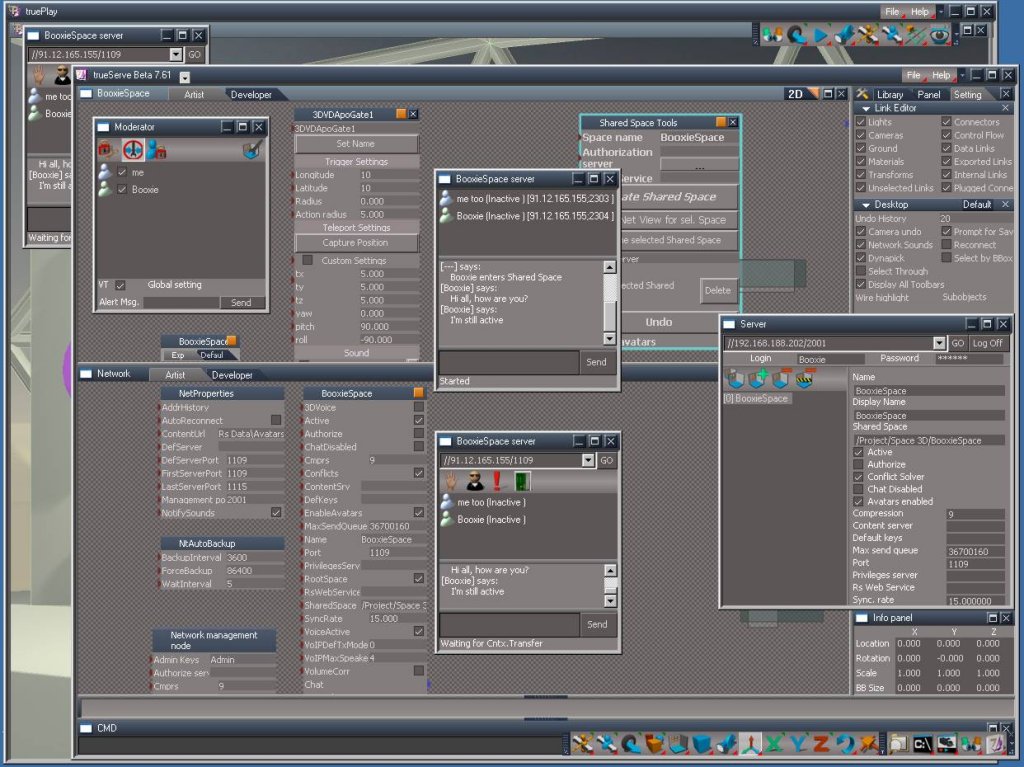
So I just started my trueServer for testing again and made a screenshot.
I tell you now with a checklist how it works for me - one by one (I made really only things, which are expressivly written down here):
__________
01) open router port 1109 UDP (no 2001 - use it only internally)
02) check Win Security Center for necessary settings (see my brief_instructions)
03) check Antivirus Firewall (Security-Level Medium)
04) check internet accessible
05) delete default.ctx
__________
06) start trueServe
07) upper left window is "Space3D" - bottom left window is "Network"
08) Throw "SharedSpaceTools"-Object into the upper "Space3D"
09) change your Space name (or leave untouched testSpace) and click "Create Shared Space"
You have nothing else to do (no changes in network window "yourSpace" necessary)
(Besides that you might want to open a "cmd"-window and create a server panel, but that's not important)
10) click the "SharedSpace-icon" (last but one from right at the bottom)
11) goto http://checkip.dyndns.org" (to get the actual IP or at least to secure that nothing has changed meanwhile)
12) Login
_________
13) Start truePlay and login
If this doesn't help, there is still some blocking internally in either one of the following (Router - WinSecurityCenter - AntivirusFirewall)
Regards
-BM.
Edit: typo
Edit2: Note, that I didn't setup a scenery yet!
I pinged successfully too, but no luck logging in with tPlay
Pinging 91.18.222.75....
64 bytes received from 91.18.222.75 RTT: 118ms TTL: 59
64 bytes received from 91.18.222.75 RTT: 119ms TTL: 59
64 bytes received from 91.18.222.75 RTT: 115ms TTL: 59
Pinged Successfully!
3 packets received out of 3 packets transmitted : 0% PACKET LOSS
Round Trip Time (in milliseconds) Max/Min/Av: 119/115/117
I had a look at your screenshots and I'm not quite sure, if it is the same to put the "SharedSpaceTools"-Object into the network node. Also I saw a view things filled, like DefServer. I know it worked for me without filling or changing anything.
So I just started my trueServer for testing again and made a screenshot.
I tell you now with a checklist how it works for me - one by one (I made really only things, which are expressivly written down here):
__________
01) open router port 1109 UDP (no 2001 - use it only internally)
02) check Win Security Center for necessary settings (see my brief_instructions)
03) check Antivirus Firewall (Security-Level Medium)
04) check internet accessible
05) delete default.ctx
__________
06) start trueServe
07) upper left window is "Space3D" - bottom left window is "Network"
08) Throw "SharedSpaceTools"-Object into the upper "Space3D"
09) change your Space name (or leave untouched testSpace) and click "Create Shared Space"
You have nothing else to do (no changes in network window "yourSpace" necessary)
(Besides that you might want to open a "cmd"-window and create a server panel, but that's not important)
10) click the "SharedSpace-icon" (last but one from right at the bottom)
11) goto http://checkip.dyndns.org" (to get the actual IP or at least to secure that nothing has changed meanwhile)
12) Login
_________
13) Start truePlay and login
If this doesn't help, there is still some blocking internally in either one of the following (Router - WinSecurityCenter - AntivirusFirewall)
Regards
-BM.
Edit: typo
Edit2: Note, that I didn't setup a scenery yet!
- Attachments
-
Last edited by BooxieMalone on 30 Oct 2009, 19:18, edited 1 time in total.
-
BooxieMalone
- Chief Petty Officer
- Posts: 127
- Joined: 14 Jul 2009, 22:34
Re: Trueserve set up prop
Hi Froo,
many thanks for your kind help & for making the screenshots - I'm going to rework it now & finish.
Regards
-BM.
many thanks for your kind help & for making the screenshots - I'm going to rework it now & finish.
Regards
-BM.
-
froo
- Captain
- Posts: 2554
- Joined: 22 May 2009, 12:13
Re: Trueserve set up prop
Excellent Booxie!
Thank you for all the effort in making the manual, as well.
Thank you for all the effort in making the manual, as well.
-
BooxieMalone
- Chief Petty Officer
- Posts: 127
- Joined: 14 Jul 2009, 22:34
Re: Trueserve set up prop
You're welcome froo, do you think my checklist above should be integrated?
-
BooxieMalone
- Chief Petty Officer
- Posts: 127
- Joined: 14 Jul 2009, 22:34
Re: Trueserve set up prop
Hi folks,
here it is! The present final version of my
trueServe - brief instructions on environment configuration
Router & Server prerequisites for trueServe761b8
New: 12 Points Quickstep Checklist
Thanks to the invaluable help of Froo, who made the screenshots and editing.
vi ... 8820#p8820"
HTH
-BM.
here it is! The present final version of my
trueServe - brief instructions on environment configuration
Router & Server prerequisites for trueServe761b8
New: 12 Points Quickstep Checklist
Thanks to the invaluable help of Froo, who made the screenshots and editing.
vi ... 8820#p8820"
HTH
-BM.
-
pugman 1
- Captain
- Posts: 1555
- Joined: 21 May 2009, 19:26
- Type the number ten into the box: 0
- Location: Germany
Re: Trueserve set up prop
Thanks bm for all your work, also froo, its a great help
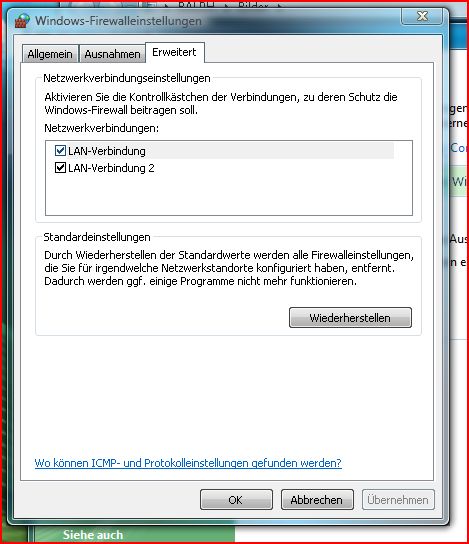
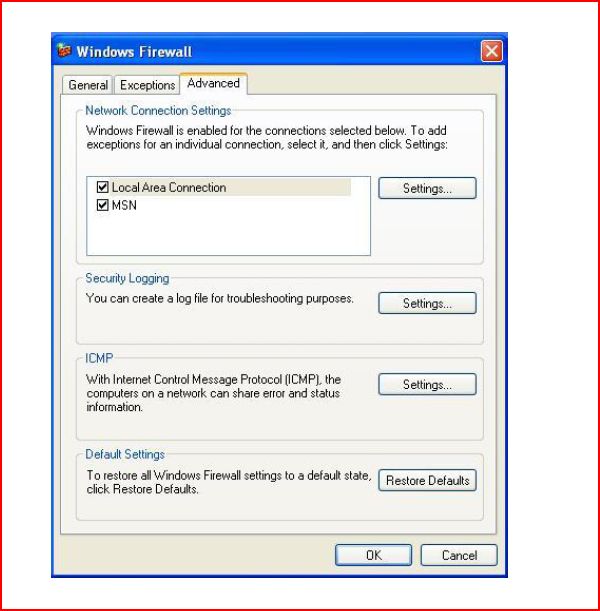
one thing is not the same by vista, here the shots.
i can not set pugspace to the same port as trueserve.vista does not allow this.
I have no virus program installed at the moment.
one thing is not the same by vista, here the shots.
i can not set pugspace to the same port as trueserve.vista does not allow this.
I have no virus program installed at the moment.
- Attachments
-
-
-
BooxieMalone
- Chief Petty Officer
- Posts: 127
- Joined: 14 Jul 2009, 22:34
Re: Trueserve set up prop
Hi pugman1, you're welcome
But hey what's that a vista sh..? I really can't believe! Can anybody confirm that?
Did you have a look at the "Advanced/Erweitert" tab, if there are maybe those settings hidden a few windowlevels down?
-BM.
Edit: or is this a feature of the home version? A high developed cripplenet? XP home Ed. is not crippled, thanks heaven.
Edit2: Now we know - that's been the problem! Cannot work if the function is not only hidden, but simply not existent.
But hey what's that a vista sh..? I really can't believe! Can anybody confirm that?
Did you have a look at the "Advanced/Erweitert" tab, if there are maybe those settings hidden a few windowlevels down?
-BM.
Edit: or is this a feature of the home version? A high developed cripplenet? XP home Ed. is not crippled, thanks heaven.
Edit2: Now we know - that's been the problem! Cannot work if the function is not only hidden, but simply not existent.
-
froo
- Captain
- Posts: 2554
- Joined: 22 May 2009, 12:13
Re: Trueserve set up prop
hm maybe you need Admin priveleges to access that?
Not sure if you are logged in as Admin or as a user pugman.
EDIT:
Can someone with Vista please go through Booxie's document,
first as Admin, then as user, to see if that makes a difference?
Thanks!
Froo
Not sure if you are logged in as Admin or as a user pugman.
EDIT:
Can someone with Vista please go through Booxie's document,
first as Admin, then as user, to see if that makes a difference?
Thanks!
Froo