Final trueSpace 7.61 Beta 8 Unofficial Update

User avatar
trueBlue
Captain
Posts: 5548
Joined: 06 Jul 2009, 22:50
Type the number ten into the box: 10

Re: Final trueSpace 7.61 Beta 8 Unofficial Update

Post by trueBlue »

trueSpace7.61 Beta 8 Unofficial Update Version 9

Please test this RC44 4/27/2023 :bananatyping:

New Unofficial Update Instructions:
It is Required that you completely Uninstall and Install trueSpace7.61 Beta 8 to a clean directory
You can keep your Rs Main Libraries folder, but all other folders and files should be removed
Install the PDF Manual for trueSpace (Optional but required before installing the Update)
Install the tS76_Vray1_54B8.exe (Optional but required before installing the Update)


Close trueSpace

1.) Install the YafaRay v3.3.0 render engine
2.) Install the tS76PDF 'Manual for Caligari trueSpace' & tS76Video (Optional but required before installing the Update)
3.) Install tS76_Vray1_54B8.exe to C:\trueSpace761 (Optional but required before installing the Update)
4.) Install tS7.61B8.9.exe to C:\trueSpace761
Browse [...] to where you installed C:\trueSpace761, select its folder and then the [Extract] button
Select the [Yes to All] button
5.) Open trueSpace
6.) Select the [OK] button in the OptDetectors plugin Information dialog
7.) Reset to Default Context
When trueSpace opens, select one of the layout tabs at the top
If Vray is installed:
8.) Press your keyboard's CTRL F8 keys to open the Package Manager
Right click in the Package Manager and select Install New...
Open C:\trueSpace761\Vray_ts.rsx
Right click in the Package Manager's Vray Package and select Load
Close the Package Manager
9.) Close trueSpace

The included Clintons3dPlugin.dll v.1638440, Clintons3dPluginExt.dll v.1638413, Clintons3dRsView.dll v.1638414 and the OptDetectors.dll Author - Vladimir Sisolak, are in: C:\trueSpace761
WARNING: The init.js file Imports the above 4 plugins and should not be Installed from the Package Manager, including any other plugins with the same name that have the rsx extension
All scripts that check for these plugins with the rsx extension have been removed!

Unofficial Update Version 9
Started on Fri Sep 02, 2022

Commands
Removed all of the discontinued xml scripts

Plugins Author - Clinton Reese
Renamed from rsx to dll:
Clintons3dPlugin.dll v1638441
Clintons3dRsView.dll v1638414
Clintons3dPluginExt.dll
Add
OptDetectors.dll Author - Vladimir Sisolak

Library
Add
OptDetectors
OptDetectors - Help objects
OptDetectors - Samples

Scripts
Update
init.js 'Loads the above 4 plugins'
Window.Shortcuts.xml
tS761 Workspace Shortcut List.rtf
Widget.Shortcuts.xml

CustomCommands Author - Clinton Reese
Add
JSON Function Set
Global Function Set
Dimensions
Hierarchy
Toolbar Manager
ShortcutRunner

Color Picker
Paint Vertex Color
Cloth Conversion
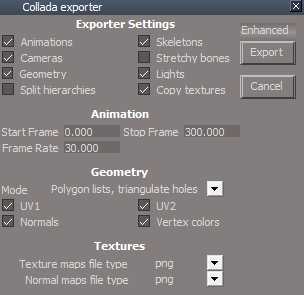
Enhanced Collada
Scene View 2
Object Statistics


4/27/2023
UUCommands
Look At - Utilities Author - Clinton Reese
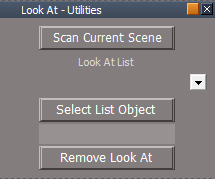
Look At Utilities.png
Look At Utilities.png (5.24 KiB) Viewed 2379 times
.
Add: Object Name 'Adds object name without path to panel'
Make LookAt List 'Run Object Name'
UnLook At 'Run Make LookAt List
Look At 'If Target Matrix exist, open Look At - Utilities
LookAt Postprocess 'Convert Node commands to util commands'

To use Look At, select the objects that are to be constrained, press the Look At button, then select the target object

Widgets
Camera widgets
FOV
MClick - UnLook At

Spotlight widget
Angle
MClick - UnLook At

Spotlight View widget
LightMove
MClick - UnLook At

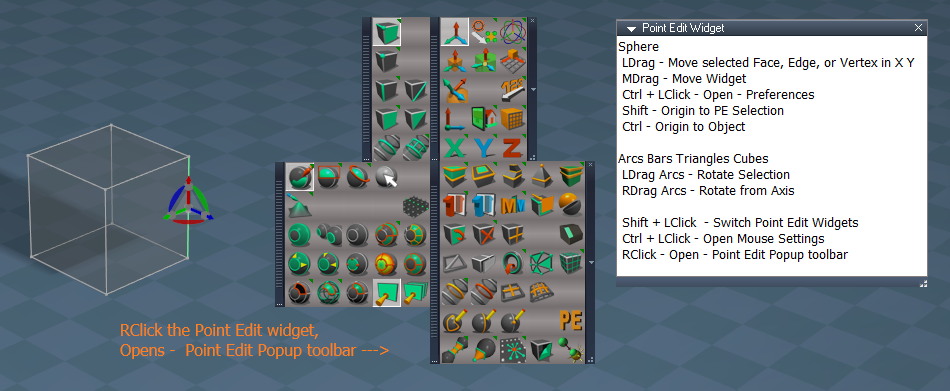
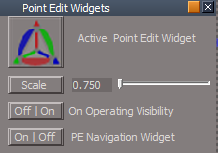
Point Edit widgets
Sphere
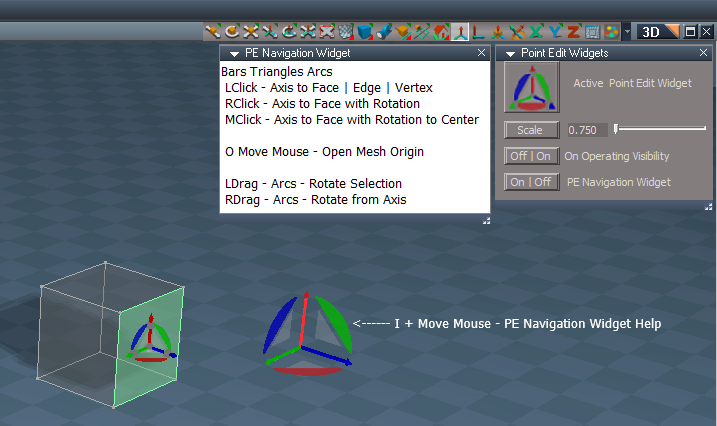
Ctrl LClick - Preferences 'Add & Remove PE Navigation Widget'
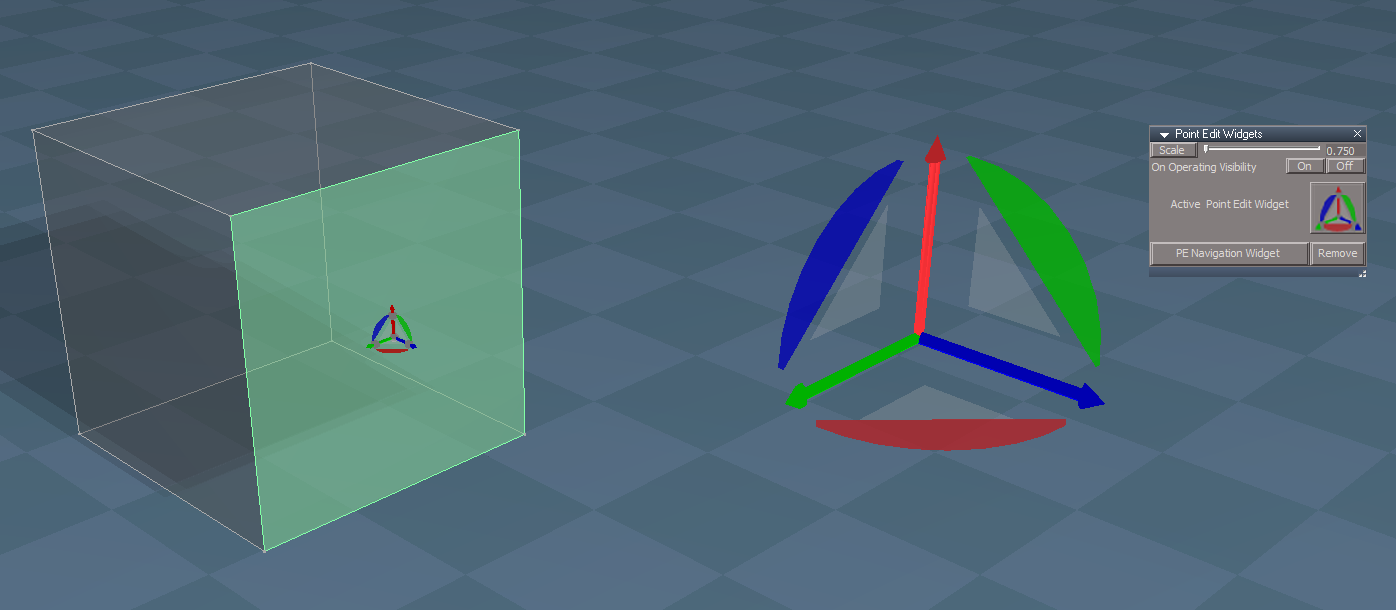
PE Navigation Widget.png
.
PE Navigation Widget
Bars & Arcs
LClick - Snap to Face - Edge - Vertex
RClick - Snap to Face with Rotation
MClick - Face with Rotation to Center
O LClick - Mesh Object Coordinate Mode |Toggle

If the plugins do not Load, Download and Install the Microsoft Visual C++ 2008 Service Pack 1 Redistributable Package
Note: When downloading the Microsoft Visual C++ 2008 Service Pack 1 Redistributable Package you are given 3 choices
Choose the 32-bit version; vcredist_x86.exe
Removed due to update
User avatar
trueBlue
Captain
Posts: 5548
Joined: 06 Jul 2009, 22:50
Type the number ten into the box: 10

Re: Final trueSpace 7.61 Beta 8 Unofficial Update

Post by trueBlue »

trueSpace7.61 Beta 8 Unofficial Update Version 9

Please test this RC45 4/28/2023 :bananatyping:

New Unofficial Update Instructions:
It is Required that you completely Uninstall and Install trueSpace7.61 Beta 8 to a clean directory
You can keep your Rs Main Libraries folder, but all other folders and files should be removed
Install the PDF Manual for trueSpace (Optional but required before installing the Update)
Install the tS76_Vray1_54B8.exe (Optional but required before installing the Update)


Close trueSpace

1.) Install the YafaRay v3.3.0 render engine
2.) Install the tS76PDF 'Manual for Caligari trueSpace' & tS76Video (Optional but required before installing the Update)
3.) Install tS76_Vray1_54B8.exe to C:\trueSpace761 (Optional but required before installing the Update)
4.) Install tS7.61B8.9.exe to C:\trueSpace761
Browse [...] to where you installed C:\trueSpace761, select its folder and then the [Extract] button
Select the [Yes to All] button
5.) Open trueSpace
6.) Select the [OK] button in the OptDetectors plugin Information dialog
7.) Reset to Default Context
When trueSpace opens, select one of the layout tabs at the top
If Vray is installed:
8.) Press your keyboard's CTRL F8 keys to open the Package Manager
Right click in the Package Manager and select Install New...
Open C:\trueSpace761\Vray_ts.rsx
Right click in the Package Manager's Vray Package and select Load
Close the Package Manager
9.) Close trueSpace

The included Clintons3dPlugin.dll v.1638440, Clintons3dPluginExt.dll v.1638413, Clintons3dRsView.dll v.1638414 and the OptDetectors.dll Author - Vladimir Sisolak, are in: C:\trueSpace761
WARNING: The init.js file Imports the above 4 plugins and should not be Installed from the Package Manager, including any other plugins with the same name that have the rsx extension
All scripts that check for these plugins with the rsx extension have been removed!

Unofficial Update Version 9
Started on Fri Sep 02, 2022

Commands
Removed all of the discontinued xml scripts

Plugins Author - Clinton Reese
Renamed from rsx to dll:
Clintons3dPlugin.dll v1638441
Clintons3dRsView.dll v1638414
Clintons3dPluginExt.dll
Add
OptDetectors.dll Author - Vladimir Sisolak

Library
Add
OptDetectors
OptDetectors - Help objects
OptDetectors - Samples

Scripts
Update
init.js 'Loads the above 4 plugins'
Window.Shortcuts.xml
tS761 Workspace Shortcut List.rtf
Widget.Shortcuts.xml

CustomCommands Author - Clinton Reese
Add
JSON Function Set
Global Function Set
Dimensions
Hierarchy
Toolbar Manager
ShortcutRunner

Color Picker
Paint Vertex Color
Cloth Conversion
Enhanced Collada
Scene View 2
Object Statistics


4/28/2023
Widgets
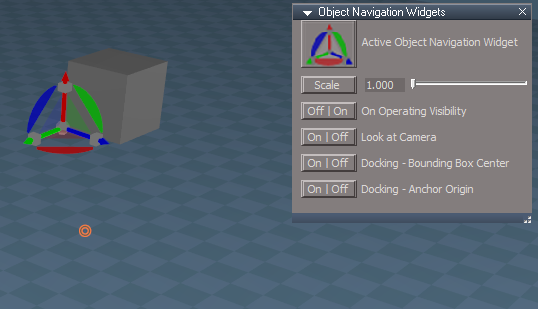
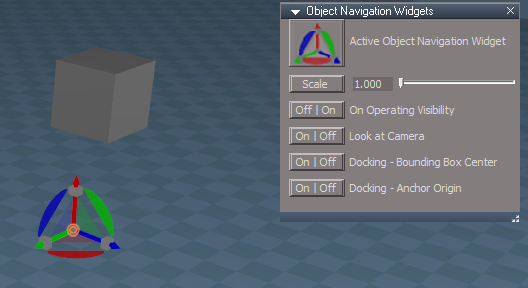
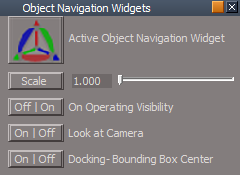
Object Navigation Widgets
Point Edit Widgets
Moved On Operating Visibility scripts from the widget to their preferences panel
Fixed the PE On Operating Visibility scripts to restore the PE Selection
Fixed all of the Restore PE Selection scripts and add check for Selection connector
Add: Open Panel to their preferences panel
Sphere
Ctrl LClick - Open Preferences
Obj preferences.png
Obj preferences.png (11.97 KiB) Viewed 2379 times
PE preferences.png
PE preferences.png (10.95 KiB) Viewed 2379 times
.

If the plugins do not Load, Download and Install the Microsoft Visual C++ 2008 Service Pack 1 Redistributable Package
Note: When downloading the Microsoft Visual C++ 2008 Service Pack 1 Redistributable Package you are given 3 choices
Choose the 32-bit version; vcredist_x86.exe
Removed due to update
User avatar
trueBlue
Captain
Posts: 5548
Joined: 06 Jul 2009, 22:50
Type the number ten into the box: 10

Re: Final trueSpace 7.61 Beta 8 Unofficial Update

Post by trueBlue »

trueSpace7.61 Beta 8 Unofficial Update Version 9

Please test this RC46 5/1/2023 :bananatyping:

New Unofficial Update Instructions:
It is Required that you completely Uninstall and Install trueSpace7.61 Beta 8 to a clean directory
You can keep your Rs Main Libraries folder, but all other folders and files should be removed
Install the PDF Manual for trueSpace (Optional but required before installing the Update)
Install the tS76_Vray1_54B8.exe (Optional but required before installing the Update)


Close trueSpace

1.) Install the YafaRay v3.3.0 render engine
2.) Install the tS76PDF 'Manual for Caligari trueSpace' & tS76Video (Optional but required before installing the Update)
3.) Install tS76_Vray1_54B8.exe to C:\trueSpace761 (Optional but required before installing the Update)
4.) Install tS7.61B8.9.exe to C:\trueSpace761
Browse [...] to where you installed C:\trueSpace761, select its folder and then the [Extract] button
Select the [Yes to All] button
5.) Open trueSpace
6.) Select the [OK] button in the OptDetectors plugin Information dialog
7.) Reset to Default Context
When trueSpace opens, select one of the layout tabs at the top
If Vray is installed:
8.) Press your keyboard's CTRL F8 keys to open the Package Manager
Right click in the Package Manager and select Install New...
Open C:\trueSpace761\Vray_ts.rsx
Right click in the Package Manager's Vray Package and select Load
Close the Package Manager
9.) Close trueSpace

The included Clintons3dPlugin.dll v.1638440, Clintons3dPluginExt.dll v.1638413, Clintons3dRsView.dll v.1638414 and the OptDetectors.dll Author - Vladimir Sisolak, are in: C:\trueSpace761
WARNING: The init.js file Imports the above 4 plugins and should not be Installed from the Package Manager, including any other plugins with the same name that have the rsx extension
All scripts that check for these plugins with the rsx extension have been removed!

Unofficial Update Version 9
Started on Fri Sep 02, 2022

Commands
Removed all of the discontinued xml scripts

Plugins Author - Clinton Reese
Renamed from rsx to dll:
Clintons3dPlugin.dll v1638441
Clintons3dRsView.dll v1638414
Clintons3dPluginExt.dll
Add
OptDetectors.dll Author - Vladimir Sisolak

Library
Add
OptDetectors
OptDetectors - Help objects
OptDetectors - Samples

Scripts
Update
init.js 'Loads the above 4 plugins'
Window.Shortcuts.xml
tS761 Workspace Shortcut List.rtf
Widget.Shortcuts.xml

CustomCommands Author - Clinton Reese
Add
JSON Function Set
Global Function Set
Dimensions
Hierarchy
Toolbar Manager
ShortcutRunner

Color Picker
Paint Vertex Color
Cloth Conversion
Enhanced Collada
Scene View 2
Object Statistics


5/1/2023
Widgets
Tools
Primitives
Primitive tool
Snap "Force snapping even if within nosnap range" 'Changed Alt to LClick'
Alt key was conflicting with trueSpace's Alt 'Save Layout or Window Settings' and ending the tool
Note: Snap by selecting Yellow snapping point inbetween any Green snapping points
Primitive tool 'Add Esc keyboard key gesture that Cancels the current process in PE mode only'

Add: Camera tool

Look At 'Changed the Look At cursor'

WidgetScripts
CamLightExtras
ExitLightView 'Add fix for duplicate FOV connectors'
ViewFromObject 'Add fix for duplicate FOV connectors'

ObjectNavigationWidgets
Caligari widget 'Removed all additional gestures except for NAV switch script'

PointEditNavigationWidgets
Caligari widget 'Removed all additional gestures except for PE switch script'

Select
Camera1 'Removed all additional gestures except for Camera switch script'

Toolbars
Changed all Camera and EntryPoint toolbar buttons

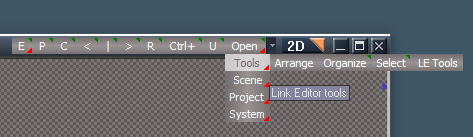
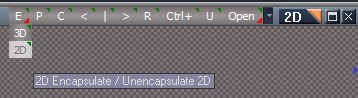
LENavigatorBar 'Add: E "Encapsulate in the Link Editor" toolbar buttons'
LE NAV toolbar.png
LE NAV toolbar.png (6.41 KiB) Viewed 2350 times
LE NAV Encapsulate in Link Editor.png
LE NAV Encapsulate in Link Editor.png (8.06 KiB) Viewed 2350 times
.
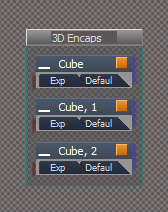
3D
LClick - 3D Encapsulate
RClick - 3D Unencapsulate
2D
LClick - 2D Encapsulate
RClick - 2D Unencapsulate
Note: If the Link Editor view is active, 3D Encapsulate and 2D Encapsulate will open the LE Name Dialog
If the Link Editor view is not active, the encapsulation will be named Object

UUCommands
Encapsulate
Add: 3D Encapsulate LE, 3D Unencapsulate LE, and 2D Encapsulate LE scripts
Note: Unencapsulate does not remove the LE2Data connectors

Preferences
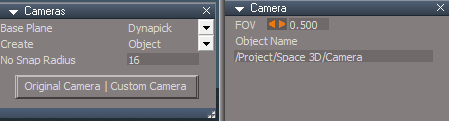
Cameras
Add: Original Camera | Custom Camera button
Switches the Camera primitive tool to use the Original Camera or Custom Camera
Custom Camera.png
Original Camera.png
Original Camera.png (8.06 KiB) Viewed 2350 times
.


If the plugins do not Load, Download and Install the Microsoft Visual C++ 2008 Service Pack 1 Redistributable Package
Note: When downloading the Microsoft Visual C++ 2008 Service Pack 1 Redistributable Package you are given 3 choices
Choose the 32-bit version; vcredist_x86.exe
Removed due to update
User avatar
trueBlue
Captain
Posts: 5548
Joined: 06 Jul 2009, 22:50
Type the number ten into the box: 10

Re: Final trueSpace 7.61 Beta 8 Unofficial Update

Post by trueBlue »

trueSpace7.61 Beta 8 Unofficial Update Version 9

Please test this RC47 5/3/2023 :bananatyping:

New Unofficial Update Instructions:
It is Required that you completely Uninstall and Install trueSpace7.61 Beta 8 to a clean directory
You can keep your Rs Main Libraries folder, but all other folders and files should be removed
RC47 - Remove the Recording, My Scene, My Recordings and Layouts - Configurations libraries is Required
Install the PDF Manual for trueSpace (Optional but required before installing the Update)
Install the tS76_Vray1_54B8.exe (Optional but required before installing the Update)


Close trueSpace

1.) Install the YafaRay v3.3.0 render engine
2.) Install the tS76PDF 'Manual for Caligari trueSpace' & tS76Video (Optional but required before installing the Update)
3.) Install tS76_Vray1_54B8.exe to C:\trueSpace761 (Optional but required before installing the Update)
4.) Install tS7.61B8.9.exe to C:\trueSpace761
Browse [...] to where you installed C:\trueSpace761, select its folder and then the [Extract] button
Select the [Yes to All] button
5.) Open trueSpace
6.) Select the [OK] button in the OptDetectors plugin Information dialog
7.) Reset to Default Context
When trueSpace opens, select one of the layout tabs at the top
If Vray is installed:
8.) Press your keyboard's CTRL F8 keys to open the Package Manager
Right click in the Package Manager and select Install New...
Open C:\trueSpace761\Vray_ts.rsx
Right click in the Package Manager's Vray Package and select Load
Close the Package Manager
9.) Close trueSpace

The included Clintons3dPlugin.dll v.1638440, Clintons3dPluginExt.dll v.1638413, Clintons3dRsView.dll v.1638414 and the OptDetectors.dll Author - Vladimir Sisolak, are in: C:\trueSpace761
WARNING: The init.js file Imports the above 4 plugins and should not be Installed from the Package Manager, including any other plugins with the same name that have the rsx extension
All scripts that check for these plugins with the rsx extension have been removed!

Unofficial Update Version 9
Started on Fri Sep 02, 2022

Commands
Removed all of the discontinued xml scripts

Plugins Author - Clinton Reese
Renamed from rsx to dll:
Clintons3dPlugin.dll v1638441
Clintons3dRsView.dll v1638414
Clintons3dPluginExt.dll
Add
OptDetectors.dll Author - Vladimir Sisolak

Library
Add
OptDetectors
OptDetectors - Help objects
OptDetectors - Samples

Scripts
Update
init.js 'Loads the above 4 plugins'
Window.Shortcuts.xml
tS761 Workspace Shortcut List.rtf
Widget.Shortcuts.xml

CustomCommands Author - Clinton Reese
Add
JSON Function Set
Global Function Set
Dimensions
Hierarchy
Toolbar Manager
ShortcutRunner

Color Picker
Paint Vertex Color
Cloth Conversion
Enhanced Collada
Scene View 2
Object Statistics


5/3/2023
Layouts
Update: All layouts
Removed: Expanded

Toolbars
Removed:
CharacterEditorBar
PointEditToolsBar
PointEditSelectionBar
PhysicsBar

LENavigatorBar
Red, Blue, and Gold buttons 'Removed RMB command'

Red Custom Toolbar
Add:
Auto Backup Scene 'Auto backup My Scene.RsScn'
Auto Backup Recording 'Auto backup My Recording.RsRcd'
Use:
Set the Time amount and Seconds or Minutes
Check the Active check box
Note: To use a different (Existing) scene or recording in your Library, use the File Dialog to Open it
Auto Backup Recording compresses the file size

Toolbar Manager
Update: Discription list

UUCommands
Update: Close All Toolbars Windows and Panels & Close All Panels scripts
Removed: Red Blue Gold Preferences scripts
Add:
Save RsScn
Save RsRcd
Backup tools.png
.

If the plugins do not Load, Download and Install the Microsoft Visual C++ 2008 Service Pack 1 Redistributable Package
Note: When downloading the Microsoft Visual C++ 2008 Service Pack 1 Redistributable Package you are given 3 choices
Choose the 32-bit version; vcredist_x86.exe
Removed due to update
User avatar
trueBlue
Captain
Posts: 5548
Joined: 06 Jul 2009, 22:50
Type the number ten into the box: 10

Re: Final trueSpace 7.61 Beta 8 Unofficial Update

Post by trueBlue »

trueSpace7.61 Beta 8 Unofficial Update Version 9

Please test this RC48 5/5/2023 :bananatyping:

New Unofficial Update Instructions:
It is Required that you completely Uninstall and Install trueSpace7.61 Beta 8 to a clean directory
You can keep your Rs Main Libraries folder, but all other folders and files should be removed
RC47 - Remove the Recording, My Scene, My Recordings and Layouts - Configurations libraries is Required
Install the PDF Manual for trueSpace (Optional but required before installing the Update)
Install the tS76_Vray1_54B8.exe (Optional but required before installing the Update)


Close trueSpace

1.) Install the YafaRay v3.3.0 render engine
2.) Install the tS76PDF 'Manual for Caligari trueSpace' & tS76Video (Optional but required before installing the Update)
3.) Install tS76_Vray1_54B8.exe to C:\trueSpace761 (Optional but required before installing the Update)
4.) Install tS7.61B8.9.exe to C:\trueSpace761
Browse [...] to where you installed C:\trueSpace761, select its folder and then the [Extract] button
Select the [Yes to All] button
5.) Open trueSpace
6.) Select the [OK] button in the OptDetectors plugin Information dialog
7.) Reset to Default Context
When trueSpace opens, select one of the layout tabs at the top
If Vray is installed:
8.) Press your keyboard's CTRL F8 keys to open the Package Manager
Right click in the Package Manager and select Install New...
Open C:\trueSpace761\Vray_ts.rsx
Right click in the Package Manager's Vray Package and select Load
Close the Package Manager
9.) Close trueSpace

The included Clintons3dPlugin.dll v.1638440, Clintons3dPluginExt.dll v.1638413, Clintons3dRsView.dll v.1638414 and the OptDetectors.dll Author - Vladimir Sisolak, are in: C:\trueSpace761
WARNING: The init.js file Imports the above 4 plugins and should not be Installed from the Package Manager, including any other plugins with the same name that have the rsx extension
All scripts that check for these plugins with the rsx extension have been removed!

Unofficial Update Version 9
Started on Fri Sep 02, 2022

Commands
Removed all of the discontinued xml scripts

Plugins Author - Clinton Reese
Renamed from rsx to dll:
Clintons3dPlugin.dll v1638441
Clintons3dRsView.dll v1638414
Clintons3dPluginExt.dll
Add
OptDetectors.dll Author - Vladimir Sisolak

Library
Add
OptDetectors
OptDetectors - Help objects
OptDetectors - Samples

Scripts
Update
init.js 'Loads the above 4 plugins'
Window.Shortcuts.xml
tS761 Workspace Shortcut List.rtf
Widget.Shortcuts.xml

CustomCommands Author - Clinton Reese
Add
JSON Function Set
Global Function Set
Dimensions
Hierarchy
Toolbar Manager
ShortcutRunner

Color Picker
Paint Vertex Color
Cloth Conversion
Enhanced Collada
Scene View 2
Object Statistics


5/5/2023
Physics
Widgets
Add: Cursor to the Physics Move tool
Objects
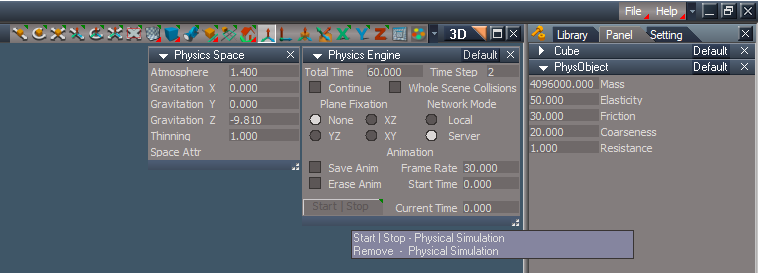
Physics Engine panel
Add: Start | Stop - Physics Simulation / Remove - Physics Simulation button
Physics Engine floating panel.png
.

Toolbars
Add: Rectangle Select to Object tool(s) button
Add: HairToolbar2
BottomBar2 renamed to WorkspaceMain3

Physics simulation button(s) RMB command 'Opens Physics Engine and Physics Space in a floating panel'
Note: Start Physics simulation first

Toolbar Manager updated list
tS761 Toolbars updated list

UUCommands
Updated: Flatten History 'Add: Alert if Physics Material exist'

CustomCommands
Dimensions - Add: Constant Color for Text
Update: Utility Function Set

Layouts
default_layout & Default - Restore to the original UU8 Default layout
Add: My Default layout
Update: Workspace layout

Cameras
Camera & EntryPoint
RenderToFile script 'Removed UnSelect and close frames'
Update: Camera1
.

If the plugins do not Load, Download and Install the Microsoft Visual C++ 2008 Service Pack 1 Redistributable Package
Note: When downloading the Microsoft Visual C++ 2008 Service Pack 1 Redistributable Package you are given 3 choices
Choose the 32-bit version; vcredist_x86.exe
Removed due to update
User avatar
trueBlue
Captain
Posts: 5548
Joined: 06 Jul 2009, 22:50
Type the number ten into the box: 10

Re: Final trueSpace 7.61 Beta 8 Unofficial Update

Post by trueBlue »

trueSpace7.61 Beta 8 Unofficial Update Version 9

Please test this RC49 5/6/2023 :bananatyping:

New Unofficial Update Instructions:
It is Required that you completely Uninstall and Install trueSpace7.61 Beta 8 to a clean directory
You can keep your Rs Main Libraries folder, but all other folders and files should be removed
RC47 - Remove the Recording, My Scene, My Recordings and Layouts - Configurations libraries is Required
Install the PDF Manual for trueSpace (Optional but required before installing the Update)
Install the tS76_Vray1_54B8.exe (Optional but required before installing the Update)


Close trueSpace

1.) Install the YafaRay v3.3.0 render engine
2.) Install the tS76PDF 'Manual for Caligari trueSpace' & tS76Video (Optional but required before installing the Update)
3.) Install tS76_Vray1_54B8.exe to C:\trueSpace761 (Optional but required before installing the Update)
4.) Install tS7.61B8.9.exe to C:\trueSpace761
Browse [...] to where you installed C:\trueSpace761, select its folder and then the [Extract] button
Select the [Yes to All] button
5.) Open trueSpace
6.) Select the [OK] button in the OptDetectors plugin Information dialog
7.) Reset to Default Context
When trueSpace opens, select one of the layout tabs at the top
If Vray is installed:
8.) Press your keyboard's CTRL F8 keys to open the Package Manager
Right click in the Package Manager and select Install New...
Open C:\trueSpace761\Vray_ts.rsx
Right click in the Package Manager's Vray Package and select Load
Close the Package Manager
9.) Close trueSpace

The included Clintons3dPlugin.dll v.1638440, Clintons3dPluginExt.dll v.1638413, Clintons3dRsView.dll v.1638414 and the OptDetectors.dll Author - Vladimir Sisolak, are in: C:\trueSpace761
WARNING: The init.js file Imports the above 4 plugins and should not be Installed from the Package Manager, including any other plugins with the same name that have the rsx extension
All scripts that check for these plugins with the rsx extension have been removed!

Unofficial Update Version 9
Started on Fri Sep 02, 2022

Commands
Removed all of the discontinued xml scripts

Plugins Author - Clinton Reese
Renamed from rsx to dll:
Clintons3dPlugin.dll v1638441
Clintons3dRsView.dll v1638414
Clintons3dPluginExt.dll
Add
OptDetectors.dll Author - Vladimir Sisolak

Library
Add
OptDetectors
OptDetectors - Help objects
OptDetectors - Samples

Scripts
Update
init.js 'Loads the above 4 plugins'
Window.Shortcuts.xml
tS761 Workspace Shortcut List.rtf
Widget.Shortcuts.xml

CustomCommands Author - Clinton Reese
Add
JSON Function Set
Global Function Set
Dimensions
Hierarchy
Toolbar Manager
ShortcutRunner

Color Picker
Paint Vertex Color
Cloth Conversion
Enhanced Collada
Scene View 2
Object Statistics


5/6/2023
Window.Shortcuts.xml 'Fixed Ctrl Shift P = Popup toolbar shortcut'

UUCommands
Encapsulate
2D Encapsulate LE script 'Fixed wrong command'

.

If the plugins do not Load, Download and Install the Microsoft Visual C++ 2008 Service Pack 1 Redistributable Package
Note: When downloading the Microsoft Visual C++ 2008 Service Pack 1 Redistributable Package you are given 3 choices
Choose the 32-bit version; vcredist_x86.exe
Remove due to update
User avatar
trueBlue
Captain
Posts: 5548
Joined: 06 Jul 2009, 22:50
Type the number ten into the box: 10

Re: Final trueSpace 7.61 Beta 8 Unofficial Update

Post by trueBlue »

trueSpace7.61 Beta 8 Unofficial Update Version 9

Please test this RC50 5/8/2023 :bananatyping:

New Unofficial Update Instructions:
It is Required that you completely Uninstall and Install trueSpace7.61 Beta 8 to a clean directory
You can keep your Rs Main Libraries folder, but all other folders and files should be removed
RC47 - Remove the Recording, My Scene, My Recordings and Layouts - Configurations libraries is Required
Install the PDF Manual for trueSpace (Optional but required before installing the Update)
Install the tS76_Vray1_54B8.exe (Optional but required before installing the Update)


Close trueSpace

1.) Install the YafaRay v3.3.0 render engine
2.) Install the tS76PDF 'Manual for Caligari trueSpace' & tS76Video (Optional but required before installing the Update)
3.) Install tS76_Vray1_54B8.exe to C:\trueSpace761 (Optional but required before installing the Update)
4.) Install tS7.61B8.9.exe to C:\trueSpace761
Browse [...] to where you installed C:\trueSpace761, select its folder and then the [Extract] button
Select the [Yes to All] button
5.) Open trueSpace
6.) Select the [OK] button in the OptDetectors plugin Information dialog
7.) Reset to Default Context
When trueSpace opens, select one of the layout tabs at the top
If Vray is installed:
8.) Press your keyboard's CTRL F8 keys to open the Package Manager
Right click in the Package Manager and select Install New...
Open C:\trueSpace761\Vray_ts.rsx
Right click in the Package Manager's Vray Package and select Load
Close the Package Manager
9.) Close trueSpace

The included Clintons3dPlugin.dll v.1638440, Clintons3dPluginExt.dll v.1638413, Clintons3dRsView.dll v.1638414 and the OptDetectors.dll Author - Vladimir Sisolak, are in: C:\trueSpace761
WARNING: The init.js file Imports the above 4 plugins and should not be Installed from the Package Manager, including any other plugins with the same name that have the rsx extension
All scripts that check for these plugins with the rsx extension have been removed!

Unofficial Update Version 9
Started on Fri Sep 02, 2022

Commands
Removed all of the discontinued xml scripts

Plugins Author - Clinton Reese
Renamed from rsx to dll:
Clintons3dPlugin.dll v1638441
Clintons3dRsView.dll v1638414
Clintons3dPluginExt.dll
Add
OptDetectors.dll Author - Vladimir Sisolak

Library
Add
OptDetectors
OptDetectors - Help objects
OptDetectors - Samples

Scripts
Update
init.js 'Loads the above 4 plugins'
Window.Shortcuts.xml
tS761 Workspace Shortcut List.rtf
Widget.Shortcuts.xml

CustomCommands Author - Clinton Reese
Add
JSON Function Set
Global Function Set
Dimensions
Hierarchy
Toolbar Manager
ShortcutRunner

Color Picker
Paint Vertex Color
Cloth Conversion
Enhanced Collada
Scene View 2
Object Statistics


5/8/2023
Toolbars 'Add: WorkspaceNavBAK'
UUCommands 'Update - Red Toolbar, Blue Toolbar, Clintons Toolbar, and Camera Toolbar scripts'
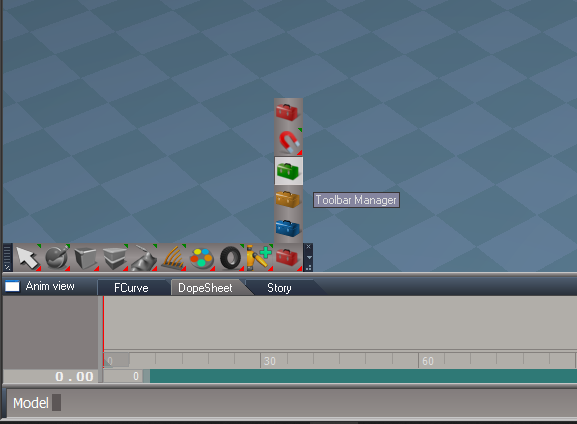
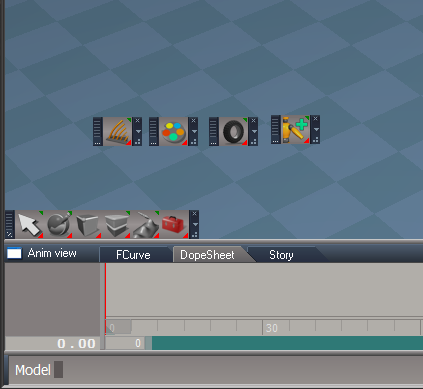
Toolbar Manager 'Update - 'Open Toolbar script, Edit Toolbar "Save Prototype" button, Toolbar Manager "Restore" button, and add WorkspaceNav Utilities'

Example: Modifying the Workspace Nav toolbar

Step 1
Open Toolbar Manager
Step 1.png
.
Step 2
Reset the Workspace Nav toolbar
Step 2.png
.
Step 3
Ctrl LDrag the Hair, Material Editor, Physics, and Character Editor icons out of the Workspace Nav toolbar and Close them
Step 3.png
.
Step 4
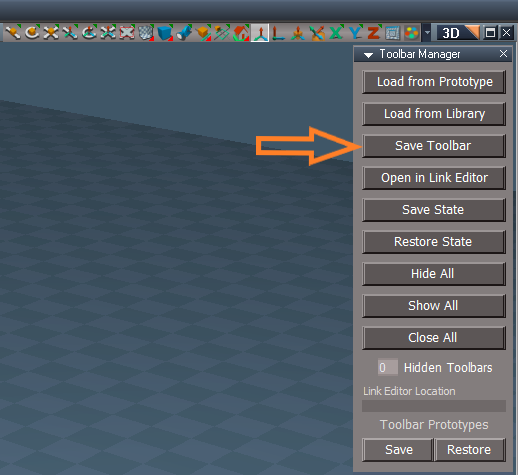
Press the Save Toolbar button
Double LClick the toolbars Handle
Step 4.png
.
Step 5
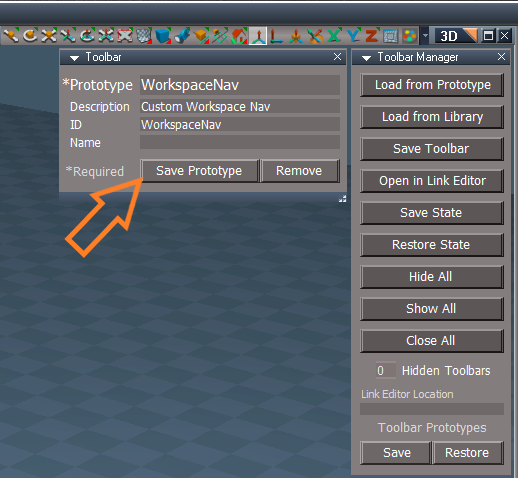
Enter a Description and press the Save Prototype button
Step 5.png
.
Step 6
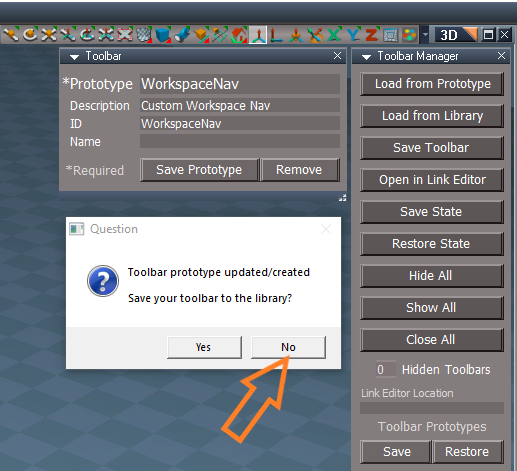
Question: "Save your toolbar to the libray?"
Press the No button
Step 6.png
.

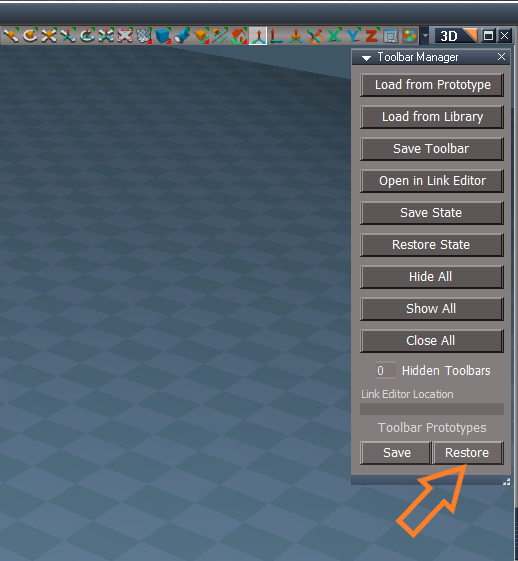
Note: If you Reset the Default Context or you want to Restore the Workspace Nav toolbar

Open Toolbar Manager
Press the Restore button
Restore.png
.

If the plugins do not Load, Download and Install the Microsoft Visual C++ 2008 Service Pack 1 Redistributable Package
Note: When downloading the Microsoft Visual C++ 2008 Service Pack 1 Redistributable Package you are given 3 choices
Choose the 32-bit version; vcredist_x86.exe
Removed due to update
User avatar
trueBlue
Captain
Posts: 5548
Joined: 06 Jul 2009, 22:50
Type the number ten into the box: 10

Re: Final trueSpace 7.61 Beta 8 Unofficial Update

Post by trueBlue »

trueSpace7.61 Beta 8 Unofficial Update Version 9

Please test this RC51 5/10/2023 :bananatyping:
RC51 is the Final Release Candidate

New Unofficial Update Instructions:
It is Required that you completely Uninstall and Install trueSpace7.61 Beta 8 to a clean directory
You can keep your Rs Main Libraries folder, but all other folders and files should be removed
Remove the Recording, My Scene, My Recordings and Layouts - Configurations libraries is Required
Install the PDF Manual for trueSpace (Optional but required before installing the Update)
Install the tS76_Vray1_54B8.exe (Optional but required before installing the Update)


Close trueSpace

1.) Install the YafaRay v3.3.0 render engine
2.) Install the tS76PDF 'Manual for Caligari trueSpace' & tS76Video (Optional but required before installing the Update)
3.) Install tS76_Vray1_54B8.exe to C:\trueSpace761 (Optional but required before installing the Update)
4.) Install tS7.61B8.9.exe to C:\trueSpace761
Browse [...] to where you installed C:\trueSpace761, select its folder and then the [Extract] button
Select the [Yes to All] button
5.) Open trueSpace
6.) Select the [OK] button in the OptDetectors plugin Information dialog
7.) Reset to Default Context
When trueSpace opens, select one of the layout tabs at the top
If Vray is installed:
8.) Press your keyboard's CTRL F8 keys to open the Package Manager
Right click in the Package Manager and select Install New...
Open C:\trueSpace761\Vray_ts.rsx
Right click in the Package Manager's Vray Package and select Load
Close the Package Manager
9.) Close trueSpace

The included Clintons3dPlugin.dll v.1638440, Clintons3dPluginExt.dll v.1638413, Clintons3dRsView.dll v.1638414 and the OptDetectors.dll Author - Vladimir Sisolak, are in: C:\trueSpace761
WARNING: The init.js file Imports the above 4 plugins and should not be Installed from the Package Manager, including any other plugins with the same name that have the rsx extension
All scripts that check for these plugins with the rsx extension have been removed!

Unofficial Update Version 9
Started on Fri Sep 02, 2022

Commands
Removed all of the discontinued xml scripts

Plugins Author - Clinton Reese
Renamed from rsx to dll:
Clintons3dPlugin.dll v1638441
Clintons3dRsView.dll v1638414
Clintons3dPluginExt.dll
Add
OptDetectors.dll Author - Vladimir Sisolak

Library
Add
OptDetectors
OptDetectors - Help objects
OptDetectors - Samples

Scripts
Update
init.js 'Loads the above 4 plugins'
Window.Shortcuts.xml
tS761 Workspace Shortcut List.rtf
Widget.Shortcuts.xml

CustomCommands Author - Clinton Reese
Add
JSON Function Set
Global Function Set
Dimensions
Hierarchy
Toolbar Manager
ShortcutRunner

Color Picker
Paint Vertex Color
Cloth Conversion
Enhanced Collada
Scene View 2
Object Statistics


5/10/2023
Toolbars 'Update - LE Window button's RMB Command' Opens Link Editor cascade windows with the LE Nav toolbar
UUCommands 'Add - Offset LE NAV Window script'
CustomCommands/LEtools/OpenActiveWindow 'Removed the restrictions on the number of open le windows'
Toolbar Manager 'Open in the Link Editor opens to the Buttons'
Note: Was not able to have them open in cascade fashion properly
.

If the plugins do not Load, Download and Install the Microsoft Visual C++ 2008 Service Pack 1 Redistributable Package
Note: When downloading the Microsoft Visual C++ 2008 Service Pack 1 Redistributable Package you are given 3 choices
Choose the 32-bit version; vcredist_x86.exe
Removed due to update
User avatar
trueBlue
Captain
Posts: 5548
Joined: 06 Jul 2009, 22:50
Type the number ten into the box: 10

Re: Final trueSpace 7.61 Beta 8 Unofficial Update

Post by trueBlue »

trueSpace7.61 Beta 8 Unofficial Update Version 9

Please test this RC52 5/16/2023 :bananatyping:
RC52 is the Final Release Candidate

New Unofficial Update Instructions:
It is Required that you completely Uninstall and Install trueSpace7.61 Beta 8 to a clean directory
You can keep your Rs Main Libraries folder, but all other folders and files should be removed
RC47 - Remove the Recording, My Scene, My Recordings and Layouts - Configurations libraries is Required
Install the PDF Manual for trueSpace (Optional but required before installing the Update)
Install the tS76_Vray1_54B8.exe (Optional but required before installing the Update)


Close trueSpace

1.) Install the YafaRay v3.3.0 render engine
2.) Install the tS76PDF 'Manual for Caligari trueSpace' & tS76Video (Optional but required before installing the Update)
3.) Install tS76_Vray1_54B8.exe to C:\trueSpace761 (Optional but required before installing the Update)
4.) Install tS7.61B8.9.exe to C:\trueSpace761
Browse [...] to where you installed C:\trueSpace761, select its folder and then the [Extract] button
Select the [Yes to All] button
5.) Open trueSpace
6.) Select the [OK] button in the OptDetectors plugin Information dialog
7.) Reset to Default Context
When trueSpace opens, select one of the layout tabs at the top
If Vray is installed:
8.) Press your keyboard's CTRL F8 keys to open the Package Manager
Right click in the Package Manager and select Install New...
Open C:\trueSpace761\Vray_ts.rsx
Right click in the Package Manager's Vray Package and select Load
Close the Package Manager
9.) Close trueSpace

The included Clintons3dPlugin.dll v.1638442, Clintons3dPluginExt.dll v.1638413, Clintons3dRsView.dll v.1638414 and the OptDetectors.dll Author - Vladimir Sisolak, are in: C:\trueSpace761
WARNING: The init.js file Imports the above 4 plugins and should not be Installed from the Package Manager, including any other plugins with the same name that have the rsx extension
All scripts that check for these plugins with the rsx extension have been removed!

Unofficial Update Version 9
Started on Fri Sep 02, 2022

Commands
Removed all of the discontinued xml scripts

Plugins Author - Clinton Reese
Renamed from rsx to dll:
Clintons3dPlugin.dll v1638442
Clintons3dRsView.dll v1638414
Clintons3dPluginExt.dll
Add
OptDetectors.dll Author - Vladimir Sisolak

Library
Add
OptDetectors
OptDetectors - Help objects
OptDetectors - Samples

Scripts
Update
init.js 'Loads the above 4 plugins'
Window.Shortcuts.xml
tS761 Workspace Shortcut List.rtf
Widget.Shortcuts.xml

CustomCommands Author - Clinton Reese
Add
JSON Function Set
Global Function Set
Dimensions
Hierarchy
Toolbar Manager
ShortcutRunner

Color Picker
Paint Vertex Color
Cloth Conversion
Enhanced Collada
Scene View 2
Object Statistics


Updated: 5/16/2023

Clintons3dPlugin.dll 'Updated to version:1638442' Author - Clinton Reese

UUCommands
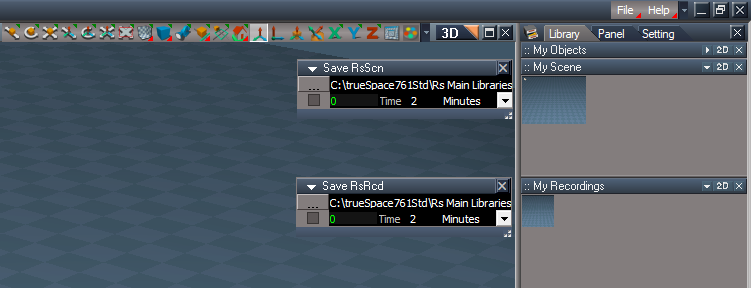
Add: Save Scene Backups
Save Scene Backups.png
.
RClick - Open "Save Scene Backups"
Save Recording Backups
RClick - Open "Save Recording Backups"
Use:
Open the Scene or Recording in trueSpace first
Open the File, set the number of Minutes or Seconds, and check the check box to start
Each copy name is appended with the day, month, hour, minute, and seconds
Save Scene Backups UI.png
.
Project 'Updated - Default Project'
Material Editor 'Disconnect | Connect Image Browser Watch Dog'
Physics.rsobj/Physics Move 'Changed Cursor from hand to pointing finger'
.

If the plugins do not Load, Download and Install the Microsoft Visual C++ 2008 Service Pack 1 Redistributable Package
Note: When downloading the Microsoft Visual C++ 2008 Service Pack 1 Redistributable Package you are given 3 choices
Choose the 32-bit version; vcredist_x86.exe
Removed due to update
User avatar
trueBlue
Captain
Posts: 5548
Joined: 06 Jul 2009, 22:50
Type the number ten into the box: 10

Re: Final trueSpace 7.61 Beta 8 Unofficial Update

Post by trueBlue »

trueSpace7.61 Beta 8 Unofficial Update Version 9

Please test this RC53 5/18/2023 :bananatyping:
RC53 is the Final Release Candidate

New Unofficial Update Instructions:
It is Required that you completely Uninstall and Install trueSpace7.61 Beta 8 to a clean directory
You can keep your Rs Main Libraries folder, but all other folders and files should be removed
RC47 - Remove the Recording, My Scene, My Recordings and Layouts - Configurations libraries is Required
Install the PDF Manual for trueSpace (Optional but required before installing the Update)
Install the tS76_Vray1_54B8.exe (Optional but required before installing the Update)


Close trueSpace

1.) Install the YafaRay v3.3.0 render engine
2.) Install the tS76PDF 'Manual for Caligari trueSpace' & tS76Video (Optional but required before installing the Update)
3.) Install tS76_Vray1_54B8.exe to C:\trueSpace761 (Optional but required before installing the Update)
4.) Install tS7.61B8.9.exe to C:\trueSpace761
Browse [...] to where you installed C:\trueSpace761, select its folder and then the [Extract] button
Select the [Yes to All] button
5.) Open trueSpace
6.) Select the [OK] button in the OptDetectors plugin Information dialog
7.) Reset to Default Context
When trueSpace opens, select one of the layout tabs at the top
If Vray is installed:
8.) Press your keyboard's CTRL F8 keys to open the Package Manager
Right click in the Package Manager and select Install New...
Open C:\trueSpace761\Vray_ts.rsx
Right click in the Package Manager's Vray Package and select Load
Close the Package Manager
9.) Close trueSpace

The included Clintons3dPlugin.dll v.1638440, Clintons3dPluginExt.dll v.1638413, Clintons3dRsView.dll v.1638414 and the OptDetectors.dll Author - Vladimir Sisolak, are in: C:\trueSpace761
WARNING: The init.js file Imports the above 4 plugins and should not be Installed from the Package Manager, including any other plugins with the same name that have the rsx extension
All scripts that check for these plugins with the rsx extension have been removed!

Unofficial Update Version 9
Started on Fri Sep 02, 2022

Commands
Removed all of the discontinued xml scripts

Plugins Author - Clinton Reese
Renamed from rsx to dll:
Clintons3dPlugin.dll v1638442
Clintons3dRsView.dll v1638414
Clintons3dPluginExt.dll
Add
OptDetectors.dll Author - Vladimir Sisolak

Library
Add
OptDetectors
OptDetectors - Help objects
OptDetectors - Samples

Scripts
Update
init.js 'Loads the above 4 plugins'
Window.Shortcuts.xml
tS761 Workspace Shortcut List.rtf
Widget.Shortcuts.xml

CustomCommands Author - Clinton Reese
Add
JSON Function Set
Global Function Set
Dimensions
Hierarchy
Toolbar Manager
ShortcutRunner

Color Picker
Paint Vertex Color
Cloth Conversion
Enhanced Collada
Scene View 2
Object Statistics


Updated: 5/18/2023

In the previous update on 4/19/2023, I Disabled "Use - Intensive Visibility Mode"
In doing so, the Scene - Show Object Attribs button, Hide, Show and Hide Unselected toolbar icons no longer worked for objects that did not have Object Render Attribtues
Not a good choice, so I Enabled it and added a Status Message if it is Disabled

Custom preferences:
Visibility preferences
Enable - "Use - Intensive Visibility Mode"

UUCommands:
Visibility Function Set 'Add: function VisibilityMode()'

Code: Select all

function VisibilityMode() 
{
	var Mode = Node.Value("/Preferences/Custom preferences/Visibility preferences", "IntensiveRun")
	if(!Mode) {
		util.SetStatusMessage("Enable - Use - Intensive Visibility Mode", 10000)
		//System.Alert("Enable - Use - Intensive Visibility Mode")
		UserInterface.OpenToolPanelViewEx2('', '','/Preferences/Custom preferences/Visibility preferences',3,1,1)
	}
}
Widgets:
Booleans 'Add Cursor'

.

If the plugins do not Load, Download and Install the Microsoft Visual C++ 2008 Service Pack 1 Redistributable Package
Note: When downloading the Microsoft Visual C++ 2008 Service Pack 1 Redistributable Package you are given 3 choices
Choose the 32-bit version; vcredist_x86.exe
Removed due to update
User avatar
trueBlue
Captain
Posts: 5548
Joined: 06 Jul 2009, 22:50
Type the number ten into the box: 10

Re: Final trueSpace 7.61 Beta 8 Unofficial Update

Post by trueBlue »

trueSpace7.61 Beta 8 Unofficial Update Version 9

Please test this RC54 5/20/2023 :bananatyping:
RC53 is the Final Release Candidate

New Unofficial Update Instructions:
It is Required that you completely Uninstall and Install trueSpace7.61 Beta 8 to a clean directory
You can keep your Rs Main Libraries folder, but all other folders and files should be removed
RC47 - Remove the Recording, My Scene, My Recordings and Layouts - Configurations libraries is Required
Install the PDF Manual for trueSpace (Optional but required before installing the Update)
Install the tS76_Vray1_54B8.exe (Optional but required before installing the Update)


Close trueSpace

1.) Install the YafaRay v3.3.0 render engine
2.) Install the tS76PDF 'Manual for Caligari trueSpace' & tS76Video (Optional but required before installing the Update)
3.) Install tS76_Vray1_54B8.exe to C:\trueSpace761 (Optional but required before installing the Update)
4.) Install tS7.61B8.9.exe to C:\trueSpace761
Browse [...] to where you installed C:\trueSpace761, select its folder and then the [Extract] button
Select the [Yes to All] button
5.) Open trueSpace
6.) Select the [OK] button in the OptDetectors plugin Information dialog
7.) Reset to Default Context
When trueSpace opens, select one of the layout tabs at the top
If Vray is installed:
8.) Press your keyboard's CTRL F8 keys to open the Package Manager
Right click in the Package Manager and select Install New...
Open C:\trueSpace761\Vray_ts.rsx
Right click in the Package Manager's Vray Package and select Load
Close the Package Manager
9.) Close trueSpace

The included Clintons3dPlugin.dll v.1638440, Clintons3dPluginExt.dll v.1638413, Clintons3dRsView.dll v.1638414 and the OptDetectors.dll Author - Vladimir Sisolak, are in: C:\trueSpace761
WARNING: The init.js file Imports the above 4 plugins and should not be Installed from the Package Manager, including any other plugins with the same name that have the rsx extension
All scripts that check for these plugins with the rsx extension have been removed!

Unofficial Update Version 9
Started on Fri Sep 02, 2022

Commands
Removed all of the discontinued xml scripts

Plugins Author - Clinton Reese
Renamed from rsx to dll:
Clintons3dPlugin.dll v1638442
Clintons3dRsView.dll v1638414
Clintons3dPluginExt.dll
Add
OptDetectors.dll Author - Vladimir Sisolak

Library
Add
OptDetectors
OptDetectors - Help objects
OptDetectors - Samples

Scripts
Update
init.js 'Loads the above 4 plugins'
Window.Shortcuts.xml
tS761 Workspace Shortcut List.rtf
Widget.Shortcuts.xml

CustomCommands Author - Clinton Reese
Add
JSON Function Set
Global Function Set
Dimensions
Hierarchy
Toolbar Manager
ShortcutRunner

Color Picker
Paint Vertex Color
Cloth Conversion
Enhanced Collada
Scene View 2
Object Statistics
Cut Plane


Updated: 5/20/2023

CustomCommands
Cut Plane Author - Clinton Reese
Note: Many modifications and additions to the original

Widgets
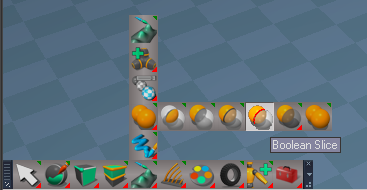
Boolean Slice
Use: Select a 3D Object and start the Boolean Slice widget
Cut Plane will be selected that you can transform with the Object Navigation widget:
LClick - Cut; Crtl LClick - Cut and Reset; RClick - End Tool
You can make as many Cuts as you want before ending the tool

Toolbars
Add: Boolean Slice
Boolean Slice.png
Boolean Slice.png (46.27 KiB) Viewed 2194 times
.
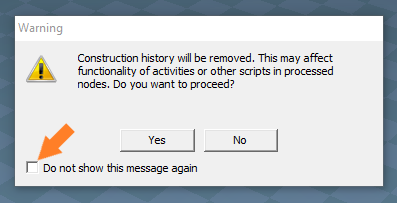
tS Dialog.png
tS Dialog.png (15.46 KiB) Viewed 2194 times
Note: On first use, Check "Do not show this message again" and press the Yes button is Required!
The current Dialog attributes will be restored
Warning! If you press No, to any of the Dialog questions your object will have all or incomplete components installed by this process!
.

If the plugins do not Load, Download and Install the Microsoft Visual C++ 2008 Service Pack 1 Redistributable Package
Note: When downloading the Microsoft Visual C++ 2008 Service Pack 1 Redistributable Package you are given 3 choices
Choose the 32-bit version; vcredist_x86.exe
Removed due to update
User avatar
trueBlue
Captain
Posts: 5548
Joined: 06 Jul 2009, 22:50
Type the number ten into the box: 10

Re: Final trueSpace 7.61 Beta 8 Unofficial Update

Post by trueBlue »

trueSpace7.61 Beta 8 Unofficial Update Version 9

Please test this RC55 5/21/2023 :bananatyping:
RC53 is the Final Release Candidate

New Unofficial Update Instructions:
It is Required that you completely Uninstall and Install trueSpace7.61 Beta 8 to a clean directory
You can keep your Rs Main Libraries folder, but all other folders and files should be removed
RC47 - Remove the Recording, My Scene, My Recordings and Layouts - Configurations libraries is Required
Install the PDF Manual for trueSpace (Optional but required before installing the Update)
Install the tS76_Vray1_54B8.exe (Optional but required before installing the Update)


Close trueSpace

1.) Install the YafaRay v3.3.0 render engine
2.) Install the tS76PDF 'Manual for Caligari trueSpace' & tS76Video (Optional but required before installing the Update)
3.) Install tS76_Vray1_54B8.exe to C:\trueSpace761 (Optional but required before installing the Update)
4.) Install tS7.61B8.9.exe to C:\trueSpace761
Browse [...] to where you installed C:\trueSpace761, select its folder and then the [Extract] button
Select the [Yes to All] button
5.) Open trueSpace
6.) Select the [OK] button in the OptDetectors plugin Information dialog
7.) Reset to Default Context
When trueSpace opens, select one of the layout tabs at the top
If Vray is installed:
8.) Press your keyboard's CTRL F8 keys to open the Package Manager
Right click in the Package Manager and select Install New...
Open C:\trueSpace761\Vray_ts.rsx
Right click in the Package Manager's Vray Package and select Load
Close the Package Manager
9.) Close trueSpace

The included Clintons3dPlugin.dll v.1638440, Clintons3dPluginExt.dll v.1638413, Clintons3dRsView.dll v.1638414 and the OptDetectors.dll Author - Vladimir Sisolak, are in: C:\trueSpace761
WARNING: The init.js file Imports the above 4 plugins and should not be Installed from the Package Manager, including any other plugins with the same name that have the rsx extension
All scripts that check for these plugins with the rsx extension have been removed!

Unofficial Update Version 9
Started on Fri Sep 02, 2022

Commands
Removed all of the discontinued xml scripts

Plugins Author - Clinton Reese
Renamed from rsx to dll:
Clintons3dPlugin.dll v1638442
Clintons3dRsView.dll v1638414
Clintons3dPluginExt.dll
Add
OptDetectors.dll Author - Vladimir Sisolak

Library
Add
OptDetectors
OptDetectors - Help objects
OptDetectors - Samples

Scripts
Update
init.js 'Loads the above 4 plugins'
Window.Shortcuts.xml
tS761 Workspace Shortcut List.rtf
Widget.Shortcuts.xml

CustomCommands Author - Clinton Reese
Add
JSON Function Set
Global Function Set
Dimensions
Hierarchy
Toolbar Manager
ShortcutRunner

Color Picker
Paint Vertex Color
Cloth Conversion
Enhanced Collada
Scene View 2
Object Statistics
Cut Plane


Updated: 5/21/2023

CustomCommands
Cut Plane Author - Clinton Reese
Add: Check and Restore script 'Saves a copy of the object and restores it, if it is not used correctly'
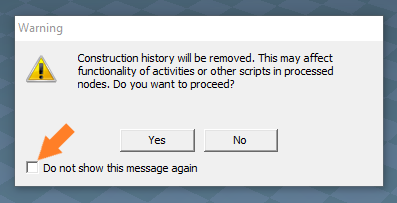
tS Dialog.png
tS Dialog.png (15.46 KiB) Viewed 2170 times
.
Note: On first use, Check "Do not show this message again" and press the [Yes] button is Required
The current Dialog settings attributes will be restored
.

If the plugins do not Load, Download and Install the Microsoft Visual C++ 2008 Service Pack 1 Redistributable Package
Note: When downloading the Microsoft Visual C++ 2008 Service Pack 1 Redistributable Package you are given 3 choices
Choose the 32-bit version; vcredist_x86.exe
Removed due to update
User avatar
trueBlue
Captain
Posts: 5548
Joined: 06 Jul 2009, 22:50
Type the number ten into the box: 10

Re: Final trueSpace 7.61 Beta 8 Unofficial Update

Post by trueBlue »

trueSpace7.61 Beta 8 Unofficial Update Version 9

Please test this RC56 5/23/2023 :bananatyping:
RC56 is the Final Release Candidate

New Unofficial Update Instructions:
It is Required that you completely Uninstall and Install trueSpace7.61 Beta 8 to a clean directory
You can keep your Rs Main Libraries folder, but all other folders and files should be removed
RC47 - Remove the Recording, My Scene, My Recordings and Layouts - Configurations libraries is Required
Install the PDF Manual for trueSpace (Optional but required before installing the Update)
Install the tS76_Vray1_54B8.exe (Optional but required before installing the Update)


Close trueSpace

1.) Install the YafaRay v3.3.0 render engine
2.) Install the tS76PDF 'Manual for Caligari trueSpace' & tS76Video (Optional but required before installing the Update)
3.) Install tS76_Vray1_54B8.exe to C:\trueSpace761 (Optional but required before installing the Update)
4.) Install tS7.61B8.9.exe to C:\trueSpace761
Browse [...] to where you installed C:\trueSpace761, select its folder and then the [Extract] button
Select the [Yes to All] button
5.) Open trueSpace
6.) Select the [OK] button in the OptDetectors plugin Information dialog
7.) Reset to Default Context
When trueSpace opens, select one of the layout tabs at the top
If Vray is installed:
8.) Press your keyboard's CTRL F8 keys to open the Package Manager
Right click in the Package Manager and select Install New...
Open C:\trueSpace761\Vray_ts.rsx
Right click in the Package Manager's Vray Package and select Load
Close the Package Manager
9.) Close trueSpace

The included Clintons3dPlugin.dll v.1638440, Clintons3dPluginExt.dll v.1638413, Clintons3dRsView.dll v.1638414 and the OptDetectors.dll Author - Vladimir Sisolak, are in: C:\trueSpace761
WARNING: The init.js file Imports the above 4 plugins and should not be Installed from the Package Manager, including any other plugins with the same name that have the rsx extension
All scripts that check for these plugins with the rsx extension have been removed!

Unofficial Update Version 9
Started on Fri Sep 02, 2022

Commands
Removed all of the discontinued xml scripts

Plugins Author - Clinton Reese
Renamed from rsx to dll:
Clintons3dPlugin.dll v1638442
Clintons3dRsView.dll v1638414
Clintons3dPluginExt.dll
Add
OptDetectors.dll Author - Vladimir Sisolak

Library
Add
OptDetectors
OptDetectors - Help objects
OptDetectors - Samples

Scripts
Update
init.js 'Loads the above 4 plugins'
Window.Shortcuts.xml
tS761 Workspace Shortcut List.rtf
Widget.Shortcuts.xml

CustomCommands Author - Clinton Reese
Add
JSON Function Set
Global Function Set
Dimensions
Hierarchy
Toolbar Manager
ShortcutRunner

Color Picker
Paint Vertex Color
Cloth Conversion
Enhanced Collada
Scene View 2
Object Statistics
Cut Plane
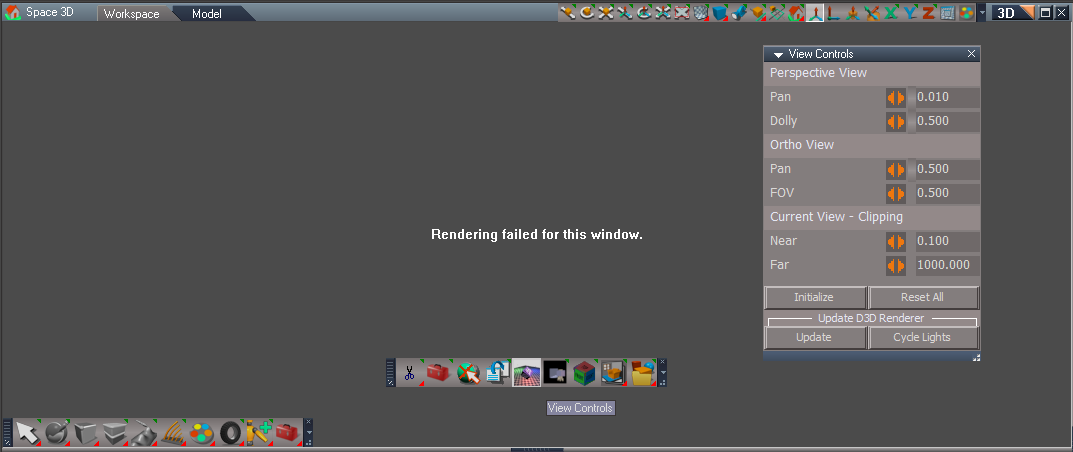
View Controls


Updated: 5/23/2023

CustomCommands
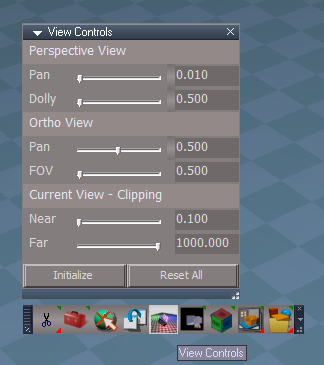
Add: View Controls Author - Clinton Reese
Note: Different plugin based and added additional code
Use: 3D View must be active before using the controls
Current View - Clipping will work in a Camera View if the Camera is selected
Recommend that you press the Reset All button before closing View Controls
View Controls.png
View Controls.png (37.14 KiB) Viewed 2156 times
.
Cut Plane Author - Clinton Reese
Update: Disabled 'Double Sided'
Note: Not using Double Sided eliminates additional vertices
.

If the plugins do not Load, Download and Install the Microsoft Visual C++ 2008 Service Pack 1 Redistributable Package
Note: When downloading the Microsoft Visual C++ 2008 Service Pack 1 Redistributable Package you are given 3 choices
Choose the 32-bit version; vcredist_x86.exe
Remove due to update
User avatar
trueBlue
Captain
Posts: 5548
Joined: 06 Jul 2009, 22:50
Type the number ten into the box: 10

Re: Final trueSpace 7.61 Beta 8 Unofficial Update

Post by trueBlue »

trueSpace7.61 Beta 8 Unofficial Update Version 9

Please test this RC57 5/25/2023 :bananatyping:
RC57 is the Final Release Candidate

New Unofficial Update Instructions:
It is Required that you completely Uninstall and Install trueSpace7.61 Beta 8 to a clean directory
You can keep your Rs Main Libraries folder, but all other folders and files should be removed
RC47 - Remove the Recording, My Scene, My Recordings and Layouts - Configurations libraries is Required
Install the PDF Manual for trueSpace (Optional but required before installing the Update)
Install the tS76_Vray1_54B8.exe (Optional but required before installing the Update)


Close trueSpace

1.) Install the YafaRay v3.3.0 render engine
2.) Install the tS76PDF 'Manual for Caligari trueSpace' & tS76Video (Optional but required before installing the Update)
3.) Install tS76_Vray1_54B8.exe to C:\trueSpace761 (Optional but required before installing the Update)
4.) Install tS7.61B8.9.exe to C:\trueSpace761
Browse [...] to where you installed C:\trueSpace761, select its folder and then the [Extract] button
Select the [Yes to All] button
5.) Open trueSpace
6.) Select the [OK] button in the OptDetectors plugin Information dialog
7.) Reset to Default Context
When trueSpace opens, select one of the layout tabs at the top
If Vray is installed:
8.) Press your keyboard's CTRL F8 keys to open the Package Manager
Right click in the Package Manager and select Install New...
Open C:\trueSpace761\Vray_ts.rsx
Right click in the Package Manager's Vray Package and select Load
Close the Package Manager
9.) Close trueSpace

The included Clintons3dPlugin.dll v.1638440, Clintons3dPluginExt.dll v.1638413, Clintons3dRsView.dll v.1638414 and the OptDetectors.dll Author - Vladimir Sisolak, are in: C:\trueSpace761
WARNING: The init.js file Imports the above 4 plugins and should not be Installed from the Package Manager, including any other plugins with the same name that have the rsx extension
All scripts that check for these plugins with the rsx extension have been removed!

Unofficial Update Version 9
Started on Fri Sep 02, 2022

Commands
Removed all of the discontinued xml scripts

Plugins Author - Clinton Reese
Renamed from rsx to dll:
Clintons3dPlugin.dll v1638442
Clintons3dRsView.dll v1638414
Clintons3dPluginExt.dll
Add
OptDetectors.dll Author - Vladimir Sisolak

Library
Add
OptDetectors
OptDetectors - Help objects
OptDetectors - Samples

Scripts
Update
init.js 'Loads the above 4 plugins'
Window.Shortcuts.xml
tS761 Workspace Shortcut List.rtf
Widget.Shortcuts.xml

CustomCommands Author - Clinton Reese
Add
JSON Function Set
Global Function Set
Dimensions
Hierarchy
Toolbar Manager
ShortcutRunner

Color Picker
Paint Vertex Color
Cloth Conversion
Enhanced Collada
Scene View 2
Object Statistics
Cut Plane
View Controls


Updated: 5/25/2023

CustomCommands
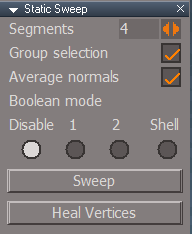
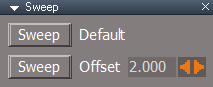
Static Sweep
Add a check and question if "Preserve unwrap" is enabled
Add OpenPanel and Heal Vertices scripts
Static Sweep.png
Static Sweep.png (7.36 KiB) Viewed 2116 times
.

Toolbars
Update: All toolbar's Static Sweep buttons
.

If the plugins do not Load, Download and Install the Microsoft Visual C++ 2008 Service Pack 1 Redistributable Package
Note: When downloading the Microsoft Visual C++ 2008 Service Pack 1 Redistributable Package you are given 3 choices
Choose the 32-bit version; vcredist_x86.exe
Removed due to update
User avatar
trueBlue
Captain
Posts: 5548
Joined: 06 Jul 2009, 22:50
Type the number ten into the box: 10

Re: Final trueSpace 7.61 Beta 8 Unofficial Update

Post by trueBlue »

trueSpace7.61 Beta 8 Unofficial Update Version 9

Please test this RC58 5/26/2023 :bananatyping:
RC58 is the Final Release Candidate

New Unofficial Update Instructions:
It is Required that you completely Uninstall and Install trueSpace7.61 Beta 8 to a clean directory
You can keep your Rs Main Libraries folder, but all other folders and files should be removed
RC47 - Remove the Recording, My Scene, My Recordings and Layouts - Configurations libraries is Required
Install the PDF Manual for trueSpace (Optional but required before installing the Update)
Install the tS76_Vray1_54B8.exe (Optional but required before installing the Update)


Close trueSpace

1.) Install the YafaRay v3.3.0 render engine
2.) Install the tS76PDF 'Manual for Caligari trueSpace' & tS76Video (Optional but required before installing the Update)
3.) Install tS76_Vray1_54B8.exe to C:\trueSpace761 (Optional but required before installing the Update)
4.) Install tS7.61B8.9.exe to C:\trueSpace761
Browse [...] to where you installed C:\trueSpace761, select its folder and then the [Extract] button
Select the [Yes to All] button
5.) Open trueSpace
6.) Select the [OK] button in the OptDetectors plugin Information dialog
7.) Reset to Default Context
When trueSpace opens, select one of the layout tabs at the top
If Vray is installed:
8.) Press your keyboard's CTRL F8 keys to open the Package Manager
Right click in the Package Manager and select Install New...
Open C:\trueSpace761\Vray_ts.rsx
Right click in the Package Manager's Vray Package and select Load
Close the Package Manager
9.) Close trueSpace

The included Clintons3dPlugin.dll v.1638440, Clintons3dPluginExt.dll v.1638413, Clintons3dRsView.dll v.1638414 and the OptDetectors.dll Author - Vladimir Sisolak, are in: C:\trueSpace761
WARNING: The init.js file Imports the above 4 plugins and should not be Installed from the Package Manager, including any other plugins with the same name that have the rsx extension
All scripts that check for these plugins with the rsx extension have been removed!

Unofficial Update Version 9
Started on Fri Sep 02, 2022

Commands
Removed all of the discontinued xml scripts

Plugins Author - Clinton Reese
Renamed from rsx to dll:
Clintons3dPlugin.dll v1638442
Clintons3dRsView.dll v1638414
Clintons3dPluginExt.dll
Add
OptDetectors.dll Author - Vladimir Sisolak

Library
Add
OptDetectors
OptDetectors - Help objects
OptDetectors - Samples

Scripts
Update
init.js 'Loads the above 4 plugins'
Window.Shortcuts.xml
tS761 Workspace Shortcut List.rtf
Widget.Shortcuts.xml

CustomCommands Author - Clinton Reese
Add
JSON Function Set
Global Function Set
Dimensions
Hierarchy
Toolbar Manager
ShortcutRunner

Color Picker
Paint Vertex Color
Cloth Conversion
Enhanced Collada
Scene View 2
Object Statistics
Cut Plane
View Controls


Updated: 5/26/2023

Cameras
Update: Original Camera | Custom Camera button code
Restore Camera tool if active

Physics
Update: Start | Stop / Remove Physics Simulation button code
Add: Question option to Remove Physics Simulation

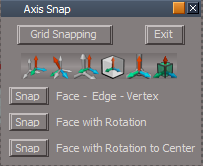
Axis Snap
Update: Panel
Add: Snap - Status Messages

CustomCommands
Static Sweep
Add: Default values
Update: Remove Boolean options from panel
.

If the plugins do not Load, Download and Install the Microsoft Visual C++ 2008 Service Pack 1 Redistributable Package
Note: When downloading the Microsoft Visual C++ 2008 Service Pack 1 Redistributable Package you are given 3 choices
Choose the 32-bit version; vcredist_x86.exe
Removed due to update
User avatar
trueBlue
Captain
Posts: 5548
Joined: 06 Jul 2009, 22:50
Type the number ten into the box: 10

Re: Final trueSpace 7.61 Beta 8 Unofficial Update

Post by trueBlue »

trueSpace7.61 Beta 8 Unofficial Update Version 9

Please test this RC59 5/27/2023 :bananatyping:
RC59 is the Final Release Candidate

New Unofficial Update Instructions:
It is Required that you completely Uninstall and Install trueSpace7.61 Beta 8 to a clean directory
You can keep your Rs Main Libraries folder, but all other folders and files should be removed
RC47 - Remove the Recording, My Scene, My Recordings and Layouts - Configurations libraries is Required
Install the PDF Manual for trueSpace (Optional but required before installing the Update)
Install the tS76_Vray1_54B8.exe (Optional but required before installing the Update)


Close trueSpace

1.) Install the YafaRay v3.3.0 render engine
2.) Install the tS76PDF 'Manual for Caligari trueSpace' & tS76Video (Optional but required before installing the Update)
3.) Install tS76_Vray1_54B8.exe to C:\trueSpace761 (Optional but required before installing the Update)
4.) Install tS7.61B8.9.exe to C:\trueSpace761
Browse [...] to where you installed C:\trueSpace761, select its folder and then the [Extract] button
Select the [Yes to All] button
5.) Open trueSpace
6.) Select the [OK] button in the OptDetectors plugin Information dialog
7.) Reset to Default Context
When trueSpace opens, select one of the layout tabs at the top
If Vray is installed:
8.) Press your keyboard's CTRL F8 keys to open the Package Manager
Right click in the Package Manager and select Install New...
Open C:\trueSpace761\Vray_ts.rsx
Right click in the Package Manager's Vray Package and select Load
Close the Package Manager
9.) Close trueSpace

The included Clintons3dPlugin.dll v.1638440, Clintons3dPluginExt.dll v.1638413, Clintons3dRsView.dll v.1638414 and the OptDetectors.dll Author - Vladimir Sisolak, are in: C:\trueSpace761
WARNING: The init.js file Imports the above 4 plugins and should not be Installed from the Package Manager, including any other plugins with the same name that have the rsx extension
All scripts that check for these plugins with the rsx extension have been removed!

Unofficial Update Version 9
Started on Fri Sep 02, 2022

Commands
Removed all of the discontinued xml scripts

Plugins Author - Clinton Reese
Renamed from rsx to dll:
Clintons3dPlugin.dll v1638442
Clintons3dRsView.dll v1638414
Clintons3dPluginExt.dll
Add
OptDetectors.dll Author - Vladimir Sisolak

Library
Add
OptDetectors
OptDetectors - Help objects
OptDetectors - Samples

Scripts
Update
init.js 'Loads the above 4 plugins'
Window.Shortcuts.xml
tS761 Workspace Shortcut List.rtf
Widget.Shortcuts.xml

CustomCommands Author - Clinton Reese
Add
JSON Function Set
Global Function Set
Dimensions
Hierarchy
Toolbar Manager
ShortcutRunner

Color Picker
Paint Vertex Color
Cloth Conversion
Enhanced Collada
Scene View 2
Object Statistics
Cut Plane
View Controls


Updated: 5/27/2023

Snapping
Axis Snap 'Add individual Snap buttons
Axis Snap.png
Axis Snap.png (12.24 KiB) Viewed 2093 times
.

Widgets/WidgetScripts
PEPivotSnap 'Add: Status Message' - "Moved Axis to selection Center"
PEPivotSnapRotationToSelection 'Add: Status Message' - "Moved Axis to face rotated to Face"
PEPivotSnapRotationToCenter 'Add: Status Message' - "Moved Axis to object Center rotated to selected Face"

CustomCommands
SnappingScripts
pivotToObject 'Update truePause'
pivotToPE 'Update truePause'

Widget.Shortcuts.xml
Removed shortcuts that were removed in previous update:
Default Context, PE widgets, and Object widgets
.

If the plugins do not Load, Download and Install the Microsoft Visual C++ 2008 Service Pack 1 Redistributable Package
Note: When downloading the Microsoft Visual C++ 2008 Service Pack 1 Redistributable Package you are given 3 choices
Choose the 32-bit version; vcredist_x86.exe
Removed due to update
User avatar
trueBlue
Captain
Posts: 5548
Joined: 06 Jul 2009, 22:50
Type the number ten into the box: 10

Re: Final trueSpace 7.61 Beta 8 Unofficial Update

Post by trueBlue »

trueSpace7.61 Beta 8 Unofficial Update Version 9

Please test this RC60 5/29/2023 :bananatyping:
RC60 is the Final Release Candidate

New Unofficial Update Instructions:
It is Required that you completely Uninstall and Install trueSpace7.61 Beta 8 to a clean directory
You can keep your Rs Main Libraries folder, but all other folders and files should be removed
RC47 - Remove the Recording, My Scene, My Recordings and Layouts - Configurations libraries is Required
Install the PDF Manual for trueSpace (Optional but required before installing the Update)
Install the tS76_Vray1_54B8.exe (Optional but required before installing the Update)


Close trueSpace

1.) Install the YafaRay v3.3.0 render engine
2.) Install the tS76PDF 'Manual for Caligari trueSpace' & tS76Video (Optional but required before installing the Update)
3.) Install tS76_Vray1_54B8.exe to C:\trueSpace761 (Optional but required before installing the Update)
4.) Install tS7.61B8.9.exe to C:\trueSpace761
Browse [...] to where you installed C:\trueSpace761, select its folder and then the [Extract] button
Select the [Yes to All] button
5.) Open trueSpace
6.) Select the [OK] button in the OptDetectors plugin Information dialog
7.) Reset to Default Context
When trueSpace opens, select one of the layout tabs at the top
If Vray is installed:
8.) Press your keyboard's CTRL F8 keys to open the Package Manager
Right click in the Package Manager and select Install New...
Open C:\trueSpace761\Vray_ts.rsx
Right click in the Package Manager's Vray Package and select Load
Close the Package Manager
9.) Close trueSpace

The included Clintons3dPlugin.dll v.1638440, Clintons3dPluginExt.dll v.1638413, Clintons3dRsView.dll v.1638414 and the OptDetectors.dll Author - Vladimir Sisolak, are in: C:\trueSpace761
WARNING: The init.js file Imports the above 4 plugins and should not be Installed from the Package Manager, including any other plugins with the same name that have the rsx extension
All scripts that check for these plugins with the rsx extension have been removed!

Unofficial Update Version 9
Started on Fri Sep 02, 2022

Commands
Removed all of the discontinued xml scripts

Plugins Author - Clinton Reese
Renamed from rsx to dll:
Clintons3dPlugin.dll v1638442
Clintons3dRsView.dll v1638414
Clintons3dPluginExt.dll
Add
OptDetectors.dll Author - Vladimir Sisolak

Library
Add
OptDetectors
OptDetectors - Help objects
OptDetectors - Samples

Scripts
Update
init.js 'Loads the above 4 plugins'
Window.Shortcuts.xml
tS761 Workspace Shortcut List.rtf
Widget.Shortcuts.xml

CustomCommands Author - Clinton Reese
Add
JSON Function Set
Global Function Set
Dimensions
Hierarchy
Toolbar Manager
ShortcutRunner

Color Picker
Paint Vertex Color
Cloth Conversion
Enhanced Collada
Scene View 2
Object Statistics
Cut Plane
View Controls


Updated: 5/29/2023

ShortcutRunner
Add Activate 3D Window

Widget.Shortcuts.xml
Update and add commands

Widgets
View Widget
Update scripts

Toollbars
Main, Main2, WorkspaceMain
Update all Animation View buttons 'Cascade'

Window.Shortcuts.xml
Changed All 'CONTEXT = PointEdit' to POINTEDIT
Update:
F5 - Cancel Camera Move
F6 - Cancel Camera Rotate
F7 - Cancel Camera FOV
Note: Replaces the duplicate X Y Z Lock toggle shortcuts

tS761 Workspace Shortcut List.rtf
.

If the plugins do not Load, Download and Install the Microsoft Visual C++ 2008 Service Pack 1 Redistributable Package
Note: When downloading the Microsoft Visual C++ 2008 Service Pack 1 Redistributable Package you are given 3 choices
Choose the 32-bit version; vcredist_x86.exe
Removed due to update
User avatar
trueBlue
Captain
Posts: 5548
Joined: 06 Jul 2009, 22:50
Type the number ten into the box: 10

Re: Final trueSpace 7.61 Beta 8 Unofficial Update

Post by trueBlue »

trueSpace7.61 Beta 8 Unofficial Update Version 9

Please test this RC61 5/31/2023 :bananatyping:
RC61 is the Final Release Candidate

New Unofficial Update Instructions:
It is Required that you completely Uninstall and Install trueSpace7.61 Beta 8 to a clean directory
You can keep your Rs Main Libraries folder, but all other folders and files should be removed
RC47 - Remove the Recording, My Scene, My Recordings and Layouts - Configurations libraries is Required
Install the PDF Manual for trueSpace (Optional but required before installing the Update)
Install the tS76_Vray1_54B8.exe (Optional but required before installing the Update)


Close trueSpace

1.) Install the YafaRay v3.3.0 render engine
2.) Install the tS76PDF 'Manual for Caligari trueSpace' & tS76Video (Optional but required before installing the Update)
3.) Install tS76_Vray1_54B8.exe to C:\trueSpace761 (Optional but required before installing the Update)
4.) Install tS7.61B8.9.exe to C:\trueSpace761
Browse [...] to where you installed C:\trueSpace761, select its folder and then the [Extract] button
Select the [Yes to All] button
5.) Open trueSpace
6.) Select the [OK] button in the OptDetectors plugin Information dialog
7.) Reset to Default Context
When trueSpace opens, select one of the layout tabs at the top
If Vray is installed:
8.) Press your keyboard's CTRL F8 keys to open the Package Manager
Right click in the Package Manager and select Install New...
Open C:\trueSpace761\Vray_ts.rsx
Right click in the Package Manager's Vray Package and select Load
Close the Package Manager
9.) Close trueSpace

The included Clintons3dPlugin.dll v.1638442, Clintons3dPluginExt.dll v.1638413, Clintons3dRsView.dll v.1638414 and the OptDetectors.dll Author - Vladimir Sisolak, are in: C:\trueSpace761
WARNING: The init.js file Imports the above 4 plugins and should not be Installed from the Package Manager, including any other plugins with the same name that have the rsx extension
All scripts that check for these plugins with the rsx extension have been removed!

Unofficial Update Version 9
Started on Fri Sep 02, 2022

Commands
Removed all of the discontinued xml scripts

Plugins Author - Clinton Reese
Renamed from rsx to dll:
Clintons3dPlugin.dll v1638442
Clintons3dRsView.dll v1638414
Clintons3dPluginExt.dll
Add
OptDetectors.dll Author - Vladimir Sisolak

Library
Add
OptDetectors
OptDetectors - Help objects
OptDetectors - Samples

Scripts
Update
init.js 'Loads the above 4 plugins'
Window.Shortcuts.xml
tS761 Workspace Shortcut List.rtf
Widget.Shortcuts.xml

CustomCommands Author - Clinton Reese
Add
JSON Function Set
Global Function Set
Dimensions
Hierarchy
Toolbar Manager
ShortcutRunner

Color Picker
Paint Vertex Color
Cloth Conversion
Enhanced Collada
Scene View 2
Object Statistics
Cut Plane
View Controls


Updated: 5/31/2023

Lights/Projector
staticSweepPlusScript Author - Clinton Reese

PESnappingToolbar
PEModelingToolbar
Q_PESnappingToolbar
Q_PEModelingToolbar
.

If the plugins do not Load, Download and Install the Microsoft Visual C++ 2008 Service Pack 1 Redistributable Package
Note: When downloading the Microsoft Visual C++ 2008 Service Pack 1 Redistributable Package you are given 3 choices
Choose the 32-bit version; vcredist_x86.exe
Removed due to update

User avatar
trueBlue
Captain
Posts: 5548
Joined: 06 Jul 2009, 22:50
Type the number ten into the box: 10

Re: Final trueSpace 7.61 Beta 8 Unofficial Update

Post by trueBlue »

trueSpace7.61 Beta 8 Unofficial Update Version 9

Please test this RC62 6/5/2023 :bananatyping:
RC62 is the Final Release Candidate

New Unofficial Update Instructions:
It is Required that you completely Uninstall and Install trueSpace7.61 Beta 8 to a clean directory
You can keep your Rs Main Libraries folder, but all other folders and files should be removed
RC47 - Remove the Recording, My Scene, My Recordings and Layouts - Configurations libraries is Required
Install the PDF Manual for trueSpace (Optional but required before installing the Update)
Install the tS76_Vray1_54B8.exe (Optional but required before installing the Update)


Close trueSpace

1.) Install the YafaRay v3.3.0 render engine
2.) Install the tS76PDF 'Manual for Caligari trueSpace' & tS76Video (Optional but required before installing the Update)
3.) Install tS76_Vray1_54B8.exe to C:\trueSpace761 (Optional but required before installing the Update)
4.) Install tS7.61B8.9.exe to C:\trueSpace761
Browse [...] to where you installed C:\trueSpace761, select its folder and then the [Extract] button
Select the [Yes to All] button
5.) Open trueSpace
6.) Select the [OK] button in the OptDetectors plugin Information dialog
7.) Reset to Default Context
When trueSpace opens, select one of the layout tabs at the top
If Vray is installed:
8.) Press your keyboard's CTRL F8 keys to open the Package Manager
Right click in the Package Manager and select Install New...
Open C:\trueSpace761\Vray_ts.rsx
Right click in the Package Manager's Vray Package and select Load
Close the Package Manager
9.) Close trueSpace

The included Clintons3dPlugin.dll v.1638442, Clintons3dPluginExt.dll v.1638413, Clintons3dRsView.dll v.1638414 and the OptDetectors.dll Author - Vladimir Sisolak, are in: C:\trueSpace761
WARNING: The init.js file Imports the above 4 plugins and should not be Installed from the Package Manager, including any other plugins with the same name that have the rsx extension
All scripts that check for these plugins with the rsx extension have been removed!

Unofficial Update Version 9
Started on Fri Sep 02, 2022

Commands
Removed all of the discontinued xml scripts

Plugins Author - Clinton Reese
Renamed from rsx to dll:
Clintons3dPlugin.dll v1638442
Clintons3dRsView.dll v1638414
Clintons3dPluginExt.dll
Add
OptDetectors.dll Author - Vladimir Sisolak

Library
Add
OptDetectors
OptDetectors - Help objects
OptDetectors - Samples

Scripts
Update
init.js 'Loads the above 4 plugins'
Window.Shortcuts.xml
tS761 Workspace Shortcut List.rtf
Widget.Shortcuts.xml

CustomCommands Author - Clinton Reese
Add
JSON Function Set
Global Function Set
Dimensions
Hierarchy
Toolbar Manager
ShortcutRunner

Color Picker
Paint Vertex Color
Cloth Conversion
Enhanced Collada
Scene View 2
Object Statistics
Cut Plane
View Controls


Updated: 6/5/2023
Widgets

Normal Move
Add Cursor
Add LClick - Reset gesture

Vertex Target Weld
Add check for more than one selected object
Replaced Weld command with Weld Guard command
.

If the plugins do not Load, Download and Install the Microsoft Visual C++ 2008 Service Pack 1 Redistributable Package
Note: When downloading the Microsoft Visual C++ 2008 Service Pack 1 Redistributable Package you are given 3 choices
Choose the 32-bit version; vcredist_x86.exe
Remove due to update
User avatar
trueBlue
Captain
Posts: 5548
Joined: 06 Jul 2009, 22:50
Type the number ten into the box: 10

Re: Final trueSpace 7.61 Beta 8 Unofficial Update

Post by trueBlue »

trueSpace7.61 Beta 8 Unofficial Update Version 9

Please test this RC63 6/6/2023 :bananatyping:
RC63 is the Final Release Candidate

New Unofficial Update Instructions:
It is Required that you completely Uninstall and Install trueSpace7.61 Beta 8 to a clean directory
You can keep your Rs Main Libraries folder, but all other folders and files should be removed
RC47 - Remove the Recording, My Scene, My Recordings and Layouts - Configurations libraries is Required
Install the PDF Manual for trueSpace (Optional but required before installing the Update)
Install the tS76_Vray1_54B8.exe (Optional but required before installing the Update)


Close trueSpace

1.) Install the YafaRay v3.3.0 render engine
2.) Install the tS76PDF 'Manual for Caligari trueSpace' & tS76Video (Optional but required before installing the Update)
3.) Install tS76_Vray1_54B8.exe to C:\trueSpace761 (Optional but required before installing the Update)
4.) Install tS7.61B8.9.exe to C:\trueSpace761
Browse [...] to where you installed C:\trueSpace761, select its folder and then the [Extract] button
Select the [Yes to All] button
5.) Open trueSpace
6.) Select the [OK] button in the OptDetectors plugin Information dialog
7.) Reset to Default Context
When trueSpace opens, select one of the layout tabs at the top
If Vray is installed:
8.) Press your keyboard's CTRL F8 keys to open the Package Manager
Right click in the Package Manager and select Install New...
Open C:\trueSpace761\Vray_ts.rsx
Right click in the Package Manager's Vray Package and select Load
Close the Package Manager
9.) Close trueSpace

The included Clintons3dPlugin.dll v.1638442, Clintons3dPluginExt.dll v.1638413, Clintons3dRsView.dll v.1638414 and the OptDetectors.dll Author - Vladimir Sisolak, are in: C:\trueSpace761
WARNING: The init.js file Imports the above 4 plugins and should not be Installed from the Package Manager, including any other plugins with the same name that have the rsx extension
All scripts that check for these plugins with the rsx extension have been removed!

Unofficial Update Version 9
Started on Fri Sep 02, 2022

Commands
Removed all of the discontinued xml scripts

Plugins Author - Clinton Reese
Renamed from rsx to dll:
Clintons3dPlugin.dll v1638442
Clintons3dRsView.dll v1638414
Clintons3dPluginExt.dll
Add
OptDetectors.dll Author - Vladimir Sisolak

Library
Add
OptDetectors
OptDetectors - Help objects
OptDetectors - Samples

Scripts
Update
init.js 'Loads the above 4 plugins'
Window.Shortcuts.xml
tS761 Workspace Shortcut List.rtf
Widget.Shortcuts.xml

CustomCommands Author - Clinton Reese
Add
JSON Function Set
Global Function Set
Dimensions
Hierarchy
Toolbar Manager
ShortcutRunner

Color Picker
Paint Vertex Color
Cloth Conversion
Enhanced Collada
Scene View 2
Object Statistics
Cut Plane
View Controls


Updated: 6/6/2023

Toolbars
ClintonsPointEditToolbar

QuadToolbarButton 'Add RClick - Popup Preferences'
QuadToolbarButton_UU 'Add RClick - Popup Preferences'
Changed trueBevel LMB command

trueBevel
trueBevel panel.png
trueBevel panel.png (3.93 KiB) Viewed 1942 times
.
Add Open Floating Panel
Add Preview Bevel - On Off buttons

Popups
Export Auto Close for PE Toolbar(s)
Popup Preferences.png
Popup Preferences.png (7.61 KiB) Viewed 1942 times
.
Note: If you find that the toolbars are slow to open, uncheck Auto Close

staticSweepPlusScript
Add check for more than one selected object

NormalMove
Add check for more than one selected object

vertexTargetWeld
Add check for more than one selected object

Fix Bad Geometry
Concave
Fix for mismatched error
Add var to theNormals
.

If the plugins do not Load, Download and Install the Microsoft Visual C++ 2008 Service Pack 1 Redistributable Package
Note: When downloading the Microsoft Visual C++ 2008 Service Pack 1 Redistributable Package you are given 3 choices
Choose the 32-bit version; vcredist_x86.exe
Remove due to update
User avatar
trueBlue
Captain
Posts: 5548
Joined: 06 Jul 2009, 22:50
Type the number ten into the box: 10

Re: Final trueSpace 7.61 Beta 8 Unofficial Update

Post by trueBlue »

trueSpace7.61 Beta 8 Unofficial Update Version 9

Please test this RC64 6/8/2023 :bananatyping:
RC64 is the Final Release Candidate

New Unofficial Update Instructions:
It is Required that you completely Uninstall and Install trueSpace7.61 Beta 8 to a clean directory
You can keep your Rs Main Libraries folder, but all other folders and files should be removed
RC47 - Remove the Recording, My Scene, My Recordings and Layouts - Configurations libraries is Required
Install the PDF Manual for trueSpace (Optional but required before installing the Update)
Install the tS76_Vray1_54B8.exe (Optional but required before installing the Update)


Close trueSpace

1.) Install the YafaRay v3.3.0 render engine
2.) Install the tS76PDF 'Manual for Caligari trueSpace' & tS76Video (Optional but required before installing the Update)
3.) Install tS76_Vray1_54B8.exe to C:\trueSpace761 (Optional but required before installing the Update)
4.) Install tS7.61B8.9.exe to C:\trueSpace761
Browse [...] to where you installed C:\trueSpace761, select its folder and then the [Extract] button
Select the [Yes to All] button
5.) Open trueSpace
6.) Select the [OK] button in the OptDetectors plugin Information dialog
7.) Reset to Default Context
When trueSpace opens, select one of the layout tabs at the top
If Vray is installed:
8.) Press your keyboard's CTRL F8 keys to open the Package Manager
Right click in the Package Manager and select Install New...
Open C:\trueSpace761\Vray_ts.rsx
Right click in the Package Manager's Vray Package and select Load
Close the Package Manager
9.) Close trueSpace

The included Clintons3dPlugin.dll v.1638442, Clintons3dPluginExt.dll v.1638413, Clintons3dRsView.dll v.1638414 and the OptDetectors.dll Author - Vladimir Sisolak, are in: C:\trueSpace761
WARNING: The init.js file Imports the above 4 plugins and should not be Installed from the Package Manager, including any other plugins with the same name that have the rsx extension
All scripts that check for these plugins with the rsx extension have been removed!

Unofficial Update Version 9
Started on Fri Sep 02, 2022

Commands
Removed all of the discontinued xml scripts

Plugins Author - Clinton Reese
Renamed from rsx to dll:
Clintons3dPlugin.dll v1638442
Clintons3dRsView.dll v1638414
Clintons3dPluginExt.dll
Add
OptDetectors.dll Author - Vladimir Sisolak

Library
Add
OptDetectors
OptDetectors - Help objects
OptDetectors - Samples

Scripts
Update
init.js 'Loads the above 4 plugins'
Window.Shortcuts.xml
tS761 Workspace Shortcut List.rtf
Widget.Shortcuts.xml

CustomCommands Author - Clinton Reese
Add
JSON Function Set
Global Function Set
Dimensions
Hierarchy
Toolbar Manager
ShortcutRunner

Color Picker
Paint Vertex Color
Cloth Conversion
Enhanced Collada
Scene View 2
Object Statistics
Cut Plane
View Controls


Updated: 6/8/2023

Toolbars

WorkspaceNav
WorkspaceNavBAK
PEModelingToolbar
Q_PEModelingToolbar
Fix for NURBS/Guard for some of the above toolbar icons commands
Note: There may be other toolbar icons commands that are not compatible with NURBS that I am not unaware of

Widgets/Tools/Mesh editor
Add: Sweep panel with Sweep Offset
Note: RClick the Sweep icon for Sweep Offset panel
Sweep Offset panel.png
Sweep Offset panel.png (2.79 KiB) Viewed 2319 times
.

If the plugins do not Load, Download and Install the Microsoft Visual C++ 2008 Service Pack 1 Redistributable Package
Note: When downloading the Microsoft Visual C++ 2008 Service Pack 1 Redistributable Package you are given 3 choices
Choose the 32-bit version; vcredist_x86.exe
Removed due to update

User avatar
trueBlue
Captain
Posts: 5548
Joined: 06 Jul 2009, 22:50
Type the number ten into the box: 10

Re: Final trueSpace 7.61 Beta 8 Unofficial Update

Post by trueBlue »

trueSpace7.61 Beta 8 Unofficial Update Version 9

Final Release 6/9/2023
viewtopic.php?t=3732

Updated
Toolbars

PEModelingToolbar
Q_PEModelingToolbar
Fix for NURBS/Guard for some of the above toolbar icons commands
Saul
Senior Chief Petty Officer
Posts: 308
Joined: 22 May 2009, 16:50

Re: Final trueSpace 7.61 Beta 8 Unofficial Update

Post by Saul »

Getting corrupt file message for this latest:
Attachments
Screenshot 2023-06-10 115643.jpg
Screenshot 2023-06-10 115643.jpg (6.7 KiB) Viewed 2294 times
User avatar
trueBlue
Captain
Posts: 5548
Joined: 06 Jul 2009, 22:50
Type the number ten into the box: 10

Re: Final trueSpace 7.61 Beta 8 Unofficial Update

Post by trueBlue »

Saul wrote: 10 Jun 2023, 11:00 Getting corrupt file message for this latest:
Uploaded it again
User avatar
trueBlue
Captain
Posts: 5548
Joined: 06 Jul 2009, 22:50
Type the number ten into the box: 10

Re: Final trueSpace 7.61 Beta 8 Unofficial Update

Post by trueBlue »

trueSpace7.61 Beta 8 Unofficial Update Version 9

Final Release 6/10/2023
viewtopic.php?t=3732

Updated
UUCommands
User avatar
trueBlue
Captain
Posts: 5548
Joined: 06 Jul 2009, 22:50
Type the number ten into the box: 10

Re: Final trueSpace 7.61 Beta 8 Unofficial Update

Post by trueBlue »

trueSpace7.61 Beta 8 Unofficial Update Version 9

Final Release 6/12/2023
viewtopic.php?t=3732

Updated
UUCommands
User avatar
trueBlue
Captain
Posts: 5548
Joined: 06 Jul 2009, 22:50
Type the number ten into the box: 10

Re: Final trueSpace 7.61 Beta 8 Unofficial Update

Post by trueBlue »

trueSpace7.61 Beta 8 Unofficial Update Version 9

Final Release 6/29/2023
viewtopic.php?t=3732

UUCommands
Visibility Function Set
Set time limit for Status Message(s)

AutoKey
Add:
if(!Node.ConExists(firstSel, 'Matrix')) return
if(Node.ConExists(firstSel, 'Dimension')) return

tS761 Workspace Shortcut List
Window.Shortcuts.xml
Add 1/10 + or - to Move Descriptions for Shortcut Runner

CustomCommands
View Controls
Replaced Sliders with Scrubbers

Popups
Add:
Light toolbar
Shortcut - CTRL SHIFT L

Toolbars
Add:
LightToolbar

ViewToolbar
Changed Camera 1 to Original Camera and added close command
Changed Camera 2 to Custom Camera and added close command
Add:
Animation Toolbar
Cycle Views
3D View Widget / Cube View Widget
Camera widget Preferences
User avatar
trueBlue
Captain
Posts: 5548
Joined: 06 Jul 2009, 22:50
Type the number ten into the box: 10

Re: Final trueSpace 7.61 Beta 8 Unofficial Update

Post by trueBlue »

trueSpace7.61 Beta 8 Unofficial Update Version 9

Final Release 7/3/2023
viewtopic.php?t=3732

It is Required that you completely Uninstall and Install trueSpace7.61 Beta 8 to a clean directory

Toolbars
Update:
PopupButtonsToolbar Ctrl Space
Note: This Popup toolbar is used mainly for setting shortcuts for each toolbar
These shortcuts have already been created:
Space - Point Edit Toolbar
Shift Space - Point Edit Toolbar 2 'Right Offset'
Ctrl Shift P - Point Edit Widget Toolbar
Ctrl Shift O - Object Navigation Widget Toolbar
Ctrl Shift V - View Toolbar
Ctrl Shift L - Light Toolbar
Shift C - DX Components Toolbar
Shift S - DX Shaders Toolbar

PEWidgetToolbarButton
LMB Command:
if(Node.ConExists(Node.Selection(), 'Selection')){Activity.Run("Scripts/CustomCommands/Popups/PointEditWidget");}else{System.Alert('Must be in Point Edit Mode');}

PESelectionToolbar & Q_PESelectionToolbar - Grow, Shrink, and Smooth
Removed the LMB Command: Hide command

Lights
Update:
Ambient light

CustomCommands
Popups
Add: Open Popup Toolbar script

Scripts
Update:
Widget.Shortcuts.xml
tS761 Workspace Shortcut List.rtf

Window.Shortcuts.xml
Update: Popup shortcuts

Link Editor Context
Removed:
NUMPAD9 "Maximize and Arrange All"
NUMPAD3 "Minimize and Arrange All"
DIVIDE "Arrange All"
Add:
Window.Shortcuts_BACKUP.xml
User avatar
trueBlue
Captain
Posts: 5548
Joined: 06 Jul 2009, 22:50
Type the number ten into the box: 10

Re: Final trueSpace 7.61 Beta 8 Unofficial Update

Post by trueBlue »

trueSpace7.61 Beta 8 Unofficial Update Version 9

Final Release 7/6/2023
viewtopic.php?t=3732

It is Required that you completely Uninstall and Install trueSpace7.61 Beta 8 to a clean directory

Widgets

Pont Edit widget(s)
Sphere
Add: LClick - Align view to selected Face

Update: Help text

Object Navigation widget/Enter edit mode/Uneditable script
Update: Author - Clinton Reese

WidgetScripts
PE Navigation Widget
PE NAV Widget.png
.
Arcs
Add:
RDrag - Rotate from Axis

Bars Triangles Arcs
Add:
I Move Mouse - PENavigation Widget 'Help'
PENavigation Widget
Bars Triangles Arcs
LClick - Axis to Face | Edge | Vertex
RClick - Axis to Face with Rotation
MClick - Axis to Face with Rotation to Center

O Move Mouse - Open Mesh Origin

LDrag - Arcs - Rotate Selection
RDrag - Arcs - Rotate from Axis

Toolbars
ClintonsPointEditToolbar
Align View to selected Face.png
.
Removed: Popup Toolbar(s) icons

Add: AlignViewToFaceButton
LMB - Align view to the selected Face
Add:
RMB - Zoom to Selection
Tips:
1) LClick and then RClick to Zoom to Selection
2) LClick and then Ctrl Z 'Undo' for Previous View

CustomCommands
RectSelect - Update: panel from Clinton Reese
Dimensions - Update: scripts from Clinton Reese
Add: AlignViewToFace Author - Clinton Reese :bananathumb:

Clintons3dPlugin.dll - Update: v 1638443 Author - Clinton Reese
User avatar
trueBlue
Captain
Posts: 5548
Joined: 06 Jul 2009, 22:50
Type the number ten into the box: 10

Re: Final trueSpace 7.61 Beta 8 Unofficial Update

Post by trueBlue »

trueSpace7.61 Beta 8 Unofficial Update Version 9

Final Release 7/10/2023
viewtopic.php?t=3732

It is Required that you completely Uninstall and Install trueSpace7.61 Beta 8 to a clean directory

Updates:
MeshEditorSettings.rsobj
ImportExport.rsobj

MaterialEditor.rsobj
D3D Material Converter/D3D material
Add: Name connector: "Use: Enhanced Collada Export"

Materials - Textures library
Add: Name connector:
DX Color Texture

Materials - DX9 library
Add: Name connector:
BlankDXMaterial
tSpecial-E
Glass Shader
Shiny Metals
MappedBlinn
MappedLambert
MappedHalfLambert
Image Cloud
Image Marble
Image Perlin
Image Voronoi
Image Wood
D3D Constant Texture Alpha
Image Wood Alpha Blend

Toolbars
ClintonToolbar Add: Radial Modeler icon :bananathumb:
Radial Modeler.png
.

CustomCommands
Radial Modeler Author Clinton Reese
ColladaPostProcessor Update from Clinton Reese
Enhansed Collada exporter panel.png
Enhansed Collada exporter panel.png (15.42 KiB) Viewed 1974 times
User avatar
trueBlue
Captain
Posts: 5548
Joined: 06 Jul 2009, 22:50
Type the number ten into the box: 10

Re: Final trueSpace 7.61 Beta 8 Unofficial Update

Post by trueBlue »

trueSpace7.61 Beta 8 Unofficial Update Version 9

Final Release 7/12/2023
viewtopic.php?t=3732

It is Required that you completely Uninstall and Install trueSpace7.61 Beta 8 to a clean directory

Updates:
Widgets/Booleans

CustomCommands
Radial Modeler - Update from Clinton Reese :bananathumb:
User avatar
trueBlue
Captain
Posts: 5548
Joined: 06 Jul 2009, 22:50
Type the number ten into the box: 10

Re: Final trueSpace 7.61 Beta 8 Unofficial Update

Post by trueBlue »

trueSpace7.61 Beta 8 Unofficial Update Version 9

Final Release 7/14/2023
viewtopic.php?t=3732

Updates:
Clintons3dPlugin.dll v.1638443
User avatar
trueBlue
Captain
Posts: 5548
Joined: 06 Jul 2009, 22:50
Type the number ten into the box: 10

Re: Final trueSpace 7.61 Beta 8 Unofficial Update

Post by trueBlue »

trueSpace7.61 Beta 8 Unofficial Update Version 9

Final Release 7/16/2023
viewtopic.php?t=3732

It is Required that you completely Uninstall and Install trueSpace7.61 Beta 8 to a clean directory

Updates:
Lights/Projector 'Update - Sequence aspect'

Animation Panel 'Update'
Sequence Player 'Add Frame scrubber that shows when selected'

Widgets

WidgetScripts
ZoomToSelection 'Update from Clinton Reese'
CyclePointEditNavigationWidget 'Add - ConnectTo Align View To Face to Triangles and Close

PE Widgets Help 'Update text'
Sphere
Alt + LClick - Align view to selected Face

Background Help
Shift + MClick - Look around

preobjects
MeshEditorSettings 'Update: Reset SDS acpect - Remove SDS button'

CustomCommands
Replace: Fix Geometry with Geometry Selection Utilities

Toolbars
WorkspaceNav & WorkspaceNavBAK
Replace: Fix Geometry with Geometry Selection Utilities

Popup Toolbars
Add: Align View to selected Face / Zoom to Selection
Add: Clinton's Point Edit toolbar
Add: Select Vertices / Convert to Vertices
Add: Select Edges / Convert to Edges

Recording library
Add: Flip Animation - Author Clinton Reese
User avatar
trueBlue
Captain
Posts: 5548
Joined: 06 Jul 2009, 22:50
Type the number ten into the box: 10

Re: Final trueSpace 7.61 Beta 8 Unofficial Update

Post by trueBlue »

trueSpace7.61 Beta 8 Unofficial Update Version 9

Final Release 7/17/2023
viewtopic.php?t=3732

It is Required that you completely Uninstall and Install trueSpace7.61 Beta 8 to a clean directory

Updates:
Widgets

Toolbars
WorkspaceNav
WorkspaceNavBAK
ClintonToolbar
Add: SDSToolbar for the 1% :|

preobjects
MeshEditorSettings

CustomCommands
Update: Geometry Selection Utilities

Recording library
Update: Flip Animation - Author Clinton Reese :bananathumb:
Fixed the Watch Dog Event's Change detect

This cool project is a good example how you can render a scene that has scripts with the
D3D Render to File tool or the included Scene Animator's Render to File
Included: Animation panel, Sequence Player, and Scene Animator
The Torus has a 100 Frame animation
The Scene Animator - Background Color has a 100 Frame animation
Open truespace's Render to File icon and set the Width, Height, and File. Preset:(640x480)
Save settings if necessary or Cancel
Select the Scene Animator's Render to File button
Scene Animator - LMB press the Set Render to file icon, set Frames to 100, and LMB press the Render button
Sequence Player - Open the first image and LMB press the Play button. Preset:(640x480)
User avatar
trueBlue
Captain
Posts: 5548
Joined: 06 Jul 2009, 22:50
Type the number ten into the box: 10

Re: Final trueSpace 7.61 Beta 8 Unofficial Update

Post by trueBlue »

trueSpace7.61 Beta 8 Unofficial Update Version 9

Final Release 7/18/2023
viewtopic.php?t=3732

It is Required that you completely Uninstall and Install trueSpace7.61 Beta 8 to a clean directory

Updates:
Widgets
Sweep
Extrude Amount 20
Memory Extrude.png
RClick to open Sweep panel
Extrude toolbar icon.png
.
WidgetScripts
ZoomToSelection
ZoomToAll

CustomCommands
AlignViewToFace
User avatar
trueBlue
Captain
Posts: 5548
Joined: 06 Jul 2009, 22:50
Type the number ten into the box: 10

Re: Final trueSpace 7.61 Beta 8 Unofficial Update

Post by trueBlue »

trueSpace7.61 Beta 8 Unofficial Update Version 9

Final Release 7/21/2023
viewtopic.php?t=3732

It is Required that you completely Uninstall and Install trueSpace7.61 Beta 8 to a clean directory

Updates:
CustomCommands
Rectangle Select

.

Widgets
Camera1
Add:
Ctrl LClick Stand - Opens Preferences panel in the Stack
Navigation Widget and Remove buttons

WidgetScripts
Add
Zoom to Selections - Update from Clinton Reese
Zoom to Selection.png
Zoom to Selection.png (3.67 KiB) Viewed 2699 times
.
Works in Ortho views, Isometric, and Camera views if "Allow Camera to Move" is Enabled in Zoom to Selections preferences panel
Warning! If Enabled, the Camera will MOVE to the Selection - Default = Disabled
Works with single point selections
Zoom to Selection will use the Desktop "Camera Undo" setting

Use:
Ctrl + MDBLClick - Zoom to Selection
Shift + MClick - Zoom to All and opens the Zoom to Selections panel

Toolbars
CustomToolbar
Copy Attributes - Updated icon
RMB command = Copy Transform

Copy - Copies the first selected object's Location, Rotation, Scale, and Shear
Restore - Restores the copied values
Reset - Normalize the included Transform node used to store the values

Example use:
Select a Camera and press the Copy button
Move the Camera somewhere, then press the Restore button
Copy Transform.png
Copy Transform.png (21.79 KiB) Viewed 2699 times
.

UUCommands
Add: Copy Transform
User avatar
trueBlue
Captain
Posts: 5548
Joined: 06 Jul 2009, 22:50
Type the number ten into the box: 10

Re: Final trueSpace 7.61 Beta 8 Unofficial Update

Post by trueBlue »

trueSpace7.61 Beta 8 Unofficial Update Version 9

Final Release 7/22/2023
viewtopic.php?t=3732

It is Required that you completely Uninstall and Install trueSpace7.61 Beta 8 to a clean directory

Updates:

Widgets
Camera1
Add:
Ctrl LClick Stand - Opens Preferences panel in the Stack
Navigation Widget and Remove buttons

WidgetScripts
Add
Zoom to Selections - Update from Clinton Reese
Zoom to Selection.png
Zoom to Selection.png (3.67 KiB) Viewed 2666 times
.
Works in Ortho views, Isometric, and Camera views if "Allow Camera to Move" is Enabled in Zoom to Selections preferences panel
Warning! If Enabled, the Camera will MOVE to the Selection - Default = Disabled
Works with single point selections
Zoom to Selection will use the Desktop "Camera Undo" setting

Use:
Ctrl + MDblClick - Zoom to Selection
Shift + MClick - Zoom to All and opens the Zoom to Selections panel

Toolbars
ViewToolbar

CustomToolbar
Copy Transform.png
Copy Transform.png (21.79 KiB) Viewed 2666 times
.
Copy Attributes - Updated icon
RMB command = Copy Transform

Copy - Copies the first selected object's Location, Rotation, Scale, and Shear
Restore - Restores the copied values
Reset - Normalize the included Transform node used to store the values

Example use:
Select a Camera and press the Copy button
Move the Camera somewhere, then press the Restore button


UUCommands
Add: Copy Transform
CustomCommands
Rectangle Select - Update from Clinton Reese
Rectangle Select panel.jpg
Rectangle Select panel.jpg (42.46 KiB) Viewed 2666 times
.
Scripts folder
Widget.Shortcuts.xml
Saul
Senior Chief Petty Officer
Posts: 308
Joined: 22 May 2009, 16:50

Re: Final trueSpace 7.61 Beta 8 Unofficial Update

Post by Saul »

Erm:
Attachments
Screenshot 2023-07-23 111558.jpg
Screenshot 2023-07-23 111558.jpg (7.28 KiB) Viewed 2654 times
User avatar
trueBlue
Captain
Posts: 5548
Joined: 06 Jul 2009, 22:50
Type the number ten into the box: 10

Re: Final trueSpace 7.61 Beta 8 Unofficial Update

Post by trueBlue »

Saul wrote: 23 Jul 2023, 10:17Erm:
Thanks Saul :oops:
Uploaded and tested new trueSpace 7.61 Beta 8 Unofficial Update Version 9 and trueSpace7.61 Beta 8 Standalone Unofficial Update Version 9 Zip files, Dated 7/23/2023
User avatar
trueBlue
Captain
Posts: 5548
Joined: 06 Jul 2009, 22:50
Type the number ten into the box: 10

Re: Final trueSpace 7.61 Beta 8 Unofficial Update

Post by trueBlue »

trueSpace7.61 Beta 8 Unofficial Update Version 9

Final Release 7/23/2023
viewtopic.php?t=3732

It is Required that you completely Uninstall and Install trueSpace7.61 Beta 8 to a clean directory

Updates:

Toolbars
Updated all Rectangle Select toolbar buttons
User avatar
trueBlue
Captain
Posts: 5548
Joined: 06 Jul 2009, 22:50
Type the number ten into the box: 10

Re: Final trueSpace 7.61 Beta 8 Unofficial Update

Post by trueBlue »

trueSpace7.61 Beta 8 Unofficial Update Version 9

Final Release 7/26/2023
viewtopic.php?t=3732

It is Required that you completely Uninstall and Install trueSpace7.61 Beta 8 to a clean directory

Updates:
Toolbars
Add:
ExportUtilities - Includes Nulls and D3D Materials Converter
Note: If the D3D Materials Converter does not open, open the Material Editor
Clinton's Export Utilities.png
.

Widgets
Null widget - Author - Clinton Reese
PickFaceWidget2 - Convert to util commands
PickVertexWidget2 - Convert to util commands
GetPointsWidget - Convert to util commands

UUCommands - Updated several scripts to Cancel Snapping widgets while in use

CustomCommands
ColladaPostProcessor - Updated: 7/22/2023 Author - Clinton Reese
Add: Nulls - Author - Clinton Reese

ToolbarManager - Update toolbar list and descriptions

PickSelect - Update shortcuts labels

SnappingScripts
Add check to all scripts that stops running other Snapping toolbar buttons while in use
resetState - Disabled Status Message

Updated several scripts to Cancel Snapping widgets while in use:
PaintVertexColor

MeshOrigin/Mesh Origin Scripts
StartWidgetSelect
OriginToSelection

Dimensions/GetDimPoints/start

NURBSScripts/drawCurveScript/start

Global Function Set
function OpenFloatingPanel()

Popups/OpenToolbars

cutPlane

YafarayScripts

AutoKey
User avatar
trueBlue
Captain
Posts: 5548
Joined: 06 Jul 2009, 22:50
Type the number ten into the box: 10

Re: Final trueSpace 7.61 Beta 8 Unofficial Update

Post by trueBlue »

trueSpace7.61 Beta 8 Unofficial Update Version 9

Final Release 7/28/2023
viewtopic.php?t=3732

It is Required that you completely Uninstall and Install trueSpace7.61 Beta 8 to a clean directory

Updates:
Toolbars
All Object tool buttons 'Add: Cancel Snapping widgets while in use'

ExportUtilities - Includes Nulls and D3D Materials Converter
Add: Vertex Texture Animation and OD_CopyPaste
Clinton's Export Utilities.png
.
UUCommands - Updated Encapsulate/3D Encapsulate LE & 2D Encapsulate LE

CustomCommands
Add:
Vertex Texture Animation
OD_CopyPaste
Note:
OD Copy Paste Requires that that you setup an External program like Blender with OD_CopyPasteExternal
When you open OD Copy Paste, you will be presented with a Yes or No question:
Do you have an External program like Blender setup with the required OD_CopyPasteExternal?
If you answer Yes, the OD Copy Paste panel opens and these questions will not be presented any further
If you answer No, you wll be presented with another Yes or No question:
Would you like to open Clinton's - OD Copy Paste for trueSpace7.61 website for instructions on how to set it up?
If you answer Yes, it will open the Clinton's - OD Copy Paste for trueSpace7.61 website
If you answer No, it will not open

preobjects
Update:
LodTemplate.rsobj 'Mesh Simplifier' Updated the panel and added a Flatten Mesh
LodNormalmapTemplate.rsobj 'Normal Map Generator' Updated the panels and added a Flatten Normal Mapper
Mesh Simplifire and Normal Map Generator panels.png
User avatar
trueBlue
Captain
Posts: 5548
Joined: 06 Jul 2009, 22:50
Type the number ten into the box: 10

Re: Final trueSpace 7.61 Beta 8 Unofficial Update

Post by trueBlue »

trueSpace7.61 Beta 8 Unofficial Update Version 9

Final Release 8/14/2023
viewtopic.php?t=3732

It is Required that you completely Uninstall and Install trueSpace7.61 Beta 8 to a clean directory

Updates:
Rs Main Libraries
Layouts - Configurations
My Default 'Set AntiAliasing = Level 4'
Add: Bloom Color & Set script

Postprocess
3D Icon Maker - Author Clinton Reese
Add: Shadow
Update: Icon File script 'Add BMP'
Add: Open Folder

LodNormalmapTemplate 'Add Save Normal Map & Height Map images to library'

AnimPref - Shrink Play Range 'Removed Status Message'

ClearHistory 'Add Clear Status'

ProtectWorkspace - Open and Dock Model 'Add My Default'

Material Editor
D3D Material Converter
TextureAlpha 'Add: Texture Alpha & Texture Alpha X buttons'

convert compiled to d3d

Code: Select all

if(Node.ConExists(currentNode,"Transparency")) {
System.Alert('D3D Compliled material with Transparency is not currently supported')
return
}
Import Export 'Add Original Export'

Clintons3dDAE.rsx version 1638425 'Install and Load from the Package Manager and restart trueSpace'

ColladaPostProcessor - Author Clinton Reese
colladagroup 'Add OpenPanel 'Plugin check' and OpenFloatingPanel scripts'

Toolbars
Clinton's Export Utilities
Add: Import Collada - Author Clinton Reese

tsx
LoadTextureMap
Author DesignDevil
Use: Load the LoadTextureMap.tsx, Open and load the tree_sample.jpg and open the Material Editor
Includes a readme.pdf

Textures
sample_floor.jpg & sample_floor_a.jpg
tree_sample.jpg & tree_sample_a.jpg
User avatar
trueBlue
Captain
Posts: 5548
Joined: 06 Jul 2009, 22:50
Type the number ten into the box: 10

Re: Final trueSpace 7.61 Beta 8 Unofficial Update

Post by trueBlue »

trueSpace7.61 Beta 8 Unofficial Update Version 9

Final Release 8/19/2023
viewtopic.php?t=3732

It is Required that you completely Uninstall and Install trueSpace7.61 Beta 8 to a clean directory

Updates:

BlankDXMaterial 'Modified'
Add:
Diffuse Strength
Specular Strength

D3D Material Converter

List of changes:
D3D material:
SolidColorShader
Add:
DiffuseStrength

DefaultModelShader 'Modified'
Add:
SpecularStrength
Switch to Cook Torrance Lighting or Phong Lighting 'Default'
DefaultModelShader.png
DefaultModelShader.png (4.22 KiB) Viewed 2349 times
.
Shaders:
ConstantAlphaShader 'New'
Tansparency

TextureAlpha 'Modified'
Add:
Switch to Texture Alpha X or Texture Alpha 'Default'
UV Map attributes
TextureAlphaShader.png
TextureAlphaShader.png (5.38 KiB) Viewed 2349 times
.
NormalMapShader 'Modified'
Add:
UV Map attributes
NormalMapShader.png
NormalMapShader.png (9.45 KiB) Viewed 2349 times
.
SolidVertexColorShader 'New'
Add:
DiffuseStrength

Removed:
ConstantTextureShader 'Was not being used'

.
Left - TextureBumpTransparencyMetal compiled materai
Middle - Converted and switched to Cook Torrance Lighting
Right - Converted with Default Phong Lighting
TextureBumpTransparencyMetalCompiledMaterial.png
User avatar
trueBlue
Captain
Posts: 5548
Joined: 06 Jul 2009, 22:50
Type the number ten into the box: 10

Re: Final trueSpace 7.61 Beta 8 Unofficial Update

Post by trueBlue »

trueSpace7.61 Beta 8 Unofficial Update Version 9

Final Release 8/21/2023
viewtopic.php?t=3732

It is Required that you completely Uninstall and Install trueSpace7.61 Beta 8 to a clean directory

Updates:
Collada Import
Fixed error in the OpenPanel script where no plugins.xml file exist
User avatar
trueBlue
Captain
Posts: 5548
Joined: 06 Jul 2009, 22:50
Type the number ten into the box: 10

Re: Final trueSpace 7.61 Beta 8 Unofficial Update

Post by trueBlue »

trueSpace7.61 Beta 8 Unofficial Update Version 9

Final Release 8/22/2023
viewtopic.php?t=3732

It is Required that you completely Uninstall and Install trueSpace7.61 Beta 8 to a clean directory

Updates:
Collada Export
Added a check for SpecularColor

Collada Import
Fixed error in the OpenPanel script where no plugins.xml file exist
Fixed spelling error 'plugin to plugins'

Toolbars
DXShaderComponents

Materials - DX9 library
Rearranged all Complied materials together and to the top
Add Description = Complied

Most other Shaders updated
Add Description = Shader
User avatar
trueBlue
Captain
Posts: 5548
Joined: 06 Jul 2009, 22:50
Type the number ten into the box: 10

Re: Final trueSpace 7.61 Beta 8 Unofficial Update

Post by trueBlue »

trueSpace7.61 Beta 8 Unofficial Update Version 9

Final Release 8/26/2023
viewtopic.php?t=3732

It is Required that you completely Uninstall and Install trueSpace7.61 Beta 8 to a clean directory

Updates:
Author - Clinton Reese
Clintons3dDAE.rsx version 1638426
Clintons3DFBX2019.rsx version 1638426

Collada Import

FBX Import Export

Toolbars
ExportUtilities toolbar
ExportUtilities toolbar.png
ExportUtilities toolbar.png (11.2 KiB) Viewed 2236 times
Add:
Convert Light Types
Freeze Transform
FBX Import Export

Shaders - Normal Shaders
Add:
NormalMapShader2
Default
NormalMapShader2 Default.png
.
Bitmap 2 Normal
Strength = 3
NormalMapShader2 Bitmap 2 Normal Strength 3.png
User avatar
trueBlue
Captain
Posts: 5548
Joined: 06 Jul 2009, 22:50
Type the number ten into the box: 10

Re: Final trueSpace 7.61 Beta 8 Unofficial Update

Post by trueBlue »

trueSpace7.61 Beta 8 Unofficial Update Version 9

Final Release 8/26/2023
viewtopic.php?t=3732

It is Required that you completely Uninstall and Install trueSpace7.61 Beta 8 to a clean directory

Updates:
Author - Clinton Reese
Clintons3DFBX2019.rsx version 1638426

FBX Import Export
User avatar
trueBlue
Captain
Posts: 5548
Joined: 06 Jul 2009, 22:50
Type the number ten into the box: 10

Re: Final trueSpace 7.61 Beta 8 Unofficial Update

Post by trueBlue »

trueSpace7.61 Beta 8 Unofficial Update Version 9

Final Release 8/28/2023
viewtopic.php?t=3732

It is Required that you completely Uninstall and Install trueSpace7.61 Beta 8 to a clean directory

Updates:
Author - Clinton Reese
ColladaPostProcessor
August 27, 2023
* Fixed actor materials processing

Biped Limbs library
Add: SkeletonStart2.RsSkel


UUCommands
Add: UUShortcutsFunctionSet
Moved the Rotate and Move shortcuts to UUShortcutsFunctionSet

Window.Shortcuts.xml
Window.Shortcuts_BACKUP.xml
User avatar
trueBlue
Captain
Posts: 5548
Joined: 06 Jul 2009, 22:50
Type the number ten into the box: 10

Re: Final trueSpace 7.61 Beta 8 Unofficial Update

Post by trueBlue »

trueSpace7.61 Beta 8 Unofficial Update Version 9

Final Release 8/29/2023
viewtopic.php?t=3732

It is Required that you completely Uninstall and Install trueSpace7.61 Beta 8 to a clean directory

Updates:
D3D Material Converter
All compiled material attributes are converted to Shaders
D3D Material Converter.png
Saul
Senior Chief Petty Officer
Posts: 308
Joined: 22 May 2009, 16:50

Re: Final trueSpace 7.61 Beta 8 Unofficial Update

Post by Saul »

Erm, this links to Beta8 standalone?
User avatar
trueBlue
Captain
Posts: 5548
Joined: 06 Jul 2009, 22:50
Type the number ten into the box: 10

Re: Final trueSpace 7.61 Beta 8 Unofficial Update

Post by trueBlue »

Saul wrote: 30 Aug 2023, 20:04 Erm, this links to Beta8 standalone?
Fixed, Thank you!
User avatar
trueBlue
Captain
Posts: 5548
Joined: 06 Jul 2009, 22:50
Type the number ten into the box: 10

Re: Final trueSpace 7.61 Beta 8 Unofficial Update

Post by trueBlue »

trueSpace7.61 Beta 8 Unofficial Update Version 9

Final Release 9/3/2023
viewtopic.php?t=3732

It is Required that you completely Uninstall and Install trueSpace7.61 Beta 8 to a clean directory

Updates:
Bake Keyframes
User avatar
trueBlue
Captain
Posts: 5548
Joined: 06 Jul 2009, 22:50
Type the number ten into the box: 10

Re: Final trueSpace 7.61 Beta 8 Unofficial Update

Post by trueBlue »

trueSpace7.61 Beta 8 Unofficial Update Version 9

Final Release 9/9/2023
viewtopic.php?t=3732

It is Required that you completely Uninstall and Install trueSpace7.61 Beta 8 to a clean directory

Updates:
Bake Keyframes 'Modified the panel'
Bake Keyframes.png
Bake Keyframes.png (5.87 KiB) Viewed 2509 times
.
LEtools.RsObj/OpenLocation script
Add:
cmd += 'if(Node.Exists(activeWindow + "/PrefStackPanelView Node")) return;'

Stack View script
Add:
Alert: " Stack View is already open"
Missing libraries
User avatar
trueBlue
Captain
Posts: 5548
Joined: 06 Jul 2009, 22:50
Type the number ten into the box: 10

Re: Final trueSpace 7.61 Beta 8 Unofficial Update

Post by trueBlue »

trueSpace7.61 Beta 8 Unofficial Update Version 9

Final Release 9/9/2023
viewtopic.php?t=3732

It is Required that you completely Uninstall and Install trueSpace7.61 Beta 8 to a clean directory

Updates:
Dimensions

Bake Keyframes 'Modified the panel'
Bake Keyframes.png
Bake Keyframes.png (5.87 KiB) Viewed 2524 times
.
LEtools.RsObj/OpenLocation script
Add:
cmd += 'if(Node.Exists(activeWindow + "/PrefStackPanelView Node")) return;'

Stack View script
Add:
Alert: " Stack View is already open"
Missing libraries
User avatar
trueBlue
Captain
Posts: 5548
Joined: 06 Jul 2009, 22:50
Type the number ten into the box: 10

Re: Final trueSpace 7.61 Beta 8 Unofficial Update

Post by trueBlue »

trueSpace7.61 Beta 8 Unofficial Update Version 9

Final Release 9/13/2023
viewtopic.php?t=3732

It is Required that you completely Uninstall and Install trueSpace7.61 Beta 8 to a clean directory

Updates:
Export Bitmaps
Export Bitmaps.png
.
Fixed errors if nothing is selected for the Update List and Create Texture Files button scripts
Fixed an issue with LW Material(Vray Material Editor has Bitmap connectors) for the Update List and Create Texture Files button scripts
Fixed an issue with the Folder button that removed the Folder value if the Browse for Folder dialog is Cancelled
Added an Open folder button script
User avatar
trueBlue
Captain
Posts: 5548
Joined: 06 Jul 2009, 22:50
Type the number ten into the box: 10

Re: Final trueSpace 7.61 Beta 8 Unofficial Update

Post by trueBlue »

trueSpace7.61 Beta 8 Unofficial Update Version 9

Final Release 9/17/2023
viewtopic.php?t=3732

It is Required that you completely Uninstall and Install trueSpace7.61 Beta 8 to a clean directory

Updates:
Custom preferences
Visibility preferences
Unchecked "Use - Intensive Visibility Mode"

Cameras 'Changed the Camera(s) FOV = 0.785'

Original Camera Widget Author Clinton Reese
Original Camera Widget and Camera.png
.
UUCommands
Visibility Function Set Author Clinton Reese
Add: Restore Stack script for the Stack View toolbar button

WorkspaceMain 'Fixed encaps icons'

Vray Render to File 'New "Set Render to File" process on first run'
Save to File.png
.
LEtools
Add:
cmd += 'if(Node.Exists(activeWindow + "/VrayView Node")) return;'
cmd += 'if(Node.Exists(activeWindow + "/InfoPanelView Node")) return;'

View Controls
Add:
Update D3D Renderer
Press Update and then Cycle Lights until all of the scene lights have been selected
Render failed for this window.png
.
Player3D.Log:
Before
000000144453 LOG Renderer: Setting the lost state
After Update
000000146063 LOG Renderer: Send restore device
User avatar
trueBlue
Captain
Posts: 5548
Joined: 06 Jul 2009, 22:50
Type the number ten into the box: 10

Re: Final trueSpace 7.61 Beta 8 Unofficial Update

Post by trueBlue »

trueSpace7.61 Beta 8 Unofficial Update Version 9

Final Release 9/19/2023
viewtopic.php?t=3732

It is Required that you completely Uninstall and Install trueSpace7.61 Beta 8 to a clean directory

Updates:
Widget Scripts
PEPivotSnap, PEPivotSnapRotationToSelection, and PEPivotSnapRotationToCenter
Changed code to run pivotToPE scripts

SnappingScripts
Updated the openSnappingToolbar script
Enabled all "Respect Axis Lock"

pivotToPE
Add: PEPivotSnap, PEPivotSnapRotationToSelection, and PEPivotSnapRotationToCenter scripts
Fixed issues with Show Axis
Add: Snap button

Snapping toolbar icon(s)
RClick = Preferences
Snapping toolbar Preferences.png
Snapping toolbar Preferences.png (6 KiB) Viewed 2400 times
.
YafaRay4tS layout
Fixed the Anim view aspect

Encapsulate
Removed the Status message(s) and the "Single selected Encapsulation" option
User avatar
trueBlue
Captain
Posts: 5548
Joined: 06 Jul 2009, 22:50
Type the number ten into the box: 10

Re: Final trueSpace 7.61 Beta 8 Unofficial Update

Post by trueBlue »

trueSpace7.61 Beta 8 Unofficial Update Version 9

Final Release 9/30/2023
viewtopic.php?t=3732

It is Required that you completely Uninstall and Install trueSpace7.61 Beta 8 to a clean directory

Updates:
Widgets

Point Edit Widget
Sphere
Shift - Origin to PE Selection
Ctrl - Origin to Object 'Center'
Ctrl LClick - Mesh Origin 'Panel'

PickVertexWidget2 - 'Add: Shift - Snap Origin'
Use:
Mesh Origin panel
Press the Set Snap Point Widget button
LClick select Point(s); press your keyboard Shift key and move mouse

Toobars
All Axis tool, Reset Axis, and Flatten Axis icons use UUCommands/UUFunctionSet scripts

UUCommands
Update Shear - 'Run only if the floating panel is open'
UUFunctionSet
Add Functions:
Axis() 'Use: Axis LMB Command
RemovePivot() 'Use: Reset Axis RMB Command = Remove Axis
FlattenAxis() 'Use: Flatten Axis LMB Command with option to Remove Axis that restores the ability to Rotate from object's center'

Dimensions 'Update Material code'

PickSelect 'Add: Clear Status'

freezeTransforms
Update: Work with multiple selected objects
Update: Flatten Axis code
Add: Status Messages

Replaced Check Boxes with On|Off buttons
Location = Local or World
Rotation = Local or Disabled
Scale = Local or Disabled
Shear = Local or Disabled
Flatten Axis = Disabled or Flatten 'Changes Location to Local'

Flatten Axis adds the current Pivot's transformation into the mesh and resets the Pivot's Matrix to 0,0,0
Freeze Transforms.png
Freeze Transforms.png (7.36 KiB) Viewed 2283 times
.
SnappingScripts
Update: Show Axis scripts

Mesh Origin Author Clinton Reese :bananathumb:
Add: Convert to Editable Mesh script
Update: Panel button(s) code 'If Origin Display is not visible, make it visible and Convert to Editable Mesh, if needed'
Add: Clear Status to the Toggle Origin Display script
OriginToSelection Add: 'Restore Selection Mode'
Mesh Origin panel.png
Mesh Origin panel.png (8.24 KiB) Viewed 2283 times
.
Highly recommend using Mesh Origin instead of trueSpace's Axis (Pivot)
Mesh Origin only works for Objects that have an Editable mesh
Primitive(s) and Flattened Object(s) do not have an Editable mesh
Point Edit Widget with Origin Displayed
Arcs - RDrag Rotate from Origin
Cubes - Ctrl RDrag from Origin
User avatar
trueBlue
Captain
Posts: 5548
Joined: 06 Jul 2009, 22:50
Type the number ten into the box: 10

Re: Final trueSpace 7.61 Beta 8 Unofficial Update

Post by trueBlue »

trueSpace7.61 Beta 8 Unofficial Update Version 9

Final Release 10/9/2023
viewtopic.php?t=3732

It is Required that you completely Uninstall and Install trueSpace7.61 Beta 8 to a clean directory

Updates:
Widgets

Update: Object Move, Rotate, and Scale widgets
Shift Move Mouse - Close Transform widgets
Update: Camera Move, Rotate, FOV, and Rectangle Zoom widgets
Shift Move Mouse - Close Camera widgets

Background
Add: Ctrl = RDrag Move in Z 'Up Down'

Scale
After activating the Scale tool and you select a Spotlight or Projector light, your Mouse Wheel will become available to adjust the Angle
Selecting a Camera, your Mouse Wheel will become available to adjust the FOV
Selecting an object will deactivate this Mouse Wheel gesture and the Status Message is cleared
This does not work if a Spotlight, Projector light, or Camera is selected before activating the Scale tool. You would need to reselect it
RClick the Rotate icon will deactivate this Mouse Wheel gesture and close the widget

PickVertexWidget2 - 'Add: O move mouse - Snap Origin'
Use:
Mesh Origin panel
Press the Set Snap Point Widget button
LClick select Point(s); press your keyboard O key and move mouse

Toobars
PESnappingToolbar 'Add: Origin to Point Edit Selection icon'
Q_PESnappingToolbar 'Add: Origin to Point Edit Selection icon'
Popup Toolbars.png
.
WorkspaceNav
Custom toolbars
Add:
MeshOriginToolbar
Mesh Origin toolbar.png
.
ToolbarManager
Add: Mesh Origin toolbar and fixed SDS toolbar descriptions
Edit Toolbar script
Removed: Restore WorkspaceNavBAK process

Convert Light Types
Add: Change Camera Type button 'Opens - Convert Camera Type panel'
Convert Camera Type.png
Convert Camera Type.png (21.54 KiB) Viewed 2181 times
.
freezeTransforms 'Update panel'
Freeze Axis.png
Freeze Axis.png (5.15 KiB) Viewed 2181 times
.
Encapsulated the script and add Open Floating Panel script
Toolbar button(s) RMB - Open Floating Panel
Update: Work with multiple selected objects - Author Clinton Reese
Update: Flatten Axis code
Flatten Axis adds the current Pivot's transformation into the mesh, resets the Pivot's Matrix to 0,0,0, and removes the Pivot

Radial Modeler Author Clinton Reese
Update: Convert to Editable Mesh
Generate Instances button
Add:
if(Node.ConExists('', 'Dimension')) return;
ScriptObject.Execute("%THIS_NAME%/Convert to Editable Mesh")

Mesh Origin Author Clinton Reese
Add: if(Node.ConExists('', "Dimension")) return to Mesh Origin panel buttons
Update: Convert to Editable Mesh script
OriginToSelection Add: 'Restore Selection Mode'

Highly recommend using Mesh Origin instead of trueSpace's Axis (Pivot)
Object Navigation Widget after setting the Origin
Arcs - RDrag Rotate from Origin
Cubes - Ctrl RDrag Scale from Origin

WS - Default.RsSLgts
Lights
light01
light02
light03
light04
Camera1
Cameras 'Update: Custom Camera and EntryPoint Color'
Camera colors.png
.

Update to installation instructions
Update instructions:

It is recommended that you completely Uninstall and Install trueSpace7.61 Beta 8 to a clean directory
This is only necessary when you first apply this update
You can keep your Rs Main Libraries folder but all other folders and files should be removed
Install the PDF Manual for trueSpace (Optional but required before installing the Update)
Install the tS76_Vray1_54B8.exe (Optional but required before installing the Update)

Close trueSpace761

1.) Install the YafaRay v3.3.0 render engine
2.) Install the tS76PDF 'Manual for Caligari trueSpace' & tS76Video (Optional but required before installing the Update)
3.) Install tS76_Vray1_54B8.exe to C:\trueSpace761 (Optional but required before installing the Update)
4.) Install tS7.61B8.9.exe to C:\trueSpace761
Browse [...] to where you installed C:\trueSpace761, select its folder and then the [Extract] button
Select the [Yes to All] button
5.) Open trueSpace
6.) Select the [OK] button in the OptDetectors plugin Information dialog
7.) Reset to Default Context
When trueSpace opens, select one of the layout tabs at the top and Close trueSpace761 - REQUIERED
If Vray is installed:
8.) Press your keyboard's CTRL + F8 keys to open the Package Manager
Right click in the Package Manager and select [Install New...]
[Open] C:\trueSpace761\Vray_ts.rsx
Right click in the Package Manager's Vray Package and select [Load]
Close the Package Manager
9.) Close trueSpace761 - REQUIERED
User avatar
trueBlue
Captain
Posts: 5548
Joined: 06 Jul 2009, 22:50
Type the number ten into the box: 10

Re: Final trueSpace 7.61 Beta 8 Unofficial Update

Post by trueBlue »

trueSpace7.61 Beta 8 Unofficial Update Version 9

Final Release 10/11/2023
Another update is in progress, so you might want to hold off downloading this release!
viewtopic.php?t=3732

It is Required that you completely Uninstall and Install trueSpace7.61 Beta 8 to a clean directory

Updates:
Widgets

Object Move, Rotate, and Scale widgets
MClick - Close Transform widgets
Supports - Automatic Keyframing

Camera Move, Rotate, FOV, and Rectangle Zoom widgets
MClick - Close Camera widgets
FOV
RDrag - Reset FOV
Rectangle Zoom
RDrag - Reset FOV
Supports - Automatic Keyframing

Add new: PickOriginWidget Author Clinton Reese

Mesh Origin
Update Clinton Reese
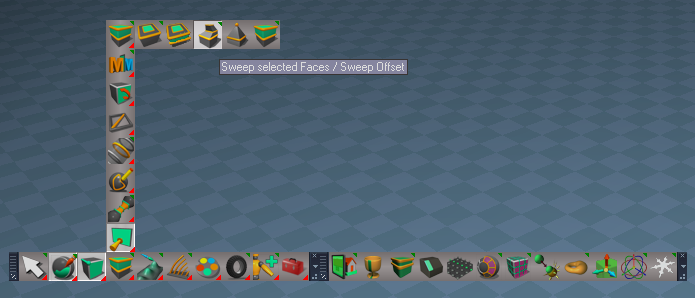
Set Snap Point Widget
Ctrl RClick Snap Origin

PaintVertexColor
Add: Convert to Editable Mesh script
StartPainting script
If not an Editable Mesh:
Run Convert to Editable Mesh

Lights/Projector
Enable Shadow

Add: Materials - Vertex Color library Author Clinton Reese

Update to installation instructions
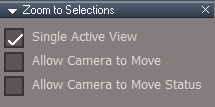
Update instructions:
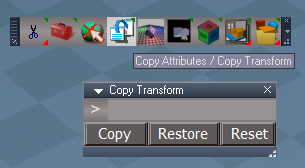
It is recommended that you completely Uninstall and Install trueSpace7.61 Beta 8 to a clean directory
This is only necessary when you first apply this update
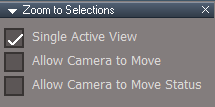
You can keep your Rs Main Libraries folder but all other folders and files should be removed
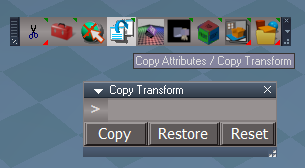
Install the PDF Manual for trueSpace (Optional but required before installing the Update)
Install the tS76_Vray1_54B8.exe (Optional but required before installing the Update)

Close trueSpace761

1.) Install the YafaRay v3.3.0 render engine
2.) Install the tS76PDF 'Manual for Caligari trueSpace' & tS76Video (Optional but required before installing the Update)
3.) Install tS76_Vray1_54B8.exe to C:\trueSpace761 (Optional but required before installing the Update)
4.) Install tS7.61B8.9.exe to C:\trueSpace761
Browse [...] to where you installed C:\trueSpace761, select its folder and then the [Extract] button
Select the [Yes to All] button
5.) Open trueSpace
6.) Select the [OK] button in the OptDetectors plugin Information dialog
7.) Reset to Default Context
When trueSpace opens, select one of the layout tabs at the top and Close trueSpace761 - REQUIERED
If Vray is installed:
8.) Press your keyboard's CTRL + F8 keys to open the Package Manager
Right click in the Package Manager and select [Install New...]
[Open] C:\trueSpace761\Vray_ts.rsx
Right click in the Package Manager's Vray Package and select [Load]
Close the Package Manager
9.) Close trueSpace761 - REQUIERED
User avatar
trueBlue
Captain
Posts: 5548
Joined: 06 Jul 2009, 22:50
Type the number ten into the box: 10

Re: Final trueSpace 7.61 Beta 8 Unofficial Update

Post by trueBlue »

trueSpace7.61 Beta 8 Unofficial Update Version 9

Final Release 10/14/2023
viewtopic.php?t=3732

It is Required that you completely Uninstall and Install trueSpace7.61 Beta 8 to a clean directory

Updates:
Widgets

Background widget
RDrag Move Up Down

CustomCommands
Mesh Origin
Update: Clinton Reese

Paint Vertex Color
Update: Convert to Editable Mesh script
Add: Open - Vertex Color Materials / Open - D3D Material Converter button
Add: Open - Brush Panel / Reset - All Defaut Settings button

Main Library Place
Materials - Vertex Color
VertexColorAdd
VertexColorInterpolate
Updates:
Add: Diffuse Strength 'Color Intensity'
Add: Constant_shader output
Note: Use "Edit DX material in the Link Editor"
SolidColorShader
Disconnect the Color_shader and Connect the Constant_shader to the Material's Constant_shader
Add: Select / Material button
Note: Select is for showing the attributes in the Keying panel for Keyframing

Material Editor
D3D Material Converter
D3D Compiled > D3D Shader
Update:
SolidVertexColorShader = VertexColorInterpolate

Clintons3dPlugin.dll v.1638445
Update: Clinton Reese
Registers after you restart trueSpace
User avatar
trueBlue
Captain
Posts: 5548
Joined: 06 Jul 2009, 22:50
Type the number ten into the box: 10

Re: Final trueSpace 7.61 Beta 8 Unofficial Update

Post by trueBlue »

trueSpace7.61 Beta 8 Unofficial Update Version 9

Final Release 10/15/2023
viewtopic.php?t=3732

It is recommended that you completely Uninstall and Install trueSpace7.61 Beta 8 to a clean directory
Open the Task Manager
If you find any Standalone Runner (32 bit) or trueSpace (32 bit) programs open, Select each one and RClick - End task
Close the Task Manager

Updates:

Material Editor
D3D Material Converter
D3D Compiled > D3D Shader
Update: processVertexColorVertexColorStrength

Paint Vertex Color
Start Painting
Add: Status Message and return if selected object has an Input Mesh connector

UUCommands
Flatten History
Add: Remove Input Mesh connector


Clintons3dPlugin.dll v.1638445
Update: Clinton Reese
Registers after you restart trueSpace
User avatar
trueBlue
Captain
Posts: 5548
Joined: 06 Jul 2009, 22:50
Type the number ten into the box: 10

Re: Final trueSpace 7.61 Beta 8 Unofficial Update

Post by trueBlue »

trueSpace7.61 Beta 8 Unofficial Update Version 9

Final Release 10/17/2023
viewtopic.php?t=3732

It is recommended that you completely Uninstall and Install trueSpace7.61 Beta 8 to a clean directory
Open the Task Manager
If you find any Standalone Runner (32 bit) or trueSpace (32 bit) programs open, Select each one and RClick - End task
Close the Task Manager

Updates:

Toolbars
PEElementToolbar and Q_PEElementToolbar
Convert to Context.png
Convert to Context.png (25.31 KiB) Viewed 2414 times
.
Select Context / Convert selection to Context
Select Vertices / Convert selection to Vertices
Select Edges / Convert selection to Edges
Select Faces / Convert selection to Faces

Paint Vertex Color
Update: GetBitmapSource and FillUVColors scripts
Convert to Editable Mesh, Avoid Lights, Cameras, and Dimensions

Fills aspect
Vertex Color Fills Bitmap.png
.
Add: InputBitmap and Bitmap button
InputBitmap control
Use:
LClick - Opens the Bitmaps:Base library where you can LDrag an image onto the InputBitmap control
Ctrl LClick - Opens the Load Image dialog
Press the Bitmap button to populate the Node and Connector fields
Press the Apply Image button
User avatar
trueBlue
Captain
Posts: 5548
Joined: 06 Jul 2009, 22:50
Type the number ten into the box: 10

Re: Final trueSpace 7.61 Beta 8 Unofficial Update

Post by trueBlue »

trueSpace7.61 Beta 8 Unofficial Update Version 9

Final Release 10/21/2023
viewtopic.php?t=3732

It is recommended that you completely Uninstall and Install trueSpace7.61 Beta 8 to a clean directory
Open the Task Manager
If you find any Standalone Runner (32 bit) or trueSpace (32 bit) programs open, Select each one and RClick - End task
Close the Task Manager

Updates:

Point Edit Widget(s)
Removed:
PE Pivot Snap gestures
PE Hide UnHide All gestures
Align View To Face gesture
Toggle - Object Coordinate Mode gesture

Add:
PopupToolbar2 'RClick - Open - Point Edit Popup toolbar'
Note: All of the gestures that were removed are availible from the Point Edit Popup toolbar
Point Edit Widgets.png
.
Update:
CyclePointEditNavigationWidget script

Toolbars
LENavigatorBar
Add: Tools "Link Editor tools" button that opens a row of buttons: Arrange, Organize, Select, and LE Tools
Link Editor Navagator Tools.png
Link Editor Navagator Tools.png (11.41 KiB) Viewed 2351 times
.
Clintons3dPluginExt.dll - Author Clinton Reese
version v1638414
Add:
SavePNG:
Save an image(32 Bit) that has Alpha to a png(32 Bit) format with Alpha
The image has to be 32 bit with alpha to export 32 bit with alpha otherwise it exports 24 bit no alpha

ext = System.CreateDO("Clintons3D Package Ext Depends/Utility functions");
var results = ext.SavePNG(BitmapNode, BitmapConn, FileName)
BitmapNode is the node that has a bitmap connector
BitmapConn is the name of the connector
FileName is the full path name of the png file to save
results will contain a text message of the final status of the save
System.Alert(results)

Components - Compositing library
Update: image saver script - Author Clinton Reese
Add: Save As - PNG script - Author Clinton Reese
Save As PNG panel.png
Save As PNG panel.png (9.92 KiB) Viewed 2351 times
.
User avatar
trueBlue
Captain
Posts: 5548
Joined: 06 Jul 2009, 22:50
Type the number ten into the box: 10

Re: Final trueSpace 7.61 Beta 8 Unofficial Update

Post by trueBlue »

trueSpace7.61 Beta 8 Unofficial Update Version 9

Final Release 10/21/2023
viewtopic.php?t=3732

It is recommended that you completely Uninstall and Install trueSpace7.61 Beta 8 to a clean directory
Open the Task Manager
If you find any Standalone Runner (32 bit) or trueSpace (32 bit) programs open, Select each one and RClick - End task
Close the Task Manager

Updates: This update fixes the earlier release. See previous post for details.

Widgets
WidgetScripts
Update:
CyclePointEditNavigationWidget script
User avatar
trueBlue
Captain
Posts: 5548
Joined: 06 Jul 2009, 22:50
Type the number ten into the box: 10

Re: Final trueSpace 7.61 Beta 8 Unofficial Update

Post by trueBlue »

trueSpace7.61 Beta 8 Unofficial Update Version 9

Final Release 10/23/2023
viewtopic.php?t=3732

It is recommended that you completely Uninstall and Install trueSpace7.61 Beta 8 to a clean directory
Open the Task Manager
If you find any Standalone Runner (32 bit) or trueSpace (32 bit) programs open, Select each one and RClick - End task
Close the Task Manager

Updates:

Widgets
Default object navigation widget
Removed: Alt LClick and P LClick gestures

Object Navigation Widgets - Preferences
Add:
On | Off - Docking - Anchor Origin button and scripts
Use: Ctrl LClick the Object Navigation widget's Sphere
Activate
Press On | Off button
Shift LClick Cycle Widgets

Deactivate
Press On | Off button
Shift LClick Cycle Widgets

Before
Anchor Origin Docking Before.png
.

After
Anchor Origin Docking After.png
.

Pointedit widget
Origin
Removed: Origin - Shift and Ctrl gestures
Sphere
Add: O LClick - Reset Origin

WidgetScripts
Update: CyclePointEditNavigationWidget and CycleObjectNavigationWidget scripts

Toolbars
ClintonsPointEditToolbar
PESnappingToolbar
Q_PESnappingToolbar
Update:
AlignViewToFaceButton(s)
Align View to Face selection / Align View - Zoom to Face selection

PESnappingToolbar
Q_PESnappingToolbar
X Y Z Lock buttons
Removed: Close toolbar
Removed: Axis to Point Edit Selection button

PEModelingToolbar
Q_PEModelingToolbar
Heal Vertices
RClick Preferences
Removed: Close toolbar

CustomCommands
MeshObjectCoordinateSystem script 'Toogle Mesh Origin off if visible so you can see the PE Widget Sphere's color change'

AlignViewToFace script 'Add status message if no Face Selection'
User avatar
trueBlue
Captain
Posts: 5548
Joined: 06 Jul 2009, 22:50
Type the number ten into the box: 10

Re: Final trueSpace 7.61 Beta 8 Unofficial Update

Post by trueBlue »

trueSpace7.61 Beta 8 Unofficial Update Version 9

Final Release 10/25/2023
viewtopic.php?t=3732

It is recommended that you completely Uninstall and Install trueSpace7.61 Beta 8 to a clean directory
Open the Task Manager
If you find any Standalone Runner (32 bit) or trueSpace (32 bit) programs open, Select each one and RClick - End task
Close the Task Manager

Updates:

Widgets
Point Edit widget(s)
Removed: RClick - Open Point Edit Popup toolbar
Add: MClick - Open Point Edit Popup toolbar

WidgetScripts
Update: Object Navigation Widgets scripts

CustomCommands
Mesh Origin
Update: Panel buttons
Add: Origin to Axis button and script 'If Axis, Flatten Axis with the option to Remove Axis?'
Set Snap Point
Export: X Y Z values to panel 'If Error, remove X Y Z values'
Origin to Set Point 'Renamed from Snap Origin'
Add: Status Message "Origin Snapped to last Set Snap Point - Ctrl Z to Undo"
Mesh Origin panel.png
Mesh Origin panel.png (10.3 KiB) Viewed 2272 times
.
User avatar
trueBlue
Captain
Posts: 5548
Joined: 06 Jul 2009, 22:50
Type the number ten into the box: 10

Re: Final trueSpace 7.61 Beta 8 Unofficial Update

Post by trueBlue »

trueSpace7.61 Beta 8 Unofficial Update Version 9

Final Release 12/24/2023 :bananaclaus:
viewtopic.php?t=3732

It is recommended that you completely Uninstall and Install trueSpace7.61 Beta 8 to a clean directory
Open the Task Manager
If you find any Standalone Runner (32 bit) or trueSpace (32 bit) programs open, Select each one and RClick - End task
Close the Task Manager

Updates:
* Author Clinton Reese :worship:

Material Editor
*Add: Material List
Material List.png
Material List.png (30.11 KiB) Viewed 2119 times
Material List screenshot.png
.
*D3D Material Converter
Update: Remove Orphan Materials
Add: Convert to Material List (Default aspect)
Add: Get Scene Materials and Load (Scene aspect)

UUCommands
*Update: Encapsulate 12/20/2023
Add: tS761 Toolbars

UUFunctionSet
Updates:
*Delete function
*Add: support for Actor IK Locks'
*Copy function

*CustomCommands
*Update: Freeze Transform
*Update: Mesh Origin
*Update: Vertex Paint
*Update: Radial Modeler
*Update: Convert Light Type
Add: Convert Camera Type

*Update: Hierarchy 12/21/2023
Add: Hierarchy conversion tools
Removed: Status Messages

*Update: Scene View 2 12/22/2023
*Add: Icons
*Update: Clintons3dRsView.dll - plugin v.1638415
Update: SceneView 'Open - Scene View 2 and Node Graph Utilities scripts'

*Update: Web Server 12/22/2023
Update: scripts and web files

*Add: View3D Layout
Note: Add restrictions on more than two undocked floating 3D Windows and more than four docked 3D Windows
3D Views panel.png
3D Views panel.png (6.93 KiB) Viewed 2119 times
.
*Add: Joint Orientation Control

*Add: GLTF Import and Export
Note: Added modifications

*Add: Material List
Note: Added modifications

Toolbars
WorkspaceMain2
Primitive(s) 'RClick show Primitive's Default aspect'

WorkspaceNav 'Add: Joint Edit Control'

ExportUtilities 'Add GLTF - LMB Import / RMB Export'

Main
Main2
WorkspaceMain
Add:
One by One View, One View, and Quad View 'RClick 3D Views panel'
3D Views toolbar icons.png
.

Widgets
Update: Object Navigation Widget(s)
*Add: Switch - Docking modes

Background
*Update: MDrag speed
SpeedX = 0.010
SpeedY = -0.010

Add: RDrag - Move Up and Down
SpeedX = 0.010
SpeedY = -0.010

Zoom to Selections
*Add: support for Joints, Bones, IK Handles, and IK Locks'

Edit: IK lock 'Add Shift LClick gesture that closes the widget and starts Dynamic Pose
Edit: Ik Motion Ctrl 'Add Shift LClick gesture that closes the widget and starts Dynamic Pose

Components - Compositing
*Add: Save As - PNG with Alpha
Updates:
*image saver
Scene Color Picker

Point edit snapping
*Update: Default aspect

*Update: Clintons3dPlugin.dll v.1638449
*Update: Clintons3dRsView.dll v.1638415
*Add: RsGLTFPlugin.rsx v.1638408

ScriptCommands
Update: onnewscene.xml

preobjects
Add: Camera2.rsobj 'Custom Camera for New Scene'
Update: Camera1 'Original Camera for Model and Workspace'
*Add: Model_FOV 'Use: Exp aspect; Hookup to other Camara's FOV to sync Model FOV to Workspace FOV
Model FOV to Parented Workspace Camera.png
.
PDFMan
*Update: tS7_DG.pdf
4.3 New in trueSpace 7.6
Page 171
DevGuideScripts library
User avatar
the_ant
Chief Petty Officer
Posts: 155
Joined: 02 Jun 2009, 09:26
Type the number ten into the box: 0
Location: Perugia - Italy

Re: Final trueSpace 7.61 Beta 8 Unofficial Update

Post by the_ant »

OMG what a big Christmas present!!! Thank you very much to all of tSp magicians!!! :worship: :worship: :worship:

P.S. Wishing Merry Christmas and Happy New Year to all of you !!! :bananaclaus: :bananaclaus:
User avatar
trueBlue
Captain
Posts: 5548
Joined: 06 Jul 2009, 22:50
Type the number ten into the box: 10

Re: Final trueSpace 7.61 Beta 8 Unofficial Update

Post by trueBlue »

trueSpace7.61 Beta 8 Unofficial Update Version 9

Final Release 12/25/2023
viewtopic.php?t=3732

It is recommended that you completely Uninstall and Install trueSpace7.61 Beta 8 to a clean directory
Open the Task Manager
If you find any Standalone Runner (32 bit) or trueSpace (32 bit) programs open, Select each one and RClick - End task
Close the Task Manager

Updates:
* Author Clinton Reese

Material Editor
Paint object
Add: If Material List floating panel is open, Update; Material List

*D3D Material Converter
Convert - D3D Base -> D3D Shaders
Convert - D3D Material -> Instancing
Add: If Material List floating panel is open, Update; Material List

Widgets
Update: Repaint
RClick Close Repaint tool
Add: If Material List floating panel is open, Update; Material List

*CustomCommands
*Material List
Commented: // less important status messages
User avatar
trueBlue
Captain
Posts: 5548
Joined: 06 Jul 2009, 22:50
Type the number ten into the box: 10

Re: Final trueSpace 7.61 Beta 8 Unofficial Update

Post by trueBlue »

trueSpace7.61 Beta 8 Unofficial Update Version 9

Final Release 12/27/2023
viewtopic.php?t=3732

It is recommended that you completely Uninstall and Install trueSpace7.61 Beta 8 to a clean directory
Open the Task Manager
If you find any Standalone Runner (32 bit) or trueSpace (32 bit) programs open, Select each one and RClick - End task
Close the Task Manager

Updates:
Discovered when not using 'Use - Intensive Visibility Mode', that 3D Groups do not update the Object Render Attributes properly, so it is enabled by Default
Visiblity preferences.png
.
Also changed the Object Render Attributes panel

UUCommands
Update:
Visibility Function Set
CloseORASettings

preobjects
Custom preferences.RsObj
ObjectAttributes.RsObj

Widgets
Rect zoom
Removed:
RClick - Reset FOV

Shortcuts
Window.Shortcuts.xml
Window.Shortcuts_BACKUP.xml
Link Editor shortcuts
Removed:
<RS_ACC KEY="MULTIPLY" DESC="Iconize All" GROUP="LINKEDITOR" COMMAND="LE.IconizePanels('');" />
<RS_ACC KEY="SUBTRACT" DESC="Minimize All" GROUP="LINKEDITOR" COMMAND="LE.MinimizePanels('');" />
<RS_ACC KEY="ADD" DESC="Maximize All" GROUP="LINKEDITOR" COMMAND="LE.ExpandPanels('');" />


This is the official Final Release
User avatar
trueBlue
Captain
Posts: 5548
Joined: 06 Jul 2009, 22:50
Type the number ten into the box: 10

Re: Final trueSpace 7.61 Beta 8 Unofficial Update

Post by trueBlue »

trueSpace7.61 Beta 8 Unofficial Update Version 9

Final Release 12/30/2023
viewtopic.php?t=3732

It is recommended that you completely Uninstall and Install trueSpace7.61 Beta 8 to a clean directory
Open the Task Manager
If you find any Standalone Runner (32 bit) or trueSpace (32 bit) programs open, Select each one and RClick - End task
Close the Task Manager

Updates:

UUCommands
Update: Visibility scripts
Select first selected, switch to Panel or Settings

CustomCommands
Popups
Add: modified Uneditable script

Toolbars
PointEdit and PointEdit2 Popup toolbars
Remove: RClick Close toolbar
Update: ViewToolbar
Update: ObjectNavToolbar

preobjects
Add: CustomCommands
Update: C3DReset
Update: Renderers

Scripts
Update: reset.js
Load: CustomCommands and Yafaray Folder


This is the official Final Release
User avatar
trueBlue
Captain
Posts: 5548
Joined: 06 Jul 2009, 22:50
Type the number ten into the box: 10

Re: Final trueSpace 7.61 Beta 8 Unofficial Update

Post by trueBlue »

trueSpace7.61 Beta 8 Unofficial Update Version 10

Final Release 1/13/2024
viewtopic.php?t=3732

It is recommended that you completely Uninstall and Install trueSpace7.61 Beta 8 to a clean directory
Open the Task Manager
If you find any Standalone Runner (32 bit) or trueSpace (32 bit) programs open, Select each one and RClick - End task
Close the Task Manager

Updates:

Main Directory
Remove: YafaRay4tS Help.chm
Add: YafaRay4tS Help UU10.pdf

Toolbars
Update: WorkspaceMainMenu/About v10
Update: YafaRayBar 'Add: Background and update Help LMB = 'YafaRay4tS Help UU10.pdf' RMB = Open About

Widgets
Update: Object Navigation widget
Update: Point Edit widget
Add: RDrag gesture to Bars, Boxes, and Arcs
Enables the use of the RDrag and or RMB + MM Wheel; Move, Scale, or Rotate

Scripts
Update: init.js
Update: reset.js

CustomCommands
Update: YafarayScripts v3

preobjects
Update: CustomCommands
Update: Yafaray Folder v1.0.0 - 1/6/2024 Author Clinton Reese :worship:
Update: Cameras
Update: Lights
Update: C3DReset v10
Update: Renderers/Switch Renderers scripts

Rs Main Libraries
Update: YafaRay Lights
Update: YafaRay4tS Materials 'Removed: Image Perlin, Image Cloud, Image Marble, Image Wood, and Image Voronoi'
Update: YafaRay4tS Setup 'Removed: YafaRay4tS Scene Utilities
Update: YafaRay4tS Scenes v1.0.0
Update: Components - Compositing

Layouts - Configurations
Update: YafaRay4tS
Removed: Model
User avatar
trueBlue
Captain
Posts: 5548
Joined: 06 Jul 2009, 22:50
Type the number ten into the box: 10

Re: Final trueSpace 7.61 Beta 8 Unofficial Update

Post by trueBlue »

trueSpace7.61 Beta 8 Unofficial Update Version 10

Final Release 1/15/2024
viewtopic.php?t=3732

It is recommended that you completely Uninstall and Install trueSpace7.61 Beta 8 to a clean directory
Open the Task Manager
If you find any Standalone Runner (32 bit) or trueSpace (32 bit) programs open, Select each one and RClick - End task
Close the Task Manager

Updates:

Main Directory
Update: YafaRay4tS Help UU10.pdf

CustomCommands
Update: YafarayScripts v4

preobjects
Update: CustomCommands - 1/14/2024
Update: Yafaray Folder v1.0.0 - 1/14/2024

Rs Main Libraries
Update: YafaRay4tS Materials
User avatar
trueBlue
Captain
Posts: 5548
Joined: 06 Jul 2009, 22:50
Type the number ten into the box: 10

Re: Final trueSpace 7.61 Beta 8 Unofficial Update

Post by trueBlue »

trueSpace7.61 Beta 8 Unofficial Update Version 10

Final Release 1/17/2024
viewtopic.php?t=3732

It is recommended that you completely Uninstall and Install trueSpace7.61 Beta 8 to a clean directory
Open the Task Manager
If you find any Standalone Runner (32 bit) or trueSpace (32 bit) programs open, Select each one and RClick - End task
Close the Task Manager

Updates:

Main Directory
Update: YafaRay4tS Help UU10.pdf

preobjects
Update: Yafaray Folder v1.0.0 - 1/14/2024
Update: Sequence Player
Add: Image Viewer button
User avatar
trueBlue
Captain
Posts: 5548
Joined: 06 Jul 2009, 22:50
Type the number ten into the box: 10

Re: Final trueSpace 7.61 Beta 8 Unofficial Update

Post by trueBlue »

trueSpace7.61 Beta 8 Unofficial Update Version 10

Final Release 1/19/2024
viewtopic.php?t=3732

It is recommended that you completely Uninstall and Install trueSpace7.61 Beta 8 to a clean directory
Open the Task Manager
If you find any Standalone Runner (32 bit) or trueSpace (32 bit) programs open, Select each one and RClick - End task
Close the Task Manager

Updates:

Main Directory
Update: YafaRay4tS Help UU10.pdf

preobjects
Update: Yafaray Folder v1.0.0 - 1/14/2024
Update Open and Save As image format definitions

Update: Sequence Player
Update Open image format definitions

Update: Image Viewer
Now opens from YafaRay4tS in the current scene
Get image Height, Width and Set iOptDetector View
Set iOptDetector View's titlebar to image name and format
Update Open image format definitions


YafaRay Scenes
Update panel, materials, and lights
User avatar
trueBlue
Captain
Posts: 5548
Joined: 06 Jul 2009, 22:50
Type the number ten into the box: 10

Re: Final trueSpace 7.61 Beta 8 Unofficial Update

Post by trueBlue »

trueSpace7.61 Beta 8 Unofficial Update Version 10

Final Release 1/20/2024
viewtopic.php?t=3732

It is recommended that you completely Uninstall and Install trueSpace7.61 Beta 8 to a clean directory
Open the Task Manager
If you find any Standalone Runner (32 bit) or trueSpace (32 bit) programs open, Select each one and RClick - End task
Close the Task Manager

Updates:

Toolbars
Update: YafaRayBar
YafaRat4tS toolbar.png
YafaRat4tS toolbar.png (16.86 KiB) Viewed 2218 times
.
preobjects
Update: Yafaray Folder v1.0.0 - 1/14/2024
Yafaray Settings LMB Command script
Yafaray Settings RMB Command script
Note: New YafaRayBar no longer run these scripts
Left in for backwards compatibility

Update: CustomCommands

CustomScriptsStore
Update: YafarayScripts v5
Add:
RenderSettings script
SetupSettings script
BackgroundSettings script
AboutYafaRay4tS script
SceneUtilities script
User avatar
trueBlue
Captain
Posts: 5548
Joined: 06 Jul 2009, 22:50
Type the number ten into the box: 10

Re: Final trueSpace 7.61 Beta 8 Unofficial Update

Post by trueBlue »

trueSpace7.61 Beta 8 Unofficial Update Version 10

Final Release 1/26/2024
viewtopic.php?t=3732

It is recommended that you completely Uninstall and Install trueSpace7.61 Beta 8 to a clean directory
Open the Task Manager
If you find any Standalone Runner (32 bit) or trueSpace (32 bit) programs open, Select each one and RClick - End task
Close the Task Manager

Updates:

YafaRay4tS Help UU10.pdf

Toolbars
Update: YafaRayBar

preobjects
Update: CustomCommands
Update: Yafaray Folder v1.0.0 - 1/24/2024
YafaRay4tS
Setup: Add - Set Clear History button
Background: Remove Fog section
Add: Volume aspect and code update: Author - Clinton Reese
Update: YafaRay4tS Scene Utilities

Add: ClearHistory script for Render scripts
ClearCommandHistory 'if true RsApp.ClearHistory()'
Add: RsApp.ClearHistory() code
Render scripts list:
tSDisplay:
OpenOptDetectorFrame2
ShowAnimationFrame
Set Display Node Values

update Opti display:
function updateDisplay(filename)

PostRender ProtectWorkspace: 'Before and After return'

CustomScriptsStore
Update: YafarayScripts v6
Add:
CameraSettings script
VolumeSettings script
Update:
RenderSettings script
SetupSettings script
BackgroundSettings script
AboutYafaRay4tS script
SceneUtilities script

Rs Main Libraries
Components - Compositing library
Update:
Image Perlin
Image Cloud
Image Wood
Image Marble
Image Voronoi

YafaRay4tS Setup library
Update:
YafarayVolume
All D3D Preview objects

YafaRay Scenes libray
Update:
All scenes


This is the official Final Release
User avatar
trueBlue
Captain
Posts: 5548
Joined: 06 Jul 2009, 22:50
Type the number ten into the box: 10

Re: Final trueSpace 7.61 Beta 8 Unofficial Update

Post by trueBlue »

trueSpace7.61 Beta 8 Unofficial Update Version 10

Release 5/5/2024
viewtopic.php?t=3732

It is recommended that you completely Uninstall and Install trueSpace7.61 Beta 8 to a clean directory
Open the Task Manager
If you find any Standalone Runner (32 bit) or trueSpace (32 bit) programs open, Select each one and RClick - End task
Close the Task Manager

Updates after the Pre-Release 4/29/2024

YafarayScripts 'Version 1.0.0'
YafaRay4tS 'Moved the "Reset Default Settings" to the Setup aspect'
YafaRay toolbar commands

The Yafaray Folder in no longer loaded into trueSpace (3.55 MB)
This restores the default trueSpace Offline Renderers behavoir
To set Yafaray as the offline renderer, RClick any of the Offline Render icons, and Press the Yafaray button in the Offline Renderers panel
The YafarayScripts load the Yafaray Folder inside trueSpace (System)
This panel has a new Yafaray aspect where you can Remove YafaRay4tS, from inside trueSpace (System)

Toolbars
Several toolbars LMB & RMB commands were updated to Load - Custom Commands scripts if they do not exist within trueSpace, and then run the command
These commands run from the CCFunctionSet that has been added to CustomCommands
These scripts have been removed in the backup CustomCommands.RsObj
This reduces the size of the default.ctx from 39.7 MB to about 22.7 MB
When you use one of these scripts, the default.ctx will increase in size, until you Reset to Default Context
The idea is to save space until the Custom Command script is used
You can reload all of these scripts by using the Restore - Custom Scripts icon (17.9 MB)
RClick to Restore - Custom Commands (3.97 MB)

Return to “General Discussion”