Final trueSpace 7.61 Beta 8 Unofficial Update
-
trueBlue
- Captain
- Posts: 5548
- Joined: 06 Jul 2009, 22:50
- Type the number ten into the box: 10
Re: Final trueSpace 7.61 Beta 8 Unofficial Update
trueSpace7.61 Beta 8 Unofficial Update Version 10
Release 5/7/2024
viewtopic.php?t=3732
It is recommended that you completely Uninstall and Install trueSpace7.61 Beta 8 to a clean directory
Open the Task Manager
If you find any Standalone Runner (32 bit) or trueSpace (32 bit) programs open, Select each one and RClick - End task
Close the Task Manager
Add updated and missing CCFunctionSet to Custom Commands
Updates after the Pre-Release 4/29/2024
YafarayScripts 'Version 1.0.0'
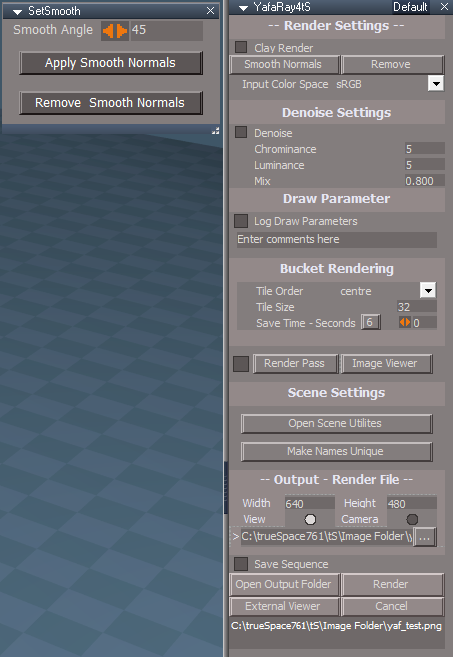
YafaRay4tS 'Moved the "Reset Default Settings" to the Setup aspect'
YafaRay toolbar commands
The Yafaray Folder in no longer loaded into trueSpace (3.55 MB)
This restores the default trueSpace Offline Renderers behavoir
To set Yafaray as the offline renderer, RClick any of the Offline Render icons, and Press the Yafaray button in the Offline Renderers panel
The YafarayScripts load the Yafaray Folder inside trueSpace (System)
This panel has a new Yafaray aspect where you can Remove YafaRay4tS, from inside trueSpace (System)
Toolbars
Several toolbars LMB & RMB commands were updated to Load - Custom Commands scripts if they do not exist within trueSpace, and then run the command
These commands run from the CCFunctionSet that has been added to CustomCommands
These scripts have been removed in the backup CustomCommands.RsObj
This reduces the size of the default.ctx from 39.7 MB to about 22.7 MB
When you use one of these scripts, the default.ctx will increase in size, until you Reset to Default Context
The idea is to save space until the Custom Command script is used
You can reload all of these scripts by using the Restore - Custom Scripts icon (Full Context 17.9 MB)
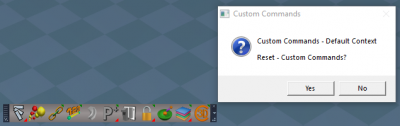
RClick to Reset - Custom Commands (Default Context 4.9 MB)
LMB .
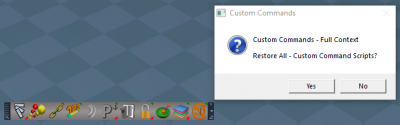
RMB .
tSpecial-E
DX procedural shader for real time special effects
Author - David Bokon (noko) .
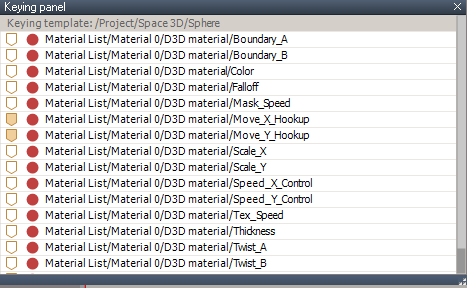
Updated this very awesome tSpecial-E shader with Shader Attributes .
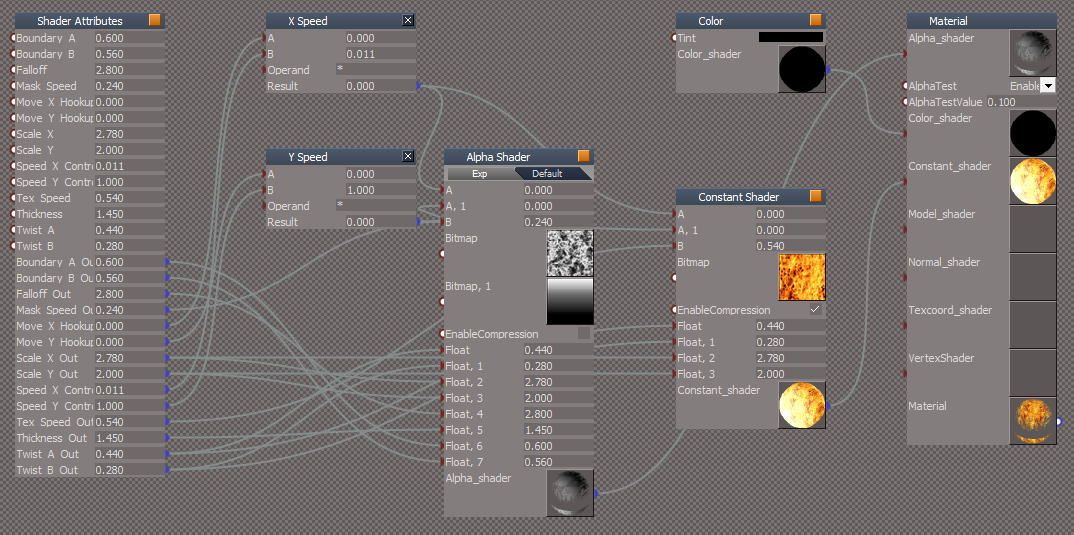
User friendly UI for Keyframing .
Move X Hookup
Move Y Hookup
Originally, these attributes are for Hooking up to a Timer Event
Optionally, you can Keyframe these attributes as well as all the other attributes
Included the tS-E Shader.pdf in the PDFMan folder
Release 5/7/2024
viewtopic.php?t=3732
It is recommended that you completely Uninstall and Install trueSpace7.61 Beta 8 to a clean directory
Open the Task Manager
If you find any Standalone Runner (32 bit) or trueSpace (32 bit) programs open, Select each one and RClick - End task
Close the Task Manager
Add updated and missing CCFunctionSet to Custom Commands
Updates after the Pre-Release 4/29/2024
YafarayScripts 'Version 1.0.0'
YafaRay4tS 'Moved the "Reset Default Settings" to the Setup aspect'
YafaRay toolbar commands
The Yafaray Folder in no longer loaded into trueSpace (3.55 MB)
This restores the default trueSpace Offline Renderers behavoir
To set Yafaray as the offline renderer, RClick any of the Offline Render icons, and Press the Yafaray button in the Offline Renderers panel
The YafarayScripts load the Yafaray Folder inside trueSpace (System)
This panel has a new Yafaray aspect where you can Remove YafaRay4tS, from inside trueSpace (System)
Toolbars
Several toolbars LMB & RMB commands were updated to Load - Custom Commands scripts if they do not exist within trueSpace, and then run the command
These commands run from the CCFunctionSet that has been added to CustomCommands
These scripts have been removed in the backup CustomCommands.RsObj
This reduces the size of the default.ctx from 39.7 MB to about 22.7 MB
When you use one of these scripts, the default.ctx will increase in size, until you Reset to Default Context
The idea is to save space until the Custom Command script is used
You can reload all of these scripts by using the Restore - Custom Scripts icon (Full Context 17.9 MB)
RClick to Reset - Custom Commands (Default Context 4.9 MB)
LMB .
RMB .
tSpecial-E
DX procedural shader for real time special effects
Author - David Bokon (noko) .
Updated this very awesome tSpecial-E shader with Shader Attributes .
User friendly UI for Keyframing .
Move X Hookup
Move Y Hookup
Originally, these attributes are for Hooking up to a Timer Event
Optionally, you can Keyframe these attributes as well as all the other attributes
Included the tS-E Shader.pdf in the PDFMan folder
-
trueBlue
- Captain
- Posts: 5548
- Joined: 06 Jul 2009, 22:50
- Type the number ten into the box: 10
Re: Final trueSpace 7.61 Beta 8 Unofficial Update
trueSpace7.61 Beta 8 Unofficial Update Version 10
Release 5/12/2024
viewtopic.php?t=3732
It is recommended that you completely Uninstall and Install trueSpace7.61 Beta 8 to a clean directory
Open the Task Manager
If you find any Standalone Runner (32 bit) or trueSpace (32 bit) programs open, Select each one and RClick - End task
Close the Task Manager
Updates:
Toolbars
WorkspaceNav
HairToolbar2
Update Hair tool(s) LMB Command with optional Apply Hair?
Window.Shortcuts.xml
Updates:
F5 - Cancel Current Widget
F6 - Close All Windows
F7 - Close All Panels
Workspace layout
Add: Workspace Layout library
Remove Workspace Layout and Toolbars script
Description:
WARNING
Loading this script will remove the
Workspace Layout and the
Expanded Toolbars
Run the
Unofficial Update version 10
to Restore the
Workspace Layout and the
Expanded Toolbars
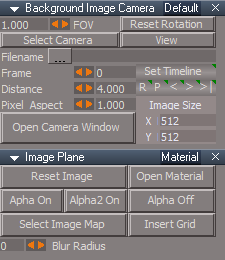
Background Image Camera
Background Image
Add: Blur Radius '0 = No Blur' No Blur Blur = 23
Release 5/12/2024
viewtopic.php?t=3732
It is recommended that you completely Uninstall and Install trueSpace7.61 Beta 8 to a clean directory
Open the Task Manager
If you find any Standalone Runner (32 bit) or trueSpace (32 bit) programs open, Select each one and RClick - End task
Close the Task Manager
Updates:
Toolbars
WorkspaceNav
HairToolbar2
Update Hair tool(s) LMB Command with optional Apply Hair?
Window.Shortcuts.xml
Updates:
F5 - Cancel Current Widget
F6 - Close All Windows
F7 - Close All Panels
Workspace layout
Add: Workspace Layout library
Remove Workspace Layout and Toolbars script
Description:
WARNING
Loading this script will remove the
Workspace Layout and the
Expanded Toolbars
Run the
Unofficial Update version 10
to Restore the
Workspace Layout and the
Expanded Toolbars
Background Image Camera
Background Image
Add: Blur Radius '0 = No Blur' No Blur Blur = 23
-
trueBlue
- Captain
- Posts: 5548
- Joined: 06 Jul 2009, 22:50
- Type the number ten into the box: 10
Re: Final trueSpace 7.61 Beta 8 Unofficial Update
trueSpace7.61 Beta 8 Unofficial Update Version 10
Release 5/13/2024
viewtopic.php?t=3732
It is recommended that you completely Uninstall and Install trueSpace7.61 Beta 8 to a clean directory
Open the Task Manager
If you find any Standalone Runner (32 bit) or trueSpace (32 bit) programs open, Select each one and RClick - End task
Close the Task Manager
Updates:
Widgets
Default context
Add: G Move Mouse - Postprocess Glow Color
CustomCommands
Add: Postprocess script
Preobjects
Update: PostProcess.RsObj .
Layouts - Configurations
Update all layouts with new Postprocess
Glow_Color connector
Note: Pick Color is not used and is only a place holder for the Glow_Color
Use:
Select the 3D Window
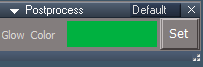
G Move Mouse - Opens the Postprocess Glow Color script .
Use the Glow Color's Color Picker to select the desired color and press Set
Release 5/13/2024
viewtopic.php?t=3732
It is recommended that you completely Uninstall and Install trueSpace7.61 Beta 8 to a clean directory
Open the Task Manager
If you find any Standalone Runner (32 bit) or trueSpace (32 bit) programs open, Select each one and RClick - End task
Close the Task Manager
Updates:
Widgets
Default context
Add: G Move Mouse - Postprocess Glow Color
CustomCommands
Add: Postprocess script
Preobjects
Update: PostProcess.RsObj .
Layouts - Configurations
Update all layouts with new Postprocess
Glow_Color connector
Note: Pick Color is not used and is only a place holder for the Glow_Color
Use:
Select the 3D Window
G Move Mouse - Opens the Postprocess Glow Color script .
Use the Glow Color's Color Picker to select the desired color and press Set
-
trueBlue
- Captain
- Posts: 5548
- Joined: 06 Jul 2009, 22:50
- Type the number ten into the box: 10
Re: Final trueSpace 7.61 Beta 8 Unofficial Update
trueSpace7.61 Beta 8 Unofficial Update Version 10
Release 5/15/2024
viewtopic.php?t=3732
It is recommended that you completely Uninstall and Install trueSpace7.61 Beta 8 to a clean directory
Open the Task Manager
If you find any Standalone Runner (32 bit) or trueSpace (32 bit) programs open, Select each one and RClick - End task
Close the Task Manager
Updates:
Toolbars
WorkspaceMainMenu/Help/Shortcuts
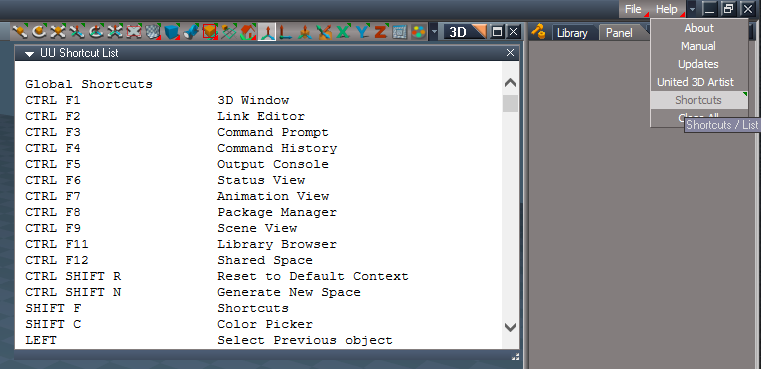
RMB - Opens UU Shortcuts List .
.
Window.Shortcuts.xml
Link Editor
CTRL SHIFT HOME - Switch to Animation Editor
Animation Editor
CTRL SHIFT HOME - Switch to Link Editor
Release 5/15/2024
viewtopic.php?t=3732
It is recommended that you completely Uninstall and Install trueSpace7.61 Beta 8 to a clean directory
Open the Task Manager
If you find any Standalone Runner (32 bit) or trueSpace (32 bit) programs open, Select each one and RClick - End task
Close the Task Manager
Updates:
Toolbars
WorkspaceMainMenu/Help/Shortcuts
RMB - Opens UU Shortcuts List .
Code: Select all
Global Shortcuts
CTRL F1 3D Window
CTRL F2 Link Editor
CTRL F3 Command Prompt
CTRL F4 Command History
CTRL F5 Output Console
CTRL F6 Status View
CTRL F7 Animation View
CTRL F8 Package Manager
CTRL F9 Scene View
CTRL F11 Library Browser
CTRL F12 Shared Space
CTRL SHIFT R Reset to Default Context
CTRL SHIFT N Generate New Space
SHIFT F Shortcuts
SHIFT C Color Picker
LEFT Select Previous object
RIGHT Select Next object
DOWN Select first Child object
UP Select Parent object
CTRL SHIFT LEFT Select Previous object & Look At
CTRL SHIFT RIGHT Select Next object & Look At
A Camera Move
S Camera Rotate
D Camera FOV
Z Object Move
X Object Rotate
C Object Scale
SHIFT X X Lock | Unlock
SHIFT Y Y Lock | Unlock
SHIFT Z Z Lock | Unlock
F1 World Coordinates
F2 Object Coordinates
F3 Screen Coordinates
F4 Tangent Coordinates
F5 Cancel Current Widget
F6 CLose All Windows
F7 Close All Panels
F8 Reset View
3D Window Shortcuts
CTRL ~ Set the selected camera as active
CTRL 1 Switch to Perspective view
CTRL 2 Switch to Top orthogonal view
CTRL 3 Switch to Bottom orthogonal view
CTRL 4 Switch to Front orthogonal view
CTRL 5 Switch to Back orthogonal view
CTRL 6 Switch to Left orthogonal view
CTRL 7 Switch to Right orthogonal view
CTRL 8 Switch to Nearest Orthogonal view
CTRL 9 Switch to Isometric view
CTRL 0 Reset View
CTRL Z Undo
CTRL SHIFT Z Redo
CTRL C Copy selection
DELETE Delete selection
CTRL K Delete selection
CTRL R Render to file
CTRL O Render Animation
CTRL I Inspect Material
I Move Mouse Inspect Material shortcuts
P Move Mouse Open Panel
B Move Mouse Background Colors
G Move Mouse Postprocess Glow Color
I Move Mouse Background Widget shortcuts
L Lock selection
U Unlock selection
ESC Unselect and Pause Animation
SHIFT L Workspace Layers
SPACEBAR Point Edit Toolbars
SHIFT SPACEBAR Point Edit Toolbars - Offset
CTRL SPACEBAR Popup Toolbars
CTRL SHIFT V View toolbar
CTRL SHIFT O Object Navigation toolbar
CTRL SHIFT L Light toolbar
TAB Object Navigation Widget - Toggle
Point Edit Shortcuts
~ Default selection settings
1 Select by Painting
2 Select by Rectangle
3 Select by Lasso
4 Select by Move
5 Soft Selection
6 Select by Material
7 Select Edge Loops
8 Select Face Loops
9 Select Visible Geometry
0 Select All Geometry
- Shrink selection
+ Grow selection
ESC Clear selection
DELETE Delete selection
CTRL K Delete selection
SHIFT DELETE Collapse Loop
CTRL C Copy selection
CTRL F Form Face
V Select Vertices
F Select Faces
E Select Edges
L Select Face Loops
T Select Context
SHIFT I Invert Selection
SHIFT A Select Connected
SHIFT C Convert Selection
SHIFT S Smooth Selection
SHIFT O Outline Selection
Q Quad Divide Selection
SHIFT Q Smooth Quad Divide
CTRL Q Quadrify Selected polygons
M Mirror Selection
CTRL M Mirror Modeler
SHIFT B Form Polygonal Bridge
/ Split polygons
SHIFT / Merge polygons
H Hide Selected geometry
SHIFT H Hide Unselected geometry
U Show All hidden geometry
NUM + Add SDS to selection
NUM - Remove SDS to selection
CTRL D Dynamic Sweep
CTRL S Sweep selected Face
CTRL B Bevel tool
CTRL T Tip selected Face
CTRL P Add Polygons
CTRL E Add Edges
CTRL V Add Vertices
CTRL L Add Loop
CTRL W Weld geometry together
CTRL H Heal Vertices
CTRL O Optimize Triangulation
CTRL SHIFT P Point Edit Widget toolbar
TAB Point Edit Widget - Toggle
Animation Editor Shortcuts
DELETE Delete Keyframe or Clip selection
CTRL C Copy Keyframe or Clip selection
CTRL X Cut Keyframe or Clip selection
CTRL V Paste the Cut selection
CTRL A Select All
CTRL U Clear Selection
CTRL Z Undo
CTRL SHIFT Z Redo
SHIFT LEFT Previous Keyframe
SHIFT RIGHT Next Keyframe
K Set Keyframe
CTRL LEFT Previous Frame
CTRL RIGHT Next Frame
SHIFT HOME Start Frame
SHIFT END End Frame
CTRL HOME Play
CTRL END Pause
CTRL SHIFT HOME Switch to Link Editor
Link Editor Shortcuts
SHIFT S DX Shaders toolbar
SHIFT C DX Components toolbar
DELETE Delete selection
CTRL Z Undo
CTRL SHIFT Z Redo
CTRL L_Drag Copy first selected
LEFT Select Previous object
RIGHT Select Next object
DOWN Select first Child
UP Select Parent
CTRL SHIFT LEFT Select Previous & Center
CTRL SHIFT RIGHT Select Next & Center
HOME Current scene in Link Editor
NUM 5 Center selection
NUM 1 Zoom All
NUM * Iconize All
NUM - Minimize All
NUM + Maximize All
R_Click Zoom ALL Move to Top Left | Center
R_Drag Zoom In Out
M_Click Center selection
M_Drag Move
CTRL M_Click Up one level
M_Wheel Scroll Up and Down
CTRL SHIFT HOME Switch to Animation Editor
Animation Editor and 3D Window Shortcuts
Num 4 Object Move -X 0.1
NUM 6 Object Move +X 0.1
NUM 8 Object Move -Y 0.1
NUM 2 Object Move +Y 0.1
PAGE UP Object Move +Z 0.1
PAGE DOWN Object Move -Z 0.1
CTRL 4 Object Move -X 1.000
CTRL 6 Object Move +X 1.000
CTRL 8 Object Move -Y 1.000
CTRL 2 Object Move +Y 1.000
CTRL PAGE UP Object Move +Z 1.000
CTRL PAGE DOWN Object Move +Z 1.000
HOME Object Normalize Location
NUM 7 Object Rotate -X 1.000
NUM 9 Object Rotate +X 1.000
NUM 1 Object Rotate +Y 1.000
NUM 3 Object Rotate -Y 1.000
NUM 0 Object Rotate -Z 1.000
DECIMAL Object Rotate +Z 1.000
CTRL 7 Object Rotate -X 45
CTRL 9 Object Rotate +X 45
CTRL 1 Object Rotate -Y 45
CTRL 3 Object Rotate +Y 45
CTRL 0 Object Rotate -Z 45
CTRL DECIMAL Object Rotate +Z 45
NUM 5 Object Normalize Rotation
Window.Shortcuts.xml
Link Editor
CTRL SHIFT HOME - Switch to Animation Editor
Animation Editor
CTRL SHIFT HOME - Switch to Link Editor
-
trueBlue
- Captain
- Posts: 5548
- Joined: 06 Jul 2009, 22:50
- Type the number ten into the box: 10
Re: Final trueSpace 7.61 Beta 8 Unofficial Update
trueSpace7.61 Beta 8 Unofficial Update Version 10
Release 5/16/2024
viewtopic.php?t=3732
It is recommended that you completely Uninstall and Install trueSpace7.61 Beta 8 to a clean directory
Open the Task Manager
If you find any Standalone Runner (32 bit) or trueSpace (32 bit) programs open, Select each one and RClick - End task
Close the Task Manager
Updates:
CustomCommands
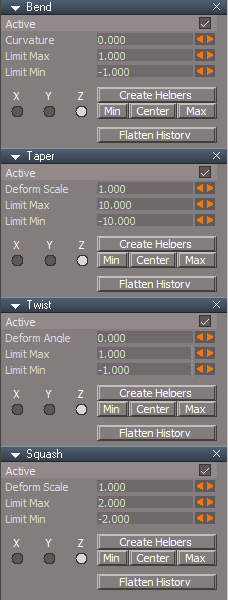
Update: Deformers
Add: Flatten History button
Widgets
Object Navigation Widget/Enter edit mode/Uneditable script
Add check, return, and Alert"Deform object detected! Flatten History first"
Release 5/16/2024
viewtopic.php?t=3732
It is recommended that you completely Uninstall and Install trueSpace7.61 Beta 8 to a clean directory
Open the Task Manager
If you find any Standalone Runner (32 bit) or trueSpace (32 bit) programs open, Select each one and RClick - End task
Close the Task Manager
Updates:
CustomCommands
Update: Deformers
Add: Flatten History button
Widgets
Object Navigation Widget/Enter edit mode/Uneditable script
Add check, return, and Alert"Deform object detected! Flatten History first"
-
trueBlue
- Captain
- Posts: 5548
- Joined: 06 Jul 2009, 22:50
- Type the number ten into the box: 10
Re: Final trueSpace 7.61 Beta 8 Unofficial Update
trueSpace7.61 Beta 8 Unofficial Update Version 10
Release 5/17/2024
viewtopic.php?t=3732
It is recommended that you completely Uninstall and Install trueSpace7.61 Beta 8 to a clean directory
Open the Task Manager
If you find any Standalone Runner (32 bit) or trueSpace (32 bit) programs open, Select each one and RClick - End task
Close the Task Manager
Updates:
The previous update did not include the updated Deformers
CustomCommands
Update: Deformers
Add: Flatten History button .
Widgets
Object Navigation Widget/Enter edit mode/Uneditable script
Add check, return, and Alert"Deform object detected! Flatten History first"
Release 5/17/2024
viewtopic.php?t=3732
It is recommended that you completely Uninstall and Install trueSpace7.61 Beta 8 to a clean directory
Open the Task Manager
If you find any Standalone Runner (32 bit) or trueSpace (32 bit) programs open, Select each one and RClick - End task
Close the Task Manager
Updates:
The previous update did not include the updated Deformers
CustomCommands
Update: Deformers
Add: Flatten History button .
Widgets
Object Navigation Widget/Enter edit mode/Uneditable script
Add check, return, and Alert"Deform object detected! Flatten History first"
-
trueBlue
- Captain
- Posts: 5548
- Joined: 06 Jul 2009, 22:50
- Type the number ten into the box: 10
Re: Final trueSpace 7.61 Beta 8 Unofficial Update
trueSpace7.61 Beta 8 Unofficial Update Version 10
Release 5/18/2024
viewtopic.php?t=3732
It is recommended that you completely Uninstall and Install trueSpace7.61 Beta 8 to a clean directory
Open the Task Manager
If you find any Standalone Runner (32 bit) or trueSpace (32 bit) programs open, Select each one and RClick - End task
Close the Task Manager
Updates:
YafaRay Scenes
UUCommands
Add: Zoom to Face Selection scripts
Shortcuts
Point Edit Mode
CTRL ALT F Zoom to Face selection
CTRL ALT V Previous Face selection View
Release 5/18/2024
viewtopic.php?t=3732
It is recommended that you completely Uninstall and Install trueSpace7.61 Beta 8 to a clean directory
Open the Task Manager
If you find any Standalone Runner (32 bit) or trueSpace (32 bit) programs open, Select each one and RClick - End task
Close the Task Manager
Updates:
YafaRay Scenes
UUCommands
Add: Zoom to Face Selection scripts
Shortcuts
Point Edit Mode
CTRL ALT F Zoom to Face selection
CTRL ALT V Previous Face selection View
-
trueBlue
- Captain
- Posts: 5548
- Joined: 06 Jul 2009, 22:50
- Type the number ten into the box: 10
Re: Final trueSpace 7.61 Beta 8 Unofficial Update
trueSpace7.61 Beta 8 Unofficial Update Version 10
Release 5/20/2024
viewtopic.php?t=3732
It is recommended that you completely Uninstall and Install trueSpace7.61 Beta 8 to a clean directory
Open the Task Manager
If you find any Standalone Runner (32 bit) or trueSpace (32 bit) programs open, Select each one and RClick - End task
Close the Task Manager
Unless there is any reported issues, this is the Final Release
Updates:
Widgets
Update all widgets Simple Script Command AutoKey command
Object Move, Rotate, Scale 'RClick Cancel'
Camera Move, Rotate, FOV 'RClick Cancel and Add Cursor'
Rectangle Zoom 'RClick Cancel and Add Cursor'
Rectangle Select 'Add Cursor'
Shortcuts
Global
R Rectangle Zoom
SHIFT R Rectangle Select
3D Window
CTRL SHIFT S Zoom to selection
Point Edit Mode
CTRL NUM - Reset SDS settings
CTRL ALT F Aling View Zoom to selection
CTRL ALT V Previous View
Animation Editor
CTRL T Animation toolbar
CTRL SHIFT HOME Switch to Link Editor
Link Editor
CTRL SHIFT HOME Switch to Animation Editor
Release 5/20/2024
viewtopic.php?t=3732
It is recommended that you completely Uninstall and Install trueSpace7.61 Beta 8 to a clean directory
Open the Task Manager
If you find any Standalone Runner (32 bit) or trueSpace (32 bit) programs open, Select each one and RClick - End task
Close the Task Manager
Unless there is any reported issues, this is the Final Release
Updates:
Widgets
Update all widgets Simple Script Command AutoKey command
Object Move, Rotate, Scale 'RClick Cancel'
Camera Move, Rotate, FOV 'RClick Cancel and Add Cursor'
Rectangle Zoom 'RClick Cancel and Add Cursor'
Rectangle Select 'Add Cursor'
Shortcuts
Global
R Rectangle Zoom
SHIFT R Rectangle Select
3D Window
CTRL SHIFT S Zoom to selection
Point Edit Mode
CTRL NUM - Reset SDS settings
CTRL ALT F Aling View Zoom to selection
CTRL ALT V Previous View
Animation Editor
CTRL T Animation toolbar
CTRL SHIFT HOME Switch to Link Editor
Link Editor
CTRL SHIFT HOME Switch to Animation Editor
-
trueBlue
- Captain
- Posts: 5548
- Joined: 06 Jul 2009, 22:50
- Type the number ten into the box: 10
Re: Final trueSpace 7.61 Beta 8 Unofficial Update
trueSpace7.61 Beta 8 Unofficial Update Version 10
Release 5/27/2024
viewtopic.php?t=3732
It is recommended that you completely Uninstall and Install trueSpace7.61 Beta 8 to a clean directory
Open the Task Manager
If you find any Standalone Runner (32 bit) or trueSpace (32 bit) programs open, Select each one and RClick - End task
Close the Task Manager
Unless there is any reported issues, this is the Final Release
Updates:
CustomScriptsStore
Update:
CCFunctionSet
Toolbars
CameraToolbar
Add:
Convert Camera
LMB - Opens the Convert Camera Type floating panel
Convert Selection button
Note Status Message: "SHIFT LClick Camera to switch Camera Widget"
CustomCommands
Update:
Add Deformer widget - Author Clinton Reese
XYZ widgets
Volune, Min, and Max widgets 'Mouse Wheel Speed = 1.000 LDrag Speed = 0.010'
SHIFT - Cycle Deformers
Center NAV widget
Add: Close sphere
Bars, Ars, and Triangles
SHIFT - Switch widget colors 3D Standard | trueSpace
Release 5/27/2024
viewtopic.php?t=3732
It is recommended that you completely Uninstall and Install trueSpace7.61 Beta 8 to a clean directory
Open the Task Manager
If you find any Standalone Runner (32 bit) or trueSpace (32 bit) programs open, Select each one and RClick - End task
Close the Task Manager
Unless there is any reported issues, this is the Final Release
Updates:
CustomScriptsStore
Update:
CCFunctionSet
Toolbars
CameraToolbar
Add:
Convert Camera
LMB - Opens the Convert Camera Type floating panel
Convert Selection button
Note Status Message: "SHIFT LClick Camera to switch Camera Widget"
CustomCommands
Update:
Add Deformer widget - Author Clinton Reese
XYZ widgets
Volune, Min, and Max widgets 'Mouse Wheel Speed = 1.000 LDrag Speed = 0.010'
SHIFT - Cycle Deformers
Center NAV widget
Add: Close sphere
Bars, Ars, and Triangles
SHIFT - Switch widget colors 3D Standard | trueSpace
-
trueBlue
- Captain
- Posts: 5548
- Joined: 06 Jul 2009, 22:50
- Type the number ten into the box: 10
Re: Final trueSpace 7.61 Beta 8 Unofficial Update
trueSpace7.61 Beta 8 Unofficial Update Version 10
Release 5/28/2024
viewtopic.php?t=3732
It is recommended that you completely Uninstall and Install trueSpace7.61 Beta 8 to a clean directory
Open the Task Manager
If you find any Standalone Runner (32 bit) or trueSpace (32 bit) programs open, Select each one and RClick - End task
Close the Task Manager
Unless there is any reported issues, this is the Final Release
Updates:
CustomScriptsStore
Update:
YafarayScripts
Add missing YafaRay4tSHelp script
Release 5/28/2024
viewtopic.php?t=3732
It is recommended that you completely Uninstall and Install trueSpace7.61 Beta 8 to a clean directory
Open the Task Manager
If you find any Standalone Runner (32 bit) or trueSpace (32 bit) programs open, Select each one and RClick - End task
Close the Task Manager
Unless there is any reported issues, this is the Final Release
Updates:
CustomScriptsStore
Update:
YafarayScripts
Add missing YafaRay4tSHelp script
-
trueBlue
- Captain
- Posts: 5548
- Joined: 06 Jul 2009, 22:50
- Type the number ten into the box: 10
Re: Final trueSpace 7.61 Beta 8 Unofficial Update
trueSpace7.61 Beta 8 Unofficial Update Version 10
Release 5/29/2024
viewtopic.php?t=3732
It is recommended that you completely Uninstall and Install trueSpace7.61 Beta 8 to a clean directory
Open the Task Manager
If you find any Standalone Runner (32 bit) or trueSpace (32 bit) programs open, Select each one and RClick - End task
Close the Task Manager
Unless there is any reported issues, this is the Final Release
.
Updates:
CustomScriptsStore
Update:
CCFunctionSet
Guard 'If Deformer exist return Not compatible with current tool' SDS+ and SDS-
CustomScriptsStore2
Update:
DeformScripts - Author Clinton Reese
Modifications:
Disconnect script 'Add var lines 77, 78, 79, 80'
Deformer
Incorporate Mesh Normals node in Deformer
CycleDeformer script 'If no DeformScripts, Load into trueSpace'
Widgets
Default object navigation widget
Enter edit mode
Update:
Uneditable - Author Clinton Reese
Modifications Add:
Release 5/29/2024
viewtopic.php?t=3732
It is recommended that you completely Uninstall and Install trueSpace7.61 Beta 8 to a clean directory
Open the Task Manager
If you find any Standalone Runner (32 bit) or trueSpace (32 bit) programs open, Select each one and RClick - End task
Close the Task Manager
Unless there is any reported issues, this is the Final Release
.
Updates:
CustomScriptsStore
Update:
CCFunctionSet
Guard 'If Deformer exist return Not compatible with current tool' SDS+ and SDS-
CustomScriptsStore2
Update:
DeformScripts - Author Clinton Reese
Modifications:
Disconnect script 'Add var lines 77, 78, 79, 80'
Deformer
Incorporate Mesh Normals node in Deformer
CycleDeformer script 'If no DeformScripts, Load into trueSpace'
Widgets
Default object navigation widget
Enter edit mode
Update:
Uneditable - Author Clinton Reese
Modifications Add:
Code: Select all
if(Node.Exists(Node.FirstSelected() + '/Deformer')) {
if(!Node.Exists('Scripts/CustomCommands/DeformScripts'))
Node.AccessFnSet("Scripts/CustomCommands/CCFunctionSet").AddDeformer()
Activity.Run('Scripts/CustomCommands/DeformScripts/Disconnect')
System.Alert('Deformer has been Disconnected!\n\nUse - Reconnect')
Activity.Run('Scripts/CustomCommands/DeformScripts/openPanelFrame')
}-
trueBlue
- Captain
- Posts: 5548
- Joined: 06 Jul 2009, 22:50
- Type the number ten into the box: 10
Re: Final trueSpace 7.61 Beta 8 Unofficial Update
trueSpace7.61 Beta 8 Unofficial Update Version 10
Release 5/31/2024
viewtopic.php?t=3732
It is recommended that you completely Uninstall and Install trueSpace7.61 Beta 8 to a clean directory
Open the Task Manager
If you find any Standalone Runner (32 bit) or trueSpace (32 bit) programs open, Select each one and RClick - End task
Close the Task Manager
Unless there is any reported issues, this is the Final Release
Updates:
CustomScriptsStore2
Update:
DeformScripts - Author Clinton Reese
Modification:
openPanelFrame script
Widgets
Default object navigation widget
Enter edit mode
Update:
Uneditable - Author Clinton Reese
Release 5/31/2024
viewtopic.php?t=3732
It is recommended that you completely Uninstall and Install trueSpace7.61 Beta 8 to a clean directory
Open the Task Manager
If you find any Standalone Runner (32 bit) or trueSpace (32 bit) programs open, Select each one and RClick - End task
Close the Task Manager
Unless there is any reported issues, this is the Final Release
Updates:
CustomScriptsStore2
Update:
DeformScripts - Author Clinton Reese
Modification:
openPanelFrame script
Widgets
Default object navigation widget
Enter edit mode
Update:
Uneditable - Author Clinton Reese
-
trueBlue
- Captain
- Posts: 5548
- Joined: 06 Jul 2009, 22:50
- Type the number ten into the box: 10
Re: Final trueSpace 7.61 Beta 8 Unofficial Update
trueSpace7.61 Beta 8 Unofficial Update Version 10
Release 6/3/2024
viewtopic.php?t=3732
It is recommended that you completely Uninstall and Install trueSpace7.61 Beta 8 to a clean directory
Open the Task Manager
If you find any Standalone Runner (32 bit) or trueSpace (32 bit) programs open, Select each one and RClick - End task
Close the Task Manager
Unless there is any reported issues, this is the Final Release
Updates:
CustomScriptsStore2
Update:
DeformScripts - Author Clinton Reese
Modifications:
Flatten button 'Fix for error when nothing selected'
Disconnect script 'Add additional disconnect'
Reconnect script 'Add additional disconnect'
Deform widget X 'Min, Max, and Volume - RClick Reset Matrix'
Deform widget Y 'Min, Max, and Volume - RClick Reset Matrix'
Deform widget Z 'Min, Max, and Volume - RClick Reset Matrix'
Widgets
Default object navigation widget
Enter edit mode
Update:
Uneditable 'Deformers with SDS will Disconnect first'
CustomScriptsStore
Update:
Guard
preobjects
Update:
MeshEditorSettings - Reset SDS aspect
Reset SDS button
Remove SDS button
Release 6/3/2024
viewtopic.php?t=3732
It is recommended that you completely Uninstall and Install trueSpace7.61 Beta 8 to a clean directory
Open the Task Manager
If you find any Standalone Runner (32 bit) or trueSpace (32 bit) programs open, Select each one and RClick - End task
Close the Task Manager
Unless there is any reported issues, this is the Final Release
Updates:
CustomScriptsStore2
Update:
DeformScripts - Author Clinton Reese
Modifications:
Flatten button 'Fix for error when nothing selected'
Disconnect script 'Add additional disconnect'
Reconnect script 'Add additional disconnect'
Deform widget X 'Min, Max, and Volume - RClick Reset Matrix'
Deform widget Y 'Min, Max, and Volume - RClick Reset Matrix'
Deform widget Z 'Min, Max, and Volume - RClick Reset Matrix'
Widgets
Default object navigation widget
Enter edit mode
Update:
Uneditable 'Deformers with SDS will Disconnect first'
CustomScriptsStore
Update:
Guard
preobjects
Update:
MeshEditorSettings - Reset SDS aspect
Reset SDS button
Remove SDS button
-
trueBlue
- Captain
- Posts: 5548
- Joined: 06 Jul 2009, 22:50
- Type the number ten into the box: 10
Re: Final trueSpace 7.61 Beta 8 Unofficial Update
trueSpace7.61 Beta 8 Unofficial Update Version 10
Release 6/3/2024
viewtopic.php?t=3732
It is recommended that you completely Uninstall and Install trueSpace7.61 Beta 8 to a clean directory
Open the Task Manager
If you find any Standalone Runner (32 bit) or trueSpace (32 bit) programs open, Select each one and RClick - End task
Close the Task Manager
Previous earlier update today on 6/3/2024 was incorrect!
Unless there is any reported issues, this is the Final Release
Updates:
CustomScriptsStore2
Update:
DeformScripts - Author Clinton Reese
Modifications:
Flatten button 'Fix for error when nothing selected'
Disconnect script 'Add additional disconnect'
Reconnect script 'Add additional disconnect'
Deform widget X 'Min, Max, and Volume - RClick Reset Matrix'
Deform widget Y 'Min, Max, and Volume - RClick Reset Matrix'
Deform widget Z 'Min, Max, and Volume - RClick Reset Matrix'
Widgets
Default object navigation widget
Enter edit mode
Update:
Uneditable 'Deformers with SDS will Disconnect first'
CustomScriptsStore
Update:
Guard
preobjects
Update:
MeshEditorSettings - Reset SDS aspect
Reset SDS button
Remove SDS button
Release 6/3/2024
viewtopic.php?t=3732
It is recommended that you completely Uninstall and Install trueSpace7.61 Beta 8 to a clean directory
Open the Task Manager
If you find any Standalone Runner (32 bit) or trueSpace (32 bit) programs open, Select each one and RClick - End task
Close the Task Manager
Previous earlier update today on 6/3/2024 was incorrect!
Unless there is any reported issues, this is the Final Release
Updates:
CustomScriptsStore2
Update:
DeformScripts - Author Clinton Reese
Modifications:
Flatten button 'Fix for error when nothing selected'
Disconnect script 'Add additional disconnect'
Reconnect script 'Add additional disconnect'
Deform widget X 'Min, Max, and Volume - RClick Reset Matrix'
Deform widget Y 'Min, Max, and Volume - RClick Reset Matrix'
Deform widget Z 'Min, Max, and Volume - RClick Reset Matrix'
Widgets
Default object navigation widget
Enter edit mode
Update:
Uneditable 'Deformers with SDS will Disconnect first'
CustomScriptsStore
Update:
Guard
preobjects
Update:
MeshEditorSettings - Reset SDS aspect
Reset SDS button
Remove SDS button
-
trueBlue
- Captain
- Posts: 5548
- Joined: 06 Jul 2009, 22:50
- Type the number ten into the box: 10
Re: Final trueSpace 7.61 Beta 8 Unofficial Update
trueSpace7.61 Beta 8 Unofficial Update Version 10
Release 6/4/2024
viewtopic.php?t=3732
It is recommended that you completely Uninstall and Install trueSpace7.61 Beta 8 to a clean directory
Open the Task Manager
If you find any Standalone Runner (32 bit) or trueSpace (32 bit) programs open, Select each one and RClick - End task
Close the Task Manager
Unless there is any reported issues, this is the Final Release
Updates:
Toolbars
WorkspaceNav
CustomScriptsStore
Update:
ToolbarManager
preobjects
Update:
UUCommands
Release 6/4/2024
viewtopic.php?t=3732
It is recommended that you completely Uninstall and Install trueSpace7.61 Beta 8 to a clean directory
Open the Task Manager
If you find any Standalone Runner (32 bit) or trueSpace (32 bit) programs open, Select each one and RClick - End task
Close the Task Manager
Unless there is any reported issues, this is the Final Release
Updates:
Toolbars
WorkspaceNav
CustomScriptsStore
Update:
ToolbarManager
preobjects
Update:
UUCommands
-
trueBlue
- Captain
- Posts: 5548
- Joined: 06 Jul 2009, 22:50
- Type the number ten into the box: 10
Re: Final trueSpace 7.61 Beta 8 Unofficial Update
trueSpace7.61 Beta 8 Unofficial Update Version 10
Release 6/7/2024
viewtopic.php?t=3732
It is recommended that you completely Uninstall and Install trueSpace7.61 Beta 8 to a clean directory
Open the Task Manager
If you find any Standalone Runner (32 bit) or trueSpace (32 bit) programs open, Select each one and RClick - End task
Close the Task Manager
Unless there is any reported issues, this is the Final Release
Updates:
Window.Shortcuts.xml
Update: NUM Subtract & NUM Add 'Use Guard command' PE Mode
Window.Shortcuts_BACKUP.xml
UU Shortcut List.txt
Toolbars
Update:
ClintonToolbar/C3D icon 'LMB - Scripts Manager'
PopupButtonsToolbar 'Removed shortcuts from HelpText'
PEModelingToolbar 'Add: Booleans toolbar and SDS toolbar'
PointEditToolbar 'Add: Axis Snap'
Note: Pivot to Selection still exist, the other two were removed
Widgets
Object Navigation Widget
Update:
Add - MClick - Object Navigation Widget Toolbar
Point Edit Widget
Update:
Add - MClick - Point Edit Widget Toolbar
Add - SHIFT RClick - Point Edit Toolbars - Offset
WidgetScripts
Update: CycleObjectNavigationWidget & CyclePointEditNavigationWidget scripts
preobjects
Update: C3DReset.RsObj
CustomScriptsStore
Update: CCFunctionSet 'Add: Scripts Manager code'
clintonobjects
Remove: ReloadCustomScripts.RsObj
Add: ScriptManager.RsObj 'Author Clinton Reese'
Modifications:
Open Panel script
Reload Base Scripts button 'Run CCFunctionSet - RestoreC3DBackup()'
Remove: Cube Widget
Modified: Descriptions .
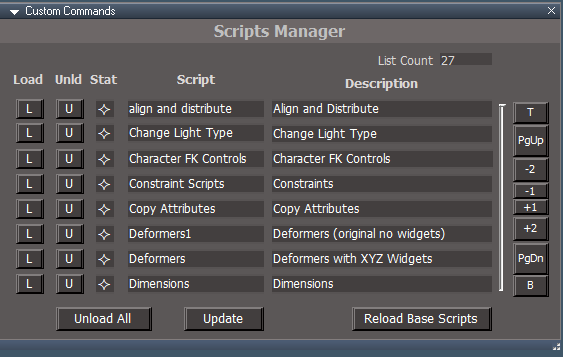
Scripts Manager is a tool that can give you a snapshot of the current loaded On-Demand Custom Commands scripts
You can manually Load and Unload any of the On-Demand Custom Commands scripts
It will not Load any toolbars associated with the Custom Commands script, but Unload will close the toolbars
When you are not using any of the On-Demand Custom Commands scripts, it is recommended that you UnLoad them or use Unload All Status Indicators from left to right: Not Loaded, Partially Loaded, Fully Loaded
In the Unofficial Update, the toolbars commands associated with the Custom Command script will load the toolbar, including the On-Demand Custom Commands scripts (Preferred method)
Release 6/7/2024
viewtopic.php?t=3732
It is recommended that you completely Uninstall and Install trueSpace7.61 Beta 8 to a clean directory
Open the Task Manager
If you find any Standalone Runner (32 bit) or trueSpace (32 bit) programs open, Select each one and RClick - End task
Close the Task Manager
Unless there is any reported issues, this is the Final Release
Updates:
Window.Shortcuts.xml
Update: NUM Subtract & NUM Add 'Use Guard command' PE Mode
Window.Shortcuts_BACKUP.xml
UU Shortcut List.txt
Toolbars
Update:
ClintonToolbar/C3D icon 'LMB - Scripts Manager'
PopupButtonsToolbar 'Removed shortcuts from HelpText'
PEModelingToolbar 'Add: Booleans toolbar and SDS toolbar'
PointEditToolbar 'Add: Axis Snap'
Note: Pivot to Selection still exist, the other two were removed
Widgets
Object Navigation Widget
Update:
Add - MClick - Object Navigation Widget Toolbar
Point Edit Widget
Update:
Add - MClick - Point Edit Widget Toolbar
Add - SHIFT RClick - Point Edit Toolbars - Offset
WidgetScripts
Update: CycleObjectNavigationWidget & CyclePointEditNavigationWidget scripts
preobjects
Update: C3DReset.RsObj
CustomScriptsStore
Update: CCFunctionSet 'Add: Scripts Manager code'
clintonobjects
Remove: ReloadCustomScripts.RsObj
Add: ScriptManager.RsObj 'Author Clinton Reese'
Modifications:
Open Panel script
Reload Base Scripts button 'Run CCFunctionSet - RestoreC3DBackup()'
Remove: Cube Widget
Modified: Descriptions .
Scripts Manager is a tool that can give you a snapshot of the current loaded On-Demand Custom Commands scripts
You can manually Load and Unload any of the On-Demand Custom Commands scripts
It will not Load any toolbars associated with the Custom Commands script, but Unload will close the toolbars
When you are not using any of the On-Demand Custom Commands scripts, it is recommended that you UnLoad them or use Unload All Status Indicators from left to right: Not Loaded, Partially Loaded, Fully Loaded
In the Unofficial Update, the toolbars commands associated with the Custom Command script will load the toolbar, including the On-Demand Custom Commands scripts (Preferred method)
-
trueBlue
- Captain
- Posts: 5548
- Joined: 06 Jul 2009, 22:50
- Type the number ten into the box: 10
Re: Final trueSpace 7.61 Beta 8 Unofficial Update
trueSpace7.61 Beta 8 Unofficial Update Version 10
Release 6/8/2024
viewtopic.php?t=3732
It is recommended that you completely Uninstall and Install trueSpace7.61 Beta 8 to a clean directory
Open the Task Manager
If you find any Standalone Runner (32 bit) or trueSpace (32 bit) programs open, Select each one and RClick - End task
Close the Task Manager
Unless there is any reported issues, this is the Final Release
Updates:
DeformScripts 'Update Remove, Up, and Down button code'
Deformers XYZ Widgets 'Update MIN & MAX Cone'
CCFunctionSet 'Update Cube Widget'
clintonobjects 'Remove CubeWidget.RsObj' 'Update ScriptManager.RsObj'
CustomScriptsStore2 'Add CubeWidget.RsObj'
Toolbars - Object and Camera transform widgets - 'Remove RMB Cancel'
C3DReset 'Remove CubeWidget.RsObj'
Release 6/8/2024
viewtopic.php?t=3732
It is recommended that you completely Uninstall and Install trueSpace7.61 Beta 8 to a clean directory
Open the Task Manager
If you find any Standalone Runner (32 bit) or trueSpace (32 bit) programs open, Select each one and RClick - End task
Close the Task Manager
Unless there is any reported issues, this is the Final Release
Updates:
DeformScripts 'Update Remove, Up, and Down button code'
Deformers XYZ Widgets 'Update MIN & MAX Cone'
CCFunctionSet 'Update Cube Widget'
clintonobjects 'Remove CubeWidget.RsObj' 'Update ScriptManager.RsObj'
CustomScriptsStore2 'Add CubeWidget.RsObj'
Toolbars - Object and Camera transform widgets - 'Remove RMB Cancel'
C3DReset 'Remove CubeWidget.RsObj'
-
trueBlue
- Captain
- Posts: 5548
- Joined: 06 Jul 2009, 22:50
- Type the number ten into the box: 10
Re: Final trueSpace 7.61 Beta 8 Unofficial Update
trueSpace7.61 Beta 8 Unofficial Update Version 10
Release 6/10/2024
viewtopic.php?t=3732
It is recommended that you completely Uninstall and Install trueSpace7.61 Beta 8 to a clean directory
Open the Task Manager
If you find any Standalone Runner (32 bit) or trueSpace (32 bit) programs open, Select each one and RClick - End task
Close the Task Manager
Unless there is any reported issues, this is the Final Release
Updates:
Toolbars
Update:
Toolbar Manager 'LMB abd RMB command'
Add Deformers 'LMB abd RMB command'
LMB 'Opens the Add Deformer panel in the 3D View'
RMB 'Opens the Widgets panel in the stack'
CustomScriptsStore2
Add Deformers 'Add: Widgets aspect'
Axis Color
trueSpace
Standard
Coordinate System
Static
Dynamic
Note: Sets and Saves the XYZ widgets
Deformer XYZ widgets 'Removed: Switch - Axis Color gesture'
CustomScriptsStore
Update:
CCFunctionSet
Guard
Release 6/10/2024
viewtopic.php?t=3732
It is recommended that you completely Uninstall and Install trueSpace7.61 Beta 8 to a clean directory
Open the Task Manager
If you find any Standalone Runner (32 bit) or trueSpace (32 bit) programs open, Select each one and RClick - End task
Close the Task Manager
Unless there is any reported issues, this is the Final Release
Updates:
Toolbars
Update:
Toolbar Manager 'LMB abd RMB command'
Add Deformers 'LMB abd RMB command'
LMB 'Opens the Add Deformer panel in the 3D View'
RMB 'Opens the Widgets panel in the stack'
CustomScriptsStore2
Add Deformers 'Add: Widgets aspect'
Axis Color
trueSpace
Standard
Coordinate System
Static
Dynamic
Note: Sets and Saves the XYZ widgets
Deformer XYZ widgets 'Removed: Switch - Axis Color gesture'
CustomScriptsStore
Update:
CCFunctionSet
Guard
-
trueBlue
- Captain
- Posts: 5548
- Joined: 06 Jul 2009, 22:50
- Type the number ten into the box: 10
Re: Final trueSpace 7.61 Beta 8 Unofficial Update
trueSpace7.61 Beta 8 Unofficial Update Version 10
Release 6/12/2024
viewtopic.php?t=3732
It is recommended that you completely Uninstall and Install trueSpace7.61 Beta 8 to a clean directory
Open the Task Manager
If you find any Standalone Runner (32 bit) or trueSpace (32 bit) programs open, Select each one and RClick - End task
Close the Task Manager
Unless there is any reported issues, this is the Final Release
Updates:
Toolbars
ViewToolbar
Scripts Manager .
Add: Combo Control and [<] button
Opens the selected item and updates the Scripts Manager status
This would be the preferred method to open Dimensions, Snapping and NURBS using the Scripts Manager
Release 6/12/2024
viewtopic.php?t=3732
It is recommended that you completely Uninstall and Install trueSpace7.61 Beta 8 to a clean directory
Open the Task Manager
If you find any Standalone Runner (32 bit) or trueSpace (32 bit) programs open, Select each one and RClick - End task
Close the Task Manager
Unless there is any reported issues, this is the Final Release
Updates:
Toolbars
ViewToolbar
Scripts Manager .
Add: Combo Control and [<] button
Opens the selected item and updates the Scripts Manager status
This would be the preferred method to open Dimensions, Snapping and NURBS using the Scripts Manager
-
trueBlue
- Captain
- Posts: 5548
- Joined: 06 Jul 2009, 22:50
- Type the number ten into the box: 10
Re: Final trueSpace 7.61 Beta 8 Unofficial Update
trueSpace7.61 Beta 8 Unofficial Update Version 10
Release 6/19/2024
viewtopic.php?t=3732
It is recommended that you completely Uninstall and Install trueSpace7.61 Beta 8 to a clean directory
Open the Task Manager
If you find any Standalone Runner (32 bit) or trueSpace (32 bit) programs open, Select each one and RClick - End task
Close the Task Manager
Unless there is any reported issues, this is the Final Release
Updates:
CustomScriptsStore2
DeformScripts
Add: Fix Displacement Mapper script to Disconnect and Reconnect scripts
CustomScriptsStore
Guard
Changed Alerts to Info dialogs that auto close in 5 seconds
Add: Deformer Alert and return if Displacement Mapper detected to Flatten History first
cutPlane
Add: Alert and return if Deformer detected
preobjects
Toolbars 'WorkspaceNav, PointEditToolsBar2, PointEditSelectionBar2, PEElementToolbar, PESelectionToolbar, Q_PEElementToolbar, and Q_PESelectionToolbar
Change PE selection types to Guard cmds
Widgets
Status Message 'version 6/5/2024'
UUCommands/UUShortcutsFunctionSet
Add: OpenAE(), OpenLE(), and PE selection types to use Guard cmds
DisplacementMapperTemplate 'Add: Brush button'
Scripts
Window.Shortcuts.xml
Window.Shortcuts_BACKUP.xml
Changed PE selection types to use Guard cmds from UUShortcutsFunctionSet
On-Demand System for Custom Commands
"Default Context"
By Default, 28 Scripts are not Loaded into trueSpace until user envokes the toolbar command or is Loaded from the Scripts Manager
Scripts Manager
Displays the current state of any Loaded Scripts
Enables user to manually Load, Unload, and Unload All - Scripts
Loading, Scripts into trueSpace increases the size of the trueSpace default.ctx
This includes Loading Model Plugins, Workspace Plugins and Offline Renderers like Vray and YafaRay4tS
Recommended Use:
C3D toolbar icon .
RClick - Reset Custom Commands
"Reset Custom Commands to the Default Context", before closing trueSpace
Best practice, if you are not using it, do not Load it
"Reset Custom Commands to the Default Context", before closing trueSpace
Release 6/19/2024
viewtopic.php?t=3732
It is recommended that you completely Uninstall and Install trueSpace7.61 Beta 8 to a clean directory
Open the Task Manager
If you find any Standalone Runner (32 bit) or trueSpace (32 bit) programs open, Select each one and RClick - End task
Close the Task Manager
Unless there is any reported issues, this is the Final Release
Updates:
CustomScriptsStore2
DeformScripts
Add: Fix Displacement Mapper script to Disconnect and Reconnect scripts
CustomScriptsStore
Guard
Changed Alerts to Info dialogs that auto close in 5 seconds
Add: Deformer Alert and return if Displacement Mapper detected to Flatten History first
cutPlane
Add: Alert and return if Deformer detected
preobjects
Toolbars 'WorkspaceNav, PointEditToolsBar2, PointEditSelectionBar2, PEElementToolbar, PESelectionToolbar, Q_PEElementToolbar, and Q_PESelectionToolbar
Change PE selection types to Guard cmds
Widgets
Status Message 'version 6/5/2024'
UUCommands/UUShortcutsFunctionSet
Add: OpenAE(), OpenLE(), and PE selection types to use Guard cmds
DisplacementMapperTemplate 'Add: Brush button'
Scripts
Window.Shortcuts.xml
Window.Shortcuts_BACKUP.xml
Changed PE selection types to use Guard cmds from UUShortcutsFunctionSet
On-Demand System for Custom Commands
"Default Context"
By Default, 28 Scripts are not Loaded into trueSpace until user envokes the toolbar command or is Loaded from the Scripts Manager
Scripts Manager
Displays the current state of any Loaded Scripts
Enables user to manually Load, Unload, and Unload All - Scripts
Loading, Scripts into trueSpace increases the size of the trueSpace default.ctx
This includes Loading Model Plugins, Workspace Plugins and Offline Renderers like Vray and YafaRay4tS
Recommended Use:
C3D toolbar icon .
RClick - Reset Custom Commands
"Reset Custom Commands to the Default Context", before closing trueSpace
Best practice, if you are not using it, do not Load it
"Reset Custom Commands to the Default Context", before closing trueSpace
-
trueBlue
- Captain
- Posts: 5548
- Joined: 06 Jul 2009, 22:50
- Type the number ten into the box: 10
Re: Final trueSpace 7.61 Beta 8 Unofficial Update
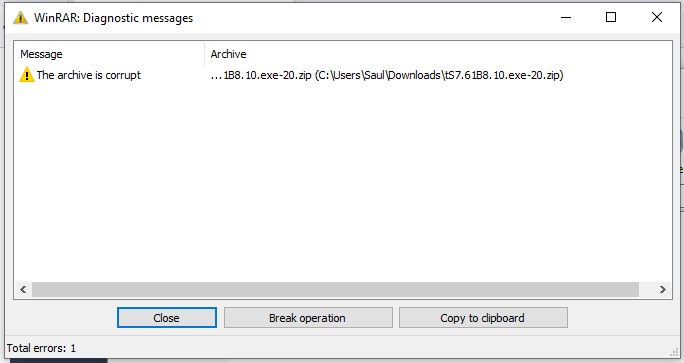
I uploaded the updates againSaul wrote: 20 Jun 2024, 13:34 Getting a corrupt end of file with this release:
Release 6/20/2024
viewtopic.php?t=3732
Downloaded and extracted the exe
Not seeing any issues
-
trueBlue
- Captain
- Posts: 5548
- Joined: 06 Jul 2009, 22:50
- Type the number ten into the box: 10
Re: Final trueSpace 7.61 Beta 8 Unofficial Update
trueSpace7.61 Beta 8 Unofficial Update Version 10
Release 6/22/2024
viewtopic.php?t=3732
It is recommended that you completely Uninstall and Install trueSpace7.61 Beta 8 to a clean directory
Open the Task Manager
If you find any Standalone Runner (32 bit) or trueSpace (32 bit) programs open, Select each one and RClick - End task
Close the Task Manager
Unless there is any reported issues, this is the Final Release
Updates:
D3D
RsD3DBloomFilter
Author - Clinton Reese
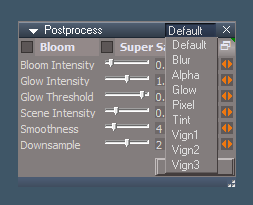
Replacement for the RsD3DBloomFilter that includes Blur, Alpha, Glow, Pixelate, Tint, Vignette 1, Vignette 2, and Vignette 3
preobjects
PostProcess
Layouts - Configurations
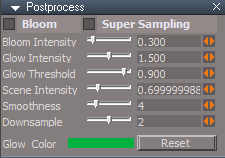
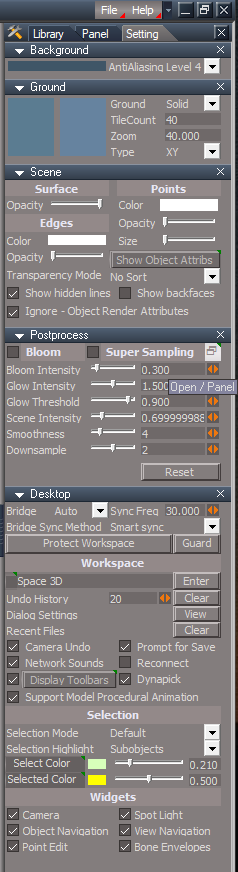
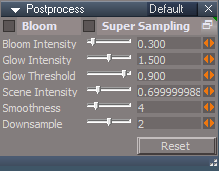
Updated all layouts with new Postprocess panel .
LClick - Open Postprocess floating panel
RClick - Open Postprocess in the Stack/Panel .
Switch Postprocess mode using the aspect tab
Use: Press the Setup button and enable Blur, Alpha, Glow, Pixelate, Tint, Vignette 1, Vignette 2, or Vignette 3
Default aspect is the original trueSpace Postprocess 'Bloom'
Press the Reset button to restore all default settings
Release 6/22/2024
viewtopic.php?t=3732
It is recommended that you completely Uninstall and Install trueSpace7.61 Beta 8 to a clean directory
Open the Task Manager
If you find any Standalone Runner (32 bit) or trueSpace (32 bit) programs open, Select each one and RClick - End task
Close the Task Manager
Unless there is any reported issues, this is the Final Release
Updates:
D3D
RsD3DBloomFilter
Author - Clinton Reese
Replacement for the RsD3DBloomFilter that includes Blur, Alpha, Glow, Pixelate, Tint, Vignette 1, Vignette 2, and Vignette 3
preobjects
PostProcess
Layouts - Configurations
Updated all layouts with new Postprocess panel .
LClick - Open Postprocess floating panel
RClick - Open Postprocess in the Stack/Panel .
Switch Postprocess mode using the aspect tab
Use: Press the Setup button and enable Blur, Alpha, Glow, Pixelate, Tint, Vignette 1, Vignette 2, or Vignette 3
Default aspect is the original trueSpace Postprocess 'Bloom'
Press the Reset button to restore all default settings
-
trueBlue
- Captain
- Posts: 5548
- Joined: 06 Jul 2009, 22:50
- Type the number ten into the box: 10
Re: Final trueSpace 7.61 Beta 8 Unofficial Update
trueSpace7.61 Beta 8 Unofficial Update Version 10
Release 6/24/2024
viewtopic.php?t=3732
It is recommended that you completely Uninstall and Install trueSpace7.61 Beta 8 to a clean directory
Open the Task Manager
If you find any Standalone Runner (32 bit) or trueSpace (32 bit) programs open, Select each one and RClick - End task
Close the Task Manager
Unless there is any reported issues, this is the Final Release
Updates:
Rs Main Libraries\Postprocess library
R2TexturePostProcessing
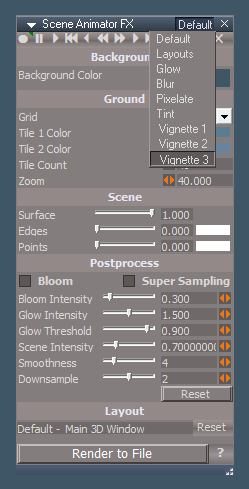
Scene Animator FX .
Open from the Blue Custom Toolbar
Switch Postprocess mode using the aspect tab
Use: Press the Setup button and enable Blur, Alpha, Glow, Pixelate, Tint, Vignette 1, Vignette 2, or Vignette 3
Default aspect is the original trueSpace Postprocess 'Bloom'
Press the Reset button to restore all default settings
Release 6/24/2024
viewtopic.php?t=3732
It is recommended that you completely Uninstall and Install trueSpace7.61 Beta 8 to a clean directory
Open the Task Manager
If you find any Standalone Runner (32 bit) or trueSpace (32 bit) programs open, Select each one and RClick - End task
Close the Task Manager
Unless there is any reported issues, this is the Final Release
Updates:
Rs Main Libraries\Postprocess library
R2TexturePostProcessing
Scene Animator FX .
Open from the Blue Custom Toolbar
Switch Postprocess mode using the aspect tab
Use: Press the Setup button and enable Blur, Alpha, Glow, Pixelate, Tint, Vignette 1, Vignette 2, or Vignette 3
Default aspect is the original trueSpace Postprocess 'Bloom'
Press the Reset button to restore all default settings
-
trueBlue
- Captain
- Posts: 5548
- Joined: 06 Jul 2009, 22:50
- Type the number ten into the box: 10
Re: Final trueSpace 7.61 Beta 8 Unofficial Update
trueSpace7.61 Beta 8 Unofficial Update Version 10
Release 6/27/2024
viewtopic.php?t=3732
It is recommended that you completely Uninstall and Install trueSpace7.61 Beta 8 to a clean directory
Open the Task Manager
If you find any Standalone Runner (32 bit) or trueSpace (32 bit) programs open, Select each one and RClick - End task
Close the Task Manager
Unless there is any reported issues, this is the Final Release
Updates:
Rs Main Libraries\Postprocess library
Scene Animator FX
AlphaSphere
Scripts
PostProcess
Rs Main Libraries\Layouts - Configurations
Update layouts Postprocess .
Add: Reset button to all aspects
Restores Postprocess default settings and Color
Update: Setup buttons enable Bloom
Release 6/27/2024
viewtopic.php?t=3732
It is recommended that you completely Uninstall and Install trueSpace7.61 Beta 8 to a clean directory
Open the Task Manager
If you find any Standalone Runner (32 bit) or trueSpace (32 bit) programs open, Select each one and RClick - End task
Close the Task Manager
Unless there is any reported issues, this is the Final Release
Updates:
Rs Main Libraries\Postprocess library
Scene Animator FX
AlphaSphere
Scripts
PostProcess
Rs Main Libraries\Layouts - Configurations
Update layouts Postprocess .
Add: Reset button to all aspects
Restores Postprocess default settings and Color
Update: Setup buttons enable Bloom
-
trueBlue
- Captain
- Posts: 5548
- Joined: 06 Jul 2009, 22:50
- Type the number ten into the box: 10
Re: Final trueSpace 7.61 Beta 8 Unofficial Update
trueSpace7.61 Beta 8 Unofficial Update Version 10
Release 6/28/2024
viewtopic.php?t=3732
It is recommended that you completely Uninstall and Install trueSpace7.61 Beta 8 to a clean directory
Open the Task Manager
If you find any Standalone Runner (32 bit) or trueSpace (32 bit) programs open, Select each one and RClick - End task
Close the Task Manager
Unless there is any reported issues, this is the Final Release
Updates:
Toolbars
ToolbarsBACKUP
Release 6/28/2024
viewtopic.php?t=3732
It is recommended that you completely Uninstall and Install trueSpace7.61 Beta 8 to a clean directory
Open the Task Manager
If you find any Standalone Runner (32 bit) or trueSpace (32 bit) programs open, Select each one and RClick - End task
Close the Task Manager
Unless there is any reported issues, this is the Final Release
Updates:
Toolbars
ToolbarsBACKUP
-
trueBlue
- Captain
- Posts: 5548
- Joined: 06 Jul 2009, 22:50
- Type the number ten into the box: 10
Re: Final trueSpace 7.61 Beta 8 Unofficial Update
trueSpace7.61 Beta 8 Unofficial Update Version 10
Release 6/28/2024
viewtopic.php?t=3732
It is recommended that you completely Uninstall and Install trueSpace7.61 Beta 8 to a clean directory
Open the Task Manager
If you find any Standalone Runner (32 bit) or trueSpace (32 bit) programs open, Select each one and RClick - End task
Close the Task Manager
Unless there is any reported issues, this is the Final Release
Updates:
Toolbars
ToolbarsBACKUP
PEModelingToolbar
Popups
CCFunctionSet
Release 6/28/2024
viewtopic.php?t=3732
It is recommended that you completely Uninstall and Install trueSpace7.61 Beta 8 to a clean directory
Open the Task Manager
If you find any Standalone Runner (32 bit) or trueSpace (32 bit) programs open, Select each one and RClick - End task
Close the Task Manager
Unless there is any reported issues, this is the Final Release
Updates:
Toolbars
ToolbarsBACKUP
PEModelingToolbar
Popups
CCFunctionSet
-
trueBlue
- Captain
- Posts: 5548
- Joined: 06 Jul 2009, 22:50
- Type the number ten into the box: 10
Re: Final trueSpace 7.61 Beta 8 Unofficial Update
trueSpace7.61 Beta 8 Unofficial Update Version 10
Release 6/29/2024
viewtopic.php?t=3732
It is recommended that you completely Uninstall and Install trueSpace7.61 Beta 8 to a clean directory
Open the Task Manager
If you find any Standalone Runner (32 bit) or trueSpace (32 bit) programs open, Select each one and RClick - End task
Close the Task Manager
Unless there is any reported issues, this is the Final Release
Updates:
Clintons3dPlugin.dll v.1638452
Widgets
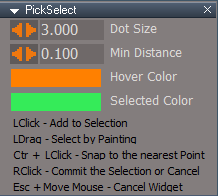
PickSelect
Release 6/29/2024
viewtopic.php?t=3732
It is recommended that you completely Uninstall and Install trueSpace7.61 Beta 8 to a clean directory
Open the Task Manager
If you find any Standalone Runner (32 bit) or trueSpace (32 bit) programs open, Select each one and RClick - End task
Close the Task Manager
Unless there is any reported issues, this is the Final Release
Updates:
Clintons3dPlugin.dll v.1638452
Widgets
PickSelect
-
trueBlue
- Captain
- Posts: 5548
- Joined: 06 Jul 2009, 22:50
- Type the number ten into the box: 10
Re: Final trueSpace 7.61 Beta 8 Unofficial Update
trueSpace7.61 Beta 8 Unofficial Update Version 10
Release 6/29/2024
viewtopic.php?t=3732
It is recommended that you completely Uninstall and Install trueSpace7.61 Beta 8 to a clean directory
Open the Task Manager
If you find any Standalone Runner (32 bit) or trueSpace (32 bit) programs open, Select each one and RClick - End task
Close the Task Manager
Unless there is any reported issues, this is the Final Release
Updates:
Clintons3dPlugin.dll v.1638452
Widgets
PickSelect
SnappingScripts
Release 6/29/2024
viewtopic.php?t=3732
It is recommended that you completely Uninstall and Install trueSpace7.61 Beta 8 to a clean directory
Open the Task Manager
If you find any Standalone Runner (32 bit) or trueSpace (32 bit) programs open, Select each one and RClick - End task
Close the Task Manager
Unless there is any reported issues, this is the Final Release
Updates:
Clintons3dPlugin.dll v.1638452
Widgets
PickSelect
SnappingScripts
-
trueBlue
- Captain
- Posts: 5548
- Joined: 06 Jul 2009, 22:50
- Type the number ten into the box: 10
Re: Final trueSpace 7.61 Beta 8 Unofficial Update
trueSpace7.61 Beta 8 Unofficial Update Version 10
Release 6/30/2024
viewtopic.php?t=3732
It is recommended that you completely Uninstall and Install trueSpace7.61 Beta 8 to a clean directory
Open the Task Manager
If you find any Standalone Runner (32 bit) or trueSpace (32 bit) programs open, Select each one and RClick - End task
Close the Task Manager
Unless there is any reported issues, this is the Final Release
Updates:
Toolbars
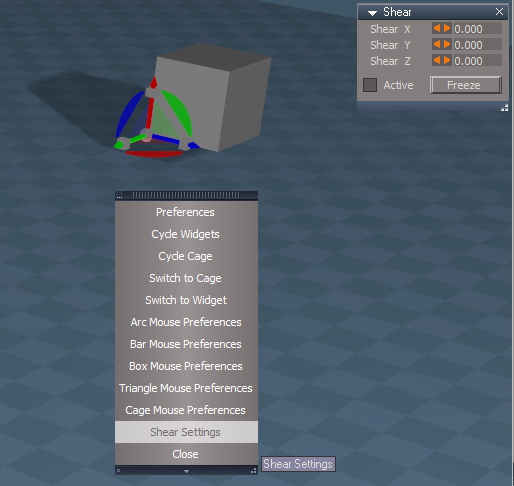
ObjectNavToolbar 'Add: Shear Settings' Shortcuts:
Ctrl Shift O
Object Navigation Widget
MMBClick
Release 6/30/2024
viewtopic.php?t=3732
It is recommended that you completely Uninstall and Install trueSpace7.61 Beta 8 to a clean directory
Open the Task Manager
If you find any Standalone Runner (32 bit) or trueSpace (32 bit) programs open, Select each one and RClick - End task
Close the Task Manager
Unless there is any reported issues, this is the Final Release
Updates:
Toolbars
ObjectNavToolbar 'Add: Shear Settings' Shortcuts:
Ctrl Shift O
Object Navigation Widget
MMBClick
-
trueBlue
- Captain
- Posts: 5548
- Joined: 06 Jul 2009, 22:50
- Type the number ten into the box: 10
Re: Final trueSpace 7.61 Beta 8 Unofficial Update
trueSpace7.61 Beta 8 Unofficial Update Version 10
Release 7/1/2024
viewtopic.php?t=3732
It is recommended that you completely Uninstall and Install trueSpace7.61 Beta 8 to a clean directory
Open the Task Manager
If you find any Standalone Runner (32 bit) or trueSpace (32 bit) programs open, Select each one and RClick - End task
Close the Task Manager
Unless there is any reported issues, this is the Final Release
New: NURBS support Hair - Author Clinton Reese
Updates:
Guard - Author Clinton Reese
"A more complete solution"
Widgets
Default context/Select
Auto Select NURBS
Release 7/1/2024
viewtopic.php?t=3732
It is recommended that you completely Uninstall and Install trueSpace7.61 Beta 8 to a clean directory
Open the Task Manager
If you find any Standalone Runner (32 bit) or trueSpace (32 bit) programs open, Select each one and RClick - End task
Close the Task Manager
Unless there is any reported issues, this is the Final Release
New: NURBS support Hair - Author Clinton Reese
Updates:
Guard - Author Clinton Reese
"A more complete solution"
Widgets
Default context/Select
Auto Select NURBS
-
trueBlue
- Captain
- Posts: 5548
- Joined: 06 Jul 2009, 22:50
- Type the number ten into the box: 10
Re: Final trueSpace 7.61 Beta 8 Unofficial Update
trueSpace7.61 Beta 8 Unofficial Update Version 10
Release 7/3/2024
viewtopic.php?t=3732
It is recommended that you completely Uninstall and Install trueSpace7.61 Beta 8 to a clean directory
Open the Task Manager
If you find any Standalone Runner (32 bit) or trueSpace (32 bit) programs open, Select each one and RClick - End task
Close the Task Manager
Unless there is any reported issues, this is the Final Release
Updates:
Widgets
Zoom to Selections - Author Clinton Reese
CustomScriptsStore
OpenFloatingPanel - Author Clinton Reese
Toolbars
WorkspaceNav
HairToolbar2
Note: Hair Tools no longer run on unsupported objects
For 3D Grouped objects, each 3D child object must be selected first before applying/using Hair tools
Old way would apply hair to all objects in the Group, but the Hair widget tool would not run
You had to select a 3D child object first
Release 7/3/2024
viewtopic.php?t=3732
It is recommended that you completely Uninstall and Install trueSpace7.61 Beta 8 to a clean directory
Open the Task Manager
If you find any Standalone Runner (32 bit) or trueSpace (32 bit) programs open, Select each one and RClick - End task
Close the Task Manager
Unless there is any reported issues, this is the Final Release
Updates:
Widgets
Zoom to Selections - Author Clinton Reese
CustomScriptsStore
OpenFloatingPanel - Author Clinton Reese
Toolbars
WorkspaceNav
HairToolbar2
Note: Hair Tools no longer run on unsupported objects
For 3D Grouped objects, each 3D child object must be selected first before applying/using Hair tools
Old way would apply hair to all objects in the Group, but the Hair widget tool would not run
You had to select a 3D child object first
-
trueBlue
- Captain
- Posts: 5548
- Joined: 06 Jul 2009, 22:50
- Type the number ten into the box: 10
Re: Final trueSpace 7.61 Beta 8 Unofficial Update
trueSpace7.61 Beta 8 Unofficial Update Version 10
Release 7/3/2024
viewtopic.php?t=3732
It is recommended that you completely Uninstall and Install trueSpace7.61 Beta 8 to a clean directory
Open the Task Manager
If you find any Standalone Runner (32 bit) or trueSpace (32 bit) programs open, Select each one and RClick - End task
Close the Task Manager
Unless there is any reported issues, this is the Final Release
Updates:
Widgets
Primitives - Light, Camera, and Primitive 'Add: Alt and or Shift to Snap'
Note: Using the Alt or Shift(preferred) key overrides Snap
Zoom to Selections - Author Clinton Reese
CustomScriptsStore
OpenFloatingPanel - Author Clinton Reese
Toolbars
WorkspaceNav
HairToolbar2
Note: Hair Tools no longer run on unsupported objects
For 3D Grouped objects, each 3D child object must be selected first before applying/using Hair tools
Old way would apply hair to all objects in the Group, but the Hair widget tool would not run
You had to select a 3D child object first
Release 7/3/2024
viewtopic.php?t=3732
It is recommended that you completely Uninstall and Install trueSpace7.61 Beta 8 to a clean directory
Open the Task Manager
If you find any Standalone Runner (32 bit) or trueSpace (32 bit) programs open, Select each one and RClick - End task
Close the Task Manager
Unless there is any reported issues, this is the Final Release
Updates:
Widgets
Primitives - Light, Camera, and Primitive 'Add: Alt and or Shift to Snap'
Note: Using the Alt or Shift(preferred) key overrides Snap
Zoom to Selections - Author Clinton Reese
CustomScriptsStore
OpenFloatingPanel - Author Clinton Reese
Toolbars
WorkspaceNav
HairToolbar2
Note: Hair Tools no longer run on unsupported objects
For 3D Grouped objects, each 3D child object must be selected first before applying/using Hair tools
Old way would apply hair to all objects in the Group, but the Hair widget tool would not run
You had to select a 3D child object first
-
trueBlue
- Captain
- Posts: 5548
- Joined: 06 Jul 2009, 22:50
- Type the number ten into the box: 10
Re: Final trueSpace 7.61 Beta 8 Unofficial Update
trueSpace7.61 Beta 8 Unofficial Update Version 10
Release 7/5/2024
viewtopic.php?t=3732
It is recommended that you completely Uninstall and Install trueSpace7.61 Beta 8 to a clean directory
Open the Task Manager
If you find any Standalone Runner (32 bit) or trueSpace (32 bit) programs open, Select each one and RClick - End task
Close the Task Manager
Unless there is any reported issues, this is the Final Release
Updates:
Widgets
PE MakeCurve - Author Clinton Reese
Note: Did not implement Load on Demand
Primitives - Light, Camera, and Primitive 'Add: Alt and or Shift to Snap'
Note: Using the Alt or Shift(preferred) key overrides Snap
Reinstate "Point edit snapping" for Light and Camera
Note: I cannot recommend using this feature, especially when the object has more than a few Points/Edges
Zoom to Selections - Author Clinton Reese
clintonobjects
ScriptManager
CustomScriptsStore
OpenFloatingPanel - Author Clinton Reese 7/5/20244
Guard - Author Clinton Reese 7/5/20244
CCFunctionSet - Author Clinton Reese 'Modified Export - Curve & Patch'
CustomScriptsStore2
NURBSScripts - Author Clinton Reese 7/5/2024
Toolbars
NURBSToolbar - Author Clinton Reese
WorkspaceMainMenu 'Import & Export commands'
WorkspaceNav
HairToolbar2
Note: Hair Tools no longer run on unsupported objects
For 3D Grouped objects, each 3D child object must be selected first before applying/using Hair tools
Old way would apply hair to all objects in the Group, but the Hair widget tool would not run
You had to select a 3D child object first
Release 7/5/2024
viewtopic.php?t=3732
It is recommended that you completely Uninstall and Install trueSpace7.61 Beta 8 to a clean directory
Open the Task Manager
If you find any Standalone Runner (32 bit) or trueSpace (32 bit) programs open, Select each one and RClick - End task
Close the Task Manager
Unless there is any reported issues, this is the Final Release
Updates:
Widgets
PE MakeCurve - Author Clinton Reese
Note: Did not implement Load on Demand
Primitives - Light, Camera, and Primitive 'Add: Alt and or Shift to Snap'
Note: Using the Alt or Shift(preferred) key overrides Snap
Reinstate "Point edit snapping" for Light and Camera
Note: I cannot recommend using this feature, especially when the object has more than a few Points/Edges
Zoom to Selections - Author Clinton Reese
clintonobjects
ScriptManager
CustomScriptsStore
OpenFloatingPanel - Author Clinton Reese 7/5/20244
Guard - Author Clinton Reese 7/5/20244
CCFunctionSet - Author Clinton Reese 'Modified Export - Curve & Patch'
CustomScriptsStore2
NURBSScripts - Author Clinton Reese 7/5/2024
Toolbars
NURBSToolbar - Author Clinton Reese
WorkspaceMainMenu 'Import & Export commands'
WorkspaceNav
HairToolbar2
Note: Hair Tools no longer run on unsupported objects
For 3D Grouped objects, each 3D child object must be selected first before applying/using Hair tools
Old way would apply hair to all objects in the Group, but the Hair widget tool would not run
You had to select a 3D child object first
-
trueBlue
- Captain
- Posts: 5548
- Joined: 06 Jul 2009, 22:50
- Type the number ten into the box: 10
Re: Final trueSpace 7.61 Beta 8 Unofficial Update
trueSpace7.61 Beta 8 Unofficial Update Version 10
Release 7/6/2024
viewtopic.php?t=3732
It is recommended that you completely Uninstall and Install trueSpace7.61 Beta 8 to a clean directory
Open the Task Manager
If you find any Standalone Runner (32 bit) or trueSpace (32 bit) programs open, Select each one and RClick - End task
Close the Task Manager
Unless there is any reported issues, this is the Final Release
Updates:
Toolbars
Widgets
Offline renderers
ScriptManager
Guard Author - Clinton Reese
Light tools and Camera tools toolbar commands run through the Guard
If a known Background Sphere is detected, it will be set to Invisible so that tool can work properly
Release 7/6/2024
viewtopic.php?t=3732
It is recommended that you completely Uninstall and Install trueSpace7.61 Beta 8 to a clean directory
Open the Task Manager
If you find any Standalone Runner (32 bit) or trueSpace (32 bit) programs open, Select each one and RClick - End task
Close the Task Manager
Unless there is any reported issues, this is the Final Release
Updates:
Toolbars
Widgets
Offline renderers
ScriptManager
Guard Author - Clinton Reese
Light tools and Camera tools toolbar commands run through the Guard
If a known Background Sphere is detected, it will be set to Invisible so that tool can work properly
-
trueBlue
- Captain
- Posts: 5548
- Joined: 06 Jul 2009, 22:50
- Type the number ten into the box: 10
Re: Final trueSpace 7.61 Beta 8 Unofficial Update
trueSpace7.61 Beta 8 Unofficial Update Version 10
Release 7/8/2024
viewtopic.php?t=3732
It is recommended that you completely Uninstall and Install trueSpace7.61 Beta 8 to a clean directory
Open the Task Manager
If you find any Standalone Runner (32 bit) or trueSpace (32 bit) programs open, Select each one and RClick - End task
Close the Task Manager
Unless there is any reported issues, this is the Final Release
Updates:
YafarayScripts 'Update: Smooth Normals: Author - Clinton Reese'
Yafaray Folder 'Update: Render Settings panel'
Release 7/8/2024
viewtopic.php?t=3732
It is recommended that you completely Uninstall and Install trueSpace7.61 Beta 8 to a clean directory
Open the Task Manager
If you find any Standalone Runner (32 bit) or trueSpace (32 bit) programs open, Select each one and RClick - End task
Close the Task Manager
Unless there is any reported issues, this is the Final Release
Updates:
YafarayScripts 'Update: Smooth Normals: Author - Clinton Reese'
Yafaray Folder 'Update: Render Settings panel'
-
trueBlue
- Captain
- Posts: 5548
- Joined: 06 Jul 2009, 22:50
- Type the number ten into the box: 10
Re: Final trueSpace 7.61 Beta 8 Unofficial Update
trueSpace7.61 Beta 8 Unofficial Update Version 10
Release 7/9/2024
viewtopic.php?t=3732
It is recommended that you completely Uninstall and Install trueSpace7.61 Beta 8 to a clean directory
Open the Task Manager
If you find any Standalone Runner (32 bit) or trueSpace (32 bit) programs open, Select each one and RClick - End task
Close the Task Manager
Unless there is any reported issues, this is the Final Release
Updates:
YafarayScripts 'Update: Smooth Normals: Author - Clinton Reese'
Rs Main Libraries
YafaRay4tS Setup
YafaRay Scenes
preobjects
Toolbars
Cameras
Yafaray Folder 'Update: YafaRay4tS panel: Author - Clinton Reese'
Release 7/9/2024
viewtopic.php?t=3732
It is recommended that you completely Uninstall and Install trueSpace7.61 Beta 8 to a clean directory
Open the Task Manager
If you find any Standalone Runner (32 bit) or trueSpace (32 bit) programs open, Select each one and RClick - End task
Close the Task Manager
Unless there is any reported issues, this is the Final Release
Updates:
YafarayScripts 'Update: Smooth Normals: Author - Clinton Reese'
Rs Main Libraries
YafaRay4tS Setup
YafaRay Scenes
preobjects
Toolbars
Cameras
Yafaray Folder 'Update: YafaRay4tS panel: Author - Clinton Reese'
-
trueBlue
- Captain
- Posts: 5548
- Joined: 06 Jul 2009, 22:50
- Type the number ten into the box: 10
Re: Final trueSpace 7.61 Beta 8 Unofficial Update
trueSpace7.61 Beta 8 Unofficial Update Version 10
Release 7/10/2024
viewtopic.php?t=3732
It is recommended that you completely Uninstall and Install trueSpace7.61 Beta 8 to a clean directory
Open the Task Manager
If you find any Standalone Runner (32 bit) or trueSpace (32 bit) programs open, Select each one and RClick - End task
Close the Task Manager
Unless there is any reported issues, this is the Final Release
Updates:
Yafaray Folder 'Update: YafaRay4tS panel: Author - Clinton Reese'
Offline renderers
Toolbars
Release 7/10/2024
viewtopic.php?t=3732
It is recommended that you completely Uninstall and Install trueSpace7.61 Beta 8 to a clean directory
Open the Task Manager
If you find any Standalone Runner (32 bit) or trueSpace (32 bit) programs open, Select each one and RClick - End task
Close the Task Manager
Unless there is any reported issues, this is the Final Release
Updates:
Yafaray Folder 'Update: YafaRay4tS panel: Author - Clinton Reese'
Offline renderers
Toolbars
-
trueBlue
- Captain
- Posts: 5548
- Joined: 06 Jul 2009, 22:50
- Type the number ten into the box: 10
Re: Final trueSpace 7.61 Beta 8 Unofficial Update
trueSpace7.61 Beta 8 Unofficial Update Version 10
Release 7/11/2024
viewtopic.php?t=3732
It is recommended that you completely Uninstall and Install trueSpace7.61 Beta 8 to a clean directory
Open the Task Manager
If you find any Standalone Runner (32 bit) or trueSpace (32 bit) programs open, Select each one and RClick - End task
Close the Task Manager
Unless there is any reported issues, this is the Final Release
Updates:
YafaRa4tS Setup library
Remove:
MoonSkySphere
MoonSkyLight
SunSkySphere
Image Viewer
Add Refresh script
YafaRay4tS.rsl
YafaRay4tS Help
YafaRay toolbar
Moved Volume to first column
Release 7/11/2024
viewtopic.php?t=3732
It is recommended that you completely Uninstall and Install trueSpace7.61 Beta 8 to a clean directory
Open the Task Manager
If you find any Standalone Runner (32 bit) or trueSpace (32 bit) programs open, Select each one and RClick - End task
Close the Task Manager
Unless there is any reported issues, this is the Final Release
Updates:
YafaRa4tS Setup library
Remove:
MoonSkySphere
MoonSkyLight
SunSkySphere
Image Viewer
Add Refresh script
YafaRay4tS.rsl
YafaRay4tS Help
YafaRay toolbar
Moved Volume to first column
-
trueBlue
- Captain
- Posts: 5548
- Joined: 06 Jul 2009, 22:50
- Type the number ten into the box: 10
Re: Final trueSpace 7.61 Beta 8 Unofficial Update
trueSpace7.61 Beta 8 Unofficial Update Version 10
Release 7/13/2024
viewtopic.php?t=3732
It is recommended that you completely Uninstall and Install trueSpace7.61 Beta 8 to a clean directory
Open the Task Manager
If you find any Standalone Runner (32 bit) or trueSpace (32 bit) programs open, Select each one and RClick - End task
Close the Task Manager
Unless there is any reported issues, this is the Final Release
Updates:
Material Editor - 'Removed: D3D Material Converter and Update: Convert D3D materials icon'
Yafaray Folder - 'Update: YafaRay4tS Scene Utilities - D3D Materials button'
Toolbars/ExportUtilities - 'Update: Convert D3D materials toolbar icon'
YafaRay Materials - 'Update: YafaRay Portal_Material'
CustomScriptsStore2
Add: D3D Material Converter
CustomScriptsStore
CCFunctionSet - 'Add: D3D Material Converter function'
D3D Material Converter - Load on demand process - Author Clinton Reese
Release 7/13/2024
viewtopic.php?t=3732
It is recommended that you completely Uninstall and Install trueSpace7.61 Beta 8 to a clean directory
Open the Task Manager
If you find any Standalone Runner (32 bit) or trueSpace (32 bit) programs open, Select each one and RClick - End task
Close the Task Manager
Unless there is any reported issues, this is the Final Release
Updates:
Material Editor - 'Removed: D3D Material Converter and Update: Convert D3D materials icon'
Yafaray Folder - 'Update: YafaRay4tS Scene Utilities - D3D Materials button'
Toolbars/ExportUtilities - 'Update: Convert D3D materials toolbar icon'
YafaRay Materials - 'Update: YafaRay Portal_Material'
CustomScriptsStore2
Add: D3D Material Converter
CustomScriptsStore
CCFunctionSet - 'Add: D3D Material Converter function'
D3D Material Converter - Load on demand process - Author Clinton Reese
-
trueBlue
- Captain
- Posts: 5548
- Joined: 06 Jul 2009, 22:50
- Type the number ten into the box: 10
Re: Final trueSpace 7.61 Beta 8 Unofficial Update
trueSpace7.61 Beta 8 Unofficial Update Version 10
Release 7/15/2024
viewtopic.php?t=3732
It is recommended that you completely Uninstall and Install trueSpace7.61 Beta 8 to a clean directory
Open the Task Manager
If you find any Standalone Runner (32 bit) or trueSpace (32 bit) programs open, Select each one and RClick - End task
Close the Task Manager
Unless there is any reported issues, this is the Final Release
Updates:
Postprocess - Update: Options aspect
D3D Material Converter - 'Removed OpenPanel script and PanelFrame'
NURBSScripts - Update 7/14/2024: Author Clinton Reese'
Yafaray Folder - Update: YafaRay4tS Scene Utilities - 'D3D Materials button code'
Note: Opens the D3D Material Converter's YafaRay4tS aspect
Release 7/15/2024
viewtopic.php?t=3732
It is recommended that you completely Uninstall and Install trueSpace7.61 Beta 8 to a clean directory
Open the Task Manager
If you find any Standalone Runner (32 bit) or trueSpace (32 bit) programs open, Select each one and RClick - End task
Close the Task Manager
Unless there is any reported issues, this is the Final Release
Updates:
Postprocess - Update: Options aspect
D3D Material Converter - 'Removed OpenPanel script and PanelFrame'
NURBSScripts - Update 7/14/2024: Author Clinton Reese'
Yafaray Folder - Update: YafaRay4tS Scene Utilities - 'D3D Materials button code'
Note: Opens the D3D Material Converter's YafaRay4tS aspect
-
trueBlue
- Captain
- Posts: 5548
- Joined: 06 Jul 2009, 22:50
- Type the number ten into the box: 10
Re: Final trueSpace 7.61 Beta 8 Unofficial Update
trueSpace7.61 Beta 8 Unofficial Update Version 10
Release 8/5/2024
viewtopic.php?t=3732
It is recommended that you completely Uninstall and Install trueSpace7.61 Beta 8 to a clean directory
Open the Task Manager
If you find any Standalone Runner (32 bit) or trueSpace (32 bit) programs open, Select each one and RClick - End task
Close the Task Manager
Unless there is any reported issues, this is the Final Release
Updates:
Clintons3dPlugin.dll
July 21, 2024
Clintons3D Package (v.1638453)
MaterialLookupTable commands for scripting
MaterialList commands exposed for scripting
new commands are used in the new unreal t3d import
Materials - DX9 library
Updated: Material node in all materials
D3D Material Converter
Updated: Material node
Updated: convert compiled to d3d script
Inputs Flagged as Outputs .
Correct Inputs Flags
Release 8/5/2024
viewtopic.php?t=3732
It is recommended that you completely Uninstall and Install trueSpace7.61 Beta 8 to a clean directory
Open the Task Manager
If you find any Standalone Runner (32 bit) or trueSpace (32 bit) programs open, Select each one and RClick - End task
Close the Task Manager
Unless there is any reported issues, this is the Final Release
Updates:
Clintons3dPlugin.dll
July 21, 2024
Clintons3D Package (v.1638453)
MaterialLookupTable commands for scripting
MaterialList commands exposed for scripting
new commands are used in the new unreal t3d import
Materials - DX9 library
Updated: Material node in all materials
D3D Material Converter
Updated: Material node
Updated: convert compiled to d3d script
Inputs Flagged as Outputs .
Correct Inputs Flags
-
trueBlue
- Captain
- Posts: 5548
- Joined: 06 Jul 2009, 22:50
- Type the number ten into the box: 10
Re: Final trueSpace 7.61 Beta 8 Unofficial Update
trueSpace7.61 Beta 8 Unofficial Update Version 10
Release 8/6/2024
viewtopic.php?t=3732
It is recommended that you completely Uninstall and Install trueSpace7.61 Beta 8 to a clean directory
Open the Task Manager
If you find any Standalone Runner (32 bit) or trueSpace (32 bit) programs open, Select each one and RClick - End task
Close the Task Manager
Unless there is any reported issues, this is the Final Release
Updates:
CustomCommands
colladagroup/fix_shaders
Update: Support for Material node
ColladaPostProcessor/Texture Function Set
Update: Support for Material node
preobjects
Update:
C3DReset
Release 8/6/2024
viewtopic.php?t=3732
It is recommended that you completely Uninstall and Install trueSpace7.61 Beta 8 to a clean directory
Open the Task Manager
If you find any Standalone Runner (32 bit) or trueSpace (32 bit) programs open, Select each one and RClick - End task
Close the Task Manager
Unless there is any reported issues, this is the Final Release
Updates:
CustomCommands
colladagroup/fix_shaders
Update: Support for Material node
ColladaPostProcessor/Texture Function Set
Update: Support for Material node
preobjects
Update:
C3DReset
-
trueBlue
- Captain
- Posts: 5548
- Joined: 06 Jul 2009, 22:50
- Type the number ten into the box: 10
Re: Final trueSpace 7.61 Beta 8 Unofficial Update
trueSpace7.61 Beta 8 Unofficial Update Version 10
Release 8/9/2024
viewtopic.php?t=3732
It is recommended that you completely Uninstall and Install trueSpace7.61 Beta 8 to a clean directory
Open the Task Manager
If you find any Standalone Runner (32 bit) or trueSpace (32 bit) programs open, Select each one and RClick - End task
Close the Task Manager
Unless there are any reported issues, this is the Final Release
Updates:
Widgets
DeformScripts
NURBS
Release 8/9/2024
viewtopic.php?t=3732
It is recommended that you completely Uninstall and Install trueSpace7.61 Beta 8 to a clean directory
Open the Task Manager
If you find any Standalone Runner (32 bit) or trueSpace (32 bit) programs open, Select each one and RClick - End task
Close the Task Manager
Unless there are any reported issues, this is the Final Release
Updates:
Widgets
DeformScripts
NURBS
-
trueBlue
- Captain
- Posts: 5548
- Joined: 06 Jul 2009, 22:50
- Type the number ten into the box: 10
Re: Final trueSpace 7.61 Beta 8 Unofficial Update
trueSpace7.61 Beta 8 Unofficial Update Version 10
Release 8/10/2024
viewtopic.php?t=3732
It is recommended that you completely Uninstall and Install trueSpace7.61 Beta 8 to a clean directory
Open the Task Manager
If you find any Standalone Runner (32 bit) or trueSpace (32 bit) programs open, Select each one and RClick - End task
Close the Task Manager
Unless there are any reported issues, this is the Final Release
Updates:
Color Picker
NURBS 8/9/2024: Author Clinton Reese'
Release 8/10/2024
viewtopic.php?t=3732
It is recommended that you completely Uninstall and Install trueSpace7.61 Beta 8 to a clean directory
Open the Task Manager
If you find any Standalone Runner (32 bit) or trueSpace (32 bit) programs open, Select each one and RClick - End task
Close the Task Manager
Unless there are any reported issues, this is the Final Release
Updates:
Color Picker
NURBS 8/9/2024: Author Clinton Reese'
-
trueBlue
- Captain
- Posts: 5548
- Joined: 06 Jul 2009, 22:50
- Type the number ten into the box: 10
Re: Final trueSpace 7.61 Beta 8 Unofficial Update
trueSpace7.61 Beta 8 Unofficial Update Version 10
Release 8/15/2024
viewtopic.php?t=3732
It is recommended that you completely Uninstall and Install trueSpace7.61 Beta 8 to a clean directory
Open the Task Manager
If you find any Standalone Runner (32 bit) or trueSpace (32 bit) programs open, Select each one and RClick - End task
Close the Task Manager
Unless there are any reported issues, this is the Final Release
Updates:
preobjects
MaterialEditor
Toolbars/ExportUtilities 'Add: Material Utilities icon'
CustomScriptsStore
CCFunctionSet 'Add: Materials List, Material Utilities, and D3D Material Converter'
Nulls
CustomScriptsStore2
Materials List
Material Utilities
D3D Material Converter
.
Release 8/15/2024
viewtopic.php?t=3732
It is recommended that you completely Uninstall and Install trueSpace7.61 Beta 8 to a clean directory
Open the Task Manager
If you find any Standalone Runner (32 bit) or trueSpace (32 bit) programs open, Select each one and RClick - End task
Close the Task Manager
Unless there are any reported issues, this is the Final Release
Updates:
preobjects
MaterialEditor
Toolbars/ExportUtilities 'Add: Material Utilities icon'
CustomScriptsStore
CCFunctionSet 'Add: Materials List, Material Utilities, and D3D Material Converter'
Nulls
CustomScriptsStore2
Materials List
Material Utilities
D3D Material Converter
.
-
clintonman
- Captain
- Posts: 5659
- Joined: 21 May 2009, 21:08
- Type the number ten into the box: 0
- Location: California
Re: Final trueSpace 7.61 Beta 8 Unofficial Update
I found that autokey was creating 2 undos whether it was active or not.
The attached script will change all the autokey code in the widgets so there is 1 undo when autokey is inactive and 2 when autokey is active.
The new command is based on a plugin update from December 2 that adds GetNodeValueInt, GetNodeValueFloat and GetNodeValueString commands. They make it possible to read node values where Node.Value does not work.
The attached script will change all the autokey code in the widgets so there is 1 undo when autokey is inactive and 2 when autokey is active.
The new command is based on a plugin update from December 2 that adds GetNodeValueInt, GetNodeValueFloat and GetNodeValueString commands. They make it possible to read node values where Node.Value does not work.
Code: Select all
if(System.CreateDO("Clintons3D Package/Utility functions").GetNodeValueInt("/Scripts/CustomCommands/AutoKey","auto")) Activity.Run("/Scripts/CustomCommands/AutoKey");- Attachments
-
- FixAutoKeyWidgetCommand03.RsObj
- (6.55 KiB) Downloaded 44 times
-
trueBlue
- Captain
- Posts: 5548
- Joined: 06 Jul 2009, 22:50
- Type the number ten into the box: 10
Re: Final trueSpace 7.61 Beta 8 Unofficial Update
Thank you!clintonman wrote: 16 Aug 2024, 01:02 I found that autokey was creating 2 undos whether it was active or not.
The attached script will change all the autokey code in the widgets so there is 1 undo when autokey is inactive and 2 when autokey is active.
The new command is based on a plugin update from December 2 that adds GetNodeValueInt, GetNodeValueFloat and GetNodeValueString commands. They make it possible to read node values where Node.Value does not work.
Code: Select all
if(System.CreateDO("Clintons3D Package/Utility functions").GetNodeValueInt("/Scripts/CustomCommands/AutoKey","auto")) Activity.Run("/Scripts/CustomCommands/AutoKey");
Update coming...
-
trueBlue
- Captain
- Posts: 5548
- Joined: 06 Jul 2009, 22:50
- Type the number ten into the box: 10
Re: Final trueSpace 7.61 Beta 8 Unofficial Update
trueSpace7.61 Beta 8 Unofficial Update Version 10
Release 8/15/2024
viewtopic.php?t=3732
It is recommended that you completely Uninstall and Install trueSpace7.61 Beta 8 to a clean directory
Open the Task Manager
If you find any Standalone Runner (32 bit) or trueSpace (32 bit) programs open, Select each one and RClick - End task
Close the Task Manager
Unless there are any reported issues, this is the Final Release
Updates:
preobjects
Widgets
Release 8/15/2024
viewtopic.php?t=3732
It is recommended that you completely Uninstall and Install trueSpace7.61 Beta 8 to a clean directory
Open the Task Manager
If you find any Standalone Runner (32 bit) or trueSpace (32 bit) programs open, Select each one and RClick - End task
Close the Task Manager
Unless there are any reported issues, this is the Final Release
Updates:
preobjects
Widgets
-
trueBlue
- Captain
- Posts: 5548
- Joined: 06 Jul 2009, 22:50
- Type the number ten into the box: 10
Re: Final trueSpace 7.61 Beta 8 Unofficial Update
trueSpace7.61 Beta 8 Unofficial Update Version 10
Release 8/18//2024
viewtopic.php?t=3732
It is recommended that you completely Uninstall and Install trueSpace7.61 Beta 8 to a clean directory
Open the Task Manager
If you find any Standalone Runner (32 bit) or trueSpace (32 bit) programs open, Select each one and RClick - End task
Close the Task Manager
Unless there are any reported issues, this is the Final Release
Updates:
preobjects
Widgets
PE Rect select - Unchecked "Connected"
Release 8/18//2024
viewtopic.php?t=3732
It is recommended that you completely Uninstall and Install trueSpace7.61 Beta 8 to a clean directory
Open the Task Manager
If you find any Standalone Runner (32 bit) or trueSpace (32 bit) programs open, Select each one and RClick - End task
Close the Task Manager
Unless there are any reported issues, this is the Final Release
Updates:
preobjects
Widgets
PE Rect select - Unchecked "Connected"
-
trueBlue
- Captain
- Posts: 5548
- Joined: 06 Jul 2009, 22:50
- Type the number ten into the box: 10
Re: Final trueSpace 7.61 Beta 8 Unofficial Update
trueSpace7.61 Beta 8 Unofficial Update Version 10
Release 8/25//2024
viewtopic.php?t=3732
It is recommended that you completely Uninstall and Install trueSpace7.61 Beta 8 to a clean directory
Open the Task Manager
If you find any Standalone Runner (32 bit) or trueSpace (32 bit) programs open, Select each one and RClick - End task
Close the Task Manager
Unless there are any reported issues, this is the Final Release
Updates:
RsGLTFPlugin.rsx version 1638409
Material Utilities
D3D Material Converter
Release 8/25//2024
viewtopic.php?t=3732
It is recommended that you completely Uninstall and Install trueSpace7.61 Beta 8 to a clean directory
Open the Task Manager
If you find any Standalone Runner (32 bit) or trueSpace (32 bit) programs open, Select each one and RClick - End task
Close the Task Manager
Unless there are any reported issues, this is the Final Release
Updates:
RsGLTFPlugin.rsx version 1638409
Material Utilities
D3D Material Converter
-
trueBlue
- Captain
- Posts: 5548
- Joined: 06 Jul 2009, 22:50
- Type the number ten into the box: 10
Re: Final trueSpace 7.61 Beta 8 Unofficial Update
trueSpace7.61 Beta 8 Unofficial Update Version 10
Release 8/29//2024
viewtopic.php?t=3732
It is recommended that you completely Uninstall and Install trueSpace7.61 Beta 8 to a clean directory
Open the Task Manager
If you find any Standalone Runner (32 bit) or trueSpace (32 bit) programs open, Select each one and RClick - End task
Close the Task Manager
Unless there are any reported issues, this is the Final Release
Updates:
Widgets - Add Auto Keyframing to the original Object Navigation Widget
UUCommands/3D Unencapsulate - Author Clinton Reese
D3D Material Converter - Author Clinton Reese
Material Utilities - Author Clinton Reese
Materials List - Author Clinton Reese
Clintons3dPlugin.dll vv.1638456 - Author Clinton Reese
Release 8/29//2024
viewtopic.php?t=3732
It is recommended that you completely Uninstall and Install trueSpace7.61 Beta 8 to a clean directory
Open the Task Manager
If you find any Standalone Runner (32 bit) or trueSpace (32 bit) programs open, Select each one and RClick - End task
Close the Task Manager
Unless there are any reported issues, this is the Final Release
Updates:
Widgets - Add Auto Keyframing to the original Object Navigation Widget
UUCommands/3D Unencapsulate - Author Clinton Reese
D3D Material Converter - Author Clinton Reese
Material Utilities - Author Clinton Reese
Materials List - Author Clinton Reese
Clintons3dPlugin.dll vv.1638456 - Author Clinton Reese
-
trueBlue
- Captain
- Posts: 5548
- Joined: 06 Jul 2009, 22:50
- Type the number ten into the box: 10
Re: Final trueSpace 7.61 Beta 8 Unofficial Update
trueSpace7.61 Beta 8 Unofficial Update Version 10
Release 9/1//2024
viewtopic.php?t=3732
It is recommended that you completely Uninstall and Install trueSpace7.61 Beta 8 to a clean directory
Open the Task Manager
If you find any Standalone Runner (32 bit) or trueSpace (32 bit) programs open, Select each one and RClick - End task
Close the Task Manager
Unless there are any reported issues, this is the Final Release
Updates:
D3D Material Converter - Author Clinton Reese
Widgets/WidgetScripts/CycleObjectNavigationWidget script - Author Clinton Reese
Primitives/Text Material 0, Material 1, and Material 2 buttons - Author Clinton Reese
Clintons3dPlugin.dll v.1638457 - Author Clinton Reese
Release 9/1//2024
viewtopic.php?t=3732
It is recommended that you completely Uninstall and Install trueSpace7.61 Beta 8 to a clean directory
Open the Task Manager
If you find any Standalone Runner (32 bit) or trueSpace (32 bit) programs open, Select each one and RClick - End task
Close the Task Manager
Unless there are any reported issues, this is the Final Release
Updates:
D3D Material Converter - Author Clinton Reese
Widgets/WidgetScripts/CycleObjectNavigationWidget script - Author Clinton Reese
Primitives/Text Material 0, Material 1, and Material 2 buttons - Author Clinton Reese
Clintons3dPlugin.dll v.1638457 - Author Clinton Reese
-
trueBlue
- Captain
- Posts: 5548
- Joined: 06 Jul 2009, 22:50
- Type the number ten into the box: 10
Re: Final trueSpace 7.61 Beta 8 Unofficial Update
trueSpace7.61 Beta 8 Unofficial Update Version 10
Release 9/2//2024
viewtopic.php?t=3732
It is recommended that you completely Uninstall and Install trueSpace7.61 Beta 8 to a clean directory
Open the Task Manager
If you find any Standalone Runner (32 bit) or trueSpace (32 bit) programs open, Select each one and RClick - End task
Close the Task Manager
Unless there are any reported issues, this is the Final Release
Updates:
Select - Author Clinton Reese 'Cycle Select - Do not close floating panel if items do not exist'
Release 9/2//2024
viewtopic.php?t=3732
It is recommended that you completely Uninstall and Install trueSpace7.61 Beta 8 to a clean directory
Open the Task Manager
If you find any Standalone Runner (32 bit) or trueSpace (32 bit) programs open, Select each one and RClick - End task
Close the Task Manager
Unless there are any reported issues, this is the Final Release
Updates:
Select - Author Clinton Reese 'Cycle Select - Do not close floating panel if items do not exist'
-
trueBlue
- Captain
- Posts: 5548
- Joined: 06 Jul 2009, 22:50
- Type the number ten into the box: 10
Re: Final trueSpace 7.61 Beta 8 Unofficial Update
trueSpace7.61 Beta 8 Unofficial Update Version 10
Release 9/3//2024
viewtopic.php?t=3732
It is recommended that you completely Uninstall and Install trueSpace7.61 Beta 8 to a clean directory
Open the Task Manager
If you find any Standalone Runner (32 bit) or trueSpace (32 bit) programs open, Select each one and RClick - End task
Close the Task Manager
Unless there are any reported issues, this is the Final Release
Updates:
Widgets:
Background/Ortho Pan speed
Node.Value("/Widgets/Tools/Background/Ortho/Linear move action", "SpeedX") = -0.01
Node.Value("/Widgets/Tools/Background/Ortho/Linear move action", "SpeedY") = -0.01
PE lasso select/Lasso select 'Add Selection Style options'
Release 9/3//2024
viewtopic.php?t=3732
It is recommended that you completely Uninstall and Install trueSpace7.61 Beta 8 to a clean directory
Open the Task Manager
If you find any Standalone Runner (32 bit) or trueSpace (32 bit) programs open, Select each one and RClick - End task
Close the Task Manager
Unless there are any reported issues, this is the Final Release
Updates:
Widgets:
Background/Ortho Pan speed
Node.Value("/Widgets/Tools/Background/Ortho/Linear move action", "SpeedX") = -0.01
Node.Value("/Widgets/Tools/Background/Ortho/Linear move action", "SpeedY") = -0.01
PE lasso select/Lasso select 'Add Selection Style options'
-
garcia
- Chief Petty Officer
- Posts: 80
- Joined: 23 Jan 2023, 02:51
- Type the number ten into the box: 10
Re: Final trueSpace 7.61 Beta 8 Unofficial Update
Hello again 
I"m wanting to try out the FBX importer, I just cant figure out how to use them.
I did a fresh install of 7.61 (full, not the Rosetta one) and extracted the update into the folder, reset the toolbars and had a look through the library but I couldn't find anything that hinted to imports except "clinton's toolbar" buttons.
I have these importers/exporters installed and loaded, just not sure what to do next. Anyway help would be great!
I"m wanting to try out the FBX importer, I just cant figure out how to use them.
I did a fresh install of 7.61 (full, not the Rosetta one) and extracted the update into the folder, reset the toolbars and had a look through the library but I couldn't find anything that hinted to imports except "clinton's toolbar" buttons.
I have these importers/exporters installed and loaded, just not sure what to do next. Anyway help would be great!
-
trueBlue
- Captain
- Posts: 5548
- Joined: 06 Jul 2009, 22:50
- Type the number ten into the box: 10
Re: Final trueSpace 7.61 Beta 8 Unofficial Update
The FBX scripts are already included in the Unofficial Updatesgarcia wrote: 13 Sep 2024, 15:39 Hello again
I"m wanting to try out the FBX importer, I just cant figure out how to use them.
I did a fresh install of 7.61 (full, not the Rosetta one) and extracted the update into the folder, reset the toolbars and had a look through the library but I couldn't find anything that hinted to imports except "clinton's toolbar" buttons.
I have these importers/exporters installed and loaded, just not sure what to do next.
ts.png
Anyway help would be great!
Open this toolbar: .
FBX Import/Export toolbar icon
LMB Import FBX
RMB Export FBX
-
garcia
- Chief Petty Officer
- Posts: 80
- Joined: 23 Jan 2023, 02:51
- Type the number ten into the box: 10
Re: Final trueSpace 7.61 Beta 8 Unofficial Update
Thanks for the reply, I have the toolbar with the buttons, left click throws this "warning"
Right click doesn't seem to do anything.
-
trueBlue
- Captain
- Posts: 5548
- Joined: 06 Jul 2009, 22:50
- Type the number ten into the box: 10
Re: Final trueSpace 7.61 Beta 8 Unofficial Update
Did you install the FBX scripts from:
https://clintons3d.com/plugins/truespac ... inout.html
Using the installer?
https://clintons3d.com/plugins/truespac ... inout.html
Using the installer?
-
garcia
- Chief Petty Officer
- Posts: 80
- Joined: 23 Jan 2023, 02:51
- Type the number ten into the box: 10
Re: Final trueSpace 7.61 Beta 8 Unofficial Update
I install TS, unofficial update, and saw the files rsx files in the folder and install and loaded them in TS.
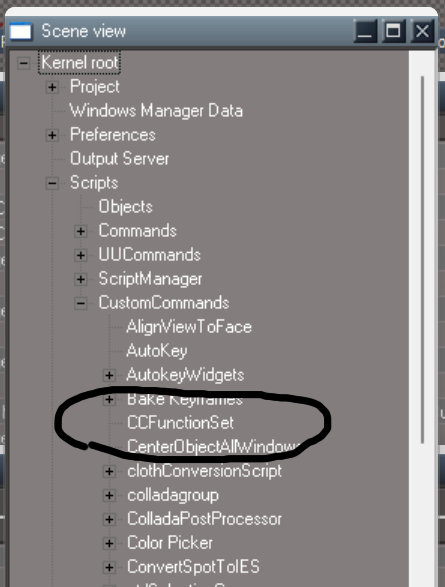
I didn't download anything from that page... except the VC++ runtime 2013
-
trueBlue
- Captain
- Posts: 5548
- Joined: 06 Jul 2009, 22:50
- Type the number ten into the box: 10
Re: Final trueSpace 7.61 Beta 8 Unofficial Update
Did you restart tS after Loading the rsx?garcia wrote: 13 Sep 2024, 16:26 I install TS, unofficial update, and saw the files rsx files in the folder and install and loaded them in TS.
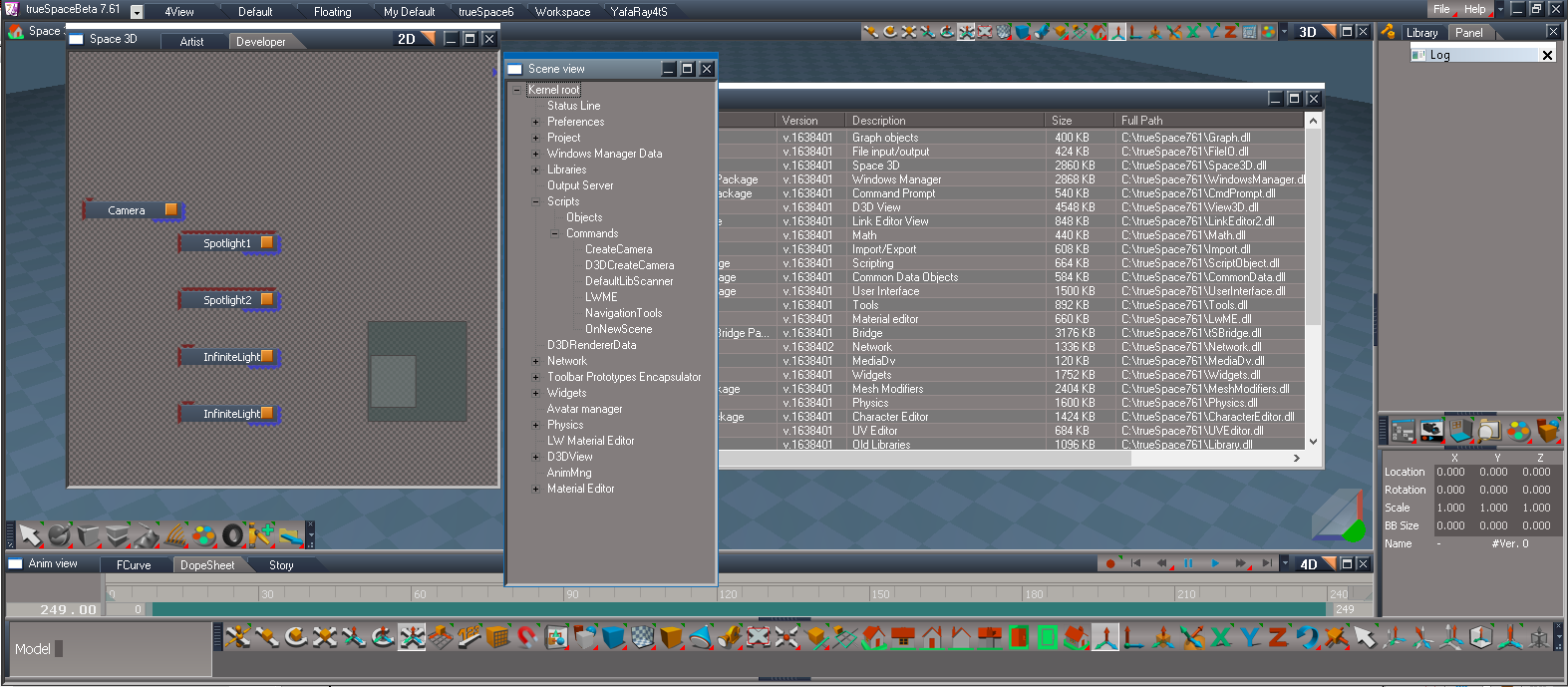
I didn't download anything from that page.
Link to clintonman FBX thread:
viewtopic.php?t=3547
-
clintonman
- Captain
- Posts: 5659
- Joined: 21 May 2009, 21:08
- Type the number ten into the box: 0
- Location: California
Re: Final trueSpace 7.61 Beta 8 Unofficial Update
That error looks like the export utilities toolbar is not opening. So the fbx scripts and plugin have nothing to do with the problem.garcia wrote: 13 Sep 2024, 16:14 Thanks for the reply, I have the toolbar with the buttons, left click throws this "warning"
ts2.png
Right click doesn't seem to do anything.
-
clintonman
- Captain
- Posts: 5659
- Joined: 21 May 2009, 21:08
- Type the number ten into the box: 0
- Location: California
Re: Final trueSpace 7.61 Beta 8 Unofficial Update
It looks like CCFunctionSet does not exist. If you open the Scene View does it show?
-
trueBlue
- Captain
- Posts: 5548
- Joined: 06 Jul 2009, 22:50
- Type the number ten into the box: 10
Re: Final trueSpace 7.61 Beta 8 Unofficial Update
Just tested opening the toolbar and FBX Import/Export
Both work
Here are the commands that are called to open the panels in the Stack
LMB - FBX Import
Activity.Run('/Scripts/CustomCommands/fbxgroup2/LMB Import')
RMB - FBX Export
Activity.Run('/Scripts/CustomCommands/fbxgroup2/RMB Export')
Both work
Here are the commands that are called to open the panels in the Stack
LMB - FBX Import
Activity.Run('/Scripts/CustomCommands/fbxgroup2/LMB Import')
RMB - FBX Export
Activity.Run('/Scripts/CustomCommands/fbxgroup2/RMB Export')
-
garcia
- Chief Petty Officer
- Posts: 80
- Joined: 23 Jan 2023, 02:51
- Type the number ten into the box: 10
Re: Final trueSpace 7.61 Beta 8 Unofficial Update
Windows 10
Windows xp:
Where do I enter the Activity.Run commands? I tried CMD but it didn't seem to do anything for me.
-
trueBlue
- Captain
- Posts: 5548
- Joined: 06 Jul 2009, 22:50
- Type the number ten into the box: 10
Re: Final trueSpace 7.61 Beta 8 Unofficial Update
When you installed the UU, did you Reset to Default Context and then Restart trueSpace?
From the looks of your Scene View, it looks like you need to do the above two Steps
You're missing UUCommands, ScriptManager, and CustomCommands
This is what the Scripts look like in the UU in the Scene View
From the looks of your Scene View, it looks like you need to do the above two Steps
You're missing UUCommands, ScriptManager, and CustomCommands
This is what the Scripts look like in the UU in the Scene View
-
garcia
- Chief Petty Officer
- Posts: 80
- Joined: 23 Jan 2023, 02:51
- Type the number ten into the box: 10
Re: Final trueSpace 7.61 Beta 8 Unofficial Update
You are right! How do I "Reset to Default Context", I dont know what that means or how to do it.
I tried switching tabs, but I dont know how to reset them??
-
trueBlue
- Captain
- Posts: 5548
- Joined: 06 Jul 2009, 22:50
- Type the number ten into the box: 10
Re: Final trueSpace 7.61 Beta 8 Unofficial Update
Open the Command Prompt
Copy & Paste:
RsApp.Reset()
Press your Enter key
Copy & Paste:
RsApp.Reset()
Press your Enter key
-
garcia
- Chief Petty Officer
- Posts: 80
- Joined: 23 Jan 2023, 02:51
- Type the number ten into the box: 10
Re: Final trueSpace 7.61 Beta 8 Unofficial Update
Thank you
That worked

That worked
-
clintonman
- Captain
- Posts: 5659
- Joined: 21 May 2009, 21:08
- Type the number ten into the box: 0
- Location: California
Re: Final trueSpace 7.61 Beta 8 Unofficial Update
garcia wrote: 14 Sep 2024, 01:21 You are right! How do I "Reset to Default Context", I dont know what that means or how to do it.
I tried switching tabs, but I dont know how to reset them??
You can find the Reset Default Context in the indicated column of the small toolbar.
Edit: posted at the same time, glad you got it sorted out.
-
trueBlue
- Captain
- Posts: 5548
- Joined: 06 Jul 2009, 22:50
- Type the number ten into the box: 10
Re: Final trueSpace 7.61 Beta 8 Unofficial Update
I showed him the CMD way because when the UUCommands is missing the Reset to Default Context LMB command does not workclintonman wrote: 14 Sep 2024, 01:41ts-sceneviewArrow.pnggarcia wrote: 14 Sep 2024, 01:21 You are right! How do I "Reset to Default Context", I dont know what that means or how to do it.
I tried switching tabs, but I dont know how to reset them??
You can find the Reset Default Context in the indicated column of the small toolbar.
Edit: posted at the same time, glad you got it sorted out.
Only RMB works
Edit: I was mistaken, LMB command does work
-
clintonman
- Captain
- Posts: 5659
- Joined: 21 May 2009, 21:08
- Type the number ten into the box: 0
- Location: California
Re: Final trueSpace 7.61 Beta 8 Unofficial Update
If you exit tS and delete the default.ctx file and start tS would that have the same effect? Just curious.trueBlue wrote: 14 Sep 2024, 02:04I showed him the CMD way because when the UUCommands is missing the Reset to Default Context LMB command does not workclintonman wrote: 14 Sep 2024, 01:41ts-sceneviewArrow.pnggarcia wrote: 14 Sep 2024, 01:21 You are right! How do I "Reset to Default Context", I dont know what that means or how to do it.
I tried switching tabs, but I dont know how to reset them??
You can find the Reset Default Context in the indicated column of the small toolbar.
Edit: posted at the same time, glad you got it sorted out.
Only RMB works
-
trueBlue
- Captain
- Posts: 5548
- Joined: 06 Jul 2009, 22:50
- Type the number ten into the box: 10
Re: Final trueSpace 7.61 Beta 8 Unofficial Update
I do not know but I need to fix the LMB command so that it works if UUCommands does not exist, run RsApp.Reset()clintonman wrote: 14 Sep 2024, 02:08If you exit tS and delete the default.ctx file and start tS would that have the same effect? Just curious.trueBlue wrote: 14 Sep 2024, 02:04I showed him the CMD way because when the UUCommands is missing the Reset to Default Context LMB command does not workclintonman wrote: 14 Sep 2024, 01:41
ts-sceneviewArrow.png
You can find the Reset Default Context in the indicated column of the small toolbar.
Edit: posted at the same time, glad you got it sorted out.
Only RMB works
Shortcut too
-
trueBlue
- Captain
- Posts: 5548
- Joined: 06 Jul 2009, 22:50
- Type the number ten into the box: 10
Re: Final trueSpace 7.61 Beta 8 Unofficial Update
-
clintonman
- Captain
- Posts: 5659
- Joined: 21 May 2009, 21:08
- Type the number ten into the box: 0
- Location: California
Re: Final trueSpace 7.61 Beta 8 Unofficial Update
I had no idea that existed. You should put a link to it in the instructions or copy it into the instructions.trueBlue wrote: 14 Sep 2024, 02:30garcia wrote: 14 Sep 2024, 01:41 Thank you![]()
That worked![]()
![]()
![]()
![]()
viewtopic.php?p=41532#p41532
-
trueBlue
- Captain
- Posts: 5548
- Joined: 06 Jul 2009, 22:50
- Type the number ten into the box: 10
Re: Final trueSpace 7.61 Beta 8 Unofficial Update
File menuclintonman wrote: 14 Sep 2024, 02:38I had no idea that existed. You should put a link to it in the instructions or copy it into the instructions.trueBlue wrote: 14 Sep 2024, 02:30garcia wrote: 14 Sep 2024, 01:41 Thank you![]()
That worked![]()
![]()
![]()
![]()
viewtopic.php?p=41532#p41532
Help
Updates
-
garcia
- Chief Petty Officer
- Posts: 80
- Joined: 23 Jan 2023, 02:51
- Type the number ten into the box: 10
Re: Final trueSpace 7.61 Beta 8 Unofficial Update
trueBlue wrote: 14 Sep 2024, 03:13 File menu
Help
Updates
I wouldnt have thought to look there... I looked at the install files for a readme.txt or something, like RsAnimPlugin.pdf.
Is that page missing the toolbar reset process? or is that not required doing a default context reset on first starting TS?
Ideally, a video showing the install process is the best way, like on the persistent page.
-
trueBlue
- Captain
- Posts: 5548
- Joined: 06 Jul 2009, 22:50
- Type the number ten into the box: 10
Re: Final trueSpace 7.61 Beta 8 Unofficial Update
trueSpace Beta 7.61 Unofficial Update.txtgarcia wrote: 14 Sep 2024, 08:18trueBlue wrote: 14 Sep 2024, 03:13 File menu
Help
Updates
I wouldnt have thought to look there... I looked at the install files for a readme.txt or something, like RsAnimPlugin.pdf.
Is that page missing the toolbar reset process? or is that not required doing a default context reset on first starting TS?
Ideally, a video showing the install process is the best way, like on the persistent page.
Is included in the Unofficial Updates
This txt file is the same text where you downloaded it
viewtopic.php?t=3732
Both give written instructions on the process
Reset to Default Context
Is Required
Had you followed these instructions, it is likely that we would not be having these conversations
Even the FBX toolbar LMB and RMB commands checks to see if the required plugin is Installed and Loaded
If not, it opens the Package Manager, where you can Install and Load it
-
garcia
- Chief Petty Officer
- Posts: 80
- Joined: 23 Jan 2023, 02:51
- Type the number ten into the box: 10
Re: Final trueSpace 7.61 Beta 8 Unofficial Update
trueBlue wrote: 14 Sep 2024, 12:57 trueSpace Beta 7.61 Unofficial Update.txt
Is included in the Unofficial Updates
It's in the TS folder, I'd suggest moving it to the root folder, where it has a higher chance of being seen.
You give me too much credit!trueBlue wrote: 14 Sep 2024, 12:57 Reset to Default Context
Is Required
Had you followed these instructions, it is likely that we would not be having these conversations![]()
"Reset to Default Context" are just words, with no context or explanation of where, what or how to do anything.
Assuming someone has used TS when installing just doesn't work.... that's why I suggested making a installation video.
-
trueBlue
- Captain
- Posts: 5548
- Joined: 06 Jul 2009, 22:50
- Type the number ten into the box: 10
Re: Final trueSpace 7.61 Beta 8 Unofficial Update
We went through this same exact issue last year, so I assumed you knew how to Reset to Default Contextgarcia wrote: 14 Sep 2024, 23:12 You give me too much credit!![]()
"Reset to Default Context" are just words, with no context or explanation of where, what or how to do anything.
Assuming someone has used TS when installing just doesn't work.... that's why I suggested making a installation video.
search.php?author_id=2379&sr=posts
I assumed you read the tS761_UU_Artists_Guide.pdf as you have suggested
https://united3dartists.com/download/tS ... _Guide.pdf
Clearly shows how to Reset to Default Context