New NURBS tools

User avatar
trueBlue
Captain
Posts: 5548
Joined: 06 Jul 2009, 22:50
Type the number ten into the box: 10

Re: New NURBS tools

Post by trueBlue »

So do you see any problem with adding the below command?
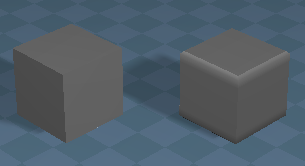
Really does make a huge difference by not altering the NURBS primitive(s) mesh
Example.png
Example.png (17.11 KiB) Viewed 2892 times
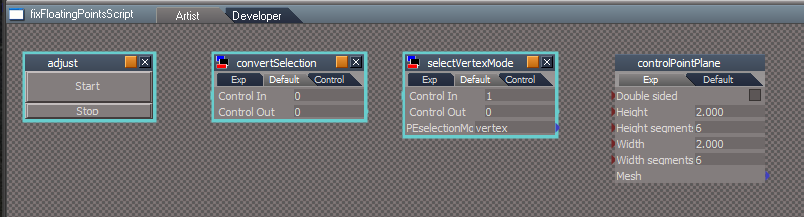
fixFloatingPointScript/adjust script
Add
Node.Value(Node.Owner(firstSel), "U_precision") = Node.Value(Node.Owner(firstSel), "U_precision") -2

Also there is 3 nodes that are not needed
fixFloatingPointScript.png
Additionally, are you planning on updating your NURBStoCPMeshSelection script?
If so can you share the modified script?

And...
NURBSUtilities
freezeCurve, 2
Add
Node.ConRemove(newmesh, "UV selection")

loadCurveScript
freezeCurve2
Add
Node.ConRemove(newmesh, "UV selection")
User avatar
clintonman
Captain
Posts: 5659
Joined: 21 May 2009, 21:08
Type the number ten into the box: 0
Location: California

Re: New NURBS tools

Post by clintonman »

trueBlue wrote: 08 Jan 2021, 13:51 So do you see any problem with adding the below command?
Really does make a huge difference by not altering the NURBS primitive(s) mesh
Example.png
fixFloatingPointScript/adjust script
Add
Node.Value(Node.Owner(firstSel), "U_precision") = Node.Value(Node.Owner(firstSel), "U_precision") -2

...
Here is were it should go, line 29 of the last node inside the primitivePatchScript.

Code: Select all

	//reversed because plane mesh v order is first
	//Node.Value(tempnode, "U_precision") = hs * 3;
	Node.Value(tempnode, "U_precision") = hs * 3 - 2;
Clinton Reese

http://clintons3d.com
User avatar
clintonman
Captain
Posts: 5659
Joined: 21 May 2009, 21:08
Type the number ten into the box: 0
Location: California

Re: New NURBS tools

Post by clintonman »

trueBlue wrote: 08 Jan 2021, 13:51 ...

And...
NURBSUtilities
freezeCurve, 2
Add
Node.ConRemove(newmesh, "UV selection")

loadCurveScript
freezeCurve2
Add
Node.ConRemove(newmesh, "UV selection")
How are you getting UV selection on curves? I don't see that at all.
Clinton Reese

http://clintons3d.com
User avatar
trueBlue
Captain
Posts: 5548
Joined: 06 Jul 2009, 22:50
Type the number ten into the box: 10

Re: New NURBS tools

Post by trueBlue »

Node.Value(tempnode, "U_precision") = hs * 3 - 2;
Works great, thanks!

Remember the Sweep Path scene I shared?
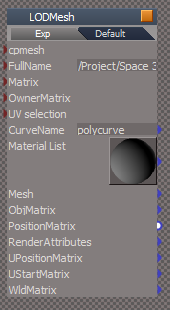
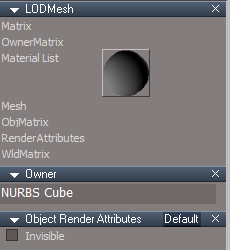
The Curve's LODMesh
LODMesh.png
LODMesh.png (14.51 KiB) Viewed 2904 times
Not sure how it happened, but it looks like it is possible
Does not hurt to remove it, right?
User avatar
trueBlue
Captain
Posts: 5548
Joined: 06 Jul 2009, 22:50
Type the number ten into the box: 10

Re: New NURBS tools

Post by trueBlue »

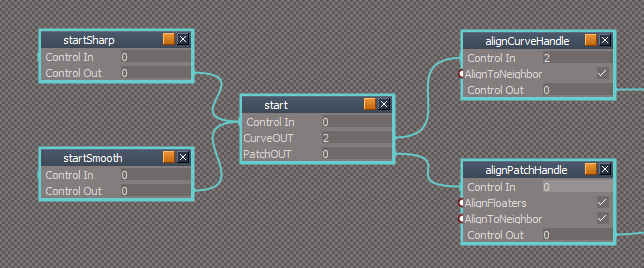
There is an issue with your alignHandleScript sharing the AlignToNeighbor boolean and it looks like they should be separated.
alignHandleScript.png
Steps
Press the Sharp icon
RMB press the Sharp icon
Notice the state of the AlignToNeighbor boolean
RMB press the Smooth icon
Notice the state of the AlignToNeighbor boolean?
I have seen instances of either or not performing as expected and I am not sure of the steps when it happens
Could be the use of the Aling button on the panel, which I think should be removed.
I also think that the AlignToNeighbor should be removed from the panel too
User avatar
trueBlue
Captain
Posts: 5548
Joined: 06 Jul 2009, 22:50
Type the number ten into the box: 10

Re: New NURBS tools

Post by trueBlue »

How come you are not using your new Clintons3d rsx plugin with a new "FileOpenDialog" function on the loadCurveScript/Export panel?
Export Animation.png
Export Animation.png (11.97 KiB) Viewed 2919 times
Is css a Cascading Style Sheet?
Can you share an animated Workspace Curve and the steps to test your css Export?

Are these the correct file formats?
Caligari Object (*.cob)
Caligari Scenes (*.scn)
Scalable Vector Graphics (*.svg)
TurboCad v14 (*.dxf)

AutoCAD Interchange File (*.dxf) ?

Cascading Style Sheet (*.css)
User avatar
trueBlue
Captain
Posts: 5548
Joined: 06 Jul 2009, 22:50
Type the number ten into the box: 10

Re: New NURBS tools

Post by trueBlue »

Hummm...
Have you tried Normalizing the Location of a Imported or Workspace NURBS Primitve?
You have to be in Control Point mode
For me the object's Scale is reduced by as much as 50%

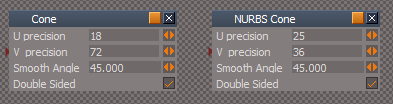
Also there is differences with the U & V's percision between an Imported Patch primitive and a NURBS Patch primitive
Imported and NURBS Cone.png
Imported and NURBS Cone.png (6.67 KiB) Viewed 2916 times
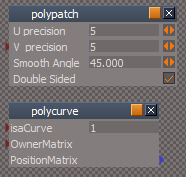
A possible issue is your polypatch & polycurve's controlPointMesh & LODMesh
polypatch and polycurve.png
polypatch and polycurve.png (8.35 KiB) Viewed 2906 times
The BB Sizes are different then a tS primitive which are BB Size = 222
The polycurve's controlPointMesh & LODMesh needs to be the same with their Location = 000, Rotation = 000, and Scale = 111

Other possibility could be the controlPointPlane's Location for the primitivePatchScript & loadNURBSPatchScript scripts
Set Location to 000
User avatar
clintonman
Captain
Posts: 5659
Joined: 21 May 2009, 21:08
Type the number ten into the box: 0
Location: California

Re: New NURBS tools

Post by clintonman »

trueBlue wrote: 08 Jan 2021, 16:54 There is an issue with your alignHandleScript sharing the AlignToNeighbor boolean and it looks like they should be separated.
...
I have seen instances of either or not performing as expected and I am not sure of the steps when it happens
...
Let me know when you find steps.
trueBlue wrote: 08 Jan 2021, 16:54 ...
Could be the use of the Aling button on the panel, which I think should be removed.
I also think that the AlignToNeighbor should be removed from the panel too
Probably so.
Clinton Reese

http://clintons3d.com
User avatar
clintonman
Captain
Posts: 5659
Joined: 21 May 2009, 21:08
Type the number ten into the box: 0
Location: California

Re: New NURBS tools

Post by clintonman »

trueBlue wrote: 08 Jan 2021, 17:11 How come you are not using your new Clintons3d rsx plugin with a new "FileOpenDialog" function on the loadCurveScript/Export panel?
...
I thought I was, unless you are referreing to the "..." button for choosing the source svg file for the css export.


trueBlue wrote: 08 Jan 2021, 17:11 ...
Is css a Cascading Style Sheet?
Can you share an animated Workspace Curve and the steps to test your css Export?
...
Yes.

I don't have anything to share.
The process for css animations is:
1. create a svg file using something like Inkscape or Illustrator
2. import that file into truespace with convert to polygon options selected
3. animate with each object motion or opacity assigning a unique animation name
4. open the export and select the original svg file
5. export the animation

Two files will be created a css and a sample html file that can be viewed with a web browser
Truespace only exports animated items to the css file.
The original svg file will have all the original shapes with their line strokes, gradient colors etc. Truespace only reads the curves and colors so the original file is needed for the final sample result.


trueBlue wrote: 08 Jan 2021, 17:11 ...
Are these the correct file formats?
Caligari Object (*.cob)
Caligari Scenes (*.scn)
Scalable Vector Graphics (*.svg)
TurboCad v14 (*.dxf)

AutoCAD Interchange File (*.dxf) ?

Cascading Style Sheet (*.css)
Looks correct to me. DXF is autocad not turbocad so I don't think the turbocad dxf combination is really valid.
Clinton Reese

http://clintons3d.com
User avatar
trueBlue
Captain
Posts: 5548
Joined: 06 Jul 2009, 22:50
Type the number ten into the box: 10

Re: New NURBS tools

Post by trueBlue »

clintonman wrote: 08 Jan 2021, 19:48
trueBlue wrote: 08 Jan 2021, 17:11 How come you are not using your new Clintons3d rsx plugin with a new "FileOpenDialog" function on the loadCurveScript/Export panel?
...
I thought I was, unless you are referreing to the "..." button for choosing the source svg file for the css export.


trueBlue wrote: 08 Jan 2021, 17:11 ...
Is css a Cascading Style Sheet?
Can you share an animated Workspace Curve and the steps to test your css Export?
...
Yes.

I don't have anything to share.
The process for css animations is:
1. create a svg file using something like Inkscape or Illustrator
2. import that file into truespace with convert to polygon options selected
3. animate with each object motion or opacity assigning a unique animation name
4. open the export and select the original svg file
5. export the animation

Two files will be created a css and a sample html file that can be viewed with a web browser
Truespace only exports animated items to the css file.
The original svg file will have all the original shapes with their line strokes, gradient colors etc. Truespace only reads the curves and colors so the original file is needed for the final sample result.


trueBlue wrote: 08 Jan 2021, 17:11 ...
Are these the correct file formats?
Caligari Object (*.cob)
Caligari Scenes (*.scn)
Scalable Vector Graphics (*.svg)
TurboCad v14 (*.dxf)

AutoCAD Interchange File (*.dxf) ?

Cascading Style Sheet (*.css)
Looks correct to me. DXF is autocad not turbocad so I don't think the turbocad dxf combination is really valid.
Yes. I thought your new Clintons3d rsx plugin with a new "FileOpenDialog" was a replacement for tS's OpenFile Control
In your Notes aspect you mention that the "turbocad v14 DXF files" are dxf files
Thanks for the steps, I'll see if I can find a SVG file on the internet
User avatar
clintonman
Captain
Posts: 5659
Joined: 21 May 2009, 21:08
Type the number ten into the box: 0
Location: California

Re: New NURBS tools

Post by clintonman »

trueBlue wrote: 08 Jan 2021, 20:06 Yes. I thought your new Clintons3d rsx plugin with a new "FileOpenDialog" was a replacement for tS's OpenFile Control
...
Yes it is, but in this case the file isn't being opened, only selected, so I use the "..." button instead.
Clinton Reese

http://clintons3d.com
User avatar
clintonman
Captain
Posts: 5659
Joined: 21 May 2009, 21:08
Type the number ten into the box: 0
Location: California

Re: New NURBS tools

Post by clintonman »

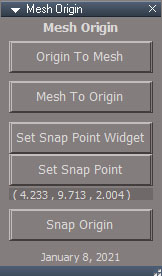
MeshOrigin.jpg
MeshOrigin.jpg (35.7 KiB) Viewed 3098 times
Mesh Origin script updated to work with NURBS
Can set the snap point using the point select widget.
Error message for when selection is not an editable mesh.
Attachments
MeshOrigin1413.RsObj
(78.48 KiB) Downloaded 176 times
Clinton Reese

http://clintons3d.com
User avatar
trueBlue
Captain
Posts: 5548
Joined: 06 Jul 2009, 22:50
Type the number ten into the box: 10

Re: New NURBS tools

Post by trueBlue »

Nice update on the Mesh Origin! :bananathumb:
I am ready to upload all of your current updates to both of the tS761 UU, unless you have any other items to update in the short term.
Thank you for everything! :D

There is the one glaring issue with the Normalize location that I posted about earlier!
I discovered a workaround when Converting primitives to NURBS
If you Normalize the Location of the Workspace primitive before converting, there does not seem to be an issue with using Normalize location after that.
Same for Model before exporting a NURBS primitive

EDIT: False alarm! This is not an issue! I was mislead thinking that the scale changed when in actuality the NURBS object was hidden half way under the Solid Grid. :oops:
User avatar
clintonman
Captain
Posts: 5659
Joined: 21 May 2009, 21:08
Type the number ten into the box: 0
Location: California

Re: New NURBS tools

Post by clintonman »

Show and Hide scripts working with NURBS inside groups and also working with 2D encapsulated objects.
Added selection validation to avoid the trueSpace selection bug.

The NURBS inside groups and 2D encapsulated work by not showing/hiding the group but by showing/hiding the objects inside of the group.

If this works out I think the next fix will be for the workspace layers system.
Attachments
Show2d3e.RsObj
(13.9 KiB) Downloaded 218 times
Hidec3f4.RsObj
(15.85 KiB) Downloaded 202 times
HideAll5ee2.RsObj
(13.71 KiB) Downloaded 227 times
ShowAll43ad.RsObj
(11.81 KiB) Downloaded 208 times
Clinton Reese

http://clintons3d.com
User avatar
trueBlue
Captain
Posts: 5548
Joined: 06 Jul 2009, 22:50
Type the number ten into the box: 10

Re: New NURBS tools

Post by trueBlue »

Seems to work great so far! :D
Have not tried 3D Unencapsulate yet.
By reading your scripts it does not look like it is going to be an issue though.

NURBSScripts/Misc panel
Hide All CP Meshes button

This is not working currently

It looks like I can adapt the new HideAll script to get the Hide All CP Meshes script to work.
Question is, should I include these scripts are call them from Scripts/Commands?
Activity.Run(System.ThisOwner() + "/DeleteORA");
Activity.Run(System.ThisOwner() + "/CloseORASettings");

EDIT: I see why it is not working, the button command is wrong
Activity.Run("%THIS_NAME%" + "/hideAllCP")
It should be
Activity.Run("%THIS_NAME%" + "/hideAllCPMeshes")
User avatar
trueBlue
Captain
Posts: 5548
Joined: 06 Jul 2009, 22:50
Type the number ten into the box: 10

Re: New NURBS tools

Post by trueBlue »

insertControlPointScript
peSelectionDetect
Current Alert says "Fix Triangulation"
If you exit PE without selection the selection mode is not being restored
Add Line 19
System.Alert("May need to run Fix Handles from the NURBS Utilities to restore the Curve's appearance");
Activity.Run(System.ThisOwner() + "/restoreSelectionModeAndTool")


What can I put in the LMB toolbar command for the Mesh Simplifier & Generate Normal Map icons to prevent their commands from running on selected Patches, Curves and or their ControlPointMesh?
User avatar
clintonman
Captain
Posts: 5659
Joined: 21 May 2009, 21:08
Type the number ten into the box: 0
Location: California

Re: New NURBS tools

Post by clintonman »

trueBlue wrote: 10 Jan 2021, 17:09 Seems to work great so far! :D
Have not tried 3D Unencapsulate yet.
By reading your scripts it does not look like it is going to be an issue though.

NURBSScripts/Misc panel
Hide All CP Meshes button

This is not working currently

It looks like I can adapt the new HideAll script to get the Hide All CP Meshes script to work.
Question is, should I include these scripts are call them from Scripts/Commands?
Activity.Run(System.ThisOwner() + "/DeleteORA");
Activity.Run(System.ThisOwner() + "/CloseORASettings");

EDIT: I see why it is not working, the button command is wrong
Activity.Run("%THIS_NAME%" + "/hideAllCP")
It should be
Activity.Run("%THIS_NAME%" + "/hideAllCPMeshes")
Thanks, added note for future fix.
Clinton Reese

http://clintons3d.com
User avatar
clintonman
Captain
Posts: 5659
Joined: 21 May 2009, 21:08
Type the number ten into the box: 0
Location: California

Re: New NURBS tools

Post by clintonman »

trueBlue wrote: 10 Jan 2021, 21:13 insertControlPointScript
peSelectionDetect
Current Alert says "Fix Triangulation"
If you exit PE without selection the selection mode is not being restored
Add Line 19
System.Alert("May need to run Fix Handles from the NURBS Utilities to restore the Curve's appearance");
Activity.Run(System.ThisOwner() + "/restoreSelectionModeAndTool")
...
Thanks, added a note for fixing.
trueBlue wrote: 10 Jan 2021, 21:13 ...
What can I put in the LMB toolbar command for the Mesh Simplifier & Generate Normal Map icons to prevent their commands from running on selected Patches, Curves and or their ControlPointMesh?
I'll have to get back to you on that.
Are you also planning to put restrictions on all the other tools too? I see many that will probably not work properly with nurbs.
Skeleton tools
Paint a material on a curve, or the control meshes
Hair tool on cp meshes.
SDS tool
any editing tool that would change the mesh
several of the custom tools
etc.
Clinton Reese

http://clintons3d.com
User avatar
trueBlue
Captain
Posts: 5548
Joined: 06 Jul 2009, 22:50
Type the number ten into the box: 10

Re: New NURBS tools

Post by trueBlue »

Unfortunately, Yes!
If I can not find a way to check for a selected patch, curve, LODMesh, or control point mesh and not run the command, I was thinking about adding a modal Question giving the option to not run it.
If a NURBS Patch, Curve, or Control Point is selected, this "Tool" will cause ill repairable damage to your object!
Do you still want to run this "Tool" ?
Note: Tool being whatever tool in question
Much rather do the first option though!!!

I have tried everything I can think of including an If Else, but can not seem to get it to work correctly

Edit: Ugh!! Several MeshModifiers commands cause problems!!!
Maybe there needs to be a Disclaimer/Warning added to your installation web page and installer

Maybe I'll add an Alert to the toolbar NT LMB command
NT icon LMB command Alert.png
NT icon LMB command Alert.png (8.18 KiB) Viewed 3050 times
User avatar
clintonman
Captain
Posts: 5659
Joined: 21 May 2009, 21:08
Type the number ten into the box: 0
Location: California

Re: New NURBS tools

Post by clintonman »

Add the attached command node into Scripts/Commands

modify the simplify mesh command like so

Code: Select all

Node.Value("Scripts/Commands/RunCommand", "Command") = "MeshModifiers.SimplifyMesh('')";Activity.Run("Scripts/Commands/RunCommand");
Feel free to rename the RunCommand to something else. It's just the first name that came to mind.

Replace MeshModifiers.SimplifyMesh('') with each command as needed for each button.
Attachments
RunCommand.RsObj
(35.65 KiB) Downloaded 187 times
Clinton Reese

http://clintons3d.com
User avatar
trueBlue
Captain
Posts: 5548
Joined: 06 Jul 2009, 22:50
Type the number ten into the box: 10

Re: New NURBS tools

Post by trueBlue »

Thanks!
This works but not from Scripts/Commands
Defined Attributes do not work
tS7 imports the script without the Command string attribute

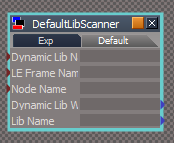
I do notice the DefaultLibScanner script imports with defined attributes but not sure if it even works
DefaultScanner.png
DefaultScanner.png (6.33 KiB) Viewed 3340 times
It is different, it uses

Code: Select all

function Execute(ret)
{
nodeName = ret.Param('Node Name');
User avatar
clintonman
Captain
Posts: 5659
Joined: 21 May 2009, 21:08
Type the number ten into the box: 0
Location: California

Re: New NURBS tools

Post by clintonman »

trueBlue wrote: 11 Jan 2021, 18:28 Thanks!
This works but not from Scripts/Commands
Defined Attributes do not work
tS7 imports the script without the Command string attribute

I do notice the DefaultLibScanner script imports with defined attributes but not sure if it even works
DefaultScanner.png
It is different, it uses

Code: Select all

function Execute(ret)
{
nodeName = ret.Param('Node Name');
I have no idea what you're talking about.
Clinton Reese

http://clintons3d.com
User avatar
trueBlue
Captain
Posts: 5548
Joined: 06 Jul 2009, 22:50
Type the number ten into the box: 10

Re: New NURBS tools

Post by trueBlue »

Got it to work
RestrictNURBS.xml

Code: Select all

<?xml version="1.0" encoding="utf-8" ?>
<SCRIPT Name="RestrictNURBS" Type="Command" Language="ScriptObject Package/jScript language" UIName="" Description="" GUID="{A368C449-2565-4fdd-BE95-BB3BE0700FF2}">
	<SCRIPT_PARAM Name="Cmd" Type="string" Direction="In" Description="No description"/>

	<SCRIPT_CODE><![CDATA[

function Execute(ret)
{
	var CommandName = ret.Param('Cmd');

	// validate to avoid tS script selection bug
	if(!IsValidSelection(Node.Selection())) {
		return;
	}

	for (var i=0; i<Node.SelectedCount(); i++) {
		var Sel = Node.Selected(i);

		if(IsNURBS(Sel)) {
			return;
		}
	}

	eval(CommandName);

}

function IsValidSelection(selection)
{
	if(!selection) return false;

	var reWhiteSpace = /^\s/; // whitespace in first character position for cleaning selection text

	var selectionArray = selection.split(";");

	for(var i = 0; i < selectionArray.length; i++) {
		var selClean = selectionArray[i].replace(reWhiteSpace, "");

		if(!Node.Exists(selClean)) {
			return false;
		}
	}

	return true;
}

function IsNURBS(curNode)
{
	var nurbsNode = curNode;

	if(Node.ConExists(curNode, "Matrix"))
		nurbsNode = Node.Owner(curNode);

	if(Node.ConExists(nurbsNode, "isaCurve")) {
		return true;
	}

	if(Node.Exists(nurbsNode + "/CP to patch CP")) {
		return true;
	}

	return false
}
	]]></SCRIPT_CODE>
</SCRIPT>
Simplify Mesh toolbar command

Code: Select all

Node.Value("Scripts/Commands/RestrictNURBS", "Cmd") = "MeshModifiers.SimplifyMesh('')";Activity.Run("Scripts/Commands/RestrictNURBS");
Note to self: Is it possible to add a boolean attribute using xml version="1.0" encoding="utf-8" ?
<SCRIPT_PARAM Name="Active" Type="boolean" Direction="In" Description="No description"/>
User avatar
trueBlue
Captain
Posts: 5548
Joined: 06 Jul 2009, 22:50
Type the number ten into the box: 10

Re: New NURBS tools

Post by trueBlue »

clintonman wrote: 11 Jan 2021, 05:57 Are you also planning to put restrictions on all the other tools too? I see many that will probably not work properly with nurbs.
Skeleton tools
Paint a material on a curve, or the control meshes
Hair tool on cp meshes.
SDS tool
any editing tool that would change the mesh
several of the custom tools
etc.
So far I have fixed these toolbar commands for the Navigation toolbar
Simplify Mesh
Build Normalmap
ChangeSSLevel(1)
ChangeSSLevel(-1)
Reset SDS
Heal Vertices
Scissors
PE Poly draw
PE Edge draw
PE Vertex draw
Sub Divide
Smooth Divide
Hair Length
Hair Blowdryer
Hair Softness
Hair Direction
Hair Density
Add Morph
Paint Face

Material Editor
D3D & VRay Paint Face

I do not see anything else that causes problems for Patches nor Curves
If I am missing something, give me steps and what to look for

Are you going to update the NURBStoCPMeshSelection script?
With the trueSpace selection bug fix
It gives an error if you use it after a Rectangle Select!!!
User avatar
clintonman
Captain
Posts: 5659
Joined: 21 May 2009, 21:08
Type the number ten into the box: 0
Location: California

Re: New NURBS tools

Post by clintonman »

trueBlue wrote: 11 Jan 2021, 23:20 ...
Are you going to update the NURBStoCPMeshSelection script?
With the trueSpace selection bug fix
It gives an error if you use it after a Rectangle Select!!!
Eventually, but the problem here is in the rsx widget plugin returning a trailing semicolon.
The quick fix is to add this after the "sel =" line and before your "not Zoom" line, about line 33 of RectSelect/data
This will remove the trailing semicolon returned by the widget code.

Code: Select all

	if(sel.length > 0) {
		sel = sel.substring(0, sel.length - 1);
	}
Clinton Reese

http://clintons3d.com
User avatar
trueBlue
Captain
Posts: 5548
Joined: 06 Jul 2009, 22:50
Type the number ten into the box: 10

Re: New NURBS tools

Post by trueBlue »

Awesome!!! :D
Adding...
Activity.Run("Scripts/CustomCommands/NURBSScripts/NURBSUtilities/NURBStoCPMeshSelection")
makes it perfecto! :mrgreen:
User avatar
trueBlue
Captain
Posts: 5548
Joined: 06 Jul 2009, 22:50
Type the number ten into the box: 10

Re: New NURBS tools

Post by trueBlue »

trueBlue wrote: 11 Jan 2021, 23:20
clintonman wrote: 11 Jan 2021, 05:57 Are you also planning to put restrictions on all the other tools too? I see many that will probably not work properly with nurbs.
Skeleton tools
Paint a material on a curve, or the control meshes
Hair tool on cp meshes.
SDS tool
any editing tool that would change the mesh
several of the custom tools
etc.
So far I have fixed these toolbar commands for the Navigation toolbar
Simplify Mesh
Build Normalmap
ChangeSSLevel(1)
ChangeSSLevel(-1)
Reset SDS
Heal Vertices
Scissors
PE Poly draw
PE Edge draw
PE Vertex draw
Sub Divide
Smooth Divide
Hair Length
Hair Blowdryer
Hair Softness
Hair Direction
Hair Density
Add Morph
Paint Face

Material Editor
D3D & VRay Paint Face

I do not see anything else that causes problems for Patches nor Curves
If I am missing something, give me steps and what to look for
This is not working for Shortcuts
As an example for Add SDS in PE mode
Node.Value("Scripts/Commands/RestrictNURBS", "Cmd") = "MeshModifiers.ChangeSSLevel(1)";Activity.Run("Scripts/Commands/RestrictNURBS");
Best I can tell, the first part using Node.Value does not work for Shortcuts
Activity.Run does work for Shortcuts
Assigning the shortcut does not work either
User avatar
clintonman
Captain
Posts: 5659
Joined: 21 May 2009, 21:08
Type the number ten into the box: 0
Location: California

Re: New NURBS tools

Post by clintonman »

trueBlue wrote: 14 Jan 2021, 12:32 ...
This is not working for Shortcuts
As an example for Add SDS in PE mode
Node.Value("Scripts/Commands/RestrictNURBS", "Cmd") = "MeshModifiers.ChangeSSLevel(1)";Activity.Run("Scripts/Commands/RestrictNURBS");
Best I can tell, the first part using Node.Value does not work for Shortcuts
Activity.Run does work for Shortcuts
Assigning the shortcut does not work either
Too bad, I'll see if I can find another way, outside of adding 20 new command nodes.
Clinton Reese

http://clintons3d.com
User avatar
trueBlue
Captain
Posts: 5548
Joined: 06 Jul 2009, 22:50
Type the number ten into the box: 10

Re: New NURBS tools

Post by trueBlue »

Cool :bananathumb:
Really late in the game but I am wondering if you would have added a NURBS Attribute out of the controlPointMesh and LODMesh to the Patches and Curves, if it would have been a lot easier for identification.
NURBS.png
NURBS.png (9.77 KiB) Viewed 3310 times
User avatar
clintonman
Captain
Posts: 5659
Joined: 21 May 2009, 21:08
Type the number ten into the box: 0
Location: California

Re: New NURBS tools

Post by clintonman »

trueBlue wrote: 14 Jan 2021, 15:43 Cool :bananathumb:
Really late in the game but I am wondering if you would have added a NURBS Attribute out of the controlPointMesh and LODMesh to the Patches and Curves, if it would have been a lot easier for identification.
NURBS.png
Probably, too late now.
Clinton Reese

http://clintons3d.com
User avatar
clintonman
Captain
Posts: 5659
Joined: 21 May 2009, 21:08
Type the number ten into the box: 0
Location: California

Re: New NURBS tools

Post by clintonman »

trueBlue wrote: 14 Jan 2021, 12:32
trueBlue wrote: 11 Jan 2021, 23:20
clintonman wrote: 11 Jan 2021, 05:57 Are you also planning to put restrictions on all the other tools too? I see many that will probably not work properly with nurbs.
Skeleton tools
Paint a material on a curve, or the control meshes
Hair tool on cp meshes.
SDS tool
any editing tool that would change the mesh
several of the custom tools
etc.
So far I have fixed these toolbar commands for the Navigation toolbar
Simplify Mesh
Build Normalmap
ChangeSSLevel(1)
ChangeSSLevel(-1)
Reset SDS
Heal Vertices
Scissors
PE Poly draw
PE Edge draw
PE Vertex draw
Sub Divide
Smooth Divide
Hair Length
Hair Blowdryer
Hair Softness
Hair Direction
Hair Density
Add Morph
Paint Face

Material Editor
D3D & VRay Paint Face

I do not see anything else that causes problems for Patches nor Curves
If I am missing something, give me steps and what to look for
This is not working for Shortcuts
As an example for Add SDS in PE mode
Node.Value("Scripts/Commands/RestrictNURBS", "Cmd") = "MeshModifiers.ChangeSSLevel(1)";Activity.Run("Scripts/Commands/RestrictNURBS");
Best I can tell, the first part using Node.Value does not work for Shortcuts
Activity.Run does work for Shortcuts
Assigning the shortcut does not work either
It seems to be working here. Do you have anything you can share to show it not working?
Clinton Reese

http://clintons3d.com
User avatar
spacekdet
Captain
Posts: 1810
Joined: 27 May 2009, 15:00
Type the number ten into the box: 10
Location: On the day shift at the Utility Muffin Research Kitchen

Re: New NURBS tools

Post by spacekdet »

Είναι όλα ελληνικά για μένα
User avatar
trueBlue
Captain
Posts: 5548
Joined: 06 Jul 2009, 22:50
Type the number ten into the box: 10

Re: New NURBS tools

Post by trueBlue »

spacekdet wrote: 14 Jan 2021, 19:40 Είναι όλα ελληνικά για μένα
Me too :?

Code: Select all

return this.replace(/^[\s\uFEFF\xA0]+|[\s\uFEFF\xA0]+$/g,
User avatar
clintonman
Captain
Posts: 5659
Joined: 21 May 2009, 21:08
Type the number ten into the box: 0
Location: California

Re: New NURBS tools

Post by clintonman »

Here is an update of the RunCommand script that has an alternate way of calling it. The previous way of calling also still works.

Code: Select all

obj={cmd:"MeshModifiers.SimplifyMesh('')",RsApp:RsApp,Node:Node};RsApp.SendCustomEvent("Scripts/Commands/RunCommand", obj);

Code: Select all

obj={cmd:"MeshModifiers.ChangeSSLevel(1)",RsApp:RsApp,Node:Node};RsApp.SendCustomEvent("Scripts/Commands/RunCommand", obj);
Attachments
RunCommandb777.RsObj
(7.31 KiB) Downloaded 201 times
Clinton Reese

http://clintons3d.com
User avatar
trueBlue
Captain
Posts: 5548
Joined: 06 Jul 2009, 22:50
Type the number ten into the box: 10

Re: New NURBS tools

Post by trueBlue »

Implemented your new way and it works using scripts and toolbar commands but I am not able to get a shortcut to work
Had to modify the script to get it to import correctly from a xml file
First of all you had a typo with the evetData
Node = evetData.Node;
Correct
Node = eventData.Node;
Lots of other tweaks as well
If you want me to explain the process, I will try
One of the main changes is replacing params to ret
Or you can study the xml files included here
The two shortcuts are for Add SDS & Subtract SDS
Also Shift L for Workspace Layers
Best to replace the two xml files in the tS761 directory and Reset the Default Context(Required) to import the RestrictNURB into Commands internally
After that you can copy the code from the Scripts/Commands/RestrictNURB and paste it into a jScript
Button command for Add SDS

Code: Select all

obj={cmd:"MeshModifiers.ChangeSSLevel(1)",RsApp:RsApp,Node:Node};RsApp.SendCustomEvent("Scripts/Commands/RestrictNURBS", obj);
Also includes the new CloseORASettings.xml file

Edit: I created new script by way of Exporting the script using params and that works as well, so scratch using ret
The only difference is when Exporting is there is no GUID
Still can not get the shortcut to work
And NOW my SpaceBar shortcut does not WORK!!! Every time I edit the shortcut xml file and add the above shortcut, they both will not WORK
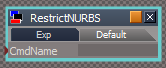
Also notice with this new way the CmdName never enters the Command
CmdName.png
CmdName.png (3.92 KiB) Viewed 3298 times
Attachments
RestrictNURBS.zip
(6.49 KiB) Downloaded 201 times
User avatar
clintonman
Captain
Posts: 5659
Joined: 21 May 2009, 21:08
Type the number ten into the box: 0
Location: California

Re: New NURBS tools

Post by clintonman »

trueBlue wrote: 15 Jan 2021, 13:09 ...
One of the main changes is replacing params to ret
...
Edit: I created new script by way of Exporting the script using params and that works as well, so scratch using ret
...
What is ret?
trueBlue wrote: 15 Jan 2021, 13:09 Implemented your new way and it works using scripts and toolbar commands but I am not able to get a shortcut to work
...
The two shortcuts are for Add SDS & Subtract SDS
Also Shift L for Workspace Layers
...
Still can not get the shortcut to work
And NOW my SpaceBar shortcut does not WORK!!! Every time I edit the shortcut xml file and add the above shortcut, they both will not WORK
Are you saying none of the shortcuts work or that 4 of the shortcuts don't work?
Did you try assigning the shortcut using the shortcut dialog to see how it differs from your manual shortcut edit?


trueBlue wrote: 15 Jan 2021, 13:09 ...
First of all you had a typo with the evetData
Node = evetData.Node;
Correct
Node = eventData.Node;
...
Sorry about that, must have posted an old version
Clinton Reese

http://clintons3d.com
User avatar
trueBlue
Captain
Posts: 5548
Joined: 06 Jul 2009, 22:50
Type the number ten into the box: 10

Re: New NURBS tools

Post by trueBlue »

What I do first is fix the toolbar button commands and save the toolbars
Test to see that they work
Manually edit the shortcut file with the same commands
So far I have only tried two shortcuts +SDS & -SDS
So far with the previous way & the newer way, every time I test the modified shortcuts, the Spacebar shortcut (probably others) stop working!
I have been editing the shortcut file this way for several years without issues.
I have made a point NOT to use tS761's shortcut dialog because, number 1, it makes a mess of the file and 2, there is several toolbars with the same icons/buttons. My concern is, if I did it this way which would be very time consuming, there is the very possibility of failure!
The shortcut dialog captures the toolbar's Name, the Help text, and the context, and if this is different from the toolbar and toolbar button, the shortcuts do not work!
I suspect that this new way is not even using the script's CmdName string because it is always blank.
What is the Script Buffer?
RsApp.RunScriptBuffer(eventData.cmd);
User avatar
clintonman
Captain
Posts: 5659
Joined: 21 May 2009, 21:08
Type the number ten into the box: 0
Location: California

Re: New NURBS tools

Post by clintonman »

trueBlue wrote: 15 Jan 2021, 16:56 What I do first is fix the toolbar button commands and save the toolbars
Test to see that they work
Manually edit the shortcut file with the same commands
So far I have only tried two shortcuts +SDS & -SDS
So far with the previous way & the newer way, every time I test the modified shortcuts, the Spacebar shortcut (probably others) stop working!
I have been editing the shortcut file this way for several years without issues.
I have made a point NOT to use tS761's shortcut dialog because, number 1, it makes a mess of the file and 2, there is several toolbars with the same icons/buttons. My concern is, if I did it this way which would be very time consuming, there is the very possibility of failure!
The shortcut dialog captures the toolbar's Name, the Help text, and the context, and if this is different from the toolbar and toolbar button, the shortcuts do not work!
I suspect that this new way is not even using the script's CmdName string because it is always blank.
What is the Script Buffer?
RsApp.RunScriptBuffer(eventData.cmd);
I'm not suggesting you give up maually editing the shortcuts file, just saying do 1 shortcut via the dialog to see if there is a difference. If you see a difference then you can use that knowledge to manually edit the file.
Also watch out for single quotes vs double quotes.

A buffer is usually just a kind of temporary storage. So in this case the eventData.cmd is placed into the buffer and then run from there.
Clinton Reese

http://clintons3d.com
User avatar
trueBlue
Captain
Posts: 5548
Joined: 06 Jul 2009, 22:50
Type the number ten into the box: 10

Re: New NURBS tools

Post by trueBlue »

Okay, I tried applying +SDS to the WORKSPACENAV toolbar

Code: Select all

<RS_ACC KEY="ADD" GROUP="WORKSPACENAV" CONTEXT="" DESC="+ SDS - Add SDS" COMMAND="obj={cmd:&quot;MeshModifiers.ChangeSSLevel(1)&quot;,RsApp:RsApp,Node:Node};RsApp.SendCustomEvent(&quot;Scripts/Commands/RestrictNURBS&quot;, obj);" />
The shortcut works for a 3D object and a NURBS but the NURBS was damaged from the +SDS
So I am at a loss here
I am guessing that the script is not running, that only the tS command is running.
How did you get success?
As said, I have success with this new way form a jScript, toolbar command, but not a shortcut

I have another idea
How do you turn this first part of the script shown below into an if else?
if(IsNURBS(Sel)) {
return;
}
If possible just and an Alert to the else part

Code: Select all

function Execute(params)
{
	// validate to avoid tS script selection bug
	if(!IsValidSelection(Node.Selection())) {
		return;
	}

	for (var i=0; i<Node.SelectedCount(); i++) {
		var Sel = Node.Selected(i);

		if(IsNURBS(Sel)) {
		return;
		}
	}

}

function IsValidSelection(selection)
{
	if(!selection) return false;

	var reWhiteSpace = /^\s/; // whitespace in first character position for cleaning selection text

	var selectionArray = selection.split(";");

	for(var i = 0; i < selectionArray.length; i++) {
		var selClean = selectionArray[i].replace(reWhiteSpace, "");

		if(!Node.Exists(selClean)) {
			return false;
		}
	}

	return true;
}

function IsNURBS(curNode)
{
	var nurbsNode = curNode;

	if(Node.ConExists(curNode, "Matrix"))
		nurbsNode = Node.Owner(curNode);

	if(Node.ConExists(nurbsNode, "isaCurve")) {
		return true;
	}

	if(Node.Exists(nurbsNode + "/CP to patch CP")) {
		return true;
	}

	return false

}

User avatar
clintonman
Captain
Posts: 5659
Joined: 21 May 2009, 21:08
Type the number ten into the box: 0
Location: California

Re: New NURBS tools

Post by clintonman »

trueBlue wrote: 15 Jan 2021, 13:09 ...
Also notice with this new way the CmdName never enters the Command
CmdName.png
Because the new way doesn't use it.
Clinton Reese

http://clintons3d.com
User avatar
trueBlue
Captain
Posts: 5548
Joined: 06 Jul 2009, 22:50
Type the number ten into the box: 10

Re: New NURBS tools

Post by trueBlue »

Thought I had a solution but tS's shortcuts do not support ScriptObject.Execute either :(
Found another issue! :(
Enter into NURBS Control Point mode and add a Primitive
PrimitiveIssue.png
User avatar
clintonman
Captain
Posts: 5659
Joined: 21 May 2009, 21:08
Type the number ten into the box: 0
Location: California

Re: New NURBS tools

Post by clintonman »

trueBlue wrote: 15 Jan 2021, 18:10 ...
As said, I have success with this new way form a jScript, toolbar command, but not a shortcut
...
I assume a "jScript, toolbar command" means the Command input on the button
Can you share the shortcut file?
Clinton Reese

http://clintons3d.com
User avatar
clintonman
Captain
Posts: 5659
Joined: 21 May 2009, 21:08
Type the number ten into the box: 0
Location: California

Re: New NURBS tools

Post by clintonman »

trueBlue wrote: 15 Jan 2021, 21:01 ...
Found another issue! :(
Enter into NURBS Control Point mode and add a Primitive
PrimitiveIssue.png
Can you give some more steps?
I select control point mesh
enter PE mode
press add primitive and nothing happens
Clinton Reese

http://clintons3d.com
User avatar
clintonman
Captain
Posts: 5659
Joined: 21 May 2009, 21:08
Type the number ten into the box: 0
Location: California

Re: New NURBS tools

Post by clintonman »

If you make a "junk" release with all the shortcut badness I can install it and hopefully see the bad results.
Clinton Reese

http://clintons3d.com
User avatar
trueBlue
Captain
Posts: 5548
Joined: 06 Jul 2009, 22:50
Type the number ten into the box: 10

Re: New NURBS tools

Post by trueBlue »

clintonman wrote: 15 Jan 2021, 21:08
trueBlue wrote: 15 Jan 2021, 21:01 ...
Found another issue! :(
Enter into NURBS Control Point mode and add a Primitive
PrimitiveIssue.png
Can you give some more steps?
I select control point mesh
enter PE mode
press add primitive and nothing happens
Add NURBS cube
Press the Edit button in the Stack/Panels - controlPointMesh
Add
Primitive to the controlPointMesh or near by somewhere
Attachments
AddPrimitive2NURBScontrolPointMesh.png
AddPrimitive2NURBScontrolPointMesh.png (21.41 KiB) Viewed 3320 times
User avatar
clintonman
Captain
Posts: 5659
Joined: 21 May 2009, 21:08
Type the number ten into the box: 0
Location: California

Re: New NURBS tools

Post by clintonman »

trueBlue wrote: 15 Jan 2021, 21:25
clintonman wrote: 15 Jan 2021, 21:08
trueBlue wrote: 15 Jan 2021, 21:01 ...
Found another issue! :(
Enter into NURBS Control Point mode and add a Primitive
PrimitiveIssue.png
Can you give some more steps?
I select control point mesh
enter PE mode
press add primitive and nothing happens
Add NURBS cube
Press the Edit button in the Stack/Panels - controlPointMesh
Add
Primitive to the controlPointMesh or near by somewhere
I still got nothing, I may be a version or 2 behind. I'll check my other tS installation.
Edit: nope, still nothing

Edit: wait a sec I missed a step
Edit: nope, still nothing
Last edited by clintonman on 15 Jan 2021, 21:32, edited 1 time in total.
Clinton Reese

http://clintons3d.com
User avatar
trueBlue
Captain
Posts: 5548
Joined: 06 Jul 2009, 22:50
Type the number ten into the box: 10

Re: New NURBS tools

Post by trueBlue »

clintonman wrote: 15 Jan 2021, 21:13 If you make a "junk" release with all the shortcut badness I can install it and hopefully see the bad results.
The state of the current toolbars/NAVTOOLBAR has the old modifications and they do not work with the new script/xml file
So I need sometime to fix everything.
Was hoping we could find a shortcut solution before I fix the toolbars.
May have to scratch the shortcuts and just fix the toolbars
User avatar
trueBlue
Captain
Posts: 5548
Joined: 06 Jul 2009, 22:50
Type the number ten into the box: 10

Re: New NURBS tools

Post by trueBlue »

clintonman wrote: 15 Jan 2021, 21:27
trueBlue wrote: 15 Jan 2021, 21:25
clintonman wrote: 15 Jan 2021, 21:08

Can you give some more steps?
I select control point mesh
enter PE mode
press add primitive and nothing happens
Add NURBS cube
Press the Edit button in the Stack/Panels - controlPointMesh
Add
Primitive to the controlPointMesh or near by somewhere
I still got nothing, I may be a version or 2 behind. I'll check my other tS installation.
Edit: nope, still nothing

Edit: wait a sec I missed a step
Edit: nope, still nothing
Edit: I reloaded this uploaded object and it is invisible
Removed it
Edit2: You can do the same when PE a mesh and add primitives to the object's Editable Mesh
I suppose it would not be any different then adding primitives to the controlPointMesh
PEwithPrimitives.png
PEwithPrimitives.png (50.25 KiB) Viewed 3319 times
User avatar
trueBlue
Captain
Posts: 5548
Joined: 06 Jul 2009, 22:50
Type the number ten into the box: 10

Re: New NURBS tools

Post by trueBlue »

clintonman wrote: 15 Jan 2021, 21:05
trueBlue wrote: 15 Jan 2021, 18:10 ...
As said, I have success with this new way form a jScript, toolbar command, but not a shortcut
...
I assume a "jScript, toolbar command" means the Command input on the button
Can you share the shortcut file?
The
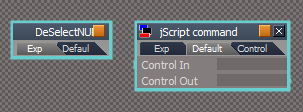
Difference between an imported xml file and a jScript command script is, the jScript has Control(s) In & Out
xml and jScript.png
xml and jScript.png (7.04 KiB) Viewed 3334 times
User avatar
trueBlue
Captain
Posts: 5548
Joined: 06 Jul 2009, 22:50
Type the number ten into the box: 10

Re: New NURBS tools

Post by trueBlue »

You know :?:
Having your Workspace NURBS not compatible with Workspace tools is not show stopper!
Just need to disclose to the user to be mindful of those limitations
Your Workspace NURBS and tools are Awesome! :bananathumb:
User avatar
clintonman
Captain
Posts: 5659
Joined: 21 May 2009, 21:08
Type the number ten into the box: 0
Location: California

Re: New NURBS tools

Post by clintonman »

trueBlue wrote: 15 Jan 2021, 21:34
clintonman wrote: 15 Jan 2021, 21:27
trueBlue wrote: 15 Jan 2021, 21:25
Add NURBS cube
Press the Edit button in the Stack/Panels - controlPointMesh
Add
Primitive to the controlPointMesh or near by somewhere
I still got nothing, I may be a version or 2 behind. I'll check my other tS installation.
Edit: nope, still nothing

Edit: wait a sec I missed a step
Edit: nope, still nothing
Edit: I reloaded this uploaded object and it is invisible
Removed it
Edit2: You can do the same when PE a mesh and add primitives to the object's Editable Mesh
I suppose it would not be any different then adding primitives to the controlPointMesh
PEwithPrimitives.png
Ah, ok, I misunderstood. I thought you meant add a nurbs primitive to the control point mesh.
So, doesn't that mean it's just another tool that needs the RestrictNURBS?
Clinton Reese

http://clintons3d.com
User avatar
trueBlue
Captain
Posts: 5548
Joined: 06 Jul 2009, 22:50
Type the number ten into the box: 10

Re: New NURBS tools

Post by trueBlue »

clintonman wrote: 15 Jan 2021, 22:14
trueBlue wrote: 15 Jan 2021, 21:34
clintonman wrote: 15 Jan 2021, 21:27
I still got nothing, I may be a version or 2 behind. I'll check my other tS installation.
Edit: nope, still nothing

Edit: wait a sec I missed a step
Edit: nope, still nothing
Edit: I reloaded this uploaded object and it is invisible
Removed it
Edit2: You can do the same when PE a mesh and add primitives to the object's Editable Mesh
I suppose it would not be any different then adding primitives to the controlPointMesh
PEwithPrimitives.png
Ah, ok, I misunderstood. I thought you meant add a nurbs primitive to the control point mesh.
So, doesn't that mean it's just another tool that needs the RestrictNURBS?
I doubt you can do anything with tS's primitive tool because it is a widget
How would you know that the controlPointMesh is in PE mode?
And if so, how could you stop it?
User avatar
trueBlue
Captain
Posts: 5548
Joined: 06 Jul 2009, 22:50
Type the number ten into the box: 10

Re: New NURBS tools

Post by trueBlue »

I found an easier way for fixing the unsupported Workspace tool's toolbar button Command
Example for + SDS button Command

Code: Select all

ScriptObject.Execute("Scripts/Commands/DeSelectNURBS");MeshModifiers.ChangeSSLevel(1)
It is easier because all I have to do is add the first part to the beginning of the Command
I bet you could even come up with a script that does that for me :idea: :mrgreen:

The DeSelectNURBS xml file/script

Code: Select all

function Execute(params)
{
	// validate to avoid tS script selection bug
	if(!IsValidSelection(Node.Selection())) {
		return;
	}

	for (var i=0; i<Node.SelectedCount(); i++) {
		var Sel = Node.Selected(i);

		if(IsNURBS(Sel)) {

if(!Node.Exists("/Status Message")) return;
Node.Value("/Status Message", "Seconds") = 2000 
Node.Value("/Status Message", "Message") = " NURBS are not supported ... Select a 3D Object"
Activity.Run("/Status Message/Status Message")
Space.Unselect()

		return;
		}
	}

}

function IsValidSelection(selection)
{
	if(!selection) return false;

	var reWhiteSpace = /^\s/; // whitespace in first character position for cleaning selection text

	var selectionArray = selection.split(";");

	for(var i = 0; i < selectionArray.length; i++) {
		var selClean = selectionArray[i].replace(reWhiteSpace, "");

		if(!Node.Exists(selClean)) {
			return false;
		}
	}

	return true;
}

function IsNURBS(curNode)
{
	var nurbsNode = curNode;

	if(Node.ConExists(curNode, "Matrix"))
		nurbsNode = Node.Owner(curNode);

	if(Node.ConExists(nurbsNode, "isaCurve")) {
		return true;
	}

	if(Node.Exists(nurbsNode + "/CP to patch CP")) {
		return true;
	}

	return false

}
User avatar
clintonman
Captain
Posts: 5659
Joined: 21 May 2009, 21:08
Type the number ten into the box: 0
Location: California

Re: New NURBS tools

Post by clintonman »

Glad you found a solution.

Why Space.Unselect() at the end?
Clinton Reese

http://clintons3d.com
User avatar
trueBlue
Captain
Posts: 5548
Joined: 06 Jul 2009, 22:50
Type the number ten into the box: 10

Re: New NURBS tools

Post by trueBlue »

clintonman wrote: 15 Jan 2021, 23:10 Glad you found a solution.

Why Space.Unselect() at the end?
Gives the user a visual that it was unselected (baa bye object widget :bananahi: ) and it did not work!
Does not happen on a support object
User avatar
trueBlue
Captain
Posts: 5548
Joined: 06 Jul 2009, 22:50
Type the number ten into the box: 10

Re: New NURBS tools

Post by trueBlue »

Why is this twisted in the middle of the swept path?
Note: I did use Align Distribute on both objects.
Twisted swept Path.png
Twisted swept Path.png (2.74 KiB) Viewed 3021 times
Also I discovered an issue with the Insert Control Point on a normal 3D object in PE mode
Insert CP on mesh issue.png
Insert CP on mesh issue.png (8.84 KiB) Viewed 3016 times
Attachments
Sweep Path, 1.RsScn
(1.06 MiB) Downloaded 201 times
User avatar
clintonman
Captain
Posts: 5659
Joined: 21 May 2009, 21:08
Type the number ten into the box: 0
Location: California

Re: New NURBS tools

Post by clintonman »

trueBlue wrote: 16 Jan 2021, 21:27 Why is this twisted in the middle of the swept path?
Note: I did use Align Distribute on both objects.
Twisted swept Path.png
Also I discovered an issue with the Insert Control Point on a normal 3D object in PE mode
Insert CP on mesh issue.png
Most likely has to do with the way tS handles angles. It's limited to plus or minus 180 degrees and in the Y direction I think it's more like 90 degrees. When it passes those limits all the angles change and you can get twisting. It can probably be fixed by bypassing all tS math and rolling your own math from scratch, but I won't be the one to do that.
So don't insert control point in normal mesh. Like the old joke, "Doctor it hurts when I do this". Doctor, "So don't do that"
Clinton Reese

http://clintons3d.com
User avatar
trueBlue
Captain
Posts: 5548
Joined: 06 Jul 2009, 22:50
Type the number ten into the box: 10

Re: New NURBS tools

Post by trueBlue »

clintonman wrote: 16 Jan 2021, 22:28 So don't insert control point in normal mesh. Like the old joke, "Doctor it hurts when I do this". Doctor, "So don't do that"
Easy enough fix Dr. Watson :ugeek:
insertControlPointScript
deleteControlPointScript
extendCurveScript

Code: Select all

if(!Node.ConExists(firstsel,"isaCurve")) 
{
System.Alert("Select a Curve");
params.SetTerminationFlag();
return;
}

Just got done finishing fixing your Quad toolbar/Modeling - Curve icons
They have old commands
Curve tools icons wrong commands.png
Curve tools icons wrong commands.png (43.48 KiB) Viewed 3010 times
Attachments
Q_PEModelingToolbar.RsObj
(232.19 KiB) Downloaded 175 times
User avatar
trueBlue
Captain
Posts: 5548
Joined: 06 Jul 2009, 22:50
Type the number ten into the box: 10

Re: New NURBS tools

Post by trueBlue »

How do you Freeze a Patch in Quads?
I have tried checking/unchecking Double Sided, but I am not seeing any differences
User avatar
clintonman
Captain
Posts: 5659
Joined: 21 May 2009, 21:08
Type the number ten into the box: 0
Location: California

Re: New NURBS tools

Post by clintonman »

trueBlue wrote: 28 Jan 2021, 11:46 How do you Freeze a Patch in Quads?
I have tried checking/unchecking Double Sided, but I am not seeing any differences
It looks like it's a problem with some of the primitives. Quads won't come from sphere or cylinder. Works for plane, box, torus and it works for the cone if the top radius is not zero.
Clinton Reese

http://clintons3d.com
User avatar
clintonman
Captain
Posts: 5659
Joined: 21 May 2009, 21:08
Type the number ten into the box: 0
Location: California

Re: New NURBS tools

Post by clintonman »

I found a workaround for those nurbs primitives.
The tesselation has an effect on how it converts the mesh.
To get good quad result the U precision has to be an even number and the V precision has to be an odd number and it has to be single sided.
Clinton Reese

http://clintons3d.com
User avatar
trueBlue
Captain
Posts: 5548
Joined: 06 Jul 2009, 22:50
Type the number ten into the box: 10

Re: New NURBS tools

Post by trueBlue »

Ah...I see
Are you planning an update?

Also, I found a way to stop Hair & Material from being applied to Lights & Cameras

So I thought, if I could modify the DeSelectNURBS script to include Hair, Lights & Cameras, I would not have to go back and fix all of the icon's/button's commands
DeSelectNURBS script
Edit: Got it!
By adding this to the IsNURBS(curNode) Function

Code: Select all


	if(Node.ConExists(curNode, "Camera")) {
		return true;
	}

	if(Node.ConExists(curNode, "TSLightProperties")) {
		return true;
	}

User avatar
clintonman
Captain
Posts: 5659
Joined: 21 May 2009, 21:08
Type the number ten into the box: 0
Location: California

Re: New NURBS tools

Post by clintonman »

NURBStoolbar2.jpg
I've started updating the installer version of the NURBS tools to be on par with the Unofficial Updates version. While updating I decided to make some changes.
The toolbar above shows new icons for "Select Control Point Mesh", "Copy NURBS", "Delete NURBS", "Weld NURBS" and "NURBS Primitives".
The "Adjust Floaters" button is gone and is run from the utilities panel. The old select/utitlies button is now only utilities. The "NURBS Info" has also been moved into the utilities panel as the default and the original default panel functions were moved into the Misc panel.

Nothing really new at this point. Only new icons and reorganization of some panels. The only real change is that the copy function will select the copy instead of maintaining the original selection and when opening the utilities panel it will read the state of the Protect NURBS.

When I started I thought these scripts had already been converted to more undo friendly format. So after testing the current changes, that will be next.

Edit(s):
Changed the extend curve so that the new control handle is selected after the run.
Forgot to mention the first set of changes reduced the size of the scripts by 275kb.
Changes status display to use plugin based code.
Changed auto control point mesh selection to use a widget instead of selection change event node
Circles now have a check to make sure the same point isn't selected twice which would give an error.
Added missing nurbs name display to the rebuild nurbs panel
Split NURBS patch do not run on border edges
Fixed a bug in the split nurbs patch that gave bad looking handles when split in one direction, the other direction already gave a good result
Rename split patch result and select one of the patches
Sent bug report for plane loop select script

Testing complete for the basic conversion. Next up will be to make the undo friendly changes.
Clinton Reese

http://clintons3d.com
User avatar
clintonman
Captain
Posts: 5659
Joined: 21 May 2009, 21:08
Type the number ten into the box: 0
Location: California

Re: New NURBS tools

Post by clintonman »

Starting a new list of changes.

can convert double sided patches to normal polygon mesh, freeze it
checks patch for odd u precision or even v precision values when freezing a patch - gives question with option to adjust precision for good quad result
primitives sphere, cylinder and cone will freeze cleanly by default - other primitives are already ok for freezing
Fix Curve Mesh BB - added code to center the mesh origin
Fix Bug in polygon to curve script that gave bad result or crashed truespace - when reading selection data must read mesh from Editable shape node Input Mesh connector
Weld Nurbs - mesh origin to the center of the mesh and fix a "jumping" bug where welded object is in a different location than the original meshes
Clinton Reese

http://clintons3d.com
User avatar
trueBlue
Captain
Posts: 5548
Joined: 06 Jul 2009, 22:50
Type the number ten into the box: 10

Re: New NURBS tools

Post by trueBlue »

If I accidentally select the Draw Curve toolbar button, the widget starts
If I right click to stop the widget, a curve is created
I think you need to add the following to the widget's End script
ScriptObject.RunCmd("graph package/conreset command", "Node", "/Scripts/CustomCommands/PickSelect/data", "Con", "NodeSelData")
User avatar
clintonman
Captain
Posts: 5659
Joined: 21 May 2009, 21:08
Type the number ten into the box: 0
Location: California

Re: New NURBS tools

Post by clintonman »

trueBlue wrote: 20 Jul 2021, 14:13 If I accidentally select the Draw Curve toolbar button, the widget starts
If I right click to stop the widget, a curve is created
I think you need to add the following to the widget's End script
ScriptObject.RunCmd("graph package/conreset command", "Node", "/Scripts/CustomCommands/PickSelect/data", "Con", "NodeSelData")
Thanks, fixed.
Added Node.Value(pickselect, "NodeSelData") = ""; to the start script
Clinton Reese

http://clintons3d.com
User avatar
clintonman
Captain
Posts: 5659
Joined: 21 May 2009, 21:08
Type the number ten into the box: 0
Location: California

Re: New NURBS tools

Post by clintonman »

Added request from trueBlue - when nurbs control point is selected via the auto control point selection, the patch panel will show and the curve shaper panel will show with the control point mesh panels.

Attached is what I have so far so you(trueBlue) can see if this was really what you were asking for.
the Default context widget reads the auto cp mesh flag from the utilities node and ignores it's own active input - attached goes inside /Widgets/Edit/ replacing the Default context
Attachments
Default context.RsObj
(70.48 KiB) Downloaded 179 times
NURBSScripts9e17.RsObj
(2.65 MiB) Downloaded 169 times
Clinton Reese

http://clintons3d.com
User avatar
clintonman
Captain
Posts: 5659
Joined: 21 May 2009, 21:08
Type the number ten into the box: 0
Location: California

Re: New NURBS tools

Post by clintonman »

Removed buttons Select, Edit, and Navigate
Added "Select LOD Mesh" buttons so that visibility can be controlled and for assigning materials to the patch.
Un-exported the Invisible connector for the curve node and exported the ORA panel, so it's more like other tS objects. Both curves and patches are setup this way now.
Fixed the DrawCurve so it works with the new curve node.
Added the command

Code: Select all

Activity.Run(Node.Owner(System.ThisOwner()) + "/NURBSUtilities/Show NURBS Panel With CP Mesh");
to the exitcurvemode2 so all the panels show
OpenToolbar added warning if rsx plugin not installed.

Edit:
NURBS Info panel uses plugin based utility scripts to prevent and reduce the number of undos
NURBS auto control point mesh selection more undo friendly
Copy and Delete more undo friendly
Draw Curve more undo friendly, new: if click close to the starting point the curve will be "closed" - handles at start and end will line up, changed curve default to "opened" isaCurve=0, closed or not depends on PickSelect node Min Distance
points and polygon to nurbs more undo friendly and opens extra nurbs panels
circle more undo friendly and opens extra nurbs panels
all circle tools updated
extract curve and extend curve updated
insert control point, delete control point updated
rebuild nurbs updated
align handles updated
split nurbs updated

weld nurbs updated
create primitives updated
skin surface updated
rail and birail updated
lathe, extend patch, refine patch/add isocurve, unrefine patch/remove isocurve

Edit:

all tools have been updated to be more undo friendly
Clinton Reese

http://clintons3d.com
User avatar
clintonman
Captain
Posts: 5659
Joined: 21 May 2009, 21:08
Type the number ten into the box: 0
Location: California

Re: New NURBS tools

Post by clintonman »

The final addition is almost done. It has 2 new tools.
Grow selection for NURBS will grow a selection and restrict it to the handles.
Origin to control center will place the origin at the control point of the selection. So if a control handle edge or point is selected the origin will be placed at its control point.
TODO create toolbar button for this and then finish up with a few other things(Deselect nurbs, protect nurbs, main copy and delete, default context widget).
Clinton Reese

http://clintons3d.com
User avatar
clintonman
Captain
Posts: 5659
Joined: 21 May 2009, 21:08
Type the number ten into the box: 0
Location: California

Re: New NURBS tools

Post by clintonman »

Added a Fix Render Attributes button to the utilities panel. If the original Show Object Attribs button is used on NURBS it messes up their appearance. This fixes it.
Clinton Reese

http://clintons3d.com
User avatar
trueBlue
Captain
Posts: 5548
Joined: 06 Jul 2009, 22:50
Type the number ten into the box: 10

Re: New NURBS tools

Post by trueBlue »

I have another request :mrgreen:
primitivePatchScript
Add an option to paint the patch with the current Material Editor's material before creating it

Code: Select all

ScriptObject.RunCmd("mesh modifiers package/repaint material command", "Selection", "/Scripts/CustomCommands/NURBSScripts/polypatch/LODMesh", "Material index", 0)
The Freeze NURBS Question hides behind the tS Interface
Freeze NURBS Question.png
Freeze NURBS Question.png (7.68 KiB) Viewed 2976 times
User avatar
clintonman
Captain
Posts: 5659
Joined: 21 May 2009, 21:08
Type the number ten into the box: 0
Location: California

Re: New NURBS tools

Post by clintonman »

Everything so far attached below.

Added Select All Geometry to the utilities prep tab. I kept having problems until I realized I couldn't select because of back faces
Added paint current material to the patch creation scripts - a trueBlue request

Also included is a temporary installer for the "Guard" script meant to replace the DeSelectNURBS script which also deselected cameras and lights.
The difference is that it only deselects when creating polygon primitives that are not in factory mode of "Object". In all other cases it keeps the selection and does not run the tool. It replaces status message errors with alert boxes. The installer also replaces all button commands that use "DeSelectNURBS". It also corrects 3 errors in the buttons, but only inside the Toolbar Prototypes:
"/PointEditToolsBar2/targetWeldButton" and "/ClintonsPointEditToolbar/targetWeldButton" are setup to close a quad menu
"/ClintonsPointEditToolbar/normalMoveButton" normal move works with NURBS so deselect/protection isn't needed

Default context replaces the node inside the /Widgets/Edit

The "New Protection Test" installer for the Guard script and toolbar changes is not permanent. Any open toolbars need to be set aspect 1D then back to 2D to activate the changes.
Attachments
Default context4515.RsObj
(70.48 KiB) Downloaded 191 times
NURBSToolbar.RsObj
(219.1 KiB) Downloaded 175 times
NURBSScripts7546.RsObj
(2.74 MiB) Downloaded 177 times
Last edited by clintonman on 31 Jul 2021, 00:52, edited 1 time in total.
Clinton Reese

http://clintons3d.com
User avatar
clintonman
Captain
Posts: 5659
Joined: 21 May 2009, 21:08
Type the number ten into the box: 0
Location: California

Re: New NURBS tools

Post by clintonman »

Bug fix:
New Protection test needed one of the lines of code removed. It would try to find a file that does not exist on your system.

edit: removed attachment
Last edited by clintonman on 03 Aug 2021, 17:17, edited 3 times in total.
Clinton Reese

http://clintons3d.com
User avatar
clintonman
Captain
Posts: 5659
Joined: 21 May 2009, 21:08
Type the number ten into the box: 0
Location: California

Re: New NURBS tools

Post by clintonman »

Post for a list of "final" changes

toolbar buttons changed some help text
removed duplicate rmb command from utilities button
move origin button to the right of the sharp handles button

started cleaning the code and changes to use new Guard location in nurbs utilities
updated New Protection Test to use Guard in CustomCommands instead of Commands
started replacing trueSpace alerts with more reliable custom alerts

added trueBlue show curve name for the lodmesh
curve freezing now always shows the edges as visible to avoid confusion of "invisible" faces (polygon facing away)
fixed a crash bug in the grow selection
polygon2curve prevent run on nurbs objects (crash bug)
circle scripts all done, fixed 3 point circle to check for a selection that is in a line - can't make a circle from that
nurbs prep for modeling panel, Set Mesh Editor button added Rect and Lasso select uncheck connected option

everything done except loading and saving files and change the toggle uv indicators to work on multiple selections
Last edited by clintonman on 31 Jul 2021, 01:24, edited 6 times in total.
Clinton Reese

http://clintons3d.com
User avatar
trueBlue
Captain
Posts: 5548
Joined: 06 Jul 2009, 22:50
Type the number ten into the box: 10

Re: New NURBS tools

Post by trueBlue »

I have updated the Material Inspect widget and added a script that will select a NURBS' LODMesh
I updated the polycurve & polypatch nodes so that when the LODMesh is selected it shows the LODMesh's owner name
LODMesh owners name.png
LODMesh owners name.png (8.86 KiB) Viewed 2953 times
polycurve & polypatch
Renamed nurbsNameDisplay to Owner and Exported the Default aspect

freezePatch2
Change
// Node.Delete(newmesh + "/nurbsNameDisplay")
Node.Delete(newmesh + "/Owner")

freezeCurve, 2
Change
// Node.Delete(newmesh + "/nurbsNameDisplay")
Node.Delete(newmesh + "/Owner")
Attachments
polypatch132e.RsObj
(78.31 KiB) Downloaded 180 times
polycurve17f3.RsObj
(82.88 KiB) Downloaded 172 times
User avatar
clintonman
Captain
Posts: 5659
Joined: 21 May 2009, 21:08
Type the number ten into the box: 0
Location: California

Re: New NURBS tools

Post by clintonman »

trueBlue wrote: 29 Jul 2021, 14:54 I have updated the Material Inspect widget and added a script that will select a NURBS' LODMesh
I updated the polycurve & polypatch nodes so that when the LODMesh is selected it shows the LODMesh's owner name
LODMesh owners name.png

polycurve & polypatch
Renamed nurbsNameDisplay to Owner and Exported the Default aspect

freezePatch2
Change
// Node.Delete(newmesh + "/nurbsNameDisplay")
Node.Delete(newmesh + "/Owner")

freezeCurve, 2
Change
// Node.Delete(newmesh + "/nurbsNameDisplay")
Node.Delete(newmesh + "/Owner")
Works great.
Clinton Reese

http://clintons3d.com
User avatar
trueBlue
Captain
Posts: 5548
Joined: 06 Jul 2009, 22:50
Type the number ten into the box: 10

Re: New NURBS tools

Post by trueBlue »

In the upcoming UU7, I setting the Mesh Origin 'Indicator' , Origin's Visible attribute = false
So I would recommend that you update the:
NURBSToolbar/setOriginButton

HelpText = Set - Mesh Origin to Control Point / Mesh Origin

RClickCommand = UserInterface.OpenToolPanelViewEx2("" , "" ,"Scripts/CustomCommands/MeshOrigin/Mesh Origin Scripts", 3, 1, 0);
User avatar
clintonman
Captain
Posts: 5659
Joined: 21 May 2009, 21:08
Type the number ten into the box: 0
Location: California

Re: New NURBS tools

Post by clintonman »

New post to keep track of nurbs import export changes:

patch import export is working
curve import - tS curves working, svg curves remove code that skips layer0 which I think was needed with earlier inkscape files, causes an error now

just realized forgot to go through all the utility buttons
TODO - svg polygon import auto flip should be possible?

freeze nurbs more undo friendly
copy - check valid selection, copy into containing node instead of just the scene, works with non-nurbs objects, connects ownermatrix when inside a group
set patch solid/transparent buttons work on all scene items and creation templates, not just selection

utility buttons all done except for curve import utility buttons, Fix Concave and Flip Face

curve import bug fixes - works better with random svg files from the internet, separate svg sub parts is mostly working and will turn it on by default, imported polygons mostly facing correct direction now so will remove the flip path option in the ui, found improved way to convert curve to polygon mesh

***

more bug fixes for svg curve import, removed flip curve option - replaced with automatic flip, added "Always Close Paths" to force conversion of open curves to polygons, Create Pivots optional so pivots not always created - not sure if pivots can be removed completely, option is off by default, will read a path stroke color to use in the edge display of a curve, if no stroke color will use the fill color
freeze curve scripts will operate on a group object member without removing it from the group and using improved conversion method of selecting the edges before converting to a face, separate svg subpaths is working fully now

TODO fixes for the curve importer - svg subpaths are created in reverse order, importer is making other curve creation tools make invisible objects and need to add fallback behavior for the plugin based curve generation. bugs in the svg importer can cause errors, so it needs a way to fallback to not use the plugin
The good news - the errors have stopped for all the test samples I got so it may be a rare issue now

***
fixed import making default curve creation invisible
fixed show polygon edges option for items imported as polygons
subpaths created in proper order now
- just noticed the new auto flip method is creating double sided polygons when flipping
wasn't autoflip was subpath logic
think bugs are done now
Last edited by clintonman on 03 Aug 2021, 01:31, edited 8 times in total.
Clinton Reese

http://clintons3d.com
User avatar
clintonman
Captain
Posts: 5659
Joined: 21 May 2009, 21:08
Type the number ten into the box: 0
Location: California

Re: New NURBS tools

Post by clintonman »

This is a test of the NURBS copy changes, but it should also be a good replacement for the Unofficial Updates copy command.

works with nurbs
connects the transform when inside a group

typo in the code
re-uploaded

not selecting new nurbs instead of old nurbs
re-uploaded
Attachments
Copya4d7.RsObj
(10.27 KiB) Downloaded 177 times
Clinton Reese

http://clintons3d.com
User avatar
clintonman
Captain
Posts: 5659
Joined: 21 May 2009, 21:08
Type the number ten into the box: 0
Location: California

Re: New NURBS tools

Post by clintonman »

Attached is the final Copy command node

this produces only 1 or 2 undo steps for any size copy

Edit:
forgot to remove testing code, should be clean now :bananathumb:
Attachments
CopyFinal02.RsObj
(12.01 KiB) Downloaded 189 times
Clinton Reese

http://clintons3d.com

Return to “Workspace Side”