
This is the best result I've ever gotten with these tools. I think the key was the new polygon conversion technique. So yeah, time to clean up the code and do the final pass.


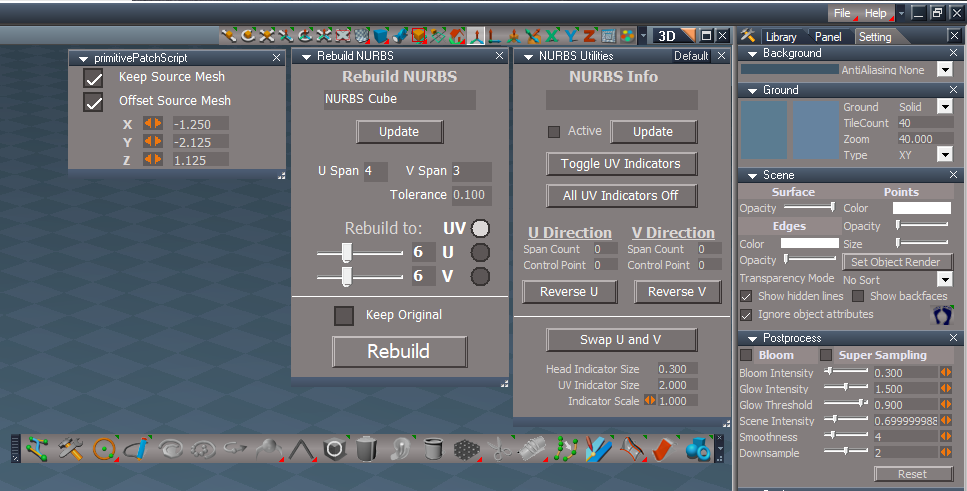
It already does that, so maybe I don't understand what you mean?trueBlue wrote: 05 Aug 2021, 03:25
Would it be okay to make the Rebuild NURBS Name work the same way as the NURBS Info?
When a NURBS is selected and you open Rebuild NURBS panel, the Name will be entered into the field
NURBS panels.png
That's because the frozen curve only has 1 face and the unfrozen curve has 2 faces.trueBlue wrote: 06 Aug 2021, 14:28 I am not able to select a Curve that has been frozen on one side when Freeze Curve As Polygon is checked
If I disable Freeze Curve As Polygon and Freeze a Curve, I am able to select both sides
Maybe I am missing the understanding of what Freeze Curve As Polygon meansclintonman wrote: 06 Aug 2021, 15:26That's because the frozen curve only has 1 face and the unfrozen curve has 2 faces.trueBlue wrote: 06 Aug 2021, 14:28 I am not able to select a Curve that has been frozen on one side when Freeze Curve As Polygon is checked
If I disable Freeze Curve As Polygon and Freeze a Curve, I am able to select both sides
As an example:
create an ordinary plane, not double sided
go to object render attributes and make the edges visible so you can see the back
rotate the view to the back of the plane
select something else
if you try to select the plane, you can't
When you freeze curve as polygon you end up with a single polygon face.trueBlue wrote: 06 Aug 2021, 15:47Maybe I am missing the understanding of what Freeze Curve As Polygon meansclintonman wrote: 06 Aug 2021, 15:26That's because the frozen curve only has 1 face and the unfrozen curve has 2 faces.trueBlue wrote: 06 Aug 2021, 14:28 I am not able to select a Curve that has been frozen on one side when Freeze Curve As Polygon is checked
If I disable Freeze Curve As Polygon and Freeze a Curve, I am able to select both sides
As an example:
create an ordinary plane, not double sided
go to object render attributes and make the edges visible so you can see the back
rotate the view to the back of the plane
select something else
if you try to select the plane, you can't
It seems to me that the code (freezeCurve, 2 script) for Freeze Curve As Polygon is opposite of what it should be
If I remove the ! in LINE 45 cmd += 'if(FreezeAsPolygon) {';
And add the ! in LINE 51 cmd += 'if(!FreezeAsPolygon) {';
Code: Select all
DEGTORAD = 0.01745329251994;rotdeg = Space.NodeMatrixElement(Node.Selection(),'yaw');
Space.NodeMatrixElement(Node.Selection(),'yaw') = -180 * Math.cos(DEGTORAD * rotdeg);So let me ask you this. How are you going to select an ordinary single sided plane from the back? There is no difference between that and the freeze as polygon.trueBlue wrote: 06 Aug 2021, 17:13 I am at your mercy of what it should or should not be
From a user perspective, not being able to select it, is problematic
Maybe you could flip it 180 degrees with something like this?Code: Select all
DEGTORAD = 0.01745329251994;rotdeg = Space.NodeMatrixElement(Node.Selection(),'yaw');
Space.NodeMatrixElement(Node.Selection(),'yaw') = -180 * Math.cos(DEGTORAD * rotdeg);
There is a fundamental differenceclintonman wrote: 06 Aug 2021, 17:38So let me ask you this. How are you going to select an ordinary single sided plane from the back? There is no difference between that and the freeze as polygon.trueBlue wrote: 06 Aug 2021, 17:13 I am at your mercy of what it should or should not be
From a user perspective, not being able to select it, is problematic
Maybe you could flip it 180 degrees with something like this?Code: Select all
DEGTORAD = 0.01745329251994;rotdeg = Space.NodeMatrixElement(Node.Selection(),'yaw');
Space.NodeMatrixElement(Node.Selection(),'yaw') = -180 * Math.cos(DEGTORAD * rotdeg);
create a single sided plane(not nurbs)
try to select it from the back, you can't, how do you want to fix that?
Modelspace you can select back faces so can't look there.trueBlue wrote: 06 Aug 2021, 18:12There is a fundamental differenceclintonman wrote: 06 Aug 2021, 17:38So let me ask you this. How are you going to select an ordinary single sided plane from the back? There is no difference between that and the freeze as polygon.trueBlue wrote: 06 Aug 2021, 17:13 I am at your mercy of what it should or should not be
From a user perspective, not being able to select it, is problematic
Maybe you could flip it 180 degrees with something like this?Code: Select all
DEGTORAD = 0.01745329251994;rotdeg = Space.NodeMatrixElement(Node.Selection(),'yaw');
Space.NodeMatrixElement(Node.Selection(),'yaw') = -180 * Math.cos(DEGTORAD * rotdeg);
create a single sided plane(not nurbs)
try to select it from the back, you can't, how do you want to fix that?
I can not select it in the 3D View
I understand about single sided planes and not being able select it from the back side
In Model and Workspace, when you first create/convert any object you are able to select it in the 3D View
That's all I am saying
If this is okay with you, I regress!
Edit: Just noticed if you flip the Curve 180 before you freeze it, you can select it
Looks like the Model's NURBS Plane is one sidedModelspace you can select back faces so can't look there.
Hummm... wonder if that could be done with your freeze scriptsYou can also point edit the frozen mesh and flip the face

That would "fix" it for some curves and then break it for curves that were "working" before. Like I said before it's the direction of the curve that determines the result and curves are not all created in the same direction.trueBlue wrote: 06 Aug 2021, 19:52Looks like the Model's NURBS Plane is one sidedModelspace you can select back faces so can't look there.Hummm... wonder if that could be done with your freeze scriptsYou can also point edit the frozen mesh and flip the face
Code: Select all
//	cmd += '	RsStackView.AddPanelToCurrSelection(nurbsNode, aspect, pvt_object, false, false);';
cmd += '	UserInterface.OpenToolPanelViewEx2WithFlag("", "",nurbsNode,3,1,0,2);';


Probably because I didn't discover the "UserInterface command does the same thing" blah blah blahtrueBlue wrote: 10 Aug 2021, 21:47 NURBS Panel With CP Mesh script
Why are you adding multiple selected NURBS' panels in the Stack/Panel?
Trying to understand why it would be beneficial
...
Probably not a good place for it. This works with cameras and lights, it's not exclusive to NURBS. Which is also the reason Guard isn't inside the NURBS group.trueBlue wrote: 10 Aug 2021, 21:47 ...
Edit: I also added a RMB command that opens the Guard panel in the NURBS tool
NURBS tool RMB Opens the Guard panel.png
Any suggestions?clintonman wrote: 10 Aug 2021, 23:35 Probably not a good place for it. This works with cameras and lights, it's not exclusive to NURBS. Which is also the reason Guard isn't inside the NURBS group.
Code: Select all
if(!Node.Exists("Scripts/CustomCommands/Guard")) return;
if(Node.Value("%THIS_NAME%", "ProtectNURBS"))
Node.Value("Scripts/CustomCommands/Guard", "Active") = true;
else
Node.Value("Scripts/CustomCommands/Guard", "Active") = false;
if(Node.Value("Scripts/CustomCommands/Guard", "Active") == false) {
Warning("\nProtect NURBS is not Active!\n\nDisabling Protect NURBS is not recommended!")
UserInterface.OpenToolPanelViewEx2('', '','Scripts/CustomCommands/Guard',3,1,0);
}
function Warning(strText)
{
var nSecondsToWait = -1;
var strTitle = "Warning";
// values are hexadecimal
var MB_OK = 0;
var MB_SYSTEMMODAL = 4096;//1000L force on top
var MB_ICONEXCLAMATION = 48;//30L
var nType = MB_OK + MB_SYSTEMMODAL + MB_ICONEXCLAMATION;
var shell = new ActiveXObject("WScript.shell");
shell.Popup (strText, nSecondsToWait, strTitle, nType);
}
Cool, thanks!clintonman wrote: 10 Aug 2021, 23:38 Fixed one line that had "System.Alert" to just "Alert"
Added the Control aspect back in.
Formatted the code so it is readable.
Nope, I wish. There is a command "params.GetControlIn();" which is supposed to tell you what called the script but it doesn't work.trueBlue wrote: 11 Aug 2021, 03:49Cool, thanks!clintonman wrote: 10 Aug 2021, 23:38 Fixed one line that had "System.Alert" to just "Alert"
Added the Control aspect back in.
Formatted the code so it is readable.
Are you able to identify which tool is being used and display it in the Alerts?
Or break in down into individual Alerts with each tool?
Are you sure?clintonman wrote: 11 Aug 2021, 03:56Nope, I wish. There is a command "params.GetControlIn();" which is supposed to tell you what called the script but it doesn't work.trueBlue wrote: 11 Aug 2021, 03:49Cool, thanks!clintonman wrote: 10 Aug 2021, 23:38 Fixed one line that had "System.Alert" to just "Alert"
Added the Control aspect back in.
Formatted the code so it is readable.
Are you able to identify which tool is being used and display it in the Alerts?
Or break in down into individual Alerts with each tool?
Code: Select all
	var reHair = /Hair/;
	var rePrim = /AddPrimitive/;
	var rePaintFace = /PaintFace/;

var reCPMesh = /AddMorph|DisplacementMapping|OptimizeTriangulation|PE soft paint/I misunderstood. I was trying to get GetControlIn to work when I read your message, so that was on my mind and I forgot that Guard has commands passed into it.trueBlue wrote: 11 Aug 2021, 04:11Are you sure?clintonman wrote: 11 Aug 2021, 03:56Nope, I wish. There is a command "params.GetControlIn();" which is supposed to tell you what called the script but it doesn't work.trueBlue wrote: 11 Aug 2021, 03:49
Cool, thanks!
Are you able to identify which tool is being used and display it in the Alerts?
Or break in down into individual Alerts with each tool?
What do theses names mean or how are they being used to generate an Alert?It seems to me, that you might be able to create individual functions for each tool with their own Alert's.Code: Select all
	var reHair = /Hair/;
	var rePrim = /AddPrimitive/;
	var rePaintFace = /PaintFace/;

	var reCPMesh = /AddMorph|DisplacementMapping|OptimizeTriangulation|PE soft paint/
Code: Select all
RsApp.SendCustomEvent("Scripts/CustomCommands/Guard", {Cmd:"MeshModifiers.ActivateBooleansTool('Intersection','')"});
Activity.Run("Scripts/CustomCommands/Guard");Code: Select all
RsApp.SendCustomEvent("Scripts/CustomCommands/Guard", {HelpText: "Boolean intersection", Name: "Intersection", Cmd:"MeshModifiers.ActivateBooleansTool('Intersection','')"});
Activity.Run("Scripts/CustomCommands/Guard");Code: Select all
	var Cmd = "";

	if(eventData.Cmd)
		Cmd = eventData.Cmd;

params.Global("Cmd") = Cmd;Code: Select all
var Cmd = params.Global("Cmd");That was going to be my last question if you said, "Nope"clintonman wrote: 11 Aug 2021, 04:46I misunderstood. I was trying to get GetControlIn to work when I read your message, so that was on my mind and I forgot that Guard has commands passed into it.trueBlue wrote: 11 Aug 2021, 04:11Are you sure?clintonman wrote: 11 Aug 2021, 03:56
Nope, I wish. There is a command "params.GetControlIn();" which is supposed to tell you what called the script but it doesn't work.
What do theses names mean or how are they being used to generate an Alert?It seems to me, that you might be able to create individual functions for each tool with their own Alert's.Code: Select all
	var reHair = /Hair/;
	var rePrim = /AddPrimitive/;
	var rePaintFace = /PaintFace/;

	var reCPMesh = /AddMorph|DisplacementMapping|OptimizeTriangulation|PE soft paint/
I see three possibilities. The button "Name" or "HelpText" or some manually typed in text can be sent into the Guard and used to make decisions.
thiswould change to something like thisCode: Select all
RsApp.SendCustomEvent("Scripts/CustomCommands/Guard", {Cmd:"MeshModifiers.ActivateBooleansTool('Intersection','')"}); Activity.Run("Scripts/CustomCommands/Guard");Then inside Guard OnCustomEvent function this add more code with var Name="", Name=eventData.Name...Code: Select all
RsApp.SendCustomEvent("Scripts/CustomCommands/Guard", {HelpText: "Boolean intersection", Name: "Intersection", Cmd:"MeshModifiers.ActivateBooleansTool('Intersection','')"});
Activity.Run("Scripts/CustomCommands/Guard");
Then inside Execute add like Cmd only use Name instead... var Name = params.Global("Name")Code: Select all
var Cmd = ""; if(eventData.Cmd) Cmd = eventData.Cmd; params.Global("Cmd") = Cmd;So long story short you add the new data to the button command, save the data in the OnCustomEvent, and finally read and use the data inside Execute.Code: Select all
var Cmd = params.Global("Cmd");
It seems like a lot of work for such a small change.