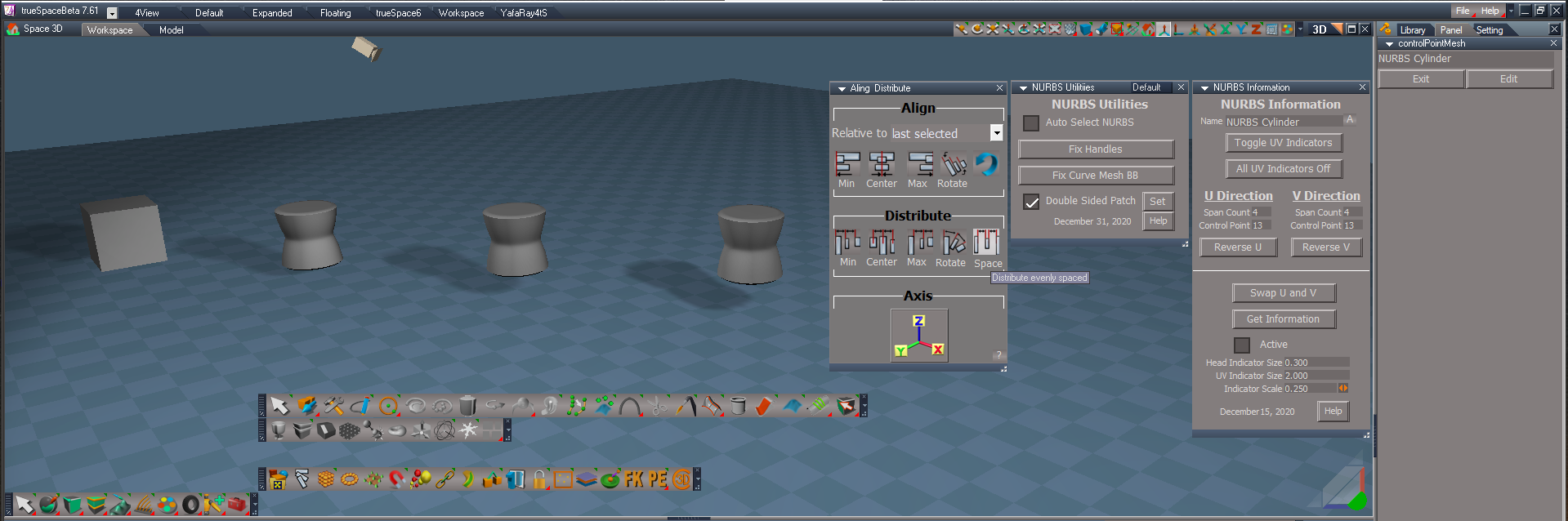
New NURBS tools
-
clintonman

- Captain
- Posts: 5659
- Joined: 21 May 2009, 21:08
- Type the number ten into the box: 0
- Location: California
Re: New NURBS tools
Looks good, and your comments added to my todo list.
-
trueBlue

- Captain
- Posts: 5548
- Joined: 06 Jul 2009, 22:50
- Type the number ten into the box: 10
Re: New NURBS tools
Now the NURBS Utilities/Prep - Set Solid Patch is throwing a similar error
PatchORAReset
Error: Node.Value(ORA, "Surface opacity") = SurfaceOpacity;
Should be a capitol O
Node.Value(ORA, "Surface Opacity") = SurfaceOpacity;
Shouldn't the freezeCurve,2 convert the Curve to a normal 3D Object
PatchORAReset
Error: Node.Value(ORA, "Surface opacity") = SurfaceOpacity;
Should be a capitol O
Node.Value(ORA, "Surface Opacity") = SurfaceOpacity;
Shouldn't the freezeCurve,2 convert the Curve to a normal 3D Object
Code: Select all
	Node.Value(ORA, "Surface Opacity") = 1;
	Node.Value(ORA, "Edges opacity") = 0;
	Node.Value(ORA, "Ignore layer attributes") = 0
	MeshModifiers.ActivatePointEditWidget('{E8913C00-9A2A-43cf-8238-27B4BFB50A1F}','/Widgets/Tools/Mesh editor/PE basic select','Default');
	RsTool.Arrow()
-
clintonman
- Captain
- Posts: 5659
- Joined: 21 May 2009, 21:08
- Type the number ten into the box: 0
- Location: California
Re: New NURBS tools
Error and freeze suggestion noted on todo list, thanks.
Would be useful as an option to convert frozen curve to polygon appearance for the case where the curve is a closed shape. That is one of the options in the svg curve importer. Would not be useful for a curve that is a straight line or just wiggles back and forth so it should be optional.
Would be useful as an option to convert frozen curve to polygon appearance for the case where the curve is a closed shape. That is one of the options in the svg curve importer. Would not be useful for a curve that is a straight line or just wiggles back and forth so it should be optional.
-
trueBlue
- Captain
- Posts: 5548
- Joined: 06 Jul 2009, 22:50
- Type the number ten into the box: 10
Re: New NURBS tools
So are you saying that the freeze suggestion should be optional?clintonman wrote: 23 Dec 2020, 20:05 Error and freeze suggestion noted on todo list, thanks.
Would be useful as an option to convert frozen curve to polygon appearance for the case where the curve is a closed shape. That is one of the options in the svg curve importer. Would not be useful for a curve that is a straight line or just wiggles back and forth so it should be optional.
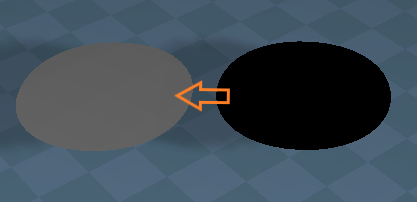
Can these vertices or floaters be removed?

- Two floaters.png (1.08 KiB) Viewed 2432 times
-
clintonman
- Captain
- Posts: 5659
- Joined: 21 May 2009, 21:08
- Type the number ten into the box: 0
- Location: California
Re: New NURBS tools
Can't see tiny image. You mean the 2 floating verts of the curve? Is that a picture of the control point curve or the lod mesh?
The control point needs the floaters because it is really a cone mesh. The floater is the top of the cone and the middle of the bottom face of the cone.
The control point needs the floaters because it is really a cone mesh. The floater is the top of the cone and the middle of the bottom face of the cone.
-
trueBlue
- Captain
- Posts: 5548
- Joined: 06 Jul 2009, 22:50
- Type the number ten into the box: 10
Re: New NURBS tools
There is two offset vertices at the center of a Circle curve that has been frozen
-
clintonman
- Captain
- Posts: 5659
- Joined: 21 May 2009, 21:08
- Type the number ten into the box: 0
- Location: California
Re: New NURBS tools
No it's not possible to get rid of them unless you convert the frozen mesh to a polygon like you suggested earlier.trueBlue wrote: 23 Dec 2020, 20:35 There is two offset vertices at the center of a Circle curve that has been frozen
The frozen curve looks like lines, but it is not. It is a bunch of invisible triangles with 1 edge visible. The floating points are also connected to triangles. I think you might be able to see it if you turn on the mesh edit setting ,show triangles while in point edit mode.
-
trueBlue
- Captain
- Posts: 5548
- Joined: 06 Jul 2009, 22:50
- Type the number ten into the box: 10
Re: New NURBS tools
Hummm.... this is not going to work!
I just tried my suggestion on the Curve in the scene I shared with you.
Not a pretty result!
I just tried my suggestion on the Curve in the scene I shared with you.
Not a pretty result!
-
clintonman
- Captain
- Posts: 5659
- Joined: 21 May 2009, 21:08
- Type the number ten into the box: 0
- Location: California
-
trueBlue
- Captain
- Posts: 5548
- Joined: 06 Jul 2009, 22:50
- Type the number ten into the box: 10
Re: New NURBS tools
I do not see how to tell the differences between a closed & open curve from script, so I do not think it is going to work with the freeze curve scripts
Not sure if this could be corrected and or help with converting curves to polygons
This is a frozen circle curve
The bottom two vertices are offset
I was able join the offset vertex to the vertex in the center and move them up to the circle, making the mesh flat
Your clean Cone script does a pretty good job at fixing this but the vertices are still offset and it is not flat
Not sure if this could be corrected and or help with converting curves to polygons
This is a frozen circle curve

- Curve cone.png (8.47 KiB) Viewed 2451 times
I was able join the offset vertex to the vertex in the center and move them up to the circle, making the mesh flat
Your clean Cone script does a pretty good job at fixing this but the vertices are still offset and it is not flat
-
clintonman
- Captain
- Posts: 5659
- Joined: 21 May 2009, 21:08
- Type the number ten into the box: 0
- Location: California
Re: New NURBS tools
It doesn't have to be closed just have the appearance of being closed or at least forming a somewhat convex shape.trueBlue wrote: 23 Dec 2020, 21:12 I do not see how to tell the differences between a closed & open curve from script, so I do not think it is going to work with the freeze curve scripts
Not sure if this could be corrected and or help with converting curves to polygons
This is a frozen circle curve
Curve cone.png
The bottom two vertices are offset
I was able join the offset vertex to the vertex in the center and move them up to the circle, making the mesh flat
Your clean Cone script does a pretty good job at fixing this but the vertices are still offset and it is not flat
Try these steps to get the polygon:
After freezing select and move the 2 floating points down out of the way.
Select all the vertices or edges of the curve shape and use Form Faces.
The new face will be selected so invert the selection and delete.
Now you should have 1 face in the shape of the curve.
-
trueBlue
- Captain
- Posts: 5548
- Joined: 06 Jul 2009, 22:50
- Type the number ten into the box: 10
Re: New NURBS tools
trueBlue wrote: 23 Dec 2020, 21:12 I do not see how to tell the differences between a closed & open curve from script, so I do not think it is going to work with the freeze curve scripts
I'll assume you are referring to my first part of the post about the freeze curve scripts in the above quote.clintonman wrote: 24 Dec 2020, 18:30 It doesn't have to be closed just have the appearance of being closed or at least forming a somewhat convex shape.
Try these steps to get the polygon:
After freezing select and move the 2 floating points down out of the way.
Select all the vertices or edges of the curve shape and use Form Faces.
The new face will be selected so invert the selection and delete.
Now you should have 1 face in the shape of the curve.
As said, I do not think this going to work with the freeze curve scripts because curves can be created without a convex shape.
Well it could but the results would most likely be twisted and not useful.
The second part of the post and picture was a different question.
I was referring to:
You are using a Cone for the creation of curves, right?The frozen curve looks like lines, but it is not. It is a bunch of invisible triangles with 1 edge visible. The floating points are also connected to triangles. I think you might be able to see it if you turn on the mesh edit setting ,show triangles while in point edit mode.
I was wondering if that Cone could be a flat mesh including the two floaters joined in the center
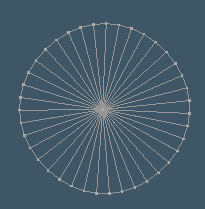
- Flat Cone.png (5.33 KiB) Viewed 2332 times
The mesh is being created from script
Set the Height to 0.000
- Attachments
-
- ConeObj.RsObj
- (20.96 KiB) Downloaded 155 times
-
clintonman
- Captain
- Posts: 5659
- Joined: 21 May 2009, 21:08
- Type the number ten into the box: 0
- Location: California
Re: New NURBS tools
How did you come to this conclusion? Resetting the connector sets it to "Continuous" not "On release".trueBlue wrote: 23 Dec 2020, 15:38 ...
NURBSUtilities/Prep - Reset Mesh Editor Settings / Auto triangulation
Should be On release
...
-
clintonman
- Captain
- Posts: 5659
- Joined: 21 May 2009, 21:08
- Type the number ten into the box: 0
- Location: California
Re: New NURBS tools
Attached is a modified NURBSUtilties node that includes an option to freeze a curve as a polygon, and has the bug fixes except for auto triangulation reset to "on release".
- Attachments
-
- NURBSUtilities.RsObj
- (163.61 KiB) Downloaded 182 times
-
trueBlue
- Captain
- Posts: 5548
- Joined: 06 Jul 2009, 22:50
- Type the number ten into the box: 10
Re: New NURBS tools
Merry Christmas Clinton!clintonman wrote: 24 Dec 2020, 22:09 Attached is a modified NURBSUtilties node that includes an option to freeze a curve as a polygon, and has the bug fixes except for auto triangulation reset to "on release".

NURBSUtilities
Freeze Curve as Polygon works great!

Is there a reason why you are setting the ORA settings different from the defaults?
Freeze Patch does not change any of the ORA settings
Is there a reason why the default for Double Sided Patch is false?
I notice in the open panel script it is being changed to true
Mesh Editor Settings
In the UUpdates, I strive to keep the settings in trueSpace the way they were originally set
Not all trueSpace panels have defaults setup by the developers
Auto triangulation
Maybe this was set (saved state) by the developer to On release verses Continuous for a reason
My thought is, always updating Auto triangulation might not be a good choice during normal Point Editing
Maybe the default was not set by the developers to Continuous
Not sure really, just trying to error on caution
-
clintonman
- Captain
- Posts: 5659
- Joined: 21 May 2009, 21:08
- Type the number ten into the box: 0
- Location: California
Re: New NURBS tools
The polygon is only visible from one side, so I left the edges visible so it doesn't look like it just disappeared.trueBlue wrote: 25 Dec 2020, 17:59 ...
NURBSUtilities
Freeze Curve as Polygon works great!
Is there a reason why you are setting the ORA settings different from the defaults?
...
Should it change the ORA settings?trueBlue wrote: 25 Dec 2020, 17:59 ...
Freeze Patch does not change any of the ORA settings
...
A double sided patch will freeze as a triangulated mesh. A single sided patch has a better polygon mesh conversion result and is better for editing. Double sided is better for viewing and selecting a patch in the 3D view.trueBlue wrote: 25 Dec 2020, 17:59 ...
Is there a reason why the default for Double Sided Patch is false?
I notice in the open panel script it is being changed to true
...
The "better" setting depends on what you're doing at the moment.
A lot of maybe. No way to know the developers intent, so just use your best judgement. Continuous doesn't look like a bad default to me. For instance if you create a plane and edit it by moving one corner ( a corner that belongs to only 1 triangle ) towards the opposite corner the geometry goes bad with some flashing until you release. On the other hand if you're more concerned about performance then on release would be better.trueBlue wrote: 25 Dec 2020, 17:59 ...
Mesh Editor Settings
In the UUpdates, I strive to keep the settings in trueSpace the way they were originally set
Not all trueSpace panels have defaults setup by the developers
Auto triangulation
Maybe this was set (saved state) by the developer to On release verses Continuous for a reason
My thought is, always updating Auto triangulation might not be a good choice during normal Point Editing
Maybe the default was not set by the developers to Continuous
Not sure really, just trying to error on caution
trueBlue wrote: 25 Dec 2020, 17:59 ...
Merry Christmas Clinton!
Thank you. Same to you.-
trueBlue
- Captain
- Posts: 5548
- Joined: 06 Jul 2009, 22:50
- Type the number ten into the box: 10
Re: New NURBS tools
I was only comparing the differences between the Freeze Curve and Freeze Patch
Is it possible with the Freeze Curve to make the Curve double sided before the conversion?
Eliminating the need to make the edges visible?
I used Form Face on the backside of frozen curve.
Can that be done from script?
Edit: Disregard the above...
I now see it is possible to show the back faces by setting Show backfaces in the ORA settings
This is similar to a normal Plane object
Double Sided Patch default = false
I was just bringing this to your attention, that the open panel script was changing it to true
From the PDF manual
Show Triangles – In order to ensure correct rendering, trueSpace automatically triangulates all models.
Normally this option is unchecked, which means that this “behind the scenes” triangulation is hidden,
showing you only the edges and faces you have created and are working with directly. If you check this
option, then you will see the triangulation that trueSpace uses. Note that this is a visual item only,
you cannot then select those triangles directly - you must use the Select Triangle Faces or Select Triangle
Edges tools to work with the underlying triangulation. Checking this option is useful if you are going to
be using those tools.
Auto Triangulation - When you move a vertex, this controls when affected polygon gets re-triangulated.
Continuous: Auto-triangulation happens as you move the vertex.
On Release: Auto-triangulation occurs only after you release the mouse button.
None: No auto-triangulation is done.
NURBSUtilities/Prep aspect
Set Mesh Editor for NURBS button
I think that it would be best if the MeshEditParams script captured the users Mesh Editor Settings before applying any changes
Reset Mesh Editor Settings button
Create another internal script hooked up to the MeshEditParams script for restoring those changes
Freeze NURBS or Curves
Append name with Object
NURBS Patch Auto Floaters
Create a NURBS Patch from a Cube primitive
Run NURBS Patch Auto Floaters
Results
Is the Beveling intended?
Is it possible with the Freeze Curve to make the Curve double sided before the conversion?
Eliminating the need to make the edges visible?
I used Form Face on the backside of frozen curve.
Can that be done from script?
Edit: Disregard the above...
I now see it is possible to show the back faces by setting Show backfaces in the ORA settings
This is similar to a normal Plane object
Double Sided Patch default = false
I was just bringing this to your attention, that the open panel script was changing it to true
From the PDF manual
Show Triangles – In order to ensure correct rendering, trueSpace automatically triangulates all models.
Normally this option is unchecked, which means that this “behind the scenes” triangulation is hidden,
showing you only the edges and faces you have created and are working with directly. If you check this
option, then you will see the triangulation that trueSpace uses. Note that this is a visual item only,
you cannot then select those triangles directly - you must use the Select Triangle Faces or Select Triangle
Edges tools to work with the underlying triangulation. Checking this option is useful if you are going to
be using those tools.
Auto Triangulation - When you move a vertex, this controls when affected polygon gets re-triangulated.
Continuous: Auto-triangulation happens as you move the vertex.
On Release: Auto-triangulation occurs only after you release the mouse button.
None: No auto-triangulation is done.
NURBSUtilities/Prep aspect
Set Mesh Editor for NURBS button
I think that it would be best if the MeshEditParams script captured the users Mesh Editor Settings before applying any changes
Reset Mesh Editor Settings button
Create another internal script hooked up to the MeshEditParams script for restoring those changes

- Restore MeshEditParams.png (15.43 KiB) Viewed 2264 times
Append name with Object
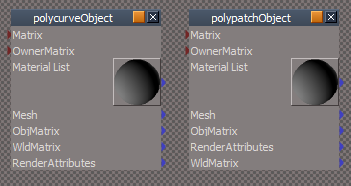
- Freeze Rename.png (11.93 KiB) Viewed 2264 times
Create a NURBS Patch from a Cube primitive
Run NURBS Patch Auto Floaters
Results
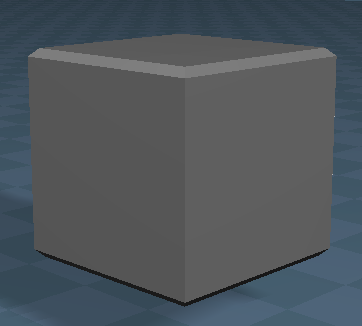
- NURBS Patch Auto Floaters.png (15.09 KiB) Viewed 2262 times
-
clintonman
- Captain
- Posts: 5659
- Joined: 21 May 2009, 21:08
- Type the number ten into the box: 0
- Location: California
Re: New NURBS tools
Not sure why you quoted the manual.trueBlue wrote: 25 Dec 2020, 23:22 ...
From the PDF manual
...
NURBSUtilities/Prep aspect
Set Mesh Editor for NURBS button
I think that it would be best if the MeshEditParams script captured the users Mesh Editor Settings before applying any changes
Reset Mesh Editor Settings button
Create another internal script hooked up to the MeshEditParams script for restoring those changes
Restore MeshEditParams.png
Freeze NURBS or Curves
Append name with Object
Freeze Rename.png
...
In your restore mesheditparams you should check that the settings don't match the nurbs mesheditparams. Otherwise the nurbs values could become the default as far as the nurbs tools are concerned. This could happen if the set mesh edit for nurbs button is pushed twice. One time saves the settings
 , second time overwrites the settings that were saved
  .
.Renaming the frozen should be an option, not automatic. Otherwise you may be renaming something that someone else already renamed. I see it like this, you add a cube primitive, "Cube", then point edit it. I wouldn't want tS to rename it to "CubePointEdited". If I name something I don't want something overriding that name.
-
clintonman
- Captain
- Posts: 5659
- Joined: 21 May 2009, 21:08
- Type the number ten into the box: 0
- Location: California
Re: New NURBS tools
Didn't see that question.trueBlue wrote: 25 Dec 2020, 23:22 ...
Is the Beveling intended?
That's a triangle tesselation thing. NURBS have infinite resolution, but we have to limit it to less than that. If you change the U precision (V precision?) you will see the bevel appear and disappear depending on the value. Maybe make edges display mode to see it more directly.
Edit: yes, U precision values of 10, 13, 16, 19... these values make the triangle verts match up with the control point locations. Also make the control point mesh visible in addition to edges display mode to see it clearly.
Edit: I should also say that the fix floaters moves those points to match what modelspace would show and I don't think I made that adjustment for the primitve nurbs. I'll double check this by export to modelspace and see how it looks.
-
trueBlue
- Captain
- Posts: 5548
- Joined: 06 Jul 2009, 22:50
- Type the number ten into the box: 10
Re: New NURBS tools
Right on both accounts.clintonman wrote: 27 Dec 2020, 16:14Not sure why you quoted the manual.trueBlue wrote: 25 Dec 2020, 23:22 ...
From the PDF manual
...
NURBSUtilities/Prep aspect
Set Mesh Editor for NURBS button
I think that it would be best if the MeshEditParams script captured the users Mesh Editor Settings before applying any changes
Reset Mesh Editor Settings button
Create another internal script hooked up to the MeshEditParams script for restoring those changes
Restore MeshEditParams.png
Freeze NURBS or Curves
Append name with Object
Freeze Rename.png
...
In your restore mesheditparams you should check that the settings don't match the nurbs mesheditparams. Otherwise the nurbs values could become the default as far as the nurbs tools are concerned. This could happen if the set mesh edit for nurbs button is pushed twice. One time saves the settings
Renaming the frozen should be an option, not automatic. Otherwise you may be renaming something that someone else already renamed. I see it like this, you add a cube primitive, "Cube", then point edit it. I wouldn't want tS to rename it to "CubePointEdited". If I name something I don't want something overriding that name.
Not a good idea
-
clintonman
- Captain
- Posts: 5659
- Joined: 21 May 2009, 21:08
- Type the number ten into the box: 0
- Location: California
Re: New NURBS tools
I did some tests. NURBS cube primitive with and without the floaters adjustment. When saved to cob file and loaded to modelspace there was no beveling action for either one. So it is purely a tesselation (mesh approximation) issue on workspace. It looks like modelspace automatically finds the smallest resolution value automatically. To add to the list of "good" U precision values for the cube, 7 and 4 are also good, with 4 closely matching the modelside tesselation.
-
trueBlue
- Captain
- Posts: 5548
- Joined: 06 Jul 2009, 22:50
- Type the number ten into the box: 10
Re: New NURBS tools
You created an infinite primitives' creation tool! 
Maybe add a modal question before running the script?
Question is, what should the question say?
Maybe add a modal question before running the script?
Question is, what should the question say?
-
trueBlue
- Captain
- Posts: 5548
- Joined: 06 Jul 2009, 22:50
- Type the number ten into the box: 10
Re: New NURBS tools
About your plugin based OpenPanelFrame scripts
This seems to be path dependent and does not work in all layouts
Is the sideFrame path the Stack?
If so, could your create a Function that searches for the StackPanelView Node and make it's Node Owner the path?
Hope that makes sense.
This seems to be path dependent and does not work in all layouts
Is the sideFrame path the Stack?
If so, could your create a Function that searches for the StackPanelView Node and make it's Node Owner the path?
Hope that makes sense.
-
clintonman
- Captain
- Posts: 5659
- Joined: 21 May 2009, 21:08
- Type the number ten into the box: 0
- Location: California
Re: New NURBS tools
I lost track of the conversation. What question?trueBlue wrote: 27 Dec 2020, 17:09 You created an infinite primitives' creation tool!
Maybe add a modal question before running the script?
Question is, what should the question say?
-
clintonman
- Captain
- Posts: 5659
- Joined: 21 May 2009, 21:08
- Type the number ten into the box: 0
- Location: California
Re: New NURBS tools
I'll get back to you on that. Have to remember how it works, because I thought it did work in all layouts.trueBlue wrote: 27 Dec 2020, 20:44 About your plugin based OpenPanelFrame scripts
This seems to be path dependent and does not work in all layouts
Is the sideFrame path the Stack?
If so, could your create a Function that searches for the StackPanelView Node and make it's Node Owner the path?
Hope that makes sense.
-
trueBlue
- Captain
- Posts: 5548
- Joined: 06 Jul 2009, 22:50
- Type the number ten into the box: 10
Re: New NURBS tools
NURBS Patch Auto Floaters
Add modal question to the above script?
Give the option to run it or not
On further review it looks like Undo will undo the changes
Add modal question to the above script?
Give the option to run it or not
On further review it looks like Undo will undo the changes
-
trueBlue
- Captain
- Posts: 5548
- Joined: 06 Jul 2009, 22:50
- Type the number ten into the box: 10
Re: New NURBS tools
Try opening the NURBS Utlities in the Workspace layoutclintonman wrote: 27 Dec 2020, 22:05I'll get back to you on that. Have to remember how it works, because I thought it did work in all layouts.trueBlue wrote: 27 Dec 2020, 20:44 About your plugin based OpenPanelFrame scripts
This seems to be path dependent and does not work in all layouts
Is the sideFrame path the Stack?
If so, could your create a Function that searches for the StackPanelView Node and make it's Node Owner the path?
Hope that makes sense.
Does not work as expected
Then replace the path to:
Code: Select all
var sideFrame = "/Project/Windows Manager Space/Frame Window/Border Docking Place/Frame Window, 1/Split Docking Place/Frame Window, 1/Split Docking Place/Frame Window, 1/Split Docking Place/Frame Window, 2/Split Docking Place/Frame Window, 1/Split Docking Place/Frame Window, 1/Split Docking Place/Frame Window, 1"
-
clintonman
- Captain
- Posts: 5659
- Joined: 21 May 2009, 21:08
- Type the number ten into the box: 0
- Location: California
Re: New NURBS tools
I looked and there may be a way to do it. As it is now it only makes them not overlap. It doesn't do anything else except restrict it to somewhere inside the tS window and to the left of the default layout stack frame.trueBlue wrote: 27 Dec 2020, 20:44 About your plugin based OpenPanelFrame scripts
This seems to be path dependent and does not work in all layouts
Is the sideFrame path the Stack?
If so, could your create a Function that searches for the StackPanelView Node and make it's Node Owner the path?
Hope that makes sense.
-
clintonman
- Captain
- Posts: 5659
- Joined: 21 May 2009, 21:08
- Type the number ten into the box: 0
- Location: California
Re: New NURBS tools
This seems to work.
Replace the line with this:
Add a new function:
Replace the line with this:
Code: Select all
var sideFrame = FindSideFrame("/Project/Windows Manager Space");Code: Select all
function FindSideFrame(currentNode)
{
	var sideFrame = "";
	if(Node.Exists(currentNode + "/StackPanelView Node"))
		return currentNode;

	var numChildren = Node.SubObjectCount(currentNode);
	if(numChildren == 0) return "";

	for(var i=0;i<numChildren;i++) {
		var child = currentNode + "/" + Node.SubObject(currentNode, i);
		sideFrame = FindSideFrame(child);
		if(sideFrame != "")
			return sideFrame;
	}
	return "";
}
-
clintonman
- Captain
- Posts: 5659
- Joined: 21 May 2009, 21:08
- Type the number ten into the box: 0
- Location: California
Re: New NURBS tools
Is this script running automatically in some way? I only remember adding a button to run it and if that's so why press a button to just ask you, "are you sure you wanted to press me?"trueBlue wrote: 27 Dec 2020, 22:09 NURBS Patch Auto Floaters
Add modal question to the above script?
Give the option to run it or not
On further review it looks like Undo will undo the changes
-
trueBlue
- Captain
- Posts: 5548
- Joined: 06 Jul 2009, 22:50
- Type the number ten into the box: 10
Re: New NURBS tools
Works like a charm!clintonman wrote: 27 Dec 2020, 23:46 This seems to work.
Replace the line with this:Add a new function:Code: Select all
var sideFrame = FindSideFrame("/Project/Windows Manager Space");Code: Select all
function FindSideFrame(currentNode)
{
	var sideFrame = "";
	if(Node.Exists(currentNode + "/StackPanelView Node"))
		return currentNode;

	var numChildren = Node.SubObjectCount(currentNode);
	if(numChildren == 0) return "";

	for(var i=0;i<numChildren;i++) {
		var child = currentNode + "/" + Node.SubObject(currentNode, i);
		sideFrame = FindSideFrame(child);
		if(sideFrame != "")
			return sideFrame;
	}
	return "";
}
Thank you!
-
trueBlue
- Captain
- Posts: 5548
- Joined: 06 Jul 2009, 22:50
- Type the number ten into the box: 10
Re: New NURBS tools
This seems to work for a new Delete script that does not delete any objects in the selection that have a controlPointMesh node
Using your modified Unencapsulate script
Is this the correct way to write it?
Not sure about the brackets
Your align and distribute script throws an error when selecting patches and curves
It works without an error if you use your Select CP mesh icon first
Is there something that you can add to the script to avoid the error?
Using your modified Unencapsulate script
Is this the correct way to write it?
Not sure about the brackets
Code: Select all
	var selectionString = Node.Selection();

	var selectionArray = selectionString.split(";");
	var re = /^\s/; // whitespace in first character position

	if(selectionArray.length < 1) return;

	for(var i=0;i<selectionArray.length;i++) {
		//remove whitespace from the node path
		selectionArray[i] = selectionArray[i].replace(re,"");

		if(Node.SubObjectCount(selectionArray[i]) > 0) {
//
if(!Node.Exists(selectionArray[i] + "/controlPointMesh")) {
Node.Delete(selectionArray[i])
}
//
		}
	}
It works without an error if you use your Select CP mesh icon first
Is there something that you can add to the script to avoid the error?
-
clintonman
- Captain
- Posts: 5659
- Joined: 21 May 2009, 21:08
- Type the number ten into the box: 0
- Location: California
Re: New NURBS tools
I don't understand why you would want to do that.trueBlue wrote: 29 Dec 2020, 17:08 This seems to work for a new Delete script that does not delete any objects in the selection that have a controlPointMesh node
...
Yep, there's probably going to be a lot of tools that needs adjusting to work with the NURBS objects.trueBlue wrote: 29 Dec 2020, 17:08 ...
Your align and distribute script throws an error when selecting patches and curves
It works without an error if you use your Select CP mesh icon first
Is there something that you can add to the script to avoid the error?
-
trueBlue
- Captain
- Posts: 5548
- Joined: 06 Jul 2009, 22:50
- Type the number ten into the box: 10
Re: New NURBS tools
If a user has the controlPointMesh node selected and Deletes it, that patch or curve no longer works!clintonman wrote: 29 Dec 2020, 17:43I don't understand why you would want to do that.trueBlue wrote: 29 Dec 2020, 17:08 This seems to work for a new Delete script that does not delete any objects in the selection that have a controlPointMesh node
...
This script eliminates the possibility of the controlPointMesh from being deleted.
-
clintonman
- Captain
- Posts: 5659
- Joined: 21 May 2009, 21:08
- Type the number ten into the box: 0
- Location: California
Re: New NURBS tools
I could be wrong but the code posted makes it look like it stops nurbs from being deleted but does allow the controlPointMesh to be deleted.trueBlue wrote: 29 Dec 2020, 18:03If a user has the controlPointMesh node selected and Deletes it, that patch or curve no longer works!clintonman wrote: 29 Dec 2020, 17:43I don't understand why you would want to do that.trueBlue wrote: 29 Dec 2020, 17:08 This seems to work for a new Delete script that does not delete any objects in the selection that have a controlPointMesh node
...
This script eliminates the possibility of the controlPointMesh from being deleted.
I think the opposite would be better. If you try to delete a controlpointmesh it deletes the nurbs object instead with maybe a normal nurbs unaware delete via RMB.
-
trueBlue
- Captain
- Posts: 5548
- Joined: 06 Jul 2009, 22:50
- Type the number ten into the box: 10
Re: New NURBS tools
Your NURBSScript/NURBSUtilities/Delete script works if I add Delete('') to the end of the script
Other wise it does not delete nodes within a selection that do not have a Matrix con
Like 2D Encaps and jScripts, etc...
Other wise it does not delete nodes within a selection that do not have a Matrix con
Like 2D Encaps and jScripts, etc...
-
trueBlue
- Captain
- Posts: 5548
- Joined: 06 Jul 2009, 22:50
- Type the number ten into the box: 10
Re: New NURBS tools
NURBS Utilities
This is not working...
I have a NURBS Cube selected, press the NURBS Utilities/Misc - Fix Triangulation button
I get the above Alert
Shouldn't this be:
Shouldn't this be fixing the controlPointMesh?
Looks like the fixCurveTriangulation script is wrong too!
This does not seem to do anything
Shouldn't this be fixing the controlPointMesh?
The Fix Curve Mesh BB button script
Activity.Run("%THIS_NAME%" + "/cleanCone")
The fixCurveTriangulation script is not even running!
Shouldn't this be calling the fixTriangulation script?
Does the cleanCone script need to run too?
With the modifications the fixTriangulation script runs one or the other scripts depending on if a patch or curve is selected
I tested this by adding an Alert to each script
Seems this could be one button with the assumption that running the fix curve on a patch does nothing to the patch and visa versa
If all of the above modifications are correct...
Suggestion
fixPatchTriangulation scriptFix Triangulation - if a process is exited prematurely or mesh edit triangulation is active during patch editing, the triangle indices of the control point mesh can get messed up. This fixes that problem.
Code: Select all
var cp_to_patchcp = Node.Owner(firstSel) + "/CP to patch CP";
	if(!Node.Exists(cp_to_patchcp)) {
		System.Alert("Only for NURBS patch.");
		return;
	}
I have a NURBS Cube selected, press the NURBS Utilities/Misc - Fix Triangulation button
I get the above Alert
Shouldn't this be:
Code: Select all
//var cp_to_patchcp = Node.Owner(firstSel) + "/CP to patch CP";
var cp_to_patchcp = firstSel + "/CP to patch CP";
Code: Select all
//	cpmesh = Node.Value(firstSel,"Mesh");
cpmesh = Node.Value(firstSel + "/controlPointMesh","Mesh");
Code: Select all
//	Node.Value(firstSel + "/Editable shape","Input Mesh") = planemesh;
Node.Value(firstSel + "/controlPointMesh/Editable shape","Input Mesh") = planemesh
This does not seem to do anything
Code: Select all
	var curveNode = firstSel;

	if(Node.ConExists(firstSel, "Matrix"))
		curveNode = Node.Owner(firstSel);

	firstSel = curveNode + "/controlPointMesh";
Code: Select all
//	cpmesh = Node.Value(firstSel,"Mesh");
cpmesh = Node.Value(firstSel + "/controlPointMesh","Mesh");
Code: Select all
//copy mesh to the cpmesh editable shape input mesh
//	Node.Value(firstSel + "/Editable shape","Input Mesh") = conemesh;
Node.Value(firstSel + "/controlPointMesh/Editable shape","Input Mesh") = conemesh;
Activity.Run("%THIS_NAME%" + "/cleanCone")
The fixCurveTriangulation script is not even running!
Shouldn't this be calling the fixTriangulation script?
Code: Select all
Activity.Run("%THIS_NAME%" + "/fixTriangulation")With the modifications the fixTriangulation script runs one or the other scripts depending on if a patch or curve is selected
I tested this by adding an Alert to each script
Seems this could be one button with the assumption that running the fix curve on a patch does nothing to the patch and visa versa
If all of the above modifications are correct...
Suggestion
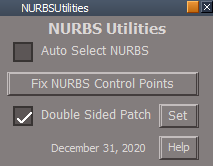
- NURBS Utilities.png (7.03 KiB) Viewed 2759 times
-
clintonman
- Captain
- Posts: 5659
- Joined: 21 May 2009, 21:08
- Type the number ten into the box: 0
- Location: California
Re: New NURBS tools
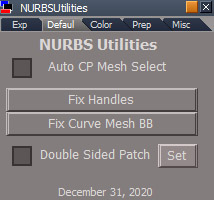
- nurbsUdefault.jpg (41.71 KiB) Viewed 2759 times
fixTriangulation added alert to bottom:
Code: Select all
	System.Alert("Not a NURBS object");

	// params.ConValue("CurveOUT") = ...
// params.ConValue("PatchOUT") = ...fixPatchTriangulation fixed and removed alert
Code: Select all
	if(Node.ShortName(firstSel) != "controlPointMesh") {
		if(Node.Exists(firstSel + "/controlPointMesh"))
			firstSel = firstSel + "/controlPointMesh";
		else
			firstSel = Node.Owner(firstSel) + "/controlPointMesh";
	}

	var cp_to_patchcp = Node.Owner(firstSel) + "/CP to patch CP";

	//if(!Node.Exists(cp_to_patchcp)) {
	//	System.Alert("Only for NURBS patch.");
	//	return;
//}Code: Select all
	if(Node.ShortName(firstSel) != "controlPointMesh") {
		if(Node.Exists(firstSel + "/controlPointMesh"))
			firstSel = firstSel + "/controlPointMesh";
		else
			firstSel = Node.Owner(firstSel) + "/controlPointMesh";
	}

	//var curveNode = firstSel;

	//if(Node.ConExists(firstSel, "Matrix"))
	//	curveNode = Node.Owner(firstSel);

//firstSel = curveNode + "/controlPointMesh";-
clintonman
- Captain
- Posts: 5659
- Joined: 21 May 2009, 21:08
- Type the number ten into the box: 0
- Location: California
Re: New NURBS tools
The fix triangulation (handles) and Fix Curve Mesh BB are two completely different things.
When a curve is edited or created it is based on a cone mesh. The top and bottom of the cone don't contribute anything to the curve appearance, but they do have an effect on the bounding box of the mesh. So you could have a curve with a huge bounding box because the top and bottom got separated from the rest of the vertices. The Fix Curve Mesh BB moves those 2 vertices so they are central to the curve, making the bounding box tight around the actual curve.
When a curve is edited or created it is based on a cone mesh. The top and bottom of the cone don't contribute anything to the curve appearance, but they do have an effect on the bounding box of the mesh. So you could have a curve with a huge bounding box because the top and bottom got separated from the rest of the vertices. The Fix Curve Mesh BB moves those 2 vertices so they are central to the curve, making the bounding box tight around the actual curve.
-
trueBlue
- Captain
- Posts: 5548
- Joined: 06 Jul 2009, 22:50
- Type the number ten into the box: 10
Re: New NURBS tools
Thank you and Happy New Year! 
You did not mention the code for the buttons
If you could share the NURBSUtlities.RsObj so that I can be certain to get it right, that would be great.
You did not mention the code for the buttons
If you could share the NURBSUtlities.RsObj so that I can be certain to get it right, that would be great.
-
clintonman
- Captain
- Posts: 5659
- Joined: 21 May 2009, 21:08
- Type the number ten into the box: 0
- Location: California
Re: New NURBS tools
Code for what buttons?trueBlue wrote: 01 Jan 2021, 14:44 Thank you and Happy New Year!
You did not mention the code for the buttons
If you could share the NURBSUtlities.RsObj so that I can be certain to get it right, that would be great.
Shared below.
- Attachments
-
- NURBSUtilities210e.RsObj
- (166.02 KiB) Downloaded 172 times
-
trueBlue
- Captain
- Posts: 5548
- Joined: 06 Jul 2009, 22:50
- Type the number ten into the box: 10
Re: New NURBS tools
Fix Handles
Activity.Run("%THIS_NAME%" + "/fixTriangulation")
Fix Curve Mesh BB
Activity.Run("%THIS_NAME%" + "/cleanCone")
So the Fix Curve Mesh BB does not use the fixTriangulation script?
Activity.Run("%THIS_NAME%" + "/fixTriangulation")
Fix Curve Mesh BB
Activity.Run("%THIS_NAME%" + "/cleanCone")
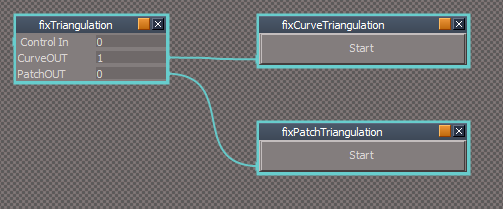
-
clintonman
- Captain
- Posts: 5659
- Joined: 21 May 2009, 21:08
- Type the number ten into the box: 0
- Location: California
Re: New NURBS tools
No, they have absolutely nothing to do with each other.trueBlue wrote: 01 Jan 2021, 15:39 Fix Handles
Activity.Run("%THIS_NAME%" + "/fixTriangulation")
Fix Curve Mesh BB
Activity.Run("%THIS_NAME%" + "/cleanCone")
fixTriangulation scripts.png
So the Fix Curve Mesh BB does not use the fixTriangulation script?
-
trueBlue
- Captain
- Posts: 5548
- Joined: 06 Jul 2009, 22:50
- Type the number ten into the box: 10
Re: New NURBS tools
Okie Dokie
Does Fix Handles work with multiple Patches and Curves selected?
I suspect it is only being fixed on the last object in the selection
Does Fix Handles work with multiple Patches and Curves selected?
I suspect it is only being fixed on the last object in the selection
-
clintonman
- Captain
- Posts: 5659
- Joined: 21 May 2009, 21:08
- Type the number ten into the box: 0
- Location: California
Re: New NURBS tools
Nope, no real reason for it either. The only reason to run it is when the handles get messed up and the only way you know it's messed up is by looking at it while editing.trueBlue wrote: 01 Jan 2021, 16:22 Okie Dokie
Does Fix Handles work with multiple Patches and Curves selected?
I suspect it is only being fixed on the last object in the selection
You can see it by editing a nurbs and start to add a new control point or isocurve, but exit the tool before adding it. At this point the handles are messed up. The nurbs has no change in appearance. Go back in to edit and see the handles are wrong. Now you would use the tool to fix it and continue editing.
I don't think any of the tools would screw up the handles of multiple objects at one time, so there is no need to have it operate on multiple selections.
-
trueBlue
- Captain
- Posts: 5548
- Joined: 06 Jul 2009, 22:50
- Type the number ten into the box: 10
Re: New NURBS tools
Would be great if something could be added, other wise you have the false sense that it worked on multiple selected items
This seems to work
This seems to work
Code: Select all
	if(Node.SelectedCount() >= 2) {
		System.Alert("Mutiple selection not supported!\n\nSelect one object at a time");
		//Node.Select(Node.FirstSelected())
		return;
	}
-
trueBlue
- Captain
- Posts: 5548
- Joined: 06 Jul 2009, 22:50
- Type the number ten into the box: 10
Re: New NURBS tools
3D Encapsulate works for NURBS patches and curves IF you are not in Control Point mode!
Except I notice the last selected NURB in the selection, moves!
3D Unencapsulate does not work!
I found a way to get out of Control Point mode without losing the selection of the NURBS including 3D objects, Lights and Cameras by modifying your NURBStoCPMeshSelection script
I removed the + "/controlPointMesh" part(s)
Adding LE.RectEncapsulationDialog('{5B3DD4D4-BD80-480A-BFD8-0B3A19DF1558}', true) to the above script does not work
It has to be run outside of the script, unless you know of a way to incorporate into the script
The only way I can see how to 3D Unencapsulate NURBS is Save to disk & Load back into the scene
Here is a scene with NURBS and scripts
Edit: Copy Delete works better
Node.Copy(currentSelected, Space.CurrentScene())
Node.Delete(currentSelected)
Except I notice the last selected NURB in the selection, moves!
3D Unencapsulate does not work!
I found a way to get out of Control Point mode without losing the selection of the NURBS including 3D objects, Lights and Cameras by modifying your NURBStoCPMeshSelection script
I removed the + "/controlPointMesh" part(s)
Code: Select all
	var selCount = Node.SelectedCount();

	if(selCount == 0) return;

	var reWhiteSpace = /^\s/; // whitespace in first character position for cleaning selection text

	var selection = Node.Selection();

	var selectionArray = selection.split(";");
	var selString = "";

try {

	for(var i = 0; i < selCount; i++) {
		var selClean = selectionArray[i].replace(reWhiteSpace, "");

		selectionArray[i] = selClean;

		var nurbsNode = selClean;

		if(Node.ConExists(selClean, "Matrix"))
			nurbsNode = Node.Owner(selClean);

		if(Node.ConExists(nurbsNode, "isaCurve")) {
			selectionArray[i] = nurbsNode;
		}

		if(Node.Exists(nurbsNode + "/CP to patch CP")) {
			selectionArray[i] = nurbsNode;
		}

		selString += selectionArray[i];
		if(i != selCount - 1)
			selString += ";";

	}


} catch(error) {
//System.Alert("ERROR");
return;
}
	Space.Select(selString);
It has to be run outside of the script, unless you know of a way to incorporate into the script
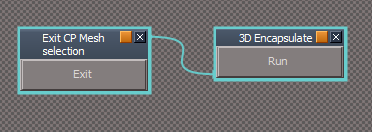
- 3D Encapsulate NURBS.png (7.31 KiB) Viewed 2621 times
Here is a scene with NURBS and scripts
Edit: Copy Delete works better
Node.Copy(currentSelected, Space.CurrentScene())
Node.Delete(currentSelected)
- Attachments
-
- NURBS Scene.RsScn
- (1.45 MiB) Downloaded 168 times
-
trueBlue
- Captain
- Posts: 5548
- Joined: 06 Jul 2009, 22:50
- Type the number ten into the box: 10
Re: New NURBS tools
Testing your new NURBS updates
I like how you are naming NURBS primitives and Circles
Import Patch
Steps...
Model
Add NURBS Cube @ XYZ = 0
Save As - Caligari Object *cob with ascii Text checked named "NURBS Cube" to my C:/ drive
Delete NURBS Cube
Switch to Workspace
File/Import/Patch
Results
3 NoName objects loaded into Workspace @ around X=6, Y=7, Z=3
Import the same object into tS761Std, the 3 objects have reverse normals
Previous Import Patch version in tS761Std Update 6
The Normals are not reversed and they look like the above picture
I like how you are naming NURBS primitives and Circles
Import Patch
Steps...
Model
Add NURBS Cube @ XYZ = 0
Save As - Caligari Object *cob with ascii Text checked named "NURBS Cube" to my C:/ drive
Delete NURBS Cube
Switch to Workspace
File/Import/Patch
Results
3 NoName objects loaded into Workspace @ around X=6, Y=7, Z=3
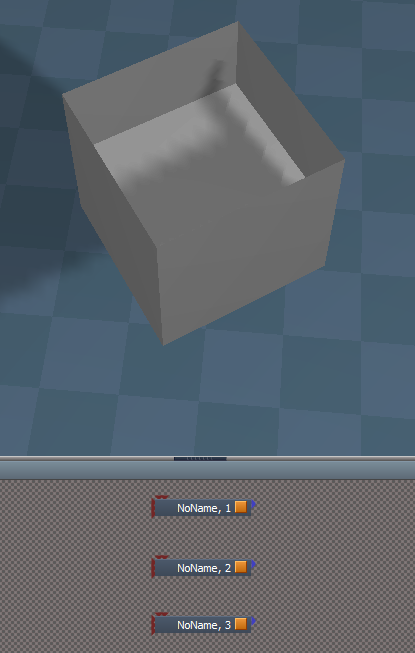
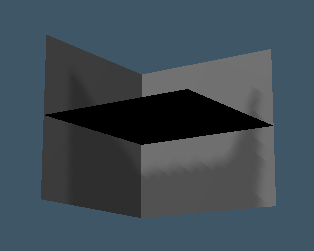
- Rosetta.png (6.99 KiB) Viewed 2594 times
The Normals are not reversed and they look like the above picture
-
clintonman
- Captain
- Posts: 5659
- Joined: 21 May 2009, 21:08
- Type the number ten into the box: 0
- Location: California
Re: New NURBS tools
Yeah, that's pretty wild. Looks like I never tested the modelspace nurbs cube with the One Patch option unchecked.
Edit: found the problem, now to see if I can fix it.
Edit: found the problem, now to see if I can fix it.
-
clintonman
- Captain
- Posts: 5659
- Joined: 21 May 2009, 21:08
- Type the number ten into the box: 0
- Location: California
Re: New NURBS tools
Fixed
It had nothing to do with the One Patch option. The problem is that the matrix from the file was not being assigned to the matrix of the control point mesh.
Script attached below for convenience.
It had nothing to do with the One Patch option. The problem is that the matrix from the file was not being assigned to the matrix of the control point mesh.
Script attached below for convenience.
- Attachments
-
- patchFileScripts.RsObj
- (129.37 KiB) Downloaded 184 times
-
trueBlue
- Captain
- Posts: 5548
- Joined: 06 Jul 2009, 22:50
- Type the number ten into the box: 10
Re: New NURBS tools
I took advantage of your patchname out attribute to keep the name of the exported patchclintonman wrote: 04 Jan 2021, 20:35 Yeah, that's pretty wild. Looks like I never tested the modelspace nurbs cube with the One Patch option unchecked.
Edit: found the problem, now to see if I can fix it.
Add
PatchName string to the dofilenurbs script
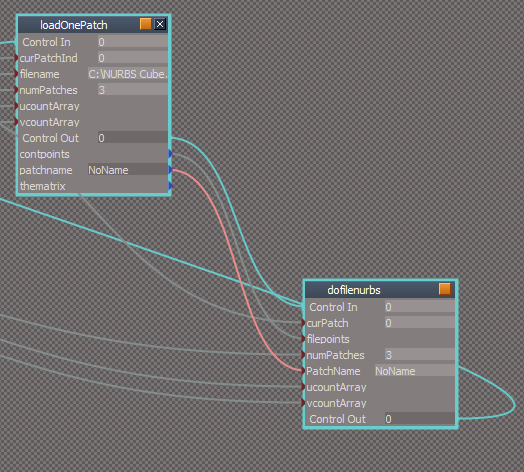
-
clintonman
- Captain
- Posts: 5659
- Joined: 21 May 2009, 21:08
- Type the number ten into the box: 0
- Location: California
Re: New NURBS tools
Good idea, I followed your lead and did the same.trueBlue wrote: 04 Jan 2021, 20:58I took advantage of your patchname out attribute to keep the name of the exported patchclintonman wrote: 04 Jan 2021, 20:35 Yeah, that's pretty wild. Looks like I never tested the modelspace nurbs cube with the One Patch option unchecked.
Edit: found the problem, now to see if I can fix it.
Add
PatchName string to the dofilenurbs script
Add PatchName string to dofilenurbs script.png
Is it possible with your new plugin to add the selected objects name to the Filename?
Attached importing patch name and default export patch name.
- Attachments
-
- patchFileScripts87f6.RsObj
- (130.17 KiB) Downloaded 164 times
-
trueBlue
- Captain
- Posts: 5548
- Joined: 06 Jul 2009, 22:50
- Type the number ten into the box: 10
Re: New NURBS tools
Same exported NURBS Cube.cob
Import Patch with newest scripts
Results
Imports @ correct location but in 3 parts (objects)
Edit: I now see that Model creates 3 patches for the NURBS Cube
Suggestion for the filter to match Model's File/Save As/Object dialog
// var filter = "COB (*.cob)~*.cob~All Files (*.*)~*.*~~"
var filter = "Caligari Object (*.cob)~*.cob~All Files (*.*)~*.*~~"
On another note, when I import a Workspace NURBS from Model, the object can not be closed with the X on the node and I can not enter inside it
Import Patch with newest scripts
Results
Imports @ correct location but in 3 parts (objects)
Edit: I now see that Model creates 3 patches for the NURBS Cube
Suggestion for the filter to match Model's File/Save As/Object dialog
// var filter = "COB (*.cob)~*.cob~All Files (*.*)~*.*~~"
var filter = "Caligari Object (*.cob)~*.cob~All Files (*.*)~*.*~~"

-
clintonman
- Captain
- Posts: 5659
- Joined: 21 May 2009, 21:08
- Type the number ten into the box: 0
- Location: California
Re: New NURBS tools
trueBlue wrote: 04 Jan 2021, 21:35 Same exported NURBS Cube.cob
Import Patch with newest scripts
Results
Imports @ correct location but in 3 parts (objects)
...

OKtrueBlue wrote: 04 Jan 2021, 21:35 ...
Suggestion for the filter to match Model's File/Save As/Object dialog
// var filter = "COB (*.cob)~*.cob~All Files (*.*)~*.*~~"
var filter = "Caligari Object (*.cob)~*.cob~All Files (*.*)~*.*~~"
Save As.png
...
I don't understand. Do you mean import workspace nurbs to model?trueBlue wrote: 04 Jan 2021, 21:35 ...
On another note, when I import a Workspace NURBS from Model, the object can not be closed with the X on the node and I can not enter inside it
-
trueBlue
- Captain
- Posts: 5548
- Joined: 06 Jul 2009, 22:50
- Type the number ten into the box: 10
Re: New NURBS tools
I see, did not know about the One Path check boxclintonman wrote: 04 Jan 2021, 22:07OnePatch.jpgtrueBlue wrote: 04 Jan 2021, 21:35 Same exported NURBS Cube.cob
Import Patch with newest scripts
Results
Imports @ correct location but in 3 parts (objects)
...
One Patch will create 1 patch. If not checked it creates 3 patches.
OKtrueBlue wrote: 04 Jan 2021, 21:35 ...
Suggestion for the filter to match Model's File/Save As/Object dialog
// var filter = "COB (*.cob)~*.cob~All Files (*.*)~*.*~~"
var filter = "Caligari Object (*.cob)~*.cob~All Files (*.*)~*.*~~"
Save As.png
...
I don't understand. Do you mean import workspace nurbs to model?trueBlue wrote: 04 Jan 2021, 21:35 ...
On another note, when I import a Workspace NURBS from Model, the object can not be closed with the X on the node and I can not enter inside it
No, when I open an exported Workspace NURBS in Model.
Exported Workspace Curves too
Examine it in the Link Editor
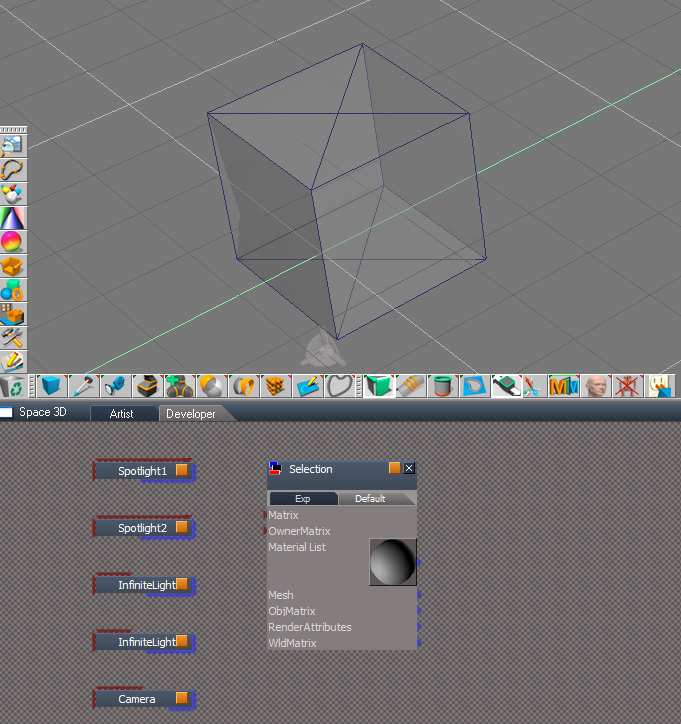
-
clintonman
- Captain
- Posts: 5659
- Joined: 21 May 2009, 21:08
- Type the number ten into the box: 0
- Location: California
Re: New NURBS tools
OK, I see it now.
Edit:
Hm, looks like it may be the name, "Selection"? If I rename then it acts normally.
Edit:
No, that's not it.
Edit:
Hm, looks like it may be the name, "Selection"? If I rename then it acts normally.
Edit:
No, that's not it.
-
trueBlue
- Captain
- Posts: 5548
- Joined: 06 Jul 2009, 22:50
- Type the number ten into the box: 10
Re: New NURBS tools
On another note, here is a modified parentingScripts
parentingScripts
Changed
//!Node.ConExists(theParent,"WldMatrix"
!Node.ConExists(theParent,"ObjMatrix"
Note: NURBS do not have a ObjMatrix
Add
Scripts that Exits Control Point Mode
parentingScripts
Changed
//!Node.ConExists(theParent,"WldMatrix"
!Node.ConExists(theParent,"ObjMatrix"
Note: NURBS do not have a ObjMatrix
Add
Scripts that Exits Control Point Mode
- Attachments
-
- parentingScripts.RsObj
- (24.33 KiB) Downloaded 172 times
-
clintonman
- Captain
- Posts: 5659
- Joined: 21 May 2009, 21:08
- Type the number ten into the box: 0
- Location: California
Re: New NURBS tools
It was the name. Very tricky.
I think the text files only really works with lines that end with a carriage return or Linefeed but not both. I changed one line that writes the name to only end with a carriage return and that fixed it. All the other lines are still the same so don't really know what the "proper" format is. It works. I guess that's all that really matters.
I also changed the imported name from "Selection" to "Workspace"
Maybe in the future I'll bring the object name all the way through. It's not super straight forward so I'll skip it for now.
I think the text files only really works with lines that end with a carriage return or Linefeed but not both. I changed one line that writes the name to only end with a carriage return and that fixed it. All the other lines are still the same so don't really know what the "proper" format is. It works. I guess that's all that really matters.
I also changed the imported name from "Selection" to "Workspace"
Maybe in the future I'll bring the object name all the way through. It's not super straight forward so I'll skip it for now.
- Attachments
-
- patchFileScripts542f.RsObj
- (131.96 KiB) Downloaded 204 times
-
clintonman
- Captain
- Posts: 5659
- Joined: 21 May 2009, 21:08
- Type the number ten into the box: 0
- Location: California
Re: New NURBS tools
I found that I forgot to update the svg animation export. Spent some time getting it working again. Just one more tweak and that will be done.
I expect to do a "final" release tomorrow and start concentrating on getting other tools working with the nurbs system.
I expect to do a "final" release tomorrow and start concentrating on getting other tools working with the nurbs system.
-
trueBlue
- Captain
- Posts: 5548
- Joined: 06 Jul 2009, 22:50
- Type the number ten into the box: 10
Re: New NURBS tools
Glad you found the fix!
Naming them Workspace verses Selection does not seem to be a very good choice of words.
How about Patch for the Workspace NURBS patches and Curve for the Workspace NURBS curves?
Same as the name in the File/Import/Export menu
I took a look at an exported Model NURBS cube.cob as a text file
With your loadOnePatch script, can you read the Name and put it in the patchname attribute?
Naming them Workspace verses Selection does not seem to be a very good choice of words.
How about Patch for the Workspace NURBS patches and Curve for the Workspace NURBS curves?
Same as the name in the File/Import/Export menu
I took a look at an exported Model NURBS cube.cob as a text file
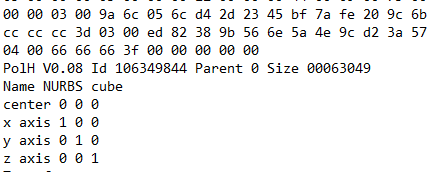
- Exported Model text file.png (7.77 KiB) Viewed 2538 times
-
clintonman
- Captain
- Posts: 5659
- Joined: 21 May 2009, 21:08
- Type the number ten into the box: 0
- Location: California
Re: New NURBS tools
trueBlue wrote: 05 Jan 2021, 13:08 Glad you found the fix!
Naming them Workspace verses Selection does not seem to be a very good choice of words.
How about Patch for the Workspace NURBS patches and Curve for the Workspace NURBS curves?
Same as the name in the File/Import/Export menu
...
We can change it to a name that has exactly 9 characters.clintonman wrote: 05 Jan 2021, 00:28 ...
I also changed the imported name from "Selection" to "Workspace"
Maybe in the future I'll bring the object name all the way through. It's not super straight forward so I'll skip it for now.
I don't understand. I thought we were already doing that.trueBlue wrote: 05 Jan 2021, 13:08 ...
I took a look at an exported Model NURBS cube.cob as a text file
Exported Model text file.png
With your loadOnePatch script, can you read the Name and put it in the patchname attribute?
-
trueBlue
- Captain
- Posts: 5548
- Joined: 06 Jul 2009, 22:50
- Type the number ten into the box: 10
Re: New NURBS tools
How about?
NURBpatch
NURBcurve
I will double check but patchname = NoName does not change
I do not see any code that reads thename
Edit: Double checked and the Import Patch imports as NoName, NoName, 1 etc...
Edit2: Seems Model always uses NoName no matter what you name it internally or from the Save As dialog
Not sure how I got the screen shot with a different name now.
I guess the only way to do it, is use the filename minus the path & file format
NURBpatch
NURBcurve
I will double check but patchname = NoName does not change
I do not see any code that reads thename
Edit: Double checked and the Import Patch imports as NoName, NoName, 1 etc...
Edit2: Seems Model always uses NoName no matter what you name it internally or from the Save As dialog
Not sure how I got the screen shot with a different name now.
I guess the only way to do it, is use the filename minus the path & file format
-
clintonman
- Captain
- Posts: 5659
- Joined: 21 May 2009, 21:08
- Type the number ten into the box: 0
- Location: California
Re: New NURBS tools
9 character names look good.trueBlue wrote: 05 Jan 2021, 18:06 How about?
NURBpatch
NURBcurve
I will double check but patchname = NoName does not change
I do not see any code that reads thename
Edit: Double checked and the Import Patch imports as NoName, NoName, 1 etc...
Edit2: Seems Model always uses NoName no matter what you name it internally or from the Save As dialog
Not sure how I got the screen shot with a different name now.
I guess the only way to do it, is use the filename minus the path & file format
No, not gonna fight modelspace naming. If you want different names you'll have to rename them with the modelspace scene editor before saving the file.
-
trueBlue
- Captain
- Posts: 5548
- Joined: 06 Jul 2009, 22:50
- Type the number ten into the box: 10
Re: New NURBS tools
Understood, but naming them from Model or Workspace's Info panels does not make any difference when Importing into Workspace.
-
clintonman
- Captain
- Posts: 5659
- Joined: 21 May 2009, 21:08
- Type the number ten into the box: 0
- Location: California
Re: New NURBS tools
Fair enough, I'll look at it later.trueBlue wrote: 05 Jan 2021, 19:38 Understood, but naming them from Model or Workspace's Info panels does not make any difference when Importing into Workspace.
That's to say I'll look at getting the names from inside the file not from the filename.
It's done. Ends up it was easy. TS patches are the nurbs and their polygon parent. The name is stored on the polygon parent of the nurbs patch.
-
clintonman
- Captain
- Posts: 5659
- Joined: 21 May 2009, 21:08
- Type the number ten into the box: 0
- Location: California
Re: New NURBS tools
Almost done. I ran into a bunch of bugs while working on the css/javascript animation export. Some were old bugs that I never noticed and others were new ones created by the new NURBS format.
As it is now the animation export is very bare bones. It needs to export to a full working sample file so it can be easily tested and adapted for other uses.
As it is now the animation export is very bare bones. It needs to export to a full working sample file so it can be easily tested and adapted for other uses.
-
clintonman
- Captain
- Posts: 5659
- Joined: 21 May 2009, 21:08
- Type the number ten into the box: 0
- Location: California
Re: New NURBS tools
Here is my parenting scripts inspired by your changes.trueBlue wrote: 04 Jan 2021, 23:20 On another note, here is a modified parentingScripts
parentingScripts
Changed
//!Node.ConExists(theParent,"WldMatrix"
!Node.ConExists(theParent,"ObjMatrix"
Note: NURBS do not have a ObjMatrix
Add
Scripts that Exits Control Point Mode
Works with nurbs as child or parent
Stops double parenting - 1 child 2 parents or 1 child and 1 parent but multiple parent links
Stops circular parenting - stops child from making itself a parent of it's own parent
Checks for existence of a selection before trying to use the selection
If parent is a nurbs object, select it's control point mesh after parenting
Added UU status messages but only 2 second display instead of 5 seconds and check for message system so works with non-UU tS
- Attachments
-
- parentingScriptsa8a6.RsObj
- (24.16 KiB) Downloaded 200 times
-
clintonman
- Captain
- Posts: 5659
- Joined: 21 May 2009, 21:08
- Type the number ten into the box: 0
- Location: California
Re: New NURBS tools
Did you want me to look at this?trueBlue wrote: 02 Jan 2021, 16:09 3D Encapsulate works for NURBS patches and curves IF you are not in Control Point mode!
Except I notice the last selected NURB in the selection, moves!
3D Unencapsulate does not work!
I found a way to get out of Control Point mode without losing the selection of the NURBS including 3D objects, Lights and Cameras by modifying your NURBStoCPMeshSelection script
I removed the + "/controlPointMesh" part(s)Adding LE.RectEncapsulationDialog('{5B3DD4D4-BD80-480A-BFD8-0B3A19DF1558}', true) to the above script does not workCode: Select all
	var selCount = Node.SelectedCount();

	if(selCount == 0) return;

	var reWhiteSpace = /^\s/; // whitespace in first character position for cleaning selection text

	var selection = Node.Selection();

	var selectionArray = selection.split(";");
	var selString = "";

try {

	for(var i = 0; i < selCount; i++) {
		var selClean = selectionArray[i].replace(reWhiteSpace, "");

		selectionArray[i] = selClean;

		var nurbsNode = selClean;

		if(Node.ConExists(selClean, "Matrix"))
			nurbsNode = Node.Owner(selClean);

		if(Node.ConExists(nurbsNode, "isaCurve")) {
			selectionArray[i] = nurbsNode;
		}

		if(Node.Exists(nurbsNode + "/CP to patch CP")) {
			selectionArray[i] = nurbsNode;
		}

		selString += selectionArray[i];
		if(i != selCount - 1)
			selString += ";";

	}


} catch(error) {
//System.Alert("ERROR");
return;
}
	Space.Select(selString);
It has to be run outside of the script, unless you know of a way to incorporate into the script
3D Encapsulate NURBS.png
The only way I can see how to 3D Unencapsulate NURBS is Save to disk & Load back into the scene
Here is a scene with NURBS and scripts
Edit: Copy Delete works better
Node.Copy(currentSelected, Space.CurrentScene())
Node.Delete(currentSelected)
Just a few hours after posting you had a new update with 3d encapsulate and 3d unencapsulate buttons on the nurbs utilities.
-
trueBlue
- Captain
- Posts: 5548
- Joined: 06 Jul 2009, 22:50
- Type the number ten into the box: 10
Re: New NURBS tools
Parenting scripts work great!
And if needed from the NURBS Uilities
With your current Workspace NURBS Tools, you have duplicated the Fix Concave Face & Flip Face buttons.
loadCurveScript/Utlitiy
I think I found a less destructive setting for the
fixFloatingPointsScript/adjust script
Add to bottom of the script
Node.Value(Node.Owner(firstSel), "U_precision") = Node.Value(Node.Owner(firstSel), "U_precision") -2
Tested only on all of the NURBS primitives
NURBStoCPMeshSelection
Error
Steps
Use any of the selecting buttons with the Select tool
Run the NURBStoCPMeshSelection script
alignHandleSmoothButton & alignHandleSharpButton Settings panel
Suggestion
For sure! For the UUpdates it would be great if All of the Encapsulate/Unencapsulate scripts worked with your Workspace NURBS pathes & curves from the Workspace toolbarsDid you want me to look at this?
Just a few hours after posting you had a new update with 3d encapsulate and 3d unencapsulate buttons on the nurbs utilities.
And if needed from the NURBS Uilities
With your current Workspace NURBS Tools, you have duplicated the Fix Concave Face & Flip Face buttons.
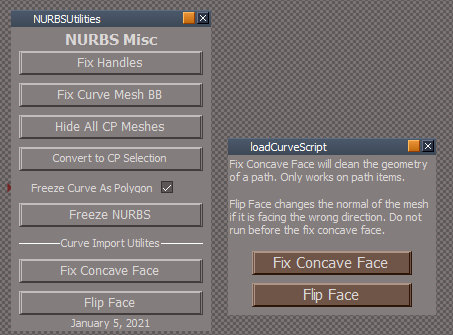
Shouldn't the above notes be included as well in the NURBSUtilities/Misc - Curve Import Utilites?Fix Concave Face will clean the geometry of a path. Only works on path items
Flip Face changes the normal of the mesh if it is facing the wrong direction. Do not run before the fix concave face.
I think I found a less destructive setting for the
fixFloatingPointsScript/adjust script
Add to bottom of the script
Node.Value(Node.Owner(firstSel), "U_precision") = Node.Value(Node.Owner(firstSel), "U_precision") -2
Tested only on all of the NURBS primitives
NURBStoCPMeshSelection
Error
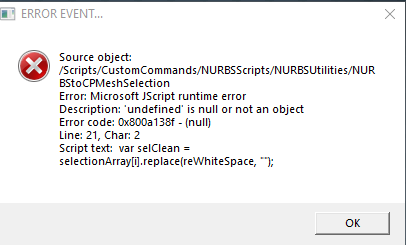
Use any of the selecting buttons with the Select tool
Run the NURBStoCPMeshSelection script
alignHandleSmoothButton & alignHandleSharpButton Settings panel
Suggestion
- Align Handle settings panel.png (2.49 KiB) Viewed 2500 times
-
clintonman
- Captain
- Posts: 5659
- Joined: 21 May 2009, 21:08
- Type the number ten into the box: 0
- Location: California
Re: New NURBS tools
"Use any of the selecting buttons with the Select tool"
What are the selecting buttons?
What are the selecting buttons?
-
trueBlue
- Captain
- Posts: 5548
- Joined: 06 Jul 2009, 22:50
- Type the number ten into the box: 10
Re: New NURBS tools
clintonman wrote: 07 Jan 2021, 15:25 "Use any of the selecting buttons with the Select tool"
What are the selecting buttons?
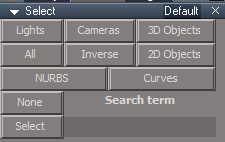
- Select tools.png (5.05 KiB) Viewed 2516 times
-
clintonman
- Captain
- Posts: 5659
- Joined: 21 May 2009, 21:08
- Type the number ten into the box: 0
- Location: California
Re: New NURBS tools
I never use them, where are they located?trueBlue wrote: 07 Jan 2021, 15:45Select tools.pngclintonman wrote: 07 Jan 2021, 15:25 "Use any of the selecting buttons with the Select tool"
What are the selecting buttons?
-
trueBlue
- Captain
- Posts: 5548
- Joined: 06 Jul 2009, 22:50
- Type the number ten into the box: 10
Re: New NURBS tools
In the UU Stack - Settings/LInk Editor panel's S buttonclintonman wrote: 07 Jan 2021, 15:54I never use them, where are they located?trueBlue wrote: 07 Jan 2021, 15:45Select tools.pngclintonman wrote: 07 Jan 2021, 15:25 "Use any of the selecting buttons with the Select tool"
What are the selecting buttons?
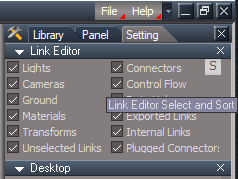
- Link Editor panel.png (12.66 KiB) Viewed 2514 times
-
clintonman
- Captain
- Posts: 5659
- Joined: 21 May 2009, 21:08
- Type the number ten into the box: 0
- Location: California
Re: New NURBS tools
Here are new versions of the 3DEncapsulate and 3DUnencapsulate scripts.
works with NURBS
uses new selection validation code, so try catch block is not needed
works with NURBS
uses new selection validation code, so try catch block is not needed
- Attachments
-
- 3D Unencapsulate .RsObj
- (17.5 KiB) Downloaded 177 times
-
- 3D Encapsulate.RsObj
- (8.24 KiB) Downloaded 209 times
-
clintonman
- Captain
- Posts: 5659
- Joined: 21 May 2009, 21:08
- Type the number ten into the box: 0
- Location: California
Re: New NURBS tools
Selection scripts fixed.
The convert to cpmesh could use the new selection validation, but in this case the selection scripts needed to have a trailing semicolon removed from the selection string generated.
The convert to cpmesh could use the new selection validation, but in this case the selection scripts needed to have a trailing semicolon removed from the selection string generated.
- Attachments
-
- Select.RsObj
- (78.79 KiB) Downloaded 163 times
-
trueBlue
- Captain
- Posts: 5548
- Joined: 06 Jul 2009, 22:50
- Type the number ten into the box: 10
Re: New NURBS tools
Great news!clintonman wrote: 07 Jan 2021, 22:26 Here are new versions of the 3DEncapsulate and 3DUnencapsulate scripts.
works with NURBS
uses new selection validation code, so try catch block is not needed
3DEncapsulate and 3DUnencapsulate work great!
Sad news!
3DUnencapsulate on NURBS has an issue with ORA

Apply ORA to a Group of NURBS even more issues. Check the LODMesh in this case
-
clintonman
- Captain
- Posts: 5659
- Joined: 21 May 2009, 21:08
- Type the number ten into the box: 0
- Location: California
Re: New NURBS tools
Is it "3DUnencapsulate on NURBS has an issue with ORA" or "3DUnencapsulate on NURBS has an issue with ORA after changing visibility"?trueBlue wrote: 07 Jan 2021, 23:13Great news!clintonman wrote: 07 Jan 2021, 22:26 Here are new versions of the 3DEncapsulate and 3DUnencapsulate scripts.
works with NURBS
uses new selection validation code, so try catch block is not needed
3DEncapsulate and 3DUnencapsulate work great!
Sad news!
3DUnencapsulate on NURBS has an issue with ORA
Apply ORA to a Group of NURBS even more issues. Check the LODMesh in this case
The Show Hide etc were made for nurbs that are not in groups, so it's not surprising that they would wreck the appearance of nurbs items inside of groups.
If it's not in a group and still a problem I need some steps to see it cause it looks clean here.
-
trueBlue
- Captain
- Posts: 5548
- Joined: 06 Jul 2009, 22:50
- Type the number ten into the box: 10
Re: New NURBS tools
It is with the 3D Unencapsulate with grouped NURBS's ORA
Select works great, thanks!
I added scripts for Patches, Curves, and CP Mesh select
Updated the 2D Objects script
Select works great, thanks!
I added scripts for Patches, Curves, and CP Mesh select
Updated the 2D Objects script
- Attachments
-
- Select04c7.RsObj
- (88.31 KiB) Downloaded 179 times
-
clintonman
- Captain
- Posts: 5659
- Joined: 21 May 2009, 21:08
- Type the number ten into the box: 0
- Location: California
Re: New NURBS tools
Updated alignment script for use with nurbs
- Attachments
-
- align and distribute.RsObj
- (318.94 KiB) Downloaded 169 times
-
trueBlue
- Captain
- Posts: 5548
- Joined: 06 Jul 2009, 22:50
- Type the number ten into the box: 10
Re: New NURBS tools
Thanks!clintonman wrote: 08 Jan 2021, 04:04 Updated alignment script for use with nurbs
Hope you do not mind I added your OpenFloatingPanelFrame script
Align and Distribute
Update Author - Clinton Reese
Works with Workspace NURBS
Add
OpenFloatingPanelFrame Author - Clinton Reese