New NURBS tools

User avatar
clintonman
Captain
Posts: 5659
Joined: 21 May 2009, 21:08
Type the number ten into the box: 0
Location: California

New NURBS tools

Post by clintonman »

Working on improving the workspace NURBS tools.
curveAddCP_improved.jpg
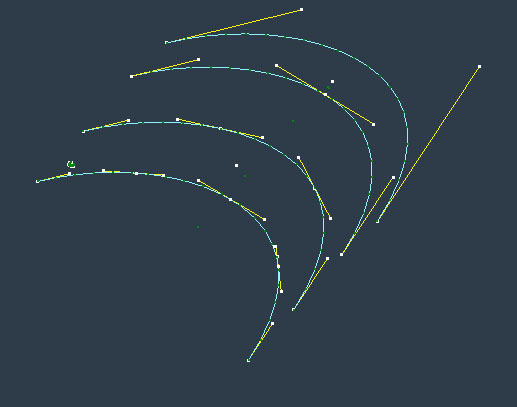
Original curve in the center, right is old add control point, left new add control point

The enhancement is that adding a control point doesn't change the shape of the curve anymore. The old way flattened the curve at the insertion point.

The add curve tools have all been restructured and I'm in the process of fixing the load and save scripts to work with the new curve nodes. It can currently load truespace cob file curves. The svg loader can load a simple path but needs more work to load other shapes.

No new color options yet.
Clinton Reese

http://clintons3d.com
User avatar
the_ant
Chief Petty Officer
Posts: 155
Joined: 02 Jun 2009, 09:26
Type the number ten into the box: 0
Location: Perugia - Italy

Re: New NURBS tools

Post by the_ant »

:worship: :worship: :worship:
User avatar
clintonman
Captain
Posts: 5659
Joined: 21 May 2009, 21:08
Type the number ten into the box: 0
Location: California

Re: New NURBS tools

Post by clintonman »

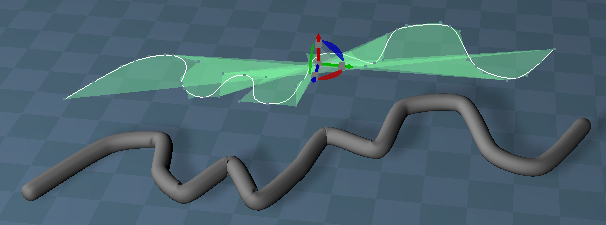
NURBS_Loft.jpg
Skinning of curves into patch is working. Right is smooth and left is linear interpolation. Source curves are in the center.
Next is lofting curves into a patch.
Clinton Reese

http://clintons3d.com
User avatar
clintonman
Captain
Posts: 5659
Joined: 21 May 2009, 21:08
Type the number ten into the box: 0
Location: California

Re: New NURBS tools

Post by clintonman »

NURBS_Birail1.jpg
NURBS Birail1

This one takes the profile curve at the bottom and extrudes it between 2 rail curves on the sides.
"Birail1" name is from Maya and means 1 profile curve for the 2 rail curves

The next one is "Birail2", so instead of 1 profile it has 2 profiles, one at each end of the rails.
Clinton Reese

http://clintons3d.com
User avatar
clintonman
Captain
Posts: 5659
Joined: 21 May 2009, 21:08
Type the number ten into the box: 0
Location: California

Re: New NURBS tools

Post by clintonman »

NURBS_Birail2.jpg
Birail2
Profile curves top and bottom and rail curves on the sides.
I wasn't sure I would be able to pull this one off. There was a lot of tricky things to consider.

Next is making these new tools easier to use. As they exist now the curves have to be created in a certain orientation and relationship to each other and the rail curves have to have the same level of detail and the profile curves have to match their level of detail.

next steps:
translate my curve and patch rebuild plugins from modelspace into workspace
translate my curve and patch reverse plugins from modelspace into workspace
Clinton Reese

http://clintons3d.com
User avatar
trueBlue
Captain
Posts: 5548
Joined: 06 Jul 2009, 22:50
Type the number ten into the box: 10

Re: New NURBS tools

Post by trueBlue »

Wow! That is a LOT of progress in 2 days! :bananatyping:
Well done... :worship:
User avatar
clintonman
Captain
Posts: 5659
Joined: 21 May 2009, 21:08
Type the number ten into the box: 0
Location: California

Re: New NURBS tools

Post by clintonman »

Thanks, it was a lot of work over the weekend.

NURBS_Directions.jpg
Direction indicators

U and V direction indicators for curves and patches. This is needed to be sure curves and patches are lined up properly for some functions.

Not visible is also reverse curve, reverse patch in u or v direction and swap u and v directions of patch.
Clinton Reese

http://clintons3d.com
User avatar
clintonman
Captain
Posts: 5659
Joined: 21 May 2009, 21:08
Type the number ten into the box: 0
Location: California

Re: New NURBS tools

Post by clintonman »

nurbsRebuildCurve.jpg
Original single span curve at the top with copies rebuilt to 2,3 and 4 spans

The purpose is to get even spacing in the curve control points or to increase or decrease detail.
Clinton Reese

http://clintons3d.com
User avatar
clintonman
Captain
Posts: 5659
Joined: 21 May 2009, 21:08
Type the number ten into the box: 0
Location: California

Re: New NURBS tools

Post by clintonman »

NURBS_SplitCurve.jpg
NURBS_SplitCurve.jpg (29.55 KiB) Viewed 4696 times
NURBS_SplitPatch.jpg
Modeling tools to split a curve or patch. Not the same as the scissors tool that would cut at any point along the curve, but splits at established control points.

Not shown - updated the point to point snapping to work with curves. Some other snap tools also need adjustment to work with curves and patches
Fixed the curve from points tool to make a straight line when only 2 points are selected.


I think at this point it's time to stop adding tools and make the current versions usable.
Potential future tools are weld curve, weld patch, rebuilt patch, revolve/lathe curve into a patch, extract curve from patch iso-line.
Clinton Reese

http://clintons3d.com
User avatar
clintonman
Captain
Posts: 5659
Joined: 21 May 2009, 21:08
Type the number ten into the box: 0
Location: California

Re: New NURBS tools

Post by clintonman »

NURBSshipTest.jpg

Test building the spaceship from a 3DBuzz NURBS modeling tutorial.
It's all going well. The ship is built from 4 curves, that are rebuilt to a specific iso line counts before running birail2 tool to make the surface.
The split nurbs tools was used to break up the surface into 5 parts with 1 piece offset from it's original location.

Now the tutorial calls for attaching that piece back with 4 new patches. So I need to make an extract curve from patch tool to then use the curves to make the 4 new pieces to fill in the gaps.
Clinton Reese

http://clintons3d.com
User avatar
clintonman
Captain
Posts: 5659
Joined: 21 May 2009, 21:08
Type the number ten into the box: 0
Location: California

Re: New NURBS tools

Post by clintonman »

NURBS_ExtractCurve.jpg

Extract curve from surface is working. Now can move forward with the testing/tutorial again.
Clinton Reese

http://clintons3d.com
User avatar
clintonman
Captain
Posts: 5659
Joined: 21 May 2009, 21:08
Type the number ten into the box: 0
Location: California

Re: New NURBS tools

Post by clintonman »

NURBS_Revolve.jpg
Revolve/Lathe curve


I found one more tool I needed to do the tutorial. Now I'm finally ready to run through it all the way through. I think...
Clinton Reese

http://clintons3d.com
User avatar
the_ant
Chief Petty Officer
Posts: 155
Joined: 02 Jun 2009, 09:26
Type the number ten into the box: 0
Location: Perugia - Italy

Re: New NURBS tools

Post by the_ant »

:worship: :worship: :worship:
User avatar
trueBlue
Captain
Posts: 5548
Joined: 06 Jul 2009, 22:50
Type the number ten into the box: 10

Re: New NURBS tools

Post by trueBlue »

That will be my favorite?
Are the Cntrl pnts aNimAtABle?
User avatar
clintonman
Captain
Posts: 5659
Joined: 21 May 2009, 21:08
Type the number ten into the box: 0
Location: California

Re: New NURBS tools

Post by clintonman »

trueBlue wrote: 26 Nov 2020, 03:10 That will be my favorite?
Are the Cntrl pnts aNimAtABle?
Nope, workspace doesn't have any vertex animation. Maybe it's possible to add a morph and animate that.
Clinton Reese

http://clintons3d.com
User avatar
clintonman
Captain
Posts: 5659
Joined: 21 May 2009, 21:08
Type the number ten into the box: 0
Location: California

Re: New NURBS tools

Post by clintonman »

NURBSshipTest2.jpg
Partial results from the 3dbuzz tutorial. The caligari texture was for testing the uv map.

It mostly went smoothly except at the end where the instructor group the parts together.
Grouping doesn't work for these NURBS objects. Parenting also doesn't work. So these will need some kind of custom grouping.
The model as shown is made from 4 main parts. I got around it by selecting all the pieces of 1 part and using the snapping tools to set them all to have the same pivot point. Then copied and rotated them into position.

The rest of the tutorial uses more or less the same tools and techniques.

Next is to create the last set of tools: weld curve, weld patch and rebuilt patch.
After that is to make them work with existing tools. Scripts modified so far include the point to point snapping, show, hide, show all, hide all and the mirror matrix script.
Clinton Reese

http://clintons3d.com
User avatar
clintonman
Captain
Posts: 5659
Joined: 21 May 2009, 21:08
Type the number ten into the box: 0
Location: California

Re: New NURBS tools

Post by clintonman »

NURBS_Rebuild.jpg
Rebuild patch and curve 1x1 on right rebuilt to 2x4 on the left


The rebuild patch/curve tool is done. When rebuilding a curve the V count control is ignored.

Only 2 ? more tools to go weld curve and weld patch.

I just tested and the soft paint brush works on the NURBS control points. That'll be useful.

Just did another test and morphs also works with the NURBS control points
Clinton Reese

http://clintons3d.com
User avatar
clintonman
Captain
Posts: 5659
Joined: 21 May 2009, 21:08
Type the number ten into the box: 0
Location: California

Re: New NURBS tools

Post by clintonman »

NURBS_Weld.jpg
NURBS weld patch and curve, before weld on top after weld on the bottom

Last 2 tools are working.
Clinton Reese

http://clintons3d.com
User avatar
clintonman
Captain
Posts: 5659
Joined: 21 May 2009, 21:08
Type the number ten into the box: 0
Location: California

Re: New NURBS tools

Post by clintonman »

NURBSAlign.jpg
Align handles tool
From left to right: right side of the middle handle aligned to the left side, the original curve, both sides of the handle aligned
align handles also works with patches handles

both sides aligned is the same as changing a handle from hard corner to smooth
one more related tool will be created to go in the opposite direction from smooth to corner handles
NURBS_Lathe.jpg
revolve tool renamed to lathe tool
added helix offset option
original curve is at the bottom right

the object on the right is my current test object

one more new tool will be a "Global Stitch" that will take selected patches and move their control points together if they are close. like point edit weld coincident vertices but without the welding action. this will make it easier to join patches together smoothly.
Clinton Reese

http://clintons3d.com
User avatar
clintonman
Captain
Posts: 5659
Joined: 21 May 2009, 21:08
Type the number ten into the box: 0
Location: California

Re: New NURBS tools

Post by clintonman »

A sequence showing a NURBS workflow.
Starts out with 2 patches that are "stitched", then welded into 1 patch, adjusted and separated out into 2 patches at the end.

NURBS_stitch.jpg
2 patches before and after running the global stitch tool

NURBS_arrangeUVforWeld.jpg
The internal structure of the patches have to be lined up before welding. The left is welded to the right patch.


NURBS_welded.jpg
After welding there is 1 patch. The patch join area looks smooth because of the smooth shading and small detail in the display mesh. More detail would show a sharp line down the center.


NURBS_align_split.jpg
The align handle tool is run on the center control points and then the patch is split into 2 patches again. There is a line between the 2 patches. This is because of low mesh detail. When the display detail of the NURBS is turned up the line disappears giving the appearance of a single mesh.
That is basically what NURBS modeling is, outside of trimming curves. It's a bunch of deformed square shapes sitting next to each other looking like a single mesh.
Clinton Reese

http://clintons3d.com
User avatar
trueBlue
Captain
Posts: 5548
Joined: 06 Jul 2009, 22:50
Type the number ten into the box: 10

Re: New NURBS tools

Post by trueBlue »

Looking great!
The NURBSToolbar is going to be about four feet long. :mrgreen:
clintonman wrote: 26 Nov 2020, 05:45 Grouping doesn't work for these NURBS objects. Parenting also doesn't work. So these will need some kind of custom grouping.
Are you going to make a NURBS to 3D Object script?
Seems that would solve the Grouping issue.

I notice the Remove isoParm geometry from a NURBS patch is destructive at the seams
Remove ISO.png
Remove ISO.png (15.31 KiB) Viewed 2855 times
User avatar
clintonman
Captain
Posts: 5659
Joined: 21 May 2009, 21:08
Type the number ten into the box: 0
Location: California

Re: New NURBS tools

Post by clintonman »

NURBS to polygon mesh is in the plan. For trueSpace I don't see NURBS as the final result for most things, but as a start for polygon or maybe even subdivision surface models.
Clinton Reese

http://clintons3d.com
User avatar
clintonman
Captain
Posts: 5659
Joined: 21 May 2009, 21:08
Type the number ten into the box: 0
Location: California

Re: New NURBS tools

Post by clintonman »

trueBlue wrote: 01 Dec 2020, 16:47 ...

I notice the Remove isoParm geometry from a NURBS patch is destructive at the seams
Remove ISO.png
I don't see that as a problem. If you can convince me it is a problem, I'll add an option to protect the outside boundary from deletion.
Clinton Reese

http://clintons3d.com
User avatar
trueBlue
Captain
Posts: 5548
Joined: 06 Jul 2009, 22:50
Type the number ten into the box: 10

Re: New NURBS tools

Post by trueBlue »

If you do not see removing 25% of the mesh as a problem, I am not sure what to say.
I am able to undo it by pressing Undo 3 or 4 times.
On another note, I find it cumbersome to always have to select context mode, because several NURBS scripts change the selection mode to vertex or edge. I get that you need to process vertices and or edges, but it seems, in the end of the process, that you should change it to context mode and or restore the users selection mode. Your controls have vertices (points) and edges (handles), so I can not select a Handle unless I change back to context mode. Or I am always getting an Alert that I am not selecting the right element.
User avatar
clintonman
Captain
Posts: 5659
Joined: 21 May 2009, 21:08
Type the number ten into the box: 0
Location: California

Re: New NURBS tools

Post by clintonman »

And if you do want to remove 25% ?
Don't forget NURBS have 4 sides they're not closed even if they are folded into a cylinder shape. The only situation this would come up is from using the primitives where it's not clear where the patch starts and ends. So there are plenty of situations where you might want to remove the end isoparm/isoline .
The U, V and start indicators show where the NURBS starts and it's orientation so if you delete an isoline you know you're looking at a boundary edge.
In any case I had the idea of having a warning when removing a boundary edge with the option to turn it off so you don't get tS complaining all the time.

I'll be using isoline term in the future because that's what tS modelside uses, isoparm is from Maya.

I'm starting the "clean the awkward workflow" stage of testing now. So I'll keep the selection type changes in mind.
Clinton Reese

http://clintons3d.com
User avatar
trueBlue
Captain
Posts: 5548
Joined: 06 Jul 2009, 22:50
Type the number ten into the box: 10

Re: New NURBS tools

Post by trueBlue »

Thanks!
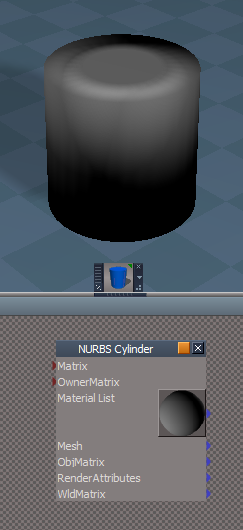
Do you see any value and could you use Model's NURBS with your scripts, if I created a NURBS primtives tool for Workspace?
NURBS Cylinder.png
User avatar
clintonman
Captain
Posts: 5659
Joined: 21 May 2009, 21:08
Type the number ten into the box: 0
Location: California

Re: New NURBS tools

Post by clintonman »

trueBlue wrote: 01 Dec 2020, 21:34 Thanks!
Do you see any value and could you use Model's NURBS with your scripts, if I created a NURBS primtives tool for Workspace?
NURBS Cylinder.png
I don't think so. The NURBS coming from model side are baked down to polygon meshes in workspace and the result of workspace commands for making NURBS can't be edited with point edit tools.
NURBSpatchElements.jpg

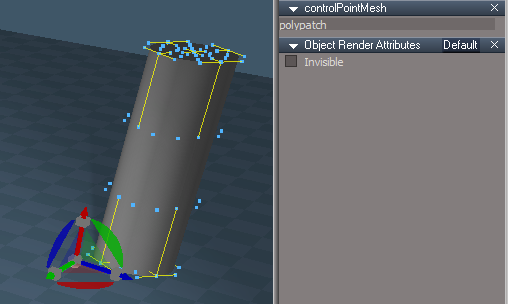
Here is the insides of the home made NURBS patch.
The contolPointMesh is what gets edited or transformed in the scene.
The CP to Patch CP holds the U and V control point counts and gets the vertices from the controlPointMesh for the next step.
The Points to Patch node come from the Clintons3D rsx plugin and converts the vertices along with the U and V counts into a NURBS patch.
From there it feeds the NURBSToMesh and the rest of the nodes that make the visible patch.

I'm going to try to find a way to not have the MeshDoubleSided node. Without it the final mesh is only visible from 1 side. If I can't find a mesh setting for double sided I'll try to see if a double sided material is an option.
Clinton Reese

http://clintons3d.com
User avatar
trueBlue
Captain
Posts: 5548
Joined: 06 Jul 2009, 22:50
Type the number ten into the box: 10

Re: New NURBS tools

Post by trueBlue »

Instead of the Select CP Mesh button.
How about Edit CP Mesh button?
Add
MeshModifiers.ActivatePointEditWidget('','','Default');
to the button script
User avatar
clintonman
Captain
Posts: 5659
Joined: 21 May 2009, 21:08
Type the number ten into the box: 0
Location: California

Re: New NURBS tools

Post by clintonman »

worked on some stuff, no pictures to show
point to point and object to object modified to work with nurbs
tested mesh origin script - it has some issues but it works so changes can come later
the uv indicator has the U and V at the end of the line instead of near the front - makes it easier to see the directions
skin curves into patches now has a close option to skin back to the first curve selected
rail and birail have automatic curve flipping - before the U and V directions of the curves had to be carefully organized before running the tools
extrude, remove isoline, split patch and select isoline preserve the point edit selection mode
found that grouping does work for nurbs as long as the full nurbs object is selected, not the control point mesh
added a utility function for automatically selecting the control point mesh, so it can be easily edited and transformed
found the scene setting, "Show backfaces", so double sided faces aren't needed anymore, except that selecting snapping with the double sided is easier

at this point i'm ready to try another nurbs tutorial to see how smoothly these tools work
Clinton Reese

http://clintons3d.com
User avatar
trueBlue
Captain
Posts: 5548
Joined: 06 Jul 2009, 22:50
Type the number ten into the box: 10

Re: New NURBS tools

Post by trueBlue »

I am updating your Select script to include selecting NURBS & Curves
Select.png
Select.png (4.76 KiB) Viewed 2835 times
For the NURBS script I am using

Code: Select all

if(!Node.IsLight(subobj) && !Node.IsCamera(subobj) && Node.ConExists(subobj, "U precision"))
For the Curves script I am using

Code: Select all

if(!Node.IsLight(subobj) && !Node.IsCamera(subobj) && Node.ConExists(subobj, "CurvePosition"))
Would this be correct and is there anything else that could be addded?
User avatar
clintonman
Captain
Posts: 5659
Joined: 21 May 2009, 21:08
Type the number ten into the box: 0
Location: California

Re: New NURBS tools

Post by clintonman »

trueBlue wrote: 03 Dec 2020, 14:52 I am updating your Select script to include selecting NURBS & Curves
Select.png
For the NURBS script I am using

Code: Select all

if(!Node.IsLight(subobj) && !Node.IsCamera(subobj) && Node.ConExists(subobj, "U precision"))
For the Curves script I am using

Code: Select all

if(!Node.IsLight(subobj) && !Node.IsCamera(subobj) && Node.ConExists(subobj, "CurvePosition"))
Would this be correct and is there anything else that could be addded?
You don't need to check for NURBS connectors and check for Light and Camera as well. NURBS don't have anything in common with them so no need to check.
Clinton Reese

http://clintons3d.com
User avatar
clintonman
Captain
Posts: 5659
Joined: 21 May 2009, 21:08
Type the number ten into the box: 0
Location: California

Re: New NURBS tools

Post by clintonman »

NURBStoolbar.jpg

No testing as planned. Was getting trueSpace hard crashes even on fresh install and update.
Latest toolbar is shown, getting pretty long, but at least it's ready for testing again.
Clinton Reese

http://clintons3d.com
User avatar
trueBlue
Captain
Posts: 5548
Joined: 06 Jul 2009, 22:50
Type the number ten into the box: 10

Re: New NURBS tools

Post by trueBlue »

I just found some 300x300 bmps that Paul gave me if your interested
300x300.png
User avatar
clintonman
Captain
Posts: 5659
Joined: 21 May 2009, 21:08
Type the number ten into the box: 0
Location: California

Re: New NURBS tools

Post by clintonman »

trueBlue wrote: 05 Dec 2020, 02:08 I just found some 300x300 bmps that Paul gave me if your interested
300x300.png
Yes, I'm interested. Is it only nurbs images?
Clinton Reese

http://clintons3d.com
User avatar
trueBlue
Captain
Posts: 5548
Joined: 06 Jul 2009, 22:50
Type the number ten into the box: 10

Re: New NURBS tools

Post by trueBlue »

I added a few others that might be of use.
Attachments
New Compressed (zipped) Folder425c.zip
(480.15 KiB) Downloaded 248 times
User avatar
clintonman
Captain
Posts: 5659
Joined: 21 May 2009, 21:08
Type the number ten into the box: 0
Location: California

Re: New NURBS tools

Post by clintonman »

trueBlue wrote: 05 Dec 2020, 04:34 I added a few others that might be of use.
Thanks.
Clinton Reese

http://clintons3d.com
User avatar
clintonman
Captain
Posts: 5659
Joined: 21 May 2009, 21:08
Type the number ten into the box: 0
Location: California

Re: New NURBS tools

Post by clintonman »

NURBSgogglesTest.jpg

Good test session. Found all sorts of things to fix.
There was a bunch of minor bugs and the curve from points tool can be cancelled now, before there was no way
Found that the double sided patch was the way to go because single sided can't be selected from the back even if the display is set to show back faces.
While building the main surface above found a block of code that was messing up the skin curves to patch and giving some crazy looking results.

In the tutorial the birail1 was used to create the rubber lip at the face. My version had a problem with rotations and flipped the last part of the lip inside out.
Next I copied the profile curve to the end of the lip and tried the birail2, but the automatic curve flipping didn't work and part of the lip was offset. Final attempt I turned off the automatic curve flipping, oriented the curves by hand and went through the proper selection order and it worked perfectly.
The auto flip function uses the distance from the start and end of the curves to determine if they should be flipped before skinning. The curves I think have start and end close enough that it gets confused and can't tell one from the other.

The next part of the tutorial mirrors the shape and uses the nurbs lathe function to create the scopes. It also uses an offset curve tool, which I don't have.
Clinton Reese

http://clintons3d.com
User avatar
clintonman
Captain
Posts: 5659
Joined: 21 May 2009, 21:08
Type the number ten into the box: 0
Location: California

Re: New NURBS tools

Post by clintonman »

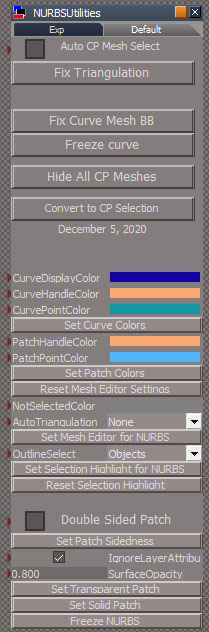
NURBS_Utilities.jpg
NURBS Utility Panel - not the final version


Spent time working on helper utilities.
Added color controls for the edges and points, mesh edit settings, control for patch double sided or not, patch display controls and started the convert patch to mesh script.
Most of the new utilities are used to make the NURBS handles easier to see.

Next I think I'll cleanup the utilities UI, then do some tutorial tests and then finish the mesh converter
Clinton Reese

http://clintons3d.com
User avatar
the_ant
Chief Petty Officer
Posts: 155
Joined: 02 Jun 2009, 09:26
Type the number ten into the box: 0
Location: Perugia - Italy

Re: New NURBS tools

Post by the_ant »

:o :worship: :worship: :worship: :o
User avatar
trueBlue
Captain
Posts: 5548
Joined: 06 Jul 2009, 22:50
Type the number ten into the box: 10

Re: New NURBS tools

Post by trueBlue »

I have no idea how your Mesh Normals are being used or any consequences in changing the Angle
But it sure looks better changing the Angle from 170 to 30
Normals.png
Normals.png (37.71 KiB) Viewed 2919 times
30 being trueSpace's default for Auto Faucet which runs from 0 to 90
Edit: 45 is the default
Msh Editor Settings.png
Msh Editor Settings.png (3.38 KiB) Viewed 2917 times
User avatar
clintonman
Captain
Posts: 5659
Joined: 21 May 2009, 21:08
Type the number ten into the box: 0
Location: California

Re: New NURBS tools

Post by clintonman »

Thanks, I'll set it to 15 and see how that goes.

Edit: Nope, 30 it is.
Clinton Reese

http://clintons3d.com
User avatar
trueBlue
Captain
Posts: 5548
Joined: 06 Jul 2009, 22:50
Type the number ten into the box: 10

Re: New NURBS tools

Post by trueBlue »

I discovered something this morning :mrgreen:
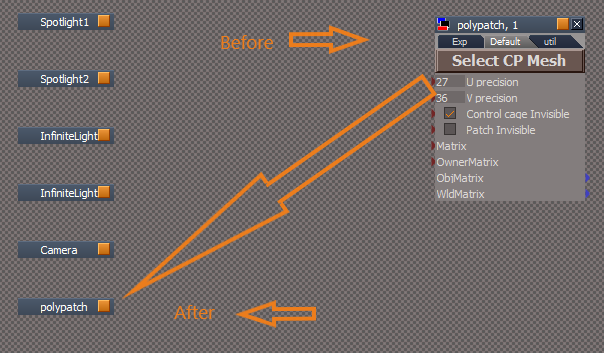
Using your freezePatch2 script in a polypatch object

Code: Select all

	owner = System.ThisOwner();
	name = Node.ShortName(owner);

	freenode = Node.Copy(owner + "/LODMesh", Space.CurrentScene());

Node.ConRemove(freenode, "LE2Data")

	newname = Node.SafeRename(owner ,Node.ShortName(owner)+"_Clinton");

	params.ConValue('originalname') = name;
	params.ConValue('newmesh') = freenode;
Try adding
Node.ConRemove(freenode, "LE2Data")
After.png
User avatar
clintonman
Captain
Posts: 5659
Joined: 21 May 2009, 21:08
Type the number ten into the box: 0
Location: California

Re: New NURBS tools

Post by clintonman »

NURBSgogglesTest2.jpg

Done testing with this tutorial. The rest of it is more of the same basic techniques.

Fixed a bug in the mirror matrix script, so it works with objects with scale not equal to 1.
Used detailed plane as a draw panel to draw some curves using the point to curve too. In the future I'd like to just draw a curve directly. That would require a new widget and update to the rsx plugin.

Not fixed yet:
Weld tool needs to recalculate the resolution of the nurbs. As the mesh got bigger it got chunkier because of the lose of detail/resolution
Same problem when extracting curve from a patch.
The automatic flip while welding curves still needs work.
Converting to polygon needs a resolution control and maybe the option to convert the control point cage to a polygon mesh. Also want to convert to a quad mesh instead of triangles.
Make more tools multi-selection aware.

Next up is to try the tools in the next tutorial which uses a welding, cutting and rebuilding much more. Also fix the problems stated above.
Last thing on the to do list is to finally fix the nurbs file scripts to work with the new format.
Last edited by clintonman on 06 Dec 2020, 23:13, edited 1 time in total.
Clinton Reese

http://clintons3d.com
User avatar
clintonman
Captain
Posts: 5659
Joined: 21 May 2009, 21:08
Type the number ten into the box: 0
Location: California

Re: New NURBS tools

Post by clintonman »

trueBlue wrote: 06 Dec 2020, 21:45 I discovered something this morning :mrgreen:
Using your freezePatch2 script in a polypatch object

Code: Select all

	owner = System.ThisOwner();
	name = Node.ShortName(owner);

	freenode = Node.Copy(owner + "/LODMesh", Space.CurrentScene());

Node.ConRemove(freenode, "LE2Data")

	newname = Node.SafeRename(owner ,Node.ShortName(owner)+"_Clinton");

	params.ConValue('originalname') = name;
	params.ConValue('newmesh') = freenode;
Try adding
Node.ConRemove(freenode, "LE2Data")

After.png
I don't know what I'm supposed to be seeing here. What does it do?
Clinton Reese

http://clintons3d.com
User avatar
trueBlue
Captain
Posts: 5548
Joined: 06 Jul 2009, 22:50
Type the number ten into the box: 10

Re: New NURBS tools

Post by trueBlue »

Here is another example
var sel = Node.Copy('', '');Node.ConRemove(sel, 'LE2Data')
As you know, using the Copy command, the copy is hidden under the copied node in the LE.
Using the above moves the copy in the LE
Seems to only work for 3D objects and Cameras
User avatar
clintonman
Captain
Posts: 5659
Joined: 21 May 2009, 21:08
Type the number ten into the box: 0
Location: California

Re: New NURBS tools

Post by clintonman »

trueBlue wrote: 06 Dec 2020, 23:29 ...
As you know,...
That explains why I don't know what you're talking about. Please don't assume I know. Ass of u and me blah blah blah etc.

Thanks for the tip, I'll add it in to these and all future scripts.
Clinton Reese

http://clintons3d.com
User avatar
clintonman
Captain
Posts: 5659
Joined: 21 May 2009, 21:08
Type the number ten into the box: 0
Location: California

Re: New NURBS tools

Post by clintonman »

I started the next tutorial and immediately ran into a major problem. I added a nurbs cylinder and tried to rebuild it's detail and it failed. It took a while but I finally figured out the problem was zero length curves. The center top and bottom of the cylinder is made from curves with zero length, all the points are together at one location, so my curve length calculation was giving bad results. All the curves are normalized to a length of 1, so the solution was to lie and say the 0 length curve was 1 unit long.

Now that that's out of the way I can move forward in the tutorial tomorrow.
Clinton Reese

http://clintons3d.com
User avatar
trueBlue
Captain
Posts: 5548
Joined: 06 Jul 2009, 22:50
Type the number ten into the box: 10

Re: New NURBS tools

Post by trueBlue »

Seems to me that the Convert mesh primitives to NURBS patches should delete the primitive
User avatar
clintonman
Captain
Posts: 5659
Joined: 21 May 2009, 21:08
Type the number ten into the box: 0
Location: California

Re: New NURBS tools

Post by clintonman »

trueBlue wrote: 08 Dec 2020, 15:31 Seems to me that the Convert mesh primitives to NURBS patches should delete the primitive
:lol: Funny you should mention that. Just last night while testing I was thinking, "That source mesh keeps getting in my way."
The plan is to have options for keep original source mesh and offset original source mesh. The reason to keep it is in the current tutorial a NURBS cylinder is the starting point for the parts of the model and I don't want to have to keep recreating the cylinder every time I need to add another part so that's where the offset original comes in to move it out of the way.
Clinton Reese

http://clintons3d.com
User avatar
clintonman
Captain
Posts: 5659
Joined: 21 May 2009, 21:08
Type the number ten into the box: 0
Location: California

Re: New NURBS tools

Post by clintonman »

arrangePanels.jpg
The floating panels were all opening on top of each other. New technique opens them side by side. It reads the existing panel locations and opens the new panel in the first free space it finds while looking from right to left.

Wow, 3 days and still no progress on the tutorial. Maybe tonight.

Edit: Later that night...

Nope, no tutorial progress.
Convert patch to polygon mesh will make quad meshes instead of triangulated meshes when the patch is single sided.
Found that if the patch resolution is set too low tS crashes, so had to make small changes in every single script that creates patches.
Fine tunes the UV indicators to go near the end instead of at the end to prevent a lot of overlapping uv indicators.
Use LE2Data conn remove trick to stop the nodes overlapping in the link editor.

The to do list is getting pretty small. I think a release is likely in a few days.
Clinton Reese

http://clintons3d.com
User avatar
clintonman
Captain
Posts: 5659
Joined: 21 May 2009, 21:08
Type the number ten into the box: 0
Location: California

Re: New NURBS tools

Post by clintonman »

NURBS_DrawCurve.jpg

Draw Curve Tool - top clicking to place main curve points, bottom final result

The draw curve tool creates a curve by clicking on existing scene geometry. It also behaves like a freehand curve drawing tool.
This is a the last new tool and it uses a new plugin based widget to get the curve points.
The todo list is mostly cleanup chores and a few small changes. Almost done. :bananamouse:
Clinton Reese

http://clintons3d.com
User avatar
clintonman
Captain
Posts: 5659
Joined: 21 May 2009, 21:08
Type the number ten into the box: 0
Location: California

Re: New NURBS tools

Post by clintonman »

I released the new NURBS tools yesterday and now existing scripts need to be updated to work with them.

The first is the Unofficial Update Show/ShowAll Hide/HideAll scripts.

This is a "quick install" meaning that it's not permanent and won't survive a reset default context.

Second is for updating the snapping scripts.

Another "quick install"
Attachments
Snapping Tools for NURBS Quick Install.RsObj
(274.92 KiB) Downloaded 185 times
ShowHide for NURBS Quick Install.RsObj
(38.59 KiB) Downloaded 172 times
Clinton Reese

http://clintons3d.com
User avatar
clintonman
Captain
Posts: 5659
Joined: 21 May 2009, 21:08
Type the number ten into the box: 0
Location: California

Re: New NURBS tools

Post by clintonman »

Not yet published bug fixes:

Freeze NURBS will arrange the new node in the LE so it's not overlapping other nodes
NURBSInfo size control for the UV indicators only worked with the control point mesh selected, now works with any node of the NURBS selected.
Clinton Reese

http://clintons3d.com
User avatar
trueBlue
Captain
Posts: 5548
Joined: 06 Jul 2009, 22:50
Type the number ten into the box: 10

Re: New NURBS tools

Post by trueBlue »

Here is a Curve and NURBS patch with the changes I am suggesting

The Curve had a jScript that was not removed in the curveFreeze script
I renamed it to NURBSNameDisplay just like the NURBS patch
Also added a line to delete it in the curveFreeze script
Attachments
polypatch.RsObj
(76.87 KiB) Downloaded 185 times
polycurve.RsObj
(80.54 KiB) Downloaded 180 times
User avatar
trueBlue
Captain
Posts: 5548
Joined: 06 Jul 2009, 22:50
Type the number ten into the box: 10

Re: New NURBS tools

Post by trueBlue »

What I do not understand with the Curves is the different ORA colors
controlPointMesh ORA
LODMesh ORA

loadCurveScript node
loadCurveScript ORA
controlPointCone ORA

Also the LODMesh shows the Invisible Check box in the Stack/Panels and when Unchecked shows the Control Points
Invisible.png
User avatar
clintonman
Captain
Posts: 5659
Joined: 21 May 2009, 21:08
Type the number ten into the box: 0
Location: California

Re: New NURBS tools

Post by clintonman »

Changes to the UU nodes:
The curve ORA node was not like other ORA nodes, so replaced with the standard ORA that has the Default aspect with only the Invisible input
Curve reset the control point mesh default aspect so the Invisible input can be seen again.
Curve and Patch expanded the LODMesh Matrix input to prevent the mesh moving away from the control points.
Curve and Patch exported the LODMesh ORA aspect up 2 levels so the Invisible input is visible when the NURBS is selected.

Plans for freezing the NURBS:
add the missing delete for the naming node
remove and maybe replace the ORA because it will be set to export 2 levels up instead of 1
Attachments
polypatchUU.RsObj
(86.1 KiB) Downloaded 190 times
polycurveUU.RsObj
(86.37 KiB) Downloaded 186 times
Clinton Reese

http://clintons3d.com
User avatar
clintonman
Captain
Posts: 5659
Joined: 21 May 2009, 21:08
Type the number ten into the box: 0
Location: California

Re: New NURBS tools

Post by clintonman »

trueBlue wrote: 15 Dec 2020, 18:00 What I do not understand with the Curves is the different ORA colors
controlPointMesh ORA
LODMesh ORA

loadCurveScript node
loadCurveScript ORA
controlPointCone ORA

Also the LODMesh shows the Invisible Check box in the Stack/Panels and when Unchecked shows the Control Points
Invisible.png
Can you be more specific with your color question(s)?

The LODMesh is not meant to be selected and locking it isn't an option because that also prevents selecting the NURBS.
Clinton Reese

http://clintons3d.com
User avatar
trueBlue
Captain
Posts: 5548
Joined: 06 Jul 2009, 22:50
Type the number ten into the box: 10

Re: New NURBS tools

Post by trueBlue »

clintonman wrote: 15 Dec 2020, 18:37 remove and maybe replace the ORA because it will be set to export 2 levels up instead of 1
That's what I was thinking
User avatar
trueBlue
Captain
Posts: 5548
Joined: 06 Jul 2009, 22:50
Type the number ten into the box: 10

Re: New NURBS tools

Post by trueBlue »

clintonman wrote: 15 Dec 2020, 18:44
trueBlue wrote: 15 Dec 2020, 18:00 What I do not understand with the Curves is the different ORA colors
controlPointMesh ORA
LODMesh ORA

loadCurveScript node
loadCurveScript ORA
controlPointCone ORA

Also the LODMesh shows the Invisible Check box in the Stack/Panels and when Unchecked shows the Control Points
Invisible.png
Can you be more specific with your color question(s)?

The LODMesh is not meant to be selected and locking it isn't an option because that also prevents selecting the NURBS.
I can only suggest that you look at the ORA panels for the nodes listed above.
Each one has different colors

I'll wait to release the UUpdates until you finish with any changes
User avatar
clintonman
Captain
Posts: 5659
Joined: 21 May 2009, 21:08
Type the number ten into the box: 0
Location: California

Re: New NURBS tools

Post by clintonman »

ORA_curveColors.jpg

Does this help?
Clinton Reese

http://clintons3d.com
User avatar
clintonman
Captain
Posts: 5659
Joined: 21 May 2009, 21:08
Type the number ten into the box: 0
Location: California

Re: New NURBS tools

Post by clintonman »

Does the polypatch/LODMesh/ need to have an Owner name node connected to the ORA?
It exists in the curve but not the patch.
whiteCurve.jpg
whiteCurve.jpg (40.76 KiB) Viewed 2564 times

I changed the default curve color to white. It's the only color I can find that's visible in all circumstances. Any thoughts?

I'll be done after I get your opinion on the ORA owner node.
Clinton Reese

http://clintons3d.com
User avatar
trueBlue
Captain
Posts: 5548
Joined: 06 Jul 2009, 22:50
Type the number ten into the box: 10

Re: New NURBS tools

Post by trueBlue »

clintonman wrote: 15 Dec 2020, 21:32 Does the polypatch/LODMesh/ need to have an Owner name node connected to the ORA?
It exists in the curve but not the patch.

whiteCurve.jpg


I changed the default curve color to white. It's the only color I can find that's visible in all circumstances. Any thoughts?

I'll be done after I get your opinion on the ORA owner node.

If you are referring to the objects I upload this morning, I did not add the Owner Name node. It existed that way in you latest NURBS update/installer.
In one of the previous UUpdates (several years ago), the Owner Name node was added and hooked up to the ORA, but was discontinued a very long time ago.

I do not have any thoughts nor do I understand all of the different ORA with different colors.
I was concerned that maybe the ORA panel (also includes an Owner Name node) in the loadCurveScript node was not right when Importing a Model NURBS
I have not tested that portion yet and I am not sure how it works either.
User avatar
clintonman
Captain
Posts: 5659
Joined: 21 May 2009, 21:08
Type the number ten into the box: 0
Location: California

Re: New NURBS tools

Post by clintonman »

OK, thanks, I'll remove the owner node for the ORA. I never knew the reason for it and didn't know it was discontinued.
Clinton Reese

http://clintons3d.com
User avatar
trueBlue
Captain
Posts: 5548
Joined: 06 Jul 2009, 22:50
Type the number ten into the box: 10

Re: New NURBS tools

Post by trueBlue »

Just noticed the Lathe Curve floating panel does not use your new Open Panel Frame
I was able to fix it on my end
Also I do not think your installer is saving the PickSelect to disk
User avatar
clintonman
Captain
Posts: 5659
Joined: 21 May 2009, 21:08
Type the number ten into the box: 0
Location: California

Re: New NURBS tools

Post by clintonman »

trueBlue wrote: 16 Dec 2020, 15:37 Just noticed the Lathe Curve floating panel does not use your new Open Panel Frame
I was able to fix it on my end
Also I do not think your installer is saving the PickSelect to disk
Thanks, fixed and fixed. :bananathumb:
Clinton Reese

http://clintons3d.com
User avatar
trueBlue
Captain
Posts: 5548
Joined: 06 Jul 2009, 22:50
Type the number ten into the box: 10

Re: New NURBS tools

Post by trueBlue »

With your Select Control Point that selects a Patch or Curve, it does not enter into Point Editing
So what if you add:
MeshModifiers.ActivatePointEditWidget('', '', '')
to the end of your NURBSUtilities/NURBStoCPMeshSelection script. and add:

Code: Select all

if(Node.Exists(Node.FirstSelected() + "/LODMesh")) {
Activity.Run("Scripts/CustomCommands/NURBSScripts/NURBSUtilities/NURBStoCPMeshSelection")
}
to the Select Control Point button LMB command
User avatar
clintonman
Captain
Posts: 5659
Joined: 21 May 2009, 21:08
Type the number ten into the box: 0
Location: California

Re: New NURBS tools

Post by clintonman »

trueBlue wrote: 16 Dec 2020, 18:46 With your Select Control Point that selects a Patch or Curve, it does not enter into Point Editing
So what if you add:
MeshModifiers.ActivatePointEditWidget('', '', '')
to the end of your NURBSUtilities/NURBStoCPMeshSelection script. and add:

Code: Select all

if(Node.Exists(Node.FirstSelected() + "/LODMesh")) {
Activity.Run("Scripts/CustomCommands/NURBSScripts/NURBSUtilities/NURBStoCPMeshSelection")
}
to the Select Control Point button LMB command
It does not for the same reason just selecting a mesh doesn't automatically enter point edit mode. You can't move, rotate or scale the object. Also that script works with multiple selections, so everything that's selected will automatically enter point edit mode.
Clinton Reese

http://clintons3d.com
User avatar
trueBlue
Captain
Posts: 5548
Joined: 06 Jul 2009, 22:50
Type the number ten into the box: 10

Re: New NURBS tools

Post by trueBlue »

I figured out how to do it another way by using a different icon

Code: Select all

if(Node.ConExists(Node.FirstSelected(), "PatchName")) {
Node.Select(Node.Owner(Node.FirstSelected()))
}
if(Node.Exists(Node.FirstSelected() + "/LODMesh")) {
Node.Select(Node.FirstSelected() + "/controlPointMesh")
MeshModifiers.ActivatePointEditWidget('', '', '')
}
Edit NURBS icon.png
Edit NURBS icon.png (8.26 KiB) Viewed 2591 times
The first block of code was needed if the controlPointMesh is selected
User avatar
trueBlue
Captain
Posts: 5548
Joined: 06 Jul 2009, 22:50
Type the number ten into the box: 10

Re: New NURBS tools

Post by trueBlue »

Looking at the UU Object Navigation Widgets, I noticed that there is a script in the Enter edit mode that filters out Lights from entering into Point Edit mode
So I added NURBS too
I tried to add code that would select the controlPointMesh and then enter into PE mode, but that did not work
Your Custom Widgets did not have this script, so I added it to them as well
Another interesting surprise, if you have normal 3D Objects selected with NURBS and RMB click in 3D Space, the normal 3D Objects enter into PE mode and the NURBS enter into editing mode with their handles. :mrgreen:

Code: Select all

if(Node.IsLight('') || Node.Exists(Node.FirstSelected() + "/LODMesh")) 
params.SetTerminationFlag()
return
Also Selection Locking does not work in 3D Space
Edit: Fixed Selection Locking for NURBS using:

Code: Select all

if(Node.ConExists(Node.FirstSelected(), "PatchName")) {
Node.Select(Node.Owner(Node.FirstSelected()));
}
in Lock & Unlock buttons for the UnSelectable panel and scripts in the Default Context Widget

I also added a script to the Default Context widget

Code: Select all

Activity.Run("Scripts/CustomCommands/NURBSScripts/NURBSUtilities/NURBStoCPMeshSelection")
Also, if you use Rectangle Select and your Select CP Mesh you will get an error
Error.png
User avatar
trueBlue
Captain
Posts: 5548
Joined: 06 Jul 2009, 22:50
Type the number ten into the box: 10

Re: New NURBS tools

Post by trueBlue »

Adding:

Code: Select all

Activity.Run("Scripts/CustomCommands/NURBSScripts/NURBSUtilities/NURBStoCPMeshSelection")
to the Default Context widget worked really well for selecting Patches & Curves!
But broke Sweeping Curves and maybe other unknown NURBS tools.
So if you can find a way for these tools to be compatible with adding the above script to the Default Context widget, you could have a complete solution.
Rectangle select in the current UUs selects Patches & Curves but you can not transform them
User avatar
clintonman
Captain
Posts: 5659
Joined: 21 May 2009, 21:08
Type the number ten into the box: 0
Location: California

Re: New NURBS tools

Post by clintonman »

If the NURBStoCPMeshSelection is always running that will make it more difficult to set the curve resolution, animate the curve position value and put curves into groups/3d encapsulation. For the patch it looks like it will make setting the resolution and smooth angle more difficult and also make grouping harder. You also lose the ability to just click the invisible checkbox to hide them.
If you try to group with the control point meshes selected you get a mess, at least that's the way I remember it. So grouping will only work in the LE view, not the 3D view.

I haven't had the chance to test the changes, so this is just what it looks like would happen just reading about it.

The way I had it setup required the Utilities panel is open and the Auto CP Mesh is active before it would automatically select the cp mesh, otherwise the nurbs node gets selected.
Clinton Reese

http://clintons3d.com
User avatar
trueBlue
Captain
Posts: 5548
Joined: 06 Jul 2009, 22:50
Type the number ten into the box: 10

Re: New NURBS tools

Post by trueBlue »

I figured there would be other issues so I did not implement it in the current UUs
I am testing a different approach by adding an Active boolean to the script so that it can be Deactivated
You can also Alt + LMB click to select NURBS Patches & Cruves
Ctrl + Alt select to add NURBS Patches & Cruves to the selection
You can use your keyboard's Up/Down keys to toggle selecting the Patches & Cruves/Control Points

One of the best changes in the UUs is not being able to PE the LOD Mesh
Object Navigation Widget(s) & Selector cage/Enter edit mode
Add
No Lights or NURBS script 'For stopping Lights & NURBS's from entering into point editing mode
Your Sweep Path changes my beloved Select Context to Select Faces
Could not figure out way I could not select Control Points & Handles
SweepingFrustration.png
Edit:
Also notice it changes Material Editor Settings:
Preserve unwrap = true
Auto triangulation = None
Defaults are:
Preserve unwrap = false
Auto triangulation = Continuous

This is all probably a waste of breath...
When I first use this Sweep Path I ran into a couple of errors until I figured out how to use it.
The process was slow with the UV Editor showing and not closing, but with success with the Sweep
However when I applied the UU and ran the same scene, the Sweep was super fast and the UV Editor looked as if it never opened! :D
I repeated the same process several times with the same great response!
Currently it is back to the SLOW process as described above! :(
Been trying several different scenarios including modifying your script that restores all of the above changes, but can not find out what is breaking the FAST process
User avatar
trueBlue
Captain
Posts: 5548
Joined: 06 Jul 2009, 22:50
Type the number ten into the box: 10

Re: New NURBS tools

Post by trueBlue »

When I first use this Sweep Path I ran into a couple of errors until I figured out how to use it.
The process was slow with the UV Editor showing and not closing, but with success with the Sweep
However when I applied the UU and ran the same scene, the Sweep was super fast and the UV Editor looked as if it never opened! :D
I repeated the same process several times with the same great response!
Currently it is back to the SLOW process as described above! :(
Been trying several different scenarios including modifying your script that restores all of the above changes, but can not find out what is breaking the FAST process
I am pretty sure I fixed the SLOW process by capturing the Mesh Editor Settings and restoring them after the sweep. :mrgreen:
The missing part was, I figured out how to capture and restore the Auto Triangulation combo control.
Or maybe the Auto Triangulation needs to be in On Release mode before sweeping, not sure.
What is odd though, even though you are opening the UV Editor from script, it does not appear that this is happening.

I reinstalled tS761Standalone so that I could see the original Mesh Editor Settings panel settings.
Default trueSpace Mesh Editor Settings.png
Default trueSpace Mesh Editor Settings.png (5.25 KiB) Viewed 2525 times
Some notes about the installation:
Install for original tS761Standalone
Must close tS at least once before installing or Drag and Drop does not work

c3dPersistenceAutoload
ReloadCustomScripts needs to be updated to include //check valid extension 'RsObj'

OpenBrowserToUpdate & Red toolbar LMB command
Link = trueSpace7.61 Beta 8
Might be misleading for Standalone installation
Should be viewforum.php?f=55

NURBS scripts
Open panel script(s) opens the first panel over the Stack on first click
Second click (same panel) works as expected
Not sure why but this does not happen in the UUpdate(s)

Reset Default Context
CustomCommands is missing in Scripts :shock:
NT icon LMB command
Activity.Run("Scripts/CustomCommands/NURBSScripts/openToolbar")
So... it does not work!
Because the c3dPersistenceAutoload is missing the modified reset.js file
Ah... okay, your instructions say you need to restore the scripts after a reset

Copy modified NURBSscripts to the Standalone installation
SLOW sweeping process...
What the heck is going on here???
Edit:
Comment out UVEditor.Open('')
savecurveref
//uv editor must be open to avoid hard crash - truespace bug
// UVEditor.Open('');
No crash & Fast process!!!
So... can this be made optional? :?:
Did I mention how much I love this tool? :worship:

Also able to use this on Objects that do not have UV Projections
User avatar
clintonman
Captain
Posts: 5659
Joined: 21 May 2009, 21:08
Type the number ten into the box: 0
Location: California

Re: New NURBS tools

Post by clintonman »

I took some notes from your feedback and put them on the web pages http://clintons3d.com/plugins/truespace ... stent.html and http://clintons3d.com/plugins/truespace ... urves.html

From your sweep image it looks like you are selecting the control point mesh. The sweep image above has sharp turns instead of following the the curves smooth turns. Maybe a bug or you have automatic cp mesh selection. It was meant to be used with the curve and the resolution of the curve controls the number of sweep segments. Might be a good idea to have a confirmation displaying the number of sweeps so it can be cancelled if the curve has a lot of resolution. A high resolution will result in a slow sweep.

It's difficult the uv map something that's been swept after the fact, that's why it was setup to work that way. Ignoring a note that says "this will crash tS" isn't a good idea without serious testing. My guess is you didn't crash because you are sweeping the control point mesh and maybe the crash is from a bunch of sweeps. And maybe you're right and it doesn't cause crashing and I was just having a bad day when writing the comment. Maybe, I guess... more testing is needed before taking the chance of crashing someones tS session.
If you do keep uv without opening the uv editor you should put a warning that tS might crash and be sure to save before running the tool.

Option to not uv might be a good option if the sweep isn't meant to be textured or the mesh is exported and uv mapped outside of tS.
Clinton Reese

http://clintons3d.com
User avatar
trueBlue
Captain
Posts: 5548
Joined: 06 Jul 2009, 22:50
Type the number ten into the box: 10

Re: New NURBS tools

Post by trueBlue »

clintonman wrote: 22 Dec 2020, 21:03 I took some notes from your feedback and put them on the web pages http://clintons3d.com/plugins/truespace ... stent.html and http://clintons3d.com/plugins/truespace ... urves.html

From your sweep image it looks like you are selecting the control point mesh. The sweep image above has sharp turns instead of following the the curves smooth turns. Maybe a bug or you have automatic cp mesh selection. It was meant to be used with the curve and the resolution of the curve controls the number of sweep segments. Might be a good idea to have a confirmation displaying the number of sweeps so it can be cancelled if the curve has a lot of resolution. A high resolution will result in a slow sweep.

It's difficult the uv map something that's been swept after the fact, that's why it was setup to work that way. Ignoring a note that says "this will crash tS" isn't a good idea without serious testing. My guess is you didn't crash because you are sweeping the control point mesh and maybe the crash is from a bunch of sweeps. And maybe you're right and it doesn't cause crashing and I was just having a bad day when writing the comment. Maybe, I guess... more testing is needed before taking the chance of crashing someones tS session.
If you do keep uv without opening the uv editor you should put a warning that tS might crash and be sure to save before running the tool.

Option to not uv might be a good option if the sweep isn't meant to be textured or the mesh is exported and uv mapped outside of tS.
In the image the CP mesh was selected because I was trying to select a Handle while in Face mode
The Curve was drawn on top of a NURBS plane that has waves. Hidden in the image
The Curve has a resolution of 130
I am selecting the polyCurve correctly during the sweep process
Besides a few errors, I have not crash tS761 or tS761Standalone(with the UU and without) using your Sweep Path having the UV Editor open from your script or not.
Including using objects that do not have a UV Projection
I cranked up the Curve resolution to 400 and still no crash
The only time it is slow for me is when opening the UV Editor from script
Here is the scene I have been testing with different objects
Also a modified Sweep script
Attachments
Space 3Dae51.RsScn
(1.11 MiB) Downloaded 192 times
sweepPathScript.RsObj
(95.94 KiB) Downloaded 173 times
User avatar
clintonman
Captain
Posts: 5659
Joined: 21 May 2009, 21:08
Type the number ten into the box: 0
Location: California

Re: New NURBS tools

Post by clintonman »

Looking pretty good. No crashes here but,
"curve sweep bug: if uv editor not open then get random hard crashes", Jan 2018 release note

The crashes are random, so I plan to do some more testing to be sure.
Clinton Reese

http://clintons3d.com
User avatar
clintonman
Captain
Posts: 5659
Joined: 21 May 2009, 21:08
Type the number ten into the box: 0
Location: California

Re: New NURBS tools

Post by clintonman »

OK, did every test I can think of and no crash. Looks like it's safe to remove the UV Editor open command. :bananathumb:
Clinton Reese

http://clintons3d.com
User avatar
trueBlue
Captain
Posts: 5548
Joined: 06 Jul 2009, 22:50
Type the number ten into the box: 10

Re: New NURBS tools

Post by trueBlue »

clintonman wrote: 22 Dec 2020, 21:03 Option to not uv might be a good option if the sweep isn't meant to be textured or the mesh is exported and uv mapped outside of tS.
So, if this is an option and the UV code is not necessary, wouldn't it be better to apply a UV projection manually by the user if wanted?
User avatar
clintonman
Captain
Posts: 5659
Joined: 21 May 2009, 21:08
Type the number ten into the box: 0
Location: California

Re: New NURBS tools

Post by clintonman »

trueBlue wrote: 23 Dec 2020, 03:20
clintonman wrote: 22 Dec 2020, 21:03 Option to not uv might be a good option if the sweep isn't meant to be textured or the mesh is exported and uv mapped outside of tS.
So, if this is an option and the UV code is not necessary, wouldn't it be better to apply a UV projection manually by the user if wanted?
There is nothing stopping the user from doing the uv manually after the sweep. I don't see any tools in tS that would make that a painless process. I mentioned doing uv outside of tS because of it's limitations.
Clinton Reese

http://clintons3d.com
User avatar
trueBlue
Captain
Posts: 5548
Joined: 06 Jul 2009, 22:50
Type the number ten into the box: 10

Re: New NURBS tools

Post by trueBlue »

NURBSUtilities/Prep - Set Transparent Patch
PatchORAParams

ERR Source object: /Scripts/CustomCommands/NURBSScripts/NURBSUtilities/PatchORAParams
Error: Microsoft JScript runtime error Description: Invalid procedure call or argument Error code: 0x800a0005 - (null) Line: 24, Char: 1
Script text: Node.Value(ORA, "Edges Opacity")

Should not capitalize the O
Node.Value(ORA, "Edges opacity")

NURBSUtilities/Prep - Reset Mesh Editor Settings / Auto triangulation
Should be On release

Code: Select all

var AutoTriangulation = "On release";
var strenum = System.CreateDO("Common Data Package/String Enum Data");
strenum = Node.Value("/Preferences/Mesh Editor Settings", "Auto triangulation");
strenum.SetSelectedString(AutoTriangulation);
Node.Value("/Preferences/Mesh Editor Settings", "Auto triangulation") = strenum;
var color = System.CreateDO("Common Data Package/Color Data"); 
color.SetColorRGB8(93,93,93);
Node.Value("/Preferences/Mesh Editor Settings", "UnselectedColor") = color;
I made the Open UV Editor optional
Open UV Editor.png
Open UV Editor.png (2.63 KiB) Viewed 2468 times

Return to “Workspace Side”