YafaRay for trueSpace 2019

LightWorks, VRay, Dribble, YafaRay and more..
User avatar
trueBlue
Captain
Posts: 5548
Joined: 06 Jul 2009, 22:50
Type the number ten into the box: 10

Re: YafaRay for trueSpace 2019

Post by trueBlue »

I discovered a different way to open a Model window without the NAV toolbar from showing.
Instead of using a Link Editor window as it is now in the Synchronize script, I saved a Window Frame to the preobjects folder. I changed the View Index to 1. Not saying you have to change the way it is, just sharing.
If you would like to try it, save this YafaRay4tS Model Frame Window.RsObj to your preobjects folder and run:

Code: Select all

RsFileIO.LoadObject(System.GetMainDir() + "\\scripts\\preobjects\\YafaRay4tS Model Frame Window.RsObj", "/Project/Windows Manager Space/");
WindowsManager.Activate()
WindowsManager.UpdateWindowsStructure()
User avatar
clintonman
Captain
Posts: 5659
Joined: 21 May 2009, 21:08
Type the number ten into the box: 0
Location: California

Re: YafaRay for trueSpace 2019

Post by clintonman »

trueBlue wrote: 26 Aug 2019, 16:16 I discovered a different way to open a Model window without the NAV toolbar from showing.
...
I'll give it a shot except I just don't understand that sentence.
Clinton Reese

http://clintons3d.com
User avatar
trueBlue
Captain
Posts: 5548
Joined: 06 Jul 2009, 22:50
Type the number ten into the box: 10

Re: YafaRay for trueSpace 2019

Post by trueBlue »

I'll try, this is from the Rosetta log when you load a 3D Window from the toolbar command:

Code: Select all

08:54:12.801 INFO  WindowsManager.CreateWindowFromCLSIDEx('default', 'default', 'default', '[Scene]', 1, '3D') - 79 ms  0x00000000  [RsSysCore.cpp(700)]
08:54:12.880 INFO  D3DView.CreateNavToolbar('{CABB245C-CCC0-4355-A85D-974BC0744301}'); 
It creates the Nav bar by WinID. If you have several windows open, each Nav toolbar has a different WinID.
Not easy to close the NAV bar because of the different WinIDs.
So in my attempts to open a Model window without the NAV bar, is by opening the Link Editor window and switching by script to Model. By doing it this way AND if you want to save its current location using trueSpace's built in method, you have to open a new Link Editor window, set it the way you want, and close it. Next time you load the Link Editor window and or your Synchronize script's window it will be in that state.
This new approach is a tad easier and if you wanted to include a feature in your script to save the state of your window, you just save it to disk.
Again, not saying you should change the way it is now. But it would not be using Workspace's Link Editor settings.
Hope this helps.
User avatar
clintonman
Captain
Posts: 5659
Joined: 21 May 2009, 21:08
Type the number ten into the box: 0
Location: California

Re: YafaRay for trueSpace 2019

Post by clintonman »

What's a NAV bar and why does it need to be closed? I don't see any difference between your script model view and opening a 3d view/switching to model. Is the NAV bar thing a side note and the point is to open a window in the same place every time?
Clinton Reese

http://clintons3d.com
User avatar
trueBlue
Captain
Posts: 5548
Joined: 06 Jul 2009, 22:50
Type the number ten into the box: 10

Re: YafaRay for trueSpace 2019

Post by trueBlue »

clintonman wrote: 26 Aug 2019, 18:47 What's a NAV bar and why does it need to be closed? I don't see any difference between your script model view and opening a 3d view/switching to model. Is the NAV bar thing a side note and the point is to open a window in the same place every time?
NAV bar is short for the Workspace's Navigation toolbar, it is hidden by default when you switch to Model.
Being able to save the window at a different size and or location would be great.
It's okay the way you have it, just sharing another option I discovered.
I have not had a chance to test out YafaRay4tSv9.5 using it with Model yet.
Do you have a scene demonstrating it's use that I can try?
Thanks!
User avatar
clintonman
Captain
Posts: 5659
Joined: 21 May 2009, 21:08
Type the number ten into the box: 0
Location: California

Re: YafaRay for trueSpace 2019

Post by clintonman »

Ok. I think I see now. Using script you opened a model view, but it had the NAV bar also visible and you had a hard time getting rid of it?
If true then it's possible to open a model view with the NAV bar still visible. I did not know that.
Clinton Reese

http://clintons3d.com
User avatar
clintonman
Captain
Posts: 5659
Joined: 21 May 2009, 21:08
Type the number ten into the box: 0
Location: California

Re: YafaRay for trueSpace 2019

Post by clintonman »

trueBlue wrote: 26 Aug 2019, 19:55 ...
I have not had a chance to test out YafaRay4tSv9.5 using it with Model yet.
Do you have a scene demonstrating it's use that I can try?
Thanks!
No, but that's a good idea.
Clinton Reese

http://clintons3d.com
User avatar
trueBlue
Captain
Posts: 5548
Joined: 06 Jul 2009, 22:50
Type the number ten into the box: 10

Re: YafaRay for trueSpace 2019

Post by trueBlue »

clintonman wrote: 26 Aug 2019, 22:20 If true then it's possible to open a model view with the NAV bar still visible. I did not know that.
Yep! DAT B IT :mrgreen:
User avatar
trueBlue
Captain
Posts: 5548
Joined: 06 Jul 2009, 22:50
Type the number ten into the box: 10

Re: YafaRay for trueSpace 2019

Post by trueBlue »

Desktop
Desktop.PNG
Desktop.PNG (13.81 KiB) Viewed 4327 times
Protect Workspace
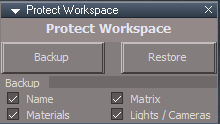
Protect Workspace.PNG
Protect Workspace.PNG (3.75 KiB) Viewed 4327 times
Select - Backup
Open - Model to do whatever work you need to do, when finished...
Close - Model
Select - Restore

Preferences
Name - Protects changes to object names
Materials - Protects conversion of Workspace materials to Lightworks materials
Matrix - Protects changes to transformation attributes
Lights / Cameras - Protects changes to Light's Angle, and Camera's FOV attributes

Note: Close Model, select Restore and Uncheck Matrix when doing Workspace animations

Protecting materials will destroy modelspace standalone deformations.

Steps to see it:
Add a mesh to Workspace
Add Standalone Deformation Pipe in Model
Use Workspace Material Editor to Paint the mesh and the deformation pipe disappears

The standalone deformation is also destroyed if a new workspace mesh is added to the scene.

Synchronize
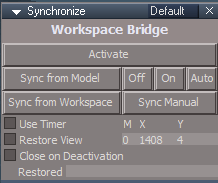
Synchronize.PNG
Synchronize.PNG (6.07 KiB) Viewed 4322 times
to be continued...

YafaRay4tSv9.5

Open - YafaRay4tS layout
Open - YafaRay4tS Setup library
Load - YafaRay4tS scene
Right click the YafaRay settings icon in the YafaRay toolbar
Setup the YafaRay Installation Path
Select the Render button
Status should show Rendering...
If the Display shows a rendered image, you have successfully setup YafaRay4tS.
Select the Save Settings button

Open the YafaRay4tS Help in the YafaRay toolbar for additional information.
Note: the YafaRay4tS Help file is from the previous version.

Additional info here for this version...
User avatar
clintonman
Captain
Posts: 5659
Joined: 21 May 2009, 21:08
Type the number ten into the box: 0
Location: California

Re: YafaRay for trueSpace 2019

Post by clintonman »

I think I finally licked the modelspace link for YafaRay. Running a render now, should be done in a hour or so. I ran into a few problems during the translation from the D3D Render code.
Changes and notes:
Added an abort button to the animation panel, much easier to stop an animation render than using the esc shortcut key
Found that YafaRay wasn't compatible with workspace curves, added a check for the "isaCurve" connector
Run protection scripts 1 more time after the animation is compete, so restore can be run after closing modelside. Turning off model side can wreck the materials.
The background image preview light was too dim, multiplied the intensity by 3
Background image type was not written to the xml file properly. Spherical changed to sphere and probe changed to angular.
Background rotation was export as an integer instead of a float.
Modelspace particle simulation before proper geometry is created was causing an error.

Todo:
need alternative to model status line since modelspace constantly erases anything written by workspace
maybe option to keep and compare renders, like blenders slots
sample scenes use old YafaRay nodes for lights, materials etc. - update all scenes
Clinton Reese

http://clintons3d.com
User avatar
trueBlue
Captain
Posts: 5548
Joined: 06 Jul 2009, 22:50
Type the number ten into the box: 10

Re: YafaRay for trueSpace 2019

Post by trueBlue »

:worship: :D

Code: Select all

Node.ConRemove("/Status Line", "Workspace")
Node.ConCreate("Status Line", "Workspace", "string", 4);

if(!Node.ConExists("Status Line", "Workspace"))
Node.ConCreate("Status Line", "Workspace", "string", 4);
Node.Value("Status Line", "Workspace") = "Workspace can have it's own status line :-)";
Node.Value("Status Line", "Model") = "Model can have it's own status line :-(";
Render something in Vray and watch the Status Line node in System.
It creates three attributes. Not sure what 'Rendering frames' does.
When the Render is finished, they are removed.
This is with the Bridge Off
Vray.png
User avatar
clintonman
Captain
Posts: 5659
Joined: 21 May 2009, 21:08
Type the number ten into the box: 0
Location: California

Re: YafaRay for trueSpace 2019

Post by clintonman »

trueBlue wrote: 16 Sep 2019, 00:36 :worship: :D

Code: Select all

Node.ConRemove("/Status Line", "Workspace")
Node.ConCreate("Status Line", "Workspace", "string", 4);

if(!Node.ConExists("Status Line", "Workspace"))
Node.ConCreate("Status Line", "Workspace", "string", 4);
Node.Value("Status Line", "Workspace") = "Workspace can have it's own status line :-)";
Node.Value("Status Line", "Model") = "Model can have it's own status line :-(";
Render something in Vray and watch the Status Line node in System.
It creates three attributes. Not sure what 'Rendering frames' does.
When the Render is finished, they are removed.
This is with the Bridge Off
Vray.png
Thanks, I'll try that.
Why do you remove the connection as the first step?
Clinton Reese

http://clintons3d.com
User avatar
clintonman
Captain
Posts: 5659
Joined: 21 May 2009, 21:08
Type the number ten into the box: 0
Location: California

Re: YafaRay for trueSpace 2019

Post by clintonman »


Put together a working sample scene for the modelspace animation link.
The "hello" is modelspace metaparticles and "WORLD" is workspace text with a script to type 1 letter at a time.
310 frames long, it was supposed to be 330 frames but tS crashed before the end.
It uses the trueParticles meta particle type. I thought it would need the special mesh processing because it looks like metaballs. It doesn't need it so I'll need to make another test before I can say it all works for sure.
Clinton Reese

http://clintons3d.com
User avatar
clintonman
Captain
Posts: 5659
Joined: 21 May 2009, 21:08
Type the number ten into the box: 0
Location: California

Re: YafaRay for trueSpace 2019

Post by clintonman »

Attached is the most recent. The ImageLight goes in the "YafaRay4tS Setup" library
Tested with animated NURBS shape using the new python script: special_mesh_synch.py
Now uses a temporary "YafaRay" status line.
Attachments
YafaRay4tS0a4d.RsObj
(1.03 MiB) Downloaded 248 times
ImageLight.RsObj
(117.12 KiB) Downloaded 191 times
Clinton Reese

http://clintons3d.com
User avatar
bitkar
Captain
Posts: 2089
Joined: 16 Mar 2010, 07:14
Type the number ten into the box: 0
Location: Czech Republic

Re: YafaRay for trueSpace 2019

Post by bitkar »

this looks very promising... dont forget to write some small simple "how to install" :D for us mortals.
Michal aka bitkar
tS freak since tS2 (1998) and forever (tS7.61 modeler)
User avatar
clintonman
Captain
Posts: 5659
Joined: 21 May 2009, 21:08
Type the number ten into the box: 0
Location: California

Re: YafaRay for trueSpace 2019

Post by clintonman »

bitkar wrote: 16 Sep 2019, 11:19 this looks very promising... dont forget to write some small simple "how to install" :D for us mortals.
It will be included in the unofficial updates and it will have a standalone installer script.
Clinton Reese

http://clintons3d.com
User avatar
trueBlue
Captain
Posts: 5548
Joined: 06 Jul 2009, 22:50
Type the number ten into the box: 10

Re: YafaRay for trueSpace 2019

Post by trueBlue »

clintonman wrote: 16 Sep 2019, 05:33 Attached is the most recent. The ImageLight goes in the "YafaRay4tS Setup" library
Tested with animated NURBS shape using the new python script: special_mesh_synch.py
Now uses a temporary "YafaRay" status line.
Can you share your updated AnimPref panel?
User avatar
clintonman
Captain
Posts: 5659
Joined: 21 May 2009, 21:08
Type the number ten into the box: 0
Location: California

Re: YafaRay for trueSpace 2019

Post by clintonman »

trueBlue wrote: 16 Sep 2019, 15:58
clintonman wrote: 16 Sep 2019, 05:33 Attached is the most recent. The ImageLight goes in the "YafaRay4tS Setup" library
Tested with animated NURBS shape using the new python script: special_mesh_synch.py
Now uses a temporary "YafaRay" status line.
Can you share your updated AnimPref panel?
I don't have an updated AnimPref panel. :?
As far as I can tell the last time I updated the AnimPref was in 2013.
Clinton Reese

http://clintons3d.com
User avatar
trueBlue
Captain
Posts: 5548
Joined: 06 Jul 2009, 22:50
Type the number ten into the box: 10

Re: YafaRay for trueSpace 2019

Post by trueBlue »

clintonman wrote: 16 Sep 2019, 16:07
trueBlue wrote: 16 Sep 2019, 15:58
clintonman wrote: 16 Sep 2019, 05:33 Attached is the most recent. The ImageLight goes in the "YafaRay4tS Setup" library
Tested with animated NURBS shape using the new python script: special_mesh_synch.py
Now uses a temporary "YafaRay" status line.
Can you share your updated AnimPref panel?
I don't have an updated AnimPref panel. :?
As far as I can tell the last time I updated the AnimPref was in 2013.
Added an abort button to the animation panel, much easier to stop an animation render than using the esc shortcut key
Oh, I thought you were referring to the AnimPref panel.
User avatar
clintonman
Captain
Posts: 5659
Joined: 21 May 2009, 21:08
Type the number ten into the box: 0
Location: California

Re: YafaRay for trueSpace 2019

Post by clintonman »

trueBlue wrote: 16 Sep 2019, 16:10
clintonman wrote: 16 Sep 2019, 16:07
trueBlue wrote: 16 Sep 2019, 15:58
Can you share your updated AnimPref panel?
I don't have an updated AnimPref panel. :?
As far as I can tell the last time I updated the AnimPref was in 2013.
Added an abort button to the animation panel, much easier to stop an animation render than using the esc shortcut key
Oh, I thought you were referring to the AnimPref panel.
Ah, gotcha. So many similarly named things.
Clinton Reese

http://clintons3d.com
User avatar
clintonman
Captain
Posts: 5659
Joined: 21 May 2009, 21:08
Type the number ten into the box: 0
Location: California

Re: YafaRay for trueSpace 2019

Post by clintonman »

trueBlue wrote: 26 Aug 2019, 19:55 ...
I have not had a chance to test out YafaRay4tSv9.5 using it with Model yet.
Do you have a scene demonstrating it's use that I can try?
Thanks!
Here is a test scene for modelspace plus yafaray rendering. It has a NURBS vertex animation so it needs the python special mesh processing option.
I recommend protecting the materials manually before opening modeler, just in case.

Note to myself: update YafaRay to use new modelspace frame setting technique, like the new D3D Render
Attachments
YafModelspaceTest6908.RsScn
(2.53 MiB) Downloaded 186 times
Clinton Reese

http://clintons3d.com
User avatar
trueBlue
Captain
Posts: 5548
Joined: 06 Jul 2009, 22:50
Type the number ten into the box: 10

Re: YafaRay for trueSpace 2019

Post by trueBlue »

Any pointers on what to do with this scene?
User avatar
clintonman
Captain
Posts: 5659
Joined: 21 May 2009, 21:08
Type the number ten into the box: 0
Location: California

Re: YafaRay for trueSpace 2019

Post by clintonman »

Not really, just render an animation and see if it works.
Clinton Reese

http://clintons3d.com
User avatar
clintonman
Captain
Posts: 5659
Joined: 21 May 2009, 21:08
Type the number ten into the box: 0
Location: California

Re: YafaRay for trueSpace 2019

Post by clintonman »

yafaray4ts 2019

changes so far.

render modelspace animations - except for standalone deformation with protection for workspace materials
python file for special mesh animations - NURBS, deformation and metaball objects
integrates with new protect workspace scripts
note: both modelspace and workspace 3d windows need to be open
important!: autokey OFF in modelspace
display tif file renders via addon plugin, Clintons Ext Plugin
improved animation render abort and new abort button
render filename shows on iopti display
confirmation question when batch render combined with no delete temp files
new version 0.9.5
improved status display messages
yafaray lights and camera updates by trueBlue?
fix to ignore workspace curves
increase brightness of the background image preview
fixed background rotation

TODO
confirmation message when python file has been created
update yafaray sample files
documentation updates

Latest version as of now was uploaded to the Unofficial Updates thread.
Clinton Reese

http://clintons3d.com
User avatar
Emmanuel
Chief Warrant Officer
Posts: 670
Joined: 14 Jun 2009, 06:47

Re: YafaRay for trueSpace 2019

Post by Emmanuel »

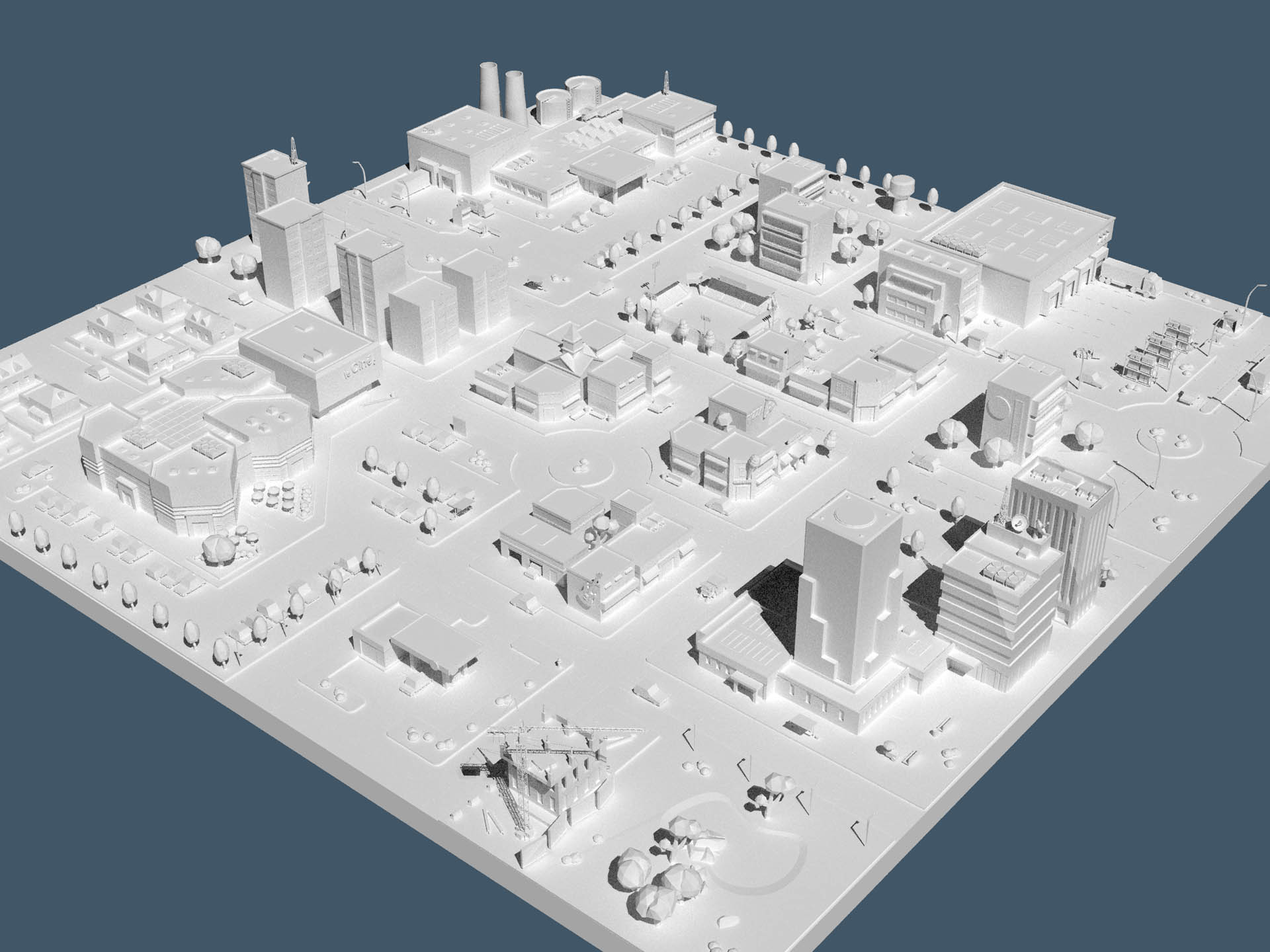
Playing with the new Yafaray4tS... I am impressed ! You guys have made an awesome job !

Pathtracing mode with default settings is rendering a nice effect, and no crash even at very high resolution !
capture04.jpg
yaf_test01.jpg
User avatar
clintonman
Captain
Posts: 5659
Joined: 21 May 2009, 21:08
Type the number ten into the box: 0
Location: California

Re: YafaRay for trueSpace 2019

Post by clintonman »

Emmanuel wrote: 19 Sep 2019, 10:49 Playing with the new Yafaray4tS... I am impressed ! You guys have made an awesome job !

Pathtracing mode with default settings is rendering a nice effect, and no crash even at very high resolution !

capture04.jpg

yaf_test01.jpg
Thanks, that's nice to hear.
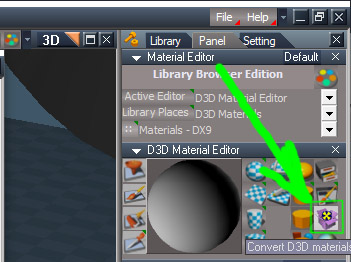
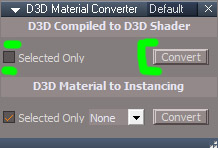
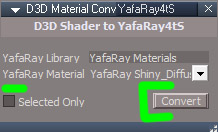
FYI, you can convert the materials to YafaRay materials by opening the Material Editor
1. Press the Convert D3D material button
2. Uncheck Selected Only and press Convert
3. Switch to the YafaRay4tS tab
4. Uncheck Selected Only and press Convert

matConvert.jpg
matConvert.jpg (56.73 KiB) Viewed 4131 times
convertCompiled.jpg
convertCompiled.jpg (33.46 KiB) Viewed 4129 times
yafarayTab.jpg
yafarayTab.jpg (14.3 KiB) Viewed 4131 times
convertYafMat.jpg
convertYafMat.jpg (32.03 KiB) Viewed 4131 times
Clinton Reese

http://clintons3d.com
User avatar
Emmanuel
Chief Warrant Officer
Posts: 670
Joined: 14 Jun 2009, 06:47

Re: YafaRay for trueSpace 2019

Post by Emmanuel »

Great !

Your post above should be added in the help file.
User avatar
Emmanuel
Chief Warrant Officer
Posts: 670
Joined: 14 Jun 2009, 06:47

Re: YafaRay for trueSpace 2019

Post by Emmanuel »

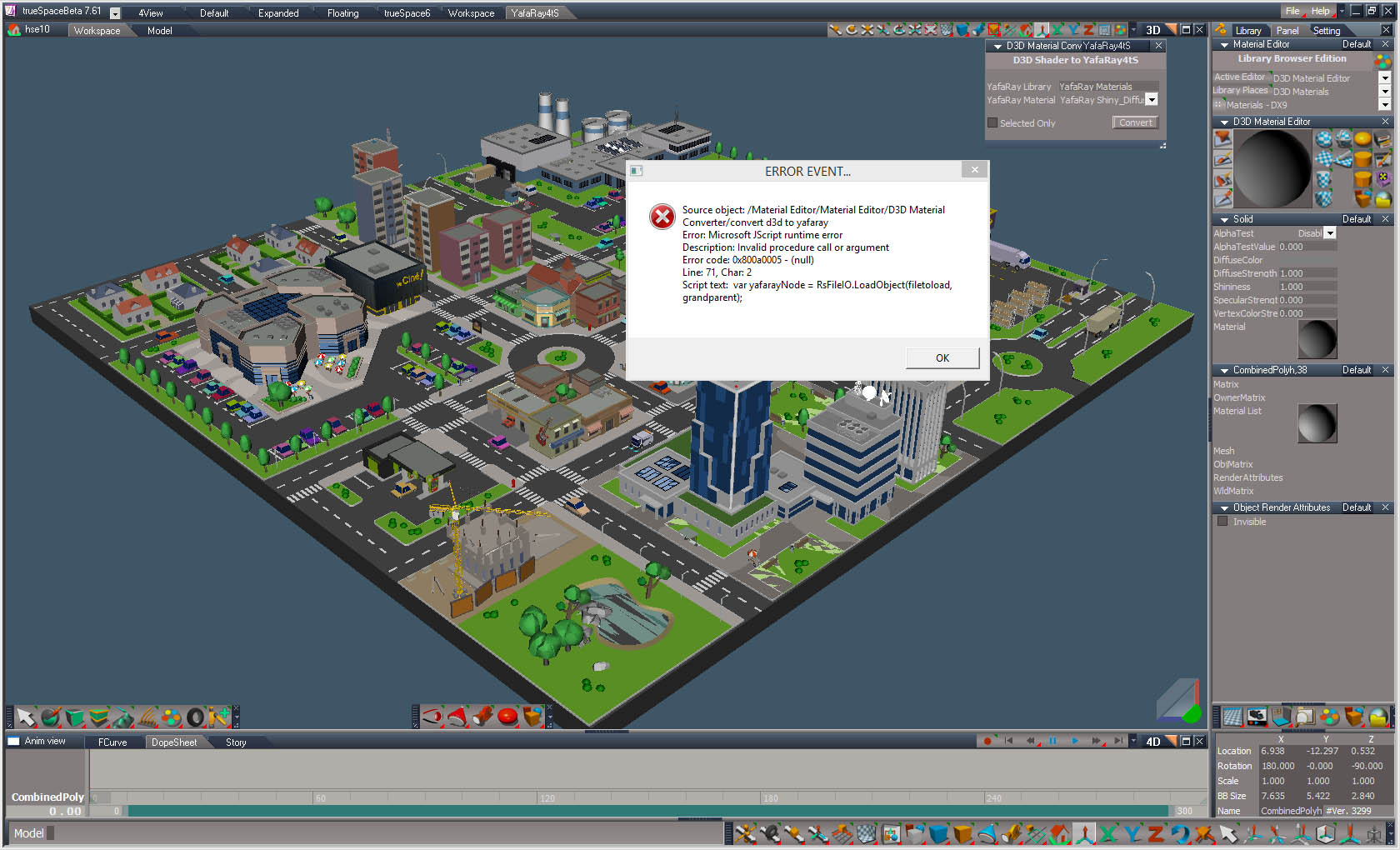
Hum, an other error message.

I can convert modeler materials to D3D shaders, but next, when I try to convert into YafaRay4tS, I get an error message (it pops up 15-20 seconds after starting to convert, perhaps because that scene contains many materials).
Then trueSpace crashes.
capture 01.jpg
capture 02.jpg
capture 03.jpg
User avatar
Emmanuel
Chief Warrant Officer
Posts: 670
Joined: 14 Jun 2009, 06:47

Re: YafaRay for trueSpace 2019

Post by Emmanuel »

Testing on a simple scene (just one object), there is no error message, but the conversion doesn't seems to work. When I try to convert a D3D shader to Yafaray4tS (here using Yafaray Shiny Diffuse), there is a message saying the conversion is done, but all I get is a white shader (texture and color are lost) and it is still a D3D Shader (not a Yafaray one).
User avatar
clintonman
Captain
Posts: 5659
Joined: 21 May 2009, 21:08
Type the number ten into the box: 0
Location: California

Re: YafaRay for trueSpace 2019

Post by clintonman »

Can you share the simple scene, or even the complex one?

A note from my website: "There are several different material node connections and encapsulations. There may be some cases that have not been accounted for which could make the conversion unpredictable."

Maybe that is what's happening here.
Clinton Reese

http://clintons3d.com
User avatar
Emmanuel
Chief Warrant Officer
Posts: 670
Joined: 14 Jun 2009, 06:47

Re: YafaRay for trueSpace 2019

Post by Emmanuel »

I am sending you the big scene via wetransfer (see your emails).

The simple one is attached.

Please note that I am using trueBlue's latest unofficial update.
Attachments
caligarisphere.zip
(92.37 KiB) Downloaded 198 times
Last edited by Emmanuel on 20 Sep 2019, 14:26, edited 1 time in total.
User avatar
clintonman
Captain
Posts: 5659
Joined: 21 May 2009, 21:08
Type the number ten into the box: 0
Location: California

Re: YafaRay for trueSpace 2019

Post by clintonman »

Got the big sample, thanks. I'll let you know how it goes.
Clinton Reese

http://clintons3d.com
User avatar
clintonman
Captain
Posts: 5659
Joined: 21 May 2009, 21:08
Type the number ten into the box: 0
Location: California

Re: YafaRay for trueSpace 2019

Post by clintonman »

The story so far...

The unofficial update version of convert compiled to d3d was aggressively loading files from disk. Changed to pre-load needed files. Maybe faster now.
d3d to yafaray was broken because the file names for the yafaray materials changed and one other named item changed. now works for single objects, large scene still crashes

plan:
preload files for d3d to yafaray may stop crash
add status messages so can tell script is running
maybe improved the "convert selected only" option
Clinton Reese

http://clintons3d.com
User avatar
Emmanuel
Chief Warrant Officer
Posts: 670
Joined: 14 Jun 2009, 06:47

Re: YafaRay for trueSpace 2019

Post by Emmanuel »

Thank you very much Clinton for all your efforts and involvement.

Note that large Modeler scenes also lead to crashes when rendered with VRay (not this one though). May it be a bad code somewhere in the Bridge that lead to some memory overload ?
User avatar
clintonman
Captain
Posts: 5659
Joined: 21 May 2009, 21:08
Type the number ten into the box: 0
Location: California

Re: YafaRay for trueSpace 2019

Post by clintonman »

Anything's possible.
Clinton Reese

http://clintons3d.com
User avatar
clintonman
Captain
Posts: 5659
Joined: 21 May 2009, 21:08
Type the number ten into the box: 0
Location: California

Re: YafaRay for trueSpace 2019

Post by clintonman »

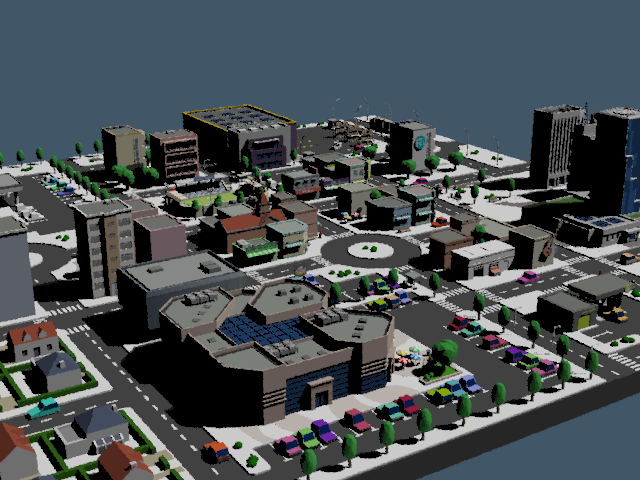
yaf_test.png
This is the limit of YafaRay. Only 2/3 of materials will convert before crashing.
Scene has 1215 materials. Image as shown has 800 materials converted. I don't think it's because tS is running out of memory. The YafaRay materials have a lot of nodes inside them and trueSpace may be hitting the limit on the number of nodes possible in a scene.
I put a limit on the number that can convert at one time to 200, with a message saying don't run more than 4 times. It took a long time to get to this point because it takes a long time to get to the crash point for each test.
Clinton Reese

http://clintons3d.com
User avatar
clintonman
Captain
Posts: 5659
Joined: 21 May 2009, 21:08
Type the number ten into the box: 0
Location: California

Re: YafaRay for trueSpace 2019

Post by clintonman »

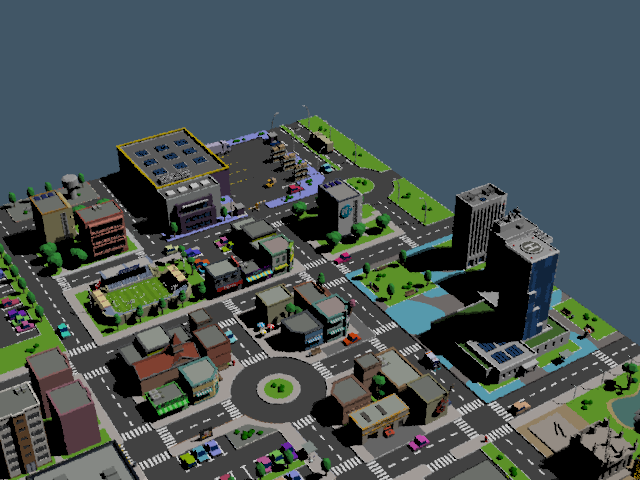
yaf_test.png
The start of a new approach.
Reads basic D3D material nodes for a simplified yafaray shiny diffuse material. Probably good enough for most cases and real Yafaray materials can be used for hero items.
Clinton Reese

http://clintons3d.com
User avatar
trueBlue
Captain
Posts: 5548
Joined: 06 Jul 2009, 22:50
Type the number ten into the box: 10

Re: YafaRay for trueSpace 2019

Post by trueBlue »

Very impressive!
Is that a YafaRay render?
Wonder if Material Instancing would help?
User avatar
clintonman
Captain
Posts: 5659
Joined: 21 May 2009, 21:08
Type the number ten into the box: 0
Location: California

Re: YafaRay for trueSpace 2019

Post by clintonman »

trueBlue wrote: 21 Sep 2019, 02:18 Very impressive!
Is that a YafaRay render?
Wonder if Material Instancing would help?
Yep, YafaRay
Instancing would solve the problem but then everything to do with materials would need to be rewritten. In fact that might have been the best way to do it from the beginning. I always avoided it because when you save an object with instanced materials it loses all it's materials since they only exist in the scene. On top of that the only way to get to them with script is to write rsx plugin code. If I was starting from the beginning I would do that, since I already have plugin code written.
Clinton Reese

http://clintons3d.com
User avatar
trueBlue
Captain
Posts: 5548
Joined: 06 Jul 2009, 22:50
Type the number ten into the box: 10

Re: YafaRay for trueSpace 2019

Post by trueBlue »

I see, just makes sense in a scene like this, that several objects could share one material.
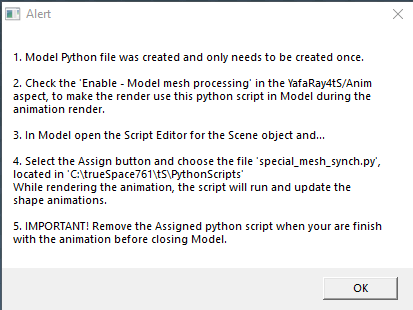
Here is the missing Alert for the Create Model Python File

Code: Select all

	var alertText = "1. The Model Python file was created and only needs to be created once.\n\n"
	alertText += '2. Check the "Enable - Model mesh processing" in the YafaRay4tS/Anim aspect, to make the render use this python script in Model during the animation render.\n\n'
	alertText += "3. In Model open the Script Editor for the Scene object and...\n\n"
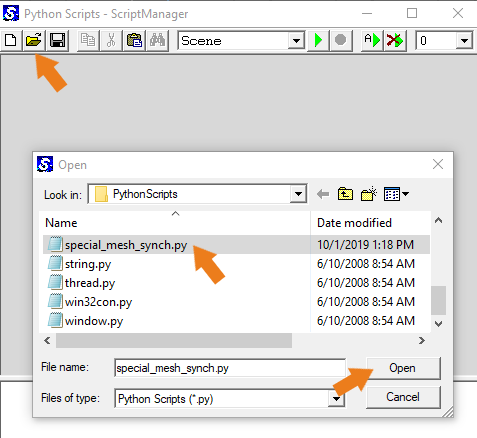
	alertText += '4. Select the Assign button and choose the file "special_mesh_synch.py", located in "C:\trueSpace761\tS\PythonScripts"\n\n'
	alertText += 'During the animation render, the script will run and update the shape animations.'
	System.Alert(alertText)
User avatar
clintonman
Captain
Posts: 5659
Joined: 21 May 2009, 21:08
Type the number ten into the box: 0
Location: California

Re: YafaRay for trueSpace 2019

Post by clintonman »

Thanks, it's in.
Clinton Reese

http://clintons3d.com
User avatar
clintonman
Captain
Posts: 5659
Joined: 21 May 2009, 21:08
Type the number ten into the box: 0
Location: California

Re: YafaRay for trueSpace 2019

Post by clintonman »

I uploaded all the latest to the Unofficial Update thread. Only notable change from earlier is that YafaRay4tS will render plain d3d shaders as YafaRay Glossy shaders instead of Shiny diffuse shaders. The Glossy is closer to how the D3D materials work.
For transparency, glow, mirror effects etc., require the second step of converting to yafaray materials.
Clinton Reese

http://clintons3d.com
User avatar
trueBlue
Captain
Posts: 5548
Joined: 06 Jul 2009, 22:50
Type the number ten into the box: 10

Re: YafaRay for trueSpace 2019

Post by trueBlue »

Been testing this a bunch today.
The Question Yes or No is problematic and kind of SCARY! :shock:
Made some changes for your approval:
Changed the Question to an Alert.
Alert1.PNG
Alert1.PNG (3.78 KiB) Viewed 3959 times
Added the bottom sentence to the create python file Alert.
Alert2.PNG
Changed the About version to 9.7

Added:
Delete Vray and PhotoRenderer to all of the scripts in the YafaryScripts and changed version to 7.


Open Python Script
Open Python Script.png
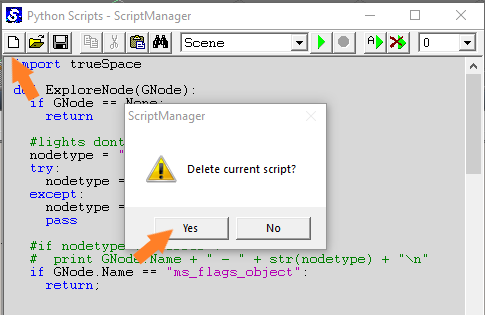
Remove Python Script
Remove Python Script.png
User avatar
clintonman
Captain
Posts: 5659
Joined: 21 May 2009, 21:08
Type the number ten into the box: 0
Location: California

Re: YafaRay for trueSpace 2019

Post by clintonman »

trueBlue wrote: 01 Oct 2019, 21:42 Been testing this a bunch today.
The Question Yes or No is problematic and kind of SCARY! :shock:
Made some changes for your approval:
Changed the Question to an Alert.
Alert1.PNG
Added the bottom sentence to the create python file Alert.
Alert2.PNG
Changed the About version to 9.7

Added:
Delete Vray and PhotoRenderer to all of the scripts in the YafaryScripts.
YafarayScripts.RsObj

Open Python Script
Open Python Script.png

Remove Python Script
Remove Python Script.png
I don't remember what the scary "Yes No" question is, so also don't know why it would be a problem. If the answer is always yes, do we lose the "no" option?
Why delete Vray and PhotoRenderer? Is it causing a problem?
Clinton Reese

http://clintons3d.com
User avatar
trueBlue
Captain
Posts: 5548
Joined: 06 Jul 2009, 22:50
Type the number ten into the box: 10

Re: YafaRay for trueSpace 2019

Post by trueBlue »

The problem with using trueSpace's Question IS, it hides behind the trueSpace interface.
User thinks trueSpace and or YafaRaf4tS stopped working.
There is another one too in the RenderAnim2.RsObj:

Code: Select all

	if (bBatchRender && !Yaf_DeleteTempFiles) {
		if(!System.Question(numFrames + " xml files will be created. Continue?")) {
			params.ConValue("abort") = 1;
			return;
		}
	}
Purpose of deleting the Vray and PhotoRenderer nodes is to save space when user saves their YafaRay4tS scene.
User avatar
clintonman
Captain
Posts: 5659
Joined: 21 May 2009, 21:08
Type the number ten into the box: 0
Location: California

Re: YafaRay for trueSpace 2019

Post by clintonman »

What was the scary yes no asking?
Clinton Reese

http://clintons3d.com
User avatar
trueBlue
Captain
Posts: 5548
Joined: 06 Jul 2009, 22:50
Type the number ten into the box: 10

Re: YafaRay for trueSpace 2019

Post by trueBlue »

Something about trueSpace being unstable! :mrgreen:
User avatar
clintonman
Captain
Posts: 5659
Joined: 21 May 2009, 21:08
Type the number ten into the box: 0
Location: California

Re: YafaRay for trueSpace 2019

Post by clintonman »

Found a solution to the hidden question dialog. This will sit on top of all open windows. Only way to make it only sit on top of truespace is via c++ rsx plugin. Other options are found here: https://docs.microsoft.com/en-us/window ... messagebox

Code: Select all

// Execute 
// Called to execute the command 
function Execute(params)
{
	//open output console/log view to see result

	//ask question, wait 3 seconds for answer, no answer is same as No
	// -1 for infinite wait - default behavior

	if(Question("Will you answer my question?", 3, "Question"))
		System.Trace("yes");
	else
		System.Trace("no");

}
// https://docs.microsoft.com/en-us/windows/win32/api/winuser/nf-winuser-messagebox
function Question(strText, nSecondsToWait, strTitle)
{
	// values are hexadecimal
	var MB_YESNO = 4;
	var MB_SYSTEMMODAL = 4096;//1000L force on top
	var MB_ICONQUESTION = 32;//20L question mark symbol

	var nType = MB_YESNO+MB_SYSTEMMODAL+MB_ICONQUESTION;
	var IDYES = 6;
	var IDNO = 7;

	var shell = new ActiveXObject("WScript.shell");
	var button = shell.Popup (strText, nSecondsToWait, strTitle, nType);

	if(button == IDYES) return true;
	return false;
}
Attachments
popup box tests 2.RsObj
(5.87 KiB) Downloaded 179 times
Clinton Reese

http://clintons3d.com
User avatar
trueBlue
Captain
Posts: 5548
Joined: 06 Jul 2009, 22:50
Type the number ten into the box: 10

Re: YafaRay for trueSpace 2019

Post by trueBlue »

Interesting!
Drag and Drop into trueSpace does not work with this script. :shock:
I'll leave it up to you on what to do.
For me the trueSpace Question is unreliable! A show stopper!
The Alert is reliable!
My suggestion by using an Alert is more about giving information, reliable and seems to be the easiest solution.
Other possibility is to make a floating panel with Yes, No, and or Cancel buttons.

On another note, I see what you mean by the LMB and RMB scripts for the YafaRay4tS Settings toolbar icon commands being destructive. By all means please change those scripts as you see necessary.

Also the Abort button stumped me today when working on an animation. I had earlier (few days ago Aborted an animation)
the button's text read "Aborting..." Finally figured it out by selecting it. Shouldn't this be a normal push button?

And again, I do not understand your use of the built in Protect Workspace with YafaRay4tS except that you are providing protection while in use. The missing part for me is the initial Backup being enabled. Hence the need to use the Desktop/Protect Workspace too! Is it possible to call the Desktop/Protect Workspace script and run the Backup script?

Here is a floating Question panel.
Capture.PNG
Capture.PNG (11.33 KiB) Viewed 3912 times
Is set to Auto Popup, but you can change that with the included script inside.
Attachments
Question.RsObj
(63.6 KiB) Downloaded 170 times
User avatar
clintonman
Captain
Posts: 5659
Joined: 21 May 2009, 21:08
Type the number ten into the box: 0
Location: California

Re: YafaRay for trueSpace 2019

Post by clintonman »

Does the script do anything if you first open the output console/log view to see result?

Is a simple test, not meant for drag and drop.
Clinton Reese

http://clintons3d.com
User avatar
clintonman
Captain
Posts: 5659
Joined: 21 May 2009, 21:08
Type the number ten into the box: 0
Location: California

Re: YafaRay for trueSpace 2019

Post by clintonman »

trueBlue wrote: 02 Oct 2019, 15:58 ...

And again, I do not understand your use of the built in Protect Workspace with YafaRay4tS except that you are providing protection while in use. The missing part for me is the initial Backup being enabled. Hence the need to use the Desktop/Protect Workspace too! Is it possible to call the Desktop/Protect Workspace script and run the Backup script?
...
At what point would you call the backup script?
Clinton Reese

http://clintons3d.com
User avatar
clintonman
Captain
Posts: 5659
Joined: 21 May 2009, 21:08
Type the number ten into the box: 0
Location: California

Re: YafaRay for trueSpace 2019

Post by clintonman »

trueBlue wrote: 02 Oct 2019, 15:58 ...

Also the Abort button stumped me today when working on an animation. I had earlier (few days ago Aborted an animation)
the button's text read "Aborting..." Finally figured it out by selecting it. Shouldn't this be a normal push button?
...
What would you recommend? It does need some kind of feedback that the button was pressed and abort does not happen instantaneously. So if it's just a button you press and maybe it was detected, you can't tell until the render stops.
Clinton Reese

http://clintons3d.com
User avatar
trueBlue
Captain
Posts: 5548
Joined: 06 Jul 2009, 22:50
Type the number ten into the box: 10

Re: YafaRay for trueSpace 2019

Post by trueBlue »

clintonman wrote: 03 Oct 2019, 01:18 Does the script do anything if you first open the output console/log view to see result?

Is a simple test, not meant for drag and drop.
Yep seen the results.
User avatar
clintonman
Captain
Posts: 5659
Joined: 21 May 2009, 21:08
Type the number ten into the box: 0
Location: California

Re: YafaRay for trueSpace 2019

Post by clintonman »

trueBlue wrote: 02 Oct 2019, 15:58 ...

Here is a floating Question panel.
Capture.PNG
Is set to Auto Popup, but you can change that with the included script inside.
haven't tried it yet, but it looks good. I'll be using the solution I found only because it doesn't add yet another node to the forest of nodes inside the Yafaray4tS node.
Clinton Reese

http://clintons3d.com
User avatar
trueBlue
Captain
Posts: 5548
Joined: 06 Jul 2009, 22:50
Type the number ten into the box: 10

Re: YafaRay for trueSpace 2019

Post by trueBlue »

clintonman wrote: 03 Oct 2019, 01:54
trueBlue wrote: 02 Oct 2019, 15:58 ...

And again, I do not understand your use of the built in Protect Workspace with YafaRay4tS except that you are providing protection while in use. The missing part for me is the initial Backup being enabled. Hence the need to use the Desktop/Protect Workspace too! Is it possible to call the Desktop/Protect Workspace script and run the Backup script?
...
At what point would you call the backup script?
Maybe a Backup button on the Anim panel that calls the Protect Workspace?
User avatar
trueBlue
Captain
Posts: 5548
Joined: 06 Jul 2009, 22:50
Type the number ten into the box: 10

Re: YafaRay for trueSpace 2019

Post by trueBlue »

clintonman wrote: 03 Oct 2019, 01:56
trueBlue wrote: 02 Oct 2019, 15:58 ...

Also the Abort button stumped me today when working on an animation. I had earlier (few days ago Aborted an animation)
the button's text read "Aborting..." Finally figured it out by selecting it. Shouldn't this be a normal push button?
...
What would you recommend? It does need some kind of feedback that the button was pressed and abort does not happen instantaneously. So if it's just a button you press and maybe it was detected, you can't tell until the render stops.
Status Line message?
User avatar
trueBlue
Captain
Posts: 5548
Joined: 06 Jul 2009, 22:50
Type the number ten into the box: 10

Re: YafaRay for trueSpace 2019

Post by trueBlue »

clintonman wrote: 03 Oct 2019, 02:03
trueBlue wrote: 02 Oct 2019, 15:58 ...

Here is a floating Question panel.
Capture.PNG
Is set to Auto Popup, but you can change that with the included script inside.
haven't tried it yet, but it looks good. I'll be using the solution I found only because it doesn't add yet another node to the forest of nodes inside the Yafaray4tS node.
I have already incorporated this for the Reset to Default Context in the new update today.
User avatar
trueBlue
Captain
Posts: 5548
Joined: 06 Jul 2009, 22:50
Type the number ten into the box: 10

Re: YafaRay for trueSpace 2019

Post by trueBlue »

In regards to your python script and I have no idea about python.
This guy:
https://biglode.com/ptsxpy-help/script-writing
Suggest:
Indentation
In Python language, the indentation level, i.e. blank space at the beginning of each line, is significant. Indentation by four spaces for each level is recommended instead of tabs or mixed.
Read also Python document:
https://www.python.org/dev/peps/pep-000 ... -or-spaces
User avatar
trueBlue
Captain
Posts: 5548
Joined: 06 Jul 2009, 22:50
Type the number ten into the box: 10

Re: YafaRay for trueSpace 2019

Post by trueBlue »

Here is a scene with 80 frame animation.
yaf_test_0000.png
Attachments
YafaRay Material Light.RsScn
(4.99 MiB) Downloaded 190 times
User avatar
clintonman
Captain
Posts: 5659
Joined: 21 May 2009, 21:08
Type the number ten into the box: 0
Location: California

Re: YafaRay for trueSpace 2019

Post by clintonman »

TODO:
Add protect workspace button to the anim panel
Change abort to ordinary button and use status line for feedback instead
replace truespace built in question message box with the windows system message box
line 41 create python script semi colon
"LMB should show the Default aspect and RMB should show the Setup aspect in the Stack and compatible with vray" - LMB/RMB scripts
haven't seen your latest Yafaray yet but - will make the automatic deletion of vray nodes an optional setting
ProtectWorkspace script: add the OPTION of not deleting after the restore is run and make it the default
check if Disable All Viewers works with animation - maybe not, usually the batch method used when no viewer

Indentation in python is way more than just significant. It takes the place of all those curly braces in javascript. If you have the wrong number of spaces the python won't even run because of indentation errors. Mixing tabs and spaces can lead to major confusion because they look the same, but they are not.
Last edited by clintonman on 03 Oct 2019, 21:05, edited 4 times in total.
Clinton Reese

http://clintons3d.com
User avatar
trueBlue
Captain
Posts: 5548
Joined: 06 Jul 2009, 22:50
Type the number ten into the box: 10

Re: YafaRay for trueSpace 2019

Post by trueBlue »

Please take a look at the LMB and RMB scripts too.
Not sure if this is significant but on line 41 in your CreatePythonSync you have a simi colon after the return

Code: Select all

	File.WriteLine('    return;');
The rest of the return(s) do not.
User avatar
clintonman
Captain
Posts: 5659
Joined: 21 May 2009, 21:08
Type the number ten into the box: 0
Location: California

Re: YafaRay for trueSpace 2019

Post by clintonman »

trueBlue wrote: 03 Oct 2019, 12:23 Please take a look at the LMB and RMB scripts too.
Not sure if this is significant but on line 41 in your CreatePythonSync you have a simi colon after the return

Code: Select all

	File.WriteLine('    return;');
The rest of the return(s) do not.
Will remove the semicolon from line 41 for cleanliness. Python semicolons are used to put statements on the same line, so doesn't do anything at the end of a line. Still weird that it's there at all, must have been a typo.

What are the LMB and RMB scripts supposed to do in an ideal world?
Clinton Reese

http://clintons3d.com
User avatar
trueBlue
Captain
Posts: 5548
Joined: 06 Jul 2009, 22:50
Type the number ten into the box: 10

Re: YafaRay for trueSpace 2019

Post by trueBlue »

clintonman wrote: 03 Oct 2019, 14:39
trueBlue wrote: 03 Oct 2019, 12:23 Please take a look at the LMB and RMB scripts too.
Not sure if this is significant but on line 41 in your CreatePythonSync you have a simi colon after the return

Code: Select all

	File.WriteLine('    return;');
The rest of the return(s) do not.
Will remove the semicolon from line 41 for cleanliness. Python semicolons are used to put statements on the same line, so doesn't do anything at the end of a line. Still weird that it's there at all, must have been a typo.

What are the LMB and RMB scripts supposed to do in an ideal world?
You mentioned that they are destructive and I agree.
I vaguely remember trying to make the commands be compatible with Vray, if it was the active Renderer, switch from Vray to Yafaray, and load the YafaRay4tS scene.
Maybe loading the scene is the wrong choice?
Maybe load the YafaRay4tS.RsObj if it is not present and show the Default aspect in the Stack for the LMB command?
And the RMB same as above except show the Setup aspect in the Stack?
Or just show their aspect in the Stack?
I'll leave it up to you what ever you think is the best way.
User avatar
clintonman
Captain
Posts: 5659
Joined: 21 May 2009, 21:08
Type the number ten into the box: 0
Location: California

Re: YafaRay for trueSpace 2019

Post by clintonman »

Are you saying, "if Vray is the active Renderer, switch from Vray to Yafaray"?
Is that the ideal world behavior?
Clinton Reese

http://clintons3d.com
User avatar
trueBlue
Captain
Posts: 5548
Joined: 06 Jul 2009, 22:50
Type the number ten into the box: 10

Re: YafaRay for trueSpace 2019

Post by trueBlue »

Not sure what is the best way really.
1.) LMB should show the Default aspect and RMB should show the Setup aspect in the Stack.
2.) Should be compatible with Vray.
I'll leave it up to you with regards to switching renderers, loading a none present YafaRay4tS.RsObj, or loading the YafaRay4tS.RsScn
User avatar
clintonman
Captain
Posts: 5659
Joined: 21 May 2009, 21:08
Type the number ten into the box: 0
Location: California

Re: YafaRay for trueSpace 2019

Post by clintonman »

Started working on the changes.
The October 2 Unofficial Update release had VRay nodes deleted when YafaRay loaded into a scene for the first time.
If you switch to VRay afterward and then switch back to YafaRay it does not delete the VRay nodes.
Is it supposed to work that way or is it supposed to delete VRay nodes at every opportunity?
Clinton Reese

http://clintons3d.com
User avatar
trueBlue
Captain
Posts: 5548
Joined: 06 Jul 2009, 22:50
Type the number ten into the box: 10

Re: YafaRay for trueSpace 2019

Post by trueBlue »

clintonman wrote: 04 Oct 2019, 03:38 Started working on the changes.
The October 2 Unofficial Update release had VRay nodes deleted when YafaRay loaded into a scene for the first time.
If you switch to VRay afterward and then switch back to YafaRay it does not delete the VRay nodes.
Is it supposed to work that way or is it supposed to delete VRay nodes at every opportunity?
It only deletes the nodes when you use the Render icons.
User avatar
clintonman
Captain
Posts: 5659
Joined: 21 May 2009, 21:08
Type the number ten into the box: 0
Location: California

Re: YafaRay for trueSpace 2019

Post by clintonman »

trueBlue wrote: 04 Oct 2019, 04:02
clintonman wrote: 04 Oct 2019, 03:38 Started working on the changes.
The October 2 Unofficial Update release had VRay nodes deleted when YafaRay loaded into a scene for the first time.
If you switch to VRay afterward and then switch back to YafaRay it does not delete the VRay nodes.
Is it supposed to work that way or is it supposed to delete VRay nodes at every opportunity?
It only deletes the nodes when you use the Render icons.
Not if you switch to VRay then back to YafaRay. Is that the way it should work?

Edit:
Reviewed what you had and it has different behaviors in the code:
Render animation code deletes vray nodes every time and it also copies the YafaRay4tS every time, copies it twice the first time it's run.
Render Object and Render Scene only deletes vray nodes the first time a scene is converted to YafaRay and copies the YafaRay4tS node twice.
EnumProperties only deletes the first time a scene is converted to YafaRay and copies the YafaRay4tS node once as expected
Clinton Reese

http://clintons3d.com
User avatar
clintonman
Captain
Posts: 5659
Joined: 21 May 2009, 21:08
Type the number ten into the box: 0
Location: California

Re: YafaRay for trueSpace 2019

Post by clintonman »

Changes so far, mostly untested
Raw unedited notes - my personal notes so may not be clear to others:

all Yafaray Script nodes -
check for deleteVRay flag and give alert when deleting
also removed extra copy of YafaRay4tS node
was only deleting when Yaf loaded into pre-existing vray scene - changed to always delete - guess that is desired behavior?
TODO - finish after tB answers question

YafaRay4tS nodes -

someVars node -
added deleteVRay - default false on setup tab

removed semicolon from python script

renderanim2 -
reestablished original question using new technique "Special mesh processing is unstable and trueSpace must be closed immediately after rendering. \nDo you wish to continue?"
tB had just alert "IMPORTANT! Remove the Assigned python script when your are finish with the animation!" his post Oct 3 says no need to remove python script, also the tB change removed the message to restart tS to avoid crashes
change "xml files will be created" to use new question technique

endanimation -
added if(modelProcess && modelSpecial) { System.Alert("IMPORTANT! Close trueSpace now to avoid crashing!") }

Yafaray Settings LMB Command -
Yafaray Settings RMB Command -
removed destructive loading of YafaRay4tS scene files - yafaray toolbar settings button - LMB/RMB
LMB if no yafarayr4ts node in the scene, alert to right click to activate
add deleteVRay check
"Should be compatible with Vray." - dont know what that means

protectworkspace buttons -
Activity.Run("Scripts/CustomCommands/ProtectWorkspace/BackupButton")
Activity.Run("Scripts/CustomCommands/ProtectWorkspace/RestoreButton")

protectworkspace script - delete backup nodes option, default to No
TODO - add to my version

Abort Render button -
change toggle button to unlabelled checkbox
add cancel push button
status message "Cancelling render..."

check disable all views animation rendering - confirmed, Disable All Viewers connects to useRenderToFile attribute on someVars node
under tSDisplay,
OpenOptDetectorFrame -
OpenOptDetectorFrame2 -
ShowAnimationFrame -
OpenDisplayFrame -
Set Display Node Values -
code to return early if(Node.Value(Space.CurrentScene() + "/YafaRay4tS", "useRenderToFile")) return;
animation,scene renders no open view now,
render area and render object both open a render to file window
all cases end with re-enabling viewers

TODO:
find all other question message boxes - dont see any, too much to look through
feedback for area render?
Attachments
YafarayScripts02af3d.RsObj
(45.86 KiB) Downloaded 156 times
YafaRay4tS12b17f.RsObj
(973.87 KiB) Downloaded 167 times
ProtectWorkspaceaa9b.RsObj
(123.23 KiB) Downloaded 152 times
Clinton Reese

http://clintons3d.com
User avatar
trueBlue
Captain
Posts: 5548
Joined: 06 Jul 2009, 22:50
Type the number ten into the box: 10

Re: YafaRay for trueSpace 2019

Post by trueBlue »

Looks like I made a mistake including those changes for YafaRay4tS in the 10/02/2019 Update.
They were not suppose to be in there until your approval.
I have updated and restored the update.
I'll take a look and test what you have.
Thank You!
User avatar
trueBlue
Captain
Posts: 5548
Joined: 06 Jul 2009, 22:50
Type the number ten into the box: 10

Re: YafaRay for trueSpace 2019

Post by trueBlue »

Does this line mean, if both are present then follow though? Or if one or the other?

Code: Select all

if(Node.Exists(Space.CurrentScene() + "/PhotoRender") || Node.Exists(Space.CurrentScene() + "/Vray")) {
The reason I ask, is because the PhotoRenderer is not always present.

The Vray node is created in every scene if the Vray plugin is Loaded.
The PhotoRenderer is created in the present scene when you Right click the Render icon(s).

Edit:
Actually it is not working at all.
The way it is setup presently, you have to Check the deleteVRay attribute and select the Save Settings button.
Because the code is looking at the YafaRay4tS's deleteVRay attribute in the YafarayFolder.
Might be better to have the code look for the YafaRay4tSs deleteVRay attribute in the scene.
Scene by Scene basis.

Edit2: Loaded the scene from the Setup library. Right clicked on the Settings icon and it worked.
So it looks like the YafarayScripts are not working.


If you want to abandoned this in your YafaRay4tS project, I have an idea about creating a separate script for this that is more robust.
User avatar
clintonman
Captain
Posts: 5659
Joined: 21 May 2009, 21:08
Type the number ten into the box: 0
Location: California

Re: YafaRay for trueSpace 2019

Post by clintonman »

trueBlue wrote: 04 Oct 2019, 20:17 Does this line mean, if both are present then follow though? Or if one or the other?

Code: Select all

if(Node.Exists(Space.CurrentScene() + "/PhotoRender") || Node.Exists(Space.CurrentScene() + "/Vray")) {
The reason I ask, is because the PhotoRenderer is not always present.

The Vray node is created in every scene if the Vray plugin is Loaded.
The PhotoRenderer is created in the present scene when you Right click the Render icon(s).

Edit:
Actually it is not working at all.
The way it is setup presently, you have to Check the deleteVRay attribute and select the Save Settings button.
Because the code is looking at the YafaRay4tS's deleteVRay attribute in the YafarayFolder.
Might be better to have the code look for the YafaRay4tSs deleteVRay attribute in the scene.
Scene by Scene basis.

Edit2: Loaded the scene from the Setup library. Right clicked on the Settings icon and it worked.
So it looks like the YafarayScripts are not working.


If you want to abandoned this in your YafaRay4tS project, I have an idea about creating a separate script for this that is more robust.
It means one or the other.
|| => one or the other
&& => both

Like you say, all the lines that say
if(Node.Value("/Yafaray Folder/YafaRay4tS", "deleteVRay"))
should be
if(Node.Value(Space.CurrentScene + "/YafaRay4tS", "deleteVRay"))

I was never interested in invisibly deleting vray nodes. It's up to you whether it's in the YafaRay4tS or somewhere else.
Clinton Reese

http://clintons3d.com
User avatar
trueBlue
Captain
Posts: 5548
Joined: 06 Jul 2009, 22:50
Type the number ten into the box: 10

Re: YafaRay for trueSpace 2019

Post by trueBlue »

clintonman wrote: 05 Oct 2019, 01:40 I was never interested in invisibly deleting vray nodes. It's up to you whether it's in the YafaRay4tS or somewhere else.
Alrighty then, no deleting Vray nodes in YafaRay4tS.
User avatar
clintonman
Captain
Posts: 5659
Joined: 21 May 2009, 21:08
Type the number ten into the box: 0
Location: California

Re: YafaRay for trueSpace 2019

Post by clintonman »

I still strongly recommend in your final solution that you tell people when you're deleting nodes in their scenes.

Off the top of my head:
I have a vray scene, spent hours getting the settings right. Switch to Yafaray, boom , all settings lost. I save the scene, all settings permanently lost. Didn't know the settings were lost because it was automatic and invisible.
Clinton Reese

http://clintons3d.com
User avatar
trueBlue
Captain
Posts: 5548
Joined: 06 Jul 2009, 22:50
Type the number ten into the box: 10

Re: YafaRay for trueSpace 2019

Post by trueBlue »

Totally embarrassed what transpired the last few days!!! :oops:
Was a huge mistake posting the update with my experiment with deleting the Vray nodes.
My original intention was for you to look at this possibility and was looking for your approval before releasing it.
See my previous post several post back before you made these last changes.
Can we get back on track and remove the deleting of the Vray nodes from the YafaRay4tS?
It looks like it is just the LMB and RMB scripts that need to be modified, removing the deleteVray attribute, and revert back to the YafarayScripts version 6.
Super sorry for all the problems!
User avatar
clintonman
Captain
Posts: 5659
Joined: 21 May 2009, 21:08
Type the number ten into the box: 0
Location: California

Re: YafaRay for trueSpace 2019

Post by clintonman »

Not a problem, I'll download your latest and work forward from there.
Clinton Reese

http://clintons3d.com
User avatar
clintonman
Captain
Posts: 5659
Joined: 21 May 2009, 21:08
Type the number ten into the box: 0
Location: California

Re: YafaRay for trueSpace 2019

Post by clintonman »

Latest with VRay deletion removed

The YafarayScripts have a very minor code change
before:

Code: Select all

	if(Node.Exists(Space.CurrentScene()+"/YafaRay4tS")){
	} else {
after:

Code: Select all

	if(!Node.Exists(Space.CurrentScene()+"/YafaRay4tS")){
Attachments
YafarayScripts023092.RsObj
(46.66 KiB) Downloaded 196 times
YafaRay4tS02.RsObj
(971.11 KiB) Downloaded 167 times
Clinton Reese

http://clintons3d.com
User avatar
trueBlue
Captain
Posts: 5548
Joined: 06 Jul 2009, 22:50
Type the number ten into the box: 10

Re: YafaRay for trueSpace 2019

Post by trueBlue »

Thank You!
Here is what I have come up with for an Optimize WorkSpace Scene.
Tried it on the Model/Clock scn that has layers and added a small animation, then saved it as a Workspace scene.
Before 13MB
Optimize WorkSpace Scene/Saved as a Recording
After 3MB

Removes all Model and Vray attributes if checked.
Please try it out and see what you think.

Removed due to update
User avatar
clintonman
Captain
Posts: 5659
Joined: 21 May 2009, 21:08
Type the number ten into the box: 0
Location: California

Re: YafaRay for trueSpace 2019

Post by clintonman »

trueBlue wrote: 06 Oct 2019, 18:45 Thank You!
Here is what I have come up with for an Optimize WorkSpace Scene.
Tried it on the Model/Clock scn that has layers and added a small animation, then saved it as a Workspace scene.
Before 13MB
Optimize WorkSpace Scene/Saved as a Recording
After 3MB

Removes all Model and Vray attributes if checked.
Please try it out and see what you think.
Got latest unofficial update, installed vray, loaded your object and it deletes the vray nodes without saying anything. The options to delete should definitely be false and some indicator of deleting nodes should be in there.
Clinton Reese

http://clintons3d.com
User avatar
trueBlue
Captain
Posts: 5548
Joined: 06 Jul 2009, 22:50
Type the number ten into the box: 10

Re: YafaRay for trueSpace 2019

Post by trueBlue »

clintonman wrote: 07 Oct 2019, 02:53
trueBlue wrote: 06 Oct 2019, 18:45 Thank You!
Here is what I have come up with for an Optimize WorkSpace Scene.
Tried it on the Model/Clock scn that has layers and added a small animation, then saved it as a Workspace scene.
Before 13MB
Optimize WorkSpace Scene/Saved as a Recording
After 3MB

Removes all Model and Vray attributes if checked.
Please try it out and see what you think.
Got latest unofficial update, installed vray, loaded your object and it deletes the vray nodes without saying anything. The options to delete should definitely be false and some indicator of deleting nodes should be in there.
Did you check Remove Vray Attributes?
Or are you saying it deleted the Vray without checking Remove Vray Attributes?
I left them unchecked but did not set Defaults.

Return to “Rendering”