Checked both checkboxes and It deleted the nodes, so checkboxes should default to false to avoid accidental deletion and would still be better to get a message that nodes were deleted. The opposite argument could be made that they checked the boxes so they know nodes are going to be deleted and don't need a message cause they actually asked for it(the deletion of the nodes).trueBlue wrote: 07 Oct 2019, 03:04Did you check Remove Vray Attributes?clintonman wrote: 07 Oct 2019, 02:53Got latest unofficial update, installed vray, loaded your object and it deletes the vray nodes without saying anything. The options to delete should definitely be false and some indicator of deleting nodes should be in there.trueBlue wrote: 06 Oct 2019, 18:45 Thank You!
Here is what I have come up with for an Optimize WorkSpace Scene.
Tried it on the Model/Clock scn that has layers and added a small animation, then saved it as a Workspace scene.
Before 13MB
Optimize WorkSpace Scene/Saved as a Recording
After 3MB
Removes all Model and Vray attributes if checked.
Please try it out and see what you think.
Or are you saying it deleted the Vray without checking Remove Vray Attributes?
YafaRay for trueSpace 2019
-
clintonman

- Captain
- Posts: 5659
- Joined: 21 May 2009, 21:08
- Type the number ten into the box: 0
- Location: California
Re: YafaRay for trueSpace 2019
-
clintonman
- Captain
- Posts: 5659
- Joined: 21 May 2009, 21:08
- Type the number ten into the box: 0
- Location: California
Re: YafaRay for trueSpace 2019
Looking at the code, I've never seen a Layers Info node in a scene, what is it for?
I see lines like
Node.Value("/Status Message", "Message") = "Vray panels have been removed"
in the code, but I did not see any message at all.
I see lines like
Node.Value("/Status Message", "Message") = "Vray panels have been removed"
in the code, but I did not see any message at all.
-
trueBlue

- Captain
- Posts: 5548
- Joined: 06 Jul 2009, 22:50
- Type the number ten into the box: 10
Re: YafaRay for trueSpace 2019
Confirmed that the status message does not show.
Is the if statement wrong?
The Layers Info node is Layers in Model.
If you load the Clock scn you will see it.
Is the if statement wrong?
Code: Select all
if(Node.Value(System.ThisOwner(), "Remove_Vray")) {
Node.Delete(Space.CurrentScene() + "/PhotoRender")
Node.Delete(Space.CurrentScene() + "/Vray")
Node.Value("/Status Message", "Seconds") = 5000
Node.Value("/Status Message", "Message") = "Vray panels have been removed"
Activity.Run("/Status Message/Status Message")
}If you load the Clock scn you will see it.
-
clintonman
- Captain
- Posts: 5659
- Joined: 21 May 2009, 21:08
- Type the number ten into the box: 0
- Location: California
Re: YafaRay for trueSpace 2019
The if statement looks correct to me. I see a problem with the Status Message. It uses a timer and it looks like the timer doesn't work until it's visible in the link editor? Then it suddenly starts working? Seems like the timer ran instantaneously, erasing the message before it could be seen.
I think Deleting nodes should be an alert message. 100% reliable and user must acknowledge the message.
Should probably be more clear about what gets deleted, listing the nodes. It's unlikely some one will name their own nodes as VRay, maybe not PhotoRender, but Layers Info is a little generic and might be used by someone, not to mention whatever other nodes you decide to delete.
Edit:
I was wrong about the timer being visible in the LE. It works if only 1 of the checkboxes is checked. If both are checked the message fails.
I think Deleting nodes should be an alert message. 100% reliable and user must acknowledge the message.
Should probably be more clear about what gets deleted, listing the nodes. It's unlikely some one will name their own nodes as VRay, maybe not PhotoRender, but Layers Info is a little generic and might be used by someone, not to mention whatever other nodes you decide to delete.
Edit:
I was wrong about the timer being visible in the LE. It works if only 1 of the checkboxes is checked. If both are checked the message fails.
-
trueBlue
- Captain
- Posts: 5548
- Joined: 06 Jul 2009, 22:50
- Type the number ten into the box: 10
Re: YafaRay for trueSpace 2019
Okay that is strange!
When you Reset the Default Context, do you see the Status Message?
When I run this from a script it works.
I think that the if statement needs to include true because of tS761 check boxes.
I can write an Alert but not sure how to include the nodes that have been removed.
When you Reset the Default Context, do you see the Status Message?
When I run this from a script it works.
Code: Select all
Node.Value("/Status Message", "Seconds") = 5000
Node.Value("/Status Message", "Message") = "Vray panels have been removed"
Activity.Run("/Status Message/Status Message")
I can write an Alert but not sure how to include the nodes that have been removed.
-
clintonman
- Captain
- Posts: 5659
- Joined: 21 May 2009, 21:08
- Type the number ten into the box: 0
- Location: California
Re: YafaRay for trueSpace 2019
It works if only 1 of the checkboxes is checked. If both are checked the message fails. So if you try to do 2 messages in one go it doesn't work.trueBlue wrote: 07 Oct 2019, 04:01 Okay that is strange!
When you Reset the Default Context, do you see the Status Message?
When I run this from a script it works.I think that the if statement needs to include true because of tS761 check boxes.Code: Select all
Node.Value("/Status Message", "Seconds") = 5000
Node.Value("/Status Message", "Message") = "Vray panels have been removed"
Activity.Run("/Status Message/Status Message")
I can write an Alert but not sure how to include the nodes that have been removed.
So this should fail
Code: Select all
Node.Value("/Status Message", "Seconds") = 5000
Node.Value("/Status Message", "Message") = "Vray panels have been removed"
Activity.Run("/Status Message/Status Message")
Node.Value("/Status Message", "Seconds") = 5000
Node.Value("/Status Message", "Message") = "second message"
Activity.Run("/Status Message/Status Message")- Attachments
-
- Optimize Workspace Scene72e3.RsObj
- (141.94 KiB) Downloaded 174 times
-
trueBlue
- Captain
- Posts: 5548
- Joined: 06 Jul 2009, 22:50
- Type the number ten into the box: 10
Re: YafaRay for trueSpace 2019
Awesome!
Thank you!
I separated the scripts.
You can open it from the tS761 File menu's Save As/Optimize
New update:
viewtopic.php?t=3732
Thank you!
I separated the scripts.
You can open it from the tS761 File menu's Save As/Optimize
New update:
viewtopic.php?t=3732
-
trueBlue
- Captain
- Posts: 5548
- Joined: 06 Jul 2009, 22:50
- Type the number ten into the box: 10
Re: YafaRay for trueSpace 2019
With this new version I am not able to remove the Python script, close Model, and keep working like I was able to do with the last version.
Do you know that if you save your scene with the Python script loaded, it is saved with the scene?
So it is not as simple as just closing trueSpace to avoid a crash.
With the addition of the Backup and Restore buttons on the Anim aspect, there is no clue what is going on.
So I am suggesting that you give a status message in the Protect Workspace/Time script:
and in the RestoreButton script add:
Also I notice a line in the script that might not be compatible with your website version:
Do you know that if you save your scene with the Python script loaded, it is saved with the scene?
So it is not as simple as just closing trueSpace to avoid a crash.
With the addition of the Backup and Restore buttons on the Anim aspect, there is no clue what is going on.
So I am suggesting that you give a status message in the Protect Workspace/Time script:
Code: Select all
	if(Node.Exists("/Status Line")) {
		if(!Node.ConExists("Status Line", "Protect Workspace"))
			Node.ConCreate("Status Line", "Protect Workspace", "string", 4)
		Node.Value("/Status Line","Protect Workspace") = " Backup - " + (string)
}Code: Select all
Node.ConRemove("Status Line", "Protect Workspace")Code: Select all
Node.Value("/Preferences/Desktop", "OnOff2") = 0-
clintonman
- Captain
- Posts: 5659
- Joined: 21 May 2009, 21:08
- Type the number ten into the box: 0
- Location: California
Re: YafaRay for trueSpace 2019
I am aware that the python script is saved with the scene.trueBlue wrote: 07 Oct 2019, 23:09 With this new version I am not able to remove the Python script, close Model, and keep working like I was able to do with the last version.
Do you know that if you save your scene with the Python script loaded, it is saved with the scene?
So it is not as simple as just closing trueSpace to avoid a crash.
...
I was never able to remove python script, close model and not get a crash.
Does the message say to close truespace after the animation is complete? If not, it should say that.
Can't fix a problem if can't see it.
A detailed set of steps to produce a crash would be helpful.
-
trueBlue
- Captain
- Posts: 5548
- Joined: 06 Jul 2009, 22:50
- Type the number ten into the box: 10
Re: YafaRay for trueSpace 2019
This is a case when a user saves the scene with the python script loaded.
When you close trueSpace, open it, close model, then truespace crashes.
Edit: Hold that thought. I have been rendering the old way with the main view I workspace.
Old habits are hard to change.
When you close trueSpace, open it, close model, then truespace crashes.
Edit: Hold that thought. I have been rendering the old way with the main view I workspace.
Old habits are hard to change.
-
clintonman
- Captain
- Posts: 5659
- Joined: 21 May 2009, 21:08
- Type the number ten into the box: 0
- Location: California
Re: YafaRay for trueSpace 2019
I forgot about that too, maybe there's a way to detect it and make a warning.trueBlue wrote: 08 Oct 2019, 01:36 This is a case when a user saves the scene with the python script loaded.
When you close trueSpace, open it, close model, then truespace crashes.
Edit: Hold that thought. I have been rendering the old way with the main view I workspace.
Old habits are hard to change.
-
trueBlue
- Captain
- Posts: 5548
- Joined: 06 Jul 2009, 22:50
- Type the number ten into the box: 10
Re: YafaRay for trueSpace 2019
Now that I am rendering it the correct way (30 times), I can NOT get trueSpace to crash.
This is without closing trueSpace after rendering.
Why is it necessary to close trueSpace Immediately after rendering with Model Processing?
I do notice that when I check Disable All Viewers, start the Render Animation, it works.
But after the render is finished, Disable All Viewers is Unchecked, and the Internal and iOpt viewers are checked
This is without closing trueSpace after rendering.
Why is it necessary to close trueSpace Immediately after rendering with Model Processing?
I do notice that when I check Disable All Viewers, start the Render Animation, it works.
But after the render is finished, Disable All Viewers is Unchecked, and the Internal and iOpt viewers are checked
-
clintonman
- Captain
- Posts: 5659
- Joined: 21 May 2009, 21:08
- Type the number ten into the box: 0
- Location: California
Re: YafaRay for trueSpace 2019
From what I remember, short renders are ok, but long renders can cause a crash when using model processing. Maybe it's a memory use issue that makes it unstable after a long run.trueBlue wrote: 08 Oct 2019, 03:38 Now that I am rendering it the correct way (30 times), I can NOT get trueSpace to crash.
This is without closing trueSpace after rendering.
Why is it necessary to close trueSpace Immediately after rendering with Model Processing?
I do notice that when I check Disable All Viewers, start the Render Animation, it works.
But after the render is finished, Disable All Viewers is Unchecked, and the Internal and iOpt viewers are checked
Unchecking the Disable All Viewers happens because it's so different than all the other processes that it was too much of a pain to make it work perfectly.
-
trueBlue
- Captain
- Posts: 5548
- Joined: 06 Jul 2009, 22:50
- Type the number ten into the box: 10
Re: YafaRay for trueSpace 2019
No, but you could do something similar as you do with Synchronize only opposite:clintonman wrote: 08 Oct 2019, 02:25I forgot about that too, maybe there's a way to detect it and make a warning.trueBlue wrote: 08 Oct 2019, 01:36 This is a case when a user saves the scene with the python script loaded.
When you close trueSpace, open it, close model, then truespace crashes.
Edit: Hold that thought. I have been rendering the old way with the main view I workspace.
Old habits are hard to change.
Code: Select all
Activity.Run( "Scripts/CustomCommands/ProtectWorkspace/Popup Panel/OpenPanelFrame")
Activity.Run("Scripts/CustomCommands/ProtectWorkspace/BackupButton")
WindowsManager.CloseWindow('/Project/Windows Manager Space/Frame Window, 1')
WindowsManager.CloseWindow('/Project/Windows Manager Space/Frame Window, 2')
WindowsManager.CreateWindowFromCLSIDEx('default', 'default', 'default', '[Scene]', 1, '2D')
WindowsManager.SetWindowAspect('/Project/Windows Manager Space/Frame Window, 1', 4)
WindowsManager.ChangeFrameWindowViewer( '/Project/Windows Manager Space/Frame Window/Border Docking Place/Frame Window, 1/Split Docking Place/Frame Window, 1/Split Docking Place/Frame Window, 1/Split Docking Place/Frame Window, 2', '{D2AB7FC9-E561-4232-8E8A-35D73D1B020E}')
System.Alert("Assign the special_mesh_synch.py file in\nModel's Script Manager located at\n\nC:\\trueSpace761\\tS\\PythonScripts\\special_mesh_synch.py")
-
clintonman
- Captain
- Posts: 5659
- Joined: 21 May 2009, 21:08
- Type the number ten into the box: 0
- Location: California
Re: YafaRay for trueSpace 2019
Forcing one workflow, opening and closing random windows without any regard for what the user has open seems like a bad idea.
-
trueBlue
- Captain
- Posts: 5548
- Joined: 06 Jul 2009, 22:50
- Type the number ten into the box: 10
Re: YafaRay for trueSpace 2019
I discovered today using the YafaRay4tS layout or similar, that it is not necessary to open an additional 3D View while rendering a Model Processing animation.clintonman wrote: 19 Sep 2019, 04:58 yafaray4ts 2019
changes so far.
render modelspace animations - except for standalone deformation with protection for workspace materials
python file for special mesh animations - NURBS, deformation and metaball objects
integrates with new protect workspace scriptsimportant!: autokey OFF in modelspacenote: both modelspace and workspace 3d windows need to be open
display tif file renders via addon plugin, Clintons Ext Plugin
improved animation render abort and new abort button
render filename shows on iopti display
confirmation question when batch render combined with no delete temp files
new version 0.9.5
improved status display messages
yafaray lights and camera updates by trueBlue?
fix to ignore workspace curves
increase brightness of the background image preview
fixed background rotation
TODO
confirmation message when python file has been created
update yafaray sample files
documentation updates
Latest version as of now was uploaded to the Unofficial Updates thread.
Starting with the main window in Workspace, select Protect Workspace/Backup in the Anim aspect and switch the main view to Model. This is the most important part. IE: The main view being Model!
Assign the python script to the Scene and close the Script Editor.
Enable Model Processing and Model mesh processing in the Anim aspect.
Select Render Animation
When finished, remove the python script from the Script Editor.
The whole point of removing the python file would be that it is not saved with the scene.
Switch the main view to Workspace and select Protect Workspace/Restore in the Anim aspect.
At this point it would be best to create a new scene and close trueSpace to be on the safe side.
For me it was a more pleasant experience not seeing the Model processing with an additional Workspace/3D View open.
@Clinton
Any progress on the
ToDo:
update yafaray sample files?
documentation updates?
This is the last remaining items that I would like to include in the final update
-
clintonman
- Captain
- Posts: 5659
- Joined: 21 May 2009, 21:08
- Type the number ten into the box: 0
- Location: California
Re: YafaRay for trueSpace 2019
Nope, no progress yet. Got distracted by a shiny object and didn't want to start until no more changes. I have no changes and it sounds like you have no changes so only the shiny object stands in the way.trueBlue wrote: 18 Oct 2019, 19:44 ...
@Clinton
Any progress on the
ToDo:
update yafaray sample files?
documentation updates?
This is the last remaining items that I would like to include in the final update
-
trueBlue
- Captain
- Posts: 5548
- Joined: 06 Jul 2009, 22:50
- Type the number ten into the box: 10
Re: YafaRay for trueSpace 2019
Okay.
As future reference, this command does not work:
Guessing it may be related to the code used in the BackuButton script?
This has nothing to do with YafaRay4tSv0.9.7
I was just experimenting and noticed it.
Activity.Run does work.
As future reference, this command does not work:
Code: Select all
ScriptObject.Execute("Scripts/CustomCommands/ProtectWorkspace/BackupButton")This has nothing to do with YafaRay4tSv0.9.7
I was just experimenting and noticed it.
Activity.Run does work.
-
clintonman
- Captain
- Posts: 5659
- Joined: 21 May 2009, 21:08
- Type the number ten into the box: 0
- Location: California
Re: YafaRay for trueSpace 2019
Maybe ScriptObject doesn't work in buttons.
-
clintonman
- Captain
- Posts: 5659
- Joined: 21 May 2009, 21:08
- Type the number ten into the box: 0
- Location: California
Re: YafaRay for trueSpace 2019
Testing and found a command node was running when it should not.
Set Modelspace PreFrame command changes:
only run if modelspace processing is on
turn off autokey in modelspace
Set Modelspace PreFrame command changes:
only run if modelspace processing is on
Code: Select all
	var ModelspaceProcessing = Node.Value(System.ThisOwner(), "ModelspaceProcessing");
	if(!ModelspaceProcessing)
return;Code: Select all
		//turn off modelspace autokey
		tSBridge.XorTypeTSStateByAlias("AnimationAutoRecord");
tSBridge.SuggestTSStateByAlias("AnimationAutoRecord");-
trueBlue
- Captain
- Posts: 5548
- Joined: 06 Jul 2009, 22:50
- Type the number ten into the box: 10
Re: YafaRay for trueSpace 2019
You can also open the Script Editor even if Model is not open.
Code: Select all
tSBridge.SuggestTSStateByAlias("ScriptEditorButton")-
clintonman
- Captain
- Posts: 5659
- Joined: 21 May 2009, 21:08
- Type the number ten into the box: 0
- Location: California
Re: YafaRay for trueSpace 2019
What's the advantage of doing that?trueBlue wrote: 20 Oct 2019, 01:28 You can also open the Script Editor even if Model is not open.Code: Select all
tSBridge.SuggestTSStateByAlias("ScriptEditorButton")
-
trueBlue
- Captain
- Posts: 5548
- Joined: 06 Jul 2009, 22:50
- Type the number ten into the box: 10
Re: YafaRay for trueSpace 2019
Convenience?clintonman wrote: 20 Oct 2019, 01:52What's the advantage of doing that?trueBlue wrote: 20 Oct 2019, 01:28 You can also open the Script Editor even if Model is not open.Code: Select all
tSBridge.SuggestTSStateByAlias("ScriptEditorButton")
Just like turning off AutoRecord
turn off autokey in modelspace
and just like this macro script:
opens and sets Protect Workspace/Backup
turns off autorecord
switches the main view to Model
opens the Script Editor
All of the steps necessary before rendering.
-
clintonman
- Captain
- Posts: 5659
- Joined: 21 May 2009, 21:08
- Type the number ten into the box: 0
- Location: California
Re: YafaRay for trueSpace 2019
My question should have been, "why open the script editor?".
Edit: Ah, I see what you're saying. Don't forget the script editor is not needed for all modelspace animations. It's only needed for the special meshes like metaballs and nurbs. And autorecord off is more than a convenience since if it's on it will wreck the scene with keyframes. If you hadn't come up with a solution I would have added a "scary" question about confirming that autokey is off.
Edit: Ah, I see what you're saying. Don't forget the script editor is not needed for all modelspace animations. It's only needed for the special meshes like metaballs and nurbs. And autorecord off is more than a convenience since if it's on it will wreck the scene with keyframes. If you hadn't come up with a solution I would have added a "scary" question about confirming that autokey is off.
Last edited by clintonman on 20 Oct 2019, 03:34, edited 3 times in total.
-
clintonman
- Captain
- Posts: 5659
- Joined: 21 May 2009, 21:08
- Type the number ten into the box: 0
- Location: California
Re: YafaRay for trueSpace 2019
Found another error.
MaterialFnSet had a "=" instead of "==", which prevented the material texture blend from working properly.
Map.RsObj has a working default gamma value of 2.2, but the saved file version was set at 1.0
Map.RsObj removing any texture messed up the preview, even though render was still good. fixed so visible texture not lost.
remove ms_flag_object at the end of animation render using modelspace processing
MaterialFnSet had a "=" instead of "==", which prevented the material texture blend from working properly.
Map.RsObj has a working default gamma value of 2.2, but the saved file version was set at 1.0
Map.RsObj removing any texture messed up the preview, even though render was still good. fixed so visible texture not lost.
remove ms_flag_object at the end of animation render using modelspace processing
Last edited by clintonman on 21 Oct 2019, 19:49, edited 2 times in total.
-
trueBlue
- Captain
- Posts: 5548
- Joined: 06 Jul 2009, 22:50
- Type the number ten into the box: 10
Re: YafaRay for trueSpace 2019
 @ scary
Still hate the Alerts! It's a windows OS thang!

Would rather have a simple, safe, and smooth workflow.
I am certain you could do much better writing the script with checks and bounds!

-
clintonman
- Captain
- Posts: 5659
- Joined: 21 May 2009, 21:08
- Type the number ten into the box: 0
- Location: California
Re: YafaRay for trueSpace 2019
Voronoi procedural texture render was incorrect when the color type was anything but intensity.
Fix: MaterialsFnSet line 437 change proctext to data.proctext
Preview is still wrong, shows blending colors instead of voronoi colors. Will have to stay that way, no easy/good fix for it.
Note: Manhattan Distance renders the same as Distance Squared option. This is a YafaRay bug.
Map.RsObj: Switching texture types left connections in place resulting in multiple connections between 2 connectors. Didn't stop it from working but not proper behavior. Fixed.
Note: for texture uv scaling values not equal to 1, the preview result does not match the render. scale values seem correct but it seems to scale from different points in uv space
Camera Help error: Bokeh is not unique to architect camera type. perspective and architect share the same settings
Note: Possible YafaRay xml export bugs: camera shift and bokeh bias are not exported from Blender
Fix: MaterialsFnSet line 437 change proctext to data.proctext
Preview is still wrong, shows blending colors instead of voronoi colors. Will have to stay that way, no easy/good fix for it.
Note: Manhattan Distance renders the same as Distance Squared option. This is a YafaRay bug.
Map.RsObj: Switching texture types left connections in place resulting in multiple connections between 2 connectors. Didn't stop it from working but not proper behavior. Fixed.
Note: for texture uv scaling values not equal to 1, the preview result does not match the render. scale values seem correct but it seems to scale from different points in uv space
Camera Help error: Bokeh is not unique to architect camera type. perspective and architect share the same settings
Note: Possible YafaRay xml export bugs: camera shift and bokeh bias are not exported from Blender
-
clintonman
- Captain
- Posts: 5659
- Joined: 21 May 2009, 21:08
- Type the number ten into the box: 0
- Location: California
Re: YafaRay for trueSpace 2019
Old Panel
New Panel
Changes to the YafaRay Scene Utilities panel:
grouped the texture source with the associated "Process Imported Scene" and "Gather Textures for Sharing" buttons.
changed generic heading Update to YafaRay4tSv0.9.0 to more generic heading non-specific version
Changes to code and panels:
changed references to "YafaRay4tS panel" to "YafaRay4tS script node"
Process Imported Scene - removed double alert boxes when xml path was invalid
YafRay4tS Script Node - removed dead code, complete alert changed from hard coded version 0.9.0 to read from the yafaray4ts node in the scene, does not say to run "Process Imported Scene"
Notes:
The top section of the panel is for sharing YafaRay4tS scene files or moving scenes to a different computer.
"Process Imported Scene" - will replace the YafaRay4tS node in the scene and copy all the old settings excluding the yafaray install path. if the render path from the scene does not exist then a default path will be assigned. then it updates the texture paths based on the Texture Source Folder.
"Gather Textures for Sharing" will collect all the scene texture files and copy them into the Texture Source Folder
The bottom section is for updating older YafaRay4tS scene files to the currently installed version.
"YafaRay4tS Script Node" - will replace the YafaRay4tS node in the scene and copy all the old settings excluding the yafaray install path. it does not update the render path like the import scene process
"YafaRay Materials" - will replace the scene's old version YafaRay Materials, non-YafaRay materials are not converted, newer and newest Yaf materials not converted(try fix this)
"YafaRay Lights" and "YafaRay Camera" will replace the scene yafaray lights and cameras with their updated YafaRay equivalents. regular lights and cameras are also converted
Camera settings exist in the YafaRay4tS script node or optionally on the camera itself. If the YafaRay Cameras button is pressed the render will use the settings on the camera and any camera settings on the YafaRay4tS node will be ignored in the render. Only update Cameras if you plan to change the camera settings and have those changes live on the actual camera.

- oldYafSceneUtilities.jpg (34.39 KiB) Viewed 3854 times

- newYafSceneUtilities.jpg (35.93 KiB) Viewed 3854 times
grouped the texture source with the associated "Process Imported Scene" and "Gather Textures for Sharing" buttons.
changed generic heading Update to YafaRay4tSv0.9.0 to more generic heading non-specific version
Changes to code and panels:
changed references to "YafaRay4tS panel" to "YafaRay4tS script node"
Process Imported Scene - removed double alert boxes when xml path was invalid
YafRay4tS Script Node - removed dead code, complete alert changed from hard coded version 0.9.0 to read from the yafaray4ts node in the scene, does not say to run "Process Imported Scene"
Notes:
The top section of the panel is for sharing YafaRay4tS scene files or moving scenes to a different computer.
"Process Imported Scene" - will replace the YafaRay4tS node in the scene and copy all the old settings excluding the yafaray install path. if the render path from the scene does not exist then a default path will be assigned. then it updates the texture paths based on the Texture Source Folder.
"Gather Textures for Sharing" will collect all the scene texture files and copy them into the Texture Source Folder
The bottom section is for updating older YafaRay4tS scene files to the currently installed version.
"YafaRay4tS Script Node" - will replace the YafaRay4tS node in the scene and copy all the old settings excluding the yafaray install path. it does not update the render path like the import scene process
"YafaRay Materials" - will replace the scene's old version YafaRay Materials, non-YafaRay materials are not converted, newer and newest Yaf materials not converted(try fix this)
"YafaRay Lights" and "YafaRay Camera" will replace the scene yafaray lights and cameras with their updated YafaRay equivalents. regular lights and cameras are also converted
Camera settings exist in the YafaRay4tS script node or optionally on the camera itself. If the YafaRay Cameras button is pressed the render will use the settings on the camera and any camera settings on the YafaRay4tS node will be ignored in the render. Only update Cameras if you plan to change the camera settings and have those changes live on the actual camera.
Last edited by clintonman on 21 Oct 2019, 21:15, edited 1 time in total.
-
trueBlue
- Captain
- Posts: 5548
- Joined: 06 Jul 2009, 22:50
- Type the number ten into the box: 10
Re: YafaRay for trueSpace 2019
Looks good!
Can you add RsRcd files to this forum?
In this trial scene saved as a RsRcd, I made the following changes:
YafaRay4tS/Anim
Backup command
Activity.Run("%THIS_NAME%/Model Process Macro/Run")
Things to try:
Select Backup with Model Processing and Model Mesh Processing unchecked.
Select Backup with Model Processing checked and Model Mesh Processing unchecked.
Select Backup with Model Processing and Model Mesh Processing checked.
I am not sure about the way I am switching to Model as it is path dependent.
Most likely would not work on different layouts and may even cause an error.
endAnimation
Line 30
Add
Node.Delete(Space.CurrentScene() + "/ms_flags_object")
Two reasons:
It is not needed after the rendered animation is complete and is recreated if rendered again.
It is not selected in the Script Editor
What is the purpose of this command?
RestoreWorkspace
Activity.Run("Scripts/CustomCommands/ProtectWorkspace/RestoreWorkspaceData");
If it is meant to Restore the Backup, it does not work.
When I switch to Workspace from Model, I have to Restore the Backup.
I also notice that when Rendering a Model Processing animation that the Backup is called at every rendered frame.
If this is true I do not understand why. As I understand this process, you should Backup a Workspace scene before switching to Model. Certainly not during the render process.
Note: If you do not have the updated Protect Workspace floating panel frame, the Protect Workspace will hide when switching to Model.
Can you add RsRcd files to this forum?
In this trial scene saved as a RsRcd, I made the following changes:
YafaRay4tS/Anim
Backup command
Activity.Run("%THIS_NAME%/Model Process Macro/Run")
Things to try:
Select Backup with Model Processing and Model Mesh Processing unchecked.
Select Backup with Model Processing checked and Model Mesh Processing unchecked.
Select Backup with Model Processing and Model Mesh Processing checked.
I am not sure about the way I am switching to Model as it is path dependent.
Most likely would not work on different layouts and may even cause an error.
endAnimation
Line 30
Add
Node.Delete(Space.CurrentScene() + "/ms_flags_object")
Two reasons:
It is not needed after the rendered animation is complete and is recreated if rendered again.
It is not selected in the Script Editor
What is the purpose of this command?
RestoreWorkspace
Activity.Run("Scripts/CustomCommands/ProtectWorkspace/RestoreWorkspaceData");
If it is meant to Restore the Backup, it does not work.
When I switch to Workspace from Model, I have to Restore the Backup.
I also notice that when Rendering a Model Processing animation that the Backup is called at every rendered frame.
If this is true I do not understand why. As I understand this process, you should Backup a Workspace scene before switching to Model. Certainly not during the render process.
Note: If you do not have the updated Protect Workspace floating panel frame, the Protect Workspace will hide when switching to Model.
- Attachments
-
- YafModelspaceTest01.zip
- (1.09 MiB) Downloaded 166 times
-
clintonman
- Captain
- Posts: 5659
- Joined: 21 May 2009, 21:08
- Type the number ten into the box: 0
- Location: California
Re: YafaRay for trueSpace 2019
delete ms_flags_object - roger thattrueBlue wrote: 21 Oct 2019, 17:39 ...
endAnimation
Line 30
Add
Node.Delete(Space.CurrentScene() + "/ms_flags_object")
Two reasons:
It is not needed after the rendered animation is complete and is recreated if rendered again.
It is not selected in the Script Editor
What is the purpose of this command?
RestoreWorkspace
Activity.Run("Scripts/CustomCommands/ProtectWorkspace/RestoreWorkspaceData");
If it is meant to Restore the Backup, it does not work.
When I switch to Workspace from Model, I have to Restore the Backup.
I also notice that when Rendering a Model Processing animation that the Backup is called at every rendered frame.
If this is true I do not understand why. As I understand this process, you should Backup a Workspace scene before switching to Model. Certainly not during the render process.
...
DURING an animation RestoreWorkspace does what it says. Not meant to be run on it's own.
There is no automatic mechanism for running backup and restore when switching between workspace and model.
Backup is called at every frame for things like animated materials. If the color changes during animation restoring old values would erase the color change.
-
trueBlue
- Captain
- Posts: 5548
- Joined: 06 Jul 2009, 22:50
- Type the number ten into the box: 10
Re: YafaRay for trueSpace 2019
Okay thank you for the explanation!
-
clintonman
- Captain
- Posts: 5659
- Joined: 21 May 2009, 21:08
- Type the number ten into the box: 0
- Location: California
Re: YafaRay for trueSpace 2019
YafaRay4tS fix PST optidetector - bug from rewrite, "update Opti display"
"YafaRay4tS Scene Utilites" - will update Yaf v0.9.0 materials, fixed to not convert lights with cameras inside them into cameras
PST optidetector is fixed to work with the tif render files and has status messages and now takes into account whether the render image already exists or not.
Converted 3 scenes to the latest format without errors. Hopefully, the show stoppers are behind me.
"YafaRay4tS Scene Utilites" - does not update blend material collection node
While converting the mappingCmir scene got odd errors in light conversion. looks like maybe the OwnerMatrix connector got corrupted on some lights. added a try catch to the YafaRay4tS Scene Utilites Convert Lights node
glossy_reflect texture type was missing from the YafaRay4tS Scene Utilites Update YafaRay Materials script. found while converting mappingSPECglossy scene
YafaRay Light Material node named Light Material does not work, changed name to D3D material and it works(filename does not change only the resulting node name as loaded. Found while converting the trueblue yafaray material light scene
Last of old scenes converted was the glass scene. After conversion scene went black. Needed to fix the scene brightness script inside YafaRay4tS to work with the new yafaray lights.
"YafaRay4tS Scene Utilites" - will update Yaf v0.9.0 materials, fixed to not convert lights with cameras inside them into cameras
PST optidetector is fixed to work with the tif render files and has status messages and now takes into account whether the render image already exists or not.
Converted 3 scenes to the latest format without errors. Hopefully, the show stoppers are behind me.
"YafaRay4tS Scene Utilites" - does not update blend material collection node
While converting the mappingCmir scene got odd errors in light conversion. looks like maybe the OwnerMatrix connector got corrupted on some lights. added a try catch to the YafaRay4tS Scene Utilites Convert Lights node
glossy_reflect texture type was missing from the YafaRay4tS Scene Utilites Update YafaRay Materials script. found while converting mappingSPECglossy scene
YafaRay Light Material node named Light Material does not work, changed name to D3D material and it works(filename does not change only the resulting node name as loaded. Found while converting the trueblue yafaray material light scene
Last of old scenes converted was the glass scene. After conversion scene went black. Needed to fix the scene brightness script inside YafaRay4tS to work with the new yafaray lights.
-
trueBlue
- Captain
- Posts: 5548
- Joined: 06 Jul 2009, 22:50
- Type the number ten into the box: 10
Re: YafaRay for trueSpace 2019
Looks like you have gone though this project with a fine toothed comb. Thank you!clintonman wrote: 21 Oct 2019, 22:33 YafaRay4tS fix PST optidetector - bug from rewrite, "update Opti display"
"YafaRay4tS Scene Utilites" - will update Yaf v0.9.0 materials, fixed to not convert lights with cameras inside them into cameras
PST optidetector is fixed to work with the tif render files and has status messages and now takes into account whether the render image already exists or not.
Converted 3 scenes to the latest format without errors. Hopefully, the show stoppers are behind me.
"YafaRay4tS Scene Utilites" - does not update blend material collection node
While converting the mappingCmir scene got odd errors in light conversion. looks like maybe the OwnerMatrix connector got corrupted on some lights. added a try catch to the YafaRay4tS Scene Utilites Convert Lights node
glossy_reflect texture type was missing from the YafaRay4tS Scene Utilites Update YafaRay Materials script. found while converting mappingSPECglossy scene
YafaRay Light Material node named Light Material does not work, changed name to D3D material and it works(filename does not change only the resulting node name as loaded. Found while converting the trueblue yafaray material light scene
Last of old scenes converted was the glass scene. After conversion scene went black. Needed to fix the scene brightness script inside YafaRay4tS to work with the new yafaray lights.

Curious about the YafaRay Material Light scene...
That was originally a Vray scene that was painted with the present (unmodified) YafaRay Materials.
I do not see a YafaRay Light Material node named Light Material.
If I run the current YafaRay4tS Scene Utilities on this scene then I see the change.
-
clintonman
- Captain
- Posts: 5659
- Joined: 21 May 2009, 21:08
- Type the number ten into the box: 0
- Location: California
Re: YafaRay for trueSpace 2019
It could have been from v0.9.0 or earlier. Normally it wouldn't matter because when you assign it to a mesh or load it into the material editor it would lose it's name and become "D3D material". The conversion script just copied nodes so the name didn't change.
-
trueBlue
- Captain
- Posts: 5548
- Joined: 06 Jul 2009, 22:50
- Type the number ten into the box: 10
Re: YafaRay for trueSpace 2019
Ah, I see now by loading the YafaRay Light_Material into the Link Editor.
It is the only yafaray material not named D3D material
It is the only yafaray material not named D3D material
-
clintonman
- Captain
- Posts: 5659
- Joined: 21 May 2009, 21:08
- Type the number ten into the box: 0
- Location: California
Re: YafaRay for trueSpace 2019
Started doing modelspace render tests and I think I found something interesting.
If you open modelspace in a floating window, truespace easily crashes when switching the view back to workspace.
If you click on the main view Model tab, nothing happens because model is already open in a floating window, but then when you switch the floating window back to workspace there's no crash.
Edit: also fixed iopti code in ShowAnimationFrame node
If you open modelspace in a floating window, truespace easily crashes when switching the view back to workspace.
If you click on the main view Model tab, nothing happens because model is already open in a floating window, but then when you switch the floating window back to workspace there's no crash.
Edit: also fixed iopti code in ShowAnimationFrame node
-
trueBlue
- Captain
- Posts: 5548
- Joined: 06 Jul 2009, 22:50
- Type the number ten into the box: 10
Re: YafaRay for trueSpace 2019
No crash is a good thing!!!
I renamed the YafaRay Light_Material to D3D material
I changed the tS7 Question in the Blend Material Collection that deletes it from the scene to use your ActiveX Question
Both our saved in the up coming Update.
I renamed the YafaRay Light_Material to D3D material
I changed the tS7 Question in the Blend Material Collection that deletes it from the scene to use your ActiveX Question
Both our saved in the up coming Update.
- Attachments
-
- Blend Material Collection2b94.RsObj
- (1.19 MiB) Downloaded 165 times
-
trueBlue
- Captain
- Posts: 5548
- Joined: 06 Jul 2009, 22:50
- Type the number ten into the box: 10
Re: YafaRay for trueSpace 2019
Found an issue with Disable All Viewers
Uncheck all viewers and check Disable All Viewers
Try to render something using the toolbar Render icons
Error
My default render path:
C:\trueSpace761\tS\Image Folder\yaf_test.png
Uncheck all viewers and check Disable All Viewers
Try to render something using the toolbar Render icons
Error

- Capture.PNG (9.6 KiB) Viewed 3655 times
C:\trueSpace761\tS\Image Folder\yaf_test.png
-
clintonman
- Captain
- Posts: 5659
- Joined: 21 May 2009, 21:08
- Type the number ten into the box: 0
- Location: California
Re: YafaRay for trueSpace 2019
Because disable internal viewers enables the external viewer which only works with tga format renders.trueBlue wrote: 22 Oct 2019, 17:58 Found an issue with Disable All Viewers
Uncheck all viewers and check Disable All Viewers
Try to render something using the toolbar Render icons
Error
Capture.PNG
My default render path:
C:\trueSpace761\tS\Image Folder\yaf_test.png
-
trueBlue
- Captain
- Posts: 5548
- Joined: 06 Jul 2009, 22:50
- Type the number ten into the box: 10
Re: YafaRay for trueSpace 2019
Okay, maybe it should be renamed to Disable All Internal Viewers then.
Also noticed that in order to render a TGA with the iOpt Viewer you have to check Use Internal Viewer, else the TGA Viewer is used even though the path to the TGA Viewer is not set.
To many viewers, my head hurts!
Also noticed that in order to render a TGA with the iOpt Viewer you have to check Use Internal Viewer, else the TGA Viewer is used even though the path to the TGA Viewer is not set.
To many viewers, my head hurts!
-
clintonman
- Captain
- Posts: 5659
- Joined: 21 May 2009, 21:08
- Type the number ten into the box: 0
- Location: California
Re: YafaRay for trueSpace 2019
The TGA Viewer is basically a pain in the butt.
-
trueBlue
- Captain
- Posts: 5548
- Joined: 06 Jul 2009, 22:50
- Type the number ten into the box: 10
Re: YafaRay for trueSpace 2019
Well it does allow you to render and save a TGA , something that I think is not possible with trueSpace.
Maybe you could add additional information to the error message. As is it is misleading.
Like Use Custom Viewer?
In the UI there is no External Viewer
Maybe you could add additional information to the error message. As is it is misleading.
Like Use Custom Viewer?
In the UI there is no External Viewer
-
clintonman
- Captain
- Posts: 5659
- Joined: 21 May 2009, 21:08
- Type the number ten into the box: 0
- Location: California
Re: YafaRay for trueSpace 2019
Actually, it's more like the opposite. trueSpace can render and display a tga, but the tga view must only be fed tga files.
Did some more tests with 4view layout and it is unstable no matter what. It doesn't crash, but switch back to default layout and try to enter modelspace and get a crash. The message at the end of the modelspace enabled render is still valid - if you want to be sure tS doesn't crash, close immediately after the render is complete.
Verified instability comes from special mesh processing via python script.
Edit: Almost found a way to prevent crashing. Pressing the modelspace stop scripts button makes it more stable, no immediate crash when switching the floating model to a workspace view. Can still crash later though.
Did some more tests with 4view layout and it is unstable no matter what. It doesn't crash, but switch back to default layout and try to enter modelspace and get a crash. The message at the end of the modelspace enabled render is still valid - if you want to be sure tS doesn't crash, close immediately after the render is complete.
Verified instability comes from special mesh processing via python script.
Edit: Almost found a way to prevent crashing. Pressing the modelspace stop scripts button makes it more stable, no immediate crash when switching the floating model to a workspace view. Can still crash later though.
-
trueBlue
- Captain
- Posts: 5548
- Joined: 06 Jul 2009, 22:50
- Type the number ten into the box: 10
Re: YafaRay for trueSpace 2019
LOL, I was just testing the Stop Script.
I did find this though.
Maybe applying RenderAttributes to the ms_flags_object?
Edit: Never rmind. The error was because the ms_flags_object was not preset.
I did find this though.
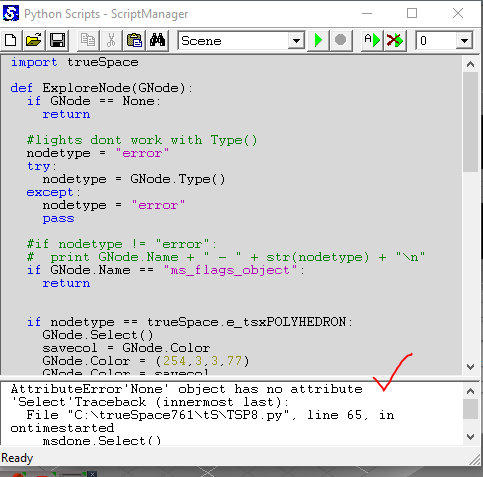
Edit: Never rmind. The error was because the ms_flags_object was not preset.
-
trueBlue
- Captain
- Posts: 5548
- Joined: 06 Jul 2009, 22:50
- Type the number ten into the box: 10
Re: YafaRay for trueSpace 2019
Do you notice that the ms_flags_object changes when you switch to Workspace?
A material and Render Attributes is created.
I have been testing using this ms_flags_object with a floating Model view and the main view Workspace several times without a crash.
Maybe you could add commands to this object after you create it.
The other possible reason why I am not experiencing a crash in this test is, I am rendering from a YafarayCamera that is Syncronized.

- Capture1.PNG (3.47 KiB) Viewed 3507 times
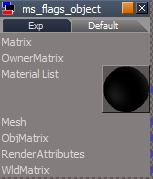
- Capture.PNG (5.99 KiB) Viewed 3537 times
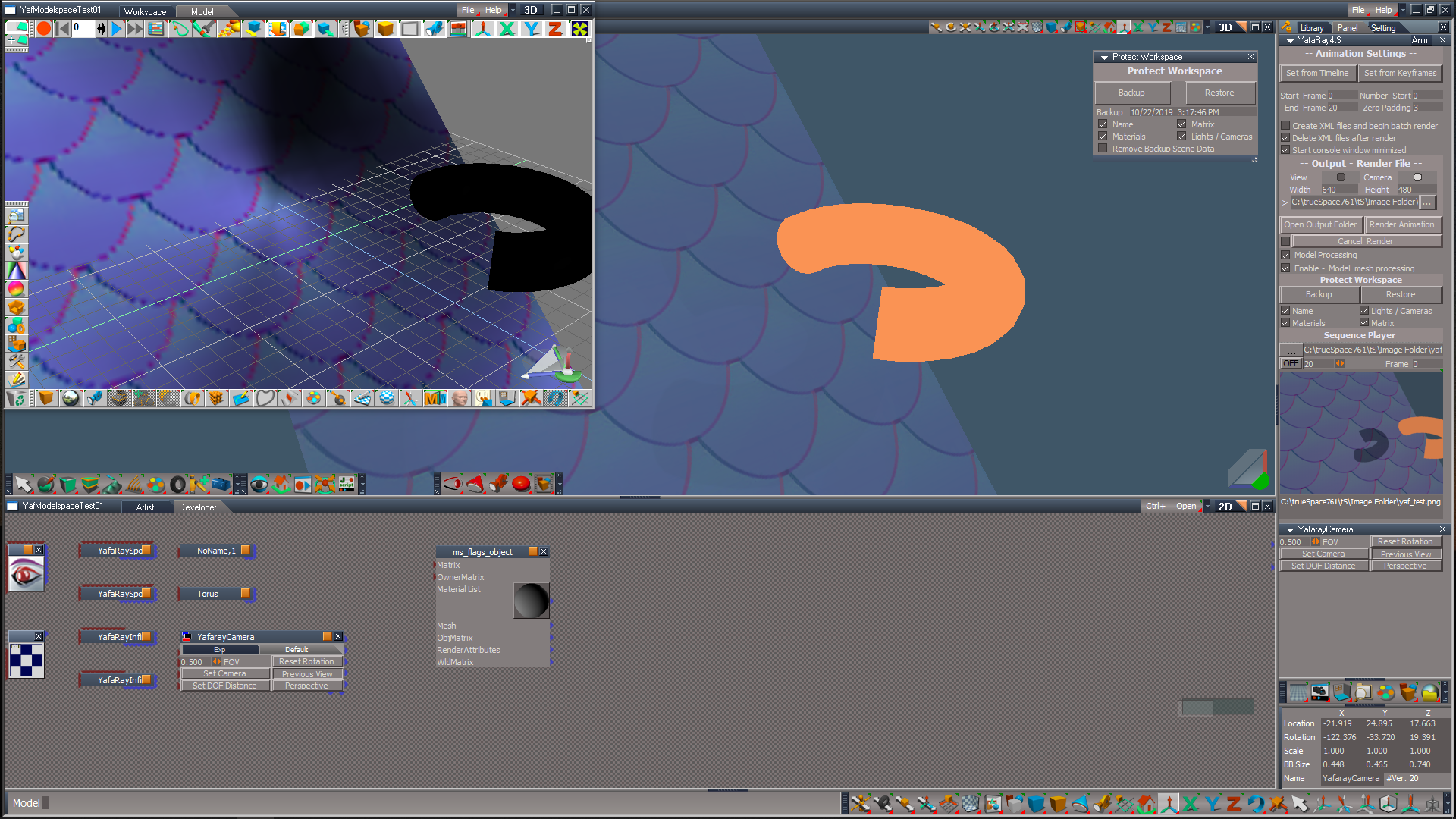
Code: Select all
Node.Select(Space.CurrentScene() + "/ms_flags_object")
D3DView.ShowRenderAttribsForObject('','')
MeshModifiers.SetMaterial('')-
trueBlue
- Captain
- Posts: 5548
- Joined: 06 Jul 2009, 22:50
- Type the number ten into the box: 10
Re: YafaRay for trueSpace 2019
Create XML files and begin batch render
If checked, shouldn't there be some status message during rendering?
Is Model Processing supported using the above?
If you close the iOpt Viewer during an animation render, you will get an error.
endAnimation
add
Build MS Flags Object
Add
If checked, shouldn't there be some status message during rendering?
Is Model Processing supported using the above?
If you close the iOpt Viewer during an animation render, you will get an error.
endAnimation
add
Code: Select all
	if(Node.Value(owner, "useRenderToFile")) {
		ScriptObject.Execute(owner + "/RenderToFileCancel");
Node.Value(Space.CurrentScene() + "/YafaRay4tS", "Yaf_UseCustomViewer") = false
Node.Value(Space.CurrentScene() + "/YafaRay4tS", "useOptDetector") = false
Node.Value(Space.CurrentScene() + "/YafaRay4tS", "Yaf_UseInternalViewer") = false
Node.Value(Space.CurrentScene() + "/YafaRay4tS", "useRenderToFile") = true
}Add
Code: Select all
Node.Select(Space.CurrentScene() + "/ms_flags_object")
D3DView.ShowRenderAttribsForObject('','')
MeshModifiers.SetMaterial('')-
clintonman
- Captain
- Posts: 5659
- Joined: 21 May 2009, 21:08
- Type the number ten into the box: 0
- Location: California
Re: YafaRay for trueSpace 2019
Try running your test in 4View layout, then switch to default layout then switch the view to model. Does it crash?
-
clintonman
- Captain
- Posts: 5659
- Joined: 21 May 2009, 21:08
- Type the number ten into the box: 0
- Location: California
Re: YafaRay for trueSpace 2019
Batch renders occur outside of trueSpace so no way for trueSpace to track it and make status messages.trueBlue wrote: 23 Oct 2019, 00:31 Create XML files and begin batch render
If checked, shouldn't there be some status message during rendering?
Is Model Processing supported using the above?
...
Model Processing not supported in batch mode for the same reason, outside process cannot control truespace.
-
trueBlue
- Captain
- Posts: 5548
- Joined: 06 Jul 2009, 22:50
- Type the number ten into the box: 10
Re: YafaRay for trueSpace 2019
First test was successful. Second test not so much and had to reset the default context.clintonman wrote: 23 Oct 2019, 17:28 Try running your test in 4View layout, then switch to default layout then switch the view to model. Does it crash?
Not sure why you would want to render an animation in 4 to 5 views at one time.
I prefer to render in the main view switched to Model, after running Backup, with no Displays and or additional Views open.
Switch back to Workspace and run Restore.
-
trueBlue
- Captain
- Posts: 5548
- Joined: 06 Jul 2009, 22:50
- Type the number ten into the box: 10
Re: YafaRay for trueSpace 2019
What about an alert that the process has started?clintonman wrote: 23 Oct 2019, 17:31Batch renders occur outside of trueSpace so no way for trueSpace to track it and make status messages.trueBlue wrote: 23 Oct 2019, 00:31 Create XML files and begin batch render
If checked, shouldn't there be some status message during rendering?
Is Model Processing supported using the above?
...
Model Processing not supported in batch mode for the same reason, outside process cannot control truespace.
Yesterday I tried it and I did not think it was working. I started rendering a different way while it was running and got an error.
-
trueBlue
- Captain
- Posts: 5548
- Joined: 06 Jul 2009, 22:50
- Type the number ten into the box: 10
Re: YafaRay for trueSpace 2019
I just noticed that generating a new scene does not clear the python file.
-
clintonman
- Captain
- Posts: 5659
- Joined: 21 May 2009, 21:08
- Type the number ten into the box: 0
- Location: California
Re: YafaRay for trueSpace 2019
Verified. Only way to remove it is manually or doing a new scene on modelside.trueBlue wrote: 23 Oct 2019, 18:35 I just noticed that generating a new scene does not clear the python file.
-
clintonman
- Captain
- Posts: 5659
- Joined: 21 May 2009, 21:08
- Type the number ten into the box: 0
- Location: California
Re: YafaRay for trueSpace 2019
Changes
turn off modelside processing when batch rendering an animation
alert message at start of the batch render
stop script command at end of the render so truespace does not crash immediately when switch a floating model view to workspace view
at end of a render - question to clear the model python script from the scene - this runs from outside of truespace via a js script
stop crash when optdetector window is closed
fix abort animation for the case when not doing modelside processing
turn off modelside processing when batch rendering an animation
alert message at start of the batch render
stop script command at end of the render so truespace does not crash immediately when switch a floating model view to workspace view
at end of a render - question to clear the model python script from the scene - this runs from outside of truespace via a js script
stop crash when optdetector window is closed
fix abort animation for the case when not doing modelside processing
-
clintonman
- Captain
- Posts: 5659
- Joined: 21 May 2009, 21:08
- Type the number ten into the box: 0
- Location: California
Re: YafaRay for trueSpace 2019
I'm only fixing broken things. No new stuff.trueBlue wrote: 21 Oct 2019, 17:39 ...
In this trial scene saved as a RsRcd, I made the following changes:
YafaRay4tS/Anim
Backup command
Activity.Run("%THIS_NAME%/Model Process Macro/Run")
Things to try:
Select Backup with Model Processing and Model Mesh Processing unchecked.
Select Backup with Model Processing checked and Model Mesh Processing unchecked.
Select Backup with Model Processing and Model Mesh Processing checked.
I am not sure about the way I am switching to Model as it is path dependent.
Most likely would not work on different layouts and may even cause an error.
...
I'll post everything I have now and start making preparations to make an installer for the "no official update installed" case
-
trueBlue
- Captain
- Posts: 5548
- Joined: 06 Jul 2009, 22:50
- Type the number ten into the box: 10
Re: YafaRay for trueSpace 2019
Just received a No D3D View found error so I guess you need a Model and Workspace view opened when using Model Processing.
Also received this error and I believe it was because I did not have any animated objects in the scene.
Also received this error and I believe it was because I did not have any animated objects in the scene.

-
clintonman
- Captain
- Posts: 5659
- Joined: 21 May 2009, 21:08
- Type the number ten into the box: 0
- Location: California
Re: YafaRay for trueSpace 2019
I made a change, so you can try it.trueBlue wrote: 21 Oct 2019, 17:39 Looks good!
Can you add RsRcd files to this forum?
...
-
clintonman
- Captain
- Posts: 5659
- Joined: 21 May 2009, 21:08
- Type the number ten into the box: 0
- Location: California
Re: YafaRay for trueSpace 2019
PreRelease changes, will fix bugs if they are found.
All changes since my last upload:
Map.RsObj
has a working default gamma value of 2.2, but the saved file version was set at 1.0 - fixed
removing any texture messed up the preview, even though render was still good. fixed so visible texture not lost.
Switching texture types left connections in place resulting in multiple connections between 2 connectors. Didn't stop it from working but not proper behavior. Fixed.
YafaRay4tS node
turn off autokey in modelspace for animaion renders
MaterialFnSet had a "=" instead of "==", which prevented the material texture blend from working properly.
Voronoi procedural texture render was incorrect when the color type was anything but intensity. Fix: MaterialsFnSet line 437 change proctext to data.proctext
delete ms_flags_object at end of animation render
fix PST optidetector - bug from rewrite, "update Opti display"
PST optidetector is fixed to work with the tif render files and has status messages and now takes into account whether the render image already exists or not.
Needed to fix the scene brightness script inside YafaRay4tS to work with the new yafaray lights.
also fixed iopti code in ShowAnimationFrame node
turn off modelside processing when batch rendering an animation
alert message at start of the batch render
stop script command at end of the render so truespace does not crash immediately when switch a floating model view to workspace view
at end of a render - question to clear the model python script from the scene - this runs from outside of truespace via a js script
stop crash when optdetector window is closed
fix abort animation for the case when not doing modelside processing
YafaRay4tS Scene Utilites
panel: grouped the texture source with the associated "Process Imported Scene" and "Gather Textures for Sharing" buttons.
changed generic heading Update to YafaRay4tSv0.9.0 to more generic heading non-specific version
changed references to "YafaRay4tS panel" to "YafaRay4tS script node"
Process Imported Scene - removed double alert boxes when xml path was invalid
YafRay4tS Script Node - removed dead code, complete alert changed from hard coded version 0.9.0 to read from the yafaray4ts node in the scene, does not say to run "Process Imported Scene"
"YafaRay Materials" - will replace the scene's old version YafaRay Materials - now includes v0.9.0 yaf material conversion
"YafaRay Lights" and "YafaRay Camera" will replace the scene yafaray lights and cameras with their updated YafaRay equivalents.
fixed to not convert lights with cameras inside them into cameras
added a try catch to the YafaRay4tS Scene Utilites Convert Lights node - corrupt values causing error
Update YafaRay Materials script glossy_reflect texture type was missing
YafaRay Light Material node named Light Material does not work, changed name to D3D material and it works(filename does not change only the resulting node name as loaded.
All previous changes:
added modespace animation support
ability to view tif renders via external rsx plugin - Clintons Ext Plugin can be found at the bottom of this page: http://clintons3d.com/plugins/truespace ... index.html
Added render filename to the iOpti display title bar
Ask for confirmation if batch render is combined with not delete temp files option
workspace protection from modelpsace changes
new status line improvements
New animation abort method
Ask for confirmation if batch render is combined with not delete temp files option
work with non-compiled d3d materials - read as glossy type material
All changes since my last upload:
Map.RsObj
has a working default gamma value of 2.2, but the saved file version was set at 1.0 - fixed
removing any texture messed up the preview, even though render was still good. fixed so visible texture not lost.
Switching texture types left connections in place resulting in multiple connections between 2 connectors. Didn't stop it from working but not proper behavior. Fixed.
YafaRay4tS node
turn off autokey in modelspace for animaion renders
MaterialFnSet had a "=" instead of "==", which prevented the material texture blend from working properly.
Voronoi procedural texture render was incorrect when the color type was anything but intensity. Fix: MaterialsFnSet line 437 change proctext to data.proctext
delete ms_flags_object at end of animation render
fix PST optidetector - bug from rewrite, "update Opti display"
PST optidetector is fixed to work with the tif render files and has status messages and now takes into account whether the render image already exists or not.
Needed to fix the scene brightness script inside YafaRay4tS to work with the new yafaray lights.
also fixed iopti code in ShowAnimationFrame node
turn off modelside processing when batch rendering an animation
alert message at start of the batch render
stop script command at end of the render so truespace does not crash immediately when switch a floating model view to workspace view
at end of a render - question to clear the model python script from the scene - this runs from outside of truespace via a js script
stop crash when optdetector window is closed
fix abort animation for the case when not doing modelside processing
YafaRay4tS Scene Utilites
panel: grouped the texture source with the associated "Process Imported Scene" and "Gather Textures for Sharing" buttons.
changed generic heading Update to YafaRay4tSv0.9.0 to more generic heading non-specific version
changed references to "YafaRay4tS panel" to "YafaRay4tS script node"
Process Imported Scene - removed double alert boxes when xml path was invalid
YafRay4tS Script Node - removed dead code, complete alert changed from hard coded version 0.9.0 to read from the yafaray4ts node in the scene, does not say to run "Process Imported Scene"
"YafaRay Materials" - will replace the scene's old version YafaRay Materials - now includes v0.9.0 yaf material conversion
"YafaRay Lights" and "YafaRay Camera" will replace the scene yafaray lights and cameras with their updated YafaRay equivalents.
fixed to not convert lights with cameras inside them into cameras
added a try catch to the YafaRay4tS Scene Utilites Convert Lights node - corrupt values causing error
Update YafaRay Materials script glossy_reflect texture type was missing
YafaRay Light Material node named Light Material does not work, changed name to D3D material and it works(filename does not change only the resulting node name as loaded.
All previous changes:
added modespace animation support
ability to view tif renders via external rsx plugin - Clintons Ext Plugin can be found at the bottom of this page: http://clintons3d.com/plugins/truespace ... index.html
Added render filename to the iOpti display title bar
Ask for confirmation if batch render is combined with not delete temp files option
workspace protection from modelpsace changes
new status line improvements
New animation abort method
Ask for confirmation if batch render is combined with not delete temp files option
work with non-compiled d3d materials - read as glossy type material
- Attachments
-
- Map03.RsObj
- (103.95 KiB) Downloaded 152 times
-
- YafaRay4tS Scene Utilities108.RsObj
- (125.43 KiB) Downloaded 169 times
-
- YafaRay4tS30.RsObj
- (988.96 KiB) Downloaded 171 times
-
clintonman
- Captain
- Posts: 5659
- Joined: 21 May 2009, 21:08
- Type the number ten into the box: 0
- Location: California
Re: YafaRay for trueSpace 2019
YafaRay Installer:
Standalone installer requires Clinton3dplugin rsx plugin installation, c3dc persistent install, reset to default context before YafaRay4tS installation. Requires ProtectWorkspace install to use modelspace animation.
changes:
the YafaRayCamera.RsObj in the "YafaRay4tS Setup" libary name was inconsistent with the preferences camera named "YafaRay Camera" with a space. changed so the loaded item during installation has the space in the name
"Insert Yafaray Volume" button deletes any preexisting volume nodes, causing user setup to be lost. Now allows multiple YafarayVolumes. Not ideal but better than before.
TODO: documentation
sample scenes almost ready to publish
Side note: updating ProtectWorkspace to work with the unofficial ui changes on/off button
Standalone installer requires Clinton3dplugin rsx plugin installation, c3dc persistent install, reset to default context before YafaRay4tS installation. Requires ProtectWorkspace install to use modelspace animation.
changes:
the YafaRayCamera.RsObj in the "YafaRay4tS Setup" libary name was inconsistent with the preferences camera named "YafaRay Camera" with a space. changed so the loaded item during installation has the space in the name
"Insert Yafaray Volume" button deletes any preexisting volume nodes, causing user setup to be lost. Now allows multiple YafarayVolumes. Not ideal but better than before.
TODO: documentation
sample scenes almost ready to publish
Side note: updating ProtectWorkspace to work with the unofficial ui changes on/off button
- Attachments
-
- YafaRay4tSv097_gamma1.zip
- (14.86 MiB) Downloaded 156 times
-
trueBlue
- Captain
- Posts: 5548
- Joined: 06 Jul 2009, 22:50
- Type the number ten into the box: 10
Re: YafaRay for trueSpace 2019
So do I need to make the above changes in the Update(S)?clintonman wrote: 25 Oct 2019, 01:01 YafaRay Installer:
Standalone installer requires Clinton3dplugin rsx plugin installation, c3dc persistent install, reset to default context before YafaRay4tS installation. Requires ProtectWorkspace install to use modelspace animation.
changes:
the YafaRayCamera.RsObj in the "YafaRay4tS Setup" libary name was inconsistent with the preferences camera named "YafaRay Camera" with a space. changed so the loaded item during installation has the space in the name
"Insert Yafaray Volume" button deletes any preexisting volume nodes, causing user setup to be lost. Now allows multiple YafarayVolumes. Not ideal but better than before.
TODO: documentation
sample scenes almost ready to publish
Side note: updating ProtectWorkspace to work with the unofficial ui changes on/off button
1)
2)preferences camera named "YafaRay Camera" with a space
is this the toobar button?Insert Yafaray Volume" button
3)
Side note: updating ProtectWorkspace to work with the unofficial ui changes on/off button
-
clintonman
- Captain
- Posts: 5659
- Joined: 21 May 2009, 21:08
- Type the number ten into the box: 0
- Location: California
Re: YafaRay for trueSpace 2019
Yes, the help tip says "Insert Yafaray Volume" and it looks like a light blue box.trueBlue wrote: 25 Oct 2019, 02:09 ...
2)is this the toobar button?Insert Yafaray Volume" button
...
Don't know about the YafaRayCamera.RsObj, are you even using it for anything? I think it probably exists for installation purposes.
No need to change the Protection scripts since you're version isn't affected by the ui change. I just added the ability to not use the on off button avoiding an error.
-
trueBlue
- Captain
- Posts: 5548
- Joined: 06 Jul 2009, 22:50
- Type the number ten into the box: 10
Re: YafaRay for trueSpace 2019
I do not know what needs to change with the command for the Yafaray Volume, so just let me know what it is that I need to do. I think it is loaded from the Library.clintonman wrote: 25 Oct 2019, 03:56Yes, the help tip says "Insert Yafaray Volume" and it looks like a light blue box.trueBlue wrote: 25 Oct 2019, 02:09 ...
2)is this the toobar button?Insert Yafaray Volume" button
...
Don't know about the YafaRayCamera.RsObj, are you even using it for anything? I think it probably exists for installation purposes.
No need to change the Protection scripts since you're version isn't affected by the ui change. I just added the ability to not use the on off button avoiding an error.
I'll check why the camera is in the library. But I think that the primitive camera name needs to be change to be the same name?
-
clintonman
- Captain
- Posts: 5659
- Joined: 21 May 2009, 21:08
- Type the number ten into the box: 0
- Location: California
Re: YafaRay for trueSpace 2019
change the button from
to
Code: Select all
if (Node.Exists(Space.CurrentScene() + "/YafaRay4tS")) {Node.Delete(Space.CurrentScene() + "/YafarayVolume");RsFileIO.LoadObject(System.GetMainDir() + '\\Rs Main Libraries\\YafaRay4tS Setup\\YafarayVolume.RsObj', Space.CurrentScene());};Code: Select all
RsFileIO.LoadObject(System.GetMainDir() + '\\Rs Main Libraries\\YafaRay4tS Setup\\YafarayVolume.RsObj', Space.CurrentScene())-
clintonman
- Captain
- Posts: 5659
- Joined: 21 May 2009, 21:08
- Type the number ten into the box: 0
- Location: California
Re: YafaRay for trueSpace 2019
Sample scene files can be found here.
http://clintons3d.com/plugins/truespace ... mples.html
http://clintons3d.com/plugins/truespace ... mples.html
-
trueBlue
- Captain
- Posts: 5548
- Joined: 06 Jul 2009, 22:50
- Type the number ten into the box: 10
Re: YafaRay for trueSpace 2019
Awesome work on the modifications!
Clearing the python script is fantastic!
Modifications to the iOpt Viewer seem to work perfect!
The YafaRayCamera in the library is a scene camera and I think it was used in the original installer.
Clearing the python script is fantastic!
Modifications to the iOpt Viewer seem to work perfect!
The YafaRayCamera in the library is a scene camera and I think it was used in the original installer.
-
clintonman
- Captain
- Posts: 5659
- Joined: 21 May 2009, 21:08
- Type the number ten into the box: 0
- Location: California
Re: YafaRay for trueSpace 2019
Found some more bugs.
YafaRay4tS Scene Utilites -
button for gathering textures was broken - fixed
needs to process d3d shaders to copy embedded textures out so the render can see them - mostly done ( getting an error with a normal map )
doing tests on the froggy scene and the png files generated seem to have a problem - dont render, cant open in editor
Material Conversion D3D Compiled to D3D Shader is not working properly when a lightworks material is present
YafaRay4tS
Render of D3D materials is ignoring those with a number in the name "D3D material, 1"
one of the error messages during render is nonsense
TODO: download latest unofficial update to stay in sync
YafaRay4tS Scene Utilites -
button for gathering textures was broken - fixed
needs to process d3d shaders to copy embedded textures out so the render can see them - mostly done ( getting an error with a normal map )
doing tests on the froggy scene and the png files generated seem to have a problem - dont render, cant open in editor
Material Conversion D3D Compiled to D3D Shader is not working properly when a lightworks material is present
YafaRay4tS
Render of D3D materials is ignoring those with a number in the name "D3D material, 1"
one of the error messages during render is nonsense
TODO: download latest unofficial update to stay in sync
-
trueBlue
- Captain
- Posts: 5548
- Joined: 06 Jul 2009, 22:50
- Type the number ten into the box: 10
Re: YafaRay for trueSpace 2019
Took your Hello World scene for a spin.
I canceled the render at frame 24.
Switched the main view in Model to Workspace
I received this error:
Makes wonder if you need to add synchronize scene to the mix, if you have not already.
Edit: I tried hooking up the objects to a Synchronize object and test if this would help.
Even the sub object inside your curve object but it gets disconnected somehow during the process.
I believe this sub object is the one that caused the error.
I canceled the render at frame 24.
Switched the main view in Model to Workspace
I received this error:
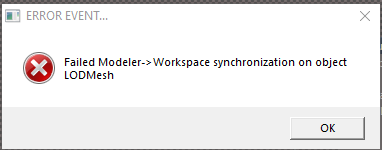
- Capture.PNG (6.86 KiB) Viewed 3455 times
Edit: I tried hooking up the objects to a Synchronize object and test if this would help.
Even the sub object inside your curve object but it gets disconnected somehow during the process.
I believe this sub object is the one that caused the error.
-
trueBlue
- Captain
- Posts: 5548
- Joined: 06 Jul 2009, 22:50
- Type the number ten into the box: 10
Re: YafaRay for trueSpace 2019
I do not know if you remember or not, but that scene was created in an unreleased beta version of tS7.61 RCxxx?clintonman wrote: 25 Oct 2019, 18:08 Found some more bugs.
YafaRay4tS Scene Utilites -
button for gathering textures was broken - fixed
needs to process d3d shaders to copy embedded textures out so the render can see them - mostly done ( getting an error with a normal map )
doing tests on the froggy scene and the png files generated seem to have a problem - dont render, cant open in editor
Material Conversion D3D Compiled to D3D Shader is not working properly when a lightworks material is present
Also if you take that scene into Model, you can find the textures shown here:

When you open trueSpace again the textures are deleted by way of the init.js
tSBridge.DeleteTmpTextures();
-
clintonman
- Captain
- Posts: 5659
- Joined: 21 May 2009, 21:08
- Type the number ten into the box: 0
- Location: California
-
clintonman
- Captain
- Posts: 5659
- Joined: 21 May 2009, 21:08
- Type the number ten into the box: 0
- Location: California
Re: YafaRay for trueSpace 2019
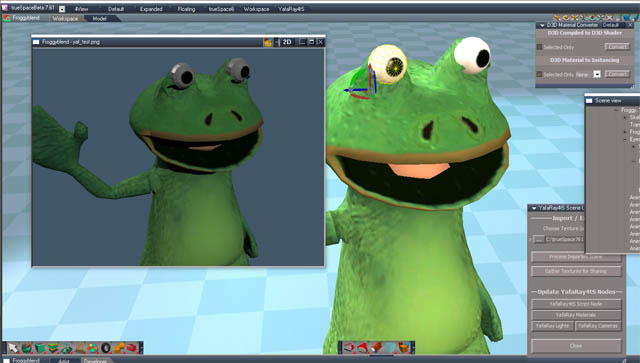
YafaRay4tS
when rendering d3d materials as glossy, will look for material when node is named "D3D material, 1", was only looking for "D3D material"
D3D Material Conversion
fixed old bug that stops normal maps from converting
was hard coded to find the material connected to a specific connector, "Mat Item 0", fixed by general search for "Mat Item X"
fixed file format saving for images - was trying to use PixelFormat when should have been using FileFormat
changed status message to use Workspace instead of YafaRay
1 bug left: multiple runs of gather textures for sharing gives an error - FIXED
TODO: test a few more scenes
The process to convert the scene is:
make the scene a yafaray scene by right clicking the render icon
open the d3d material converter
press d3d compiled to d3d shader
open the yafaray scene utilties from the yafaray4ts setup library
press gather textures to extract the texture files needed by yafaray
press process imported scene to assign the textures to the materials
now can render - get message about bad mesh - create morphs for the eyes to fix it
render now good
optional can now convert to yafaray materials
Last edited by clintonman on 25 Oct 2019, 23:33, edited 1 time in total.
-
trueBlue
- Captain
- Posts: 5548
- Joined: 06 Jul 2009, 22:50
- Type the number ten into the box: 10
Re: YafaRay for trueSpace 2019
Great!
One more thing about the temp textures. The size of the textures is dependent on the Display options settings for Workspace. Seems that they are doubled in size. With my settings set at 1024x1024, the temp textures (not all) are 2048x2048
One more thing about the temp textures. The size of the textures is dependent on the Display options settings for Workspace. Seems that they are doubled in size. With my settings set at 1024x1024, the temp textures (not all) are 2048x2048
-
clintonman
- Captain
- Posts: 5659
- Joined: 21 May 2009, 21:08
- Type the number ten into the box: 0
- Location: California
Re: YafaRay for trueSpace 2019
When I export the textures they have size 2048x2048 (frog body - color and normal), 1024x1024(eyes) and 512x512(tongue)
-
clintonman
- Captain
- Posts: 5659
- Joined: 21 May 2009, 21:08
- Type the number ten into the box: 0
- Location: California
Re: YafaRay for trueSpace 2019
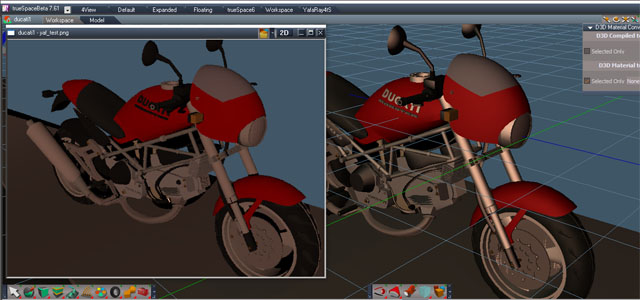
-
clintonman
- Captain
- Posts: 5659
- Joined: 21 May 2009, 21:08
- Type the number ten into the box: 0
- Location: California
Re: YafaRay for trueSpace 2019

Image shows that things need to have unique names. The tires are yellow because they are named cube,8 along with something else named cube,8 that is yellow.
The same problem happened in the previous ducati scene render, non-unique names messing up the colors, making the logo on the tank black.
-
clintonman
- Captain
- Posts: 5659
- Joined: 21 May 2009, 21:08
- Type the number ten into the box: 0
- Location: California
Re: YafaRay for trueSpace 2019
Final Versions that will go into the installer version.
YafaRay4tS:
removed the save scene after render portion of warning at the end of an animation render
when rendering d3d materials will look for node named "D3D material, 1" as well as "D3D material"
YafaRay4tS Scene Utilities:
button for gathering textures was broken - fixed
process d3d shaders to copy embedded textures out to disk so the render can see them
if bitmap has no associated file, one will be created so the render can see it during the "gathering textures for sharing"
D3d Material Converter:
Added a global rename to the convert d3d compiled to shader for old items using an old naming scheme
changed status message to use "Workspace" instead of "YafaRay"
was hard coded to find the material connected to a specific connector, "Mat Item 0", fixed by general search for "Mat Item X" - this gives better compatibility with lightworks materials which can be plugged into any of the Mat Item connectors
YafaRay4tS:
removed the save scene after render portion of warning at the end of an animation render
when rendering d3d materials will look for node named "D3D material, 1" as well as "D3D material"
YafaRay4tS Scene Utilities:
button for gathering textures was broken - fixed
process d3d shaders to copy embedded textures out to disk so the render can see them
if bitmap has no associated file, one will be created so the render can see it during the "gathering textures for sharing"
D3d Material Converter:
Added a global rename to the convert d3d compiled to shader for old items using an old naming scheme
changed status message to use "Workspace" instead of "YafaRay"
was hard coded to find the material connected to a specific connector, "Mat Item 0", fixed by general search for "Mat Item X" - this gives better compatibility with lightworks materials which can be plugged into any of the Mat Item connectors
- Attachments
-
- YafaRay4tS101.RsObj
- (988.12 KiB) Downloaded 162 times
-
- YafaRay4tS Scene Utilities122.RsObj
- (134.62 KiB) Downloaded 134 times
-
- D3D Material Converter10.RsObj
- (617.32 KiB) Downloaded 165 times
-
clintonman
- Captain
- Posts: 5659
- Joined: 21 May 2009, 21:08
- Type the number ten into the box: 0
- Location: California
Re: YafaRay for trueSpace 2019
Installer version Gamma2 release.
"Complete" except for documentation and any surprise bugs that may pop up.
See notes in previous post and Unofficial Release Oct 25 2019, earlier today.
Edit:
Change of plans. I wasn't going to add anything else new but the inaccessibility of the scene utilities and the problem of unique names and materials is bugging me. So I'm going to:
Move the YafaRay Scene Utilites into the YafaRay4tS node
Add a button in the Default aspect under the Scene Settings section to open it
Add a make names unique button so materials don't get mixed up in the render
"Complete" except for documentation and any surprise bugs that may pop up.
See notes in previous post and Unofficial Release Oct 25 2019, earlier today.
Edit:
Change of plans. I wasn't going to add anything else new but the inaccessibility of the scene utilities and the problem of unique names and materials is bugging me. So I'm going to:
Move the YafaRay Scene Utilites into the YafaRay4tS node
Add a button in the Default aspect under the Scene Settings section to open it
Add a make names unique button so materials don't get mixed up in the render
- Attachments
-
- YafaRay4tSv097_gamma2.zip
- (14.86 MiB) Downloaded 162 times
-
clintonman
- Captain
- Posts: 5659
- Joined: 21 May 2009, 21:08
- Type the number ten into the box: 0
- Location: California
Re: YafaRay for trueSpace 2019
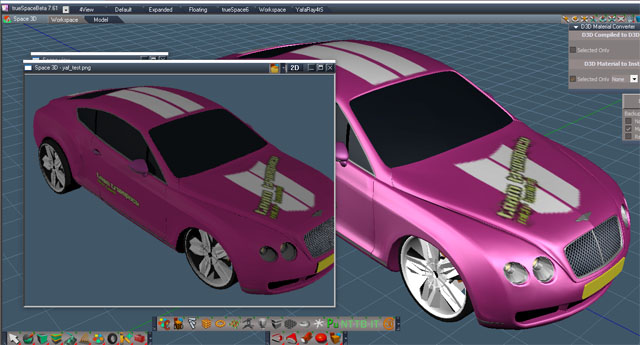
Here it is the final final (I hope) YafaRay4tS node.
2 new buttons under scene utilites
Open Scene Utilites - popup window for the YafaRay Scene Utilites so there's no need to open the library and load it in
Make Names Unique - renames renderable items where the name has already been used
removed the close button from the Scene Utilities panel
Scene Utilites node lives inside the YafaRay4tS node and runs from the Yafaray Folder
- Attachments
-
- YafaRay4tS106.RsObj
- (1.06 MiB) Downloaded 177 times
-
trueBlue
- Captain
- Posts: 5548
- Joined: 06 Jul 2009, 22:50
- Type the number ten into the box: 10
Re: YafaRay for trueSpace 2019
Thank you!
I included your updates in both of Unofficial Update(S)
Fixed the YafaRay4tS panel
Removed the Scene Utilities from the library
I included your updates in both of Unofficial Update(S)
Fixed the YafaRay4tS panel
Removed the Scene Utilities from the library
-
clintonman
- Captain
- Posts: 5659
- Joined: 21 May 2009, 21:08
- Type the number ten into the box: 0
- Location: California
Re: YafaRay for trueSpace 2019
I was like, "what's wrong with the panel?", then I remembered, oh yeah, I really hate the finicky ui editor so my results are less than pretty.trueBlue wrote: 26 Oct 2019, 17:33 ...
Fixed the YafaRay4tS panel
...


-
trueBlue
- Captain
- Posts: 5548
- Joined: 06 Jul 2009, 22:50
- Type the number ten into the box: 10
Re: YafaRay for trueSpace 2019
Added one more update to the Update(S)
D3D Materials button opens the D3D Materials Converter
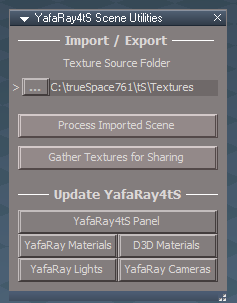
- Capture.PNG (9.83 KiB) Viewed 3338 times
-
clintonman
- Captain
- Posts: 5659
- Joined: 21 May 2009, 21:08
- Type the number ten into the box: 0
- Location: California