YafaRay for trueSpace 2019

LightWorks, VRay, Dribble, YafaRay and more..
User avatar
trueBlue
Captain
Posts: 5548
Joined: 06 Jul 2009, 22:50
Type the number ten into the box: 10

Re: YafaRay for trueSpace 2019

Post by trueBlue »

Use Custom Temporary Directory - Path to the Custom Directory.
Directory for storing generated XML file and temporary YafaRay output image. Default working directory is the same as the output image directory. Use this option if you want to use a different directory from the final image output directory.

Use Custom XML Export file - Use the File browse dialog button for selecting custom XML file export location.
Use a custom filename and directory for the generated XML file. This is useful when generating multiple XML files for batch rendering or for rendering a previously generated XML file.

Export XML - Creates an XML file without rendering.

Render XML - Renders the Custom XML file or the last XML file that was generated.
The above is from the help file.
Not really sure how this is suppose to work, so I will leave it up to you that it is working as expected.

If when using the above options, and an image is suppose to render to these paths, it does not work.
It dose seem to render to the Output Render File path though.

There is one glitch when checking 'Delete XML file after render', and using the Render XML button on second attempt. It will produce a handled error.

Maybe the help file can be amended?

ExportXMLFnSet is using System.SetBusyCursor(true); in your code.
I can confirm that this is not working as you have said previously.
I would suggest removing this just incase it may be causing any problems.
User avatar
trueBlue
Captain
Posts: 5548
Joined: 06 Jul 2009, 22:50
Type the number ten into the box: 10

Re: YafaRay for trueSpace 2019

Post by trueBlue »

RenderAnim2
Reseting the default values do not work on the Anim aspect nor the Render to File aspect for the following attributes

Code: Select all

function OnDefaultValue(params)
{
	conName = params.Param('conName');
	switch (conName)
	{
		case 'Start_Frame':
			params.Param('vtData') = 0;
			params.Param('bHandled') = true;
			break;

		case 'End_Frame':
			params.Param('vtData') = 0;
			params.Param('bHandled') = true;
			break;

		case 'Number_Start':
			params.Param('vtData') = 0;
			params.Param('bHandled') = true;
			break;

		case 'Zero_Padding':
			params.Param('vtData') = 3;
			params.Param('bHandled') = true;
			break;
	}

}
If you can get these to work, I would suggest that the End_Frame be set to 1
The reason why is, if there is no anmimation, it only renders one frame.
As is, it is set to 10. So if you select the Render Animation button, and if there is no animation, it renders 10 frames even though there is no animation.

Also if use Set from Keyframe and there is no animation, the End Frame is set to 0, which causes an error!
Line 29 = animEnd = 0;
Is Line 29 is wrong? Should it be set to animEnd = 1;

YafarayScripts/RenderAnimation
There is no code to render an animation in this script.
LMB = Loads the YafaRay4tS panel in the scene, if it does not exist, and opens the Anim aspect in the Stack.
RMB = Opens the Direct Lighting in the Stack.

In Vray
LMB = Opens it's Render to File
RMB = Opens the Vray panel in the Default aspect

Maybe YafaRay4tS should have the same behavior?
LMB = Opens it's Render to File and the Default Lighting panel in the Stack
RMB = Opens the YafaRay4tS panel in the Anim aspect

This seems to work:
RenderAnimation
Change
//UserInterface.OpenToolPanelViewEx2("" , "" ,Space.CurrentScene()+"/YafaRay4tS", 8, 1, 0);
OfflineRender.OpenPreferencesPanel()
Activity.Run(Space.CurrentScene() + "/YafaRay4tS/open panel");
User avatar
trueBlue
Captain
Posts: 5548
Joined: 06 Jul 2009, 22:50
Type the number ten into the box: 10

Re: YafaRay for trueSpace 2019

Post by trueBlue »

YafaRay4tS/Render to File toolbar command
If there is no YafaRay4tS panel in the scene, the LMB and or the RMB command do not do anything.
I am going to change the commands as follows:
LMB

Code: Select all

if (!Node.Exists(Space.CurrentScene()+"/YafaRay4tS")){if(Node.Exists("/Yafaray Folder")){Node.Copy("/Yafaray Folder/YafaRay4tS", Space.CurrentScene());}}Activity.Run(Space.CurrentScene() + "/YafaRay4tS/open panel");
RMB

Code: Select all

OfflineRender.OpenPreferencesPanel()
User avatar
trueBlue
Captain
Posts: 5548
Joined: 06 Jul 2009, 22:50
Type the number ten into the box: 10

Re: YafaRay for trueSpace 2019

Post by trueBlue »

YafaRay4tS/Anim
Backup button script
Activity.Run("Scripts/CustomCommands/ProtectWorkspace/BackupButton")
Activity.Run( "Scripts/CustomCommands/ProtectWorkspace/Popup Panel/OpenPanelFrame")

Thinking ahead, what if a scene is shared without the ProtectWorkspace script installed?
The way it is presently noted above, it would produce an error!
You could include the ProtectWorkspace script with the scene.

Maybe something like this for the above script?

Code: Select all

var protectNode = "Scripts/CustomCommands/ProtectWorkspace";
var ScnProtectNode = Space.CurrentScene() + "/ProtectWorkspace";
if(Node.Exists(protectNode || ScnProtectNode))
{
Activity.Run("Scripts/CustomCommands/ProtectWorkspace/BackupButton")
Activity.Run("Scripts/CustomCommands/ProtectWorkspace/Popup Panel/OpenPanelFrame")
} else {
Activity.Run(Space.CurrentScene() + "/ProtectWorkspace/BackupButton")
Activity.Run(Space.CurrentScene() + "/ProtectWorkspace/Popup Panel/OpenPanelFrame")
}
User avatar
trueBlue
Captain
Posts: 5548
Joined: 06 Jul 2009, 22:50
Type the number ten into the box: 10

Re: YafaRay for trueSpace 2019

Post by trueBlue »

YafModelspaceTest06.RsScn at your website has a few problems.
1.) The scene was saved with the python script assigned to the Scene
2.) NoName,1.RsObj Transparent D3D Preview needed to be reset and Protect Materials resaved.

Here is the scene with the above changes:

Also as a follow up, I confirmed that Workspace's Play Range is saved with the scene by trueSpace and has nothing to do with YafaRay4tS.
Attachments
YafModelspaceTest06.RsScn
(2.89 MiB) Downloaded 186 times
User avatar
trueBlue
Captain
Posts: 5548
Joined: 06 Jul 2009, 22:50
Type the number ten into the box: 10

Re: YafaRay for trueSpace 2019

Post by trueBlue »

Suggestions:

Updates 11/15/2019:

YafarayScripts
Changed
Version 8

AnimationRender
Changed

Code: Select all

//UserInterface.OpenToolPanelViewEx2("" , "" ,Space.CurrentScene()+"/YafaRay4tS", 8, 1, 0);
OfflineRender.OpenPreferencesPanel()
Activity.Run(Space.CurrentScene() + "/YafaRay4tS/open panel");


YafaRa4tS

RenderAnim2
Changed End_Frame Default from 0

Code: Select all

case 'End_Frame'
params.Param('vtData') = 1;
Note: Fixed the Defaults by re exporting and re applying the LINKS to the Anim and Render to File aspects

Changed

Code: Select all

Errors.Add("End Frame must be greater then the Start Frame. Rendering Animation has been canceled");
if(!Question(numFrames + " - XML files will be created because\nDelete XML files after render\nis not Enabled\n\nWould you like to continue?")) {
Add

Code: Select all

	if(Node.Exists("/Status Line"))
		if(!Node.ConExists("/Status Line", "YafaRay"))
		Node.ConCreate("Status Line", "YafaRay", "string", 4);
		Node.Value("/Status Line", "YafaRay") = "Model Processing is not supported and has been disabled"
		Activity.Run(Space.CurrentScene() + "/YafaRay4tS/ClearStatus")

		System.Alert("Batch Render will start now...");
About
Changed
Version 0.9.8

AboutBitmap
Changed
Version 0.9.8
Date 11/14/2019

Render
Changed 'Adds a little more time to the status message'

Code: Select all

//Node.ConRemove("/Status Line", "YafaRay")
Activity.Run(Space.CurrentScene() + "/YafaRay4tS/ClearStatus")
endAniamtion
Changed 'Adds a little more time to the status message'

Code: Select all

//Node.ConRemove("/Status Line", "YafaRay")
Activity.Run(Space.CurrentScene() + "/YafaRay4tS/ClearStatus")

Code: Select all

System.Alert("Model Mesh Processing - Render complete\nWARNING!\nSwitching layouts will crash trueSpace if you do not Exit trueSpace first")
Anim
Backup button
Changed

Code: Select all

var protectNode = "Scripts/CustomCommands/ProtectWorkspace";
if(Node.Exists(protectNode))
{
Activity.Run("Scripts/CustomCommands/ProtectWorkspace/BackupButton")
Activity.Run("Scripts/CustomCommands/ProtectWorkspace/Popup Panel/OpenPanelFrame")
}
Restore buttton
Changed

Code: Select all

var protectNode = "Scripts/CustomCommands/ProtectWorkspace";
if(Node.Exists(protectNode))
{
Activity.Run("Scripts/CustomCommands/ProtectWorkspace/RestoreButton")
}
Cancel Render button 'changed to an On/Off button'

Create XML files and start Batch Render 'changed wording'

Setup
Changed the viewer(s) check boxes to On/Off buttons

Note: Changed the Disable All Viewers button to a On/Off button and linked it to the useRendertoFile attribute.
So if you enable the Disable All Viewers button when using Render to File, no viewers will spawn.

Set from Keyframe 'If there is no animation, the End Frame is set to 0, which causes an error!'
Changed Line 29 = animEnd = 0;
Line 29 = animEnd = 1;

ExportXMLFnSet
Comment
//System.SetBusyCursor(true);
//System.SetBusyCursor(false);

RenderFrame
Add var to

Code: Select all

Yaf_UseInternalViewer = Node.Value(System.ThisOwner() + '/UIstate', "Yaf_UseInternalViewer") ;
Yaf_UseCustomViewer = Node.Value(System.ThisOwner() + '/UIstate', "Yaf_UseCustomViewer");
Yaf_UseCustomViewer = Node.Value(System.ThisOwner() + '/UIstate', "Yaf_CustomViewer");
Note: Batch Render error undefined line 145


YafaRay4tS Scene Utilities
Update YafaRay Render Node
Add

Code: Select all

Node.Value(Destination, "useRenderToFile") = true;

Code: Select all

UserInterface.OpenToolPanelViewEx2("" , "" ,Space.CurrentScene()+"/YafaRay4tS", 6, 1, 0);
Space.Select(Space.CurrentScene()+"/YafaRay4tS") 
Process Imported Scene
Add

Code: Select all

UserInterface.OpenToolPanelViewEx2("" , "" ,Space.CurrentScene()+"/YafaRay4tS", 6, 1, 0);
Space.Select(Space.CurrentScene()+"/YafaRay4tS") 


YafaRay4tS Setup library
SynchronizeWorkspace.RsObj

Synchronize Workspace with Model

Yafaray EntryPoint Camera
When the scene loads the view will switch
to this Camera's view.
In the YafaRay4tS/Camera aspect,
with this camera selected,
select the Set Camera button when
rendering from a Camera View.
In Model select View From Object.


YafaRayBar
Render to File
Changed
LMB

Code: Select all

if (!Node.Exists(Space.CurrentScene()+"/YafaRay4tS")){if(Node.Exists("/Yafaray Folder")){Node.Copy("/Yafaray Folder/YafaRay4tS", Space.CurrentScene());}}Activity.Run(Space.CurrentScene() + "/YafaRay4tS/open panel");
RMB

Code: Select all

OfflineRender.OpenPreferencesPanel()
Attachments
Screenshot.png
User avatar
clintonman
Captain
Posts: 5659
Joined: 21 May 2009, 21:08
Type the number ten into the box: 0
Location: California

Re: YafaRay for trueSpace 2019

Post by clintonman »

trueBlue wrote: 12 Nov 2019, 21:14 YafModelspaceTest06.RsScn at your website has a few problems.
1.) The scene was saved with the python script assigned to the Scene
2.) NoName,1.RsObj Transparent D3D Preview needed to be reset and Protect Materials resaved.

Here is the scene with the above changes:

Also as a follow up, I confirmed that Workspace's Play Range is saved with the scene by trueSpace and has nothing to do with YafaRay4tS.
Uploaded to the website, thanks.
Clinton Reese

http://clintons3d.com
User avatar
clintonman
Captain
Posts: 5659
Joined: 21 May 2009, 21:08
Type the number ten into the box: 0
Location: California

Re: YafaRay for trueSpace 2019

Post by clintonman »

trueBlue wrote: 12 Nov 2019, 17:15 ...
The only thing I notice is when NOT using the Viewer buttons, but using the check boxes, the viewers do not spawn in some cases. Never the less everything still renders without errors!
As an example, uncheck all of the viewer options except the OptDetector Viewer.
...
Actually, changing the check boxes Type to On/Off buttons works better IMHO.
Right, I just put what seemed like the most desirable outcome based on the checkbox choices. So if Optdetector is the only thing checked, it assumes internal render is wanted and "checks" it behind the scenes. Some cases may be better to have some kind of message or question. 3 checkboxes plus the external renderer translates to 16 possible combinations. I worked it out with a spreadsheet so the 16 is reduced down to the 3 buttons plus external definition. The only case that gives an error is an invalid external renderer. It's the one thing that can't be guessed at.

Not in love with the toggle buttons, but it's really no worse than the checkboxes.
Clinton Reese

http://clintons3d.com
User avatar
clintonman
Captain
Posts: 5659
Joined: 21 May 2009, 21:08
Type the number ten into the box: 0
Location: California

Re: YafaRay for trueSpace 2019

Post by clintonman »

trueBlue wrote: 12 Nov 2019, 17:37
Use Custom Temporary Directory - Path to the Custom Directory.
Directory for storing generated XML file and temporary YafaRay output image. Default working directory is the same as the output image directory. Use this option if you want to use a different directory from the final image output directory.

Use Custom XML Export file - Use the File browse dialog button for selecting custom XML file export location.
Use a custom filename and directory for the generated XML file. This is useful when generating multiple XML files for batch rendering or for rendering a previously generated XML file.

Export XML - Creates an XML file without rendering.

Render XML - Renders the Custom XML file or the last XML file that was generated.
The above is from the help file.
Not really sure how this is suppose to work, so I will leave it up to you that it is working as expected.

If when using the above options, and an image is suppose to render to these paths, it does not work.
It dose seem to render to the Output Render File path though.

There is one glitch when checking 'Delete XML file after render', and using the Render XML button on second attempt. It will produce a handled error.

Maybe the help file can be amended?

ExportXMLFnSet is using System.SetBusyCursor(true); in your code.
I can confirm that this is not working as you have said previously.
I would suggest removing this just incase it may be causing any problems.
The image only renders to the selected render path.
I have no idea why there would be a temporary image in the custom directory.
Use Custom XML Export is for directly rendering a preexisting xml file instead of the normal process of generation then rendering. I'm guessing the export xml is useful only for developers.
Can you explain the glitch more?
Are the steps:
Delete XML file after render
Render
Render XML
Render
Render and get Error
Clinton Reese

http://clintons3d.com
User avatar
trueBlue
Captain
Posts: 5548
Joined: 06 Jul 2009, 22:50
Type the number ten into the box: 10

Re: YafaRay for trueSpace 2019

Post by trueBlue »

clintonman wrote: 14 Nov 2019, 08:11
trueBlue wrote: 12 Nov 2019, 17:15 ...
The only thing I notice is when NOT using the Viewer buttons, but using the check boxes, the viewers do not spawn in some cases. Never the less everything still renders without errors!
As an example, uncheck all of the viewer options except the OptDetector Viewer.
...
Actually, changing the check boxes Type to On/Off buttons works better IMHO.
Right, I just put what seemed like the most desirable outcome based on the checkbox choices. So if Optdetector is the only thing checked, it assumes internal render is wanted and "checks" it behind the scenes. Some cases may be better to have some kind of message or question. 3 checkboxes plus the external renderer translates to 16 possible combinations. I worked it out with a spreadsheet so the 16 is reduced down to the 3 buttons plus external definition. The only case that gives an error is an invalid external renderer. It's the one thing that can't be guessed at.

Not in love with the toggle buttons, but it's really no worse than the checkboxes.
You did a great job on the updates for the viewers!
Especially that Disable All Viewers actually works and does not switch off!
Some cases may be better to have some kind of message or question.
I did not see any need for this! Unless I am missing something?
So if Optdetector is the only thing checked, it assumes internal render is wanted and "checks" it behind the scenes
This did not work for me. Meaning that the Internal Viewer was not being checked and the iOptDetector Viewer did not spawn. I had to manually check both viewers to get the iOptDetector Viewer to spawn.
Which is why I am suggesting the toggle buttons.
All of the toggle buttons use your new command(s).
Only differences is the iOptDetector Viewer enables the Internal Viewer.
And I had to changed the Disable All Viewers button to a On/Off button and linked it to the useRendertoFile attribute.
So if you enable the Disable All Viewers button when using Render to File, no viewers will spawn.
More testing is needed, but this was the only way I could get the Render to File to work with no viewers.
Now that I understand your viewer button scripts, and the above modifications to the Disable All Viewers, need to add
Node.Value(yafNode, "useRenderToFile") = false;
to the scripts.
User avatar
trueBlue
Captain
Posts: 5548
Joined: 06 Jul 2009, 22:50
Type the number ten into the box: 10

Re: YafaRay for trueSpace 2019

Post by trueBlue »

clintonman wrote: 14 Nov 2019, 08:24
trueBlue wrote: 12 Nov 2019, 17:37
Use Custom Temporary Directory - Path to the Custom Directory.
Directory for storing generated XML file and temporary YafaRay output image. Default working directory is the same as the output image directory. Use this option if you want to use a different directory from the final image output directory.

Use Custom XML Export file - Use the File browse dialog button for selecting custom XML file export location.
Use a custom filename and directory for the generated XML file. This is useful when generating multiple XML files for batch rendering or for rendering a previously generated XML file.

Export XML - Creates an XML file without rendering.

Render XML - Renders the Custom XML file or the last XML file that was generated.
The above is from the help file.
Not really sure how this is suppose to work, so I will leave it up to you that it is working as expected.

If when using the above options, and an image is suppose to render to these paths, it does not work.
It dose seem to render to the Output Render File path though.

There is one glitch when checking 'Delete XML file after render', and using the Render XML button on second attempt. It will produce a handled error.

Maybe the help file can be amended?

ExportXMLFnSet is using System.SetBusyCursor(true); in your code.
I can confirm that this is not working as you have said previously.
I would suggest removing this just incase it may be causing any problems.
The image only renders to the selected render path.
I have no idea why there would be a temporary image in the custom directory.
Use Custom XML Export is for directly rendering a preexisting xml file instead of the normal process of generation then rendering. I'm guessing the export xml is useful only for developers.
Can you explain the glitch more?
Are the steps:
Delete XML file after render
Render
Render XML
Render
Render and get Error
Interesting, with using all the default settings, I selected the Export XML button. The Console spawned with a blank screen. Should have waited longer, but after a few seconds, I selected the Render XML button. Console disappeared and rendered. This may happen only on the first render of the day.
Any way, the steps to test the glitch is with the:
Delete XML file after render 'checked'
Export XML
Render XML
Render XML -> will produce an error.

The glitch I think is the Delete XML file after render is tied to the selected render path. (1 of 3)
If the Delete XML file after render was isolated in the code when using the custom or temporary render paths, then the XML file would not be deleted.

Even with your explanation, I still do not really understand it's use or workflow.
As said, maybe the help file can be amended (with your help) about all of the above.
User avatar
trueBlue
Captain
Posts: 5548
Joined: 06 Jul 2009, 22:50
Type the number ten into the box: 10

Re: YafaRay for trueSpace 2019

Post by trueBlue »

Anim
Backup button
Changed

Code: Select all

var protectNode = "Scripts/CustomCommands/ProtectWorkspace";
var ScnProtectNode = Space.CurrentScene() + "/ProtectWorkspace";
if(Node.Exists(protectNode || ScnProtectNode))
{
Activity.Run("Scripts/CustomCommands/ProtectWorkspace/BackupButton")
Activity.Run("Scripts/CustomCommands/ProtectWorkspace/Popup Panel/OpenPanelFrame")
} else {
Activity.Run(Space.CurrentScene() + "/ProtectWorkspace/BackupButton")
Activity.Run(Space.CurrentScene() + "/ProtectWorkspace/Popup Panel/OpenPanelFrame")
}
Guess the above idea might not work, because I notice there is a lot of code going on in the animation nodes that point to "Scripts/CustomCommands/ProtectWorkspace" ONLY.
Odd thing is, I did not see anything wrong with the scene that had the ProtectWorkspace in it, and renaming the ProtectWorkspace in "Scripts/CustomCommands/ProtectWorkspace"
User avatar
clintonman
Captain
Posts: 5659
Joined: 21 May 2009, 21:08
Type the number ten into the box: 0
Location: California

Re: YafaRay for trueSpace 2019

Post by clintonman »

I misspoke before about Optdetector option. This table shows the logic of the checkboxes. These are the controls for the viewers so most likely I'll adjust the code to behave like your changes, but the useRenderToFile checkbox will be totally removed because it adds complexity, the 16 combinations listed below would turn into 32 possible combinations. I could be wrong about that if your change are completely outside this logic.
0 = unchecked, 1 = checked, blank=no external viewer defined, xxx=some external viewer defined
Note that this happens invisibly, the checkbox options are not changed even temporarily.

Code: Select all

internal	optdetector	use external viewer	external viewer	result
0	        0	        0	                blank	        no viewers
0	        0	        0	                xxxx	        no viewers
0	        0	        1	                blank	        no viewers
0	        0	        1	                xxx	        no viewers
0	        1	        0	                blank	        optdetect
0	        1	        0	                xxx	        no viewers
0	        1	        1	                blank	        optdetect
0	        1	        1	                xxx	        external viewer
1	        0	        0	                blank	        base internal
1	        0	        0	                xxx	        base internal
1	        0	        1	                blank	        base internal
1	        0	        1	                xxx	        base internal
1	        1	        0	                blank	        optdetect
1	        1	        0	                xxx	        optdetect
1	        1	        1	                blank	        optdetect
1	        1	        1	                xxx	        optdetect
I also had an idea of having a question for the no viewers option where the file explorer would open to the image folder.
Clinton Reese

http://clintons3d.com
User avatar
trueBlue
Captain
Posts: 5548
Joined: 06 Jul 2009, 22:50
Type the number ten into the box: 10

Re: YafaRay for trueSpace 2019

Post by trueBlue »

I have been testing these changes for two days now and I have not seen any problems what so ever.
I did just change the viewer button scripts to include Node.Value(yafNode, "useRenderToFile") = false;
Still no issues.
Maybe you can try it out in a scene?
You would have to add a couple of lines to the RenderAnimation in your YafarayScripts in order to test rendering with the Render Animation toolbar command.

Code: Select all

//UserInterface.OpenToolPanelViewEx2("" , "" ,Space.CurrentScene()+"/YafaRay4tS", 8, 1, 0);
Activity.Run(Space.CurrentScene() + "/YafaRay4tS/open panel");
On another note, I just confirmed that YafaRay Material keyframe changes do not render with Model Mesh Processing.
In my test, I just changed the Color from Orange on frame 1 to Blue on the end frame.
This does work when rendering without Model Mesh Processing checked.
User avatar
clintonman
Captain
Posts: 5659
Joined: 21 May 2009, 21:08
Type the number ten into the box: 0
Location: California

Re: YafaRay for trueSpace 2019

Post by clintonman »

Don't get me wrong, it's not about whether it works or not. It's about keeping the code a simple as possible so it can be maintained and expanded easier in the future. The only reason the useRenderToFile was still there was because I didn't delete it before posting the changes. If I can get the same result with fewer inputs I will.
Clinton Reese

http://clintons3d.com
User avatar
trueBlue
Captain
Posts: 5548
Joined: 06 Jul 2009, 22:50
Type the number ten into the box: 10

Re: YafaRay for trueSpace 2019

Post by trueBlue »

Hope you do not mind and I mean no disrespect!
I made these updates from your last version of YafaRay4tSv0.9.7 so that I could upload them to the Unofficial Update(s)
The previous updates were not working and causing errors!
I made an additional change and uploaded both Update(s) this morning.
Whenever you are finished, I will upload those changes.

YafaRay4tS Scene Utilities
Update YafaRay Render Node
Add

Code: Select all

Node.Value(Destination, "useRenderToFile") = true;

Code: Select all

UserInterface.OpenToolPanelViewEx2("" , "" ,Space.CurrentScene()+"/YafaRay4tS", 6, 1, 0);
Space.Select(Space.CurrentScene()+"/YafaRay4tS") 
Process Imported Scene
Add

Code: Select all

UserInterface.OpenToolPanelViewEx2("" , "" ,Space.CurrentScene()+"/YafaRay4tS", 6, 1, 0);
Space.Select(Space.CurrentScene()+"/YafaRay4tS") 
I know this is probably low on your list, but the Process Imported Scene script does not work like your Update YafaRay Render Node script with the YafaRay4tS panel.
IE:
Scene Utilities "update yafaray node" updated for the new "no tga"/"disable all views" logic.
Also noticed this morning that I need to update all of the Lights and Camera's View button scripts.
I am using
tSBridge.SuggestTSStateByAlias("SV_VIEW_VIEW_CAMERA")
and they are not compatible with trueSpace Beta 8 Standalone.

Code: Select all

try{tSBridge.SuggestTSStateByAlias("SV_VIEW_VIEW_CAMERA")}catch(error){}
Also the Synchronize Object script

Code: Select all

try{tSBridge.SynchronizeObject(Space.CurrentScene() + System.ThisOwner())}catch(error){}
User avatar
clintonman
Captain
Posts: 5659
Joined: 21 May 2009, 21:08
Type the number ten into the box: 0
Location: California

Re: YafaRay for trueSpace 2019

Post by clintonman »

trueBlue wrote: 16 Nov 2019, 17:51 Hope you do not mind and I mean no disrespect!
I made these updates from your last version of YafaRay4tSv0.9.7 so that I could upload them to the Unofficial Update(s)
The previous updates were not working and causing errors!
I made an additional change and uploaded both Update(s) this morning.
Whenever you are finished, I will upload those changes.

YafaRay4tS Scene Utilities
Update YafaRay Render Node
Add

Code: Select all

Node.Value(Destination, "useRenderToFile") = true;
...

I know this is probably low on your list, but the Process Imported Scene script does not work like your Update YafaRay Render Node script with the YafaRay4tS panel.
IE:
Scene Utilities "update yafaray node" updated for the new "no tga"/"disable all views" logic.
...
Roger that. You should note that useRenderToFile and disable all views are the same thing with a different name. Which is why I should have deleted it before my last posting and the reason I will remove it and alter the rest of the code to give the same result you provided or if I'm lucky just recreate it so it doesn't have the inconsistent name.
Clinton Reese

http://clintons3d.com
User avatar
trueBlue
Captain
Posts: 5548
Joined: 06 Jul 2009, 22:50
Type the number ten into the box: 10

Re: YafaRay for trueSpace 2019

Post by trueBlue »

Yes, I think I saw your use of that when using the Render button on the Render to File panel. Works great. Would be nice if the status message lasted bit longer.
Edit: Forgot to mention, I added a little more time to the ClearStatus

ClearStatus
Change from 2000
ClearStatus", "Period") = 3000
User avatar
trueBlue
Captain
Posts: 5548
Joined: 06 Jul 2009, 22:50
Type the number ten into the box: 10

Re: YafaRay for trueSpace 2019

Post by trueBlue »

YafaRay Materials library
Add
Map
Switch button
Add
Space.Select('%THIS_OWNER_NAME%')
Space.Unselect()

Gradient Texture
Create & Save a Gradient Texture

YafaRay Hair.RsHair

Blend Material Collection
Change
both tSQuestions to ClintonQuestions
User avatar
trueBlue
Captain
Posts: 5548
Joined: 06 Jul 2009, 22:50
Type the number ten into the box: 10

Re: YafaRay for trueSpace 2019

Post by trueBlue »

ExportXML 'script was creating a YafaRay con with no message'
Changed
function Execute(params)
{
System.Trace("ExportXML: Exporting YafaRay XML...");
if(Node.Exists("/Status Line")) {
if(!Node.ConExists("Status Line", "YafaRay"))
Node.ConCreate("Status Line", "YafaRay", "string", 4);
Node.Value("/Status Line","YafaRay") = "Exporting - XML Export file...";
}

var MatFnSet = Node.AccessFnSet(System.ThisOwner() + '/MaterialsFnSet');
var ExportFn = Node.AccessFnSet(System.ThisOwner() + '/ExportXMLFnSet');

ExportFn.ExportXML(params);

Activity.Run(Space.CurrentScene() + "/YafaRay4tS/ClearStatus")

}
User avatar
clintonman
Captain
Posts: 5659
Joined: 21 May 2009, 21:08
Type the number ten into the box: 0
Location: California

Re: YafaRay for trueSpace 2019

Post by clintonman »

trueBlue wrote: 18 Nov 2019, 19:08 YafaRay Materials library
Add
Map
Switch button
Add
Space.Select('%THIS_OWNER_NAME%')
Space.Unselect()

Gradient Texture
Create & Save a Gradient Texture

YafaRay Hair.RsHair
...
Just got back in town after 2 weeks out.

So why the select and unselect on the Map switch button?

How does the gradient texture work? Shouldn't it be outside of Yafaray?

What's up with the hair? What makes it YafaRay Hair as opposed to ordinary hair?
Clinton Reese

http://clintons3d.com
User avatar
trueBlue
Captain
Posts: 5548
Joined: 06 Jul 2009, 22:50
Type the number ten into the box: 10

Re: YafaRay for trueSpace 2019

Post by trueBlue »

clintonman wrote: 26 Nov 2019, 02:07
trueBlue wrote: 18 Nov 2019, 19:08 YafaRay Materials library
Add
Map
Switch button
Add
Space.Select('%THIS_OWNER_NAME%')
Space.Unselect()

Gradient Texture
Create & Save a Gradient Texture

YafaRay Hair.RsHair
...
Just got back in town after 2 weeks out.

So why the select and unselect on the Map switch button?

How does the gradient texture work? Shouldn't it be outside of Yafaray?

What's up with the hair? What makes it YafaRay Hair as opposed to ordinary hair?
Welcome back!
Select / Unselect makes the panel disappear when you select the Switch button.
The Gradient Texture has the ability to Save as an image and can be used with the YafaRay Hair object.
It is included in the DX Materials library too.
The YafaRay Hair has a YafaRay material applied. It was not a straight forward process to get the YafaRay material without some finagling.
Grass.PNG
User avatar
clintonman
Captain
Posts: 5659
Joined: 21 May 2009, 21:08
Type the number ten into the box: 0
Location: California

Re: YafaRay for trueSpace 2019

Post by clintonman »

trueBlue wrote: 14 Nov 2019, 21:21 I have been testing these changes for two days now and I have not seen any problems what so ever.
I did just change the viewer button scripts to include Node.Value(yafNode, "useRenderToFile") = false;
Still no issues.
Maybe you can try it out in a scene?
You would have to add a couple of lines to the RenderAnimation in your YafarayScripts in order to test rendering with the Render Animation toolbar command.

Code: Select all

//UserInterface.OpenToolPanelViewEx2("" , "" ,Space.CurrentScene()+"/YafaRay4tS", 8, 1, 0);
Activity.Run(Space.CurrentScene() + "/YafaRay4tS/open panel");
...
Just downloaded the latest update and I can't find your changes to the useRenderToFile/Disable all viewers. I even removed the checkbox from the YafaRay4tS node and nothing happened, by removing it I was expecting errors from your changes that would help me find the changes.
Clinton Reese

http://clintons3d.com
User avatar
trueBlue
Captain
Posts: 5548
Joined: 06 Jul 2009, 22:50
Type the number ten into the box: 10

Re: YafaRay for trueSpace 2019

Post by trueBlue »

clintonman wrote: 28 Nov 2019, 18:10
trueBlue wrote: 14 Nov 2019, 21:21 I have been testing these changes for two days now and I have not seen any problems what so ever.
I did just change the viewer button scripts to include Node.Value(yafNode, "useRenderToFile") = false;
Still no issues.
Maybe you can try it out in a scene?
You would have to add a couple of lines to the RenderAnimation in your YafarayScripts in order to test rendering with the Render Animation toolbar command.

Code: Select all

//UserInterface.OpenToolPanelViewEx2("" , "" ,Space.CurrentScene()+"/YafaRay4tS", 8, 1, 0);
Activity.Run(Space.CurrentScene() + "/YafaRay4tS/open panel");
...
Just downloaded the latest update and I can't find your changes to the useRenderToFile/Disable all viewers. I even removed the checkbox from the YafaRay4tS node and nothing happened, by removing it I was expecting errors from your changes that would help me find the changes.
Setup
Changed the viewer(s) check boxes to On/Off buttons

Note: Changed the Disable All Viewers button to a On/Off button and linked it to the useRendertoFile attribute.
So if you enable the Disable All Viewers button when using Render to File, no viewers will spawn.

The viewer buttons still use your original commands.
I added
Node.Value(yafNode, "useRenderToFile") = false;
to these scripts:
Capture.PNG
Capture.PNG (3.7 KiB) Viewed 3491 times
The other changes are noted in the Final trueSpace 7.61 Beta 8 Unofficial Update thread
YafarayScripts
AnimationRender
Changed
//UserInterface.OpenToolPanelViewEx2("" , "" ,Space.CurrentScene()+"/YafaRay4tS", 8, 1, 0);
Activity.Run(Space.CurrentScene() + "/YafaRay4tS/open panel");
User avatar
clintonman
Captain
Posts: 5659
Joined: 21 May 2009, 21:08
Type the number ten into the box: 0
Location: California

Re: YafaRay for trueSpace 2019

Post by clintonman »

Ah, it happens during animation, thanks.
Clinton Reese

http://clintons3d.com
User avatar
clintonman
Captain
Posts: 5659
Joined: 21 May 2009, 21:08
Type the number ten into the box: 0
Location: California

Re: YafaRay for trueSpace 2019

Post by clintonman »

Changes - not fully tested

Protect Workspace
added automatic cleanup for orphan backup nodes
DoDelete default set back to false

Synchronize
cleanup - moved DoDelete to the Restore command node
Close Model on Deactivate unchecked - default to false
Restore View button - activation will turn off close model view, deactivation will not automatically turn on close model view

Yafaray
removed all references to useRenderToFile checkbox

changed behavior of render to file to match all other renderers - it now opens a render view if setup is configured to open a render view, was following the d3d render to file which does not need to open a render view since the 3d view is already the render view

starts a render with the caligari.jpg in viewer, instead of the last rendered image

changed order of the animation render loop to allow material color changes when using model processing/model mesh processing

Anim panel Render Animation button will open the Render to File dialog, same as the Render Animation button in the standard toolbar

Setup tab - Change Disable All Views back to regular button, useRenderToFile/disable all viewers checkbox no longer exists"

Model Mesh Processing (Only) 'hides the Object widget' - Moved from doPython into the Set Modelspace PreFrame command node, only needs to run once, not on every frame

Delete XML file after render 'checked'
Export XML
Render XML
Render XML -> will produce an error. "I don't see a problem here, is expected behavior"

RenderFnSet - was using the internal viewer flag to switch between batch and regular behavior
//if (Yaf_UseInternalViewer == true) {
if (!bBatchRender ) {

Map
'clears the panel from the stack'
removed extra code from Switch button which was already inside the SwitchImage command node
removed unnecessary Space.Unselect() from SwitchImage command node
Attachments
YafarayScripts01.RsObj
(53.21 KiB) Downloaded 146 times
YafaRay4tS19_X.RsObj
(1.07 MiB) Downloaded 167 times
Synchronize03.RsObj
(235 KiB) Downloaded 165 times
ProtectWorkspace02.RsObj
(123.8 KiB) Downloaded 169 times
Map.RsObj
(104.25 KiB) Downloaded 157 times
Clinton Reese

http://clintons3d.com
User avatar
trueBlue
Captain
Posts: 5548
Joined: 06 Jul 2009, 22:50
Type the number ten into the box: 10

Re: YafaRay for trueSpace 2019

Post by trueBlue »

Thanks Clinton!

The useRenderToFile attribute is being used in the following scripts:
YafaRay4tS Scene Utilities
Process Imported Scene
Update YafaRay Render Node

Synchronize
Correct me if I am wrong, but I think the Default behavoir should be:
Deactivate - Closes Model view, Restores and deletes all of the backup nodes.
Advanced users can set it up any way they want by using the Save Settings button.

#1 Example:
Activate saves the Names backup
Deactivate presently does not close the Model view.
Names are imediately corrupted and the it's backup data is useless.


Protect Workspace
Restore does not remove the existing backup data nodes when changing options

#1 Example:
Backup with all of the options checked
Uncheck Materials and select the Backup button again.
The Names backup node is deleted and the Materials backup still exist.
User avatar
clintonman
Captain
Posts: 5659
Joined: 21 May 2009, 21:08
Type the number ten into the box: 0
Location: California

Re: YafaRay for trueSpace 2019

Post by clintonman »

trueBlue wrote: 29 Nov 2019, 17:47 Thanks Clinton!

The useRenderToFile attribute is being used in the following scripts:
YafaRay4tS Scene Utilities
Process Imported Scene
Update YafaRay Render Node

Synchronize
Correct me if I am wrong, but I think the Default behavoir should be:
Deactivate - Closes Model view, Restores and deletes all of the backup nodes.
Advanced users can set it up any way they want by using the Save Settings button.

#1 Example:
Activate saves the Names backup
Deactivate presently does not close the Model view.
Names are imediately corrupted and the it's backup data is useless.


Protect Workspace
Restore does not remove the existing backup data nodes when changing options

#1 Example:
Backup with all of the options checked
Uncheck Materials and select the Backup button again.
The Names backup node is deleted and the Materials backup still exist.
Actually, the useRenderToFile was being used in over 9 command nodes. I say 9 because that's when I stopped keeping track of where it was being used. useRenderToFile is completely gone now.

I thinks it's bad to close windows that a user has opened manually. The Synchronize should not delete the backup nodes automatically for that reason. As a compromise you can add code to the Workspace aspect to setup values for all the automatic stuff when it's run, delete nodes, automatically close etc.

Protect Workspace removes these orphan nodes automatically now.
Clinton Reese

http://clintons3d.com
User avatar
trueBlue
Captain
Posts: 5548
Joined: 06 Jul 2009, 22:50
Type the number ten into the box: 10

Re: YafaRay for trueSpace 2019

Post by trueBlue »

clintonman wrote: 29 Nov 2019, 18:25
trueBlue wrote: 29 Nov 2019, 17:47 Thanks Clinton!

The useRenderToFile attribute is being used in the following scripts:
YafaRay4tS Scene Utilities
Process Imported Scene
Update YafaRay Render Node

Synchronize
Correct me if I am wrong, but I think the Default behavoir should be:
Deactivate - Closes Model view, Restores and deletes all of the backup nodes.
Advanced users can set it up any way they want by using the Save Settings button.

#1 Example:
Activate saves the Names backup
Deactivate presently does not close the Model view.
Names are imediately corrupted and the it's backup data is useless.


Protect Workspace
Restore does not remove the existing backup data nodes when changing options

#1 Example:
Backup with all of the options checked
Uncheck Materials and select the Backup button again.
The Names backup node is deleted and the Materials backup still exist.
Actually, the useRenderToFile was being used in over 9 command nodes. I say 9 because that's when I stopped keeping track of where it was being used. useRenderToFile is completely gone now.

I thinks it's bad to close windows that a user has opened manually. The Synchronize should not delete the backup nodes automatically for that reason. As a compromise you can add code to the Workspace aspect to setup values for all the automatic stuff when it's run, delete nodes, automatically close etc.

Protect Workspace removes these orphan nodes automatically now.
This works great when Restoring, however when Backing up after changing options and running Backup again, there is a bug with the NameBackupData being deleted.
#1 Example:
Backup with all of the options checked
Uncheck Materials (or any of the other options) and select the Backup button again.
The Names backup node is deleted and the Materials backup still exist.

Just getting around to testing your new YafaRay4tS.
changed order of the animation render loop to allow material color changes when using model processing/model mesh processing
Yay! It works now, Great!
Something odd with the with the NameBackupData is happening.
In my test scene that includes Model Mesh Processing, I added a bunch of cubes to test the NameBackupData.
When I select Render Animation from the Render to File panel, the NameBackupData is deleted.
User avatar
clintonman
Captain
Posts: 5659
Joined: 21 May 2009, 21:08
Type the number ten into the box: 0
Location: California

Re: YafaRay for trueSpace 2019

Post by clintonman »

trueBlue wrote: 01 Dec 2019, 17:35 ...
This works great when Restoring, however when Backing up after changing options and running Backup again, there is a bug with the NameBackupData being deleted.
#1 Example:
Backup with all of the options checked
Uncheck Materials (or any of the other options) and select the Backup button again.
The Names backup node is deleted and the Materials backup still exist.

Just getting around to testing your new YafaRay4tS.
changed order of the animation render loop to allow material color changes when using model processing/model mesh processing
Yay! It works now, Great!
Something odd with the with the NameBackupData is happening.
In my test scene that includes Model Mesh Processing, I added a bunch of cubes to test the NameBackupData.
When I select Render Animation from the Render to File panel, the NameBackupData is deleted.
Verified problem. Renaming is not compatible with modelspace + animation. Modelspace renaming is too aggressive to override during animation.

ProtectWorkspace

if called from YafaRay4tS animation or D3D render then it will not restore names
restore names - automatically switch model view to workspace view, because it is not possible to restore names with the model view active

YafaRay4tS
move code out of the protect workspace backup and restore buttons into command nodes
backup button - copy the YafaRay4tS protect workspace settings into the ProtectWorkspace before backing up
added protect workspace controls to the Render to File panel
open the Anim panel at the start of the animation so the cancel button and sequence player are visible in the stack view
Attachments
YafaRay4tS28.RsObj
(1.08 MiB) Downloaded 149 times
ProtectWorkspace08.RsObj
(132.29 KiB) Downloaded 157 times
Clinton Reese

http://clintons3d.com
User avatar
trueBlue
Captain
Posts: 5548
Joined: 06 Jul 2009, 22:50
Type the number ten into the box: 10

Re: YafaRay for trueSpace 2019

Post by trueBlue »

Simple test so far, so good!
Is the Protect Workspace UI on the Render to File necessary? :o
Capture.PNG
User avatar
clintonman
Captain
Posts: 5659
Joined: 21 May 2009, 21:08
Type the number ten into the box: 0
Location: California

Re: YafaRay for trueSpace 2019

Post by clintonman »

trueBlue wrote: 01 Dec 2019, 23:43 Simple test so far, so good!
Is the Protect Workspace UI on the Render to File necessary? :o
Capture.PNG
It's less awkward to have it where it's needed. Another option would be to completely remove the Render to File and just have it all in 1 place, the anim aspect.
Clinton Reese

http://clintons3d.com
User avatar
trueBlue
Captain
Posts: 5548
Joined: 06 Jul 2009, 22:50
Type the number ten into the box: 10

Re: YafaRay for trueSpace 2019

Post by trueBlue »

clintonman wrote: 02 Dec 2019, 04:02
trueBlue wrote: 01 Dec 2019, 23:43 Simple test so far, so good!
Is the Protect Workspace UI on the Render to File necessary? :o
Capture.PNG
It's less awkward to have it where it's needed. Another option would be to completely remove the Render to File and just have it all in 1 place, the anim aspect.
It's up to you, but I personally liked it the way it was.
Anim panel
Animation Render button ran the render and did not open the Render to File.
YafaRay4tS toolbar Animation icon. LMB opens the Render to File. (This is how Vray works.) RMB opens the Anim panel.
Question?
Does YafaRay4tS have it's own Protect Workspace?
Is it compatible with the Workspace's Protect Workspace?
Wondering if I should keep the Protect Workspace icon on the YafaRay4tS toolbar.

The awkwardness for me was the Restore part, which is way I included the Protect Workspace icon.
LMB runs Backup and RMB runs Restore.
User avatar
clintonman
Captain
Posts: 5659
Joined: 21 May 2009, 21:08
Type the number ten into the box: 0
Location: California

Re: YafaRay for trueSpace 2019

Post by clintonman »

trueBlue wrote: 02 Dec 2019, 06:23
clintonman wrote: 02 Dec 2019, 04:02
trueBlue wrote: 01 Dec 2019, 23:43 Simple test so far, so good!
Is the Protect Workspace UI on the Render to File necessary? :o
Capture.PNG
It's less awkward to have it where it's needed. Another option would be to completely remove the Render to File and just have it all in 1 place, the anim aspect.
It's up to you, but I personally liked it the way it was.
Anim panel
Animation Render button ran the render and did not open the Render to File.
YafaRay4tS toolbar Animation icon. LMB opens the Render to File. (This is how Vray works.) RMB opens the Anim panel.
Question?
Does YafaRay4tS have it's own Protect Workspace?
Is it compatible with the Workspace's Protect Workspace?
Wondering if I should keep the Protect Workspace icon on the YafaRay4tS toolbar.
No, Protect Workspace exists in only 1 place, not inside YafaRay4tS. 2 different places would be bad.
I'll look at your preference for the animation, sounds reasonable to me.
Clinton Reese

http://clintons3d.com
User avatar
trueBlue
Captain
Posts: 5548
Joined: 06 Jul 2009, 22:50
Type the number ten into the box: 10

Re: YafaRay for trueSpace 2019

Post by trueBlue »

Cross post.
The awkwardness for me was the Restore part, which is way I included the Protect Workspace icon.
LMB runs Backup and RMB runs Restore.
User avatar
clintonman
Captain
Posts: 5659
Joined: 21 May 2009, 21:08
Type the number ten into the box: 0
Location: California

Re: YafaRay for trueSpace 2019

Post by clintonman »

trueBlue wrote: 02 Dec 2019, 06:44 Cross post.
The awkwardness for me was the Restore part, which is way I included the Protect Workspace icon.
LMB runs Backup and RMB runs Restore.
If you're saying the protect workspace buttons and settings can be removed from the YafaRay4tS anim panel, I'm all for it. All I would want in it's place is a single button to open the protect workspace panel, so it can be opened/reopened without running anything. In my opinion the YafaRay4tS toolbar protect right click would just open the panel and not restore and not close the panel, especially since left click backup already exposes the restore button on the panel. If right click only opened the panel there would be no need for the button on the yafaray4ts anim aspect.
Clinton Reese

http://clintons3d.com
User avatar
trueBlue
Captain
Posts: 5548
Joined: 06 Jul 2009, 22:50
Type the number ten into the box: 10

Re: YafaRay for trueSpace 2019

Post by trueBlue »

clintonman wrote: 02 Dec 2019, 07:55
trueBlue wrote: 02 Dec 2019, 06:44 Cross post.
The awkwardness for me was the Restore part, which is way I included the Protect Workspace icon.
LMB runs Backup and RMB runs Restore.
If you're saying the protect workspace buttons and settings can be removed from the YafaRay4tS anim panel, I'm all for it. All I would want in it's place is a single button to open the protect workspace panel, so it can be opened/reopened without running anything. In my opinion the YafaRay4tS toolbar protect right click would just open the panel and not restore and not close the panel, especially since left click backup already exposes the restore button on the panel. If right click only opened the panel there would be no need for the button on the yafaray4ts anim aspect.
I think that having Protect Workspace on the Anim aspect is fine. I'll change the commands on the toolbar.
LMB Open and RMB Close
User avatar
clintonman
Captain
Posts: 5659
Joined: 21 May 2009, 21:08
Type the number ten into the box: 0
Location: California

Re: YafaRay for trueSpace 2019

Post by clintonman »

trueBlue wrote: 02 Dec 2019, 13:21
clintonman wrote: 02 Dec 2019, 07:55
trueBlue wrote: 02 Dec 2019, 06:44 Cross post.
The awkwardness for me was the Restore part, which is way I included the Protect Workspace icon.
LMB runs Backup and RMB runs Restore.
If you're saying the protect workspace buttons and settings can be removed from the YafaRay4tS anim panel, I'm all for it. All I would want in it's place is a single button to open the protect workspace panel, so it can be opened/reopened without running anything. In my opinion the YafaRay4tS toolbar protect right click would just open the panel and not restore and not close the panel, especially since left click backup already exposes the restore button on the panel. If right click only opened the panel there would be no need for the button on the yafaray4ts anim aspect.
I think that having Protect Workspace on the Anim aspect is fine. I'll change the commands on the toolbar.
LMB Open and RMB Close
OK. and I was thinking that the render to file panel needs to have the protect workspace checkbox values because these values override the protect workspace during animation. If you only see the protect workspace panel the actual working values during the animation run could be different leading to confusion.
Clinton Reese

http://clintons3d.com
User avatar
trueBlue
Captain
Posts: 5548
Joined: 06 Jul 2009, 22:50
Type the number ten into the box: 10

Re: YafaRay for trueSpace 2019

Post by trueBlue »

clintonman wrote: 02 Dec 2019, 15:31
trueBlue wrote: 02 Dec 2019, 13:21
clintonman wrote: 02 Dec 2019, 07:55
If you're saying the protect workspace buttons and settings can be removed from the YafaRay4tS anim panel, I'm all for it. All I would want in it's place is a single button to open the protect workspace panel, so it can be opened/reopened without running anything. In my opinion the YafaRay4tS toolbar protect right click would just open the panel and not restore and not close the panel, especially since left click backup already exposes the restore button on the panel. If right click only opened the panel there would be no need for the button on the yafaray4ts anim aspect.
I think that having Protect Workspace on the Anim aspect is fine. I'll change the commands on the toolbar.
LMB Open and RMB Close
OK. and I was thinking that the render to file panel needs to have the protect workspace checkbox values because these values override the protect workspace during animation. If you only see the protect workspace panel the actual working values during the animation run could be different leading to confusion.
That's why I was asking, "Does YafaRay4tS have it's own Protect Workspace?"
I will eliminate the Protect Workspace icon from the YafaRay4tS toolbar.
How is this for the Render to File?
Capture.PNG
Attachments
Yafaray Folder.RsObj
(1.08 MiB) Downloaded 179 times
User avatar
clintonman
Captain
Posts: 5659
Joined: 21 May 2009, 21:08
Type the number ten into the box: 0
Location: California

Re: YafaRay for trueSpace 2019

Post by clintonman »

Looks good to me. I'll see about changing the animation button behavior.
Clinton Reese

http://clintons3d.com
User avatar
clintonman
Captain
Posts: 5659
Joined: 21 May 2009, 21:08
Type the number ten into the box: 0
Location: California

Re: YafaRay for trueSpace 2019

Post by clintonman »

The Render to File button needs this:

Code: Select all

OfflineRender.OpenView('',0,0);
so the pre-render setup occurs. It sets up the render for the chosen viewers, "clears" the render viewer image and does some error checking.
Clinton Reese

http://clintons3d.com
User avatar
clintonman
Captain
Posts: 5659
Joined: 21 May 2009, 21:08
Type the number ten into the box: 0
Location: California

Re: YafaRay for trueSpace 2019

Post by clintonman »

I see you already changed the Animation button on the yafaray4ts anim panel. Did you do any other changes?

Attached is the YafarayScripts that modifies the animation button to run the animation straight away.
Attachments
YafarayScripts02.RsObj
(53.54 KiB) Downloaded 178 times
Clinton Reese

http://clintons3d.com
User avatar
trueBlue
Captain
Posts: 5548
Joined: 06 Jul 2009, 22:50
Type the number ten into the box: 10

Re: YafaRay for trueSpace 2019

Post by trueBlue »

clintonman wrote: 02 Dec 2019, 16:38 The Render to File button needs this:

Code: Select all

OfflineRender.OpenView('',0,0);
so the pre-render setup occurs. It sets up the render for the chosen viewers, "clears" the render viewer image and does some error checking.
So add this to the end of the LMB command?
User avatar
clintonman
Captain
Posts: 5659
Joined: 21 May 2009, 21:08
Type the number ten into the box: 0
Location: California

Re: YafaRay for trueSpace 2019

Post by clintonman »

trueBlue wrote: 02 Dec 2019, 16:48
clintonman wrote: 02 Dec 2019, 16:38 The Render to File button needs this:

Code: Select all

OfflineRender.OpenView('',0,0);
so the pre-render setup occurs. It sets up the render for the chosen viewers, "clears" the render viewer image and does some error checking.
So add this to the end of the LMB command?
Add it to the start, like all the other buttons.
Clinton Reese

http://clintons3d.com
User avatar
trueBlue
Captain
Posts: 5548
Joined: 06 Jul 2009, 22:50
Type the number ten into the box: 10

Re: YafaRay for trueSpace 2019

Post by trueBlue »

clintonman wrote: 02 Dec 2019, 16:45 I see you already changed the Animation button on the yafaray4ts anim panel. Did you do any other changes?

Attached is the YafarayScripts that modifies the animation button to run the animation straight away.
Yes.
Export XML button

Code: Select all

var Errors = Node.AccessFnSet("%THIS_NAME%" + '/ErrorsFnSet');
Errors.Clear();
if(Node.Exists("/Status Line")) {
if(!Node.ConExists("Status Line", "YafaRay"))
Node.ConCreate("Status Line", "YafaRay", "string", 4);
Node.Value("/Status Line","YafaRay") = "Exporting - XML Export file...";
}
Activity.Run("%THIS_NAME%" + "/VersionCheck");
Activity.Run("%THIS_NAME%" + "/ExportXML");
I notice when you do the first YafaRay render and run the Export XML button, the status message runs after the Console completes. Can not test this change until tomorrow, but it does not seem to hurt.
User avatar
clintonman
Captain
Posts: 5659
Joined: 21 May 2009, 21:08
Type the number ten into the box: 0
Location: California

Re: YafaRay for trueSpace 2019

Post by clintonman »

trueBlue wrote: 02 Dec 2019, 16:54
clintonman wrote: 02 Dec 2019, 16:45 I see you already changed the Animation button on the yafaray4ts anim panel. Did you do any other changes?

Attached is the YafarayScripts that modifies the animation button to run the animation straight away.
Yes.
Export XML button

Code: Select all

var Errors = Node.AccessFnSet("%THIS_NAME%" + '/ErrorsFnSet');
Errors.Clear();
if(Node.Exists("/Status Line")) {
if(!Node.ConExists("Status Line", "YafaRay"))
Node.ConCreate("Status Line", "YafaRay", "string", 4);
Node.Value("/Status Line","YafaRay") = "Exporting - XML Export file...";
}
Activity.Run("%THIS_NAME%" + "/VersionCheck");
Activity.Run("%THIS_NAME%" + "/ExportXML");
I notice when you do the first YafaRay render and run the Export XML button, the status message runs after the Console completes. Can not test this change until tomorrow, but it does not seem to hurt.
Ok, attached is with updated Scene Utilities so copy yafaray4ts is consistent use of useRenderToFile value.
Attachments
YafaRay4tS29.RsObj
(1.08 MiB) Downloaded 189 times
Clinton Reese

http://clintons3d.com
User avatar
trueBlue
Captain
Posts: 5548
Joined: 06 Jul 2009, 22:50
Type the number ten into the box: 10

Re: YafaRay for trueSpace 2019

Post by trueBlue »

clintonman wrote: 02 Dec 2019, 17:08
trueBlue wrote: 02 Dec 2019, 16:54
clintonman wrote: 02 Dec 2019, 16:45 I see you already changed the Animation button on the yafaray4ts anim panel. Did you do any other changes?

Attached is the YafarayScripts that modifies the animation button to run the animation straight away.
Yes.
Export XML button

Code: Select all

var Errors = Node.AccessFnSet("%THIS_NAME%" + '/ErrorsFnSet');
Errors.Clear();
if(Node.Exists("/Status Line")) {
if(!Node.ConExists("Status Line", "YafaRay"))
Node.ConCreate("Status Line", "YafaRay", "string", 4);
Node.Value("/Status Line","YafaRay") = "Exporting - XML Export file...";
}
Activity.Run("%THIS_NAME%" + "/VersionCheck");
Activity.Run("%THIS_NAME%" + "/ExportXML");
I notice when you do the first YafaRay render and run the Export XML button, the status message runs after the Console completes. Can not test this change until tomorrow, but it does not seem to hurt.
Ok, attached is with updated Scene Utilities so copy yafaray4ts is consistent use of useRenderToFile value.
I am confused, I thought useRenderToFile does not exist anymore.

Code: Select all

		if(connector[3] & CONFLG_IN && !(connector[3] & CONFLG_HIDDEN)) {
			if(Node.ConExists(Destination, connector[0])) {
				//if(connector[0] == "Yaf_Path" || connector[0] == "useRenderToFile") {
				if(connector[0] == "Yaf_Path") {
					continue;
				} else if(connector[0] == "useRenderToFile") {  //<--------
					disableViewers = Node.Value(Source, connector[0]);
				} else {
					Node.Value(Destination, connector[0]) = Node.Value(Source, connector[0]);
					System.Trace(connector[0]);
				}
			}
		}
	}
User avatar
clintonman
Captain
Posts: 5659
Joined: 21 May 2009, 21:08
Type the number ten into the box: 0
Location: California

Re: YafaRay for trueSpace 2019

Post by clintonman »

trueBlue wrote: 02 Dec 2019, 17:30
clintonman wrote: 02 Dec 2019, 17:08
trueBlue wrote: 02 Dec 2019, 16:54
Yes.
Export XML button

Code: Select all

var Errors = Node.AccessFnSet("%THIS_NAME%" + '/ErrorsFnSet');
Errors.Clear();
if(Node.Exists("/Status Line")) {
if(!Node.ConExists("Status Line", "YafaRay"))
Node.ConCreate("Status Line", "YafaRay", "string", 4);
Node.Value("/Status Line","YafaRay") = "Exporting - XML Export file...";
}
Activity.Run("%THIS_NAME%" + "/VersionCheck");
Activity.Run("%THIS_NAME%" + "/ExportXML");
I notice when you do the first YafaRay render and run the Export XML button, the status message runs after the Console completes. Can not test this change until tomorrow, but it does not seem to hurt.
Ok, attached is with updated Scene Utilities so copy yafaray4ts is consistent use of useRenderToFile value.
I am confused, I thought useRenderToFile does not exist anymore.

Code: Select all

		if(connector[3] & CONFLG_IN && !(connector[3] & CONFLG_HIDDEN)) {
			if(Node.ConExists(Destination, connector[0])) {
				//if(connector[0] == "Yaf_Path" || connector[0] == "useRenderToFile") {
				if(connector[0] == "Yaf_Path") {
					continue;
				} else if(connector[0] == "useRenderToFile") {  //<--------
					disableViewers = Node.Value(Source, connector[0]);
				} else {
					Node.Value(Destination, connector[0]) = Node.Value(Source, connector[0]);
					System.Trace(connector[0]);
				}
			}
		}
	}
It exists in older yafaray scenes, this is for translating the old scene to the new format.

Edit:
I see. I didn't notice that the scene utilites only exist in the yafaray4ts node. I thought you were loading it from the library. For older scenes it needs to exist outside otherwise it can't update an older scene. I think the best place for the scene utilites would be in the Yafaray Folder beside instead of inside the YafaRay4tS.
Clinton Reese

http://clintons3d.com
User avatar
trueBlue
Captain
Posts: 5548
Joined: 06 Jul 2009, 22:50
Type the number ten into the box: 10

Re: YafaRay for trueSpace 2019

Post by trueBlue »

clintonman wrote: 02 Dec 2019, 17:36
It exists in older yafaray scenes, this is for translating the old scene to the new format.

Edit:
I see. I didn't notice that the scene utilites only exist in the yafaray4ts node. I thought you were loading it from the library. For older scenes it needs to exist outside otherwise it can't update an older scene. I think the best place for the scene utilites would be in the Yafaray Folder beside instead of inside the YafaRay4tS.
In the YafaRay4tS toolbar YafaRay4tS Scene Utilities LMB command

Code: Select all

if (Node.Exists("/Yafaray Folder/YafaRay4tS")){Activity.Run("Yafaray Folder/YafaRay4tS/YafaRay4tS Scene Utilities/Popup Panel/OpenPanelFrame")}
Seems to work for me.
User avatar
clintonman
Captain
Posts: 5659
Joined: 21 May 2009, 21:08
Type the number ten into the box: 0
Location: California

Re: YafaRay for trueSpace 2019

Post by clintonman »

trueBlue wrote: 02 Dec 2019, 18:01
clintonman wrote: 02 Dec 2019, 17:36
It exists in older yafaray scenes, this is for translating the old scene to the new format.

Edit:
I see. I didn't notice that the scene utilites only exist in the yafaray4ts node. I thought you were loading it from the library. For older scenes it needs to exist outside otherwise it can't update an older scene. I think the best place for the scene utilites would be in the Yafaray Folder beside instead of inside the YafaRay4tS.
In the YafaRay4tS toolbar YafaRay4tS Scene Utilities LMB command

Code: Select all

if (Node.Exists("/Yafaray Folder/YafaRay4tS")){Activity.Run("Yafaray Folder/YafaRay4tS/YafaRay4tS Scene Utilities/Popup Panel/OpenPanelFrame")}
Seems to work for me.
Cool, loading from the Yafaray Folder, no problems then. Looks like the only thing left to do is to squash any bugs.
Clinton Reese

http://clintons3d.com
User avatar
trueBlue
Captain
Posts: 5548
Joined: 06 Jul 2009, 22:50
Type the number ten into the box: 10

Re: YafaRay for trueSpace 2019

Post by trueBlue »

I see now why you did not want to dismiss the Texture Mapping panel when there was no image selected.
This seems to work better.
Note, I think it is better to add Space.Unselect() too, because of accidental deletion.

Map
SwitchImage
Changed

Code: Select all

	if(MapType == 0) {
		CheckImageType();
		MeshModifiers.OpenMaterialEditor();
		var filename = Node.Value(System.ThisOwner(), "Map");
		var fso = new ActiveXObject("Scripting.FileSystemObject");
		if(filename == "" || !fso.FileExists(filename)) {
		return;
		}
		Space.Select(System.ThisOwner())
		RsTool.SelectParentObj()
		Space.Unselect()
	}
	if(MapType == 1) {
		Node.Select(owner + "/Cloud");
		Space.Unselect()
	}
	if(MapType == 2) {
		Node.Select(owner + "/Marble");
		Space.Unselect()
	}
	if(MapType == 3) {
		Node.Select(owner + "/Wood");
		Space.Unselect()
	}
	if(MapType == 4) {
		Node.Select(owner + "/Voronoi");
		Space.Unselect()
	}
}
Attachments
Mapaa17.RsObj
(103.89 KiB) Downloaded 157 times
User avatar
clintonman
Captain
Posts: 5659
Joined: 21 May 2009, 21:08
Type the number ten into the box: 0
Location: California

Re: YafaRay for trueSpace 2019

Post by clintonman »

trueBlue wrote: 02 Dec 2019, 20:14 I see now why you did not want to dismiss the Texture Mapping panel when there was no image selected.
This seems to work better.
Note, I think it is better to add Space.Unselect() too, because of accidental deletion.

Map
SwitchImage
Changed

Code: Select all

	if(MapType == 0) {
		CheckImageType();
		MeshModifiers.OpenMaterialEditor();
		var filename = Node.Value(System.ThisOwner(), "Map");
		var fso = new ActiveXObject("Scripting.FileSystemObject");
		if(filename == "" || !fso.FileExists(filename)) {
		return;
		}
		Space.Select(System.ThisOwner())
		RsTool.SelectParentObj()
		Space.Unselect()
	}
	if(MapType == 1) {
		Node.Select(owner + "/Cloud");
		Space.Unselect()
	}
	if(MapType == 2) {
		Node.Select(owner + "/Marble");
		Space.Unselect()
	}
	if(MapType == 3) {
		Node.Select(owner + "/Wood");
		Space.Unselect()
	}
	if(MapType == 4) {
		Node.Select(owner + "/Voronoi");
		Space.Unselect()
	}
}
"accidental deletion" of what?
Clinton Reese

http://clintons3d.com
User avatar
trueBlue
Captain
Posts: 5548
Joined: 06 Jul 2009, 22:50
Type the number ten into the box: 10

Re: YafaRay for trueSpace 2019

Post by trueBlue »

As an example you had
Node.Select(owner + "/Cloud");
I added
Space.Unselect()
User avatar
clintonman
Captain
Posts: 5659
Joined: 21 May 2009, 21:08
Type the number ten into the box: 0
Location: California

Re: YafaRay for trueSpace 2019

Post by clintonman »

trueBlue wrote: 02 Dec 2019, 20:27 As an example you had
Node.Select(owner + "/Cloud");
I added
Space.Unselect()
I still don't follow. In your example is the cloud node getting deleted somehow?

from what I can tell I had:

Code: Select all

UserInterface.OpenToolPanelViewEx2("" , "" ,owner + "/Cloud", 3,true,false);
you changed it to:

Code: Select all

Node.Select(owner + "/Cloud");Space.Unselect()
I changed it to:

Code: Select all

Node.Select(owner + "/Cloud");
and now you changed it back to:

Code: Select all

Node.Select(owner + "/Cloud");
Space.Unselect()
maybe it would help if you told me why you changed it in the first place. why node select instead of opentoolpanel? and what steps are you taking that result in nodes getting deleted?
Clinton Reese

http://clintons3d.com
User avatar
trueBlue
Captain
Posts: 5548
Joined: 06 Jul 2009, 22:50
Type the number ten into the box: 10

Re: YafaRay for trueSpace 2019

Post by trueBlue »

The whole idea is to dismiss the panel from the Stack/Panels when you select the Switch button.
In order to do that in Stack/Panels, you have to select something.
As an example
Node.Select(owner + "/Cloud");
This dismisses the Texture Mapping panel from the Stack/Panels.
As a safe guard I added
Space.Unselect()
Having it selected could allow a user to delete it unintentionally.
There is several ways in tS761 to delete selected objects.
Really does not hurt by adding it, that's for sure!
Certainly, if by chance, the Cloud panel was deleted would not be a good ideal situation.

I thought you changed
UserInterface.OpenToolPanelViewEx2("" , "" ,owner + "/Cloud", 3,true,false);
Could have used that instead and there would not be any need to unselect.
But not for the Image
User avatar
clintonman
Captain
Posts: 5659
Joined: 21 May 2009, 21:08
Type the number ten into the box: 0
Location: California

Re: YafaRay for trueSpace 2019

Post by clintonman »

trueBlue wrote: 02 Dec 2019, 22:51 The whole idea is to dismiss the panel from the Stack/Panels when you select the Switch button.
In order to do that in Stack/Panels, you have to select something.
...
Ok, thanks. I'll see if I can find a more direct way to do that and if not we'll just keep it the way you have it.
Clinton Reese

http://clintons3d.com
User avatar
trueBlue
Captain
Posts: 5548
Joined: 06 Jul 2009, 22:50
Type the number ten into the box: 10

Re: YafaRay for trueSpace 2019

Post by trueBlue »

Just tested the old way using
UserInterface.OpenToolPanelViewEx2("" , "" ,owner + "/Cloud", 3,true,false);
It puts the Cloud panel at the top of the Stack, the D3D Material Editor disappears, and does not dismiss the Texture Mapping panel
Capture.PNG
The new way:
Capture2.PNG
User avatar
clintonman
Captain
Posts: 5659
Joined: 21 May 2009, 21:08
Type the number ten into the box: 0
Location: California

Re: YafaRay for trueSpace 2019

Post by clintonman »

trueBlue wrote: 02 Dec 2019, 23:25 Just tested the old way using
UserInterface.OpenToolPanelViewEx2("" , "" ,owner + "/Cloud", 3,true,false);
It puts the Cloud panel at the top of the Stack, the D3D Material Editor disappears, and does not dismiss the Texture Mapping panel

Capture.PNG

The new way:
Capture2.PNG
Same result here.
My results so far
By changing the material OpenMap to UserInterface.OpenToolPanelViewEx2WithFlag("" , "" ,owner + "/" + MapAttribute, 3,false,false, -1); the D3D material editor stays open. Then inside the map node switch UserInterface.ReplaceToolPanelView("" , "" ,owner, owner + "/Cloud", 3,false,false); will replace the open map with the cloud panel and D3D panel still stays open.
Advantage is the code is doing what it says so it can be understood, disadvantage the cloud can be open several times in the stack if the map switch is pressed several times. Plan is to add the other texture types. If it works I'll go with that. If not I'll add comments to the node select/space unselect code to describe what it's doing for the stack view.
Clinton Reese

http://clintons3d.com
User avatar
trueBlue
Captain
Posts: 5548
Joined: 06 Jul 2009, 22:50
Type the number ten into the box: 10

Re: YafaRay for trueSpace 2019

Post by trueBlue »

I do not remember this happening before.
The Internal Display does not update until the status message reads Rendering Frame 2 when rendering an animation.
The Help file says:
Internal Viewer - If enabled the Display floating panel view opens when the render completes.
It now spawns before the render starts with the Caligari bitmap shown.

The Render Scene seems to work as the Help file says.

Can we change the Caligari image to this?
YafaRay4tS.png
Here is the tS761 Update with all of the changes discussed including an updated Help file.
Removed due to update
User avatar
clintonman
Captain
Posts: 5659
Joined: 21 May 2009, 21:08
Type the number ten into the box: 0
Location: California

Re: YafaRay for trueSpace 2019

Post by clintonman »

trueBlue wrote: 03 Dec 2019, 01:04 I do not remember this happening before.
The Internal Display does not update until the status message reads Rendering Frame 2 when rendering an animation.
The Help file says:
Internal Viewer - If enabled the Display floating panel view opens when the render completes.
It now spawns before the render starts with the Caligari bitmap shown.

Here is the tS761 Update with all of the changes discussed including an updated Help file.
The internal display can't display until the frame is complete, so frame 1 will display while frame 2 is rendering. Maybe the optdetector pst will show the current frame as it renders.
"all of the changes discussed", do you have a list?
Clinton Reese

http://clintons3d.com
User avatar
clintonman
Captain
Posts: 5659
Joined: 21 May 2009, 21:08
Type the number ten into the box: 0
Location: California

Re: YafaRay for trueSpace 2019

Post by clintonman »

"Can we change the Caligari image to this? "
I don't see any reason against it. I just used the caligari image because it was included with truespace, no other reason or preference from me.
Clinton Reese

http://clintons3d.com
User avatar
trueBlue
Captain
Posts: 5548
Joined: 06 Jul 2009, 22:50
Type the number ten into the box: 10

Re: YafaRay for trueSpace 2019

Post by trueBlue »

clintonman wrote: 03 Dec 2019, 01:26 "Can we change the Caligari image to this? "
I don't see any reason against it. I just used the caligari image because it was included with truespace, no other reason or preference from me.
I am not sure how you changed that image.

Updates:
Removed the Protect Workspace icon from the YafaRay4tS toolbar
Add OfflineRender.OpenView('',0,0); to the begining of the LMB command for the Render to File icon

YafarayScripts 'Your latest update'

Protect Workspace 'Your latest update'

Synchronize 'Your latest update'
Workspace aspect Activate button
Add

Code: Select all

Node.Value("%THIS_NAME%", "AutoCloseModelView") = true
Map
SwitchImage
Changed

Code: Select all

	if(MapType == 0) {
		CheckImageType();
		MeshModifiers.OpenMaterialEditor();
		var filename = Node.Value(System.ThisOwner(), "Map");
		var fso = new ActiveXObject("Scripting.FileSystemObject");
		if(filename == "" || !fso.FileExists(filename)) {
		return;
		}
		Space.Select(System.ThisOwner())
		RsTool.SelectParentObj()
		Space.Unselect()
	}
	if(MapType == 1) {
		Node.Select(owner + "/Cloud");
		Space.Unselect()
	}
	if(MapType == 2) {
		Node.Select(owner + "/Marble");
		Space.Unselect()
	}
	if(MapType == 3) {
		Node.Select(owner + "/Wood");
		Space.Unselect()
	}
	if(MapType == 4) {
		Node.Select(owner + "/Voronoi");
		Space.Unselect()
	}
}
YafaRay4tS 'Your latest with the Scene Utilities update'
Export XML button

Code: Select all

var Errors = Node.AccessFnSet("%THIS_NAME%" + '/ErrorsFnSet');
Errors.Clear();
if(Node.Exists("/Status Line")) {
if(!Node.ConExists("Status Line", "YafaRay"))
Node.ConCreate("Status Line", "YafaRay", "string", 4);
Node.Value("/Status Line","YafaRay") = "Exporting - XML Export file...";
}
Activity.Run("%THIS_NAME%" + "/VersionCheck");
Activity.Run("%THIS_NAME%" + "/ExportXML");
Fixed the Render to File panel
User avatar
clintonman
Captain
Posts: 5659
Joined: 21 May 2009, 21:08
Type the number ten into the box: 0
Location: California

Re: YafaRay for trueSpace 2019

Post by clintonman »

Image can be set inside YafarayScripts/OpenView

Code: Select all

	// "clear" viewer image
	Node.Value(yafNode + "/tSDisplay", "Yaf_RenderFilename") = System.GetMainDir() + "/Textures/CALIGARI.JPG";
Clinton Reese

http://clintons3d.com
User avatar
clintonman
Captain
Posts: 5659
Joined: 21 May 2009, 21:08
Type the number ten into the box: 0
Location: California

Re: YafaRay for trueSpace 2019

Post by clintonman »

YafaRay Materials

Map/SwitchImage
moved texture file check to the top of the function, so it doesn't run without a valid texture file

Code: Select all

	if(MapType == 0) {
		var filename = Node.Value(System.ThisOwner(), "Map");
		var fso = new ActiveXObject("Scripting.FileSystemObject");
		if(filename == "" || !fso.FileExists(filename)) {
			return;
		}
	}
replaced the select/unselect code with open command that keeps the material editor open via the -1 flag
only downside is that I wasn't able to find a way to keep the Map panel open after the switch is run
ideally both the map and the texture panels would be visible at the same time

Code: Select all

UserInterface.OpenToolPanelViewEx2WithFlag("" , "" ,owner + "/Cloud", 3,false,true, -1);
Materials "T" button/OpenMap
replaced the select/unselect with the open command that keeps the material editor open via the -1 flag
for Shiny Diffuse, Glossy, Glass etc. materials

Code: Select all

UserInterface.OpenToolPanelViewEx2WithFlag("" , "" ,owner + "/" + MapAttribute, 3,false,false, -1);// keeps D3D material editor open
Attachments
YafaRay Materials.zip
(689.72 KiB) Downloaded 212 times
Clinton Reese

http://clintons3d.com
User avatar
trueBlue
Captain
Posts: 5548
Joined: 06 Jul 2009, 22:50
Type the number ten into the box: 10

Re: YafaRay for trueSpace 2019

Post by trueBlue »

clintonman wrote: 03 Dec 2019, 01:56 Image can be set inside YafarayScripts/OpenView

Code: Select all

	// "clear" viewer image
	Node.Value(yafNode + "/tSDisplay", "Yaf_RenderFilename") = System.GetMainDir() + "/Textures/CALIGARI.JPG";
You are so Clever! :D
Curious, shouldn't you be checking to see if the file exist?
User avatar
clintonman
Captain
Posts: 5659
Joined: 21 May 2009, 21:08
Type the number ten into the box: 0
Location: California

Re: YafaRay for trueSpace 2019

Post by clintonman »

trueBlue wrote: 03 Dec 2019, 15:06
clintonman wrote: 03 Dec 2019, 01:56 Image can be set inside YafarayScripts/OpenView

Code: Select all

	// "clear" viewer image
	Node.Value(yafNode + "/tSDisplay", "Yaf_RenderFilename") = System.GetMainDir() + "/Textures/CALIGARI.JPG";
You are so Clever! :D
Curious, shouldn't you be checking to see if the file exist?
Not really. A bad image path would just be ignored.
Clinton Reese

http://clintons3d.com
User avatar
trueBlue
Captain
Posts: 5548
Joined: 06 Jul 2009, 22:50
Type the number ten into the box: 10

Re: YafaRay for trueSpace 2019

Post by trueBlue »

Got an error using 'Gather Textures for Sharing'
Capture.PNG
I have a scene that has the previous Scene Utilities and it does not have this error.
Trying to test how 'Gather Textures for Sharing' works.
I renamed my texture in the Textures folder to see if another one is added.
I do not see a new texture.
How is this supposedly suppose to work?
Edit: Further testing, the error seems to be tied to me renaming the texture before running 'Gather Textures for Sharing'.
I have to rename the texture back to the original name and reload the scene to get the error to stop.

Also, with my scene I have a Workspace animation that animates a color change.
The color change now works with Model Mesh Processing.
But when I switch to Workspace and Restore Protect Workspace, the color does not restore to it's original color at Frame 1
If I move the Timeline in the Animation Editor, the color changes back to its original color.
Guess it is not a show stopper but thought I would bring it to your attention.
User avatar
clintonman
Captain
Posts: 5659
Joined: 21 May 2009, 21:08
Type the number ten into the box: 0
Location: California

Re: YafaRay for trueSpace 2019

Post by clintonman »

trueBlue wrote: 04 Dec 2019, 16:35 Got an error using 'Gather Textures for Sharing'
Capture.PNG
I have a scene that has the previous Scene Utilities and it does not have this error.
Trying to test how 'Gather Textures for Sharing' works.
I renamed my texture in the Textures folder to see if another one is added.
I do not see a new texture.
How is this supposedly suppose to work?
Edit: Further testing, the error seems to be tied to me renaming the texture before running 'Gather Textures for Sharing'.
I have to rename the texture back to the original name and reload the scene to get the error to stop.

Also, with my scene I have a Workspace animation that animates a color change.
The color change now works with Model Mesh Processing.
But when I switch to Workspace and Restore Protect Workspace, the color does not restore to it's original color at Frame 1
If I move the Timeline in the Animation Editor, the color changes back to its original color.
Guess it is not a show stopper but thought I would bring it to your attention.
"Choose Texture Source Folder" is a bad label. It is used for import and export so maybe it should say "Choose Texture Source/Destination Folder"
"Gather Textures for Sharing" searches the scene for texture files and copies those files into the chosen destination folder which can be zipped and shared with the scene.
The receiver of the scene would unzip the texture files, choose that zipped file as the source and update the scene to use those image files using the "Process Imported scene". Note that it's not required to have all textures for every scene located in the C:\trueSpace761\tS\Textures\ folder. If you want all textures to go there then you would manually copy the received texture files into that folder and use it as the source for the "Process Imported scene"
Clinton Reese

http://clintons3d.com
User avatar
clintonman
Captain
Posts: 5659
Joined: 21 May 2009, 21:08
Type the number ten into the box: 0
Location: California

Re: YafaRay for trueSpace 2019

Post by clintonman »

I'll get back to you on the rest. My version must be old since line 77 doesn't have the code from you're error message.
If you have a set of steps to get the error that would help.
Clinton Reese

http://clintons3d.com
User avatar
trueBlue
Captain
Posts: 5548
Joined: 06 Jul 2009, 22:50
Type the number ten into the box: 10

Re: YafaRay for trueSpace 2019

Post by trueBlue »

Further testing, the error seems to be tied to me renaming the texture before running 'Gather Textures for Sharing'.
To clarify better, It was the way I was testing it, that caused the error.
My scene has a texture in the Texture folder.
I was using that folder as the Texture Source Folder.
I renamed the texture in the Texture folder.
I ran 'Gather Textures for Sharing'
I got that error.
My thought was if renamed the texture in the Texture folder and ran 'Gather Textures for Sharing', it would add a new texture with it's original name. That does not work given the error.
Moral of the story is do not use the same folder!

Testing the 'Gather Textures for Sharing' with a different Source folder works as expected.

Line 77 is the same in your last two YafaRay4tS versions
User avatar
clintonman
Captain
Posts: 5659
Joined: 21 May 2009, 21:08
Type the number ten into the box: 0
Location: California

Re: YafaRay for trueSpace 2019

Post by clintonman »

I must be 3 versions behind then (different computer).
The Gather Textures won't create files, it just copies them using the bitmap path from a valid working yafaray scene material. Renaming the texture file will make the scene invalid and give errors during render, so there should be no reason to prep a scene for sharing if it doesn't render without errors.

It might be a good idea to actually create the missing files. Maybe a new "Create Missing Textures" button.
Clinton Reese

http://clintons3d.com
User avatar
trueBlue
Captain
Posts: 5548
Joined: 06 Jul 2009, 22:50
Type the number ten into the box: 10

Re: YafaRay for trueSpace 2019

Post by trueBlue »

clintonman wrote: 04 Dec 2019, 20:02 Renaming the texture file will make the scene invalid and give errors during render, so there should be no reason to prep a scene for sharing if it doesn't render without errors.
I know that, and that is not what I am referring to. :shock:
I was just testing how 'Gather Textures for Sharing' worked. :mrgreen:
As said "Testing the 'Gather Textures for Sharing' with a different Source folder works as expected." :D
Never the less in theory you would think that it would work given the steps that I provided.

Edit: Thinking you might want to modify the code in the YafaRay4tS Scene Utilities/D3D Materials button to support tS(s) installations that do not have the unofficial updates.

Presently:

Code: Select all

MeshModifiers.OpenMaterialEditor()
WindowsManager.CloseWindow('Project/Windows Manager Space/D3D_PanelFrame')
Node.Copy("/Material Editor/Material Editor/D3D Material Converter/D3D_PanelFrame", "/Project/Windows Manager Space") 
WindowsManager.Activate()
WindowsManager.UpdateWindowsStructure()
Or incorporate the D3D Material Converter in the YafaRay4tS Scene Utilities
The way I have it set up with modified panel frame, I will have modify the YafaRay4tS/YafaRay4tS Scene Utilities toolbar command

Code: Select all

if (!Node.Exists(Space.CurrentScene()+"/YafaRay4tS")){if(Node.Exists("/Yafaray Folder")){Node.Copy("/Yafaray Folder/YafaRay4tS", Space.CurrentScene());}}if (Node.Exists("/Yafaray Folder/YafaRay4tS")){Activity.Run("Yafaray Folder/YafaRay4tS/YafaRay4tS Scene Utilities/Popup Panel/OpenPanelFrame")}
On the down side, it does add 3/4 of a MB to YafaRay4tS.
Attachments
YafaRay4tS Scene Utilities.RsObj
(709.01 KiB) Downloaded 166 times
User avatar
clintonman
Captain
Posts: 5659
Joined: 21 May 2009, 21:08
Type the number ten into the box: 0
Location: California

Re: YafaRay for trueSpace 2019

Post by clintonman »

Seems to work.
Clinton Reese

http://clintons3d.com
User avatar
trueBlue
Captain
Posts: 5548
Joined: 06 Jul 2009, 22:50
Type the number ten into the box: 10

Re: YafaRay for trueSpace 2019

Post by trueBlue »

After some thought, I am having a hard time adding almost another MB (includes several D3D materials) to the YafaRay4tS panel given that is saved with the scene.
How about adding an if it exist statement to the button code?
Ideas?
User avatar
clintonman
Captain
Posts: 5659
Joined: 21 May 2009, 21:08
Type the number ten into the box: 0
Location: California

Re: YafaRay for trueSpace 2019

Post by clintonman »

trueBlue wrote: 05 Dec 2019, 23:12 After some thought, I am having a hard time adding almost another MB (includes several D3D materials) to the YafaRay4tS panel given that is saved with the scene.
How about adding an if it exist statement to the button code?
Ideas?
If not exist don't do anything.

Code: Select all

if(Node.Exists("/Material Editor/Material Editor/D3D Material Converter/D3D_PanelFrame")) {
MeshModifiers.OpenMaterialEditor()
WindowsManager.CloseWindow('Project/Windows Manager Space/D3D_PanelFrame')
Node.Copy("/Material Editor/Material Editor/D3D Material Converter/D3D_PanelFrame", "/Project/Windows Manager Space") 
WindowsManager.Activate()
WindowsManager.UpdateWindowsStructure()
}
Clinton Reese

http://clintons3d.com
User avatar
clintonman
Captain
Posts: 5659
Joined: 21 May 2009, 21:08
Type the number ten into the box: 0
Location: California

Re: YafaRay for trueSpace 2019

Post by clintonman »

YafaRay4tS Anim panel
Render Animation button needs to add OpenView

Code: Select all

OfflineRender.OpenView('',0,0);
Activity.Run('%THIS_NAME%/RenderAnim2')
Clinton Reese

http://clintons3d.com
User avatar
trueBlue
Captain
Posts: 5548
Joined: 06 Jul 2009, 22:50
Type the number ten into the box: 10

Re: YafaRay for trueSpace 2019

Post by trueBlue »

Should I add it to the Render to File/Render Animation button too?
Currently

Code: Select all

UserInterface.OpenToolPanelViewEx2("" , "" ,Space.CurrentScene()+"/YafaRay4tS", 8, 1, 0);
Activity.Run("%THIS_NAME%" + "/RenderAnim2");
User avatar
clintonman
Captain
Posts: 5659
Joined: 21 May 2009, 21:08
Type the number ten into the box: 0
Location: California

Re: YafaRay for trueSpace 2019

Post by clintonman »

trueBlue wrote: 06 Dec 2019, 00:33 Should I add it to the Render to File/Render Animation button too?
Currently

Code: Select all

UserInterface.OpenToolPanelViewEx2("" , "" ,Space.CurrentScene()+"/YafaRay4tS", 8, 1, 0);
Activity.Run("%THIS_NAME%" + "/RenderAnim2");
Yes. Good call.
Clinton Reese

http://clintons3d.com
User avatar
clintonman
Captain
Posts: 5659
Joined: 21 May 2009, 21:08
Type the number ten into the box: 0
Location: California

Re: YafaRay for trueSpace 2019

Post by clintonman »

Base trueSpace rendering buttons - not Unofficial Update rendering buttons
YafaRay4tS must follow these button definitions to work with trueSpaces built in rendering buttons.
All the RMB functions are the same, so RMB action must be the same for all the built in tS rendering buttons and RMB for animation cannot be unique.

What should happen with RMB?

scene render
LMB - OfflineRender.OpenView('',0,0);OfflineRender.RenderScene('')
RMB - OfflineRender.OpenPreferencesPanel()

render area
LMB - Widgets.ReplaceWidget('{88839603-7F98-41f0-96AC-BE94E801CFF3}','/Widgets/Tools/Offline render/Area scene render','Default','','dummy')
RMB - OfflineRender.OpenPreferencesPanel()
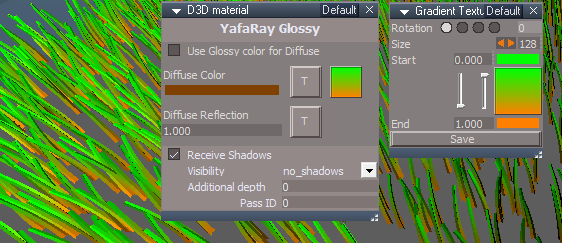
render object
LMB - OfflineRender.OpenView('',0,0);OfflineRender.RenderObject('')
RMB - OfflineRender.OpenPreferencesPanel()
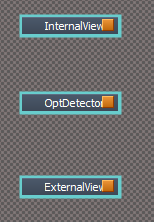
render animation
LMB - OfflineRender.OpenView('',0,0);OfflineRender.RenderAnimation('')
RMB - OfflineRender.OpenPreferencesPanel()
Clinton Reese

http://clintons3d.com
User avatar
trueBlue
Captain
Posts: 5548
Joined: 06 Jul 2009, 22:50
Type the number ten into the box: 10

Re: YafaRay for trueSpace 2019

Post by trueBlue »

Base trueSpace rendering buttons - not Unofficial Update rendering buttons
They are not the same?
What should happen with RMB?
I would think
OfflineRender.OpenPreferencesPanel()
which opens the current lighting method


The YafaRay4tS toolbar can be different commands, right?
Current RMB commands
//Scene
OfflineRender.OpenPreferencesPanel()
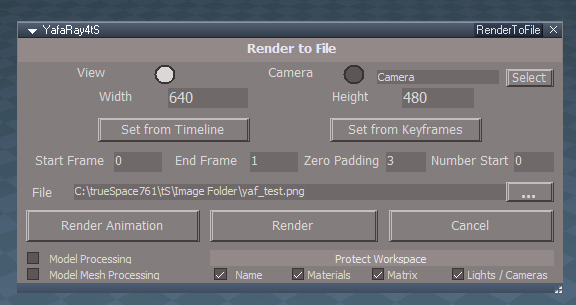
//Area
UserInterface.OpenToolPanelViewEx2("" , "" ,Space.CurrentScene()+"/YafaRay4tS", 4, 1, 0)
//Object
OfflineRender.OpenPreferencesPanel()
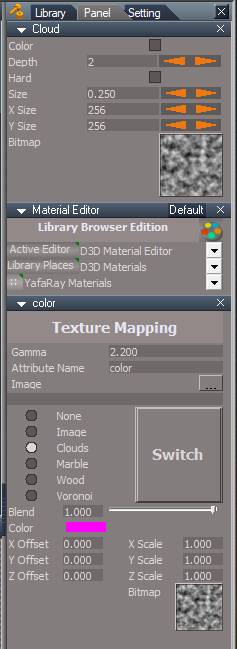
//Animation
UserInterface.OpenToolPanelViewEx2("" , "" ,Space.CurrentScene()+"/YafaRay4tS", 8, 1, 0)
//File
OfflineRender.OpenPreferencesPanel()
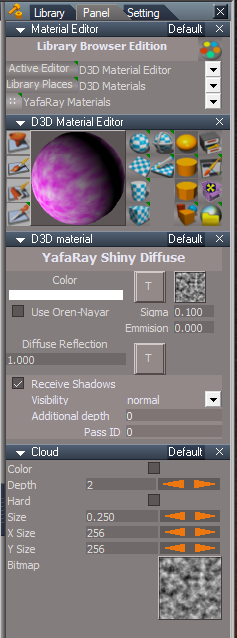
Return to “Rendering”