As I rig and bone each character I will be posting a short video of the movements and as I create the morph targets for facial movements I will post a animation of them talking.
Here is a video of Jimmy climbing up and down his tree is low render mode.
I still have some work to do on the animation to make it look correctly.
http://www.youtube.com/watch?v=EJIO_UezOR0
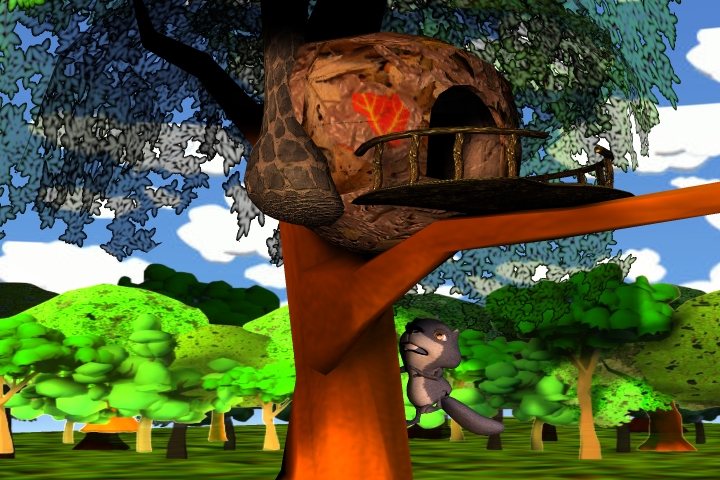
He is a rendered image of Jimmy in climbing the tree.
Calling all Modelers/Animators
-
jeffroig
- Chief Warrant Officer
- Posts: 662
- Joined: 22 May 2009, 10:49
- Type the number ten into the box: 0
Re: Calling all Modelers/Animators
- Attachments
-
..
-
pugman 1
- Captain
- Posts: 1555
- Joined: 21 May 2009, 19:26
- Type the number ten into the box: 0
- Location: Germany
Re: Calling all Modelers/Animators
This is going to be one cool animation
-
jeffroig
- Chief Warrant Officer
- Posts: 662
- Joined: 22 May 2009, 10:49
- Type the number ten into the box: 0
Re: Calling all Modelers/Animators
..
-
jeffroig
- Chief Warrant Officer
- Posts: 662
- Joined: 22 May 2009, 10:49
- Type the number ten into the box: 0
Re: Calling all Modelers/Animators
..
-
pugman 1
- Captain
- Posts: 1555
- Joined: 21 May 2009, 19:26
- Type the number ten into the box: 0
- Location: Germany
Re: Calling all Modelers/Animators
The dragonfly looks awsome man .cool job done 
-
Steinie

- Captain
- Posts: 2958
- Joined: 21 May 2009, 17:38
- Type the number ten into the box: 10
Re: Calling all Modelers/Animators
The squirrel has a recognizable characteristic that shouldn't be ignored in animation. A lively tail. I would consider putting three bones in the tail if there is only one. Before it jumps up the tree the tail needs to come up and then curl as he/she jumps upwards. A secondary action before the main. Same goes for when he/she climbs down the tree. Picture the curl in a wip close to the hands before the main action takes place. The secondary action transfers to the main.
What did you decide on the trees? I'll check out the dragon flies tonight when I have Youtube access.
I haven't heard back on the emails.
What did you decide on the trees? I'll check out the dragon flies tonight when I have Youtube access.
I haven't heard back on the emails.
-
jeffroig
- Chief Warrant Officer
- Posts: 662
- Joined: 22 May 2009, 10:49
- Type the number ten into the box: 0
Re: Calling all Modelers/Animators
The squirrel has 3 bones in the tail.
This was just a simple practice animation to show the character is rigged.
I have been watching the squirrels in my yard and video taping the tail motions.
The trees I am not sure about yet I like the one that the squirrel house is in but the others need to be more simple so the render time is increased.
This was just a simple practice animation to show the character is rigged.
I have been watching the squirrels in my yard and video taping the tail motions.
The trees I am not sure about yet I like the one that the squirrel house is in but the others need to be more simple so the render time is increased.
..
-
jamesmc
- Captain
- Posts: 1776
- Joined: 08 Jul 2009, 15:35
Re: Calling all Modelers/Animators
hmm, I only have 1 bone in my tail...
Walk by faith, not by sight.
-
spacekdet

- Captain
- Posts: 1810
- Joined: 27 May 2009, 15:00
- Type the number ten into the box: 10
- Location: On the day shift at the Utility Muffin Research Kitchen
Re: Calling all Modelers/Animators
jamesmc wrote:hmm, I only have 1 bone in my tail...
...must...resist...making...joke...
-
jamesmc
- Captain
- Posts: 1776
- Joined: 08 Jul 2009, 15:35
Re: Calling all Modelers/Animators
Ahahaha!spacekdet wrote:jamesmc wrote:hmm, I only have 1 bone in my tail...
...must...resist...making...joke...

Walk by faith, not by sight.
-
DesignDevil

- Master Chief Petty Officer
- Posts: 500
- Joined: 22 May 2009, 08:52
- Type the number ten into the box: 0
- Location: Neuruppin, Germany, Earth.
Re: Calling all Modelers/Animators
It seems to be that i found the best way to convert my models from TS into jeff's MAYA. So here my next toon house model:
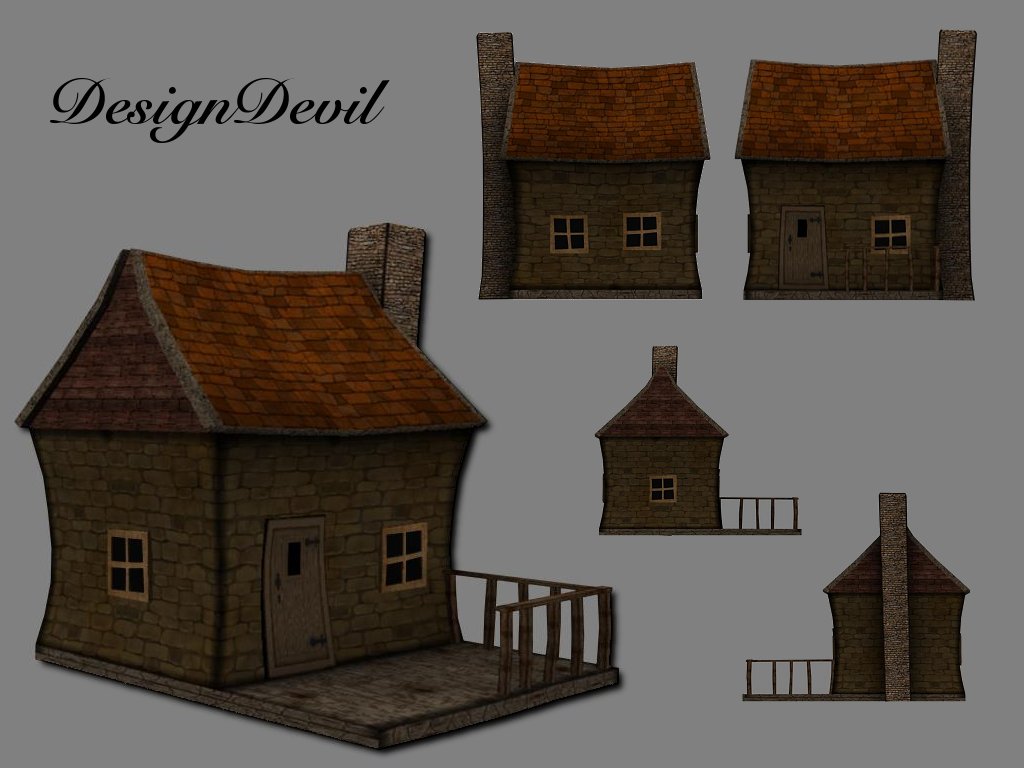
I still use TrueSpace 6.6
Link: My Youtube Channel
Link: www.DesignDevil.de - Plugins, Tutorials and more about TrueSpace 6.6
Link: My Youtube Channel
Link: www.DesignDevil.de - Plugins, Tutorials and more about TrueSpace 6.6
-
jeffroig
- Chief Warrant Officer
- Posts: 662
- Joined: 22 May 2009, 10:49
- Type the number ten into the box: 0
Re: Calling all Modelers/Animators
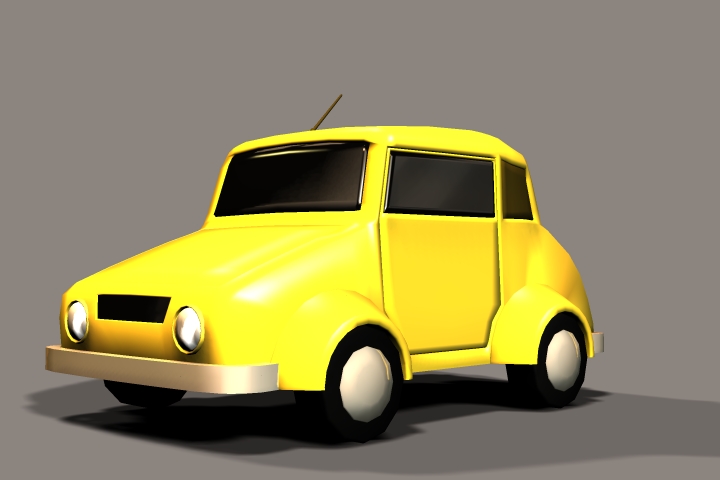
Here is DesignDevils toon car final render.
several shaders have been added to make the color brighter and to make the glass reflect.
several shaders have been added to make the color brighter and to make the glass reflect.
- Attachments
-
..
-
jeffroig
- Chief Warrant Officer
- Posts: 662
- Joined: 22 May 2009, 10:49
- Type the number ten into the box: 0
Re: Calling all Modelers/Animators
DarkScythe would you be interested in creating some trees?
..
-
darkmage
- Senior Chief Petty Officer
- Posts: 184
- Joined: 03 Apr 2011, 13:42
- Type the number ten into the box: 9
Re: Calling all Modelers/Animators
hi everyone this looks pretty cool.
if there is any thing i can do to help please say.
i'm not very good at organic modeling ,except in sculptris, so unless i can use that, things like animals are not on the list.But i'd be happy to provide houses and cars and so on.
if there is any thing i can do to help please say.
i'm not very good at organic modeling ,except in sculptris, so unless i can use that, things like animals are not on the list.But i'd be happy to provide houses and cars and so on.
-
DarkScythe
- Senior Chief Petty Officer
- Posts: 243
- Joined: 23 Sep 2009, 08:57
Re: Calling all Modelers/Animators
what kind of trees? you can post some sample pics and let see what I can do.DarkScythe would you be interested in creating some trees?
-
jeffroig
- Chief Warrant Officer
- Posts: 662
- Joined: 22 May 2009, 10:49
- Type the number ten into the box: 0
Re: Calling all Modelers/Animators
Here are some sample images of trees.
The last image is one that I created.
Send me a email so I can provide you with other information.
The last image is one that I created.
Send me a email so I can provide you with other information.
- Attachments
-

- Cartoon Tree2.jpg (15.05 KiB) Viewed 5535 times
-

- Cartoon Tree1.jpg (18.63 KiB) Viewed 5534 times
-

Last edited by jeffroig on 04 Sep 2011, 06:01, edited 1 time in total.
..
-
DarkScythe
- Senior Chief Petty Officer
- Posts: 243
- Joined: 23 Sep 2009, 08:57
Re: Calling all Modelers/Animators
jeffroig,
does "MAYA" have a command line rendering.. I think you should explore this because command line rendering makes render really fast because it uses little resources than rendering when the application is open.
does "MAYA" have a command line rendering.. I think you should explore this because command line rendering makes render really fast because it uses little resources than rendering when the application is open.
-
DarkScythe
- Senior Chief Petty Officer
- Posts: 243
- Joined: 23 Sep 2009, 08:57
Re: Calling all Modelers/Animators
here's some link to MAYA command line rendering
http://cg.tutsplus.com/tutorials/autode ... with-maya/
http://www.3dtotal.com/team/Tutorials_3 ... mand01.php
http://cg.tutsplus.com/tutorials/autode ... with-maya/
http://www.3dtotal.com/team/Tutorials_3 ... mand01.php
-
DesignDevil
- Master Chief Petty Officer
- Posts: 500
- Joined: 22 May 2009, 08:52
- Type the number ten into the box: 0
- Location: Neuruppin, Germany, Earth.
Re: Calling all Modelers/Animators
Here my Toon House Nr. 3 - i hope you like it. Jeff -> Mail is on the way

I still use TrueSpace 6.6
Link: My Youtube Channel
Link: www.DesignDevil.de - Plugins, Tutorials and more about TrueSpace 6.6
Link: My Youtube Channel
Link: www.DesignDevil.de - Plugins, Tutorials and more about TrueSpace 6.6
-
jeffroig
- Chief Warrant Officer
- Posts: 662
- Joined: 22 May 2009, 10:49
- Type the number ten into the box: 0
Re: Calling all Modelers/Animators
DD,
It looks excellent, fits the surroundings of the story perfect.
Thank you
It looks excellent, fits the surroundings of the story perfect.
Thank you
..
-
DesignDevil
- Master Chief Petty Officer
- Posts: 500
- Joined: 22 May 2009, 08:52
- Type the number ten into the box: 0
- Location: Neuruppin, Germany, Earth.
Re: Calling all Modelers/Animators
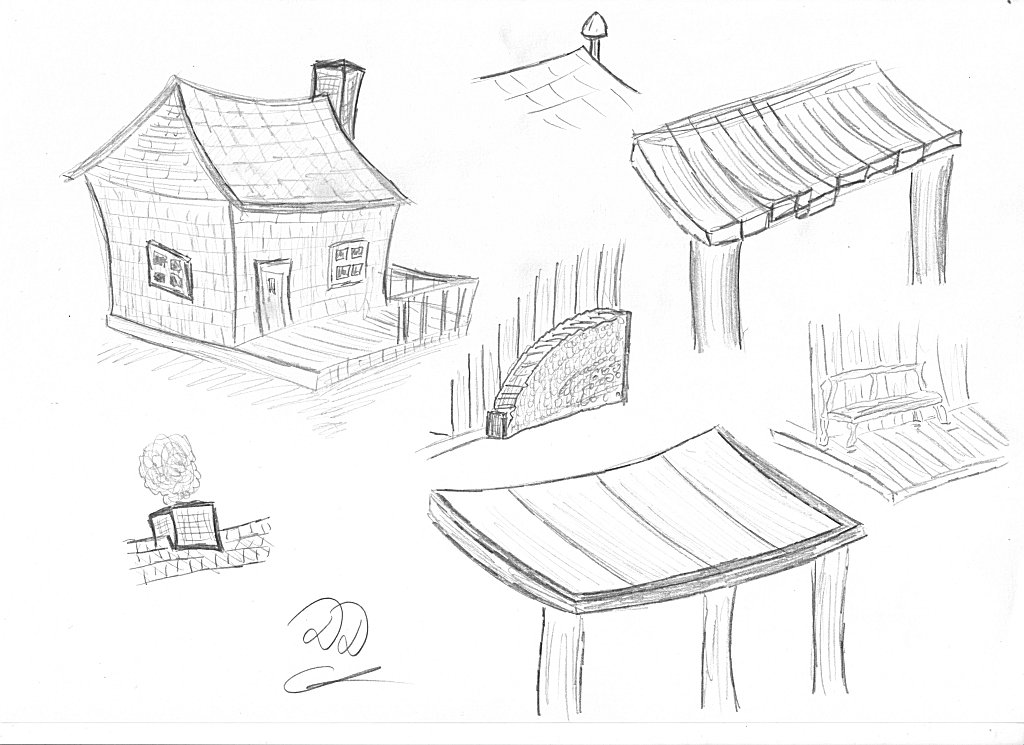
I'm not sure how the most people here work. I think the most of you just simple start to model.
In my case i scribble a few things out (if i have a good day). Maybe someone find this interesting:
btw. the blue lines are from my 2 years old doughter - she also like to scribble 
In my case i scribble a few things out (if i have a good day). Maybe someone find this interesting:

I still use TrueSpace 6.6
Link: My Youtube Channel
Link: www.DesignDevil.de - Plugins, Tutorials and more about TrueSpace 6.6
Link: My Youtube Channel
Link: www.DesignDevil.de - Plugins, Tutorials and more about TrueSpace 6.6
-
jamesmc
- Captain
- Posts: 1776
- Joined: 08 Jul 2009, 15:35
Re: Calling all Modelers/Animators
I think she was trying to tell you to add grass and clouds.btw. the blue lines are from my 2 years old doughter - she also like to scribble

Walk by faith, not by sight.
-
jeffroig
- Chief Warrant Officer
- Posts: 662
- Joined: 22 May 2009, 10:49
- Type the number ten into the box: 0
Re: Calling all Modelers/Animators
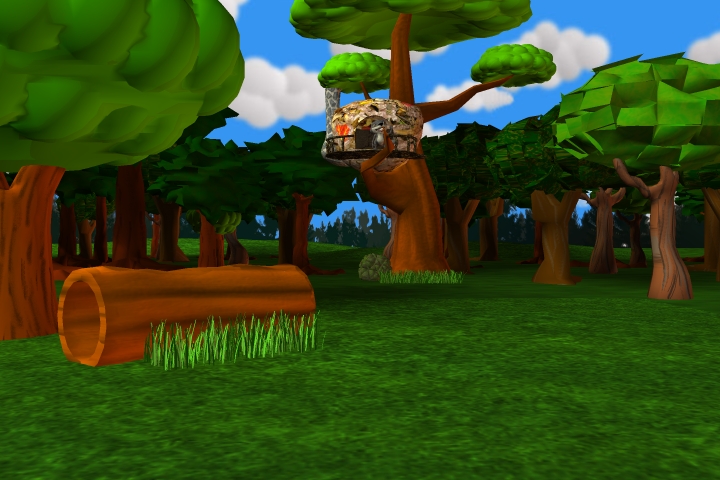
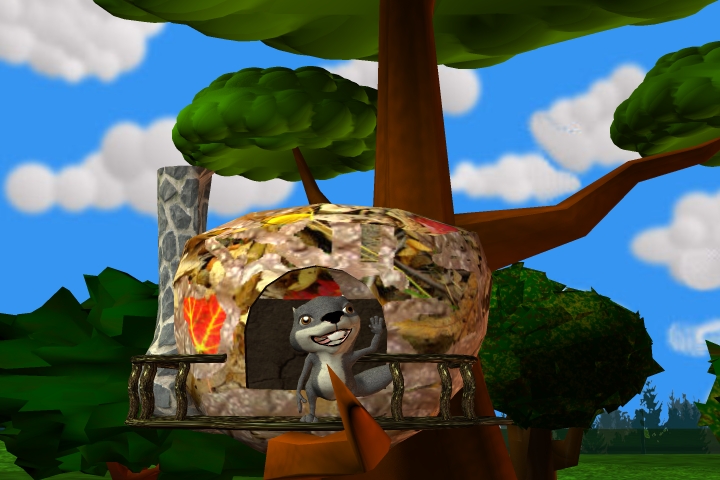
I have been working on setting up the stage as to say the place where all the action will happen.
Here are some images of it so far.
Here are some images of it so far.
- Attachments
-
-
-

..
-
jeffroig
- Chief Warrant Officer
- Posts: 662
- Joined: 22 May 2009, 10:49
- Type the number ten into the box: 0
Re: Calling all Modelers/Animators
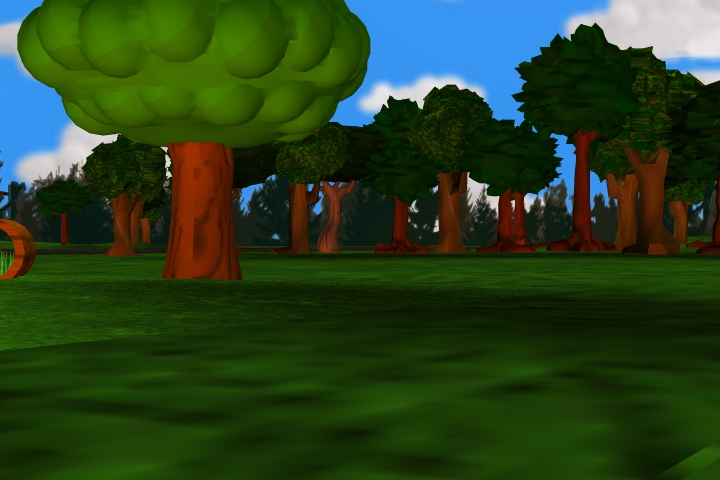
Here are more images.
- Attachments
-
-
-


..
-
jeffroig
- Chief Warrant Officer
- Posts: 662
- Joined: 22 May 2009, 10:49
- Type the number ten into the box: 0
Re: Calling all Modelers/Animators
I took a break from setting up the main stage and quickly grouped and rigged the sparrow that DarkScyther modeled.
Here is a simple animation of flight.
http://www.youtube.com/watch?v=_nfd3upJU2c
Here is a simple animation of flight.
http://www.youtube.com/watch?v=_nfd3upJU2c
..
-
Steinie
- Captain
- Posts: 2958
- Joined: 21 May 2009, 17:38
- Type the number ten into the box: 10
Re: Calling all Modelers/Animators
Jeff,
Do you want critiques as you post? I've got lots of first impressions.
I'll share some here but let me know if we're interfering with the process.
Everything is too straight but then the homes are curvy which is a nice look. Most of the tree trunks are straight up and down.
The hollow tree definitely needs to taper. I like the bubble trees but the spikey tree on the right doesn't fit into the scene.
The Squirrel house is almost there but I would place larger leaves on it and one big red leaf like your trying to show. The textures are too small.
Again the chimney needs a bend. No problems with the Squirrel, I like how you outlined the mouth which should really be easy to see when he/she speaks.
Some of the ground texture looks to repeat and I would use smaller planes rotated to break up the patterns and not add too much to the poly count.
The grass needs to grow out from the center more. Get rid of the saw blade effect. The sky fits this type of animation I think. The lighting should be cheery and warm.
You are a work dog from all the updates we are getting. Nice work!
Do you want critiques as you post? I've got lots of first impressions.
I'll share some here but let me know if we're interfering with the process.
Everything is too straight but then the homes are curvy which is a nice look. Most of the tree trunks are straight up and down.
The hollow tree definitely needs to taper. I like the bubble trees but the spikey tree on the right doesn't fit into the scene.
The Squirrel house is almost there but I would place larger leaves on it and one big red leaf like your trying to show. The textures are too small.
Again the chimney needs a bend. No problems with the Squirrel, I like how you outlined the mouth which should really be easy to see when he/she speaks.
Some of the ground texture looks to repeat and I would use smaller planes rotated to break up the patterns and not add too much to the poly count.
The grass needs to grow out from the center more. Get rid of the saw blade effect. The sky fits this type of animation I think. The lighting should be cheery and warm.
You are a work dog from all the updates we are getting. Nice work!
-
jeffroig
- Chief Warrant Officer
- Posts: 662
- Joined: 22 May 2009, 10:49
- Type the number ten into the box: 0
Re: Calling all Modelers/Animators
Bob,
I agree with you on the trees being too straight and the jagged leaves do not fit the rest.
The log was a good suggestion and I am re-designing it and adding a branch coming off it and have made the ends jagged.
The grass needs to be like you said and needs to have a tall weed coming from the center.
What I have learned to do is to create blocks of trees so that the placement is easier and textures dont take as long to load.
As always Bob thank you for the suggestions they were needed.
After working on something so long you become blind and a fresh set of eyes are needed.
I agree with you on the trees being too straight and the jagged leaves do not fit the rest.
The log was a good suggestion and I am re-designing it and adding a branch coming off it and have made the ends jagged.
The grass needs to be like you said and needs to have a tall weed coming from the center.
What I have learned to do is to create blocks of trees so that the placement is easier and textures dont take as long to load.
As always Bob thank you for the suggestions they were needed.
After working on something so long you become blind and a fresh set of eyes are needed.
..
-
DarkScythe
- Senior Chief Petty Officer
- Posts: 243
- Joined: 23 Sep 2009, 08:57
Re: Calling all Modelers/Animators
spiky trees seems doesn't have sds that's why it doesn't fit it look to sharp not smooth the grass also to sharp if you can bend a little softer or smooth it would be nice.. I think what Steinie trying to say in general terms "get rid of the sharp look effect" and also the grounds are a little bit even. Squirrel tree are too open put more leaves to it.
the clouds fit to the scene and the over all scene is much clearer and cleaner nice work
I am not worry about the animation, you can do excellent animation... I am worried about rendering time "how many seconds is the rendering of those scene".
edited: I as look carefully the ground seems they are not even but I think the texture of the ground make it even you can also add some soil texture to it.
the clouds fit to the scene and the over all scene is much clearer and cleaner nice work
I am not worry about the animation, you can do excellent animation... I am worried about rendering time "how many seconds is the rendering of those scene".
edited: I as look carefully the ground seems they are not even but I think the texture of the ground make it even you can also add some soil texture to it.
-
jamesmc
- Captain
- Posts: 1776
- Joined: 08 Jul 2009, 15:35
Re: Calling all Modelers/Animators
Sparrow fly rocks!jeffroig wrote:I took a break from setting up the main stage and quickly grouped and rigged the sparrow that DarkScyther modeled.
Here is a simple animation of flight.
http://www.youtube.com/watch?v=_nfd3upJU2c
Landing that puppy may be tricky though.
Walk by faith, not by sight.
-
jeffroig
- Chief Warrant Officer
- Posts: 662
- Joined: 22 May 2009, 10:49
- Type the number ten into the box: 0
Re: Calling all Modelers/Animators
I will be posting some new images up this evening.
What I have done is taken the trees that DarkScythe created and removed the tops from them.
I then deformed the trunks slightly so they are bent and have curves to them and extruded some areas to create more branches.
I then took my tops that I had created that are bubble looking and deformed several of them in different ways and placed them on the trunks.
The end result is a much more toony effect that matches the animations appearance.
I am also working on adding more lights to the entire scene so that all areas look as if the sun is coming from the same direction.
The texture for the grass has been smoothed out more to give it a better feel so it does not look jagged and weeds have been created that "V" upwards with the centers taller.
What I have done is taken the trees that DarkScythe created and removed the tops from them.
I then deformed the trunks slightly so they are bent and have curves to them and extruded some areas to create more branches.
I then took my tops that I had created that are bubble looking and deformed several of them in different ways and placed them on the trunks.
The end result is a much more toony effect that matches the animations appearance.
I am also working on adding more lights to the entire scene so that all areas look as if the sun is coming from the same direction.
The texture for the grass has been smoothed out more to give it a better feel so it does not look jagged and weeds have been created that "V" upwards with the centers taller.
..
-
jeffroig
- Chief Warrant Officer
- Posts: 662
- Joined: 22 May 2009, 10:49
- Type the number ten into the box: 0
Re: Calling all Modelers/Animators
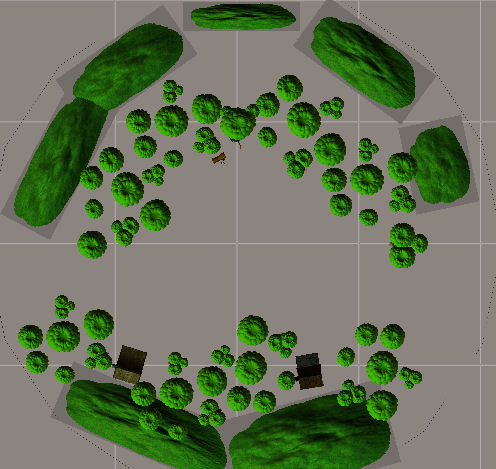
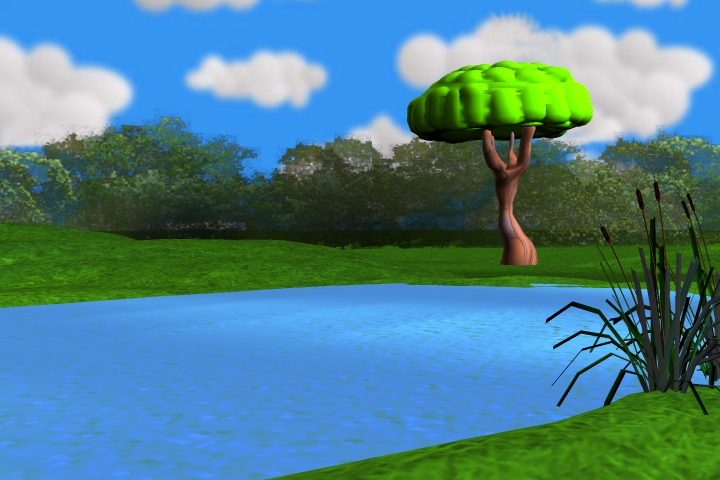
This first image is a top view of the setting.
I designed everything in a circle so that the camera can pan 360 degrees.
I have turned off the ground texture so you are able to see the trees.
The blank area between the back set of trees and the front where the two houses are will have a road going through it.
I designed everything in a circle so that the camera can pan 360 degrees.
I have turned off the ground texture so you are able to see the trees.
The blank area between the back set of trees and the front where the two houses are will have a road going through it.
- Attachments
-
..
-
jeffroig
- Chief Warrant Officer
- Posts: 662
- Joined: 22 May 2009, 10:49
- Type the number ten into the box: 0
Re: Calling all Modelers/Animators
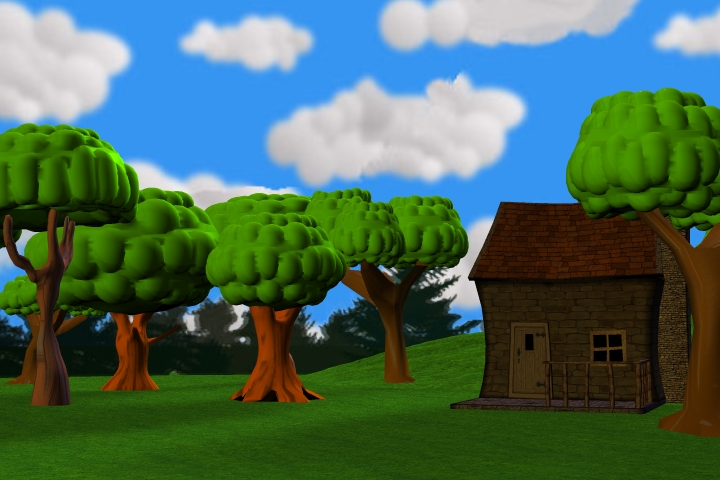
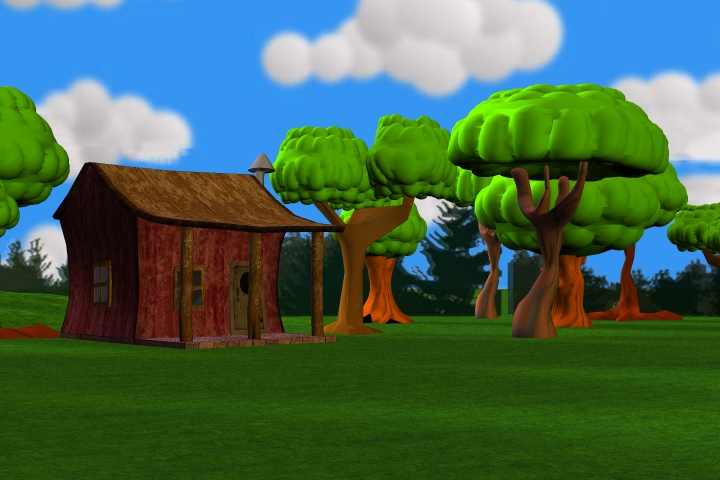
Here are the images of the two houses that DD designed for this.
- Attachments
-
-
..
-
jeffroig
- Chief Warrant Officer
- Posts: 662
- Joined: 22 May 2009, 10:49
- Type the number ten into the box: 0
Re: Calling all Modelers/Animators
Here is the image of the pond where the two frogs will reside.
- Attachments
-

..
-
jeffroig
- Chief Warrant Officer
- Posts: 662
- Joined: 22 May 2009, 10:49
- Type the number ten into the box: 0
Re: Calling all Modelers/Animators
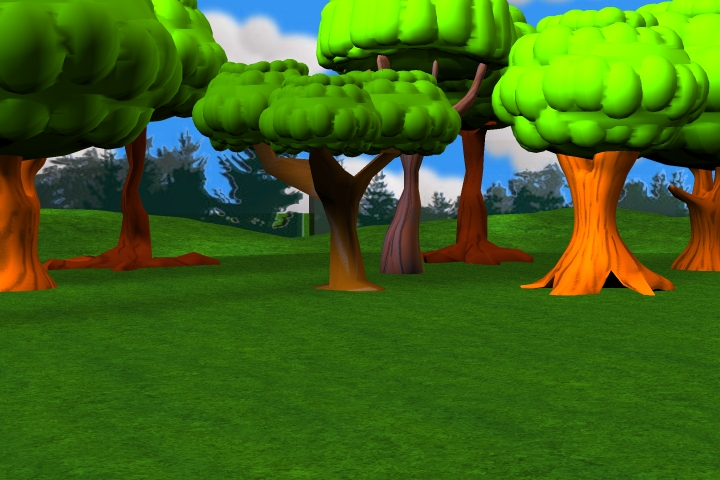
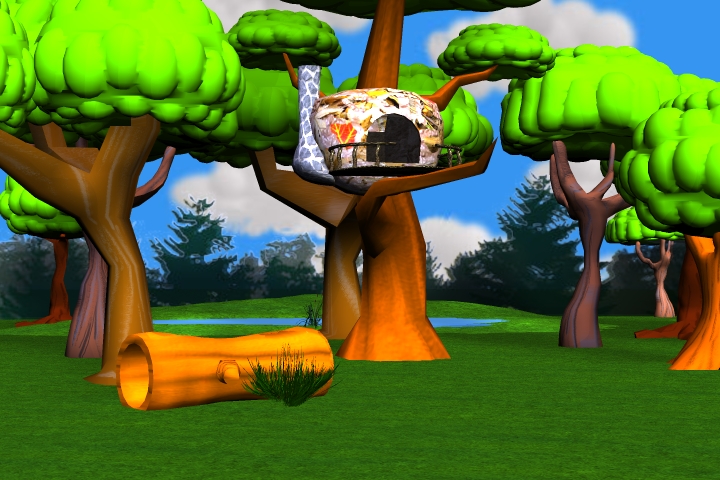
Here are images of the woods Front view, Left and Right.
- Attachments
-
-
-

..
-
pugman 1
- Captain
- Posts: 1555
- Joined: 21 May 2009, 19:26
- Type the number ten into the box: 0
- Location: Germany
Re: Calling all Modelers/Animators
That looks alot better cant wait to see this
-
jeffroig
- Chief Warrant Officer
- Posts: 662
- Joined: 22 May 2009, 10:49
- Type the number ten into the box: 0
Re: Calling all Modelers/Animators
You will notice that I have decreased the amount of trees in the scene from previous images.
This was done so that the attention would not be applied more so on the woods but more so on the characters and to make it easier to navigate the characters through the woods when they walk.
This also makes it easier to navigate the camera and not have any obstructions that block the view of the characters actions.
This was done so that the attention would not be applied more so on the woods but more so on the characters and to make it easier to navigate the characters through the woods when they walk.
This also makes it easier to navigate the camera and not have any obstructions that block the view of the characters actions.
..
-
Steinie
- Captain
- Posts: 2958
- Joined: 21 May 2009, 17:38
- Type the number ten into the box: 10
Re: Calling all Modelers/Animators
Looks good Jeff. Great idea about using a circular scene.
I'm torn about the background if it distracts because it is different
(pine trees, shape, dark). Not sure. If they are out of focus slightly it won't matter.
Keep up the good work!
I'm torn about the background if it distracts because it is different
(pine trees, shape, dark). Not sure. If they are out of focus slightly it won't matter.
Keep up the good work!
-
jeffroig
- Chief Warrant Officer
- Posts: 662
- Joined: 22 May 2009, 10:49
- Type the number ten into the box: 0
Re: Calling all Modelers/Animators
I am glad you said something so it isnt just me that felt that way.
I will create a new one without pine trees and use some lightly colored trees.
I will create a new one without pine trees and use some lightly colored trees.
..
-
DesignDevil
- Master Chief Petty Officer
- Posts: 500
- Joined: 22 May 2009, 08:52
- Type the number ten into the box: 0
- Location: Neuruppin, Germany, Earth.
Re: Calling all Modelers/Animators
Looks very cool so far. One question ... the complete movie plays on this set?
I still use TrueSpace 6.6
Link: My Youtube Channel
Link: www.DesignDevil.de - Plugins, Tutorials and more about TrueSpace 6.6
Link: My Youtube Channel
Link: www.DesignDevil.de - Plugins, Tutorials and more about TrueSpace 6.6
-
DarkScythe
- Senior Chief Petty Officer
- Posts: 243
- Joined: 23 Sep 2009, 08:57
Re: Calling all Modelers/Animators
I want to see the whole set so that we can see what still need improvement but it's all coming along now.
the scene are much lighter now good for cartoons.
the scene are much lighter now good for cartoons.
-
jeffroig
- Chief Warrant Officer
- Posts: 662
- Joined: 22 May 2009, 10:49
- Type the number ten into the box: 0
Re: Calling all Modelers/Animators
The whole movie is based around this set.
..
-
jeffroig
- Chief Warrant Officer
- Posts: 662
- Joined: 22 May 2009, 10:49
- Type the number ten into the box: 0
Re: Calling all Modelers/Animators
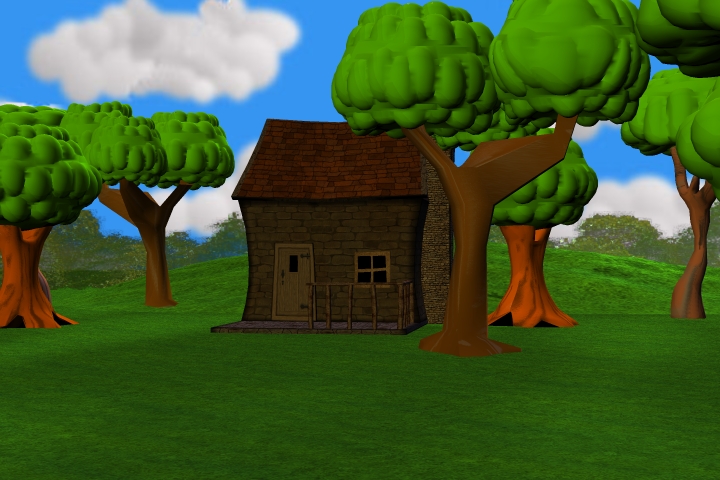
Here are some new images showing the background trees have changed and look much better.
- Attachments
-
-
-

..
-
DarkScythe
- Senior Chief Petty Officer
- Posts: 243
- Joined: 23 Sep 2009, 08:57
Re: Calling all Modelers/Animators
really looking nice....
although I don't look like the tree trunk because doesn't have SDS and it look a bit hard and sharp it's forgivable... You didn't add SDS because you want to decrease rendering time. (question, does all scene doesn't Have SDS?)
the ground is a little bit on the too green side have you consider putting a texture like the example picture I upload just o add contrast to the scene.
(But disregard this suggestion because you mention a while at your post there will be a "road", and if you add it to your scene and if gives enough contrast then you don't need to change the ground texture.)
Now it's taking shape let the squirrel take charge...
although I don't look like the tree trunk because doesn't have SDS and it look a bit hard and sharp it's forgivable... You didn't add SDS because you want to decrease rendering time. (question, does all scene doesn't Have SDS?)
the ground is a little bit on the too green side have you consider putting a texture like the example picture I upload just o add contrast to the scene.
(But disregard this suggestion because you mention a while at your post there will be a "road", and if you add it to your scene and if gives enough contrast then you don't need to change the ground texture.)
Now it's taking shape let the squirrel take charge...
- Attachments
-
-
-

-
jeffroig
- Chief Warrant Officer
- Posts: 662
- Joined: 22 May 2009, 10:49
- Type the number ten into the box: 0
Re: Calling all Modelers/Animators
Here is Sara Sparrow (Steinie's Fat Sparrow) doing a simple walk.
http://www.youtube.com/watch?v=4YLuCmQNQLk
http://www.youtube.com/watch?v=4YLuCmQNQLk
..
-
jamesmc
- Captain
- Posts: 1776
- Joined: 08 Jul 2009, 15:35
Re: Calling all Modelers/Animators
jeffroig wrote:Here is Sara Sparrow (Steinie's Fat Sparrow) doing a simple walk.
http://www.youtube.com/watch?v=4YLuCmQNQLk
heh heh
I looked like last Friday walking out of a Mexican Restaurant - full as a tick!
Walk by faith, not by sight.
-
jeffroig
- Chief Warrant Officer
- Posts: 662
- Joined: 22 May 2009, 10:49
- Type the number ten into the box: 0
Re: Calling all Modelers/Animators
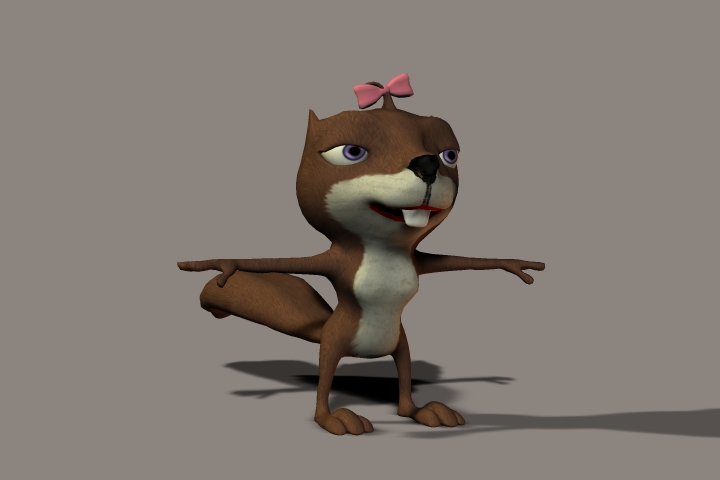
I have been continuing to work on the project and refining some parts of it to give it more character.
I most recently changed the Female Squirrel character (Lonnie) slightly to give more of a female look.
I most recently changed the Female Squirrel character (Lonnie) slightly to give more of a female look.
- Attachments
-
..
-
DesignDevil
- Master Chief Petty Officer
- Posts: 500
- Joined: 22 May 2009, 08:52
- Type the number ten into the box: 0
- Location: Neuruppin, Germany, Earth.
Re: Calling all Modelers/Animators
uhhh...a very cute girl ähhh squirrel  ... i would only add a few eyelashes and then she is my dreamsquirrel
Edit: comparisation example: follow me
... i would only add a few eyelashes and then she is my dreamsquirrel Edit: comparisation example: follow me
I still use TrueSpace 6.6
Link: My Youtube Channel
Link: www.DesignDevil.de - Plugins, Tutorials and more about TrueSpace 6.6
Link: My Youtube Channel
Link: www.DesignDevil.de - Plugins, Tutorials and more about TrueSpace 6.6
-
jeffroig
- Chief Warrant Officer
- Posts: 662
- Joined: 22 May 2009, 10:49
- Type the number ten into the box: 0
Re: Calling all Modelers/Animators
That was thought of DD but I am trying to keep render time down so the project still stays on schedule.
I have to have the animation finished an in to them by December 15, 2011.
I am currently cramming all my extra time into this.
I have to have the animation finished an in to them by December 15, 2011.
I am currently cramming all my extra time into this.
..
-
jeffroig
- Chief Warrant Officer
- Posts: 662
- Joined: 22 May 2009, 10:49
- Type the number ten into the box: 0
Re: Calling all Modelers/Animators
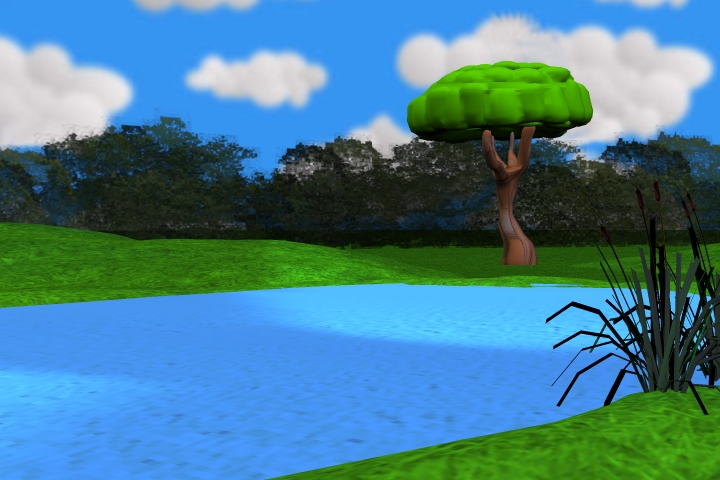
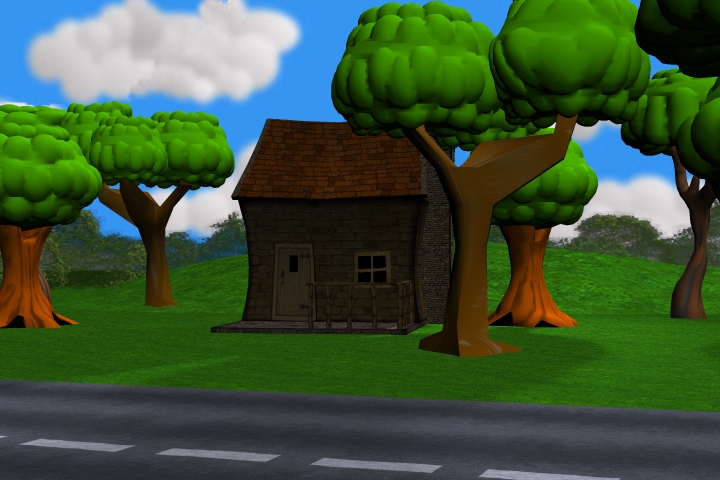
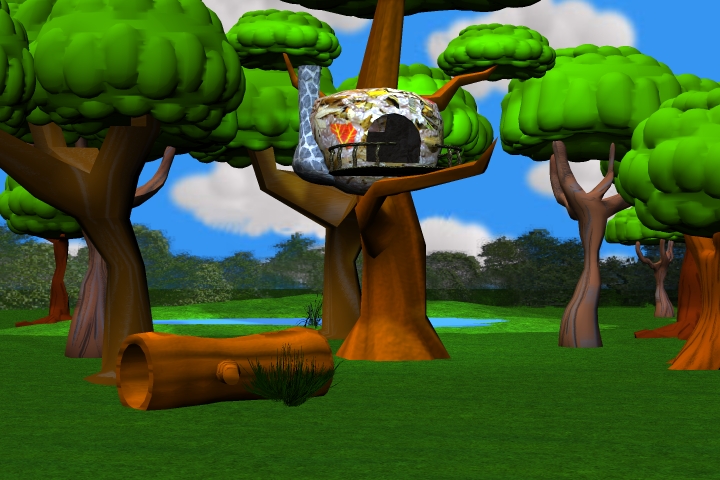
I have been working on lighting and shadows trying to get everything to look correct and give shadows that are not too dark.
Here are my results so far.
Here are my results so far.
- Attachments
-
-
-
..
-
jeffroig
- Chief Warrant Officer
- Posts: 662
- Joined: 22 May 2009, 10:49
- Type the number ten into the box: 0
Re: Calling all Modelers/Animators
I have changed all the lights in the scene to give the correct shadows.
I started out with 6 lights and now have 18 lights to make everything look correct.
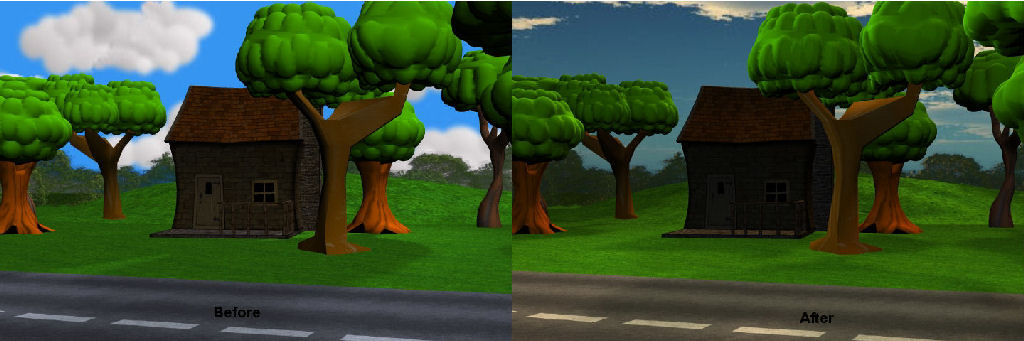
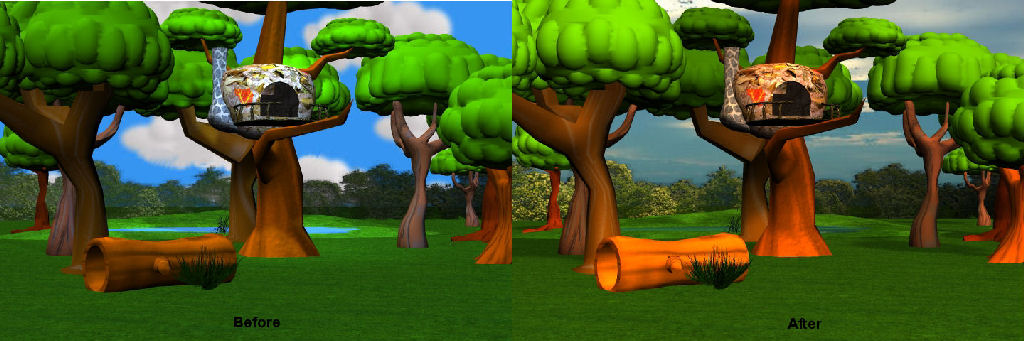
The clouds have changed and the shadows are now more sharp.
The next thing to work on is the sky color.
This animation takes place during all phases of the day so I had to create a cloud layer that was transparent so that the background color could be animated to show evening and morning time.
Here are some before and after images of what the scene used to look like and what it looks like now.
I started out with 6 lights and now have 18 lights to make everything look correct.
The clouds have changed and the shadows are now more sharp.
The next thing to work on is the sky color.
This animation takes place during all phases of the day so I had to create a cloud layer that was transparent so that the background color could be animated to show evening and morning time.
Here are some before and after images of what the scene used to look like and what it looks like now.
- Attachments
-
-
-

..
-
DarkScythe
- Senior Chief Petty Officer
- Posts: 243
- Joined: 23 Sep 2009, 08:57
Re: Calling all Modelers/Animators
I really like the before images it is alive and suited for cartoon look.. the after images is it looks like a little bit gloomy.
You have 18 lights that would make rendering slow if your going to 18 lights I would rather use environment lighting or ambient occlusion, its the same rendering time but better lightning and easy set up..........
Or you may want just to use 2 lights ... an area light or ambient light to light the whole scene then 1 directional light for shadow it is faster rendering than 18 lights or ambient occlusion, environment lighting.
I don't know about how lighting works in MAYA.... this is just a suggestion.
You have 18 lights that would make rendering slow if your going to 18 lights I would rather use environment lighting or ambient occlusion, its the same rendering time but better lightning and easy set up..........
Or you may want just to use 2 lights ... an area light or ambient light to light the whole scene then 1 directional light for shadow it is faster rendering than 18 lights or ambient occlusion, environment lighting.
I don't know about how lighting works in MAYA.... this is just a suggestion.
-
Breech Block

- Master Chief Petty Officer
- Posts: 482
- Joined: 13 Jun 2009, 20:31
Re: Calling all Modelers/Animators
Lots of great work going on here. I have really enjoyed looking at/watching the characters come slowly to life.
As for the lighting set-up, it's something I hate doing with a vengence. And I stink at it to boot so please feel free to take my comments with a pinch of salt.
That all said, I think your lighting is slightly off. When I look at your images, what I see is that the trees are casting a shadow directly underneath themselves, thus indicating it is around noon, but the quality (orangy/yellow hues) and direction of the light looks as if it is coming from the right/East, which kinda indicates early morning.
Anyhows, hope that helps. Keep up the good work.
As for the lighting set-up, it's something I hate doing with a vengence. And I stink at it to boot so please feel free to take my comments with a pinch of salt.
That all said, I think your lighting is slightly off. When I look at your images, what I see is that the trees are casting a shadow directly underneath themselves, thus indicating it is around noon, but the quality (orangy/yellow hues) and direction of the light looks as if it is coming from the right/East, which kinda indicates early morning.
Anyhows, hope that helps. Keep up the good work.

-
DesignDevil
- Master Chief Petty Officer
- Posts: 500
- Joined: 22 May 2009, 08:52
- Type the number ten into the box: 0
- Location: Neuruppin, Germany, Earth.
Re: Calling all Modelers/Animators
I completly agree with Breech...
i don't like the lightning. The scenes look totaly flat and/or to much shadow on the wrong places. It doesnt' look like a 3D cartoon - sorry.
The new one is also much more bad then before. Especialy the sky texture was better before.
Take a look on animated movies, i.e. Tangled, Ice Age, Over the Hedge. Try to find out how they have lighted the outdoor scenes.
samples:
http://www.desktopwallpaperhd.com/wallp ... /32129.jpg
http://www.photosot.com/wp-content/uplo ... own-03.jpg
http://outnow.ch/Media/Movies/Bilder/20 ... .ws/03.jpg
I would try this:
1. Some kind of light dome or occlusion for soft and warm shadows (nearly unvisible, just to give all objects shadows to increase the depth and the 3d effect)
2. One infinite light with a nearly sharp shadow to simulate the sun. Slightly yellow could help to increase this effect
3. 2 or 3 infinite lights WITHOUT shadows just for coloring and highlighting the scene (if the sun shadow is to dark). One slightly blue, one slightly red to adjust the sun light feeling
That's what i would do...other ideas?
i don't like the lightning. The scenes look totaly flat and/or to much shadow on the wrong places. It doesnt' look like a 3D cartoon - sorry.
The new one is also much more bad then before. Especialy the sky texture was better before.
Take a look on animated movies, i.e. Tangled, Ice Age, Over the Hedge. Try to find out how they have lighted the outdoor scenes.
samples:
http://www.desktopwallpaperhd.com/wallp ... /32129.jpg
http://www.photosot.com/wp-content/uplo ... own-03.jpg
http://outnow.ch/Media/Movies/Bilder/20 ... .ws/03.jpg
I would try this:
1. Some kind of light dome or occlusion for soft and warm shadows (nearly unvisible, just to give all objects shadows to increase the depth and the 3d effect)
2. One infinite light with a nearly sharp shadow to simulate the sun. Slightly yellow could help to increase this effect
3. 2 or 3 infinite lights WITHOUT shadows just for coloring and highlighting the scene (if the sun shadow is to dark). One slightly blue, one slightly red to adjust the sun light feeling
That's what i would do...other ideas?
I still use TrueSpace 6.6
Link: My Youtube Channel
Link: www.DesignDevil.de - Plugins, Tutorials and more about TrueSpace 6.6
Link: My Youtube Channel
Link: www.DesignDevil.de - Plugins, Tutorials and more about TrueSpace 6.6
-
DarkScythe
- Senior Chief Petty Officer
- Posts: 243
- Joined: 23 Sep 2009, 08:57
Re: Calling all Modelers/Animators
to hide the flaw of the scene and also to ease up lightning I think you should go to "NPR" render style (ithink it would rendering make fast, correct me if I'am wrong) and also a very toon look no worry about tweaking about how they look.
http://www.123rf.com/photo_8000636_cart ... ender.html
http://www.cebas.com/?pid=product&prd_i ... ature=1271
http://www.digitaltutors.com/11/trainin ... 01&vid=165
http://www.123rf.com/photo_8000636_cart ... ender.html
http://www.cebas.com/?pid=product&prd_i ... ature=1271
http://www.digitaltutors.com/11/trainin ... 01&vid=165
-
jeffroig
- Chief Warrant Officer
- Posts: 662
- Joined: 22 May 2009, 10:49
- Type the number ten into the box: 0
Re: Calling all Modelers/Animators
Darkscythe, Breech and DD,
Thank you for pointing out that it was not going in the right direction.
Based on what each of you has said I deleted all the lights and then re-created 3 new lights.
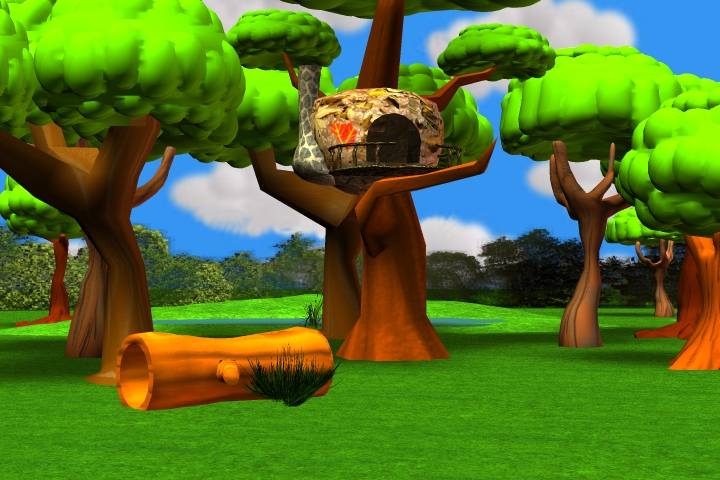
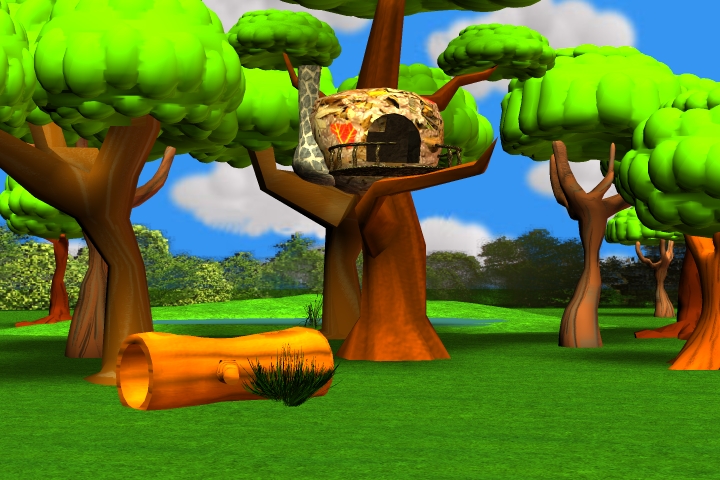
Here are four images taken from the same camera angle the only difference in each image is the lighting.
Take a look and tell me which one is the best and then from that one I will continue and make further adjustments.
Thank you for pointing out that it was not going in the right direction.
Based on what each of you has said I deleted all the lights and then re-created 3 new lights.
Here are four images taken from the same camera angle the only difference in each image is the lighting.
Take a look and tell me which one is the best and then from that one I will continue and make further adjustments.
- Attachments
-
-
-

..
-
jeffroig
- Chief Warrant Officer
- Posts: 662
- Joined: 22 May 2009, 10:49
- Type the number ten into the box: 0
Re: Calling all Modelers/Animators
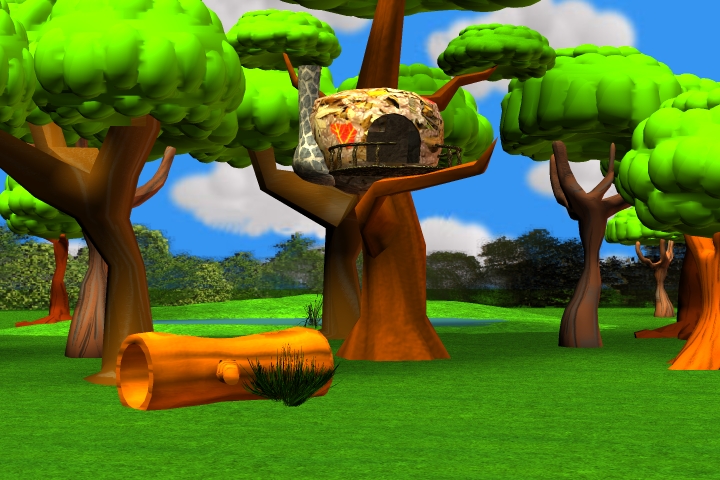
Here is image 4.
- Attachments
-
..
-
DesignDevil
- Master Chief Petty Officer
- Posts: 500
- Joined: 22 May 2009, 08:52
- Type the number ten into the box: 0
- Location: Neuruppin, Germany, Earth.
Re: Calling all Modelers/Animators
Well, the second one is for me (with this lightning) the best one.
One question: why can i see no shadow on the trunk with the hole in it (the thing in the foreground - i don't know how to call it)?
One question: why can i see no shadow on the trunk with the hole in it (the thing in the foreground - i don't know how to call it)?
I still use TrueSpace 6.6
Link: My Youtube Channel
Link: www.DesignDevil.de - Plugins, Tutorials and more about TrueSpace 6.6
Link: My Youtube Channel
Link: www.DesignDevil.de - Plugins, Tutorials and more about TrueSpace 6.6
-
jeffroig
- Chief Warrant Officer
- Posts: 662
- Joined: 22 May 2009, 10:49
- Type the number ten into the box: 0
Re: Calling all Modelers/Animators
DD,
Do you mean image NL-2?
Do you mean image NL-2?
..
-
DesignDevil
- Master Chief Petty Officer
- Posts: 500
- Joined: 22 May 2009, 08:52
- Type the number ten into the box: 0
- Location: Neuruppin, Germany, Earth.
Re: Calling all Modelers/Animators
Yes, that's what i mean as the best one from these 4. But my question was for all
I still use TrueSpace 6.6
Link: My Youtube Channel
Link: www.DesignDevil.de - Plugins, Tutorials and more about TrueSpace 6.6
Link: My Youtube Channel
Link: www.DesignDevil.de - Plugins, Tutorials and more about TrueSpace 6.6
-
jeffroig
- Chief Warrant Officer
- Posts: 662
- Joined: 22 May 2009, 10:49
- Type the number ten into the box: 0
Re: Calling all Modelers/Animators
Here is the reason why and you may need this info in the future.
If you take two object and place them side by side with a space between them and then place a light on them with shadows applied you will get the shadow of both objects cast on the ground and a shadow on the object.
If you increase the height of one object then you will most likely only get the shadow of the object you just changed the size of.
Why, well MAYA uses a sort of cam to determine where the shadow should be applied and as you scale a object it also scales to try and include all objects. The problem being is that this is not always correct and you have to adjust the shadow cam so that it zooms in closer so that the smaller objects shadow are also shown.
So the log laying on the ground is smaller than the trees so the shadow cam changed its zoom to try and correct so that all object have a shadow. So I adjusted the shadow cam and fixed the problem.
If you take two object and place them side by side with a space between them and then place a light on them with shadows applied you will get the shadow of both objects cast on the ground and a shadow on the object.
If you increase the height of one object then you will most likely only get the shadow of the object you just changed the size of.
Why, well MAYA uses a sort of cam to determine where the shadow should be applied and as you scale a object it also scales to try and include all objects. The problem being is that this is not always correct and you have to adjust the shadow cam so that it zooms in closer so that the smaller objects shadow are also shown.
So the log laying on the ground is smaller than the trees so the shadow cam changed its zoom to try and correct so that all object have a shadow. So I adjusted the shadow cam and fixed the problem.
- Attachments
-

..
-
DesignDevil
- Master Chief Petty Officer
- Posts: 500
- Joined: 22 May 2009, 08:52
- Type the number ten into the box: 0
- Location: Neuruppin, Germany, Earth.
Re: Calling all Modelers/Animators
Well, sounds a bit weird for me - but hey, if you can solve this...it is ok,
for me it looks much better, but i would prefer to increase the shadow length a bit. In other words: your sunlight is in the highnoon position (12' clock) but i think it could look much better if your clock is 3:00 pm
for me it looks much better, but i would prefer to increase the shadow length a bit. In other words: your sunlight is in the highnoon position (12' clock) but i think it could look much better if your clock is 3:00 pm
I still use TrueSpace 6.6
Link: My Youtube Channel
Link: www.DesignDevil.de - Plugins, Tutorials and more about TrueSpace 6.6
Link: My Youtube Channel
Link: www.DesignDevil.de - Plugins, Tutorials and more about TrueSpace 6.6
-
jeffroig
- Chief Warrant Officer
- Posts: 662
- Joined: 22 May 2009, 10:49
- Type the number ten into the box: 0
Re: Calling all Modelers/Animators
DD,
How is this...
How is this...
- Attachments
-

..
-
DesignDevil
- Master Chief Petty Officer
- Posts: 500
- Joined: 22 May 2009, 08:52
- Type the number ten into the box: 0
- Location: Neuruppin, Germany, Earth.
Re: Calling all Modelers/Animators
The direction of the light should be ok, maybe just a little bit more. But again i'm confused by the shadows.
This time not that i miss one, but the shadow from the squirrel is just a dot - why? I would expect to see the shape of him.
This time not that i miss one, but the shadow from the squirrel is just a dot - why? I would expect to see the shape of him.
I still use TrueSpace 6.6
Link: My Youtube Channel
Link: www.DesignDevil.de - Plugins, Tutorials and more about TrueSpace 6.6
Link: My Youtube Channel
Link: www.DesignDevil.de - Plugins, Tutorials and more about TrueSpace 6.6
-
jeffroig
- Chief Warrant Officer
- Posts: 662
- Joined: 22 May 2009, 10:49
- Type the number ten into the box: 0
Re: Calling all Modelers/Animators
Due to the direction he is standing this happens.
I just rotated the squirrel and rendered the scene and it then changes the shadow to show the tail and arms sticking out from the body.
I just rotated the squirrel and rendered the scene and it then changes the shadow to show the tail and arms sticking out from the body.
..
-
Breech Block
- Master Chief Petty Officer
- Posts: 482
- Joined: 13 Jun 2009, 20:31
Re: Calling all Modelers/Animators
I have to agree with DD. The lighting in image NL-2 is the best of the bunch. Pretty good in fact and much more natural looking with the shadows looking and behaving in a more realistic way due to their length, direction and softness. In the other images, the shadows are either not pronounced enough (top image) or the trees tend to look to shiny (bottom image).
-
DarkScythe
- Senior Chief Petty Officer
- Posts: 243
- Joined: 23 Sep 2009, 08:57
Re: Calling all Modelers/Animators
also delete, remove and do not include objects that is not being seen or shot by the camera so that rendering and loading of scene is fast specially when the gang is all presents in one scene.
keep up the good work.
keep up the good work.
-
jeffroig
- Chief Warrant Officer
- Posts: 662
- Joined: 22 May 2009, 10:49
- Type the number ten into the box: 0
Re: Calling all Modelers/Animators
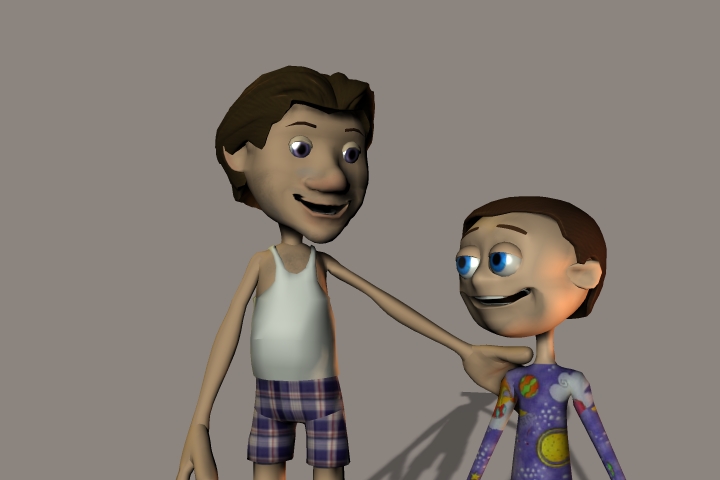
Meet the opening characters to the animation.
The opening starts out with a father reading a bed time story to his son called "Country Squirrel".
The animation then fades into our forest friends.
Allen is the father of Andrew.
Dad is already in his night clothes and Andrew is wearing his PJ's.
The opening starts out with a father reading a bed time story to his son called "Country Squirrel".
The animation then fades into our forest friends.
Allen is the father of Andrew.
Dad is already in his night clothes and Andrew is wearing his PJ's.
- Attachments
-
..
-
jamesmc
- Captain
- Posts: 1776
- Joined: 08 Jul 2009, 15:35
Re: Calling all Modelers/Animators
Cute characters.
Night clothes?
We call those underwear where I live.
Night clothes?
We call those underwear where I live.
Walk by faith, not by sight.
-
jeffroig
- Chief Warrant Officer
- Posts: 662
- Joined: 22 May 2009, 10:49
- Type the number ten into the box: 0
Re: Calling all Modelers/Animators
We will compromise and call them nightwear.... 
..
-
DarkScythe
- Senior Chief Petty Officer
- Posts: 243
- Joined: 23 Sep 2009, 08:57
Re: Calling all Modelers/Animators
the characters are fine and nice model, but andrew is a little bit taller to hear "Country Squirrel" he seems the height of 14 to 12 yrs. old base on dads height..
nightwear.. we call those dress here casual dress
nightwear.. we call those dress here casual dress
-
jeffroig
- Chief Warrant Officer
- Posts: 662
- Joined: 22 May 2009, 10:49
- Type the number ten into the box: 0
Re: Calling all Modelers/Animators
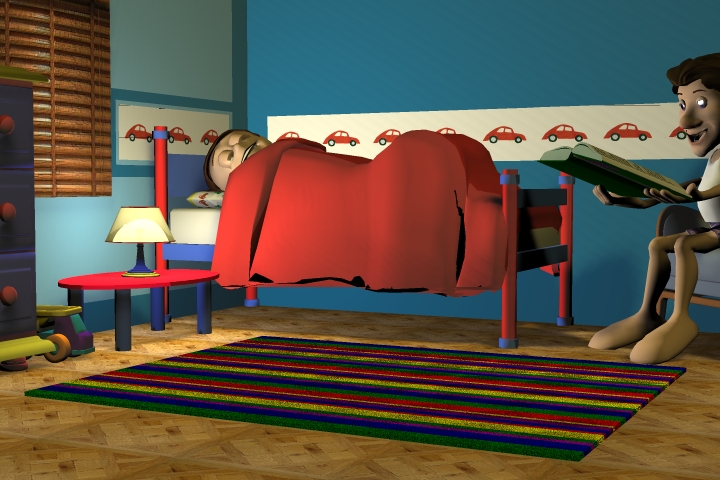
Here is image from the opening scene where the father reads the book to his son.
- Attachments
-
..
-
DesignDevil
- Master Chief Petty Officer
- Posts: 500
- Joined: 22 May 2009, 08:52
- Type the number ten into the box: 0
- Location: Neuruppin, Germany, Earth.
Re: Calling all Modelers/Animators
hmmm...well, not bad in principle.
here my ideas:
1. If i read a book for my doughter(s) at the evening i sit directly at the bed (or a chair directly aside), not in the other corner of the room.
2. To much light in the scene for this litle lamp, and again ===> WHERE ARE THE SHADOWS???. The kid is going to sleep, make it darker. Maybe one light to illuminate the book and one small on the wall (a little night light) for the kid. In technical: no infinite lights. Use Spots (warm yellow) to illuminate the importend things like the faces and the book and just a little, little, little bit infinite light for the room. That gives good shadows and makes it look warm.
http://woofamilyinhungary.files.wordpre ... lpaper.jpg
3. (could also attached to 1.) The cam should be much more "in the scene". I mean you should just show father, the book and the son - this makes it more private, soft, warm and comfortable (but maybe you plan to move the cam to such a position?!?). I think the scene should give this feelings to the audience, nobody wants to see a carpet or a toy on the floor while the father reads a book for his son which is going to bed.
http://misfondos.com.es/wallpaper/Boo-Monster-Inc/
As a overall tip...catch a cam, create the scene in real life and make a photo. Not so importend if it is sharp (especialy for darker situations). The interesting part of this picture is the lightning and in real life it is easier to "create" such a scene (switch on and off your lights) Now grab a 2D drawing program like Photoshop etc. and play with saturation, hue, gamma etc. and the photo effects for lightning until you find a good solution how the lights could be in the 3d scene.
here my ideas:
1. If i read a book for my doughter(s) at the evening i sit directly at the bed (or a chair directly aside), not in the other corner of the room.
2. To much light in the scene for this litle lamp, and again ===> WHERE ARE THE SHADOWS???. The kid is going to sleep, make it darker. Maybe one light to illuminate the book and one small on the wall (a little night light) for the kid. In technical: no infinite lights. Use Spots (warm yellow) to illuminate the importend things like the faces and the book and just a little, little, little bit infinite light for the room. That gives good shadows and makes it look warm.
http://woofamilyinhungary.files.wordpre ... lpaper.jpg
3. (could also attached to 1.) The cam should be much more "in the scene". I mean you should just show father, the book and the son - this makes it more private, soft, warm and comfortable (but maybe you plan to move the cam to such a position?!?). I think the scene should give this feelings to the audience, nobody wants to see a carpet or a toy on the floor while the father reads a book for his son which is going to bed.
http://misfondos.com.es/wallpaper/Boo-Monster-Inc/
As a overall tip...catch a cam, create the scene in real life and make a photo. Not so importend if it is sharp (especialy for darker situations). The interesting part of this picture is the lightning and in real life it is easier to "create" such a scene (switch on and off your lights)
Now grab a 2D drawing program like Photoshop etc. and play with saturation, hue, gamma etc. and the photo effects for lightning until you find a good solution how the lights could be in the 3d scene.I still use TrueSpace 6.6
Link: My Youtube Channel
Link: www.DesignDevil.de - Plugins, Tutorials and more about TrueSpace 6.6
Link: My Youtube Channel
Link: www.DesignDevil.de - Plugins, Tutorials and more about TrueSpace 6.6
-
jeffroig
- Chief Warrant Officer
- Posts: 662
- Joined: 22 May 2009, 10:49
- Type the number ten into the box: 0
Re: Calling all Modelers/Animators
DD,
You made some very good points.
While I rarely look at others work to get ideas I felt that in setting up the scene and making the light correct that this was one time that would be an exception.
I looked at several images from Monsters Inc and watch a few animated films to get an idea for the lighting.
What I saw in almost every image I looked at where a bedroom scene was that they were using a soft warm blue light to set the mood.
I also noticed very soft shadows nothing harsh.
You are correct about not seeing the rug or the toys, those items should be used when doing more of a action scene or a scene where there is a reaction taking place between two characters.
This scene is supposed to be just the father and son and by adding too many other objects into the scene takes away from this and the mood is lost.
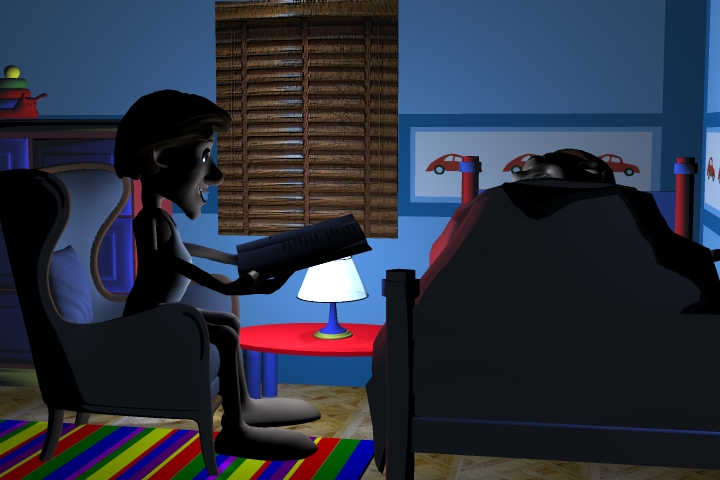
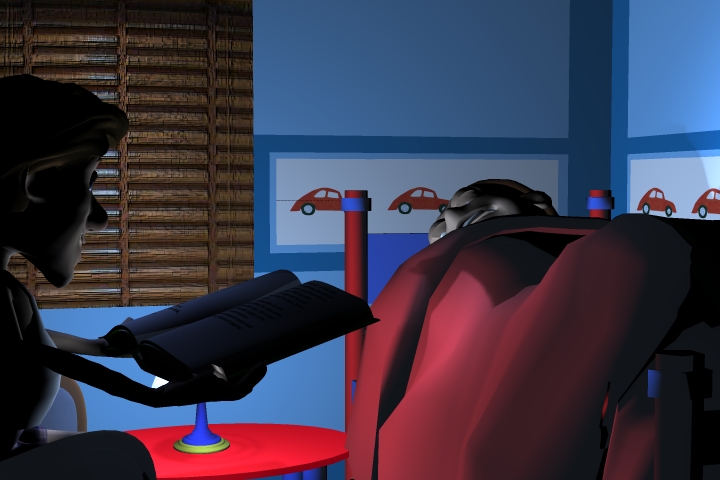
I have changed the scene so the father is sitting in the chair along side the bed and the lighting has more of a mood to it and the shadows are soft.
Here are three different images with slight changes in the angle.
The previous image had too much white light in it causing it to be too bright and there was no mood.
Let me know what you think now.
I actually prefer the last image called bedroom.
You made some very good points.
While I rarely look at others work to get ideas I felt that in setting up the scene and making the light correct that this was one time that would be an exception.
I looked at several images from Monsters Inc and watch a few animated films to get an idea for the lighting.
What I saw in almost every image I looked at where a bedroom scene was that they were using a soft warm blue light to set the mood.
I also noticed very soft shadows nothing harsh.
You are correct about not seeing the rug or the toys, those items should be used when doing more of a action scene or a scene where there is a reaction taking place between two characters.
This scene is supposed to be just the father and son and by adding too many other objects into the scene takes away from this and the mood is lost.
I have changed the scene so the father is sitting in the chair along side the bed and the lighting has more of a mood to it and the shadows are soft.
Here are three different images with slight changes in the angle.
The previous image had too much white light in it causing it to be too bright and there was no mood.
Let me know what you think now.
I actually prefer the last image called bedroom.
- Attachments
-
-
-

..
-
jeffroig
- Chief Warrant Officer
- Posts: 662
- Joined: 22 May 2009, 10:49
- Type the number ten into the box: 0
Re: Calling all Modelers/Animators
I came up with yet another image, I softened the light a little more and reduced the Ambient value on the red table the lamp sits on and decreased the bump value to the shade.
- Attachments
-

..
-
DesignDevil
- Master Chief Petty Officer
- Posts: 500
- Joined: 22 May 2009, 08:52
- Type the number ten into the box: 0
- Location: Neuruppin, Germany, Earth.
Re: Calling all Modelers/Animators
The lightning is now much, much better and yes you are right, blue is also better than yellow in this case.
betrom2.jpg is not good -> the bed himself hides the son. The faces (the actors) are the most importend "things" that we want to see in a animated film!
betroom3.jpg would be good for a long shot. You could use it to come into the scene and make a cam movement or or scene cut. If there should be no cam movement or cut - forget this shot. To far away from the actors and again to much from the room is to see.
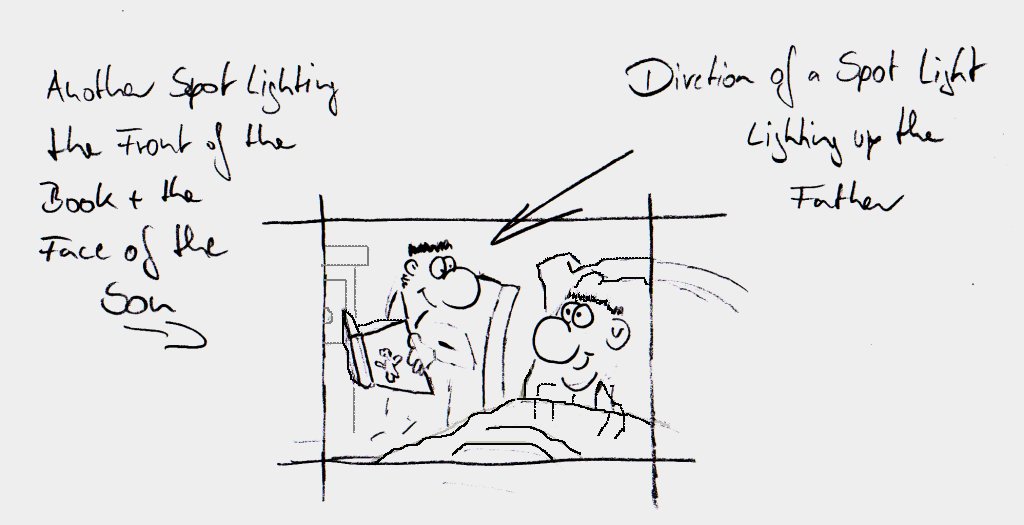
betroom4.jpg is my favorite (so far, see attachment). BUT: If you bring the father into a position where he sit comfotable in the chair you could run into a problem because he would be out of the view
To clear things a bit up what i have in mind i scribbled a bit around. That shows how i have such a scene in my mind. I would also add DOF to bring the focus much more onto the faces and blur up unimportend things like the bed in the foreground or the things in the background but i think the rest of your movie doesn't use it so that i think -> forget DOF.
betrom2.jpg is not good -> the bed himself hides the son. The faces (the actors) are the most importend "things" that we want to see in a animated film!
betroom3.jpg would be good for a long shot. You could use it to come into the scene and make a cam movement or or scene cut. If there should be no cam movement or cut - forget this shot. To far away from the actors and again to much from the room is to see.
betroom4.jpg is my favorite (so far, see attachment). BUT: If you bring the father into a position where he sit comfotable in the chair you could run into a problem because he would be out of the view
To clear things a bit up what i have in mind i scribbled a bit around. That shows how i have such a scene in my mind. I would also add DOF to bring the focus much more onto the faces and blur up unimportend things like the bed in the foreground or the things in the background but i think the rest of your movie doesn't use it so that i think -> forget DOF.
I still use TrueSpace 6.6
Link: My Youtube Channel
Link: www.DesignDevil.de - Plugins, Tutorials and more about TrueSpace 6.6
Link: My Youtube Channel
Link: www.DesignDevil.de - Plugins, Tutorials and more about TrueSpace 6.6
-
jeffroig
- Chief Warrant Officer
- Posts: 662
- Joined: 22 May 2009, 10:49
- Type the number ten into the box: 0
Re: Calling all Modelers/Animators
DD,
Here is a quick image without the characters.
Here is a quick image without the characters.
- Attachments
-

..
-
jamesmc
- Captain
- Posts: 1776
- Joined: 08 Jul 2009, 15:35
Re: Calling all Modelers/Animators
As a professor told me once in a film course I took decades ago, lighting in film not only gives the mood, but can be used to develop the genre of the story.
A father reading a story to his child should reflect comforting mood lighting. As opposed to a chase scene in a woodlands area, where shadows are used as markers from the towering trees to reflect scale, placement and a reference for speedy completion of the chase.
Just thinking out loud...
A father reading a story to his child should reflect comforting mood lighting. As opposed to a chase scene in a woodlands area, where shadows are used as markers from the towering trees to reflect scale, placement and a reference for speedy completion of the chase.
Just thinking out loud...
Walk by faith, not by sight.
-
DesignDevil
- Master Chief Petty Officer
- Posts: 500
- Joined: 22 May 2009, 08:52
- Type the number ten into the box: 0
- Location: Neuruppin, Germany, Earth.
Re: Calling all Modelers/Animators
Hi Jeff, looks now much, much better (well, for me). Just the blanket (correct word???) is a bit to high/thick/plump.
I still use TrueSpace 6.6
Link: My Youtube Channel
Link: www.DesignDevil.de - Plugins, Tutorials and more about TrueSpace 6.6
Link: My Youtube Channel
Link: www.DesignDevil.de - Plugins, Tutorials and more about TrueSpace 6.6
-
jeffroig
- Chief Warrant Officer
- Posts: 662
- Joined: 22 May 2009, 10:49
- Type the number ten into the box: 0
Re: Calling all Modelers/Animators
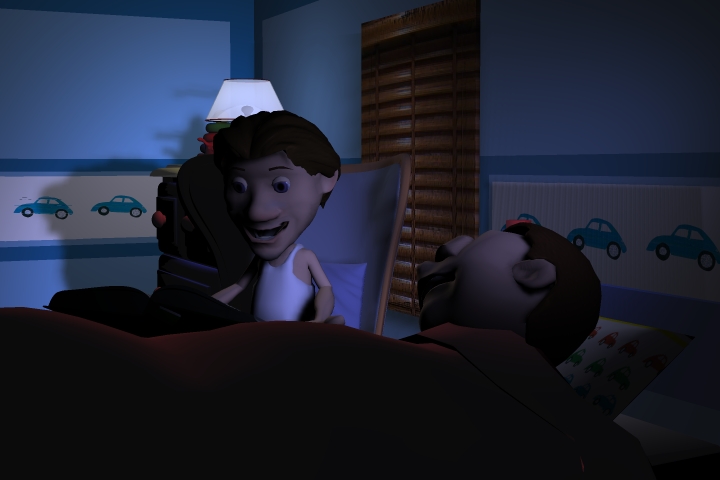
Here is a new image same angle but now we have the characters.
- Attachments
-


..
-
DesignDevil
- Master Chief Petty Officer
- Posts: 500
- Joined: 22 May 2009, 08:52
- Type the number ten into the box: 0
- Location: Neuruppin, Germany, Earth.
Re: Calling all Modelers/Animators
Very cool. Is it possible to set the light focus much more onto the 2 characters instead to the room? For me the room is still to lightful (especialy the walls). The direction of the light is very good. The shadow from the father goes away from the view direction and we can see the son and his face. That's exactly what i had in mind...
...so far -> very good job. But hey - this is just my opinion, i don't know what the others mean - or what you think
...so far -> very good job. But hey - this is just my opinion, i don't know what the others mean - or what you think
I still use TrueSpace 6.6
Link: My Youtube Channel
Link: www.DesignDevil.de - Plugins, Tutorials and more about TrueSpace 6.6
Link: My Youtube Channel
Link: www.DesignDevil.de - Plugins, Tutorials and more about TrueSpace 6.6