Calling all Modelers/Animators
-
Finis

- Captain
- Posts: 5410
- Joined: 21 May 2009, 18:26
- Type the number ten into the box: 0
- Location: America!
Re: Calling all Modelers/Animators
The boy seems large compared to the father. The bed is very high. I think the bed should be lower. It would just look better and would keep the bed from blocking the father in some views.
I prefer dangerous freedom over peaceful servitude. -- Thomas Jefferson/Jean Jacques Rousseau
-
jeffroig
- Chief Warrant Officer
- Posts: 662
- Joined: 22 May 2009, 10:49
- Type the number ten into the box: 0
Re: Calling all Modelers/Animators
DD,
Here is a new image.
Here is a new image.
- Attachments
-

..
-
DesignDevil

- Master Chief Petty Officer
- Posts: 500
- Joined: 22 May 2009, 08:52
- Type the number ten into the box: 0
- Location: Neuruppin, Germany, Earth.
Re: Calling all Modelers/Animators
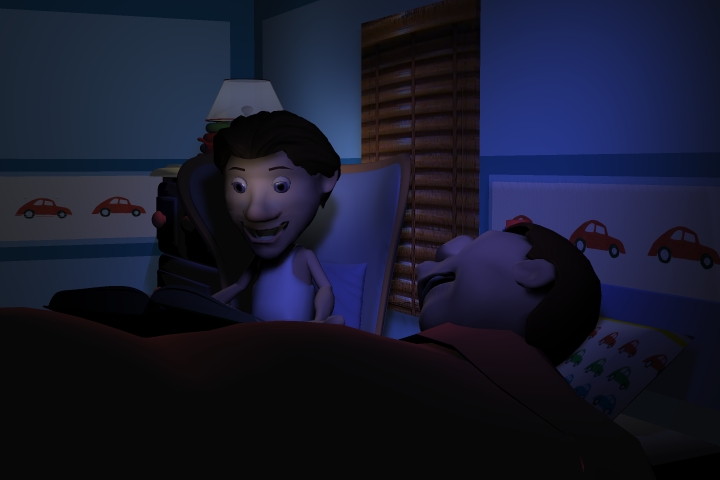
Woho...i love it very much. The room is dark enough, the characters are where they should be - perfect.
BUT (oh comon this man is never happen)...
Ok, last editions:
- now set a spot light onto the face from the father to light him up a bit (but just the face - small focus and just a bit light)
Let's try if this will work -> and then: it's perfect for me
BUT
(oh comon this man is never happen)...Ok, last editions:
- now set a spot light onto the face from the father to light him up a bit (but just the face - small focus and just a bit light)
Let's try if this will work -> and then: it's perfect for me
I still use TrueSpace 6.6
Link: My Youtube Channel
Link: www.DesignDevil.de - Plugins, Tutorials and more about TrueSpace 6.6
Link: My Youtube Channel
Link: www.DesignDevil.de - Plugins, Tutorials and more about TrueSpace 6.6
-
jeffroig
- Chief Warrant Officer
- Posts: 662
- Joined: 22 May 2009, 10:49
- Type the number ten into the box: 0
Re: Calling all Modelers/Animators
DD,
Here we go a new image.
Here we go a new image.
- Attachments
-

..
-
DesignDevil
- Master Chief Petty Officer
- Posts: 500
- Joined: 22 May 2009, 08:52
- Type the number ten into the box: 0
- Location: Neuruppin, Germany, Earth.
Re: Calling all Modelers/Animators
That's a to small focus try to catch the complete face.
try to catch the complete face.I still use TrueSpace 6.6
Link: My Youtube Channel
Link: www.DesignDevil.de - Plugins, Tutorials and more about TrueSpace 6.6
Link: My Youtube Channel
Link: www.DesignDevil.de - Plugins, Tutorials and more about TrueSpace 6.6
-
jeffroig
- Chief Warrant Officer
- Posts: 662
- Joined: 22 May 2009, 10:49
- Type the number ten into the box: 0
Re: Calling all Modelers/Animators
Here are two more images, I think Bedroom New 4C is the best.
- Attachments
-
-

..
-
trueBlue

- Captain
- Posts: 5548
- Joined: 06 Jul 2009, 22:50
- Type the number ten into the box: 10
Re: Calling all Modelers/Animators
Where is the big fluffy pillow? Poor little guy is having neck strain.
-
DesignDevil
- Master Chief Petty Officer
- Posts: 500
- Joined: 22 May 2009, 08:52
- Type the number ten into the box: 0
- Location: Neuruppin, Germany, Earth.
Re: Calling all Modelers/Animators
Yes, for me -> PERFECT. THUMBS UP.
I still use TrueSpace 6.6
Link: My Youtube Channel
Link: www.DesignDevil.de - Plugins, Tutorials and more about TrueSpace 6.6
Link: My Youtube Channel
Link: www.DesignDevil.de - Plugins, Tutorials and more about TrueSpace 6.6
-
jeffroig
- Chief Warrant Officer
- Posts: 662
- Joined: 22 May 2009, 10:49
- Type the number ten into the box: 0
Re: Calling all Modelers/Animators
DD,
I knew if we kept trying eventually we would get to a good result.
TrueBlue,
Its a poor country family that couldnt find any more chickens to pluck...LOL
I knew if we kept trying eventually we would get to a good result.
TrueBlue,
Its a poor country family that couldnt find any more chickens to pluck...LOL
..
-
Breech Block

- Master Chief Petty Officer
- Posts: 482
- Joined: 13 Jun 2009, 20:31
Re: Calling all Modelers/Animators
Nice work.  DD certainly knows his stuff when it comes to lighting.
DD certainly knows his stuff when it comes to lighting.
-
jeffroig
- Chief Warrant Officer
- Posts: 662
- Joined: 22 May 2009, 10:49
- Type the number ten into the box: 0
Re: Calling all Modelers/Animators
I agree, DD may of just found his true calling.
DD we may have to revisit the forest scene and re-adjust the lighting there.
DD we may have to revisit the forest scene and re-adjust the lighting there.
..
-
DesignDevil
- Master Chief Petty Officer
- Posts: 500
- Joined: 22 May 2009, 08:52
- Type the number ten into the box: 0
- Location: Neuruppin, Germany, Earth.
Re: Calling all Modelers/Animators
Well, we could do so but...
the normal pipeline in creating animations is more like this:
x. have a idea
x.x. draw scribbles to define characters, scene layouts, props, etc.
Post Production
1. write / rewrite the book
2. write / rewrite | draw / redraw a story book (go back to 1 and adjust), normaly together with the director, producer etc.
3. create a principle design of the characters, models etc. and start modeling of props etc. including rigging the characters, doing tests etc.
4. record the voices from the actors (together with 1./2.)
Production
5. create a story real (a movie with the drawen scribbles and the actors voices, so you can check if the story wil "work" and the timing/cuts etc. are correct) If not, go back to step 1
6. create the animation splittet in scenes given by the story or better by the story real. For props use placeholders
6.1. at first create a blocking version
6.2. redefine the blocks into smaller pieces
6.3. finalize the animation
6.4. setup/animate the camera (story real will help) show it the director and go back to 6.1. if needed
note: At this point no textured element is used, no real prop is used or effect is added, except if it is needed for the animation (i.e. animated props).
7. if the animation works, setup the scene with all the (now hopefuly finished and polished) props
8. lightning, test renders with DOF, Motion Blur etc.
9. final scene renders (as image sequence)
Post Production
10. adding the images to a animation and add effects etc. If you think something is wrong, go back to the specific point
Well...normaly more than 1 person is involved into such a production so that all points hang together (more or less) in the time where they done. But the importend point is:
Lightning is normaly one of the latest things that you do, except the scene stays or falls with/thrue the light.
So, start to animate and don't think about to much for the lightning. You will spent a lot of time into it and later you find out that it is wrong or it doesn't fit to the scene and you have to start again.
...and btw. it is much more easier and faster to animate with placeholders, clean colored characters, and a simple lightning.
well, the point is (especialy in trueSpace): is it possible to animate with a character different from the final one (i mean the texturing). But if you animate in MAYA it should be no problem.
the normal pipeline in creating animations is more like this:
x. have a idea
x.x. draw scribbles to define characters, scene layouts, props, etc.
Post Production
1. write / rewrite the book
2. write / rewrite | draw / redraw a story book (go back to 1 and adjust), normaly together with the director, producer etc.
3. create a principle design of the characters, models etc. and start modeling of props etc. including rigging the characters, doing tests etc.
4. record the voices from the actors (together with 1./2.)
Production
5. create a story real (a movie with the drawen scribbles and the actors voices, so you can check if the story wil "work" and the timing/cuts etc. are correct) If not, go back to step 1
6. create the animation splittet in scenes given by the story or better by the story real. For props use placeholders
6.1. at first create a blocking version
6.2. redefine the blocks into smaller pieces
6.3. finalize the animation
6.4. setup/animate the camera (story real will help) show it the director and go back to 6.1. if needed
note: At this point no textured element is used, no real prop is used or effect is added, except if it is needed for the animation (i.e. animated props).
7. if the animation works, setup the scene with all the (now hopefuly finished and polished) props
8. lightning, test renders with DOF, Motion Blur etc.
9. final scene renders (as image sequence)
Post Production
10. adding the images to a animation and add effects etc. If you think something is wrong, go back to the specific point
Well...normaly more than 1 person is involved into such a production so that all points hang together (more or less) in the time where they done. But the importend point is:
Lightning is normaly one of the latest things that you do, except the scene stays or falls with/thrue the light.
So, start to animate and don't think about to much for the lightning. You will spent a lot of time into it and later you find out that it is wrong or it doesn't fit to the scene and you have to start again.
...and btw. it is much more easier and faster to animate with placeholders, clean colored characters, and a simple lightning.
well, the point is (especialy in trueSpace): is it possible to animate with a character different from the final one (i mean the texturing). But if you animate in MAYA it should be no problem.
I still use TrueSpace 6.6
Link: My Youtube Channel
Link: www.DesignDevil.de - Plugins, Tutorials and more about TrueSpace 6.6
Link: My Youtube Channel
Link: www.DesignDevil.de - Plugins, Tutorials and more about TrueSpace 6.6
-
jeffroig
- Chief Warrant Officer
- Posts: 662
- Joined: 22 May 2009, 10:49
- Type the number ten into the box: 0
Re: Calling all Modelers/Animators
DD,
Here is my normal process for doing a animation, I will give brief steps.
1) Concept or Idea
2) Story
3) Design characters
4) Create script
5) Record voices/effects etc...
6) Animate a low quality version
7) Edit and add music
8) Way a couple days and then watch (time to clear the head)
9) Edit the script if needed.
10) Animate final version
11) Edit video and add sounds
12) Watch and enjoy
Here is my normal process for doing a animation, I will give brief steps.
1) Concept or Idea
2) Story
3) Design characters
4) Create script
5) Record voices/effects etc...
6) Animate a low quality version
7) Edit and add music
8) Way a couple days and then watch (time to clear the head)
9) Edit the script if needed.
10) Animate final version
11) Edit video and add sounds
12) Watch and enjoy
..
-
jeffroig
- Chief Warrant Officer
- Posts: 662
- Joined: 22 May 2009, 10:49
- Type the number ten into the box: 0
Re: Calling all Modelers/Animators
Technical errors, Technical errors and more Technical errors.
Over the past week I have ran into more technical errors than ever before.
The reason being is that I am trying to push everything beyond its limits.
The limits being memory, I did have 2 gig of memory in the render PC's I quickly learned I had to have more.
So now they have 6 gig each and all of them have been upgraded to Windows XP 64.
Here is a low quality render of the opening scene to Country Squirrel.
http://www.youtube.com/watch?v=FCIYycx1tjw
Over the past week I have ran into more technical errors than ever before.
The reason being is that I am trying to push everything beyond its limits.
The limits being memory, I did have 2 gig of memory in the render PC's I quickly learned I had to have more.
So now they have 6 gig each and all of them have been upgraded to Windows XP 64.
Here is a low quality render of the opening scene to Country Squirrel.
http://www.youtube.com/watch?v=FCIYycx1tjw
..
-
DarkScythe
- Senior Chief Petty Officer
- Posts: 243
- Joined: 23 Sep 2009, 08:57
Re: Calling all Modelers/Animators
Nice one jeff 
i really like the way pops talk it is really good.
i really like the way pops talk it is really good.
-
Steinie

- Captain
- Posts: 2958
- Joined: 21 May 2009, 17:38
- Type the number ten into the box: 10
Re: Calling all Modelers/Animators
Early first thoughts,
I think the lighting is too dark.
The child doesn't move at all, have him move head slightly, adjust pillow adjust blanket for example.
The scene is too long without a camera placement change. Sorry but your going to put the audience to sleep too. I would have this camera angle in the finale shot before the animals appear.
Possibly start camera left of finale position with child sitting up on pillow and father reading story, as camera moves right but keeping father and son centered in scene, the child slowly sinks into the sleeping position. All this time the father is reading the story.
Are you rendering out to an animation file or individual renderings for editing later?
The voice work is pretty good.
Great to see your progress Jeff!
I think the lighting is too dark.
The child doesn't move at all, have him move head slightly, adjust pillow adjust blanket for example.
The scene is too long without a camera placement change. Sorry but your going to put the audience to sleep too. I would have this camera angle in the finale shot before the animals appear.
Possibly start camera left of finale position with child sitting up on pillow and father reading story, as camera moves right but keeping father and son centered in scene, the child slowly sinks into the sleeping position. All this time the father is reading the story.
Are you rendering out to an animation file or individual renderings for editing later?
The voice work is pretty good.
Great to see your progress Jeff!
-
froo
- Captain
- Posts: 2554
- Joined: 22 May 2009, 12:13
Re: Calling all Modelers/Animators
Regarding the voice, I hear gasps of breath before each line of dialog.
Looking good Jeff. Keep it up!
Froo
Looking good Jeff. Keep it up!
Froo
-
jeffroig
- Chief Warrant Officer
- Posts: 662
- Joined: 22 May 2009, 10:49
- Type the number ten into the box: 0
Re: Calling all Modelers/Animators
Steinie,
The childs head does move slightly back and forth.
The camera slowly moves in as the story is being read to draw the audience in.
This will make more sense when the other part fades in as one cam is gets closer while the reading is going on the other for the forest scene will do the opposite.
Froo,
I actually asked for some of that in the reading as I wanted the person doing the reading to do it as if he was reading to his son.
The childs head does move slightly back and forth.
The camera slowly moves in as the story is being read to draw the audience in.
This will make more sense when the other part fades in as one cam is gets closer while the reading is going on the other for the forest scene will do the opposite.
Froo,
I actually asked for some of that in the reading as I wanted the person doing the reading to do it as if he was reading to his son.
..
-
jamesmc
- Captain
- Posts: 1776
- Joined: 08 Jul 2009, 15:35
Re: Calling all Modelers/Animators
The camera angle on the child eeps me out. It's like the mouth is some slit orifice of dark dimensions. The child's head also seems nonproportional to me (too large.)
I would suggest some shadows across the head or perhaps blanket pulled up higher.
The rest of the shot is right on the money!
I would suggest some shadows across the head or perhaps blanket pulled up higher.
The rest of the shot is right on the money!
Walk by faith, not by sight.
-
Breech Block
- Master Chief Petty Officer
- Posts: 482
- Joined: 13 Jun 2009, 20:31
Re: Calling all Modelers/Animators
Most people have pointed out the obvious flaws, but even so I think the clip is pretty darned good and the potential is there in abundance. I think the biggest problem you will face is, as with all animation, trying to hold people's attention. How many YouTube clips have you started to watch and clicked the off button within 10 seconds? Its not like the cinema where you have paid to get in and so will sit through a good 30 mins before you make that kind of judgement. To that end, you really need to study every single shot in detail and just see what you can pack in there. Be it mood, scenery detail, action or whatever. You just have to ramp-up the production values. For this particular scene, what I would add is a child's night-light. Something that would project very soft cut-out images on the walls/ceiling and also have them rotating slowly. You could either have something like the stars and the moon/planets or perhaps a more disney' esque woodland creatures type pattern. The latter might also help with any transition to another scene if you can create an impression that these slowly rotating glowing images/objects are the last thing the child sees before drifting off to sleep.
-
jeffroig
- Chief Warrant Officer
- Posts: 662
- Joined: 22 May 2009, 10:49
- Type the number ten into the box: 0
Re: Calling all Modelers/Animators
Delay's, Delay's and more Delay's.
I know those that have participated in this project have probably been wondering where I am at in the project.
Everyone from here that contributed in this project did a excellent job and went above and beyond in providing material.
I planned on being at least half way through the animation process of this by now and really need to be to meet the dead line of the film festival.
My biggest hold up has been getting a certain person "NOT FROM HERE" in getting the script finished up.
Due to problem that they have had and scheduling conflicts things kept getting delayed.
When I first started into doing this project it was in July and at that point the story had already been completed and was turned into the person do the script and at that time I had told them I had to have this finished and turned in by December 15th.
Well like I said in my opening Delay's, Delay's and more Delay's have caused this project to run very far behind.
What started out to be a 30 minute animation I have had to condense and turn into a 10 minute so that it will be completed.
Currently the final touches are being done on the script to condense it.
The plans are to produce a 10 minute piece for the 2012 film festival and then produce the full 30 minute for the 2013 film festival.
I want to thank every one that helped out with this project and let you all know that each one of you will be given credit for this in the animation. Once I have it finished I will be uploading it to youtube.
I know those that have participated in this project have probably been wondering where I am at in the project.
Everyone from here that contributed in this project did a excellent job and went above and beyond in providing material.
I planned on being at least half way through the animation process of this by now and really need to be to meet the dead line of the film festival.
My biggest hold up has been getting a certain person "NOT FROM HERE" in getting the script finished up.
Due to problem that they have had and scheduling conflicts things kept getting delayed.
When I first started into doing this project it was in July and at that point the story had already been completed and was turned into the person do the script and at that time I had told them I had to have this finished and turned in by December 15th.
Well like I said in my opening Delay's, Delay's and more Delay's have caused this project to run very far behind.
What started out to be a 30 minute animation I have had to condense and turn into a 10 minute so that it will be completed.
Currently the final touches are being done on the script to condense it.
The plans are to produce a 10 minute piece for the 2012 film festival and then produce the full 30 minute for the 2013 film festival.
I want to thank every one that helped out with this project and let you all know that each one of you will be given credit for this in the animation. Once I have it finished I will be uploading it to youtube.
..
-
jeffroig
- Chief Warrant Officer
- Posts: 662
- Joined: 22 May 2009, 10:49
- Type the number ten into the box: 0
Re: Calling all Modelers/Animators
Back on schedule and ready to start animating.
Here is a link to view the opening sequence that I have put together so far.
http://www.youtube.com/watch?v=-m1nThYQsF4
Here is a link to view the opening sequence that I have put together so far.
http://www.youtube.com/watch?v=-m1nThYQsF4
Last edited by jeffroig on 10 Nov 2011, 22:56, edited 1 time in total.
..
-
DarkScythe
- Senior Chief Petty Officer
- Posts: 243
- Joined: 23 Sep 2009, 08:57
Re: Calling all Modelers/Animators
I have good news for you... Pc is up and running, I can do texture now and animation. I f you need help in animation just say it.
i don't want to comment yet on the sequence you posted I think your still expermenting on the first sequence I wait when you finish the first sequence and then suggest something. keep up the good work
i don't want to comment yet on the sequence you posted I think your still expermenting on the first sequence I wait when you finish the first sequence and then suggest something. keep up the good work
-
jeffroig
- Chief Warrant Officer
- Posts: 662
- Joined: 22 May 2009, 10:49
- Type the number ten into the box: 0
Re: Calling all Modelers/Animators
Now that I have the ability to do actual motion capture I will be using it through out the rest of the animation rather than doing key framing and using pre-done motions and editing them.
This should turn out to be very interesting and give the animation more action and make it faster paced to keep the attention of the viewers.
This should turn out to be very interesting and give the animation more action and make it faster paced to keep the attention of the viewers.
..
-
jeffroig
- Chief Warrant Officer
- Posts: 662
- Joined: 22 May 2009, 10:49
- Type the number ten into the box: 0
Re: Calling all Modelers/Animators
The animation is on schedule and should be finished by Sunday if all goes well.
I grabbed one of the scenes out of the animation and put it up on youtube.
This is the Frog that Steinie created doing one of his lines.
http://www.youtube.com/watch?v=sjgHDBfBdI8
I grabbed one of the scenes out of the animation and put it up on youtube.
This is the Frog that Steinie created doing one of his lines.
http://www.youtube.com/watch?v=sjgHDBfBdI8
..
-
pugman 1
- Captain
- Posts: 1555
- Joined: 21 May 2009, 19:26
- Type the number ten into the box: 0
- Location: Germany
Re: Calling all Modelers/Animators
Hi jeff how is the animation
-
jeffroig
- Chief Warrant Officer
- Posts: 662
- Joined: 22 May 2009, 10:49
- Type the number ten into the box: 0
Re: Calling all Modelers/Animators
It is still in the render process.
I have about 3.5 minutes rendered so far and have another 2 to 3 minutes to go.
All the voices have been recorded for the characters, the music is all finished.
For the most part the sound effects are finished.
I have about 3.5 minutes rendered so far and have another 2 to 3 minutes to go.
All the voices have been recorded for the characters, the music is all finished.
For the most part the sound effects are finished.
..
-
Dragneye

- Lieutenant
- Posts: 906
- Joined: 02 Sep 2009, 22:09
Re: Calling all Modelers/Animators
Nice work.
Am not able to view previous vids to make a better call but, ... I know you're on a deadline Jeff and you are in the final stages of rendering. I do need to mention this: be Very attentive to 'foot slide'. The foot must stay in place on the ground when it's supposed to (I'm amazed how many programs struggle with this).
No matter the beautiful render, lighting, textures, etc. If the feet are floating, it sucks the 'professional look' right out of the efforts.
Am not able to view previous vids to make a better call but, ... I know you're on a deadline Jeff and you are in the final stages of rendering. I do need to mention this: be Very attentive to 'foot slide'. The foot must stay in place on the ground when it's supposed to (I'm amazed how many programs struggle with this).
No matter the beautiful render, lighting, textures, etc. If the feet are floating, it sucks the 'professional look' right out of the efforts.
-
jeffroig
- Chief Warrant Officer
- Posts: 662
- Joined: 22 May 2009, 10:49
- Type the number ten into the box: 0
Re: Calling all Modelers/Animators
As I continue to render scenes for the animation I continue to find areas that I could make improvements to.
After learning some new animation techniques I have found that I can now do the following.
Create Spanish Moss that hangs from some of the trees that will sway slightly with the wind.
Create grass that as a character walks through it, it then responds to the feet so that it moves.
I am also working on creating dust so as a character walks in dirt or a car passes by there is some dust that flies up.
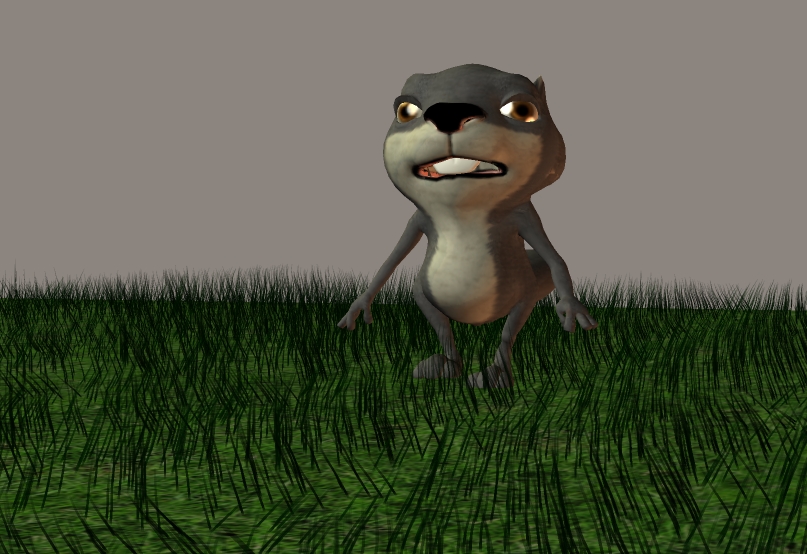
Here is an image of a character walking in the grass.
What you see might be grass, but actually it is hair that was grown with a wide root and wide tip and then textured to blend in with the ground.
Then by using collision detection and calculating the dynamics of the hair it will push aside to correspond with the feet and they walk through it.
Once the current version of the animation is finished I plan to redo it again with more advanced techniques to give it a better appearance and draw more attraction to it.
The story line will remain for the most part the same with a few minor changes to make way for the new effects.
After learning some new animation techniques I have found that I can now do the following.
Create Spanish Moss that hangs from some of the trees that will sway slightly with the wind.
Create grass that as a character walks through it, it then responds to the feet so that it moves.
I am also working on creating dust so as a character walks in dirt or a car passes by there is some dust that flies up.
Here is an image of a character walking in the grass.
What you see might be grass, but actually it is hair that was grown with a wide root and wide tip and then textured to blend in with the ground.
Then by using collision detection and calculating the dynamics of the hair it will push aside to correspond with the feet and they walk through it.
Once the current version of the animation is finished I plan to redo it again with more advanced techniques to give it a better appearance and draw more attraction to it.
The story line will remain for the most part the same with a few minor changes to make way for the new effects.
- Attachments
-
..
-
jeffroig
- Chief Warrant Officer
- Posts: 662
- Joined: 22 May 2009, 10:49
- Type the number ten into the box: 0
Re: Calling all Modelers/Animators
Here are a couple samples.
The first one is a preview render of a character walking through the grass and thus creating the motion of the grass moving.
This is only a sample of the grass movement, yes I know the feet go through the floor and the character is not the correct speed with the walk, this is only to show the effect.
The second link is that of the hair test as a character walks the hair sways and moves with him.
http://www.youtube.com/watch?v=fz8U1SChwAE
http://www.youtube.com/watch?v=3VxUuw-sgIo
For those of you who have Poser 7 and above and are interested in how to make these effects work let me know.
If there are enough I will gladly put up a tutorial on it.
The first one is a preview render of a character walking through the grass and thus creating the motion of the grass moving.
This is only a sample of the grass movement, yes I know the feet go through the floor and the character is not the correct speed with the walk, this is only to show the effect.
The second link is that of the hair test as a character walks the hair sways and moves with him.
http://www.youtube.com/watch?v=fz8U1SChwAE
http://www.youtube.com/watch?v=3VxUuw-sgIo
For those of you who have Poser 7 and above and are interested in how to make these effects work let me know.
If there are enough I will gladly put up a tutorial on it.
..
-
froo
- Captain
- Posts: 2554
- Joined: 22 May 2009, 12:13
Re: Calling all Modelers/Animators
Good to see you still making progress Jeff! 
I know these are tests but I'd like to comment.
The beard flows like very soft hair, very wavy.
The grass parts a bit rigidly.
It's really cool to see the grass react to the collision with
the squirrel's feet.
I know these are tests but I'd like to comment.
The beard flows like very soft hair, very wavy.
The grass parts a bit rigidly.
It's really cool to see the grass react to the collision with
the squirrel's feet.
-
jeffroig
- Chief Warrant Officer
- Posts: 662
- Joined: 22 May 2009, 10:49
- Type the number ten into the box: 0
Re: Calling all Modelers/Animators
Froo I can explain why these two events are happening.
The grass only has 5 verts per strand so it would be much stiffer.
The hair has 40 verts per strand so it would flow very wavy like.
The grass only has 5 verts per strand so it would be much stiffer.
The hair has 40 verts per strand so it would flow very wavy like.
..
-
jeffroig
- Chief Warrant Officer
- Posts: 662
- Joined: 22 May 2009, 10:49
- Type the number ten into the box: 0
Re: Calling all Modelers/Animators
Just as you think you have all the odds beat then comes another problem.
After running the video through a vectorscope and YC waveform monitor I found several problems.
The chroma and luminance where not correct and had to be adjusted.
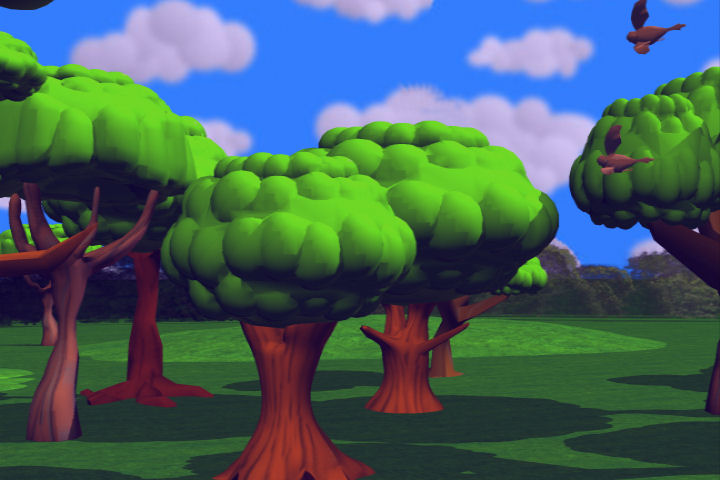
Take a look at the two images and while you may think the brighter of the two would be the good one it is actually the other image.
Colors have been corrected to a vectorscope and Chroma and Luinance to a YC waveform.
So now the task begins in adjusting all the sections of video to be correct for broadcast safe colors.
After running the video through a vectorscope and YC waveform monitor I found several problems.
The chroma and luminance where not correct and had to be adjusted.
Take a look at the two images and while you may think the brighter of the two would be the good one it is actually the other image.
Colors have been corrected to a vectorscope and Chroma and Luinance to a YC waveform.
So now the task begins in adjusting all the sections of video to be correct for broadcast safe colors.
- Attachments
-
-

..
-
Finis
- Captain
- Posts: 5410
- Joined: 21 May 2009, 18:26
- Type the number ten into the box: 0
- Location: America!
Re: Calling all Modelers/Animators
vectorscope, Chroma, YC waveform -- What's them fancy words mean?
Broadcast safe colors? Is that safe for old fashioned analog, CRT's, or what?
Broadcast safe colors? Is that safe for old fashioned analog, CRT's, or what?
I prefer dangerous freedom over peaceful servitude. -- Thomas Jefferson/Jean Jacques Rousseau
-
Draise

- Captain
- Posts: 3200
- Joined: 21 Sep 2009, 19:33
- Type the number ten into the box: 0
- Location: Bogota, Colombia
Re: Calling all Modelers/Animators
Wow, good to know! I work with TV and we have issues with the like also..
-
jeffroig
- Chief Warrant Officer
- Posts: 662
- Joined: 22 May 2009, 10:49
- Type the number ten into the box: 0
Re: Calling all Modelers/Animators
As 3D modelers and animators we for the most part dont know much about what it takes to make a image/series of images safe for TV and this includes what you would put on a DVD to watch later.
I would not know most of this except for the fact that several years ago I worked for a cable station in the creative department and one of my jobs was to produce a weekly show for the director.
I learned through the technicians there and what it takes to put a video on TV and make it safe to broadcast.
So what I am about to share with you is nothing new its just that you were never told about it.
So with that being said lets learn something new.
Draise this will help you as you can learn how to use broadcast safe colors for your models.
Every image has millions+ colors and also has Luminance and Chroma along with alot of other signals.
We are only going to deal with the color, the Luminance and Chroma.
Maybe this should be in a tutorial section and if seen fit then Steinie please feel free to add it.
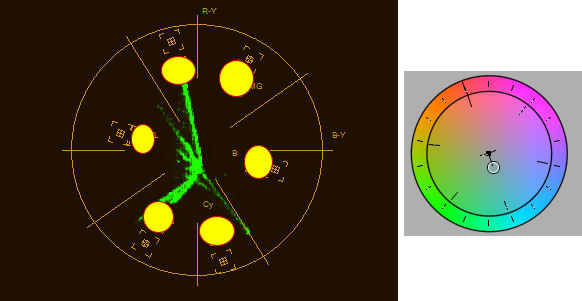
First a vectorscope is like looking at a color wheel to some degree so long as you look at it this way you will have no problem in understanding it.
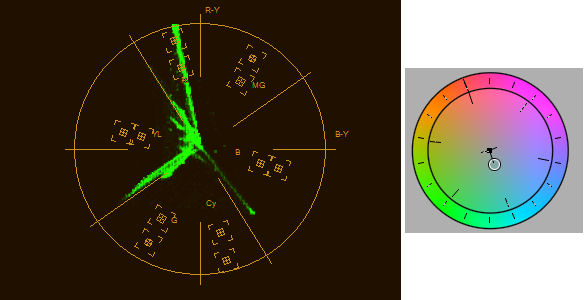
Here is two pictures of a vectorscope one is bad and the other is good.
I would not know most of this except for the fact that several years ago I worked for a cable station in the creative department and one of my jobs was to produce a weekly show for the director.
I learned through the technicians there and what it takes to put a video on TV and make it safe to broadcast.
So what I am about to share with you is nothing new its just that you were never told about it.
So with that being said lets learn something new.
Draise this will help you as you can learn how to use broadcast safe colors for your models.
Every image has millions+ colors and also has Luminance and Chroma along with alot of other signals.
We are only going to deal with the color, the Luminance and Chroma.
Maybe this should be in a tutorial section and if seen fit then Steinie please feel free to add it.
First a vectorscope is like looking at a color wheel to some degree so long as you look at it this way you will have no problem in understanding it.
Here is two pictures of a vectorscope one is bad and the other is good.
- Attachments
-
-

..
-
jeffroig
- Chief Warrant Officer
- Posts: 662
- Joined: 22 May 2009, 10:49
- Type the number ten into the box: 0
Re: Calling all Modelers/Animators
Notice I have added a color wheel next to each one to help you understand how they refer to each other.
The vectorscope has limits to it and I have marked those by placing a yellow circle over the limit to each color range.
The green lines you see signify the colors used in the picture.
If the green lines go past the area marked in yellow circles then it is out of its color range and is considered not to be color safe for broadcast.
So what we have to do is to reduce the colors with special filters.
I have also attached two images of what the vectorscope is looking at.
The first image has been corrected and is color safe.
The second image is unaltered and is not safe.
The vectorscope has limits to it and I have marked those by placing a yellow circle over the limit to each color range.
The green lines you see signify the colors used in the picture.
If the green lines go past the area marked in yellow circles then it is out of its color range and is considered not to be color safe for broadcast.
So what we have to do is to reduce the colors with special filters.
I have also attached two images of what the vectorscope is looking at.
The first image has been corrected and is color safe.
The second image is unaltered and is not safe.
- Attachments
-
-
-


..
-
jeffroig
- Chief Warrant Officer
- Posts: 662
- Joined: 22 May 2009, 10:49
- Type the number ten into the box: 0
Re: Calling all Modelers/Animators
Ok so now for Luminance and Chroma.
While we can see and detect the Luminance with our eyes, you can not see the Chroma.
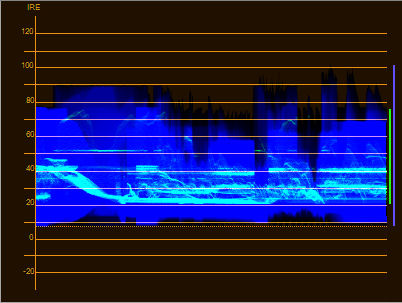
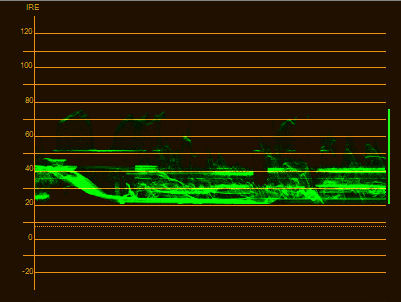
To view the Luminance and Chroma you need a YC waveform.
Here is a YC waveform.
The first one is showing Chroma and the second one shows Luminance.
Here in the USA we deal with a scale that goes from 7.5 to 100.
So neither one should exceed the value of 100 or go below 7.5.
Once again a filter is used to adjust these levels to get them correct.
The images of Earl in his red truck that I have placed are not finished they are only used as a sample to show what is a good value or bad.
If more of you are interested in this I would be glad to do a tutorial that is more in depth on how this works.
Most good quality video editing software has the vectorscope and YC waveform built in to allow for color correction.
I use Adobe Premiere.
While we can see and detect the Luminance with our eyes, you can not see the Chroma.
To view the Luminance and Chroma you need a YC waveform.
Here is a YC waveform.
The first one is showing Chroma and the second one shows Luminance.
Here in the USA we deal with a scale that goes from 7.5 to 100.
So neither one should exceed the value of 100 or go below 7.5.
Once again a filter is used to adjust these levels to get them correct.
The images of Earl in his red truck that I have placed are not finished they are only used as a sample to show what is a good value or bad.
If more of you are interested in this I would be glad to do a tutorial that is more in depth on how this works.
Most good quality video editing software has the vectorscope and YC waveform built in to allow for color correction.
I use Adobe Premiere.
- Attachments
-
-
..
-
Steinie
- Captain
- Posts: 2958
- Joined: 21 May 2009, 17:38
- Type the number ten into the box: 10
Re: Calling all Modelers/Animators
Jeff,
I placed a copy of your tutorial in the Tutorial Section. Thanks for the information!

I placed a copy of your tutorial in the Tutorial Section. Thanks for the information!
-
froo
- Captain
- Posts: 2554
- Joined: 22 May 2009, 12:13
Re: Calling all Modelers/Animators
hey that's pretty cool jeff! Thanks for sharing!
I wonder how these schemes were developed - the graphs especially (vectorscope, etc.).
I wonder how these schemes were developed - the graphs especially (vectorscope, etc.).
-
jeffroig
- Chief Warrant Officer
- Posts: 662
- Joined: 22 May 2009, 10:49
- Type the number ten into the box: 0
Re: Calling all Modelers/Animators
All the standards and graphs were developed by the IRE, International Radio Engineers.
..
-
jeffroig
- Chief Warrant Officer
- Posts: 662
- Joined: 22 May 2009, 10:49
- Type the number ten into the box: 0
Re: Calling all Modelers/Animators
Steinie thank you for that.Steinie wrote:Jeff,
I placed a copy of your tutorial in the Tutorial Section. Thanks for the information!
..
-
Finis
- Captain
- Posts: 5410
- Joined: 21 May 2009, 18:26
- Type the number ten into the box: 0
- Location: America!
Re: Calling all Modelers/Animators
How is this project going? Is it finished?
I prefer dangerous freedom over peaceful servitude. -- Thomas Jefferson/Jean Jacques Rousseau
-
jeffroig
- Chief Warrant Officer
- Posts: 662
- Joined: 22 May 2009, 10:49
- Type the number ten into the box: 0
Re: Calling all Modelers/Animators
I produced this animation in preview mode and found that alot of the script needed re-writing to make it work as a animation.
So it is once again back in the hands of the script writer.
The script writer is doing this free and they are currently busy with a broad way play that is a paid job.
So it is once again back in the hands of the script writer.
The script writer is doing this free and they are currently busy with a broad way play that is a paid job.
..
-
jeffroig
- Chief Warrant Officer
- Posts: 662
- Joined: 22 May 2009, 10:49
- Type the number ten into the box: 0
Re: Calling all Modelers/Animators
For all of those that contributed their hard work towards this project you deserve to see the progress of this.
You will see that there are several things that need to be fixed as this is not a final render.
The script that was created for this was not in any way for a child which is the main audience I wanted to attract.
I did not want to show any violence or fowl language and wanted to have something that kids would enjoy watching several times.
Once the script is finished I will once again go back to rendering the animation and complete it.
For now I have posted a private link for only those of the forum to be able to view.
I hope you enjoy what is here and your comments and suggestions are welcome.
http://youtu.be/YQzMpZkb9xk
You will see that there are several things that need to be fixed as this is not a final render.
The script that was created for this was not in any way for a child which is the main audience I wanted to attract.
I did not want to show any violence or fowl language and wanted to have something that kids would enjoy watching several times.
Once the script is finished I will once again go back to rendering the animation and complete it.
For now I have posted a private link for only those of the forum to be able to view.
I hope you enjoy what is here and your comments and suggestions are welcome.
http://youtu.be/YQzMpZkb9xk
..
-
Finis
- Captain
- Posts: 5410
- Joined: 21 May 2009, 18:26
- Type the number ten into the box: 0
- Location: America!
Re: Calling all Modelers/Animators
Great cartoonish look. I like how the frog laughter sounds a little like frog croaking and how the speed of Earl's truck seems to match the pace of the song he sings. There is foot slide when characters walk but I'm sure that's on your fix it list. Yeah that story so far doesn't seem interesting for kids.
I prefer dangerous freedom over peaceful servitude. -- Thomas Jefferson/Jean Jacques Rousseau