Final trueSpace7.61 Beta 8 Std Unofficial Update
-
trueBlue

- Captain
- Posts: 5548
- Joined: 06 Jul 2009, 22:50
- Type the number ten into the box: 10
Re: Final trueSpace7.61 Beta 8 Std Unofficial Update
The Background Image Camera may or may not be compatible
-
clintonman

- Captain
- Posts: 5659
- Joined: 21 May 2009, 21:08
- Type the number ten into the box: 0
- Location: California
Re: Final trueSpace7.61 Beta 8 Std Unofficial Update
The bg cameras transform node WldMatrix also does not connect to the outside so it's covered by the TODO from earliertrueBlue wrote: 20 Jul 2023, 05:05 The Background Image Camera may or may not be compatible
"TODO: check the camera transform node WldMatrix connection is connect outside - this will cover both LookAt and constraints issues"
-
trueBlue
- Captain
- Posts: 5548
- Joined: 06 Jul 2009, 22:50
- Type the number ten into the box: 10
Re: Final trueSpace7.61 Beta 8 Std Unofficial Update
TODO?
Meaning, not implemented yet?
If so, I will wait for the update
Meaning, not implemented yet?
If so, I will wait for the update
-
clintonman
- Captain
- Posts: 5659
- Joined: 21 May 2009, 21:08
- Type the number ten into the box: 0
- Location: California
Re: Final trueSpace7.61 Beta 8 Std Unofficial Update
third test
check the camera transform node WldMatrix connection is connected to owning node
this handles lookat, constraints and background camera
EDIT: new bug from fixes, removed attachments
check the camera transform node WldMatrix connection is connected to owning node
this handles lookat, constraints and background camera
EDIT: new bug from fixes, removed attachments
-
clintonman
- Captain
- Posts: 5659
- Joined: 21 May 2009, 21:08
- Type the number ten into the box: 0
- Location: California
Re: Final trueSpace7.61 Beta 8 Std Unofficial Update
fourth test
fixed the bug that was caused by the previous fix
found that the zoom to all view positioning was wrong and fixed it
fixed the bug that was caused by the previous fix
found that the zoom to all view positioning was wrong and fixed it
- Attachments
-
- ZoomToSelection0821.RsObj
- (40.92 KiB) Downloaded 121 times
-
- ZoomToAll6989.RsObj
- (25.54 KiB) Downloaded 74 times
-
trueBlue
- Captain
- Posts: 5548
- Joined: 06 Jul 2009, 22:50
- Type the number ten into the box: 10
Re: Final trueSpace7.61 Beta 8 Std Unofficial Update
Just to let you know, I have Allow Camera Zoom To uncheckedclintonman wrote: 20 Jul 2023, 15:07 third test
check the camera transform node WldMatrix connection is connected to owning node
this handles lookat, constraints and background camera
EDIT: new bug from fixes, removed attachments
I get the Question when viewing from a Camera
I choose No
Seems to work
EyeCamera views do not work using Zoom to Selection and or Zoom to All
Having to answer a question, if you want to use a Zoom to with a Camera View that moves the Camera to the selection each time is less than desirable!
It is like I am being forced to use this feature that I personally do not like because it moves the camera!
I hope that you can implement an option that disables Zoom to Selection and Zoom to All for Camera Views without any Alerts or Questions
Cross Post
Edit: Would it help if the Camera widget(s) had an Allow Camera Zoom To script with Default value?
Something is odd getting the attribute to work
-
clintonman
- Captain
- Posts: 5659
- Joined: 21 May 2009, 21:08
- Type the number ten into the box: 0
- Location: California
Re: Final trueSpace7.61 Beta 8 Std Unofficial Update
I'll see what I can do.trueBlue wrote: 20 Jul 2023, 16:00 Having to answer a question, if you want to use a Zoom to with a Camera View that moves the Camera to the selection each time is less than desirable!
It is like I am being forced to use this feature that I personally do not like because it moves the camera!
I hope that you can implement an option that disables Zoom to Selection and Zoom to All for Camera Views without any Alerts or Questions
Maybe, no way to know without testable steps that consistently reproduce the issue.trueBlue wrote: 20 Jul 2023, 16:00 Cross Post
Edit: Would it help if the Camera widget(s) had an Allow Camera Zoom To script with Default value?
Something is odd getting the attribute to work
-
clintonman
- Captain
- Posts: 5659
- Joined: 21 May 2009, 21:08
- Type the number ten into the box: 0
- Location: California
Re: Final trueSpace7.61 Beta 8 Std Unofficial Update
changed "zoom not allowed on cameras" question to a status message
- Attachments
-
- ZoomToSelection312d.RsObj
- (41.2 KiB) Downloaded 116 times
-
- ZoomToAllad12.RsObj
- (25.7 KiB) Downloaded 99 times
-
trueBlue
- Captain
- Posts: 5548
- Joined: 06 Jul 2009, 22:50
- Type the number ten into the box: 10
Re: Final trueSpace7.61 Beta 8 Std Unofficial Update
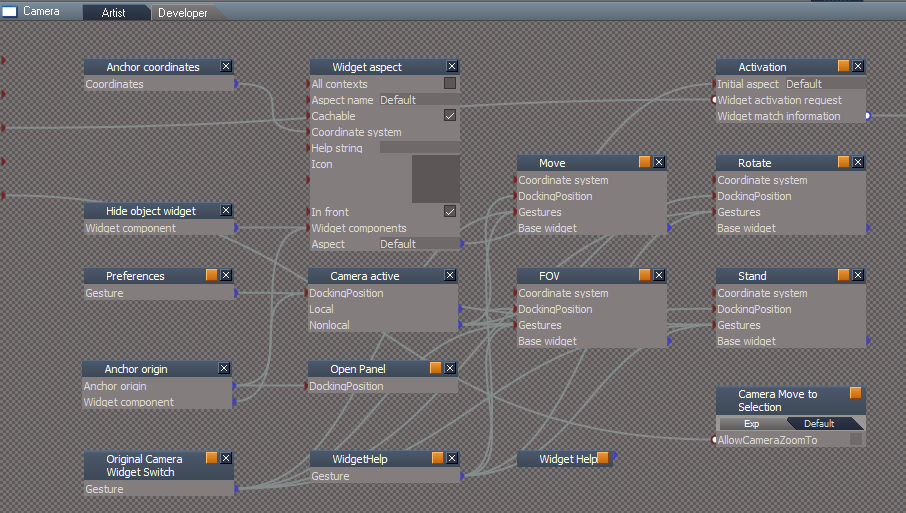
I am going to add a jScript Object to the Camera widgets
Camera Move to Selection
Default
AllowCameraZoomTo = false
Camera Move to Selection
Default
AllowCameraZoomTo = false
-
trueBlue
- Captain
- Posts: 5548
- Joined: 06 Jul 2009, 22:50
- Type the number ten into the box: 10
Re: Final trueSpace7.61 Beta 8 Std Unofficial Update
Status Message is better
Maybe show the Camera preferences?
cameraZoomMsg = "Zoom to Selection for camera views is disabled";
util.SetStatusMessage(cameraZoomMsg, 5000);
RsStackView.RemovePanels(0, 0, 0)
RsStackView.RemovePanels(1, 0, 0)
RsStackView.RemovePanels(3, 0, 0)
UserInterface.OpenToolPanelViewEx2("" , "" , "/Widgets/Select/Camera", 3,0,0)
Maybe show the Camera preferences?
cameraZoomMsg = "Zoom to Selection for camera views is disabled";
util.SetStatusMessage(cameraZoomMsg, 5000);
RsStackView.RemovePanels(0, 0, 0)
RsStackView.RemovePanels(1, 0, 0)
RsStackView.RemovePanels(3, 0, 0)
UserInterface.OpenToolPanelViewEx2("" , "" , "/Widgets/Select/Camera", 3,0,0)
-
clintonman
- Captain
- Posts: 5659
- Joined: 21 May 2009, 21:08
- Type the number ten into the box: 0
- Location: California
Re: Final trueSpace7.61 Beta 8 Std Unofficial Update
show camera preferences in the stack view panel tab
- Attachments
-
- ZoomToSelection8f9b.RsObj
- (42.35 KiB) Downloaded 133 times
-
- ZoomToAll85d8.RsObj
- (26.28 KiB) Downloaded 92 times
-
trueBlue
- Captain
- Posts: 5548
- Joined: 06 Jul 2009, 22:50
- Type the number ten into the box: 10
Re: Final trueSpace7.61 Beta 8 Std Unofficial Update
Zoom to Selection with a Camera selected does not work like it used to
Code: Select all
	if(Node.IsCamera(sel)) {
	util.SetStatusMessage(' Zoom to Selected Camera has been bypassed', 5000)
	}
-
clintonman
- Captain
- Posts: 5659
- Joined: 21 May 2009, 21:08
- Type the number ten into the box: 0
- Location: California
Re: Final trueSpace7.61 Beta 8 Std Unofficial Update
Right, there were problems with the cameras zooming to themselves. Might be able to make an adjustment...trueBlue wrote: 20 Jul 2023, 18:15 Zoom to Selection with a Camera selected does not work like it used toCode: Select all
	if(Node.IsCamera(sel)) {
	util.SetStatusMessage(' Zoom to Selected Camera has been bypassed', 5000)
	}
-
trueBlue
- Captain
- Posts: 5548
- Joined: 06 Jul 2009, 22:50
- Type the number ten into the box: 10
Re: Final trueSpace7.61 Beta 8 Std Unofficial Update
Are you going to expose activeWindowOnly?

-
clintonman
- Captain
- Posts: 5659
- Joined: 21 May 2009, 21:08
- Type the number ten into the box: 0
- Location: California
Re: Final trueSpace7.61 Beta 8 Std Unofficial Update
No plans to expose activeWindowOnlytrueBlue wrote: 20 Jul 2023, 18:25 Are you going to expose activeWindowOnly?
-
trueBlue
- Captain
- Posts: 5548
- Joined: 06 Jul 2009, 22:50
- Type the number ten into the box: 10
Re: Final trueSpace7.61 Beta 8 Std Unofficial Update
Zoom to Selection and Zoom to All issue when using from a New Camera View
Steps:
Camera FOV
RDrag - New Camera View
Select an object
Run Zoom to Selection
Camera preferences Allow Camera Zoom To enabled
Camera preferences Allow Camera Zoom To disabled
trueSpace hangs!
Ctrl Shift Esc - End Task
Steps:
Camera FOV
RDrag - New Camera View
Select an object
Run Zoom to Selection
Camera preferences Allow Camera Zoom To enabled
Code: Select all
ERR Source object: /Widgets/WidgetScripts/ZoomToSelection Error: Microsoft JScript runtime error Description: Invalid procedure call or argument Error code: 0x800a0005 - (null) Line: 1, Char: 20 Script text: ams)
trueSpace hangs!
Ctrl Shift Esc - End Task
-
clintonman
- Captain
- Posts: 5659
- Joined: 21 May 2009, 21:08
- Type the number ten into the box: 0
- Location: California
Re: Final trueSpace7.61 Beta 8 Std Unofficial Update
Roger that, and fixed.trueBlue wrote: 20 Jul 2023, 18:51 Zoom to Selection and Zoom to All issue when using from a New Camera View
Steps:
Camera FOV
RDrag - New Camera View
Select an object
Run Zoom to Selection
Camera preferences Allow Camera Zoom To enabledCamera preferences Allow Camera Zoom To disabledCode: Select all
ERR Source object: /Widgets/WidgetScripts/ZoomToSelection Error: Microsoft JScript runtime error Description: Invalid procedure call or argument Error code: 0x800a0005 - (null) Line: 1, Char: 20 Script text: ams)
trueSpace hangs!
Ctrl Shift Esc - End Task
-
trueBlue
- Captain
- Posts: 5548
- Joined: 06 Jul 2009, 22:50
- Type the number ten into the box: 10
Re: Final trueSpace7.61 Beta 8 Std Unofficial Update
Maybe it would be better to have the AllowCameraZoomTo attribute in the ZoomToSelection script verses the Camera widget
Then you would not need the Try&Catch
Then you would not need the Try&Catch
In my setup I have the internal script//force valid boolean value because no internal node with reset/default value
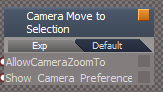
- Camera widget.png (5.6 KiB) Viewed 1410 times
Code: Select all
	//force valid boolean value because no internal node with reset/default value

	allowCameraZoomTo = true;
	if(Node.ConExists("/Widgets/Select/Camera", "AllowCameraZoomTo")) {
		try {
			allowCameraZoomTo = Node.Value("/Widgets/Select/Camera", "AllowCameraZoomTo");
		} catch(err) {
			util.SetNodeValueInt("/Widgets/Select/Camera", "AllowCameraZoomTo", false) ;
			allowCameraZoomTo = false;
		}
	}
-
clintonman
- Captain
- Posts: 5659
- Joined: 21 May 2009, 21:08
- Type the number ten into the box: 0
- Location: California
Re: Final trueSpace7.61 Beta 8 Std Unofficial Update
new test scripts
fix infinite loop bug
fix transfer of matrix information using a new function set
zoom to selection camera view adjusted so it works with the camera for that view
The new function set may be temporary. It holds a single value so if nothing else is added the value will be moved into the Global Function Set later.
"Maybe it would be better to have the AllowCameraZoomTo attribute in the ZoomToSelection script verses the Camera widget
Then you would not need the Try&Catch "
Go ahead and try it with this latest release.
fix infinite loop bug
fix transfer of matrix information using a new function set
zoom to selection camera view adjusted so it works with the camera for that view
The new function set may be temporary. It holds a single value so if nothing else is added the value will be moved into the Global Function Set later.
"Maybe it would be better to have the AllowCameraZoomTo attribute in the ZoomToSelection script verses the Camera widget
Then you would not need the Try&Catch "
Go ahead and try it with this latest release.
- Attachments
-
- ZoomToSelection6108.RsObj
- (44.87 KiB) Downloaded 136 times
-
- ZoomToAll7066.RsObj
- (26.58 KiB) Downloaded 91 times
-
- ZoomTo Function Set.RsObj
- (7.98 KiB) Downloaded 135 times
-
trueBlue
- Captain
- Posts: 5548
- Joined: 06 Jul 2009, 22:50
- Type the number ten into the box: 10
Re: Final trueSpace7.61 Beta 8 Std Unofficial Update
Looks like a keeper! 
I replaced the Try&Catch in the Zoom to Selection and Zoom to All scripts with
All seems fine
Still seems odd that the Camera widgets have to have an attribute for the Zoom to Selection and Zoom to All scripts
It would be easier to maintain if they were incorporated into the Zoom to Selection and Zoom to All scripts
That way the Camera widgets do not need to be updated
I envision the Zoom to Selection and Zoom to All scripts encapsulated with a UI
Instead of opening the Camera preferences, you could open the above encapsulated panel
You could also expose the activeWindowOnly attribute which works really well in all Views
Currently the activeWindowOnly attribute toogles off
I replaced the Try&Catch in the Zoom to Selection and Zoom to All scripts with
Code: Select all
	if(Node.ConExists("/Widgets/Select/Camera", "AllowCameraZoomTo")) {
		allowCameraZoomTo = Node.Value("/Widgets/Select/Camera", "AllowCameraZoomTo")
	}
Still seems odd that the Camera widgets have to have an attribute for the Zoom to Selection and Zoom to All scripts
It would be easier to maintain if they were incorporated into the Zoom to Selection and Zoom to All scripts
That way the Camera widgets do not need to be updated
I envision the Zoom to Selection and Zoom to All scripts encapsulated with a UI
Instead of opening the Camera preferences, you could open the above encapsulated panel
You could also expose the activeWindowOnly attribute which works really well in all Views
Currently the activeWindowOnly attribute toogles off
-
clintonman
- Captain
- Posts: 5659
- Joined: 21 May 2009, 21:08
- Type the number ten into the box: 0
- Location: California
Re: Final trueSpace7.61 Beta 8 Std Unofficial Update
Then do it. I'm not standing in your way.trueBlue wrote: 20 Jul 2023, 21:10 ...
Still seems odd that the Camera widgets have to have an attribute for the Zoom to Selection and Zoom to All scripts
It would be easier to maintain if they were incorporated into the Zoom to Selection and Zoom to All scripts
That way the Camera widgets do not need to be updated
...
-
trueBlue
- Captain
- Posts: 5548
- Joined: 06 Jul 2009, 22:50
- Type the number ten into the box: 10
Re: Final trueSpace7.61 Beta 8 Std Unofficial Update
Are you getting a Dialog 'Convert to editable mesh' and an error running Zoom to All with a primitive selected?
ERR Source object: /Widgets/WidgetScripts/RestoreSelection Error: Microsoft JScript runtime error Description: Invalid procedure call or argument Error code: 0x800a0005 - (null) Line: 10, Char: 1 Script text: Node.Value(Node.Selection(), "Selection") = selection;
-
clintonman
- Captain
- Posts: 5659
- Joined: 21 May 2009, 21:08
- Type the number ten into the box: 0
- Location: California
Re: Final trueSpace7.61 Beta 8 Std Unofficial Update
Doh! Don't even need to look to know where the error is from. Stand by for a fix.trueBlue wrote: 21 Jul 2023, 00:11 Are you getting a Dialog 'Convert to editable mesh' and an error running Zoom to All with a primitive selected?ERR Source object: /Widgets/WidgetScripts/RestoreSelection Error: Microsoft JScript runtime error Description: Invalid procedure call or argument Error code: 0x800a0005 - (null) Line: 10, Char: 1 Script text: Node.Value(Node.Selection(), "Selection") = selection;
-
clintonman
- Captain
- Posts: 5659
- Joined: 21 May 2009, 21:08
- Type the number ten into the box: 0
- Location: California
Re: Final trueSpace7.61 Beta 8 Std Unofficial Update
Correction, no, I don't get the error. Most of my tests have been with primitives and the RestoreSelection isn't running so no error.trueBlue wrote: 21 Jul 2023, 00:11 Are you getting a Dialog 'Convert to editable mesh' and an error running Zoom to All with a primitive selected?ERR Source object: /Widgets/WidgetScripts/RestoreSelection Error: Microsoft JScript runtime error Description: Invalid procedure call or argument Error code: 0x800a0005 - (null) Line: 10, Char: 1 Script text: Node.Value(Node.Selection(), "Selection") = selection;
-
trueBlue
- Captain
- Posts: 5548
- Joined: 06 Jul 2009, 22:50
- Type the number ten into the box: 10
Re: Final trueSpace7.61 Beta 8 Std Unofficial Update
Try a primitive with AllowCameraZoomTo disabled
-
clintonman
- Captain
- Posts: 5659
- Joined: 21 May 2009, 21:08
- Type the number ten into the box: 0
- Location: California
Re: Final trueSpace7.61 Beta 8 Std Unofficial Update
Nope still nothing.trueBlue wrote: 21 Jul 2023, 00:26 Try a primitive with AllowCameraZoomTo disabled
AllowCameraZoomTo disabled
Torus primitive
perspective view works
camera view get status message
-
trueBlue
- Captain
- Posts: 5548
- Joined: 06 Jul 2009, 22:50
- Type the number ten into the box: 10
Re: Final trueSpace7.61 Beta 8 Std Unofficial Update
Thanks, I found my issue
I did not put a params.SetTerminationFlag()
I did not put a params.SetTerminationFlag()
-
trueBlue
- Captain
- Posts: 5548
- Joined: 06 Jul 2009, 22:50
- Type the number ten into the box: 10
Re: Final trueSpace7.61 Beta 8 Std Unofficial Update
trueSpace7.61 Beta 8 Standalone Unofficial Update Version 9
Final Release 7/21/2023
viewtopic.php?t=3731
It is Required that you completely Uninstall and Install trueSpace7.61 Beta 8 to a clean directory
Updates:
CustomCommands
Rectangle Select
.
Widgets
Camera1
Add:
Ctrl LClick Stand - Opens Preferences panel in the Stack
Navigation Widget and Remove buttons
WidgetScripts
Add
Zoom to Selections - Update from Clinton Reese
.
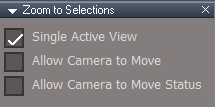
Works in Ortho views, Isometric, and Camera views if "Allow Camera to Move" is Enabled in Zoom to Selections preferences panel
Warning! If Enabled, the Camera will MOVE to the Selection - Default = Disabled
Works with single point selections
Zoom to Selection will use the Desktop "Camera Undo" setting
Use:
Ctrl + MDBLClick - Zoom to Selection
Shift + MClick - Zoom to All and opens the Zoom to Selections panel
Toolbars
CustomToolbar
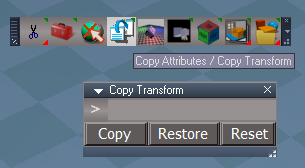
Copy Attributes - Updated icon
RMB command = Copy Transform
Copy - Copies the first selected object's Location, Rotation, Scale, and Shear
Restore - Restores the copied values
Reset - Normalize the included Transform node used to store the values
Example use:
Select a Camera and press the Copy button
Move the Camera somewhere, then press the Restore button
.
UUCommands
Add: Copy Transform
Final Release 7/21/2023
viewtopic.php?t=3731
It is Required that you completely Uninstall and Install trueSpace7.61 Beta 8 to a clean directory
Updates:
CustomCommands
Rectangle Select
.
Widgets
Camera1
Add:
Ctrl LClick Stand - Opens Preferences panel in the Stack
Navigation Widget and Remove buttons
WidgetScripts
Add
Zoom to Selections - Update from Clinton Reese

- Zoom to Selection.png (3.67 KiB) Viewed 1497 times
Works in Ortho views, Isometric, and Camera views if "Allow Camera to Move" is Enabled in Zoom to Selections preferences panel
Warning! If Enabled, the Camera will MOVE to the Selection - Default = Disabled
Works with single point selections
Zoom to Selection will use the Desktop "Camera Undo" setting
Use:
Ctrl + MDBLClick - Zoom to Selection
Shift + MClick - Zoom to All and opens the Zoom to Selections panel
Toolbars
CustomToolbar
Copy Attributes - Updated icon
RMB command = Copy Transform
Copy - Copies the first selected object's Location, Rotation, Scale, and Shear
Restore - Restores the copied values
Reset - Normalize the included Transform node used to store the values
Example use:
Select a Camera and press the Copy button
Move the Camera somewhere, then press the Restore button
- Copy Transform.png (21.79 KiB) Viewed 1497 times
UUCommands
Add: Copy Transform
-
clintonman
- Captain
- Posts: 5659
- Joined: 21 May 2009, 21:08
- Type the number ten into the box: 0
- Location: California
Re: Final trueSpace7.61 Beta 8 Std Unofficial Update
Try this to fix your zooms.
Changes to the top of ZoomToAll and ZoomToSelection are like below.
Changes to the top of ZoomToAll and ZoomToSelection are like below.
Code: Select all
	activeWindowOnly = params.ConValue('activeWindowOnly');
	Allow_Camera_to_Move = params.ConValue('Allow_Camera_to_Move');
	Allow_Camera_to_Move_Dialog = params.ConValue('Allow_Camera_to_Move_Dialog');

	//params.ConValue('activeWindowOnly') = true;

	util = System.CreateDO("Clintons3D Package/Utility functions");

util.SetNodeValueInt(System.ThisOwner(), "activeWindowOnly") = true;- Attachments
-
- Zoom to Selections5564.RsObj
- (77.63 KiB) Downloaded 92 times
-
clintonman
- Captain
- Posts: 5659
- Joined: 21 May 2009, 21:08
- Type the number ten into the box: 0
- Location: California
Re: Final trueSpace7.61 Beta 8 Std Unofficial Update
Here is the rectangle select with the bug fix, default divisions set to 0 for Partially Inside selection mode and the indicators moved to the right side.
- Attachments
-
- RectSelect2730.RsObj
- (35.79 KiB) Downloaded 85 times
-
trueBlue
- Captain
- Posts: 5548
- Joined: 06 Jul 2009, 22:50
- Type the number ten into the box: 10
Re: Final trueSpace7.61 Beta 8 Std Unofficial Update
Awesome!clintonman wrote: 22 Jul 2023, 02:48 Try this to fix your zooms.
Changes to the top of ZoomToAll and ZoomToSelection are like below.Code: Select all
	activeWindowOnly = params.ConValue('activeWindowOnly');
	Allow_Camera_to_Move = params.ConValue('Allow_Camera_to_Move');
	Allow_Camera_to_Move_Dialog = params.ConValue('Allow_Camera_to_Move_Dialog');

	//params.ConValue('activeWindowOnly') = true;

	util = System.CreateDO("Clintons3D Package/Utility functions");

	util.SetNodeValueInt(System.ThisOwner(), "activeWindowOnly") = true;
I had to Connect ZoomToAll activeWindowOnly connector

Also had to change one line in ZoomToSelection and ZoomToAll
Code: Select all
//util.SetNodeValueInt(System.ThisOwner(), "activeWindowOnly") = true;
util.SetNodeValueInt(System.ThisOwner(), "activeWindowOnly", true)

-
trueBlue
- Captain
- Posts: 5548
- Joined: 06 Jul 2009, 22:50
- Type the number ten into the box: 10
Re: Final trueSpace7.61 Beta 8 Std Unofficial Update
trueSpace7.61 Beta 8 Standalone Unofficial Update Version 9
Final Release 7/22/2023
viewtopic.php?t=3731
It is Required that you completely Uninstall and Install trueSpace7.61 Beta 8 to a clean directory
Widgets
Camera1
Add:
Ctrl LClick Stand - Opens Preferences panel in the Stack
Navigation Widget and Remove buttons
WidgetScripts
Add
Zoom to Selections - Update from Clinton Reese
.
Works in Ortho views, Isometric, and Camera views if "Allow Camera to Move" is Enabled in Zoom to Selections preferences panel
Warning! If Enabled, the Camera will MOVE to the Selection - Default = Disabled
Works with single point selections
Zoom to Selection will use the Desktop "Camera Undo" setting
Use:
Ctrl + MDblClick - Zoom to Selection
Shift + MClick - Zoom to All and opens the Zoom to Selections panel
Toolbars
ViewToolbar
CustomToolbar
.
Copy Attributes - Updated icon
RMB command = Copy Transform
Copy - Copies the first selected object's Location, Rotation, Scale, and Shear
Restore - Restores the copied values
Reset - Normalize the included Transform node used to store the values
Example use:
Select a Camera and press the Copy button
Move the Camera somewhere, then press the Restore button
UUCommands
Add: Copy Transform
CustomCommands
Rectangle Select - Update from Clinton Reese
.
Scripts folder
Widget.Shortcuts.xml
Final Release 7/22/2023
viewtopic.php?t=3731
It is Required that you completely Uninstall and Install trueSpace7.61 Beta 8 to a clean directory
Widgets
Camera1
Add:
Ctrl LClick Stand - Opens Preferences panel in the Stack
Navigation Widget and Remove buttons
WidgetScripts
Add
Zoom to Selections - Update from Clinton Reese
- Zoom to Selection.png (3.67 KiB) Viewed 2005 times
Works in Ortho views, Isometric, and Camera views if "Allow Camera to Move" is Enabled in Zoom to Selections preferences panel
Warning! If Enabled, the Camera will MOVE to the Selection - Default = Disabled
Works with single point selections
Zoom to Selection will use the Desktop "Camera Undo" setting
Use:
Ctrl + MDblClick - Zoom to Selection
Shift + MClick - Zoom to All and opens the Zoom to Selections panel
Toolbars
ViewToolbar
CustomToolbar

- Copy Transform.png (21.79 KiB) Viewed 2005 times
Copy Attributes - Updated icon
RMB command = Copy Transform
Copy - Copies the first selected object's Location, Rotation, Scale, and Shear
Restore - Restores the copied values
Reset - Normalize the included Transform node used to store the values
Example use:
Select a Camera and press the Copy button
Move the Camera somewhere, then press the Restore button
UUCommands
Add: Copy Transform
CustomCommands
Rectangle Select - Update from Clinton Reese

- Rectangle Select panel.jpg (42.46 KiB) Viewed 2005 times
Scripts folder
Widget.Shortcuts.xml
-
trueBlue
- Captain
- Posts: 5548
- Joined: 06 Jul 2009, 22:50
- Type the number ten into the box: 10
Re: Final trueSpace7.61 Beta 8 Std Unofficial Update
trueSpace7.61 Beta 8 Standalone Unofficial Update Version 9
Final Release 7/23/2023
viewtopic.php?t=3731
It is Required that you completely Uninstall and Install trueSpace7.61 Beta 8 to a clean directory
Updates:
Toolbars
Updated all Rectangle Select toolbar buttons
Final Release 7/23/2023
viewtopic.php?t=3731
It is Required that you completely Uninstall and Install trueSpace7.61 Beta 8 to a clean directory
Updates:
Toolbars
Updated all Rectangle Select toolbar buttons
-
trueBlue
- Captain
- Posts: 5548
- Joined: 06 Jul 2009, 22:50
- Type the number ten into the box: 10
Re: Final trueSpace7.61 Beta 8 Std Unofficial Update
trueSpace7.61 Beta 8 Standalone Unofficial Update Version 9
Final Release 7/26/2023
viewtopic.php?t=3731
It is Required that you completely Uninstall and Install trueSpace7.61 Beta 8 to a clean directory
Updates:
Toolbars
Add:
ExportUtilities - Includes Nulls and D3D Materials Converter
Note: If the D3D Materials Converter does not open, open the Material Editor
.
Widgets
Null widget - Author - Clinton Reese
PickFaceWidget2 - Convert to util commands
PickVertexWidget2 - Convert to util commands
GetPointsWidget - Convert to util commands
UUCommands - Updated several scripts to Cancel Snapping widgets while in use
CustomCommands
ColladaPostProcessor - Updated: 7/22/2023 Author - Clinton Reese
Add: Nulls - Author - Clinton Reese
ToolbarManager - Update toolbar list and descriptions
PickSelect - Update shortcuts labels
SnappingScripts
Add check to all scripts that stops running other Snapping toolbar buttons while in use
resetState - Disabled Status Message
Updated several scripts to Cancel Snapping widgets while in use:
PaintVertexColor
MeshOrigin/Mesh Origin Scripts
StartWidgetSelect
OriginToSelection
Dimensions/GetDimPoints/start
NURBSScripts/drawCurveScript/start
Global Function Set
function OpenFloatingPanel()
Popups/OpenToolbars
cutPlane
YafarayScripts
AutoKey
Final Release 7/26/2023
viewtopic.php?t=3731
It is Required that you completely Uninstall and Install trueSpace7.61 Beta 8 to a clean directory
Updates:
Toolbars
Add:
ExportUtilities - Includes Nulls and D3D Materials Converter
Note: If the D3D Materials Converter does not open, open the Material Editor

Widgets
Null widget - Author - Clinton Reese
PickFaceWidget2 - Convert to util commands
PickVertexWidget2 - Convert to util commands
GetPointsWidget - Convert to util commands
UUCommands - Updated several scripts to Cancel Snapping widgets while in use
CustomCommands
ColladaPostProcessor - Updated: 7/22/2023 Author - Clinton Reese
Add: Nulls - Author - Clinton Reese
ToolbarManager - Update toolbar list and descriptions
PickSelect - Update shortcuts labels
SnappingScripts
Add check to all scripts that stops running other Snapping toolbar buttons while in use
resetState - Disabled Status Message
Updated several scripts to Cancel Snapping widgets while in use:
PaintVertexColor
MeshOrigin/Mesh Origin Scripts
StartWidgetSelect
OriginToSelection
Dimensions/GetDimPoints/start
NURBSScripts/drawCurveScript/start
Global Function Set
function OpenFloatingPanel()
Popups/OpenToolbars
cutPlane
YafarayScripts
AutoKey
-
trueBlue
- Captain
- Posts: 5548
- Joined: 06 Jul 2009, 22:50
- Type the number ten into the box: 10
Re: Final trueSpace7.61 Beta 8 Std Unofficial Update
trueSpace7.61 Beta 8 Standalone Unofficial Update Version 9
Final Release 7/28/2023
viewtopic.php?t=3731
It is Required that you completely Uninstall and Install trueSpace7.61 Beta 8 to a clean directory
Updates:
Toolbars
All Object tool buttons 'Add: Cancel Snapping widgets while in use'
ExportUtilities - Includes Nulls and D3D Materials Converter
Add: Vertex Texture Animation and OD_CopyPaste
.
UUCommands - Updated Encapsulate/3D Encapsulate LE & 2D Encapsulate LE
CustomCommands
Add:
Vertex Texture Animation
OD_CopyPaste
Note:
OD Copy Paste Requires that that you setup an External program like Blender with OD_CopyPasteExternal
When you open OD Copy Paste, you will be presented with a Yes or No question:
If you answer No, you wll be presented with another Yes or No question:
If you answer No, it will not open
preobjects
Update:
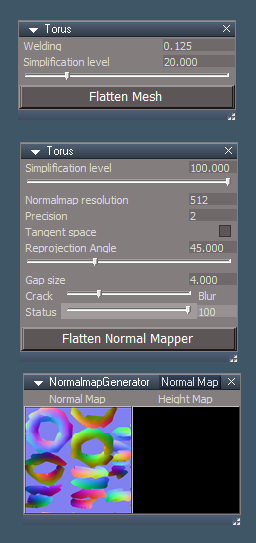
LodTemplate.rsobj 'Mesh Simplifier' Updated the panel and added a Flatten Mesh
LodNormalmapTemplate.rsobj 'Normal Map Generator' Updated the panels and added a Flatten Normal Mapper
Final Release 7/28/2023
viewtopic.php?t=3731
It is Required that you completely Uninstall and Install trueSpace7.61 Beta 8 to a clean directory
Updates:
Toolbars
All Object tool buttons 'Add: Cancel Snapping widgets while in use'
ExportUtilities - Includes Nulls and D3D Materials Converter
Add: Vertex Texture Animation and OD_CopyPaste

UUCommands - Updated Encapsulate/3D Encapsulate LE & 2D Encapsulate LE
CustomCommands
Add:
Vertex Texture Animation
OD_CopyPaste
Note:
OD Copy Paste Requires that that you setup an External program like Blender with OD_CopyPasteExternal
When you open OD Copy Paste, you will be presented with a Yes or No question:
If you answer Yes, the OD Copy Paste panel opens and these questions will not be presented any furtherDo you have an External program like Blender setup with the required OD_CopyPasteExternal?
If you answer No, you wll be presented with another Yes or No question:
If you answer Yes, it will open the Clinton's - OD Copy Paste for trueSpace7.61 websiteWould you like to open Clinton's - OD Copy Paste for trueSpace7.61 website for instructions on how to set it up?
If you answer No, it will not open
preobjects
Update:
LodTemplate.rsobj 'Mesh Simplifier' Updated the panel and added a Flatten Mesh
LodNormalmapTemplate.rsobj 'Normal Map Generator' Updated the panels and added a Flatten Normal Mapper
-
trueBlue
- Captain
- Posts: 5548
- Joined: 06 Jul 2009, 22:50
- Type the number ten into the box: 10
Re: Final trueSpace7.61 Beta 8 Std Unofficial Update
trueSpace7.61 Beta 8 Standalone Unofficial Update Version 9
Final Release 8/14/2023
viewtopic.php?t=3731
It is Required that you completely Uninstall and Install trueSpace7.61 Beta 8 to a clean directory
Updates:
Rs Main Libraries
Layouts - Configurations
My Default 'Set AntiAliasing = Level 4'
Add: Bloom Color & Set script
Postprocess
3D Icon Maker - Author Clinton Reese
Add: Shadow
Update: Icon File script 'Add BMP'
Add: Open Folder
LodNormalmapTemplate 'Add Save Normal Map & Height Map images to library'
AnimPref - Shrink Play Range 'Removed Status Message'
ClearHistory 'Add Clear Status'
ProtectWorkspace - Open and Dock Model 'Add My Default'
Material Editor
D3D Material Converter
TextureAlpha 'Add: Texture Alpha & Texture Alpha X buttons'
convert compiled to d3d
Import Export 'Add Original Export'
Clintons3dDAE.rsx version 1638425 'Install and Load from the Package Manager and restart trueSpace'
ColladaPostProcessor - Author Clinton Reese
colladagroup 'Add OpenPanel 'Plugin check' and OpenFloatingPanel scripts'
Toolbars
Clinton's Export Utilities - Author Clinton Reese
Add: Import Collada
Final Release 8/14/2023
viewtopic.php?t=3731
It is Required that you completely Uninstall and Install trueSpace7.61 Beta 8 to a clean directory
Updates:
Rs Main Libraries
Layouts - Configurations
My Default 'Set AntiAliasing = Level 4'
Add: Bloom Color & Set script
Postprocess
3D Icon Maker - Author Clinton Reese
Add: Shadow
Update: Icon File script 'Add BMP'
Add: Open Folder
LodNormalmapTemplate 'Add Save Normal Map & Height Map images to library'
AnimPref - Shrink Play Range 'Removed Status Message'
ClearHistory 'Add Clear Status'
ProtectWorkspace - Open and Dock Model 'Add My Default'
Material Editor
D3D Material Converter
TextureAlpha 'Add: Texture Alpha & Texture Alpha X buttons'
convert compiled to d3d
Code: Select all
if(Node.ConExists(currentNode,"Transparency")) {
System.Alert('D3D Compliled material with Transparency is not currently supported')
return
}Clintons3dDAE.rsx version 1638425 'Install and Load from the Package Manager and restart trueSpace'
ColladaPostProcessor - Author Clinton Reese
colladagroup 'Add OpenPanel 'Plugin check' and OpenFloatingPanel scripts'
Toolbars
Clinton's Export Utilities - Author Clinton Reese
Add: Import Collada
-
trueBlue
- Captain
- Posts: 5548
- Joined: 06 Jul 2009, 22:50
- Type the number ten into the box: 10
Re: Final trueSpace7.61 Beta 8 Std Unofficial Update
trueSpace7.61 Beta 8 Standalone Unofficial Update Version 9
Final Release 8/19/2023
viewtopic.php?t=3731
It is Required that you completely Uninstall and Install trueSpace7.61 Beta 8 to a clean directory
Updates:
BlankDXMaterial 'Modified'
Add:
Diffuse Strength
Specular Strength
D3D Material Converter
List of changes:
D3D material:
SolidColorShader
Add:
DiffuseStrength
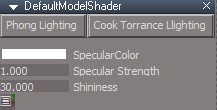
DefaultModelShader 'Modified'
Add:
SpecularStrength
Switch to Cook Torrance Lighting or Phong Lighting 'Default'
.
Shaders:
ConstantAlphaShader 'New'
Tansparency
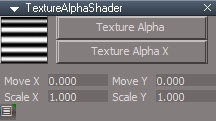
TextureAlpha 'Modified'
Add:
Switch to Texture Alpha X or Texture Alpha 'Default'
UV Map attributes
.
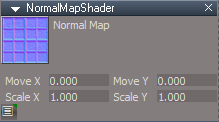
NormalMapShader 'Modified'
Add:
UV Map attributes
.
SolidVertexColorShader 'New'
Add:
DiffuseStrength
Removed:
ConstantTextureShader 'Was not being used'
.
Left - TextureBumpTransparencyMetal compiled materai
Middle - Converted and switched to Cook Torrance Lighting
Right - Converted with Default Phong Lighting
Final Release 8/19/2023
viewtopic.php?t=3731
It is Required that you completely Uninstall and Install trueSpace7.61 Beta 8 to a clean directory
Updates:
BlankDXMaterial 'Modified'
Add:
Diffuse Strength
Specular Strength
D3D Material Converter
List of changes:
D3D material:
SolidColorShader
Add:
DiffuseStrength
DefaultModelShader 'Modified'
Add:
SpecularStrength
Switch to Cook Torrance Lighting or Phong Lighting 'Default'
- DefaultModelShader.png (4.22 KiB) Viewed 1872 times
Shaders:
ConstantAlphaShader 'New'
Tansparency
TextureAlpha 'Modified'
Add:
Switch to Texture Alpha X or Texture Alpha 'Default'
UV Map attributes
- TextureAlphaShader.png (5.38 KiB) Viewed 1872 times
NormalMapShader 'Modified'
Add:
UV Map attributes
- NormalMapShader.png (9.45 KiB) Viewed 1872 times
SolidVertexColorShader 'New'
Add:
DiffuseStrength
Removed:
ConstantTextureShader 'Was not being used'
.
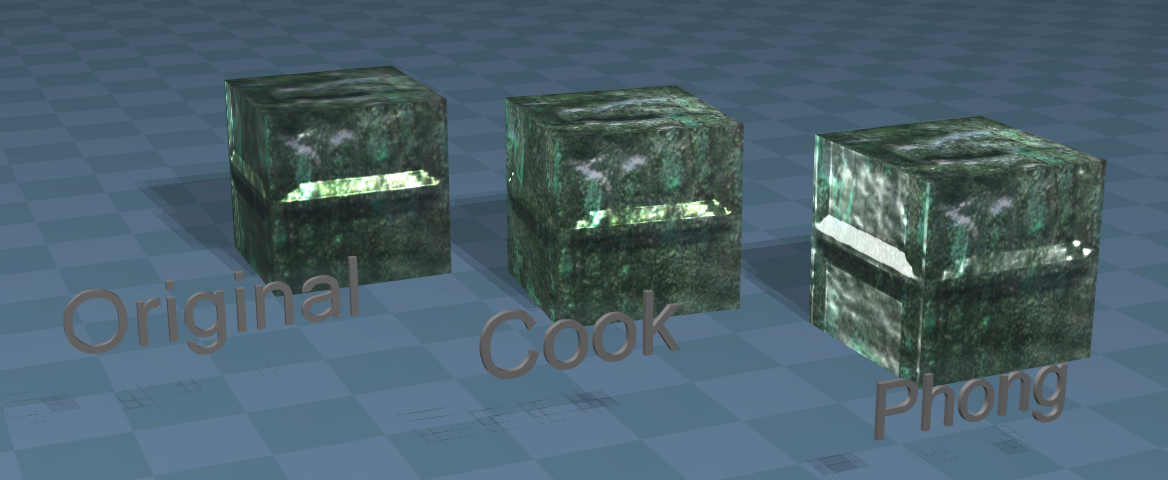
Middle - Converted and switched to Cook Torrance Lighting
Right - Converted with Default Phong Lighting
-
trueBlue
- Captain
- Posts: 5548
- Joined: 06 Jul 2009, 22:50
- Type the number ten into the box: 10
Re: Final trueSpace7.61 Beta 8 Std Unofficial Update
trueSpace7.61 Beta 8 Standalone Unofficial Update Version 9
Final Release 8/21/2023
viewtopic.php?t=3731
It is Required that you completely Uninstall and Install trueSpace7.61 Beta 8 to a clean directory
Updates:
Collada Import
Fixed error in the OpenPanel script where no plugins.xml file exist
Final Release 8/21/2023
viewtopic.php?t=3731
It is Required that you completely Uninstall and Install trueSpace7.61 Beta 8 to a clean directory
Updates:
Collada Import
Fixed error in the OpenPanel script where no plugins.xml file exist
-
trueBlue
- Captain
- Posts: 5548
- Joined: 06 Jul 2009, 22:50
- Type the number ten into the box: 10
Re: Final trueSpace7.61 Beta 8 Std Unofficial Update
trueSpace7.61 Beta 8 Standalone Unofficial Update Version 9
Final Release 8/22/2023
viewtopic.php?t=3731
It is Required that you completely Uninstall and Install trueSpace7.61 Beta 8 to a clean directory
Updates:
Collada Export
Added a check for SpecularColor
Collada Import
Fixed error in the OpenPanel script where no plugins.xml file exist
Fixed spelling error 'plugin to plugins'
Toolbars
DXShaderComponents
Materials - DX9 library
Rearranged all Complied materials together and to the top
Add Description = Complied
Most other Shaders updated
Add Description = Shader
Final Release 8/22/2023
viewtopic.php?t=3731
It is Required that you completely Uninstall and Install trueSpace7.61 Beta 8 to a clean directory
Updates:
Collada Export
Added a check for SpecularColor
Collada Import
Fixed error in the OpenPanel script where no plugins.xml file exist
Fixed spelling error 'plugin to plugins'
Toolbars
DXShaderComponents
Materials - DX9 library
Rearranged all Complied materials together and to the top
Add Description = Complied
Most other Shaders updated
Add Description = Shader
-
trueBlue
- Captain
- Posts: 5548
- Joined: 06 Jul 2009, 22:50
- Type the number ten into the box: 10
Re: Final trueSpace7.61 Beta 8 Std Unofficial Update
trueSpace7.61 Beta 8 Standalone Unofficial Update Version 9
Final Release 8/26/2023
viewtopic.php?t=3731
It is Required that you completely Uninstall and Install trueSpace7.61 Beta 8 to a clean directory
Updates:
Author - Clinton Reese
Clintons3dDAE.rsx version 1638426
Clintons3DFBX2019.rsx version 1638426
Collada Import
FBX Import Export
Toolbars
ExportUtilities toolbar
Add:
Convert Light Types
Freeze Transform
FBX Import Export
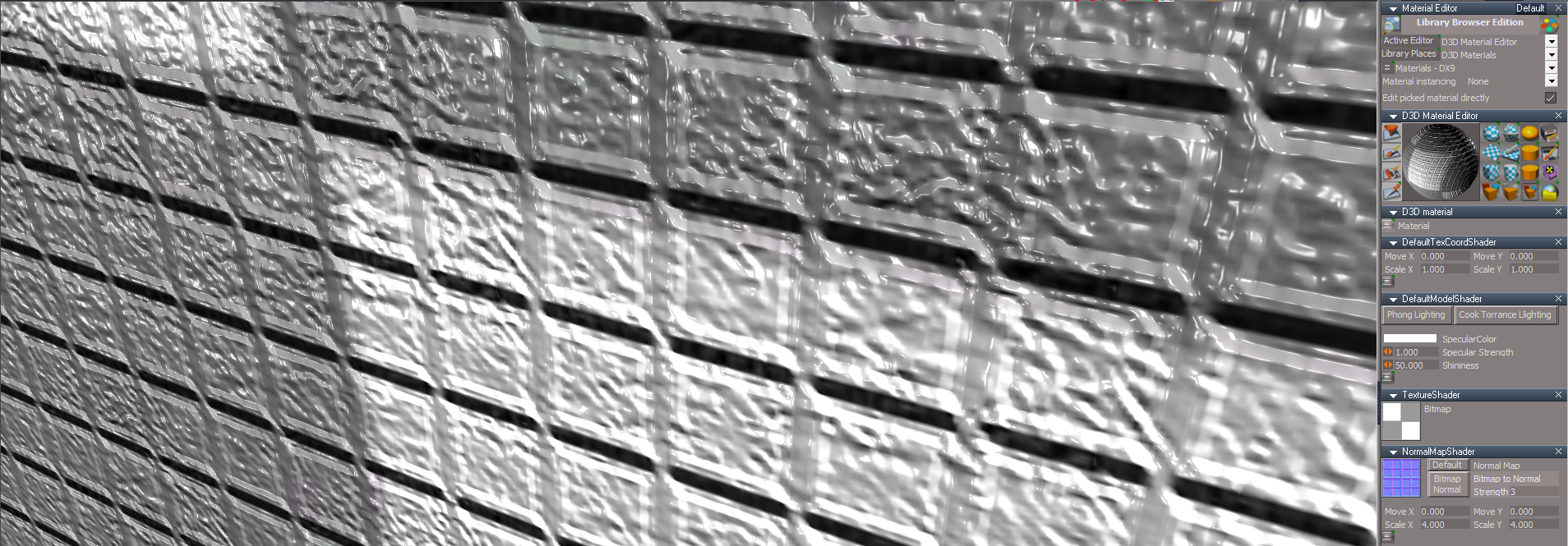
Shaders - Normal Shaders
Add:
NormalMapShader2
Default
.
Bitmap 2 Normal
Strength = 3
Final Release 8/26/2023
viewtopic.php?t=3731
It is Required that you completely Uninstall and Install trueSpace7.61 Beta 8 to a clean directory
Updates:
Author - Clinton Reese
Clintons3dDAE.rsx version 1638426
Clintons3DFBX2019.rsx version 1638426
Collada Import
FBX Import Export
Toolbars
ExportUtilities toolbar

- ExportUtilities toolbar.png (11.2 KiB) Viewed 1807 times
Convert Light Types
Freeze Transform
FBX Import Export
Shaders - Normal Shaders
Add:
NormalMapShader2
Default

Bitmap 2 Normal
Strength = 3
-
trueBlue
- Captain
- Posts: 5548
- Joined: 06 Jul 2009, 22:50
- Type the number ten into the box: 10
Re: Final trueSpace7.61 Beta 8 Std Unofficial Update
trueSpace7.61 Beta 8 Standalone Unofficial Update Version 9
Final Release 8/26/2023
viewtopic.php?t=3731
It is Required that you completely Uninstall and Install trueSpace7.61 Beta 8 to a clean directory
Updates:
Author - Clinton Reese
Clintons3DFBX2019.rsx version 1638426
FBX Import Export
Final Release 8/26/2023
viewtopic.php?t=3731
It is Required that you completely Uninstall and Install trueSpace7.61 Beta 8 to a clean directory
Updates:
Author - Clinton Reese
Clintons3DFBX2019.rsx version 1638426
FBX Import Export
-
trueBlue
- Captain
- Posts: 5548
- Joined: 06 Jul 2009, 22:50
- Type the number ten into the box: 10
Re: Final trueSpace7.61 Beta 8 Std Unofficial Update
trueSpace7.61 Beta 8 Standalone Unofficial Update Version 9
Final Release 8/28/2023
viewtopic.php?t=3731
It is Required that you completely Uninstall and Install trueSpace7.61 Beta 8 to a clean directory
Updates:
Author - Clinton Reese
ColladaPostProcessor
August 27, 2023
* Fixed actor materials processing
Biped Limbs library
Add: SkeletonStart2.RsSkel
UUCommands
Add: UUShortcutsFunctionSet
Moved the Rotate and Move shortcuts to UUShortcutsFunctionSet
Window.Shortcuts.xml
Window.Shortcuts_BACKUP.xml
Final Release 8/28/2023
viewtopic.php?t=3731
It is Required that you completely Uninstall and Install trueSpace7.61 Beta 8 to a clean directory
Updates:
Author - Clinton Reese
ColladaPostProcessor
August 27, 2023
* Fixed actor materials processing
Biped Limbs library
Add: SkeletonStart2.RsSkel
UUCommands
Add: UUShortcutsFunctionSet
Moved the Rotate and Move shortcuts to UUShortcutsFunctionSet
Window.Shortcuts.xml
Window.Shortcuts_BACKUP.xml
-
trueBlue
- Captain
- Posts: 5548
- Joined: 06 Jul 2009, 22:50
- Type the number ten into the box: 10
Re: Final trueSpace7.61 Beta 8 Std Unofficial Update
trueSpace7.61 Beta 8 Standalone Unofficial Update Version 9
Final Release 8/29/2023
viewtopic.php?t=3731
It is Required that you completely Uninstall and Install trueSpace7.61 Beta 8 to a clean directory
Updates:
D3D Material Converter
All compiled material attributes are converted to Shaders
Final Release 8/29/2023
viewtopic.php?t=3731
It is Required that you completely Uninstall and Install trueSpace7.61 Beta 8 to a clean directory
Updates:
D3D Material Converter
All compiled material attributes are converted to Shaders

-
Saul
- Senior Chief Petty Officer
- Posts: 308
- Joined: 22 May 2009, 16:50
Re: Final trueSpace7.61 Beta 8 Std Unofficial Update
Erm, this links to Beta8?
-
trueBlue
- Captain
- Posts: 5548
- Joined: 06 Jul 2009, 22:50
- Type the number ten into the box: 10
Re: Final trueSpace7.61 Beta 8 Std Unofficial Update
Fixed, Thank you!Saul wrote: 30 Aug 2023, 20:07 Erm, this links to Beta8?
-
trueBlue
- Captain
- Posts: 5548
- Joined: 06 Jul 2009, 22:50
- Type the number ten into the box: 10
Re: Final trueSpace7.61 Beta 8 Std Unofficial Update
trueSpace7.61 Beta 8 Standalone Unofficial Update Version 9
Final Release 9/3/2023
viewtopic.php?t=3731
It is Required that you completely Uninstall and Install trueSpace7.61 Beta 8 to a clean directory
Updates:
Bake Keyframes
Final Release 9/3/2023
viewtopic.php?t=3731
It is Required that you completely Uninstall and Install trueSpace7.61 Beta 8 to a clean directory
Updates:
Bake Keyframes
-
trueBlue
- Captain
- Posts: 5548
- Joined: 06 Jul 2009, 22:50
- Type the number ten into the box: 10
Re: Final trueSpace7.61 Beta 8 Std Unofficial Update
trueSpace7.61 Beta 8 Standalone Unofficial Update Version 9
Final Release 9/9/2023
viewtopic.php?t=3731
It is Required that you completely Uninstall and Install trueSpace7.61 Beta 8 to a clean directory
Updates:
Bake Keyframes 'Modified the panel'
.
LEtools.RsObj/OpenLocation script
Add:
cmd += 'if(Node.Exists(activeWindow + "/PrefStackPanelView Node")) return;'
Stack View script
Add:
Alert: " Stack View is already open"
Missing libraries
Final Release 9/9/2023
viewtopic.php?t=3731
It is Required that you completely Uninstall and Install trueSpace7.61 Beta 8 to a clean directory
Updates:
Bake Keyframes 'Modified the panel'

- Bake Keyframes.png (5.87 KiB) Viewed 2659 times
LEtools.RsObj/OpenLocation script
Add:
cmd += 'if(Node.Exists(activeWindow + "/PrefStackPanelView Node")) return;'
Stack View script
Add:
Alert: " Stack View is already open"
Missing libraries
-
clintonman
- Captain
- Posts: 5659
- Joined: 21 May 2009, 21:08
- Type the number ten into the box: 0
- Location: California
Re: Final trueSpace7.61 Beta 8 Std Unofficial Update
Dimensions > Utilities > Regenerate All is giving errors when it tries to set the text color.
Fix attached.
Fix attached.
- Attachments
-
- Dimensions11f1.RsObj
- (539.86 KiB) Downloaded 136 times
-
trueBlue
- Captain
- Posts: 5548
- Joined: 06 Jul 2009, 22:50
- Type the number ten into the box: 10
Re: Final trueSpace7.61 Beta 8 Std Unofficial Update
Thank youclintonman wrote: 09 Sep 2023, 21:22 Dimensions > Utilities > Regenerate All is giving errors when it tries to set the text color.
Fix attached.
-
trueBlue
- Captain
- Posts: 5548
- Joined: 06 Jul 2009, 22:50
- Type the number ten into the box: 10
Re: Final trueSpace7.61 Beta 8 Std Unofficial Update
trueSpace7.61 Beta 8 Standalone Unofficial Update Version 9
Final Release 9/9/2023
viewtopic.php?t=3731
It is Required that you completely Uninstall and Install trueSpace7.61 Beta 8 to a clean directory
Updates:
Dimensions
Bake Keyframes 'Modified the panel'
.
LEtools.RsObj/OpenLocation script
Add:
cmd += 'if(Node.Exists(activeWindow + "/PrefStackPanelView Node")) return;'
Stack View script
Add:
Alert: " Stack View is already open"
Missing libraries
Final Release 9/9/2023
viewtopic.php?t=3731
It is Required that you completely Uninstall and Install trueSpace7.61 Beta 8 to a clean directory
Updates:
Dimensions
Bake Keyframes 'Modified the panel'
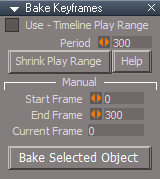
- Bake Keyframes.png (5.87 KiB) Viewed 2671 times
LEtools.RsObj/OpenLocation script
Add:
cmd += 'if(Node.Exists(activeWindow + "/PrefStackPanelView Node")) return;'
Stack View script
Add:
Alert: " Stack View is already open"
Missing libraries
-
trueBlue
- Captain
- Posts: 5548
- Joined: 06 Jul 2009, 22:50
- Type the number ten into the box: 10
Re: Final trueSpace7.61 Beta 8 Std Unofficial Update
trueSpace7.61 Beta 8 Standalone Unofficial Update Version 9
Final Release 9/13/2023
viewtopic.php?t=3731
It is Required that you completely Uninstall and Install trueSpace7.61 Beta 8 to a clean directory
Updates:
Export Bitmaps
.
Fixed errors if nothing is selected for the Update List and Create Texture Files button scripts
Fixed an issue with LW Material(Vray Material Editor has Bitmap connectors) for the Update List and Create Texture Files button scripts
Fixed an issue with the Folder button that removed the Folder value if the Browse for Folder dialog is Cancelled
Added an Open folder button script
Final Release 9/13/2023
viewtopic.php?t=3731
It is Required that you completely Uninstall and Install trueSpace7.61 Beta 8 to a clean directory
Updates:
Export Bitmaps
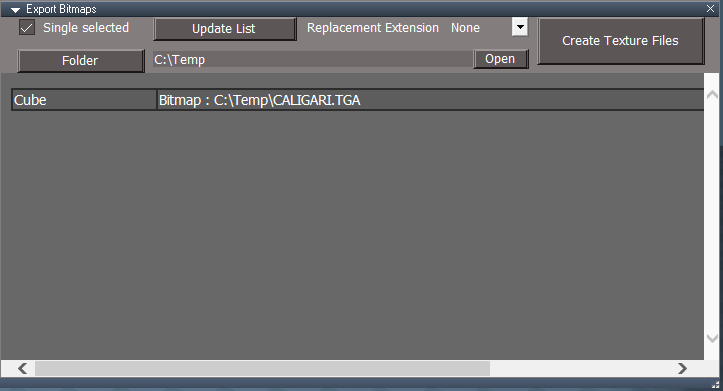
Fixed errors if nothing is selected for the Update List and Create Texture Files button scripts
Fixed an issue with LW Material(Vray Material Editor has Bitmap connectors) for the Update List and Create Texture Files button scripts
Fixed an issue with the Folder button that removed the Folder value if the Browse for Folder dialog is Cancelled
Added an Open folder button script
-
trueBlue
- Captain
- Posts: 5548
- Joined: 06 Jul 2009, 22:50
- Type the number ten into the box: 10
Re: Final trueSpace7.61 Beta 8 Std Unofficial Update
trueSpace7.61 Beta 8 Standalone Unofficial Update Version 9
Final Release 9/17/2023
viewtopic.php?t=3731
It is Required that you completely Uninstall and Install trueSpace7.61 Beta 8 to a clean directory
Updates:
Custom preferences
Visibility preferences
Unchecked "Use - Intensive Visibility Mode"
Cameras 'Changed the Camera(s) FOV = 0.785'
Original Camera Widget Author Clinton Reese
.
UUCommands
Visibility Function Set Author Clinton Reese
Add: Restore Stack script for the Stack View toolbar button
WorkspaceMain 'Fixed encaps icons'
Vray Render to File 'New "Set Render to File" process on first run'
.
LEtools
Add:
cmd += 'if(Node.Exists(activeWindow + "/VrayView Node")) return;'
cmd += 'if(Node.Exists(activeWindow + "/InfoPanelView Node")) return;'
View Controls
Add:
Update D3D Renderer
Press Update and then Cycle Lights until all of the scene lights have been selected
.
Player3D.Log:
Before
000000144453 LOG Renderer: Setting the lost state
After Update
000000146063 LOG Renderer: Send restore device
Final Release 9/17/2023
viewtopic.php?t=3731
It is Required that you completely Uninstall and Install trueSpace7.61 Beta 8 to a clean directory
Updates:
Custom preferences
Visibility preferences
Unchecked "Use - Intensive Visibility Mode"
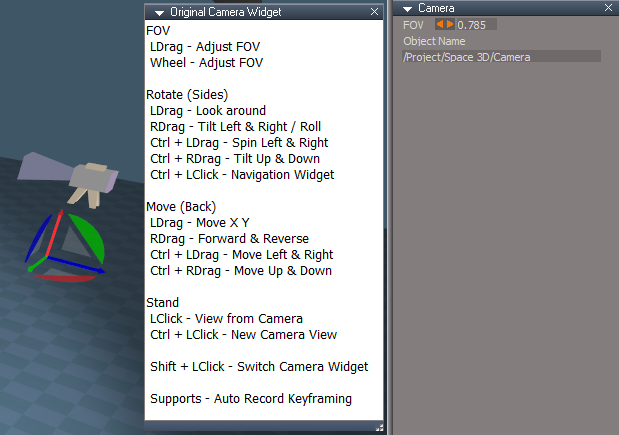
Cameras 'Changed the Camera(s) FOV = 0.785'
Original Camera Widget Author Clinton Reese
UUCommands
Visibility Function Set Author Clinton Reese
Add: Restore Stack script for the Stack View toolbar button
WorkspaceMain 'Fixed encaps icons'
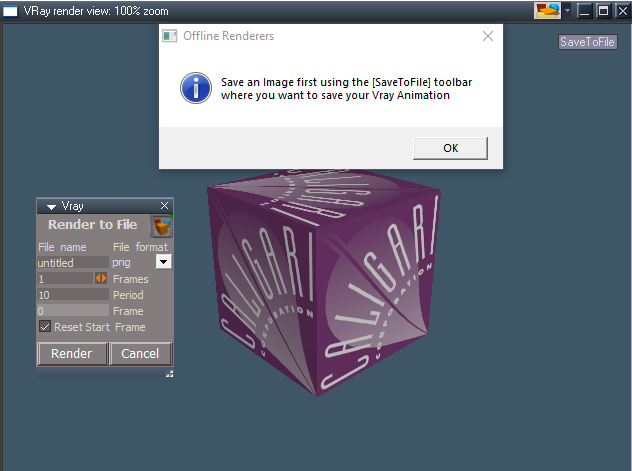
Vray Render to File 'New "Set Render to File" process on first run'
LEtools
Add:
cmd += 'if(Node.Exists(activeWindow + "/VrayView Node")) return;'
cmd += 'if(Node.Exists(activeWindow + "/InfoPanelView Node")) return;'
View Controls
Add:
Update D3D Renderer
Press Update and then Cycle Lights until all of the scene lights have been selected

Player3D.Log:
Before
000000144453 LOG Renderer: Setting the lost state
After Update
000000146063 LOG Renderer: Send restore device
-
trueBlue
- Captain
- Posts: 5548
- Joined: 06 Jul 2009, 22:50
- Type the number ten into the box: 10
Re: Final trueSpace7.61 Beta 8 Std Unofficial Update
trueSpace7.61 Beta 8 Standalone Unofficial Update Version 9
Final Release 9/19/2023
viewtopic.php?t=3731
It is Required that you completely Uninstall and Install trueSpace7.61 Beta 8 to a clean directory
Updates:
Widget Scripts
PEPivotSnap, PEPivotSnapRotationToSelection, and PEPivotSnapRotationToCenter
Changed code to run pivotToPE scripts
SnappingScripts
Updated the openSnappingToolbar script
Enabled all "Respect Axis Lock"
pivotToPE
Add: PEPivotSnap, PEPivotSnapRotationToSelection, and PEPivotSnapRotationToCenter scripts
Fixed issues with Show Axis
Add: Snap button
Snapping toolbar icon(s)
RClick = Preferences
.
YafaRay4tS layout
Fixed the Anim view aspect
Encapsulate
Removed the Status message(s) and the "Single selected Encapsulation" option
Final Release 9/19/2023
viewtopic.php?t=3731
It is Required that you completely Uninstall and Install trueSpace7.61 Beta 8 to a clean directory
Updates:
Widget Scripts
PEPivotSnap, PEPivotSnapRotationToSelection, and PEPivotSnapRotationToCenter
Changed code to run pivotToPE scripts
SnappingScripts
Updated the openSnappingToolbar script
Enabled all "Respect Axis Lock"
pivotToPE
Add: PEPivotSnap, PEPivotSnapRotationToSelection, and PEPivotSnapRotationToCenter scripts
Fixed issues with Show Axis
Add: Snap button
Snapping toolbar icon(s)
RClick = Preferences

- Snapping toolbar Preferences.png (6 KiB) Viewed 2659 times
YafaRay4tS layout
Fixed the Anim view aspect
Encapsulate
Removed the Status message(s) and the "Single selected Encapsulation" option
-
trueBlue
- Captain
- Posts: 5548
- Joined: 06 Jul 2009, 22:50
- Type the number ten into the box: 10
Re: Final trueSpace7.61 Beta 8 Std Unofficial Update
trueSpace7.61 Beta 8 Standalone Unofficial Update Version 9
Final Release 9/30/2023
viewtopic.php?t=3731
It is Required that you completely Uninstall and Install trueSpace7.61 Beta 8 to a clean directory
Updates:
Widgets
Point Edit Widget
Sphere
Shift - Origin to PE Selection
Ctrl - Origin to Object 'Center'
Ctrl LClick - Mesh Origin 'Panel'
PickVertexWidget2 - 'Add: Shift - Snap Origin'
Use:
Mesh Origin panel
Press the Set Snap Point Widget button
LClick select Point(s); press your keyboard Shift key and move mouse
Toobars
All Axis tool, Reset Axis, and Flatten Axis icons use UUCommands/UUFunctionSet scripts
UUCommands
Update Shear - 'Run only if the floating panel is open'
UUFunctionSet
Add Functions:
Axis() 'Use: Axis LMB Command
RemovePivot() 'Use: Reset Axis RMB Command = Remove Axis
FlattenAxis() 'Use: Flatten Axis LMB Command with option to Remove Axis that restores the ability to Rotate from object's center'
Dimensions 'Update Material code'
PickSelect 'Add: Clear Status'
freezeTransforms
Update: Work with multiple selected objects
Update: Flatten Axis code
Add: Status Messages
Replaced Check Boxes with On|Off buttons
Location = Local or World
Rotation = Local or Disabled
Scale = Local or Disabled
Shear = Local or Disabled
Flatten Axis = Disabled or Flatten 'Changes Location to Local'
Flatten Axis adds the current Pivot's transformation into the mesh and resets the Pivot's Matrix to 0,0,0
.
SnappingScripts
Update: Show Axis scripts
Mesh Origin Author Clinton Reese
Add: Convert to Editable Mesh script
Update: Panel button(s) code 'If Origin Display is not visible, make it visible and Convert to Editable Mesh, if needed'
Add: Clear Status to the Toggle Origin Display script
OriginToSelection Add: 'Restore Selection Mode'
.
Highly recommend using Mesh Origin instead of trueSpace's Axis (Pivot)
Mesh Origin only works for Objects that have an Editable mesh
Primitive(s) and Flattened Object(s) do not have an Editable mesh
Point Edit Widget with Origin Displayed
Arcs - RDrag Rotate from Origin
Cubes - Ctrl RDrag from Origin
Final Release 9/30/2023
viewtopic.php?t=3731
It is Required that you completely Uninstall and Install trueSpace7.61 Beta 8 to a clean directory
Updates:
Widgets
Point Edit Widget
Sphere
Shift - Origin to PE Selection
Ctrl - Origin to Object 'Center'
Ctrl LClick - Mesh Origin 'Panel'
PickVertexWidget2 - 'Add: Shift - Snap Origin'
Use:
Mesh Origin panel
Press the Set Snap Point Widget button
LClick select Point(s); press your keyboard Shift key and move mouse
Toobars
All Axis tool, Reset Axis, and Flatten Axis icons use UUCommands/UUFunctionSet scripts
UUCommands
Update Shear - 'Run only if the floating panel is open'
UUFunctionSet
Add Functions:
Axis() 'Use: Axis LMB Command
RemovePivot() 'Use: Reset Axis RMB Command = Remove Axis
FlattenAxis() 'Use: Flatten Axis LMB Command with option to Remove Axis that restores the ability to Rotate from object's center'
Dimensions 'Update Material code'
PickSelect 'Add: Clear Status'
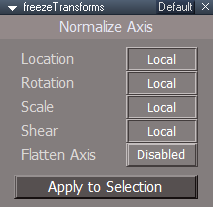
freezeTransforms
Update: Work with multiple selected objects
Update: Flatten Axis code
Add: Status Messages
Replaced Check Boxes with On|Off buttons
Location = Local or World
Rotation = Local or Disabled
Scale = Local or Disabled
Shear = Local or Disabled
Flatten Axis = Disabled or Flatten 'Changes Location to Local'
Flatten Axis adds the current Pivot's transformation into the mesh and resets the Pivot's Matrix to 0,0,0
- Freeze Transforms.png (7.36 KiB) Viewed 2636 times
SnappingScripts
Update: Show Axis scripts
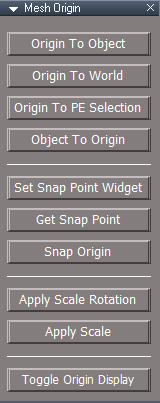
Mesh Origin Author Clinton Reese
Add: Convert to Editable Mesh script
Update: Panel button(s) code 'If Origin Display is not visible, make it visible and Convert to Editable Mesh, if needed'
Add: Clear Status to the Toggle Origin Display script
OriginToSelection Add: 'Restore Selection Mode'
- Mesh Origin panel.png (8.24 KiB) Viewed 2636 times
Highly recommend using Mesh Origin instead of trueSpace's Axis (Pivot)
Mesh Origin only works for Objects that have an Editable mesh
Primitive(s) and Flattened Object(s) do not have an Editable mesh
Point Edit Widget with Origin Displayed
Arcs - RDrag Rotate from Origin
Cubes - Ctrl RDrag from Origin
-
trueBlue
- Captain
- Posts: 5548
- Joined: 06 Jul 2009, 22:50
- Type the number ten into the box: 10
Re: Final trueSpace7.61 Beta 8 Std Unofficial Update
trueSpace7.61 Beta 8 Standalone Unofficial Update Version 9
Final Release 10/9/2023
viewtopic.php?t=3731
It is Required that you completely Uninstall and Install trueSpace7.61 Beta 8 to a clean directory
Updates:
Widgets
Update: Object Move, Rotate, and Scale widgets
Shift Move Mouse - Close Transform widgets
Update: Camera Move, Rotate, FOV, and Rectangle Zoom widgets
Shift Move Mouse - Close Camera widgets
Background
Add: Ctrl = RDrag Move in Z 'Up Down'
Scale
After activating the Scale tool and you select a Spotlight or Projector light, your Mouse Wheel will become available to adjust the Angle
Selecting a Camera, your Mouse Wheel will become available to adjust the FOV
Selecting an object will deactivate this Mouse Wheel gesture and the Status Message is cleared
This does not work if a Spotlight, Projector light, or Camera is selected before activating the Scale tool. You would need to reselect it
RClick the Rotate icon will deactivate this Mouse Wheel gesture and close the widget
PickVertexWidget2 - 'Add: O move mouse - Snap Origin'
Use:
Mesh Origin panel
Press the Set Snap Point Widget button
LClick select Point(s); press your keyboard O key and move mouse
Toobars
PESnappingToolbar 'Add: Origin to Point Edit Selection icon'
Q_PESnappingToolbar 'Add: Origin to Point Edit Selection icon'
.
WorkspaceNav
Custom toolbars
Add:
MeshOriginToolbar
.
ToolbarManager
Add: Mesh Origin toolbar and fixed SDS toolbar descriptions
Edit Toolbar script
Removed: Restore WorkspaceNavBAK process
Convert Light Types
Add: Change Camera Type button 'Opens - Convert Camera Type panel'
.
freezeTransforms 'Update panel'
.
Encapsulated the script and add Open Floating Panel script
Toolbar button(s) RMB - Open Floating Panel
Update: Work with multiple selected objects - Author Clinton Reese
Update: Flatten Axis code
Flatten Axis adds the current Pivot's transformation into the mesh, resets the Pivot's Matrix to 0,0,0, and removes the Pivot
Radial Modeler Author Clinton Reese
Update: Convert to Editable Mesh
Generate Instances button
Add:
if(Node.ConExists('', 'Dimension')) return;
ScriptObject.Execute("%THIS_NAME%/Convert to Editable Mesh")
Mesh Origin Author Clinton Reese
Add: if(Node.ConExists('', "Dimension")) return to Mesh Origin panel buttons
Update: Convert to Editable Mesh script
OriginToSelection Add: 'Restore Selection Mode'
Highly recommend using Mesh Origin instead of trueSpace's Axis (Pivot)
Object Navigation Widget after setting the Origin
Arcs - RDrag Rotate from Origin
Cubes - Ctrl RDrag Scale from Origin
WS - Default.RsSLgts
Lights
light01
light02
light03
light04
Camera1
Cameras 'Update: Custom Camera and EntryPoint Color'
.
Update to installation instructions
Update instructions:
It is recommended that you completely Uninstall and Install trueSpace7.61 Standalone to a clean directory
This is only necessary when you first apply this update
You can keep your Rs Main Libraries folder but all other folders and files should be removed
Install tS761B8Std.exe to C:\trueSpace761Std
Close trueSpace761Std
1.) Install the YafaRay v3.3.0 render engine
2.) Install tS76_Vray1_54B8.exe to C:\trueSpace761Std (Optional but required before installing the Update)
3.) Install tS7.61B8Std.9.exe to C:\trueSpace761Std
Browse [...] to where you installed C:\trueSpace761Std, select its folder and then the [Extract] button
Select the [Yes to All] button
4.) Open trueSpace
5.) Select the [OK] button in the OptDetectors plugin Information dialog
6.) Reset to Default Context
When trueSpace opens, select one of the layout tabs at the top and Close trueSpace. REQUIERED
If Vray is installed,
7.) Press your keyboard's CTRL + F8 keys to open the Package Manager
Right click in the Package Manager and select [Install New...]
[Open] C:\trueSpace761Std\Vray_ts.rsx
Right click in the Package Manager's Vray Package and select [Load]
Close the Package Manager
8.) Close trueSpace. REQUIERED
If Vray is installed,
9.) Delete the tS folder installed by the Vray installer
Final Release 10/9/2023
viewtopic.php?t=3731
It is Required that you completely Uninstall and Install trueSpace7.61 Beta 8 to a clean directory
Updates:
Widgets
Update: Object Move, Rotate, and Scale widgets
Shift Move Mouse - Close Transform widgets
Update: Camera Move, Rotate, FOV, and Rectangle Zoom widgets
Shift Move Mouse - Close Camera widgets
Background
Add: Ctrl = RDrag Move in Z 'Up Down'
Scale
After activating the Scale tool and you select a Spotlight or Projector light, your Mouse Wheel will become available to adjust the Angle
Selecting a Camera, your Mouse Wheel will become available to adjust the FOV
Selecting an object will deactivate this Mouse Wheel gesture and the Status Message is cleared
This does not work if a Spotlight, Projector light, or Camera is selected before activating the Scale tool. You would need to reselect it
RClick the Rotate icon will deactivate this Mouse Wheel gesture and close the widget
PickVertexWidget2 - 'Add: O move mouse - Snap Origin'
Use:
Mesh Origin panel
Press the Set Snap Point Widget button
LClick select Point(s); press your keyboard O key and move mouse
Toobars
PESnappingToolbar 'Add: Origin to Point Edit Selection icon'
Q_PESnappingToolbar 'Add: Origin to Point Edit Selection icon'

WorkspaceNav
Custom toolbars
Add:
MeshOriginToolbar
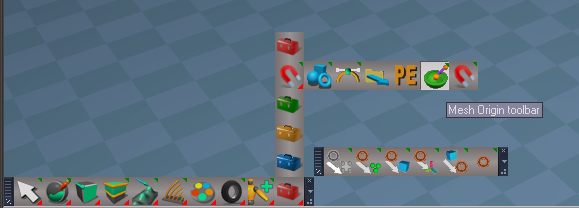
ToolbarManager
Add: Mesh Origin toolbar and fixed SDS toolbar descriptions
Edit Toolbar script
Removed: Restore WorkspaceNavBAK process
Convert Light Types
Add: Change Camera Type button 'Opens - Convert Camera Type panel'
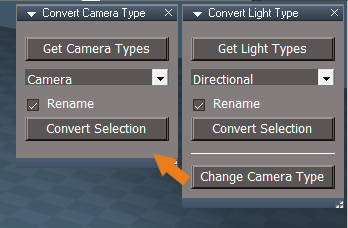
- Convert Camera Type.png (21.54 KiB) Viewed 2598 times
freezeTransforms 'Update panel'

- Freeze Axis.png (5.15 KiB) Viewed 2598 times
Encapsulated the script and add Open Floating Panel script
Toolbar button(s) RMB - Open Floating Panel
Update: Work with multiple selected objects - Author Clinton Reese
Update: Flatten Axis code
Flatten Axis adds the current Pivot's transformation into the mesh, resets the Pivot's Matrix to 0,0,0, and removes the Pivot
Radial Modeler Author Clinton Reese
Update: Convert to Editable Mesh
Generate Instances button
Add:
if(Node.ConExists('', 'Dimension')) return;
ScriptObject.Execute("%THIS_NAME%/Convert to Editable Mesh")
Mesh Origin Author Clinton Reese
Add: if(Node.ConExists('', "Dimension")) return to Mesh Origin panel buttons
Update: Convert to Editable Mesh script
OriginToSelection Add: 'Restore Selection Mode'
Highly recommend using Mesh Origin instead of trueSpace's Axis (Pivot)
Object Navigation Widget after setting the Origin
Arcs - RDrag Rotate from Origin
Cubes - Ctrl RDrag Scale from Origin
WS - Default.RsSLgts
Lights
light01
light02
light03
light04
Camera1
Cameras 'Update: Custom Camera and EntryPoint Color'
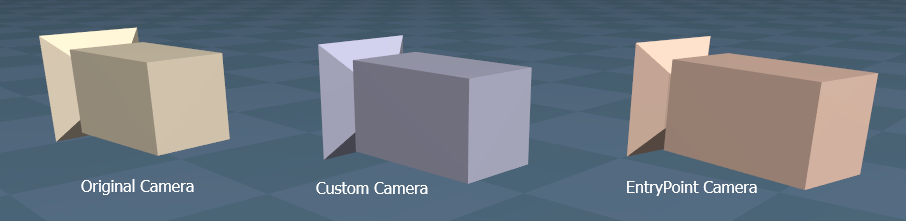
Update to installation instructions
Update instructions:
It is recommended that you completely Uninstall and Install trueSpace7.61 Standalone to a clean directory
This is only necessary when you first apply this update
You can keep your Rs Main Libraries folder but all other folders and files should be removed
Install tS761B8Std.exe to C:\trueSpace761Std
Close trueSpace761Std
1.) Install the YafaRay v3.3.0 render engine
2.) Install tS76_Vray1_54B8.exe to C:\trueSpace761Std (Optional but required before installing the Update)
3.) Install tS7.61B8Std.9.exe to C:\trueSpace761Std
Browse [...] to where you installed C:\trueSpace761Std, select its folder and then the [Extract] button
Select the [Yes to All] button
4.) Open trueSpace
5.) Select the [OK] button in the OptDetectors plugin Information dialog
6.) Reset to Default Context
When trueSpace opens, select one of the layout tabs at the top and Close trueSpace. REQUIERED
If Vray is installed,
7.) Press your keyboard's CTRL + F8 keys to open the Package Manager
Right click in the Package Manager and select [Install New...]
[Open] C:\trueSpace761Std\Vray_ts.rsx
Right click in the Package Manager's Vray Package and select [Load]
Close the Package Manager
8.) Close trueSpace. REQUIERED
If Vray is installed,
9.) Delete the tS folder installed by the Vray installer
-
trueBlue
- Captain
- Posts: 5548
- Joined: 06 Jul 2009, 22:50
- Type the number ten into the box: 10
Re: Final trueSpace7.61 Beta 8 Std Unofficial Update
trueSpace7.61 Beta 8 Standalone Unofficial Update Version 9
Final Release 10/11/2023
Another update is in progress, so you might want to hold off downloading this release!
viewtopic.php?t=3731
It is Required that you completely Uninstall and Install trueSpace7.61 Beta 8 to a clean directory
Updates:
Widgets
Object Move, Rotate, and Scale widgets
MClick - Close Transform widgets
Supports - Automatic Keyframing
Camera Move, Rotate, FOV, and Rectangle Zoom widgets
MClick - Close Camera widgets
FOV
RDrag - Reset FOV
Rectangle Zoom
RDrag - Reset FOV
Supports - Automatic Keyframing
Add new: PickOriginWidget Author Clinton Reese
Mesh Origin
Update Clinton Reese
Set Snap Point Widget
Ctrl RClick Snap Origin
PaintVertexColor
Add: Convert to Editable Mesh script
StartPainting script
If not an Editable Mesh:
Run Convert to Editable Mesh
Lights/Projector
Enable Shadow
Add: Materials - Vertex Color library Author Clinton Reese
Update to installation instructions
Update instructions:
It is recommended that you completely Uninstall and Install trueSpace7.61 Standalone to a clean directory
This is only necessary when you first apply this update
You can keep your Rs Main Libraries folder but all other folders and files should be removed
Install tS761B8Std.exe to C:\trueSpace761Std
Close trueSpace761Std
1.) Install the YafaRay v3.3.0 render engine
2.) Install tS76_Vray1_54B8.exe to C:\trueSpace761Std (Optional but required before installing the Update)
3.) Install tS7.61B8Std.9.exe to C:\trueSpace761Std
Browse [...] to where you installed C:\trueSpace761Std, select its folder and then the [Extract] button
Select the [Yes to All] button
4.) Open trueSpace
5.) Select the [OK] button in the OptDetectors plugin Information dialog
6.) Reset to Default Context
When trueSpace opens, select one of the layout tabs at the top and Close trueSpace. REQUIERED
If Vray is installed,
7.) Press your keyboard's CTRL + F8 keys to open the Package Manager
Right click in the Package Manager and select [Install New...]
[Open] C:\trueSpace761Std\Vray_ts.rsx
Right click in the Package Manager's Vray Package and select [Load]
Close the Package Manager
8.) Close trueSpace. REQUIERED
If Vray is installed,
9.) Delete the tS folder installed by the Vray installer
Final Release 10/11/2023
Another update is in progress, so you might want to hold off downloading this release!
viewtopic.php?t=3731
It is Required that you completely Uninstall and Install trueSpace7.61 Beta 8 to a clean directory
Updates:
Widgets
Object Move, Rotate, and Scale widgets
MClick - Close Transform widgets
Supports - Automatic Keyframing
Camera Move, Rotate, FOV, and Rectangle Zoom widgets
MClick - Close Camera widgets
FOV
RDrag - Reset FOV
Rectangle Zoom
RDrag - Reset FOV
Supports - Automatic Keyframing
Add new: PickOriginWidget Author Clinton Reese
Mesh Origin
Update Clinton Reese
Set Snap Point Widget
Ctrl RClick Snap Origin
PaintVertexColor
Add: Convert to Editable Mesh script
StartPainting script
If not an Editable Mesh:
Run Convert to Editable Mesh
Lights/Projector
Enable Shadow
Add: Materials - Vertex Color library Author Clinton Reese
Update to installation instructions
Update instructions:
It is recommended that you completely Uninstall and Install trueSpace7.61 Standalone to a clean directory
This is only necessary when you first apply this update
You can keep your Rs Main Libraries folder but all other folders and files should be removed
Install tS761B8Std.exe to C:\trueSpace761Std
Close trueSpace761Std
1.) Install the YafaRay v3.3.0 render engine
2.) Install tS76_Vray1_54B8.exe to C:\trueSpace761Std (Optional but required before installing the Update)
3.) Install tS7.61B8Std.9.exe to C:\trueSpace761Std
Browse [...] to where you installed C:\trueSpace761Std, select its folder and then the [Extract] button
Select the [Yes to All] button
4.) Open trueSpace
5.) Select the [OK] button in the OptDetectors plugin Information dialog
6.) Reset to Default Context
When trueSpace opens, select one of the layout tabs at the top and Close trueSpace. REQUIERED
If Vray is installed,
7.) Press your keyboard's CTRL + F8 keys to open the Package Manager
Right click in the Package Manager and select [Install New...]
[Open] C:\trueSpace761Std\Vray_ts.rsx
Right click in the Package Manager's Vray Package and select [Load]
Close the Package Manager
8.) Close trueSpace. REQUIERED
If Vray is installed,
9.) Delete the tS folder installed by the Vray installer
-
trueBlue
- Captain
- Posts: 5548
- Joined: 06 Jul 2009, 22:50
- Type the number ten into the box: 10
Re: Final trueSpace7.61 Beta 8 Std Unofficial Update
trueSpace7.61 Beta 8 Standalone Unofficial Update Version 9
Final Release 10/14/2023
viewtopic.php?t=3731
It is Required that you completely Uninstall and Install trueSpace7.61 Beta 8 to a clean directory
Updates:
Widgets
Background widget
RDrag Move Up Down
CustomCommands
Mesh Origin
Update: Clinton Reese
Paint Vertex Color
Update: Convert to Editable Mesh script
Add: Open - Vertex Color Materials / Open - D3D Material Converter button
Add: Open - Brush Panel / Reset - All Defaut Settings button
Main Library Place
Materials - Vertex Color
VertexColorAdd
VertexColorInterpolate
Updates:
Add: Diffuse Strength 'Color Intensity'
Add: Constant_shader output
Note: Use "Edit DX material in the Link Editor"
SolidColorShader
Disconnect the Color_shader and Connect the Constant_shader to the Material's Constant_shader
Add: Select / Material button
Note: Select is for showing the attributes in the Keying panel for Keyframing
Material Editor
D3D Material Converter
D3D Compiled > D3D Shader
Update:
SolidVertexColorShader = VertexColorInterpolate
Clintons3dPlugin.dll v.1638445
Update: Clinton Reese
Registers after you restart trueSpace
Final Release 10/14/2023
viewtopic.php?t=3731
It is Required that you completely Uninstall and Install trueSpace7.61 Beta 8 to a clean directory
Updates:
Widgets
Background widget
RDrag Move Up Down
CustomCommands
Mesh Origin
Update: Clinton Reese
Paint Vertex Color
Update: Convert to Editable Mesh script
Add: Open - Vertex Color Materials / Open - D3D Material Converter button
Add: Open - Brush Panel / Reset - All Defaut Settings button
Main Library Place
Materials - Vertex Color
VertexColorAdd
VertexColorInterpolate
Updates:
Add: Diffuse Strength 'Color Intensity'
Add: Constant_shader output
Note: Use "Edit DX material in the Link Editor"
SolidColorShader
Disconnect the Color_shader and Connect the Constant_shader to the Material's Constant_shader
Add: Select / Material button
Note: Select is for showing the attributes in the Keying panel for Keyframing
Material Editor
D3D Material Converter
D3D Compiled > D3D Shader
Update:
SolidVertexColorShader = VertexColorInterpolate
Clintons3dPlugin.dll v.1638445
Update: Clinton Reese
Registers after you restart trueSpace
-
trueBlue
- Captain
- Posts: 5548
- Joined: 06 Jul 2009, 22:50
- Type the number ten into the box: 10
Re: Final trueSpace7.61 Beta 8 Std Unofficial Update
trueSpace7.61 Beta 8 Standalone Unofficial Update Version 9
Final Release 10/15/2023
viewtopic.php?t=3731
It is recommended that you completely Uninstall and Install trueSpace7.61 Beta 8 to a clean directory
Open the Task Manager
If you find any Standalone Runner (32 bit) or trueSpace (32 bit) programs open, Select each one and RClick - End task
Close the Task Manager
Updates:
Material Editor
D3D Material Converter
D3D Compiled > D3D Shader
Update: processVertexColorVertexColorStrength
Paint Vertex Color
Start Painting
Add: Status Message and return if selected object has an Input Mesh connector
UUCommands
Flatten History
Add: Remove Input Mesh connector
Clintons3dPlugin.dll v.1638445
Update: Clinton Reese
Registers after you restart trueSpace
Final Release 10/15/2023
viewtopic.php?t=3731
It is recommended that you completely Uninstall and Install trueSpace7.61 Beta 8 to a clean directory
Open the Task Manager
If you find any Standalone Runner (32 bit) or trueSpace (32 bit) programs open, Select each one and RClick - End task
Close the Task Manager
Updates:
Material Editor
D3D Material Converter
D3D Compiled > D3D Shader
Update: processVertexColorVertexColorStrength
Paint Vertex Color
Start Painting
Add: Status Message and return if selected object has an Input Mesh connector
UUCommands
Flatten History
Add: Remove Input Mesh connector
Clintons3dPlugin.dll v.1638445
Update: Clinton Reese
Registers after you restart trueSpace
-
trueBlue
- Captain
- Posts: 5548
- Joined: 06 Jul 2009, 22:50
- Type the number ten into the box: 10
Re: Final trueSpace7.61 Beta 8 Std Unofficial Update
trueSpace7.61 Beta 8 Standalone Unofficial Update Version 9
Final Release 10/17/2023
viewtopic.php?t=3731
It is recommended that you completely Uninstall and Install trueSpace7.61 Beta 8 to a clean directory
Open the Task Manager
If you find any Standalone Runner (32 bit) or trueSpace (32 bit) programs open, Select each one and RClick - End task
Close the Task Manager
Updates:
Toolbars
PEElementToolbar and Q_PEElementToolbar
.
Select Context / Convert selection to Context
Select Vertices / Convert selection to Vertices
Select Edges / Convert selection to Edges
Select Faces / Convert selection to Faces
Paint Vertex Color
Update: GetBitmapSource and FillUVColors scripts
Convert to Editable Mesh, Avoid Lights, Cameras, and Dimensions
Fills aspect
.
Add: Input Bitmap and Bitmap button
InputBitmap control
Use:
LClick - Opens the Bitmaps:Base library where you can LDrag an image onto the InputBitmap control
Ctrl LClick - Opens the Load Image dialog
Press the Bitmap button to populate the Node and Connector fields
Press the Apply Image button
Final Release 10/17/2023
viewtopic.php?t=3731
It is recommended that you completely Uninstall and Install trueSpace7.61 Beta 8 to a clean directory
Open the Task Manager
If you find any Standalone Runner (32 bit) or trueSpace (32 bit) programs open, Select each one and RClick - End task
Close the Task Manager
Updates:
Toolbars
PEElementToolbar and Q_PEElementToolbar
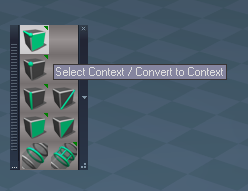
- Convert to Context.png (25.31 KiB) Viewed 2532 times
Select Context / Convert selection to Context
Select Vertices / Convert selection to Vertices
Select Edges / Convert selection to Edges
Select Faces / Convert selection to Faces
Paint Vertex Color
Update: GetBitmapSource and FillUVColors scripts
Convert to Editable Mesh, Avoid Lights, Cameras, and Dimensions
Fills aspect

Add: Input Bitmap and Bitmap button
InputBitmap control
Use:
LClick - Opens the Bitmaps:Base library where you can LDrag an image onto the InputBitmap control
Ctrl LClick - Opens the Load Image dialog
Press the Bitmap button to populate the Node and Connector fields
Press the Apply Image button
-
trueBlue
- Captain
- Posts: 5548
- Joined: 06 Jul 2009, 22:50
- Type the number ten into the box: 10
Re: Final trueSpace7.61 Beta 8 Std Unofficial Update
trueSpace7.61 Beta 8 Standalone Unofficial Update Version 9
Final Release 10/21/2023
viewtopic.php?t=3731
It is recommended that you completely Uninstall and Install trueSpace7.61 Beta 8 to a clean directory
Open the Task Manager
If you find any Standalone Runner (32 bit) or trueSpace (32 bit) programs open, Select each one and RClick - End task
Close the Task Manager
Updates:
Point Edit Widget(s)
Removed:
PE Pivot Snap gestures
PE Hide UnHide All gestures
Align View To Face gesture
Toggle - Object Coordinate Mode gesture
Add:
PopupToolbar2 'RClick - Open - Point Edit Popup toolbar'
Note: All of the gestures that were removed are availible from the Point Edit Popup toolbar
.
Update:
CyclePointEditNavigationWidget script
Toolbars
LENavigatorBar
Add: Tools "Link Editor tools" button that opens a row of buttons: Arrange, Organize, Select, and LE Tools
.
Clintons3dPluginExt.dll - Author Clinton Reese
version v1638414
Add:
SavePNG:
Save an image(32 Bit) that has Alpha to a png(32 Bit) format with Alpha
The image has to be 32 bit with alpha to export 32 bit with alpha otherwise it exports 24 bit no alpha
ext = System.CreateDO("Clintons3D Package Ext Depends/Utility functions");
var results = ext.SavePNG(BitmapNode, BitmapConn, FileName)
BitmapNode is the node that has a bitmap connector
BitmapConn is the name of the connector
FileName is the full path name of the png file to save
results will contain a text message of the final status of the save
System.Alert(results)
Components - Compositing library
Update: image saver script - Author Clinton Reese
Add: Save As - PNG script - Author Clinton Reese
.
Final Release 10/21/2023
viewtopic.php?t=3731
It is recommended that you completely Uninstall and Install trueSpace7.61 Beta 8 to a clean directory
Open the Task Manager
If you find any Standalone Runner (32 bit) or trueSpace (32 bit) programs open, Select each one and RClick - End task
Close the Task Manager
Updates:
Point Edit Widget(s)
Removed:
PE Pivot Snap gestures
PE Hide UnHide All gestures
Align View To Face gesture
Toggle - Object Coordinate Mode gesture
Add:
PopupToolbar2 'RClick - Open - Point Edit Popup toolbar'
Note: All of the gestures that were removed are availible from the Point Edit Popup toolbar

Update:
CyclePointEditNavigationWidget script
Toolbars
LENavigatorBar
Add: Tools "Link Editor tools" button that opens a row of buttons: Arrange, Organize, Select, and LE Tools
- Link Editor Navagator Tools.png (11.41 KiB) Viewed 2519 times
Clintons3dPluginExt.dll - Author Clinton Reese
version v1638414
Add:
SavePNG:
Save an image(32 Bit) that has Alpha to a png(32 Bit) format with Alpha
The image has to be 32 bit with alpha to export 32 bit with alpha otherwise it exports 24 bit no alpha
ext = System.CreateDO("Clintons3D Package Ext Depends/Utility functions");
var results = ext.SavePNG(BitmapNode, BitmapConn, FileName)
BitmapNode is the node that has a bitmap connector
BitmapConn is the name of the connector
FileName is the full path name of the png file to save
results will contain a text message of the final status of the save
System.Alert(results)
Components - Compositing library
Update: image saver script - Author Clinton Reese
Add: Save As - PNG script - Author Clinton Reese
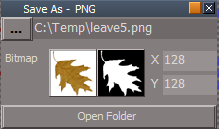
- Save As PNG panel.png (9.92 KiB) Viewed 2519 times
-
trueBlue
- Captain
- Posts: 5548
- Joined: 06 Jul 2009, 22:50
- Type the number ten into the box: 10
Re: Final trueSpace7.61 Beta 8 Std Unofficial Update
trueSpace7.61 Beta 8 Standalone Unofficial Update Version 9
Final Release 10/21/2023
viewtopic.php?t=3731
It is recommended that you completely Uninstall and Install trueSpace7.61 Beta 8 to a clean directory
Open the Task Manager
If you find any Standalone Runner (32 bit) or trueSpace (32 bit) programs open, Select each one and RClick - End task
Close the Task Manager
Updates: This update fixes the earlier release. See previous post for details.
Widgets
WidgetScripts
Update:
CyclePointEditNavigationWidget script
Final Release 10/21/2023
viewtopic.php?t=3731
It is recommended that you completely Uninstall and Install trueSpace7.61 Beta 8 to a clean directory
Open the Task Manager
If you find any Standalone Runner (32 bit) or trueSpace (32 bit) programs open, Select each one and RClick - End task
Close the Task Manager
Updates: This update fixes the earlier release. See previous post for details.
Widgets
WidgetScripts
Update:
CyclePointEditNavigationWidget script
-
trueBlue
- Captain
- Posts: 5548
- Joined: 06 Jul 2009, 22:50
- Type the number ten into the box: 10
Re: Final trueSpace7.61 Beta 8 Std Unofficial Update
trueSpace7.61 Beta 8 Standalone Unofficial Update Version 9
Final Release 10/23/2023
viewtopic.php?t=3731
It is recommended that you completely Uninstall and Install trueSpace7.61 Beta 8 to a clean directory
Open the Task Manager
If you find any Standalone Runner (32 bit) or trueSpace (32 bit) programs open, Select each one and RClick - End task
Close the Task Manager
Updates:
Widgets
Default object navigation widget
Removed: Alt LClick and P LClick gestures
Object Navigation Widgets - Preferences
Add:
On | Off - Docking - Anchor Origin button and scripts
Use: Ctrl LClick the Object Navigation widget's Sphere
Activate
Press On | Off button
Shift LClick Cycle Widgets
Deactivate
Press On | Off button
Shift LClick Cycle Widgets
Before
.
After
.
Pointedit widget
Origin
Removed: Origin - Shift and Ctrl gestures
Sphere
Add: O LClick - Reset Origin
WidgetScripts
Update: CyclePointEditNavigationWidget and CycleObjectNavigationWidget scripts
Toolbars
ClintonsPointEditToolbar
PESnappingToolbar
Q_PESnappingToolbar
Update:
AlignViewToFaceButton(s)
Align View to Face selection / Align View - Zoom to Face selection
PESnappingToolbar
Q_PESnappingToolbar
X Y Z Lock buttons
Removed: Close toolbar
Removed: Axis to Point Edit Selection button
PEModelingToolbar
Q_PEModelingToolbar
Heal Vertices
RClick Preferences
Removed: Close toolbar
CustomCommands
MeshObjectCoordinateSystem script 'Toogle Mesh Origin off if visible so you can see the PE Widget Sphere's color change'
AlignViewToFace script 'Add status message if no Face Selection'
Final Release 10/23/2023
viewtopic.php?t=3731
It is recommended that you completely Uninstall and Install trueSpace7.61 Beta 8 to a clean directory
Open the Task Manager
If you find any Standalone Runner (32 bit) or trueSpace (32 bit) programs open, Select each one and RClick - End task
Close the Task Manager
Updates:
Widgets
Default object navigation widget
Removed: Alt LClick and P LClick gestures
Object Navigation Widgets - Preferences
Add:
On | Off - Docking - Anchor Origin button and scripts
Use: Ctrl LClick the Object Navigation widget's Sphere
Activate
Press On | Off button
Shift LClick Cycle Widgets
Deactivate
Press On | Off button
Shift LClick Cycle Widgets
Before
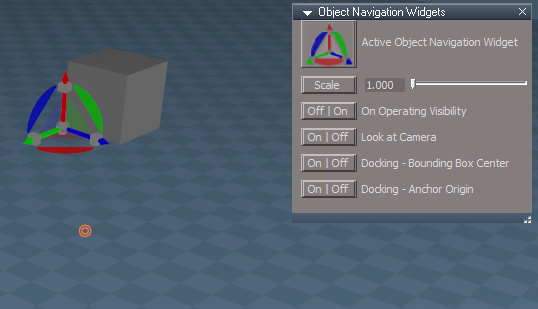
After
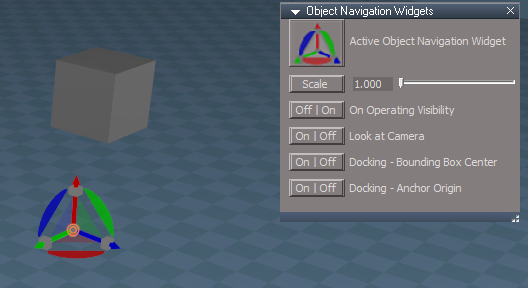
Pointedit widget
Origin
Removed: Origin - Shift and Ctrl gestures
Sphere
Add: O LClick - Reset Origin
WidgetScripts
Update: CyclePointEditNavigationWidget and CycleObjectNavigationWidget scripts
Toolbars
ClintonsPointEditToolbar
PESnappingToolbar
Q_PESnappingToolbar
Update:
AlignViewToFaceButton(s)
Align View to Face selection / Align View - Zoom to Face selection
PESnappingToolbar
Q_PESnappingToolbar
X Y Z Lock buttons
Removed: Close toolbar
Removed: Axis to Point Edit Selection button
PEModelingToolbar
Q_PEModelingToolbar
Heal Vertices
RClick Preferences
Removed: Close toolbar
CustomCommands
MeshObjectCoordinateSystem script 'Toogle Mesh Origin off if visible so you can see the PE Widget Sphere's color change'
AlignViewToFace script 'Add status message if no Face Selection'
-
trueBlue
- Captain
- Posts: 5548
- Joined: 06 Jul 2009, 22:50
- Type the number ten into the box: 10
Re: Final trueSpace7.61 Beta 8 Std Unofficial Update
trueSpace7.61 Beta 8 Standalone Unofficial Update Version 9
Final Release 10/25/2023
viewtopic.php?t=3731
It is recommended that you completely Uninstall and Install trueSpace7.61 Beta 8 to a clean directory
Open the Task Manager
If you find any Standalone Runner (32 bit) or trueSpace (32 bit) programs open, Select each one and RClick - End task
Close the Task Manager
Widgets
Point Edit widget(s)
Removed: RClick - Open Point Edit Popup toolbar
Add: MClick - Open Point Edit Popup toolbar
WidgetScripts
Update: Object Navigation Widgets scripts
CustomCommands
Mesh Origin
Update: Panel buttons
Add: Origin to Axis button and script 'If Axis, Flatten Axis with the option to Remove Axis?'
Set Snap Point
Export: X Y Z values to panel 'If Error, remove X Y Z values'
Origin to Set Point 'Renamed from Snap Origin'
Add: Status Message "Origin Snapped to last Set Snap Point - Ctrl Z to Undo"
.
Final Release 10/25/2023
viewtopic.php?t=3731
It is recommended that you completely Uninstall and Install trueSpace7.61 Beta 8 to a clean directory
Open the Task Manager
If you find any Standalone Runner (32 bit) or trueSpace (32 bit) programs open, Select each one and RClick - End task
Close the Task Manager
Widgets
Point Edit widget(s)
Removed: RClick - Open Point Edit Popup toolbar
Add: MClick - Open Point Edit Popup toolbar
WidgetScripts
Update: Object Navigation Widgets scripts
CustomCommands
Mesh Origin
Update: Panel buttons
Add: Origin to Axis button and script 'If Axis, Flatten Axis with the option to Remove Axis?'
Set Snap Point
Export: X Y Z values to panel 'If Error, remove X Y Z values'
Origin to Set Point 'Renamed from Snap Origin'
Add: Status Message "Origin Snapped to last Set Snap Point - Ctrl Z to Undo"
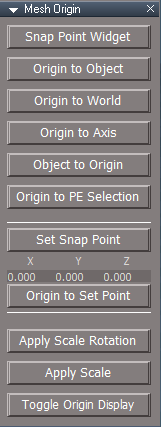
- Mesh Origin panel.png (10.3 KiB) Viewed 2691 times
-
trueBlue
- Captain
- Posts: 5548
- Joined: 06 Jul 2009, 22:50
- Type the number ten into the box: 10
Re: Final trueSpace7.61 Beta 8 Std Unofficial Update
trueSpace7.61 Beta 8 Standalone Unofficial Update Version 9
Final Release 12/24/2023
viewtopic.php?t=3731
It is recommended that you completely Uninstall and Install trueSpace7.61 Beta 8 to a clean directory
Open the Task Manager
If you find any Standalone Runner (32 bit) or trueSpace (32 bit) programs open, Select each one and RClick - End task
Close the Task Manager
Updates:
* Author Clinton Reese
Material Editor
*Add: Material List
.
*D3D Material Converter
Update: Remove Orphan Materials
Add: Convert to Material List (Default aspect)
Add: Get Scene Materials and Load (Scene aspect)
UUCommands
*Update: Encapsulate 12/20/2023
Add: tS761 Toolbars
UUFunctionSet
Updates:
*Delete function
*Add: support for Actor IK Locks'
*Copy function
*CustomCommands
*Update: Freeze Transform
*Update: Mesh Origin
*Update: Vertex Paint
*Update: Radial Modeler
*Update: Convert Light Type
Add: Convert Camera Type
*Update: Hierarchy 12/21/2023
Add: Hierarchy conversion tools
Removed: Status Messages
*Update: Scene View 2 12/22/2023
*Add: Icons
*Update: Clintons3dRsView.dll - plugin v.1638415
Update: SceneView 'Open - Scene View 2 and Node Graph Utilities scripts'
*Update: Web Server 12/22/2023
Update: scripts and web files
*Add: View3D Layout
Note: Add restrictions on more than two undocked floating 3D Windows and more than four docked 3D Windows
.
*Add: Joint Orientation Control
*Add: GLTF Import and Export
Note: Added modifications
*Add: Material List
Note: Added modifications
Toolbars
WorkspaceMain2
Primitive(s) 'RClick show Primitive's Default aspect'
WorkspaceNav 'Add: Joint Edit Control'
ExportUtilities 'Add GLTF - LMB Import / RMB Export'
Main
Main2
WorkspaceMain
Add:
One by One View, One View, and Quad View 'RClick 3D Views panel'
.
Widgets
Update: Object Navigation Widget(s)
*Add: Switch - Docking modes
Background
*Update: MDrag speed
SpeedX = 0.010
SpeedY = -0.010
Add: RDrag - Move Up and Down
SpeedX = 0.010
SpeedY = -0.010
Zoom to Selections
*Add: support for Joints, Bones, IK Handles, and IK Locks'
Edit: IK lock 'Add Shift LClick gesture that closes the widget and starts Dynamic Pose
Edit: Ik Motion Ctrl 'Add Shift LClick gesture that closes the widget and starts Dynamic Pose
Components - Compositing
*Add: Save As - PNG with Alpha
Updates:
*image saver
Scene Color Picker
Point edit snapping
*Update: Default aspect
*Update: Clintons3dPlugin.dll v.1638449
*Update: Clintons3dRsView.dll v.1638415
*Add: RsGLTFPlugin.rsx v.1638408
ScriptCommands
Update: onnewscene.xml
preobjects
Add: Camera2.rsobj 'Custom Camera for New Scene'
Update: Camera1 'Original Camera for Model and Workspace'
Final Release 12/24/2023
viewtopic.php?t=3731
It is recommended that you completely Uninstall and Install trueSpace7.61 Beta 8 to a clean directory
Open the Task Manager
If you find any Standalone Runner (32 bit) or trueSpace (32 bit) programs open, Select each one and RClick - End task
Close the Task Manager
Updates:
* Author Clinton Reese
Material Editor
*Add: Material List
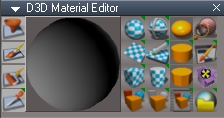
- Material List.png (30.11 KiB) Viewed 2601 times

*D3D Material Converter
Update: Remove Orphan Materials
Add: Convert to Material List (Default aspect)
Add: Get Scene Materials and Load (Scene aspect)
UUCommands
*Update: Encapsulate 12/20/2023
Add: tS761 Toolbars
UUFunctionSet
Updates:
*Delete function
*Add: support for Actor IK Locks'
*Copy function
*CustomCommands
*Update: Freeze Transform
*Update: Mesh Origin
*Update: Vertex Paint
*Update: Radial Modeler
*Update: Convert Light Type
Add: Convert Camera Type
*Update: Hierarchy 12/21/2023
Add: Hierarchy conversion tools
Removed: Status Messages
*Update: Scene View 2 12/22/2023
*Add: Icons
*Update: Clintons3dRsView.dll - plugin v.1638415
Update: SceneView 'Open - Scene View 2 and Node Graph Utilities scripts'
*Update: Web Server 12/22/2023
Update: scripts and web files
*Add: View3D Layout
Note: Add restrictions on more than two undocked floating 3D Windows and more than four docked 3D Windows

- 3D Views panel.png (6.93 KiB) Viewed 2601 times
*Add: Joint Orientation Control
*Add: GLTF Import and Export
Note: Added modifications
*Add: Material List
Note: Added modifications
Toolbars
WorkspaceMain2
Primitive(s) 'RClick show Primitive's Default aspect'
WorkspaceNav 'Add: Joint Edit Control'
ExportUtilities 'Add GLTF - LMB Import / RMB Export'
Main
Main2
WorkspaceMain
Add:
One by One View, One View, and Quad View 'RClick 3D Views panel'

Widgets
Update: Object Navigation Widget(s)
*Add: Switch - Docking modes
Background
*Update: MDrag speed
SpeedX = 0.010
SpeedY = -0.010
Add: RDrag - Move Up and Down
SpeedX = 0.010
SpeedY = -0.010
Zoom to Selections
*Add: support for Joints, Bones, IK Handles, and IK Locks'
Edit: IK lock 'Add Shift LClick gesture that closes the widget and starts Dynamic Pose
Edit: Ik Motion Ctrl 'Add Shift LClick gesture that closes the widget and starts Dynamic Pose
Components - Compositing
*Add: Save As - PNG with Alpha
Updates:
*image saver
Scene Color Picker
Point edit snapping
*Update: Default aspect
*Update: Clintons3dPlugin.dll v.1638449
*Update: Clintons3dRsView.dll v.1638415
*Add: RsGLTFPlugin.rsx v.1638408
ScriptCommands
Update: onnewscene.xml
preobjects
Add: Camera2.rsobj 'Custom Camera for New Scene'
Update: Camera1 'Original Camera for Model and Workspace'
-
trueBlue
- Captain
- Posts: 5548
- Joined: 06 Jul 2009, 22:50
- Type the number ten into the box: 10
Re: Final trueSpace7.61 Beta 8 Std Unofficial Update
trueSpace7.61 Beta 8 Standalone Unofficial Update Version 9
Final Release 12/25/2023
viewtopic.php?t=3731
It is recommended that you completely Uninstall and Install trueSpace7.61 Beta 8 to a clean directory
Open the Task Manager
If you find any Standalone Runner (32 bit) or trueSpace (32 bit) programs open, Select each one and RClick - End task
Close the Task Manager
Updates:
* Author Clinton Reese
Material Editor
Paint object
Add: If Material List floating panel is open, Update; Material List
*D3D Material Converter
Convert - D3D Base -> D3D Shaders
Convert - D3D Material -> Instancing
Add: If Material List floating panel is open, Update; Material List
Widgets
Update: Repaint
RClick Close Repaint tool
Add: If Material List floating panel is open, Update; Material List
*CustomCommands
*Material List
Commented: // less important status messages
Final Release 12/25/2023
viewtopic.php?t=3731
It is recommended that you completely Uninstall and Install trueSpace7.61 Beta 8 to a clean directory
Open the Task Manager
If you find any Standalone Runner (32 bit) or trueSpace (32 bit) programs open, Select each one and RClick - End task
Close the Task Manager
Updates:
* Author Clinton Reese
Material Editor
Paint object
Add: If Material List floating panel is open, Update; Material List
*D3D Material Converter
Convert - D3D Base -> D3D Shaders
Convert - D3D Material -> Instancing
Add: If Material List floating panel is open, Update; Material List
Widgets
Update: Repaint
RClick Close Repaint tool
Add: If Material List floating panel is open, Update; Material List
*CustomCommands
*Material List
Commented: // less important status messages
-
trueBlue
- Captain
- Posts: 5548
- Joined: 06 Jul 2009, 22:50
- Type the number ten into the box: 10
Re: Final trueSpace7.61 Beta 8 Std Unofficial Update
trueSpace7.61 Beta 8 Standalone Unofficial Update Version 9
Final Release 12/27/2023
viewtopic.php?t=3731
It is recommended that you completely Uninstall and Install trueSpace7.61 Beta 8 to a clean directory
Open the Task Manager
If you find any Standalone Runner (32 bit) or trueSpace (32 bit) programs open, Select each one and RClick - End task
Close the Task Manager
Updates:
Discovered when not using 'Use - Intensive Visibility Mode', that 3D Groups do not update the Object Render Attributes properly, so it is enabled by Default
.
Also changed the Object Render Attributes panel
UUCommands
Update:
Visibility Function Set
CloseORASettings
preobjects
Custom preferences.RsObj
ObjectAttributes.RsObj
Widgets
Rect zoom
Removed:
RClick - Reset FOV
Shortcuts
Window.Shortcuts.xml
Window.Shortcuts_BACKUP.xml
Link Editor shortcuts
Removed:
<RS_ACC KEY="MULTIPLY" DESC="Iconize All" GROUP="LINKEDITOR" COMMAND="LE.IconizePanels('');" />
<RS_ACC KEY="SUBTRACT" DESC="Minimize All" GROUP="LINKEDITOR" COMMAND="LE.MinimizePanels('');" />
<RS_ACC KEY="ADD" DESC="Maximize All" GROUP="LINKEDITOR" COMMAND="LE.ExpandPanels('');" />
This is the official Final Release
Final Release 12/27/2023
viewtopic.php?t=3731
It is recommended that you completely Uninstall and Install trueSpace7.61 Beta 8 to a clean directory
Open the Task Manager
If you find any Standalone Runner (32 bit) or trueSpace (32 bit) programs open, Select each one and RClick - End task
Close the Task Manager
Updates:
Discovered when not using 'Use - Intensive Visibility Mode', that 3D Groups do not update the Object Render Attributes properly, so it is enabled by Default
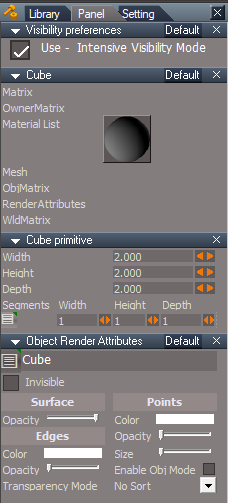
Also changed the Object Render Attributes panel
UUCommands
Update:
Visibility Function Set
CloseORASettings
preobjects
Custom preferences.RsObj
ObjectAttributes.RsObj
Widgets
Rect zoom
Removed:
RClick - Reset FOV
Shortcuts
Window.Shortcuts.xml
Window.Shortcuts_BACKUP.xml
Link Editor shortcuts
Removed:
<RS_ACC KEY="MULTIPLY" DESC="Iconize All" GROUP="LINKEDITOR" COMMAND="LE.IconizePanels('');" />
<RS_ACC KEY="SUBTRACT" DESC="Minimize All" GROUP="LINKEDITOR" COMMAND="LE.MinimizePanels('');" />
<RS_ACC KEY="ADD" DESC="Maximize All" GROUP="LINKEDITOR" COMMAND="LE.ExpandPanels('');" />
This is the official Final Release
-
trueBlue
- Captain
- Posts: 5548
- Joined: 06 Jul 2009, 22:50
- Type the number ten into the box: 10
Re: Final trueSpace7.61 Beta 8 Std Unofficial Update
trueSpace7.61 Beta 8 Standalone Unofficial Update Version 9
Final Release 12/30/2023
viewtopic.php?t=3731
It is recommended that you completely Uninstall and Install trueSpace7.61 Beta 8 to a clean directory
Open the Task Manager
If you find any Standalone Runner (32 bit) or trueSpace (32 bit) programs open, Select each one and RClick - End task
Close the Task Manager
Updates:
UUCommands
Update: Visibility scripts
Select first selected, switch to Panel or Settings
CustomCommands
Popups
Add: modified Uneditable script
Toolbars
PointEdit and PointEdit2 Popup toolbars
Remove: RClick Close toolbar
Update: ViewToolbar
Update: ObjectNavToolbar
preobjects
Add: CustomCommands
Update: C3DReset
Update: Renderers
Scripts
Update: reset.js
Load: CustomCommands and Yafaray Folder
This is the official Final Release
Final Release 12/30/2023
viewtopic.php?t=3731
It is recommended that you completely Uninstall and Install trueSpace7.61 Beta 8 to a clean directory
Open the Task Manager
If you find any Standalone Runner (32 bit) or trueSpace (32 bit) programs open, Select each one and RClick - End task
Close the Task Manager
Updates:
UUCommands
Update: Visibility scripts
Select first selected, switch to Panel or Settings
CustomCommands
Popups
Add: modified Uneditable script
Toolbars
PointEdit and PointEdit2 Popup toolbars
Remove: RClick Close toolbar
Update: ViewToolbar
Update: ObjectNavToolbar
preobjects
Add: CustomCommands
Update: C3DReset
Update: Renderers
Scripts
Update: reset.js
Load: CustomCommands and Yafaray Folder
This is the official Final Release
-
trueBlue
- Captain
- Posts: 5548
- Joined: 06 Jul 2009, 22:50
- Type the number ten into the box: 10
Re: Final trueSpace7.61 Beta 8 Std Unofficial Update
trueSpace7.61 Beta 8 Standalone Unofficial Update Version 10
Final Release 1/13/2024
viewtopic.php?t=3731
It is recommended that you completely Uninstall and Install trueSpace7.61 Beta 8 to a clean directory
Open the Task Manager
If you find any Standalone Runner (32 bit) or trueSpace (32 bit) programs open, Select each one and RClick - End task
Close the Task Manager
Updates:
Main Directory
Remove: YafaRay4tS Help.chm
Add: YafaRay4tS Help UU10.pdf
Toolbars
Update: WorkspaceMainMenu/About v10
Update: YafaRayBar 'Add: Background and update Help LMB = 'YafaRay4tS Help UU10.pdf' RMB = Open About
Widgets
Update: Object Navigation widget
Update: Point Edit widget
Add: RDrag gesture to Bars, Boxes, and Arcs
Enables the use of the RDrag and or RMB + MM Wheel; Move, Scale, or Rotate
Scripts
Update: init.js
Update: reset.js
CustomCommands
Update: YafarayScripts v3
preobjects
Update: CustomCommands
Update: Yafaray Folder v1.0.0 - 1/6/2024 Author Clinton Reese
Update: Cameras
Update: Lights
Update: C3DReset v10
Update: Renderers/Switch Renderers scripts
Rs Main Libraries
Update: YafaRay Lights
Update: YafaRay4tS Materials 'Removed: Image Perlin, Image Cloud, Image Marble, Image Wood, and Image Voronoi'
Update: YafaRay4tS Setup 'Removed: YafaRay4tS Scene Utilities
Update: YafaRay4tS Scenes v1.0.0
Update: Components - Compositing
Layouts - Configurations
Update: YafaRay4tS
Final Release 1/13/2024
viewtopic.php?t=3731
It is recommended that you completely Uninstall and Install trueSpace7.61 Beta 8 to a clean directory
Open the Task Manager
If you find any Standalone Runner (32 bit) or trueSpace (32 bit) programs open, Select each one and RClick - End task
Close the Task Manager
Updates:
Main Directory
Remove: YafaRay4tS Help.chm
Add: YafaRay4tS Help UU10.pdf
Toolbars
Update: WorkspaceMainMenu/About v10
Update: YafaRayBar 'Add: Background and update Help LMB = 'YafaRay4tS Help UU10.pdf' RMB = Open About
Widgets
Update: Object Navigation widget
Update: Point Edit widget
Add: RDrag gesture to Bars, Boxes, and Arcs
Enables the use of the RDrag and or RMB + MM Wheel; Move, Scale, or Rotate
Scripts
Update: init.js
Update: reset.js
CustomCommands
Update: YafarayScripts v3
preobjects
Update: CustomCommands
Update: Yafaray Folder v1.0.0 - 1/6/2024 Author Clinton Reese
Update: Cameras
Update: Lights
Update: C3DReset v10
Update: Renderers/Switch Renderers scripts
Rs Main Libraries
Update: YafaRay Lights
Update: YafaRay4tS Materials 'Removed: Image Perlin, Image Cloud, Image Marble, Image Wood, and Image Voronoi'
Update: YafaRay4tS Setup 'Removed: YafaRay4tS Scene Utilities
Update: YafaRay4tS Scenes v1.0.0
Update: Components - Compositing
Layouts - Configurations
Update: YafaRay4tS
-
trueBlue
- Captain
- Posts: 5548
- Joined: 06 Jul 2009, 22:50
- Type the number ten into the box: 10
Re: Final trueSpace7.61 Beta 8 Std Unofficial Update
trueSpace7.61 Beta 8 Standalone Unofficial Update Version 10
Final Release 1/15/2024
viewtopic.php?t=3731
It is recommended that you completely Uninstall and Install trueSpace7.61 Beta 8 to a clean directory
Open the Task Manager
If you find any Standalone Runner (32 bit) or trueSpace (32 bit) programs open, Select each one and RClick - End task
Close the Task Manager
Updates:
Main Directory
Update: YafaRay4tS Help UU10.pdf
CustomCommands
Update: YafarayScripts v4
preobjects
Update: CustomCommands - 1/14/2024
Update: Yafaray Folder v1.0.0 - 1/14/2024
Rs Main Libraries
Update: YafaRay4tS Materials
Final Release 1/15/2024
viewtopic.php?t=3731
It is recommended that you completely Uninstall and Install trueSpace7.61 Beta 8 to a clean directory
Open the Task Manager
If you find any Standalone Runner (32 bit) or trueSpace (32 bit) programs open, Select each one and RClick - End task
Close the Task Manager
Updates:
Main Directory
Update: YafaRay4tS Help UU10.pdf
CustomCommands
Update: YafarayScripts v4
preobjects
Update: CustomCommands - 1/14/2024
Update: Yafaray Folder v1.0.0 - 1/14/2024
Rs Main Libraries
Update: YafaRay4tS Materials
-
trueBlue
- Captain
- Posts: 5548
- Joined: 06 Jul 2009, 22:50
- Type the number ten into the box: 10
Re: Final trueSpace7.61 Beta 8 Std Unofficial Update
trueSpace7.61 Beta 8 Standalone Unofficial Update Version 10
Final Release 1/17/2024
viewtopic.php?t=3731
It is recommended that you completely Uninstall and Install trueSpace7.61 Beta 8 to a clean directory
Open the Task Manager
If you find any Standalone Runner (32 bit) or trueSpace (32 bit) programs open, Select each one and RClick - End task
Close the Task Manager
Updates:
Main Directory
Update: YafaRay4tS Help UU10.pdf
preobjects
Update: Yafaray Folder v1.0.0 - 1/14/2024
Update: Sequence Player
Add: Image Viewer button
Final Release 1/17/2024
viewtopic.php?t=3731
It is recommended that you completely Uninstall and Install trueSpace7.61 Beta 8 to a clean directory
Open the Task Manager
If you find any Standalone Runner (32 bit) or trueSpace (32 bit) programs open, Select each one and RClick - End task
Close the Task Manager
Updates:
Main Directory
Update: YafaRay4tS Help UU10.pdf
preobjects
Update: Yafaray Folder v1.0.0 - 1/14/2024
Update: Sequence Player
Add: Image Viewer button
-
trueBlue
- Captain
- Posts: 5548
- Joined: 06 Jul 2009, 22:50
- Type the number ten into the box: 10
Re: Final trueSpace7.61 Beta 8 Std Unofficial Update
trueSpace7.61 Beta 8 Standalone Unofficial Update Version 10
Final Release 1/19/2024
viewtopic.php?t=3731
It is recommended that you completely Uninstall and Install trueSpace7.61 Beta 8 to a clean directory
Open the Task Manager
If you find any Standalone Runner (32 bit) or trueSpace (32 bit) programs open, Select each one and RClick - End task
Close the Task Manager
Updates:
Main Directory
Update: YafaRay4tS Help UU10.pdf
preobjects
Update: Yafaray Folder v1.0.0 - 1/14/2024
Update Open and Save As image format definitions
Update: Sequence Player
Update Open image format definitions
Update: Image Viewer
Now opens from YafaRay4tS in the current scene
Get image Height, Width and Set iOptDetector View
Set iOptDetector View's titlebar to image name and format
Update Open image format definitions
YafaRay Scenes
Update panel, materials, and lights
Final Release 1/19/2024
viewtopic.php?t=3731
It is recommended that you completely Uninstall and Install trueSpace7.61 Beta 8 to a clean directory
Open the Task Manager
If you find any Standalone Runner (32 bit) or trueSpace (32 bit) programs open, Select each one and RClick - End task
Close the Task Manager
Updates:
Main Directory
Update: YafaRay4tS Help UU10.pdf
preobjects
Update: Yafaray Folder v1.0.0 - 1/14/2024
Update Open and Save As image format definitions
Update: Sequence Player
Update Open image format definitions
Update: Image Viewer
Now opens from YafaRay4tS in the current scene
Get image Height, Width and Set iOptDetector View
Set iOptDetector View's titlebar to image name and format
Update Open image format definitions
YafaRay Scenes
Update panel, materials, and lights
-
trueBlue
- Captain
- Posts: 5548
- Joined: 06 Jul 2009, 22:50
- Type the number ten into the box: 10
Re: Final trueSpace7.61 Beta 8 Std Unofficial Update
trueSpace7.61 Beta 8 Standalone Unofficial Update Version 10
Final Release 1/20/2024
viewtopic.php?t=3731
It is recommended that you completely Uninstall and Install trueSpace7.61 Beta 8 to a clean directory
Open the Task Manager
If you find any Standalone Runner (32 bit) or trueSpace (32 bit) programs open, Select each one and RClick - End task
Close the Task Manager
Updates:
Toolbars
Update: YafaRayBar
.
preobjects
Update: Yafaray Folder v1.0.0 - 1/14/2024
Yafaray Settings LMB Command script
Yafaray Settings RMB Command script
Note: New YafaRayBar no longer run these scripts
Left in for backwards compatibility
Update: CustomCommands
CustomScriptsStore
Update: YafarayScripts v5
Add:
RenderSettings script
SetupSettings script
BackgroundSettings script
AboutYafaRay4tS script
SceneUtilities script
Final Release 1/20/2024
viewtopic.php?t=3731
It is recommended that you completely Uninstall and Install trueSpace7.61 Beta 8 to a clean directory
Open the Task Manager
If you find any Standalone Runner (32 bit) or trueSpace (32 bit) programs open, Select each one and RClick - End task
Close the Task Manager
Updates:
Toolbars
Update: YafaRayBar
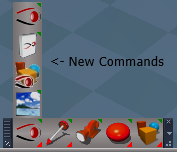
- YafaRat4tS toolbar.png (16.86 KiB) Viewed 2539 times
preobjects
Update: Yafaray Folder v1.0.0 - 1/14/2024
Yafaray Settings LMB Command script
Yafaray Settings RMB Command script
Note: New YafaRayBar no longer run these scripts
Left in for backwards compatibility
Update: CustomCommands
CustomScriptsStore
Update: YafarayScripts v5
Add:
RenderSettings script
SetupSettings script
BackgroundSettings script
AboutYafaRay4tS script
SceneUtilities script
-
trueBlue
- Captain
- Posts: 5548
- Joined: 06 Jul 2009, 22:50
- Type the number ten into the box: 10
Re: Final trueSpace7.61 Beta 8 Std Unofficial Update
trueSpace7.61 Beta 8 Standalone Unofficial Update Version 10
Final Release 1/26/2024
viewtopic.php?t=3731
It is recommended that you completely Uninstall and Install trueSpace7.61 Beta 8 to a clean directory
Open the Task Manager
If you find any Standalone Runner (32 bit) or trueSpace (32 bit) programs open, Select each one and RClick - End task
Close the Task Manager
Updates:
YafaRay4tS Help UU10.pdf
Toolbars
Update: YafaRayBar
preobjects
Update: CustomCommands
Update: Yafaray Folder v1.0.0 - 1/24/2024
YafaRay4tS
Setup: Add - Set Clear History button
Background: Remove Fog section
Add: Volume aspect and code update: Author - Clinton Reese
Update: YafaRay4tS Scene Utilities
Add: ClearHistory script for Render scripts
ClearCommandHistory 'if true RsApp.ClearHistory()'
Add: RsApp.ClearHistory() code
Render scripts list:
tSDisplay:
OpenOptDetectorFrame2
ShowAnimationFrame
Set Display Node Values
update Opti display:
function updateDisplay(filename)
PostRender ProtectWorkspace: 'Before and After return'
CustomScriptsStore
Update: YafarayScripts v6
Add:
CameraSettings script
VolumeSettings script
Update:
RenderSettings script
SetupSettings script
BackgroundSettings script
AboutYafaRay4tS script
SceneUtilities script
Rs Main Libraries
Components - Compositing library
Update:
Image Perlin
Image Cloud
Image Wood
Image Marble
Image Voronoi
YafaRay4tS Setup library
Update:
YafarayVolume
All D3D Preview objects
YafaRay Scenes libray
Update:
All scenes
This is the official Final Release
Final Release 1/26/2024
viewtopic.php?t=3731
It is recommended that you completely Uninstall and Install trueSpace7.61 Beta 8 to a clean directory
Open the Task Manager
If you find any Standalone Runner (32 bit) or trueSpace (32 bit) programs open, Select each one and RClick - End task
Close the Task Manager
Updates:
YafaRay4tS Help UU10.pdf
Toolbars
Update: YafaRayBar
preobjects
Update: CustomCommands
Update: Yafaray Folder v1.0.0 - 1/24/2024
YafaRay4tS
Setup: Add - Set Clear History button
Background: Remove Fog section
Add: Volume aspect and code update: Author - Clinton Reese
Update: YafaRay4tS Scene Utilities
Add: ClearHistory script for Render scripts
ClearCommandHistory 'if true RsApp.ClearHistory()'
Add: RsApp.ClearHistory() code
Render scripts list:
tSDisplay:
OpenOptDetectorFrame2
ShowAnimationFrame
Set Display Node Values
update Opti display:
function updateDisplay(filename)
PostRender ProtectWorkspace: 'Before and After return'
CustomScriptsStore
Update: YafarayScripts v6
Add:
CameraSettings script
VolumeSettings script
Update:
RenderSettings script
SetupSettings script
BackgroundSettings script
AboutYafaRay4tS script
SceneUtilities script
Rs Main Libraries
Components - Compositing library
Update:
Image Perlin
Image Cloud
Image Wood
Image Marble
Image Voronoi
YafaRay4tS Setup library
Update:
YafarayVolume
All D3D Preview objects
YafaRay Scenes libray
Update:
All scenes
This is the official Final Release
-
trueBlue
- Captain
- Posts: 5548
- Joined: 06 Jul 2009, 22:50
- Type the number ten into the box: 10
Re: Final trueSpace7.61 Beta 8 Std Unofficial Update
@Clinton
Please try this new Area light
.
List:
New D3D Materials, all but one have Transparency (Area light Frame)
New Transparent / Solid button
Requires the Clintons3dPlugin
Solid [Default] Area light Frame (RClick)
Transparent:
Makes the Area light Frame transparent and copies an internal Area Shape to the Scene
Applies the current Color (D3D and Vray) and copies the current Matrix
Which means you can change the Area light's Location, Rotation, and Scale and then press the Transparent button
This allows you to Render the Area light without the frame in Vray and D3D
Vray
Supports Shadows
Add more Samples for less Noise
Default = 17 (similar to Model)
.
D3D
Does not support Shadows
Removed due to update
Please try this new Area light

- New Workspace Area light.png (5.49 KiB) Viewed 2277 times
List:
New D3D Materials, all but one have Transparency (Area light Frame)
New Transparent / Solid button
Requires the Clintons3dPlugin
Solid [Default] Area light Frame (RClick)
Transparent:
Makes the Area light Frame transparent and copies an internal Area Shape to the Scene
Applies the current Color (D3D and Vray) and copies the current Matrix
Which means you can change the Area light's Location, Rotation, and Scale and then press the Transparent button
This allows you to Render the Area light without the frame in Vray and D3D
Vray
Supports Shadows
Add more Samples for less Noise
Default = 17 (similar to Model)

D3D
Does not support Shadows

-
clintonman
- Captain
- Posts: 5659
- Joined: 21 May 2009, 21:08
- Type the number ten into the box: 0
- Location: California
Re: Final trueSpace7.61 Beta 8 Std Unofficial Update
The Transparent/Solid terms are confusing. "This allows you to Render the Area light without the frame in Vray and D3D", so maybe call it Frame/No Frame.trueBlue wrote: 03 Feb 2024, 15:56 @Clinton
Please try this new Area light
New Workspace Area light.png
.
List:
New D3D Materials, all but one have Transparency (Area light Frame)
New Transparent / Solid button
Requires the Clintons3dPlugin
Solid [Default] Area light Frame (RClick)
Transparent:
Makes the Area light Frame transparent and copies an internal Area Shape to the Scene
Applies the current Color (D3D and Vray) and copies the current Matrix
Which means you can change the Area light's Location, Rotation, and Scale and then press the Transparent button
This allows you to Render the Area light without the frame in Vray and D3D
Vray
Supports Shadows
Add more Samples for less Noise
Default = 17 (similar to Model)
Vray.png
.
D3D
Does not support Shadows
D3D.png
I don't see the frame in any VRay renders. So it's a combination of Frame/No Frame for D3D and visible/not visible for VRay. So 1 button doing 2 different things in 2 different render engines. Looks like a second button is needed.
Is Solid supposed to update the Area Shape? If pressed all by itself it does nothing. RClick no meaning until after LClick.
Area Shape color is always white.
The color of the mesh is always white even after changing the light color.
-
trueBlue
- Captain
- Posts: 5548
- Joined: 06 Jul 2009, 22:50
- Type the number ten into the box: 10
Re: Final trueSpace7.61 Beta 8 Std Unofficial Update
Thanks for the feedback!clintonman wrote: 03 Feb 2024, 18:14 The Transparent/Solid terms are confusing. "This allows you to Render the Area light without the frame in Vray and D3D", so maybe call it Frame/No Frame.
I don't see the frame in any VRay renders. So it's a combination of Frame/No Frame for D3D and visible/not visible for VRay. So 1 button doing 2 different things in 2 different render engines. Looks like a second button is needed.
Is Solid supposed to update the Area Shape? If pressed all by itself it does nothing. RClick no meaning until after LClick.
Area Shape color is always white.
The color of the mesh is always white even after changing the light color.
Renamed Transparent to Render Light
Model refers to as Render Geometry, but only works in Lightwork, not Vray
Renamed Solid to Show Frame
Vray, by itself, does not render the Area light and the only way to do it, is add the Area Shape to the scene
Fixed the Area Shape color always showing white
So, in this version, I am setting the whole Area light to Transparent
Before, it was just the Frame
Could not figure out how to make the Area Shape's material to not be affected by the Area light, hence not Shinny
So, I am setting Z Scale to 0.001
Not sure but I might Delete the Area Shape with the RClick button script
So, it will act more as Render Light / Show Light
Removed due to update
-
clintonman
- Captain
- Posts: 5659
- Joined: 21 May 2009, 21:08
- Type the number ten into the box: 0
- Location: California
Re: Final trueSpace7.61 Beta 8 Std Unofficial Update
If you try to have more than 1 area light and make them render, one will become completely invisible. So only 1 will render.trueBlue wrote: 03 Feb 2024, 20:57Thanks for the feedback!clintonman wrote: 03 Feb 2024, 18:14 The Transparent/Solid terms are confusing. "This allows you to Render the Area light without the frame in Vray and D3D", so maybe call it Frame/No Frame.
I don't see the frame in any VRay renders. So it's a combination of Frame/No Frame for D3D and visible/not visible for VRay. So 1 button doing 2 different things in 2 different render engines. Looks like a second button is needed.
Is Solid supposed to update the Area Shape? If pressed all by itself it does nothing. RClick no meaning until after LClick.
Area Shape color is always white.
The color of the mesh is always white even after changing the light color.
Renamed Transparent to Render Light
Model refers to as Render Geometry, but only works in Lightwork, not Vray
Renamed Solid to Show Frame
Vray, by itself, does not render the Area light and the only way to do it, is add the Area Shape to the scene
Fixed the Area Shape color always showing white
So, in this version, I am setting the whole Area light to Transparent
Before, it was just the Frame
Could not figure out how to make the Area Shape's material to not be affected by the Area light, hence not Shinny
So, I am setting Z Scale to 0.001
Not sure but I might Delete the Area Shape with the RClick button script
So, it will act more as Render Light / Show Light
-
trueBlue
- Captain
- Posts: 5548
- Joined: 06 Jul 2009, 22:50
- Type the number ten into the box: 10
Re: Final trueSpace7.61 Beta 8 Std Unofficial Update
Have not tried that yet...If you try to have more than 1 area light and make them render, one will become completely invisible. So only 1 will render.
I did add, Delete Area Shape to RClick
Render Light / Show Light
Edit: Just tried two Area lights and RClick does show the other Invisible Area light
-
trueBlue
- Captain
- Posts: 5548
- Joined: 06 Jul 2009, 22:50
- Type the number ten into the box: 10
Re: Final trueSpace7.61 Beta 8 Std Unofficial Update
Okay, think I have a final version
Area light Plane uses a D3D Constant Color with Vray Ambient Color material
Area light Plane does not hide like the last version and now actually shows the current color
Render Light
LClick - Hides the Frame and Loads the Area Shape (cube) to the scene with the current color, location, rotation, and scale
RClick - Deletes the Area Shape and shows the Frame
Vray
.
D3D
The only thing lacking. is D3D Shadows 
Removed due to update
Area light Plane uses a D3D Constant Color with Vray Ambient Color material
Area light Plane does not hide like the last version and now actually shows the current color
Render Light
LClick - Hides the Frame and Loads the Area Shape (cube) to the scene with the current color, location, rotation, and scale
RClick - Deletes the Area Shape and shows the Frame
Vray

D3D

Removed due to update
-
clintonman
- Captain
- Posts: 5659
- Joined: 21 May 2009, 21:08
- Type the number ten into the box: 0
- Location: California
Re: Final trueSpace7.61 Beta 8 Std Unofficial Update
Still can't have more than 1 visible in the render.trueBlue wrote: 04 Feb 2024, 02:09 Okay, think I have a final version
Area light Plane uses a D3D Constant Color with Vray Ambient Color material
Area light Plane does not hide like the last version and now actually shows the current color
Render Light
LClick - Hides the Frame and Loads the Area Shape (cube) to the scene with the current color, location, rotation, and scale
RClick - Deletes the Area Shape and shows the Frame
Vray
Vray.png
.
D3D
D3D.png
The only thing lacking. is D3D Shadows