Final trueSpace7.61 Beta 8 Std Unofficial Update

User avatar
clintonman
Captain
Posts: 5659
Joined: 21 May 2009, 21:08
Type the number ten into the box: 0
Location: California

Re: Final trueSpace7.61 Beta 8 Std Unofficial Update

Post by clintonman »

the_ant wrote: 28 Mar 2023, 06:47 Hi Clint and True...the tSp magicians (thanks for your great job that mantaining tSp alive in time) :worship: :worship:

hope my question isn't too much off-topic...

last two years ran tsp (7.61 b8 modelside) exporting *.stl objects created for my Artillery Genius 3d printer
and it's a great tool so i don't learn new 3d software for.

Now my question is ...if i will use your UUpdate tSp StdAlone for my 3d print ideas could then export objects in *.stl (or *.obj in alternative)?
The UU Std does not import or export *.stl or *.obj files. The fbx install can import and export *.obj files. It can be found here:

http://clintons3d.com/plugins/truespace ... inout.html

The UUpdate full beta version still has modelside with all it's tools and exporters.
Clinton Reese

http://clintons3d.com
User avatar
the_ant
Chief Petty Officer
Posts: 155
Joined: 02 Jun 2009, 09:26
Type the number ten into the box: 0
Location: Perugia - Italy

Re: Final trueSpace7.61 Beta 8 Std Unofficial Update

Post by the_ant »

Thanks Clintonman

installed your fbx plugin in tSp 761b8 Std and exporting works fine... :bananacheers: :worship:
User avatar
trueBlue
Captain
Posts: 5548
Joined: 06 Jul 2009, 22:50
Type the number ten into the box: 10

Re: Final trueSpace7.61 Beta 8 Std Unofficial Update

Post by trueBlue »

trueSpace7.61 Beta 8 Standalone Unofficial Update Version 9

Please test this RC30 3/28/2023 :bananatyping:

New Unofficial Update Instructions:

It is Required that you completely Uninstall and Install trueSpace7.61 Standalone to a clean directory
You can keep your Rs Main Libraries folder, but all other folders and files should be removed
Install tS761B8Std.exe to C:\trueSpace761Std


If trueSpace is open, Close trueSpace

1.) Install the YafaRay v3.3.0 render engine
2.) Install tS76_Vray1_54B8.exe to C:\trueSpace761Std (Optional but required before installing the Update)
3.) Install tS7.61B8Std.9.exe to C:\trueSpace761Std
Browse [...] to where you installed C:\trueSpace761Std, select its folder and then the [Extract] button
Select the [Yes to All] button
4.) Open trueSpace
5.) Select the [OK] button in the OptDetectors plugin Information dialog
6.) Reset to Default Context
When trueSpace opens, select one of the layout tabs at the top
If Vray is installed,
7.) Press your keyboard's CTRL + F8 keys to open the Package Manager
Right click in the Package Manager and select Install New...
Open C:\trueSpace761Std\Vray_ts.rsx
Right click in the Package Manager's Vray Package and select Load
Close the Package Manager
8.) Close trueSpace
If Vray is installed,
9.) Delete the tS folder installed by the Vray installer

The included Clintons3dPlugin.dll v.1638440, Clintons3dPluginExt.dll v.1638413, Clintons3dRsView.dll v.1638409 and the OptDetectors.dll Author - Vladimir Sisolak, are in: C:\trueSpace761Std
WARNING: The init.js file Imports the above 4 plugins and should not be Installed from the Package Manager, including any other plugins with the same name that have the rsx extension
All scripts that check for these plugins with the rsx extension have been removed!

Unofficial Update Version 9
Started on Fri Sep 02, 2022

Commands
Removed all of the discontinued xml scripts

Plugins Author - Clinton Reese
Renamed from rsx to dll:
Clintons3dPlugin.dll v1638441
Clintons3dRsView.dll v1638412
Clintons3dPluginExt.dll
Add
OptDetectors.dll Author - Vladimir Sisolak

Library
Add
OptDetectors
OptDetectors - Help objects
OptDetectors - Samples

Scripts
Update
init.js 'Loads the above 4 plugins'
Window.Shortcuts.xml
tS761 Workspace Shortcut List.rtf
Widget.Shortcuts.xml

CustomCommands Author - Clinton Reese
Add
JSON Function Set
Global Function Set
Dimensions
Hierarchy
Toolbar Manager
Shortcut Runner

Color Picker
Paint Vertex Color
Cloth Conversion
Enhanced Collada
Scene View 2
Object Statistics

3/28/2023
Widgets/Booleans
Lights
Cameras
Camera1
light01
light02
light03
light04

If the plugins do not Load, Download and Install the Microsoft Visual C++ 2008 Service Pack 1 Redistributable Package
https://www.microsoft.com/en-us/downloa ... x?id=26368
Note: When downloading the Microsoft Visual C++ 2008 Service Pack 1 Redistributable Package you are given 3 choices
Choose the 32-bit version; vcredist_x86.exe
Removed due to update
User avatar
trueBlue
Captain
Posts: 5548
Joined: 06 Jul 2009, 22:50
Type the number ten into the box: 10

Re: Final trueSpace7.61 Beta 8 Std Unofficial Update

Post by trueBlue »

trueSpace7.61 Beta 8 Standalone Unofficial Update Version 9

Please test this RC31 4/4/2023 :bananatyping:

New Unofficial Update Instructions:

It is Required that you completely Uninstall and Install trueSpace7.61 Standalone to a clean directory
You can keep your Rs Main Libraries folder, but all other folders and files should be removed
Install tS761B8Std.exe to C:\trueSpace761Std


If trueSpace is open, Close trueSpace

1.) Install the YafaRay v3.3.0 render engine
2.) Install tS76_Vray1_54B8.exe to C:\trueSpace761Std (Optional but required before installing the Update)
3.) Install tS7.61B8Std.9.exe to C:\trueSpace761Std
Browse [...] to where you installed C:\trueSpace761Std, select its folder and then the [Extract] button
Select the [Yes to All] button
4.) Open trueSpace
5.) Select the [OK] button in the OptDetectors plugin Information dialog
6.) Reset to Default Context
When trueSpace opens, select one of the layout tabs at the top
If Vray is installed,
7.) Press your keyboard's CTRL + F8 keys to open the Package Manager
Right click in the Package Manager and select Install New...
Open C:\trueSpace761Std\Vray_ts.rsx
Right click in the Package Manager's Vray Package and select Load
Close the Package Manager
8.) Close trueSpace
If Vray is installed,
9.) Delete the tS folder installed by the Vray installer

The included Clintons3dPlugin.dll v.1638440, Clintons3dPluginExt.dll v.1638413, Clintons3dRsView.dll v.1638409 and the OptDetectors.dll Author - Vladimir Sisolak, are in: C:\trueSpace761Std
WARNING: The init.js file Imports the above 4 plugins and should not be Installed from the Package Manager, including any other plugins with the same name that have the rsx extension
All scripts that check for these plugins with the rsx extension have been removed!

Unofficial Update Version 9
Started on Fri Sep 02, 2022

Commands
Removed all of the discontinued xml scripts

Plugins Author - Clinton Reese
Renamed from rsx to dll:
Clintons3dPlugin.dll v1638441
Clintons3dRsView.dll v1638412
Clintons3dPluginExt.dll
Add
OptDetectors.dll Author - Vladimir Sisolak

Library
Add
OptDetectors
OptDetectors - Help objects
OptDetectors - Samples

Scripts
Update
init.js 'Loads the above 4 plugins'
Window.Shortcuts.xml
tS761 Workspace Shortcut List.rtf
Widget.Shortcuts.xml

CustomCommands Author - Clinton Reese
Add
JSON Function Set
Global Function Set
Dimensions
Hierarchy
Toolbar Manager
Shortcut Runner

Color Picker
Paint Vertex Color
Cloth Conversion
Enhanced Collada
Scene View 2
Object Statistics

4/4/2023
Widgets
Lights
Cameras
Camera1
light01
light02
light03
light04

Objects - Script objects libray
Add:
Render Region.RsObj Author - Clinton Reese


If the plugins do not Load, Download and Install the Microsoft Visual C++ 2008 Service Pack 1 Redistributable Package
https://www.microsoft.com/en-us/downloa ... x?id=26368
Note: When downloading the Microsoft Visual C++ 2008 Service Pack 1 Redistributable Package you are given 3 choices
Choose the 32-bit version; vcredist_x86.exe
Removed due to update
User avatar
trueBlue
Captain
Posts: 5548
Joined: 06 Jul 2009, 22:50
Type the number ten into the box: 10

Re: Final trueSpace7.61 Beta 8 Std Unofficial Update

Post by trueBlue »

trueSpace7.61 Beta 8 Standalone Unofficial Update Version 9

Please test this RC32 4/5/2023 :bananatyping:

New Unofficial Update Instructions:

It is Required that you completely Uninstall and Install trueSpace7.61 Standalone to a clean directory
You can keep your Rs Main Libraries folder, but all other folders and files should be removed
Install tS761B8Std.exe to C:\trueSpace761Std


If trueSpace is open, Close trueSpace

1.) Install the YafaRay v3.3.0 render engine
2.) Install tS76_Vray1_54B8.exe to C:\trueSpace761Std (Optional but required before installing the Update)
3.) Install tS7.61B8Std.9.exe to C:\trueSpace761Std
Browse [...] to where you installed C:\trueSpace761Std, select its folder and then the [Extract] button
Select the [Yes to All] button
4.) Open trueSpace
5.) Select the [OK] button in the OptDetectors plugin Information dialog
6.) Reset to Default Context
When trueSpace opens, select one of the layout tabs at the top
If Vray is installed,
7.) Press your keyboard's CTRL + F8 keys to open the Package Manager
Right click in the Package Manager and select Install New...
Open C:\trueSpace761Std\Vray_ts.rsx
Right click in the Package Manager's Vray Package and select Load
Close the Package Manager
8.) Close trueSpace
If Vray is installed,
9.) Delete the tS folder installed by the Vray installer

The included Clintons3dPlugin.dll v.1638440, Clintons3dPluginExt.dll v.1638413, Clintons3dRsView.dll v.1638409 and the OptDetectors.dll Author - Vladimir Sisolak, are in: C:\trueSpace761Std
WARNING: The init.js file Imports the above 4 plugins and should not be Installed from the Package Manager, including any other plugins with the same name that have the rsx extension
All scripts that check for these plugins with the rsx extension have been removed!

Unofficial Update Version 9
Started on Fri Sep 02, 2022

Commands
Removed all of the discontinued xml scripts

Plugins Author - Clinton Reese
Renamed from rsx to dll:
Clintons3dPlugin.dll v1638441
Clintons3dRsView.dll v1638412
Clintons3dPluginExt.dll
Add
OptDetectors.dll Author - Vladimir Sisolak

Library
Add
OptDetectors
OptDetectors - Help objects
OptDetectors - Samples

Scripts
Update
init.js 'Loads the above 4 plugins'
Window.Shortcuts.xml
tS761 Workspace Shortcut List.rtf
Widget.Shortcuts.xml

CustomCommands Author - Clinton Reese :bananathumb:
Add
JSON Function Set
Global Function Set
Dimensions
Hierarchy
Toolbar Manager
Shortcut Runner

Color Picker
Paint Vertex Color
Cloth Conversion
Enhanced Collada
Scene View 2
Object Statistics

4/5/2023
UUCommands
Lights
Cameras
Camera1
light01
light02
light03
light04

Spot and Projector lights
Deprecated
Deprecated
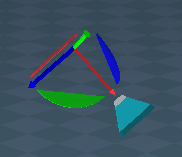
Spot and Projector light widget.png (13.9 KiB) Viewed 1441 times
.
Widgets/Spot light view widget Author - Clinton Reese :bananathumb:
Deprecated
Deprecated
.

If the plugins do not Load, Download and Install the Microsoft Visual C++ 2008 Service Pack 1 Redistributable Package
https://www.microsoft.com/en-us/downloa ... x?id=26368
Note: When downloading the Microsoft Visual C++ 2008 Service Pack 1 Redistributable Package you are given 3 choices
Choose the 32-bit version; vcredist_x86.exe
Removed due to update
User avatar
trueBlue
Captain
Posts: 5548
Joined: 06 Jul 2009, 22:50
Type the number ten into the box: 10

Re: Final trueSpace7.61 Beta 8 Std Unofficial Update

Post by trueBlue »

trueSpace7.61 Beta 8 Standalone Unofficial Update Version 9

Please test this RC33 4/10/2023 :bananatyping:

New Unofficial Update Instructions:

It is Required that you completely Uninstall and Install trueSpace7.61 Standalone to a clean directory
You can keep your Rs Main Libraries folder, but all other folders and files should be removed
Install tS761B8Std.exe to C:\trueSpace761Std


If trueSpace is open, Close trueSpace

1.) Install the YafaRay v3.3.0 render engine
2.) Install tS76_Vray1_54B8.exe to C:\trueSpace761Std (Optional but required before installing the Update)
3.) Install tS7.61B8Std.9.exe to C:\trueSpace761Std
Browse [...] to where you installed C:\trueSpace761Std, select its folder and then the [Extract] button
Select the [Yes to All] button
4.) Open trueSpace
5.) Select the [OK] button in the OptDetectors plugin Information dialog
6.) Reset to Default Context
When trueSpace opens, select one of the layout tabs at the top
If Vray is installed,
7.) Press your keyboard's CTRL + F8 keys to open the Package Manager
Right click in the Package Manager and select Install New...
Open C:\trueSpace761Std\Vray_ts.rsx
Right click in the Package Manager's Vray Package and select Load
Close the Package Manager
8.) Close trueSpace
If Vray is installed,
9.) Delete the tS folder installed by the Vray installer

The included Clintons3dPlugin.dll v.1638440, Clintons3dPluginExt.dll v.1638413, Clintons3dRsView.dll v.1638409 and the OptDetectors.dll Author - Vladimir Sisolak, are in: C:\trueSpace761Std
WARNING: The init.js file Imports the above 4 plugins and should not be Installed from the Package Manager, including any other plugins with the same name that have the rsx extension
All scripts that check for these plugins with the rsx extension have been removed!

Unofficial Update Version 9
Started on Fri Sep 02, 2022

Commands
Removed all of the discontinued xml scripts

Plugins Author - Clinton Reese
Renamed from rsx to dll:
Clintons3dPlugin.dll v1638441
Clintons3dRsView.dll v1638412
Clintons3dPluginExt.dll
Add
OptDetectors.dll Author - Vladimir Sisolak

Library
Add
OptDetectors
OptDetectors - Help objects
OptDetectors - Samples

Scripts
Update
init.js 'Loads the above 4 plugins'
Window.Shortcuts.xml
tS761 Workspace Shortcut List.rtf
Widget.Shortcuts.xml

CustomCommands Author - Clinton Reese
Add
JSON Function Set
Global Function Set
Dimensions
Hierarchy
Toolbar Manager
Shortcut Runner

Color Picker
Paint Vertex Color
Cloth Conversion
Enhanced Collada
Scene View 2
Object Statistics

4/10/2023
Toolbars
Widgets
Lights
Camera1
light01
light02
light03
light04
WS - Default.RsSLgts

Camera FOV widget
RClick - Reset Camera or Eye to 0.500
Note: Camera use to be 1.000

Color Picker
Color Picker icon moved to WorkspaceNav toolbar
Moved Color Picker icon.png
Moved Color Picker icon.png (45.72 KiB) Viewed 1425 times
.
All lights panel's Color Picker button
LClick - Opens the smaller Color Picker panel
RClick - Switches the smaller Color Picker panel to Color panel, if it is open.
Add smaller (Color Picker) aspect
All lights Color Picker button.png
.
Color & Color Picker panel
[>] button
LClick - Switch Color Picker
RClick - Open in the LE 'Item in the Combo Control'

Spot light view widget Author - Clinton Reese :worship:

WidgetScripts/CamLightExtras/ViewFrom Function Set
Add
function CycleSpotLightsPlus()

If the plugins do not Load, Download and Install the Microsoft Visual C++ 2008 Service Pack 1 Redistributable Package
https://www.microsoft.com/en-us/downloa ... x?id=26368
Note: When downloading the Microsoft Visual C++ 2008 Service Pack 1 Redistributable Package you are given 3 choices
Choose the 32-bit version; vcredist_x86.exe
Removed due to update
User avatar
trueBlue
Captain
Posts: 5548
Joined: 06 Jul 2009, 22:50
Type the number ten into the box: 10

Re: Final trueSpace7.61 Beta 8 Std Unofficial Update

Post by trueBlue »

trueSpace7.61 Beta 8 Standalone Unofficial Update Version 9

Please test this RC34 4/11/2023 :bananatyping:

New Unofficial Update Instructions:

It is Required that you completely Uninstall and Install trueSpace7.61 Standalone to a clean directory
You can keep your Rs Main Libraries folder, but all other folders and files should be removed
Install tS761B8Std.exe to C:\trueSpace761Std


If trueSpace is open, Close trueSpace

1.) Install the YafaRay v3.3.0 render engine
2.) Install tS76_Vray1_54B8.exe to C:\trueSpace761Std (Optional but required before installing the Update)
3.) Install tS7.61B8Std.9.exe to C:\trueSpace761Std
Browse [...] to where you installed C:\trueSpace761Std, select its folder and then the [Extract] button
Select the [Yes to All] button
4.) Open trueSpace
5.) Select the [OK] button in the OptDetectors plugin Information dialog
6.) Reset to Default Context
When trueSpace opens, select one of the layout tabs at the top
If Vray is installed,
7.) Press your keyboard's CTRL + F8 keys to open the Package Manager
Right click in the Package Manager and select Install New...
Open C:\trueSpace761Std\Vray_ts.rsx
Right click in the Package Manager's Vray Package and select Load
Close the Package Manager
8.) Close trueSpace
If Vray is installed,
9.) Delete the tS folder installed by the Vray installer

The included Clintons3dPlugin.dll v.1638440, Clintons3dPluginExt.dll v.1638413, Clintons3dRsView.dll v.1638409 and the OptDetectors.dll Author - Vladimir Sisolak, are in: C:\trueSpace761Std
WARNING: The init.js file Imports the above 4 plugins and should not be Installed from the Package Manager, including any other plugins with the same name that have the rsx extension
All scripts that check for these plugins with the rsx extension have been removed!

Unofficial Update Version 9
Started on Fri Sep 02, 2022

Commands
Removed all of the discontinued xml scripts

Plugins Author - Clinton Reese
Renamed from rsx to dll:
Clintons3dPlugin.dll v1638441
Clintons3dRsView.dll v1638412
Clintons3dPluginExt.dll
Add
OptDetectors.dll Author - Vladimir Sisolak

Library
Add
OptDetectors
OptDetectors - Help objects
OptDetectors - Samples

Scripts
Update
init.js 'Loads the above 4 plugins'
Window.Shortcuts.xml
tS761 Workspace Shortcut List.rtf
Widget.Shortcuts.xml

CustomCommands Author - Clinton Reese
Add
JSON Function Set
Global Function Set
Dimensions
Hierarchy
Toolbar Manager
Shortcut Runner

Color Picker
Paint Vertex Color
Cloth Conversion
Enhanced Collada
Scene View 2
Object Statistics

4/11/2023
Widgets
WidgetScripts/CamLightExtras

Spot light view widget Author - Clinton Reese :worship:
UU9 Light View Widget Mouse Controls.png
.

If the plugins do not Load, Download and Install the Microsoft Visual C++ 2008 Service Pack 1 Redistributable Package
https://www.microsoft.com/en-us/downloa ... x?id=26368
Note: When downloading the Microsoft Visual C++ 2008 Service Pack 1 Redistributable Package you are given 3 choices
Choose the 32-bit version; vcredist_x86.exe
Removed due to update
User avatar
clintonman
Captain
Posts: 5659
Joined: 21 May 2009, 21:08
Type the number ten into the box: 0
Location: California

Re: Final trueSpace7.61 Beta 8 Std Unofficial Update

Post by clintonman »

GridArrayControlLayout.jpg
GridArrayControlLayout.jpg (48.88 KiB) Viewed 1396 times


I rearranged the grid array ui because the scrubbers were on the wrong side of the numbers.
Also made the scrubber step size smaller for finer control.

replacement for "/Scripts/CustomCommands/gridArray2Script/rectangleGridTemplate"
Attachments
rectangleGridTemplate.RsObj
(91.01 KiB) Downloaded 83 times
Clinton Reese

http://clintons3d.com
User avatar
trueBlue
Captain
Posts: 5548
Joined: 06 Jul 2009, 22:50
Type the number ten into the box: 10

Re: Final trueSpace7.61 Beta 8 Std Unofficial Update

Post by trueBlue »

clintonman wrote: 12 Apr 2023, 16:59 GridArrayControlLayout.jpg


I rearranged the grid array ui because the scrubbers were on the wrong side of the numbers.
Also made the scrubber step size smaller for finer control.

replacement for "/Scripts/CustomCommands/gridArray2Script/rectangleGridTemplate"
Okay, the current one has a Count:
X = 3
Y = 3
Z = 3
Still want to keep at 1?
User avatar
clintonman
Captain
Posts: 5659
Joined: 21 May 2009, 21:08
Type the number ten into the box: 0
Location: California

Re: Final trueSpace7.61 Beta 8 Std Unofficial Update

Post by clintonman »

trueBlue wrote: 12 Apr 2023, 18:50
clintonman wrote: 12 Apr 2023, 16:59 GridArrayControlLayout.jpg


I rearranged the grid array ui because the scrubbers were on the wrong side of the numbers.
Also made the scrubber step size smaller for finer control.

replacement for "/Scripts/CustomCommands/gridArray2Script/rectangleGridTemplate"
Okay, the current one has a Count:
X = 3
Y = 3
Z = 3
Still want to keep at 1?
The default values are set at 1,1,1. The Grid Array Control was saved with non-default 3,3,3 values.
1,1,1 was chosen because there is no way to know ahead of time the required dimensions and it's less irritating to add what you need instead of removing what you don't need. 2.25 spacing was chosen because a default cube fits well with a little bit of space in between.
Clinton Reese

http://clintons3d.com
User avatar
trueBlue
Captain
Posts: 5548
Joined: 06 Jul 2009, 22:50
Type the number ten into the box: 10

Re: Final trueSpace7.61 Beta 8 Std Unofficial Update

Post by trueBlue »

trueSpace7.61 Beta 8 Standalone Unofficial Update Version 9

Please test this RC35 4/12/2023 :bananatyping:

New Unofficial Update Instructions:

It is Required that you completely Uninstall and Install trueSpace7.61 Standalone to a clean directory
You can keep your Rs Main Libraries folder, but all other folders and files should be removed
Install tS761B8Std.exe to C:\trueSpace761Std


If trueSpace is open, Close trueSpace

1.) Install the YafaRay v3.3.0 render engine
2.) Install tS76_Vray1_54B8.exe to C:\trueSpace761Std (Optional but required before installing the Update)
3.) Install tS7.61B8Std.9.exe to C:\trueSpace761Std
Browse [...] to where you installed C:\trueSpace761Std, select its folder and then the [Extract] button
Select the [Yes to All] button
4.) Open trueSpace
5.) Select the [OK] button in the OptDetectors plugin Information dialog
6.) Reset to Default Context
When trueSpace opens, select one of the layout tabs at the top
If Vray is installed,
7.) Press your keyboard's CTRL + F8 keys to open the Package Manager
Right click in the Package Manager and select Install New...
Open C:\trueSpace761Std\Vray_ts.rsx
Right click in the Package Manager's Vray Package and select Load
Close the Package Manager
8.) Close trueSpace
If Vray is installed,
9.) Delete the tS folder installed by the Vray installer

The included Clintons3dPlugin.dll v.1638440, Clintons3dPluginExt.dll v.1638413, Clintons3dRsView.dll v.1638409 and the OptDetectors.dll Author - Vladimir Sisolak, are in: C:\trueSpace761Std
WARNING: The init.js file Imports the above 4 plugins and should not be Installed from the Package Manager, including any other plugins with the same name that have the rsx extension
All scripts that check for these plugins with the rsx extension have been removed!

Unofficial Update Version 9
Started on Fri Sep 02, 2022

Commands
Removed all of the discontinued xml scripts

Plugins Author - Clinton Reese
Renamed from rsx to dll:
Clintons3dPlugin.dll v1638441
Clintons3dRsView.dll v1638412
Clintons3dPluginExt.dll
Add
OptDetectors.dll Author - Vladimir Sisolak

Library
Add
OptDetectors
OptDetectors - Help objects
OptDetectors - Samples

Scripts
Update
init.js 'Loads the above 4 plugins'
Window.Shortcuts.xml
tS761 Workspace Shortcut List.rtf
Widget.Shortcuts.xml

CustomCommands Author - Clinton Reese
Add
JSON Function Set
Global Function Set
Dimensions
Hierarchy
Toolbar Manager
Shortcut Runner

Color Picker
Paint Vertex Color
Cloth Conversion
Enhanced Collada
Scene View 2
Object Statistics

4/12/2023
Widgets
Lights
light01
light02
light03
light04
WS - Default
animpref
CustomCommands: Author - Clinton Reese
latheScript
gridArray2Script
radialArray2Script
pointCloneScript
KeyInterp
Bake Keyframes
AutoKey
AutokeyWidgets

Animation Panel - Add Cycle Select Buttons
Animation panel.png
.
Projector Rotate - Automatic Keyframing
Projector.png
.

If the plugins do not Load, Download and Install the Microsoft Visual C++ 2008 Service Pack 1 Redistributable Package
Note: When downloading the Microsoft Visual C++ 2008 Service Pack 1 Redistributable Package you are given 3 choices
Choose the 32-bit version; vcredist_x86.exe
Removed due to update
User avatar
trueBlue
Captain
Posts: 5548
Joined: 06 Jul 2009, 22:50
Type the number ten into the box: 10

Re: Final trueSpace7.61 Beta 8 Std Unofficial Update

Post by trueBlue »

trueSpace7.61 Beta 8 Standalone Unofficial Update Version 9

Please test this RC36 4/14/2023 :bananatyping:

New Unofficial Update Instructions:

It is Required that you completely Uninstall and Install trueSpace7.61 Standalone to a clean directory
You can keep your Rs Main Libraries folder, but all other folders and files should be removed
Install tS761B8Std.exe to C:\trueSpace761Std


Close trueSpace

1.) Install the YafaRay v3.3.0 render engine
2.) Install tS76_Vray1_54B8.exe to C:\trueSpace761Std (Optional but required before installing the Update)
3.) Install tS7.61B8Std.9.exe to C:\trueSpace761Std
Browse [...] to where you installed C:\trueSpace761Std, select its folder and then the [Extract] button
Select the [Yes to All] button
4.) Open trueSpace
5.) Select the [OK] button in the OptDetectors plugin Information dialog
6.) Reset to Default Context
When trueSpace opens, select one of the layout tabs at the top
If Vray is installed,
7.) Press your keyboard's CTRL F8 keys to open the Package Manager
Right click in the Package Manager and select Install New...
Open C:\trueSpace761Std\Vray_ts.rsx
Right click in the Package Manager's Vray Package and select Load
Close the Package Manager
8.) Close trueSpace
If Vray is installed,
9.) Delete the tS folder installed by the Vray installer

The included Clintons3dPlugin.dll v.1638440, Clintons3dPluginExt.dll v.1638413, Clintons3dRsView.dll v.1638409 and the OptDetectors.dll Author - Vladimir Sisolak, are in: C:\trueSpace761Std
WARNING: The init.js file Imports the above 4 plugins and should not be Installed from the Package Manager, including any other plugins with the same name that have the rsx extension
All scripts that check for these plugins with the rsx extension have been removed!

Unofficial Update Version 9
Started on Fri Sep 02, 2022

Commands
Removed all of the discontinued xml scripts

Plugins Author - Clinton Reese
Renamed from rsx to dll:
Clintons3dPlugin.dll v1638441
Clintons3dRsView.dll v1638412
Clintons3dPluginExt.dll
Add
OptDetectors.dll Author - Vladimir Sisolak

Library
Add
OptDetectors
OptDetectors - Help objects
OptDetectors - Samples

Scripts
Update
init.js 'Loads the above 4 plugins'
Window.Shortcuts.xml
tS761 Workspace Shortcut List.rtf
Widget.Shortcuts.xml

CustomCommands Author - Clinton Reese
Add
JSON Function Set
Global Function Set
Dimensions
Hierarchy
Toolbar Manager
Shortcut Runner

Color Picker
Paint Vertex Color
Cloth Conversion
Enhanced Collada
Scene View 2
Object Statistics

4/14/2023
Widgets
CamLightExtras
ViewFrom Function Set
Stop the Cycle function(s) from running when only one light exist
Add:

Code: Select all

if(sceneLights.length == 1) { 
	return;
}
Spot light view widget - Preferences panel
Add Screen and Local Coordinate System buttons
Screen - Widget is Static 'Default'
Local - Widget Transforms with the light

Light Object
Ctrl LClick - Opens the Preferences panel
Background
Ctrl LClick in a window Hides the Light Object and closes the Preferences panel
Ctrl LClick in a window a second time, Shows the Light Object and opens the Preferences panel
Spot View Local.png
.


Spot light widget - Preferences panel
Ctrl LClick - Opens the Preferences panel
Spot light widget Preferences panel.png
.


If the plugins do not Load, Download and Install the Microsoft Visual C++ 2008 Service Pack 1 Redistributable Package
Note: When downloading the Microsoft Visual C++ 2008 Service Pack 1 Redistributable Package you are given 3 choices
Choose the 32-bit version; vcredist_x86.exe
Removed due to update
User avatar
clintonman
Captain
Posts: 5659
Joined: 21 May 2009, 21:08
Type the number ten into the box: 0
Location: California

Re: Final trueSpace7.61 Beta 8 Std Unofficial Update

Post by clintonman »

CameraBackBroken.jpg

The camera "back" RDrag control is broken. The uu manual refers to it as "Camera Widget 1". Rechecked and probably both camera widgets are broken.
Attached is the original camera for reference.
Attachments
OriginalCamera.RsObj
(22.38 KiB) Downloaded 100 times
Clinton Reese

http://clintons3d.com
User avatar
trueBlue
Captain
Posts: 5548
Joined: 06 Jul 2009, 22:50
Type the number ten into the box: 10

Re: Final trueSpace7.61 Beta 8 Std Unofficial Update

Post by trueBlue »

I sent you a pm earlier this morning about this.
Currently in the UU, and it has been this way for a very longtime, that widget gesture is Alt LDrag
I noticed it was not working, so I have fixed it to RDrag and remove the RDrag - Move X Z
I tested the camera you posted and confirmed that this fix works too
User avatar
trueBlue
Captain
Posts: 5548
Joined: 06 Jul 2009, 22:50
Type the number ten into the box: 10

Re: Final trueSpace7.61 Beta 8 Std Unofficial Update

Post by trueBlue »

trueSpace7.61 Beta 8 Standalone Unofficial Update Version 9

Please test this RC37 4/16/2023 :bananatyping:

New Unofficial Update Instructions:

It is Required that you completely Uninstall and Install trueSpace7.61 Standalone to a clean directory
You can keep your Rs Main Libraries folder, but all other folders and files should be removed
Install tS761B8Std.exe to C:\trueSpace761Std


Close trueSpace

1.) Install the YafaRay v3.3.0 render engine
2.) Install tS76_Vray1_54B8.exe to C:\trueSpace761Std (Optional but required before installing the Update)
3.) Install tS7.61B8Std.9.exe to C:\trueSpace761Std
Browse [...] to where you installed C:\trueSpace761Std, select its folder and then the [Extract] button
Select the [Yes to All] button
4.) Open trueSpace
5.) Select the [OK] button in the OptDetectors plugin Information dialog
6.) Reset to Default Context
When trueSpace opens, select one of the layout tabs at the top
If Vray is installed,
7.) Press your keyboard's CTRL F8 keys to open the Package Manager
Right click in the Package Manager and select Install New...
Open C:\trueSpace761Std\Vray_ts.rsx
Right click in the Package Manager's Vray Package and select Load
Close the Package Manager
8.) Close trueSpace
If Vray is installed,
9.) Delete the tS folder installed by the Vray installer

The included Clintons3dPlugin.dll v.1638440, Clintons3dPluginExt.dll v.1638413, Clintons3dRsView.dll v.1638409 and the OptDetectors.dll Author - Vladimir Sisolak, are in: C:\trueSpace761Std
WARNING: The init.js file Imports the above 4 plugins and should not be Installed from the Package Manager, including any other plugins with the same name that have the rsx extension
All scripts that check for these plugins with the rsx extension have been removed!

Unofficial Update Version 9
Started on Fri Sep 02, 2022

Commands
Removed all of the discontinued xml scripts

Plugins Author - Clinton Reese
Renamed from rsx to dll:
Clintons3dPlugin.dll v1638441
Clintons3dRsView.dll v1638414
Clintons3dPluginExt.dll
Add
OptDetectors.dll Author - Vladimir Sisolak

Library
Add
OptDetectors
OptDetectors - Help objects
OptDetectors - Samples

Scripts
Update
init.js 'Loads the above 4 plugins'
Window.Shortcuts.xml
tS761 Workspace Shortcut List.rtf
Widget.Shortcuts.xml

CustomCommands Author - Clinton Reese
Add
JSON Function Set
Global Function Set
Dimensions
Hierarchy
Toolbar Manager
Shortcut Runner

Color Picker
Paint Vertex Color
Cloth Conversion
Enhanced Collada
Scene View 2
Object Statistics

4/16/2023
Widgets
Camera and Camera 1 widgets
(Stand) Ctrl LClick - Navigation Widget
Camera Widget.png
Camera Navigation Widget panel.png
Camera Navigation Widget panel.png (1.84 KiB) Viewed 1482 times
Camera Navigation Widget.png
Camera Navigation Widget.png (12.43 KiB) Viewed 1482 times
.
Spotlight widget
(Move) Ctrl LClick - Navigation Widget
Spot and Projecctor Navigation Widget panel.png
Spot and Projecctor Navigation Widget panel.png (2.02 KiB) Viewed 1480 times
Spot and Projecctor Navigation Widget.png
Spot and Projecctor Navigation Widget.png (7.71 KiB) Viewed 1482 times
.

If the plugins do not Load, Download and Install the Microsoft Visual C++ 2008 Service Pack 1 Redistributable Package
Note: When downloading the Microsoft Visual C++ 2008 Service Pack 1 Redistributable Package you are given 3 choices
Choose the 32-bit version; vcredist_x86.exe
Removed due to update
User avatar
clintonman
Captain
Posts: 5659
Joined: 21 May 2009, 21:08
Type the number ten into the box: 0
Location: California

Re: Final trueSpace7.61 Beta 8 Std Unofficial Update

Post by clintonman »

Fix for the latest camera so it behaves like a standard tS camera.

Stand - Added LClick open camera view for Camera and Camera1

Rotation -
swapped Alt+LDrag and LDrag
swapped Alt+RDrag and RDrag
RDrag overrides LDrag

This reestablishes the rest of the original tS camera controls that were altered or removed in the UU.
Run from a fresh context refresh to be sure Camera state is default.
Attachments
Fix Camera05.RsObj
(17.86 KiB) Downloaded 83 times
Clinton Reese

http://clintons3d.com
User avatar
trueBlue
Captain
Posts: 5548
Joined: 06 Jul 2009, 22:50
Type the number ten into the box: 10

Re: Final trueSpace7.61 Beta 8 Std Unofficial Update

Post by trueBlue »

clintonman wrote: 16 Apr 2023, 21:16 Fix for the latest camera so it behaves like a standard tS camera.

Stand - Added LClick open camera view for Camera and Camera1

Rotation -
swapped Alt+LDrag and LDrag
swapped Alt+RDrag and RDrag
RDrag overrides LDrag

This reestablishes the rest of the original tS camera controls that were altered or removed in the UU.
Run from a fresh context refresh to be sure Camera state is default.
Original Camera gestures

Code: Select all

RClick - Open Panel

Move
LDrag - X & Y
RDrag - Y

FOV
LDrag and Wheel - FOV

Rotate
LDrag - Look around
RDrag - Roll

Stand
LClick - View

Differences
Camera 1
LClick - View moved to the FOV.
RClick - Open Panel does not work on the Stand nor the FOV, because of the added RClick gestures.
It does work on the Rotate shape.
Camera 1.png
.
You may notice the original Camera does not have a Move X & Z

My custom Camera is not like the Original Camera in some areas, and I am not changing it!
All shapes and gestures are designed to use the LMB and RMB in a more comfortable way.
If a user does not like it, they can Shift LClick to change to Camera 1 that works mostly like the original except for the differences noted above.
User avatar
trueBlue
Captain
Posts: 5548
Joined: 06 Jul 2009, 22:50
Type the number ten into the box: 10

Re: Final trueSpace7.61 Beta 8 Std Unofficial Update

Post by trueBlue »

trueSpace7.61 Beta 8 Standalone Unofficial Update Version 9

Please test this RC38 4/17/2023 :bananatyping:

New Unofficial Update Instructions:

It is Required that you completely Uninstall and Install trueSpace7.61 Standalone to a clean directory
You can keep your Rs Main Libraries folder, but all other folders and files should be removed
Install tS761B8Std.exe to C:\trueSpace761Std


Close trueSpace

1.) Install the YafaRay v3.3.0 render engine
2.) Install tS76_Vray1_54B8.exe to C:\trueSpace761Std (Optional but required before installing the Update)
3.) Install tS7.61B8Std.9.exe to C:\trueSpace761Std
Browse [...] to where you installed C:\trueSpace761Std, select its folder and then the [Extract] button
Select the [Yes to All] button
4.) Open trueSpace
5.) Select the [OK] button in the OptDetectors plugin Information dialog
6.) Reset to Default Context
When trueSpace opens, select one of the layout tabs at the top
If Vray is installed,
7.) Press your keyboard's CTRL F8 keys to open the Package Manager
Right click in the Package Manager and select Install New...
Open C:\trueSpace761Std\Vray_ts.rsx
Right click in the Package Manager's Vray Package and select Load
Close the Package Manager
8.) Close trueSpace
If Vray is installed,
9.) Delete the tS folder installed by the Vray installer

The included Clintons3dPlugin.dll v.1638440, Clintons3dPluginExt.dll v.1638413, Clintons3dRsView.dll v.1638409 and the OptDetectors.dll Author - Vladimir Sisolak, are in: C:\trueSpace761Std
WARNING: The init.js file Imports the above 4 plugins and should not be Installed from the Package Manager, including any other plugins with the same name that have the rsx extension
All scripts that check for these plugins with the rsx extension have been removed!

Unofficial Update Version 9
Started on Fri Sep 02, 2022

Commands
Removed all of the discontinued xml scripts

Plugins Author - Clinton Reese
Renamed from rsx to dll:
Clintons3dPlugin.dll v1638441
Clintons3dRsView.dll v1638414
Clintons3dPluginExt.dll
Add
OptDetectors.dll Author - Vladimir Sisolak

Library
Add
OptDetectors
OptDetectors - Help objects
OptDetectors - Samples

Scripts
Update
init.js 'Loads the above 4 plugins'
Window.Shortcuts.xml
tS761 Workspace Shortcut List.rtf
Widget.Shortcuts.xml

CustomCommands Author - Clinton Reese
Add
JSON Function Set
Global Function Set
Dimensions
Hierarchy
Toolbar Manager
Shortcut Runner

Color Picker
Paint Vertex Color
Cloth Conversion
Enhanced Collada
Scene View 2
Object Statistics

4/17/2023
Widgets
View Widget 'Add: Cycle Light Triangle'
Light View Widget ' Add: Help panel'
Light View widget Help.png
.
Spot and Projector Widget 'Preferences'
Spot and Projector Navigation Widget.png
Spot and Projector Navigation Widget.png (34.67 KiB) Viewed 1459 times
.
Camera Widget(s) 'Preferences'
Camera Navigation Widget.png
.

If the plugins do not Load, Download and Install the Microsoft Visual C++ 2008 Service Pack 1 Redistributable Package
Note: When downloading the Microsoft Visual C++ 2008 Service Pack 1 Redistributable Package you are given 3 choices
Choose the 32-bit version; vcredist_x86.exe
Removed due to update
User avatar
trueBlue
Captain
Posts: 5548
Joined: 06 Jul 2009, 22:50
Type the number ten into the box: 10

Re: Final trueSpace7.61 Beta 8 Std Unofficial Update

Post by trueBlue »

trueSpace7.61 Beta 8 Standalone Unofficial Update Version 9

Please test this RC39 4/18/2023 :bananatyping:

New Unofficial Update Instructions:

It is Required that you completely Uninstall and Install trueSpace7.61 Standalone to a clean directory
You can keep your Rs Main Libraries folder, but all other folders and files should be removed
Install tS761B8Std.exe to C:\trueSpace761Std


Close trueSpace

1.) Install the YafaRay v3.3.0 render engine
2.) Install tS76_Vray1_54B8.exe to C:\trueSpace761Std (Optional but required before installing the Update)
3.) Install tS7.61B8Std.9.exe to C:\trueSpace761Std
Browse [...] to where you installed C:\trueSpace761Std, select its folder and then the [Extract] button
Select the [Yes to All] button
4.) Open trueSpace
5.) Select the [OK] button in the OptDetectors plugin Information dialog
6.) Reset to Default Context
When trueSpace opens, select one of the layout tabs at the top
If Vray is installed,
7.) Press your keyboard's CTRL F8 keys to open the Package Manager
Right click in the Package Manager and select Install New...
Open C:\trueSpace761Std\Vray_ts.rsx
Right click in the Package Manager's Vray Package and select Load
Close the Package Manager
8.) Close trueSpace
If Vray is installed,
9.) Delete the tS folder installed by the Vray installer

The included Clintons3dPlugin.dll v.1638440, Clintons3dPluginExt.dll v.1638413, Clintons3dRsView.dll v.1638414 and the OptDetectors.dll Author - Vladimir Sisolak, are in: C:\trueSpace761Std
WARNING: The init.js file Imports the above 4 plugins and should not be Installed from the Package Manager, including any other plugins with the same name that have the rsx extension
All scripts that check for these plugins with the rsx extension have been removed!

Unofficial Update Version 9
Started on Fri Sep 02, 2022

Commands
Removed all of the discontinued xml scripts

Plugins Author - Clinton Reese
Renamed from rsx to dll:
Clintons3dPlugin.dll v1638441
Clintons3dRsView.dll v1638414
Clintons3dPluginExt.dll
Add
OptDetectors.dll Author - Vladimir Sisolak

Library
Add
OptDetectors
OptDetectors - Help objects
OptDetectors - Samples

Scripts
Update
init.js 'Loads the above 4 plugins'
Window.Shortcuts.xml
tS761 Workspace Shortcut List.rtf
Widget.Shortcuts.xml

CustomCommands Author - Clinton Reese
Add
JSON Function Set
Global Function Set
Dimensions
Hierarchy
Toolbar Manager
Shortcut Runner

Color Picker
Paint Vertex Color
Cloth Conversion
Enhanced Collada
Scene View 2
Object Statistics

4/18/2023
Color Picker 'Removed Camera restriction'

Widgets
View Widget
Cycle View 'Triangle'
Add: Widget Help panel
Cycle View Triangle.png
Cycle View Triangle.png (15.4 KiB) Viewed 1441 times
.
Spot and Projector Widget 'Angle'
Spot and Projector light widget.png
Spot and Projector light widget.png (4.44 KiB) Viewed 1441 times
.
Add: RDrag - New Light View gesture
Moved NAV widget to the bottom
.
Camera Widget(s) 'FOV'
Camera widget.png
Camera widget.png (5.79 KiB) Viewed 1441 times
.
Add: RDrag - New Camera View gesture


If the plugins do not Load, Download and Install the Microsoft Visual C++ 2008 Service Pack 1 Redistributable Package
Note: When downloading the Microsoft Visual C++ 2008 Service Pack 1 Redistributable Package you are given 3 choices
Choose the 32-bit version; vcredist_x86.exe
Remove due to update
User avatar
trueBlue
Captain
Posts: 5548
Joined: 06 Jul 2009, 22:50
Type the number ten into the box: 10

Re: Final trueSpace7.61 Beta 8 Std Unofficial Update

Post by trueBlue »

trueSpace7.61 Beta 8 Standalone Unofficial Update Version 9

Please test this RC40 4/19/2023 :bananatyping:

New Unofficial Update Instructions:

It is Required that you completely Uninstall and Install trueSpace7.61 Standalone to a clean directory
You can keep your Rs Main Libraries folder, but all other folders and files should be removed
Install tS761B8Std.exe to C:\trueSpace761Std


Close trueSpace

1.) Install the YafaRay v3.3.0 render engine
2.) Install tS76_Vray1_54B8.exe to C:\trueSpace761Std (Optional but required before installing the Update)
3.) Install tS7.61B8Std.9.exe to C:\trueSpace761Std
Browse [...] to where you installed C:\trueSpace761Std, select its folder and then the [Extract] button
Select the [Yes to All] button
4.) Open trueSpace
5.) Select the [OK] button in the OptDetectors plugin Information dialog
6.) Reset to Default Context
When trueSpace opens, select one of the layout tabs at the top
If Vray is installed,
7.) Press your keyboard's CTRL F8 keys to open the Package Manager
Right click in the Package Manager and select Install New...
Open C:\trueSpace761Std\Vray_ts.rsx
Right click in the Package Manager's Vray Package and select Load
Close the Package Manager
8.) Close trueSpace
If Vray is installed,
9.) Delete the tS folder installed by the Vray installer

The included Clintons3dPlugin.dll v.1638440, Clintons3dPluginExt.dll v.1638413, Clintons3dRsView.dll v.1638414 and the OptDetectors.dll Author - Vladimir Sisolak, are in: C:\trueSpace761Std
WARNING: The init.js file Imports the above 4 plugins and should not be Installed from the Package Manager, including any other plugins with the same name that have the rsx extension
All scripts that check for these plugins with the rsx extension have been removed!

Unofficial Update Version 9
Started on Fri Sep 02, 2022

Commands
Removed all of the discontinued xml scripts

Plugins Author - Clinton Reese
Renamed from rsx to dll:
Clintons3dPlugin.dll v1638441
Clintons3dRsView.dll v1638414
Clintons3dPluginExt.dll
Add
OptDetectors.dll Author - Vladimir Sisolak

Library
Add
OptDetectors
OptDetectors - Help objects
OptDetectors - Samples

Scripts
Update
init.js 'Loads the above 4 plugins'
Window.Shortcuts.xml
tS761 Workspace Shortcut List.rtf
Widget.Shortcuts.xml

CustomCommands Author - Clinton Reese
Add
JSON Function Set
Global Function Set
Dimensions
Hierarchy
Toolbar Manager
Shortcut Runner

Color Picker
Paint Vertex Color
Cloth Conversion
Enhanced Collada
Scene View 2
Object Statistics

4/19/2023
Toolbars
New Scene
LMB - Original Command 'If the Workspace Layers and Server is open, you will have to Refresh Workspace Layers'
RMB - New Scene plus pre close Workspace Layers and Server

3D Window
RMB - New 3D Window Offset

Flatten History
LMB - Flatten UU 'UUCommand'
RMB - Flatten History 'Original Command'
Warning! RMB has no protection for Cameras, Lights, PE Selection, Uneditable, NURBS or Measure objects!

Custom Preferences
Copy
Select Copies 'Checked'
Note: To Undo, press Undo twice

Visibility preferences
Use - Intensive Visibility Mode 'Unchecked'

UUCommands
Add: Offset 3D Window script Author - Clinton Reese


Widgets
Camera
FOV
RDrag - New Camera View '3D Window Offset'

Spotlight
Angle
RDrag - New Light View '3D Window Offset'

View Widget
Cycle View 'Triangle'
RDrag - New Camera View '3D Window Offset'

Object & Point Edit widgets
Removed all Object Move, Scale, and Rotate gestures
Removed all X, Y, and Z Axis Lock gestures

Point Edit widgets
Add: MClick toggle Visible Geometry gesture to all of the shapes

Rectangle Zoom
Removed Reset FOV

If the plugins do not Load, Download and Install the Microsoft Visual C++ 2008 Service Pack 1 Redistributable Package
Note: When downloading the Microsoft Visual C++ 2008 Service Pack 1 Redistributable Package you are given 3 choices
Choose the 32-bit version; vcredist_x86.exe
Remove due to update
User avatar
trueBlue
Captain
Posts: 5548
Joined: 06 Jul 2009, 22:50
Type the number ten into the box: 10

Re: Final trueSpace7.61 Beta 8 Std Unofficial Update

Post by trueBlue »

trueSpace7.61 Beta 8 Standalone Unofficial Update Version 9

Please test this RC41 4/21/2023 :bananatyping:

New Unofficial Update Instructions:

It is Required that you completely Uninstall and Install trueSpace7.61 Standalone to a clean directory
You can keep your Rs Main Libraries folder, but all other folders and files should be removed
Install tS761B8Std.exe to C:\trueSpace761Std


Close trueSpace

1.) Install the YafaRay v3.3.0 render engine
2.) Install tS76_Vray1_54B8.exe to C:\trueSpace761Std (Optional but required before installing the Update)
3.) Install tS7.61B8Std.9.exe to C:\trueSpace761Std
Browse [...] to where you installed C:\trueSpace761Std, select its folder and then the [Extract] button
Select the [Yes to All] button
4.) Open trueSpace
5.) Select the [OK] button in the OptDetectors plugin Information dialog
6.) Reset to Default Context
When trueSpace opens, select one of the layout tabs at the top
If Vray is installed,
7.) Press your keyboard's CTRL F8 keys to open the Package Manager
Right click in the Package Manager and select Install New...
Open C:\trueSpace761Std\Vray_ts.rsx
Right click in the Package Manager's Vray Package and select Load
Close the Package Manager
8.) Close trueSpace
If Vray is installed,
9.) Delete the tS folder installed by the Vray installer

The included Clintons3dPlugin.dll v.1638440, Clintons3dPluginExt.dll v.1638413, Clintons3dRsView.dll v.1638414 and the OptDetectors.dll Author - Vladimir Sisolak, are in: C:\trueSpace761Std
WARNING: The init.js file Imports the above 4 plugins and should not be Installed from the Package Manager, including any other plugins with the same name that have the rsx extension
All scripts that check for these plugins with the rsx extension have been removed!

Unofficial Update Version 9
Started on Fri Sep 02, 2022

Commands
Removed all of the discontinued xml scripts

Plugins Author - Clinton Reese
Renamed from rsx to dll:
Clintons3dPlugin.dll v1638441
Clintons3dRsView.dll v1638414
Clintons3dPluginExt.dll
Add
OptDetectors.dll Author - Vladimir Sisolak

Library
Add
OptDetectors
OptDetectors - Help objects
OptDetectors - Samples

Scripts
Update
init.js 'Loads the above 4 plugins'
Window.Shortcuts.xml
tS761 Workspace Shortcut List.rtf
Widget.Shortcuts.xml

CustomCommands Author - Clinton Reese
Add
JSON Function Set
Global Function Set
Dimensions
Hierarchy
Toolbar Manager
Shortcut Runner

Color Picker
Paint Vertex Color
Cloth Conversion
Enhanced Collada
Scene View 2
Object Statistics

4/21/2023
Object Statistics 'Add Camera, Spot, and Projectot lights restriction in the Rotation, Shear, and Freeze buttons'

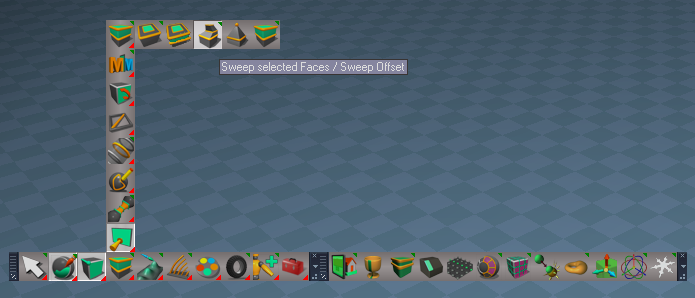
Toolbars 'Iconize a few prototypes'

Toolbar Manager
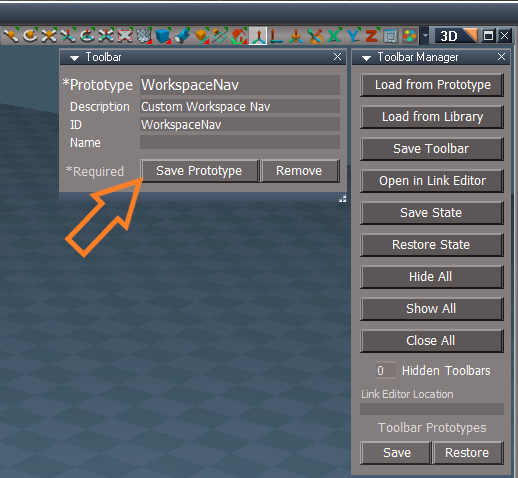
Add Save and Restore buttons
Toolbar Manager update.png
.
Toolbar Prototypes
Fix for Open as Unique that was creating infinite copies of toolbar prototypes with the Open buttons
Option to Cancel - Author Clinton Reese

Edit Toolbar
Add Remove button

Example Use:
Toolbar Manager
1) Load from Prototype
Toolbar Prototypes
2) Open - Toolbar -> 'Name'
Toolbar Manager
3) Save Toolbar
Status Message: "Double click a toolbar's Handle to Save Toolbar (Esc) to Cancel"
4) Double click the toolbar's Handle
Status Message "Toolbar -> 'Name' saved"
Toolbar Manager
5) Load from Library
User Toolbar Library
6) L 'Load' Toolbar -> 'Name'

Open in Link Editor
1) Double click the toolbar's Handle
Status Message: "Double click a toolbar's Handle or change a window size to open (Esc) to Cancel"
Use: Add and or Change Buttons

Edit Toolbar

1) Double click the toolbar's Handle
Status Message: "Double click a toolbar's Handle to Edit Toolbar (Esc) to Cancel"
Use: Remove or Save with additional params

Recommended Use: Limit the toolbar protoypes Saved to System/Toolbars
Use the Objects - UserToolbars libray


If the plugins do not Load, Download and Install the Microsoft Visual C++ 2008 Service Pack 1 Redistributable Package
Note: When downloading the Microsoft Visual C++ 2008 Service Pack 1 Redistributable Package you are given 3 choices
Choose the 32-bit version; vcredist_x86.exe
Removed due to update
User avatar
trueBlue
Captain
Posts: 5548
Joined: 06 Jul 2009, 22:50
Type the number ten into the box: 10

Re: Final trueSpace7.61 Beta 8 Std Unofficial Update

Post by trueBlue »

@Clinton
Here is a WIP - Look At widget and toolbar button
Put the Look At(widget) in Widgets/Tools/
Use the toolbar button to call the Look At(widget)
Note: The current Look At status message will run after selecting the target, so that will need to be eliminated.

Let me know you have a better solution
Removed due to update
User avatar
clintonman
Captain
Posts: 5659
Joined: 21 May 2009, 21:08
Type the number ten into the box: 0
Location: California

Re: Final trueSpace7.61 Beta 8 Std Unofficial Update

Post by clintonman »

trueBlue wrote: 23 Apr 2023, 14:07 @Clinton
Here is a WIP - Look At widget and toolbar button
Put the Look At(widget) in Widgets/Tools/
Use the toolbar button to call the Look At(widget)
Note: The current Look At status message will run after selecting the target, so that will need to be eliminated.

Let me know you have a better solution
A better solution for what? Tried it. Don't know what I'm supposed to be seeing.
Clinton Reese

http://clintons3d.com
User avatar
trueBlue
Captain
Posts: 5548
Joined: 06 Jul 2009, 22:50
Type the number ten into the box: 10

Re: Final trueSpace7.61 Beta 8 Std Unofficial Update

Post by trueBlue »

clintonman wrote: 23 Apr 2023, 17:37
trueBlue wrote: 23 Apr 2023, 14:07 @Clinton
Here is a WIP - Look At widget and toolbar button
Put the Look At(widget) in Widgets/Tools/
Use the toolbar button to call the Look At(widget)
Note: The current Look At status message will run after selecting the target, so that will need to be eliminated.

Let me know you have a better solution
A better solution for what? Tried it. Don't know what I'm supposed to be seeing.
You should see a Look At cursor for picking the object that you want to Look At
Look At widget.png
User avatar
trueBlue
Captain
Posts: 5548
Joined: 06 Jul 2009, 22:50
Type the number ten into the box: 10

Re: Final trueSpace7.61 Beta 8 Std Unofficial Update

Post by trueBlue »

trueSpace7.61 Beta 8 Standalone Unofficial Update Version 9

Please test this RC42 4/23/2023 :bananatyping:

New Unofficial Update Instructions:

It is Required that you completely Uninstall and Install trueSpace7.61 Standalone to a clean directory
You can keep your Rs Main Libraries folder, but all other folders and files should be removed
Install tS761B8Std.exe to C:\trueSpace761Std


Close trueSpace

1.) Install the YafaRay v3.3.0 render engine
2.) Install tS76_Vray1_54B8.exe to C:\trueSpace761Std (Optional but required before installing the Update)
3.) Install tS7.61B8Std.9.exe to C:\trueSpace761Std
Browse [...] to where you installed C:\trueSpace761Std, select its folder and then the [Extract] button
Select the [Yes to All] button
4.) Open trueSpace
5.) Select the [OK] button in the OptDetectors plugin Information dialog
6.) Reset to Default Context
When trueSpace opens, select one of the layout tabs at the top
If Vray is installed,
7.) Press your keyboard's CTRL F8 keys to open the Package Manager
Right click in the Package Manager and select Install New...
Open C:\trueSpace761Std\Vray_ts.rsx
Right click in the Package Manager's Vray Package and select Load
Close the Package Manager
8.) Close trueSpace
If Vray is installed,
9.) Delete the tS folder installed by the Vray installer

The included Clintons3dPlugin.dll v.1638440, Clintons3dPluginExt.dll v.1638413, Clintons3dRsView.dll v.1638414 and the OptDetectors.dll Author - Vladimir Sisolak, are in: C:\trueSpace761Std
WARNING: The init.js file Imports the above 4 plugins and should not be Installed from the Package Manager, including any other plugins with the same name that have the rsx extension
All scripts that check for these plugins with the rsx extension have been removed!

Unofficial Update Version 9
Started on Fri Sep 02, 2022

Commands
Removed all of the discontinued xml scripts

Plugins Author - Clinton Reese
Renamed from rsx to dll:
Clintons3dPlugin.dll v1638441
Clintons3dRsView.dll v1638414
Clintons3dPluginExt.dll
Add
OptDetectors.dll Author - Vladimir Sisolak

Library
Add
OptDetectors
OptDetectors - Help objects
OptDetectors - Samples

Scripts
Update
init.js 'Loads the above 4 plugins'
Window.Shortcuts.xml
tS761 Workspace Shortcut List.rtf
Widget.Shortcuts.xml

CustomCommands Author - Clinton Reese
Add
JSON Function Set
Global Function Set
Dimensions
Hierarchy
Toolbar Manager
Shortcut Runner

Color Picker
Paint Vertex Color
Cloth Conversion
Enhanced Collada
Scene View 2
Object Statistics

4/23/2023
UUCommands
Toolbar Manager
Shortcut Runner
Toolbars 'New toolbar layout that uses the Toolbar Manager to load toolbars'

.
Widgets 'Add Look At widget'
Look At widget.png
.
View and Light View widgets
View Widget
Encircle - i + Move Mouse - Widget Help and Preferences
Add: Move - Up | Down
Use: Add space for toolbar
View Widgets.png
.


If the plugins do not Load, Download and Install the Microsoft Visual C++ 2008 Service Pack 1 Redistributable Package
Note: When downloading the Microsoft Visual C++ 2008 Service Pack 1 Redistributable Package you are given 3 choices
Choose the 32-bit version; vcredist_x86.exe
Removed due to update
User avatar
clintonman
Captain
Posts: 5659
Joined: 21 May 2009, 21:08
Type the number ten into the box: 0
Location: California

Re: Final trueSpace7.61 Beta 8 Std Unofficial Update

Post by clintonman »

Some Toolbar Manager changes

removed "Save Toolbar" button
renamed "Edit Toolbar" to "Save/Edit Toolbar"
allow renaming of toolbars - required removal of ClearRecentFiles from the save toolbar code
fixed bug - prototype list not update when saving the prototype
Attachments
ToolbarManager06.RsObj
(361.3 KiB) Downloaded 111 times
Clinton Reese

http://clintons3d.com
User avatar
trueBlue
Captain
Posts: 5548
Joined: 06 Jul 2009, 22:50
Type the number ten into the box: 10

Re: Final trueSpace7.61 Beta 8 Std Unofficial Update

Post by trueBlue »

clintonman wrote: 24 Apr 2023, 05:24 Some Toolbar Manager changes

removed "Save Toolbar" button
renamed "Edit Toolbar" to "Save/Edit Toolbar"
allow renaming of toolbars - required removal of ClearRecentFiles from the save toolbar code
fixed bug - prototype list not update when saving the prototype
Edit Toolbar - Save Prototype
Saved toolbar Error
Error.png
.
Saved toolbar with a Safe Name
Saved with Safe name.png
.

Edit Toolbar - Remove
Can you add a Function for this button that checks if it is a *Prototype?
I just discovered that you could Remove any toolbar including a *Prototype

Not sure why you need RecentFiles to rename a toolbar, but I did see a problem with this!
1) User can clear Recent Files from the Desktop panel
2) Loading a recently saved toolbar from the File Menu does not seem like a very good idea
What happens if it does not exist?
User avatar
clintonman
Captain
Posts: 5659
Joined: 21 May 2009, 21:08
Type the number ten into the box: 0
Location: California

Re: Final trueSpace7.61 Beta 8 Std Unofficial Update

Post by clintonman »

trueBlue wrote: 24 Apr 2023, 12:19
clintonman wrote: 24 Apr 2023, 05:24 Some Toolbar Manager changes

removed "Save Toolbar" button
renamed "Edit Toolbar" to "Save/Edit Toolbar"
allow renaming of toolbars - required removal of ClearRecentFiles from the save toolbar code
fixed bug - prototype list not update when saving the prototype
Edit Toolbar - Save Prototype
Saved toolbar Error
Error.png
.
Saved toolbar with a Safe Name
Saved with Safe name.png
.

Edit Toolbar - Remove
Can you add a Function for this button that checks if it is a *Prototype?
I just discovered that you could Remove any toolbar including a *Prototype

Not sure why you need RecentFiles to rename a toolbar, but I did see a problem with this!
1) User can clear Recent Files from the Desktop panel
2) Loading a recently saved toolbar from the File Menu does not seem like a very good idea
What happens if it does not exist?
Can you give steps for the error?

"Not sure why you need RecentFiles to rename a toolbar"
This was causing the safe rename to happen on the saved toolbar.

"1) User can clear Recent Files from the Desktop panel"
Doesn't cause any problems on it's own. Problem is when it's called from the save toolbar.

"2) Loading a recently saved toolbar from the File Menu does not seem like a very good idea
What happens if it does not exist?"
Most likely nothing would happen. Just tried it and yep, nothing happened.
Clinton Reese

http://clintons3d.com
User avatar
trueBlue
Captain
Posts: 5548
Joined: 06 Jul 2009, 22:50
Type the number ten into the box: 10

Re: Final trueSpace7.61 Beta 8 Std Unofficial Update

Post by trueBlue »

clintonman wrote: 24 Apr 2023, 14:36
trueBlue wrote: 24 Apr 2023, 12:19
clintonman wrote: 24 Apr 2023, 05:24 Some Toolbar Manager changes

removed "Save Toolbar" button
renamed "Edit Toolbar" to "Save/Edit Toolbar"
allow renaming of toolbars - required removal of ClearRecentFiles from the save toolbar code
fixed bug - prototype list not update when saving the prototype
Edit Toolbar - Save Prototype
Saved toolbar Error
Error.png
.
Saved toolbar with a Safe Name
Saved with Safe name.png
.

Edit Toolbar - Remove
Can you add a Function for this button that checks if it is a *Prototype?
I just discovered that you could Remove any toolbar including a *Prototype

Not sure why you need RecentFiles to rename a toolbar, but I did see a problem with this!
1) User can clear Recent Files from the Desktop panel
2) Loading a recently saved toolbar from the File Menu does not seem like a very good idea
What happens if it does not exist?
Can you give steps for the error?

"Not sure why you need RecentFiles to rename a toolbar"
This was causing the safe rename to happen on the saved toolbar.

"1) User can clear Recent Files from the Desktop panel"
Doesn't cause any problems on it's own. Problem is when it's called from the save toolbar.

"2) Loading a recently saved toolbar from the File Menu does not seem like a very good idea
What happens if it does not exist?"
Most likely nothing would happen. Just tried it and yep, nothing happened.
I think the error caused the problem
I have seen it before a few times
Source object: /Scripts/CustomCommands/ToolbarManager/Open Toolbar Error: Unspecified script error Line: 66, Char: 1 Script text: util.SetNodeValueInt(tbNode, "IsAspectT", false);

Open Toolbar
Add:if con exist

Code: Select all

if(Node.ConExists(tbNode, "IsAspectT")) {
	util.SetNodeValueInt(tbNode, "IsAspectT", false);
}
This what you did in the Toolbar Manager Function Set
User avatar
clintonman
Captain
Posts: 5659
Joined: 21 May 2009, 21:08
Type the number ten into the box: 0
Location: California

Re: Final trueSpace7.61 Beta 8 Std Unofficial Update

Post by clintonman »

trueBlue wrote: 24 Apr 2023, 12:19 ...

Edit Toolbar - Remove
Can you add a Function for this button that checks if it is a *Prototype?
I just discovered that you could Remove any toolbar including a *Prototype

...
None of the built in toolbars has the Name field set, so can make it so the name has to be set before it can be removed.
Clinton Reese

http://clintons3d.com
User avatar
trueBlue
Captain
Posts: 5548
Joined: 06 Jul 2009, 22:50
Type the number ten into the box: 10

Re: Final trueSpace7.61 Beta 8 Std Unofficial Update

Post by trueBlue »

clintonman wrote: 24 Apr 2023, 14:47
trueBlue wrote: 24 Apr 2023, 12:19 ...

Edit Toolbar - Remove
Can you add a Function for this button that checks if it is a *Prototype?
I just discovered that you could Remove any toolbar including a *Prototype

...
None of the built in toolbars has the Name field set, so can make it so the name has to be set before it can be removed.
Sounds like a possibility but with your Toolbar Manager, a user could add and save the built in toolbar's Name field.
Need to create a list of the built in toolbars
User avatar
trueBlue
Captain
Posts: 5548
Joined: 06 Jul 2009, 22:50
Type the number ten into the box: 10

Re: Final trueSpace7.61 Beta 8 Std Unofficial Update

Post by trueBlue »

trueSpace7.61 Beta 8 Standalone Unofficial Update Version 9

Please test this RC43 4/25/2023 :bananatyping:

New Unofficial Update Instructions:

It is Required that you completely Uninstall and Install trueSpace7.61 Standalone to a clean directory
You can keep your Rs Main Libraries folder, but all other folders and files should be removed
Install tS761B8Std.exe to C:\trueSpace761Std


Close trueSpace

1.) Install the YafaRay v3.3.0 render engine
2.) Install tS76_Vray1_54B8.exe to C:\trueSpace761Std (Optional but required before installing the Update)
3.) Install tS7.61B8Std.9.exe to C:\trueSpace761Std
Browse [...] to where you installed C:\trueSpace761Std, select its folder and then the [Extract] button
Select the [Yes to All] button
4.) Open trueSpace
5.) Select the [OK] button in the OptDetectors plugin Information dialog
6.) Reset to Default Context
When trueSpace opens, select one of the layout tabs at the top
If Vray is installed,
7.) Press your keyboard's CTRL F8 keys to open the Package Manager
Right click in the Package Manager and select Install New...
Open C:\trueSpace761Std\Vray_ts.rsx
Right click in the Package Manager's Vray Package and select Load
Close the Package Manager
8.) Close trueSpace
If Vray is installed,
9.) Delete the tS folder installed by the Vray installer

The included Clintons3dPlugin.dll v.1638440, Clintons3dPluginExt.dll v.1638413, Clintons3dRsView.dll v.1638414 and the OptDetectors.dll Author - Vladimir Sisolak, are in: C:\trueSpace761Std
WARNING: The init.js file Imports the above 4 plugins and should not be Installed from the Package Manager, including any other plugins with the same name that have the rsx extension
All scripts that check for these plugins with the rsx extension have been removed!

Unofficial Update Version 9
Started on Fri Sep 02, 2022

Commands
Removed all of the discontinued xml scripts

Plugins Author - Clinton Reese
Renamed from rsx to dll:
Clintons3dPlugin.dll v1638441
Clintons3dRsView.dll v1638414
Clintons3dPluginExt.dll
Add
OptDetectors.dll Author - Vladimir Sisolak

Library
Add
OptDetectors
OptDetectors - Help objects
OptDetectors - Samples

Scripts
Update
init.js 'Loads the above 4 plugins'
Window.Shortcuts.xml
tS761 Workspace Shortcut List.rtf
Widget.Shortcuts.xml

CustomCommands Author - Clinton Reese
Add
JSON Function Set
Global Function Set
Dimensions
Hierarchy
Toolbar Manager
Shortcut Runner

Color Picker
Paint Vertex Color
Cloth Conversion
Enhanced Collada
Scene View 2
Object Statistics

4/25/2023
Toolbars
Toolbar Manager - Add question to Toolbar - [Remove]
Toolbar Manager.png
.
Widgets - View widget's Left & Top Right triangles (RDrag 'Create Camera View') Selects the Camera
UUCommands - Encapsulate - Single selected Encapsulation [X] and 2D Encapsulate Warning [ ]
Snapping - Axis Snap panel [Exit] 'No longer exits PE mode & changed the labels'
Axis Snap panel.png
Axis Snap panel.png (11.66 KiB) Viewed 1488 times
.

If the plugins do not Load, Download and Install the Microsoft Visual C++ 2008 Service Pack 1 Redistributable Package
Note: When downloading the Microsoft Visual C++ 2008 Service Pack 1 Redistributable Package you are given 3 choices
Choose the 32-bit version; vcredist_x86.exe
trueSpace7.61 Beta 8 Unofficial Update Version 9

Please test this RC44 4/27/2023 :bananatyping:

New Unofficial Update Instructions:
It is Required that you completely Uninstall and Install trueSpace7.61 Beta 8 to a clean directory
You can keep your Rs Main Libraries folder, but all other folders and files should be removed
Install the PDF Manual for trueSpace (Optional but required before installing the Update)
Install the tS76_Vray1_54B8.exe (Optional but required before installing the Update)


Close trueSpace

1.) Install the YafaRay v3.3.0 render engine
2.) Install the tS76PDF 'Manual for Caligari trueSpace' & tS76Video (Optional but required before installing the Update)
3.) Install tS76_Vray1_54B8.exe to C:\trueSpace761 (Optional but required before installing the Update)
4.) Install tS7.61B8.9.exe to C:\trueSpace761
Browse [...] to where you installed C:\trueSpace761, select its folder and then the [Extract] button
Select the [Yes to All] button
5.) Open trueSpace
6.) Select the [OK] button in the OptDetectors plugin Information dialog
7.) Reset to Default Context
When trueSpace opens, select one of the layout tabs at the top
If Vray is installed:
8.) Press your keyboard's CTRL F8 keys to open the Package Manager
Right click in the Package Manager and select Install New...
Open C:\trueSpace761\Vray_ts.rsx
Right click in the Package Manager's Vray Package and select Load
Close the Package Manager
9.) Close trueSpace

The included Clintons3dPlugin.dll v.1638440, Clintons3dPluginExt.dll v.1638413, Clintons3dRsView.dll v.1638414 and the OptDetectors.dll Author - Vladimir Sisolak, are in: C:\trueSpace761
WARNING: The init.js file Imports the above 4 plugins and should not be Installed from the Package Manager, including any other plugins with the same name that have the rsx extension
All scripts that check for these plugins with the rsx extension have been removed!

Unofficial Update Version 9
Started on Fri Sep 02, 2022

Commands
Removed all of the discontinued xml scripts

Plugins Author - Clinton Reese
Renamed from rsx to dll:
Clintons3dPlugin.dll v1638441
Clintons3dRsView.dll v1638414
Clintons3dPluginExt.dll
Add
OptDetectors.dll Author - Vladimir Sisolak

Library
Add
OptDetectors
OptDetectors - Help objects
OptDetectors - Samples

Scripts
Update
init.js 'Loads the above 4 plugins'
Window.Shortcuts.xml
tS761 Workspace Shortcut List.rtf
Widget.Shortcuts.xml

CustomCommands Author - Clinton Reese
Add
JSON Function Set
Global Function Set
Dimensions
Hierarchy
Toolbar Manager
ShortcutRunner

Color Picker
Paint Vertex Color
Cloth Conversion
Enhanced Collada
Scene View 2
Object Statistics


4/27/2023
UUCommands
Look At - Utilities Author - Clinton Reese

.
Add: Object Name 'Adds object name without path to panel'
Make LookAt List 'Run Object Name'
UnLook At 'Run Make LookAt List
Look At 'If Target Matrix exist, open Look At - Utilities
LookAt Postprocess 'Convert Node commands to util commands'

To use Look At, select the objects that are to be constrained, press the Look At button, then select the target object

Widgets
Camera widgets
FOV
MClick - UnLook At

Spotlight
Angle
MClick - UnLook At

Spotlight View widget
Move
MClick - UnLook At

Point Edit widgets
Sphere
Ctrl LClick - Preferences 'Add & Remove PE Navigation Widget'

.
PE Navigation Widget
Bars & Arcs
LClick - Snap to Face - Edge - Vertex
RClick - Snap to Face with Rotation


If the plugins do not Load, Download and Install the Microsoft Visual C++ 2008 Service Pack 1 Redistributable Package
Note: When downloading the Microsoft Visual C++ 2008 Service Pack 1 Redistributable Package you are given 3 choices
Choose the 32-bit version; vcredist_x86.exe
Removed due to update
User avatar
trueBlue
Captain
Posts: 5548
Joined: 06 Jul 2009, 22:50
Type the number ten into the box: 10

Re: Final trueSpace7.61 Beta 8 Std Unofficial Update

Post by trueBlue »

trueSpace7.61 Beta 8 Standalone Unofficial Update Version 9

Please test this RC44 4/27/2023 :bananatyping:

New Unofficial Update Instructions:

It is Required that you completely Uninstall and Install trueSpace7.61 Standalone to a clean directory
You can keep your Rs Main Libraries folder, but all other folders and files should be removed
Install tS761B8Std.exe to C:\trueSpace761Std


Close trueSpace

1.) Install the YafaRay v3.3.0 render engine
2.) Install tS76_Vray1_54B8.exe to C:\trueSpace761Std (Optional but required before installing the Update)
3.) Install tS7.61B8Std.9.exe to C:\trueSpace761Std
Browse [...] to where you installed C:\trueSpace761Std, select its folder and then the [Extract] button
Select the [Yes to All] button
4.) Open trueSpace
5.) Select the [OK] button in the OptDetectors plugin Information dialog
6.) Reset to Default Context
When trueSpace opens, select one of the layout tabs at the top
If Vray is installed,
7.) Press your keyboard's CTRL F8 keys to open the Package Manager
Right click in the Package Manager and select Install New...
Open C:\trueSpace761Std\Vray_ts.rsx
Right click in the Package Manager's Vray Package and select Load
Close the Package Manager
8.) Close trueSpace
If Vray is installed,
9.) Delete the tS folder installed by the Vray installer

The included Clintons3dPlugin.dll v.1638440, Clintons3dPluginExt.dll v.1638413, Clintons3dRsView.dll v.1638414 and the OptDetectors.dll Author - Vladimir Sisolak, are in: C:\trueSpace761Std
WARNING: The init.js file Imports the above 4 plugins and should not be Installed from the Package Manager, including any other plugins with the same name that have the rsx extension
All scripts that check for these plugins with the rsx extension have been removed!

Unofficial Update Version 9
Started on Fri Sep 02, 2022

Commands
Removed all of the discontinued xml scripts

Plugins Author - Clinton Reese
Renamed from rsx to dll:
Clintons3dPlugin.dll v1638441
Clintons3dRsView.dll v1638414
Clintons3dPluginExt.dll
Add
OptDetectors.dll Author - Vladimir Sisolak

Library
Add
OptDetectors
OptDetectors - Help objects
OptDetectors - Samples

Scripts
Update
init.js 'Loads the above 4 plugins'
Window.Shortcuts.xml
tS761 Workspace Shortcut List.rtf
Widget.Shortcuts.xml

CustomCommands Author - Clinton Reese
Add
JSON Function Set
Global Function Set
Dimensions
Hierarchy
Toolbar Manager
Shortcut Runner

Color Picker
Paint Vertex Color
Cloth Conversion
Enhanced Collada
Scene View 2
Object Statistics

4/27/2023
UUCommands
Look At - Utilities Author - Clinton Reese
Look At Utilities.png
Look At Utilities.png (5.24 KiB) Viewed 1472 times
.
Add: Object Name 'Adds object name without path to panel'
Make LookAt List 'Run Object Name'
UnLook At 'Run Make LookAt List
Look At 'If Target Matrix exist, open Look At - Utilities
LookAt Postprocess 'Convert Node commands to util commands'

To use Look At, select the objects that are to be constrained, press the Look At button, then select the target object

Widgets
Camera widgets
FOV
MClick - UnLook At

Spotlight widget
Angle
MClick - UnLook At

Spotlight View widget
LightMove
MClick - UnLook At

Point Edit widgets
Sphere
Ctrl LClick - Preferences 'Add & Remove PE Navigation Widget'
PE Navigation Widget.png
.
PE Navigation Widget
Bars & Arcs
LClick - Snap to Face - Edge - Vertex
RClick - Snap to Face with Rotation
MClick - Face with Rotation to Center
O LClick - Mesh Object Coordinate Mode |Toggle


If the plugins do not Load, Download and Install the Microsoft Visual C++ 2008 Service Pack 1 Redistributable Package
Note: When downloading the Microsoft Visual C++ 2008 Service Pack 1 Redistributable Package you are given 3 choices
Choose the 32-bit version; vcredist_x86.exe
Removed due to update
User avatar
trueBlue
Captain
Posts: 5548
Joined: 06 Jul 2009, 22:50
Type the number ten into the box: 10

Re: Final trueSpace7.61 Beta 8 Std Unofficial Update

Post by trueBlue »

trueSpace7.61 Beta 8 Standalone Unofficial Update Version 9

Please test this RC45 4/28/2023 :bananatyping:

New Unofficial Update Instructions:

It is Required that you completely Uninstall and Install trueSpace7.61 Standalone to a clean directory
You can keep your Rs Main Libraries folder, but all other folders and files should be removed
Install tS761B8Std.exe to C:\trueSpace761Std


Close trueSpace

1.) Install the YafaRay v3.3.0 render engine
2.) Install tS76_Vray1_54B8.exe to C:\trueSpace761Std (Optional but required before installing the Update)
3.) Install tS7.61B8Std.9.exe to C:\trueSpace761Std
Browse [...] to where you installed C:\trueSpace761Std, select its folder and then the [Extract] button
Select the [Yes to All] button
4.) Open trueSpace
5.) Select the [OK] button in the OptDetectors plugin Information dialog
6.) Reset to Default Context
When trueSpace opens, select one of the layout tabs at the top
If Vray is installed,
7.) Press your keyboard's CTRL F8 keys to open the Package Manager
Right click in the Package Manager and select Install New...
Open C:\trueSpace761Std\Vray_ts.rsx
Right click in the Package Manager's Vray Package and select Load
Close the Package Manager
8.) Close trueSpace
If Vray is installed,
9.) Delete the tS folder installed by the Vray installer

The included Clintons3dPlugin.dll v.1638440, Clintons3dPluginExt.dll v.1638413, Clintons3dRsView.dll v.1638414 and the OptDetectors.dll Author - Vladimir Sisolak, are in: C:\trueSpace761Std
WARNING: The init.js file Imports the above 4 plugins and should not be Installed from the Package Manager, including any other plugins with the same name that have the rsx extension
All scripts that check for these plugins with the rsx extension have been removed!

Unofficial Update Version 9
Started on Fri Sep 02, 2022

Commands
Removed all of the discontinued xml scripts

Plugins Author - Clinton Reese
Renamed from rsx to dll:
Clintons3dPlugin.dll v1638441
Clintons3dRsView.dll v1638414
Clintons3dPluginExt.dll
Add
OptDetectors.dll Author - Vladimir Sisolak

Library
Add
OptDetectors
OptDetectors - Help objects
OptDetectors - Samples

Scripts
Update
init.js 'Loads the above 4 plugins'
Window.Shortcuts.xml
tS761 Workspace Shortcut List.rtf
Widget.Shortcuts.xml

CustomCommands Author - Clinton Reese
Add
JSON Function Set
Global Function Set
Dimensions
Hierarchy
Toolbar Manager
Shortcut Runner

Color Picker
Paint Vertex Color
Cloth Conversion
Enhanced Collada
Scene View 2
Object Statistics

4/28/2023
Widgets
Object Navigation Widgets
Point Edit Widgets
Moved On Operating Visibility scripts from the widget to their preferences panel
Fixed the PE On Operating Visibility scripts to restore the PE Selection
Fixed all of the Restore PE Selection scripts and add check for Selection connector
Add: Open Panel to their preferences panel
Sphere
Ctrl LClick - Open Preferences
Obj preferences.png
Obj preferences.png (11.97 KiB) Viewed 1469 times
PE preferences.png
PE preferences.png (10.95 KiB) Viewed 1469 times
.

If the plugins do not Load, Download and Install the Microsoft Visual C++ 2008 Service Pack 1 Redistributable Package
Note: When downloading the Microsoft Visual C++ 2008 Service Pack 1 Redistributable Package you are given 3 choices
Choose the 32-bit version; vcredist_x86.exe
Removed due to update
User avatar
trueBlue
Captain
Posts: 5548
Joined: 06 Jul 2009, 22:50
Type the number ten into the box: 10

Re: Final trueSpace7.61 Beta 8 Std Unofficial Update

Post by trueBlue »

trueSpace7.61 Beta 8 Standalone Unofficial Update Version 9

Please test this RC46 5/1/2023 :bananatyping:

New Unofficial Update Instructions:

It is Required that you completely Uninstall and Install trueSpace7.61 Standalone to a clean directory
You can keep your Rs Main Libraries folder, but all other folders and files should be removed
Install tS761B8Std.exe to C:\trueSpace761Std


Close trueSpace

1.) Install the YafaRay v3.3.0 render engine
2.) Install tS76_Vray1_54B8.exe to C:\trueSpace761Std (Optional but required before installing the Update)
3.) Install tS7.61B8Std.9.exe to C:\trueSpace761Std
Browse [...] to where you installed C:\trueSpace761Std, select its folder and then the [Extract] button
Select the [Yes to All] button
4.) Open trueSpace
5.) Select the [OK] button in the OptDetectors plugin Information dialog
6.) Reset to Default Context
When trueSpace opens, select one of the layout tabs at the top
If Vray is installed,
7.) Press your keyboard's CTRL F8 keys to open the Package Manager
Right click in the Package Manager and select Install New...
Open C:\trueSpace761Std\Vray_ts.rsx
Right click in the Package Manager's Vray Package and select Load
Close the Package Manager
8.) Close trueSpace
If Vray is installed,
9.) Delete the tS folder installed by the Vray installer

The included Clintons3dPlugin.dll v.1638440, Clintons3dPluginExt.dll v.1638413, Clintons3dRsView.dll v.1638414 and the OptDetectors.dll Author - Vladimir Sisolak, are in: C:\trueSpace761Std
WARNING: The init.js file Imports the above 4 plugins and should not be Installed from the Package Manager, including any other plugins with the same name that have the rsx extension
All scripts that check for these plugins with the rsx extension have been removed!

Unofficial Update Version 9
Started on Fri Sep 02, 2022

Commands
Removed all of the discontinued xml scripts

Plugins Author - Clinton Reese
Renamed from rsx to dll:
Clintons3dPlugin.dll v1638441
Clintons3dRsView.dll v1638414
Clintons3dPluginExt.dll
Add
OptDetectors.dll Author - Vladimir Sisolak

Library
Add
OptDetectors
OptDetectors - Help objects
OptDetectors - Samples

Scripts
Update
init.js 'Loads the above 4 plugins'
Window.Shortcuts.xml
tS761 Workspace Shortcut List.rtf
Widget.Shortcuts.xml

CustomCommands Author - Clinton Reese
Add
JSON Function Set
Global Function Set
Dimensions
Hierarchy
Toolbar Manager
Shortcut Runner

Color Picker
Paint Vertex Color
Cloth Conversion
Enhanced Collada
Scene View 2
Object Statistics

5/1/2023
Widgets
Tools
Primitives
Primitive tool
Snap "Force snapping even if within nosnap range" 'Changed Alt to LClick'
Alt key was conflicting with trueSpace's Alt 'Save Layout or Window Settings' and ending the tool
Note: Snap by selecting Yellow snapping point inbetween any Green snapping points
Primitive tool 'Add Esc keyboard key gesture that Cancels the current process in PE mode only'

Add: Camera tool

Look At 'Changed the Look At cursor'

WidgetScripts
CamLightExtras
ExitLightView 'Add fix for duplicate FOV connectors'
ViewFromObject 'Add fix for duplicate FOV connectors'

ObjectNavigationWidgets
Caligari widget 'Removed all additional gestures except for NAV switch script'

PointEditNavigationWidgets
Caligari widget 'Removed all additional gestures except for PE switch script'

Select
Camera1 'Removed all additional gestures except for Camera switch script'

Toolbars
Changed all Camera and EntryPoint toolbar buttons

LENavigatorBar 'Add: E "Encapsulate in the Link Editor" toolbar buttons'
LE NAV toolbar.png
LE NAV toolbar.png (6.41 KiB) Viewed 1442 times
LE NAV Encapsulate in Link Editor.png
LE NAV Encapsulate in Link Editor.png (8.06 KiB) Viewed 1442 times
.
3D
LClick - 3D Encapsulate
RClick - 3D Unencapsulate
2D
LClick - 2D Encapsulate
RClick - 2D Unencapsulate
Note: If the Link Editor view is active, 3D Encapsulate and 2D Encapsulate will open the LE Name Dialog
If the Link Editor view is not active, the encapsulation will be named Object

UUCommands
Encapsulate
Add: 3D Encapsulate LE, 3D Unencapsulate LE, and 2D Encapsulate LE scripts
Note: Unencapsulate does not remove the LE2Data connectors

Preferences
Cameras
Add: Original Camera | Custom Camera button
Switches the Camera primitive tool to use the Original Camera or Custom Camera
Custom Camera.png
Original Camera.png
Original Camera.png (8.06 KiB) Viewed 1442 times
.

If the plugins do not Load, Download and Install the Microsoft Visual C++ 2008 Service Pack 1 Redistributable Package
Note: When downloading the Microsoft Visual C++ 2008 Service Pack 1 Redistributable Package you are given 3 choices
Choose the 32-bit version; vcredist_x86.exe
Removed due to update
User avatar
trueBlue
Captain
Posts: 5548
Joined: 06 Jul 2009, 22:50
Type the number ten into the box: 10

Re: Final trueSpace7.61 Beta 8 Std Unofficial Update

Post by trueBlue »

trueSpace7.61 Beta 8 Standalone Unofficial Update Version 9

Please test this RC47 5/3/2023 :bananatyping:

New Unofficial Update Instructions:

It is Required that you completely Uninstall and Install trueSpace7.61 Standalone to a clean directory
You can keep your Rs Main Libraries folder, but all other folders and files should be removed
RC47 - Remove the Recording, My Scene, My Recordings and Layouts - Configurations libraries is Required
Install tS761B8Std.exe to C:\trueSpace761Std


Close trueSpace

1.) Install the YafaRay v3.3.0 render engine
2.) Install tS76_Vray1_54B8.exe to C:\trueSpace761Std (Optional but required before installing the Update)
3.) Install tS7.61B8Std.9.exe to C:\trueSpace761Std
Browse [...] to where you installed C:\trueSpace761Std, select its folder and then the [Extract] button
Select the [Yes to All] button
4.) Open trueSpace
5.) Select the [OK] button in the OptDetectors plugin Information dialog
6.) Reset to Default Context
When trueSpace opens, select one of the layout tabs at the top
If Vray is installed,
7.) Press your keyboard's CTRL F8 keys to open the Package Manager
Right click in the Package Manager and select Install New...
Open C:\trueSpace761Std\Vray_ts.rsx
Right click in the Package Manager's Vray Package and select Load
Close the Package Manager
8.) Close trueSpace
If Vray is installed,
9.) Delete the tS folder installed by the Vray installer

The included Clintons3dPlugin.dll v.1638440, Clintons3dPluginExt.dll v.1638413, Clintons3dRsView.dll v.1638414 and the OptDetectors.dll Author - Vladimir Sisolak, are in: C:\trueSpace761Std
WARNING: The init.js file Imports the above 4 plugins and should not be Installed from the Package Manager, including any other plugins with the same name that have the rsx extension
All scripts that check for these plugins with the rsx extension have been removed!

Unofficial Update Version 9
Started on Fri Sep 02, 2022

Commands
Removed all of the discontinued xml scripts

Plugins Author - Clinton Reese
Renamed from rsx to dll:
Clintons3dPlugin.dll v1638441
Clintons3dRsView.dll v1638414
Clintons3dPluginExt.dll
Add
OptDetectors.dll Author - Vladimir Sisolak

Library
Add
OptDetectors
OptDetectors - Help objects
OptDetectors - Samples

Scripts
Update
init.js 'Loads the above 4 plugins'
Window.Shortcuts.xml
tS761 Workspace Shortcut List.rtf
Widget.Shortcuts.xml

CustomCommands Author - Clinton Reese
Add
JSON Function Set
Global Function Set
Dimensions
Hierarchy
Toolbar Manager
Shortcut Runner

Color Picker
Paint Vertex Color
Cloth Conversion
Enhanced Collada
Scene View 2
Object Statistics

5/3/2023
Layouts
Update: All layouts
Removed: Expanded

Toolbars
Removed:
CharacterEditorBar
PointEditToolsBar
PointEditSelectionBar
PhysicsBar

LENavigatorBar
Red, Blue, and Gold buttons 'Removed RMB command'

Red Custom Toolbar
Add:
Auto Backup Scene 'Auto backup My Scene.RsScn'
Auto Backup Recording 'Auto backup My Recording.RsRcd'
Use:
Set the Time amount and Seconds or Minutes
Check the Active check box
Note: To use a different (Existing) scene or recording in your Library, use the File Dialog to Open it
Auto Backup Recording compresses the file size

Toolbar Manager
Update: Discription list

UUCommands
Update: Close All Toolbars Windows and Panels & Close All Panels scripts
Removed: Red Blue Gold Preferences scripts
Add:
Save RsScn
Save RsRcd
Backup tools.png
.

If the plugins do not Load, Download and Install the Microsoft Visual C++ 2008 Service Pack 1 Redistributable Package
Note: When downloading the Microsoft Visual C++ 2008 Service Pack 1 Redistributable Package you are given 3 choices
Choose the 32-bit version; vcredist_x86.exe
Removed due to update
User avatar
trueBlue
Captain
Posts: 5548
Joined: 06 Jul 2009, 22:50
Type the number ten into the box: 10

Re: Final trueSpace7.61 Beta 8 Std Unofficial Update

Post by trueBlue »

trueSpace7.61 Beta 8 Standalone Unofficial Update Version 9

Please test this RC48 5/5/2023 :bananatyping:

New Unofficial Update Instructions:

It is Required that you completely Uninstall and Install trueSpace7.61 Standalone to a clean directory
You can keep your Rs Main Libraries folder, but all other folders and files should be removed
RC47 - Remove the Recording, My Scene, My Recordings and Layouts - Configurations libraries is Required
Install tS761B8Std.exe to C:\trueSpace761Std


Close trueSpace

1.) Install the YafaRay v3.3.0 render engine
2.) Install tS76_Vray1_54B8.exe to C:\trueSpace761Std (Optional but required before installing the Update)
3.) Install tS7.61B8Std.9.exe to C:\trueSpace761Std
Browse [...] to where you installed C:\trueSpace761Std, select its folder and then the [Extract] button
Select the [Yes to All] button
4.) Open trueSpace
5.) Select the [OK] button in the OptDetectors plugin Information dialog
6.) Reset to Default Context
When trueSpace opens, select one of the layout tabs at the top
If Vray is installed,
7.) Press your keyboard's CTRL F8 keys to open the Package Manager
Right click in the Package Manager and select Install New...
Open C:\trueSpace761Std\Vray_ts.rsx
Right click in the Package Manager's Vray Package and select Load
Close the Package Manager
8.) Close trueSpace
If Vray is installed,
9.) Delete the tS folder installed by the Vray installer

The included Clintons3dPlugin.dll v.1638440, Clintons3dPluginExt.dll v.1638413, Clintons3dRsView.dll v.1638414 and the OptDetectors.dll Author - Vladimir Sisolak, are in: C:\trueSpace761Std
WARNING: The init.js file Imports the above 4 plugins and should not be Installed from the Package Manager, including any other plugins with the same name that have the rsx extension
All scripts that check for these plugins with the rsx extension have been removed!

Unofficial Update Version 9
Started on Fri Sep 02, 2022

Commands
Removed all of the discontinued xml scripts

Plugins Author - Clinton Reese
Renamed from rsx to dll:
Clintons3dPlugin.dll v1638441
Clintons3dRsView.dll v1638414
Clintons3dPluginExt.dll
Add
OptDetectors.dll Author - Vladimir Sisolak

Library
Add
OptDetectors
OptDetectors - Help objects
OptDetectors - Samples

Scripts
Update
init.js 'Loads the above 4 plugins'
Window.Shortcuts.xml
tS761 Workspace Shortcut List.rtf
Widget.Shortcuts.xml

CustomCommands Author - Clinton Reese
Add
JSON Function Set
Global Function Set
Dimensions
Hierarchy
Toolbar Manager
Shortcut Runner

Color Picker
Paint Vertex Color
Cloth Conversion
Enhanced Collada
Scene View 2
Object Statistics

5/5/2023
Physics
Widgets
Add: Cursor to the Physics Move tool
Objects
Physics Engine panel
Add: Start | Stop - Physics Simulation / Remove - Physics Simulation button
Physics Engine floating panel.png
.

Toolbars
Add: Rectangle Select to Object tool(s) button
Add: HairToolbar2
BottomBar2 renamed to WorkspaceMain3

Physics simulation button(s) RMB command 'Opens Physics Engine and Physics Space in a floating panel'
Note: Start Physics simulation first

Toolbar Manager updated list
tS761 Toolbars updated list

UUCommands
Updated: Flatten History 'Add: Alert if Physics Material exist'

CustomCommands
Dimensions - Add: Constant Color for Text
Update: Utility Function Set

Layouts
default_layout & Default - Restore to the original UU8 Default layout
Add: My Default layout
Update: Workspace layout

Cameras
Camera & EntryPoint
RenderToFile script 'Removed UnSelect and close frames'
Update: Camera1
.

If the plugins do not Load, Download and Install the Microsoft Visual C++ 2008 Service Pack 1 Redistributable Package
Note: When downloading the Microsoft Visual C++ 2008 Service Pack 1 Redistributable Package you are given 3 choices
Choose the 32-bit version; vcredist_x86.exe
Removed due to update
User avatar
trueBlue
Captain
Posts: 5548
Joined: 06 Jul 2009, 22:50
Type the number ten into the box: 10

Re: Final trueSpace7.61 Beta 8 Std Unofficial Update

Post by trueBlue »

trueSpace7.61 Beta 8 Standalone Unofficial Update Version 9

Please test this RC49 5/6/2023 :bananatyping:

New Unofficial Update Instructions:

It is Required that you completely Uninstall and Install trueSpace7.61 Standalone to a clean directory
You can keep your Rs Main Libraries folder, but all other folders and files should be removed
RC47 - Remove the Recording, My Scene, My Recordings and Layouts - Configurations libraries is Required
Install tS761B8Std.exe to C:\trueSpace761Std


Close trueSpace

1.) Install the YafaRay v3.3.0 render engine
2.) Install tS76_Vray1_54B8.exe to C:\trueSpace761Std (Optional but required before installing the Update)
3.) Install tS7.61B8Std.9.exe to C:\trueSpace761Std
Browse [...] to where you installed C:\trueSpace761Std, select its folder and then the [Extract] button
Select the [Yes to All] button
4.) Open trueSpace
5.) Select the [OK] button in the OptDetectors plugin Information dialog
6.) Reset to Default Context
When trueSpace opens, select one of the layout tabs at the top
If Vray is installed,
7.) Press your keyboard's CTRL F8 keys to open the Package Manager
Right click in the Package Manager and select Install New...
Open C:\trueSpace761Std\Vray_ts.rsx
Right click in the Package Manager's Vray Package and select Load
Close the Package Manager
8.) Close trueSpace
If Vray is installed,
9.) Delete the tS folder installed by the Vray installer

The included Clintons3dPlugin.dll v.1638440, Clintons3dPluginExt.dll v.1638413, Clintons3dRsView.dll v.1638414 and the OptDetectors.dll Author - Vladimir Sisolak, are in: C:\trueSpace761Std
WARNING: The init.js file Imports the above 4 plugins and should not be Installed from the Package Manager, including any other plugins with the same name that have the rsx extension
All scripts that check for these plugins with the rsx extension have been removed!

Unofficial Update Version 9
Started on Fri Sep 02, 2022

Commands
Removed all of the discontinued xml scripts

Plugins Author - Clinton Reese
Renamed from rsx to dll:
Clintons3dPlugin.dll v1638441
Clintons3dRsView.dll v1638414
Clintons3dPluginExt.dll
Add
OptDetectors.dll Author - Vladimir Sisolak

Library
Add
OptDetectors
OptDetectors - Help objects
OptDetectors - Samples

Scripts
Update
init.js 'Loads the above 4 plugins'
Window.Shortcuts.xml
tS761 Workspace Shortcut List.rtf
Widget.Shortcuts.xml

CustomCommands Author - Clinton Reese
Add
JSON Function Set
Global Function Set
Dimensions
Hierarchy
Toolbar Manager
Shortcut Runner

Color Picker
Paint Vertex Color
Cloth Conversion
Enhanced Collada
Scene View 2
Object Statistics

5/6/2023
Window.Shortcuts.xml 'Fixed Ctrl Shift P = Popup toolbar shortcut'

UUCommands
Encapsulate
2D Encapsulate LE script 'Fixed wrong command'

.

If the plugins do not Load, Download and Install the Microsoft Visual C++ 2008 Service Pack 1 Redistributable Package
Note: When downloading the Microsoft Visual C++ 2008 Service Pack 1 Redistributable Package you are given 3 choices
Choose the 32-bit version; vcredist_x86.exe
Remove due to update
User avatar
trueBlue
Captain
Posts: 5548
Joined: 06 Jul 2009, 22:50
Type the number ten into the box: 10

Re: Final trueSpace7.61 Beta 8 Std Unofficial Update

Post by trueBlue »

trueSpace7.61 Beta 8 Standalone Unofficial Update Version 9

Please test this RC50 5/8/2023 :bananatyping:

New Unofficial Update Instructions:

It is Required that you completely Uninstall and Install trueSpace7.61 Standalone to a clean directory
You can keep your Rs Main Libraries folder, but all other folders and files should be removed
RC47 - Remove the Recording, My Scene, My Recordings and Layouts - Configurations libraries is Required
Install tS761B8Std.exe to C:\trueSpace761Std


Close trueSpace

1.) Install the YafaRay v3.3.0 render engine
2.) Install tS76_Vray1_54B8.exe to C:\trueSpace761Std (Optional but required before installing the Update)
3.) Install tS7.61B8Std.9.exe to C:\trueSpace761Std
Browse [...] to where you installed C:\trueSpace761Std, select its folder and then the [Extract] button
Select the [Yes to All] button
4.) Open trueSpace
5.) Select the [OK] button in the OptDetectors plugin Information dialog
6.) Reset to Default Context
When trueSpace opens, select one of the layout tabs at the top
If Vray is installed,
7.) Press your keyboard's CTRL F8 keys to open the Package Manager
Right click in the Package Manager and select Install New...
Open C:\trueSpace761Std\Vray_ts.rsx
Right click in the Package Manager's Vray Package and select Load
Close the Package Manager
8.) Close trueSpace
If Vray is installed,
9.) Delete the tS folder installed by the Vray installer

The included Clintons3dPlugin.dll v.1638440, Clintons3dPluginExt.dll v.1638413, Clintons3dRsView.dll v.1638414 and the OptDetectors.dll Author - Vladimir Sisolak, are in: C:\trueSpace761Std
WARNING: The init.js file Imports the above 4 plugins and should not be Installed from the Package Manager, including any other plugins with the same name that have the rsx extension
All scripts that check for these plugins with the rsx extension have been removed!

Unofficial Update Version 9
Started on Fri Sep 02, 2022

Commands
Removed all of the discontinued xml scripts

Plugins Author - Clinton Reese
Renamed from rsx to dll:
Clintons3dPlugin.dll v1638441
Clintons3dRsView.dll v1638414
Clintons3dPluginExt.dll
Add
OptDetectors.dll Author - Vladimir Sisolak

Library
Add
OptDetectors
OptDetectors - Help objects
OptDetectors - Samples

Scripts
Update
init.js 'Loads the above 4 plugins'
Window.Shortcuts.xml
tS761 Workspace Shortcut List.rtf
Widget.Shortcuts.xml

CustomCommands Author - Clinton Reese
Add
JSON Function Set
Global Function Set
Dimensions
Hierarchy
Toolbar Manager
Shortcut Runner

Color Picker
Paint Vertex Color
Cloth Conversion
Enhanced Collada
Scene View 2
Object Statistics

5/8/2023
Toolbars 'Add: WorkspaceNavBAK'
UUCommands 'Update - Red Toolbar, Blue Toolbar, Clintons Toolbar, and Camera Toolbar scripts'
Toolbar Manager 'Update - 'Open Toolbar script, Edit Toolbar "Save Prototype" button, Toolbar Manager "Restore" button, and add WorkspaceNav Utilities'

Example: Modifying the Workspace Nav toolbar

Step 1
Open Toolbar Manager
Step 1.png
.
Step 2
Reset the Workspace Nav toolbar
Step 2.png
.
Step 3
Ctrl LDrag the Hair, Material Editor, Physics, and Character Editor icons out of the Workspace Nav toolbar and Close them
Step 3.png
.
Step 4
Press the Save Toolbar button
Double LClick the toolbars Handle
Step 4.png
.
Step 5
Enter a Description and press the Save Prototype button
Step 5.png
.
Step 6
Question: "Save your toolbar to the libray?"
Press the No button
Step 6.png
.

Note: If you Reset the Default Context or you want to Restore the Workspace Nav toolbar

Open Toolbar Manager
Press the Restore button
Restore.png
.

If the plugins do not Load, Download and Install the Microsoft Visual C++ 2008 Service Pack 1 Redistributable Package
Note: When downloading the Microsoft Visual C++ 2008 Service Pack 1 Redistributable Package you are given 3 choices
Choose the 32-bit version; vcredist_x86.exe
Removed due to update
User avatar
trueBlue
Captain
Posts: 5548
Joined: 06 Jul 2009, 22:50
Type the number ten into the box: 10

Re: Final trueSpace7.61 Beta 8 Std Unofficial Update

Post by trueBlue »

trueSpace7.61 Beta 8 Standalone Unofficial Update Version 9

Please test this RC51 5/10/2023 :bananatyping:
RC51 is the Final Release Candidate

New Unofficial Update Instructions:

It is Required that you completely Uninstall and Install trueSpace7.61 Standalone to a clean directory
You can keep your Rs Main Libraries folder, but all other folders and files should be removed
Remove the Recording, My Scene, My Recordings and Layouts - Configurations libraries is Required
Install tS761B8Std.exe to C:\trueSpace761Std


Close trueSpace

1.) Install the YafaRay v3.3.0 render engine
2.) Install tS76_Vray1_54B8.exe to C:\trueSpace761Std (Optional but required before installing the Update)
3.) Install tS7.61B8Std.9.exe to C:\trueSpace761Std
Browse [...] to where you installed C:\trueSpace761Std, select its folder and then the [Extract] button
Select the [Yes to All] button
4.) Open trueSpace
5.) Select the [OK] button in the OptDetectors plugin Information dialog
6.) Reset to Default Context
When trueSpace opens, select one of the layout tabs at the top
If Vray is installed,
7.) Press your keyboard's CTRL F8 keys to open the Package Manager
Right click in the Package Manager and select Install New...
Open C:\trueSpace761Std\Vray_ts.rsx
Right click in the Package Manager's Vray Package and select Load
Close the Package Manager
8.) Close trueSpace
If Vray is installed,
9.) Delete the tS folder installed by the Vray installer

The included Clintons3dPlugin.dll v.1638440, Clintons3dPluginExt.dll v.1638413, Clintons3dRsView.dll v.1638414 and the OptDetectors.dll Author - Vladimir Sisolak, are in: C:\trueSpace761Std
WARNING: The init.js file Imports the above 4 plugins and should not be Installed from the Package Manager, including any other plugins with the same name that have the rsx extension
All scripts that check for these plugins with the rsx extension have been removed!

Unofficial Update Version 9
Started on Fri Sep 02, 2022

Commands
Removed all of the discontinued xml scripts

Plugins Author - Clinton Reese
Renamed from rsx to dll:
Clintons3dPlugin.dll v1638441
Clintons3dRsView.dll v1638414
Clintons3dPluginExt.dll
Add
OptDetectors.dll Author - Vladimir Sisolak

Library
Add
OptDetectors
OptDetectors - Help objects
OptDetectors - Samples

Scripts
Update
init.js 'Loads the above 4 plugins'
Window.Shortcuts.xml
tS761 Workspace Shortcut List.rtf
Widget.Shortcuts.xml

CustomCommands Author - Clinton Reese
Add
JSON Function Set
Global Function Set
Dimensions
Hierarchy
Toolbar Manager
Shortcut Runner

Color Picker
Paint Vertex Color
Cloth Conversion
Enhanced Collada
Scene View 2
Object Statistics

5/10/2023
Toolbars 'Update - LE Window button's RMB Command' Opens Link Editor cascade windows with the LE Nav toolbar
UUCommands 'Add - Offset LE NAV Window script'
CustomCommands/LEtools/OpenActiveWindow 'Removed the restrictions on the number of open le windows'
Toolbar Manager 'Open in the Link Editor opens to the Buttons'
Note: Was not able to have them open in cascade fashion properly
.

If the plugins do not Load, Download and Install the Microsoft Visual C++ 2008 Service Pack 1 Redistributable Package
Note: When downloading the Microsoft Visual C++ 2008 Service Pack 1 Redistributable Package you are given 3 choices
Choose the 32-bit version; vcredist_x86.exe
Removed due to update
User avatar
trueBlue
Captain
Posts: 5548
Joined: 06 Jul 2009, 22:50
Type the number ten into the box: 10

Re: Final trueSpace7.61 Beta 8 Std Unofficial Update

Post by trueBlue »

trueSpace7.61 Beta 8 Standalone Unofficial Update Version 9

Please test this RC52 5/16/2023 :bananatyping:
RC52 is the Final Release Candidate

New Unofficial Update Instructions:

It is Required that you completely Uninstall and Install trueSpace7.61 Standalone to a clean directory
You can keep your Rs Main Libraries folder, but all other folders and files should be removed
RC47 - Remove the Recording, My Scene, My Recordings and Layouts - Configurations libraries is Required
Install tS761B8Std.exe to C:\trueSpace761Std


Close trueSpace

1.) Install the YafaRay v3.3.0 render engine
2.) Install tS76_Vray1_54B8.exe to C:\trueSpace761Std (Optional but required before installing the Update)
3.) Install tS7.61B8Std.9.exe to C:\trueSpace761Std
Browse [...] to where you installed C:\trueSpace761Std, select its folder and then the [Extract] button
Select the [Yes to All] button
4.) Open trueSpace
5.) Select the [OK] button in the OptDetectors plugin Information dialog
6.) Reset to Default Context
When trueSpace opens, select one of the layout tabs at the top
If Vray is installed,
7.) Press your keyboard's CTRL F8 keys to open the Package Manager
Right click in the Package Manager and select Install New...
Open C:\trueSpace761Std\Vray_ts.rsx
Right click in the Package Manager's Vray Package and select Load
Close the Package Manager
8.) Close trueSpace
If Vray is installed,
9.) Delete the tS folder installed by the Vray installer

The included Clintons3dPlugin.dll v.1638442, Clintons3dPluginExt.dll v.1638413, Clintons3dRsView.dll v.1638414 and the OptDetectors.dll Author - Vladimir Sisolak, are in: C:\trueSpace761Std
WARNING: The init.js file Imports the above 4 plugins and should not be Installed from the Package Manager, including any other plugins with the same name that have the rsx extension
All scripts that check for these plugins with the rsx extension have been removed!

Unofficial Update Version 9
Started on Fri Sep 02, 2022

Commands
Removed all of the discontinued xml scripts

Plugins Author - Clinton Reese
Renamed from rsx to dll:
Clintons3dPlugin.dll v1638442
Clintons3dRsView.dll v1638414
Clintons3dPluginExt.dll
Add
OptDetectors.dll Author - Vladimir Sisolak

Library
Add
OptDetectors
OptDetectors - Help objects
OptDetectors - Samples

Scripts
Update
init.js 'Loads the above 4 plugins'
Window.Shortcuts.xml
tS761 Workspace Shortcut List.rtf
Widget.Shortcuts.xml

CustomCommands Author - Clinton Reese
Add
JSON Function Set
Global Function Set
Dimensions
Hierarchy
Toolbar Manager
Shortcut Runner

Color Picker
Paint Vertex Color
Cloth Conversion
Enhanced Collada
Scene View 2
Object Statistics

Updated: 5/16/2023

Clintons3dPlugin.dll 'Updated to version:1638442' Author - Clinton Reese

UUCommands
Add: Save Scene Backups
Save Scene Backups.png
.
RClick - Open "Save Scene Backups"
Save Recording Backups
RClick - Open "Save Recording Backups"
Use:
Open the Scene or Recording in trueSpace first
Open the File, set the number of Minutes or Seconds, and check the check box to start
Each copy name is appended with the day, month, hour, minute, and seconds
Save Scene Backups UI.png
.
Project 'Updated - Default Project'
Material Editor 'Disconnect | Connect Image Browser Watch Dog'
Physics.rsobj/Physics Move 'Changed Cursor from hand to pointing finger'
.

If the plugins do not Load, Download and Install the Microsoft Visual C++ 2008 Service Pack 1 Redistributable Package
Note: When downloading the Microsoft Visual C++ 2008 Service Pack 1 Redistributable Package you are given 3 choices
Choose the 32-bit version; vcredist_x86.exe
Removed due to update
User avatar
trueBlue
Captain
Posts: 5548
Joined: 06 Jul 2009, 22:50
Type the number ten into the box: 10

Re: Final trueSpace7.61 Beta 8 Std Unofficial Update

Post by trueBlue »

trueSpace7.61 Beta 8 Standalone Unofficial Update Version 9

Please test this RC53 5/18/2023 :bananatyping:
RC53 is the Final Release Candidate

New Unofficial Update Instructions:

It is Required that you completely Uninstall and Install trueSpace7.61 Standalone to a clean directory
You can keep your Rs Main Libraries folder, but all other folders and files should be removed
RC47 - Remove the Recording, My Scene, My Recordings and Layouts - Configurations libraries is Required
Install tS761B8Std.exe to C:\trueSpace761Std


Close trueSpace

1.) Install the YafaRay v3.3.0 render engine
2.) Install tS76_Vray1_54B8.exe to C:\trueSpace761Std (Optional but required before installing the Update)
3.) Install tS7.61B8Std.9.exe to C:\trueSpace761Std
Browse [...] to where you installed C:\trueSpace761Std, select its folder and then the [Extract] button
Select the [Yes to All] button
4.) Open trueSpace
5.) Select the [OK] button in the OptDetectors plugin Information dialog
6.) Reset to Default Context
When trueSpace opens, select one of the layout tabs at the top
If Vray is installed,
7.) Press your keyboard's CTRL F8 keys to open the Package Manager
Right click in the Package Manager and select Install New...
Open C:\trueSpace761Std\Vray_ts.rsx
Right click in the Package Manager's Vray Package and select Load
Close the Package Manager
8.) Close trueSpace
If Vray is installed,
9.) Delete the tS folder installed by the Vray installer

The included Clintons3dPlugin.dll v.1638440, Clintons3dPluginExt.dll v.1638413, Clintons3dRsView.dll v.1638414 and the OptDetectors.dll Author - Vladimir Sisolak, are in: C:\trueSpace761Std
WARNING: The init.js file Imports the above 4 plugins and should not be Installed from the Package Manager, including any other plugins with the same name that have the rsx extension
All scripts that check for these plugins with the rsx extension have been removed!

Unofficial Update Version 9
Started on Fri Sep 02, 2022

Commands
Removed all of the discontinued xml scripts

Plugins Author - Clinton Reese
Renamed from rsx to dll:
Clintons3dPlugin.dll v1638442
Clintons3dRsView.dll v1638414
Clintons3dPluginExt.dll
Add
OptDetectors.dll Author - Vladimir Sisolak

Library
Add
OptDetectors
OptDetectors - Help objects
OptDetectors - Samples

Scripts
Update
init.js 'Loads the above 4 plugins'
Window.Shortcuts.xml
tS761 Workspace Shortcut List.rtf
Widget.Shortcuts.xml

CustomCommands Author - Clinton Reese
Add
JSON Function Set
Global Function Set
Dimensions
Hierarchy
Toolbar Manager
Shortcut Runner

Color Picker
Paint Vertex Color
Cloth Conversion
Enhanced Collada
Scene View 2
Object Statistics

Updated: 5/18/2023

In the previous update on 4/19/2023, I Disabled "Use - Intensive Visibility Mode"
In doing so, the Scene - Show Object Attribs button, Hide, Show and Hide Unselected toolbar icons no longer worked for objects that did not have Object Render Attribtues
Not a good choice, so I Enabled it and added a Status Message if it is Disabled

Custom preferences:
Visibility preferences
Enable - "Use - Intensive Visibility Mode"

UUCommands:
Visibility Function Set 'Add: function VisibilityMode()'

Code: Select all

function VisibilityMode() 
{
	var Mode = Node.Value("/Preferences/Custom preferences/Visibility preferences", "IntensiveRun")
	if(!Mode) {
		util.SetStatusMessage("Enable - Use - Intensive Visibility Mode", 10000)
		//System.Alert("Enable - Use - Intensive Visibility Mode")
		UserInterface.OpenToolPanelViewEx2('', '','/Preferences/Custom preferences/Visibility preferences',3,1,1)
	}
}
Widgets:
Booleans 'Add Cursor'

.

If the plugins do not Load, Download and Install the Microsoft Visual C++ 2008 Service Pack 1 Redistributable Package
Note: When downloading the Microsoft Visual C++ 2008 Service Pack 1 Redistributable Package you are given 3 choices
Choose the 32-bit version; vcredist_x86.exe
Removed due to update
User avatar
trueBlue
Captain
Posts: 5548
Joined: 06 Jul 2009, 22:50
Type the number ten into the box: 10

Re: Final trueSpace7.61 Beta 8 Std Unofficial Update

Post by trueBlue »

trueSpace7.61 Beta 8 Standalone Unofficial Update Version 9

Please test this RC54 5/20/2023 :bananatyping:
RC54 is the Final Release Candidate

New Unofficial Update Instructions:

It is Required that you completely Uninstall and Install trueSpace7.61 Standalone to a clean directory
You can keep your Rs Main Libraries folder, but all other folders and files should be removed
RC47 - Remove the Recording, My Scene, My Recordings and Layouts - Configurations libraries is Required
Install tS761B8Std.exe to C:\trueSpace761Std


Close trueSpace

1.) Install the YafaRay v3.3.0 render engine
2.) Install tS76_Vray1_54B8.exe to C:\trueSpace761Std (Optional but required before installing the Update)
3.) Install tS7.61B8Std.9.exe to C:\trueSpace761Std
Browse [...] to where you installed C:\trueSpace761Std, select its folder and then the [Extract] button
Select the [Yes to All] button
4.) Open trueSpace
5.) Select the [OK] button in the OptDetectors plugin Information dialog
6.) Reset to Default Context
When trueSpace opens, select one of the layout tabs at the top
If Vray is installed,
7.) Press your keyboard's CTRL F8 keys to open the Package Manager
Right click in the Package Manager and select Install New...
Open C:\trueSpace761Std\Vray_ts.rsx
Right click in the Package Manager's Vray Package and select Load
Close the Package Manager
8.) Close trueSpace
If Vray is installed,
9.) Delete the tS folder installed by the Vray installer

The included Clintons3dPlugin.dll v.1638440, Clintons3dPluginExt.dll v.1638413, Clintons3dRsView.dll v.1638414 and the OptDetectors.dll Author - Vladimir Sisolak, are in: C:\trueSpace761Std
WARNING: The init.js file Imports the above 4 plugins and should not be Installed from the Package Manager, including any other plugins with the same name that have the rsx extension
All scripts that check for these plugins with the rsx extension have been removed!

Unofficial Update Version 9
Started on Fri Sep 02, 2022

Commands
Removed all of the discontinued xml scripts

Plugins Author - Clinton Reese
Renamed from rsx to dll:
Clintons3dPlugin.dll v1638442
Clintons3dRsView.dll v1638414
Clintons3dPluginExt.dll
Add
OptDetectors.dll Author - Vladimir Sisolak

Library
Add
OptDetectors
OptDetectors - Help objects
OptDetectors - Samples

Scripts
Update
init.js 'Loads the above 4 plugins'
Window.Shortcuts.xml
tS761 Workspace Shortcut List.rtf
Widget.Shortcuts.xml

CustomCommands Author - Clinton Reese
Add
JSON Function Set
Global Function Set
Dimensions
Hierarchy
Toolbar Manager
Shortcut Runner

Color Picker
Paint Vertex Color
Cloth Conversion
Enhanced Collada
Scene View 2
Object Statistics
Cut Plane

Updated: 5/20/2023

CustomCommands
Cut Plane Author - Clinton Reese
Note: Many modifications and additions to the original

Widgets
Boolean Slice
Use: Select a 3D Object and start the Boolean Slice widget
Cut Plane will be selected that you can transform with the Object Navigation widget:
LClick - Cut; Crtl LClick - Cut and Reset; RClick - End Tool
You can make as many Cuts as you want before ending the tool

Toolbars
Add: Boolean Slice
Boolean Slice.png
Boolean Slice.png (46.27 KiB) Viewed 1293 times
.
tS Dialog.png
tS Dialog.png (15.46 KiB) Viewed 1293 times
Note: On first use, Check "Do not show this message again" and press the Yes button is required!
The current Dialog attributes will be restored
Warning! If you press No, to any of the Dialog questions your object will have all or incomplete components installed by this process!
.

If the plugins do not Load, Download and Install the Microsoft Visual C++ 2008 Service Pack 1 Redistributable Package
Note: When downloading the Microsoft Visual C++ 2008 Service Pack 1 Redistributable Package you are given 3 choices
Choose the 32-bit version; vcredist_x86.exe
Removed due to update
User avatar
trueBlue
Captain
Posts: 5548
Joined: 06 Jul 2009, 22:50
Type the number ten into the box: 10

Re: Final trueSpace7.61 Beta 8 Std Unofficial Update

Post by trueBlue »

trueSpace7.61 Beta 8 Standalone Unofficial Update Version 9

Please test this RC55 5/21/2023 :bananatyping:
RC55 is the Final Release Candidate

New Unofficial Update Instructions:

It is Required that you completely Uninstall and Install trueSpace7.61 Standalone to a clean directory
You can keep your Rs Main Libraries folder, but all other folders and files should be removed
RC47 - Remove the Recording, My Scene, My Recordings and Layouts - Configurations libraries is Required
Install tS761B8Std.exe to C:\trueSpace761Std


Close trueSpace

1.) Install the YafaRay v3.3.0 render engine
2.) Install tS76_Vray1_54B8.exe to C:\trueSpace761Std (Optional but required before installing the Update)
3.) Install tS7.61B8Std.9.exe to C:\trueSpace761Std
Browse [...] to where you installed C:\trueSpace761Std, select its folder and then the [Extract] button
Select the [Yes to All] button
4.) Open trueSpace
5.) Select the [OK] button in the OptDetectors plugin Information dialog
6.) Reset to Default Context
When trueSpace opens, select one of the layout tabs at the top
If Vray is installed,
7.) Press your keyboard's CTRL F8 keys to open the Package Manager
Right click in the Package Manager and select Install New...
Open C:\trueSpace761Std\Vray_ts.rsx
Right click in the Package Manager's Vray Package and select Load
Close the Package Manager
8.) Close trueSpace
If Vray is installed,
9.) Delete the tS folder installed by the Vray installer

The included Clintons3dPlugin.dll v.1638440, Clintons3dPluginExt.dll v.1638413, Clintons3dRsView.dll v.1638414 and the OptDetectors.dll Author - Vladimir Sisolak, are in: C:\trueSpace761Std
WARNING: The init.js file Imports the above 4 plugins and should not be Installed from the Package Manager, including any other plugins with the same name that have the rsx extension
All scripts that check for these plugins with the rsx extension have been removed!

Unofficial Update Version 9
Started on Fri Sep 02, 2022

Commands
Removed all of the discontinued xml scripts

Plugins Author - Clinton Reese
Renamed from rsx to dll:
Clintons3dPlugin.dll v1638442
Clintons3dRsView.dll v1638414
Clintons3dPluginExt.dll
Add
OptDetectors.dll Author - Vladimir Sisolak

Library
Add
OptDetectors
OptDetectors - Help objects
OptDetectors - Samples

Scripts
Update
init.js 'Loads the above 4 plugins'
Window.Shortcuts.xml
tS761 Workspace Shortcut List.rtf
Widget.Shortcuts.xml

CustomCommands Author - Clinton Reese
Add
JSON Function Set
Global Function Set
Dimensions
Hierarchy
Toolbar Manager
Shortcut Runner

Color Picker
Paint Vertex Color
Cloth Conversion
Enhanced Collada
Scene View 2
Object Statistics
Cut Plane

Updated: 5/21/2023

CustomCommands
Cut Plane Author - Clinton Reese
Add: Check and Restore script 'Saves a copy of the object and restores it, if it is not used correctly'
tS Dialog.png
tS Dialog.png (15.46 KiB) Viewed 1278 times
.
Note: On first use, Check "Do not show this message again" and press the [Yes] button is Required
The current Dialog settings attributes will be restored
.

If the plugins do not Load, Download and Install the Microsoft Visual C++ 2008 Service Pack 1 Redistributable Package
Note: When downloading the Microsoft Visual C++ 2008 Service Pack 1 Redistributable Package you are given 3 choices
Choose the 32-bit version; vcredist_x86.exe
Removed due to update
User avatar
trueBlue
Captain
Posts: 5548
Joined: 06 Jul 2009, 22:50
Type the number ten into the box: 10

Re: Final trueSpace7.61 Beta 8 Std Unofficial Update

Post by trueBlue »

trueSpace7.61 Beta 8 Standalone Unofficial Update Version 9

Please test this RC56 5/23/2023 :bananatyping:
RC56 is the Final Release Candidate

New Unofficial Update Instructions:

It is Required that you completely Uninstall and Install trueSpace7.61 Standalone to a clean directory
You can keep your Rs Main Libraries folder, but all other folders and files should be removed
RC47 - Remove the Recording, My Scene, My Recordings and Layouts - Configurations libraries is Required
Install tS761B8Std.exe to C:\trueSpace761Std


Close trueSpace

1.) Install the YafaRay v3.3.0 render engine
2.) Install tS76_Vray1_54B8.exe to C:\trueSpace761Std (Optional but required before installing the Update)
3.) Install tS7.61B8Std.9.exe to C:\trueSpace761Std
Browse [...] to where you installed C:\trueSpace761Std, select its folder and then the [Extract] button
Select the [Yes to All] button
4.) Open trueSpace
5.) Select the [OK] button in the OptDetectors plugin Information dialog
6.) Reset to Default Context
When trueSpace opens, select one of the layout tabs at the top
If Vray is installed,
7.) Press your keyboard's CTRL F8 keys to open the Package Manager
Right click in the Package Manager and select Install New...
Open C:\trueSpace761Std\Vray_ts.rsx
Right click in the Package Manager's Vray Package and select Load
Close the Package Manager
8.) Close trueSpace
If Vray is installed,
9.) Delete the tS folder installed by the Vray installer

The included Clintons3dPlugin.dll v.1638440, Clintons3dPluginExt.dll v.1638413, Clintons3dRsView.dll v.1638414 and the OptDetectors.dll Author - Vladimir Sisolak, are in: C:\trueSpace761Std
WARNING: The init.js file Imports the above 4 plugins and should not be Installed from the Package Manager, including any other plugins with the same name that have the rsx extension
All scripts that check for these plugins with the rsx extension have been removed!

Unofficial Update Version 9
Started on Fri Sep 02, 2022

Commands
Removed all of the discontinued xml scripts

Plugins Author - Clinton Reese
Renamed from rsx to dll:
Clintons3dPlugin.dll v1638442
Clintons3dRsView.dll v1638414
Clintons3dPluginExt.dll
Add
OptDetectors.dll Author - Vladimir Sisolak

Library
Add
OptDetectors
OptDetectors - Help objects
OptDetectors - Samples

Scripts
Update
init.js 'Loads the above 4 plugins'
Window.Shortcuts.xml
tS761 Workspace Shortcut List.rtf
Widget.Shortcuts.xml

CustomCommands Author - Clinton Reese
Add
JSON Function Set
Global Function Set
Dimensions
Hierarchy
Toolbar Manager
Shortcut Runner

Color Picker
Paint Vertex Color
Cloth Conversion
Enhanced Collada
Scene View 2
Object Statistics
Cut Plane
View Controls

Updated: 5/23/2023

CustomCommands
Add: View Controls Author - Clinton Reese
Note: Different plugin based and added additional code
Use: 3D View must be active before using the controls
Current View - Clipping will work in a Camera View if the Camera is selected
Recommend that you press the Reset All button before closing View Controls
View Controls.png
View Controls.png (37.14 KiB) Viewed 1267 times
.
Cut Plane Author - Clinton Reese
Update: Disabled 'Double Sided'
Note: Not using Double Sided eliminates additional vertices
.

If the plugins do not Load, Download and Install the Microsoft Visual C++ 2008 Service Pack 1 Redistributable Package
Note: When downloading the Microsoft Visual C++ 2008 Service Pack 1 Redistributable Package you are given 3 choices
Choose the 32-bit version; vcredist_x86.exe
Remove due to update
User avatar
trueBlue
Captain
Posts: 5548
Joined: 06 Jul 2009, 22:50
Type the number ten into the box: 10

Re: Final trueSpace7.61 Beta 8 Std Unofficial Update

Post by trueBlue »

trueSpace7.61 Beta 8 Standalone Unofficial Update Version 9

Please test this RC57 5/25/2023 :bananatyping:
RC57 is the Final Release Candidate

New Unofficial Update Instructions:

It is Required that you completely Uninstall and Install trueSpace7.61 Standalone to a clean directory
You can keep your Rs Main Libraries folder, but all other folders and files should be removed
RC47 - Remove the Recording, My Scene, My Recordings and Layouts - Configurations libraries is Required
Install tS761B8Std.exe to C:\trueSpace761Std


Close trueSpace

1.) Install the YafaRay v3.3.0 render engine
2.) Install tS76_Vray1_54B8.exe to C:\trueSpace761Std (Optional but required before installing the Update)
3.) Install tS7.61B8Std.9.exe to C:\trueSpace761Std
Browse [...] to where you installed C:\trueSpace761Std, select its folder and then the [Extract] button
Select the [Yes to All] button
4.) Open trueSpace
5.) Select the [OK] button in the OptDetectors plugin Information dialog
6.) Reset to Default Context
When trueSpace opens, select one of the layout tabs at the top
If Vray is installed,
7.) Press your keyboard's CTRL F8 keys to open the Package Manager
Right click in the Package Manager and select Install New...
Open C:\trueSpace761Std\Vray_ts.rsx
Right click in the Package Manager's Vray Package and select Load
Close the Package Manager
8.) Close trueSpace
If Vray is installed,
9.) Delete the tS folder installed by the Vray installer

The included Clintons3dPlugin.dll v.1638440, Clintons3dPluginExt.dll v.1638413, Clintons3dRsView.dll v.1638414 and the OptDetectors.dll Author - Vladimir Sisolak, are in: C:\trueSpace761Std
WARNING: The init.js file Imports the above 4 plugins and should not be Installed from the Package Manager, including any other plugins with the same name that have the rsx extension
All scripts that check for these plugins with the rsx extension have been removed!

Unofficial Update Version 9
Started on Fri Sep 02, 2022

Commands
Removed all of the discontinued xml scripts

Plugins Author - Clinton Reese
Renamed from rsx to dll:
Clintons3dPlugin.dll v1638442
Clintons3dRsView.dll v1638414
Clintons3dPluginExt.dll
Add
OptDetectors.dll Author - Vladimir Sisolak

Library
Add
OptDetectors
OptDetectors - Help objects
OptDetectors - Samples

Scripts
Update
init.js 'Loads the above 4 plugins'
Window.Shortcuts.xml
tS761 Workspace Shortcut List.rtf
Widget.Shortcuts.xml

CustomCommands Author - Clinton Reese
Add
JSON Function Set
Global Function Set
Dimensions
Hierarchy
Toolbar Manager
Shortcut Runner

Color Picker
Paint Vertex Color
Cloth Conversion
Enhanced Collada
Scene View 2
Object Statistics
Cut Plane
View Controls

Updated: 5/25/2023

CustomCommands
Static Sweep
Add a check and question if "Preserve unwrap" is enabled
Add OpenPanel and Heal Vertices scripts
Static Sweep.png
Static Sweep.png (7.36 KiB) Viewed 1260 times
.

Toolbars
Update: All toolbar's Static Sweep buttons
.

If the plugins do not Load, Download and Install the Microsoft Visual C++ 2008 Service Pack 1 Redistributable Package
Note: When downloading the Microsoft Visual C++ 2008 Service Pack 1 Redistributable Package you are given 3 choices
Choose the 32-bit version; vcredist_x86.exe
Removed due to update
User avatar
trueBlue
Captain
Posts: 5548
Joined: 06 Jul 2009, 22:50
Type the number ten into the box: 10

Re: Final trueSpace7.61 Beta 8 Std Unofficial Update

Post by trueBlue »

trueSpace7.61 Beta 8 Standalone Unofficial Update Version 9

Please test this RC58 5/26/2023 :bananatyping:
RC58 is the Final Release Candidate

New Unofficial Update Instructions:

It is Required that you completely Uninstall and Install trueSpace7.61 Standalone to a clean directory
You can keep your Rs Main Libraries folder, but all other folders and files should be removed
RC47 - Remove the Recording, My Scene, My Recordings and Layouts - Configurations libraries is Required
Install tS761B8Std.exe to C:\trueSpace761Std


Close trueSpace

1.) Install the YafaRay v3.3.0 render engine
2.) Install tS76_Vray1_54B8.exe to C:\trueSpace761Std (Optional but required before installing the Update)
3.) Install tS7.61B8Std.9.exe to C:\trueSpace761Std
Browse [...] to where you installed C:\trueSpace761Std, select its folder and then the [Extract] button
Select the [Yes to All] button
4.) Open trueSpace
5.) Select the [OK] button in the OptDetectors plugin Information dialog
6.) Reset to Default Context
When trueSpace opens, select one of the layout tabs at the top
If Vray is installed,
7.) Press your keyboard's CTRL F8 keys to open the Package Manager
Right click in the Package Manager and select Install New...
Open C:\trueSpace761Std\Vray_ts.rsx
Right click in the Package Manager's Vray Package and select Load
Close the Package Manager
8.) Close trueSpace
If Vray is installed,
9.) Delete the tS folder installed by the Vray installer

The included Clintons3dPlugin.dll v.1638440, Clintons3dPluginExt.dll v.1638413, Clintons3dRsView.dll v.1638414 and the OptDetectors.dll Author - Vladimir Sisolak, are in: C:\trueSpace761Std
WARNING: The init.js file Imports the above 4 plugins and should not be Installed from the Package Manager, including any other plugins with the same name that have the rsx extension
All scripts that check for these plugins with the rsx extension have been removed!

Unofficial Update Version 9
Started on Fri Sep 02, 2022

Commands
Removed all of the discontinued xml scripts

Plugins Author - Clinton Reese
Renamed from rsx to dll:
Clintons3dPlugin.dll v1638442
Clintons3dRsView.dll v1638414
Clintons3dPluginExt.dll
Add
OptDetectors.dll Author - Vladimir Sisolak

Library
Add
OptDetectors
OptDetectors - Help objects
OptDetectors - Samples

Scripts
Update
init.js 'Loads the above 4 plugins'
Window.Shortcuts.xml
tS761 Workspace Shortcut List.rtf
Widget.Shortcuts.xml

CustomCommands Author - Clinton Reese
Add
JSON Function Set
Global Function Set
Dimensions
Hierarchy
Toolbar Manager
Shortcut Runner

Color Picker
Paint Vertex Color
Cloth Conversion
Enhanced Collada
Scene View 2
Object Statistics
Cut Plane
View Controls

Updated: 5/26/2023

Cameras
Update: Original Camera | Custom Camera button code
Restore Camera tool if active

Physics
Update: Start | Stop / Remove Physics Simulation button code
Add: Question option to Remove Physics Simulation

Axis Snap
Update: Panel
Add: Snap - Status Messages

CustomCommands
Static Sweep
Add: Default values
Update: Remove Boolean options from panel
.

If the plugins do not Load, Download and Install the Microsoft Visual C++ 2008 Service Pack 1 Redistributable Package
Note: When downloading the Microsoft Visual C++ 2008 Service Pack 1 Redistributable Package you are given 3 choices
Choose the 32-bit version; vcredist_x86.exe
Removed due to update
User avatar
trueBlue
Captain
Posts: 5548
Joined: 06 Jul 2009, 22:50
Type the number ten into the box: 10

Re: Final trueSpace7.61 Beta 8 Std Unofficial Update

Post by trueBlue »

trueSpace7.61 Beta 8 Standalone Unofficial Update Version 9

Please test this RC59 5/27/2023 :bananatyping:
RC59 is the Final Release Candidate

New Unofficial Update Instructions:

It is Required that you completely Uninstall and Install trueSpace7.61 Standalone to a clean directory
You can keep your Rs Main Libraries folder, but all other folders and files should be removed
RC47 - Remove the Recording, My Scene, My Recordings and Layouts - Configurations libraries is Required
Install tS761B8Std.exe to C:\trueSpace761Std


Close trueSpace

1.) Install the YafaRay v3.3.0 render engine
2.) Install tS76_Vray1_54B8.exe to C:\trueSpace761Std (Optional but required before installing the Update)
3.) Install tS7.61B8Std.9.exe to C:\trueSpace761Std
Browse [...] to where you installed C:\trueSpace761Std, select its folder and then the [Extract] button
Select the [Yes to All] button
4.) Open trueSpace
5.) Select the [OK] button in the OptDetectors plugin Information dialog
6.) Reset to Default Context
When trueSpace opens, select one of the layout tabs at the top
If Vray is installed,
7.) Press your keyboard's CTRL F8 keys to open the Package Manager
Right click in the Package Manager and select Install New...
Open C:\trueSpace761Std\Vray_ts.rsx
Right click in the Package Manager's Vray Package and select Load
Close the Package Manager
8.) Close trueSpace
If Vray is installed,
9.) Delete the tS folder installed by the Vray installer

The included Clintons3dPlugin.dll v.1638440, Clintons3dPluginExt.dll v.1638413, Clintons3dRsView.dll v.1638414 and the OptDetectors.dll Author - Vladimir Sisolak, are in: C:\trueSpace761Std
WARNING: The init.js file Imports the above 4 plugins and should not be Installed from the Package Manager, including any other plugins with the same name that have the rsx extension
All scripts that check for these plugins with the rsx extension have been removed!

Unofficial Update Version 9
Started on Fri Sep 02, 2022

Commands
Removed all of the discontinued xml scripts

Plugins Author - Clinton Reese
Renamed from rsx to dll:
Clintons3dPlugin.dll v1638442
Clintons3dRsView.dll v1638414
Clintons3dPluginExt.dll
Add
OptDetectors.dll Author - Vladimir Sisolak

Library
Add
OptDetectors
OptDetectors - Help objects
OptDetectors - Samples

Scripts
Update
init.js 'Loads the above 4 plugins'
Window.Shortcuts.xml
tS761 Workspace Shortcut List.rtf
Widget.Shortcuts.xml

CustomCommands Author - Clinton Reese
Add
JSON Function Set
Global Function Set
Dimensions
Hierarchy
Toolbar Manager
Shortcut Runner

Color Picker
Paint Vertex Color
Cloth Conversion
Enhanced Collada
Scene View 2
Object Statistics
Cut Plane
View Controls

Updated: 5/27/2023

Snapping
Axis Snap 'Add individual Snap buttons
Axis Snap.png
Axis Snap.png (12.24 KiB) Viewed 1240 times
.

Widgets/WidgetScripts
PEPivotSnap 'Add: Status Message' - "Moved Axis to selection Center"
PEPivotSnapRotationToSelection 'Add: Status Message' - "Moved Axis to face rotated to Face"
PEPivotSnapRotationToCenter 'Add: Status Message' - "Moved Axis to object Center rotated to selected Face"

CustomCommands
SnappingScripts
pivotToObject 'Update truePause'
pivotToPE 'Update truePause'

Widget.Shortcuts.xml
Removed shortcuts that were removed in previous update:
Default Context, PE widgets, and Object widgets
.

If the plugins do not Load, Download and Install the Microsoft Visual C++ 2008 Service Pack 1 Redistributable Package
Note: When downloading the Microsoft Visual C++ 2008 Service Pack 1 Redistributable Package you are given 3 choices
Choose the 32-bit version; vcredist_x86.exe
Removed due to update
User avatar
trueBlue
Captain
Posts: 5548
Joined: 06 Jul 2009, 22:50
Type the number ten into the box: 10

Re: Final trueSpace7.61 Beta 8 Std Unofficial Update

Post by trueBlue »

trueSpace7.61 Beta 8 Standalone Unofficial Update Version 9

Please test this RC60 5/29/2023 :bananatyping:
RC60 is the Final Release Candidate

New Unofficial Update Instructions:

It is Required that you completely Uninstall and Install trueSpace7.61 Standalone to a clean directory
You can keep your Rs Main Libraries folder, but all other folders and files should be removed
RC47 - Remove the Recording, My Scene, My Recordings and Layouts - Configurations libraries is Required
Install tS761B8Std.exe to C:\trueSpace761Std


Close trueSpace

1.) Install the YafaRay v3.3.0 render engine
2.) Install tS76_Vray1_54B8.exe to C:\trueSpace761Std (Optional but required before installing the Update)
3.) Install tS7.61B8Std.9.exe to C:\trueSpace761Std
Browse [...] to where you installed C:\trueSpace761Std, select its folder and then the [Extract] button
Select the [Yes to All] button
4.) Open trueSpace
5.) Select the [OK] button in the OptDetectors plugin Information dialog
6.) Reset to Default Context
When trueSpace opens, select one of the layout tabs at the top
If Vray is installed,
7.) Press your keyboard's CTRL F8 keys to open the Package Manager
Right click in the Package Manager and select Install New...
Open C:\trueSpace761Std\Vray_ts.rsx
Right click in the Package Manager's Vray Package and select Load
Close the Package Manager
8.) Close trueSpace
If Vray is installed,
9.) Delete the tS folder installed by the Vray installer

The included Clintons3dPlugin.dll v.1638440, Clintons3dPluginExt.dll v.1638413, Clintons3dRsView.dll v.1638414 and the OptDetectors.dll Author - Vladimir Sisolak, are in: C:\trueSpace761Std
WARNING: The init.js file Imports the above 4 plugins and should not be Installed from the Package Manager, including any other plugins with the same name that have the rsx extension
All scripts that check for these plugins with the rsx extension have been removed!

Unofficial Update Version 9
Started on Fri Sep 02, 2022

Commands
Removed all of the discontinued xml scripts

Plugins Author - Clinton Reese
Renamed from rsx to dll:
Clintons3dPlugin.dll v1638442
Clintons3dRsView.dll v1638414
Clintons3dPluginExt.dll
Add
OptDetectors.dll Author - Vladimir Sisolak

Library
Add
OptDetectors
OptDetectors - Help objects
OptDetectors - Samples

Scripts
Update
init.js 'Loads the above 4 plugins'
Window.Shortcuts.xml
tS761 Workspace Shortcut List.rtf
Widget.Shortcuts.xml

CustomCommands Author - Clinton Reese
Add
JSON Function Set
Global Function Set
Dimensions
Hierarchy
Toolbar Manager
Shortcut Runner

Color Picker
Paint Vertex Color
Cloth Conversion
Enhanced Collada
Scene View 2
Object Statistics
Cut Plane
View Controls

Updated: 5/29/2023

ShortcutRunner
Add Activate 3D Window

Widget.Shortcuts.xml
Update and add commands

Widgets
View Widget
Update scripts

Toollbars
Main, Main2, WorkspaceMain
Update all Animation View buttons 'Cascade'

Window.Shortcuts.xml
Changed All 'CONTEXT = PointEdit' to POINTEDIT
Update:
F5 - Cancel Camera Move
F6 - Cancel Camera Rotate
F7 - Cancel Camera FOV
Note: Replaces the duplicate X Y Z Lock toggle shortcuts

tS761 Workspace Shortcut List.rtf
.

If the plugins do not Load, Download and Install the Microsoft Visual C++ 2008 Service Pack 1 Redistributable Package
Note: When downloading the Microsoft Visual C++ 2008 Service Pack 1 Redistributable Package you are given 3 choices
Choose the 32-bit version; vcredist_x86.exe
Removed due to update
User avatar
trueBlue
Captain
Posts: 5548
Joined: 06 Jul 2009, 22:50
Type the number ten into the box: 10

Re: Final trueSpace7.61 Beta 8 Std Unofficial Update

Post by trueBlue »

trueSpace7.61 Beta 8 Standalone Unofficial Update Version 9

Please test this RC61 5/31/2023 :bananatyping:
RC61 is the Final Release Candidate

New Unofficial Update Instructions:

It is Required that you completely Uninstall and Install trueSpace7.61 Standalone to a clean directory
You can keep your Rs Main Libraries folder, but all other folders and files should be removed
RC47 - Remove the Recording, My Scene, My Recordings and Layouts - Configurations libraries is Required
Install tS761B8Std.exe to C:\trueSpace761Std


Close trueSpace

1.) Install the YafaRay v3.3.0 render engine
2.) Install tS76_Vray1_54B8.exe to C:\trueSpace761Std (Optional but required before installing the Update)
3.) Install tS7.61B8Std.9.exe to C:\trueSpace761Std
Browse [...] to where you installed C:\trueSpace761Std, select its folder and then the [Extract] button
Select the [Yes to All] button
4.) Open trueSpace
5.) Select the [OK] button in the OptDetectors plugin Information dialog
6.) Reset to Default Context
When trueSpace opens, select one of the layout tabs at the top
If Vray is installed,
7.) Press your keyboard's CTRL F8 keys to open the Package Manager
Right click in the Package Manager and select Install New...
Open C:\trueSpace761Std\Vray_ts.rsx
Right click in the Package Manager's Vray Package and select Load
Close the Package Manager
8.) Close trueSpace
If Vray is installed,
9.) Delete the tS folder installed by the Vray installer

The included Clintons3dPlugin.dll v.1638442, Clintons3dPluginExt.dll v.1638413, Clintons3dRsView.dll v.1638414 and the OptDetectors.dll Author - Vladimir Sisolak, are in: C:\trueSpace761Std
WARNING: The init.js file Imports the above 4 plugins and should not be Installed from the Package Manager, including any other plugins with the same name that have the rsx extension
All scripts that check for these plugins with the rsx extension have been removed!

Unofficial Update Version 9
Started on Fri Sep 02, 2022

Commands
Removed all of the discontinued xml scripts

Plugins Author - Clinton Reese
Renamed from rsx to dll:
Clintons3dPlugin.dll v1638442
Clintons3dRsView.dll v1638414
Clintons3dPluginExt.dll
Add
OptDetectors.dll Author - Vladimir Sisolak

Library
Add
OptDetectors
OptDetectors - Help objects
OptDetectors - Samples

Scripts
Update
init.js 'Loads the above 4 plugins'
Window.Shortcuts.xml
tS761 Workspace Shortcut List.rtf
Widget.Shortcuts.xml

CustomCommands Author - Clinton Reese
Add
JSON Function Set
Global Function Set
Dimensions
Hierarchy
Toolbar Manager
Shortcut Runner

Color Picker
Paint Vertex Color
Cloth Conversion
Enhanced Collada
Scene View 2
Object Statistics
Cut Plane
View Controls

Updated: 5/31/2023

Lights/Projector
staticSweepPlusScript Author - Clinton Reese

PESnappingToolbar
PEModelingToolbar
Q_PESnappingToolbar
Q_PEModelingToolbar
.

If the plugins do not Load, Download and Install the Microsoft Visual C++ 2008 Service Pack 1 Redistributable Package
Note: When downloading the Microsoft Visual C++ 2008 Service Pack 1 Redistributable Package you are given 3 choices
Choose the 32-bit version; vcredist_x86.exe
Removed due to update
User avatar
trueBlue
Captain
Posts: 5548
Joined: 06 Jul 2009, 22:50
Type the number ten into the box: 10

Re: Final trueSpace7.61 Beta 8 Std Unofficial Update

Post by trueBlue »

trueSpace7.61 Beta 8 Standalone Unofficial Update Version 9

Please test this RC62 6/5/2023 :bananatyping:
RC62 is the Final Release Candidate

New Unofficial Update Instructions:

It is Required that you completely Uninstall and Install trueSpace7.61 Standalone to a clean directory
You can keep your Rs Main Libraries folder, but all other folders and files should be removed
RC47 - Remove the Recording, My Scene, My Recordings and Layouts - Configurations libraries is Required
Install tS761B8Std.exe to C:\trueSpace761Std


Close trueSpace

1.) Install the YafaRay v3.3.0 render engine
2.) Install tS76_Vray1_54B8.exe to C:\trueSpace761Std (Optional but required before installing the Update)
3.) Install tS7.61B8Std.9.exe to C:\trueSpace761Std
Browse [...] to where you installed C:\trueSpace761Std, select its folder and then the [Extract] button
Select the [Yes to All] button
4.) Open trueSpace
5.) Select the [OK] button in the OptDetectors plugin Information dialog
6.) Reset to Default Context
When trueSpace opens, select one of the layout tabs at the top
If Vray is installed,
7.) Press your keyboard's CTRL F8 keys to open the Package Manager
Right click in the Package Manager and select Install New...
Open C:\trueSpace761Std\Vray_ts.rsx
Right click in the Package Manager's Vray Package and select Load
Close the Package Manager
8.) Close trueSpace
If Vray is installed,
9.) Delete the tS folder installed by the Vray installer

The included Clintons3dPlugin.dll v.1638442, Clintons3dPluginExt.dll v.1638413, Clintons3dRsView.dll v.1638414 and the OptDetectors.dll Author - Vladimir Sisolak, are in: C:\trueSpace761Std
WARNING: The init.js file Imports the above 4 plugins and should not be Installed from the Package Manager, including any other plugins with the same name that have the rsx extension
All scripts that check for these plugins with the rsx extension have been removed!

Unofficial Update Version 9
Started on Fri Sep 02, 2022

Commands
Removed all of the discontinued xml scripts

Plugins Author - Clinton Reese
Renamed from rsx to dll:
Clintons3dPlugin.dll v1638442
Clintons3dRsView.dll v1638414
Clintons3dPluginExt.dll
Add
OptDetectors.dll Author - Vladimir Sisolak

Library
Add
OptDetectors
OptDetectors - Help objects
OptDetectors - Samples

Scripts
Update
init.js 'Loads the above 4 plugins'
Window.Shortcuts.xml
tS761 Workspace Shortcut List.rtf
Widget.Shortcuts.xml

CustomCommands Author - Clinton Reese
Add
JSON Function Set
Global Function Set
Dimensions
Hierarchy
Toolbar Manager
Shortcut Runner

Color Picker
Paint Vertex Color
Cloth Conversion
Enhanced Collada
Scene View 2
Object Statistics
Cut Plane
View Controls

Updated: 6/5/2023
Widgets

Normal Move
Add Cursor
Add LClick - Reset gesture

Vertex Target Weld
Add check for more than one selected object
Replaced Weld command with Weld Guard command
.

If the plugins do not Load, Download and Install the Microsoft Visual C++ 2008 Service Pack 1 Redistributable Package
Note: When downloading the Microsoft Visual C++ 2008 Service Pack 1 Redistributable Package you are given 3 choices
Choose the 32-bit version; vcredist_x86.exe
Remove due to update
User avatar
trueBlue
Captain
Posts: 5548
Joined: 06 Jul 2009, 22:50
Type the number ten into the box: 10

Re: Final trueSpace7.61 Beta 8 Std Unofficial Update

Post by trueBlue »

trueSpace7.61 Beta 8 Standalone Unofficial Update Version 9

Please test this RC63 6/6/2023 :bananatyping:
RC63 is the Final Release Candidate

New Unofficial Update Instructions:

It is Required that you completely Uninstall and Install trueSpace7.61 Standalone to a clean directory
You can keep your Rs Main Libraries folder, but all other folders and files should be removed
RC47 - Remove the Recording, My Scene, My Recordings and Layouts - Configurations libraries is Required
Install tS761B8Std.exe to C:\trueSpace761Std


Close trueSpace

1.) Install the YafaRay v3.3.0 render engine
2.) Install tS76_Vray1_54B8.exe to C:\trueSpace761Std (Optional but required before installing the Update)
3.) Install tS7.61B8Std.9.exe to C:\trueSpace761Std
Browse [...] to where you installed C:\trueSpace761Std, select its folder and then the [Extract] button
Select the [Yes to All] button
4.) Open trueSpace
5.) Select the [OK] button in the OptDetectors plugin Information dialog
6.) Reset to Default Context
When trueSpace opens, select one of the layout tabs at the top
If Vray is installed,
7.) Press your keyboard's CTRL F8 keys to open the Package Manager
Right click in the Package Manager and select Install New...
Open C:\trueSpace761Std\Vray_ts.rsx
Right click in the Package Manager's Vray Package and select Load
Close the Package Manager
8.) Close trueSpace
If Vray is installed,
9.) Delete the tS folder installed by the Vray installer

The included Clintons3dPlugin.dll v.1638442, Clintons3dPluginExt.dll v.1638413, Clintons3dRsView.dll v.1638414 and the OptDetectors.dll Author - Vladimir Sisolak, are in: C:\trueSpace761Std
WARNING: The init.js file Imports the above 4 plugins and should not be Installed from the Package Manager, including any other plugins with the same name that have the rsx extension
All scripts that check for these plugins with the rsx extension have been removed!

Unofficial Update Version 9
Started on Fri Sep 02, 2022

Commands
Removed all of the discontinued xml scripts

Plugins Author - Clinton Reese
Renamed from rsx to dll:
Clintons3dPlugin.dll v1638442
Clintons3dRsView.dll v1638414
Clintons3dPluginExt.dll
Add
OptDetectors.dll Author - Vladimir Sisolak

Library
Add
OptDetectors
OptDetectors - Help objects
OptDetectors - Samples

Scripts
Update
init.js 'Loads the above 4 plugins'
Window.Shortcuts.xml
tS761 Workspace Shortcut List.rtf
Widget.Shortcuts.xml

CustomCommands Author - Clinton Reese
Add
JSON Function Set
Global Function Set
Dimensions
Hierarchy
Toolbar Manager
Shortcut Runner

Color Picker
Paint Vertex Color
Cloth Conversion
Enhanced Collada
Scene View 2
Object Statistics
Cut Plane
View Controls

Updated: 6/6/2023

Toolbars
ClintonsPointEditToolbar

QuadToolbarButton 'Add RClick - Popup Preferences'
QuadToolbarButton_UU 'Add RClick - Popup Preferences'
Changed trueBevel LMB command

trueBevel
trueBevel panel.png
trueBevel panel.png (3.93 KiB) Viewed 1096 times
.
Add Open Floating Panel
Add Preview Bevel - On Off buttons

Popups
Export Auto Close for PE Toolbar(s)
Popup Preferences.png
Popup Preferences.png (7.61 KiB) Viewed 1096 times
.
Note: If you find that the toolbars are slow to open, uncheck Auto Close

staticSweepPlusScript
Add check for more than one selected object

NormalMove
Add check for more than one selected object

vertexTargetWeld
Add check for more than one selected object

Fix Bad Geometry
Concave
Fix for mismatched error
Add var to theNormals
.

If the plugins do not Load, Download and Install the Microsoft Visual C++ 2008 Service Pack 1 Redistributable Package
Note: When downloading the Microsoft Visual C++ 2008 Service Pack 1 Redistributable Package you are given 3 choices
Choose the 32-bit version; vcredist_x86.exe
Remove due to update
User avatar
trueBlue
Captain
Posts: 5548
Joined: 06 Jul 2009, 22:50
Type the number ten into the box: 10

Re: Final trueSpace7.61 Beta 8 Std Unofficial Update

Post by trueBlue »

trueSpace7.61 Beta 8 Standalone Unofficial Update Version 9

Please test this RC64 6/8/2023 :bananatyping:
RC64 is the Final Release Candidate

New Unofficial Update Instructions:

It is Required that you completely Uninstall and Install trueSpace7.61 Standalone to a clean directory
You can keep your Rs Main Libraries folder, but all other folders and files should be removed
RC47 - Remove the Recording, My Scene, My Recordings and Layouts - Configurations libraries is Required
Install tS761B8Std.exe to C:\trueSpace761Std


Close trueSpace

1.) Install the YafaRay v3.3.0 render engine
2.) Install tS76_Vray1_54B8.exe to C:\trueSpace761Std (Optional but required before installing the Update)
3.) Install tS7.61B8Std.9.exe to C:\trueSpace761Std
Browse [...] to where you installed C:\trueSpace761Std, select its folder and then the [Extract] button
Select the [Yes to All] button
4.) Open trueSpace
5.) Select the [OK] button in the OptDetectors plugin Information dialog
6.) Reset to Default Context
When trueSpace opens, select one of the layout tabs at the top
If Vray is installed,
7.) Press your keyboard's CTRL F8 keys to open the Package Manager
Right click in the Package Manager and select Install New...
Open C:\trueSpace761Std\Vray_ts.rsx
Right click in the Package Manager's Vray Package and select Load
Close the Package Manager
8.) Close trueSpace
If Vray is installed,
9.) Delete the tS folder installed by the Vray installer

The included Clintons3dPlugin.dll v.1638442, Clintons3dPluginExt.dll v.1638413, Clintons3dRsView.dll v.1638414 and the OptDetectors.dll Author - Vladimir Sisolak, are in: C:\trueSpace761Std
WARNING: The init.js file Imports the above 4 plugins and should not be Installed from the Package Manager, including any other plugins with the same name that have the rsx extension
All scripts that check for these plugins with the rsx extension have been removed!

Unofficial Update Version 9
Started on Fri Sep 02, 2022

Commands
Removed all of the discontinued xml scripts

Plugins Author - Clinton Reese
Renamed from rsx to dll:
Clintons3dPlugin.dll v1638442
Clintons3dRsView.dll v1638414
Clintons3dPluginExt.dll
Add
OptDetectors.dll Author - Vladimir Sisolak

Library
Add
OptDetectors
OptDetectors - Help objects
OptDetectors - Samples

Scripts
Update
init.js 'Loads the above 4 plugins'
Window.Shortcuts.xml
tS761 Workspace Shortcut List.rtf
Widget.Shortcuts.xml

CustomCommands Author - Clinton Reese
Add
JSON Function Set
Global Function Set
Dimensions
Hierarchy
Toolbar Manager
Shortcut Runner

Color Picker
Paint Vertex Color
Cloth Conversion
Enhanced Collada
Scene View 2
Object Statistics
Cut Plane
View Controls

Updated: 6/8/2023

Toolbars

WorkspaceNav
WorkspaceNavBAK
PEModelingToolbar
Q_PEModelingToolbar
Fix for NURBS/Guard for some of the above toolbar icons commands
Note: There may be other toolbar icons commands that are not compatible with NURBS that I am not unaware of

Widgets/Tools/Mesh editor
Add: Sweep panel with Sweep Offset
Note: RClick the Sweep icon for Sweep Offset panel
Sweep Offset panel.png
Sweep Offset panel.png (2.79 KiB) Viewed 1082 times
.

If the plugins do not Load, Download and Install the Microsoft Visual C++ 2008 Service Pack 1 Redistributable Package
Note: When downloading the Microsoft Visual C++ 2008 Service Pack 1 Redistributable Package you are given 3 choices
Choose the 32-bit version; vcredist_x86.exe
Removed due to update
User avatar
trueBlue
Captain
Posts: 5548
Joined: 06 Jul 2009, 22:50
Type the number ten into the box: 10

Re: Final trueSpace7.61 Beta 8 Std Unofficial Update

Post by trueBlue »

trueSpace7.61 Beta 8 Standalone Unofficial Update Version 9
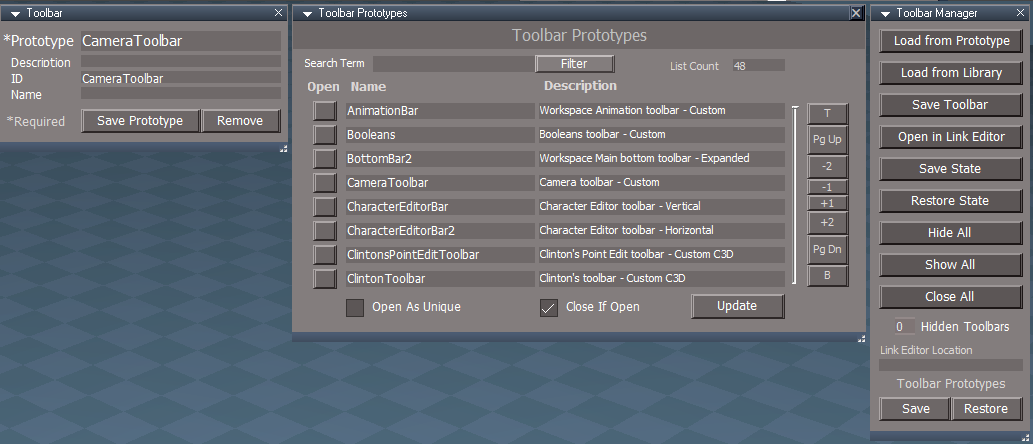
Final Release 6/9/2023
viewtopic.php?t=3731

Updated
Toolbars

PEModelingToolbar
Q_PEModelingToolbar
Fix for NURBS/Guard for some of the above toolbar icons commands
User avatar
clintonman
Captain
Posts: 5659
Joined: 21 May 2009, 21:08
Type the number ten into the box: 0
Location: California

Re: Final trueSpace7.61 Beta 8 Std Unofficial Update

Post by clintonman »

Final Release! :bananacool2:

I'll start doing the documentation updates this weekend.
Clinton Reese

http://clintons3d.com
User avatar
trueBlue
Captain
Posts: 5548
Joined: 06 Jul 2009, 22:50
Type the number ten into the box: 10

Re: Final trueSpace7.61 Beta 8 Std Unofficial Update
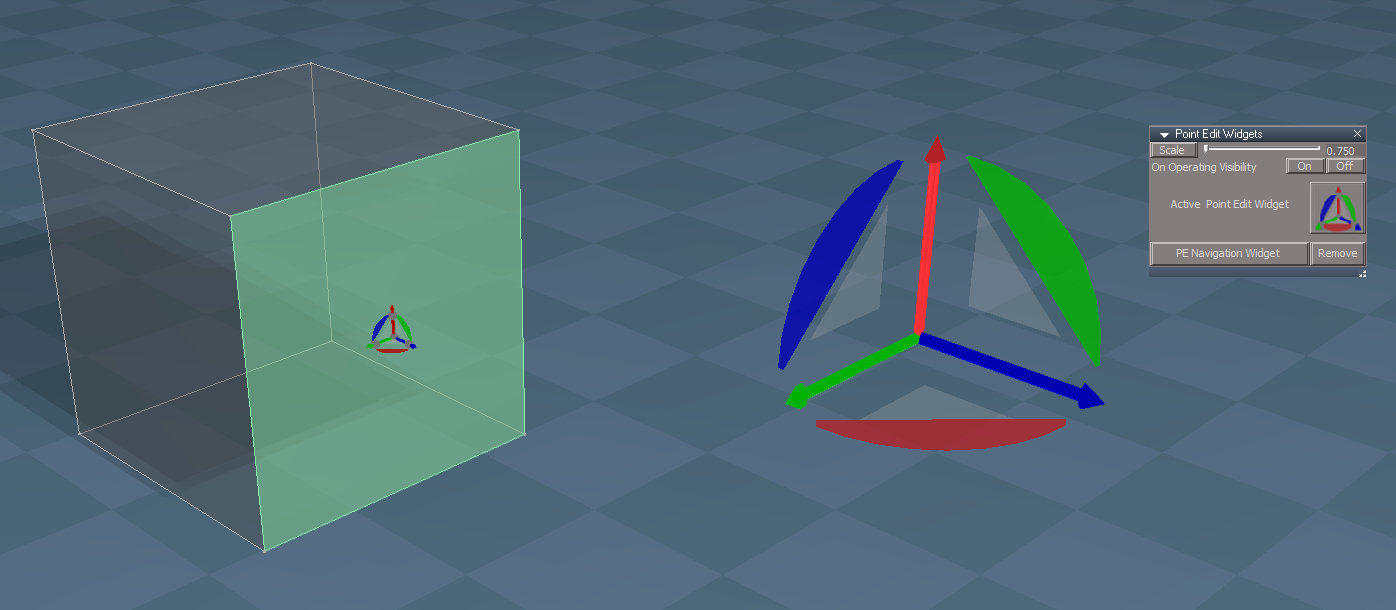
Post by trueBlue »

trueSpace7.61 Beta 8 Standalone Unofficial Update Version 9

Final Release 6/10/2023
viewtopic.php?t=3731

Updated
UUCommands
User avatar
trueBlue
Captain
Posts: 5548
Joined: 06 Jul 2009, 22:50
Type the number ten into the box: 10

Re: Final trueSpace7.61 Beta 8 Std Unofficial Update

Post by trueBlue »

trueSpace7.61 Beta 8 Standalone Unofficial Update Version 9

Final Release 6/12/2023
viewtopic.php?t=3731

Updated
UUCommands
User avatar
trueBlue
Captain
Posts: 5548
Joined: 06 Jul 2009, 22:50
Type the number ten into the box: 10

Re: Final trueSpace7.61 Beta 8 Std Unofficial Update

Post by trueBlue »

trueSpace7.61 Beta 8 Standalone Unofficial Update Version 9

Final Release 6/29/2023
viewtopic.php?t=3731

UUCommands
Visibility Function Set
Set time limit for Status Message(s)

AutoKey
Add:
if(!Node.ConExists(firstSel, 'Matrix')) return
if(Node.ConExists(firstSel, 'Dimension')) return

tS761 Workspace Shortcut List
Window.Shortcuts.xml
Add 1/10 + or - to Move Descriptions for Shortcut Runner

CustomCommands
View Controls
Replaced Sliders with Scrubbers

Popups
Add:
Light toolbar
Shortcut - CTRL SHIFT L

Toolbars
Add:
LightToolbar

ViewToolbar
Changed Camera 1 to Original Camera and added close command
Changed Camera 2 to Custom Camera and added close command
Add:
Animation Toolbar
Cycle Views
3D View Widget / Cube View Widget
Camera widget Preferences
User avatar
trueBlue
Captain
Posts: 5548
Joined: 06 Jul 2009, 22:50
Type the number ten into the box: 10

Re: Final trueSpace7.61 Beta 8 Std Unofficial Update

Post by trueBlue »

trueSpace7.61 Beta 8 Standalone Unofficial Update Version 9

Final Release 7/3/2023
viewtopic.php?t=3731

It is Required that you completely Uninstall and Install trueSpace7.61 Standalone to a clean directory

Toolbars
Update:
PopupButtonsToolbar Ctrl Space
Note: This Popup toolbar is used mainly for setting shortcuts for each toolbar
These shortcuts have already been created:
Space - Point Edit Toolbar
Shift Space - Point Edit Toolbar 2 'Right Offset'
Ctrl Shift P - Point Edit Widget Toolbar
Ctrl Shift O - Object Navigation Widget Toolbar
Ctrl Shift V - View Toolbar
Ctrl Shift L - Light Toolbar
Shift C - DX Components Toolbar
Shift S - DX Shaders Toolbar

PEWidgetToolbarButton
LMB Command:
if(Node.ConExists(Node.Selection(), 'Selection')){Activity.Run("Scripts/CustomCommands/Popups/PointEditWidget");}else{System.Alert('Must be in Point Edit Mode');}

PESelectionToolbar & Q_PESelectionToolbar - Grow, Shrink, and Smooth
Removed the LMB Command: Hide command

Lights
Update:
Ambient light

CustomCommands
Popups
Add: Open Popup Toolbar script

Scripts
Update:
Widget.Shortcuts.xml
tS761 Workspace Shortcut List.rtf

Window.Shortcuts.xml
Update: Popup shortcuts

Link Editor Context
Removed:
NUMPAD9 "Maximize and Arrange All"
NUMPAD3 "Minimize and Arrange All"
DIVIDE "Arrange All"
Add:
Window.Shortcuts_BACKUP.xml
User avatar
trueBlue
Captain
Posts: 5548
Joined: 06 Jul 2009, 22:50
Type the number ten into the box: 10

Re: Final trueSpace7.61 Beta 8 Std Unofficial Update

Post by trueBlue »

trueSpace7.61 Beta 8 Standalone Unofficial Update Version 9

Final Release 7/6/2023
viewtopic.php?t=3731

It is Required that you completely Uninstall and Install trueSpace7.61 Standalone to a clean directory

Widgets

Pont Edit widget(s)
Sphere
Add: LClick - Align view to selected Face

Update: Help text

Object Navigation widget/Enter edit mode/Uneditable script
Update: Author - Clinton Reese

WidgetScripts
PE Navigation Widget
PE NAV Widget.png
.
Arcs
Add:
RDrag - Rotate from Axis

Bars Triangles Arcs
Add:
I Move Mouse - PENavigation Widget 'Help'
PENavigation Widget
Bars Triangles Arcs
LClick - Axis to Face | Edge | Vertex
RClick - Axis to Face with Rotation
MClick - Axis to Face with Rotation to Center

O Move Mouse - Open Mesh Origin

LDrag - Arcs - Rotate Selection
RDrag - Arcs - Rotate from Axis

Toolbars
ClintonsPointEditToolbar
Align View to selected Face.png
.
Removed: Popup Toolbar(s) icons

Add: AlignViewToFaceButton
LMB - Align view to the selected Face
Add:
RMB - Zoom to Selection
Tips:
1) LClick and then RClick to Zoom to Selection
2) LClick and then Ctrl Z 'Undo' for Previous View

CustomCommands
RectSelect - Update: panel from Clinton Reese
Dimensions - Update: scripts from Clinton Reese
Add: AlignViewToFace Author - Clinton Reese :bananathumb:

Clintons3dPlugin.dll - Update: v 1638443 Author - Clinton Reese
User avatar
trueBlue
Captain
Posts: 5548
Joined: 06 Jul 2009, 22:50
Type the number ten into the box: 10

Re: Final trueSpace7.61 Beta 8 Std Unofficial Update

Post by trueBlue »

trueSpace7.61 Beta 8 Standalone Unofficial Update Version 9

Final Release 7/10/2023
viewtopic.php?t=3731

It is Required that you completely Uninstall and Install trueSpace7.61 Standalone to a clean directory

Updates:
MeshEditorSettings.rsobj
ImportExport.rsobj

MaterialEditor.rsobj
D3D Material Converter/D3D material
Add: Name connector: "Use: Enhanced Collada Export"

Materials - Textures library
Add: Name connector:
DX Color Texture

Materials - DX9 library
Add: Name connector:
BlankDXMaterial
tSpecial-E
Glass Shader
Shiny Metals
MappedBlinn
MappedLambert
MappedHalfLambert
Image Cloud
Image Marble
Image Perlin
Image Voronoi
Image Wood
D3D Constant Texture Alpha
Image Wood Alpha Blend

Toolbars
ClintonToolbar Add: Radial Modeler icon :bananathumb:
Radial Modeler.png
.

CustomCommands
Radial Modeler Author Clinton Reese
ColladaPostProcessor Update from Clinton Reese
Enhansed Collada exporter panel.png
Enhansed Collada exporter panel.png (15.42 KiB) Viewed 1351 times
User avatar
trueBlue
Captain
Posts: 5548
Joined: 06 Jul 2009, 22:50
Type the number ten into the box: 10

Re: Final trueSpace7.61 Beta 8 Std Unofficial Update

Post by trueBlue »

trueSpace7.61 Beta 8 Standalone Unofficial Update Version 9

Final Release 7/12/2023
viewtopic.php?t=3731

It is Required that you completely Uninstall and Install trueSpace7.61 Standalone to a clean directory

Updates:
Widgets/Booleans

CustomCommands
Radial Modeler - Update from Clinton Reese :bananathumb:
User avatar
trueBlue
Captain
Posts: 5548
Joined: 06 Jul 2009, 22:50
Type the number ten into the box: 10

Re: Final trueSpace7.61 Beta 8 Std Unofficial Update

Post by trueBlue »

trueSpace7.61 Beta 8 Standalone Unofficial Update Version 9

Final Release 7/14/2023
viewtopic.php?t=3731

Updates:
Clintons3dPlugin.dll v.1638443
User avatar
clintonman
Captain
Posts: 5659
Joined: 21 May 2009, 21:08
Type the number ten into the box: 0
Location: California

Re: Final trueSpace7.61 Beta 8 Std Unofficial Update

Post by clintonman »

Just found a bug in the look at point edit at selection.
The original point edit selection was not being preserved.

Steps to see the bug:
select a face
select vertices mode
zoom to selection and face selection changes to vertices

Widgets/WidgetScripts/ZoomToSelection
Attachments
ZoomToSelection.RsObj
(19.38 KiB) Downloaded 85 times
Clinton Reese

http://clintons3d.com
User avatar
trueBlue
Captain
Posts: 5548
Joined: 06 Jul 2009, 22:50
Type the number ten into the box: 10

Re: Final trueSpace7.61 Beta 8 Std Unofficial Update

Post by trueBlue »

clintonman wrote: 16 Jul 2023, 01:18 Just found a bug in the look at point edit at selection.
The original point edit selection was not being preserved.

Steps to see the bug:
select a face
select vertices mode
zoom to selection and face selection changes to vertices

Widgets/WidgetScripts/ZoomToSelection
I see that, but seems to be right
When I select a Face and change to Point selection, the Face selection does not change to Points
I would think, if you changed to Point selection, Zoomed in, the Point selection is correct, because it is being restored from the last selection
User avatar
trueBlue
Captain
Posts: 5548
Joined: 06 Jul 2009, 22:50
Type the number ten into the box: 10

Re: Final trueSpace7.61 Beta 8 Std Unofficial Update

Post by trueBlue »

@Clinton
What do you think about adding a Snapping toolbar to the Quad toolbars?
Snapping popup toolbar.png
User avatar
clintonman
Captain
Posts: 5659
Joined: 21 May 2009, 21:08
Type the number ten into the box: 0
Location: California

Re: Final trueSpace7.61 Beta 8 Std Unofficial Update

Post by clintonman »

trueBlue wrote: 16 Jul 2023, 03:11
clintonman wrote: 16 Jul 2023, 01:18 Just found a bug in the look at point edit at selection.
The original point edit selection was not being preserved.

Steps to see the bug:
select a face
select vertices mode
zoom to selection and face selection changes to vertices

Widgets/WidgetScripts/ZoomToSelection
I see that, but seems to be right
When I select a Face and change to Point selection, the Face selection does not change to Points
I would think, if you changed to Point selection, Zoomed in, the Point selection is correct, because it is being restored from the last selection
Changing the 3d view should have nothing to do with changing the selection. It's not restoring the original selection it's making a new selection based on the mode.
Clinton Reese

http://clintons3d.com
User avatar
clintonman
Captain
Posts: 5659
Joined: 21 May 2009, 21:08
Type the number ten into the box: 0
Location: California

Re: Final trueSpace7.61 Beta 8 Std Unofficial Update

Post by clintonman »

trueBlue wrote: 16 Jul 2023, 03:16 @Clinton
What do you think about adding a Snapping toolbar to the Quad toolbars?
Snapping popup toolbar.png
Not much. I think that's a lot of buttons.
Clinton Reese

http://clintons3d.com
User avatar
trueBlue
Captain
Posts: 5548
Joined: 06 Jul 2009, 22:50
Type the number ten into the box: 10

Re: Final trueSpace7.61 Beta 8 Std Unofficial Update

Post by trueBlue »

clintonman wrote: 16 Jul 2023, 03:32
trueBlue wrote: 16 Jul 2023, 03:16 @Clinton
What do you think about adding a Snapping toolbar to the Quad toolbars?
Snapping popup toolbar.png
Not much. I think that's a lot of buttons.
Yeah, I just used the Snapping toolbar as an example
I would just like to have Aling to Face and Zoom to Selection
User avatar
trueBlue
Captain
Posts: 5548
Joined: 06 Jul 2009, 22:50
Type the number ten into the box: 10

Re: Final trueSpace7.61 Beta 8 Std Unofficial Update

Post by trueBlue »

trueSpace7.61 Beta 8 Standalone Unofficial Update Version 9

Final Release 7/16/2023
viewtopic.php?t=3731

It is Required that you completely Uninstall and Install trueSpace7.61 Beta 8 to a clean directory

Updates:
Lights/Projector 'Update - Sequence aspect'

Animation Panel 'Update'
Sequence Player 'Add Frame scrubber that shows when selected'

Widgets

WidgetScripts
ZoomToSelection 'Update from Clinton Reese'
CyclePointEditNavigationWidget 'Add - ConnectTo Align View To Face to Triangles and Close

PE Widgets Help 'Update text'
Sphere
Alt + LClick - Align view to selected Face

Background Help
Shift + MClick - Look around

preobjects
MeshEditorSettings 'Update: Reset SDS acpect - Remove SDS button'

CustomCommands
Replace: Fix Geometry with Geometry Selection Utilities

Toolbars
WorkspaceNav & WorkspaceNavBAK
Replace: Fix Geometry with Geometry Selection Utilities

Popup Toolbars
Add: Align View to selected Face / Zoom to Selection
Add: Clinton's Point Edit toolbar
Add: Select Vertices / Convert to Vertices
Add: Select Edges / Convert to Edges

Recording library
Add: Flip Animation - Author Clinton Reese
User avatar
trueBlue
Captain
Posts: 5548
Joined: 06 Jul 2009, 22:50
Type the number ten into the box: 10

Re: Final trueSpace7.61 Beta 8 Std Unofficial Update

Post by trueBlue »

trueSpace7.61 Beta 8 Standalone Unofficial Update Version 9

Final Release 7/16/2023
viewtopic.php?t=3731

It is Required that you completely Uninstall and Install trueSpace7.61 Beta 8 to a clean directory

Updates:
Widgets

Toolbars
WorkspaceNav
WorkspaceNavBAK
ClintonToolbar
Add: SDSToolbar for the 1% :|

preobjects
MeshEditorSettings

CustomCommands
Update: Geometry Selection Utilities

Recording library
Update: Flip Animation - Author Clinton Reese :bananathumb:
Fixed the Watch Dog Event's Change detect

This cool project is a good example how you can render a scene that has scripts with the
D3D Render to File tool or the included Scene Animator's Render to File
Included: Animation panel, Sequence Player, and Scene Animator
The Torus has a 100 Frame animation
The Scene Animator - Background Color has a 100 Frame animation
Open truespace's Render to File icon and set the Width, Height, and File. Preset:(640x480)
Save settings if necessary or Cancel
Select the Scene Animator's Render to File button
Scene Animator - LMB press the Set Render to file icon, set Frames to 100, and LMB press the Render button
Sequence Player - Open the first image and LMB press the Play button. Preset:(640x480)
User avatar
trueBlue
Captain
Posts: 5548
Joined: 06 Jul 2009, 22:50
Type the number ten into the box: 10

Re: Final trueSpace7.61 Beta 8 Std Unofficial Update

Post by trueBlue »

clintonman wrote: 16 Jul 2023, 01:18 Just found a bug in the look at point edit at selection.
The original point edit selection was not being preserved.

Steps to see the bug:
select a face
select vertices mode
zoom to selection and face selection changes to vertices

Widgets/WidgetScripts/ZoomToSelection
Just found a bug in Widgets/WidgetScripts/ZoomToAll
Steps
View from Camera
Shift + MClick in 3D View

The only thing I can come up with is add:

Code: Select all

//	Line 6
workwindow = WindowsManager.GetWorkWindow()
CamView = Node.Value(workwindow + '/D3DSceneLayer', 'Camera')
if(Node.IsCamera(Node.FirstSelected()) || CamView) {
util.SetStatusMessage(' Zoom to All does not work from a Camera View', 6000)
params.SetTerminationFlag()
return
}
Also found a way to stop the Widgets/WidgetScripts/ZoomToSelection from running when viewing from a Camera
Add:

Code: Select all

//	Line 14
workwindow = WindowsManager.GetWorkWindow()
CamView = Node.Value(workwindow + '/D3DSceneLayer', 'Camera')
if(CamView) {
util.SetStatusMessage(' Zoom to Selection does not work from a Camera View', 6000)
return
}
AlignViewToFace
Add:

Code: Select all

//	Line 15
workwindow = WindowsManager.GetWorkWindow()
CamView = Node.Value(workwindow + '/D3DSceneLayer', 'Camera')
if(CamView) {
util.SetStatusMessage(' Align View to Face does not work from a Camera View', 6000)
return
}
User avatar
clintonman
Captain
Posts: 5659
Joined: 21 May 2009, 21:08
Type the number ten into the box: 0
Location: California

Re: Final trueSpace7.61 Beta 8 Std Unofficial Update

Post by clintonman »

trueBlue wrote: 18 Jul 2023, 11:40
Just found a bug in Widgets/WidgetScripts/ZoomToAll
Steps
View from Camera
Shift + MClick in 3D View
...
Looks like the whole thing needs adjustment. Not working properly with camera view and ortho views are also bad.
Clinton Reese

http://clintons3d.com
User avatar
trueBlue
Captain
Posts: 5548
Joined: 06 Jul 2009, 22:50
Type the number ten into the box: 10

Re: Final trueSpace7.61 Beta 8 Std Unofficial Update

Post by trueBlue »

trueSpace7.61 Beta 8 Standalone Unofficial Update Version 9

Final Release 7/18/2023
viewtopic.php?t=3731

It is Required that you completely Uninstall and Install trueSpace7.61 Beta 8 to a clean directory

Updates:
Widgets
Sweep
Extrude Amount 20
Memory Extrude.png
RClick to open Sweep panel
Extrude toolbar icon.png
.
WidgetScripts
ZoomToSelection
ZoomToAll

CustomCommands
AlignViewToFace
User avatar
clintonman
Captain
Posts: 5659
Joined: 21 May 2009, 21:08
Type the number ten into the box: 0
Location: California

Re: Final trueSpace7.61 Beta 8 Std Unofficial Update

Post by clintonman »

Fixes for Zoom to Selection and Zoom to All are ready for testing

works in ortho views
works in isometric view
works in camera view
works with single point selections
zoom to selection will use the "Camera undo" setting

for the option to prevent zooming in camera views
add a connector "AllowCameraZoomTo" to the "/Preferences/Cameras" or to the "/Widgets/Select/Camera"

replace the corresponding nodes inside "Widgets/WidgetScripts"
Attachments
ZoomToSelection2737.RsObj
(38.58 KiB) Downloaded 74 times
ZoomToAll.RsObj
(25.01 KiB) Downloaded 115 times
Clinton Reese

http://clintons3d.com
User avatar
trueBlue
Captain
Posts: 5548
Joined: 06 Jul 2009, 22:50
Type the number ten into the box: 10

Re: Final trueSpace7.61 Beta 8 Std Unofficial Update

Post by trueBlue »

clintonman wrote: 19 Jul 2023, 20:20 Fixes for Zoom to Selection and Zoom to All are ready for testing

works in ortho views
works in isometric view
works in camera view
works with single point selections
zoom to selection will use the "Camera undo" setting

for the option to prevent zooming in camera views
add a connector "AllowCameraZoomTo" to the "/Preferences/Cameras" or to the "/Widgets/Select/Camera"

replace the corresponding nodes inside "Widgets/WidgetScripts"
Looks like it is working really well with the EyeCamera in all modes! :bananathumb:

Camera View
Still not sure if moving the Camera to the selected object using Zoom to Selection is going to be welcomed

If a Camera is using LookAt, it does not work as expected when selecting a different object

I added a AllowCameraZoomTo Boolean connector to the "/Widgets/Select/Camera" node
If checked, it still works
If Not checked, it throws an error
ERR Source object: /Widgets/WidgetScripts/ZoomToSelection Error: Microsoft JScript runtime error Description: Invalid procedure call or argument Error code: 0x800a0005 - (null) Line: 77, Char: 2 Script text: allowCameraZoomTo = Node.Value("/Widgets/Select/Camera", "AllowCameraZoomTo");
Edit: I fixed it by moving allowCameraZoomTo = true to the top of the script

Code: Select all

// Execute 
allowCameraZoomTo = true
function Execute(params)
Could the Alert be changed to a Question?
If Yes, disable /Widgets/Select/Camera - "AllowCameraZoomTo"

Edit 2: Better yet:

Code: Select all

	if(cameraPrevented) {
		if(globalFS) {
			//globalFS.Alert(cameraZoomMsg);
util.SetStatusMessage(cameraZoomMsg, 10000)
RsStackView.RemovePanels(0, 0, 0)
RsStackView.RemovePanels(1, 0, 0)
RsStackView.RemovePanels(3, 0, 0)
UserInterface.OpenToolPanelViewEx2("" , "" , "/Widgets/Select/Camera", 3,0,0)
		} else {
			System.Alert(cameraZoomMsg);
RsStackView.RemovePanels(0, 0, 0)
RsStackView.RemovePanels(1, 0, 0)
RsStackView.RemovePanels(3, 0, 0)
UserInterface.OpenToolPanelViewEx2("" , "" , "/Widgets/Select/Camera", 3,0,0)
		}
	}
cameraZoomMsg = "Zoom to Selection for camera views is Disabled Enable - 'Allow Camera Zoom To' move Camera to selection"
.
Camera Preferences panel(s).png
Camera Preferences panel(s).png (5.82 KiB) Viewed 1222 times
User avatar
clintonman
Captain
Posts: 5659
Joined: 21 May 2009, 21:08
Type the number ten into the box: 0
Location: California

Re: Final trueSpace7.61 Beta 8 Std Unofficial Update

Post by clintonman »

trueBlue wrote: 19 Jul 2023, 22:09 ...

If a Camera is using LookAt, it does not work as expected when selecting a different object

I added a AllowCameraZoomTo Boolean connector to the "/Widgets/Select/Camera" node
If checked, it still works
If Not checked, it throws an error
ERR Source object: /Widgets/WidgetScripts/ZoomToSelection Error: Microsoft JScript runtime error Description: Invalid procedure call or argument Error code: 0x800a0005 - (null) Line: 77, Char: 2 Script text: allowCameraZoomTo = Node.Value("/Widgets/Select/Camera", "AllowCameraZoomTo");
Edit: I fixed it by moving allowCameraZoomTo = true to the top of the script

...
I'll add a check for LookAt.

Moving that line to the top will not fix it. Most likely error is from invalid checkbox state(not true and not false). As soon as you set a value it gets "fixed" but only temporarily. I think there's something in the global fs that will help.

Edit: correction, moving it to the very top as you show will fix a different error(not the line 77 error). Leaving it in place and removing the var will also fix the other error.
Clinton Reese

http://clintons3d.com
User avatar
trueBlue
Captain
Posts: 5548
Joined: 06 Jul 2009, 22:50
Type the number ten into the box: 10

Re: Final trueSpace7.61 Beta 8 Std Unofficial Update

Post by trueBlue »

clintonman wrote: 20 Jul 2023, 01:58
trueBlue wrote: 19 Jul 2023, 22:09 ...

If a Camera is using LookAt, it does not work as expected when selecting a different object

I added a AllowCameraZoomTo Boolean connector to the "/Widgets/Select/Camera" node
If checked, it still works
If Not checked, it throws an error
ERR Source object: /Widgets/WidgetScripts/ZoomToSelection Error: Microsoft JScript runtime error Description: Invalid procedure call or argument Error code: 0x800a0005 - (null) Line: 77, Char: 2 Script text: allowCameraZoomTo = Node.Value("/Widgets/Select/Camera", "AllowCameraZoomTo");
Edit: I fixed it by moving allowCameraZoomTo = true to the top of the script

...
I'll add a check for LookAt.

Moving that line to the top will not fix it. Most likely error is from invalid checkbox state(not true and not false). As soon as you set a value it gets "fixed" but only temporarily. I think there's something in the global fs that will help.

Edit: correction, moving it to the very top as you show will fix a different error(not the line 77 error). Leaving it in place and removing the var will also fix the other error.
With regards to moving allowCameraZoomTo = true to the top, I noticed that adding the AllowCameraZoomTo attribute was sticky
The Zoom to Selection script did not work at first
The Zoom to All did work
I suspect that your constraint scripts applied to Cameras might be an issue too
User avatar
clintonman
Captain
Posts: 5659
Joined: 21 May 2009, 21:08
Type the number ten into the box: 0
Location: California

Re: Final trueSpace7.61 Beta 8 Std Unofficial Update

Post by clintonman »

trueBlue wrote: 20 Jul 2023, 02:56
clintonman wrote: 20 Jul 2023, 01:58
trueBlue wrote: 19 Jul 2023, 22:09 ...

If a Camera is using LookAt, it does not work as expected when selecting a different object

I added a AllowCameraZoomTo Boolean connector to the "/Widgets/Select/Camera" node
If checked, it still works
If Not checked, it throws an error

Edit: I fixed it by moving allowCameraZoomTo = true to the top of the script

...
I'll add a check for LookAt.

Moving that line to the top will not fix it. Most likely error is from invalid checkbox state(not true and not false). As soon as you set a value it gets "fixed" but only temporarily. I think there's something in the global fs that will help.

Edit: correction, moving it to the very top as you show will fix a different error(not the line 77 error). Leaving it in place and removing the var will also fix the other error.
With regards to moving allowCameraZoomTo = true to the top, I noticed that adding the AllowCameraZoomTo attribute was sticky
The Zoom to Selection script did not work at first
The Zoom to All did work
I suspect that your constraint scripts applied to Cameras might be an issue too
Good call, I'll checkout constraints script too.
Clinton Reese

http://clintons3d.com
User avatar
clintonman
Captain
Posts: 5659
Joined: 21 May 2009, 21:08
Type the number ten into the box: 0
Location: California

Re: Final trueSpace7.61 Beta 8 Std Unofficial Update

Post by clintonman »

Second test

Check for LookAt assigned to the camera
fixed the undocumented bug - removed var from allowCameraZoomTo = true
changed alert to a question to enable allowCameraZoomTo
force the AllowCameraZoomTo to be a valid true/false value

TODO: check the camera transform node WldMatrix connection is connect outside - this will cover both LookAt and constraints issues
Attachments
ZoomToSelection3fee.RsObj
(39.5 KiB) Downloaded 106 times
ZoomToAll9d63.RsObj
(25.76 KiB) Downloaded 75 times
Clinton Reese

http://clintons3d.com

Return to “General Discussion”