Unofficial Update 3?
-
Tiles

- Master Chief Petty Officer
- Posts: 401
- Joined: 27 May 2009, 08:34
Unofficial Update 3?
I was happy to read about the Update 3. And linked the thread at two german 3D boards. Now the links are dead. What happened to the thread and the Update 3?
Free Gamegraphics, Freeware Games http://reinerstilesets.de
-
trueBlue

- Captain
- Posts: 5548
- Joined: 06 Jul 2009, 22:50
- Type the number ten into the box: 10
Re: Unofficial Update 3?
Working on a better update.
Warning! Whoever downloaded the previous versions, should not use and should delete them.
Warning! Whoever downloaded the previous versions, should not use and should delete them.
-
Tiles
- Master Chief Petty Officer
- Posts: 401
- Joined: 27 May 2009, 08:34
Re: Unofficial Update 3?
Thanks trueBlueWorking on a better update.

Damn!Warning! Whoever downloaded the previous versions, should not use and should delete them.

Err, how do i remove it?
Free Gamegraphics, Freeware Games http://reinerstilesets.de
-
trueBlue
- Captain
- Posts: 5548
- Joined: 06 Jul 2009, 22:50
- Type the number ten into the box: 10
Re: Unofficial Update 3?
Just run the previous installed "Unofficial Update" and Reset the Default Context".
-
Tiles
- Master Chief Petty Officer
- Posts: 401
- Joined: 27 May 2009, 08:34
Re: Unofficial Update 3?
Thanks
I guess a backupped default.ctx should do the same trick, shouldn`t it?
I guess a backupped default.ctx should do the same trick, shouldn`t it?
-
trueBlue
- Captain
- Posts: 5548
- Joined: 06 Jul 2009, 22:50
- Type the number ten into the box: 10
-
Tiles
- Master Chief Petty Officer
- Posts: 401
- Joined: 27 May 2009, 08:34
Re: Unofficial Update 3?
Ouch. Okay then, let`s do a reinstall of Update 2
Free Gamegraphics, Freeware Games http://reinerstilesets.de
-
Draise

- Captain
- Posts: 3200
- Joined: 21 Sep 2009, 19:33
- Type the number ten into the box: 0
- Location: Bogota, Colombia
Re: Unofficial Update 3?
Looking forward to the Update 3! If you need any help troubleshooting just let me know and I'll spend my weekends on it!
-
trueBlue
- Captain
- Posts: 5548
- Joined: 06 Jul 2009, 22:50
- Type the number ten into the box: 10
Re: Unofficial Update 3?
Okay there you go:
vi ... =55&t=3655"
This should be gold!
For those that downloaded earlier versions, please install the Unofficial Update 2 and Reset the Default Context before installing this third update.
vi ... =55&t=3655"
This should be gold!
For those that downloaded earlier versions, please install the Unofficial Update 2 and Reset the Default Context before installing this third update.
-
Tiles
- Master Chief Petty Officer
- Posts: 401
- Joined: 27 May 2009, 08:34
Re: Unofficial Update 3?
Since you locked the other thread, there are some items just available in the default layout. And i can`t delete my camera with del key anymore.
Free Gamegraphics, Freeware Games http://reinerstilesets.de
-
trueBlue
- Captain
- Posts: 5548
- Joined: 06 Jul 2009, 22:50
- Type the number ten into the box: 10
Re: Unofficial Update 3?
Not sure I understand Tiles. I can Delete a Camera with the Delete icon and keyboard key. If you want to customize a layout, start with the modified Default and resave. I wanted to keep the Unofficial threads simple as the Workspace's File/Help/Updates menu points to those threads. Okay?
-
Tiles
- Master Chief Petty Officer
- Posts: 401
- Joined: 27 May 2009, 08:34
Re: Unofficial Update 3?
Ah, was a hiccup. Have closed tS, did a reboot, and now i can delete the camera again. Phew
It would be nicer when i could add the new features to my current layout somehow. It took me a while to create the current layout. And i`m not even sure about some steps anymore. It´s been a pretty while since i last played around at my layout. But that`s the way it is i guessIf you want to customize a layout, start with the modified Default and resave.
Green with that. Just wanted a place to give some feedback. And that`s normally the original thread where such things belong to. So that other users can read about possible trouble and its solutions too. But as told, i`m green with that. And as told, thanks for the effortI wanted to keep the Unofficial threads simple as the Workspace's File/Help/Updates menu points to those threads. Okay?
Free Gamegraphics, Freeware Games http://reinerstilesets.de
-
trueBlue
- Captain
- Posts: 5548
- Joined: 06 Jul 2009, 22:50
- Type the number ten into the box: 10
Re: Unofficial Update 3?
What items do you want to incorporate into your layout? The Expanded layout is simular to waht you created except I docked the toolbars so they could be closed/opened.
-
Tiles
- Master Chief Petty Officer
- Posts: 401
- Joined: 27 May 2009, 08:34
Re: Unofficial Update 3?
This little navigation toolbar at the top of the 3D window. And the LE Navigator. That`s also missing. And i think that was it already anyways.
Hm, my custom hotkeys are gone. Gah, i remember that this was a very special pain, with the need to modify the globalsomething xml file by hand
Hm, my custom hotkeys are gone. Gah, i remember that this was a very special pain, with the need to modify the globalsomething xml file by hand
Free Gamegraphics, Freeware Games http://reinerstilesets.de
-
trueBlue
- Captain
- Posts: 5548
- Joined: 06 Jul 2009, 22:50
- Type the number ten into the box: 10
Re: Unofficial Update 3?
-
Tiles
- Master Chief Petty Officer
- Posts: 401
- Joined: 27 May 2009, 08:34
Re: Unofficial Update 3?
Thanks
... aaand got it working
... aaand got it working
Last edited by Tiles on 25 Sep 2012, 08:05, edited 1 time in total.
-
trueBlue
- Captain
- Posts: 5548
- Joined: 06 Jul 2009, 22:50
- Type the number ten into the box: 10
Re: Unofficial Update 3?
Yep the Unofficial Update 2 modified all of the shortcuts as said in the instructions. Sorry!Tiles wrote:This little navigation toolbar at the top of the 3D window. And the LE Navigator. That`s also missing. And i think that was it already anyways.
Hm, my custom hotkeys are gone. Gah, i remember that this was a very special pain, with the need to modify the globalsomething xml file by hand
You can save a copy of your shortcuts before you install.
-
trueBlue
- Captain
- Posts: 5548
- Joined: 06 Jul 2009, 22:50
- Type the number ten into the box: 10
Re: Unofficial Update 3?
Your welcome!Tiles wrote:Thanks
-
Tiles
- Master Chief Petty Officer
- Posts: 401
- Joined: 27 May 2009, 08:34
Re: Unofficial Update 3?
Too late. That`s what happens when you first play around and then look at the manual. I just love to play around, you know meYep the Unofficial Update 2 modified all of the shortcuts as said in the instructions. Sorry!
You can save a copy of your shortcuts before you install.
No problem. Next time i know
Free Gamegraphics, Freeware Games http://reinerstilesets.de
-
Tiles
- Master Chief Petty Officer
- Posts: 401
- Joined: 27 May 2009, 08:34
Re: Unofficial Update 3?
I have another problem. I cannot access the 2D where i have installed the LE aspect bar anymore. Just 1D and 4D available.
Oh, and does somebody know how to reinstall the cycle wire hilight button by chance? That one`s also broken now
EDIT, have it. Cycle wire highlight is made of two parts. Create Button did the trick. Remains the LE issue.
Oh, and does somebody know how to reinstall the cycle wire hilight button by chance? That one`s also broken now
EDIT, have it. Cycle wire highlight is made of two parts. Create Button did the trick. Remains the LE issue.
Free Gamegraphics, Freeware Games http://reinerstilesets.de
-
Tiles
- Master Chief Petty Officer
- Posts: 401
- Joined: 27 May 2009, 08:34
Re: Unofficial Update 3?
Solved. I have replaced the whole window and reinstalled the LE aspect bar. And this time all is fine.
Free Gamegraphics, Freeware Games http://reinerstilesets.de
-
trueBlue
- Captain
- Posts: 5548
- Joined: 06 Jul 2009, 22:50
- Type the number ten into the box: 10
Re: Unofficial Update 3?
tS7... BUG
Next time open the Scene View, RMB select your scene (name), and select Browse in LE
Or in the LE Navigator select Scene
Next time open the Scene View, RMB select your scene (name), and select Browse in LE
Or in the LE Navigator select Scene
- Attachments
-

- Capture.PNG (10.69 KiB) Viewed 5455 times
-
trueBlue
- Captain
- Posts: 5548
- Joined: 06 Jul 2009, 22:50
- Type the number ten into the box: 10
Re: Unofficial Update 3?
Small update!
I fixed the scripts for the RenderScene, RenderObject, and RenderAnimation.
They now remember the VRay Render View Window's top left, X and Y last used position.
Sorry!
I fixed the scripts for the RenderScene, RenderObject, and RenderAnimation.
They now remember the VRay Render View Window's top left, X and Y last used position.
Sorry!
- Attachments
-

- Capture.PNG (2.55 KiB) Viewed 5448 times
-
Tiles
- Master Chief Petty Officer
- Posts: 401
- Joined: 27 May 2009, 08:34
Re: Unofficial Update 3?
Oh noez. You mean i have to go through the whole setup again?
I think i will leave it alone now. It`s working
I think i will leave it alone now. It`s working
Free Gamegraphics, Freeware Games http://reinerstilesets.de
-
trueBlue
- Captain
- Posts: 5548
- Joined: 06 Jul 2009, 22:50
- Type the number ten into the box: 10
Re: Unofficial Update 3?
No, what is nice about this update is you have a choices.
To update the tS761 Vray Window Resizer :
Run the installer and select Cancel to everything except the tS761 Vray Window Resizer and replace the xml files.
To update the tS761 Vray Window Resizer :
Run the installer and select Cancel to everything except the tS761 Vray Window Resizer and replace the xml files.
-
Tiles
- Master Chief Petty Officer
- Posts: 401
- Joined: 27 May 2009, 08:34
Re: Unofficial Update 3?
Phew
Will give it a shot tomorrow. Thanks
Will give it a shot tomorrow. Thanks
Free Gamegraphics, Freeware Games http://reinerstilesets.de
-
Steinie

- Captain
- Posts: 2958
- Joined: 21 May 2009, 17:38
- Type the number ten into the box: 10
Re: Unofficial Update 3?
I installed Ver3 and WOW what a great addition to trueSpace!!!
I tested most of it so far and haven't found any issues in this new version.
Vray Material Editor is working as expected. Yoweeeee.!
Of course I now have the 7 "Eye Camera" Icon tucked neatly away in my "New Custom Toolbar". Hoorah!
All the other great scripts from Clinton, Stan, Jason and others will join the "must have tools" collection in the toolbar I can close.... A great way to clear the icon clutter!
You guys are breathing new life into my favorite program.
Thanks!!!
p.s
and you put icing on the cake... a link to United3dArtists built right in!
I tested most of it so far and haven't found any issues in this new version.
Vray Material Editor is working as expected. Yoweeeee.!
Of course I now have the 7 "Eye Camera" Icon tucked neatly away in my "New Custom Toolbar". Hoorah!
All the other great scripts from Clinton, Stan, Jason and others will join the "must have tools" collection in the toolbar I can close.... A great way to clear the icon clutter!
You guys are breathing new life into my favorite program.
Thanks!!!
p.s
and you put icing on the cake... a link to United3dArtists built right in!
-
Tiles
- Master Chief Petty Officer
- Posts: 401
- Joined: 27 May 2009, 08:34
Re: Unofficial Update 3?
Works, thanksNo, what is nice about this update is you have a choices.
To update the tS761 Vray Window Resizer :
Run the installer and select Cancel to everything except the tS761 Vray Window Resizer and replace the xml files.
Free Gamegraphics, Freeware Games http://reinerstilesets.de
-
Draise
- Captain
- Posts: 3200
- Joined: 21 Sep 2009, 19:33
- Type the number ten into the box: 0
- Location: Bogota, Colombia
Re: Unofficial Update 3?
Cool, now I get a chance to try it out!
-
trueBlue
- Captain
- Posts: 5548
- Joined: 06 Jul 2009, 22:50
- Type the number ten into the box: 10
Re: Unofficial Update 3?
Still working on Update 3
I have incorporated Clinton's tools
Face and Vertex Snap
Fix Bad Geometry
Added cylinder primitive to the Spot and Projector lights
Custom toolbar opens in window that has focus now.
Exposed the Object and Eye transformation icons in the new view toolbar.
I have incorporated Clinton's tools
Face and Vertex Snap


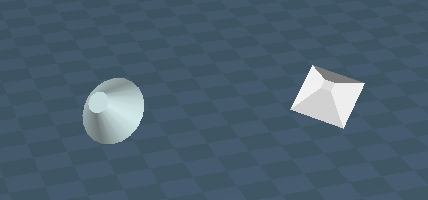
Exposed the Object and Eye transformation icons in the new view toolbar.

- Capture.PNG (8.76 KiB) Viewed 5330 times
-
trueBlue
- Captain
- Posts: 5548
- Joined: 06 Jul 2009, 22:50
- Type the number ten into the box: 10
Re: Unofficial Update 3?
Anybody want to test this final update?
Includes all previous updates and bug fixes.
Please read the following and included trueSpace 7.61 Beta 8 Unofficial Update.txt
trueSpace 7.61 Beta 8 Unofficial Update
This update is for the full version of trueSpace7.61 with Workspace, Model, and the Bridge.
Important: This Update should not be used with the tS7.61 Standalone version!
:: Layouts
4View, Default, Floating, Expanded, and trueSpace6
* These layouts have been fixed to prevent the Main toolbars from showing on the
Desktop when tS is Minimized by merging the bottom two Workspace toolbars together into one toolbar and docked with the Status panel.
* Removed the duplicated tSMainWnd nodes.
* Removed all of the RS...toolbar Frame Windows.
* Set the OwnedBy attribute for most of the toolbar's Frame Window which stops the the toolbars from showing through newly opened Views.
* Added a New View toolbar in the Default layout main window's titelbar.
:: Widgets
Object Move, Rotate, and Scale widgets
* MMB select in empty space deactivates each tool.
Camera Move, Rotate, FOV, and Rectangle Zoom widgets.
* MMB select in empty space deactivates each tool.
Background widget
Additional controls:
* CTRL + MMB Double click Zooms to the current selected object or Point Edit selection. Contributed by Clinton Reese http://www.clintons3d.com"
Object Navigation Widget 1, 2, and 3
Additional controls:
Sphere
* LMB + Drag = Move selected object in X and Y
* MMB + Drag = Move widget
* RMB Select = Close Widget
* Ctrl + RMB select = Show Widget's advance settings
Bars, Triangles, Cubes, & Arcs
* Ctrl + LMB Select = Show thier Mouse settings
* MMB select the Bars, Triangles, and Sphere activates the Object Move tool
* MMB select the Arcs activates the Object Rotate tool
* MMB select the Cubes activates the Object Scale tool
* Alt + LMB select the Bars activates the X, Y, and Z Axis locks. Toggles On/Off
* Shift + LMB select the widget switches the Object Navigation Widgets
* Ctrl + RMB select the widget switches to the Selector Cage Widget
Selector Cage widget
Additional controls:
* Ctrl + RMB select on widget switches to the Object Navigation Widget.
* Ctrl + LMB select on the widget activates the widget's Mouse Settings panel.
Point Edit widget 1, 2, and 3
* Added PE Pivot Snap. Use the P key + LMB select any part of the Widget and release to set the Pivot on selected element. Use RMB + Drag on rotation Arcs to rotate from set pivot. Contributed by Clinton.
Additional controls:
Sphere
* LMB + Drag = Move selected object in X and Y
* MMB + Drag = Move widget
* Ctrl + RMB select = Show Widget's advance settings
Bars, Triangles, Cubes, & Arcs
* Ctrl + LMB Select = Show thier Mouse settings
* MMB select the Bars, Triangles, and Sphere activates the Object Move tool
* MMB select the Arcs activates the Object Rotate tool
* MMB select the Cubes activates the Object Scale tool
* Alt + LMB select the Bars activates the X, Y, and Z Axis locks. Toggles On/Off
* Shift + LMB select the widget switches the Object Navigation Widgets
Camera Widget
Additional controls:
* Shift + LMB select on camera widget switches to Camera Widget 1 or 2.
Camera Widget2
* LMB select the FOV shape activates view from camera.
* Ctrl + MMB select exits from camera's view.
* LMB + Drag the FOV shape adjust the FOV.
* LMB + Drag the Stand shape moves in X.
* MMB + Drag the Stand shape moves in Y.
* RMB + Drag the Stand shape moves in Z.
* LMB + Drag the Rotate shape rotates in Z.
* MMB + Drag the Rotate shape rotates in Y.
* RMB + Drag the Rotate shape rotates in X.
* LMB + Drag the Move shape moves in X and Y.
* MMB + Drag the Move shape moves in Forwards and Backwards.
* RMB + Drag the Move shape moves in X and Z.
* RMB select the FOV, Rotate, and Move shapes activates the camera's panel.
* Shift + LMB select on the camera widget switches to the Camera Widget.
View widget
Additional controls:
* MMB select the Navigate shape activates the Camera Move tool.
* MMB select the Walk shape activates the Camera FOV tool.
* MMB select the Encircle shape activates the Camera Rotate tool.
* MMB select outside of the widget to deactivate the above tools.
* Ctrl + LMB select the Encircle shape shows the Eye Camera panel.
* Shift + LMB select the Encircle shape adds the 3D View Widget.
Skeleton tool widget
* Added X-Ray brick.
:: Panels
* Changed the Character Editor Preferences/Skeleton tool - Joint Placement to Center.
* Added Edit Boxes to the Postprocess panel.
* Resaved the Primitives panels and applied the Object Render Attributes to each primitive.
* Resaved the Physics panels.
* Object Render Attributes - Added an attribute for the owner's path and name, and Exported the Default aspect.
* Material Editor - Added a RMB command to the 'Edit DX Material in the Link Editor' icon that navigates to the scene level in the Link Editor. Edit in the Link Editor is enabled and incorporated a Library Viewer.
* Added customized Desktop panel exposing all aspects to the Default aspect.
* Added customized Animation Preferences panel with 3 buttons that Shrink the Play Range, Bridge Syncronize, and Bake Keyframes. Contributed by Clinton Reese http://www.clintons3d.com"
* Snapping - Exported the 'Snap Radius' attribute on the Grid aspect.
* Scene panel - Changed the command for the "Show Object Attribs" to the new Show script.
* All Lights have a new UI with all of their aspects showing in the Stack/Panel and include an Intensity attribute for their Solid Color. Default = 1 which equals no Intensity. Note: The Default light setup is the only library item that was modified with the new lights. Unfortunately all pre existing lights, scenes, libraries, and Light setups will have the original lights.
* Added a Cylinder primitive to the Spot and Projector lights.
:: Workspace Shortcuts
Redefined and Added additional shortcuts, included a backup, and a Shortcut list.
* Workspace shortcuts XML.
* Workspace shortcuts Default.
* Workspace shortcuts List.
:: Toolbars
jScript Record toolbar
* Added a Stop all Activities icon
VBScript Record toolbar
* Added a Stop all Activities icon
3D Record toolbar
* Added RMB command to the 3D Record toolbar button which opens it's preference panel in the Stack/Settings.
Workspace Main toolbar
* Unencapsulate 3D icon - Added a button to Unencapsulate selected objects.
* Copy icon - Changed the RMB command to include multiple selections and insert the copied objects to any opened Link Editor view at X = 600 and Y = 600 and offset each copied object horizontaly by 60.
* Reset Default Context icon - Changed the LMB command to include a dialog giving you a choice to reset or not reset.
* Save current State - 'Default Context Backup' icon - Added.
* New Scene icon - Added RMB command to navigate to the scene level in the Link Editor.
* 3D Record toolbar icon - Modified it's placement.
* jScript Macro toolbar icon - Modified it's placement. RMB - Inserts a jScript Command.
* VBScript Macro toolbar icon - Modified it's placement. RMB - Inserts a VBScript Comma
* Unlook At icon - Added button that removes the Look At.
* Show icon - LMB Shows all the selected objects and RMB Shows the new Object Render Attributes panel for the selected object.
* Hide icon - LMB Hides all the selected objects and RMB Shows the new Object Render Attributes panel for the selected object.
* Show All icon - LMB Shows and RMB Hides any objects that have an Object Render Attributes panel.
* Offline Render icons - Automatically resize the Vray render window to the current settings in the Vray preferences panel.
Workspace Navigation toolbar
* Set Default Pose icon - Added a dialog to cancel setting the Default Pose if one is already present.
* Added the missing Flatten Axis button which is used to store the pivot into mesh for procedural animations.
* Fixed the Weight Paint tool's wrong command.
* Fixed the Animation Editor toolbar's Reset function by adding a prototype.
* Changed the tooltip for the Axis - Normalize Orientation to Reset Axis
* Added MeshModifiers.ConvertSelection('','') command to the Shrink and Grow buttons. Contributed by Clinton Reese http://www.clintons3d.com"
* Added the missing Transfer Skining Weights button which is used to transfer the Skin Weights from one Character to another.
* Added a Unselect command to the Object tool.
* Added RMB command to the Axis tool button which toggles the Axis Widget to show In Front.
* Added Vertex Snap widget, Face Snap, and Fix Bad Geometry. Contributed by Clinton Reese http://www.clintons3d.com"
* Added Custom Toolbar icon which includes the Camera View tools, Cut, Copy, and Paste.
Model File Menu
* Added Help - About and Tooltips (Toggle On/OFF).
Workspace File Menu
* Added File - Save as RsRcd
* Added Help - United 2D Artist (Web Link), Updates (Web Link).
Misc
* Camera - The Camera's Shape was modified so that the mesh does not show when vewing from any camera in some instances.
* Includes a modified ts76_manual.html that links to a included modified tS6_help.chm, New in 6.5.PDF, ch30_NewInTrueSpace66.PDF, ch27_PhysicalSimulation.pdf, tS76_MS_Animation.pdf, tS7_AG_3.17.pdf, tS7_AG_Ch_4_NormalMapping.pdf, tS7_DG_chapt1_chapt2.pdf, and UsingBonesToVertex.pdf files.
Instructions:
It is recommend that you completely uninstall and install trueSpace to a clean directory.
Install the PDF Manual for trueSpace and Vray first.
1.) Run the trueSpace 7.61 Beta 8 Unofficial Update.exe
2.) Browse [...] to where you installed C:\trueSpace761, select it's folder and then the Extract button
3.) Select the Yes to All button.
4.) Open trueSpace and select the Reset to Default Context icon.
Vray users: Install/Load Vray in the Package Manager and reboot trueSpace.
Select the "Update Library Places" button in the D3D Material Editor. Reselect the Library Place and a Library item.
Addtional Objects Library
Objects - tS7.61 Update objects
This library includes several objects to further enhance trueSpace.
Special thanks to Clinton Reese for his help with the Widgets and scripting in this final phase.
Final version can be found here:
vi ... 55&start=0"
Includes all previous updates and bug fixes.
Please read the following and included trueSpace 7.61 Beta 8 Unofficial Update.txt
trueSpace 7.61 Beta 8 Unofficial Update
This update is for the full version of trueSpace7.61 with Workspace, Model, and the Bridge.
Important: This Update should not be used with the tS7.61 Standalone version!
:: Layouts
4View, Default, Floating, Expanded, and trueSpace6
* These layouts have been fixed to prevent the Main toolbars from showing on the
Desktop when tS is Minimized by merging the bottom two Workspace toolbars together into one toolbar and docked with the Status panel.
* Removed the duplicated tSMainWnd nodes.
* Removed all of the RS...toolbar Frame Windows.
* Set the OwnedBy attribute for most of the toolbar's Frame Window which stops the the toolbars from showing through newly opened Views.
* Added a New View toolbar in the Default layout main window's titelbar.
:: Widgets
Object Move, Rotate, and Scale widgets
* MMB select in empty space deactivates each tool.
Camera Move, Rotate, FOV, and Rectangle Zoom widgets.
* MMB select in empty space deactivates each tool.
Background widget
Additional controls:
* CTRL + MMB Double click Zooms to the current selected object or Point Edit selection. Contributed by Clinton Reese http://www.clintons3d.com"
Object Navigation Widget 1, 2, and 3
Additional controls:
Sphere
* LMB + Drag = Move selected object in X and Y
* MMB + Drag = Move widget
* RMB Select = Close Widget
* Ctrl + RMB select = Show Widget's advance settings
Bars, Triangles, Cubes, & Arcs
* Ctrl + LMB Select = Show thier Mouse settings
* MMB select the Bars, Triangles, and Sphere activates the Object Move tool
* MMB select the Arcs activates the Object Rotate tool
* MMB select the Cubes activates the Object Scale tool
* Alt + LMB select the Bars activates the X, Y, and Z Axis locks. Toggles On/Off
* Shift + LMB select the widget switches the Object Navigation Widgets
* Ctrl + RMB select the widget switches to the Selector Cage Widget
Selector Cage widget
Additional controls:
* Ctrl + RMB select on widget switches to the Object Navigation Widget.
* Ctrl + LMB select on the widget activates the widget's Mouse Settings panel.
Point Edit widget 1, 2, and 3
* Added PE Pivot Snap. Use the P key + LMB select any part of the Widget and release to set the Pivot on selected element. Use RMB + Drag on rotation Arcs to rotate from set pivot. Contributed by Clinton.
Additional controls:
Sphere
* LMB + Drag = Move selected object in X and Y
* MMB + Drag = Move widget
* Ctrl + RMB select = Show Widget's advance settings
Bars, Triangles, Cubes, & Arcs
* Ctrl + LMB Select = Show thier Mouse settings
* MMB select the Bars, Triangles, and Sphere activates the Object Move tool
* MMB select the Arcs activates the Object Rotate tool
* MMB select the Cubes activates the Object Scale tool
* Alt + LMB select the Bars activates the X, Y, and Z Axis locks. Toggles On/Off
* Shift + LMB select the widget switches the Object Navigation Widgets
Camera Widget
Additional controls:
* Shift + LMB select on camera widget switches to Camera Widget 1 or 2.
Camera Widget2
* LMB select the FOV shape activates view from camera.
* Ctrl + MMB select exits from camera's view.
* LMB + Drag the FOV shape adjust the FOV.
* LMB + Drag the Stand shape moves in X.
* MMB + Drag the Stand shape moves in Y.
* RMB + Drag the Stand shape moves in Z.
* LMB + Drag the Rotate shape rotates in Z.
* MMB + Drag the Rotate shape rotates in Y.
* RMB + Drag the Rotate shape rotates in X.
* LMB + Drag the Move shape moves in X and Y.
* MMB + Drag the Move shape moves in Forwards and Backwards.
* RMB + Drag the Move shape moves in X and Z.
* RMB select the FOV, Rotate, and Move shapes activates the camera's panel.
* Shift + LMB select on the camera widget switches to the Camera Widget.
View widget
Additional controls:
* MMB select the Navigate shape activates the Camera Move tool.
* MMB select the Walk shape activates the Camera FOV tool.
* MMB select the Encircle shape activates the Camera Rotate tool.
* MMB select outside of the widget to deactivate the above tools.
* Ctrl + LMB select the Encircle shape shows the Eye Camera panel.
* Shift + LMB select the Encircle shape adds the 3D View Widget.
Skeleton tool widget
* Added X-Ray brick.
:: Panels
* Changed the Character Editor Preferences/Skeleton tool - Joint Placement to Center.
* Added Edit Boxes to the Postprocess panel.
* Resaved the Primitives panels and applied the Object Render Attributes to each primitive.
* Resaved the Physics panels.
* Object Render Attributes - Added an attribute for the owner's path and name, and Exported the Default aspect.
* Material Editor - Added a RMB command to the 'Edit DX Material in the Link Editor' icon that navigates to the scene level in the Link Editor. Edit in the Link Editor is enabled and incorporated a Library Viewer.
* Added customized Desktop panel exposing all aspects to the Default aspect.
* Added customized Animation Preferences panel with 3 buttons that Shrink the Play Range, Bridge Syncronize, and Bake Keyframes. Contributed by Clinton Reese http://www.clintons3d.com"
* Snapping - Exported the 'Snap Radius' attribute on the Grid aspect.
* Scene panel - Changed the command for the "Show Object Attribs" to the new Show script.
* All Lights have a new UI with all of their aspects showing in the Stack/Panel and include an Intensity attribute for their Solid Color. Default = 1 which equals no Intensity. Note: The Default light setup is the only library item that was modified with the new lights. Unfortunately all pre existing lights, scenes, libraries, and Light setups will have the original lights.
* Added a Cylinder primitive to the Spot and Projector lights.
:: Workspace Shortcuts
Redefined and Added additional shortcuts, included a backup, and a Shortcut list.
* Workspace shortcuts XML.
* Workspace shortcuts Default.
* Workspace shortcuts List.
:: Toolbars
jScript Record toolbar
* Added a Stop all Activities icon
VBScript Record toolbar
* Added a Stop all Activities icon
3D Record toolbar
* Added RMB command to the 3D Record toolbar button which opens it's preference panel in the Stack/Settings.
Workspace Main toolbar
* Unencapsulate 3D icon - Added a button to Unencapsulate selected objects.
* Copy icon - Changed the RMB command to include multiple selections and insert the copied objects to any opened Link Editor view at X = 600 and Y = 600 and offset each copied object horizontaly by 60.
* Reset Default Context icon - Changed the LMB command to include a dialog giving you a choice to reset or not reset.
* Save current State - 'Default Context Backup' icon - Added.
* New Scene icon - Added RMB command to navigate to the scene level in the Link Editor.
* 3D Record toolbar icon - Modified it's placement.
* jScript Macro toolbar icon - Modified it's placement. RMB - Inserts a jScript Command.
* VBScript Macro toolbar icon - Modified it's placement. RMB - Inserts a VBScript Comma
* Unlook At icon - Added button that removes the Look At.
* Show icon - LMB Shows all the selected objects and RMB Shows the new Object Render Attributes panel for the selected object.
* Hide icon - LMB Hides all the selected objects and RMB Shows the new Object Render Attributes panel for the selected object.
* Show All icon - LMB Shows and RMB Hides any objects that have an Object Render Attributes panel.
* Offline Render icons - Automatically resize the Vray render window to the current settings in the Vray preferences panel.
Workspace Navigation toolbar
* Set Default Pose icon - Added a dialog to cancel setting the Default Pose if one is already present.
* Added the missing Flatten Axis button which is used to store the pivot into mesh for procedural animations.
* Fixed the Weight Paint tool's wrong command.
* Fixed the Animation Editor toolbar's Reset function by adding a prototype.
* Changed the tooltip for the Axis - Normalize Orientation to Reset Axis
* Added MeshModifiers.ConvertSelection('','') command to the Shrink and Grow buttons. Contributed by Clinton Reese http://www.clintons3d.com"
* Added the missing Transfer Skining Weights button which is used to transfer the Skin Weights from one Character to another.
* Added a Unselect command to the Object tool.
* Added RMB command to the Axis tool button which toggles the Axis Widget to show In Front.
* Added Vertex Snap widget, Face Snap, and Fix Bad Geometry. Contributed by Clinton Reese http://www.clintons3d.com"
* Added Custom Toolbar icon which includes the Camera View tools, Cut, Copy, and Paste.
Model File Menu
* Added Help - About and Tooltips (Toggle On/OFF).
Workspace File Menu
* Added File - Save as RsRcd
* Added Help - United 2D Artist (Web Link), Updates (Web Link).
Misc
* Camera - The Camera's Shape was modified so that the mesh does not show when vewing from any camera in some instances.
* Includes a modified ts76_manual.html that links to a included modified tS6_help.chm, New in 6.5.PDF, ch30_NewInTrueSpace66.PDF, ch27_PhysicalSimulation.pdf, tS76_MS_Animation.pdf, tS7_AG_3.17.pdf, tS7_AG_Ch_4_NormalMapping.pdf, tS7_DG_chapt1_chapt2.pdf, and UsingBonesToVertex.pdf files.
Instructions:
It is recommend that you completely uninstall and install trueSpace to a clean directory.
Install the PDF Manual for trueSpace and Vray first.
1.) Run the trueSpace 7.61 Beta 8 Unofficial Update.exe
2.) Browse [...] to where you installed C:\trueSpace761, select it's folder and then the Extract button
3.) Select the Yes to All button.
4.) Open trueSpace and select the Reset to Default Context icon.
Vray users: Install/Load Vray in the Package Manager and reboot trueSpace.
Select the "Update Library Places" button in the D3D Material Editor. Reselect the Library Place and a Library item.
Addtional Objects Library
Objects - tS7.61 Update objects
This library includes several objects to further enhance trueSpace.
Special thanks to Clinton Reese for his help with the Widgets and scripting in this final phase.
Final version can be found here:
vi ... 55&start=0"
-
Draise
- Captain
- Posts: 3200
- Joined: 21 Sep 2009, 19:33
- Type the number ten into the box: 0
- Location: Bogota, Colombia
Re: Unofficial Update 3?
Considering the other two unofficial updates, do we install those too, consectutively before this one to test it? Or just this one will do?
-
trueBlue
- Captain
- Posts: 5548
- Joined: 06 Jul 2009, 22:50
- Type the number ten into the box: 10
Re: Unofficial Update 3?
This update includes all previous updates and bug fixes. If all is okay with this update, I am going to remove all previous updates. If you installed previous updates, I would recomend that you completly remove trueSpace and install it to a clean directory. Reason being is that this update does not remove previous items.
Additionaly if you install the PDF Manual after applying this update you will need to apply this update again.
Vray users need to follow additional steps.
Install/Load Vray from the Package Manager and reboot trueSpace.
Select the "Update Library Places" button in the D3D Material Editor. Reselect the Library Place and a Library item.
If you Uninstall Vray from the Package Manager, you will need to reboot trueSpace.
Select the "Update Library Places" button in the D3D Material Editor. Reselect the Library Place and a Library item.
You can apply this update over and over again with no problems as long as you follow the above.
All of these updates will survive a Reset Default Context.
Additionaly if you install the PDF Manual after applying this update you will need to apply this update again.
Vray users need to follow additional steps.
Install/Load Vray from the Package Manager and reboot trueSpace.
Select the "Update Library Places" button in the D3D Material Editor. Reselect the Library Place and a Library item.
If you Uninstall Vray from the Package Manager, you will need to reboot trueSpace.
Select the "Update Library Places" button in the D3D Material Editor. Reselect the Library Place and a Library item.
You can apply this update over and over again with no problems as long as you follow the above.
All of these updates will survive a Reset Default Context.
-
Draise
- Captain
- Posts: 3200
- Joined: 21 Sep 2009, 19:33
- Type the number ten into the box: 0
- Location: Bogota, Colombia
Re: Unofficial Update 3?
Cool, I'll play with this this weekend. Looking forward to testing each of these updates.
-
trueBlue
- Captain
- Posts: 5548
- Joined: 06 Jul 2009, 22:50
- Type the number ten into the box: 10
Re: Unofficial Update 3?
Thanks, let me know if you find any issues.Draise wrote:Cool, I'll play with this this weekend. Looking forward to testing each of these updates.
-
Draise
- Captain
- Posts: 3200
- Joined: 21 Sep 2009, 19:33
- Type the number ten into the box: 0
- Location: Bogota, Colombia
Re: Unofficial Update 3?
Ehm... where do I download the last update?
-
trueBlue
- Captain
- Posts: 5548
- Joined: 06 Jul 2009, 22:50
- Type the number ten into the box: 10
Re: Unofficial Update 3?
The previous post in this thread:
vi ... 318#p37318"
vi ... 318#p37318"
-
Cellulo

- Lieutenant
- Posts: 927
- Joined: 27 Sep 2012, 07:48
- Type the number ten into the box: 9
- Location: France
Re: Unofficial Update 3?
Thanks trueBlue and Clinton, i will test this update and report bugs if i see them.  , you can see the new index manual that regoup all links pdf help files of TS7 and TS6 in one page + missing topics in my thread here : vi ... =13&t=3694
, you can see the new index manual that regoup all links pdf help files of TS7 and TS6 in one page + missing topics in my thread here : vi ... =13&t=3694-
trueBlue
- Captain
- Posts: 5548
- Joined: 06 Jul 2009, 22:50
- Type the number ten into the box: 10
Re: Unofficial Update 3?
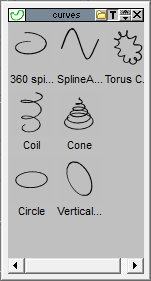
Forgot to mention that I have included the original tS6.6 curves.
- Attachments
-
- Capture.PNG (7.93 KiB) Viewed 5300 times
-
Cellulo
- Lieutenant
- Posts: 927
- Joined: 27 Sep 2012, 07:48
- Type the number ten into the box: 9
- Location: France
Re: Unofficial Update 3?
Thanks again for the update , trueBlue , but i have problem, i have see and read the bone to vertex pdf but i don't find the icon to transform bone in vertex animation, maybe forget step.
-
trueBlue
- Captain
- Posts: 5548
- Joined: 06 Jul 2009, 22:50
- Type the number ten into the box: 10
Re: Unofficial Update 3?
That is a Model Plugin. There used to be a readme file or something with more information, I believe, but I can not find it. Infact there are several readme files that might be worth including and listing with regards to limitations and etc... in tS6.5 - tS7.51
- Attachments
-

-
Cellulo
- Lieutenant
- Posts: 927
- Joined: 27 Sep 2012, 07:48
- Type the number ten into the box: 9
- Location: France
Re: Unofficial Update 3?
Thanks trueBlue , i got it in the tsx folder.
-
trueBlue
- Captain
- Posts: 5548
- Joined: 06 Jul 2009, 22:50
- Type the number ten into the box: 10
Re: Unofficial Update 3?
I am in the process of making changes with regards to the included compiled help file.
I had to change the name of this file so that I can add a command to the Model/File Menu to open it from within trueSpace. This means that that I had to make changes to the Readme, and the ts76_manual.html files.
I also added a Search tab in the help file.
I had to change the name of this file so that I can add a command to the Model/File Menu to open it from within trueSpace. This means that that I had to make changes to the Readme, and the ts76_manual.html files.
I also added a Search tab in the help file.
-
the_ant

- Chief Petty Officer
- Posts: 155
- Joined: 02 Jun 2009, 09:26
- Type the number ten into the box: 0
- Location: Perugia - Italy
Re: Unofficial Update 3?
Please help me... 
...i'm interested about installation of your "amazing unofficial #3"
....now it's about one year i've tS 761 b8 with "unofficial #2" in....so forgot the way to "reset to default context" by an icon
.....could someone show me where is it (with a picture or small tutorial)?
Thanks for your passion that keeps alive this beautiful software.
...i'm interested about installation of your "amazing unofficial #3"
....now it's about one year i've tS 761 b8 with "unofficial #2" in....so forgot the way to "reset to default context" by an icon
.....could someone show me where is it (with a picture or small tutorial)?
Thanks for your passion that keeps alive this beautiful software.
-
Saul
- Senior Chief Petty Officer
- Posts: 308
- Joined: 22 May 2009, 16:50
Re: Unofficial Update 3?
@trueBlue
I cannot get the 'Deactivate workspace nav toolbar' to work in this update.
@the_ant
I cannot get the 'Deactivate workspace nav toolbar' to work in this update.
@the_ant
- Attachments
-

- default.jpg (40.13 KiB) Viewed 6046 times
-
trueBlue
- Captain
- Posts: 5548
- Joined: 06 Jul 2009, 22:50
- Type the number ten into the box: 10
Re: Unofficial Update 3?
You are welcome Cellulo and the Ant. Please do not forget to thank Clintonman as most of these updates would not be possible if it were not for him. Thanks Clinton!
Sure it does Saul. The script does not close it though. Select the X on the toolbar.
Here is a modified Deactivate/Activate script that closes and opens the WorkspaceNav toolbar.
Sure it does Saul. The script does not close it though. Select the X on the toolbar.
Here is a modified Deactivate/Activate script that closes and opens the WorkspaceNav toolbar.
- Attachments
-
- Deactivate Workspace NAV toolbar.zip
- (2.74 KiB) Downloaded 327 times
-
Saul
- Senior Chief Petty Officer
- Posts: 308
- Joined: 22 May 2009, 16:50
Re: Unofficial Update 3?
'Sure it does Saul. The script does not close it though. Select the X on the toolbar.'
Hmmm well i cant make it work, nor this new version, which is an .RsScn file?
Normally i load the 'Deactivate Workspace NAV toolbar.RsObj' by double clicking and it loads into LE. I then click Deactivate Workspace NAV toolbar button and the next time i open tS7.61 there are no NAV toolbars AND new windows that are opened have no NAV toolbar.
Perhaps the version in unofficial update 3 is operated differently?
Hmmm well i cant make it work, nor this new version, which is an .RsScn file?
Normally i load the 'Deactivate Workspace NAV toolbar.RsObj' by double clicking and it loads into LE. I then click Deactivate Workspace NAV toolbar button and the next time i open tS7.61 there are no NAV toolbars AND new windows that are opened have no NAV toolbar.
Perhaps the version in unofficial update 3 is operated differently?
-
trueBlue
- Captain
- Posts: 5548
- Joined: 06 Jul 2009, 22:50
- Type the number ten into the box: 10
Re: Unofficial Update 3?
"Perhaps the version in unofficial update 3 is operated differently?"
Nope.
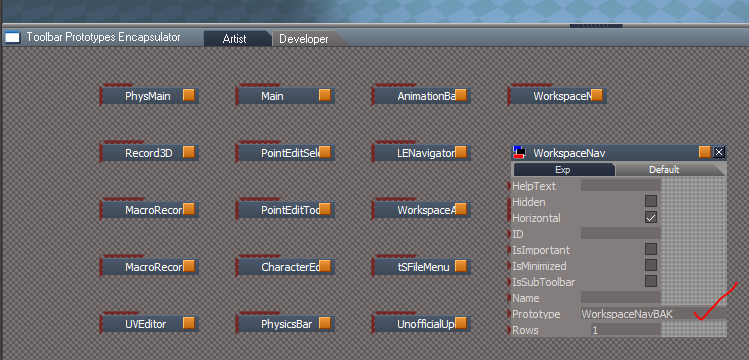
I have Update3 applied and I am using the same deactivate script that ships with Update3. Sorry about saving this new version as a RsScn. I fixed that. Look in the Toolbar Prototypes Encapsulator. The deactivate script renames the Prototype attribute as shown. Do you have more then one WorkspaceNav toolbar? IE: WorkspaceNav, 1
BTW: This is only a temporary solution. If you Reset the Default Context, the WorkspaceNav toolbar will be restored to it's original glory.
Nope.
I have Update3 applied and I am using the same deactivate script that ships with Update3. Sorry about saving this new version as a RsScn. I fixed that. Look in the Toolbar Prototypes Encapsulator. The deactivate script renames the Prototype attribute as shown. Do you have more then one WorkspaceNav toolbar? IE: WorkspaceNav, 1
BTW: This is only a temporary solution. If you Reset the Default Context, the WorkspaceNav toolbar will be restored to it's original glory.
- Attachments
-
-
the_ant
- Chief Petty Officer
- Posts: 155
- Joined: 02 Jun 2009, 09:26
- Type the number ten into the box: 0
- Location: Perugia - Italy
Re: Unofficial Update 3?
@ Saul 
...and naturally...
@ Clintonman & trueBlue
...and naturally...
@ Clintonman & trueBlue
-
Saul
- Senior Chief Petty Officer
- Posts: 308
- Joined: 22 May 2009, 16:50
Re: Unofficial Update 3?
That did it! I had an extra node, which i removed and now it works!trueBlue wrote:Look in the Toolbar Prototypes Encapsulator.
Thanks trueBlue and Clinton!!
-
trueBlue
- Captain
- Posts: 5548
- Joined: 06 Jul 2009, 22:50
- Type the number ten into the box: 10
Re: Unofficial Update 3?
You can find the final version here:
viewtopic.php?t=3732"
viewtopic.php?t=3732"
-
Tiles
- Master Chief Petty Officer
- Posts: 401
- Joined: 27 May 2009, 08:34
Re: Unofficial Update 3?
Awesome. Thanks for all the work
Just to make sure, this includes Update 1 and 2 too? And we need to make a clean install of TS before applying this update? I have for example two other "Update 3" installations applied ...
Oh, and why don`t you call it Update 3? It can be confused with the other two existing updates.
Just to make sure, this includes Update 1 and 2 too? And we need to make a clean install of TS before applying this update? I have for example two other "Update 3" installations applied ...
Oh, and why don`t you call it Update 3? It can be confused with the other two existing updates.
Free Gamegraphics, Freeware Games http://reinerstilesets.de
-
trueBlue
- Captain
- Posts: 5548
- Joined: 06 Jul 2009, 22:50
- Type the number ten into the box: 10
Re: Unofficial Update 3?
Yes this update includes both previous updates. Ther other updates have been removed.
Quote from the Update:
Instructions:
It is recommend that you completely uninstall and install trueSpace to a clean directory.
Install the PDF Manual for trueSpace and Vray first.
1.) Run the trueSpace 7.61 Beta 8 Unofficial Update.exe
2.) Browse [...] to where you installed C:\trueSpace761, select it's folder and then the Extract button
3.) Select the Yes to All button.
4.) Open trueSpace and select the Reset to Default Context icon.
It is not neccesary to Reset the Defualt Context, if you did not open trueSpace prior to applying the update.
Vray users: Install/Load Vray in the Package Manager and reboot trueSpace.
Select the "Update Library Places" button in the D3D Material Editor. Reselect the Library Place and a Library item.
Quote from the Update:
Instructions:
It is recommend that you completely uninstall and install trueSpace to a clean directory.
Install the PDF Manual for trueSpace and Vray first.
1.) Run the trueSpace 7.61 Beta 8 Unofficial Update.exe
2.) Browse [...] to where you installed C:\trueSpace761, select it's folder and then the Extract button
3.) Select the Yes to All button.
4.) Open trueSpace and select the Reset to Default Context icon.
It is not neccesary to Reset the Defualt Context, if you did not open trueSpace prior to applying the update.
Vray users: Install/Load Vray in the Package Manager and reboot trueSpace.
Select the "Update Library Places" button in the D3D Material Editor. Reselect the Library Place and a Library item.
-
Tiles
- Master Chief Petty Officer
- Posts: 401
- Joined: 27 May 2009, 08:34
Re: Unofficial Update 3?
Thanks trueBlue
Free Gamegraphics, Freeware Games http://reinerstilesets.de
-
the_ant
- Chief Petty Officer
- Posts: 155
- Joined: 02 Jun 2009, 09:26
- Type the number ten into the box: 0
- Location: Perugia - Italy
Re: Unofficial Update 3?
Thanks ...again and again.....
-
neighborlee
- Petty Officer Second Class
- Posts: 23
- Joined: 10 Oct 2010, 20:05
Re: Unofficial Update 3?
HI there and thx for all of your work with TS,trueBlue wrote:Yes this update includes both previous updates. Ther other updates have been removed.
Quote from the Update:
Instructions:
It is recommend that you completely uninstall and install trueSpace to a clean directory.
Install the PDF Manual for trueSpace and Vray first.
1.) Run the trueSpace 7.61 Beta 8 Unofficial Update.exe
2.) Browse [...] to where you installed C:\trueSpace761, select it's folder and then the Extract button
3.) Select the Yes to All button.
4.) Open trueSpace and select the Reset to Default Context icon.
It is not neccesary to Reset the Defualt Context, if you did not open trueSpace prior to applying the update.
Vray users: Install/Load Vray in the Package Manager and reboot trueSpace.
Select the "Update Library Places" button in the D3D Material Editor. Reselect the Library Place and a Library item.
I got my first copy from a client of mine, and it was TS 4.3,,ages ago

I've since had a renewed interest in tS, and Im getting some mixed signals here and there,
First off, the links to downloading TS here at this forum are bad, prob. not a great thing , given this forum seems to be the main headquarters for all things TS ?
I would suggest if I could, using http://www.moddb.com/downloads/truespace-761-beta-8" < this for now unless you want to mirror it on your own servers as well and change links accordingly.
I'm also a tad confused about which version of TS to use daily; would that be 7.61B8full or std ?
I see both were referenced ( old , non working links right now), and in browsing internet and this forum , I see that BNG mentions really liking STD/rosetta ( and I really liked seeing the upper right (3dbox shape), top, left widget, as its very handy!) and I can see why, yet on another of his forum posts recommends beta 8 instead,- but I also see that the workspace seems to be where Caligari was going as it made things lighter etc.
Could someone clear up which version everyone seems to be going with or is it a mixed bag ?
thx
nl
-
Tiles
- Master Chief Petty Officer
- Posts: 401
- Joined: 27 May 2009, 08:34
Re: Unofficial Update 3?
std stands for standalone. I wouldn`t recommend this version since it lacks of the Modeler, which was trueSpace 6.6 before they have integrated it into 7.x as one big plugin. And the Modeler gives you lots of functionality that is missing in the standalone version.
Free Gamegraphics, Freeware Games http://reinerstilesets.de
-
Saul
- Senior Chief Petty Officer
- Posts: 308
- Joined: 22 May 2009, 16:50
Re: Unofficial Update 3?
I am having a couple of problems since applying the new update:
I cannot apply new hotkeys, the box comes up on Ctrl - RC and allows entry of keystrokes, it even writes to the .xml file but the key stroke have no effect within the programe.
I cannot get vRay to render anything but the main window, no matter which window is selected only the main window renders.
Could these problems be anything to do with the update3?
I cannot apply new hotkeys, the box comes up on Ctrl - RC and allows entry of keystrokes, it even writes to the .xml file but the key stroke have no effect within the programe.
I cannot get vRay to render anything but the main window, no matter which window is selected only the main window renders.
Could these problems be anything to do with the update3?
-
trueBlue
- Captain
- Posts: 5548
- Joined: 06 Jul 2009, 22:50
- Type the number ten into the box: 10
Re: Unofficial Update 3?
Hey Saul,
Are we talking about tS761?
Did you completely uninstall tS761 and VRay from the Add and Remove Programs and remove the existing C:\trueSpace761 folder?
I am not understanding why you had a duplicate WorkspaceNav toolbar.
I just tried successfully rendering from Model's, Render Scene icon in the main window and a smaller new window with no problems.
In Workspace, Vray renders from it's own window and not Workspace Views. Nevertheless I am able to render fine there too.
I am also able to set shortcuts too.
Please make sure you are following the instructions before and after to extract the update correctly.
If you are still having issues, can you send me a Camtasia recording?
Are we talking about tS761?
Did you completely uninstall tS761 and VRay from the Add and Remove Programs and remove the existing C:\trueSpace761 folder?
I am not understanding why you had a duplicate WorkspaceNav toolbar.
I just tried successfully rendering from Model's, Render Scene icon in the main window and a smaller new window with no problems.
In Workspace, Vray renders from it's own window and not Workspace Views. Nevertheless I am able to render fine there too.
I am also able to set shortcuts too.
Please make sure you are following the instructions before and after to extract the update correctly.
If you are still having issues, can you send me a Camtasia recording?
-
Saul
- Senior Chief Petty Officer
- Posts: 308
- Joined: 22 May 2009, 16:50
Re: Unofficial Update 3?
Hi trueBlue
Yes ts7.61.
All installation instructions followed to the letter, though i was a bit perplexed by the bit about installing the manual first.
I am using vRay in workSpace, not moDel. I set my desktop up as shown in the attachment. I do most work in main view as perspective. One of the small views on the left of the screen is a window i set up with camera and when i want to render i select this window and hit the render button. Previously vRay would render this selected window, in its own window. Now it just wants to render the main perspective view.
Yes ts7.61.
All installation instructions followed to the letter, though i was a bit perplexed by the bit about installing the manual first.
I am using vRay in workSpace, not moDel. I set my desktop up as shown in the attachment. I do most work in main view as perspective. One of the small views on the left of the screen is a window i set up with camera and when i want to render i select this window and hit the render button. Previously vRay would render this selected window, in its own window. Now it just wants to render the main perspective view.
- Attachments
-

-
trueBlue
- Captain
- Posts: 5548
- Joined: 06 Jul 2009, 22:50
- Type the number ten into the box: 10
Re: Unofficial Update 3?
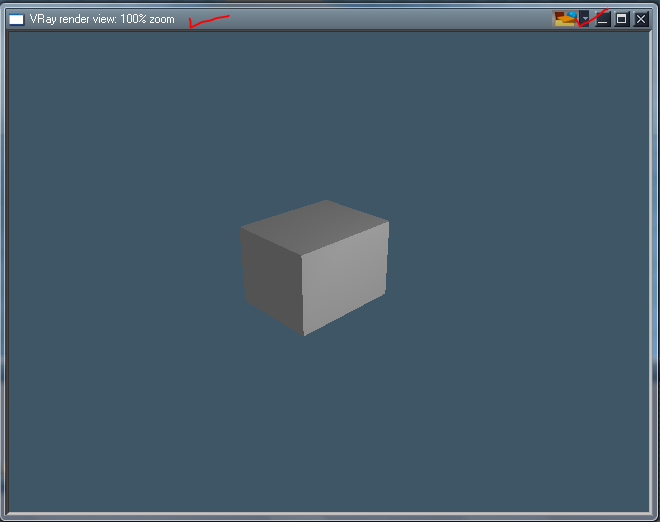
For me VRay renders in it's own window as shown. Note the toolbar and Zoom status?
I tried docking this window and rendering but I get an error due to the modified Offline Render icons in this update.
I'll reinstall tS761 and see if I can render from a camera view as you are suggesting.
I tried docking this window and rendering but I get an error due to the modified Offline Render icons in this update.
I'll reinstall tS761 and see if I can render from a camera view as you are suggesting.
- Attachments
-
-
Saul
- Senior Chief Petty Officer
- Posts: 308
- Joined: 22 May 2009, 16:50
Re: Unofficial Update 3?
OK, after some experimentation i have discovered that basically vRay is rendering the first 3Dwindow created.
If i close all the 3Dwindows and create them anew, vRay will only render the first one created. I have built my desktop again with the first window as a render window, ie bottom left as picture in previous post. I am sure, though, that previously vRay would render whichever view was selected!
Ps for me vRay has always rendered in its own window, it should though render in its own window the view from any of the 3D windows selected.
If i close all the 3Dwindows and create them anew, vRay will only render the first one created. I have built my desktop again with the first window as a render window, ie bottom left as picture in previous post. I am sure, though, that previously vRay would render whichever view was selected!
Ps for me vRay has always rendered in its own window, it should though render in its own window the view from any of the 3D windows selected.
-
Saul
- Senior Chief Petty Officer
- Posts: 308
- Joined: 22 May 2009, 16:50
Re: Unofficial Update 3?
OK sorted!
Rebuilding my desktop has solved the problem, new everything!
Still the problem with the hotkeys though........
Rebuilding my desktop has solved the problem, new everything!
Still the problem with the hotkeys though........
-
trueBlue
- Captain
- Posts: 5548
- Joined: 06 Jul 2009, 22:50
- Type the number ten into the box: 10
Re: Unofficial Update 3?
Can you post your Layout.rsl?
Can you tell me which icon and keyboard key(s) you are trying to create?
Can you tell me which icon and keyboard key(s) you are trying to create?
-
Tiles
- Master Chief Petty Officer
- Posts: 401
- Joined: 27 May 2009, 08:34
Re: Unofficial Update 3?
I have the problem with the not saving hotkeys since eons. I simply modified the xml file those days. One of the reasons why i haven`t applied this update yet since it forces a clean reinstall of trueSpace, and that`s too much work for me at the moment. And tS is running good at the moment
Free Gamegraphics, Freeware Games http://reinerstilesets.de
-
trueBlue
- Captain
- Posts: 5548
- Joined: 06 Jul 2009, 22:50
- Type the number ten into the box: 10
Re: Unofficial Update 3?
Is this a tS761 issue or Unofficial Update issue?Tiles wrote:I have the problem with the not saving hotkeys since eons. I simply modified the xml file those days. One of the reasons why i haven`t applied this update yet since it forces a clean reinstall of trueSpace, and that`s too much work for me at the moment. And tS is running good at the moment
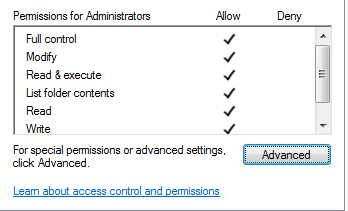
As a test, I created a Shift + Ctrl + C shortcut for the "Create camera at current view" icon that is included in this update. Works as expected here.

Could that be the difference?
- Attachments
-
- Capture2.PNG (9.08 KiB) Viewed 5526 times
-
Draise
- Captain
- Posts: 3200
- Joined: 21 Sep 2009, 19:33
- Type the number ten into the box: 0
- Location: Bogota, Colombia
Re: Unofficial Update 3?
Installed update 3 no worries. Will replace shortcuts with my own, as I have them extensively modified....... I'll probably run through the new features to make sure they all work!
All in all, thanks for the update trueBlue and Clinto. =)
All in all, thanks for the update trueBlue and Clinto. =)
-
trueBlue
- Captain
- Posts: 5548
- Joined: 06 Jul 2009, 22:50
- Type the number ten into the box: 10
Re: Unofficial Update 3?
Thanks Draise.
I have tested all new features over and over for several weeks to make sure they work. Including Uninstalling and Installing/Extracting which takes about 3 mins from start to finish. Never thought of Saul's setup but I have a solution if needed.
I have tested all new features over and over for several weeks to make sure they work. Including Uninstalling and Installing/Extracting which takes about 3 mins from start to finish. Never thought of Saul's setup but I have a solution if needed.
-
Tiles
- Master Chief Petty Officer
- Posts: 401
- Joined: 27 May 2009, 08:34
Re: Unofficial Update 3?
I have no clue. I just know that it fails since eons here. But i know that it once worked. And i never found out why it doesn`t work anymore. One of my guesses was that it locks itself when you try to assign the same hotkey to two tools. Or the file encoding for the xml file, which i remember as exotic. I wanted to write a tool to deal with the hotkeys once, and failed because of my development tool for that wasn`t able to handle it. Or ... I have no clue. The easier way was to edit the xml file by hand thenIs this a tS761 issue or Unofficial Update issue?
Free Gamegraphics, Freeware Games http://reinerstilesets.de
-
Saul
- Senior Chief Petty Officer
- Posts: 308
- Joined: 22 May 2009, 16:50
Re: Unofficial Update 3?
Hi trueBlue
I told you how i had solved the problem of vRay renders by rebuilding my 3D window layout from scratch.
i have just noticed that this loses me this little toolbar at top of main 3D window.
Is there any way to restore this to a custom layout?
TIA
Ps Does this toolbar mean the main window has some sort of fixed focus?
I told you how i had solved the problem of vRay renders by rebuilding my 3D window layout from scratch.
i have just noticed that this loses me this little toolbar at top of main 3D window.
Is there any way to restore this to a custom layout?
TIA
Ps Does this toolbar mean the main window has some sort of fixed focus?
- Attachments
-

- ScreenHunter_ 2012-11-08.jpg (6.2 KiB) Viewed 5504 times
-
Saul
- Senior Chief Petty Officer
- Posts: 308
- Joined: 22 May 2009, 16:50
Re: Unofficial Update 3?
More about the vRay thang1
- Attachments
-
-
trueBlue
- Captain
- Posts: 5548
- Joined: 06 Jul 2009, 22:50
- Type the number ten into the box: 10
Re: Unofficial Update 3?
trueBlue wrote:Can you post your Layout.rsl?
Can you tell me which icon and keyboard key(s) you are trying to create?
-
Saul
- Senior Chief Petty Officer
- Posts: 308
- Joined: 22 May 2009, 16:50
Re: Unofficial Update 3?
Ahh sorry, forgot to tell you!
I tried to post an .rsl file but it wont let me, is there a trick?
For instance with the hot keys try shift-A for 'look at selection'
TIA
Ps Zipped the layout!!
I tried to post an .rsl file but it wont let me, is there a trick?
For instance with the hot keys try shift-A for 'look at selection'
TIA
Ps Zipped the layout!!
- Attachments
-
- test359b.rar
- (60.84 KiB) Downloaded 272 times
-
trueBlue
- Captain
- Posts: 5548
- Joined: 06 Jul 2009, 22:50
- Type the number ten into the box: 10
Re: Unofficial Update 3?
I looked at your layout. The 3 smaller views on the left and the main view were all Workspace Views. If I select the Render Scene icon, a floating VRay window is created with the Zoom Status and Vray toolbar. I can not render from a Workspace view as you are suggesting.
I can confirm trying to create a shortcut for the LookAt icon from the lower WorkspaceMain toolbar creates a shortcut but does not work. For me it was created in the WorkspaceMain group. (Look at the xml file) I was able to create it successfully from Unofficial ViewBar though. This time it was created in the Userdefined group. It most likely helped that I had the main 3D view selected when creating this shortcut. Here is a script that may help you create the Unofficial ViewBar. Ctrl + drag this script out from the Stack/Panels so that it is floating. Select your window's titlebar first before selecting the Install button. You may have to refresh the window's 3D/2D/3D aspect.
Good luck.
It would be nice if you could post a screen shot of you successfully rendering VRay from a Workspace's View as you are suggesting. I have my doubts though.
I can confirm trying to create a shortcut for the LookAt icon from the lower WorkspaceMain toolbar creates a shortcut but does not work. For me it was created in the WorkspaceMain group. (Look at the xml file) I was able to create it successfully from Unofficial ViewBar though. This time it was created in the Userdefined group. It most likely helped that I had the main 3D view selected when creating this shortcut. Here is a script that may help you create the Unofficial ViewBar. Ctrl + drag this script out from the Stack/Panels so that it is floating. Select your window's titlebar first before selecting the Install button. You may have to refresh the window's 3D/2D/3D aspect.
Good luck.
It would be nice if you could post a screen shot of you successfully rendering VRay from a Workspace's View as you are suggesting. I have my doubts though.
-
Saul
- Senior Chief Petty Officer
- Posts: 308
- Joined: 22 May 2009, 16:50
Re: Unofficial Update 3?
There appears to be some confusion here))trueBlue wrote:It would be nice if you could post a screen shot of you successfully rendering VRay from a Workspace's View as you are suggesting. I have my doubts though.
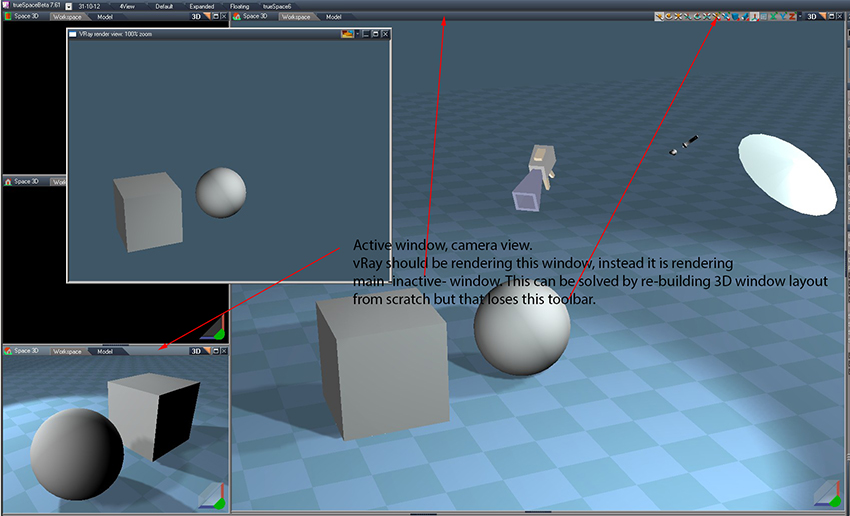
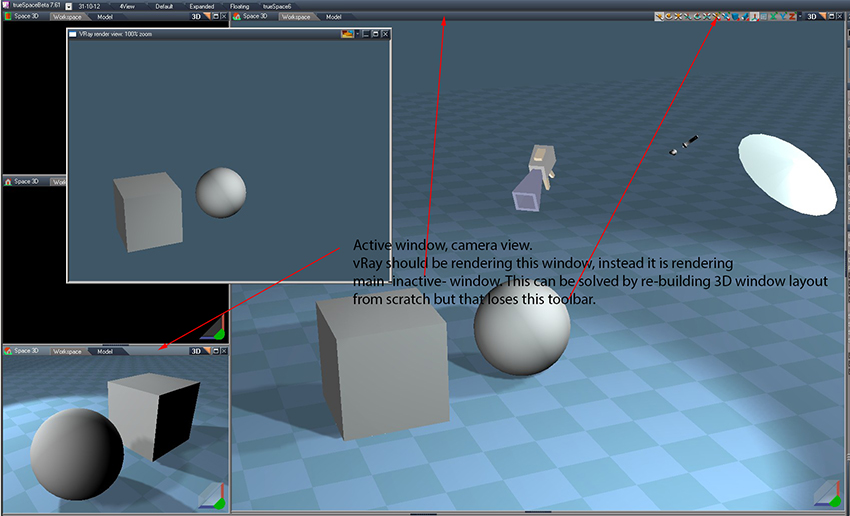
I have never suggested that i can render as you say! I repost the picture from earlier to demonstrate my workflow. vRay always renders in its own floating window.
Read the text in the screenshot and hopefully it will explain the problem i am having.
I have also reinstalled tS7.61B8 clean and tS76_Vray1_54B8 and the vray window works correctly, ie renders the view from any any workpace window i select. i then install update 3 and it is broken. This is not recommended install procedure, i know but i thought it was worth checking.
Thanks for the toolbar, i will let you know how it goes!
- Attachments
-
-
trueBlue
- Captain
- Posts: 5548
- Joined: 06 Jul 2009, 22:50
- Type the number ten into the box: 10
Re: Unofficial Update 3?
Ahh, now I understand. Not sure why it is broken, I'll have to investigate further.
That script I made for you will only work if you applied the update. Sorry!
However:
vi ... 389#p36389"
That script I made for you will only work if you applied the update. Sorry!
However:
vi ... 389#p36389"
-
Saul
- Senior Chief Petty Officer
- Posts: 308
- Joined: 22 May 2009, 16:50
Re: Unofficial Update 3?
OK thanks trueBlue!
Script works fine with my rebuilt layout and short cut working from unofficial toolbar!
Script works fine with my rebuilt layout and short cut working from unofficial toolbar!
-
trueBlue
- Captain
- Posts: 5548
- Joined: 06 Jul 2009, 22:50
- Type the number ten into the box: 10
Re: Unofficial Update 3?
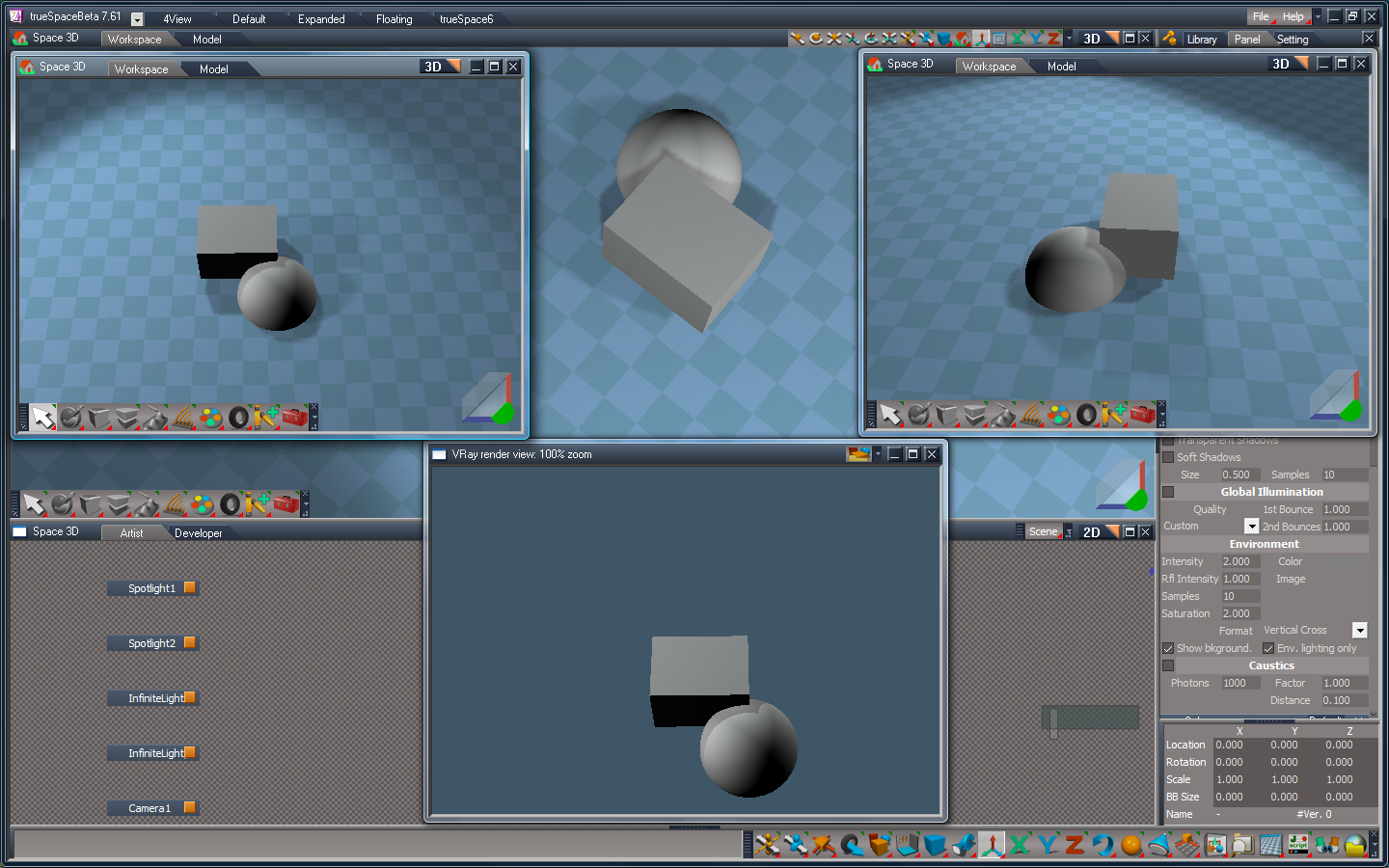
This is strange. Still using the same Unofficial Update, I reset the Default context. Now I can render any view that has focus. The key here is to leave the Vray render view open.
- Attachments
-
-

-
Saul
- Senior Chief Petty Officer
- Posts: 308
- Joined: 22 May 2009, 16:50
Re: Unofficial Update 3?
I can confirm this!trueBlue wrote:Now I can render any view that has focus. The key here is to leave the Vray render view open.
On another note, hot keys are still a problem. I cannot set a hot key for the 'set camera' command from either the unoffical toolbar or the official one! Additionally the hot key for 'set camera' mentioned in tS761 Workspace Shortcut List.rtf, does not work for me either!
Where is the userdefined.xml you mention in an earlier post? I cannot find it in tS directory.
TIA
-
Draise
- Captain
- Posts: 3200
- Joined: 21 Sep 2009, 19:33
- Type the number ten into the box: 0
- Location: Bogota, Colombia
Re: Unofficial Update 3?
My experience with hotkeys is that when you set a hotkey, it writes the hotkey to the Global group, and not necessarily to the window specific group. When there is a global hotkey and a preset programed hotkey of the same sort, both hotkeys (the same one under different relative ID's) become useless, or generally the pre-programmed hotkey trumps the global one.
In order to fix this, I program which keys I want for whichever function (they often won't work right away), open the shortcut file located in the "Scripts" folder of TS and then change the Global shortcut (which doesn't work but is recorded) to a window specific shortcut (say workspace window shortcut, or LE shortcut, etc)
In order to fix this, I program which keys I want for whichever function (they often won't work right away), open the shortcut file located in the "Scripts" folder of TS and then change the Global shortcut (which doesn't work but is recorded) to a window specific shortcut (say workspace window shortcut, or LE shortcut, etc)