VRay Live
-
trueBlue
- Captain
- Posts: 5548
- Joined: 06 Jul 2009, 22:50
- Type the number ten into the box: 10
VRay Live
Is it me or does the VRay Material Editor switch from the Live aspect to the Default aspect everytime you update a Shader? As a test I edited this VRay Material Editor and made the Live aspect the Default aspect and deleted the original Default aspect a Static aspect. Here is a video showing it's use in my Material Editor with Library Browser project that I am updating.
viewtopic.php?p=36716#p36716" Update 9/24/2012: Here is the tS761 Material Editor Live VRay Installer
VRay needs to be Installed in the tS761 Package Manager first and tS761 needs to be rebooted atleast once before installing this customized Material Editor with Library Browser.
The Uninstall process uninstalls VRay from the tS761 Package Manager, but you need to reboot tS761 in order for it complete.
viewtopic.php?p=36716#p36716" Update 9/24/2012: Here is the tS761 Material Editor Live VRay Installer
VRay needs to be Installed in the tS761 Package Manager first and tS761 needs to be rebooted atleast once before installing this customized Material Editor with Library Browser.
The Uninstall process uninstalls VRay from the tS761 Package Manager, but you need to reboot tS761 in order for it complete.
- Attachments
-
- tS761 Material Editor Live VRay Installer.zip
- (142.27 KiB) Downloaded 357 times
-
spacekdet
- Captain
- Posts: 1810
- Joined: 27 May 2009, 15:00
- Type the number ten into the box: 10
- Location: On the day shift at the Utility Muffin Research Kitchen
Re: VRay Live
Interesting.
Not sure what's going on in the video w/ no narration.
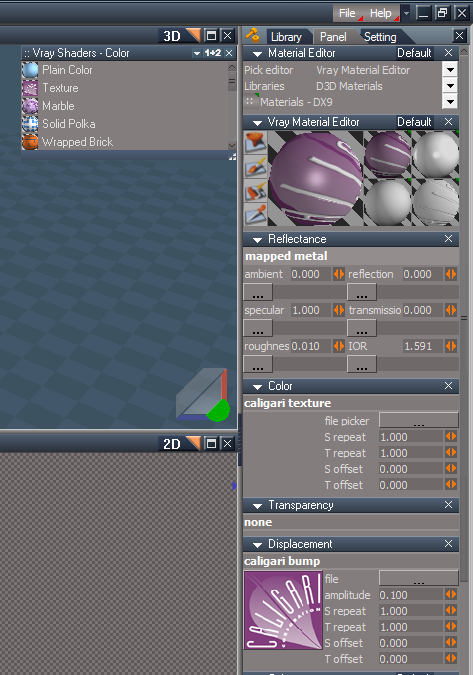
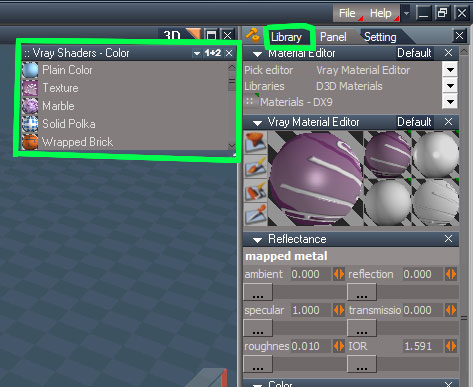
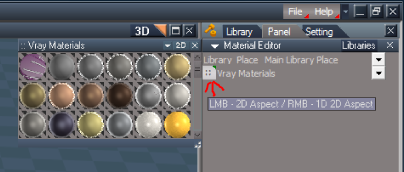
However, my issue w/ VRay libraries is this: I never ever see the floating panels that you have (outlined in green below).
I must open the libraries in the Library tab and choose what I want from there. If I double click on any of the 4 small preview spheres in the Material editor tS simply stops responding and I have to use windows task manager to kill it. I suspect the floating panel/libraries are actually open, but behind the 3D window.
My workaround (and I'm used to it now so don't worry about finding a fix) is to have the libraries open in the stack and then everything functions ok.
The point of this ramble? maybe it has to do with the Live/ default aspect quirk you discovered. I'm just not smart enough to figure out why; and you already have enough to do.
Not sure what's going on in the video w/ no narration.
However, my issue w/ VRay libraries is this: I never ever see the floating panels that you have (outlined in green below).
I must open the libraries in the Library tab and choose what I want from there. If I double click on any of the 4 small preview spheres in the Material editor tS simply stops responding and I have to use windows task manager to kill it. I suspect the floating panel/libraries are actually open, but behind the 3D window.
My workaround (and I'm used to it now so don't worry about finding a fix) is to have the libraries open in the stack and then everything functions ok.
The point of this ramble? maybe it has to do with the Live/ default aspect quirk you discovered. I'm just not smart enough to figure out why; and you already have enough to do.
-
trueBlue
- Captain
- Posts: 5548
- Joined: 06 Jul 2009, 22:50
- Type the number ten into the box: 10
Re: VRay Live
Is this problem in tS76 0r tS761 and what OS?
You calling me a liar?
- Attachments
-

- mickhatestB.PNG (10 KiB) Viewed 6586 times
-
spacekdet
- Captain
- Posts: 1810
- Joined: 27 May 2009, 15:00
- Type the number ten into the box: 10
- Location: On the day shift at the Utility Muffin Research Kitchen
Re: VRay Live
Not unlike the cake, the library is the liar; not you. Sharp eyes, though!
tS 7.6, Windows 7
Never noticed the Live/Default thing before, so I'll have a stab at that.
Edit: no difference, still freezes tS if I try to open a library from the material editor.
Faulty Default is faulty, Live kills it.
Don't sweat it, it's just another tS oddity!
As an aside, I can't get VRAy to work at all in 7.61. It insists it's 'loaded' in the package manager, but delivery never arrives!
tS 7.6, Windows 7
Never noticed the Live/Default thing before, so I'll have a stab at that.
Edit: no difference, still freezes tS if I try to open a library from the material editor.
Faulty Default is faulty, Live kills it.
Don't sweat it, it's just another tS oddity!
As an aside, I can't get VRAy to work at all in 7.61. It insists it's 'loaded' in the package manager, but delivery never arrives!
-
trueBlue
- Captain
- Posts: 5548
- Joined: 06 Jul 2009, 22:50
- Type the number ten into the box: 10
Re: VRay Live
VRay for tS7.6 = tS76_Vray1_53.exespacekdet wrote:As an aside, I can't get VRAy to work at all in 7.61. It insists it's 'loaded' in the package manager, but delivery never arrives!
Vray for tS7.6.1 = tS76_Vray1_54B8.exe
-
spacekdet
- Captain
- Posts: 1810
- Joined: 27 May 2009, 15:00
- Type the number ten into the box: 10
- Location: On the day shift at the Utility Muffin Research Kitchen
Re: VRay Live
Well, how about that?
You, sir, are a genius.
Many thanks.
You, sir, are a genius.
Many thanks.
-
Tiles
- Master Chief Petty Officer
- Posts: 401
- Joined: 27 May 2009, 08:34
Re: VRay Live
Or VRay for tS7.6 = tS76_Vray1_53.exe with this neat little patch to use it with tS7.61Vray for tS7.6.1 = tS76_Vray1_54B8.exe
Free Gamegraphics, Freeware Games http://reinerstilesets.de
-
Steinie
- Captain
- Posts: 2958
- Joined: 21 May 2009, 17:38
- Type the number ten into the box: 10
Re: VRay Live
VRay for tS7.6 = tS76_Vray1_53.exe
Vray for tS7.6.1 = tS76_Vray1_54B8.exe
VRay for tS7.6 = tS76_Vray1_53.exe with this neat little patch to use it with tS7.61
It has been awhile since I played with versions...
Didn't VRay1.54B8 not get released?
ts7.6 did work with VRay 1.53 without patch? Glass works but 7.61 had all the enhancements.
ts 7.61B needed a patch (tiles patch) to work with VRay 1.54 but has the Glass bug?
I'll have to check my notes.
ALSO from trueBlue's original question below, when you change the texture I too notice that "Live" setting goes back to "Default" setting.
Vray for tS7.6.1 = tS76_Vray1_54B8.exe
VRay for tS7.6 = tS76_Vray1_53.exe with this neat little patch to use it with tS7.61
It has been awhile since I played with versions...
Didn't VRay1.54B8 not get released?
ts7.6 did work with VRay 1.53 without patch? Glass works but 7.61 had all the enhancements.
ts 7.61B needed a patch (tiles patch) to work with VRay 1.54 but has the Glass bug?
I'll have to check my notes.
ALSO from trueBlue's original question below, when you change the texture I too notice that "Live" setting goes back to "Default" setting.
-
spacekdet
- Captain
- Posts: 1810
- Joined: 27 May 2009, 15:00
- Type the number ten into the box: 10
- Location: On the day shift at the Utility Muffin Research Kitchen
Re: VRay Live
OK now you've just confused me.
-
trueBlue
- Captain
- Posts: 5548
- Joined: 06 Jul 2009, 22:50
- Type the number ten into the box: 10
Re: VRay Live
Update 9/24/2012: Here is the tS761 Material Editor Live VRay Installer
viewtopic.php?p=36654#p36654"
Here is another video showing the new improved Material Editor with Library Viewer:
viewtopic.php?p=36654#p36654"
Here is another video showing the new improved Material Editor with Library Viewer:
- Attachments
-
- VrayMaterialEditorLive.zip
- (1.79 MiB) Downloaded 515 times
-
Prodigy
- Site Admin
- Posts: 957
- Joined: 21 May 2009, 14:46
- Type the number ten into the box: 0
- Location: Uruguay
Re: VRay Live
Let's take a look...
Thanks!TB
๑۩۞۩๑ prodigy ๑۩۞۩๑
-
Steinie
- Captain
- Posts: 2958
- Joined: 21 May 2009, 17:38
- Type the number ten into the box: 10
Re: VRay Live
trueBlue, Is "tS761 Material Editor Live VRay" built into your "tS761 Unofficial Update 3"?
If not will it interfere with your "Customized tS761 Material Editor"?
-
trueBlue
- Captain
- Posts: 5548
- Joined: 06 Jul 2009, 22:50
- Type the number ten into the box: 10
Re: VRay Live
Your welcome Prodigy.
In this version I included the Static aspect. So now if you switch to Static and change a material, it switches to the Default. Same old bug, only reversed. But if I delete the Static aspect then of course there is no switching. I was not sure if I should have done that. Now I am thinking of a script that switches custom panels with one aspect. One for Live and one for Static.
Ideas?
Suggestions?
Anybody?
Edit: It is the same version Steinie.
In this version I included the Static aspect. So now if you switch to Static and change a material, it switches to the Default. Same old bug, only reversed. But if I delete the Static aspect then of course there is no switching. I was not sure if I should have done that. Now I am thinking of a script that switches custom panels with one aspect. One for Live and one for Static.
Ideas?
Suggestions?
Anybody?
Edit: It is the same version Steinie.
-
trueBlue
- Captain
- Posts: 5548
- Joined: 06 Jul 2009, 22:50
- Type the number ten into the box: 10
Re: VRay Live
Here is a new version...
Material Editor
Default aspect
* Render Scene, Object, Animation, Area, Image Width, and Image Height
Adanvanced aspect
* Update Library Place button. (Moved from the D3D ME)
Libraries aspect
* Moved from the default aspect.
D3D ME
* Load Blank DX Material button
* RMB any of the component icons opens it's library. (original command) Vray ME
* The Default aspect is the only aspect in this version. The Static aspect was deleted.
Material Editor
Default aspect
* Render Scene, Object, Animation, Area, Image Width, and Image Height
Adanvanced aspect
* Update Library Place button. (Moved from the D3D ME)
Libraries aspect
* Moved from the default aspect.
D3D ME
* Load Blank DX Material button
* RMB any of the component icons opens it's library. (original command) Vray ME
* The Default aspect is the only aspect in this version. The Static aspect was deleted.
-
Steinie
- Captain
- Posts: 2958
- Joined: 21 May 2009, 17:38
- Type the number ten into the box: 10
Re: VRay Live
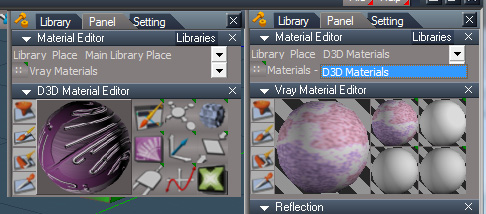
How come I can only select D3D Material in the Library Place drop down?
In Materials I do not see my VRay Materials.
This is after installing this latest version.
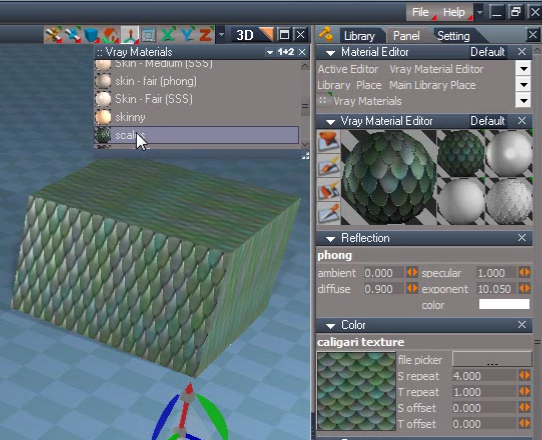
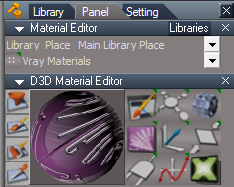
Your screen shot is on the left and mine is on the right.
Update: Never mind I found a new "Update" button in the Advanced drop-down and after selecting Library Place I could select the VRay
directory.
When Vray Shader:Color Selection opens and I change the selection to 2d it does not save the setting.
Also the size of the Selection panel returns to it's default setting if I had enlarged it.
VRay render icons are awesome but not in the same order as the main selection. I would expect the Animation icon to be the last icon not the third choice.
In Materials I do not see my VRay Materials.
This is after installing this latest version.
Your screen shot is on the left and mine is on the right.
Update: Never mind I found a new "Update" button in the Advanced drop-down and after selecting Library Place I could select the VRay
directory.
When Vray Shader:Color Selection opens and I change the selection to 2d it does not save the setting.
Also the size of the Selection panel returns to it's default setting if I had enlarged it.
VRay render icons are awesome but not in the same order as the main selection. I would expect the Animation icon to be the last icon not the third choice.
-
trueBlue
- Captain
- Posts: 5548
- Joined: 06 Jul 2009, 22:50
- Type the number ten into the box: 10
Re: VRay Live
Close and Start tS761.Steinie wrote:How come I can only select D3D Material in the Library Place drop down?
Edit: RMB the "Pick editor", select Reset. I added the command to the install script. Thanks Steinie!
Thats been bugging me for a while now.
Use this buttonSteinie wrote:When Vray Shader:Color Selection opens and I change the selection to 2d it does not save the setting.
That is the way it works in tS7...Steinie wrote:Also the size of the Selection panel returns to it's default setting if I had enlarged it.
I could create a button that saves the current size, but that would be the same size for all panels until you save it again.
Edit: I tried but sofar no success.
I will change it.Steinie wrote:VRay render icons are awesome but not in the same order as the main selection. I would expect the Animation icon to be the last icon not the third choice.
Edit: Fixed and uploaded.