No progress yet except got this thing back to a working state; I got it hosed somehow; I need to add this to the repository, so I can go back to a previous version should I screw it up again.
Let's see; had to put it down for awhile, to wrap up end of year coding at work. Car repairs, home stuff, cleaning the house so I can concentrate, new monitor because one of them is shot to hell (about 14 years old?). Got the car fixed: had 3 leaking power steering hoses, the rack and pinion had to be replaced as well. CHING! I had a 20% off coupon so saved about $250.00. The looked at me kinda funny. heh
So now maybe I can pick it back up.
Nurbs Workspace Plugin Thread
-
froo
- Captain
- Posts: 2554
- Joined: 22 May 2009, 12:13
Re: Nurbs Workspace Plugin Thread
-
froo
- Captain
- Posts: 2554
- Joined: 22 May 2009, 12:13
Re: Nurbs Workspace Plugin Thread
back on this; I believe I have the latest version of the file that is causing problems.
-
stan
- Master Chief Petty Officer
- Posts: 584
- Joined: 21 May 2009, 17:20
Re: Nurbs Workspace Plugin Thread
Good to see you back at this Jason... 
-
froo
- Captain
- Posts: 2554
- Joined: 22 May 2009, 12:13
Re: Nurbs Workspace Plugin Thread
Thanks stan. Just needed to get other priorities resolved.
Now, though, I need to remember where I left off. I have a few different
versions; each do a different thing in code. I should have added this to the
repository. That's ok.
Now, though, I need to remember where I left off. I have a few different
versions; each do a different thing in code. I should have added this to the
repository. That's ok.
-
froo
- Captain
- Posts: 2554
- Joined: 22 May 2009, 12:13
Re: Nurbs Workspace Plugin Thread
Found the problem that was causing crashes. I am not sure if this happened when I was
cleaning up the code (I doubt it), or earlier during experimentation (most likely).
I had a closing brace of a for loop: } in the wrong place: I closed the loop too soon. Also, I was
indexing into the triangle stream one time too many, each time through the loop. So, I was pulling data from some memory location which had garbage in it.
So, now it is not crashing, but my generated surface has some missing triangles. No worries. I'll fix that. Plus, I rewrote my notes from October/November, stepping through the logic of using the selection streams, when I pick a vertex. I will do a write up once I get the code in place. But, I will tell you, if you want to do scripting or coding, you really need a pencil and paper to sketch your code out and test your ideas. Then when you run through the code, you can confirm the code is working properly, according to your sketch (assuming of course, you know how it is SUPPOSED to work ).
).
cleaning up the code (I doubt it), or earlier during experimentation (most likely).
I had a closing brace of a for loop: } in the wrong place: I closed the loop too soon. Also, I was
indexing into the triangle stream one time too many, each time through the loop. So, I was pulling data from some memory location which had garbage in it.
So, now it is not crashing, but my generated surface has some missing triangles. No worries. I'll fix that. Plus, I rewrote my notes from October/November, stepping through the logic of using the selection streams, when I pick a vertex. I will do a write up once I get the code in place. But, I will tell you, if you want to do scripting or coding, you really need a pencil and paper to sketch your code out and test your ideas. Then when you run through the code, you can confirm the code is working properly, according to your sketch (assuming of course, you know how it is SUPPOSED to work
).-
froo
- Captain
- Posts: 2554
- Joined: 22 May 2009, 12:13
Re: Nurbs Workspace Plugin Thread
Heh solved that too.
In the control surface generator code, I step through the triangle indexes like this:
And that works fine, for the control surface code. However, in the nurbs code, I access the control surface triangle 'index pointer', and can use that, to step through the control surface triangle by triangle directly (to read its contents). The trick is, where I increment the pointer. Note the difference:
Notice that, in the Nurbs case, both pointer increments occur within the inner for loop.
In the control surface code, one increment occurs inside the inner for loop, the other increment occurs outside the inner for loop, but still inside the outer for loop.
That is because of the way the control surface is being generated, mathematically.
Since that is now out of the way, I can now proceed with implementing the selection and visualization streams for vertex, triangle, and edge data.
In the control surface generator code, I step through the triangle indexes like this:
Code: Select all
ptr = 0;
for( .. .. ..)
{
   for( .. .. .. )
   {
      stuff = ptr;
      ptr++;
   }
   ptr++;
Code: Select all
for( .. .. ..)
{
   for( .. .. ..)
   {
      pTriangles->i = pInTriangles->i;
      pTriangles->j = pInTriangles->j;
      pTriangles->k = pInTriangles->k;

      // IMPORTANT PART HERE
      pInTriangles++;

      pTriangles->i = pInTriangles->i;
      pTriangles->j = pInTriangles->j;
      pTriangles->k = pInTriangles->k;

      // IMPORTANT PART HERE
      pInTriangles++;
   }
}
In the control surface code, one increment occurs inside the inner for loop, the other increment occurs outside the inner for loop, but still inside the outer for loop.
That is because of the way the control surface is being generated, mathematically.
Since that is now out of the way, I can now proceed with implementing the selection and visualization streams for vertex, triangle, and edge data.
-
froo
- Captain
- Posts: 2554
- Joined: 22 May 2009, 12:13
Re: Nurbs Workspace Plugin Thread
Currently integrating the selection streams. At present, tS hangs when I try to do certain things;
no worries. I will get it very soon. Too tired to focus on it now though. Guess it's time to shut the ol thinker down for the night. Let the subconcious check in.
no worries. I will get it very soon. Too tired to focus on it now though. Guess it's time to shut the ol thinker down for the night. Let the subconcious check in.
-
clintonman

- Captain
- Posts: 5659
- Joined: 21 May 2009, 21:08
- Type the number ten into the box: 0
- Location: California
Re: Nurbs Workspace Plugin Thread
That's great. Can't wait to see the results of all your work.
-
froo
- Captain
- Posts: 2554
- Joined: 22 May 2009, 12:13
Re: Nurbs Workspace Plugin Thread
Thanks clinton!
Another minor update.
I added the GeoIdTriangle stream to the output connector.
This is generated by the control surface; I get it as an input,
and I need to pass it to the output. I remember that now.
The reason I have to pass it to the output connector is,
it is a custom stream. That means, it is not added, and preserved,
at the mesh connector output, unless we specifically attach it.
Other streams, like vertex, uv, and 'regular' triangle index streams
are part of the standard package, so we don't have to handle those
manually.
Once the GeoIdTriangle stream is added to the output connector,
we can then add them to the Input connector (so they don't disappear)
in the OnMeshEditorDeactivated() function. That's a very important step;
otherwise, our pointers will be NULL and tS will hang/crash if we try using
those pointers. Oh btw ... also need to add a check for that: if NULL. heh
NULL check: DONE. atleast, for now.
Another minor update.
I added the GeoIdTriangle stream to the output connector.
This is generated by the control surface; I get it as an input,
and I need to pass it to the output. I remember that now.
The reason I have to pass it to the output connector is,
it is a custom stream. That means, it is not added, and preserved,
at the mesh connector output, unless we specifically attach it.
Other streams, like vertex, uv, and 'regular' triangle index streams
are part of the standard package, so we don't have to handle those
manually.
Once the GeoIdTriangle stream is added to the output connector,
we can then add them to the Input connector (so they don't disappear)
in the OnMeshEditorDeactivated() function. That's a very important step;
otherwise, our pointers will be NULL and tS will hang/crash if we try using
those pointers. Oh btw ... also need to add a check for that: if NULL. heh
NULL check: DONE. atleast, for now.
-
stan
- Master Chief Petty Officer
- Posts: 584
- Joined: 21 May 2009, 17:20
Re: Nurbs Workspace Plugin Thread
keep up the great progress..
-
froo
- Captain
- Posts: 2554
- Joined: 22 May 2009, 12:13
Re: Nurbs Workspace Plugin Thread
Thanks stan!
Got this going without crashing at least now.
Interesting... this:
Long story short, I was indexing into the already-created input mesh,
differently, than how I created it.
It may just be, I misinterpreted the math. Anyway. I may need to make
mods to this section of code, but it appears for now, I am accessing
the triangle stream (After a selection is made) properly.
Next up is dealing with the vertex selection.
The issue is, with autotriangulation enabled. I am getting it done.
Now, time for another Jack n Coke. Mmm.
Got this going without crashing at least now.
Interesting... this:
Long story short, I was indexing into the already-created input mesh,
differently, than how I created it.
It may just be, I misinterpreted the math. Anyway. I may need to make
mods to this section of code, but it appears for now, I am accessing
the triangle stream (After a selection is made) properly.
Next up is dealing with the vertex selection.
The issue is, with autotriangulation enabled. I am getting it done.
Now, time for another Jack n Coke. Mmm.
-
froo
- Captain
- Posts: 2554
- Joined: 22 May 2009, 12:13
Re: Nurbs Workspace Plugin Thread
I reorganized the code a bit to make it more clear; all the standard stuff, that already works, has been pushed to the top of the function.
Now it's just a matter of constructing the output mesh according to the input selection stream. Since AutoTriangulation can be enabled, then all components: vertices, triangles, edges can be re-ordered at the input, on selection. So I can't do this:
pOutTriangles[ptr] = pInTriangles[ptr];
Rather, I need to do this:
pOutTriangles[ptr].i = pInTriangles[pInSelectionTriangles[ptr].uOrgElementIndex].i;
BUT: There's a catch.
Since the input vertex index stream can also be sorted, the above equation will most likely NOT work.
The reason is, 'i' is a vertex index. The input vertex stream is also sorted.
As an example, let's say we have vertex index 10 at coordinates: 2, 1, 0. And vertex index 3 is at coordinates: 3, 0, 0.
Now, we select vertex index 10. The vertex index stream is now sorted, so vertex indices 10 and 3 change places. So, at the input connector of our nurbs mesh, we have our vertex index stream, and we have:
vertex index 10: coords = 3, 0, 0 (3,0,0 was originally for: vertex index 3)
vertex index 3 coords = 2, 1, 0 (2,1,0 was originally for: vertex index 10)
So if we try drawing the mesh, relying on the above equation, the mesh will be very garbled.
The solution is, we have to solve this problem in two steps. First, get the 'sorted' vertex index:
tempTrianglesIndex[ptr].i = pInTriangles[pInSelectionTriangles[ptr].uOrgElementIndex].i;
Then get the 'Unsorted' vertex index from that:
finalTrianglesIndex[ptr].i = pInVertices[pInSelectionVertices.uOrgElementIndex];
finalTrianglesIndex[ptr].i LOCATION = pGeoIdUvCoords[finalTrianglesIndex[ptr].i];
pGeoIdUvCoords contains the original u,v location of the vertex.
I need to sketch this out to verify its correctness, on paper. I may need to make changes.
Now it's just a matter of constructing the output mesh according to the input selection stream. Since AutoTriangulation can be enabled, then all components: vertices, triangles, edges can be re-ordered at the input, on selection. So I can't do this:
pOutTriangles[ptr] = pInTriangles[ptr];
Rather, I need to do this:
pOutTriangles[ptr].i = pInTriangles[pInSelectionTriangles[ptr].uOrgElementIndex].i;
BUT: There's a catch.
Since the input vertex index stream can also be sorted, the above equation will most likely NOT work.
The reason is, 'i' is a vertex index. The input vertex stream is also sorted.
As an example, let's say we have vertex index 10 at coordinates: 2, 1, 0. And vertex index 3 is at coordinates: 3, 0, 0.
Now, we select vertex index 10. The vertex index stream is now sorted, so vertex indices 10 and 3 change places. So, at the input connector of our nurbs mesh, we have our vertex index stream, and we have:
vertex index 10: coords = 3, 0, 0 (3,0,0 was originally for: vertex index 3)
vertex index 3 coords = 2, 1, 0 (2,1,0 was originally for: vertex index 10)
So if we try drawing the mesh, relying on the above equation, the mesh will be very garbled.
The solution is, we have to solve this problem in two steps. First, get the 'sorted' vertex index:
tempTrianglesIndex[ptr].i = pInTriangles[pInSelectionTriangles[ptr].uOrgElementIndex].i;
Then get the 'Unsorted' vertex index from that:
finalTrianglesIndex[ptr].i = pInVertices[pInSelectionVertices.uOrgElementIndex];
finalTrianglesIndex[ptr].i LOCATION = pGeoIdUvCoords[finalTrianglesIndex[ptr].i];
pGeoIdUvCoords contains the original u,v location of the vertex.
I need to sketch this out to verify its correctness, on paper. I may need to make changes.
-
froo
- Captain
- Posts: 2554
- Joined: 22 May 2009, 12:13
Re: Nurbs Workspace Plugin Thread
found out why tS was crashing when I tried accessing one of the selection streams.
I was double-indexing the stream, so essentially, I was peering into memory that was
outside the stream.
I can fix that tonight. Almost there, with proper access of the selection streams.
Just need to have some time to dedicate to it.
I was double-indexing the stream, so essentially, I was peering into memory that was
outside the stream.
I can fix that tonight. Almost there, with proper access of the selection streams.
Just need to have some time to dedicate to it.
-
marcel

- Captain
- Posts: 2247
- Joined: 21 May 2009, 19:52
- Type the number ten into the box: 0
- Location: paris - France
Re: Nurbs Workspace Plugin Thread
Hey Froo! when you sleep?
Design - illustration - Animation
http://www.crea-vision.fr
http://www.crea-vision.fr
-
froo
- Captain
- Posts: 2554
- Joined: 22 May 2009, 12:13
Re: Nurbs Workspace Plugin Thread
haha Whenever I can as long as I can Marcel! 
I spent some time on this; had to simplify it, breaking it down into smaller steps.
What I have in my mind, is finally in code.
I need to sketch it out on paper, in a series of steps, to explain the process.
I won't even try to type it here; right now. Long day. Freakin cold as all get out.
I saw a mammoth. That's how damn cold it is!
I spent some time on this; had to simplify it, breaking it down into smaller steps.
What I have in my mind, is finally in code.
I need to sketch it out on paper, in a series of steps, to explain the process.
I won't even try to type it here; right now. Long day. Freakin cold as all get out.
I saw a mammoth. That's how damn cold it is!
-
froo
- Captain
- Posts: 2554
- Joined: 22 May 2009, 12:13
Re: Nurbs Workspace Plugin Thread
I am still working on this, just to let everyone know!
Also just having a hell of a time right now, finding quality thinking time
to spend on it. I am almost there with respect to selections, but
there are so many fires we are putting out right now it's nearly
impossible to find the time to dedicate to it.
Things should slow down soon though; can't be soon enough!
Also just having a hell of a time right now, finding quality thinking time
to spend on it. I am almost there with respect to selections, but
there are so many fires we are putting out right now it's nearly
impossible to find the time to dedicate to it.
Things should slow down soon though; can't be soon enough!
-
Steinie

- Captain
- Posts: 2958
- Joined: 21 May 2009, 17:38
- Type the number ten into the box: 10
Re: Nurbs Workspace Plugin Thread
Froo your a big part for the success of U3DA and it's friendly helpful environment.
Your contributions are always appreciated here. So take care of your stuff first, it is much
more important.
Have a beer we can wait.
Your contributions are always appreciated here. So take care of your stuff first, it is much
more important.
Have a beer we can wait.
-
froo
- Captain
- Posts: 2554
- Joined: 22 May 2009, 12:13
Re: Nurbs Workspace Plugin Thread
Thanks Steinie! I really needed that! 
-
froo
- Captain
- Posts: 2554
- Joined: 22 May 2009, 12:13
Re: Nurbs Workspace Plugin Thread
Well, oddly, the GeoIdUvCoords stream is being sorted too. WTF. I expected that would not happen.
I do not think Tomas would expect that to happen. But, it did. So, fuggit. I am not doing this autotriangulation (AT) bullshit
anymore. I don't think it works right. I'm not getting any younger, and I don't have a lot of free time, so. I will resort back to the option with AT disabled. That worked fine. The original intent for using autotriangulation was, in case, we wanted to write other edit type functions. But, looks like that's not going to happen. At least, not for awhile. So anyway.
I will archive this AT attempt, and continue with the previous version, that worked, with AT disabled. That should be
considerably easier.
The trouble with the AT approach is, so many streams are re-ordered and it gets confusing; maybe I just can't focus
on it too well right now; that's why I will shelve that approach for now, and for the nurbs tool, you will just have
to disable AT. I can do that via script, then re-enable it. Of course, only if it's worth the effort. I figure, this nurbs tool
can be free of course. By 'worth the effort', I mean, if anyone would want to use it. If there is no interest then I'll stop,
no worries.
I do not think Tomas would expect that to happen. But, it did. So, fuggit. I am not doing this autotriangulation (AT) bullshit
anymore. I don't think it works right. I'm not getting any younger, and I don't have a lot of free time, so. I will resort back to the option with AT disabled. That worked fine. The original intent for using autotriangulation was, in case, we wanted to write other edit type functions. But, looks like that's not going to happen. At least, not for awhile. So anyway.
I will archive this AT attempt, and continue with the previous version, that worked, with AT disabled. That should be
considerably easier.
The trouble with the AT approach is, so many streams are re-ordered and it gets confusing; maybe I just can't focus
on it too well right now; that's why I will shelve that approach for now, and for the nurbs tool, you will just have
to disable AT. I can do that via script, then re-enable it. Of course, only if it's worth the effort. I figure, this nurbs tool
can be free of course. By 'worth the effort', I mean, if anyone would want to use it. If there is no interest then I'll stop,
no worries.
-
richlevy

- Senior Chief Petty Officer
- Posts: 162
- Joined: 17 Aug 2009, 20:08
Re: Nurbs Workspace Plugin Thread
I am not sure of the interest in nurbs modeling anymore, but I am fascinated that you are getting this done for the WS side. That is very cool, I can't help thinking of Roman when I see what you guys are doing here, this was exactly the vision he had for the program when I talked to him about it in 2005? Or was it a year or 2 before that? He wanted the artist to have the same freedom to create the tools as the engineers. That has probably been said a bunch of times around here though 
Rich
Rich
My Flickr site, here you can see some of the photography I do:
http://www.flickr.com/photos/rich-l/" onclick="window.open(this.href);return false;
http://www.flickr.com/photos/rich-l/" onclick="window.open(this.href);return false;
-
clintonman
- Captain
- Posts: 5659
- Joined: 21 May 2009, 21:08
- Type the number ten into the box: 0
- Location: California
Re: Nurbs Workspace Plugin Thread
I think I've seen this problem too, but I didn't realize it until you specifically mentioned it. The AT is something I've always ignored, but I think being aware of it might help me.froo wrote:... So, fuggit. I am not doing this autotriangulation (AT) bullshit
anymore. ....
If you finish the NURBS there's a good chance I would use it.
-
stan
- Master Chief Petty Officer
- Posts: 584
- Joined: 21 May 2009, 17:20
Re: Nurbs Workspace Plugin Thread
I'd use it too
-
froo
- Captain
- Posts: 2554
- Joined: 22 May 2009, 12:13
Re: Nurbs Workspace Plugin Thread
Thanks guys.
Just a little frustrated with it.
See, here's what happened.
I stepped through in debug mode, and saw that the GeoIdUvCoords stream, which I generated in the control surface
code, was changing:
When I enter edit mode, and move a triangle, the 'GetMesh' function is called repeatedly. That's just how tS works. The GetMesh function is called repeatedly in order to provide real time updates.
The first 2-3 times through the loop, the GeoIdUvCoords stream *Does Not Change*.
Then, the 4th time through, it appears sorted. The UV coordinates are valid values, but the stream is rearranged / sorted.
I do not know why this happens. Apparently tS is doing the sorting.
Ah well. Screw it. I think I would get more out of this if I was actually Progressing with this, rather than troubleshooting
the problem. So, goodbye autotriangulation.
Just a little frustrated with it.
See, here's what happened.
I stepped through in debug mode, and saw that the GeoIdUvCoords stream, which I generated in the control surface
code, was changing:
When I enter edit mode, and move a triangle, the 'GetMesh' function is called repeatedly. That's just how tS works. The GetMesh function is called repeatedly in order to provide real time updates.
The first 2-3 times through the loop, the GeoIdUvCoords stream *Does Not Change*.
Then, the 4th time through, it appears sorted. The UV coordinates are valid values, but the stream is rearranged / sorted.
I do not know why this happens. Apparently tS is doing the sorting.
Ah well. Screw it. I think I would get more out of this if I was actually Progressing with this, rather than troubleshooting
the problem. So, goodbye autotriangulation.
-
BooxieMalone
- Chief Petty Officer
- Posts: 127
- Joined: 14 Jul 2009, 22:34
Re: Nurbs Workspace Plugin Thread
Hi froo, metoometoometoo (hey a new song of mine) (sounds kind of Japanese?) 
But seriously I'd use it too - since I'm using Bezier-Splines in 2-D graphics from old atariST- & x286-times on. They've gotten one of the essentials of a good design-tool for me - more than ever in 3D. As they're used in 2D-CAD, I think those are badly needed to avoid conversion problems, when taking data over to 3D. Since I researched the specs about tS, I was wondering why nurbs - which where a step ahead for Modelside - have been dropped again for Workspaceside ...!? What a 'derivate'? Didn't know about any of the problems you describe now - I'm no programmer - but could it be, that nurbs have been dropped exactly for that reason?
But besides that interest I'm worrying on you froo - sounds you gonna ruin your health, we can wait - first have a drink & recreate ... have a good time ... with your family ...
hope your fridge is best equipped with cold ..... whatever
Sometimes it urgently needs to get ones head free first.
Cheers
-BM.
(sounds kind of Japanese?) But seriously I'd use it too - since I'm using Bezier-Splines in 2-D graphics from old atariST- & x286-times on. They've gotten one of the essentials of a good design-tool for me - more than ever in 3D. As they're used in 2D-CAD, I think those are badly needed to avoid conversion problems, when taking data over to 3D. Since I researched the specs about tS, I was wondering why nurbs - which where a step ahead for Modelside - have been dropped again for Workspaceside ...!? What a 'derivate'? Didn't know about any of the problems you describe now - I'm no programmer - but could it be, that nurbs have been dropped exactly for that reason?
But besides that interest I'm worrying on you froo - sounds you gonna ruin your health, we can wait - first have a drink & recreate ... have a good time ... with your family ...
hope your fridge is best equipped with cold ..... whatever
Sometimes it urgently needs to get ones head free first.
Cheers
-BM.
-
froo
- Captain
- Posts: 2554
- Joined: 22 May 2009, 12:13
Re: Nurbs Workspace Plugin Thread
Thanks Booxie.
Well, I work on it when my wife is taking a pilates class; an hour at a time. That's one issue. I can't spend
too much time on it, at any one time.
I have the 'non-Auto Triangulate' approach working fine. It's the auto-triangulation that is irritating me.
I figured, if I could just get that working, then we could create any number of editing tools. Based on conversations with Tomas, autotriangulation is necessary for other editing tools, but not necessarily this nurbs tool. I wanted to solve that problem. I just got bugged 'no pun intended' by the issue with this GeoIdUvCoord stream getting sorted, when I thought, it was guaranteed to NOT get sorted.
I think the best course of action, for now, is to go back to the non-auto triangulation method, and get the nurbs code working. That way, folks can at least use it. Then I could go back to the autotriangulation issue, of course, if Tomas can share details of the process. It could be, that code is trueSpace specific and the SDK-implementation is broken. I would not be surprised. So, we'll see.
Yeah you are correct; I need to 'cool off'. This move should be over in about 1 month. This house we live in, has been a worry since we moved in pretty much, due to this foreclosure crap.
Well, I work on it when my wife is taking a pilates class; an hour at a time. That's one issue. I can't spend
too much time on it, at any one time.
I have the 'non-Auto Triangulate' approach working fine. It's the auto-triangulation that is irritating me.
I figured, if I could just get that working, then we could create any number of editing tools. Based on conversations with Tomas, autotriangulation is necessary for other editing tools, but not necessarily this nurbs tool. I wanted to solve that problem. I just got bugged 'no pun intended' by the issue with this GeoIdUvCoord stream getting sorted, when I thought, it was guaranteed to NOT get sorted.
I think the best course of action, for now, is to go back to the non-auto triangulation method, and get the nurbs code working. That way, folks can at least use it. Then I could go back to the autotriangulation issue, of course, if Tomas can share details of the process. It could be, that code is trueSpace specific and the SDK-implementation is broken. I would not be surprised. So, we'll see.
Yeah you are correct; I need to 'cool off'. This move should be over in about 1 month. This house we live in, has been a worry since we moved in pretty much, due to this foreclosure crap.
-
BooxieMalone
- Chief Petty Officer
- Posts: 127
- Joined: 14 Jul 2009, 22:34
Re: Nurbs Workspace Plugin Thread
Yes, I think the approach to leave it, is the right one for now. Perhaps next month or one after that, you're just taking a shower or doing something else not thinking of that mess ... happy for a new sunny day - suddenly you'll get kicked by a genius idea ...
That is often the way it works.
By the heck I don't understand why one would need that triangulation, when I want to work with nurbs - bloody laie speaking - is there any way to bypass the conversion untill the object is done finally ... and then if needed triangulated once? Or is it necessary to permanently adapt this triangulation for realtime display means, 'cause the shaders are not able to shade nurbs?
-BM.
That is often the way it works.
By the heck I don't understand why one would need that triangulation, when I want to work with nurbs - bloody laie speaking - is there any way to bypass the conversion untill the object is done finally ... and then if needed triangulated once? Or is it necessary to permanently adapt this triangulation for realtime display means, 'cause the shaders are not able to shade nurbs?
-BM.
-
froo
- Captain
- Posts: 2554
- Joined: 22 May 2009, 12:13
Re: Nurbs Workspace Plugin Thread
Well, I don't think it's not needed for nurbs, but if you are working on polygon editing, it may be needed.
That's ok.
That's ok.
-
richlevy
- Senior Chief Petty Officer
- Posts: 162
- Joined: 17 Aug 2009, 20:08
Re: Nurbs Workspace Plugin Thread
ok, now I see, I thought it was the other way around the triangulation thing...
Some advise I give hey?
Work on young man, lets see whatcha got.
Rich
the triangulation thing...Some advise I give hey?
Work on young man, lets see whatcha got.
Rich
My Flickr site, here you can see some of the photography I do:
http://www.flickr.com/photos/rich-l/" onclick="window.open(this.href);return false;
http://www.flickr.com/photos/rich-l/" onclick="window.open(this.href);return false;
-
froo
- Captain
- Posts: 2554
- Joined: 22 May 2009, 12:13
Re: Nurbs Workspace Plugin Thread
hehe thanks Rich!
Tomas indicated, while the stream is not locked, it can be written to. Well, I did lock it.
But I can use this Clone function, but, ehhhh... no. Not now. I need to make some progress with the actual nurbs code, as opposed to this autotriangulation stuff. Ok!
Tomas indicated, while the stream is not locked, it can be written to. Well, I did lock it.
But I can use this Clone function, but, ehhhh... no. Not now. I need to make some progress with the actual nurbs code, as opposed to this autotriangulation stuff. Ok!
-
froo
- Captain
- Posts: 2554
- Joined: 22 May 2009, 12:13
Re: Nurbs Workspace Plugin Thread
Ok; I remember now, why we should have autotriangulation capability for the nurbs tool.
Say, you want to add an edge, or vertex, to the control surface, to get finer detail in a certain area. When we do that, the face needs to be retriangulated appropriately. It would be best to do this during edit mode, rather than having to Exit edit mode, then return back to edit mode.
So, I should do it. Just not now. But I will!
Say, you want to add an edge, or vertex, to the control surface, to get finer detail in a certain area. When we do that, the face needs to be retriangulated appropriately. It would be best to do this during edit mode, rather than having to Exit edit mode, then return back to edit mode.
So, I should do it. Just not now. But I will!
-
clintonman
- Captain
- Posts: 5659
- Joined: 21 May 2009, 21:08
- Type the number ten into the box: 0
- Location: California
Re: Nurbs Workspace Plugin Thread
Wouldn't you have to add a row of vertices or what I think is called a hull for finer detail in a nurbs surface?froo wrote:Ok; I remember now, why we should have autotriangulation capability for the nurbs tool.
Say, you want to add an edge, or vertex, to the control surface, to get finer detail in a certain area. When we do that, the face needs to be retriangulated appropriately. It would be best to do this during edit mode, rather than having to Exit edit mode, then return back to edit mode.
So, I should do it. Just not now. But I will!
-
froo
- Captain
- Posts: 2554
- Joined: 22 May 2009, 12:13
Re: Nurbs Workspace Plugin Thread
Hm good point. Yes. In which case, at least a few things would require recalculation.
-
stan
- Master Chief Petty Officer
- Posts: 584
- Joined: 21 May 2009, 17:20
Re: Nurbs Workspace Plugin Thread
One of the things about nurbs control mesh, not all rows of vertices are selectable. Some seem to be for the curves to be curved. So only one in four rows is selectable. We might of had a way to adjust that in model side nurbs, don't remember.
-
clintonman
- Captain
- Posts: 5659
- Joined: 21 May 2009, 21:08
- Type the number ten into the box: 0
- Location: California
Re: Nurbs Workspace Plugin Thread
I don't think so. I created a plugin to get access to those hidden vertices, but you had to be careful or the mesh would get messed up. Have a look at the nurbs cage tsx image, first section below the header:stan wrote:One of the things about nurbs control mesh, not all rows of vertices are selectable. Some seem to be for the curves to be curved. So only one in four rows is selectable. We might of had a way to adjust that in model side nurbs, don't remember.
http://www.clintons3d.com/truespace/nurbs/nurbs.html"
-
stan
- Master Chief Petty Officer
- Posts: 584
- Joined: 21 May 2009, 17:20
Re: Nurbs Workspace Plugin Thread
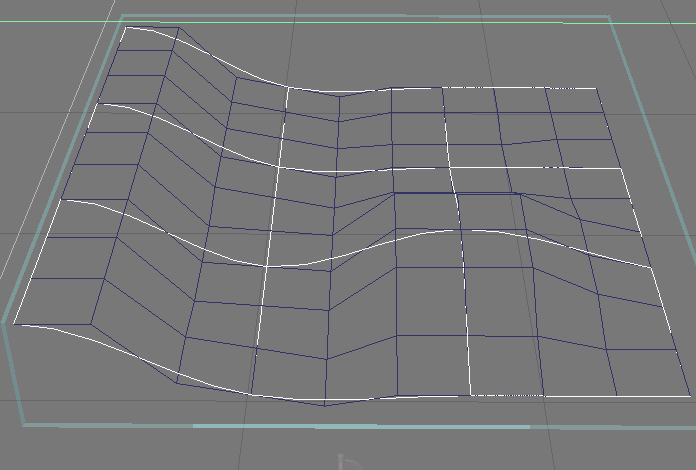
ok ..this is why I say that, a resolution 3 plane.. The white is nurbs, blue control mesh
- Attachments
-
-
clintonman
- Captain
- Posts: 5659
- Joined: 21 May 2009, 21:08
- Type the number ten into the box: 0
- Location: California
Re: Nurbs Workspace Plugin Thread
Yes, I agree with the only 1 in 4 rows. I was just saying I don't think there was native(non-plugin) access to the extra rows.stan wrote:ok ..this is why I say that, a resolution 3 plane.. The white is nurbs, blue control mesh
-
froo
- Captain
- Posts: 2554
- Joined: 22 May 2009, 12:13
Re: Nurbs Workspace Plugin Thread
well, as I understand it, the way it should work is, we have access to every vertex of the control surface.
I guess we can use triangles too, though that does not sound like it makes much sense to do so. Well,
I dunno. We'll see.
I guess we can use triangles too, though that does not sound like it makes much sense to do so. Well,
I dunno. We'll see.
-
stan
- Master Chief Petty Officer
- Posts: 584
- Joined: 21 May 2009, 17:20
Re: Nurbs Workspace Plugin Thread
Jason, I'm still wondering if nurbs will be able to display as curves or just control mesh. Then you have no tris or vertices just knots and chords. 
-
clintonman
- Captain
- Posts: 5659
- Joined: 21 May 2009, 21:08
- Type the number ten into the box: 0
- Location: California
Re: Nurbs Workspace Plugin Thread
Ah, maybe so. I guess I was talking about the tS modelside nurbs style, bezier style where one in 4 control points is on the surface and the others behave more or less like handles. That's speaking in 2 D, because tS has internal control points that we never see on the surface. Maybe tS does some kind of interpolation for those points.froo wrote:well, as I understand it, the way it should work is, we have access to every vertex of the control surface....)
-
froo
- Captain
- Posts: 2554
- Joined: 22 May 2009, 12:13
Re: Nurbs Workspace Plugin Thread
Allrighty then.
I may get the auto triangulation stuff straightened out later, maybe not.
If I want to allow addition of more control lines, I need to get the 'editing'
capability working. I have notes on that from before. We'll see.
So anyway.
I made a tiny one liner adjustment so the generated vertices get moved when we move
the control vertices. That's the first simple step.
Next is to make the generated surface more complex. Say, 4 generated vertices for every control vertex. Get that working.
I may get the auto triangulation stuff straightened out later, maybe not.
If I want to allow addition of more control lines, I need to get the 'editing'
capability working. I have notes on that from before. We'll see.
So anyway.
I made a tiny one liner adjustment so the generated vertices get moved when we move
the control vertices. That's the first simple step.
Next is to make the generated surface more complex. Say, 4 generated vertices for every control vertex. Get that working.
-
froo
- Captain
- Posts: 2554
- Joined: 22 May 2009, 12:13
Re: Nurbs Workspace Plugin Thread
Here's a little picture of it in action.
- Attachments
-

-
clintonman
- Captain
- Posts: 5659
- Joined: 21 May 2009, 21:08
- Type the number ten into the box: 0
- Location: California
Re: Nurbs Workspace Plugin Thread
Looks like it's matching up nicely.
-
stan
- Master Chief Petty Officer
- Posts: 584
- Joined: 21 May 2009, 17:20
Re: Nurbs Workspace Plugin Thread
great to see some more progress...
-
froo
- Captain
- Posts: 2554
- Joined: 22 May 2009, 12:13
Re: Nurbs Workspace Plugin Thread
Dang. Almost 5 weeks since my last post on this!
I am bumping this, to let everyone know, I am not abandoning this.
Just had to deal with that damn move. Yeah I'm still mad about it.
But that's ok. Just another bump in the road.
So anyway.
I'll add a little more complexity, as stated in my last post. In this
particular case, I will be controlling 4 generated vertices, for every
control vertex. I should be able to spend some time on it tonight.
I believe, I have the code there already, just commented out, untested.
I am bumping this, to let everyone know, I am not abandoning this.
Just had to deal with that damn move. Yeah I'm still mad about it.
But that's ok. Just another bump in the road.
So anyway.
I'll add a little more complexity, as stated in my last post. In this
particular case, I will be controlling 4 generated vertices, for every
control vertex. I should be able to spend some time on it tonight.
I believe, I have the code there already, just commented out, untested.
-
froo
- Captain
- Posts: 2554
- Joined: 22 May 2009, 12:13
Re: Nurbs Workspace Plugin Thread
Ok; reviewed the code, but was too tired to do anything with it.
I should reorganize it; move sections of code to separate functions to make
it cleaner. Was just too tired to work with it. Maybe I need more time
to recuperate from the move. Apparently it's taken one hell of a toll.
We just did all this last year, after all; finished unpacking the stuff in, oh,
maybe, May 2010. So less than a year later we're doin the same crap all over again.
Hm maybe one day we'll stop having to do this. I feel like throwing in the towel.
Ah well. I'll get over it.
I should reorganize it; move sections of code to separate functions to make
it cleaner. Was just too tired to work with it. Maybe I need more time
to recuperate from the move. Apparently it's taken one hell of a toll.
We just did all this last year, after all; finished unpacking the stuff in, oh,
maybe, May 2010. So less than a year later we're doin the same crap all over again.
Hm maybe one day we'll stop having to do this. I feel like throwing in the towel.
Ah well. I'll get over it.
-
pugman 1
- Captain
- Posts: 1555
- Joined: 21 May 2009, 19:26
- Type the number ten into the box: 0
- Location: Germany
Re: Nurbs Workspace Plugin Thread
Hey Froo chill out man smoke a joint and forget the world,
no one is pushing you on this.
no one is pushing you on this.
-
froo
- Captain
- Posts: 2554
- Joined: 22 May 2009, 12:13
Re: Nurbs Workspace Plugin Thread
hehe thanks pugman.
Though I cannot do that (spark one up), medical marijuana is legal in the state of Colorado.
I was surprised at how many 'dispensaries' there are here.
I guess the only person pushing me on this is, myself. I want to do it. But when I look at it,
when I am very tired and do not realize just how tired I am, I have to just accept it, and shut
it down. I get tired of feeling that way: I want to work on something, but simply do not
have the strength/drive to do it. I run out of patience with myself sometimes. Ah well.
It will come back to me.
Though I cannot do that (spark one up), medical marijuana is legal in the state of Colorado.
I was surprised at how many 'dispensaries' there are here.
I guess the only person pushing me on this is, myself. I want to do it. But when I look at it,
when I am very tired and do not realize just how tired I am, I have to just accept it, and shut
it down. I get tired of feeling that way: I want to work on something, but simply do not
have the strength/drive to do it. I run out of patience with myself sometimes. Ah well.
It will come back to me.
-
froo
- Captain
- Posts: 2554
- Joined: 22 May 2009, 12:13
Re: Nurbs Workspace Plugin Thread
This is a test of the logic that has been in the code, but commented out.
Here, each control quad (2 triangles) generates 8 triangles: each control
triangle generates 4 triangles.
The logic is a little off. I think this equation may be wrong:
jPrime = 2*j + 1
that is used to determine which original triangle in the control quad:
triangle 0, or triangle 1, created a particular surface triangle.
Once determined, each triangle is supposed to be properly highlighted:
If a surface triangle is generated from a selected control triangle,
then that surface triangle is highlighted, as is the control triangle.
As you can see, some of the highlighted triangles are wrong.
In this particular case, the two triangles forming a square should
not be highlighted. But the logic determines that these triangles
came from triangle 1. It should be triangle 0.
Here, each control quad (2 triangles) generates 8 triangles: each control
triangle generates 4 triangles.
The logic is a little off. I think this equation may be wrong:
jPrime = 2*j + 1
that is used to determine which original triangle in the control quad:
triangle 0, or triangle 1, created a particular surface triangle.
Once determined, each triangle is supposed to be properly highlighted:
If a surface triangle is generated from a selected control triangle,
then that surface triangle is highlighted, as is the control triangle.
As you can see, some of the highlighted triangles are wrong.
In this particular case, the two triangles forming a square should
not be highlighted. But the logic determines that these triangles
came from triangle 1. It should be triangle 0.
- Attachments
-

- notRight.png (14.48 KiB) Viewed 485 times
-
froo
- Captain
- Posts: 2554
- Joined: 22 May 2009, 12:13
Re: Nurbs Workspace Plugin Thread
The math is correct.
However, the ordering of the triangles cannot be used with the math.
In the height field example, which is what the code is based on, to create the geometry,
the triangle ordering is not linear. By that, I mean, you can't look at a row of triangles
and see them listed as:
0 1 2 3 4 5 6 7
Rather, each quad has the triangle indexes reversed (don't ask me why):
1 0 3 2 5 4 7 6
So, using the math in the first line of this post, I will get funny looking results.
The correct triangles ARE being selected. But, these triangles, are in the wrong order,
for the math.
The simplest thing to do, is redo the triangle ordering, to be more sensible.
Why in the hell did they do it that way? I don't get it.
Anyway.
However, the ordering of the triangles cannot be used with the math.
In the height field example, which is what the code is based on, to create the geometry,
the triangle ordering is not linear. By that, I mean, you can't look at a row of triangles
and see them listed as:
0 1 2 3 4 5 6 7
Rather, each quad has the triangle indexes reversed (don't ask me why):
1 0 3 2 5 4 7 6
So, using the math in the first line of this post, I will get funny looking results.
The correct triangles ARE being selected. But, these triangles, are in the wrong order,
for the math.
The simplest thing to do, is redo the triangle ordering, to be more sensible.
Why in the hell did they do it that way? I don't get it.
Anyway.
-
froo
- Captain
- Posts: 2554
- Joined: 22 May 2009, 12:13
Re: Nurbs Workspace Plugin Thread
Ok that worked.
So. Now that that's over with, I can apply the same logic to vertices, since that is where I need to work anyway. I was using triangles, since they are easier to see.
When I select a vertex and move it, the nurbs equations can be applied, to the affected vertices in the
generated mesh. Phew!
So. Now that that's over with, I can apply the same logic to vertices, since that is where I need to work anyway. I was using triangles, since they are easier to see.
When I select a vertex and move it, the nurbs equations can be applied, to the affected vertices in the
generated mesh. Phew!
-
froo
- Captain
- Posts: 2554
- Joined: 22 May 2009, 12:13
Re: Nurbs Workspace Plugin Thread
So.
When I enter point edit mode, trueSpace hangs. I can click items in the interface: checkboxes, etc.
but I cannot exit edit mode. Hm. What am I missing here...
Any of the plugin/script devs here worked with point editing?
thanks
Froo
When I enter point edit mode, trueSpace hangs. I can click items in the interface: checkboxes, etc.
but I cannot exit edit mode. Hm. What am I missing here...
Any of the plugin/script devs here worked with point editing?
thanks
Froo
-
stan
- Master Chief Petty Officer
- Posts: 584
- Joined: 21 May 2009, 17:20
Re: Nurbs Workspace Plugin Thread
if this hasnt been resolved the only thing I can think of is to reset your ctx. 
-
froo
- Captain
- Posts: 2554
- Joined: 22 May 2009, 12:13
Re: Nurbs Workspace Plugin Thread
Ah I should clarify.
When I enter edit mode, for the nurbs surface, ts hangs.
If I add a regular object, and enter point edit mode, it works fine.
So, there is something I am not doing in the code.
That, or this is a showstopper bug. In which case, I could
try doing this, in script. But I would rather not start over. Gah!
When I enter edit mode, for the nurbs surface, ts hangs.
If I add a regular object, and enter point edit mode, it works fine.
So, there is something I am not doing in the code.
That, or this is a showstopper bug. In which case, I could
try doing this, in script. But I would rather not start over. Gah!
-
stan
- Master Chief Petty Officer
- Posts: 584
- Joined: 21 May 2009, 17:20
Re: Nurbs Workspace Plugin Thread
Being the only one who ever worked with nurbs in workspace you are in uncharted territory. Maybe its just an error in your latest code.
I'm starting to feel that way about normals in vray standalone..
I'm starting to feel that way about normals in vray standalone..
-
froo
- Captain
- Posts: 2554
- Joined: 22 May 2009, 12:13
Re: Nurbs Workspace Plugin Thread
yep; that's true stan.
Well, I think, we'll both pull through.
Nurbs aside, it's the point-editing functionality that is the problem.
I think, there is some functionality which I have not implemented.
I thought, this worked before. I will check the code I posted
at truespaceplugins.com some time back, to compare.
Well, I think, we'll both pull through.
Nurbs aside, it's the point-editing functionality that is the problem.
I think, there is some functionality which I have not implemented.
I thought, this worked before. I will check the code I posted
at truespaceplugins.com some time back, to compare.
-
froo
- Captain
- Posts: 2554
- Joined: 22 May 2009, 12:13
Re: Nurbs Workspace Plugin Thread
Ok so I got the original version from truespaceplugins and recompiled.
Vertex selection worked fine there.
So, I could do one of two things.
1) use that original version, and go from there
2) find the differences, and incorporate the correct code in the current code
I am thinking, the best course of action is (1), since it worked just fine before
I ventured into the whole Auto Triangulation debacle.
Vertex selection worked fine there.
So, I could do one of two things.
1) use that original version, and go from there
2) find the differences, and incorporate the correct code in the current code
I am thinking, the best course of action is (1), since it worked just fine before
I ventured into the whole Auto Triangulation debacle.
-
froo
- Captain
- Posts: 2554
- Joined: 22 May 2009, 12:13
Re: Nurbs Workspace Plugin Thread
Heh. Solved actually, well, partially anyway.
The only problem is this:
The original code that worked up until a week ago, generated 1 triangle
for each input triangle, and 1 vertex for each input vertex.
A couple days ago, I modified the code to generate 4 triangles for each input triangle.
This in turn, generates additional vertices.
In the vertex loop, I was looping through 16 vertices, just like before.
When I have more vertices though, this causes problems.
Long story short, I need to add code for the vertices, just as I have for the
triangles.
Anyway.
The only problem is this:
The original code that worked up until a week ago, generated 1 triangle
for each input triangle, and 1 vertex for each input vertex.
A couple days ago, I modified the code to generate 4 triangles for each input triangle.
This in turn, generates additional vertices.
In the vertex loop, I was looping through 16 vertices, just like before.
When I have more vertices though, this causes problems.
Long story short, I need to add code for the vertices, just as I have for the
triangles.
Anyway.
-
froo
- Captain
- Posts: 2554
- Joined: 22 May 2009, 12:13
Re: Nurbs Workspace Plugin Thread
Finally found the damn computer mouse.
Funny thing is, with this move, I found a shitload
of things with cables attached, or just plain cables:
coax (internet, TV), ethernet, power plugs, speaker cables, etc.
but nooooo mouse. That has a cable! Why can't I find it?
Because it was sitting on top of a piece of furniture (a shoe
case thing); on top of the mouse, was this big piece of artwork.
Tonight I was wondering, why is that artwork laying crooked like that?
I peaked under it, and there was the mouse. yay!
Pfffff. Man. We NEED to do a garage sale, or just donate a lot of this stuff,
or recycle it.
Funny thing is, with this move, I found a shitload
of things with cables attached, or just plain cables:
coax (internet, TV), ethernet, power plugs, speaker cables, etc.
but nooooo mouse. That has a cable! Why can't I find it?
Because it was sitting on top of a piece of furniture (a shoe
case thing); on top of the mouse, was this big piece of artwork.
Tonight I was wondering, why is that artwork laying crooked like that?
I peaked under it, and there was the mouse. yay!
Pfffff. Man. We NEED to do a garage sale, or just donate a lot of this stuff,
or recycle it.
-
froo
- Captain
- Posts: 2554
- Joined: 22 May 2009, 12:13
Re: Nurbs Workspace Plugin Thread
SOLVED.
I was overindexing. Apparently my basic math skills need updating.
Anyway, as a precursor to using the nurbs math, I will do some simple
tests, so that control vertex 0 affects all vertices within a specific uv space.
Same for the other control vertices.
I was overindexing. Apparently my basic math skills need updating.
Anyway, as a precursor to using the nurbs math, I will do some simple
tests, so that control vertex 0 affects all vertices within a specific uv space.
Same for the other control vertices.
-
froo
- Captain
- Posts: 2554
- Joined: 22 May 2009, 12:13
Re: Nurbs Workspace Plugin Thread
At present, I have a control surface with 16 vertices,
and a generated surface with 49 vertices. I am doing
some hardcoding at the moment, to validate the concept.
Each control vertex is 'assigned' to 3 surface vertices, except
for the last control vertex. It is assigned to the last 4 surface vertices.
This means, when I select control vertex 0, then surface vertices
0, 1, and 2 are highlighted, as is the control vertex 0.
The same applies to the other control vertices.
While this is nowhere similar to how the real tool should work,
it does demonstrate the concept of highlighting control and surface
vertices correctly.
I will post a snapshot later.
Since this concept works, I think it is now time to incorporate the
real nurbs code. Yeah. Badass.
and a generated surface with 49 vertices. I am doing
some hardcoding at the moment, to validate the concept.
Each control vertex is 'assigned' to 3 surface vertices, except
for the last control vertex. It is assigned to the last 4 surface vertices.
This means, when I select control vertex 0, then surface vertices
0, 1, and 2 are highlighted, as is the control vertex 0.
The same applies to the other control vertices.
While this is nowhere similar to how the real tool should work,
it does demonstrate the concept of highlighting control and surface
vertices correctly.
I will post a snapshot later.
Since this concept works, I think it is now time to incorporate the
real nurbs code. Yeah. Badass.
-
clintonman
- Captain
- Posts: 5659
- Joined: 21 May 2009, 21:08
- Type the number ten into the box: 0
- Location: California
Re: Nurbs Workspace Plugin Thread
Wow! Look at you go. It's good to see you making progress again.
-
froo
- Captain
- Posts: 2554
- Joined: 22 May 2009, 12:13
Re: Nurbs Workspace Plugin Thread
Thanks clinton.
I am glad I got it sraightened out.
I am glad I got it sraightened out.
-
froo
- Captain
- Posts: 2554
- Joined: 22 May 2009, 12:13
Re: Nurbs Workspace Plugin Thread
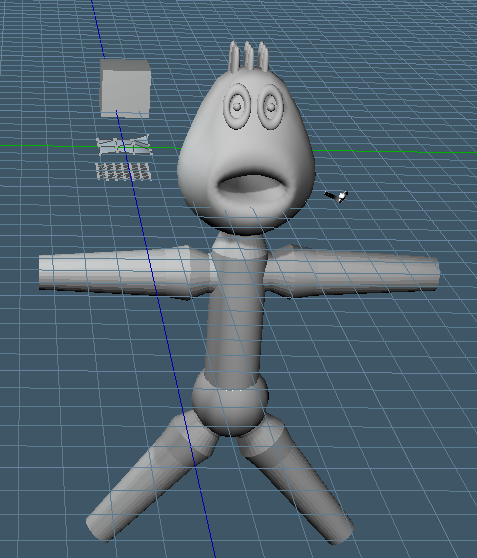
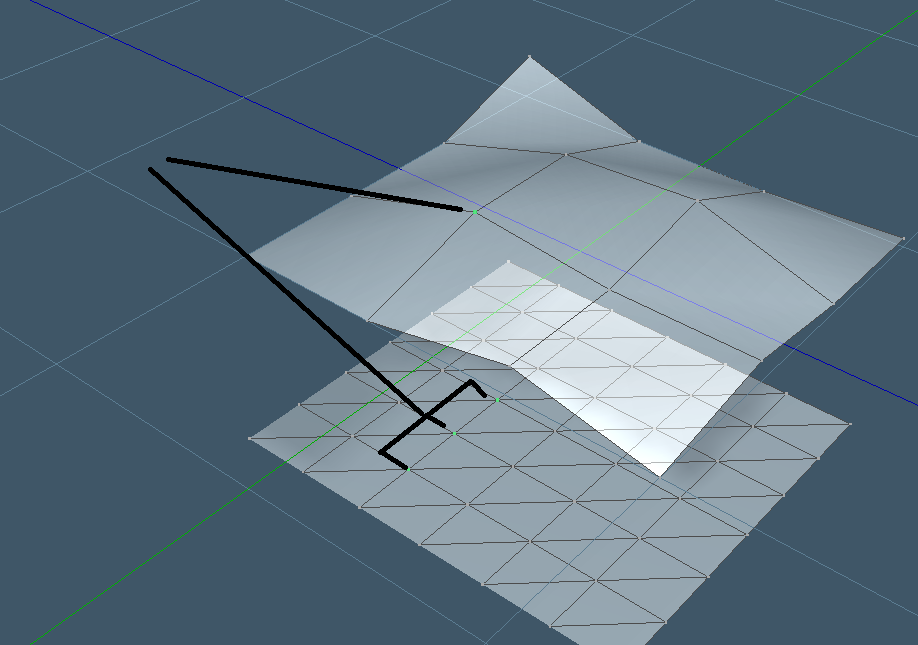
Here's a couple pics.
The first one is just a doodle I am working with.
Finally doing some modelling again.
The 2nd shows the vertex selection in action.
This is just a simple tests; these vertices won't be selected
when the control vertex is selected, necessarily. I was just
vetting the code.
The first one is just a doodle I am working with.
Finally doing some modelling again.
The 2nd shows the vertex selection in action.
This is just a simple tests; these vertices won't be selected
when the control vertex is selected, necessarily. I was just
vetting the code.
- Attachments
-
-
-
froo
- Captain
- Posts: 2554
- Joined: 22 May 2009, 12:13
Re: Nurbs Workspace Plugin Thread
Ok; so, are there other plugin developers here that have had success with
handling vertex selection and visualization streams? Same for triangle and edge
streams.
If not, then I can post these updated results (the source code) and we can
discuss it, if you are interested. I can explain how it works. This code
can be used as a starting point for other editing tools. I was looking
on the Model side, and man; look at all those editing tools that we don't
have on the workspace side.
What do you think? Are you interested?
handling vertex selection and visualization streams? Same for triangle and edge
streams.
If not, then I can post these updated results (the source code) and we can
discuss it, if you are interested. I can explain how it works. This code
can be used as a starting point for other editing tools. I was looking
on the Model side, and man; look at all those editing tools that we don't
have on the workspace side.
What do you think? Are you interested?
-
v3rd3
- Lieutenant Commander
- Posts: 1191
- Joined: 21 May 2009, 20:04
Re: Nurbs Workspace Plugin Thread
I am a doodler admiring DaVincis so anything you care to show is of great interest.
-
stan
- Master Chief Petty Officer
- Posts: 584
- Joined: 21 May 2009, 17:20
Re: Nurbs Workspace Plugin Thread
I'm always interested.
-
froo
- Captain
- Posts: 2554
- Joined: 22 May 2009, 12:13
Re: Nurbs Workspace Plugin Thread
Ok cool thanks guys.
I shall proceed.
I shall proceed.
-
Dragneye

- Lieutenant
- Posts: 906
- Joined: 02 Sep 2009, 22:09
Re: Nurbs Workspace Plugin Thread
I'm trying to be Da Vinci, but I can only doodle
In our group project nurbs modeling has been talked abt a lot. I like box modeling but nurbs can be a Real time saver with some designs so please, Froo let's see how far you can get.
If you can avoid it triangulating in the final iteration of a model (or before), that would be awesome.
In our group project nurbs modeling has been talked abt a lot. I like box modeling but nurbs can be a Real time saver with some designs so please, Froo let's see how far you can get.
If you can avoid it triangulating in the final iteration of a model (or before), that would be awesome.
-
froo
- Captain
- Posts: 2554
- Joined: 22 May 2009, 12:13
Re: Nurbs Workspace Plugin Thread
Arighty then.
Re-read the curves and surfaces book in record times. 97 pages yesterday. About 60 or so today, but really
just needed a refresher anyway.
I incorporated the code for a Bezier surface. Works! WooHoo!
But the orientation of the generated surface is wacky. Just made
my first attempt. But hey, it works! WooHoo!
The reason it is disoriented is because of the 'ordering' taken by the author is
different from my ordering. No worries. It Works! WooHoO!
haha
Ok. Need to get it straightened out.
Re-read the curves and surfaces book in record times. 97 pages yesterday. About 60 or so today, but really
just needed a refresher anyway.
I incorporated the code for a Bezier surface. Works! WooHoo!
But the orientation of the generated surface is wacky. Just made
my first attempt. But hey, it works! WooHoo!
The reason it is disoriented is because of the 'ordering' taken by the author is
different from my ordering. No worries. It Works! WooHoO!
haha
Ok. Need to get it straightened out.
-
froo
- Captain
- Posts: 2554
- Joined: 22 May 2009, 12:13
Re: Nurbs Workspace Plugin Thread
YEAH!
Got that straightened out. Simple problem again.
I had to modify the code a little bit to suit my ordering arrangement.
As I was changing the code, there was one variable that I missed, here:
See the problem?
I needed to use 'y', not 'v', in the calculation of VVal.
While 'v' is a valid variable, it is a leftover variable from
a previous loop, and is therefore not changing. So when I move
the control verts around, I don't see the desired effect.
When I fixed this, it worked great. Woohoo!
I will make a release build and post it here tonight.
It is nothing special; the number of control points and surface points
are hardcoded, but at least you can play with it. It's better than snapshots eh?
Got that straightened out. Simple problem again.
I had to modify the code a little bit to suit my ordering arrangement.
As I was changing the code, there was one variable that I missed, here:
Code: Select all
for( y = 0; y <= segsy; y++ )
{
  for( x = 0; x <= segsx; x+= )
  {
    float UVal = (float)x / (float)segsx; // This is ok

    float VVal = (float) v / (float)segsy; // This is NOT Ok
  }
}
I needed to use 'y', not 'v', in the calculation of VVal.
While 'v' is a valid variable, it is a leftover variable from
a previous loop, and is therefore not changing. So when I move
the control verts around, I don't see the desired effect.
When I fixed this, it worked great. Woohoo!
I will make a release build and post it here tonight.
It is nothing special; the number of control points and surface points
are hardcoded, but at least you can play with it. It's better than snapshots eh?
-
froo
- Captain
- Posts: 2554
- Joined: 22 May 2009, 12:13
Re: Nurbs Workspace Plugin Thread
So, what does this mean?
it means, other edit type plugins are possible.
We know how to access the streams necessary for visualization (highlighting),
and editing.
So, I'm happy about it.
What I have at present, though complicated, is about as simplistic as it can get.
So, this source code is about as good a 'tutorial' type package as we're gonna get.
it means, other edit type plugins are possible.
We know how to access the streams necessary for visualization (highlighting),
and editing.
So, I'm happy about it.
What I have at present, though complicated, is about as simplistic as it can get.
So, this source code is about as good a 'tutorial' type package as we're gonna get.
-
clintonman
- Captain
- Posts: 5659
- Joined: 21 May 2009, 21:08
- Type the number ten into the box: 0
- Location: California
Re: Nurbs Workspace Plugin Thread
Nice. Are the techniques you used applicable to scripting or is C++ required?
-
froo
- Captain
- Posts: 2554
- Joined: 22 May 2009, 12:13
Re: Nurbs Workspace Plugin Thread
Well, Stan reported that the script function: GetMeshFunctionSet() fails; it causes
tS to crash. So, it's most likely, only C++.
tS to crash. So, it's most likely, only C++.
-
froo
- Captain
- Posts: 2554
- Joined: 22 May 2009, 12:13
Re: Nurbs Workspace Plugin Thread
Ok, so, I have a nurbs implementation working.
Though, it's a little hard to see both the control surface
and the nurbs surface.
To fix that, I increased the scale of the object.
That made it easier to see what I was doing.
Another thing I need to do, is find a way, to make
the 'control surface' portion of the object vertices and edges visible only,
and the generated surface, shaded. Not sure if I can do that or not. Hm.
Though, it's a little hard to see both the control surface
and the nurbs surface.
To fix that, I increased the scale of the object.
That made it easier to see what I was doing.
Another thing I need to do, is find a way, to make
the 'control surface' portion of the object vertices and edges visible only,
and the generated surface, shaded. Not sure if I can do that or not. Hm.
-
froo
- Captain
- Posts: 2554
- Joined: 22 May 2009, 12:13
Re: Nurbs Workspace Plugin Thread
The reason I did not post the nurbs version of the plugin is because,
the debug version works fine, but the release version does not work
correctly. Interesting. Debug is doing something different.
I commented out the code that does all the magic, and tS worked
fine with the Release plugin installed. So, there is something 'funny'
going on in the code there. Some calculation is going haywire.
the debug version works fine, but the release version does not work
correctly. Interesting. Debug is doing something different.
I commented out the code that does all the magic, and tS worked
fine with the Release plugin installed. So, there is something 'funny'
going on in the code there. Some calculation is going haywire.
-
froo
- Captain
- Posts: 2554
- Joined: 22 May 2009, 12:13
Re: Nurbs Workspace Plugin Thread
Damn that was an easy solution.
Sometimes I could see the generated surface, at least, parts of it.
The vertices were way off somewhere. Turns out, as I was stepping
through in debug, that I had forgotten to initialize the weight vector,
which has a major effect on the positions of the generated surface
vertices. When I observed the weight vector values, they were set to
values like:
-1.0445 E 8
That is a big freakin number. So. I initialize them to: 1.0F
which is a much cleaner number. Makes sense to set the weight of
a control point to 1.0 doesn't it? heh. Ok!
Sometimes I could see the generated surface, at least, parts of it.
The vertices were way off somewhere. Turns out, as I was stepping
through in debug, that I had forgotten to initialize the weight vector,
which has a major effect on the positions of the generated surface
vertices. When I observed the weight vector values, they were set to
values like:
-1.0445 E 8
That is a big freakin number. So. I initialize them to: 1.0F
which is a much cleaner number. Makes sense to set the weight of
a control point to 1.0 doesn't it? heh. Ok!
-
froo
- Captain
- Posts: 2554
- Joined: 22 May 2009, 12:13
Re: Nurbs Workspace Plugin Thread
Next step, is to only show the control surface, while in edit mode.
Now, I can't seem to find a way to 'hide' the control surface triangles;
I thought there was a way to set the color of each triangle. Maybe not.
The alternative, is to draw the output mesh two different ways;
in edit mode, draw both the control surface / triangles and the nurbs surface,
or, in non-edit mode, draw just the nurbs surface. I tried this, but tS hung up
on me. This may be the way to go, but I would need to get it straight.
Now, I can't seem to find a way to 'hide' the control surface triangles;
I thought there was a way to set the color of each triangle. Maybe not.
The alternative, is to draw the output mesh two different ways;
in edit mode, draw both the control surface / triangles and the nurbs surface,
or, in non-edit mode, draw just the nurbs surface. I tried this, but tS hung up
on me. This may be the way to go, but I would need to get it straight.
-
froo
- Captain
- Posts: 2554
- Joined: 22 May 2009, 12:13
Re: Nurbs Workspace Plugin Thread
Fixed.
When in edit mode, the control surface and nurbs surface are visible.
When not in edit mode, only the nurbs surface is shown.
The trick is this:
When not in edit mode, and the control surface is not drawn,
we still need the control surface data (vertex positions) in order
to calculate the nurbs surface. So, when not in edit mode, the
control surface data (vertex positions) are accessed, via the
pInVertices pointer. The pInVertices pointer is what I use for
the control surface.
When in edit mode, the control surface and nurbs surface are visible.
When not in edit mode, only the nurbs surface is shown.
The trick is this:
When not in edit mode, and the control surface is not drawn,
we still need the control surface data (vertex positions) in order
to calculate the nurbs surface. So, when not in edit mode, the
control surface data (vertex positions) are accessed, via the
pInVertices pointer. The pInVertices pointer is what I use for
the control surface.
-
froo
- Captain
- Posts: 2554
- Joined: 22 May 2009, 12:13
Re: Nurbs Workspace Plugin Thread
Guess I am bouncing around threads. I'll get it straight.
Ok so.
I made some changes, so the number of U and V control points are independent,
and can be set by the user. I need to ensure I can successfully do this; at present,
the values are still hardcoded to their original values, to ensure that the rest of the
code still works as it should. In addition, since the code was based on the height field example,
I had to change the data passed in, from segsx and segsy (segments) to vertsx and vertsy (vertices).
This is more sensible, since we use control points, not control segments, to generate the nurbs surface.
Although, mind you, you can select quads and manipulate large chunks of the surface.
The changes at this point do not warrant a release of another alpha just yet, but soon.
Ok so.
I made some changes, so the number of U and V control points are independent,
and can be set by the user. I need to ensure I can successfully do this; at present,
the values are still hardcoded to their original values, to ensure that the rest of the
code still works as it should. In addition, since the code was based on the height field example,
I had to change the data passed in, from segsx and segsy (segments) to vertsx and vertsy (vertices).
This is more sensible, since we use control points, not control segments, to generate the nurbs surface.
Although, mind you, you can select quads and manipulate large chunks of the surface.
The changes at this point do not warrant a release of another alpha just yet, but soon.
-
froo
- Captain
- Posts: 2554
- Joined: 22 May 2009, 12:13
Re: Nurbs Workspace Plugin Thread
More progress.
A, uh, let's see. In my own little world; actually universe. I kinda like it.
I think I'll stay awhile.
Let me get my thoughts together here...
Almost done with allowing user-selectable U and V control point count.
I tested with U = 5; V = 4; and got a funky result with the mesh though.
Not edited mind you; on first creation. I think I need to adjust the knot
vector when I do that. See, with U and V = 4, or 5, or, when they are equal,
they 'keep each other in check'. But if one is more than the other, well,
strange things happen. So I need to take a look at the math.
Anyway. Back to my little universe er... Frooniverse!
BTW I like that nickname: Froo; it can be substituted in so many ways.
Frooniverse, for example. FrooSpace is another.
Ok one more thing then I am gone. I am not used to being in a place that I 'like'.
We like this house; this city where we live. Before this, even the first year in CO,
was pretty rough for a number of reasons. Seems like we don't have as much
shit to deal with. Not used to it. I keep expecting something to go wrong; to deal
with. Not yet; so far so good. Ok I am out.
Ooooohhhhkayy. I guess I better tune out now and enjoy my little Frooniverse
(that's harder to spell than you think! Try it!)
A, uh, let's see. In my own little world; actually universe. I kinda like it.
I think I'll stay awhile.
Let me get my thoughts together here...
Almost done with allowing user-selectable U and V control point count.
I tested with U = 5; V = 4; and got a funky result with the mesh though.
Not edited mind you; on first creation. I think I need to adjust the knot
vector when I do that. See, with U and V = 4, or 5, or, when they are equal,
they 'keep each other in check'. But if one is more than the other, well,
strange things happen. So I need to take a look at the math.
Anyway. Back to my little universe er... Frooniverse!
BTW I like that nickname: Froo; it can be substituted in so many ways.
Frooniverse, for example. FrooSpace is another.
Ok one more thing then I am gone. I am not used to being in a place that I 'like'.
We like this house; this city where we live. Before this, even the first year in CO,
was pretty rough for a number of reasons. Seems like we don't have as much
shit to deal with. Not used to it. I keep expecting something to go wrong; to deal
with. Not yet; so far so good. Ok I am out.
Ooooohhhhkayy. I guess I better tune out now and enjoy my little Frooniverse
(that's harder to spell than you think! Try it!)