Nurbs Workspace Plugin Thread

Smart people ~ Great Scripts
froo
Captain
Posts: 2554
Joined: 22 May 2009, 12:13

Re: Nurbs Workspace Plugin Thread

Post by froo »

hehe it will; certainly not 8 pages of posts!

BTW I just realized why my triangle selection pointers are initialized to to big numbers.
Same for Visualizations...

Neither are RtTripleIndex items: i, j, k.

Triangleselections are of type: RtTriangleSelectionWeight
Visualizations are of type: RtTriangleVisualization

I will have to look at this more in the AM; just realized this issue. Sooo... at least I can
enter edit mode without crashing now. :D
But I need to think about, how I get the right data into those streams. This is directly related
to the Identification streams. meh...
froo
Captain
Posts: 2554
Joined: 22 May 2009, 12:13

Re: Nurbs Workspace Plugin Thread

Post by froo »

So I've been thinking about UV coordinates and such; these are required for some of these streams. I've decided the approach to take with them. The user will be able to add colums or rows of edges on the control surface. But, not perform more complex edits, such as adding edges, verts, and triangles. The reason is, that would actually be more for a subdivision surface implementation, not really a nurbs tool.

This greatly simplifies the calculation of the UV coordinates required.
froo
Captain
Posts: 2554
Joined: 22 May 2009, 12:13

Re: Nurbs Workspace Plugin Thread

Post by froo »

Action: Enter edit mode

Result:
Editable Shape provides triangle selection stream at mesh_out connector of editable shape.
Number of items is 18. Each 'Selected' data item is 0 (not selected).

Nurbs node generates triangle selection stream for its mesh_out connector.
Number of items is 8000.
orgIndex array is constructed. This array contains a mapping, of output triangles, to input triangles.
For example, Output triangles 0 - 99 map to Input triangle 0. Output triangles 100 - 199 map to Input triangle 1.
Selection Tool is active.

Action: User hovers mouse over an output triangle (say, triangle 50).

Result:
Selection tool observes Output orgIndex array,and determines the orgIndex (original, input triangle index)
for Output triangle 50 is 0.
Selection tool then creates a Selection stream (with 18 elements), with the 'Selected' value for index 0 set to 1
(Input Triangle 0 is Selected), and the 'Selected' value for all other indexes set to 0 (Not Selected).
Selection tool then puts this selection stream on the 'Selection' connector of the editable shape.
froo
Captain
Posts: 2554
Joined: 22 May 2009, 12:13

Re: Nurbs Workspace Plugin Thread

Post by froo »

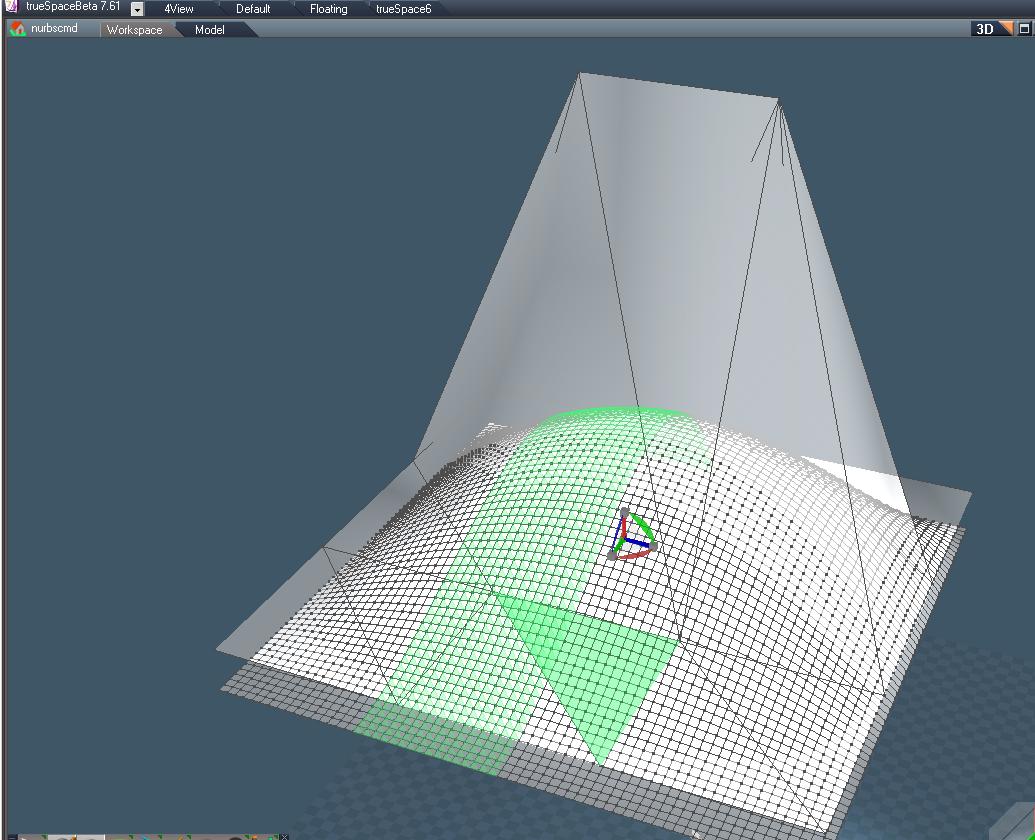
So here we are, with selections partially implemented.
One control surface triangle is highlighted, along with the associated (albeit incorrectly, at present)
nurbs triangles.
As I hover the mouse over the mesh, various triangles are highlighted. When I click, the input (control mesh)
triangle is selected.

At present, I just arbitrarily set some orgIndex (original index) values, just to get it working. That's why
you see this funky selection. I just wanted to see it function. And there it is.

When I select a control triangle, I cannot move/rotate/scale it. So, there is something else I have to do.
Anyway. Making progress.
Attachments
nurbs_selections.JPG
User avatar
marcel
Captain
Posts: 2247
Joined: 21 May 2009, 19:52
Type the number ten into the box: 0
Location: paris - France

Re: Nurbs Workspace Plugin Thread

Post by marcel »

Do not stop. it starts to come! :bananatyping:
Maybe you need a team... :bananatyping: :bananatyping: :bananatyping: :bananatyping: :bananatyping: :D
Design - illustration - Animation
http://www.crea-vision.fr
froo
Captain
Posts: 2554
Joined: 22 May 2009, 12:13

Re: Nurbs Workspace Plugin Thread

Post by froo »

Thanks for the encouragement Marcel! Sometimes I really need that! :D :bananacheers:
froo
Captain
Posts: 2554
Joined: 22 May 2009, 12:13

Re: Nurbs Workspace Plugin Thread

Post by froo »

yeah I have some more investigation to do on this.
At present, the mesh lights up like a Christmas tree as I hover the mouse
over various control triangles. And it blinks too! 8-)
Some control triangles yield no nurbs mesh highlighting, others yield
highlighting of the entire nurbs mesh (though, only, every-other triangle).
Still others, yield a strange strip of triangles; every 3rd or 4th. Soo...
back to the drawing board!

I am thinking, the mapping between input and output meshes is quite simple.
But I could be wrong. I think, I need a very simple ratio in the calculation, where
I determine the orgIndex (original Index, on the control surface), for each individual output
triangle:

orgIndex = ( (ControlSegments_inX) / (NurbsSegments_inX ) ) * Current_Nurb_Index;

So, if the control surface has 4 segments in X, and the nurbs surface has 16 segments in X,
then the ratio is: 0.25.

This means, For every One control surface triangle index, there are 4 nurbs surface triangle indexes.

So let's say we are looking at nurb triangle index #25. And we want to calculate the original element index. This would be:

orgIndex = 0.25 * 25 = 6.25

we drop the decimal portion to get:

orgIndex = 6
froo
Captain
Posts: 2554
Joined: 22 May 2009, 12:13

Re: Nurbs Workspace Plugin Thread

Post by froo »

ok not quite correct; calculating now... :D
that only works for the first row... heh
froo
Captain
Posts: 2554
Joined: 22 May 2009, 12:13

Re: Nurbs Workspace Plugin Thread

Post by froo »

The input triangles have an orgIndex assigned to them.

I have, a 6 x 6 triangle input mesh. I have, a 64 x 64 output mesh.
I need to map each output triangle, back to an input triangle.

In other words, output triangle at row 25, column 12 should map to: input triangle at row ??, Column ??.
When I get that input triangle index, I can then, get the orgIndex value assigned to that input triangle.
Once I have that, I can assign that orgIndex, to the output triangle under investigation. Make sense?
But getting the association is the challenge.
froo
Captain
Posts: 2554
Joined: 22 May 2009, 12:13

Re: Nurbs Workspace Plugin Thread

Post by froo »

Ok Once again I have a better understanding of this. Note to self: research the internet on nurbs modellers;
how the work. :ugeek:

a 6x6 triangle patch, does not perfectly fit into a 128 x 128 triangle patch, does it?

128 / 6 = 21.3333...

It makes far more sense, and is much much easier, to implement this as a set of quads:

the control surface may have, say, a 3x3 quad mesh (still 6 x 6 triangles), BUT: each individual
control quad, creates, say, a 10x10 patch. This approach allows for much more control and simplicity.
This also makes it easier to determine, which control patch triangle an output triangle is created from.

So, I will be working on that.
pugman 1
Captain
Posts: 1555
Joined: 21 May 2009, 19:26
Type the number ten into the box: 0
Location: Germany

Re: Nurbs Workspace Plugin Thread

Post by pugman 1 »

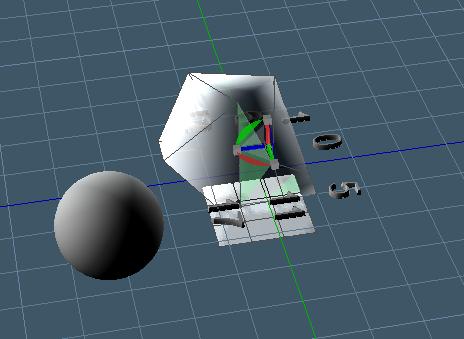
Hi Froo, take it easy man or you will end up like this.
Attachments
Too many triagles.jpg
User avatar
marcel
Captain
Posts: 2247
Joined: 21 May 2009, 19:52
Type the number ten into the box: 0
Location: paris - France

Re: Nurbs Workspace Plugin Thread

Post by marcel »

Do you use nurbs to do that? :lol:
Design - illustration - Animation
http://www.crea-vision.fr
froo
Captain
Posts: 2554
Joined: 22 May 2009, 12:13

Re: Nurbs Workspace Plugin Thread

Post by froo »

:o Ugh! Think I'll take some time off then! bleh! :D
User avatar
RAYMAN
Captain
Posts: 2547
Joined: 21 May 2009, 18:56

Re: Nurbs Workspace Plugin Thread

Post by RAYMAN »

the wiki is pretty detailed you might get some links that are usefull here..
http://en.wikipedia.org/wiki/Non-unifor ... l_B-spline"
on splines
http://www.cs.clemson.edu/~dhouse/cours ... plines.pdf"
and also some read on t-splines here..
http://www.tsplines.com/about/technology.html"
and here a siggraph paper on t-splines
http://cagd.cs.byu.edu/~tspline/innovat ... spline.pdf"
something on catmul clarke sufaces and patches...
http://research.microsoft.com/en-us/um/ ... accTOG.pdf"

http://portal.acm.org/citation.cfm?id=1 ... N=66880852"

Peter
froo
Captain
Posts: 2554
Joined: 22 May 2009, 12:13

Re: Nurbs Workspace Plugin Thread

Post by froo »

Thanks Rayman! :)

The thing I was having trouble with, was, how to map output triangles back to input triangles.
Turns out, it's easier than I thought. But, I had a 6x6 input triangle set (3 x 3 quads), and
128 x 128 triangles (64 x 64 quads). Well, 6 does not divide equally into 64; that's where I got confused. I was using 64, because of the example in the SDK. In reality, I need to use values that provide integer results: say, a 60x60 output mesh in this case (60 / 3 = 20); whereas, 64 / 3 = 21.3333333...

I'll explain the math later; but working with a single input quad at a time, we can determine, on the output, which input triangle created a specific output triangle. We use modulo divide (to get the column), and integer divide (to get the row), along with a comparison to determine whether the output triangle originated from input triangle 0, or 1. Each input triangle has an origIndex value associated with it, given by trueSpace. That orgIndex value is what we have to assign, to the output triangle.

Wordy I know; but it will make more sense in a picture.
froo
Captain
Posts: 2554
Joined: 22 May 2009, 12:13

Re: Nurbs Workspace Plugin Thread

Post by froo »

Basically, I need to construct the nurbs surface, from patches. Each subpatch, is constructed from a single quad, on the control surface. This is done because, each control quad only contains two triangles (index: 0, and 1).
So let's say, we have a single control quad. It creates a 10 x 10 mesh. We can easily determine, which input triangle (index 0, or 1) each surface triangle is derived from. So let's pick, triangle 38.
We use modulo divide, and integer divide, to make our determination:

I = index mod segsx; (Modulo divide gives us the COLUMN location of the triangle)

I = 38 mod 10 = 8

J = index \ segsx = 38 \ 10 = 3 (Integer divide gives us the ROW location of the triangle)

We compare: I, and

JPrime = (2*J) + 1: 2J + 1 = 2*3+1 = 7

If: I < JPrime, then the surface triangle originated from Control triangle 0.

If: I >=JPrime, then the surface triangle originated from Control triangle 1.

Here, we have: I = 8; JPrime = 7.

Since I >= JPrime, the control triangle from which surface triangle 38 originated is index 1.

This is not the orgIndex we are after, however. TrueSpace provides that for us, on the Input stream.
Sooo, we have to look at triangle input index 1, in our case, and access the orgIndex value given to us, for that index.
And that is the value, which we assign, to our output surface triangle.

Now, when we have a 4x4 input control surface, we apply this concept, one quad at a time. And for processing, in the output GetMesh function, our for loops look a little different.

for( theY = 0; theY < outSegsY/inSegsY; theY++)
{
for(theX = 0; theX < outSegsX/inSegsX; theX++)
{
// Do calculations for each output surface triangle;
// the math to do this will come later...
}
}

OutSegsX/inSegsX must be an integer value. More on this later.

BTW; the outsegs/insegs is wrong in that loop. Will fix.
froo
Captain
Posts: 2554
Joined: 22 May 2009, 12:13

Re: Nurbs Workspace Plugin Thread

Post by froo »

So let's take a look at those for loops.
The reason I am doing this is so, I can can determine, how many output quads are generated by each input quad.
If we have a 4x4 input mesh, and a 20x20 output mesh, we know that each input quad generates a 5x5 output 'patch'.
I can apply this approach to a single 5x5 output patch, and simply transfer the results, to the other patches.

I can do this, because, I have all the information I need to do so:
I have:
the number of input quads
the number of output quads
the number of output quads generated by each input quad

Later, if the user chooses to add an extra row, or column, of input control quads, I can recalculate this information, and the orgIndex data.
froo
Captain
Posts: 2554
Joined: 22 May 2009, 12:13

Re: Nurbs Workspace Plugin Thread

Post by froo »

Ok I think I finally got the math straightened out, but will do some more sketches to be sure.
froo
Captain
Posts: 2554
Joined: 22 May 2009, 12:13

Re: Nurbs Workspace Plugin Thread

Post by froo »

The algorithm works fine with test grids that I've sketched up. So now I need to incorporate it. The hardest part was calculating the triangle index, since I want it to increase linearly as I step through the row. The easy way out is to just increment it: index++; but, I figured, that may confuse me, later, since then, the index does not increase linearly over the row. It's more like this: 0, 1, 2; 24, 25, 26; 48, 49, 50. Maybe not too bad, but when you see this number jumping around, even in a pattern, it can be distracting. So. I may try it each way.

Code: Select all

int segsRatio_X = outSegsX / inSegsX;                     // 2
int trisRatio_X = segsRatio_X * 2;                        // 4
int outTrisPerQuadRow = segsRatio_X * 2;                  // 4
int trisPerSurfaceRow = outSegsX * 2;                     // 16

int segsRatio_Y = outSegsY / inSegsY;                     // 3
int triRatio_Y = segsRatio_Y * 2;                         // 6

int outTris_perQuad = segsRatio_X * segsRatio_Y * 2;      // 12

int origCtrlTri;
int outIdx = 0;

for( y = 0; y < inSegsY; y++ )
{
  for( x = 0; x < inSegsX; x++ )
  {
    for( idx = 0; idx < outTris_perQuad; idx++ )
    {
      int i = mod( idx, outTrisPerQuadRow );
      int j = idx \ outTrisPerQuadRow;
      int jPrime = 2*j +1;

      if( i < jPrime )
      {
        origCtrlTri = 0;

	// Get the index of this input triangle, in the control mesh.
	// Then, use the index value, to get the orgIndex value provided by trueSpace.
	// FunctionCall();

      }

      else
      {
        origCtrlTri = 1;

	// Get the index of this input triangle, in the control mesh.
	// Then, use the index value, to get the orgIndex value provided by trueSpace.
	// FunctionCall();

      }

      outIdx = (y*segsRatio_Y +j)*trisPerSurfaceRow + x*trisRatio_X + i;
    }
  }
}
froo
Captain
Posts: 2554
Joined: 22 May 2009, 12:13

Re: Nurbs Workspace Plugin Thread

Post by froo »

Just takin a little break from this; I was going to work on it the other night;
started up Visual Studio, stared it it for about 10 seconds, then shut it down. 8-)

Gonna get some skiing stuff today hopefully! WooHoo! Colorado Ski and Golf is having
a big sale; 30-75% off last year's gear. Ok by me!
I need a snowboard, boots, bindings, wristguards, cross country ski boots, and a crash helmet.
Same goes for my wife (Except the snowboard items). :D
User avatar
clintonman
Captain
Posts: 5659
Joined: 21 May 2009, 21:08
Type the number ten into the box: 0
Location: California

Re: Nurbs Workspace Plugin Thread

Post by clintonman »

Shopping can be fun. Enjoy the break.
Clinton Reese

http://clintons3d.com
froo
Captain
Posts: 2554
Joined: 22 May 2009, 12:13

Re: Nurbs Workspace Plugin Thread

Post by froo »

mmm Nurbs. :D

So we looked at a few shops; found what I wanted. Hooray!
I got a 159 cm board, (reverse camber to help with my newbiness),
boots, bindings (on clearance). It set us back a bit but it's a one time charge.
I should be able to use these for at least 5 years. Maybe more.
Though, the lift-prices are kinda high as well; this year we'll probably go a few
times; so won't need a season pass.
User avatar
Steinie
Captain
Posts: 2958
Joined: 21 May 2009, 17:38
Type the number ten into the box: 10

Re: Nurbs Workspace Plugin Thread

Post by Steinie »

Un-like a Play I guess it not wise to say "Break a Leg" for good luck...

Going down a mountain at 55 mph on a plank of wood and the only thing between
your manhood and tree acorns is 2 ply nylon is not my idea of good time!!

Have fun! :D
froo
Captain
Posts: 2554
Joined: 22 May 2009, 12:13

Re: Nurbs Workspace Plugin Thread

Post by froo »

As an old wise man once said...

It is better to take a fall,
than to crack one's own acorns... :lol:
User avatar
RAYMAN
Captain
Posts: 2547
Joined: 21 May 2009, 18:56

Re: Nurbs Workspace Plugin Thread

Post by RAYMAN »

froo wrote:As an old wise man once said...

It is better to take a fall,
than to crack one's own acorns... :lol:
Only nerds crack thier acorns not nurbs.. ! :lol:
froo
Captain
Posts: 2554
Joined: 22 May 2009, 12:13

Re: Nurbs Workspace Plugin Thread

Post by froo »

Looks like I got the math straightened out for the OrgIndex data.
Next up is setting the selection weight for each triangle. 0 = Not selected, 1 = selected.
User avatar
marcel
Captain
Posts: 2247
Joined: 21 May 2009, 19:52
Type the number ten into the box: 0
Location: paris - France

Re: Nurbs Workspace Plugin Thread

Post by marcel »

you have not done yet? you are really slow! :lol: :lol: :lol:
Design - illustration - Animation
http://www.crea-vision.fr
froo
Captain
Posts: 2554
Joined: 22 May 2009, 12:13

Re: Nurbs Workspace Plugin Thread

Post by froo »

Heh I was *Wondering* when someone would say that! :lol:
froo
Captain
Posts: 2554
Joined: 22 May 2009, 12:13

Re: Nurbs Workspace Plugin Thread

Post by froo »

Wwwooowww maaannn... I can taste the colors! Groovy...

hehe tastes like, er... looks like an LSD flashback!

Gotta fix the highlighting here...
Attachments
prettycolors.JPG
User avatar
clintonman
Captain
Posts: 5659
Joined: 21 May 2009, 21:08
Type the number ten into the box: 0
Location: California

Re: Nurbs Workspace Plugin Thread

Post by clintonman »

Wow, that's groovy in a happening kind of way. :P
Clinton Reese

http://clintons3d.com
froo
Captain
Posts: 2554
Joined: 22 May 2009, 12:13

Re: Nurbs Workspace Plugin Thread

Post by froo »

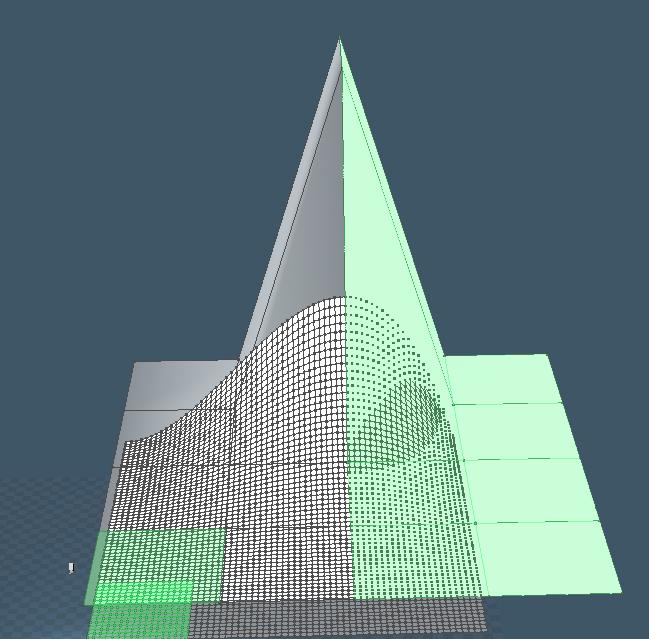
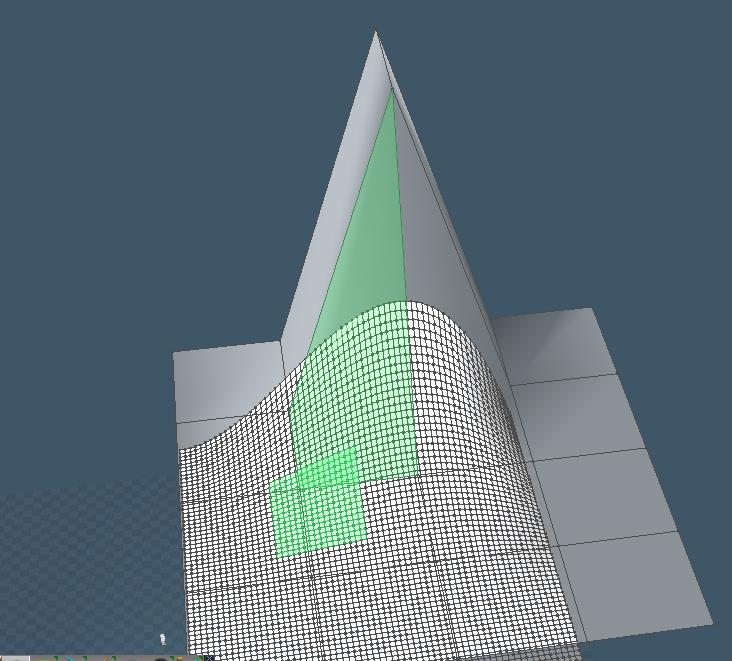
Well this is better; no psychedelic colors combinations. 8-)

Note though, the nurbs surface is smaller than the control surface. That's an implementation issue
which I will have to fix. But, when I hover over other parts of the surface, I still get the wrong
areas highlighted. Getting closer though. Just had some delays due to real life stuff. Not enough time
to put into this thing: car repairs (starter literally melted, negative cable on battery eroded, fuse blew
which kept transmission in 3rd gear); etc. This results in late night work hours. Anyway. Just spent about 5-10 minutes on this; here's a pic.

EDIT:
Correction:
When I HOVER, I get big chunks of the nurbs surface highlighted; but when I make a Selection, I only get
a subpatch highlighted, though there is a residual shading on the nurbs surface:
Attachments
PReselection
PReselection
Selection
Selection
Better
Better
froo
Captain
Posts: 2554
Joined: 22 May 2009, 12:13

Re: Nurbs Workspace Plugin Thread

Post by froo »

still some work to do on the selections. I think there is a problem with the ordering of the
triangle indices, and the vertex coordinates. Basically, if you look at the triangle indices,
they are the indexes into the vertex stream. I think, these are out of sync.
In order to find out, I will need to create another version of this, without the surface generation code.
That way, I will have a simple setup: a rectangular control surface, and a rectangular generated surface.
But, both will be flat. The control surface will be raised above the generated surface.

It's just a matter of 'feeling like' doing it; other stuff is taking up my time but some of it is almost done. Finally.
froo
Captain
Posts: 2554
Joined: 22 May 2009, 12:13

Re: Nurbs Workspace Plugin Thread

Post by froo »

I created another version of this; no nurbs curves at all; I am working on resolving
the selections and indexing issues. The results are so unspectacular they aren't worth
showing at the moment. :D Just need to get the math corrected.
I'm working on this a little at a time. Hopefully soon I can spend more time on it. Still
getting hammered with obligations.
froo
Captain
Posts: 2554
Joined: 22 May 2009, 12:13

Re: Nurbs Workspace Plugin Thread

Post by froo »

Got the input and output mesh created correctly. Turns out I was not incrementing a pointer in the right place.
Now I can focus on the selection streams.
froo
Captain
Posts: 2554
Joined: 22 May 2009, 12:13

Re: Nurbs Workspace Plugin Thread

Post by froo »

The answer is...
I have more work to do.

When we enter edit mode, the output streams are reordered.
So, I need to reorder the input as well, so they match.

On to that then. Now I have to review my notes on how to do that. :)
froo
Captain
Posts: 2554
Joined: 22 May 2009, 12:13

Re: Nurbs Workspace Plugin Thread

Post by froo »

Ok took a look at this on Saturday.
I have code to handle the Identification streams injected by the editable shape, upon
entering edit mode. But, when debugging, those stream pointers are NULL when I enter
edit mode. So, maybe I need to pass them forward, to the output of the final node,
before they are filled. I will try that as soon as possible.
froo
Captain
Posts: 2554
Joined: 22 May 2009, 12:13

Re: Nurbs Workspace Plugin Thread

Post by froo »

Ok I think I got it now!!! :D :bananacheers:

I was almost completely correct:

I generate the input mesh. So, I know the ordering of the triangle indexes.
For a 3x3 plane, the indexes look like this:

Code: Select all

0    1  2   3   4   5 
6    7  8   9  10 11
12 13 14 15 16 17
BUT: as soon as I enter edit mode, my original mesh is replaced with an Editable Mesh node.
TrueSpace reorders the indexes. It may look something like this now:

Code: Select all

12  9  4   14   5  11 
16  7  8   15  10 13
17  6  3     2   0   1
So, I have the original input (the patch I create), and the editable shape. I need to
get the uorgelementindex items from the output of the editable shape, and assign Them
to the output stream in my calculated mesh.

So the mapping here is:

0 maps to 12
1 maps to 9
2 maps to 4
etc...

I did not realize this was happening. So, i will get this straightened out. :D
User avatar
clintonman
Captain
Posts: 5659
Joined: 21 May 2009, 21:08
Type the number ten into the box: 0
Location: California

Re: Nurbs Workspace Plugin Thread

Post by clintonman »

froo wrote: uorgelementindex ... :D
What? :? I'm thinking that must be a typo.
Clinton Reese

http://clintons3d.com
froo
Captain
Posts: 2554
Joined: 22 May 2009, 12:13

Re: Nurbs Workspace Plugin Thread

Post by froo »

yeah it's a little bit off; the u should not be there

From IRdTriangleSelectionStream Interface Reference:

IRdTriangleSelectionStream::orgelementindex([in] RtDWORD dwIndex) [get]

orgelementindex stands for:

Original Element Index

it is the index of the triangle, in the Original mesh. In this case, original means,
input mesh.
froo
Captain
Posts: 2554
Joined: 22 May 2009, 12:13

Re: Nurbs Workspace Plugin Thread

Post by froo »

Finally got this working. When I enter edit mode, I have to select 'triangle selection'.
That shows me single triangles. I thought it was not working before, since I was getting
quads selected. This is hardcoded, since I have a very simple setup: a 3x3 quad input plane,
and the output is 2 of them: #1: 3x3 quad plane. #2: 3x3 quad plane, with z=-1 (pushed down).

This is what I did; I have to have this in its own separate for loop; the others, loop through
triangle INDEXES. Not TRIANGLES. So that had me for awhile.

Code: Select all

    for( int dacount = 0 ; dacount < 18; dacount++ )
    {
        if(pInSelectionTriangles)
        {
            //pSelectionTriangles[ptr].uOrgElementIndex = ptr;
            //pSelectionTriangles[ptr].uSelected = pInSelectionTriangles[ptr].uSelected;

            pSelectionTriangles->uOrgElementIndex = pInSelectionTriangles->uOrgElementIndex; //ptr-16;
            pSelectionTriangles[18].uOrgElementIndex = pInSelectionTriangles->uOrgElementIndex; //ptr-16;

            pSelectionTriangles->uSelected = pInSelectionTriangles->uSelected;
            pSelectionTriangles[18].uSelected = pInSelectionTriangles->uSelected;

            pInSelectionTriangles++;
            pSelectionTriangles++;
        }
        if(pInVisTriangles) 
        {
            //pVisTriangles[ptr].uColor = pInVisTriangles[ptr].uColor;
            pVisTriangles->uColor = pInVisTriangles->uColor;
            pVisTriangles[18].uColor = pInVisTriangles->uColor;

            pVisTriangles++;
            pInVisTriangles++;
        }
    }
froo
Captain
Posts: 2554
Joined: 22 May 2009, 12:13

Re: Nurbs Workspace Plugin Thread

Post by froo »

here's a snapshot.
Attachments
finally.JPG
User avatar
clintonman
Captain
Posts: 5659
Joined: 21 May 2009, 21:08
Type the number ten into the box: 0
Location: California

Re: Nurbs Workspace Plugin Thread

Post by clintonman »

Glad you got it worked out. :bananathumb:
Clinton Reese

http://clintons3d.com
froo
Captain
Posts: 2554
Joined: 22 May 2009, 12:13

Re: Nurbs Workspace Plugin Thread

Post by froo »

thanks Clinton.
I am hoping I can get the selections straightened out today. When
we make a selection the visualization stream(s) is(are) reordered.
So, I need to ensure the correct triangle(s) is(are) highlighted.
I had a discussion with tomas about this today; I think I understand
it well enough to implement it. I don't like putting something in there,
unless I know how it works. ;)
froo
Captain
Posts: 2554
Joined: 22 May 2009, 12:13

Re: Nurbs Workspace Plugin Thread

Post by froo »

Solved.
User avatar
clintonman
Captain
Posts: 5659
Joined: 21 May 2009, 21:08
Type the number ten into the box: 0
Location: California

Re: Nurbs Workspace Plugin Thread

Post by clintonman »

Great! I think I ran into the same problem with my object/scene information script. The polygon counts where good but the selection polygon counts were off. I think maybe the selection reordering gave me some unpredictable results.
Clinton Reese

http://clintons3d.com
froo
Captain
Posts: 2554
Joined: 22 May 2009, 12:13

Re: Nurbs Workspace Plugin Thread

Post by froo »

ok. I will post the code at tsp later tonight.
I should refine it; it looks confusing. :ugeek:
froo
Captain
Posts: 2554
Joined: 22 May 2009, 12:13

Re: Nurbs Workspace Plugin Thread

Post by froo »

I made a one line change at tsp, to the code.
There are few comments in the code at present; I will fix that later.
I also plan to do an article, or ppt presentation or something, explaining
what's going on.

Next up, is manipulating the selection. To do this, I need to
implement the IRfEditableMeshSet interface. I do not need to add any code
to the implementation per se; I just: return S_OK. Truespace handles the rest.

Following that though, is a little-more-tricky part: pushing only the selected triangles
to the GPU for display, as opposed to the entire mesh. This requires use of the
IRdTriangleTimeStamp stream. I will have to think on that one. But I will get the
push/pull (mesh manipulation) going first.

Making progress on this.
froo
Captain
Posts: 2554
Joined: 22 May 2009, 12:13

Re: Nurbs Workspace Plugin Thread

Post by froo »

Found out why nothing happens when I enter edit mode and try moving triangles.
In order to minimize the amount of uncertainty during debugging, I hardcoded a lot of things,
to focus on one or two critical tasks. I forgot about one particular hardcoded section.
Turns out, every time I enter OnGetValue(), I redraw the input mesh, EXACTLY as the original.

So no matter what I do: move, rotate, scale, I will never see any changes.
So I need to Transfer the input mesh data to the first portion of the Output mesh.
NOT: always hardcode that first section of the output mesh. Heh.

Also have new info on the rest of the processing. Sounds like, I need to use: ApplyTransformation():
Call it, from OnGetValue(), passing the input mesh connector data, and the output mesh pointer.
User avatar
Steinie
Captain
Posts: 2958
Joined: 21 May 2009, 17:38
Type the number ten into the box: 10

Re: Nurbs Workspace Plugin Thread

Post by Steinie »

Incredible watching you work this project. You've got my full support!
I just wanted you to know that.
Sorry to interrupt your thread but I wanted you to know how much your
appreciated.
User avatar
LeonRegis
Captain
Posts: 1946
Joined: 18 Aug 2009, 17:36
Type the number ten into the box: 0
Location: Brazil/Earth/Orion Arm/Milky Way/4th Dimension/This Universe/Multiverse???/Singularity???

Re: Nurbs Workspace Plugin Thread

Post by LeonRegis »

I second what Steinie said!
Be the change you want to see in the world. - Mohandas Gandhi
froo
Captain
Posts: 2554
Joined: 22 May 2009, 12:13

Re: Nurbs Workspace Plugin Thread

Post by froo »

Hey Thanks Steinie and Leon!
Yeah I got that workin! But I need to use the 'sorted' stream. Or is it, the unsorted one?
I dunno. I get confused between what's sorted and what's not sorted. To sort, or not to sort.
That, is the question.

Anyway. I can select a triangle, move it around, and Some part of the mesh moves around.
But not the right one. Heh. So. I am using the wrong stream. But at least it's updating! :D

CORRECTION:
The first triangle selected works properly. But, once I release the mouse, I see a different triangle highlighted. Then, when I select a triangle, the wrong portion of the mesh is moved.
If I exit edit mode and re-enter edit mode, the problem persists. If I delete the node, and create a new one, I get the same scenario: First selected triangle works fine.
froo
Captain
Posts: 2554
Joined: 22 May 2009, 12:13

Re: Nurbs Workspace Plugin Thread

Post by froo »

Solved.
Long story short, I had to access the 'correct' triangle(s), since every time I select a triangle,
the input stream is permutated again. So. Solved.
I picked some triangles, moved 'em around, worked like a charm! WooHoo! :D

Now next thing... I need to incorporate the nurbs code, and observe the output (nurbs)
adjust as I adjust the input. Kick Ass. Yeah.
froo
Captain
Posts: 2554
Joined: 22 May 2009, 12:13

Re: Nurbs Workspace Plugin Thread

Post by froo »

Here's a snapshot.
Attachments
goodSelections.JPG
User avatar
RAYMAN
Captain
Posts: 2547
Joined: 21 May 2009, 18:56

Re: Nurbs Workspace Plugin Thread

Post by RAYMAN »

Froo I like very much how you persist with this plugin !
If you ever had the chance to do it please consider making a small application or plugin that can convert
poly meshes that you import into it to nurbs surface in the 3dm format.
you could hit a homerun with something like that. Whenever I read any thing on Tspline technology we get the same
question over and over again why isnt there something simple like that on the market ......
Here is a quote (screenshot) from the Moi forums on this topic..... :)
Peter
Attachments
t spline.jpg
froo
Captain
Posts: 2554
Joined: 22 May 2009, 12:13

Re: Nurbs Workspace Plugin Thread

Post by froo »

Cool thanks Rayman; I will think about that;
first I gotta get this stupid problem resolved;
it's just not clear to me, how this is supposed to work.
Grr. I will ask Tomas. Again. :D
User avatar
marcel
Captain
Posts: 2247
Joined: 21 May 2009, 19:52
Type the number ten into the box: 0
Location: paris - France

Re: Nurbs Workspace Plugin Thread

Post by marcel »

convert SDS cage to nurbs is what i would like to have. for now when i need an old nurbs model made with TS some year ago i import it on moi3d (the convert pack is interesting for that), then convert the files to iges for manufacturer. it work well.

The ideal plugin is a converted from SDS to nurb and from nurbs to sds! It reconciles the two worlds...
in fact if we could convert all in all, we could use the tools that suit us and not what we have to have.

i can dream. :D
Design - illustration - Animation
http://www.crea-vision.fr
froo
Captain
Posts: 2554
Joined: 22 May 2009, 12:13

Re: Nurbs Workspace Plugin Thread

Post by froo »

cool idea Marcel. I think, once I can get this straightened out, things ought to get easier.

here's the deal.
The streams on the nurbs input mesh connector are 'sorted': selected triangles are pushed to the front. So, I have to pass that to the output connector.
But the question is, which streams do I 'unsort', and which do I leave alone?

Tomas indicated the visualization stream needs to be unsorted (unpermutated).
But, what about the Selection Streams, and, the Triangle Stream, Edge Stream, UV stream, and Vertex stream? That's the question.

As of now, it's still not quite working right.

I could, just try some combinations and see what happens. But, I don't like that approach, because then, I am just hacking it until it works. And if it does work, that is no guarantee I have coded it properly. So, I need to have a solid understanding of the process, which I do not yet have. I will get it though. Just needed some time off from this and other things. :)
User avatar
marcel
Captain
Posts: 2247
Joined: 21 May 2009, 19:52
Type the number ten into the box: 0
Location: paris - France

Re: Nurbs Workspace Plugin Thread

Post by marcel »

If it were easy it already existed ;)
Design - illustration - Animation
http://www.crea-vision.fr
User avatar
RAYMAN
Captain
Posts: 2547
Joined: 21 May 2009, 18:56

Re: Nurbs Workspace Plugin Thread

Post by RAYMAN »

marcel wrote:convert SDS cage to nurbs is what i would like to have. for now when i need an old nurbs model made with TS some year ago i import it on moi3d (the convert pack is interesting for that), then convert the files to iges for manufacturer. it work well.

The ideal plugin is a converted from SDS to nurb and from nurbs to sds! It reconciles the two worlds...
in fact if we could convert all in all, we could use the tools that suit us and not what we have to have.

i can dream. :D
Quite frankly its the question between organic and non organic modeling and of course its the question of shredding the meshes with polygon booleans
or keping the in tact with nurbs booleans.
If T- spline were a standalone and not a plugin for Rhino !!! :( sigh !(Get best of both worlds sds modeling and nurbs in one unit.....) ;)
froo
Captain
Posts: 2554
Joined: 22 May 2009, 12:13

Re: Nurbs Workspace Plugin Thread

Post by froo »

Cool!
Well, the good thing is, at least I believe, once I can get this understood, then it
opens the doors for other types of 'editing' plugins. Because, they will all require
access to the selection streams, visualization streams, etc. :ugeek:
User avatar
RAYMAN
Captain
Posts: 2547
Joined: 21 May 2009, 18:56

Re: Nurbs Workspace Plugin Thread

Post by RAYMAN »

froo wrote:Cool!
Well, the good thing is, at least I believe, once I can get this understood, then it
opens the doors for other types of 'editing' plugins. Because, they will all require
access to the selection streams, visualization streams, etc. :ugeek:
I just posted that because that opens the door for something more important and that
is the possibility to earn a lot of money with it......
thats something not only Marcel and I are dreaming of.....lots of people want that.... ;)
If you can pull it off in truespace it would open up a totally new userbase for it.....
plus a lot of new customers for the obj . plugin.... you might as well bundle it.... obj+nurbs+ 3dm.....
Peter
froo
Captain
Posts: 2554
Joined: 22 May 2009, 12:13

Re: Nurbs Workspace Plugin Thread

Post by froo »

Yes I agree;
I was just saying, that until I could get this selection stream thing figured out,
then all the surrounding code wouldn't work. :D

Definitely worth considering, Rayman and Marcel.

BTW I think, I finally, finally, finally have it understood. Geez.

I am working with an extremely simple configuration right now:

1 input plane (control surface), and 1 output mesh, composed of the input plane,
and a 'generated' output plane, based on the control surface.

It turns out, I was actually "Right" this weekend: the first part of the output mesh should
be a direct copy of the input control mesh, so a simple copy suffices. Then, the 'generated' mesh
is where the magic happens.

I should be able to get this straightened out, in code, this week. For this simple case, at least.
froo
Captain
Posts: 2554
Joined: 22 May 2009, 12:13

Re: Nurbs Workspace Plugin Thread

Post by froo »

For the simple case, this should work. Need to confirm it this evening:

for(RtUlong i = 0; i < 18; i++)
{
pSelectionTriangles[18+i].uOrgIndex = i;
pSelectionTriangles[18+i].uSelected = pInSelectionTriangles[table].uSelected;
pVisualizationStream[18+i].uColor = pInVisualizationTriangles[table].uColor;
}

In actuality, this:

pSelectionTriangles[18+i].uOrgIndex = i;

is identical to:

pSelectionTriangles[18+i].uOrgIndex = pInSelectionTriangles[table].uOrgElementIndex;

or

i == pInSelectionTriangles[table].uOrgElementIndex;

I chose to use 'i' instead, since it is just easier to read.

In other words, that 'equation' reduces to 'i'.

For nurbs, each input triangle generates a set of output triangles. So, instead
of setting one value to i like this:

pSelectionTriangles[18+i].uOrgIndex = i;

I will be setting a set of pSelectionTriangles[SET] =i.
User avatar
MikomDude
Captain
Posts: 1930
Joined: 04 Oct 2010, 11:12
Type the number ten into the box: 0
Location: The Hague, Netherlands

Re: Nurbs Workspace Plugin Thread

Post by MikomDude »

wow, this sounds so complicated that I almost got a brain overload... Most impressive though that you can do this. : :worship:
froo
Captain
Posts: 2554
Joined: 22 May 2009, 12:13

Re: Nurbs Workspace Plugin Thread

Post by froo »

it makes more sense with pictures. I have been doing a lot of sketches in order to understand it.
I will have to make a good picture explaining the process; this will be useful to plugin developers,
for other editing type tools.
User avatar
marcel
Captain
Posts: 2247
Joined: 21 May 2009, 19:52
Type the number ten into the box: 0
Location: paris - France

Re: Nurbs Workspace Plugin Thread

Post by marcel »

RAYMAN wrote:Quite frankly its the question between organic and non organic modeling and of course its the question of shredding the meshes with polygon booleans
or keping the in tact with nurbs booleans.
unfortunately it is a very complex problem because each translation poly / nurbs requires a different reading for each building to find the best solution (there is allway several solution to do the same thing but only one is the best and that need an algorythm to choose the good solution for each shape). it's very easy to do that manually (but very long) because we are intelligent. may be that artificial intelligence could solve this problem ... if it brought enough money to invest enough money to this challenge and open a new market.
Design - illustration - Animation
http://www.crea-vision.fr
froo
Captain
Posts: 2554
Joined: 22 May 2009, 12:13

Re: Nurbs Workspace Plugin Thread

Post by froo »

This does work. Hooray!
But, I have to ensure, for now, in the Mesh Editor panel,
that the AutoTriangulation is set to: None.
Otherwise, it does not work.

For this to work with Auto triangulation enabled, I need to implement the ID streams.
EDIT: Not ID streams. UV2. More later.
froo
Captain
Posts: 2554
Joined: 22 May 2009, 12:13

Re: Nurbs Workspace Plugin Thread

Post by froo »

Ok; see if this works.
Attached is a zip file containing a sample scene, and a very very early alpha of the plugin.
I am not sure if it will work, right out of the box. Please try. If you load it and don't see anything,
chances are, you need the vcredistx86.exe from Microsoft. You need the one for VS2008:

http://www.microsoft.com/downloads/en/d ... laylang=en"

Install the RSX using the plugin installer in trueSpace Workspace, then Enable/Activate it. Then, load the scene file.
Open the LE.
There is a script command there. Click on Start. You will see 2 planes appear. The plane on top
is the 'control surface'. The plane on the bottom represents the generated nurbs surface (comes later :D ) .
In the Mesh Editor panel, you will need to disable Auto-Triangulation. Otherwise, the highlighted triangles in the bottom plane will not match those in the control plane. This will be resolved soon.
Just have more work to do on it.
Attachments
NurbsPkg.zip
(178.88 KiB) Downloaded 19 times
froo
Captain
Posts: 2554
Joined: 22 May 2009, 12:13

Re: Nurbs Workspace Plugin Thread

Post by froo »

So a big key here, is to disable the Auto-Triangulation. I may be able to use a macro to record my actions: turn off the auto-triangulate, then restore it to its previous state (On OR Off) when done editing.
I should be able to disable it during mesh editor initialization.
I know the results seen so far are not that impressive, but these first steps are the hardest.
Understanding the 'Selection' and 'Re-Ordering/Permutated streams' was very difficult to get to;
but now that I understand, I hope to explain it in a simple fashion to other plugin developers, so they can make more tools. One goal of this plugin is to serve as a foundation for others. It hasn't been easy. :)
But gettin there!

I think trim curves will be tough, when I get to them.
froo
Captain
Posts: 2554
Joined: 22 May 2009, 12:13

Re: Nurbs Workspace Plugin Thread

Post by froo »

Ohhhhhh crap I see the problem. Man oh man. This is what I get for doing this when I am really mentally tired.
I mimicked the code for the triangleSelection and triangleVisualization streams. Problem with that is, everywhere
I see "Triangles", I need to replace with: "Vertices".

Look at this line of code:

if(spSelectionVerticesGen)
spMesh->AttachVerticesStream(spSelectionTrianglesGen);

See the problem?
If the Vertex Selection Stream exists, I am attaching the spSelectionTrianglesGen stream.

I should be attaching the spSelectionVerticesGen stream.

On a side note, I wore jeans for the first time in years at work. Sat down and they FREAKIN RIPPED! MEH!
froo
Captain
Posts: 2554
Joined: 22 May 2009, 12:13

Re: Nurbs Workspace Plugin Thread

Post by froo »

yep. That was the problem.

Now the fun begins. :D

I have shared the source code with Authors at truespaceplugins.com.
This is a foundation of sorts, for other plugin developers. For any type
of editing plugins, the visualization and selection streams are required.

Next up: modifying the generated mesh as the input mesh is edited.

Being able to add geometry (topology operations) will also be a challenge, but
I don't believe I want to do that for the nurbs plugin. I could, but I wonder:
would that no longer be a nurbs type tool?
stan
Master Chief Petty Officer
Posts: 584
Joined: 21 May 2009, 17:20

Re: Nurbs Workspace Plugin Thread

Post by stan »

Jason, isn't adding chords adding geometry? (refine patch icon) :bananatyping:
froo
Captain
Posts: 2554
Joined: 22 May 2009, 12:13

Re: Nurbs Workspace Plugin Thread

Post by froo »

Hey stan.
Yes, it is. Good point. 8-)

Jason
froo
Captain
Posts: 2554
Joined: 22 May 2009, 12:13

Re: Nurbs Workspace Plugin Thread

Post by froo »

Update:
It's best to handle the AutoTriangulation case. This is on by default.
I added the Geometry ID streams to the editable shape node. These
are present when I first create the nurbs node, but disappear once I exit
edit mode, then enter edit mode again.

The solution is, in the OnMeshEditorDeactivate() function, capture the mesh data at the editable shape input connector, and save it temporarily. Then, in the OnMeshEditorDeactivated() function (that's Past-Tense), restore the mesh data to the CON_MESH_IN connector.

I'll be working on that. :ugeek:
froo
Captain
Posts: 2554
Joined: 22 May 2009, 12:13

Re: Nurbs Workspace Plugin Thread

Post by froo »

Hm Forgot to add, how we do it:

Save: GetValue (get value of input mesh con of editable shape)

Restore: SetValue (set value of input mesh con of editable shape).

Heh.

Ok. So. Any questions?

CRnNurbsMeshModifier::OnMeshEditorDeactivate()
{
// Do some stuff...
//And Then:
CRnControlSurfaceNode::GetValue(CON_MESH_IN);
}

CRnNurbsMeshModifier::OnMeshEditorDeactivated()
{
// Do some stuff...
//And Then:
CRnControlSurfaceNode:: SetValue(CON_MESH_IN);
}
froo
Captain
Posts: 2554
Joined: 22 May 2009, 12:13

Re: Nurbs Workspace Plugin Thread

Post by froo »

Done. This works.

Code: Select all

STDMETHODIMP CRnNurbsModifier::OnMeshEditorDeactivate(IRsEditor *pMeshEditor, 
IRcUndoRedoGroup *pUndoRedo)
{
    CComQIPtr<IRsBaseNode> spBase = m_pUnkAgg;   // Get the BaseNode interface
    ATLASSERT(spBase);
	CComPtr<IRsNode> spOwnerNode;
	spBase->GetOwner( &spOwnerNode );
    //ATLASSERT(spOwnerNode);
	CComQIPtr<IRnEncapsulator> spOwnerEncaps = spOwnerNode;

	CComPtr<IRsNode> spFoundNurbsNode;
	CComBSTR szName;
	szName = "Nurbs Modifier";
	spOwnerEncaps->FindNodeByName(szName, &spFoundNurbsNode);

	CComVariant MeshIn;
	spFoundNurbsNode->GetValue( CON_SHAPE_INPUTMESH, &MeshIn);
	m_MeshIn = MeshIn;
	return S_OK;
}

STDMETHODIMP CRnNurbsModifier::OnMeshEditorDeactivated(IRsEditor *pMeshEditor, 
IRcUndoRedoGroup *pUndoRedo)
{
    CComQIPtr<IRsBaseNode> spBase = m_pUnkAgg;   // Get the BaseNode interface
    ATLASSERT(spBase);
	CComPtr<IRsNode> spOwnerNode;
	spBase->GetOwner( &spOwnerNode );
    //ATLASSERT(spOwnerNode);
	CComQIPtr<IRnEncapsulator> spOwnerEncaps = spOwnerNode;

	CComPtr<IRsNode> spFoundEditableNode;
	CComBSTR szName;
	szName = "Editable shape";
	spOwnerEncaps->FindNodeByName(szName, &spFoundEditableNode);

	CComVariant MeshIn;
	m_MeshIn.ChangeType(VT_VARIANT);
	spFoundEditableNode->SetValue( CON_SHAPE_INPUTMESH, m_MeshIn);

	return S_OK;
}

froo
Captain
Posts: 2554
Joined: 22 May 2009, 12:13

Re: Nurbs Workspace Plugin Thread

Post by froo »

So I believe, that I now have a 'short list' of items I need for the plugin:

So, next up, is accessing the selection and visualization streams (correctly, with auto triangulation enabled), so
the correct vertices and triangles are highlighted.

Then, finally, actually moving the 'generated' surface data. This is a simple test so it won't be that spectacular.

Next, is adding a widget (again, Finally) that is displayed and implemented when we enter edit mode.
This one may take a *little* bit of work; Stan has helped me out with this one in the past. I think I have
an example that Stan sent me before. I have to find it. Again.

Then, I will probably add in the icons/toolbars.

Then, Add in the nurbs generation code. I want to do this last, because it is the largest chunk of code.
I think it will be the easiest to implement, but it gets tiresome zipping through a large chunk of code when
trying to find what I need.

On a side note, I've wondered how I will approach creating nurbs spheres, cubes, pyramids, etc.

Also, I've been working with a simple plane as the beginning control surface. I wonder, if I need to
support more complex starting control surfaces. Say, a cube or, a circle; or, pyramid. And, if I do, how does that affect the GeoID streams that I create? The GeoID 'vertex' stream is really just U,V coordinates.
froo
Captain
Posts: 2554
Joined: 22 May 2009, 12:13

Re: Nurbs Workspace Plugin Thread

Post by froo »

Haven't given up on this; just had to put it down for awhile. Other things had to get done.
At present, trueSpace freezes when I try loading the scene. I get all the way through My code, but the problem is elsewhere. So I am missing something. I will have to 'diff it out' with a prior version. Almost there though, with selections/visualizations working properly with AutoTriangulation enabled. It's not a lot of work, just being able to have the time and a clear mind to focus on it.
User avatar
clintonman
Captain
Posts: 5659
Joined: 21 May 2009, 21:08
Type the number ten into the box: 0
Location: California

Re: Nurbs Workspace Plugin Thread

Post by clintonman »

Keep up the good work. :bananathumb: Unfortunately, these things take time and a huge amount of effort.
Clinton Reese

http://clintons3d.com
froo
Captain
Posts: 2554
Joined: 22 May 2009, 12:13

Re: Nurbs Workspace Plugin Thread

Post by froo »

Thank You Clinton. Yes they do. Unfortunately I had to put it down because I could not concentrate on it; there were other fires I had to put out. Those are done; so, even though I have more 'fun stuff' cropping up, I can take another look at it.

Return to “Scripts and SDK”