Did you install the c3d first?
Maybe I uploaded the wrong version, will check.
It's the correct version and it should not even get that far if c3d isn't installed.
Did some more tests and still can't see the cause. hitting the road now so I'll look later.
Maybe you can post a context file and I can try with that.
New Script installers ERROR
-
clintonman

- Captain
- Posts: 5659
- Joined: 21 May 2009, 21:08
- Type the number ten into the box: 0
- Location: California
Re: New Script installers ERROR
-
trueBlue

- Captain
- Posts: 5548
- Joined: 06 Jul 2009, 22:50
- Type the number ten into the box: 10
Re: New Script installers ERROR
Ooops!
Sorry I miss spoke, it is working. Got confused with the Clinton toolbar and the new C3D installer.
Never the less the Toolbar resetting is happening, as shown in the pic in the previous post.
Guess I do not understand the Autoload.
It only installed the Align and Distribute.
Isn't it suppose to install all of the toolbars from the Libray?
.
.
Would be a nice touch if you added a Description to each item.
I notice that there is no IT toolbar prototype in TPE after installation, until you Reset the toolbar.
Suggest:
Sorry I miss spoke, it is working. Got confused with the Clinton toolbar and the new C3D installer.
Never the less the Toolbar resetting is happening, as shown in the pic in the previous post.
I think I have said this before but it would be awesome if you had a check that if the toolbar is installed, give an Alert that it is already installed and stop the reinstallation. Maybe I do not get the mass installer yet.clintonman wrote: 17 Feb 2018, 16:35 Did some more tests and still can't see the cause. hitting the road now so I'll look later.
Guess I do not understand the Autoload.
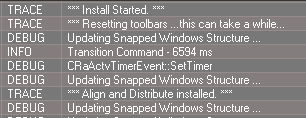
- Autoload.PNG (4.31 KiB) Viewed 6822 times
Isn't it suppose to install all of the toolbars from the Libray?
.
.

I notice that there is no IT toolbar prototype in TPE after installation, until you Reset the toolbar.
Suggest:
Code: Select all
// Gold RMB command
WindowsManager.CloseToolbar('ClintonToolbar');WindowsManager.CloseToolbar('ClintonsToolbarManagerToolbar');WindowsManager.CloseToolbar('CustomAnimToolbar');WindowsManager.CloseToolbar('NURBSToolbar')
// Gold help text = Open the Clinton Toolbar / Close all toolbars-
clintonman
- Captain
- Posts: 5659
- Joined: 21 May 2009, 21:08
- Type the number ten into the box: 0
- Location: California
Re: New Script installers ERROR
I don't remember. Please explain. I thought you said all the toolbars need to be reset before saving the toolbars encapsulator.trueBlue wrote: 17 Feb 2018, 17:01 ...
I think I have said this before but it would be awesome if you had a check that if the toolbar is installed, give an Alert that it is already installed and stop the reinstallation.
yes it's supposed to install all the scriptstrueBlue wrote: 17 Feb 2018, 17:01 It only installed the Align and Distribute.
Isn't it suppose to install all of the toolbars from the Libray?
I'll look into it.trueBlue wrote: 17 Feb 2018, 17:01 I notice that there is no IT toolbar prototype in TPE after installation, until you Reset the toolbar.
I'll download and install to see if I get the same results and make some screen shots if different.
-
clintonman
- Captain
- Posts: 5659
- Joined: 21 May 2009, 21:08
- Type the number ten into the box: 0
- Location: California
Re: New Script installers ERROR
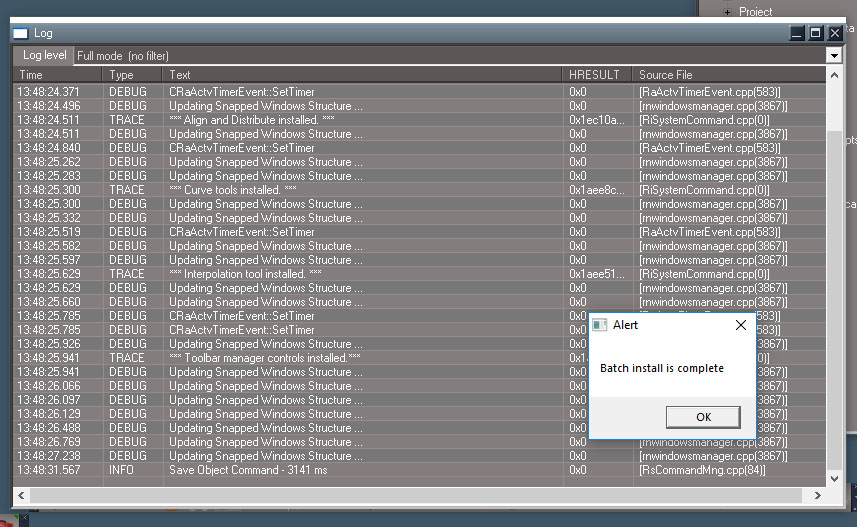
Edit:
Did install to stripped down to unofficial update and result is still good. Anim toolbar in the prototypes.
Next will try non-updated truespace.
Edit:
Install bare bones tS all went well except rt click red toolbox error.
-
trueBlue
- Captain
- Posts: 5548
- Joined: 06 Jul 2009, 22:50
- Type the number ten into the box: 10
Re: New Script installers ERROR
Code: Select all
With all toolbars installed with only the AutoLoad in the LE:

1.) Select Start
Only the Align and Distribute installed.

17:02:22.582  TRACE   *** Install Started. ***  0x1a666588   [RiSystemCommand.cpp(0)]
17:02:22.582  TRACE   *** Resetting toolbars ...this can take a while...  0x1a666588   [RiSystemCommand.cpp(0)]
17:02:22.582  DEBUG   Updating Snapped Windows Structure ...  0x0   [rnwindowsmanager.cpp(3867)]
17:02:27.598  INFO    Transition Command - 5015 ms  0x0   [RsCommandMng.cpp(84)]
17:02:27.676  DEBUG   CRaActvTimerEvent::SetTimer  0x0   [RaActvTimerEvent.cpp(583)]
17:02:27.770  DEBUG   Updating Snapped Windows Structure ...  0x0   [rnwindowsmanager.cpp(3867)]
17:02:27.770  TRACE   *** Align and Distribute installed. ***  0x19bd60b8   [RiSystemCommand.cpp(0)]
17:02:27.770  DEBUG   Updating Snapped Windows Structure ...  0x0   [rnwindowsmanager.cpp(3867)]
17:02:41.773  DEBUG   Updating Snapped Windows Structure ...  0x0   [rnwindowsmanager.cpp(3867)]

2.) Select Start
Only the C3D installed.

17:02:41.835  TRACE   *** Install Started. ***  0x0   [RiSystemCommand.cpp(49)]
17:02:41.835  TRACE   *** Resetting toolbars ...this can take a while...  0x0   [RiSystemCommand.cpp(49)]
17:02:46.867  INFO    Transition Command - 5000 ms  0x0   [RsCommandMng.cpp(84)]
17:02:46.898  DEBUG   CRaActvTimerEvent::SetTimer  0x0   [RaActvTimerEvent.cpp(583)]
17:02:51.961  INFO    Transition Command - 5031 ms  0x0   [RsCommandMng.cpp(84)]
17:04:13.802  INFO    Transition Command - 81828 ms  0x0   [RsCommandMng.cpp(84)]
17:04:13.802  DEBUG   Updating Snapped Windows Structure ...  0x0   [rnwindowsmanager.cpp(3867)]
17:04:13.849  TRACE   {17D544A3-3F58-436B-83E7-F8B4D7D4E7C5}  0x1babefc4   [RiSystemCommand.cpp(0)]
17:04:13.849  DEBUG   Updating Snapped Windows Structure ...  0x0   [rnwindowsmanager.cpp(3867)]
17:04:13.865  DEBUG   Updating Snapped Windows Structure ...  0x0   [rnwindowsmanager.cpp(3867)]

3.) Select Start
Only the Curve tools installed.

17:04:17.303  TRACE   *** Install Started. ***  0x0   [RiSystemCommand.cpp(49)]
17:04:17.303  TRACE   *** Resetting toolbars ...this can take a while...  0x0   [RiSystemCommand.cpp(49)]
17:04:22.303  INFO    Transition Command - 4969 ms  0x0   [RsCommandMng.cpp(84)]
17:04:22.522  DEBUG   CRaActvTimerEvent::SetTimer  0x0   [RaActvTimerEvent.cpp(583)]
17:04:22.897  DEBUG   Updating Snapped Windows Structure ...  0x0   [rnwindowsmanager.cpp(3867)]
17:04:22.913  DEBUG   Updating Snapped Windows Structure ...  0x0   [rnwindowsmanager.cpp(3867)]
17:04:22.913  TRACE   *** Curve tools installed. ***  0xb7ec400   [RiSystemCommand.cpp(0)]
17:04:22.913  DEBUG   Updating Snapped Windows Structure ...  0x0   [rnwindowsmanager.cpp(3867)]
17:04:22.928  DEBUG   Updating Snapped Windows Structure ...  0x0   [rnwindowsmanager.cpp(3867)]

4.) Select Start
The Interpolation tool installed and the Toolbar manager controls installed.

17:04:38.447  TRACE   *** Install Started. ***  0x0   [RiSystemCommand.cpp(49)]
17:04:38.447  TRACE   *** Resetting toolbars ...this can take a while...  0x0   [RiSystemCommand.cpp(49)]
17:04:43.432  INFO    Transition Command - 4953 ms  0x0   [RsCommandMng.cpp(84)]
17:04:43.464  DEBUG   CRaActvTimerEvent::SetTimer  0x0   [RaActvTimerEvent.cpp(583)]
17:04:43.510  DEBUG   Updating Snapped Windows Structure ...  0x0   [rnwindowsmanager.cpp(3867)]
17:04:43.510  DEBUG   Updating Snapped Windows Structure ...  0x0   [rnwindowsmanager.cpp(3867)]
17:04:43.526  TRACE   *** Interpolation tool installed. ***  0x1cd1e548   [RiSystemCommand.cpp(0)]
17:04:43.526  DEBUG   Updating Snapped Windows Structure ...  0x0   [rnwindowsmanager.cpp(3867)]
17:04:43.526  DEBUG   Updating Snapped Windows Structure ...  0x0   [rnwindowsmanager.cpp(3867)]
17:04:43.604  DEBUG   CRaActvTimerEvent::SetTimer  0x0   [RaActvTimerEvent.cpp(583)]
17:04:43.604  DEBUG   CRaActvTimerEvent::SetTimer  0x0   [RaActvTimerEvent.cpp(583)]
17:04:43.682  DEBUG   Updating Snapped Windows Structure ...  0x0   [rnwindowsmanager.cpp(3867)]
17:04:43.682  TRACE   *** Toolbar manager controls installed.***  0x1cd1c988   [RiSystemCommand.cpp(0)]
17:04:43.682  DEBUG   Updating Snapped Windows Structure ...  0x0   [rnwindowsmanager.cpp(3867)]
17:04:43.729  DEBUG   Updating Snapped Windows Structure ...  0x0   [rnwindowsmanager.cpp(3867)]
17:04:43.745  DEBUG   Updating Snapped Windows Structure ...  0x0   [rnwindowsmanager.cpp(3867)]
17:04:43.745  DEBUG   Updating Snapped Windows Structure ...  0x0   [rnwindowsmanager.cpp(3867)]
17:04:43.823  DEBUG   Updating Snapped Windows Structure ...  0x0   [rnwindowsmanager.cpp(3867)]
17:04:43.854  DEBUG   Updating Snapped Windows Structure ...  0x0   [rnwindowsmanager.cpp(3867)]
17:04:43.885  DEBUG   Updating Snapped Windows Structure ...  0x0   [rnwindowsmanager.cpp(3867)]
17:06:09.712  INFO    Transition Command - 85797 ms  0x0   [RsCommandMng.cpp(84)]
17:06:09.728  DEBUG   Updating Snapped Windows Structure ...  0x0   [rnwindowsmanager.cpp(3867)]
17:06:14.495  DEBUG   Updating Snapped Windows Structure ...  0x0   [rnwindowsmanager.cpp(3867)]

5.) Finally recieved the Alert "Batch install complete.

6.) Repeat steps above with same results-
clintonman
- Captain
- Posts: 5659
- Joined: 21 May 2009, 21:08
- Type the number ten into the box: 0
- Location: California
Re: New Script installers ERROR
Interesting. Can you save a context file so I can try to recreate your experience?
c3d is not a part of the autoload. did you place that in the autoload library?
Edit:
added c3d to the autoload library and now i see what you see, i think it just stops. usage is
1 install c3d
2 copy the library
3 run the autoload script
I'll add a countdown timer inside the autoload so it errors out and recovers when an incompatible script is added to the library
c3d is not a part of the autoload. did you place that in the autoload library?
Edit:
added c3d to the autoload library and now i see what you see, i think it just stops. usage is
1 install c3d
2 copy the library
3 run the autoload script
I'll add a countdown timer inside the autoload so it errors out and recovers when an incompatible script is added to the library
-
trueBlue
- Captain
- Posts: 5548
- Joined: 06 Jul 2009, 22:50
- Type the number ten into the box: 10
Re: New Script installers ERROR
Yes I had the C3D in the library. Oooops!
Deleted it and tried in the Expanded layout, same results minus the C3D installed.
Do you notice the DEBUG CRaActvTimerEvent::SetTimer 0x0 [RaActvTimerEvent.cpp(583)]
That is new for me.
Here is my Contex"
Deleted it and tried in the Expanded layout, same results minus the C3D installed.
Do you notice the DEBUG CRaActvTimerEvent::SetTimer 0x0 [RaActvTimerEvent.cpp(583)]
That is new for me.
Here is my Contex"
- Attachments
-
- Default Contex.zip
- (2.53 MiB) Downloaded 258 times
-
clintonman
- Captain
- Posts: 5659
- Joined: 21 May 2009, 21:08
- Type the number ten into the box: 0
- Location: California
Re: New Script installers ERROR
Is this with from the brand new unofficial update? I want to match you as closely as possible.trueBlue wrote: 18 Feb 2018, 01:39 Yes I had the C3D in the library. Oooops!
Deleted it and tried in the Expanded layout, same results minus the C3D installed.
Do you notice the DEBUG CRaActvTimerEvent::SetTimer 0x0 [RaActvTimerEvent.cpp(583)]
That is new for me.
Here is my Contex"
Also you will want to reload the autoloader script, if c3d was part of the process it will be in an unstable state.
The log view seems a bit unreliable to me. It shows things one time then doesn't show them another time, that is for the tS internal generated log items.
-
trueBlue
- Captain
- Posts: 5548
- Joined: 06 Jul 2009, 22:50
- Type the number ten into the box: 10
Re: New Script installers ERROR
Yes but should not be an issue, only a few unrelated files have been updated. I do have some additional toolbar prototypes though.clintonman wrote: 18 Feb 2018, 01:48 Is this with from the brand new unofficial update? I want to match you as closely as possible.
Also you will want to reload the autoloader script, if c3d was part of the process it will be in an unstable state.
You can see the list here"
viewtopic.php?t=5411
In my test I have reloaded the Autoloader each time. I do have it in your Library though.
-
trueBlue
- Captain
- Posts: 5548
- Joined: 06 Jul 2009, 22:50
- Type the number ten into the box: 10
Re: New Script installers ERROR
Okay I found out the problem, user error!
I had the AutoLoad and a Script in your library.
Deleted them and it runs as expected.
Maybe you should create and put the toolbar installers in a clintontoolbars folder?
I had the AutoLoad and a Script in your library.
Deleted them and it runs as expected.
Maybe you should create and put the toolbar installers in a clintontoolbars folder?
-
clintonman
- Captain
- Posts: 5659
- Joined: 21 May 2009, 21:08
- Type the number ten into the box: 0
- Location: California
Re: New Script installers ERROR
Made new autoload that recovers from non-compliant installer found in the autoload library.trueBlue wrote: 18 Feb 2018, 02:18 Okay I found out the problem, user error!
I had the AutoLoad and a Script in your library.
Deleted them and it runs as expected.
Why? Is this related to not installing pre-existing toolbars you mentioned earlier?trueBlue wrote: 18 Feb 2018, 02:18 ...
Maybe you should create and put the toolbar installers in a clintontoolbars folder?
- Attachments
-
- Autoload9c07.RsObj
- (86.01 KiB) Downloaded 672 times
-
trueBlue
- Captain
- Posts: 5548
- Joined: 06 Jul 2009, 22:50
- Type the number ten into the box: 10
Re: New Script installers ERROR
No, I was thinking it would be more safe if they were not in a library.
As you can see from what happened with me, it is possible to screw up. Ooooops!
I'll check out your new AutoLoad.
As you can see from what happened with me, it is possible to screw up. Ooooops!
I'll check out your new AutoLoad.
-
clintonman
- Captain
- Posts: 5659
- Joined: 21 May 2009, 21:08
- Type the number ten into the box: 0
- Location: California
Re: New Script installers ERROR
A huge part of programming is trying to anticipate what people will do. What you did makes perfect sense from someone who didn't write the thing. It autoloads scripts from the library so... yeah. Write the way you hope people will use it then rewrite to account for the 100 different ways people actually use it.trueBlue wrote: 18 Feb 2018, 03:02 No, I was thinking it would be more safe if they were not in a library.
As you can see from what happened with me, it is possible to screw up. Ooooops!
I'll check out your new AutoLoad.
-
trueBlue
- Captain
- Posts: 5548
- Joined: 06 Jul 2009, 22:50
- Type the number ten into the box: 10
Re: New Script installers ERROR
Found a different, less complicated, way of resetting toolbars in the reset.js file.
Could find the user's present layout in Project/Windows Manager Space's LayoutName attribute string.
Code: Select all
// Called to Reset the Toolbars and load the default_layout

function Execute(params)
{
Node.Delete("/Toolbar Prototypes Encapsulator")

    RsFileIO.LoadObject(System.GetMainDir() + '\\scripts\\preObjects\\Toolbars.rsobj', '/');

    if ( !WindowsManager.LoadLayout('\\default_layout.rsl'))
    {

    }

    LE.DefaultPlacement();
    WindowsManager.Activate();
}
- Attachments
-
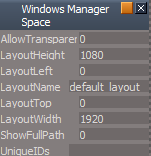
- WMS.PNG (5.12 KiB) Viewed 11243 times
-
clintonman
- Captain
- Posts: 5659
- Joined: 21 May 2009, 21:08
- Type the number ten into the box: 0
- Location: California
Re: New Script installers ERROR
And do what with it? Do we use it to restore the users layout after installing scripts?trueBlue wrote: 21 Feb 2018, 17:36 Could find the user's present layout in Project/Windows Manager Space's LayoutName attribute string.
And what is the purpose of loading the default layout? I'm guessing it's to load the toolbars into the actual windows or does the "WindowsManager.Activate()" do that? Or maybe they work together?
What does "LE.DefaultPlacement() do?"
Please tell me what you know without assuming I already know, because I don't. You can probably tell by the questions.

-
trueBlue
- Captain
- Posts: 5548
- Joined: 06 Jul 2009, 22:50
- Type the number ten into the box: 10
Re: New Script installers ERROR
Yes I was thinking that would be possible to reload the present layout if needed. Just showing where that info was. But then again you do not really know where the user's layouts reside. They could possible setup a different location. I tried different variants with deleting/reloading the Toolbars, even with the WindowsManager.Activate() command, but nothing reset the toolbars. For whatever reason, loading the default_layout as shown worked. Every time you Reset the Default Context, that is the layout being used when tS7 reboots. I have tried to use LE.DefaultPlacement() but I could not get it to work. I am guessing it is similar to the Arrange command. Anyway just sharing what I discovered. Could be useful with your project though, given if you run it prior to installing your toolbars, first and only once.clintonman wrote: 22 Feb 2018, 03:16And do what with it? Do we use it to restore the users layout after installing scripts?trueBlue wrote: 21 Feb 2018, 17:36 Could find the user's present layout in Project/Windows Manager Space's LayoutName attribute string.
And what is the purpose of loading the default layout? I'm guessing it's to load the toolbars into the actual windows or does the "WindowsManager.Activate()" do that? Or maybe they work together?
What does "LE.DefaultPlacement() do?"
Please tell me what you know without assuming I already know, because I don't. You can probably tell by the questions.
-
clintonman
- Captain
- Posts: 5659
- Joined: 21 May 2009, 21:08
- Type the number ten into the box: 0
- Location: California
Re: New Script installers ERROR
OK, got it. It's more of a "here are some experiments I've tried" as opposed to "found a better way, you should do this instead" thing.trueBlue wrote: 22 Feb 2018, 04:35Yes I was thinking that would be possible to reload the present layout if needed. Just showing where that info was. But then again you do not really know where the user's layouts reside. They could possible setup a different location. I tried different variants with deleting/reloading the Toolbars, even with the WindowsManager.Activate() command, but nothing reset the toolbars. For whatever reason, loading the default_layout as shown worked. Every time you Reset the Default Context, that is the layout being used when tS7 reboots. I have tried to use LE.DefaultPlacement() but I could not get it to work. I am guessing it is similar to the Arrange command. Anyway just sharing what I discovered. Could be useful with your project though, given if you run it prior to installing your toolbars, first and only once.clintonman wrote: 22 Feb 2018, 03:16And do what with it? Do we use it to restore the users layout after installing scripts?trueBlue wrote: 21 Feb 2018, 17:36 Could find the user's present layout in Project/Windows Manager Space's LayoutName attribute string.
And what is the purpose of loading the default layout? I'm guessing it's to load the toolbars into the actual windows or does the "WindowsManager.Activate()" do that? Or maybe they work together?
What does "LE.DefaultPlacement() do?"
Please tell me what you know without assuming I already know, because I don't. You can probably tell by the questions.
So the final goal is to get all the toolbars to a "new" untouched state before making changes. That way if the user has made some toolbar changes we get a predictable outcome when adding new items.
-
trueBlue
- Captain
- Posts: 5548
- Joined: 06 Jul 2009, 22:50
- Type the number ten into the box: 10
Re: New Script installers ERROR
Hey Clinton,
Nearing the end of the Final Update. Here is all of the prototypes listed in your Reset Toolbars and the Red, Blue, and Gold buttons. Please add the buttons to your C3D installer.
The Red commands have changed, the Gold is from your latest C3D toolbar, and then the addition of the Blue button.
Thanks!
With the Final Update I have included your C3D toolbar, if that is okay with you. I figured users could install your other toolbars that they want.
Nearing the end of the Final Update. Here is all of the prototypes listed in your Reset Toolbars and the Red, Blue, and Gold buttons. Please add the buttons to your C3D installer.
The Red commands have changed, the Gold is from your latest C3D toolbar, and then the addition of the Blue button.
Thanks!
With the Final Update I have included your C3D toolbar, if that is okay with you. I figured users could install your other toolbars that they want.
- Attachments
-
- Final toolbar prototypes and Red Blue Gold buttons.zip
- (11.37 KiB) Downloaded 665 times
-
clintonman
- Captain
- Posts: 5659
- Joined: 21 May 2009, 21:08
- Type the number ten into the box: 0
- Location: California
Re: New Script installers ERROR
Good timing. I plan to start the installers this weekend and release when they are all done. That is that the persistent installers v1 have all been replaced with the new v2 installer.trueBlue wrote: 23 Feb 2018, 20:38 Hey Clinton,
Nearing the end of the Final Update. Here is all of the prototypes listed in your Reset Toolbars and the Red, Blue, and Gold buttons. Please add the buttons to your C3D installer.
The Red commands have changed, the Gold is from your latest C3D toolbar, and then the addition of the Blue button.
Thanks!
With the Final Update I have included your C3D toolbar, if that is okay with you. I figured users could install your other toolbars that they want.
Thanks for your help.
-
clintonman
- Captain
- Posts: 5659
- Joined: 21 May 2009, 21:08
- Type the number ten into the box: 0
- Location: California
Re: New Script installers ERROR
I copied all your new items for the Reset Toolbars script.trueBlue wrote: 23 Feb 2018, 20:38 Hey Clinton,
Nearing the end of the Final Update. Here is all of the prototypes listed in your Reset Toolbars and the Red, Blue, and Gold buttons. Please add the buttons to your C3D installer.
The Red commands have changed, the Gold is from your latest C3D toolbar, and then the addition of the Blue button.
Thanks!
With the Final Update I have included your C3D toolbar, if that is okay with you. I figured users could install your other toolbars that they want.
You're Reset Toolbars doesn't have 3 items I have in mine.
Code: Select all
	syncPrototype["UVEditor"] = 1;//???
	syncPrototype["NavigationToolbar"] = 1;//???
syncPrototype["LENavigatorBar"] = 1;//???-
trueBlue
- Captain
- Posts: 5548
- Joined: 06 Jul 2009, 22:50
- Type the number ten into the box: 10
Re: New Script installers ERROR
Thanks, added them back in.
Having an issue with modifying the onnewscene.xml file. Seems that when I export the changes to the existing file from the script editor, the GUID is missing in the header of the xml file.
I am going to try a differant approach but have accidently deleted that script that adds the con and string to the Status node. Can you post it again?
Also what is your plan for incorporating the Auto Key framing?
Having an issue with modifying the onnewscene.xml file. Seems that when I export the changes to the existing file from the script editor, the GUID is missing in the header of the xml file.
I am going to try a differant approach but have accidently deleted that script that adds the con and string to the Status node. Can you post it again?
Also what is your plan for incorporating the Auto Key framing?
-
clintonman
- Captain
- Posts: 5659
- Joined: 21 May 2009, 21:08
- Type the number ten into the box: 0
- Location: California
Re: New Script installers ERROR
Here's the code from the normal move script:trueBlue wrote: 24 Feb 2018, 21:02 Thanks, added them back in.
Having an issue with modifying the onnewscene.xml file. Seems that when I export the changes to the existing file from the script editor, the GUID is missing in the header of the xml file.
I am going to try a differant approach but have accidently deleted that script that adds the con and string to the Status node. Can you post it again?
Also what is your plan for incorporating the Auto Key framing?
Code: Select all
	if(!Node.Exists("Status Line"))
		return;
	if(!Node.ConExists("Status Line", "Model"))
		Node.ConCreate("Status Line", "Model", "string", 4);
Node.Value("Status Line", "Model") = "left button drag to move points along normals. right click to end.";- Attachments
-
- AutoKey_Autoload.RsObj
- (75.02 KiB) Downloaded 277 times
-
trueBlue
- Captain
- Posts: 5548
- Joined: 06 Jul 2009, 22:50
- Type the number ten into the box: 10
Re: New Script installers ERROR
Thanks got it fixed.
Is there a requirement before installing your Auto Keyframing?
I am not seeing the KeyInterp in the installer.
I have one very small request to satisfy me OCD.
Can you make your button on the Animation preference panel the same size as the other buttons?
Height = 20
Is there a requirement before installing your Auto Keyframing?
Code: Select all
		RsAnim.SetKeyFrame(Node.FirstSelected(), RsTime.CurrentTime());
		if(Node.Exists("Scripts/CustomCommands/KeyInterp"))
			Activity.Run("Scripts/CustomCommands/KeyInterp/copyDefaultInterp");
I have one very small request to satisfy me OCD.
Can you make your button on the Animation preference panel the same size as the other buttons?
Height = 20
-
clintonman
- Captain
- Posts: 5659
- Joined: 21 May 2009, 21:08
- Type the number ten into the box: 0
- Location: California
Re: New Script installers ERROR
Auto Key requires the c3d persistent v2.trueBlue wrote: 24 Feb 2018, 23:41 Thanks got it fixed.
Is there a requirement before installing your Auto Keyframing?I am not seeing the KeyInterp in the installer.Code: Select all
		RsAnim.SetKeyFrame(Node.FirstSelected(), RsTime.CurrentTime());
		if(Node.Exists("Scripts/CustomCommands/KeyInterp"))
			Activity.Run("Scripts/CustomCommands/KeyInterp/copyDefaultInterp");
I have one very small request to satisfy me OCD.
Can you make your button on the Animation preference panel the same size as the other buttons?
Height = 20
Key interp is a separate installer. Autokey does not require interpolation toolbar and interpolation toolbar does not require auto key.
-
trueBlue
- Captain
- Posts: 5548
- Joined: 06 Jul 2009, 22:50
- Type the number ten into the box: 10
Re: New Script installers ERROR
If it is not to much of a problem, can you add the new WinGUID_Bar to 'Reset Toolbars' in your Autoload.RsObj?
Code: Select all
syncPrototype["WinGUID_Bar"] = 1;-
trueBlue
- Captain
- Posts: 5548
- Joined: 06 Jul 2009, 22:50
- Type the number ten into the box: 10
Re: New Script installers ERROR
Here is a new c3dPersistencev3 Autoload script that I thoroughly tested with the original trueSpace installations and the UU10 installations
Your current c3dPersistencev3 Autoload script removes the C3DButton's RClickCommand (Reset Custom Commands) in the UU10
It was in possible, using your current technique, changing that value due to it being a cmd ... RsApp.RunScriptBuffer(cmd)
So, I am adding this value to the included C3DButton and changing it in your Install script for non UU installs that opens the Scripts Manager
More importantly, your Scripts Manager version does not close several on-demand scripts if they are in use!
Partial examples:
I hope you will adopt this modified version
Your current c3dPersistencev3 Autoload script removes the C3DButton's RClickCommand (Reset Custom Commands) in the UU10
Code: Select all
cmd='CCFS=Node.AccessFnSet("Scripts/CustomCommands/CCFunctionSet");CCFS.RestoreC3DBackup();';RsApp.RunScriptBuffer(cmd)So, I am adding this value to the included C3DButton and changing it in your Install script for non UU installs that opens the Scripts Manager
More importantly, your Scripts Manager version does not close several on-demand scripts if they are in use!
Partial examples:
Code: Select all
ScriptObject.Execute('Scripts/CustomCommands/SnappingScripts/toolbarScripts/resetState')
ScriptObject.Execute('Scripts/CustomCommands/objectStats/ClosePanel')
ScriptObject.Execute('Scripts/CustomCommands/PaintVertexColor/ClosePanel'
- Attachments
-
- c3dPersistencev3 Autoload.RsObj
- (759.92 KiB) Downloaded 32 times