I have broken the links to some of the new installers because of a bug. A side effect of saving new widgets is that some widgets get doubled up when doing a reset to default context. Everything works ok but it's not a good thing. I will update and fix the installers and update here.
I updated the persistent installer with a new button, "Restore Widgets to Originals".
http://clintons3d.com/plugins/truespace ... stent.html
1. press the button
2. restore truespace to the default context
3. reinstall any scripts that use widgets
Next is to fix the affected installers: normal move, boolean slice, target weld, curve tools, enhanced widgets, enhanced zoom, camera transform, spotlight transform and maya navigation.
New Script installers ERROR
-
clintonman

- Captain
- Posts: 5659
- Joined: 21 May 2009, 21:08
- Type the number ten into the box: 0
- Location: California
 New Script installers ERROR
-
trueBlue

- Captain
- Posts: 5548
- Joined: 06 Jul 2009, 22:50
- Type the number ten into the box: 10
Re: New Script installers ERROR
Code: Select all
//Install new Widgets here:
Node.Delete("/Widgets/Active Widgets Layer2/Active Widget")
Node.Delete("/Widgets/Active Widgets Layer2/Active Widget, 1")
Node.Delete("/Widgets/Active Widgets Layer2/Active Widget, 2")
Node.Delete("/Widgets/Active Widgets Layer2/Active Widget, 3")
Node.Delete("/Widgets/Active Widgets Layer2/Active Widget, 4")
Node.Delete("/Widgets/Active Widgets Layer2/Active Widget, 5")
Node.Delete("/Widgets/Active Widgets Layer2/Active Widget, 6")
RsFileIO.SaveObject(System.GetMainDir() + '\\Scripts\\preobjects\\Widgets.RsObj', '/Widgets')
Widgets.ActivateWidget('/Widgets/Tools/ViewWidget','Default', '', '')
Widgets.ActivateWidget('/Widgets/Tools/Background','Default', '', '')
Widgets.ReplaceWidget('{5C9008D4-B6B3-4359-9E63-18D2FC228A6E}','/Widgets/Edit/Default context','Default','','Dummy')
Widgets.SetWidgetGroupDependency('{5C9008D4-B6B3-4359-9E63-18D2FC228A6E}','{E8913C00-9A2A-43cf-8238-27B4BFB50A1F}')
Widgets.SetWidgetGroupDependency('{5C9008D4-B6B3-4359-9E63-18D2FC228A6E}','{88839603-7F98-41f0-96AC-BE94E801CFF3}')
Widgets.SetWidgetGroupDependency('{E8913C00-9A2A-43cf-8238-27B4BFB50A1F}','{88839603-7F98-41f0-96AC-BE94E801CFF3}')-
clintonman
- Captain
- Posts: 5659
- Joined: 21 May 2009, 21:08
- Type the number ten into the box: 0
- Location: California
Re: New Script installers ERROR
Thanks, it's all fixed now. What I did was copy all the nodes out of Active Widgets Layer2, deleted them, saved the Widgets node to preobjects and then copied the nodes back in. Reset to default context looks clean now.trueBlue wrote: 14 Jan 2018, 22:44The above seems to work restoring the deleted Widgets and saving from having to Reset trueSpace.Code: Select all
//Install new Widgets here:
Node.Delete("/Widgets/Active Widgets Layer2/Active Widget")
Node.Delete("/Widgets/Active Widgets Layer2/Active Widget, 1")
Node.Delete("/Widgets/Active Widgets Layer2/Active Widget, 2")
Node.Delete("/Widgets/Active Widgets Layer2/Active Widget, 3")
Node.Delete("/Widgets/Active Widgets Layer2/Active Widget, 4")
Node.Delete("/Widgets/Active Widgets Layer2/Active Widget, 5")
Node.Delete("/Widgets/Active Widgets Layer2/Active Widget, 6")
RsFileIO.SaveObject(System.GetMainDir() + '\\Scripts\\preobjects\\Widgets.RsObj', '/Widgets')
Widgets.ActivateWidget('/Widgets/Tools/ViewWidget','Default', '', '')
Widgets.ActivateWidget('/Widgets/Tools/Background','Default', '', '')
Widgets.ReplaceWidget('{5C9008D4-B6B3-4359-9E63-18D2FC228A6E}','/Widgets/Edit/Default context','Default','','Dummy')
Widgets.SetWidgetGroupDependency('{5C9008D4-B6B3-4359-9E63-18D2FC228A6E}','{E8913C00-9A2A-43cf-8238-27B4BFB50A1F}')
Widgets.SetWidgetGroupDependency('{5C9008D4-B6B3-4359-9E63-18D2FC228A6E}','{88839603-7F98-41f0-96AC-BE94E801CFF3}')
Widgets.SetWidgetGroupDependency('{E8913C00-9A2A-43cf-8238-27B4BFB50A1F}','{88839603-7F98-41f0-96AC-BE94E801CFF3}')
-
clintonman
- Captain
- Posts: 5659
- Joined: 21 May 2009, 21:08
- Type the number ten into the box: 0
- Location: California
Re: New Script installers ERROR
All the installers that use widgets have been fixed now and the download links have been reactivated.
Thank you to trueBlue for the heads up on this issue.
Thank you to trueBlue for the heads up on this issue.
-
trueBlue
- Captain
- Posts: 5548
- Joined: 06 Jul 2009, 22:50
- Type the number ten into the box: 10
Re: New Script installers ERROR
Glad you got it sorted.
Kind of a Deja Vu moment for me! Reminded me of all of us at the Caligari Forum tying to create our own version of Widgets. tS7 developers were kind of coy offering their insight. Most likely did not want us to out shine their Widgets. He He (;-)
Missing Tomas as well. (:-(
Kind of a Deja Vu moment for me! Reminded me of all of us at the Caligari Forum tying to create our own version of Widgets. tS7 developers were kind of coy offering their insight. Most likely did not want us to out shine their Widgets. He He (;-)
Missing Tomas as well. (:-(
-
trueBlue
- Captain
- Posts: 5548
- Joined: 06 Jul 2009, 22:50
- Type the number ten into the box: 10
Re: New Script installers ERROR
Love all that do for tS7.!!!
I have a personal request and hopefully it will not interfere with users that have already installed your persistent installer.
1.) Please add an additional check for your ClintonToolbar in CustomToolbar
I added a CustomToobarButton and your C3DButton inside the
2.) Add a prototype of your to your CustomToolbar.
With your toolbar open and within Windows Manager Space, I entered CintonsToobar in the ID, Name, and Prototype attributes and pressed the Enter key.
It creates a prototype in Toolbar Prototypes Encapsulator named ClintonsToolbar, 1
I renamed it to ClintonsToolbar
Then I saved your ClintonToolbarFrame.RsObj
Hopefully you do not mind and I would be extremely grateful!
I have a personal request and hopefully it will not interfere with users that have already installed your persistent installer.
1.) Please add an additional check for your ClintonToolbar in CustomToolbar
I added a CustomToobarButton and your C3DButton inside the
Code: Select all
/System/Toolbar Prototypes Encapsulator/WorkspaceNav/CustomToolbarButton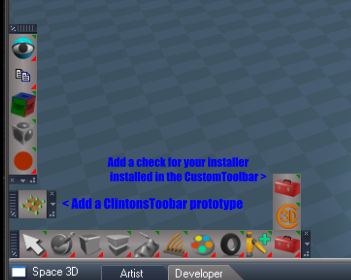
- Capture2.PNG (63.75 KiB) Viewed 7800 times
With your toolbar open and within Windows Manager Space, I entered CintonsToobar in the ID, Name, and Prototype attributes and pressed the Enter key.
It creates a prototype in Toolbar Prototypes Encapsulator named ClintonsToolbar, 1
I renamed it to ClintonsToolbar

- Capture.PNG (5.79 KiB) Viewed 7802 times
Hopefully you do not mind and I would be extremely grateful!
-
clintonman
- Captain
- Posts: 5659
- Joined: 21 May 2009, 21:08
- Type the number ten into the box: 0
- Location: California
Re: New Script installers ERROR
Confused here.trueBlue wrote: 27 Jan 2018, 16:29 Love all that do for tS7.!!!
I have a personal request and hopefully it will not interfere with users that have already installed your persistent installer.
1.) Please add an additional check for your ClintonToolbar in CustomToolbar
I added a CustomToobarButton and your C3DButton inside theCapture2.PNGCode: Select all
/System/Toolbar Prototypes Encapsulator/WorkspaceNav/CustomToolbarButton
2.) Add a prototype of your to your CustomToolbar.
With your toolbar open and within Windows Manager Space, I entered CintonsToobar in the ID, Name, and Prototype attributes and pressed the Enter key.
It creates a prototype in Toolbar Prototypes Encapsulator named ClintonsToolbar, 1
I renamed it to ClintonsToolbar
Capture.PNG
Then I saved your ClintonToolbarFrame.RsObj
Hopefully you do not mind and I would be extremely grateful!
Step 1 are you asking for the individual installs to check for the existence of the button ?
Code: Select all
/System/Toolbar Prototypes Encapsulator/WorkspaceNav/CustomToolbarButton/C3DButtonEdit: Looking at the installers I think I can alter them to check for the alternate button location and write the 3 values to the toolbar node inside the ClintonToolbarFrame node. I don't know if that's enough to do what you want. I don't have any knowledge of creating Toolbar Prototypes except for what you wrote above. If this won't do it maybe some kind of toolbar update installer can be made.
-
clintonman
- Captain
- Posts: 5659
- Joined: 21 May 2009, 21:08
- Type the number ten into the box: 0
- Location: California
Re: New Script installers ERROR
OK, did some tests and understand the request now. I'll get back to you. First test shows the prototype completely takes over, lost all buttons and can't reinstall them because prototype erases them. Need figure way around it, otherwise will just have to replace all installers to use the prototype.
Edit:
Yep, need to redo all the installers to use prototype toolbar. No way to mix the two methods.
Edit:
Yep, need to redo all the installers to use prototype toolbar. No way to mix the two methods.
-
trueBlue
- Captain
- Posts: 5548
- Joined: 06 Jul 2009, 22:50
- Type the number ten into the box: 10
Re: New Script installers ERROR
Sorry I did not think about all the individual installers doing the check.
I do not want to cause problems so I will leave up to you.
With regards to creating a prototype:
I tested this 4 or 5 times and its simple as replacing your ClintonToolbarFrame.RsObj and saving.
Here included is your most recent installer with the auto load disabled.
Added modified frame
Added CustomToolbarButtons that include your button
Noted and edited the install script.
Removed due to update
Resetting the toolbars from script isn't working sometimes. I think when a user makes modifications to toolbar the WinID changes?
I do not want to cause problems so I will leave up to you.
With regards to creating a prototype:
I tested this 4 or 5 times and its simple as replacing your ClintonToolbarFrame.RsObj and saving.
Here included is your most recent installer with the auto load disabled.
Added modified frame
Added CustomToolbarButtons that include your button
Noted and edited the install script.
Removed due to update
Resetting the toolbars from script isn't working sometimes. I think when a user makes modifications to toolbar the WinID changes?
-
clintonman
- Captain
- Posts: 5659
- Joined: 21 May 2009, 21:08
- Type the number ten into the box: 0
- Location: California
Re: New Script installers ERROR
Here is what I got. I updated the persistent install to include your button group. I bypassed the toolbar reset by closing then opening the toolbar. Also attached are 2 new installers. Let me know if these work for you.
- Attachments
-
- CTRL Autoload.RsObj
- (85.3 KiB) Downloaded 323 times
-
- c3dPersistenceAutoloadc59d.RsObj
- (91.38 KiB) Downloaded 315 times
-
- AlignmentDistribution Autoload.RsObj
- (367.73 KiB) Downloaded 305 times
-
trueBlue
- Captain
- Posts: 5548
- Joined: 06 Jul 2009, 22:50
- Type the number ten into the box: 10
Re: New Script installers ERROR
When I installed your installer I had to reset the WorkSspace Nav bar from it's icon.
Noticed 2 ClintonToobars open. One was using ClintonToolbarFrame and other Frame, 2
I think what the problem was is that I had named your prototype ClintonsToolbar (Look at the previous pic) where as yours is named Toolbar. So I deleted all Clinton toobars and buttons leaving the Workspace Nav as it was with the Unofficial Update. I reinstalled with your installer and everything seemes fine except it is not using your ClintonToolbarFrame. I deleted the ClintonToolbarFrame.RsObj. I reinstalled with your installer and notice that the ClintonToolbarFrame.RsObj is not recreated. And it is still using Frame, 2. I put the ClintonToolbarFrame.RsObj back in the folder, and it is still using Frame, 2.
Don't know if this was intentional but it scared that **** out of me. (;-)
Noticed 2 ClintonToobars open. One was using ClintonToolbarFrame and other Frame, 2
I think what the problem was is that I had named your prototype ClintonsToolbar (Look at the previous pic) where as yours is named Toolbar. So I deleted all Clinton toobars and buttons leaving the Workspace Nav as it was with the Unofficial Update. I reinstalled with your installer and everything seemes fine except it is not using your ClintonToolbarFrame. I deleted the ClintonToolbarFrame.RsObj. I reinstalled with your installer and notice that the ClintonToolbarFrame.RsObj is not recreated. And it is still using Frame, 2. I put the ClintonToolbarFrame.RsObj back in the folder, and it is still using Frame, 2.
Don't know if this was intentional but it scared that **** out of me. (;-)
Code: Select all
WindowsManager.OpenToolbarFromPrototype("ClintonsToolbar", 256, 256, 256, 256);-
clintonman
- Captain
- Posts: 5659
- Joined: 21 May 2009, 21:08
- Type the number ten into the box: 0
- Location: California
Re: New Script installers ERROR
It looks like the method I found to reset the workspacenav toolbar doesn't work. I was using:trueBlue wrote: 28 Jan 2018, 01:35 When I installed your installer I had to reset the WorkSspace Nav bar from it's icon.
Noticed 2 ClintonToobars open. One was using ClintonToolbarFrame and other Frame, 2
I think what the problem was is that I had named your prototype ClintonsToolbar (Look at the previous pic) where as yours is named Toolbar. So I deleted all Clinton toobars and buttons leaving the Workspace Nav as it was with the Unofficial Update. I reinstalled with your installer and everything seemes fine except it is not using your ClintonToolbarFrame. I deleted the ClintonToolbarFrame.RsObj. I reinstalled with your installer and notice that the ClintonToolbarFrame.RsObj is not recreated. And it is still using Frame, 2. I put the ClintonToolbarFrame.RsObj back in the folder, and it is still using Frame, 2.
Don't know if this was intentional but it scared that **** out of me. (;-)Code: Select all
WindowsManager.OpenToolbarFromPrototype("ClintonsToolbar", 256, 256, 256, 256);
Code: Select all
WindowsManager.SynchronizeCommand( '{22D97C3F-E1C6-4BBF-91D7-DF13B1101743}', 4, '', '');The only way I see to use toolbar prototype is to not have the named ClintonToolbarFrame and just let truespace do what it wants by running the scary command
Code: Select all
WindowsManager.OpenToolbarFromPrototype("ClintonsToolbar", 256, 256, 256, 256);Outside of the reset problem, any thoughts?
-
clintonman
- Captain
- Posts: 5659
- Joined: 21 May 2009, 21:08
- Type the number ten into the box: 0
- Location: California
Re: New Script installers ERROR
This installer goes back to the old way of resetting a toolbar by changing it to 1D then back to 2D. Very hacky but it works.
- Attachments
-
- c3dPersistenceAutoload791a.RsObj
- (92.56 KiB) Downloaded 235 times
-
trueBlue
- Captain
- Posts: 5548
- Joined: 06 Jul 2009, 22:50
- Type the number ten into the box: 10
Re: New Script installers ERROR
Forgot to mention it is working fine! It was just not using your frame as originally.
I just changed you command before your last post and now it is using your ClintonToolbarFrame.
So I would stay with that.
With your original button command I would add a Save from Windows Manager to ClintonToolbarFrame.RsObj,
that way it saves it's position, and all other options.
I am going to test to see if the prototype is working correctly.
Not sure about resetting ALL of the OPENED toolbars but I have confirmed that a few of them have changed.
For now I can only suggest that a user manully reset all open toolbars before you save the Toolbars.RsObj from script.
Just to clarify when I was making the Custom Toolbar released with the last Unofficial Update. I noticed that if I was using any of the official toobars and they were any different from the original index, AND I saved the Toolbar.RsObj from script, they were saved in that state. So I was resetting them by there path in the Default layout. This was in their default original state. Look at the Save script in Widgets/Tools/Custom Toolbar Preferences.
I do not think that chaging from 1D to 2D is going to matter.
I'll let you know what I find.
I just changed you command before your last post and now it is using your ClintonToolbarFrame.
So I would stay with that.
With your original button command I would add a Save from Windows Manager to ClintonToolbarFrame.RsObj,
that way it saves it's position, and all other options.
I am going to test to see if the prototype is working correctly.
Not sure about resetting ALL of the OPENED toolbars but I have confirmed that a few of them have changed.
For now I can only suggest that a user manully reset all open toolbars before you save the Toolbars.RsObj from script.
Just to clarify when I was making the Custom Toolbar released with the last Unofficial Update. I noticed that if I was using any of the official toobars and they were any different from the original index, AND I saved the Toolbar.RsObj from script, they were saved in that state. So I was resetting them by there path in the Default layout. This was in their default original state. Look at the Save script in Widgets/Tools/Custom Toolbar Preferences.
I do not think that chaging from 1D to 2D is going to matter.
I'll let you know what I find.
-
clintonman
- Captain
- Posts: 5659
- Joined: 21 May 2009, 21:08
- Type the number ten into the box: 0
- Location: California
Re: New Script installers ERROR
Roger that, I'll move forward after I hear from you.
-
trueBlue
- Captain
- Posts: 5548
- Joined: 06 Jul 2009, 22:50
- Type the number ten into the box: 10
Re: New Script installers ERROR
This is how I am saving my Custom Toolbar presently.
Code: Select all
function Execute(params)
{
if (Node.Exists("/Project/Windows Manager Space/Custom Toolbar Frame"))
{
WindowsManager.SynchronizeCommand( '{0CD05D95-C78C-4A80-894D-8C13E5E8B849}', 4, '', '') //File menu
WindowsManager.SynchronizeCommand( '{A5876B44-6C2B-45BC-8338-0D338E2097B1}', 4, '', '') //New View
WindowsManager.SynchronizeCommand( '{16B76542-DAF9-49D7-BC3E-C0A2A4ADA6D1}', 4, '', '') //Workspace Nav
//WindowsManager.SynchronizeCommand( '{E4A42E12-80C0-4B2B-8807-FE461407083C}', 4, '', '') //Custom Tool
WindowsManager.SynchronizeCommand( '{A5876B44-6C2B-45BC-8338-0D338E2097B1}', 4, '', '') //Animation
WindowsManager.SynchronizeCommand( '{DB8FF3AE-6061-4700-83A3-27A07259B027}', 4, '', '') //Workspace Main

//WindowsManager.SynchronizeCommand( '{22D97C3F-E1C6-4BBF-91D7-DF13B1101743}', 4, '', '') //New Installer Clinton toolbar
//WindowsManager.SynchronizeCommand( '{91913478-046D-4E06-92DD-08D73EBE554C}', 4, '', '')  //Clinton toolbar


RsFileIO.SaveObject(System.GetMainDir() + '\\Scripts\\preobjects\\Custom Toolbar Frame.RsObj', '/Project/Windows Manager Space/Custom Toolbar Frame')
RsFileIO.SaveObject(System.GetMainDir() + '\\Scripts\\preobjects\\Toolbars.RsObj', '/Toolbar Prototypes Encapsulator')
WindowsManager.CloseWindow("/Project/Windows Manager Space/Custom Toolbar Frame")
RsFileIO.LoadObject(System.GetMainDir() + '\\Scripts\\preobjects\\Custom Toolbar Frame.RsObj', "Project/Windows Manager Space/")
WindowsManager.Activate()
WindowsManager.UpdateWindowsStructure()-
clintonman
- Captain
- Posts: 5659
- Joined: 21 May 2009, 21:08
- Type the number ten into the box: 0
- Location: California
Re: New Script installers ERROR
That helps and I see why my reset toolbar with synchronize command stopped working. The guid are not the same in different layouts. For instance in 4 view layout there are 4 WorkspaceNav toolbars all with unique id. I also think I found a bug in the toolbars, the little view toolbar at the top has the same id as the animation toolbar. I think the way to go is to search for the toolbars and read their winids to be used with the WindowsManager.SynchronizeCommand. This will also get rid of all those magic numbers.
-
clintonman
- Captain
- Posts: 5659
- Joined: 21 May 2009, 21:08
- Type the number ten into the box: 0
- Location: California
Re: New Script installers ERROR
Last post for the night. Code listing shows how I plan to get the winid for the synchronize commands. It searches for nodes that have the 5 prototypes of interest and prints their info to the log window.
Code: Select all
// Execute
// Called to execute the command
function Execute(params)
{
	syncPrototype = [];
	syncPrototype["WorkspaceMain"] = 1;
	syncPrototype["WorkspaceMainMenu"] = 1;//file menu
	syncPrototype["WorkspaceNav"] = 1;
	syncPrototype["WorkspaceAnim"] = 1;
	syncPrototype["UnofficialUpdateViewBar"] = 1;

	ExploreWMS("/Project/Windows Manager Space");
}

function ExploreWMS(currentNode)
{
	if(Node.ConExists(currentNode, "Prototype")) {
		var frame = Node.Owner(currentNode);
		var prototype = Node.Value(currentNode, "Prototype");
		var winid = Node.Value(frame, "WinID");
		if(syncPrototype[prototype]) {
			System.Trace(prototype + " - " + winid);
			return;
		}
	}
	var childCount = Node.SubObjectCount(currentNode);
	if(childCount == 0) return;
	for(var i = 0; i < childCount; i++) {
		var newNode = currentNode + "/" + Node.SubObject(currentNode, i);
		ExploreWMS(newNode);
	}
}
-
trueBlue
- Captain
- Posts: 5548
- Joined: 06 Jul 2009, 22:50
- Type the number ten into the box: 10
Re: New Script installers ERROR
I saw that today too with the top title bar toolbar! I think I used the Animation Toolbar as starting point. I would not know how to create a safe unique Win ID. I need to fix that!
I am thinking, just leave it up to the user to reset all of their toolbars in the layout that they using to install with before installation. Maybe a Yes or No alert before install? Or with a fresh install?
I confirmed that ALL of the toolbars in the Toolbar Prototypes Encapsulator are being saved in their present state.
When saving a layout it saves all opened toolbars and their location and not the prototype.
Update:
Wow that is awesome!
Can you add these to?
Yikes the LENavigator shares the same WinID too!
I am thinking, just leave it up to the user to reset all of their toolbars in the layout that they using to install with before installation. Maybe a Yes or No alert before install? Or with a fresh install?
I confirmed that ALL of the toolbars in the Toolbar Prototypes Encapsulator are being saved in their present state.
When saving a layout it saves all opened toolbars and their location and not the prototype.
Update:
Wow that is awesome!
Can you add these to?
Code: Select all
	syncPrototype["ClintonsToolbar"] = 1;
	syncPrototype["LENavigatorBar"] = 1;
syncPrototype["CustomToolbar"] = 1;-
trueBlue
- Captain
- Posts: 5548
- Joined: 06 Jul 2009, 22:50
- Type the number ten into the box: 10
Re: New Script installers ERROR
Your scary command just taught me how to generate a new WinID 
I used it to open a protoype and copied the WinID.
Closed it.
Opened the same one again and copied the new generated WinID
Changed the LENavagator and the UnofficialUpdateViewBar frames.
Saved the layout.
Here is my new WinIDs
Thanks for sharing your knowledge!
Awesome!
Just need to figure out how to get those WinID to a String so that it can be copied.
This is also a valuable lesson on how to create a proper toolbar.
Create a toolbar prototype.
Call it.
Rename the Frame.
Save it.
I used it to open a protoype and copied the WinID.
Closed it.
Opened the same one again and copied the new generated WinID
Changed the LENavagator and the UnofficialUpdateViewBar frames.
Saved the layout.
Here is my new WinIDs
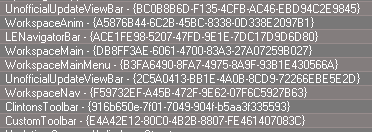
- Capture.PNG (7.7 KiB) Viewed 4948 times
Awesome!
Just need to figure out how to get those WinID to a String so that it can be copied.
This is also a valuable lesson on how to create a proper toolbar.
Create a toolbar prototype.
Call it.
Rename the Frame.
Save it.
-
clintonman
- Captain
- Posts: 5659
- Joined: 21 May 2009, 21:08
- Type the number ten into the box: 0
- Location: California
Re: New Script installers ERROR
The script half way down this page will generate a unique guid. It's what I use to make new buttons and toolbars.
GUID Generator
http://clintons3d.com/plugins/truespace ... index.html
GUID Generator
http://clintons3d.com/plugins/truespace ... index.html
-
clintonman
- Captain
- Posts: 5659
- Joined: 21 May 2009, 21:08
- Type the number ten into the box: 0
- Location: California
Re: New Script installers ERROR
When you say "Call it" do you mean the scary command? and when you say "Save it" do you mean the layout or the toolbar prototypes?trueBlue wrote: 28 Jan 2018, 11:01 ...
This is also a valuable lesson on how to create a proper toolbar.
Create a toolbar prototype.
Call it.
Rename the Frame.
Save it.
-
trueBlue
- Captain
- Posts: 5548
- Joined: 06 Jul 2009, 22:50
- Type the number ten into the box: 10
Re: New Script installers ERROR
Thinking ahead and out loud, it looks like I need to make a final unofficial update to fix these problems.
Curious as to how you anticipate your toolbar(s)? to display?
More then one?
If so I was thinking about creating addition tool boxes.
Red = User custom toolbar
Gold = Clinton's most Awesome ever toolbar!
Blue = tBlue's rookie toolbar
As shown in the picture your installer installs your C3D button, instead of an empty toolbar?
Plan of attack
tS7.61default installation, document all of the WinIDs for all of the toolbars's frames.
Unofficial Update, document all of the WinIDs for all of the toolbars's frames. Fix the duplicate WinIDs, and several other fixes.
Final Unoficial Update, include your folders, plugins, frame(s), button library, and Or
Can you capture a screen shot of how you are using your toolbars?
Curious as to how you anticipate your toolbar(s)? to display?
More then one?
If so I was thinking about creating addition tool boxes.
Red = User custom toolbar
Gold = Clinton's most Awesome ever toolbar!
Blue = tBlue's rookie toolbar
As shown in the picture your installer installs your C3D button, instead of an empty toolbar?
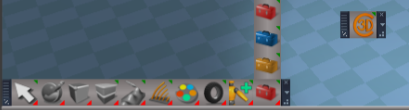
tS7.61default installation, document all of the WinIDs for all of the toolbars's frames.
Unofficial Update, document all of the WinIDs for all of the toolbars's frames. Fix the duplicate WinIDs, and several other fixes.
Final Unoficial Update, include your folders, plugins, frame(s), button library, and Or
Can you capture a screen shot of how you are using your toolbars?
-
clintonman
- Captain
- Posts: 5659
- Joined: 21 May 2009, 21:08
- Type the number ten into the box: 0
- Location: California
Re: New Script installers ERROR
trueBlue wrote: 28 Jan 2018, 22:43 Thinking ahead and out loud, it looks like I need to make a final unofficial update to fix these problems.
Curious as to how you anticipate your toolbar(s)? to display?
More then one?
If so I was thinking about creating addition tool boxes.
Red = User custom toolbar
Gold = Clinton's most Awesome ever toolbar!
Blue = tBlue's rookie toolbar
As shown in the picture your installer installs your C3D instead of an empty toolbar?
Capture.PNG
Plan of attack
tS7.61default installation, document all of the WinIDs for all of the toolbars's frames.
Unofficial Update, document all of the WinIDs for all of the toolbars's frames. Fix the duplicate WinIDs, and several other fixes.
Final Unoficial Update, include your folders, plugins, frame(s), button library, and Or
Can you capture a screen shot of how you are using your toolbars?

If you are going to do one more unofficial update I have 2 item requests:
Unlookat - fixes so it works with lights - http://clintons3d.com/plugins/truespace ... index.html - top of page
Zoom to selection - adds ability to zoom to a single edge - http://clintons3d.com/plugins/truespace ... index.html - middle of page
-
trueBlue
- Captain
- Posts: 5548
- Joined: 06 Jul 2009, 22:50
- Type the number ten into the box: 10
Re: New Script installers ERROR
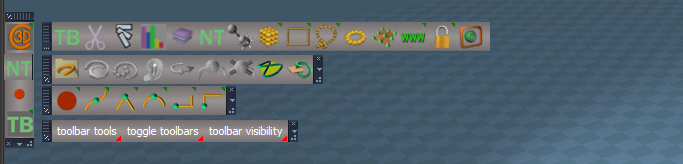
So my thought was that the Gold toolbox, which has the same commands as your C3Dbutton and opens your toolbar as shown:
It be like a vertical dresser with all of your toolbars as drawers inside the dresser.
The first icon has LMB select and hold slides the toolbar out and the RMB opens the toolbar in 3D Space as a separate toolbar.
I already have your requests as part of the future update as well as the Animation preference panel and widget mods.
It be like a vertical dresser with all of your toolbars as drawers inside the dresser.
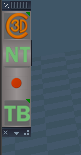
- Dreser.PNG (4.97 KiB) Viewed 4891 times
-
clintonman
- Captain
- Posts: 5659
- Joined: 21 May 2009, 21:08
- Type the number ten into the box: 0
- Location: California
Re: New Script installers ERROR
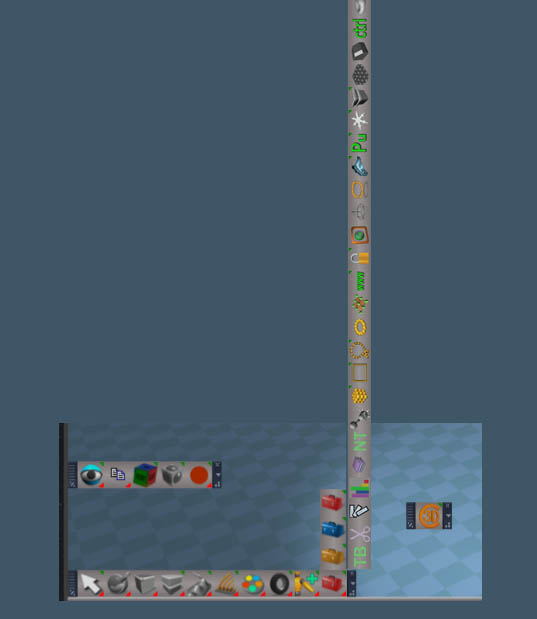
trueBlue wrote: 29 Jan 2018, 00:29 So my thought was that the Gold toolbox opens your toolbar as shown as an example with my toolbar with your interpolation toolbar. It be like a vertical dresser with all of your toolbars as drawers inside the dresser.
The first icon has LMB select and hold slides the toolbar out and the RMB opens the toolbar in 3D Space as a separate toolbar.
I already have your requests as part of the future update as well as the Animation preference panel and widget mods.
-
Draise

- Captain
- Posts: 3200
- Joined: 21 Sep 2009, 19:33
- Type the number ten into the box: 0
- Location: Bogota, Colombia
Re: New Script installers ERROR
Vertical space toolbar is.. hilariously unpractical.
-
trueBlue
- Captain
- Posts: 5548
- Joined: 06 Jul 2009, 22:50
- Type the number ten into the box: 10
Re: New Script installers ERROR
Nooooooo! That is not what I meant. I forgot to upload the picture. 
Updated the post.
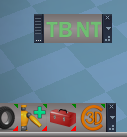
@Clinton : I just watched your toolbar manger video and I now understand how were opening your other toolbars. It's been a while since I used that and lost it due to a Reset.
BTW... Your new KeyInterpolationAutoload is lost when you close it from the toolbar.
LMB selecting your C3D button does not bring it back.
This is using your most recent installer. (unmodified) HTH
Updated the post.
@Clinton : I just watched your toolbar manger video and I now understand how were opening your other toolbars. It's been a while since I used that and lost it due to a Reset.
BTW... Your new KeyInterpolationAutoload is lost when you close it from the toolbar.
LMB selecting your C3D button does not bring it back.
This is using your most recent installer. (unmodified) HTH
- Attachments
-
- Capture.PNG (15.45 KiB) Viewed 4900 times
-
clintonman
- Captain
- Posts: 5659
- Joined: 21 May 2009, 21:08
- Type the number ten into the box: 0
- Location: California
Re: New Script installers ERROR
Ah, now it makes more sense.trueBlue wrote: 29 Jan 2018, 20:17 Nooooooo! That is not what I meant. I forgot to upload the picture.
Updated the post.
@Clinton : I just watched your toolbar manger video and I now understand how were opening your other toolbars. It's been a while since I used that and lost it due to a Reset.
BTW... Your new KeyInterpolationAutoload is lost when you close it from the toolbar.
LMB selecting your C3D button does not bring it back.
This is using your most recent installer. (unmodified) HTH

The key interpolation script hasn't been updated yet and you're right, the toolbar would be lost if it was closed with no way to bring it back. The only 2 installers that work with the new "experimental" installer posted earlier is the ctrl and the alignment scripts. Almost everything else currently works only with the "non-experimental" persistent install except for animation tools. I stopped doing those when we started looking at better ways to do the toolbars.
-
clintonman
- Captain
- Posts: 5659
- Joined: 21 May 2009, 21:08
- Type the number ten into the box: 0
- Location: California
Re: New Script installers ERROR
So the next step for me is to make a toolbar to contain those 4 buttons using prototype and you would make the golden toolbox button to open it and the 4 toolbars would also use prototypes as well. We use the reset via synchronize command on the existing toolbars before saving changes to the Toolbars.RsObj Use the search method to find the toolbars by prototype name instead of hard coded id values.trueBlue wrote: 29 Jan 2018, 00:29 So my thought was that the Gold toolbox, which has the same commands as your C3Dbutton and opens your toolbar as shown:
It be like a vertical dresser with all of your toolbars as drawers inside the dresser.
Dreser.PNG
The first icon has LMB select and hold slides the toolbar out and the RMB opens the toolbar in 3D Space as a separate toolbar.
Capture.PNG
I already have your requests as part of the future update as well as the Animation preference panel and widget mods.
Does that sound right to you?
-
trueBlue
- Captain
- Posts: 5548
- Joined: 06 Jul 2009, 22:50
- Type the number ten into the box: 10
Re: New Script installers ERROR
Yes but a baby step first because I would like to get this right before making prototypes.
Here is the dock, C3D, NURBS, KeyInterp, and tBmanager Frames.
Todo
You generate WinIDs for all of the Frames and Buttons that I left blank.
the Dock has a tS7 Anim button from the tS7 library and it has the LMB command to open your toolbar from your clintonobjects folder in tS7. Back up your clintonobjects folder first!
I'll wait to hear from you before the next step.
Edit: Removed file out of date
Here is the dock, C3D, NURBS, KeyInterp, and tBmanager Frames.
Todo
You generate WinIDs for all of the Frames and Buttons that I left blank.
the Dock has a tS7 Anim button from the tS7 library and it has the LMB command to open your toolbar from your clintonobjects folder in tS7. Back up your clintonobjects folder first!
I'll wait to hear from you before the next step.
Edit: Removed file out of date
-
trueBlue
- Captain
- Posts: 5548
- Joined: 06 Jul 2009, 22:50
- Type the number ten into the box: 10
Re: New Script installers ERROR
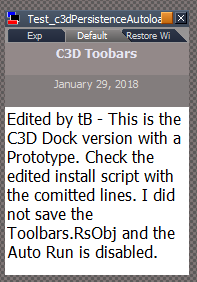
Here is your original install script that adds a C3D Dock with a Prototype.
Does not install into the WorkspaceNAV toolbar.
It installs to the top left corner.
No other icons are installed.
Edit: Removed file out of date
Does not install into the WorkspaceNAV toolbar.
It installs to the top left corner.
No other icons are installed.
- Capture.PNG (11.04 KiB) Viewed 4992 times
-
clintonman
- Captain
- Posts: 5659
- Joined: 21 May 2009, 21:08
- Type the number ten into the box: 0
- Location: California
Re: New Script installers ERROR
WinIDs generated as requested.trueBlue wrote: 29 Jan 2018, 22:33 Yes but a baby step first because I would like to get this right before making prototypes.
Here is the dock, C3D, NURBS, KeyInterp, and tBmanager Frames.
Todo
You generate WinIDs for all of the Frames and Buttons that I left blank.
the Dock has a tS7 Anim button from the tS7 library and it has the LMB command to open your toolbar from your clintonobjects folder in tS7. Back up your clintonobjects folder first!
I'll wait to hear from you before the next step.
- Attachments
-
- ToolbarsNewIDs.zip
- (282.67 KiB) Downloaded 249 times
-
clintonman
- Captain
- Posts: 5659
- Joined: 21 May 2009, 21:08
- Type the number ten into the box: 0
- Location: California
Re: New Script installers ERROR
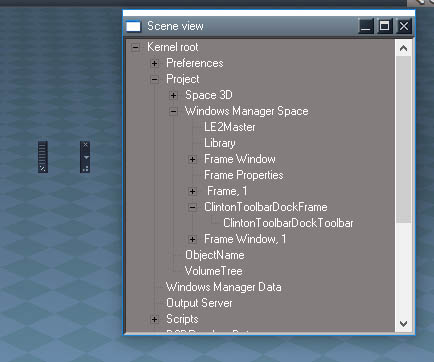
trueBlue wrote: 30 Jan 2018, 02:28 Here is your original install script that adds a C3D Dock with a Prototype.
Does not install into the WorkspaceNAV toolbar.
It installs to the top left corner.
No other icons are installed.
Capture.PNG
-
trueBlue
- Captain
- Posts: 5548
- Joined: 06 Jul 2009, 22:50
- Type the number ten into the box: 10
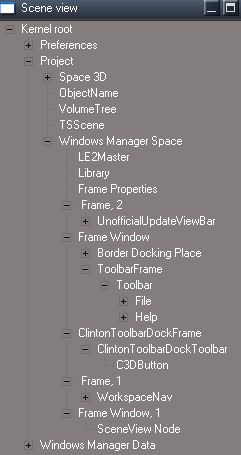
Re: New Script installers ERROR
I think I know why, sometimes when I bring in Frames into the LE, the icons are missing.
Add the icon from the installer?
Did it install to the top left corner and was it Horizontal?
I renamed it wrong too.
Add the icon from the installer?
Did it install to the top left corner and was it Horizontal?
- Scene View.PNG (9 KiB) Viewed 5016 times
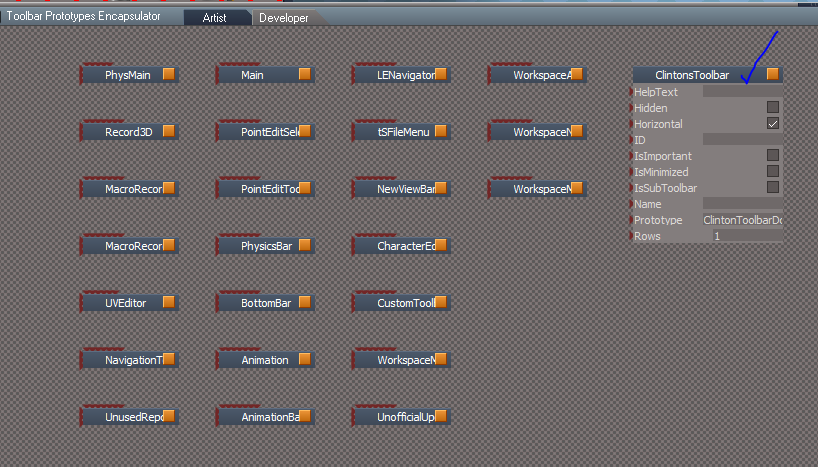
Code: Select all
Node.Rename("Toolbar Prototypes Encapsulator/ClintonToolbarDockToolbar, 1", "ClintonsToolbar");
-
clintonman
- Captain
- Posts: 5659
- Joined: 21 May 2009, 21:08
- Type the number ten into the box: 0
- Location: California
Re: New Script installers ERROR
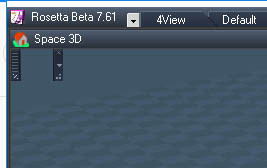
trueBlue wrote: 30 Jan 2018, 03:48 I think I know why, sometimes when I bring in Frames into the LE, the icons are missing.
Add the icon from the installer?
Did it install to the top left corner and was it Horizontal?
Scene View.PNG
TPE.PNG
I renamed it wrong too.Code: Select all
Node.Rename("Toolbar Prototypes Encapsulator/ClintonToolbarDockToolbar, 1", "ClintonsToolbar");
- UpperLeft.jpg (29.55 KiB) Viewed 5005 times
I don't understand this question "Add the icon from the installer?"
-
trueBlue
- Captain
- Posts: 5548
- Joined: 06 Jul 2009, 22:50
- Type the number ten into the box: 10
Re: New Script installers ERROR
Sorry for the confusion!
I have not been feeling very well.
I had finished this version last night but I did some last minute tinkering with the button command trying to see if I could save the toolbar's present location. It got all screwed up and I had no backup. Errrr! Had to start from scratch this morning. Also been having a heck of a time trying to figure out how the ActiveXObject("Scripting.FileSystemObject") works. So what I have learned is running the installer or LMB selecting your C3D button loads all installed ToolbarFrame.RsObj (s). Correct me if I am wrong but it seems that when you make modifications to the ToolbarFrame.RsObj (s) from Windows Manager Space they are directly connected in real time with the ToolbarFrame.RsObj (s) in your ClintonObjects folder?
Here is how the installation looks on my end.
The Prototypes.
Note that from this script there is no Buttons in the installer. They are in the ClintonToolbarDockFrame.RsObj and the ClintonToolbarFrame.RsObj which are included with the attachment.
Next would be how you want to save the installed toolbars.
1.) User saves their Layout else they would lose it if they closed the C3D Dock.
2.) Install the Gold Toolbox within the Red Toolbox in the WorkspaceNAV toolbar.
It very well may mean that the way I have done the scripts is totally wrong. By all means please take it from here. At least there is the file structure with the prototypes now.
And or there is something a foul with my tS7.61 setup with in Win10. but for the life of me every time I bring in a Frame object into the Link Editor or Library the buttons disapear. Even dragging a button from the Library to the frame object within the Windows Manager Space. tS7 is not allowing it. I am gonna test this out somemore, perhaps developing from Windows Manager Space, which how I have been saving frames to disk, is not the way. Now that there is Prototypes, I am gonig to see if working from the Toolbar Prototypes Encapsulator is the better way.
Notes:
1.) There is two scripts within the installer. One for the Dock and the other for the Toolbar. Again my familarity with using the ActiveXObject("Scripting.FileSystemObject") is not good and so I was not able to combine them into one. AND they both use the ( var clintonframepath ) as I just copied the first script for the C3D Dock.
2.) Disabled Auto Run and Save Toolbars.
3.) I used BlankButtons for place holders. Not sure if that is the way you want to go, but thought that would be a way to check and replace?
4.) No cleanup of previous installs.
5.) Anybody that has installed already has the ClintonToolbarFrame/Toolbar with no Prototype attribute.
So that would mean you would have to change your installers to ClintonToolbarFrame/ClintonToolbar.
The way they are now, Reset does not work because the name does not match the Prototype attribute.
Personaly I would just change the installers and not worry about cleanup?
Lastly there is no need to reply to this novel in less you want to. TMI
TMI
Edit: Removed file out of date
I have not been feeling very well.
I had finished this version last night but I did some last minute tinkering with the button command trying to see if I could save the toolbar's present location. It got all screwed up and I had no backup. Errrr! Had to start from scratch this morning. Also been having a heck of a time trying to figure out how the ActiveXObject("Scripting.FileSystemObject") works. So what I have learned is running the installer or LMB selecting your C3D button loads all installed ToolbarFrame.RsObj (s). Correct me if I am wrong but it seems that when you make modifications to the ToolbarFrame.RsObj (s) from Windows Manager Space they are directly connected in real time with the ToolbarFrame.RsObj (s) in your ClintonObjects folder?
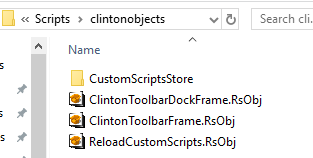
- Clinton folder.PNG (6.63 KiB) Viewed 4998 times

- WindowsManager.PNG (3.75 KiB) Viewed 4998 times
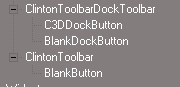
- TPE.PNG (1.59 KiB) Viewed 4998 times
Next would be how you want to save the installed toolbars.
1.) User saves their Layout else they would lose it if they closed the C3D Dock.
2.) Install the Gold Toolbox within the Red Toolbox in the WorkspaceNAV toolbar.
It very well may mean that the way I have done the scripts is totally wrong. By all means please take it from here. At least there is the file structure with the prototypes now.
And or there is something a foul with my tS7.61 setup with in Win10. but for the life of me every time I bring in a Frame object into the Link Editor or Library the buttons disapear. Even dragging a button from the Library to the frame object within the Windows Manager Space. tS7 is not allowing it. I am gonna test this out somemore, perhaps developing from Windows Manager Space, which how I have been saving frames to disk, is not the way. Now that there is Prototypes, I am gonig to see if working from the Toolbar Prototypes Encapsulator is the better way.
Notes:
1.) There is two scripts within the installer. One for the Dock and the other for the Toolbar. Again my familarity with using the ActiveXObject("Scripting.FileSystemObject") is not good and so I was not able to combine them into one. AND they both use the ( var clintonframepath ) as I just copied the first script for the C3D Dock.
2.) Disabled Auto Run and Save Toolbars.
3.) I used BlankButtons for place holders. Not sure if that is the way you want to go, but thought that would be a way to check and replace?
4.) No cleanup of previous installs.
5.) Anybody that has installed already has the ClintonToolbarFrame/Toolbar with no Prototype attribute.
So that would mean you would have to change your installers to ClintonToolbarFrame/ClintonToolbar.
The way they are now, Reset does not work because the name does not match the Prototype attribute.
Personaly I would just change the installers and not worry about cleanup?
Lastly there is no need to reply to this novel in less you want to.
TMIEdit: Removed file out of date
-
trueBlue
- Captain
- Posts: 5548
- Joined: 06 Jul 2009, 22:50
- Type the number ten into the box: 10
Re: New Script installers ERROR
Oh Jesus! No wonder I was having so much problems, I had three tS7.61 opened at the same time!
-
clintonman
- Captain
- Posts: 5659
- Joined: 21 May 2009, 21:08
- Type the number ten into the box: 0
- Location: California
Re: New Script installers ERROR
Yep, that can be confusing...trueBlue wrote: 30 Jan 2018, 23:08 Oh Jesus! No wonder I was having so much problems, I had three tS7.61 opened at the same time!
-
clintonman
- Captain
- Posts: 5659
- Joined: 21 May 2009, 21:08
- Type the number ten into the box: 0
- Location: California
Re: New Script installers ERROR
I think you attached the old installer. I don't see any difference or an extra installer.trueBlue wrote: 30 Jan 2018, 22:35 Sorry for the confusing!
I have not been feeling very well.
Notes:
1.) There is two scripts within the installer. One for the Dock and the other for the Toolbar. Again my familarity with using the ActiveXObject("Scripting.FileSystemObject") is not good and so I was not able to combine them into one. AND they both use the ( var clintonframepath ) as I just copied the first script for the C3D Dock.
2.) Disabled Auto Run and Save Toolbars.
3.) I used BlankButtons for place holders. Not sure if that is the way you want to go, but thought that would be a way to check and replace?
4.) No cleanup of previous installs.
5.) Anybody that has installed already has the ClintonToolbarFrame/Toolbar with no Prototype attribute.
So that would mean you would have to change your installers to ClintonToolbarFrame/ClintonToolbar.
The way they are now, Reset does not work because the name does not match the Prototype attribute.
Personaly I would just change the installers and not worry about cleanup?
Lastly there is no need to reply to this novel in less you want to.
-
trueBlue
- Captain
- Posts: 5548
- Joined: 06 Jul 2009, 22:50
- Type the number ten into the box: 10
Re: New Script installers ERROR
Sorry about that! The post has been updated.
I included a script for the Red and Gold toolbox buttons.
The Gold has the same attribute as your C3D button.
I included a script for the Red and Gold toolbox buttons.
The Gold has the same attribute as your C3D button.
-
clintonman
- Captain
- Posts: 5659
- Joined: 21 May 2009, 21:08
- Type the number ten into the box: 0
- Location: California
Re: New Script installers ERROR
I have a script to copy the red and gold buttons? but not the actual buttons.trueBlue wrote: 31 Jan 2018, 01:08 Sorry about that! The post has been updated.
I included a script for the Red and Gold toolbox buttons.
The Gold has the same attribute as your C3D button.
-
trueBlue
- Captain
- Posts: 5548
- Joined: 06 Jul 2009, 22:50
- Type the number ten into the box: 10
Re: New Script installers ERROR
Not my day!
Let's try that again.
Something new I just noticed.
Selecting the Gold toolbox. The C3D Dock does not show.
In less you save the layout.
Here is an updated script to change the Gold button.
With the Custom Toolbar (Red Toolbox) by design, you can move it by selecting a window first before selecting the icon.
It has it's pros and cons. What I do not like about it, you not always aware which window is selected.
I am going to change it to this as it is much better!
Try this script in the 4View layout with the Custom Toolbar (Red Toolbox)
Don't select the the Red toolbox icon in the WorkspaceNAV toolbar, select the script which you can Ctrl + Drag out from the tS7 Panel.
Try by selecting the titlebar of different windows, move the toolbar any where and or snapped to window, and then the script.
Edit: Removed file out of date
Let's try that again.
Something new I just noticed.
Selecting the Gold toolbox. The C3D Dock does not show.
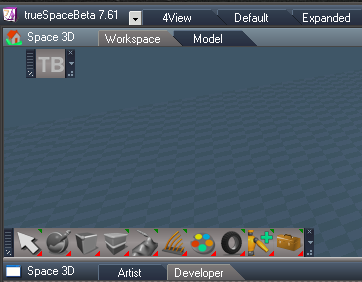
- Capture.PNG (32.13 KiB) Viewed 4970 times
Here is an updated script to change the Gold button.
With the Custom Toolbar (Red Toolbox) by design, you can move it by selecting a window first before selecting the icon.
It has it's pros and cons. What I do not like about it, you not always aware which window is selected.
Code: Select all
WindowsManager.CloseWindow("/Project/Windows Manager Space/Custom Toolbar Frame");
RsFileIO.LoadObject(System.GetMainDir() + '\\Scripts\\preobjects\\Custom Toolbar Frame.RsObj', "/Project/Windows Manager Space/");
Node.Value("/Project/Windows Manager Space/Custom Toolbar Frame", "SnappedTo") = WindowsManager.GetWorkWindow();
Node.Value("/Project/Windows Manager Space/Custom Toolbar Frame", "OwnedBy") = WindowsManager.GetWorkWindow();
WindowsManager.Activate();
WindowsManager.UpdateWindowsStructure();Code: Select all
RsFileIO.SaveObject(System.GetMainDir() + '\\Scripts\\preobjects\\Custom Toolbar Frame.RsObj', "/Project/Windows Manager Space/Custom Toolbar Frame");
WindowsManager.CloseWindow("/Project/Windows Manager Space/Custom Toolbar Frame");
RsFileIO.LoadObject(System.GetMainDir() + '\\Scripts\\preobjects\\Custom Toolbar Frame.RsObj', "/Project/Windows Manager Space/");
WindowsManager.Activate();
WindowsManager.UpdateWindowsStructure();Don't select the the Red toolbox icon in the WorkspaceNAV toolbar, select the script which you can Ctrl + Drag out from the tS7 Panel.
Try by selecting the titlebar of different windows, move the toolbar any where and or snapped to window, and then the script.
Edit: Removed file out of date
-
clintonman
- Captain
- Posts: 5659
- Joined: 21 May 2009, 21:08
- Type the number ten into the box: 0
- Location: California
Re: New Script installers ERROR
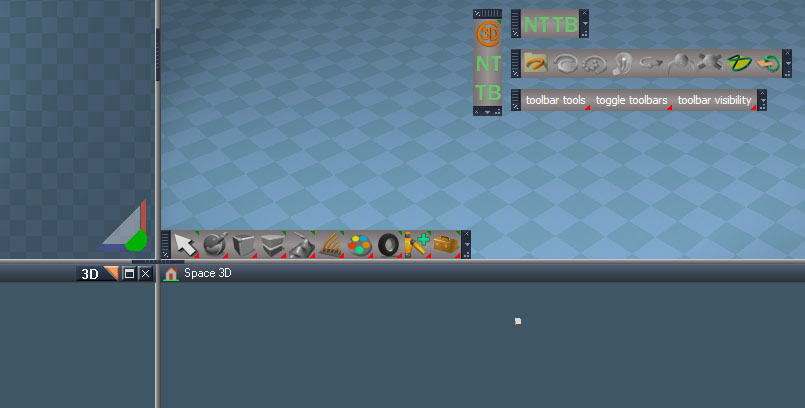
-
clintonman
- Captain
- Posts: 5659
- Joined: 21 May 2009, 21:08
- Type the number ten into the box: 0
- Location: California
Re: New Script installers ERROR
I didn't see any of this until just now. I guess I don't get notifications for edits. Will see if can add to what I have already.trueBlue wrote: 31 Jan 2018, 01:32 Not my day!
Let's try that again.
Something new I just noticed.
Selecting the Gold toolbox. The C3D Dock does not show.
Capture.PNG
In less you save the layout.
Here is an updated script to change the Gold button.
Update Red and Gold Toolbox buttons for C3D toolbars.RsObj
With the Custom Toolbar (Red Toolbox) by design, you can move it by selecting a window first before selecting the icon.
It has it's pros and cons. What I do not like about it, you not always aware which window is selected.I am going to change it to this as it is much better!Code: Select all
WindowsManager.CloseWindow("/Project/Windows Manager Space/Custom Toolbar Frame"); RsFileIO.LoadObject(System.GetMainDir() + '\\Scripts\\preobjects\\Custom Toolbar Frame.RsObj', "/Project/Windows Manager Space/"); Node.Value("/Project/Windows Manager Space/Custom Toolbar Frame", "SnappedTo") = WindowsManager.GetWorkWindow(); Node.Value("/Project/Windows Manager Space/Custom Toolbar Frame", "OwnedBy") = WindowsManager.GetWorkWindow(); WindowsManager.Activate(); WindowsManager.UpdateWindowsStructure();Try this script in the 4View layout with the Custom Toolbar (Red Toolbox)Code: Select all
RsFileIO.SaveObject(System.GetMainDir() + '\\Scripts\\preobjects\\Custom Toolbar Frame.RsObj', "/Project/Windows Manager Space/Custom Toolbar Frame");
WindowsManager.CloseWindow("/Project/Windows Manager Space/Custom Toolbar Frame");
RsFileIO.LoadObject(System.GetMainDir() + '\\Scripts\\preobjects\\Custom Toolbar Frame.RsObj', "/Project/Windows Manager Space/");
WindowsManager.Activate();
WindowsManager.UpdateWindowsStructure();
Don't select the the Red toolbox icon in the WorkspaceNAV toolbar, select the script which you can Ctrl + Drag out from the tS7 Panel.
Try by selecting the titlebar of different windows, move the toolbar any where and or snapped to window, and then the script.
Edit: Tried to run this but it doesn't do anything except put the gold button into the toolbar. Maybe it's the wrong upload?
-
trueBlue
- Captain
- Posts: 5548
- Joined: 06 Jul 2009, 22:50
- Type the number ten into the box: 10
Re: New Script installers ERROR
Just checked it and it updates the Gold button LMB command.clintonman wrote: 01 Feb 2018, 06:32 Edit: Tried to run this but it doesn't do anything except put the gold button into the toolbar. Maybe it's the wrong upload?

- Capture.PNG (4.59 KiB) Viewed 4943 times
This change is only necessary for the (Gold Toolbox button's LMB command). RMB is unchanged.
Note: ctdbf
Code: Select all
ctdbf="/Project/Windows Manager Space/ClintonToolbarDockFrame";if(Node.Exists(ctdbf)) WindowsManager.CloseWindow(ctdbf);RsFileIO.LoadObject(System.GetMainDir()+"\\Scripts\\clintonobjects\\ClintonToolbarDockFrame.RsObj" , "Project/Windows Manager Space/");WindowsManager.Activate();WindowsManager.UpdateWindowsStructure();
Note:ctbf
Code: Select all
ctbf="/Project/Windows Manager Space/ClintonToolbarFrame";if(Node.Exists(ctbf)) WindowsManager.CloseWindow(ctbf);RsFileIO.LoadObject(System.GetMainDir()+"\\Scripts\\clintonobjects\\ClintonToolbarFrame.RsObj" , "Project/Windows Manager Space/");WindowsManager.Activate();WindowsManager.UpdateWindowsStructure();
-
clintonman
- Captain
- Posts: 5659
- Joined: 21 May 2009, 21:08
- Type the number ten into the box: 0
- Location: California
Re: New Script installers ERROR
I've gone in a different direction for the buttons that open toolbars. It uses prototypes as it's basis so doesn't load directly from disk and positions the toolbars relative to the active window. It would be nice if the position was relative to the button pushed. I coudn't find any way for the button to know where it is. So the window that contains the button has to be selected before pressing the button to get a predictable placement of the toolbar.
The first line just spits out "Project/Windows Manager Space"
Code: Select all
name=WindowsManager.GetWindowsManagerNodeName();
WindowsManager.CloseToolbar("ClintonToolbarDockToolbar");
WindowsManager.OpenToolbarFromPrototype("ClintonToolbarDockToolbar",32,32,0,0);
Node.Rename(name+"/"+Node.SubObject(name,Node.SubObjectCount(name)-1),"ClintonToolbarDockFrame");
WindowsManager.SnapFrameToFrameEx(WindowsManager.GetWorkWindow(),name+"/ClintonToolbarDockFrame",19,10,312,-250);-
trueBlue
- Captain
- Posts: 5548
- Joined: 06 Jul 2009, 22:50
- Type the number ten into the box: 10
Re: New Script installers ERROR
You just described what was frustrating me to no END earlier!clintonman wrote: 01 Feb 2018, 15:58 It would be nice if the position was relative to the button pushed. I coudn't find any way for the button to know where it is.

Code: Select all
name=WindowsManager.GetWindowsManagerNodeName();
WindowsManager.CloseToolbar("ClintonToolbarDockToolbar");
WindowsManager.OpenToolbarFromPrototype("ClintonToolbarDockToolbar",32,32,0,0);
Node.Rename(name+"/"+Node.SubObject(name,Node.SubObjectCount(name)-1),"ClintonToolbarDockFrame");
WindowsManager.SnapFrameToFrameEx(WindowsManager.GetWorkWindow(),name+"/ClintonToolbarDockFrame",19,10,312,-250);
-
clintonman
- Captain
- Posts: 5659
- Joined: 21 May 2009, 21:08
- Type the number ten into the box: 0
- Location: California
Re: New Script installers ERROR
I know right? I think it falls under the "wish the source code was available" so we could fix it. Same problem with caligari supplied buttons like display mode selection, have to select the window of interest first. My last attempt to fix it will be to try to find some way to read the mouse position and use that to get the window without the need to select it first. I don't expect to find anything so cross your fingers.trueBlue wrote: 01 Feb 2018, 18:17You just described what was frustrating me to no END earlier!clintonman wrote: 01 Feb 2018, 15:58 It would be nice if the position was relative to the button pushed. I coudn't find any way for the button to know where it is.
...
-
trueBlue
- Captain
- Posts: 5548
- Joined: 06 Jul 2009, 22:50
- Type the number ten into the box: 10
Re: New Script installers ERROR
Been toying around with a version similar to yours, so I can learn.
Curious are you saving the Save/Load command for each toolbar's Frame individually or all in one?
Experimenting with moving all of the toolbars at one time in screen space.
I am putting your C3D Dock as shown and the Clinton Toolbar below it. Also added a Hide/Close button for each slot in the C3D Dock.
Curious are you saving the Save/Load command for each toolbar's Frame individually or all in one?
Experimenting with moving all of the toolbars at one time in screen space.
I am putting your C3D Dock as shown and the Clinton Toolbar below it. Also added a Hide/Close button for each slot in the C3D Dock.

- C3D Dock.PNG (54.65 KiB) Viewed 4948 times

- ClintonToolbar.PNG (24.21 KiB) Viewed 4948 times
-
clintonman
- Captain
- Posts: 5659
- Joined: 21 May 2009, 21:08
- Type the number ten into the box: 0
- Location: California
Re: New Script installers ERROR
Right now I'm not saving anything. I just write to the toolbars prototypes on install and then load from the prototypes as needed, so as it is now a reset to default context will lose it all. I'll post what I have now, so you can see it.trueBlue wrote: 02 Feb 2018, 02:18 Been toying around with a version similar to yours, so I can learn.
Curious are you saving the Save/Load command for each toolbar's Frame individually or all in one?
Experimenting with moving all of the toolbars at one time in screen space.
I am putting your C3D Dock as shown and the Clinton Toolbar below it. Also added a Hide/Close button for each slot in the C3D Dock.
C3D Dock.PNG
ClintonToolbar.PNG
c3dpersistent: jump inside and run "Sync workspavenav"
curves and toolbar manager run "AutoRunMeNOT"
- Attachments
-
- 3toolbars_test1.zip
- (504.72 KiB) Downloaded 206 times
-
trueBlue
- Captain
- Posts: 5548
- Joined: 06 Jul 2009, 22:50
- Type the number ten into the box: 10
Re: New Script installers ERROR
Thanks, I'll check it out.
I remember you telling me that your WorkspaceNav Frame's WinID changed. Just discovered it changes every time when you switch to Model and back.
Note to self: Never double click on RsObj (s) on my Desktop!
Or loading objects where the present selected objects are!
Or deleting very important selected objects in System, Widgets, etc... from the user's interface!
I remember you telling me that your WorkspaceNav Frame's WinID changed. Just discovered it changes every time when you switch to Model and back.
Oh hell yeah!clintonman wrote: 01 Feb 2018, 19:26 I know right? I think it falls under the "wish the source code was available" so we could fix it. Same problem with caligari supplied buttons like display mode selection, have to select the window of interest first. My last attempt to fix it will be to try to find some way to read the mouse position and use that to get the window without the need to select it first. I don't expect to find anything so cross your fingers.
Note to self: Never double click on RsObj (s) on my Desktop!
Or loading objects where the present selected objects are!
Or deleting very important selected objects in System, Widgets, etc... from the user's interface!
-
clintonman
- Captain
- Posts: 5659
- Joined: 21 May 2009, 21:08
- Type the number ten into the box: 0
- Location: California
Re: New Script installers ERROR
No luck with the "button aware of it's location" investigation. So we just note to click a window before clicking the button. Attached is the final versions of the installers minus the true persistence from saving widgets and toolbars to disk. Change from the previous upload is these set the owning window so buttons can be covered by other windows instead of always being on top.
One good thing that came from the button investigation is I figured out how to link into the offline render buttons.
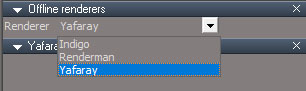
- offline_renderers.jpg (23.45 KiB) Viewed 4400 times
- Attachments
-
- 3toolbars_test2.zip
- (504.81 KiB) Downloaded 194 times
-
trueBlue
- Captain
- Posts: 5548
- Joined: 06 Jul 2009, 22:50
- Type the number ten into the box: 10
Re: New Script installers ERROR
Thanks Clinton. Are the instructions for installing the same as last?clintonman wrote: 03 Feb 2018, 05:34 No luck with the "button aware of it's location" investigation. So we just note to click a window before clicking the button. Attached is the final versions of the installers minus the true persistence from saving widgets and toolbars to disk. Change from the previous upload is these set the owning window so buttons can be covered by other windows instead of always being on top.
offline_renderers.jpg
One good thing that came from the button investigation is I figured out how to link into the offline render buttons.
Awesome on tying in the Offline Renders!
I thought I had the solution of incorporating all of your toolbars into the C3D Dock and moving them all at once, but no go. I found out you can change the button ID, by right click, select Reset. Been daubling with Aspect Toolbars. Do you know anthing about the AspectGUIDs? And do you know of any tS7 Commands to load any and or all of the diferent native Frames?
Thanks again!
- Attachments
-

-
clintonman
- Captain
- Posts: 5659
- Joined: 21 May 2009, 21:08
- Type the number ten into the box: 0
- Location: California
Re: New Script installers ERROR
Yes, install is the same as before.trueBlue wrote: 03 Feb 2018, 07:23Thanks Clinton. Are the instructions for installing the same as last?clintonman wrote: 03 Feb 2018, 05:34 No luck with the "button aware of it's location" investigation. So we just note to click a window before clicking the button. Attached is the final versions of the installers minus the true persistence from saving widgets and toolbars to disk. Change from the previous upload is these set the owning window so buttons can be covered by other windows instead of always being on top.
offline_renderers.jpg
One good thing that came from the button investigation is I figured out how to link into the offline render buttons.
Awesome on tying in the Offline Renders!
I thought I had the solution of incorporating all of your toolbars into the C3D Dock and moving them all at once, but no go. I found out you can change the button ID, by right click, select Reset. Been daubling with Aspect Toolbars. Do you know anthing about the AspectGUIDs? And do you know of any tS7 Commands to load any and or all of the diferent native Frames?
Thanks again!
Don't know anything about AspectGUIDs.
Closest thing I could find to open toolbars was this command. It doesn't work, just gives errors.
Code: Select all
WindowsManager.DisplayAllToolbars();Code: Select all
	WindowsManager.CreateMainToolBar();
WindowsManager.CreateNavigationToolBar();-
trueBlue
- Captain
- Posts: 5548
- Joined: 06 Jul 2009, 22:50
- Type the number ten into the box: 10
Re: New Script installers ERROR
Thanks!
HA! I was reading the the xml files in ScriptCommands when you posted.
You should check them out.
WindowsManager.CreateNavigationToolBar();
Calls Navigation.xml
Those BMP s are in the Scripts folder.
Presently before trying any of your Test scripts, I notice that the C3D Dock Frame does not Minimize when you double click it's handle.
Also I do not know if this is my doing but there is an additional DockToolbarFrame.RsObj in the preobjects folder.
LOL... Easter Egg in the Unofficial Update. Double clicking the LE Navigator's handle, minimizes the UnofficialUpdateViewBar at the top.
HA! I was reading the the xml files in ScriptCommands when you posted.
You should check them out.
WindowsManager.CreateNavigationToolBar();
Calls Navigation.xml
Those BMP s are in the Scripts folder.
Presently before trying any of your Test scripts, I notice that the C3D Dock Frame does not Minimize when you double click it's handle.
Also I do not know if this is my doing but there is an additional DockToolbarFrame.RsObj in the preobjects folder.
LOL... Easter Egg in the Unofficial Update. Double clicking the LE Navigator's handle, minimizes the UnofficialUpdateViewBar at the top.
-
clintonman
- Captain
- Posts: 5659
- Joined: 21 May 2009, 21:08
- Type the number ten into the box: 0
- Location: California
Re: New Script installers ERROR
Double click works here and don't have any DockToolbarFrame.RsObj file. I don't write anything to disk in the last 2 installers except for the scripts.trueBlue wrote: 03 Feb 2018, 15:41 ...
Presently before trying any of your Test scripts, I notice that the C3D Dock Frame does not Minimize when you double click it's handle.
Also I do not know if this is my doing but there is an additional DockToolbarFrame.RsObj in the preobjects folder.
...
After you look at the last installers I plan to make fully persistent installers that write to Toolbars and Widgets files, so i won't have individual toolbar frame files stored separately.
-
trueBlue
- Captain
- Posts: 5548
- Joined: 06 Jul 2009, 22:50
- Type the number ten into the box: 10
Re: New Script installers ERROR
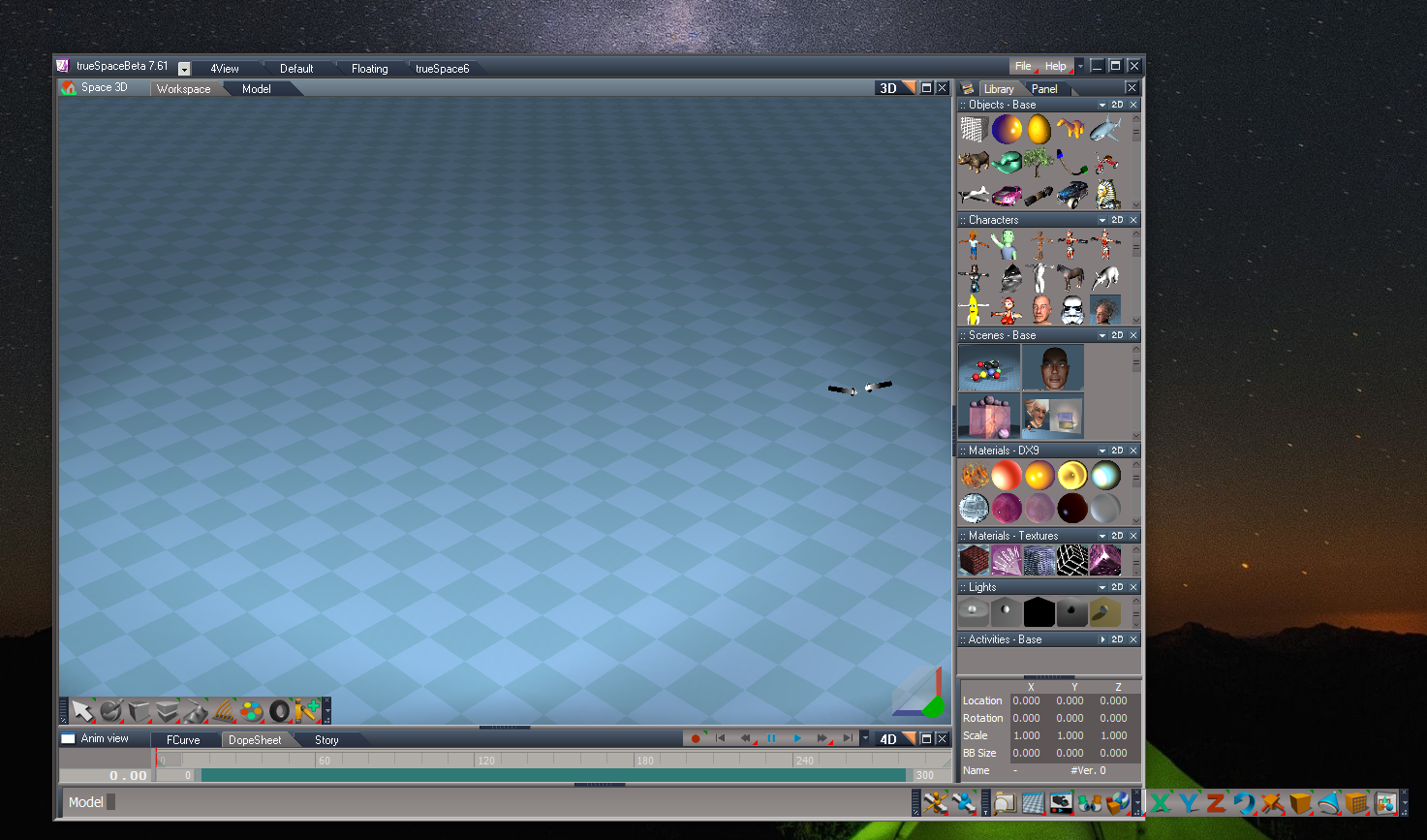
tS761 First install. Yuck!
* This is why I combined the bottom two toolbars!
Test2 C3D on tS761 First install
* Red Toolbox button does not work, because the Unofficial Update was not patched.
* Clinton Toolbar is empty.
Suggestions:
* Require that you save the layout, or install my Custom Toolbar with your installation, or your C3D button in the WorkspaceNav, or require that the Unofficial Update be installed first.
* Supply our atleast one tool in the Clinton Toolbar. AlignmentDistribution?
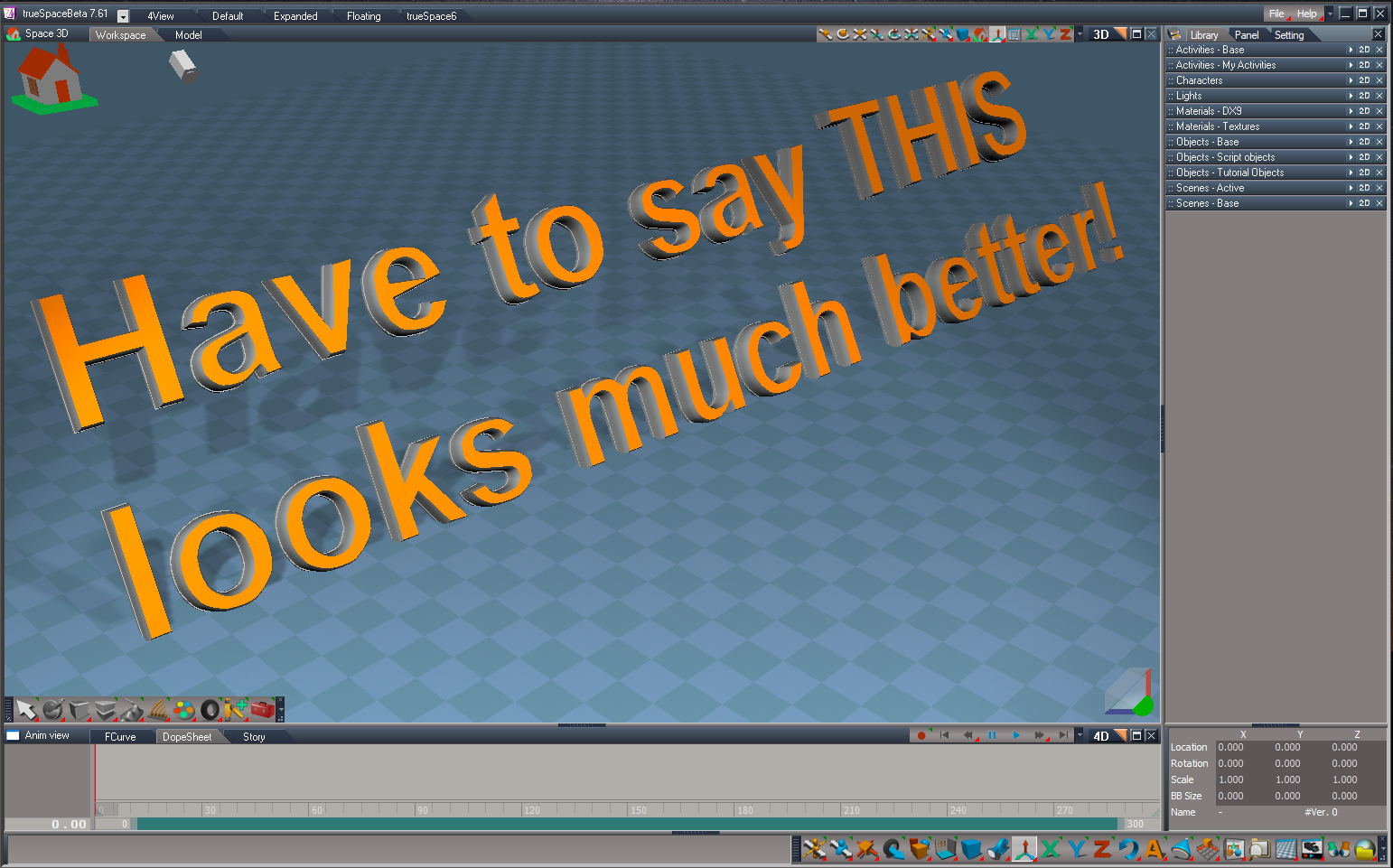
Test2 C3D on tS761 with Unofficial Update
* There is no Gold toolbox, because the Unofficial Update overwrote the WorkspaceNav toolbar.
Suggestion:
* Depends what you do above.
* Require that you reinstall your installation after a user installs the Unofficial Update.
* This is why I combined the bottom two toolbars!
Test2 C3D on tS761 First install
* Red Toolbox button does not work, because the Unofficial Update was not patched.
* Clinton Toolbar is empty.
Suggestions:
* Require that you save the layout, or install my Custom Toolbar with your installation, or your C3D button in the WorkspaceNav, or require that the Unofficial Update be installed first.
* Supply our atleast one tool in the Clinton Toolbar. AlignmentDistribution?
Test2 C3D on tS761 with Unofficial Update
* There is no Gold toolbox, because the Unofficial Update overwrote the WorkspaceNav toolbar.
Suggestion:
* Depends what you do above.
* Require that you reinstall your installation after a user installs the Unofficial Update.
- Attachments
-
-
-

-
trueBlue
- Captain
- Posts: 5548
- Joined: 06 Jul 2009, 22:50
- Type the number ten into the box: 10
Re: New Script installers ERROR
Test2 C3D on tS761 with Unofficial Update
toolbarControlsNOTAutoload.RsObj installation
* Denied because I need to reinstall the C3D dock.
* Empty Clinton Toolbar.
Suggestion:
* Your Toolbar Manager would be better installed in a Layout simular to the LE Navigator.
IMO it distracts from your other toolbars given that it is text only menus.
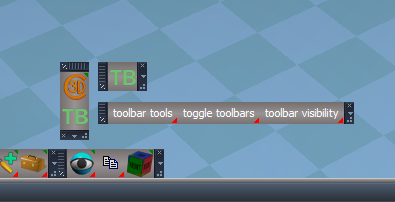
Reinstalled the C3D dock and the Toolbar Manager.
Note: I did not have the C3D dock open at this point.
Maybe open it first?
toolbarControlsNOTAutoload.RsObj installation
* Denied because I need to reinstall the C3D dock.
* Empty Clinton Toolbar.
Suggestion:
* Your Toolbar Manager would be better installed in a Layout simular to the LE Navigator.
IMO it distracts from your other toolbars given that it is text only menus.
Reinstalled the C3D dock and the Toolbar Manager.
Note: I did not have the C3D dock open at this point.
Maybe open it first?
- Attachments
-
-
- Toolbar Manager after opening the CD dock and selecting the Toolbar Manager button.PNG (31.13 KiB) Viewed 4348 times
-

-
clintonman
- Captain
- Posts: 5659
- Joined: 21 May 2009, 21:08
- Type the number ten into the box: 0
- Location: California
Re: New Script installers ERROR
Only 1 or 2 plugins require the Unofficial Update so I won't make it a requirement for everything.trueBlue wrote: 03 Feb 2018, 21:19 tS761 First install. Yuck!
* This is why I combined the bottom two toolbars!
Test2 C3D on tS761 First install
* Red Toolbox button does not work, because the Unofficial Update was not patched.
* Clinton Toolbar is empty.
Suggestions:
* Require that you save the layout, or install my Custom Toolbar with your installation, or your C3D button in the WorkspaceNav, or require that the Unofficial Update be installed first.
* Supply our atleast one tool in the Clinton Toolbar. AlignmentDistribution?
Test2 C3D on tS761 with Unofficial Update
* There is no Gold toolbox, because the Unofficial Update overwrote the WorkspaceNav toolbar.
Suggestion:
* Depends what you do above.
* Require that you reinstall your installation after a user installs the Unofficial Update.
Setup the c3d persistent install to check for Unoffical install and give warning and choice to open browser to the update or ignore the warning and install anyway. If warning is ignored will change the red toolbox to open a browser to the unofficial install page. will also give second warning after install is complete and second chance to open a browser to the update installer.
Will leave clinton toolbar empty but will not show it by default after the install. Don't want to have a script or button in 2 different places cause then have to remember to change both places when the script is updated. if forget then the persistent old version would overwrite any new version.
If the UnOfficial Update is installed afterward some items have to be reinstalled from scratch because they don't replace items but modify them in place. Some of the widget modifications install in that way.
Will alter persistent installer to have option to not overwrite the docked toolbar, losing any other toolbar buttons. Now it overwrites leaving only the c3d button.
-
trueBlue
- Captain
- Posts: 5548
- Joined: 06 Jul 2009, 22:50
- Type the number ten into the box: 10
Re: New Script installers ERROR
I am just trying to go through the process from installing first from tS761 original, with out the update, and with the update. Hoping that helps! Take me suggestions with a grain of salt, it's just IMO.  And maybe some ideas.
I uploaded a pic of a quick mockup for the Toolbar Manager layout, Using the trusSpace6 layout as a starting point and my tS7.6.1 Link Editor Navigator Aspect Toolbar
united3dartists.com/forum/viewtopic ... 535#p13535
And maybe some ideas. I uploaded a pic of a quick mockup for the Toolbar Manager layout, Using the trusSpace6 layout as a starting point and my tS7.6.1 Link Editor Navigator Aspect Toolbar
united3dartists.com/forum/viewtopic ... 535#p13535
-
clintonman
- Captain
- Posts: 5659
- Joined: 21 May 2009, 21:08
- Type the number ten into the box: 0
- Location: California
Re: New Script installers ERROR
Not sure about the meaning of this questiontrueBlue wrote: 03 Feb 2018, 22:13 ...
Note: I did not have the C3D dock open at this point.
Maybe open it first?
Thought about it and decided to leave as is. I don't like the idea of pressing the button to open the toolbar in a totally different part of the screen. It would be different if it was a panel or window instead of a little toolbar. The user can drag the toolbar up to the top if they like. Also if you close the window with the LE Navigator you lose that toolbar. maybe it should be a part of every open 3D view like the workspacenav toolbar.trueBlue wrote: 03 Feb 2018, 22:13...
Suggestion:
* Your Toolbar Manager would be better installed in a Layout simular to the LE Navigator.
IMO it distracts from your other toolbars given that it is text only menus.
...
BTW how did you create the toolbar and have it appear where it does?
-
clintonman
- Captain
- Posts: 5659
- Joined: 21 May 2009, 21:08
- Type the number ten into the box: 0
- Location: California
Re: New Script installers ERROR
It helps, that's why I want your input before going forward. I mentioned the little toolbar on the top and the comment applies to the LE view as well. Can you make the Link Editor Navigator Aspect Toolbar appear on any/all link editor views? There have been times I wanted to use it on another window, but it only works on the one specific window.trueBlue wrote: 03 Feb 2018, 23:26 I am just trying to go through the process from installing first from tS761 original, with out the update, and with the update. Hoping that helps! Take me suggestions with a grain of salt, it's just IMO.
I uploaded a pic of a quick mockup for the Toolbar Manager layout, Using the trusSpace6 layout as a starting point and my tS7.6.1 Link Editor Navigator Aspect Toolbar
united3dartists.com/forum/viewtopic ... 535#p13535
-
clintonman
- Captain
- Posts: 5659
- Joined: 21 May 2009, 21:08
- Type the number ten into the box: 0
- Location: California
Re: New Script installers ERROR
One more thing I forgot to mention, after all the installers are done I will make a batch installer so all except the c3d persistent can be installed in one go. That way if someone decides to install the UnOfficial Update afterward it will be a painless process to reinstall all the scripts. That's also the reason I have the installers write status to the log view instead of an alert box.
-
trueBlue
- Captain
- Posts: 5548
- Joined: 06 Jul 2009, 22:50
- Type the number ten into the box: 10
Re: New Script installers ERROR
With your toolbar installers, add command to open the C3D dock first.clintonman wrote: 03 Feb 2018, 23:27Not sure about the meaning of this questiontrueBlue wrote: 03 Feb 2018, 22:13 ...
Note: I did not have the C3D dock open at this point.
Maybe open it first?Thought about it and decided to leave as is. I don't like the idea of pressing the button to open the toolbar in a totally different part of the screen. It would be different if it was a panel or window instead of a little toolbar. The user can drag the toolbar up to the top if they like. Also if you close the window with the LE Navigator you lose that toolbar. maybe it should be a part of every open 3D view like the workspacenav toolbar.trueBlue wrote: 03 Feb 2018, 22:13...
Suggestion:
* Your Toolbar Manager would be better installed in a Layout simular to the LE Navigator.
IMO it distracts from your other toolbars given that it is text only menus.
...
BTW how did you create the toolbar and have it appear where it does?
The link I shared makes it easy to install the LE Navigator in any Titlebar that has focus. Then save your layout that you are using. Thats how I made the quick mockup Toolbar Manager layout. First I installed the LE Navigator, then Ctrl + Shift + Dragged your buttons to the LE navigator. Saved the Layout. Your TB toolbar still work along with the layout.
It still shares the same WinID as the Animation aspect toolbar. So change it before you install it!!!!
-
clintonman
- Captain
- Posts: 5659
- Joined: 21 May 2009, 21:08
- Type the number ten into the box: 0
- Location: California
Re: New Script installers ERROR
I understand and will open the c3d button for the installers.trueBlue wrote: 03 Feb 2018, 23:48With your toolbar installers, add command to open the C3D dock first.clintonman wrote: 03 Feb 2018, 23:27Not sure about the meaning of this questiontrueBlue wrote: 03 Feb 2018, 22:13 ...
Note: I did not have the C3D dock open at this point.
Maybe open it first?Thought about it and decided to leave as is. I don't like the idea of pressing the button to open the toolbar in a totally different part of the screen. It would be different if it was a panel or window instead of a little toolbar. The user can drag the toolbar up to the top if they like. Also if you close the window with the LE Navigator you lose that toolbar. maybe it should be a part of every open 3D view like the workspacenav toolbar.trueBlue wrote: 03 Feb 2018, 22:13...
Suggestion:
* Your Toolbar Manager would be better installed in a Layout simular to the LE Navigator.
IMO it distracts from your other toolbars given that it is text only menus.
...
BTW how did you create the toolbar and have it appear where it does?
The link I shared makes it easy to install the LE Navigator in any Titlebar that has focus. Then save your layout that you are using. Thats how I made the quick mockup Toolbar Manager layout. First I installed the LE Navigator, then Ctrl + Shift + Dragged your buttons to the LE navigator. Saved the Layout. Your TB toolbar still work along with the layout.
It still shares the same WinID as the Animation aspect toolbar. So change it before you install it!!!!
Your post said you made a mockup but the link went to an old thread, but I get it now. Will download and check it out.
-
trueBlue
- Captain
- Posts: 5548
- Joined: 06 Jul 2009, 22:50
- Type the number ten into the box: 10
Re: New Script installers ERROR
Sounds great!clintonman wrote: 03 Feb 2018, 23:43 One more thing I forgot to mention, after all the installers are done I will make a batch installer so all except the c3d persistent can be installed in one go. That way if someone decides to install the UnOfficial Update afterward it will be a painless process to reinstall all the scripts. That's also the reason I have the installers write status to the log view instead of an alert box.
How are you using what's written to a users Log view?
Speaking of alerts, wouldn't it be better if you gave an alert with the RMB Reload scripts?
Also with the the Gold Toolbox, can you remove the RMB command and RMB Help text. Thinking down the road a bit, it would be nice if you could instead uses a RMB command that moves All of toolbars in one click to the selected window. As it is now, LMB moves the C3D dock, then select the C3D dock moves the Clinton Toolbar, then select the TB moves the TB toolbar. With more toolbars to come, looks like you are going to have toolbars everywhere! I still think that Saving all of your Frames in the WMS to disk and Load them is the way to go. Does not matter which window has focus because you are using screen space so to speak. Just saying!
Update: The C3D LMB command should move the C3D to the select window, as well.
-
trueBlue
- Captain
- Posts: 5548
- Joined: 06 Jul 2009, 22:50
- Type the number ten into the box: 10
Re: New Script installers ERROR
I know you added the script to Restore the Widgets from backup, because of the issue of duplicate widgets.
Have not tested this but my concern would be if a user used that more then once, it would be a problem? Are you checking that the backup is the actual original backup?
Have not tested this but my concern would be if a user used that more then once, it would be a problem? Are you checking that the backup is the actual original backup?
-
trueBlue
- Captain
- Posts: 5548
- Joined: 06 Jul 2009, 22:50
- Type the number ten into the box: 10
Re: New Script installers ERROR
Hummm... I just did a Reset to Default Context, and lost the Gold Toolbox, all of your prototypes in the TPE, add all of the frames in the clintonobjects folder.
I think you said in this test you are not saving to disk, but why would you lose the frames in your clintonobjects folder?
Thinking you should save the Default Context, in every toolbar installation?
Just learned another tidbit about saving layouts. Seems the saving a layout, also saves the prototype and Toolbar.RsObj.
In this case I added your toolbar buttons to a newly installed LE Navigator in the mock up and saved to THAT layout.
When I switched back to the Default layout, your buttons where there too!
Update: Nope the dates on the Toolbar.RsObj did not change. 2009 is the original tS7 backed up by your installer, and 2012 is the Unofficial Update.
I think you said in this test you are not saving to disk, but why would you lose the frames in your clintonobjects folder?
Thinking you should save the Default Context, in every toolbar installation?
Just learned another tidbit about saving layouts. Seems the saving a layout, also saves the prototype and Toolbar.RsObj.
In this case I added your toolbar buttons to a newly installed LE Navigator in the mock up and saved to THAT layout.
When I switched back to the Default layout, your buttons where there too!
Update: Nope the dates on the Toolbar.RsObj did not change. 2009 is the original tS7 backed up by your installer, and 2012 is the Unofficial Update.
- Attachments
-

- Toolbar Dates.PNG (3.11 KiB) Viewed 4225 times
-
clintonman
- Captain
- Posts: 5659
- Joined: 21 May 2009, 21:08
- Type the number ten into the box: 0
- Location: California
Re: New Script installers ERROR
Nope, it was to put them back to a state before any persistent installers were run. It copies the Widgets.rsobj to WidgetsORIGINAL.rsobj on the first run. every run after that checks for the existence of the widgetsORIGINAL and if it exists it doesn't touch it, so it really is the original before any peristent installs. Nothing about duplicates. You told me about the existence of the duplicate widgets and that was solved way back then.trueBlue wrote: 04 Feb 2018, 00:53 I know you added the script to Restore the Widgets from backup, because of the issue of duplicate widgets.
Have not tested this but my concern would be if a user used that more then once, it would be a problem? Are you checking that the backup is the actual original backup?
-
clintonman
- Captain
- Posts: 5659
- Joined: 21 May 2009, 21:08
- Type the number ten into the box: 0
- Location: California
Re: New Script installers ERROR
The log view shows what has been installed the same as an alert box but without requiring the user to push ok for each script.trueBlue wrote: 04 Feb 2018, 00:38Sounds great!clintonman wrote: 03 Feb 2018, 23:43 One more thing I forgot to mention, after all the installers are done I will make a batch installer so all except the c3d persistent can be installed in one go. That way if someone decides to install the UnOfficial Update afterward it will be a painless process to reinstall all the scripts. That's also the reason I have the installers write status to the log view instead of an alert box.
How are you using what's written to a users Log view?
Speaking of alerts, wouldn't it be better if you gave an alert with the RMB Reload scripts?
Also with the the Gold Toolbox, can you remove the RMB command and RMB Help text. Thinking down the road a bit, it would be nice if you could instead uses a RMB command that moves All of toolbars in one click to the selected window. As it is now, LMB moves the C3D dock, then select the C3D dock moves the Clinton Toolbar, then select the TB moves the TB toolbar. With more toolbars to come, looks like you are going to have toolbars everywhere! I still think that Saving all of your Frames in the WMS to disk and Load them is the way to go. Does not matter which window has focus because you are using screen space so to speak. Just saying!
Update: The C3D LMB command should move the C3D to the select window, as well.
I'll add RMB alert/ok for reload scripts and remove the rmb stuff on gold button.
I don't constantly move my toolbars around and there are only a few of them so...
Don't understand the "Update: The C3D LMB command should move the C3D to the select window, as well." does it not do this already?
-
clintonman
- Captain
- Posts: 5659
- Joined: 21 May 2009, 21:08
- Type the number ten into the box: 0
- Location: California
Re: New Script installers ERROR
Not saving frames to disk only the scripts so reset default will lose all stuff. Next step will be to save widgets encaps and prototype encaps, then will survive reset.trueBlue wrote: 04 Feb 2018, 02:01 Hummm... I just did a Reset to Default Context, and lost the Gold Toolbox, all of your prototypes in the TPE, add all of the frames in the clintonobjects folder.
I think you said in this test you are not saving to disk, but why would you lose the frames in your clintonobjects folder?
Thinking you should save the Default Context, in every toolbar installation?
Just learned another tidbit about saving layouts. Seems the saving a layout, also saves the prototype and Toolbar.RsObj.
In this case I added your toolbar buttons to a newly installed LE Navigator in the mock up and saved to THAT layout.
When I switched back to the Default layout, your buttons where there too!
Update: Nope the dates on the Toolbar.RsObj did not change. 2009 is the original tS7 backed up by your installer, and 2012 is the Unofficial Update.
-
trueBlue
- Captain
- Posts: 5548
- Joined: 06 Jul 2009, 22:50
- Type the number ten into the box: 10
Re: New Script installers ERROR
Clinton:" Don't understand the "Update: The C3D LMB command should move the C3D to the select window, as well." does it not do this already?"
I'll get back to you on this but fiddling around with moving them in different windows made me think it would be a good idea. Going to need a shortcut for that Golden Toolbox button!
Reinstalled after the Reset.
Did it different installing the NT bar first and that went well.
When I installed the Toolbar Manager there was an empty toolbar frame that was not there before installing it.
Looks like you will need to install much higher. This is in the Default layout and there is still another toolbar to go.
Scratch that, maybe I had the LE selected when I installed.
Selecting the Space 3D window and the Gold toolbox made it go higher.
It is possible to select the Space 3D window from script though.
I'll get back to you on this but fiddling around with moving them in different windows made me think it would be a good idea. Going to need a shortcut for that Golden Toolbox button!
Reinstalled after the Reset.
Did it different installing the NT bar first and that went well.
When I installed the Toolbar Manager there was an empty toolbar frame that was not there before installing it.
Looks like you will need to install much higher. This is in the Default layout and there is still another toolbar to go.
Scratch that, maybe I had the LE selected when I installed.
Selecting the Space 3D window and the Gold toolbox made it go higher.
It is possible to select the Space 3D window from script though.
- Attachments
-
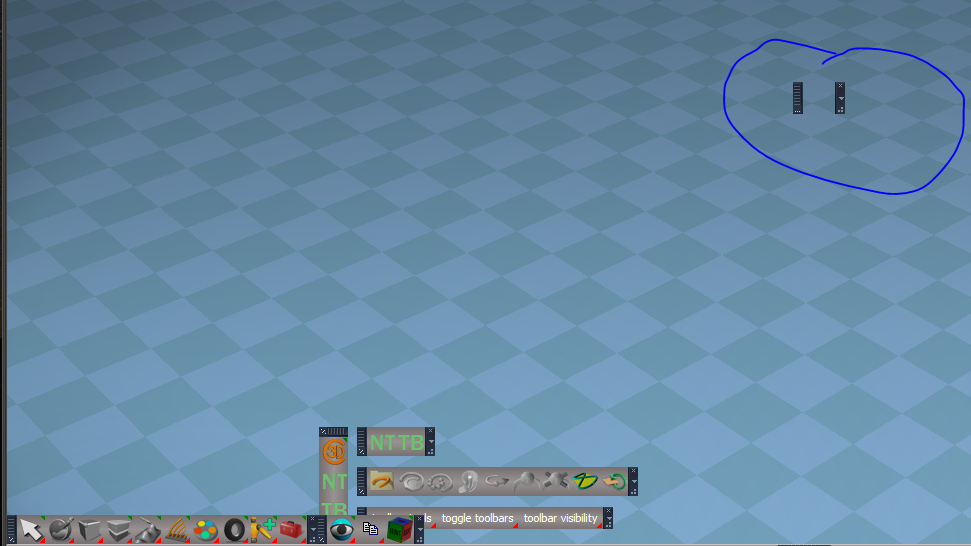
-
clintonman
- Captain
- Posts: 5659
- Joined: 21 May 2009, 21:08
- Type the number ten into the box: 0
- Location: California
Re: New Script installers ERROR
Latest efforts.
Still does not save to disk.
Gold button removed RMB stuff.
Alert when RMB to reload scripts.
Toolbar installers open the c3d toolbar, their toolbar and the main toolbar, non-toolbar installs only open the main toolbar, see alignment script.
Install opens toolbars to " Frame, 1" if it is available, usually the main 3d window
Fixed problem with toolbar manager installer - dont remember the details.
c3d persistent checks for unofficial update installed and recommends installing it first and will open a browser to the download links.
Still does not save to disk.
Gold button removed RMB stuff.
Alert when RMB to reload scripts.
Toolbar installers open the c3d toolbar, their toolbar and the main toolbar, non-toolbar installs only open the main toolbar, see alignment script.
Install opens toolbars to " Frame, 1" if it is available, usually the main 3d window
Fixed problem with toolbar manager installer - dont remember the details.
c3d persistent checks for unofficial update installed and recommends installing it first and will open a browser to the download links.
- Attachments
-
- 3toolbars_test3.zip
- (767.15 KiB) Downloaded 176 times
-
clintonman
- Captain
- Posts: 5659
- Joined: 21 May 2009, 21:08
- Type the number ten into the box: 0
- Location: California
Re: New Script installers ERROR
I think that's fixed in the latest installers. But their is one weird bug after installing the c3d persistent if you press the red toolcase a blank toolbar is created and opened.trueBlue wrote: 04 Feb 2018, 03:38 Clinton:" Don't understand the "Update: The C3D LMB command should move the C3D to the select window, as well." does it not do this already?"
I'll get back to you on this but fiddling around with moving them in different windows made me think it would be a good idea.
Reinstalled after the Reset.
Did it different installing the NT bar first and that went well.
When I installed the Toolbar Manager there was an empty toolbar frame that was not there before installing it.
Looks like you will need to install much higher. This is in the Default layout and there is still another toolbar to go.
Scratch that, maybe I had the LE selected when I installed.
Selecting the Space 3D window and the Gold toolbox made it go higher.
edit:
nope think that's fixed in the latest installer too. just did a test and didn't get the mystery blank toolbar
-
trueBlue
- Captain
- Posts: 5548
- Joined: 06 Jul 2009, 22:50
- Type the number ten into the box: 10
Re: New Script installers ERROR
Cool, nice improvements! Going to try this in the morning.
I was wrong about the Gold toolbox, it does move the C3D dock to selected window.
I would like to use your FixUnLookAt script to upload a couple of updates, but I would like to fix the script first.
I get that you are suppose to load it from the file menu. But try an run it from the LE. It honors the proper load but the Installed Alerts still run as updated. I know you are busy, but when you get a chance?
I have updated the onnewscene.xml to rename Camera1 to Camera so that my Camera toolbar works with the default camera in the scene. Also added, "Thanks to you!", your Status Line fix.
Also do you think you could include the Zoom to Selection update when you first save the widgets?
I was wrong about the Gold toolbox, it does move the C3D dock to selected window.
I would like to use your FixUnLookAt script to upload a couple of updates, but I would like to fix the script first.
I get that you are suppose to load it from the file menu. But try an run it from the LE. It honors the proper load but the Installed Alerts still run as updated. I know you are busy, but when you get a chance?
I have updated the onnewscene.xml to rename Camera1 to Camera so that my Camera toolbar works with the default camera in the scene. Also added, "Thanks to you!", your Status Line fix.
Also do you think you could include the Zoom to Selection update when you first save the widgets?
-
clintonman
- Captain
- Posts: 5659
- Joined: 21 May 2009, 21:08
- Type the number ten into the box: 0
- Location: California
Re: New Script installers ERROR
Having a hard time understanding what you're asking. You know the FixUnlookAt is run from the file menu but you want torun it from the link editor even though it doesn't work properly from there?trueBlue wrote: 04 Feb 2018, 04:22 Cool, nice improvements! Going to try this in the morning.
I was wrong about the Gold toolbox, it does move the C3D dock to selected window.
I would like to use your FixUnLookAt script to upload a couple of updates, but I would like to fix the script first.
I get that you are suppose to load it from the file menu. But try an run it from the LE. It honors the proper load but the Installed Alerts still run as updated. I know you are busy, but when you get a chance?
I have updated the onnewscene.xml to rename Camera1 to Camera so that my Camera toolbar works with the default camera in the scene. Also added, "Thanks to you!", your Status Line fix.
Also do you think you could include the Zoom to Selection update when you first save the widgets?
Add Zoom to Selection where? when I first save what widgets? what?

-
trueBlue
- Captain
- Posts: 5548
- Joined: 06 Jul 2009, 22:50
- Type the number ten into the box: 10
Re: New Script installers ERROR
I have been stumped with this a few times because I forgot the important part on how to install it.
Here is your instructions on the forum:
"Installation steps:
unzip the file
load the rsobj script and run it
the script will install and the xml file will copy to the scripts folder"
So here is an example:
The user copies the "rsobj script" to his Desktop.
Then they "load the rsobj script" from tS7 File menu, File/Load.
This is what they would see:
"Installer was not loaded from the file menu. A reset to default context will erase these changes."
"install complete"
Then a user saves a copy of the FixUnLookAt.RsObj thinking that the installation was complete.
The confusion is:
1.) The Alert "install complete" should not run in the above example?.
2.) The user follows your instruction "unzip the file" and not the 'UnlookAtInstall' folder.
So from a learning perspective with your script, I would like to learn how to add an additional if(!ProperLoad) or if(ProperLoad) statement with an Alert that says "Installation Failed".
Here is your instructions on the forum:
"Installation steps:
unzip the file
load the rsobj script and run it
the script will install and the xml file will copy to the scripts folder"
So here is an example:
The user copies the "rsobj script" to his Desktop.
Then they "load the rsobj script" from tS7 File menu, File/Load.
This is what they would see:
"Installer was not loaded from the file menu. A reset to default context will erase these changes."
"install complete"
Then a user saves a copy of the FixUnLookAt.RsObj thinking that the installation was complete.
The confusion is:
1.) The Alert "install complete" should not run in the above example?.
2.) The user follows your instruction "unzip the file" and not the 'UnlookAtInstall' folder.
So from a learning perspective with your script, I would like to learn how to add an additional if(!ProperLoad) or if(ProperLoad) statement with an Alert that says "Installation Failed".
-
trueBlue
- Captain
- Posts: 5548
- Joined: 06 Jul 2009, 22:50
- Type the number ten into the box: 10
Re: New Script installers ERROR
Never mind, I guess the improvements to the Zoom to Selection should be seperate.clintonman wrote: 04 Feb 2018, 04:46 Add Zoom to Selection where? when I first save what widgets? what?
I was thinking about incorporating it into your next toolbar.
-
clintonman
- Captain
- Posts: 5659
- Joined: 21 May 2009, 21:08
- Type the number ten into the box: 0
- Location: California
Re: New Script installers ERROR
Got it. Didn't even know the post was on the forums. Web page has "Unzip and load the script from the file menu and run it from the link editor. If the script is not loaded from the file menu then the change will be lost on the next reset to the default context. "trueBlue wrote: 04 Feb 2018, 15:03 I have been stumped with this a few times because I forgot the important part on how to install it.
Here is your instructions on the forum:
"Installation steps:
unzip the file
load the rsobj script and run it
the script will install and the xml file will copy to the scripts folder"
So here is an example:
The user copies the "rsobj script" to his Desktop.
Then they "load the rsobj script" from tS7 File menu, File/Load.
This is what they would see:
"Installer was not loaded from the file menu. A reset to default context will erase these changes."
"install complete"
Then a user saves a copy of the FixUnLookAt.RsObj thinking that the installation was complete.
The confusion is:
1.) The Alert "install complete" should not run in the above example?.
2.) The user follows your instruction "unzip the file" and not the 'UnlookAtInstall' folder.
So from a learning perspective with your script, I would like to learn how to add an additional if(!ProperLoad) or if(ProperLoad) statement with an Alert that says "Installation Failed".
Here is the fixit for unlookat installer.
What was it about the zoom to selection?
- Attachments
-
- fixit.RsObj
- (7.05 KiB) Downloaded 186 times