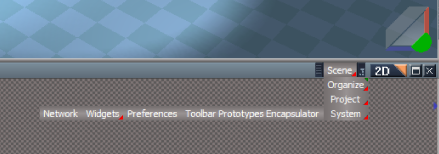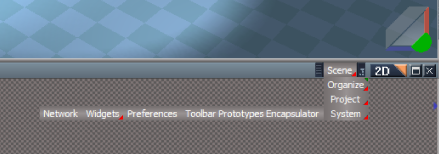
tS7.6.1 Link Editor Navigator Aspect Toolbar
-
trueBlue
- Captain
- Posts: 5548
- Joined: 06 Jul 2009, 22:50
- Type the number ten into the box: 10
tS7.6.1 Link Editor Navigator Aspect Toolbar
Space 3D = Navigate to the Scene level
Organize = Arrange and Minimize - RMB = Arrange and Maximize
Unselect = Unselects everything selected
The rest of the buttons are shortcuts to the various places within tS761
Note: This version is not compatible with previous tS versions as it was built in tS7.6.1
You can find the tS7.6 version here:
vi ... 781#p13781"
Instructions:
1.) Load the tS7.6.1 Link Editor Navigator Aspect Toolbar.RsObj.
2.) Select thw Window's titlebar.
3.) Select the Install or Uninstall button.
4.) Save your Layout.
Note: I Load my layout first before installing.
Removed 3/7/2018
Update: Sept. 17, 2021 has been converted to an Aspect toolbar (Embedded into the 2D titlebar).
Organize = Arrange and Minimize - RMB = Arrange and Maximize
Unselect = Unselects everything selected
The rest of the buttons are shortcuts to the various places within tS761
Note: This version is not compatible with previous tS versions as it was built in tS7.6.1
You can find the tS7.6 version here:
vi ... 781#p13781"
Instructions:
1.) Load the tS7.6.1 Link Editor Navigator Aspect Toolbar.RsObj.
2.) Select thw Window's titlebar.
3.) Select the Install or Uninstall button.
4.) Save your Layout.
Note: I Load my layout first before installing.
Removed 3/7/2018
Update: Sept. 17, 2021 has been converted to an Aspect toolbar (Embedded into the 2D titlebar).
Last edited by trueBlue on 18 Jan 2010, 21:59, edited 2 times in total.
-
pugman 1
- Captain
- Posts: 1555
- Joined: 21 May 2009, 19:26
- Type the number ten into the box: 0
- Location: Germany
Re: tS7.6.1 Link Editor Navigator Toolbar
Thanks TB it works great
ws is getting beter and better,

ws is getting beter and better,
-
LeonRegis
- Captain
- Posts: 1946
- Joined: 18 Aug 2009, 17:36
- Type the number ten into the box: 0
- Location: Brazil/Earth/Orion Arm/Milky Way/4th Dimension/This Universe/Multiverse???/Singularity???
Re: tS7.6.1 Link Editor Navigator Toolbar
That's amazing, thanks!
Be the change you want to see in the world. - Mohandas Gandhi
-
Steinie
- Captain
- Posts: 2958
- Joined: 21 May 2009, 17:38
- Type the number ten into the box: 10
Re: tS7.6.1 Link Editor Navigator Toolbar
This has become one of my mandatory installations for improvements to trueSpace.
Thanks again trueBlue!
-
Rhino169
- Senior Chief Petty Officer
- Posts: 201
- Joined: 29 Nov 2009, 03:15
Re: tS7.6.1 Link Editor Navigator Toolbar
Everything works great...although the unglue seems to not do anything.
I click glue and move the glued objects around then I click unglue and the 2 object are still glued.
Am I doing something wrong?
I click glue and move the glued objects around then I click unglue and the 2 object are still glued.
Am I doing something wrong?
Last edited by Rhino169 on 18 Jan 2010, 01:46, edited 1 time in total.
-
LeonRegis
- Captain
- Posts: 1946
- Joined: 18 Aug 2009, 17:36
- Type the number ten into the box: 0
- Location: Brazil/Earth/Orion Arm/Milky Way/4th Dimension/This Universe/Multiverse???/Singularity???
Re: tS7.6.1 Link Editor Navigator Toolbar
You need to press that little orange square to enter the object and select the sub-parts then the unglue will work.
HTH
HTH
Be the change you want to see in the world. - Mohandas Gandhi
-
Rhino169
- Senior Chief Petty Officer
- Posts: 201
- Joined: 29 Nov 2009, 03:15
Re: tS7.6.1 Link Editor Navigator Toolbar
What little orange square?
-
LeonRegis
- Captain
- Posts: 1946
- Joined: 18 Aug 2009, 17:36
- Type the number ten into the box: 0
- Location: Brazil/Earth/Orion Arm/Milky Way/4th Dimension/This Universe/Multiverse???/Singularity???
Re: tS7.6.1 Link Editor Navigator Toolbar
That one
- Attachments
-

- helping.jpg (18.26 KiB) Viewed 6432 times
Be the change you want to see in the world. - Mohandas Gandhi
-
Rhino169
- Senior Chief Petty Officer
- Posts: 201
- Joined: 29 Nov 2009, 03:15
Re: tS7.6.1 Link Editor Navigator Toolbar
aaaaahh hhhaaaaa!
Well that works perfectly as well!
Good show!
Well that works perfectly as well!
Good show!
-
trueBlue
- Captain
- Posts: 5548
- Joined: 06 Jul 2009, 22:50
- Type the number ten into the box: 10
Re: tS7.6.1 Link Editor Navigator Toolbar
You are welcome and thanks.
Unglue: With your Glued/Grouped/Parent/3D Encapsulated object selected, you can use your keyboard Down arrow key to select the first object (Child) and then use the Right arrow key to select the next object. When the object is selected press the Unglue button or you can use the Link Editor as said.
-
trueBlue
- Captain
- Posts: 5548
- Joined: 06 Jul 2009, 22:50
- Type the number ten into the box: 10
Re: tS7.6.1 Link Editor Navigator Aspect Toolbar
tS7.6.1 Link Editor Navigator Aspect Toolbar
Update: Sept. 17, 2021 has been converted to an Aspect toolbar (Embedded into the 2D titlebar).
-
Steinie
- Captain
- Posts: 2958
- Joined: 21 May 2009, 17:38
- Type the number ten into the box: 10
Re: tS7.6.1 Link Editor Navigator Aspect Toolbar
No problems and works great!
Thanks trueBlue!
Thanks trueBlue!
-
trueBlue
- Captain
- Posts: 5548
- Joined: 06 Jul 2009, 22:50
- Type the number ten into the box: 10
Re: tS7.6.1 Link Editor Navigator Aspect Toolbar
Good to hear and thank you.