Each time I try an other 3D app and tell me it is time to learn something new, I realize how cool the trueSpace navigation is.
I LOVE trueSpace's view navigation that let me quicky and instinctively
- rotate around selected object by pressing the middle mouse button
- move on the XY plan or Z plan by clicking the horizontal area of the View Widget
- and walk in the view by clicking on the "walk" area of the view widget
Seriously, this is probably the harder brake in learning new 3D tools. You don't change a Ferrari for a bicycle.
Did anyone ever found an other app that offer similar interface by default or via some special configuration ?
A 3D apps with tS style view navigation
-
Emmanuel

- Chief Warrant Officer
- Posts: 670
- Joined: 14 Jun 2009, 06:47
A 3D apps with tS style view navigation
-
BNG

- Chief Warrant Officer
- Posts: 684
- Joined: 16 Oct 2009, 03:26
- Type the number ten into the box: 0
- Location: Texas
Re: A 3D apps with tS style view navigation
Good question bro. Many use some form of icons as modeling tools, but all pale in comparison to Caligari modeling software in general. Most that I've seen get complicated upon intially clicking an icon. Prime examples of these are Studio Max, Blender, Lightwave, Softimage XSI, and the list goes on and on. Caligari's main appeal is it's overall simple operation; which is probalbly why some people don't want to use anything else more complicated. If this were not true then I know for sure that I would not personally be as productive in actually creating 3D artwork. Give me simplicity over complexity over give me death every time!Emmanuel wrote:Each time I try an other 3D app and tell me it is time to learn something new, I realize how cool the trueSpace navigation is.
I LOVE trueSpace's view navigation that let me quicky and instinctively
- rotate around selected object by pressing the middle mouse button
- move on the XY plan or Z plan by clicking the horizontal area of the View Widget
- and walk in the view by clicking on the "walk" area of the view widget
Seriously, this is probably the harder brake in learning new 3D tools. You don't change a Ferrari for a bicycle.
Did anyone ever found an other app that offer similar interface by default or via some special configuration ?
Casual Truespace 3D modeling hobbyist. My Truespace blog and simple 3d Modeling Tutorials for Casual Model Makers.
-
RAYMAN

- Captain
- Posts: 2547
- Joined: 21 May 2009, 18:56
Re: A 3D apps with tS style view navigation
Always a question of what you are used to....
I use Silo ,Moi and sketchup most of the time..
While Sketchups navigation isnt all to nice .... I am used to Moi and Silo (Silo is basically maya style....
There´s more to a good modeler then navigation though...
Peter
I use Silo ,Moi and sketchup most of the time..
While Sketchups navigation isnt all to nice .... I am used to Moi and Silo (Silo is basically maya style....
There´s more to a good modeler then navigation though...
Peter
-
Breech Block

- Master Chief Petty Officer
- Posts: 482
- Joined: 13 Jun 2009, 20:31
Re: A 3D apps with tS style view navigation
I have used ts, and still do on occassions, since version 4. When it comes to trying other 3D apps, you begin to realise how spoilt you have been with the ease-of-use that tS offeres. Not just in the navigation department, but also with the material editer and how tS can handle holes in geometry. Modo is the nearest app that I have ever found that allows me to transfer my skills/ability across to another platform without too much of a steep learning curve.

-
Prodigy

- Site Admin
- Posts: 957
- Joined: 21 May 2009, 14:46
- Type the number ten into the box: 0
- Location: Uruguay
Re: A 3D apps with tS style view navigation
Wow, seems i'm not the only one with the same problem.
First im totally agree with you emmanuel, the hardest part of learn another 3dsoft is how navigate through the UI and the 3d space..
Well, i have 2 "projects" to make a Truespace navigation for Blender
i mean, try to copy the same truespace behaviors on blender.. I have part succeed but blender 2.5 still on beta, so it still with lot of bugs on the UI customization.
I'll try to share with the community my blender ui.. but i still loving much more Truespace..
First im totally agree with you emmanuel, the hardest part of learn another 3dsoft is how navigate through the UI and the 3d space..
Well, i have 2 "projects" to make a Truespace navigation for Blender
i mean, try to copy the same truespace behaviors on blender.. I have part succeed but blender 2.5 still on beta, so it still with lot of bugs on the UI customization.
I'll try to share with the community my blender ui.. but i still loving much more Truespace..
๑۩۞۩๑ prodigy ๑۩۞۩๑
-
froo
- Captain
- Posts: 2554
- Joined: 22 May 2009, 12:13
Re: A 3D apps with tS style view navigation
Now that would be cool Augusto! 
-
MikomDude

- Captain
- Posts: 1930
- Joined: 04 Oct 2010, 11:12
- Type the number ten into the box: 0
- Location: The Hague, Netherlands
Re: A 3D apps with tS style view navigation
Totally!! a trueSpace interface for Blender would be fantastic!
-
bitkar

- Captain
- Posts: 2089
- Joined: 16 Mar 2010, 07:14
- Type the number ten into the box: 0
- Location: Czech Republic
Re: A 3D apps with tS style view navigation
good idea, iam curious how much possible is the turning blender into tS. I wish it will look the closest to tS.
Michal aka bitkar
tS freak since tS2 (1998) and forever (tS7.61 modeler)
tS freak since tS2 (1998) and forever (tS7.61 modeler)
-
RAYMAN
- Captain
- Posts: 2547
- Joined: 21 May 2009, 18:56
Re: A 3D apps with tS style view navigation
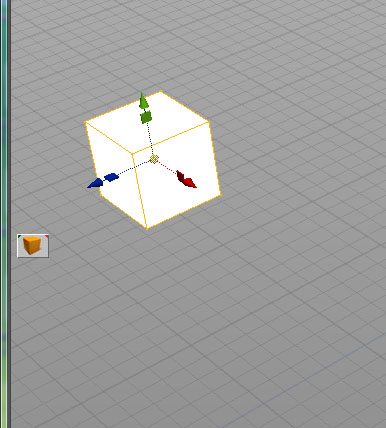
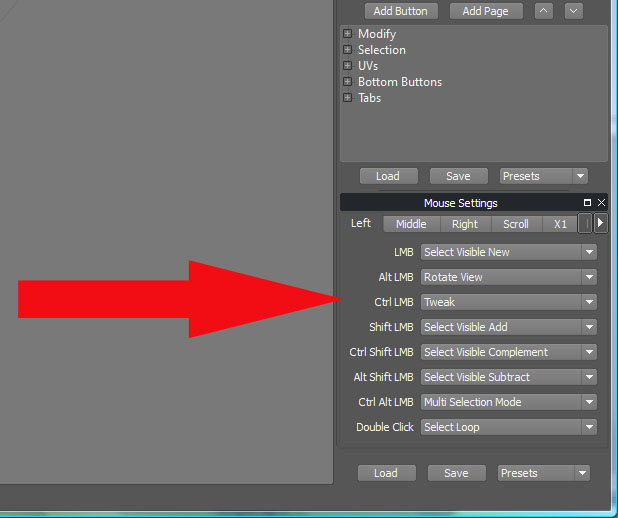
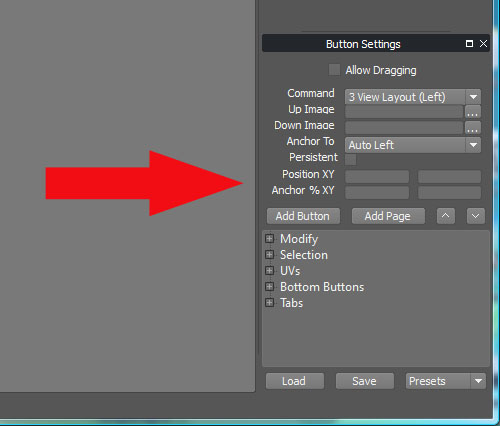
The only one you can customise that way is Silo as i remember...bitkar wrote:good idea, iam curious how much possible is the turning blender into tS. I wish it will look the closest to tS.
you can load picture files as buttons and assign mousemovements too.....
- Attachments
-
-
-
-
RAYMAN
- Captain
- Posts: 2547
- Joined: 21 May 2009, 18:56
Re: A 3D apps with tS style view navigation
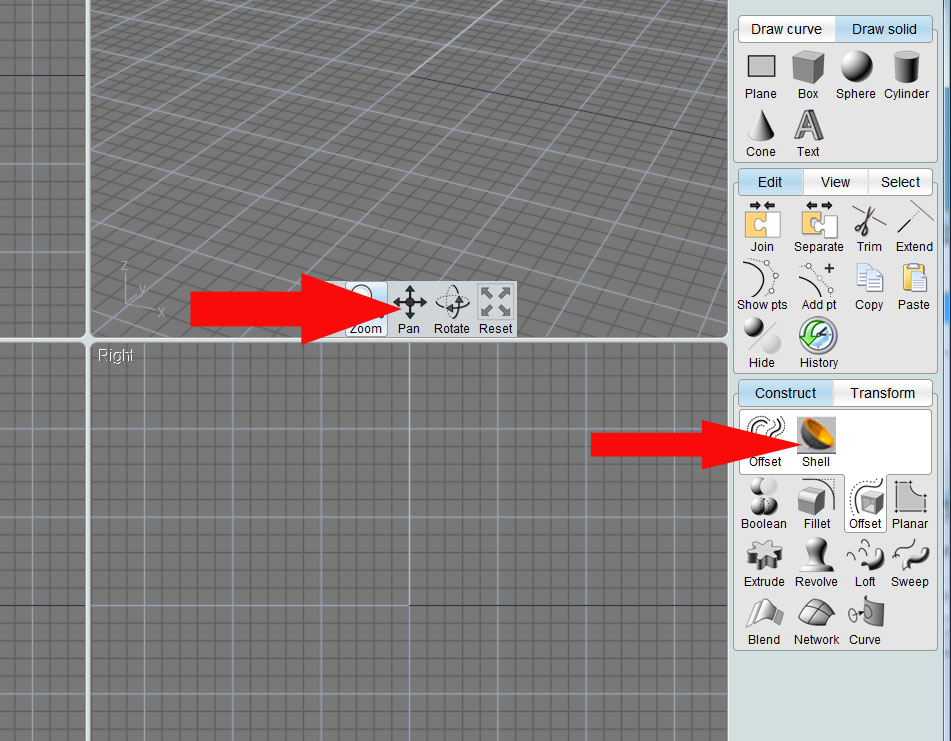
Since Moi 3d is based on the explorer engine you can fully customise the interface and also the mask of it and the buttons can easily be swapped in and out..
it also has navigation pretty near to that from truespace not a widget but arrows......
QA reason why I´m probably as at home in it then in any other application....
Peter
it also has navigation pretty near to that from truespace not a widget but arrows......
QA reason why I´m probably as at home in it then in any other application....
Peter
- Attachments
-
-
bitkar
- Captain
- Posts: 2089
- Joined: 16 Mar 2010, 07:14
- Type the number ten into the box: 0
- Location: Czech Republic
Re: A 3D apps with tS style view navigation
wow, maybe i should prelearn Silo a little :D Moi is nice app, indeed.
I dont like and dont use widgets in tS, never. I think its slow way to do it. I have left hand on keyboard and pres ZXC to move, rotat or scale and ASD to lock axes and righ hand on mouse to do the movement. Well widgets in tS (the thing arount object) is not bad, its way better than what i saw in other apps. But anyway. The eye navigation widget is bad :D So i need key shortcuts to navigation and mouse to do it, then iam happy (if tze Z axis is up/down and is on the right button)pretty near to that from truespace not a widget but arrows
Michal aka bitkar
tS freak since tS2 (1998) and forever (tS7.61 modeler)
tS freak since tS2 (1998) and forever (tS7.61 modeler)
-
RAYMAN
- Captain
- Posts: 2547
- Joined: 21 May 2009, 18:56
Re: A 3D apps with tS style view navigation
Bitkar its got customisable mouse shortcutted navigation... it just got widget5s on top of that... and the r4eson why is because moi3d is made for use(and its designed for it) with a tablet and a pen....bitkar wrote:wow, maybe i should prelearn Silo a littleMoi is nice app, indeed.
I dont like and dont use widgets in tS, never. I think its slow way to do it. I have left hand on keyboard and pres ZXC to move, rotat or scale and ASD to lock axes and righ hand on mouse to do the movement. Well widgets in tS (the thing arount object) is not bad, its way better than what i saw in other apps. But anyway. The eye navigation widget is badpretty near to that from truespace not a widget but arrows
Silo also got mouse navigation you can even appoint any mousebutton to any action freely.....
more isnt possible !

Peter
-
Emmanuel
- Chief Warrant Officer
- Posts: 670
- Joined: 14 Jun 2009, 06:47
Re: A 3D apps with tS style view navigation
The problem with Moi3D and Silo is that they both don't offer any render engine.
I think the idea behind my initial post -the search for a 3D tool with tS style view navigation- was the need for an alternative rendering solution.
TrueSpace's tools are perfect for my use, as long as I don't do organic modelling. But the area where it really shows its age is the render engine. Bitkar's conclusion in that topic about new plugins from DD was relevant : the plugin that we need today is a door to modern render engines, to go beyond Lightworks (fast and versatile, but limited in its features) and V-Ray for trueSpace (good for GI but don't handle large renders).
So, here comes the need of a secondary 3D application to be used as a rendering tool... that would behave like tS's 3D view for a good integration into a trueSpace workflow.
Prodigy's idea to implement trueSpace's view navigation into Blender is fantastic. Blender's render engine is quite good and the app is also a door to other render engines.
Also, Modo's render engine offer many nice features and seems fast. And I can see that Modo's navigation can be tweaked to match other 3D apps inputs, without the need of complex plugin development (at least it seems so) :

Did anyone tried to edit Modo's Input Editor to re-create tS style mouse/keyboard controls ?
I think the idea behind my initial post -the search for a 3D tool with tS style view navigation- was the need for an alternative rendering solution.
TrueSpace's tools are perfect for my use, as long as I don't do organic modelling. But the area where it really shows its age is the render engine. Bitkar's conclusion in that topic about new plugins from DD was relevant : the plugin that we need today is a door to modern render engines, to go beyond Lightworks (fast and versatile, but limited in its features) and V-Ray for trueSpace (good for GI but don't handle large renders).
So, here comes the need of a secondary 3D application to be used as a rendering tool... that would behave like tS's 3D view for a good integration into a trueSpace workflow.
Prodigy's idea to implement trueSpace's view navigation into Blender is fantastic. Blender's render engine is quite good and the app is also a door to other render engines.
Also, Modo's render engine offer many nice features and seems fast. And I can see that Modo's navigation can be tweaked to match other 3D apps inputs, without the need of complex plugin development (at least it seems so) :
Did anyone tried to edit Modo's Input Editor to re-create tS style mouse/keyboard controls ?
-
RAYMAN
- Captain
- Posts: 2547
- Joined: 21 May 2009, 18:56
Re: A 3D apps with tS style view navigation
I didnt post about render engines since I´ve pretty well settelled with those from using Vue and Thea......Emmanuel wrote:The problem with Moi3D and Silo is that they both don't offer any render engine.
I think the idea behind my initial post -the search for a 3D tool with tS style view navigation- was the need for an alternative rendering solution.
TrueSpace's tools are perfect for my use, as long as I don't do organic modelling. But the area where it really shows its age is the render engine. Bitkar's conclusion in that topic about new plugins from DD was relevant : the plugin that we need today is a door to modern render engines, to go beyond Lightworks (fast and versatile, but limited in its features) and V-Ray for trueSpace (good for GI but don't handle large renders).
Did anyone tried to edit Modo's Input Editor to re-create tS style mouse/keyboard controls ?
If you compare those to Blender they are more then a generation ahead of Blender....
When it comes to render engines its a question of look rather then navigation....
Thea also has an exporter for Blender.......
The export from Truespace to Thea works the same way as the one for Kerkythea.. even kerkythea scene files can be opened inside Thea---
for further explanation look into tutorial section....
Its as realistic as can be same as maxwell at a fraction of the price and does realtime render preview so that you can
set the materials and light while you see the results in realtime..... aint going to get easier...
Here is also some of the most recent works from Nigec from this forum here...http://www.thearender.com/forum/viewtop ... =22&t=6043"
- Attachments
-

- Created by Alex Murat
-

- Created by Christophe Desse / Duncan Howdin
-

- Created by Peter Stoppel