Hello developers and users,
i want to discuss a new plugin idea that i had today. Well, the idea himself is not from me, it is a functionality that i found in a other 3D application. I saw this in a tutorial video and i found it very useful - also for trueSpace users. The idea is to make a plugin with this functionality for tS.
Ok, let me explain the problem. If you want to create a big scene (or a animation) with lots of objects (i.e. a big city complex) then you got the problem that trueSpace is going slower and unstable because there are a lot of geometrie in your scene and this needs a lot of system ressources. It is also possible that trueSpace hangs up and you lost your scene etc.
To keep the scene much more "lighter" normaly you hide objects in this situation, place the objects in different layers or you place reference objects like cubes in the scene. But before you start to render you have to load all your objects (in the case you use reference objects) or make the layers and/or objects visible.
In any way there are a lot of things to do, especialy if you find out that you have to change anything on one of these objects (i.e. you have to add some pieces of geometry).
Also the scene file is big because of lots of geometrie and make trueSpace unstable.
Ok, the idea is to create a automatic reference system which shows simplified objects in the scene, maybe primitives or extra created objects with simplified geometrie. This holds the amount of faces in the whole scene slow and the work should be faster and much more stable.
- If you hit the render button (for example) the plugin should automatic load the referenced objects and should replace the primitives and then render the scene.
- A other point is that you can change anything on the objects independent from the scene where they are in, the plugin can reload the object automaticly (or maybe by hand).
Before i start to test some things if this plugin would be possible i want to know what you think about that.
In my eyes it could be very useful but i see one problem: Animation. I think the system himself could work with not animated objects. With animated objects - i'm not sure but seems to be very difficult.
Well, i hope i descriped the problem understandable enough.
...let me read what you think - thanks, DD
new plugin idea - referencing objects - discussion
-
DesignDevil

- Master Chief Petty Officer
- Posts: 500
- Joined: 22 May 2009, 08:52
- Type the number ten into the box: 0
- Location: Neuruppin, Germany, Earth.
new plugin idea - referencing objects - discussion
I still use TrueSpace 6.6
Link: My Youtube Channel
Link: www.DesignDevil.de - Plugins, Tutorials and more about TrueSpace 6.6
Link: My Youtube Channel
Link: www.DesignDevil.de - Plugins, Tutorials and more about TrueSpace 6.6
-
froo
- Captain
- Posts: 2554
- Joined: 22 May 2009, 12:13
Re: new plugin idea - referencing objects - discussion
I think it's a cool idea DD.
Will you be doing this on Model side?
Will you be doing this on Model side?
-
bitkar

- Captain
- Posts: 2089
- Joined: 16 Mar 2010, 07:14
- Type the number ten into the box: 0
- Location: Czech Republic
Re: new plugin idea - referencing objects - discussion
I stared to write an answer and during it my toughts developed, so you have more ideas from me. I think the further you read the better solution as I started to think about it more and more, but I will leave all I wrote so you can maybe understand better of maybe you will have some better idea:
hey, i usually solve this by layers or switching realtime render mode to boxes (which is very underestimated feature and can make things really easy), where selected object is full wireframe or realtime rendered and only others are boxes.
Its a good idea though. But i think it will encounter problem that replacing 100 objects/1meg polys will be also very resource eating process which can make ts crash. Maybe working with layers and making a reference layer would be better. I mean, you have reference cube instead of complex object. The cube will be in one layer and the full object will be in another. The "full objects layer" would be hidden. But when you move the cube in the visibel "simple geometry objects layer" tS will move the linked object in the "full layer". And when you hit the render button, the layers would switch. This could be better than loading dozens of objects before render (the replacing can take maybe more time than rendering - maybe iam wrong and it will be fast, sure i dont know it)
The speed will be crucial. If tS can replace the objects for render, no problem, otherwise you have problem to make it. Maybe the "boxes realtime render" swtich is still the easiest. The only difference would be just that it would be selective, no for all other models. I also like old plugin by Chikara Kojima - rotoscope, which can switch the render mode in per object basis so you can switch complicated objects to boxes view. Maybe this is the best way to handle complicated objects - switch them selectively to boxes mode, instead of referencing object and loading and unloading them. Maybe just a simple plugin that would switch objects with polycount higher than xy to boxes mode would be very useful. Renderer will render them in their whole quality anyway, so no need to worry about rendering.
I hope it will help as it can seem very chaotic :D
hey, i usually solve this by layers or switching realtime render mode to boxes (which is very underestimated feature and can make things really easy), where selected object is full wireframe or realtime rendered and only others are boxes.
Its a good idea though. But i think it will encounter problem that replacing 100 objects/1meg polys will be also very resource eating process which can make ts crash. Maybe working with layers and making a reference layer would be better. I mean, you have reference cube instead of complex object. The cube will be in one layer and the full object will be in another. The "full objects layer" would be hidden. But when you move the cube in the visibel "simple geometry objects layer" tS will move the linked object in the "full layer". And when you hit the render button, the layers would switch. This could be better than loading dozens of objects before render (the replacing can take maybe more time than rendering - maybe iam wrong and it will be fast, sure i dont know it)
The speed will be crucial. If tS can replace the objects for render, no problem, otherwise you have problem to make it. Maybe the "boxes realtime render" swtich is still the easiest. The only difference would be just that it would be selective, no for all other models. I also like old plugin by Chikara Kojima - rotoscope, which can switch the render mode in per object basis so you can switch complicated objects to boxes view. Maybe this is the best way to handle complicated objects - switch them selectively to boxes mode, instead of referencing object and loading and unloading them. Maybe just a simple plugin that would switch objects with polycount higher than xy to boxes mode would be very useful. Renderer will render them in their whole quality anyway, so no need to worry about rendering.
I hope it will help as it can seem very chaotic :D
Michal aka bitkar
tS freak since tS2 (1998) and forever (tS7.61 modeler)
tS freak since tS2 (1998) and forever (tS7.61 modeler)
-
Emmanuel

- Chief Warrant Officer
- Posts: 670
- Joined: 14 Jun 2009, 06:47
Re: new plugin idea - referencing objects - discussion
Good idea ! I see the superiority of an XRef tool especially in its ability to behave like a "blender" to load different scenes into a unique "render scene". Example :
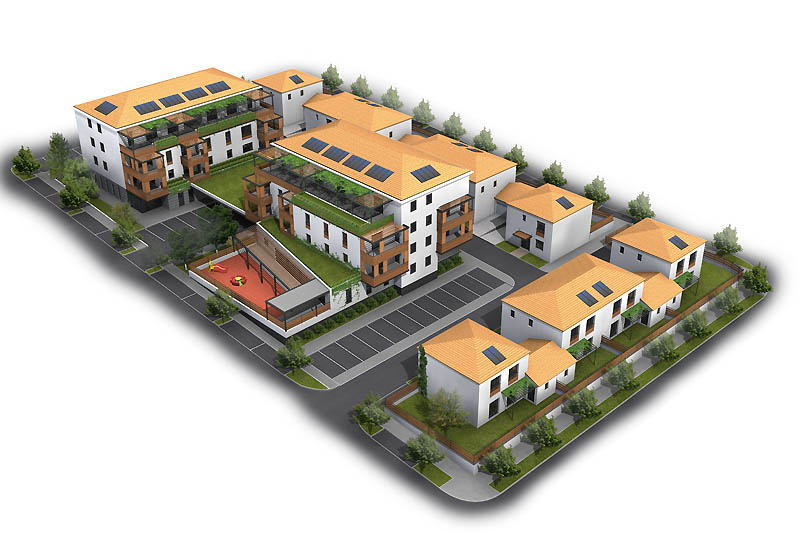
Let's say you work on a big architecture scene with 2 main buildings and a dozen of little houses like in the render below.
Each building could be built at their right location in a different scn file (like buildingA.scn, buildingB.scn, houseA.scn, houseB.scn, houseC.scn, etc...), and the terrain and roads created in the main scene.
The main scene would only room the environment (terrain, lights, accessories like trees), but at the clic on a button, all the external scn references would load for visual check or render.
I think the Xref objects should appear as non-editable in the main scene. But some may welcome an option to make it editable and save the changes in the external scene automatically...
However, Bitkar is right : while an Xref (external references) tsX would be a great addition to trueSpace toolsets, we already have Chikara's Rotoscope, plus Riccardo's RSLayers that both help to make big scenes work comfortable.
So I am not sure if the challenge of this plugin development is worth the effort ; after all, I guess that only a limited number of tS users will really make use of it.
DD, I sent you a tSX idea by mail a while ago. Maybe it never arrived. I belive it was a good suggestion probably more easy to develop and useful for all :
In Modo, they have a very cool clone feature called Clone Between. It is a sort of super-copyEx.
See it in action here :
What do you think ?
Let's say you work on a big architecture scene with 2 main buildings and a dozen of little houses like in the render below.
Each building could be built at their right location in a different scn file (like buildingA.scn, buildingB.scn, houseA.scn, houseB.scn, houseC.scn, etc...), and the terrain and roads created in the main scene.
The main scene would only room the environment (terrain, lights, accessories like trees), but at the clic on a button, all the external scn references would load for visual check or render.
I think the Xref objects should appear as non-editable in the main scene. But some may welcome an option to make it editable and save the changes in the external scene automatically...
So I am not sure if the challenge of this plugin development is worth the effort ; after all, I guess that only a limited number of tS users will really make use of it.
DD, I sent you a tSX idea by mail a while ago. Maybe it never arrived. I belive it was a good suggestion probably more easy to develop and useful for all :
In Modo, they have a very cool clone feature called Clone Between. It is a sort of super-copyEx.
See it in action here :
What do you think ?
-
bitkar
- Captain
- Posts: 2089
- Joined: 16 Mar 2010, 07:14
- Type the number ten into the box: 0
- Location: Czech Republic
Re: new plugin idea - referencing objects - discussion
the cloning is similar to an array tool in tS.
However I would like to see another plugin. The dribble reworked to work with some free open source renderman renderer as Pixie (I posted some topics about cool free renderers). Dribble is already done working nice, it would be good if the caustics and other things would work properly. And making it work with other than 3delight would make the work faster, coz 3delight has the limit of two CPU threads for free license. We have no other alternative renderer for modeler side, which is a pity. I think most of us still use modeler most.
However I would like to see another plugin. The dribble reworked to work with some free open source renderman renderer as Pixie (I posted some topics about cool free renderers). Dribble is already done working nice, it would be good if the caustics and other things would work properly. And making it work with other than 3delight would make the work faster, coz 3delight has the limit of two CPU threads for free license. We have no other alternative renderer for modeler side, which is a pity. I think most of us still use modeler most.
Michal aka bitkar
tS freak since tS2 (1998) and forever (tS7.61 modeler)
tS freak since tS2 (1998) and forever (tS7.61 modeler)
-
Emmanuel
- Chief Warrant Officer
- Posts: 670
- Joined: 14 Jun 2009, 06:47
Re: new plugin idea - referencing objects - discussion
Okay, one more idea  :
:
A vertical/horizontal snap switch (or grid) for polyline drawing !
When I have to draw floor plans, I use the Polyline tool. And to keep the lines straight as I draw vertical or horizontal lines, I turn the Grid on. Problem with Grid is that it makes my new points to snap to a grid division point. For example, if Grid is set to x1, y1, z1, then my lines dimensions have to be 1 meter multiples. So each time I draw a new point, I have to turn the Grid off, use the Toggle Navigation X/Y/Z to lock unwanted directions and manually drag the point to its desired location.
A special "grid/snap" tool that simply snaps polygon drawing to top/bottom/left/right directions would really improve 2D drawing workflow.
:A vertical/horizontal snap switch (or grid) for polyline drawing !
When I have to draw floor plans, I use the Polyline tool. And to keep the lines straight as I draw vertical or horizontal lines, I turn the Grid on. Problem with Grid is that it makes my new points to snap to a grid division point. For example, if Grid is set to x1, y1, z1, then my lines dimensions have to be 1 meter multiples. So each time I draw a new point, I have to turn the Grid off, use the Toggle Navigation X/Y/Z to lock unwanted directions and manually drag the point to its desired location.
A special "grid/snap" tool that simply snaps polygon drawing to top/bottom/left/right directions would really improve 2D drawing workflow.
-
DesignDevil
- Master Chief Petty Officer
- Posts: 500
- Joined: 22 May 2009, 08:52
- Type the number ten into the box: 0
- Location: Neuruppin, Germany, Earth.
Re: new plugin idea - referencing objects - discussion
Well, you both are right...
the reason for asking if it make sense was exactly this theme. I was also not sure if it is useful enough to spent time on it. Ok, so i cancelled this idea.
Also absolutly correct:
I will have a look into the dribble source how it was done there and see further what i can do - and maybe give it a try.
Thanks a lot and if there are other ideas for plugins - always let me know.
the reason for asking if it make sense was exactly this theme. I was also not sure if it is useful enough to spent time on it. Ok, so i cancelled this idea.
Also absolutly correct:
So, to have another rendering option would be cool and i think to export the objects (poly) to any "rendering machine" is not very difficult. But with the export of textures and such stuff i have no experience ( also the export of nurbs or SDS objects etc. ) but it seams to be a very interesting thing.the cloning is similar to an array tool in tS.
I will have a look into the dribble source how it was done there and see further what i can do - and maybe give it a try.
Thanks a lot and if there are other ideas for plugins - always let me know.
I still use TrueSpace 6.6
Link: My Youtube Channel
Link: www.DesignDevil.de - Plugins, Tutorials and more about TrueSpace 6.6
Link: My Youtube Channel
Link: www.DesignDevil.de - Plugins, Tutorials and more about TrueSpace 6.6
-
bitkar
- Captain
- Posts: 2089
- Joined: 16 Mar 2010, 07:14
- Type the number ten into the box: 0
- Location: Czech Republic
Re: new plugin idea - referencing objects - discussion
my pleasure :)
great if you will work on rendering options :) very great!
I think you dont need to workout SDS and other complicated things for the first try. SDS or nurbs can be simply converted into polyhedron for the renderer very easily by user :) I think no one will have problem with it and will be happy to have another good rendering option for modeler side. Or just simply overcome it by converting it with the plugin and hiding original and then reverting (or something like that).
Lets make some "to do plan" step by step. To plan from simple things to more complicated. Lets make it work first. Just the basic things - geometry, lighting, materials, textures and bumps (and dispacement). And the most useful renderer features (GI, caustics, dsplacement maping, etc.) Enough for a good start. I personally would be very thankful for any new option to render static scenes. To model it, convert everything into polyhedron and then work on materials, lights and render it, would be enough for start.
But if you find something useful in dribble source, it can be great for sure. You have option to learn from creators of dribble. I can offer only betatester help as I cannot do programing. :-/
great if you will work on rendering options :) very great!
I think you dont need to workout SDS and other complicated things for the first try. SDS or nurbs can be simply converted into polyhedron for the renderer very easily by user :) I think no one will have problem with it and will be happy to have another good rendering option for modeler side. Or just simply overcome it by converting it with the plugin and hiding original and then reverting (or something like that).
Lets make some "to do plan" step by step. To plan from simple things to more complicated. Lets make it work first. Just the basic things - geometry, lighting, materials, textures and bumps (and dispacement). And the most useful renderer features (GI, caustics, dsplacement maping, etc.) Enough for a good start. I personally would be very thankful for any new option to render static scenes. To model it, convert everything into polyhedron and then work on materials, lights and render it, would be enough for start.
But if you find something useful in dribble source, it can be great for sure. You have option to learn from creators of dribble. I can offer only betatester help as I cannot do programing. :-/
Michal aka bitkar
tS freak since tS2 (1998) and forever (tS7.61 modeler)
tS freak since tS2 (1998) and forever (tS7.61 modeler)