I ran into an issue with the unofficial updates show and hide scripts. I had a scene with about 500 items in it and it took a long time to show and hide a large number of items. In a smaller scene with 160 items it takes about 7 seconds to hide and show all. The show actually happens faster in the 3d view with the side panel update finishing later for the 7 second total time. The attached quick show and hide scripts work almost instantaneously. The limitation is they cut corners to do it. They don't fully support group objects and if an object doesn't already have a render attribute node it ignores it.
Anyway, I'm in the process of figuring out where to add these new "quick" commands. I'm leaning towards adding them to the popup view menu.
Show and Hide Commands
-
clintonman

- Captain
- Posts: 5659
- Joined: 21 May 2009, 21:08
- Type the number ten into the box: 0
- Location: California
Show and Hide Commands
- Attachments
-
- QuickHide.RsObj
- (7.17 KiB) Downloaded 201 times
-
- QuickHideAll.RsObj
- (7.65 KiB) Downloaded 171 times
-
- QuickShow.RsObj
- (7.41 KiB) Downloaded 228 times
-
- QuickShowAll.RsObj
- (7.54 KiB) Downloaded 214 times
-
trueBlue

- Captain
- Posts: 5548
- Joined: 06 Jul 2009, 22:50
- Type the number ten into the box: 10
Re: Show and Hide Commands
I see what you mean about the HideAll & ShowAll scripts taking a lot of time when there are many objects
I think the biggest downfall is the Search function
It looks like these two commands run regardless if the object(s) have and ORA or Not
I think the biggest downfall is the Search function
It looks like these two commands run regardless if the object(s) have and ORA or Not
Code: Select all
D3DView.ShowRenderAttribsForObject('', curNode)
RsStackView.SetPanelExportInfo(curNode + '/Object Render Attributes','Default',1,1);
Code: Select all
function Search(curNode)
{
var util = System.CreateDO("Clintons3D Package/Utility functions");

	if(!Node.Exists(curNode + "/Object hider") &&	Node.ConExists(curNode, "WldMatrix") && Node.SubObjectCount(curNode) > 1) {
		if(IsNURBS(curNode)) {
			curNode = ConvertCurrentToLODMesh(curNode);
		}

		D3DView.ShowRenderAttribsForObject('', curNode)
		RsStackView.SetPanelExportInfo(curNode + '/Object Render Attributes','Default',1,1);

		if(Node.Exists(curNode +  "/Object Render Attributes")) {
			util.SetNodeValueInt(curNode +  "/Object Render Attributes", "Invisible", -1);
		}
		return;
	}
-
trueBlue
- Captain
- Posts: 5548
- Joined: 06 Jul 2009, 22:50
- Type the number ten into the box: 10
Re: Show and Hide Commands
I tried a different way on 537 selected objects
10 seconds
Unfortunately, it is not the customized ORA panel 
10 seconds
Code: Select all
function Execute(params)
{
	sel = Node.Selection();
	for (i = 0; i < Node.SelectionLength(sel); i++)
		{Node.Select(Node.SelectionGetAt(sel, i)); ApplyMacro(Node.SelectionGetAt(sel, i))};
}

function ApplyMacro(selectedObj_)
{
var temp = Node.Create("Space 3D Package/Object Render Attributes",selectedObj_ + "/");
Node.ExportConnector(selectedObj_ + "/Object Render Attributes", "RenderAttributes", "", 1, 1)
}
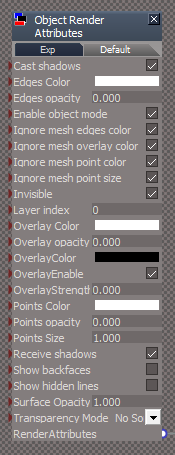
-
clintonman
- Captain
- Posts: 5659
- Joined: 21 May 2009, 21:08
- Type the number ten into the box: 0
- Location: California
Re: Show and Hide Commands
And on top of that it won't replace the "D3DView.ShowRenderAttribsForObject" command because it also creates and hooks up "RenderAttributes" nodes for group members. Non of these quick commands will replace the original but they work in most cases once the Object Render Attributes/RenderAttributes structures are already in place. So I figure the use case is use quick unless it doesn't work then use the slow way to get it setup then moving forward use the quick way.trueBlue wrote: 04 Nov 2021, 00:04 I tried a different way on 537 selected objects
10 secondsUnfortunately, it is not the customized ORA panelCode: Select all
function Execute(params)
{
	sel = Node.Selection();
	for (i = 0; i < Node.SelectionLength(sel); i++)
		{Node.Select(Node.SelectionGetAt(sel, i)); ApplyMacro(Node.SelectionGetAt(sel, i))};
}

function ApplyMacro(selectedObj_)
{
var temp = Node.Create("Space 3D Package/Object Render Attributes",selectedObj_ + "/");
Node.ExportConnector(selectedObj_ + "/Object Render Attributes", "RenderAttributes", "", 1, 1)
}
ORA.png
-
trueBlue
- Captain
- Posts: 5548
- Joined: 06 Jul 2009, 22:50
- Type the number ten into the box: 10
Re: Show and Hide Commands
With regards to the Unofficial Updates and your Quick ORA scripts...
I was thinking about using these as a LMB command and the xml scripts as a RMB command in the existing Workspace toolbars
I would also like to add a status message if there is objects that do not have an ORA node in the scene and include the Cameras & Lights
Quick Hide All example...
Also add these scripts to the ViewToolbar in the same manner mentioned above
Also include your update to Workspace Layers 4
Also add Edit material in the LE button in your DX Material Components toolbar and a RMB command in the Material Editor's Convert D3D materials button to open it
Thoughts?
Anything else needing updated?
I was thinking about using these as a LMB command and the xml scripts as a RMB command in the existing Workspace toolbars
I would also like to add a status message if there is objects that do not have an ORA node in the scene and include the Cameras & Lights
Quick Hide All example...
Code: Select all
function Execute(params)
{
	if(typeof(Clintons3dPlugin) == "undefined") {
		System.Alert("Required plugin is not installed.\n\nInstall the Clintons3dPlugin.rsx in the Package Manager and \nRestart trueSpace");
	return;
	}

ScriptObject.Execute("Scripts/Commands/HideCameraAndLights");

	var scene = Space.CurrentScene();
	var numTopLevel = Node.SubObjectCount(scene);

	for(var i=0; i< numTopLevel; i++) {
		var item = scene + "/" + Node.SubObject(scene, i);
		Search(item)
	}

if(!Node.Exists(item +  "/Object Render Attributes")) {
var util = System.CreateDO("Clintons3D Package/Utility functions");
util.SetStatusMessage("Alert...Object in your scene does not have Object Render Attributes", 5000)
}

}
Also include your update to Workspace Layers 4
Also add Edit material in the LE button in your DX Material Components toolbar and a RMB command in the Material Editor's Convert D3D materials button to open it
Thoughts?
Anything else needing updated?
-
clintonman
- Captain
- Posts: 5659
- Joined: 21 May 2009, 21:08
- Type the number ten into the box: 0
- Location: California
Re: Show and Hide Commands
The Quick Hide All already hides the cameras and lights. Calling the HideCameraAndLights will make it slower. If you want them separated then a check for cameras and lights would be needed in the Quick Hide All and a new QuickHideCameraAndLights would need to be created so it doesn't slow it down. All the same would be needed for the Show All as well.trueBlue wrote: 04 Nov 2021, 16:42 With regards to the Unofficial Updates and your Quick ORA scripts...
I was thinking about using these as a LMB command and the xml scripts as a RMB command in the existing Workspace toolbars
I would also like to add a status message if there is objects that do not have an ORA node in the scene and include the Cameras & Lights
Quick Hide All example...
Also add these scripts to the ViewToolbar in the same manner mentioned aboveCode: Select all
function Execute(params)
{
	if(typeof(Clintons3dPlugin) == "undefined") {
		System.Alert("Required plugin is not installed.\n\nInstall the Clintons3dPlugin.rsx in the Package Manager and \nRestart trueSpace");
	return;
	}

ScriptObject.Execute("Scripts/Commands/HideCameraAndLights");

	var scene = Space.CurrentScene();
	var numTopLevel = Node.SubObjectCount(scene);

	for(var i=0; i< numTopLevel; i++) {
		var item = scene + "/" + Node.SubObject(scene, i);
		Search(item)
	}

if(!Node.Exists(item +  "/Object Render Attributes")) {
var util = System.CreateDO("Clintons3D Package/Utility functions");
util.SetStatusMessage("Alert...Object in your scene does not have Object Render Attributes", 5000)
}

}
Also include your update to Workspace Layers 4
Also add Edit material in the LE button in your DX Material Components toolbar and a RMB command in the Material Editor's Convert D3D materials button to open it
Thoughts?
Anything else needing updated?
I think you have some widget shortcuts for showing and hiding? If so you'll have to decide whether they call the quick or slow versions.
I don't see the advantage to having Edit material in the LE in the toolbar. Wouldn't you have to open the material editor first which already has the button?
The only other things I have planned are a modified View Widget where the "Fly through world" surface uses RMB to look around and LMB+RMB to move up and down. I've been in the Unreal Engine and decided I wanted to match it's behavior. I also plan to make a layout that replaces the last 7 buttons on the bottom toolbar with the buttons above the info display, minus the repeated material editor button. This gives me a little more room in the side panel.
-
trueBlue
- Captain
- Posts: 5548
- Joined: 06 Jul 2009, 22:50
- Type the number ten into the box: 10
Re: Show and Hide Commands
All four Quick scripts do not Hide nor Show Cameras, Spot, and Projector lights
-
clintonman
- Captain
- Posts: 5659
- Joined: 21 May 2009, 21:08
- Type the number ten into the box: 0
- Location: California
Re: Show and Hide Commands
That's why you still need the slow scripts. After you run the slow scripts on them once, the fast scripts work. I think I forgot to mention that you run the slow scripts first so everything works with the fast scripts from that point onward. It's also the reason why if you load the new layers into a busy scene it will still be slow loading because it uses the same slow techniques to build itself up. After that it's fast.trueBlue wrote: 04 Nov 2021, 19:23 All four Quick scripts do not Hide nor Show Cameras, Spot, and Projector lights
-
trueBlue
- Captain
- Posts: 5548
- Joined: 06 Jul 2009, 22:50
- Type the number ten into the box: 10
Re: Show and Hide Commands
I just ran Hide All & Show All in a scene with 595 nodes
Quick Hide All does not hide Cameras, Spot, not Projector lights
I confirmed that their Object hider nodes are disconnected
Have you tried the Switch Workspace Main toolbar script in the Objects - tS7.61 Update objects library?
Quick Hide All does not hide Cameras, Spot, not Projector lights
I confirmed that their Object hider nodes are disconnected
Have you tried the Switch Workspace Main toolbar script in the Objects - tS7.61 Update objects library?
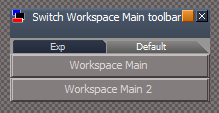
- Screenshot 2021-11-04 123425.png (5.66 KiB) Viewed 3424 times
-
trueBlue
- Captain
- Posts: 5548
- Joined: 06 Jul 2009, 22:50
- Type the number ten into the box: 10
Re: Show and Hide Commands
This is why it is not working
!Node.Exists(curNode + "/Object hider")
!Node.Exists(curNode + "/Object hider")
-
clintonman
- Captain
- Posts: 5659
- Joined: 21 May 2009, 21:08
- Type the number ten into the box: 0
- Location: California
Re: Show and Hide Commands
Must be a bug. The QuickShow and QuickHide work with cameras, spotlights etc.trueBlue wrote: 04 Nov 2021, 19:55 I just ran Hide All & Show All in a scene with 595 nodes
Quick Hide All does not hide Cameras, Spot, not Projector lights
I confirmed that their Object hider nodes are disconnected
Have you tried the Switch Workspace Main toolbar script in the Objects - tS7.61 Update objects library?
Screenshot 2021-11-04 123425.png
Switch Workspace Main toolbar, that's great. Just have to get rid of the little toolbar.
-
clintonman
- Captain
- Posts: 5659
- Joined: 21 May 2009, 21:08
- Type the number ten into the box: 0
- Location: California
Re: Show and Hide Commands
Yep, that's the ticket.trueBlue wrote: 04 Nov 2021, 20:03 This is why it is not working
!Node.Exists(curNode + "/Object hider")
-
trueBlue
- Captain
- Posts: 5548
- Joined: 06 Jul 2009, 22:50
- Type the number ten into the box: 10
Re: Show and Hide Commands
I thought I was able to show a status message in the Quick Show All & Quick Hide All, if there were objects in the scene with no ORA
Now it is not working
Is there a why to do that with all four Quick scripts?
Now it is not working
Is there a why to do that with all four Quick scripts?
Code: Select all
if(!Node.Exists(item +  "/Object Render Attributes")) {
var util = System.CreateDO("Clintons3D Package/Utility functions");
util.SetStatusMessage("Alert...There is one or more Objects in your scene that does not have Object Render Attributes", 5000)
-
clintonman
- Captain
- Posts: 5659
- Joined: 21 May 2009, 21:08
- Type the number ten into the box: 0
- Location: California
Re: Show and Hide Commands
I'll see what I can do.trueBlue wrote: 04 Nov 2021, 22:31 I thought I was able to show a status message in the Quick Show All & Quick Hide All, if there were objects in the scene with no ORA
Now it is not working
Is there a why to do that with all four Quick scripts?
Code: Select all
if(!Node.Exists(item +  "/Object Render Attributes")) {
var util = System.CreateDO("Clintons3D Package/Utility functions");
util.SetStatusMessage("Alert...There is one or more Objects in your scene that does not have Object Render Attributes", 5000)
-
clintonman
- Captain
- Posts: 5659
- Joined: 21 May 2009, 21:08
- Type the number ten into the box: 0
- Location: California
Re: Show and Hide Commands
Here is a version of the switch main toolbar script.
It works in 4View, Default, floating and yafaray layouts and it closes and opens the small main toolbar. It doesn't open it in place so it would have to be dragged back into place.
It works in 4View, Default, floating and yafaray layouts and it closes and opens the small main toolbar. It doesn't open it in place so it would have to be dragged back into place.
- Attachments
-
- Switch Workspace Main toolbar.RsObj
- (16.21 KiB) Downloaded 202 times
-
clintonman
- Captain
- Posts: 5659
- Joined: 21 May 2009, 21:08
- Type the number ten into the box: 0
- Location: California
Re: Show and Hide Commands
Added your check to QuickHideAll
I don't think it's needed for QuickShowAll because you don't need an ORA to show something you can already see.
I don't think it's needed for QuickShowAll because you don't need an ORA to show something you can already see.
- Attachments
-
- QuickHideAllbf81.RsObj
- (8.07 KiB) Downloaded 154 times
-
trueBlue
- Captain
- Posts: 5548
- Joined: 06 Jul 2009, 22:50
- Type the number ten into the box: 10
Re: Show and Hide Commands
Interesting new way!
Thanks!
I tried the same for the QuickHide, but it does not work
Suggestion...
Line 41
Add
Thanks!
I tried the same for the QuickHide, but it does not work
Suggestion...
Line 41
Add
Code: Select all
if(Node.Exists(curNode + "/Object hider") && Node.Exists(curNode + "/Object Render Attributes")) {
util.SetNodeValueInt(curNode + "/Object hider", "Invisible", true)
util.SetNodeValueInt(curNode + "/Object hider", "Invisible", false)
util.SetNodeValueInt(curNode +  "/Object Render Attributes", "Cast shadows", 0)
util.SetNodeValueInt(curNode +  "/Object Render Attributes", "Receive shadows", 0)
Node.Disconnect(curNode + "/Object hider", "Invisible", curNode + "/Object Render Attributes", "Invisible")
util.SetNodeValueInt(curNode +  "/Object Render Attributes", "Invisible", -1);
}
-
trueBlue
- Captain
- Posts: 5548
- Joined: 06 Jul 2009, 22:50
- Type the number ten into the box: 10
Re: Show and Hide Commands
You never cease to amaze me!clintonman wrote: 04 Nov 2021, 22:57 Here is a version of the switch main toolbar script.
It works in 4View, Default, floating and yafaray layouts and it closes and opens the small main toolbar. It doesn't open it in place so it would have to be dragged back into place.
One thing though, all though you can Ctrl + Drag the Main2 toolbar back into place, it is different in how I set up the layouts
Here is a different version that Only works in the 4View, Default, Floating, and Yafaray layouts
New:
Opens in a floating panel
If you are in one of the above layouts, it loads that layout, else the installer is removed with an Alert
Modal questions to remove the Main2 toolbar and remove the installer
Cancel button
Edit: Updated 11/5/2021 10:30AM
- Attachments
-
- Switch Workspace Main toolbarf26d.RsObj
- (71.93 KiB) Downloaded 196 times
-
clintonman
- Captain
- Posts: 5659
- Joined: 21 May 2009, 21:08
- Type the number ten into the box: 0
- Location: California
Re: Show and Hide Commands
trueBlue wrote: 05 Nov 2021, 14:28You never cease to amaze me!clintonman wrote: 04 Nov 2021, 22:57 Here is a version of the switch main toolbar script.
It works in 4View, Default, floating and yafaray layouts and it closes and opens the small main toolbar. It doesn't open it in place so it would have to be dragged back into place.
One thing though, all though you can Ctrl + Drag the Main2 toolbar back into place, it is different in how I set up the layouts
Here is a different version that Only works in the 4View, Default, Floating, and Yafaray layouts
New:
Opens in a floating panel
If you are in one of the above layouts, it loads that layout, else the installer is removed with an Alert
Modal questions to remove the Main2 toolbar and remove the installer
Cancel button
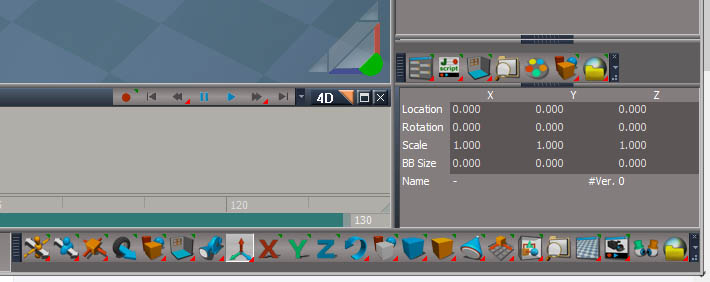
The dialog is confusing. Maybe the "Save your Layout Remove the installer?" should be 2 dialogs. It looks like it's asking to save the layout and remove the installer. or maybe it can be something wordier like "Remove the installer? Save your Layout after choosing yes or no".
Maybe it should also say that the toolbar will update after the selection is made since it's asking to remove the installer when the toolbar looks like it hasn't changed.
-
clintonman
- Captain
- Posts: 5659
- Joined: 21 May 2009, 21:08
- Type the number ten into the box: 0
- Location: California
Re: Show and Hide Commands
Here's a quick hide with the status message.trueBlue wrote: 04 Nov 2021, 23:36 Interesting new way!
Thanks!
I tried the same for the QuickHide, but it does not work
Suggestion...
Line 41
AddCode: Select all
if(Node.Exists(curNode + "/Object hider") && Node.Exists(curNode + "/Object Render Attributes")) {
util.SetNodeValueInt(curNode + "/Object hider", "Invisible", true)
util.SetNodeValueInt(curNode + "/Object hider", "Invisible", false)
util.SetNodeValueInt(curNode +  "/Object Render Attributes", "Cast shadows", 0)
util.SetNodeValueInt(curNode +  "/Object Render Attributes", "Receive shadows", 0)
Node.Disconnect(curNode + "/Object hider", "Invisible", curNode + "/Object Render Attributes", "Invisible")
util.SetNodeValueInt(curNode +  "/Object Render Attributes", "Invisible", -1);
}
Don't know what all that code is for but if it doesn't slow it down go for it.
- Attachments
-
- QuickHideda32.RsObj
- (7.4 KiB) Downloaded 197 times
-
trueBlue
- Captain
- Posts: 5548
- Joined: 06 Jul 2009, 22:50
- Type the number ten into the box: 10
Re: Show and Hide Commands
clintonman wrote: 05 Nov 2021, 15:30ToolbarResultsWeird.jpgtrueBlue wrote: 05 Nov 2021, 14:28You never cease to amaze me!clintonman wrote: 04 Nov 2021, 22:57 Here is a version of the switch main toolbar script.
It works in 4View, Default, floating and yafaray layouts and it closes and opens the small main toolbar. It doesn't open it in place so it would have to be dragged back into place.
One thing though, all though you can Ctrl + Drag the Main2 toolbar back into place, it is different in how I set up the layouts
Here is a different version that Only works in the 4View, Default, Floating, and Yafaray layouts
New:
Opens in a floating panel
If you are in one of the above layouts, it loads that layout, else the installer is removed with an Alert
Modal questions to remove the Main2 toolbar and remove the installer
Cancel button
my confusing result before I figured out what was happening
The dialog is confusing. Maybe the "Save your Layout Remove the installer?" should be 2 dialogs. It looks like it's asking to save the layout and remove the installer. or maybe it can be something wordier like "Remove the installer? Save your Layout after choosing yes or no".
Maybe it should also say that the toolbar will update after the selection is made since it's asking to remove the installer when the toolbar looks like it hasn't changed.
Code: Select all
	System.Alert("You will need to Save your " +layout+ " layout\nto make these changes permanent");

	if(Question("Remove the installer?")) {
		Node.Delete(Space.CurrentScene() + "/Switch Workspace Main toolbar")
	}
Moved the Alert & Question so the toolbar change happens before the Alert
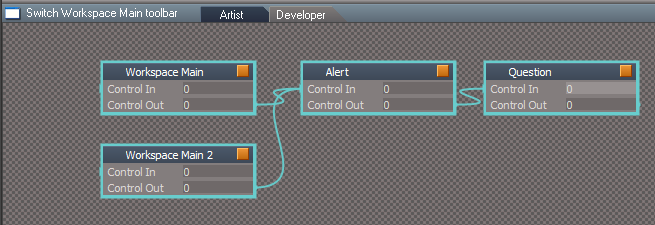
-
clintonman
- Captain
- Posts: 5659
- Joined: 21 May 2009, 21:08
- Type the number ten into the box: 0
- Location: California
Re: Show and Hide Commands
That's better. Only thing is if you switch to WorkspaceMain and then back to WorkspaceMain2 the little toolbar is missing.
-
trueBlue
- Captain
- Posts: 5548
- Joined: 06 Jul 2009, 22:50
- Type the number ten into the box: 10
Re: Show and Hide Commands
Yep!clintonman wrote: 05 Nov 2021, 17:45 That's better. Only thing is if you switch to WorkspaceMain and then back to WorkspaceMain2 the little toolbar is missing.
As mentioned, just opening the Main2 toolbar and Ctrl + Drag it back into place is not the same
You will lose the ability to collapse it, and it is not that easy to create manually
I going to eliminate the option to Close the Main2 toolbar from the script
A user could remove it before saving the layout
Seems simple enough
-
trueBlue
- Captain
- Posts: 5548
- Joined: 06 Jul 2009, 22:50
- Type the number ten into the box: 10
Re: Show and Hide Commands
Thank you!clintonman wrote: 05 Nov 2021, 15:36Here's a quick hide with the status message.trueBlue wrote: 04 Nov 2021, 23:36 Interesting new way!
Thanks!
I tried the same for the QuickHide, but it does not work
Suggestion...
Line 41
AddCode: Select all
if(Node.Exists(curNode + "/Object hider") && Node.Exists(curNode + "/Object Render Attributes")) {
util.SetNodeValueInt(curNode + "/Object hider", "Invisible", true)
util.SetNodeValueInt(curNode + "/Object hider", "Invisible", false)
util.SetNodeValueInt(curNode +  "/Object Render Attributes", "Cast shadows", 0)
util.SetNodeValueInt(curNode +  "/Object Render Attributes", "Receive shadows", 0)
Node.Disconnect(curNode + "/Object hider", "Invisible", curNode + "/Object Render Attributes", "Invisible")
util.SetNodeValueInt(curNode +  "/Object Render Attributes", "Invisible", -1);
}
Don't know what all that code is for but if it doesn't slow it down go for it.
The above code is in your original QuickHide minus the Disconnect
I did the opposite for the QuickShow, IE: ConnectTo
Also did the same for the QuickHideAll & QuickShowAll
Tested using a scene with over 500 objects and 50 lights
All seems super fast to me and I think it solves the problem with Cameras, Spot, and Projector lights, in with which you do not need to run the slow scripts first, except for objects that do not have an ORA
Ideally it would be awesome if you could incorporate these Quick scripts into the Slow scripts as Functions, if possible
Like, run the Quick Functions if the scene has more then a certain amount of objects
More importantly if the Slow scripts could be optimized NOT to run D3DView.ShowRenderAttribsForObject('', curNode) if the object already has an ORA node
-
trueBlue
- Captain
- Posts: 5548
- Joined: 06 Jul 2009, 22:50
- Type the number ten into the box: 10
Re: Show and Hide Commands
My suspensions were correct! 
Only running D3DView.ShowRenderAttribsForObject('', curNode) when the ORA does not exist runs SUPER fast IF all objects in the scene have an ORA
I updated the HideAll & ShowAll and ran it on a scene with 597 objects
Also added:
Only running D3DView.ShowRenderAttribsForObject('', curNode) when the ORA does not exist runs SUPER fast IF all objects in the scene have an ORA
I updated the HideAll & ShowAll and ran it on a scene with 597 objects
Code: Select all
if(!Node.Exists(curNode +  "/Object Render Attributes")) {
			D3DView.ShowRenderAttribsForObject('', curNode)
			RsStackView.SetPanelExportInfo(curNode + '/Object Render Attributes','Default',1,1);
}

Activity.Run(System.ThisOwner() + "/UnBlockRsTSEvents")
Code: Select all
if(typeof(tSBridge) != "undefined") {

// To create the object faster, disable synchronization between
// Rosetta and trueSpace
bEventsBlocked = false;

bEventsBlocked = tSBridge.RsTSEventsStatus();
tSBridge.BlockRsTSEvents(true);

}
-
clintonman
- Captain
- Posts: 5659
- Joined: 21 May 2009, 21:08
- Type the number ten into the box: 0
- Location: California
Re: Show and Hide Commands
The current Show and Hide scripts don't preserve the objects render attributes, so layer number and other settings can be lost.
These have been updated.
There was a bug in the GatherChildORAs function. Fixing that bug fixed a few of the lost ORA settings.
NURBS will now keep their ORA values when they are in a group. The Truespace command, D3DView.ShowRenderAttribsForObject, will cause the Object Render Attributes(ORA) nodes of subobjects to be replaced by a RenderAttributes(RA) node. This doesn't work for NURBS, so they needed to keep their ORA nodes and the group will have no effect on the NURBS appearance except for visible/invisible.
NURBS appearance fixes are inside the Show and Hide scripts because the external Fix NURBS ORA has no way of knowing what each NURBS object settings are. The RsApp.RunScriptBuffer form of the NURBS fix has been reverted to normal script because it was crashing tS for some reason when run inside the Show and Hide command nodes.
Bunch of changes made with the goal of preserving ORA values and cleaning up some zombie connectors and orphaned nodes. Old code was just commented out.
Edit: removed attachments, script bug fixed.
These have been updated.
There was a bug in the GatherChildORAs function. Fixing that bug fixed a few of the lost ORA settings.
NURBS will now keep their ORA values when they are in a group. The Truespace command, D3DView.ShowRenderAttribsForObject, will cause the Object Render Attributes(ORA) nodes of subobjects to be replaced by a RenderAttributes(RA) node. This doesn't work for NURBS, so they needed to keep their ORA nodes and the group will have no effect on the NURBS appearance except for visible/invisible.
NURBS appearance fixes are inside the Show and Hide scripts because the external Fix NURBS ORA has no way of knowing what each NURBS object settings are. The RsApp.RunScriptBuffer form of the NURBS fix has been reverted to normal script because it was crashing tS for some reason when run inside the Show and Hide command nodes.
Bunch of changes made with the goal of preserving ORA values and cleaning up some zombie connectors and orphaned nodes. Old code was just commented out.
Edit: removed attachments, script bug fixed.
Last edited by clintonman on 01 Aug 2022, 21:18, edited 1 time in total.
-
clintonman
- Captain
- Posts: 5659
- Joined: 21 May 2009, 21:08
- Type the number ten into the box: 0
- Location: California
Re: Show and Hide Commands
"Multiple selections freezes trueSpace", trueBlue - paraphrased quote
Fixed. Works with multiple selections
Fixed. Works with multiple selections
- Attachments
-
- Hideee1d.RsObj
- (37.99 KiB) Downloaded 140 times
-
- Show1ca7.RsObj
- (34.23 KiB) Downloaded 131 times
-
trueBlue
- Captain
- Posts: 5548
- Joined: 06 Jul 2009, 22:50
- Type the number ten into the box: 10
Re: Show and Hide Commands
Thanks, multiple selections working now
Hair, Plants, Trees, and Grass has issues
You may notice that they are setup with an ORA and connected
I have an idea for the ShowAll & HideAll scripts
Use your SelectAll script and then the new Show/Hide script
Edit: Currently, in the UU, the ShowAll & HideAll scripts have an error on second run
Hair, Plants, Trees, and Grass has issues
You may notice that they are setup with an ORA and connected
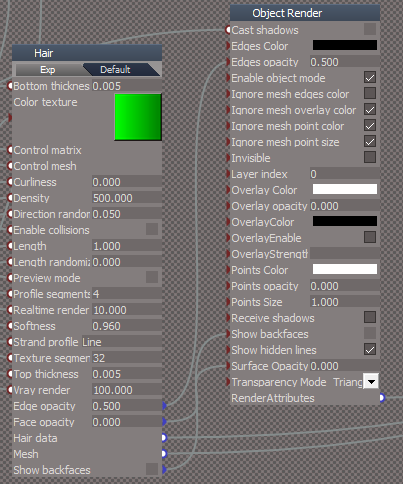
Use your SelectAll script and then the new Show/Hide script
Edit: Currently, in the UU, the ShowAll & HideAll scripts have an error on second run
-
clintonman
- Captain
- Posts: 5659
- Joined: 21 May 2009, 21:08
- Type the number ten into the box: 0
- Location: California
Re: Show and Hide Commands
Wow, hair. I'm guessing it also doesn't work with the previous Show/Hide scripts. Also need to add a hair type to the scene view scripts.
-
trueBlue
- Captain
- Posts: 5548
- Joined: 06 Jul 2009, 22:50
- Type the number ten into the box: 10
Re: Show and Hide Commands
Yep!
Guessing you would have to treat a Hair 3D Group like you have done with your NURBS
Currently with your new Hide/Show scripts it treats the Hair 3D Group has a normal 3D Group but does not work with the object that has the Hair applied and replaces the Hair's ORA with a RA node
The D3DView.ShowRenderAttribsForObject('', ''); command does a good job showing the Hair's ORA panel in Settings and does not affect the predefined settings
Guessing you would have to treat a Hair 3D Group like you have done with your NURBS
Currently with your new Hide/Show scripts it treats the Hair 3D Group has a normal 3D Group but does not work with the object that has the Hair applied and replaces the Hair's ORA with a RA node
The D3DView.ShowRenderAttribsForObject('', ''); command does a good job showing the Hair's ORA panel in Settings and does not affect the predefined settings
-
trueBlue
- Captain
- Posts: 5548
- Joined: 06 Jul 2009, 22:50
- Type the number ten into the box: 10
Re: Show and Hide Commands
Wanted to share an issue I have noticed with the Object hider
I notice getting errors setting the Object hider's Invisible attribute, which breaks the script from working successfully
Does not always show an error on first use
Running the script twice or On then Off does
Note: It does not matter if you use
util.SetNodeValueInt(curNode + "/Object hider", "Invisible", 0)
or
Node.Value(curNode + "/Object hider", "Invisible") = 0
Both were unreliable
I ended up using a Try & Catch which works reliably
I notice getting errors setting the Object hider's Invisible attribute, which breaks the script from working successfully
Does not always show an error on first use
Running the script twice or On then Off does
Note: It does not matter if you use
util.SetNodeValueInt(curNode + "/Object hider", "Invisible", 0)
or
Node.Value(curNode + "/Object hider", "Invisible") = 0
Both were unreliable
I ended up using a Try & Catch which works reliably
Code: Select all
//Setting the Object hider is unreliable due to errors
		try {
			if(Node.Exists(curNode +  "/Object hider"))
				util.SetNodeValueInt(curNode +  "/Object hider", "Invisible", 0)
		} catch (error) {}
-
clintonman
- Captain
- Posts: 5659
- Joined: 21 May 2009, 21:08
- Type the number ten into the box: 0
- Location: California
Re: Show and Hide Commands
I don't see errors. What error messages are you getting?trueBlue wrote: 02 Aug 2022, 21:23 Wanted to share an issue I have noticed with the Object hider
I notice getting errors setting the Object hider's Invisible attribute, which breaks the script from working successfully
Does not always show an error on first use
Running the script twice or On then Off does
Note: It does not matter if you use
util.SetNodeValueInt(curNode + "/Object hider", "Invisible", 0)
or
Node.Value(curNode + "/Object hider", "Invisible") = 0
Both were unreliable
I ended up using a Try & Catch which works reliably
Code: Select all
//Setting the Object hider is unreliable due to errors
		try {
			if(Node.Exists(curNode +  "/Object hider"))
				util.SetNodeValueInt(curNode +  "/Object hider", "Invisible", 0)
		} catch (error) {}
In my tests the util.SetNodeValueInt doesn't work for the Object hider and Node.Value does work.
Last edited by clintonman on 03 Aug 2022, 01:03, edited 1 time in total.
-
clintonman
- Captain
- Posts: 5659
- Joined: 21 May 2009, 21:08
- Type the number ten into the box: 0
- Location: California
Re: Show and Hide Commands
Added code to allow for hair objects.
- Attachments
-
- Showb926.RsObj
- (38.95 KiB) Downloaded 97 times
-
- Hide4ea0.RsObj
- (42.71 KiB) Downloaded 154 times
-
trueBlue
- Captain
- Posts: 5548
- Joined: 06 Jul 2009, 22:50
- Type the number ten into the box: 10
Re: Show and Hide Commands
Thanks!
Looks like tS Hair's ORA is different
Note on the right ORA ORIGINAL has Enable object mode checked
Note on the left ORA has Ignore layer attributes unchecked
Edit: Fix Show script line 421
Node.Value(thenode + "/Object Render Attributes", "Ignore layer attributes") = -1
Is it possible to NOT replace Hair's ORA?
Is it possible to use util commands?
Also it looks like the Hide script unselects Spot lights and Cameras
Looks like tS Hair's ORA is different
Note on the right ORA ORIGINAL has Enable object mode checked
Note on the left ORA has Ignore layer attributes unchecked
Edit: Fix Show script line 421
Node.Value(thenode + "/Object Render Attributes", "Ignore layer attributes") = -1
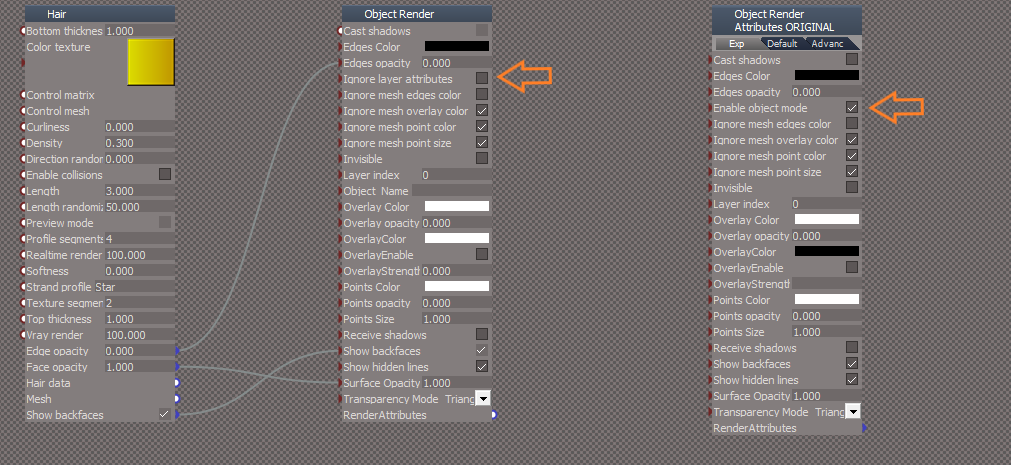
Is it possible to use util commands?
Also it looks like the Hide script unselects Spot lights and Cameras
- Attachments
-
- Planea603.RsObj
- (280.8 KiB) Downloaded 137 times
-
clintonman
- Captain
- Posts: 5659
- Joined: 21 May 2009, 21:08
- Type the number ten into the box: 0
- Location: California
Re: Show and Hide Commands
I ignored that because checked or unchecked made no difference, but it can be added in/adjusted fortrueBlue wrote: 03 Aug 2022, 11:37 Thanks!
Looks like tS Hair's ORA is different
Note on the right ORA ORIGINAL has Enable object mode checked
Note on the left ORA has Ignore layer attributes unchecked
...
Not possible to not replace if it's part of a group, but I just got an idea. If it's not in the group when running the D3DView.ShowRenderAttribsForObject then it can't be altered by it, so maybe copy it out, run the command and copy it back into place.trueBlue wrote: 03 Aug 2022, 11:37 ...
Is it possible to NOT replace Hair's ORA?
...
Util commands can be used except for with the Object hider.trueBlue wrote: 03 Aug 2022, 11:37 ...
Is it possible to use util commands?
Also it looks like the Hide script unselects Spot lights and Cameras
The old UU Hide also deselects spotlights and cameras. I don't see any way around that since selecting them makes and keeps them visible.
-
trueBlue
- Captain
- Posts: 5548
- Joined: 06 Jul 2009, 22:50
- Type the number ten into the box: 10
Re: Show and Hide Commands
If you download the Plane.RsObj you will see that the Ignore layer attributes needs to be checked
I believe this is for showing back faces
In the Plane object locate the ORA panel and check/uncheck the Ignore layer attribute to see the difference
I tried unsuccessfully to add the Object_Name to the Hair's ORA panel
I believe this is for showing back faces
In the Plane object locate the ORA panel and check/uncheck the Ignore layer attribute to see the difference
I tried unsuccessfully to add the Object_Name to the Hair's ORA panel
-
clintonman
- Captain
- Posts: 5659
- Joined: 21 May 2009, 21:08
- Type the number ten into the box: 0
- Location: California
Re: Show and Hide Commands
It's not an issue for the Plane because it already has Ignore layer attributes instead of Enable object mode and like I said, the code can be adjusted to take it into account.trueBlue wrote: 03 Aug 2022, 16:26 If you download the Plane.RsObj you will see that the Ignore layer attributes needs to be checked
I believe this is for showing back faces
In the Plane object locate the ORA panel and check/uncheck the Ignore layer attribute to see the difference
I tried unsuccessfully to add the Object_Name to the Hair's ORA panel
-
trueBlue
- Captain
- Posts: 5548
- Joined: 06 Jul 2009, 22:50
- Type the number ten into the box: 10
Re: Show and Hide Commands
I was not talking about the Plane that has the Hair applied which has it's own ORA
I was talking about the Plane Hair's ORA
Original before using the Show script
After
Edit: Fix for Show script line 421
Add
Node.Value(thenode + "/Object Render Attributes", "Ignore layer attributes") = -1
I was talking about the Plane Hair's ORA
Original before using the Show script
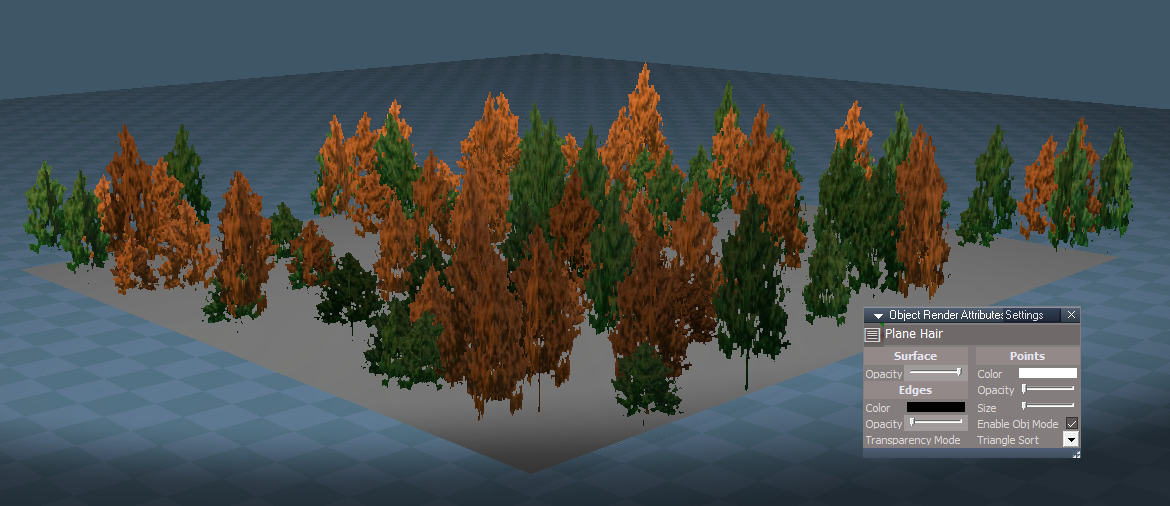
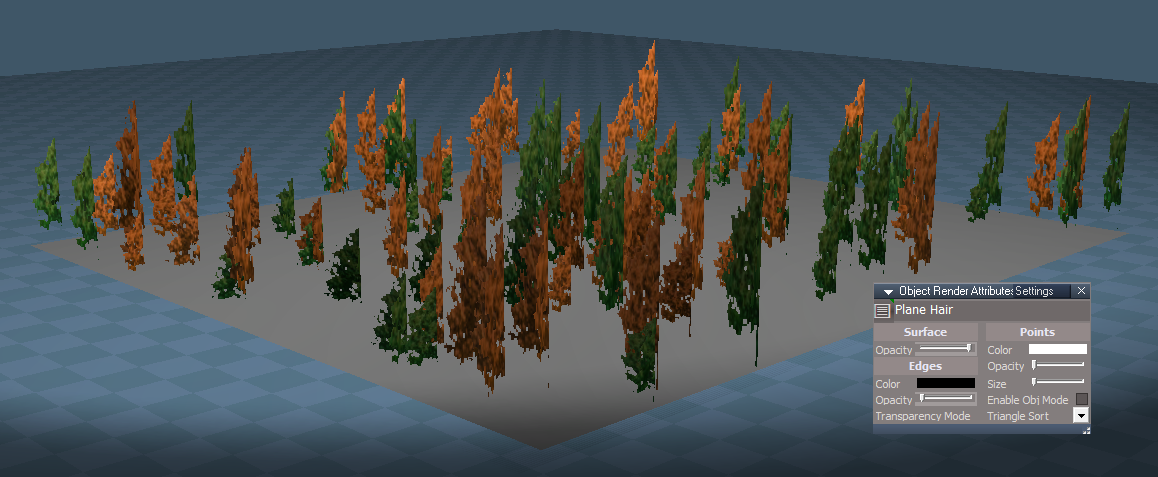
Add
Node.Value(thenode + "/Object Render Attributes", "Ignore layer attributes") = -1
-
clintonman
- Captain
- Posts: 5659
- Joined: 21 May 2009, 21:08
- Type the number ten into the box: 0
- Location: California
Re: Show and Hide Commands
Downloaded the plane rsobjtrueBlue wrote: 03 Aug 2022, 16:56 I was not talking about the Plane that has the Hair applied which has it's own ORA
I was talking about the Plane Hair's ORA
Original before using the Show script
Original.png
After
Disabled.png
Edit: Fix for Show script line 421
Add
Node.Value(thenode + "/Object Render Attributes", "Ignore layer attributes") = -1
ORA inside plane check uncheck Ignore layer attributes - no change
ORA inside Plane Hair check uncheck Ignore layer attributes - no change
I'm not seeing anything
-
trueBlue
- Captain
- Posts: 5548
- Joined: 06 Jul 2009, 22:50
- Type the number ten into the box: 10
Re: Show and Hide Commands
I downloaded the plane rsobj just now, and I defiantly see a difference as shown by the pics (Before and After)clintonman wrote: 03 Aug 2022, 17:08Downloaded the plane rsobjtrueBlue wrote: 03 Aug 2022, 16:56 I was not talking about the Plane that has the Hair applied which has it's own ORA
I was talking about the Plane Hair's ORA
Original before using the Show script
Original.png
After
Disabled.png
Edit: Fix for Show script line 421
Add
Node.Value(thenode + "/Object Render Attributes", "Ignore layer attributes") = -1
ORA inside plane check uncheck Ignore layer attributes - no change
ORA inside Plane Hair check uncheck Ignore layer attributes - no change
I'm not seeing anything
-
clintonman
- Captain
- Posts: 5659
- Joined: 21 May 2009, 21:08
- Type the number ten into the box: 0
- Location: California
Re: Show and Hide Commands
Figured it out. What's missing is that the Scene "Ignore - Object Render Attributes" has to be checked to see the difference.
Like I said before the code can be adjusted to take the Enable Object mode vs Ignore layer attributes into account.
Like I said before the code can be adjusted to take the Enable Object mode vs Ignore layer attributes into account.
-
trueBlue
- Captain
- Posts: 5548
- Joined: 06 Jul 2009, 22:50
- Type the number ten into the box: 10
Re: Show and Hide Commands
Okay, just wanted to be sure that we were on the same page
Nice job with the scripts, BTW
Nice job with the scripts, BTW
-
clintonman
- Captain
- Posts: 5659
- Joined: 21 May 2009, 21:08
- Type the number ten into the box: 0
- Location: California
Re: Show and Hide Commands
Does the Scene "Ignore - Object Render Attributes" effect anything else besides hair? It's always been a mystery since I've never seen it do anything until now.
-
trueBlue
- Captain
- Posts: 5548
- Joined: 06 Jul 2009, 22:50
- Type the number ten into the box: 10
Re: Show and Hide Commands
It overrides any scene objects that have an ORAclintonman wrote: 03 Aug 2022, 17:48 Does the Scene "Ignore - Object Render Attributes" effect anything else besides hair? It's always been a mystery since I've never seen it do anything until now.
I always keep it checked
The 3D Scene has three layers
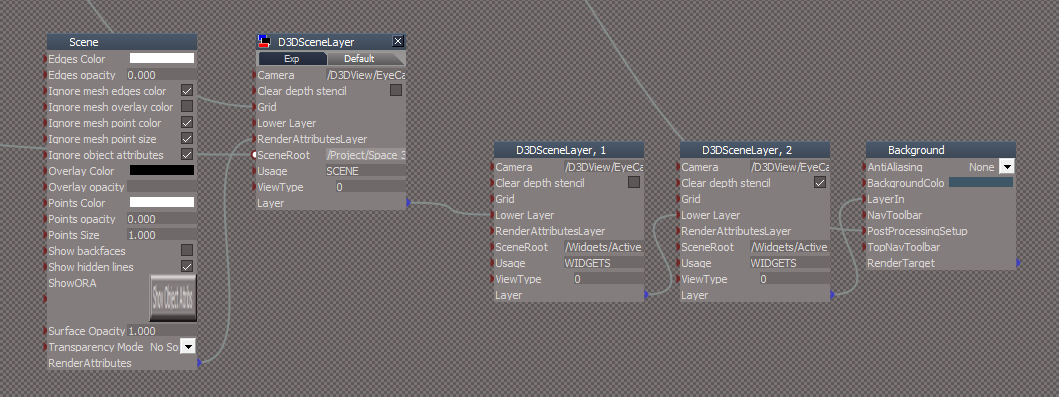
-
clintonman
- Captain
- Posts: 5659
- Joined: 21 May 2009, 21:08
- Type the number ten into the box: 0
- Location: California
Re: Show and Hide Commands
How do I see that in a non-hair object? Like I said it seems to do nothing at all except for hair objects.trueBlue wrote: 03 Aug 2022, 17:51It overrides any scene objects that have an ORAclintonman wrote: 03 Aug 2022, 17:48 Does the Scene "Ignore - Object Render Attributes" effect anything else besides hair? It's always been a mystery since I've never seen it do anything until now.
I always keep it checked
The 3D Scene has three layers
Scene layers.png
-
trueBlue
- Captain
- Posts: 5548
- Joined: 06 Jul 2009, 22:50
- Type the number ten into the box: 10
Re: Show and Hide Commands
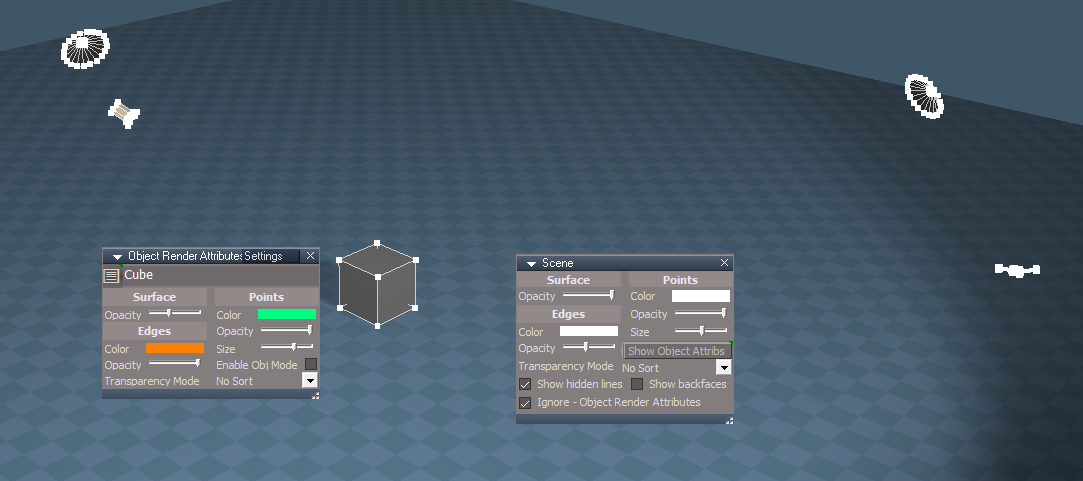
As an example, with a Cube, Lights, and Camera
Note the Cube has modified ORA attributes
Check/Uncheck the Scene's "Ignore - ORA"
Note the Cube has modified ORA attributes
Check/Uncheck the Scene's "Ignore - ORA"
-
clintonman
- Captain
- Posts: 5659
- Joined: 21 May 2009, 21:08
- Type the number ten into the box: 0
- Location: California
Re: Show and Hide Commands
Thanks, looks like the connection just has a terrible name. Should have been called something like "Enable Scene Render Attributes" or "Use Scene Render Attributes". I wonder if it was a bug and ignore was supposed to override all the objects ORAs.
-
trueBlue
- Captain
- Posts: 5548
- Joined: 06 Jul 2009, 22:50
- Type the number ten into the box: 10
Re: Show and Hide Commands
You may notice the Scene's Ignore - Object Render Attributes (Ignore object attributes) only works if the object ORA's Enable Obj Mode (Ignore layer attributes) is checked
-
clintonman
- Captain
- Posts: 5659
- Joined: 21 May 2009, 21:08
- Type the number ten into the box: 0
- Location: California
Re: Show and Hide Commands
It's the opposite, it only works when the objects ora is unchecked. I do see some inconsistencies. Scene Surface opacity and Show backfaces is always active, but you have to check ignore for edges and points to work. When you enable ORA on object all the scene ora settings are ignored.trueBlue wrote: 03 Aug 2022, 18:59 You may notice the Scene's Ignore - Object Render Attributes (Ignore object attributes) only works if the object ORA's Enable Obj Mode (Ignore layer attributes) is checked
-
trueBlue
- Captain
- Posts: 5548
- Joined: 06 Jul 2009, 22:50
- Type the number ten into the box: 10
-
clintonman
- Captain
- Posts: 5659
- Joined: 21 May 2009, 21:08
- Type the number ten into the box: 0
- Location: California
Re: Show and Hide Commands
I just found a cleaner way to handle hair and nurbs. If an object does not have a Mesh output connector the D3DView.ShowRenderAttribsForObject command will ignore it. So for nurbs and hair the new plan is to remove the Mesh conns, process visibility and then re-export the Mesh conns.
Attached is the fixed for hair render attribs. Which may be replaced with the new "remove mesh conn" technique later.
Attached is the fixed for hair render attribs. Which may be replaced with the new "remove mesh conn" technique later.
- Attachments
-
- Show030a.RsObj
- (39.5 KiB) Downloaded 132 times
-
- Hide2e6e.RsObj
- (43.26 KiB) Downloaded 132 times
-
trueBlue
- Captain
- Posts: 5548
- Joined: 06 Jul 2009, 22:50
- Type the number ten into the box: 10
Re: Show and Hide Commands
Looking really good!
Lots of undoes though
For some odd reason the Model's Clock scene LocLight(s) are not hiding
I have to manually remove the existing ORA
Then it works
Lots of undoes though
For some odd reason the Model's Clock scene LocLight(s) are not hiding
I have to manually remove the existing ORA
Then it works
-
clintonman
- Captain
- Posts: 5659
- Joined: 21 May 2009, 21:08
- Type the number ten into the box: 0
- Location: California
Re: Show and Hide Commands
Is that the Clock scene in the "Scenes - Active" library, or a different one?trueBlue wrote: 03 Aug 2022, 22:26 Looking really good!
Lots of undoes though
For some odd reason the Model's Clock scene LocLight(s) are not hiding
I have to manually remove the existing ORA
Then it works
Edit: ok I think I see it. A file search shows, \tS\Library\Scene.scl\Clock.scn
-
trueBlue
- Captain
- Posts: 5548
- Joined: 06 Jul 2009, 22:50
- Type the number ten into the box: 10
Re: Show and Hide Commands
Yes, but you can add Local lights from the Model's toolbar too
They are not working with the scripts as well
They are not working with the scripts as well
-
clintonman
- Captain
- Posts: 5659
- Joined: 21 May 2009, 21:08
- Type the number ten into the box: 0
- Location: California
-
trueBlue
- Captain
- Posts: 5548
- Joined: 06 Jul 2009, 22:50
- Type the number ten into the box: 10
Re: Show and Hide Commands
I think that is why I added the below code that you committed out
Code: Select all
		// Model removes the Object_Name connector for Lights
		//if(Node.Exists(Sel + "/Object Render Attributes") && Node.IsLight(Sel) && !Node.ConExists(Sel + "/Object Render Attributes", "Object_Name")) {
		//		util.Delete(Sel + "/Object Render Attributes")
		//		D3DView.ShowRenderAttribsForObject('', Sel);
		//		util.SetNodeValueInt(Sel +  "/Object Render Attributes", "Cast shadows", 0)
		//		util.SetNodeValueInt(Sel +  "/Object Render Attributes", "Receive shadows", 0)
		//		RsStackView.SetPanelExportInfo(Sel + '/Object Render Attributes','Default',1,0)
		//		Activity.Run(System.ThisOwner() + "/CloseORASettings");
//}-
clintonman
- Captain
- Posts: 5659
- Joined: 21 May 2009, 21:08
- Type the number ten into the box: 0
- Location: California
Re: Show and Hide Commands
It looks like it might be a problem with the UU lights.
The model space lights have ORA nodes, but they don't work. But they do work in unpatched tS.
I copied the ObjectAttributes and ObjectAttributes2 files from unpatched tS to patched tS C:\trueSpace761\tS\Scripts\preobjects and now the model lights ORAs seem to work. And model clock scene light ORAs also work.
The model space lights have ORA nodes, but they don't work. But they do work in unpatched tS.
I copied the ObjectAttributes and ObjectAttributes2 files from unpatched tS to patched tS C:\trueSpace761\tS\Scripts\preobjects and now the model lights ORAs seem to work. And model clock scene light ORAs also work.
-
trueBlue
- Captain
- Posts: 5548
- Joined: 06 Jul 2009, 22:50
- Type the number ten into the box: 10
Re: Show and Hide Commands
Hummm...
Can you share the ObjectAttributes and ObjectAttributes2 files?
Can you share the ObjectAttributes and ObjectAttributes2 files?
-
clintonman
- Captain
- Posts: 5659
- Joined: 21 May 2009, 21:08
- Type the number ten into the box: 0
- Location: California
Re: Show and Hide Commands
Original tS files attached
- Attachments
-
- ObjectAttributes2.rsobj
- (9.61 KiB) Downloaded 100 times
-
- ObjectAttributesf6b8.rsobj
- (8.73 KiB) Downloaded 131 times
-
trueBlue
- Captain
- Posts: 5548
- Joined: 06 Jul 2009, 22:50
- Type the number ten into the box: 10
Re: Show and Hide Commands
Can you clarify what it is, that does not work?clintonman wrote: 04 Aug 2022, 01:31 It looks like it might be a problem with the UU lights.
The model space lights have ORA nodes, but they don't work. But they do work in unpatched tS.
I copied the ObjectAttributes and ObjectAttributes2 files from unpatched tS to patched tS C:\trueSpace761\tS\Scripts\preobjects and now the model lights ORAs seem to work. And model clock scene light ORAs also work.
For me, the Modified ObjectAttributes.RsObj in the UU work in Model and Workspace
The Original ObjectAttributes.RsObj work in Model and Workspace too
The new Hide and Show scripts work in Workspace for all objects, lights and cameras using the Modified ObjectAttributes.RsObj and or the Original ObjectAttributes.RsObj
The new Hide and Show scripts work in Model for all objects and Cameras but Not lights using the Modified ObjectAttributes.RsObj and or the Original ObjectAttributes.RsObj
-
clintonman
- Captain
- Posts: 5659
- Joined: 21 May 2009, 21:08
- Type the number ten into the box: 0
- Location: California
Re: Show and Hide Commands
I'm on a different computer and not seeing the problem. On the other computer the bare ORA node wasn't working. Checking invisible, no effect, changing any of the settings, no effect. I'll report back if I find anything, maybe need to reset the context or something.
-
trueBlue
- Captain
- Posts: 5548
- Joined: 06 Jul 2009, 22:50
- Type the number ten into the box: 10
Re: Show and Hide Commands
The ObjectAttributes.RsObj that you uploaded looks like the original but does not have an original date (6/10/2008)
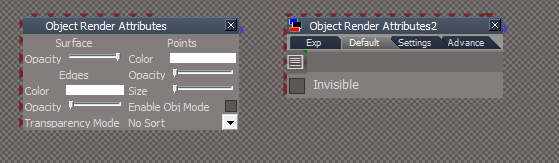
The ObjectAttributes2.RsObj that you uploaded is not the original and does not have the current UU button script for the Object_Name
The Default aspect button script does not work and the Settings aspect button script gives an error
I am fairly sure that tS does not use the ObjectAttributes2.RsObj
The ObjectAttributes2.RsObj that you uploaded is not the original and does not have the current UU button script for the Object_Name
The Default aspect button script does not work and the Settings aspect button script gives an error
-
trueBlue
- Captain
- Posts: 5548
- Joined: 06 Jul 2009, 22:50
- Type the number ten into the box: 10
Re: Show and Hide Commands
I think I have found out what is going on with Model Lights
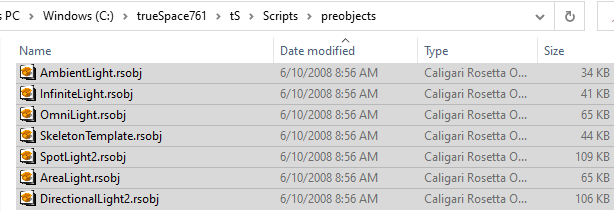
These lights are being used in Model
Note: Their original dates 6/10/2008
They are NOT included with the UU
Some have the original ORA and some have a modified ORA which include an Object Name attribute and button script that does not work
I have NO idea how some have a modified ORA
Edit: There is also a Projector light not shown in the pic
I have updated all of these lights with the new ORA and their location in the Link Editor
Your new Hide and Show scripts now work without any modifications
Edit2: Add modified model lights for the preobjects folder
These lights are being used in Model
Note: Their original dates 6/10/2008
They are NOT included with the UU
Some have the original ORA and some have a modified ORA which include an Object Name attribute and button script that does not work
I have NO idea how some have a modified ORA
I have updated all of these lights with the new ORA and their location in the Link Editor
Your new Hide and Show scripts now work without any modifications
Edit2: Add modified model lights for the preobjects folder
- Attachments
-
- Model lights with new ORA.zip
- (286.57 KiB) Downloaded 117 times
-
clintonman
- Captain
- Posts: 5659
- Joined: 21 May 2009, 21:08
- Type the number ten into the box: 0
- Location: California
Re: Show and Hide Commands
That's great.trueBlue wrote: 04 Aug 2022, 16:45 ...
Your new Hide and Show scripts now work without any modifications
Edit2: Add modified model lights for the preobjects folder
Here's the latest changes using the new technique of hiding objects from the D3DView.ShowRenderAttribsForObject command. It's much easier to understand the code now so it will be easier to fix bugs.
It uses a function set because almost all the code in the Show and Hide are identical. Show and Hide only have a few lines of working code at the top now.
I haven't tested to be sure it protects the ORA values, but I think it should and I haven't converted it to use less undo's yet by converting Node.Values to "util" form.
I also got my bad ObjectAttributes2.RsObj and ObjectAttributes.RsObj files fixed up so it's not acting crazy.
- Attachments
-
- Visibility Function Setcfe1.RsObj
- (50.07 KiB) Downloaded 132 times
-
- Show699a.RsObj
- (53.63 KiB) Downloaded 101 times
-
- Hideb7ad.RsObj
- (50.73 KiB) Downloaded 99 times
-
trueBlue
- Captain
- Posts: 5548
- Joined: 06 Jul 2009, 22:50
- Type the number ten into the box: 10
Re: Show and Hide Commands
Great
Where should I put the Visibility Function Set
Where should I put the Visibility Function Set
-
clintonman
- Captain
- Posts: 5659
- Joined: 21 May 2009, 21:08
- Type the number ten into the box: 0
- Location: California
Re: Show and Hide Commands
Same place, Scripts/Commands, but it can be changed to live somewhere else if needed.trueBlue wrote: 05 Aug 2022, 00:10 Great
Where should I put the Visibility Function Set
-
trueBlue
- Captain
- Posts: 5548
- Joined: 06 Jul 2009, 22:50
- Type the number ten into the box: 10
Re: Show and Hide Commands
Have you tried Resetting the Default Context?
In order for the ScriptCommands to work you have to add the Name of the script in the Attributes
And put the script in C:\trueSpace761\tS\Scripts\ScriptCommands
In order for the ScriptCommands to work you have to add the Name of the script in the Attributes
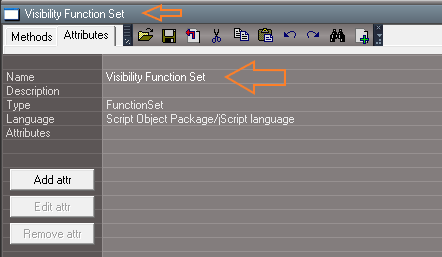
- New Function Set.png (9.75 KiB) Viewed 1333 times
-
clintonman
- Captain
- Posts: 5659
- Joined: 21 May 2009, 21:08
- Type the number ten into the box: 0
- Location: California
Re: Show and Hide Commands
I don't want to make it a permanent part of tS until testing is done. So I'm ok with reset default context loading the older versions.trueBlue wrote: 05 Aug 2022, 00:48 Have you tried Resetting the Default Context?
In order for the ScriptCommands to work you have to add the Name of the script in the Attributes
New Function Set.png
And put the script in C:\trueSpace761\tS\Scripts\ScriptCommands
-
clintonman
- Captain
- Posts: 5659
- Joined: 21 May 2009, 21:08
- Type the number ten into the box: 0
- Location: California
Re: Show and Hide Commands
Fixed bug/oversight 2D encaps groups were not working - fixed
Added ShowAll and HideAll
Added ShowCameraAndLights and HideCameraAndLights
Started working on the low undo version now.
attached are all the most recent versions
edit: took a break and continued working - the low undo version is attached and ready for testing
Added ShowAll and HideAll
Added ShowCameraAndLights and HideCameraAndLights
Started working on the low undo version now.
attached are all the most recent versions
edit: took a break and continued working - the low undo version is attached and ready for testing
- Attachments
-
- Visibility Function Set07cd.RsObj
- (68.82 KiB) Downloaded 130 times
-
- ShowCameraAndLights.RsObj
- (9.03 KiB) Downloaded 124 times
-
- ShowAll6948.RsObj
- (7.9 KiB) Downloaded 120 times
-
- Showe6b7.RsObj
- (53.63 KiB) Downloaded 123 times
-
- HideCameraAndLights.RsObj
- (9.88 KiB) Downloaded 134 times
-
- HideAlldd71.RsObj
- (11.1 KiB) Downloaded 104 times
-
- Hide9781.RsObj
- (50.73 KiB) Downloaded 97 times
Last edited by clintonman on 05 Aug 2022, 05:02, edited 1 time in total.
-
trueBlue
- Captain
- Posts: 5548
- Joined: 06 Jul 2009, 22:50
- Type the number ten into the box: 10
Re: Show and Hide Commands
Can you take a look at the Show Object Attribs script?
It is for the Desktop/Scene - Show Object Attribs button LMB Command
The idea was to safely add the ORA to any selected object and show it's ORA panel in the stack/ Settings
Only one object is allowed to be selected at a time before the script runs
Just needs your newly found additional code
Thanks!
It is for the Desktop/Scene - Show Object Attribs button LMB Command
The idea was to safely add the ORA to any selected object and show it's ORA panel in the stack/ Settings
Only one object is allowed to be selected at a time before the script runs
Just needs your newly found additional code
Thanks!
-
clintonman
- Captain
- Posts: 5659
- Joined: 21 May 2009, 21:08
- Type the number ten into the box: 0
- Location: California
Re: Show and Hide Commands
I see the button. Where do I find the code?trueBlue wrote: 05 Aug 2022, 04:28 Can you take a look at the Show Object Attribs script?
It is for the Desktop/Scene - Show Object Attribs button LMB Command
The idea was to safely add the ORA to any selected object and show it's ORA panel in the stack/ Settings
Only one object is allowed to be selected at a time before the script runs
Just needs your newly found additional code
Thanks!
-
trueBlue
- Captain
- Posts: 5548
- Joined: 06 Jul 2009, 22:50
- Type the number ten into the box: 10
Re: Show and Hide Commands
The Show Object Attribs script is in Scripts/Commands
The Visibility Function Set is not going work in Commands
I have confirmed that tS will not load it from ScriptCommands and when you Reset the Default Context, tS removes it
Edit:
Moved the Visibility Function Set code to the Widgets/UUFunctionSet
Changed the Activity line(s) to:
// Activity.Run(System.ThisOwner() + "/CloseORASettings");
Activity.Run("Scripts/Commands/CloseORASettings");
Changed all of the Commands/ Hide, Show etc.. to:
// var visFnSet = Node.AccessNearFnSet("Visibility Function Set");
var visFnSet = Node.AccessFnSet("Widgets/UUFunctionSet")
Test shows all of the Commands/ Hide, Show, etc... working
The Visibility Function Set is not going work in Commands
I have confirmed that tS will not load it from ScriptCommands and when you Reset the Default Context, tS removes it
Edit:
Moved the Visibility Function Set code to the Widgets/UUFunctionSet
Changed the Activity line(s) to:
// Activity.Run(System.ThisOwner() + "/CloseORASettings");
Activity.Run("Scripts/Commands/CloseORASettings");
Changed all of the Commands/ Hide, Show etc.. to:
// var visFnSet = Node.AccessNearFnSet("Visibility Function Set");
var visFnSet = Node.AccessFnSet("Widgets/UUFunctionSet")
Test shows all of the Commands/ Hide, Show, etc... working
-
trueBlue
- Captain
- Posts: 5548
- Joined: 06 Jul 2009, 22:50
- Type the number ten into the box: 10
Re: Show and Hide Commands
Looking great!clintonman wrote: 05 Aug 2022, 03:53 Fixed bug/oversight 2D encaps groups were not working - fixed
Added ShowAll and HideAll
Added ShowCameraAndLights and HideCameraAndLights
Started working on the low undo version now.
attached are all the most recent versions
edit: took a break and continued working - the low undo version is attached and ready for testing
Just some notes for some simple tests so far:
Hide & Show copies the ORA's Object_Name if it exists, but does not set it
HideAll does not set the ORA's Object_Name except for 3D Groups
HideAll removes the ORA's Object_Name for the object that was used to apply Hair/ Plants
ShowAll does not set the ORA's Object_Name except for 3D Groups
ShowAll removes the ORA's Object_Name for the object that was used to apply Hair/ Plants
-
trueBlue
- Captain
- Posts: 5548
- Joined: 06 Jul 2009, 22:50
- Type the number ten into the box: 10
Re: Show and Hide Commands
I found an undo friendly way to change the Object hider by using Widgets.DeactivateDefaultWidgets(); first
Code: Select all
var util = System.CreateDO("Clintons3D Package/Utility functions");
Widgets.DeactivateDefaultWidgets();
try { util.SetNodeValueInt(Space.CurrentScene() + "/Camera/Object hider", "Invisible", -1); } catch(err) {}
-
clintonman
- Captain
- Posts: 5659
- Joined: 21 May 2009, 21:08
- Type the number ten into the box: 0
- Location: California
Re: Show and Hide Commands
OK, but it should be done differently.trueBlue wrote: 05 Aug 2022, 13:46 The Show Object Attribs script is in Scripts/Commands
The Visibility Function Set is not going work in Commands
I have confirmed that tS will not load it from ScriptCommands and when you Reset the Default Context, tS removes it
Edit:
Moved the Visibility Function Set code to the Widgets/UUFunctionSet
Changed the Activity line(s) to:
// Activity.Run(System.ThisOwner() + "/CloseORASettings");
Activity.Run("Scripts/Commands/CloseORASettings");
Changed all of the Commands/ Hide, Show etc.. to:
// var visFnSet = Node.AccessNearFnSet("Visibility Function Set");
var visFnSet = Node.AccessFnSet("Widgets/UUFunctionSet")
Test shows all of the Commands/ Hide, Show, etc... working
The Visibility Function Set has 1000 lines of code in it, so it shouldn't be combined with anything else.
Widgets doesn't seem like a good place for scripts, unless they are tied to Widgets and only Widgets.
I think the function sets should be placed in a group inside of Scripts.
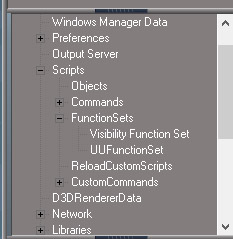
- FunctionSetsGroup.jpg (38.62 KiB) Viewed 1497 times
Code: Select all
RsFileIO.LoadObject( rosDir + '\\scripts\\preObjects\\FunctionSets.rsobj', '/Scripts');If it breaks too much stuff the UUFunctionSet can stay put.
-
clintonman
- Captain
- Posts: 5659
- Joined: 21 May 2009, 21:08
- Type the number ten into the box: 0
- Location: California
Re: Show and Hide Commands
There is also the possibility to not have the Hide,Show,HideAll,ShowAll etc. command nodes.
Something like
can be put into the toolbar button command for each of them
Something like
Code: Select all
cmd='visFS = Node.AccessFnSet("Scripts/FunctionSets/Visibility Function Set");visFS.SetInvisible(false);';RsApp.RunScriptBuffer(cmd);-
trueBlue
- Captain
- Posts: 5548
- Joined: 06 Jul 2009, 22:50
- Type the number ten into the box: 10
Re: Show and Hide Commands
Let me think about that for a while...
I was trying to make it easy as possible which is why I choose to add the code to the UUFunctionSet
I agree placing them in the Widgets does not seem logical, but I committed to it with the toolbar commands
I am not really excited about changing all of the toolbar commands
It is simple to save the widgets and not having to edit/patch the init.js and reset.js files is a plus
I was trying to make it easy as possible which is why I choose to add the code to the UUFunctionSet
I agree placing them in the Widgets does not seem logical, but I committed to it with the toolbar commands
I am not really excited about changing all of the toolbar commands
It is simple to save the widgets and not having to edit/patch the init.js and reset.js files is a plus
-
clintonman
- Captain
- Posts: 5659
- Joined: 21 May 2009, 21:08
- Type the number ten into the box: 0
- Location: California
Re: Show and Hide Commands
Nice. Changed to use DeactivateDefaultWidgets along with util.SetNodeValueInt. I don't see any error so did not include the try catch and added a ActivateDefaultWidgets to get the widget back at the end.trueBlue wrote: 05 Aug 2022, 20:37 I found an undo friendly way to change the Object hider by using Widgets.DeactivateDefaultWidgets(); firstCode: Select all
var util = System.CreateDO("Clintons3D Package/Utility functions");
Widgets.DeactivateDefaultWidgets();
try { util.SetNodeValueInt(Space.CurrentScene() + "/Camera/Object hider", "Invisible", -1); } catch(err) {}
-
clintonman
- Captain
- Posts: 5659
- Joined: 21 May 2009, 21:08
- Type the number ten into the box: 0
- Location: California
Re: Show and Hide Commands
Definitely not easier to code a thousand lines +. If I find a way to break up the Visibility Function set, I will. If it stays at 1000 lines it will only be because I couldn't find a way.trueBlue wrote: 06 Aug 2022, 00:29 ..
I was trying to make it easy as possible which is why I choose to add the code to the UUFunctionSet
...
-
trueBlue
- Captain
- Posts: 5548
- Joined: 06 Jul 2009, 22:50
- Type the number ten into the box: 10
Re: Show and Hide Commands
I put all of your Visibility Function Set code at the end of the UUFunctionSet code starting at line 289
// 8/5/2022 Add Visibility Functions - Author: Clinton Reese Thu Aug 04, 2022 10:02 pm - @ line 289
So, there is 288 lines of code for the toolbar commands before your Visibility Function code
Edit:
I created the UUFunctionSet hoping that you would bite and start using it
I am ALL for transferring all of ScriptCommands scripts into the UUFunctionSet and getting rid of them
One place for every UU command would be great!
Saving the UUFunctionSet with the widgets is not that bad
// 8/5/2022 Add Visibility Functions - Author: Clinton Reese Thu Aug 04, 2022 10:02 pm - @ line 289
So, there is 288 lines of code for the toolbar commands before your Visibility Function code
Edit:
I created the UUFunctionSet hoping that you would bite and start using it
I am ALL for transferring all of ScriptCommands scripts into the UUFunctionSet and getting rid of them
One place for every UU command would be great!
Saving the UUFunctionSet with the widgets is not that bad