The latest show hide scripts.
It has 2 modes of operation. "Quick and Dirty" and "Slow and Thorough". I did a test of a medium size scene that took 4 seconds to hide. Which is too long. The way it works is you press the toolbar button and it runs quickly by default. In quick mode it just sets the visibility value. If the result is not as expected press the same button within 4 seconds to get a dialog asking if you want to use the intense method and the slow thorough method will be used if you answer yes. The quick method takes a fraction of a second to run.
Fixed ORA name, the value didn't need to be copied, just set the short name of the owner node
Uses Widget Deactivation to make setting spotlights and cameras easier
Added some rough status messages
Broke the function set into 2 nodes and rewrote so they live under Widgets instead of Scripts/Commands. They are "Visibility Function Set" and "VisUtility Function Set"
Added an IsolateSelected that works with cameras and spotlights and is compatible with the quick and thorough modes. run by command Activity.Run("Scripts/Commands/IsolateSelected")
Show and Hide Commands
-
clintonman

- Captain
- Posts: 5659
- Joined: 21 May 2009, 21:08
- Type the number ten into the box: 0
- Location: California
Re: Show and Hide Commands
- Attachments
-
- ShowHide.zip
- (40.6 KiB) Downloaded 101 times
-
clintonman
- Captain
- Posts: 5659
- Joined: 21 May 2009, 21:08
- Type the number ten into the box: 0
- Location: California
Re: Show and Hide Commands
Maybe this will work. Basically just Show with intense processing forced on.trueBlue wrote: 05 Aug 2022, 04:28 Can you take a look at the Show Object Attribs script?
It is for the Desktop/Scene - Show Object Attribs button LMB Command
The idea was to safely add the ORA to any selected object and show it's ORA panel in the stack/ Settings
Only one object is allowed to be selected at a time before the script runs
Just needs your newly found additional code
Thanks!
- Attachments
-
- Show Object Attribs.RsObj
- (4.57 KiB) Downloaded 145 times
-
trueBlue

- Captain
- Posts: 5548
- Joined: 06 Jul 2009, 22:50
- Type the number ten into the box: 10
Re: Show and Hide Commands
This is working except the object's ORA's Object_Name attribute is being removed for the object that Hair was applied and the ORA panel does not show in the Stack/Settingsclintonman wrote: 06 Aug 2022, 04:33Maybe this will work. Basically just Show with intense processing forced on.trueBlue wrote: 05 Aug 2022, 04:28 Can you take a look at the Show Object Attribs script?
It is for the Desktop/Scene - Show Object Attribs button LMB Command
The idea was to safely add the ORA to any selected object and show it's ORA panel in the stack/ Settings
Only one object is allowed to be selected at a time before the script runs
Just needs your newly found additional code
Thanks!
How would you select the object that has Hair applied?
Code: Select all
if(Node.ConExists(Node.FirstSelected(), "Length"))	{
// ?
}
UserInterface.OpenPreferencesPanelViewExWithFlag("" , "" , sel + "/Object Render Attributes", 5,1,0,8)
The only thing I can get to work in the Scripts/ShowPanel script:
Code: Select all
	if(Node.ConExists(sel, "Length"))	{
	RsTool.SelectChildObj();
	RsTool.SelectNextObj();
	}
	if(Node.Exists(Node.Selection() + "/Object Render Attributes")){
	UserInterface.OpenPreferencesPanelViewExWithFlag("" , "" , Node.Selection() + "/Object Render Attributes", 5,1,0,8)
	}
-
clintonman
- Captain
- Posts: 5659
- Joined: 21 May 2009, 21:08
- Type the number ten into the box: 0
- Location: California
Re: Show and Hide Commands
Fixed the object name problemtrueBlue wrote: 06 Aug 2022, 13:50 ...
This is working except the object's ORA's Object_Name attribute is being removed for the object that Hair was applied and the ORA panel does not show in the Stack/Settings
How would you select the object that has Hair applied?
Actually, I was wanting to show it's ORA panel in the Stack/SettingsCode: Select all
if(Node.ConExists(Node.FirstSelected(), "Length"))	{
// ?
}
UserInterface.OpenPreferencesPanelViewExWithFlag("" , "" , sel + "/Object Render Attributes", 5,1,0,8)
The only thing I can get to work in the Scripts/ShowPanel script:Code: Select all
	if(Node.ConExists(sel, "Length"))	{
	RsTool.SelectChildObj();
	RsTool.SelectNextObj();
	}
	if(Node.Exists(Node.Selection() + "/Object Render Attributes")){
	UserInterface.OpenPreferencesPanelViewExWithFlag("" , "" , Node.Selection() + "/Object Render Attributes", 5,1,0,8)
	}
Murky on everything else. What do you want to see when what is selected? The things that can be selected are the group that contains the geometry and the hair geometry, the geometry and finally the hair geometry object.
-
trueBlue
- Captain
- Posts: 5548
- Joined: 06 Jul 2009, 22:50
- Type the number ten into the box: 10
Re: Show and Hide Commands
The LMB Command Desktop/Scene - Show Object Attribs button runs the Show Object Attribs script which runs the ShowPanel script
With your newest scripts installed including the function sets in Widgets (Thanks!), when I use the Show Object Attribs on a selected Hair object (Parent), nothing happens
Here is the updated ShowPanel script that works for Hair
The ORA's Object_Name is not being set for ungrouped objects using Hide, Show, HideAll, or ShowAll scripts
Example
I have run all of these scripts on the Clock.scn, only the Grouped objects - ORA's Object_Name have names
Lights and single objects are not being set
When I run the Show Object Attribs on a selected Hair object, the object (Hair applied to) ORA's Object_Name is removed
With your newest scripts installed including the function sets in Widgets (Thanks!), when I use the Show Object Attribs on a selected Hair object (Parent), nothing happens
Here is the updated ShowPanel script that works for Hair
Code: Select all
// LMB Command Desktop/Scene - Show Object Attribs button Part 2
// 8/6/2022
function Execute(params)
{
	var sel = Node.FirstSelected()

	PVT_LOCKED = 4
	RsStackView.RemovePanelsFromPreferences(PVT_LOCKED, 0)
	UserInterface.OpenPreferencesPanelViewExWithFlag('', '','/Preferences/Desktop',3, 1, 0, 8)


	if(Node.Exists(sel + "/Object Render Attributes")){
	UserInterface.OpenPreferencesPanelViewExWithFlag("" , "" , sel + "/Object Render Attributes", 5,1,0,8)
	}

	if(Node.ConExists(sel, "PatchName")) {
		UserInterface.OpenPreferencesPanelViewExWithFlag("" , "" , Node.Owner(sel) + "/LODMesh/Object Render Attributes", 5,1,0,8)
	}

	if(Node.Exists(sel + "/Object Render Attributes") && !Node.ConExists(sel, "PatchName")){
		UserInterface.OpenPreferencesPanelViewExWithFlag("" , "" , sel + "/Object Render Attributes", 5,1,0,8)
	}

	if(Node.ConExists(sel, "U_precision")) {
		UserInterface.OpenPreferencesPanelViewExWithFlag("" , "" , sel + "/LODMesh/Object Render Attributes", 5,1,0,8)
	}

	if(Node.ConExists(sel, "PositionMatrix")) {
		UserInterface.OpenPreferencesPanelViewExWithFlag("" , "" , sel + "/LODMesh/Object Render Attributes", 5,1,0,8)
	}
	if(Node.ConExists(sel, "Length"))	{
	RsTool.SelectChildObj();
	RsTool.SelectNextObj();
	}
	if(Node.Exists(Node.Selection() + "/Object Render Attributes")){
	UserInterface.OpenPreferencesPanelViewExWithFlag("" , "" , Node.Selection() + "/Object Render Attributes", 5,1,0,8)
	}
}
Example
I have run all of these scripts on the Clock.scn, only the Grouped objects - ORA's Object_Name have names
Lights and single objects are not being set
When I run the Show Object Attribs on a selected Hair object, the object (Hair applied to) ORA's Object_Name is removed
-
clintonman
- Captain
- Posts: 5659
- Joined: 21 May 2009, 21:08
- Type the number ten into the box: 0
- Location: California
Re: Show and Hide Commands
These should be fixed now to work with your latest UU modelspace lights. Also cleaned some leftover Node.Value =, converting to util form.trueBlue wrote: 06 Aug 2022, 19:35 ...
The ORA's Object_Name is not being set for ungrouped objects using Hide, Show, HideAll, or ShowAll scripts
Example
I have run all of these scripts on the Clock.scn, only the Grouped objects - ORA's Object_Name have names
Lights and single objects are not being set
When I run the Show Object Attribs on a selected Hair object, the object (Hair applied to) ORA's Object_Name is removed
- Attachments
-
- Visibility Function Set7a9c.RsObj
- (41.32 KiB) Downloaded 136 times
-
trueBlue
- Captain
- Posts: 5548
- Joined: 06 Jul 2009, 22:50
- Type the number ten into the box: 10
Re: Show and Hide Commands
Thanks!clintonman wrote: 06 Aug 2022, 21:13These should be fixed now to work with your latest UU modelspace lights. Also cleaned some leftover Node.Value =, converting to util form.trueBlue wrote: 06 Aug 2022, 19:35 ...
The ORA's Object_Name is not being set for ungrouped objects using Hide, Show, HideAll, or ShowAll scripts
Example
I have run all of these scripts on the Clock.scn, only the Grouped objects - ORA's Object_Name have names
Lights and single objects are not being set
When I run the Show Object Attribs on a selected Hair object, the object (Hair applied to) ORA's Object_Name is removed

Object_Names now populated
BTW... It was not just the updated UU modelspace lights, Model also uses the preobjects/ObjectAttributes.RsObj

-
trueBlue
- Captain
- Posts: 5548
- Joined: 06 Jul 2009, 22:50
- Type the number ten into the box: 10
Re: Show and Hide Commands
I found some more Node.Delete and Node.ConRemove lines that I converted to util.Commands in the:
Visibility Function Set
util.Delete(NodesToRemove[j])
util.ConRemove(thenode, "Input Attributes")
util.Delete(nodesToDelete[j])
Is there a reason for not converting the above?
I have only done some simple tests on a 3D Group
It seems to work
I am not going to save it, just wanted to test to see if it was doable
The only undoes I see now is multiple Widgets.DeactivateDefaultWidgets(); and Selects
I do not know if this is because you have run it twice from the toolbar in order to get the "Slow and Thorough"
If I undo these undoes, it does not seem to do anything adverse
Also, the Show Object Attribs RMB.RsObj script uses the Fix NURBS ORA.RsObj script
I see in your code that you are not using the Fix NURBS ORA.RsObj script
Is the plan to remove it?
If so, can you look at the Show Object Attribs RMB.RsObj script
Visibility Function Set
util.Delete(NodesToRemove[j])
util.ConRemove(thenode, "Input Attributes")
util.Delete(nodesToDelete[j])
Is there a reason for not converting the above?
I have only done some simple tests on a 3D Group
It seems to work
I am not going to save it, just wanted to test to see if it was doable
The only undoes I see now is multiple Widgets.DeactivateDefaultWidgets(); and Selects
I do not know if this is because you have run it twice from the toolbar in order to get the "Slow and Thorough"
If I undo these undoes, it does not seem to do anything adverse
Also, the Show Object Attribs RMB.RsObj script uses the Fix NURBS ORA.RsObj script
I see in your code that you are not using the Fix NURBS ORA.RsObj script
Is the plan to remove it?
If so, can you look at the Show Object Attribs RMB.RsObj script
-
clintonman
- Captain
- Posts: 5659
- Joined: 21 May 2009, 21:08
- Type the number ten into the box: 0
- Location: California
Re: Show and Hide Commands
Nope, no reason, just missed them, so fixed on my end to use util too.trueBlue wrote: 06 Aug 2022, 23:58 I found some more Node.Delete and Node.ConRemove lines that I converted to util.Commands in the:
Visibility Function Set
util.Delete(NodesToRemove[j])
util.ConRemove(thenode, "Input Attributes")
util.Delete(nodesToDelete[j])
Is there a reason for not converting the above?
I have only done some simple tests on a 3D Group
It seems to work
I am not going to save it, just wanted to test to see if it was doable
The only undoes I see now is multiple Widgets.DeactivateDefaultWidgets(); and Selects
I do not know if this is because you have run it twice from the toolbar in order to get the "Slow and Thorough"
If I undo these undoes, it does not seem to do anything adverse
Also, the Show Object Attribs RMB.RsObj script uses the Fix NURBS ORA.RsObj script
I see in your code that you are not using the Fix NURBS ORA.RsObj script
Is the plan to remove it?
If so, can you look at the Show Object Attribs RMB.RsObj script
There should be only be about 1 DeactivateDefaultWidgets and maybe 2 Selects(UnSelect and a Select) for each button press.
I found another hair issue. It's not restored properly if it is part of an actor who has messed up ORA settings and nodes. Running the bare Show Object Attribs command on Bobby from the characters library breaks it.
-
trueBlue
- Captain
- Posts: 5548
- Joined: 06 Jul 2009, 22:50
- Type the number ten into the box: 10
Re: Show and Hide Commands
I would say the Bobby character with Hair is not a normal setup and not worry about it
Cannot support everything
Must use "The Seal of good modeling" techniques
You might try RsApp,Undo() after DeactivateDefaultWidgets
That may eliminate an undo
Cannot support everything
Must use "The Seal of good modeling" techniques
You might try RsApp,Undo() after DeactivateDefaultWidgets
That may eliminate an undo
-
clintonman
- Captain
- Posts: 5659
- Joined: 21 May 2009, 21:08
- Type the number ten into the box: 0
- Location: California
Re: Show and Hide Commands
Hair was a part of the problem. There was some typing errors causing somethings to be ignored inside of groups.trueBlue wrote: 07 Aug 2022, 01:13 I would say the Bobby character with Hair is not a normal setup and not worry about it
Cannot support everything
Must use "The Seal of good modeling" techniques
You might try RsApp,Undo() after DeactivateDefaultWidgets
That may eliminate an undo
RsApp.Undo didn't work out. I found that the command history was showing DeactivateDefaultWidgets twice. It was actually misprinting because DeactivateDefaultWidgets ran once and the second one was really ActivateDefaultWidgets.
-
clintonman
- Captain
- Posts: 5659
- Joined: 21 May 2009, 21:08
- Type the number ten into the box: 0
- Location: California
Re: Show and Hide Commands
Latest
fixed a few lines were util should have been used instead of Node.xxx commands
fixed some bugs that slipped by that had to do with group visibility, plus a few other misc bugs
improved hair - if it goes bad it can be recovered by running intense more than once
removed the Deactivate and Activate widget commands from the Show, ShowAll and ShowAllCamerasAndLights scripts. kept in place for the hide scripts
fixed a few lines were util should have been used instead of Node.xxx commands
fixed some bugs that slipped by that had to do with group visibility, plus a few other misc bugs
improved hair - if it goes bad it can be recovered by running intense more than once
removed the Deactivate and Activate widget commands from the Show, ShowAll and ShowAllCamerasAndLights scripts. kept in place for the hide scripts
- Attachments
-
- ShowHide2.zip
- (41.02 KiB) Downloaded 142 times
-
clintonman
- Captain
- Posts: 5659
- Joined: 21 May 2009, 21:08
- Type the number ten into the box: 0
- Location: California
Re: Show and Hide Commands
What is the purpose of the Show Object Attribs RMB? The button help just says "... / Close"trueBlue wrote: 06 Aug 2022, 23:58 ...
Also, the Show Object Attribs RMB.RsObj script uses the Fix NURBS ORA.RsObj script
I see in your code that you are not using the Fix NURBS ORA.RsObj script
Is the plan to remove it?
If so, can you look at the Show Object Attribs RMB.RsObj script
The only thing I know of that uses Fix NURBS ORA now is this RMB script, and I have no plans to remove it.
-
clintonman
- Captain
- Posts: 5659
- Joined: 21 May 2009, 21:08
- Type the number ten into the box: 0
- Location: California
Re: Show and Hide Commands
Related change to NURBSScripts/NURBSUtilities/fixRenderAttributes
updated to be on par with the changes in the show/hide scripts. Change is that the NURBS can be even more broken and still be fixed.
updated to be on par with the changes in the show/hide scripts. Change is that the NURBS can be even more broken and still be fixed.
- Attachments
-
- fixRenderAttributes.RsObj
- (11.01 KiB) Downloaded 135 times
-
trueBlue
- Captain
- Posts: 5548
- Joined: 06 Jul 2009, 22:50
- Type the number ten into the box: 10
Re: Show and Hide Commands
It closes the ORA panel in the Stack/Settingsclintonman wrote: 07 Aug 2022, 03:54What is the purpose of the Show Object Attribs RMB? The button help just says "... / Close"trueBlue wrote: 06 Aug 2022, 23:58 ...
Also, the Show Object Attribs RMB.RsObj script uses the Fix NURBS ORA.RsObj script
I see in your code that you are not using the Fix NURBS ORA.RsObj script
Is the plan to remove it?
If so, can you look at the Show Object Attribs RMB.RsObj script
The only thing I know of that uses Fix NURBS ORA now is this RMB script, and I have no plans to remove it.
I committed out //Activity.Run(System.ThisOwner() + "/Fix NURBS ORA");
It was added as another place to fix NURBS
Looks like I should update the Fix NURBS ORA with your fixRenderAttributes.RsObj code
I do whatever you think is best just let me know
Just noticed you have Quick ORA Scripts in CustomCommands
Do not remember how they are being used
Do they need to be updated?
-
clintonman
- Captain
- Posts: 5659
- Joined: 21 May 2009, 21:08
- Type the number ten into the box: 0
- Location: California
Re: Show and Hide Commands
Quick ORA Scripts in CustomCommands is used by the Popup View Toolbar. "Quick ORA Scripts" was a bad name, my bad. I think the popup buttons should use the new show and hide scripts instead.trueBlue wrote: 07 Aug 2022, 14:41It closes the ORA panel in the Stack/Settingsclintonman wrote: 07 Aug 2022, 03:54What is the purpose of the Show Object Attribs RMB? The button help just says "... / Close"trueBlue wrote: 06 Aug 2022, 23:58 ...
Also, the Show Object Attribs RMB.RsObj script uses the Fix NURBS ORA.RsObj script
I see in your code that you are not using the Fix NURBS ORA.RsObj script
Is the plan to remove it?
If so, can you look at the Show Object Attribs RMB.RsObj script
The only thing I know of that uses Fix NURBS ORA now is this RMB script, and I have no plans to remove it.
I committed out //Activity.Run(System.ThisOwner() + "/Fix NURBS ORA");
It was added as another place to fix NURBS
Looks like I should update the Fix NURBS ORA with your fixRenderAttributes.RsObj code
I do whatever you think is best just let me know
Just noticed you have Quick ORA Scripts in CustomCommands
Do not remember how they are being used
Do they need to be updated?
-
trueBlue
- Captain
- Posts: 5548
- Joined: 06 Jul 2009, 22:50
- Type the number ten into the box: 10
Re: Show and Hide Commands
No offence but I find this new technique of running the visibility scripts by LMB clicking the toolbar button twice awkwardclintonman wrote: 07 Aug 2022, 03:44 Latest
fixed a few lines were util should have been used instead of Node.xxx commands
fixed some bugs that slipped by that had to do with group visibility, plus a few other misc bugs
improved hair - if it goes bad it can be recovered by running intense more than once
removed the Deactivate and Activate widget commands from the Show, ShowAll and ShowAllCamerasAndLights scripts. kept in place for the hide scripts
The multiple status messages display to fast to understand what is going on, for one, and it seems that you forced to run the quick mode before running the slow mode
And now you are supposed to run the slow mode more than once to fix Hair?
It seems to me; it would be more user friendly if you would have an ORA Options panel where you could set the scripts to run Quick (incomplete) or Slow (complete) by clicking the toolbar LMB one time
I am more of a fan of running the complete solution so that any issues are fixed!!!
If the ORA Options is not doable, I would prefer that the Slow mode runs first
Another thought is adding RMB command to the toolbar buttons that runs one or the other
Currently the RMB commands open the ORA panel in the Stack/Panels
Since the ORA panels show when the object is selected, maybe it is not needed
-
clintonman
- Captain
- Posts: 5659
- Joined: 21 May 2009, 21:08
- Type the number ten into the box: 0
- Location: California
Re: Show and Hide Commands
How dare you!trueBlue wrote: 07 Aug 2022, 15:43 ...
No offence but I find this new technique of running the visibility scripts by LMB clicking the toolbar button twice awkward
...
 I'm totally offended.
The only reason I set it up that way was because all the RMB functions of the show/hide buttons were all taken. I have never even used those RMB functions. I would also prefer an options panel but it wasn't possible with the current buttons and I didn't think it would be a good idea to make a whole other set of buttons to separate out the slow and fast methods. Sounds like you're willing to open up the RMB so that's what I'll do.trueBlue wrote: 07 Aug 2022, 15:43 ...
No offence but I find this new technique of running the visibility scripts by LMB clicking the toolbar button twice awkward
The multiple status messages display to fast to understand what is going on, for one, and it seems that you forced to run the quick mode before running the slow mode
And now you are supposed to run the slow mode more than once to fix Hair?
It seems to me; it would be more user friendly if you would have an ORA Options panel where you could set the scripts to run Quick (incomplete) or Slow (complete) by clicking the toolbar LMB one time
I am more of a fan of running the complete solution so that any issues are fixed!!!
If the ORA Options is not doable, I would prefer that the Slow mode runs first
Another thought is adding RMB command to the toolbar buttons that runs one or the other
Currently the RMB commands open the ORA panel in the Stack/Panels
Since the ORA panels show when the object is selected, maybe it is not needed
-
trueBlue
- Captain
- Posts: 5548
- Joined: 06 Jul 2009, 22:50
- Type the number ten into the box: 10
Re: Show and Hide Commands
Sorry to be a pain in the (insert preferred word here) 
You are a gentle man and scholar!
What will the RMB command do?
I had another idea if you were to setup an option for Slow|Fast
Instead of showing an options panel, just toggle the Slow|Fast option with a Status Message: "Fast incomplete mode enabled" | "Slow complete mode enabled"
You are a gentle man and scholar!
What will the RMB command do?
I had another idea if you were to setup an option for Slow|Fast
Instead of showing an options panel, just toggle the Slow|Fast option with a Status Message: "Fast incomplete mode enabled" | "Slow complete mode enabled"
-
trueBlue
- Captain
- Posts: 5548
- Joined: 06 Jul 2009, 22:50
- Type the number ten into the box: 10
Re: Show and Hide Commands
One more thang!
Adding an attribute to the xml files could be problematic
I remember it being double but currently do not remember how
Could be unreliable too!
Adding an attribute to the xml files could be problematic
I remember it being double but currently do not remember how
Could be unreliable too!
-
clintonman
- Captain
- Posts: 5659
- Joined: 21 May 2009, 21:08
- Type the number ten into the box: 0
- Location: California
Re: Show and Hide Commands
The same as most other RMB, open a panel. The panel will have a checkbox to control fast slow and maybe the original Show Object Attribs button along with the UU Show Object Attribs button.trueBlue wrote: 07 Aug 2022, 16:57 Sorry to be a pain in the (insert preferred word here)
You are a gentle man and scholar!
What will the RMB command do?
I had another idea if you were to setup an option for Slow|Fast
Instead of showing an options panel, just toggle the Slow|Fast option with a Status Message: "Fast incomplete mode enabled" | "Slow complete mode enabled"
-
trueBlue
- Captain
- Posts: 5548
- Joined: 06 Jul 2009, 22:50
- Type the number ten into the box: 10
Re: Show and Hide Commands
Any changes to the Scene panel in Settings are complex meaning that all of the Layouts have to be changedclintonman wrote: 07 Aug 2022, 17:13The same as most other RMB, open a panel. The panel will have a checkbox to control fast slow and maybe the original Show Object Attribs button along with the UU Show Object Attribs button.trueBlue wrote: 07 Aug 2022, 16:57 Sorry to be a pain in the (insert preferred word here)
You are a gentle man and scholar!
What will the RMB command do?
I had another idea if you were to setup an option for Slow|Fast
Instead of showing an options panel, just toggle the Slow|Fast option with a Status Message: "Fast incomplete mode enabled" | "Slow complete mode enabled"
-
trueBlue
- Captain
- Posts: 5548
- Joined: 06 Jul 2009, 22:50
- Type the number ten into the box: 10
Re: Show and Hide Commands
I just tried your RsApp.RunScriptBuffer commands
cmd='visFS = Node.AccessFnSet("Widgets/Visibility Function Set");visFS.SetInvisible(false);';RsApp.RunScriptBuffer(cmd);
cmd='visFS = Node.AccessFnSet("Widgets/Visibility Function Set");visFS.SetInvisible(true);';RsApp.RunScriptBuffer(cmd);
Can you share additional RsApp.RunScriptBuffer commands?
Is it possible to run all of the different variations, Show, Hide, ShowAll, HideAll, Show Camera and Lights, Fast, Slow, etc...?
cmd='visFS = Node.AccessFnSet("Widgets/Visibility Function Set");visFS.SetInvisible(false);';RsApp.RunScriptBuffer(cmd);
cmd='visFS = Node.AccessFnSet("Widgets/Visibility Function Set");visFS.SetInvisible(true);';RsApp.RunScriptBuffer(cmd);
Can you share additional RsApp.RunScriptBuffer commands?
Is it possible to run all of the different variations, Show, Hide, ShowAll, HideAll, Show Camera and Lights, Fast, Slow, etc...?
-
trueBlue
- Captain
- Posts: 5548
- Joined: 06 Jul 2009, 22:50
- Type the number ten into the box: 10
Re: Show and Hide Commands
Cool!
I figured out how to run Hide & Show in intensive mode with Zero Undoes
Hide
Show
I do not know what I am doing, but it looks like an option panel is not necessary
LMB runs quick mode
RMB runs slow mode
I figured out how to run Hide & Show in intensive mode with Zero Undoes
Hide
Code: Select all
cmd='visFS = Node.AccessFnSet("Widgets/Visibility Function Set");visFS.IntensiveRun = true;visFS.SetInvisible(true);';RsApp.RunScriptBuffer(cmd);
RsApp.Undo();
RsApp.Undo()
Code: Select all
cmd='visFS = Node.AccessFnSet("Widgets/Visibility Function Set");visFS.IntensiveRun = true;visFS.SetInvisible(false);';RsApp.RunScriptBuffer(cmd);
RsApp.Undo();
RsApp.Undo()
LMB runs quick mode
RMB runs slow mode
-
clintonman
- Captain
- Posts: 5659
- Joined: 21 May 2009, 21:08
- Type the number ten into the box: 0
- Location: California
Re: Show and Hide Commands
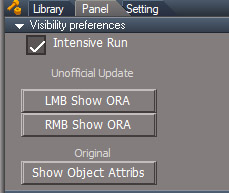
- VisibilityPrefs.jpg (35.93 KiB) Viewed 1926 times
replace Command nodes CycleCameras and EyeCam
remove Hide, Show, etc from Commands
add "Custom preferences" to Preferences
remove UUFunctionSet from Widgets
add UUCommands to Scripts
run "Modify Buttons" script with "Change Buttons" checked to update toolbar buttons to use new UUFunctionSet location
full install not sure of the details?
update buttons for all layouts and project and default_layout
replace init.js and reset.js for full or std, loads the UUCommands and new Custom preferences
export files for the 2 command nodes CycleCameras and EyeCam
- Attachments
-
- UURestructureShare.zip
- (64.27 KiB) Downloaded 151 times
-
clintonman
- Captain
- Posts: 5659
- Joined: 21 May 2009, 21:08
- Type the number ten into the box: 0
- Location: California
Re: Show and Hide Commands
You should double check those commands by restarting tS and trying them again. Unless you combined the 2 function sets into one giant function set.trueBlue wrote: 07 Aug 2022, 22:14 Cool!
I figured out how to run Hide & Show in intensive mode with Zero Undoes
HideShowCode: Select all
cmd='visFS = Node.AccessFnSet("Widgets/Visibility Function Set");visFS.IntensiveRun = true;visFS.SetInvisible(true);';RsApp.RunScriptBuffer(cmd); RsApp.Undo(); RsApp.Undo()I do not know what I am doing, but it looks like an option panel is not necessaryCode: Select all
cmd='visFS = Node.AccessFnSet("Widgets/Visibility Function Set");visFS.IntensiveRun = true;visFS.SetInvisible(false);';RsApp.RunScriptBuffer(cmd);
RsApp.Undo();
RsApp.Undo()
LMB runs quick mode
RMB runs slow mode
Here is the show from the most recent upload. It requires 2 function set accesses. You can replace "Scripts/UUCommands" with "Widgets" to compare one to one.
Code: Select all
cmd='visFnSet = Node.AccessFnSet("/Scripts/UUCommands/Visibility Function Set");VisuFS = Node.AccessFnSet("/Scripts/UUCommands/VisUtility Function Set");visFnSet.VisuFS = VisuFS;visFnSet.SetAllInvisible(false);';RsApp.RunScriptBuffer(cmd);-
trueBlue
- Captain
- Posts: 5548
- Joined: 06 Jul 2009, 22:50
- Type the number ten into the box: 10
Re: Show and Hide Commands
Thank you!
Lots to digest...
Thank you for making the toolbars script, that's the biggest part
Still need to change the Desktop panels in all of the Layouts. because the Display Toolbars button script uses the current UUFunctionSet in Widgets
Need to check the Widgets for any scripts that call the current UUFunctionSet in Widgets and any unknowns too
Ugh...
Lots to digest...
Thank you for making the toolbars script, that's the biggest part
Still need to change the Desktop panels in all of the Layouts. because the Display Toolbars button script uses the current UUFunctionSet in Widgets
Need to check the Widgets for any scripts that call the current UUFunctionSet in Widgets and any unknowns too
Ugh...
-
clintonman
- Captain
- Posts: 5659
- Joined: 21 May 2009, 21:08
- Type the number ten into the box: 0
- Location: California
Re: Show and Hide Commands
I already did a fresh install and search of the Widgets using the Mass Export Scripts and only Command nodes CycleCameras and EyeCam were affected. I think a lot of the Widget stuff ended up inside WidgetScripts.trueBlue wrote: 08 Aug 2022, 02:32 Thank you!
Lots to digest...
Thank you for making the toolbars script, that's the biggest part
Still need to change the Desktop panels in all of the Layouts. because the Display Toolbars button script uses the current UUFunctionSet in Widgets
Need to check the Widgets for any scripts that call the current UUFunctionSet in Widgets and any unknowns too
Ugh...
the tool is here
http://clintons3d.com/plugins/truespace ... riptexport
unfortunately, buttons on panels is the only thing that can't be searched and replaced
-
trueBlue
- Captain
- Posts: 5548
- Joined: 06 Jul 2009, 22:50
- Type the number ten into the box: 10
Re: Show and Hide Commands
Thanks!clintonman wrote: 08 Aug 2022, 02:44I already did a fresh install and search of the Widgets using the Mass Export Scripts and only Command nodes CycleCameras and EyeCam were affected. I think a lot of the Widget stuff ended up inside WidgetScripts.trueBlue wrote: 08 Aug 2022, 02:32 Thank you!
Lots to digest...
Thank you for making the toolbars script, that's the biggest part
Still need to change the Desktop panels in all of the Layouts. because the Display Toolbars button script uses the current UUFunctionSet in Widgets
Need to check the Widgets for any scripts that call the current UUFunctionSet in Widgets and any unknowns too
Ugh...
the tool is here
http://clintons3d.com/plugins/truespace ... riptexport
unfortunately, buttons on panels is the only thing that can't be searched and replaced
I am assuming that the Widgets do not have these scripts, they just open the CycleCameras and EyeCam in Commands?
Looks like I should add a CloseORASettings.RsObj script to the Scripts/UUCommands and change the path(s):
Activity.Run("Scripts/Commands/CloseORASettings");
in the Visibility Function Set
-
trueBlue
- Captain
- Posts: 5548
- Joined: 06 Jul 2009, 22:50
- Type the number ten into the box: 10
Re: Show and Hide Commands
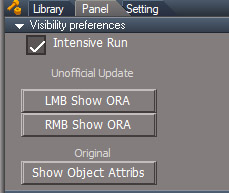
The LMB Show ORA button in the Visibility preferences panel gives an error (Wrong path)
ERR Source object: /Scripts/Commands/Show Object Attribs Error: Microsoft JScript runtime error Description: Invalid procedure call or argument Error code: 0x800a0005 - (null) Line: 29, Char: 1 Script text: var visFnSet = Node.AccessFnSet("/Widgets/Visibility Function Set"); IMPORTANT - if the above mentioned command is accessing any function set, the error line above may refer to the function set code, instead of command code!
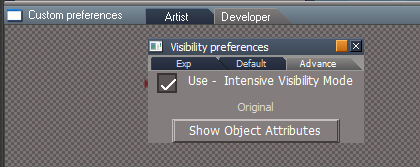
I have moved all of the visibility scripts to Scripts/UUCommands/
I have also moved the (original) Show Object Attributes button to an Advance aspect
I have removed the LMB & RMB Show ORA buttons because they are awkward to use from this panel's Default aspect
I am really concerned if a user uses this command on NURBS and or whatever else this command destroys
Can you suggest additional code or a modal Question warning of the consequences before running this command?
ERR Source object: /Scripts/Commands/Show Object Attribs Error: Microsoft JScript runtime error Description: Invalid procedure call or argument Error code: 0x800a0005 - (null) Line: 29, Char: 1 Script text: var visFnSet = Node.AccessFnSet("/Widgets/Visibility Function Set"); IMPORTANT - if the above mentioned command is accessing any function set, the error line above may refer to the function set code, instead of command code!
- VisibilityPrefs.jpg (35.93 KiB) Viewed 1911 times

I am really concerned if a user uses this command on NURBS and or whatever else this command destroys
Can you suggest additional code or a modal Question warning of the consequences before running this command?
-
clintonman
- Captain
- Posts: 5659
- Joined: 21 May 2009, 21:08
- Type the number ten into the box: 0
- Location: California
Re: Show and Hide Commands
Actually I mispoke before. I did a search inside Commands and Widgets and only the 2 commands used the UUFunctionSet, nothing for widgets. Should I do a search inside CustomCommands? Does anything in there use the UUFunctionSet?trueBlue wrote: 08 Aug 2022, 14:45 ...
I am assuming that the Widgets do not have these scripts, they just open the CycleCameras and EyeCam in Commands?
...
-
clintonman
- Captain
- Posts: 5659
- Joined: 21 May 2009, 21:08
- Type the number ten into the box: 0
- Location: California
Re: Show and Hide Commands
Oops,trueBlue wrote: 08 Aug 2022, 17:25 The LMB Show ORA button in the Visibility preferences panel gives an error (Wrong path)
ERR Source object: /Scripts/Commands/Show Object Attribs Error: Microsoft JScript runtime error Description: Invalid procedure call or argument Error code: 0x800a0005 - (null) Line: 29, Char: 1 Script text: var visFnSet = Node.AccessFnSet("/Widgets/Visibility Function Set"); IMPORTANT - if the above mentioned command is accessing any function set, the error line above may refer to the function set code, instead of command code!
VisibilityPrefs.jpg
...
You can get rid of all the Hide, Show, HideAll etc. scripts. I was using those to run it before the toolbar buttons were updated to use the new location.trueBlue wrote: 08 Aug 2022, 17:25 ...
I have moved all of the visibility scripts to Scripts/UUCommands/
UUCommands Update.png
...
Looking back I realize I forgot to put your RMB code for those buttons into a button on the panel, but I'm sure you know what you want as far as that's concerned so I'll leave it to you.
What's in the default aspect now? Is it just the checkbox?trueBlue wrote: 08 Aug 2022, 17:25 ...
I have also moved the (original) Show Object Attributes button to an Advance aspect
Visibility preferences.png
I have removed the LMB & RMB Show ORA buttons because they are awkward to use from this panel's Default aspect
I am really concerned if a user uses this command on NURBS and or whatever else this command destroys
Can you suggest additional code or a modal Question warning of the consequences before running this command?
Something like, "warning: this command can potentially damage the render attributes for the selected object. The show and hide functions can be used to recover broken attributes. Are you sure?"
-
trueBlue
- Captain
- Posts: 5548
- Joined: 06 Jul 2009, 22:50
- Type the number ten into the box: 10
Re: Show and Hide Commands
Anything you can do to seek out any issues would be most helpful!clintonman wrote: 08 Aug 2022, 18:24Actually I mispoke before. I did a search inside Commands and Widgets and only the 2 commands used the UUFunctionSet, nothing for widgets. Should I do a search inside CustomCommands? Does anything in there use the UUFunctionSet?trueBlue wrote: 08 Aug 2022, 14:45 ...
I am assuming that the Widgets do not have these scripts, they just open the CycleCameras and EyeCam in Commands?
...
I have fixed the Toolbars, Layouts (Scene panels), Desktop, and updated the CycleCameras and EyeCam in Commands with your new ones
I have removed every visibility.xml files from ScriptCommands
I will continue to test Widgets (using the Widgets Help) and your new visibility scripts
If you want, I can upload all of the updated preobjects and layouts or I can upload a Beta UU (Full version) after testing a little bit
So far all of the changes are working
-
clintonman
- Captain
- Posts: 5659
- Joined: 21 May 2009, 21:08
- Type the number ten into the box: 0
- Location: California
Re: Show and Hide Commands
Ok, it will take a while for the search to run. There's a lot of stuff in CustomCommands.trueBlue wrote: 08 Aug 2022, 19:07Anything you can do to seek out any issues would be most helpful!clintonman wrote: 08 Aug 2022, 18:24Actually I mispoke before. I did a search inside Commands and Widgets and only the 2 commands used the UUFunctionSet, nothing for widgets. Should I do a search inside CustomCommands? Does anything in there use the UUFunctionSet?trueBlue wrote: 08 Aug 2022, 14:45 ...
I am assuming that the Widgets do not have these scripts, they just open the CycleCameras and EyeCam in Commands?
...
I have fixed the Toolbars, Layouts (Scene panels), Desktop, and updated the CycleCameras and EyeCam in Commands with your new ones
I have removed every visibility.xml files from ScriptCommands
I will continue to test Widgets (using the Widgets Help) and your new visibility scripts
If you want, I can upload all of the updated preobjects and layouts or I can upload a Beta UU (Full version) after testing a little bit
So far all of the changes are working
Continue testing. One more thing that needs fixing is the web ui scene view show and hide functions. They call the script versions not the new function set versions. Also the popup view toolbar is calling those quick hide scripts. Now that there's an option slow or fast those can be changed to be like the the toolbar show/hide buttons.
I'll start the custom commands search now.
-
clintonman
- Captain
- Posts: 5659
- Joined: 21 May 2009, 21:08
- Type the number ten into the box: 0
- Location: California
Re: Show and Hide Commands
Finished the search and nothing inside CustomCommands uses the UUFunctionSet
-
trueBlue
- Captain
- Posts: 5548
- Joined: 06 Jul 2009, 22:50
- Type the number ten into the box: 10
Re: Show and Hide Commands
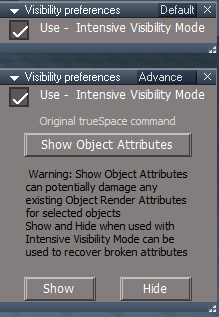
Default & Advance aspectsclintonman wrote: 08 Aug 2022, 18:34 What's in the default aspect now? Is it just the checkbox?
Something like, "warning: this command can potentially damage the render attributes for the selected object. The show and hide functions can be used to recover broken attributes. Are you sure?"
- Visibility Preferences Default and Advance aspects.png (18.09 KiB) Viewed 2112 times
-
clintonman
- Captain
- Posts: 5659
- Joined: 21 May 2009, 21:08
- Type the number ten into the box: 0
- Location: California
Re: Show and Hide Commands
Looks good to me.trueBlue wrote: 08 Aug 2022, 21:24Default & Advance aspectsclintonman wrote: 08 Aug 2022, 18:34 What's in the default aspect now? Is it just the checkbox?
Something like, "warning: this command can potentially damage the render attributes for the selected object. The show and hide functions can be used to recover broken attributes. Are you sure?"
Visibility Preferences Default and Advance aspects.png
-
trueBlue
- Captain
- Posts: 5548
- Joined: 06 Jul 2009, 22:50
- Type the number ten into the box: 10
Re: Show and Hide Commands
Thanks for checking CustomCommads!clintonman wrote: 08 Aug 2022, 19:19Ok, it will take a while for the search to run. There's a lot of stuff in CustomCommands.trueBlue wrote: 08 Aug 2022, 19:07Anything you can do to seek out any issues would be most helpful!clintonman wrote: 08 Aug 2022, 18:24
Actually I mispoke before. I did a search inside Commands and Widgets and only the 2 commands used the UUFunctionSet, nothing for widgets. Should I do a search inside CustomCommands? Does anything in there use the UUFunctionSet?
I have fixed the Toolbars, Layouts (Scene panels), Desktop, and updated the CycleCameras and EyeCam in Commands with your new ones
I have removed every visibility.xml files from ScriptCommands
I will continue to test Widgets (using the Widgets Help) and your new visibility scripts
If you want, I can upload all of the updated preobjects and layouts or I can upload a Beta UU (Full version) after testing a little bit
So far all of the changes are working
Continue testing. One more thing that needs fixing is the web ui scene view show and hide functions. They call the script versions not the new function set versions. Also the popup view toolbar is calling those quick hide scripts. Now that there's an option slow or fast those can be changed to be like the the toolbar show/hide buttons.
I'll start the custom commands search now.
Please upload any objects you want to include in the next Unofficial Update
-
clintonman
- Captain
- Posts: 5659
- Joined: 21 May 2009, 21:08
- Type the number ten into the box: 0
- Location: California
Re: Show and Hide Commands
I fast tracked the new web ui stuff since the show hide functions would be broken with all the new changes.
http://clintons3d.com/plugins/truespace ... webui.html
requires the latest Clintons3dRsView plugin, July 30
requires the global function set, July 30
the web.zip includes the new scene view which does not work with Windows XP so the old scene view is still part of the package
http://clintons3d.com/plugins/truespace ... webui.html
requires the latest Clintons3dRsView plugin, July 30
requires the global function set, July 30
the web.zip includes the new scene view which does not work with Windows XP so the old scene view is still part of the package
-
trueBlue
- Captain
- Posts: 5548
- Joined: 06 Jul 2009, 22:50
- Type the number ten into the box: 10
Re: Show and Hide Commands
Doesn't the new Scene View require a program to be installed for the Notes?clintonman wrote: 08 Aug 2022, 23:13 I fast tracked the new web ui stuff since the show hide functions would be broken with all the new changes.
http://clintons3d.com/plugins/truespace ... webui.html
requires the latest Clintons3dRsView plugin, July 30
requires the global function set, July 30
the web.zip includes the new scene view which does not work with Windows XP so the old scene view is still part of the package
If that is the case, I was thinking that if a user wanted to use your new Scene View, they could install it from your web site
-
clintonman
- Captain
- Posts: 5659
- Joined: 21 May 2009, 21:08
- Type the number ten into the box: 0
- Location: California
Re: Show and Hide Commands
No, the whole scene view/notes is just a web page like the others. If the new web ui isn't added to the UU, then the scene view and layers will need to be updated to use the new show/hide or the whole web ui should be removed from the UU.trueBlue wrote: 08 Aug 2022, 23:39Doesn't the new Scene View require a program to be installed for the Notes?clintonman wrote: 08 Aug 2022, 23:13 I fast tracked the new web ui stuff since the show hide functions would be broken with all the new changes.
http://clintons3d.com/plugins/truespace ... webui.html
requires the latest Clintons3dRsView plugin, July 30
requires the global function set, July 30
the web.zip includes the new scene view which does not work with Windows XP so the old scene view is still part of the package
If that is the case, I was thinking that if a user wanted to use your new Scene View, they could install it from your web site
-
trueBlue
- Captain
- Posts: 5548
- Joined: 06 Jul 2009, 22:50
- Type the number ten into the box: 10
Re: Show and Hide Commands
Code: Select all
Here's the beginning of my latest programming project. Modelspace has a nice notes feature so I wanted to add notes for workspace. It uses a javascript based editor called Quill to save rich text notes into trueSpace nodes. The first image shows the beginning of a new web based scene tree view and the second shows the note editor opened next to the trueSpace note display.
-
clintonman
- Captain
- Posts: 5659
- Joined: 21 May 2009, 21:08
- Type the number ten into the box: 0
- Location: California
Re: Show and Hide Commands
"Quill is a free, open source WYSIWYG editor built for the modern web."trueBlue wrote: 09 Aug 2022, 00:09What is Quill?Code: Select all
Here's the beginning of my latest programming project. Modelspace has a nice notes feature so I wanted to add notes for workspace. It uses a javascript based editor called Quill to save rich text notes into trueSpace nodes. The first image shows the beginning of a new web based scene tree view and the second shows the note editor opened next to the trueSpace note display.
https://quilljs.com/
-
trueBlue
- Captain
- Posts: 5548
- Joined: 06 Jul 2009, 22:50
- Type the number ten into the box: 10
Re: Show and Hide Commands
Thanks, I looked it up earlierclintonman wrote: 09 Aug 2022, 00:23"Quill is a free, open source WYSIWYG editor built for the modern web."trueBlue wrote: 09 Aug 2022, 00:09What is Quill?Code: Select all
Here's the beginning of my latest programming project. Modelspace has a nice notes feature so I wanted to add notes for workspace. It uses a javascript based editor called Quill to save rich text notes into trueSpace nodes. The first image shows the beginning of a new web based scene tree view and the second shows the note editor opened next to the trueSpace note display.
https://quilljs.com/
So, are you saying that nobody has to install Quill in order to use your installed new Scene View's Note editor?
Sorry, I currently have my tS7.61 setup with the recent updates and I am not sure what the install process installs for this update
And I am currently testing what I have so far
-
clintonman
- Captain
- Posts: 5659
- Joined: 21 May 2009, 21:08
- Type the number ten into the box: 0
- Location: California
Re: Show and Hide Commands
Yep, that's what I'm saying. No extra install is needed for the notes feature.trueBlue wrote: 09 Aug 2022, 01:36Thanks, I looked it up earlierclintonman wrote: 09 Aug 2022, 00:23"Quill is a free, open source WYSIWYG editor built for the modern web."trueBlue wrote: 09 Aug 2022, 00:09What is Quill?Code: Select all
Here's the beginning of my latest programming project. Modelspace has a nice notes feature so I wanted to add notes for workspace. It uses a javascript based editor called Quill to save rich text notes into trueSpace nodes. The first image shows the beginning of a new web based scene tree view and the second shows the note editor opened next to the trueSpace note display.
https://quilljs.com/
So, are you saying that nobody has to install Quill in order to use your installed new Scene View's Note editor?
Sorry, I currently have my tS7.61 setup with the recent updates and I am not sure what the install process installs for this update
And I am currently testing what I have so far
-
trueBlue
- Captain
- Posts: 5548
- Joined: 06 Jul 2009, 22:50
- Type the number ten into the box: 10
Re: Show and Hide Commands
The Visibility Function Set is using:
Activity.Run("/Scripts/UUCommands/CloseORASettings");
Can this be incorporated into another Function, and remove the CloseORASettings script?
On another note, I am contemplating moving all of the Scripts/Commands/xml scripts into Scripts/UUCommands
What are your thoughts on this?
Activity.Run("/Scripts/UUCommands/CloseORASettings");
Can this be incorporated into another Function, and remove the CloseORASettings script?
On another note, I am contemplating moving all of the Scripts/Commands/xml scripts into Scripts/UUCommands
What are your thoughts on this?
-
clintonman
- Captain
- Posts: 5659
- Joined: 21 May 2009, 21:08
- Type the number ten into the box: 0
- Location: California
Re: Show and Hide Commands
Why do you want to move them into UUCommands? I would leave the original tS scripts inside Scripts/Commands.trueBlue wrote: 12 Aug 2022, 13:25 The Visibility Function Set is using:
Activity.Run("/Scripts/UUCommands/CloseORASettings");
Can this be incorporated into another Function, and remove the CloseORASettings script?
On another note, I am contemplating moving all of the Scripts/Commands/xml scripts into Scripts/UUCommands
What are your thoughts on this?
-
trueBlue
- Captain
- Posts: 5548
- Joined: 06 Jul 2009, 22:50
- Type the number ten into the box: 10
Re: Show and Hide Commands
For the same reason you moved the Scripts/Commands/visibility scripts into the Visibility Function Setclintonman wrote: 12 Aug 2022, 14:18Why do you want to move them into UUCommands? I would leave the original tS scripts inside Scripts/Commands.trueBlue wrote: 12 Aug 2022, 13:25 The Visibility Function Set is using:
Activity.Run("/Scripts/UUCommands/CloseORASettings");
Can this be incorporated into another Function, and remove the CloseORASettings script?
On another note, I am contemplating moving all of the Scripts/Commands/xml scripts into Scripts/UUCommands
What are your thoughts on this?
And more importantly, I am still seeing the bogus commands in the Command History
Example:
Open the Command History
Run a jScript with no code and with nothing selected
For me, this entry is being shown:
ScriptObject.RunCmd("script object package/delete")
Note: The entries may or may not show or it may be a different entry
I suspect it will be one of the last Scripts/Commands used previously
I was not planning on removing the tS original xml files, except the modified OnNewScene
-
clintonman
- Captain
- Posts: 5659
- Joined: 21 May 2009, 21:08
- Type the number ten into the box: 0
- Location: California
Re: Show and Hide Commands
I moved the Scripts/Commands/visibility scripts into the Visibility Function Set so they could share code. So you are saying you want to make a new function set inside UUCommands to share code? I don't remember there being that much overlap in the Scripts/Commands.trueBlue wrote: 12 Aug 2022, 14:57For the same reason you moved the Scripts/Commands/visibility scripts into the Visibility Function Setclintonman wrote: 12 Aug 2022, 14:18Why do you want to move them into UUCommands? I would leave the original tS scripts inside Scripts/Commands.trueBlue wrote: 12 Aug 2022, 13:25 The Visibility Function Set is using:
Activity.Run("/Scripts/UUCommands/CloseORASettings");
Can this be incorporated into another Function, and remove the CloseORASettings script?
On another note, I am contemplating moving all of the Scripts/Commands/xml scripts into Scripts/UUCommands
What are your thoughts on this?
And more importantly, I am still seeing the bogus commands in the Command History
Example:
Open the Command History
Run a jScript with no code and with nothing selected
For me, this entry is being shown:
ScriptObject.RunCmd("script object package/delete")
Note: The entries may or may not show or it may be a different entry
I suspect it will be one of the last Scripts/Commands used previously
I was not planning on removing the tS original xml files, except the modified OnNewScene
I'll try your example when I can get to the computer.
-
trueBlue
- Captain
- Posts: 5548
- Joined: 06 Jul 2009, 22:50
- Type the number ten into the box: 10
Re: Show and Hide Commands
Yes, or just add jScripts inside UUCommandsclintonman wrote: 12 Aug 2022, 15:18I moved the Scripts/Commands/visibility scripts into the Visibility Function Set so they could share code. So you are saying you want to make a new function set inside UUCommands to share code? I don't remember there being that much overlap in the Scripts/Commands.trueBlue wrote: 12 Aug 2022, 14:57For the same reason you moved the Scripts/Commands/visibility scripts into the Visibility Function Setclintonman wrote: 12 Aug 2022, 14:18
Why do you want to move them into UUCommands? I would leave the original tS scripts inside Scripts/Commands.
And more importantly, I am still seeing the bogus commands in the Command History
Example:
Open the Command History
Run a jScript with no code and with nothing selected
For me, this entry is being shown:
ScriptObject.RunCmd("script object package/delete")
Note: The entries may or may not show or it may be a different entry
I suspect it will be one of the last Scripts/Commands used previously
I was not planning on removing the tS original xml files, except the modified OnNewScene
I'll try your example when I can get to the computer.
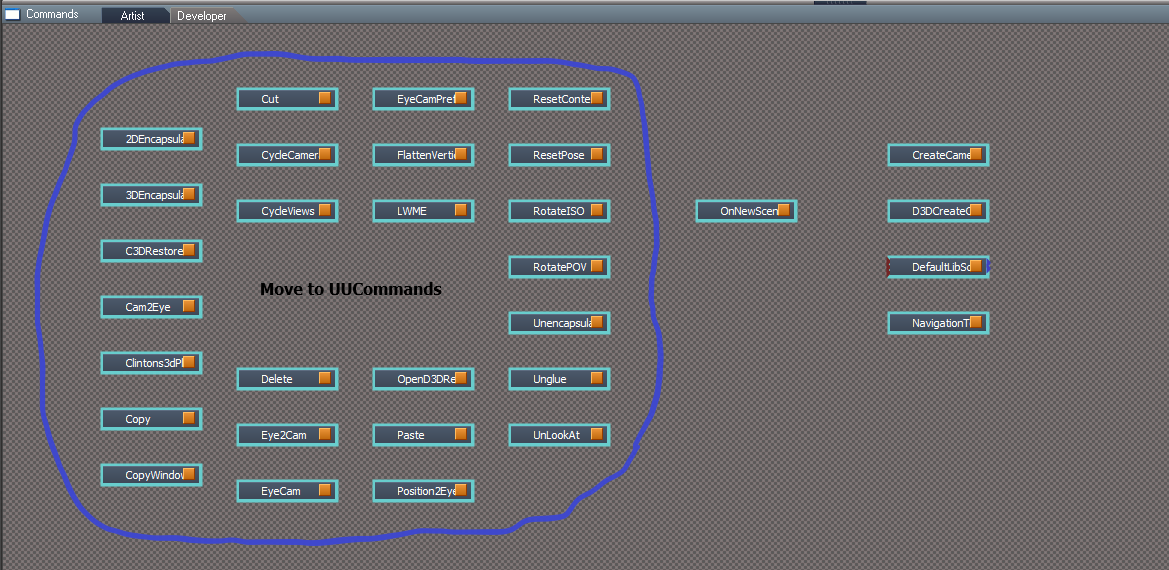
-
clintonman
- Captain
- Posts: 5659
- Joined: 21 May 2009, 21:08
- Type the number ten into the box: 0
- Location: California
Re: Show and Hide Commands
I'm ok with either one. I just don't want a single function set with a thousand lines of code. If you make a function set and it gets too long, break it up into smaller function sets.trueBlue wrote: 12 Aug 2022, 15:33Yes, or just add jScripts inside UUCommandsclintonman wrote: 12 Aug 2022, 15:18I moved the Scripts/Commands/visibility scripts into the Visibility Function Set so they could share code. So you are saying you want to make a new function set inside UUCommands to share code? I don't remember there being that much overlap in the Scripts/Commands.trueBlue wrote: 12 Aug 2022, 14:57
For the same reason you moved the Scripts/Commands/visibility scripts into the Visibility Function Set
And more importantly, I am still seeing the bogus commands in the Command History
Example:
Open the Command History
Run a jScript with no code and with nothing selected
For me, this entry is being shown:
ScriptObject.RunCmd("script object package/delete")
Note: The entries may or may not show or it may be a different entry
I suspect it will be one of the last Scripts/Commands used previously
I was not planning on removing the tS original xml files, except the modified OnNewScene
I'll try your example when I can get to the computer.
Move Scripts Commands to UUCommands.png
-
trueBlue
- Captain
- Posts: 5548
- Joined: 06 Jul 2009, 22:50
- Type the number ten into the box: 10
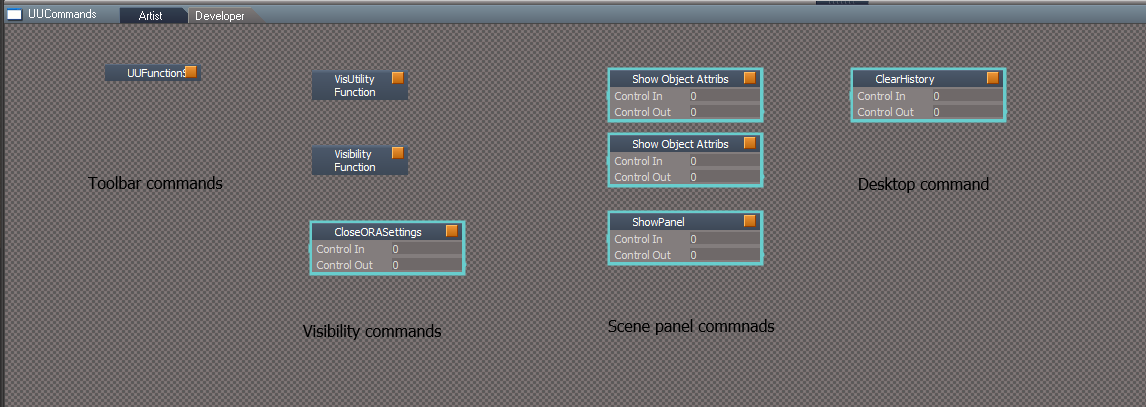
-
trueBlue
- Captain
- Posts: 5548
- Joined: 06 Jul 2009, 22:50
- Type the number ten into the box: 10
Re: Show and Hide Commands
IsolateSelected
Can you stop the above from running if nothing is selected and if the selected object does not have a Matrix?
Currently, it hides everything with nothing selected
Code: Select all
cmd='visFnSet = Node.AccessFnSet("/Scripts/UUCommands/Visibility Function Set");VisuFS = Node.AccessFnSet("/Scripts/UUCommands/VisUtility Function Set");visFnSet.VisuFS = VisuFS;visFnSet.IsolateSelected();';RsApp.RunScriptBuffer(cmd);Currently, it hides everything with nothing selected
-
clintonman
- Captain
- Posts: 5659
- Joined: 21 May 2009, 21:08
- Type the number ten into the box: 0
- Location: California
Re: Show and Hide Commands
Does this do anything? I did some tests with and without CloseORASettings and didn't see any difference.trueBlue wrote: 12 Aug 2022, 13:25 The Visibility Function Set is using:
Activity.Run("/Scripts/UUCommands/CloseORASettings");
Can this be incorporated into another Function, and remove the CloseORASettings script?
...
It is done. Also checks for no selection.trueBlue wrote: 12 Aug 2022, 16:01 IsolateSelectedCan you stop the above from running if nothing is selected and if the selected object does not have a Matrix?Code: Select all
cmd='visFnSet = Node.AccessFnSet("/Scripts/UUCommands/Visibility Function Set");VisuFS = Node.AccessFnSet("/Scripts/UUCommands/VisUtility Function Set");visFnSet.VisuFS = VisuFS;visFnSet.IsolateSelected();';RsApp.RunScriptBuffer(cmd);
Currently, it hides everything with nothing selected
-
trueBlue
- Captain
- Posts: 5548
- Joined: 06 Jul 2009, 22:50
- Type the number ten into the box: 10
Re: Show and Hide Commands
It closes all of the ORA panels in the Stack/Settings when you run the original Show Object Attribs commandclintonman wrote: 12 Aug 2022, 18:51Does this do anything? I did some tests with and without CloseORASettings and didn't see any difference.trueBlue wrote: 12 Aug 2022, 13:25 The Visibility Function Set is using:
Activity.Run("/Scripts/UUCommands/CloseORASettings");
Can this be incorporated into another Function, and remove the CloseORASettings script?
...It is done. Also checks for no selection.trueBlue wrote: 12 Aug 2022, 16:01 IsolateSelectedCan you stop the above from running if nothing is selected and if the selected object does not have a Matrix?Code: Select all
cmd='visFnSet = Node.AccessFnSet("/Scripts/UUCommands/Visibility Function Set");VisuFS = Node.AccessFnSet("/Scripts/UUCommands/VisUtility Function Set");visFnSet.VisuFS = VisuFS;visFnSet.IsolateSelected();';RsApp.RunScriptBuffer(cmd);
Currently, it hides everything with nothing selected
-
clintonman
- Captain
- Posts: 5659
- Joined: 21 May 2009, 21:08
- Type the number ten into the box: 0
- Location: California
Re: Show and Hide Commands
I think you deleted the wrong post. The one where you mentioned objects with no ORA was helpful. Now I can test the change.trueBlue wrote: 12 Aug 2022, 18:57It closes all of the ORA panels in the Stack/Settings when you run the original Show Object Attribs commandclintonman wrote: 12 Aug 2022, 18:51Does this do anything? I did some tests with and without CloseORASettings and didn't see any difference.trueBlue wrote: 12 Aug 2022, 13:25 The Visibility Function Set is using:
Activity.Run("/Scripts/UUCommands/CloseORASettings");
Can this be incorporated into another Function, and remove the CloseORASettings script?
...It is done. Also checks for no selection.trueBlue wrote: 12 Aug 2022, 16:01 IsolateSelectedCan you stop the above from running if nothing is selected and if the selected object does not have a Matrix?Code: Select all
cmd='visFnSet = Node.AccessFnSet("/Scripts/UUCommands/Visibility Function Set");VisuFS = Node.AccessFnSet("/Scripts/UUCommands/VisUtility Function Set");visFnSet.VisuFS = VisuFS;visFnSet.IsolateSelected();';RsApp.RunScriptBuffer(cmd);
Currently, it hides everything with nothing selected
-
trueBlue
- Captain
- Posts: 5548
- Joined: 06 Jul 2009, 22:50
- Type the number ten into the box: 10
Re: Show and Hide Commands
Sorry, having internet issues and this Forum's Web Server errors
-
clintonman
- Captain
- Posts: 5659
- Joined: 21 May 2009, 21:08
- Type the number ten into the box: 0
- Location: California
Re: Show and Hide Commands
Here is the visibility fs with the isolate selected fix.
Testing shows that CloseORASettings doesn't work if you move it into the function set, it has to remain it's own thing.
Testing shows that CloseORASettings doesn't work if you move it into the function set, it has to remain it's own thing.
- Attachments
-
- Visibility Function Set066b.RsObj
- (44.15 KiB) Downloaded 168 times
-
trueBlue
- Captain
- Posts: 5548
- Joined: 06 Jul 2009, 22:50
- Type the number ten into the box: 10
Re: Show and Hide Commands
Thank you, that is what I suspected
Trying to better organize scripts being used in the UU
I have committed using your UUCommands/FN Sets and Scripts
Would be nice if everything is in one place, not necessarily your CustomCommands scripts
Currently, the Delete LMB command uses:
var GlobalFS = Node.AccessFnSet("Scripts/CustomCommands/Global Function Set");
Can the Global Function Set be recreated in UUCommands, so that it is in one place?
If so, can you add a Function for Copy?
Also, it looks like you have improved 3D & 2D Grouping and Ungrouping for your Scene View 2
Can you add a FN Set 'Encapsulation' to the UUCommands?
Scripts/Commands/
Unglue 'Bad name' Should have been '3DUnencapsulate'
2DEncapsulate
3DEncapsulate
Unencapsulate 'Bad name' Should have been '2DUnencapsulate'
Trying to better organize scripts being used in the UU
I have committed using your UUCommands/FN Sets and Scripts
Would be nice if everything is in one place, not necessarily your CustomCommands scripts
Currently, the Delete LMB command uses:
var GlobalFS = Node.AccessFnSet("Scripts/CustomCommands/Global Function Set");
Can the Global Function Set be recreated in UUCommands, so that it is in one place?
If so, can you add a Function for Copy?
Also, it looks like you have improved 3D & 2D Grouping and Ungrouping for your Scene View 2
Can you add a FN Set 'Encapsulation' to the UUCommands?
Scripts/Commands/
Unglue 'Bad name' Should have been '3DUnencapsulate'
2DEncapsulate
3DEncapsulate
Unencapsulate 'Bad name' Should have been '2DUnencapsulate'
-
clintonman
- Captain
- Posts: 5659
- Joined: 21 May 2009, 21:08
- Type the number ten into the box: 0
- Location: California
Re: Show and Hide Commands
Moving Global FS to UUCommands can be done, but not automatically. Buttons can be altered. Scripts would have to be manual. I'll check the exports to see how big a job it is.trueBlue wrote: 12 Aug 2022, 19:51 Thank you, that is what I suspected
Trying to better organize scripts being used in the UU
I have committed using your UUCommands/FN Sets and Scripts
Would be nice if everything is in one place, not necessarily your CustomCommands scripts
Currently, the Delete LMB command uses:
var GlobalFS = Node.AccessFnSet("Scripts/CustomCommands/Global Function Set");
Can the Global Function Set be recreated in UUCommands, so that it is in one place?
If so, can you add a Function for Copy?
Also, it looks like you have improved 3D & 2D Grouping and Ungrouping for your Scene View 2
Can you add a FN Set 'Encapsulation' to the UUCommands?
Scripts/Commands/
Unglue 'Bad name' Should have been '3DUnencapsulate'
2DEncapsulate
3DEncapsulate
Unencapsulate 'Bad name' Should have been '2DUnencapsulate'
The new Scene View grouping/ungrouping is not the same as encapsulate/unencapsulate.
It adds and removes objects from groups using same as this link:
file:///C:/xampp2019/htdocs/clintons3d/plugins/truespace/utility/heirarchy.html
Did a search and global fs only being used in maybe 15 scripts, that's doable.
-
trueBlue
- Captain
- Posts: 5548
- Joined: 06 Jul 2009, 22:50
- Type the number ten into the box: 10
Re: Show and Hide Commands
Okay thanks!
I just tested your change to function IsolateSelected()
It seems to work by not hiding everything
With nothing selected it adds an entry in Command history
The only way I could stop that is add:
if (Node.SelectedCount() == 0) return;
to the beginning in the toolbar LMB command
Edit:
If so, wouldn't be easier just to recreate another FN Set in UUCommands?
I just tested your change to function IsolateSelected()
It seems to work by not hiding everything
With nothing selected it adds an entry in Command history
The only way I could stop that is add:
if (Node.SelectedCount() == 0) return;
to the beginning in the toolbar LMB command
Edit:
I hope that you are not having to change your CustomCommands scriptsDid a search and global fs only being used in maybe 15 scripts, that's doable.
If so, wouldn't be easier just to recreate another FN Set in UUCommands?
-
clintonman
- Captain
- Posts: 5659
- Joined: 21 May 2009, 21:08
- Type the number ten into the box: 0
- Location: California
Re: Show and Hide Commands
No buttons need to be changed.
No widgets to change
2 scripts attached so can now move Global Function Set into UUCommands.
Share your Delete when you're done and I'll convert it to 1 undo format.
No widgets to change
2 scripts attached so can now move Global Function Set into UUCommands.
Share your Delete when you're done and I'll convert it to 1 undo format.
- Attachments
-
- MeshOriginf3f7.RsObj
- (125.47 KiB) Downloaded 165 times
-
- WebServer7578.RsObj
- (351.84 KiB) Downloaded 157 times
-
trueBlue
- Captain
- Posts: 5548
- Joined: 06 Jul 2009, 22:50
- Type the number ten into the box: 10
Re: Show and Hide Commands
Move or Copy Global Function Set into UUCommands?clintonman wrote: 12 Aug 2022, 21:33 No buttons need to be changed.
No widgets to change
2 scripts attached so can now move Global Function Set into UUCommands.
Share your Delete when you're done and I'll convert it to 1 undo format.
Delete
Code: Select all
// Author - Clinton Reese Wed Aug 10, 2022 12:26 pm
function Execute(params)
{

	// var cmd = "";
	// cmd += "var selCount = Node.SelectedCount();"
	// cmd += "if (selCount == 0) return;"
	// cmd += "var reWhiteSpace = /^\\s/;"
	// cmd += "var selection = Node.Selection();"
	// cmd += "var selectionArray = selection.split(';');"
	// cmd += "for (var i = 0; i < selCount; i++) {"
	// cmd += "var selClean = selectionArray[i].replace(reWhiteSpace, '');"
	// cmd += "selectionArray[i] = selClean;"
	// cmd += "var nurbsNode = selClean;"
	// cmd += "if (Node.ConExists(selClean, 'Matrix'))"
	// cmd += "nurbsNode = Node.Owner(selClean);"
	// cmd += "if (Node.ConExists(nurbsNode, 'isaCurve')) {"
	// cmd += "selectionArray[i] = nurbsNode;"
	// cmd += "}"
	// cmd += "if (Node.Exists(nurbsNode + '/CP to patch CP')) {"
	// cmd += "selectionArray[i] = nurbsNode;"
	// cmd += "}"
	// cmd += "}"
	// cmd += "for (var key in selectionArray) {"
	// cmd += "Node.Delete(selectionArray[key]);"
	// cmd += "}"
	// cmd += "var PVT_LOCKED = 2;"
	// cmd += "RsStackView.RemovePanelsFromCurrSelection(PVT_LOCKED, 0);"
	// cmd += "Space.Unselect();"
	// RsApp.RunScriptBuffer(cmd);

	var GlobalFS = Node.AccessFnSet("Scripts/CustomCommands/Global Function Set");

	var Enhanced = 1;
	var ProtectSpecialNodes = true;
	var DeleteWholeNURBS = true;

	if(Node.Exists("Preferences/Custom preferences/Delete preferences")) {
		Enhanced = Node.Value("Preferences/Custom preferences/Delete preferences", "Enhanced");
		ProtectSpecialNodes = Node.Value("Preferences/Custom preferences/Delete preferences", "ProtectSpecialNodes");
		DeleteWholeNURBS = Node.Value("Preferences/Custom preferences/Delete preferences", "DeleteWholeNURBS");
	}

	if(Enhanced == 0) {
		Node.Delete('');
		return;
	}

	var selCount = Node.SelectedCount();
	if (selCount == 0) return;
	//var reWhiteSpace = /^\\s/;
	var reWhiteSpace = /^\s/;//conversion to string for cmd extra slash, use line above for 1 undo version
	var selection = Node.Selection();
	var selectionArray = selection.split(';');
	var deleteArr = [];
	for (var i = 0; i < selCount; i++) {
		var selClean = selectionArray[i].replace(reWhiteSpace, '');
		selectionArray[i] = selClean;

		if(DeleteWholeNURBS) {
			var nurbsNode = selClean;
			if (Node.ConExists(selClean, 'Matrix'))
				nurbsNode = Node.Owner(selClean);
			if (Node.ConExists(nurbsNode, 'isaCurve')) {
				selectionArray[i] = nurbsNode;
			}
			if (Node.Exists(nurbsNode + '/CP to patch CP')) {
				selectionArray[i] = nurbsNode;
			}
		}

		if(ProtectSpecialNodes == true) {
			if(selectionArray[i] == Space.CurrentScene() + "/Vray") {
				//if(!System.Question("The Vray node is selected. Are you sure you want to Delete it?")) {
				if(!GlobalFS.Question("Vray is required for Offline rendering\nRecommend that you do not Delete it!\n\nAre you sure you want to Delete it?", "Warning!", -1, true, 2)) {
					continue;
				}
			}

			if(selectionArray[i] == Space.CurrentScene() + "/YafaRay4tS") {
				if(!GlobalFS.Question("YafaRay4tS is required for Offline rendering\nRecommend that you do not Delete it!\n\nAre you sure you want to Delete it?", "Warning!", -1, true, 2)) {
					continue;
				}
			}

			if(selectionArray[i] == Space.CurrentScene() + "/PhotoRender") {
				if(!GlobalFS.Question("PhotoRender is required for Offline rendering\nRecommend that you do not Delete it!\n\nAre you sure you want to Delete it?", "Warning!", -1, true, 2)) {
					continue;
				}
			}

			selPathArr = selectionArray[i].split("/");
			if(selPathArr.length < 4) {
				if(!GlobalFS.Question(Node.ShortName(selectionArray[i]) + " may be a required trueSpace System object!\nIf you Delete this file, you may have to\nReset the Default Context\nRecommend that you do not Delete it!\n\nAre you sure you want to Delete it?", "Warning!", -1, true, 2)) {
					continue;
				}
			} else if("/"+selPathArr[1]+"/"+selPathArr[2] != Space.CurrentScene()) {
				if(!GlobalFS.Question(Node.ShortName(selectionArray[i]) + " may be a required trueSpace System object!\nIf you Delete this file, you may have to\nReset the Default Context\nRecommend that you do not Delete it!\n\nAre you sure you want to Delete it?", "Warning!", -1, true, 2)) {
					continue;
				}
			}
		}


		deleteArr.push(selectionArray[i]);
	}
	//for (var key in selectionArray) {
	//	Node.Delete(selectionArray[key]);
	//}

	var delNode;
	while(delNode = deleteArr.pop()) {
		Node.Delete(delNode);
	}
	var PVT_LOCKED = 2;
	RsStackView.RemovePanelsFromCurrSelection(PVT_LOCKED, 0);
	Space.Unselect(); //make scripts aware of deletion

}
-
clintonman
- Captain
- Posts: 5659
- Joined: 21 May 2009, 21:08
- Type the number ten into the box: 0
- Location: California
Re: Show and Hide Commands
Move it. When Delete is done that will be everyone who uses it.trueBlue wrote: 12 Aug 2022, 22:11Move or Copy Global Function Set into UUCommands?clintonman wrote: 12 Aug 2022, 21:33 No buttons need to be changed.
No widgets to change
2 scripts attached so can now move Global Function Set into UUCommands.
Share your Delete when you're done and I'll convert it to 1 undo format.
DeleteCode: Select all
// Author - Clinton Reese Wed Aug 10, 2022 12:26 pm
function Execute(params)
{

	// var cmd = "";
	// cmd += "var selCount = Node.SelectedCount();"
	// cmd += "if (selCount == 0) return;"
	// cmd += "var reWhiteSpace = /^\\s/;"
	// cmd += "var selection = Node.Selection();"
	// cmd += "var selectionArray = selection.split(';');"
	// cmd += "for (var i = 0; i < selCount; i++) {"
	// cmd += "var selClean = selectionArray[i].replace(reWhiteSpace, '');"
	// cmd += "selectionArray[i] = selClean;"
	// cmd += "var nurbsNode = selClean;"
	// cmd += "if (Node.ConExists(selClean, 'Matrix'))"
	// cmd += "nurbsNode = Node.Owner(selClean);"
	// cmd += "if (Node.ConExists(nurbsNode, 'isaCurve')) {"
	// cmd += "selectionArray[i] = nurbsNode;"
	// cmd += "}"
	// cmd += "if (Node.Exists(nurbsNode + '/CP to patch CP')) {"
	// cmd += "selectionArray[i] = nurbsNode;"
	// cmd += "}"
	// cmd += "}"
	// cmd += "for (var key in selectionArray) {"
	// cmd += "Node.Delete(selectionArray[key]);"
	// cmd += "}"
	// cmd += "var PVT_LOCKED = 2;"
	// cmd += "RsStackView.RemovePanelsFromCurrSelection(PVT_LOCKED, 0);"
	// cmd += "Space.Unselect();"
	// RsApp.RunScriptBuffer(cmd);

	var GlobalFS = Node.AccessFnSet("Scripts/CustomCommands/Global Function Set");

	var Enhanced = 1;
	var ProtectSpecialNodes = true;
	var DeleteWholeNURBS = true;

	if(Node.Exists("Preferences/Custom preferences/Delete preferences")) {
		Enhanced = Node.Value("Preferences/Custom preferences/Delete preferences", "Enhanced");
		ProtectSpecialNodes = Node.Value("Preferences/Custom preferences/Delete preferences", "ProtectSpecialNodes");
		DeleteWholeNURBS = Node.Value("Preferences/Custom preferences/Delete preferences", "DeleteWholeNURBS");
	}

	if(Enhanced == 0) {
		Node.Delete('');
		return;
	}

	var selCount = Node.SelectedCount();
	if (selCount == 0) return;
	//var reWhiteSpace = /^\\s/;
	var reWhiteSpace = /^\s/;//conversion to string for cmd extra slash, use line above for 1 undo version
	var selection = Node.Selection();
	var selectionArray = selection.split(';');
	var deleteArr = [];
	for (var i = 0; i < selCount; i++) {
		var selClean = selectionArray[i].replace(reWhiteSpace, '');
		selectionArray[i] = selClean;

		if(DeleteWholeNURBS) {
			var nurbsNode = selClean;
			if (Node.ConExists(selClean, 'Matrix'))
				nurbsNode = Node.Owner(selClean);
			if (Node.ConExists(nurbsNode, 'isaCurve')) {
				selectionArray[i] = nurbsNode;
			}
			if (Node.Exists(nurbsNode + '/CP to patch CP')) {
				selectionArray[i] = nurbsNode;
			}
		}

		if(ProtectSpecialNodes == true) {
			if(selectionArray[i] == Space.CurrentScene() + "/Vray") {
				//if(!System.Question("The Vray node is selected. Are you sure you want to Delete it?")) {
				if(!GlobalFS.Question("Vray is required for Offline rendering\nRecommend that you do not Delete it!\n\nAre you sure you want to Delete it?", "Warning!", -1, true, 2)) {
					continue;
				}
			}

			if(selectionArray[i] == Space.CurrentScene() + "/YafaRay4tS") {
				if(!GlobalFS.Question("YafaRay4tS is required for Offline rendering\nRecommend that you do not Delete it!\n\nAre you sure you want to Delete it?", "Warning!", -1, true, 2)) {
					continue;
				}
			}

			if(selectionArray[i] == Space.CurrentScene() + "/PhotoRender") {
				if(!GlobalFS.Question("PhotoRender is required for Offline rendering\nRecommend that you do not Delete it!\n\nAre you sure you want to Delete it?", "Warning!", -1, true, 2)) {
					continue;
				}
			}

			selPathArr = selectionArray[i].split("/");
			if(selPathArr.length < 4) {
				if(!GlobalFS.Question(Node.ShortName(selectionArray[i]) + " may be a required trueSpace System object!\nIf you Delete this file, you may have to\nReset the Default Context\nRecommend that you do not Delete it!\n\nAre you sure you want to Delete it?", "Warning!", -1, true, 2)) {
					continue;
				}
			} else if("/"+selPathArr[1]+"/"+selPathArr[2] != Space.CurrentScene()) {
				if(!GlobalFS.Question(Node.ShortName(selectionArray[i]) + " may be a required trueSpace System object!\nIf you Delete this file, you may have to\nReset the Default Context\nRecommend that you do not Delete it!\n\nAre you sure you want to Delete it?", "Warning!", -1, true, 2)) {
					continue;
				}
			}
		}


		deleteArr.push(selectionArray[i]);
	}
	//for (var key in selectionArray) {
	//	Node.Delete(selectionArray[key]);
	//}

	var delNode;
	while(delNode = deleteArr.pop()) {
		Node.Delete(delNode);
	}
	var PVT_LOCKED = 2;
	RsStackView.RemovePanelsFromCurrSelection(PVT_LOCKED, 0);
	Space.Unselect(); //make scripts aware of deletion

}
-
clintonman
- Captain
- Posts: 5659
- Joined: 21 May 2009, 21:08
- Type the number ten into the box: 0
- Location: California
Re: Show and Hide Commands
Delete converted to "one" undo.
It looks like the questions may be creating more undos, but it is one undo for scene items.
It looks like the questions may be creating more undos, but it is one undo for scene items.
- Attachments
-
- Deleteebcf.RsObj
- (10.3 KiB) Downloaded 149 times
-
trueBlue
- Captain
- Posts: 5548
- Joined: 06 Jul 2009, 22:50
- Type the number ten into the box: 10
Re: Show and Hide Commands
Scene undoes is 1 undo. Yay!clintonman wrote: 12 Aug 2022, 22:41 Delete converted to "one" undo.
It looks like the questions may be creating more undos, but it is one undo for scene items.
For me it is 2 undoes in the below Example
1
Widgets.DeactivateDefaultWidgets();
2
Delete Undo
Example:
In the LE, navigate to System and select the Status Line, then Ctrl + LMB select a few objects in the 3D View
Answer No to the Question
Press Undo twice
Note: The Status Line gets selected
If you do the same thing except Answer Yes, the Status Line gets unselected
Is the last line, Space.Unselect() not working?
Hint: The Status Line gets recreated after it is deleted so much it a little bit before running Delete
-
trueBlue
- Captain
- Posts: 5548
- Joined: 06 Jul 2009, 22:50
- Type the number ten into the box: 10
Re: Show and Hide Commands
Try this:
Add RsTool.Arrow() below Space.Unselect() to the Delete script
The Status Line gets unselected
Still 2 undoes
Edit: Never mind I forgot to press Undo twice
Add RsTool.Arrow() below Space.Unselect() to the Delete script
The Status Line gets unselected
Still 2 undoes
Edit: Never mind I forgot to press Undo twice
-
trueBlue
- Captain
- Posts: 5548
- Joined: 06 Jul 2009, 22:50
- Type the number ten into the box: 10
Re: Show and Hide Commands
I just noticed that the line(s) that have:clintonman wrote: 12 Aug 2022, 19:21 Here is the visibility fs with the isolate selected fix.
Testing shows that CloseORASettings doesn't work if you move it into the function set, it has to remain it's own thing.
Activity.Run("Scripts/Commands/CloseORASettings");
should be:
Activity.Run("Scripts/UUCommands/CloseORASettings");
-
clintonman
- Captain
- Posts: 5659
- Joined: 21 May 2009, 21:08
- Type the number ten into the box: 0
- Location: California
Re: Show and Hide Commands
FixedtrueBlue wrote: 14 Aug 2022, 15:24I just noticed that the line(s) that have:clintonman wrote: 12 Aug 2022, 19:21 Here is the visibility fs with the isolate selected fix.
Testing shows that CloseORASettings doesn't work if you move it into the function set, it has to remain it's own thing.
Activity.Run("Scripts/Commands/CloseORASettings");
should be:
Activity.Run("Scripts/UUCommands/CloseORASettings");
- Attachments
-
- Visibility Function Set7038.RsObj
- (44.15 KiB) Downloaded 158 times
-
clintonman
- Captain
- Posts: 5659
- Joined: 21 May 2009, 21:08
- Type the number ten into the box: 0
- Location: California
Re: Show and Hide Commands
quoting myselfclintonman wrote: 07 Aug 2022, 23:41 VisibilityPrefs.jpg
This is what I came up with. It has an options panel for the show/hide buttons and moved UUFunctionSet into a new UUCommands.
replace Command nodes CycleCameras and EyeCam
remove Hide, Show, etc from Commands
add "Custom preferences" to Preferences
remove UUFunctionSet from Widgets
add UUCommands to Scripts
run "Modify Buttons" script with "Change Buttons" checked to update toolbar buttons to use new UUFunctionSet location
full install not sure of the details?
update buttons for all layouts and project and default_layout
replace init.js and reset.js for full or std, loads the UUCommands and new Custom preferences
export files for the 2 command nodes CycleCameras and EyeCam
I just found a problem with this script from August that was used to update the show and hide buttons.
It changes the buttons based on their name and one of the mesh edit buttons had the same name as the show/hide object button.
I'm working on a fix now.
-
clintonman
- Captain
- Posts: 5659
- Joined: 21 May 2009, 21:08
- Type the number ten into the box: 0
- Location: California
Re: Show and Hide Commands
This will fix the broken "hide unselected geometry" buttons.
Changes will disappear with a context reset.
Changes will disappear with a context reset.
- Attachments
-
- Fix Modified Buttons0B.RsObj
- (28.35 KiB) Downloaded 105 times