Glow, halo
-
rjeff

- Master Chief Petty Officer
- Posts: 462
- Joined: 21 May 2009, 18:26
Glow, halo
Ok this is one thing that I cannont figure out with TS. I want to make my lights glow and maybe even have a halo effect. Ideas?
-
Finis

- Captain
- Posts: 5410
- Joined: 21 May 2009, 18:26
- Type the number ten into the box: 0
- Location: America!
Re: Glow, halo
Glows and lens flares and halos on model side:
vi ... =39&t=1465"
vi ... =39&t=1465"
I prefer dangerous freedom over peaceful servitude. -- Thomas Jefferson/Jean Jacques Rousseau
-
RAYMAN

- Captain
- Posts: 2547
- Joined: 21 May 2009, 18:56
Re: Glow, halo
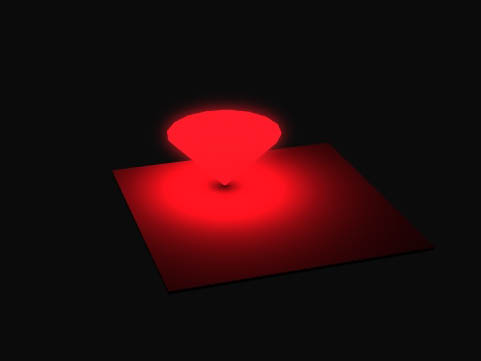
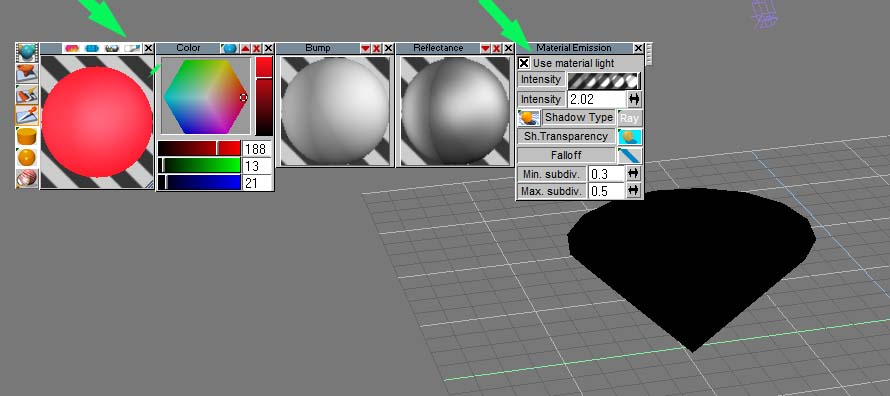
In Lightwork use materiallights that the third tab on the material editor and the last panel that jumps open there you have to check the use as light tab.
make your render with the materiallight.
make a mask in Photoshop of that light and ad gaussian blur to it and ad that as a top layer to your Photoshop ... there you got your glow.
(in Vue you can do the same thing only there is a material glow)
make your render with the materiallight.
make a mask in Photoshop of that light and ad gaussian blur to it and ad that as a top layer to your Photoshop ... there you got your glow.
(in Vue you can do the same thing only there is a material glow)
- Attachments
-
-
- glowrender.jpg (10.46 KiB) Viewed 4999 times
-
LeonRegis

- Captain
- Posts: 1946
- Joined: 18 Aug 2009, 17:36
- Type the number ten into the box: 0
- Location: Brazil/Earth/Orion Arm/Milky Way/4th Dimension/This Universe/Multiverse???/Singularity???
Re: Glow, halo
I never used materials lights because it always slow down the render time to more than 3 hours, even in simple objects... I think is because I enable shadows and even transparent.
Be the change you want to see in the world. - Mohandas Gandhi
-
RAYMAN
- Captain
- Posts: 2547
- Joined: 21 May 2009, 18:56
Re: Glow, halo
That rendered in 5 seconds ......
Leon you must have something in there that uses up the time its not the materiallight that only slows it down about 60 %..
by the way to get some good alphas you can render with layers to photoshop file and delete the scene except for the light object.
Peter
Leon you must have something in there that uses up the time its not the materiallight that only slows it down about 60 %..
by the way to get some good alphas you can render with layers to photoshop file and delete the scene except for the light object.
Peter
-
rjeff
- Master Chief Petty Officer
- Posts: 462
- Joined: 21 May 2009, 18:26
Re: Glow, halo
Ok Peter..here is yet one more place that I have issues...I am not sure how to make a mask in photoshop.
-
RAYMAN
- Captain
- Posts: 2547
- Joined: 21 May 2009, 18:56
Re: Glow, halo
You dont have to make a mask in Photoshop.rjeff wrote:Ok Peter..here is yet one more place that I have issues...I am not sure how to make a mask in photoshop.
When you render to photoshop file Truespace lets you save to layers one of those layers can be alpha or mask chanel if you check that.
Truespace saves the alpha of the whole scene with all the objects rather then just your meshlight which you dont want. You therefore render the whole scene once
and save that then you delete all objects exept for your meshlight and render again and save with alpha this time.
You open your render of the whole scene and copy the alpha of only the light on top of that in a top layer. you then select the outside 0f your alpha with the magic wand
now you can copy only your light to a top layer and ad softness to it.....
Get it you only need the mask from truespace for selection !
-
rjeff
- Master Chief Petty Officer
- Posts: 462
- Joined: 21 May 2009, 18:26
Re: Glow, halo
Wow that is to complicated. That is one thing Bryce does better. It has some nice glow effects built in. Now if it only modeled better.
-
Finis
- Captain
- Posts: 5410
- Joined: 21 May 2009, 18:26
- Type the number ten into the box: 0
- Location: America!
Re: Glow, halo
If you want an object to glow then it is complicated in TS.
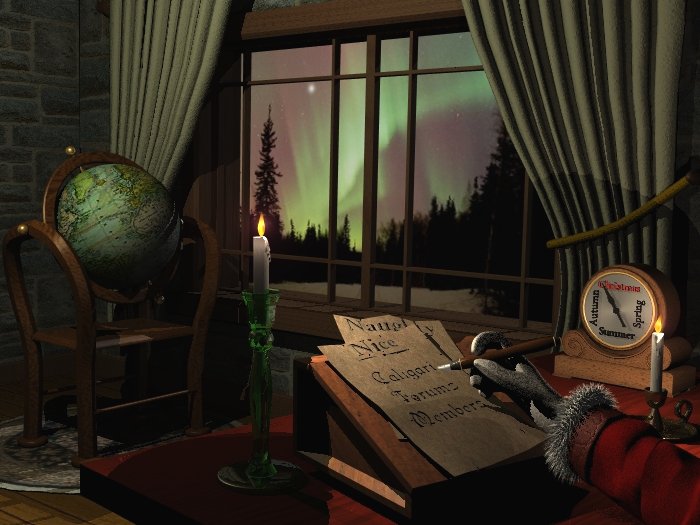
You can get a good glow effect, although highly scene and lighting dependent, by using the lens flares/halo/glow noted before along with creative texturing like adding some luminosity on the reflectance shader and using the translucency reflectance shader.
I did that with the candles in this picture. A more vigorous application might produce a good light bulb. One thing I didn't find a control for is the color of the flares/halo/glow.
A renderer or shader that does glows would be easier though.
You can get a good glow effect, although highly scene and lighting dependent, by using the lens flares/halo/glow noted before along with creative texturing like adding some luminosity on the reflectance shader and using the translucency reflectance shader.
I did that with the candles in this picture. A more vigorous application might produce a good light bulb. One thing I didn't find a control for is the color of the flares/halo/glow.
A renderer or shader that does glows would be easier though.
- Attachments
-
I prefer dangerous freedom over peaceful servitude. -- Thomas Jefferson/Jean Jacques Rousseau
-
Jimmer
- Chief Petty Officer
- Posts: 122
- Joined: 22 May 2009, 11:54
Re: Glow, halo
Or you can use the FREE Cool Powers Post process effect "GLOW".
And let trueSpace do it for you.... Cool Powers 2, 3 and 4.. Easy to get
and free !!! I think the glow is in Cool Powers 4. Also, Cool Powers
ToonUp Pro and ReFlects Pro VERY GOOD. I'm using the CP GLOW post
process on my current project..... It works GREAT. Adjustable
soft glowiee edges that can be eclipsed by objects passing in front.
And let trueSpace do it for you.... Cool Powers 2, 3 and 4.. Easy to get
and free !!! I think the glow is in Cool Powers 4. Also, Cool Powers
ToonUp Pro and ReFlects Pro VERY GOOD. I'm using the CP GLOW post
process on my current project..... It works GREAT. Adjustable
soft glowiee edges that can be eclipsed by objects passing in front.
-
Jimmer
- Chief Petty Officer
- Posts: 122
- Joined: 22 May 2009, 11:54
Re: Glow, halo
Oh, ya it's FAST TOO !!!
-
marcel

- Captain
- Posts: 2247
- Joined: 21 May 2009, 19:52
- Type the number ten into the box: 0
- Location: paris - France
Re: Glow, halo
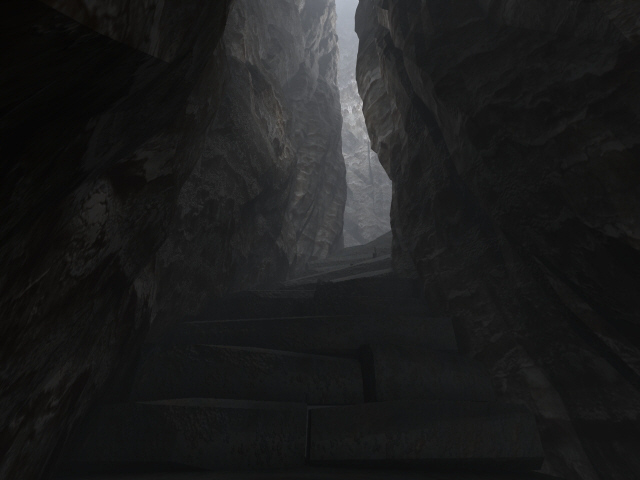
Here is some effects made 9 or 10 years ago with truespace (no plugins). You can also animate the textures for a movie. The first image use fog and glow spheres, the others use volumetric and alpha glow spheres.
- Attachments
-
-
-


Design - illustration - Animation
http://www.crea-vision.fr
http://www.crea-vision.fr