Alkathosk - Krahli, a character in develpment

User avatar
Draise
Captain
Posts: 3200
Joined: 21 Sep 2009, 19:33
Type the number ten into the box: 0
Location: Bogota, Colombia

Alkathosk - Krahli, a character in develpment

Post by Draise »

Krahli

Here is my first major modelling/rigging/animating attempt in the Rosetta/workspace side! It's gonna be a test character along with another with some funny animations to see how far I can push the realtime render engine and see if it's worth using truespace in the long run, maybe even developing it further. :bananatyping:

The plan is to develop the tools, the interface, the plugins, learn the bugs, the workarounds, the features, and generally push truespace to the limit to see how far I can go with a FREE develople pioneering gpu authoring software. It's my little obsession.

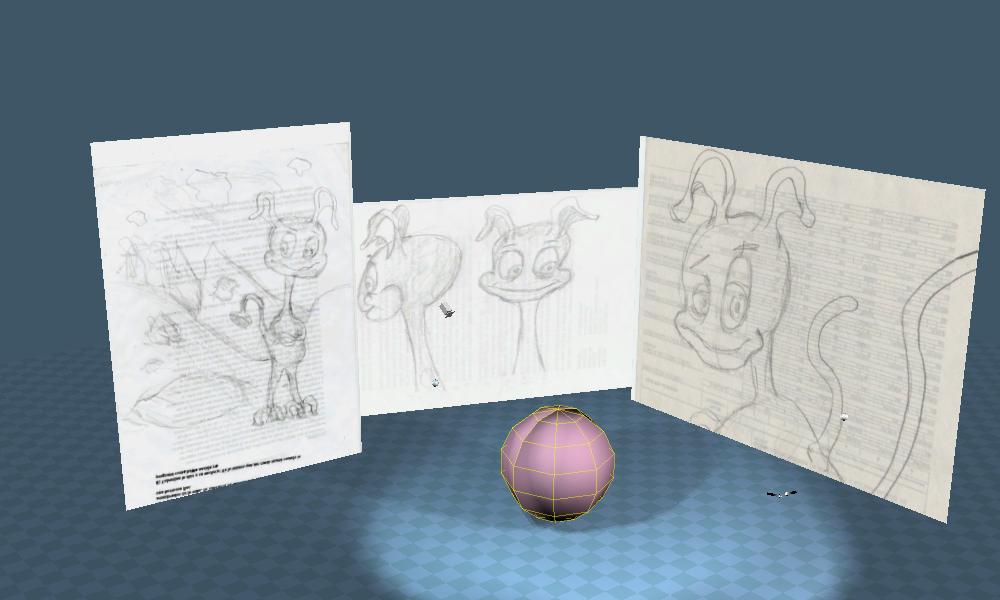
I have set up a small little scene to begin modelling. It has some of the best sketches. I've drawn a number a sketches to get an idea of the character, but I chose the best sketches to base my model off.

The texture is a simple DX constant shader. The shaderball is a simple lambert. I am tempted to use a simple phong with low speculars for modelling, but I'm not sure. Maybe I'll enjoy just the fun of a translucent skin!!!

SO! FEEL FREE TO COMMENT! GIVE ADVICE! SHARE! CRITICIZE! PRAISE!
Attachments
krahli_00001.jpg
Last edited by Draise on 23 Aug 2012, 19:01, edited 1 time in total.
v3rd3
Lieutenant Commander
Posts: 1191
Joined: 21 May 2009, 20:04

Re: Krahli - a character in develpment

Post by v3rd3 »

I can see that you like characters with a good sense of humour to them.... this will be interesting.
User avatar
trueBlue
Captain
Posts: 5548
Joined: 06 Jul 2009, 22:50
Type the number ten into the box: 10

Re: Krahli - a character in develpment

Post by trueBlue »

Awesome! I like you style. I will be watching from the sidelines. If you are using tS761 Beta8 full or the standalone you might want to install the Unofficial Update as some of the Character buttons are not working as expected.
viewforum.php?f=55"
HTH
User avatar
Draise
Captain
Posts: 3200
Joined: 21 Sep 2009, 19:33
Type the number ten into the box: 0
Location: Bogota, Colombia

Re: Krahli - a character in develpment

Post by Draise »

Ok, update.

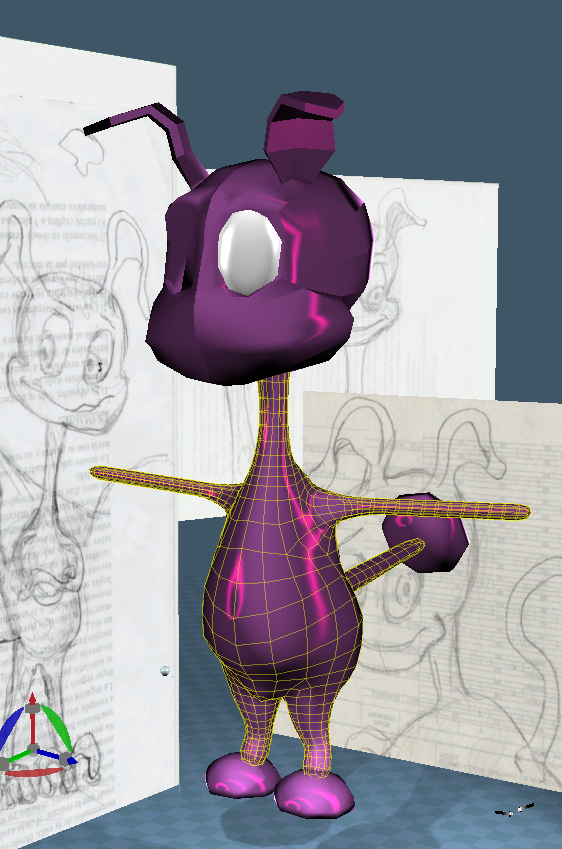
I have been a bit busy lately to have had much progress with development. But I have started the body this evening.
Capture.PNG
I have started to try figure out the inner tubes of trueSpace. Not too complicated, just a little messy and easy to fiddle with (a blessing in disguise later I spose, practically makes this program opensource!) Oh.. and I'm no coder, so it has slowed things down somewhat. I contacted Clinton and he seemed happy to give me some hints as to how to keep things developing and... overall, my desire: keep it tidy and functional.

I have re-programmed the shortcuts to suite my needs. It is much more intuitive, and I have also created an easier and intuitive way of mesh editing, through shortcuts. I must have added double the shortcuts, but double the efficiency of TS. They are mostly based off Autodesks Softimage's mesh editing shortcuts. I'll document it eventually. Keys including views, render visibility, refined axis restraints, new selection tools without having to be in the point edit mode (skips a step), UV navigation and selection from keyboard, etc.

I also cleaned up a lot of libraries creating new ones and have been working on my layout and the like. The blessing and also curse of TS is the fully customizable layout. I am finding it hard trying to figure out what is good for me. I use a dual monitor, so I have to make a new one from the other defaults. I keep one 3D space on one screen, with most toolbars attached, and then keep the LE editor, library, stack/panel and animation editor on the otherside. Sometimes I add a new plugin/library toolbar that I snap it to the 3D side. Sometimes tho, I have item float UNDER the 3D window, as they are libraries or things that come from the root workspace window. Thus I loose them. I have yet to figure that out..

How do you work? What programs? Do you work with dual monitors? I'd love to see yoru layouts, if you want, send me your layouts and I'll try it out!

I am having some problems making and saving toolbars upon changing layouts.. as custom ones disappear over a layout change. I found a plugin I have yet to fully figure out which solves that small issue, thanks to Clinton. This theoretically saves your toolbars into a library. It does the trick, tho I had troubles with hiding/showing the toolbars (jscript error). I think this is due to having the 3D view selected or not (it gets unselected cause it's floating), which was warned and is a known issue. I wonder if a "call the 3D space window" command would fix that, instead of having it confused when your 3D space is unactive, thus disactivating the toolbars it has memorized. This is a reoccurent issue as i have floating windows cause of dual monitor. But the plugin is great, the toolbar manager, memorizing toolbar sets to pull when needed. Find it here --> http://www.clintons3d.com/plugins/trues ... index.html

I also found a quick way to setup new toolbars from truespaces preset buttons. I have yet to learn how to make custom buttons for new scripts, but that's come later (say open the layers panel, show/hide, add constraints, fancy bevel/extrudes, etc). Once I figure that out, it would be awesome to make a new installation package that would include the update with the installation, the plugins, the new layouts, the new shortcuts, and maybe even new libraries. With time............. Check out the thread on making new toolbars here --> vi ... om+buttons

I am working in the Rosetta version only (updated), as I found the bridge, tho beautiful and useful as it ties in the model side of TS 6.6 quite nicely, to cause some issues. So I'm trying to keep the program clean and see how it works. Most of the tools I need for animation, modelling and the like are on in the Rosetta version. (minus paths and nurbs, but I don't really need those as of yet..)

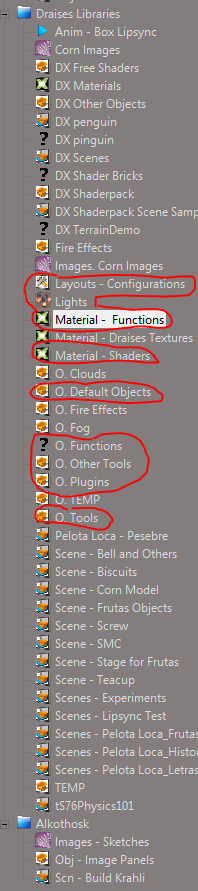
The following picture is a little of my libraries I'm making. They contain a new list of shaders/textures, LE texture nodes, other nodes, tools, plugin installation scripts, etc. They are a mash of Parva shaders/defaults, Clinton's plugins among others that I'm collecting. I wonder if I can redistribute them..! I need to ask.
Capture2.PNG
So questions:
  • Do you want to take a look at my libraries? or my new and improved shortcuts? Let me know!
  • Anyone know how to program shortcuts to context menu items? (like open/save/etc|bezier/linear/etc from right clicking on some things)
  • Also, do any of you happen to know how to make a new installation script/*.exe that can automate unpacking and installing TS7.6 + updates + new files + plugins? If not, will take some time till I get a good pack out...
  • How do you keep things organize in TS?

till next time!
User avatar
Draise
Captain
Posts: 3200
Joined: 21 Sep 2009, 19:33
Type the number ten into the box: 0
Location: Bogota, Colombia

Re: Krahli - a character in develpment

Post by Draise »

Figure out how to make some buttos to some plugins, and figured out how to save and make toolbars, and finally figured out better layouts.

You can check out how to do the such here, or just find what I made there.

vi ... 7&start=10

This program is more and more cool the more I use it. Quite fun.

Here is an update of the modeling progress. I haven't gone that far, as of work and some life issues. But it's coming on. Texture is only provisional for now. =)
Attachments
see.PNG
User avatar
Draise
Captain
Posts: 3200
Joined: 21 Sep 2009, 19:33
Type the number ten into the box: 0
Location: Bogota, Colombia

Re: Krahli - a character in develpment

Post by Draise »

Progress =) Also, a nicer textureto edit in.
Attachments
see2.PNG
User avatar
Draise
Captain
Posts: 3200
Joined: 21 Sep 2009, 19:33
Type the number ten into the box: 0
Location: Bogota, Colombia

Re: Krahli - a character in develpment

Post by Draise »

I finished the finer details of the main mesh, and the model is ready for Mudbox! I played quite a bit with the mirror modeller, boolean, verticy weld, and ther other general mesh tools of only the Rosetta side. Most of the time I used only the keyboard, as it helps with the work flow. Also, from the get go select tools without having to enter the point edit mode.

Enjoy!
Attachments
see3.PNG
User avatar
trueBlue
Captain
Posts: 5548
Joined: 06 Jul 2009, 22:50
Type the number ten into the box: 10

Re: Krahli - a character in develpment

Post by trueBlue »

Draise wrote:Progress =) Also, a nicer textureto edit in.
I like one Ambient light located very far away from 0,0,0 and no Ground for modeling.
User avatar
Draise
Captain
Posts: 3200
Joined: 21 Sep 2009, 19:33
Type the number ten into the box: 0
Location: Bogota, Colombia

Re: Krahli - a character in develpment

Post by Draise »

trueBlue wrote:
Draise wrote:Progress =) Also, a nicer textureto edit in.
I like one Ambient light located very far away from 0,0,0 and no Ground for modeling.
Nice one! I tried the Ambient light setup and it works like a charm.. tho I did throw in some spot lights and shadows just for the fliping fun of it. =) My latest model is a tree charachter in WIP. This one is slightly on hold, but when I get home tonight, I'll work on it.
User avatar
Draise
Captain
Posts: 3200
Joined: 21 Sep 2009, 19:33
Type the number ten into the box: 0
Location: Bogota, Colombia

Re: Krahli - a character in develpment

Post by Draise »

Long time since I worked on this little dude and his world. I added hands today.

Tried to UV him today, but didn't get too far. The program crashed cause I need to upgrade it.

I hate the holiday season as I do nothing :x ...... so I'm going out to party, have a drink or two, dance a little, eat some. Get out of the house. I'm traveling soon, so this will still wait and I'll be happy and crazy.. but I'll work on him little by little..
Attachments
6.PNG
User avatar
Draise
Captain
Posts: 3200
Joined: 21 Sep 2009, 19:33
Type the number ten into the box: 0
Location: Bogota, Colombia

Re: Krahli - a character in develpment

Post by Draise »

So far I have been using the program trueSpace for other projects, but little by little I'm working on a script, technical script and a storyboard to then make an animation in trueSpace entirely.

I have found the program to be buggy in a number of things. it is like learning how to get a long with a new girl!! very temperamental.

Considering the LE, I found that sometimes a look will crash truespace, and there is no way of stopping that. I find that after long loops of nodes in a material (say a constant) one must wait a while to unconnect at the top of a line. Sometimes it is faster to delete that top node and relink agian later. It too is more stable. Sometimes unlinking in heavy compound nodes crashes truespace.

The LE has it's bugs, but also appears powerful. if therere were safeguards, like logic and loops constraints, then it can be super powerful.

Modeling is almost flawles in the WS. Only sometimes a dynamic sweep on lines or verticies will crash TS.

I am still working around other things. Sometimes loops in the LE concerning materials will hog the system, sometimes crashing it.

Other times, sometimes with open dialogues with exporting and importing obj's from external plugins makes truespace unoperable. It hasn't frozen, it just doesn't want to do anything, forcing me to shut it's services to get access again.

There are other things plugin based, or other system performance based, but i'm getting the hang of it. I have made a set of extensive shortcuts and plugins with scripts and layouts for a dual monitor. It so far has been good for modeling polygon based models quickly.

So.. thus continues my evaluation!
User avatar
Draise
Captain
Posts: 3200
Joined: 21 Sep 2009, 19:33
Type the number ten into the box: 0
Location: Bogota, Colombia

Re: Krahli - a character in develpment

Post by Draise »

Image

I am now using another free software for the UV's. As I found it to be far superior in it's unwrapping. It is taking me forever to get the hang of it, but the more I learn of Blender, the more I know it has the potential to work.. But dayum! It's fiddly.
User avatar
Draise
Captain
Posts: 3200
Joined: 21 Sep 2009, 19:33
Type the number ten into the box: 0
Location: Bogota, Colombia

Re: Krahli - a character in develpment

Post by Draise »

Image

Well that was fun, now it's way too late. I still have some over lapping UV seams, but that can be fixed later. I am satisfied with the export and import of the UV's with the LUUV obj import plugin. Now I am wondering how to paint the textures.. either using GIMP, Paint.Net, Sculptris or even Blender. Blender I find has a bit of a fiddly learning curve, so may just work with some layers textures in GIMP from Sculptris, that maywork. It's unfortunate that sculptris doesn't have deformation and paint layers like Mudbox of Zbrush!

But this project will be entirely built on free legal software. =)
froo
Captain
Posts: 2554
Joined: 22 May 2009, 12:13

Re: Krahli - a character in develpment

Post by froo »

Hey Draise!
I know I am a little late to the party (i.e. this thread) but I wanted to say, I am impressed by the fact that you can model a character like this in trueSpace Workspace. Very nice! :bananacheers:
User avatar
Draise
Captain
Posts: 3200
Joined: 21 Sep 2009, 19:33
Type the number ten into the box: 0
Location: Bogota, Colombia

Re: Alkathosk - Krahli, a character in develpment

Post by Draise »

Image
Image

Starting to sculpture some textures for this guy, need to relax.

I was mugged a few days ago and lost most of my prized and sentimental electronics and equipment. Harddrives, drawing tablet, bike.. etc. But life needs change every now and then. So I need to work on some things every now and then, my projects, on my ideas... get back on my feet. Sucks when punks with knives can take everything you hold valuable.


So here is Krahli! Later I'll be painting his textures later today while I wait for the last renders for the English version of the SenFlores Trailer (btw, you can PM me for the sneak preview!). Thinking some purple/magenta/blues colour going. Minlis also has some rigging development going on! I am thinking colours as this is a realtime spectacular to relax...
User avatar
Finis
Captain
Posts: 5410
Joined: 21 May 2009, 18:26
Type the number ten into the box: 0
Location: America!

Re: Alkathosk - Krahli, a character in develpment

Post by Finis »

Draise wrote:punks with knives
Sorry they stole your stuff. That s*cks. I hope the police catch them.

PM you later for that preview trailer. I hope you all make a fortune and kids love the show!
I prefer dangerous freedom over peaceful servitude. -- Thomas Jefferson/Jean Jacques Rousseau
User avatar
Steinie
Captain
Posts: 2958
Joined: 21 May 2009, 17:38
Type the number ten into the box: 10

Re: Alkathosk - Krahli, a character in develpment

Post by Steinie »

Sorry to hear this news Draise. Sounds like you were mugged/robbed at home or in your car?

The Character's stomach looks kind of lumpy. Does this character hang around toilets?
User avatar
Draise
Captain
Posts: 3200
Joined: 21 Sep 2009, 19:33
Type the number ten into the box: 0
Location: Bogota, Colombia

Re: Alkathosk - Krahli, a character in develpment

Post by Draise »

Hehehe... well he doesn't really have to go to the toilet because.. he's a cartoon. They don't have to worry about that! Maybe that's why it kinda looks like indegestion.

I was mugged on a foot bridge on the way home. I had my stuff with me because I take it too and from work to keep two backups of everything and because I do art at work and at home. I was on my bicycle.

I found a simple way to get simple meshes (the low poly) into sculptris for sculpting. I think I mentioned it before, but if you subdivide, freeze then triangulate, it works out quite well. Then you can SD in scultris for more detail, depending on your computer.

Image
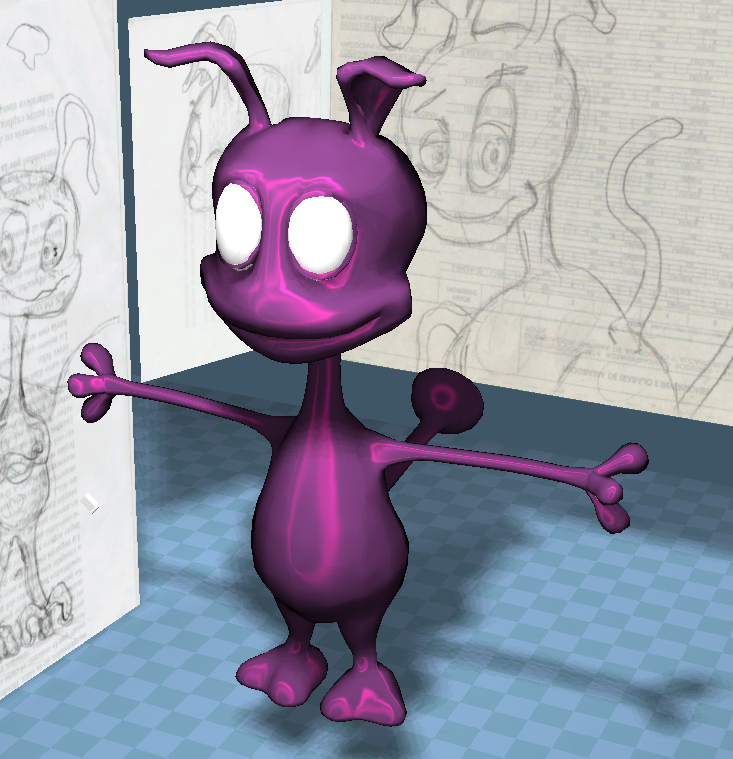
Painting done! Implied with a nice translucent skin! This time I scaled the guy to his actual size. Makes rigging easier.

I can't do any Normal Baking nor AO baking yet because SMAK isn't working on this computer for some reason. The floating menus are transparent. I will have to do this at home. Also the Normal Map baking in Blender needs similar UV's for it to work. SMAK does not.

Minlis still needs some texture cleanups...

Return to “Work in Progress”