Custom Toolbar button

free scripts, plugins, models, textures
User avatar
trueBlue
Captain
Posts: 5548
Joined: 06 Jul 2009, 22:50
Type the number ten into the box: 10

Custom Toolbar button

Post by trueBlue »

Custom Toolbar button
Capture.PNG
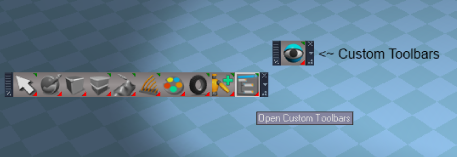
This script installs a Custom Toolbar button into the WorkspaceNav toolbar as shown above.
LMB = Opens the Custom Toolbar
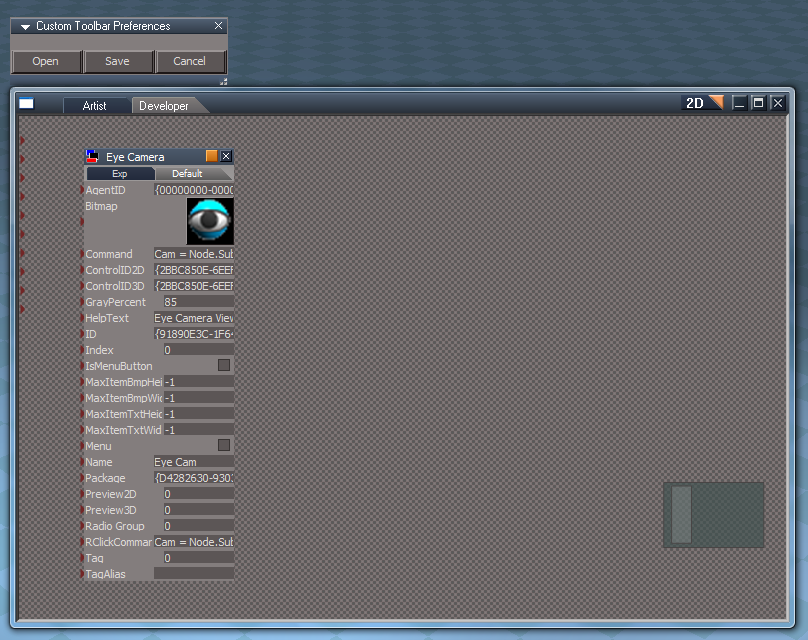
RMB = Opens the Custom Toolbar Preferences panel

Note: There is no button installed with the Custom Toolbar by default, so it will not be usefull unless you install one.
Right click the Custom Toolbar button to open the Custom Toolbar Preference (As shown below) panel where you can Open the Custom Toolbar in a Link Editor and Save your buttons.
Capture2.PNG
In the next post I will upload the improved Eye Camera toolbar that installs into the Custom Toolbar.

Edit: Added Video showing the Installation and customizing the Custom Toolbar.
Removed 3/7/2018
User avatar
trueBlue
Captain
Posts: 5548
Joined: 06 Jul 2009, 22:50
Type the number ten into the box: 10

Re: Custom Toolbars button

Post by trueBlue »

Here is an improved Eye Camera toolbar that installs into the Custom Toolbar in the previous post.
Important: You must install the Custom Toolbar first!
Attachments
Camera Viewer Toolbar.zip
(55.54 KiB) Downloaded 288 times
User avatar
Steinie
Captain
Posts: 2958
Joined: 21 May 2009, 17:38
Type the number ten into the box: 10

Re: Custom Toolbars button

Post by Steinie »

Good!
I wasn't crazy how the older toolbar behaved. I do use this plug-in thou
and love it!
Thnanks trueBlue.
:bananathumb:
User avatar
trueBlue
Captain
Posts: 5548
Joined: 06 Jul 2009, 22:50
Type the number ten into the box: 10

Re: Custom Toolbars button

Post by trueBlue »

Steinie wrote:Good!
I wasn't crazy how the older toolbar behaved. I do use this plug-in thou
and love it!
Thnanks trueBlue.
:bananathumb:
What is it, that you were not crazy about? I'll assume you are referring to the Camera Viewer toolbar and if so could you post your request here:
viewtopic.php?p=13792#p13792"
None of the scripting was changed in this version, I just improved the icons. Also it was included here as an example on how to install to the Custom Toolbar.
Peter
Senior Chief Petty Officer
Posts: 170
Joined: 18 Apr 2010, 15:18
Type the number ten into the box: 0
Location: Texas

Re: Custom Toolbars button

Post by Peter »

Thanks :D , installing now.
a day without orange juice is like... a day without orange juice
User avatar
trueBlue
Captain
Posts: 5548
Joined: 06 Jul 2009, 22:50
Type the number ten into the box: 10

Re: Custom Toolbars button

Post by trueBlue »

I changed this project in such a way that I hope makes it easier to cutomize your version.
RMB clicking the Custom Toolbars button now opens a Custom Toolbar Preference panel.
The RMB command use to Hide/Show the Custom Toolbar which does not have much value as you can Close and Open instead. More details in the first post.

Edit: Added Video showing the Installation and customizing the Custom Toolbar.

Return to “Repositorium”