Male Homosaure
-
marcel

- Captain
- Posts: 2247
- Joined: 21 May 2009, 19:52
- Type the number ten into the box: 0
- Location: paris - France
Male Homosaure
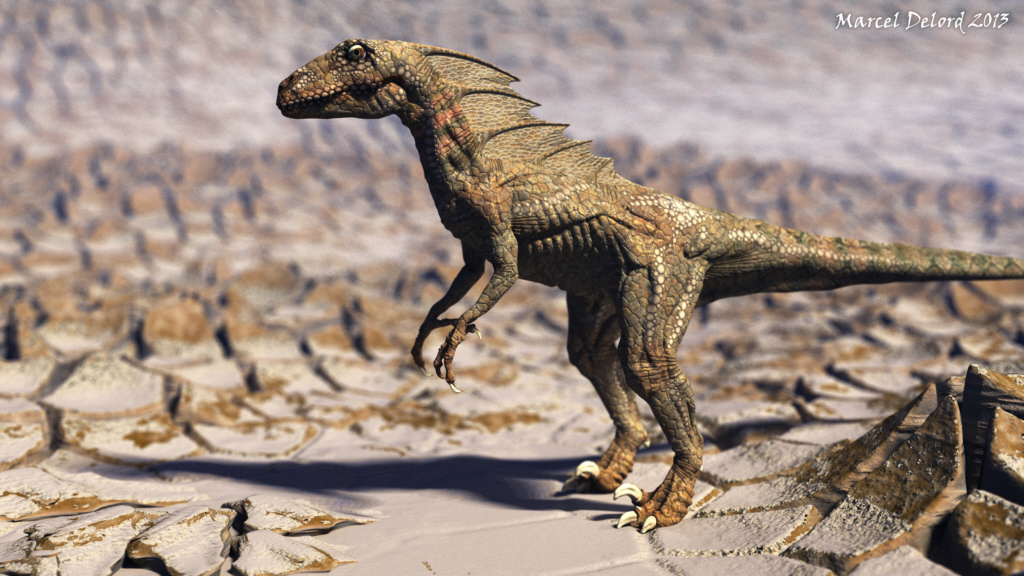
Here is a new homosaure. It is a male smaller than the female and with a membrane on the neck that deploys when it lowers his head. An attribute to seduce because it can not use its strength.
- Attachments
-
Design - illustration - Animation
http://www.crea-vision.fr
http://www.crea-vision.fr
-
Draise

- Captain
- Posts: 3200
- Joined: 21 Sep 2009, 19:33
- Type the number ten into the box: 0
- Location: Bogota, Colombia
Re: Male Homosaure
WOAH.
Your camera optics are getting much better, love what you are doing with it, the DOF and everything, and the textures and detail is stunning!
Congrats on this one, and keep being awesome.
Your camera optics are getting much better, love what you are doing with it, the DOF and everything, and the textures and detail is stunning!
Congrats on this one, and keep being awesome.
-
MikomDude

- Captain
- Posts: 1930
- Joined: 04 Oct 2010, 11:12
- Type the number ten into the box: 0
- Location: The Hague, Netherlands
Re: Male Homosaure
He sure looks hip enough to go down with the ladies.
-
spacekdet

- Captain
- Posts: 1810
- Joined: 27 May 2009, 15:00
- Type the number ten into the box: 10
- Location: On the day shift at the Utility Muffin Research Kitchen
Re: Male Homosaure
He needs a little color on his dewflap.
But really, who doesn't?
But really, who doesn't?
-
Steinie

- Captain
- Posts: 2958
- Joined: 21 May 2009, 17:38
- Type the number ten into the box: 10
Re: Male Homosaure
Marcel,
I like this one even better then your last one! Please tell me how you added the textures to this one. Did you use Sculptris to texture? How did you get such fine detail?
Was the scene rendered in trueSpace?
Truly stunning.
I like this one even better then your last one! Please tell me how you added the textures to this one. Did you use Sculptris to texture? How did you get such fine detail?
Was the scene rendered in trueSpace?
Truly stunning.
-
jamesmc
- Captain
- Posts: 1776
- Joined: 08 Jul 2009, 15:35
Re: Male Homosaure
Oh yeah! Mr. Homosaur is getting all spikey! I like it a lot!

Walk by faith, not by sight.
-
marcel
- Captain
- Posts: 2247
- Joined: 21 May 2009, 19:52
- Type the number ten into the box: 0
- Location: paris - France
Re: Male Homosaure
Thank you for your comments.
Steinie: I put some pictures on the zip to illustrate the method.
It is so simple that it may disappoint the lovers of the technic. You just have to know how to draw.
01 - First I added some details (orange) with trueSpace on my Sculptris model.
02 - I import the image in Illustrator and I draw the details (vectors).
03 - Always on Illustrator I combine photos and details to enrich the texture.
04 - On another file I do the same work for the bump.
05 - I import the images (color and bump) on the material editor of Bryce.
Simple, basic, and I keep checking all the details. In addition it can be suitable for any 3D software. No specific functions.
For the render, I used Bryce and features "true ambience" and "depth of field". I select the eye and I click "set current selection" to define the clearest point of the image. I change the lens radius to adjust the intensity of the blur.
What I did there requires no special knowledge. I never fit into overly complex options or procedural textures.
Note that I could use this work to make a similar render on trueSpace because the materials are only images on a simple uv map. Nothing else.
Steinie: I put some pictures on the zip to illustrate the method.
It is so simple that it may disappoint the lovers of the technic. You just have to know how to draw.
01 - First I added some details (orange) with trueSpace on my Sculptris model.
02 - I import the image in Illustrator and I draw the details (vectors).
03 - Always on Illustrator I combine photos and details to enrich the texture.
04 - On another file I do the same work for the bump.
05 - I import the images (color and bump) on the material editor of Bryce.
Simple, basic, and I keep checking all the details. In addition it can be suitable for any 3D software. No specific functions.
For the render, I used Bryce and features "true ambience" and "depth of field". I select the eye and I click "set current selection" to define the clearest point of the image. I change the lens radius to adjust the intensity of the blur.
What I did there requires no special knowledge. I never fit into overly complex options or procedural textures.
Note that I could use this work to make a similar render on trueSpace because the materials are only images on a simple uv map. Nothing else.
- Attachments
-
- Texture.zip
- (1.18 MiB) Downloaded 239 times
Design - illustration - Animation
http://www.crea-vision.fr
http://www.crea-vision.fr
-
Finis

- Captain
- Posts: 5410
- Joined: 21 May 2009, 18:26
- Type the number ten into the box: 0
- Location: America!
Re: Male Homosaure
Excellent! He looks agile enough to deal with that terrain.
Homosaure's should be in a scene with these vi ... f=6&t=3627"
Homosaure's should be in a scene with these vi ... f=6&t=3627"
I prefer dangerous freedom over peaceful servitude. -- Thomas Jefferson/Jean Jacques Rousseau