I'm fixing up a F-15 Eagle VRML model that has some terribly bad geometry in one area along the bottom. http://www.fighter-planes.com/jetvrml.htm"
Decompose the object, unglue it all, normalize the location of axes of all the bits, then the main fuselage sides and the nose can be decomposed, unglued etc.
The problem is the bottom edge of the largest chunk of the fuselage. It's sort of curled in on itself. That's the part that needs saved, with the lower angled faces removed.
I deleted all those wrong edges and cut that strip away at the back by where the engine nozzle would be. Now the problem is re-attaching it. Would be nice if I could just glue it then have it forget it was two separate pieces then start adding new edges in the correct places, then add a face to close it up and finish it by adding more edges.
But I haven't figured out a way to do that so it looks like I'll have to rebuild that bottom strip from scratch. It's 5 vertexes wide, didn't count the number along the length.
I could manually select and write down all three numbers for every vertex then add new ones to the new edges I added after closing the fuselage half minus that strip. Would be much easier to be able to get a text list and print it out with some way to easily tell which one goes where.
If I get this majorly fouled up part done, then I can go on to fixing up the other pieces and extending the center plane of the fuselage halves to actually meet, and aligning out of whack bits of other parts so they'll match up.
Any way to get a coordinate list of all vertexes?
-
Galane
- Chief Petty Officer
- Posts: 111
- Joined: 30 Aug 2009, 10:45
Any way to get a coordinate list of all vertexes?
- Attachments
-
- f15-a0.zip
- A couple of versions of the scene, before and after cutting away the bad geometry to save the good parts.
- (149.28 KiB) Downloaded 300 times
-
Finis

- Captain
- Posts: 5410
- Joined: 21 May 2009, 18:26
- Type the number ten into the box: 0
- Location: America!
Re: Any way to get a coordinate list of all vertexes?
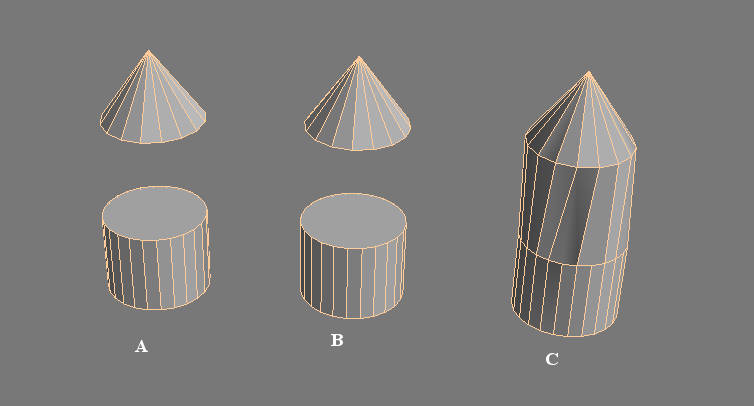
TS 7.6 Model side you can Boolean union objects that are not touching. Then they are one object so you can add new edges, weld vertices, etc. Try putting the rebuilt part near the fuselage, union them together, and then fine tune it.Galane wrote:Would be nice if I could just glue it then have it forget it was two separate pieces
In A there are two objects. In B they are unioned into one object. In C edges were added in point edit.
- Attachments
-
I prefer dangerous freedom over peaceful servitude. -- Thomas Jefferson/Jean Jacques Rousseau
-
Emmanuel

- Chief Warrant Officer
- Posts: 670
- Joined: 14 Jun 2009, 06:47
Re: Any way to get a coordinate list of all vertexes?
Finis solution is the way to go.
Some plugins from the PolyTools toolset, like Weld Face may also help.
Some plugins from the PolyTools toolset, like Weld Face may also help.
-
Fenerit

- Senior Chief Petty Officer
- Posts: 173
- Joined: 21 Nov 2011, 19:19
- Type the number ten into the box: 9
Re: Any way to get a coordinate list of all vertexes?
Not sure to have well-understood the issue, but a way to get the vertex list is through the point cloud exporter tSx vi ... =43&t=3139. It export the vertex coordinates (xyz) in various ASCII formats, so they are readable with a text editor. To avoid to have the full vertex list, one must leave on the scene only the targeted mesh (possibly the low fuselage, in your case).
-
Galane
- Chief Petty Officer
- Posts: 111
- Joined: 30 Aug 2009, 10:45
Re: Any way to get a coordinate list of all vertexes?
Can't boolean join non-solid objects. Sooo, next thing. Flip the normals on the strip so the right side is facing down, add new face on the top side, extrude it a little, triangulate, add new vertexes to the edges of the main part which are intersecting the strip and move them out of the way.
Now it joins and can be decomposed and joined again. Yay. Now I just have to connect the two where they need connected, and remove all the new edges and vertexes that had to be made just to get tS to allow the two formerly non-solid parts to be joined.
All part of the fun of working in a solid modeling program with files output from 3D apps that are apparently incapable of creating solid models. (Or at least files created by people who for some reason don't like making solid models.)
Now it joins and can be decomposed and joined again. Yay. Now I just have to connect the two where they need connected, and remove all the new edges and vertexes that had to be made just to get tS to allow the two formerly non-solid parts to be joined.
All part of the fun of working in a solid modeling program with files output from 3D apps that are apparently incapable of creating solid models. (Or at least files created by people who for some reason don't like making solid models.)
-
Galane
- Chief Petty Officer
- Posts: 111
- Joined: 30 Aug 2009, 10:45
Re: Any way to get a coordinate list of all vertexes?
Here's the result. Took a bit of work and I had to make new air intakes from scratch because the originals were just too screwed up.
Now it needs someone who is detail obsessed to fix it up into a fairly decent model.
Now it needs someone who is detail obsessed to fix it up into a fairly decent model.
- Attachments
-
- F-15.zip
- Formerly a crappy VRML scene, now a somewhat less crappy mesh with all parts solid.
- (137.63 KiB) Downloaded 291 times
-
Galane
- Chief Petty Officer
- Posts: 111
- Joined: 30 Aug 2009, 10:45
Re: Any way to get a coordinate list of all vertexes?
Dead link to PolyTools site.Finis wrote:TS 7.6 Model side you can Boolean union objects that are not touching. Then they are one object so you can add new edges, weld vertices, etc. Try putting the rebuilt part near the fuselage, union them together, and then fine tune it.Galane wrote:Would be nice if I could just glue it then have it forget it was two separate pieces
In A there are two objects. In B they are unioned into one object. In C edges were added in point edit.
 http://ckgamefactory.hp.infoseek.co.jp/ ... ytool.html"